#blueprint
402296 messages · Page 760 of 403
 faint pasture
Like for one of mine,
"Button down fires projectiles, which all detonate on input release"
Works very well as an actor or component as it has state (list of projectiles currently in the world)
How many on a character at any given time?
If you're going super data driven then learn GAS. Are you calling buffs/status effects abilities or just the classical spells/abilities like WoW or LoL?
 icy dragon
 odd ember
let's remember we're in <#221798862938046464>
odd ember
let's remember we're in <#221798862938046464>
As if there's no case of C++ heresy in this channel whatsoever 
faint pasture
in BP i'd just make 1 Ability = 1 actor/component
Unless it was a super simple but combinatorial system like Path of Exile, in which case I'd go data driven
 dreamy ice
sorry, probably 5 abilties max at a time, they will range from status effects to physical animations that spawn predefined actors afterwards.
faint pasture
dreamy ice
sorry, probably 5 abilties max at a time, they will range from status effects to...
Yeah just use actors for now.
dreamy ice
it just seems wrong to spawn actors in my component on my character to handle an ability. I
faint pasture
BaseAbility has event BeginAbility and event EndAbility, subclasses implement them and you're in business.
odd ember
dreamy ice
it just seems wrong to spawn actors in my component on my character to handle an...
use objects instead then
faint pasture
Well you need state and logic. Either combine them (Components or Actors), or seperate them (Logic in a component, state in a data only struct or object)
odd ember
if you're interested in creating a system, you should consider using some design patterns for this regardless
faint pasture
There's pros and cons to both.
dreamy ice
hmmmmmmm
odd ember
like I said, consider a system where abilities execute in a similar manner, and are processed equally
dreamy ice
It won't be too complex as abilities can't be queued and are immediately executed or not executed at all.
icy dragon
dreamy ice
it just seems wrong to spawn actors in my component on my character to handle an...
If it feels wrong to spawn an actor for abilities (even not ticking), then go for GAS.
faint pasture
That would be the seperated data driven approach, which can be super robust, but will make weird on-offs hard to do.
Fireball would be super easy.
Ability that triggers once you take 3 hits in 5 seconds and causes an AOE around every nearby enemy would be super hard.
odd ember
dreamy ice
It won't be too complex as abilities can't be queued and are immediately execute...
right but they still need to resolve, and you have to consider resolution order potentially
faint pasture
icy dragon
If it feels wrong to spawn an actor for abilities (even not ticking), then go fo...
Wait till he finds out that many MANY games spawn an actor per bullet.
icy dragon
Sure, C++ coding would be required, but at least no spawning actor, according to your peace of mind.
dreamy ice
faint pasture
Wait till he finds out that many MANY games spawn an actor per bullet.
ughhhh what a waste!
icy dragon
faint pasture
Wait till he finds out that many MANY games spawn an actor per bullet.
Ssshhh. It's the danmaku alliance secret 😉
odd ember
I don't know many games that spawn bullets as actors, that seems excessive
dreamy ice
y'all are destroying my brain here.
icy dragon
dreamy ice
ughhhh what a waste!
And still managed to get excellent framerate to boot.
faint pasture
dreamy ice
ughhhh what a waste!
Absolutely not a waste really. Don't prematurely blow your load optimizing yourself into a corner and getting nothing done. A game that exists and works is 100x better than one that doesnt but is algorithmically perfect.
You're in #blueprint , speed is not of the essence here.
shit working is
odd ember
faint pasture
Absolutely not a waste really. Don't prematurely blow your load optimizing your...
I think it's less to do with optimization and more to do with not accruing technical debt too fast
which is very easy with systems like these
faint pasture
odd ember
I think it's less to do with optimization and more to do with not accruing techn...
Imagine the technical debt needed to rework your entire ability handling system for a new spell you want to make instead of just making a damn class. There's reasons why people go this route.
odd ember
faint pasture
Imagine the technical debt needed to rework your entire ability handling system ...
yeah that's why I'm saying don't just create actors or actor components
 fiery glen
as someone who has made a system that can run 40k bullets per frame I would say just go with the actor bullets for now
faint pasture
That's the opposite. An actor can do whatever you want, whereas a data driven approach needs the entire system to support a new feature. Both have tradoffs.
fiery glen
you can replace stuff like that later as the bullet actor logic will generally be pretty isolated
odd ember
faint pasture
That's the opposite. An actor can do whatever you want, whereas a data driven a...
you need a system for this regardless
or you'll run into the issue of technical debt
unless you got 5 abilities and that's all you end up adding
but judging from their specs, they seem to want more than that
faint pasture
Naw, just TryStartAbility and EndAbility. It'll work for damn near everything.
icy dragon
dreamy ice
y'all are destroying my brain here.
Any particular existing RPG you're trying to reverse engineer the ability system from?
dreamy ice
Not really, just something that popped into my head and i thought it'd be neat to implement.
icy dragon
dreamy ice
Not really, just something that popped into my head and i thought it'd be neat t...
Get the idea working first. Elegancy comes third, or fourth.
faint pasture
Sometimes never lmao
odd ember
if I can give you one piece of advice: think of how you want the abilities to execute and resolve first.
icy dragon
dreamy ice
Not really, just something that popped into my head and i thought it'd be neat t...
I swear you'd running in circle trying to come up with the most elegantly built system without seeing the idea in action at all.
dreamy ice
icy dragon
I swear you'd running in circle trying to come up with the most elegantly built ...
probably right
icy dragon
Which is one of the reason people say BP is good for prototyping.
odd ember
I don't understand what's wrong about using some time to think about how to structure a system that is complex
if you put into code the first thing you think of all you do is setting yourself up for fail later
icy dragon
odd ember
I don't understand what's wrong about using some time to think about how to stru...
The problem is if you don't have a working prototype, you could lost direction of what actually need to improve from the idea.
odd ember
there's enough people giving terrible advice on youtube, let's not also make this another
dreamy ice
I also dont want to spend time on a system that doesn't work correctly
icy dragon
something that popped into my head
thought it'd be neat to implement
That's enough clue on getting the prototype work first, before going further.
I know changes can happen at anytime, but minimising major changes happening in the middle of the road can save your head and time.
odd ember
most likely it'll be a prototype that will get expanded upon without further thought to the structure
I've seen it happen too many times
but w/e, I have no stake in this
icy dragon
odd ember
most likely it'll be a prototype that will get expanded upon without further tho...
Ignore the structure, it's the matter if it makes sense in the gameplay or not.
odd ember
icy dragon
Ignore the structure, it's the matter if it makes sense in the gameplay or not.
that's bullshit, of course it'll make sense for the gameplay
dreamy ice
i mean i wouldnt build a skyscraper with wood if i knew it was going to be a skyscraper.
odd ember
dreamy ice
i mean i wouldnt build a skyscraper with wood if i knew it was going to be a sky...
the internet is full of such structures
icy dragon
odd ember
that's bullshit, of course it'll make sense for the gameplay
Not always the case lmao.
I had several tested systems scrapped myself, because it sounded cool on paper, but ended up not mixing well with the gameplay context.
faint pasture
OK here's the main decision to make about your system structure. There's pretty much 2 paradigms.
Object Oriented
Fireball is a subclass of BaseAbility, with methods StartAbility and EndAbility and various control variables (AimDirection, AimPoint, Etc.)
On StartAbility -> Spawn Projectile FireballProjectile at AttachedCharacter.SpellSpawnLocation heading in AimDirection
Data Driven
Fireball is an instance of structure AbilityStruct, with data fields IsProjectile, ProjectileClass, ManaCost, etc.
MyAbilityComponent inspects Fireball, applies mana cost, if IsProjectile, spawns ProjectileClass
that proves... nothing?
dreamy ice
So for instance if my player took any damage then i want to create an explosion around them, would i need to check for this on the players anydamage event or is there another way to access that information while in an attached blueprint component
icy dragon
odd ember
that proves... nothing?
If you say so
odd ember
it'll making sense for gameplay because it is the gameplay
faint pasture
dreamy ice
So for instance if my player took any damage then i want to create an explosion ...
AbilityActor binds ActivateAbility to owners EventAnyDamage dispatcher
OR
AbilityComponent is bound to EventAnyDamageDispatcher and triggers any of its data-only Abilities if they are set to trigger on AnyDamage
dreamy ice
Alright, also I like your explanation. Very helpful.
 rough cedar
So I tried to make a fresh character bp and it does pull up the jump function fine. So something happened to this one. But I put like months of work into making this character bp and cannot rebuild it from scratch just to get jump to work again. If anyone has a suggestion as to how to get it working again or to hard code that would be very helpful.
dreamy ice
is it an actual character that inherits from the character class?
rough cedar
yes
odd ember
rough cedar
So I tried to make a fresh character bp and it does pull up the jump function fi...
you could try migrating to a new project
faint pasture
Try just calling Jump on the CMC. I think it's a CMC thing, and Character just has a wrapper for it.
odd ember
since pretty much every other option has been exhausted
faint pasture
rough cedar
So I tried to make a fresh character bp and it does pull up the jump function fi...
You can remake it in like 20 minutes, just copy paste the nodes in and make the variables/events when prompted.
and by all means BACK UP YOUR PROJECT
odd ember
I'd personally pick the migration route as it is cleaner and doesn't factor in human error
rough cedar
i tried to drag off of the CMC and this is how the node appears
 dreamy ice
whaaaa
faint pasture
rough cedar
i tried to drag off of the CMC and this is how the node appears
It's fuqqed, just remake. It'll be fast. You using hot reload or any other black magic?
Try close project and delete intermediate and saved first
rough cedar
@faint pasture the only reason i'm trying to hold back from it is because my character has all this stuff each with their own specific variables
 dreamy ice
👀
rough cedar
yeah this character does A LOT of stuff
faint pasture
oh shi lol
icy dragon
rough cedar
<@!127902729677963264> the only reason i'm trying to hold back from it is becaus...
Migrate the stuff to a new project.
odd ember
rough cedar
<@!127902729677963264> the only reason i'm trying to hold back from it is becaus...
migration is really clean
and easy
faint pasture
You DO have backups right?
rough cedar
ok ill migrate
icy dragon
Been done that everytime I fucked up the assets or Git settings
faint pasture
I've never had a problem and I've been upgrading the same project since 4.4
rough cedar
i dont even know if it was an upgrade prblem tbh
it could be user error
idk when it stopped working
icy dragon
rough cedar
it could be user error
Or more likely cosmological error.
rough cedar
i was working on a lot of other aspects for months so jump wasnt on my mind
odd ember
does it matter?
rough cedar
yeah, now im doing jump stuff haha
odd ember
I mean does it matter when it happened
rough cedar
nah
odd ember
I'd focus on getting it back up to speed
rough cedar
yeah
 bright harbor
quick question, is there any way to get a variable out of a parent character class from a child?
faint pasture
bright harbor
quick question, is there any way to get a variable out of a parent character cla...
Yes you automagically already have it
icy dragon
bright harbor
quick question, is there any way to get a variable out of a parent character cla...
Just get it per usual
faint pasture
theres a button to show inherited variables in the variable panel
icy dragon
Or right click / add node menu.
bright harbor
omg... i just checked and y'all are right, thank you so much, i feel stupid
rough cedar
so if i just straight up migrate this BP to a new project it should clean up that jump function?
faint pasture
rough cedar
so if i just straight up migrate this BP to a new project it should clean up tha...
You could have done it 5 times by now
rough cedar
haha ok
icy dragon
rough cedar
so if i just straight up migrate this BP to a new project it should clean up tha...
It should fix itself. Like 99% chance.
faint pasture
bright harbor
omg... i just checked and y'all are right, thank you so much, i feel stupid
In case you didnt see the button
 rough cedar
trying now
icy dragon
1% chance of error would be astronomical error screwing up the electricity in your computer preventing Jump node to work properly.
odd ember
rough cedar
so if i just straight up migrate this BP to a new project it should clean up tha...
assuming that you haven't made any changes to CMC yourself in the code, yeah
in either case, even if you have, you'll know
faint pasture
Try delete the intermediate and saved first though, I've had that fix stuff
odd ember
those are just compiled cpp files
rough cedar
can i migrate to the same project?
odd ember
shouldnt have any bearing on BP
odd ember
rough cedar
can i migrate to the same project?
that wouldn't make sense
rough cedar
yeah youre right
this is what it looks like after migration

do i have to remake this whole bp again?
odd ember
rough cedar
this is what it looks like after migration
try creating a new jump node
rough cedar
 faint pasture
What's the warning?
rough cedar
"call unknown function jump"
faint pasture
Can you export that character and post it here? I gotta see this
odd ember
rough cedar
"call unknown function jump"
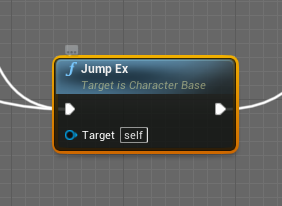
Unreal Engine Forums
You can still have a lot of code in the character blueprint. But this will only work if you have a C++ project. The only difference you have to do is to “Reparent Blueprint” to a C++ class which inherits from “ACharacter” which has the wrapped jump function: // Header file ... ACharacter_Base : public ACharacter ... UFUNCTION(Category = "Ch...
look at the last post
maybe some recourse
 faint pasture
I know, i was pointing out the approach that probably is quickest and easiest
faint pasture
You can either make a new empty character bp to reparent it to or try the archvis character
faint pasture
rough cedar
ok just tried this
What did you reparent it to?
rough cedar
BP_BaseCharacter first, then to Character
faint pasture
And BP_BaseCharacter is a new post 4.25 class with a working jump?
rough cedar
oh idk
i didnt see one in the list named BP Character
so i selected BP_BaseCharacter
faint pasture
What class are you working in that's busted?
odd ember
rough cedar
i didnt see one in the list named BP Character
BP_Character is a class you should make
that inherits from Character
faint pasture
I'm thinking it's already the class he's working in lol
rough cedar
ok ill make a new one
faint pasture
Show this on your busted BP
 rough cedar
 faint pasture
K just make a throwaway BP character, reparent your busted class to it, compile, and reparent back
rough cedar
on it
faint pasture
check that jump node works on the throwaway and after reparenting, and make sure to make new jump nodes and delete your existing ones

 odd ember
see if you can create a jump wrapper
create a function called NewJump, and put jump in that
and see if you can call that from your previous class
odd ember
the former
rough cedar
 odd ember
yep, see if that works on your busted character
have you ever used cpp in this project btw?
rough cedar
 rough cedar
odd ember
have you ever used cpp in this project btw?
rough cedar
odd ember
have you ever used cpp in this project btw?
no
odd ember
what's the error?
odd ember
try to validate data in the main editor by going to file > validate data
rough cedar
ok gonna take a few mins
faint pasture
@rough cedarWhat happens if you duplicate the busted BP
 worn plaza
Is it possible for the Spectator class to access the gamemode? Trying to cast to the gamemode while a spectator returns a failed cast.
rough cedar
faint pasture
<@!162726052517380096>What happens if you duplicate the busted BP
Same issue
 zealous moth
@rough cedar add a self input just for fun
Some nodes need an explicit self not implicit
rough cedar
ok one sec its almost done validating my project
@odd ember looks like the validation failed

most of this stuff is plugins i was testing
odd ember
I don't think there's an issue
rough cedar
Any idea of how to fix the jump thing?
i know youve already done so much, i really appreciate it!
 unreal quail
is there any way to call the parent implementation of a custom event?
rough cedar
let me check
 rough cedar
zealous moth
<@162726052517380096> add a self input just for fun
rough cedar
zealous moth
<@162726052517380096> add a self input just for fun
wont let me connect a reference to self to this
rough cedar

i can use all the fuctionality of the Character movement component in it. just not jump.
zealous moth
I would say restart project from scratch with 3p template and see if you have that issue. If you do your class is bugged
rough cedar
its just way too far along for that. are you saying migrate the whole project or just start over?
zealous moth
Well my reasoning is that your base character class isnt good
So try it in a fresh project
rough cedar
if i migrate my stuff to a new project, would that in any way also corrupt the new one?
zealous moth
Dont migrate just test
zealous moth
What is the error?
I see error bu no log
Went back a few posts
Ah nvm the target
.... and just to confirm the input is in the character, not in the controller.
If you attach get player character does it work? @rough cedar
rough cedar
yes input is in the character. checking get player character now.
zealous moth
Worst case reparent and reparent to character class
faint pasture
zealous moth
Worst case reparent and reparent to character class
Already tried I'm pretty sure
 round moth
hey so for my main menu, i followed a tutorial that had it be that it makes a new level for the menu. how do i save the place and camera angle of the player when they go back to the game
round moth
im not sure if that answers my question o3o
 worthy frost
@dawn gazelle you seemed to have spammed the channel. Not sure what happened but it was a bunch of repeated lines. Just letting you know.
 dark crow
round moth
hey so for my main menu, i followed a tutorial that had it be that it makes a ne...
dark crow
round moth
hey so for my main menu, i followed a tutorial that had it be that it makes a ne...
You could use a SaveGame
For the Location and Rotation or directly Transform
 trim matrix
round moth
im not sure if that answers my question o3o
trim matrix
round moth
im not sure if that answers my question o3o
Save game is an option, the other option is saving the location value withing the game instance. The game instance persists between all levels and can be used to store any data that needs to be held between them.
 fading raptor
can someone help me out real quick, Im trying to summon a character blueprint in place of my current blueprint, and vise versa via the flipflop. However, for some reason it does not destroy the summoned actor when i want to revert back to the original character

The blue section works fine
The yellow is where the problem is, specifically the red
fading raptor
But i spawn the actor before destroying it
 timber knoll
Hoe does that even work
You can’t destroy self and try execute code after
Destroy self = all logic is also lost
fading raptor
the top section?
fading raptor
The top section works fine though, because i destroy my current actor and spawn a new one in its place
fading raptor
ahhh
fading raptor
yeah i need to figure out how to let the two bp's communicate
 tawdry mural
and put destroy actor after all the code
timber knoll
You are working with player controller there
Why not have it handle the spawning and destroying?
fading raptor
Because player controller always confuses me
timber knoll
Also before the second bit
 gentle urchin
You could just spawn both at the start, and hide/unpossess as needed
timber knoll
Check if the reference is valid
fading raptor
oh my god you're right
gentle urchin
Makes sense doing it from pc tho
fading raptor
I was stuck because if i hid it it would still function
man its too late at night
I got it to work, putting the top half in 1 bp and the other in the other bp
only problem is i have to press 2 different keys
timber knoll
Yeah that’s where PC or hiding unhiding will help
fading raptor
yeah im trying that method rn
 lyric flare
hey there! 🙂 can somebody give me a hint how to disable physics for a character movement?
if I deactivate the movement component, I can not re-activate it properly (activate is not doing anything, he can never move again)
 thorn ermine
lyric flare
hey there! 🙂 can somebody give me a hint how to disable physics for a character...
thorn ermine
lyric flare
hey there! 🙂 can somebody give me a hint how to disable physics for a character...
The standard character movement component relies on physics to work, if you don't want that, write your own movement component.
If you disable physics on the component, it will stop working as it uses customized code in c++ to perform its functions, not just simple physics forces.
lyric flare
I don't need the movement to work during that time
the character is riding in a vehicle meanwhile
gentle urchin
Setting custom time dilation to 0 would negate physics, wouldnt it?
 eternal reef
Cant you achieve that with switching Movement Modes?
gentle urchin
Or that probably
thorn ermine
lyric flare
I don't need the movement to work during that time
Can I recommend something in stead?
Just use a skeletal mesh as a placeholder actor, so "sit" in the vehicle, and not just put your entire character there, with its code and tick functionality running. 🙂
eternal reef
thorn ermine
Can I recommend something in stead?
Just use a skeletal mesh as a placeholder ac...
Oh are you referring to posessing? If so, you might be able to answer a question of mine...
Do you perhaps know on how to "copy and paste" one cameras view to another one (specifically when posessing another actor)
I am stuck with the issue that the input rotation gets messed up when I just use the transform of camera 1 and apply it to camera 2
Basically when someone switches from Actor 1 to Actor 2 the same camera view is kept like a "seamless transition"
gentle urchin
not sure about the copy paste thing, but set view target with blend makes it seamlessly travel
So It would be Set View Target With blend (target = NewPawn, time = 4 sec) -> Delay (4 sec) -> Possess new pawn
eternal reef
gentle urchin
not sure about the copy paste thing, but set view target with blend makes it sea...
Yeah that works if I want it to move to the "base camera position" but it does not consider the current location / rotation of Camera 1 so to say
gentle urchin
Got an example of the issue, or the effect you want to achieve?
eternal reef
I can give you a quick sketch, one sec
Hope it is understandable, more or less the player should not notice that the actors are actually swapped

I got everything running except for the camera view which is currently set to the Base Camera Position of Actor 2 instead of the previous camera view which I would like to keep
If I just take the rotation and location of Camera 1, Camera 2 thinks this is its "Base Rotation and Location" which messes up the Input depending on the rotation Camera 1 had before the transition
eternal reef
Like if the camera view is above the character before the switch, moving the mouse up suddenly rotates the camera to the left and so on
gentle urchin
Is it on a springarm?
eternal reef
Yes
Both Actors have the identical Springarms / Camera settings
gentle urchin
So when ur setting camera location/rotation
Are you doing it on the camera
Or the spring arm
eternal reef
Camera, as the springarm did not show any changes in its rotation / location while moving the camera around the actor
eternal reef
Ill give it a try, need to quickly open up the project
gentle urchin
I would guess spring arm only update socket location when x condition are met. Camera moving is not one of them
eternal reef
Still the same issue unfortunately
As far as I see it the Yaw Rotation of the Camera causes the issue
gentle urchin
are the actors placed in the same exact spot?
 gentle urchin
Oh fancy!
eternal reef
😅 The material is a little too much atm but I hope this helps to clarify the issue..
 atomic salmon
If you have a Spring Arm that is the component in charge of the camera movement. Unless you have specific needs you should not act on the camera itself.
If you want to have the same view on two different actors it should be enough to copy the Relative Rotation of the Spring Arm from one to the other.
eternal reef
How am I able to do that, neither the World Transform nor Relative Tranform of the spring arm changes when I move the camera
atomic salmon
That sounds strange because changing the Relative Rotation of the Spring Arm is what you need to do to pivot the camera around your actor.
Typically Yaw on Mouse X and Pitch on Mouse Y
Maybe you can show some of your code if you didn't do already.
Oh wait, if you move the camera directly the Spring Arm is not going to follow.
Again, you should act on the Spring Arm, not on the Camera parented to it.
eternal reef
Well the Camera itself doesnt really have any code by itself, do I need to adjust anything that the spring arm changes its (relative) position?
I use the basic third person template setup for the camera, except for a few tweaks in the settings
And the camera switch is just a simple Set View Target with Blend and a posess
atomic salmon
@eternal reefSetRelativeRotation on the Spring Arm.
 raw orchid
- Moving thousands of items on conveyor belt -
Currently I calculate every item individually which of course kills the game pretty quickly. At around 2000 Items my fps dropped to 30 already.
I read the Factorio devblog (https://www.factorio.com/blog/post/fff-176) and they had smart ideas to drastically improve it. In theory that makes all sense but in practise I just have no clue how I could tackle something similar in blueprint. So If anyone is willing to explain to me how I can drastically reduce the calculation amount I'd gladly appreciate that!
Factorio
Hi everyone. About half a year ago whenever I was sitting deeply in Factorio and when I needed to spend time in my phone, I was reading FFF or Factorio forum. Later when I decided to move - I suddenly realized that Wube is the most logical target to apply my crazy mind. All thanks to those FFF and you guys. Now I am writing another FFF myself wh...
eternal reef
@atomic salmon
 atomic salmon
@eternal reefis that what you wanted?
eternal reef
No it was meant that my relative rotation does not change when I move the mouse, so I dont get the value I need from the relative rotation of the springarm
atomic salmon
eternal reef
No it was meant that my relative rotation does not change when I move the mouse,...
Very likely because the capsule is rotating not the spring arm
eternal reef
Let me check
atomic salmon
The spring arm is not going to rotate by itself, you need to write some code for it. But it can rotate if its parent rotates.
eternal reef
Hm... the capsule neither changes its rotation unfortunately
atomic salmon
If it rotates because its parent rotates, then its relative rotation stays the same as you can imagine.
eternal reef
Seems like the only thing that moves is the camera by its own
atomic salmon
You said you start from the third person Character? Then the player control rotates.
eternal reef
Yeah I mean the general setup, but I did some changes to the settings so that the camera can move freely around the pawn without him rotating
atomic salmon
eternal reef
Yeah I mean the general setup, but I did some changes to the settings so that th...
In that case you need to tweak the Character to not follow the controller‘s rotation and handle that manually. Anyway you should already have two input axis LookUp and LookRight which are used to control the relative rotation of the spring arm.
gentle urchin
Im surprised that the spring arm doesnt change loc rot, but never really studied how it works
seems only the socket changes location
which we're not able to set directly
Socket being "SpringEndPoint"
atomic salmon
Because when you derive from Character with a Character Movement Component it looks at the rotation of the player controller.
You can unlink it though.
For this use case I would even think of not using a Character and revert to a Pawn.
eternal reef
I will try and see whether I am able to figure it out with the SpringArm
Otherwise I will just stick to the solution that the camera transition goes to the base position of Actor 2
Not really worth the effort just for a little camera tweak...
But thank you both for your help lets see if I can figure this out


 eternal reef
No way it really works! Thank you so much
gentle urchin
You may have a good reason for swapping the entire pawn, but usually i'd just switch the mesh 😛
eternal reef
Yeah first time doing that... but I wanted to swap between a normal character and a pure physics character
Anyway thank you so much, didnt believe I would ever get rid of this annoying issue 😄
gentle urchin
npnp^^
atomic salmon
@raw orchidare the items on your belt moving kinematically or simulating physics? Did you profile your game to see where the bottlenecks are?
raw orchid
atomic salmon
<@!272723076398186496>are the items on your belt moving kinematically or simulat...
Im currently using a spline to help me move items along. So I calculate the start offset of the item which is its distance on the spline = world location.
I then increase this offset each tick to get the new location the item is supposed to be and set its new location.
Im using ISM to represent items.
So each tick im reading a data structure to get the right mesh type and instance number and its offset. increase offset, get world location with this distance, set location of ISM, update data structure.
Doing this with 2000 items per tick is just too much. And since they all move with the same speed same distance to each other.. its uneccessary to calculate each item.. I just dont know how to handle otherwise..
atomic salmon
@raw orchidok then you are moving the items kinematically and have optimized using ISM's. You need to understand what is impacting performances. Are you CPU bound or GPU bound? Initially I would just do a stat unit to chck
Later I would run the CPU profiles or GPU profiler depending on what you see in stat unit.
gentle urchin
Moving the parent that they're attatched to sound way cheaper, yet with ISM it's not that simple
You'd need to swap around ism's to different converyor belts etc
50k ISM's tanking FPS from 120 to 20
 raw orchid
atomic salmon
<@!272723076398186496>ok then you are moving the items kinematically and have op...
raw orchid
atomic salmon
<@!272723076398186496>ok then you are moving the items kinematically and have op...
this was the result yesterday with around 1500 items.
gpu went up only by 4 ms, but game ms (cpu I assume) got up by 17ms
 atomic salmon
So you seem to be CPU bound
raw orchid
yes, which makes sense.
The main topic is, they all move the same, so I could theoretically only calculate one and move all others with it.. until the first items gets blocked on the belt.
But I dont know how to tackle this ..
atomic salmon
Try doing a stat game
@gentle urchinare you moving the whole ISM component or instance by instance?
gentle urchin
the entire actor
I just wanted to test it out, comparing it to moving every single instance
atomic salmon
I would expect it still has to loop through the instances and update the world location of each one
gentle urchin
Internally? Probably
raw orchid
not sure what to look out for, never had this window open, (but thanks for that already, new commands always welcome) this is the result of quick test with 600 items.
 raw orchid
gentle urchin
Moving the parent that they're attatched to sound way cheaper, yet with ISM it's...
raw orchid
gentle urchin
Moving the parent that they're attatched to sound way cheaper, yet with ISM it's...
yes I thought of something like that. butlooks like you got a huge fps dropp as well mh 😦
gentle urchin
For sure. HISM could also help, simplifying the mesh at some distance
atomic salmon
raw orchid
not sure what to look out for, never had this window open, (but thanks for that ...
can you show the same for 2000 items?
A lot of impact comes from your BP code
I just want to check how it scales up
 atomic salmon
@gentle urchinI would expect HISM to help mostly on the GPU side, but they may potentially add overhead on the CPU side and in this case he is CPU bound, so not sure.
raw orchid
2k items
 gentle urchin
easily testable with more advanced mesh i imagine
raw orchid
jeah there is no way around than to reduce the calculation amount drastically
gentle urchin
How about using Niagara for it? Could that work ?
atomic salmon
I was thinking the same
raw orchid
jeah I was thinking about it too..
but since I have close to 0 experience there except of building some fireballs I am scared and clueless if I could handle further tasks with that. Like calculating distance to its front neighbour etc..
atomic salmon
@raw orchidI would do a test with BP Nativization turned on and on an exe build. Just to understand how bad it is.
Or maybe is not that bad with nativization.
The other task is to profile the CPU and see where you are spending most time inside your BP's. Maybe there is an easy optimization to do.
 raw orbit
raw orchid
2k items
raw orbit
raw orchid
2k items
can I ask how do you get statistics like that in your ue4
id want to see some of my projects performance metrics too 😄
atomic salmon
@raw orbitthere are stat commands

Console commands specific to displaying game statistics.
raw orchid
open your console with ^ then you have a couple of commands available
raw orbit
ooh
atomic salmon
more than a couple 😉
raw orchid
here are some of my last used ones
 raw orchid
atomic salmon
more than a couple 😉
raw orchid
atomic salmon
more than a couple 😉
a handfull :p
raw orchid
atomic salmon
<@!272723076398186496>I would do a test with BP Nativization turned on and on an...
first time I hear about that but I will try it out!
but I believe you can't make gold out of shit
atomic salmon
This is often an overlooked aspect but the engine has plenty of profiling and performance optimization tools. This is the latest: https://docs.unrealengine.com/4.27/en-US/TestingAndOptimization/PerformanceAndProfiling/UnrealInsights/

Profile application performance with Unreal Insights
atomic salmon
raw orchid
but I believe you can't make gold out of shit
that's a general rule of life.
You need to understand where the problem is, then you can think of solving it. Otherwise it is like shooting in the dark.
raw orchid
I strongly believe the main problem in focus is the individual calculation of each item instead of seeing it as a whole
in the devblog they talk about "increasing the segment offset of the connected belts(as long as no item is getting blocked) instead of touching the items"
but no idea how to translate that.
I have a few ideas to improve the calculations, but I guess in the end it wont matter that much..
atomic salmon
First you need to pin-point the problem. Make sure you are not acting on something and then that is not the cause of the issue.
Didn't have the time to read through the article you posted but that doesn't seem to be UE, isn't it?
raw orchid
nono not at all. But I thought I still can recycle some of their ideas.
 hybrid hound
Im making a multiplayer ball rolling game. ive made all the movement without using physics so i just need it to look like its rolling, any ideas?
 magic summit
Hello, is it possible to cast to parent class and have it executed further in all children classes ? similar how begin play works?

 maiden wadi
magic summit
Hello, is it possible to cast to parent class and have it executed further in al...
maiden wadi
magic summit
Hello, is it possible to cast to parent class and have it executed further in al...
Not quite sure what you're after?
magic summit
I think I figured it out, but I have one master usable item (class) and I will have lots of child usable items so I want to only cast to master and then call event that gets activated in any child class
gentle urchin
Yes
You can override any event in a master class in a child class
Just create it in the master (and do whatever logic that applies to every child actor,
and either extent it in the child actors (with add call to parent function), or simply override it completely
raw orchid
@magic summit And in case you dont know about "Interfaces" yet, this is also a very nice way to make casting a lot more easier and flexible.
I overlooked it for far too long and now I use it all the time 🙂
odd ember
in this case an interface wouldn't make a difference, as it is within the same hierarchy
interfaces only make sense if you have different class hierarchies that need to have similar calls made to them
magic summit
I solved it just by adding same event in master class and I added it in child class and it works
gentle urchin
I tend to just dodge interfaces completely, and instead bend over backwards to make a singular hierarchy for my needs. Doesnt always serve me very well, but often it works out just fine. Not sure why i dont use interfaces really. They're really handy.
 earnest tangle
I used to do that hierarchy thing and it just became a gigantic mess in the end
ever since I tend to avoid it as much as possible :P
gentle urchin
xD well i've noticed that some times
earnest tangle
I started my project more with interfaces for a few functions, but it later became evident that for example all my items would implement a bunch of interfaces in largely the same way
it was a fairly easy refactor to allow my items use a simple hierarchy where the base class implemented those interfaces I had
so you can certainly use both methods quite easily at least when starting with interfaces, it's probably harder to go into the other direction
gentle urchin
Yepp very true
 undone wyvern
Hi all, I'm at university right now, and our lecturer is struggling trying to figure out how to open and close a door in blueprint can someone help... this has been going on for 3 hours... please help.
 gentle urchin
Lerp relative location of the door mesh
0 to 90
Door Rot output goes from 0 to 1 over desired time
use that as an alpha
or 90 to -90, if thats what you're going for
DoorclosedAngle and DoorOpenedAngle
undone wyvern
yeah that seems about right, gonna try it out... lol my lecturer just asked if anyone has any ideas...
did i understand this correctly? @gentle urchin
 gentle urchin
no
dont use select float
use a lerp.
ah
right
the lerp directly into set relative location
 undone wyvern
yup, that did it, but now we have another bug
the door now swings open and ignores the main collision
gentle urchin
the main collision?
Oh
the side of the collision?
the way you wanna go through the door?
undone wyvern
 gentle urchin
Right
undone wyvern
yeah thats the idea, sorry for not explaining that
the door is supposed to open when we get near it, then close when we get further away, and open again in the opposite direction when we near it from the inside
gentle urchin
simplest solution is to use 2 collision volumes sort of
or you can compare their relative direction (velocity) and clamp to nearest
undone wyvern
no way, someone suggested that ages ago but our lecturer decided to shrug that off.
gentle urchin
pretty unessesary to do the velocity part imo but
you can use the dot for the same thing
but instead of a select node
check it at overlap
before the delay
so the lerp goes from 0 to 90,
trim matrix
I made an ai, it has a blue print and behavior tree and blackboard and ai controller and tasks and such. datatable with its own stats ,all works fine. but how can i use what made to create a different enemy, change the model and statstable and behavior tree. i cant just copy what i did into a new folder, any ideas?
gentle urchin
90 being 90 * direction, which is either 1 or -1 🙂
Direction = dot product of player vs door etc, same as you have already
undone wyvern
perfect thank you! @gentle urchin
@gentle urchin we solved it

thanks for your help
 fallen glade
I'm having a bit of a problem understanding how to connect blueprint automatically.
In this example I have an overseer blueprint (1) that automatically detects the blueprints to pair itself to (2) and set's itself as a variable in them.
It's all fine and dandy but if I restart the level the connection disappears? What's going on?
 odd ember
fallen glade
I'm having a bit of a problem understanding how to connect blueprint automatical...
odd ember
fallen glade
I'm having a bit of a problem understanding how to connect blueprint automatical...
why is the overseer attempting to detect things? each thing the overseer is supposed to oversee should register itself to the overseer
 dim robin
i have an actor, i placed this actor multiple times in the level. when clicked i would like the actor to translate to a target position. at the moment if i click again on the same actor it will go back to it's original place, but if i click another actor from the same class it will translate to the target position. i would like to be able when i click the second actor to send the first clicked actor to it's original position, but i'm struggling to find a logic to track which instanced actor is clicked.. can you help me out?
this is the blueprint of the clickable actor if this can help
 odd ember
dim robin
i have an actor, i placed this actor multiple times in the level. when clicked i...
odd ember
dim robin
i have an actor, i placed this actor multiple times in the level. when clicked i...
don't use get actor of class
raw orchid
ah yes I did it again. I couldnt package my game due to plugin errors. google told me I probably had to add c++ to my project. Now I can not start my project anymore. Half a year or so I did the same thing but forgot how to repair it 😆
Can I completely remove c++ from my project again? I would like to make a copy of my project before messing around again 👀
odd ember
probably best to ask in #packaging
odd ember
odd ember
don't use get actor of class
get actor of class returns actors in random order, so you are never given a deterministic answer
earnest tangle
it's probably not in random order, but rather in creation-time order or something like that... but yeah you should not assume the order it gives you things is consistent
odd ember
nothing is true random, but arbitrary
earnest tangle
lol yeah
 mental raven
so im trying to get a sprint and crouch working, i have it so that when i stop sprinting a line trace is drawn from my feet to where my head should be if im standing and if there is something in the way it will automatically put me into crouch. The line trace is colliding with my gun in my hand forcing me to constantly crouch but i cant seem to add it to the array of actors to ignore in the linetrace. Does anyone know what im doing wrong?
 odd ember
earnest tangle
it's probably not in random order, but rather in creation-time order or somethin...
odd ember
earnest tangle
it's probably not in random order, but rather in creation-time order or somethin...
but also creation time order would be arbitrary enough to be random
earnest tangle
:D
I guess it depends, I suspect it may actually be somewhat predictable but it's best to not treat it so
odd ember
it isn't
earnest tangle
eg. actors are stored in level in a certain order, and they get created in that order
oh it's not? interesting
odd ember
that's one of the big issues with loading assets
earnest tangle
ah yeah you might be right, I guess if assets don't load in a predictable order and it requires that to happen first then yeah
odd ember
you're left with race conditions if you have actors depending on other actors
dim robin
what should i do then?
odd ember
find better ways of communicating between actors. I don't know your setup so I can't give you a perfect solution
from what I'm seeing you might need a manager class
but it's hard to say
dim robin
i don't know other ways rather than "get actor of class" or level blueprint to communicate with actors in the level
odd ember
if a managing actor spawns another actor, then the manager actor knows the other actor
that's one way
dim robin
that's true
 rare hemlock
Hey guys. I'm using the rotate root bone node to keep my character locked in place while the capsule rotates. This works perfectly fine locally, however, the simulated proxy twitches for other clients (see video). I've tried solving this by enabling Interp Result on the rotate root bone node which fixes the simulated proxy twitch but the twitch happens locally, instead, when the root yaw offset reaches -180/180 and there's some sliding too.
What have y'all done to remedy this issue?
Here's my node

 hoary knoll
How can I give an actor an arbitrary variable states, for example, how can I make a tile mesh actor have an "empty" or "filled" state or a switch being "on" or "off" that I can just change between?
 feral ice
How do i get the width of a any mesh?
gentle urchin
Bounds
 gentle urchin
For what
feral ice
the pivot point in this mesh is not in the center of gravity of the box
feral ice
gentle urchin
For what
I dont understand how do get the length. Right now i have two coordinates what should i do with them
gentle urchin
I think bounds is halfsize, so multiply by 2 to get full length
feral ice
this is what i mean. Origin is (0, 0) extent is (5, 5). Then multiply with 2 to get the full length of the diagonal
 raw orchid
If I disable a plugin and it then always crashes on starting the project.. there is probably some code somewhere still trying to use the plugin content mh?
feral ice
where ever you put the origin i can get the diff and then multiply with 2 to get the full length
gentle urchin
Just dont see why youd need the diff^^
Extent will always be halfsize, wont it ?
Maybe im wrong.. rip
feral ice
fuck this im not going down this path... Im just changing the pivot point in blender i dont have time for all this math haha
gentle urchin
did you try the material grass output node?
feral ice
gentle urchin
did you try the material grass output node?
i could not find it

 feral ice
yeah thats the problem i faced haha
gentle urchin
guess you already figured this out 😛
feral ice
thanks for trying
but yeah the same happened to me but now im spawning grass from line trace haha
the good thing is i can decide the distance between each grass mesh and decide how many i want
gentle urchin
yeah true
altho may look very staticly placed
unless you have alot of random variation to it
 feral ice
is there a way of adding a complex collision
?

this is the realcomplex

can i copy the collision from one to another?
fiery glen
Use complex as simple
Should be one of the collision drop-down menus in the properties
 tight pumice
hey, just want to confirm, when i spawn actor his full begin play will fire and then nodes after spawn ?

spawn > do full begin play > then print doSomething
maiden wadi
@feral ice If you want simpler, better performing collision that is closer to the mesh's frame, it's usually best to import it with the mesh.
raw orchid
pretty sure thats the case yes. you can see for yourself if you add some print strings on your spawned actor @tight pumice
tight pumice
yes i am always wondering if its not like some lucky sequence of time due to high speed or something 😄
i was testing it, and yes ... this works this way ... spawn > begin play > nodes after spawn
maiden wadi
@tight pumice This might work in singleplayer, but it really shouldn't be relied on. If you need things to happen after an actor's beginplay after it's spawned, then put a delegate in that actor. Call that delegate after whatever you want to do in it's beginplay, and bind that delegate to a function where you spawn it.
Which might not work in that regard if that's the case of operations. Hmm.
feral ice
maiden wadi
<@!303956598794092544> If you want simpler, better performing collision that is ...
ok so i need to redo it in blender
?
maiden wadi
If you want it to perform better. Using complex collision data can be pretty slow if you're using objects with a lot of polys. Most collision doesn't need to be more than 10-20% of the original mesh's poly count.
But this is a moot point without a lot of objects in scene in most cases.
Most likely camera manager code. Put a 0.1 second delay in the beginplay of the death camera.
 buoyant stratus
Is there a channel for help with materials, or is this the channel I should use? @maiden wadi
maiden wadi
Destroy on pawn calls set view target in camera manager, it doesn't like having a new view target set in the same frame as depossession for some reason.
maiden wadi
@buoyant stratus For actual material effects, #graphics is probably better. For applying your materials to gameplay code, probably here.
buoyant stratus
it's a bit of both, but when I'm at that part I will probably ask here
 spare vessel
I am wanting to get all meshes with the same material applied. is there a node for this?
maiden wadi
@spare vesselIn the editor, or in an actor at runtime, or?
spare vessel
@maiden wadi yeah want to click a key and it get all meshes that have a specific material applied
maiden wadi
I'm going to assume that means at runtime. I suppose you could iterate over all actors, get their components, check if any are a static mesh component get their materials, and == their materials against the one you want to know about. If so, add to return array, return that array at the end of the loop.
Would be a mildly costly function, but on keypress shouldn't be too terrible.
spare vessel
Nice one thank you
 south merlin
Where should Save game and load game live? I mean I understand having the player save, but load can't exist in the player. Is there a top level BluePrint for that?
 fluid compass
hey im having issue setting my VR headset to the the head of the UE4 mannequin ive set a scene component as a child and then binded it to the head socket, then the camera is then a child of the scene component but now when I test im well above the manequin like im standing on top of its head. Is there any blueprint to reset the headsets location?
fallen glade
odd ember
why is the overseer attempting to detect things? each thing the overseer is supp...
Is there a reason why? what's the difference?
odd ember
fallen glade
Is there a reason why? what's the difference?
it eliminates your issues?
fallen glade
yeah but why? I'm trying to understand what I'm doing wrong @odd ember I appreciate you trying to help me
odd ember
it has to do with how you couple things and it would take me too long to explain in detail
fallen glade
do you have any keywords for me to seach on the topic?
odd ember
because you have to understand system architecture
low coupling in system architecture
fallen glade
thanks lovely!
odd ember
director system architecture
south merlin
I'm going to need to make a custom gameinstance right? That's what I think looking at the docs.
gentle urchin
Self registration makes alot more sense in many ways anyhow! otherwise the "overseer" would have to get all actors of class every time a new relevant entity is spawned etc. Now they just handle themself and inform the overseer about their existence
gentle urchin
south merlin
I'm going to need to make a custom gameinstance right? That's what I think look...
GameInstance is fine for load/save name yes
south merlin
cool. Thanks
 tall imp
how can i add a option for unlimited FPS in my settings? Is 0 FPS equal to unlimited or what else would i have to do?
 somber locust
0 should be un-limited in many cases,
pretty sure any FPS settings work this way
odd ember
somber locust
0 should be un-*limited* in many cases,
pretty sure any FPS settings work this w...
that's not correct
0 is 0
odd ember
tall imp
how can i add a option for unlimited FPS in my settings? Is 0 FPS equal to unlim...
you don't want unlimited fps
fallen glade
odd ember
you don't want unlimited fps
why not?
odd ember
logic updates per frame
unlimited frames means you have no control
everything runs haywire
fallen glade
it's an option in games though isn't it? I'm sure i've seen it
odd ember
I've seen it in exactly 1 game
fallen glade
maybe
odd ember
and it showed exactly why you shouldn't have it
fallen glade
what game was it? might check it out too see the problemo 🙂
fallen glade
oh I thiink I have it i'll see next weekend
odd ember
which on modern cpus is several thousand times what is available
so your game runs too fast for you to even play it
odd ember
fallen glade
why not?
also stop asking why, and use google instead. it's OK to ask questions and be inquisitive, but asking why after every statement is something kids do to kill their parents
maiden wadi
Haha. Reminds me of Skyrim every time someone brings up uncapping framerates. Flying shit when entering a room.
trim matrix
i am trying to print when my character reaches the clicked point (simple move to) but i never get the print
 odd ember
======
maiden wadi
What is that node? O.o
odd ember
exactly equal
gentle urchin
😅
maiden wadi
Ah. Explains why I've never considered using it. 😄
odd ember
it's good for special 0,0,0 vector cases
gentle urchin
Tolerance should be a around the same as acceptance radius
trim matrix
how can i make it do it onlyce once?
it keeps printing till i change the location
ah ok
odd ember
living in your head rent free ayoo
 hybrid ether
I'm trying to create plane game with sphere world but how should I add rotating input because this works but when player are middle of planet it wont work anymore.

 chrome fractal
simulate physics skeletal mesh not working
hybrid ether
It was bad video to show problem
pressing A+W whole video
it rotate correctly in north but middle it doest do anythin and south reverse
maiden wadi
@hybrid ether If that is an actual sphere this is something you should consider writing your own movement component for. I've done it. I have a project where actors are a subclass of actor and are PlanetaryActors. These register with their planet, and when their planet rotates, it also moves all of it's sub actors. Some of these have their own movement component. They're moved by the rotation of the planet, but as well they move on their own around the planet. I do this with quite a bit of sphere projection math. Actor's world space up is always the direction of the actor-planet locations. Their yaw is derived from direction finding functions based on planetary north and planetary east.
hybrid ether
@maiden wadiThanks that sounds good idea
but I'm new about movement logics and when I'm playing this with mouse it works great. Is there any "easy" solution to make that mouse rotating system to be A + D keys
maiden wadi
Depends on what you're doing on mouse that you're not doing on AD keys.
 onyx frigate
Hello ... got a question about Data asset, if you have some time
i've looked at the ActionRPG way of loading assets and tried to do the same
but for some reason, it doesn't work as intended ...
I saw a difference in the BP watched values:

this is the action RPG items
and mine:

Do you know why I have a default in front ? I just validated that the GetObjectFromPrimaryAsset also return null when I try to use it on my entries ...
hybrid ether
maiden wadi
Depends on what you're doing on mouse that you're not doing on AD keys.
Thanks I feel stupid. I was "AddActorLocalRotation" with mouse and now I made it with A + D keys and it works
maiden wadi
It happens. 😄
maiden wadi
A what?
 spark steppe
an udp network server/client
currently im using the UDP component on an actor, wonder if there's another way
 heavy ibex
Is there any reason why running "Set Owner No See" in realtime on a character would simply .. not work? If I create a new project and use this, it works just fine, the character mesh vanishes. However when I run it in my project, it does nothing. I can even print the value of bOwnerNoSee after and it remains false. I can't seem to wrap my head around why the value isn't being set.
 maiden wadi
Not a clue there. I don't mess with much that isn't default UE4 networking.
@heavy ibexWhat is the actor in question?
heavy ibex
maiden wadi
<@!177936597432401920>What is the actor in question?
My character
maiden wadi
How are you testing the print? Also is this singleplayer?
heavy ibex
It's multiplayer but I'm testing currently on the listen server so it should have full auth. Testing the print with a print node after setting, grabbing the value of OwnerNoSee on the mesh
maiden wadi
There's no reason that wouldn't set. The function only runs one check. If NewOwnerNoSee does not equal the current OwnerNoSee, then set it. That's just to protect the render state from being marked dirty from calling that too often.
heavy ibex
Well, I just figured out one goofy thing - I didn't actually check New Owner No See in my project (screenshot was from the new project for testing). So it does actually vanish after a delay in my project .. but somehow isn't being set later.
Ugh, this is one of those things where every time I try to debug it I get different results. Now I'm seeing the value is being set .. but it's still not actually hiding the mesh.
LogBlueprintUserMessages: [BP_CoopCharacter_C_0] Server: New Value: true```
This is being executed on the character itself
I'm wondering if this is just something muddled by PIE running under a single process
Ok, I've confirmed this is working fine in standalone. Just a wonky PIE thing.
 slender idol
hey, any way to make point lights not cast shadows for meshes in their respective blueprint?
Meaning I got a brazier with a point light in it and I don't want the brazier to cast shadows from that point light, but I want it to cast shadows from other point lights. (the point light is part of the same bp)
 brazen merlin
slender idol
hey, any way to make point lights not cast shadows for meshes in their respectiv...
brazen merlin
slender idol
hey, any way to make point lights not cast shadows for meshes in their respectiv...
you would change it on the specific bp actor in your level, not the browser
faint pasture
@hybrid etherAre you moving the planet or the airplane?
I've had good luck doing both, you'll want to move the airplane if you want to use physics
 arctic junco
How to fix overlap events. I have a problem, when character enters the block, on overlap event is working but when it leave old block and entered new block, end overlap event is only working but. Images shows in what sequence the events work.
 faint pasture
arctic junco
How to fix overlap events. I have a problem, when character enters the block, on...
faint pasture
arctic junco
How to fix overlap events. I have a problem, when character enters the block, on...
are those 3 actors or 1?
arctic junco
3
faint pasture
If you seperate the 3 a little bit so they are not touching each other, does it work?
all 3 are the same BP class right?
arctic junco
faint pasture
all 3 are the same BP class right?
yes
arctic junco
faint pasture
If you seperate the 3 a little bit so they are not touching each other, does it ...
no its not working
I think this is due to the transition of the character from the old block to the new one
faint pasture
Are you checking begin overlap inside the character or the block?
faint pasture
@arctic juncoThis works on my end, show your BP

Triggers overlap begin and end on all these boxes
 earnest tangle
if you're checking the overlaps in the character the problem is most likely in that logic
separate actors will definitely trigger their overlaps on their own even if the actor is already overlapping with something else
arctic junco
ok my task is this: I need to add a character to the array var, but when it enters in the "wrong blocks", it must be removed from the array.
odd ember
oh no, not the wrong blocks!
trigger box is probably the easiest way
ah you're doing that already
earnest tangle
You need to keep track which ones it's currently overlapping with
so for example if it's overlapping with the right one, then put it in the array, if it then starts overlapping with the wrong one, you need to check if you're still overlapping with the right one
also when you stop overlapping with something you need to update the state
earnest tangle
lol
 brazen merlin
line trace to the tile sounds better, no overlap, just check which actor the tile is based on
earnest tangle
Yeah if it's easy enough to detect by linetracing down then it seems like a decent option
odd ember
I wouldn't want a random linetrace from the player if this is just for one section of the game
brazen merlin
but you are checking if they overlap on the player?
earnest tangle
I suppose it depends on how integral part of overall gameplay the behavior is
odd ember
brazen merlin
but you are checking if they overlap on the player?
you are checking if they overlap on the tile surely
brazen merlin
i dont see a difference then, the overlap check will be occuring, same as the line trace.
odd ember
the line trace would have to be ran constantly, from the player, no matter where in the game they are
the collision approach only applies to where tiles are
brazen merlin
well hey, if you're doing other collision checks on overlap with the play then it makes sense. Correct me if im wrong, but collision checks run in the bg, just as a line trace would
odd ember
you can disable collision tiles separately
or stream them out of the level
and you don't commit any code atrocities while doing so
it's just bad design to have something like this on the player indefinitely
brazen merlin
fair enough
faint pasture
faint pasture
Triggers overlap begin and end on all these boxes
I'm checking in character and it's working fine
@arctic juncoShow your setup
 dense knoll
I'm trying to find get a Ai character to buy a combo meal from another ai, then the player has to put them all on the tray. I have the ai walk up to the counter so far, but have no idea of what blueprint nodes i need to do at this point. I made a enum with #'s 1-8 not sure how to access it and break it down to require the burger, fries, and drink to be put on the tray, and complete the order. This is my 1st game, and i have no programing exp, but i really want to learn unreal.
odd ember
and perhaps a talent node
 wet wren
whats wrong with this? i made a slide door which opens when you press f and closes also with f but nothing happens this was working with event beginplay but not when i added the flip flop and f key
 odd ember
why 4 timelines
 dawn gazelle
wet wren
whats wrong with this? i made a slide door which opens when you press f and clos...
dawn gazelle
wet wren
whats wrong with this? i made a slide door which opens when you press f and clos...
You should use 1 timeline per component that needs to move.
You also cannot place input controls on actors unless you've enabled input from a specific player controller, or your player controller is possessing it.
odd ember
why delays at the end
odd ember
dawn gazelle
You should use 1 timeline per component that needs to move.
You also cannot plac...
you can use more in case of e.g. double doors
wet wren
oh i see thx
 mint mica
hey , is there a function that allows you to get the individual bytes from a 32bit integer and put them into separate byte variables ,
odd ember
no but you can write that yourself
dawn gazelle
And if you're not C++ savvy, there is a free plugin on the marketplace "LE Extended Standard Library" which has nodes that let you manipulate values back and forth between byte and byte arrays.
 mint mica
beautiful 😛 thanks , i was prepared to go and knock something up in C++ i just wanted to avoid replicating a builting function
wet wren
i made a new input and did this its still not working any ideas?

oh and theres 2 timelines because 2 doors
top ones open the doors
buttom ones close the doors
atomic salmon
wet wren
i made a new input and did this its still not working any ideas?
Press your button while playing but with that blueprint open, it will show you what executes and what doesn’t
wet wren
nothing is executing
the inputaction is transparent when im playing

im sure im doing something about input wrong
atomic salmon
Where is that code? Inside what?
wet wren
 odd ember
it takes 3 seconds of delay to execute
wet wren
 wet wren
odd ember
it takes 3 seconds of delay to execute
wet wren
odd ember
it takes 3 seconds of delay to execute
doesnt work even after many seconds
atomic salmon
Actors do not receive player’s input unless you tell them to
wet wren
oh how can i do that?
atomic salmon
Look under Details, search for input
wet wren
alright
atomic salmon
Did you find it?
wet wren
i did not 😅
atomic salmon
Auto Receive Input
atomic salmon
Inside your BP_SlideDoor, if you click on its name above the hierarchy, you will find Auto Receive Input in the Details panel on the right
wet wren
oh alright
atomic salmon
When you have time I would suggest you take one of the free introductory courses on learn.unrealengine.com
wet wren
yeah i still need to learn and not do stuff on my own, also tysm for the help
atomic salmon
Do you have the same input event somewhere else in your code?
wet wren
i dont
atomic salmon
Ok then let’s force that actor to receive the input like this
wet wren
it worked
atomic salmon
Ah ok
wet wren
thank you so much
atomic salmon
Now you know that regular actor don’t receive input unless you tell them to do so
Only actors possessed by the player do receive input by default
wet wren
ohh
 dusk cave
Why does this not work but when I use Event Overlap, it does?
 faint pasture
dusk cave
Why does this not work but when I use Event Overlap, it does?
faint pasture
dusk cave
Why does this not work but when I use Event Overlap, it does?
Because hits and overlaps are different things
you either hit or overlap
dusk cave
I know but what would I be missing to make hit work? I'm trying to prevent my player from going through the barrier.
dusk cave
I have simulation generates hit checked on everything and my player has a box collision
faint pasture
Check collision settings. Read the documentation to see hwo to set it up
An overview of how Collision and Collision Responses operate in Unreal Engine 4.
 earnest hollow
Hey everyone, i have a ai perception sys that gives a list of actors when it detects them, but it does not seem to "update?" that list. Which in turn results an ai not getting the next available target. Is there a way to sort of store the list of currently visible targets and continually sort through them? i have tried ForEachLoop with the same results as OnTargetPerceptionUpdated
dreamy ice
Are you constantly checking? If so I'd run it on tick or a timer.
odd ember
earnest hollow
Hey everyone, i have a ai perception sys that gives a list of actors when it det...
probably better to ask in the #gameplay-ai channel
people there would know
earnest hollow
Yeah, it's just seems ded rn
odd ember
cant expect answers around the clock
earnest hollow
dreamy ice
Are you constantly checking? If so I'd run it on tick or a timer.
Tried that too, with mostly same result
odd ember
anyway you'll have better luck there than here
earnest hollow
odd ember
anyway you'll have better luck there than here
Yeah, wont hurt if i try both
Here's logic if it helps
 odd ember
I wrote my own perception system so I can't help you
but you can always use breakpoints to see where it falls apart
earnest hollow
odd ember
but you can always use breakpoints to see where it falls apart
What's that
I mostly poke with printstring
dreamy ice
that image is too low res for me to be able to tell
odd ember
earnest hollow
What's that
it's like a red dot you can put on nodes so when they execute in real time, the game pauses and that node comes up
and you can follow the execution step by step
all the pros use it
best thing since sliced bread
earnest hollow
dreamy ice
that image is too low res for me to be able to tell
My b
 dreamy ice
still super low res copy all your nodes and paste em on this site and link me https://blueprintue.com/

blueprintUE is a tool for sharing, rendering and rating blueprints for Unreal Engine 4. UE4 is a game engine which use visual scripting called blueprint.
brazen merlin
dreamy ice
still super low res copy all your nodes and paste em on this site and link me ht...
its fine if you view original
odd ember
anyway using breakpoints will 99% of the time lead you to the issue
 manic vessel
Hi guys , Its me again!. I have been reading a dev blog and Im trying to understand how they did this ( Player hand displacement along the stab direction is interpreted as force ) this is using physics constraints.
odd ember
the 1% is if your code doesn't execute
earnest hollow
dreamy ice
still super low res copy all your nodes and paste em on this site and link me ht...
No description provided
odd ember
manic vessel
Hi guys , Its me again!. I have been reading a dev blog and Im trying to underst...
sounds like something you should talk about to the people in #legacy-physics
manic vessel
I asked But they on radio silence 😦
odd ember
manic vessel
I asked But they on radio silence 😦
then wait
earnest hollow
odd ember
and you can follow the execution step by step
Sounds real nice
dreamy ice
@earnest hollow Are you looping through the entire table of actors and setting the percieved actor as the element everytime you run? I can't see where that changes.
odd ember
earnest hollow
Sounds real nice
try it. if you select a node and press F8
you get a free breakpoint
F8 again to remove it
dreamy ice
I see a For Each Loop but it doesn't seem in use.
earnest hollow
dreamy ice
I see a For Each Loop but it doesn't seem in use.
Yeah, tried that same result https://blueprintue.com/blueprint/xnecn0di/
No description provided
dreamy ice
is your problem that the list of actors nearby isn't updating?
odd ember
in the first screeshot the loop contains things
anyway
breakpoints will find the issue
brazen merlin
I don't really understand the way GetClosestActor works. This Array of UpdateActors at the start is looped to see if the Creep is valid, and if it is, it is set to PercievedActors (which is not an array) then a branch for a stimulus success (that it entered perception not left it) and that winds up with the NearestActor
earnest hollow
See how they just stand around after their targets are gone
brazen merlin
you should check what the array of UpdateActors is especially after one dies, theoretically it should update because an actor "left" perception, but if not, then they are trying to find an actor that doesn't exist, though I'd imagine you'd get an error for this
earnest hollow
brazen merlin
I don't really understand the way GetClosestActor works. This Array of UpdateAct...
It's a function that supposed to go through actors and find closest to Self and set it as var. But because i cant figure out updating it sort of does nothing. In the second link removed it and it didn't change behaviour much
brazen merlin
all my suspicion is on what is inside UpdatedActors, to know what is in that at all times. You could print the length of the array or you can watch the variable, but this has to be observed through BP and for one of the Creeps
 junior wind
Hi, for some reason i cant use BoxTraceByProfile in a blueprint derived from Object. If i try to copy it there it says cant paste. Any idea why?
I tried googling a lot and didnt find any answers.
Does this mean that i have to derive from the Component class to use this functionality?
odd ember
junior wind
Hi, for some reason i cant use BoxTraceByProfile in a blueprint derived from Obj...
you can't trace from an object. they don't exist in world
junior wind
odd ember
you can't trace from an object. they don't exist in world
But it looks like a static function, strange. So where should i implement logic that does that kind of stuff but is not really a scene object?
odd ember
nowhere outside a scene object
how do you imagine tracing something that doesn't exist
brazen merlin
junior wind
But it looks like a static function, strange. So where should i implement logic ...
it can be an actor and anything below
can it be scene component?
odd ember
anything that exists in world generally is fine
i.e., if it has a transform, it's fine
junior wind
Well it is actually a "stance" object for a parkour system which has functions like CanEnter, Enter, WantsToExit and various specific variables etc.. It does interact with scene components but is really just an implementation of an interface.
junior wind
well it would be good as a finite state machine but i dont feel like it is worth implementing it though now it seems like the way to go
odd ember
use an actor
whatever you're trying to do sounds like nonsense
traces can only happen inside objects with world
at least in BP
in cpp I'm sure it might provoke something more serious
junior wind
I thought it was something like a static raycast function which could be called from anywhere
heavy ibex
Earlier I was asking about Owner No See and weird behavior I was having with it. Turns out that's working just fine. But I'm doing an Owner No See followed by a Set View Target with Blend. When the view target changes it now seems to ignore the Owner No See. Not sure of a good way to deal with that. Example in a new project (2s delay, set character to Owner No See. 2s delay then Set View Target to a simple actor with a camera.
junior wind
im coming from unity where it is like that so thats why im a bit confused
odd ember
I would recommend reading up on the documentation
the idea of what you're doing sounds wrong in either case
junior wind
anyways thanks a lot! it is clearer now. Im gonna research some design patterns and find a better way to do it
odd ember
there's already an animation state machine if you need that
but you'll still need an actor that can trace
zealous moth
@junior wind in ue4 you can trace from abstract objects in c++ as long as you define a world object
odd ember
I said that already
zealous moth
Bold of you to assume i read everything :P
earnest hollow
For some reason it works, and not only that but they don't target actors that are not in their vision i have no clue why or how

 tawdry surge
Hey does anyone know if it's possible to nest sub-levels?
It doesn't seem to let me do it directly in the levels windows, and if I add a sub-level to a level I've assigned to be used as a sub-level, it doesn't load (or at least become visible) regardless of how I try to load it
 supple meadow
Hey quick question, is there a way to reference a bone, or attach a component to a bone which I can then use in the Event Graph of a character blueprint as opposed to an animation blueprint?
zealous moth
@tawdry surge level streaming does that. I recommend watching a tutorial
@supple meadow refer to the skeletal mesh and there should be a get bone by name. You have to spell it right. Another way is to add a socket and get it by socket name
tawdry surge
Yeah well it isn't doing it.
I'm aware of how to stream levels with or without volumes. I've tried half a dozen ways and it isn't working so I was starting to wonder if it could
zealous moth
Maybe in cpp then :/
supple meadow
zealous moth
<@377078201337511948> refer to the skeletal mesh and there should be a get bone ...
sorry I'm pretty new, which action would that be by name? (I'm trying to set it's world rotation to act as a pivot point for a character)
zealous moth
@supple meadow i am not at a computer atm. Try placing the skeletal mesh in your graph and pull out and search for bone
supple meadow
zealous moth
<@377078201337511948> i am not at a computer atm. Try placing the skeletal mesh ...
ohh I see, so it would be getbonename?

or not
those just return values as opposed to reference it
supple meadow
zealous moth
<@377078201337511948> refer to the skeletal mesh and there should be a get bone ...
Similarly with sockets, I can get certain values but I cant reference them as a target it seems. Not really sure where to go from here, am I misunderstanding something?
zealous moth
Well you searxh for a value by name and it looks for it in the model
 broken sundial
How does one compare two values of int? Like for x variable between x => and x <=. Quite new to blueprints; perhaps it's a dumb question but, I've tried at least 6 different variations but it doesn't want to work as intended. (My latest concoction ->)
 worthy frost
@broken sundial http://thegames.dev/snaps/UE4Editor-Win64-DebugGame_JiGS5kQYoE.png ?
 broken sundial
I forgot about that one entirely, how did I miss that.
Works exactly as intended now. Thank you so much. Saved me a lot of time! 
worthy frost
regarding your above effort
 drifting condor
Hey can someone help me with my spline? I have added the collision node but the character will still walk right through.
 worthy frost
@broken sundial http://thegames.dev/snaps/UE4Editor-Win64-DebugGame_6ZIviSLryO.png this is basically the same as InRange node with the booleans ticked

@drifting condor you mesh has collisions on it? you set the correct collision profile in the mesh asset viewer?
http://thegames.dev/snaps/UE4Editor-Win64-DebugGame_im6p6YCJyR.png it has a green collision like this?
 broken sundial
Yeah, exactly. In previous attempts due to having more rows of the same code; the > always applied and thus spawned each row simultaneously rather than each single row separately by theme. Thanks!
brazen merlin
supple meadow
Similarly with sockets, I can get certain values but I cant reference them as a ...
did you figure this out? You're trying to attach something to a socket/bone in the blueprint right?
drifting condor
worthy frost
<@!393725385004810241> you mesh has collisions on it? you set the correct collis...
I made a pipe from cylinders and converted them to a static mesh. The cylinders already had collision so I'm not sure what happened. In the asset viewer it doesn't show unless I toggle complex on.
dusk cave
How would I go about making my actor stop moving once it runs into a object?
drifting condor
worthy frost
<@!393725385004810241> you mesh has collisions on it? you set the correct collis...
I figured it out. New mesh = New collisions 🤦♂️ thank you for pointing that out
 brazen merlin
dusk cave
How would I go about making my actor stop moving once it runs into a object?
brazen merlin
dusk cave
How would I go about making my actor stop moving once it runs into a object?
one way could be using a line or sphere trace to check in front of the actor and see if there is a blocking hit
brazen merlin
 modern musk
Can anyone help me out with why this is returning the number 2 rather than 3?
modern musk
Can anyone help me out with why this is returning the number 2 rather than 3?
I think you need to divide first (as a float) then round it
modern musk
brazen merlin
I think you need to divide first (as a float) then round it
Do you mean like set a new float variable prior to rounding?
brazen merlin
no extra variable needed
you've got two divider nodes
why can't it be one?
it looks like dividing two integers will always round down
so keeping it a float until the very end gives you a decimal number you can use the Round node on
modern musk
Ahhhh I see that works perfect! Thanks so much!
brazen merlin
modern musk
Ahhhh I see that works perfect! Thanks so much!
great!
modern musk
Also, good call on the just dividing once, I was breaking the radius of a circle down and then segmenting it into 4 quadrants and my brain just immediately went to dividing it by the number I wanted to increment points by and then dividing by the number of quadrants rather than just doing it together.
brazen merlin
modern musk
Also, good call on the just dividing once, I was breaking the radius of a circle...
gotcha, sometimes the formula is better than the optimal, though neither have variables, they're hard coded, so lumping them together is (theoretically) less confusing. If you plan on changing either divider, then keeping them separate may be better
dusk cave
I need a better way to increment my pawns velocity each time the ball hits a paddle. This way makes it go too fast even if I put the number at 1.05.

 plush swallow
is blueprint performance faster when the project is built or is it the same as editor?
 static charm
use a much lower number to multiply by
Alan, yes ive seen 2x increase for bp
but not always, depends on the code.
if the velocity is set every Tick, that's 60 times a second it's multiplying/increasing the speed.
wait also, why are u multiplying x and y
dusk cave
because my pawn is moving on the x and y
static charm
yeah but your multiplying x and y and then putting it all back into x
 dusk cave
um
dawn gazelle
static charm
cool now i need help debugging this code, it's missing something
Possibly some tomato sauce?
dusk cave
lol
static charm
although on a serious note, im a bit disappointed. I made all that and it runs really fast, compared to previous versions that take 13 seconds to run in the editor, the above runs in 0.4sec in editor. But in shipped build with nativization on, they both run almost the same, 0.2sec.
icy dragon
plush swallow
is blueprint performance faster when the project is built or is it the same as e...
Anything could be faster in standalone process.
icy dragon
static charm
Add some black soy sauce and some seasoning, and you got yourself a plate of Indomie Goreng.
plush swallow
icy dragon
Anything could be faster in standalone process.
does built project run as fast as standlone or faster?
icy dragon
plush swallow
does built project run as fast as standlone or faster?
Both of em lacks the editor overhead, so...
static charm
slow to fastest goes, editor, standalone, debug??, development, shipping.
i put ? for debug because it might not be any faster than standalone.
plush swallow
static charm
slow to fastest goes, editor, standalone, debug??, development, shipping.
hopefully shipping is much faster bc of mobile
icy dragon
static charm
slow to fastest goes, editor, standalone, debug??, development, shipping.
DebugGame is generally the slowest.
plush swallow
problem is i cant even test the BP bottleneck bc my gpu is so bad that even lowest settings gives me 30 fps at most
icy dragon
plush swallow
hopefully shipping is much faster bc of mobile
Mobile or desktop doesn't really matter, speed comparison wise.
plush swallow
how much is a 4 core cpu at 3 ghz compared to the average mobile cpu?
icy dragon
plush swallow
how much is a 4 core cpu at 3 ghz compared to the average mobile cpu?
Not much different, surprisingly enough.
In mobile, GPU could be bottlenecking more than CPU would've.
plush swallow
icy dragon
In mobile, GPU could be bottlenecking more than CPU would've.
my pc intel hd is 300 gflops while an iphone x has 600 gflops so at least i can be sure that the game will run better on an iphone that my computer xD
icy dragon
plush swallow
my pc intel hd is 300 gflops while an iphone x has 600 gflops so at least i can ...
Then bottleneck is in GPU. Game thread speed of handful of BPs can still be fast on modest CPU, except that it ended up waits for the longest frametime other threads took.
plush swallow
icy dragon
Then bottleneck is in GPU. Game thread speed of handful of BPs can still be fast...
tho since iphone x is already considered old idk i already know it has 600 gflops which is twice than my computer but the cpu clock is 2.4 which is less than my 3 ghz cpu so idk if that will cause a cpu bottleneck lwith physics or BPs
icy dragon
If you don't have physics substepping enabled, then generally BP could cause bottleneck, due to its VM overhead.
Though a handful of them won't always take out much frame time, in a 16ms budget.
dusk cave
Okay I'm having a problem. These are my nodes to increment my pawns projectile movement. How would I reset the velocity after it respawns?
 plush swallow
i do have substepping enabled but i also have an awful lot of spaghetti ticking BPs 😛
tho i see that iphone x has 6 cores instead of 4 but since games are single threaded does that make any difference?
icy dragon
plush swallow
tho i see that iphone x has 6 cores instead of 4 but since games are single thre...
Not much, in practice.
icy dragon
plush swallow
tho i see that iphone x has 6 cores instead of 4 but since games are single thre...
But then smartphones are bound to power management and how little heat dispersion is, compared to laptops.
 trim pollen
I'm trying to save/reload the transforms of some dynamically spawned actors. this saves and loads them all in the same place (only one transform is getting saved). I've been trying for awhile and still can't figure it out. (Thanks to @dawn gazelle for helping me with above screenshot).

 rustic sundial
Help please why is my door opening blueprint not working right?
 gentle urchin
wth am i even seeing
rustic sundial
lol sorry bro wasnt trying to trigger you
gentle urchin
not triggered
just stunned
Try a timeline instead
Set relative rotation
timeline float 0 to 1 over 2 seconds (named Alpha)
Then Lerp the Set relative rotation, with Z value of a Lerp 0 to 90
rustic sundial
i cant do the set relative location because im not rotating it im moving it down and into the floor
gentle urchin
Set relative location then
rustic sundial
thats what i did
 rustic sundial
one sec maybe im stupid
gentle urchin
Your words not mine 😛
gentle urchin
np
rustic sundial
i was changing the TARGET location
not setting a new location
okay nevermind that didnt solve it lmao
youre putting me on the right track though
@gentle urchin
gentle urchin
timeline -> Set relative location
Start pos = Actor pos
End pos = Offset required to hide the door (height + some)
rustic sundial
i gotta be honest man i started learning blueprints like 4 days ago im not sure what that means comlpetely
lemme send you new screenshot

this is what i did with your advice
gentle urchin
No timeline is there 😛
rustic sundial
it keeps teleporting my door to some random spot underneath the map nowhere near the spot im trying to teleport it to (directly underneath the door frame under the floor)
gentle urchin
not random
rustic sundial
well i had a timeline but i thought i removed it because i was trying to isolate the problem


