#blueprint
402296 messages · Page 759 of 403
 icy dragon
 fiery glen
uuuh, the interface issue appears to be related to new BP interfaces being read only
not sure how to resolve that
sheesh, are interfaces just busted in 4.27? something is up
fiery glen
sorry, I'm referring to the other guy
 trim matrix
Me?
fiery glen
yeah, trying to reproduce the issue
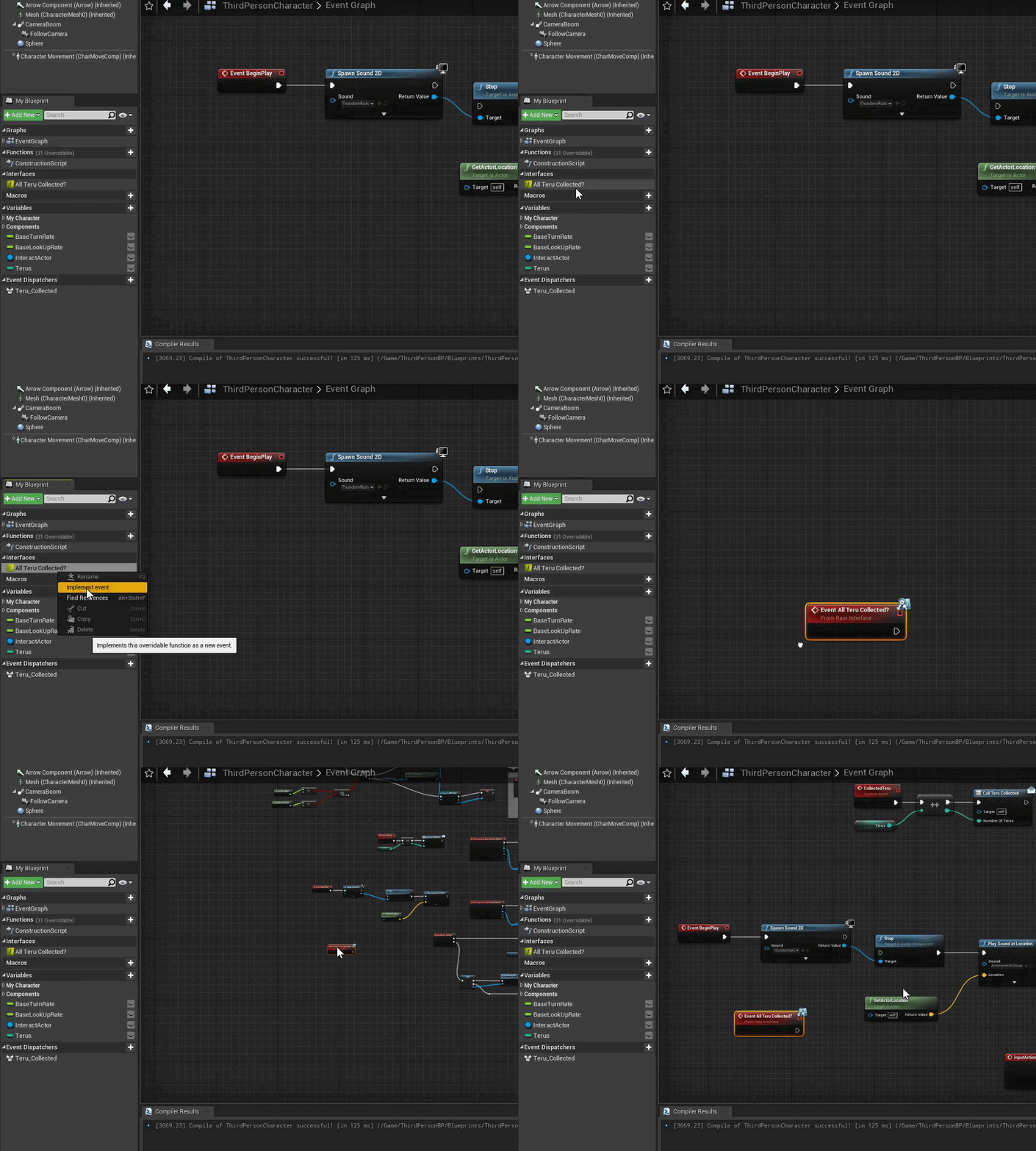 fiery glen
I made a new blueprint interface and it's staying Read Only for some mysterious reason
fiery glen
trim matrix
https://gyazo.com/a3f1f86e5d988b697e64a8bd1a339fcf.gif
oooh, I misunderstood BP interfaces
I forgot they can't have anything implemented in them
you just define input/output types
all of the actual instructions are implemented in your BP that implements it
(which you probably already understand, sorry)
and yeah you need to just right click to implement the event
 faint pasture
@trim matrixDo you know what an interface is and how it works?
you don't implement them in the interface BP itself
trim matrix
It's all good, it worked
 civic herald
Are there any good tutorials for projecting textures onto skinned meshes at a specific point on the mesh.
icy dragon
civic herald
Are there any good tutorials for projecting textures onto skinned meshes at a sp...
Not a particularly "elaborate step by step" tutorial, but enough to give a clue on how to implement it
https://www.tomlooman.com/rendering-wounds-on-characters/

Earlier this week I tweeted about hit-masking characters to show dynamic blood and wounds. Today I’d like to talk a little about the effect and how it came to be. I’ll talk a little bit...
civic herald
icy dragon
Not a particularly "elaborate step by step" tutorial, but enough to give a clue ...
Thanks for most part that tutorial makes sense, but still unsure how to actually project a texture onto the mesh and it be the size i want not drawing over the whole mesh.
trim matrix
Would a kind of tiling work?
 odd ember
this is so weird to have as an interface
an interface is per object
how does one object know about this question? unless it's a manager? and in that case, why the interface?
trim matrix
Idk
odd ember
well it's your interface
 tall imp
hi, my cast to the game instance is failing and i cant find the reason why... does anyone know how i can fix that?

i was able to save and load perfectly yesterday bit then it just didnt work anymore even tho i didnt change anything there
 harsh frost
Hi everyone, I'm tackling a tough cookie (for me anyway) here and I think I need some input. I'm trying to compare two render textures and count the number of pixel that differ between the two. I do that by sampling both texture and store the difference of both colors on a 3rd texture of the same size. "Easy" so far. I can then use Read pixel data to count the number of pixels that aren't 0 in a loop. The last part in inefficient at best, as to compare two texture of 1024x1024 pixels, I need to loop through each one of them. Yuck.
Is there a way of sampling both textures, compare each pixel, and store it in a single-pixel texture, being the sum of all difference ? This would reduce drastically the complexity as most of the work would occur on the GPU
I'm not sure having a target texture of 1 pixel will cut it 😄
Another thing would be to sample the result texture before writing to it, but I'm not sure this will fare well with massive parrallelism that occurs in shader
odd ember
tall imp
hi, my cast to the game instance is failing and i cant find the reason why... do...
check if you have game instance set in your project settings under "maps and modes"
failing that, breakpoints
odd ember
harsh frost
Hi everyone, I'm tackling a tough cookie (for me anyway) here and I think I need...
I don't know why this is in #blueprint
harsh frost
Well, I was thinking of doing it in blueprints 😄 I could achieve it all using them, so if I can avoid C++ code for 3D, i'm all for it 😄
unless, of course, i'm completly mistaken on the channel
(which is quite a possibility)
odd ember
none of this is exposed in BP
and it wouldn't be wise to do it in BP either due to performance concerns
(even if it was exposed)
harsh frost
well, if I can compare all pixels by blending them (using blend difference probably) and store the sum of all differences in a 1 pixel texture, i'm golden 😄 but I'm hitting a roadblock as to my 3D knowledge and the blend/UV stuff
odd ember
you... can't
it's not exposed in BP
it is not available
the interface between graphics shaders <> code happens in the renderer, which is strictly cpp
and if you're talking about blending in the material editor, the material editor is not the same as blueprints
harsh frost
oh ?
harsh frost
indeed, I thought that was considered as a blueprint being the same graph design and all
harsh frost
I'll repost using the graphics channel then, thanks 🙂
the more I can fit in a shader to lessen the data transfer to the CPU, the better, so I'd better start here. Sorry for the mistake !
tall imp
odd ember
check if you have game instance set in your project settings under "maps and mod...
ohhhhhh ye ty i thought it was set already but i confused it with the player controller
works now again xD
 shell jetty
Really simple question. How can you limit a vector to stay inside a bounding box inside the world? I tried "Vector Bounded to Box" but it doesn't seem to work properly, or I'm just not sure how it works
 odd ember
shell jetty
Really simple question. How can you limit a vector to stay inside a bounding box...
odd ember
shell jetty
Really simple question. How can you limit a vector to stay inside a bounding box...
the real question is how you are getting vectors outside the bounds of the world
shell jetty
The box isn't outside the world. It's a system where I'm trying to keep an object within a certain distance of another actor
I found a way around it though. I decided to just check if the objects distance is further than a set float, and if it is I move it the object back by the difference in distance
 maiden wadi
@shell jetty I personally find it much easier to transform the location into the box's local space. It's much easier to clamp via the box's size then because it's a matter of just clamping each axis after that. Then you can transform it back to world space.
 wispy star
shell jetty
Really simple question. How can you limit a vector to stay inside a bounding box...
wispy star
shell jetty
Really simple question. How can you limit a vector to stay inside a bounding box...
it' just clamps the input vector by the values, make sure you're using proper transforms for the input vector, as often people confused by local and world spaces
clamp(x,xmin,xmax)
Hmm, ok that makes sense. I'll use that next time
For now I'll use my workaround since it does what I need for now
Thanks for the help 🙂
wispy star
i'm thinking about it now, and it may not be doing what users may expect...i need to look at source
 dapper ore
I think this is the right place? I have a Spring Arm on my Camera that is not colliding with the environment. I used the top down preset and added a camera zoom and look around. Although when I disable those 2 features it still doesn't work for me. Could someone kindly help me get my spring arm to work?
wispy star
holy...it is indeed not doing what people expect
odd ember
dapper ore
I think this is the right place? I have a Spring Arm on my Camera that is not co...
you'll have to show your settings
dapper ore
odd ember
you'll have to show your settings
Which settings where?
 fresh charm
Hello, can anyone explain this mystery to me?
Why I can't target my mouse on the left widget but the right one, as soon as I put the computer inside my house I can't see it anymore?

 odd ember
dapper ore
Which settings where?
odd ember
dapper ore
Which settings where?
on your springarm?
 digital ginkgo
Hello guys, I need some help, I'm trying to make a virtual piano, where I input MIDI, and then it triggers a rotation on the piano key static mesh to make it look like the key is pushed.
How do I make the rotation "smooth" rather than instantly snapping into place?
 dapper ore
@odd ember
 odd ember
what in the living hell
dapper ore
@odd ember
 odd ember
dapper ore
<@!224571781862653952>
odd ember
dapper ore
<@!224571781862653952>
your camera collision settings are conveniently hidden away
dapper ore
@odd ember Can you see them in the second screenshot?
dapper ore
I want the Yaw of the camera reset to be the same as the character model. How can I pull that variable?
 icy dragon
digital ginkgo
Hello guys, I need some help, I'm trying to make a virtual piano, where I input ...
icy dragon
digital ginkgo
Hello guys, I need some help, I'm trying to make a virtual piano, where I input ...
What even is this noodle
 timber knoll
digital ginkgo
Hello guys, I need some help, I'm trying to make a virtual piano, where I input ...
timber knoll
digital ginkgo
Hello guys, I need some help, I'm trying to make a virtual piano, where I input ...
You would need to use RInterp
Or a lerp on single axis would also do
timber knoll
dapper ore
I want the Yaw of the camera reset to be the same as the character model. How ca...
Get control rotation?
wispy star
@digital ginkgo I suggest you to switch to rigged skeletal mesh piano and use that for animation. as doing that by tick interpolators will make your code huge...
or, you can write a small ECS function
 jaunty solstice
Can any Blueprint experts tell me whether its possible to detect keypresses in the Construction Script without resorting to Editor Tick?
dapper ore
timber knoll
Get control rotation?
No Luck
timber knoll
jaunty solstice
Can any Blueprint experts tell me whether its possible to detect keypresses in t...
Construction script doesn’t work like that afaik
It’s called when changing any actor value, not based on input
But you don’t need event tick either for input
digital ginkgo
icy dragon
What even is this noodle
It's a rotation for every single note of an 88 key piano lol
I'm fairly new to these stuff, so I don't know if there's a better way to do this lol
icy dragon
digital ginkgo
It's a rotation for every single note of an 88 key piano lol
Why not use naming convention tricks?
timber knoll
Animation based as Alexey suggested is your best bet
The way you have it set up would require interpolation which is going to be even more of a mess 😛
digital ginkgo
By rigged skeletal mesh, it means like rigging with armatures+weight painting it?
timber knoll
Interpolation isn’t hard
digital ginkgo
I can't get it working for some reason
timber knoll
But you would need to do it for all currently pressed keys etc
So it’s a lot of extra nodes in your case...
digital ginkgo

icy dragon
digital ginkgo
They are trigged by MIDI events for each note pressed
Also, again, naming conventions trick.
E.g.: Bone for key 50th would be named "key_50", and you can concatenate the naming scheme and the numbers for getting the correct bone
digital ginkgo
I guess into blender then >.<
icy dragon
I did this for my musical machinima project (still WIP)
digital ginkgo
icy dragon
Also, again, naming conventions trick.
E.g.: Bone for key 50th would be named "k...
That is way over my head atm, but I'll look into that haha
timber knoll
Yeah for sure use naming convention for both skeleton and animations
digital ginkgo
I'll still need bones right?
digital ginkgo
Oh god, 88 keys
 thin cradle
hey, I wanna make a fighting game and I've found almost all the unreal functionalities I need to do it, but there's something I can't figure out
I wanna attach hitboxes to my weapon, but also have some "floating" hitboxes that I can set the position of in my animation
problem is, I wanna keep the player character's stuff separate from each of the weapons's animations, hitboxes, etc, as in when I wanna add a new weapon, I don't wanna add all the required hitboxes to the main player physics asset, I want them to be separate
I found how to separate animations unique to weapons from the main player animation blueprint using linked animation BPs, but I can't figure out how to do that, any idea?
tl;dr I want each weapon and their animation set to have unique hitboxes but I don't wanna modify my player blueprint/physics asset/etc for each weapon, I want these to be stored in separate files per weapons
icy dragon
digital ginkgo
Oh god, 88 keys
Yep.
At least you're not working on guitars and basses.
digital ginkgo
Just for luls, you can see the mess for every single 88 notes xD
 timber knoll
thin cradle
tl;dr I want each weapon and their animation set to have unique hitboxes but I d...
timber knoll
thin cradle
tl;dr I want each weapon and their animation set to have unique hitboxes but I d...
You should have the collision in your weapon regardless
I’m also trying to figure out a way to have animations unique to weapons tho so can’t help with that
thin cradle
yeah, and I can kinda see how to do that for the hitboxes that'll be directly attached to the weapon, but not so much for the ones that aren't
let alone be able to visualize those when editing the relevant animations
icy dragon
digital ginkgo
Just for luls, you can see the mess for every single 88 notes xD
I don't even want to think how to iterate changes over that mess.
odd ember
dapper ore
<@!224571781862653952> Can you see them in the second screenshot?
they're collapsed in the first screenshot. you screenshotted it but didn't expand it. you were complaining about collision and this is the one place you can see your collision
digital ginkgo
 timber knoll
Hmm how would those ither hitboxes function?
thin cradle
I'm sure it'd be possible to straight up like, make custom tools for the animation editor for that but I ain't ready to learn c++ just for that
timber knoll
icy dragon
I don't even want to think how to iterate changes over that mess.
You don’t haha
 icy dragon
Also, again, naming conventions trick.
E.g.: Bone for key 50th would be named "k...
icy dragon
icy dragon
Also, again, naming conventions trick.
E.g.: Bone for key 50th would be named "k...
In a way, this naming convention trick of mine kind of stems out of my laziness, but avoiding that iteration hell of a BP sort of a side effect on my part.
thin cradle
@timber knoll https://www.youtube.com/watch?v=A3vCY-jU_tc check this out
all the weapons have hitboxes attached to them, but some weapon also have "static" hitboxes that spawn where the weapon hits

EDIT: I now have a discord! Join to talk about various things and maybe even help me make my minibosses!
https://discord.gg/4eReG6w
TIMESTAMPS:
Slow-mo demonstration of hitboxes - 0:00
Daggers - 3:54
Straight swords - 4:27
Greatswords - 5:40
Ultra greatswords - 7:19
Curved swords - 9:08
Curved greatswords - 10:13
Thrusting swords - 11:06
Katan...
digital ginkgo
icy dragon
Also, again, naming conventions trick.
E.g.: Bone for key 50th would be named "k...
You mean the naming for the bones? Would that be better than naming it based on it's note? Like C1,C#1, D1 etc?
thin cradle
they had even more of those "floating" hitboxes in dark souls 1 iirc
digital ginkgo
Wouldn't it be a pain to need to "find out" what note is key_50 is?
icy dragon
digital ginkgo
You mean the naming for the bones? Would that be better than naming it based on ...
No, MIDI stuff don't really work that way, and I also have my own translating tools for that as well.
The notes are cosmetic as far as the MIDI backend is concerned, and I could just assemble a MIDI sequence from OpenMPT.
digital ginkgo
So MIDI for an 88 key keyboard goes from 21 to 108, so you are suggesting I name the bones like key_21, key_22 etc?
icy dragon
digital ginkgo
So MIDI for an 88 key keyboard goes from 21 to 108, so you are suggesting I name...
Yeah, though with a simple math on the numbers, you can make the numbers tidy, since the first few notes are known.
timber knoll
thin cradle
<@!181418411044241408> https://www.youtube.com/watch?v=A3vCY-jU_tc check this ou...
Aah so extra impact hitboxes
icy dragon
odd ember
instead of having 88 references
I already suggested the procedural (lazy) way.
thin cradle
yeah, that aren't attached to the weapon
timber knoll
Well you would just spawn them on the position based on hit info or animation
digital ginkgo
odd ember
why are you not handling this procedurally
Because I have no idea what that means, I'm completely new to unreal and blueprints and I'm learning it as i go xD
odd ember
icy dragon
I already suggested the procedural (lazy) way.
I can't see it?
icy dragon
digital ginkgo
Because I have no idea what that means, I'm completely new to unreal and bluepri...
Just so happens that the stars align, and I had musical machinima brewing in my draft, eh.
timber knoll
So basically you do an extra shape cast for one frame on a hit location or socket
thin cradle
cause I could always just attach 1 hitbox to the weapon and turn it off/on in animations, but not only would I not have those extra hitboxes, I also wouldn't be able to see them when I set them up in an animation
icy dragon
odd ember
I can't see it?
odd ember
digital ginkgo
Because I have no idea what that means, I'm completely new to unreal and bluepri...
create an actor or object called PianoKey. then create a for loop for however many piano keys you want, spawn them and offset them
odd ember
icy dragon
https://discord.com/channels/187217643009212416/221798862938046464/9094796730655...
that's not the same
in fact I don't know what that has to do with procedurally generating them
thin cradle
timber knoll
So basically you do an extra shape cast for one frame on a hit location or socke...
would I be able to see that extra cast somehow in the animation editor? also if it requires sockets, can those be added/removed from the player model when switching weapons or do I have to include all the required sockets in the main player skeleton asset?
icy dragon
odd ember
that's not the same
But it works for an actual piano mesh, not some floating piano keys in space.
odd ember
doesn't make a difference if it's one mesh or several actors attached to each other
except ease of use and configuration
I certainly wouldn't try and configure it on a skeletal mesh level
icy dragon
And by actual, I mean a model of a piano with reference to real physical piano.
odd ember
because dealing with 4 levels of child space sounds excruiciating
digital ginkgo
I want to make a virtual piano that responds to MIDI notes
 unique finch
digital ginkgo
I want to make a virtual piano that responds to MIDI notes
unique finch
digital ginkgo
I want to make a virtual piano that responds to MIDI notes
oh making in music in game i see 😏
digital ginkgo
and then I plan to use mocap of some sorts to play it with an avatar virtually
So it looks like my avatar is playing that piano
icy dragon
unique finch
why would you want to make a piano tho
Because I just so happened to work on musical machinima involving the characters playing the instrument (though I don't have much time to continue on it lmao)
timber knoll
thin cradle
would I be able to see that extra cast somehow in the animation editor? also if ...
you can add sockets on static meshes actually
unique finch
unique finch
oh making in music in game i see 😏
honestly i like this idea
odd ember
digital ginkgo
So it looks like my avatar is playing that piano
consider what I said
I would recommend against making anythign one mesh
unique finch
it doesn't sound like a bad idea to make a piano so you can make your own music in game
timber knoll
and no, not able to see them in animation afaik, but you can have them enabled while playing and test them out that way @thin cradle
odd ember
unique finch
it doesn't sound like a bad idea to make a piano so you can make your own music ...
the idea is fine. making the piano one big mesh is not
every key needs modularity
icy dragon
Thus the wild naming convention trick comes from , because i need to have DX7 and Moog synth model respond to the MIDI sequence, not an arbitrary piano floating in space.
unique finch
Hey here's an idea
make a model of a piano rig, make a animation for each note
icy dragon
Though if it works for you, then I won't stop you. @digital ginkgo
thin cradle
thats gonna involve a lot of randomly trying positions
 dim robin
when I "get all actors of class", how can I determine the order of the elements in the array? Let's suppose it gets 3 actors, how can I know in which order they are added to the array? thanks
icy dragon
unique finch
Hey here's an idea
make a model of a piano rig, make a animation for each note
I'd procedurally animate them in animBP.
thin cradle
but I guess that could work, thanks
odd ember
unique finch
Hey here's an idea
make a model of a piano rig, make a animation for each note
that's really not a great way to go about it
icy dragon
Or actor BP, since it's going to be prerendered, and I don't give a fuck about performance in the case of machinimas.
odd ember
you cannot reasonably extend that
unique finch
icy dragon
I'd procedurally animate them in animBP.
ehh that's going have some odd results depending on the pivot of the bone
imagine the note clipping through the piano
lol would that be funny though
icy dragon
unique finch
imagine the note clipping through the piano
Most pianos have more or less standard key heights, easy to undershoot it than overshoot it.
odd ember
genuinely, the best way of to treat the piano itself as a manager, and each key as a child that you spawn procedurally. the piano itself determines what sound the keys play, each key handles its own animations etc.
unique finch
Doing it procedurally is good idea though, imagine wanting to have it so that if you press a key hard enough it'll hold down the note, seems even better than animating yourself
timber knoll
thin cradle
but I guess that could work, thanks
well you can actually have a preview mesh on your sockets (which would then be visible in your animation)
that might make it easier I suppose
thin cradle
good idea
digital ginkgo
I'll have a ton to learn I guess, I have no idea what you guys are talking now xD
dapper ore
odd ember
they're collapsed in the first screenshot. you screenshotted it but didn't expan...
WHOA WHOA Slow down there cowboy. I was not complaining just asking for some help. When I was expanding the menus I missed that one. My bad. Here it is sir.
 unique finch
digital ginkgo
I'll have a ton to learn I guess, I have no idea what you guys are talking now x...
unique finch
digital ginkgo
I'll have a ton to learn I guess, I have no idea what you guys are talking now x...
this thing is advanced even for someone like me
icy dragon
Okay, question time.
@digital ginkgo What kind of piano are you trying to have in the game? The one arbitrarily floating in space, or based on a physical, real life piano?
odd ember
dapper ore
WHOA WHOA Slow down there cowboy. I was not complaining just asking for some hel...
I'm hoping you can see from that what is missing 🙏
 unique finch
but manually moving the note downwards is the way to go without animation
unique finch
digital ginkgo
I bought an asset off the marketplace
Ah just rotate the relative positon of the notes
odd ember
digital ginkgo
great start. all you need to do is wrap each mesh key in an actor class
digital ginkgo
So that's what I did, rotate the relative position
unique finch
digital ginkgo
So that's what I did, rotate the relative position
Good
digital ginkgo
But that means it will only "snap"
digital ginkgo
it doesn't smoothly "push"
odd ember
christ this is a clusterfk
icy dragon
digital ginkgo
But that means it will only "snap"
Okay, here's an idea that I'm sure everyone will hate me for it.
icy dragon
icy dragon
Okay, here's an idea that I'm sure everyone will hate me for it.
Use the naming convention trick.
digital ginkgo
I tried interpolation, and it doesn't seem to work, I think it's because the notes are triggered by a MIDI event, not an event tick
unique finch
Ahh
odd ember
digital ginkgo
I tried interpolation, and it doesn't seem to work, I think it's because the not...
timelines.
for real
timeline an alpha value from 0..1, then use that to lerp rotation
digital ginkgo
icy dragon
**Use the naming convention trick.**
Can you elaborate the naming convention trick? haha
unique finch
odd ember
timeline an alpha value from 0..1, then use that to lerp rotation
yes and when you release the key reverse the timeline :)
odd ember
it has a few drawbacks though
dapper ore
odd ember
I'm hoping you can see from that what is missing 🙏
My 3 hours of exp tells me to click buttons. I clicked it and it worked. Thank you for helping bring that menu to my attn 🙏 ⭐
unique finch
yeah
odd ember
dapper ore
My 3 hours of exp tells me to click buttons. I clicked it and it worked. Thank y...
well done. go forth and conquer
icy dragon
digital ginkgo
Can you elaborate the naming convention trick? haha
I was thinking to just get the component names, check with a concatenated string based on MIDI input, and switch on the correct one based on the notes.
Now where's the tomatoes getting thrown?
dapper ore
odd ember
well done. go forth and conquer
HUZZAH
icy dragon
I was certain everyone will hate my idea.
odd ember
again. the easiest way, that would solve literally every single problem, including the mess of managing 88 individual keys, is procedurally generating the keys as actors from a class
 dawn gazelle
^
digital ginkgo
odd ember
again. the easiest way, that would solve literally every single problem, includi...
Ok I don't know how to do that LOL
icy dragon
odd ember
again. the easiest way, that would solve literally every single problem, includi...
And this is being generous and ignoring grey notes specific things.
odd ember
digital ginkgo
Ok I don't know how to do that LOL
you have the backbone of that already. every key is a mash. create an actor class and put the key in as a static mesh component
odd ember
icy dragon
And this is being generous and ignoring grey notes specific things.
you can handle each note individually by exposing parameters. if you have an array of 88 keys you can pick which key to work with
icy dragon
Which is so easy in hindsight, maybe 5 years old can came up with the math/offsets.
odd ember
you have the same amount of control, for much less repetitive code
and much less code maintenance
then on top
if you make the keyboard (sans keys) a manager. you can use that to propagate different sound choices to each key
e.g. when you want to modulate the sound per key, per octave
literally, just like a keyboard would work in real life
plus you can extend the keyboard infinitely, if you so choose
want 64 keys instead? just set it to 64 keys instead of 88
same for 102, or whatever the max number of keys is on a keyboard these days
I'm sure some organist can correct me
digital ginkgo
Actor class is a blueprint actor right?
icy dragon
digital ginkgo
Actor class is a blueprint actor right?
Yes.
 icy dragon
Just have to modify it as per @odd ember precisely mentioned.
Or create a new one from scratch, I don't care tbh
odd ember
create new one, create a new static mesh component within, set the static mesh to be the key mesh
you'll probably need to formulate it per octave
digital ginkgo
But each key has a different mesh though
odd ember
that's fine
icy dragon
digital ginkgo
But each key has a different mesh though
Doesn't really matter.
odd ember
you can in fact find the right keymesh by providing the corresponding note within the octave
icy dragon
The white keys are at least just 3 shapes.
odd ember
so you have an outer loop for the entire keyboard, then you have an inner loop per octave
or alternatively, you create an Octave as a separate class that is a collection of PianoKeys
digital ginkgo
I think this is waaaay to advanced for me right now >.<
odd ember
it's advanced now, but if you do the groundwork
you'll have much less problems later on
if you do it your way, you leave yourself open for a lot of maintenance work
digital ginkgo
Are there like youtube tutorials for this? lol
odd ember
possibly?
icy dragon
digital ginkgo
But each key has a different mesh though
And since keyboard accuracy doesn't seem to be your priority, use CE's method as opposed to my naming convention trick.
I'd avoid the procedural method because of the need to get very specific with the keyboard and the synth sounds.
odd ember
I can't vouch for them
icy dragon
digital ginkgo
Are there like youtube tutorials for this? lol
More likely non existent.
odd ember
generally the quality of BP tutorials on youtube is low
odd ember
icy dragon
And since keyboard accuracy doesn't seem to be your priority, use CE's method as...
technically this method is procedural
but, semantics
digital ginkgo
I'm completely lost haha. I'll have to revisit this in the future when I learn more >.<
icy dragon
odd ember
technically this method is procedural
Yeah, generating the keys in runtime, but in my machinima case, keyboard type accuracy to the synth sound is more important, and I would have to match the key positions with the character's finger in sequencer editor.
odd ember
icy dragon
Yeah, generating the keys in runtime, but in my machinima case, keyboard type ac...
you could generate the keys at editor time as well. it doesn't make a difference. procedural refers to the fact that you are generating the keys, not when they are being generated
odd ember
digital ginkgo
I'm completely lost haha. I'll have to revisit this in the future when I learn m...
if you're doing it now, it's worth considering getting into. it's going to take you maybe a day to completely work it out, but it'll be worth it for the weeks and months you don't have to spend changing it
odd ember
like I said, create an actor called PianoKey
dawn gazelle
Eh close enough...
 digital ginkgo
Like this?
 odd ember
like I said, create an actor called `PianoKey`
odd ember
odd ember
like I said, create an actor called `PianoKey`
inside this actor, add a static mesh component. add a sound cue variable. Add an event called OnPressed, and OnReleased
odd ember
digital ginkgo
Like this?
yes but singular
you are making one key. we'll use copies of this key to fill the entire keybaord
 odd ember
digital ginkgo
odd ember
digital ginkgo
that's fine
you just need one actor for now
once you've created that
create an enumerator
an enumerator is just a fancy way of selecting numbers by using text
digital ginkgo
So I just drag and drop the static mesh in?
odd ember
odd ember
create an enumerator
call this enumerator something like EOctaveKey
digital ginkgo
odd ember
inside this actor, add a static mesh component. add a sound cue variable. Add an...
Hold on, how do I add a static mesh component
Lol
 odd ember
cool
digital ginkgo
How about the "Add an event called OnPressed, and OnReleased"
odd ember
right click on the graph, select Create Custom Event
 zealous moth
@Authaer#5436 how would you go about a charging mechanic?
So far all i thought about was a timer based countdown or a timer based buildup where the timer is started and stopped based on input.

 odd ember
yes siree
digital ginkgo
Why does it say OnReleased is used
digital ginkgo
ahh
odd ember
you can called it OnPress and OnRelease if you want to keep a standard between them
digital ginkgo
How do I create an enumerator?
digital ginkgo
Oh got it, what should I name it as
digital ginkgo
Ok got it haha
odd ember
cool
now that you have it, go back into your PianoKey actor
and add a new variable
in the list of variable types, look for EOctaveKey
digital ginkgo
 odd ember
KeyInOctave or something
now that you have it, go into your construction script
get a reference to your static mesh component
you can literally select it and drag it into the graph
 odd ember
yep
from you reference, drag out and find a function called Set Static Mesh
or might just be called set mesh
idk
digital ginkgo
Which one do I use?
 odd ember
the latter
so there's one thing we forgot to do with the enumerator, so if you go back and open that one up
inside of it, create a new option for each key in the octave
so, C, C#, D, D#, E etc.
digital ginkgo
Just within an octave right?
odd ember
yes, but including black keys
digital ginkgo
Would it matter if the first key of an 88 key piano does not start with a C?
It starts with an A
odd ember
it matters somewhere down the line, but not here
you want to create a standard octave first
everything else is an edge case
digital ginkgo
Alright
odd ember
once the enumerator is done, go back into the construction script where we left that set static mesh function
from the mesh pin, drag out a select node
for the index of the select node, add your KeyInOctave variable
digital ginkgo
Like this?
 odd ember
yep
I assume you know your octaves
so I can't vouch if it's correct
but it looks like it
 odd ember
yep
now you can use that to fill the correct key meshes for the correct slots in the octave
obviously, correct the execution thread as well
now that you have this setup, you'll want to expose your variables as parameters
so for each variable you have, in the details panel, tick the boxes for: Instance Editable and Expose on Spawn
digital ginkgo
What do you mean by correct the execution thread?
digital ginkgo
Oh
odd ember
is the execution thread
odd ember
odd ember
so for each variable you have, in the details panel, tick the boxes for: `Instan...
once you have done this, in your OnPress event, you can add some logic for what happens when you press the key
so, Play Sound Cue with the sound cue variable you have
if you want the whole rotation thing, we can handle that afterwards
but that's your basic PianoKey actor
odd ember
now that we have this, duplicate your piano actor
not the keys, but the actual piano
once you've duplicated it, go into it
note down the offset between keys
you'll need this
then delete all the logic and keys inside of it
digital ginkgo
That means I delete all the variables, and stuffs in the event graph?
odd ember
yes. did you note down the offset?
digital ginkgo
I did
odd ember
cool, yeah torch everything
digital ginkgo
Do I delete the keys static meshes as well?
odd ember
everything
except the keyboard mesh itself
since this is a duplicate, if you ever want to go back, you'll always have the original
once done, create a Integer variable called KeyAmount
digital ginkgo
is this right?
 odd ember
small caveat here: we're making this currently as an arbirarily sized keyboard, which means you can input any number of keys, but the keyboard will always start from an octave, and the starting key will always be C
if you want to include special rules, you'll have to change some initial logic, but nothing major
odd ember
odd ember
once done, create a `Integer` variable called `KeyAmount`
once you have this, create a For Loop inside the construction script
for the sake of ease of use, set the start index to 1, and the end index to KeyAmount
create a float variable called KeyOffset and set that to be the value you noted down before, as a default value
odd ember
odd ember
once you have this, create a `For Loop` inside the construction script
inside the loop, find the SpawnActorFromClass node
set the class to be PianoKey
let me know when you've got this
 digital ginkgo
odd ember
create a custom event inside the event graph called SpawnKeys
in the details panel for it, tick the box for Call in Editor
cut and paste the loop from the construction script onto that event instead
dim robin
is there any way to "get all actors of class" and sort them in an array by a name (or int, or whatever)? it looks like the array order is determined by when they were instanced
digital ginkgo
Like that?
 odd ember
dim robin
is there any way to "get all actors of class" and sort them in an array by a nam...
odd ember
dim robin
is there any way to "get all actors of class" and sort them in an array by a nam...
nope. it's non deterministic. if you need deterministic approaches you should look into making some proper logic for finding such classes. get actor of class is a hack, not a robust solution
digital ginkgo
 odd ember
yep, set the class to PianoKey
and click that white arrow at the bottom and show a screenshot of that once you've done those two things
digital ginkgo
 odd ember
ok, bit weird it says invalid for KeyInOctave
can you check you have all the keys in that drop down?
 odd ember
cool
if you right click on your spawn transform node and select split pin or whatever the option is called
you should see it turn into a few things
digital ginkgo
Oh yeah
odd ember
now if you select the location pin and do the same
you'll get 3 float values
create a reference to your KeyOffset float from before
digital ginkgo
Like this?
 digital ginkgo
wait how? lol
odd ember
there is an int * float node
 odd ember
yep
see if you can spawn the keyboard actor in world now
just to test
once you've spawned it, you'll see the SpawnKeys event in the details panel as a button
the expectation is that it's spawned KeyAmount of PianoKeys at KeyOffset from each other, all being of EOctaveKey type C
odd ember
yes
digital ginkgo
Nothing happens lol
odd ember
troubling
or perhaps not
can you try calling SpawnKeys from BeginPlay and enter into PIE?
 digital ginkgo
How do I do that then lol
odd ember
what you want to do is get a call to that event
right click and find SpawnKeys in the search menu
you should get a blue node
digital ginkgo
Oh yeah
digital ginkgo
 digital ginkgo
What does enter into PIE means
Hmm, I hit play, and nothing happens lol
The key doesn't spawn
ok nvm it worked, I did not set the KeyAmount variable
But it spawned away from the piano actor and is LARGE
lol
odd ember
you may want to look at the original keyboard actor and check the scale of them
digital ginkgo
 odd ember
the keys
but, so far so good
these are tiny kinks
and it works otherwise
so now we want them to form octaves
there's a few ways to do this, but for the sake of this we'll just go simple
how many keys does an octave have?
digital ginkgo
including black, 12
digital ginkgo
Oh yeah
digital ginkgo
The size is right, but they're spaced too far apart now
 odd ember
create a KeyScale float variable
multiply that with KeyOffset where you handle the spawn location
split the SpawnTransformScale pin into 3 floats
set them all to be KeyScale
assuming they are uniformly scaled

 odd ember
it is
it's just using world 0 atm
because we having added in a custom location
if you want to fix it, create a MakeVector node
add the current float result we have from Index, KeyOffset and KeyScale, into the X value of that
then right click on any of the 3 location floats and select combine struct pin
then use the GetActorLocation node and add it to the output your new MakeVector, then set that to your new SpawnLocation
it's not going to be perfect right now
but we'll replace it later

 odd ember
digital ginkgo
odd ember
digital ginkgo
vector + vector node
odd ember
digital ginkgo
Oh cool, it's in the correct Z now
like I said, it something that's fixable after the fact
anyway, onto the next task
right click in the graph and type %
that should show you what is known as a modulo node
digital ginkgo
 odd ember
float
or actually
int
in the bottom field, type 12
the top pin should go into the Index of the For Loop
the output should feed into the SpawnNodes KeyFromOctave
normally we could do this differently, by taking the length of the enum. but this is complicated in BP so we'll omit it for now
digital ginkgo
 odd ember
ffffff
try the byte version then and see if you can feed the Index into that
otherwise you can convert int to byte
 feral ice
why does it not draw box around the stone?
 odd ember
a bit of a faff
feral ice


 knotty sequoia
hi, i want to ask how can i get location of some actor in the world in the script of main character? i was trying to use this (screenshot) but i dont know ho to change the "Target" from self -> the actor. This is my first project so i dont really know how to do it, thanks
 odd ember
so different offsets
odd ember
yep that is a bit strange too
feral ice
knotty sequoia
hi, i want to ask how can i get location of some actor in the world in the scrip...
You need some sort of reference to the other actor
odd ember
but otherwise, is it a correct octave? @digital ginkgo
feral ice
knotty sequoia
hi, i want to ask how can i get location of some actor in the world in the scrip...
lemme try something and try to help
knotty sequoia
feral ice
lemme try something and try to help
thanks
digital ginkgo
odd ember
but otherwise, is it a correct octave? <@!752702069915254836>
It's correct, only the first C is missing
odd ember
cool, we can make that a special case
actually I know why
first index is 1, not 0
so what we should do, (what we should have done from the beginning), is set the first index to 0, and last index to KeyAmount - 1
 odd ember
yep

 knotty sequoia
ok thanks
digital ginkgo
@odd ember Do you mind if we continue this in the future? May I DM you next time? It's 3 am and I need to sleep now xD
feral ice
knotty sequoia
ok thanks
Nw hope it works
odd ember
digital ginkgo
<@!224571781862653952> Do you mind if we continue this in the future? May I DM y...
just ping me in here, I'll help if I have time
but sure
you have the base of it now
now the fun part of extending it begins
knotty sequoia
feral ice
Nw hope it works
i am not really sure if i will put it in right blueprints 😄 but i will try
digital ginkgo
@odd ember Thanks a lot, you've been a great help!
I divided the offset by 2

Looks like my suspicion was right
feral ice
digital ginkgo
I divided the offset by 2
This looks cool can you play any songs on it
feral ice
knotty sequoia
how did you create that custom event?
oh sorry i did not get notified, just right click in event graph and search for custom event
name it wheterver you please
knotty sequoia
ok, thanks
feral ice
knotty sequoia
how did you create that custom event?
there is an easier way of doing this
sorry
just use this node
 feral ice
knotty sequoia
ok, thanks
feral ice
knotty sequoia
ok, thanks
here
my bad, my way works fine but this one is cleaner and simpler
knotty sequoia
ok i will try
feral ice
but if you have multiple actors of the same class it will not work on of them however, there is a way around this by using the get all actors of class. It will save each actor as an element in an array. You will be able to reach each actor by accessing the array. There are a lot of videos of this. Reference ue4 on youtube
 feral ice

i think this is what you want. Im taking my dog for a walk just to let you know if you have any more question ill answer them later
odd ember
digital ginkgo
I divided the offset by 2
good work
knotty sequoia
feral ice
i think this is what you want. Im taking my dog for a walk just to let you know ...
ok, thanks. enjoy the walk 😄
 umbral ginkgo
quick question, how do I change sensitivity on the first person example map thing? I changed the variable sensitivity but that did nothing
odd ember
umbral ginkgo
quick question, how do I change sensitivity on the first person example map thin...
I don't know what you mean by that
which sensitivity? mouse?
gamepad?
camera?
movement?
 worthy carbon
I was packaging my game but it says cook failure and than Unknown cook failure how do i fix this?
umbral ginkgo
Mouse, i havent used unreal in quite a bit and was messing about in the first person example project
 spark steppe
look at the playercontroller, or character. whatever handles the input axis events
and then multiply/divide the axis value
odd ember
worthy carbon
I was packaging my game but it says cook failure and than Unknown cook failure h...
don't know, but the real question is how you think that #blueprint can help you with this?
worthy carbon
odd ember
don't know, but the real question is how you think that <#221798862938046464> ca...
No i guess
 dreamy ice
So, if i'm going to add many different systems to a player such as (leveling, inventory, quests, achievements, abilities, and more) Should I add them directly to the player/controller or should I create them in some sort of other blueprint/class and attach that to the player/controller? What would y'all do?
odd ember
worthy carbon
No i guess
try #packaging
odd ember
dreamy ice
So, if i'm going to add many different systems to a player such as (leveling, in...
composition is always preferred
dreamy ice
I'm not sure what that means?
odd ember
that means that generally it's better to create components (in this case) and couple them to the player
especially if you can make a clear distinction
dreamy ice
That's what I figured. and if I'm doing anything that needs to live past character death, I should attach it to the controller right?
odd ember
e.g. inventory is very clearly defined
dreamy ice
yeah
odd ember
dreamy ice
That's what I figured. and if I'm doing anything that needs to live past charact...
potentially. depends on how your game is setup. but generally the player controller has more abstract control of the game than the character (who is limited to the game world)
for what it's worth, I'm running at least 10 different components (not all on player), that I attach in a similar fashion
dreamy ice
I figured it was better
 chrome eagle
Hi there!
I have a working point system - I shoot 100 target, I get 100 points.
What I'm trying to do is bring up a little text every time I shoot a target that says +100 just so theres representation that you got points (I wanted to do same for HP and time)
I'm on my HUD and trying to bind the text to the points but I can't for the life of me figure out how to bring up a variable from an actor

I'm new, so this could be completely wrong I've no idea.
odd ember
chrome eagle
Hi there!
I have a working point system - I shoot 100 target, I get 100 points...
if you shoot 100 targets and get 100 points, that's one point per target right?
chrome eagle
Oh, sorry no. I have targets woth 100/500/1000
chrome eagle
In this BP I'm working with the 100 target
odd ember
can you draw a sketch?
chrome eagle
A sketch of what?
odd ember
odd ember
how do you want to visualize this?
.
chrome eagle
You lost me, what do you want me to visualize? I'm working on binding a variable to a text on the hud.
chrome eagle
ahhh~
https://prnt.sc/1zl5i23 - Current HUD
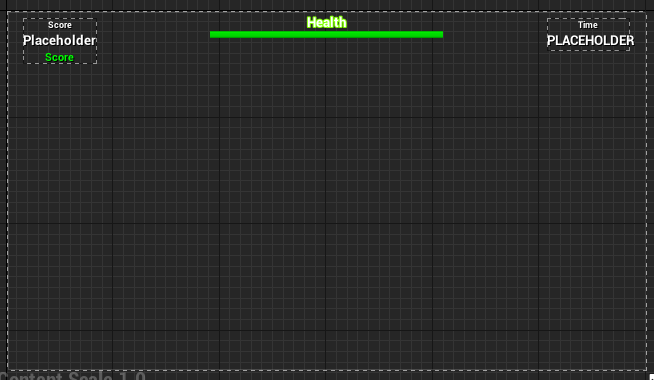
The green "Score" is where I'm trying to make the "+100" pop up
odd ember
so where is the logic for when you achieve the points?
 eternal reef
Can anyone tell me how to correctly set a cameras transform from one camera to another?
I can swap between two different actors (each of which have their own camera) but when I use the location + rotation from Camera 1 for Camera 2 the Actor is not centred anymore, my guess is using the camera boom? But I couldnt get it to work there either
chrome eagle
My 100 target actos has a 'points' variable.
((Not sure if that answeres your question))
odd ember
ok, but when you shoot them
how do you communicate the 100 points belong to the player
spark steppe
eternal reef
Can anyone tell me how to correctly set a cameras transform from one camera to a...
set view target with blend
chrome eagle
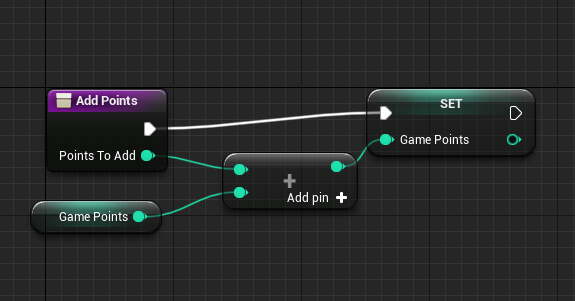
In my Gamemode I have a "game points" which is attached to a function:
https://prnt.sc/1zl60bt
 spark steppe
but reading your question again, that might not be what you asked for
odd ember
chrome eagle
In my Gamemode I have a "game points" which is attached to a function:
https://...
cool
eternal reef
spark steppe
`set view target with blend`
I used this node just to swap cameras right, but it doesnt save the last position of the camera before the swap its just a nice transition between the two
odd ember
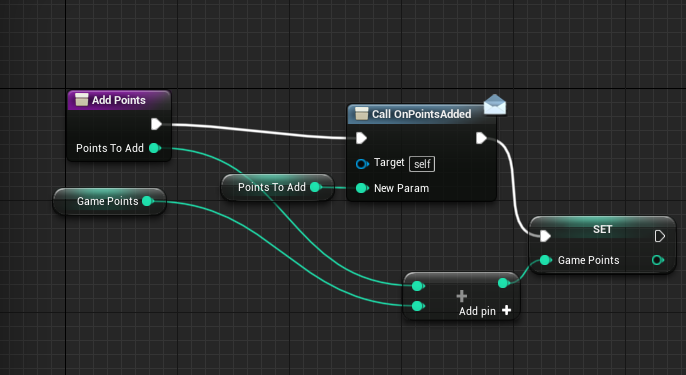
so create an event dispatcher in your game mode called OnPointsAdded
as a parameter, add an Integer called PointsToAdd
chrome eagle
To clarify* When you say add a parameter, I should add an integer variable?
odd ember
on the dispatcher itself
chrome eagle
Sorry idk how to do that >.< I made the dispatcher but I don’t see how to add a parameter.
odd ember
it's in the details panel
the UI is a bit convoluted because it deviates from the normal
it's up top, instead of at the bottom like for functions
chrome eagle
 odd ember
chrome eagle
https://prnt.sc/1zl6sob
odd ember
chrome eagle
https://prnt.sc/1zl6sob
Inputs, with the +
chrome eagle
done
odd ember
the points should be the PointsToAdd from the function. you can get function parameters as a reference by typing get <function param name>
so get PointsToAdd
and hook it into the call
 knotty sequoia
bruh
odd ember
chrome eagle
https://prnt.sc/1zl78he
connect it
chrome eagle
Done lol
odd ember
go to your widget
chrome eagle
yep
chrome eagle
"Event construct" yea
odd ember
Get Game Mode -> Cast to <your specific game mode> -> Bind event to to OnPointsAdded
for the red variable that pops up on the node, drag it out and type in Create Event
chrome eagle
done
chrome eagle
yepo
odd ember
click Create new event
a new event will spawn. call it whatever
congrats, you now have a bonafide connection to when your points get added in your UI
 odd ember
Create a matching event
ok weird
just create a custom event with the same parameters then
chrome eagle

So I connected my new custom event to the "bind event on onpointsadded" node and deleted create event
lol nope I'vve no clue what I'm doing xD
knotty sequoia
hi, i want to ask why this does not work? it should move the character to 0 0 0 if i press E and if i press any movement keys it should cancel the movement but for some reason when press E it does nothing
 chrome eagle
Is the BP inside your player controller?
knotty sequoia
it is inside FirstPersonCharacter Event Graph
chrome eagle
shrugs Sorry, I'm clueless at all this lol
knotty sequoia
ok, thanks 😄
chrome eagle
I cant even get my HUD to work xD
chrome eagle
NICE 😄

 willow phoenix
whats better: having a "check if player is below x units in Z axis" on tick or a giant (i mean, GIANT) killZ volume with an on begin overlap event?
or "better performance"
im not sure how much the "im waiting for someone to overlap me" impacts the performance, but my guess is, it is better than the tick version
dawn gazelle
umbral ginkgo
Does anyone know why this isnt working?
There's no point in converting to an int then back to a float. From the axis value do a float * float by your base rates and feed that directly into the inputs of the "add controller ___ input" nodes.
umbral ginkgo
k thx
dawn gazelle
Usually axis values are from 0 to 1. So if you multiply by 0.5 then it'll be half as sensitive. If you multiply by 2 it'll be double.
dawn gazelle
willow phoenix
or "better performance"
Using the built-in Kill Z setting in your world settings:
 willow phoenix
the actor gets destroyed then? or is it an other event that gets triggered?
dawn gazelle
Pretty sure it's just destroyed.
timber knoll
you can override it for characters
also wouldn't be so sure about overlap being better than checking location on tick
 gentle urchin
Id just do it on tick tbh
 mystic mist
Hello! Ive got an interesting question.. well first my blueprint. I am making a door open and close via a switch. Click it, door opens, click again, door closes. Magic. Awesome. However, If one repeatedly clicks the switch while the timeline is making its move, it starts again from the start of that timeline - I don't want this to happen, but I don't know how to prevent it. I tried switching it to Play and Reverse on the timeline respectives, but all it did what just auto rotate without any animation. Anyone know how to help?
 timber knoll
you would have to keep track of the current time
so let's say you are .5 seconds into opening
you would have to either reverse it from that point
 static charm
just use one timeline
 silk hinge
Hey, I've been working on UIs lately, I would like to know if there is a way to get data from a clic, Like i'm into my inventory and would like to get the data from the item I just clicked on ?
mystic mist
@timber knoll and @static charm thanks! that almost works, but now it does a similar thing every now and then. I wonder... Maybe I will make different switches (one for each side of the door), but it just animates open to clsoe.

or maybe Im not doing something right? XD
timber knoll
reverse from end will force reverse it from the last keyframe
mystic mist
makes sense. huzzah! it works! many thanks.
dawn gazelle
silk hinge
Hey, I've been working on UIs lately, I would like to know if there is a way to ...
Use an overlay widget with your displayed item and a button in it. Then you can capture the click event from the button pressed.
 silk hinge
I dont press a button, I press to open a menu, then I press the button of the menu I opened, And I need the clic the register the item data I clicked to open the menu, to use it depending on what Info were into the data
I got a drag and drop operation I dont remember how I got that, that is taking the data to move it across the inventory

I have no idea how I created that, or if it was into the Engine with those infos
dawn gazelle
So you're trying to get info from the inventory item after you've dragged it somewhere and dropped it?
silk hinge
Let me show you the thing, would be easyer to picture

so this is the inventory, I got my drap/drop working.
But now I got a drop down sub menu, with a "USE" button, I have to press an item with "Right clic" to open this menu, so I would like to get the Item data of the Item I pressed with Right clic to open the menu, to do somthing depending on Data, when I press "Use" button


And this is the blueprint I'm using to open the menu
dawn gazelle
I'm guessing this is what is showing the Use/Close widget?
 silk hinge
yeah it's casting to the player to creat the widget and add it to viewport
get player pown is a terrible choice tho to reach for the player xD
dawn gazelle
So what I would do different, is have the inventory widget create the use/close widget and in the use/close widget you can have an exposed variable that feeds in the inventory data you want. Then in your Use/Close widget you can do what you want with that data.
silk hinge
My inventory widget is just a grind tho, I dont think I can do anything with that
I got one widget to greyed out the screen, one that got the lines and cells, and another that is just the Item
so those items you see are all diferent widgets
dawn gazelle
Are you using a base widget class for all of your item widgets?
silk hinge
Yeah "Item Widget" should be the base, this inventory is a tutorial base cause I really wanted to have full spacial inventory etc... But I just keep running accross all things to understand it properly xD
dawn gazelle
Ok. So you are storing some reference to the item in question in the widget, yea?
Like this drag and drop operation has the Item Object reference.
 silk hinge
just the item Image (Icon) and the Size
OH wait
I got an "Item Object reference"
its the data
odd ember
chrome eagle
lol nope I'vve no clue what I'm doing xD
did it work after you recompiled it? sorry I had to take a call
odd ember
umbral ginkgo
Does anyone know why this isnt working?
you're converting floats to int. given the axis value goes from -1 to 1 there's a good chance it'll be 0 most of the time
dawn gazelle
silk hinge
I got an "Item Object reference"
Ok. So then again, I'd make it so your "Item Widget" widget basically does what ever is contained in the "Usage Menu" in the screenshot below (be it creating or showing or what have you) and you then need to feed that "Item Object Reference" into the "Usage Menu" widget - it can be through an event or when you're creating it using an exposed variable.
 chrome eagle
@odd ember No problem https://prnt.sc/1zlj7rc Got errors
 silk hinge
I think I got something let me run a test quick
odd ember
chrome eagle
<@!224571781862653952> No problem https://prnt.sc/1zlj7rc Got errors
what's the error?
chrome eagle

 chrome eagle
pffft nope. Now I've got an error on here xD
odd ember
well then
 odd ember
show me the details panel for your dispatcher
chrome eagle
 odd ember
right click on the Call node and hit refresh node
silk hinge
@dawn gazelle ahah
Since the Item widget is unique and I had a reference to Item object allready, I just had to get the variable, since it's specific to each item, I could just access it with no problem xD
I just didnt thought about it, thanks
chrome eagle
I refreashed it and it removed the ppoints to add node
silk hinge
Literally just had to do this x)
 odd ember
reconnect it
chrome eagle
pfft ok reconnected and compiled and it works now (So confused~)
silk hinge
Yeah some blueprint, needs to be recompiled even some times have to restart the engine for like physical material etc...
chrome eagle
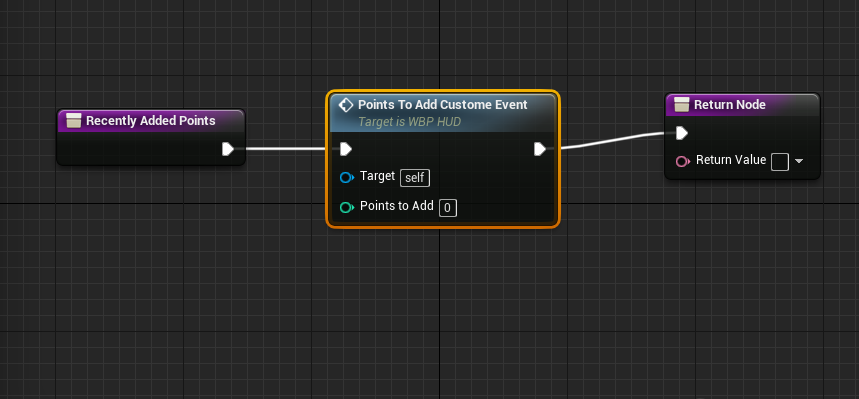
@odd ember Okay NOWWWW when I attach a 'craet event' to the bind event to onpontsaddded under my HUD WBP, The drop down
https://prnt.sc/1zlk3ru
 odd ember
in this case it's just a question of recompiling every time you make a change
odd ember
chrome eagle
<@!224571781862653952> Okay NOWWWW when I attach a 'craet event' to the bind ev...
did you create your custom event?
chrome eagle
I did, I was trying this again lol
hold~
ok sooo no errors this time at least
https://prnt.sc/1zlkex4
 odd ember
if you compile your blueprint, the create event node should now have your event in it as well
so you don't have to have this long red line through going through everything
odd ember
try with the create event node and see if you can get your event to show
 odd ember
chrome eagle
https://prnt.sc/1zlkv7m
odd ember
chrome eagle
https://prnt.sc/1zlkv7m
I don't know what this is
chrome eagle
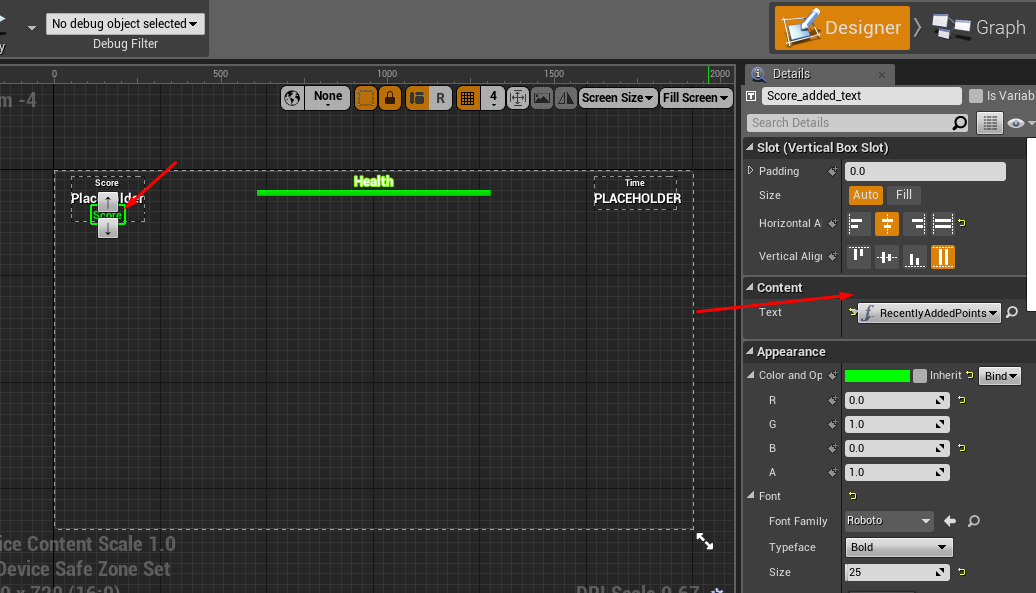
The bind to the score text on the HUD
chrome eagle
The one I named "Points to add custome event" right?
chrome eagle
So the only way I know to bind text to anything is through these binds https://prnt.sc/1zll89f
 odd ember
chrome eagle
So the only way I know to bind text to anything is through these binds https://p...
odd ember
chrome eagle
So the only way I know to bind text to anything is through these binds https://p...
don't use those
chrome eagle
I'm new to the program mate I only know limited ways of doing stuff.
odd ember
whenever the event triggers, it will give you the points in the widget
so all you need to do is use SetText with the points (and a message potentially), then use a delay, then remove the text
there's also the Format Text node that can be helpful
it does exactly the same as the binding
but you get it for free
whereas the binding is expensive
chrome eagle
What do you mean? like processiong power?
odd ember
yes
 proper umbra
Is there a way for me to set the variable given here?
 proper umbra
And then do I use set integer (by ref)?
gentle urchin
Yepp
jaunty solstice
I have an array of custom object. Lets call this 'Spawners'. Now I simply want to retrieve a specific spawner object in this array.
Why is there no 'Get Object at Index' node in Blueprints?
 brazen merlin
it's just called Get
get a reference to your array, drag off from the array, type get, and it will have an index you can control
odd ember
but then we can't be angry over the fact that it's not called Get Object at Index 😩
 manic vessel
Hi all, Im stabbing a character in VR with a knife .And Im using the hit normal of the surface, But I want to set a condition where it only works if the blade is in a perpendicular threshold to the Hit Normal. of the surface.. whats the best approach for this.
brazen merlin
odd ember
but then we can't be angry over the fact that it's not called `Get Object at Ind...
ah, but what if it is not an object? it is a generic node to work with any classes
odd ember
Get * at Index
odd ember
manic vessel
Hi all, Im stabbing a character in VR with a knife .And Im using the hit normal ...
I mean, dot product will get you what you want, but I'm not sure how you want it to be perpendicular to the normal
the normal of a wall faces outwards
manic vessel
I tried that. But I didnt work out. I tried to use the Dot product of the Out hit impact normal and the Up vector the the knife mesh
odd ember
why would you use the up vector and not the forward vector?!
dawn gazelle
odd ember
`Get * at Index`
 manic vessel
In theroy I would rather use a arrow as I can apply that direction to different weapons
odd ember
dawn gazelle
hang it next to the mona lisa
manic vessel
because the knife is pointing down
odd ember
... the knife pointing down does not mean it's not its forward vector you're using
manic vessel
I will do this again with the arrow so I can use forwards vector. But Atleast I know that Dot product is a valid method.
odd ember
you genuinely dont need an arrow
the mesh is likely pointed towards the forward vector
odd ember
manic vessel
In my Bp and mesh Its pointing - z
have you checked the mesh itself?
ah nevermind
in that case you can try up vector * -1
for the down vector
if you want it to hit a perpendicular surface only, the dot product should be -1
manic vessel
Just found that out. By hitting with the handle It worked. so was wrong direction 👍
 rough cedar
Anyone have an idea why my Jump fuction stopped working after updating to 4.27? If I drag off of "Pressed" I get the option to select jump. But when I click it I get this kinda node?


Says "Call unknown function jump"
odd ember
rough cedar
Anyone have an idea why my Jump fuction stopped working after updating to 4.27? ...
does the character movement component exist on your character?
has it been replace with a different character movement component?
rough cedar
yeah its there, i dont think its been replaced at all though.

it definitely used to work
odd ember
I can't say. I haven't had that problem upgrading to 4.27
you could perhaps try reparenting, then parenting back to character
rough cedar
just tried that. same resut
icy dragon
rough cedar
Is this prevents BP recompiling at all?
icy dragon
Maybe the magic bullet: restart the editor
rough cedar
but no height
disabling animation just to see if the character moves upward shows it doesnt work
ill try restarting, but its been happening for a while now
icy dragon
I know it sounds so cliched, but worth a try at least.
rough cedar
ok
 hazy fulcrum
Evening chaps, in a bit of a pickle. I'd like to use Set Timer to run a function that reduces the player's stamina by a given amount, but the Set Timer By Function Name node doesn't appear to allow a parameter to be passed to the function specified. Is there a workaround for this, or a better approach?
odd ember
hazy fulcrum
Evening chaps, in a bit of a pickle. I'd like to use Set Timer to run a function...
SetTimerByEvent and using a CreateEvent node perhaps?
much more robust anyway
 heavy ibex
I have a 10-faced dial (static mesh) that I am trying to rotate 36 degrees every time it is clicked. I am keeping track of the needed rotation (as an int, incrementing by 36 every time) and when I click I'm using a timeline to lerp from the current yaw to the updated rotation value. It works the first couple times (0 to 36, 36 to 72) but something weird happens when I try to go from 72 to 108 .. it seems to rotate just fine but if I print the final yaw it says it's at 72 still. Then subsequent clicks seem to thrash it around wildly. I think I must be approaching this wrong. What is a better way to lerp between rotations with an absolute final rotation? ugh this was a sloppily worded question
icy dragon
heavy ibex
I have a 10-faced dial (static mesh) that I am trying to rotate 36 degrees every...
It's stopped at 72? I kinda doubt it has something to do with gimbal locking with FRotator struct
Can you drop screenshot of the BP nodes in question?
odd ember
heavy ibex
I have a 10-faced dial (static mesh) that I am trying to rotate 36 degrees every...
you're running into rotator specific issues
if you can, rotate using quaternions
heavy ibex
 heavy ibex
odd ember
if you can, rotate using quaternions
heavy ibex
odd ember
if you can, rotate using quaternions
Those are .. things I've never been able to wrap my head around
hazy fulcrum
@odd ember I'm not seeing any way of passing a float parameter into the event with your suggestion, unless I'm missing something?
odd ember
heavy ibex
Those are .. things I've never been able to wrap my head around
it may be necessary in this case. the reason it screws is because you cross a 90 degree threshold, and unreal's rotator can't decide how to represent that rotation
that's my best guess anyway
heavy ibex
hmm, I thought the threshold was 180. And I added some simple logic to deal with that (I thought) by reducing by 360 if I'm over 180
icy dragon
odd ember
it may be necessary in this case. the reason it screws is because you cross a 90...
And more often than not, interps got screwed in 180 as opposed to 90.
odd ember
hazy fulcrum
<@!224571781862653952> I'm not seeing any way of passing a float parameter into ...
ah my bad, timers won't allow you to pass in a float. you'll have to capture it separately. for what it's worth, event dispatchers would
odd ember
icy dragon
And more often than not, interps got screwed in 180 as opposed to 90.
it can happen arbirarily. the point is that it is unreliable, so the solution should be to find something more reliable
heavy ibex
quick vid of the occurrence
heavy ibex
odd ember
it can happen arbirarily. the point is that it is unreliable, so the solution sh...
ok .. quaternions ...... to google
odd ember
basically in rotator logic, 270 = -90, 90 = -270, 180 = -180
icy dragon
heavy ibex
A bit of short sighted, but maybe you could replace Set World Rotation with RInterp To? I forgot if the node has some kind of "alpha" so that the Timeline node has something to work with, or not.
odd ember
to be honest, the rotator version of the lerp has a way that might work with this
so you could save yourself some headache if it does work
but quaternions are still the best option
odd ember
odd ember
to be honest, the rotator version of the lerp has a way that might work with thi...
(there's tickbox for shortest path)
@heavy ibex
rough cedar
@icy dragon Same result 😦
heavy ibex
odd ember
(there's tickbox for shortest path)
I tried this first, had the same effect. I switched to a float lerp hoping it would magically fix it
odd ember
in that case quats are your only hope, obi wan
icy dragon
rough cedar
<@!325627930484932608> Same result 😦
I never saw that issue before, so if the magic bullet doesn't work, I have no idea.
Though, for a little sanity check, does the issue happen with a fresh Third Person BP template?
 round moth
im in this blueprint but the windows are all messedup for some reason and i cant get to the event graph
 icy dragon
round moth
im in this blueprint but the windows are all messedup for some reason and i cant...
icy dragon
round moth
im in this blueprint but the windows are all messedup for some reason and i cant...
Tried double clicking the Event Graph in the list?
icy dragon
round moth
but how can i make it like the other blueprint
You can always summon the pannels here
 odd ember
round moth
where it is normal
odd ember
round moth
where it is normal
window > load layout > default editor layout
icy dragon
(ignore the Enable Fullscreen highlight)
round moth
i did that but it changed my whole unreal
not the actual tab i did it on
@odd ember
odd ember
did it change it for new tabs that you open?
icy dragon
round moth
not the actual tab i did it on
The panels can be summoned back in the Window toolbar menu nonetheless
round moth
well ima assume all new ones i make will be normal
im just confused why this one is broke
odd ember
so close and reopen
dreamy ice
so my ability system will allow players to interchange abilities. How would I go about that? Like do components within components?
odd ember
or close, reset to default, reopen
dreamy ice
i cant wrap my head around it
round moth
 odd ember
dreamy ice
so my ability system will allow players to interchange abilities. How would I go...
odd ember
dreamy ice
so my ability system will allow players to interchange abilities. How would I go...
no, you'll need design patterns for that
round moth
i have much less option to add
icy dragon
dreamy ice
so my ability system will allow players to interchange abilities. How would I go...
Gameplay Ability System might be the most elegant for this, but that needs C++ coding to set up. (And I actually never tried it myself)
dreamy ice
I really wanted to do it on my own so I knew the groundwork for it.
odd ember
dreamy ice
so my ability system will allow players to interchange abilities. How would I go...
basically you'll need to consider how to access your abilities, and make that point of access the same across all abilities
dreamy ice
I considered making them actors to spawn on the player but that didnt really make sense.
icy dragon
round moth
It can't be data only BP, parent class is one of the base classes 🤔
Magic bullet it is then.
odd ember
actors spawning on players does make sense, but not for abilities necessarily
icy dragon
dreamy ice
I considered making them actors to spawn on the player but that didnt really mak...
Well, I did use spawn actors for special abilities, and a bunch of events stringed together.
dreamy ice
My worry is that won't be efficient enough for my idea. I want the abilities interchangable at any time during runtime.
icy dragon
Basically the ability actor's going to tell the character what animation to play, and how many damage (and element if any) to apply.
odd ember
no need for it to be an actor for those
icy dragon
It's my method, so I expect it to not work on other's project.
faint pasture
dreamy ice
I really wanted to do it on my own so I knew the groundwork for it.
Do ability as actor or as actor component.
odd ember
I'd personally create a systemic approach where there's an ability queue or stack where abilities are put on and executed in order
an ability could be an object
since it just needs to carry data for the most part
faint pasture
Well yeah you can go down that route then you basically end up with GAS with extra steps and with worse networking
but abilities as actors or components works fine for someone new
dreamy ice
id like to store the ability code itself individually, can i nest components within components?
odd ember
nope
faint pasture
dreamy ice
id like to store the ability code itself individually, can i nest components wit...
Give an example of the most complex ability you can think of
odd ember
faint pasture
Well yeah you can go down that route then you basically end up with GAS with ext...
they mentioned wanting to create a system themselves
dreamy ice
hmmmm, they're not necessarily complex all the time, but there will be many.