#blueprint
402296 messages · Page 685 of 403
 tired chasm
 gentle urchin
Could be that it is identical to "location", but i would assume location is the same as impact point.. altho that wouldnt make much sense
tired chasm
Yeah I don't get what the difference is with those 2 pins
wouldn't getting the location get me the location of the actor? I need the hit location
sorry if I'm misunderstanding ><

 tired chasm
Yeah that's what I thought haha

 tired chasm
OH!
 burnt nest
I believe it is relevant for box and sphere traces using sweep. Location is where you can place a sphere so that it is in contact with the hit actor, while impact point is when it reaches the center (or maybe it's vice versa). They are the same on initial overlap. Something like that. 🤔
gentle urchin
burnt nest
I believe it is relevant for box and sphere traces using sweep. Location is wher...
Ah, yeah that would make sense 🙂
 quaint bough
When i want to make a game with different heros to select from with different abilitys and stats would i make a new character blueprint for every hero?
 quartz pawn
hello, so I am getting this error when trying to see if the player is looking at a specific object. Accessed None trying to read property Actor
 burnt nest
quaint bough
When i want to make a game with different heros to select from with different ab...
burnt nest
quaint bough
When i want to make a game with different heros to select from with different ab...
Make one character blueprint with all the functionality your different classes will share. Then create child blueprints from that base class and give them their specific abilities and stats.
 open crypt
what's the right command for getting a random point in a collision box? I'm trying random point in bounding box but I'm not sure what to put in for the box's origin
burnt nest
open crypt
what's the right command for getting a random point in a collision box? I'm tryi...
Get the collision box's location, and plug that into the box origin.
quaint bough
burnt nest
Make one character blueprint with all the functionality your different classes w...
ok thanks
burnt nest
quartz pawn
The "Actor" that's coming out of your function in the first node is null then. The screenshot doesn't show what that actor is. If it's just going to be the player, you can just do a Get Player Character instead.
open crypt
burnt nest
Get the collision box's location, and plug that into the box origin.
Like this?
 burnt nest
Yup, looks about right!
open crypt
Can you advise why SOMETIMES my AI are falling through the floor? maybe it's a problem with simulate but it keeps happening
This is baffling
why would it be different given NO changes - what is the variable here that I am missing
burnt nest
Hm. It looks like they might spawn in before the ground is fully loaded
quartz pawn
why wont my service run in my behavior tree?
and did they remove event receive execute?
burnt nest
open crypt
is there a simple fix for that?
Can't say I've ever had that issue before.. honestly I'd expect Unreal to load in collisions before beginning to simulate gravity
open crypt
I'm trying to spawn some AI in a volume but they end up floating in air - or being stuck in the ground - I know I could hardcode the ground part and just clamp it so they couldn't spawn any below a certain value - but I'm not sure what to do about this floating person - shouldn't gravity take effect and they would fall on the ground ?
 quartz pawn
someone
open crypt
quartz pawn
someone
check #gameplay-ai and be patient if you can
quartz pawn
ok
 trim matrix
Hey there! I'm just startin to learn how to use BP and was hoping someone would be able to recommend me a course or tutorial (I noticed one on youtube from 2015, but I feel like I need somethin even more extensive)
open crypt
If you watch the blueprint communications video - that will get you started very well I recommended all the time don't worry about the date, none of those principles have changed
trim matrix
That's the 2hour 22min video with Live Training on YT right?
 nova ledge
Hello everyone! Does anyone have an idea where I can find a video tutorial on how to make a guild system? Or at least where I can find clues on how to make one?
trim matrix
open crypt
Yes, put the time in, trust me
Oh, Ill watch it for sure! If anything 2 hours sounds like almost no time at all xD Anyhow, thanks a lot for the recommendation, Blake! Feel free to DM me if u think of anythin else that might be useful for a newbie!
open crypt
trim matrix
Oh, Ill watch it for sure! If anything 2 hours sounds like almost no time at all...
Mat Watstein has a prolific list of youtube videos that demonstrate single concepts, like "What is GetActor Transform" and he shows you examples of what that thing is
Check that before you ask a question because he already took the time to explain it better than most here would
Another piece of advice would be to get very good at using a screenshot program, like ShareX and learn that there is an art to asking questions that get answered
 quaint fog
Hey guys, I would love if someone could check my logic, and just tell me if I am misunderstanding how this should be done:
At startup, I am telling my game instance to create all the required menu widgets (main menu, pause, settings. etc) then the game mode bp goes and retrieves the created widgets from the game instance, stores them in variables and displays the main menu widget.
As menus get closed, I am actually just "collapsing" them so that the game doesn't create them from scratch every single time. And every single menu opening is done through a generic "open menu" function in the game mode bp with the widget being opened passing into the function as an input.
I understand that the system allows for a lot of flexibility in how these things are done, I just want to know if anything that I described is criminal and a big no no
open crypt
quaint fog
Hey guys, I would love if someone could check my logic, and just tell me if I am...
That all seems fine - the main thing is to keep track of where your references are stored - so if you have Big menu that spawns Medium Menu that spawns Tiny Menu, you'll have to remember where to access it - but not creating them from scratch each time is key if you want to save any values or states on those menus
trim matrix
open crypt
Another piece of advice would be to get very good at using a screenshot program,...
Ill need to check this ShareX thing out, so far Ive gotten along by usin Win+Shift+S to screenshot
 silk bolt
I've finally got a basic OSC blueprint working, but I'm curious if you can route the Exec pin from the "Create OSCServer" element to the two "Convert String to OSCAddress" elements, or do I have to daisy-chain them?

 dawn gazelle
silk bolt
I've finally got a basic OSC blueprint working, but I'm curious if you can route...
dawn gazelle
silk bolt
I've finally got a basic OSC blueprint working, but I'm curious if you can route...
sequence
 icy dragon
silk bolt
When you nativize a blueprint, where do you see the code?
icy dragon
silk bolt
When you nativize a blueprint, where do you see the code?
Nativization is done on packaging, so you may have hard times tracing for it.
(Not that you want to look at the automated conversion from BP to C++ "code" anyway - trust me, it's barely human readable)
 faint pasture
quaint fog
Hey guys, I would love if someone could check my logic, and just tell me if I am...
faint pasture
quaint fog
Hey guys, I would love if someone could check my logic, and just tell me if I am...
That seems unnecessarily convoluted. Why not just do it all from wherever you will be interacting with the ui? Either HUD or player controller
silk bolt
How would I pass data (like a float from a received OSC message) to another blueprint (like the object I want to control?)
 azure bolt
Hello I have a problem with SetWorldRotation. I have it so the NPC rotates to face me when i talk to them, and when i stop talking to them they should rotate back to their original position. As you can see in the video, the event is being called, but it doesn't do anything. Anyone have an idea why this is happening?
This one works

this one does not and it doesnt matter what you put into the rotate value, it won't do anything, However it does work when called from the editor as demonstrated in the video
 dawn gazelle
azure bolt
this one does not and it doesnt matter what you put into the rotate value, it wo...
dawn gazelle
azure bolt
this one does not and it doesnt matter what you put into the rotate value, it wo...
Fairly certain you want these reversed.
 azure bolt
Nope that is working as intended
dawn gazelle
Before your rotation, you are setting "Current Rotation" which would be the original rotation of the character. After the rotate is completed, you are setting "New World Rotation".
If you're wanting to reverse the rotation that took place, then you should be using "Current Rotation" as the target. The "Current" input should be set to the mesh's current world rotation (not the new world rotation)
 azure bolt
I dunno all i know is that if i swap them, then they work the way i want. But this isn't the problem. My problem is that the code that should rotate the character is being run, but still not rotating the character
(bottom video shows the variables plugged into Rinterp as they are in the orginal code)
 fallen glade
anyone know how to stop a blueprint to take more than a tick? This kind of works but I can only know the last tick time so sometimes it's off

 unique harness
idk but spread your nodes out, holy moly
dawn gazelle
azure bolt
(bottom video shows the variables plugged into Rinterp as they are in the orgina...
This works flawlessly. You just need to set up a float track in your timelines.
 fallen glade
unique harness
idk but spread your nodes out, holy moly
fallen glade
unique harness
idk but spread your nodes out, holy moly
i like them tight
burnt nest
fallen glade
i like them tight
who doesn't
Besides, it allowed you to fit it nicely in one shot. 🙂
 silk bolt
Can publicly exposed variables from blueprints be used in materials?
quaint fog
faint pasture
That seems unnecessarily convoluted. Why not just do it all from wherever you w...
I just wanted to keep things where they make sense. In this case not overloading the player controller with ui stuff, but simply keep the controls there. And keeping game logic in the game mode. And the reason for using game instance is because otherwise gamemode runs on every level opening, creating all the menus again
fallen glade
silk bolt
Can publicly exposed variables from blueprints be used in materials?
you can either set them through a dynamic material or a material parameter collection
faint pasture
quaint fog
I just wanted to keep things where they make sense. In this case not overloading...
Are you sure the widgets persist thru a map change even when spawned by GameInstance?
Just do it all in AHUD
fallen glade
don't they get cleaned?
azure bolt
dawn gazelle
This works flawlessly. You just need to set up a float track in your timelines.
Unfortunately this didn't work for me, but thank you for you help
 tranquil prawn
dawn gazelle
Fairly certain you want these reversed.
tranquil prawn
dawn gazelle
Fairly certain you want these reversed.
@azure bolt delta time is supposed to be connected to a get delta time node
Idk what u r trying to do exactly but just from a quick look..
azure bolt
tranquil prawn
<@!229658167229808660> delta time is supposed to be connected to a get delta tim...
I don't have any problems with my code. I know it works because it works when i call it from the editor, the problem is it doesn't work when it is called in blueprint, and i know its called in blueprint because the print string and breakpoints are telling me so
tranquil prawn
if u dont get the issue, just try to print string every single thing until u figure it out
quaint fog
faint pasture
Are you sure the widgets persist thru a map change even when spawned by GameInst...
Ooooh... They don't.. thats why they wouldn't appear at all when spawned in game instance
azure bolt
I've done this. It prints the strings when its meant to, i follow the breakpoints through the execution and it should be rotating the character. but it doesn't...
quaint fog
HUD makes sense, don't know how I missed it, thanks! They persist in HUD?
tranquil prawn
maybe ur character is not moveable (static)? or one of the components isn't?
azure bolt
tranquil prawn
maybe ur character is not moveable (static)? or one of the components isn't?
I don't think so because the roation works the first time when i rotate the character towards the player.
see (#blueprint message)
tranquil prawn
try to maybe change the rotation of the actor instead of the component
also try to make a new actor with that logic and see if it works on it
Idk just stuff like that, anything that could minimize the options of what the problem coudl be
@azure bolt
azure bolt
tranquil prawn
try to maybe change the rotation of the actor instead of the component
also try ...
Well just making a new actor BP seemed to work. I dunno what was with my old one, but making a new one worked. Thanks:)
silk bolt
How do I retrieve a variable I exposed from another blueprint (my OSC receiver) in a separate blueprint (my material)?
silk bolt
fallen glade
you can either set them through a dynamic material or a material parameter colle...
Do you connect the material parameter collection to an existing material?
trim matrix
im checking if a file exists in a while loop. This works okay but while it is checking my games animation freezes. how could I permantly check instead of using a while loop?
 unique harness
trim matrix
unique harness
trim matrix
check on tick or in a timer
trim matrix
ahh I had no idea there is a timer blueprint, my bad! ill reform my nodes
Okay quick question, what's the performance hit (if any) of having a bunch of collapsed graphs everywhere?
unique harness
none
fallen glade
silk bolt
Do you connect the material parameter collection to an existing material?
if you want to do it that way, yes
 clear meteor
Is there a trick to getting AI to animate after SpawnAIFromClass? I've tried a dozen tutorials but when my AI spawns it just sits there. That node is supposed to take care of the controller and behavior tree right?
If I drag my AI into a level it runs the behavior tree as expected, but nothing when I spawn it.
 last abyss
clear meteor
Is there a trick to getting AI to animate after SpawnAIFromClass? I've tried a ...
last abyss
clear meteor
Is there a trick to getting AI to animate after SpawnAIFromClass? I've tried a ...
look at your pawn settings on your ai class and see if it auto possesses with the correct ai controller
clear meteor
last abyss
look at your pawn settings on your ai class and see if it auto possesses with th...
It's set to Placed In World or Spawned
And it's the correct controller
Blueprint Runtime Error: "Accessed None trying to read property CallFunc_GetBlackboard_ReturnValue". Blueprint: AIControl Function: Execute Ubergraph AIControl Graph: EventGraph Node: Set Value as Object


For some reason the behavior tree won't move past Rotate to face Enemy when I spawn the AI
... the spawner
 last abyss
clear meteor
last abyss
clear meteor
beginplay would run before possess, so that would be why you're getting accessed none?
clear meteor
Hmm.. that's how the dude in the tutorial set it up but he was just placing the AI's not spawning. How would I adapt this setup to spawn? Sorry, I'm an artist and I'm new to blueprints
last abyss
well you could instead do it on possess, after u run behavior tree because then the blackboard does exist
clear meteor
Holy crap, I think it's working
It really shouldn't matter if I use On Possess vs. BeginPlay? I guess both placed and spawned AI's only really matter if they're being possessed anyways. I think
clear meteor
last abyss
well you could instead do it on possess, after u run behavior tree because then ...
Thank you so much.
last abyss
yeah it shouldn't matter since they will get possessed anyways
clear meteor
Werd
 opal pulsar
hey gamers
i'd like some help if any of you have some spare time
so i have this blueprint actor, which has a trigger box
i need to do something if the player presses a key and is in this box, but i need to check this from the blueprint actor itself
how would i do something like that?
i hope my explanation is understandable xD
 dry blaze
@opal pulsar Bind a key using bindaction to pressed and release functions. When pressed, set a bool to true, when released, set the bool to false. Then use overlap begin + end with the box to again set another bool to true/false then in Tick check if these two bools are true, if so there you go 🙂
Hey! I have two character that collide while in the air but they just keep bouncing back when they collide with each others capsule components. Does anyone know how I can make it so the characters dont bounce back off one another but stay locked with each other when they collide in the air. Thank you! 😄
opal pulsar
dry blaze
<@437597266069684225> Bind a key using bindaction to pressed and release functio...
thats smart, thank you!
clear meteor
last abyss
yeah it shouldn't matter since they will get possessed anyways
Hmm, now the AI ragdoll is jittering when he falls down which he wasn't doing before.
 last spade
Hey everyone
So i tried to give my Metahumen some animations (from the manequin) and it kinda works. But the torse/shirt &Face doesn't animate at all. The hands, Head, Leggs, Feets al are working properly but the shirt/torso & Head realy doesn't do anything. Does someone knows a fix?
 strong barn
I have a navmesh and an endpoint, a spawner spawns these and they don't move
 quaint fog
What would be the proper way of making confirmation widgets? I am doing them with call dispatchers atm, but I am not sure how to differentiate the "confirm" thats meant to start a new game from the "confirm" that's meant to delete a save for example
is there a way to pass in an ID of some kind when binding? that way I could at least see if the binding ID and a call ID match
I am going to try making the press of the new game button be the caller, and the confirmation widget be the binder, since you can have inputs on the call
faint pasture
@quaint fog if you're not trying to do any sort of transactional pattern, just have whatever the thing is that would be doing the action without the confirmation spawn the confirmation widget and then have the widget called into its parent
Set the reference on spawn to whatever the widget should send a confirmation message to
 cyan jacinth
Hey there, just wanted to ask a quick question about a blueprint function. In the function "Move Component To" there is a value called "Over Time". Is this value allowed to be changed over a period of time or is it just fixed? I haven't found any information on this, because I've been trying to change this value over a period of time for the past few days.
quaint fog
faint pasture
<@173181056483065856> if you're not trying to do any sort of transactional patte...
Aye, its sort of what I am doing, just missing something cause my brain is struggling with fitting the whole system in my head, but I'll get it, thanks)
silk bolt
How do you re-import a .COPY file with a blueprint into another project?
 tawdry surge
I'm trying to work out the logic for how to take control of an actor/pawn my player is holding. For example, if I have a 3rd person character riding a mount for a jousting type game, how would I get the Lance to point where the target reticle is on the screen
faint pasture
tawdry surge
I'm trying to work out the logic for how to take control of an actor/pawn my pl...
Can the rider get on and off of the horse? Like is the horse like a vehicle? Or do you have one pawn, which is a combination of horse and rider?
 half scroll
Hi peoples I’m making a mobile game but I wanna hide my on screen controls using UMG but unhide when the player ovelaps a vehicle something like that my current setup is using interface that calls a notification and I’m using that interface to implement the visibility of the buttons but it’s currently not working can anyone point me to good resource
faint pasture
@half scroll just have a Boolean representing whether or not the UI should be shown and after you set it, call and update UI function that uses the Boolean to show and hide the widgets
 marble summit
Is there documentation about what happens when you attach a character blueprint to another? Right now I'm trying to have an actor hop onto the back of another actor, then hop off and move. But after it attaches itself, it seems like it loses all physics and AI
tawdry surge
I don't really need him to get on, but if they are hit hard enough they will be dismounted, so the mount would just be a pawn, and the player would be a separate character actor @faint pasture
 proud sable
Is there a better way of doing "held" key behaviour? I'm having issues getting this to work consistently for what I need.
I have two attacks, on "Left mouse" and "Shift+Left Mouse", and I noticed sometimes they seem to conflict or stay held when they shouldn't. Especially the second one

 dim loom
hi there can some one maby help me out am trying to make a player to camera and then back to player cutsense now i got (set viewtarget with blend) but i can seem to have it go back to the player
faint pasture
@proud sable the new input system makes this kind of stuff a lot easier
 mystic olive
heres what I got so far,
Im using an BP Actor with a static mesh it being the cooking pot
from here I added a box collision to detect when the player has entered the area to be able to start cooking at the station
I than added 4 red dev arrows just so I can not only see the placement of where the spawn will be and the direction but I can use them also as variables to detect the location and whether that space has been filled or not
[7:04 PM]
[7:04 PM]
need some help I tried to add in the code now that would add the item to the arrows location but it still only drops onto the ground like before Im still using Reids Spacial Inventory system is there anyway to tell it insted of dropping the item on the floor having it using my "HAS ENTERED COOKING AREA" bool check and than to add the item that I am dropping to that spawn location insted? I dont need to worry about picking anything back up into the inventory atm I just want the items to go into the pot once they are there I can store all their variables
[7:00 PM]
I have a basic collide with box collision turn has walked into area bool On and Off
[7:04 PM]


please @ me if you have any suggestions
dim loom
this is btw the setup now and the red arrow is the part that isent working it just doesent want to blend back to the player please can some one help me out
 faint pasture
mystic olive
please @ me if you have any suggestions
faint pasture
mystic olive
please @ me if you have any suggestions
Can't really follow any of what you wrote, what exactly are you trying to have happen?
 north hedge
dim loom
this is btw the setup now and the red arrow is the part that isent working it j...
north hedge
dim loom
this is btw the setup now and the red arrow is the part that isent working it j...
You're setting from the Player Camera to the Player Camera, Target should be your new camera
proud sable
faint pasture
<@226309675912658947> the new input system makes this kind of stuff a lot easier
New as in UE5?
I'm still back in UE4 for this project
dim loom
wel i want it to go back to the player and it wont i tryed doing player camera manager but that doesent work .
mystic olive
oh sorry my bad I realise I pasted the message from another server of mine
@faint pasture
basically trying to drag an item out from the inventory and when in the box collision on the BP Actor I want the food item to spawn into the pot
this way I can start a cooking system
north hedge
dim loom
wel i want it to go back to the player and it wont i tryed doing player camera m...
The target should be the camera in your level that you're transfering to, to then do the cutscene
dim loom
@north hedge i have try so many was to get this to work
faint pasture
I think it's also a plugin for ue4
https://docs.unrealengine.com/4.26/en-US/InteractiveExperiences/Input/EnhancedInput/
Using the Enhanced Input Plugin to read and interpret user input
north hedge
Both the Camera Manager and Player Camera are the player pawns camera
 lament ginkgo
Hey so if I have a Parent with an OnClick event and then I have a child actor of the parent which also has an OnClick; how can I ensure when you click on the CHild it doesn't call the parent's onClick? Right now it seems to call both.
faint pasture
mystic olive
oh sorry my bad I realise I pasted the message from another server of mine
<@!1...
I'm not sure how your inventory system works internally but you should first make some function for sending an item to the Cook station, then it's simple to hook that up to the drag and drop mechanic
dim loom
wel it does the begin blend so it blends over to the cutsense but it just the other blend that isent working
proud sable
faint pasture
I think it's also a plugin for ue4
https://docs.unrealengine.com/4.26/en-US/Int...
Cool, thanks! I'll check it out
dim loom
and it wont alow me to plug the camera in so and that doesent realy make sense any way
mystic olive
@faint pasture so I should add a connection between the inventory componant and the cooking station BP Actor itself for easier connection?
Do you think this might help?
Im thinking it may cause it might have a more direct connection. Thanks for the suggestion on sending the item to the station
faint pasture
Make an event on the cooking station actor where you send it an item
I'd give the cooling station it's own inventory too but that depends on your architecture
dim loom
so yea am kinda stuck now
north hedge
dim loom
wel it does the begin blend so it blends over to the cutsense but it just the ot...
Ahh, I had it inverted
Run a delay for the length of the cutscene and then reset?
faint pasture
In my game, anything that involves items has an inventory component. Taking something out of a chest and looting a dead body and placing an item into a station all do the same thing, they move an item for one inventory component to another
mystic olive
actually you gave me an idea if I just give the BP Actor its own inventory conponant it might make it easier
dim loom
i tryed getting the lenght of the cutsense but it wont even allow me to do that .
mystic olive
and give it a base of just 4 slots and an output slot of the finished item
faint pasture
mystic olive
actually you gave me an idea if I just give the BP Actor its own inventory conpo...
Yeah if you're going to have a bunch of things that have items put into them and taken out of them, that's the way to do it
dim loom
@north hedge i had a delay in between there but i just couldent get the (get lenght )
btw i have this in my level blueprint dont know if that makes any diffrence
north hedge
It does, yeah
dim loom
i did try to get frametime and some other but that dident help
@north hedge

see its not showing up
 hardy summit
play rate? or mode?
dim loom
i followed this video on how to make the cutsense https://www.youtube.com/watch?v=3a05-aFASoI
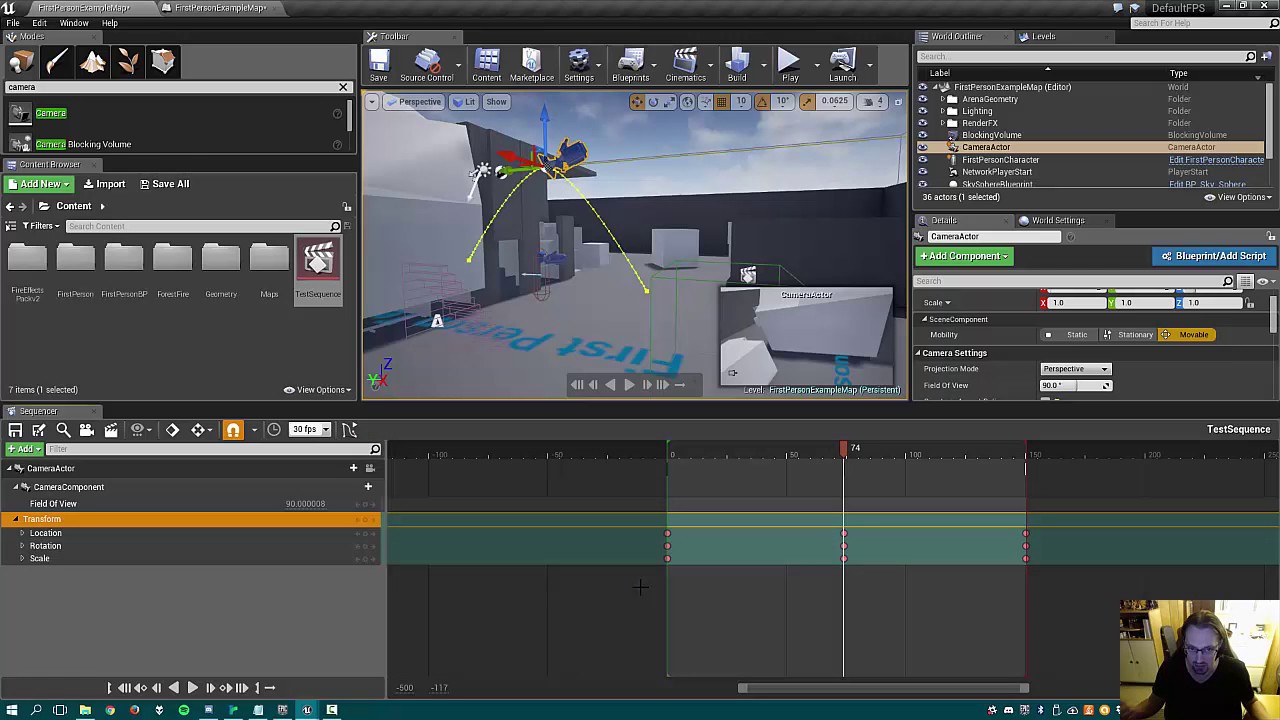
Here is a short overview of how we make seamless first person cut-scenes in Unreal Engine for Brukel (www.brukelgame.com).
the time it takes to compleet the cutsense
i cant seem to get the lenght of it
btw i am using unreal engine 5 but i dont think that should make a diffrence
also he make a object to set the player view target and when i use that on the (set viewblend ) as new target that doesent work.
could it be becos am using a 2 camera in my main pawn ?
i have 2 cameras in there so maby unreal doesent know witch am aiming at
@north hedge do you maby have a example for me .dont know if you done any think like this before maby i over looked somthink
compleet bp


this is all of it il do the delay again but like i said i cant get the lenght of it
and am also wondering where the camera resides in the get player charate/get player pawn/get play controler
north hedge
I don't at the moment unfortunately but the one I wrote just used the sequencer + a delay and then just reset the target camera to the Pawns camera.
So you're doing it the same way I did as far as I remember
dim loom
wel the delay thingy kinda works but i think it sets me to the player pawns 2 camera . i have 2 cameras becos i needed a work around for croutching and i know that the pawn has 2 cameras but if so how would i target the camera
@hardy summit and yea il give it a try thanks
this is what keeps on happening when it finishes

this is how the camera starts off

so i give control back to the player but the camera is very off set plus it does some weird thing with the camera to like the hands and gun dont follow any more
btw @hardy summit play rate doesent work it just jumps back to the player after easing in to the cutsense
 open crypt
More of an animation question but I know it's blueprint as well - how would you do a smooth transition in blueprint to move from an an Entrance animation (what's the right term?) to the Idle version - meaning, one animation is you picking up the pickaxe, and then you swing, then the 2nd animation is you continuing on that pickaxe but it's an idle, then you have an exit animation - I can set up in blueprint (instead of using anim_bp for something like this) but I could use some assistance on it
 sand shore
@open crypt you would do a state machine and maybe some blendspaces. You could also use the blend in or out settings on your montages, and just manually call Play animation
open crypt
I'm not passing in floats or anything
sand shore
if you do the anim state machine, you could just set a "desired state" variable on the anim instance and that'd be that
Typically you have a systemic way of handling equippables so that your state machine doesn't handle all of them in a unique way.
If you wanna do the "play animation" route without an Anim BP, I would say that's probably more difficult to get right. You'd essentially be writing your own state machine
open crypt
hmm...could you walk me through that on #animation ?
sand shore
Dunno the precise nature of how you handle your items now but I would suggest learning the anim tools instead of trying to do it all in BP
open crypt
I've watched the tutorials I've just never set one up of this type
Yeah I wanted originally to do it on the anim BP
animation montage is probably what I want - it's just a matter of getting a smooth transition to the Idle animation and then looping it
 covert arrow
@trim matrix are you using regular actor array or child component array i was having the same issue with weapons and having the component on a character?
open crypt
I have 6 character meshes rigged to the UE manniquin but when I try to use a socket the item is misplaced - (it works on one of them only basically) - the object is floating away from their hand - how would I handle this in BP (I think that's the only way unless you were to rebuild this mesh to have the hands in the precise same location)
is it just a matter of offsetting it
tawdry surge
You can try the actor local offset node
open crypt
You mean when I attach to the socket?
Trying to figure out the best place to get that offset numbers - can I see the difference in values in the socket editor?
tawdry surge
If you attach it to a ui widget or set up debug logic you can, but it just off sets the target actor in local space relative to it's parent.
If you figure out how far you need to off set a particular socket component you can set up individual off sets per item
proud sable
Could someone help me figure out why this doesn't work?
I'm trying to track whether or not the F key is being held.
The retriggerable delay should only be passed after 0.5 has elapsed without an input. But I also need it to loop until the F key is released.
The first time it goes through it fires after 0.5 seconds, then keeps firing every 0.5 even though it's receiving input from the delay every 0.01. My brain is breaking trying to figure out why, am I missing an obvious node? I thought retriggerable delay would only fire if it hasn't been activated within the duration pin duration*
 open crypt
Why isn't my socket attaching correctly? skeleton is saved, the component is parented to the mesh that has the socket and I've entered the correct socket name and recompiled - mind you, it doesnt' want to attach to ANY bone socket
it just sits on the goddamn floor lol
 tawdry surge
If its not attached to a bone then it spawns at the scene root.
What do you mean the socket won't parent to a bone? How are you setting it up, cuz they absolutely do
open crypt
the IK's don't
which I guess is for obvious reasons
once I moved it to the a non-IK bone it worked -- knew something was up when it would work on the index finger
proud sable
proud sable
Could someone help me figure out why this doesn't work?
I'm trying to track whe...
Think I figured it out. Sent the first delay straight back to the gate and had the key release input directly close the gate and turn the key state off. Thought I'd update just in case
 open crypt
how would you setup that offset - I can figure out the relative difference from the preview meshes I think and hardcode that in there @tawdry surge

so that relative location is the socket itself relative to the bone - so I can move those numbers to where it looks good (but I just can't save the skeleton because I would be overwriting the socket itself)
tawdry surge
I thought you meant the socket was patented and certain things didn't align properly you can add a local offset to line it up.
If thats what you want then the easiest way is to set the node to a variable value and attach it to a ui slider to find the correct offset and then save that as the offset for the phone actor when its attached to the socket
 tawdry surge
Yeah. Mathew Wadstein explains it better in this video.
https://m.youtube.com/watch?v=fifW9NwIYCQ

What is the Add Actor Local Offset Node in Unreal Engine 4
Source Files: https://github.com/MWadstein/wtf-hdi-files
Its old but is the general idea
open crypt
and I would love to know why my animation isn't looping - I'm playing a montage before this to transition (they bring up the cellphone to their face) then I want to just loop through it
tawdry surge
Is it set to loop?
open crypt

i don't need that middle one but i threw that in there because it doesn't make sense
I'm assuming it's because my montage has a looped section
but I was trying to get a seamless loop if that makes sense - when they enter it, and then just play the looped section indefinately
 narrow kelp
You might be better off making an anim blueprint
tawdry surge
Yeah like an idle. Idk it looks ok to me but I spend most of my time on gameplay logic.
 mossy bronze
so im trying to make a quest system
open crypt
narrow kelp
You might be better off making an anim blueprint
Don't tell me that if you aren't willing to set through the tutorial on me lol
tawdry surge
Don't do much animation
mossy bronze
and im so confused on what the workflow should look like
open crypt
I already had a hard enough time setting up the state machine
all I want it to do is loop
mossy bronze
should i use data tables? structures? both? actors for the individual quests?
open crypt
from the section of the montage
tawdry surge
@mossy bronze watch reids channel
mossy bronze
reid?
tawdry surge

Many of you have requested a way to leave me a tip so I've created a PayPal and a Patreon.
PayPal: https://paypal.me/reidschannel?locale.x=en_US Patreon: https://www.patreon.com/reidschannel
Discord: https://discord.gg/PdvudWx
Quest Icon: https://www.dropbox.com/s/a3z2kefhhv8sh96/QuestSystem.zip?dl=0
Hey! In this tutorial I'll be showing you ho...
mossy bronze
oh, literally "reids channel" lol
thanks mate!
Hopefully he's good at explaining it.
Thank you brother
It feels really weird
I wish there's a way to link sql data with a unreal game
Which im sure there is
tawdry surge
He does a good job
mossy bronze
the blueprint is strange
tawdry surge
Most likely but data assets and tables are nice too
 languid night
can anyone help me out on how to do this?

This is an animation test I created in about 3 days using Unreal Engine 4 and Maya LT 2016. The concept came from a game called Bloxorz and this example was created for a user (Turdle) on the Unreal Engine forums. The full project file is available for download on my website (movement is done with the I-J-K-L keys): https://cybereality.com/tutor...
mossy bronze
Just used to more traditional networking system
and looking at unreal's source code finding out how it's networking works is fucking impossible
tawdry surge
You can use c++.. or python if you have a self-loathing and wanna make your game drag
mossy bronze
lol i can't imagine dealing with python + ue4
wait
are you talking about networking specifically with python?
tawdry surge
Nah Alex Forsyth does a good video on networking with unreal and another on how the engine works from start to finish
Anything in python but networking too
mossy bronze
how the hell does that work? all the defines in this project alone is fucking ridiculous lmfao
unreal's project*
mossy bronze
ill probably look more into the networking side after seeing this workflow for quest systems.
and YES
dude the macros are so confusing
it's not even c++ at this point
a whole new language lmfao
tawdry surge
I hear they are working on one actually
open crypt
I'm not calling or referencing a blueprint but I'm getting compilier warnings - how do I shut up unreal and tell it to stop trying to compile that fucked blueprint
narrow kelp
you can disconnect the offending parts.. I do that sometimes
open crypt
no it's a stupid old anim bp that somehow got it's skeleton switch so every animation is bitching about the wrong skeleton
narrow kelp
Not sure, it might fix itself with an unreal restart
open crypt
for doing this offset @tawdry surge - these are relative to the bone - so how do I take the numbers from here, when they are good, and add them as an offset that takes this into account - it's the difference of the two i thought
 tawdry surge
You would just save the difference to a variable and then add it to the offset whenever that item is attached to the socket
open crypt
difference between what? where the phone sits normally on the skeleton?
tawdry surge
The difference between the bones default position and the target position.
Subtract the two and you'll have your offset value
open crypt
default position right? looks good on the socket

different mesh on same skeleton

so the difference when it move it on HER and it looks good on HER , right?
tawdry surge
Default is where is spawns normally. If the default looks good then you don't need an offset
open crypt
but the way she is THERE, that's the same skeleton and everything, I haven't moved it
tawdry surge
Yeah for her you'd want to offset it down a lil
open crypt
it's just a different mesh on the same skeleton
so I take the difference between those two then
tawdry surge
You use her mesh and the add offset node to find the difference between where it is now and where you want it to be and then that is your off set
open crypt
I'm going to just have to do the math first and hard code it - i can't add an offset from the previous one because i have to position it first
 zinc wasp
Why can't you just test the offset until it looks good?
 faint spire
Hey so I'm using a nav link proxy to enable my ai to jump on/off of stuff, but when they perform the jump they are facing the wrong way. Anybody know why this might be?
open crypt
open crypt
I'm going to just have to do the math first and hard code it - i can't add an of...
Because I can literally position it in the preview mesh and get it exactly right
zinc wasp
Lol, ya thats what I would do. Just I saw you wrote hard code it which got me confused.
open crypt
bro you have no idea lol
I definately have some high functioning form of aspergers or OCD because I have spent wayyy too much time on such a stupid thing
zinc wasp
Lol. I guess I'm not the only one. One thing I learn with Unreal is not everything is as simple as it seems.
tawdry surge
That's just computers and software in general
open crypt
well fuck me what did I do wrong

happens right after the event were these the right nodes?

this is wayyy to much time spent I'll just live with it and tell any critics to do a better job than me or shove it
just go back to the skeleton and make it look as balanced as possible for all meshes concerned
tawdry surge
Did you watch the wadstein video I linked? He sets it up on a ui widget so he can make adjustments during runtime and make it easier to get it to look right during play
narrow kelp
ok
open crypt
yeah but he wasn't dealing with sockets
tawdry surge
Its the same.. component type is irrelevant
 red vale
Hey everyone. I'm trying to get access to my custom player state in UMG. Everywhere I search people suggest to cast to the player state off the player controller, but that isn't working for me (player state doesn't inherit from player controller). Does anyone have any suggestions? I must be missing something obvious:

I do have CustomPlayerState set in my GameMode
zinc wasp
red vale
Hey everyone. I'm trying to get access to my custom player state in UMG. Everywh...
red vale
I actually started there but couldn't find my answer. I see that game state has an array of player states, but is that the intended way to access it on the client?
zinc wasp
Been awhile since I did anything multiplayer, I can't remember which is server side only and client side sorry man.
red vale
No worries, thanks for the help!
zinc wasp
But according to that diagram it does say gamestate and playerstate is both.
red vale
Okay weird, I can get the player state off the player pawn and then cast it to my custom player state, and access the player state that way 

 maiden wadi
@red vale To be clear. In your first image. you're trying to cast a PlayerController to a PlayerState. A PlayerController is not a playerstate, so that cast will never succeed.
faint pasture
open crypt
but the way she is THERE, that's the same skeleton and everything, I haven't mov...
Those skellingtons are obviously not scaled the same so the same pose will have slightly different proportions. Mr Mannequin's hands are way bigger
faint pasture
red vale
Okay weird, I can get the player state off the player pawn and then cast it to m...
 faint pasture
red vale
Okay weird, I can get the player state off the player pawn and then cast it to m...
faint pasture
red vale
Okay weird, I can get the player state off the player pawn and then cast it to m...
ya a pawn has a reference to the player state of the possessing player.
 delicate folio
hey was wondering if i could get any help / pointers on how to create something similar to the positions table in the top right im not entirely sure how to go about it and cant find anything resembling it

 sick sapphire
is there a way to set it so that my third person player character does not influence physics objects?
as in they can still be blocked by them, but cannot move them by pushing against them
 rotund basalt
delicate folio
hey was wondering if i could get any help / pointers on how to create something ...
rotund basalt
delicate folio
hey was wondering if i could get any help / pointers on how to create something ...
Use a listbox
 fickle remnant
sick sapphire
as in they can still be blocked by them, but cannot move them by pushing against...
fickle remnant
sick sapphire
as in they can still be blocked by them, but cannot move them by pushing against...
disable simulate physics? or just crank up its mass or drag
fickle remnant
open crypt
happens right after the event were these the right nodes?
a neat trick to get more control over object attachment I found was to attach a scene component to the socekt and make all your objects a child of that instead of the socket. That way transforms wont got crazy
sick sapphire
fickle remnant
disable simulate physics? or just crank up its mass or drag
Nah the mass and drag won't work
I'm trying to disable it because if i jump on my vehicle actor and walk off the edge sometimes it launches unpredictability into the air
fickle remnant
sick sapphire
Nah the mass and drag won't work
I'm trying to disable it because if i jump on m...

hell forza gets that somethimes. Jokes apart you have to probably do some math to make your outcomes predictable
sick sapphire
fickle remnant
hell forza gets that somethimes. Jokes apart you have to probably do some math t...
damn even forza
what kind of math
i mean im trying to prevent or at least reduce it so is there a way to do it
 dusky dome
Hello nice people, I just realized that you can't use clear and invalidate timer by handle in blueprint that inherit from UObject, just wondering why?
 surreal peak
Well
The actual answer is the lack of GetWorld() returning a valid world
UObjects don't need a World to function, but to get the TimerManager you require a World.
If it's a BP UObject, then there is nothing really guaranteeing that you have a valid world in that UObject, so the graph just blocks you off.
If you have a C++ one, you can override it and it should start allowing you to use World functions.
Might be better now adays though, but this is what the UObject does:
#if DO_CHECK
// Used to check to see if a derived class actually implemented GetWorld() or not, but only on the game thread
bool bGetWorldOverridden = false;
#endif

class UWorld* UObject::GetWorld() const
{
    if (UObject* Outer = GetOuter())
    {
        return Outer->GetWorld();
    }

#if DO_CHECK
    if (IsInGameThread())
    {
        bGetWorldOverridden = false;
    }
#endif
    return nullptr;
}
The problem here is, that GetOuter returns null in the BP Editor
So it will set bGetWorldOverridden to false
And you will not have access to World stuff
If you have your own UObject, you can override the function and fix that "problem" :P
 olive sedge
Hey everyone, is it possible to use a function library in UMG?
Or make a UMG function library?
 warped spindle
hey .. can someone help me?I want to do an event that happens for a time of, I don't know, 10 secunde and then I want the values to come back to normal.
To be more specific, I want to do a ball breaker and I want to do a kind of super power, which activates for 10 seconds and makes the life of the cubes 10% shorter, but after 10 seconds i want that velue to comeback to normal
 valid lichen
Hello, I am attempting to spawn a weapon and have it constrained to the player character. However, none of the methods I have tried result in the weapon following the character!
I have tried using a scene component, and parenting the weapon to that. This results in the weapon floating near the characters spawn point.
I have tried using a mesh (cube) with a socket attached, but the cube also just floats nearby with no weapon attached!
What do I need to do here?

Are components meant to have the parent components position and rotation or am I missing something?
Also, this tag has appeared on the player. I am not sure what it entails
 olive sedge
@valid lichen the skeletal mesh of you character should have sockets
and you should attach to them
valid lichen
I do not have a skeletal mesh for the character
olive sedge
well you should 😉
valid lichen
I don't want to?
olive sedge
then what do you use as the character model?
valid lichen
Nothing
olive sedge
uhm.. ok
well, if you want it in the socket, best move it there on tick then I guess
with SetWorldLocation
valid lichen
Right, but how would I have the socket follow the player?
I thought that parenting would create this behavior anyway
Well, this appears to make the cube follow the player in some capacity. I'm not sure where it is as the gun is no longer visible
 delicate folio
i am testing out my main menu car selecting widgets and im getting this error - i tested it 10 minutes ago and it worked perfectly fine i changed the level name to remove the 1 at the end of it and its saying this i added the 1 back and its still saying this

anyone know how to fix it? cos im confused
valid lichen
Is there a way I can log information to a console or something?
I can look at components while the game is running, but I am not sure what I am looking for.
For instance, maybe the location should change as the player moves around? Maybe not as it may be relative to the player. How can I tell? No idea.

 faint spruce

 ancient stag
valid lichen
I can look at components while the game is running, but I am not sure what I am ...
ancient stag
valid lichen
I can look at components while the game is running, but I am not sure what I am ...
You can use the Blueprint Debugger: https://docs.unrealengine.com/4.26/en-US/ProgrammingAndScripting/Blueprints/BP_HowTo/Debugging/
You can right click on variables and choose "watch this value". It will then appear in the debugger.
Or you can print strings to show the changes in variables on screen.
Illustrates the methods on how to Debug your Blueprints.
Usually logging to the output log is done in C++.
valid lichen
Well, I have already tried 'watching the wires' Everything lights up as far as I can tell
ancient stag
You should look at the section "Blueprint Debugger", I think that fits your case best.


 fallen glade
how do i make sure that 2 blueprints don't spawn at the same time from 2 different triggers?
valid lichen
Okay, so there is a variable called 'EquipGun'. it contains a reference to a gun. I figured I would watch it to see if the reference shows up. There is no 'watch this value' option
 ancient stag
valid lichen
Well, I have already tried 'watching the wires' Everything lights up as far as I...
ancient stag
valid lichen
Well, I have already tried 'watching the wires' Everything lights up as far as I...
@valid lichen I found out you can also use the UE_Log method from C++ in Blueprints. I think this method usually works better than the Blueprint Debuger. Here's an example. It will show up in your output log.
 valid lichen
Oh nevermind, you have to right click the text
ancient stag
valid lichen
Okay, so there is a variable called 'EquipGun'. it contains a reference to a gun...
In this case you can also use a "validated get" and then use a branch to see if it returns true or not.
valid lichen
I'm not sure what this is doing, I have paused execution but there is no value
 ancient stag
valid lichen
I'm not sure what this is doing, I have paused execution but there is no value
ancient stag
valid lichen
I'm not sure what this is doing, I have paused execution but there is no value
Yeah this method does not work great for references, it's better for values such as float, integers or booleans...
valid lichen
Oh wait! It shows up in the event graph window.. Obscured by the nodes...
Well, at least I can now tell that the gun is indeed assigned.

Likely going to have to throw it all out and start again anyway. Nothing works
dusky dome
surreal peak
If you have your own UObject, you can override the function and fix that "proble...
Thank you very much!
valid lichen
I assigned another mesh to the gun and well. Lo and behold it does not follow the player..
It's sorta just hanging out up in the sky
 ancient stag
fallen glade
how do i make sure that 2 blueprints don't spawn at the same time from 2 differe...
ancient stag
fallen glade
how do i make sure that 2 blueprints don't spawn at the same time from 2 differe...
One way would be to "get all actors of class" which searches the world for those actors and then using a IsValid function. This method validates if there's an actor already in the world. If it returns true, don't hook anything up. On False you can let the blueprint spawn the actor.
ancient stag
valid lichen
I assigned another mesh to the gun and well. Lo and behold it does not follow th...
How do you want to assign a gun to a player? (Assign it as a component or as a child in the world outliner, or as a component to a skeletal mesh?)
valid lichen
I am assigning it as a component, I do not have a skeletal mesh
I have a cube mesh, which follows the player. I have assigned a gun to a socket in that cube mesh.
ancient stag
Is the gun a static mesh?
valid lichen
The gun is a blueprint containing a static mesh
ancient stag
valid lichen
The gun is a blueprint containing a static mesh
I see! I just saw your original post. Try to add a child actor component to your Mesh(CharacterMesh0) and choose the gun actor from the dropdown menu in the Details panel.
valid lichen
Okay...
Now the gun floats into the air and gently flies away into the distance...
ancient stag
valid lichen
Okay...
Now the gun floats into the air and gently flies away into the distance...
 valid lichen
Yes, I have done that
ancient stag
Make sure to remove any movement logic from your event tick and begin play, including the socket.
Because the gun is now a child of your Character. It should follow the player without floating away. You can position the gun in the viewport of the blueprint
valid lichen
Still does the same thing with the positioning logic removed
valid lichen
ancient stag
Because the gun is now a child of your Character. It should follow the player wi...
Well, I moved it around in here a bit and now it is just static

 loud hull
What is the equivalent of GetWorld()->GetLevelScriptActor() in Blueprints?
 jaunty solstice
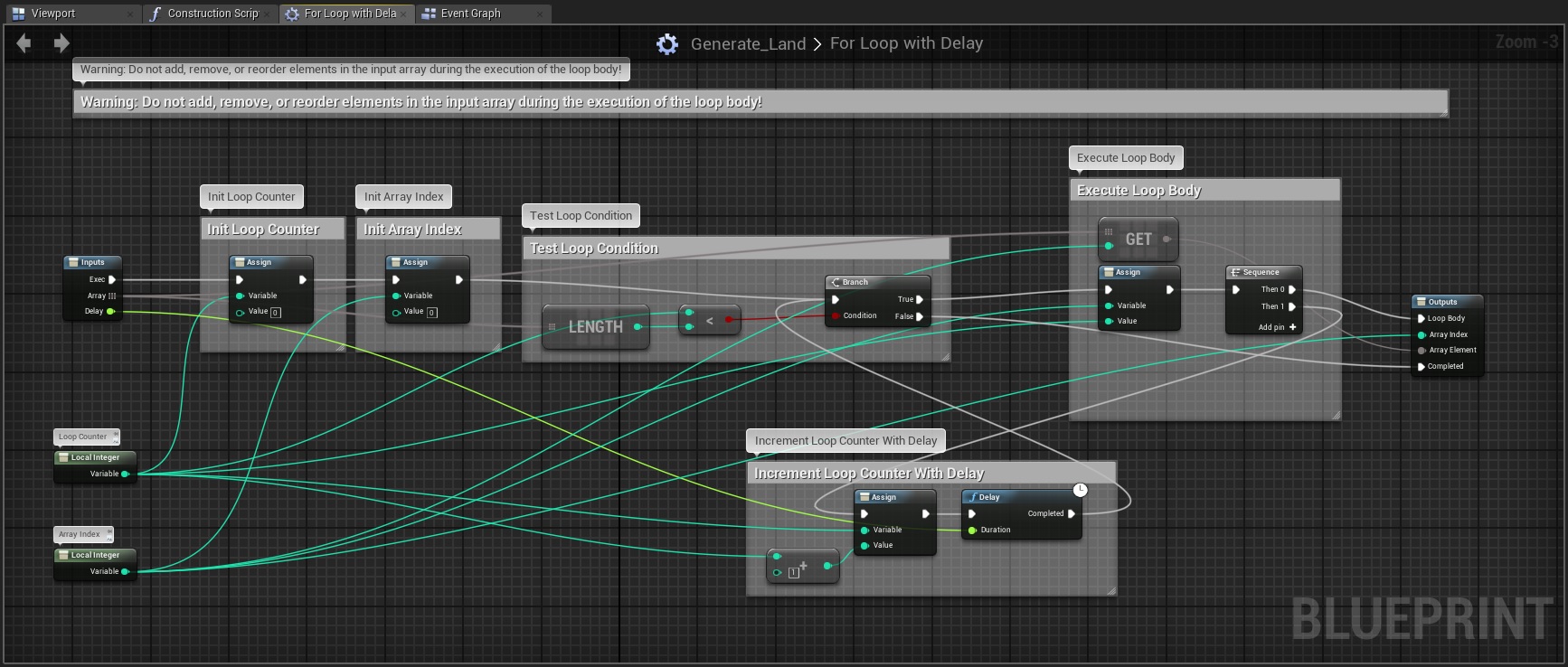
Where is the Delay node?
I can find Set Delay but no Delay as in this graph.
 sonic gull
The delay isn't available in all contexts. You can't have a delay in functions or construction scripts, for example, but it is available in the event graph. The reason for that is that a delay can't be finished in the same frame, so allowing it to be used in functions can cause several issues (at least that's my limited understanding).
 topaz cosmos
Hey gays sorry for a bad english, im from Portugal, can someone help me please ? My character can go deep in wall (i Try wall slide) and i dont understand why
Sorry not gays guys*
Can i show my blue print?
warped spindle
olive sedge
<@!398047087670853633> And also delay
Ok. I have made something ,but now I can't change the value from the superpower blueprint.
If I change the value from the cubebase in self it's working ,but it's not working form here..
 fallen glade
ancient stag
One way would be to "get all actors of class" which searches the world for those...
fallen glade
ancient stag
One way would be to "get all actors of class" which searches the world for those...
perfect, thanks! on a side note, I've been told that the "get all *** of class" is a fairly heavy node, does it matter if there is only 1 actor of that class in the whole level or 1000000 ?
maiden wadi
@fallen glade It doesn't matter about how many of that actor there is. It matters how many total total actors there are. It iterates through every actor in the world to find those types. The more actors it has to check, the more time it takes. This node is fine for one time gets and caching like at game load, but it should generally be avoided for regular use in running game code.
fallen glade
maiden wadi
<@!458765232911810570> It doesn't matter about how many of that actor there is. ...
ok, thank you very much for the explanation!
 boreal ether
Afaik get all actors of class doesn't iterate over each actor in the world but uses a hash map
 lament iron
guys. another question. is there any way to disable git-status check each time while building? coz anyways its disabling due to timeout.
valid lichen
Still haven't gotten the gun to behave
 prime stump
Hi, wondering if someone can help me, im kinda new-ish to blueprint and something is confusing the life out of me.. I thought that if you make a blueprint of an actor, each individual placed blueprint in the scene becomes its own instance is that correct?
valid lichen
I believe that is the case
I am not sure if it is just a timezone thing, or if blueprints are not very popular.. but there isn't a great deal of activity here
prime stump
Typical lol the problem im having is that i have a door thats setup as a blueprint actor, but the variables aren't updating per door its just doing it for all the doors, for example i have a way to lock the doors, if the doors locked and you try to interact with it it'll play a door locked sound, but it does it for every single door even if they're not a locked just because the one door is locked so it's as if its not treating it as its own instance
valid lichen
It sounds like something is overriding all the instance variables for some reason

 valid lichen
ancient stag
Because the gun is now a child of your Character. It should follow the player wi...
valid lichen
ancient stag
Because the gun is now a child of your Character. It should follow the player wi...
I finally figured out the issue
I had to set the correct player actor in the game controller, it was pointing at the wrong one
 celest pagoda
Sorry for interrupting ur current discussion. I also got a quick question, i had my "Ai plays sound when he sees player" setup like this, now i wanted to make the AI stop his sound whenever he died so i found this BP


now the sound doesnt play anymore tho.
i connected it like this
 prime stump
I think thats because you haven't told it what the sound is supposed to be attached too
faint pasture
celest pagoda
Sorry for interrupting ur current discussion. I also got a quick question, i had...
You need to save the output of the spawn sound node to a variable.
celest pagoda
does this needs to be attached to the AI whos saying it or to the player whos hearing it
faint pasture
Then when the pawn is about to die, have it stop playing.
faint pasture
celest pagoda
does this needs to be attached to the AI whos saying it or to the player whos he...
attach to AI Character (self)
or rather the capsule or whatever
celest pagoda
but i thought the bool stop when attached to destroyed would take care of the "stop audio"
faint pasture
well you aren't attaching it to anything yet that I've seen.
celest pagoda
i now attached it to the self
and the sound plays again, but still doesnt end as soon as the ai dies
tawdry surge
@prime stump all your doors are inheriting from the same blueprint, so if you change the original blueprint class it'll change them for all. You need to make the values you wanna change public so you can adjust them from the details panel of the individual instances, otherwise you would need to make a child class of the main door BP with different settings for how they work
prime stump
tawdry surge
<@605390088247050271> all your doors are inheriting from the same blueprint, so ...
Thanks, ill have a look, doesnt the little eyeball thing next to the variables mean their public like you say?
tawdry surge
Yeah. So when you place a door in the level and select that instance, in the details panel that variable will be present and editable
faint pasture
tawdry surge
Yeah. So when you place a door in the level and select that instance, in the det...
Yes and you'll want to use them in the construction script if they modify things like scale of meshes or positioning or whatever
prime stump
The doors open and close on a timeline but that'll stay the same for every door its just the bool values that'll change, for example one door can be locked while the rest arent locked
tawdry surge
Rule of thumb is anything you only gotta do once, and doesn't need to be done during play should be in construction
prime stump
Im not too familiar with construction script if im honest, so from my image what would need to be in there instead of the event graph?
tawdry surge
Anything that can be done at creation. Getting constant references to other classes, altering the mesh transforms to get random variations, any constant variables that you can set.. it's just for off loading work to the loading screen rather then handling it at runtime
celest pagoda
Is the construction script the same as what the C++ constructor would do ?
tawdry surge
Sorta. Constructor in c++ is a lil more flexible, but basically
maiden wadi
@tawdry surge @celest pagoda They're not the same thing. C++ Constructor is ran when the base object is created. In Unreal, objects are created and copied from the CDO. The Blueprint Construction Script is a function used to update this object long after that fact. The C++ equivalent is the virtual OnConstruction function.
celest pagoda
Thanks for clearing that up. I also managed to make the sound play and figured out why the sound didnt stop immediately in my case: The actor gets destroyed when killed with a delay (to make a ragdoll death), however this prevents me from stopping the sound at the moment the NPC is shot. Does someone have a workaround ? I tried to add an audio component and use that as attached component so i could call "destroy component" the moment before i go into the delay block. But that didnt work out.

this is what i tried
 last abyss
off of the spawn attached's return value promote to variable and stop/fade out whenever u want with that reference
 broken quiver
Probably a bit noob question here but how do I make a pawn/character have switch between its AI and player controller?
 neon jay
Hello How would I go about making the player fire a grenade to a given location with an arc to it?
 green bluff
Heyya Gurus, quick question, for NPC AI, do y'all think its better to do it through Blueprint nodes or Behavior Trees? Ive seen both
celest pagoda
last abyss
off of the spawn attached's return value promote to variable and stop/fade out w...
Thanks. This seems to work 🙂
 charred breach
Hi! How can I see and use what class it generated? I want to cast to the generated class

 opal ivy
Not being able to get the color at a particular location in a Texture seems like a glaring omission to me... is that just me?
sonic gull
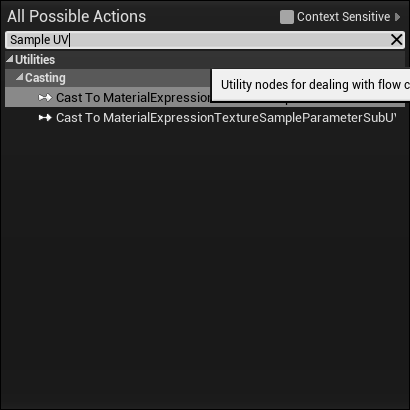
At least in the editor it's possible:
 opal ivy
Editor Only would be useful for me, actually. I'm not seeing that node though, lemme look a bit harder
big sad
last abyss
charred breach
Hi! How can I see and use what class it generated? I want to cast to the generat...
usually you'd have a base class that you would cast to if you're using multiple classes
tawdry surge
@maiden wadi by "sorta" and "basically" I meant it happens b4 play begins and sets the defaults.
The c++ deep dive explanation isn't all that enlightening for beginner blueprint ppl
sonic gull
opal ivy
https://i.imgur.com/QgSmlfR.png
This node is part of the Blueprint Material and Texture Nodes plugin. It's built-in, but you have to enable it

 coarse oriole
Anyone know of a good way to do a blueprint where if I hold down a button for 3 seconds it will do the command? I have this really simple InputAction --> Open Level but I'd like for it to have a 'charge' time so that you can't just trigger it on accident. Pretty novice to all of this any help would be appreciated.
tawdry surge
You could do the input pressed and delay it 3 seconds then branch to check if the button was released. If it was then nothing happens, if not then the level is loaded
opal ivy
I'll do that in a bit. Thank you.
I already wrote an app that converts a texture to a 2D array for me now though. 🤣
opal ivy
https://i.imgur.com/3ZSObEf.png why is me typing "270" turning into -90.000008?
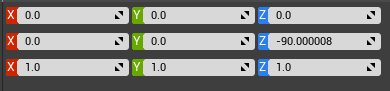
I wouldn't mind the -90 part, but the tiny bit of extra rotation confuses me
tawdry surge
Conversion precision errors. Unreal uses radians for rotation and the Conversion back the degrees using the base two math can cause minor issues like that.
But 8 millionths of a degree almost never matters
 formal dagger
hey guys, i have a little issue with a array BP. So my character has a bucket, she fills it and then go to a work station to put the ressources into the house storage. This part is good, the only problem is the statics meshes stay in the bucket. I've tried destroy actor from the array of the content of the bucket but it doesn't work. any idea ?
 lime karma
hmm I'm running into a weird issue with some collision detection. I've got a basic shield thing on my player meant to block projectiles and it seemingly works at first, but if the player doesn't look directly at where the bullets are coming from, all of a sudden they seem to ignore the shield and damage the player even though the shield is still between the two, and I'm not sure what's going wrong. Here's a visual of what's happening with the player's capsule collider visualized as well

the shield is still clearly in the way but the bullets are passing through it somehow
but they don't if the player looks straight ahead so it still works under ideal circumstances
celest pagoda
Is there a way to export all of these references of a skeletal mesh (including shaders, textures...) so i can use them in another project ?
 sonic gull
The migrate function exports all the references automatically
rotund basalt
opal ivy
Not being able to get the color at a particular location in a Texture seems like...
Mhm I could send you a C++ example of how to access the pixel data of a texture (though it only works for the B8G8R8A8 texture format.)
opal ivy
Ultimately I don't want to be pulling from textures long term, I'm just trying to work specifically on this thing and I wanted a quick way to get data in and out
faint pasture
opal ivy
Not being able to get the color at a particular location in a Texture seems like...
in a material or in game code?
opal ivy
in game code
faint pasture
rotund basalt
Mhm I could send you a C++ example of how to access the pixel data of a texture ...
How fast is it?
rotund basalt
Never testet it really but it depends pretty much on the amount of pixels there are (duh)
fallen glade
first time I notice this, what is it?
 faint pasture
@opal ivyRender targets have this
 faint pasture
rotund basalt
Never testet it really but it depends pretty much on the amount of pixels there ...
faint pasture
rotund basalt
Never testet it really but it depends pretty much on the amount of pixels there ...
Do you know if it blocks the render thread?
opal ivy
Don't need to render anything, just wanted data in and out quickly, for the time being
faint pasture
opal ivy
Don't need to render anything, just wanted data in and out quickly, for the time...
What's the use case? What are you trying to do?
opal ivy
... get a 2D array of ints in and out of the engine
long term I'm going to need to work with textures to generate a 2D array, but for the time being, I just need the end result that I have from other sources.
rotund basalt
faint pasture
Do you know if it blocks the render thread?
Ehhh probably? Never tested that either, if I remember there is a lock on the mip data required but idk rn.
opal ivy
Out of curiosity, is that Read Render Target Pixel available when running in headless mode?
Or rather, are materials as a whole available in headless mode?
rotund basalt
opal ivy
... get a 2D array of ints in and out of the engine
Well theres nothing like that for UE4 textures, I remember needing smth like that as well.
You could either find a plugin that does smth like that or DIY it:
https://isaratech.com/ue4-reading-the-pixels-from-a-utexture2d/
fallen glade
this is the best I could find about transient materials. no mention in the whole discord
 opal ivy
Playing around with random generation by way of materials could actually be fun
but ultimately only helpful it works server sided.
🤣 Get Real Time Seconds always returns 0 in the editor
faint pasture
opal ivy
Or rather, are materials as a whole available in headless mode?
Doubt it. I've barked up this tree, using GPU for anything for gameplay is pretty much a non starter.
In my case it was doing Wave Function Collapse
opal ivy
That's super disappointing, to be honest.
Means I could do generation with a client, but then I'd have to give the client the world seed
also super unfortunate is that I'm going to have to implement chunks still. I shouldn't be surprised, just disappointed.
warped spindle
Ok. I have made something ,but now I can't change the value from the superpower blueprint.
If I change the value from the cubebase in self it's working ,but it's not working form here..

 raw horizon
there is any advanced health system tutorial??
burnt nest
warped spindle
Ok. I have made something ,but now I can't change the value from the superpower ...
Okay, first of all.. screenshots are a thing, I recommend ShareX 👀 Secondly... you are trying to set a certain cube's variable when it overlaps a sphere... we also can't see the left of the event, so hard to tell if you're doing something wrong. Anyway, make sure the overlap is occurring first of all. Put a print string in there and see if that fires.
burnt nest
raw horizon
there is any advanced health system tutorial??
Have you checked YouTube already?
opal ivy
So, I think that I'm ultimately going to have to do something more than just pieces building into a set of HISMs and I think the answer is some sort of marching squares working on a set of meshes rather than tiles
warped spindle
burnt nest
Okay, first of all.. screenshots are a thing, I recommend ShareX 👀 Secondly... ...
The overlap it's working because I've put a particle system to fire when it overlaps. I've tried the print thing and all it's working until it gets at cast to cube base.
raw horizon
burnt nest
Have you checked YouTube already?
yea I just want advanced version
I writed this for If anybody knows it just share info : (
warped spindle
I've tried also with blueprint interface and it's not working with that either
burnt nest
warped spindle
The overlap it's working because I've put a particle system to fire when it over...
Then you're likely overlapping something, but it's not of the class you're casting to.
warped spindle
I will post tomorrow more screenshot with shereX to see better
warped spindle
burnt nest
Then you're likely overlapping something, but it's not of the class you're casti...
Hmm..
 winter garnet
Hey guys, is there any way I can get a Object's class by file path?
I'm trying this:

But it seems the Class returned is not what I want. When I Print String that class, it displays "Blueprint"
open crypt
Can someone check the logic this - I have six meshes and I want to randomize their materials so they are different as much as possible - My BP has six different arrays for material instances for those meshes - the randomization works but I find it is repeating more often than I'd like, since there are at least 10 variations but I'm seeing them used more often - so my idea is this:
- it takes in the array of materials and randomizes them (on the outside of that function, that is what is passed in, the Material Inst (the NPC name is set just then too)
this would work, except these are not being stored anywhere and each would be an instance - so I guess I need to compare them to the existing ones in the world - so should I set my check to be if they can find the material on another one, and if so, then remove it here?

if so, how do I get the material instances of an mesh so I can compare it
this is only run at begin play when it is spawned btw
quaint bough
When i use this is the result sorted in anyway ? like closest first in array?
 maiden wadi
@quaint boughNot likely. Generally never trust getter functions unless you read through them or write them yourself. And even then it's just good practice to run them through your own sorting function.
open crypt
Should I be concerned about this - this function is called at BeginPlay - (I mean what I actually setup) it sounds like the error is caused by ending play

is pending kill is more like garbage collection - so I need an "is actor being desatreoyed on that fuction ssomehow?
so weird
maiden wadi
Generally means you're trying to do something you probably didn't intend to do.
open crypt
But why is garbage collection happening when I am SPAWNING the item?

ah
what does it mean then?
why is it being destroyed - I'm not calling that event
What I mean is, as far as I can tell, I have not made a "destroy actor" for this actor in question
opal ivy
So, I'm cooking up some ideas for how to do this setup I want in a way that DOESN'T eat tons of memory via instances.
open crypt
. I now set the Spawn Collision Handling Method to "Always spawn" and it worked properly. good point
wait, you mean I can google things and get the answers???!
opal ivy
64 meshes seems like it'd be a lot. Am I crazy?
It'd be 64 HISMs on a single actor
but only 1 copy of that actor
open crypt
is there a simple way to adjust our friend here?
opal ivy
well, 64 HISMs per "type" terrain
open crypt
I don't want to turn off pawn collision and have them inside each other
opal ivy
so in the case of my first little setup, it'd be 128 HISMs
open crypt
but obviously that's not ideal either
opal ivy
a "beach" set + a "cliffs" set
At runtime, potentially, yes.
I'm eventually going to allow players to affect the terrain and they could do weird stuff
open crypt
I don't want to mess with collision avoidance just yet, I just want a simple "nudge" that i can add to things like that
this is a crowd spawning BP that picks a random point and spawns something there
opal ivy
Can I safely assume that vert/tri counts are a large part of the consideration here?
Before I could potentially implement any kind of optimization during generation of the procedural meshes:
Min Verts: 216
Min Tris: 108
Max Verts: 2540
Max Tris: 1056
I could potentially get those numbers down a good bit by doing some simple optimizations of the models as well.
 zinc nacelle
Using Level blueprint, how can i set "catdog" invisible by referencing it?

SMcube is in my level, catdog is inside of it, how can i reference that?
faint pasture
@opal ivy shy would generating on CPU or GPU matter regarding the client? Either way the client gotta know what the world looks like.
zinc nacelle
there's a step missing between these two,
 opal ivy
Right, but the client should be notified of the world's state via an array of bytes
opal ivy
Yeah, sorta. Just in a 3D space
faint pasture
How big of a visible map? Minecraft scale?
opal ivy
if each of my HISMs is 2 materials, that turns it into 128 draw calls, but with them being instanced, there shouldn't be a ton of data riding those calls either
Currently it's 500x500, but I want some flexibility, which is why I'm optimizing now, considering that I'm already pushing against a performance wall.
If I could get up to 2km x 2km, I'd be content with that.
open crypt
Is there a way to spawn nav meshes on a blueprint? I can add it as a component (a modifier) but I can't resize it as far as I can tell
opal ivy
I've considered chunks, but that's mostly just spreading the problem out rather than solving it.
faint pasture
@opal ivy is it 3d or a heightmap?
opal ivy
it's a heightmap
 high ocean
can anyople pls tell me why this code always returns "not found" when those vectors clearly exist in the array?
 opal ivy
byte[,] where each value represents a low granularity value (currently between 0-4)
narrow kelp
Only time I use them is for cheats on test levels
high ocean
@trim matrixI feed in vectors snapped to grid and the grid value is ridiculously high (precisely to make "kinda" sure I will find them). While running, i checked, and - for instance x=3000 y=4000 was there several times, but the array find would still return -1 😐 what am i missing?
even tries ignoring Z, still would fail to find
opal ivy
"ridiculously high" could also be introducing floating point issues.
zinc nacelle
is it possible to create a new blueprint for a static mesh already in your level?
i dont want to make a new blueprint and then put the SM inside and have to repositition the asset in my level
nvm, i found a button
open crypt
Anyone have a good character "Look At" tutorial that can take in an actor location and make the character mesh look at that easily? I'd obvviously prefer not to take apart my Anim_BP if possible
burnt nest
zinc nacelle
nvm, i found a button
You can also select a blueprint you've made and right click a mesh in the level and click on "replace actor with" to replace it with the blueprint.
high ocean
@trim matrixi'll do that and see - thanks! 🙂
burnt nest
zinc nacelle
i dont want to make a new blueprint and then put the SM inside and have to repos...
You could also just have copied the location of the mesh actor and pasted that into a newly placed blueprint.
 burnt trench
Hello everyone. Can you bind events to delegates on runtime in blueprints?
narrow kelp
yep
burnt trench
I have an actor that I spawn on runtime in my level that has subscribed to a event dispatcher
but it doesnt seem to run
but the one that preexists in the level is fine
burnt trench
narrow kelp
yep
how? Is it the same way?
narrow kelp
It shouldn't matter if you spawn your actor or if it starts in the level
burnt trench
its the only explanation
it literally works if its in the level but if I spawn it, it doesnt
narrow kelp
There is probably something else going on
burnt trench
can I make sure or verify if they are binded?
narrow kelp
I guess you can call the event right after binding it
 wary tinsel
hey guys! I'm trying to interpolate this replay. Basically I want to interpolate the car position since I only recorded 5 keys each second. For some reason this it's still giving little 'lag'. Can someone tell me what I'm doing wrong?
 burnt trench
the binding is on beginplay, you cant miss it
I do call it, but the already present in the level ones do the thing but the spawned ones dont
Can I quickly show what I mean in a screenshare what I mean?
narrow kelp
You can post screen shots

 narrow kelp
The delay could be it
burnt trench
the delay is essential because otherwise the gamemode doesnt have enough time to spawn the actual thing and store it in a variable
so there's a null reference without the dealy
narrow kelp
what is actually triggering the event
 zinc nacelle
how can i make a my character teleport by interacting with a object without level blueprints?
narrow kelp
That only happens at the start of the game tho right?
high ocean
@trim matrixIt was because I am retarded AF, and fed the array with unsnapped vectors FML!🤦♂️
burnt trench
narrow kelp
That only happens at the start of the game tho right?
yes
oh is that the problem?
narrow kelp
So if your spawned object spawns any time after exactly 0 it wont work
burnt trench
that they need to be triggered again?
narrow kelp
you're not binding until .2 seconds
burnt trench
ohh okay makes sense
narrow kelp
if you bind earlier it might start working
zinc nacelle
so i have my trigger volume in my level, how can i reference it from my static mesh blueprint?
narrow kelp
It still depends on when you spawn it tho
burnt trench
is there a way to detect when something has subsribed to the event in BP though?
 cursive path
I look for inventory system have section for every item such as weapon not mix with others and glove and armor all seperate and each section have 200 slot scrolling to chose.
I look for in marketplace and youtube cant find it
open crypt
Is there anyway to "Get A Random Point in Navigation Mesh" so I can spawn an AI there?
faint pasture
zinc nacelle
how can i make a my character teleport by interacting with a object without leve...
Make an interaction interface
proud sable
So I'm casting from my animation blueprint to a parent character blueprint. I want to cast to one of these three children blueprints depending on which character is being played. Is there a way to do that directly?
 open crypt
get pawn owner I think
 sudden zephyr
Hey all, dunno the odds of someone knowing a solution but I'll try anyway.
Does anyone have any idea how to calculate an alpha from a predict projectile path trajectory arc? I have a jump idle animation blendspace that has the character tilted up, level and tilted down and I want to make the character adapt it's blend based on the predicted arc, Like alpha of 0 would be character tiled upwards, 0.5 would be level and 1 would mean tilted downards for tochdown. If that makes any sense. 😅
I'm googling for hours, no luck yet.
faint pasture
sudden zephyr
Hey all, dunno the odds of someone knowing a solution but I'll try anyway.
Does ...
just use z velocity
opal ivy
Okay, so. I need to do some research on procedural meshes because at this point, what I've done with them doesn't seem super applicable. What I'm going to be attempting to do is merge multiple static meshes into a single procedural mesh. Anyone know of any resources of doing such in blueprint? Additionally, advice on the best way to store these procedural meshes once they're "baked"? Generating them over and over seems a bit foolish
faint pasture
opal ivy
Okay, so. I need to do some research on procedural meshes because at this point...
What are you trying to do? What sort of meshes are you trying to make?
opal ivy
My approach to using HISMs isn't proving problematic, assumedly because of the complexity of calculating each tile.
faint pasture
I mean show an example of what you want it to look like
opal ivy
hang on
cursive path
You should use interface
opal ivy
Part of my problem is it currently takes a couple of minutes to generate the instances
cursive path
@proud sable you should use interface
faint pasture
proud sable
So I'm casting from my animation blueprint to a parent character blueprint. I wa...
That's smelly, what are you trying to do here?
opal ivy
I have it working. I'm now attempting to optimize things to make it not the most awful thing in the world to load
proud sable
faint pasture
That's smelly, what are you trying to do here?
My character bp has children blueprints which manage spell logic. I'm trying to call an event on them whenever the animation hits certain points
opal ivy
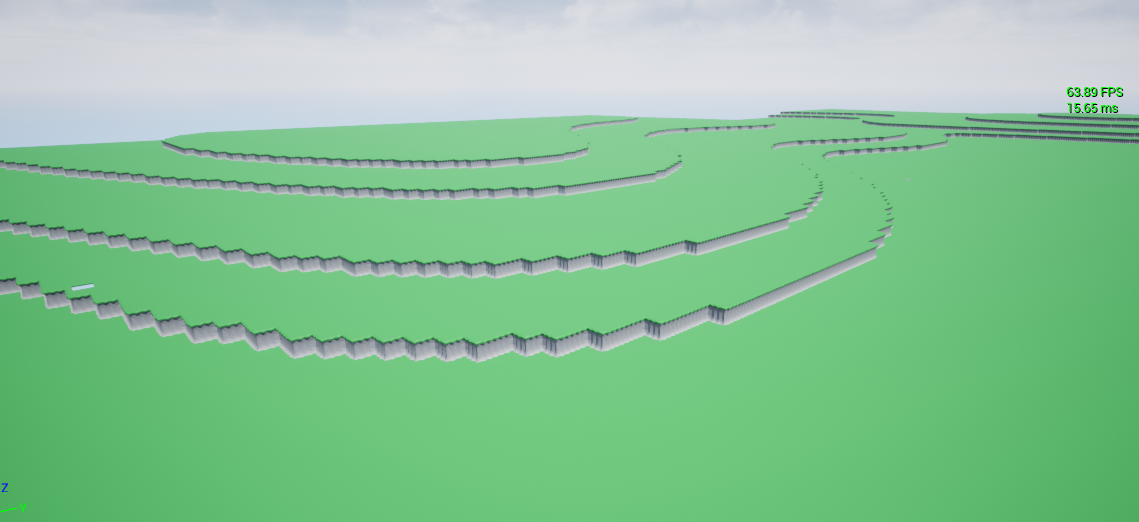 faint pasture
@opal ivyWhy not use terrain? Do you intend for it to have vertical jumps in elevation?
proud sable
I ended up getting it working but I was mostly interested in knowing how to call the children of a blueprint for learning's sake
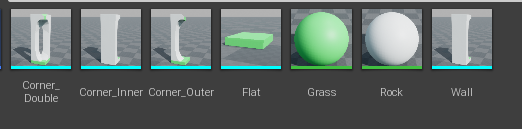 faint pasture
@opal ivyCan it have caves? or is there 1 height per XY locatoin?
opal ivy
1 per X/Y
faint pasture
proud sable
My character bp has children blueprints which manage spell logic. I'm trying to ...
You probably want to use montages and notifies
proud sable
That's what I'm doing, I still need to inform the blueprint of notify events though
opal ivy
Caves are a problem yet to be solved, because I actually want to have instanced dungeons eventually and I know that having multiple levels loaded on a server is in the realm of black magic
sudden zephyr
faint pasture
just use z velocity
I can't or don't want to use Z velocity because it's not dynamic, as in, if I jump on different elevations, the animations will be interrupted mid way. Let's say I get my char mov com jump vel and compare to Z vel to have an alpha, if I jump in place or from one surface to another that's of same height, the anim will be perfect, however when I jump to something higher or lower, the blend will either cut too early or play too long. If you know what I mean.
faint pasture
proud sable
That's what I'm doing, I still need to inform the blueprint of notify events tho...
I would use an interface
faint pasture
sudden zephyr
I can't or don't want to use Z velocity because it's not dynamic, as in, if I ju...
Should the middle pose play at the peak of the jump or halfway thru the jump path? I'd think peak but it's whatever.
sudden zephyr
At the middle of the arc path that we got
faint pasture
sudden zephyr
At the middle of the arc path that we got
easiest way would be to predict jump time and use time to drive alpha
sudden zephyr
Ok, I'll try see what I can come up with. TY, the Z vel will definitely also help a lot. Didn't think of that one at all either would have made prototyping so much easier. xD
faint pasture
Z vel is what pretty much every game uses
 fierce stirrup
Guys I am new to Unreal. When coding a blueprint do I ALWAYS have to set Cast To ThirdPersonGameMode (I mean for an event to happen in game)
?
faint pasture
fierce stirrup
Guys I am new to Unreal. When coding a blueprint do I ALWAYS have to set Cast To...
No, not at all, where'd you hear that lol
You should start with following a good tutorial
fierce stirrup
Just following Hour of code by Epic Games
fierce stirrup
faint pasture
You should start with following a good tutorial
Any really good one?
faint pasture
@fierce stirrup How much programming have you done before?
faint pasture
I don't know what the go-to tutorials are nowadays but just start with a template project and start messing around.
fierce stirrup
I am doing that with Unreal Hour of code, it is really basic
learning about collisions and events right now
faint pasture
Just make sure to figure out exactly what you're doing when following a tutorial instead of just blindly following. I'd start with reading this
https://docs.unrealengine.com/4.26/en-US/InteractiveExperiences/Framework/QuickReference/
and learning what casting is. The #1 thing i see most new devs messing up is using casting.
Short overview of classes for game rules, characters, controllers, user interfaces, etc., that make up the framework for the game.
Just make sure you know what an Actor, a Component, an Event, a Function, an Interface, casting, structs, basic data types, the basic framework classes, etc are.
fierce stirrup
thanks a lot. I will look at the docs
opal ivy
I'm a bit unclear on the "Sections" part of procedural meshes.
I'm inclined to think different section would be used for different materials?
zinc nacelle
how can i set multiple objects visible? i have 20 lights i want to flipflop visibility on, but i dont want to manually connect each one in the blueprint
ah, actor array
opal ivy
I literally cannot find answers as to what a mesh section is
 green eagle
im ripping my teeth out here!
Is there not a node to match INDEX on an array(s)?!?!?
green eagle
So "rock" has value 0 which needs to be "found" in the Array with a float for total rocks the 0 int identifier needs to be matched to the index [0] in the array so that if an items id(int value) matches a given index it can update the element of that index
opal ivy
Are you trying to get the index of a specific value in an array?
green eagle
yes
opal ivy
Find
green eagle
I realized my faults... never forget to click in the viewport friends... RIP
opal ivy
I'm going to take a guess and say that what I want to do isn't something that can be done without deep diving into C++ and probably be putting this project aside again.
I want to be able to combine 9 static meshes into 1 static mesh without doing it manually, as doing it manually would mean creating 64 different meshes
It's possible there's a solution here using structs to more quickly cook things while still using HISMs without the procedural mesh generation, but IDK and I'm getting frustrated with it at the moment.
green eagle
@opal ivy Just breifly tried back tracking through the thread to see what you were aiming for and from what i gathered I would like to make a suggestion if you havent already tried this. Look into SideFX Houdini Software They have an Apprentice version for free. You can use it with a little bit of basic computional logic knowledge to create diverse modelling tools and features that work with most game engines. Indie Pixel is a guy to look up for some VERY awesome tutorials.
opal ivy
The idea of having to create and import 64 meshes for each kind of "tile" I want to use makes me want to retch for a variety of reasons, but I appreciate you looking and trying.
green eagle
There with ya man. Thats why houdini saved my life.
opal ivy
I think even if I "cache" the types of meshes to instance, I'm going to have something horrendous because of the sheer number of instances I'll have to push
Even if I significantly reduce time to calculate things, it's still 2.25M instances spread across 5 HISMs
 ebon olive
Hey guys. Right now I have this setup. When my dude dies by walking into spikes, he respawns at the last checkpoint, BUT I dont respawn WITH the character but as complete air that I can control still... the character keeps laying dead on the ground..
 open crypt
How do I access my anim_BP to change a variable on it (that drives animation) ?
I've triggered events from anim-notifies but can't figure out a way to go the other direction
tawdry surge
You're teleporting the controller and leaving the mesh behind. Try targeting the mesh instead of self @ebon olive

@open crypt
open crypt
that's someone else I think
tawdry surge
The cast in the middle is what you want
opal ivy
 open crypt
ah get anim instance thank you!
opal ivy
14s just to calculate tile IDs even without spawning any instances at all seems ridiculously bad
Maybe not though, maybe I'm expecting too much.
ebon olive
tawdry surge
You're teleporting the controller and leaving the mesh behind. Try targeting the...
Do you mean the death event itself?
 mortal cradle
Is it a good idea to make a parent actor just to quickly and easily give a tag to all the actors? Not sure if it's enough of a reason to add a custom parent to all the actors just to give them a tag.
tawdry surge
You mean a gameplay tag?
mortal cradle
yes
 versed zealot
Hey guys, I followed a tutorial online about having an actor always face the player. I followed it and the static mesh actor is not rotating at all. I'm not sure if there's other settings I need to have set for it to work. I loaded a VR template, and I'm not sure if the world settings are what make this set up not work
 tawdry surge
Why not do it in project settings
mortal cradle
@tawdry surge actually no, sorry. I didnt mean gameplay tag. I mean the one that you add in BP itself
 slate wasp
how does one find all assets of a class in the editor?
open crypt
You should be able to type in the class name in the filter even
otherwise, the different filters
slate wasp
no I mean in a BP, via asset registry or asset manager I'm guessing
open crypt
get all actors of class basically
slate wasp
these aren't actors though
open crypt
you can get the class name from those
slate wasp
they're just UObject, sometimes UDataAsset

for instance that
that extends a class called UAnimShader which is just a UObject
I want to find all the UAnimShader assets in my project
in the editor, so not at runtime
in c++ I'd be using the FAssetRegistryModule along with an asset filter FARFilter
 novel storm
Why can't I access my widget information after intializing it through my beginplay

 tawdry surge
@mortal cradle As far as I can tell if you wanna make a parent class to act as a container for your tags and then have the children inherit from it, that'd be fine.
But what are you trying to do that the gameplay tags don't work for?
mortal cradle
@tawdry surge Tbh I haven't looked into gameplay tags enough yet. There is a lot of actors that should be destroyed on players death and I thought that giving the same actor tag to all of these them would be the easiest way.
ebon olive
MW_WHDS im so noob I dont understand how Inheritence works, I get the does not inherit error :(
guess I just gotta learn more
half scroll
Hi people I’m trying to get a list of hash maps in an array is that possible in unreal blueprints can’t seem to be able to or what’s the workflow wit that
tawdry surge
@mortal cradle I'd look at the unreal documentation on gameplay tags. You can do alot with them and its a built in system
 cold sedge
Started working on an RPG project (Diablo style, top down). Have a paragon girl rigged up to my mesh and made some collectibles. I'm looking to get a basic auto attack going next but none of the tutorials I've come across have really grabbed me. Does anyone know of a good tutorial series (video or text; free) that goes into character attacks/abilities thoroughly?
faint pasture
opal ivy
14s just to calculate tile IDs even without spawning any instances at all seems ...
how are you calculating stuff? you in BP or C++?
opal ivy
blueprint. I'm sure there are optimizations to be made to that calculation, but realistically, I'm not mad at the time to calc a tile "index"
faint pasture
You'll for sure want to move any number crunching to C++, i got a 300x speedup on mine
opal ivy
It's the adding instances that eats all the time.
Yeah, I know. "Do this in C++"
Blueprint needs some love if 300x is legit the performance gain
faint pasture
I would recommend just using dynamic terrain tho
it'll automagically LOD down etc for you
thats why i was asking if overhangs were a thing
opal ivy
Alternatively, I can just throw this project in the garbage because I've yet to actually have a C++ project WORK
Dynamic terrain is a heightmap. It doesn't create the look I want, and doesn't allow me to use these low poly meshes I want.
The actual framerate is fine, so I'm actually zero concerned about LOD. My issue is the load time.
faint pasture
Have you profiled it? What's taking all the time up
opal ivy
And I'm just going to throw this idea in the trash again because it irritates me.
Adding 2.2M instances
to my HISMs
100k instances takes 5s
And somewhere between 400k and 800k instances just breaks, assumedly because it hits the max iteration limit, and turning that limit up seems jank
faint pasture
yeah you'll need to do that bit in C++ for sure, just make a function library and implement it there. Won't be too hard
opal ivy
I'm not doing anything in C++
A) I hate it.
B) It literally doesn't work. I create a new project, my PC screams at me for 10 minutes while it starts up VS with UE, then attempting to build just an empty project throws 3k+ errors
I realize that sounds terrible, and I know that C++ is industry standard, etc etc, but I have very limited motivation in life, and I'd just really rather throw the project in the trash before I spend all of my limited motivation on trying to wrench on a language that doesn't work for me.
faint pasture
I'd pivot towards a project that is well covered by BP then, which anything procedural generation is not
opal ivy
Yeah, I have another project. That has very little procedural stuff, and it's all just the state of things.
open crypt
you just have to have the items placed before runtime like foliage -
opal ivy
... what?
open crypt
I literally had to make a bunch of cars into foliage
and then I just placed the maround but I'm doing hundreds/thousands, not millions like you
if you are stuck in blueprint, the trick is to use the editor utilities (blutitilies) to spawn the stuff in BEFORE hand
faint pasture
open crypt
and then I just placed the maround but I'm doing hundreds/thousands, not million...
he's talking procedural generation not hand placed
like Minecrat
open crypt
then get a voxel system from the marketplace
opal ivy
Sadly, not really. There's a voxel plugin that I've been told to use 400 times that doesn't fit what I'm doing.
open crypt
they will have done the c++ stuff and exposed the other stuff like materials for you
opal ivy
^^ this is exactly the reason I don't want "Minecraft" mentioned.
open crypt
I haven't looked into BP nativization but I'm assuming you have it it won't work or doesn't apply to your use case
sand shore
well nativization isn't 100% anyway
sand shore
opal ivy
I want to be able to combine 9 static meshes into 1 static mesh without doing it...
you want a single mesh that is combined from multiple meshes, but is effectively like you authored it yourself. You want this composed at runtime?
opal ivy
I actually would be fine with the meshes being "cooked" in the editor
sand shore
but automated, yes?
opal ivy
But procedural meshes can't be instanced as far as I can tell, and from what I'm seeing, in order to use the asset pipeline to "import" procedural meshes will require, once again, C++
opal ivy
Skeletal meshes can't be instanced, as far as I know
250k uninstanced meshes sounds like an awful idea
sand shore
I was gonna suggest https://mutable.games/mutable-licensing/
Its supposed to be for characters but maybe you can get it to do static meshes
opal ivy
It's entirely possible that the best way for me to accomplish this without having to fool around with the godforsaken language of C++ is to learn the FBX or OBJ format or something and then make a small app that takes my pieces and spits out the "cooked" ones along with a CSV to help me import them.
I've got some ideas but I'm so over it for the day that I'm just writing the ideas down and moving on for the time being.
sand shore
I think I saw something in the works for doing lots and lots and lots of skeletal meshes
In ue5
but that's not production ready
Shame about C++ not being workable
opal ivy
The thing is, I'm capable, I just don't want to. I moved away from C++ as soon as I found Java, and then discovered C#, and it just really makes C++ seem terrible.
I can spend 10 minutes writing an app in C# that'll run on multiple platforms, or I can spend 10 minutes waiting for VS to be ready for me to work on a C++ project that won't build what it started with.
sand shore
If it's the thought of being stuck unable to escape C++ once you use it, maybe you can brave C++ long enough to get C# working again? There was that branch of the engine floating around (non-Epic though)
You don't have to tell me that VS is bad
sand shore
Nah
It's great in theory
I guess you could attribute all of the things to just extra heft, but nah
opal ivy
The problem I have with VS in this case is that with all the setup it has to do for a UE project, it just deadlocks on me for 10-15 minutes because I have an ancient processor
opal ivy
And then because I'm guessing I've got some weird setting or something, when I try to build that project, I get literally 3k errors
sand shore
By chance are those link errors? I was just helping someone try to resolve that earlier
opal ivy
VS isn't my problem. C++ is a monstrosity that's long past it's prime, and while I get that the power and bare metal performance is why it's still used for backend stuff, I really hate that it's still viewed as a "good" language to actually DO stuff.
 limber seal
anyone willing to help me figure out why my actor in unreal is failing to get its component? I have a get node and the is not valid is firing every time 😠
its assigned to it in the details pane for each individual actor in world
 hybrid ether
Hi. How to access that atmosphere and cloud component in blueprint. I want change color when evening to orange.

 fiery lark
Okay guys, after I launch my AI, it tries to walk back to the previous nav mesh spot, so it faces the wrong way. Does anyone have any ideas on how to fix this?
versed zealot
Hey all, could anyone provide some help or links for having a static mesh actor rotate to face the player (VR) consistently (tick) I have tried a couple things but I'm not sure why they we're not working, perhaps because the guides were for actors facing a 3rd person player character?
This is what I've tried.

On the actor bp
narrow kelp
@versed zealot make sure it's set as movable
versed zealot
Thank you @narrow kelp , it is moveable (in the transform pane)
I suspect it is something like that though... just like a box I need to tick somewhere.
Or not! I have no idea XD
narrow kelp
Easiest way would be to add break points and step through
versed zealot
Nice, that does sound like a good plan. I'm new to UE, is there a link you could send me please? Thank you so much
For break points
narrow kelp
You can right click on a node and select add break point. that will make the game pause when it gets there, and you can see what that values are currently set to
Sorry I don't know any resources off hand, but I'm sure there is something on youtube
versed zealot
Thanks
Another noobie question: where does that output go? Message Log or Output Log? I actually have a breakpoint but I don't see it even hitting..., which almost makes sense because maybe the blueprint isn't even initialized
Oh, I see now.
narrow kelp
If you print string, it goes to Output Log
proud sable
I'm trying to spawn some actors around my character, this sort of works but they're all offset to one side depending on the direction the character is facing. I think it has something to do with local vs world position but I'm not sure how to fix that.
Any ideas on how to improve this?

Ah, right lol

Missed a zero
 storm vigil
Hi. I would like to ask help regarding this logic of affecting my recoil pitch if my health is low. Currently this is how it is setup.
For example, when my HP is <95 (just for testing), it will affect my recoil pitch float which is within the base BP_Firearm.
The problem with this setup is that when I equip a weapon and get a damage (<95 HP), the recoil pitch is not executing. However, if I unequip my weapon and equip it again or switch weapon and my HP is <95, the code is now executed. So I am not sure why the code is not taking into account why its not checking that I am currently equipping the weapon under BP_Firearm. Thank you


 zinc wasp
storm vigil
zinc wasp
storm vigil
Is the cast to failing?
storm vigil
zinc wasp
Is the cast to failing?
I tried added a print string attached to the fail, it does not print even if I dont pick up a firearm and I pickup a melee weapon which is a different BP not under the firearm.
Here is the vid, by default recoil pitch is -0.1 which registers if I pickup a weapon (firearm). However, if I enter the damage box and HP get <95 it does not change the recoil pitch to -1.0 instead I have to unequip the weapon and equip it again, or switch firearms to see the changes
zinc wasp
Really hard to tell without seeming everything. Maybe though something wrong in get welded item.
storm vigil
zinc wasp
Really hard to tell without seeming everything. Maybe though something wrong in ...
Thanks. yeah I also thought about that and asked the author of the template but we could not resolve it atm. Probably, I need to restructure the logic which I am at a lost. hehe. I tried doing a tick before but I think getting the health from the event is better. Btw this is the code for the get wielded item

The weapons are under BP_Firearm >> BP_Weapon >> BP_Wieldable Actor
storm vigil
It is only printing the Is not Valid if I have no weapon attached. The cast failed to BP_WieldableActor is not printing
zinc wasp
I think it's failing in set health. The first picture.
Looks like your casting an actor BP to another actor BP.
storm vigil
I see. Ill try to experiment more. Thank you. I tried moving the code after the health to the event begin play of the character and now it registers the Cast Fail of the BP_Firearm if I have not equipped something yet
zinc wasp
storm vigil
This one.
storm vigil

 sand bloom
Does anyone know why a simple move to location won't work? I'm using the default ai controller on a pawn

I gave it all the data it needs and other have similar nodes and have movement?
I got a navmesh

Am I just stupid or what, I feel like I did everything right

doesn't matter if I use character or pawn
zinc wasp
sand bloom
Use get controller. Not aicontroller.
zinc wasp
 south bane
or how can i store reference to one?
south bane
or how can i store reference to one?
I forgot myself but just right click on any node with it and promote to variable.
south bane
there is no option :(
i have context thing on too
ive tried with it off
i use Get Animation Asset and then try promote to var doesnt work, ive looked through all the variable types with animation in the name and none of them look correct
zinc wasp
Hmm. I know there is. I just forgot.
 zinc wasp
south bane
zinc wasp
south bane
Anim Sequence
south bane
oh :P thanks
also i made a struct with an image var in it, when i try and select an image none show up any idea why? i have loads of images in my content browser and they show up when adding an image to a widget
south bane
 zinc wasp
Anything else it'll be a texture.
zinc wasp
Lol. Sorry man. Not really on my PC and haven't played with widgets in a while.
But I think so.
south bane
dw thanks anyways :)
 weary prism
anyone know how i can replicate arrays to all the clients in a networked game Ive Tried Using Server Calls To set Said Array elements my issue is the server does not replicate the values for the very first time its being changed therefor causing the server to be ahead of what the client can see aka out of sync is there a way around this? as googling it seems to tell me its a engine bug
It Replicates Itself Fine its just the very First time i request a change it does not Take my Default Values into account therefor causing the syncing issue
sand bloom
zinc wasp
Use get controller. Not aicontroller.
hmm but why? I need an ai controller not a player controller
it's an ai that's supposed to move to my player
I could give it a shot when i boot up unreal again though won't hurt
dim loom
@north hedge i found out what it was and its realy dum you need to use get player character for the new target and as target you need to use get player controler . that fix the problem plus yea the delay needs to be there and that is the only thing that i still need to fix . i cant seem to get the time duration of the sequence i tried to use get lenght to it doesent pop up and i also tried playrate and still its doesent work corectly
north hedge
Wow... thats kind of dumb haha
Yeah, I'd just delay for animation time manually
dim loom
kk
fiery lark
If I make a blackboard child, will it use the original code, or just the keys?
sand bloom
zinc wasp
Use get controller. Not aicontroller.
do i need to find a way to plug in the specific controller?
Because it still doesn't work
I get a

it does work with a character for some reason..
but not a pawn

burnt nest
sand bloom
but not a pawn
A character is a pawn with built-in movement logic. So your pawn is like "you want me to do what!?" 😉
sand bloom
hmm I thought pawn's were supposed to be able to do it too but maybe not, but i'm just going to try a different method without navmesh since it won't work well for my projectile to be character
burnt nest
It's rather strange to use MoveTo for a projectile anyway.
sand bloom
yeah
turns out there's a special projectile movement component
and with a quick tutorial i got something working now
has a lot of fun thing like gravity and bounciness apparently
valid lichen
I am attempting to animate a gun, but I think I am targeting the wrong component! Here I have set some material swapping, but this refers to the parent class and not the specific instance the player is holding. Is there a way I can get my players reference variable, in the base gun class?

Here in player, there is reference to equipped gun, in EquipGun variable. I am wondering, if I pass this variable into event, will this behave?

Hmm, no luck
This blueprint system is difficult to think about class instance hierarchy
valid lichen
Yes
maiden wadi
You're not getting any errors about invalid references?
valid lichen
no
maiden wadi
Do you have any if branches before the set material stuff?
maiden wadi
Logic is making it to the set material nodes?
valid lichen
Yes, I have set a breakpoint there
And it breaks
So, I have passed in a reference. Now I attempt to get the plane that the material is applied to. But still nothing changes
 maiden wadi
Hmm. Random test. On LMB, getallactorsofclass, get your gun class type and call fire on them.
Also is this multiplayer?


 maiden wadi
Material change?
valid lichen
no?
maiden wadi
Odd
valid lichen
Array is not compatible with single reference so I cannot do that
maiden wadi
May try removing the materials entirely to see if it sets it to the default checker material.
valid lichen
Yes, the default world grid material is there I think

I am not sure how this helps. Of course I can set the material manually
maiden wadi
If that removed the material, then I'm uncertain why it won't work.
valid lichen
It works for every material except the one I want for some reason
Oh nevermind, it was the same material
 fair jungle
Is there a better way nowdays to handle widget gamepad control than the focusing system? Last time I used it was a couple years ago and it really tedious
charred breach
Why is the parent construction script still running even when I disable the connection and compiled like 300 times? 🙂

 visual dune
Probs a dumb question but how can i make a public variable that can be seen by the user but not edited, kinda like its grayed out.
gentle urchin
Isnt that what the private property is for ?
visual dune
Like how this is grayed out
 gentle urchin
nvm, private is just internal
fair jungle
Maybe if it's read only/constant it'll be greyed out?
gentle urchin
Doesnt seem like it .. Im curious what the purpose of this is tho
visual dune
To display information to the user
gentle urchin
using categories gets you a long way
visual dune
For like a tool
surreal peak
I think BPs don't support that
You would need to do that via C++
VisibleAnywhere and then not ReadWrite
The Private for Variables is just for access in and outside of the same class.
visual dune
Do you think i could define the variabels in c++ then extend the class as a blueprint?
surreal peak
Yes
But if your logic is in BPs, then the Variable needs to be readwrite
CAn still be only visible as opposed to editable
So that should still do what you want
visual dune
Alright
 quick grove
guys this is my result, I'd like to change the opacity of "|"


I don't really know, maybe something like <Opacity=50>|<Opacity=100>
gentle urchin
Using rich text could help you out
altho i wouldnt do that on what seem to be a binding
Unrelated; How do people usually reference spawned actors/objects from data tables? Like in a dialog system driven by datatable, how would one go about fetching several different npc's etc
It feels so dirty doing
get all actors of class -> has tag X --> etc
gentle urchin
quick grove
guys this is my result, I'd like to change the opacity of "|"
You could also split it into 3 text blocks..
 sick sapphire
how do I 'turn off' the engine on my VehicleMovement component?
make it so that it can still brake and steer, but no acceleration
 severe turret
hmm that would be a clutch action. Not sure it has one from what I recall. Although you could make one by steadily stepping down the throttle over time
surreal peak
Force Acceleration to 0? :D
quick grove
ok thanks
surreal peak
gentle urchin
Unrelated; How do people usually reference spawned actors/objects from data tabl...
Sorry, what?
You mean you spawn something based on a class that is defined in a DT?
And you want to keep track of them?
Why not put them into an array wherever they are spawned?
gentle urchin
they're already existing NPC's in the world ,
how does one usually go about referncing those for something like a dialog system? 😛
sick sapphire
surreal peak
Force Acceleration to 0? :D
is there a node or variable that does that?
i have also found Max RPM in engine setup, but i dont know how to access it from within the blueprint