#blueprint
402296 messages · Page 681 of 403
 burnt nest
 sick sapphire
this is a bit of blueprint that controls how much my character aim up/down animation
right now, the aim up/down animation
when the server does it, it does not show in the clients
when a client does it, it shows on the server and that specific client but other clients do not see it

i think its not copying something from the server to the clients
AimPitch is just a variable inside the event graph of the animblueprint it is not changed anywhere else
 native creek
sick sapphire
this is a bit of blueprint that controls how much my character aim up/down anima...
native creek
sick sapphire
this is a bit of blueprint that controls how much my character aim up/down anima...
Is the AimPitch set to replicate? And after it replicates do you set it on client?
 zenith rose
@burnt nest ok thank you ill try it
sick sapphire
native creek
Is the AimPitch set to replicate? And after it replicates do you set it on clien...
it's not
how do i set it on client?
native creek
I'm not sure how AimPitch is applied in your code to actual camera pitch. So maybe just setting the variable to replicate will be enough. Go to variable settings where you can set the type, name etc. and set it as Replicated.
The character itself has to be set to Replicate as well of course.
sick sapphire
native creek
I'm not sure how AimPitch is applied in your code to actual camera pitch. So may...
it uses these to get actor and control rotation and aim pitch is set based on that
replicating the aimpitch didnt work


this is how it is applied to animation its an aim offset
native creek
sick sapphire
it uses these to get actor and control rotation and aim pitch is set based on th...
One issue could be that the code that sets the AimPitch is running on server and all clients. So even if the variable replicates correctly you immediately overwrite it on client side.
sick sapphire
native creek
One issue could be that the code that sets the AimPitch is running on server and...
fair enough
so i think i will make a custom event that is "run on server" and try that wait a moment
native creek
sick sapphire
fair enough
so i think i will make a custom event that is "run on server" and tr...
Try to debug what the AimPitch value is on client when you change it on server. Does it match? Is it completely different.
sick sapphire
ok i will do that
sick sapphire
native creek
Try to debug what the AimPitch value is on client when you change it on server. ...
ok so the server will get all the aim pitches of the clients and server, thus can see the anims of all
the clients will only get their own aim pitch, thus can only see their own anim
 woven kelp
How do you conditionally consume input? I have two things listening to mouse wheel, but only one is active at a time. But the event node doesn't seem to support conditionally consuming it
Do I have to spawn/despawn an actor just to turn the consumption on/off?
native creek
sick sapphire
ok so the server will get all the aim pitches of the clients and server, thus ca...
I'm not sure what you mean. Replication only goes in one direction Server to Client. So say you update AimPitch value on server and you want it on a client. If it's set to replicate, you will get the new value there. Then you do what you want with it.
sick sapphire
native creek
I'm not sure what you mean. Replication only goes in one direction Server to Cli...
ive just put a print string right after the node that sets aim pitch
there is 1 server and 2 client here
client 1 and server are looking in different pitch
so what i think is happening here is
server receives all AimPitch values
client 1 and client 2 only have their own AimPitch values

aim pitch is also replicated here
native creek
sick sapphire
ive just put a print string right after the node that sets aim pitch
there is 1 ...
So client overwrites the replicated value then. If it sets AimPitch locally. If you only want the servers value, then you should prevent client from setting its own AimPitch.
sick sapphire
native creek
So client overwrites the replicated value then. If it sets AimPitch locally. If ...
i see
how can I prevent that from happening?
is there a check to see if player is server or client
putting the 'set AimPitch' node in a 'run on server' custom event didnt seem to work
native creek
There are multiple ways to do this, but you could just use HasAuthority node in this case. Only server will have authority over the characters if it spawned them originally.
 lime karma
Okay I feel like I'm really close to what I'm trying to do and I just don't quite know the last few steps I think, unless I'm just way off target. I'm making a basic FPS just to sorta explore all the systems and such and get hands-on with the engine and this BP system. I'm working on a system to swap between the various weapons the player can have. I've got it so that I have a master parent blueprint for weapons in general, and then children of that for each type of weapon individually (no real code in them yet just sorta structuring everything for now). Then I'm storing those classes in an array and setting a child actor attached to my player to whatever class I want in that array on the fly. So far all that seems to do what I want with at least visually swapping out the guns and everything.
My question though is uh, how do I then access the actual functions within whatever my currently loaded class is? Like if I wanna take my Fire Input and then pass that on to whatever arbitrary weapon class is currently stored within the child actor, so that I can then put the logic on the guns themselves to make the projectiles come out after receiving the input. It'd also be nice if I could access other variables and such for manipulating the ammo counts but one step at a time. Is there some relatively straightforwards way that I can just like, take the input, and other potential variables, check what class is currently the active weapon, and then just pass it along? Or should I maybe just call for input within the gun classes themselves? Or am I just way off target here.
 twilit heath
your character can be prevented from firing by effects weapon doesn't need to know about
like being dead
native creek
lime karma
Okay I feel like I'm really close to what I'm trying to do and I just don't quit...
Your approach sounds good. With the parent/child weapon classes. So those classes will have some kind of variables, like for example magazine size, which might be different for each weapon. Or amount of damage. You can make those variables public if you want. Then you can grab them from character class.
twilit heath
so your input should go through the character there, and it should have a CanFire() function that it checks before forwarding the fire call to the weapon itself
you should have an active weapon reference at all times
so simple version of characters CanFire becomes
sick sapphire
native creek
There are multiple ways to do this, but you could just use HasAuthority node in ...
ok now i added this to the nodes
now only the server has the animation (it has both clients and server) because the clients are not setting the aim pitch
i think i need a way for the clients to get the aim pitch values from the server
 twilit heath
bool AMyCharacter::CanFire() const
{
  return ActiveWeapon && !IsIncapacitated():
}
void AMyCharacter::Fire()
{
  if (CanFire())
  {
    ActiveWeapon->Fire();
  }
}
then your weapon does its own checks, not jammed, destroyed, has amo in mag... etc
before it actually goes to shoot
lime karma
native creek
Your approach sounds good. With the parent/child weapon classes. So those classe...
heh at least I'm not totally crazy. Well first things first how would I actually call an event within one of those weapon child bps from my character BP? Like if I wanna accept input on my player, do some logic, then pass it on to whatever weapon he's holding, do some more logic, and then bullet come out
I'm lost on the 'pass it on' step
 restive dagger
Is this gonna work? https://gyazo.com/41cf82ff93461ff0a7dca54e5461510e

What I'm wondering is, if the first boolean is false will it execute the second branch?
native creek
sick sapphire
ok now i added this to the nodes
now only the server has the animation (it has b...
Replication should already do that for you. Now that client doesn't overwrite it, check if the Client value doesn't update when it updates on Server.
native creek
lime karma
heh at least I'm not totally crazy. Well first things first how would I actually...
Like @twilit heath said. You keep an active weapon reference on your character. So the "pass it on" step is as simple as WeaponReference->DoSomething().
 tiny meteor
anyone know why two physics meshes wont trigger overlap events one each other?
sick sapphire
native creek
Replication should already do that for you. Now that client doesn't overwrite it...
no its just not setting it at all
the server gets both client and server AimPitch, so the animations show on the server
but AimPitch is not being set on the client at all (0.0 is default value)
 lime karma
twilit heath
```
bool AMyCharacter::CanFire() const
{
return ActiveWeapon && !IsIncapacitat...
lime karma
twilit heath
```
bool AMyCharacter::CanFire() const
{
return ActiveWeapon && !IsIncapacitat...
what would be the BP equivalent of this? I'm currently learning that system and everything is blueprints so far
 maiden wadi
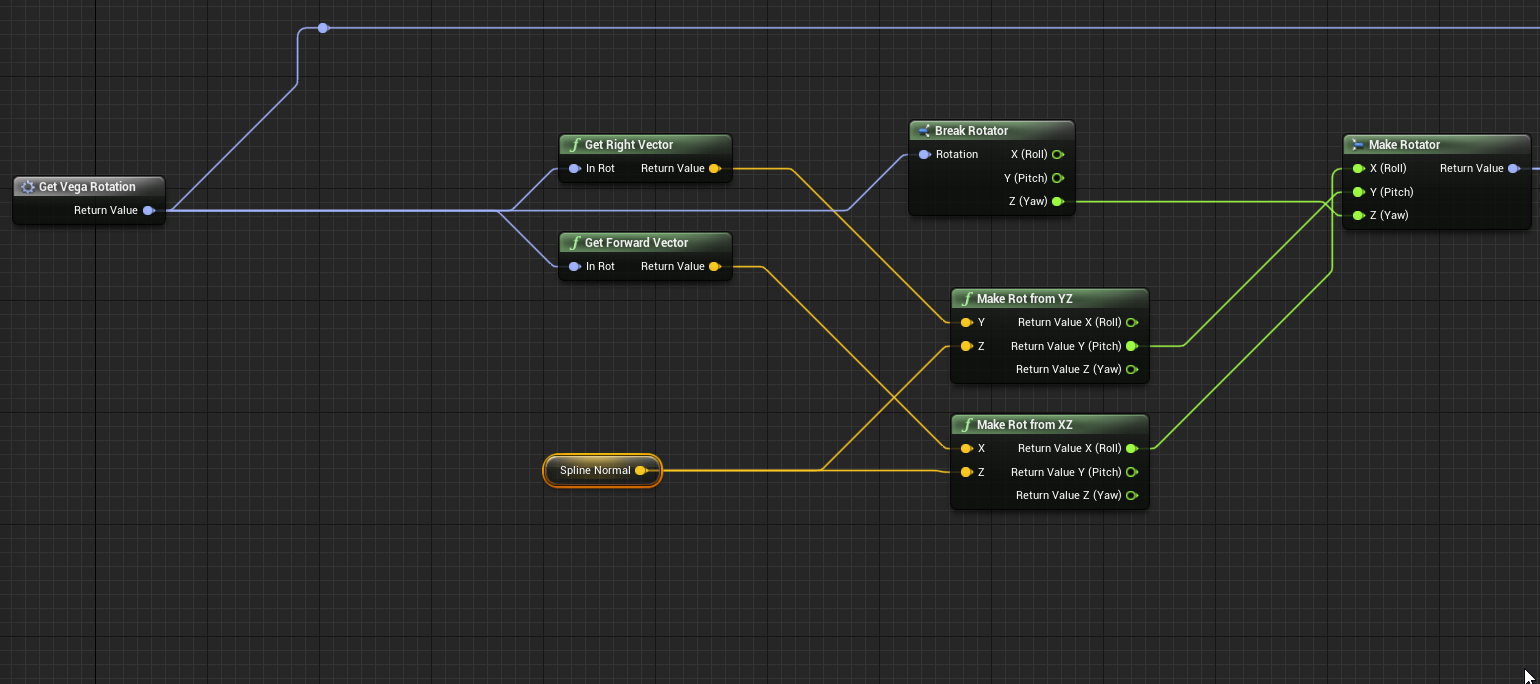
@sick sapphireDon't use GetControlRotation. That is for local use only. When using replicated rotations meant to be used for the direction that the pawn's owning controller is looking in, use GetBaseAimRotation.
It's a first person function to get the control rotation via the character's Z orientation, and a replicated pitch value.
@lime karmaIn blueprint, one of those is a function, the other is an event. The top one is a function because it returns a value. Make a function that has no inputs and returns a bool and name it CanFire and mark it as pure. The other one should probably go in the graph as an event which has a branch that checks CanFire, and calls fire on the weapon if true.
lime karma
I understand the logic, I don't know what the blueprint syntax is to do it. Like what nodes do I need to call the fire event on the weapon from the player
like I can't seem to find any good examples or anything of this sort of thing that are easily accessible, so i'm totally lost on how to actually implement it
 worldly mist
anyone know why the rocket isn't mainting the physics linear velocity that it was set at? This was all working in UE4, but when I ported it into UE5 it just decided to stop working
maiden wadi
@lime karmaWith what he wrote, it would directly translate to this in blueprint.


Both of those in the character.
And then this in the weapon.
 lime karma
okay, the part where I'm getting stuck, is the Fire Weapon node
I can't get that node
 haughty crypt
hey guys, is it possible to add new names to an enum table through construction scripts?
maiden wadi
Your ActiveWeapon's class would need it, like in my last screenshot. There's two classes. The top two pictures are the character. The third is a weapon class.
lime karma
yeah I have a parent BP for my weapons that looks like this, but this is just the parent, I have a child of this for each weapon
 maiden wadi
If that's your weapon, you'd replace my "FireWeapon" with your "Fire"
lime karma
yeah yeah of course, but the weapon is a child of this, I think I might not have the children set up right or something
maiden wadi
Should still be able to call the Fire function if it's a child. Children inherit their parent functions.
lime karma
that's what I was thinking, but something is clearly going wrong
sick sapphire
maiden wadi
<@!512990075802615818>Don't use GetControlRotation. That is for local use only. ...
thanks that solved it
maiden wadi
Open the child blueprint, look up at the top right. Does it have the parent's correct name there?
lime karma
yeah it's up there, though when I try to add the Fire Function to it, it looks like this now

which is clearly wrong I imagine
lime karma
yeah it looks like the event graph, if I'm reading it right, isn't being carried over for some reason
haughty crypt
how would one list how many members are in a struct, or better yet, putting each member in a struct into an array
maiden wadi
If you right click in the graph, the top is to override the event in the child. Sorry for the small screenshot. Work project. 😄
 lime karma
no worries
maiden wadi
You can also go to the left side and click here.

The override button. Anything marked as Gunthing is inherrited from the parent class. So the FireWeapon there. Would add the same thing as the highlighted screenshot above.
It just overrides the parent's functions.
If this is in the parent.


That will be added to the child if you select one of those.
lime karma
ah so like this
 maiden wadi
Yep. And if you still want to retain functionality from the parent. Also right click the red event and "Add Call To Parent Function" or whatever it is.
 lime karma
right, I don't think I'll need that yet but I'll keep it in mind
maiden wadi
haughty crypt
how would one list how many members are in a struct, or better yet, putting each...
You cannot really do that in Blueprint I don't believe. Not even so sure you normally do that in coding.
haughty crypt
I'm really just looking to add each element's name into an array to create an enum of each one
so when I add an element to said struct, it adds an element to an enum, that could be selected in a blueprint
maiden wadi
That's an unorthodox way of handling things. I would just do it by hand if you add an element to the struct. I doubt you'll find an easy way to accomplish that.
lime karma
okay so moving back a step to actually calling those functions within the child blueprints
I still can't figure out how to pull up the relevant node
maiden wadi
From the character?
lime karma
yeah
maiden wadi
Do you have a blue pointer type variable of the weapon's parent class type?
 lime karma
I'm going to go out on a limb and say nooo? Even though I thought I did
restive dagger
 maiden wadi
@restive dagger Nothing. What does AddSkyObstacle do?
You have an overlap event. That spawns an actor, that causes the overlap event, that spawns an actor, that causes an overlap event that spawns an actor that...
restive dagger
ohhhh
haughty crypt
so just to add on to the last question as well, is there any way of adding an element to an enum in a construction script?
maiden wadi
Not likely. They're two very separate things. Construction Scripts run when the class is instantiated into the game. Enums need to be created long before that.
restive dagger
Do u know how to fix that? I highly depend on the overlap event to spawn the actor
On actor hit?
or thats the same hmm
maiden wadi
Actually on second glance I'm technically incorrect. What are these objects you're spawning?
Are these Sky objects the same thing with the Overlap event?
 young cradle
guys how do i make it so my nodes arent disabled?
 restive dagger
 maiden wadi
Hmm. For some reason they seem to believe they're already overlapping the character at spawn.
restive dagger
young cradle
guys how do i make it so my nodes arent disabled?
They are not disabled, you can plug them any time
young cradle
restive dagger
They are not disabled, you can plug them any time
how
restive dagger
maiden wadi
Hmm. For some reason they seem to believe they're already overlapping the charac...
You are somewhat right, its an infinity loop because its overlapping over and over again, when I spawn the sky obstacle it may overlap with the character again?
young cradle
im trying to spawn nodes i forgot the control what is the button
restive dagger
young cradle
im trying to spawn nodes i forgot the control what is the button
right click on the mouse and search for the node you want
maiden wadi
@lime karma https://cdn.discordapp.com/attachments/221798862938046464/853244422544556062/unknown.png
In this one, I have the ActiveWeapon variable. Which is the same type as the parent gun class that has the first FireWeapon. It's just a pointer variable. It'll be empty by default so invalid. Not sure how brushed up you are on pointers or blueprint references.
 restive dagger
@young cradle you must right click on the blueprint empty space
lime karma
I am very unbrushed on pointers and blueprint references
young cradle
restive dagger
<@!695317963779080293> you must right click on the blueprint empty space
i am
i think
im clicking on a blank area
with right click
it aint working
 olive sedge
Is it possible to switch on arbitrary things like Material Interface Object Reference?
Don't want to create a whole tree of branches
maiden wadi
@lime karma Haha. In short. A pointer is just a small variable type that points to a specific object. Or more appropriately, that object's memory location. Unreal marks these as nullptr by default, and uses that to check if they're valid or not. Which is what the IsValid node is for. If it isn't pointing to a weapon it'll be nullptr and invalid. You'll no doubt run into the error warnings soon. To use these, you have to populate them from a valid reference. You most often get these from the place the object is instantiated.
young cradle
restive dagger
https://gyazo.com/f71e5e6c0a7fb2fecec081d5cda412f4 try like this
it didnt bring up the menu thing

and once i right click again
it disapears
maiden wadi
@lime karmaSo for instance. If we spawn a weapon on beginplay in that character like this and set the ActiveWeapon.
 restive dagger
@maiden wadi Am I teaching him wrong? whats wrong with his blueprint
maiden wadi
Then after Beginplay, that reference will be valid until the weapon is destroyed, or that variable is Set again.
@young cradleDrag and left go. The menu should show up.
young cradle
no menu
 maiden wadi
Try to right click to bring it up. Add a PrintString node and connect it.
young cradle
nope rightclick made it dissapear
maiden wadi
The menu, not the line.
lime karma
this is how I'm starting things out with instantiating my child actor from my array of weapons. Equipped Weapon is the child actor, so do I just set another actor variable equal to that?


 young cradle
how do i check
maiden wadi
Help->About Unreal Editor
Should display a popup with a Version on it. Like Version: 4.25.4
young cradle
clicking on it does nothing

is it just not responding or wat
4.13.2 is my version
maiden wadi
Modding editor, or?
@lime karma Ah. Child Actor Component. Not a fan of them, but that's a different discussion. To get the same pointer, you have to take the child actor component's pointer, and getchildactor.
restive dagger
OH FINALLY I think I found the problem
lime karma
this?
 restive dagger
https://gyazo.com/97e2cd9b6b41eee36e80f61e7d22bc5e this is full of branches, and it gets called even before the branches are set which in return will cause them all to spawn in one location https://gyazo.com/79f55ea85ee6c045562582160ea37818
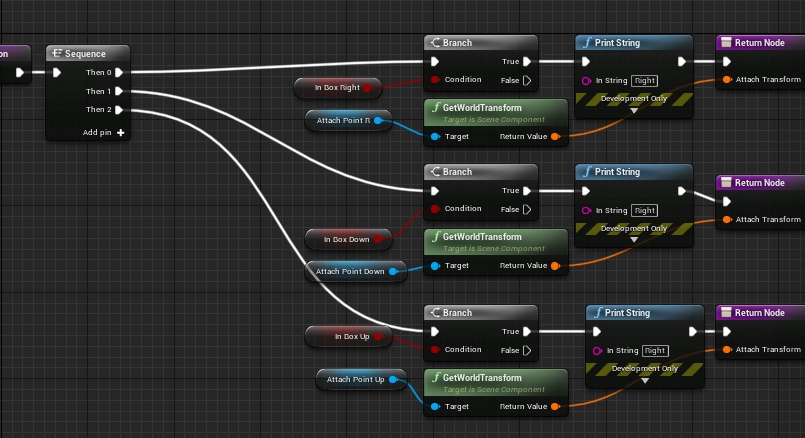
 maiden wadi
@lime karma Yep. But I would change Current Weapon to the parent gun type. Which will require you to cast ChildActor to that type too to set it.
restive dagger
So how do I fix this?
https://gyazo.com/9795e2e512dcae80c69f538c6bb59d43 heres how I set up the system

I want (in the sky sphere) when u reach a certain point another sky sphere appears either up/down/right
just like an endless runner
but the system is not working properly
lime karma
maiden wadi
<@!165932016771137536> Yep. But I would change Current Weapon to the parent gun ...
so how do I get the parent gun type to set it to that then?
maiden wadi
If your childactor in the component is of any type of the parent or it's inheriting classes, you just cast to the parent type.
 young cradle
guys does anyone know how to place nodes in 4.13.2
right click is drag and move for me
lime karma
ah so now is when casting comes into play
maiden wadi
You're going to hear a lot of really stupid explanations about casting. To save you some trouble and severe confusion there, casting simply tries to change a pointer type. It does not modify the object in any way, and more importantly it does not "get" anything.
lime karma
yeah that's what was really messing me up on my first attempt at this
so now I think I'm on the same page
 maiden wadi
All casting does is literally.. You have an object that is in a pointer that is a parent type. In this case, you have a childclass of your gun. Your gun likely inherits from Actor. Actor inherits from Object. So your inheritance chain is Object->Actor->GunParent->GunChild. This means that a Gunchild can be stored in any pointer type of any of those four.
lime karma
so we're using the cast to go up a level from the child to the parent
maiden wadi
In this case, you have an actor pointer. It's still a GunChild, but it's stored in an Actor pointer. So you change the pointer type to GunParent to get access to that Fire function.
twilit heath
best not use child actors though, especially if you're going to be swapping weapons or doing any networking in the future
maiden wadi
Yeah. Child Actor Components were a failed experiment at trying to make the designer side of things more friendly. They're terrible in their handling though.
twilit heath
dropping them would also be... interesting
maiden wadi
One of the many things that should be deprecated or overhauled.
lime karma
I was trying to use it as I thought it would help generalize these function calls, but it's becoming increasingly clear that it's just a middleman not really doing anything I think
maiden wadi
Realistically, you'll get the same functionality out of just spawning it on Beginplay.
twilit heath
you only need a pointer to active weapon
maiden wadi
With less problems.
twilit heath
nothing else
lime karma
I was about to ask if it would be better to just spawn the weapon
twilit heath
and attach it to a socket on skeletin, yes
maiden wadi
You're not into multiplayer stuff yet, so abuse the shit out of Beginplay. 😄
lime karma
lol
young cradle
i think unreal engine is broken for me i can place nodes
maiden wadi
@young cradleAre you using a modding version of the engine for some game?
young cradle
how do i chek
maiden wadi
Ask yourself if you're trying to mod an existing game?
maiden wadi
I would seriously consider updating. You're working on a nearly four year old engine version.
Try 4.26.2 or 4.25.4
young cradle
maiden wadi
Try 4.26.2 or 4.25.4
how
maiden wadi
How did you download the engine in the first place?
young cradle

Unreal Engine
Choose the Creators License or the Publishing License, or enquire about other licensing options.
 rough bear
can someone tell me why this wont work

 gusty shuttle
OKay, my build is failing, any clue how to fix malformed tags?
 maiden wadi
@young cradle Check out downloading the launcher, you should have this screen in Library.

 severe turret
@rough bear what is happening? Perhaps it's just jittering at the start of the timeline as you are using it OnPressed which will repeat when held?
young cradle
maiden wadi
<@!695317963779080293> Check out downloading the launcher, you should have this ...
im downloading it rn
lets hope it works
rough bear
severe turret
<@!774997372979773502> what is happening? Perhaps it's just jittering at the st...
i am making an endless running game https://www.youtube.com/watch?v=KdkDqk_YBS4&t=181s
followed this video ^^

In this video we take a look at how we can get the character to switch between the three lanes. We setup blueprints that will get the character blueprint to fade between the 3 potential lanes using the lerp node.
►Resources: https://virtushub.co.uk/runner-course/
►Recommended Playlists
UE4 Level Design
http://bit.ly/UE4LevelDesignEsssentials
...
lime karma
I think my brain wants to do a nap so I might have to return to this later
I think something is still going wrong because after casting it's still not letting me pull up the function
restive dagger
Guys can anyone tell me what to do https://gyazo.com/f6528d0a3c09e552425db0b14074912a
 lime karma
I'll try take out the child actor and return to this later
restive dagger
this function is not returning the attach point which makes sense
are there any other approaches to get what I want? other than this function
maiden wadi
@lime karmaMake sure your ActiveWeapon variable pointer is of the correct type. You likely have the VariableType here set as Actor, or Object.
 rough bear
can someone tell me why this wont work
rough bear
rough bear
can someone tell me why this wont work
pls someone help?
maiden wadi
@rough bearEndless Runner code?
rough bear
maiden wadi
<@!774997372979773502>Endless Runner code?
can i dm you with the problem?
maiden wadi
Not really a PM person. But I can say that you're over complicating this. You should really just be doing this on tick with some simple math instead of trying to keep a timeline running correctly.
lime karma
oh wait that's how that works?
maiden wadi
Yep. Your pointer type will be what gives you access to the correct functions.
rough bear
rough bear
i am making an endless running game https://www.youtube.com/watch?v=KdkDqk_YBS4&...
am following this video
rough bear
can someone help?
lime karma
maiden wadi
Yep. Your pointer type will be what gives you access to the correct functions.
thanks so much for everything, I think I got it to the point I wanted
though if I'm not gonna use child actors anymore, for the weapon switching should I just despawn the old weapon and spawn in a new one?
maiden wadi
Unfortunately that's actually a rather design oriented question that isn't simple to answer. It really depends on what kind of handling you want. Are we talking basic FPS with weapon swapping? Possibly. Though it can be cheaper on runtime resources to just spawn them all and allow a "dormant" mode which hides them elsewhere. But that's premature optimization stuff.
lime karma
I was wondering if that was an option as well, just like hide inactive guns behind the player or something
 green bluff
Oh sorry man, so many notifications I didn't see your message!
Delete vertices/polygons in LOD0 specifically, for example when you touch the model, you delete its vertices.
I wonder if its possible in realtime
maiden wadi
You may also want a system that shows secondary weapons on the character when they're not equipped. They'd still need to exist.
lime karma
well it's first person so you can't really see yourself much
maiden wadi
Which is true. Was considering more third person or multiplayer.
lime karma
mhm for now my scope is a bit smaller lol
maiden wadi
But yeah. There are other factors too. UI is a consideration.
If you have a system where character stats may affect the weapon's stats.. Like.. Maybe some mix of strength and agility or some perks like SteadyAim affect weapon aim or recoil. You would need to consider if it's easier to leave the weapon spawned and simply pull that directly, or have a system in place to do those calculations same as the weapon does.
Most times, you're going to find it a lot easier to just have the weapon spawned and use the same calls the weapon does for it's own use.
Like.. Say you have three weapons. SniperRifle, AssaultRifle, and Handgun. If you have the AssaultRifle out, but still want to tab and see the stats of all weapons at a glance, you'd need those spawned, or that other system there to get those stats based on the character or player who plans to equip them.
lime karma
yeah I remember seeing an issue someone else was running into during my initial research where they were despawning the guns when not in use but that caused them to loose their ammo counts
since they'd be reinitialized with full clips
well at least now that I can make functional guns, I can finally start to experiment with systems like that and see what I can come up with
maiden wadi
Realistically, spawning is expensive. Keeping something spawned usually isn't if you correctly disable it.
lime karma
I may or may not return shortly to learn what "correctly disabling it" means
maiden wadi
Having stuff spawned is very cheap. It's a miniscule amount of RAM. Spawning requires CPU time.
lime karma
and you can always download more ram
maiden wadi
Haha. Mostly it's just disabling tick and removing collisions.
Few other things. But those will cover a lot.
Vsibility and such.
lime karma
I'll look into it in a bit
I believe you're looking for child blueprints not actors
I am far from an expert but from what little I currently understand, you can make a single master blueprint for the elements that are shared between your characters, such as basic movement or whatever, and then create child blueprints for each character that will inherit all of that and house the individual logic for each hero such as unique abilities and such
 loud cipher
Hey all i have a third person template project and i have set up a system with a camera in the corner of the world, when the player overlaps a box it switches from tp camera to the world camera
however when im in that world camera seperated from player camera
the controls of the character are inverted
how can i counter act the inverted controls?

 gentle urchin
Possibly using cameramanagers forward vector as reference
 rose girder
how do i increase the thickness or radius of my trace sphere?

it's barely visible

i increased the radius but nothing happened
 smoky bluff
i think i discovered one of the mysterious macro issues with nativization, custom macros with delays in functions don't nativize properly, to be fair I should probably test this further before making that claim, but still weird. or probably already widely known..
 icy dragon
smoky bluff
i think i discovered one of the mysterious macro issues with nativization, custo...
icy dragon
smoky bluff
i think i discovered one of the mysterious macro issues with nativization, custo...
It is a well known fact that BP Nativization is so wonky, it's FUBAR and outright removed in UE5.
smoky bluff
icy dragon
It is a well known fact that BP Nativization is so wonky, it's FUBAR and outrigh...
no kiddinggggg. Well that's a little bit of a bummer, I always believed in its potential hahaha
 tiny plinth
does anyone know if timelines can be threaded? Like if I have a method that's called 5 times at once that uses a timeline, will that make 5 different instances of the timeline running or will it just try and all use the same one?
 raven pilot
is it possible to check how many blueprints you have, like how to can see how many line of code you have
 celest pilot
@indigo bough oh wow I just noticed the ping from 16/04 😅 were you able to make something similar now? Talking about this : #blueprint message
 indigo bough
celest pilot
<@!95540280085712896> oh wow I just noticed the ping from 16/04 😅 were you able...
indigo bough
celest pilot
<@!95540280085712896> oh wow I just noticed the ping from 16/04 😅 were you able...
Haha no problem. Not yet! Will probably try this in future though
celest pilot
Awesome, it's a bit out of my league but I'm sharing it with some people I know who also have interest in it
 trim matrix
Is there a way to get the player ping through blueprint?
 wind sequoia
trim matrix
Is there a way to get the player ping through blueprint?
wind sequoia
trim matrix
Is there a way to get the player ping through blueprint?
player state
they have a variable
trim matrix
ty
smoky bluff
tiny plinth
does anyone know if timelines can be threaded? Like if I have a method that's ca...
if you start a timeline it just goes, so the resulting data will be the same for anything accessing it. That's what the "play from start", "play (resume)", "play backwards" and "play backwards from end" or whatever it is, is for. only time 5 timelines would be running is if you made 5 timelines in your bp
 clear osprey
Why I have these yellow dots in the blend space?

 proud sable
I have 3 characters using the same blueprint, they all have different variables set. When I start the game they all begin with the default values but if I do an action that updates them they change to the values I set. How would I make sure they begin at the proper values? Sorry if this is explained poorly, I don't really know UE terminology too well 😅
As an example my default "mana" value is 100, one of my characters' mana is set to 500. If he uses an ability that costs <100 his max mana jumps to 500. Can I get it to start on 500 instead?
Edit: Realized I had to go back and set the "current" values to match the "max" first
 drowsy vigil
So I've been scratching my head on how to make a procedural first person walk animation for a weapon, I know i could just use anim blueprints but I wanted to try this instead, I'm not all that knowledgeable of UE, started using it about 2 weeks ago, but I assume it would use lerps and get/setting relative locations of the viewmodel, etc. Any help or advice would be appreciated :)
 high ocean
Can anyone please tell me what the math equasion(s) are behind "Map Range Unclamped Node"? I just need the math behind it 😐 I need to make an excell formula out of it 😅
gentle urchin
Basically you find the % in range of the input value and multiply it by output range + output min
high ocean
gentle urchin
Basically you find the % in range of the input value and multiply it by output r...
Ok...lemme try that & see if I get the same result as the node prints 🙂
so... "find the % in range". I don't get that part - sry
gentle urchin
Input range 0-100
Input = 50
50/(100-0) = 0.5
In / (InMax - InMin)
Remapping it then means applying the value to the output range
OutMin = 100
Outmax = 200
In% * (outmax-outmin) + outmin
(0.5 * 100) + 100 = 150
high ocean
@gentle urchin returns another value... One case I have is this:
min: 1
max: 10
outMin: 4
outMax: 10
Value: 3.85
If I got this right, in this particular case it would be:
(3.85/4)=0.42
0.42*6=2.56
2.56+4=6.56
The unreal remap node prints 5.9
gentle urchin
Closez had a feeling i was missing one bit
Gotta remove the input min range :)
(In - Inmin / (Inmax-Inmin) , possibly + in min
On the phone so cant double check it
high ocean
Besides, which one of these is it? inresult*(outmax-outmin) + outmin; or (inresult**outmax) + outmin the text reads one, the example another 😅
gentle urchin
(Inresult*(outmax-outmin))+outmin
high ocean
will try again 😄
Heh... it's not, and I can't figure out where those weird differences are... In my fiddling around with the calculator trying to "rediscover" the equation, I came clos(er) to your result - which makes me wonder how ue does it under the hood...
high ocean
😮
 high ocean
Oooooohhhhh THERE you remove the min 🤦♂️ sry, I'm retarded 😄
thought you meant to remove it at the end so i just ended up ignorin that last bit 😅
gentle urchin
Ah 😅
high ocean
Ok... It's weird how the math itself kind of even makes sense now 🙂 miles of thanks man, you saved me! 🥳
gentle urchin
Glad it gave you clarity,
Even when I failed to describe it properly
Not sure if my approximation to it even describes it, but it made sense in my head
high ocean
Heh, yea, that part where you have to remove the min is odd and doesn't make much sense, but, it is what it is! thank you! 😄
gentle urchin
But it does ! You need to normalize the input so that you can directly divide on the input range
Subtracting min is normalizing it, making its value become a direct relative value to the inout range !
I feel like im rowing this boat in the qrong direction but oh well
lime karma
I just wanna say that I managed to get my weapon system completely working as I wanted it to now and I even removed the child actor nonsense
high ocean
For all the math they've pumped into me in high-school (come from ex-soviet country, we did a fekload of math) we never understood how to actually use it, and now I'm rediscovering terms and concepts I had to know superficially to pass the national exam 😐 Sad man...smh. 5hrs of math/week, learning polinominals, log equations and diff equations, integrals and whatnot, only to be unable to do simple arithmetic...
gentle urchin
Well tbh schools never did a good job explaining why we had to do certain stuff during alot of the formulas... it was just dumping the formula onto people, forcing you to memorize shit (which is harder when you dont understand the why)
high ocean
exactly! but then again, if you go out of math/programming/sciences where you learn/have to actually use it, and go into humanities like me, you forget all formulas because they never made any sense/had no use to stay in memory... But it would be so much fun to actually teach math's usefulness.
and those endless trigonometry tables with apparently random numbers with a radical and pi thrown in every now and then we just memorized lol...🤦♂️ 😂
Aaaanyway, thanks for the help, don't wanna clog the channel with my rumbling. 🙂
gentle urchin
No prob !
 tidal lava
Hi Guys .
Im Struggling with my weapon modification system.
i want to use the when begin cursor over over event to highlight a object eg the scope . but it is extremely in accurate .
Im using the the simple collision ,
If somone is willing to help , i will screen share and we can chat about it there
 wooden field
Hi
 obtuse herald
hi
tidal lava
hi
wooden field
How one would aproach taking the light of a specific object when under a light,
but becoming visible, when in shadows?
Via post processing
 open crypt
Ugh, why is my camera actor not possessing the pawn correctly
I'm trying to switch to a camera actor so I can record some camera movement but it's not working even though references are good
smoky bluff
open crypt
I'm trying to switch to a camera actor so I can record some camera movement but ...
try set camera view with blend node maybe?
open crypt
before I was doing this and it worked fine

I'm not trying to look at a target, I'm trying to switch to a different camera
this is super basic stuff, what am I forgetting
 spare wyvern
I tried retargeting the anim bp and it turned all the animations to T_Poses. I don't think this ever happened to me, and I don't think i did anything different. Is this some kind of bug?

 stark tide
how do i animate a blueprint component in sequencer

 sullen oar
Im doing a spline system for a power line, is there any way i can select based off a Blueprint or does it have to be a static mesh?
On a Blueprint, is there no way to have a Socket?

 dawn gazelle
sullen oar
Im doing a spline system for a power line, is there any way i can select based o...
dawn gazelle
sullen oar
Im doing a spline system for a power line, is there any way i can select based o...
Sockets are something that are defined on meshes. You could add a scene component for positioning if that's what you're trying to figure out by having a socket in a blueprint. To retrieve the scene component "socket" you can do a get component by class or tag but by tag would probably be better if you're going to have multiple scene component "sockets" so you can name them using the tag.
sullen oar
dawn gazelle
Sockets are something that are defined on meshes. You could add a scene compone...
Hmm,
So for example, i have this Wire Support,

and i have iton this blueprint

if that makes sense
dawn gazelle
sullen oar
Hmm,
So for example, i have this Wire Support,
Not sure what you're getting at then for needing a socket on a blueprint. The mesh itself has those two sockets defined (Cable1 and Cable2). So you should be able to get a reference to the sockets directly from the mesh, including their position or their full transform.
 sullen oar
dawn gazelle
Not sure what you're getting at then for needing a socket on a blueprint. The m...
sullen oar
dawn gazelle
Not sure what you're getting at then for needing a socket on a blueprint. The m...
yea, i set those on the mesh, and will try that in a moment, and let you know,
open crypt
@dawn gazelle can you see my screenshot and advise why my possess isn't working? I was using a level sequencer before and it was switching but now it's not (really shouldn't matter because I'm just using the camera actor, i probably hooked it up wrong)
dawn gazelle
open crypt
before I was doing this and it worked fine
You are telling the player controller to possess the pawn they are already controlling.
trim matrix
can a function in a blueprint class be made static like in c++
open crypt
dawn gazelle
You are telling the player controller to possess the pawn they are already contr...
I wonder what I was doing before that made it work - this is an actor BP with a camera component, I want to switch to that perspective
sullen oar
I solved my issue above,
Just wondering this now
- Setting the texture on the spline, (Auto populate with material)
- being able to select the mesh rather than it random select, so say point 1, 2, 4, 5 do mesh 1, and point 2 do mesh 2 for example.
if that makes sense
 prisma stag
Hello, I'm trying some code I did and have been having some problems. What I want to happen is for it to control the pitch and roll of a cube and when you move the mouse it will rotate the cube in that respective direction.
However, what is happening is it seems it is setting the rotation to the axis value from the mouse so based on how fast I move the mouse, the higher the rotation, then when I stop moving the cube goes back flat.

 runic parrot
Hi! does anyone know if it's posible to detect drag on a button?
open crypt
prisma stag
Hello, I'm trying some code I did and have been having some problems. What I wa...
I think it goes back because the pitch of the mouse moves back to zero when you aren't moving it
You probably want to try "add relative offset" instead of setting the rotation, play with that and see if it works for you
open crypt
runic parrot
Hi! does anyone know if it's posible to detect drag on a button?
yes, just check youtube for that exact phrase
runic parrot
open crypt
yes, just check youtube for that exact phrase
you sure? i have been looking for it and couldn't find it. i can make it work with a image, but not with a button
prisma stag
open crypt
You probably want to try "add relative offset" instead of setting the rotation, ...
I dont think that is the problem as Im adding it to the current rotation of that actor so even if it was zero, it should move it back.
open crypt
prisma stag
I dont think that is the problem as Im adding it to the current rotation of that...
Just try it and see - it can be wonky using set rotation
prisma stag
open crypt
Just try it and see - it can be wonky using set rotation
Adding an offset move the actor, I only want it to rotate. I also tried addactorworldrotation but to no avail.
 sand shore
trim matrix
can a function in a blueprint class be made `static` like in c++
sand shore
trim matrix
can a function in a blueprint class be made `static` like in c++
Technically no. If you just want it accessible anywhere without a specific reference, put the function in a Blueprint Function Library.
 warm ermine
Would anyone know anything about blend spaces by enums?
 pine trellis
Can someone help? I keep getting an infinite loop on this code here but if I remove the true it wont work anymore, what else can I do to keep the code the same without getting t he infinite loop?
 dawn gazelle
pine trellis
Can someone help? I keep getting an infinite loop on this code here but if I rem...
dawn gazelle
pine trellis
Can someone help? I keep getting an infinite loop on this code here but if I rem...
Loop through your starts, check which ones are valid first and add them to a new array if they are, then select via random the one to use from that new array.
 cyan rapids
pine trellis
Can someone help? I keep getting an infinite loop on this code here but if I rem...
cyan rapids
pine trellis
Can someone help? I keep getting an infinite loop on this code here but if I rem...
https://blueprintue.com/ Could you post it here? Can't really read it
pine trellis
here it is https://blueprintue.com/blueprint/jhxnmy-t/
BlueprintUE
 fiery lark
Okay guys, I have a child blueprint that I have set so that when an event is called, it increases the damage. However, everytime it is spawned it uses the same damage as it originally was, why is this?
dawn gazelle
fiery lark
Okay guys, I have a child blueprint that I have set so that when an event is cal...
Each instance of a blueprint has its own values, all of which are normally set to use their default values as defined in the blueprint when they are spawned. You can set a variable to "expose on spawn" and "instance editable" which would allow you to set a value within the blueprint when spawning it.
proud sable
I've been trying to figure out how this works for a while now but I'm just not getting it. When casting to a blueprint, what determines the object I should use as the input? Especially when it's not obvious. I'm trying to get the wind speed from a weather blueprint but I have absolutely no idea what object it would inherit(?) from to get the value.
severe turret
the weather blueprint object with the wind value inside it.
proud sable
I'm definitely misunderstanding, sorry. If I place the blueprint in my scene, and I want to cast to that blueprint which has the value I want, I use that same blueprint as the object input?
dawn gazelle
proud sable
I've been trying to figure out how this works for a while now but I'm just not g...
Casting is only a means of taking a less specific reference and making it a more specific reference of the desired class so that you can access the more specific class' variables and functions.
For example, you place a Character in the editor - it can be considered an "Actor", a "Pawn" or a "Character" or even "Your Specific Character Blueprint". The latter being the most specific.
If you can get a reference to that actor, say by doing an OnOverlap event where you get a reference to "Other Actor" all that is giving you is an "Actor" reference, so you can't reference any values or access any functions from say "Your Specific Character Blueprint", so then you attempt to cast to "Your Specific Character Blueprint" and if the cast succeeds, you can then reference the variables and access the functions of that particular instance of "Your Specific Character Blueprint".
tiny meteor
hi, is there a multi-cast node in blueprint
for example, you can specify a bunch of classes and branch depending on which class it is
or do I need to chain them together
dawn gazelle
tiny meteor
for example, you can specify a bunch of classes and branch depending on which cl...
No at least not in a syntactically good way. To do it the clean way, you have to work VIA Inheritance. Using the example I gave just above your post, you could theoretically get a reference and cast to "Character" which any character including "Your Specific Character Blueprint" would be valid, but you can only access variables that would available at the "Character" level.
To make it a bit more clear...
Say you created a master "Character" class called "MyFighterClass" you then create child classes of this class, like "Kickboxer", "Swordsman", "KungFuMan". Then you could also create another class based on character called "MyEnemyClasses" then child those to things like "Zombie", "Bigfoot" and "Skelebones"
If you have a reference to an object which is a "Swordsman" but it is only an "Actor" reference, (again say from an Overlap event) you can cast to "MyFighterClass" and you would get a valid cast, but if you tried to cast that same reference to "MyEnemyClasses" it would fail.
proud sable
dawn gazelle
Casting is only a means of taking a less specific reference and making it a more...
I think I see, casting for some reason has been the steepest learning curve for me so far in UE4 so I'm sorry if I'm way off here.
So far I've only used casting to get values from within a hierarchy (e.g. an instanced character needs a variable from the parent character blueprint. Every tutorial I've seen uses "get player character" as the input so I've been struggling when that doesn't fit).
If I wanted something from a completely unrelated blueprint, say that character needs the wind speed from the weather blueprint, should I still be casting for that value and using another method like GetAllActorsOfClass or is there another method of communicating values between blueprints that wouldn't normally interact?
dawn gazelle
proud sable
I think I see, casting for some reason has been the steepest learning curve for ...
There are very many ways of getting references to objects, and it all depends on the scenario which is the best way to use.
If they're both objects that you place within the world before game start, then you can create a variable that stores a reference of the specific object that you can set as "Instance Editable". Then you select the object in the world in the editor that needs the reference and you'll have the ability to select a reference which should then be selectable so long as you've placed it in the world as well.
If it's something you're spawning in, you can feed in a reference by setting the "Owner" variable to the thing that is spawning it (usually by way of a reference to "Self") and selecting "Get Owner" on the object was spawned, or, you can again create a variable reference of the specific object type on the newly spawning object, setting it to "Instance Editable" and "Exposed on Spawn" which will then give you a pin on the spawn actor node for that variable that again, you could feed in a reference to "Self" into.
If you have no other options, using "Get Actor of Class" is fine, so long as you're not doing it all the time - especially if it's something that could be done on begin play and saved in a reference as it doesn't really get removed and recreated, so then you can just use that reference you've saved.

Announce Post: https://forums.unrealengine.com/showthread.php?101051
This Training Stream takes a look at Blueprint Communication. We find that Unreal Developers of all levels can sometimes struggle through the concepts behind moving data between objects. So in this video we'll take a look at the different ways to make Blueprints talk to one an...
dawn gazelle
tiny meteor
hi, is there a multi-cast node in blueprint
I take this back somewhat - you do have the option of creating a Blueprint Interface, which allows you to pass through any reference, and so long as that class implements that interface, it can execute what it needs to on its end or return any values as you define in the interface.
proud sable
dawn gazelle
There are very many ways of getting references to objects, and it all depends on...
Thank you, I'll save this and look into each part. Until now I thought casting was the only option so this helps a ton
 hybrid ether
Quick question. If i create blueprint interface for player I can call those functions by using get player character. But if I have child component in player character how can I call those interface functions? For example get player character -> get child actors -> get that child to target pin where that interface is used?
tiny meteor
okay, one other question
if I have a float between 0-1, I need to return a series of ints depending on the float value
for example if it's between 1-0.7, return 1, 0.7-0.5, reutrn 2 etc
which is the best way to do that?
dawn gazelle
hybrid ether
Quick question. If i create blueprint interface for player I can call those func...
 hybrid ether
Thanks! is that better than this?
 dawn gazelle
hybrid ether
Thanks! is that better than this?
dawn gazelle
hybrid ether
Thanks! is that better than this?
Not specifically. My example would get all the child actors who implement the interface to do it. Yours would only get the first one with the specific tag. Both have their uses 🙂
tiny meteor

trying something like this for now, but not sure if there is a better way
also I kinda need to make non-linear lerp values
100%, 75%, 25%
 analog ridge
every time I create a new function the one before it in the my blueprint tab just does the same edits. So if I duplicate it and make something from .05 to .1 the first one will go to .1 Or when I create a blank function the one before becomes blank until i delete it, then it comes back
dawn gazelle
tiny meteor

 knotty ore
Hey guys, I've been googling for a while now but can't find an answer outside of C++ stuff (looking for BP).
Is there an easy way I can figure out if one sphere /circle (don't care about Z) is completely inside another circle?
Think the overlapping actors function, but the object needs to be completely inside, rather than just touching.
knotty ore
Yep, varying size. I'm just playing around with prototyping one of those Hole.io type games
gentle urchin
Use the overlap check, normalize locations, then do a manual check of bounds in the direction(s) that is furthest from center of the bigger one
F.ex a small sphere of bounds 20 (10 in each direction) must be more than 10 away from the big spheres (location - bounds)
Horrible explanation but.. yeah 🤔😅
knotty ore
Haha, its all good, I'm just completely retarded 😂
gentle urchin
Found another method here a few comments down
Compariong location+bound on each of them. If result is negative, its completely inside
knotty ore
If you want to check with boxes, or spheres you can get the world location and then add the dimensions to the location for both objects. Then substract the result from the object from the result from the reference object. If the result is negative it is inside if it is positive it is not inside.
Yeah, that's the closest I've gotten to an answer, but I can't figure out how to dump that into BP
Like, I can get distance from object to another easily, but including the radius of each object in that equation is 🤷♂️

 gentle urchin
Distance can maximum be bigspheres bound minus smallspheres bound
Do ease the function, you probably can ditch the entire sphere.
Go for 2d location math instead
knotty ore
how do i get the bounds of a sphere though? A square is easier because its minX/minY maxX/maxY
Add the sphere radius to the center location and also subtract it from the center location?
gentle urchin
Bounds of a sphere is just its radius
knotty ore
so like this, right? but then I've got two vector values I dunno what to do with
 sand shore
First just get the distance between them. Then, subtract each radius
if the result is <= 0 they are touching or overlapping

 sand shore
Right
cause you're on top of it
You can actually use this to determine how close to the center you are as well - I don't know what you're solving for, but I'd you have the radii touch you can get that to print 0
knotty ore
oh yes, ok, i think i understand what's happening with this now 😄 thank you guys!
 vernal parcel
Hello! I'm new to Unreal engine, I have imported a character from Mixamo to Unreal (after adding root bone with blender). i wanted to do a dodge animation for my character but, even after enabling he root motion the character keep snapping back to its original location. any advice guys? should i do these kind of actions using Anim montage or in the state machine?
 teal dove
Hey guys, does anyone know what this error means?
LogStats: Display: There is no thread with id: 12036. Please add thread metadata for this thread.
I get it in the log after using "stat Quick" or "stat SceneRendering", and I get multiple of it with different IDs. And it's in a new empty level as well.
 grave apex
yo, how can I make a sceneCaptureComponent ignore certain actors?
 tight schooner
grave apex
yo, how can I make a sceneCaptureComponent ignore certain actors?
tight schooner
grave apex
yo, how can I make a sceneCaptureComponent ignore certain actors?

the former hides the whole actor while the latter hides a specific component
 ashen basin
i still don't understand how i can get interfaces to send information between blueprints can someone send an example please
tight schooner
grave apex
i can use this in an actor right? not just a level BP?
yeah I've been using it in an actor (or a scene component to be specific)
grave apex
aah, cool cool
tight schooner
I never tried using it in a level BP
teal dove
ashen basin
i still don't understand how i can get interfaces to send information between bl...
https://www.youtube.com/watch?v=G_hLUkm7v44 & https://www.youtube.com/watch?v=xNKwsJGv--k & https://www.youtube.com/results?search_query=unreal+engine+4+how+to+use+interface

What is a Blueprint Interface in Unreal Engine 4 Blueprints?
Source Files: https://github.com/MWadstein/wtf-hdi-files

Project Link: https://dl.dropboxusercontent.com/u/282171110/InteractionTutorials.rar
Private tutoring and work for hire = www.Tesla-Dev.com
maiden wadi
@ashen basinOne thing to keep in mind that all an interface is is simply a different way to call functions on something besides casting to it. It's like giving something a second class in a way. But you still have to obtain a reference to it somehow and that has nothing to do with interfaces. If that's where you're having trouble, you need to consider things like SphereOverlapsActors, LineTrace, ShapeTraces, CollisionEvents, OverlapEvents, Saving references to things when you spawn them, learning how to get most native references to major game actors, etc.
ashen basin
all i wanna do is send a value from gamestate to client/actor
maiden wadi
That is replication/RPC territory. Networking is different.
maiden wadi
To clarify, are you talking about using networking or no?
ashen basin
not at the moment but i dare say it will in future
i want to share gamestate event tick with clients
maiden wadi
If not. Then your Gamestate simply needs a reference to the actor. What is the other actor?
 hexed cloak
Is there a solution similar to "Random Point in Bounding Box" that would work for a 45 degree rotated rectangle? Using a box collision to set the origin and box extent.
maiden wadi
@ashen basinWrong function name, that was internal. GetGameState and GetServerWorldTimeSeconds Those are native.
ashen basin
yeah found them trying them out now thanks
hybrid ether
Hi. What is best way to debug these errors?
 maiden wadi
@hexed cloakNot sure I am following correctly? The box extent should be rotate-able.
@hybrid ether Have you changed any C++ classes lately that have Blueprint childclasses?
hexed cloak
@maiden wadi I just can't figure out how to do that I guess. I have a 300x100 rectangle that I want to rotate 45degrees and then get a random point that is inside that rectangle.
hybrid ether
@hybrid ether No I haven't This is full blueprint project.
maiden wadi
@swift pewterConsider using their PlayerState instead, and create a delegate that broadcasts when the Playerstate's pawn changes. AI can update itself with that binding.
Controller would work too, even in multiplayer since AI is done serverside mostly. Pointer could be replicated, either way.
Brain melt.. what are those in BP?
Event Dispatcher
@hexed cloakThe Box Extent is what dictates your rectangle's facing from the origin. If memory serves, the exent will always be towards the upper right of the rectangle's forward facing. So technically.. Since Extent is already in local space, all you should have to do is rotate it by your 45degrees, and the use that in the function with the same Origin.
You're trying to rotate the rectangle 45Degrees left or right? On the Yaw Axis?
hexed cloak
Yaw
maiden wadi
Do you already have an origin and an extent from your rectangle?
hexed cloak
Yes
maiden wadi
Unless I'm mistaken, it should be as easy as this then.
 tight schooner
hybrid ether
Hi. What is best way to debug these errors?
tight schooner
hybrid ether
Hi. What is best way to debug these errors?
See if there are any other warnings/errors in your output log and resolve those. Make sure all your BPs compile without problems. Maybe try #packaging too.
trim matrix
please anyone can tell me how to make in-game update option using blueprint
teal dove
@trim matrix Thanks for the answer 🙂
grave apex
how can I detect if an input is pressed while another input is currently being held down?
 shy trellis
Hey I created a For Each SYNC Macro on Standard Macros. Whenever I try to use it I get "Can’t save because graph is linked to external object?" error. Is adding a macro to standard macros a bad idea?
maiden wadi
@swift pewterPersonally. I'm lazy. If you want the AI to always go after a player character then I'd write a simple function that just returns the non AI playerstates from Gamestate, get the best player for the AI to go after with a filtering function and go with that mostly. Less reliance on keeping a binding correct.
@grave apexYou check if the other key is held down during the input of the one currently being pressed.
Controller has a IsInputKeyDown function for that.
tight schooner
shy trellis
Hey I created a For Each SYNC Macro on Standard Macros. Whenever I try to use it...
I've read that modifying standard macros is a no-no... I haven't tried it myself though to see what happens. I made my own macro and function libraries for my project.
trim matrix
please someone tell me how to integrate in game update option
grave apex
tight schooner
I've read that modifying standard macros is a no-no... I haven't tried it myself...
Ive duplicated Macros and then modified them in the past, turned out okay
maiden wadi
@swift pewterPossibly. But Gamestate already has a list of all players via their PlayerStates.
trim matrix
please some help meeeeeeeee
maiden wadi
In that case, just GetPlayerController0.
 fleet vessel
I think I might have found the perfect way to learn Blueprints.
1
https://learn.unrealengine.com/course/3537777?r=False&ts=637591559092134754
2
https://learn.unrealengine.com/course/2436619?r=False&ts=637591559092134754
3
https://learn.unrealengine.com/home/LearningPath/90587?r=False&ts=637591559091978490
4
https://docs.unrealengine.com/4.26/en-US/ProgrammingAndScripting/Blueprints/
Overview of using the Blueprint visual scripting system for gameplay.
shy trellis
grave apex
Ive *duplicated* Macros *and then* modified them in the past, turned out okay
Didn't it cause errors while saving the project?
shy trellis
well that's weird
hexed cloak
@maiden wadi I think the issue is that the box I'm using to do the rotation is a child of a parent actor. The parent gets rotated.
shy trellis
When I duplicate and edit It just causes the problem that I talked about
trim matrix
please someone tell me how to integrate in game update option
olive sedge
hi! Does one of you know how to get a vector that is plane to a normal? like the horizontal bar on top of the T, no matter how the T is rotated in 3D?
grave apex
what do you mean by "in game update option"?
like, if an update gets released, it would notify a player that a new update is out?
for the whole game?
maiden wadi
@olive sedgeIs LinePlaneIntersection(Origin&Normal) what you're looking for?
olive sedge
@maiden wadi sounds exactly like what I'm looking for, I'll check it out
trim matrix
grave apex
?
i want to add option inside the game to update it like epic games launcher
hexed cloak
@maiden wadi Looks like rotating the box extent changes its size, rather than just rotating the rectangle 45degrees
maiden wadi
That's odd. Extents should be in local space already.
olive sedge
@maiden wadi I don't think that's it. It returns where a plane crosses a line I think?
I basically need a plane that sits on top of a vector or more like the rotation of that plane (I want my vehicle to always be even with the ground)
like this: https://i.imgur.com/o5tRfUC.jpeg
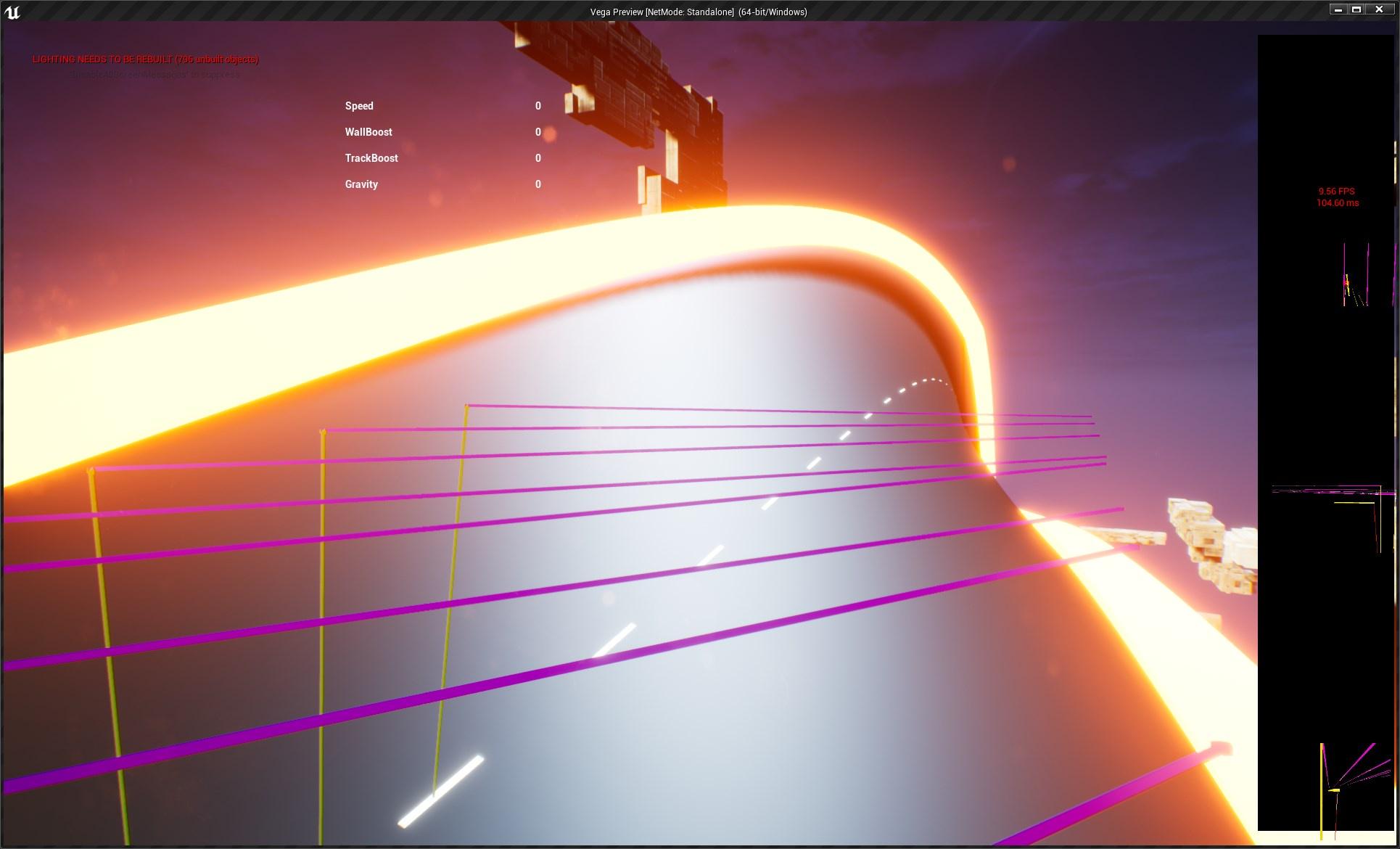
but it falls apart with the roll of the track for some reason
hexed cloak
maiden wadi
That's odd. Extents should be in local space already.
Yeah it just changes the size when you try to rotate the Extent. You can plug the code you sent in to a Draw Debug Box and see it change size when you change around the Yaw on the RotateVector
maiden wadi
@olive sedgeAh. So you'd need to trace, hit the ground, get the normal, and make that the vehicle's new up vector while probably setting the forward vector to the closes thing you can get to the car's current facing based on the normal's rotation.
olive sedge
@maiden wadi very much exactly this. and that's what I'm doing but it falls apart on the tighter bends: https://i.imgur.com/DdtWapE.jpeg
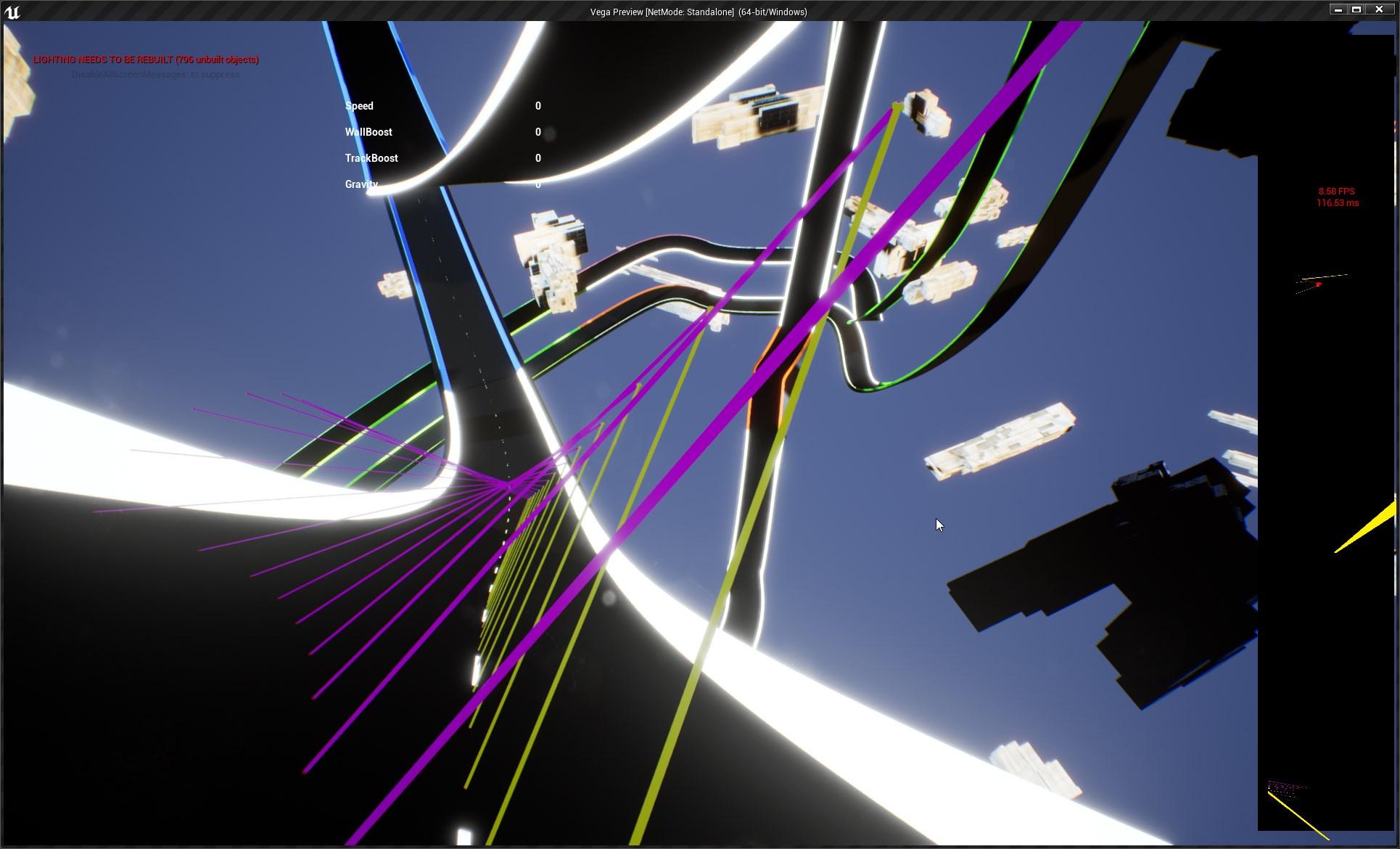 maiden wadi
@hexed cloakSec opening a non work project to test that. Been working with UI for far too long.
hexed cloak
Fair lol
maiden wadi
What are purple?@olive sedge
 maiden wadi
@trim matrix You're asking for things that have no bearing on Blueprints, in the blueprint channel. If you want your game to be updatable, consider releasing on Steam. Makes it very easy to handle that.
trim matrix
is it not possible to use blueprints to update it
without going to any external website
you can simply tell me yes or no
icy dragon
trim matrix
you can simply tell me yes or no
No.
trim matrix
thanks
olive sedge
@maiden wadi do you know a better way of setting the up vector?
grave apex
How come when I try to use input events in a child blueprint attatched to a character, nothing shows up? its like it doesnt even recognize im pressing anything in the child actor
maiden wadi
@hexed cloakAh. There we go. I don't know why I assumed that with BoxExtent. Just needs a couple of extra steps to work.
 maiden wadi
@olive sedgeQuestion about that. How do the cars handle on the track? Do they always face the direction of the track along the spline?
@hexed cloakIt's pretty simple in the end. It just uses the extent's local space to find a point around that world origin vector. The minus converts the newly found random point back into the local space of the origin, then it's rotated around that origin since it's in local space. Added back to the origin to put it back in world space.
@olive sedgeMakeRotFromZX may be enough. I'm uncertain. Hard to test that without a setup. Z would be the normal from the trace, X would be the directional along the spline, or the vehicle's velocity, or the vehicle's current forward vector,.
ashen basin
how do i print string on gamestate bp
i know how to print string but doesnt show
is there a console or something will be in
dawn gazelle
ashen basin
i know how to print string but doesnt show
If your print string isn't firing, perhaps your event that it is connected to isn't firing?
ashen basin
dawn gazelle
If your print string isn't firing, perhaps your event that it is connected to is...
connected to event tick
dawn gazelle
Is event tick firing?
ashen basin
why wouldnt it be
dawn gazelle
You have disabled tick. You haven't defined the appropriate gamestate in your game mode. You're not using the right game state class for your game mode.
Could be any of these.
ashen basin
ok thanks
clear osprey
Guys I have created the following function for character movement but the problem is that I have to prone first to make it work walk forward/right which is not what I want.
What can be the problem here?

this is moving on the ground function

 chilly jetty
trim matrix
chilly jetty
trim matrix
Help. Why do 3d models ship without materials. I don't want to lose 50 hours of working on models.
Please help me 😭
 sand thicket
@chilly jetty Components have a "visible in game" check box.
@chilly jetty Sorry. "Hidden In Game"
gentle urchin
Sounds like adding 4 distamce between two vectors should work just fine
For each point do distance to last point
Add them together
A to b + b to c + c to d
Not necessarily related to circumference , just a path distance
 devout geyser
How can I detect collision of static mesh? I have a collision box, and I want to generate on overlap event, but the event isn't shooting. How to detect collision of a static mesh?
clear osprey
clear osprey
Guys I have created the following function for character movement but the proble...
Solved: The problem is only happening in v4.26.2 and not in v4.25
olive sedge
@maiden wadi tinkered with it but couldn't figure it. Out.. Have to go now.. I get back to you later if that's ok
trim matrix
I want to be able to create spline point based on it´s lenght 🙂 . The goal is to be able to drag out smoth curv spline in runtime for Paths🙂

 blissful cosmos
Hey guys. I have an issue with Mouse events "double-firing".
I have a UI which generates mouse down events when the player clicks a border (maybe better to use a button here?). It works great. I also have a mouse event when the player clicks a mesh in the world, which also works great.
However, if the widget is directly above the mesh, clicking the widget will execute the UI mouse down event first, then the mesh event. How can I prevent this from happening? I only ever want it to fire the UI mouse events, I NEVER want the mouse events to go "though" the UI
 low lava
Just a overall question regarding Actors, overlapping and the likes.
What is the best practices regarding storing variables , overlapping events and actor spawning ?|
Do I put the overlapping code in the AIControlelr: Example Chicken looking for corn. Corn spawns randomly in level. chicken eats corn , corn respawns
sick sapphire
how do it make it so that a component does not block/affect a spring arm
what is the option to do that
twilit heath
@blissful cosmos make the widget return handled for mouse events you want blocked
@sick sapphire on the springarm
proud sable
Is it possible that moving my folder containing my HUD blueprint and widgets would break functionality somehow? I had everything set up and working and organized things into new folders. As far as I can see everything is still referenced properly but the HUD no longer shows up when the game starts and I can't figure out why. Any idea how I can figure out what's wrong?
 sick sapphire
twilit heath
<@!512990075802615818> on the springarm
sick sapphire
twilit heath
<@!512990075802615818> on the springarm
are those trace channels or object channels
i want to customize them
 pastel geyser
can someone come to the unreal hangout vc i need some help with my bp
proud sable
Yeah, that's what I did. I moved from the default ThirdPersonGameMode folder into a more permanent folder within the content browser and haven't been able to get the HUD back since. The widgets look the same in the designer and the HUD class is set properly in the game mode blueprint but I still can't get it to show up. Tried recreating any nodes that reference the HUD/Widget blueprints but it's still missing :/
Ah damn. I don't remember the exact paths I had before so I'm not sure how to fully revert it. Things were pretty messy so this was all just to clean up the folder structures
blissful cosmos
twilit heath
<@!251437977283198978> make the widget return handled for mouse events you want ...
Could you elaborate on this? Note sure I understand
 rigid tartan
Is there a way to keep the current instance of my player character when opening a level instead of making a new one? I have a login page in an initial level and I open a new level (by name) once the user signs in, but this seems to replace them with a new character object and thus loses some important user information that I need.
proud sable
This put me on the right track, thanks! Noticed in the recent levels I had two, I had accidentally moved the level+game mode blueprints. Moved the "new" ones to their old location according to the path in the recent levels tooltip and the HUD appeared again properly
icy dragon
rigid tartan
Is there a way to keep the current instance of my player character when opening ...
I'm not sure with the multiplayer ramifications, but try storing the values in Game Instance.
rigid tartan
Ah I see, didn't know something like that existed
icy dragon
Game Instance persist through level "travels", and only destroyed when the player quits the game.
rigid tartan
Alright I'll use that then, thanks!
proud sable
I'll look into it thanks, I've been meaning to be more careful but kept putting it off. This is a good wake up call
 earnest swan
Hey everyone, I'm trying to set up a way to have a thin collision box that stretches between two positions in the world. I'm having a bit of trouble figuring out how to do that. Any suggestions on the setup in order to make it happen?
to visualize it, imagine two points, and a really long and thin collision capsule being stretched out so that one end is around one point, and the other end is around the other point.
warm ermine
Anyone know how I can play a specific blendspace by using two different weapon enums?
clear osprey
Problem in Move Forward function.
Guys why Do I need to prone at least one time to move forward/right?

walking on ground

speed smoothing

 west sapphire
Anyone know why physics simulation breaks if I increase world scale 3d for a skeletal mesh actor in blueprints?
blissful cosmos
Hey guys. I have an issue with Mouse events "double-firing".
I have a UI which generates mouse down events when the player clicks a border (maybe better to use a button here?). It works great. I also have a mouse event when the player clicks a mesh in the world, which also works great.
However, if the widget is directly above the mesh, clicking the widget will execute the UI mouse down event first, then the mesh event. How can I prevent this from happening? I only ever want it to fire the UI mouse events, I NEVER want the mouse events to go "though" the UI
 hallow pond
blissful cosmos
Hey guys. I have an issue with Mouse events "double-firing".
I have a UI which ...
hallow pond
blissful cosmos
Hey guys. I have an issue with Mouse events "double-firing".
I have a UI which ...
Change the Input Mode to UI Only. Or on your Class Settings you can set to Capture Input (I think Widgets have that too).
maiden wadi
@blissful cosmos Most likely cause of this is usually because you're not replying the event as Handled in the widget. Which allows it to follow through the widget tree until it hits the viewport canvas, which then tries to click on the actors in the world.
blissful cosmos
@maiden wadi Do I need to do more?
 maiden wadi
Don't use MakeEventReply. Disconnect that, drag backwards from ReturnValue, and type Handled
blissful cosmos
This was the issue. Thanks a ton - saved me a ton of headache and workarounds
maiden wadi
What happens is that the reply from that will determine if you want to allow the mouse click to run further up the widget hierarchy. this allows UI to stop mouse clicks from getting to the game viewport and causing in game selection while in widgets. Alternatively, you can have multiple widgets do things on click by returning unhandled in them. but eventually if you don't handle the click events, they'll reach the game viewport and that is where PlayerControllers do their onClick events and such.
clear osprey
By default a boolean is true right which is created using BP?
maiden wadi
@clear ospreyNot usually. Booleans will generally default to false. But if you're adding variables to something, you should check it's state anyhow.
 green eagle
@The_Nikso#8355 theres a better channel on the server to ask that. But google up or search youtube for "importing model to ue4" lots of "how to"'s on that all over the place. Might even find specific ones to your 3d modelling software. I know if the file type isn't correct. Or if I forget to set something to be a geometry in Houdini that ill get issues trying to import.
Good luck
clear osprey
maiden wadi
<@!581914974390321183>Not usually. Booleans will generally default to false. But...
yes I sets its condition in properties to true and now I don't need to perform prone before walking around
green eagle
oh he left Unreal Slackers all together it looks like..
 formal dagger
ok so i'm stuck (again). So basically, i want my character to plant a seed which gonna turn into a vegetable. I don't know how to say to ue that "this" seed = "this" vegetable. (automaticly if possible). I'm stuck at the spawn actor of the vegetable
clear osprey
and in UE 4.25 this is true by default while I am not using it with along NOT
green eagle
formal dagger
ok so i'm stuck (again). So basically, i want my character to plant a seed which...
Use variables
green eagle
green eagle
Use variables
Could even set up an interface bp if you have a lot of variety or a spreadsheet class
clear osprey
clear osprey
Problem in Move Forward function.
Guys why Do I need to `prone` at least one tim...
This Enable Move need to be true to walk right/forward
but still after performing prone why this is changing its state to true this is a mystery of UE
formal dagger
green eagle
Could even set up an interface bp if you have a lot of variety or a spreadsheet ...
i think the solution is with the datatables, prob is i don't know how to make 2 datatables communicate. it's something about {} but i can't find a good tutorial to explain all this
green eagle
so when player "uses seed" the interface checks if "tilled land" is overlaping "seed actor" then adds "plant actor" to "tilled land" it takes the "seed actor - type" and applies it to "plant actor" then deletes seed
green eagle
formal dagger
i think the solution is with the datatables, prob is i don't know how to make 2 ...
Let me see if I can find something that might help.
formal dagger
green eagle
so when player "uses seed" the interface checks if "tilled land" is overlaping "...
yes, it's just the seed X = vegetable X that i miss, i don't know where to set it
green eagle
green eagle
so when player "uses seed" the interface checks if "tilled land" is overlaping "...
So in an interface BP you can set inputs and outputs that can relay data between one Class/Actor to the other being communicated with.

crappy example but it was on hand

So the first image you have the interact relay pulling the "scene component" data from the "characterBP" and it sends that info to the "Resource BP" letting it know where on actor 1(character) to put component from actor b(resource)
You could have an input for the variable "type of seed" go into the message and when it decides to spawn the actor "crop" in the Tilled land or crop actor BPs you have it pull "type of crop" from that input.
Does that make any sense? I can try to put together something for better clarity
@formal dagger so in the interact function you would want it to check the string through an array, have it match it to a "seed" listed and then it would automatically populate the right plant.
 fleet cedar

 limber seal
Hello, really hoping someone can help with this. Trying to make a projectile in Unreal 4 fly towards the center of my screen. When I try to do it like this, the projectile spawns and never moves. Ive also tried adding a node immediately after the spawn to Set the Velocity of the projectiles projectile movement componenet equal to the sum that I drag into the target rotation. When I do that, it flies but in random directions and not straight

 olive sedge
@maiden wadi https://gfycat.com/coldnaivegoat
I got it even with the ground. That's just rot from Z. But that rotation also includes the Yaw which I don't want to change (that's my steering)

Any ideas?
olive sedge
Or anyone else?
clear osprey
Guys is UE support getting the character input speed values through character stats using real time BP arrays on server side to avoid cheats?
and the replication of those arrays will be another task
This is the Plan but not sure it will work or not
 sand shore
that could work in principle but that's a lot of data authoring
maiden wadi
Maps and gameplaytags are going to simplify and speed that up by a fuckton.
sand shore
Yeah you'd be able to tag stuff like "Heavy" "cumbersome" and get different modifiers.
It's a wholly different approach
If you need precision though what you're blocking out is going to be more straightforward
clear osprey
sand shore
If you need precision though what you're blocking out is going to be more straig...
this data will be monitored in real time

later the vehicle support will be added
 sharp sigil
I have VS open but double clicking or pressing "Goto definition" on a node doesn't do anything for me. Any fix?
icy dragon
sharp sigil
I have VS open but double clicking or pressing "Goto definition" on a node doesn...
Are you trying to look at functions provided by the engine?
sharp sigil
Yup, specifically this:
 icy dragon
Are you using the editor from the launcher, and not built from source code?
sharp sigil
yes
icy dragon
That's why.
It doesn't open VS to look at the function definitions provided by the engine, as it's already precompiled.
sharp sigil
Ahh I see. Well, if I ever have time I guess I will build my own lol
Thanks for the help
 subtle valve
Hi I wonder if anyone can help me, I'm trying to set a parameter in a material in a widget (this is for a custom progress bar). The debug text proves that the number is what I think it is, but the material still uses the default value. Am I doing something wrong here?

 storm dove
hi guys, i have a base button widget i use in all my widgets, can i set one public variable to defaults on all buttons?
icy dragon
storm dove
hi guys, i have a base button widget i use in all my widgets, can i set one publ...
You can create user widget of that button and substitute the stock button widget.
storm dove
i already did
i have a variable "opacity"
i set it to 1 in my master widget
but all other buttons in my project are still 0.5
i want to set them all to default 1
i guess i can delete old variable and create a new one but thats barbaric
 novel phoenix
Hey guys!
Shouldn't this change the location of WeaponMesh only for Y and Z and make the X stay the same? Am I doing something wrong here? I know this is a harder way to do it, I just wanted to see if it is right.
 storm dove
why would x stay the same?
novel phoenix
(1, 0, 0) * Old Weapon Position + (0, 1, 1) * New Weapon Position
dawn gazelle
subtle valve
Hi I wonder if anyone can help me, I'm trying to set a parameter in a material i...
Are you sure Prograss Bar Image and the return value from Get Dynamic Material are valid?
novel phoenix
storm dove
why would x stay the same?
the first thing should result (Old Weapon Position.X, 0, 0)
- (0, New Weapon Position.Y, New Weapon Position.Z)
subtle valve
@dawn gazelle Yes, in fact I have hooked up debug text to the material instance itself to get the parameter I'm changing, the parameter itself is actually updating. It's just not affecting the image.
novel phoenix
novel phoenix
+ (0, New Weapon Position.Y, New Weapon Position.Z)
So, it should equal (Old Weapon Position.X, New Weapon Position.Y, NewWeaponPosition.Z)
the X doesn't change
only Y and Z
am I right?
subtle valve
@dawn gazelle

Manually updating the value either in the material instance or in the material itself DOES affect the final image. So this is either a very strange bug or I'm missing something fundamental.
analog ridge
so every time I create a new function the one before it just has the same edits. So if I duplicate the first function and make something from .05 to .1 the first one will go to .1 Or when I create a blank function the one before becomes blank until I delete it, then it comes back. I'm following a tutorial and I've done exactly what he is doing. Is this a version issue? I'm using 4.26.2
subtle valve
Actually, let me correct that, manually updating the value in the material instance doesnt affect the final image. It seems to only care about what is set as the default value in the material.
dawn gazelle
subtle valve
Actually, let me correct that, manually updating the value in the material insta...
So testing on my end, what you have there is perfectly fine. Nothing wrong with the code.
I added just a user interface material with a parameter exposed and it changed over time as expected.
subtle valve
Yep the material domain for this is set to user interface too
I mean here's the whole material if it helps, the Progress param is what I'm changing

 frank nest
I have this sphere where I apply force and it moves when I posses it, I want a saddle on it but as you can see the saddle that is parented to it the sphere will move with it. I am hoping to have it stay on top but if I dont have it parented it just stays in world space. Any ideas? 🙂
 subtle valve
@frank nest I believe you'll need to store the relative location on beginplay, then set the relative location every tick
same with rotation, though you can set a component to always use world rotation
storm dove
icy dragon
You can create user widget of that button and substitute the stock button widget...
what exactly do you mean?
subtle valve
@dawn gazelle Ah I found my problem! In the object that has my radial progress bar as a component, I had set the material as well as the widget reference. I cleared the material and it works now.
This bit was set. Looks like it was overriding what the widget was updating.

Thanks for the help!
 pallid iris
Guys how can I change a animation by pressing a key on my keyboard?
A documentation or video would be nice
subtle valve
@pallid iris If its just a one time thing and you're using montages, you can do it like this. You can find the keyboard events by right clicking and typing in the name of the key you want
 pallid iris
@subtle valve thx
frank nest
subtle valve
<@!339914522015825931> I believe you'll need to store the relative location on b...
Thanks Chris k will check that out!

 icy dragon
trim matrix
does anyone have a few mintues to provide some direction on this issue?
icy dragon
trim matrix
does anyone have a few mintues to provide some direction on this issue?
What's the parent class of the BP this function came from? Look at the top right corner of the BP editor.
 icy dragon
Is this "Take Command" class inherited / child of "BP_TriggaTrey_UseThisOne" class?
Because you're using Self as the cast input, which is referring to the BP itself.
trim matrix
oooo lol its not related at all
that make sense
i'm trying to connect to another blueprint entirely
icy dragon
Also, you don't need casting from Self, as the functions from the parent class can be called right away.
trim matrix
okay that makes sense
so what im trying to is from TakeCommands blueprint i want to toggle visibility of a hat in my character blueprint
icy dragon
In that case, you can use either Event Dispatchers (which is cross BP event execution, and more specific execution) or Blueprint Interface (which is cross BP function execution, and it's "one for all" execution)
trim matrix
Yeah that makes sense I'll look it up. Thanks Homie! I'll be back if i scuff again 🙂
 nova ledge
My "DestroyActor" node isn't working. It's hooked up, but it doesn't actually delete the actor when it's called. I heard about the Garbage Collector thing in project settings could be the problem, but I couldn't find an easy explanation on how to set it up where it destroys the actor almost immediately yet doesn't make the game lag. Can anyone explain it to me, please?
tight schooner
@nova ledge Destroying the actor should take it out of play immediately so idk why you're not seeing that happen. Try not to run any nodes on it after DestroyActor is called.
Fwiw you can call GC manually. I think the node is called Collect Garbage
 visual dune
Im creating a custom Spline Algorithm and im wondering how to duplicate meshes and place them at specific points.
Ive found "Add Static Mesh Component" node, just don't know if that's the most efficient way to do so.
Ah thanks will do
 sleek pecan
Hi all. How can I add a Gameplay Tag to an actor? I'm finding it weirdly difficult to suss out how to do this. My intention is to be able to run an EQS query for Actors with certain gameplay tags.
dawn gazelle
sleek pecan
Hi all. How can I add a Gameplay Tag to an actor? I'm finding it weirdly difficu...
You'd have to create a Gameplay Tag Container variable on your Actor.
prisma stag
Hello, I dont really understand why this isnt working.
I have a main menu widget that when I hit play is supposed to remove the widget then set the input mode to game only, but the widget is never removed.

 cyan vigil
how can I make this random integer not open the same level if someone post pics on how to do so will be much appreciated

 long schooner
Guys I have an issue with a structure


the condition does not update after I press the button
can you help me with it?
trim matrix
How can I add this type of input to a enum variable
 dawn gazelle
trim matrix
How can I add this type of input to a enum variable
dawn gazelle
trim matrix
How can I add this type of input to a enum variable
This would be setting a variable on an object variable. The object that is being referenced by the object variable would need to have a variable of that enum type and then you can drag from a reference and do a "Set" of that particular variable.

 trim matrix
@dawn gazelle Thanks that solved it!
 dense citrus
(the sorta physics movement code based off movement input pressed)
 rough blade
is there a good way to have a widget position a crosshair in 2d screen space so that it always covers a point in the game world. IE - I have a tank, I run a quick formula to find where its turret is aiming. Assuming the player is looking at where the tank turret is aiming, could I have a widget place a crosshair over that position and update it as the tanks turret changes where it is facing.
sleek pecan
rough blade
is there a good way to have a widget position a crosshair in 2d screen space so ...
I think you'd just raycast from the turret in the direction it is pointing (with some kind of backstop maybe / maximum distance) and then project from world to screen space https://docs.unrealengine.com/4.26/en-US/BlueprintAPI/Utilities/ProjectWorldtoScreen/
Project World to Screen
sleek pecan
dawn gazelle
You'd have to create a Gameplay Tag Container variable on your Actor.
Thanks! I didn't see this as a component in the editor which confused me. I'll add it in c++
sleek pecan
prisma stag
Hello, I dont really understand why this isnt working.
I have a main menu widg...
prisma stag
sleek pecan
https://answers.unrealengine.com/questions/242008/how-do-i-remove-a-widget-from-...
I was able to figure it out but thanks.
dense citrus

any idea why these aren't firing?
(ik they aren't "plugged in" but neither will function when plugged in)
gentle urchin
Is the event starting them firing at all
 surreal delta
Hey if anyone might be able to help me out I'm trying to repurpose a "ledge grab" functionality into an activation event for the player.
In short, we have a ledge grab mechanic as part of the player's core functions. Part of this group project is not to add or edit any of these mechanics directly inside of the player blueprint.
I need to reference that the player is in this animation state after overlapping with the handlebar. I already have the zipline animation setup, I just need a way to limit some of the parent functionality:
- Remove the tooltip text, as is unrelated.
- Prevent the player from climbing up / dropping down, but still can control the camera
- Have the player automatically drop down after the timeline is complete.
TLDR; I need a way to reference the ledge grab mechanic as an event without editing the player's core blueprint. Everything functions in BP_Zipline.
I'm sure it would be easier to show how everything is setup in a voice call / screenshare. Help would be very appreciated thank you 😄

 vocal elm
is there a BP equivalent for FQuat::FindBetweenNormals?
 surreal peak
Hm, do we have Quats in BPs by now?
gentle urchin
What you could and probably should do is simply doing an isvalid check of the variable, and get player pawn cast to yourpawnclass and save it again
Most of the time the isvalid will return valid so
I dont imagine it giving you any issues
Either that or you can create a global reset player event (unless one can already bind to gamemodes event)
One time. Then its valid untill the next death of the player
Other option is to not destroy playerpawn
Just play death, then hide the body
Reusing it could mean less work setting up references and such
Not sure how thats potentially better than when needed but sure
Restartplayer event could make sense in several ways
How are you restarting the player anyways
But how is that handled? And where?
Its fine, got it ^^
guess one cant bind to the default gamemode , so would need custom gamemode (which you probably have) and have a dispatcher for the player restart there
If you'd wanna go with that method.
Event driven is surely the best way to go in most cases
what you do ofc, could be pretty simple aswell !
When you gather the original reference to the player,
bind to event destroyed
then on destroyed start a looping timer with like 1-2 sec timer, and try to reset the variable . If it fails, continue to check. if it succeds, stop checking, and rebind to destroyed
sand shore
surreal peak
Hm, do we have Quats in BPs by now?
the data type has been exposed for a while but not really any functions
gentle urchin
something like this -ish

not sure if you must unbind from a destroyed actor
wouldnt think so
yeah

you must have matching signature
so going from delegate auto fixes that
 fiery swallow
dense citrus
fiery swallow
dense citrus
it needs to be higher than 0.0 to fire buddy
gentle urchin
you messed up for sure
ignore the input pin
and just let it use the get player character to pick up the reference
fiery swallow
You should probably use an event dispatcher for when dead and when respawned
gentle urchin
target on bind should be the character , sorry, forgot to connect

the newest ref (seeing as the cast returns is valid) will always be valid when set
my way felt pretty hacky
i'd say this looks cleaner 😛
dense citrus
fiery swallow
it needs to be higher than 0.0 to fire buddy
just responding for your knowledge,
i actually figured it out a bit ago, the issue is it was using an axis input, so i guess the constant stream of triggers caused it to wig it, so i had to figure out a circuit with a "do once" node and some other stuff
but ty for the reply
fiery swallow
dense citrus
just responding for your knowledge,
i actually figured it out a bit ago, the iss...
it triggers on loop at 0.0?
dense citrus
yep, it just defaults to every frame or something
fiery swallow
dense citrus
yep, it just defaults to every frame or something
Are you sure? I'm checking right now and as of the latest UE4 patch set timer by event "0.0" will not fire on loop in my client
It's firing on yours?
dense citrus
yep, either way i had one hooked up to a veriable that was changed and neither fired. but now they are so yay lel
ue4 party
 candid nest
hey i add a sliding parkour to my player but when my player slide it can passes through wall i have set all the collisions off for the wall but nothing works for me can anyone help me plz
 amber rock
I changed this Area Class in Runtime, but my navigation still "see" old class, is there any way to tell navigation is my NavLink Area Class changed ?
 ashen basin
gamestate bp wont print to screen?
dawn gazelle
ashen basin
gamestate bp wont print to screen?
It does.
ashen basin
why cant i see on my project
 dense bone
Hello, have you idea how to load game from save?

I always end with server save values
This event exectutes on Gamemode
Character ID variable is always the same as server
ashen basin
i cant set interger as text prints nothing
dawn gazelle
ashen basin
i cant set interger as text prints nothing
You're still printing on Tick?
ashen basin
yes printing on tick
dawn gazelle
And you've set your game state in your game mode like this?
 dawn gazelle
Check your output log when running. See if you have this line.
 ashen basin
nah i dont
dawn gazelle
Try putting the print string on Begin Play, see if it prints there.
ashen basin
nah nothing again
dawn gazelle
What is your parent class for both your game mode and game state? Can be seen at top right.
 dawn gazelle
If you're trying to print from game state, you must have made a gamestate, and it has to have a parent class. Same with game mode. What are their parent classes (this is actually important)
dawn gazelle
Can you please read me what it says at the top for both of them?
dawn gazelle
not gamestate base?
ashen basin
no
ashen basin
nope
 full wind
Anyone encountered an issue that a packaged ue4 game turns into a zombie if you try to close it,i.e. you exit but it keeps itself alive as a background task
dawn gazelle
ashen basin
nope
Ok, are you able to provide a screenshot of the game mode settings here in the editor view?
 ashen basin
in world settings its all none
ashen basin
ok thanks
dawn gazelle
Then you can populate those values, including your custom game state.
ashen basin
thanks
 violet wagon
do blueprint errors cause lag in a packaged game? In editor they make a big difference in frame rate once they stack up, but is it like this when the games packaged?
icy dragon
violet wagon
do blueprint errors cause lag in a packaged game? In editor they make a big diff...
You should iron out those errors before packaging the game to begin with.
 sly shuttle
if i have a blueprint and there are two separate instances in game are the states of the variables the same in both or do they have their own sets
 lament fox
Hello evryone Please I need your help. In Long range attack logic print screen returns as "side scroller" but inside the LongRangeFunction printscreen returns empty. This is so wierd am i missing something?

 clear osprey
what does that mean?
 icy dragon
clear osprey
what does that mean?
icy dragon
clear osprey
what does that mean?
Do you use world composition / making large maps?

 clear osprey
icy dragon
Do you use world composition / making large maps?
clear osprey
icy dragon
Do you use world composition / making large maps?
yes
icy dragon
 azure bolt
Likely your vertices of the spline mesh isn't merged properly.
icy dragon
clear osprey
yes
Because that's your object going beyond the world composition limit, which is 20 km in length and width.
You probably misplaced an object somewhere far away and you forgot it existed.
azure bolt
icy dragon
Likely your vertices of the spline mesh isn't merged properly.
Seems like that was the case, thanks
clear osprey
icy dragon
You probably misplaced an object somewhere far away and you forgot it existed.
yes it was sound cue far on the ocean
 sage cargo
does someone know why
i got more drawcalls if there is less foliage visible


is there any clustering or something like that ?
ah sry more drawcalls ^^
trim matrix
Can I add new splinepoints based on lenght ?:) . Trying to create smoth curvs at runtime 😋 .

Something like this 🙂
 gentle urchin
Wasn't there issues with saving structs for a while ?
And also, are you sure the data is actually updated in the struct in the first place?
Verifying with prints f.ex
originally, or after load ?
show how you update them
and the leveling part
guess i miss-read this part then

PrimaryWeapon is a valid variable aswell? no errors ?
could be, its hard to say from what you've shown
So, are you updating two set of structs for the same variables? one in the component, and one in the playerchar?
 timid nimbus
Hey, I'm new to UE and I'm making a game in which you can fly
But the thing is I dont really know how to do that
(With blueprints)
So is there a good tutorial or something on that topic?
I'm using UE5
I think they removed it
Do u have any other idea?
Oh, ok
BTW I ment any idea on how i can do the flying thing
Thanks
 upbeat otter
how do you cast to an child ai bp?
i cant use "get all actors" because its gets every single actor in my scene
unless can I use a for loop or something?

here's what I currently have
 faint pasture
@upbeat otter What are you trying to do? Which actor are you trying to get?
burnt nest
Noob question incoming! Let's use a strategy game as an example; let's say I have 100 resources when I put down a Save Game, which of course I want to restore when loading later on.
Can I just keep that variable in the player, or would that be in the Game State?
gentle urchin
Isnt playerstate replicated?
 novel ice
Hey there, I have a problem with For Loop...
I am activating a notify in anim montage, which does this
 gentle urchin
Meaning you could be open for cheating if you let this data replicate?
novel ice
For some reason, For Loop just doesn't work! I mean, it makes the thing only one time and after that prints string
 obtuse herald
gentle urchin
Meaning you could be open for cheating if you let this data replicate?
obtuse herald
gentle urchin
Meaning you could be open for cheating if you let this data replicate?
A PlayerState is replicated to the corresponding player, but only the authority can modify it afaik
novel ice
There is a delay
gentle urchin
Was more thinking that other players could find out about other players resources
novel ice
And after a delay there is another projectile spawn
gentle urchin
Since the data will be avaliable for all players on all clients
burnt nest
thanks captain! ❤️
gentle urchin
obtuse herald
A PlayerState is replicated to the corresponding player, but only the authority ...
If thats the case then I've either read it wrong or been told wrong. From my understanding, playerstate was replicated to all players

 primal smelt
Out of curiosity, is there a way to change the object type for collision of a line or box trace in blueprints? I assume you could edit the engine source code if not.
gentle urchin
primal smelt
Out of curiosity, is there a way to change the object type for collision of a li...
If you're refering to channels they can be added under projectsettings
primal smelt
gentle urchin
If you're refering to channels they can be added under projectsettings
AH gotcha, by default I assume it's just visibility and camera? They were the only two available in a line trace by channel node
gentle urchin
Correct. You can add up to 15 or so custom channels
primal smelt
gentle urchin
If you're refering to channels they can be added under projectsettings
I got somewhat confused because a box trace was not hitting an object unless I enabled overlap for world dynamic - so I thought the method would be changing a line trace's object type!
(or a box trace in this instance)
proud sable
Is there a way to set the color of an image widget to grayscale with a binding? I want to set an ability icon to grayscale when the character doesn't have enough mana to use it. I have this so far which darkens it but it's not exactly the effect I'm going for
 nova ledge
Okay, I'm using UE5 so I don't know if this needs to be reported to Epic Games to fix or not as of yet, so I'm just gonna ask about UE4 here real quick. So I'm using a blueprint interface to call a function. When a certain event is fired, I want the game to collect the garbage. I figured it would be best to put that in the Level Blueprint. However, when I put the event in the level blueprint and compile it, I get an error saying that it already exists in '[map name]', and that another one cannot be generated from that one. The only time I put that in any blueprint was in the level blueprint and a character blueprint to call the event... am I misusing it? Or is it just a bug in UE5 that I should report?


 pale tulip
Hi, you know how to display a rewarded ad (admob) in ue4 without plugin?
sand shore
nova ledge
Okay, I'm using UE5 so I don't know if this needs to be reported to Epic Games t...
levels probably shouldn't implement interfaces and maybe that's the error.
The reason why is because you can't even get a generic reference to a level script actor in BP (by default)
nova ledge
sand shore
levels probably shouldn't implement interfaces and maybe that's the error.
The...
I thank you for your thoughts, but if it's not intended for interfaces, then why do they make it where you can add interfaces to the level blueprint under the class settings?
trim matrix
How to get structure variable name?
I don't want the value only i need name as well.
fleet vessel
How do I make my animation into a variable?
sand shore
nova ledge
I thank you for your thoughts, but if it's not intended for interfaces, then why...
I mean try not doing an interface and see
It's a special case class, maybe the interface isn't your issue
but to not try it out of hand? /shrug
but also show me you using the interface on a level BP from outside that level BP
fleet vessel
Hello Someone please help me
I can't find my basic anhimation as a variable


Please help
tight schooner
I've heard of people using components as pseudo-interfaces in this channel before. I want to dabble in it. Is this the gist of how it works? Checking if an actor has a component, and then getting variables / calling functions on it?
 burnt nest
tight schooner
I've heard of people using components as pseudo-interfaces in this channel befor...
burnt nest
tight schooner
I've heard of people using components as pseudo-interfaces in this channel befor...
Components can be used to create certain systems that you can then attach to different actors rather than building them directly into a single pawn, yes. So that's pretty much how it can be used.
tight schooner
Thanks. I'm trying to unwind a web of BPIs I've spun in my current project; gradually replacing functionality with proper base classes, and I was thinking components could handle the "blueprint communication" that cuts across class hierarchies.
 flint lion
Hi guys, I'm having an issue where adding an ActorComponent by using AddOwnedComponent in C++ but after creating a blueprint, that AC details doesn't show anything, I tried reopening the engine, recreating the blueprint but didn't work. Anyone know how to fix this?
 last abyss
fleet vessel
Please help
last abyss
fleet vessel
Please help
you can't find your animation because you have a user widget reference, not a 'Widgets_Controls' reference
fleet vessel
last abyss
you can't find your animation because you have a user widget reference, not a 'W...
How do I convert it to that reference?
flint lion
SetupAttachment only works for SceneComponent, isn't it?
last abyss
cast to it, then u get a reference
flint lion
InventoryComp = CreateDefaultSubobject<UInventoryComponent (TEXT("InventoryComp"));
    AddOwnedComponent(InventoryComp);
and make object in the cast the user widget ref u have
last abyss
cast to widgets_controls in your case
flint lion
I got the component added as inherited in the blueprint, but it doesn't show anything in Details panel
fleet vessel
last abyss
cast to widgets_controls in your case
but if I look into the tutorial, the icon of widget is different to mine
means the base classs might be different
last abyss
user widget is a parent of your 'widgets_controls' reference. The parent doesn't know the functions, like your animation, on the child (widgets_controls). But the child knows the functions on the parent (user widget)
last abyss
if you're following a tutorial, try see if you did something different or read/listen through the entire thing if you haven't already. sometimes they explain it later on, not while they're doing it.

 fleet vessel
Can I reparent the class in some way possible?
last abyss
you can change the reference type from user widget to widgets controls, or instead you can cast to widgets controls from the user widget reference you have
if you need to reparent the class, you can go in the class settings (in the ui graph toolbar) and reparent it there.
fleet vessel
is this how it's supposed to happen? Still can't find the animation 'OpenClose'

 sonic pine
Hiho, I have a few questions about the translation function in UE4.
Unfortunately I have a little problem with that. Is anyone familiar with it?
Unfortunately, I don't know which topic this would fit exactly, so I'll post it here ^^
i have 3 defferent lists

The problem is i have transleted this part in the Equipment_Ring list but now i have to translate all again in the new list... why?
 last abyss
fleet vessel
is this how it's supposed to happen? Still can't find the animation 'OpenClose'
last abyss
fleet vessel
is this how it's supposed to happen? Still can't find the animation 'OpenClose'
right, the animation is called OpenClose so if you 'get OpenClose' off of the 'As Widget Controls' you will get the animation and you can plug that in.
fleet vessel
fleet vessel
is this how it's supposed to happen? Still can't find the animation 'OpenClose'
Is this how it's supposed to be set up?
last abyss
'supposed to be' is a rough statement because there's many ways to do it. but in this case, it should work.
fleet vessel
oooh found it
fleet vessel
last abyss
'supposed to be' is a rough statement because there's many ways to do it. but in...
sowwy

But thanks found it
thank you
last abyss
don't have to apologize, we're here to help 
fleet vessel
I just hope this different class widget doesn't give me any problems 
And it worked completely fine
gentle urchin
 sand yacht
I really cant seem to figure out how to fix these
sand yacht
I really cant seem to figure out how to fix these
The error accessed none means that your reference variable is null
Meaning, it's not set to any specific object/actor
A variable reference is by default empty and must be set by one means or another
 cinder shell
Guys, I having a strange problem with opacity of translucent materials, what caused by PostProcess. So sky is appears like fully transparent on those materials... I can't figure out what I did wrong. It's a simple depth fog.

https://blueprintue.com/blueprint/5vmfqblj/ here's postprocess
BlueprintUE
sand yacht
gentle urchin
A variable reference is by default empty and must be set by one means or another
Am I not setting it in the Set Handle Location node?
proud sable
Trying to streamline my HUD blueprint a bit. In the event graph I set variables for the active party member as well as the uncontrolled AI party members. My functions use these to get attributes/icons for each character. Doing it this way is giving me errors though since the functions seem to call before the variables are set. Is this something I should ignore or try to troubleshoot? As far as I can see it's not causing any perceivable issues and only happen in the first frames of running the game.
 gentle urchin
sand yacht
Am I not setting it in the Set Handle Location node?
gentle urchin
sand yacht
Am I not setting it in the Set Handle Location node?
The variable "physicshandle" is empty for sure
gentle urchin
proud sable
Trying to streamline my HUD blueprint a bit. In the event graph I set variables ...
You could add simple "is valid" checks to your called functions to avoid them. Getting rid of them now (despite no percievable issue) will help you stay on top of bugs and issues, and not the other way around. Atleast thats my take on it
 gentle urchin
It appears to be a set of bindings aswell, based on the amount of errors
gentle urchin
sand yacht
Its updated there. Question then is, are you calling it somewhere before its set, or are you somehow emptying it again before using it


 gentle urchin
Right
sand yacht
 gentle urchin
On tick id block the code if the handle isnt valid
No reason to run if you're missing key actor references
sand yacht
How would you do this exactly? Is there a node of some sort?
gentle urchin
Yes
The node is named "Is Valid"
Comes in two types. One bool. And one macro with is valid and is not valid
sand yacht
So in screenshot 2 I should add an is valid bool after releasing right mouse button setting it to false?
And on pressing rmb setting it to true
gentle urchin
On tick, id add it before updating the vector
Either as its own nodez or combine it for the branch
Hmm wait ..
Seems i didnt check all your code
Ah.
Yeah the problem is that you avtivate the bool before you know the code executed
sand yacht
the screenshot i sent at 9:49 is an extent of the last screenshot
gentle urchin
If tou move the "physics handle active" bool to AFTER adsing the component , i believe you should be fine
sand yacht
alright let me try