
#blueprint
402296 messages · Page 672 of 403
 dawn gazelle
 warm summit
no... thats probably the issue, but I am not sure how to do that
I made a variable of type Root BP.
thought that would be directly to it
dawn gazelle
Right, but that means it can contain a reference to a specific Root BP object, but you haven't specified which object.
If you've dropped it in the scene, the fastest way is to do Get Actor of Class.
warm summit
yea, how can I do that in a thing that won't exist til its spawned?
ahhhh ok
cool
makes sense
dawn gazelle
Better way is to actually get references when you need them... Like on overlaps, or line traces, etc.
Trouble with get Actor of Class is that it's looking at all actors in the scene and checking if they're the appropriate class, so it's not the most performant way of doing it.
warm summit
I get it, there is and will only ever by one BP Root, there may be many of these spawned BPs though
dawn gazelle
if you do it once just on begin play on your spawned BPs, then it shouldn't be too bad.
warm summit
Ah so do it in the Construction Script probably eh?
warm summit
I am not sure what that means, am a newb
dawn gazelle
You're saying it doesn't exist yet.
warm summit
hah ok
yea but if I do it in the Contstruction script it can get it once set it, and we are good. Best choice given the situation?
dawn gazelle
Wouldn't matter if its construction script or begin play in your situation. If the RootBP was an object that existed before the game started (ie. placed in the level) then you can expose it as a variable that can be set on instances, and if you have it placed in the level you can select the reference directly.


(In my case here, I have RootBP as a reference to ThirdPersonCharacter)
warm summit
ok I just tried the const script, and that worked but I think what your showing me is smarter eh?
I am not sure how to "expose it as a variable that can be set on instances,"
dawn gazelle
Well again, you said that RootBP doesn't exist - you're spawning it.
So this method wouldn't really work.
warm summit
no Root BP does exist, and is in the level.
dawn gazelle
Oh

Click those checkboxes 🙂
Then you go to your BPSpawners and set their reference in the details tab.
 warm summit
Root BP, is in the level. Using input that is processed by it, I spawn other BPs, "Dots_BP"
in Dots is where I want to get the ref to RootBP, so I can get to the Widget
Unfortunately, I must leave at this moment. I do need to learn about this "expose on spawn" stuff.
thanks you have been very helpful
 trim matrix
How would I go about giving an actor a "FOV"? Say I'm making a missile that will only track the target if it is within the seeker's field of view of say, 30 degrees.
Maybe get rotation from the actor's forward vector is my first thought
trim matrix
@dawn gazelle So I discovered that the children of a pawn don't inherit their rotation values. So whenever my ship starts rotating, the guns are using the absolute rotation values instead of the relative ones, so their angles get messed up as the ship turns. Is there a way of getting relative angles, instead of absolute ones?
 chilly jetty
Hi there'
trim matrix
@dawn gazelle any idea? Sorry to bother you
 summer bolt
Why don't you just set the pawns rotation to a variable and make it so the guns are always at the rotation of the pawn
 sand bloom
How can I change something in a player control trough something in the level? Like I want to be able to switch to a pawn on a collision or a button input when enabled trough a box collision
Player control seems so separate I don't know how to do anything with it outside of player control itself
all I find online is people changing pawns trough different methods
like pressing a button in the player controller
 olive sedge
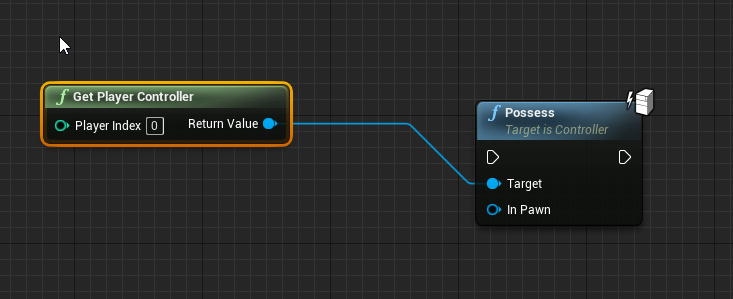
@sand bloom you can call Possess on collision
 limber finch
Can you turn off hair simulation real time?
sand bloom
olive sedge
<@!150758591861620736> you can call Possess on collision
but player controller is how i start and end possesions, and I see no way to get a collision in player controller
olive sedge
 dawn gazelle
sand bloom
but player controller is how i start and end possesions, and I see no way to get...
dawn gazelle
sand bloom
but player controller is how i start and end possesions, and I see no way to get...
 sand bloom
dawn gazelle
sand bloom
dawn gazelle
huh but how did you get that begin overlap event in there
limber finch
I tried r.HairStrands.Simulation Disable, but it doesn't change until the game is closed
dawn gazelle
sand bloom
huh but how did you get that begin overlap event in there
Right click on your collider:
 sand bloom
oh so you're not doing this inside the playercontroller you managed to get a possession node outside of the player controller
dawn gazelle
Yes. It usually appears on any pawns or the player controller, but you can always uncheck the context sensitive on the search. Like above I searched on Game Mode.
 sand bloom
ah okay sorry i'm really dumb but I have this now but how would I make it reference itself as a pawn then

 sand bloom
ah thank you
I didn't know that node exists good to know
it still doesn't work but it must be because I enabled interaction on a pawn i'm not currently possessing
ah yeah it works on collision
which is progress thank you
i can work with this
 mighty linden
why is this not allow me to refer to itself to be possessed?
 dawn gazelle
mighty linden
why is this not allow me to refer to itself to be possessed?
dawn gazelle
mighty linden
why is this not allow me to refer to itself to be possessed?
The blueprint you're in doesn't inherit from pawn.
mighty linden
dawn gazelle
The blueprint you're in doesn't inherit from pawn.
What do you mean exactly ? sorry im very new to this .. lol
just trying to control my boat
does it have to do with it not being a pawn?
trim matrix
Hey guys, anyone know how to setup lighting channel from blueprint?
@mighty linden Yes it's not compatible
what blueprint it is derived to?
mighty linden
ohhhhhhhhhhh okay
trim matrix
It's not a pawn for sure
mighty linden
so i have a physics systems set up in this actor blueprint can i just copy past everything over to a pawn blueprint?
trim matrix
if you want to posses the boat, you need to get reference of the boat
mighty linden
or somehow convert it to pawn?
trim matrix
the physics system should be on the boat blueprint which also should be a pawn
since u are controlling the pawn
dawn gazelle
You can click on Class Settings and change the parent class.
 mighty linden
i'll give it a try one sec
trim matrix
anyone know how to set lighting channel from blueprint?
dawn gazelle
The one labelled "Pawn"
dawn gazelle
If you selected "Default Pawn" that would be why you're a sphere.
mighty linden
trim matrix
what are u creating the boat blueprint of btw?
what do you mean of?
mighty linden
dawn gazelle
If you selected "Default Pawn" that would be why you're a sphere.
there was no option fot just pawn
trim matrix
actor/pawn/object/etc
mighty linden
unfortunately i just cant folloow along lol
trim matrix
get a reference to the actor*
mighty linden
idk will that work if i want to possess it ?
trim matrix
so where is this boat you want to posses? did you spawn it in the world?
mighty linden
yes
mighty linden
but i thought it can only be possesed as a pawn?
dawn gazelle
Try again with changing the class... Pawn has to be in there.
 mighty linden
oh i might just be blind one sec lol
trim matrix
well i assumed the boat to be a pawn
mighty linden
trim matrix
well i assumed the boat to be a pawn
It was an actor
or else id have no need to change the class
trim matrix
Hmm yeah try to reparent it then
trim matrix
simply think that if the actor goiing too take input
mighty linden
🙏
mighty linden
yeah i saw that
 vague shell
Not sure if I should put this here or in #animation , but I feel like normal blueprints would be the answer here so
I'm trying to create a pseudo animation by swapping static meshes on loop, to get an effect similar to looped 2D animation. How would I go about this?
olive sedge
Is there any way to get something like DebugFloatHistory into my UI?
 icy dragon
vague shell
Not sure if I should put this here or in <#221798806713401345> , but I feel like...
icy dragon
vague shell
Not sure if I should put this here or in <#221798806713401345> , but I feel like...
Delays and loops.
Though be careful, if not done carefully, you'll have a lot of mipmap pop ins, and you'd switch mesh before Unreal's done loading the texture for the mesh.
dawn gazelle
You'd probably want to just hide and unhide several meshes.
dawn gazelle
vague shell
Not sure if I should put this here or in <#221798806713401345> , but I feel like...
 trim matrix
@vague shell make an array of the static meshes and loop through them with timer?
icy dragon
trim matrix
<@!87236229245988864> make an array of the static meshes and loop through them w...
That would cause texture issues as I mentioned above.
The ideal way would be to cache all the meshes in memory and switch between them at will.
olive sedge
Can I assign objects/vertex groups in blender and then assign materials to them in unreal on the exported fbx?
or how would I go about that?
dawn gazelle
Code at least works 😄
dawn gazelle
olive sedge
Can I assign objects/vertex groups in blender and then assign materials to them ...
That's basically exactly what you do... In the material properties window in blender, you create material groups using the + sign on the right, create materials below, select the vertices that you want to apply the material to and click the assign button.

When you import into UE4, it'll have the material groups listed, but you'll have to import the textures or what have you.
olive sedge
@dawn gazelle that's what I thought. I created such a material in blender on one of the objects but blender only exports the default material
dawn gazelle
 olive sedge
I'm probably not assigning it correctly
In blender, you just select on of the objects and then go into the Material properties and add a new one, yes?
dawn gazelle
Then you need to select the vertices where that material should exist and then click the assign.
or faces...
trim matrix
summer bolt
Why don't you just set the pawns rotation to a variable and make it so the guns ...
They are at the same rotation as the pawn, since they are children of the pawn they rotate with it. All I need is a way of getting their relative rotation with respect to the pawn, so for example if the guns are facing forwards their Yaw will be 0, regardless of which way the pawn (their parent) is facing.
Hope that makes more sense.
olive sedge
Is it possible to set the color of a light renderer in blueprint? (Niagara)
trim matrix
Haha wish I knew Niagara 😭
olive sedge
I think it should be scale color and then SetVectorParameter but the parameter doesn't seem to be applied
ok, silly me. It's SetColorParameter
trim matrix
So does anyone know if there's a way for a pawn's child to get it's relative rotation with respect to the pawn?
mighty linden
how can I control something like a boat for example?
does the boat need animations or a skeleton?
olive sedge
Guys I have a particle and one of the emitters doesn't show up when I'm a bit away from it. Is there an LOD type setting I'm missing?
trim matrix
mighty linden
how can I control something like a boat for example?
You need to set up a control set first, best way to do it is to go to Edit --> Project Settings --> Inputs
Click on the little + near Action or Axis mappings (depending on in you want your input as an action or axis) and add your controls.
mighty linden
is there any good tuts or documentation on this in particular?
I can only find vehicle with wheels
nothing on boats
trim matrix
mighty linden
is there any good tuts or documentation on this in particular?
What are you having trouble with?
 gentle urchin
If you need a skeleton or not to your boat is sort of up to the need of the project. I would generally think no, but haven't played much with boats
mighty linden
trim matrix
What are you having trouble with?
Pretty much everything lol I want to walk up to the boat which already has physics enabled and floats on the water. Then move it around
The boat is also effected by my player
When I step onto it and run towards the collisions bodies it moves the boat
 indigo bough
mighty linden
is there any good tuts or documentation on this in particular?
indigo bough
mighty linden
is there any good tuts or documentation on this in particular?
Look at this plugin, not to advertise for other people, but I use this and it's amazing 🙂 https://www.unrealengine.com/marketplace/en-US/product/dynamic-water-physics
 lucid basin
what blueprint do i want, to check which actor type it is? (i am trying to create a function that can tell if its an object it can interact with or it is a physic object that can be picked up)
mighty linden
indigo bough
Look at this plugin, not to advertise for other people, but I use this and it's ...
Sadly I can't use this. My map is 8129 x 8129 and the new water doesn't super maps this bigv
Also way to expensive lol
indigo bough
mighty linden
Sadly I can't use this. My map is 8129 x 8129 and the new water doesn't super ma...
I'm recreating the entire Caribbean, so I understand the struggle, but UE4 water is likely to be updated in future
indigo bough
I can certainly say it's worth the price, especially if boats are an important part of your game
But understand not everyone has that budget
It's a hugely complex system to recreate. Look into the Just Cause buoyancy method

Avalanche Studios senior software engineer Jacques Kerner is back with more of the deep physics work behind Just Cause 3 's advanced boat simulations.
Otherwise, it's worth waiting for Epic's upcoming updates on water, as I'm sure they will probably implement something similar
 slate harness
I changed to this but doesn't rotate, PLZ what i do now
 indigo bough
slate harness
I changed to this but doesn't rotate, PLZ what i do now
indigo bough
slate harness
I changed to this but doesn't rotate, PLZ what i do now
What are you trying to do?
 indigo bough
You probably want to be Adding rotation, not Setting rotation
slate harness
ok so i need to add rotation node??
indigo bough
It's unclear exactly what you're trying to do, so I could be wrong, but if you are trying to turn the tracks of the tank based on input, you want to Add some rotation every time input is recieved
Same would be true if it's just the turret rotating
slate harness
Its working a
Look
Look
But how i can make it rotate with the joystick
??
ok
what an antan2 node
And i just need to add movement input to 1 in X axis ??
I want to make the image i send you
Like the tank move and rotate in one only joystick
come in private so i can show you my screen
 astral estuary
what do you want of me blueprints? 

oh, is it because I am using the base?
Ok, I was trying to reinvent the wheel 
AGameMode has all the pre match - in match - post match
I was trying to find a way to make a state machine that would wait for all players, start a match and then travel to a new map
quite literally what the baseless do
it's all there.... in cpp
😢
lucid basin
what node can i use to check if its a component i hit or an actor to do the different functions?

 obsidian cave
hey guy quick question
so i am adding elements dynamically to the scroll box
so the issue is at a time i only display "10" elements from an array of 100
as i keep scrolling down i keep removing elements at 0 index that way i show only 10
now the problem is i want to add element at the top of scroll box again at index 0 when i scroll up...
as scoll box only has add child function i am not able to do that...i am looking for any kind of solution out of this fix.
 dusky topaz
@lucid basin just cast to the component you want, if it fails, cast to the actor you want. Since hitting a component automatically counts as hitting an actor, you want to check for the component first
lucid basin
@dusky topaz Thanks, if i cast to a specific actor, wouldnt it get messy if i have 100+ i want to pick up or interact with?
i still cant find what to search for to find this blueprint
trim matrix
@lucid basin Maybe it would be a good idea to have your Pickups/Interactable Objects share the same interface which you could call then instead of casting
lucid basin
i have interface for my interact, but i simply don't know which options i have for telling ue4 which function to call depending on what it hits :/
i had this code before, but i want to release the grabbed component so i don't have to hit the trace again to release. but then it bugged the interact interface so i had to press twice to do the function, and i didn't understood why.
 chilly jetty
Hi I'm having an issue right now
I set a spawn actor to spawn 6 enemies but only 4 are appearing
 quaint portal
how do I set a max speed on the player character? right now if I walk diagonal it applies speed from both and moves at double speed
gentle urchin
depends on how you make it move in the first place
gentle urchin
remove the input for the movements you dont want, constraining it to a plane is also possible if that's what you need
quaint portal
I made it move forward with inputs and forward vector into an add movement input, then same with right vector and input
gentle urchin
Then it should be moving at the same speed regardless of direction
quaint portal
it isn't is there another setting that I might be missing? I made the player from scratch so there might've been something I missed
gentle urchin
Using the standard movementcomponent right?


You can easily check if it's working as it should or not by checking the length of the characters velocity
 quaint portal
no, where is that located?
mine looks like this currently

everything is pretty much separated
gentle urchin
in the actor component

at the bottom of the list
the settings can be found when its selected, in the details panel
Your actors max velocity should be constrained by MaxWalkSpeed
 gentle urchin
It should already exist ?
quaint portal
oh wait, I found it. thanks!
 odd plume
Why would there be no UI on my screen, if I change from the Default UE4 Templates game state base?
If I switch from the default game state (Which has no blueprint associated with it btw) My UI disappears, and I get a blackscreen

 teal nexus
reading depreciation notes for UE5 and seeing this: Blueprint Nativization will not exist in UE5EA @shut grove
is it just for EA or in general for UE5 ?
 obtuse nebula
Hello, I am a beginner. Is there any difference between them?

 tame pecan
No there is not
 sand shore
With Transform, no. Most structs, the dedicated break node will have settings in the details panel to only show certain pins. But some structs, like Transform here, have a custom break function and can't selectively show pins.
You can tell if the break struct node has a green bar at the top
 shut hinge
Code I have for collecting up gem works with just one pawn, but I can't get it to work with another pawn... It uses event dispatcher, have no idea...
obtuse nebula
Thank you for answers. @tame pecan @sand shore
shut hinge
The Code in the Gem itself.
 sand shore
@shut hinge Is the second pawn of the same type as the first?
shut hinge
no Ch-Rex is a child of ch_human my main player. I couldn't get the code to work in CH_Rex. Here's the code in CH_Human

so I am not sure what to put in CH_rex to get rex to use the code.
sand shore
Start stubbing in either breakpoints or Print String
Does the cast fail? Does the timeline finish?
shut hinge
yes the timeline works for all pawns, but only the commander (CH_Human) updates the counter in the widget the others don't update.. I get the widget construct.
Widget Construct Code for gem Collect code
 sand shore
show the code in CH_Rex
shut hinge
Rex Code, this may be incorrect as I wasn't sure about it.

I don;t know how to modify rex's code to get rex to work with it. because i have 10 party members in my group. I have to get all 10 working with the code.
Code works all perfectly fine for CH_Human.... so at least something is working.
sand shore
You probably don't need any gem code in Rex, unless Rex does something unique with gem collection
shut hinge
nah all i want rex to do is just update the counter the same as the commander
sand shore
But, what you typically do is just implement the same event in the child class, and then make a call to the parent class (right click the event node and select "add call to parent")
Yeah, if you don't customize the logic you don't need any gem events at all in Rex
shut hinge
i dont have an event dispatcher in rex.
sand shore
You don't need one
Rex is a more specific CH_Human - anything CH_Human has, Rex has
you can think of it as a layered construct, where Human is the base and Rex is additive
shut hinge
i'm not sure what add call to parent is about. is this off the brown node?
i don't see call to parent in node list in rex bp
I only see the parent construction script node in the constructgion graph. but not in the event graph.
sand shore
the custom event node. right click it. (or invoke the special/contextual menu after selecting it)
 shut hinge
hold on i found some more in rexd's bp scrolling down . Parent tick, Parent Actorbeginoverlap, and Parent Begin Play.
shut hinge
 sand shore
Anyway, you call parent from a child graph if you want to have the original logic run
It is there but greyed out
That is how you summon it when you need it (and can use it).
Okay- you don't need to figure out parent calls to do this. What happens if you delete all the custom gem stuff from Rex?
shut hinge
Is this right ?

rex is still not updating text counter in widget.
Yeah, When I possess Rex, the gem counter dosen't show up. When I possess the Commander,the gem counter appears and updates.
sand shore
@shut hinge Yeah! That is how you override an event and call the parent
You can remove all that though, for now at least. You don't really need or want it, but knowing how to do it would be useful later
Okay, does the event in Human get called, at all?
 fading wren
hi, trying to trace forward vector of the wall, after player overlap a wall collision
 shut hinge
Here's where the event is being called

This code allows any pawn to overlap the gem but only the commander can update the counter at the moment while the gems are being collected.
sand shore
is that intentional?
shut hinge
the code updates the gem counter when you walk over the gem actor.
sand shore
Well, something doesn't line up, you're asking for assistance
I just want to be sure I'm not trying to help you fix something you didn't actually want fixed
shut hinge
its not my code its layley's code hes a tutorial guy on the internet. I tried getting his gem collecting code to work for more than one player, but couldn't, also had the same issue with his levelling component as well, only works for one pawn at a time instead of for all of them so i couldn't do group party stat screens because of the limitation..
ryan only released out three videos on the gem collectible series, , he didn't release a fourth video to show us how to set it up also for multiple players. So what he gave us worked for just one player.... That's why I was stuck.
sand shore
Ah
See everywhere he does "GetPlayerController" and its passing a literal 0?
That's bad. That is why it doesn't work with more than one player
it's an anti-pattern
IF, and I do mean IF - not if - capital F IF
IF you want only one player to be in control of gems, all squad leader like, you don't get what you really want by doing this.
shut hinge
His levelling component worked just fine for just only one player, but soon as you switch to another pawn, it turns off the component. and you lose the values off the screen as a result when switching the player.
sand shore
Sounds like you need a new tutorial guy
shut hinge
LOL... Wello Ryan wouldn't give me the answer and I been waiting paitenloy for it for over two years I've been stuck with things working for one player. But I managed to get the dialog working for all the pawns.
shut hinge
The thing I have to work out with the dialog system is the Mouse Driven Dialog now with generating the button branch choices, its supposed to be dynamically generated from a datatable. That is the other obstacle I face. But the basic dialog is all working..
I'm an ideas Guy, not a professional programmer. So I had to do with what I could find.
here's what I been doing
 limber finch
Does anyone know how to enable DLSS in the build?
sand shore
Okay, I can understand not everyone is a pro, but if something isn't even approaching a solution after 2 years you gotta find alternatives.
shut hinge
true
sand shore
I can tell you at a high level what needs to be done, but unless I walk you through every graph it sounds like you aren't likely to be able to make the fix
Tutorials should give you understanding enough to make working hacks outside of the guided content
shut hinge
i can only do one small thing at a time, although i did the asthetics.
limber finch
Anyone? 🤣
sand shore
At a high level, always gating functionality behind GetPlayerController (0) introduced bugs like this. See if you can just remove that entirely.
sand shore
limber finch
Anyone? 🤣
I don't know, and I'm now not going to google on your behalf
shut hinge
well think of it this way I put 2 years into struggling with the blueprints, as well as writing up all the lines of dialog in the text file to lay out the dialog while Dreamworld have released dissapointing alpha junk
 low lava
Hey! I was hoping if someone could Perhaps help me on a call for about 5 min. It's regarding a UtilityAI System . I have everything set up and it compiles just fine, but when I try to debug my actions are not being hit at all.
shut hinge
While they been busy releasing junk, I been hard at work on my dialog writing and fixing things up in the engine as best I can. Whats this about a bug with get player controller (0)?
low lava
goes without saying that I am pretty new to BP, AI and all that Jazz
sand shore
shut hinge
While they been busy releasing junk, I been hard at work on my dialog writing an...
it isn't a bug with the function
but that function is the root cause as to why your behavior only works with one player
shut hinge
right
sand shore
ergo, the bug in the system
shut hinge
urgh. whats the solution
dawn gazelle
shut hinge
urgh. whats the solution
Your game is multiplayer?
shut hinge
no, single player party group of 10 members in it
dawn gazelle
Then you shouldn't have any issues with Get Player Controller 0.
The problem that I think ImmutableLambda was referring to is when people try to use it within multiplayer as Player Controller 0 doesn't necessarily refer to the player controller you're trying to reference.
shut hinge
yeah, i was trying to get my pawn rex to update the gem counter, but only the commander updates it. no i stayed away from multiplayer
dawn gazelle
I would be a bit more specific with your terms... Saying "Works only for one player" usually indicates multiplayer. In reality I believe you mean "Works only for one character" which has a different meaning as there can be multiple characters in a single player game.
As for the issue of the gem counter not working....
Your Gem display I assume is being created while you're in control of the commander correct?
shut hinge
yes the gem variable is in the commander
dawn gazelle
ok, so when you're creating the UI...

It's being constructed but your binding to specifically the character that you're possessing.
shut hinge
but i didn't have the gem var in the commander on instance editable.
dawn gazelle
So if you're possessing the commander to begin with, the above code will only ever fire if the event dispatcher is called on the commander.
shut hinge
yes, the event dispatcher is in the commander's BP.
dawn gazelle
So if you're trying to collect a gem with Rex.... how is that supposed to work with the above code? It's specifically bound to the commander picking up gems. No one else.
shut hinge
because i don't know how to modify Rex so he can be able use the same code. All rex does is pick up the gems but he dosen't update the counter. only the commander updates it, reason why I got stuck on it working for one pawn and not the rest is because no other video as far as I know of was released out to show the rest of the set up of this system.
 nova ledge
When the Global Time Dilation Slows, does that also slow down the delta seconds? I'm trying to play an anim montage when the global time dilation slows down at a specific time, but currently, it only plays AFTER time speeds back up again
 marble violet
Does anyone know why when i deactivate a projectile and activate it again, it wont move at all? even though the velocity and Initial Speed is same
shut hinge
It was the same thing with the levelling component also so that works for just one player at at time as well. Which prevents showing party group levelling stats all up on the one screen, but it works for single screen.
nova ledge
...should I show a picture of what I'm doing?
marble violet
 nova ledge
Are you trying to make the object disappear in the game but reappear later? Kinda like Boruto's rasengan?
marble violet
nah, it's projectile, projecting an object and i'm flipping it to come back
like GodOfWar Axe or something like that
shut hinge
yeah so this was the problem with the levelling component.

only one component is active at a time. instead of all their EXP stats showing.
marble violet
@nova ledge when it reaches to the destination it flip it rotation but stay in same place
the projectile doesn't throw it back again
nova ledge
...is it kinda like using the force to bring it back? xd
marble violet
but if i create a complete new projectile it does work
nova ledge
hmm
marble violet
i just don't get why when deactivating it, it kinda stop working totally
not sure if i'm doing something wrong
 rapid pewter
hey, weird to ask it on this channel but is there any "scripting" alternative to Blueprints?
I really despise visual scripting, but I also hate C++
nova ledge
marble violet
not sure if i'm doing something wrong
I haven't played GodOfWar or watched anything about it yet, so I don't know what you're looking for.
dawn gazelle
shut hinge
because i don't know how to modify Rex so he can be able use the same code. Al...
The issue is within your widget. You are binding specifically to whatever character you happen to be in possession of when the widget is created, that means no others will ever trigger the widget to update.
I'm going to fathom a guess here as well, is that you want a "pool" of gems between all characters. So if the commander picks up a gem, the counter increases by 1. If Rex picks up 2 gems, it increases the counter to 3. If this is the case, then you probably want to store the number of gems somewhere else, like game state, game mode, player state or player controller --- all are valid places to store the value as they will be a centralized place for your characters to store the value - right now it looks like you have the gem counter created as part of CH_Human, which means you're storing the gem value on your characters.
What I would recommend:
- If you haven't, create a custom player controller class and set up your game to use it instead of the default.
- Create an integer variable which will be your new gem counter on your new custom player controller.
- Create the same "Gem Collected" event dispatcher on your custom player controller.
- Where you are currently incrementing your gem counter, cast to your custom player controller and use its gem counter instead.
- After incrementing the gem counter, call the event dispatcher on your custom player controller.
- Instead of binding to the Character's Gem Collected Event dispatcher in your widget (as shown below) bind to the event dispatcher on your custom player controller.
 marble violet
nova ledge
I haven't played GodOfWar or watched anything about it yet, so I don't know what...
marble violet
nova ledge
I haven't played GodOfWar or watched anything about it yet, so I don't know what...
@nova ledge he basically throw his axe to an enemy, and the axe will stick to their body and then he call back the axe and it return back to him
something like Thor? or Scorpion from Mortal Kombat?
nova ledge
Ah okay, I get what you are looking for now
olive sedge
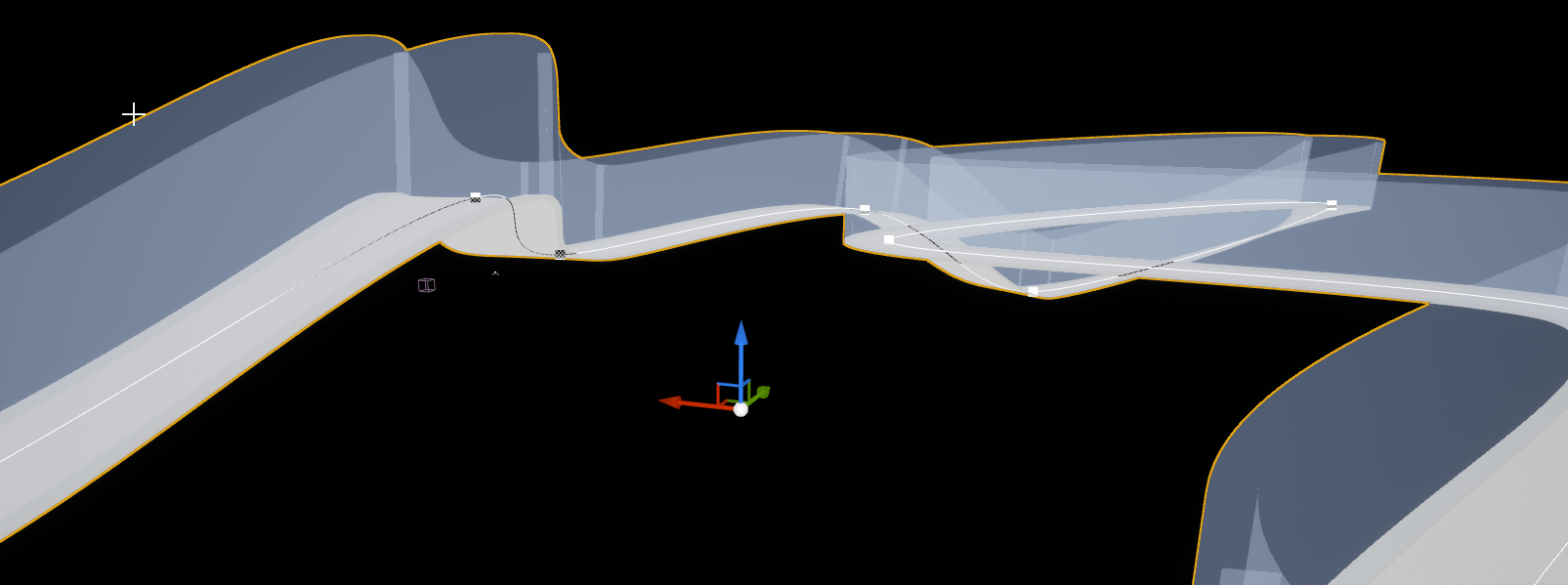
I created a track with splines: https://i.imgur.com/IC40Dzq.png
this works perfectly as long as it's 2d. When I get up on that incline with my vehicle, at some point it clips through. Any idea why?

 marble violet
@nova ledge so now the projectile throw the object and it stay at it place, I deactivate it and i rotate it to look at where player is and i try to activate the Projectile again but somehow it just stick there and wont do anything
shut hinge
that's how i tried switching the pawns once they were in the array.
nova ledge
marble violet
<@!486912429536575488> he basically throw his axe to an enemy, and the axe will...
I'm not really fluent in UE4 Blueprints yet, but from what I do know, I don't think you should be "deactivating" and "activating" the projectile (though I could be wrong). I'm not sure of a solution yet though
 fleet kite
Hey guys, can someone tell me why the jump button suddenly stopped working after I added the other movements? I'm new and following a tut. The first image is the mine the 2nd is the tut but it doesn't show his jump logic

 marble violet
nova ledge
I'm not really fluent in UE4 Blueprints yet, but from what I do know, I don't th...
marble violet
nova ledge
I'm not really fluent in UE4 Blueprints yet, but from what I do know, I don't th...
hmm.. well when i activate or deactivate it, it zero the velocity, so when there is no velocity it stay at it own place
nova ledge
marble violet
hmm.. well when i activate or deactivate it, it zero the velocity, so when there...
Have you tried adding velocity after you activate it?
nova ledge
marble violet
yeah, i did, it still not doing anything
Did you add a forward vector too?
marble violet
nova ledge
Did you add a forward vector too?
well, the rotation handle the forward axis and the velocity handle the direction to travel to

however if i do this, it works
but i created a complete new projectile
which is not a good thing, keep making new nodes when one already exists
I'm trying to understand the projectile
nova ledge
marble violet
well, the rotation handle the forward axis and the velocity handle the direction...
what if you changed the target in the projectile movement?
marble violet
well, the object (self) has the projectile
nova ledge
oh
marble violet
and i'm adding the projectile to it
nova ledge
ok, one second
marble violet
I tried this

I think you might be right, maybe activate and deactivate component is not for Projectile
shut hinge
thanks Datura, The party can now collect all the gems.
dawn gazelle
🙂
nova ledge
marble violet
I found a video that is exactly what you're looking for, and they're not even making it a projectile. Want the link? The video is a little long though
shut hinge
now i got to get the levelling component to do the same. for i had stored the player levelling valuesinside each one of their levelling components.
marble violet
nova ledge
I found a video that is exactly what you're looking for, and they're not even ma...
hmm... that's a different solution if not projectile
mighty linden
for some odd reason my player character weighs a million tons

when i possess my boat
his body is indestructable and unaffected
marble violet
nova ledge
I found a video that is exactly what you're looking for, and they're not even ma...
okay, it's seems like the problem is Local Velocity! but i dunno how is that make sense, why would i give a local velocity when i have initial speed in first place!!

this works perfectly
nova ledge
marble violet
okay, it's seems like the problem is Local Velocity! but i dunno how is that mak...
Oo okay! Yeah I didn't know about that node XD
shut hinge
but if I stick all the party member levelling values into the player controller it should allow the player controller to now access all the values. i should be able to cast to player controller from their levelling components.
marble violet
nova ledge
Oo okay! Yeah I didn't know about that node XD
thanks for your help though, nice brain storming 👍🏽
nova ledge
marble violet
okay, it's seems like the problem is Local Velocity! but i dunno how is that mak...
Np! Also, here is the link in case you need it later.
https://www.youtube.com/watch?v=8MKxbGjicJ0
Good luck with your project

Animations Used: https://drive.google.com/open?id=1_siT-p2wZdH4NQxHDppNWnTFKPn2J2WD
In this tutorial I share how I would set up the basics of the God of War axe throwing mechanic.
This tutorial isn't intended to produce a complete feature, but it should give insight on how some the math can work. Note: there is plenty of optimizations to be d...
mighty linden
mighty linden
for some odd reason my player character weighs a million tons
Can I get some help with this ?
For some reason my players body is able to push my mesh around allowing it to skid around the water without actually driving the boat lol
shut hinge
lol
mighty linden

 strange grove
i have some strange behaviour in my bp: on even tick i set a boolean but its resetting after each call but the value is nowhere else written. if i use a float it works and the changed value is persistence - some ideas?
 sand yacht
when changing levels, do variables of a character, or any blueprint, reset?
I basically want my character to have upgradable abilities in a game with multiple levels
strange grove
sand yacht
when changing levels, do variables of a character, or any blueprint, reset?
I ba...
as war as i know yes. all actor in your map that holds data have to be managed for data exchange
wow it seems i found a bug in ue4 using an integer instead of a boolean works
trim matrix
So does anyone know if there's a way for a pawn's child to get it's relative rotation with respect to the pawn?
@fading fog
 fading fog
trim matrix
So does anyone know if there's a way for a pawn's child to get it's relative rot...
fading fog
trim matrix
So does anyone know if there's a way for a pawn's child to get it's relative rot...
I don't think you can solve that using inheritance...can you explain what you want to do? maybe we can think of something else
trim matrix
I have a ship, and I have guns on it which rotate left and right. In order for the guns to feel realistic, I have set up firing angles for them, so they cannot fire through the ship.
 wary tinsel
how can I turn off motion blur from bp at runtime?
trim matrix
The problem is, the guns are using the absolute angles instead of angles relative to their parent (the ship). So as the ship moves and starts turning, the guns are stlll using the absolute world rotation values, meaning their firing angles get messed up as the ship changes it’s rotation.
I’m getting their rotation values by using GetWorldRotation, maybe there’s a better function to use that I’m not aware of.
trim matrix
wary tinsel
how can I turn off motion blur from bp at runtime?
Probably in your project settings, have you looked it up?
wary tinsel
I mean like if I create a menu...so I can disable it while playing 🙂
 faint pasture
@trim matrix your ship should send each gun either a Target point or Target direction. Each gun can calculate his own internal state by its base rotation and the targeting data
I take it your guns are two piece? A base and a turret that can rotate?
vague shell
never mind, the previous question was inaccurate
 noble cape
hey, is it possible to stop my BlueprintNativeEvent showing up in the event graph?
instead have it's own tab thing
 nova ledge
Please help me! I'm trying to set up animations from when my character is "BS_HoverFly" to "reach out for prey" (as an anim montage) to "BS_HoverFlyWithPrey". However, every time my character reaches out for prey and supposedly reaches the requirements to transition to "flying while holding", it goes straight back to my original animation in the Animation Blueprint, which is "BS_idle/walk", which is not even directly connected to "BS_HoverFlyWithPrey"! What other pictures should I send?

 runic parrot
Hi! does anyone know if there's a node like "sequence" but that ejecutes randomnly? and maybe only once each one until all are done?
 sterile quest
indigo bough
Look at this plugin, not to advertise for other people, but I use this and it's ...
sterile quest
indigo bough
Look at this plugin, not to advertise for other people, but I use this and it's ...
I am using the community, open source project called "Ocean Project". It's pretty well developed but their Discord is often quiet and the current lead dev isn't around much as of late it would seem.
@mighty linden
I am trying to make a WW2 Ship combat game, but open world (we are talking global conflict in size), however I have run into issues with the engine more then Ocean Project as of late. Still waiting to hear from someone who can help me.
Engine is having trouble when I try to apply movement to a skeletalmesh.
dawn gazelle
runic parrot
Hi! does anyone know if there's a node like "sequence" but that ejecutes randomn...
 sterile quest
Can anyone suggest a movement system that doesn't throw the "Warning: Attempting to move a fully simulated skeletal mesh -Component name-. Please use the Teleport flag" when using a skeletal mesh? This screenshot and the next one I post are of what I am using


The ship hull, test gun and rudder are all skeletal meshes. Ship hull is one so that I can use the socket system to easily populate the armaments of my ship rather then having to place them manually.
I was doing this system so that I could control the boat from the rudder rather then the center of the ship (the pivot point). Otherwise the ship will rotate incorrectly.
The basic vehicle template has been no help what so ever for the record.
Their entire mesh is also a skeletal mesh but it doesn't have the same error.
So still REALLY hoping someone here will help me resolve this never ending problem
dawn gazelle
runic parrot
Hi! does anyone know if there's a node like "sequence" but that ejecutes randomn...
You can call it with a delay and loop like this... It'll only do each one once until you feed in an execution to the reset.
 dawn gazelle
sterile quest
Can anyone suggest a movement system that doesn't throw the "Warning: Attempting...
dawn gazelle
sterile quest
Can anyone suggest a movement system that doesn't throw the "Warning: Attempting...
I think you need to turn off "Simulate Physics" on your skeletal meshes.
sterile quest
dawn gazelle
I think you need to turn off "Simulate Physics" on your skeletal meshes.
I do that and it doesn't work. As in it's not affected by gravity.
So it cannot be used.
dawn gazelle
Your meshes shouldn't be affected by gravity. Your collider should be.
sterile quest
collider?
dawn gazelle
Most pawns/character has a collider as a root component.
 dawn gazelle
Not in the skeleton. In the BP of the actor.
limber finch
Does anyone know how to adjust raytracing & dlss settings in a built menu??
That and Direct X ?
 dawn gazelle
Right, you should have a collider above your Fletcher_Hull_Skell
limber finch
I haven't seen ANYTHING anywhere about how to do this?
sterile quest
dawn gazelle
Right, you should have a collider above your Fletcher_Hull_Skell
What is the difference between a Collider and the collision in the PhaT editor?
This is the first I am being told this from anyone who's tried to help me on here. So I am blown away no one else has mentioned this
sterile quest
dawn gazelle
It's because it's <#221799426820276226> 😉
....Damn it. I feel dumb now. q_q
So does the collider need to be the same basic shape as the ship hull before I make it the root?
dawn gazelle
I just know that through my own experimentation, if you have something that should be getting moved about, it should have a collider as its root, and you can simulate the gravity on that collider.
runic parrot
dawn gazelle
You can call it with a delay and loop like this... It'll only do each one once u...
Nice, i'm gonna check on that one, thanks!
dawn gazelle
sterile quest
So does the collider need to be the same basic shape as the ship hull before I m...
That I can't answer. I'm not sure as I haven't messed around too much with them myself.
I would imagine that it should have the bottom at approximately where the bottom of the ship should be at least.
sterile quest
dawn gazelle
That I can't answer. I'm not sure as I haven't messed around too much with them...
Still the most plausible answer I've gotten so far. Fingers crossed it works...
faint pasture
@sterile quest Why are you simulating physics AND using a movement component?
That's like having 2 movement systems.
sterile quest
Because previously it worked with a static Mesh before I moved over to using a Skeletal mesh.
And because I want to move the ship using a throttle system.
No one has said anything about it being wrong until now either. So I left it thinking it was fine.
faint pasture
@sterile quest What is actually doing the moving? You can either use physics to move your ship or a movement component. Using physics you can still totally have a throttle system, I've done it.
sterile quest
faint pasture
<@127940829275750400> What is actually doing the moving? You can either use phys...
I have no idea how to do that then.
faint pasture
What's doing the movement right now? Floating pawn movement?
You need to turn off physics for the root bone and only enable it for child bones if you want to use floating pawn movement.
Otherwise the physics engine tells it to do one thing and floating pawn movement wants it to do another. That's like trying to walk and also ragdoll at the same time.
sterile quest
faint pasture
You need to turn off physics for the root bone and only enable it for child bone...
There is no collision on the root bone.
faint pasture
First of all turn off all physics and try to get it to work just with the floating pawn movement. I'd be surprised if it does considering you have no root collider.
sterile quest
faint pasture
First of all turn off all physics and try to get it to work just with the floati...
I added one as suggested.
However it's causing the camera to flip out
Deleting the floating pawn movement still causes the same issue with the camera.
faint pasture
Camera probe is prolly running into the collider
 faint pasture
Where's the spring arm located?
sterile quest
Lol. Okay ya. That was inside the collider.
Also I had to drag the ship hull down into the collider once I made it into the root.
 rose charm
Hello, i am using on my game the steam leaderborder stats, it was working fine, activating the achievements and counting the stats, but suddenly this is not working anymore. I dont have changed the programming and i even created another project and put the same programming. In the other project the achievements worked. Anyone know what can be the issue?
sterile quest
faint pasture
Where's the spring arm located?
So for my throttle system, any idea how to not get the ship to instantly stop when transitioning from forward to reverse?
DM me if you'd like to and if you have some spare time to help me. Thank you. 🙂
No longer getting that annoying error either. Yay!
cries happy tears
dawn gazelle
sterile quest
So for my throttle system, any idea how to not get the ship to instantly stop wh...
Use an FinterpTo from your "current" speed to your desired speed.
trim matrix
faint pasture
<@456226577798135808> your ship should send each gun either a Target point or Ta...
That's the system I have, the guns all have a target vector. The barrels are separate from the base of the gun, and they change their pitch depending on how far away the target is from them, as a real gun would.
All I need is a way to get the relative rotation of the base with respect to the ship itself (it's parent).
faint pasture
trim matrix
All I need is a way to get the relative rotation of the base with respect to the...
What is the input vector, a world direction? You wouldn't need the relative rotation
trim matrix
The "Input vector"?
You mean the gun angles?
Forgive me I'm not exactly sure what you are referencing
faint pasture
What data do you send to the guns each frame, a target position, a Target aim direction, what?
trim matrix
I send them many things, the target vector position, their gun angles, rest angles, traverse speeds
I separate the gun calculations into a separate function called the GunManager
faint pasture
@trim matrix the guns should probably calculate their own numbers unless your interface with the ship is like manually setting angles. I don't know if you're going for something Arcadey or more of a simulator.
trim matrix
I have to set the firing angles for the guns, so they don't fire through the ship

an example

so the gun cannot turn to the back, so it cannot fire through the ship
the problem is if the ship turns, those angles will remain the same and will not move with the ship
so this happens

and now the gun can fire through the ship
and I want this

for the angles to move with the ship basically
hope that makes more sense
trim matrix
maybe there is a way of alligning the rotator of the ship and the rotator of the gun? Perhaps the rotation of the gun - the rotation of the ship.
I will report back if I find it.
 quartz locust
im so confused, im working on making a healthbar widget, thats not super difficult, somewhere along the way the bar only works if a second bar is on the widget that does the same thing, because 2nd bar wont work correctly but the 1st one will, delete the 2nd bar the 1st stops working. pls someone tell me what stupid thing i ended up doing
 narrow kelp
There is really no way for us to know whats going on with your widgets @quartz locust , you'd have to be much more specific
quartz locust
well i can tell u whateveer u need to know u ill just take some screenshots i guess and see if that helps u out


everything works fine unless u take the second progress bar out of it, the big blue oen is set up just like the big red bar.
if i dont have both it doesnt update when i take damage
narrow kelp
I would recommend adding break points and stepping through the code
 azure gust
Hi, I'm using the steam leaderbords stats, it was working fine, activating the achievements and counting the stats, but suddenly this is not working anymore. I don't have changed the programming and I even created another project and put the same programming. In the other project the achievements worked. Anyone know what can be the issue?
sterile quest
trim matrix
Seems like there are a few naval games in the works with UE4 atm
It IS a niche genre for sure and the few that are out there are lackluster at best
trim matrix
I'm not making a game, I'm just remaking the basic controls of Battlestations: Pacific.
I am a veteran modder of that game, have been for the past 3 years.
quartz locust
ok well @narrow kelp a dirty way i found to fix it is to keep the 2nd progress bar just move it off screen so u dont see it in the play window, ittle work till i can figure out how to fix it properly
trim matrix
I just want to make a tiny demo with a single ship for shits n giggles.
faint pasture
@trim matrix When you place the gun you should just give it local rotation limits
First example yaw limit would be -90, 90
trim matrix
Yeah I need a way of getting the local rotations for the guns with respect to the ship.
I'm sure there must be a way to do it, something with messing with ship and gun's rotators
I'm not well-versed in vector operations though, so it's gonna take me a while to find it. I only started a few days ago with UE.
 silver edge
I am trying to just do a muzzle flash for multiplayer when a player left clicks. Currently it works fine but only the server can see the muzzle flashes. Is there a proper way to do this?

Idk if there is a need to reference the muzzle flash component like this ive just been trying different things with no luck
sand shore
silver edge
I am trying to just do a muzzle flash for multiplayer when a player left clicks....
So, you need to separate your blueprint into visual and "business" logic.
You do all the core rules logic on the network authority only, then you can do all the visual stuff
The canonical method to drive this sort of thing is that you would set a variable in the server (say, LastFireTime) and that variable would be RepNotify. OnRep, call the visual side of things
Since you have a LastFireTime, you can filter out events that happened over a certain time ago - although you can't just GetGameTimeSeconds. You would probably want to use match time, or find a way to sync your server and client times
You should ask follow up questions in #multiplayer
silver edge
sand shore
So, you need to separate your blueprint into visual and "business" logic.
You ...
Thanks for your help, ill give this a try
sterile quest
trim matrix
I just want to make a tiny demo with a single ship for shits n giggles.
That's fair and I can respect that. I on the other hand am making a Naval game (actually a combined arms but starting with naval), because I am fed up with both WT Naval being a mess and WoWs not really scratching the itch I have for a solid WW2 Naval experience. If you figure out how to get the turrets to have restricted firing angles, I hope you'll be open to sharing. As that'll be something essential for when I get to that point for my own naval game.
trim matrix
I have a better solution for you: play Battlestations: Pacific. You have ships, planes, aircraft carriers, submarines and naval land invasions, both action and strategy. It is the best naval game out there.
 keen goblet
@trim matrix I think this would work for your relative rotation problem. You basically unrotate the cannon by the rotation of the ship:
CombineRotators( GetActorRotation(Cannon), InvertRotator(GetActorRotation(Ship) )
I was curious that I couldn't search a solution for that problem, so I tried it out myself. Seems to work in at least the simple test case of one actor rotated 40-degrees in one axis relative to the other, no matter what their world rotations are.
sterile quest
trim matrix
I have a better solution for you: play Battlestations: Pacific. You have ships, ...
Thank you for the offer, but what I am going for goes beyond naval
trim matrix
keen goblet
<@456226577798135808> I think this would work for your relative rotation problem...
Ok thank you I will share if I find a solution
trim matrix
sterile quest
Thank you for the offer, but what I am going for goes beyond naval
BSP is beyond naval
sterile quest
trim matrix
BSP is beyond naval
Ah okay. I have yet to play it, but isn't it a pretty old game now?
trim matrix
Well, it is, but the mentioned mods bring it at least 7 years forward.
runic parrot
Hi guys! one question, i'm trying to communicate from the game instance to the level blueprint to tell and so some stuff.
i'm trying to use a event disptacher. How do i get from the game instance to the level blueprint?
dawn gazelle
runic parrot
Hi guys! one question, i'm trying to communicate from the game instance to the l...
Put the event dispatcher in the game instance. Bind to the event dispatcher in the level blueprint (get reference to the game instance and cast to your specific game instance). When you want the game instance to send data to the level blueprint from the game instance, call the event dispatcher.
runic parrot
ahhh omg why i didn't tought about that
i was doing it exactly the other way, putting the dispatcher on the level blueprint
thanks, it worked
chilly jetty
Hi there
can someone explain to me
i have an integer division of 1/5 but it doesnt give me any output
is it because integers can't have decimals?
dawn gazelle
chilly jetty
is it because integers can't have decimals?
Correct.
chilly jetty
so if I did 3/5
trim matrix
if you want decimals, use "float" instead of integer
trim matrix
yeah it just basically cuts off the decimal
think of it as just cutting the decimal off
trim matrix
it should
chilly jetty
alright good to know
cause i had a function like that and all i gave me was 0 but when i swaped it for a float it worked fine
i just wanted to be sure
trim matrix
keen goblet
<@456226577798135808> I think this would work for your relative rotation problem...
Okay so I have to thank you, because this worked
However, I have a new problem. To set the rotation of the guns, I use "SetWorldRotation", which sets it as absolute rotation instead of relative.
So, I have to basically go backwards and find the inverse of the function you showed me.
To go from relative back to absolute rotation.
I will report back once I find a solution
dawn gazelle
I have a custom event that contains some data I'm passing through and some of it needs to feed into a latent node that has a callback execution path, but I also need reference to the event data after the callback is executed.
The trouble is that if a second call to this event comes through, it overwrites the previous data. This data also isn't being passed through the latent node so it doesn't get returned on the callback and I can't store this data as a standard variable in the blueprint as I can't really reference it when the callback comes back anyway.
Anyone have any ideas how I can retain the data from the event ? I've mucked a bit around with macros trying to figure out a solution but haven't found anything that works yet.

 tranquil mulch
dawn gazelle
I have a custom event that contains some data I'm passing through and some of it...
tranquil mulch
dawn gazelle
I have a custom event that contains some data I'm passing through and some of it...
My first instinct would be to use some type of Queue, but Blueprints doesn't really have a built in Queue data structure. You could build one manually with an array though.
dawn gazelle
tranquil mulch
My first instinct would be to use some type of Queue, but Blueprints doesn't rea...
I had thought about that too, but.. Ugh... Slows things down when it's not really necessary ._.
Like technically I could store what I need in a map temporarily.
tranquil mulch
dawn gazelle
Like technically I _could_ store what I need in a map temporarily.
Is there any way you could map that request input to the ID?
oh wait you don't get that as output
I misread the result
dawn gazelle
Like I will be passing in some data that I could get returned but only if it is valid.
So if it doesn't exist, I won't get the return value so then map starts expanding, which means I'd need to have a TTL system set up for it to clean it out now and then 😛
tranquil mulch
hmm, yeah maybe not
chilly jetty

how can i get the same random value to reverse it?
from the random float
would i have to store it in a float variable and then go from there or is there another way?
dawn gazelle
You have to store it.
chilly jetty
alright then

 onyx token
there's a "forward vector" node
slate harness
ok
 gritty elm
@slate harness use get actor forward vector and plug into add movement input
slate harness
gritty elm
<@!777208891284652042> use ``` get actor forward vector ``` and plug into add mo...
Doesn't work
gritty elm
are you doing inside your character
slate harness
gritty elm
so you want to move your character only forward?
Move forward and rotate to change direction
with a virtual joystick for mobile games
gritty elm
this is answer to your question "how to add only forward movement"
 slate harness
gritty elm
this is answer to your question "how to add only forward movement"
slate harness
gritty elm
this is answer to your question "how to add only forward movement"
But doesn't move
slate harness
gritty elm
this is answer to your question "how to add only forward movement"
So how i can add movement and rotation for one virtual joystick ??
@gritty elm
 cunning island
i can't seem to find delay in my ai blueprint
i can only find stop delay related stuff for audio

oh wait it's because i'm in a function
chilly jetty


Hey there
I'm trying to get this event to activate but it doesnt seem to change the enemy health
is there a better way for me to cast to?
trim matrix
is the "Zombie Changes" function being accessed successfully? (is the console printing "Hello"?)
trim matrix
keen goblet
<@456226577798135808> I think this would work for your relative rotation problem...
Thank you this worked! Now my guns are rotating appropriately, with fully functional firing angles.
You gave me the crucial piece of the puzzle I needed, I did not know how to do it haha
chilly jetty
trim matrix
is the "Zombie Changes" function being accessed successfully? (is the console pr...
no its not
when i hooked it onto event tick it works but i only want it to activate when a float is increased
dawn gazelle
It's probably not working as you can't cast an AI Class to an Actor. The Actor Class doesn't inherit from an AI Class.
trim matrix
trim matrix
Thank you this worked! Now my guns are rotating appropriately, with fully functi...
so for anyone else that needs to get local rotation for a child of a pawn parent that's moving, this is what needs to be done:
 trim matrix
chilly jetty
no its not
trim matrix
chilly jetty
no its not
well then the problem must be before the function call
I'm not familiar at all with "Casting", idk what it is
 trim matrix
the usual troubleshooting technique of putting print statements after each function call always works
so first step would be to locate exactly after which function call execution stops
chilly jetty
trim matrix
the usual troubleshooting technique of putting print statements after each funct...
everything in this BP works
its just the ZomChanges Event isnt working
trim matrix
so if you put a print statement between these two calls it prints successfully?
 chilly jetty
trim matrix
so if you put a print statement between these two calls it prints successfully?
chilly jetty
trim matrix
so if you put a print statement between these two calls it prints successfully?
just checked yeah it does
like i said
trim matrix
but the print inside of the "ZombieChanges" doesn't print? You said earlier it didn't.
chilly jetty
everything but ZomChanges event works
chilly jetty
trim matrix
but the print inside of the "ZombieChanges" doesn't print? You said earlier it d...
this doesnt
 trim matrix
well idk then, but I can tell you one other thing you may be messing up on
chilly jetty
trim matrix
well idk then, but I can tell you one other thing you may be messing up on
which is?
trim matrix
here you are connecting an array to a singular object reference
 chilly jetty
sure i considered that
trim matrix
at least that's what it looks like to me. I just started with UE a few days ago so I may be wrong 😋
chilly jetty
but I'd still need to ensure the event goes through before worrying about if it is applying to the rest
dawn gazelle
remove the cast and set the class directly in get all actors of class, then reconnect the get all actors of class to the zombie changes node.
chilly jetty
dawn gazelle
remove the cast and set the class directly in get all actors of class, then reco...
no its all still the same
it doesnt update the hp
its suppose to go from 50 to 150
but it still stays at 50
trim matrix
I wish I knew man
dawn gazelle
Maybe you don't have any zombieAI active when you're calling that function. Check the length of the "out actors" from get all actors of class
chilly jetty
well its alright
I found a better solution
I just call that event whenever the enemy is spawned
and it works
but thanks for the help
 shy river
Can please someone explain to me how would I use VaRest to POST a float value from Unreal to a webserver database? I am not sure on how to tackle this.
dawn gazelle
shy river
Can please someone explain to me how would I use VaRest to POST a float value fr...
Extremely basic way would be to do this, and enter in the URL of where your API is followed by whatever parameters the API would accept

If you're wanting to do it with JSON, then you can do it like so:
 shy river
Cheers @dawn gazelle this looks much easier to comprehend then a Tutorial I was trying to follow. Just out of curiosity if I would have tried to use this? It would have failed I guess (I am pretty new to Blueprinting )
 dawn gazelle
No, that looks like it probably would have worked as well.
shy river
Thank you for your help, really appreciate it
mighty linden

okay so i got the possession of the boat down with no collision
but now when i drive away from the character his body doesnt follow
but when i exit he teleports to my reference point
how can i make him follow the boat?
mighty linden
I'm really new to this sorry
A socket? Lol @gentle urchin
I'm guessing its a component ?
That you attach to the boat?
 turbid shard
Hey, How can I check if the "Open level" node is fully loaded, my character sometimes spawns before the ground has collision and falls through the map, but I can't find any node to check if the level is fully loaded. Can you help me? Thanks
gentle urchin
mighty linden
A socket? Lol <@231467939734355969>
Sockets can be added to a mesh. Open the boatmesh, there's an option to add a socket
gentle urchin
When you try to possess the boat, you can attatch the pawn to the socket before possessing
mighty linden
I'll give it a try , thanks !


 desert briar
Hi, this page seems broken: https://docs.unrealengine.com/4.26/en-US/InteractiveExperiences/UsingCameras/Blueprints
Cheers
gentle urchin
A How To Guide for Finding Actors in your Scenes in Unreal Engine 4.
Seems to just be moved inside the parent page
 desert briar
Yup, the routing is broken
mighty linden
gentle urchin
This is perfect 👌 will give it a go
gentle urchin
If you need something to happen to the original pawn when it enters the boat, the "Event unpossesed" will be triggered once you possess another pawn.
visa versa
mighty linden
gentle urchin
If you need something to happen to the original pawn when it enters the boat, th...
Not sure what you mean exactly. Sorry about that
Still getting the hang of all this
I'm only a 3d modeller
But yeah I mean thats all I need for now. Just want to walk up to the boat , possess it then rode with the character following the boat
Then unlocked it with the character there still on the boat
gentle urchin
If you'd want something like an animation or something to happen once the character enters the boat (and the boat gets possessed) you can use the Event Unpossessed in the characvter bp to handle that
In a pawn, these events are available for use if you'd need something specific to happen during possess/unpossess
 mighty linden
Interesting
Man I wish it was easier to do all this but I understand we gotta be very specific about what we want
desert briar
🙂 there's always this tradeoff between "easy to do", "flexibility" and "amount of manual work you have to do"
mighty linden
Yep lol
 quasi folio
Hello, would anyone happen to know how to approach this situation? I'm trying to turn all tiles within 7 walking tiles distance red (each tile is 150 units), if I did that just be detecting tiles in radius, I'd have the issue of the player being to walk as far as they'd like to reach a tile on a higher layer.

 green bluff
Hello devs, sorry to hijack any discussions but I was wondering if anyone has solved the issue where a character never launching off a slope but always sticks to the ground?
What's the common way to solve this
https://answers.unrealengine.com/storage/temp/34244-pn5zxlku.png
Essentially this, taken from a UE thread with no answer.

An interesting idea is to launch character at the top of the slope, but I'm a bit lost when to actually apply the force and how to detect that moment.
quasi folio
@green bluff Could have something to do with your gravity settings?
low lava
I have a Pawn Class with an AI controller. I get a random navigable area on the map and the pawn moves at random but it does not face the way it's walking.
How can I get the Pawn to rotate toward the direction it is walking? I don't see any Orient To movement checkbox
Correction: Using a default pawn class
 chilly jetty

try turning off the controller rotation Yaw
it should be on your pawn class

I have this Widget BP where the widget will blink when the player is below a health threshold
is there a way for me to set and unset the loop function of the animation?
 grand torrent
Hey. Anyone know if there's a way to change the soundclass of a spawned audio source via bp?
quasi folio
https://media.discordapp.net/attachments/225448446956404738/847447826790613022/unknown.png
Anyone know how to convert Out Hits to actor references?

basically I'm trying to append all actors this hits to an array
low lava
@chilly jetty No Controller rotation Yaw here .

 maiden wadi
@quasi folio Make yourself a function for it. Should take in an array of hit results by reference. For each loop over them, if hit == true, add hit actor to local array of actors. On loop completed, return local array of actors.
mighty linden
gentle urchin
so mine looks a bit diff
he is socketed to the boat but
his jumping animation replays over in over
oh this is connected too


also when i exit he slides across the boat
nova ledge
how would I avoid getting stuck on my flying animation when I try to land and my character is up against a mesh such as the ground? I'm using the landing animations through my animation bp. I could get around it before using an anim montage, but now I can't do that
mighty linden
actually i got him to stand there now
!!
i just chose world tranforms
but he still slides when i exit the boat
chilly jetty
is there a way to get an infinity integer?
nova ledge
Okay, forget what I said earlier. What if I tried making it where my character can only land if it's a certain height from any mesh that I can land on, such as a tree or the ground? How would I go about doing that? Would I use an "on hit" thing?
Or a line trace?
 boreal sigil
chilly jetty
is there a way to get an infinity integer?
boreal sigil
chilly jetty
is there a way to get an infinity integer?
Only possible with AMD Infinity CPUs
sterile quest
mighty linden
You can apply color to comment boxes?! How? Didn't know that
mighty linden
sterile quest
You can apply color to comment boxes?! How? Didn't know that
yeah when you select it top right
give you color options
its set to white default
quasi folio
@maiden wadi I did something similar, first I casted downwards to the tile, on that tile I made it check around it for any more tiles, once done it loops around and does it on the new tiles added to the array, the hitbox only accepts anything near its Z axis so stairs still work.
 ashen snow
What could cause and actor to ignore its on construction transform and move to zero instead? I level stream in this utility level that has two actors in it. One actor acquires the levels transform while the other ignores it. I tracked the transform going through the actors c++ OnConstruction call so I know it's going in that far. But yet it still remains at zero.
low lava
Can you Orient Rotation to movement for a DefaultPawn Class within the AIController Class? The AI is moving about but is not rotating in the direction it's moving to.
 gritty elm

Project Files : https://www.patreon.com/posts/40168018
This tutorial is continued from the "Throwing objects with projectile prediction in unreal" video I did recently. Today, I am going to implement a touch input system on this project so we can control this game in a mobile device with a touch interface. There will be 2 visual thumbsticks on t...
sterile quest
gritty elm
<@!777208891284652042> https://www.youtube.com/watch?v=XOTtvnZjgio&ab_channel=Co...
Everytime I think of touch imputs, this is what my brain is reminded of. xD

Well the comic at the top
 willow cedar
When making Blueprints with audio components for multiplayer, do I have to paste these nodes in every BP with audio, or is there a different way I should be doing this

 gusty shuttle
Quick one, when making a 2D flying character like Boo (ghost) in Super Mario, how would you go about making it? It's an AI character. I just can't seem to get the dude to move. Do I need to put in some sort of axis events in the AI Controller?>
nova ledge
nova ledge
Okay, forget what I said earlier. What if I tried making it where my character c...
I think I figured out a way to doing this (I even found a post on something similar to what I'm doing), however, I don't know how to get the reference I need. I was searching this up online cuz I didn't want to keep messaging in here, but I couldn't find what I needed which is key to what I'm doing. The post I read didn't show how that person did it. How do I get the reference to the landscape to put in another blueprint? Is that even possible?
gentle urchin
gusty shuttle
Quick one, when making a 2D flying character like Boo (ghost) in Super Mario, ho...
Would use floating movement, constrain to 2 axis , and only move if player is not looking in Boo's direction
Probably just use the tick event with player look direction as a blocker
gusty shuttle
Yeah, that's the plan, I think it's something to do with a nav mesh. I'm making it via paper 2D style. Im looking into some vids now
gentle urchin
You dont need a nav mesh for regular Boos movement tho
 gentle urchin
for the AI move to, you need it
Roam in Boo's case (if i remember correctly) should most likely be some random direction for a random duration
onyx token
If i don't wanna use "Add Controller Yaw Input" & "Add Controller Pitch Input"-
But instead i want to manually have the capsule copy the rotation of my CameraBoom-
How would i do that?
Can i use a SetWorldRotation? 
 gusty shuttle
Indeed, that's the goal Just the dude won't move is all. His movement is set to Flying too
gentle urchin
Creating a project to check
gusty shuttle

Thanks man, it shouldn't take long to check, I'll DM you so we don't fill this with spam @gentle urchin
 weary prism
i have a quick question my default pawn keeps getting automatically deleted from the world outliner things i have checked are my default game mode and class and those are set correctly
gritty elm
check kill z volume
nova ledge
nevermind, I think I found an answer T-T hopefully I won't be back later, I know y'all are tired of seeing my name 😂
 lament ginkgo
Hey, hoping someone can help me out with something (I'm fairly certain it's a trig/math issue). I'm making a side scroller where the weapon is on an arm that rotates on the spot to follow the mouse. The arm is at 0,0, but the weapon's barrel is generally offset (right now it's Y=7. I have a function that has the weapon lookat at the cursor's location on the yz axis, but the further the pointer is away from the weapon, the less accurate it is.
The function basically rotates the arm (to ensure it pivots on the shoulder), but I'm having a hard time ensuring it uses the barrel's location to actually aim.
fleet kite
Hey guys. Can someone tell me why when I type "useobject" into the search bar in Blueprint Class event graph there is no useobject Node like there is in the tut?
I can't seem to find it...I right clicked to search
slate harness
How i can add a only movment forward in a new joystick ?? im stuck at here ! I try everything but nothing happen !
look my BP and My input setup


 fleet kite
Try one of the + buttons maybe? Sorry I'm new but I try to help
trim matrix
So I have a question

So this picture is from Insurgency Sandstorm, in their player classes you can swap out an entire character with a single mesh character you put in
I want so do something similar for something I am working if not do the same thing but I'm stuck and don't know where to start, I can't look deeper into how they did it due to alot ofit being hidden away
Is anyone able to lend a hand?
trim matrix
@slate harness Try connecting the "Axis Value" from InputAxis MoveTank to the Scale Value of AddMovementInput
those axis go from negative to positive values for backwards/forward
 rustic zealot
slate harness
rustic zealot
slate harness
make backwards -1 not +1
 viral orchid
How can i rotate an Object to direction its flying?
limber finch
Hey guys
I'm trying to give the player an option to enable VR but without a headset plugged in
Because they can stream the game to their phone and use google cardboard
I'm having trouble finding out how to enable the VR view?
olive sedge
Hi! I do a line trace and I need the material being hit. I get DefaultMaterial when it is not. Anyone an idea why?
 vital tide
Hey so this is probably a weird question but does anyone know the game colossatron? and if so, how would one go on about trying to recreate the snake like movement and component adding in unreal engine blueprints in 3D topdown? i only need the base to start off of because i'm a beginner so any help would be appreciated!
If you dont know the game, Its basically a mechanical snake who's got parts as weapons and each part does a different attack and you can add and combine it on the snake itself.
mighty linden
Any geniuses here that can tell me if its possible to have the wind constantly blow the back of this sail ?

So that its not dependant on the way the wind blows in game
gusty shuttle
I'm trying to change my AI characters rotation based on velocity. I'm setting actor above the pipeline. It's not working, any suggestions?

I'm getting 0.0 on any movement, even though the character is moving
low lava
Is there a way to use TargetPoint actors in the actual BP you want to use to spawn the item?

I can't seem to reference the TargetPoint in the world within a Actor class
azure gust
Hi, I'm using the steam leaderbords stats, it was working fine, activating the achievements and counting the stats, but suddenly this is not working anymore. I don't have changed the programming and I even created another project and put the same programming. In the other project the achievements worked. Anyone know what can be the issue?
 severe geyser
anyone have experience with simple projectiles? I want my ai to toss "fireballs" at my player when you get to a certain range. I've found very little on the google machine. I purchased a cool projectile pack from the marketplace. All I want to do is spawn the projectile from my enemy and have it fly towards my player
I've watched a bunch of vids on turrets, but it's not working the best on my moving ai
I'm playing with adding a collision sphere around my enemy and if the player moves into the collision, then spawn the projectile
vital tide
severe geyser
I'm playing with adding a collision sphere around my enemy and if the player mov...
i'm no professional but instead of collision spheres, shouldn't you use ai sense on the enemy bp?
severe geyser
that's probably a much better idea. I watched a few videos on using sense @vital tide
I'll play around with it
vital tide
Alright, goodluck
gusty shuttle
Guys, my AI character is moving but the velocity print string is not showing any movement, any tips?
I tried component velocity, character movement velocity, GetVelocity. Nothing. No readings. The character is being moved via timeline via SetActorLocation
So is the character moving...but not moving?
Is there a different way to check if a character/actor is moving and if so, which direction, if it's + or -
I have no clue why a moving character is not showing any velocity changes....
boreal sigil
gusty shuttle
I have no clue why a moving character is not showing any velocity changes....
Checkout Ryan Laley YT channel for AI stuff
narrow kelp
just check the current position vs the last position over delta time
gusty shuttle
Aye, I seen something about that on checking position, it looks like it reads 0.0 no matter what
quasi folio
[Feel free to answer this once done with helping the current person] Would anyone know how to make a certain objects physics fall way way faster?
mighty linden
 slow phoenix
Just animate your sail then.
slow phoenix
Just animate your sail then.
I was thinking about doing that. Any idea how I might be able to do something like that?
 exotic rain
Hey, Im Implementing a sprint and normal walk for my character. This code works fine on standalone game. But when I play as client It jitters. I want to replicate it on the server too. How can I do that? Can you help me out please?
 gusty shuttle
@narrow kelp No such luck, also this isn't working either

I know I shouldn't have to ref to self on the GetVelocity, but I'm wracking my brain as to why a moving character, in the world, is not showing ANY velocity changes
vague shell
I'm using a timeline in blueprint to control a material parameter over time, but in build the time never goes past zero, while in editor it works as expected. This happens with all my timelines in this blueprint (don't know about others). Any idea what's going on?
 vague shell
never mind, i found a workaround
 quiet stag
hey guys is there a function that gets called if you click somewhere outside the umg widget? i want to close the widget when you click outside it
 prisma stag
Hello, Im having a problem where I set the ShowMouseCursor to true but it doesnt show up.
 bleak sable
prisma stag
Hello, Im having a problem where I set the ShowMouseCursor to true but it doesnt...
bleak sable
prisma stag
Hello, Im having a problem where I set the ShowMouseCursor to true but it doesnt...
are you setting an input mode? like set input mode game and ui
prisma stag
bleak sable
are you setting an input mode? like set input mode game and ui
No, didnt think I needed to, let me try real quick.
prisma stag
bleak sable
are you setting an input mode? like set input mode game and ui
Which input mode should I do? I am doing a third person placement system and after you select what you want to place the widget disappears, then your cursor should appear allowing you to click where you want that item to go.
bleak sable
prisma stag
Which input mode should I do? I am doing a third person placement system and a...
Do you want to be able to move around while in it? or is it just a menu. I usually use Set input mode game and UI for about everything and use the disable input and enable input nodes in the player controller for the controlled pawn.
prisma stag
bleak sable
Do you want to be able to move around while in it? or is it just a menu. I usual...
This is just for normal game play, so I would like to be able to move around while having the cursor shown.
bleak sable
I think you should use the Game and UI. To look around though I think you need to hold right click
I don't do many things that require these nodes but that should work
prisma stag
bleak sable
I don't do many things that require these nodes but that should work
Ive already done that.
dawn gazelle
exotic rain
Hey, Im Implementing a sprint and normal walk for my character. This code works ...
Welcome to #multiplayer. You'll need C++ to properly replicate sprinting in a multiplayer system without jitter and having the client respond quickly to the change of speed request. Otherwise, you can follow along with this tutorial for how to properly replicate sprint in blueprints, which has the limitation of the client needing to wait for the server to replicate the speed back to the client.
https://www.youtube.com/watch?v=XknYqK3qiMI

Hello guys, today I wanted to make a quick video to show you guys how to replicate sprint in multiplayer. A lot of people have this issue where their character is "jittery, laggy or glitchy" when moving. This is due to not properly setting the character movement on the server.
bleak sable
prisma stag
Ive already done that.
If you want to move around then don't disable input btw. I think the game and ui should work.
prisma stag
bleak sable
If you want to move around then don't disable input btw. I think the game and u...
Ive never disabled input. I just want the cursor to show up on the screen.
 dire reef
In this video, we are scanning the floor tile of a room and measure the distance between two points 1st part
Also, Paint the scanned floor with some textures.
In 2nd part we're Placing some Furniture into Real World and use some features like movement, Rotation, also Scale
3rd- after scanning the wall we change the wallpaper of the room
Hope ...
bleak sable
prisma stag
Ive never disabled input. I just want the cursor to show up on the screen.
So then I would use the input mode game and ui and set show mouse cursor in the player controller. Does that work?
prisma stag
bleak sable
So then I would use the input mode game and ui and set show mouse cursor in the ...
No.
Thats what I had done.
prisma stag
bleak sable
Are you trying to replicate it? I can't think of many reasons it wouldn't work
"Replicate it"? I just want the mouse cursor to show up on the screen. It works when you open the inventory and the widget shows up, however, once you click on your selection, the cursor and widget disappear, so after that I set the ShowMouseCursor to true but the cursor doesnt appear.
bleak sable
uhh, Hmm I don't really know. Make sure nothing changes when you click the button. So Make sure that ShowMouseCursor is true I guess. Let me go into a project real quick.
prisma stag
bleak sable
uhh, Hmm I don't really know. Make sure nothing changes when you click the butto...
Yea I dont know why the widget and cursor disappear after hitting the button as nothing is coded to do that.
bleak sable
hmm, I don't really know tbh. I am trying to think of what it could be. I'm still a novice in unreal so I don't know much.
 grave apex
Yo, how can I trigger certain effects with the chameleon post process?
like this https://i.imgur.com/Y7o38Pj.gif

I thought youd be able to trigger it by somehow toggling it on somehow in blueprints
but idk how

I tried this
but it doesnt do anything
or
idk if there's a better way
like also being able to trigger the effect only once
because rn in the editor at least, it loops forever
 cyan prawn
Maybe use onbeginoberlap event to call the pulse func
grave apex
like, i know it gets the input
cyan prawn
You can also use a trigger volume
grave apex
it should go off
like, it will trigger a breakpoint if I put one on that node
oh
I got it
there was a different variable that was hidden
cyan prawn
I would first put that function on an interface. Then use a trigger volume bp to check overlapping actor and call that function on it
 hoary orchid
is there a way to check if player is facing the sun?
 frozen needle
Hello, I'm having a small issue. I've made a ladder blueprint that disables player's sideways movement so they can only move up or down. When I reach the top of the ladder I can freely leave it, but I can't leave it when reaching the bottom, nor can I stop the movement at the bottom of the ladder -- because player is never leaving the ladder triggerbox. But if I move the triggerbox high enough, player can't reach it and climb in the first place. What can I do? The gif is me holding the key to go down. https://imgur.com/a/Zhepdi8


 hoary orchid
that's the question, how to check the angle to the sun
 limber seal
This works if I delete the inputaction event and do on event tick instead. I also added the enable input node to this actor and it still does not let me spawn with a button press. Anyone know why?
 lament ginkgo
Hey, so I'm trying to setup a projectile bullet. I have an EventHit checking if it's overlapping with an actor and then running ActorDestroy, but the projectile is never destroyed, just sits there at the point of impact.
limber seal
lament ginkgo
Hey, so I'm trying to setup a projectile bullet. I have an EventHit checking if...
it sounds like you might need to enable the simulation for hit events for the actor your bullet is colliding against and not breaking from
lament ginkgo
limber seal
it sounds like you might need to enable the simulation for hit events for the ac...
Would that be under the Collision settings on the actor?
Oh yeah there it is
dawn gazelle
frozen needle
Hello, I'm having a small issue. I've made a ladder blueprint that disables play...
Is On Landed called when you reach the bottom? You could also do a line trace to determine your distance to the floor below, and if close enough on the Z axis, stop the ladder movement.
 plush rose
What would be the simplest implementation of this in BPML (no variable)? My current implementation requires 4 nodes, and it kind of became a brain teaser for me.
 maiden wadi
plush rose
What would be the simplest implementation of this in BPML (no variable)? My curr...
maiden wadi
plush rose
What would be the simplest implementation of this in BPML (no variable)? My curr...
Create a local boolean. Set it to true when A is ran, false when B is ran, and populate IsA with that, and make both lines exit.
plush rose
maiden wadi
Create a local boolean. Set it to true when A is ran, false when B is ran, and p...
As I said, it's BPML so no variable
FYI, my current implementation. There has to be an easier way!
 maiden wadi
Not sure what the issue is with your macro library, but you should be able to use local variables.
 plush rose
Thanks a lot, I didn't know you could do anonymous local variable!
 tidal wharf
Hi. I'm not sure where to post my question, thought i'd start here as it's a part of a blueprint. I created a BP with a flickering light and an audio component for a campfire. The problem I'm having is when the character walks towards the fire you can't hear anything. If you rotate just the camera, the sounds play. Could anyone help with this at all?
 fiery lark
Why is my while loop saying it's an infinite loop? Above the screenshot I have on begin overlap -> set in fire true
 maiden wadi
@fiery larkWhile Loops are just like any other loop. They run instantly. That Do Damage function is getting called hundreds of thousands of times per second at least.
 faint spire
But shouldnt it only activate if IsInFire? is true
fiery lark
Even with the delay? What would be the better way to do something like fire damage that ticks over time while I'm in the fire?
maiden wadi
The delay just gets called inside of the loop.
WhileLoop is just like ForLoop. Except it takes a boolean for a condition instead of doing it over a range of numbers. So if you have a While Loop that is not updating it's condition inside of itself, you'll pretty much always have an infinite loop.
maiden wadi
Really depends on how serious of an implementation you want. If you're looking for something that can handle multiple types of DoT effects, definitely make a component and put the logic in it on it's tick, and do something like iterating over an array of effects to lower a value in their structs. Struct should probably have a counter, and max count and a timer. Timer gets lowered and <0 zero a counter gets incremented, damage done and then if counter >= MaxCounter, remove DoT.
Probably other ways to handle the data though too. Could do the math handling on the duration itself.
On the other hand, if this is for something very simple, and a one time thing in the game, just make a set timer by event that handles it and don't bother putting it in a component.
The timer can run on a loop. lower a variable and deal damage. Then check if variable <= 0, remove fire. And just set the variable to how many ticks of damage you want and start the timer when getting lit on fire.
fiery lark
Thank you so much bro, I'll look into that
lament ginkgo
Does Event_BeginPlay not fire on a projectile that's created through a spawn actor call?
gentle urchin
I would expect it to be called for sure
lament ginkgo
Weird, I have an instance where I'm spawning an actor (bullet) and trying to run some things in the bullet's event begin play but it seems to not be doing anything, even with just a basic print
gentle urchin
I suppose you're certain the bullet is spawned
lament ginkgo
Oh wait there it goes
I think I might have been passing a null string into the print lol
gentle urchin
^^
 vocal kestrel
Howdy, when it comes to Event Dispatches, why do I need the sender to hold references to the actors i plan to send the event to? that doesn't make any sense, broadcast systems are meant to de-couple data and logic, the sender should shout the message and that's it, it shouldn't need to care what's listening, that's the listener's job. I used broadcast/event systems every day in unity and i presumed it would work here as well. Am i missing something?
that prob comes off a bit surly, i've just been at this for awhile now and am pretty confused.
dawn gazelle
vocal kestrel
Howdy, when it comes to Event Dispatches, why do I need the sender to hold refer...
The sender doesn't need to hold any reference. You have your receivers bind to the event dispatcher which would be in the sender.

 vocal kestrel
Are the event dispatchers the listeners, or the broadcasters? i've read information that gave conflicting info on it.
IE: I Shoot block, block shouts out how much Score should be added to the HUD, while the HUD is listneing for shouts about score so it can add to that tally. both block and hud do their job without owrrying about eachother.
btw i def appreciate the info.
 surreal peak
EventDispatchers are the list of who wants to be informed
+-
Or rather they "hold" the list
You bind to them from outside, adding yourself to that list. When broadcasting it informs everyone
There is no need to get a reference to the peeps you want to inform
The peeps need a reference to the object that has the Dispatcher though, otherwise they can't bind
vocal kestrel
Okay, that makes sense. sorta. I think i'm forgetting exactly how i used to use Managers or middlemen gameobjects to catch signals and throw the right data around to the right stuff, and it's tripping me up as i'm clearly forgetting a step in my old process.
but okay, that does help.
surreal peak
Keep in mind that you can't always, or very rarely, apply Unity logic to UE.
You should learn UE, not try to force Unity onto it.
vocal kestrel
It wasn't a unity thing really, it was a broader Manager-of-Managers project-organization design pattern that was driven by using alot of events and broadcasting to keep the various parts of the scene as un-reliant on eachtother as possible. Should be applicable in any engine, but clearly i don't know it as well as i thought i did and i'm too fresh to Unreal to impliment it super cleanly.
but still, that's a fair point, i will keep it in mind.
regardless, it's good to know i was misunderstanding the problem i was looking at, much appreciated.
olive sedge
am I misunderstanding the Out Hit Phys Material pin on LineTraceByChannel? it seems to always return DefaultPhysicalMaterial. Is this not the material I have set for the mesh?
dawn gazelle
Should be set under this section I believe.
 dusky topaz
fiery lark
Is there any way you suggest I do it instead?
dusky topaz
fiery lark
Is there any way you suggest I do it instead?
SetTimerByEvent -> Do Damage, make it loop and set the delay to 0.5
 glacial eagle
olive sedge
am I misunderstanding the Out Hit Phys Material pin on LineTraceByChannel? it se...
glacial eagle
olive sedge
am I misunderstanding the Out Hit Phys Material pin on LineTraceByChannel? it se...
Make sure you check the box to return the physical material. After that it depends what kind of trace it is. Trace Complex will return the physical material of materials on the mesh (i.e, individual triangles), Trace Simple will return the Phys Material override or the "Simple" collision material. Skeletal meshes don't have triangle collision so will only ever return the physics body materials.
 pale blade
Is there a way to unlimit Zoom in Blueprint editor?
If I try to zoom in as much as possible via scrollwheel, I can get up to Zoom 1:1 before it caps out
But if I hold down Ctrl and zoom in more, I can, and it goes up to Zoom +7
I don't want to always have to hold down Ctrl to zoom, is there a way to make it so I can scrollwheel to Zoom +7 without getting stopped at Zoom 1:1?
olive sedge
@glacial eagle sweet, thanks!
glacial eagle
@pale blade not without editor source code changes IIRC, the zoom stops are all hardcoded
mighty linden
how do i add a moveable camera to the boat ? heres the controller


i tried watching some tuts and i looked at the player controller
but im really new to all this and it just confused the hell out of me because my boat controller is a but different from the character one
so idk where i should plug things in or add anything new
pale blade
glacial eagle
<@!479500648103280650> not without editor source code changes IIRC, the zoom sto...
And there's no way to change the font size of the Editor either?
Besides having to do Developer Tools -> Widget Reflector -> Application Scale every single time?
glacial eagle
I don't think so, though I feel like that would be an accessibility option somewhere maybe in editor preferences? The only customisation I use is the "Small Toolbar Icons"
runic parrot
Hi everybody! does anyone know of a way to implement a global constant? i'm using gameinstance, but if posible, i would like to avoid the "get and cast" everytime because i will be checking this constant a lot.
dawn gazelle
Use an interface to retrieve it?
runic parrot
i just want a global variable that i can read the value from everywhere, on the most eficient way (i'll be reading it a lot).
oh another one would be to do it on the game instance and cache the value on the other blueprints on creation
looking for subsystem would be enough to search it?
i'm gonna check on that one, do you think it's posible to do that change on c++ if my game base is on blueprints?
dawn gazelle
 runic parrot
would the bp function library be as much eficient as the c++ approach?
there's that much diference between c++ and blueprint base on performance? O.O
didn't knew there was that much diference, going to check later on that one and posibly redo the game on c++
function library will do the trick for now than.

ブループリントとC++のパフォーマンスの比較をしてみました。ブループリントのネイティブ化をした結果も動画の後半に載せています。
I tried to compare the performance of blueprint and C++. Blueprint Nativization is posted in the latter half of the movie.
yeah jajaj but since i'm doing an "incremental" game, it would be nice to leech as much performance as posible. going to redo the prototype on c++ once it's done on blueprint and see what happens
icy dragon
runic parrot
https://www.youtube.com/watch?v=V707r4bkJOY
holy f...
The thing is, this is a synthetic benchmark.
Unless you're developing a crowd system, where it's more than 4x dense than Hitman games, and each character has elaborately programmed "soul" (personality, profession behaviour, daily routine, reaction to events, voice lines), the drop is barely significant in standalone build.
 severe turret
I can't imagine any situation where I wouldn't split it into pooled loops anyway at that density. It would be like expecting time to stretch to your needs. Neither time nor game engines work that way 😄
sometimes yeah, but I wouldn't presume it with a for loop in ue. I'd just pool it. But if it does continue over frames automatically thats a plus