#blueprint
402296 messages · Page 671 of 403
 midnight ravine
 dawn gazelle
midnight ravine
quick question:
I made an Event Dispatcher inside my Level Blueprint and bound i...
dawn gazelle
midnight ravine
quick question:
I made an Event Dispatcher inside my Level Blueprint and bound i...
I don't believe you're able to reference the level blueprint from other blueprints. Instead, consider having the event dispatcher on game state. The level blueprint should be able to get reference to it to be able to call the dispatcher, and other objects can bind the event dispatcher on the game state without issue.
midnight ravine
@dawn gazelle I need to modify state on an existing actor inside my level. Should I rather just store it as a variable and not interact with the level blueprint at all? Otherwise I feel like I'm calling event dispatchers just to call event dispatchers
dawn gazelle
Event dispatchers are good if you need multiple things to respond to an event - so you can have multiple blueprints bind to the dispatcher and then do their thing when the dispatcher is called. Did you place the actor manually in the level and need to change it?
midnight ravine
well I need an actor to change state based on a widget
basically what I have is a timer in the level. The player would enter numbers inside the widget, which in turn should activate the clock placed inside the map.
That's the coupling I'm working around
so my thinking went with "well I want the level blueprint to change the state on the clock. For that I want it to listen to an event dispatcher inside the widget since we can't reference the level blueprint and any actors living inside it directly.
but I totally forgot that I can save a reference of living objects inside GameState/GameMode or whatever I want and manipulate that instead since it's a pass-by-reference anyway
 leaden goblet
Ok, i have a problem with widget component - 3d world widget.
I cant use it with mouse alone, i understand it should be like this or is it a bug? I need to use widget interaction component for that. But the problem is, even with source as a mouse, the trace is moving when the player is moving, and its not hitting where i have my mouse. Anyone had thsi problem?
What is the best solution for mouse interaction with widget components?
 crimson hornet
?
dawn gazelle
crimson hornet
?
What are the answers to the questions I had asked you? How are you setting that the player is dead? Are you sure you've properly set up your Is Dead BPI call correctly to return the actual state of the player?
 trim matrix
@dawn gazelle hey man, I'm the guy that asked about the LineTrace function yesterday
Is something wrong here? because this simply registers "Aim Target Artillery" as 0,0,0

this is an example camera angle

 faint spire
Hey so I am trying to make a scope in for a sniper rifle. I have it all set up to where when I press right click, the scope widget spawns and the character and sniper assets are hidden (so you cant see them in the scope) but when I aim in I can only move left/right but not up/down. Anybody know my issue? I'm sure its something small I'm looking over
 last abyss
should warnings always be resolved? I mean I get a warning that an actor's component isn't set to moveable while its trying to move, this is a switch that will go down when a player overlaps a box collision and up when the player leaves. The problem was that disabling the box collision makes it move up again, so I decided to also set the mobility of the switch (which is a static mesh) to static. The only problem is that now I'm getting warnings saying that I should make the switch moveable if I want to move it. So the question that I got is: should I resolve the warning in this case or will it be fine to keep it in? I can resolve it I just wonder if it is absolutely necessary and what could be downsides of keeping a warnings in.
dawn gazelle
trim matrix
Is something wrong here? because this simply registers "Aim Target Artillery" as...
That view you have would probably be hitting the water or perhaps something else - but beyond that, you want constant updates so that line trace would need to be run on tick, I'm not sure it's executing at all if you're only getting 0,0,0.
You can also try turning on the "Draw Debug Type" and you can see the red line that it traces.
trim matrix
faint spire
Hey so I am trying to make a scope in for a sniper rifle. I have it all set up ...
how are you setting your controls?
trim matrix
dawn gazelle
You can also try turning on the "Draw Debug Type" and you can see the red line t...
Thanks!
trim matrix
last abyss
should warnings always be resolved? I mean I get a warning that an actor's compo...
You should have actors listed as movable, at least that's what I did.
faint spire
What controls exactly? The mouse input?
trim matrix
Yes, did you separate the X and Y axis of mouse input?
faint spire
Yep mouse x and mouse y have their own inputs
last abyss
trim matrix
Is something wrong here? because this simply registers "Aim Target Artillery" as...
you would probably want to make sure something gets hit before setting aim target artillery ?
trim matrix
Well then it is probably a mistake somewhere in your blueprint code section for the movement
trim matrix
last abyss
you would probably want to make sure something gets hit before setting aim targe...
yeah I just solved it, I had to enable "Trace Complex Colission". Now it works
@dawn gazelle Thanks!
faint spire
Hmmm. Well my other guns work fine when ADS, but this one isn't working I think because I am hiding the character and sniper assets
trim matrix
Are you using the same blueprints for both hipfire and ADS?
faint spire
Yep! Sorry for a late reply

Heres the part of the code that is causing that problem
The two world location values are the world locations of the cameras i am interpolating
Never mind I'm dumb 🤦♂️
The camera I interpolated to wasn't using pawn control rotation
trim matrix
I see
trim matrix
I made a GameInstance type in C++ which holds the reference to a class which directly extends UObject, as shown:
protected:
    UPROPERTY(VisibleAnywhere, BlueprintReadOnly, Category = "Properties|Inventory")
    UInventory* Inventory;

public:
    UInventory* GetInventory() const { return Inventory; }
The reference to Inventory is initialised like so in the GameInstance constructor:
    Inventory = NewObject<UInventory>();
    Inventory->RegisterGameInstance(this);
I now extend this C++ GameInstance class in Blueprints.
Now the conundrum is - I receive a valid reference to Inventory in C++ when using the pure C++ GameInstance class but the reference is completely invalid in both C++ and Blueprints when using the Blueprint derived GameInstance class. What should I do to get a valid reference to Inventory in Blueprints?
 chrome sundial
I tried, but he seems to dont care, no matter what value. Maybe because I didnt called it over time?
trim matrix
How will I construct this instance?
@trim matrix if you're available atm I'll quickly test this and report back to you, sounds good?
Hello there, is there any reason as to why whenever I go into Orthographic mode in the Blueprint viewport it always chooses a lower LOD?
 chrome sundial
thx got it :)!!
trim matrix
I would want it to look just like this

Okay the Editor itself completely crashed when restarted after build because it didn't like passing in a nullptr as the UClass* value
thing is it was working earlier when I used only C++
Oh I got that covered

Indeed, I'm not even sure
wanna take a look at some stubs from the class files?
oh cool, np mate
did, works with c++ GameInstance class, does not work with derived Blueprint GameInstance
aight
I did this:
private:
    UPROPERTY(EditDefaultsOnly)
    TSubclassOf<UInventory> InventoryClass = UInventory::StaticClass();
now it works
I had to put the Inventory.h file in the header, which I've learnt is not as good as forward declaring it
how so? doesn't the BP version call the constructor of the C++ version?
oh and there's no bp inventory
okay, now I'm changing this to the BP:

the bp checks I'd put in report this

and the C++ code reported a nullptr
darn it, it works with the C++ GI and not the BP GI
The change had no effect
let's try putting the init code in Init
@trim matrix I'm using this code to make the Inventory:
Inventory = NewObject<UInventory>((UObject*)GetTransientPackage(), InventoryClass);
the inventory is a bp property because of UPROPERTY, right?
okay, I think I've solved it
okay so I solved it by putting all the code in the Init() method
Thanks for looking through it with me!
 feral stream
Hello guys, I'm trying to figure out a way to better stop my character from moving off of a surface while climbing, so currently while climbing my character is in the flying state and to move I give him impulses of velocity, before giving him velocity impulses and while he is in the wall climbing state (meaning during the time he still has velocity) I do 2 line traces for his hands in the direction he is moving to to check if they will no longer overlap with a climbable wall - if they don't I stop his movement immediately. And here's my issue - this works fine on FPS=>60 but if the fps drops while he's moving towards an edge the character overshoots the stopping point or doesn't stop at all while he has velocity
 queen urchin
Hi guys. Kinda strange question, but still
I have a streaming level for battles. And I need to clean it after battle (remove bodies, arrow, etc). Total reset to default state. How can I do it?
Wdym completely? Im unloading it for every player and for server too, still when Im loading it again it has all the trash. Also its not server travel, I have this level in persistent level
 maiden wadi
Not as familiar with level loading, but it sounds like the stuff you're spawning isn't a part of that level, like the arrows/bodies and such. So it won't remove them when it's unloaded.
queen urchin
@maiden wadi Well, probably, but I dont know how can I spawn stuff "in level" properly. Never saw anything about it :/
Just dont want to make arrays of items and stuff like that cause IMHO its bad option
feral stream
I just want him to stop at the edge of a wall and not blow past it
 chrome locust
how can this keep the player moving forward without pressing any input tf?

i know but when i press play it starts moving immediatly
without even pressing first?
dang
 chilly jetty
Hey there
how do i ensure the AI always knows where I am?
I'm using the AI Perception
right that's true
 outer goblet


Wonder if someone can help me. i got this spline which is the top one. The second one is the same spline with a second spline component set that each spline point 100 to the next so evenly distributed through the whole spline. i attached a ball to the first spline which moves from start to end and random speeds but i want to connect it to the second spline instead for a much smoother movement but i'm kinda baffled in how to do it.


It actually looks ok but i have widget that tells the character where they are on the track based on the points in the second spline and need to have the ball connected aswell so the player can see the danger coming in the widget aswell.
i'm still new and i followed 2 youtube tuts and combined them to get this far. maybe point me in the direction for another one. lol
 left niche
All my streamed levels disappear whenever I play a montage. The persistent one doesn't. whats up with this
outer goblet
left niche
All my streamed levels disappear whenever I play a montage. The persistent one d...
are they set to always loaded?
trim matrix
Hello guys.I am making a battle royale prototype.Whenever i am falling from airplane "apply movement" function which we normally use for moving player is not working but once i reached the land "apply movement" function is working fine.Help me guys.Thank you
outer goblet
trim matrix
Hello guys.I am making a battle royale prototype.Whenever i am falling from airp...
if you look on youtube, i think its devaddict, he uploaded a battle royale template which you can check and see how he did it. i think if you just search free battle royale template his will be at the top. for ue4 though.
trim matrix
Yeah but my bandwidth is very low.If you have that can you plz tell which node is used
I also tried add force but it is also not working
outer goblet
Um. well, right,,, ok, so like this templates bp is a bit complex so cant say its one node cos there's functions involved aswell. setting player movement, possessing pawn and yeah different functions for different movement types. Hold on.


That sort of might help in getting you closer. The jump action is using other functions which activate the movement settings among others but i think its more or less there where you getting stuck, switching between movement modes.
you cant move cos you falling.
 dull tree
i attached camera to my mesh (head)

so when i play animations i get nice camera shake when walking/running
but if i check owner no see
its stops "shaking" camera
its attached still but dont shake
why is that or how can i get this nice shaking effect for my camera
outer goblet
dull tree
but if i check owner no see
But the camera is already invisible in game, no need to check owner no see.
 dull tree
outer goblet
But the camera is already invisible in game, no need to check owner no see.
dull tree
outer goblet
But the camera is already invisible in game, no need to check owner no see.
i mean mesh owner no see
trim matrix
outer goblet
Um. well, right,,, ok, so like this templates bp is a bit complex so cant say it...
Thank you so much.I will try them out thanks for helping memnoch
outer goblet
dull tree
i mean mesh owner no see
isnt that the same thing though. Does it have to be checked? is it really a need? What is the issue if it isnt checked i mean?
dull tree
its fps
i have normal mesh for 3rd person and 1st person hands
i need that 3rd mesh is invisible for camera
but still want this movement to be on camera
outer goblet
dull tree
i need that 3rd mesh is invisible for camera
then its the mesh you want to check owner no see, but you have to run branches, is it fpview, if true hide mesh, if not hide fp mesh. something like that maybe?
 obsidian cave
hey guy
i have a small problem >
i have a widget which has 2 subwidgets now the subwidgets are same i.e they are a copy
problem is the subwidget is heavy on processing, so i dont want to process it twice....i was wondering if there was any simpler way to do it
where i create one widget and render the same widget on an image in the parent widget...that way i have two copies of same widget
outer goblet
By just hiding the mesh you can but if you retarget to fp arms then you dont need the 3d mesh at all unless you want both for different views.
dull tree
its multiplayer so i need 3d mesh
outer goblet
dull tree
its multiplayer so i need 3d mesh
Then i recommend taking a look at the new AGR plugin on marketplace. His channel also has ton of tutorials on mp settings and functions and also a 3rd person true firstperson example project you can download that does everything you looking for with mp already setup.
obsidian cave
i am just looking for any kinda solution bp or cpp..😅
 nova ledge
Ok, I honestly didn't want to send pictures at first because the layout is bigger than my screen to where it's visible to read, but I really need help, so prepare for a few pictures. Like I have said before, I'm trying to create a flying character that can also walk, but I'm having trouble with the landing and idle/walk animations when the capsule is up against the ground. It's stuck looking like it's flying despite when it has clearly landed (I have a print string set up) and the movement has been switched to walking. How do I fix this? Should I send pictures of the Animation Blueprint as well? Also, I apologize for so many pictures 😅


 nova ledge
sorry for so many pictures!
outer goblet
obsidian cave
i crosss my heartt🥶
I'd say you can also get that battle royale template from devaddicts channel. It has the flying/skydiving/parachuting and landing and also vehicle functionality. I'm sure that will help or at least show you how he did it.
outer goblet
outer goblet
I'd say you can also get that battle royale template from devaddicts channel. It...
wrong tag. sorry. meant for @nova ledge
nova ledge
Okay, thank you!
outer goblet
obsidian cave
hey guy
i have a small problem >
i have a widget which has 2 subwidgets now the ...
I'm trying to understand what you trying to do. You parenting widgets?
trim matrix
@obsidian cave If you are worried about processing you can create the widget at event begin play and parent and unparent it based on your needs.
trim matrix
outer goblet
I'm trying to understand what you trying to do. You parenting widgets?
Thanks man.It is working.The main thing needed is air control variable.Initially it is not working bcz server overriding movement.After running those functions on server it is working.Thanks again
obsidian cave
outer goblet
I'm trying to understand what you trying to do. You parenting widgets?
The subwidget is just acting like a component of a bigger widget and it is being used in other different widgets as well
obsidian cave
trim matrix
<@!808670570920280084> If you are worried about processing you can create the wi...
The problem is I want to show both the subwidgets at the same time as a part of bigger widget as a component which can be moved around.
nova ledge
outer goblet
wrong tag. sorry. meant for <@!486912429536575488>
Um, sorry to bother you, but I looked at the template. My problem seems to be mostly with animations, and as far as I can see this guy doesn't have animations for the landing part yet. I took pictures of my codes because I thought it probably would help with solving it, but I guess I really should've sent pictures of my Animation Blueprint instead, or at least sent some along with the pics of the code.
My character lands perfectly fine, it's just the animation is messed up.


 obsidian cave
trim matrix
<@!808670570920280084> If you are worried about processing you can create the wi...
obsidian cave
trim matrix
<@!808670570920280084> If you are worried about processing you can create the wi...
Also sorry if I was not clear..but the problem is processing for the subwidgets as they rendering the graphs and not the parent widget
 primal smelt
I have a static mesh where I have added my own collision boxes to in the mesh details. I have a situation where I just want to use the collision of the mesh and nothing else for a static mesh component in a pawn actor. If I were to add the mesh as a component and under rendering selected hidden in game, will this actually save on resources at all? From what I understand the mesh data and materials will still be loaded for quick reference, is that right? What I'm trying to work out is whether it would be more costly to do this than say just adding some boxes to match the location and extents of the mesh collision?
I have a duplicate mesh that is flipped vertically which is visible in the game (may be a lazy workaround to solving a problem I had with positioning the mesh in the world at the correct orientation but it' what I'm currently going with!) and uses the same materials as the mesh I wish to hide, so it shouldn't really cost any more on the materials front at least.
(This is more of a "best practices" type of question)
outer goblet
nova ledge
Um, I'm really not sure. I still learning aswell so if i give wrong advice hopefully someone that knows more can help. I looked through bp pics you sent and these anim ones aswell. When you land does the printstring print that you landed on the map text? or you get no debug?
outer goblet
outer goblet
Um, I'm really not sure. I still learning aswell so if i give wrong advice hopef...
Cos what i'm thinking is that if you not getting that debug message then according to the bp you havent landed yet. And i'm thinking that if you have a button to switch between flying and falling then in the anim bp you need to connect hoverflying to landing aswell i think, in case you crash land without falling or a crash animation maybe.
 slate harness
i need a virtual joystick that rotate the canon of my tank and move in this direction, i cant find any tutorial for this so plz help me
 odd plume
How can you check which player enters an input? I am working on a two player game, local multiplayer. Player index?
slate harness
How i can find that because i found nothing for a joystick to move
only for movement
odd plume
https://duckduckgo.com/?q=virtual+joystick+ue4&atb=v265-1&iax=videos&ia=videos&iai=https%3A%2F%2Fwww.youtube.com%2Fwatch%3Fv%3DNLj7XhfhnYo Here is what I found
DuckDuckGo. Privacy, Simplified.
You will need to adapt it for your needs
slate harness
thx you man
odd plume
Is there a better way of doing this? Trying to check which player answers the question first. Not really sure how to get the index as a boolean
 primal smelt
odd plume
Is there a better way of doing this? Trying to check which player answers the qu...
primal smelt
odd plume
Is there a better way of doing this? Trying to check which player answers the qu...
I have no experience with multiplayer but I would imagine you'd probably want to store a variable with player controller ID at the point they submit their answer. At this point in your code where you presumably want to reward the quickest to answer you could check the variable against an index of stored IDs and then allocate points or what have you accordingly
 lucid basin
Hello guys, i have a problem with my sphereTraceByChannel.
what i want:
i want to pick up stuff with my interact input function by tracing it. (Got working)
i want to release Component without tracing it and by pressing interact again.
i want to keep using My Interact input for door open/close, turn on/off stuff etc.
i have almost everything working, but when i connect the line through the "checkHoldingItem" i have to press "interact(E)" key twice to make it do something after the first press.
any help is appreciated 🙂

sorry for spam


 nocturne zealot
nocturne zealot
nocturne zealot
Is there a way to make this in blueprints?
primal smelt
odd plume
Is there a better way of doing this? Trying to check which player answers the qu...
Something liek this maybe

(although by default I believe profile 0 is player 1 so you might want the default variable to be a number beyond the max number of players)
odd plume
I am using 1 and zero
primal smelt
odd plume
I am using 1 and zero
Then you could have 2 as the default "no player". There may be another way of doing it - subject to the rest of how your code operates of course - but this is a simple method to follow for starters I feel
 primal smelt
odd plume
primal smelt
odd plume
So if you had "no player has answered yet" as 3 (0 in the screenshot) then when a player answers this checks what the current "value for "fastest" is. Is it 3? Then nobody has answered yet, so get the controller ID that is controlling this pawn and overwrite "fastest" to their number (0 or 1 in your case). When the other, slower player answers. The check will run, see that the current value is not 3 and so the "fastest" variable will not be overwritten.
Again though, I have no experience with multiplayer so how you'd get both players reading and overwriting the same variable, I couldn't tell you
nova ledge
outer goblet
Cos what i'm thinking is that if you not getting that debug message then accordi...
Yeah, I had a print string and it said I was landing when I used the "On Landed" event. I couldn't figure out the problem but I found a workaround by using an anim montage, and now it works the way it's supposed to. I appreciate you trying to help me out!
 teal trench
Guys, this is my graph for getting my character list, then add the character icon on screen with "add child to verticale box" and it works. But actually I want to pre-make the images in the designer and just assign the characters icons into them after. Anyone know how should I do it?
 outer goblet
teal trench
Guys, this is my graph for getting my character list, then add the character ico...
outer goblet
teal trench
Guys, this is my graph for getting my character list, then add the character ico...
structs and enums. enums for the various types of characters and structs for the various data(icons health names,, abilities whatever)
 warped cairn
So the distance between the player and the enemy is always 90, am I over complicating this?

The blueprint is on enemy...
To explain what the expected result is, if the distance between enemy and player is less than 20, then I want to take a value away from a float attached to the players blueprint
teal trench
outer goblet
structs and enums. enums for the various types of characters and structs for the...
I already have those data, how do i assign them on the image on my widget?
outer goblet
teal trench
I already have those data, how do i assign them on the image on my widget?
from a tut i did. The enum in this case repreents an ability and the struct holds the abilities data.


 gilded swan
Hi how can i get from linetrace hit result the hit angle?
outer goblet
warped cairn
To explain what the expected result is, if the distance between enemy and player...
wouldnt it be easier to create a collision sphere around the enemy which deducts health from the player when in range? then you have a set distance to control all the time maybe with that can create a function to increase damage based on how long the player is in range?
outer goblet
gilded swan
Hi how can i get from linetrace hit result the hit angle?
the hit normal result i think.
trim matrix
Hello guys, i have a BaseEnemy parent class that i use to as the base to make new enemies, i was wondering how can i exclude some of the functionalities that are inherited? For example the parent class can do ranged attacks, i don't want the children to have that ability etc.
gilded swan
outer goblet
the hit normal result i think.
ik but i need the angle
outer goblet
trim matrix
Hello guys, i have a BaseEnemy parent class that i use to as the base to make ne...
make them instance editable by creating variables. bIsLongRange for example
outer goblet
gilded swan
ik but i need the angle
hold on. need another project open for this one lol
trim matrix
oh... so like add a branch check before the actions and then tick on and off the bool on each child actor?
outer goblet
trim matrix
oh... so like add a branch check before the actions and then tick on and off the...
basically yeah. similar to how your firing system switches between guns. How does each weapon know its a pistol or rifle.
trim matrix
thanks so much mate, really appreciate it.
lucid basin
lucid basin
Hello guys, i have a problem with my sphereTraceByChannel.
what i want:
i want t...
can anyone help me?
 narrow kelp
@lucid basin For one thing, in your ss CheckHoldingItem isn't connected
lucid basin
i know its because its bugging the interact function, but thanks 😄
 runic parrot
i don't know how i did this, but i can't open a content folder on the content browser because i crash the engine o.o
i modified one of my classes to create a new object from class and after that the engine crashed -.-
i'm looking for a way to not lose the class, it's a shit ton of code
narrow kelp
First see if everything is fine when you delete the file
or move it out of the project
I've had something similar happen a few times, and always had to revert changes
outer goblet
gilded swan
ik but i need the angle
i was looking for a project where i could show you an example but i don't seem to have it now. if i find it will send a screenshot.
runic parrot
i tried copying the same class from the backup project and it doesn't crash, i'm gonna see why it's crashing
the modification i made shouldn't be making anything crash : (
i can't even run the game, if i try to even open the folder where the class is, the engine crashes.
i'm just redoing it from my backup and before doing the change that broke everything, i'm gonna backup again and see why it's happening
maiden wadi
gilded swan
Hi how can i get from linetrace hit result the hit angle?
Are you just looking for an angle distance? As in, is an always positive number fine for your result?
Anyhow. If that's the case. This should get you your degrees.

 quartz kestrel
anyone has experience for packaging VR with hand tracking?
hand tracking doesn't work in VR executable.
 autumn ermine
I'm working on the same project - we are working off of 4.26 and we are able to get hand tracking working in editor, but when we build the project, our hands don't show up

 fading fog
you need to actually change the current actor rotation
so you need to add rotation to the current actor rotation
slate harness
fading fog
so you need to add rotation to the current actor rotation
how i can do that plz im new to ue4
i have some base in ue4 blueprint
fading fog
i will dm you a print screen with the nodes
slate harness
fading fog
i will dm you a print screen with the nodes
ok thx you, you helping me a lot in this project
@fading fog i think i figured out
I need to get the actor rotation and combine with the actual script
fading fog
yes, that is true
nova ledge
I've been brainstorming, but I haven't come up with anything solid as of yet. I'm looking to make my flying character speed up or down based on what angle the camera pitch is at and glide. Say if it is -45 degrees, the character speed will be at 400, and the pitch goes to -90 and the speed is set to 1000. I want it to ease in and out of the speed, especially if the camera pitch goes from -90 to 0.
What I mostly want is the character to slow down over time when the camera goes from -90 to 0, while when the camera pitch is 90, it's slower than when it is at 0. I keep thinking using a timeline for this will be good, but I'm not 100% sure how I would go about that since this will be my first time using a timeline. If I can use a timeline for this, how would I go about using it in the way I need? If not, what can I do to achieve my goal?
slate harness
fading fog
yes, that is true
I just need to add a direction input, its that right
@fading fog
fading fog
just sent you the bp
dawn gazelle
nova ledge
I've been brainstorming, but I haven't come up with anything solid as of yet. I'...
You can use a map range, tick and finterpto to get the desired behaviour.

 mighty linden
How does one go about making water with bouyancy and a boat that reacts to the waves?
would i just be better off buying someones BPs?
nova ledge
dawn gazelle
You can use a map range, tick and finterpto to get the desired behaviour.
Thank you!
 keen notch
Wanting to create an unusual planet, and having trouble sourcing how to generate gravity for it - is it possible to generate attractive gravity on a line? Lets say have a 2D circle of attractive gravity in a 3D space?
Thanks!
 void needle
anyone knows how can i set my ball position to - x not changed, y to 220, and z not changed
really dont know how to do it
i made it like this, but it doesnt work

it doesnt work
i should change it?
and it will start working?
i did it rn
it was without first sequence
before
it should be like this?

no
those are fixed like 1000 years ago
just forgot to remove them
frick me
i think that was a problem
i just didnt saw it
let me check
dawn gazelle
Just want to point out too, these are functionally equivalent.

Sometimes it's neater just to keep them in a row than using a sequence.
void needle
okay, ty
still doesnt wokr
work*
it starts going through objects
after 15 seconds

rn it looks like this
 hexed coral
is there a way to bypass/interrupt a delay node?
 faint pasture
@hexed coral sort of common not really, what are you trying to do?
You could have a switch before the delay and bypass it that way, but it sounds like you're doing something sort of f****. What are you trying to do?
hexed coral
I made this custom for each loop with a break and it works with a delay. once the loop has been broken i want to dismiss the delay.
faint pasture
You should be able to structure the loop macro such that when you break it, it bypasses the delay.
hexed coral
I tried adding a boolean or setting a variable to 0 but i had no luck with it.
faint pasture
@hexed coral I take it you have a gate involved somewhere? Just have the brake close the gate and then exit. Whatever delay is currently running, it'll re-enter and hit a closed gate and not do anything
hexed coral
I dont think i have a gate let me check
I used the 2nd macro from this video and combined it with the default for loop with break node: https://youtu.be/8D_QOZc-EPM?t=114

Hi everyone, just a quick video to share how you can implement a foreach loop with a delay. You can download the project shown in this video from my website https://www.downtocode.com/tutorials
If you are a VR developer and you still debug your ...
It doesnt have a gate It just has a boolean like the default for loop with break node
nova ledge
dawn gazelle
You can use a map range, tick and finterpto to get the desired behaviour.
Hmm, I tested it out, and I realized it's not quite what I wanted. Maybe I didn't include enough (or slightly off) details in my message, but what I'm looking for is when the pitch goes from 0 to -90, it speeds up quickly, but when it goes from -90 to 0, it slows down slowly, as to apply the effect of gravity helping the owl character go faster when they're level but eventually go normal speed. What I'm looking for is similar to how the griffons in ARK glide due to that gravity effect.
narrow kelp
@hexed coral try adding a check after the delay
dawn gazelle
nova ledge
Hmm, I tested it out, and I realized it's not quite what I wanted. Maybe I didn'...
Then adjust the interp time based on the current speed - you can use a map range for that as well.
faint pasture
nova ledge
I've been brainstorming, but I haven't come up with anything solid as of yet. I'...
I take it you have some sort of acceleration or desired direction vector (camera forward?) However you're calculating direction, dot it with (1,0,0) and map range or use a curve to transform the 1(straight up) to -1(straight down) space to your desired max speeds
Map range will make it a linear correlation. Use a curve if you need it different.
You can also use the pitch value into map range if you want, either one. If you need a nice smooth transition, somewhere in the chain, make a value a target value and then finterp towards it.
trim matrix
Howdy, if I have two vector locations, is there a way to get the rotator values of one of those vectors with respect to the other?
basically this

Thank you I shall try it!
 slow phoenix
I think there is a node that calculate angle between 2 normalized vectors
Also a node that calculate rotator so you can rotate from one to the other
Yeah, I read the question again and post the 2nd one
It gives a quaternion so it only goes one way.
You can inverse the quaternion I think to get it go the other way.
 sharp umbra
Hopefully quick question / answer. I'm following a guide for creating a game and I've created a laser and working on the enemy, I'm attempting to get a print string for my event hits with the laser, but it's not really hitting anything even though I have the collisions set up properly. It's even not hitting the walls of the basic third person room it gives you with a new project, just goes through them. This guide has 70k views so I assume many here have seen it, when he shoots the laser gets stopped by walls, boxes, stairs, the enemy, mine just keeps going through things. Is this a forehead slap of stupidity moment? Anyone have advice? very very new to the engine.
trim matrix
Are you using a LineTrace?
sharp umbra
Genuinely don't know what that is lol, wasn't mentioned in the video so no
 dry pewter
Hello everyone
trim matrix
sharp umbra
Genuinely don't know what that is lol, wasn't mentioned in the video so no
Ok well I had the same issue yesterday and I solved it
Here's how I did it
Use a function called "LineTraceForObjects"

Where you make an array of all the object types you want to hit, and the hit result variable is very customizable as you can see.
This worked for me
sharp umbra
Ok thanks I'll give it a shot
dry pewter
I'm a bit lost here, i am setting up a character movement following UE documentation, but i need my character to end it's movement facing the direction it was moving along, how should i do this, my idle animation after movement is always facing forward
(forward direction before starting movement)
trim matrix
how are you setting your input controls?
dry pewter
This is the characters bp
 trim matrix
Can I see your inputaxis settings in the project settings?
dry pewter
That'd be this
 trim matrix
And what is currently happening when your character ends it's movement?
 trim matrix
hmm well not sure
dry pewter
trim matrix
And what is currently happening when your character ends it's movement?
I have my 4 walking animations as "walking forward" but facing right, left or back respectively. When i stop pressing a movement key the movement stops and the character turns around to face forward
trim matrix
 fleet cedar
Any suggestions?
fleet cedar
Any suggestions?
maybe your system is not allowing UE to access the project files? It happened to me often with Windows 10 with other programs I used. Just assuming that as the error message says "access violation".
dry pewter
fleet cedar
my project broke today 😦 was working on it fine last night
Do you have your project files on a cloud storage folder like dropbox?
fleet cedar
Nope...
dry pewter
That's all i can think of, sorry (As i had the issue when working from a dropbox folder)
fleet cedar
;_;
trim matrix
dry pewter
I have my 4 walking animations as "walking forward" but facing right, left or ba...
So when you stop moving, the variable "Disable Movement" is set to true, correct?
dry pewter
No
fleet cedar
Okay I will try this @trim matrix
faint pasture
@dry pewter You need to formulate it like this. You need to determine if you want the character capsule rotation to be driven by aim or movement. Then whether or not you want your upper body or lower body to align with capsule.
dry pewter
I need it to be driven by both
Kind of
I'm trying to set up a blend space with only idle animations and see
faint pasture
@dry pewter in your strafe animations, is the character running forward or looking forward?
dry pewter
In the walking animations the character is facing in the direction of the movement
faint pasture
That's a good fit for "orient rotation to movement"
Then the difference between aim and movement directions is what drives the blend space.
But you need a "idle but aim left" pose, not sure if you have one.
dry pewter
faint pasture
That's a good fit for "orient rotation to movement"
Should i change my character movement class defaults?
 pastel rivet
How can i convert floats to range between 90 to -90 for set rotation?
dry pewter
pastel rivet
How can i convert floats to range between 90 to -90 for set rotation?
Use "Make rotator" node
pastel rivet
@dry pewter
I still cant go past -90 or 90
dry pewter
Where is your float comming from? what's the range such float can have?
pastel rivet
@dry pewter
Im using a controller, and ive tried using add relative rotation and set actor rotation, but theres a limit to it, it can only go 90 degrees before it stops totally and starts wiggling
im using the controllers axis value
dry pewter
Why not 'add movement input' instead of set actor rotation tho?
**Add controller pitch/yaw input
pastel rivet
The actor is not a pawn which im trying to move
dry pewter
@pastel rivet Do you have any way of checking what the value of the axis is as you testplay? maybe the axis is not going from - values to + values but only from 0 and onward?
@faint pasture @trim matrix Solved it, had to turn off use controller yaw on character itself, not the movement component
 upbeat otter
https://www.youtube.com/watch?v=Z1rmvlrlSBY having this problem with aiming on a planet rotation, how would I switch the rotation to work from the side of a planet


here's current rotation code
i feel like its simple but i can think of how to solve it
 arctic cradle
Anyone know some quick tips or possibly tutorials on merging different blueprints and kits? I think I wanna merge2 kits that don't offer the same things, but I'm always hung up on the Game Modes and Player Classes. Would it be as simple as opening my main Game Mode blueprint and copying and pasting the other into it? I've seen a video or two on YouTube but have never really been able to wrap my head around it.
 sand shore
Not likely
slow phoenix
lol, yep not likely.
sand shore
Move all the data structs and enums from pack B into project A.
move all non controller/pawn/etc from B into A.
Make a new folder for B in A, move all remaining content (eg, main GameFramework classes) into A. Open and copy functions over starting with functions that don't call anything else in their classes.
slow phoenix
I mean if they implemented really good base classes, you would still need to properly go through the blueprint/code to make sure.
sand shore
You can't avoid figuring out how to merge them on a member-by-member basis
basically move smaller chunks of logic before larger chunks, and migrate in editor only
slow phoenix
also, if deem possible, you can extract some out into reusable blueprint function/micros, etc.
arctic cradle
yep, figured as much, thanks for the help though haha

 uncut lark
What collision would detect a linetrace? Im trying to make a hitbox from a capsule collision
slow phoenix
You mean you want to fire line trace at a collision capsule or you want to overlap hitbox with a collision capsule?
Cause you can filter by object type using the line trace for objects.
uncut lark
I want the enemy to have its own hitbox seperate of the capsule component
 north hedge
All of them should technically, if its got blocking on in physics for Camera/Visibility then it should hit
CSGO has a nice neat photo of capsule based hit-boxes if you're looking for an example, but I'm pretty sure thats photoshop and not in-engine
https://static.wikia.nocookie.net/cswikia/images/c/c8/Csgo-hitboxes-20150915-update.png/revision/latest?cb=20150916093336
 uncut lark
So block camera and physics, got it.
Im having an issue with the enemies attacks getting blocked but Im not too sure whats blocking it. I need to figure out collisions now.
Like if it fires out the trace from its origins, something blocks it
north hedge
Print the hit actors name, that should give you a start
Also block Camera and/or Visibility based on what you're using

 sterile quest
Ya I am stumped. Guess I'll have to throw in the towel tonight.
There's literally nothing online that has been answered for this problem.
https://forums.unrealengine.com/t/warning-attempting-to-move-a-fully-simulated-skeletal-mesh-vehiclemesh/81094
This dates back from 2016, 5 years ago. No one from Epic or from the community either answered back or was able to resolve it.

Unreal Engine Forums
Hi Folks Anyone gimme an insight into this warning, it has started to appear in 4.13 Warning Attempting to move a fully simulated skeletal mesh VehicleMesh. Please use the Teleport flag Yes I am moving fully simulated skeletal meshes , but can’t use teleport Its no Biggie but would be nice to be able to turn the warnings off Any Ideas...
My BP is broken now because of this error because the movement setup I have is being entirely ignored. Really frustrating honestly.
Man UE4 is such a mess at times. Lack of fleshed out documentation and (more often then not from what I've seen) silence from Epic staff only makes it that much more disheartening.
 fiery glen
sterile quest
How do I resolve this error?
fiery glen
sterile quest
How do I resolve this error?
my first guess is to try checking the Teleport bool where you move it?
here's the underlying C++
bool USkeletalMeshComponent::MoveComponentImpl(const FVector& Delta, const FQuat& NewRotation, bool bSweep, FHitResult* OutHit /*= nullptr*/, EMoveComponentFlags MoveFlags /*= MOVECOMP_NoFlags*/, ETeleportType Teleport /*= ETeleportType::None*/)
{
#if WITH_EDITOR
    UWorld* World = GetWorld();
    if(World && World->IsGameWorld())
    {
        if (FBodyInstance* BI = GetBodyInstance())
        {
            //If the root body is simulating and we're told to move without teleportation we warn. This is hard to support because of bodies chained together which creates some ambiguity
            if (BI->IsInstanceSimulatingPhysics() && Teleport == ETeleportType::None && (MoveFlags&EMoveComponentFlags::MOVECOMP_SkipPhysicsMove) == 0)
            {
                FMessageLog("PIE").Warning(FText::Format(LOCTEXT("MovingSimulatedSkeletalMesh", "Attempting to move a fully simulated skeletal mesh {0}. Please use the Teleport flag"),
                    FText::FromString(GetNameSafe(this))));
            }
        }
    }
#endif```what are you doing to the skeletal mesh to move it?
sterile quest
fiery glen
my first guess is to try checking the Teleport bool where you move it?
There is none.
Like I don't have any nodes that have such a checkbox.
fiery glen
how and why are you moving it?
sterile quest
Moving it because...it's a ship? So it moves. How, can you please elaborate?
fiery glen
sterile quest
Moving it because...it's a ship? So it moves. How, can you please elaborate?
looks like the issue may be the physics assets of the skeleton itself causing MoveComponentImpl to get called that way
sterile quest
Thing is the answer talks about fixing a issue with a ragdoll. Ships don't ragdoll. So a bit confused
fiery glen
but it's still a skeleton with a physics asset
sterile quest
Okay. I'll check it out then
I am in the PhaT editor and first I don't see my root bone. I do see it in the mesh and skeleton but not the PhaT editor. Second how do I add a rigidbody?
fiery glen
''right click any bone and you'll be able to add/replace bodies"
I'm honestly not 100% sure this is the right choice for you as it's just me googling the error message and parroting other people
sterile quest
No such option

 marsh seal
anyone know how to use this "audio intensity" feature in the river splines? is that just some data that i can set so i can get that value later in code? or is that like... something thats already implemented and i just insert some ambient sounds?
 fiery glen
sterile quest
No such option
fiery glen
sterile quest
No such option
Try Add Shape
sterile quest
fiery glen
Try Add Shape
That's for collision. Thing is I am using a UCX collision as this is a complex shape.
fiery glen
you may need to have a dummy rigidbody in there set to kinematic just to make the warning go away
even if it doesn't get used for anything collision related
sterile quest
Okay. I'll try making it really small
sterile quest
fiery glen
you may need to have a dummy rigidbody in there set to kinematic just to make th...
Ya if I am doing it right, it made the entire mesh go flying and spinning into the air.
fiery glen
lol, woops
you could probably turn off the actual collision of the root physics rigidbody
sterile quest
I had to create a constraint between the root collision I made and the ships hull

Which I then set the translations for that constraint to "Free"

Even set Collision response to disabled
However that does get rid of the error.
Even if the ship is flipping up into the air...

The ship flying into the air, with the sphere that represent where I want the water line still above the water
fiery glen
the way the skeleton's physics asset is supposed to look is a mystery to me
so I'm gonna have to say "I have no idea"

 fiery glen
may be useful to check out how the skeletal mesh of the vehicle template is set up
may reveal some important setting I don't know about
 fiery lark
Hey guys, is there a reason my skybox never goes past the sunset?

I press refresh skybox but it never actually gets dark, it just stays at this
sterile quest
fiery glen
may be useful to check out how the skeletal mesh of the vehicle template is set ...
Didn't help. Basic Vehicle template didn't convey anything I didn't already know.
 zinc flicker
I currently play around with Jump Animation but what ever i do it feels so sluggish or dull or strange.
I tried to make a timeline so that after the jump he falls faster on to the ground to make the jump more smooth and less levitating but it feels still very strange.
Is there a good tutorial to make smooth nice Jump via Blueprint?
 sterile quest
@fiery glen Vehicle template doesn't have a rigidbody attached to it at all

Well the root (that epic named Sedan_SkelMesh) doesn't have a rigidbody
fiery glen
sterile quest
Well the root (that epic named Sedan_SkelMesh) doesn't have a rigidbody
I just googled the error message man, everything else is a guess on my part ¯_(ツ)_/¯
sterile quest
fiery glen
I just googled the error message man, everything else is a guess on my part ¯\_(...
UE4 seems like abandon wear in terms of Epics support for it and it's community. With the community being the ones having to figure shit out and Epic having moved onto their work with UE4.
Because there are NO answers that I've been able to find for this error.
Other people who have had it? Sure, but answers? None
Just dead ends
fiery glen
sterile quest
Just dead ends
Found another lead
what's the physics transform update mode of the skeletal mesh on the bp?

also this seemingly pointless solution https://answers.unrealengine.com/questions/788840/warning-when-spawn-vehicle-attempting-to-move-a-fu.html
where they just disable simulate physics and reenable it on beginplay? huh...
 fiery glen
the... owner?
 marble violet
owner is the player right, not the blueprint that attached to
fiery glen
Get Owner
marble violet
oh, interesting, thanks
sterile quest
fiery glen
also this seemingly pointless solution https://answers.unrealengine.com/question...
That was was a no. Made the ship shoot off into space
sterile quest
 gentle urchin
Is it a sailing ship ?
gentle urchin
Is it a sailing ship ?
No. It's a WW2 Detroyer
sterile quest
fiery glen
what's the physics transform update mode of the skeletal mesh on the bp?

That's what it is
fiery glen
switch physics transform update mode to kinematic just to see
sterile quest

Mesh sinks to the bottom. Funny because that's a good metaphor for my will right now
 mortal cradle
I'm using for each loop which checks through 50 spawned actors with "get game time since creation" node, when I use standalone it shows me to have 0.0-0.1ms performance hit, which looks a bit crazy because I though that this will take a lot of performance, am I testing something wrong or maybe that for each doesn't sound too heavy?
 surreal peak
You should use the Profiler or Unreal Insights to test performance. Can't say how accurate your test is. Should also be preferably done in package builds
mortal cradle
Will do, thanks
 burnt nest
sterile quest
Mesh sinks to the bottom. Funny because that's a good metaphor for my will right...
burnt nest
sterile quest
Mesh sinks to the bottom. Funny because that's a good metaphor for my will right...
I've tried reading up on the convo here. What are you trying to do exactly? Your ship is simulating physics, which is rather unusual for your purposes. It also has gravity enabled, which is making it sink to the bottom without something to counteract it and act as buoyancy. Also when a rigidbody shoots off into space it means it's overlapping something, and once it's been forced off of the other object, it will shoot off.
I would recommend not using physics for a ship. Otherwise you have a bit of coding to do to make it act like you want.
mighty linden
burnt nest
I've tried reading up on the convo here. What are you trying to do exactly? Your...
I've actually been trying to figure this out too. I have 1 water texture encompassing my map
I just want a boat to move along the texture without clipping
obsidian cave
hey guys
quick question, I am not able to use GetRenderTarget() from a WidgetComponent as it returns none, even though the actor and WidgetComponent are in Level and Visible?
mighty linden
here

I just want to set up a simple moveable boat on the water
But im not sure hpw to go about it
would it require a lot of coding ?
I quickly made a boat mesh for it too in blender
burnt nest
Depends how realistic you want the boat to be. You could just restrict it to a plane on the Z-axis to keep it at the water line.
mighty linden
thats what i imagined
And it wouldnt be super realistic for now at least
but i want to set it up to where i can take control of the movement
It will be very basic like i said
 sleek jacinth
Anyone want a blueprint based random name generator? I just refactored an old project I made in 2015, since people kept discovering the old thread. You can get the project for free here: https://forums.unrealengine.com/t/blueprint-name-generator-using-markov-chains/35410/1

Unreal Engine Forums
UPDATE: I’ve updated this project after six years. The old post with the old files can be found further down in this post. You can download the new version from GitHub here So apparently this post I made six years ago is still what shows up when people google random name generator in blueprints. I couldn’t with good conscience let people use t...
 fiery swallow
If you remove item 0 in an Array, does all the other items go down one number automatically?
 random ibex
Hi, have someone experience with charts creation? Thank you
 icy dragon
random ibex
Hi, have someone experience with charts creation? Thank you
icy dragon
random ibex
Hi, have someone experience with charts creation? Thank you
There's a free plugin called Kantan Charts that might able to help you create chart widgets.
random ibex
icy dragon
There's a free plugin called Kantan Charts that might able to help you create ch...
Thank you.
 odd nova
Hi Guys. Got an UI question. Im trying to do an inentory system, and have a weird behavior i dont know how to debug. When my inventory opens, my mouse apear, and i can click. If i repress the key, inventory closes. Its awsome... But, if i dont click, if i repress the key, it doesnt close? I dont know if its because i have focus, or not?
edit: welp, i solved it, i simply remove the focussed asset. thanks everyone 😄
random ibex
icy dragon
There's a free plugin called Kantan Charts that might able to help you create ch...
unfortunately it can visualize only 2D chart
random ibex
I am not really familiar with coding. I want to visualize 3D charts via xml. Is there any way to do it?
fleet cedar
[File:D:/Build/++UE4/Sync/Engine/Source/Runtime/Engine/Private/EdGraph/EdGraph.cpp] [Line: 348]
[2021.05.24-21.46.56:311][ 0]LogOutputDevice: Error: AnimationStateMachineGraph /Game/LowPoly_Cat/ABP_CatNew.ABP_CatNew:AnimGraph.AnimGraphNode_StateMachine_0.Locomotion has invalid SubGraph array entry at 17
[2021.05.24-21.46.56:311][ 0]LogOutputDevice: Error: Stack:
[2021.05.24-21.46.56:311][ 0]LogOutputDevice: Error: [Callstack] 0x00007ffaffd3271c UE4Editor-Engine.dll!UnknownFunction []
Is it possible to fix this Anim BP somehow?
 restive dagger
yo yo
Im wondering about levels
when I'm in the main menu level the main level already starts
oh nvm
 olive sedge
Hey everyone.. I'm stuck here with my collision. I have imported a simple mesh as fbx:
https://i.imgur.com/M8ri5GD.png
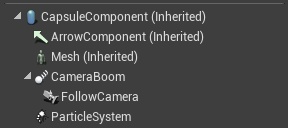
I'm using this as my vehicle, this is the blueprint outline:
https://i.imgur.com/EkdvK3O.png
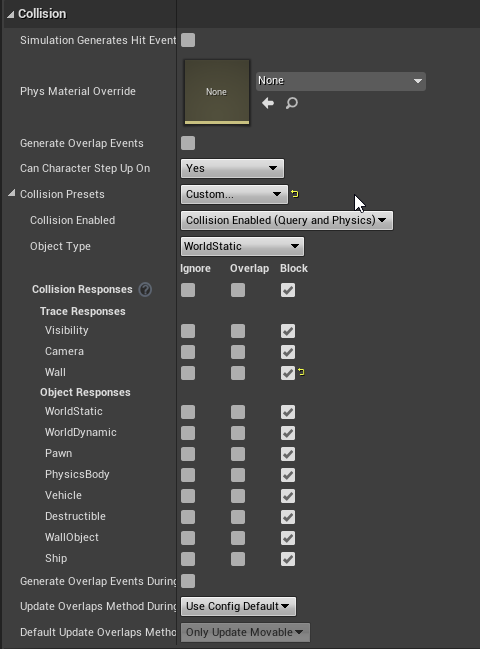
These are the collision settings:
https://i.imgur.com/4mIEG8s.png
next, I brought in some walls:
https://i.imgur.com/MTOdXKc.jpg
The walls have these collision settings:
https://i.imgur.com/EXtr0RI.png
but they ship just clips through the walls, I even tried setting up a custom collision profile for the wall but it doesn't change anything.. Can I get some help please?
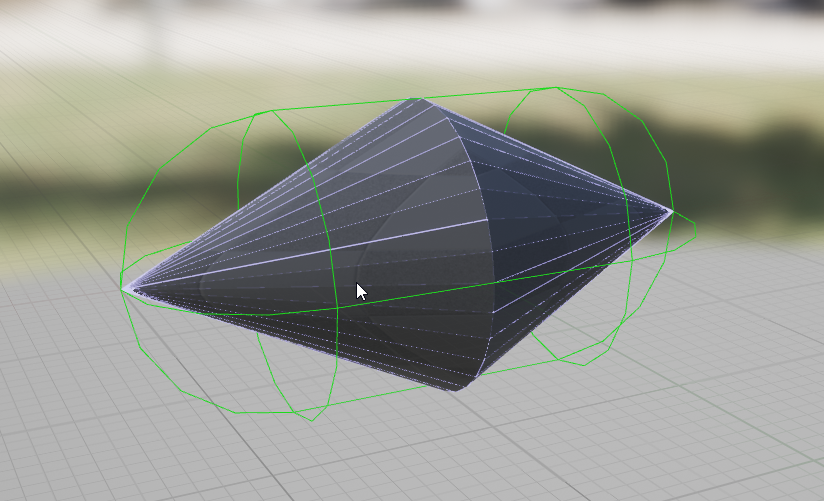
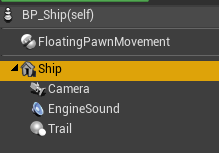
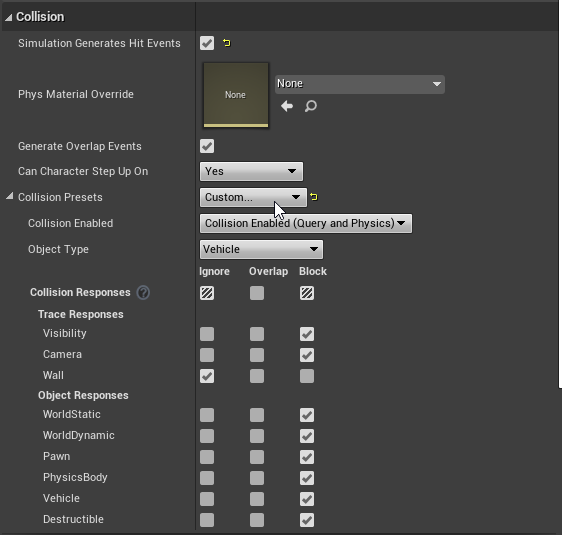
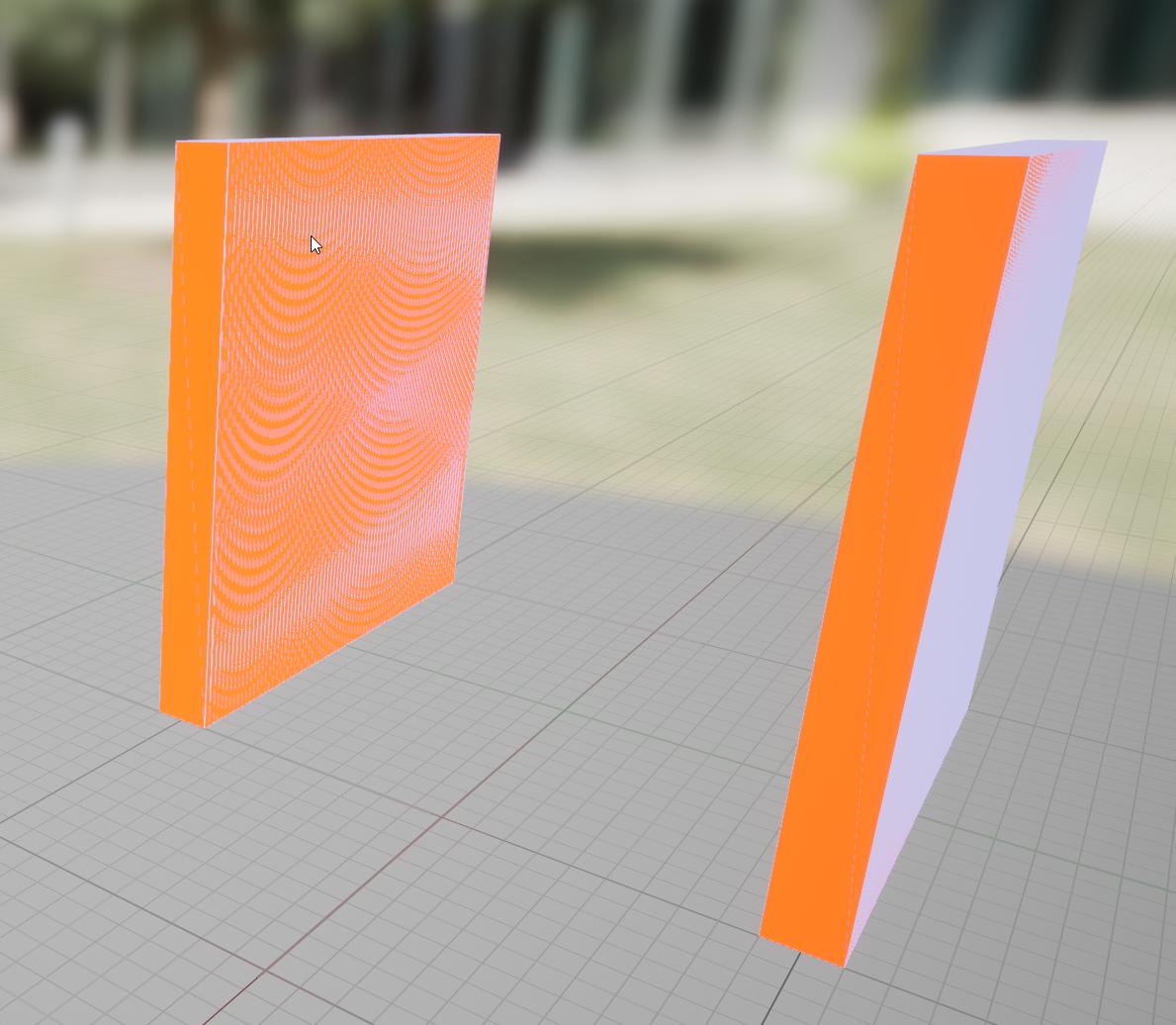
 chilly jetty
hi there
how can i make it so where there's a probability of an enemy spawning a power up when it dies?
how can i do percentage chances?
olive sedge
create a random int between 0 and 100. check if it is greater than 100 -x
x is your percentage chance
restive dagger
guys
I made it so when I press shift a particle gets created
why sometimes it works and sometimes it does not?


wait one min
So should I delete the timeline and put a delay?
Its an old project I just reopened so I'm as lost as you honestly XD
yeah
I just noticed the output is not attached anywhere lol
I put a delay since that is what I want
But the same problem occurs
The solution is to put a delay before "shift" triggers again
but how? yeah like you said ewxactly
yep
lemme try
this method does not work
I guess I did something wrong, heres the pics


the method works fine, I can press shift once in a second
but the problem still occurs
it disappears sometimes without any error
@trim matrix :3
chilly jetty
is there a way for me to get a variable from the level blueprint itself?
restive dagger
@chilly jetty why would u access the variable from a level blueprint?
level blueprint variables are intended to stay inside the level blueprint
imagine when u reach a certain point in game and u open a new level, then you try to access that previous level variable
it will result in a crash because its returning null
olive sedge
olive sedge
Hey everyone.. I'm stuck here with my collision. I have imported a simple mesh a...
I still haven't solved this. It should be really easy. Help please?
restive dagger
@olive sedge can u show collision complexity?
restive dagger
 olive sedge
yes
restive dagger
is the complex collision mesh empty?
olive sedge
I tried it with a collision mesh as well
initially I had a real ship, one sec
It was like this initially
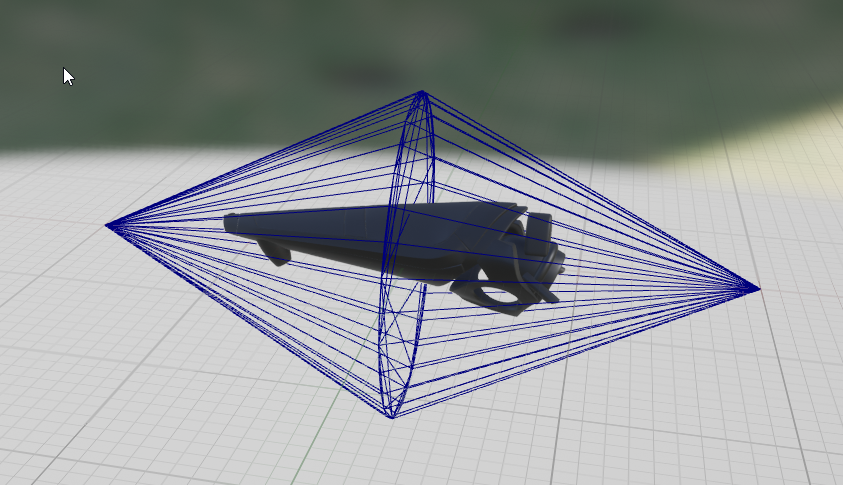
but that doesn't work either
restive dagger
set the wall to block all
olive sedge
Same result
and I'm pretty sure it's the ship because I put a default Cube 1x1 and it clips as well
restive dagger
does the ship clip with everything in the world or just the wall?
 olive sedge
it's true
I just tried setting my ship to a simple cube
but that doesn't collide either
restive dagger
https://i.imgur.com/EXtr0RI.png its not in your picture
also is it your pawn ? like the ship you are controlling?
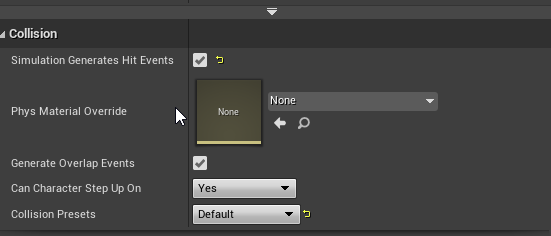
 restive dagger
oh um
olive sedge
I've been meaning to add movement in the mesh but it's not a priority rn
restive dagger
set can character step up on to no
restive dagger
nice
olive sedge
does it then use my collision mesh?
and can I scale the collision mesh?
cause it doesn't show up when I do show Collision
 noble flicker
hi! can anyone help me packaging a project that uses faceAR? I will pay you fo your services. Thank you!
olive sedge
@restive dagger the simple and complex doesn't get me very far.. I need the custom collision mesh applied
restive dagger
@olive sedge yeah use the complex collision as simple
https://gyazo.com/6b5de29f282e3f636c06e42e23260afe these are my settings I used for a static mesh

and check the collision mesh settings too
set it to block all
it should work
like theres no other reason for it not to work tbh
olive sedge
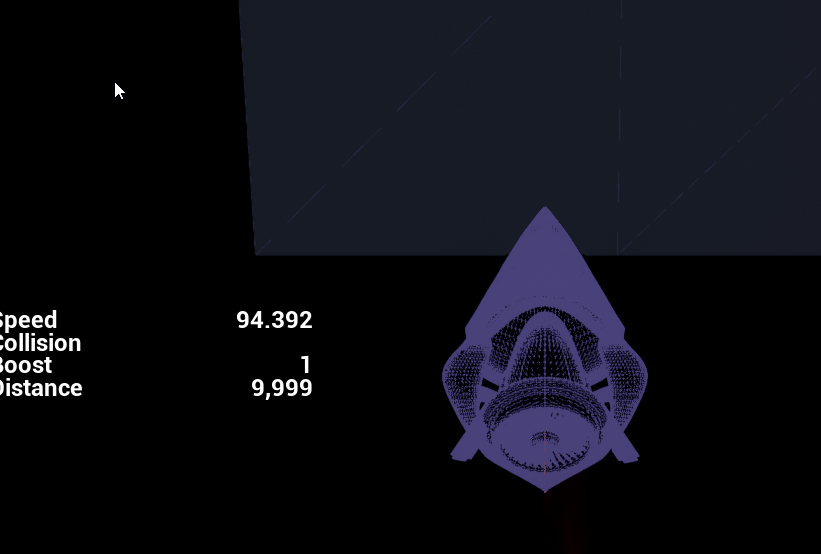
this is what it looks like ingame
the custom collision mesh doesn't show up
I've set the collision mesh to block all
restive dagger
yeah custom collision is always not visible
olive sedge
oh ok
well, in any case, the collision doesn't work
only if I go complex and siomple
but I think that would not apply my custom collision and the collision profile would change with the model. I need to avoid that
restive dagger
One min
Send me the custom collision details and the ship mesh collision details again
The way it looks you are doing everything fine there must be a small mistake
olive sedge
one sec
ship blueprint:
https://i.imgur.com/TdtFaJD.png
ship mesh:
https://i.imgur.com/Kdb7t0c.jpg
collisoin mesh:
https://i.imgur.com/S0Wrfpx.png
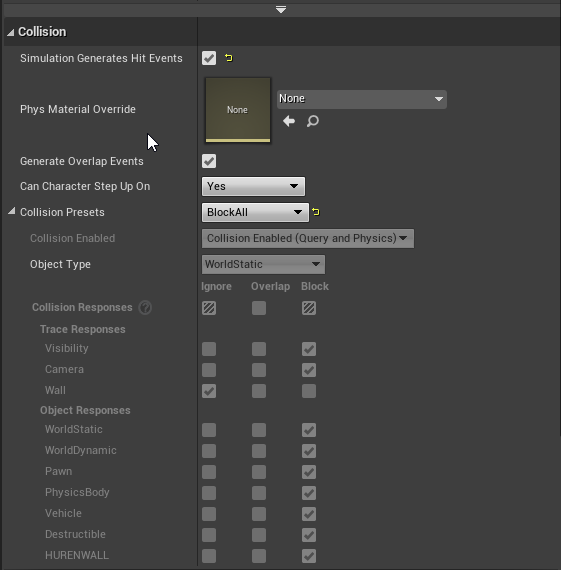
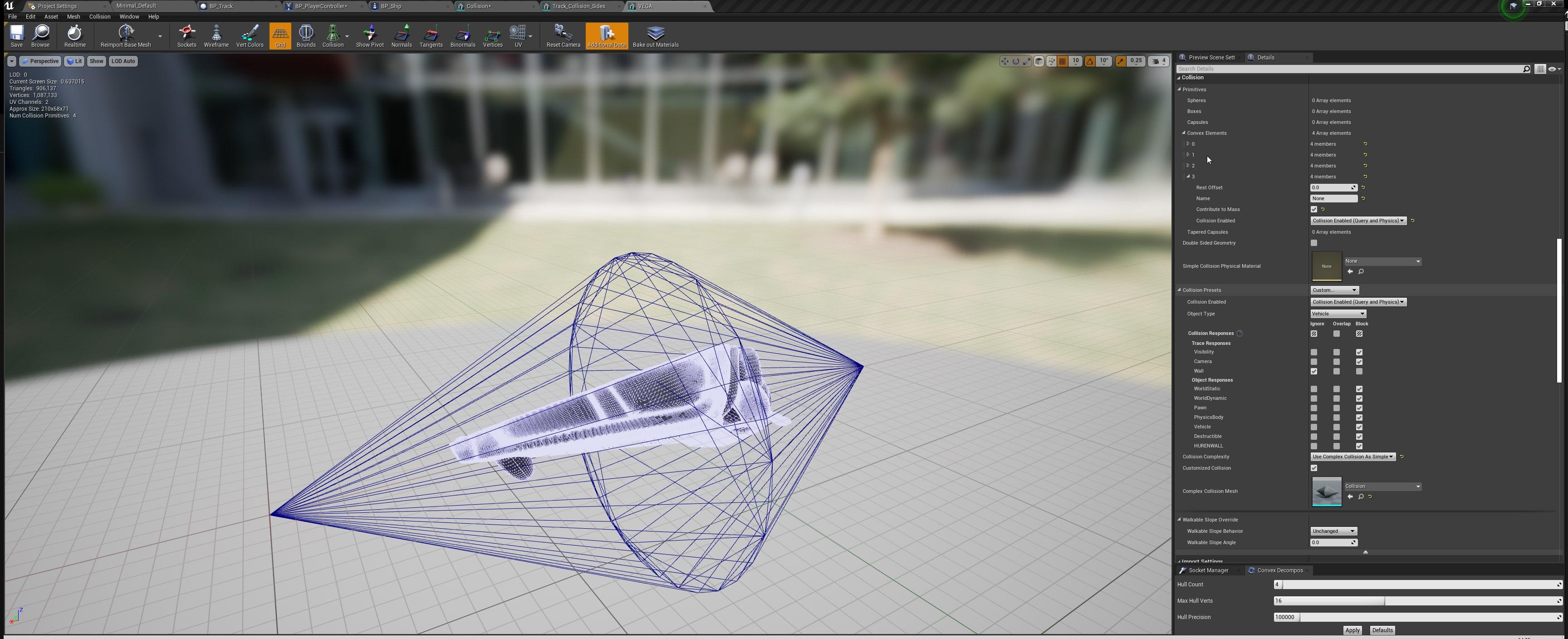
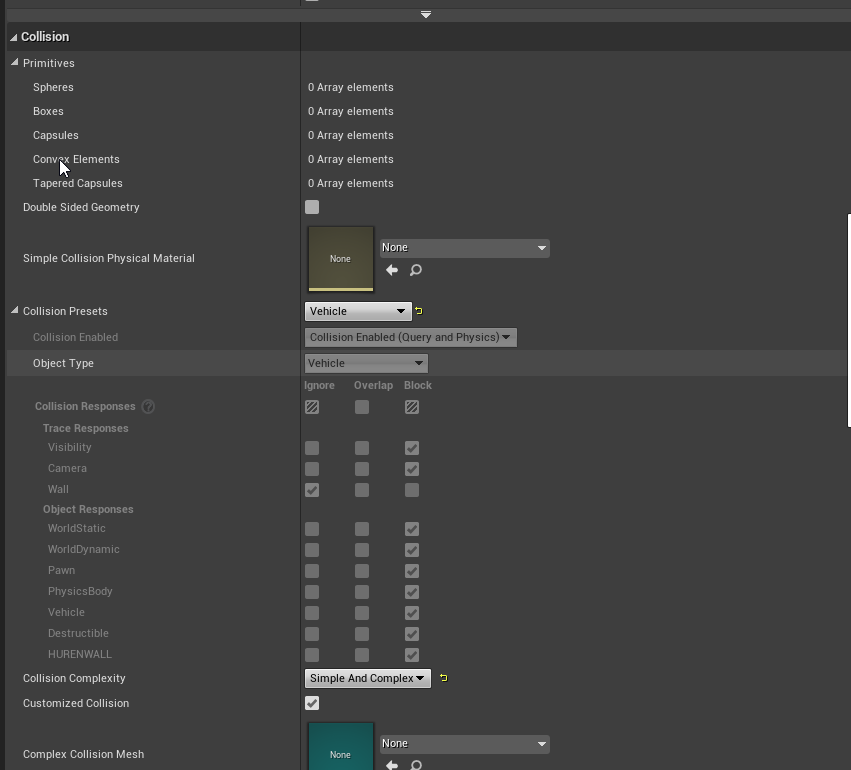
@restive dagger
warped cairn
I seem to be here more often than I'd like.... Does anyone know how I'd move an actor to a socket or a child actor? I can get the target fine, but I am struggling with setting up the goal. The whole point is to move the target actor to a specific location, then after that I will attach them to a socket.
 restive dagger
collision mesh is set to vehicle
not to block all
set the collision mesh to block all, and the ship collision to vehicle.
olive sedge
@restive dagger I did, same
restive dagger
in the collision mesh details set the collision complexity to project default
olive sedge
my project default is complex as simple 🙈
I'm tempted to create a new project here :/
olive sedge
I've been meaning to create a skeletal mesh but haven't yet
restive dagger
usually my setup is like this
olive sedge
yes, whatever.. this is annoying me so much. I will create a new project and start with a skeletal mesh ship
 spare vessel
I'm trying to render a movie from blueprints but for the life of me can't find the Movie Render node anyone had this issue
 olive sedge
@spare vessel I don't know that you can do this from blueprint but you can from sequencer
restive dagger
then everything else
olive sedge
@restive dagger can I set the capsule collision to ignore and then sub component to block?
restive dagger
well that would make no use of the capsule component XD
olive sedge
yes, I don't want a capsule component
this is what I need: https://i.imgur.com/NTerzsU.png
 restive dagger
honestly I never used a complex collision for my pawn, I usually use them for static meshes not pawns but I guess that wouldnt make a difference
olive sedge
just a littler tighter
spare vessel
@olive sedge Yeah it seems to have been removed it was a node but I can't find anyway of accessing it
olive sedge
@spare vessel well, not sure why you would want a node. just hit render in sequencer
spare vessel
@olive sedge trying to do it from a built game
olive sedge
@restive dagger yes, it shouldn't matter if it's on a pawn or a static world component I think
@restive dagger I'll try setting the collision mesh as root component and transparent and then adding in the ship just for visuals
restive dagger
Can you try to put your ship on the air and simulate physics
And everytime try something new in the collision parameters and see when it collides
Everything is normal there might be a small unchecked parameter thats doing all of this
olive sedge
@restive dagger ok, thank you
restive dagger
also u may want to watch this video, https://www.youtube.com/watch?v=ksGmbDM2mNU There may be import error I don't know

In this video tutorial, we step through setting up collision directly in UE4, modifying automatic collision, as well as creating custom collision in Maya.
00:00 - Intro
00:32 - UE4 Auto-generated Collision
05:03 - Modifying Collision
16:09 - DCC Generated Collision
UE4 Docs: https://docs.unrealengine.com/en-US/Engine/Content/FBX/StaticMeshes#c...
lucid basin
lucid basin
Hello guys, i have a problem with my sphereTraceByChannel.
what i want:
i want t...
hello i still have problem with this any1 can help?

 little torrent
Is the a best practice in blueprints w/ regard to casting to a class type?
It seems like a lot of overhead, esp for a child class, but maybe not?
Interfaces maybe?
warped cairn
 mild shell
how can I make a level reference?
mild shell
how can I make a level reference?
Don't quote me on this, but I believe you can drag it in from your content browser.
 sour urchin
how to add movies to package build?
i add video.mp4 in MyProject/Content but after build i can't load video
in standalone all work
olive sedge
When I apply a world offset to my object and it collides, it just doesn't move at all. Can I make it move at least in the direction it could?
Imagine the object going into a guard rail and then just stopping instead of being guided
odd nova
noob here- i was wondering, isnt there a better way to do it than this:
 gentle urchin
Ammo / Max ammo
Probably stored in the gun anyways
For the other stats, not so much
odd nova
a revolver has 6 shots, 6 loaded, is the maximum
but you only have 20 bullets, so after the 20 bullets are up, you cant reload the revolver
gentle urchin
Inventory would hold the actual ammo the player has. The gun would have clip size and currentclipamount
Currentclipamount is reloaded from the players inventory amount
odd nova
i could move those ammo counters in the inventory, yes, that sounds good
 limber finch
Does anyone know how to change an input via a key on UMG?
FOr instance, I have a checkbox, if the key is pressed, without being in UMG, I want that checkbox to be checked
So if the checkbox is checked in UMG, the action occurs, but if the player uses the hotkey to activate the action, the checkbox is then also checked on UMG
olive sedge
When I apply a world offset to my object and it collides, it just doesn't move at all. Can I make it move at least in the direction it could?
Imagine the object going into a guard rail and then just stopping instead of being guided
odd nova
any ideas why 6-3 is 0?
crimson hornet
I just made an simple BP to make the AI spawn every 10 seconds at a specific place. My AI is BP based thats why it doesn't need an behavior tree in the SpawnAIFrom Class. But I got an problem the problem is that I made target points for the AI to go, I set those target points in the details panel in the level. But I need to select an Actor and an Pawn to spawn the AI in the world. Is there anyway I could select the specific AI in the level and set it in the Actor and Pawn?


 vivid plinth
I have a static mesh component I want to use check for overlaps.. but no matter what I do, it does not return any overlap events. How can I use mesh as collision?

these are my collision settings..

 spark steppe
have you checked if the static mesh has any collision shape? (in the mesh "editor")
vivid plinth
yes I have auto generated complex collision
 ember veldt
vivid plinth
I have a static mesh component I want to use check for overlaps.. but no matter ...
ember veldt
vivid plinth
I have a static mesh component I want to use check for overlaps.. but no matter ...
Do the collision objects you're trying to collide with have generate overlap events on?
vivid plinth
yes both have generate overlap on
I'm almost positive I've done this before but I'm not sure what is happening this time. It seems rather simple
 proper wyvern
has anyone here messed around with procedural meshes?
im getting the normals, which seem fine, but after I move it they dont seem to update

 devout geyser
@proper wyvern I am not an expert but maybe it doesn't update because the function called once?
proper wyvern
it definitely isn't called once. It's called every time I hit a specific key
olive sedge
Can I get a vector of a new point x when I have a position V, a direction R (rotator) and a length L?
actually I have a vector 2 vectors and need to rotate vector 1 just a little bit towards vector 2
 mental robin
Hm. Does anyone know how to get each static mesh of a foliage actor thats been painted
because with the foliage system in ue by default it groups them all as a single component..but I want to be able to access each individual mesh. If this isnot possible by default..then I have to create a system that plants meshes and puts them into an array I can access
and that will be one wicked pain in my rear end
spark steppe
and one wicked pain for your GPU, too?!
foliage rendering puts them in clusters to reduce draw calls
mental robin
yep
To be fair I am not so worried about it. It's only for specific things..not an entire field of grass
Only need to access a dozen give or take a few at any given time
spark steppe
idk if its possible, just wanted to get sure that you don't come up with the idea to put a thousand grass meshs in the world without foliage tool
proper wyvern
Does anyone know if it's possible to convert an actor into a static mesh component at runtime? Unreal has this tool in the editor but cant find it runtiem
crimson hornet
crimson hornet
I just made an simple BP to make the AI spawn every 10 seconds at a specific pla...
?
 fallen glade
anyone know what this is?

"No value will be returned by reference. Parameter 'PathsCollected'. Node: Call AIPFPaths Collected"
 unique harness
fallen glade
anyone know what this is?
unique harness
fallen glade
anyone know what this is?
It means that if some object that is bound to this event and changes "AIFPPaths Found" this variable here will not change.
 vivid vapor
Anyone know how to fix stuttering when using lag on a spring arm component? Lag on the rotation is fine but translation stutters depending on what Im doing with my character.
 summer bolt
proper wyvern
Does anyone know if it's possible to convert an actor into a static mesh compone...
summer bolt
proper wyvern
Does anyone know if it's possible to convert an actor into a static mesh compone...
Don't think so but there may be some other work around.... what do you need to do
proper wyvern
I'm building a structure in single player (spheres, cubes, procedural meshes), which I want to bring to the multiplayer server at runtime
Imagine like a garage sort of thing, where the garage is your offline hub
vivid vapor
proper wyvern
I'm building a structure in single player (spheres, cubes, procedural meshes), w...
Can't you just remove the actor and copy its transform and spawn in a static mesh in its stead?
summer bolt
proper wyvern
I'm building a structure in single player (spheres, cubes, procedural meshes), w...
Alright I don't know much about mp but from what I understood you could have 2 separate ones and the offline one saves some data which is called in the miltiplayer one
proper wyvern
I guess this was more from some performance concerns (multiple procedural meshes and all). But I think I could use the original actor too
fallen glade
unique harness
It means that if some object that is bound to this event and changes "AIFPPaths ...
ok.... why just that one though? I have other calls and they are being quiet :/
thank you for the answer by the way, it's appreciated!
is it because it's an array? annoyng warning/error
slate harness
Hello everyone,
I have a little problem with my rotation
As you can see is going to fast for my eyes
How i can slow it down.
maiden wadi
@proper wyvern If you're really worried about performance concerns, these objects would be done inside of a building manager, which has multiple HISM components, one for each mesh type. And you'd save the data you need like type and transforms, and reconstruct that object in the different game.
slow phoenix
slate harness
Hello everyone,
I have a little problem with my rotation
As you can see is going...
Use the interpto nodes
 tropic oracle
I can't seem to find anything on player teleporting to another player all i found is teleporters and teleporting to another level
olive sedge
is it possible to calculate how a ray would bounce off a survace? I need that bounce vector
slate harness
slow phoenix
Use the interpto nodes
This is what i have done, This is the right use to the Inter to node??

I think not because its rotate a little bit and go back to his startposition
proper wyvern
maiden wadi
<@!361556526940422145> If you're really worried about performance concerns, thes...
That's really helpful, thank you
unique harness
proper wyvern
That's really helpful, thank you
Think about Fortnite, every thing you can destroy is a single actor so if you set it up correctly, there's no extra work
slow phoenix
slate harness
I think not because its rotate a little bit and go back to his startposition
Your interpto speed value should not be 0
slow phoenix
Set it to 0.2 and start tweaking from there
slate harness
i set 1 and its not moving 😂
slow phoenix
You can increase/decrease to see the result.
slate harness
how (Im pretty new to unreal, this is my seconde game)
slow phoenix
Just input in the box, hit compile and try again.
slate harness
ok i do that thing but nothing
Its maybe a bad collision set or something like that
trim matrix
Hello, where do I find the construction script in blueprint mode? I want to open it and I cannot find it
slow phoenix
Nah, you are using set actor rotation so it should reflect right away.
Also you need to hold the stick longer
slow phoenix
Cause that's how you adjust the speed.
slate harness
Look @slow phoenix
 white lynx
Hey guys, I made a class inheriting from UDeveloperSettings and extended that in BP for setting values. How do I set the BP Developer class to be the Engine's Default Developer Settings?
 mortal coral
Trying to set up some super simple AI navigation, and the movement is failing. Is there any way to see a more detailed reason as to what is breaking?
slate harness
slate harness
Look <@!190887823857942530>
@slow phoenix
slow phoenix
Checking
1 is your camera parented to the tank?
- Can you do a timeline or something else to test the rotation first?
Basically you need to make sure your camera aren't inheriting the actor rotation if you are using the pawn camera.
 slow phoenix
Lol, yeah that makes sense why it jitters like that.
slate harness
The spring arm was parented to the colision box
mortal coral
mortal coral
Trying to set up some super simple AI navigation, and the movement is failing. ...
I can provide more info if it would be helpful; unchecking "Use navigation" causes the movement to more or less work (but of course, i need navigation). i have a nav mesh, that looks reasonable when i press P, and the movement result is simply "failed" if i check use navigation
slow phoenix
Well, if you rotate the "actor" then everything is rotating with in your structure of components.
It's like you rotate a house so all the window, doors and everything inside the house will also rotate
slow phoenix
Well there are quite a couple ways to do
But first thing first is to not use set actor rotation
slate harness
ok
slow phoenix
Instead use the rotate to rotate just the sprite.
Remember to pull your camera out as well from the sprite.
slate harness
but i want the collision to rotate
slow phoenix
I don't know the exact node to use buy if you look it up there should be a node to rotate a component
Well, then it's a bit more complex.
You can build a scene root as root component
Then rotate the collision box
slate harness
Rotate by world location (Papersprite) i found taht
slow phoenix
While camera parent to the scene root
slate harness
ok
trim matrix
can objects in blueprint mode have custom properties?
slate harness
Like that
 dawn gazelle
olive sedge
is it possible to calculate how a ray would bounce off a survace? I need that bo...
dawn gazelle
olive sedge
is it possible to calculate how a ray would bounce off a survace? I need that bo...
Found this online - pretty sure it's right as it's using the "Impact Normal" which is the angle at which the trace hit.
 trim matrix
can objects in blueprint mode have custom properties?
slate harness
slate harness
Like that
@slow phoenix
dawn gazelle
trim matrix
can objects in blueprint mode have custom properties?
Such as?
trim matrix
I'm just asking is there a way to make a custom property for an object reference, any sort of property
basically a variable inside of another variable
dawn gazelle
If you have an object, then it is of a specific class, in which case, you can put a variable within that class.
trim matrix
In my specific case, I have a set of gun objects that rotate up, down, left & right, and I want to have a way of setting each gun as "ready to fire" when it stops rotating. Upon me pressing the fire key, the code will execute a for loop for all the guns present, and check for each one if it's "ready to fire", and if so, it fires the gun.
Otherwise, it doesn't fire the gun.
So all I need is just a way of making a property that is a boolean for each gun object, and just using that as a "ready to fire" variable.
Hope that makes sense.
dawn gazelle
So you probably have a gun class, and then child classes based off of that, no?
trim matrix
dawn gazelle
If you have an object, then it is of a specific class, in which case, you can pu...
The gun itself is not a class by itself, it is a static mesh object reference parented to the ship blueprint.
I apologize for wonky wording I'm not familliar with the UE terminology yet
this is the gun object
 dawn gazelle
Ok, so what you could do is use a Map variable type.


Whenever you want to look up the status...
trim matrix
So is that a local variable?
dawn gazelle
 dawn gazelle
trim matrix
So is that a local variable?
dawn gazelle
trim matrix
So is that a local variable?
This would be a variable on your ship blueprint.
trim matrix
Ok, and a map is a sort of array that holds values, correct?
dawn gazelle
Yep, it's an array in which you can reference a specific value by a key rather than an index, and that key can basically be almost any type of object or variable type.

 dawn gazelle
Yep, it's an array in which you can reference a specific value by a key rather t...
dawn gazelle
dawn gazelle
Yep, it's an array in which you can reference a specific value by a key rather t...
 trim matrix
Excellent, I did not even know this was possible! I will show you the results of later of my work.
Thank you
olive sedge
dawn gazelle
Found this online - pretty sure it's right as it's using the "Impact Normal" whi...
Cool thanks!
 glacial belfry
that helps me too!
trim matrix
@dawn gazelle oh and I almost forgot, how would I change the status of a map variable at any given time? What function to use?
dawn gazelle
This one
 trim matrix
doesn't that function add a new one every time?
dawn gazelle
No, if the key already exists, it overwrites it
trim matrix
cool got it
sterile quest
burnt nest
I've tried reading up on the convo here. What are you trying to do exactly? Your...
I am using the Ocean Project because it has a endless ocean feature which the new UE4 water features do not have. So it isn't sinking to the bottom with gravity. I am trying to control the ship but I get that warming message that I posted a screenshot of. I did fix the issue with the rigidbody, however using the Kinamatics setting on the root makes it act like it no longer has any pontoons set, which you can see it sinking to the bottom.
Sorry about the late reply. Hopefully you are still around.
I am thinking about having the hull of the ship as a staticmesh rather then a skeletal one to hopefully get rid of all the headache that this has been giving me. And have the guns, rudder(s) and anything else that is a interactive features for the ship be a skeletalmesh. I am hoping this would remove the warning that is causing the movement for the ship to stop working to no longer being a problem. However this does mean I cannot use the socket system like I would have wanted to, and as I add larger and larger ships (which I plan to), it will become a very unintuitive process to have to manually place all guns and other interactive features. Which I'd rather avoid honestly.
slow phoenix
slate harness
<@!190887823857942530>
Dir you try it out yet? Lol
I am eating lunch so won't be replying quickly. Part of learning is trying out things and figure those out.
You should have good starting point so the rest you should try figure out. Ask when you run into issues again.
 low lava
Sup! SO I am making a UtilityAI system or I am trying to! The Issue is, I am trying to connect a Construct Object to a Construct Function and I get an error: "Self object Reference is not compatible with UtilityTask Object Refereance"

I am trying to follow a TUTorial
Or uh
string of tweets
THis should be the end result
 unique harness
low lava
unique harness
low lava
TaskType array "Type" needs to be UtilityTask Class, it's probably Object class
if it already is UtilityTask class, recreate your for loop
 willow cedar
I have a problem where when a character loads into the game, the player HUD is added again on top of existing players. I can tell because I have transparent elements that get less transparent when people die. How would I fix this?
slow phoenix
trace your UI widget create route and make sure it only do it once per player controller.
of course you maybe have different parts for the UI (say, when you are playing vs when you die, or opening the option screen etc)
just make sure it's not driven by something the creates new UIs and then added to existing canvas
 brittle knoll

you might have to open the original to see this clearly but uh
so basically, i have an actor that orbits around my player based on the right stick direction
when i shoot (called in from player), the actor is supposed to move towards a location and stop, which works correctly.
when i return, it should move back to a certain distance from the player. however, for some reason, on the way back, the target variable gets set to the actor's current position, causing things to get screwey.
for the life of me, i cannot figure out when the target variable is getting changed. can anyone take a look and help me?
i can also hop in vc if anyone needs me to screenshare and show stuff off
im 95% sure this is something simple and dumb but for the life of me i cannot tell
 hybrid ether
Anyone know about saving? I am creating system that when u kill boss it saves its ID. This obv doesn't work but how could I do that?

Should I first load game and add old IDs to list then save?
This is executed when boss dies and every boss have own ID
 vestal apex
Quick question on Blueprint basics: I have multiple actors in a scene, all based off the same blueprint with basic movement functionality (I press a button and they all start moving in the direction they are facing). I would like to create different paths for each actor to move along (thinking waypoints). But as I currently see, any change to the main blueprint creates the same change for all the actors in the scene. Any ideas on how I can approach giving each actor it's own customized path?
brittle knoll
brittle knoll
nm fixed mine, was actually an order of code thing
slow phoenix
Remember to expose your parameters for edit.
hybrid ether
I made it like this But is this good way 😄 It still works

How I doing same thing twice :0
but I have like other slots for saving character stuff etc.. but This is only for bosses so I can check "have I killed it"
Its for teleport system that I can "skip that boss if I have killed him" next day when play again. Then teleport checks have you killed that boss and unlock button to load level after that boss 😄
upbeat otter
how would a character rotate on a planet? because traditional rotaiton like control rotation does not seem to work
well i have a gravity system set up but i cant rotate the character on the yaw
its gets very confusing
here's an example
is a pawn easier to control rotation?
would there be a way to transfer my current character to a pawn?
low lava
unique harness
TaskType array "Type" needs to be UtilityTask Class, it's probably Object class
This fixed it for me ! I swear I had it set to Utility Type. I think I had to re-create the loop like you mentioned! Thanks so much
 prisma stag
Hello, Im working on an inventory widget however nothing happens when I click on the buttons except the fact that the widget disappears. I believe it has something to do with the input mode. BP for showing inventory

BP for clicking on button The print string was added and doesnt get shown when I click on either button.

It continues to show the inventory.
Why? Thats like having a hold button in a game rather than a toggle.
 rare gale
prisma stag
Why? Thats like having a hold button in a game rather than a toggle.
rare gale
prisma stag
Why? Thats like having a hold button in a game rather than a toggle.
Are the buttons behind anything in that inventory? Also, double check they are visible and not NotHitTestable or whatever that setting is. I had some stuff default to that the other day for some reason.
prisma stag
rare gale
Are the buttons behind anything in that inventory? Also, double check they are v...
Visibility is set to visible and the button are just behind some text.
In the game I can see the button get pressed as it changes its shade slightly but the print string never fires.
rare gale
Do you get the normal interaction when you mouse over them? Hover and pressed states?
prisma stag
rare gale
Do you get the normal interaction when you mouse over them? Hover and pressed st...
Yea, when I hover they change their shade, then when I click they change their shade but the widget disappears and nothing happens that is supposed to happen.
rare gale
Stupid question... do you have the bool checked on the print strings to print to string? Other strings are printing and you see them?
prisma stag
rare gale
Stupid question... do you have the bool checked on the print strings to print to...
Yep.
rare gale
that probably is the problem like Lorash said... if it's supposed to clear, it's going to remove code after it which would remove the print string. Try a delay after the print before the part that removes widgets maybe?
Depends on what's removing it I guess
prisma stag
rare gale
that probably is the problem like Lorash said... if it's supposed to clear, it's...
Oh wait. I wonder if clicking on a button removes the widget and set the input mode to game only before the code after clicking can do anything?
rare gale
might cancel the press being held and automatically releases?
prisma stag
Maybe.
rare gale
try a flip flop between press and release code from one or the other and see if that works
prisma stag
rare gale
try a flip flop between press and release code from one or the other and see if ...
Ill have to mess around with it for a bit as having a flip flop if what Im trying to avoid.
rare gale
I think you may need to hide the widget screen rather than removing all. That is likely the issue there
prisma stag
rare gale
I think you may need to hide the widget screen rather than removing all. That is...
Does just hiding it still allow you to click on it? Ive only known to remove all.
arctic cradle
So, I've got JVD's grapple component and Dialogue Plugin going concurrently. GC has a great rotation feature built in, and it's perfect for dialogue setting. NPCs snap to me, I can control the duration and animations, it's great.
The issue I'm having is that I have a hit box to begin dialogue. It passes, it begins the dialogue. Awesome.
But, how would I go about multiple NPCs? As it stands, I could have 5k NPCs, and with this set up they all will say the same things.
I was thinking of doing an array and for each, but even then I'm confused how to implement it.
How would I go about making sure each NPC states their own dialogue?
 rare gale
You'd want to hide after you've clicked I think?
prisma stag
rare gale
You'd want to hide after you've clicked I think?
Right, but the code I have already does that, but in my case it is completely removing the widget and then creating one when I hold again. I dont know if in your case I can still click on it or not knowing that all Im doing is hiding it.
rare gale
You wouldn't be able to click while it's hidden for sure.
prisma stag
rare gale
You wouldn't be able to click while it's hidden for sure.
Gotcha. Ill have to look into it, thanks.
rare gale
I'd try doing the flip flop just to test that it's trying to do what you expect without removing. If that works, then try hiding rather than removing. you may have to change up some timing or where things get called once you figure that out.
prisma stag
rare gale
I'd try doing the flip flop just to test that it's trying to do what you expect ...
Once I did the flip flop it did what I wanted, so Ill have to see what I can do as the toggle is not what I want.
 smoky jungle


hi guys, im want to make endless android car game.
what you see in the screenshot below is the blueprint of npc's
I want these vehicles to go straight and change lanes at regular intervals. how can I do that?. I do not want to give NPC vehicles physics and vehicle movement due to performance problems. How can I change lanes without giving these vehicles physics? I would be glad if you help
trim matrix
You can make a small function that you can call everytime you want to change lanes
and inside that function you add a repeating loop that slowly increments/decrements the cars' Y position (I'm assuming to move them left and right you will have to use Y as you're incrementing X in the blueprint image you sent to get them to go forwards).
And it stops incrementing/decrementing the Y when it moves to the other lane.
@dawn gazelle do you know why in the 3D blueprint editor viewport when I switch to an ortho mode, it always shows me a lower LOD of my object?
 brittle knoll
Does anyone know how to implement rope swinging? Need my character in a 2.5d platformer to swing from the end of a grappling hook. Figured out my hook implementation, need to figure out how to make a rope and swing the player.
odd plume
I downloaded a widget that requires a Array of Structs, how can you make that in bp?
 dawn gazelle
brittle knoll
im 95% sure this is something simple and dumb but for the life of me i cannot te...
dawn gazelle
brittle knoll
im 95% sure this is something simple and dumb but for the life of me i cannot te...
I'm going to guess it would be because you're setting "newtarget...whatever" after this branch - so long as the wayback boolean is true, this value keeps changing.

 sand bloom
Hmm does anyone know whether it's possible to switch between the first person character template character and the flying template character or in this case pawn?
dawn gazelle
trim matrix
<@!218956378654507008> do you know why in the 3D blueprint editor viewport when ...
Sorry, no idea.
sand bloom
Like I have something set up that switches already kinda but it doesn't work properly
it seems the first person character project's player controller is c++
and not editable
dawn gazelle
odd plume
I downloaded a widget that requires a Array of Structs, how can you make that in...
Structures are just like variables. If you have the structure type already created, you can create a variable of the structure type, and then change the variable format to an array.
sand bloom
as you can see it does not work properly because it doesn't destroy actors and the spawn location is not updating


oh the flip flop isn't plugged in this screenshot but i have it bound to a key
does anyone happen to know whether this is possible
dawn gazelle
sand bloom
Where is this bit of blueprint? What BP?
sand bloom
this is in a new player controller I made
and I assigned this player controller to the gamemode
brittle knoll
dawn gazelle
I'm going to guess it would be because you're setting "newtarget...whatever" aft...
already solved that and yeah that was it but thanks
dawn gazelle
Ok, so the issue is then when you're calling "Destroy Actor" you're not referencing which actor and that means you're asking to destroy the player controller itself.
sand bloom
oh that makes sense but how would I get a reference of the actor I need
I would have added something if there was an option to
dawn gazelle

That should work within the player controller.
and of course, if you're possessing a pawn 🙂
sand bloom
oh that's interesting thank you 😄 i'll have to try this
dawn gazelle
you probably also want to use the transform of your pawn instead of the controller.
and destroy the actor after you've possessed the new one.
sand bloom
yeah that does sound better, the transform apparently works now but the destruction doesn't, i'll have to tweak some things
brittle knoll
brittle knoll
Does anyone know how to implement rope swinging? Need my character in a 2.5d pla...
this got a bit buried but yeah if anyone knows how to do swinging lmk bc all the tutorials i can find are outdated or are about grappling to a point instead of hanging from a rope
sand bloom
hmm trying to change it made it break

i'm trying to figure it out but i'd figure i'd post it here too incase
dawn gazelle
You're unpossessing before spawning. If you do that, then get player character will return none.
dawn gazelle
Also, nodes tell you what target they expect on them.
So like.. this is asking for a target of a controller Target is Controller

So if you're working in a controller blueprint, a target of self is completely valid.
Though, if you're working with a different controller like an AI or a different player (if you were doing multiplayer) or you were working on a blueprint that doesn't inherit from Controller, then you would need a reference to the controller you're wanting to target.
dawn gazelle
You're destroying the current player pawn. So after possessing, you're asking to destroy it.

What you probably need to do is:
- Create a pawn variable called "OldPawn" and store a reference to "GetPlayerPawn".
- Unposses.
- Spawn your new actor using the "Old Pawn" transform.
- Possess your new actor.
- DestroyActor "OldPawn".
sand bloom
hmm I figured since i had a character and a pawn there would be no conflicts
thank you
ill have to try that
sand bloom
I thought a character was a step up from a pawn and had more functionality and was recognised to be different
interesting
that's very good to know lol
dawn gazelle
So if you call something like "Get Player Pawn" and the controller is possessing a character, that will still return a valid reference, as a Character is a pawn 🙂
sand bloom
ah yeah nice
 zenith trout
does using a soft object refrence only work if the object in question is already in memory?
trim matrix
@dawn gazelle thank you, is there a way I can add 3D vectors to a static mesh component?
 tight schooner
@zenith trout isn't that counter to the purpose of a soft object reference? Epic has a primer on it... https://youtu.be/K0ENnLV19Cw

This week Christian Allen will provide an overview of Hard & Soft Object references in Blueprints, why the differences are important to know about, and how you can utilize Soft Object references in your project to help with memory management.
Watch Inside Unreal live at twitch.tv/unrealengine, Thursdays @ 2PM ET
DISCUSSION THREAD
https://forum...
dawn gazelle
trim matrix
<@!218956378654507008> thank you, is there a way I can add 3D vectors to a stati...
The components themselves cannot have variables. You can use a map variable just like I showed you with the booleans, but instead of boolean, set it to vector.
and if you're getting to the point where you're wanting lots of variables on your static mesh, then you may as well create a new blueprint, add your static mesh to that along with whatever variables you want, then attach that blueprint to your main blueprint where your static mesh component used to be.
zenith trout
tight schooner
<@604699803468824676> isn't that counter to the purpose of a soft object referen...
I found out what my issue was
asnyc load does not seem to work if its in construction script unless the object has already been loaded
 wind sequoia
zenith trout
asnyc load does not seem to work if its in construction script unless the object...
wind sequoia
zenith trout
asnyc load does not seem to work if its in construction script unless the object...
yes as its a function
willow cedar
Do Blueprint Interface calls always execute on server?
dawn gazelle
willow cedar
Do Blueprint Interface calls always execute on server?
No.
willow cedar
Currently when I apply damage to somebody and it triggers the Health component to hit 0, the Blueprint interface gets called to do the death event on the character, but for some reason the Remove widgets goes through the Server Host alongside whoever died normally.

When I have another player die when pressing B, it doesn't activate on the server, but the Interface event does
dawn gazelle
There's no call to the interface in this view. When you're applying damage, you're probably running that on server, and you're probably calling that interface on the server.
willow cedar
This is the Character BP where the event is triggered from the call

This is the health component where the call happens
dawn gazelle
Begin play runs on server.
So you're binding the event while on server.
Then the server calls the event which calls the interface.
willow cedar
I had no clue binding things on begin play did that on the server
I'm still new to using components, but am I doing this the wrong way, or is it an easy fix
dawn gazelle
Begin play also runs on the clients. Any time something is added to the world it's begin play fires, so if that is only the server's instance, it runs its begin play. When a client gets a copy of that thing existing in its world, it runs its being play. So begin play will fire on all copies of the object.
To make it more difficult - you also have network relevancy which will make faraway actors no longer exist on clients, but still exist on server. When you get close to the actor again, the server will tell your client to spawn a copy of the actor again which, as you guessed it, calls begin play again on the client 🙂
willow cedar
Ah yeah, I can see how that is a problem
dawn gazelle
willow cedar
I'm still new to using components, but am I doing this the wrong way, or is it a...
Has Authority is what allows you to control if you're trying to run something on server or on a client, depending on who owns the object of course.
willow cedar
Currently I have always relevant on so you can see people at a far distance
dawn gazelle
Generally:
 willow cedar
My biggest issues have just been HUD related. I Remove it when a player dies and re add it when they respawn, but I had a lot of overlapping or this issue
willow cedar
dawn gazelle
Generally:
Thanks for that. This should hopefully fix my problem
Actually, I can't use the Authority Switch on the Component
Would the Bool function work for it too?

 storm mirage
hi im new on the server and a newbie on UE and i need help to hide my life bar on the main menu before to play
arctic cradle
storm mirage
hi im new on the server and a newbie on UE and i need help to hide my life bar o...
most people have main menu as a separate level
storm mirage
it is
arctic cradle
storm mirage
it is
so then you have two levels, one is for the min menu, and it loads in the next level(world). Make sure the life bar isnt even present in the main menu's world. i imagine its sitting there on event begin play, which you don't need if it's just a menu. only have the menu stuff on that world's bp/code
storm mirage
my life bar is on the BP of my thirdpersoncharacter eventbegin play-widget-add to view port, but the main menu lever is an empty level so i dont understand why it appear
arctic cradle
sounds like they may be referencing themselves. open up both separately, maybe take some screen shots so we can see what you've got going
storm mirage
this is on my thirdpersoncharacterBP

(btw ive got a drunk bar aswell xD)
mb find a way to hide it since i havent clicked on play button
but idk if we can code that in this BP
arctic cradle
whats the Then 3 connected to?
storm mirage
something else to fix a post process bug
dawn gazelle
Easiest but probably not the best way to fix would be:
- Create a a boolean on your character BP called "In Menu" or something like that, set it as an "Expose on Spawn" and "Instance Editable" variable.
- Create a branch between your widgets being created. Connect the false path to where your widgets get created.
- Connect your "In Menu" boolean to the condition pin.
Now depending on how you placed your character in your menu...
If you directly placed the character by dragging it in, then when you have it selected, you should be able to set the "In Menu" variable menu on it to true, thus preventing the widgets from being created.
If you are using a "Spawn Actor" node somewhere, right click on it and select "Refresh Node". You'll now see a "In Menu" boolean open which you can set to true.
arctic cradle
So, I've got JVD's grapple component and Dialogue Plugin going concurrently. GC has a great rotation feature built in, and it's perfect for dialogue setting. NPCs snap to me, I can control the duration and animations, it's great.
The issue I'm having is that I have a hit box to begin dialogue. It passes, it begins the dialogue. Awesome.
But, how would I go about multiple NPCs? As it stands, I could have 5k NPCs, and with this set up they all will say the same things.
I was thinking of doing an array and for each, but even then I'm confused how to implement it.
How would I go about making sure each NPC states their own dialogue? I spoke with JVD on it and h had mentioned storing assets to the specific NPC BP, but I'm not sure how to reference them in the character's BP or where to go from there
 dawn gazelle
arctic cradle
So, I've got JVD's grapple component and Dialogue Plugin going concurrently. GC ...
dawn gazelle
arctic cradle
So, I've got JVD's grapple component and Dialogue Plugin going concurrently. GC ...
If you're doing a hit box, aren't you getting a reference to the actor that it is colliding with?
arctic cradle
dawn gazelle
If you're doing a hit box, aren't you getting a reference to the actor that it i...
..maybe? hahaha, theres a lot going on in the grapple attempt function. but it's set up to where if your boxes overlap and the input key is pressed, it fires off. He originally made it for syncing animations.
I went ahead and said no, make it do dialogue.


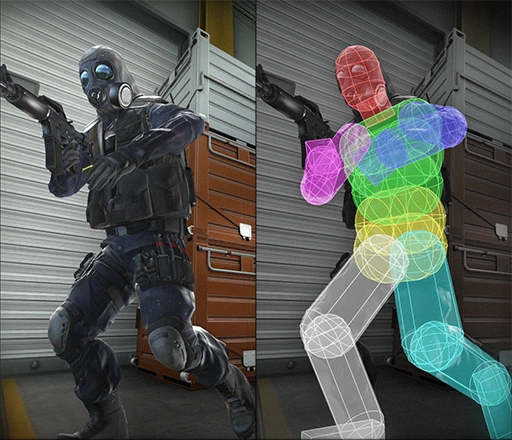


 warm summit

I am getting an error from these Update Dial custom events. saying it found none "when accessing the widget" I do see the pulse go through when debugging, and I changed the name of the "BCR Widget WTF" from Root BP and it propogated.
I also got the Update events by dragging off that reference pin no problem....
don't understand
arctic cradle
arctic cradle
..maybe? hahaha, theres a lot going on in the grapple attempt function. but it's...
And you know, the more I think about it the more confused I become. It's not even the fact I'm using GC. Even without that, if I had a very simply systems, press A for line trace-- how am I storing and assigning these assets to individual NPCs?
dawn gazelle
storm mirage
but ive found an other way
If you're going to do it that way...
 warm summit
but when in DEBUG mode if I hover over the outpin of BCR WIDGET WTF, I get a message "this variable out of scope" I am not sure what my mistake is
dawn gazelle
warm summit
I am getting an error from these Update Dial custom events. saying it found none...
You either haven't set RootBP or the RootBP doesn't have its own BCR WIDGET WTF set.
warm summit
I believe it has to do with the fact that I am spawning the BP that is trying to get that reference.??
dawn gazelle
Sort of. If you're spawning "RootBP" is there something within that particular BP that automatically creates and sets the "BCR WIDGET WTF" reference?
runic parrot
hi everybody! i'm trying to do something after my animation is either completed or notify (screen below)
is there any node for just do what is next only once? no matter wich one is first.

i was thinking on a gate or a flag, but maybe there's something more practical
warm summit
no I am not spawning RootBP, its already in the scene, and I am able to update the UMG Widget if I do it inside ROOT BP,
this is inside RootBP
 runic parrot
what is your problem? can you quote the message with the problem?
dawn gazelle
What blueprint does this exist on?
 warm summit
This is in a Spawned BP
dawn gazelle
Ok, and in your spawned BP are you setting Root BP anywhere?
warm summit
to which I am sending data from RootBP, and then trying to update the UMG