#blueprint
402296 messages · Page 648 of 403
 halcyon grove
for 100% i just go random float in range between 1-100 and then see if its less than or equal to accuracy
and i get a hit or not
any ideas?
 tired cypress
Yeah you could use Random Float in Range
But I'm not certain what you are going for after you acquire the random
halcyon grove
i got it i just made the max of the float in range defender's evasion
tired cypress
There ya go
halcyon grove
and then check if accuracy is higher than the random number
if your accuracy is higher than the evasion you'll hit
its not perfect
but actually I think it will scale well
because the numbers can be whatever I want and it will be good enough 🙂
this like the 3rd time I'm doing this damage tree to tweak it better and I had brain poop
 obtuse herald
You could have 2 Random floats in range, one with min 1 and max 'accuracy' and the other with min 1 and max 'evasion'. Then you compare the 2 random outputs and the one which is higher wins.
halcyon grove
i like that because of more variation
though I'll probably set a value of like 50 as the minimum in the accuracy
so we're not shooting in the dark xD
tweak and see how it "feels"
thanks
pew pew
obtuse herald
pew pew 🔫
obtuse herald
they removed that setting as far as i'm aware
Oh you're right, didn't knew that
Home doesn't even comes with gpedit
my bad
 snow harness
Is there a way to get performance overhead? Currently I'm using EventTick and comparing that to the target framerate, but in the cases of a locked frame rate, it seems like there isn't a way too see the remaining frame time.
 static charm
in command console, type stat unit
and then look at the game time
that shows how long all blueprint code/game code took per frame
 proven mason
Is there a way to move a pong paddle left and right manually while holding a button w/o using event tick?
snow harness
static charm
in command console, type stat unit
Thanks for the reply. Is there any way to expose game time in Blueprints?
proven mason
also it's based on the paddle's local axis.
static charm
noneutrality, there might be a way but not sture
proven mason
add localoffset unfortunately requires Event Tick
static charm
franman, you can use input axis
proven mason
and add movement requires the object to be a default pawn.
not sure if add timeline can help
static charm
oh you mean move left or right with just buttons
proven mason
yes
static charm
you can use a delay node and self loop
proven mason
add timeline there's forward and reverse as an enum
static charm
but yeah a timeline will work, it can loop if wanted
proven mason
also I want the paddle to hit a wall and not go pass through it
anyways I have to think of ways of being creative
I'm not brainstorming hard enough.
snow harness
static charm
noneutrality, there might be a way but not sture
These are the specific blueprints. Output is essentially just a multiplier based on a curve. The Time of that curve is the Delta Seconds relative to target frame rate. At the beginning there, if Delta is higher it updates exactly, if lower it interpolates.
That Instances multiplier affects a global particle dealio.
Though any frame rate cap means it can't go over 1.
Not a big deal, but it would be cool to overclock the particles or resolution if I can detect the headroom is there.
I'll keep looking online otherwise.
 proven mason
damn that's a nice clean looking blueprint graph
snow harness
proven mason
damn that's a nice clean looking blueprint graph
Lol. Electric Nodes plugin doing the heavy lifting.
static charm
you can boost particles/resoultion until you get less frames
then reduce to get back to target frames
basically a mini/short benchmark
snow harness
static charm
you can boost particles/resoultion until you get less frames
Hmm. I'll mess with that concept. Thank you
 stuck hedge
what's the method for spawning a second player, but not doing split screen? For the menu part of some local split screen play, I'd like the players to each share the same menu while they do their avatar setup for gameplay and then on switching to the level for the actual gameplay go into split screen. But creating a player seems to auto-engage split screen.
static charm
i could of sworn i saw some plugin or something for free related to split screen just recently
stuck hedge
I'm doing some digging i was getting a lot of noise with people asking how to enable split screen and then a lot of vague hand waving suggestions for disabling it. I think I'll have to do it in C++. there used to be a node in blueprint but it doesn't seem to exist any more.
https://docs.unrealengine.com/en-US/BlueprintAPI/Viewport/SetForceDisableSplitscreen/index.html they show this, but even with context unchecked, I'm not seeing it. Unless it's a newer node.
Set Force Disable Splitscreen
static charm
what engine version is ur project
stuck hedge
4.23
static charm
and u tried getting the node in a Gamemode class blueprint?
stuck hedge
Yeah
static charm
i just checked, i can see the node in my 4.25 project
stuck hedge
so it must be a new one then
stuck hedge
that's fine, I've got c++ available here, so I can expose it myself. Thanks
hmm.. it's not autocompleting, I'll build it, but I wonder if this wasn't added to statics until later. That would be a shame and an annoyance.
static charm
im trying to find the thing i saw, i believe it gave the ability to do what ur asking and more
stuck hedge
Yeah this function https://docs.unrealengine.com/en-US/API/Runtime/Engine/Kismet/UGameplayStatics/SetForceDisableSplitscreen/index.html doesn't seem to exist in 4.23
Enables split screen
you can use a function to switch between vertical/horizontal but not enable/disable.
stuck hedge
Ugamemapssettings has a busesplitscreen in it
static charm
found this lol
Unreal Engine Forums
This is the place to show, share, and link to your stuff!
the code looks like it can disable splitscreen too, not sure
nope nevermind
stuck hedge
okay..well..
I disabled split screen
but.. creating the new player still made my "menu" start over
and just draw it twice on the same screen
Settings->bUseSplitscreen = isSplitScreenEnabled;``` this takes care of it..but yeah, when I use the "create new player" node in blueprint it seems to start a new player from scratch.I just need to enable their controller so they can pick their avatar.
 twilit heath
GetMutableDefault gets rid of that pretty cast
stuck hedge
GetMutableDefault<UGameMapsSettings>() that works. Thanks. Now I just need to figure out these controllers.
ah you know what.. it's the hud. My menu is loaded from the hud so a new player is running the hud stuff all over again
Woo. I got it. So use that other function to disable split screen, then create the players and it should work.
 winged sentinel
Hey everyone, I know camera shake was changed to matinee camera shake, but I also heard there was a new camera shake base class. There’s not a lot of info on it, is it something that I can use that’s different than the matinee one?
 icy saddle
it's working for me on 4.26.1 Source Build! (the "go to cpp definition from blueprint" feature)
if you're using the precompiled build from the Epic Launcher, then you must move the contents of the UE_4.2x where the engine is installed to D:\Build\++UE4\Sync
you will need to create a D: drive where you can put it if you don't have one already
If you're using the source-compiled version, the feature seems to have broken in v4.26.0 but on v4.26.1 the feature is working. Strangely, there's no mention of it in the hotfix release notes.
 trim matrix
?
 steady orbit
I'm getting completely stomped because everything i do is tied to the current users FPS. All my features become irrelevant because of this. What do i need to do to fix this?
 steep robin
You can use the delta time (the time between current and last frame) to scale what you're doing based on the fps.
steady orbit
Doesnt work
Tried it a million times
I just need somebody to watch my stream and help me correct this so i can learn. If i can learn it on something simple then i can apply it to everything else
Been stuck on this for 2 weeks
Gonna have to stop with ue4 cause i just cant solve this
 rose girder
steady orbit
I'm getting completely stomped because everything i do is tied to the current us...
rose girder
steady orbit
I'm getting completely stomped because everything i do is tied to the current us...
i didn't understand the problem, what are you trying to do? maybe i can help
rose girder
i'm sorry i can't atm, but what exactly is the problem?
steady orbit
I've been typing this issue all day i'm really not wanting to do it all over again. I'm just gonna wait until somebody can talk to me in a call or vc
Thank you though
Shit ill pay somebody to help me
rose girder
i'll search for your message and dm u if i find anything
steady orbit
Alrighty
 wise swan
hey guys, ive set map based huds in my game and when i change levels, the hud based on the map is not showing, for eg: in main menu level there is a hud and when play is clicked it should go to another level and show mini-map etc but it doesnt load
how would i fix this issue
 spark steppe
is there any way to spawn actors in construction scripts?
obtuse herald
spark steppe
is there any way to spawn actors in construction scripts?
Use 'ChildActorComponents'
spark steppe
ah that worked, thank you
 haughty crypt
rotatingmovement used to be OG
what happened to RotatingMovement
gutted
how come it doesnt work in realtime
 faint pasture
haughty crypt
gutted
faint pasture
haughty crypt
gutted
They probably removed it because it's like one node to duplicate it
 visual shale
wise swan
hey guys, ive set map based huds in my game and when i change levels, the hud ba...
visual shale
wise swan
hey guys, ive set map based huds in my game and when i change levels, the hud ba...
Transitioning HUD from level to level (map to map) would require to use level streaming. If you just load your next level - it will erase everything and create from stretch, make sure to 'Add to viewport' your widget on begin play.
obtuse herald
visual shale
Transitioning HUD from level to level (map to map) would require to use level st...
I always create a transition level that handels all that
visual shale
in this case you need to store (save) data somewhere and call it as soon as level loaded
I have another problem.. trying to have focus on a 3D Widget button, to support controller. Usual methods doesn't work and I can't find any solution
 eager temple
hey guys ive got an issue with cursed variables that refuse to increment (im 99% sure my code should work) as in they are just set from 0.0 to 1.0 then 1.0 again and so on. never going above 1 when im sure it should go 0, 1, 2, 3.... Has anyone dealt with this before and know how to fix it? (restarting editor, refreshing nodes etc hasnt solved the issue sadly)
spark steppe
i'm 99% that your code is wrong, and not the variables
even 99,999999999999999999999%
eager temple
hahaha i dont even know at this point but i swear it should work
eager temple
heres an overview: for loop>--- increment float
i just seem to get 1 over and over again
obtuse herald
Check your Value Range
 eager temple
hmm it is a local variable inside a function so that could be an issue but doesnt seem to have any options for value range like normal variables do
spark steppe
then show the loop
if it's local within a function it won't keep its value over multiple calls, you are aware of that?
eager temple
welp theres my issue that makes a ton of sense now ahahahaha 😂 thanks for the replies guys
obtuse herald
Yeah everytime you call a funtion the local variables will be resetted
 dense jackal
Is there a way to replace a projectile with a different one "in flight"?
 spark steppe
it's not connected to the struct in the upper branch!?
 desert storm
dense jackal
Is there a way to replace a projectile with a different one "in flight"?
desert storm
dense jackal
Is there a way to replace a projectile with a different one "in flight"?
Maybe you could get that projectile, spawn a new projectile from it, and remove the old one?
 spice shore
hey lads, having trouble with double jump mechanic, this is it so far, any help would be appreciated

after alot of testing getting no jump force

(Changed code)
 dark crow
It's cause Jump being called while you're already jumping doesn't relaunch you up
spice shore
dark crow
It's cause Jump being called while you're already jumping doesn't relaunch you u...
how can i fix this
dark crow
Use Launch Character for the second jump
I think there's a tutorial online, like always

Today, we give our character a double jump ability, used in games like Dirty Bomb, Paladins, Team Fortress 2, Titanfall, (like every Spider-Man game ever XD ), EVERY SINGLE Mario game, Ratchet and Clank, (or any other platformer from the 90s/00s) Lawbreakers, Overwatch, and many many more!
IMPORTANT LINKS:
Unreal Engine 4 https://www.unrealengi...
There
spice shore
cheers
 copper iron
Does anyone know if there is a way to enable double sided geometry on a static mesh via blueprints?
 earnest tangle
afaik it's a material level feature
so if you want to be able to enable and disable it on the fly, you'd need to have two materials, a one sided material and a double sided material, which you can then toggle between
 ruby surge
Currently I'm trying to limit the rotation of the turret of a tank to not be able to turn around and around. So it must be limited to 180 or -180 (depending on which way you turn). What would be the best option to do this? I'm currently trying this with a clamp node, but then when I aim left (so the value goes into the minus region) the turret snaps to 179.999. Is there another solution to do this?

 neat prairie
how do you fix HOTRELOADED?
 marsh seal
@neat prairie restart teh editor
@ruby surge Might have somethign to do with rotation values
im not sure
like using -90 instead of 270.. that kinda thing
oooo yea... so when you turn to the left the rotatoni should be come like "359" right?
so you wanna have a Branch there.. where if the value is higher than 180 you want to clamp it to be between 180 and 359
when its less than 180
you want to clamp it from 0 to 180
that might work
 weary jackal
spice shore
after alot of testing getting no jump force
weary jackal
spice shore
after alot of testing getting no jump force
There's jump count in character movement
trim matrix
My game has a wall and I want it to slowly be invisible when I go near it. How can I do that?
obtuse herald
trim matrix
My game has a wall and I want it to slowly be invisible when I go near it. How c...
With Material Instances
trim matrix
obtuse herald
With Material Instances
Surface Translucency volume is not working well
I want to use roughness and metalness map when wall is visible
Material editor is not allowing this setup
obtuse herald
Set you Blend mode to masked
and use this node

that's basically translucency on a budget
@trim matrix
trim matrix
obtuse herald
and use this node

Learn how to replace translucency with a dithered mask.
Get project files: https://techartaid.com/products/
Material graph screenshot: http://imgur.com/rESne5i
(sorry I forgot to discuss the 'vanishing' feature, which drives the opacity here :) I left a comment in the graph)
MORE INFO:
- Article on how to implement dithering manually in a shad...
I just saw this video
Same thing
@obtuse herald Thank you 🙂
obtuse herald
You're welcome
 sand shore
neat prairie
how do you fix HOTRELOADED?
sand shore
neat prairie
how do you fix HOTRELOADED?
disable auto compile new classes in the editor settings, try to never compile with the editor open (unless you specifically enabled LiveCoding)
Once you HotReload don't save anything after that (yes even autosaves)
an editor restart/recompile should be your first step in debugging an issue if you hot reload or live code
hot reload bad
 gusty shuttle
So...anyone else have widget focus issues? haha I set it to UI only, set the focused widget, yet I still have to press the button twice to activate. I even set the keyboard focus to each button on press too. What am I missing?
obtuse herald
gusty shuttle
So...anyone else have widget focus issues? haha I set it to UI only, set the foc...
are you tabbed in when first pressing the button?
gusty shuttle

@obtuse herald What do you mean by tabbed in?
Then I have to manually set focus again once the widget opens for some reason
 obtuse herald
gusty shuttle
<@!173083707962294272> What do you mean by tabbed in?
obtuse herald
gusty shuttle
<@!173083707962294272> What do you mean by tabbed in?
If the game itself has mouse focus
gusty shuttle
Oh...
Hummm, I need to figure that out. SetShowMouseCurser at that stage should be hidden.
Is that what you mean?
obtuse herald
yeah
gusty shuttle
So here's the layout.
Game starts
Persistant world > Level BP > Show Start Screen Widget
(player presses either controller or keyboard)
Main Menu opens with that focus in mind
Start Screen removes from parent
obtuse herald
gusty shuttle
Try first adding it to the viewport, and then chaining the focus settings
trim matrix
Is anyone available to help me with the GetClassDefaults node?
obtuse herald
trim matrix
Is anyone available to help me with the GetClassDefaults node?
sure
trim matrix
I've got a bunch of child blueprint classes set up, all store variables such as name, faction, class etc
I'm trying to make a blueprint that can access this data via a variable "Class" storing a reference to the class I want
Using the GetClassDefaults Node I can access it with no problem

However if I promote "Class" to a variable, it breaks, and I can't access any of the variables

Even if the default value is set to the same class
 obtuse herald
That is correct, because the pins could change, breaking the blueprint with it
 dawn gazelle
^
obtuse herald
But i guess structs and datatables are what you're looking for
trim matrix
I have a spawner that spawns 2 actors. How can I access and set their components values?
I can easily set and edit value for the first one but the second one wont do anything
dawn gazelle
trim matrix
I have a spawner that spawns 2 actors. How can I access and set their components...
Expose their values on spawn, then in your spawner you can pass in values when you're spawning them.
trim matrix
i make get actors of all class and set that as a ref
is there an easier way for me to access the data then?
 astral fiber
I am calling this inside and actor component. The DestroyComponent node tells me that only the owning actor can destroy its component, is there any way to destroy a component inside an actor component?

 trim matrix
?
obtuse herald
trim matrix
is there an easier way for me to access the data then?
Yeah, create a struct with all variables you want, like that:
 astral fiber
@obtuse herald your blueprint nodes look a little different from mine, are you using an alternative blueprint editor?
obtuse herald
astral fiber
<@!173083707962294272> your blueprint nodes look a little different from mine, a...
just an unofficial theme
obtuse herald
obtuse herald
Yeah, create a struct with all variables you want, like that:
And then create a DataTable with your struct and populate it with some data
 trim matrix
I dont get it. sorry ;/
I've got my Struct set up, and have it as a variable on my class
How do I now access that information within another blueprint?
I have a char that shoots a projectile. I have a spawner that spawns 2 boids. The projectile has a code that on overlap makes an impulse to the component the boid actor has. Now only one of them reacts to the impulse.

I want them both to react
picture is from the projectile bp
 hollow cape
show the code above. You are doing 1 compare, but you said there are 2 potential actors that need to react.... therein lies your issue @trim matrix
trim matrix
there is just begin play and get actor from class and it sets that to boid reference
obtuse herald
trim matrix
I've got my Struct set up, and have it as a variable on my class
A struct is only a holder of variables (something like a folder i guess). So only having a struct wont solve your problem.
I'm assuming you're using these classes only to save data right? If so create a DataTable with that struct.
trim matrix
i can get that print string working easily when hitting those both
I want that same logic to work here
I want from those class things get somehow convert to components what i need and just stick that to add impulse
hollow cape
Are you just trying to access a component in that actor?
obtuse herald
trim matrix
I want from those class things get somehow convert to components what i need and...
Other Actor > Cast to 'Your Class' > get 'Your Component'. Is that what you're looking for?
trim matrix
Look in the pic there is boids 2 components. Now it only affects one boid when hitting. I want that it will access component of all actors of that class
yes im trying to access components in those 2 actors that are spawned
now it only access one
i tried get components by tag too but it did not work
trim matrix
obtuse herald
A struct is only a holder of variables (something like a folder i guess). So onl...
I used classes because I needed inheritance. Storing the information in a struct is definitely better. I just need to know how to go from an object reference to a struct break. How can I access the object's variables to pass through the struct reference?
 obtuse herald
trim matrix
I used classes because I needed inheritance. Storing the information in a struct...
obtuse herald
trim matrix
I used classes because I needed inheritance. Storing the information in a struct...
The struct is only a variable aswell, so you can access it just like any other variable
 trim matrix
SetActorRotation not working. Any ideas?
obtuse herald
trim matrix
SetActorRotation not working. Any ideas?
Is it your Character?
trim matrix
obtuse herald
The struct is only a variable aswell, so you can access it just like any other v...
I'm still confused, I have a variable storing a reference to the object. How do I access it's variables?
 obtuse herald
trim matrix
I'm still confused, I have a variable storing a reference to the object. How do ...
obtuse herald
trim matrix
I'm still confused, I have a variable storing a reference to the object. How do ...
Wait, are you using an Object or are you using Actors?
The Variable needs to be the Type: 'Your Actor'
Or you cast the variable to 'Your Actor' in runtime
trim matrix
Object, parent of actor
obtuse herald
trim matrix
Object, parent of actor
Note that Objects don't have World Context (Can't spawn in Actors, can't create Widgets, don't have a Transform etc.)
trim matrix
Yep, I don't need them to exist in the world or tick, just have variables and functions
obtuse herald
trim matrix
Object, parent of actor
Let's say you have a new class called 'MyObject' with object as parent
In that object you have a variable called 'MyStruct'
obtuse herald
obtuse herald
In that object you have a variable called 'MyStruct'
And you have an actor called 'MyActor'. You want to reference the Object in there
trim matrix
yep
obtuse herald
To do that, you need to create a variable in 'MyActor'. Let's call this variable 'MyObjectReference'.
Now you have 2 Options:
Option 1: You set the variable type to:

and then you can access 'MyStruct' like that:

Option 2: You set the variable type to:

then you can access 'MyStruct' like that:

got it?
trim matrix
I understand this, but I want to be able to change the object at runtime
obtuse herald
You mean that?
 trim matrix
obtuse herald
Is it your Character?
trim matrix
obtuse herald
Is it your Character?
Yes it is
obtuse herald
trim matrix
Yes it is
use this

 void cobalt
hey does anyone know why i cant create inpoint maths nodes?
im watching a tutorial that uses maths with intpoints

but they just dont exist for me???
i need to make intpoint / integer
 wooden adder
@void cobalt click the box top right context sensitive and they should show up
ruby surge
marsh seal
<@!507232357879775263> restart teh editor
thanks for the help, I fixed it by normalizing the input now. But I've tried your solution first as well 😄
 runic parrot
Hi guys! i have one string with the following format (SOME_TEXT -> SOME_TEXT_2)
the text are going to change and the "->" will always be there.
I need to get the values from SOME_TEXT and SOME_TEXT_2
anyone knows how? i was looking for something like "get strings before/after index" or split at index, but can't find it : (
found it
 brittle reef
Hey guys! im again here with my dissolve material and i need some tips, this material is basically a sphere that moves around with the enemies and when they die the sphere shrinks causing a disolve effect, it works nice but my BP is only drawing the sphere of the first enemy and then all other ones are sharing it, which causes this issue on the screenshot, how can i make separated spheres for each enemy? should i use arrays? can you guys give me some examples? Thanks 🙂

 faint pasture
@brittle reef don't use a collection for that, use the parameter directly on the material
trim matrix
Hello. How can I change variable category for multiple variables at the same time?
 faint pasture
the whole point of parameter collections is that they are global, but you don't want them to be global in this case, you want them to be separate per instance
I'll see you don't need to set it on tick, just set it with a timeline when they die
Er, set the radius with the timeline. You camln set your material up to only need a location when the dissolve is triggered as well. Or just use object location in the material.
brittle reef
for the radius im using the a timline, will give a try on the location
without parameter collections
faint pasture
Yeah parameter collection is explicitly used for global parameters, which is the opposite of what you want in this case.
 regal wraith
Hey, I'm having an issue with this part where I've added 'play anim montage' to play animation of equip/unequip weapon but its not playing montage and when I'm changing it to play animation, it is not running movement and other stuffs correctly
 brittle reef
@faint pasture worked perfectly, thank you so much 🙂
 sleek pecan
@regal wraith I don't think you want to use play anim montage there, I think you want to be using animation blueprints so you can blend all your animations together (movement, reloading, "other stuff")
faint pasture
@regal wraith you want to set up your animation blueprint with a slot and play montage on that slot
sleek pecan
Can anyone help me with getting rid of this warning? I have no idea why it started happening but I can't seem to get rid of it and I can't actually find the warning on a particular node when I compile.
Can't parse default value 'ObjectTypeQuery1' for . Property: Object Types.
regal wraith
@sleek pecan @faint pasture well, i want this thing to be played only when i press the input button, its actually an animation of equipping a sword from back and placing it back
 steep hazel
Is there a way to save my blueprints to a github repository?
sleek pecan
@steep hazel Same way you save any github project. Just add your files to your repo
steep hazel
👍
 worthy frost
@regal wraith https://www.youtube.com/watch?v=6aZbnldZjeM
https://www.youtube.com/watch?v=bU95pf5hTkI google and youtube has lots of stuff for this
err
why are you not just reversing the timeline?
like any ordinary person 😄
obtuse herald
You mean to save in a save-game?
worthy frost
do you have a property for its state?
like a bool indicating open?
where
right, then you need to store that doors open position
then on BeginPlay if door is open, just set it to its open relative position
how you get that from your save system, 🤷 but if the property is marked SaveGame, and you save that actor in the SaveGame, then it should be whatever value it is at the time the game is saved
or just hardcode it, as it seems to be one axis anyway
 summer bolt
When using widgets is there a way to make like 50 on text commuted or on button pressed things instead of manually pressing each one
 somber falcon
<@&213101288538374145> ^ just got spammed across a bunch of channels.
 torn kettleBOT
:triangular_flag_on_post: ZexityAMD#5670 received strike 3. As a result, they were banned.
summer bolt
Could he not just follow a tutorial?
faint pasture
Make your timeline go from 0 to 1, use that to make the door rotation line up with however you want it to be. So maybe door yeah equals 90 - 90 * timeline Alpha or whatever. Whatever gets it to work
You could just hard code the values in the timeline but something like this is a little bit more extensible, you just change your math for a different type of door instead of having to redo the timeline
 meager spade
Is it possible to listen to keyboard events in an actor component?
dawn gazelle
You could pass events from the keyboard into the actor component. Ie. in your player controller, or a controlled character, whenever you have your input event you call a function or event on the actor component.
obtuse herald
meager spade
Is it possible to listen to keyboard events in an actor component?
Not easily
meager spade
It's just for some debugging, am I better off just setting the stuff public temporarily and do it from the owning actor?
obtuse herald
You can hover create your own blueprint interface, but then you need one master actor which fires the interface function on any key
meager spade
Oh man, I might as well make it public then. Just wanna debug some simple functionality real quick 😅

 obtuse herald
yeah that's the boring simple solution :p
meager spade
Didn't know that, thanks
 dense isle
How can I prevent arrow keys (keyboard) from changing focus on widgets? I basically want some widgets to ignore arrow key presses completely, but capture other specific keys (e.g. A)
summer bolt
summer bolt
When using widgets is there a way to make like 50 on text commuted or on button ...
Not sure if I phrased something wrong sorry if I did
meager spade
A bit of a hacky way would be to create a native on clicked event and that way you could store them in an array and loop through them calling that event instead of the onclick event which does not seem to be publicly callable
dense isle
dense isle
How can I prevent arrow keys (keyboard) from changing focus on widgets? I basica...
Basically I don't want this to happen
dawn gazelle
summer bolt
Not sure if I phrased something wrong sorry if I did
Here's what I did when I need multiple buttons...
Create a widget that contains a button and set it up how you want it to look.
In that widget, give it a variable of some kind to uniquely identify itself, and perhaps another variable for the "type" of button it is. Expose these variables on spawn.
Create an event dispatcher in the widget that passes through the identifying variables.
Have your main widget that contains the button loop through and create the buttons you require and place them in where you need them. When creating them, you feed in the IDs and types that you require. Then you bind your widget to the event dispatcher on each of the buttons, and on the event that is called, you will receive the identifying variables, from there you can create the logic for what should happen.
summer bolt
Does that work with on text commited
dawn gazelle
I imagine it could. You would instead create a widget that has the text box in it.
summer bolt
For editable text boxes
dawn gazelle
Then on commit, call the event dispatcher
summer bolt
dawn gazelle
I imagine it could. You would instead create a widget that has the text box in ...
Alright I think I understand
I'll try it out when I'm at my pc
sleek pecan
Can someone help me understand why I can't seem to find a way to actually compose / combine blueprints that have renderable components?
Why can't I seem to combine various objects and functionality into a blueprint, then stick that inside of another blueprint?
sleek pecan
@obtuse herald thanks! I thought it would be crazy to not be able to do that but I wasn't seeing anything pop up when I searched in the list of components to add 😛
 royal kraken
Does anyone know how to add an outline to an object when the corshair goes over it?
sand shore
summer bolt
Could he not just follow a tutorial?
One would think, but the sort of person who doesn't read rules isn't going to
sleek pecan
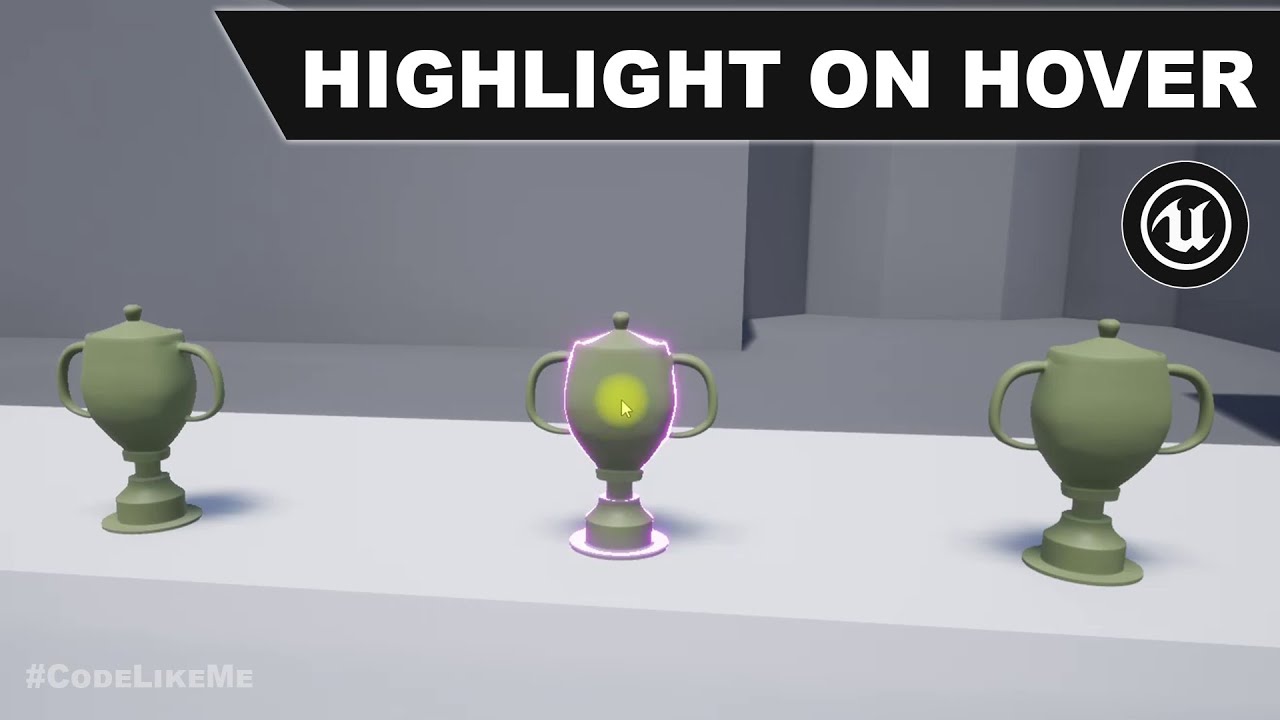
@royal kraken There are lots of tutorials on this online as it's a common request. I'd recommend googling something like "unreal engine outline on mouse over" or some such. You will find lots of videos like this https://www.youtube.com/watch?v=ctToub0bwrA
project Files : https://www.patreon.com/posts/35152293
This is a special request tutorial from one of the patrons.
The objective is to implement an item inspection system. as the first part, highlighting an object when hovering the mouse over it. So that the player would know that this object is interact-able.
support my work : https://www.pa...
royal kraken
Brilliant thisnis great thank you
summer bolt
sand shore
One would think, but the sort of person who doesn't read rules isn't going to
Yeah...
gusty shuttle
Is there a way to find out what's consuming my Gamepad Face Button Right or Bottom? Apparently it clicks a button on my widget but I haven't a clue how haha
sand shore
Is your focus UI and Game?
slate consumes those for ... things
I don't know the best way to disable that though.
gusty shuttle
Hummm, At this point it's UI. But still, somehow my Gamepad Face Button Bottom works but not the Gamepad Face Button Right
Aye, tis weird
It's set to UI only right meow
sand shore
Ah, yeah, that's like the default accept and back buttons
#slate will have people who can speak more accurately to that
 royal zealot
hello ppl, good evening 🖖 quick question ... is it possible to iterate thru every child actor component on an actor? (for each)
gusty shuttle
I'll dig around tomorrow, my brain is soup and I need a break anyways haha. Thanks for assisting @sand shore
 keen goblet
@royal zealot If you want the CA comp ref, you could call GetComponentsByClass(ChildActorComponent) on your actor. I think GetAllChildActors returns the actors themselves, if that's what you want
royal zealot
@keen goblet ty 👍
 obtuse ravine
Chads, help me out, pls. When I click import button in UE4, it shows explorer, freezes and crashes. Interestingly enough, it happens in one particular project only.
keen goblet
@obtuse ravine Have you checked the editor crash log?
keen goblet
Anything useful in there? The specific error, or what it was doing right before the crash?
obtuse ravine
well, I'll look through to give you specific error it shows
speaking of behaviour
like I said, I press Import, it shows Explorer, Explorer freezes, UE4 dies
ok, screw it, I'm crashin' my Unreal now
just save all and crash it

It kinda seems like I saw this error previous crashes
keen goblet
Haven't seen that behavior before. Best I can do is look at the logs and google stuff, but that's usually all ya need
obtuse ravine
Here's a punchline, all I've got is others complaining about crashing when IMPORTING fbx or any other file. I don't even get to choose what to import. Crash straight away.
royal zealot
not a real solution, but ... if it's only that one project, just create a "test" project, import stuff there, and then migrate to your main project?
obtuse ravine
huh... guess I'm givin' it a shot.
royal zealot
just make sure to keep the folder structure identical 😉
keen goblet
I noticed that too. Maybe try "UE4 import crash -fbx"? Or find some words to tune into people talking about a crash before they can actually do the importing
obtuse ravine
Found one. No solution tho
royal zealot
k, another question ... see if I can simplify this ... I have a BP actor (lets call it "builiding" that once dropped on level, checks a bool, if its new, randomizes, then sets bool to false ... regular construction script stuff ...
now, I have a new BP that has child actors, set to class "building" ... I was expecting them to randomize the first time dropped on the level, then remain the same ... but no ... seems that child actors get "refreshed" every interaction, even without touching anything on the construction script 😦
any help? 🙂
keen goblet
@royal zealot Child actors have really wonky interactions. Unsure what to do in this instance. Perhaps try re-architecting your system without them, or else see if some googling can find you the root cause
royal zealot
ty @keen goblet ... I've been googling, trust me 😄
 tardy hollow
how could I stop a moving object below my character from moving my character?
 hushed pewter
ik this is a really dumb question, but how do i make an object static but also collide with simulate physics.
sleek pecan
@royal zealot I would recommend setting breakpoints when that logic is called when you don't expect/want it to, and use the Call Stack to look at where it's coming from
royal zealot
@sleek pecan ty ... thing is ... this all happens in editor ... no gameplay events whatsoever
it's just literally, the child actor component resets all variables of the child actors
sleek pecan
Well, I would say you can move everything to Begin Play instead of having it in the constructor
or you might see if breakpoints activate while in the Editor in the Constructor, which they might. I don't know
royal zealot
the idea is for it to work in the editor only... all the randomizing and settings changes ... it's a "tool" to build up the level, so to speak. after its set and done it should remain the same. hopefully I'm making sense with the explanation 😅
sleek pecan
Well, you could wrap "randomize color" into its own custom event and make it usable in editor
then you'll have a little button you can click from within the editor
and once you have a color you like you can just let it alone
royal zealot
yep ... the BP actor that is the "basic" component does indeed have a couple of editor evens
and it works perfectly fine
the problem is, once I add these "element BPs" as child actors to the "parent" actor, this parent actor keeps resetting the children at every interaction
 obsidian meteor
hey gents, the 'Set Dynamic Resolution Enabled' still doesn't have any effect if the build version is for PC, right?
static charm
the docs say no right?
did u try building?
i actually dont know why they didnt include it in pc (if its not working in latest build)
obsidian meteor
I've built, haven't noticed dynamic resolution visually, but that's not very conclusive
there's a reason posted on the forum from like 2016
static charm
well you can actually implement your own dynamic res, but not as good as the built in
obsidian meteor
some particular advanced graphical fn relies on a consistent resolution I think
static charm
and when i say your own dynamic res, you would just be making some code that checks current frame/delta time and then changing resolution +/- based on that
it would be real cheap and crappy
obsidian meteor
I'm reading the documentation now. the word "PC" doesn't exist in the page, but all the appearances of 'console' refer to console commands
would it be crappy? wouldn't the concern be inefficiency/jankiness
I actually never used any console commands for dynamic resolution
static charm
Unreal Engine Forums
Hi, I heard that dynamic resolution is not possible on PC because it conflicts with distance fields? but this seems like an unlikely reason. So what's the real reason?
so the built in dynamic res seems its possible but not supported
obsidian meteor
I'm reading this too. I have playtested a built version with it on
never saw dynamic resolution (that I noticed) and did get hitches (presumably unrelated)
so you have to edit engine code to get dyna res?
static charm
i didn't fully read the forum post, but dynamic res is suppose to adjust when the frame rate is suffering
so if your frame rate is fine, then dynamic res is not going to kick in
obsidian meteor
from that thread, it seems like it's default unsupported and you need some pretty highend knowledge and workarounds to enact it
obsidian meteor
with a physics simulation, having consistent >60fps is huge
static charm
im gonna post a simple way to make a cheap dynamic res
static charm
like i said its a cheap method
not really useful for your purposes, but it is useful to auto adjust graphic settings

i was gonna make this for auto graphic settings/benchmark thingy
but this is the concept
map range would be changed out for more dynamic logic
and the delay node, could be adjusted
and this could also be Nativized to c++
actually testing it, it needs logic to stop adjusting once its sort of tuned in
lmao
but the concept works

 stuck hedge
Anyone know if UE4 registers controllers that are "asleep"? I'm doing a setup screen for local multiplayer and expecting it to be used in big picture mode on a TV which would likely include wireless controllers. For avatar select, after they select the number of players a screen comes up with 2-4 panels on it that allows each player with their own controller to set up their avatar. When that page comes up, the code has to set the focus for each user to their own panel. I'm just wondering what would happen if a controller was asleep when this page came up and then woken up by the user pushing a button. Would it still set the focus properly and simply wait for the controller to respond?
trim matrix
Hey im pretty new to ue4 how do i make it so you start out in a certain level because one of my levels is the main menu and i want my player to start on that
 floral carbon
@trim matrix Project Settings > Maps and modes > default map
trim matrix
floral carbon
<@456226577798135808> Project Settings > Maps and modes > default map
Thanks alot
 vapid ibex
TFW you are trying to make a custom UI navigation, because the native one have features that break your setup (such as the hardcoded Tab button overriding whatever action is assigned to the same button).
But I'm unsure that my approach to do that is entirely correct. Looks too messy. Any tips?

 grave relic
Anyone that can help me? I thought i solved the bug by making a second branch where i put in the return value from the linetacebychannel in. But i still get this bug

 tranquil tundra
that return value tells if there was a valid hit
if you continue from the false of the branch the hit will be invalid (or at least undetermined)
Just clear the link from that false branch
 eager peak
can anyone help? is there a way to replace a delay with a key press
for context i have a series of widgets that pop up after a delay but id prefer if people can proceed in the blueprint in their own time through pressing a key
instead of a delay
trim matrix
how do i make like a main menu but with a cutscene?
 tawny hedge
Can I set overlap with a static mesh component from an actor?
just by casting to that actor and getting the static mesh?
 knotty dirge
Is there a way to get the center of the mesh of a skeletalmeshcomponent ?
Getting the location didn't seem to work, for now my work around is making a socket location , but it's quite cumbersome to make a dozen sockets
trim matrix
Is it possible to use multiple graphs but have each one of they depend on beginplay? Having everything in a single graph is very messy but I need beginplay in the other graphs in order to refactor a bit.
 rapid robin
Hey @eager peak , yes you can. Create a key binding for an action in your project. Call it 'Proceed' or something. Then in your logic, rightclick and find Event Proceed. Plug that into your logic instead of where the delay went in.
Hey @trim matrix , yes you can. On the left hand side of your blueprint you'll see the + in the Graphs section. Your new graph will also have an Event BeginPlay https://prnt.sc/110oz47
 trim matrix
rapid robin
Hey <@456226577798135808> , yes you can. On the left hand side of your blueprint...
trim matrix
rapid robin
Hey <@456226577798135808> , yes you can. On the left hand side of your blueprint...
No it doesn't.
rapid robin
trim matrix
No it doesn't.
Right click in your new graph, and type "begin play"
trim matrix
rapid robin
Right click in your new graph, and type "begin play"
It just jumps to the one that's already there
in another graph
I might be able to use subgraphs tho
rapid robin
Strange, works for me here... One thing you could do is create a custom event in your new graph called NewGraphBeginPlay, and call that from the begin play of your original graph
rapid robin
4.25.3
trim matrix
Ok, I'm on 4.26, maybe they changed it
rapid robin
Yeah, maybe... Strange change haha - good luck man, hope the custom event thing works for you!
Now I'm here, I've needed to switch out some projectile weapons to use hitscan, but now I'm after some (temp) effects to simulate the projectiles. I think they're called traces, but I'm not finding anything much in my searches (even on the marketplace..). I'm sure this must be a pretty common thing to do. Anyone know what else they're called/where I can find some/link me to a tutorial on how to make some (I'm a pfx noob). Thanks in advance!
 gritty plover
Is the AddImpulse based on the relative vector or the world vector?
 eager peak
rapid robin
Hey <@!271695315072057354> , yes you can. Create a key binding for an action in ...
eager peak
rapid robin
Hey <@!271695315072057354> , yes you can. Create a key binding for an action in ...
how would that work in a context like this?

or have i not fully understood
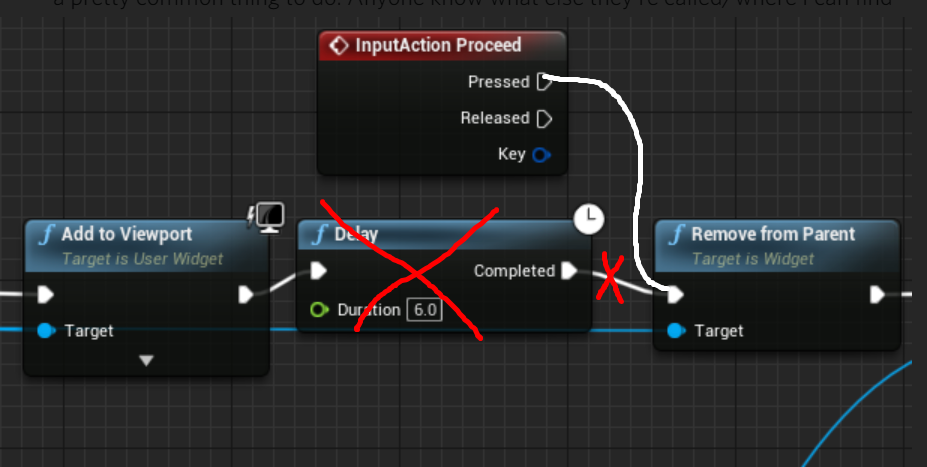 eager peak
that wouldnt work in the context of my game as its a series of widgets for a conversation

 solid grove
I would like to get started with very simple voxel world generation (minecraft style)
How does the geometry looks like
Are cubes rendered side by side or only the upper surface is rendered?
floral carbon
My unreal crash everytime i try to change the input "class" of the function "add component by class" in 4.26.1 is just me or ?
rapid robin
Hey @eager peak you could try something like this using some logic gates:

Kinda depends how many widgets you have to go through and how comfortable you are with (blueprint) logic
Actually you can have multiple inputactions, so it might not get too messy... Good luck!
floral carbon
I also can't remove .. so now i'm stuck with 2 brokens "add components" in my level bp
Anyone have a idea how i can remove then ?
spark steppe
why are you doing that in your level bp? Oo
floral carbon
idk just tried to call a add component
spark steppe
if you are lucky you'll find an autosave in your projects autosave folder of the affected bp
so you could overwrite your current broken one with the autosave
but like usual when doing something like this, a full backup of your project directory is recommended before
in case it makes things worse, you can go back to the backup
floral carbon
Okay i will try it thanks
In the worse case i have a version of my project on github
Which is less than an hour old
eager peak
rapid robin
Hey <@!271695315072057354> you could try something like this using some logic g...
Thanks ill give it a go later!
floral carbon
@spark steppe I just reset the rotation value and now i'm able to delete it
Really weird
 desert idol
Hi, new to this server and I apologize if theres a better channel to post this in.
I am brand new to blueprinting and I have an assignment to create a stealth level with ai given by my school. Does anybody have any good resources for a layout or any stealth mechanics? Thank you
rapid robin
Cool assignment! Does the base game exist already or are you starting from scratch? Either way I'd start with the basics if I were you, then figure out some little challenges in a test level. By the time you've done that you'll have a better idea for what works and what you'll want and the level will start coming together as you progress.
 crimson saffron
I have a very confusing issue, for some reason this bp works the first time, but second time it stops working


here's the error in question
the two things that confuse me are: why does it say there's none when the component is in the BP itself? and why does it only work once?
desert idol
rapid robin
Cool assignment! Does the base game exist already or are you starting from scrat...
I'm pretty much starting from scratch. I am able to follow along tutorials but I still dont understand the blueprinting. I've added a stamina system as well as moving platforms, doors, and simple things like that. The ai is not advanced. They will chase you if youre in sight and thats it.
rapid robin
Alright, sounds like a good start. Maybe you could have some light and dark areas, and the dudes won't spot you if you're in a dark area. But if you're in a light area AND you're spotted by a dude for [x] seconds, then they'll chase you.
desert idol
Thank you! I'll try that out :^)
trim matrix
I use play animation node in BP and it plays the animation, but how can I reset my character back to normal and not get stuck on that animation state? Montages are out of question in my case. ;/
rapid robin
@desert idol you could try making a blueprint with a spotlight in it and a trigger volume. So if the player is inside the volume they know they are in a light area (coz you'll set a boolean when you enter/exit it). If a badman 'spots' you, they can then do a quick check to see if you are in the light or not. If you aren't in the light, then they ignore you. If you are in the light then they'll go into chase mode. You can then add the timing thing in later if needed.
To clarify you'd then drag a bunch of these spotlight blueprints into your map. Good luck!
 languid lion
Hi, probably a dumb question
but if I'm using a ForEachLoopWithBreak
Does the completed execute fire if I break it?
earnest tangle
Yes
desert idol
Oooh that makes sense. Much appreciation!
earnest tangle
Break will just have the foreach skip iterating any further, otherwise it behaves the same
languid lion
Okay, thank you!
languid lion
earnest tangle
Break will just have the foreach skip iterating any further, otherwise it behave...
One more question, what happens if an array is empty and I run a ForEachLoopWithBreak?
earnest tangle
Same as with a regular foreach, it just immediately goes to completed
languid lion
Will array index give me a -1 or do I need to track it myself?
languid lion
Like when I try to find an item, and it's not found
obtuse herald
languid lion
Will array index give me a -1 or do I need to track it myself?
It wont fire the LoopBody as far as i know
languid lion
and if I were to remove an array entry during a ForEachLoop, would the next entry now get skipped?
earnest tangle
Yeah, the stuff you have in the body will never run with empty arrays
Removing stuff from the array during looping can lead to confusing results depending on what you're removing from it, if you remove the current item, it likely will skip the next one yes, because the next one becomes the current one, and then it will go forward for the next iteration
So if you need to iterate an array and remove from the array, make a copy of it and either iterate the copy, or remove from the copy
obtuse herald

 frozen spear
I iterate arrays making a second array of things im removing then remove those after i collected all the stuff im taking out personally
earnest tangle
Oh yeah that's also a good method :)
frozen spear
Just what i was here to talk about so good segway
Ive noticed a couple market place assets using array length - 1...as a means to get last index...instead of just using "last index"...is there some secret tech im missing? Changing it to "last index" seems to break thier assets(not naming names)...
earnest tangle
It might just be that length - 1 is the typical method of getting the last index of an array
languid lion
Yeah, I myself use length -1
earnest tangle
I'm not sure if I've even noticed there's a last index value that gives you the index :P
languid lion
good to know last index exists 😛
obtuse herald
earnest tangle
It might just be that length - 1 is the typical method of getting the last index...
^
frozen spear
I just can't wrap my head around when I update the code to use last index why it breaks this person's asset
earnest tangle
Yeah I mean assuming it returns the same as length - 1, it seems like it should work
frozen spear
It will return whatever the index is of the last valid entry in the array.
earnest tangle
hard to say then, would have to look at the specific code in question I guess 🤔
but at least it sounds like it shouldn't break things
frozen spear
Yeah its weird tech hes using in it...over all its a wonderful asset tho.
earnest tangle
int32 UKismetArrayLibrary::GenericArray_LastIndex(const void* TargetArray, const FArrayProperty* ArrayProp)
{
    if( TargetArray )
    {
        FScriptArrayHelper ArrayHelper(ArrayProp, TargetArray);

        return ArrayHelper.Num() - 1;
    }

    return INDEX_NONE;
}
last index -1 would be one value lower than get length -1, no?
earnest tangle
It looks like it literally returns length - 1 lol
languid lion
earnest tangle
It looks like it literally returns length - 1 lol
that's pretty interesting ^ ^
earnest tangle
yeah, just seems kinda weird that if you replace length - 1 with last index that it'd break something 🤔
only thing I can think of is that there's some other math being done with the numbers
 long schooner
Hey, is there a way to make the text smaller if it gets out of the box?
 tawdry surge
I'm trying to set up physics animations on my 3rd person character. For some reason he keeps falling to the floor, rolling around, and flying off into the sunset. I've been playing with it for over a day and the best I can get is, He'll fall to his knees and sorta wriggle around if i try to move him. Anyone have any ideas how to get him to stand up and run around like it's supposed to?
this is my bp setup

And viewport setup

he works fine in the physics editor window but not in the level
hollow cape
I believe local animation needs to be checked
tawdry surge
I've checked local. it just increases the issue
hollow cape
I recently found and resolved this issue and I'm racking my brain trying to remember what I did. what bone name are you using
I'm assuming pelvis
hollow cape
wait, when you simulate does it kinda rotate the whole body to the side and go down awkwardly?
Or is it constantly flipping/rolling around on the ground
ahhhh you're using convex hulls for physics
I had major issues with that
what I did is have a second phys asset for the skeletal mesh, and just before simulating physics, I switch the physics asset to a simple capsule physics asset
tawdry surge
yeah he rolls on the ground and flies off.
hollow cape
also make sure there's nothing with collision attached to the mesh (weapons, etc), and it's not colliding with the capsule
tawdry surge
no, it's just a base mannequin. So the shape of his collision has to be simple capsule.. wonder why that is
hollow cape
I believe the convex hulls are causing self-collision or something. I tweaked a bunch to make it work and just decided on switching physics assets directly before simulating physics.
frozen spear
Yeah its complex math, i sent you a pm cause i dont want to name and shame..it a great asset but just a certain part does some array magic that if you change any of it you need to just rewrite the whole function
tawdry surge
it's not really any better with the capsules.. I don't think it was colliding with it's self. cause it's collision reactions were good he's just not following the scrips. falls and gets blown away by magic wind
trim matrix
Hello guys I have question about thing that I want to make in my game, in my game when the player runs, he collect coins, and these coins when you die, you can check how many you have, but the thing is that when you are in the main menu I created button to show you how many coins you have before you start running, but there it doesn't show the coins

this is the code for the upgrades widget in the main menu
earnest tangle
If your menu and game are different levels, that's probably the problem. GameMode gets recreated between level loads
faint pasture
GameInstance is the class that persists between levels.
OR
just save it out and load it back in
Then it'd be consistent between sessions
trim matrix
earnest tangle
If your menu and game are different levels, that's probably the problem. GameMod...
they are on different names yeah
trim matrix
faint pasture
just save it out and load it back in
there is save and load system yeah
trim matrix
faint pasture
just save it out and load it back in
so you suggest in the code for upgrade system to load the saved collected coins?
YESSSSSSS
IT WORKS
I AM GOD
floral carbon
I think you can just store your coins in the game instance if is just for that
trim matrix
hmm
idk
I save it in game mode
there is the save system
I mean the code when the game starts, when the player starts running on the tile
 shrewd summit
so I'm trying to have an AI be able to be shot, basically it ragdolls when it dies, but I found out line trace bullets don't hit it unless the collision is "block all", how do I make it both be able to simulate physics and also be hit with traces?
got it
tawdry surge
@hollow cape I got it working.. had to re-size, position and rotate the capsules a bit, but he's standing up and running around now..
Shame the multi convex hulls don't work. They fit like a glove
 naive patrol
anyone have idea or tried to make Arrow-like range indicator? i made the circle indicator but i have no tip to make arrow like indicator
-Starting from character world location
-End with linetrace depends range value from Camera(Follow camera) scale it and rotating from character location.

i googled em but he/she didnt found about scale thing. also its from mouse. my one is from camera because of third person style

 stiff chasm
wait crap i posted my question in the wrong channel
well uh, my question is in #ue4-general
#ue4-general message here specifically
 agile hinge
I'm making a multiplayer game, should I put my inputs (ex: events for stuff like movement) in my PlayerController Class or in my Player Pawn Class?
dawn gazelle
agile hinge
I'm making a multiplayer game, should I put my inputs (ex: events for stuff like...
If your players are going to be controlling more than one class of pawn and those pawns may have different movement controls (think like a humanoid vs a car) then pawn is the place to put controls that are unique to the specific pawn. If you have inheritance set up, then perhaps you'd have a parent class of all pawns that your player may control and if so, that's where you would want to put any common controls that are shared between them, and if not, then in the player controller but then you'd have to feed the input into the controlled pawn. I've also been using the player controller for any input events for UI and the like.
 fast stag
Is the best way to toggle UI in a thirdperson game, so "UI only mode" then override OnKeyDown function on the focused UI, so that it can enable the toggle off press of the key?
I'm not getting really consistent results with it. Not sure if its a focus problem but it seems clunky
so this set up, as an example won't work because UI only mode locks the keyboard from inputing.
 fast stag
I figured out why that was inconsistent. I sometimes forgot to check, and make sure it cannot lose focus from clicking off the widget area.

still seems a bit clunky but it works
sleek pecan
Can anyone help me work out how to wrap an arbitrary blueprint function in a delegate callback? I want to be able to basically say "Once my character has reached their destination (something I already detect) call function X" with the ability to clear that callback depending on future input
summer bolt
dawn gazelle
Here's what I did when I need multiple buttons...
Create a widget that contains ...
rereading this i dont get it
dawn gazelle
Which part? 😄
summer bolt
dawn gazelle
Which part? 😄
its the thing about passing variables nstuff
Would some screenies be possible?
dawn gazelle
Ok, so here I've created a widget that is specifically just a button... I handle sizing of it within the widget it will be placed in.

The button has a few "expose on spawn" variables set and there's a few things done when it's constructed. You'll see it calls the event dispatcher when clicked, feeding in some data that would've been passed into it when created.

Then in the main widget when i want that particular button to show up, I actually create the widget instead and bind an event to the event dispatcher within the button. The extra arrays and map there are just for my own systems as I do some sorting later.

When I want to add the buttons to the layout I just loop through the relevant array and add them to a vertical box.

The event that the bind sets off will contain the data about the button that was pressed, allowing me to pass the data from the button to whatever i need it to do.
 summer bolt
uhh im sorry i dont really understand
dawn gazelle
So now I have three buttons that are generated like this, and I can do different things with them based on which button is clicked.
 summer bolt
Would it be ok if you could uipload the bps to that bp site or wahetevr
that one https://blueprintue.com/
BlueprintUE
BlueprintUE.com is a tool for sharing, rendering and rating blueprints for Unreal Engine 4. UE4 is a game engine which use visual scripting called blueprint.
summer bolt
dawn gazelle
Ok, so here I've created a widget that is specifically just a button... I handle...
so this is a secondry widget
dawn gazelle
Sorry can't do that and it'd be far more confusing as there's a bunch I'm not showing that's not relevant.
Step 1: Create a widget BP that contains only a button and the label for said button. Add "exposed on spawn" variables used to identify and label the button. Create an event dispatcher in the button's widget that feeds through the identifying values.
Step 2: In your "main widget" where you'd want these dynamic buttons to exist, you create them by a loop or by whatever logic you want to use, but you use the Create Widget node. When you specify the button's widget class, you'll see the expose on spawn variables - you feed in the values that the button should have, again, you define where the data comes from, whether it's a table or an array of values, that's up to you and the logic you need to use. Upon creation they can be directly added to a vertical box or any other widget component that exists on your "main widget". Using the reference from the creation of the button, also create a bind to the event dispatcher within the button.
Step 3: The event that is created from the bind is where you continue with your logic for when the button is pressed, and using the data that is passed from the button in the event dispatcher, you can determine what to do next.
summer bolt
Add "exposed on spawn" variables used to identify and label the button. Create an event dispatcher in the button's widget that feeds through the identifying values. this part i dont get
dawn gazelle
 summer bolt
but what variables
dawn gazelle
That's up to you. However you wish to identify them or whatever values you need to pass through to label or otherwise customize the button widget. So in my case...
These are all my exposed variables.

and you can see them when creating the widget:

I'm using an enumerator for button type that mainly drives it.

So depending on the button type, it'll do something different, but then IDs are used to pass additional information through (like Mission1 is different from Mission2, but I can use "MissionStart" button type to indicate I have a mission to start, and I can have two buttons that are "MissionStart" buttons, both that can start a mission, but one is for Mission1 the other Mission2)
summer bolt
yeah im still not understanding
i think the tedious option is the way
thanks for trying to help
dawn gazelle
We can still work this out. What do you not understand?
What I'm trying to show you is a way of dynamically creating multiple buttons that you don't have to necessarily create an event for each button press, which is sort of what you were asking for but with on commit events if I recall correctly.
In order to do something like this though, you still need some way of identifying which button was pressed or which text box was committed.
 fallen glade
does anyone know if it's possible to "get closest spline point" from radius at specific world location?
earnest tangle
you mean get a spline point which is within a certain radius of some location, and if it isn't, then nothing?
fallen glade
earnest tangle
you mean get a spline point which is within a certain radius of some location, a...
yeah
earnest tangle
I guess you could just do a regular get closest spline point and then check whether the given point is within your radius
summer bolt
dawn gazelle
What I'm trying to show you is a way of dynamically creating multiple buttons th...
so making buttons in the editor but not the actual bp itslef kinda
fallen glade
earnest tangle
I guess you could just do a regular get closest spline point and then check whet...
well, I need to find that point haha
earnest tangle
Then I'm not entirely sure if I understood what you're trying to do lol
dawn gazelle
summer bolt
just the whole concept in general
Yes. You create a separate widget blueprint specifically that's only a button (or a text box if you like)
summer bolt
dawn gazelle
Yes. You create a separate widget blueprint specifically that's only a button (...
👍 alright i get that but the rest of it is confusin me
 little hornet
new to blueprinting, how would i make it so player is constantly taking damage within a zone ?
shrewd summit
this problem is extremely minor but extremely annoying, I can't open up anything as it opens in an incredibly small window which I cannot find anywhere on my screen to maximise or make it bigger
 shrewd summit
little hornet
new to blueprinting, how would i make it so player is constantly taking damage w...
shrewd summit
little hornet
new to blueprinting, how would i make it so player is constantly taking damage w...
I recommend a box collision around the zone and when the player is in the box collision you lose health
fallen glade
earnest tangle
Then I'm not entirely sure if I understood what you're trying to do lol
is this better ?
 little hornet
shrewd summit
I recommend a box collision around the zone and when the player is in the box co...
little hornet
shrewd summit
I recommend a box collision around the zone and when the player is in the box co...
thanks, i know to use box collison but as for the blue print itself how do i make it take damage over time ?
shrewd summit
little hornet
thanks, i know to use box collison but as for the blue print itself how do i mak...
store health as a variable as either float or integer and do a integer - integer or float - float and then do the amount of health you want to be gone
dawn gazelle
summer bolt
👍 alright i get that but the rest of it is confusin me
Here's an example of a very basic setup.
I have an array of name variables named "Button Names".
I can loop through the button names, create a button for each of the names, add the button that's being created to a vertical box, and bind to the event dispatcher in each button. I then get an event in my "main" widget that you're seeing here where I can control what happens when I click the button.

The ID is passed to the button when it is created, and the button when clicked, passes the ID back throguh the event dispatcher, allowing me to determine which button is pressed.
summer bolt
so ima copy this just to get the hang of how it works
dawn gazelle
The button widget itself is very simple. Just updating the name on the button on construct, and making the button press call its event dispatcher and sending back the values that were passed in on creation.

(i have a function there for the update button text, but I think you know the settext node 😉 )
dawn gazelle
Create Widget
dawn gazelle
Have you created a widget that is only a button that has variables in it to identify itself?
(Should be separate from the one you're looking at now)
little hornet
how would i make this constantly do damage when player is in zoone ?
 dawn gazelle
summer bolt
i dont get how to identifty
dawn gazelle
summer bolt
i dont get how to identifty
Did you create variables in the button at all?
dawn gazelle
Yes, you need to create some identifying variables within the button. In the example I gave you, you can get away with just a "Name" type variable and call it "ID". Set it to "Expose on Spawn" and "Instance Editable"
summer bolt
k
little hornet
datura, do you maybe know how to do what i ask if you do, could you please help
dawn gazelle
little hornet
how would i make this constantly do damage when player is in zoone ?
You can set a looping timer by event, and then set the timer invalid on end overlap.
little hornet
oh ok, thanks :))
little hornet
dawn gazelle
You can set a looping timer by event, and then set the timer invalid on end over...
somthing like this
 summer bolt
@dawn gazelle sorry gtg rn
dawn gazelle
little hornet
somthing like this
Will only work single player.
 hushed pewter
Alright so, ive got a thing drawn out using arrays and i need the ball too bounce off the walls/pegs. I tried using simulate physics and after resetting the squares too the default scene root they just snap back too the center completely fucking up my level.
Is there an alternate way for me too get the ball too bounce and collide with these (Ive tried using get velocity * -0.8 but the velcity is still positive when facing right)


Is there something i can do or do i need too tear it down and retry making ti with a square default scene root
little hornet
dawn gazelle
Will only work single player.
ok, thanks alot
 hollow zephyr
Does anyone know how to do a radial mask?
I'm trying to do a hexagonal progress bar, and a friend who uses unity suggested trying a radial mask
earnest tangle
fallen glade
is this better ?
There might be some better solution to this, but something that could work is if you find the last spline point that's inside the sphere, and then the next spline point that's no longer inside it. You could then plot points using a binary search algo between those two points, until you're happy with the result
ie. something like this where the circles are the points you find, then you plot in their midpoint at 1, then since 1 is inside the sphere, you plot at midpoint between 1 and the outer point, you get 2, which is then outside the radius, so you plot between 1 and 2 for the next one

I'd imagine there could be some mathy way of determining it too but I don't know enough math for that lol
 coarse lagoon
I need some help trying to get a reference to a variable from one blueprint to another. Essentially I have a main menu UI widget bp that creates the other tabs of my UI and sets their visibility to be hidden. Whenever the user clicks a button to go to one of those tabs it sets the main menu UI to be hidden and the corresponding UI to be visible now. My issue is that when I want to hit a back button to go to the previous tab, I don't know how to reference the different widgets created within my main menu UI widget. I set them all in variables of user widget object references currently in my main menu UI widget.
 fast blaze
hi all looking for help. i have a section loop in anim montage, after user push another button I need to play other section from that montage, but only after the current loop is in end frame. i putted notify in the last frame in loop animation, but can't figure out what i can do from it. thx!
 tall field
Is there a equivalent of Actor::PostNetInit but for blueprints?
 split ginkgo
idk if this is the correct channel, but I have a weird issue with some UI. I have a Widget with an Image element and I made a function that runs on MouseButtonDown on the image. The issue is that the function I made destroys the widget and causes my player blueprint to detect a click which I don't want. I can get a video of it happening if you need that
 narrow kelp
@split ginkgo maybe you need to set the return value to "Handled"?
split ginkgo
narrow kelp
<@!222189653795667968> maybe you need to set the return value to "Handled"?
If you mean like this, I already tried that

 worthy frost
why all the different blueprints
for different colors? that is pretty bad design
you could just set a material param to change the color, and use one blueprint.
same for male and female skeletons
that can be decided also with a single bp
 upbeat otter
 astral fiber
Does anyone know what the last property in this node does?
I thought it will calculate the tangent itself so the spline points are connected in a curvey way, but nothing changes?

Has anyone of you ever achieved a curved spline with blueprints?
worthy frost
it will only curve if your tangents are setup iirc
 leaden dock
does anybody know if mesh sections in procedural mesh produce their own physics mesh?
like if i have 16 mesh sections in a proc mesh, does it have 16 mesh colliders?
(which would be better performance wise cause it can do a simple bounds check before calculating collision)
spark steppe
the day they gonna fix editing structs without resulting in a crash will be the best day of my life for the last 2 years... xD
 burnt trench
I found a bug in Unreal 4.26 which causes it to crash everytime
Not sure if its intended to crash or not
I have a Map variable with a enum and a struct as key and values
I populate it in the blueprint
and then change the struct (add or remove a value)
and try to recompile
it crashes
is that normal and should that happen?
spark steppe
well, i guess no crash is intended
leaden dock
i know how to crash the engine too 😄 disable realtime, enable show fps, then disable realtime override, then enable realtime and then disable show fps, and then it crashes 😄
@burnt trench is the struct that is the map key custom ?
like is it a fvector or so or a struct you made yourself?
oh you used an enum as the key, lol sorry, but thats really weird
usually the key needs to have some type of hash function, at least in unity
so e.g. a struct with 3 floats generates a hash based on those floats and then the map uses the hash as the key
and it looks through the hashes
so every struct that's a key needs a hash function
to provide a unique hash per value set
burnt trench
Crashing Unreal is a breeze. Just make something null in code without handling it. Works every time haha
Map makes the keys unique
does that answer the hash part?
leaden dock
a map only checks the hashes and sees if it exists already
it cant magically just hash something
burnt trench
did I mention this is in blueprint
leaden dock
just saying, enums dont have functions, so probably an enum cant be used as a key
you could make a struct holding an enum and using it as the key though (maybe, didnt try)
burnt trench
Well this is the variable I have

It works. Just doesn't like it when I change a property of the struct
leaden dock
hm
burnt trench
I researched a bit online
and apparently, this has been cause of crashes since 4.6 or something
that's insane. 20 major engine versions and they didn't fix this?
leaden dock
hm in c++ it'd probably be better to store a pointer to the struct so the map doesn't change, only the struct itself
changing the struct would need to change the whole map
well just a guess
 night wolf
Hey I work with BPs and don’t know how to do procedural animations, anyone have tips?
I want to make like a 3 legged walking thing
And I think that asset would be from blender prob
 spark steppe
it's a luck game, and depends on where/how you access the struct
i think its either related to the break struct node or if you have a node where the struct is used and set that pin to split output
leaden dock
even with an enum
spark steppe
but thats just a wild guess from my observation 😛
leaden dock
well, it might not be a bug, maybe it's just something that has to crash cause it's not used right
spark steppe
nothing should crash
and if it's not used right, it shouldn't be possible to use it that way
 dawn gazelle
vector + vector?
spark steppe
 smoky belfry
Yea, I guess ill just break vector then haha
smoky belfry
Yea, I guess ill just break vector then haha
you can rightclick the output and select "split output" if thats what you are looking for
 queen urchin
Hey, guys. Can I call a function by its name? (single settimer can be a workaround but Im looking for smarter way)
 left niche
queen urchin
Hey, guys. Can I call a function by its name? (single settimer can be a workarou...
left niche
queen urchin
Hey, guys. Can I call a function by its name? (single settimer can be a workarou...
You can call it directly.
queen urchin
Wdym?
spark steppe
a smart way would be to not make such calls on stuff that may not exist
it sounds like an XY problem, theres probably a better solution like interfaces
 crude hornet
anyone know how i can delay player start? I have a procedurally generated level and I want the player to spawn in after it is loaded
 turbid shard
Hello, I am working on my npcs so they can sit on a bench / chair. I have different positions for them to sit so they can choose one and move to that position. When they are close I just set the actor location and rotation to that position to get the perfect location. If I don't do that they can't get in top of the bench because collisions and they never reach the perfect point on the bench. Is there a way to do it without having to "teleport" them when they are close? What collisions should I disable and how should the behaviour be? Thanks
languid lion
Anyone has experience with splines? Trying to generate some pipes using it
But I end up with this weird twisting sometimes:

 hard mountain
Why when a player joins the session every vars from server gamemode/game instance sets to none?
wise swan
is it possible to return values after calling an event in event graph?
trim matrix
anyone here expert in collisions?
fallen glade
earnest tangle
There might be some better solution to this, but something that could work is if...
very smart, thank you !
languid lion
Still don't know what's causing this

but apparently only happens when the spline moves on Z and X axis
X and Y and Z and Y cause no problems
 slender hawk
I've got a widget component attached to an actor, and it has WBP selected - which shows up in the game fine.
In the actor BP, how do I listen to events dispatched by the attached widget?
It says the attached widget object is not compatible with the WBP object, so I can't bind to it.
Edit*
Ok found the solution, I needed to get the User Widget. Derp.
 twilit scarab
Basically I wanna use a map for a level that comes with the jungle asset pack but when it loads after being triggered from the previous map it loads the default jungle map and not the one I have modified. Although I did duplicate the default map but I gave them different names and the open level node is set to the right name. Anyone know what's causing this. I would appreciate any help as of right now I am well and truly stuck. =/
Can anyone help?
Someone have mercy on me? 🙂
 onyx palm
to do something like this in 3ds max I have the object go along a spline using a deform modifier.... any Idea how I could get this working in unreal without using the animation from Max?
 tropic frost
wtf am i doing wrong here+
 spark steppe
you have to cast it to your savegame object class first
the output of load save is a generic save game object
trim matrix
Does anyone have a tutorial to switch azerty to querty keys for Axis Mapping ?
tropic frost
spark steppe
the output of load save is a generic save game object
so you mean like that?
 spark steppe
yes
tropic frost
aight thanks ill try that 🙂
trim matrix
I saw the Set Members in Input Axis Mapping node.
How do I change keys of Axis Mapping in a Blueprint ?

Tried this but it sucks I'm sure. :/
 tawny jackal
My game supports a few different in game views for different functional purposes, building vs fighting vs spectating. I want to define an enum that keeps track of the players current state and fire off any events that need to occur to support that. Is there a good place to keep that sort of centralized state? Would PlayersState be good for that?
spark steppe
i would go for the playercontroller or game instance
first specially if its multiplayer
obtuse herald
Yeah, player controller is good
left niche
languid lion
Still don't know what's causing this
Share your code
tranquil tundra
Is there any way to make a dynamic EQ for an audio source that can be realtime adjusted and I don't need to touch code? Even a low and a high pass filter would be fine, but couldn't find anything. (or if you know a way to modify effect chain parameters)
spark steppe
i think that should work with audio bus
astral fiber
Is the Spline point index zero based?
 earnest tangle
Yes, indexes in general are unless hovering over it states otherwise
trim matrix
Hello guys, I want to make system, with item to get a water and put it in destilator to destilate it, but i have not idea how I can do it, any ideas?
earnest tangle
There's quite a lot of ways to go about that depending on how you want it to work - but one simple way to do it could be to have a "bucket" item, which has a boolean "has water". Then you can use the bucket on your machine, which checks if the "has water" is set and then does something
trim matrix
yeah okay
but how I can grab this water? or how to detect there is a water? @earnest tangle
 dry blaze
Does anyone know how you can make it so the game window can be scaled but not smaller than a certain resolution?
Because right now my cursor just disappears when it goes near the game window, I want to make it so you have to click and then your cursor disappears
Please people help I will appreciate you a lot
tranquil tundra
spark steppe
i think that should work with audio bus
how do you mean?
trim matrix
Is there a way to get an event to fire if a blueprint variable changes?
dry blaze
Check in tick to see if variable has changed and if so call event
tropic frost
Well, i have some issues, it doesnt load the character after closed
can someone tell me what im doing wrong?
 dusk timber
Hi! I'm looking for a better way to get a material as a material instance. This does not feel like a good thing to do
 earnest tangle
I don't think you can really do much else than that
It depends on what you're trying to do with it I guess
trim matrix
hey why my moving projectiles sound attenuation is not working? only works if im close to the spawn of them
twilit scarab
When the player dies how do I get the player to respawn from player start? THX! 🙂
desert idol
I have an invisibility material and pawn sensing ai that chases you when youre in sight. How do I set the material to toggle on and off so it doesnt chase when activated?
 fair frigate
Is it possible to dynamically set a variable inside a function?
i have this branching statement at the end of a timeline, that resets similar variables for 6 different components, instead of having this repeated 6 times, can i somehow get it into a function?

i tried using pass by reference, to "set" a passed through boolean, but it will only let me hardcode "set", there's no dynamic option
 regal wraith
Hey folks, I've added cast to weapon base in player anim bp, but i don't know what to put in object, i did this just to add a variable from weapon base
 exotic light
not sure what happened, i set the enemy to follow the character with an AI Move To node and set the target actor to Get Player Character, but all the enemy does is run too the center of the map and he wont follow
obtuse herald
Try get player pawn
 weak gulch
Hi everyone, I have a math question I'm trying to figure out. I have a system in place to score the player's drifting that works great. But I want to save a snapshot of their amount, when they stop drifting, to a total score pool. And then I want to be able to add to that pool when they drift again. Current drifting score is calculated on tick as I need to be able to get player movement and angle to calculate the score properly.
The problem: I can't seem to figure out how to save the score properly. I need to be able to keep adding to the total pool and right now all I can do is track them.
Picture is how I have it setup, with the red circle being where the math I'm looking for probably goes.


 azure knot
@exotic light likme @obtuse herald says try get player pawn, get player character is possibly returning the non moving controller or the point in the world in which the player spawned.
 tropic storm
Hey guys I’m a beginner in unreal, can someone help me figure out how to give enemies random health each time the game starts?
I have the health variable connected to the enemy I just don’t know how to randomize it
exotic light
kk i'll try that out @obtuse herald and @azure knot thanks
azure knot
@tropic storm could you just set the health variable on beginplay? I can't think of the name of the node off the top of my head but there is probably a float random in range node that lets you set a min and max and returns a random number within that range and you could just set the health float variable with that return.
tropic storm
azure knot
<@480863775973441547> could you just set the health variable on beginplay? I can...
Awesome, I think you might be right I’ll look for it
azure knot
Does anyone know of a good tutorial for setting up a TPS character with 8D strafe movement? (specifically the best way for hooking up the blendspace to get the input vectors)
tawdry surge
@azure knothttps://m.youtube.com/watch?v=U0Pn3MdhF7I

Project Files : https://www.patreon.com/posts/44440750
In this episode of my unreal engine third person shooter series, I decided to revamp the locomotion system with a new 8 way locomotion animations to improve the look and feel of the movements. There are 23 animations in the 8 way walk-run-sprint 2D blendspace and 9 animations in 8 way crou...
azure knot
awesome, thank you @tawdry surge I'll check this out!
 prime snow
Hmm, does anyone how to make editor-only components visible only when its actor is selected, for control points and stuff like that. Is it possible?
 uncut raft
So this is where everyone hangs out 😮
keen goblet
@weak gulch So you know the score the player is getting from currently drifting, and you have a var that you want to store the total score the player has gotten from all drifts.
Seems like all you have to do is TotalDriftScore += CurrentDriftScore when the player stops drifting, so that the CurrentDriftScore you use is the total score from the drift that just ended
 edgy mirage
Is there a way to get average frametime from the context of a BPL? I'm trying to expose some stats to Remote Control and the only solutions I'm finding are all dependent on hacky solutions using deltatime and an actor or widget, and I'd rather avoid that sort of solution. Plus, I'm not even sure that would play nice with RC.
 tight schooner
BPL = function/macro library? I don't think those can hold nonlocal variables and you need that to have a running average. You could put the function there but some object would have to hold a variable that your library function works on, so maybe put it in Game Mode or some other manager class. I can't comment on Remote Control unfortunately...
 winter kettle
if I have a widget component, how do I get the actor that owns the widget component from the widget's blueprint?
edgy mirage
Yeah, BPL is a function lib. I was hoping the functionality was built in somewhere, since Unreal obviously has the ability to calculate frametime for its normal perf stats. Ah well.
earnest tangle
winter kettle
if I have a widget component, how do I get the actor that owns the widget compon...
I don't think widgets have this information. The way I usually do this if it's needed is assign it into a variable in the widget, or have the widget send events and listen to those events in the parent to do things
winter kettle
earnest tangle
I don't think widgets have this information. The way I usually do this if it's n...
Alright thanks, I'll just pass the owner to the widget then
 ornate cairn
is it possible to "comment out" parts of a bp
earnest tangle
you'd have to disconnect the exec lines
winter kettle
earnest tangle
I don't think widgets have this information. The way I usually do this if it's n...
to get the user widget I just do UWidgetComponent::GetUserWidgetObject right?
earnest tangle
Yeah
tight schooner
ornate cairn
tysm
earnest tangle
ohhh interesting 🤔 didn't even know that was a feature since it's disabled in the editor
wonder why
ornate cairn
I have a question about pickup systems. Ive been trying to make a object pickup system for a while now, but it turns out its harder than i thought. My goal is to make something like the pickup system in Superliminal, but without the objects changing size. I have had many problems in the process though, and Id like to know if anybody has made one before and could help me.
earnest tangle
I'm sure a lot of people have made pickups, what's the problem?
twilit scarab
I have slo mo ability in my game which is controlled by a component. How do I get it so you can only use it for 30 seconds and then there is a 30 sec cool off period?
twilit scarab
okay m8 will do! What's ya reckon watch a timer vid?
steady orbit
Are you asking what video?
twilit scarab
yeah it does matter m8 I'll go watch
steady orbit
@twilit scarab I recommend this video and also all his other videos...
https://www.youtube.com/watch?v=qc5WpNq7RFg&t=0s

What are the Set Timer by Function and Event Name Nodes in Unreal Engine 4
Source Files: https://github.com/MWadstein/wtf-hdi-files
twilit scarab
Thx man! +)
@steady orbit I don't know whereabouts I would set the timer as my slo mo is component based?
steady orbit
I would help you through a call but i gotta go to work
 rugged trellis
Im trying to set some variables based on mouse and gamepad movement. Im using the thirdperson template and grabbing the axis values. It works great from the mouse input but doesn't work at all when taking the gamepad input. I can see its outputting values though.What Im trying to do is create a mouse pointer inside a bounding box.
rugged trellis
OK found the problem mouse axis is a tick event causing the values to be set to 0 when using the controller.
runic parrot
Hi guys! anyone have any idea on how to destroy an Uobject from Blueprints?
i know that it's by removing the references and waiting for gc, but is there any way to force this? maybe some node to remove all references to some Uobject? go into all the references is just too much of a trouble in this case
twilit heath
from c++ you'd call MarkPendingKill
not sure if thats exposed
also having too many hard references to an object to track them all doesn't sound like the best plan
best to assemble clear, clean object graph
where you know which object is responsible for managing the lifetimes of other objects
runic parrot
i just added a method "Destroy" and goes back and tracks all the references :/
twilit heath
which is really bad
 neon sorrel
Anyone know why my widget for some reason is being invisible after re-spawning my character? Theyre all in one hud class and all the other widgets show up properly, just this one works the first time but is invisible the rest. Been looking up forum posts for a while but cant find anything
runic parrot
do you change visibility at any point?
neon sorrel
Yep, did some debugging and got the visibility and it returns visible when toggled, sets the mouse as its supposed to, but the widget itself is invisible still.
runic parrot
would have to look at your blueprint to check further, maybe you are missing some visibility change you made by some condition
also, i'm having some troubles with Uobjects interacting with others.
The short version is My Ubojects class have "Hp" and every X seconds, they reach to others Uobjects and transfer 1 hp from the other to themself.
The problem is they are firing at the same time and one extracts 1 hp, adds it to him and the other one tries to extract from that same Uobject that is not updated still, so both get 1 hp from the same Uboject, but the later one only losses 1 hp.
 zealous moth
let's try this again
can anyone run this on their MAC?

I copied the nodes like a moron
 tiny drum
Im new here
can i ask help on this channel?
I want to make my sphere trace hit my enemy only once,
I dont know how, i tried experimenting with do once or array
 hybrid lodge
Hello devs, I have a question, I am not sure how to achieve the result I want, Basically as you can see the the phone is more on the left side of the screen (light source is attached to the GPS device) light is following the attached object, how can I make that the light is always gets centered, no matter the phone position?
 queen urchin
Guys, can I attach actorToActor and keep first actor's rotation independent? Like attach only by location (Answer: I decided to add another root component that will handle location and not the rotation. Then made next component to be in "Absolute rotation" mode)
 twilit anvil
Could anyone point me a general probable cause of packaged game freezing upon open level?
I have a game which has two levels - menu level and game level (this one is quite big, with some level streaming involved). Game 100% times works on launching and loading game level from menu. But after playing some time, when i open in-game menus and try to return to main menu (basically open level node call) the game freezes infinitely very often - it looks like it depends on pc, some people have it more often. The logs just end on calling open level node and thats it - no error, nothing.
Anyone could point me any direction i should investigate? I am stuck on this without hope at the moment.
Maybe i should do a cleanup before calling open level node? Destroy npcs in world, unload some streaming levels? Maybe the game has issues with amount of content loaded when i try to switch levels?
 uncut lark
So I put together a weapons system, but all of the logic is in the Third Persons blueprint. Is that considered okay?
 charred breach
Hello I just pasted one folder with a lot of folders in it in my Project Content. In the File Explorer it shows a lot of .uasset files, but no one of them is imported into the editor. It just don't shows 😦 Any fixes?
dark crow
charred breach
Hello I just pasted one folder with a lot of folders in it in my Project Content...
Migrating them is your safest bet, i would not do it with copy and paste, sounds like a lot of broken references to me like that no matter what
Where did you get them from?
dark crow
Problem with .uasset files is that they have to match UE4 versions
So if the files for example are 4.24 and you try to use them in 4.26 it won't read them
This is why usually you wanna Migrate or Export / Import
 shadow saddle
anyone know how to let ur input from user input textbox become ****
the password
many dots
queen urchin
shadow saddle
anyone know how to let ur input from user input textbox become ****
There was an option in textbox settings named "password". Just search for it
 sonic pine
Hiho i try to create an Inventory System for non Stackable items it is sill working but the Stacks will not work...
I have 5 Bushes to grind 5x Blueberry the first 3 Bushes will give me 1 Berry and Bush 4+5 will not give me Berrys (its all the same Bushes).
My stack maximum stacksize is 4 for testing it.
The 3 Berrys are in the Inventory but not stacked

If im changing the Berry to not stackable, i have all 5 Berrys in the inventory...

I think the mistake is in the "Addto Stack" function but i will not get any errors or warnings. Also the logic should be ok, i think. Maybe someone know the mistake or can help me to fix it?
Im also stuggeling by the way to create the stacking BP at first i have splited allparameters like that

But now i have found this way. Whats the better way? or is one of this ways the mistake?

 wild crater
If I want to replace my character with another one (different mesh and some scaling), is there a way I can do this without breaking all the references to the character?
I could just change the mesh component, but then I would have to manually set the scales etc. correctly.
 grim shard
does anyone know how to get it so that once its played the sequence it starts the level
cause i got it so that is plays the sequence once you press play but i also need it so that once it finishes it opens up a different level
sonic pine
@wild crater You should work with Parent->Child so you have the basic settings like references and so on of the Parent an can change the mesh with the same settings like the parent.
wild crater
sonic pine
<@!186851588449632257> You should work with Parent->Child so you have the basic ...
Yea i have it this way, but on other classes I store references to the character so I don't have to get it from the controller all the time. Those are now broken
sonic pine
So they have his own controller or do you want to work without controller?
sonic pine
hm okay..
wild crater
but things like the HUD who have a variable referencing that character are now referencing the other char
We've implemented a funny char switch for fun, this was not something we were planning on doing so the system wasn't built for it. So I'll just swap out the meshes
sonic pine
ok thats what i mean, you can cast the hud/main widget to your parent class char and every child should earn this hud. The differnet settings like Healer = 300 Health 500 mana and warrior = 500 Health 300 mana yan be changed in the child BP but the HUD to show the Health bar, inventory and so on is earned by the parentclass
wild crater
I don't think we're talking about the same problem here, but no matter I got a crappy solution
languid lion
Hi, I have moments where I stop the player from controlling the camera/player character
like when you interact with an object
The problem I'm facing is that when I give control back to them, the camera immediately snaps to current controller rotation yaw
is there a way to update that or make the rotation smoother?
obtuse herald
Use this node

You need to update the rotation on every tick tho. So use a gate or a Timeline
languid lion
No but, what am I supposed to rotate there
obtuse herald
The control rotation of the player controller
 icy saddle
is there a way to simulate pressing and holding down a keyboard key (like the spacebar) in Blueprint?
earnest tangle
Yes, just run the logic you would run from pressing spacebar from whatever code you want
languid lion
obtuse herald
The control rotation of the player controller
Thanks a lot!
icy saddle
earnest tangle
Yes, just run the logic you would run from pressing spacebar from whatever code ...
thanks, however, I need to test that the inputs are actually working as expected. Part of the test is just checking if input logic works and part of the test is what happens after the input triggers something. Any ideas?
earnest tangle
ah, this is for automated tests?
icy saddle
earnest tangle
ah, this is for automated tests?
yes, im making automated tests for player movement mechanics
trim matrix
Hello guys I follow the tutorial for crafting syetem but I have problem, when I get my item, and open my craft menu, I don't see the texture of the item that I got
https://www.youtube.com/watch?v=QGdXOcz8lrU
Also about this widget

In this series we go through how to create a crafting system where you can collect resources and spend them to craft useful items.
Download the project files here: https://www.patreon.com/posts/project-files-32789634
Part 3 goes through how to pick up items off the floor and add them to your inventory we made in the previous episode.
Support ...

it doesn't work the scrolling
when I open it, I can't scroll to the other categories, how I can fix it? thank you in avance
obtuse herald
OpenLevel is enough
fallen glade
any way to do an asynchronous loop ?
earnest tangle
yes, although how depends kinda on what exactly you're looking to do
 stark canopy
Hey, I have a question. I'm trying to make voice chat using the SteamCore plugin, and I don't know how to reproduce a byte array recorded by a microphone as sound in game :D
Can someone suggest something?
fallen glade
earnest tangle
yes, although how depends kinda on what exactly you're looking to do
just this without staggering the game

I mean a while loop
earnest tangle
You must be doing quite a lot of work in the loop for it to cause the game to lag
The typical solution is to just spread the work across multiple frames or such - you can do this by refactoring the logic so that it can work on tick or from a timer
fallen glade
earnest tangle
The typical solution is to just spread the work across multiple frames or such -...
what do you mean? do this x times on first tick, keep going on second etc?
earnest tangle
Yeah, say you want to do 10 things, you'd just have a counter or something keeping track of how many things you've done, and then you just do some number of them on each tick until you reach the limit
obtuse herald
Or just create your own WhileLoop Macro with a delay node in it
fallen glade
earnest tangle
Yeah, say you want to do 10 things, you'd just have a counter or something keepi...
so no way to do it automatically based on frame time left ?
earnest tangle
You could attempt to calculate it manually based on deltaTime or such and the time spent so far or something but not really sure if there's any builtins that would simplify the process
fallen glade
earnest tangle
You could attempt to calculate it manually based on deltaTime or such and the ti...
ok cool it was just to know, thank you!
earnest tangle
what are you doing anyway that's taking so long? just curious :D
sonic pine
Hiho im still working on my Inventory System. I try to change the Item Quantity Text without create a binding but where i couldconnect the Item Quanity text field to my function
 fallen glade
earnest tangle
what are you doing anyway that's taking so long? just curious :D
fallen glade
earnest tangle
what are you doing anyway that's taking so long? just curious :D
well nothing at the moment but when I move my characters there is a bit of lag depending how many I have selected, it's complicated
haha
obtuse herald
obtuse herald
Or just create your own WhileLoop Macro with a delay node in it
like that
 earnest tangle
interesting 🤔 that doesn't seem like it would cause it but I guess if you have a lot of them selected
fallen glade
earnest tangle
interesting 🤔 that doesn't seem like it would cause it but I guess if you have ...
no I just have to do a lot of checks for stylistic reasons

basically each player has a ring surrounding it that has to be on a special surface at all times and have to check for that as well
trim matrix
anyone can hep me with the problem for the crafting system? cus I fight with it for 3 weeks 😦

in the video he shows when he get the item

in my case I cant scroll down
when I click on the scroll box to move it, my mouse cursor disappears-how is that possible?
huh
obtuse herald
do this on EventConstruct
 sonic pine
Hiho someone know how to print the quantity of inventored items?
I have created a function for not using a binding but it doesnt works. I think the Widget will not get any informations from the inventory
Function

Event Graph
 obtuse herald
You're not actually calling 'Item Quantity 1'. You either have to connect the Execute pins or make the function pure
 obtuse herald
you're welcome xd
sonic pine
ok i should do a break for a few minutes ^^
 dapper cradle
Hey guys,
I am trying to make it so that my character will play the falling animation if I crouch walk off a ledge...
Any idea why this doesnt work or how I could do it ?
 dark crow
That's very generic, how do you check both states, plus you don't need the ==
dapper cradle
@dark crow

 dry valley
