#blueprint
402296 messages · Page 649 of 403
 trim matrix
 obtuse herald
connect that
 trim matrix
I have enabled cursor when I open the crafting menu, the problem is that when I want to scrol it does,'t work
 dapper cradle
@dark crow
 trim matrix
or if I want to move it manually, the cursor dissapears
 dry valley
obtuse herald
connect that
dry valley
obtuse herald
connect that
thanks
obtuse herald
trim matrix
or if I want to move it manually, the cursor dissapears
yeah that shouldn't happen if you set show cursor to true
 dark crow
And how does it know about Crouching
 worthy frost
@dry valley a proper solution would be check if Axis Value is not nearly Zero
before running your AddInput
dark crow
dapper cradle
<@!199483918842462209>
Cause that's in the Character or so, how does the AnimBP know about it
Plus in case there is a IsCrouching from Nav Component if you need
 dapper cradle
This is in the Anim BP @dark crow
 trim matrix
obtuse herald
yeah that shouldn't happen if you set show cursor to true
trim matrix
obtuse herald
yeah that shouldn't happen if you set show cursor to true
I did it but same shit 😦
dark crow
Did you run basic Debugs in the first place to check if they are actually set in the first place before diving into more complicated things?
 obtuse herald
trim matrix
I did it but same shit 😦
obtuse herald
trim matrix
I did it but same shit 😦
then try that

 forest sable
is this answer for me ?
trim matrix
obtuse herald
then try that
ok
trim matrix
obtuse herald
then try that
where actually? inside of the widget or?
obtuse herald
trim matrix
where actually? inside of the widget or?
After you add the widget to the viewport or just inside the widget
both should work
dapper cradle
@dark crow Depends what you mean by basic, I am guessing that I would have more problems if what I already had in place did not work, I can try some print strings to see if my bools are being set ?
dark crow
Yeas
obtuse herald
trim matrix
where actually? inside of the widget or?
but don't forget to set the input mode back to game when you remove the widget
dark crow
Print them, best way to start debugging
trim matrix
obtuse herald
but don't forget to set the input mode back to game when you remove the widget
okay
dark crow
In the AnimBP, and if they don't work in AnimBP go back one step to Character
dapper cradle
tyvm @dark crow
forest sable
forest sable
can someone identify the issue !?
dark crow
If they work as intended it may be something related to the State Machine
If they don't then ofc they're not getting set properly
obtuse herald
forest sable
can someone identify the issue !?
set visibility trace result on your SKM to block

 meager spade
forest sable
can someone identify the issue !?
meager spade
forest sable
can someone identify the issue !?
Hard to tell since the problem isn't the event but that it isn't firing, check your collision settings
forest sable
 meager spade
Collision settings
obtuse herald
^
dapper cradle
@dark crow Crouching is being set but apparently is falling is not being set
forest sable
 forest sable
forest sable
forest sable
@obtuse herald
dark crow
dapper cradle
<@!199483918842462209> Crouching is being set but apparently is falling is not b...
Then directly set Is Falling from the Character cast and CMC instead of Pawn MC, try that
obtuse herald
forest sable
<@!173083707962294272>
Try with that on begin play in your player pawn
 dapper cradle
CMC = Character movement component right ? XD
forest sable
forest sable
@obtuse herald
forest sable
obtuse herald
Try with that on begin play in your player pawn
didn't work
obtuse herald
forest sable
<@!173083707962294272>
oh right, then set this to camera
 forest sable
obtuse herald
oh right, then set this to camera
forest sable
obtuse herald
oh right, then set this to camera
still nothing
obtuse herald
forest sable
still nothing
does your SKM actually have collision?
forest sable
1 sec let me check
 olive sedge
hello! Any help on passing on keyboard events? I have an event that I want handled by a UI element and have it handled by the player controller if the UI element is not hovered (hope that makes sense)
forest sable
obtuse herald
does your SKM actually have collision?
how do i check on a skeletal mesh not a static one !?
obtuse herald
forest sable
how do i check on a skeletal mesh not a static one !?
In the PhysicsAsset of your mesh
dark crow
dapper cradle
CMC = Character movement component right ? XD
Yep
obtuse herald
forest sable
is that why
pretty sure, yea
obtuse herald
forest sable
how do i create one
like that
 forest sable
thanks ❤️
olive sedge
can I check if any UI elements are hovered in a player controller keyboard event?
meager spade
Do you know the class of the widget of could it be of mixed classes?
Otherwise you could use a get all widgets of class and check if it is hovered
meager spade
Does get all widgets of class get widgets that are not in the viewport or what would be wrong with it?
I haven't done too much UI related stuff so I don't know a whole lot about best ways to do stuff
 spark steppe
get all XY of class is something you can avoid in most cases
olive sedge
meager spade
Otherwise you could use a get all widgets of class and check if it is hovered
hm. doesn'T sound too bad. I'm looking for a particular type of widget actually, yes
spark steppe
doing that in an input event could, depending on what kind of input event we are talking about, lead to unnecessary overhead
olive sedge
@spark steppe ofc. If you have a better plan I'm all ears!
spark steppe
if you would tell what your goal is?!
beside of getting the hovered widget when an input event fires...
if you are talking about a specific widget, you could also implement the input event check in the widget
so what kind of input event is it?
a mouse click? a key stroke? axis event?
olive sedge
well, I have a key press event and I want to fire an event on a certain type of widget if it is hovered and otherwise do something else (line trace etc)
spark steppe
well, key press can be tricky with UEs famous focus handling, but its wort a shot to add the keydown event handler in your widget
spark steppe
shouldn't if the widget handles it before
olive sedge
I'm pretty sure the player controller is earlier in the stack
plus: it behaved that way when I tried it earlier
spark steppe
did you try to increase the input priority for the widget?
dapper cradle
@dark crow sorry to pester, I do not quite understand what I need to do with the is falling, I have tried a few different ways but I seem to do more harm then good.
olive sedge
@spark steppe no, I didn't know that was a thing, sounds good!
What should I set it to if I want it to supercede the player controller?
spark steppe
good question, which i dont know the answer for
dark crow
dapper cradle
<@!199483918842462209> sorry to pester, I do not quite understand what I need to...
 dapper cradle
what I do not understand is that, some of my animations (Like walking off an edge) works and gets me into my falling animation, and they are also driven by the is falling condition that I cant seem to make work from crouch
meager spade
Couldn't the widget have an event that the player controller listens for so you are sure it gets it first?
obtuse herald
olive sedge
What should I set it to if I want it to supercede the player controller?
shouldn't uncheck ConsumeInput do the job aswell?
 dark crow
dapper cradle
what I do not understand is that, some of my animations (Like walking off an edg...
dark crow
dapper cradle
what I do not understand is that, some of my animations (Like walking off an edg...
Show your Locomotion logic
olive sedge
that could have loads of unintended consequences
I think I'll just go with get all widgets 😆
it's not like it runs on Tick
dapper cradle
it is mostly unchanged from the template, specifically what/where would you like a screen shot from @dark crow ?
spark steppe
it's more likely that the widget doesnt have focus when you tried earlier
which is sometimes problematic
dark crow
dapper cradle
it is mostly unchanged from the template, specifically what/where would you like...
This for example, this Locomotion
 dapper cradle
ok
dark crow
What am confused about is that you said Falling is not getting Set properly
dapper cradle
@dark crow My experiments so far have been connecting crouch moving to jump start

Falling works when I walk off a ledge so it must be working and maybe I am using the branch/print incorrectly
dark crow
Oh, of course it works :p
dapper cradle
I would have thought that the same logic would make me fall when crouch walking them ?
dark crow
Cause your Idle Run is connected to the Jump Loop
But not the Crouch, it has no way to enter the actual Jump Transition directly
Or am getting misled by the Pins
Does Idle/Run contain just the Idle or the Run too?
Since you have a separate Run node
dapper cradle
Ok yes, Thats confusing to look at,
Basically I removed run from the blend so I can run by pressing the right trigger
that explains why when I am sprinting al also do not go into the fall animation...
dark crow
Lemme show you logic i mean
Let's say you're idle and falling, this happens

But if you're running then you fall

You may want to set priorities or interlink them together
dapper cradle
I can see that it looks wrong now you have explained it, but I am not sure how to fix it
dark crow
You can fix 2 ways i think
this is one way, iirc you can create transation rules so they share the same rules
 spark steppe
so a fall state between jump loop => jump end
which can also be entered from run, when exiting falling
dark crow
Jump Start is indeed the starting animation of the jump, my bad
dapper cradle
So do you mean the run should connect to the jump loop ?
spark steppe
basically you want to exit from every movement state with 2 conditions, one is falling which leads to fall => jump end
the other one is not falling, which leads to idle
dapper cradle
Sorry I am a lesser evolved human here
I do not currently have a node called falling so should I assume you mean the jump loop ?
since that is a falling state
spark steppe
im not so much into state machines, but i guess its better to make one
dark crow
Basically, when you fall, you want it to play the Fall animation and when it's done Falling aka Not Falling it plays the Jump End then goes back to Idle
spark steppe
and im not entirely sure how your animations are mapped with those
is jump loop using the same animation as your fall loop?
dapper cradle
yeah the falling animation is actually named jump loop here
spark steppe
ok, then yea, what i mean would be jump loop
dry valley
how can i lower character speed gradually?
spark steppe
@dry valley interpolate the speed to the target speed
 dry valley
spark steppe
<@!692422749586456596> interpolate the speed to the target speed
dry valley
spark steppe
<@!692422749586456596> interpolate the speed to the target speed

you mean this?
spark steppe
it could be done with a timeline, but im not entirely sure if theres nicer solution for that
if your speed is a color yes, if not you should use the one for float
dry valley
wait what how can speed be a color
dark crow
I think CMC has Break and Friction built in, myself i used a Timeline tho
obtuse herald
I always run red fast
spark steppe
dry valley
wait what how can speed be a color
i was just kidding because you picked the interpolate node for colors
 dry valley
spark steppe
i was just kidding because you picked the interpolate node for colors
dry valley
spark steppe
i was just kidding because you picked the interpolate node for colors
oh..
dapper cradle
thank you @dark crow and @spark steppe I now enter the falling animation when I run or crouchwalk off a ledge
obtuse herald
so timeline would be the better soloutin anyways
dry valley
theres only 1 interpolate thats why i picked it
spark steppe
but anyways, go with the timeline
obtuse herald
dry valley
theres only 1 interpolate thats why i picked it
the others are called interp
spark steppe
forget about interp, your run/walk logic is so simple that a timeline suits better
dapper cradle
I am VERY grateful for your tim and patience guys!
 spark steppe
yes
dark crow
ye
obtuse herald
yeah
spark steppe
now... do you also want to increase the speed smooth when starting to run?
spark steppe
then plugin the pressed thing in play, and released in reverse
dry valley
oke then?
spark steppe
then doubleclick the timeline, a new window opens, theres a button with a small f, which says something about create float curve, there you add 2 values, 0 at position 0, 1 at position 1
after that the timeline node gets an float output which you connect to the value of your set max walk speed node
and the update pin of the timeline also to the set max walk speed node
obtuse herald
that wont really work
spark steppe
then show a screenshot, because we add one thing more
unless you want walk speed of 1
dry valley
 dark crow
Remember, Timeline has a Time, and the 2 Values need to have the Walk Values in there
dry valley
i click it thats the f youre saying right?
obtuse herald
yes
spark steppe
yea
dark crow
That's right
dry valley
after that im not sure about the float curve
spark steppe
rightclick on the curve window, add value
obtuse herald
dark crow
Remember, Timeline has a Time, and the 2 Values need to have the Walk Values in ...
Or you use 0-1 and use map range after that.
 spark steppe
no, not external curve
dark crow
Or dat yeh
But perhaps before that it's best to decide in how much time you want it to happen
Like from 0 to 1 in 5 seconds or how much
spark steppe
rightclick or middlemouse button in the gray area with the grid, that should add an value
dry valley
https://www.youtube.com/watch?v=v7bdcvGlgIg ill watch this first imma comeback when i have question thanks

What is a Timeline in Unreal Engine 4.
Source Files: https://github.com/MWadstein/wtf-hdi-files
dry valley
spark steppe
rightclick or middlemouse button in the gray area with the grid, that should add...
oh oke
spark steppe
yea thats worth watching anyways
dark crow


You may wanna edit Length based on your preference, it means that it takes 5 seconds to go from 0 to 1 in this case, up to you there
Or wait, was it seconds?
dry valley
thank you very much sir, but i dont understand 1 thing in there rn so ill comeback lol
spark steppe
the screenshots from lannis show how it should look like, while it's still good to know how it's used in general
 dark crow
Wdym?
obtuse herald
he means your theme i guess
dark crow
Oh, it's Darker Nodes + Electronic Nodes on the Marketplace
Free alternative would be the GitHub UE4Minimal
 earnest tangle
that darker nodes looks kinda wonky unless you have brightness all over the place
both my IPS monitors the contrast between the background and the nodes is not very good
 desert idol
Hi guys, is anyone familiar with pawn sensing ai? I have a material that when I equip it I want the ai to stop chasing me. I tried a boolean and it didnt work?
earnest tangle
only on my TN monitor which doesn't reproduce colors so accurately it's decent.. :D
dry valley
ic i thought that was a built it in
spark steppe
the connectors look neat tho
dark crow
They help visualize blueprint flow, personally like it as a visual assist
spark steppe
so that stuff is always animated as if it was running in debug mode?
dark crow
Yeas
 dry blaze
hey I'm trying to figure out doing resolutions and screen sizes for all different monitors? How do I make sure my game looks the same on all those different resolutions?
dry valley
its working now guys thanks
 uncut lark
If my shooting logic is all in my player character blueprint, I can still associate weapon animations with arns into my project right?
 stray island
I have an empty static mesh inside my blueprint , and when i build lighting it says my bp has null static mesh property , can i fix that while keeping my static mesh empty
obtuse herald
set it to moveable
stray island
It is
obtuse herald
turn cast shadows off
obtuse herald
does it change something anyways?
obtuse herald
ok yeah i can see that
put a mesh in and set the visibility to false
or do you really really need it to be empty?
stray island
I do need it to be empty
Maybe i did smth else wrong causing this
Um no its forcing me to have a static mesh i dont want to
 gusty osprey
I am trying to add a boolean into an array in the game instance, but it doesn't realy happen, what am I missing?

 surreal peak
You are missing that you aren't getting a reference there.
Try to use a normal for loop and use GetRef from the Array.
Then you can call SetMember on that struct pin.
gusty osprey
This is the GetDBFInstance node
 surreal peak
Most likely need to save that original array, modify and set it again
No, it's the struct
You are expecting the array to be modified
gusty osprey
ah 🙂
surreal peak
Which is not the original array. BPs copy a lot of stuff by value

 dapper cradle
Is it ok to put a large kill volume under your map for players who fall off or is it more performant to have several small volumes at locations players can fall ?
obtuse herald
one large is fine
 lime root
How would I blueprint a field of gravity to pull my unreal character to an object
gusty osprey
I probably would do it with a timeline and lerp actor location, or Vinterp but that i never managed properly 🙂
obtuse herald
lime root
How would I blueprint a field of gravity to pull my unreal character to an objec...
i would create an actor component that manages that
in fact, i did
just for you
 lime root
Thanks @obtuse herald
obtuse herald
You're welcome
 runic parrot
Hi everybody! i'm getting some problem with this addExp method, my Buffer won't change its value after i set it for some reason (picture below)

the second buffer set has an input value of 0 and it outputs 1 if i print it inmediatly after :/
obtuse herald
runic parrot
the second buffer set has an input value of 0 and it outputs 1 if i print it inm...
does this node return a 1?
 runic parrot
i just found that one returns a 0 -.-
Just did a big print to check all the values and the "CurrentXp" is throwing 1 despite it being at 0 o.O

if i change CurrentXp to 25, it shows 25. if i change it to 0, it shows 1 O.O

i found out that if the value is 0 or less, it adds 1 to exp, if it's greater than 0, it just shows up the same
i'm not changing that value in any place before that method, really weird.
found the error, i'm using the same nodes to set up buffer and Xp, but after the first set, the values change and the second set gets wacky values
 knotty sequoia
i need help, i want to create script for cube that would follow the player but for some reason it doesn't work 😦
 obtuse herald
knotty sequoia
i need help, i want to create script for cube that would follow the player but f...
obtuse herald
knotty sequoia
i need help, i want to create script for cube that would follow the player but f...
component needs an input
knotty sequoia
what should i put here?
 sleek pecan
@knotty sequoia You may not want "move component to" at all. You probably want SetActorLocation
and you want to provide your cube as the argument
you can give "move component to" a try though, and supply the Cube component itself
knotty sequoia
ok i will try it
runic parrot
or if your cube is going to be a more complex actor, you can add AI component and use Move To
 obtuse herald
Where your Actor does spawn
Transform holds Location, Rotation and Scale
you can drag it and then create a 'Make Transform' node
 gusty shuttle
Easy question for someone, how can I set my array element number 9 to true?

I know I'm doing this wrong, but any tips?
 white lynx
@gusty shuttle in blueprint concept if (MyArray.IsValidIndex(YourIndex)) { SetArrayElem(MyArray, YourIndex, YourValue /*which is true*/) }
 dawn gazelle
Don't rely on whether or not the save slot exists. If you need to store specifics about different levels, then you'll need to create variables to keep track of what it is you want from that level and read it from your save game (like booleans etc.). So you could have your second level check a "has entered second level" boolean in your save game, and if it's not set to true, then spawn them at the start point, otherwise, spawn them at "second level checkpoint location".
gusty shuttle
Turns out this worked haha
 white lynx
@gusty shuttle yes, but what you have wastes performance
white lynx
The loop. there's no need to loop
obtuse herald
yeah just plug 'Next Level to Unlock' in index
obtuse herald
gusty shuttle
Tis only called once though <@!705455535465693225>
Better put, it is unnecessary
gusty shuttle
Fair enough @white lynx Thanks for answering man!
 barren belfry
Why does it do this? The official tutorial I followed doesn't show how they do this exactly: https://docs.unrealengine.com/en-US/InteractiveExperiences/HowTo/RespawnPlayer/index.html

A How To Guide for respawning player characters in Unreal Engine 4.
dawn gazelle
I couldn't really tell you where you need to put it. I use OnPostLogin in game mode but I manually handle the spawning of the character and all that, and I don't know if it's even the best place to do it.
dawn gazelle
barren belfry
Why does it do this? The official tutorial I followed doesn't show how they do t...
Drag off from the red "Event" box on the "Bind Event to On Destroyed" and then do "Add Custom Event". It'll give the event the appropriate signature.

After the controller has, yes. But I have no default pawn set, so no pawn is spawned for them.
Yep, but you could do it a bit more dynamically... Like, you don't need to manually create all the bools to begin with. You could instead use a "Map" variable type that takes in possibly the level name and then can store the boolean - you can add more values to the map as the player goes through your game.

I'm just illustrating what you can do. I use the event "Save Game" there as a means to convey you would do this whenever you are wanting to save progress.
And that map would need to be stored within your save game object naturally 😛
trim matrix
obtuse herald
but don't forget to set the input mode back to game when you remove the widget
still doesn't work
 barren belfry
@dawn gazelle That worked, however, my blueprint still doesn't do what it is supposed to do, even though its a replica of the tutorial. Pretty strange that official documentation doesn't give a working thing. Well, thanks regardless, now I know about that too! ❤️
obtuse herald
trim matrix
still doesn't work
set widget focus to self

 trim matrix
eh
bruh
ok
😦
so when I open the widget, I have enabled the mouse cursor
if I hover left or right mouse button, the cursor disapears, then it appears
 sterile apex
can someone help me with smth
i wanna calculate time
witht his day/night cycle system i made
it just uses a variable(0.1) that is the rotation speed and it adds that to the current rotation every frame
 livid vessel
Hey there. Any ideas how to force the actor to Update because I use a custom event with Call in Editor activated but the meshes dont update the splines intstead get updated

 fervent temple
I have a money HUD that shows the money. It works fine by showing the money. However it doesn't update when the value is changed. It only changes when I reload the game. Its constructed in a custom event that is called during begin play. What should I do to get it change the value of the money every time it changes? (Already have it using a binding that gets the money)
 upbeat copper
I forgot how to do jumping like so the character jumps higher when you hold down the key until you release it or JumpMaxHoldTime is reached
I tried to remember how to do it, but this doesnt work

 obtuse herald
compile
 fringe flame
oooo
 gritty elm
@livid vessel do stuff in you constructor or call the events or functions from constructor, so it always get updated each time, try to print string in constructor and update the object, you will see print hello each time when you edit your actor in world ( i.e, move actor, change it's position, add splines or whatever you do with your actor it will called each time)
 gaunt kayak
question...
what kind of node is the one at the very bottom?
 dawn gazelle
Equal (String)
gritty elm
equal to operator or comparison operator, used to compare two variables, it will return true if both values are true, otherwise false
gaunt kayak
thank you 
fervent temple
I have a money HUD that shows the money. It works fine by showing the money. However it doesn't update when the value is changed. It only changes when I reload the game. Its constructed in a custom event that is called during begin play. What should I do to get it change the value of the money every time it changes? (Already have it using a binding that gets the money)
dawn gazelle
fervent temple
I have a money HUD that shows the money. It works fine by showing the money. How...
Can you post your binding?
fervent temple
 dawn gazelle
ok, and whenever you are wanting to increase the player's money, you're setting "Game Currency" on your "BP_Survival Character"?
fervent temple
dawn gazelle
ok, and whenever you are wanting to increase the player's money, you're setting ...
im setting it on an ai kill event
and ive synced the identical variable in the save game object and to one in my character bp
dark crow
Show how you add currency
 dusky thicket
Is there a way to hide World Context pins on Blueprint Function Library functions if they're unnecessary?
 gaunt heron
hey guys, im trying to play a sequencer on "2" key press indefinitely, and have it break when I press "1" but so far its not working. this is what the bp looks like at the moment if anyone has any advice:
 dusky thicket
Is the blueprint setup to receive player input?
@gaunt heron

Also the return node from create level sequencer player going into Play doesn't work like that.
You'll want to save it as a variable on the beginplay route, and access the variable on the button route.
gaunt heron
Auto receive input was set to disabled, I just changed it to "player 0" like yours, compiled and saved and tried it but its still messing up
Forgive me I'm incredibly new to this, would you be able to explain the last sentence in very newbie terms?
I don't understand what you mean by saving something as a variable, nor how to access that variable on a "button" route
dusky thicket
You are trying to access Play from the Red Pen Arrow route, but use a variable from the Blue Pen Arrow route.

The Blue Pen Arrow route happens first... so you need to store the result... somewhere... and access it on the red arrow route.
I'm pretty sure you're doing this in an Actor of some sort... so you'll probably want to add a variable down where this blue pen arrow is pointing. There's multiple other ways depending on what you're actually doing, though.
 gaunt heron
Alright I think I understand the logic
I need to store the information of the blue line with a variable, then call that variable with the red line
I made a variable, dragged it in but im unsure how to connect it to the blue line, incompatible
 dusky thicket
It needs to be of the type of a Movie Scene Sequencer Player reference.
Also, the top route will "get" but the bottom route will "set".
Variable type is in the top right of your screenshot
gaunt heron
Alright, changed the type, there is movie scene sequencer player but then 4 subcategories, do iselect object?

 barren salmon
hello i am trying to make it so my enemy will follow the player yet nothing happens even if i have it in pawn or destanation
 dusky thicket
@gaunt heron Object reference
barren salmon
it keeps saying aborted meaning it is failing though i dont get why i am pretty sure i have navmeshes in this map
as its the same default starter the map
 hexed tiger
Is there a way to check if a BehaviorTree is simulated in Blueprints?
I want something to happen only if a specific behavior tree is running
 true valve
How to register a tick function using collection manually in BP?
 narrow kelp
@hexed tiger I guess you could make a task or a service that registers itself
there might be a better way of going about it tho, depending on what you're doing
hexed tiger
I'm calling a Blackboard value in another blueprint and I don't want null values being passed
 brazen thorn
Hey nerds, can I get some help? I have a third person game where my character is mostly in a house. I am trying to implement an ability to go into a edit mode and edit the furniture; I.e. change a rug color. I’ve only seen this in ArchViz demos, never a 3rd person. Any advice or sense of direction would be awesome. Thanks
 valid prairie
This might be a dumb question, but does anyone have any idea how I can start creating a second person character?
Basically for the most part, sits in one position with menu selections, but then every now I can hit a button on the menu which then switches to a camera thats following around an NPC dog thats running around.
 somber galleon
valid prairie
This might be a dumb question, but does anyone have any idea how I can start cre...
somber galleon
valid prairie
This might be a dumb question, but does anyone have any idea how I can start cre...
Tutorials, or you can try and do it yourself first
And I'll give you a hint
valid prairie
Have a link to a tutorial? I've been looking for one
somber galleon
Use set view target blend
 lusty badger
Is there a way to switch on the build type (development, shipping) in BP? I know you can do it with a macro in C++. Basically like the Print String node shows it's "Development Only".
sterile apex
Okay dumb question but uh i'm trying to get the yaw rotation of a object and see if it's in range but i can't because it returns -90 0 90 etc so when it should be 360 it turns that into smth like +90 how do i turn that into degrees?
The goal is to see if that objects current rotation is in range between 180 and 360
But when i get the actorworldrotation it says -90 and +90 that's it it just counts up from 0 to +90 then turns into -90 and counts to +90 again
livid vessel
gritty elm
<@!303818965962981376> do stuff in you constructor or call the events or functio...
So basiclly I use the constructor but the Call in Editor funktion dont force the actor to update properly the code runs fine but no meshupdates happen
 violet wagon
is there a tool that will help me determine what BPs are taking up the most performance?
 dusky harness
Is there any rotator - rotator nodes?
stray island
Why set location from location A to location B , have a glitch where it moves too quick to B instead of teleporting ?
Nvm i think I figured it out
olive sedge
Is there a good way to test level changes and such in the PIE or at least faster than compiling and actually starting the game and playing through it?
 late cave
Do I need a separate AnimBP in order to just play some simple animations on a skeletal mesh component in an actor blueprint?
olive sedge
@late cave there are several play animation /montage nodes
late cave
olive sedge
<@!149623011199156225> there are several play animation /montage nodes
Yeah, like Play Animation... I'm trying to find a page or video where someone uses it, but everyone is using these advanced AnimBP things which look like state machines that I don't think I currently need
obtuse herald
olive sedge
Is there a good way to test level changes and such in the PIE or at least faster...
you mean these?
 olive sedge
@obtuse herald yes but I can't server travel with PIE
obtuse herald
even with standalone?
olive sedge
@obtuse herald standalone doesn't work at all for me for some reason
 vagrant linden
I am having also problems in implementing AdMob in Unreal
 tawny hedge
what's the best way to get the closest location between 2 points in a 500radius from one of the actors?
gaunt kayak
is this a BP problem?
When I resize the area and then move it [snapped or not] it goes back to a smaller size 
 maiden wadi
@tawny hedge Do you mean 500 units away from one actor, in the direction of another actor?
tawny hedge
maiden wadi
<@!317014869436006401> Do you mean 500 units away from one actor, in the directi...
I want to keep Actor1 at 500 units away from actor B
not closer
maiden wadi
What are you using for movement? Movement components, or your own set location code?
tawny hedge

At the moment this but the radius returns a random point so the npc goes haywire
So I need to change that
 agile jungle
is function of 'Vector relative location of skeletal mesh component'? (something like that) I replaced from First shooter template the gun weapon on my mesh, from Niagara system I setup bullet (staticMesh) and inside niagara this bullet fly in one direction. Then inside my fps blueprint from input action on left mouse my weapon it rotate my minigun weapon, and of course I connected Spawn Sytem at location (of niagara) So it should shot this bullet from minigun weapon when I press my key while minigun is rotate but the problem is I need specify Vector of this bullet location that belongs to niagara fx system using simple X,Y,Z axis but I looking for easier way to make Vector relative location of skeletal mesh component, in this case my minigun weapon. For now when I trying to debug game or just start from editor it execute by default but this vector of bullet has not specified value, and it's wrong because when I press my key to shot this bullet from my weapon it shot bullet Away of weapon, so that's the real problem, I still trying to find function something like Relative location of vector for skeletalmesh component that my Player character use it, but I only see Vector relative location for Skeletal Sockets that can be found inside skeletalmesh view but anyway you have any idea to help me?
maiden wadi
@tawny hedge Something like this might work for your use.
 tawny hedge
maiden wadi
<@!317014869436006401> Something like this might work for your use.
tawny hedge
maiden wadi
<@!317014869436006401> Something like this might work for your use.
Thanks, I'll take a look
 tawny hedge
maiden wadi
Er. Forgot to add the target world location back.
tawny hedge
maiden wadi
Er. Forgot to add the target world location back.
That actually worked. Cheers. Time to study the nodes xD
maiden wadi
Basically it should get a 1.0 length directional vector from your target towards the AI. It'll extend that vector's length to 500 distance. And then you can add that back to the target's world location to get a world location 500 units in that direction from the target. Then you use that world point to project it onto your navmesh as close as you can. If the projection fails, you'll use the AI's current location so they don't go running off to the 0,0,0 center of the map.
tawny hedge
I don't get the querry extent tho
nvm got it xD
had to climb something
and the npc started going dumb
Thanks a lot! 😄
 wise plinth
Going through a course. Adding hearing perception to AIController in blueprint in an FPS C++ Template project.
In the AIController in the AIPerception component we have this:
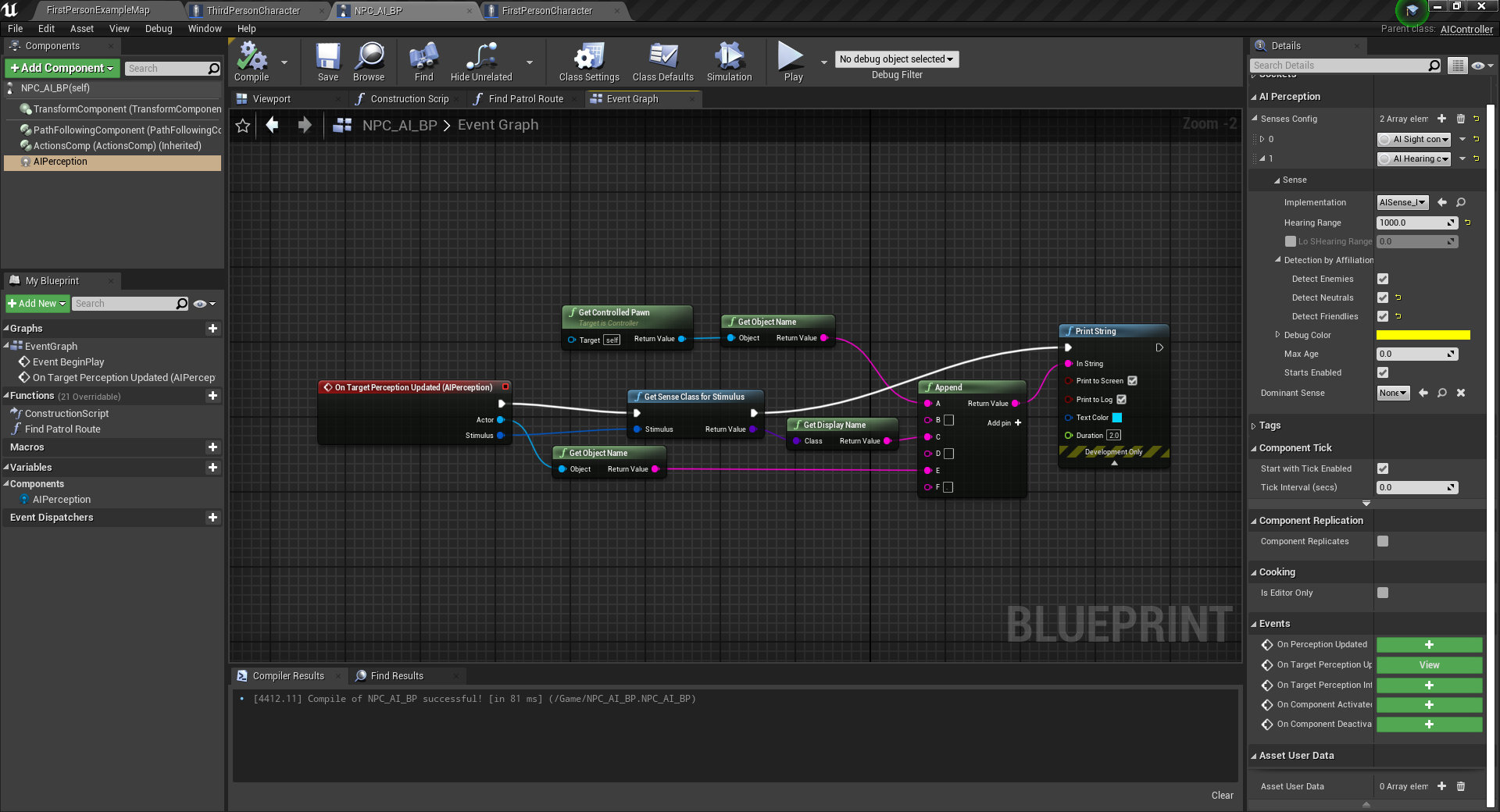
It just prints which actor perceives which actor and the sense name.
Then in the first person character class teacher does this to make noise:
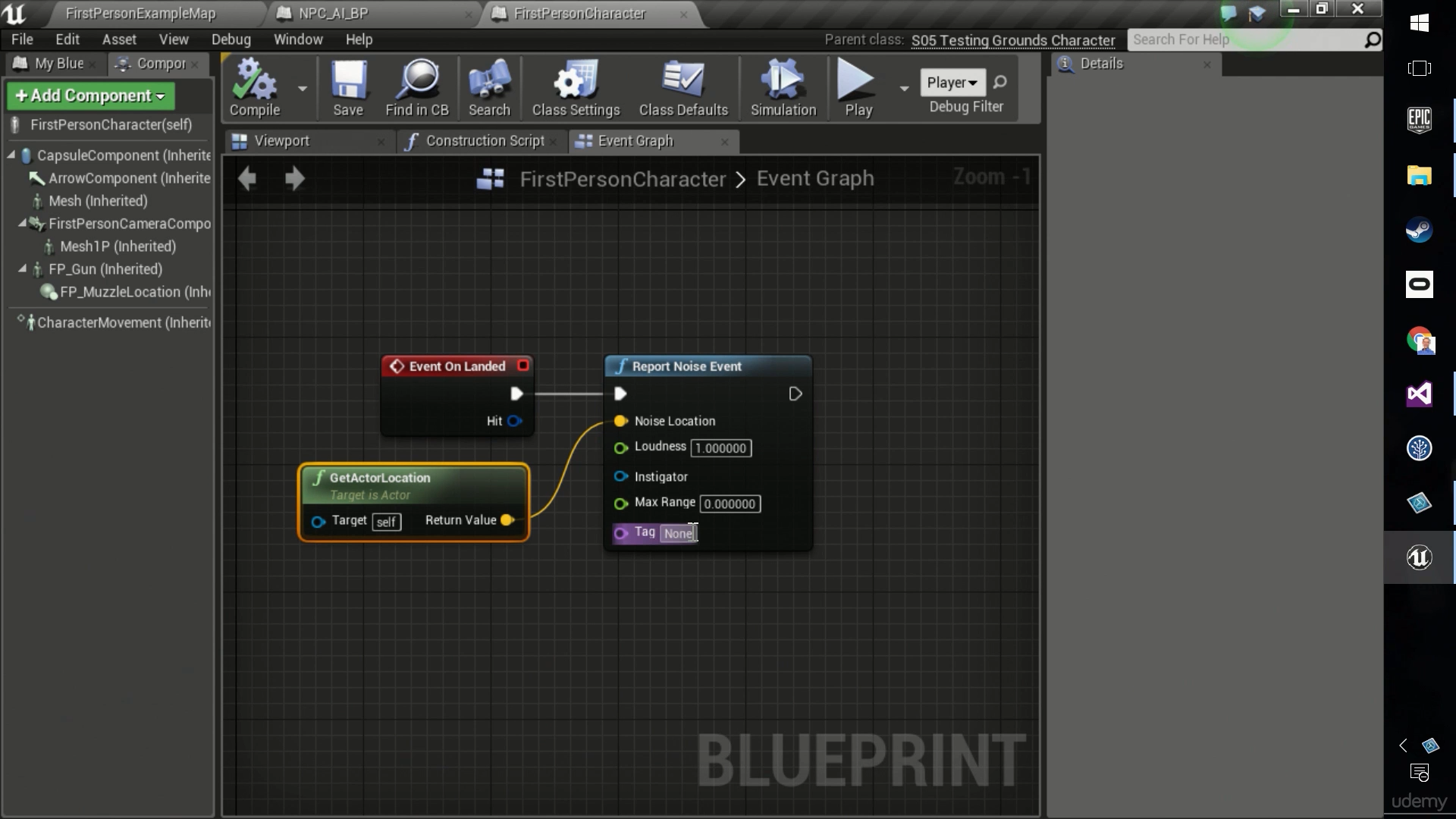
And then he gets hearing events printed:
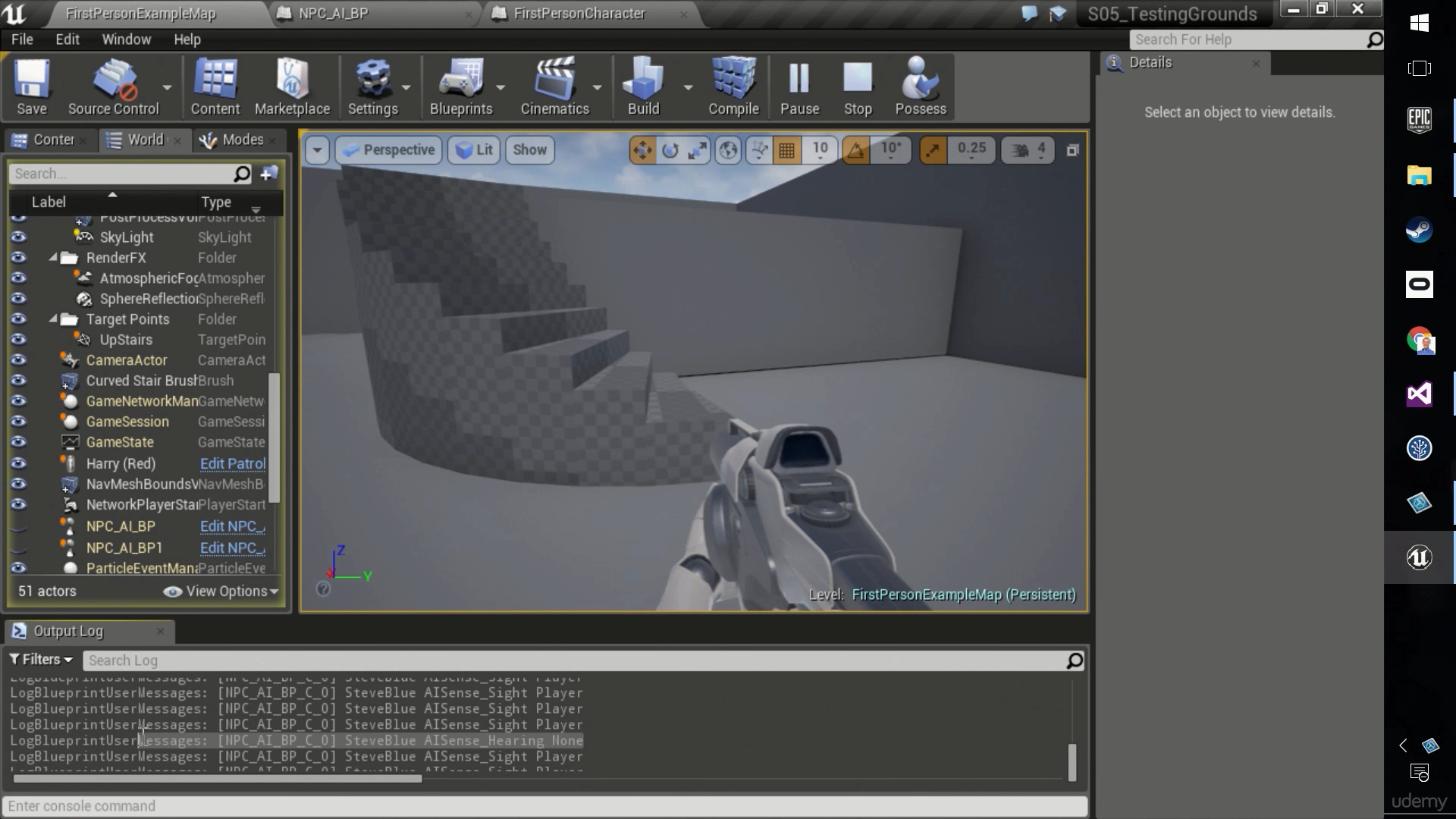
Teacher is on UE 4.13.1 and I'm on 4.26.
But when I do it, I don't get any hearing events on the AIController class and no print statements are executed for hearing, only for sight.
I had to do add PawnNoiseEmitter component and make noise with it, and also set the noise maker parameter to start getting hearing events:
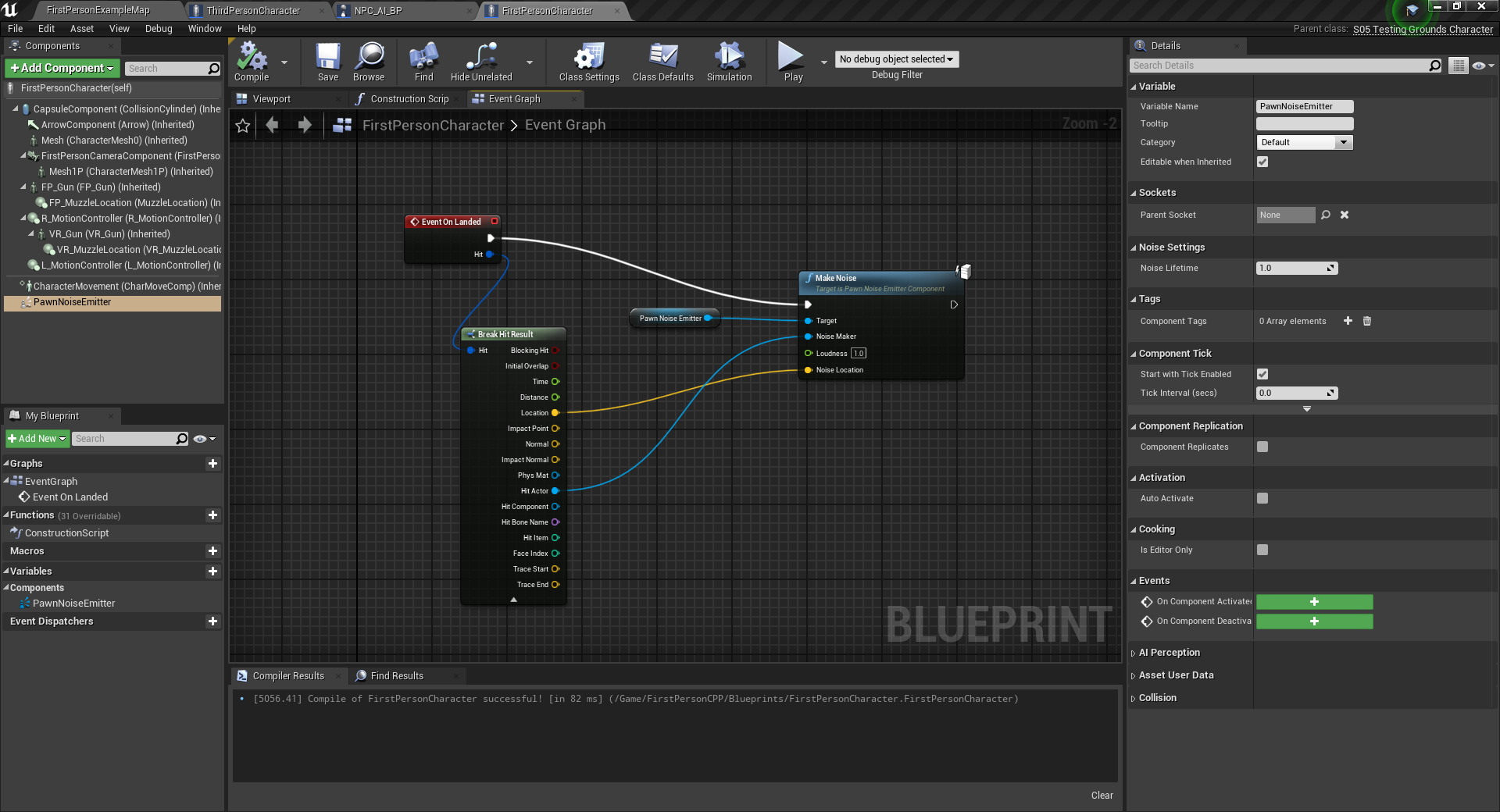
I wonder why. And is it any good and/or better than teacher's method?
After teacher set Instigator in his blueprint and I did the same, it started to print the strings using the first method. I guess blueprint function started requiring the Instigator parameter in order to print and before it would just print None if Instigator wasn't provided.
trim matrix
How can I get object under my cursor
 sand shore
start with "get hit result under cursor" from player controller
watch the blueprint communication video from the channel pins
sand shore
wise plinth
I wonder why. And is it any good and/or better than teacher's method?
IIRC, noise emitter used to work with the predecessor to AI Perception, Pawn Sensing. It now works with both.
Likely Ai perception ignores null actors being sensed now? That's why providing an instigator actor fixes it
also pepe 
 dim kiln
I cant get my character creation level to load. I just simply changed the name in the 'level' name

but the screen stays black
any ideas?

I have checked the names 10 times
barren salmon
i am having an annoying issue where the bullet that i am trying to spawn wont show up
maiden wadi
@barren salmon You're spawning it at the location of the static mesh. It's quite likely that the bullet is spawning inside of the static mesh and either running it's hit event immediately on that, or being pushed out of the mesh elsewhere like under it. If you want to quick test, just add like 3-500 on the Z value of the spawn location. It should spawn above the car.
barren salmon
maiden wadi
<@!755508494815330325> You're spawning it at the location of the static mesh. It...
hi i was able to fix the issue was that i needed to change how i spawned it
so changed it to always spawn ingore collisons
and it works etc.
maiden wadi
It's usually good to make sockets, or some form of invisible actor component to use their location from to spawn stuff like this. Easy designer fixes.
vagrant linden
@trim matrix Did you manage to get AdMob working?
I followed all instructions but never worked.
@trim matrix It was because of you post from 13 March that I asked. Cheers
AdMob ads are not working in Unreal at all. Cheers
 fresh sand
Why doesn't it detect 5 wood in my inventory


I tried Breakign and re making the slot structure but nothing
maiden wadi
@fresh sand Are you talking about the Contains node?
Contains will search for an exact match. So if your inventory has a struct that has quantity of 25, it won't find your struct of 5 wood.
Things like this are best done with small helper functions. In your inventory, you should have a function where you can pass in a type and an amount. In this case, likely your Item's name and an integer. Iterate over the inventory item's names. If name == the input name, then ask if quantity in the inventory is greater than or equal to the input number and return that.
Then you can drag off the inventory and call that function with the name and quantity input and use that for the branch.
Inventory systems are a lovely thing to work on. And by lovely, I don't mean lovely. They seem all nice and simple at first.
Course I suppose they're infinitely easier in singleplayer. Abstracting to optimize for networking adds some serious complexity. 😄
 blazing kite
Hey there, are some of you familiar with a multi weapons system ? (character can switch between multiple weapons and play animation accordingly). I was thinking of using an Enum, stored on the weapon class, and use a "BlendByEnum" in anim blueprint to play the idle, run etc and play an anim montage for the attack still based on that Enum. What are your thoughs on this?
 lean epoch
@blazing kite you too can create one AnimBP per style, mainly because that way it'll be easy to use with an enemy.
 tawny hedge
fringe flame
tawny hedge
fringe flame
Guide for setting up and using Material Parameters
fringe flame
thanks
tawny hedge
np
gritty elm
what mean by these nodes functions

are these are new nodes in unreal new version?, and what these nodes does
any example to understand this?
blazing kite
lean epoch
<@337897805878263808> you too can create one AnimBP per style, mainly because th...
thanks ill take that into consideration but switching animBP can make hitches right?
 dawn gazelle
gritty elm
what mean by these nodes functions
dawn gazelle
gritty elm
what mean by these nodes functions
I can't test right now as I'm compiling, but I believe the output is based on the average between the current and previous sample values, with the weight (set between 0 and 1) controlling which of the two values should apply more heavily.
So I think if you had a "Previous Sample" of 0 and a "Current Sample" of 1, with the weight set at 0.5, the output would be 0.5. If the weight was set to 1, then the output would be 2. If the weight was set to 0, then output would be 0.
gritty elm
in which kind of situation should i use these nodes, can explain in other words for better explanation
@fervent temple are you testing widgets in multiplayer( server and client) ?
fervent temple
gritty elm
<@!690457579985305610> are you testing widgets in multiplayer( server and client...
oh that was the problem
...
yeah i was playing as client and all the problems are gone now
gritty elm
sure, you can also use "isvalid" node before adding widget to viewport and you can also use switch has authority to add widget proper in client and server
fervent temple
ok thx
 dark oracle
hello
im new to blueprints and just wanted to ask how can i do
if(bool == true)
{
float/2
}
i just dont know how to connect the float/float with the branch

 gritty elm
check relative location of collider box, make sure, it is set to 0,0,0 in blueprint editor, also make sure the root component ( which is static mesh), make sure it's relative location also set to 0,00 @fringe flame
dawn gazelle
dark oracle
hello
im new to blueprints and just wanted to ask how can i do
if(bool == true...
After your branch, attach a set node where you store the new float value. On the set's input pin, attach a float divide node. On the float divide node, the top pin should be connected to your float you're trying to divide, then place a 2 at the bottom.
blazing kite
dark oracle
hello
im new to blueprints and just wanted to ask how can i do
if(bool == true...
 dark oracle
ah yes thx didnt think of that
fringe flame
i can only scale
fringe flame
gritty elm
check relative location of collider box, make sure, it is set to 0,0,0 in bluepr...

all of them are the same
gritty elm
do same for sphere colliders
gritty elm
are you using C++ components and exposed a blueprint from C++ Actor?
fringe flame
yes
gritty elm
you need to do a thing in your constructor
fringe flame
i don't move them in cpp
trim matrix
I am working on a tp game, and for some reason my camera is only moving when I hold either left click or right click. Its like its not in focus all though my mouse is not able to be seen or leave the game window? any ideas?
when you see me rotate that is me pressing my mouse in
blazing kite
trim matrix
I am working on a tp game, and for some reason my camera is only moving when I h...
Check in ProjectSettings/ViewportProperties
gritty elm
@fringe flame RootComonent = staticmesh; ChildActor->SetupAttachment(RootComponent); ChildActor->SetRelativeTransform(FinalTransform);
you need to use SetupAttachment node attach your child components to it's parent ( #cpp for more info )
where child component is your sphere colliders
trim matrix
blazing kite
Check in ProjectSettings/ViewportProperties
viewport properties?
blazing kite
yes there is a little tab with "Default viewport mouse capture mode"
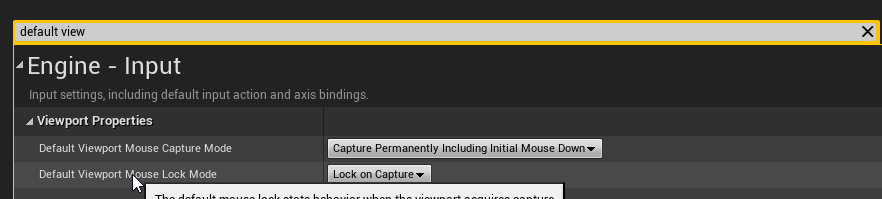
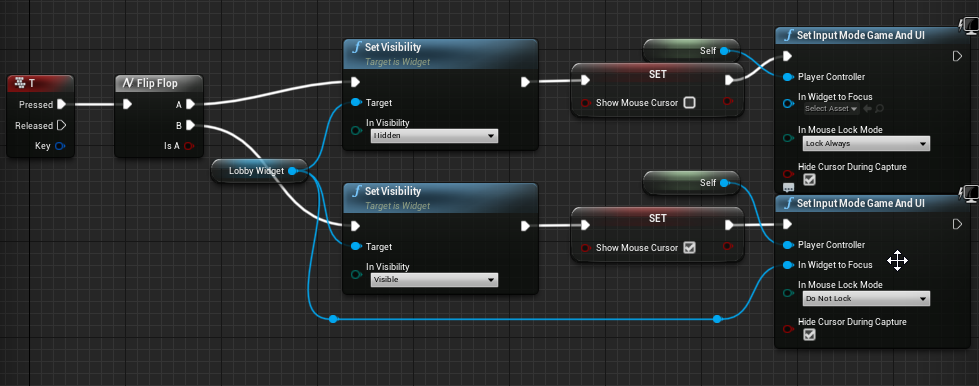 blazing kite
its fine, maybe you have a node "SetInputModeGameAndUI" somewhere
trim matrix
when I load into the next scene it works perfectly fine
blazing kite
try to replace the SetInputModeGameAndUI at top with a SetInputModeGameOnly
dry blaze
Hey so does anyone know I can make it so with bigger resolutions, my character stays the same size but just more of the level can be seen around it because at the moment my character scales with the resolution but I don't want that, I want it to always be the same size no matter the resolution and to have the window be expanded around it, which only happens a slight bit on the y axis not the x. Please can someone help, thanks!
trim matrix
blazing kite
try to replace the SetInputModeGameAndUI at top with a SetInputModeGameOnly
worked, thank you so much I wanna kiss you rn
blazing kite
ahah no problem
dry blaze
hey widzo do you know how to solve my problem you seem smart
blazing kite
I'm not sure I understood, you want that when you resize your game windows it zoom out ?
dry blaze
no so when i increase the size of my game window, my characters and everything with it scale up and get bigger. I don't want that, I want the characters to always stay the same resolution and just have more view shown around the level when the game window is scaled up if that makes sense?
trim matrix
so you are trying to eliminate streched resolution from having a advantage?
trim matrix
@blazing kite what would be the best way to stop people from being able to rotate camera and move, but still allow for them to press the key to hide the ui. UI Opened bool?
blazing kite
dry blaze
yeah I'm pretty sure that's it
If you are talking about unreal's viewport (where you place stuff in you level) I have no idea, but in game you can make a little script that does that
trim matrix
dry blaze
No stretching please
thats something that is super advanced haha, ik valorant struggled with this and they are a tripple a
dry blaze
Oh no I don't mean the viewport, do you know how I can make the script to do it?
blazing kite
trim matrix
<@!337897805878263808> what would be the best way to stop people from being able...
To stop rotating the camera by clicking on the UI, you can make your widget Visible (select the top thing in the widget hierarchy), then override "OnMouseButtonDown" and just return handled. For the movement I'm not sure the best way but you can setup a boolean
blazing kite
dry blaze
Oh no I don't mean the viewport, do you know how I can make the script to do it...
I'll try something one sec
dry blaze
blazing kite
I'll try something one sec
k thanks friend
blazing kite
trim matrix
thats something that is super advanced haha, ik valorant struggled with this and...
btw the thing vith widget visible, it only works if the widget takes the full screen, but with a bool UIOpened its maybe easier
trim matrix
blazing kite
btw the thing vith widget visible, it only works if the widget takes the full sc...
oh ok, I have a canvas covering the whole screen thats transparent but yeah its not working for the click rotate. I didn't full understand what you meant by overiding the OnMouseButtonDown
do I override that from the UI?
blazing kite
dry blaze
k thanks friend
It works but be careful, it can be expensive to do this on tick, it should be called when the viewport size changes
 blazing kite
trim matrix
oh ok, I have a canvas covering the whole screen thats transparent but yeah its ...
blazing kite
trim matrix
oh ok, I have a canvas covering the whole screen thats transparent but yeah its ...
In your widget graph, on the function list you can click on the "+" next to "Functions", there you can override OnMouseButtonDown
 royal kraken
How do you place a widget icon in game that stays in the same place and always faces the camera? I've tried googling it but can't find anything
dry blaze
blazing kite
It works but be careful, it can be expensive to do this on tick, it should be ca...
Thanks so much @blazing kite you are a legend!
dry blaze
blazing kite
It works but be careful, it can be expensive to do this on tick, it should be ca...
I've just implemented this and it works perfectly, is there any way I can achieve this with an orthographic camera for my other project?
lean epoch
blazing kite
thanks ill take that into consideration but switching animBP can make hitches ri...
I don't know, my switching it's slow paced, for something like a dynamic style switch I don't know how it'll behave ...
blazing kite
dry blaze
I've just implemented this and it works perfectly, is there any way I can achiev...
yes I think so, by modifying the Camera's Ortho Width instead of spring arm length
dry blaze
blazing kite
yes I think so, by modifying the Camera's Ortho Width instead of spring arm leng...
Is it with those same values as well or do I change it to fit my camera?
blazing kite
I don't know you should do some test to see the correct values but try with Out Range A = 90 and tweak Out Range B
dry blaze
okay thank you!
blazing kite
dry blaze
okay thank you!
Just tested, you can use this

 keen goblet
@royal kraken I think you could use a WidgetComponent in a BP and use a Tick script to update the comp's rotation to always face the camera, perhaps using GetLookAtRotation with a reference to your camera
dry blaze
blazing kite
Just tested, you can use this
You are a life saver Widzo thanks bro
 river pasture
I was following some older sequencer tutorials on event tracking. It seems that this has changed quiet a bit and i'm quiet confused how to have a event track communicate to and from the level blueprint. When I add an event it now makes this level sequence director. How would I go about getting this to work? First pic is my level blueprint and my custom events

here is the sequencer director. This is where i'm having an issue. I cannot call the level blueprint function for my custom events from the first pic.

my sequencer event track setup

 pliant frigate
Hi.
A) I have an On Begin Cursor event that makes a tooltip widget visible and an On End Cursor over event that sets the widget back to hidden. Works great.
B) If i have multiple objects close together and move the mouse across them, the becoming visible/hidden causes the tool tip window to flicker in and out of existence (which is correct behavior).
C) I would like some manner of delay on making the tool tip window become hidden .. so that if the user quickly mouse overs multiple objects, the tool tip doesn't pop in and out but sticks around, displaying info properly.
Does this make enough sense such that someone might point me in the direction on how to do this? Thanks much.
pliant frigate
I did give the delay node a try... it did not deliver the functionality I wanted. .. the widget did go hidden once the delay ticked down.. but if the delay ends while the user has the cursor over another actor the On Begin Cursor event doesn't fire, causing it to miss displaying the tool tip. The timing is proving to be a challenge.
I have fixed it by removing the spacing between my hexes for the time being.
maiden wadi
@pliant frigate This might be one of those things where tracing from cursor location to trace a hex might work better. The trace would ignore UI since it's a trace in the world. The hit hex could be sent to the UI through something like HUD that spawns the tooltip if it doesn't exist or updates it if it does and just pass the currently hit hex in. If an invalid hex pointer is sent in, start a small timer, or a widget animation that will fade out the widget slowly. On either the animation or timer end, remove the tooltip from screen. Best case would likely be through an interface if you have multiple things that need tooltips of varying types. These objects can run their own logic to add a tooltip to screen when a trace hits them. Making them call something central like hud to add their own widget would keep multiple widgets from displaying at once and similar actors can reuse the same widget, etc.
true valve
When you convert some static meshes into a blueprint actor, is there anyway to prevent it to create child actors instead of just placing static meshes in the BP.
 spice valley
how do I get functions from the steamworks SDK in blueprint? I'm trying to implement leaderboards and I thought it'd be simple to do but I can't find any documentation or help whatsoever, just that even in C++ people can't get leaderboards to work
trim matrix
anyone know why steam dosent't load for me when using standalone?
I thought steam loads on standalone?
dark crow
I don't think it currently loads in the Editor
 frozen spear
blazing kite
Just tested, you can use this
frozen spear
blazing kite
Just tested, you can use this
What you're doing on tick you can do far cheaper if you start a timer event on a .1 or even less frequency instead. That way it's not happening every frame but still in a fraction of a sec so you can't tell, just create the timer on beginplay
trim matrix
So I have an actor A which takes as input: a skeletal mesh, an animation and an instance of an actor B. Actor B is just a default scene root and a spline mesh, as well as some very simple code. In UE 4.23 I could place down my spline actors in the world and edit them as I wanted, then put down an instance of actor A and assign the spline as input so the character walked along my chosen path. In 4.26, the splines I have previously placed and edited are in their correct, each very different orientations. But when I try an add a new spline to the world I can't edit the control points. I can't even edit the control points of the base spline in actor B either. It just goes purple like this


and when I try and click on individual spline points, it just deselects the whole thing.
frozen spear
Click the actor, click the spline component in the details section, you should see an array of points
In the world not in the actor bp btw
 frozen spear
Ah yeah that would do it 😊
 vale solstice
Is there a node similar to this but it just outputs an int for the index of the matching case instead of execution pins?

Basically I want to take a string and if it equals "stringA" then I output 0, "stringB" outputs 1, "stringC" outputs 2, and so on.
 wooden sequoia
MakeArray + Find?
vale solstice
Ah, I think that'll work! Thanks!
If the Find function doesn't find an element, what does it return? 0, or -1?
wooden sequoia
-1
vale solstice
Gotcha. Thanks again!
 smoky rivet
how come false never executes?
 smoky rivet
why is this always invalid when checked in the widget, but it works fine in the character bp?

this also doesn't work

ive tried this and it wont work either

how come all my checks in my widget bp always return not valid or false?
dawn gazelle
smoky rivet
how come all my checks in my widget bp always return not valid or false?
Where are you setting the values for those variables?
smoky rivet

in my character bp
i have a character object reference which gets the variable
in the widget bp
the weirdest part is isValid() returns not valid every time
even though it should return valid in the widget bp since the object is actually valid
holy shit i got it to work.
I used cast instead of an object reference
how come using a character object reference doesn't work while casting to my character does?
 leaden dock
can i "fake" moving an actor? i have an actor with a procedural mesh and it only updates the navmesh when i actually move the actor, like it ignores the new geometry unless it moves. weird

 thorny narwhal
Is there a config setting or command line argument to prevent a blueprint only project from compiling shaders during the first time loading the editor?
leaden dock
ok i got it 😛
royal kraken
keen goblet
<@!685939338865016955> I think you could use a WidgetComponent in a BP and use a...
Thank you very much, I'll give that a try :)
blazing kite
frozen spear
What you're doing on tick you can do far cheaper if you start a timer event on a...
Yes you are right, I told him to not use this on tick, but I'm sure there are some overridable functions that are called when the viewport size changes
 pastel garnet
smoky rivet
how come using a character object reference doesn't work while casting to my cha...
pastel garnet
smoky rivet
how come using a character object reference doesn't work while casting to my cha...
When casting I’m pretty sure you need to set the character object reference to the actual As Character or else you are just creating a reference the character BP class, not the actual character itself.
Just right click on As ThirdPersonCharacter and promote it to a variable so it is easier to reference later on, glad you got it working though!
dapper cradle
Hey guys,
Any idea why the released part of this event is not firing off ?
 pastel garnet
dapper cradle
Hey guys,
Any idea why the released part of this event is not firing off ?
pastel garnet
dapper cradle
Hey guys,
Any idea why the released part of this event is not firing off ?

Is it supposed to be false?
pastel garnet
No problem :)
dapper cradle
I have this set up with the above BP testing wether I can make a sound when I am dragging an object but it is not making any sound
 pastel garnet
Where is the air vent large sound being created?
dapper cradle
I was assuming if I didnt give it a location it would be ambient world sound
I can give it location anyway
earnest tangle
fwiw if the node takes a location, not giving it one usually will just do the action at the 0,0,0 coordinate
dapper cradle
These do not print so I guess it is a problem with the cast
 earnest tangle
Have you verified the sound nodes are actually being ran at the correct time? eg. by adding a print or such?
ah well there we go :)
dapper cradle
It does not print 😄
maiden wadi
@dapper cradle What about before the cast? Does a print run there? If so it's the cast, if not, your event isn't getting called.
pastel garnet
I might’ve had a problem with this before, are you sure it is the Character BP class and not just the mannequin?
maiden wadi
Also if the character is the one initiating this event, you should ditch the GetPlayerCharacter, and the cast, and just have the character send Self through the event as a parameter.
pastel garnet
I thought it would be Cast to ThirdPersonCharacter_BP
dapper cradle
@maiden wadi thats it! I am not calling the event, I am not sure why I did not notice that...
I am casting to the third person character from the Actor being dragged.... to get the 'Can pull object?' Bool
I would also have to cast TO the actor being dragged from the third person character to set off this event wouldnt I ?
maiden wadi
It really depends. What is this for? Is this like, character runs over to and looks at an object and an interaction key is pressed?
dapper cradle
Yes, I am basically trying to give sound to an object being pulled in a third person project
maiden wadi
Realistically, I'd make an interface for this if you do this to multiple different objects. If you game is really simple and you only ever interact with everything in it by moving it, then you can likely cast.
If you're not adept with casting and interfaces, they're largely the same thing. They're just two different ways to call events on a low level pointer.
dapper cradle
I am happy to learn to use an interface if needs be, there will be a few different objects to push and pull, but if casting is good enough I also do not mind doing that
maiden wadi
Well, the point was just that if everything is draggable/pushable. You can make all of these objects from the same base class and put the logic there, and then subclass these to change their look or whatever. Then you can cast to the base class. In this regard, casting is perfectly fine.
But if you start branching out with the same interaction button, like lighting fires, turning on lights, opening crafting menus from crafting tables, entering vehicles/mounts, NPC dialogue, etc. It'll be easier in the end to turn that interaction cast into an interface.
dapper cradle
In this case If I am casting to this object (an actor BP with a static mesh component) what would go into the object pin of the cast ?
I think I will need an interface for a different button but in this case, the button for pushing and pulling will only be for that.
maiden wadi
Depends on how you're getting the object. Object references can be obtained a lot of different ways. LineTraces or SphereTraces are most common.
 maiden wadi
Should be as easy as casting the hit actor to whatever class has that event. On the other side of this function, where ever you're calling it, put a branch. Run that on the Hit bool. Do nothing if the trace hit nothing. Then break the hit results and get the hit actor. Cast that to the object that has that event for the sound in it.
If cast succeeds, run the event.
dapper cradle
That worked nicely!
 cold raft
I am having a lot of trouble identifying the landscape layer - I want to only spawn some things that are painted grass on the landscape layer. I can get objects ok, but not the landscape material. Does anyone know if this works in Blueprints?

 crimson sage
is there a way to disable a section of blueprint code like in c++ when you comment something?
I am just cutting the execution flow white thing
earnest tangle
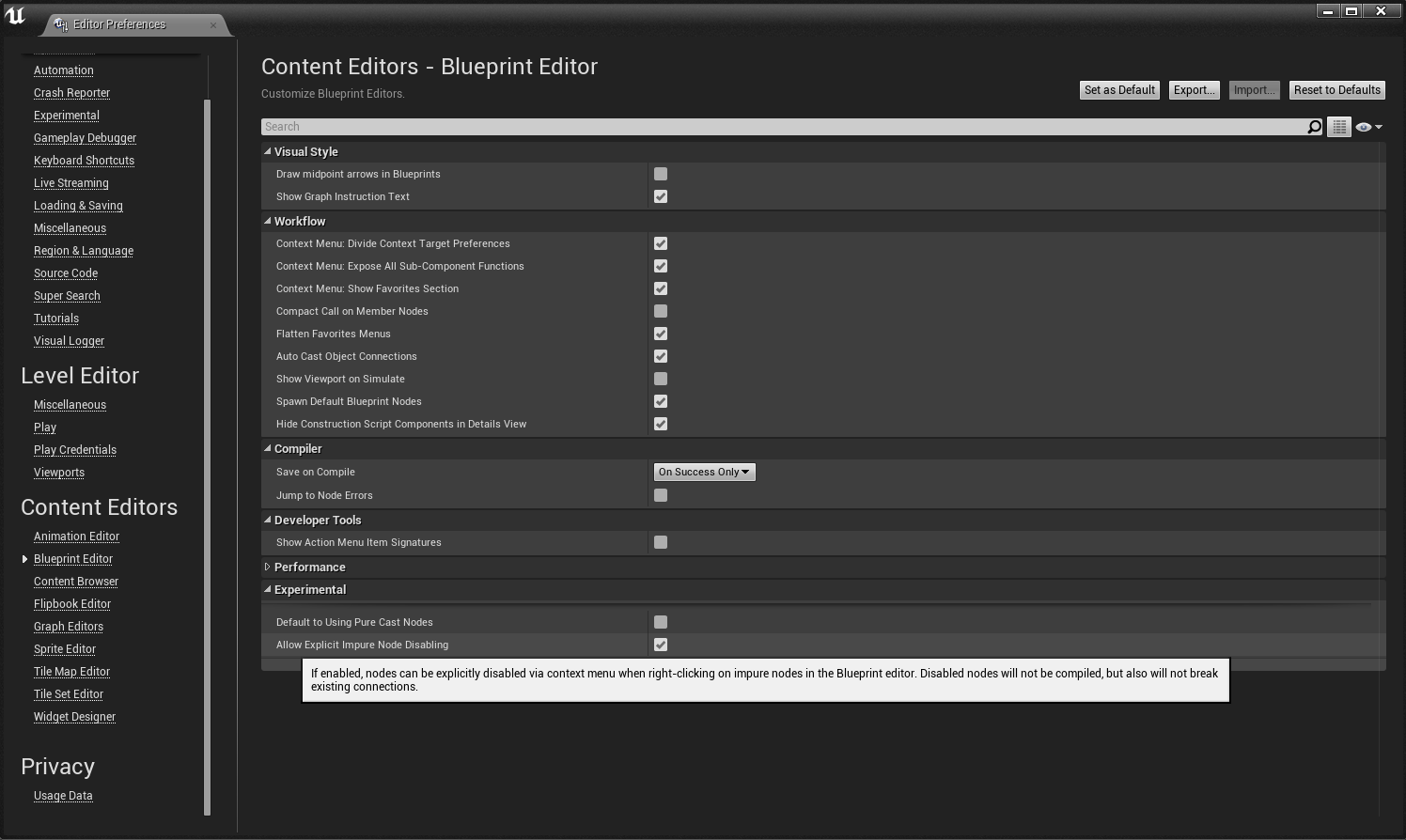
From Unreal Engine 4.11 and above, you can disable individual Blueprint nodes (Impure only) without breaking the flow of execution. All you have to do is right click on your Blueprint node and Disa…
 marble tusk
Huh, never knew about that. Neat
 harsh zephyr

Hi i make a random going system
So
My ai must go to items randomly
But my ai is going only graphiccart
maiden wadi
@harsh zephyr That's the last thing you told it to go to. So that call overwrites the last two.
harsh zephyr
I know its not tidy 🙂
maiden wadi
It's also illogical. You're setting an array from three blank references that haven't been run yet. Then getting a random invalid pointer from that array, then getting the pointers that were previously invalid.
Disconnect what you have there from Beginplay, move it asside and try this. RandomIntInRange, SelectClass, GetActorOfClass, AIMoveTo, in that order.
Randomint should be from 0 to 2. Select by int, populate that with your three classes. Feed that into GetActorOfClass, and then use the return from that for the AIMoveTo
trim matrix
How can I create any C++ defined UObject in blueprint
UPROPERTY(EditAnywhere, BlueprintReadWrite)
UWheelControlUnit* wheelControlUnit;
I defined object in this way but when I try to call it in Blueprint I am getting an error
Blueprint Runtime Error: "Accessed None trying to read property wheelControlUnit". Blueprint: BP_PlayerController Function: Execute Ubergraph BP Player Controller Graph: P_INNER_WHEEL_UP Node: P INNER Wheel Up
earnest tangle
That's a pointer to an instance of the object
harsh zephyr
maiden wadi
Randomint should be from 0 to 2. Select by int, populate that with your three cl...
 earnest tangle
If you want to create a new object, you'd want to store a class, eg. TSubclassOf<UObject>
harsh zephyr
I cant feed that into GetActorOfClass
earnest tangle
(plus you'd still need to assign a value into it somewhere)
 sharp sigil
Hi everyone. I'm trying to set up a damage over time handling component on my actor, but I can't figure out one thing. Once I get info about the DoT from the custom event, how do I store this information? For example if I wanted to stack multiple DoTs, or remove them?
For reference, I'm trying to call damage on the tick function of this component.
trim matrix
earnest tangle
(plus you'd still need to assign a value into it somewhere)
How can I do that?
earnest tangle
if you make it EditAnywhere or such, you can just assign a value into it in your BP
harsh zephyr
earnest tangle
if you make it EditAnywhere or such, you can just assign a value into it in your...
Hi
Can you help me about something ?
https://cdn.discordapp.com/attachments/221798862938046464/828263296691863622/unknown.png How can i feed Select Class into GetActorOfClass ?
 trim matrix
earnest tangle
if you make it EditAnywhere or such, you can just assign a value into it in your...
trim matrix
earnest tangle
if you make it EditAnywhere or such, you can just assign a value into it in your...
Still I cant call functions in that object
I guess I need to create object from this reference
maiden wadi
@harsh zephyr Try this instead. Then input the classes.

 left niche
harsh zephyr
https://cdn.discordapp.com/attachments/221798862938046464/828263296691863622/unk...
left niche
harsh zephyr
https://cdn.discordapp.com/attachments/221798862938046464/828263296691863622/unk...
After the select pin, get the class and cast to actor class and use
 left niche
harsh zephyr
left niche
harsh zephyr
Cast to actor class, not get actor of class
maiden wadi
@sharp sigil A lot of that really depends on your use case. Some games simply reapply the same DoT. Some games add stacks to the same dot and refresh it. Some do both. But your DoTs should likely be an array of some kind, probably structs. Structs would have a timer float, and an AmountOfTimesToDamage. Timer float will get lowered on the component's tick with a for each loop over the array of structs. If the timer is less than zero, run the damage function and lower AmountOfTimesToDamage by one. If AmountOfTimesToDamage is less than or equal to zero, remove the dot entirely from the array. Else move to next array iteration. Then to apply a DoT, all you need to do is make a function that iterates over the array, and if no DoT of that type exists, add it to the end. Keeping your DoTs in an array of structs like this will allow you to create simple helper functions that can remove all DoTs of some type, remove all DoTs by clearing the array, add or refresh DoTs easily, etc.
Of course this changes if your game is something like turn based. Then you can move the logic off of tick and run it on event for when the turns change, etc.
sharp sigil
maiden wadi
<@!173481250961620992> A lot of that really depends on your use case. Some games...
Thanks so much for the detailed answer! This looks like something I could implement. My use case is similar to warcraft/dota2 buffs/debuffs system. At least that's how I imagine implementing it (maybe because I'm used to Dota2 modding)
In any case, how do I create these structs in blueprint? Or do I need to switch to c++?
maiden wadi
You can create them in Blueprint. But if you have a grasp on C++, it'd be better there. Then the struct itself can have the helper functions to modify itself or return information about itself. It'd be cleaner. But you can manage the same thing in blueprint by making a blueprint struct and using the component itself for the helper functions.
sharp sigil
I see, thanks. I haven't started C++ coding yet, so I'll look into it.
maiden wadi
It's a fun hill to climb. Very worth it in the end though.
harsh zephyr
I cant feed target actor
 sharp sigil
Also one more question. Would it be less efficient to do it this way: for each buff/DoT create a new component on the actor which is destroyed when the buff/DoT duration ends? Or is it better to just have one
left niche
harsh zephyr
I cant feed target actor
Do you want to select actor or actor class?
 maiden wadi
@harsh zephyr
 harsh zephyr
But if i dont feed the target actor my ai is going to there
maiden wadi
 maiden wadi
@sharp sigil You'll be better with one component on the character that handles it's logic about buff/debuffs from base data like structs. Unreal tends to run a lot of things this way and it'll stay in the general design flow. It's a lot cheaper to create a new struct into an array than it is to create a new component and add it and remove it. Also going to end up easier on replication once you realize that you're probably going to use delta serialized FastArrays in C++ for this at some later point as an overhaul.
sharp sigil
Gotcha, thanks! Yeah definitely need to think about replication as well since I plan to implement multiplayer.
meager spade
Could anyone point me in a direction for setting the decal size for a decal actor during runtime? Am I forced to set the scale instead?
maiden wadi
Scale is the only way. I remember looking up why at some point, but I cannot remember anymore.
I started making any decals multiples of 100 for that reason. Easier to affect size by scale.
meager spade
Yeah mine are that as well
I guess I'll just create 3-4 separate decal materials depending on how much I need to scale then, or is there a way I can make the material repeat depending on scale of the decal?
maiden wadi
I'm not adept enough to know why, but the size only seems to get set in the Constructor of the component. I assume this might have something to do with streamlining them for spawning. Scale is easier to resize than vectors.
pastel garnet
This might be in #graphics , but using blueprints to create a perlin noise material. Can you use the material for heightmaps?
Or is it only pngs
 tidal venture
When I add a UFUNCTION as non-const like this:
UFUNCTION(BlueprintPure, Category="Encounter") void CollectRandomItemFromLocation(UEncounterEffect*& InEffect);
It will show up without self-reference:

However once i add const to this function it will show up with a reference to self input parameter
Why is that?
(the UFUNCTION lives in private scope)
Is this a bug?
UFUNCTION(BlueprintPure, Category="Encounter") void CollectRandomItemFromLocation(UEncounterEffect*& InEffect) const;
 sand shore
it isn't a bug, per se; the difference is visual unless you want to maybe call it on another Encounter object from within an Encounter class
tidal venture
unless you want to maybe call it on another Encounter object from within an Encounter class
Isnt that what the private scope should prevent?
sand shore
in which case, you would have to drag from the other Encounter object, then you can Invoke the non const version
either of them still do have a self param, but for whatever reason the const styling doesn't hide it
But BP isn't doing anything particular shady or weird, aside from not hiding the pin on both
sand shore
tidal venture
(the UFUNCTION lives in private scope)
I didn't see this at all, heh
tidal venture
I guess the scope does nothing, I need to add "BlueprintProtected" anyway dont I?
sand shore
kind of not relevant to the minutiae at hand
hmmm, possibly?
BP supporting const and private/protected is kind of a joke
bless it, it tries
tidal venture
Trying is at least something
i do appreciate that i can keep my members private in C++ but accessible in blueprints publically though! thats huge
I m trying with const and BlueprintProtected now
the BlueprintProtected keyword works as expected, cant access from outside. The const vs not-const thing remains unchanged, and im still confused about it
I will just remove "const" 😛
tidal venture
I also tried to do HidePin ="Target" to no avail 😛
 olive ingot
Suddenly I cant add parameters to my constructor for a projectile actor... Am I not supposed to be able to do that?
tidal venture
how did you add the parametr before?
olive ingot
I would just click on the constructor and add them. Like you would on a custom event

Am I making constructors wrong? 🤔
ooooooooooooooooooooooooh it's because i need to make a variable and make it editable and expose on spawn
sand shore
tidal venture
I will just remove "const" 😛
Does it bother you that much? It doesn't change anything but the visuals
sand shore
olive ingot
Suddenly I cant add parameters to my constructor for a projectile actor... Am I ...
you have never been able to do that
are you thinking of "expose on spawn"?
olive ingot
sand shore
are you thinking of "expose on spawn"?
yes i fixed it 😉 thank you.
Now im just having trouble replicating it properly
sand shore
oh you figured it out
olive ingot
olive ingot
yes i fixed it 😉 thank you.
Now im just having trouble replicating it properly
but all that is in the multiplayer channel
tidal venture
sand shore
Does it bother you that much? It doesn't change anything but the visuals
absolutely
trim matrix
how can i access post process volumes post process material settings in BP?
 tacit lake
Not sure if this is the right place to ask, but I'm trying to make a health regen system that stops regenerating health every time damage is taken. It's very sloppy, sorry


A retriggerable delay seems like it would be the fix, but it never activates
dawn gazelle
tacit lake
You would be better off using timers instead of using tick.

Whenever your character takes damage, call pause regen.
 upper adder
tacit lake
upper adder
tacit lake
Looking at blueprint just makes me brain horny, sometimes im like: mhhh cute little blueprint, i want to snack it up
Those blocks and wires just trigger dopamine instantly for me
tacit lake
Sameeee
@dawn gazelle I probably (definitely) did something incorrectly but I cannot for the life of me figure out what that is.
 narrow bear
If the above isn't the best demonstration of why Rule 34 exists, I don't know what is.
tacit lake
I called the Start Regen event on begin play and it still doesn't start the regeneration. Once again I'm sure it's my error, not yours
Found the issue, had the regen rate set too high!
Worked out all the kinks and it functions flawlessly! Thanks Datura!
pastel garnet
What if the player takes damage, and its regen was paused for 10 seconds, but the player took damage at 9 seconds, would the timer overlap the current one or would there be two timers?
tacit lake
Every time the player takes damage, the timer is reset, because it is called every time they take damage
 ruby surge
When creating a tank (hovering / floating in my instance, so no difficult threads :P) would it be best to create a Pawn (and add a floatingpawnmovement and maybe more) or DefaultPawn to start with? Or is there even something else that would suit this better. I used to work of a character, but is build for humanoid bipods it seems.
 languid lion
In a looping timer
if I plug in get world delta seconds, would it basically make it a custom tick event?
ruby surge
Could you elaborate on why that is? Is defaultpawn going to have a lot of stuff that is not being used?
tacit lake
Is there a way to take a value and sorta flip it? Not sure how to word it but basically, I want to increase the opacity of an image the lower the health is
ruby surge
Currently am using Pawn, but got some weird movement / collision issues. When adding floatingpawnMovement the pawn suddenly gets collision on other objects, but when I implement the movement myself it's not colliding. So the floatingmovecomponent is doing something with collision as well orso 😄
 flint vector
how would i get the local linear velocity?
 keen terrace
Any ideas why a Skeletal Mesh would not set in "Set Master Pose Component" I have a modular character (Head,Body,Hands,Legs and Feet) and only my body is refusing to follow the rest. It is stuck in T pose whilst the rest is following animation etc.
 rotund basalt


From "Meet the Pyro": https://youtu.be/WUhOnX8qt3I (Full Video)
https://youtu.be/WUhOnX8qt3I?t=11 (Exact Timestamp)
tacit lake
😂
flint vector
how would i get the local linear velocity?
 novel storm
Hey Guys I'm pretty noob with materials. I posted my question on the forum but would like a response from you guys. https://answers.unrealengine.com/questions/1022552/view.html
 rotund basalt
This is for BPs not Materials
flint vector
can someone answer my question
novel storm
rotund basalt
This is for BPs not Materials
where else am i supposed to post it ? isnt this blueprint also
 marsh adder
yo i was watching some tutorial and i forgot what's this node name, the youtuber didn't say anything about it

can someone remind me whats the name
flint vector
that looks like avariable
marsh adder
Thanks
dark crow
novel storm
Hey Guys I'm pretty noob with materials. I posted my question on the forum but w...
Do you want black to be completely transparent and modify transparency of only the yellow?
 dark crow
Too bright = White
novel storm
dark crow
Do you want black to be completely transparent and modify transparency of only t...
no I just want the grey to be not grey and yellow/black instead
pastel garnet
dark crow
Too bright = White
It's at 10, but still not emitting.

 dark crow
pastel garnet
It's at 10, but still not emitting.
dark crow
pastel garnet
It's at 10, but still not emitting.
It is emitting, that's how it works
pastel garnet
there isn't a glow
pastel garnet
@dark crow I might be doing it wrong but I just want it to glow
not emit light sorry
 pastel garnet
it doesn't for me for some reason
novel storm
dark crow
I mean, that makes it glow
thank you
dark crow
pastel garnet
it doesn't for me for some reason
That's weird, it should, have you touched anything else or just connected the pins?
dark crow
Behaves the same even if placed into the world?
Like if you place a sphere and give it that material
pastel garnet
Let me see
Whatever I put it on

It just doesn't glow
I'll have another shot at it tomorrow, this one is odd
 plucky copper
dark crow
plucky copper
dark crow
40 should be enough to make it visible
But yeah, check Bloom and make the Material Unlit too, it's its own light
 rough wing
flint vector
how would i get the local linear velocity?
rough wing
flint vector
how would i get the local linear velocity?
What is a local linear velocity
What comes to mind is you can subtract the velocity of an object from it's parent's velocity
flint vector
convert the set physics linear velocity to local
like instead of a world vector its a local vector
maiden wadi
Transform Direction.
flint vector
ok
maiden wadi
I don't remember if transform will normalize it. You may need to multiply it by the old direction's length after transforming it.
@flint vector InverseTransformDirection, just to clarify. Normal transform node is from local to world. Inverse is the opposite.
smoky rivet
how do i manage multiple checkboxes in the event that i only want one or none to be checked at a time. can i use an array for that? or enum? which would be better
maiden wadi
You mean to make them work like a radiobutton list?
 weak gulch
Is there a way to detect progress bars going to 100% to fire an event based off of that? Aside from checking every tick.
I'm trying to setup a multiplier system where the percentage bar switches after being filled. So from x1 to x2, etc every time the previous bar fills up.
rough wing
There are built in events that fire each time the progress bar changes
weak gulch
rough wing
There are built in events that fire each time the progress bar changes
Do you have any more info on that? I can't seem to find any that do that.
smoky rivet
sure i guess
i just want it so you can only select one at a time
and if another one is selected, the other one is deselected
or none at a time
flint vector
maiden wadi
<@!695574454557868042> InverseTransformDirection, just to clarify. Normal transf...
i figured that out thx
smoky rivet
how can i make a specific number of buttons or checkboxes from an array
for each weapon i have a different set of attachments, so id like to get the array from the current weapon and then make a set of boxes based on how many items are in the array
maiden wadi
For the radio button thing, it's likely easiest to create your own checkbox that calls a bind when you click it. Then you can expose some variables for styling too. Drop a few in your widget you're using them in and on Init, bind their click to a single event that also passes the widget through it as self when it's called. Then you can iterate over all of them, and uncheck any that aren't the one passed through. On the one that == the one that called the bind initially, just toggle it's state instead of directly setting it on.
@flint vector The transform is the transform of the object that you want to transform the direction into.
flint vector
oh
maiden wadi
If you have an object that is facing west, but you have a directional vector that is facing north, if you inverse transform the north vector by the object's transform, you'll end up with a vector that faces east. If that makes sense.
flint vector
but how would i do that with GetPhysicsLinearVelocity
maiden wadi
Not really sure why you need to? Most physics stuff is done in world space.
Probably need a use case.
smoky rivet
could i just assign each checkbox to an array index and if its true draw, if its false dont draw?
 flint vector
maiden wadi
Not really sure why you need to? Most physics stuff is done in world space.
flint vector
maiden wadi
Not really sure why you need to? Most physics stuff is done in world space.
im trying to prevent my vehicle from sliding sideways
by setting the y linear value to 0
smoky rivet
also, how would i stop the checkbox from being drawn
i cant find any functions or nodes that do that
maiden wadi
Set Visibility to hidden or collapsed, usually.
 maiden wadi
Possibly. At least assuming that get is returning a valid widget. Though you might also just do an IsValid on the Get and explicity set all of their visibility based on a switch.
If the array element is true, make it visible, if false, collapse.
smoky rivet

it doesnt lol
could it be possible that since im using get its modifying the copy instead of the original object?
maiden wadi
@flint vector That's fair. You should be able to transform the direction into the vehicle's local space with inverse transform, zero the Y value and then normal transform it back into world space. I'm not certain of that or projecting the point to a line would be programatically faster.
@smoky rivet You mean the array of widgets? Those aren't copies of the object.
smoky rivet
yeah but hovering over the get shows this

so i thought it makes a copy
shit
on e sec
trim matrix
idk if this is blueprint related but everytime i load up unreal engine, all of a sudden it crashes out of nowhere. how do i fix?
smoky rivet
either way it says it returns a temporary copy of that array index, and changes will not be propagated back to the array
maiden wadi
It's a copy of a pointer. Pointers, or blue blueprint variables of that color are nothing more than an ID basically. They hold a memory location of where the actual object is in memory so that functions can look up and get information or modify the object.
maiden wadi
Do check the validity of the pointers though. Make sure you're not calling stuff on invalid objects.
smoky rivet
so it seems the loop doesn't even execute
flint vector
maiden wadi
<@!695574454557868042> That's fair. You should be able to transform the directio...
i still don't understand what i'm supposed to use as the T value
this is what i have


 maiden wadi
@flint vector Drag off cube and get World transform.
maiden wadi
Haha. Don't forget to reverse the transform.
 maiden wadi
Ah. Direction, not position.
 dense rock
Anyone have a moment to help out? I have a projectile sphere that's not generating overlap events with worldstaticmesh
Really confused
 sharp nexus
Anyone met the same performance problem with blueprint editor on a high-end PC that nodes can not follow the cursor and you can see apparently lagging between selected node and cursor
 sonic pine
Hiho i have two questions for my inventory sytem:
- Is there a way to blend out the + infront of the Item quantity in the inventory?
- I have an auto refresh after consume an item (like the berry) but the quantity will not be refreshed if im not reopen the inventory. Someone know these problems and know how to fix it? ^^
Thanks for help ^^
dawn gazelle
sonic pine
Hiho i have two questions for my inventory sytem:
1. Is there a way to blend out...
For #1, if your previous post history is anything to go by, you have the Item Quantity set as a bind that is taking the Slot Content Quantity and converting it to text. In that ToText(Integer) node, there's an option on there "Always Sign" when set to false will not display the + when the number is positive.

 magic fog
hello, is it ok to ask about material blueprint here?
ran into a bit of an issue with my material blueprint. I can see preview, but when i add instance to the landscape, it doesn't populate. (it's relatively simple automaterial)
magic fog
thanks
trim matrix
Hi guys, anyone know why Skeletal Mesh would only show the lowest LOD no matter the distance/screen size?
 sharp wraith
There is no Break Hit Result option to select after selecting Out Hit . Currently I am using UE4 -4. 26

can some one help me in this situation
surreal peak
It's because the pin you have there is an array of hit results
You have to loop over it and then break each element
@sharp wraith
sharp wraith
@surreal peak Actually i am new to Bp can you tell me how to loop pin and break the element
surreal peak
In the context menu you have open in your screenshot. Type For Each Loop and use that.
It will have a LoopBody pin that calls for each element and an Element pin that gives you the current element. That one you can break


 surreal peak
Yop but make sure you connect the white exec pins :D
sharp wraith
thyx bro
dapper cradle
Hey guys, How could I make this work, so that when the player is pushing, pulling or running into this block and causeing it to move, it fires off a sound ?

 tropic frost
whenever i enable physics and tryint to posses an actor it removes me from the object and spins around, why?
what i'm trying to it is when the actor posses the new object it gets the square or rounded or flatten object physics
 fresh sand
@maiden wadi @trim matrix It's a bit of a late reply but I'll try what you told me with the inventory system and let yall know if i manage
earnest tangle
It kinda depends on how you wanna do it I guess 🤔
If you only have one sphere inside which you want to check it, you could keep a reference to it inside the actors that can die, and when they do, you'd check if it's within that sphere
fresh sand
You wanna check if a character died in a certain collision right?
earnest tangle
Yeah that's another approach but doing it in tick is not the right way to do it
fresh sand
Is the collision part of another actor?
earnest tangle
If you do it on tick, it'll just keep adding that event to actors that are within the sphere every tick
What you can do is do that on begin overlap - that way it'll only set the event when the overlap starts
fresh sand
You could do this
 earnest tangle
Then, just remember to add a unbind event listener into end overlap
fresh sand
The Boolean = Dead? can be taken from the Player/Character
And can be turned true on chcrater death
earnest tangle
That only works if the character starts overlapping when it's already dead.. it won't work if the character is already overlapping before it dies
fresh sand
True
I guess this might work but will spam you with errors

This isn't the best solution but could work
I forgot something hold up
You might wanna add somethign to the completion
earnest tangle
@swift pewter you don't need the get overlapping actors - just add the event on the actor that you get from the overlap event. You also need to do it the same way on the end overlap, but use unbind event instead of unbind all
unbind all would clear the events from all actors that you have added it into, so it would stop listening to those events on actors which are still overlapping
so you'd only want to unbind it from the specific actor that stopped overlapping
Yep, that looks like it should work
pastel garnet
dark crow
40 should be enough to make it visible
But yeah, check Bloom and make the Mate...
It might be because I removed my sky sphere, I’ll try re-adding it back in
fresh sand
I swear inventories is a weird thing, some how I got it to work using this? somebody explain how and why it works
 fresh sand
All i was trying to do is check if the player has 5 Wood in their inventory
And somehow that worked
earnest tangle
Why would it not work?
fresh sand
Actually I spoke to soon it works with any number of wood item
earnest tangle
:D
fresh sand
Why was I born to feel nothing but pain
earnest tangle
Looking at the picture a bit more now... what you're doing is you're just getting a random item from your inventory effectively
and you're remaking the same inventory slow structure with the exact same values
and then comparing if that exact same value exists in the inventory... which of course would
fresh sand
So what I just did is totally not what I was actually trying to do
pastel garnet
Pretty much
earnest tangle
can you have multiple inventory slots with the same item or no?
because how to do it depends on whether you want to count multiple slots of the same item, or just one slot
fresh sand
Well the inventory does have multiple slots and the stack size of the Item is 5
So yeah you can
earnest tangle
Right - so you'd need to count all the wood in the inventory using a for each loop, and then check if the value matches the value you want
fresh sand
I can follow everything but unsure about the for each loop, I'm gonna try what I got inmind with the loop and if it fails I'll let you know
earnest tangle
sure :)
fresh sand
@earnest tangle Yeah no I am completely stuck, I don't know how to count items in an inventory just yet
earnest tangle
Okay, so what you'd need is a variable first to contain the total
Then, in the loop, you can compare the Item Structure and your Wood Item Structure
If they match, the item in the slot should be wood (assuming I understood how your inventory works)
If so, add the number from the slot's quantity value into the variable you created to store the sum
fresh sand
earnest tangle
Then, in the loop, you can compare the Item Structure and your Wood Item Structu...
How would I compare them exactly? with a "Set Array Elem" or "Break/Make"
earnest tangle
Ah right you can't do equality on structs with BP's...
you need to break both, then compare the individual values inside them
(or if not all the fields matter, compare only the ones that do, such as item name or whatever)
fresh sand
Would somethinglike this work?
 earnest tangle
Yeah it should
fresh sand
Same for the quantity I'm guessing or do I do it from the for each loop beginning?
 earnest tangle
You don't need to compare quantity, since you're trying to count how many of the item class exists in the inventory
You just add the quantity into the total found if the item classes match
fresh sand
Do i do it with set array elem or with something else
earnest tangle
just make a new variable of the same type what the quantity is (I'm assuming integer)
 charred breach
Hello, I am having a widget that I want to modify variable in a Blueprint. I made a reference variable and then from it I set the other variable, but when I tested it the var in the BP never changed and if I try Print String it says "0"
earnest tangle
then you just add into it as you'd normally add into an integer using a + node
fresh sand
Like this?
 earnest tangle
Almost... you want to add it to the existing total, not the value you're comparing against
fresh sand
The Array Index?
earnest tangle
no, just do a Get Wood Total
earnest tangle
array index is a number ranging from 0 to the last index on the array so that wouldn't produce correct results at all :)
fresh sand
I feel stupid
 earnest tangle
That looks correct. You just need to put a branch before it so it only adds when the classes match