#blueprint
402296 messages · Page 628 of 403
 blissful gull
 devout geyser
@dawn gazelle nvm fixed everything by doing cast to all actors of class then promoting that to a variable and so on
 rough wing
Why doesn't plugging in delta seconds to a timer work anymore?
 weary jackal
You mean deligate is not compatible with deligate?
 nimble copper
Hey Everyone, I am curious if it is possible to assign variables to widgets/slots. Some way for a Drag/Drop operation to know which widget it is dragging from and generate a simple drag icon from it.
Currently my inventory system is just a simple IntArray, when an item is picked up, it searches for a 0 in the inventory, if found, it updates the 0 to a new int value which corresponds to a master item list; updating the inventory slot to contain the item data.
I am trying to make a simple drag drop function where it can tell what slot it is dragging from. Slot0, Slot1, Slot2 etc, reference the corresponding value in the inventory array. The inventory itself displays fine because each slot is referencing its corresponding position in the array.
 dawn gazelle
Further to what Zlo was saying.. This is what I have in my OnDragDetected function for a draggable hotkey widget.
Made a variable within the Drag and Drop operation to contain the hotkey :p
 twilit heath
you should probably take a peek at WTS is? videos for drag and drop
nimble copper
So confusing hahahaha, What is WTS? Also for the payload. I still dont get how i can tell it what it is dragging from. The string is just a print of whats currently in the inventory array. Each widget is referencing its slot in the index. But I had to bind those by hand.
If you use uobjects for items, do you need to create a new object for every item in the game theoretically?
twilit heath
the object that is being dragged from creates the payload
the object that handles the drop receives it
so the first object can stash any and all information about itself in the payload
twilit heath
at a glance, it looks like "Accessed NULL trying to read property Blackboard from node GetBlackboard..."
 winged sentinel
Quick Question about camera shakes, is it possible to make it shake in one direction rotationally?
Instead of randomizing?
 trim matrix
how do you expose the location of teleport to the details panel? I tried creating a variable for transform location but the struct isnt exactly matching
nvm i used setactortransform instead of teleport
 tame pecan
@trim matrix You want the dest location as an exposed variable?
 stable frigate
hye guys? does setting an actor variable which currently has an item to null i.e ( no input pin when setting variable ) destroys that actor from memory or does it stay in memory?
i can also use destroy actor but i just want to confirm this
 granite rain
@stable frigate I think if you don't have input pin when you set the variable it becomes null
stable frigate
ok, so it becomes null and removes the destroys the actor from the memory?
granite rain
like destroying it on the level?
 faint pasture
stable frigate
hye guys? does setting an actor variable which currently has an item to null i.e...
faint pasture
stable frigate
hye guys? does setting an actor variable which currently has an item to null i.e...
No, it does nothing to the actor. You are just getting rid of your reference to the actor
faint pasture
Well I mean the map is still going to have a reference to it.
stable frigate
ok i got that.
but if i use destroyactor then it will be removed from the map right?
faint pasture
I'm sure if every reference got nulled the GC woud handle it but use destroy actor. There are valid reasons to null out a reference tho.
faint pasture
stable frigate
but if i use destroyactor then it will be removed from the map right?
Yes
stable frigate
good. i ended up using destroy actor too. nice to know i'm on the right track. thanks!
faint pasture
Just think of it like an address and a house. if the house gets destroyed, the address will point to nothing and being invalid address. If you erase an address from your address book, it doesn't destroy the house, you just don't know where it is anymore
 latent junco
How do I reference a Level in a BP Structure? As in, what type of variable can reference a level? There doesn't seem to be a simple 'Level Object Reference' as far as I can see O.o
trim matrix
using UE4 with Parsec. Any chance the player controller can't tell where the mouse position is?
My mouse location to world projection is not working 😦
latent junco
Is there a class that keeps data (variables) between levels? If I open a new level, PlayerState, PlayerController, GameState, and GameMode all get reset on LevelLoad if I'm understanding correctly
@swift pewter Ah, thank you! Forgot about that one 😅
 hearty lintel
guys i need some help please
i need to make different cars with different wheels and i would like to have the aniumation blueprint adapt to all of them
is it possible?
latent junco
Still trying to figure this one out: How do I reference a Level in a BP Structure? As in, what type of variable can reference a level? There doesn't seem to be a simple 'Level Object Reference' as far as I can see
 long smelt
Only way you can refer to levels is by name afaik
latent junco
Ah, I figured since this existed, it would be possible somehow
long smelt
oh wait what
I've not seen that before
There's no way you can set the default of that variable?
ahhhh
yeah
latent junco
Soft Object Path lets me select a level in the struct so.... progress 😄
long smelt
Worlds are stored as soft object pointers, as only one can be loaded at a time
I think it's honestly better just to manage the names, instead of soft paths
latent junco
Alright, thanks! I'll play around with it, I have it working with names, was just wondering if there's a safer way
long smelt
I mean I guess paths would be safer, but that seems more suited to a c++ manager
 stray island
I created a presets system based on choice of the Enum but is there a way to simplify this
Like to set based on index of enum instead of for each choice
hearty lintel
thank you dude i'll try it out 🙂
trim matrix
Hey could i made a camera that rotates around my actor, only thing is the camera keeps rotating indefinitely. could someone take a look? total noob btw
 teal spade
has anyone came across the phenomena of running a code, and getting different result each time? I feel like I'm running in circles, trying to hunt down the source of a problem.
Like sometimes an array skips a few entries, or a node doesn't fire fully
stray island
I only get this if I intentionally want it random
teal spade
Hmm. The only thing that's random in the code, is the size of the arrays, which are generated at runtime.
stray island
Then i think that could be the source of the problem
Did you resize your array
Maybe resize and clamp the size according to the values u want
teal spade
No. The generation, of a hex grid I'm working on, is only done once. After done, then comes all the necessary calculation. So theoretically no array should change.
 sweet silo
Hi everyone ! i'm looking to create a time widget inside a watch hold by the player's hand... i've got the timer, the hand animation but i don't know how to parent the widget to the hand.. any idea ? thanks a lot
teal spade
@stray island But then again, how would that prevent other nodes from firing? Assuming they're either in a chain or a sequence?
sweet silo
i think i found a tutorial
teal spade
sweet silo
Hi everyone ! i'm looking to create a time widget inside a watch hold by the pla...
there's a widget component
sweet silo
wow so amazing thanks a lot
coming from Unity everything seems so amazing
but i love unity don't get me wrong 🙂
stray island
teal spade
<@768035735470080000> But then again, how would that prevent other nodes from fi...
I’m not sure of your bps logic but i think ud need some boleans before some nodes
teal spade
sweet silo
wow so amazing thanks a lot
sure thing
teal spade
stray island
I’m not sure of your bps logic but i think ud need some boleans before some node...
It's essentially a chain of loops, determining rows/columns, multiplied by certain arrays for size, depending on where you are in the code (for what purpose). I also occasionally get runtime errors (crashes), as the engine thinks it run into an infinite loop (which I'm forced to find workarounds to, which is annoying)
Guess I'll have to keep on lookin'! :)
stray island
You’re using for loop node? I got similar errors when plugging things in Loop Body instead of Completed and vice versa
teal spade
I'm using both for loop and for each, in different parts
Depending on where the code goes
But yeah, I've ran into that problem in the past (hooking up to the wrong noodle), so I'm extra careful about that
But as I'm trying to tighten the code, it starts to break down more... Lol. Like giving me an infinite loop error, when using an interface (showing the event node, in the recipient's, as the source of error). Even though, the active communication is usually in the range of a dozen or so. Weird.
faint pasture
stray island
That is one chonky switch case.
faint pasture
What's the use case, why do you have 20 items that are just numbers? What are you trying to do
stray island
TOP SECRET
faint pasture
Why not just make that variable an int.
faint pasture
Do you have 20 very different execution paths or does it all kind of do the same thing?
faint pasture
I'd use a data table
stray island
And i have an array of variables
Oh idk about tables but is there a way to get the index of enum
Instead of switch or = text
I will check about tables
faint pasture
Data table is what you want, you would just make a struct that contains all the data that would go into a preset, and just make a bunch of entries in the data table with all the presets.
stray island
@teal spade i have been working with for loop and for each loop alot recently and most problems occurred are where nodes are plugged and , indexes so make sure of indexes and maybe make unique ones
stray island
faint pasture
Data table is what you want, you would just make a struct that contains all the ...
Alright will check about it , but after all i am after simplifying my blueprint , its working with my enum currently
Do u think my enum can affect performance
faint pasture
No, but if you are switching on enum to then set a bunch of hard-coded variables, that can definitely effect your design and how productive you are.
teal spade
stray island
<@224522394285506560> i have been working with for loop and for each loop alot r...
well, technically both types of loops I'm using are static (both in size and function). the variation comes from the amount of instances generated. which depending on the mood of the engine, works or kinda works, or occasionally crashes.
been working on this optimization for weeks now, and it's getting out of hand. lol.
I just don't understand, why sometimes (ahem, always) Unreal freaks out, and abolishes the concept of, WAIT until the chain of code is executed, then progress onto the next line
teal spade
faint pasture
Do you have 20 very different execution paths or does it all kind of do the same...
I'm kinda in the same boat, where I've such a chonky switch on int, where each exit does something unique (dependent on what the input is). But I just rolled with it.
 runic sparrow
trim matrix
Hey could i made a camera that rotates around my actor, only thing is the camera...
runic sparrow
trim matrix
Hey could i made a camera that rotates around my actor, only thing is the camera...
It's rotating indefinitely probably because you're adding the rotation speed on each update. Try multiplying instead.
 hollow drift
what is the best approach to store the last 3 moves of a pawn on a board game?
how do i fill it that always new entries appear for example from top to down
ok
kk ty
 deft nimbus
Does someone know how I could make an orb hover around a player? Imagine it like a moon. I pull an object towards the player with a force and want it to hover around the player afterwards.
 maiden wadi
@deft nimbus Do you care about physics, or do you just want it to rotate around them?
deft nimbus
It is okay to disable physics during that time
Physics would overcomplicate everything in my case
I would think about physics in a later stage of development
It should just rotate around the players. Players should be able to move with them
maiden wadi
Last question would be whether you want it to keep it's local orientation. Say the object is on their left, and they immediately snap turn 90 degrees to the left. Should the object be in front of them at that point or on their left still?
Easiest thought that comes to mind is just using a spring arm and rotating it's yaw on tick.
deft nimbus
It should be in their front then
deft nimbus
maiden wadi
Easiest thought that comes to mind is just using a spring arm and rotating it's ...
I just need an idea how to do it, because I am quite new to UE4, I understand what you mean I think
Like an arm from player to orb that just rotates
Haven't used spring arm yet, I have to read about that first, but it is an idea, thanks!
maiden wadi
@deft nimbus If you do this, with those three settings on the right changed in the spring arm, then attach your object to the spring arm, it should rotate around the character without being affected by the character's rotation.
deft nimbus
Damn that was fast, thanks, I will try that
A small question: do I have to turn of simulate physics and collisions for that? If not, I would just leave physics enabled
maiden wadi
For the object that is being attached to the spring arm?
deft nimbus
That is the orb in my case, right?
Yes for that
If it is like attaching something to a socket, I should turn physics off for the object I guess
maiden wadi
Any component with physics enabled can't be attached to anything. It'll automatically detach it. It'll still be a part of the actor that created it int he first place, but it won't move with that actor's hierarchy when the actor itself moves.
So you'd have to disable physics on it until you were ready to release it or whatever.
deft nimbus
Alrighty, I have to disable physics then, the base BP for that is ready, I attached the orb to a socket until now but I thought hovering around the character would look nicer.
 languid bronze
Hi everyone!
I have another beginner question, and I'm wondering if anyone could point me in the right direction. 🙂
-
I have a box which spawns an actor in it when the box is opened.
-
I want to pick up the object, but the raycast I am performing (through keybind) does not reach the object first. The raycast is accounting for the box collision trigger first and foremost, which I am standing inside of.
-
Is there a clever way for me to make my line trace ignore it/those without adding each future actor like this as an exception somewhere?
For some background, the operation for opening the box is a simple 'overlap collision box AND press E' combination...
Thanks for any assistance!
I greatly appreciate the help I've gotten thus far. 👍
Hopefully I can pay it forward some day when I'm more advanced. 🙂
 versed tinsel
hey andré, i think you can cast to the trigger box component, and connect it to the "actors to ignore" pin for your line trace
like so
 dusk flame
Can I attach my actor to another actors transform?
I don't want it to be an actual child-actor, I just want it to follow that transform.
languid bronze
versed tinsel
hey andré, i think you can cast to the trigger box component, and connect it to ...
Thanks for this - I used 'Get Actor Of Class' instead and that seemed to work as well. 👍
The only future issue is that each time I have an asset like this I will have to add it as an exception - which is actually more than fine.
Though it would be great to be able to specify 'ignore all Collision Box' somehow 🙂 ?
versed tinsel
languid bronze
Thanks for this - I used 'Get Actor Of Class' instead and that seemed to work as...
if i understand what you mean, there is something you can do. instead of checking which actors to ignore, specify the actors you do want to collide with the trace, and then use an NOT equal node
languid bronze
versed tinsel
if i understand what you mean, there is something you can do. instead of checkin...
Haha that is a great solution. 👍 Thanks again!
versed tinsel
np, keep me posted dude
 tropic tide
is there a way to store a reference to a variable of an object/actor?
or only to the object/actor itself?
 earnest tangle
It would have to be a pointer if you wanted a variable to a variable somewhere else, and you can't use pointers in BP's
 fiery knoll
This should be really simple, but doesn't work.
I'm trying to get any primitive component of any actor use GetComponentByClass.
However, I can't select PrimitiveComponent as the class type.
tropic tide
fiery knoll
This should be really simple, but doesn't work.
I'm trying to get any primitive...
does PrimitiveComponent inherit from Actor?
target of that node is Actor
fiery knoll
No, inherits from SceneComponent I suppose
earnest tangle
It might be because PrimitiveComponent is abstract 🤔
tropic tide
oh wait, nevermind
earnest tangle
tropic tide
because target has to be Actor
this is not the case, the Get Component by Class returns components, so it just has to be an actor component
tropic tide
yeah, just realised that
earnest tangle
I wonder if that's actually a bug
tropic tide
🤔
fiery knoll
Which version are you on?
earnest tangle
it seems PrimitiveComponent should be valid for it
fiery knoll
I'm using 4.26.0
tropic tide
I'm using 4.25.4
earnest tangle
Seems they changed some things between 25.4 and 26 when it comes to these dropdown fields
tropic tide
didn't 4.26 get an update?
earnest tangle
think there's 26.1, I wonder if that fixes it
tropic tide
maybe
fiery knoll
I'll try. Thanks for now.
tropic tide
last year I found 2 bugs that got fixed next update, so worth trying
earnest tangle
hm actually nevermind, I don't see a 26.1 in the epic launcher at least 🤔
I thought someone mentioned it on another channel but maybe I was just imagining it
fiery knoll
I got a notification for an update, but now it;s gone.
tropic tide
it does exist
earnest tangle
Yeah there's a forum thread too, weird
tropic tide
I avoid moving to the newest version, I'll probably use 4.26 when 4.27 is out
to avoid the bugs
earnest tangle
Fixed! UE-104587 Can not find abstract class in actor class dropdown list in GetAllActorsOfClass node
fiery knoll
Yes, launcher was outdated. Now I can update.
earnest tangle
Sounds like a similar issue so that probably would fix that problem you're seeing as well
 elder gulch
hello everyone for some reason i cant use the same button with 2 diffirent actors how can i fix it?
versed tinsel
what do you mean
elder gulch
like my door is e key
and i want to hold a item
or collect
when i make it e
too
it disables the door
so door isnt working
versed tinsel
so when you collect the item you cant close / open the door?
elder gulch
whenever i use the second bp
i cant use the door one
the first one
it can be bcs of the linetrace
versed tinsel
did you check if it works with another key?
elder gulch
versed tinsel
did you check if it works with another key?
when i make spawner with m1 it works
door works too
but when i make spawner m1
i cant hold the box
bcs it disables the m1 again
 sand shore
this is default behavior
elder gulch
and door+item hold mechanic they both use line trace
versed tinsel
but isnt it because youre literally releasing and pressing again?
sand shore
go to the input event node and select it. look at the details panel. disable consume input on BOTH
(assuming you properly enabled input in the first place)
elder gulch
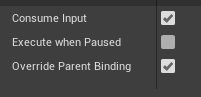 versed tinsel
oh well thanks lambda lol
sand shore
personally I dislike doing things this way
elder gulch
sand shore
personally I dislike doing things this way
why?
sand shore
have to reason about what input event is consuming input - much prefer only allowing one thing to respond to input. You could use a dispatcher which either the pawn or controller fires on interact... then doors and stuff could bind to it.
I always use an interaction interface and my pawn or controller calls that on the interacted object
but it does the job, so if you're happy with it you should continue using it
elder gulch
aight
tysm :)
@sand shore it got broken again for some rason
does the same thing even everyhting is like you said
dawn gazelle
Those variables don't exist in that blueprint. Right click on them and select "Create Variable"
trim matrix
Hello guys, I want to make when the character run to do it with run animation, like when I press left shift the player to run but not run with run animation, not sprinting
elder gulch
@thin raft after create get the variables and plug them in
you can do it with
ctrl and move the variable
and if you use alt and move you can use set variable
 iron rampart
Can someone help me?
I'm trying to make my First Person Camera control the rotation of the Character but it doesn't seem to work, i've set Control Rotation, but still not working
sand shore
@elder gulch I've no ideas because I don't know what may have went wrong, I don't work on your project
trim matrix
Hello guys I want to make the character run with left shift, I did it already but the animation is sprinting, I want to do it with walk animation
But idk how I can change this animation
sand shore
#animation but I'm not even sure what you are asking @trim matrix
trim matrix
when you make left shift the player to run, he is sprinting with sprint animation, I want to do it with run animation
I hope you get it now 😄
 thin raft
Ok, i'm stuck again 💀 i trying to import this BP but without success, if anyone can help me thanks

BP Construction
https://blueprintue.com/blueprint/yp0j0y8o/
BP Crowd_EventGraph
https://blueprintue.com/blueprint/pjosq37h/
is a crowd spawner if someone want to try 🙂
elder gulch
sand shore
<@373178387373621259> I've no ideas because I don't know what may have went wron...
sorry i was a dumb starter i failed to see that i accidentally duped the event
elder gulch
thin raft
Ok, i'm stuck again 💀 i trying to import this BP but without success, if anyon...
how about you make them from tutorials?
except downloading for free
sand shore
elder gulch
sorry i was a dumb starter i failed to see that i accidentally duped the event
yeah see this is why I don't do it that way
elder gulch
sand shore
yeah see this is why I don't do it that way
the other way looks a ton more harder for me
this is my 6th day
hollow drift
somehow i get here a endless loop or/and a crash
anyone any idea why?
its inside a widged. more increases the number of players, less decreases it.
If i press decrease several times then increase, it crashes
 prisma stag
Is there something else that I can do that has multiple out executions so that if one of these becomes true, then a certain apply damage happens?
dawn gazelle
hollow drift
It's not because of this part of the code. Where are these events being called from?
sand shore
elder gulch
the other way looks a ton more harder for me
that's why I didn't push it hard, but simply explained how I would do it
you should watch the pinned video "Blueprint Communication" as it goes over some of this
hollow drift
additionally i set the textbox text value with the number
but all inside one widget
dawn gazelle
hollow drift
on clicked in a widget
Can you provide a screenshot? Also, I believe you need to reverse these boolean checks... If you're trying to increase the number of players you want Default Player Amount <= 4 (maybe even 3 if you're trying to have 4 players) and decreasing > 1 (as you always need to have at least 1 player)
 dusky yacht
does anyone know how to my game inicialize in my second screen?
hollow drift
i am confused, how can something that simple already crash
ahhh
i know why
perhaps because i set it to 4 and accidently pressed play
thin raft
elder gulch
how about you make them from tutorials?
i searched but never found a tutorial from a crowd system like this
hollow drift
and forgot to do -1 since player 1 starts with 0
elder gulch
sand shore
you should watch the pinned video "Blueprint Communication" as it goes over some...
okei
prisma stag
How would I be able to execute both of the branches? Or is there an easier way to do this?
dawn gazelle
hollow drift
and forgot to do -1 since player 1 starts with 0
This works no problem on my end. Text is properly updated. No crashing. Again assuming you must have at least 1 player and a maximum of 4
hollow drift
the maximum player amount is from 0 to 3 = 4
but 0 is still a number 🙂
i forgot that
but ty for trying out 🙂
sorry, i totaly forgot about that
wrote you before, should have pinned you
dawn gazelle
prisma stag
How would I be able to execute both of the branches? Or is there an easier way ...
You can use sequence
If it's exclusive though, like it can only be either or, then you may as well connect the false from one into the other.
deft nimbus
maiden wadi
<@!377172496987717653> If you do this, with those three settings on the right ch...
This works for me btw thx :) I just have to manage replicating it xD
sweet silo
hi everyone any idea why my mesh is so deformed after being put in the actor blueprint ? in the blueprint
in the world
what i am doing wrong ahah
thanks 🙂
hollow drift
perhaps the scale is wrong?
i see you played around with the scale. perhaps the object placed in the level has too wrong scale
e.g. generally, never scale in engine, just makes more unneccecary draw calls
sweet silo
i see ok thanks i'll try that 🙂
sweet silo
hollow drift
e.g. generally, never scale in engine, just makes more unneccecary draw calls
so i'd have to scale it to perfection in blender then ?
sweet silo
ok 🙂 thanks a lot ! But yeah that's hard to figure out the right size 🙂 and yeah i applied all transform 🙂
i was familiar with the practice in unity but unreal is a bit different
and no it didn't work the subway is still very long, in the world, but not in the blueprint @hollow drift
but yeah the scale is clearly weird
oh wait
prisma stag
dawn gazelle
Yea. I was thinking the branch method would be better because Im comparing the actor in the linetrace to the current tool being held and then a certain apply damage happens?
hollow drift
click next to the yellow reset buttons
then y get your normal size
sorry i ment the scale not location
but just below there
sweet silo
oh ok great yeah i must have changed those while creating the blueprint !
hollow drift
kk
sweet silo
Great it worked !
sweet silo
But i think the scale was changed by the spline i created... i don't know how to do it without changing the scale of the whole thing
sweet silo
hollow drift
basicly always scale in blender, never in unreal unless you have to
great advice thanks a lot
hollow drift
read a bit about texeldensity
then you will understand more about why not to scale in engine (well unldess you have to)
 weak grove
hey i have a question
i am working on a fighting game
and there will be many characters
i want to ask if i need to create separateblueprint class for all the characters
and how to execute it and control all the classes with controller
dawn gazelle
weak grove
hey i have a question
i am working on a fighting game
and there will be many cha...
You can create one parent blueprint, and make child blueprints from that one parent blueprint for each of your characters. Any controls that all should have can be contained in the parent, and any specific controls for the individuals can be contained in their respective blueprint.
weak grove
i did the same but when i change the mesh of parent blueprint
hollow drift
put calculations only sutff in function libraries
makes everything way thinner and easier to manage
weak grove
it changes in all the child classes
dawn gazelle
your parent is supposed to be like a "base" class. It should not be used in-game. You should be changing the mesh in the children blueprints.
weak grove
okay i understood, thanks for helping me out
faint pasture
@prisma stag just check weapon type, then for each weapon, check the hit actor type. I wouldn't do it that way though, that's a really not going to scale well. What you should do is have a weapon define what types of things it interacts with. Then your function will be like get weapon, check if hit actor is type of thing the weapon interacts with, do weapon interaction
prisma stag
faint pasture
<@324230048506707968> just check weapon type, then for each weapon, check the hi...
Hm. I could have the linetrace in the tool's bp instead.
faint pasture
It has nothing to do with where you do your line trace, you can do that anywhere.
You can also do it the other way around, have each hittable actor define its response to being hit by a tool.
This is a good fit for polymorphism. From your character point of view, it should be able to just call use item on the item in its hand. The item itself would define what use does.
prisma stag
I have that. They are of type harvestable and when I do the linetrace I have the linetrace look for objects of type harvestable.
faint pasture
If you have more types of tools than just harvesting tools, make a base tool class and the activate event in it.
prisma stag
faint pasture
This is a good fit for polymorphism. From your character point of view, it shoul...
I use an interface for this.
prisma stag
faint pasture
If you have more types of tools than just harvesting tools, make a base tool cla...
I do.
Ill give it a try in a little bit. I have an idea on what to do.
 vital oyster
Hello !
I'm making a contruction game were you put cubes on a plane and i want to export the level as an .obj file on runtime. I get it work for a object. Is there a way, were on runtime I can merge the whole level in a single mesh ?
faint pasture
vital oyster
Hello !
I'm making a contruction game were you put cubes on a plane and i want t...
I'm sure it's possible but not in blueprint
 runic hinge
Hey guys, I'm wondering if anyone has any insight into this feature in 4.26 that (I think) is responsible for killing a workflow we were using:
New: Disabled editing of default values on soft object reference member variables. ?
We were creating blueprints for our mission logic, and creating soft reference variables to point to level actors. For example, we'd have a Soft Object reference to a Trigger Box in our mission blueprint, and we would assign a value that was a Level Object directly from the blueprint editor. This workflow was convenient for us since we didn't need to open the level the mission blueprint exists in to pick actors from other levels.
This is what we see from the Blueprint editor now
As a workaround, we found we can copy + paste existing variables that don't have the CPF_DisableEditOnTemplate property flag set, but if we're doing something we're not supposed to be doing here I'd like to figure out a new flow that's just as simple as we had. 🙂
 subtle nova
Quick question (hopefully)
How can I get a scene reference to an Actor component on another actor? I have a quest system set up, and the main quest manager needs to talk to some actors that have a certain Actor component on them. Unless I'm missing something obvious, it's not working for me. The quest manager can't see anything with that component.
dawn gazelle
subtle nova
Quick question (hopefully)
How can I get a scene reference to an Actor component...
Here I'm getting all actors of class "BP Player State" which I've attached a component called "Mission Manager" to. How are you trying to get your references to the actors?
subtle nova
Manually in the scene, as I want certain trigger volumes and such to connect to certain variables.
dawn gazelle
You cannot reference objects within the scene within a blueprint.
What you would have to do is place the BP_PlainsQuest object in the scene, then you can have it reference things in the scene.
subtle nova
That's what I did, it's in the scene
but it can't seem to find the objects with the Actor Components that it should, seemingly
sweet silo
Wow great thanks a lot do u know the name?
subtle nova
@dawn gazelle In the quest manager I have an Object Reference set up to that Actor Component type, which is instance editable. I have an object with that Actor Component in the same level as the quest manager, but when I go to set the reference in the scene, it doesn't find anything.
dawn gazelle
Yeah I'm not sure you can directly reference components like that in the scene. But as a workaround....
Then you can have said object get the reference: So here's an actor with no reference, but then upon selecting the actor in the scene...
All I did was select the target and the MissionManager component auto-populates.
sweet silo
Thanks !
subtle nova
That's quite the workaround! But hey, if it works...
@dawn gazelle thanks. 🙂
BTW, how do you have your node connectors be angular? Is it a custom build of Unreal or just a setting I missed?
dawn gazelle
It's an editor plugin.. One sec...

Unreal Engine
Improve the wire style of Blueprints and materials editors.
subtle nova
Beautiful
 neat surge
so when i play as a client i get this error once i stop playing ```CSharp
Blueprint Runtime Error: "Accessed None trying to read property CallFunc_Create_ReturnValue". Blueprint: GameInstance_Default Function: Execute Ubergraph Game Instance Default Graph: EventGraph Node: Add to Viewport
this code gets called upon beginplay in LobbyLevel BP
dawn gazelle
neat surge
so when i play as a client i get this error once i stop playing ```CSharp
Bluepr...
Are you running the game with the Net mode set to Play as Client?
neat surge
yes
dawn gazelle
The server also has a game instance which is trying to create UI but UI will not exist on dedicated servers.
neat surge
oh so what can i do to deal with this
dawn gazelle
On the Begin Play, you can do a "is dedicated server" check and only on false should you run the UI stuff
neat surge
ohh i see Thanks
 mortal rain
dawn gazelle
https://www.unrealengine.com/marketplace/en-US/product/electronic-nodes
mortal rain
dawn gazelle
https://www.unrealengine.com/marketplace/en-US/product/electronic-nodes
This will cure my Blueprint OCD
 inner sandal
how would one go about generating a random float between -500 and -1000 OR 500 and 1000? so any number from -1000 to 1000 but nothing between -500 and 500
dawn gazelle
??
inner sandal
magical! thanks a lot, stupid as I may look you've helped me learn
love those electronic nodes also
 languid lichen
Anyone well familiar with the VaREST plugin?
 winter garnet
I'm quite unsure where to post so just let me know if it's in the wrong place.
Pretty much, when trying to export a Datatable to JSON, a Text field gets converted from this:
Into this:
"Description": "NSLOCTEXT(\"[5E855C2740E42EA3EAAFBC8217DD8DDE]\", \"BBCF2A974A9D64BC024A49B70A875871\", \"At the end of each wave, gain +4 health)\")",
I know that's due to translation and all but, is there a way to overcome this without manually having to refactor my json?
thin raft
What the difference from construction script and “user construction script”???
dawn gazelle
languid lichen
Anyone well familiar with the VaREST plugin?
Post your question about it, see if anyone bites 😛
languid lichen
I'm trying to figure out how to access a list of JSON objects that my REST API is returning. I can get the JSON Request Object in the GET request response, but when I try to parse it with VaREST JSON functions it doesn't work because the response is a list of JSON objects [ {"my key":"value" } ]
 chilly widget
Hello friends! Any way to know which input is currently sending information? I am getting constant horizontal input from a device in my pc, but there's nothing connected :/
languid lichen
for a single json object response, i can convert it to a string, strip the [] and for multi json split it on the commas to an array, and then convert to JSON again but it seems super hacky
 lucid lynx
chilly widget
Hello friends! Any way to know which input is currently sending information? I a...
lucid lynx
chilly widget
Hello friends! Any way to know which input is currently sending information? I a...
What do your inputs look like? Could be your mouse input for example.
dawn gazelle
languid lichen
I'm trying to figure out how to access a list of JSON objects that my REST API i...
Your JSON response starts as an array? Like the first character received is [?
languid lichen
dawn gazelle
Your JSON response starts as an array? Like the first character received is [?
The server returns a list of JSON objects....
😅
chilly widget
lucid lynx
What do your inputs look like? Could be your mouse input for example.
So the weird part is that the up and down keys work, and if I remove the WASD keys, and then add them while the game is running, it works, when I start again, they stop working
languid lichen
dawn gazelle
Your JSON response starts as an array? Like the first character received is [?
And if I put the response into a JSON linter, it says its valid JSON. I think this is just a limitation of VaREST. Another reason why I should just be using C++
 shy current
?
languid lichen
shy current
How can i see if an event is not executing?
For gameplay or debug?
shy current
gameplay
I need to check if the object is in the air to apply velocity based damage
@languid lichen
sweet silo
wow i couldn't thank you enough iv'e just installed it this is brutaaaal
 pliant jewel
Hello,
Im using the AI perception component, and I'm unable to get two senses working in tandem.
I have tested sight and hearing, and individually they both work.
However, if I attempt to use both, only the first sense i add works.
(i.e. Add sight then hearing, only sight will work)
Any known issues that I should be aware of?
 tough cipher
Hello,
I'm trying to change light intensity on a light based on the distance between the objects and the main light source and can't quite figure it out
 pliant jewel
Your distance calculation is incorrect
Subtract the position of one from the other, then take the length of the resulting vector
Right now it looks like you're first adding the positions of two objects then subtracting
@tough cipher
tough cipher
Thank you
 olive ingot
I'm making a spell system, where I plan to use Actor Components as spells.
My only argument for this is because I am under the impression that Actor Components are less memory and performance than actual Actor Objects (as spells) and store them as variables on characters.
Is this a good way of thinking or am I having a wrong perspective?
languid lichen
shy current
gameplay
Is your object class based on Pawn class or have character movement component in it? It has a function "is falling" that tells you if it is in the air.
trim matrix
Stupid question before I ask another later. Is there a way to see where a custom event is being created?
stray island
@trim matrix wdym
U want to create one ? Right click in bp and create it
Write “custom.. then add custom event
 vale torrent
can a blueprint function library function input pin default to self?
 tight schooner
If you can't put "self" in the macro then probably not.
If you can, then first do a check if the input is valid, and if it's not, use Self
I believe you can set a function timer on another target. I don't think I've tested it, but you could potentially use a function timer as a bootleg interface, lol
trim matrix
Alright, I have a custom OnDeath event and it's showing me my death screen when I go to the menu or a new level so I was trying to double back and debug it.
 kindred tinsel
How can I create a physics led player so that if a projectile like a ball would hit him, he would actually get hit, sending him backwards, instead of the normal taking a hit and not flinching? Im not talking about physical animation, I already have that. I mean the player character itself getting moved by other objects.
This is the current project but I want the force of another object to actually be able to move the player, not just bump his ligaments around. Like what happens when you get hit in games like Gang Beasts.
Im trying to make a sort of third person mash up of Stick Fight and Super Smash Bros.
trim matrix
I think I figured it out
 royal anvil
Someone here who has done a spectator mode with "set view target with blend"? I can easily transfer the cam view with "set view target with blend" from client pawn to server pawn, but then the view of the client after transfered is not rotating.
I have a lot of tested with debug arrows and a lot of details. But to not overwhelm somebody here, please let me know if someone here has good knowledge about this
trim matrix
Hmm, so the 'You died' screen that I have uses the OnDestroy event but if you change level it activates the OnDestroy event. How can I branch the death screen so it only shows when my player actually dies?
 kind gale
I'm trying to call the TakeRecorder from a blueprint, and examining the source it seems doable
    /**
     * Start recording with the current take
     */
    UFUNCTION(BlueprintCallable, Category="Take Recorder|Panel")
    void StartRecording() const;
But I can't seem to find anything in Blueprints which references this code. Am I going about this the right way?
 astral estuary
I am trying to make a blueprint function that takes an Array<T> as a reference and shuffles it
how do I tell blueprint that the type doesn't matter? 
it demands a type

Wildcard is the thingy
faint pasture
@olive ingot It's fine, I've done spells as components. Spells as actors is fine too, don't worry about memory in this case I less you plan to have tens of thousands of spells flying around.
@olive ingot also look at GAS if you think it's be a good fit.
@trim matrix Make death an actual state, not the destroy.

 tight schooner
@astral estuary thanks for reminding me about wildcards lol. I think some engine macros use those.
There may also be a "shuffle" node for arrays.
astral estuary
It doesn't take my stream in 😦
but I managed to make that macro for fisher-yates and it worked
 glossy egret
cant seem to use datatables in actor components for some reason.
if im trying to make a complex and flexible health and status effects system that i can just attach to any type of character. what would you guys do.
i already know how i would make the system. but i was really needing to be able to pull info from a datatable
it would make things alot nicer to have the whole system in a table. because there alot of effects i want to support. and it seems like the cleanest implementation
for what im doing at least\
trim matrix
How would I go about Destroying an actor and Creating a widget, adding it to the viewport for 2s?
https://i.imgur.com/G3Qy2Je.png
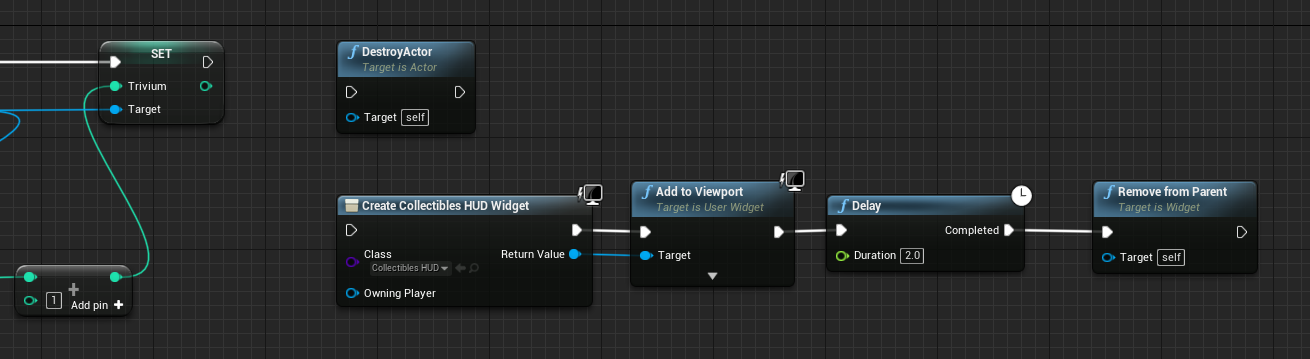
I thought it'd be a branch but thats only true/false
glossy egret
are you trying to kill the player and show them something on screen at the same time
trim matrix
Player is picking up an item
So they're collecting it, the game is deleting the item from the world but also displaying that they collected one of the item on screen for 2s
i think im just an idiot, I put the widget part after destroy actor and it did what i wanted
glossy egret
explain 2s.
but as for deleting an object and showing an icon you should just be able to do them one after the other if you already have the refs to the item and the info you want to show
trim matrix
2s = two seconds.
glossy egret
oh yeh. show icon-delay=2-delete icon lol
trim matrix
Well doing it this way isn't removing it from the hud
glossy egret
UMG is kinda janky. and sometimes non-intuitive. i might have to see exactly what your doing with it the help.
but ive done it in my UI before. but its been a while. and i lost the code to corruption.
now looking at your code there. are you doing that in the player pawn
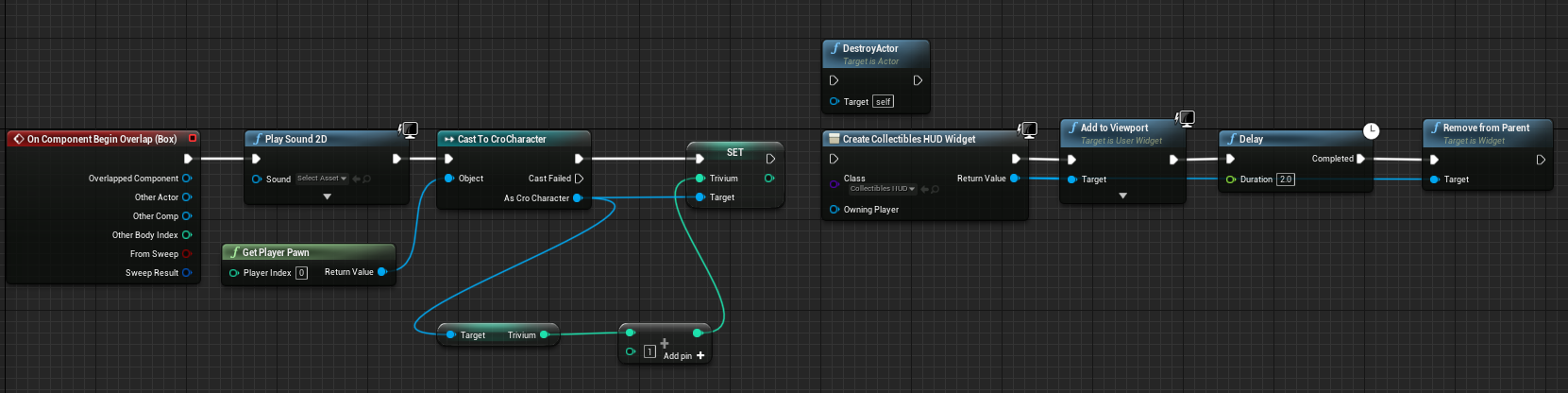 glossy egret
give me just a sec
trim matrix
mk
Also, a side question on my collectibles HUD I'll end up having maybe 2 other items the player can collect. Is there a way to show only that specific item or would I need a UI widget for each?
glossy egret
when i was working on my UI. i had like a message center and i managed to get it to make a list that i could add and remove from in UI. in fact. im not sure what your working on.
but it might be easier to put up a perminate Widget UI. and just handle the display in the widget via commands from your pawn
then you could show a texture of your icon and ether hide or remove it directly in the widget. its probably alot easier
and you can set it up so they ether have fix locations. or if multiple would happen at the same time. they would list off next to each other
trim matrix
I feel like that's a little bit out of my depth.
It took me like 10 hours to figure out the sequencer and movie render queue to make a flipbook only to figure out that wasn't what I needed to do.
I ended up needing to make an animated material with flipbooks and put that in my UI widgets
glossy egret
every section of unreal. as a solo dev ive basically had to spend a week to a month with every system whether i liked it or not. its not so bad.
UMG can be aggravating when you need it to do something that it doesn't already have a tool for.
but the rest of it just works. and its not to bad
trim matrix
Yeah, I'm just trying to not have to learn a new system and end up re-doing a lot of my work currently lol.
glossy egret
If your working solo. you may have to touch every system in UE4 at some point. so its not a bad idea to look up some tutorials
i know the feeling
thats why ive put off C++. because ive written so much code. and if i learn how much better c++ can be. ill probably want to rewrite everything
but UMG isnt that bat. and youll probably need to learn it at some point. its also harder to fix stuff after you do it one way. and then you build the rest of your code around it.
my gun code took me a month to rewrite. because it affected nearly everything in my game. and it was a chore
 runic osprey
Hey everyone. I'm trying to use a trigger box to move a wall in my level. I want to have it set up so that when an actor called "key" overlaps the box it move a wall with an actor component called key. So far I am unable to get this to work. Any help is greatly appreciated.
trim matrix
I feel like if I start moving too quickly and touching multiple systems at once or re-doing things I'll get overwhelmed and lose interest. Trying to work at my own pace I guess. I wanna build the systems first and then combine/polish them afterwards.
glossy egret
thats fair. i dont know who long youve been working with UE4. learning stuff burns me out to.
trim matrix
Uhh I messed around with UE4 for maybe a week or two this past summer and picked it back up a week ago. So, probably only a month in total.
glossy egret
oh yeh. it took me like 2 months before Blueprints clicked. i nearly quit becuase i couldnt get basic things figured out. and then after the second month. milestones became basic tasks. and from there i just took off with it. UE4 is a bit of a learning wall
but once you get it. you can do practically anything with ease
trim matrix
I think it has something to do with Remove from Parent.
glossy egret
yeh it doesnt sound like the right command. have you tried just destroying the widget
trim matrix
What node does that come off?
glossy egret
hold on a sec. i took a screen shot. but im having trouble finding it to upload

mabey that might do it. i just right clicked in my pawn and typed in widget
trim matrix
That didn't remove after the delay either.
It's weird, I can create the widget, add it to the viewport and specify a delay but I can't remove it afterwards lol
glossy egret
im testing stuff on my pawn
trim matrix
Appreciate it.
glossy egret
it cleared it from my screen
trim matrix
Remove all widget?
glossy egret
yeh.
trim matrix
With a delay?
glossy egret
ill help in a voice call if you want to share screens. but i need to walk my dog first.
and yeh. i used a delay.
i basicly wrote what you had down in my player
trim matrix
Alright, I'm gonna google some more and we can try that.
glossy egret
cool. give me like 5 minutes or less. and ill call you
trim matrix
I think I've narrowed it down to Destroy Actor, because if I put that as the last node the delay works correctly or if I just change the visibility of the item and then do the viewport, delay etc it works correctly
 ocean mantle
can someone help me figure out why i cant get simulate physics to appear in my list ?

ue4 4.25
https://www.youtube.com/watch?v=lvADZd49Q_Q&t=997s im following this video to

How to implement Dual weapons in Dynamic Combat System.
Important!
Collision Handler Component changes (from 12:57 to 22:45) were already uploaded in last update(22.07.2019), so if you are using latest version of DCS, you can skip this part.
Otherwise after you modify Collision Handler Component, make sure to add this extra condition in order to...
dawn gazelle
ocean mantle
can someone help me figure out why i cant get simulate physics to appear in my l...
Are you using this plugin?https://www.unrealengine.com/marketplace/en-US/product/dynamic-combat-system

Unreal Engine
Easily modifiable combat system implemented entirely in blueprints.
The tutorial you're looking at is specifically for implementing dual wielding using that plugin, and the class that he's using isn't native to UE4.
ocean mantle
ok
 true valve
Is there a way to hide the specific areas of the mesh via blueprint?
i.e I want to hide the chest, shoulders, legs, feet. I wonder if I could use Hide bone by Name
 elfin badger
does anyone know the best way to go about a grid placement system where only the blocks around the current starting block are valid?

 steep hazel
quick question: would it be better to hold weapon 'mods' that are able to be quick-swapped once collected as actor components or as code imbedded in the weapon itself?
I should say that this is for a Rogue-like
 wind sequoia
usually people have it in the weapon
 prime snow
steep hazel
I should say that this is for a Rogue-like
prime snow
steep hazel
I should say that this is for a Rogue-like
You dont want anything that are "n-items" or swapable as components, should be an array somewhere most often. Components can't be spawned afaik
 lime sphinx
can you delete the "Switch Cameras if HMD is enabled" On the top down starter kit?
trim matrix
Trying to make it so that when I pause my game I can press the same button to un-pause my game without clicking the resume button. But when I pause it the game isn't focused on the pause menu and you need to click the screen to be able to interact with the buttons.
I know that Set Input Mode UI Only exists however I don't know where to put it in the blueprint.
Here's my blueprint: https://i.imgur.com/civZjNL.png
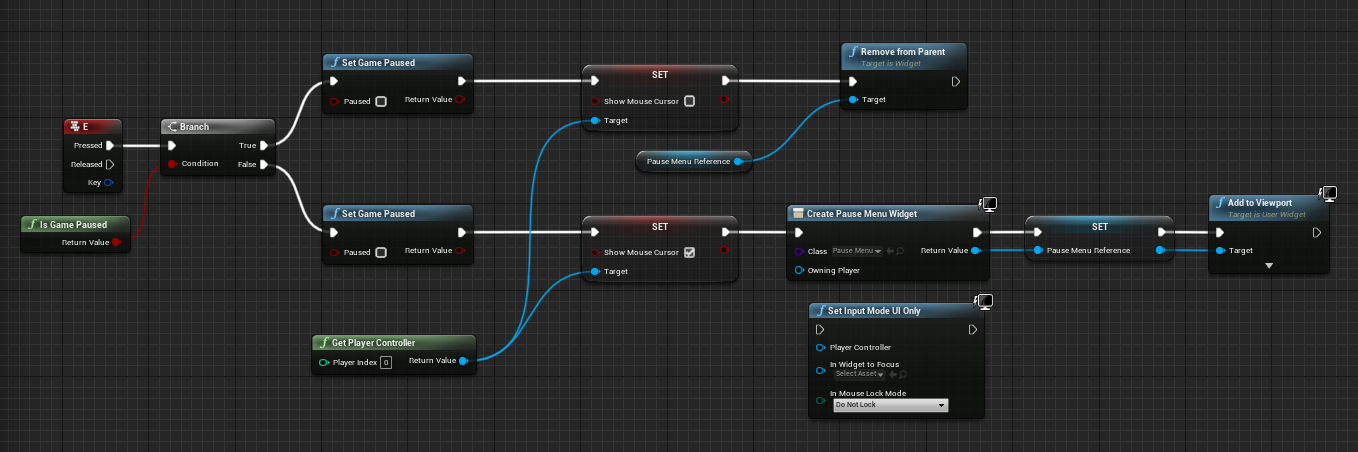 lime sphinx
Can someone tell me why the weapon isn't showing up in my guys hand?
 elder gulch
lime sphinx
Can someone tell me why the weapon isn't showing up in my guys hand?
elder gulch
lime sphinx
Can someone tell me why the weapon isn't showing up in my guys hand?
i suggest placing to socket with your own hands
like parent gun inside the socket
and use it that way
but
idk
mybe u wrote the name of the socket wrong
and u used spawnactor?
hmm
lime sphinx
I spelled it correctly.Just double checked that and yes I used spawn from actor class or something like that
im using the top down character template so idk if that messes with things since it already had stuff attached to the Event BeginPlay thing
 short fractal
Hey, Newbee here, I ended up nesting 4-5 layers of structs within structs in my blueprint, I just wanna know if that might cause problems in the future, any thoughts?
for ex: I have an item struct which containts weapon/armor data struct which contains attribute structs and also contains socketed gem structs which contains another set of attribute struct etc.
 simple dragon
AAAAAAAA my brain XD
 lucid lynx
simple dragon
AAAAAAAA my brain XD
lucid lynx
simple dragon
AAAAAAAA my brain XD

 final orbit
can you set bitmask integers directly in struct? i know it's possible to make a bitmask and set it in bp but was just curious if its possible to just set it directly in struct members (data tables)
also can you have function delegates as struct members in blueprints?
thanks in advance for any advice and answers :]
elder gulch
simple dragon
AAAAAAAA my brain XD
ok but why?
 high sapphire
Hmm, I'm kinda stumped on this one, and Professor Google isn't being helpful
So basically, I created a widget for showing the player a level and asking if they want to enter that level. It's kind of like a level select, where the player walks over a trigger box (which shows the widget until they walk out of the trigger box) and they're prompted about entering the level.
I've got the logic working for changing the text/image to reflect the level, and it sends the player to the correct level. However, I got the idea to add a star icon to the window when the player has collected all of the items in the level.
I figured the best way would be to give each level their own "items collected" array and a boolean for whether all items were collected. Then the widget could reference the boolean for whether the star should show or not.
But apparently you can't reference level blueprints in other blueprints, so I'm not entirely sure how to make this work.
 dawn gazelle
high sapphire
Hmm, I'm kinda stumped on this one, and Professor Google isn't being helpful
So ...
dawn gazelle
high sapphire
Hmm, I'm kinda stumped on this one, and Professor Google isn't being helpful
So ...
You'll probably want to use a save game object and store the value of the levels in it, and then you can read the values whenever you need to.
high sapphire
So the level blueprint can send information to the save game object?
 teal dove
Hey guys! I would like to ask, what is a good way to switch between two control mechanisms for a pawn?
For example I have a spaceship with two different control functions (one is physics-based and the other is not), and I want to switch between them manually.
I could add an "if" check after the InputAction, but I wonder if there's a more elegant solution to this?
 orchid garden
i just made a simple function thats a if check called 'isPrimary' so i can reuse it for different keys. I don't know of a more elegant way myself.
teal dove
@orchid garden Yeah I guess there isn't, yours sounds like a good solution. I will do the same then, thanks for the suggestion. 🙂
high sapphire
I have this in my level's blueprint, but I'm not sure how to set up the rest (the widget & the save game object)

 dreamy kindle
Does anyone know how I could create a volume that would turn off selected meshes, but still allow them to keep shadow? When entering volume it toggles off than when leaving volume it turns back on?
teal dove
@dreamy kindle This might help you I think https://answers.unrealengine.com/questions/332702/disable-rendering-of-object-but-keep-shadows.html
dreamy kindle
thank you
teal dove
@dreamy kindle You can then use these two nodes to hide the actor but keep the shadows on (haven't tested it myself though)

 chilly jetty
Hi a simple question
where can i increase the speed of the projectile for the base FPS Example?
sweet silo
chilly jetty
where can i increase the speed of the projectile for the base FPS Example?
check inside the blueprint setting i think
chilly jetty
sweet silo
check inside the blueprint setting i think
ah right its in the projectile component
thanks
sweet silo
my pleasure
stray island
Why unreal has problems with moving folders , they keep other folders empty but still say they have the files in
So empty folders be stuck
Anyway i will use the migration trick , but wondering if there’s a reason behind these errors
tight schooner
Try resolving redirects (right click on folder) and restarting editor
teal spade
@stray island so I think my—getting different results each runtime—has to do with floating point precision. Which is fun.
stray island
floating point ? I don’t get it
 upper adder
Why cant i add a timeline in widgets?
 outer lance
What are reasons for the path object to be invalid, when the path should be possible to generate?

It works sometimes, but more often not, zero points f.ex.
 tacit shard
hmmm, why cant i extend collision/sphere/box/etc components in blueprint?
i just want a sphere component that i can add functionality to for handling interactions with actorts
-t
hollow drift
can i change mesh only socket locations on runtime?
tacit shard
i have world items and characters that can both be interact able, they obviously dont share the same base class (actor and character) so i need to create an interaction component that i can attach to any actor to make them interactable
had no problem with this in the past using c++, simply extending sphere collision and adding events. to my surprise i cant extend such a component in blueprint
thought it would be as simple as create an actor component blueprint extending the sphere collision component > custom Event Interact in event graph > attach to any actor and bind my functionality there
 crimson swan
how would i go about removing this error?

it's not game critical but i'd rather not have errors
tacit shard
wherever the call is causing that error, check if the object is valid before accessing it
crimson swan
oh a isvalid handles that check?
outer lance
@crimson swan add a check before casting, of .isValid
tacit shard
i think so
outer lance
I have a lot of those IsValid nodes, wonder how much it hits performance. In porting to c++ there is an IsValidLowLevelFast which IDK might be faster..
teal spade
stray island
floating point ? I don’t get it
I'm using world coordinates (plus multipliers with aforementioned for loops), and that doesn't bode well with a grid system. Gives inaccuracies all over the place. Which breaks the code.
tacit shard
i dont think its gonna cause any real issues unless youre trying to use it in tick on a massive loop or something

 tacit shard
thats the nicest spaghetti ive seen


 viscid shard
kk good
tacit shard
so, is there any way to extend sphere component in blueprint?
viscid shard
i never used to be ocd but now i am atleast with certain things. kinda want to contact these people to have 10 mins with their code
tacit shard
rather you than me:D
 tacit maple
Hey guys, if you call an event dispatcher from a bad reference will it error or does it just 'not do anything'?
maiden wadi
@tacit maple Do you mean reference as in memory pointer? Blue blueprint variable?
If yes, then the point is moot. Don't use pointers without checking their validity with a cast or IsValid.
tacit maple
maiden wadi
<@!222333416291565569> Do you mean reference as in memory pointer? Blue blueprin...
Yes thank you!
 covert stirrup
silly question I guess, but how do I bring up the full console, not the console line opened with '¬'
earnest tangle
Use a branch or a multigate
branch can check if game is paused and do appropriate action, multigate can function similar to flipflop, but you can reset it... branch would probably be better tbh
 primal smelt
Just attempting some problem solving for a mechanic. Is there a simple way to have one scene component orbit another on a single axis on tick? I have two cubes childed to a scene root. CubeA is at 0,0,0 and Cube B just has a Y offset of -200. I'm trying to use RotateVectorAround axis (I just want to rotate on Z axis) but having difficulty figuring out what it was doing. Any suggestions please?
Edit: I don't think I will be able to use a rotate movement component because for the actual mechanic I am using a socket
Right now I'm not even fussed about rotation (I think that should be easy with a simple look at vector), it's the location I am struggling with
 smoky quiver
hiya whats a good tutorial or tutorial series or course or whatever if i wanna start using unreal and blueprints
primal smelt
smoky quiver
hiya whats a good tutorial or tutorial series or course or whatever if i wanna s...
gamedev.tv have some good courses, they're available on Udemy as well
prisma stag
Im trying to gather resources in my game so I check if the hit actor is say, of type tree, then see if the item held is a hatchet but the damage functions never fire. Can someone spot the problem?

 prisma stag
Yea. I did a print string and got the hit actor and it worked.
 opal pulsar
odd
earnest tangle
Most likely the problem is your logic that compares the hatchet
opal pulsar
maybe im just missing something
earnest tangle
The == node dropdown displays items that are not really valid comparisons for certain objects
It seems to be a regression in 4.26 as it didn't use to do that before
opal pulsar
interesting
prisma stag
earnest tangle
The == node dropdown displays items that are not really valid comparisons for ce...
So what could I do instead?
earnest tangle
try doing Current Item -> Get Class, then compare the result of that to the BP class
most likely the object you're trying to compare the current item is actually the class, so it won't work correctly (since class is different from instance of the class)
You can also do Current Item -> Cast to BP_Whatever, then right click the cast node and choose "convert to pure cast" or whatever the option was called, then you can use it with a boolean
prisma stag
earnest tangle
try doing Current Item -> Get Class, then compare the result of that to the BP c...
I did this but that didnt work either
 earnest tangle
Oh, yeah actually your other checks have the same problem
so you'd have to either do the get class or cast for the hit actor as well
opal pulsar
okay i narrowed down my problem lol, what can i do to fix it reporting an infinite loop?
i assume it wants something to run, but what?
 prisma stag
earnest tangle
so you'd have to either do the get class or cast for the hit actor as well
prisma stag
earnest tangle
so you'd have to either do the get class or cast for the hit actor as well
That worked. Thank you very much. Very weird.
prisma stag
opal pulsar
also sorry for interrupting you, derek
No problem. Were all here to get help.
opal pulsar
hehe yeah
earnest tangle
@prisma stag it's just a question of object vs class. An object's type can be a certain class (eg. "an instance of BP_hatchet"), but it cannot equal its class (a concrete hatchet that's spawned is not the same as the blueprint it was created from)
@opal pulsar it's probably reporting that incorrectly as the infinite loop spot. The detection doesn't necessarily figure out the right spot where it happens
prisma stag
earnest tangle
<@!324230048506707968> it's just a question of object vs class. An object's type...
That makes sense. Now the objects I was checking was their respective class. Now if I make a parent class and inherit from that, will the getclass get the parent class?
earnest tangle
at least I can't see anything in that function which would loop infinitely
 haughty latch
Been copying and doesn't work any suggestion on where Im going wrong. Cheers. (Doesn't get attracted )
 earnest tangle
@prisma stag no, you would probably need to use cast to BP_ParentClass - that would work for all child classes
prisma stag
earnest tangle
<@!324230048506707968> no, you would probably need to use cast to BP_ParentClass...
Ok cool. Thx
opal pulsar
earnest tangle
<@!437597266069684225> it's probably reporting that incorrectly as the infinite ...
makes sense, cause i was trying to fix it but it was still dying
earnest tangle
What's the BeginPlay in? Is it inside the spawned tile class?
opal pulsar
earnest tangle
What's the BeginPlay in? Is it inside the spawned tile class?
the tile class, yeah
which spawns an instance of itself but it should have a limit of 100 tiles in total
i think there is a projectile premade or something like that, if not, my call is by using AddForce
degrees is more complex
earnest tangle
@opal pulsar variables inside blueprints are specific to the instance - so every time you create a new tile, the variable will start from zero
opal pulsar
earnest tangle
<@!437597266069684225> variables inside blueprints are specific to the instance ...
the tile number variables are all in the gamemode
they shouldnt reset, right?
earnest tangle
Ohh right, that is correct yes
I'm not 100% sure but I think the problem could be that the beginplay triggers before the value is incremented, which triggers another tile to be generated right away, which then triggers another tile, and another tile... with the code never reaching the increment part
try incrementing the value before spawning and see if that helps
opal pulsar
i found a projectilemovement component, add that to your projectile blueprint and you can tweak stuff there
opal pulsar
earnest tangle
try incrementing the value before spawning and see if that helps
Ohhh thats smart, ill try that rn
that seems like a valid logic
it works now, thank you so much!
okay it does not
xD
it only works when you have a max number of tiles not sufficient to trigger the infinite loop flag
earnest tangle
Ah, yeah you can adjust it in project settings
So it's possible that you have a valid case where it's actually not looping infinitely, it's just triggering the safety check for it
primal smelt
Anyone know how to get a scene component rotating another scene component without using springarm or RotateMovementComponent?
By rotating I mean orbiting around an axis
opal pulsar
earnest tangle
So it's possible that you have a valid case where it's actually not looping infi...
yeah would make sense
 bitter mason
anyone knows why one can't create a child blueprint of the SplineComponent? i can inherit from it in c++ but not in blueprint. i am curious why 🤔
opal pulsar
okay this doesnt make much sense anymore, unless im looking at the wrong value
 prisma stag
earnest tangle
<@!324230048506707968> no, you would probably need to use cast to BP_ParentClass...
prisma stag
earnest tangle
<@!324230048506707968> no, you would probably need to use cast to BP_ParentClass...
In the comparison I have 2 harvestable items, stone and wood. I made a base tree class then after the start of the macro I did a cast to the parent class, but if it is stone that would be hit, how would I cast to the base stone class after the cast for the base tree class?
earnest tangle
you can just do it the same way as you're doing it now... if you right click the cast node ther's an option called "convert to pure cast" or something like this, which makes it so you don't need to connect it to an exec pin and you just get a boolean value out of it that tells you whether it succeeded or not
prisma stag
earnest tangle
you can just do it the same way as you're doing it now... if you right click the...
Oh. So I can plug in the hit actor to the object and if the object is of type BP_BaseTree then the cast boolean would return true?
earnest tangle
yeah
prisma stag
earnest tangle
you can just do it the same way as you're doing it now... if you right click the...
That doesnt seem to work. But even if I did a pure cast for the tree itself it doesnt work.
earnest tangle
what does the graph look like now?
prisma stag
earnest tangle
what does the graph look like now?
 earnest tangle
that looks like it should work assuming the object inherits from it correctly and the other condition passes
prisma stag
Yep. The bp of the tree has parent class BP Base Tree
earnest tangle
I'd try removing the other condition just to see, or printing the result of the check so you see what the values are
prisma stag
Oh, whoops.
Since I remade the base class and re inherited, I forgot to change the collision settings for the objects type.
It works now. Thanks though.
 hybrid lodge
Hello, I am newbie.. started to watch Ryan Laleys skill tree tutorial https://www.youtube.com/watch?v=qxk_Cn4w56Y&list=PL4G2bSPE_8umqJBb81b9EPjFPwWuvjVU9&index=5, and I want save learned skills so that you open our project/game again it loads those skills that previousley was learned.. The issue is that (the basic concept I understand, that you need to save those variables ant put into save game object) I am confused which variables needs to be saved and loaded, so I watched his load/save tutorial. But still the skill system is a bit complex for me.. Anyone tried/did his tutorials or have suggestion how properly do save load .. ;/ I am really frustrated, trying things all day and no progress..

In this series we go through how to create a skill system where you can spend perk points to unlock skills and abilities.
Download the project files here: https://patreon.com/posts/33229729
In Part 5 we add the perk points and the ability to spend them to unlock skills.
Support me on Patreon and get access to videos early, join our developer ...
 hearty valley
@hybrid lodge I'm unfamiliar with the tutorial, but if you're having issues with saving/loading variables in BP have you looked at this doc? https://docs.unrealengine.com/en-US/InteractiveExperiences/SaveGame/index.html
Overview of how to save and load your game
hybrid lodge
@hearty valley yes, first thing what I have done is opened ue documentation. I can send you over the project it. it is light weight based on ALS V3
tacit maple
My mobspawner is currently using soft references and then Async loading them into the game, however it causes a slight hitch on the first spawn.
Should I Async load all my enemy classes into memory at the start of the level? What would be be the correct method here.
 void matrix
is anyone familiar with HISMs?
neat surge
Does session get destroyed automatically when the level switches?
primal smelt
I have a rogue print node that will likely take me ages to find manually. Need to put a stop to it's polite greeting spam, is there a way for me to bring up a log that states precisely what blueprint is printing the message?
dawn gazelle
primal smelt
I have a rogue print node that will likely take me ages to find manually. Need t...
you can use the "Find results" tab, search for the specific text that is being displayed and click the binoculars button on the far right - it'll then show you all instances of where the text appears.

you can even double click on them and it'll take you right to the node.
primal smelt
dawn gazelle
you can use the "Find results" tab, search for the specific text that is being d...
Good to know, cheers!
 kindred mason
is there a way to use a negative number in a maths expression?
 dull tree
Need help with math 😛

i got this
both have value 700
so it should return value 1
so it looks like this

like 700/1000
idk why
bitter mason
so, what do you do with the 1 value?
bitter mason
but how? probably the problem is there and not in the part of code you shared


 rancid ridge
I want to create a general function and I want to call it from different classes but I cannot find out how (no c++, blueprint only). Can someone pls give me some keywords to search for?
bitter mason
rancid ridge
I want to create a general function and I want to call it from different classes...
blueprint function library
rancid ridge
@bitter mason Thanks!
bitter mason
@dull tree show the part where you actually call the function and use the return value
bitter mason
rancid ridge
<@!386581721992134657> Thanks!
you're welcome, they are very useful
dawn gazelle
bitter mason
<@!259800346321354753> show the part where you actually call the function and us...
It's a bind. The bind itself is calling the function to set the value.

 true kiln
Hello guys, when I try to attach a static mesh component actor to another skeletal mesh component if I add a socket name (the socket is on the root of skeletal mesh a with a body) physics goes crazy otherwise both working perfectly... any idea where's the problem?
 bitter mason
ah okay missed that part haven't played with widgets that much
bitter mason
so is the Percent parameter supposed to get a value between 0 and 1? because that is what your function puts out right?
dull tree
yes
bitter mason
why is it called percent then?
dawn gazelle
I'd say verify your values. Use print strings or breakpoints to see the value of the variables at run time.
kindred mason
debug mode engage
dull tree
😛
bitter mason
but nevermind me, datura is more helpful 🤪
dull tree
i am so **** dumb
xDDD
i was making changes in UI that i dont even seee
xDDDDD
now its working
trim matrix
@true kiln if they both have collision enabled physics will freak out yes
dawn gazelle
Why is collision one of the more annoying aspects of Unreal? -_- I have two actors. One has just a cube static mesh assigned to it with a specific collision preset set to it. When doing a capsule trace by channel with an appropriate channel that should detect the collision preset, I can detect this actor no problem.
I have another actor, that has a collider, and a static mesh. Despite having the exact same collision preset set on both the collider and the mesh, the capsule trace does not find this object.
Anyone have any ideas why my second object would not be detected by the trace?

 weak grove
Can you tell me if AI WITH blue print is better or with BEHAVIOUR TREE
 worthy frost
no need for caps, and it depends really on what you are doing. Super complex AI, then BT might not be suitable/might be tricky to get right. Though i have manage to do complex AI in BT, it was not pleasant. But then you have to make your system. If its just a normal AI (like a zombie or a wandering pedestrian) then Behaviour tree is good
worthy frost
fighting AI should be ok
 past girder
hi, i have a LineTraceByChannel node and getting the impact point, location and distance from where the player is looking at and hitting an object, but how could i calculate where the closest mesh to where the linetrace hit and get that value?
maiden wadi
@past girder Just any mesh? A mesh in a specific actor type? or?
past girder
Some cubes around the scene
 narrow bear
Am I right in understanding that while checking "Config Variable" points you to Saved/Config/PLATFORM/Game.ini, for a built game this would be GameUserSettings?
(I noticed this was the only ini file the engine generated)

It overwrites the Game.ini entry I imagine?
 astral mural
Yes and no, Game.ini is the right place. I think it remains there in built games too
GameUserSettings is used mostly for Graphics/Scalability settings, you don't usually touch it unless you're making a Graphics Settings screen
You can open the file up in notepad and actually look at the settings stored there
narrow bear
There's actually nothing there
I mean, in the built server
There's only Config/WindowsServer/GameUserSettings
Maybe I should just make a file myself?
hearty lintel
guys, i need to make a vehicle editor - save the user preferences (so basically save a bunch of skeletal meshes) - load the preferences to display the vehicle during gameplay.
what would be the best way to save these preferences?
thank you 🙂
worthy frost
use the SaveGame class is the only way in BP
you can have multiple savegame slots
hearty lintel
thank you, i think i wasnt clear enough, given that i need to make a savegame, should i make a structure or something else
worthy frost
the stuff you save will be in the SaveGame class, so if you need to save different vehicles, then a struct made into an array property for the vehicles is one way or a Map with vehicle id and struct holding the data for it
that is if its persistent
if its all runtime, then use GameInstance and struct to hold the user preferences
hearty lintel
ok perfect that's what i was doing 🙂 i only had the problem that in 4.21 the structure somehow doesnt update when i change stuff
so i thought i was doing something wrong
thank you really much dude
maiden wadi
@past girder Still depends on how your meshes are set up. But the short version is that you probably want to create a function and then use something like SphereOverlapComponents, then for loop over the returned components list, cast them to StaticMeshComponents, and check if that static mesh component has your mesh type. After that, you can either pool them into a local array in that function and feed that list of components into a function that'll return the closest to a location, or you can make your function do that while you're getting the meshes. First is probably better.
 mighty fable
Hey guys, I was curious if anyone could help me figure out how to make my 3rd person character move in corresponding circles when pressing "A" or "D" instead of moving Left or Right.
worthy frost
you mean rotate on the spot?
mighty fable
worthy frost
you mean rotate on the spot?
yeah, kind of to represent movement in super mario 3d world
 icy lotus
Oh heres the blueprint channel :p
worthy frost
@trim matrix GameMode is crucial to the Game, regardless if SP or MP.
it defines the rules for the game, who can connect, etc
in SP, its mainly just rules
tho tbh, you can do w/e in SP
cause you don't need to worry about multiple players, etc
i have seen SP games do everything in GameInstance (which is bad)
mighty fable
not sure what that would look like
maiden wadi
A lot of youtube stuff teaches people to use GameInstance. Youtube and college stuff is also very bad about stuffing everything in the level blueprint.
Pretty much. But the college level doesn't care. I imagine that a lot of those courses are over simplified because it's much easier just to throw everything into a place where people have access to it. If they pass their tests, it doesn't matter after that.
icy lotus
So, im pretty new to this and generally was looking up ways to set a dash, move, jump, beginner stuff. And i got it down to the feel I want, im just wondering how I could either, A, disable dash while jumping, and or B, disable dashing on the Z axis if thats possible? As you can see i rocket into the sun. Kinda wana keep the dash on the floor.
🤔
maiden wadi
@icy lotus Are you using a Character class?
icy lotus
not 100 perecnt sure but


and the dash
is what i have
pretty much no airborn dashing or z axis dashing
is my goal today
but i am but a simple man
maiden wadi
Do you always want the dash in the direction that the player is currently moving towards?
Or would you rather it be towards their current key inputs?
icy lotus
right now its set at the key inputs? well atleast its working that way
whatever direction im moving it shoots me that way
maiden wadi
Right now it's going off the direction they're moving. But say you are running forward and want to dash back. If you immediately switch from W to S and then hit dash, you'd still go forward because the velocity won't zero that fast.
icy lotus
right i just noticed that authaer
hmm...
So to start I take it you can individually assign w/a/s/d/ to the direction you want to dash?
instead of just on velocity
maiden wadi
@icy lotus Here. Do you have the usual project default MoveForward and MoveRight events for axis inputs? If so, try this out.
 icy lotus
For movement what i looked up and did is

and set those

to what felt good
on the right
maiden wadi
Okay. Replace my GetMoveForward with a function you should have called GetVertical, and same with the other axis.
icy lotus
alright lets see here
is your liste replacing my movement input chain?
as well as dash?
or like, its own thing added onto what i got
maiden wadi
What I posted should just replace dash. I just used my J key for testing.
icy lotus
ah alright lets see here
maiden wadi
Should keep it from dashing up or down, and only work when on the ground.
Actually it'd work when swimming or flying too. So you might change that a little later if you implement either of those. But at least for normal walking and falling movement, this works.
 tawny shuttle
hey guys I have a character that needs his z value to change as he moves left or right which I got working with a launch but now the issue is, is if the player holds either button they can fly lol
icy lotus
oh sure, uh, for the get move forward and side etc/ should those just be replaced with like, get input for what i have set?
icy lotus
no authaer
maiden wadi
 tawny shuttle
authaer fixes everything stg
icy lotus
oh awesome, one sec.
maiden wadi
@trim matrix Dragon head.
icy lotus
Question, what is that Transparent box with the X?
maiden wadi
Haha, yeah. First response from Tim Sweeney. https://forums.unrealengine.com/community/general-discussion/7145-default-blueprint-sprite
tawny shuttle
yo if I use a get velocity and vector length then use a clamp and a make vector can I get rid of my issue or nah?
 tawny shuttle
never mind lmfao he still flies
maiden wadi
Vector times float.
maiden wadi
@tawny shuttle What is your z value problem? Not sure I'm following the question.
opal pulsar
how can i have a day/night cycle without unreal yelling i have an infinite loop?
tawny shuttle
ah yes I need the character to move upwards when moving left or right
I'm using a launch character but as of now if you hold the keys he just kinda
flies
icy lotus
oh my god it doesnt dash when your airborn
and it feels the exact same
authaer your great
😳 👍
icy lotus
NOW i need to put the dash on a cooldown, i take it thats pretty simple?
tawny shuttle
might be better ways of doing it BUT that's worked for me
yeah when the key is pressed set dashing to true use a branch that checks if dashing is true or false hook er up
that's what I do
maiden wadi
I usually use macros. Compare a local float to the gettimeseconds.
tawny shuttle
then use a delay and a set dashing to false
icy lotus
the set is dashing thing is a variable you have to make yourself?
tawny shuttle
does that work better in your opinion?
yepyep
I'd go with authaers stuff tho
his will work without issue lol
maiden wadi
Timers cause tick every frame. Delay is just a compact timer. Comparing a float will only happen once on button press.
icy lotus
hmmm
icy lotus
i take it its a really minor change but hey if it works it works
tawny shuttle
I'd still go with his rec it'll work the same and probably run better
I never even knew that's what macros did
icy lotus
for knowledge sake
how do i like set a new veriable
like set is dashing
to read that its dashing
or any new variable like that
 paper temple
new at programming and I just can't wrap my head around on this error.... what have I done wrong?


 maiden wadi
Delay time.
icy lotus
Im so unfamiliar with those, hahahah
tawny shuttle
when someone does get the chance I do need the my characters z value when moving left and right but not let him fly
basically just change the z value a set amount then drop him
maiden wadi
@trim matrix AddUnique will check the array's instances to make sure another instance doesn't have the same value before adding it. Normal add will just add it to the array with no check.
tawny shuttle
authaer literally is a walking dictionary of information
an absolute mad lad
that's why I PREACH the gospel of authaer lmfao
dude comes on and fixes problems like a snap of his fingers
icy lotus
i learn
maiden wadi
@tawny shuttle The changing height thing is difficult given that it sounds like you're using Axis inputs. Initial thought would be to trigger an event and use a doonce on it, and reset that using Landed events. Or that depends on when you want it to retrigger.
@paper temple Your Weapon pointer is invalid. Possibly has not replicated correctly.
tawny shuttle
if it makes anything easier I don't have to worry about Y movement it's a 2D game I just need the character to move upward on moving left and right
trim matrix
hey all im working on a godgame/colony sim style game
im stuck on something tho, Id like my other ai's not to work on a task thats already assigned to someone else
maiden wadi
@unique flicker AI requires at least a Pawn level. Controllers cannot possess anything that doesn't inherit from Pawn or Character.
trim matrix
I could probably bool it but thatd bring issues like if the ai dies or the task gets aborted the bool would still be tagged as true
its more that id somehow have to implement a system that untags the bool if the task gets aborted
icy lotus
@maiden wadi I know this isnt the way you posted but this is probobly the way you were discribing the other guys would? It set the delay
 trim matrix
so yea im stumped 😛
trim matrix
ints are just rounded down floats tho?
 winter niche
is there any way to get the player controller from an UObject-Blueprint?
 rose shore
have you thought of using modulus division? - divide by 10 and then if the remainder is 0 then it's a multiple of 10
this node might help

you can floor the remainder if you're worried about rounding errors
no worries 😄
rose shore
winter niche
is there any way to get the player controller from an UObject-Blueprint?
get player controller
my UI is non-interactable despite setting the Input Mode to UI only and setting show mouse cursor to true. I've tried googling it but only found mention of 3D UI issues. I'm on 4.25.4
 prisma stag
Hello, Im having a problem where the even if nothing it hit, the execution still gets to the return node.

Ah that makes sense. Would making it a macro work?
What else could I do? Or are you saying I could use a macro?
It seems to have worked with a macro
 rough jay
can i choose between which reference i want to use based on the boolean value?

 stray wagon


 opal pulsar
hey people, any idea how can i have a day/night cycle without unreal yelling i have an infinite loop?

this is what i got atm, ofc the 10 seconds is only a placeholder for testing
hearty valley
I don't think BP loops play nicely with latent functions like Delay. I would take the loop out and just call the same function again after a delay in order to effectively loop
hearty valley
That would work great too
opal pulsar
what do i put as Event?
tight schooner
Drag the red delegate pin out and create custom event
mighty fable
How would I make it so that my camera smoothly rotates to show the player's last forward direction?
tight schooner
If you want something smoother, you can e.g. sample a curve asset with the game time. Lots of ways to do it.
I've never made a day/night cycle myself but Gearbox went into some detail into their system in this video: https://youtu.be/R0-ynCTdCow
Behind the mayhem of Borderlands 3: Join Gearbox Software live at Epic HQ and take a deep dive into the tech behind the third entry in the explosive series.
Lead Technical Artist, Ryan Smith, will cover Gearbox's custom Time of Day editor, as well as several of the Blueprints and Materials that were used to create the vibrant world of Borderlan...
opal pulsar
Thank you guys, it worked :D
lime sphinx
any reason why this doesn't work?

 unique harness
lime sphinx
any reason why this doesn't work?
unique harness
lime sphinx
any reason why this doesn't work?
Do you have a nav mesh?
lime sphinx
I think so. I originally started with the third person template because I couldn't figure out how to add things to the event begin play with the top down template due to it having a whole bunch of stuff
lime sphinx
That was it, thanks. How can I get my character to rotate to face where I click?
unique harness
SetActorRotation and FindLookAtRoation
lime sphinx
unique harness
SetActorRotation and FindLookAtRoation
where would I put the findlookatrotation?
rancid ridge
Ok so I want to have different enemys but I want to use one master class. The root is a static mesh with simulated physics. I only need to change the mesh of the root node to another mesh but how can I do this in the viewport without changing it for every enemy?
tawny shuttle
another quick question I have my little guy able to do a dash and I'm using an eneum for different anim states issue I'm running into is when he's dashing it'll play his sprite anim for a second regardless of the delay I put or whatever I believe the issue comes down to the fact that it sets his animation to his moving sprite whenever his movement is 0 or greater so my question is. is how do I fix this
can I use a clamp to check if his movement is between 0 and base walking speed?
so if his movement is greater than the 2 clamps values and anim will play correctly?
or can I use a select to check if movement is greater than 100?
which doesn't seem to be the case since I assume a select can only have 2 options?
SHIT that's right it can!
wonder why I can't add more to this one
ah I see why
it's connected to a bool
I need somehow figure out how to do something
because I worked WAY too hard on this little dudes dash sprite for it to NOT be seen
what can I check? the default uses a bool to check if the character is moving to determine the sprite animation
yeaaahh gotta figure it out somehow
I would know how to do this in 3D but I just switched to 2D so maybe I should go there and ask?
oh cool just thought I'd ask since the way it's handling direction and movement looks different from the 3D bp
oh no
my biggest enemy
math
lemme see if this one method I just thought of works
I'm gonna add an anim update to the movement input
probably
nope
it's an enuem
enumeration thingy
enum sounds odd
oh I'm using an enum to set the sprite
oh cool!
opal pulsar
hey guys, is there a way to change the gamemode or the default pawn?