#blueprint
402296 messages · Page 629 of 403
 opal pulsar
right, gamemode wont work here lol
i have some map generation i have to do and it doesnt work without that gamemode
 tawny shuttle
okay I was able to get the sprite anim to play only moving BUT now the issue is that dash isn't playing I set it up that if his forward vector is greater than or equal to the dash amount then it'll play the dash sprite
ah yes jumping sprite broke too
lmao

that is for the changing sprite anims

oh
it's easier to chain selects than I thought
 trim matrix
spaghetti
 rose shore
Don't suppose anyone has any experience with UMG UI not playing ball?
tawny shuttle
you are not wrong
I don't usually organize until I know it's done
I actually have to redo it
it's working but not working if you're moving if you try to dash this is fun
opal pulsar
Hello, its me again
Anyone knows how i could make the cine camera not have a fixed aspect ratio?
wait nvm, i can just use a normal camera
lol
i have a better question, how do i play a cinematic and show it as the player's point of view?
 deft nimbus
Hi everyone! I apparently did something wrong with my camera. I am using a first person camera and if I move it left/right for some time the character begins to change its world location, did someone else have a problem like this?
opal pulsar
deft nimbus
Hi everyone! I apparently did something wrong with my camera. I am using a first...
never had such problem, that sounds so weird
deft nimbus
Oh my gosh nevermind, I forgot to delete something that killed my world location XD
 stable dove
how can i use a variable from my level blueprint in my character blueprint?
opal pulsar
stable dove
how can i use a variable from my level blueprint in my character blueprint?
if i have a variable that will be accessed in different places, i usually keep it in the gamemode
not sure if its a proper solution, but it works fine for me
 verbal magnet
yo, asking for some help in designing cannon fodder enemy AI code and I dont know if I should post this here or AI, how can I create a flanking mechanic? Im thinking of getting the total enemy in radius number, and relative to player's position set a percentage of enemies to -x, -y for behind left, +x and +y for front right and so on... is there another approach for this?
trim matrix
If I have an interface in my interactable blueprint and it's assigned to my character, why can't I call it?
verbal magnet
make sure you cast to the player character
trim matrix
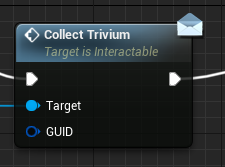
Looking for this one https://i.imgur.com/wG6cHOp.png
 verbal magnet
ah, deactivate that tick box that filters nodes based on context sensitive
trim matrix
oh, thank you lmao
trim matrix
Just shows you've made strides and are retaining stuff (:
How can I set a max range for an integer?
Thought it'd be Value range
 dawn gazelle
clamp
dawn gazelle
 trim matrix
dawn gazelle
trim matrix
dawn gazelle
Would I clamp that in say the coin or character?
put it in the coin and it worked (:
 midnight wedge
Yo, Im trying to set up a dark souls esque directional dodge, and I was wondering if anyone has any ideas of what to do. Ive looked at some sources that say to use anim montages while others say they are innefficient, and I dont know what makes the most sense. I was thinking of driving the dodge direction with a blendspace, and while I can trigger the proper dodge anim with that I am unable to get the player character to actually move with it
is there anything that I can use like a blendspace but for montages, or am I thinking about this all wrong?
Nvm I just realized I can have the animBP accept all root motion, as it is a single player game. That being said, would there be any better setup that I may be missing?
 hardy merlin
In the level editor, how can I find any actor with a particular component attached to it?
 unique harness
Did you solve your problem?
midnight wedge
So all of my ideas on how to implement a soulslike dodge have fallen flat. Does anyone have any suggestions?
 tight schooner
@hardy merlin dunno if there's a built in way, but otherwise you can make an editor utility widget function
get all actors, for each loop, determine if actor meets your criteria etc
 last abyss
Hey guys, I'm experiencing a weird bug where when I drag my window my game automatically spawns my class. Here's some examples, in the first it works as I want it to. In the second I start dragging my window around and it automatically spawns the class.
https://gyazo.com/7d2cbdfec8e88ce3ae0bb7e5c3ed6473
https://gyazo.com/a9aa8ebc8aaffab2aa48e3e9bb5a7be9
And this is what I'm using as a timer to spawn them
https://gyazo.com/01f23ddf149d68c25b895f1374bd7959
dawn gazelle
Why are you using the timer with Get World Delta seconds? Can't you just set the timer that you want the spawn time to be?
last abyss
yeah that works, just wondering though why would world delta seconds be so destructive when dragging the window around?
dawn gazelle
because it's based on the frame time which goes high when the game loses focus, like when moving a window.
last abyss
okay I think I understand now, thanks
dawn gazelle
If you set the timer to the time you want it to spawn, you can get rid of this extra logic here too:
 last abyss
ah yeah but I'm using time for the progressbar widget
 steady rose
Hiya. I'm working on a system for rebinding keys for my game but I have one small issue.
The actual keybinding works, but when you reload the game it displays the default text instead of the actual current button being used for input.

This is my test menu
You can see the input selector button on the top, Space Bar is the default text.

Once you rebind your key it will display the correct input name, but only until you reload the game, where it will display the default name instead.
Though the actual input will remain correct.
 signal oracle
Hey! i need some simple help using Random Intergers, how would i generate a new number every left mouse input?
To my understanding Random Intergers dont use inputs, and just generate a number when the game starts
steady rose
I'm afraid I don't know anything about RNG in UE4
Sorry I don't usually do the programming side of games.
signal oracle
All good!
dawn gazelle
 signal oracle
thanks sm!!
steady rose
@dawn gazelle I'm sorry to ask but do you know anything about my question?
I've been looking through the UE4 docs and experimenting to find a solution but no luck so far.
dawn gazelle
steady rose
<@!218956378654507008> I'm sorry to ask but do you know anything about my questi...
On the construct of the widget you need to read the current key mapping and set its current value in your selector. Something like this.
 steady rose
@dawn gazelle Thank you very much 🙂
A friend showed me a workaround but this is much better!
trim matrix
If I wanted to show/hide parameters of a material in my blueprint widget, would I need to make a custom function for that?
 rigid cape
Anyone have any resources for making an "infinite" number counting system like in Adventure Capitalist or Cookie Clicker? I've seen a couple of articles talking about the basis for it, but I've not been able to make a counting system that actually works.
tawny shuttle
hey guys so I have my jump play flip book when pressed issue is it continues to play it if you hold it down? any fix for this?
dawn gazelle
tawny shuttle
hey guys so I have my jump play flip book when pressed issue is it continues to ...
I was going to recommend this, but normally the pressed/released events only fire once so I'm not sure how you have your jump set up. Is it done as an input axis or something?
 tawny shuttle
wow I'm actually stupid

 kindred tinsel

UE4 Active ragdoll mechanics, fully simulated characters made with blueprints and physical animation component.
how could I replicate this? Everything i've found online doesn't do this same thing. The pelvis and collision capsule always stop the character from actually falling over.
I want to create that gang beasts effect where the character actually falls over when a box falls on them.
 sweet silo
Hi everyone ! Trying to build a clock system where some parts of the game would be real time and some others would be speed up.. I've already got a clock system + a touch dedicated to moving the day forward..
but the day is not moving accordingly to the hours..
 cyan acorn
Guys I have a question. Shouldn't custom events from parent classes appear in child classes as well?
stable dove
is it possible to create a refrence to an object in a function if so how do i do it?
 magic oak
cyan acorn
Guys I have a question. Shouldn't custom events from parent classes appear in ch...
magic oak
cyan acorn
Guys I have a question. Shouldn't custom events from parent classes appear in ch...
You probably have to define them as functions instead of custom events
magic oak
stable dove
is it possible to create a refrence to an object in a function if so how do i do...
You can add arguments to your function in the input category of the details panel
 long smelt
kindred tinsel
https://www.youtube.com/watch?v=9__L-H_MroI&t=2s
long smelt
kindred tinsel
https://www.youtube.com/watch?v=9__L-H_MroI&t=2s
I would not be surprised if they place the capsule at the feet of the player and resized it to be a sphere, then used mesh collision instead of capsule
stable dove
magic oak
You can add arguments to your function in the input category of the details pane...
Ty
stable dove
for some reason i thought it was only macros that could add inputs and outputs
 primal smelt
I'm noticing that actors I have previously had placed in my level and since removed and then deleted the blueprint of are leaving collision information in the level. Or that is how it seems anyway. I'm working on a vehicle and often when I drive through where a previously deleted actor used to be, the vehicle will behave as though it has collided into something. Is this a known issue? It's not a problem right now as this is just a test map for goofing around in but should I be wary of deleting blueprints from the content browser?
stable dove
using a fuction to check if the character hits a checkpoint then spawn them there.

problem is
i also need to use it on my character

but i cant create rerences to my character and checkpoints
in my third person character blueprint
long smelt
kindred tinsel
<@!186114455686479872> oh shit thats a good idea
Haha thanks - my thinking is that because the gang beasts meshes are pretty low poly anyway, you don't need to worry too much about the collision processing.
I think it would be relatively easy to set up the capsule to simulate physics. The hard bit might be the counteraction of balance that the gang beasts characters display.
Might be all smoke and mirrors however, and not need physics system manipulation at all
 tacit shard
how do you store a reference to specific data table in blueprint?
i want to store a reference to my ItemIndex data table in my game mode, so i can query items specific to that game mode
but a class reference of data table only lets me specify DataTable and not my specific ItemData table
 maiden wadi
Make a datatable variable and then set which datatable you want it to use.
tacit shard
its not showing my created data table, only dataTable and compositeDataTable
the base classes
stable dove
stable dove
using a fuction to check if the character hits a checkpoint then spawn them ther...
@magic oak by adding arguments did you mean adding inputs or no because i added inputs and i could add refrences to the things in my fuction on my level blueprint but i needed to use the function on my character aswell and i couldnt add refrences on my character any ideas?
maiden wadi
Use the blue pointer type.
tacit shard
i did, but i just restarted the editor and now it works
heh
i have another problem too...
i have extended sphere component in c++ but it wont retain its settings in blueprint after an editor restart
opal pulsar
hey peeps, anyone knows why when the cinematic loops the view target changes back to the player?
Im trying to get this cinematic to loop infinitely, and it does just that, but when it loops back it sets the view target back to the character camera
This is what i got:

no no, thats the cinematic camera im setting it to
cyan acorn
magic oak
You probably have to define them as functions instead of custom events
yeah seems to work that way, thanks
opal pulsar
no no, thats the cinematic camera im setting it to
if i dont set it to the cinematic's camera, it shows from the player pov literally at the start
basically idk why but its not setting the camera itself
and i have to do it manually
primal smelt
I am making a set of trolley wheels that gets the current and previous world coords of the actor and then rotate them based on that direction (ignore the fact there are setworld and setrelative, this is just a band-aid fix for now). I was previously getting this on tick and for the most part it looked pretty good however when the trolley changes from going forward to backwards the 180 degree spin of the wheels is too abrupt and looks bad.
I am now attempting to do it on a timer by event ('SpinnyWheels') that loops every 1 second (arbitrary for now, will likely be a lot quicker). I would like to lerp between the current rotation and the new rotation got from the "Find Look at Rotation" node. I've tried the Lerp(Rotator) and RInterp To nodes the rotation seems uneffected, the rotations are snapping every 1 second as per the timer.
Is this completely the wrong way to go? Instead of getting the current and previous positions on tick and setting the rotation on a timer, should I be doing it the other way around? Any tips would be helpful, thank you

 weak grove
please help me my ai is not facing the character
even after using the find look at node
it is side scroller
primal smelt
Nevermind I'm an idiot, do on event tick and use it's delta time output
 fading jetty
Hi all. I am trying to retrieve and add all info assigned to objects in my scene to an array on a button press.
If I dot his on and event begin play it works and I can see the full list of item information for the scene objects.
However, if I use a key press or a button firing off a custom event, I only seem to add one item from the scene.
Does anyone know why a button/key press might make this BP react differently ?
 trim matrix
I have a MainGameInstance which has a PlayerState struct. Then I have an Inventory UI-widget that modifies the PlayerState.Inventory array, it can be deleting items or simply decreasing a stack value on an item.
What is the best way to tell the Inventory UI-widget to update with the new PlayerState.Inventory state? Right now I do modifications but the UI doesn't update with the new values.
 teal spade
can someone tell what's this error message supposed to mean? Error: Could not tick newly spawned in 100 iterations; runaway recursive spawing.
 prime snow
seems like you're calling something in a recursive loop
teal spade
prime snow
seems like you're calling something in a recursive loop
Well, things is I can't tell where that is. Assuming, it happens because the engine is "impatient" (exceeding iterations, set in the settings). I usually slow-down computation, but this time I wanted to get to the bottom of it. Also, the error log gives me gibberish, hence I tried to read the output log (the error from above)
 hearty lintel
hey guys what would be the best way of making a score system such as the burnout saga? should i detect the proximity to static objects and do the score calculation inside the pawn's blueprint or is it better if i have another actor controlling what's going on ? thank you 🙂
 bitter mason
hearty lintel
hey guys what would be the best way of making a score system such as the burnout...
bitter mason
hearty lintel
hey guys what would be the best way of making a score system such as the burnout...
I don't know burnout, but are we talking networked?
hearty lintel
no not really, just a local counter of how many points you score
bitter mason
If it's Singleplayer then it doesn't matter that much where you do it afaik
hearty lintel
would it be different if it has to happen during an online race and then appear on the final leaderboard?
bitter mason
Yeah because when we talk networked you have to look into ownership etc
hearty lintel
can you point me to some documentation about thiis stuff? because i didnt manage to find any
bitter mason
Wait, I'll share something great
hearty lintel
ty 🙂
bitter mason
This is basically a must read for everyone new to unreal replication
In my opinion
bitter mason
You're welcome 🙂 appreciate the author and share it with new users if it helps
hearty lintel
yeah sure! that will be really helpful
bitter mason
Helped me a lot when I had to learn how unreal does that stuff 😁
tawny shuttle
for some odd reason no progress bar is showing any hp and I've got no idea why. I have 10 max hp and I've played around with current hp and still nothing
 bitter mason
have you added some print nodes?
tawny shuttle
I have not I just used the same method I used for third and first person presets
bitter mason
add a print node on cast fail
seems the most likely
probably something too obvious to see ^^
tawny shuttle
added a print string to it and absolutely nothing still
bitter mason
so the cast us successful? print out all values along the way i guess, if all values are correct you are doing something wrong with the widgets maybe just put in the wrong one or something silly like that
i mean there is not much that can go wrong in the function you shared
bitter mason
wait, it does not print out anything?
bitter mason
so your function does not even get called
 last walrus
how do I get socket by name from needed actor?
I know I can do so with mesh but my meshes will be always different...
 late kraken
Would check "Set Input Mode"
Hello everyone!
I have a trigger in a sub-level, not always loaded, and I want it to interact with another actor that is not in the same sublevel. I was thinking about making them interact with the persistent level blueprint but I can't find a way to make it work. Does someone have any ideas? Thanks 🙂
long smelt
late kraken
Hello everyone!
I have a trigger in a sub-level, not always loaded, and I want i...
soft object references can point to actors in different sub levels
late kraken
Yes but I can't use an event dispatcher with it right?
Or at least I wasn't able to bind an event
long smelt
well you need to resolve the soft reference first
the soft reference is just a string path to the object in the world hierarchy
late kraken
ooooh I didn't know we could do that
long smelt
resolving it converts it to a real object reference
late kraken
So I probably need to do an event that resolve the reference only if the sublevel is loaded right?
Otherwise it will not work
long smelt
soft references are safe to resolve at any time
it's the object reference it returns that you'll need to check for validity
late kraken
Yes yes
but in this case I need to bind the event when the objet is valid which means when the sublevel is loaded right?
long smelt
I would work your logic around checking the object for validity, not checking if the sublevel is loaded
it's more efficient to check an object for validity
late kraken
Well the object is valid when the sublevel is loaded right?
Maybe do a trigger box that bind the event in a space I know where the sublevel is loaded could work
but I don't know if there is not a more efficient way
long smelt
late kraken
Maybe do a trigger box that bind the event in a space I know where the sublevel ...
that's probably your best solution
late kraken
Anyway thank you a lot, it was a long time ago I was searching to solve this, and I put the resolution of it on the side while I was working on something else but it became quite important now 🙂
long smelt
I don't work with sublevels much, but you may be able to find some hooks for stuff like OnSubLevelLoad or something that you can work with
In that case you could queue an action to play on an object when it is loaded
in fact you could do that yourself
late kraken
I didn't find something like that
I think the best way would have to make all the sublevel logic works in the blueprint level so this way you can do what you want
but I didn't do that since it was the first time I worked with sublevel
but anyway it's gonna just works fine with a box trigger anyway
 elder gulch
Hello, im trying to make a remote door but im having some problems can anyone help me?

 late kraken
First off try to make the nodes on the second screen more clear
it's really difficult to know what is going where and it will make it more clear for you (and us) to understand what you are doing 🙂
elder gulch
late kraken
it's really difficult to know what is going where and it will make it more clear...
aight but the thing is i tested the second one with only the interact and it works so %90 from the first one but lemme send a propper ss
late kraken
And what isn't working? What are the problems you are encoutering?
elder gulch
late kraken
And what isn't working? What are the problems you are encoutering?
im trying to make a button whenever i press it the door will open
i mean this is the plan
late kraken
Sure I understood that, but what isn't working right now? What does it does?
Nothing?
 solemn parcel
Hello guys Im struggling to make a Move Component To working. I want to move that component at a fixed distance behind the facing direction of the character.
 elder gulch
late kraken
Sure I understood that, but what isn't working right now? What does it does?
elder gulch
late kraken
Sure I understood that, but what isn't working right now? What does it does?
nothing is happening whenever i press the interact key inside the trigger
late kraken
Put a print string just after the gate on the first screen
and see if it shows it or not
elder gulch
aight
 solar dawn
my question: for context, im trying to make a deflect bullet mechanic in BP, with a wall n a gun. I'm attempting to spawn a bullet from wall after gun's bullet shot toward the wall's collider. I'll upload the blueprints hope someone can tell me why


these are my bp
elder gulch
late kraken
and see if it shows it or not
it isnt showing fsr
late kraken
Then you have a problem with the logic of the gate
Probably because you are asking the action on the actor of the door and it isn't possessed by the player
So the input doesn't work
you can try by putting a print string just after the input action interact
elder gulch
lemme try
@late kraken https://i.imgur.com/gCpBrRD.png
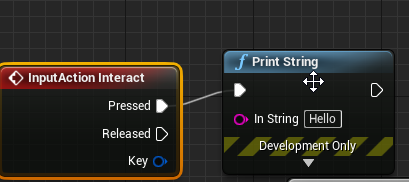
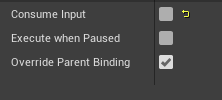
but for a reason it fails to pring hello
late kraken
In Unreal Engine your input are sent to the things that you "possess"
as a player you possess your base character right?
Not the door
 neat prairie
for some reason i cannot set the Marja variable here to the object shown in the dropdown, it's always None, any clues why?
 elder gulch
late kraken
as a player you possess your base character right?
elder gulch
late kraken
as a player you possess your base character right?
yea
late kraken
So you have either two ways of solving it: Makes that the player also possess the door - which I don't think is a good idea to do - or make an interface!
Do you know what an interface is?
elder gulch
late kraken
Do you know what an interface is?
nope
i mean i do have
but

stays like this
i use the same tactic at the button and i can open the door but when i add this gate/interact system it isnt working so i somehow need to solve it
weak grove
please help me my ai is not facing the character
even after using the find look at node
it is side scroller
late kraken
Basically you need to make that on the player you have the interact button that call the interact event on the door
InputAction Interact should be on the player, which calls the Interact from the actor you want to interact with
elder gulch
late kraken
Basically you need to make that on the player you have the interact button that ...
i need to interact at the player's bp and after call the command to work somehow
late kraken
and in the door you need to implement hte interface of it
weak grove
please help me
elder gulch
late kraken
and in the door you need to implement hte interface of it
i just want to trigger the button whenever i use the thing propperly at the player's bp so i can go on sucsess but idk how to call with the interface...
 weak grove
the level of ignorance😢
elder gulch
i use this at the button switch one
late kraken
Yup it's nice like this
elder gulch
weak grove
the level of ignorance😢
just wait..
late kraken
weak grove
the level of ignorance😢
1 - I'm already helping CantFind
2 - You didn't give much information about your problem
3 - I don't have time to help anyone after CantFind so you will need to have someone else to help you (and I'm not good at IA)
weak grove
i am working on a side scroller fighting game
and started with the ai
and using behaviour tree
ai is moving towards the player
neat prairie
@weak grove find out where exacty the problem begins
weak grove
but with tilted direction
late kraken
elder gulch
So now what you need is to call the event from the player character blueprint right?
weak grove
as it is side scroller it should face 90 degrees
late kraken
And for that you need a system that makes you able of choosing which actor you want to interact with.
neat prairie
weak grove
as it is side scroller it should face 90 degrees
do you have a kind of rotation lock?
 elder gulch
late kraken
So now what you need is to call the event from the player character blueprint ri...
elder gulch
late kraken
So now what you need is to call the event from the player character blueprint ri...
yea
elder gulch
but i found out how to do it but idk how can i make the button as child as the interface
ima try something
neat prairie
weak grove
even after using look at node
so either the lookat node isn't actually working or something happens during or after to undo/block the action
weak grove
 neat prairie
test it with different values? make it turn 180 every time or something
elder gulch
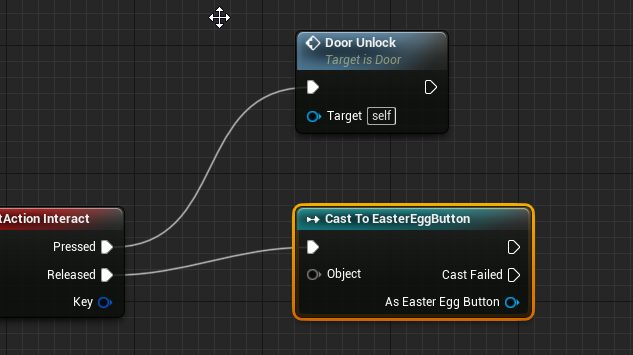
@late kraken https://i.imgur.com/Zo1iObz.png i can get the other inteface but i cant get this one
 late kraken
Sorry I wans't there for a moment let me a sec
Can't you call "Turn Switch?"
but you will need a reference to an actor
@elder gulch This is a tutorial that expalin what you want to do.
It also explains why interface is good for this kind of thing
https://www.youtube.com/watch?v=xNKwsJGv--k

Project Link: https://dl.dropboxusercontent.com/u/282171110/InteractionTutorials.rar
Private tutoring and work for hire = www.Tesla-Dev.com
elder gulch
@late kraken tysm :)
late kraken
(Don't just stop at 2 minutes look at all of it)
elder gulch
dw i will
late kraken
No problem 🙂
It's just that at 2 minutes there is a "workable" solution, but it's not a GOOD solution
And it will make you learn some things about how Unreal works (and even any game engine to be honest)
elder gulch
aight
weak grove
@late kraken now i told the whole problem man
 somber pine
Hi Guys!
I have a python script that sends coordinates 30 times per second via a socket.
is it possible to build a scheme on blueprints to get data from a socket in real time?
 deep warren
How can I add an impulse to a skeletal mesh witouth waking rigid bodys and simulating physics?
neat prairie
why would you want to
bitter mason
deep warren
How can I add an impulse to a skeletal mesh witouth waking rigid bodys and simul...
define "impulse" if you do not want to simulate physics
 open crypt
Anyone find any problem with this logic - I'm trying to get a list of sound files to play one after another - I've tested it a few times and it seems fine, but I'd be open for other opinions - I thought about using a bind on audio finished but I am not sure how I'd use that with an array exactly

The duration I guess Unreal lets you take how long the sound file plays for, and I guess this type of loop lets you update the delay in between iterations
deep warren
bitter mason
define "impulse" if you do not want to simulate physics
So it's possible to add impulse only through physics... Ty
bitter mason
deep warren
So it's possible to add impulse only through physics... Ty
generally speaking yes, afaik if you don't want to use physics you will have to write your own code to move something like you desire
but this code then is heavily dependent on what you actually want to do
and you would have to handle collsion etc yourself
afaik!
maiden wadi
The only two default ways to move something physics like is either a movement component or simulating physics. Anything else will require heavy personal customization.
bitter mason
oh, yeah should have mentioned movement component
maiden wadi
open crypt
Anyone find any problem with this logic - I'm trying to get a list of sound file...
Since that loop isn't native, its hard to answer your question. Presuming that is a loop with a delay node inside of it, what you're doing may work, but you might also check in #audio. Im sure there are better ways to handle playing an array of sound files. Even the end binding you mentioned would probably be better coupled with an integer of the current playing indeed. On end of track, increment integer check if that index of the array is valid, then play the next file.
elder gulch


what can i do to trigger the other blueprint from the other blueprint when the interface gets triggered?
@late kraken i did a lotta things but i cant find what to do here
fading jetty
Can you update data table rows at runtime and then save them to an array ?
 obtuse glacier
hello guys!
Does anyone know if it's possible to create the animation BP statemachine and pass animations as variables? E.g. Idle Montage is a variable, instead of drag n drop on the BP, it would be passed from BP's variables, I would maybe have to get that somehow?
open crypt
maiden wadi
Bouncing and the like.
Thank you, I had posted in audio but that places is crickets playing alot! - I'll try using your bind method, that make sense -
I'm not sure how I'd even setup the on audio finished bind, inside the actual loop? @stone umbra
dawn gazelle
fading jetty
Can you update data table rows at runtime and then save them to an array ?
You can read a data table row and store the value of the row in a variable and manipulate it, meaning you could technically do the same thing with all rows in the table, but you cannot make changes to the data table itself at run time - ie. write values to the data table for retrieval later.
open crypt
dawn gazelle
You can read a data table row and store the value of the row in a variable and m...
Aren't there some Plugins that let you do that though?
dawn gazelle
open crypt
Aren't there some Plugins that let you do that though?
Default UE4 you cannot modify data tables at run time. I can't speak for all possible plugins that may exist.... A quick search on the marketplace has one plugin that looks like it may be able to, but it states itself it's only for during development and not for a packaged game.
 steep gull
can you recompile a blueprint from outside, such as with an editor widget?
open crypt
steep gull
can you recompile a blueprint from outside, such as with an editor widget?
what do you mean "from outside" do you mean like making a blutility ?
steep gull
yeah, just like a button in blutility or in an editor widget
just so i dont have to keep loading up the blueprint and compiling everytime i need it to repull data while im making changes
open crypt
I'm still unclear, what changes are you making and where are you making them?
It might be possible with Blutilities, but I've only messed with them inside the actual editor world - not sure if "editor world' includes widgets, I feel like it wouldn't
 short coral
Is it possible to interpolate between 2 different materials?
open crypt
maiden wadi
Since that loop isn't native, its hard to answer your question. Presuming that i...
Yep, that worked - thank you - while I couldn't tell the difference, I feel your solution is much more stable. thanks for helping me - I'll paste the screenshot in audio so people can see if they ever do searches
steep gull
open crypt
I'm still unclear, what changes are you making and where are you making them?
so i have a blueprint that pulls variables from an actor in the scene so i can change the values of all instances in the scene at once, but everytime i change the values i need to recompile the blueprint to get it to update. Just wondering if theres someway i could make a button on this other actor with bluetilities or widgets to compile the other blueprints so i can have it all in one place and not have to open up the blueprint every time
elder gulch
how?
 celest yacht
@open crypt you get your audio to work?
elder gulch
i mean i tried but failed
how can i do it? im so new with interfaces
@trim matrix

aight ty @trim matrix
 high sapphire
Hmmm. Is there a way to open the level blueprint for a level without opening the level in the editor? I have a sneaking suspicion that something in the level blueprint for one of my levels is what's making UE crash every time I open it in the editor..
Oh good, there is
open crypt
celest yacht
<@!273265779175194624> you get your audio to work?
Yes, thank you
open crypt
steep gull
so i have a blueprint that pulls variables from an actor in the scene so i can c...
Have you ever used Blutilites? you can totally do that, super easy
You are setting this up before runtime right, like during the editor, and you want to change some attributes
steep gull
yeah
ok cool will look into them. have been mostly looking into editor widgets so far but ill give blutility a look
open crypt
So make a new blutility, then save it, and make a new function, and then save that function, then shift-right click in the editor world and you can see "run scripted action,...and your function will be listed"
high sapphire
I was directed to use a Save Game Object when I asked for advice about creating my "if all objects in level collected, do x" system. I.. have never used/created one of those before (hooray for previous uni professors being adamant about us coding everything in C++.. I don't know how to do some things in BP), so these are very much waters I've not treaded before.
Is there anything here that'd cause a memory leak of some kind?
 open crypt
steep gull
yeah
open crypt
steep gull
yeah
This is an example - this lets you select a bunch of stuff and then scale them up by a numerical amount (instead of using gizmo) without losing their location relative to eachother

thanks, i kinda don't like saying/typing it either
steep gull
ah i see ty
 trim matrix
Hello guys, quick question, I want to edit here the value for walking speed but I can't
why?

 rancid monolith
@trim matrix first, compile it after every change, sometimes it's that. second - it looks like you don't have variable selected.
dawn gazelle
You can't edit from there. Go to the object that contains the Character Movement and then click on the component to edit its values.
open crypt
What happens if you try to load a level that is already loaded? it will just reload it right? basically restart everything in it? (that's what I want)
rancid monolith
@trim matrix You must change speed either on variable or set it into event graph with set node.
 trim matrix
I went in character bp and I see that there the max walk speed is 300 but in this movement component in the player controller it is again 600, hmmm?
trim matrix
rancid monolith
<@456226577798135808> You must change speed either on variable or set it into ev...
I need walk speed from the character movement
rancid monolith
are you changing value of variable that's attached to a character from another actor?
high sapphire
high sapphire
I was directed to use a Save Game Object when I asked for advice about creating ...
Well, apparently something on this graph is problematic. Disconnected the "event end play" node from the branch node and now the editor loads up the level no problem.
trim matrix
the value for max walk speed is changed in character bp, I want to change it in the player controller too but I can't do it, idk why, I send you pic upper
rancid monolith
@trim matrix You must first get reference (cast) to the character bp actor into player controller event graph, then get the variable walk speed and set it to whatever you want.
trim matrix
hmmm
rancid monolith
@trim matrix oh wrong tag srry
trim matrix
I am not sure that this is good option when I want to make action with left shift bind?
np 😄
rancid monolith
@trim matrix lol you changed your name?! 😄
rancid monolith
i was like wtf, how i tagged this guy. 😄
rancid monolith
so, about your question, it's not an option - when you want to change some variable which is attached to A actor from B actor, you always first have to get reference of A actor into B actor, then get the variable, then change it.
that's the only way it works.
you can move all of your logic to the same actor that has speed variable on it though.
that way you won't have to get reference with B actor.
 mortal isle
fixed it
rancid monolith
I still don't get why would you have speed variable in one blueprint and press shift to run logic in another.
mortal isle
i didn't set a default sound
trim matrix
yeah but the thing is little more complex like I use inventory package and for this inventory I use its controller gamem ode and character, in its character there is no character movement component, I tried do it in the third person bp and it works but then I have other problems which I don't remember, tha's why I want to combine them and work on these that are connected with the inevntory but as I can see I can't do it, bruh 😦
dawn gazelle
You should not need to have the speed set in the player controller. The speed is specifically contained within the character movement component of the character already (which would be controlled by the player controller) so you can get a reference to this value if need be at any time by getting the controlled character, getting it's movement component and reading the max walk speed value.
trim matrix
yeah
I did this

but the problem is when I sdtart the game I run with 600 speed
then I click left shift and it switches to 300
dawn gazelle
Right, so on the character bp...
trim matrix
and then it works as I did it
dawn gazelle
You need to go to the component and set the default speed
trim matrix
trim matrix
this code is in the inventory player controller
trim matrix
dawn gazelle
Right, so on the character bp...
in the inventory character bp there is no character movement component
dawn gazelle
 trim matrix
hmmm
NVM
NVM
NVM
I AM BIG IDIOT
I found it

I didn't see it because of this big list with the components
😄
yeah it works
but the rest work I want to make is
I want to make sprinting system, so now in ue 4 is made tis way- you start walking and you sprint, I want to make this when I walk and then I continue walking (this will be running) and when I hit left shift the player to sprint, when he is not hovering left shift to run, as in all games, the player walk or run but when he press left shift he sprints, now by default when I don't touch left shift it sprints
**What I want to make is: **The player walks, then he starts running (without pressing any button, also running animation), then he press button left shift and he sprints(sprintsanimation)
What actually is: The player walks, then he starts running (without pressing any button, and it runs sprint animation), then he press button left shift and he sprints (run sprints animation) 😦

I don't know actually

I have these
as I can see on theory it works from walk to sprint
I want to go through run and then when I press left shift to switch to run animation
hope you get it 😄
one moment

this is what I see and have
okay
How I can do it ? 😄
maybe this is better?
okay
hmm
so let's do it with the first option, it seems more logically and maybe easier for me 😄
I want to do the sprinting and when it works as I described I will add stamina which will be limited and when he sprints, it will reduce, and then regain, as in normal games actually 😄
aha
will need little help for each case
😄
this is blend space

so I need here add and walk animation?
yeah
I opened it
I have this

so firstly I need to change here the max speed right?

I will change it on 600
on 300 will be running
on 600 will be sprinting
right?
primal smelt
I'm not very good at maths, especially vector maths. Could anybody tell me why when I get the physics angular velocity in either degrees or radians it seems to grab two different coordinates? One is always at zero, as you can see it alternates between the two.
 trim matrix

I think I did it
I saved it
so anything where I need to touch to works perfectly?
primal smelt
primal smelt
I'm not very good at maths, especially vector maths. Could anybody tell me why w...
It's the same with "get component velocity" also
open crypt
what's with the map adding double \s? is that just the way it reads it out on the editor?


Meaning, this should be okay?

thanks - can you help me outline this - I have a user who is keying up on a radio - I want to save that radio traffic and then play it back - I've got the audio capture and saving/playback setup fine as a single instance, now I'm trying to allow it to do it at the end of the game, from an array basically, here's my thinking
1 - Make a map of the file path, which accesses based on which level they are on
2 - Save Into Structure - Each level will have an array of however many number of audio files on it, and they go into their own folders -
3 - Playback using the given index of that array
What I am a bit confused on still is how to come up with consistent logic for playback
level 1 might have 5 wave files, lvl 2 might have only 3 wave files - so obviously I need some stucture that can hold multiple arrays, with an index which is basically the level number
and actually this will be an array of strings
I thought the key was unique?
maiden wadi
BP structs should allow arrays. So an array of that struct would allow arrays of arrays
Fairly certain it works. Can't test that for a while, myself, but I remember it working. I don't normally reply on 2d arrays.
open crypt
I'm playing with it now
open crypt
maiden wadi
BP structs should allow arrays. So an array of that struct would allow arrays of...
I'm trying this same thing now - this is that audio playback I was talking about - the goal is to play these back LATER, but during runtime - (otherwise I'll just have a folder popup and they can play the files sequentially in a media player or whatever)

everytime they key up on the radio, that send integer increments - everytime a new level is loaded, that current scenario changes
this will run when the wav file is actually recorded to the windows file system
So this should persist during level loads right? (I'm streaming them in anyway, not the main persistant - and the actor this BP is running on never unloads either) so mainly I'm just checking for the blueprint logic in thaat array,
maiden wadi
Could work. Personally I'd just do one array of a struct that is two ints and a string. Make yourself a couple lookup functions based on the two ints. One for level, one for the other increment. But either way should work.
As for persistence, that depends on where this property is kept?
Only two BP places I know that persist levels are save games and game instance.
open crypt
Game state too right? in any case, I don't unload the persistent level ever, so that's okay I guess for now ]
open crypt
maiden wadi
Could work. Personally I'd just do one array of a struct that is two ints and a ...
Don't I have that same functionality you are describing? that is an array of a structure, and the structure contains a single array
 sacred hill
did u ever have a resolve for this?...i have similar issue where blueprint construction script will play in sequencer but not render out
open crypt
@maiden wadi I guess this is it - I'll go test it now but this is how you'd access that stuff in BP right, with the arrays inside a structure? I wasn't sure about how inserting works when you break a variable - I know somettimes you have to set the stucture, do I still need to do that?

Is this the right way to add to the structure there? or do I have to "make that structure" again and insert it into the variable
 maiden wadi
@open crypt Gamestate doesn't persist map loads. The only default instance of an object that does is GameInstance. Everything else is wiped clean, even pointers that you've stored in GameInstance would be invalid because everything they could point to would be gone. Savegame works exactly the same way. The only difference between the two is that Savegame writes to disk so that if you close the application and restart it, you can still load the savegame back up. GameInstance is wiped since it existed in the closed application.
open crypt
maiden wadi
<@!273265779175194624> Gamestate doesn't persist map loads. The only default ins...
Thanks for pointing that out - I've been getting away from using gamestate b/c of my level loading being only streamed in, so it's good to know
maiden wadi
As for the struct part, that's just personal preference. Both methods will work fine.
open crypt
Can you confirm I'm adding to the array of that structure? I don't mess with structure manipulation during runtime that often
okay, I wasn't sure about the inserting the array into the structure but it should be easy enough to test too , thank you
dawn gazelle
Store the value of coins collected by Team A in game instance before moving to the new level. When loading into the new level, read the value from Game Instance.
If it's multiplayer, make sure it's done on the server (or host)
tawny shuttle
hey guys need a lil help with a long one if someone doesn't mind helping me
basically I need to create a dialogue box on certain intervals I assume I'll need a timeline for it and I need it to check a value between 0 and 100 with intervals of 0-10 and 20-30 ect having different text appear
and the text that appear also need to be random I assume I'll need a clamp and a select?
probably set up an enum?
for each of the values between multiples of 10?
trim matrix
Hello guys, I did blueprint actor and when I go through it, why it is not removed from the map?

I want to make a booster item when it is get to have faster movement
I can't see what I miss cus I can't go through the item and get it, hmm
dawn gazelle
Not sure why you would have a boolean set to true and immediately branch to check if it is true (it would be)...
Are you sure your cast is succeeding? Like, does your character get the extra speed?
 dawn gazelle
Why bother having it at all?
The cast itself will basically enforce that the overlap only happens when an InventoryPlayerCharacter overlaps with the item.
If the boolean is set in the object itself on begin play, then you're checking if it's true, you know its going to always be true even still.
 dawn gazelle
If the cast is failing, that means whatever is overlapping the sphere component is not a InventoryPlayerCharacter.
trim matrix
aha
dawn gazelle
So, if your player is overlapping the object, and is not getting the extra speed, and the object is not being destroyed, then the player is likely not of the InventoryPlayerCharacter class.
trim matrix
dawn gazelle
So, if your player is overlapping the object, and is not getting the extra speed...
maybe it is
so?
the booster item is bp actor
and I cast tp third person character to get access to the character movement to can change it
and firstly I forgot the destroy actor node and then I realised it and I added it but still deosn't work
dawn gazelle
Is your player getting the extra movement speed?
 ocean gate
Does anyone know why I get "Unable to spawn instances. Make sure enough surface exists within the volume" error message whenever I try to place foliage using the built in ProceduralFoliageSpawner on my terrain?
I've tried changing tile overlap, foliage spawner settings but nothing seems to work
trim matrix
dawn gazelle
Is your player getting the extra movement speed?
nope cus I don't get the item?
I put print string node to see will I get spammed by hello text and i see that the cast is not failing
 dawn gazelle
That means your player is not of the "InventoryPlayerCharacter" class or any of its children as otherwise they would, based on this.
 trim matrix
dawn gazelle
That means your player is not of the "InventoryPlayerCharacter" class or any of ...
trim matrix
dawn gazelle
That means your player is not of the "InventoryPlayerCharacter" class or any of ...
is there a way to fix it to be part of this class or something?
dawn gazelle
You set in your game mode what class your player is, if you're not spawning the character yourself.

 open crypt
Is there some blueprint functionality for formatting this time without doing a bunch of switches, like a date format? I'm using the Now function but it only returns ints
 dawn gazelle
open crypt
Is there some blueprint functionality for formatting this time without doing a b...
dawn gazelle
open crypt
Is there some blueprint functionality for formatting this time without doing a b...

you can change the variables that go into the formatting, and it can take strings.
Oh but you want to format an already received date?
tawny shuttle
trying to make a random dialogue system based on a float value between 0-100 and each multiple of 25 will be a different level of confidence thus the character saying different things

no idea where to go from here
I just did what I assumed I needed and I have no idea about the inbetween
 keen goblet
Is there a way to get the component that an actor is attached to?
GetAttachParent returns the scene comp a scene comp is attached to, and GetAttachParentActor returns the actor an actor is attached to, but I don't see something that does what I said
edit: Guess I can just get the root component of the actor and see what comp it's attached to
dawn gazelle
open crypt
Is there some blueprint functionality for formatting this time without doing a b...

 lucid lynx
What is the opposite of AttachComponentToComponent? Say you added a component to another Actor, but now you want to remove the component.
 winged sentinel
hi everyone im trying to figure out a way to make an interp spring back based off of the velovity and distance
Like an elastic
dawn gazelle
lucid lynx
What is the opposite of AttachComponentToComponent? Say you added a component to...
Destroy Component?
maiden wadi
@tawny shuttle Are your confidence levels always going to be 25% increments?
keen goblet
@lucid lynx DetachFromComponent
 prisma stag
Hello, after a branch condition is true I would like the Build Placeables to happen every frame which would output a location then update the setactorlocation however event tick is something of itself. Ive tried doing a settimerbyfunction name but the location would not be outputted, how could I do this?
 winged sentinel
Like an elastic
winged sentinel
winged sentinel
Like an elastic
my friend was kind enough to send me this snippet though im a bit confisued in the BP world
 tawny shuttle
I don't want way too many confidence levels 4 seems to be a nice number to get a decent number of confidence levels I can make decent transitions for each dialogue so the pc doesn't go from wow this is scary to yeah this is easy!
lucid lynx
keen goblet
<@!283425358387085312> DetachFromComponent
I think that may be it, or close. AttachComponentToComponent has a Target(thing being attached) and Parent(thing being attached to). DetachFromComponent only has Target.
keen goblet
@lucid lynx That's definitely what you're looking for. DetachFromComponent doesn't need you to specify what to detach the comp from, just that you want it detached from whatever it's attached to
lucid lynx
keen goblet
<@!283425358387085312> That's definitely what you're looking for. DetachFromComp...
It seems to do what I'm looking for. Thank you!
 fierce birch
is there a blender channel?
 near glen
0/ Please need quick answer, I want to spawn grid of actors, how can I do it in construction script? I try to make function with "spawn actor from class" and call that function in constr script but looks like it doesn't work
dawn gazelle
near glen
0/ Please need quick answer, I want to spawn grid of actors, how can I do it in ...
Actors are not spawned in the construction script. What you can do is create the locations with the construction script, and then on begin play of the actor it reads the list of locations and spawns the required actor at that spot.
maiden wadi
@tawny shuttle Was in a game match. But rather than all of that. If you're always going to have 25% per attitude. You can just take the total confidence value, divide it by 25.0 and then floor it to an integer. Then switch on that, or turn it into an enum, which can select which string to return from your datatable.
 near glen
@dawn gazelle ah, okay, thanks a lot
dawn gazelle
https://blueprintue.com/blueprint/xqv6y7z4/ Set the "Show 3D Widget" option on the SpawnLocations variable to true, and you can see the grid. Set the other variables to instance editable and "expose on spawn" so you can manipulate them in the editor (except for RowCount that can be kept private)

BlueprintUE
Then on begin play of the actor:
 open crypt
dawn gazelle
open crypt
dawn gazelle
Thank you this is exactly what I needed....and the other thing is great as well!
prisma stag
Hello, I have a function that fire when a player left clicks and it displays a "hologram" to where the object would be placed. Now how do I get it so that if the player clicks again, my placing function will fire?
dawn gazelle
prisma stag
Hello, I have a function that fire when a player left clicks and it displays a "...
Create a bool that you check at the beginning of your left click event like "Hologram active" -> if false -> set to true, then do the rest of your hologram logic you have. On the true branch, do the placement function and set hologram active to false.
If you have a way to cancel out of the placement, set "Hologram active" to false as well.
prisma stag
Yea, let me give that a try.
open crypt
Is there no native BP function that converts a given date into it's alphanumeric equivalent, 01-01-01 becomes January 1 2001 or something like that?
or ist it just as date time?
 north star
Hello, I am trying to make the mechanics of picking and rotating objects through the "PhysicsHandle" and the "Grab" function, but I have not managed to rotate objects with the mouse yet, they react to mouse movements, but either hang under the influence of gravity, or return to the original rotation position, I found a discussion of similar problems, but the solutions that did not work there, the question is, is it possible to somehow make them rotate without leaving the "Grab" function, or will it be easier to use another way?
dawn gazelle
open crypt
Is there no native BP function that converts a given date into it's alphanumeric...
There is this one, but then you need to have the string formatted as ISO-8601
 open crypt
so do a date time to Iso string in between?
dawn gazelle
err.. I may be getting the direction wrong that you're looking for XD
These guys do date time to text in different formats
 open crypt
lol not exactly in this case but never stop trying to help

i wonder if that will play nice with the windows file manager - I can't do the :
If I just want the month name, I can use the " " space as a string trim thing right?
a split rather
dawn gazelle
yes, split by " " if you're certain the month would always be first then the "Left S" should always contain the month name.
open crypt
yes thank you !

have to find an easily readable format that windows will be happy with writing during runtime

 north star
Hello, I am trying to make the mechanics of picking and rotating objects through...
north star
north star
Hello, I am trying to make the mechanics of picking and rotating objects through...

 timber gull
Hello, I'm trying to spawn an actor which is blueprint only and which spawns a huge filled HISM (16x16x130) with some holes but everytime that actor spawn (between 2-4 of that actor spawning), the game freeze for ~2sec then goes normal. What can i do ?? thanks.
 grave relic
Anyone that can help me? Im trying to basically make a DataTable that holds weapons, and in the player i want to change the weapons depending on an integer. So if you have 1 you get a pistol 2 you get a shotgun etc, but i cant seem to find a way to get this to work. I cant access a row based on ints. If you know about a smarter way to do it, please tell me 🙂
I
The reason im doing this is that i dont feel like haveing to sit and make a blueprint for every single weapon 🙂
timber gull
grave relic
Anyone that can help me? Im trying to basically make a DataTable that holds weap...
You have to make a structure that holds everything needed about your weapon
then: add inside the blueprint that hold weapons a new array variable of this structure then add every weapon data inside
next: make a function that returns the data of the weapon based on the integer you pass to it [Be sure to add inside your array variable all your weapons data in ORDER]
finally: use this data to do something
open crypt
So you can use a unicode symbol to put a colon in a windows filename - like this ꞉ - or U+A789 - when I tried to paste the into a string Unreal gave me a question mark icon - any idea how to put unicode into string in unreal?

I'm not going to do it because it sounds like a disaster waiting to happen but I was curious
 white lynx
for blueprints, is there a way to pass a null pointer? In cpp it's just Function(nullptr) but Blueprint gives me error, and is asking for a valid input
grave relic
timber gull
You have to make a structure that holds everything needed about your weapon
then...


So in this data table i need to acces the row number, but the structure dosent have anything to do with the rows in the data table or am i wrong?
open crypt
white lynx
for blueprints, is there a way to pass a null pointer? In cpp it's just `Functi...
IsValid
white lynx
That's not what I meant
open crypt
either use the branching node or pass the boolean node to whatever functionality you want
 viscid shard
i made a chat box , how do i make it so i selects the chat box automatically so player doesnt have to click on it, after the enter how do i set it back to default so my character can move without clicking on the screen. i used set focus on enter input which works but after chat is entered i dont know what to set focus to or how to default focus. or is there something other then focus i should use?
 timber gull
grave relic
timber gull
grave relic
when you're making your DataTable, where do you access it and how ?
viscid shard
 grave relic
timber gull
when you're making your DataTable, where do you access it and how ?
grave relic
timber gull
when you're making your DataTable, where do you access it and how ?
How do you mean?
Oh, yeah thats what i need help with 😛 I dont know how to access the DataTable rows, i knwo you can use "Get Table Row" but then i can only get a specific row, but i want to be able to change what row im accessing through an integer
open crypt
get table rows by name
and name your tables like Row1

I'm literally taking a number, building a string (and then a name out of that)
 timber gull
grave relic
timber gull
grave relic
Nevermind, found your anwser :
When you create your rows, inside the DataTable just right-click them and change their name to your integers like 0,1,2,3,4,5,....
Then when you access them convert your int to a string then use what's on the picture and connect your converted int to the row name.
 grave relic
open crypt
grave relic
open crypt
Did i think right here?
 open crypt
Good Idea to hook up "row not found" with an error message
A lot of times you've done something to your data table without realizing it and you won't see it clearly in front of you when errors happen
grave relic
Yeah just did, it cant find the row 😛
timber gull
grave relic
Yeah just did, it cant find the row 😛
https://blueprintue.com/blueprint/h-kjx1wd/
Just be sure that you've named your rows to somethings like 0,1,2,3,...
BlueprintUE
grave relic
 open crypt
timber gull
https://blueprintue.com/blueprint/h-kjx1wd/
Just be sure that you've named your ...
open crypt
timber gull
https://blueprintue.com/blueprint/h-kjx1wd/
Just be sure that you've named your ...
That has to be named right in the data table though
the row index is logically what we might think of looking for, but it's not the same thing as row name
 timber gull
grave relic
timber gull
grave relic
yes it's like that. Does this work ?
grave relic
grave relic
open crypt
the row index is logically what we might think of looking for, but it's not the ...
Thats what i thought of, but couldent figure out a way to find a way to refrence the row index
timber gull
grave relic
https://gyazo.com/152bdb18c75f60e0d925f5b51509e262
humm i see? Did you started naming with 0 and not 1 ?
grave relic
Yeah
open crypt
grave relic
Thats what i thought of, but couldent figure out a way to find a way to refrence...
There doesn't appear to be, with a cursory glance on google, found a thread dated 2020
grave relic
But thats easy fix
timber gull
i will try on my own and let you with some news in 5 minutes.
grave relic
open crypt
There doesn't appear to be, with a cursory glance on google, found a thread date...
Yeah same, been looking around for like an hour, cause it seems like something that should be really easy, but clearly its not
open crypt
It is but you can't treat the row names like they are indices in an array - they aren't
grave relic
Yeah I know, but then how are the indexes of each row stored? shoudlent it be in an array
 fair ledge
I'm a little lost and not even sure what I should be looking for at the moment. Could anyone point me in the right direction?
Error: Blueprint Runtime Error: "Accessed None trying to read property CallFunc_Create_ReturnValue". Blueprint: ThirdPersonCharacter Function: Execute Ubergraph Third Person Character Graph: EventGraph Node: Add to Viewport
 dawn gazelle
fair ledge
I'm a little lost and not even sure what I should be looking for at the moment. ...
dawn gazelle
fair ledge
I'm a little lost and not even sure what I should be looking for at the moment. ...
Authority would be the server, and you cannot create UI elements on dedicated servers.
fair ledge
dawn gazelle
Authority would be the server, and you cannot create UI elements on dedicated se...
Oh I did it backwards
That fixed it. Thanks
stable dove


got this checkpoint system setup so when the character hits a trigger box it restarts the level or respawns them at the last checkpoint
I want to have the same thing happen when the character ragdolls
 dawn gazelle
grave relic
Yeah I know, but then how are the indexes of each row stored? shoudlent it be in...
dawn gazelle
grave relic
Yeah I know, but then how are the indexes of each row stored? shoudlent it be in...
There are no indexes. They are looked up by row name.
 stable dove
but i cant create refrences to the third person character and target points im using for checkpoints on my character blueprint just my level blueprint
any ideas
timber gull
grave relic
Yeah same, been looking around for like an hour, cause it seems like something t...
I did the same thing you want by my own and everything works
timber gull
grave relic
Yeah same, been looking around for like an hour, cause it seems like something t...
Try to print the integer at first before the get DataTable row function and see if the integer is the right one
dawn gazelle
Something like this should technically work, if you're insisting on not using the names, but, no guarantee as it would depend on how the get data table row names pulls the names from the table.
 grave relic
Okey gonna test some stuff, now atleast i have a better understanding of how DataTables handle the row information, my goals i basically a system that depending on how high your score is (based on the int value) you get a new weapon
open crypt
Why is this coming back blank? I'm inserting it to the array of the same structure - but when I check the value of the structure, it's blank


 unique hollow
How would I allow for an option in my game menu to change the engine renderer (from DirectX to Vulkan)
I have SM5 enabled in project settings
 upbeat otter
alr imma try make this as simple as possible. I have characters spawning with different voices each time. Kind of like procedural color. The problem is that every time I start the game they have a new voice but every character uses that same new voice. (For Example) Game 1 is Matthew, but now everyone sounds like Mathew. Game 2 everyone sounds like emma. basically how can i make it so each character has their own unique voice using these enums

here's where the voice starts with a get actor to a function event

which then gets sent to here

the enum at the bottom is the one from the construction script
dawn gazelle
upbeat otter
alr imma try make this as simple as possible. I have characters spawning with di...
Does this construction script exist on the character?
dawn gazelle
Is this also within the character?
 upbeat otter
thats in a widget
so I thought get the ai controller would be the best idea
but its no different then getting the ai character
dawn gazelle
Ok, so I don't think you want to put that random generator in the construction script with objects that you've already placed in the game - basically if they exist in the editor, they already have their values set.
So each run of the game, they'd still have the same voice.
dawn gazelle
Yes
upbeat otter
alr ill give her a go, wait so inside the ai controller then? or the character?
dawn gazelle
character
upbeat otter
okie
 regal venture
Anyone know how to resolve this error from the PrimeSoundForPlayback node?
LogAudioMixer: Warning: Prime Sound For Playback doesn't do anything unless Audio Load On Demand is enabled.
Can't find where to enable that anywhere
upbeat otter
welp didnt work lol
dawn gazelle
regal venture
Anyone know how to resolve this error from the `PrimeSoundForPlayback` node?
```...
Within the settings of the audio file object
 regal venture
Ah great, it's per file. Thanks
Do you know if it automatically clears itself out, too, or do I need to unload it manually using that option?
 woeful monolith
always false in 4.26 but work fine in 4.25. how i can check is mouse button pressed in my own function in 4.26?
 dawn gazelle
regal venture
Do you know if it automatically clears itself out, too, or do I need to unload i...
dawn gazelle
regal venture
Do you know if it automatically clears itself out, too, or do I need to unload i...
Couldn't tell you that, sorry XD
upbeat otter
dawn gazelle
character
I tried character but no luck
can I cast to ai controller some how
 grizzled marsh
Regarding the Event ActorBeginOverlap...Does it activate when ANY of its components overlaps with anything else? Currently reading the UE4 docs and cant know for certain after reading the entry.
I have a character with a super big capsule collision component. Will the "Event ActorBeginOverlap" be activated when things overlap with the big capsule component? How can I make sure it only generates an event when it comes in contact with this component alone?
dawn gazelle
upbeat otter
I tried character but no luck
So just to clarify what you're trying to do - you want each time the NPC is spawned, it selects a random enum from that array, correct? And that choice will feed into another function. On my end, this does exactly that. I have several instances of this particular actor in my scene, and each time they get different values set in the "Voice" variable.

Run 1:

Run 2:
 dawn gazelle
grizzled marsh
Regarding the Event ActorBeginOverlap...Does it activate when ANY of its compone...
dawn gazelle
grizzled marsh
Regarding the Event ActorBeginOverlap...Does it activate when ANY of its compone...
Overlap is based upon whether or not the colliding component has a collision profile that aligns with the particular overlap I believe.

So if the object with the on overlap event has a collision profile that ignores "world dynamic" and that's what the component is set to that is doing the overlap, then it shouldn't respond.
open crypt
First line of a crash log - UE4Editor_LowEntryExtendedStandardLibrary!ULowEntryExtendedStandardLibrary::SceneCaptureComponent2D_GetFov() [D:\Build\++Portal+Promotion\Sync\LocalBuilds\PluginTemp\HostProject\Plugins\LowEntryExtStdLib\Source\LowEntryExtendedStandardLibrary\Private\Classes\LowEntryExtendedStandardLibrary.cpp:2132] UE4Editor_LowEntryExtendedStandardLibrary!ULowEntryExtendedStandardLibrary::execSceneCaptureComponent2D_GetFov() [D:\Build\++Portal+Promotion\Sync\LocalBuilds\PluginTemp\HostProject\Plugins\LowEntryExtStdLib\Intermediate\Build\Win64\UE4Editor\Inc\LowEntryExtendedStandardLibrary\LowEntryExtendedStandardLibrary.gen.cp - how do I put an IsValid check or something to prevent that from fucking up things
dawn gazelle
regal venture
Ah great, it's per file. Thanks
Got it working? Saw your responses and was looking up more to see if there was anything else missing.
dawn gazelle
open crypt
First line of a crash log - ```UE4Editor_LowEntryExtendedStandardLibrary!ULowEnt...
Are you using that node somewhere?
 upbeat otter

I think it might be an issues with the nodes im using
they dont seem to care what enums im using
open crypt
dawn gazelle
Are you using that node somewhere?
Good call, some left over keybinds ...apparantely if you roll the mouse wheel on something like that and you don't have an isvalid check, bad things happen
grizzled marsh
dawn gazelle
So if the object with the on overlap event has a collision profile that ignores ...
I see - thank you for pointing this out to me Datura, it made me go over collision presets again to refresh the mind.
Like I was saying, my character (it is an Actor blueprint class, NOT a Pawn or Character for various reasons) has a huge capsule component. The only thing in this blueprint are actors, and this one capsule. I checked all other actors inside this blueprint, and they dont have a Collisions tab. Is it safe to assume then that the ONLY thing in this blueprint that can trigger overlap events, or any interaction with other blueprints, is going to come from my Capsule Component?
dawn gazelle
grizzled marsh
I see - thank you for pointing this out to me Datura, it made me go over collisi...
Any meshes?
grizzled marsh
No
open crypt
grizzled marsh
No
Let us see your BP's list of components - but no, not directly, but if you are spawning anything from this BP, all bets are off
grizzled marsh
open crypt
Let us see your BP's list of components - but no, not directly, but if you are s...
Dang, that's exactly what's happening with my BP. Sorry, I cant show a picture (I would if I could), PC has some restrictions on sharing images.
Thanks for the info by the way, super helpful.
open crypt
wtf is this lol - Assertion failed: OutPin->LinkedTo.Num() == 1 [File:D:/Build/++UE4/Sync/Engine/Source/Editor/GraphEditor/Private/BlueprintConnectionDrawingPolicy.cpp] [Line: 506]
dawn gazelle
You can do a cast on the overlap that checks for that specific actor class on the other actor, or even check for tags to make sure that the thing you want the overlap to respond to is the one thing you want to respond to.
 upbeat otter
i think the problem is here. the randomization is working but this dictating the final result.
 open crypt
Should I be concerned that I have nothing on the editor in terms of D:/build?
dawn gazelle
 open crypt
or is that just a recursive engine folder?
dawn gazelle
this would be specifically referencing the first found actor of the class.
dawn gazelle
right
upbeat otter
so get all actors?
dawn gazelle
I wouldn't recommend it.... Don't you want a specific actor to be speaking the lines?
dawn gazelle
So that bit is in the controller?
open crypt
Get all actors of class - it's a good habit to get into vs using the single instance because you will save so many headaches when you step through that node to troubleshoot, and you realize there are more than one entries in an array that should only have one thing in it
dawn gazelle
No. get all actors of class is a bad habit.
dawn gazelle
But, this part is in the controller, yeah?
 upbeat otter
no thats in a widget lol
dawn gazelle
ah widget..
open crypt
wtf why is this crashing still - look I put a break in that blueprint, but I closed the blueprint window - and look when the break fires -

Assertion failed: OutPin->LinkedTo.Num() == 1 [File:D:/Build/++UE4/Sync/Engine/Source/Editor/GraphEditor/Private/BlueprintConnectionDrawingPolicy.cpp] [Line: 506] let's go see what line 506 says
dawn gazelle
upbeat otter
no thats in a widget lol
Is that widget created when interacting with a specific pawn/actor?
dawn gazelle
open crypt
``` Assertion failed: OutPin->LinkedTo.Num() == 1 [File:D:/Build/++UE4/Sync/Engi...
It's worse than you think.
If you're getting a crash like this, it's related to something bad happening in the editor.
Like something is there that shouldn't be.
Something got deleted, or is corrupted.
open crypt
        {
            if (CanBuildRoadmap())
            {
                // knot nodes are removed from the graph at compile time, so we
                // have to follow them until we find something that would have
                // actually executed
                while (UK2Node_Knot* InputKnotNode = Cast<UK2Node_Knot>(InputNode))
                {
                    InputNode = nullptr;

                    UEdGraphPin* OutPin = InputKnotNode->GetOutputPin();
                    if (OutPin->LinkedTo.Num() > 0)
                    {
                        check(OutPin->LinkedTo.Num() == 1);
                        InputNode = OutPin->LinkedTo[0]->GetOwningNode();
                    }
}```There's a pin coming out from some node, somewhere, in one of your blueprints that shouldn't be connected where it is.
Or thinks its connected somewhere that doesn't exist anymore.
upbeat otter
the widget is a interactive text chat the ai says the voice line from the response
dawn gazelle
Compiling is not the same thing as your blueprints referencing things that may no longer exist, or have been changed.
it's the three ` followed immediately by cpp
open crypt
What is a "knot" node
open crypt
I know I just wanted to see what it meant
thankfully I have only a few BP's that are probably causing it
I thought the drawing policy meant it was the actual editor tool that did the drawing of the blueprint nodes
dawn gazelle
upbeat otter
the widget is a interactive text chat the ai says the voice line from the respon...
Ok, but when you start that interaction, you're getting a reference to that actor somewhere, yes?
dawn gazelle
Ok, so if you have that reference, then you should be able to get your reference to your widget when it's being created or if it exists (via player controller?) . Create a variable in the speaking widget that is exposed on spawn and when creating the widget (or before triggering the next bit) it feed it the reference to the specific BP NPC. Then in the widget, you can make the call to your Voice event with the target set as the NPC reference.
open crypt
@upbeat otter at the risk of being redundant and telling you something you already know, you have watched that BP communication video from the Epic livestream right?
 uncut condor
hello everyone, maybe this not right channel for this question but it's one of the most active
What is the best Cloud Storage for game development?
For team developers
open crypt
uncut condor
hello everyone, maybe this not right channel for this question but it's one of t...
check #source-control (also known as version control)
I use Perforce, which is free if you setup your own server - it can be a bitch to learn but it's amazing to be able to compare blueprints from previous versions, while inside the editor
open crypt
Literally let's you do this -

That is true, but git to me seems like it's for native programmers
upbeat otter
@open crypt lol yeah but this is bit more complex than that
open crypt
I gambled and assumed he wasn't one, or I doubt he would have asked that
uncut condor
git needs a lot of knowledge , i have to learn courses to be able to use it
open crypt
uncut condor
git needs a lot of knowledge , i have to learn courses to be able to use it
@trim matrix is right, if you are familiar with Git, use that
uncut condor
What about sync?
upbeat otter
so I did this which is jank af but works... kinda. is there a way I can randomly set there voice and keep it set after interaction?
 uncut condor
thank you guys, i will ask the question in source control
open crypt
Lorash have you ever heard of this error? ```cpp if (TreatWireAsExecutionPin(InputPin, OutputPin))
{
if (CanBuildRoadmap())
{
// knot nodes are removed from the graph at compile time, so we
// have to follow them until we find something that would have
// actually executed
while (UK2Node_Knot* InputKnotNode = Cast<UK2Node_Knot>(InputNode))
{
InputNode = nullptr;
                UEdGraphPin* OutPin = InputKnotNode->GetOutputPin();
                if (OutPin->LinkedTo.Num() > 0)
                {
                    check(OutPin->LinkedTo.Num() == 1);
                    InputNode = OutPin->LinkedTo[0]->GetOwningNode();
                }
            }```cpp
Assertion failed: OutPin->LinkedTo.Num() == 1 [File:D:/Build/++UE4/Sync/Engine/Source/Editor/GraphEditor/Private/BlueprintConnectionDrawingPolicy.cpp] [Line: 506]
that's from the crash I'm getting, but I was showing you what line 506 said
lol, I just wanted to make sure that the troubleshooting here is literally looking for a goddamn white dot
I made one just to see if I can find it later - this won't be fun
 uncut condor
I have to choose "Helix Core" I have no idea what the terms are?
open crypt
@trim matrix I found this, but there's no execution - you mean I"m looking for a branch that executes but leads nowhere?


It's crashing when I try to navigate the blueprint during runtime !
@dawn gazelle any ideas - I'm trying to step through but the moment I pull up that blueprint and try to even navigate it, the editor crashes
I just hope that whatever it is, it is an editor specific crash and not something that will popup in a packaged build - the error seems to indicate it's only editor based
uncut condor
is there dark mode for perforce?
 safe token
Can I pass a struct by reference to another blueprint?
 sand shore
try it?
safe token
and modify the values within it in the blueprint i passed it to
i tried but not sure if im doing it correct
sand shore
what are you doing in the other BP to attempt to change values?
sand shore
uncut condor
is there dark mode for perforce?
only on some versions.
safe token
i'm changing a float value within it
 open crypt
safe token
and modify the values within it in the blueprint i passed it to
open crypt
safe token
and modify the values within it in the blueprint i passed it to
It's tricky but completely doable - my advice to you is to declare a bunch of variables at each step so you, so you can step through and find out and see where the value drops
What you are doing there looks a bit off
but i take it, it's not printing?
I don't use the Set Members node - i'm not saying you can't do that, I"m just saying I don't have much experience with - usually I just reference the BP that contains that structure, and grab it that way
safe token
i've not used structs before so im still figuring them out
the idea im going for is to have my health stored in a struct i declare in player controller and then pass it by reference to the objects i want that might modify that value at some point.
upbeat otter
is there a way to tranfer data between colors and enums
open crypt
you can also try getting the struct, then use "making struct" where you break apart to the point you want, get everything else from the reference, and then just insert that, and overwrite the structure itself
safe token
you mean something like this?
It still doesnt propagate it back to my player controller's struct, it only modifies it for the struct within the blueprint Im calling the logic from
 open crypt
no, I mean like this - I had to dig this up, haven't touched it a long time -

ALWAYS ALWAYS ALWAYS USE THE "BREAK STRUCTURE" COMMAND, DO NOT USE THE 'SPLIT STRUCTURE (WHEN YOU RIGHT CLICK ON IT AND SPLIT IT, LIKE VECTORS TO FLOATS
that caps was not accidental
the way I have it setup in that graph I showed you, I actually edit my structure and add things, and my blueprint wouldn't shatter
always tricky when you have nested structures though, so be cautious if edit them, and make source controlled backups
sand shore
safe token
i'm changing a float value within it
okay this should work
if that print string didn't output the correct value something is up
tawny shuttle
hey guys quick question I got my random dialogue option to kinda work issue is now that it rapidly switches between all the dialogues
 safe token
sand shore
if that print string didn't output the correct value something is up
safe token
sand shore
if that print string didn't output the correct value something is up
it outputs correct value and changes it for blueprint i call it from but does not propagate the change to the struct in my player controller (that one still prints old value)
sand shore
safe token
it outputs correct value and changes it for blueprint i call it from but does no...
erm.
are you wanting to store the reference as a variable?
safe token
yes
sand shore
You can't do that
As soon as you promote to variable, the reference is dropped and you create a new value
open crypt
you can store it but you have to set it again if you make any changes
sand shore
it's copy assignment
open crypt
yeah but if you are getting it as a reference, that should be different
sand shore
You can't have member variables which are pointers or references to structs
sand shore
open crypt
yeah but if you are getting it as a reference, that should be different
Maybe. But I am describing how BP currently works
safe token
sand shore
You can't have member variables which are pointers or references to structs
thats what I was trying to do
makes sense why its not working now, thanks
open crypt
that's what I thought, that's why I showed him the "get struct, break struct apart, change one thing, make structure, set the new structure (with the target being the same BP you originally got the struct from)
sand shore
Blake I remember the bug which made that pattern popular

 rigid mural
does anyone know how to make this damage over time end on a specific actor overlap rather than ending completely if any actor ends the overlaps ;.; I know someone told me I would need to change a lot of stuff here but idk what
 open crypt
I remember I got lucky, I was only an hour in and building it the old way and someone warned me
sand shore
I don't think it's required any longer, but doing it does no harm
rigid mural
pls ping me if you have any idea how to, I've given up for today.. spent like 8 hours trying to figure out a way ;/ oh welp
sand shore
@rigid mural take a break, and ask again if you don't get answers right away
I wouldn't even check pings until you wanna touch it again, heh
open crypt
rigid mural
does anyone know how to make this damage over time end on a specific actor overl...
you get the class name of the other actor and compare it to the class of whatever you want to trigger that
rigid mural
im figuring it out one way or another, help or no help.. but I just need a break 😆 else I'll have my brain melt
open crypt
it is is equal, then you proceed with whatever you want to happen
open crypt
nope
rigid mural
yeah I'm doing this for multiplayer
open crypt
ah, well read the replication primer
sand shore
Nah okay so
open crypt
then you need to get the player owner
sand shore
I'll bite. What's this mechanic trying to do?
rigid mural
uh
rigid mural
when you overlap the capsule you take X damage every second
thats for all actors, this actor has a "aoe field" that damages everyone around it
however anytime someone ends the overlap it stops the timer
i would need to start another overlap to start the timer again
open crypt
the timers don't need to replicate then
sand shore
okay I'm about to make your entire day @rigid mural
open crypt
you need to get a reference to the original actor that triggered it
and compare that in the end overlap
once the timer starts, you don't set that reference again, until it's reset on the end overlap
rigid mural
I will most likely save anything you say, because if I try opening another blueprint my brain is gonna melt and my soul will scream
open crypt
Yes, but has your brain *boiled *yet?
rigid mural
maybe
open crypt
so basically, get the actor that starts the overlap - and whenever you Start the timer, get the player ID of that same actor and save it as a reference, but you put in a boolean check BEFORE that reference save, that is basically like, "hey, I'm waiting for THIS one actor to leave the overlap, so don't record any other actor player IDs (or start the timer again)
then you go to the end timer, where you want it to work, and you check "is the owning actor have this same player ID, they do? then end the timer, and unset that boolean that stops me from assigning a player ID reference
 tiny meteor
is there a blueprint function to invert the normal?
sand shore
@rigid mural

And you just replace the cast to GizmoActor with a cast to whatever class you want to damage
open crypt
THe cast is a good idea
sand shore
I thought you wanted to track a timer per object ... but you really just wanted a periodic damage thing
open crypt
and you want to try to have that overlap only have a single collision that only gets triggered by players basically
so bullets and stuff won't even trigger the overlap or the cast
sand shore
@rigid mural Eventually, you will want to learn and use GAS for this, but that's something to tackle after a lot more time with the engine
 chrome talon
Anyone have any tips on adding a short delay at the start of an idle jump animation using anim notifies? I've been trying to for a while using blueprints and still getting this:
rigid mural
When my brain isn't mush I'll do this, thanks! I'll obviously try to understand the logic behind it too
maybe even change it a bit as a challenge to see if I can grasp it well enough
sand shore
you can rest easy now that you have a solution
rigid mural
im only a week into unreal tbh, maybe I'm overloading myself
sand shore
yes, don't do GAS for another month
at least.
but when you do, #gameplay-ability-system
rigid mural
gonna pretend that doesnt exist till I need to learn it 😳
rancid monolith
I'm following tutorial and basically what this does is using sequencer spawns 3 different fire particles at 3 different places. As you can see, tutor copied whole logic 3 times and connected them to sequencer pins. now my question is - is this the optimal way to do this? because coming from C# coding rules, copying functionality is a big no-no.
 open crypt
rancid monolith
I'm following tutorial and basically what this does is using sequencer spawns 3 ...
open crypt
rancid monolith
I'm following tutorial and basically what this does is using sequencer spawns 3 ...
It's not a big no-no, depending on what other aspects it is using -
If you are coming from traditional coding - those nodes can be seen as just simple function calls
but you can select it and collapse it to a function, though you lose the ability to have delays directly in side the function, versus out of it
rancid monolith
so each time you want to function call, you copy "blueprint code" parts like this? even if they're huge? isn't there an option to turn all of the reusable part into one node for example?
open crypt
or you can make a single custom event that runs, but that takes in different inputs, like which thingi s happy
yeah, I just told you, collapse to function, or you can even collapse it into a single node that isn't a function but just is a graphical convenience
and remember you have unlimited room on that graph and can use multiple graphs for the same actor
trim matrix
If you have coding background, why not stick with Unreal C++?
open crypt
but christ if you are going to be using screenshot, use sharex and drop the screenshots here so they are full res lol
rancid monolith
@trim matrix Because i hate coding and love blueprints. I'm one of those rare people who have programming problem solution logic but hate syntax.
open crypt
trim matrix
If you have coding background, why not stick with Unreal C++?
Honestly if you are comfortable with coding, yeah, you'll always be able to do everything in blueprint, in C++
That's exactly why I use blueprints
I am the same way, I understand logic but fuck your semi colons and bracket placement
there is a minus syntax to blueprint but it's like two orders of magnitude less than traditional coding
rancid monolith
Yah, i was using unity for 5 years and had to use 3rd party app BOLT for visual coding which wasn't even good enough and it was slowing down whole project so at some point i just realized it was too much main in the ass.
last abyss
I like that, too much main in the ass 
rancid monolith
:v
who doesn't like too much main in the ass
well i'll copy-paste those mofos as much as they want. they're seen as function calls and not functions themselves and there's unlimited space.
honestly i was just afraid of this
 open crypt
get blueprint assist pluging, it's free on market place
 pallid wave
Is it possible to have a static mesh follow a procedural mesh?
chrome talon
chrome talon
Anyone have any tips on adding a short delay at the start of an idle jump animat...
Following up on my question: here's the jumpy-logic portion of my character blueprint at the moment:

Pretty basic stuff. And the jump portion of the anim blueprint:

For basic locomotion with no jump (idle/walking/running), I've been following along with a UE4 live stream about creating animation blueprints for the free paragon characters on the marketplace. That's working fine
The “JumpSignal” notify is set in the “Jumping_Up” animation and the “LandSignal” notify is set in the “Jumping-Down-1” animation:

 boreal tusk
is there a blueprint node for picking one of my local variables at random?
Or do I have to setup an array and pull a random entry?
tight schooner
@boreal tusk Yeah that's one way to do it -- "make array" node into a "random array item" node
or use a Select node fed with some random int in range
boreal tusk
tight schooner
or use a Select node fed with some random int in range
ahh didn't know the select node yet ^^ thanks
 tight schooner
@crimson swan yeah you want to multiply the forward vector by 200, not add 200
 crimson swan
yeah i just realized it after printing out the value lol
it's a normalized vector, oof
thanks
trim matrix
dawn gazelle
You set in your game mode what class your player is, if you're not spawning the ...

all of them are from the inevntory package
hmm
 wise raven
somebody please tell me how i can get post process settings of my player camera manager
 tawny shuttle
so when I use this it works for the most part but how do I set it to the actual name. basically it's a random dialogue system using a data table which it works it's displaying it but it's rapidly cycling through the selections

the god is typing
maiden wadi
Bindings are more or less tick functions for a specific widget's properties.
tawny shuttle
OH BOY
oh okay! then how can I get around this? I just need to set the text once and have it set again once the widget is called basically
 simple dragon
em wtf i'm trying to generate floor tiles and Floor_C i cutting a holes in floor
- yes floor c has mesh assigned
- with 2 variants is working just fine
 maiden wadi
@tawny shuttle Are you showing and hiding the widget each time you want the dialogue to change? If so you could move this to Event Construct.
tawny shuttle
yes I'm using a timeline and a set visibility and add to viewport
maiden wadi
Otherwise you could make a custom event in the widget to call whenever you want the dialogue to change.
maiden wadi
@swift pewter Use a select vector based on the hit from the trace for your EndPoint. If it hit, use the hit location, otherwise use the trace end point. If your trace is too short, you can get the unitdirection from tracestart to traceend and multiply it by how ever long you want the effect to be.
 maiden wadi
@little helm Dude. #rules number 7. You've posted that same question in at least 8 channels that I've seen without even waiting. Don't spam. You also need to articulate your question better. No one knows how your game works, or what kind of experience system you want. Those are personalized design decisions that only you can make. If you want help with something you've already thought out and aren't sure how to implement it, then you need to explain your problem that you're having.
tiny meteor
hi, I need to check if a boolean is the same on an array of elements
for example, 20 instances of a switch BP and need to see if all of them are switched on at the same time
right now I am incrementing an int each loop and comparing it at the end of the loop to the element count, if its under than not all of them are on, is there another way to do this and get a reference to the one which isnt on?

something like this
maiden wadi
@tiny meteor Rather than incrementing an int, you might create a function with a local array of stars. Pass your star array by ref, or get it inside of the function and then iterate over it. If your star is inactive, add it to the local array and return that out of the function on loop completed. Then you can check if the length of that is >0, if yes, you still have inactive stars, and those returned ones are the ones inactive.


Something like that.
stable dove
I need to add refrences to my gameobjects in here but i cant seem to do it on my character blueprint any ideas on what i could do?

 tawdry mural
create your game instance class in project folder
then in game instance bp create 3 variables with same type as you have here
then you can use your game instance variables from any blueprint you have
get game instance -> cast to your game instance class
tawdry mural
then from that cast you Set those variables when you first creating/spawning them
and after that you can get those variables the same way
maybe check videos on game instance for full explanation


 tawdry mural
no but you have to set them when they first appear
stable dove
how would i do that?
tawdry mural
you probably spawn third person character somewhere in other blueprint?
and checkpoints
stable dove
no i just have them in my scene on level start
stable dove
create refrences?
tawdry mural
sure


 tawdry mural
ah yes
stable dove
ok perfect hopefully this all works
trim matrix
Hello guys I have working inventory, I want to make when I open it to disable chaarcter movement and then to have it again but it should work on theory but it doesn't work actually 😦

this is the code
tawdry mural
you can just set movement speed to 0 🙂
tawdry mural
or what i would do is create a bool "is inv open" then constraint any input needed
trim matrix
I did it, but when I click I, I can't move but when I move around, the character move around without moving his legs, it is weird, lol
tawdry mural
but yea set input ui only should'we worked idk
trim matrix
tawdry mural
or what i would do is create a bool "is inv open" then constraint any input nee...
there is boolean which is called this way, lol