#blueprint
402296 messages · Page 627 of 403
 maiden wadi
 prisma stag
How would I safely do that?
 unique harness
If you want stable projects, you should basically stay 1 version behind until the X.3 update comes out
maiden wadi
I couldn't even use 4.26 until 4.26.1 thanks to not being able to see C++ Interfaces in dropdown lists.
 humble spade
Quick question again, is there a piece with what i can execute further if boolean true?
unique harness
humble spade
Quick question again, is there a piece with what i can execute further if boolea...
Branch
maiden wadi
@prisma stag You should be able to just update the engine files in the launcher. Your project files are entirely separate. They're kind of like a mod to a game if UE4 was the game. So the base game can change and you can still load your mod.
prisma stag
maiden wadi
<@!324230048506707968> You should be able to just update the engine files in the...
Ok cool. Thanks. This was so annoying 😂
maiden wadi
Dirtsleeper is right though. If you're unfamiliar with the design environment, It's a very good idea to stay behind an engine version for a few patches. New major content brings a lot of bugs with it. 4.25 is incredibly stable right now.
 ruby sable
can someone dm me and try to help me with a small problem im having with my camera please that would be a lot of help :)
 trim matrix
Im 4.21 or something lol
maiden wadi
@ruby sable People here are pretty helpful here, and it's quiet. Quite likely to get better help if you ask here.
I think I started using UE4 at the end of 4.23 if memory serves. I remember 4.24 coming out like weeks after I first started. Casually browsing through the files, I can't even imagine using UE4 pre 4.17ish or so. Everything is so streamlined these days.
 elder gulch
so everything inside follower gets destroyed?
unique harness
what do you mean "inside"?
elder gulch
unique harness
what do you mean "inside"?
i mean every child of follower gets destroyed
unique harness
yes
unique harness
if you don't want to destroy it, then don't destroy
elder gulch
i mean there will be several ones
like the first one will get destroyed and when i click to the second trigger
second one will spawn by the same char
unique harness
Ok then I don't understand your question
elder gulch
if i destroy the class am i going to be able to respawn that class again with a trigger box?
elder gulch
aight
tysm
@unique harness and btw for some reson sometimes hud freezes do you know why it happens or are there any way to fix it?
this is the bp
unique harness
I don't really see anything wrong in there but I would add that widget to a main HUD widget and set the visibility from a function in there
elder gulch
i dont have a main hud
so you mean that i should use this with editing var?
lemme give it a shot
unique harness
You should probably do something like having a main hud and an OnDamageTaken event dispatcher on your character then control the visibility of the damage taken widget from that callback
unique harness
It's better to just create the widget once and control the visibility rather than creating a new one every time you need it
 outer sparrow
how can fix it?
unique harness
You have the class MySaveGame but where are you creating an instance of it?
it sounds like maybe that's the issue
that you're not creating an instance of it
unique harness
Before the code above is executed? can you show that code?
elder gulch
@unique harness What do i need to do here? i've never played with hud before
 last walrus
maybe it's a stupid question
but if I create some actors from same blueprint
then I'll set a random numeric variable
it will be different for every actor or it'll be same?
unique harness
outer sparrow
That is the variable, you need to instantiate it
outer sparrow
unique harness
let me find the node you need
unique harness
elder gulch
<@!209383767322656768> What do i need to do here? i've never played with hud bef...
you don't need that function*
just create a function called OnDamage
elder gulch
unique harness
you don't need that function*
when i bind the visibility it automaticly creates it
unique harness
yea you don't want to do that
in the OnDamage, call SetVisibility on the image object
unique harness
last walrus
maybe it's a stupid question
but if I create some actors from same blueprint
the...
they will be the same if setting in the details panel, if setting in code, they will be different
 tawny shuttle
hey guys quick question trying to make a physics based game and the weapon swings are determined by mouse movement any idea how to go about that? like lets say you have a weapon equipped and you move your mouse to the right the draw it to the left I want it to get velocity and angle of the swing and only control the arms while doing so. any idea what I can search up to get an idea how to AT LEAST make the mouse control the arms instead?
last walrus
unique harness
they will be the same if setting in the details panel, if setting in code, they ...
in code
thanks for answer
unique harness
outer sparrow
tawny shuttle
only asking in blueprints since I assume i have to set it up in blueprints if I'm in the wrong section I apologize
unique harness
tawny shuttle
only asking in blueprints since I assume i have to set it up in blueprints if I'...
you might start with the input axis called Mouse XY 2D-Axis
tawny shuttle
wouldn't that lock the swings to only left and rights?
elder gulch
@unique harness so i did something like this but what do i need to do? like make this function work from the char and if yes how?
tawny shuttle
I was hoping to achieve diagonals and upwards and downwards
unique harness
elder gulch
<@!209383767322656768> so i did something like this but what do i need to do? li...
yes then you need to handle the invisible visibility
after the delay
outer sparrow
unique harness
I see
elder gulch
unique harness
yes then you need to handle the invisible visibility
how?
outer sparrow
it should work now as it says Save Succesful
thank you
aawww shoot, it still says accessed to none when I close it
unique harness
outer sparrow
it should work now as it says Save Succesful
show code
unique harness
elder gulch
how?
one sec
elder gulch
@outer sparrow what are you trying to do?
outer sparrow
outer sparrow
elder gulch
<@!443086359163305986> what are you trying to do?
to save my level and location
elder gulch
owh
outer sparrow
and load it later
elder gulch
outer sparrow
to save my level and location
this is what i use for checkpoint
it auto saves and whenever i enter back it auto spawns me at the location
i even have a deleter that deletes the last save that gives you chance to start from the start again
 wheat crater
Just a repost from earlier today, trying to move the actor using mouse controls but it's not working - the blueprint is, as far as I can see, the exact same as the one used in the 3rd person demo. Anything I might've missed?
outer sparrow
elder gulch
this is what i use for checkpoint
that should work for me, thank you
elder gulch
outer sparrow
that should work for me, thank you
np :) let me know if it works
unique harness
elder gulch
how?
The BP Combat Component is my custom component. Inside I have the OnDamageTaken event dispatcher. Now I just add this widget to my main hud and it'll all be handled automatically
elder gulch
@outer sparrow https://i.imgur.com/8lPivrr.png use this at the eventbeginplay if you use my checkpoint system
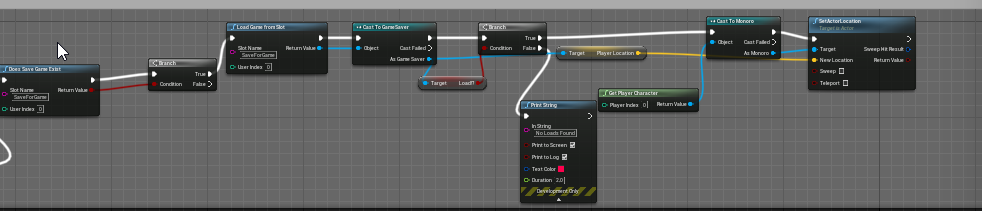 elder gulch
unique harness
The BP Combat Component is my custom component. Inside I have the OnDamageTaken ...
elder gulch
unique harness
The BP Combat Component is my custom component. Inside I have the OnDamageTaken ...
tysm :)
wheat crater
Sorry, do you mind being a bit more specific as to what you want? It's pretty much just an axis input set to left mouse - above that is controlling the actor to face the mouse and displaying the mouse when it's running.
humble spade
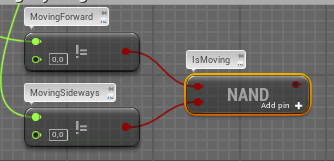
If MovingForward is False and MovingSideways is false, would the outcome be true in my case?
https://i.gyazo.com/6a2002f253c897300512a985af757b25.png
Sorry for those stupid questions thrown in right in your conversation..
 wheat crater
I know how annoying it is to deal with newbies who know virtually nothing, so sorry if it's really basic
unique harness
humble spade
If MovingForward is False and MovingSideways is false, would the outcome be true...
yes it would be true
 dawn gazelle
wheat crater
Just a repost from earlier today, trying to move the actor using mouse controls ...
dawn gazelle
wheat crater
Just a repost from earlier today, trying to move the actor using mouse controls ...
It is. You just need to add the MouseY and MouseX axis to your axis mappings for MoveForward and MoveRight respectively.
dawn gazelle
humble spade
Going after that logic that Datura posted it does what i want.
When, false and false, true
and so on, but thanks 🙂
im sorry
i want to achieve that the outcume is true when one of the two input booleans is false.
unique harness
Are you just trying to figure out if you're moving?
humble spade
Yes lorash
humble spade
unique harness
Are you just trying to figure out if you're moving?
Exactly
unique harness
humble spade
it can only be one true, the player can only move in one direction
unique harness
this will return true if you are moving
humble spade
Thanks Dirtsleeper,
jea in code it wouldnt be as much as a problem, first time working with a system of different pieces
unique harness
no because they could both be 1 and you would still want to return true
prisma stag
Hello, I'm trying to pickup an item in-game however when I hit E on it to "pickup" the actor doesn't follow me nor does it move to the location.
 earnest tangle
Out of curiosity does anyone use multiple event graphs in your blueprints? I've never quite figured out what having more than one is good for 🤔
dawn gazelle
earnest tangle
Out of curiosity does anyone use multiple event graphs in your blueprints? I've ...
Keeping things organized.
earnest tangle
Hmm, I guess that'd be one... I haven't really found the need to split my graphs out any further, since at least if they have some comments they're usually fairly easy to navigate by just zooming out or clicking on the event name in the list
elder gulch
unique harness
The BP Combat Component is my custom component. Inside I have the OnDamageTaken ...
dawn gazelle
If you have dozens upon dozens of events though, having to look through tons of comments to find specific types of events can take longer, same with looking through the list.
 tight schooner
@earnest tangle yeah I have a complicated pawn and I put BP interface events and input events on their own graphs. Purely organizational
earnest tangle
Yeah makes sense for grouping :)
elder gulch
@unique harness idk what to do when i get damage i mean idk how am i going to trigger this when i get damage this is my current damage system
dawn gazelle
Not mine... This is ALSV4 replicated... This is just the "network" events @_@
elder gulch
@unique harness this is what happened lastly
earnest tangle
heh
yeah I've noticed that I do need to move things around from time to time for that
unique harness
elder gulch
<@!209383767322656768> this is what happened lastly
looks good
 orchid zinc
Anyone know how to get these warnings to auto-disappear like they did in prev engine versions?
unique harness
elder gulch
but the problem is
Call TakeAnyDamage on your Monroe class
orchid zinc
😅
unique harness
earnest tangle
Out of curiosity does anyone use multiple event graphs in your blueprints? I've ...
unless it's a mulitplayer game, you shouldn't really have a lot of logic in the event graph
elder gulch
unique harness
Call TakeAnyDamage on your Monroe class
in my main level blueprint char blueprint or the follower blueprint where i added the damage system
unique harness
elder gulch
in my main level blueprint char blueprint or the follower blueprint where i adde...
in the follower bp
earnest tangle
unique harness
unless it's a mulitplayer game, you shouldn't really have a lot of logic in the ...
Why? Majority of my logic is in there unless it's a function :)
(or C++)
unique harness
earnest tangle
Why? Majority of my logic is in there unless it's a function :)
yes, a majority of logic should be functions
earnest tangle
I don't know does it really make much of a difference it being a custom event vs function
humble spade
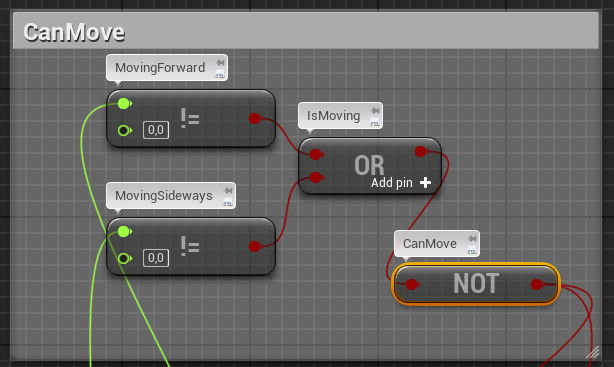
Quick jump in, does canMove give out what i expect it does?
Is there a way to debug the blueprints?
https://i.gyazo.com/c3fdb43da17e50cec14911b4f2fd4f00.png
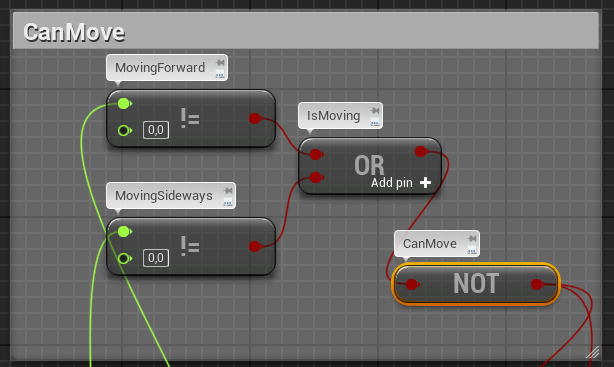 unique harness
yes
elder gulch
unique harness
yes
what do i need to add as target?
maiden wadi
@earnest tangle The only two reasons for multiple graphs is editor performance(More nodes on screen lowers editor framerate, but this takes hundreds), and maybe organization if your blueprint graph is too large. Kind of the same as making a C++ region you can minimize I'd assume.
earnest tangle
Ah interesting, didn't realize it might actually have a perf impact to that degree
unique harness
elder gulch
what do i need to add as target?
where?
unique harness
elder gulch
what do i need to add as target?
oh, you don't need to call OnDamage anymore
maiden wadi
It wont affect your in game performance. But it can slow the editor a little. You can test it yourself by opening up a new actor graph and just copypasting a ton of nodes into it.
elder gulch
unique harness
oh, you don't need to call OnDamage anymore
but it gives error without target
unique harness
yea delete it
elder gulch
earnest tangle
maiden wadi
It wont affect your in game performance. But it can slow the editor a little. Yo...
Yeah makes sense, I just never noticed anything with any of my BP's so far so I thought it'd just been optimized well enough for it to never really be a problem lol
 crude cradle
Hi! I'm having a small problem with SetActorLocationAndRotation, for some reason it doesn't update the world location for the actor!
This is part of a bigger blueprint:
Where basically a player interacts with an "Axe", it should clone the "Axe" actor, and send rotation from mouse input into a special HUD for inspection. For all other players it should disappear (so using an RPC I actually destroy the original actor).
So I used Spawn Actor From class Before.
maiden wadi
I can't imagine people actually using them for that purpose. But I could definitely see organizational points. One graph for networking maybe. Another for inputs.
elder gulch
unique harness
yea delete it
oke
@unique harness what do i need to do after delete i mean how will it understand if i got damage or not?
unique harness
elder gulch
oke
that's what the event dispatcher is for
tawny shuttle
hey guys just a solid question
unique harness
when you call TakeAnyDamage, it'll call the event in the widget
tawny shuttle
since idk what to search up
unique harness
tawny shuttle
since idk what to search up
what's the question?
prisma stag
Hello, my actor isnt moving with the player and doesnt move to the location I want it to.
tawny shuttle
same thing I asked before when player has a weapon equipped make it so the mouse controls only his arms
elder gulch
unique harness
that's what the event dispatcher is for
im %100 sure that i did something wrong
this is the script inside the damage hud
and this is what makes the damage
unique harness
did you add this widget to your main hud?
elder gulch
unique harness
did you add this widget to your main hud?
i dont have a main hud i use the hud of the damage as a main hud
unique harness
ok so just make a new hud
elder gulch
aight done
unique harness
new widget*
add the damage widget to that one
then in the player controller, create the HUD widget and add it to viewport
unique harness
yes
dawn gazelle
Trying to create a structure, is there a means of specifying row names of a table without having to define the table itself?
unique harness
not if you're using the DataTableRow as the type
you could just store it as a FName instead if they're all the same table
maiden wadi
@tawny shuttle That sounds like a semi advanced system. You might want to consider adding some more points to your question. Like, does mouse movement dictate certain animations being played, are you just trying to do something like a complex 2dAimOffset? Definitely need a lot more information before answering a question like that.
dawn gazelle
Yeah but i'd like to be able to easily select the names rather than having to manually type them in :/
elder gulch
unique harness
yes
tawny shuttle
I was kinda just hoping to just achieve not like a set animation but a what would you call it
unique harness
dawn gazelle
Yeah but i'd like to be able to easily select the names rather than having to ma...
well if you don't define the table, how would it know the available rows
tawny shuttle
like just a whallop of a swing with the arms
elder gulch
@unique harness added main hud to there and after what do i need to do?
unique harness
elder gulch
<@!209383767322656768> added main hud to there and after what do i need to do?
test 😛
elder gulch
aight
elder gulch
unique harness
test 😛
hmm a bit of bad news the hud isnt playing for some reason
unique harness
add the player controller for the owning player node
tawny shuttle
like idk how to describe it lol I really just want the arms to move side to side at the very least via mouse movement
dawn gazelle
unique harness
well if you don't define the table, how would it know the available rows
Naw I get that, but like, there'd only be one specific table holding all the missions in my example... Basically trying to avoid having to define the table every single time one might add a mission into the prerequisites. Also, adds a chance for someone to add an invalid table and row name.
tawny shuttle
if I can just get the arms to move based on movement of the mouse then I can do the rest
dawn gazelle
So i'm curious if there is a way to define the table once and then get the row names out while creating the structure.
unique harness
not that I know of
elder gulch
?
unique harness
I would do GetController instead
elder gulch
unique harness
I would do GetController instead
i got it but i cant plug it to the node
unique harness
elder gulch
i got it but i cant plug it to the node
cast to player controller
elder gulch
unique harness
cast to player controller
unique harness
yes
elder gulch
now test?
maiden wadi
@tawny shuttle Haven't tried anything like that myself. Sounds like either AimOffet, or animation IK. Maybe both at the same time. You could update a directional vector from the mouse on tick and use that to drive the animation blueprint. 🤷♂️
elder gulch
unique harness
yes
still not working i think i did something wrong at somewhere but idk what i did
tawny shuttle
maiden wadi
<@!118702667525521408> Haven't tried anything like that myself. Sounds like eith...
thank you as long as I have a base to start from some kinda idea where to go from I can play around with it
maiden wadi
@tawny shuttle Actually, It's worth asking. what are your arms? If they're just basic meshes, you could probably avoid the animblueprint.
tawny shuttle
yep! just using the basic man
I don't plan on changing them
it's just a one week game project so I'm not changing too much stuff
maiden wadi
@tawny shuttle If it's a skeletalmesh, I'd probably check out IK setups if you're on a timetable. 2D AimOffet requires extra work by making skeletal animations to poll from. Looks better usually, but IK can work well and is sometimes a lot quicker to implement. If it's just arms like a first person view with arms not attached to anything, you could probably get away with just setting their location in space based on the mouse delta and a center location for them to move around.
tawny shuttle
sadly I am using the third person preset
 tranquil gorge
Hello im having trouble having my character turn around and face the camera and idk why its doing this or what settings should be ticked to make it so that when i move the control stick down the character runs toward the camera. https://streamable.com/bk45f9
 maiden wadi
Definitely IK stuff then. Bit of a dive for a week, but doable.
tawny shuttle
I am however PERFECTLY FINE with making it look janky
that was kinda the goal
make a half joke physics game
tranquil gorge
sorry to intrude just putting myself out there
tawny shuttle
infact I already have character movement looking janky and I think it's hilarious
unique harness
elder gulch
<@!209383767322656768> now it is visible but without taking damage
the event construct should be hidden not visible
maiden wadi
@tawny shuttle The ContentExamples project has some stuff you can check out. I'm sure there are fifty thousand tutorials for it online too. This is a pretty quick overview if you don't mind reading. https://docs.unrealengine.com/en-US/AnimatingObjects/SkeletalMeshAnimation/IKSetups/index.html
tawny shuttle
this is why I love this community lol
elder gulch
unique harness
the event construct should be hidden not visible
ima now give up but i will check everything tomarrow and message you
unique harness
ok
maiden wadi
@tranquil gorge How are you doing the rotation that's already there?
tranquil gorge
can you be more spacific with your question @maiden wadi
elder gulch
@unique harness and ty for your help im a bit dumb sorry
unique harness
np
tranquil gorge
i can give you this im not sure if its what you were asking for however.
@maiden wadi
usually ppl want to make sure i have that ticked off
(use pawn control rotation)
i also have a spring arm in there
 sterile fjord
I'm wanting to make a stationary enemy that shoots in 2 second intervals when the player is in line of sight. Everything was working with just the 2 second interval part, but broke when I started trying to learn the trace part. Any ideas?
Also if you answered this before and I didn't see, my b
maiden wadi
@tranquil gorge I was wondering how you're already rotating the character towards it's movement. He turns to face the direction that he's moving towards a little. Where is that from?
 pallid wave
Hello, so watching this tutorial series vid
https://www.youtube.com/watch?v=iRPCdmTxeK0&t=1824s
I ran into this error in the picture below. Can I get some help on this? I've very new to this and I kind of find an answer but don't really understand it.
P.S. using ue 4.26.1
maiden wadi
@pallid wave What type of class does BPGridObject inherit from?
pallid wave
It's a actor Blueprint Class
tranquil gorge
the facing the direction hes moving im sure is most likely coming from the checked use controller rotation yaw in the third person character settings
 true salmon
Anyone know if a cross platform way to append a filename to a directory in Blueprints exists already? I could do it C++ but was hoping I could do it with something in the Paths utils.. don't see it though. I posted a question on unrealanswers about this here last Friday: https://answers.unrealengine.com/questions/1011829/best-way-to-concatenate-file-directory-and-name-in.html
pallid wave
tranquil gorge
it could also be coming from the cheaked orient rotation to movement @maiden wadi
maiden wadi
@pallid wave Oh. My bad, I read that wrong. Your Grid is of type Actor. If you always use it as a grid, you should change the type to BPGrid rather than Actor. Alternatively you can just cast to the actor pointer to BPGrid.
@tranquil gorge You can probably up the rotation value above OrientRotationToMovement to something like 360 or 480. Might get your desired result.
pallid wave
Ty @maiden wadi. I think I'll just change the type to BPGrid.
maiden wadi
@sterile fjord Rather than tracing every frame, you should probably set up a semi quick timer on beginplay to run every tenth of a second or something. That timer would run an event that could check if you should even be trying to shoot at the character, IE if it's been more than two seconds. If it's been more than two seconds, run a simple distance check to see if the player is close enough. If they are, then trace to see if they're in view. If all of those pass, fire the arrow.
tranquil gorge
ive already had it to 720 and it was functioning as seen. i input 360 and 480 as well. no fix @maiden wadi
maiden wadi
@tranquil gorge Odd, do you use AddMovementInput for your movement? And I presume that is a character class, since you have OrientRotationToMovement?
tranquil gorge
yes i am
maiden wadi
In your character's ClassDefaults variables, do you have UseControllerRotationYaw disabled?
tranquil gorge
no its enabled
maiden wadi
And you have nothing going on on tick or whatever that affects character's location or rotation?
Oh, man. I need to take a break, I'm reading everything wrong.
I read that as it's not enabled. Disable the UseControllerRotationYaw.
tranquil gorge
not that i would know of and ok
maiden wadi
That should allow the OrientRotationToMovement to work.
tranquil gorge
well now hes just walking in circles whenever i go left and right
however front and back seem to work now
maiden wadi
Circles as in running around the camera location, or he's spinning in place?
tranquil gorge
well if i held left or right he would just start walking in a perfect circle as if he was walking around an object.
 signal prism
how to make scp 173 mechanics using blueprints?
maiden wadi
Might post your left and right axis movements.
tranquil gorge
@maiden wadi
maiden wadi
Do you want the controls to work based on the camera's direction?
tranquil gorge
yes i indeed do
id like the forward vector to be based on the cams point of view like most 3rd person games
maiden wadi
Try this out then.
On a side note.. there really needs to be a simpler function for getting vector leveled on Yaw.
tranquil gorge
lol and ok ill try this out right now
 fresh sluice
Hello. I'm having a trouble with a BP of mine, specifically it gives me the error message that i'm trying to access the actor that is pending kill. Now, I understand when such error would appear normally, but it happens on an actor i have just spawned a node before via spawn actor by class. What it is is that I have a door bp on which I can use a lead pipe BP to block them. This makes the door BP spawn a new pickable actor for lead pipe and put it in a relevant transform, so that I can pick the pipe again. When i do this for the first time (place and pick up), all is fine. But when I place the pipe for the second time, even on a different door instance, I get the aforementioned error. Halp =C
maiden wadi
I know. But I do this in C++ so it'd be wasted on me. Just amused at the lack of something like that given how often it's used in controls.
@fresh sluice I wonder if that could have something to do with your bindings not being cleared, somehow? Or is it the attachment that's causing the error?
tranquil gorge
@maiden wadi Big thanks and Happy belated valentines day to show how much i love ya right now. :)❣️ i can finally move on .
 open acorn
anyone have any experience why this thirdpersonchar is making everything jitter?
maiden wadi
@open acorn Usually has something to do with the spring arm colliding with the character. Occasionally it's also odd controlrotation mess ups.
unique harness
maiden wadi
On a side note.. there really needs to be a simpler function for getting vector ...
Here is a simpler way
fresh sluice
maiden wadi
<@!273378219091034112> I wonder if that could have something to do with your bin...
OMG I am an idiot 🤦♂️ I have a persistency system that tracks if the item of given ID has been picked up or not, and if it was, destroy it on spawn (so that I don't have a picked item after reloading a save). I made it a while back, guess I didn't think about a situation when an item with the same ID will be picked up and put down multiple times x_X Sorry for bothering
 open crypt
Why are these not firing?
open acorn
maiden wadi
<@!128327013973884929> Usually has something to do with the spring arm colliding...
this is the default I don't think I touched anything with the spring arm or camera. If I just make a new one will it go away?
open crypt
am I missing something here? can someone please confirm that I have set these collision channels correctly
maiden wadi
@open acorn Try to disable DoCollisionTest, see if it goes away. If it stops, you have a collision problem. If it doesn't stop, you have a control problem.
open acorn
maiden wadi
<@!128327013973884929> Try to disable DoCollisionTest, see if it goes away. If i...
docollisiontest true and false and they don't change anything
i'll just make a new 3rd person char and see if it persists... i'm pretty sure its just the default though.
yea this is the default thirdpersoncharacter... wth is it my map?
wheat crater
I feel like the adoring fan with how annoying I'm being, but I think I'm onto something - I can move my actor on the X co-ordinates by multiplying the direction with my input, and plugging that into the Y vector. If I plug it into the X, I can move along the Y, but only by clicking left and right, when it should be up and down.
Combining them also results in moving diagonally, probably because I'm multiplying two whole numbers when pressing on the right side, and a negative on the left
 hexed jungle
Could somebody please draw me up an example of how I could use an rinterp node to smooth camera movement on a first person camera? All the tuts i can find use a spring arm but that doesnt work for what I am trying to do.
open crypt
What is wrong with this? It doens't show any lines coming out
dawn gazelle
open crypt
What is wrong with this? It doens't show any lines coming out
It would only fire once at begin play, and depending on what object types you have defined and how big your sphere radius is, it may go right through walls or be too small so you may not see it.
open crypt
Nah, it works now, but collision seems to be an issue those cars and trucks should be getting hit and triggering this
open crypt
dawn gazelle
It would only fire once at begin play, and depending on what object types you ha...
I mean it doesn't work, but the line trace is at least drawing correctly
 steep gull
Is there anyway to fire a onmouseover/clicked event in the editor viewport?
im trying to do something like python viewer states in houdini
 gusty cypress
Is it possible to have a player import a sound file while the game is running?
tawny shuttle
@maiden wadi sorry for the @ but I've been reading and learning and would it be possible to make a hand IK follow a trace determined by the mouse? similar how you use a trace to determine the placement of a foot IK?
something like instead of the trace going down to measure the floor it follows an invisible point where the mouse is to trace the hand IK to the location?
trim matrix
hey ive got ai that goes to a chair and sit on it, ive also set it up so that when its being sat on it cant be sat on by another ai, the problem is I want my ai to find the closest NON occupied chair
i have the blueprints that finds the closest chair
but im trying to integrate the not occupied section and I cant figure it out
spaghetti yay
Blueprint Runtime Error: "Accessed None trying to read property K2Node_DynamicCast_AsChair". Blueprint: FindChair Function: Execute Ubergraph Find Chair Graph: EventGraph Node: Branch
giving me this error
 covert delta
That means you're passing a null value and trying to turn it into a chair
trim matrix
huh? haha
covert delta
somewhere you're trying to cast a value to the type chair
but when its actually happening in game, it's getting nothing
game complains because you can't cast Nothing into a chair
trim matrix
hm so how do I fix it?
tight schooner
@steep gull This might be a recipe for disaster, but if a Editor Utility Widget has a tick event, maybe you can run something on that...
otherwise maybe look into how editor plugins are made
 earnest fog
How hard would it be to fetch text from a random wikipedia page and put it in a text render?
prisma stag
Hello I have 2 tools, a hatchet and a pickaxe that I would like the player to pickup. I have turned on simulate physics however it wont do the pickup function. However if I turn off physics then they work?
tawny shuttle
hey guys quick question; how can I get an IK to trace along a tracebychannel controlled by the mouse?
I'd have to get the mouse and it's vectors correct?
trim matrix
why doesnt this work?
it defaults to 0 I suppose
If I remove the bool branch it works (finds closest actor)
maiden wadi
@tawny shuttle Possibly. Try using the PlayerController's ConvertMouseLocationToWorldSpace for it.
crude cradle
Can someone walk me through a problem? I'm trying to understand how to setup some object to only be visible to some players but not others.
I have a multiplayer game and my approach so far was to make a copy of the object and set it as the owner of the player that activated it. Then setting it up as Set Only Owner See, but that doesn't work quite right:
When the client does it - everything works out properly
When the server does it - the axe disappears and only appears for the client!
unique harness
i assume you're doing a listen server?
crude cradle
yeap!
unique harness
i'm not sure how that would be handled
I think the server itself is a client
so if it's owner only, the server wouldn't see it
crude cradle
hrmmm, just tried with 3 players, and appearntly all the clients see it, so still flawed.
unique harness
Can you show your logic?
crude cradle
basically i have a custom event setup that runs on the server, so when the client wants to inspect it, it sends over the original actor, and a reference to the client.
unique harness
Can you show the replication settings on the class you're spawning?
crude cradle
unique harness
So when this function is executed, who should see the object?
crude cradle
only the client that sent out that event
unique harness
does the server need to know about it?
crude cradle
nope, the client will let the server know if they will put it back/in inventory
unique harness
so why RPC then? why not just spawn it locally?
crude cradle
doesn't the server need to spawn it initially on the level?
unique harness
can you explain what you're doing at a higher level?
crude cradle
Basically, I want an object to be inspectable.
If a player comes to inspect it, the object disappears from everyone else.
The object appears to be closer to that player and the mouse movement will rotate the object.
Then the player has a choice, either they drop that item (so other players may inspect it)
Or they put it in their inventory.
unique harness
ah ok that makes more sense
So I would have a RPC called "InspectObject" which would hide the main object and call a ROOC RPC to spawn the object for the inspector
InspectObject would be RoS
then if the client picks up the item, destroy it locally and tell server to add it
otherwise destroy it locally and tell server to unhide item
crude cradle
sounds reasonable! ROOC RPC requires me to set the item as the owner right?
unique harness
this should exist in the player class
so it'll be PlayerObj->InspectObj
so you're already handling RoOC
crude cradle
thanks, i'll try that!
 round dune
It’s it possible to make a full game like Phasmophobia with blueprints without much lag?
Without *
 quaint bough
how would you approach drawing performant debug lines in 3d Space, if i understand it right the draw debug line blueprint is disabled when the game is packaged or should only be used for developing?
unique harness
yes that is correct
round dune
To which question?
round dune
It’s only a example
maiden wadi
@round dune It's possible. Lag is kind of a rough subject. Too many things affect it. If you take out the hardware aspects, it's very possible I'd say. It's only 4 players, and the interactions are fairly simple.
crude cradle
@round dune I think your question is "how performant is the blueprints system of unreal engine 4.26.1"
round dune
crude cradle
<@!275024450494136321> I think your question is "how performant is the blueprint...
Exactly
But is there way on optimize the Blueprints to reduce the lag and have some more complex stuff?
crude cradle
I am not sure if unreal engine ever released benchmarks of similar made situations with blueprints and C++ code in comparison.
But I imagine since all the blueprint code is compiled into c++ code anyways, there shouldn't be much overhead in the auto-generated code.
The only thing I can think of is some optimizations that a regular person might do on C++ level that might help, like multi threading when possible or better managment of memory.
round dune
But C++ is much harder to learn is the problem
unique harness
BP speed is a lot closer to c++ speed now than it used to be
crude cradle
bottom line, c++ is better when the person knows and masters it.
blueprints is workable, some things are missing from normal functionality - like handling of steam online subsystems are a bit lacking (but there are plugins for it), and some other things might be annoying (working with arrays of structs)
unique harness
biggest optimization you can probably come across is just using BPs in the most efficient ways
like caching results from a pure function call instead of dragging 20 pins off of it
not using event tick
not using function binding, etc
round dune
So to my answer it is fully doable to make a lag free game with blueprints aslong it is not a tripple a game?
unique harness
You could make a AAA game in BPs
round dune
But wouldn’t be there very much lag?
unique harness
depends on what you're doing
crude cradle
you would have to define what do you mean by Lag.
round dune
So I have in my a kinda of escape game where you are trappend and followed by creatures and you must solve puzzles and find keycard to escape
crude cradle
do you mean 100% CPU/GPU usage that would make the game FPS dip to less than optimal (30fps)?
round dune
Yes
unique harness
sounds pretty simple computationally
crude cradle
it sounds like the type of things blueprints tried to solve @round dune
taking the burden of knowing how to write code in order to realize what you have in your brain as a designer
bottom line, it sounds as though the thing you have in your mind can be implemented using blueprints and there would not be "Lag" unless you are targeting very old computers
or bad connection
round dune
I am targeting a average gaming pc(i5/gtx 1060)
crude cradle
or you are going gung ho with raytracing and high poly models
round dune
AI Controlled Monsters, Puzzels, Keycards and maybe random room generation
crude cradle
infact most of your time will probably be spent on optimising your scene and environments
round dune
That’s all I have in mind for now
 orchid garden
can do that all via blueprints and still run smoothly on i5/1060
crude cradle
infact, some gaming studios have their own implementation of the blueprint systems based on their engines
round dune
What do you mean by that?
 proven mason
Is there a way to call the event tick in Blueprints?
orchid garden
they modified the c++ structure for the blueprints that can be used in the mod editors.
for example - Ark
proven mason
I really like the animation the event tick does with it's delta seconds in conjunction with RInterp
it's ashame I couldn't figure out how to call the event tick function when I push a button to do RInterp
quaint bough
im working with nested for loops and i can tell you if you do something like that in blueprint its way slower than in c++ 😄
unique harness
no, you don't call event tick
crude cradle
@proven mason I usually make a Timeline object when i want to linearly interpolate an animation
orchid garden
proven mason
Is there a way to call the event tick in Blueprints?
use a timer, if you want it to tick lick a normal event tick set its delay to 0.1
timelines are good for running a animation off of as well.
proven mason
okay so let's say I use Rinterp for a pinball flipper
this is what I have right now
unique harness
a timeline is probably what you want to handle that
proven mason
orchid garden
yeah i'd use a timeline for it, flip out motion - playing forward, flip back to normal position - play in reverse.
proven mason
@trim matrix what about RInterp to constant?
unique harness
timeline with lerp is definitely what you want
proven mason
okay so I add a timeline
crude cradle
they can be quite scary at first (timelines), but once you do one, they are super satisfying to work with
unique harness
1 at 0.0, the other at 1.0 at your desired duration
so probably something like 0.25
orchid garden

What is a Timeline in Unreal Engine 4.
Source Files: https://github.com/MWadstein/wtf-hdi-files
orchid garden
for a flipper - you want to be able to interupt the action being played, not continue till stopped. i.e. if its reversing it needs to play forward from the current reverse point rather then the start.
orchid garden
yeah it should, as pinball tables i've played don't reverse the flipper till the button is released.
(i.e. real life mechanical pinball tables)
 elfin badger
is possible to have a base class with an interface and on a child class override the interface event while also having the parent interface logic run as well?
trim matrix
Yo guys, I'm seeing in the Widget UMG thing stamina bars go from 0 to 1
Seeing as I'm not good with math ( or I'm too lazy to figure it out ) does anyone know a good method to convert this to 0 to 100?
unique harness
elfin badger
is possible to have a base class with an interface and on a child class override...
yes, right click the function in the graph and click call parent
unique harness
trim matrix
Seeing as I'm not good with math ( or I'm too lazy to figure it out ) does anyon...
value * 100
orchid garden
trim matrix
Yo guys, I'm seeing in the Widget UMG thing stamina bars go from 0 to 1
yes the percent bars work off 0 - 1 values so just divide your stam by max stam to show the proper value on the percent bar. i.e. if their max stam is 320 and they only have 120, you'd divide 120 by 320
unique harness
trim matrix
Seeing as I'm not good with math ( or I'm too lazy to figure it out ) does anyon...
or use the map value node
trim matrix
got it, thanks guys
proven mason
Wow thanx for the help; you have no idea how much I've spent scratching my head on getting the flippers to rotate the proper way
unique harness
awesome 😛
proven mason
speaking of Lerp there's a Lerp (Rotator) node aside from just the Lerp node
does it matter which Lerp I use?
unique harness
yes but you're only updating 1 value so no need to use that one
proven mason
oh right cuz of set actor rotation node
unique harness
well it's a lot more math for no reason
FRotator UKismetMathLibrary::RLerp(FRotator A, FRotator B, float Alpha, bool bShortestPath)
{
    // if shortest path, we use Quaternion to interpolate instead of using FRotator
    if (bShortestPath)
    {
        FQuat AQuat(A);
        FQuat BQuat(B);

        FQuat Result = FQuat::Slerp(AQuat, BQuat, Alpha);

        return Result.Rotator();
    }

    const FRotator DeltaAngle = B - A;
    return A + Alpha*DeltaAngle;
}
that's the rotator version
orchid garden
slerp to a rlerp lol... sry found that funny for some reason....
unique harness
vs
    template< class T, class U >
    static FORCEINLINE_DEBUGGABLE T Lerp( const T& A, const T& B, const U& Alpha )
    {
        return (T)(A + Alpha * (B-A));
    }
so should definitely just use the regular Lerp
proven mason
okay well said besides I want the game to run optimal
Alright @trim matrix will keep that in mind.
trim matrix
hey im trying to find the closest non occupied actor
i got this https://blueprintue.com/blueprint/hhew4y34/
BlueprintUE
but it doesnt work
ive been trying for a week
different kinds of methods
nothing seems to work
basicly it should find all the actors that are not occupied, then find the closest one,
proven mason
@trim matrix out of curiousity is there a way to convert all these blueprints nodes into C++ code?
maiden wadi
Early optimization will just make you cry when you have to rip it all out and actually optimize it later anyhow. No point in bothering.
trim matrix
Alright so has anyone ever seen this before? I really hate UI
I've literally never seen 2 bars in 1 progress bar
tight schooner
@proven mason Automatic nativization has lots of bugs — every new version of the engine seems to add more — so I would use it very sparingly and in a limited way, like a BP component that handles no class references.
 true valve
What's the implementation of holding a torch on your left hand and axe on your right? Does it have to be based on a single animation or could be two separate anims?
 sand shore
@trim matrix yes, and normally because I've made it do what it does.
You appear to have spawned 2 instances of your UI, one which does not update from the default for some reason?
sand shore
true valve
What's the implementation of holding a torch on your left hand and axe on your r...
It depends a whole lot. I would possibly write the system so that left handed items have their animation mirrored onto that hand from the right handed animation (ambidextrous implementation). Having multiple items equipped and usable would then play those particular (mirrored or not) animations via a slot.
You probably should ask in #animation about using multiple slots in a montage, or how one might mirror (or even retarget) animations
trim matrix
@sand shore It's super cracked out haha, I used a blueprint Interface to update stamina values, That video I sent was a result of it. I ended up just using a cast node rather then interface and it worked fine.
I was specifically trying to avoid casting all the freaking time but it just didn't want to work with BPI
sand shore
okay so I'm guessing you retain a pointer to the spawned UI, then you use(d) the interface call to update that?
What I'm saying is that it really looks like you spawn another UI and that UI doesn't update (because you have a single reference to the UI, you can't update two)
prisma stag
How come attachactortocomponent doesn't work when physics is enabled?
 daring turret
if i make a tilemap in blueprint, is there a way to procedurally generate what kind of tiles appear where? im making a game with basic terraria mechanics.
 proud hull
trim matrix
i got this https://blueprintue.com/blueprint/hhew4y34/
proud hull
trim matrix
i got this https://blueprintue.com/blueprint/hhew4y34/
How come you skip the first index of the array in your foreach loops?
I'm guessing you followed something like this: https://answers.unrealengine.com/questions/837459/how-to-get-location-of-closest-enemy-pawn.html
But this says to set the initial nearest to the first index and the way you have it sets the initial nearest to the last index, since it is inside the for loop.
You can honestly just remove the index != 0 and let it test distance with itself. It is only trying to save you one iteration of the for loop.
trim matrix
ah
well I kind of fixed it
but thanks ill keep it mind 😄
slight issue tho
poor sods are all stuck lmao
proud hull
They get stuck after finding and moving to a chair?
Are you attaching them to the chair at all?
proud hull
Just making sure, that would probably prevent movement.
trim matrix
they cant move cause theyr not inside the navmesh
proud hull
Hmmm, not quite sure. Possibly a way to nudge them back inside the navmesh with a small impulse or simple move to node.
proud hull
Indeed, it is, lol
trim matrix
i could disable navmesh gen on the chair
but then theyd just.. walk into the chairs
hm maybe theres a node to turn it off
doesnt seem like it
proud hull
Standing animation could include them also taking a small step forward. Still a weird workaround, but would look more natural than forcibly moving the AI forward.
true valve
@sand shore I opened the question in the animation channel but wondering if you know any docs or tutorials on this subject?
trim matrix
hm that just seems annoying and wont fix a lot of other nav mesh issues
 worthy frost
@true valve just be patient, don't ping people like that
sand shore
Heres what is about to happen, if I answer. I will open a new tab, I will google "UE4 anim slot BP", and I will give you the top unsponsored link.
I don't have a better recommendation
true valve
lol - well I'm looking for the right keywords, I already did some searching. Didn't find anything.
sand shore
fair play
trim matrix
anyone know how to have a navmesh but still be able to use the actors in them as AI?
example:
chairs outside navmesh are very annoying to deal with
have to teleport them on and now theyr stuck, possibly have to teleport them back onto the navmesh
sand shore
you can change it so that instead of the mesh/actor blocking navigation, it changes that volume into a different Nav Area
I don't remember where
trim matrix
hm 🤔
earnest fog
How hard would it be to fetch text from a random wikipedia page and put it in a text render?
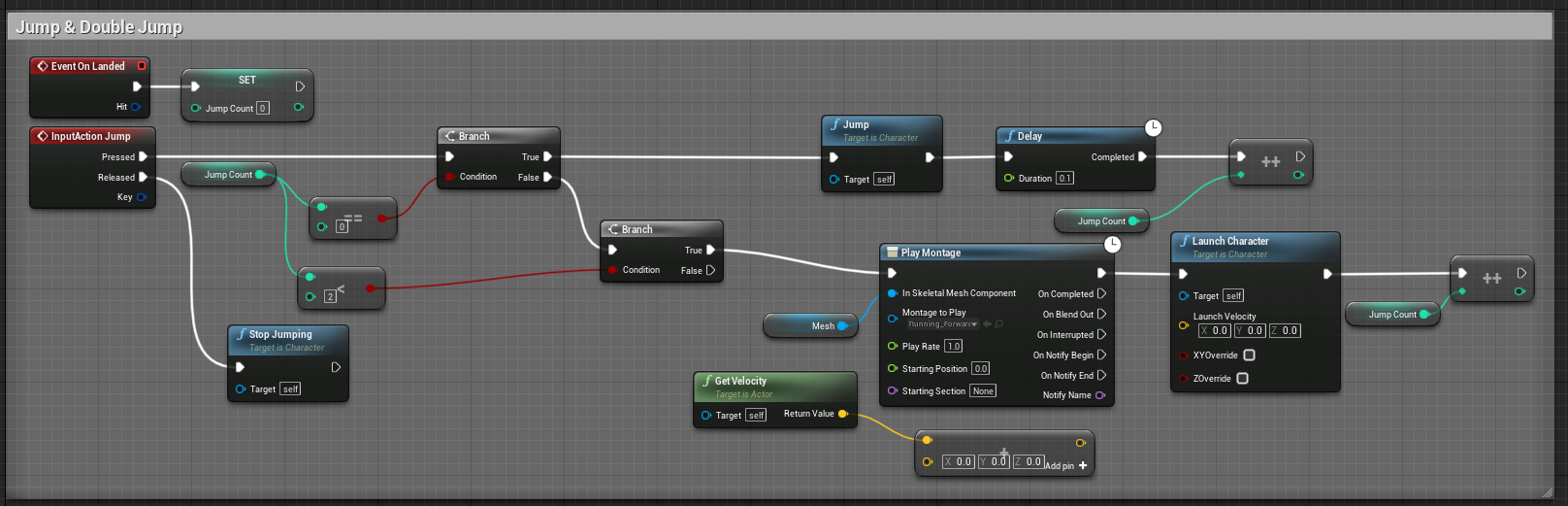 proud hull
trim matrix
https://i.imgur.com/VDtGz2S.png
proud hull
trim matrix
https://i.imgur.com/VDtGz2S.png
Even with your launch velocity set to 0?
trim matrix
Yeah
I had to remove the Get Velocity and +Vector to fix it
Just added whatever Z vector into the Launch Character
proud hull
If you want your character's exact jump velocity, you can use:
So you got everything working as expected now?
proud hull
earnest fog
How hard would it be to fetch text from a random wikipedia page and put it in a ...
You can use a free plugin from the marketplace to make web requests: https://www.unrealengine.com/marketplace/en-US/product/varest-plugin
trim matrix
proud hull
So you got everything working as expected now?
Yeah
 little helm
I want to spawn sound of other vehicle with respect to distance of our character
I won't to use sound attenuation as it repeats the sound of vehicle again and again any solution???
I created an endless runner game
tight schooner
@little helm if your vehicle is spawning the looping sound, you can save the spawned sound into a new variable for easier manipulation.
Then on Event Tick or a looping timer event, you can use the variable to continuously set the amplitude (this is from memory so I don't know the exact nodes offhand).
Your vehicle also needs a reference to the player. You can Get Player Pawn or Get An Actor of Class and save that to a variable on BeginPlay.
With that saved reference, you can then Get Actor Location and use a Distance node to get the distance between two location vectors.
Do whatever math you want on that distance value to set the amplitude. (A clamp node can help there.)
If you need expert help w audio, ask #audio
little helm
Yup thanks a lot bro 🙏
 cold crown
Im trying to get an overlap for the player and only the player not all components, and this does not seem to work :/
I have been scouring the internet for help, but the only feedback I have got so far was to make sure your calling the right tags IE (actor tags/component tags), but it still dosent work
dawn gazelle
cold crown
Im trying to get an overlap for the player and only the player not all component...
Does your player have a unique class that no other pawns use?
trim matrix
What component have you set the tag to?
Cuz maybe the component with the tag is not triggering the event.
cold crown
the outlined component has the player tag
gernerate overlap events are on and i made sure the tag is component specific
dawn gazelle
If you're going to go with the tag route, I think you need to plug the Component Has Tag node into the "Other Comp" pins.
cold crown
Ive tried it, and it doesnt seem to work
Ive been having trouble with getting componets by tag thorought the whole development process
@dawn gazelle you mentioned "tag route" is there a better way to do this without tags? I just want a way to check for specific items
dawn gazelle
Well, your original request was to get an overlap for the player. If the player is of a unique class, then you can normally check for overlaps without having to tag anything as the overlap can be on the actor and you can check the class of the actor that is overlapping, but if you're trying to specifically check for a component overlapping, then you would probably need to use tags.
cold crown
basically I only want the functions to call when the player touches it but ignore overlaps with everything else. but your mention of unique classes is definatley another trail for me to look into for shure
trim matrix
just check if the overlap is triggered by the bp of player.
cold crown
I dont fully understand. I cant get the overlap to trigger in the blueprint, and everything it causes works as intended, the only problem is "everything" triggers it (at least with "generate overlap events" on)
dawn gazelle
cold crown
0w0
dawn gazelle
This is an example - the event will trigger with all valid overlap colliders, but then you can get the "Other Actor" and then cast to the appropriate class of the actor you're wanting to test for.
trim matrix
^
Casting is a basic but extremely important thing, I would implore you to study it rigorously.
dawn gazelle
Having multiple colliders in the character can muck up how it works a bit - like, it fires twice on my end because I was setting up something similar to what you have with a collider in front of the player, so it's detecting both overlaps - the one on the sphere I created, and the player's base collider.
trim matrix
Great, feel free to ask any other queries you might have.
cold crown
Im fairly new to this, I have been a scripter on halos forge system for the past six years, and its hard dropping all the bad habbits I gained from that broken system
trim matrix
that's cool, I only recently got into gamedev stuff.
cold crown
dawn gazelle
Having multiple colliders in the character can muck up how it works a bit - like...
i assumed that would become a problem if i got exsessive with the bondries, Im definately going to be researching casting alot more, cuz that was exactly what i needed
cold crown
trim matrix
that's cool, I only recently got into gamedev stuff.
its weird becuase after getting featured and being a member of the halo comunity for so long, I simutanously feel like an expeirianced developer, yet feel absolutly clueless with actaull game development lol
trim matrix
Man gamedev thus far has been like the sea, no matter how much water I collect there is so much more.
cold crown
oh yes I def learned that in my halo years
everytime I thought I was the god of scripting with the biggest brain in halo, a few months later I would learn more and look back on how ignorant I was lol
tight schooner
"accessed none" means the data isn't set or otherwise isn't valid. Whatever data you're feeding those nodes with as "targets" isn't there.
elder gulch
but everything is setted up
plus working
when tested
but it only gives this error after the ending
but it works
when testing
 magic oak
elder gulch
but it only gives this error after the ending
magic oak
elder gulch
but it only gives this error after the ending
When you end, your delay node is still running after your target has beed destroyed
Between the delay and set angular damping, put an Is Valid node to check the target
 finite ermine
hi guys. I'm having this problem using and HDA when I want to save my level. Any ideas?
magic oak
Delay nodes are super dangerous and I’d advise avoiding them as much as possible. Try using a timer function that you can invalidate during End Play instead
elder gulch
magic oak
When you end, your delay node is still running after your target has beed destro...
owh
so should i remove the delay?
?
 versed tinsel
from what he said I think he meant you should use something else like a timer and then invalidate it, so that you can check for validation
if its not valid, it won't run the rest of the nodes and so yuu won't get that error
magic oak
Just pop and IsValid node after the delay
elder gulch
aight
versed tinsel
tbh I had that problem too and I had no idea what to do, so, thanks dikachu hehe
elder gulch
xD
versed tinsel
I just ignored it since it doesn't affect the game
elder gulch
versed tinsel
show me the bp afterwards if you dont mind
yea sure :)
versed tinsel
thanks dude
elder gulch
np
@versed tinsel
this fixed mine
i learned that it accidntally triggers at start and it does this so when you add this it blocks it so the problem fixes
elder gulch
yea sure
elder gulch
yea but i used the other one
on my char blueprint
and i used it with branch to make the same effect
versed tinsel
ohh wait I know whats the difference
with this node, it gives you the value - true or false
elder gulch
yea, it does the same thing tbh
elder gulch
they are same in this condition
elder gulch
versed tinsel
neat it got the error fixed
fixed?
versed tinsel
yeah the error message is gone
versed tinsel
yeah, thanks dude
elder gulch
thx to @magic oak xD
versed tinsel
thank both of you hehe
elder gulch
haha
 sweet silo
Hi everyone ! I'm trying to create a routine for my character. Like he wakes up at 8.05, has to take the 8.10 train, be in the factory at 8.12 etc...
And then the day just starts over again.. how would you do that ?
Thanks a lot !
here is a scheme of how the day would go
I've already made a timer but don't really know how to go from there..
 olive sedge
my camera always flashes to 0,0,0 before starting my level intro sequence and the sequence doesn't have the curve parameters applied even though I start at frame 0 and even if I start the sequence before frame 0.. Anyone know how to fix that?
 alpine copper
Hey guys I'm trying to recreate google street controls, in this video you can see I'm using a sphere as a center point. My goal is to use the sphere as a pivot when I'm holding the mouse button and not being able to get it off the screen until I have release the mouse and click again on a different place https://i.gyazo.com/b7a33b1916da1be5790f0748d05d0acd.mp4
sweet silo
How would i reference a function in another script ?
maiden wadi
@alpine copper As in not allowing the user to look further than the sphere is?
sweet silo
Like i want my "moving" platform to be moved when time = 20. But the time function is in another place
alpine copper
maiden wadi
<@!107296086997073920> As in not allowing the user to look further than the sphe...
Exactly, not the edges but from the center of the sphere
maiden wadi
@alpine copper Hmm. You could brute force it in the camera rotation code. But I also wonder if you might be able to simply limit the pitch/yaw in the CameraManager.
I'm not quite sure how to solve the up and down per of it, possibly just an extra screen ratio applied on top, but in short you need to get your camera's FOV, half that. So if you have a 90FOV, you camera should see in 90 degrees. Half that to 45, because you want to work from the center of screen. You'd want to get the rotation from the camera to the sphere which will give you a world rotator in that direction. Then you could possibly set the CameraManager's min/max Pitch/Yaw by that rotation value Plus or Minus the halfFOV
alpine copper
maiden wadi
<@!107296086997073920> Hmm. You could brute force it in the camera rotation code...
I thought of that too but I'm using Control rotation
maiden wadi
It should still work I think. Try it really quick with a simple beginplay test. I know it works on pitch, I use it in first person to keep the player from looking straight down or straight up and all of my look controls are AddControllerPitch/YawInput
In your pawn or controller's Beginplay, just try something like this. See if it limits your view to only 30 degrees side to side and up and down.
sweet silo
I want my platform to move after ten seconds but it strats off immediately do u konw why ?
 dark crow
That's now how GetSeconds works
And it wouldn't fire on BeginPlay
Use GetTimeSeconds or you can just simulate it into the Timeline with a 10 seconds of 0 value
BeginPlay runs only once when the Actor is created
crude cradle
What would be the difference between running an RPC of ROOC and RepNotify on a variable?
right now the way i understand it the only difference would be that one would notify when a certain variable would change for the owning client, and the other would notify the owning client of a specific event with optional inputs, but is there any other networking difference?
trim matrix
Hello guys I have little problem with my inventory, when I open it I want to disable the character movement, the code is made in the player controller, and I did this code but doesn't work when I want to close the ivnentory and "unpause" the game
 visual lion
Hi and good morning to all, I have a small issue with the rotation for some of my tanks, currently I'm using this code to rotate their "heads" so that they look at the barrier, but for some reason they look at the other side, it doesn't matter if I use relative Rotation/Location or World Rotation/Location, any ideas of what it could be?
https://gyazo.com/c20bab325e0f92c7cc3eb619729d60a4
https://gyazo.com/3149b3291ac71a111c475ab72a0eb6e1
https://gyazo.com/03829dff49e1068c61aa3bf6cfcacfb7


 hollow drift
has anyone a good example for a debug tool example?
I want to be able to change in one bp some checkboxes to turn on or off debug mode for certain actions or events
 turbid shard
Hey, I am trying to rotate my character to match the input rotation of the player input at the end of my dash. I tried relative and world rotation but I am getting a wrong rotation on my mesh. Can you help me? Thanks
worthy frost
Your checking for tag before casting
trim matrix
Good Morning all, i have a question and i am finding it hard to word to search google....
i have created a actor component and added a variable for a Physics Handle... i have added said component to my first person and i would like to select the physics handle i have on my character but i am unable to... but if i use the node in BP on begin play i can set it and works fine... here is a image... i want to select the HAND (in blue box) to the var in the details of the Demo_AC
worthy frost
And actor is null
elder gulch
worthy frost
Your checking for tag before casting
so how can i fix?
just change place?
worthy frost
cast then check the tag?
elder gulch
lemme try
worthy frost
or check the actor is valid
Actor -> IsValid -> Check Tag -> Cast.
tho that is messy, also not sure why your using tag "Door" then casting to door
little helm
Hey folks what's up
Have a doubt how we can spawn group of coins over the obstacles just live in subway surfers..?
elder gulch
worthy frost
tho that is messy, also not sure why your using tag "Door" then casting to door
idek
@worthy frost this is what i use for door system
worthy frost
thing is door cast will fail if actor is not a door
so the tag check for door is redundant
btw if you want to interact with more actors
i highly recommend an interface 🙂
elder gulch
owh
im new so idrk what to do in general
i just use my brain to make some of the things
idk %90 of the other nodes
worthy frost
an interface is something you put on actors, then you can call a generic function all those actors that have the interface respond to do
worthy frost
for example, LineTrace -> Get Hit Actor -> Check if it implements Interactable Interface -> Call Interact on that interface
elder gulch
i use door as bp
elder gulch
worthy frost
for example, LineTrace -> Get Hit Actor -> Check if it implements Interactable I...
owh so it does your work easier
worthy frost
your system only allows for interacting doors as it is now
what if you want to interact with a window? a car?
elder gulch
i added locked doors and this door got broken
elder gulch
worthy frost
what if you want to interact with a window? a car?
i have a cube that uses the same mechanic
@worthy frost idk why but this interface thingy looks complicated and i want to add several doors like locked etc but it breaks are there any tutorials that teaches the interface good?
olive sedge
Anyone know how to keep the tiling like on the cube if I stretch the object?
https://i.imgur.com/5AA9tVE.jpeg
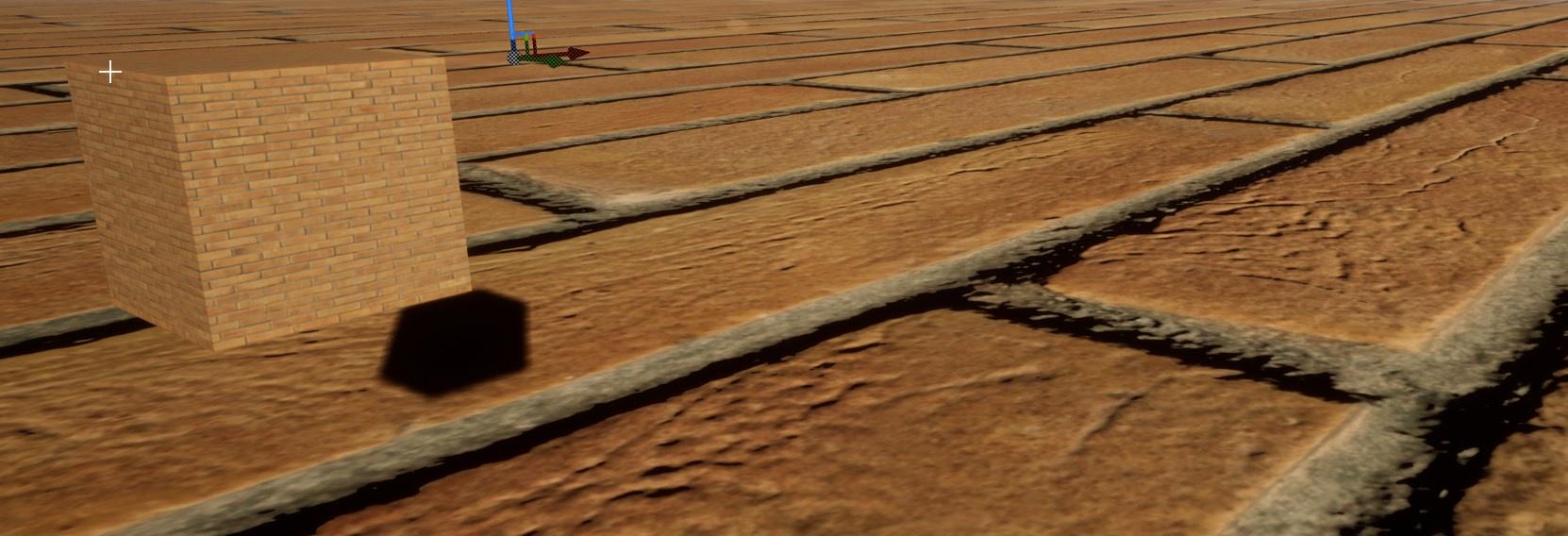 elder gulch
olive sedge
Anyone know how to keep the tiling like on the cube if I stretch the object?
htt...
elder gulch
olive sedge
Anyone know how to keep the tiling like on the cube if I stretch the object?
htt...
#graphics can be a bit better as a channel mybe
 autumn kernel
Hello, is it possible to move the capsule with the blueprint please?
Or can we reduce it in the opposite direction (from bottom to top)
visual lion
Ok, sorry I had inverted the Target and start input pins on the Find Look At rotation
 turbid tiger
 stray island
How do i set enum
stray island
stray island
How do i set enum
stray island
Ummm
I mean like , u know how you set a float to a specific number , i want to set my enum to specific value inside it
Like i want to choose
turbid tiger
stray island
I mean like , u know how you set a float to a specific number , i want to set my...
stray island
Ok thanks alot, will try
turbid tiger
signal prism
how to make scp 173 mechanics? (when you're not looking at him or you're blinking it moves really fast towards you)
 supple dome
you can know if you are looking at something if your ActorForwardVector dot product DirectionToEnemy ( or EnemyLocation - MyLocation normalized) is positive
@signal prism
proud hull
Simply measuring > 0 will give you a 180 degree "look at" angle. You can set it to > 0.5 for 90 degree or even less, like > 0.9 to determine if they are looking nearly straight at the target.
 left carbon
Guys, I have a camera inside an Actor Blueprint. I want to move this camera and check the camera view. But if I move the blueprint around in viewport, camera shows the center of it. But if I stop moving, it shows the proper view.
Here is a video demo of what I mean
https://youtu.be/TZMraAECB_A
Is it an Unreal bug? Is there any workaround?



 elder gulch
What is the problem any ideas?
 crimson elbow
Hello everyone... I have a problem with creating a simple multiplayer game for mobile devices. Like Multiplayer Shootout project sample i made a menu for hosting and joining game. Hosting section works good and session created successfully with Use LAN enabled and level opened with listen option and everything is good. but problem is here when other device wants to find session, i made a menu for that and i know Find Sessions node run On Success but there is not any sessions found !!
maiden wadi
@crimson elbow You should check out #mobile or even #multiplayer. You'll probably get better help in either of those from people who are used to mobile or people used to working with sessions in general.
prisma stag
Hello, Im having a problem where attachactortoactor doesnt work if the target actor has physics enabled. I can see in the World Outliner the actor becoming a child of my pawn but the mesh does move with.
earnest tangle
actors which have physics enabled cannot attach to other things except via using physics constraints
the reverse works though, eg. attaching non physics actors to physics enabled actors
prisma stag
hm. How could I do this then? I would like the player to be able to pickup items that they can drop?
Thats what I do. But physics is enabled when I pick up the item.
unique harness
elder gulch
What is the problem any ideas?
You have to explain what the issue is for us to find the problem
prisma stag
In my game I would like it enabled since there will be no inventory so the tool will fall out of your hands when you drop it allowing you to pickup a new tool to use.
earnest tangle
Yeah so you just enable physics on it when you drop it
My game works that way too, you pick up physics enabled items and it disables their physics
When you drop it, it just re-enables it
prisma stag
Thats what I do however when I pick the tool up, the mesh doesnt follow.
earnest tangle
Then you didn't disable the physics I think
^yeah this is a good point, the order of operations matters
little helm
little helm
Hey folks what's up
Have a doubt how we can spawn group of coins over the obsta...
Help????
prisma stag
earnest tangle
Is Metal Pickaxe the root component of the physics-enabled actor? And is it also the component which has the physics enabled on it? (Eg. a mesh or a collider)
prisma stag
earnest tangle
Is Metal Pickaxe the root component of the physics-enabled actor? And is it also...
No the mesh is not the root. I have a scene component that is the root but I dont think I need it? And yes, the mesh is the one with the physics.
earnest tangle
That might be the problem, I'm not really a physics expert but I've had problems if physics based actors had something else than the physics-enabled component as their root
Here's an example of how my objects are set up
prisma stag
earnest tangle
That might be the problem, I'm not really a physics expert but I've had problems...
Ok, Ill give that a try.
earnest tangle
Note the Box is the root component, and its the one the physics are being toggled upon
elder gulch
unique harness
You have to explain what the issue is for us to find the problem
not working idek what issue is i just made the whole thing but not working my plan was when tehere is a block on it it works when block leaves it goes back like in portal 2
 unborn rover
Hello everyone! Is there anyone face with structure bugs in 4.26? I added new variables and made some changes. But sometimes project is crashing during package. Also structure data never update and I cant reach the new variable. What is going on around here? 😦
 gritty aspen
Hi guys
How to do a door with different locks like card key and hammer
gritty aspen
I want a door with 3 locks
 fading jetty
I am looking to fire off a BP at end play that will add to an array (hope this makes sense). Any idea how I might do that ?
earnest tangle
You can just do that from End Play can't you?
fading jetty
earnest tangle
You can just do that from End Play can't you?
That's what I thought but it doesn't seem to add anything. It adds perfectly fine with Begin Play (as you would expect).
earnest tangle
What are you trying to add into the array? The actor itself?
fading jetty
earnest tangle
What are you trying to add into the array? The actor itself?
Information assigned to the actor from a Data table.
earnest tangle
Hmm, that should work even from end play 🤔 What does your BP look like for this?
humble spade
HEllo again, is it possible to store a value from the bp and pass it to another?
fading jetty
earnest tangle
Hmm, that should work even from end play 🤔 What does your BP look like for this...
earnest tangle
fading jetty
It might be that the problem is calling the interface function... not sure if it'll actually work with an actor that's about to be destroyed
orchid garden
if a actor is pending destroy it won't work
earnest tangle
if the data is loaded into the actor's variables or something you should be able to assign it into the array when it's being destroyed
fading jetty
orchid garden
if a actor is pending destroy it won't work
Thank you for the heads up !
orchid garden
i pass the vars then destroy the actor, no issues.
fading jetty
orchid garden
i pass the vars then destroy the actor, no issues.
Not sure I am clear on how to do that. I'm pretty new to UE4
orchid garden
for instance item pickups - the player activates the item, the item sends its data to the player then calls a destroy actor on itself. the player has the data for the pickup and adds it to their inventory.
same basic method for death of a actor, just make sure that you have a processing function/event setup to handle it prior to death (i.e. if health <= 0 do processing -> finalize death)
fading jetty
earnest tangle
if the data is loaded into the actor's variables or something you should be able...
Alternatively, I have tried firing it off on a key press. But this just seems to add a few of the items to the array.
fading jetty
orchid garden
for instance item pickups - the player activates the item, the item sends its da...
Thank you, I will give this a try !
orchid garden
i'd send you a screen of my pickup routine, but I'm not able to go to UE4 atm
fading jetty
orchid garden
i'd send you a screen of my pickup routine, but I'm not able to go to UE4 atm
Not a problem, thank you anyway.
humble spade
humble spade
HEllo again, is it possible to store a value from the bp and pass it to another?
Good Question, i have no idea
orchid garden
humble spade
Good Question, i have no idea
lol cute
yes its possible, get a reference to the other bp, and then you can set the varable that holds it directly (by pulling a pin off the reference of the other bp and setting the var) or via a interface call to the bp.
humble spade
Thank you very much
orchid garden
interface call would be good if say if you need the other bp to do something with that var when the value is passed.
humble spade
Ill take a look at it, tbh i just want to let the same bp know what the result of its state was before that call.
prisma stag
earnest tangle
Note the Box is the root component, and its the one the physics are being toggle...
Ive set the root component as a box where is where the physics are as you have, but now for some reason the linetrace wont hit the hatchet. The collision settings are the same as before but they dont hit.
maiden wadi
humble spade
Ill take a look at it, tbh i just want to let the same bp know what the result o...
If you want to store something, make a variable. If you want the same call to store it and return it to the caller, then make a class variable, and then a function that returns the same value type. When the function is called, do what you need to store it by setting the variable and then return the same value through the return.
trim matrix
its connected to the int?
 wooden mural
How do I launch a character at a specific angle while preserving the vectors scaling (the speed of the character)? Rotating the vector doesn't seem to work :/
trim matrix
can you change the default value and see if it prints that
check if the cast succeeds maybe?
yea
 stray wagon
I refactored my C++ code and renamed a structure, and I have another BP structure using that same structure.... long story short, when I try to change to the new one inside the BP, Unreal crashes... So... What do I do, I just give up on the project I guess ? 😄
worthy frost
that is unfortunate,just rename the C++ struct
load it, up, rename the BP struct
or.. Add a redirector
and just delete the BP one from content
stray wagon
worthy frost
if they are matching structs
stray wagon
Essentiallly trying to set this structure to something
Hmm I guess I could use a new struct
Fuck the police
Unreal Is terrible at refactor... it just dead asss REMOVED stuff from the BP
like yeah sure just beat me with a stick while you're at it butterbrain
It REMOVED variables and i cant re-create variables with the same name cuz apparently they still exist somewhere in oblivion
It could literally not be worst
trim matrix
Hello. Wanted to make fast simple graphics settings, but when I am trying to change it in the game after building receive fatal error
sand shore
stray wagon
It REMOVED variables and i cant re-create variables with the same name cuz appar...
they have to exist somewhere in oblivion in order for redirectors to work
stray wagon
I just want to change the return type of anything to the new struct but it just crashes if I change anything...
sand shore
have you attempted a ini redirect?
stray wagon
No I dont really know what that is
sand shore
stray wagon
No I dont really know what that is
I suggest you look into it
 tacit maple
I'm currently using a timeline of 1 second duration [0->1] so it can be used to lerp a location, but I was wondering what would be the correct way to dynamically set the duration of the timeline, so that lets say instead of 0->1 over 1 second it could be over 5 seconds. My brain is not computing. pls help 🙂
tawny shuttle
hey guys making a physics based fighting game; anyone know how to get velocity of a certain collisions sphere? I want to use velocity and a base damage to determine the damage of a hit
dawn gazelle
tacit maple
I'm currently using a timeline of 1 second duration [0->1] so it can be used to ...
tacit maple
dawn gazelle
This won't work in my case, because If I increase the timeline length, the track itself will still run from 0->1 in 1 second
Or will it? :/
I'm just gonna set the play rate = 1/Duration, I think that would work
thanks though :)!
unique harness
tawny shuttle
hey guys making a physics based fighting game; anyone know how to get velocity o...
should be able to just drag off the component and do GetVelocity()
tawny shuttle
oh coolio!
now I just need to figure out how to turn the vector into a float for the damage
probably just make it into a function with the return node having a float output right?
dawn gazelle
I think this may do it?
 obtuse agate
How do a reset a relative transform to 0,0,0 while keeping the current location? I have this model split into 3 parts.
The legts, turret body and guns. I want to be able to rotate the head as a swivel although its not zeroed out so it causes issues when calculating how the aim-at vector.
trim matrix
Hello, I'm trying to give my player the ability to grab objects using an overlap I'm stumped here, should I be going about it another way? If anyone doesn't mind giving advice. I'm using a box collision offset from my player character as the grab range.
stray wagon
Removing that connection actually crashes the engine altogether, not necessarly looking for a solution but just want to rant how fucking ridiculous that is
 deft nimbus
trim matrix
Hello, I'm trying to give my player the ability to grab objects using an overlap...
deft nimbus
trim matrix
Hello, I'm trying to give my player the ability to grab objects using an overlap...
I implemented something with an overlap event, I am still new myself but I managed to make it work, if you want, I could show you my BP
trim matrix
deft nimbus
I implemented something with an overlap event, I am still new myself but I manag...
Sure, I'd appreciate that
deft nimbus
I am still very new, but I created this to "enable" picking up objects. Ignore variable names except canPickup xD It's a ball in my case.
"overlap" is a sphere component to determine, if a player entered the zone to pick it up
Assuming you have problems with determining that, if the grabbing itself is your problem I am not helpful, I just attach the ball to a socket xD
trim matrix
Thanks lol, yeah my player can detect when the object is inside the collision when pressing the button but it just doesn't pick up
proven mason
Hey so I use Timelines node to animate the pinball flippers. I noticed when I hit a button the flipper flips faster than when it returns and I thought both directions should go at the same speed.
Anyways here are my blueprints
orchid garden
you can set the playback speed of the timeline at any point
proven mason
orchid garden
but technically a timeline should play the same speed forward / backward if you don't change the speed.
you should be running off of 'play' and 'reverse' for the timeline for the flippers, you'll get more natural movement between button press / release
dawn gazelle
I think you may want to plug in your flop event to the reverse path rather than reverse from end - if the player happens to release the button fast enough, I don't think it'll look right. Geeky already said this XD
orchid garden
proven mason
<@!458977415176257536> you mean this
for setting timeline speed:
proven mason
so that means in the middle of the flip if I let go of the button then before it could reach to the top it drops from whetever teh flipper is at
orchid garden
using play and reverse yes
proven mason
ok I'll keep that in mind @orchid garden
deft nimbus
trim matrix
Thanks lol, yeah my player can detect when the object is inside the collision wh...
Ah okay, as a tutorial I implemented picking up an object with physics handle in first person perspective, the best I could do is sending the YouTube-Link to you in private or something, unfortunately I don't know much about picking up without attaching stuff to sockets
 winged sentinel
I have a quick question, is the default ue4 character movement good for a production ready game, or do most people create their own custom character movement component
 narrow kelp
@winged sentinel Depends on the game, but I think you'd need a custom solution for a more polished look
winged sentinel
@narrow kelp thanks for the response, I did want a classic FPS movement feel
narrow kelp
I bet you could use the built in movement, at least for most of development
sand shore
you would need to add bhop if you want it tho
 faint pasture
For a game which is meant to be super consistent and where the player character is not necessarily treated as special, what would be a good way to implement the things that must occur when a character is being driven by a player versus those that are just specific to the character itself? Like a crosshair, would having all the crosshair functionality be attached to the player controller be a good design?
This is for a top-down view with the crosshairs in 3D in the world space
narrow kelp
Crosshairs behavior driven by the controller seems reasonable
orchid garden
i'd have to agree, crosshair location for top down seems reasonable to control with the player controller rather then the character
 narrow portal
Anyone know why im getting this error?
dawn gazelle
Add an exposed on spawn variable of some kind to your enemy, then in your spawners you can define that value when you spawn the enemy.
 mental tree
hello I have a multiplayer game and I just looked into making a child bp of GameState / GameStateBase and for some reasons everything breaks when I use either of them (even more so with GameStateBase BP). By default, things are working fine with the default GameStateBase. Anyone has some intuition as to why? Otherwise I'll keep digging but I'm looking for lightbulbs if anyone has any
dawn gazelle
mental tree
hello I have a multiplayer game and I just looked into making a child bp of Game...
Any child BPs of GameStateBase needs to be used with a GameMode that inherits from GameModeBase. Same with the reverse - if you're using GameState you need to use GameMode (without the base!)
proven mason
do any of you guys know how fast a pinball flipper goes?
tried searching on google but couldn't find any
dawn gazelle
narrow portal
Anyone know why im getting this error?
PlayerController also exists on server, and it cannot perform UI functions. You can use a "Switch has authority" with it connected to remote to only occur on the player's side. Example:
orchid garden
proven mason
do any of you guys know how fast a pinball flipper goes?
the flipper speed is controled by the coils:
depending on the strength of the coil determines how fast or slow the flipper moves.
proven mason
sorry I was expecting a number
orchid garden
well its not really a speed thing, its more of a power thing, the weaker the power the slower the coils react, as well as the strength of the coil so its kinda hard to say... if i were to guess off the top of my head i'd guess most react in a bout a .25-.5 sec flip
proven mason
Right after I took your advice @orchid garden on how to turn the flippers I want to measure the speed using the get Physics Linear Velocity node
so I can alter the Set Play Rate to closely match that number
Okay so even if I tap an actual pinball button and quickly let go the actual flipper won't go fully to the top or does it?
and if it doesn't I would assume it's really close to a full flip
orchid garden
depends on the table, clasic arcade pinball machines the flipper goes full flip on pressing on some, when releasing you can control the flipper going back to its default state while others go full back, its all really dependent on the coils for the flippers.
proven mason
I want to base on modern pinball machines
I know Stern is one of those companies making the actual pinball machines
orchid garden
some of the modering pinball machines have slow back pedal flippers, so you can release the flipper and it moves backward at 1/2 speed, allowing greater control of the ball when caught by the flipper.
proven mason
okay I'll keep that in mind
orchid garden
classic arcade style pinball its more like flipping a switch with the flippers.
proven mason
I'll have to adjust the Play Rate for the reverse direction
Also I know a ball weights 80 grams (0.08kg) and the slant of a board is 7 degrees
I was testing the speed of the ball on how fast it rolls on that slope
so I place a Get Physics Linear Velocity to measure that
orchid garden
some tables actually let them adjust the slant, even the older classic ones you could do it with the feet of the table, twist out adjustment feet, the slant can make the game play more difficult/easier denpending...
im afraid I wouldn't be much help in calculating the physics for the ball movement though.
proven mason
it's good I can only make guesses with some thought
orchid garden
i'd think it would be something of the sort of ball speed vs. flipper / bumper force
 peak goblet
Is there a way to dynamically add streaming levels to the persistent level during runtime? As it stands right now I can only stream in levels that I have added to the Persistent Level in the Levels tab. If I try to use the "Load Streaming Level" and choose a level that isn't in this list it simply doesn't load it.
I.e. I create a persistent level, and I drag MesaLevel and SnowyMountain_01 into the level list. Using "Load Streaming Level" to load either of these work fine. If I then use "Load Streaming Level" to load Grasslands_02 then nothing happens. Seems obvious since it isn't in the Persistent Level's list.
So the question is, in a way, is it possible to either load a streaming level that isn't in the level list, load a level without blocking the main thread (which would be what loading streaming level does in my case), or to append to the level list of the persistent level during runtime?
Talking of course about doing it via blueprints for now.
unique harness
peak goblet
Is there a way to dynamically add streaming levels to the persistent level durin...
no
peak goblet
unique harness
no
Suspected as much, but wanted to confirm it. Thank you!
unique harness
 shy current
Guy how can i detect the hited face of the hited object
shy current
Guy how can i detect the hited face of the hited object
use the impact normal
unique harness
well it gives you the direction the impact came from
so you can use that to figure out the face
shy current
of the hited object or the sensor(what got it by something)?
unique harness
I don't understand your question
shy current
like
Will i get the side of the touched object(Cube touched by the ball) or the touched side of the ball that touched the cube?
 maiden gull
So I am trying to have a rotating planet with a ship that spawns every sec. After which it moves to an orbit around the planet. Then the player can select the planet and click on another one and all ships around that planet will move over to the planet that was selected and orbit that planet.
This is all I have, I am still new to Unreal and have been trying to figure this out for 2 days now. Any help will be most appreciated.
narrow portal
dawn gazelle
PlayerController also exists on server, and it cannot perform UI functions. Yo...
Thanks a lot ive been trying to figure that out for a while
Anyone know why the cast is failing
prisma stag
earnest tangle
Here's an example of how my objects are set up
I have physics enabled on my box collision which takes the line trace. However because of the box collision the linetrace will only work if you hit the linetrace. Is there a way to make it hit the mesh instead?
earnest tangle
If your mesh has collisions set up it should be able to trigger from it too
If it doesn't have a simple collision mesh, you can create one, or have the linetrace trigger on complex shapes too
orchid garden
simple collision for a pick would be better then complex
prisma stag
earnest tangle
If it doesn't have a simple collision mesh, you can create one, or have the line...
No, I know I can use the mesh because thats how I did it before, but what collision setting should I use on the box collision because if I do no collision the physics dont work?
earnest tangle
you can use regular collisions on the box, it should work at least based on that picture
it'll trigger on the box from where the box is, and it'll trigger on the mesh where the box isn't
prisma stag
The thing thats confusing me is that I use a LineTraceForObjects and look for object type pickups. Both the mesh and the box collision have their object types as pickups, but only the box collision triggers the Linetrace.
earnest tangle
hmm, not sure then... if your collision settings are correct and linetrace settings are correct, they both should trigger it 🤔
my guess would be that the mesh might be using complex collisions and your linetrace isn't set to trace complex but I could be wrong
prisma stag
Oh wait. In the pickaxes static mesh collision settings I have the collision preset set to blockall. hm, let me see.
nope, that didnt do it.
It is also set to default.
omg. I set Use simple as complex and now it did it 🤦♂️
prisma stag
Yea. What is the project default then if not simple collision?
earnest tangle
It should be simple I think unless you've changed it
but even if it was complex it should still have traced if it traces on "simple as complex"
(I think)
earnest tangle
np
orchid garden
earnest tangle
but even if it was complex it should still have traced if it traces on "simple a...
yeah if the project is set to complex, and the model is set to simple as complex it would trace the simple collision
dawn gazelle
narrow portal
Anyone know why the cast is failing
You probably haven't set your game instance class in your project settings, so your cast is failing.
open acorn
why can't i get a hello or goodbye from this npc when i walk up to him? I've tried all kinds of different collision presets.
orchid garden
because hit actor is not the same class as your character ref?
cast the hit actor to your character bp class, then do the check
@open acorn
open acorn
so i have to cast it again each time I enter the npc's sphere?
 devout geyser
Hey guys, quick question does anyone know why does "set owner" node doesn't show up?
orchid garden
open acorn
so i have to cast it again each time I enter the npc's sphere?
to test to see if the hit actor is the same as your character, yes you will, the class returned by hit actor is just as a generic Actor class, being your character is a different bp then the base actor class you have to have both as the same class to see if they match.
open acorn
devout geyser
Hey guys, quick question does anyone know why does "set owner" node doesn't show...
is that an object or a widget?
devout geyser
Widget is a widget
dawn gazelle
devout geyser
Hey guys, quick question does anyone know why does "set owner" node doesn't show...
open acorn
devout geyser
Widget is a widget
don't pull off when you make it
just right click and make it
devout geyser
nothing works...
open acorn
devout geyser
nothing works...
i don't think those go together - but you can always unclick the checkbox and get any node by itself - just make sure you click it back on because it makes things a lot easier
narrow portal
dawn gazelle
You probably haven't set your game instance class in your project settings, so y...
Ye that was the issue lol thanks
devout geyser
he simple casts to the world actor gets the information he needs then setting it to its owner, i don't know why it doesn't work properly for me tho..
dawn gazelle
Did you create the "Owner" variable within your healthbar widget?
devout geyser
Yes its a character (not the player's char an AI)
dawn gazelle
go back to your healthbar widget, hit the compile button, and then try again.
 blissful gull
is there a way to tell if a playerstate belongs to a local player?
open acorn
orchid garden
cast the hit actor to your character bp class, then do the check
Dammit I've seen that before - I should have known that - Thanks for the assist, man.
dawn gazelle
can you provide a screenshot of your variable and the title of the event graph of your widget.. like this?
dawn gazelle
blissful gull
is there a way to tell if a playerstate belongs to a local player?
Player Controller contains the player state. Example:
So you want to "Set Boss" not "Set Owner"
blissful gull
@dawn gazelle GetPlayerController doesnt return the local player for me
actually
hang on
dawn gazelle
GetPlayerController was just being used as an example to show you can get a player state that belongs to a controller. So long as you can get a reference to a specific player controlled controller, then you can get their player state. For example, even this can work:
this can also be done in reverse... The playerstate is owned by the controller, so if you're running on the server, you can do something like this to determine the controller:
I mean, as long as you have a reference to playerstate, you can do Get Owner 😄
blissful gull
i think the issue is that im trying to get the player state too early on a networked client
when does it get a player state
dawn gazelle
blissful gull
when does it get a player state
#multiplayer message --- I had a problem like this... Zlo explained it best.
blissful gull
kk, so i have to do it in OnRep_PlayerState?
dawn gazelle
Yep
blissful gull
i was trying to do my entire project in blueprint lmao but i guess epic doesnt want me to 😣
dawn gazelle
You technically could just put a delay node in on the begin play...
Not the cleanest, and could possibly cause an issue with really slow clients (maybe?)
blissful gull
when does the playerstate get created on the server side though?
dawn gazelle
I couldn't answer that myself, but I'd guess it's after the player controller is created.