#blueprint
402296 messages · Page 624 of 403
 trim matrix
 stray island
Im lost
By the way the timeline is set to loop too
I want to trigger an event in the half of the timeline but my timeline is loop so not only once
 fading jetty
I have a data table of items that's information are assigned to objects in my scene. The information being Name(string) and GazeTime(float). I need to record how long an eye tracked sphere is overlaying each item. Hope that makes sense...
 olive sedge
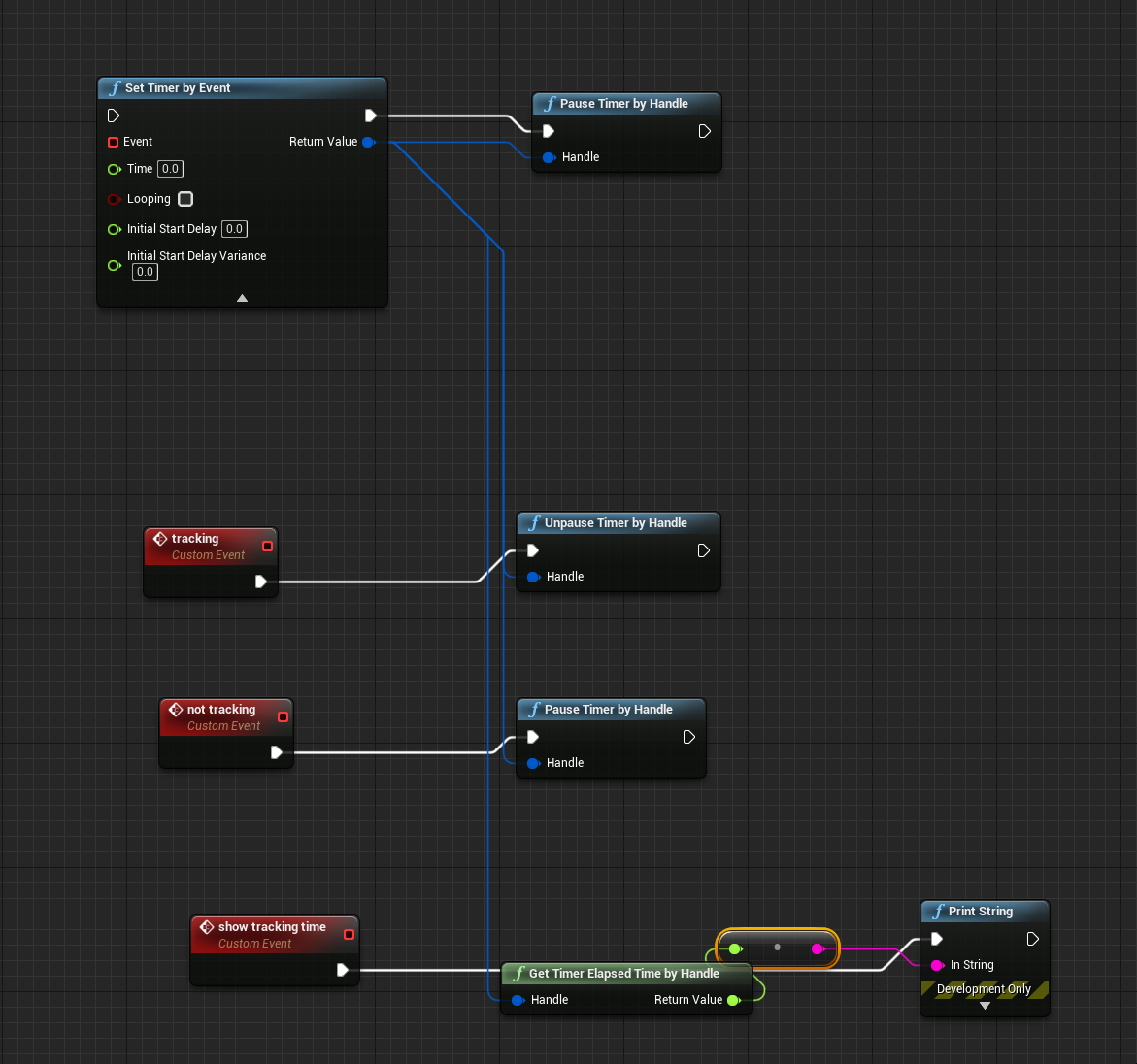
@fading jetty I don't follow but close in a little.. what is it you're trying to do with the timer? you want to create a timer, run it when the eye is tracking, and pause it when it doesn't?
@fading jetty quick and dirty.. like this? https://i.imgur.com/W23hw3A.png
 fading jetty
olive sedge
<@!705095939723100161> I don't follow but close in a little.. what is it you're ...
fading jetty
olive sedge
<@!705095939723100161> I don't follow but close in a little.. what is it you're ...
It needs to reset when when overlay ends and begins on in a new item. Otherwise the new item will not start from 0, but whatever time the previous item left off.
olive sedge
@fading jetty delay is the devil btw.. But if I'm getting you right, just clear and invalidate and start a new timer
btw.. you do know that this will only fire the event you hooked up (StopWatch) once after 5s?
and not entirely sure because Delay but it should clear and invalidate after 3s and set a new timer
so this will never fire
fading jetty
olive sedge
<@!705095939723100161> delay is the devil btw.. But if I'm getting you right, ju...
The problem is. When I clear the timer and re enter an item that has already record some gaze time. It will also clear that items GazeTime float and being recording from 0 again.
 keen seal
I love you
 dense isle
Is there a shortcut to open Find in Blueprints window from outside a blueprint graph? I can't find one under such name under Keyboard Shortcuts
fading jetty
olive sedge
<@!705095939723100161> delay is the devil btw.. But if I'm getting you right, ju...
Example of what i'm trying to achieve:
1- Gaze sphere is overlaying and item object for 5 seconds (records 5 sec in GazeTime float).
2-On overlay end timer clears back to 0.
3-GazeSphere begins overlay with second item and begins adding to GazeTime float.
4- On overlay end timer clears back to 0.
5- GazeSphere enters item one again and continues adding to the already recorded 5 seconds.
olive sedge
@fading jetty why clear back, do you need the current time as well as the overall time?
fading jetty
olive sedge
<@!705095939723100161> why clear back, do you need the current time as well as t...
I just need the overall time for each items gaze.
olive sedge
@fading jetty why not just pause & unpause the timer then?
olive sedge
olive sedge
<@!705095939723100161> quick and dirty.. like this? https://i.imgur.com/W23hw3A....
like this
fading jetty
Because I want all objects to have their own timer.
 prisma stag
"Warning Invalid Simulate Options: Body (BP_MetalHatchet) is set to simulate physics but Collision Enabled is incompatible" I keep getting this error when I pick up my hatchet as I set the collision to disabled since I don't want it colliding with my pawn.
fading jetty
olive sedge
like this
For instance item one has 5 seconds recorded and item two has 7 seconds recorded. If I paused they would carry the same recorded time.
olive sedge
@fading jetty they should have their own timer then
prisma stag
I turned off the collision on the mesh entirely and when I go to pick it up, it just falls out of my "hand". However when I pick it up and set its collision to none, it stays even though the collision was off anyway.
trim matrix
hey guys small question, how do you calculate the shortest path for an object to rotate towards a vector, cause my object does rotate to the vector correctly, but doesnt take the shortest path... (using look at rotation)
prisma stag
Thats the thing though is that I attach it to the scene component on my player, however I want physics on because I would like the player to be able to drop it and let it fall. I would like the game to have no inventory but it seems that might be the easier thing to do.
 dusk flame
How do I access public variables in a blueprint object?
Yes I expect this, but nothing shows up. I originally had it just public, but I made it also a getter -neither works.
UPROPERTY(EditAnywhere)
FText MyText;
I have a TArray containing my object, but I can't seem to get the data from each ArrayElement.
A TArray of my object
Object conntains the MyText example.
 bold torrent
UPROPERTY(EditAnywhere, BlueprintReadWrite, Category = "CPP")
I believe EditAnywhere only makes it editable on the details panel?
dusk flame
Yes no problem I always close editor
bold torrent
ReadyOnly to get the variable, ReadWrite if you want to be able to both Get and Set it in BP
stray island
Thanks now it works @trim matrix
bold torrent
EditAnywhere if you wanna be able to change it in the details panel in BP
dusk flame
This is why Lorash is the best 
I'm slowly putting it together, but I feel everytime I need to bridge between C++ and Blueprint I do it wrong.
Oh yeah thats true. Ok ErikH is best 😛
fading jetty
olive sedge
<@!705095939723100161> they should have their own timer then
I will have to try and work out how to assign a timer to each data table entry float.
dusk flame
Yeah I see that now. I thought this was a really Blueprint specific question, since I was already setting my values fine.
It was only when I tried to get them. I assumed I needed to do something different in blueprint, but that the C++ was kosher.
bold torrent
@stray island what are you trying to achieve?
bold torrent
Oh I see, looked like he just wanted to change mesh location so was troubled by the timeline haha
stray island
I am new to timelines specifically, not bps
 dawn gazelle
Couldn't you just add an event track in the timeline at the appropriate time?
bold torrent
That was a brilliant solution
dawn gazelle
As long as he only wants it to fire one time (or any time he puts the event trigger in the timeline)
stray island
Yes this is what i wanted Thanks Datura , Also sorry Lorash I should of figured out timeline features first thanks
Still useful logic to use for other things , thanks 👍
 solemn parcel
When I have the Widget Window open, and I cliclk play mode, I'm having a quite big fps drop. Ever happened to you ?
solemn parcel
And I have only one function in that widget
 zealous moth
@solemn parcel type ~ and then stat unit
it will tell you if your problem is CPU or GPU related
can give you clues as to why you have such an fps drop
if CPU, you have some sort of function bottlenecking it
afterwards just do a performance check to see what exactly takes up so many frames
solemn parcel
@zealous moth When do I type '~' ?
zealous moth
i guess you can do it before you launch the game
it will stick to the screen
@unique flicker you cast into the actual player controller and refer to the current player controller for instance. There is only 1 player controller at an index active at any one time so it's that one.
solemn parcel
@zealous moth What do you know what represent CPU ?
And how would you make a perf check ?
Probably silly questions
zealous moth
game
is cpu
but remember it is your current CPU usage for all things
so if you have like a bunch of programs in the background like maya it will use up some cpu also
you should close stuff you arent using when checking performance
solemn parcel
well the most strange thing is that I have these drop in performance ONLY when I have the Widget BP opened in background, In use or not. If I close it everything comes back to normal.
 stark idol
I'm still trying to learn a bit of UE4 from time to time, so I want to ask some really simple stuff
stark idol
I'm coming from Unity background as a graphics programmer. In Unity there are GameObjects that can be turned into prefabs. Prefabs are loosely like uninstantiated blueprints.
Now, here's the part that I would like to get some clarification for
In Unity, everything on a prefab can be overridden, i.e., have a change, be it adding a new component, tweaking serialized properties etc.
And then that can be saved as either its own separate prefab or a prefab variant
Now
zealous moth
@stark idol you should look up the free plugin called prefabricator.
Prefabs are not blueprints or uninstantiated blueprints but array collections of various objects saved as a new variable.
stark idol
Do I properly get that, aside from modifying exposed variables on actors and components and attaching other actors, UE4 doesn't have such a feature?
I would like not to use any plugins while I'm trying to learn stuff
Do I properly understand that the closest thing to Unity's prefab variant would be creating a separate actor inherited from the first one and adding changes there?
zealous moth
 prisma stag
Hello, Ive made 2 tools, a hatchet and a pickaxe that I want the player to pickup. As of right now, I have a linetrace that would check to make sure that it is the hatchet by doing a cast, however I cant do 2 casts?
 faint pasture
prisma stag
Hello, Ive made 2 tools, a hatchet and a pickaxe that I want the player to picku...
faint pasture
prisma stag
Hello, Ive made 2 tools, a hatchet and a pickaxe that I want the player to picku...
Implement pickup at the tool level.
stark idol
...okay, let me ask another question
prisma stag
faint pasture
Implement pickup at the tool level.
What do you mean by that?
faint pasture
prisma stag
What do you mean by that?
Make pickup act on a tool, not a specific subclass of tool.
stark idol
I have 3 separat blueprint classes and they're arranged in a hierarchy like this (all of em inherit from Actor)
GoType1
  GoType2
    GoType3
Ah, so should I create an event inside each tool that fires if it is the object in the linetrace?
faint pasture
prisma stag
Ah, so should I create an event inside each tool that fires if it is the object ...
No I mean make all the pickup functionality not care what specific type of tool it is, it just knows it's a tool.
stark idol
However, only the topmost root is visible (in this case, GoType3). Only GoType2 is exposed, GoType3 (which is under GoType2) is hidden.
Is this intended?
It seems very counter-intuitive. What if you want to override something there?
faint pasture
stark idol
It seems very counter-intuitive. What if you want to override something there?
You are confusing the class hierarchy with the component hierarchy
prisma stag
faint pasture
No I mean make all the pickup functionality not care what specific type of tool ...
Is there a way that I could add a tag then with a specifier of tool and when the linetrace happens it will check if it has a tool tag?
 grizzled marsh
Hi all! First post here. Glad to start doing more dev work in UE4!
Is it possible to apply collisions of a custom shape to a blueprint as components? I only see Box, Sphere and capsule options. I need a cylinder shape - should I import this from a DCC app? where to create this new collision as component in UE?
faint pasture
prisma stag
Is there a way that I could add a tag then with a specifier of tool and when the...
Just cast the actor to BaseTool. That'll tell you if it's a tool.
stark idol
Right, it's because it's not quite GoType2 there. It's a component that instantiates that type
faint pasture
stark idol
Right, it's because it's not quite GoType2 there. It's a component that *instan...
Do not use child actor components, they are crap
prisma stag
faint pasture
Just cast the actor to BaseTool. That'll tell you if it's a tool.
Ohh, so I should make a base tool class and then inherit and make the tool bps from there?
faint pasture
They are just a component that instantiates an actor, but there are a million problems with it
faint pasture
prisma stag
Ohh, so I should make a base tool class and then inherit and make the tool bps f...
Yes that's what I would do if a tool is a very specific type of item (held in hands etc)
prisma stag
faint pasture
Yes that's what I would do if a tool is a very specific type of item (held in ha...
Ok, thanks.
stark idol
Then what am I supposed to use in order to attack different actors together?
Attaching them through code seems like crap to me tbh
faint pasture
In my game I have Actor -> Item -> Weapon -> Shotgun
stark idol
Again, coming off from tons of Unity experience here, seems very alienating in contrast
No, I don't think we're on the same page
faint pasture
stark idol
Attaching them through code seems like crap to me tbh
What were the use case be? like a thing that is made up of bunch of actors, like a vehicle made up of a bunch of vehicle parts?
stark idol
I'm talking more about, like, I dunno...
A base of a car with attached doors, for example. Doors must be their own actors.
Yes, exactly
In Unity, the overall car would be a prefab that houses several other plain GameObject or GameObjects as prefabs.
UE can't store actors in blueprints (aside from that component which you say is crap)
faint pasture
stark idol
I'm talking more about, like, I dunno...
A base of a car with attached doors, fo...
You could use child actor components for that. I have a project that has modular vehicles, but I do mine entirely data driven.I never make an entire vehicle the blueprint editor, they are all made at run time, either by players or from a save. KSP style.
stark idol
They can't be components because at one point I could maybe detatch them and make them scatter away with physics or something.
faint pasture
stark idol
They can't be components because at one point I could maybe detatch them and mak...
You can do that with components.
stark idol
faint pasture
You could use child actor components for that. I have a project that has modular...
How is this achieved though? You can't attach actors to blueprints.
Attaching actors to actors isn't viable because changes aren't applied to the blueprint
faint pasture
You can attach an actor to another actor at runtime all day. That's how pretty much anything is done. I'm not talking about at a blueprint class level, my vehicle is just a chassis collision box. Everything else is done at runtime.
If you wanted to make a vehicle with doors as actors and have it all be visible in the blueprint editor, child actor component would probably be what you would want to use. You would definitely want to learn the pitfalls of it tho.
stark idol
So, there's no such feature explicitly then. Thanks.
What are the pitfalls if you don't mind telling me?
faint pasture
Since a child actor component is just a scene component that spawns an actor when instantiated, you can skip all that overhead by just spawning the actor yourself and attaching it. I don't recall the specifics, but there's some tricky edge cases with things like what happens if you destroy an actor with child actor components, should it's spawned child actors be destroyed as well? Stuff like that.
In my case, when I spawn a vehicle, I spawn a chassis, then I spawn all the parts and attach them, registering them with various control systems like throttle and steering etc.
If I was making a car though, and it didn't have to be super flexible in terms of like swapping parts at runtime etc? I would do it with no child actors, just one big bag of components
stark idol
So from a glance it seems like UE4 forces you to make a bit of boilerplate
Reasonable, though a bit alienating for now
zealous moth
@stark idol you are misusing terminology that i don't think you understand what you're saying.
A blueprint is just a workflow. You can have blueprints for actors, characters, animations, etc.
You can attach actors to other actors, they just happen to contain blueprints.
So at this stage, what are you trying to do?
faint pasture
Yeah my impression is that unity does things a bit more like Godot, where there are layers upon layers of scenes and nothing really is treated special
stark idol
zealous moth
<@!167486619547336704> you are misusing terminology that i don't think you under...
I'm talking about this right here. What should I call it then? Actor blueprint asset?
faint pasture
That's a blueprint class. Blueprint is just a workflow, it's probably a blueprint class for an actor.
You can make the equivalent in c++, in which case you have a C++ class for an actor
zealous moth
exactly ^
stark idol
Okay, blueprint class it is then
stark idol
I'm trying to understand how UE4 works, I'm not trying to build a game
faint pasture
I think what he's getting at is multi-layered composition, which is not exactly elegant in unreal.
stark idol
I'm just curious about some pitfalls that I can think of and want to understand how to do that in UE4
Again, why I brought up Unity's prefab concept
And from my understanding so far, using the engine out of the box without writing anything more, you can't modify anything on an instance of a blueprint class besides its own variables.
So for an actor, you would only be able to modify variables on an actor and variables on its components.
Everything else is gonna require boilerplate.
Am I right?
 nimble talon
Does anyone know any good methods for creating joints
faint pasture
stark idol
And from my understanding so far, using the engine out of the box without writin...
What else is there to modify? That's like everything.
zealous moth
so Unity's prefab concept is not something transferable to Unreal. There is a plugin that does the same thing but out of the box UE4 doesn't work with prefabs.
And actor just happens to be a class that can have a transform and be positioned in a level. Actors are basically anything object that contain a function like a bush with berries that can be picked.
Much like in Unity, classes and actors exist as they are in the engine and when you place them onto a level, they become instances you can modify the variables of.
I dunno what you mean by boilerplate, that doesn't mean anything.
faint pasture
Make sure you check show inherited variables if that's what you're trying to change in the class editor
stark idol
Boilerplate code. So, for example, if I wanted to have a specific class (say, a red car) and have a blueprint class inheriting from it and I want it to be yellow, then I'll have to delve into either blueprints or C++ to modify the properties if they're not inherited from the actor
In any case, thanks for the clarifications.
faint pasture
stark idol
Boilerplate code. So, for example, if I wanted to have a specific class (say, a ...
In that case all you do is change the material or change a parameter on the material to make the yellow car from a red one. I'm not seeing what the problem is,
stark idol
The problem is that I have to change it through code if the thing in question is not part of an actor, either through inheritance or as a component.
or through nodes in blueprint
 gusty shuttle
Quick one, what's it called when light slowly fades in or out based on if you're in a sunny or dark room called?
faint pasture
stark idol
The problem is that I *have* to change it through code if the thing in question ...
You can just change the value of a variable. That's exactly what data only blueprints are. I'm pretty certain unreal can do exactly what you want it to do.
zealous moth
it can, the issue is the poor organization of Unity and how untransferable it is elsewhere
i used to work in Unity, and it's a big step to move into Unreal
but afterwards you realize how poorly made Unity is
stark idol
I already do lol
 supple dome
@gusty shuttle exposure?
stark idol
But anyways, what I meant is that if I have ActorClass1 (with its components) and make an inherited class (ActorClass2), then I will only be able to modify variables on actor and its components.
I can't modify variables of attached actors without code and/or blueprint nodes.
That's what I meant.
stark idol
Well, yeah, you'll be able to modify variables of the Actor and its components
What I was saying
zealous moth
if you want to modify parents' vars, simply expose them also in the child (show parent variables and functions)
stark idol
And do that through boilerplate code or nodes
Also what I was saying
Actors can only have components and you can modify only variables of those actors and their components in editor. Everything else goes through code
faint pasture
In the case of having a class BlueCar and wanting to make a YellowCar, there's many ways to do it. If you just want one instance, place BlueCar in the level and change it's mesh material to YellowMat. Or subclass BlueCar to make YellowCar with the mesh material set to YellowMat. Or have Car use variable CarColor in it's construction script to set its paint color. You can then just instantiate Car with CarColor = Blue or CarColor = Yellow.
stark idol
Yes, exactly what I was referring to
It's just quite different from how Unity offers you to do it.
Guess I'll have to screw around with UE for a bit to fully understand what it wants from me
 spice sequoia
I have a load of Actor BP's that all use the same BP Function - I am getting the 'accessed none trying to read property' error from the function but it does not say anywhere which of the many BP's using it the error is coming from - is there an easy way of finding out which particular actor using the function has that error?
 unique harness
check the output log
spice sequoia
The log does not say which actor the error is coming from - only that there is an error in the function?
unique harness
screenshots?
spice sequoia
unique harness
and the output log?
spice sequoia
sorry missing the back end - this is from the output log
unique harness
^
spice sequoia
Yeah thats what I thought - wondered if there was another way
unique harness
sounds like just a weird design in genereal
spice sequoia
PIE: Error: Blueprint Runtime Error: "Accessed None trying to read property CallFunc_Array_Get_Item_13". Blueprint: Cylinder_Hide_Pause_Functions Function: Flip Map Transition Materials Graph: Flip Map Transition Materials Node: Add
LogScript: Warning: Accessed None trying to read property CallFunc_Array_Get_Item_13
Cylinder_Hide_Pause_Functions_C /Game/Blueprints/GameBPs/Cylinder_Hide_Pause_Functions.Default__Cylinder_Hide_Pause_Functions_C
Function /Game/Blueprints/GameBPs/Cylinder_Hide_Pause_Functions.Cylinder_Hide_Pause_Functions_C:Flip Map Transition Materials:17EF
The error from the log
- Guess I just wondered if the name of the BP using the Function ended up in the log anywhere - not as far as I can see
 tight schooner
Accessed None means you're trying to get invalid data btw. Somewhere in your BP it's trying to get index #13 but that index is invalid
Can't help you with figuring out which specific actor is causing it though...
trim matrix
it wont show in the log as far as i know
just print string the owning actor
it takes
2 seconds
prisma stag
faint pasture
Yes that's what I would do if a tool is a very specific type of item (held in ha...
I made a new class and had the tool inherit from it. In the picture I do the linetrace and break the hit. After that you can see that I attach it to Point For Tool (Scene Comp) then set the location and rotation but nothing happens ingame. Ive used a breakpoint and it get to everything so idk what its doing.
spice sequoia
trim matrix
will be nice if there is a way tho
Cant seem to be able to use a 'get owner' node from within the function - does this mean I have to pass the owner name to the function as well? Then use 'if valid/fail/print string or am I missing something?
unique harness
spice sequoia
Cant seem to be able to use a 'get owner' node from within the function - does t...
might be context
spice sequoia
Yaah I can get the node with contect off but the function itself is not an actor so cannot return anything - I guess I need to pass it from the actor to the function first as a variable to be able to debug it like that
 fossil dagger
 unborn maple
having an issue setting up my ai health. the progress bar will not show a filled health bar in the umg. my set up is as.
unique harness
unborn maple
having an issue setting up my ai health. the progress bar will not show a filled...
unrelated to your issue but you shouldn't use the function bindings. you should create an event based ui
unborn maple
the damage is being subtracted and actor being destroy but health dont display
unique harness
Learn how to optimize your UI elements by driving updates through the use of Events.
 north crow
You have your function getting your health from "GruxPlayerCharacter" but what are you doing with it?
unique harness
He's using a function binding in UMG
north crow
Sure, but i mean how are they setting the percentage?
unique harness
In the first picture
north crow
That's just subtracting their health, that wont give you a percentage without having it divided by a value.
unique harness
why does he need a percentage?
unborn maple
apply demage work on float value i set the health to 1.0 to use the progress bar
created the binding to get the health after the damage is apply as showin in second picture after a line trace is called
unique harness
show the binding
north crow
Can you post a picture of the binding
north crow
So you have your progress bar, how are you setting the value on it specifically?
Assuming that you're using that as your health bar.
unborn maple
north crow
Now does the widget itself not show up, or is the health not updating?
unborn maple
the health not updating
widget show fine
the bottom bar is the boss's health and that empty not working using the same method as me getting my character health
north crow
Ok so just to clarify, the bar we're looking at is your boss's health. However you're grabbing the health from your character GruxPlayerCharacter to test it, correct?
north crow
What happens when you disconnect the health from the return value and just put a 1 there instead?
north crow
Is your health initialized on your character GruxPlayerCharacter to a value higher than 0?
unborn maple
it set to 1.0
north crow
put a print string in your health helper function and plug in the health from your character into it and see what it says when you run it.
unborn maple
it not printing that bidning function is what going on
the print string not even coming up
north crow
Interesting, try this, put a print string in the cast failed slot and see if that prints.
dont plug anything into that print string
unborn maple
yea it printing on cast failed
north crow
So that tells me that when it's trying to get player character 0, it's getting a different character/pawn.
north crow
The best way to deal with things like that imo, is to store the characters as variables instead of using get player character. If you're just testing/learning you could use player controller instead, something like Get Player Controller -> Get Controlled Pawn.
then cast from that
unborn maple
gotcha.
unique harness
UserWidgets have some member functions like GetOwningPlayer and GetOwningPawn
Should use those over GetPlayerCharacter->GetControlledPawn() imo
 willow phoenix
anyone knows a better way of getting a lot of transforms into my array than adding each arrow by hand? (the actor with tag is not working here because they are just components of this bp)
north crow
https://i.gyazo.com/49867f89874611bfb0f8adf7b9d68420.png could do something like that
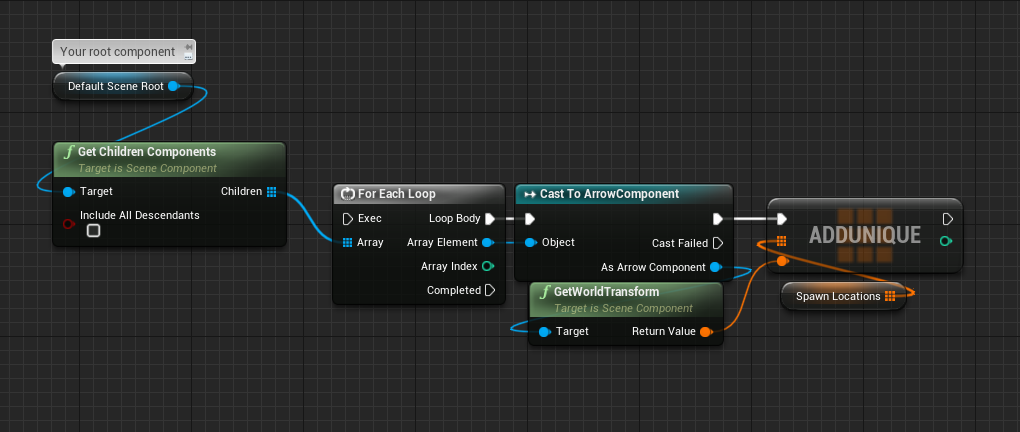
if you dont want to cast, you could use Component has tag instead.
willow phoenix
nice thanks 😄
 neat surge
Quick question do we still need to take delta seconds into consideration if not working inside Event tick??
unborn maple
so for a boss battle im looking for the fight to last longer is there a way to do it higher then 100%
would it have to be set as text.
north crow
the percentage bar?
unborn maple
yea. it only goes to 1.0
north crow
Yeah but that's just representative, if your Max health is higher you can make it last longer.
unborn maple
gotcha
 kind swallow
Hello everyone, I have a problem with Steam multiplayer. I'm using a button to host a game with 3 parameters that I put in "Extra Settings", and with a "Join Server" button, I have a scroll box where I can display the servers. But when I'm launching both of the games, one is creating the game perfectly, but the other one can't find the game. In the debug, it's not entering the loop break. Can someone have an idea ? Thanks !
 nova niche
I couldn't do it. Is there anyone who can show it to you with a video or a photo?
Please
https://www.instagram.com/p/CKY-dnRDbwt/?igshid=fevl7r1exbpn
That's how I switch between the characters I'm trying to do.
kind swallow
kind swallow
Hello everyone, I have a problem with Steam multiplayer. I'm using a button to h...
I have an update : when I'm using 2 differents Steam Account with 2 differents connections I can see the game, but when I click on it, it doesn't join
 vernal wind
Any idea if it's possible? Renaming tags without is a PITA since all nodes who used it will lose their config and hence break everything and require manual reconfiguring of the newly named tag. Checking all places manually is not feasible anymore for me.
 rustic narwhal
I am toggling Class Default "Use Controller Rotation Yaw" ON, and Character Movement "Orient Rotation to Movement" OFF while hold Right Mouse Button (I called this input action "Focus"). It works well, my character's direction gets locked to the way my camera is pointed during focus. I created a 1d blendspace for strafing animations did some speed and yaw calculations to drive the blendspace, which works awesomely, but now when I am not in "focus" mode, my character will rotate correctly when using A and D, but it still plays the 1d blendspace (and all wrong). When not in focus I am trying to get it to just play a running animation without strafe.
Please help!
 unique smelt
I'm making a point and click adventure game, similar to Myst.
I managed to get the camera to change when an object is selected. However I'm not sure how to go back to the original camera after clicking a go back button on the UI? Any idea how I could accomplish this? I'm super new to Unreal, but I'm familiar with other engines.
 runic sparrow
unique smelt
I'm making a point and click adventure game, similar to Myst.
I managed to get ...
runic sparrow
unique smelt
I'm making a point and click adventure game, similar to Myst.
I managed to get ...
You could use a multi-gate node. Change to your first desired camera using entry 0, and the second to entry 1. Then make sure Loop is set to true. This method also allows you to switch between as many cameras as you'd like.
unique smelt
runic sparrow
You could use a multi-gate node. Change to your first desired camera using entry...
Thank you, i'll look into that 🙂
kind swallow
I found my mistake (an horrible mistake) : my variable GetNbrConnection was set to 0...
It's now working pretty well !
unique smelt
So multi gate will definitely clean my code up a bit. However I'm not sure how to communicate between two different blueprints. For example how do i get a variable from one blueprint and use it in another?
runic sparrow
unique smelt
So multi gate will definitely clean my code up a bit. However I'm not sure how t...
There are multiple ways, the most efficient depends on the type of classes you are communicating between.
unique smelt
runic sparrow
There are multiple ways, the most efficient depends on the type of classes you a...
I'm communicating with an actor and a widget
runic sparrow
unique smelt
I'm communicating with an actor and a widget
OK, so if it's communicating from a widget to an actor, use get actor of class.
If it's from an actor to a widget, use create widget object. Also promote the return values to variables to keep a reference of them.
unique smelt
runic sparrow
OK, so if it's communicating from a widget to an actor, use get actor of class.
...
Your awesome, thanks! I'll give it a try.
 uncut condor
is there a way for spawning enemies behave differently ?
 coarse forge
hi
uncut condor
hi
coarse forge
how do I get an existing key binding in a widget
 winged sentinel
coarse forge
winged sentinel
coarse forge
I already have this in my player class PlayerInputComponent->BindAction("Action", IE_Pressed, this, &AMain::OnAction);
I guess I can do this, but isn't there a way to attach it to an action binding I already have... or do i need another custom event in my player input controller to broadcast up here
 hoary knoll
Hey guys, I am looking for a spline master. Willing to pay per hour, please pm me
coarse forge
rustic narwhal
My anim blueprint can see the owner but can't access the public variables, is there a setting i am missing?
 karmic pebble
is there a way to see if an input action is currently pressed
I know normally you would test for Key, but rebinds and all
This doesnt make sense...
Its seeing the Input Action and getting the keys
oh wait...
woops
 valid yoke
Hi, can anyone please tell me what is wrong with this. I am trying to rotate a cube by adding torque to it but cube stops rotating as soon as it falls on the ground (simulate physics is ON).
faint pasture
valid yoke
Hi, can anyone please tell me what is wrong with this. I am trying to rotate a c...
That is a tiny torque. Add a few more zeroes
faint pasture
valid yoke
Hi, can anyone please tell me what is wrong with this. I am trying to rotate a c...
Just saw the accel change, just add a zero or two
valid yoke
Thanks @faint pasture , I tried that but then it starts rotating too fast😅
faint pasture
valid yoke
Thanks <@!127902729677963264> , I tried that but then it starts rotating too fas...
Then just tune it to taste. It'll probably either rotate really fast or not at all at equilibrium, you can tune the angular damping to give it a bit of drag
valid yoke
faint pasture
Then just tune it to taste. It'll probably either rotate really fast or not at ...
Got it, Thanks man
 onyx pawn
I have a box I have placed in world and have created a widget with a button that when I press it I want to move the box but when I press the button and using the call function to send from widget to object its not working.. this is my blueprints for widget and box actor.
basicly I am trying to have the monitor move an actor that box that is on the map
 crimson swan
how would you play a deathstate in an animbp out of a list?
onyx pawn
but I cant seem to drag the actor blue print into the monitor blue print
faint pasture
@onyx pawn you need to get a reference to the thing you're trying to move somehow.
either get actors of class or give the widget a ref when creating it or a million other ways
faint pasture
crimson swan
how would you play a deathstate in an animbp out of a list?
What? That doesn't make any sense. What exactly are you asking?
crimson swan
like say i have a animation state machine right, and i have a death state
and say i have 6 different death animations and i'd like to play a single one out of those 6 at random
@faint pasture
faint pasture
@crimson swan I'm pretty certain you can make an anim montage that can randomly select from its animations
so DeathMontage would randomly play one of the anims in it
crimson swan
yeah but problem is i'm having some issues with the anim montage getting cancelled due to some other events going on at random
i have a hit react montage and for some reason even though i have a bool check it's still somehow cancelling my death montage
 night quail
I'm trying to follow this tutorial on the ue docs: https://docs.unrealengine.com/en-US/RenderingAndGraphics/RenderTargets/BlueprintRenderTargets/HowTo/HeightFieldPainter/index.html
How-To use Blueprints and Render Targets to create realtime Height Filed Painter.
But I'm stuck on the "Trace from Camera Function Setup" step (I need to use Method 2) - when I copy and paste the blueprint nodes, it gives me an error with a nonexistent "Apply Paint" node, and it never mentions this at all in the article. Furthermore, on Method 1, it gives the same issue if I copy and paste its blueprint nodes, but in the example image it uses a "Apply Point Damage" node, which does exist. The issue is that with Method 2, the example image is a typo (imago?) and doesn't explain at all what is happening, and it's frustrating because I can't connect the necessary "Find Collision UV" node with the "Apply Point Damage" node
Is there an updated tutorial out there, or does anyone know what I need to change to make this work?
onyx pawn
ok I can successfully move actors if he widget is inside that actor but not if they widget is inside another actor.
so I am guessing I will need to have the widget in the monitor and have it once the button is pressed it creates another dispatch call for the button then have in the third actor it gets the dispatch?
 maiden wadi
@karmic pebble You're going to have a much easier time if you make yourself a small "InputFunctionLibrary" I have a few functions set up in some projects for that. Things that will get all keys that a binding name uses, iterates through them and using the local player controller, checks if the key is currently pressed. So no matter if the player rebinds the keys a million times or to every key on the keyboard it will work.
crimson swan
can anybody possibly tell me why this :
which returns a "true" to is alive
causes this
to be default true even when isalive is true
this is the transition rule
here's a gif of what's going on. Extremely confused
unique smelt
Is it possible to get a variable from the level blueprint, inside of another blueprint?
 weary mango
unique smelt
Is it possible to get a variable from the level blueprint, inside of another blu...
weary mango
unique smelt
Is it possible to get a variable from the level blueprint, inside of another blu...
Yeah, just do "Get actor of class" and use the variable
crimson swan
there's no real death event. it's a function that checks if health is greater than 0
i'll open up the project and give you a pic, one sec
i know for a fact that the function returns the correct boolean state, i tested it
@swift pewter
 surreal peak
@unique smelt @weary mango Will you please not tell people to "just get actor of class"? :D
That's not the way to do it 99% of the time. That node is useful but should not at all be overused.
To answer the LevelBlueprint question:
Yes and no. The LevelBlueprint, in Blueprints alone, is pretty much inaccessible.
You can't get a reference to it, but it can reference Actors that are placed into the level.
If you don't have a very specific reason to use the LevelBP, then try to avoid it.
Code in there is not reusable if you change level and as you noticed you can't really access it.
Only thing you can do is hack something together with EventDispatcher callbacks.
In C++, you could access it. It might even make sense to have your own LevelScript Class that your LevelBPs extend from.
I did that once in a project to give the level itself specific properties.
But yeah, not really a thing in BP only
weary mango
surreal peak
<@!468556535585570816> <@!435333698351529984> Will you please not tell people to...
You don't have to use it all the time, just do it in the beginplay then promote to variable and there you have it
surreal peak
Yeah, it's fine if you can't get the ref any other way, just make sure to add that info. We have too many beginners who overuse that thing
Also, what would that help here? I don't think you can get the LevelBP with that or?
crimson swan
Ok well i figured out part of my issue... My isAlive is returning once as false and then true. My guess is there's some priority stuff going on
thing is i copied exactly how it is on the actionrpg so really lost
 kindred walrus
hi guys , if you dont know which actor will spawn first, but you need these actors are spawned in order to run the function. currently I am using Gameinstance to store these actors, when one actors is spawn wil check another actor is spawn and set in gameinstance or not. if both can find in game instance, then will call the function
is that a better way to do this? I not sure are there any function can wait for multiple actors spawn
runic sparrow
kindred walrus
hi guys , if you dont know which actor will spawn first, but you need these acto...
You could always create an array of the classes, no?
solemn parcel
So I'm trying to add a 'Hand' Collision to avoid the hand while animated to go through walls. But no matter what, it seems like the games prioritize the Root Capsule Component, and that hand collision has no effect. Any ideas ?
runic sparrow
solemn parcel
So I'm trying to add a 'Hand' Collision to avoid the hand while animated to go t...
Have you tried using inverse kinematics?
trim matrix
hey guys, I have a super annoying problem that you guys probably will instantly know how to fix.. here is a gif and 2 pics
https://gyazo.com/a32c8d04a4358127ee002dbb29031cd9
https://cdn.discordapp.com/attachments/221798778208780288/809353819133050910/Capture.PNG
it is supposed to stay oriented like the picture below..


so its basically a kinematic "hovercraft" which detects the average surface normal with 5 raycasts, thats not important, that works..
the problem now it that i need the hovercraft to rotate towards that green vector (sometimes blue or purple because other vectors overlap)
the problem is that the green vector, the one i rotate to, also resets my Z rotation when i rotate towards it.. im out of ideas.. i tried everything 😦
 honest rain
Hi, im new to ue4 and cant find this node https://docs.unrealengine.com/en-US/BlueprintAPI/Game/Player/GetHitResultUnderCursorbyChannel/index.html
what am i doing wrong when searching in the node graph editor? im on version 4.23
Get Hit Result Under Cursor by Channel
im in my player pawn blueprint
crimson swan
Try it in your player controller blueprint
 severe iris
Can I watch (as the debug sense, breaking on change) a value in BP?
 flat raft
trim matrix
so its basically a kinematic "hovercraft" which detects the average surface norm...
flat raft
trim matrix
so its basically a kinematic "hovercraft" which detects the average surface norm...
Not 100% what your issue is... you don't want to rotate?
severe iris
One of my animation blueprint variable gets changed somewhere and I've no clue where 😕
flat raft
Right click on the pin and select Watch Var
trim matrix
flat raft
Not 100% what your issue is... you don't want to rotate?
i just want the hovercraft to keep its original orientation but rotate parralel with the little hill
and not turn 90 degrees over Z like is does now
severe iris
@flat raft This doesn't seem to break on change
honest rain
update: got it, thanks
flat raft
trim matrix
and not turn 90 degrees over Z like is does now
Disable the Z?
or keep the Z at whatever it was
trim matrix
@flat raft then it just keep the same x and y rotation but without the Z
which results in the car being rotated correctly but for the 90 degree angle
and not for the original orientation
trim matrix
well i just want the upvector of the car to align with the green vector
but doing the shortest rotation possible
not flicking 90 degrees
i think it has something to do with angles going from - to +
flat raft
Tried that?
Not sure what's in the struct. Might be a rotation angle for ur car
Normal would be ur RayCast Avg
Point would be ur car's position I think
trim matrix
but i already have the "plane", i just need to rotate the car same as the plane
i can try, gimme a sec
@flat raft thanks for your help btw, i really appreciate it 🙂
solemn parcel
runic sparrow
Have you tried using inverse kinematics?
How could this help with collision ?
flat raft
solemn parcel
How could this help with collision ?
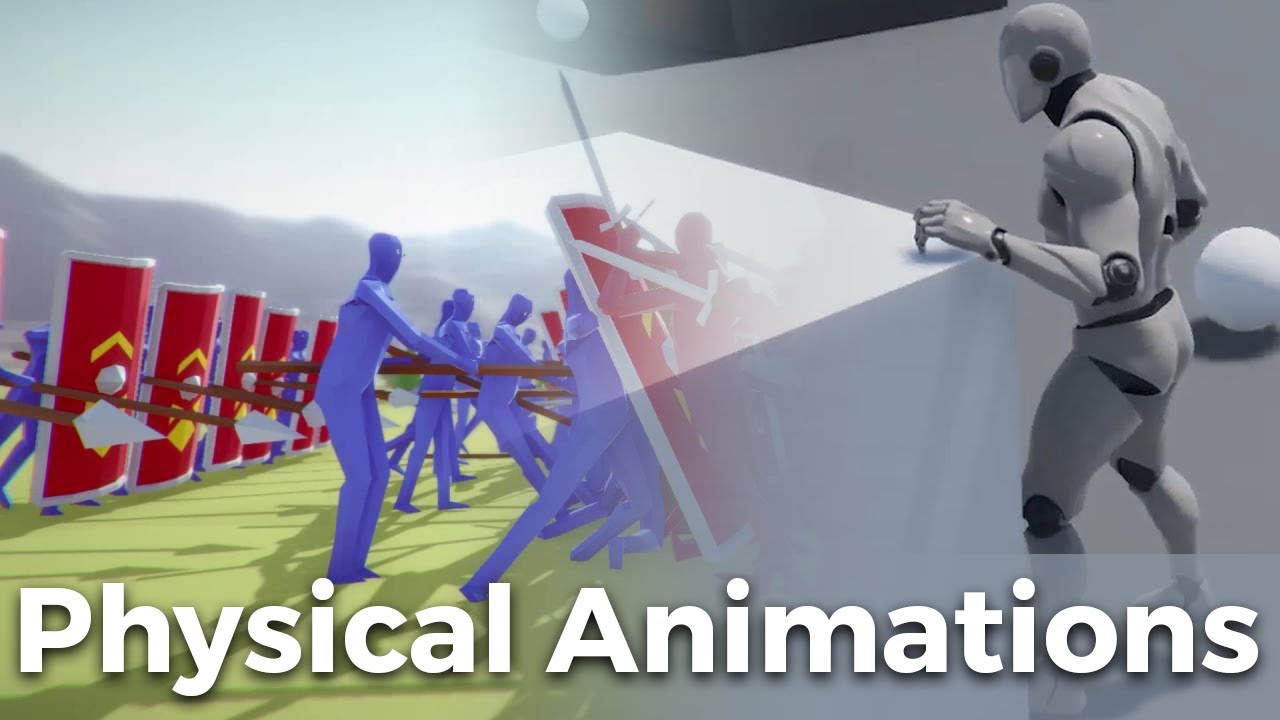
Hey everyone! In this Let's Create we'll be developing physical animations. This allows you to combine that ragdoll style movement from gang beasts with animations so you can blend between the styles.
If you're new here this series is about developing mechanics with blueprints in the Unreal Engine 4.
Check out these videos if you've never se...
Make ur hands physical when they touch the wall
@solemn parcel https://youtu.be/xsvvA042l98
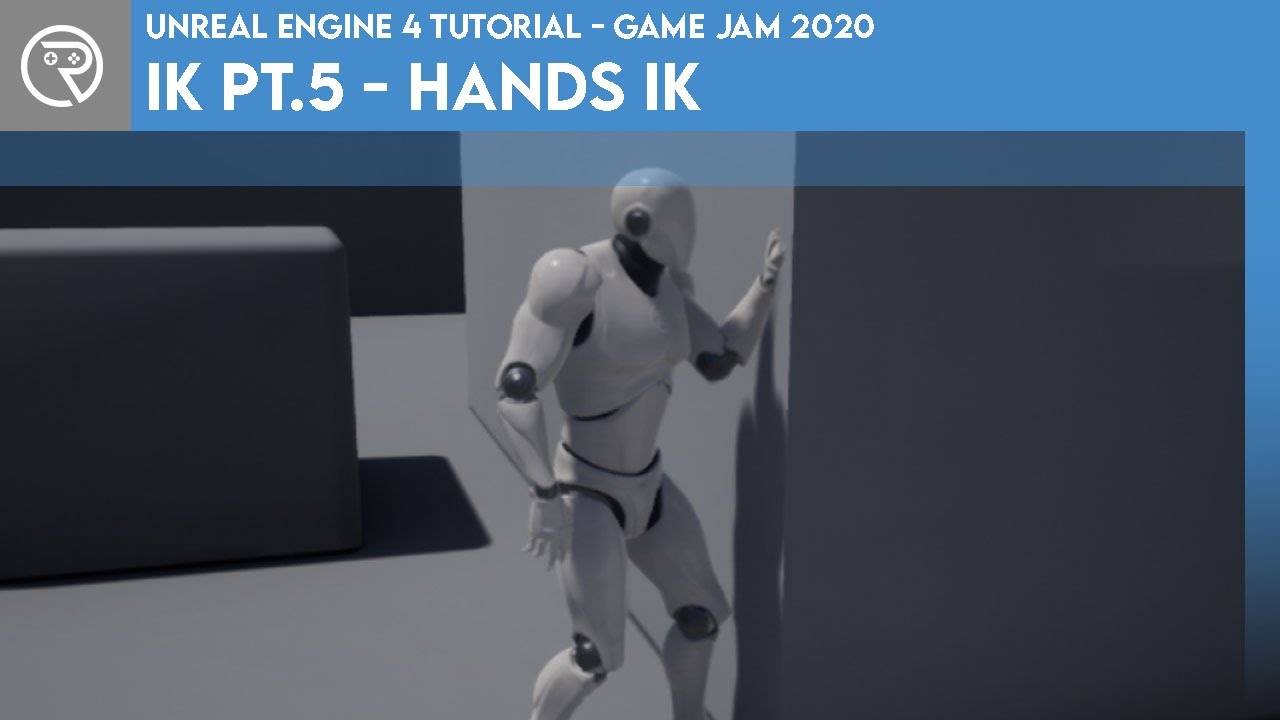
In this mini-series we go through what IK is and how it can be used to complete something like foot placement. In Part 5 we go through how to use the IK system to make the character automatically place their hands out in front to brace the wall in front.
Project files for this project are available on Patreon for Gold Patrons: https://www.patre...
You can try this also via IK
Which ever works best for you
neat surge
Quick question do we still need to take delta seconds into consideration if not working inside Event tick??
 stray mural
It all depends what you are trying to accomplish and if it'd be effected by delta time.
So its context dependent. Sometimes yes, sometimes no. It being inside Tick or not is generally irrelevant. You can do things inside Tick that aren't DeltaTime dependent. I believe you can even set the tick rate to be different for different actors.
solemn parcel
There isn't a simple way to add a collision on a character with a root collision, that will be independent from that root collision ?
flat raft
I gave you the answer above Epoqx. Use physics collider. Watch the video
neat surge
stray mural
It all depends what you are trying to accomplish and if it'd be effected by delt...
how can one find out if it's effected by delta time let's say player speed of running and vise versa using Timeline for making recoil for the guns using lerp etc
solemn parcel
@flat raft I thank you for these infos. But I already have animations set up, and that clipping happens when the character is in the 'attacks' animations. Furthermore, I have some 'shooting points' that I cannot move from the front of the local space of the character, and projectiles spawn from these points.
flat raft
Then use IK.. second video I posted
stray mural
neat surge
how can one find out if it's effected by delta time let's say player speed of ru...
Things like movement or recoil animation would most certainly be effected by delta time. Most things that "move" or have some animation would most likely be very influenced by delta time. DeltaTime is simply how much time between rendered frames.
flat raft
Also, the Unreal Content Examples has a guy punching the wall.
stray mural
For example, health in a game, wouldn't by probably normally be effected by time. However if maybe you had a Heal Over Time, it would care about the time.
neat surge
so basically whereever i use math for those things i just multiply it with getworld deltaseconds?
stray mural
It really is very contextual, I can't just give you a simple answer because it really depends on decision choices and your game.
If it makes sense to mulltiply it with deltaseconds, I'd probably say yes you should
onyx pawn
anyone can help me figure out the wiget issue I am having
neat surge
ahh ok is there a way to debug and find if its being effected
onyx pawn
stray mural
In game you can cap your FPS, games running at 30fps or 90fps. You shouldn't be running around 3x at the speed at 90fps than you are at 30fps.
 dull tree
what am i doing wrong, i am trying to get diraction of player to play animation in animbp
neat surge
stray mural
In game you can cap your FPS, games running at 30fps or 90fps. You shouldn't b...
Gotca thanks for the info!! appreciate it
stray mural
and if game can't run at 90fps, then choose numbers like 20, 30, 60 or something and just go with what feels right and do your best guess. Over time you'll get a better grasp of it
neat surge
okie
 primal smelt
I have sphere collisions (CapsuleFL/FR) which handles the physics of the front wheels of a wheelchair and "fake" wheels that will be animated (WheelFL/FR). I'm trying to get the rotation of the spheres to apply to the fakes so they animate. I was able to do this with physics constraints by using angular velocity but PCs caused other issues so I am now using sockets.
Problem I am having is that while the fake wheels are rotating on the Y axis, they are bouncing between positive and negative values so it keeps changing direction every 45 or so degrees. I feel like I should be doing something with a forward or right vector but I'm not sure what. Any help would be appreciated 🙂
severe iris
How can I monitor changes to a variable?
One of my actor variable gets changed somewhere and I've no clue where
primal smelt
severe iris
How can I monitor changes to a variable?
You could do a print string on event tick and keep an eye out for when the variable changes. Should really start with searching for 'set' references in the browser though
severe iris
It changes between an event (that's meant to change it) and the start of the next tick. I've looked through all set references in both the spawn (owner) and the animation blueprint (that contains the variable) and nothing appears
But I guess I'll keep looking :/
primal smelt
severe iris
But I guess I'll keep looking :/
What kind of variable is it?
severe iris
SteamVR template, the variables are the grip state and type
primal smelt
Ok are they boolean variables? Object? Float?
severe iris
they're enums
maiden wadi
Realistically, specially for designing, you should just set your variables in AnimUpdate for AnimBPs. You're going to end up with a lot less headaches trying to get stuff looking right and working. You can go back later and make it more event driven if you want to, but that will make sure that it only pulls the latest and current state of things to animate.
severe iris
But I think I actually tracked it down, the motioncontroller BPs actually update using another set of variable, which is a bit odd
maiden wadi
@onyx pawn The red line you have going from CreateEvent to the BindEvent, move that from between the MoveLeftF event to the BindEvent.
severe iris
Yeah what I think happened is that I've generally updated the animBP variables in tick, and that somehow the fact that the motioncontrollers BPs "cache" the variables with their own pair wasn't an issue because of tick order. Now that I've tried doing it in an event it failed. So I was just doing it the wrong way all along and just got lucky enough that it worked
Do actors generally tick before their owner?
or is it random/depends on spawn order
maiden wadi
Not certain. I wouldn't really rely on order so much besides the tick groups.
 amber parrot
does anyone know what would be the best way to create blueprint node tree for bones for armor pads reacting to collisions ?
https://youtu.be/5h5CvZEBBWo?t=1232

Announce Post: https://forums.unrealengine.com/showthread.php?97824
Charles Anderson and Benn Gallagher joined us to explain the new AnimDynamics features being used to create Paragon's characters. By breaking down an example Paragon character, they showed off how they are using a simple physics solver to add dynamic elements to characters with...
severe iris
Fair, thank you
maiden wadi
@primal smelt Are you animating the wheels through the Pawn or an AnimBP?
primal smelt
maiden wadi
<@!365397632870383646> Are you animating the wheels through the Pawn or an AnimB...
Just through the BP, I just want the wheel to rotate based off the sphere collider
SOrry that is Pawn BP
maiden wadi
Ah. Just took a closer look. I think I understand your issue. Just a prenote, Rotators are a fun thing to wrap your head around. Roll and Yaw both go between either -180to180 or 0to360. Usually it's the former, but you have to also account for the latter due to replication compression. Pitch on the other hand only goes between -90 to 90, so unlike the previous two it only has 180 degrees of rotation vs 360. This is because it's designed to be able to look straight up or down for FPS reasons. Your easiest way to solve that is likely going to be rotating your things by 90 degrees on Yaw and using Roll instead. Alternatively you can use the Pitch as a delta getter, and have a float variable that goes from 0-360 and use that variable to set your wheel's rotation, while updating the variable from the Pitch's delta.
@dull tree I can't read that image well enough to read what you're trying to do. But if you want an easy way to get a direction the pawn is moving relative to it's own local space, try this.
dull tree
Thank u
primal smelt
maiden wadi
Ah. Just took a closer look. I think I understand your issue. Just a prenote, Ro...
Good to know, thanks for clearing that up!
dull tree
maiden wadi
<@!259800346321354753> I can't read that image well enough to read what you're t...
Ok but i need to get speed forward and backward
For seperated animations
maiden wadi
@dull tree Do you need a bool for whether it's going forward or backwards or a direction float? The one I posted is basically the yaw direction the pawn is moving, designed to be used with a blendspace with forward, right, left and back animations.
 thorny relic
Surely you can't have speeds in multiple directions at once?
maiden wadi
 devout geyser
Digging in to try more methods and trying to find more information
maiden wadi
@devout geyser Is this still about the accessed none issue?
devout geyser
yeah..
maiden wadi
Where is the blue variable you're trying to use?
devout geyser
In the AI's task, there is an actor reference
maiden wadi
@devout geyser So, in short, what those blue variables are, are memory pointers. When you create an object, it gets placed somewhere in your memory. These pointers are just small addresses that point to that location in memory so that you can access the actual information of the object. You can create these pointers without an object being created, you can also create many different pointers that all point to one single object. What you've done is the former, you have created a pointer that is meant to point to a specific type of object, but you have not yet told it which exact instance of that object it should point to.
devout geyser
So from what i've understood here I need to make the "pointers" point and declare the exact object to be an object?
maiden wadi
Not to be an object. Your pointer will never be an actual object. They're just small addresses that point to the actual object. But you haven't given it an address yet. Let me make a quick example.
devout geyser
Thank you very much
primal smelt
maiden wadi
Ah. Just took a closer look. I think I understand your issue. Just a prenote, Ro...
Regarding that 180 degree limit on rotators, AddRelativeRotation shouldn't be restricted by this should it? As long as 180/-180 isn't exceeded within a single tick?
maiden wadi
@devout geyser I don't know if this will help, but here is a bit of a run through with using some pointer variables.
devout geyser
Much thx i will go through it
 open acorn
Anyone know why this makes my camera fly 300,000 units instead of 5,000 ?
 fair sun
is there a way to quickly check what changes were made in a blueprint instance?
devout geyser
@maiden wadi You are amazing mate you explained it 100% and i got everything ty very much
open acorn
fair sun
is there a way to quickly check what changes were made in a blueprint instance?
What changes YOU made? At runtime or in editor?
fair sun
yes, in editor
open acorn

Unreal Engine
Unreal Engine offers well over 100 hours of free video tutorials so you can learn the skills to succeed in game development, architecture, film, automotive, and other exciting industries.
fair sun
after placing a blueprint on a level you can change it's properties
I want to know what was changed
devout geyser
@maiden wadi Works great ty very much once again, have a delightful day 🙂
open acorn
there is a little curvy arrow on stuff you've changed to change it back to it's default
fair sun
yeah, when an actor has 10 subcomponents going through them all is a pain in the ass 😦
open acorn
you should be touching all of them to achieve 1 thing
should not*
what are you trying to do?
fair sun
I'm trying to see what was changed in a blueprint instances compared to the original blueprint without scrolling through all the components
kind swallow
Hello everyone, can someone help me really fast ? When someone connect to the host (event OnPostLogin), I would like to create a "slot" (which contain the player name and if he is ready or not) with the widget "playerSlot", and transfer it into my widget "Teams" that contain Verticalbox -> Scrollbox. I want to use the addChild to the scrollbox but I first need to receive the informations from my Gamemode to the widget. How can I do this ?
Fast question : How to transfer data from the Gamemode to the current widget ?
open acorn
kind swallow
Hello everyone, can someone help me really fast ? When someone connect to the ho...
get a reference back to whatever you're trying to get info from (like your controller)
in this case your gamemode
kind swallow
open acorn
get a reference back to whatever you're trying to get info from (like your contr...
Ok I understand but the event that I use is "Event OnPostLogin", how can I define in my widget "Do this when a new player connect" ?
open acorn
kind swallow
Ok I understand but the event that I use is "Event OnPostLogin", how can I defin...
With a reference and a custom event, I'm assuming.
primal smelt
Ok so partly solved my problem. I just need to know, what math do I need to apply to convert this direction from world to local? I can get the forward vector of the vehicle but I'm not sure what to do with it. Basically right now if I move the vehicle to true north the wheel rotates in the correct direction but if I turn the vehicle 180 into the opposite direction the wheel now rotates backwards.
maiden wadi
@primal smelt The 180 limit is only on Pitch. The rest can safely go over that.. sort of. The issue with pitch is that the functions which alter rotation have a sort of lock with lower values. One note of this is like this. If I do the bottom tick, it stops at 90 pitch, it won't cross it, ever. The top one though, since it's inputting higher values, breaks that pitch lock, and instead will set pitch at 89.99 instead of 90, and invert the Yaw from 0 to 180(Or actually -179.9999, same thing) Then because the yaw is 180, it'll lower pitch instead of raising it with the same positive input. That's why I was also suggesting putting a float value in that you could normalize between 0-360. Because if you tell it to set the pitch relative rotation to 120, it will set the pitch to 60, and Yaw to 180.
Yaw and roll are set to 180, forgot roll in that.
So it rolls the actor over, and turns it around, but keeps the pitch height more or less. Rather than going over 90 pitch.
 vernal bramble
Hey, i have a question. I want the player to have a circle under him and the circle rotation stays absolute to the world's rotation no matter the players rotation like a compass. What component should i use for that?
primal smelt
maiden wadi
Oh my god although I used the term "local" in my question, I didn't think to actually search for a local rotation node. Only now knowing it exists! Strangely though, the wheel is now responding according to direction but in reverse. So forwards spins backwards and backwards spins forwards. I'm using the X of linear velocity of vehicle to add the rotation to Y. Tried multiplying by -1 but this didn't fix anything.
No nevermind, user error. You know when you've been working on the same thing for hours on end and your brain just turns to mush? That's where I am right now.
 zealous quarry
Btw is there a way to fly (with fly movement) without acceleration in an elegant way?
primal smelt
Double nope, it's rotating in the wrong direction again. Well I am well and truly stumped! I could have sworn there is a way to multiply or divide forward vector by the angle of rotation or something but I can't for the life of me remember what it is!
So annoying when you've solved a problem ages ago but didn't make a record of it!
coarse forge
so.... this doesn't work... thoughts.
Blueprint Runtime Error: "Accessed None trying to read property CallFunc_Array_Get_Item". Blueprint: Typewriter Function: Execute Ubergraph Typewriter Graph: For Each Loop Delayed Node: Branch
the button press to move the array through
specifically
sorry.. out of coffee...
zealous quarry
windows + shift + s lets you make better screenshots
zealous quarry
What are you even doing?
 tawdry wyvern
Is there any difference between GetPlayerCameraManager -> GetCameraLocation and GetPlayerCameraManager -> GetActorLocation?
in my test they are outputting the same value but are there scenarios where this would not be the case?
coarse forge
zealous quarry
What are you even doing?
Good question.. i have a story text player, and i'm loading segments of text into an array.. and on button press cycle through the array
or so I thought...
zealous quarry
I have a feeling your error is about it being unable to find the text array
coarse forge
ah
so I bet that because the array isn't a var...
each event can't talk to each other
zealous quarry
You can set breakpoints for in depth debuggin
coarse forge
yup.. been there.. ill try some more thanks
dull tree
stil dont know how to make it works
coarse forge
Okay. still stuck. It draws the first string from the Stories array, draws a blank, then the second from the array.. and never moves on from the second.. even though the array has 5 things in it.....
my story array is <uobject story>
oh...
just noticed that
k.. so on my GET arr copy node.. i need to have a var there
for the index
and increment that
haha
so i have array of story text
and on button press.. clear the ui and draw the next set of text
the for each is the character by character draw.. which makes sense why its broke..
Maybe something like this?
the Get copy of array isn't accessable anymore then
sure
{
    OnTriggerHUDToStoryMode.Broadcast(Stories);
}```so this is my array..
how do you set a uboject var in bp
?
to store it
sorry.. like make a var out of it
UStory : public UObject
in bp land.. i can't seem to find this
something about ubojects maybe?
tried that first... couldn't quite get the cpp to umg widget parent thing compiling and working
 unique wyvern
I have an issue where my variables in the blueprint behaviour tree are keeping their value on future executions of the behaviour tree node. Is this normal behaviour or a bug?
 left niche
Does draw debug line not work in a packaged game?
coarse forge
okay.. it worked.. but now i get an index out of bounds, which makes sense.
ill work on this some more thanks
maiden wadi
@primal smelt AFAIK angular rotation represented as a vector is usually how much roll would be applied to something. Like if you stuck a pole through something from top to bottom and then rolled it, the vector's length would be how far around the object the top pole would go in degrees. And then the direction is what direction the roll would happen in.
grizzled marsh
How can I add custom collision shapes to Blueprints as components? I only see Box, Sphere and Capsule. How can I add a cylinder, for example?
primal smelt
maiden wadi
<@!365397632870383646> AFAIK angular rotation represented as a vector is usually...
I think the problem I was having was that it wasn't getting the rotation of the sphere as intended because every time the ball completed a rotation it was constantly flipping from positive to negative because it wasn't reading the forward vector. Turns out it is just as simple as dividing the two together, I had tried it but I think I had something else wrong and written off that method!
primal smelt
grizzled marsh
How can I add custom collision shapes to Blueprints as components? I only see Bo...
Pretty sure you'd have to build that collision in the mesh viewer or import custom collision data along with the mesh in the first place
You can also adjust the parameters of the capsule collider to distort it's shape although I'm not sure if you can make a perfect cylinder out of it
Yeah for a wheelchair I'm currently using 4 capsule colliders stretched out into balls instead of building collision around the actual wheels. Not sure how cost effective that is but its working well so far!
maiden wadi
@primal smelt Personally, I would try just doing some vector math with a couple of local points. The only thing that matters is that your chair knows how much forward the point has moved. You could extrapolate the rotation of the wheel roughly based on just the delta of that local point.
grizzled marsh
Thanks for the information.
@primal smelt You can only alter the radius of the sphere, so it'd be impossible. Even if I scale it non-uniformly, unreal compensates it for some reaosn and it still retains it's spherical shape.
@trim matrix Right. This was simply to be used as a trigger volume around units, so I suppose I can make do with spheres if optimization really makes it worth it.
 proven mason
So I'm attempting to add controls to my pinball game
primal smelt
maiden wadi
<@!365397632870383646> Personally, I would try just doing some vector math with ...
Well right now I've got it set up to linear velocity of the main body of the wheelchair however I want to put it back to the angular velocity of the corresponding wheel because the player will absolutely be airborne and I'd like the wheel rotation to slow without there being any friction (which is how the sphere colliders work)
proven mason
so far it didn't work despite my best attempts to follow the instructor's video.
I couldn't get my left flipper to flip at 60 degrees when I push the "A" key on my keyboard.
primal smelt
grizzled marsh
Thanks for the information.
<@!365397632870383646> You can only alter the radiu...
That could be based on it's default transform inhereted from the parent component. Try unparenting it and see if it maintains the intended shape.
proven mason
Here are my action settings for the flippers
I've created a blue print controller for the flippers
primal smelt
maiden wadi
<@!365397632870383646> Personally, I would try just doing some vector math with ...
Before when I was using phys constraints I was using torque to drive the "fake" wheels too. Probably more expensive but was so much simpler!
proven mason
Then I've added a gamemode with these settings
grizzled marsh
primal smelt
That could be based on it's default transform inhereted from the parent componen...
Mmmh no. Creating a new actor blueprint from scratch>Add SPhere COllision>Scale in One Axis. Sphere can't break away from its spherical shape, unfortunately...
primal smelt
grizzled marsh
Mmmh no. Creating a new actor blueprint from scratch>Add SPhere COllision>Scale ...
Ah my apologies, check a bit further down on the details panel
primal smelt
grizzled marsh
Mmmh no. Creating a new actor blueprint from scratch>Add SPhere COllision>Scale ...
You want Shape > Capsule Half-Height/Radius
grizzled marsh
@primal smelt @trim matrix That's a great idea! Thank you.
proven mason
@trim matrix so I've placed 2 stops; one on the 1P Flippers Add node and 1P Flippers Left Add node; shouldn't it tell me how many flippers are there?
 torn kettleBOT
:triangular_flag_on_post: 🌹Reckful'sEmbodiment🌹#6419 received strike 2. As a result, they were muted for 1 hour.
trim matrix
Good morning my beautiful, kind and amazing people.
proven mason
@trim matrix if I want to jump into the next break point what should I go for?
trim matrix
I have a quick question for y’all. I am trying to create a system where I can switch weapons using an array Instead of just placing on the items in the character Blueprint and setting visibility each time I select them ??
 fresh pike
Hello guys, can someone tell me can i change default name when using "stat startfile" and "stat stopfile" in blueprints?
trim matrix
I am not sure if placing all the items in the player Blueprint is professional and the right way or is setting them in an array in a component blueprint the most efficient so I can call them all using integers in the player
What do you ladies and gentlemen think?
proven mason
wow looks like I have a logic error on the number of 1P flippers facing left
I put five in the scene my programming logic counted 15
trim matrix
@proven mason I wish I could help my kind sir. But I am also stumped
Wow these blueprints sure can be difficult. Yes indeedy. But I’ll see which ones works best for me.
 scenic lotus
i m trying to cast my object so that when i place on it it will trigger the door animation but somehow is it not working?
it only worked when my player is on top of the pressure plate
primal smelt
trim matrix
I am not sure if placing all the items in the player Blueprint is professional a...
You can have the code for the weapons separate in their own blueprints and have the code for switching weapons in the player blueprint if that's what you mean. Having all the weapon code in the player blueprint is probably fine. Just like anything, efficiency is key and something you'll get better at over time.
coarse forge
@trim matrix thx bro. Started moving some stuff to cpp and its working better
trim matrix
Ok. I’ll try that. I’ll give the weapons their own blueprints. And then have a blueprint the player can call that has them all in an array so I can properly switch them using integers.
Is that too much?
scenic lotus
scenic lotus
i m trying to cast my object so that when i place on it it will trigger the door...
can anyone help me out with this
primal smelt
trim matrix
Ok. I’ll try that. I’ll give the weapons their own blueprints. And then have a b...
Good as any place to start. You can add blueprints as components within other components too which might make it easier socketing the weapons into place and calling them.
 hollow drift
when you work on a flowchart and you encounter a snailtype arrow
trim matrix
@primal smelt you so nice and very smart. I am a bit new here haha
@hollow drift I should create those more often
primal smelt
trim matrix
<@365397632870383646> you so nice and very smart. I am a bit new here haha
Don't take what I say as gold though! I'm also pretty new so there are no doubt optimal way of doing things in certain situations that I couldn't possibly know. Everybody has their own way of picking things up, I tend to adopt the brute force method and just hit the roadblocks as they come and figure it out from there!
And different situations/objectives will call for different ways of doing things so I don't think anybody can say universally what the best practice is for a lot of things.
trim matrix
Ok. Then imma do it my way :3
scenic lotus

enjoy. Patrick Open Sesame
Main channel: https://www.youtube.com/channel/UCOJuA_374WrqK53ysxstNBQ?sub_confirmation=1
1 Hour channel: https://www.youtube.com/channel/UC1-pWU869vpesyvKYnBjJVQ?sub_confirmation=1
10 Hour channel: https://www.youtube.com/channel/UCFpz2w7qA3jYWjw-DHmrCBQ?sub_confirmation=1
#10Hours #1Hour
primal smelt
scenic lotus
i m trying to cast my object so that when i place on it it will trigger the door...
I wouldn't think to use a sequence player to control a door but it looks like you're running this code from the level blueprint so you shouldn't need to cast.
Try getting the trigger to work on something simpler first, like moving the position of a box. It could be something with how the sequence is set up but I don't know anything about those.
 untold fossil
A question. Just to be clear, the following is not something I would ever use in code, far from it, but purely out of interest. What is the cost of the get all actors of class node used on tick for a class that only has one existing actor in a level. For example, I have an specific type of actor. What would be the cost of fetching that actor using get all actors of class on tick? Of course, again I know I can just save a reference to said actor and use that. This is purely to better understand the node, so if I ever encounter a situation where it could be easier / useful than writing complex code (be it not on tick obviously) whether or not it could be "okay" to use as it is quite powerful but frowned upon. lol
Basically what I'm asking is how does the node work 😛 I've read that it uses a hash to iterate over all actors of the specific class type you give as input. Is this true or BS? And what other costs are there from using the node, is there any other hidden (brute force) cost?
I love blueprint, but sometimes it's really hard to understand what I'm using. There's all these wonderful nodes, but they are kind of like beautifully packaged unknowns. They get the job done, sure, but at what cost?
And sadly, there seems to be a very big lack of information on how the nodes operate.
tight schooner
@untold fossil You can always dig into the source code to see what it does. I'm not that sophisticated but I did find that you have to run that node thousands of times to make a significant dent in the frame time, so it seems more optimized than Epic suggests. You can also run your own tests to answer the perf end of the question.
(If you're retrieving the only actor of that class in the game world, use the node, "get an actor of class")
neat surge
No matter how i try the recoil result is different on different framerate after i fire tried with lerp/finterp and TL itself help my brain grasp this. if i don't use timeline it works perfectly but i need timeline to have a smooth recoil system
untold fossil
@tight schooner Oh didn't know that node existed
 deft hedge
is there a way in bp to get custom c++ developer settings?
 red oyster
Is there any tutorial that explains selection of multuple objects? I can figure it out myself, but I have feel that Im doing crutches using array to mark them.
neat surge
How to not be frame rate independent when using Timeline i tried world delta seconds in various ways
unique harness
neat surge
How to not be frame rate independent when using Timeline i tried world delta sec...
use animations
neat surge
neat surge
No matter how i try the recoil result is different on different framerate after ...
for this issue i meant
unique harness
yea don't use timelines, they're terrible
neat surge
Hmm is there no other way other then animation?
unique harness
use event tick
neat surge
I heard that event tick should be avoided as much as possible but ig i can try that
unique harness
timelines run off event tick too
neat surge
Why doesn't get world delta seconds node take effect there tho in the above code
unique harness
no clue
trim matrix
Anyone knows how could I lower the horizon ? To make it like a sphere, so stars are visible to the bottom to
 spark steppe
untold fossil
A question. Just to be clear, the following is not something I would ever use in...
spark steppe
untold fossil
A question. Just to be clear, the following is not something I would ever use in...
i would assume the worst, and thats that the expensive part is pretty much the same for 1 as for 100 actors, it probably iterates over all objects and checks each one if its of the specific class, the more objects in the world the longer the list of items to check
spark steppe
neat surge
Why doesn't get world delta seconds node take effect there tho in the above code
you are aware that world delta is a value between 0-1?
also use the timeline, and not the tickevent as suggested before 😛
neat surge
spark steppe
you are aware that world delta is a value between 0-1?
Oh i didn't know that lol 😂 i just know it's used to keep things not be framerate independent
neat surge
spark steppe
also use the timeline, and not the tickevent as suggested before 😛
Yeah tl is what i prefer but this frame rate effecting stuff i cant grasp right now
spark steppe
it gives the fraction of the actual second
you might want to add the gametime in seconds to the delta
unique harness
untold fossil
A question. Just to be clear, the following is not something I would ever use in...
void UGameplayStatics::GetAllActorsOfClass(const UObject* WorldContextObject, TSubclassOf<AActor> ActorClass, TArray<AActor*>& OutActors)
{
    QUICK_SCOPE_CYCLE_COUNTER(UGameplayStatics_GetAllActorsOfClass);
    OutActors.Reset();

    UWorld* World = GEngine->GetWorldFromContextObject(WorldContextObject, EGetWorldErrorMode::LogAndReturnNull);

    // We do nothing if no is class provided, rather than giving ALL actors!
    if (ActorClass && World)
    {
        for(TActorIterator<AActor> It(World, ActorClass); It; ++It)
        {
            AActor* Actor = *It;
            if(!Actor->IsPendingKill())
            {
                OutActors.Add(Actor);
            }
        }
    }
}
so not a good idea lol
spark steppe

What is the Delta Time in Unreal Engine 4 .
Source Files: https://github.com/MWadstein/wtf-hdi-files
neat surge
Is gametime in seconds same across every machine no matter what the frames are??
 worthy frost
Gametime will be different
neat surge
Ok
worthy frost
based on when game was started
Worldtime also different, depending on time world came up for that machine
spark steppe
but you don't need synchronized frames for different clients imho
specially not for recoil
worthy frost
i dislike using timelines for things like recoil, but maybe that is cause i am oldschool
i use a spring system which can be adjusted
neat surge
What my problem is upon firing the kick goes higher when the fps are lower
That's advance stuff lol im just learning so timeline works haha
worthy frost
yeah why are you not just doing this on tick?
spark steppe
xD
worthy frost
cause your not even utilizing the timeline
neat surge
Heard its not good to do stuff in tick much
worthy frost
timelines are tick..
spark steppe
why should he do this on tick? calculate the recoil every tick even when not necessary?
neat surge
Using update of timeline for smooth recoil transiotion
spark steppe
that can get messy pretty quick
worthy frost
not if you split them into functions/events
not one massive super long tick node with sequences and spaghetti
Timelines are heavy and cost more
and cost more per tick
spark steppe
well, it's a tradeoff
neat surge
worthy frost
if Firing -> Recoil logic
I am doing the same thing using timeline i guess i can try that in tick or something
worthy frost
anyway, you should always be consistent as RecoilRate * DeltaTime will always be the same, regardless if you have 10fps or 200fps
so why its not, is odd.
neat surge
Ikr
spark steppe
it's not?
neat surge
Nope
spark steppe
if you have 10fps you might get a delta of 0.1 * recoilrate
if you got 200fps you'll get 0.005 * recoilrate
at some point it will be 0.1, yea
worthy frost
it will always be the same value at the output
10fps is exageration, at that framerate, i expect shenanigans
spark steppe
doesnt a curve in the timeline handle the delta? im not sure
but that would get rid of all the deltatime handling
neat surge
Thats what i said in the picture above basically using world seconds with recoil rate in timeline is not consistant but when not using timeline and not multiplying with delta seconds its consistant lol
worthy frost
but 30fps and 100fps, should be the same output so like 1 * .0667 is the same as 1 * 0.333 (roughly)
60fps/30fps
when applying something over the frames
neat surge
Should i test at 30
worthy frost
😄
neat surge
😂
neat surge
Hmm true but since my game is mobile platform people can go as low as 20 i think
coarse forge
worthy frost
well 10fps is not playable
plenty of loading screens at 10fps 😦
 long robin
Hi I have a question regarding a networking issue but its via BP's can I still post them here? it's nothing too complex I'm new to multiplayer creation 🙂
unique harness
#multiplayer is probably better suited
neat surge
Well im gonna try the same stuff with 30fps min amd see if it changes anything
nope still the same outcome gosh this is annoying lol why is deta world delta seconds doing anything not even using the timeline's float track
do i need to store previous value or something
i have no clue
unique harness
how long is your timeline?
neat surge
0.10
unique harness
change it to like 3 seconds and see if it does anything
neat surge
okie
zealous quarry
Quick one: is there some flow control that happens ever N time it is called?
FlipFlop does that for two I believe
unique harness
not a built in one, no
neat surge
unique harness
change it to like 3 seconds and see if it does anything
still a difference not by much but then again its the same as with 0.10
unique harness
what is your recoil rate?
zealous quarry
unique harness
not a built in one, no
ok, thanks
neat surge
the weird thing is i used Timeline for capsule height adjustments and, also movement speed and system i never used delta seconds yet they're not framerate independent and work perfectly but for some reason this recoil thinghy is
neat surge
unique harness
what is your recoil rate?
-1 recoilrate
for testing so it doesn't go too high
unique harness
what?
neat surge
-1 recoil rate sorry
unique harness
so then you're basically passing -.1 into your add controller pitch
that's not going to have much affect
neat surge
yes the out come is the same if i do -5.0 tho
cant go higher since it rotates upwards too much to test
neat surge
neat surge
-1 recoil rate sorry
-1.0 float i meant
unique harness
how is it the same if going higher creates a different result?
neat surge
unique harness
how is it the same if going higher creates a different result?
not different same outcome aka different results on different framerate
unique harness
ignore the frame rate
neat surge
even if my recoilrate is like -5.0
unique harness
get it to work
unique harness
ah ok
neat surge
basically don't want the result to be different for different framerate
unique harness
right I understand that. I didn't realize the recoil was working
neat surge
oh lol ok
unique harness
so set the framerate to 30 and increment a counter during the update and print the value on finished
neat surge
ok
unique harness
test it like 5 times and see what the result is
neat surge
So on 30 FPS -0.333334 -0.333334 -0.333334 -0.333334 -0.333333 -0.333334
unique harness
it should be a whole number
neat surge
increment a counter
unique harness
yes
neat surge
what do you mean by that exactly
unique harness
unique harness
what about when it's .1?
neat surge
but
2 everytime using this way with timeline time at 0.1
doing this way
it outputs 1,2 or 1,1,2
with 0.1 timeline time
unique harness
hm no clue
neat surge
ok bro thanks still
open acorn
you can't increase vars in the middle of a timeline loop
primal smelt
Anybody good with vector maths? I have two cubes. On every tick, cube A adds 1 to it's rotation on X and Y. Cube B's objective is to copy the rotation on the Y axis and apply that same rotation to it's own Y axis and ignoring the X rotation. How can I accomplish this?
I'm trying to get the rotation or forward vector and subtracting them from each other to get the difference between the vectors but I'm not sure how to apply that to B.
(each cube's forward vector/rotation that is)
unique harness
open acorn
you can't increase vars in the middle of a timeline loop
the results he posted say different
open acorn
well you can but most likely shouldn't I'm trying to scroll up to see the original problem
unique harness
open acorn
well you can but most likely shouldn't I'm trying to scroll up to see the origi...
well you basically shouldn't use timelines at all so you're right
unique harness
primal smelt
Anybody good with vector maths? I have two cubes. On every tick, cube A adds 1 t...
is B's rotation being updated each tick as well?
primal smelt
unique harness
is B's rotation being updated each tick as well?
It is, yeah
unique harness
primal smelt
It is, yeah
Are you applying A's Rotation to B each time or just the amount that was added to A?
primal smelt
Right now I'm doing a set world rotation to B with A's results plugged in
unique harness
And that isn't your end goal?
neat surge
open acorn
well you can but most likely shouldn't I'm trying to scroll up to see the origi...
Original problem ia that even when using delta seconds with timeline the recoil kick of the weapon is framerate independent
primal smelt
primal smelt
unique harness
And that isn't your end goal?
Problem is because A is rotating on both X and Y Y's values are constantly bouncing back and forth between positive and negative
So just getting the Y rotation will cause cube B to constantly change direction
unique harness
Is this not what you want?
primal smelt
unique harness
Is this not what you want?
Well the purpose of this exercise is to troubleshoot problems I'm running into on my project where the value of rotation will need to be dynamic
I'm trying to match the rotation of a sphere collider that is the functional wheel on a wheelchair to a "fake" wheel that has no collision but handles the animation of the wheel turning
I'm trying to solve this cube problem in hopes that I can apply it to the actual problem I have!
unique harness
 sleek dust
how can i make an random rotation for an pickup object in the z and y axis? i've tried with random rotator or random float in range but it is not what i want
primal smelt
unique harness
Hmmm running into the same problem where B is just pivoting back and forth
unique harness
sleek dust
how can i make an random rotation for an pickup object in the z and y axis? i've...
primal smelt
unique harness
might try this
Still the same thing unfortunately. Lemme look into gimble lock, I recall hearing about it but can't remember what it is
unique harness
hmm there's a node to fix it, i just forget what it's called
sleek dust
unique harness
do you know how can i make it slower? the rotation is soo fast
unique harness
sleek dust
do you know how can i make it slower? the rotation is soo fast
you're trying to actively rotate it?
sleek dust
unique harness
you're trying to actively rotate it?
i want to slow rotate the object in the x and y axis
coarse forge
so........... tested my functionality.. everything solid.. closed PIE, re opened PIE and now I get a lot of ```Error PIE Blueprint Runtime Error: "Accessed None trying to read property CallFunc_Array_Get_Item". Blueprint: Typewriter Function: Execute Ubergraph Typewriter Graph: For Each Loop Delayed Node: Branch
Warning LogScript Script Msg: Attempted to access index 80 from array 'K2Node_CustomEvent_Stories' of length 4 in '/Game/BluePrints/HUD/Typewriter.Typewriter_C:ExecuteUbergraph_Typewriter'!
Warning LogScript Accessed None trying to read property CallFunc_Array_Get_Item
Warning LogScript Typewriter_C /Engine/Transient.UnrealEdEngine_0:GameInstance_1.Typewriter_C_0
Warning LogScript Function /Game/BluePrints/HUD/Typewriter.Typewriter_C:ExecuteUbergraph_Typewriter:012D
Error PIE Blueprint Runtime Error: "Accessed None trying to read property CallFunc_Array_Get_Item". Blueprint: Typewriter Function: Execute Ubergraph Typewriter Graph: For Each Loop Delayed Node: Branch
Warning LogScript Script Msg: Attempted to access index 102 from array 'K2Node_CustomEvent_Stories' of length 4 in '/Game/BluePrints/HUD/Typewriter.Typewriter_C:ExecuteUbergraph_Typewriter'!
Warning LogScript Accessed None trying to read property CallFunc_Array_Get_Item
Somebody was trying to explain it earlier but it wasn't really sinking in! Having a name to it dramatically improves my chances of trouble shooting this, so thank you!
unique harness
sleek dust
i want to slow rotate the object in the x and y axis
There's a RotatingMovement component built in
coarse forge
specifically.. ```Warning LogScript Script Msg: Attempted to access index 80 from array 'K2Node_CustomEvent_Stories' of length 4 in '/Game/BluePrints/HUD/Typewriter.Typewriter_C:ExecuteUbergraph_Typewriter'!
and on a map that isn't present right now
unique harness
primal smelt
Somebody was trying to explain it earlier but it wasn't really sinking in! Havin...
could also try this
sleek dust
unique harness
There's a RotatingMovement component built in
thats what i want.. thx
primal smelt
unique harness
could also try this
That didn't solve it but I'll have a tinker around with it thanks
unique harness
primal smelt
That didn't solve it but I'll have a tinker around with it thanks
if the sphere represents the wheelchair movement, why can it rotate in the x direction?
primal smelt
unique harness
if the sphere represents the wheelchair movement, why can it rotate in the x dir...
The sphere is actually clamped to Y axis only with a phys constraint, having it free on X as well meant it would slide around too much, giving it more of a trolley/shopping cart feel
I was originally playing with the fake wheel also being on a phys constraint which meant I could apply the same angular force and get the desired effect. Unfortunately I kept running into issues so I'm now trying with a socket instead
 neat stream
Hey guys, what am I doing wrong?
faint pasture
neat stream
Hey guys, what am I doing wrong?
You are spelling arc with a k
neat stream
hihi 🙂 yes I'm trying to patch data inside my array of struct and it's now working 😦
I forgot how to properly do that
unique harness
neat stream
Hey guys, what am I doing wrong?
try storing the SetRef result as a local before setting array elem
Also the SetElem, don't you want QuestArks as the array, not temp?
coarse forge
okay.. if a bp is blowing up and causing my editor to stop in error catch mode.. how does one open the bp and try to fix the issue?
coarse forge
Exception: Exception 0xc0000005 encountered at address 0x7ffa60f61475: Access violation reading location 0x00000088 getting this
ahh.. so even outside of play mode it runs the post inits on huds
ug
ha commented my function out and it loaded
now... where is that stupid error coming from
keen seal
Hey, I'm trying to make a hitstop effect.
The delay doesn't seem to be working. It never returns to 1.
unique harness
set a breakpoint
faint pasture
keen seal
Hey, I'm trying to make a hitstop effect.
The delay doesn't seem to be working. ...
Are you sure that delayed just isn't being time dilated too?
maiden wadi
@keen seal Have you waited a full ten seconds?
faint pasture
Lmao
faint pasture
Does it matter how small you make the time dilation?
keen seal
Doesn't appear so
unique harness
so if you set to .9, still nothing?
keen seal
Well the game runs slower, but it still doesn't go back up to full speed
unique harness
Are you sure the code is being executed because I just tested and it worked for me
unique harness
 coarse forge
ug
this issue only exists in trying to open a bp from the editor
if i play the game.. no error and the thing plays
seems to have something to do with my binding here ```void UTypewriterWidget::NativeOnInitialized()
{
}
void UTypewriterWidget::NativeConstruct()
{
Super::NativeConstruct();
MyNativeConstruct();
GetWorld()->GetSubsystem<UStoryManager>()->OnTriggerHUDToStoryMode.AddUniqueDynamic(this, &UTypewriterWidget::ConvertAndTriggerHUDToStoryMode);
}``` but only when trying to open the hud class bp and not the widget bp that this is part of
i don't even know how or where to ask the question on how to solve this
unique harness
well you're not checking if World or SubSystem are valid so I would start there
coarse forge
thats diff based on editor (trying to open a bp) vs playing the game
?
i guess that makes sense
unique harness
I don't know but you should never really assume a pointer is valid without checking it
And if you know it's valid for sure, it should probably be passed as a reference
coarse forge
true.. i guess this is because its in construct vs a begin play
ha.. if i don't have get world or subsystem.. the whole thing 'should' break
unique harness
which explains the memory error
maiden wadi
Keep in mind, that code likely runs even if you're just opening the blueprint. It constructs the object in the viewport as if it was being spawned in a game. World may return null in editor, or maybe the subsystem does.
unique harness
The validity check didn't work?
unique harness
you're storing world but calling GetWorld again?
coarse forge
sure.. haven't gotten that far! hahah if world is correct.. it shouldnt' matter :(.. ill refactor in a sec
maiden wadi
I think he was just making sure GetWorld() was working.
coarse forge
thx for helping btw.. i feel like my days are in adv bp and cpp hybrid land now
well there it is
subsystem is null
so those aren't always there in the editor
but makes sense why they are there when i run the game
unique harness


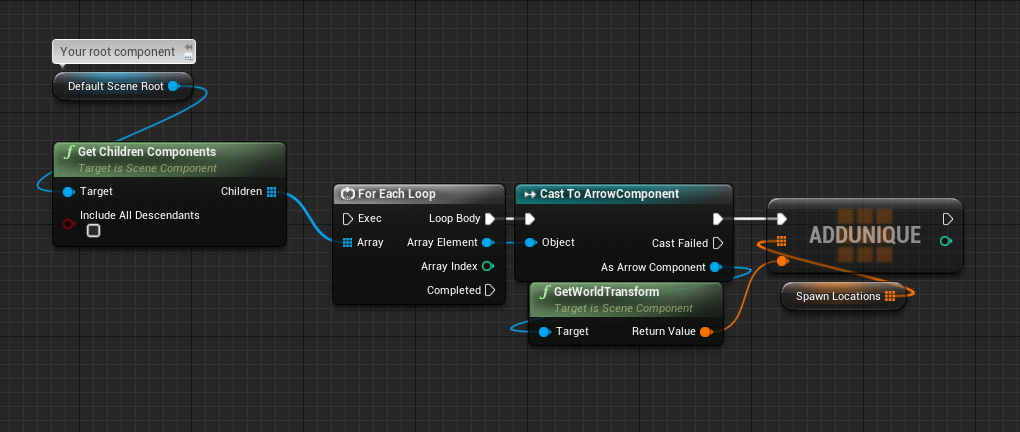

 coarse forge
thx guys
glad.. i went back and started backing my bp's with cpp classes
would have never found this
 pallid radish
I've got a question for you fellow developers. I've got a project where I export render targets as pngs and load them in as textures (for save games). It works great in the editor and standalone game. However, when it's a packaged build, it doesn't seem able to save the image files. I've tried saving to project location, save location, and content location. none of which end up with the rendered images there.
unique harness
How are you saving them?
unique harness
hmm I'm not sure
unique harness
😛
pallid radish
but the original issue was that I was using project directory instead of save
pallid radish
unique harness
hmm I'm not sure
Thank you for your help haha
 earnest tangle
Anyone know what's the correct way of creating dynamic material instances in construction scripts? I'm noticing if I have actors with those in my level and I edit the actor, the material gets messed up and I have to manually reset it for all the relevant actors in the level
it looks like it loses track of the original material on the actors in the level because the construction script sets it to the dynamic instance and it gets saved or something along those lines
unique harness
before creating you should be checking if the old one exists and deleting it if so
neat surge
neat surge
No matter how i try the recoil result is different on different framerate after ...
@unique harness Somehow this works the recoil is smooth and it's not framerate independent 😊
earnest tangle
Hmm, I guess I could cast the current material to a dynamic instance to see if it's been done, let me see if that'd help
unique harness
don't need to cast, just IsValid
earnest tangle
I'm using the material that's defined as the default on the mesh, pretty sure it's always gonna pass an is valid check :)
earnest tangle
Yeah I was kinda hoping I could just use the one in the mesh since it would be conveniently available in the editor but it doesn't look like that's gonna work
earnest tangle
guess I'll just have to define a variable for the material it'll use as the base
earnest tangle
hmm.. it's being stored in the material of the mesh but I guess I can try giving it a variable like that
unique harness
Can you show me what you're doing?
earnest tangle
it's basically like that
It looks like I might just have to save a separate variable with the material instead of using get material, since the get material node returns the previous dynamic material if the object's being recreated in the level and that seems to cause it to bug out regardless of what I do since it doesn't know what the original material was anymore :)
earnest tangle
Nah note I'm using a different create node, the one I'm using takes the material as a parameter and it assigns it immediately
unique harness
oh you're right
earnest tangle
Anyway I added a variable that stores the source material, that fixes it... it's just a bit less clean because now there's an "extra" material variable lol
unique harness
never used that node before
Can also turn of "Run Construction Script on Drag" if you haven't in Class Settings
earnest tangle
It actually works on drag, it only caused issues if I recompiled the blueprint when doing some changes to it
unique harness
right but it's unnecessary logic was my only point
earnest tangle
true
 mental robin
Whats up with Splines not updating their positions in editor when using construction script
what a pain in the butt
 autumn hawk
Is it true there's no way to copy curves from animation assets into montages?
 outer sparrow
Excuse me
I have some issues with the save and load
MySaveGame SaveGame BP
The key to save
The button to load from menu
When I click on load, it loads on the first level despite having saved on the second level, I know that I put Open Level the first level, but I would like to know hot to load the exact level on the exact location I saved, thank you very much
unique harness
You should save the current level name and then load that level
 verbal magnet
I know this might be stupid but im tired and cant think of a solution... I need to come up with a way to subtract how much i need from total and add to the magazine for my reloading when the total ammo is less than maximum capacity but I still have ammo left in the mag
unique harness
mag size - current = amount to subtract from weapon
then do a min node for your total and amount to subtract
unique harness
verbal magnet
thanks a lot
outer sparrow
unique harness
You should save the current level name and then load that level
thanks a lot, got it
 visual tendon
I am currently trying to make a shmup-type game. How would I go about spawning specific enemies in a predetermined pattern? I have it just randomly generating enemies right now but it is missing the strategy that games like Ikaruga or Just shapes and beats have. Any ideas would be great!
faint pasture
visual tendon
I am currently trying to make a shmup-type game. How would I go about spawning s...
That's a pretty vague question but it boils down to having some sort of algorithm or data representing the pattern thar enemies are spawned in.
I will start with a struct EnemyWave that contains arrays of enemy classes, spawn locations, and spawn delays
You could also probably leverage timelines to keyframe these things.
 royal anvil
Hello, is it possible to write into a data asset? For example to change a value in a data asset.
At runtime of course. I know how to edit in editor 🙂
Data asset is defined basic in C++, values are set at BP, and I want to change some values at runtime
visual tendon
@faint pasture sorry about vagueness. What I meant to say was how would I control the timing of enemy spawns as well as control a path that they can follow. I was thinking splines for the parking but haven't dug too much into it. Want to control timing first
 remote moon
hellow People
im developing a little project for VR in bp unreal
i want to press "M" and toggle the visibilty of the hand mesh inside the "BP_motioncontroller" by pressing it...
i have no idea of "casting"
i just wont get it to work
can anyone help ?
 mental sail
Hello, does anyone have a strategy or tips for saving AI/NPC controller state in a Sava Game instance using Bluprints?
I am using an "Saveable" interface and implementing two events for on save and on load, this I use on my npc/ai character object but not sure how to save and restore the AI perception and other AI related component states...
trim matrix
Hello has anyone found the "smooth Sync" discord ?
mental sail
I guess I'll just do it the same way I do it for the character actor, add and implement the saveable interface 🙂
 twilit heath
you won't really be able to inject the saved state into perception
with blueprints
as you have no API for it
mental sail
Question about Structs, I see they have a checkbox for each variable (Save Game - "Should variables be serialized for saved games")... I'm using structs for values that I do save, and structs to define the values to be saved inside of my SaveGame blueprint...
mental sail
twilit heath
you won't really be able to inject the saved state into perception
😦
UE4, here's Blueprints! Oh no no no... you still have to do that last 1% in C++!
twilit heath
oh i wouldn't attempt it in c++ either
perception is not entirely finished, and the API is pretty hostile
mental sail
I can save out the Blackboard...
twilit heath
and whats going to prevent your service from overwriting it first time it runs?
mental sail
At least, I think, I can save the black board... but I'm just in the early stages of implementing it, still have to figure out how to load it back up
twilit heath
Ai should be able to get itself into a correct state from scratch just by putting it into similar/same situation
mental sail
Well, it's running "OnPerceptionUpdate"
Other unknowns I see, the Behaviour tree has timers... even if I reset the blackboard and variables in the NPC character and its surroundings to the saved state, these timers are either going to continue (if I don't drestroy the actor) Or be reset if I spawn a new NPC on load...
Lol, I just noticed these are deprecated... (had this AI built a few versions back), If I toggle one on, the other one gets turned on, if I turn the other one on, you get the point
 astral fiber
How can I check if a transform is valid? so 0,0,0 ?
unique harness
astral fiber
How can I check if a transform is valid? so 0,0,0 ?
Transform or vector?
astral fiber
@unique harness Transform
unique harness
mental sail
Is there any more info on this checkbox on a struct? When should I use it or not use it?
I've been using structs to save game data so far without that boolean checked and it seems to have worked out fine, even after closing the game and then restarting it and loading data, so not sure if it does anything?
And I have not seen anything mentioned in the docs here: https://docs.unrealengine.com/en-US/ProgrammingAndScripting/Blueprints/UserGuide/Variables/Structs/index.html
Blueprint struct variables allow you to store different data types that contain related information together.
 mental tree
i have a custom spring arm + camera on a character and whenever the character changes rotation from moving in a different direction the camera jitters weirdly. when i disable orient rotation to movement on the character movement the problem goes away, but thing is i want my character to orient himself to its movement still. any workarounds? or ideas why the jitter happens?
mental sail
It's tied to framerate
mental tree
what is? the Orient Rotation To Movement?
dude
it works
😢
you're right, it was, but how come
mental sail
Test by minimizing the editor, or building your game as standalone and it will probably be much smoother as long as you don't have hitches or spikes in framerate.
Also it works better if your framerate is higher than lag speed or rotation lag speed
mental tree
i update my camera with a timer that ran ever 0.01 seconds though, but i dont get why the camera only jittered when my character is changing directions