#blueprint
402296 messages · Page 625 of 403
 mental tree
 mental sail
And don't set either to 60, if you cap your game at 60 fps, since then it just doesn't work at all...
why are you updating your camera (separately) if you are using a spring arm?
mental tree
i want it to average the position of the two players, its a coop game
and update the length of the arm too when they are closer
mental sail
Then update the spring arm info not the camera
mental sail
you're creating a conflicting situation both the blueprint and the spring arm are trying to set the camera position
mental tree
i made a bp based on the player spring arm component class though, are you saying i should be overriding some function that is conflictually trying to set the position?
mental sail
No, maybe I misunderstood what you were doing
mental tree
i have a scene component i created from C++ that derives from the spring arm component class
but all my logic is in bp
mental sail
got it, I thought you were using both spring arm and some other login in character to move the camera separatley
mental tree
i still have a hard time understanding why the rotation of a character is going to fuck up my spring arm though
mental sail
In my experince spring arm is a PITA
mental tree
what is a PITA?
mental sail
The best I have, is that it depends on how smooth your frame-rate is, there is also this:
Like I said, smoothness of the spring arm depends on smoothness of framerate
mental sail
For nothing 😛
 steep hazel
I've been trying to figure out why my weapons will not swap when I place in the command to do so, and I believe that it has something to do with how the SaveWeaponInfo function is called. This is a weapon attached to the FirstPersonCharacter, and it is calling the CharacterInventory actor component of the FirstPersonCharacter. Here's where it is called (and some question marks as to where I believe the problem may be):
There is a weapon ready to be swapped to, I have that confirmed through some print strings
 maiden wadi
@steep hazel Just a small nitpick, you should put everything after the cast into the inventory as an event there and just call that one event and let the inventory handle it's own stuff instead of having something else calling multiple functions from it. You could do the same functionality by passing the Unequip duration through the event. This is specially true when using stuff like delays. You would have to check if that cast and character are still valid after the delay again to be safe. Where as if it's handling it's own thing, it won't matter after that first call.
But that won't affect where you're question marking. Does that first event in the inventory run?
SaveWeaponInfo
steep hazel
No, that's where it stops doing anything
It prints the string then does nothing further
maiden wadi
Sounds like the cast is failing then. That or your inventory component somehow isn't valid.
steep hazel
I figured that it was the latter, but I'll double check with some more print strings
maiden wadi
This weapon is an actor, not an actor component?
steep hazel
it's a child actor component of the camera component
maybe that's the issue?
the owner is the camera?
maiden wadi
You might check that it's returning the correct thing through GetOwner. GetOwner will return whatever is set as the AActor pointer variable named Owner. It's usually used for replication stuff and whatnot. Not sure how ChildActorComponent spawned Actors handle that or if you can still set it yourself.
They may not even touch it, you may still have to set it yourself.
maiden wadi
Check if the GetOwner is valid. If you haven't set it yourself somewhere, assume it's null.
steep hazel
maybe I can just have the swap duration as a float variable that is pulled from the waepon_parent and just let thing start it's animation or whatever
Only have the Unequip event be for playing animations
I'll see if that works
OMG IT'S ALREADY A VARIABLE
 tame mist
how do i automatically change camera aspect ratio If i resize window . Now ik i can animate cameras in level sequencer but problem with using camera is it is stuck with aspect ratio and resizing window gives black borders . Instead if main view target is pawn without camera , there is no window aspect ratio problem . I have no clue about it im new here
tame mist
--
 dreamy kindle
do you happen to know if you can put marketplace packs to not be thrown into content browser and condense into one folder?
 onyx pawn
I have some lights I have setup to have seperat material that are applied them when triggered.
but I cant seem to get the bind event to connect up to the on mouse cursor click event.
it says they are not compatible.
 spark steppe
drag out the event connector and create a custom event
then you're able to see what kind of event definition it expects
tame mist
Okay now i want to get rid of camera aspect ratios . How can i make it always fill the screen same way like using pawn does .
Anyone here though?
spark steppe
dreamy kindle
do you happen to know if you can put marketplace packs to not be thrown into con...
i have a separate project for asset downloads, however as the marketplace items have crossreferences in them self you'll have to move them on your own to a subfolder as unreal have to update the paths for referenced assets
 solemn lodge
I'm trying to find something I can plugin into the 'class' bit, but I can't find a blueprint node which does 'find class by name' any help?
dreamy kindle
spark steppe
i have a separate project for asset downloads, however as the marketplace items ...
So do you have your marketplace packs in a sub folder within content browser or are they required to be under content install for dependency?
spark steppe
they need to be in content
however i download them to a separate project and sort them there in subfolders within the engine
the subfolders are then linked to my main project
dreamy kindle
You use the move or migrate to put them in a custom directory on another project?
spark steppe
my main project has links to the subfolder of my "download project", like SFX, VFX, ...
when i downloaded something, its in the content path of the download project, so i open the download project and move them to a subfolder
after that they are available in my main project, too
 fast osprey
Does anyone know how to troubleshoot this.. [2021.02.12-07.09.27:961][606]LogWindows: Error: Unhandled Exception: EXCEPTION_ACCESS_VIOLATION reading address 0x00000000
maiden wadi
@solemn lodge If you want to get a class, via a name, then you need a map or an array of structs. One value would be names, and those would have a class applied to them. Then you can iterate over the first value til you found the name and get the class that corresponds and use it.
@fast osprey Looks like you tried accessing a C++ pointer that wasn't valid.
fast osprey
@maiden wadi its weird, it only crashes when i join a lobby, it was working, i havent changed anything regarding lobby etc..
maiden wadi
Not sure what it could be with your project specifically, but if you're using C++ as well as blueprint, I would close UE4 and do a full compile, and then double check anything using a pointer to anything and make sure that you're checking their validity before using it. Alternatively, if you're just using BP, assume that a C++ dev biffed it and check any pointers that you're putting into functions. In short, always check your pointers before using them anywhere.
fast osprey
Sorry for sounding noob but what do u mean by pointer. Like referencing c++? I’m only using bp
maiden wadi
Pointers are just small ID cards that point to a specific memory location where the actual object resides in RAM. But those pointers can point to nothing as well. They can also point to the wrong objects. Which is why you should always use an IsValid on them before using them. In BP you just stall the virtual machine a little bit. In C++ doing the same thing will cause that EXCEPTION_ACCESS_VIOLATION error.
 dawn barn
and this is a question. my aim offset does not work
i mistakly put this question on unreal engien
fast osprey
Ah ok usually a error pops up for me saying trying to access none and I throw a isvalid node on it. But now i don’t know where to look . Do u know if there is any way to narrow it down to a specific bp?
 paper galleon
fast osprey
Ah ok usually a error pops up for me saying trying to access none and I throw a ...
paper galleon
fast osprey
Ah ok usually a error pops up for me saying trying to access none and I throw a ...
Show your message log
maiden wadi
@dawn barn If that is for an AimOffset, most people rely on GetBaseAimRotation.
fast osprey
@paper galleon error is on line 869 https://pastebin.com/aaf4p2Va
Pastebin
Pastebin.com is the number one paste tool since 2002. Pastebin is a website where you can store text online for a set period of time.
dawn barn
Works!
paper galleon
fast osprey
<@!748903497570713650> error is on line 869 https://pastebin.com/aaf4p2Va
This is from your IDE. I mean from the editor when you try to play and it stops
dawn barn
thanks!
fast osprey
@paper galleon no im using steam subsystem, only crashes when i join a lobby, i have 2 pc's running the game via bat files running "editor.project etc" -game . was working fine until recently
paper galleon
Oh. That may be very tricky to resolve.
You probably will have to find it yourself. I haven't run into this error before.
fast osprey
both if i join via "find lobby" or when "invite friend to lobby" as soon as it tried to join lobby it crashes
ok thanks
solemn lodge
maiden wadi
<@!795553383363641345> If you want to get a class, via a name, then you need a m...
Is there anyway to replicate anode that lets you do the class dropdown? I'd like to make a branch that lets me switch between two nodes, with a class dropdown per branch, and using struct etc is very bloated for a feature that seems already built into nodes
spark steppe
have you tried a select node?
im not sure if they work with class as datatype, but might be worth a try
solemn lodge
i found 'select class' and cast that to 'actor class', I think that might be good enough to have a sort of dynamic actor spawn in my blueprint
also, when a blueprint gets big is it right that most the code should be moved over to functions?
anything wrong with that approach?
spark steppe
as long as it's sorted its okay i guess
for characters i go for actor components to delegate stuff by function
but i have no idea if that is good practice^^ xD
solemn lodge
heheh ok, i'm making a multiplayer, and I'm starting to think I should organize everything by levels
i dont see anyone do it that way, but it seems like menu and maps are all pretty self contained
with unique gamestate/mode per each
it would be really interesting to see how fortnight is organized
maiden wadi
Organization of code is a very heavy topic. It's also a very bias one with a lot of should/shouldn't opinions. There are "Best practice" approaches, but in the end it comes down to how well you, or your team can follow what you're doing and make something as bugless as possible.
solemn lodge
well there's a definite cleavage between main menu joining games, and then in game. almost zero cross dependence, so I think that's a top level divide, but among the in-game stuff i have a lot of options
but i'm still learning so WIP
oh i guess i'm supposed to make these comments in different channels
spark steppe
well i find myself often reorganizing stuff, but that also gives the opportunity to review stuff, which is good as i learn something new every day
solemn lodge
k thx for help
maiden wadi
I tend to hide a lot of my C++ code away in the same manner. Some of my heavier ticks in C++ are just a few function calls, when in reality one of them is quite a few hundred lines long. Not including all of the sub functions those use.
spark steppe
isn't it satisfying to expose 100 lines of code as one BP Node? 😉
maiden wadi
It is. But even more satisfying to turn thirty bp nodes for math functions into five lines of code.
 north onyx
When you goes extend you codebase at least you should think to create actor components for game-play dynamics which is heavily reduces the code reading and flexibility on other actors. Also you may make interfaces which you instantinate the UInterface object as far as you going beyond of your approach. Avoid the O(n^2) on ticks...
solemn lodge
what would be common n^2 tick scenarios?
 undone salmon
Hi guys
undone salmon
undone salmon
Hi guys
how can i set the movement
I want to check in another bp if the player moves
maiden wadi
Probably easier just to check velocity.
undone salmon
working at UI it's a pain in the ass xD
maiden wadi
Nah. It's just a different area of expertise. Takes some time to get oriented with UMG stuff and how it's used versus normal actors/components when learning blueprinting.
spark steppe
and place a pillow between the wall and your head to avoid additional headaches
 narrow bear
Has anyone ever had a crash when adding a specific (custom) UMG widget to another?
north onyx
In runtime? @narrow bear
narrow bear
Editor 😄
Literally just adding it to the hierarchy
I can open it just fine though
Assertion failed: PlaybackContext != nullptr && PlaybackContext->GetWorld() != nullptr [File:Engine/Source/Runtime/UMG/Private/Animation/UMGSequenceTickManager.cpp] [Line: 178]
north onyx
I'd rather tend to use HUD class instance for manage widgets at all
maiden wadi
@narrow bear Can you open the added widget in the editor without it crashing?
narrow bear
maiden wadi
<@!232215194984644611> Can you open the added widget in the editor without it cr...
Yes, certainly
I've used the same widget fairly recently, was fine
It's odd
It's actually still referenced in other UMG widgets, and it works fine there too
Just can't add it to anything new
narrow bear
Considering the whole engine stopped and closed, and I got the crash window, I think it's a crash 😛
😄
Maybe 4.26.1 is a bit overly cautious with it?
maiden wadi
Definitely sounds like something is not failing gracefully. If possible, it might be worth creating a copy, if that can be added, you have some corruption somewhere odd. Alternatively also try unhooking as much exeuction in the widget as possible, maybe even start removing events entirely in the copy to see if any of your own stuff is causing it. Past that, you got a potential engine bug.
Semi reminds me of the C++ widget issue. It's funny that right clicking on a C++ widget will create a childclass that can't have a designer, but creating a new class from the wizard using that same C++ class of UUserWidget works just fine.
 supple dome
ah yeah assertions crash when not run through vs i forgot about that
 stable fjord
How to set a GenericTeamID in BP?
I would like to set for my player BP to be as an Enemy
and be visible for AiSense_Sight of my NPC
maiden wadi
I have a memory of that not being blueprint exposed.
stable fjord
@maiden wadi its to me?
maiden wadi
Yep.
stable fjord
hmm
I got a project which is only at Blueprints ehh
and I have to make a player actor to be marked as a Enemy
stable fjord
maiden wadi
I have a memory of that not being blueprint exposed.
so, what u recommend then?
narrow bear
supple dome
ah yeah assertions crash when not run through vs i forgot about that
Ah right, I could run Rider in debug then to get around it, clever!
maiden wadi
@stable fjord 🤷♂️ Hard to say. I don't use the default perception stuff. I make my own ActorComponents for my own uses on stuff like that. If AI perception has an event that runs when an actor enters perception, you could just make an team variable somewhere like the pawn. If you have a base class for all pawns, you could put it there. Then switch on that variable.
stable fjord
ehh, anyways, I have to do something to make things work
 vernal wind
TIL that the Kismet Math Library uses the alphabet to numerate node pins and hence OR can only have A-Y (25) input pins and Z as output pin... yeah I know I know... 🤦♂️🤣
 cold raft
vernal wind
TIL that the Kismet Math Library uses the alphabet to numerate node pins and hen...
cold raft
vernal wind
TIL that the Kismet Math Library uses the alphabet to numerate node pins and hen...
time to switch your massive OR blueprint to a Map or Array 🙂
[looks at own code] hmmm, I need to do the same
vernal wind
Sadly I have no time for anything. Master thesis deadline. Working dual 10h shifts 'a day'. Also my BP is already a huge monster which requires recent UEE restarts due to the rightclick bug, which can be produced quite easily by editing stuff or just creating a few more GameplayTags 🤪
Just did not expect something as trivial to be an issue, on the other hand which sane developer does stuff like this 🤷♂️
Backside of my (paper)notebook are UE related bugs or things to improve/implement and the sheet is about 90% full now. If I have some free time afterwards I'll fix stuff myself to make life better for everybody.
cold raft
vernal wind
Backside of my (paper)notebook are UE related bugs or things to improve/implemen...
Yes, it's a pain when life gets in the way of playing with UE - dont worry about it, get your thesis done first. Who knows, maybe Unreal Engine 5 will allow us to have 60 OR inputs 😆
vernal wind
tbf university is a scam (especially during lock down) but now it's too late, also not topic related. Just feeding my sunk cost fallacy and pushing through. Can't recommend.
maiden wadi
Not so sure about Europe or elsewhere, but in the States, College gives you a nice overpriced piece of paper that says you've paid enough to deserve to sit in an office. Therefore HR is more likely to forward your resume with one than without.
 sharp lintel
Is there an issue with Media Players playing on play when the Play On Open is unchecked?
maiden wadi
@sharp lintel How are you playing the asset?
sharp lintel
I am playing it on a widget
 olive sedge
anyone know how to set the length of a shot/sequence in sequencer?
and also: is it possible to set color in a material depending on the coordinates relative to the object it is applied to?
kind of like Color->Multiply->XVector.. something like that
I only find ActorPosition and such but that is WorldCoordinates, not local/relative
oh damn.. So obvious.. Don't know how I did not find that
Thank you
maiden wadi
@swift pewter Personally, I would just set up a function and extra float variable in the pawn. Make the function set max walk speed to 650, and set the extra float to GetTimeSeconds + 10. Then your UI can just do GetExtraFloatVar - GetTimeSeconds = DurationRemainingInSeconds. If it's negative, there's no speed boost.
Could also start a timer in the function by function name to return the speed to normal after 10 seconds. Could also use the handle from that to do the UI as well. Either way. But that keeps you from having to rely on the speed boost item to keep affecting your pawn after the initial function call.
If you want to. The point of that was more to make it so that you get away from the speed boost item after it's triggered. Then you can do whatever you want to that item and it won't affect the pawn. For instance, consider you have two pawns and the first one hits it, then the second. You would either have to remove the speed boost from the first one, then apply it to the second, never remove the boost from the first one which would by buggy, or implement array lists of all pawns that have triggered the boost. And then you also have to make sure that boost is never destroyed for any reason such as level streaming or whatever because then it won't be alive for UI or to reset the speed.
If you did it by putting that stuff in the pawn, then you could trigger that speed boost once, and never worry about it again if your UI is done from values in the pawn and if the pawn affects itself after that.
It can be destroyed, it can trigger multiple pawns with minimal extra coding, etc.
 gentle urchin
As for your previous question, Delta Second is the time that has passed since the last tick event (last frame)
At 60 fps, the delta time will be 1/60 s
A more powerfull system would (unless fps locked) have a lower Deltatime, yes (higher fps == lower delta time)
 golden marsh
Good day all 🙂 I am running automated performance profiling using an in-game sub-level that contains a Blueprint and a set of cameras, it samples trace data for Insights and takes screenshots of various view modes.
I cannot figure out how to to get the Stat overlays to be included in the screenshots, it only captures the game screen behind them, any ideas?
 open sedge
Hey guys, i made a pause menu and it works great except when i press the pause button again it wont unpause. it acts like it disables the pause button aswell
sharp lintel
You will want something like this @open sedge
open sedge
i have a second function that does all that
but it seems it disables the keyboard when i pause?
@sharp lintel
maiden wadi
Inputs are paused when pause is on, by default. You need to change the input binding.
open sedge
change it to what?
maiden wadi
maiden wadi
You did click on the red InputAction Pause node, and check ExecuteWhenPaused to true?
open sedge
yes sir
maiden wadi
@open sedge I would remove your two functions and start with something simpler then. This works perfectly fine in a Pawn to pause and unpause the game.
If that works correctly, then you can focus on seeing why one of your functions doesn't work.
open sedge
it doesnt
i just checked
tried with print string
it just doesnt register im pressing it
hmm
even tested like this
to make sure it wasnt the function
basically when the first function executes something is not letting me press it again
sharp lintel
Use F9 on the functions and make sure it is running them all.
maiden wadi
@open sedge Oh. It's the SetInputUIOnly.
maiden wadi
Actors don't receive any input when SetInputUIOnly is enabled. Only with SetInputGameOnly and SetInputGameAndUI.
open sedge
OOHHH
thanks!
it works!
i think i forgot to remove that from earlier
lol
works perfect now
 wild harbor
im trying to connect array Randomized stats to members S_itemstats, but it says its not same structure, ive check everything i can think of ans it seems to be the same, where do i find stat line like stat_50 slot etc
maiden wadi
@swift pewter You need to do a check for whether the remainder of BoostLeft-GetTimeSeconds is >= 0 Else put something else than the remainder.
Right, that's expected. BoostLeft = 0, GetTimeSeconds is how long the application has been running modified by pause and time dilation. So more or less it is 1.0 per second of time played. 0 - 1 second = -1. When you set BoostLeft to GetTimeSeconds +10, then it will be above GetTimeSeconds for ten seconds.
So in your binding, check for whether BoostLeft - GetTimeSeconds >= 0, select on that and if true, use the remainder, else use like 0.0 or a blank text.
Dunno. That's another reason it's better to do that in the Pawn. It's easily accessible.
 primal smelt
@maiden wadi Oh hey you helped me out yesterday with my gimble lock issue. I must admit I don't think it was sinking in at the time but got it all sorted now. Rotating just the collision spheres and using roll like you suggested was far easier than trying to figure out how to get around the pitch constraints using vector math 🤣 Thanks again!
maiden wadi
The only way around the pitch issue I've ever found that's semi elegant is just keeping a separate float that goes from 0to360. On set, if > 360 then set to value-360. If <0 set to 360-value.
Cause then if you just set the rotator from pitch with like 120 which is 30 over the 90 lock, it'll set up the roll and yaw for you.
In reality. It's much easier just to rotate yaw 90 degrees and use roll.
primal smelt
maiden wadi
The only way around the pitch issue I've ever found that's semi elegant is just ...
Yeah I did give that a go as well as a node I forget the name of that can convert values but I was having some difficulty getting it to match up something I was doing elsewhere in the blueprint with torque. Good to know different options for other problems though, this blueprint right now is just the wheelchair but I do intend to have a body presence with a head that can look independently from where the wheelchair is facing. Usually I'd just inheret player controller but that effects the whole pawn so I imagine I'll be wrestling with the gimble lock again when I start implementing that!
 summer wasp
can someone help me with blueprint things, im trying to make that when you start the game, it shows you a cutscene, but everytime i quick load the cutscene plays again
dont really know what to do
i did find on the forums that you should make on the game instance thing some thing
and i did this
but dont really know where to go here
or if thats even right
primal smelt
summer wasp
can someone help me with blueprint things, im trying to make that when you start...
I don't really know anything about saving game states or anything yet but is that custom event triggered by a begin play? Could be that loading the game triggers that again?
summer wasp
primal smelt
I don't really know anything about saving game states or anything yet but is tha...
yes, this is my main level blueprint
that is^^
but dont know why it says error on the thing
primal smelt
Might be a hacky work around but maybe you could instead have a trigger box under the player start location and when the player lands on it it starts the cutscene instead?
maiden wadi
@primal smelt Thankfully things like heads, or aimoffsets of any kind respect gimbal lock well. In fact that kind of system is what Rotators were designed to handle well. The idea being that a normal human doesn't usually bend over when they look up to do gymnastics to look behind them if they keep looking up.
primal smelt
maiden wadi
<@!365397632870383646> Thankfully things like heads, or aimoffsets of any kind r...
Ah that's reassuring to know!
summer wasp
primal smelt
Might be a hacky work around but maybe you could instead have a trigger box unde...
i tried that 😄 but still when i load, for somereason the trigger box still actives, even if the player is far away, and after the cutscene, the player is where i saved
i think the player spawns for a micro second, in where the start is, and then teleports to where you saved
maiden wadi
@summer wasp More likely that you're doing something on the trigger's overlap, but not checking what is overlapping it. Overlaps can trigger for anything.
Well, no. That's fair. You said saved.
maiden wadi
That would depend on how you handle the loading. You could also get around that issue by changing the GameMode's spawning parameters to respect the save location.
summer wasp
how do i do that
maiden wadi
If I'm not mistaken, it's GameMode's SpawnDefaultPawnFor. If you override that, you should be able to spawn the pawn where you want, IE get your savegame data and spawn it at the saved location.
For instance, this will spawn a pawn at 0,0,10000 when pressing play. Rather than at the PlayerStart thing.
So you could switch on whether the savegame data is available, if so, use that, else spawn at default place.
 cinder monolith
Are there advantages to use a Box Collision over On Component Hit? I mean other than the fact that the Box Collision can cover a larger amount of space.
maiden wadi
@cinder monolith Not sure what you're asking? What is this for?
cinder monolith
@maiden wadi For example I'm doing a switch that you step on. The tutorial I am watching uses a Box Collision, but I was wondering, why not use a On Component Hit?
maiden wadi
For a step on switch, I'd probably rely on an overlap trigger. Hit is used more for things that need to collide but not overlap. Think stuff like a grenade exploding the moment it collides with a wall vs walking through a sensor. You don't want to actually collide with the sensor, just overlap it. Hit only works with physical collision.
 trim shuttle
Hey could some one explain to me why the hell this blend pose is using the gun pose by default i want the default to be the walking and running default ue4 and then when i swap gun with my scroll button it goes into the 1d player blender space
 runic sparrow
Hi all, someone could have a little time to tell me if it's possible in Unreal Engine 4.26, to showing and working with an high numbers of skeletal mesh in the screen ?
I means, we hardly working on an advanced RTS, we would like to give players the ability to take care of an army of hundred (and in my dream thousand) units, but all my optimisation make it impossible to going up to 10fps with 200 units in my screen ...
Like doe it possible to make instanced skeletal mesh like static mesh ? all advice are really welcomes
maiden wadi
@runic sparrow You're not going to be able to do that with default implementations. The best I've managed is about 350 AI on screen in a packaged game running at about 65 FPS. These were simplified skeletons with about seven bones, all using NavMeshWalking for movement and meshes under 9k poly.
 unique harness
runic sparrow
Hi all, someone could have a little time to tell me if it's possible in Unreal E...
unique harness
runic sparrow
Hi all, someone could have a little time to tell me if it's possible in Unreal E...
yes you just need to be clever about LODs
maiden wadi
One of the largest issues is gamethread rather than graphics. All of the movement updates and whatnot will tear your gamethread apart.
runic sparrow
maiden wadi
<@!595240589482786836> You're not going to be able to do that with default imple...
Thanks I was thinking about changing implementations, but any advice there to start searching ? I read here and there that we have to rewrite a new pathfinding. But it is really just that ?
maiden wadi
Honestly, I'm not even sure. I've read through some dev notes about stuff like that with games like Total War. They do a lot of their calculation several frames in advance on one thread and then use another for the current scene to update the visuals. Their systems are also very multithreaded so as to handle that many units and systems are disconnected from one another.
TLDR, there are no blueprint solutions. You're looking at some heavy C++
open sedge
anyone have a good way to make the camera lean based on direction? like with the add roll input?
for example you move right in first person lean to right - or move left and lean to left
i was thinking somehow get the right vector and based on if its negative or postive add roll -5 or +5?
maiden wadi
I found that a camera on a spring arm, and the arm being rolled based on velocity felt nice.
open sedge
do i have to use a spring arm? cant i just roll the camera itself?
maiden wadi
Sure, would look a bit odd rolling in place though.
Like just tilting your head only when moving right rather than leaning your body to the right.
 honest raven
hey guys is there a way to slow a foreachloop down? to where it doesnt just run through the index provided as quickly as possible but iterates through each index one by one with like a .... .1 second delay or something
 gritty elm

#ue4 #beginner #blueprint #foreachloop #delay
Byte Sized Tutorials! How to create a custom "For Each Loop" with built in delay!
yes you need to create a macro called "foreachloopwithdelay", it's very easy to create and use
honest raven
awesome thanks
TIL you can actually open and look inside of a node to see the underlying code lol. wow. thats pretty slick
undone salmon
Has anyone tried to find the future position of the player based on his movement? I have an enemy(not AI) but the player can easly dodge the bullets
So I was thinking to guess his future postion
If anyone has any idea It will be great
 tight schooner
need the player's velocity
if you're using a character, I think the movement component provides that? (Or otherwise a physically simulated object?)
if not, you have to do some manual, running calculation on a ticked or looping-timer event
(Future location - Past location) ÷ delta time between the two samples
= velocity
(if on tick, then Get World Delta Seconds gives you the delta-time between the two locations)
Once you have a velocity vector, you multiply that by the number of seconds you want your thing to "aim ahead" and add that to the target's current location
to get its predicted location
undone salmon
Ohh thank you man 💞
 little helm
Hey what's up guys just wanna ask something that how I can spawn movable obstacle in my endless runner game?
I already have code to spawn obstacles just want to make it movable in my favourable direction...
Kindly give the solution plss
 worn hedge
Hello! Is there a way to limit a physics constraint connection better in blueprints? I have created a physics constraint by Blueprint between a static and a movable physics component and set all limits locked, yet I can still try and drag the movable object around by a Physics Handle component and it has a weird rubber physic snapping back to its place after releasing it. Is there a way to make it more stable/resistant to force without setting that component static? I cant find a Blueprint specific guide for Physics Constraints
worn hedge
little helm
Hey what's up guys just wanna ask something that how I can spawn movable obstacl...
Try setting your new component's mobility to movable and then apply a constraint mode on it so it can only move on the plane you want it to be able to move.
 indigo bough
Hey folks, just a tidy blueprint question. These Event Delegates, is there a tidier way of sending that across to wherever the event is living in the graph? I hate having lines travelling all the way across my graph like this.
Set Timer By Function Name is nicer as it's just entering the name into the node
unique harness
Yes, use SetTimerByEvent
and do CreateEvent
and then you can select it from the drop down
 dawn gazelle
unique harness
dawn gazelle
unique harness
It also allows you to put these nodes inside of a function instead of cluttering the event graph
indigo bough
Ohhh brilliant
Thanks!!
I'm also colourblind so those red delegate lines are hard to see and I haven't changed the editor colours in this project yet 😄
But until I do that, This will be easier
 trim matrix
https://i.imgur.com/zRgie5e.png pawn is a ball.
when i press w or s(moveForward) things behave correctly, but if i press a or d(moveRight), player does not behave right.
a and d leads leads to very fast spinning of the ball.
send help.
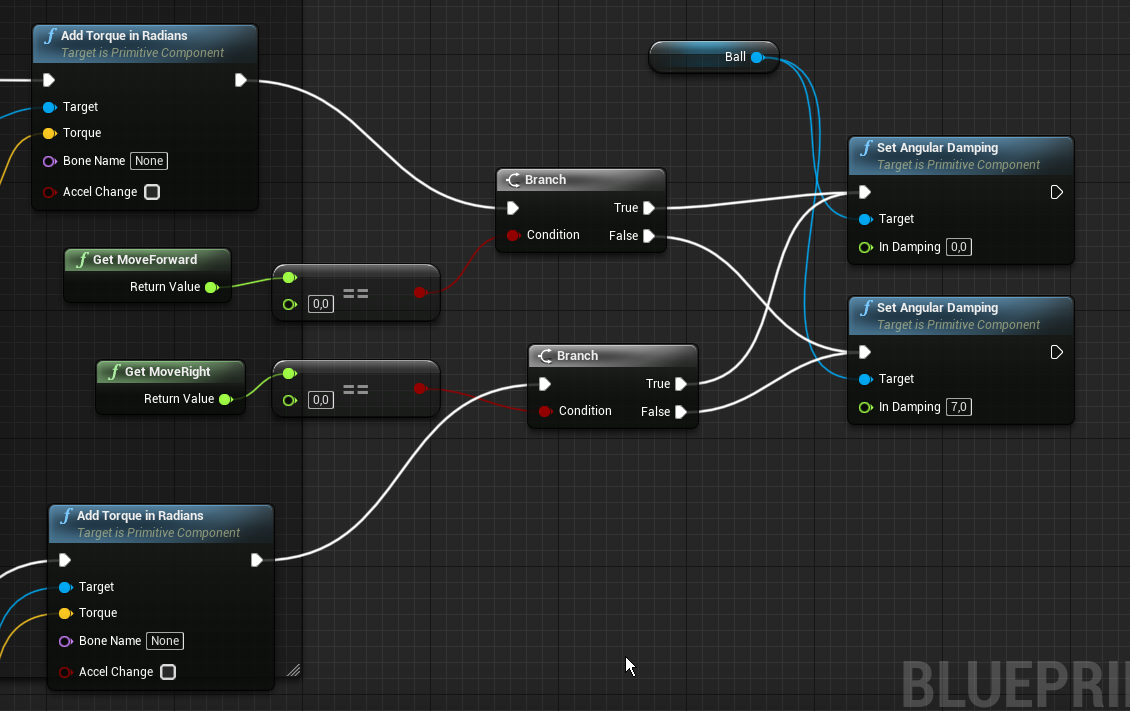
 fervent zenith
hello does anyone know how to make a button animation for example color gradient animation
 teal lantern
I'm really new to unreal. How would I make the thirdpersonCharacter camera always be behind the character instead of rotating based on mouse movement?
dawn gazelle
fervent zenith
hello does anyone know how to make a button animation for example color gradient...
Click this button on the widget designer then click on the created animaion and click the green + Track button
And select the widget component you want to animate
fervent zenith
dawn gazelle
And select the widget component you want to animate
thanks but this step i knew so far i want to know how i can make a animation where the colorgets a color gradient
and this as a animation
dawn gazelle
You mean like this?
 fervent swallow
hello! I got a teleport blueprint that just moves the player to the desired location whenever a collision happens. I would like to add a fade in between so that the teleport happens in a black screen that would be faded back to the game afterwards. I felt like it had to be a super simple task but for some reason it is not working as expected. Could anyone help me out?
dawn gazelle
Add the color and opacity track to your animation track and then place down keys where you want the colors to be.
fervent zenith
dawn gazelle
Add the color and opacity track to your animation track and then place down keys...
does the button have after this a color gradient
maiden wadi
fervent swallow
hello! I got a teleport blueprint that just moves the player to the desired loca...
Sounds like a simple widget with an animation. Play anim on construct, remove from parent on anim finished. Add widget when teleporting.
dawn gazelle
The gradient is created when you enter in the values for the colors in the keys. Like the above I've set for blue.
fervent swallow
maiden wadi
Sounds like a simple widget with an animation. Play anim on construct, remove fr...
oh I see, I thought I could easily do it with a "start camera fade" call
dawn gazelle
So at 1.25 seconds, it'll be blue and at 2.5 seconds it'll be green.
and it will transition between those two colors automatically.
maiden wadi
Possibly there too. Likely multiple solutions there.
fervent zenith
dawn gazelle
So at 1.25 seconds, it'll be blue and at 2.5 seconds it'll be green.
https://www.youtube.com/watch?v=geKFuA5SLlc&t=53s do you can watch it at sec: 10 and look at the progres bar that is what i want

UE4 Marketplace http://bit.ly/UE4SciFi01
Instagram http://bit.ly/GregWagnerInstagram
49 BLUEPRINT WIDGETS (INCLUDING ALL VIEWS AND MENUS OF DEMO PROJECT!)
43 MATERIALS (INCLUDING INSTANCES)
26 ICONS
- BUTTON SOUNDS, HINTS SYSTEM, MODULAR WIDGET ANIMATIONS AND MORE!
- custom widget transition animator, as easy as drag&drop
- custom animated m...
fervent swallow
I was trying this thing last @maiden wadi but it feels like the second start camera fade just does not do anything at all
dawn gazelle
fervent zenith
https://www.youtube.com/watch?v=geKFuA5SLlc&t=53s do you can watch it at sec: 10...
That's a fair bit more advanced. Might want to try #umg.
maiden wadi
fervent swallow
I was trying this thing last <@!143471961723371520> but it feels like the second...
Have you put a print there to see if that calls after the delay? Can't test anything at the moment from my phone.
trim shuttle
fervent zenith
https://www.youtube.com/watch?v=geKFuA5SLlc&t=53s do you can watch it at sec: 10...
its possible so in umg there are such things as sliders where the player can slide but I think if your loading screen is "fake" or not fake you use a animation for that
But honesly I just use thomber its the little circle
or 3 dots
fervent swallow
maiden wadi
Have you put a print there to see if that calls after the delay? Can't test anyt...
yes, I've used breakpoints and they get toggled. I just realized that the delay may be unnecesary though
fervent zenith
okay but i want to know how to make a color gradient animation for a button on hover
trim shuttle
fervent zenith
okay but i want to know how to make a color gradient animation for a button on h...
SO there is settings on buttons this and that there are 5 on clicked on realesed and one of them is on hovered open it and put it to witch ever color so on hover it will be that color
in sequencer there is a time bar with dots you can use them to say ok in 10 seconds start fading and the opacity will slowly but on time start decressing etc what ever you want
fervent swallow
fervent swallow
yes, I've used breakpoints and they get toggled. I just realized that the delay ...
oh actually it seems to be necessary
trim shuttle
from the video it looks like you may need 2 bars one inadvisable untell it does the orange thing.
maiden wadi
Does the teleporting work if you uncheck hold when finished, and remove the second fade?
fervent swallow
maiden wadi
Does the teleporting work if you uncheck hold when finished, and remove the seco...
yes, the effect is the same
the problem is that I see the camera moving to the new location, that is what i want to avoid. There is a fad that works before the teleport and it is better than nothing but still not exaclty what I want @maiden wadi
fervent zenith
trim shuttle
from the video it looks like you may need 2 bars one inadvisable untell it does ...
do you can send me a tutorial cause i dont know how to do this
trim shuttle
fervent zenith
do you can send me a tutorial cause i dont know how to do this
uhh sure let me see if i can find you any for loading bars
trim shuttle
fervent zenith
do you can send me a tutorial cause i dont know how to do this
Do you just need the loading bar or how to make a entire loading screen
fervent zenith
no just the bar with the color gradient and for the button to it would be very nice if you can help me
trim shuttle
fervent zenith
no just the bar with the color gradient and for the button to it would be very n...

Thanks for watching
This video is for developers who testing the map and fall off the mapp all the time!
Details:
Discord: Fatlesss#3562
Patreon :https://www.patreon.com/ue4fatlesss
I can sure I will help you with the color
go first make the bar then dm me when you need colors cuz I am at school
fervent zenith
oh okay
trim shuttle
oh also I am looking at that tutorial it may not be the best one for your situation
fervent zenith
yea i saw this video this video helped me not so far
 winged sentinel
quick question, im trying to figure out a way i can make an object over shoot its location and interp back
almost like a spring
or i guess in other terms give it like a momentum swing
im trying to make it so that when my object stops moving it doesnt just stop, it simulates it being "unstable"
@trim matrix do you mean a physics constraint
hows this look
😆
@trim matrix interesting ill look into it
 crimson swan
strange little networking issue i have. so i have a point light on a character that is initially turned off and on respawn i want it to turn on only for the local client
trim matrix
what would be the proper way if I wanna randomize a material on event start?
im trying to use enums somehow
but im kinda lost
crimson swan
in the player controller i have an event that turns that light on for the possesed pawn, but it also turns it on in the server. any ideas?
 vital pike
I've created a variable for my custom Player Controller Class but when I do 'Get All Actors of Class' then try to set my variable in a For Each Loop it won't connect up. Any ideas why this might be?
crimson swan
i honestly think that is the best method haha
trim matrix
I read something about using an array too
crimson swan
yea you can set up an array on your actor with a list of materials and just go through that
but then you have to set it up per actor. afaik enum is like a "global" array
at least to me
crimson swan
the set material node
trim matrix
switch on int?
but thats.. weird cause why use the enum then?
I dont want like 15 set material nodes if possible lol
crimson swan
oh wait wait wait i'm confusing enum with something else
there was another thing similar eeh let me look it up
trim matrix
Can I use enum and plug into the Material slot? haha
crimson swan
not tooooo sure looking it up xD
 mental robin
Is there a way to spawn an actor from another actor..and attach in the hierarchy the actor to the new actor so its apart of it
dawn gazelle
vital pike
I've created a variable for my custom Player Controller Class but when I do 'Get...
Game mode only exists on the server, so a multicast event within the game mode will only fire on the server. As you're getting all actors of a particular class, you shouldn't need to cast to that class again, as your array of actors should be of that particular class already. Finally, looping through the array, you appear to be setting the "Current Player Controller" variable to nothing on each instance of the MJ_PlayerController.
crimson swan
@trim matrix what you're looking for is data tables
you need to create a custom row type, i did it once for an inventory system i hardly remember how to work it now though tbh but i know it's what you need
trim matrix
Ive heard of those
crimson swan
go into blueprint-> structure
define your hting
and you make a structure and then use that structure to make a data table and you end up with something like this
@trim matrix
trim matrix
Yea i got it
now to find a way to get random data table row 😛
Something like this?
trim matrix
well you helped me out a lot 😄
crimson swan
no stress, i know how annoying it is to get stuck on simple things. I've lost more time trying to debug a tiny feature than implementing big things
trim matrix
eh its not really being stuck, im trying to broaden my knowledge by figuring out better ways to do stuff
you know a decent way to attach hair and cloths? 😛
modular characters maybe?
crimson swan
there were two ways afaik (that were better than 90% of the rest). So one way is modular which i think gives the best results but takes a lot of prep. Another is merging two meshes in the same pose together
so like your shirt/armor would be in the same t-pose as your mesh/skeleton and you would make it slightly bigger and parent it
something along those lines
trim matrix
like socket?
crimson swan
yeah
but not exactly, it was something like actually fusing two meshes together
i'm not at that stage myself yet but that's what i read up on it
crimson swan
the whole idea is it should if it's in the same t-pose as the base character. So by doing the black magic that is the fusing of the meshes your skeleton will move that shirt too, i'd really need to look it up tbh
trim matrix
hm ive never heard of that before 😛
crimson swan
skeletal meshes
that's the words i'm looking for
you make your armor pieces into skeletal meshes
trim matrix
yea so you got like a moving shirt, and then somehow add it on top? haha
crimson swan
yup
 restive ore
Is it possible to cast to an actor blueprint from the player blueprint?
crimson swan
player as in player character?
restive ore
Yes
crimson swan
is the other blueprint of the same parent class?
crimson swan
i mean it's highly situational but it depends how you're getting that actor in general. you should be able to cast it once you get it, idk how to explain this properly lol
like if you get it on overlap or something you can just cast it there you know?
restive ore
Sorry, I'm just learning blueprint so I don't know very much. I tried to cast it but didn't know how to get it.
vital pike
dawn gazelle
Game mode only exists on the server, so a multicast event within the game mode w...
So I needed to cast to my mj_playercontroller in order to set the current player controller variable. As you noticed I'm not setting it and the reason being that I can't connect up the array element to the Set node
maiden wadi
@vital pike Was that a question?
vital pike
It's a thread that's getting lost in all the chat 😆
crimson swan
in the player controller set up a multi cast event.
In the gamemode cast to the player controller and run that event
dawn gazelle
vital pike
So I needed to cast to my mj_playercontroller in order to set the current player...
The get all actors of class returns an array of the specific class you're getting all actors of. So in my example here, the variable that is being set is contained within the SuperPlayerController object. No need to cast.
vital pike
Ah right.. did not know that. Thanks
dawn gazelle
But then the question is, what are you trying to do exactly? Your player controller is defined by the setting in the game mode, so the player controller that the players would be using already are using the player controller defined:
Each player controller can already reference itself too, so you shouldn't need to set a variable in the player controller object to its own reference.
crimson swan
@trim matrix it's a lot simpler than i thought
@trim matrix So, you add a skeletal mesh component to your character, then asign a mesh to it (your piece of armor or w/e). Then in the beginplay of your character you do this
and voila you have a armor
trim matrix
lol thats it?
crimson swan
turns out it's really easy lmao
trim matrix
the target is the armor?
crimson swan
yeah
trim matrix
howd you get the obj reference for the armor piece?
crimson swan
yeah
trim matrix
i just wanna add hair tho do I make my hair a skeletal mesh? lol
i guess hair could be a socket but still
crimson swan
no for hair you would do a socket because it doesn't really bend
trim matrix
gloves and shit I guess
crimson swan
anything that would need to be flexible would be a skeletal mesh component anything else would be a static mesh
gloves, boots, chest etc would be skeletal and helm hair etc would be static mesh
trim matrix
fair enough
vital pike
dawn gazelle
But then the question is, what are you trying to do exactly? Your player contro...
I'm attempting to create a couple of his screens for each player, so I'm triggering the creation by using the EventPostLogin on the Game mode to pass each player to the player controller which then handles the HUD creation and adding to the player screen.
crimson swan
i think it would be a cross product of your two vectors
but i'm kinda rusty on my math tbh lol
@trim matrix
dawn gazelle
vital pike
I'm attempting to create a couple of his screens for each player, so I'm trigger...
Then create a function or event on your custom player controller class. On your PostLogin event, you get a reference to the controller that has logged in, which requires you to cast to the specific player controller, you can then use this to call that function or event you created.
crimson swan
not sure what the impact normal is
dawn gazelle
Might want to do it as an event that runs on client since it's UI related.
fast osprey
maiden wadi
Pointers are just small ID cards that point to a specific memory location where ...
Worked it out. It was a isinsession node that I hadn’t done a isvalid check on. Thanks for the help, greatly appreciated
winged sentinel
im reading about easing effects right now, is it possible for me to do an elastic easing effect after my interpolation for my weapon sway
crimson swan
it might be that the normal of the wall is actually facing upwards relative to the world, not 100% sure on this though
@trim matrix is your projectile just shooting off to the side?
aah okok
well glad you got it working
vital pike
dawn gazelle
Then create a function or event on your custom player controller class. On your...
So I tried that...
And this is on the Player Controller events
..but they are only being created for the Listen Server
crimson swan
@vital pike where is that post login event?
vital pike
In the GameMode
crimson swan
ok so that's a server call, all good on that front. change your player controller events to multicast
see what that gives
vital pike
winged sentinel
has anyone used tween before? Im trying to use it in replacement to the interp node
becasue it has elastic easing
but my object just starts jittering and rotating everywhere
crimson swan
@vital pike put self to the owning player thing
in your player controller
well event hit has an instigator so yes but not sure if linetrace triggers it
vital pike
Still nada
crimson swan
can you add a print to the end of the two events in the player controller
i wanna see if they clients even trigger them
crimson swan
in your postlogin can you print out what the new player actually is
it should print out as a player controller
it might be a none
oh wait you're already doing that
vital pike
yeah
crimson swan
can you do a regular old print and not a print append
simply because i can't tell if it's on server or client lol
vital pike
on the Event PostLogin?
crimson swan
ok so something really weird is going on
crimson swan
i only see it read out twice
but that's on the server it should also be printing on the client
crimson swan
put the print nubbiz right as the event starts
i'm pretty sure you're getting an error down the line and the event is triggering just fine
vital pike
So you suggest to put the print Nubbiz right after the OnPostLogin? or after the Custom Events on the PlayerController?
crimson swan
custom events
in your custom event the "set" isn't actually being set
try a printout of the "return value" from create inventory hud widget
vital pike
Same result as before when putting Nubbiz right after the CustomEvents
crimson swan
does your client get the print though
vital pike
nope
crimson swan
ok what if you simply disconnect everything after the print so it just executes the print
because i have literally the same setup where i have a custom event on Playercontroller being executed from gamemode
vital pike
Same result
vital pike
ah.. thanks for trying though.. really appreciate it
I've been at a loss for about 3 evenings now
dawn gazelle
vital pike
And this is on the Player Controller events
You need to set these events to Executes on Client
dawn gazelle
Multicast executes on server as well which can cause errors as the server is not the client that is hosting the HUD.
crimson swan
true but afaik the player controller is 100% clientside so it shouldn't be an issue
i mean worth a shot at this point
the weird thing is he's not even getting a printout on a multicast from gamemode to his custom event
vital pike
You mean I should set each of the custom events on the PlayerController to RunonOwningClient?
SUCCESS!
Thankyou
dawn gazelle
Yes. Player Controllers do not exist on other clients. Multicasting an event that is referencing a player controller will cause errors on all other player controllers as they are not aware of the other player controllers
crimson swan
very very weird
i legit have the saaaame multicast setup and zero errors on clients
glad it worked though
vital pike
crimson swan
yup seems to be working fine, i still don't get why it wasn't working before but hey alls well that ends well haha
vital pike
Really appreciate all the help guys.. Trying to find a bug in a buggy system is a brain melt
 tepid marlin
im having a really hard time trying to work out a camera setting that does what i need it to... if a player gets attached to a socket of something that's moving, how do i get the camera to both follow the direction the player is facing so looks forward and turns with it, but also allow the player to turn their head and look at something as they go past.... right now all that happens in the camera stays essentially stationary looking where ever it was looking last and the player is rotating around...
iv managed to use a Rinterp to get the camrea to follow the path and sort of allow movement but with it snapping back, it makes looking feel clunky... what i want is to have it so say your looking forward then take a 90 degree turn, if ur looking forward ull just go round and still look forward, but if you look 90 degrees to the left then turn, i cant get the camera to keep that 90 degree offset, it only snaps back to as if i was looking forward again
 crimson swan
you could try setting your camera component to match rotation with your actor on tick
in player controller
crimson swan
noice
 crimson swan
very very nice runescape vibes you got going on there
now all you need is like 4 frame animations and you're golden
crimson swan
i actually like it lol, my game is using all infinity blade stuff because my modeling skills are potato but anyways looking good!
crimson swan
i wish there was a guide to making some nice filters for textures because i have no idea where to even start
like blueprint wise i don't know what nodes in materials give me cartoony effects etc. all iv'e managed to make so far are basic textures and panning textures.. Tried looking up tutorials on texture effects and couldn't figure anything out
trim matrix
its scary maths as far as I know haha
crimson swan
i mean this belongs more in the graphics chat but as far as i'm aware you can't fundamentaly change the material with the textures in blueprint. You have to have a baseline and you can modify it in blueprints no?
like say i have a hyper realistic piece of armor textured etc i couldn't turn it into something stytlized with blueprints
tight schooner
Material node graph and blueprints are different things. At best you can use BP to set parameters on materials
trim matrix
im talking about shaders btw
crimson swan
ah didn't even know you could make shaders with bp
that's black magic to me for now
trim matrix
i mean you can? if you create a whole bunch of parameters I guess,, but then youre still making the material right? 😛
@crimson swan what kinda game you making?
show me something 😄
tepid marlin
not sure how to get that to work... i seem to have so many varying results be it the player spins around as the socket moves so its like its not getting any infomation from it, or ill have the player sit but the head cam just spins around, or itll end up being locked forward and i cant move head at all...
 spice sequoia
What is the most efficient way to trigger my game based events that need to happen at specific times during a game - for example at 1 minute into the game a light turns on, or at 5 minutes into the game a rocket launches and so on. Ideally wanted all these to be in a single running timeline for the entire level to keep all the timed events in one place but was not sure if this is good for performance - having a constantly running timeline? Or is it best to use something else like a timer or a series of delay nodes to keep track of triggering the events?
mental sail
winged sentinel
has anyone used tween before? Im trying to use it in replacement to the interp n...
You can use a timeline with custom curves as well
winged sentinel
mental sail
You can use a timeline with custom curves as well
I’m really just using it to get the elastic effect
Is there a way to do with with interp?
tight schooner
@spice sequoia One timeline isn't going to affect game performance. If you're going to make a bunch of levels using that system, I'd optimize for the least pain-in-the-ass way of doing it from a level design POV. (That said, I don't know what the "best" approach would be, design-wise.)
spice sequoia
Ok thanks - so out of interest, anyone got any tricks for how they plot out time based events on a level. I was thinking about having one timeline with multiple event tracks, each one triggering a single event - so I can easily tweak the trigger time of each event by adjusting that tracks keyframe. Anyone got any other suggestions for better ways of plotting out all the level events they use?
tight schooner
If it's a truly rigid, non-interactive sequence of events, I wonder if you can use Sequencer... (I never looked into it so IDK)
unique harness
tepid marlin
not sure how to get that to work... i seem to have so many varying results be it...
You should have a spring arm attached to your character mesh with a named socket and the camera attached to the spring arm, is this how you have it setup?
tepid marlin
yes the camera is attatched to the head socket,
 open crypt
rather than mess with trying to make a "falling fire debris" emitter by messing with cascade/niagara, I figured it would be simpler to just attach a fire emitter to a hidden sphere and just drop it - it works but I am getting some weird artifacts going on - what am I doing wrong here? I'm trying to get the sphere to spawn in a random location of a collision box, then get deleted, then loop (via a timer started on begin play) take a look at this artifact and what do you think I'm doing wrong?
that sphere is visible just to make it easier to see what's happening
 sour ridge
I am trying to fix an issue that I don't know how it happens
https://gyazo.com/fac39d7953bc0718edd797fd361f85ac
If you check the picture above, this is a simple print loop so I can see if the array works.
When Drop Table Uncommon is plugged in, I can view all the Name (On the right) in the print string.
https://gyazo.com/4b2c75d8c0861c2fb4c59a98176e48d7
If you check this picture, this is what the variable Drop Table Rare is.
Drop Table Variable print everything as Empty while Drop Table Uncommon print normally. I can't figure out why. Anyone has a clue why the 2nd array doesn't even work?

 dawn gazelle
sour ridge
I am trying to fix an issue that I don't know how it happens
https://gyazo.com/f...
dawn gazelle
sour ridge
I am trying to fix an issue that I don't know how it happens
https://gyazo.com/f...
Do you have something "setting" Drop Table Rare anywhere? Like maybe it is being overwritten before this event is being fired?
sour ridge
I dont set the variable anywhere else
The default value that I wrote is the only thing that is "setting" the variable
open crypt
sour ridge
The default value that I wrote is the only thing that is "setting" the variable
Set a break on the for loop
F9
and hover over the rare array and tell me what it says
sour ridge
you mean breakpoint like this?
https://gyazo.com/25db5f1b105ea7b2201972c01a7e2dff
@open crypt
 open crypt
sour ridge
you mean breakpoint like this?
https://gyazo.com/25db5f1b105ea7b2201972c01a7e2df...
open crypt
sour ridge
you mean breakpoint like this?
https://gyazo.com/25db5f1b105ea7b2201972c01a7e2df...
yes
sour ridge
It doesn't show me anything in the blueprint, Blueprint Debugger
open crypt
so, that should STOP your game when you hit play and fire that event, and it should show you that blueprint
open crypt
open crypt
so, that should STOP your game when you hit play and fire that event, and it sho...
so, that should STOP your game when you hit play and fire that event, and it should show you that blueprint
sour ridge
It did not stop when it got to the event. (The event happens when I kill a monster). I looked up in google how breakpoint works, and it didn't stop or even put the Red arrow on the breakpoint
 orchid path
Hello, maybe someone here might know, Im creating a game and would like to have an online leaderboard for my scores. I had found an amazing free plugin for this called EpicLeaderboard but it is only for 4.25 and I have already built my game in 4.26. I tried to track down the maker of this plugin to ask for an politely for an update but, discovered he had passed away in 2017.
R.I.P. Kodi ❤️ Does anyone have knowledge of another one similar in its easy implementation and maybe zero cost or some sort of method of building one? I can't seem to find an easy to follow tutorial for what Im after. Im making the game for PC not mobile.
Thanks for your help
 empty current
Hello, I’m trying to set my mouse location to an actor location, but can’t find how. Anyone ?
sour ridge
@open crypt I decided for fun to put the names of the 2nd array into the first one which was working. Weirdly monsters does drop the items from Drop Table Rare
https://gyazo.com/17ea5c8132f5335d9c65e7d9993b7e29

so the out of the 4 Drop Table (Rarity) Array(Name) only 1 work
Printing Drop Table Uncommon(Which was working before) Now shows all the new names.
 visual elm
Hi 🙂 I had a beginner question regarding BP's. So in my current flow, I have a boolean in my gamemode, off which I want to fire off a widget blueprint (that succeeds the main menu widget bp).
What I'm doing is, I have one UI, and another UI which starts the timer, I'm setting the second UI to start when my first UI switches off.(switching the bool in my first UI's graph, by accessing it through a cast to a gamemode). Sorry I tried my best to explain it lol.
 mighty fable
So this is currently my movement code and I don't know how to implement a sound to activate only when I am pressing the button. I tried to follow along with the video but I do I have to make a gate for the W, A, S, and D keys to all play a 2D sound and then stop when released?
visual elm
Do you want to spawn the sound just once at keypress or do you want it to keep playing as you hold?
If it's at once per keypress, you can just attach a keypress Event (based on your bound hotkey) -> SpawnSoundAtLocation.
visual elm
I think even connecting SpawnSoundAtLocation to your AddMovementInput should work. Sorry, I'm trying to help, but I'm 90% C++ guy here, BP's mostly scare me.
teal lantern
I'm really new to unreal. How would you make the camera always be looking the back of the third person character controller?
 weary jackal
teal lantern
I'm really new to unreal. How would you make the camera always be looking the ba...
weary jackal
teal lantern
I'm really new to unreal. How would you make the camera always be looking the ba...
Turn on yaw
teal lantern
weary jackal
Turn on yaw
where's that?
weary jackal
In your player bp. Click on self on components. You will find 'use rotation yaw' in details panel
teal lantern
thanks!
 slate sentinel
I'm new to unreal engine and i was trying to implement something in alsv4 (advanced locomotion system v4)
i want my character to start ragdolling if its in air for more than 5 seconds
tight schooner
@mighty fable if you're using input axes, they each create a Get [name if your axis] node. If by "pressing a button" you mean the axis is nonzero, you'll have to continuously check the state of the axes.
For example, get axis -> absolute value node -> is it greater than [your preferred threshold]?
Make the exact same node chain with the other axis, and join the booleans with an OR node. Then check it on Event Tick or a looping timer event (depending on how responsive this check needs to be) and then you basically have a way to determine what the state is, and if you save it to a boolean variable, whether it has changed (by comparing the current state to the previously saved state, and you can fire events from there too).
 elder gulch
Hello, i need some help about unreal engine blueprint system, i did a health system but it goes under 0 and i tried a lot of ways but i still dont know how can i stop it i do need help ty :)
elder gulch
i did like if the current healt is less / equals to 0 use as condition but the problem is there is a max health protection too and that works but this one isnt
it breaks for some reason
 dark crow
elder gulch
dark crow
elder gulch
hmm
lemme give it a try
and you connect the clamp to the current health?
set current healt
dark crow
Yeap
dark crow
You need to clamp the Set no matter what
Or it will go under
Clamp is setting a range
elder gulch
i do have a checkpoint system currently so i think of if the character healt equals to 0 teleport back to checkpoint
dark crow
👌
elder gulch
ty :)
this is my third day on unreal so ima bit unprofessional sorry for making you tired :)
dark crow
Asking never hurts, once you learn it, you always know it ^^
elder gulch
hehe :)
ty for the help
is this a bit mess for the death command?
are there any easier way?
trim matrix
https://i.imgur.com/zRgie5e.png pawn is a ball.
when i press w or s(moveForward) things behave correctly, but if i press a or d(moveRight), player does not behave right.
a and d leads leads to very fast spinning of the ball.
send help. https://blueprintue.com/blueprint/lsbp8-h-/
 boreal tusk
Hi, trying for a while now to spawn geometry attached to one another while they move using "ProjectileMovement".
On trigger, I spawn a new tile using the position of the last spawned objects attach point (arrow component.).
The initially spawned tiles on load are perfect. But all the ones that get spawned later on through event overlap are not precise & overlap.
boreal tusk
Tried spawning not on overlap but checking if the last attach point x axis float == to 0. Still the same issue. the faster the tiles move the bigger the overlap.
trim matrix
Uhm how do you check if a variable is equal to null?.. My variable is a Geometry struct.
boreal tusk
@trim matrix did you try the is vallid node?
trim matrix
boreal tusk
<@456226577798135808> did you try the is vallid node?
Which one? There's like 10-15 isvalid nodes
boreal tusk
That I don't know 😅.
cold raft
trim matrix
Which one? There's like 10-15 isvalid nodes
is your Check Context tickbox on? That limits the list of things to what you are dragging from.
- I meant the "Context Sensitive" checkbox
boreal tusk
I also tried to use the construction script. sending out a ray from origin & making the hit location its own new world location.
Parts still overlap.
elder gulch
hello, can someone help me with how can i unspawn my spawned character after i die
and how can i re enable trigger box after the death
i did open level and added current level and since i have checkpoints it worked
 versed tinsel
@elder gulch to kill the character, use "destroyactor" node.
to spawn it, use "spawn actor from class" with the needed parameters and if thats your player, use the node "possess" in order to move and do stuff with the actor again
elder gulch
versed tinsel
<@!373178387373621259> to kill the character, use "destroyactor" node.
to spawn ...
aight tysm :)
versed tinsel
np, let me know if it worked for you
elder gulch
versed tinsel
np, let me know if it worked for you
aight :)
@versed tinsel i did it like this
bcs i was triggering box several times so it killed trigger box and the first one killed the ai
elder gulch
aight lemme give it a shot
open crypt
sour ridge
<@!273265779175194624> I decided for fun to put the names of the 2nd array into ...
if the break doesn't fire that means the event didn't fire
elder gulch
versed tinsel
now try respawning it
how am i going to make this work ive never used this
i will add 5 second delay and the char will respawn again
it wants spawn transform but idk how to get it
is it the location??
versed tinsel
elder gulch
is it the location??
yeah
spawn transform is the exact location, meaning location, rotation and scale
so you can right click and "make transform"
then add the parameters you need
elder gulch
aight lemme try
ok soo the char spawns but without any animations or anything
i will try to upload the bp of the char
aight works now how can i get back the trigger box to work?
with the same tactic?
fsr i cant spawn the trigger box
bcs i destroyed it at the first state
nope
@versed tinsel
versed tinsel
the problem is that you cant spawn the triggerbox?
why do you destroy it again
also do that if u wanna destroy it
the triggerbox you referenced is destroyed
elder gulch
i want to destroy the trigger box bcs i want it to triggered only one time after several seconds i want it to get triggered again
elder gulch
versed tinsel
why do you destroy it again
there is 2 destroys one is for the character the ghost and the second for the trigger box
versed tinsel
I would suggest you not to destroy the trigger box, instead disable the collision event
the triggerbox's event is ActorBeginOverlap right?
elder gulch
yes
elder gulch
versed tinsel
I would suggest you not to destroy the trigger box, instead disable the collisio...
how can i do it?
versed tinsel
Ill show you what you can do
tame mist
Any idea how to remove camera aspect ratio when resizing window?i mean the black borders
versed tinsel
tame mist
Any idea how to remove camera aspect ratio when resizing window?i mean the black...
actually hmm go to camera settings and check anything about aspect ratio
 velvet kayak
I need help with buttons on widgets. I have this menu widget that I want only one button to be toggled but i'm not sure how to toggle off the previously pressed button. Can anyone help?
tame mist
versed tinsel
actually hmm go to camera settings and check anything about aspect ratio
there is option of constrain ratio that doesnt fix the issue
elder gulch
versed tinsel
(cankill? is true by default)
oke
versed tinsel
tame mist
there is option of constrain ratio that doesnt fix the issue
if the camera settings dont work, only other thing i can think about is your UI
tame mist
is there any alternative for using camera
versed tinsel
check its resolution, check the objects in the UI
versed tinsel
tame mist
is there any alternative for using camera
wait hold up a minute
you use a camera for the UI?
tame mist
versed tinsel
check its resolution, check the objects in the UI
i see if i use pawn there is no aspect ratio issue
but i dont know how to animate that pawn
or play animations with that
versed tinsel
I dont understand
tame mist
well its not even animation actually , i just need the viewport to move to certain location at button pres
versed tinsel
its like a 3d main menu?
tame mist
versed tinsel
its like a 3d main menu?
not 3d actually , just if i click buttons the view will move to different locations
elder gulch
versed tinsel
<@!373178387373621259> something like that
i did like this
but i think i did it wrong
versed tinsel
nono dont destroy the actor
as i said its okay to leave it
it just wont destroy the player for an amount of time
versed tinsel
@tame mist yeah idk the blackbars is either the camera problem or the widgetblueprint
tame mist
any way to animate /move viewport other than using camera /pawn/actors anything?
versed tinsel
@elder gulch wait I think i got confused lol in the destroy actor you should get a reference for the player sorry about that
elder gulch
versed tinsel
<@!373178387373621259> wait I think i got confused lol in the destroy actor you ...
owh
versed tinsel
wait but you do destroy it
the second one shouldnt be neccessary
however, use destroyactor only if CanKill? is true
and not before that
elder gulch
versed tinsel
wait but you do destroy it
i destroy the ghost char that will attack me
versed tinsel
ah okay
elder gulch
versed tinsel
so... I guess thats okay?
elder gulch
idk why but trigger box only works 1 time
and gg
cant trigger for the second time
but the char destroyed spawns back
versed tinsel
check why it cant trigger, is it because of the CanKill? branch?
elder gulch
hmm
fun fact: i wrote this to level bluebrint
tbh i dont really need the trigger box to get used several times bcs i destroy the gost char after re spawn at a diffirent location and make it get triggered by a diffirent trigger box
versed tinsel
so its okay?
as long as the variable works as intended and and box doesnt get destroyed, it should work
elder gulch
versed tinsel
as long as the variable works as intended and and box doesnt get destroyed, it s...
aight
@versed tinsel are there any way that i can spawn my char at a diffirent level
when i get a checkpoint
versed tinsel
uhh you can trigger the checkpoint and make it so the the character will travel to another level
elder gulch
like i got my checkpoint it will tp me to a new level at the same location after i die
versed tinsel
ohh
yeah what you can do is, when you get to a checkpoint, create a variable which changes the text every time, for example when you get to checkpoint 2 which should open level 2, set the variable to "level2" (the level name) and then every time you die itll automatically travel you to that variable
BeginPlay > open level - level's name is the variable, the variable changes every checkpoint
tame mist
can i set viewport to anything else other than camera and pawn?
elder gulch
i did a mechanic where it automatticly reloads the current level when i die but i want to make the game a bit interesting like every time i die i will spawn from my last checkpoint at a diffirent level but small changes at the map etc
so it will automatticly tp me to the same location but at the diffirent map
but only the checkpoint location not the other locations
versed tinsel
so you dont wanna manipulate the level, but only the location in the level?
elder gulch
no i want to manipulate level but with the location too
like when i get my last checkpoint after die the game will start at a diffirent map but at the same location where i got the checkpoint
and there will be several checkpoints thats why i want to understand how can i make my main char spawn at that locations
of the other level
versed tinsel
okay so same thing have a variable set to the checkpoint location
have a variable for where on youll spawn and what level youll spawn in
change it according to the checkpoints
 tough mountain
Is it possible to run SQL-like queries on Datatables? Getting rows by row names is pretty limiting
elder gulch
versed tinsel
change it according to the checkpoints
aight
i'll try
if fails etc i'll ping :)
versed tinsel
sure, gl
elder gulch
thx
 mental cliff
Hey, Is the Assetmanager bugged in 4.26 ? I managed to register my master blueprint and get some child blueprints while I search via get primary asset Id list. A few Minutes ago it got all classes. Now it does not it just gets some and prints out empty class display names. It feels random - how does the asset manager know / enlist new assets?
Or when does it do that. When does it fetch new assets
mental cliff
Hm there are quite a few thing happening I am not sure what to do about it. Guess thats a question not satisfying much to ask then
Seems to fix it. But I have a hard time to find out what that does and how to do it otherwise. I am currently at the rabbit hole of what asset ID is and found weak hints of how what to do but not a solution. If someone can help me dig deeper into this thanks in advance
🤦♂️ Editor restart broke it again. Okay...
elder gulch
RIP
mental cliff
Funny enough there was a Stream for the Asset Manager just yesterday. Only uploaded on Twich which loads meh. But all I wanted is to get all my child blueprint classes of one class. And while that is somehow possible with the asset manager I guess its not really intended to list your assets that way? Strange. I don´t get it. I like work Automation that is all I want. Wether its making a Data Table just by right click on assets and say " please enlist this in this datatable thanks " or if the asset manager would do that - either way, I expected to find a way. I guess only c++ stuff makes this little work improvement switches possible...
 tribal elk
Hi! I'm trying to make a sequencer play when launching the build. I've done this for now. It works perfectly in the editor, but in the build, the camera transforms do not work (the cameras stay still), while the other transforms work fine. Am I missing something here?
 fast orchid
can I have an array of objects? I want a variable named "AgentList" which will store all the agents in the game in smaller objects (im coming from javascript and python, I don't know if this is possible)
maiden wadi
@fast orchid In c++ or Unreal Blueprint in this case, you make an array of pointers that point to the actual object.
fast orchid
so if I want to make an array of agents it would be a string array to store the data?
maiden wadi
Not quite. Do you know what memory pointers are?
fast orchid
no...
 willow phoenix
any ideas why my array contains a lot of 0 ? I thought i just add 1 .- 6 ?
maiden wadi
@fast orchid In UE4, you have Memory pointers which are basically small 4byte variables that point to a location in memory. When set correctly, it would point to an actual object. So instead of having an actual array of objects, you'll have an array of pointers that point to objects.
What are your Agents? Sounds like a character class.
fast orchid
im making a top down game
 solemn parcel
Hi, is it possible to add an initial Float Value to a timeline ?
I mean, an Input value
tight schooner
Don't think so, but nothing stops you from doing some math on the timeline's output
with e.g. a custom variable
 white lynx
Is there a way to "for loop" a Map in blueprints?
solemn parcel
The point is pretty simple, this is a countdown of -1 each 1 sec. I just want to give more smooth subtraction.
tight schooner
@fast orchid in BP-speak I believe they call those object references. For example, GetAllActorsOfClass will spit out an array of references. Like a pointer, it's not the thing itself but a reference to it, which you can use to manipulate that object in another BP.
maiden wadi
@white lynx There are some helper functions for them. But if you need the full map, you have to break out both arrays and loop over one while using the indexes to access the other.
white lynx
@maiden wadi Thanks. to C++ it is then
maiden wadi
Yeah. Maps aren't very Blueprint friendly.
white lynx
I still long for the day where TMaps get native replication support
solemn parcel
I've tried connecting the pin to the substracted number, with a timeline of 0 to -1 in 1 of lenght, but it just doesn't do it.
tight schooner
@solemn parcel if you're trying to make a smooth ramp from value1 to value2 with a timeline, use a Lerp (linear interpolation) node and have the timeline drive the "alpha" from 0 to 1
tight schooner
Just make sure the lerp A & B inputs are static numbers, i.e. not being set by the lerp while the lerp is using it.
fast orchid
how can I set different values in the object which is inside of the array?
or how do I set the array's default to something like this:
{
name: "agent-name",
damage: "agent-damage"
},
{
name: "next-agent-name",
damage: "next-agent-damage"
}
tight schooner
@fast orchid get an array element, pull the output pin and you should be able to do stuff
fast orchid
I know that but inside of the "set AgentList" node it only lets me put inside strings
not an actual array
tight schooner
If the references are of a specific class, you should be able to manipulate its variables and call its functions and stuff.
solemn parcel
@tight schooner I've did what you said, but for some reason, with the timeline set to 1.00 of lenght and goes from 0 to 1, the smoothing part works, but is too fast. Isn't 1.00 lenght supposed to be 1 sec ?
tight schooner
@solemn parcel Yeah, a time of 1 should be 1 second. What does your BP look like?
solemn parcel
@tight schooner
tight schooner
@fast orchid is each "agent" supposed to represent an actor spawned into the world?
solemn parcel
But for me it seems a lot of coding for a simple smoothing
fast orchid
tight schooner
<@679469541167988798> is each "agent" supposed to represent an actor spawned int...
the agent should be an object which has data stored about it
I want the agent to have an ability key and the value would be a certain ability
tight schooner
@solemn parcel yeah, you're setting the variable while the lerp is using it. You're effectively changing the inputs of the lerp in every frame, which is why it happens too quickly
Like I said earlier, the lerp needs two static numbers for the timeline to ramp between
solemn parcel
Why aren't these static ?
AH
nvm
well no I still don't get how to do this in an other way
oh wait
tight schooner
You can't set the thing feeding the thing. It's messy but you can make yet another variable for the purposes of feeding the lerp.
... that you set just prior to running the timeline
tight schooner
Make a new variable called Dash Cast Cooldown Timer 2 or w/e and set it before the timeline with the value of the original
And use that new variable to feed the lerp
Like I said, it's messy. But idk a better way offhand...
solemn parcel
okay got it
dawn gazelle
fast orchid
the agent should be an object which has data stored about it
Is this sort of what you're looking to do?
solemn parcel
@tight schooner Thanks a lot, appreciate it
I'll enjoy asking : I don't like Timers by the simple fact that I don't know a way to make them start right away, and not after the Set Time. There is a way to do this ?
dawn gazelle
?
solemn parcel
@dawn gazelle Ofc, I never exec the event after the Set Timer. Reason why. Thanks !
fast orchid
dawn gazelle
Is this sort of what you're looking to do?
what is that object type?
 true valve
So I'm trying to sit on a chair, but the collision won't let me. Any idea how to bypass that?
trim matrix
turn off collision?
true valve
I only kept visibility on chair so that I can interact with it.
It's the capsule. https://gyazo.com/9033dbc1f533fe175888a3b5c1199132


 untold oriole
Anyone know how to make the vr origin follow the player camera?
I changed the default blueprint to allow rotating your character with the right thumbstick rather than using the teleporter.
But, I'm having an issue where moving away from the vr origin messes with the rotation. Instead of rotating in place, you end up rotating around the vr origin, which stays stationary.
dawn gazelle
fast orchid
what is that object type?
What I did was create an actor class called "Agent". If you're trying to reference an object, you normally need to spawn it, but if you only want the class to hold data and grab the class defaults then you can use a class reference rather than an object reference. Then I made it into an array of Agent class references.
fast orchid
thats what I have right now
it works well but how can I access a variable inside that class or run a function inside of it
maiden wadi
@fast orchid You can't run a function on a class. And the only variables you can access are class defaults. For anything else, you need an instance of the class.
honest raven
Unreal is saying this is an infinite loop, but shouldn't reach run of the Reset_Deck subtract 1 from the index value, eventually making it 0?
think im missing something, added a delay which removed the infinite message but the number isnt going down with each run. hrmmm
maiden wadi
@honest raven Blueprints have a hard time detecting stuff like that sometimes. Alternatively, if that's how you want to logic it, I'd recommend just using a WhileLoop. While DiscardPileCounter > 0, AddToArray, Then -- DiscardPileCounter.
 earnest tangle
It definitely looks like it'll recurse forever
if you follow the logic, it goes Reset deck -> branch -> discard pile -> reset deck -> branch -> discoard pile -> reset deck...
it will never reach the second part of the sequence which would stop it from recursing forever
honest raven
yeah, each new run should also Set the discard pile number down 1 so it starts at 13, first set to 12, then 11, etc. but its not so im missing something somewhere
maiden wadi
Oh. I also didn't notice that he's not checking DiscardPileCounter.
You're checking the array length, not the counter, and you're never removing anything from the Array.
maiden wadi
But even still. WhileLoop does the same thing and it's meant for it.
honest raven
well actually the length of the discard pile array starts at 0 and gets 1 added to it each time a card is spawned and removed, so it starts at 0 and goes up to 13, and then i have it set to automatically start the resetting for testing, so it should start at 13 and start going backward from there, grabbing the cards added at those index values and adding back into the spade array
maiden wadi
Right. But in this logic here, you're just setting DiscardPileCounter = 13 -1 over and over.
honest raven
gotcha, yeah that was it lol. these things can make you feel so smart and so dumb soon after
is there anyway to see the whole value of an array? in debug i can watch the cards being moved around but it stops at the bottom with a ..... instead of just showing the rest.
trim matrix
Can i somehow change the location of an actor inside of it?
I have a chair i want to set the location infront of it
Maybe with a component?
Empty static mesh or something idk
 worthy frost
i am confused what you are trying to say
maiden wadi
GetActorLocation is the same thing as GetRootComponent->GetComponentLocation. It just returns the world location of the root component.
maiden wadi
SceneComponent, probably.
 ocean bluff
Hello! I would like to know how I can play an animation (for the jump pad) every time the character steps and bounce on the jump pad. I don't know which nodes is appropriate for the blueprint I have.
worthy frost
your animation BP should check if the player is in the air (has the movement mode Falling) and play falling animation, for the actual jump animation you can either play a montage, or set a bool, (or check for Z velocity increase)
worthy frost
well your actor is not a chair then
ocean bluff
haha sorry I'm new here, @worthy frost so to play this animation I have to create a blueprint for it?
worthy frost
not for something like that
ocean bluff
That's the mesh that has the blueprint I sent earlier
worthy frost
i thought it was the player, but for that you can set the animation on the skeletal mesh
has to be skeletal mesh for animation
then you can call SkeletalMeshComp->PlayAnimation
ocean bluff
something like this or am i missing something?
ocean bluff
oooooh
trim matrix
any idea?
trim matrix
forgot to set the correct bbkey in the behaviourtree👀
 marsh seal
[Help] is there a variable i can access to know if somethings happening in the editor or runtime??
ocean bluff
@worthy frost Thank you!
worthy frost
@marsh seal not sure if there is a good way in BP
marsh seal
i swore there was but now i cant find it
like.. in the construction script i thought there was a bool
worthy frost
im looking now
 soft orbit
In a shooter project, the socket for the equipped weapon will not stay in the necessary location between animations. I know about hand IK, but i mean when you go from an say "Aiming" anim to an "Idle" anim. Weapon is straight on and perfectly place in Aiming anim, but you go to idle and its all messed up. What is the best solution to ensure the weapon behaves between transitions?
I was thinking of setting a socket transform for it for each animation but that seems like an extreme solution
marsh seal
could try re parenting the socket? just a shot in the dark, sorry if thats not helpful
soft orbit
I think im gonna revisit IK
I believe that could be a solution ive just been doing it wrong, not too versed in it
marsh seal
check out control rig if you're using a recent version of the engine
i watched the live stream on it and its pretty beefy.. performant too
 bright frigate
Guys I have like 6 cats spawning when I play in editor but have no idea where they are coming from. Not in World Outliner and Im not spawning them in a BP that I can find. How do I track this down??
earnest tangle
Really, actors that you spawn that haven't had their components initialized yet will pass an Is Valid check? That's kind of strange 🤔
earnest tangle
bright frigate
Guys I have like 6 cats spawning when I play in editor but have no idea where th...
Detach when you play and click on one of them, this should select it in the world outliner
 cinder shell
hey, guys! I can someone give me advice please? I have a blueprint class with cargo container and it have a widget component with UI element. That element should display the weight of the container. So I can't figure out how can I cast to container blueprint from UI blueprint to get this value?
earnest tangle
It would probably be easier to set it from your blueprint that has the cargo container and the widget component
for example, if you create a variable in your widget, you can then do widget component -> get user widget object -> cast to YourWidgetThing -> set variable
cinder shell
ah.. This could work! Thank you so much!
 gusty cypress
As a beginning developer would using a fake loading screen be acceptable?
ive looked online and they all use level streaming with 1 parent and that seems expensive to me
 prisma stag
Hello, Im tring to do a LineTraceForObjects with the object type pickup but it doesnt work. The line is never created and even if I am looking at an actor of object type pickup, it doesnt work.
Here is one of my pickup actors mesh collision.
 proven mason
How do I rotate a mesh by certain amount of degrees instead of towards a certain orientation?
prisma stag
proven mason
How do I rotate a mesh by certain amount of degrees instead of towards a certain...
AddActorWorldRotation or AddActorLocalRotation
proven mason
okay I'll give that a try
 lean inlet
Here there I'm a little confused as to what i am doing wrong. I have a blueprint where I subtract the number of current actors in the scene from the number desired to have my blueprint spawn the sum of that number in a for loop. But I have ran into a problem with any number getting subtract from 0 results in 0. Am I missing a step to my blueprint?
tame mist
which other classes can be set to viewport in ue4?except camera ,character,pawn class?
proven mason
alright thanx @prisma stag got it to work the way I want it to.
prisma stag
proven mason
alright thanx <@!324230048506707968> got it to work the way I want it to.
no problem.
tame mist
can someone help me in DM?
 keen notch
I'm quite the beginner in ue4, and development in general. I'm finding building and coding thr world achievable, though it's taking a lot of learning. What seems more daunting to me is the optimization later. I've heard things like, rainbow six siege only renders every other pixel, and 'guesses' what it should look like. Such things seem like crazy wizardry to me. How easy is it to optimize through bp after the game is largely coded, or am I limited to just how non-complex I can make the systems?