#blueprint
402296 messages · Page 623 of 403
 brittle reef
 fossil peak
@faint pasture When I'm actually making the BP
@faint pasture Thaaank you so much! For tilting me the right way I made it thanks to you
 shadow saddle
so i have this
when right click will create widget
it did created the widget but
it shows up over there instead of
the location of the mouse
 proud hull
Try casting instead:
proud hull
Save a reference of the object when it is spawned.
You can try adding and using tags
Casting does test its class, same thing
If cast fails, it is not of whatever class you tried to cast to
 solemn parcel
So, I've got different types of projectiles, on which I add, on the Parent Begin Play, an Actor Component, that acts like a modifier. On one of the Child Projectiles, the Actor Component takes effect only the first time it is spawned, until Destroy Actor. All the following spawned won't take into account the component.
This is the BP of the Projectile Type that dosn't work properly.
It's just a projectile that doesn't collide, and apply damage to all actors in range each 0.5 sec.
 zealous quarry
Quick question: Is there some blueprint node that has min max boundaries and an input which is is returned as min <= return <= max?
proud hull
zealous quarry
Quick question: Is there some blueprint node that has min max boundaries and an ...
Clamp
zealous quarry
proud hull
Clamp
Big mcthankies
 maiden wadi
@opal sinew It's sort of accepted that if you want shooting to feel good on a client, you should do the hit testing on the client and just replicate the effects like muzzle flash or effects from the server to non owning clients and let the firing client do it's own locally for good feel. On client hit, RPC to server to tell the server that it hit something, and pass along necessary information to let the server do it's own local checks to prevent cheating. Otherwise, your clients are always going to feel laggy and sluggish.
proud hull
solemn parcel
So, I've got different types of projectiles, on which I add, on the Parent Begin...
What is going on after that line trace when you foreach through the actors found in sphere overlap actors? Also, what happens after that delay in the first path of your sequence?
 fresh wadi
warning C4996: 'UCharacterMovementComponent::ApplyRootMotionSource': ApplyRootMotionSource no longer takes raw pointers. Pass in a TSharedPtr instead.
I'm not a c++ master, juste a student, what should I do ?
Here is what I'm currently doing :
movementComponent->ApplyRootMotionSource(constantForce);
proud hull
What blueprint needs to access which other blueprint? They need references to each other, either one way or both ways.
Is this triggered by an overlap, a button press, etc? Many different ways to get blueprints to communicate and what you are doing will help determine which is best for that situation. Can you explain what you are trying to do?
proud hull
fresh wadi
`warning C4996: 'UCharacterMovementComponent::ApplyRootMotionSource': ApplyRootM...
#cpp is probably a better channel for that question.
Is this the issue you are currently working on? Can you select that cast node and press F9 and then when you hit play it will stop at that node to allow you to step through one node at a time and see exactly where it goes.
solemn parcel
@proud hull This is after the sphere overlap and line trace
after the delay
A better overview between overlap and after trace
proud hull
solemn parcel
<@!291620720243376129> This is after the sphere overlap and line trace
Not that this solves your current issue, but you can probably just spawn emitter at the hit actor's location instead of doing the additional line trace.
Ah, nvm, I see
That would avoid obstacles
solemn parcel
It would spawn it on the actor himself, not the impact point
That BP works properly, as expected. Just that the Added Component doesn't take effect after the first spawned of this actor.
proud hull
Ah, I was thinking about throwing it down a hallway, where an enemy around corners wasnt hit until the projectile can "see" it.
solemn parcel
this is the component him self
proud hull
Can you show parent class that spawns the component?
 dull tree
Why this collisin is not working every time?
still not working here
it works when i am really close
when i add box it works the same
solemn parcel
@proud hull that line trace could be used for this too actually !
proud hull
solemn parcel
<@!291620720243376129> that line trace could be used for this too actually !
Make sure to use the hit test result from the line trace to determine whether or not to damage the enemy. Just need one more branch node in there for that.
solemn parcel
@proud hull Totally right.
proud hull
solemn parcel
So this screenshot is adding BP_Element_Test to the projectile?
What exactly is Choosed Type class variable referencing?
solemn parcel
Where did you actually saw BP_Element_Test ? It should be Component_Element_Test
proud hull
You showed me screenshot of BP_Element_Test
solemn parcel
@proud hull It is referencing the choosed Component_Element
My bad I wanted to show Component_Element_Test, which is exactly the same code.
proud hull
Gotcha, no matter then, so it spawns the component.
solemn parcel
yeah*
proud hull
solemn parcel
yeah*
Why do you need to use Choosed Type from the player to get the projectile info for the component? Isn't this component attached to the projectile?
solemn parcel
good question, the point is to have different components that will act as different elements for the projectile. So will have different effects.
It's the best way i'm thinking to implement this
proud hull
From the component, you can use Get Owner to get the projectile it is attached to.
solemn parcel
I would actually prefer having the selected component activated before begin play of the projectile
proud hull
solemn parcel
I would actually prefer having the selected component activated before begin pla...
Add the component in the parent projectile construction script instead.
proud hull
solemn parcel
good question, the point is to have different components that will act as differ...
Now that I think more about this, using Get Actor of Class is a bad idea to get the projectile info. You definitely want to go with Get Owner to guarantee the component chooses the correct projectile. If you ever have more than one projectile fire off simultaneously, they will both choose the most recently created projectile (so whichever happened to spawn last).
solemn parcel
@proud hull good to know. I'll follow your tips
 primal smelt
Anybody good with collision? I am creating a wheelchair where I have a set of "fake" front wheels that provide no collision but will rotate and change direction based on the velocity and some position tracking of the parent component (the main body of the wheelchair). I will have to triple check but I am 99% sure I have the collision set up so this fake wheel and other components of the wheelchair are set to ignore each other including the hidden "real" front wheel which is a sphere primitive. Physics constraints are in use and also have disabled collision. Yet when this fake wheel spins out of control it causes the wheelchair to bounce into the air (there are some kinks to work out with how the front fake wheels are oriented). When behaving correctly the fake wheels pass through other objects with no abnormalities. The orientation and rotation of the fake front wheels are done on tick.
TL;DR: So my question really is even if you have two components ignoring each other's collision, is it possible that they can momentarily block before their "ignore" flag is read corretly? Like if it is done on tick as I am doing and there is a sudden and rapid increase in overlaps?
(they are all components within the same pawn blueprint)
solemn parcel
@proud hull The Get Owner seem to resolve the problem.
proud hull
primal smelt
Anybody good with collision? I am creating a wheelchair where I have a set of "f...
Do the fake wheels need any collision at all?
I saw this: "Physics constraints are in use and also have disabled collision"
Wasn't sure if you meant for the real wheel or the fake wheel, hehe.
primal smelt
proud hull
Do the fake wheels need any collision at all?
Right now they are attached by physics constraints which requires a collision profile (although it is set to ignore everything). Disabling this causes an error. I may not need a physics constraint though, I originally had it in place for something else and have been swapping things in and out.
proud hull
primal smelt
Right now they are attached by physics constraints which requires a collision pr...
You can try attaching it to a socket.
Then have no collision at all on it, and let it do its own thing completely.
solemn parcel
@proud hull Probably a silly question, but how would you add this component and not another from the Character_BP then ? For now I'm thinking about this. Or just a variable boolean that I can use as a branch before the Get Owner from the Component ?
primal smelt
proud hull
I saw this: "Physics constraints are in use and also have disabled collision"
Wa...
Ah! I'm still not entirely sure what the disable collision option does on a physics constraint, have tried changign this but noticed no difference but I imagine it prevents the "axis" overlapping between multiple physics constraints or something.
primal smelt
proud hull
You can try attaching it to a socket.
Thanks, I haven't looked into sockets yet so I'll get onto that!
proud hull
solemn parcel
<@!291620720243376129> Probably a silly question, but how would you add this com...
In your parent projectile class, you make that variable, then you make it public and expose it on spawn.
For example, you can see here that I expose a bunch of variables to populate when I spawn the projectile.
Basically, your player will have the component class variable, but your parent projectile will have it as well. Then when you spawn the projectile, you use the class in your player, to populate the component class variable in your spawn node.
Then parent projectile, in construction script, will add the component of the class chosen by the player.
 stray island
Can i get variables from actors that aren’t added to the map?
I am making a preset system where my main actor get the variables from child actors
solemn parcel
@proud hull I think I managed to do what you said, and it seems to work properly
Thanks for all these tips
BUT
proud hull
stray island
I am making a preset system where my main actor get the variables from child act...
Make a new struct that includes all the variables in the actor blueprint in question. Then make a data table to store the presets. Or simply use an array of this new struct and save it in a save game or similar.
solemn parcel
The 'buggy' projectile_Type from before still doesn't take into account the new component
Nv;
Nvm
it works
well a HUGE thanks to you @proud hull
 coarse forge
Heya. I have a typewriter blueprint.. where I have 2 loops.. the overall loop for the blocks of text.. then the loop for the writing. I'd like to modify a for each loop so it 'waits' for input before moving to the next item in the list.. is there a node that does this already or how would I put that in my custom foreach.
I imagine it would go somewhere in the increment loop counter area
??
proud hull
coarse forge
Heya. I have a typewriter blueprint.. where I have 2 loops.. the overall loop fo...
Keep track of the current index for the chosen story instead of using a foreach loop to iterate through them all. Then you can print it out one at a time and increment the current index each time it prints one.
coarse forge
so replace my first foreach with something else
 dusty echo
Hi, Im new in unreal engine. I just bought advance ARPG Combat... but I have no idea how to input character movement. could you guys help me? thank you
proud hull
coarse forge
so replace my first foreach with something else
Then pressing the button that triggers the story to print will increment the current story variable by 1, so the next time the button is pressed, it prints out the next story.
coarse forge
k ill noodle on that some and see what breaks! thanks
proud hull
coarse forge
k ill noodle on that some and see what breaks! thanks
Hehe, that's progress for ya.
proud hull
dusty echo
Hi, Im new in unreal engine. I just bought advance ARPG Combat... but I have no ...
For help on specific marketplace assets it is best to contact the creator of the asset. They may even have a discord server of their own for support.
dusty echo
Thank you
proud hull
dusty echo
Thank you
Looks like they do have a discord link at the very bottom of their marketplace page.
 true valve
I'm trying to change color via material param using this? https://gyazo.com/788e74d0d9de706f7b283c136d0faa86

What's wrong herer?
coarse forge
@proud hull is this what im looking for?
proud hull
Yep
coarse forge
so in this case.. it gets me just the first item from the array
coarse forge
true valve
I'm trying to change color via material param using this? https://gyazo.com/788e...
Is it not changing the color?
coarse forge
What changed?
proud hull
coarse forge
so in this case.. it gets me just the first item from the array
Yep, so then you add a new integer variable to the input of your dispatcher, this will be your current story. Then in whatever blueprint you call your event dispatcher, you need to store an integer variable for current story and increment it after each call of the dispatcher.
coarse forge
Cool so add a new dispatcher for my interaction which just updates the index of the array
thx
true valve
I found the issue. Thanks anywa
proud hull
coarse forge
Cool so add a new dispatcher for my interaction which just updates the index of ...
You could even make the integer directly in that widget blueprint and just increment it after the foreach loop.
coarse forge
yup. makes sense
trying to decide if i want a button or a keypress LOL
BIG decisions...
proud hull
All the above
proud hull
Input action to tie it to multiple keys/buttons?
coarse forge
probably
register one on the player controller
or reuse one i have
i def need to figure out my buttons
proud hull
coarse forge
like add that little waiting for input icon you know
As for this, you can just trigger it show up after the text loads, or even as its loading.
coarse forge
its all over the place
proud hull
End of foreach loop, set the loading image/ button image to continue to visible, set it to hidden during the times you don't want it shown.
coarse forge
im using a border and textblock now.. neither allow me to have more children
😦 Guess I could make it above the border... or use a different type of object
proud hull
coarse forge
😦 Guess I could make it above the border... or use a different type of object
Wrap your text block in an overlay.
Or vertical/horizontal box
coarse forge
so.. border -> overlay/vertical/horz box -> text block?
proud hull
Yep, then any of those can have multiple children and then spaced accordingly.
 runic parrot
I'm trying to make a switch on an EnumList and i'm getting this "selection" value, anyone has any idea what it's for? can't find documentation for switch on enum
 gritty elm
how to change resolution of high resolution screenshot?
i mean the dimension
for example right now the dimension is 1920x1080
i want to 600x500
 alpine copper
I need someone with level streaming and saving data experience, because this is one of the weirdest things I've encounter in Unreal thus far https://answers.unrealengine.com/questions/1010949/duplicate-map-when-saving-data-uedpie.html
 hollow jackal
Is there any kind of reverse lookup or map that I can see which key is mapped to an action mapping string?
I want to see if an action mapping key is being held, but I don't want to hard-bind it to a specific key
That's what I'm currently doing but it feels like there's gonna be a better way
runic parrot
i'm not sure what you are trying to do, but maybe do a flag "Is pressed" and modifiy it on keyinput "keypress" - "keyrelease" and just read the value of the flag
also, i think you have an event for "being pressed" not 100% sure tought.
hollow jackal
Yeah, the idea is just to see whether or not a key is being held- it's fairly easy with "Is Input Key Down" but I don't want to hardcode a key. I want to see if the key that is set to a particular ActionMapping is held down.
My code above 100% works, I just feel like there's gotta be a way to just... look up the action map
gritty elm
what is wrong in this level path :
/Game/Content/ModularCliffs/Levels/Demonstration
but why it incorrect path
to open level
how i can correct path?
 cold raft
hollow jackal
Is there any kind of reverse lookup or map that I can see which key is mapped to...
cold raft
hollow jackal
Is there any kind of reverse lookup or map that I can see which key is mapped to...
Not sure how to do a reverse lookup, but I keep my key bindings in a Map in my config setup so I can rebuild the mappings when the game starts. This way I'll be able to let the players change mappings later on.
hollow jackal
Ah, that's helpful- that probably means that if you want to keep tabs on the mappings you have to do it yourself as you set them. Thanks @cold raft
gritty elm
can anyone help
can anyone help, the map isn't opening
the path is incorrect maybe
runic parrot
try without absolute, i think that is a relative path, not absolute.
runic parrot
gritty elm
can anyone help
.
gritty elm
ok great
 worldly dew
How would I create a list of things on the HUD? I am creating a note system, and on pickup of the note, the note name and the note text should be added to the inventory. When you open the inventory, you would get a list of the notes you've collected. How would I do this? I already have a data struct and table for the note name and text.
gritty elm
you can start adding things to "grid panel" or https://www.youtube.com/watch?v=liZC6JJeavU&ab_channel=MathewWadstein

How do I get started with using the Scroll Box in UMG in Unreal Engine 4 Blueprints?
Source Files: https://github.com/MWadstein/wtf-hdi-files
this video helps you : https://www.youtube.com/watch?v=6f6ejXeqyko&ab_channel=HorusHeretic @worldly dew

the first part of adding screen resolution options to the menu/hud system.
also, make sure you cast to the right things
 forest trail
hello
are timers supposed to work in editor preview ?
I have an object with timers which work well in PIE but timers do not seem to start when called in editor
 analog perch
 mental tree
oops ill be moving my question
forest trail
ok thanks
 hot ocean
ok i've been trying to look for a solution for 3 days now and i still haven't found anything valid: i have a main menu that has a settings page which has a volume slider on it. i want to be able to adjust the volume slider so that a) the background music adjusts accordingly and b) when i go back to the settings page i want the value to save
runic parrot
is there any node or function to get the value of a fibo at N ?
hot ocean
ive been working with a save state and game instance object because thats what it seems like im supposed to do but it isn't working
 proven mason
I've placed a blueprint actor into another blueprint as a component
in the latter blueprint I want to access the blueprint scene component's variable in the construction script
how would I do that?
I've tried cast to object and linked the object to my scene component but it says that it fails
 earnest tangle
Child Actors don't get spawned early enough for it to be accessible in the construction script I think
runic parrot
you can try to make an event that fires at the end of that construction script, wich will say to the child to do something. At that point you should have everything you need
also, anyone knows of a way to get a value higher then float with blueprints? i need bigger numbers :/
proven mason
I have another idea I want to test out...
all I want to do is reposition the bp objects
 zealous moth
just do a reverse get or master get
https://www.youtube.com/watch?v=hOUdrom37-Q&ab_channel=PendingKill
If you register objects (or as we call it, Master Get/Set), you can access another object without having to search for it. Typically you don't want to be using the Get All Actors with Tags as that will iterate over all the actors in the map, which can be very computationally expensive (Get All Actors with Classes is better, however). Instead, ha...
basically when your child is spawned, on begin play make it look up the parent
(haha birth joke)
 tawny shuttle
hey guys quick question as of right now I have a system in place to allow the player to switch back and forth between 2 weapons but I also plan to add much more than two and use the 1-5 or 6 keys to do so, I tried doing the same method I was doing with the switch back and forth but it seems I"m having an issue
it's similar what I was doing with my switch back and forth with the X key but now when you press the assigned key number 1 in this case not only does it not switch the child actor but it also locks you to the weapon making you unable to use the x key to switch weapons
maybe I'm going about it in a whack way but all I want to achieve by pressing the number one is regardless of what weapon you currently have it'll switch to the weapon assigned to the 1 key
zealous moth
@tawny shuttle man that is complex logic
how many weapons do you have total and do you expect them to get more weapons or do it with variables?
like, swapping weapons from specific keys
tawny shuttle
is that complex stuff? I was just watching a tutorial on how one guy did it and tried to adapt it further and ram it into my brain tbh I plan on total to add maybe let me see
5 or 6 weapons?
I'm just trying to make a fast paced shooter with the art design focused more around cyber stuffs and tron
zealous moth
i mean do you expect the player to change let's say a sword from 1 to 3 at any stage or it's always that 1 sword
ok, well what you could do is use a table instead and just cycle through it
tawny shuttle
I never thought of that
I am a pure monkey
ooh ooh ah ah
I'm going back to the zoo where my brothers and sisters are
zealous moth
hah it's a learning curve
but seriously, always limit your logic to simply fetching data around and then just have something to hold the data
makes it easier
tawny shuttle
yeah I learned it's a steep learning curve and always know that what I'm trying to achieve a more experienced person already has a solution for it which is why I came here but the more time I spend here the more I realize "wow I know quite literally nothing about everything and it's a miracle I even have things working this far"
@zealous moth hey man would you happen to know a good source to learn about data tables and how to apply them?
zealous moth
uhhhhhhhhhh, i learned them in an hour through trial an error... i can give you the gist of it
tawny shuttle
oh shit you don't have to! but I appreciate it!
 native plover
Hi, im trying to do foot IK on ledge as shown in the gif. But for some reason the virtual bone that i made goes way off to the back. I made it from thigh to the foot. I don't understand why it does this. Can anyone help please? https://i.gyazo.com/ec2cfc26ac4753e638acc59fa8360621.mp4
 sand shore
tawny shuttle
hey guys quick question as of right now I have a system in place to allow the pl...
sand shore
tawny shuttle
hey guys quick question as of right now I have a system in place to allow the pl...
This seems like you may have missed the point of what the original logic probably attempted to do. What you should do is organize an array of classes so that you can just access a weapon class by int (weapon class 3 can be accessed via a number 2 - because arrays start at 0).
If the current weapon class is not equal to the weapon class you selected (Weapon 1 function would operate with number 0), then you can set the child actor class.
It really does come down to
- Detect there is a change in weapon class
- Change the weapon class if there was a change in weapon class.
There's a lot you can do to improve your weapon exchange, if you wanted to, but trying to simplify things so there is one ChangeWeapon function which can be called with a number (0-N) to change to that specific weapon.
Your final code can take up about this much space... to swap between lots and lots of guns. This can be
https://i.gyazo.com/3d3337bd15dc5b53264ba3435a54f0ea.png
If you take a lot more space, you're overcomplicating.
 coarse forge
ha
runic parrot
as a general rule, if you are repeating something too much, probably you can encapsulate that logic into something more abstract and add some parameters to deal with the variants
tawny shuttle
everything you said makes a lot of sense however my puny monkey brain can't figure out how to do that
yet
native plover
native plover
Hi, im trying to do foot IK on ledge as shown in the gif. But for some reason th...
can someone help
 vital ingot
I'm trying to rotate my object back & forth quickly, but it seems as though my timeline's getting offset slowly? Not too sure why, but I did a time dilation speedup, and it definitely is.
And the timeline looks like this.
sand shore
you're adjusting rate and duration of rotation in the timeline - not absolute rotation.
the slightest error will add up
vital ingot
@sand shore I see. So how would you suggest doing it then? I assumed that timelines were consistently accurate, but if not; would it be better to do something like a lerp for the Y, and using the timeline to set between the two values?
sand shore
have a well defined min and max (or position A, position B) - then have a timeline which goes between the two (0 to 1 vertical range) and use that output to drive a lerp node.
It isn't that the timeline itself is inaccurate. It's that if you want to drive the entire thing by relative delta ops, then everything has to "average" back out (or you need to manually set everything to zero)
sand shore
next question: why isn't this driven by UMG so you can use widget animations?
vital ingot
Well atm I just have it in my render capture actor; so I figured I should just rotate the mesh. (It's being dynamically captured), but I didn't think about rotating the widget itself tbh
sand shore
also when you ask questions but remove them later, it makes it more difficult for others trying to search for help
vital ingot
Oh wait you meant them. Sorry!!
 wise cedar
was that me? I didn't think anyone was answering and I figured out the answer
vital ingot
Yeah I didn't delete anything.
wise cedar
my bad
sand shore
technically my fault, heh
vital ingot
If you meant me about the widget though; same answer! I'd like to try and move this all to an SMeshWidget though to avoid using a scene capturer
sand shore
vital ingot
Well atm I just have it in my render capture actor; so I figured I should just r...
Hrm. I guess it would depend on how everything else in the game works.
MeshWidget could be really slick as well - if a bit overkill
 marble violet
i have 2 scene component , one control Horizontal rotation and one control vertical rotation
vital ingot
Do you know if there's any performance concerns when using a camera render 2d? I've been a bit worried since atm each item has it's own camera, and then that gets dropped into the scene when the item is looted.
But I wasn't sure how that'd work for things like storage. And honestly just general inventory use too.
Since there could be up to 30 cameras in the inventory, and way more in storage, but I had a thought about how I could just use 1 camera for the inventory, and also baking out sprite animations for storage.
sand shore
marble violet
how do you convert `look at rotation` into Relative rotation?
you get the transform of the actor or component that you want to make it relative to. There's a node for InverseTranformRotation or something similar to that - IIRC that's the function for this. Otherwise, it will be TransformRotation.
You could do that without using transforms, but they're really nifty.
sand shore
vital ingot
Do you know if there's any performance concerns when using a camera render 2d? I...
there definitely will be. Pitch me on why the game uses cameras for items in your inventory?
sand shore
Find Look At goes into Rotation on the left there. Return Value goes directly into SetRelativeRotation.
Okay don't do that if I'm typing a reply @marble violet
vital ingot
sand shore
there definitely will be. Pitch me on why the game uses cameras for items in you...
Well truthfully I wanted 3D Meshes instead, but for the time being (till I learn C++ so that I can do that) I've just setup renderer cameras so that I can have everything working with the dynamic lighting setup I have. Or at-least I thought you couldn't have 3D Meshes without C++, but that might be wrong? I haven't found much information on it honestly.
marble violet
yeah, if i set it directly, it will work just fine but then I only want HR_Root to rotate Horizontally and VH_Root to rotate Vertically.
sand shore
vital ingot
Well truthfully I wanted 3D Meshes instead, but for the time being (till I learn...
mm, so at night the inventory would show darker items? Seems a bit niche, but could be cool if you've got flashlights and could point it inside a bag?
I guess you're only drawing one specific mesh to each of these RTs?
marble violet
but when i rotate the actor 90 degree, Yaw rotation is not relevant to , example the one on the wall
marble violet
sand shore
Okay don't do that if I'm typing a reply <@!262663084710166528>
i was just clarifying who i was talking to
sand shore
marble violet
but when i rotate the actor 90 degree, Yaw rotation is not relevant to , example...
moving to transform should help this?
marble violet
moving to transform? sorry my brain don't math that lol
what do you mean by moving it to Transform?
sand shore
Moving it to use the transform functions, sorry
marble violet
hmm... cause transform functions will return the accurate result? since it knows my current location, rotation and scale?
vital ingot
Yeah I am, but I had an idea making a pseudo 3D inventory off screen down the line; so then I could just cut it down to one render camera, and essentially still have the same effect going on. (But instead of just capturing 1 item at a time it would capture 30) Although that might also have drawbacks. I've been wanting to make all of the UI 3D (Specifically with physics so that when the player's running stuff jiggles & bobs around slightly), but I'm nowhere near good enough to understand how I'd do that level of design just yet. lol
marble violet
you mean this?
oh... that's smart
okay, will play around with it, Thanks for the help @sand shore
marble violet
hmm... okay! what exactly you meant then?
 snow halo
Is there a consensus on relying on save files to store some important gameplay information? In this case i'm storing musical sequences. I have friends that say it's easily corrupted but i haven't run into any issues.
 tame mist
how to set a value to level streaming object reference to use in graph as ref
marble violet
@sand shore Look at Function didn't really work for me, i think they could do a better job in documentation https://docs.unrealengine.com/en-US/BlueprintAPI/Utilities/Animation/LookAtFunction/index.html
Look At Function
i did this and the Yaw is pretty random
but what exactly you meant when you said Moving it to use the transform functions?
 cyan acorn
guys i m trying to determine the normal vector of a face of a cube i m hitting with a raycast and i m not sure how to do it
anyone can help
couldn t really find anything useful on internet
 trim matrix
Hey guys 🙂 im trying to make a physics based car, I started yesterday untill weird things started to happen.. I noticed that the physics constraint components completely act differently when i play in the viewport or play as a standalone
this is a little gif when I run it in standalone
this is what happens with the wheels when i run it like normal in play in editor
is there anyway I can fix this? how can physics act differently in a different playmode.. obviously I want the first result haha
any help is appreciated 🙂
(the fps is also high in the second gif, just didnt record as well for some reason with gyazo)
 untold rose
here, X is the input, Y is the output , A is the minimum, B is the maximum. this behaves perfectly as expected.
did i do some super basic mistake here? tests show this behaves incorrectly. i'm getting some results that are below the minimum value
untold rose
https://answers.unrealengine.com/questions/212021/blueprint-modulo-node-doesnt-handle-negatives.html Found the issue. The % operator doesn't work as i expected.
 latent junco
Is it possible to create an enum from a Data table?
That I can then use as a public variable on an actor
marble violet
@latent junco you mean Enum out of DataTable rows name dynamically? as far as i know, No, you can't
but you can get all the rows of DataTable
 left cosmos
Does anyone know how to make a physgun in blueprints like gmod has? I wanna try making my own gmod clone but the math for vectors / rotations for physgun is driving me up the wall :/
it needs the offset and rotation stuff like gmod
:/
latent junco
@marble violet I found that node, but I'm not seeing a way to turn those row names into a a public enum on an actor. Like for example, I have a DataTable with a bunch of weapons, their models, their damage, and then a basic Weapon_BP blueprint that I want to have a public enum on to switch between all the available weapon types in the DataTable
or is there an easier way to achieve something similar?
 short pawn
does anyone know how to change the orientation of the mouse in widgets? I got it to work by rotating the canvas panel but the buttons wouldnt click
it was like the buttons were in a different spot then they were on screen
marble violet
@latent junco what i would do:
if fixed weapons, etc, i would make DataTable for the character and assign them to it
if it's dynamic, get all the names out of DataTable, show it UMG and let player select them
imagine you have 30 weapons and you use enum with switch!
latent junco
@marble violet ah, I'm just trying to expose it in the editor, not to the player.
and I'm not using enum as a switch, just as a key to grab info out of my data table
marble violet
well... in short, there is no way you can create enum dynamically (as far as i know)
marble violet
array might be a better choice in your case, it has everything that enum has
 spark bridge
Greetings all. A smol question if I may.
Does Unreal Editor don't do "Async Load Asset" at all?
I am using this little guy but I still got a big spike when an asset is getting loaded.
Depending on the size of the object that is.
Is Async Load a packaged game thing only mayhaps?
 keen seal
Hi, why does my linetrace go in a weird angle?
I want it to follow the yellow cylinder.
marble violet
add them up, for your end line
@keen seal
you actually don't need to make array for actors to ignore as what i did, since ignore self is already checked
keen seal
marble violet
add them up, for your end line
Thank you!
marble violet
spark bridge
I am using this little guy but I still got a big spike when an asset is getting ...
soft references are light because they are just path to the actor, not loading anything or check anything, Until it's loaded and you are clearly loading it by getting hard reference right there.
 hollow drift
marble violet
hollow drift
marble violet
I don't use them, but if i want to used them, i probably used them on asset that has very heavy texture on them, e.g. props, weapons, character
hollow drift
anyone any idea why this is happening?
spark bridge
marble violet
soft references are light because they are just path to the actor, not loading a...
Thanks for your response Bear, but isn't Async Loading is MEANT to be.. async out of the game thread?
Ofc I don't expect a massive item to load right away. But I rather it load behind until its completed. At the moment in Editor, the node is no different than "Load Asset Blocking". :/
marble violet
@hollow drift you might have a function under that name, could be the parent class? also try to refresh nodes, under files/refresh all nodes
 worthy tendon
spark bridge
Thanks for your response Bear, but isn't Async Loading is MEANT to be.. async ou...
worthy tendon
spark bridge
Thanks for your response Bear, but isn't Async Loading is MEANT to be.. async ou...
Package your game and see if it works. There is a similar problem for Level streaming in editor vs packaged game. basically level streaming is always blocking when tested in editor but it becomes async when packaged.
hollow drift
parent class is only "actor"
spark bridge
worthy tendon
Package your game and see if it works. There is a similar problem for Level stre...
Guessed as much, Kazem I will check it!
hollow drift
ahhh
stupid, its the name of the bp file...
wait
but i name it addidionally "call"
ugh no
spark bridge
worthy tendon
Package your game and see if it works. There is a similar problem for Level stre...
You were correct, thank you! ^-^ ❤️
I was so scared..
Seriously they should let people know that async load does not work in Editor <.< (It DOES work but as Blocking instead)
trim matrix
Hey people! I don’t know where to put this, but my PC cant start up after going to sleep mode/turning off several times. Doesnt show post screen, no keyboar lights, no startup beep, just the fans. Can someone pls dm me to help 😭
 feral ice
i want to edit an item in this array how do i do that? i cant use decrement
i cant find something similiar to add. Well it would work to type -1 in add but i should be an eiser way
 haughty bone
Hello, whats the best way to rotate the camera to face an object? As I have a system that zooms in on an object and I want the camera to rotate so the player can see the object. A small video showing the problem. https://youtu.be/vchAcmAgR0E

 neon jolt
Maybe lerp from currentCameraLocation to the object ?
Using FindLookAtRotation as @trim matrix said
Do someone know ho to replicate a skeletal mesh ?
I'm using modular character customisation skin system but the skeletal is not replicating to all clients
 latent sierra
Does anyone know how to set a limit on how much a bone can rotate, also set the degrees of freedom for a joint in a rig?
 olive sedge
hey.. I understand this: https://docs.unrealengine.com/en-US/InteractiveExperiences/Input/SetUpInput/index.html
but how can I make the user map those keys?
A How To Guide for Setting Up Inputs in Unreal Engine 4.
 steep gull
How would i go about Making a mask to spawn objects randomly on in a construction script? Is there a way to read vertex colour and use that? We're trying to create and endless runner style game with random tiles spawning infront of the player and want to randomly place objects at on the sidewalk/at the edge of the tile to decorate the scene and not in the middle of the road, what way would we go about masking the areas we want to spawn on?
latent sierra
latent sierra
Does anyone know how to set a limit on how much a bone can rotate, also set the ...
How do I limit the rotation of a joint?
 keen bluff
Cheers my dude, not used to blueprints, I got it sorted though!
 fallow delta
Hello everyone!
I am looking for a way to solve my problem.
So, I want a node after a loop, that can add/spawn/dublicate (or whatever) a component from my root and that can be editable.
I tried "add static mesh component" node.. I did my job and after that I recognized that when the loop generates a new component, I can't see it in my root, so I can't edit it .. and then I read the description of the node which says "for blueprint use only".
Do you know any other way?
Thanks in advance
 faint pasture
@swift pewter it probably is, are you sure you aren't drawing your crosshair off center?
olive sedge
@swift pewter your trace is from the camera but you launch from sphere
faint pasture
Show debug on the line trace and see where it lines up.
 unique harness
Your FindLookAtRotation start should be from the tip of the gun, not the trace start
trim matrix
actoronclick event is .. offcenter lol
hollow drift
another bug?
unique harness
fallow delta
Hello everyone!
I am looking for a way to solve my problem.
So, I want a node af...
Are you creating it in the ConstructionScript?
faint pasture
unique harness
Your FindLookAtRotation start should be from the tip of the gun, not the trace s...
Oh yeah derp that's it
The find look at rotation should start from wherever the projectile is being spawned from
trim matrix
anyone know why my actoronclicked event only works to the left of the actual actor?
unique harness
trim matrix
anyone know why my actoronclicked event only works to the left of the actual act...
What does your actor collision settings look like?
trim matrix
hm it has a capsule component on pawn and a mesh on charactermesh collision
unique harness
If you turn off the HiddenInGame checkbox on them, what happens when you click on it?
fallow delta
unique harness
Are you creating it in the ConstructionScript?
I tried both Construction and Event..
To give you an idea for what i am looking for.. i need to "proceduraly" create some components, for exaple a box that when i change an variable will produce more boxes on Y (vertical). But i want an option those created boxes to be editable. For examle if i set my variable to 150... so the 150th box can me editable and not the whole construction. I managed to create those "boxes" (or whatever) but i cant edit them.. i dont have any direct access on them.
unique harness
trim matrix
<@!209383767322656768>
Did you try making the collision visible?
trim matrix
ah you know I think I know what it is
well
it was clicking on a hidden object
so i turned off trace for it
but I dont know why it doesnt click on the actor it self
unique harness
fallow delta
I tried both Construction and Event..
To give you an idea for what i am looking...
I'm not sure if you can do this from Blueprints, may need to do it in C++
trim matrix
is block the correct way to turn on trace events?
fallow delta
unique harness
I'm not sure if you can do this from Blueprints, may need to do it in C++
Thanks for you answer bro.. appreciate that!
trim matrix
or trace response I guess
unique harness
yes
 subtle nova
Question. I have an object with "Simulate Physics" enabled on it. I'm trying to pick it up and attach it to a socket on my player character. I can pick it up if Simulate Physics starts turned off, but if I turn it off in the BP I can't pick it up.
Am I missing something?
olive sedge
anyone an idea why this doesn't take?
https://i.imgur.com/fHAofsP.png
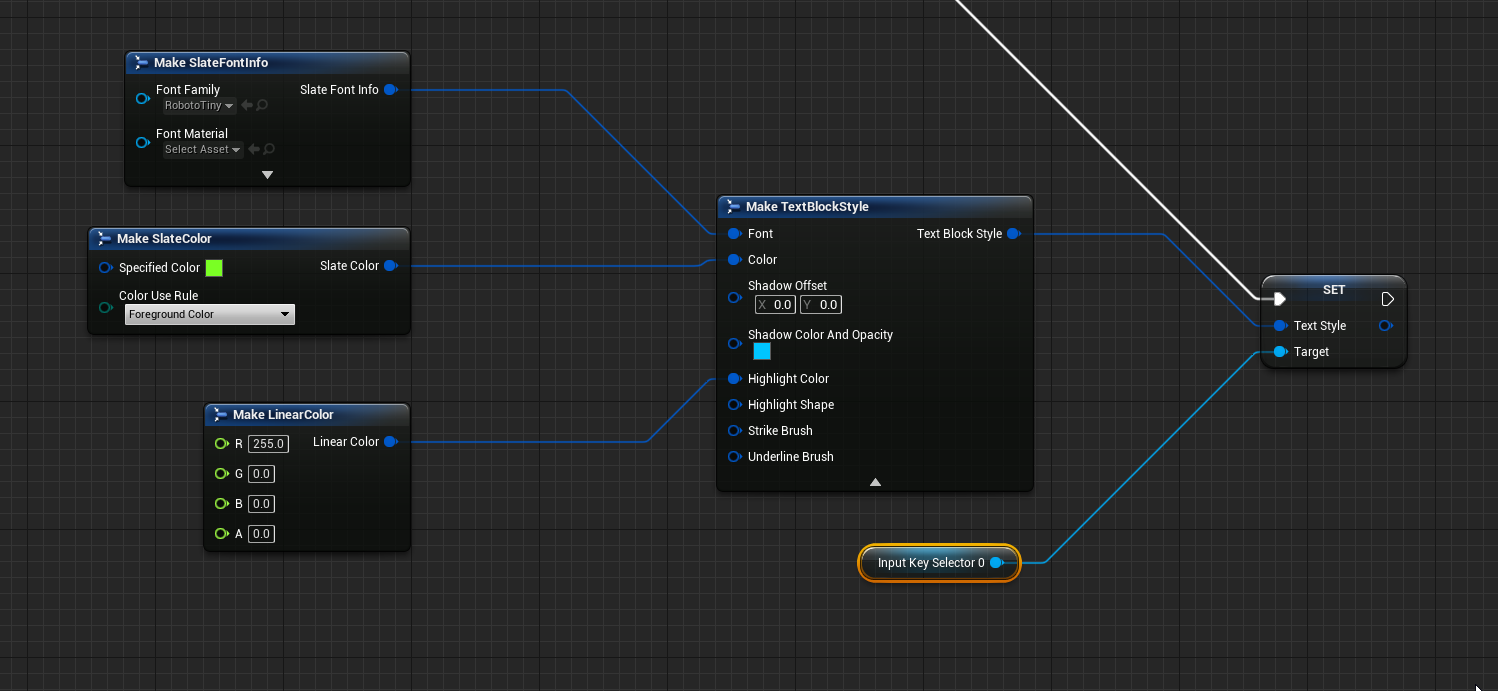
I just want to set the text color, really
 ancient topaz
Hello! i need advice. I have an enemy, the enemy has animations, the animations have sound notify. How can I make the sound from animation Notify sound only when the character approaches, not sound the whole arena?
olive sedge
@ancient topaz look into attenuation
ancient topaz
@olive sedge Do you have some tutorial for this?
olive sedge
not at hand, sorry
 celest yacht
@ancient topaz would attaching a trigger box that your character activates work?
ancient topaz
@celest yacht No, i talk about sound)
celest yacht
@olive sedge dumb question but you set it, do you call it after you set it anywhere? Also how did you get your lines to look so clean and straight?
olive sedge
@celest yacht what do you mean by call and it's this plugin: https://unrealengine.com/marketplace/en-US/product/electronic-nodes

Unreal Engine
Improve the wire style of Blueprints and materials editors.
oh.. do you mean if I call this node? it's on tick
unique harness
use trace start and location not trace end
celest yacht
Hmm so you're setting it on every tick
olive sedge
@broken forge yes. it seems to be impossible to set the text color of a key input selector dynamically
celest yacht
Hmmm this is beyond my skill level, I'll look into it later but odds are someone else will be better able to help you!
 agile loom
Is there any way to spawn an actor with a projectile movement component, but only activate that movement component after a certain period of time?
I could add the component to the actor at run time but I feel like that's not that efficient?
olive sedge
@broken forge ok, thanks anyway
faint pasture
@agile loom disable auto activation on the projectile movement component, then whenever you want, enable the component
I think the actual node is set active
agile loom
Thank you
agile loom
faint pasture
<@352157206076063744> disable auto activation on the projectile movement compone...
Doesn't work as intended, not sure what the issue is, I might just create the component at runtime
 pulsar arrow
Hey everyone, I am facing with annoying problem. I'm trying to get the world location of the character's hand with Get Socket Location, but the data comes with a delay. I need the exact location information. What do you think the problem might be about? Here's an example video:
 fallen flume
when i click play i just spawn in, but i cannot control char./look around. how do i fix this?
faint pasture
agile loom
Doesn't work as intended, not sure what the issue is, I might just create the co...
If auto activeate is disabled does it not move?
feral ice
How do i edit an element in this varible? Its the varible (ammo for weapon)
agile loom
faint pasture
If auto activeate is disabled does it not move?
Yeah, so... auto activate set to false makes it not move.
But setting 'Set Active' to true also doesn't make it move either. I've also tried 'Set Simulation Enabled' to true from false, etc etc but can't get it to work properly. The only time the projectile actually moves is when it's first spawned and when auto activate is set to true
feral ice
like whenever i shoot i want to decrement the ammo for the specific weapon and i cant find the blueprint that does tht
 winged sentinel
hi everyone, does anyone know why when i set max displacement on a spring controller it starts stuttering?
not spring arm, but the spring controller
faint pasture
agile loom
Yeah, so... auto activate set to false makes it not move.
But setting 'Set Acti...
Simulation should have nothing to do with it. Do you have reset checked on the set active?
Does it have a nonzero speed variable
agile loom
faint pasture
Simulation should have nothing to do with it. Do you have reset checked on the s...
I appreciate the help - I managed to solve the issue with some C++.... not even sure... how but it all works now so I'm going to let sleeping dogs lie
faint pasture
Could also have been something to do with auto-deactivating when stopped. I actually don't use the stock projectile movement, I made my own which uses line traces.
 tacit maple
Quick question: If I save the user's settings (graphics, sounds etc), when do you apply these settings? Should I have like a func on my main menu level called 'initialize settings'? Or is there a better way to do this? I've got the whole saving situation down but I just want to check that getting saved info -> applying it at the start of the main menu is the correct thing to do.
faint pasture
tacit maple
Quick question: If I save the user's settings (graphics, sounds etc), when do yo...
Game instance is prolly the place to handle that
tacit maple
Awesome! Okay, ill pop a function during one of the initial setups that handles that. The method is still correct yea? Thanks 🙂
faint pasture
tacit maple
Awesome! Okay, ill pop a function during one of the initial setups that handles ...
I'm assuming you already know how to write and read from save game slot
tacit maple
faint pasture
I'm assuming you already know how to write and read from save game slot
Yep, just want to know if you have to manually set all the settings at the start or if there is another way.
 winter kettle
Is there something I could read about for example when I put rain or snow particles to pretend it's raining or snowing, to make the level look wet (floor has water, buildings look wet) or for the snow buildings are covered in snow, floor is covered in snow?
faint pasture
tacit maple
Yep, just want to know if you have to manually set all the settings at the start...
you probably want to have some sort of struck representing the default settings, and then if the game starts up without a save game file, it writes the default struct to the save game slot. If the game starts up with a save game file, it reads that
tacit maple
faint pasture
you probably want to have some sort of struck representing the default settings,...
Perfect! That's exactly what I was thinking about 🙂 Thanks a ton, using EMS plugin for saving so my profile class will contain that default struct like you mentioned.
tacit maple
faint pasture
you probably want to have some sort of struck representing the default settings,...
Thanks for the help.
zealous quarry
First of all this works. But I'm asking is there a better way to increase something (FOV in this case), without invoking the Tick Event? Current implementation is something that works but is not very... elegant looking 0.01s loop.
faint pasture
@winter kettle there are a couple ways to do that, but in general, particle systems do not talk to the game thread. That is, a particle system shouldn't be able to change the variable on an actor. You could easily simulate snow the lands and sticks to things, but any sort of permanence will require a lot more complicated system to calculate how exposed anything is to the sky
@zealous quarry timeline.
tacit maple
zealous quarry
First of all this works. But I'm asking is there a better way to increase someth...
I would probably set-up a timer for loops! Or use some timelines, and lerps
zealous quarry
Never heard of those. Gonna check them out now!
faint pasture
zealous quarry
First of all this works. But I'm asking is there a better way to increase someth...
Is this meant to be a one-off thing like changing fov for a zoom or aim down sight, or is it meant to continuously be changing?
tacit maple
zealous quarry
First of all this works. But I'm asking is there a better way to increase someth...
Timelines + Lerps are awesome because if a person spams that (if possible) it will be a nice blend, so you won't get like any jagged chops it will always 'flow'.
faint pasture
Yes then you would use a timeline. Press zoom button, play timeline, timeline update updates the fov
zealous quarry
Sounds good
faint pasture
If you have variables normal fov and ads fov, your timeline could just have a float track that goes from 0 to 1 and sets camera fov to be the interp between normal and ads
zealous quarry
Having that kind of loop I did felt too "hacky"
I knew there would be a better alternative : D
faint pasture
@zealous quarry there's pretty much no scenario I can think of where you would ever have a delay inside of tick
olive sedge
when binding an event in a for each loop, can I somehow access the element of the array inside the event?
olive sedge
https://i.imgur.com/WxeXqPG.png
if I use Array Element in that event, it will be the last item
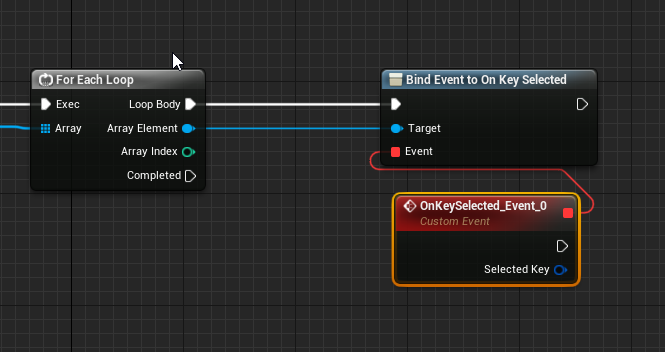 fallen flume
whenever i click play the character spawns in but i cant control it
winter kettle
faint pasture
<@537450420352581635> there are a couple ways to do that, but in general, partic...
let's start with the basics, for making the buildings/street look covered in rain/snow would I need to work with texture materials? or how would I do it?
or if there is a resource I could read about this I would appreciate it
I'm watching a video but it requires working with textures and I'd want to avoid that
olive sedge
olive sedge
https://i.imgur.com/WxeXqPG.png
if I use Array Element in that event, it will be...
can I maybe get the object the event was assigned to from the delegate?
solemn parcel
Hey people, I'd like your opinion. I want to Spawn an Area when an AI dies, containing a variable. Each time another AI dies in the Area, it will change that variable.
I'm thinking about spawning a Collision Sphere on death, to create the area, and then each time an AI dies, it will line trace from it's position to the ground, checking if it collide with Collision Sphere, updating then the variable.
Is this a good cheap way or is there a better way to do this ?
cyan acorn
so i did this blue print that basically snaps blocks next to each other but i get this weird issue where if i try to place it on top or on the bottom of a cube instead of going where it should it snaps to the same position as said cube
and i have no idea why it does that like it makes no sense to work for all axis but not for top and bottom
 red oyster
How to remove indexes (saved in array) from array?
Setting to some invalid value, and then cleanup it?
 prisma stag
Hello, I'm trying to make an system where, if the player is in a trees box collision and then hits left mouse button, it will apply damage to the actor. However the Use Tool event isn't even firing. In my head this works but when I look back at it, the cast has no where to go if true.
 tight schooner
@red oyster isn't there a remove node? Keep in mind it'll resize the array (shift all the indices over to fill in the gap) so if you're doing it in a loop, you'll want to use Reverse For Each
which starts from the last index and works backward
red oyster
Thanks
trim matrix
prisma stag
Hello, I'm trying to make an system where, if the player is in a trees box colli...
Try connecting the input action with a print string and then see if it prints hello
prisma stag
It does
faint pasture
@prisma stag do it the other way around. When you use a tool, get whatever actors are overlapping what you want your tool use collision area to be, select an actor somehow, and then you have the actor that you are using the tool on
Or you can just lie and Trace out of the camera and use the tool on whatever actor is hit by the line Trace
prisma stag
faint pasture
Or you can just lie and Trace out of the camera and use the tool on whatever act...
This is what I was thinking about doing because I also need to make sure the player is looking at the tree.
zealous quarry
Heyo, is there some simple node with what you can choose between two values based on boolean. true = A value, false = B value?
PS. Adriel the timeline was just what I needed, thx
 spark steppe
zealous quarry
Heyo, is there some simple node with what you can choose between two values base...
spark steppe
zealous quarry
Heyo, is there some simple node with what you can choose between two values base...
like the select node?
plug the boolean into the wildcard slot
zealous quarry
Thanks, just what I needed
zealous quarry
Have you tried debugging?
Selecting the file from the debug filter and playing the game on main screen you can see the flow of control in real time
debug filter is just right of the play button
faint pasture
trim matrix
why doesnt the gather branch work as intended?
You don't need to use a chain of branches, you can use AND, OR, and NOT to combine booleans.
zealous quarry
zealous quarry
faint pasture
You don't need to use a chain of branches, you can use AND, OR, and NOT to combi...
also that
Good to get used to booleans if you are planning on doing some non-node coding
trim matrix
yea doesnt work on a task it seems, the debug filter
zealous quarry
You must select the FindBerry
Leave the screen open and play on the main screen
You should see the control flow on the node screen
spark steppe
you're missing the add to viewport node
which adds the created widget to the screen
fallen flume
where should i put it?
fallen flume
wait so i have this now, and when I spawn in everything's right but I cant control my character/look around
how do I fix this issue?
fallen flume
at the end?
fallen flume
i still cant move/look around i put it at the end
i connected get player controller to player controller but now i have to click and drag to look around
spark steppe
then the widget might need focus first
idk whats going on in your nodes, so all i can do is guess
fallen flume
ok i fixed it i added in set viewport mouse capture mode thank you
oh nvm now the mouse goes to the other monitor
 high frost
how fast is accessing data from datatables by row? are datatables loaded into memory in runtime once or is every row fetch actually means reading data from disc?
solemn parcel
Hey people, I'd like your opinion. I want to Spawn an Area when an AI dies, containing a variable. Each time another AI dies in the Area, it will change that variable.
I'm thinking about spawning a Collision Sphere on death, to create the area, and then each time an AI dies, it will line trace from it's position to the ground, checking if it collide with Collision Sphere, updating then the variable.
Is this a good cheap way or is there a better way to do this ?
fallow delta
Hello guys!
Do you know what way i have to follow in order to solve my problem?
I want in my blueprint, when i change a variable to add(?)/spawn(?) ...(something like that) a static mesh , that can be selectable independently and editable. Do i have any option like this?
I tried add Static Mesh Component , node but it only add and static mesh on a specified location.. i can pick it up and make any changes..
tight schooner
@fallow delta I'm not entirely sure what you're asking. I'll say that on the add/spawn node, the output pin on it is a reference to the spawned thing. You can manipulate the spawned component with that pin. You can also save the output to a new variable (right click on the pin) to manipulate it elsewhere in your blueprint.
tight schooner
@trim matrix You can. But I can't say why it's returning false.
But it theory it is retrieving that variable from the target.
 indigo bough
Hey, so I have an object that rotates, and I'm trying to get the normal from a hit event, is there a way to get a 'relative normal'? I'm doing some calculations on what to do if the hit normal is greater/less than, etc. but obviously as the hit object is rotating, the normal changes when hitting the same part each time 🙂
faint pasture
@indigo bough either transform direction or inverse transform direction. Using the object transform.
 green briar
I'm a bit stuck on how to calculate the total armor from my equipment slots. I think what I want whenever I call up my armor menu, is to set my players total armor back to 0, and then use a For Each Loop to go around each slot and get the Armor Rating from each item and then set the Total Armor to the combined amount, but I'm not sure how to accomplish the latter part of collecting the Armor Amount from the items and adding it to the total amount of armor
 fervent needle
Hi there sorry to interrupter can I ask you a question?
indigo bough
Thanks @faint pasture
green briar
The reason for setting it back to 0 every time and then recalculate it is so that it will automatically deduct the total armor when it's unequipped btw*
fervent needle
I'm trying to create a harpoon gun in the unreal Engine. I'm looking for some tutorials that would help me do that.
does anyone have any ideas?
Unreal Engine Forums
Build powerful visual scripts without code.

Ive been trying to recreate some rope physics using blueprints only. There is no CableComponent - done from scratch by using spline. Everything is pretty rough and buggy :D
Download link - https://drive.google.com/file/d/0B3lymdSbe8Mxazd3dVB1VDVadzg/view?usp=sharing
something that works like this but allows the player to pull objects
faint pasture
@green briar for each item, set total armor= total armor + itemarmor
fervent needle
I don't quite understand that can you explain further. I'm relatively new to unreal Engine. I have a background in stylized character modelling in zbrush so I'm trying to learn new things.
 frozen spear
green briar
The reason for setting it back to 0 every time and then recalculate it is so tha...
frozen spear
green briar
The reason for setting it back to 0 every time and then recalculate it is so tha...
Not a direct anwser to your question but a forewarning of a possible bug. If you game has armor breaking debuffs, make sure theyre being treated the same as armor pieces otherwise if it directly debuffs armor and you remove a piece while the debuff is active, when the debuff wears off your numbers will be out of whack...just mentioning it cause its happened to me
What you are saying is exactly how i handled it also... Except i have a "base armor" before my gear that scales with level...basically its never 0 for me.
 rough jay
fervent needle
I don't quite understand that can you explain further. I'm relatively new to unr...
rough jay
fervent needle
I don't quite understand that can you explain further. I'm relatively new to unr...
cant u just add force towards ur direction or no
fervent needle
@rough jay gonna be honest i was just looking for a tutorial that shows me how to do it step by step. this is my second day using the unreal engine. thanks for the reply tho
I want to create a 3rd person proof of concept
with mechanics like this

but with the ability to reel in and retract the simulated rope
fervent needle
thanks that makes sence @trim matrix
prisma stag
Hello, Im trying to make a pickup system where the play can pick up say a tool like a hatchet and it is placed directly into their hands. How would I go about doing this with no skeleton?
There is no mesh. What Im trying to do is kind of move an item to a certain point to the right of the player as if it is in the hands.
Unless I can use like an arrow component and have it move to that point.
I see. Ill try that I feel though the some items may be oriented incorrectly unless I just have them all facing correctly in the respective bps
prisma stag
I have this however when I press E nothing happens.
 prisma stag
I put a breakpoint on the attach actor to actor and it does get there.
trim matrix
eh I guess no one can help me huh
prisma stag
I set it to stay relative to world and it now stays in the same spot from where it was but it does move with me, just need to get it to the right spot.
Ok, I just got it to move to my player after it attaches to me. What does the attachment rule mean?
 stoic magnet
Hey ya'll, im having trouble getting my spline mesh components to bend with my spline curve.
if I disconnect the tangents it looks a wee bit better but then the wood planks are linear
faint pasture
stoic magnet
Hey ya'll, im having trouble getting my spline mesh components to bend with my s...
Show that mesh in wireframe
stoic magnet
stoic magnet
faint pasture
Show that mesh in wireframe
This?
one solution I attempted earlier was to dynamically add spline points along this curve that dictate the positions for the random 'wood plank' generation. But it would add little variations along the main curve. I feel as if something is funky with the 'get tangent at distance' node
faint pasture
That's some weird looking wireframe but remember that only vertices can be displaced. If a plank only has vertices at the ends, it'll never bend in the middle etc.
stoic magnet
Yep the mesh im using for the spline mesh component has several vertices to let it bend. Its more so an issue when grabbing tangents from the "get tangent at distance along spline" function
snow halo
Evening all. I want to write out an array of bytes to a line of text, comma delimited. The thing is that the array has 512 items and that's a lot of appends : / I found SaveStringToFile and SaveStringArrayToFile but how do u think i should go about this?
i could flag the function as append to keep adding to the same line while running a for loop on the array, but not sure how to then start a new line
I can send an array to the function but i need one row per element of that array (512 columns) per row
prisma stag
Hello Im having this problem where when I hit lmb to use the hatchet, as it rotates forward it does stay in the same direction as the player.
https://streamable.com/q0a2rd

Here is part of the event that is fired when you use lmb.
tight schooner
@stoic magnet I'm not 100% sure of what I'm about to say, but here you go. I think tangents are scaled to the spline points in the sense that they'll only make sense if the mesh you're deforming is approx. the length of spline points A to B. Because you're (from what I can tell) deforming each wood blank individually, your tangents need to be scaled down by some relative amount -- how large is the plank vs how long is the distance between the two spline points they reside in?
To put it another way, the source of the jagged deformation may come from tangents that are too large for the mesh being deformed. What happens if you scale the tangent vectors by 0.2 before feeding them into the "Set start and end" node?
If I'm right, the spline meshes won't look strictly correct but they'll appear significantly less broken. And then finding the right amount of scaling per plank is something you can maybe figure out with some Get Distance Along Spline nodes and some math.
snow halo
maybe something like this
 opal sinew
maiden wadi
<@!662974753640022026> It's sort of accepted that if you want shooting to feel g...
opal sinew
maiden wadi
<@!662974753640022026> It's sort of accepted that if you want shooting to feel g...
Understood will give it a go
Will give it a go!
stoic magnet
tight schooner
<@!340737328718807041> I'm not 100% sure of what I'm about to say, but here you ...
Hey hey - definitely getting somewhere. Thanks a lot!
 worn hedge
Hello! as I see Blueprints lack some advanced settings, but is there any way with blueprints only to set the Parent dominates property on a physics constraint?
green briar
This is the event that runs whenever I either A) Equip a piece of gear or B) enter the Stats menu. I want to calculate the total armor by combing all of the Armor from all the equipment slots but it's totally wrong, and Im a bit stuck, any idea how to proceed?
faint pasture
green briar
This is the event that runs whenever I either A) Equip a piece of gear or B) ent...
Why are you doing nothing with the stuff from that loop?
You should be getting the armor from each piece in that for each loop. You're getting it from whatever the item data is coming into this function, which makes no sense on its own but whatever
Why does that function have a slot and item info input anyway? That doesn't make any sense. Isn't this function supposed to sum up all the armor on all the equipped items?
green briar
faint pasture
Why does that function have a slot and item info input anyway? That doesn't make...
lol yes I thought I was getting the armor from each slot like so
faint pasture
green briar
lol yes I thought I was getting the armor from each slot like so
How many items can be in a slot?
and are you trying to calculate the armor provided by whatever is in a slot or the total armor provided by all items in all slots?
green briar
1 item per slot and the total armor provided by all items in all slots
faint pasture
I'm assuming that you have multiple slots, and each slot can only hold one item. in that case call me you should represent your equipment as a map or dictionary. with the slot being the key in the item being the value
green briar
So trying to calculate the sum of the armor for head + Body + Hands, etx
faint pasture
Once you have your equipment represented in that fashion, getting the total armor is just getting all values, iterating over them, getting their armor, and adding it to the total.
green briar
What does it mean to represent the equipment as a map or dictionary?
faint pasture
In my case, my slot are enums, and my items are actor references. but however you do it, a map is exactly what you want. By definition, a key can only have one value
A map or dictionary is like an array, but instead of indices, you have keys. So you add an item as a key value pair. Key being slot, value being item in that slot.
green briar
All of my slots are actors lol as well as all the equipment
faint pasture
Yeah so you have two representations of your items. Then you should have two maps. Both having the same keys, but one mapping keys to actors, well the other maps keys to the structs
What is the Variable: Map in Unreal Engine 4
Source Files: https://github.com/MWadstein/wtf-hdi-files
I would recommend you making enum for your slots. In my case, my slot enum has weapon, accessory, head, body, feet
proven mason
in blueprints how do I add back the default scene actor (the white ball) that I've deleted.
faint pasture
proven mason
in blueprints how do I add back the default scene actor (the white ball) that I'...
I'm pretty certain that's just a scene component
 ember flume
it rotates correctly but can I somehow make it look smooth (Timeline or alternative)
trim matrix
hey, im trying to use a loop to check an array for variables and I went to set a custom variable when both variables are true, do I need two loops?
one for each variable?
im tinkering with it but I cant figure it out, using AND OR gates dont seem to work
tight schooner
@trim matrix Do you have, like, two arrays and you're trying to compare the same indices from both simultaneously?
trim matrix
no just one, But the object has a bunch of variables I want to check
its for AI
basicly its a closest to actor check and a ''tagged'' check
but they dont seem to work together at all and giving me weird results
tight schooner
Can you show us the graph?
trim matrix

This is basicly my issue lol
the second branch is the tagged boolean, and the last branch is the closest to actor one
they both work, but not together
the only solution my tiny brain can think of is to use two loops
tight schooner
So far I'm not getting it. You're clicking on these two trees, and when you select(?) both something happens?
what is the intended behavior?
trim matrix
find the location of the closest clicked on tree
im trying to get all actors that are clicked on, then finding the closest among them
tight schooner
I'm not 100% getting it, but generally speaking when you have an array of things, and you want to figure out which has the highest/lowest of whatever metric, then I tend to make a function with a couple local variables containing the current "best" index (or actor reference or w/e) and the metric current-best thing has. And as I loop through my list, it's comparing each new index with the current-best index.
So here's something from my current project. It has a list of "destructibles" and tries to select the one with the lowest hitpoints. Apparently I stored the HP in advance in another array but I could also pull that data from the actors within the loop too. @trim matrix
 severe sparrow
Anyone aware of a way to tell a specific camera component to ignore (show invisible) an actor? (I don't want to just make the actor invisible to everyone.)
tight schooner
uh oh I just noticed a bug in my own screenshot 😂
trim matrix
so I want it to find the closest one among the ones ive set a boolean on true
spaghetti
tight schooner
yeah, so in your loop you want a branch based on whether it contains the tag. If it does, then compare distance, and if it's the current "best" distance, write that distance and the index to local variables in your function
trim matrix
yea
and both the branch for the tag and branch for the closest distance works
but they dont work together
and the only solution I got so far would be using 2 loops
but that seems.. bad
tight schooner
I see that you're unsetting "closest food" in the event that it contains no tag. Is that what you actually want it to do? I mean it'll clear that variable
if, say, item 1 has the tag and gets stored into "closest food", but Item 2 lacks the tag and unsets it
trim matrix
eh its kind of messy right now but thats just to clear it when it cant find any
tight schooner
I mean if you have 3 items, and 2 of them are valid, but the invalid one is at the end of the array, your loop will essentially report that there are no valid items
tight schooner
so maybe the way you want to arrange it is first, before running the loop, unset the variable. Then run the loop -- set the variable if there's something valid, but do nothing if it's not valid.
Then upon loop completion, see if the variable is valid or not
to determine if anything was found in the loop
That won't compare distance, but at least it'll report if there's something valid.
trim matrix
the gather variable?
tight schooner
Closest Food
Arrays are just lists of data, and ForEachLoop just runs some logic on each item in that list
trim matrix
Ya I know that much 😛
tight schooner
Looking at your loop, I think you can arrange it like... unset Closest Food variable --> ForEachLoop (loop body) --> Does it contain tag? If false, do nothing. If true... --> Is Closest Food valid? If false, set it with the array element (no need for a distance check). If true... --> Do your distance check. Is it closer? If false, do nothing. If true... --> Set Closest Food with the array element.
@trim matrix
Upon loop complete, check if Closest Food is valid or not
and do whatever based on that
unique harness
severe sparrow
Anyone aware of a way to tell a specific camera component to ignore (show invisi...
local or multiplayer?
severe sparrow
unique harness
local or multiplayer?
multiplayer, i figured it, called an show only owner node in the other blueprint, thank you though 🙂
 ruby cobalt
how can I change the position of a scene capture component based on my current position?
like by using an offset
I want this scene capture to be identical to my view in VR but coming from elsewhere in my world
faint pasture
ruby cobalt
I want this scene capture to be identical to my view in VR but coming from elsew...
Uh....how would that work. How do you have an identical view from another viewpoint?
 tired cypress
Is it possible to change the class of an Actor at runtime?
ruby cobalt
@faint pasture identical as in it moves the same way as I do.. but it's elsewhere so I see different things
I'm trying to create portals
unique harness
tired cypress
Is it possible to change the class of an Actor at runtime?
no? what are you trying to do?
ruby cobalt
basically.. as you move relative to the window, your field of view change
I found a good tutorial but it doesn't work in VR
 rapid solstice
Hi, I have 2 texture objects in my material function and I'd like to switch between them in realtime, is it possible?
unique harness
rapid solstice
Hi, I have 2 texture objects in my material function and I'd like to switch betw...
yes, use a scalar parameter
rapid solstice
unique harness
yes, use a scalar parameter
into "if" node?
unique harness
rapid solstice
into "if" node?
if node doesn't exist in material editor. I forget the name of the node you want
rapid solstice
unique harness
if node doesn't exist in material editor. I forget the name of the node you want
it is
unique harness
rapid solstice
it is
oh wait, you're right
rapid solstice
But if I connect the texture objects to the if I get an error:
tired cypress
unique harness
no? what are you trying to do?
I have a Ship Selector screen and a ship that's displaying in the scene. On selection, the ship changes. Currently I have to Destroy Actor and Spawn the new one. Was curious if I could just set it.
unique harness
you can make the class input a parameter
unique harness
rapid solstice
But if I connect the texture objects to the if I get an error:
use linear interpolate
scalar param as alpha
so scalar 0.0 will be A, 1.0 will be B
rapid solstice
unique harness
scalar param as alpha
thank you
tight schooner
@ruby cobalt Your capture component or actor needs to be moved on tick... Where you want to put that logic is up to you but in whatever case it needs some degree of "blueprint communication" — the component needs a reference to the pawn's camera or vice versa.
So let's say the component is it's own independent actor for example. On BeginPlay it needs to acquire a reference to the player-pawn's camera (Get Player Pawn node, cast to class, get the camera component and save to a variable... That's one way to approach that). And once you have that reference, you run some tick logic that gets the parameters of the player-pawn's camera like world location relative to the portal, and distance to portal (for setting the near-clipping plane and maybe FoV?)
I've never done this exact portal thing myself but IIRC those are the principles.
unique harness
Isn't the capture component attached to the actor, therefore moving with it?
tight schooner
Yeah, that's maybe another way to do it... If you want to attach the capture component to the player pawn itself. But it might get messy if you're doing Portal™-style wall portals that can alter view orientation
as opposed to Budget Cuts™-style freestanding portals (I never played this game so I don't recall exactly how it works...)
I think pawn-relative rotation would make it messy either way...
It seems cleaner in my mind to make the capture component camera an absolute-transform thing that's set by logic in worldspace each frame
fossil peak
Hi, everyone! So, I have a button widget blueprint that takes its data from datatable. Cost, texture etc. I use the same button for 57 different places what I want to do is that set their visibility invidiually depending on some situations
How can I do that?
 wooden rapids
As i am Understanding , why not make a Function and cast it to the Widget and change the Visibility of the Button , correct me i f i am understand it wrong
fossil peak
The problem is there are 57 of them
and I want to set their visibility with booleans I guess
wooden rapids
what you mean with 57 (places of the Button on Screen) or 57 ( places Levels stages)
fossil peak
on the screen
wooden rapids
ok you can make an Integer and pass it to an Array of Visibilty ( example 1 is Button 1 , 2 is Button 2 and so on , with Boolean you get a Chaos
wooden rapids
you can do this with switch on int
 dawn gazelle
Visibility is controlled and read through these nodes, no need to boolean anything as you can check what their current visibility status is.
fossil peak
I want some of them to be visible and some of them to be invisible until player buys them
Boolean is for checking if the player has bought it
BTW thank you guys for helping me out, seriously
wooden rapids
fossil peak
thisis how it looks on editor
Better you make a Function with an Integer Variable inside and set visibility by ( is equal 1 button one is Visible . and the 2,3,4 other Buttons not equal 1 in the Branch false to Hidden , there you can controll the Whole things.
fossil peak
Sorry if I seem a bit rude sun is rising and I have been working on this system since midnight
@wooden rapids can you send me a pic? If it is not too much to ask
wooden rapids
Ok one Minute
dawn gazelle
When you're spawning the widgets, do you already have an exposed on spawn variable that you're telling it to look at a specific row in your data table?
spark steppe
xD
spark steppe
what does the integer represent?
spark steppe
there should only be one visible at the time?
fossil peak
No
spark steppe
then an integer wont get you far
fossil peak
But once it sets to visible
dawn gazelle
Somewhere, in my case, I put this in the player controller:
fossil peak
I won't ever set it back to hidden, so it should work i guess
dawn gazelle
Then in the widget:
fossil peak
@dawn gazelle it looks good can you share the logic with me?
BTW there only 57 attacks as of right now
it will be hundreds when I'm done with the game
So, I'm looking for a sustainable system
wooden rapids
The Custom event is the Interface Function
They are many Ways Datura have already right too
spark steppe
i wouldn't go for any of those
you can do this
so make an update method, which iterates over all buttons and checks if the player owns them, and calls that function
wooden rapids
Cave Men if the 1. Sword Skill doesnt must dissapear you can let the false empty
 valid yoke
Hi, I am trying to move a pawn with AddWorldOffset with 'simulate physics' turned on but for some reason AddWorldOffset is not working properly. Anyone knows why? it is working fine when 'simulate physics' is off.
dawn gazelle
fossil peak
<@!218956378654507008> it looks good can you share the logic with me?
Basically, when you purchase something, you call an event dispatcher that contains the item ID. Then the widget binds to that event dispatcher, and if it reads that the row is itself, it'll set its visibility to visible. If you're planning on having a saved state, then there should be an exposed on spawn boolean that can be fed in with the save game data of whether or not that particular item was purchased arleady and then set its visibility to visible to begin with.
fossil peak
Guys, thanks a lot for your help
Seriously, they helped a lot, I think, I will try every suggestion here and see which one works best
wooden rapids
fossil peak
Guys, thanks a lot for your help
Depend of what you need you have much Version here you can use it , just one question does the just one of them Visible or more of them 57 Buttons
fossil peak
@wooden rapids how much player has bought
wooden rapids
fossil peak
<@!434129980419604480> how much player has bought
Ok i see wish u good work
fossil peak
Thanks a lot
wooden rapids
fossil peak
Thanks a lot
just for Info u can use Select and pass direct the Integer Variable, and one Interface Function for Visibility and one for Hidden
fossil peak
for some reason set visibility is not working now
snow halo
hmm not sure where to ask. Anyone know why a sub level loaded in the levels tab wouldn't show up when i try to move an actor to it by right clicking?
it's just not in the list
But it's clearly loaded
 atomic geyser
Hello guys I am kind of new in ue4 so I might ask a kind of dumb question but there we go, I am trying to add impulse to my Static Mesh but the problem is when I go test it pressing Play nothing happens at all, I know I messed up something but don't what, here is how I done it
 weary mango
Try to add impulse in event tick
 crimson swan
can anybody tell me the proper way to perform death animations so that they don't get interrupted?
rough jay
atomic geyser
Hello guys I am kind of new in ue4 so I might ask a kind of dumb question but t...
decrease the kg of the object or set the impulse to higher, 5-1kg would do it for 1k impulse
atomic geyser
weary mango
Try to add impulse in event tick
tried that before it didn't work sorry forgot to mention I guess
atomic geyser
rough jay
decrease the kg of the object or set the impulse to higher, 5-1kg would do it fo...
I set to true the vel change to avoid considering the mass, no change
 paper galleon
atomic geyser
I set to true the vel change to avoid considering the mass, no change
paper galleon
atomic geyser
I set to true the vel change to avoid considering the mass, no change
Check that it's simulating physics. Check that the mobility is set to moveable.
atomic geyser
Thanks all for your help on this matter 😁 , I figured out that it seems it has something to do with the game mode, because when I change it back to default Game mode is working fine with no issues, but if I put my Game Mode created is just not working, also noticed that Event Tick is never cast, I also change only the game mode leaving the other blueprints as default such as Default pawn class, I am trying to make this simple functionality on my blueprint pawn is no change if I switch mine with the default in the world settings, if any of you have any idea why is this behavior?😵
maiden wadi
@atomic geyser What does your GameMode inherit from?
Cause right now it sounds like your GameMode inherits from GameModeBase, and it looks like you're using normal GameState. If your GameMode inherits from GameModeBase, you need to also use GameStateBase.
atomic geyser
maiden wadi
Cause right now it sounds like your GameMode inherits from GameModeBase, and it ...
Yea it seems that was the problem thank you so much for help 😁
short pawn
I'm making a "tate" mode game. I want the menus to rotate and the top and bottom, left and right of screen to change as the game rotates. like if the game rotates 90Degrees clockwise i want the "top " of the screen to be the old right, the right to be the old bottom, etc. is there a way to do this in widgets? I have the parts of the widgets rotating but I cant figure out how to rotate so that moving the mouse up moves the curser to the left when it is rotated
when the screen is normal orientation moving the mouse up would move the mouse up on the screen
when the screen is rotated 90deg clockwise the mouse moving up would move the mouse to the right on the screen
 boreal tusk
I have a trigger box, moving road pieces with the projectile component towards it.
I initially spawn 4 pieces. I subtract the length of 1 road length to get the correct world transform to spawn the part.
The road pieces have a collider at the back of the geo to trigger a new road part spawn.
But I keep having 1 small gab at the end of the initially loaded pieces which will repeat. & the rest of the objects will slightly overlap.
How can I spawn a new moving object, that aligns precisely on one axis?
What I have so far is basically what most infinite runner tuts show, but altered to spawn at fixed intervals by beginOverlap event. But all tutorials move the player. So spawning new tiles don't have the same issue.
olive sedge
Am I being dumb here? Why is it searching for that boolean in the widget and not in the savegame?!
 mental cliff
Hello, I do not know how to ask google or search for it in general but what I want is to turn two scene component so that they look away from each others forward axis. Its for spawning room actors to another to connect sewer pipe elements. The helper scene components look out of the tube sides x forward out in each direction. Many thanks in advance for pointing me in the right direction. There might be multiple solutions so I know my question is vague because I am stuck in an misleading information loop and I am back to the beginning
olive sedge
@mental cliff just shooting from the hip here but maybe location1 - location2 -> RotationFromXVector?
or just FindLookAtRotation
mental cliff
They have no distance to another. They lock into place leaving only their rotation left to use for math (I guess)
olive sedge
so they both have the same exact world location?
mental cliff
olive sedge
or just FindLookAtRotation
Yes. I used a gizmo mesh to show it but it looks shifted but they are at the same world location
olive sedge
ok.. so one has a rotation and you're looking for the opposite direction rotation for the other?
mental cliff
Both have a relative rotation pointing outwards the T pipe element. The one pipes spawned to each other therefore have its snapping helper looking away from each other
olive sedge
I don't fully understand what it is you're trying to do but it doesn't seem like a good idea in the first place tbh
olive sedge
olive sedge
Am I being dumb here? Why is it searching for that boolean in the widget and not...
editor restart fixed that 🙄
mental cliff
Its so that the level designer just has to care about building the scene and adding the snapping points and convert it to an actor. Then its a building block for the procedual spawning system to build stuff
Perhaps I am on the wrong track on how to do this
olive sedge
mental cliff
Both have a relative rotation pointing outwards the T pipe element. The one pipe...
It's hard for me to follow that sentence so not sure what it really is you're going for here
but from the rough picture I have: why not just have a full T element instead?
olive sedge
ah! now we're getting somewhere
hold on
.. wouldn't you need the same rotation on both?
mental cliff
I don´t know. Its also hard to explain why I think this is a way to solve it. I just need to have a way to let the spawning system now which offset and rotation it needs to be placed next to another
I wanted to see it like a magnet of sorts - vectors and rotation based math.
Unfortunately I did not find much about how others had solved it there is so much stuff for Unreal engine that getting the right search result is not easy haha 🙂
olive sedge
I feel ya.
so what's this supposed to become? a level editor of sorts? a procedural template thinger?
from that screenshot alone though, the rotations on both elements would be the same
mental cliff
Its like a sewer dungeon experiment thing procedual yes
Its the same T section but the system would have choosen this connection resulting in offsetting and rotate the new section to be able to connect to the first
This would also work
olive sedge
ah, I see
@mental cliff you'd need multiple attachment points then I would think
and depending on the point, you'd have your rotation
solemn parcel
How can I set an extremity of a Sphere Collision by a specific vector to be that extremity ?
maiden wadi
@solemn parcel Like scaling the sphere outwards until it reaches that vector point?
solemn parcel
yeah
maiden wadi
It should be enough to get the distance from the sphere center to the point and use that as the radius.
 mental tendon
hi how's it going? just wondering if it is possible to get motion tracking in an actor. I can get motion controller transforms in a pawn, but I keep getting zeros in actors. On the other hand Get orientation and position node works fine in actors and pawns too.
solemn parcel
@maiden wadi How would you use that as the radius in practice ?
This seems to be close but pretty inconsistent
maiden wadi
What is the inconsistent part?
@mental cliff Do you have the local location of each attachment point in your T sections?
mental cliff
Yes
solemn parcel
@maiden wadi Nvm your way with component works. For some reason, I realised since yesterday that GetActorLocation get really strange informations compared to Component.GetWorldLocation, which is accurate.
Thanks btw
maiden wadi
@solemn parcel GetActorLocation will just return the root component of the actor's WorldLocation. But if you have a specific component that isn't the root, you'll need to get it's world location instead.
@mental cliff And you need the selected attachment point to offset correctly and rotate the whole mesh correctly to line up that mesh with the other based on those two attachment points?
mental cliff
The offsetting part works. The rotation not because I just don´t know where to search. For now what my script does is to make the new choosen socket to the new root of the actor by attaching it anew. After that its just the rotation thats left to fix
The offsetting part worked with quite a few methods other than the last mentioned
maiden wadi
Okay. So just the rotation. And these only ever rotate on the Z axis? Yaw.
There's no uphill or whatever rotation to account for?
mental cliff
For now yes and if there is an uphill it would be from the mesh not the rotation of the helper scene component yes
So the helper is only rotated in Z axis Yaw
I take a look into the Math hall of the content examples. Perhaps there is something there to use
maiden wadi
Which direction is the forward vector for the mesh itself?
mental cliff
Should be X but I am not sure if that is importance if its just for the snap helper to be compared to another
maiden wadi
I was more just going to use it for explanation. It's semi irrelevant I suppose. But in short..
mental cliff
( That was not meant to sound negative)
maiden wadi
You need to get the look at rotation between the two meshes. This gets you a starting pointing vector so that we know what we're rotating based on. Then you need to get the Angle from the local vector of the attachment point. Say your middle pipe is the forward. So this amazing work of art's illustration for example.
If you're starting from the local forward vector and you need the left side's snap point to be where it connects with the other mesh, you would rotate your mesh by -90.0 X -1.0 to get +90.0 degrees to make the mesh rotate 90 degrees to the right.
The opposite if you need the other. If you snap it to the right, you would multiply 90.0 X -1.0 to get -90 angle and add that to the mesh rotation to rotate it an extra 90 degrees to the left or -90.0 degrees. Apply that extra angle when you get the look at rotation between the meshes.
So...
I sort of believe that this would work?
mental cliff
Okay I will try that out
maiden wadi
I may be afk for a bit, but tag me if you're still having trouble with it.
mental cliff
I don't get it to work. Oof
 devout geyser
Hey guys, how are you all doing today? I am trying to get an actor world location and tell an AI to move towards it but it counts the actor as "inValid" and it can't get his location... how can I valid an actor?
olive sedge
@devout geyser sounds like the actor doesn't exist
devout geyser
Hmm but its in the world map, how can I valid it?
olive sedge
it's either valid or invalid, nothing you can do about it. Maybe it's not set to the variable you're accessing?
devout geyser
I mean look that's the variable and the bp that casts to it everything is fine from what I've learned
olive sedge
@devout geyser where are you setting that variable?
devout geyser
Ai task
olive sedge
is this before or after this event fires?
devout geyser
I think after it fires
olive sedge
well then there you go
you can't access it (it's not valid) until you actually set it
devout geyser
How can I set it exactly? I am confused
olive sedge
well, it doesn't magically exist just because you declare that variable, you have to create that thing and set it first before you access it
or make it a component of your actor, then it'll initialize automatically
devout geyser
Ok I will try, thx
haughty bone
Morning, what is the best way to rotate an object to the mouse's location. E.g. open and close a door based on the mouse's position
A good example of this is in Phasmophobia where it happens to all objects like door, draws, cupboards, etc.
spark steppe
you take the door location and the mouse cursor world location
and then you use a findLookAtRotation node
haughty bone
I did this, but it didnt work
spark steppe
then you did something wrong
haughty bone
No, has no rotation
 supple dome
ah, i didnt get it when you asked in #ue4-general, you want something like GRABBING the door?
and pushing pulling with the mouse
haughty bone
Yes and it follows the mouse's world position
spark steppe
what happens with your current code?
keen seal
Hey, I'm trying to set a random material for all of my walls using an array.
This makes each wall a different material.
How do I make them all uniform?
haughty bone
It just jumps to around 90 degrees
and also rotates the wrong direction
just making a video to show it
 haughty bone
Ended up making a second line trace that has a shorter line which worked perfectly
keen seal
But I want to?
Each time you load it up the level will be different.
maiden wadi
You need to do the random only once, somewhere like GameMode or something, and then make your walls get and use that randomization.
 hidden flume
How can i calculate Rotator for my player, so i could rotate my character facing direction of movement
Like in RDR2 for example
devout geyser
@olive sedge Do you have a tutorial that explain that stuff I can't figure out how to define its existence
hidden flume
I would really appreciate help, cuz im low at vector and rotator math
olive sedge
@devout geyser sorry, man, this is very very basic stuff. Just any tutorial for beginners out there should explain it..
Have you been following any guides at all so far?
devout geyser
I watch some AI behavior tree tutorials but there is huge lack of information I am struggling to find
olive sedge
Well.. Show us the relevant code sections and explain what you're trying to do.. Maybe we can help
olive sedge
and Pickup is invalid, yes?
devout geyser
yeah
olive sedge
so.. you need to create this Pickup somewhere.. Either you spawn the actor in a blueprint or you create it in the level but you have to create it somewhere before you can use it
Meanwhile I got a question of my own.. This is my widget: https://i.imgur.com/qp7xH9E.png
This is how it comes out: https://i.imgur.com/JfIC3My.png
How can I make this blur/sub widget stretch all the way to the right?
 mental cliff
@maiden wadi I am still stuck. Perhaps I can visualize my problem in another way. These two arrows are in their respective actors. The blue gizmo thing is whats missing to rotate the second actor to fit. How can I calculate that? I tried everything even trying to calculate the difference between the rotations
This difference should be calculated in World space and be added back in actors b worldspace rotation right?
maiden wadi
The issue is that I don't fully know how your stuff is set up, or how you're wanting this to act exactly. For instance, I can tell you how to do the math to rotate the right mesh on your last image there to line up with the left one, if that helps?
mental cliff
The right to the left yes
This is for the location after that I have the two segments lined up as shown in the one with the gizmo
 fading jetty
Hey all !
I'm a bit of a Blueprint novice and need some help with something.
I have a timer counter that can start, pause and reset. What I am looking to do is add the timer seconds to a float variable, reset and start the time again to continue adding to the already stored float seconds. When I reset the timer, it seems to reset the float back to 0. Any ideas ?
Adding timer seconds to float.
mental cliff
This seems to work
olive sedge
@fading jetty I would have to look into this but I think gettimer*byfunction name is deprecated
fading jetty
Ah I see. would you recommend another way of approaching this ?
fading jetty
olive sedge
<@!705095939723100161> I always use timer by event
I will give that a go.
olive sedge
@fading jetty let me know
fading jetty
olive sedge
<@!705095939723100161> I always use timer by event
Any thoughts on how to continue the addition to the float ? As it is currently clearing it.
mental cliff
@maiden wadi But I don´t know what I do there I just thought this might work because of my observation what was missing to turn it right. Now I try to get the difference between the two pivots and that needs then to be subtracted from the actor rotation. I would wish I could say I know what I am doing or if it is now correct
At least if everything stays horizontal that is
olive sedge
@fading jetty I haven't paused any timers so far but I think it should work.. Just add GetTimerTimeElapsedByHandle and add it to some variable
maiden wadi
@mental cliff I keep writing and then having new realizations. I feel like this should be as simple as getting the distance from both Pivots in their own local space, getting the unit direction from the stable actor to it's pivot point and multiplying that by Distance1+Distance2 to get where the mesh should end up in the end, and then rotating the moving mesh by getting it's pivot's local rotation and applying that in the way I showed earlier.
olive sedge
What is the Get Timer Elapsed Time Node in Unreal Engine 4
Source Files: https://github.com/MWadstein/wtf-hdi-files
fading jetty
olive sedge
<@!705095939723100161> https://www.youtube.com/watch?v=TZeCMMMqqhI&feature=emb_t...
Thank you, really appreciate the help.
 gloomy cypress
Hey guys I'm having a hard time understanding the interaction between UPROPERTYs set in C++ and blueprint references.
So in one class i have
    UPROPERTY(EditAnywhere, BlueprintReadWrite, Category = UI)
    ARpgChar* SelectedPlayer;
and i try to get that reference in runtime with something like this
mental cliff
maiden wadi
<@!217698674053087232> I keep writing and then having new realizations. I feel l...
I will try that out thank you so much for your help. You are awesome. Thanks @olive sedge too 🙂
gloomy cypress
but it always resolves to None
even when i add
        if (SelectedPlayer) {
                UE_LOG(LogTemp, Warning, TEXT("Health: %d"), SelectedPlayer->GetHealth());
            }
            else { UE_LOG(LogTemp, Warning, TEXT("No player selected")); }
to the tick handler as a sanity check
 hearty lintel
hello everyone, i have a problem with the SpringArm component:
i have this flying object that has physics applied to it.
if i enable camera lag it results in some weird stuttering when it's at slow speed, it's fine when it goes fast.
What could be the cause of it?
Thank you
gloomy cypress
ignore that third no player selected its part of an extra pawn i left lying around somewhere
so i add this
oh that's a good point i wonder if replication is messing with me here, I specifically don't want this pointer to be replicated
but its being kept in a pawn class which i think has replication on by default
but multiplayer shenanigans aside this should work the way i think right?
if i set a field as UPROPERTY i can access it in blueprint even it's being changed at runtime? (sorry its my first time using blueprint, and im having a hard time figuring out all the intricacies with c++ playing with it)
maiden wadi
@mental cliff I'm not certain if this will work, but this is where my head took me.
mental cliff
maiden wadi
<@!217698674053087232> I'm not certain if this will work, but this is where my h...
Thank you
gloomy cypress
@trim matrix thanks a ton that helps a lot, I know exactly what's going on now I thought that third print was coming from a pawn i forgot to delete but it was coming from the server's instance of the pawn spawned for the client. which i had disabled replication for so that particular pawn was never able to get its' character set. Which means its all working as advertised 😄 thanks for your help man!
the reason why my hud wasnt updating was b/c i didnt connect the variable to it yet XD yay 4am coding...
devout geyser
@olive sedge I got what you explained but I am unable to do so... thx anyway 🙂
olive sedge
@devout geyser you giving up or what?
gloomy cypress
Hello I'm trying to get it be able to pick up tools and other stuff and then if you "use" then by using lmb, if will rotate forward and back, however when I do this it rotates in its own z axis while rotating. Also do you feel there is a better way to do this as I don't have a skeletal mesh so I have them attach to the player then rotate accordingly? https://streamable.com/q0a2rd


 keen seal
Sorry, maybe I phrased it wrong.
What I want to do is pick out a random material out of the array and then set all of the actors to said material.
maiden wadi
@prisma stag You can either manage this simply by adding something like a scene component to the player and attaching your stuff to that, then rotate the scene component for the animation, or you're going to need to do more complex math to rotate the mesh around a point.
prisma stag
maiden wadi
<@!324230048506707968> You can either manage this simply by adding something lik...
Ah, I forgot I could rotate the scene component. Ill have to try that soon
maiden wadi
@paper trench That doesn't look like a toggle. Looks like you're trying to set it from the binding call.
 paper trench
I figured it out. 🙂
faint pasture
Yes from the hit result
fading jetty
olive sedge
<@!705095939723100161> https://www.youtube.com/watch?v=TZeCMMMqqhI&feature=emb_t...
I have switched to SetTimebyEvent (thanks for the help). Currently for testing sake, I have the timer looping and clearing every 3 seconds. Still, when trying to add the seconds to another float variable it gets cleared. Essentially with my 3 seconds loop, I'm looking to add 3 each time to the other variable (hope that makes sense). Any Idea ?
coarse forge
Is there a way to reference my key binding in the widget, or do I need to just broadcast a new thing from my player and read it here? Or does it matter.. just map this to the same key?
keen seal
I've tried both.
I think I found the problem - only one actor out of 20 changes color. It's the same one every time.
olive sedge
fading jetty
I have switched to SetTimebyEvent (thanks for the help). Currently for testing s...
Can you show that code?
 covert stirrup
Is there a way of having a material instance with these automatically ticked with the instance?
trim matrix
https://blueprintue.com/blueprint/_y4tzqi7/
rolling forward/back works as intended. when pressing w, ball rolls moothly forward. s same for backwards. when i stop pressing it, the ball continues rolling thanks to angular damping of 0.
but when i do a and d, for left and right, and i press a, the ball gets too fast very quickly. as if there angular damping is at -10 for a and d
BlueprintUE
stray island
How do i trigger an event on the half of a timeline
hidden flume
covert stirrup
Is there a way of having a material instance with these automatically ticked wit...
Im also interested in this one, how?
stray island
I used (get playback position) == 0.5 bolean , print string ... didnt work
faint pasture
@unique flicker have you tried breaking the hit result?
fading jetty
olive sedge
Can you show that code?
Loop
olive sedge
@fading jetty well if you clear and invalidate it, it's gonna go to 0
what is it you're actually trying to do?
stray island
@trim matrix sorry i dont get it , yes it worked when i set >= but i dont want it to print string over and over
stray island
And how do i set have i done this before