#blueprint
402296 messages · Page 601 of 403
 dawn gazelle
Right. And then your starting position is wherever your character is
 quiet token
i'm on khan acadamy now, i really need to learn that shit xD
thanks alot man, really appreciate it
 sonic cipher
set visibility works but destroy doesnt
oh
i think i made it work, by linking to actor

 brazen jackal
Quick Question. I have this Widget with an image and I want to change it but even though the function Set Brush From Texture gets called with a valid texture and the object reference of the Image it doesn't change from this checker Texture I set. What do I do wrong here?
Maybe it does need a specific format or something like that? But I don't get a warning or error by calling the Set Brush From Texture function which I thought would happen if there would be anything wrong with calling it
sonic cipher
i'm noob but can't you set image instead of "brush" ? lol :v
brazen jackal
I want to change the image at runtime
dawn gazelle
brazen jackal
Maybe it does need a specific format or something like that? But I don't get a w...
That's the right way to do it, but you're probably not feeding a texture properly.
brazen jackal
ok but where could this get wrong? Is the texture wrong? Because I have just a path to a texture which is already provided from Unreal, I didn't make it myself yet since I just wanted to try this out
dawn gazelle
Where are you calling the set image function?
brazen jackal
This is the texture I'm currently assigning
dawn gazelle
Example of how to use the function:
brazen jackal
Hm... bit comlicated. It's part of an inventory. I have a cpp class derived from UUserWidget and IUserObjectListEntry to have a list entry for a tile view. When I open the Inventory the tile view will get filled right here
Hm... my Visualize Inv Item Info pretty much does that.
 native plover
no the hand goes to the right when it shouldn't
brazen jackal
native plover
native plover
no the hand goes to the right when it shouldn't
nothing to do with camera
dawn gazelle
brazen jackal
Hm... my Visualize Inv Item Info pretty much does that.
So you need to trace back where your data is coming from.
brazen jackal
the data is this #blueprint message I see the path to this texture when stepping through the blueprint
brazen jackal
yeah all that gets called VisualizeInvItemInfo->SetImage
dawn gazelle
The data is coming from the Get Inventory Item for Cell, which I don't know what that contains, and that looks like it's being fed from the widget itself. Again, you need to trace where things are getting set. You do have the function set up right. It works fine on my end, you're just not passing the image data to the widget.
brazen jackal
and in SetImage I can see the Image texture is the path to the logo I posted earlier
But if it's not set up right I wouldn't get the right path to the texture path in the SetImage function won't I?
This is the texture path if I step through the function which should set the image
Shouldn't be important where the data comes from if it is right. But I can show you where the data is from.
It's pretty much just that property which will get passed around a bit. I already traced that through the whole thing to the end
it's an actor which I can collect in the world
dawn gazelle
Just try this.... On your set image function, break the image texture pin, and manually place a texture there, and see if it works. If it works, that means your function that you originally asked about is working correctly, and it means you need to troubleshoot how your data is being fed in. If it doesn't work, then that means it's probably a faulty image or some other oddity (multiple widgets overlapping?)
native plover
can anyone help me with this?
brazen jackal
dawn gazelle
Just try this.... On your set image function, break the image texture pin, and m...
thanks I will try this immediately
 faint pasture
Where would be the place to put a global event listener? Like if I wanted to make an "action" meter that's driven by total DMG done globally
brazen jackal
brazen jackal
thanks I will try this immediately
Unfortunately this didn't do anything. I will go to sleep, maybe I will have an idea tomorrow. Thanks anyway
 zealous moth
Assuming that the Skeletal Mesh Component and the Camera Component are both Actor components, is there a way to access the component itself if assigned to a variable in order to obtain the transform? Or are they not actual actor components?
dawn gazelle
Yes
zealous moth
ah i see, they are scene transforms, not actor transforms
dawn gazelle
You have them as variables right now on your screen
zealous moth
no no, i meant what do they inherit from to obtain the transform
dawn gazelle
ah
zealous moth
they are scene components
not actor components
the latter are abstract, no transforms
dawn gazelle
?
 near temple
Hey, does anyone here know how to spawn a single sound cue without overwriting the current sound that is played, when reusing the cue? I am playing gear sounds while running but since they play every few seconds, they stop the old one and just play the new one, it sounds really cut off, what would be the best approach to play the same sound que with different sounds, while not overwriting the sound cue, but letting the old sound finish and blending/putting the next/new one on top?
dawn gazelle
You'll probably want to create a concurrency setting for the sound which allows you to control the number of instances any sound using the setting can exist.
 desert flame
My character's camera lag just stopped working when i changed the "Max Distance Speed" to a high number then back to default.
 olive sedge
is it possible to pass an argument to a constructor?
 warm ermine
Anyone know how I'd enable dual-wielding? I followed this tutorial. DM - Thank you. https://youtu.be/0GlC4z7LIWU?t=955

In this video we script all the functionality for equipping our items to our player character, as well as how to remove items.
If you have any questions or comments please let us know. If you like the video and want to see more, go ahead and subscribe. Or consider supporting us on patreon https://www.patreon.com/titanicgames for more great tutor...
dawn gazelle
olive sedge
is it possible to pass an argument to a constructor?
Not sure I 100% understand but do you mean passing something to the construction script?
dawn gazelle
Oh, then create the variable that you want to set and set it to "expose on spawn" and "instance editable". When calling the spawn, you can feed it the value.
olive sedge
@dawn gazelle ah! perfect! thanks
 tardy kayak
How would I change scale based on mm units in game say for instance I want to make a actor be 100mm long then change that to be 110mm long
 astral flint
Why are my macros getting pruned after updating to 4.26? 🤔
I can't use macros in my anim graph or they get this pruned warning
New Macro was pruned because its exec pin is not connected
It's just an empty macro with a float output
Weirdly enough, this warning only occurs in the anim graph. I can use the macros in the event graph just fine
native plover
Anyone can help me with IK? I followed this tutorial and im having this issue. Im trying to do IK with hands when i get on a ledge, but for some reason the right hand goes to the right when it shouldn't. https://www.youtube.com/watch?v=0-mkUKtYJbE&ab_channel=UE4TutsForYou https://i.gyazo.com/03cad8b0c920ebaa789e26738e96f26c.mp4

https://www.patreon.com/UE4tuts
For making Your Game/Projects or In Game Ready Functionalities!!!
Contact: ue4tuts4you@gmail.com
In this video we'll setup our Climbing Hands IK while moving and also when character is in idle state.
Don't forget to subscribe my YouTube channel for more Regular Stuff!
Like my Facebook page:https://www.facebook.com...
dawn gazelle
Your trace is set up to look for world static objects.
 tiny meteor
it should still ignore it if the collision is disabled?
 edgy halo
How do I create an array depending on some input from user?
Like I want the length of the array be 9, 17, or 27 based on what the user tells
And a square shaped map
I want it to be a multidimensional array
edgy halo
edgy halo
Like I want the length of the array be 9, 17, or 27 based on what the user tells
And the dimensions of the array are these
dawn gazelle
tiny meteor
it should still ignore it if the collision is disabled?
Sorry yes, it shouldn't be colliding. Perhaps there is more to the object? Like is there a static mesh component as well as a collider?
dawn gazelle
edgy halo
Like I want the length of the array be 9, 17, or 27 based on what the user tells
If you are going to set the array to a specific size, then you need to use set array elem to set its members.
 exotic cradle
Hey datura mind if I pick your brain a second
 rugged nexus
Can HISM's have different materials
if they are all instanced from the same component
 little dirge
Is Blueprint debugging unstable?
I'm trying to debug one and things crash. Things don't crash if I'm not debugging.
 steady apex
When I spawn a cable component using BP, it swings around a lot before it calms down. I suspect that's because I'm setting the end locations AFTER I create it. Is there a way to prevent this?
exotic cradle
little dirge
Is Blueprint debugging unstable?
How are you going about debugging?
 atomic prairie
need help! when I press B button in a menu with my gamepad, I go back to my first widget, the star menu, I must have configured this in the past, but impossible to remember where, any ideas to find this key bind and change it?
 maiden wadi
@little dirge It should not be unstable. It highly depends on what you're doing. If you post your crash log it would be easier to find the issue.
@rugged nexus I don't believe so. That's part of what makes them so efficient. Since they're identical copies, it allows them to drastically improve processing of rendering. If you wanted some with different materials, I think you would need two different HISM components.
@atomic prairie Likely places are either somewhere in the widget you have open, the current player controller for the user, any controlled pawns, the level blueprint, some form of an actor that has had input enabled.
atomic prairie
omg i find him..... the input functions..
little dirge
@exotic cradle @maiden wadi I was just throwing a breakpoint into a listview item BP and hitting play. After resuming UE crashed everytime. Away from my PC now so I don't have the specific log but it was something in ListViewBase going wrong.
 viscid shard
are there a list of games, successful games made only with blueprint?
 neat stream
Hello Guys any ideas on why the Text3D Component is teleporting to "0,0,0" in Packaged Build? I dont have any problem in PIE...nor in Standalone :(((
 pliant tendon
 solemn parcel
So I've added a new parent BP for my weapons. To fix de weapon correctly I've added my character mesh, with animation BP into the WeaponParentBP. Thing is, the animation from the WeaponParentBP does not work, any ideas ?
Here is the CharacterBP with the Weapons child actor
Here is the ParentWeaponBP
It seem to be stuck on idle animation
Nvm, fixed it
 plain flare
Sometimes my button is like that, which is that i want :

Sometimes like that, which is wrong:

Why is that hapennig
How can i solve this ? Rarely correctly happening.
Code is that
 round tulip
plain flare
Code is that
round tulip
plain flare
Code is that
Just store the value of the widget when you create it and use that to remove the widget.
plain flare
how can i store the value, i didn't do anything like that before ?
plain flare
Ok
solemn parcel
Blueprint Runtime Error: "Attempted to access DESTROYED_Weapons_SlowRifle_C_CHILDACTOR_1 via property K2Node_DynamicCast_AsWeapons_Parent, but DESTROYED_Weapons_SlowRifle_C_CHILDACTOR_1 is pending kill". Blueprint: Ue4ASP_Character Function: Execute Ubergraph Ue 4ASP Character Graph: EventGraph Node: Stop Shooting
i'm having this error, from this bp under. Why ?
round tulip
@plain flare
plain flare
ok, im testing now
round tulip
solemn parcel
Blueprint Runtime Error: "Attempted to access DESTROYED_Weapons_SlowRifle_C_CHIL...
It looks live the actor's reference is null.
@solemn parcel You could use a validated get, the will make sure it is not null before executing the functions from that actor.
solemn parcel
@round tulip I'll try thiss right away !
plain flare
what is that get, i couldn't create that
round tulip
Right click, convert to validated get.
plain flare
got it
round tulip
Sorry, I forgot to mention that.
plain flare
No problem. I wrote your code, but i have that problem still.
plain flare
plain flare
https://i.gyazo.com/79d1670a09c521f886b35ea7b53c8725.gif
like that
round tulip
Yes.
That validated getter means, the code will only runs if the variable (pointer) is valid.
plain flare
hey
i got what you were talking about. This code is disappearing my mouse cursor. But my problem about, my buttons doesnt work correctly
Is that code was about disappearing mouse cursor ?
round tulip
It does not for me.
round tulip
plain flare
hey
i got what you were talking about. This code is disappearing my mouse cursor...
My mouse cursor is visible.
solemn parcel
@round tulip Thanks !
solemn parcel
@round tulip How often should I use the IsValid ? as often as possible or just to fix these kind of errors ?
I saw it being used a lot
round tulip
solemn parcel
<@!300185569051279360> How often should I use the IsValid ? as often as possible...
Normally, I only use it when something is not valid. For example, only remove the widget from the screen. when it is valid.
Essentially, I would use it when you are not 100% positive that the reference is valid.
@solemn parcel You can convert any UObject, and any base class or UObject, AActor etc, (the variables with the turquoise blue pin) variable type, into a validated get, which is the same as the is valid macro.
round tulip
plain flare
hey
i got what you were talking about. This code is disappearing my mouse cursor...
Are you still having problems?
solemn parcel
@round tulip Thanks, i'll keep this in mind then 😉
plain flare
@round tulip yes, i am trying somethings
 gentle flare
Watching a bunch of youtubes on creating interactables...
BP interface seems like more work than just having an interactable base class
Are there some specific reasons why I want to go to the extra effort?
 tall pine
how can i create a fading, darker vignette for smth like a low health effect?
do i need to edit post process settings per blueprint?
round tulip
plain flare
<@!300185569051279360> yes, i am trying somethings
Have you tried switching around add to viewport and set mouse cursor visible.
 thorn veldt
How can I get multiple items from the same array?
 reef mist
Hey guys, I'm trying to make a car game, I've followed all the tutorial on the documentation but it isnt spawning on the player start, it doesnt posses at all if I place it on the map.
An I dont know what more to try
I am using one of the Polygon City pack cars
 swift coral
idk if this fits here, but I cant seem to change the resolution of my widget properly. As you see the screen size is set to my desired 1920x1280, while the canval panel has some different, weird dimensions. When I press play, everything is small and weirdly displaced. How can I solve this?
this the view when i press play
 errant cradle
hi guys,
how can i prevent cracking my game from those patches GameName-WindowsNoEditor_p.pak and GameName-WindowsNoEditor_p.sig placed in \Content\Paks folder
 lavish idol
swift coral
idk if this fits here, but I cant seem to change the resolution of my widget pro...
lavish idol
swift coral
idk if this fits here, but I cant seem to change the resolution of my widget pro...
- Your Design overlaps at the bottom of the viewport and therefore the lower part will not be displayed.
- To fix the resolution while runtime, just try to start the game in a new window. Because the editor viewport most likely will not have a 16:9 ratio.
And the better fitting channel would be /UI/UMG
 twilit heath
@swift coral that custom size there isn't the widgets desired size
its just settings for the preview for the designer
 radiant rapids
Hi, i have a problem with overlap event. Basically i have made a molotov and as you would expect it leaves a fire on the ground. If the character stands on it for 2 seconds they will start to burn and it does work, my problem is that if the molotov lands next to the player so the collider spawns on the player it doesnt work since it doesnt count as a begin overlap. Any good work arounds?
The overlap event is in the molotov fire blueprint EDIT: fixed!
swift coral
twilit heath
its just settings for the preview for the designer
And where can I set the widgets size?
twilit heath
canvas will go full screen if added to viewport directly
so your widgets inside the canvas aren't laying out properly
use anchors and pivots, never use the coordinate positions for anything other then offset
from the anchor/pivot position
you should set your preview mode to desired on screen there
so you can see what you're doing
swift coral
Okay thank you
round tulip
reef mist
Hey guys, I'm trying to make a car game, I've followed all the tutorial on the d...
Try getting the player controller and start and setting it to posses the pawn.
round tulip
thorn veldt
How can I get multiple items from the same array?
It depends on your need, a For loop would work.
reef mist
round tulip
It depends on your need, a For loop would work.
Ill try that next, thanks. But I still have to figure out the spawning thing
round tulip
reef mist
Ill try that next, thanks. But I still have to figure out the spawning thing
What happens with the spawning?
 gloomy linden
@swift coral hardcoding resolutions to widgets can be a bad practice as you dont know which resolution the enduser will be using
@weak kindle what do you mean with "where is the false"?
 weak kindle
@gloomy linden how can l solve this rpoblem
gloomy linden
What problem?
reef mist
round tulip
What happens with the spawning?
Im using the player start, game mode is set correctly with the vehicle as the default set. But on play it doesnt spawn at all. Collision check is disabled aswell.
weak kindle
@gloomy linden l try to create a multiplayer game but when l try run it only first player seems ok others show me that screen
but they have spawn in world
 stray island
How do i increase a static mesh around a point inside an actor , say cubes around it for example
weak kindle
@gloomy linden even actioon buttons of players doesnt work
gloomy linden
@weak kindle https://forums.unrealengine.com/community/community-content-tools-and-tutorials/83720-free-network-compendium-gets-you-started-with-multiplayer-current-version-1-5-0 read that PDF
Unreal Engine Forums
This is the place to show, share, and link to your stuff!
@stray island I've a hard time understanding what you mean with "increase static mesh"
does it need to be even more static?
or mesh harder?
gloomy linden
so you want to spawn more static meshes
gloomy linden
drop the static mesh in a blueprint, and spawn a couple of those?
same thing but add cos/sin
gloomy linden
add a widget where you enter a number, put that in that a for loop to spawn the actor that contain the mesh
stray island
Sorry i didn’t get the concept
gloomy linden
you know what a widget is?
gloomy linden
procedurally?
stray island
I didnt get how to do it tho
gloomy linden
boy you gonna for a long run
gloomy linden
so you will need the radius of a circle, the size of the paerl to determine how many would fit in that radius, and spawn that amount
round tulip
reef mist
Im using the player start, game mode is set correctly with the vehicle as the de...
Try placing one in the level and posses it in the Level script.
reef mist
round tulip
Try placing one in the level and posses it in the Level script.
Yeah I'll do that
stray island
Yes , but its ok if they are overlapped for now
reef mist
Thanks
gloomy linden

Stack Overflow
I have a problem about make some circle orbit (solar system stimulation) in C.
Actually, I did it about a day. but I can't figure it out.
First, how to change the planets movement speed?
Some f...
thats close enough
@stray island
stray island
Oh damn C++
gloomy linden
math nodes are available in bp
 west sky
Magic recipe for showing up a reparented component in the Actor components tree? 🤔
stray island
gloomy linden
math nodes are available in bp
Thank u , sorry for the headache i will try these out
round tulip
@stray island For drawing look at the corresponding methods/functions in Blueprint.
gloomy linden
i havent booted ue4 in over a year now, but i will now to make an example, it can be a pain sometimes
round tulip
@stray island For example the Ellipse function in the HUD class.
gloomy linden
he doesnt want to draw a ellipse, he wants a circle where he can spawn stuff on
round tulip
Okay.
stray island
That would be great , also thanks mirrors
round tulip
@stray island Visible to to player?
stray island
Yes
gloomy linden
scroll a bit up so he wont have to explain it againn, lol
stray island
Why haven’t u lunched ue4 , yet helping people 😮
round tulip
I have it open.
faint pasture
Where would be the place to put a global event listener and stats tracker?
stray island
i meant when remco said he didnt lunch it for years , yet he’s helping
round tulip
faint pasture
Where would be the place to put a global event listener and stats tracker?
Single or multiplayer game?
I have found a free plugin you may like. https://github.com/getnamo/global-event-system-ue4/releases
GitHub
Loosely coupled internal event system plugin for the unreal engine. - getnamo/global-event-system-ue4
faint pasture
round tulip
Single or multiplayer game?
Multiplayer. Right now, it's just going to be a global damage integrator to drive dynamic music, but eventually it'll do all sorts of stuff.
round tulip
@faint pasture What about GAS?
gloomy linden
@stray island lost movitvation due to some depressing events in life
booting it up now tho
stray island

Welcome to Blender Quick Tips!
In this quick Blender tutorial you will learn how to use the array modifiers to duplicate or instance an object along a curve path.
This is an essential time saving technique which will be a great addition to any 3D artists arsenal.
The programme I am using to create this 3D effect is called Blender and you can ...
I think this is a bit similar to what i want but in blender
 odd ember
round tulip
I have found a free plugin you may like. https://github.com/getnamo/global-event...
odd ember
round tulip
I have found a free plugin you may like. https://github.com/getnamo/global-event...
oo what's this then, got any documentation explaining it?
faint pasture
I suppose a programming subsystem that then outputs data to game State and player state would probably work
round tulip
odd ember
oo what's this then, got any documentation explaining it?
GitHub
Loosely coupled internal event system plugin for the unreal engine. - getnamo/global-event-system-ue4
odd ember
lol I got the link I just don't see any docs or description written for it anywhere
round tulip
The readme is showing you how to use it.
Unreal Engine Forums
Hey Devs!
Made a new open source (MIT) plugin that adds a global event system to the Unreal engine.
What is it?
A loosely coupled internal global event system (GES) plugin for the Unreal Engine. Aims to solve cross-map and cross-blueprint communication for reliable and inferable event flow.
Because the events are emitted to a
Also, here is the forum post explaining it.
odd ember
perfect, thanks
round tulip
odd ember
perfect, thanks
No problem.
gloomy linden
compiling shaders... endlessly omg
stray island
Oh , i know my luck , i know it
I hope u get motivated bk , as the industry potential is worth the investment
round tulip
reef mist
Im using the player start, game mode is set correctly with the vehicle as the de...
Did that work?
 lean reef
Hi. I am new here. I would like to make a VR experience to teach a step by step lesson explaining how to use a piece of equipment. I am not a c++ programmer, so am wondering if I could use blueprint to create the simple interactivity this, or at lease the bulk of it. The VR lessons will be fairly linear - the user will learn how to set up the machine. A lesson plays as a video, the machine animates, then a quiz question has to be answered before the next stage of the lesson appears. Does anyone have any examples/advice using blueprint for creating VR training simulators?
reef mist
round tulip
Did that work?
Im not home, i cant try it roght now
round tulip
reef mist
Im not home, i cant try it roght now
Okay, Sorry, I did not realise.
round tulip
lean reef
Hi. I am new here. I would like to make a VR experience to teach a step by step ...
This video shows you how to create a simulation in VR. https://youtu.be/n1_h27DWd_o
I assume you would want the Machine to be interactive.

Video from the year 2019 where they create simulations using Virtual Reality headsets.
Head to http://squarespace.com/disrupt and use code DISRUPT for 10% off your first purchase
UFO: https://poly.google.com/view/fojR5i3h_nh
Cow: https://poly.google.com/view/0OToIgkcVM7
Trees: https://poly.google.com/view/2_fv3tn3NG_
💬Join The VR Chatroom
ht...
stray island
round tulip
This video shows you how to create a simulation in VR. https://youtu.be/n1_h27DW...
Is your videos a recreation of mirrors edge or its the game itsself
round tulip
stray island
Is your videos a recreation of mirrors edge or its the game itsself
This is just showing you have to make a simulation of UFO abducting a cow; it's not my video.
round tulip
You meant my videos, on my channel?
stray island
Yes
round tulip
Yes they are about Mirror's Edge and how to use the editor.
I have not uploaded in ages.
stray island
So its not your recreation of the game in unreal?
round tulip
No, that is the unofficial Mirror's Edge editor.
stray island
Oh alright got it
round tulip
The game is made using UE3.
stray island
Never knew about it , even tho i play mirrors edge sometimes
I’m sad barley parkour games anymore
gloomy linden
ahm... nvm
 ocean island
Not sure if this was covered, but anyone know if the level viewport camera info was replaced with anything in 4.26. It seemes to have been removed from the engine.
stray island
gloomy linden
ahm... nvm
I’m doing this tutorial so maybe if i mix its logic with yours , i get the result
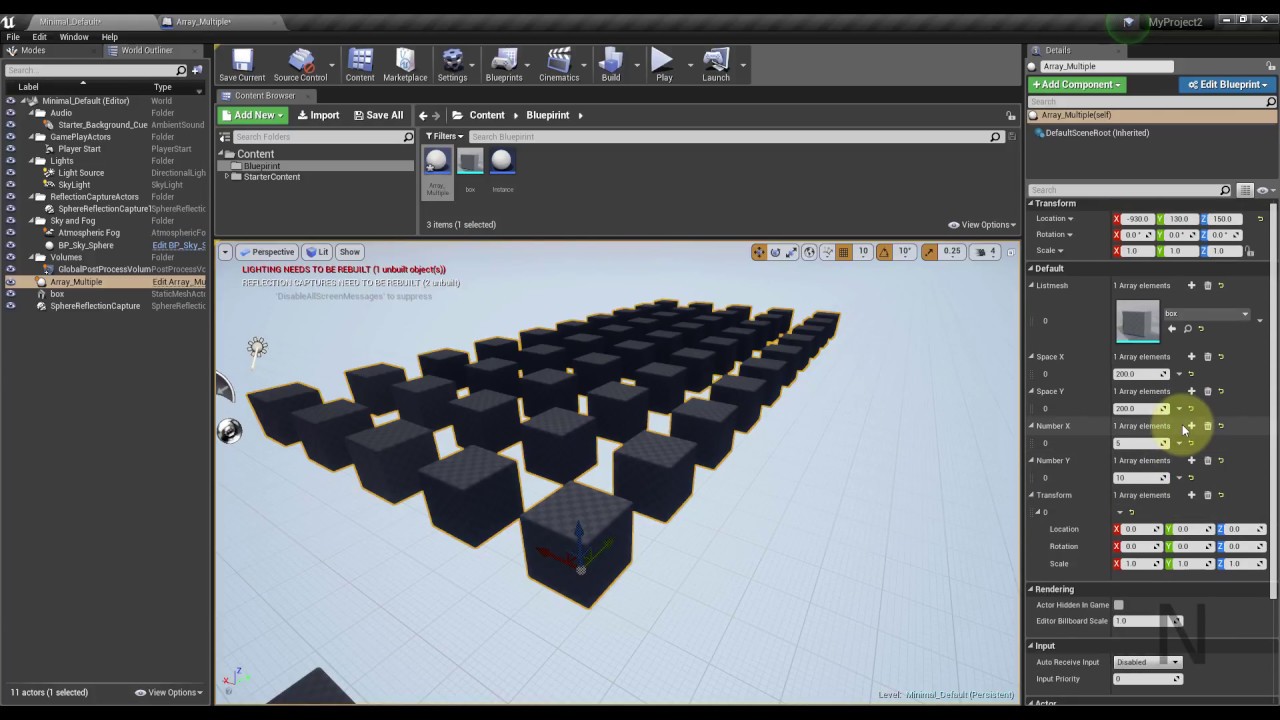
Use Blueprint create Array object In UE4
My Model in Tuborsquid
https://www.turbosquid.com/?referral=trannamuct
round tulip
ocean island
Not sure if this was covered, but anyone know if the level viewport camera info ...
I have not used it before, but I can still find editor nodes talking about it. https://docs.unrealengine.com/en-US/BlueprintAPI/Development/Editor/GetLevelViewportCameraInfo/index.html
Get Level Viewport Camera Info
 gusty shuttle
Quick question: By making a variable, say QuestLevelSequence (which houses a Level Sequence Player type). If I make that instance editable and expose on spawn, could I make the same variable in a different actor and edit it there?
 orchid garden
is there a simple way like datatables to import the contents for a array to prepopulate it?
round tulip
orchid garden
is there a simple way like datatables to import the contents for a array to prep...
Are you asking if you want to fill a data table from an array?
orchid garden
no fill a array from a csv like you can do with datatables
round tulip
orchid garden
no fill a array from a csv like you can do with datatables
Fill Data Table from CSV File
Like this?
Ah, sorry
Mis read you last stement
orchid garden
but for a array 😉
round tulip
I think you will need to use some C++.
orchid garden
i was trying to find a way so i didn't have to manually enter 100 objects to the array
orchid garden
ah no im trying to keep the project sctrictly blueprint based, no c++
ocean island
round tulip
I have not used it before, but I can still find editor nodes talking about it. h...
hmm maybe i would have to recreate the blueprint. I am updating an editor utility widget from 4.25 to 4.26 and the option is not popping up for me.
orchid garden
with c++ alot of things would be easier 😉 but doing it soley blueprints makes some things challenging
faint pasture
@orchid garden just make a data table, get the row, do something in it and fill the array
round tulip
ocean island
hmm maybe i would have to recreate the blueprint. I am updating an editor utilit...
Weird, unfortunately, I do not have 4.26 installed.
round tulip
faint pasture
<@458977415176257536> just make a data table, get the row, do something in it an...
I was thinking that.
round tulip
Each row needs to be a Struct, I think.
faint pasture
I know
orchid garden
faint pasture
<@458977415176257536> just make a data table, get the row, do something in it an...
how about random selection? with a array its simple as a random int, never tried getting randoms from datatables. the original idea was 8 arrays, each with a single object in each array holder, it would select a random from each array to contruct the final object from all 8 selections.
faint pasture
orchid garden
how about random selection? with a array its simple as a random int, never trie...
What are the things you need an array of? Ints, classes, references, what?
orchid garden
they'd be references to objects
orchid garden
yep, static mesh objects
faint pasture
So you can do it 2 ways.
-
Data table with 1 row of a struct with an array of meshes
-
Data table with many rows of a struct with 1 mesh
Make it by hand, export to json or yaml, edit, import
orchid garden
the layout of the datatable wasn't really a question, rather how to select a random from a datatable if i went that route.
round tulip
I think the second way sounds, and will be better.
faint pasture
Oh easy, get all row names and select a random
orchid garden
ah okay so this guy then?
then just random int from the length of the out row names to select the random item
round tulip
orchid garden
i'd still have to make multiple data tables using that cause some of them are 100 items, others are only like 25.
round tulip
Then just add each row to an array.
gusty shuttle
Is there a cleaner way to GET the level sequence player other than Create
round tulip
orchid garden
i'd still have to make multiple data tables using that cause some of them are 10...
@orchid garden Would each table be of different type?
orchid garden
no the data is all the same just whats in them is different
orchid garden
i.e. basically - get random, set mesh part, get next random, set mesh part, etc. for 8 different tables of various length.
round tulip
I would look into composite data tables.
faint pasture
Make a table of 8 rows of structs with an array of meshes inside them
orchid garden
not sure how a composite datatable would work for my problem.
round tulip
Adriel's idea is a good one.
orchid garden
a single data table with 8 rows wouldn't work, as some would have objects and others wouldn't.
so i'd end up getting empty returns
 open crypt
simplest way to get only the odd numbers (basically I want to activate only half of the items in an array) -
round tulip
Just do a is valid check then
And perform a different action if it does not have an object.
 proud hull
open crypt
simplest way to get only the odd numbers (basically I want to activate only half...
proud hull
open crypt
simplest way to get only the odd numbers (basically I want to activate only half...
Index % 2 == 1
open crypt
the module that's what I was looking for, thank you!
orchid garden
here, think of it like a character being randomly generated, the head would be 1 list of say maybe 4 objects, the body being a list of maybe 10 objects, the arms being a list of maybe 8 objects, the legts being a list of maybe 5 objects. so each list varies in lenth.
if they were all in one table the list would be 10 objects, while the heads are only 4, so calling for a random head, the possibility of hitting a invalid would be high alot.
round tulip
What about a map(dictionary)?
What you could do, to help, is make the struct type and send a screenshot.
dawn gazelle
Can you not use random int in range and get the max size of each array to pick one of the options from each array?
orchid garden
dawn gazelle
Can you not use random int in range and get the max size of each array to pick o...
so basically build a array of each row in the data table, then select from those arrays?
dawn gazelle
yeah why not? 😛
round tulip
That's not a bad Idea.
dawn gazelle
or at the least, just the names, then grab the actual data when needed
save some memory or something
orchid garden
it'd be called per actor of that type so.. yeah would probably want to make it a global function call that could be interfaced..
round tulip
What about a macro library which returns that data? This macro would only be defined for a certain type of actor
orchid garden
macro and function libraries can't store data, and doing multiple fuction/macro library calls to contruct could cause memory usage explosions.
orchid garden
where as storing the data in a gobal object (like game instance) i'd only have to construct it once and use a interface call to get the random parts for the actors of that type
round tulip
Yeah.
orchid garden
seems like this would be a better option then per actor, expecially if there were like 50 of them loading in
thanks for the suggestions 🙂 @round tulip @dawn gazelle @faint pasture most helpful 🙂
round tulip
@orchid garden What about a simple blueprint function library function like this?
So you do not have to keep performing lots of casts.
open crypt
nothing super expensive about using event tick with a delay to toggle a light on and off right? (like strobe)
proud hull
@orchid garden one more route you can take on this, which I use for displaying key/button images (would have been super tedious to manually make a table or array since there were so many images). You can load the uasset directly (using Asset Registry) based on naming conventions and/or folder structure. Take your character example, you could store all heads in a "Head" folder, all arms in a "Arms" folder, and these folders in a "BodyParts" folder. Then you can also use naming conventions to get even more specific, like certain heads could be for different species or something, "human_1", "human_2", "alien_1", etc. You just need to remember to include this main folder when packaging.
round tulip
open crypt
nothing super expensive about using event tick with a delay to toggle a light on...
What about a timer?
You could use tick, but timers are slightly better for performance, I think.
faint pasture
open crypt
nothing super expensive about using event tick with a delay to toggle a light on...
Don't need tick at all. Use a timer or loop with delay and random delay lengths.
proud hull
open crypt
nothing super expensive about using event tick with a delay to toggle a light on...
You want to avoid putting delay nodes on event tick.
 fair magnet
Hi there.. complicated but simple question.. I have a Event which sets a timer...
I want this even to be set twice if I call it twice...
So If i press E twice which calls said event it actually sets 2 timers instead of one
is that possible ?
 storm dove
what the inputs should be for this node? im trying to check if the player is looking at an object?
one of the inputs is players forward vector right? whats the other one?
fair magnet
@storm dove https://www.youtube.com/watch?v=7zE_YA4z87M

What is the Get DOT Product To Node in Unreal Engine 4
Source Files: https://github.com/MWadstein/wtf-hdi-files
storm dove
this does not explain it
 dreamy ice
Why aren't you just doing a line tracE?
faint pasture
storm dove
one of the inputs is players forward vector right? whats the other one?
What is it connected to? We can't see
maiden wadi
@storm dove Dot product is the comparison of two directional vectors. So comparing if one actor is looking at another, you'd want the player's forward vector and then the unitdirection from the player to the object.
open crypt
proud hull
You want to avoid putting delay nodes on event tick.
why?
storm dove
thank you @maiden wadi
open crypt
doesn't that just make it do that same action less, so if you are going to tick, at least use a delay to save
proud hull
It can create problems with the overall timing of the main loop.
faint pasture
open crypt
why?
Because it's fucky. Idk how it'd even work, instance a delay every frame?
open crypt
My understand was if you some action, it would check every frame to do that action, but wouldn't actually proceed with the action and any calculations unless it met the delay material
and since that's a simple float check, that shouldn't be expensive but I take your meaning
faint pasture
open crypt
My understand was if you some action, it would check every frame to do that acti...
That's pretty much what a timer or a single delay does.
proud hull
If you want to delay your tick, just change your tick interval rate instead.
odd ember
storm dove
what the inputs should be for this node? im trying to check if the player is loo...
dot return 1 if two normalized vectors are the same, -1 if they are opposite and otherwise somewhere on that scale
faint pasture
storm dove
thank you <@!143471961723371520>
Specifically, if both vectors are length 1, dot product will be 1 when aligned, 0 when perpendicular, and -1 when opposite
odd ember
if you're using it with unnormalized vectors you're gonna get weird results
solemn parcel
So i've got my MAX AMMO showing with this, but how can I add a '/' just before the number, without creating a new text widget component ?
storm dove
thank you
dawn gazelle
open crypt
My understand was if you some action, it would check every frame to do that acti...
Every frame the delay will be called, and the stuff after it will happen after the delay. So if you wanted a 1 second delay (approximately 60 frames), you could have 60 things waiting around to execute, and every frame afterwards it would execute, meaning you're still firing things every frame.
If you use a timer and set it to fire once a second, you don't have anything waiting around to execute, and it'll only fire once every second.
open crypt
dawn gazelle
Every frame the delay will be called, and the stuff after it will happen after t...
I'll use that for sure (I have in the past) I guess conceptually, I'm not understanding - how does the timer itself not using some form of check, it has to increment, and something has to check to make sure it isn't expired - I guess it's just hard coded in the assembly and more performant that way
fair magnet
fair magnet
Hi there.. complicated but simple question.. I have a Event which sets a timer.....
Anyone ? :o
proud hull
solemn parcel
So i've got my MAX AMMO showing with this, but how can I add a '/' just before t...
odd ember
fair magnet
Anyone ? :o
it isn't possible in blueprint, no
solemn parcel
@proud hull Thanks !
odd ember
or well, you can do it but you have no way to turn off timers individually
so eventually it's going to lead to a memory leak
dawn gazelle
fair magnet
Anyone ? :o
You could check to see if the first timer is valid and if so, create a second one.
fair magnet
@dawn gazelle I thougt about this but I would need alot of timers then
faint pasture
fair magnet
<@!218956378654507008> I thougt about this but I would need alot of timers then
What exactly are you trying to do?
odd ember
yeah this sounds like a hacky setup
fair magnet
Manipulating Variables for some duration... but I want things to stack so like...
If I call that event once it reduce health for example by 20 for 10 seconds and gives it back after
but If I call it again during that period of time it will reduce by 20 again by 10 seconds aswell
kind of hard to explain
odd ember
so two DoTs stacked of the same type
fair magnet
exactly
faint pasture
@fair magnet use GAS or structs with a system to run them
odd ember
you could create a scalar value
faint pasture
Or just actors
odd ember
on a single timer
but that's just going to approximate that effect
but yeah something that exists in the world is the better choice here
actors or perhaps even a component spawn
fair magnet
@faint pasture What exactly is GAS ?
dawn gazelle
Do you want the DoTs of the same type to tick separately? ie. Lets say you have a "poison" effect and the effect can stack. Do you want each stack to tick independently?
faint pasture
Or a struct in a BuffComponent
dawn gazelle
Gameplay Ability System
odd ember
I'd say components are your best option
dawn gazelle
requires some C++ work if you want to use it.
faint pasture
@fair magnet is your game multiplayer? Is it fast paced?
fair magnet
I have no experience with that system at all
odd ember
it's the cleanest in BP, for sure
faint pasture
@odd ember is adding components at runtime a performance consideration?
Like are you talking about the buff being a component or the buff being data inside a component?
fair magnet
@faint pasture it is multiplayer but don't know how fast just yet
Rn I'm just setting up logic
faint pasture
@fair magnet I would just start with buffs as actors. Then you can attach them in the scene and they can have their own little particle effects and sound etc, and manage their own lifetimes
proud hull
@faint pasture components are simply just data storage anyways. They can be as small as holding a single variable or as robust as the movement component.
faint pasture
proud hull
<@!127902729677963264> components are simply just data storage anyways. They can...
I mean adding/removing often at runtime, sorta like how an ECS uses components.
proud hull
Creating your own custom components allows you to keep things modular and clean.
fair magnet
So should I use Components or actors now ? o.o I'm confused lol
faint pasture
@fair magnet start with making a buff actor.
If you're fairly new to unreal it'll be the easiest and most intuitive way to do it.
fair magnet
I guess I'm semi-new :o
faint pasture
You just make an actor with like an affected character variable, and a couple of events for on apply, on update, on remove, etc.
Then to make a DOT, you would do damage to affected character on update
Update being on a timer prolly
fair magnet
I think I've got a plan...
Making an actor with a lifespan of the buffs duration.
Creating a Datatable for various buffs
Setting a row on a skill or smth and just assing all the information through to the actor so the actor can apply it properly
faint pasture
It won't be super elegent for something like stacking slows but it'll work.
odd ember
components would be better since you will be adding them to actors
adding actors to actors will be a pain
fair magnet
Maybe I can make an array to check if a buff is already applied and if so do things
faint pasture
@odd ember are you talking about buffs as components or buffs as data within a buff component? Like when you apply a dot, are you adding a component to the character or are you adding a struct to the characters buff component?
odd ember
you should be using structs for that I reckon
odd ember
faint pasture
<@224571781862653952> are you talking about buffs as components or buffs as data...
both. a debuff is still a buff
faint pasture
I mean if you have five bucks, do you have five buff components or do you have one component with five buff structs within it? That's what I'm asking.
 willow phoenix
instead of this 800x600 texture setting the scene capture gets rendered 1:1 (but i want to use it as a picture in a frame with a 8x6 ratio)
any ideas on how to solve this?
odd ember
you're never going to get around that, because stacking in code terms is undesirable repetition
faint pasture
@fair magnet if you have a deep attribute system, and you're okay with c++, look into GAS. It's super robust but a royal PITA to get started with.
fair magnet
Well I have legit not a single clue about cpp o.o' don't even know how to create variables in there lmao
faint pasture
@fair magnet k then NVM lol
If you need your system to be deep and robust, you are going to want to make a component that holds attributes and effects and handles and applies them
orchid garden
willow phoenix
instead of this 800x600 texture setting the scene capture gets rendered 1:1 (but...
wouldn't you just modify the uv's on the mesh to get the 8x6 ratio for the picture frame? (requires editing the mesh)
fair magnet
I have smth like this as of now
fair magnet
yea :o can't I do this in here as well ?
odd ember
you can but you ideally want to settle on a class that manages what type of logic your effects can have
solemn parcel
@Is there a way to interrupt a PlayMontage ?
willow phoenix
orchid garden
wouldn't you just modify the uv's on the mesh to get the 8x6 ratio for the pictu...
mehhh, i thought there would be some thing im missing. thanks
odd ember
so if DoT is one of them, then that should be described as a type in the data that the effects manager can then use for instance
orchid garden
willow phoenix
mehhh, i thought there would be some thing im missing. thanks
are you just trying to get it to tile to 8x6 on a large surface? if thats the case you should be able to do that modifying the texture uv's in the material file itself.
willow phoenix
ye did that, thought i could just add some magic hook anywhere to do it "the correct" way
proud hull
solemn parcel
@Is there a way to interrupt a PlayMontage ?
Stop the montage. Can also pause it and adjust its position, not shown in screenshot.
solemn parcel
@proud hull Thanks again 😉
orchid garden
willow phoenix
ye did that, thought i could just add some magic hook anywhere to do it "the cor...
another way would be using a widget object that locks the scale of the texture in the widget itself, so no matter what its scaled to, the image will always show in scale on the object, that can be tricky though.
fair magnet
@odd ember Enumerations ?
odd ember
can be any type of tagging
round tulip
Actor tags?
odd ember
could also be an array of tags for instance if you're looking for multiple effects to happen within one thing. but then you'll have to figure out if they happen at the same time, delayed etc. and how to ensure you can dictate and write that logic
fair magnet
I'll probably go with Enums... that way I can easily add later on
round tulip
Or gameplay tags
odd ember
I've personally just bundled a specific class in the data table that houses the logic because I often use custom logic, but I'm not sure I can recommend the same for others
fair magnet
like creating an actor for each type ?
and then defining the type in the data table ?
odd ember
like I said I can't really recommend it
willow phoenix
orchid garden
another way would be using a widget object that locks the scale of the texture i...
just created a mesh in UE and set the UV to 0.8 and 0.6
worked, since im not even close to a single A game idgas ;D
 sturdy notch
Not sure if this is the right section, but I need a hand with object outlining beyond what my post-process material can handle.
open crypt
wtf am I doing wrong with this - I'm trying to get my Pawn to spawn to this DebugCameras position (so it takes the same view)
 winged pewter
If you're looking for something quick and dirty, this method has been very useful for me. It's not exactly scalable or maintainable though...
https://www.youtube.com/watch?v=1XqXvVFN5i4
^ @sturdy notch
odd ember
sturdy notch
Not sure if this is the right section, but I need a hand with object outlining b...
probably #graphics is a better place to ask
open crypt
What is wrong with this BP? It spawns in the previous orientation of my other pawn
sturdy notch
Thanks @winged pewter - the issue isn't not having a way to do it, it's that I can't set a custom render depth to anything not already a component of an existing blueprint - only the existing static or skeletal meshes. @odd ember I'll try in graphics. Thanks.
gusty shuttle
I'm trying to update my widget via Event Dispatchers. However when I construct my widget, scan the world for my quest actor (which is definatly in the world at this point) it says it's not valid and my widget does not populate, any tips?
I call them on Begin Play of my quest once it spawns too
Any tips?
winged pewter
not much is in the world before the construct step - how are you sure it's there?
gusty shuttle
I can flick it on and off (the widget thats attach to my VR wrist)
And it spawns and destroys
So it should read fresh every time it spawns
odd ember
race conditions
gusty shuttle
So if I can visibly see my quest actors in the world, and I open my wrist widget, still not populating
odd ember
why doesnt your quest actor spawn the quest UI
winged pewter
^ that's what i would recommend setting it up like, but if you want to keep them detached, i'd figure out a way to set a reference to your actors in your widget without using the GetActorOfClass
it's kind of slow/unsafe to use that during gameplay...
gusty shuttle
Even on construct, and there is only one in the level. It's not on a tick
Right now, my quest actor, spawns the quest UI info. So I can just create a child actor for the quest with all the loc, rot, objective blah blah in it
odd ember
oof child actors
gusty shuttle
Still though, I'd like to know why that's not showing as valid even when it's clearly in the level
winged pewter
how are you spawning the quest actors? did you place them in editor or spawn them programatically?
quiet token
Guys i'm askin for 3 days for help on this i know, but is maybe someone online right know what knows how the counterstrike/quake strafejump mechanic works? I just dont get it.
gusty shuttle
Well I'm truing something new @winged pewter , I am spawning the quest actor in via level sequencer
odd ember
quiet token
Guys i'm askin for 3 days for help on this i know, but is maybe someone online r...
I thought you didn't have time to implement it?
gusty shuttle
winged pewter
how are you spawning the quest actors? did you place them in editor or spawn the...
I have done it programerly wise before, worked decent and well. Just trying something new
winged pewter
gusty shuttle
Well I'm truing something new <@!230395876751704064> , I am spawning the quest a...
level blueprint? or are you actually using sequencer?
gusty shuttle
winged pewter
level blueprint? or are you actually using sequencer?
Using quest events
In sequencer
quiet token
@odd ember nothin workin so far, i want it xD but actually no one understands what i mean, i need to call someone that has knowledge and show him quick. its really more complicated then ppl think
gusty shuttle
Via SequenceDirector
odd ember
quiet token
<@!224571781862653952> nothin workin so far, i want it xD but actually no one un...
you had the math from that one article
it's all described there
quiet token
@odd ember i think its just the bunnyhop part, not the strafejump itself wich i'm intrerested in. And even if its there on paper, i could use a hand cuz i can't translate that into my bp editor ^^ I can understand if u dont wanna be that person, but i hope someone might be interested sooner or later 😄
but i'm learnin day in and out, maybe in a week i can get it myself
 rough blade
When it comes to representing players in vehicles (driver sitting in the driver's seat for a jeep for example), is it better to have a skeletal mesh to just mimic the players model or would you suggest having the player pawn lock itself to that relative location (while playing anim) via a tick function?
stray island
Soo my attempts has failed
I’m trying to rotate meshes around a point
Welcome to Blender Quick Tips!
In this quick Blender tutorial you will learn how to use the array modifiers to duplicate or instance an object along a curve path.
This is an essential time saving technique which will be a great addition to any 3D artists arsenal.
The programme I am using to create this 3D effect is called Blender and you can ...
With a choosen number
faint pasture
@stray island mesh angle = Index x 360/NumberOfMeshes
MeshPosition = Center + Rotate vector((Distance, 0, 0), Z, Meshangle)
odd ember
stray island
I’m trying to rotate meshes around a point
is this in blueprint?
because you're showing a blender video
stray island
Yes i want to do that blender duplication in unreal blueprint
stray island
faint pasture
<@768035735470080000> mesh angle = Index x 360/NumberOfMeshes
MeshPosition = Ce...
Oh , i will try that i spent hours and failed , is it this simple 😇
odd ember
ah I see
you could also parent the mesh to a point that you spawn and rotate said point
and for each new mesh, just do the same
faint pasture
stray island
Oh , i will try that i spent hours and failed , is it this simple 😇
That's about the Z axis, for arbitrary rotation axis and start direction it'll be a little bit more involved but not too bad.
Or just have a root component above the mesh component, spawn them all in the same place with different rotations, and offset the mesh locally on all of them
stray island
I will slowly understand the logic
But what i want is to expose and instance the number of duplicates so in editor if i type 100 it would have 100 meshes around a point
Will this logic lead me to that?
faint pasture
stray island
But what i want is to expose and instance the number of duplicates so in editor ...
Do it in the construction script and add all the meshes there.
Also use instanced static meshes if you're gonna have thousands of the suckers.
stray island
Yes i will do it in construction script
Its one mesh to add , the number determine its dublicates around a point
open crypt
This prints out values as I move the mouse, but does not move
so I know I have input, but why is my pawn locked ?
odd ember
paused?
open crypt
nope, because i can move around other movements
odd ember
breakpoint it and trace down the origin
 simple sky
Does anyone know where the editor saves keyboard binds to? I'm trying to test rebinding keys and I'd like to "reset" the changes; but I can't find anywhere it's stored
dawn gazelle
stray island
Its one mesh to add , the number determine its dublicates around a point
BlueprintUE
odd ember
yeah that's how I would have done it
tbh I'm low key waiting for blutilities to get more features. it's a great system but it is very limited right now
 dense isle
Can I change any of these values at runtime for a Capsule Component?
I basically want to enable or disable something as a Dynamic NavArea_Null component, because it falls from the sky for 5 seconds. I only want it to became a NavArea_Null once it is on the ground
 hollow drift
hi folks. i struggle with BP interfaces again. I want to tell another bp that an action has been done in the playercontroler
odd ember
use delegates?
hollow drift
and it should do stuff
@odd ember can you please elaborate what do you mean with this?
odd ember
event dispatchers sorry
hollow drift
@odd ember ty 🙂
 pine trellis
if I have no nav mesh on my level, am I suppose to see a nev mesh if I hit the P key? Because I removed my nav mesh and try to add a new one but its like its taking up the whole map,, but its small little box right now
odd ember
if you have no nav mesh then no nav mesh will show up
it goes without saying that the nav volume dictates the size of the navmesh at its largest
pine trellis
yeah but If I remove everything, my nav mesh still shows up if I hit P on the keyboard
odd ember
is your navmesh static?
because usually the navmesh is baked
you'll have to rebuild paths if you removed it
pine trellis
how do I rebuild without a nav mesh?
pine trellis
cool thanks didnt know if it was bugging out
hollow drift
leme rephrase my question. I think i went on a wrong approach
the bp i tried to make a call to is an actor. what kind of bp can i use to execute something which is not part of the playercontrole. issue is i try to split my code in more parts. therefore i try to move code out of my playercontroler.
odd ember
I think more context is necessary
hollow drift
Actors are only present when spawned in the level
therefore i cannot put code into actor without spawning it
odd ember
that is correct
hollow drift
my goal ist to separate code from my playercontroler
hollow drift
the playercontroler picks up a pawn and moves it around the map. the code i try to separate is calculating according to pawns location valid tiles
so i am passing following details
odd ember
so what's the issue you're having
hollow drift
first i do a ref to the actor i am try to pass to. but thats what i am trying to replace
all other values are as shown above
odd ember
in more concise terms
hollow drift
what type of bp can i use which does not need to be spawned in the world but where i can put code aside?
e.g. i can acces all time
ecxept for gamestatebase
or i just create a second gamebase?
hmm, perhaps went full circle
gamestate...?
odd ember
what is the issue you are having? that your pawn isn't spawned when you want the pawn to do something?
hollow drift
our main issues is that we work with github/gitlab and those cannot read binaries. Because of that only one person can work on one file at a time
therefore we try to separate the code into smaller pieces so people can work more or less on one "game element" at a time e.g. playercontroler
odd ember
that shouldn't affect architecture. but to be honest it does sound you have a problem with your current architecture anyway. but I can't give you a suggestion because I still don't know what is being dealt with. I see you're giving input to pawn from controller
hollow drift
and therefore i try to separate code. pass values from one bp to another ectr
odd ember
this is usually how it's done
 fading raptor
Does anyone know how to use a lerp node?
I made my character change his angle based on his velocity which works great, only problem is when my character hits the ground it snaps to the rotation
how do i make a smooth transition?
hold on im trying to send a vid
odd ember
rinterpTo
hollow drift
how can two blueprints interact with each other?
fading raptor
Make a child blueprint
odd ember
fading raptor
this is a really bad idea to do with the character movement. you should handle it in animation
faint pasture
hollow drift
how can two blueprints interact with each other?

Announce Post: https://forums.unrealengine.com/showthread.php?101051
This Training Stream takes a look at Blueprint Communication. We find that Unreal Developers of all levels can sometimes struggle through the concepts behind moving data between objects. So in this video we'll take a look at the different ways to make Blueprints talk to one an...
fading raptor
I tried doing that but realized that im not sure how i would make it work when my player falls longer distances
odd ember
fading raptor
I tried doing that but realized that im not sure how i would make it work when m...
animations can be looped
fading raptor
Yeah I know but like how would I loop the angle at which the player falls
Wouldnt the loop just snap back to the starting angle
odd ember
not sure what you are referring to
fading raptor
I sent the fox video above, im referring to how the fox rotates when it jumps
odd ember
I mean you separate it out into a start jump, mid jump, end jump animation
loop the mid jump for as long as you need
fading raptor
Thats what I did in my anim BP
I basically recreated the third person template's aniim bp
odd ember
cool so what's the issue
stray island
@dawn gazelle wow thank u so much cant believe its that simple
fading raptor
My character's rotation snaps when it hits the ground
stray island
I actually spent two hours trying to combine these two tutorials

Use Blueprint create Array object In UE4
My Model in Tuborsquid
https://www.turbosquid.com/?referral=trannamuct
odd ember
fading raptor
My character's rotation snaps when it hits the ground
fix your end jump animation to take care of it
and perhaps consider getting some IK to work, though that's another massive can of worms
I wouldn't recommend doing anything with the character capsule for this
just handle all of it as animation
fading raptor
fixing the jump end animation would solve part of it
But with the animations im clueless on how to make it work
odd ember
if the animation plays as the character lands that's pretty much what you want
fading raptor
Yeah ur right, however im also getting another problem when i jump without moving, hold on let me record it
odd ember
then you probably want to consider blending that into the movement animation if they are moving instead of standing still
but these are all #animation considerations
fading raptor
once i start working on the animations ill head on over there, i just need to figure out this one problem gimme a sec
as long as i can figure out how to smooth the rotation, ill be set
odd ember
that's my point
you are going about it wrong
fixing the rotation isn't what you need to do
you need to handle it all as animation
that will make your issues disappear
no rotation necessary
fading raptor
So i make my character rotate in my jumploop animation itsself?
odd ember
yeah that's kind of the point right?
fading raptor
lemme try explaining my confusing in a drawing
odd ember
to not touch the physical constraints of the capsule without reason
especially not for animation
fading raptor
nvm i cant draw
Well if i want to loop it wouldnt it just keep looping the same rotation over and over until i land?
 late blaze
Can someone help me getting the same number which was sent to the Set Scalar Parameter Value on Materials to the Set Custom Depth Stencil Value to be equal?
odd ember
fading raptor
Well if i want to loop it wouldnt it just keep looping the same rotation over an...
no rotation. handle it in animation
dawn gazelle
late blaze
Can someone help me getting the same number which was sent to the Set Scalar Par...
Promote the random value to a variable, then use that variable on both nodes.
odd ember
you will handle the rotation as a visual effect as part of the animation
fading raptor
yeah thats what i mean
odd ember
but your capsule does not in fact ever rotate
fading raptor
oh
Is there a tutorial anywhere that could guide me in the right direction of how i should do that, cuz i have no clue
fading raptor
oh shoot i think i know how to do it
late blaze
dawn gazelle
Promote the random value to a variable, then use that variable on both nodes.
Like this?
dawn gazelle
Yep
fading raptor
I could just make the animation and put it into the jumploop but instead of looping it, it just plays once and stays at the end position until i land
odd ember
yes
dawn gazelle
The reason that happens is that pins always calculate backwards - so if you have two things pinned into one node, they'll both call whatever function they are attached to, and in the case of a random number function, they get different results.
open crypt
I want an light to strobe, but I also want it to rotate - I'm using a timer but realized I need different times to do this things in
otherwise the movement is very jerky
open crypt
I'm trying to do it with timeline but I'm not sure how to loop back around to 360, right now it turns around instead the other way
odd ember
so you want to reverse the timeline instead of looping it?
open crypt
no, i'm handling the rotation on its own, this way
and the timer handles the toggling of the lights
odd ember
you can plug both into the timeline
open crypt
you are right too, but the rate would be different
which I guess is the point of a timeline
open crypt
I know that but how do I get this to keep going around
open crypt
it loops fine
but it goes back the other way, because it's 360
i've tried with 180, and 360
not sure what i am suposed to put for the end, or maybe just leave it at the high point
orchid garden
set the timeline to go from 0-359 for the value to avoid a pause.
open crypt
thanks, got it, knew I was on the right track, thanks for helping me get over it
i was just about to ask
orchid garden
360=0, so you'd have 2 returned values of 0
open crypt
that pause is still there, perhaps just an angle of my perspective?
odd ember
no I see it as well
open crypt
weird - what am I doing wrong here? should I be adding or setting rotation - adding right?
orchid garden
set should make it smooth
odd ember
sharpen the curves or make them linear
open crypt
jmust be the tangents of the curve maybe?
orchid garden
use linear not curve for the points
 lime fulcrum
Is Noise Maker component calculating the audio occlusion for example when using Steam Audio?
lime fulcrum
Roger that 😄
fading raptor
How do i get my actors current rotation? I tried dragging out of character movement but its not working 😦
nvm
im dumb
hollow drift
quick question. If a Actor is set to hidden, does its collision component still generate hit results which, for example still can be read with a cast?
odd ember
hidden is just visibility it has no effect on collision
hollow drift
kk ty
olive sedge
I'm trying to ragdoll a character but it falls through the floor, any tips?
I have collision enabled for both
 night quail
I'm trying to animate a material so it translates the UV coordinates over time, but nothing is happening when I do this - the texture just stretches itself so that bands of color appear instead, no matter how I change the constants (I'm adding this to the texture UVs):
I'm aware I could also make one of these variables a parameter and change it in the level blueprint, but I'm curious as to why this doesn't work
odd ember
night quail
I'm trying to animate a material so it translates the UV coordinates over time, ...
#graphics, materials and blueprints aren't the same
night quail
Oh boy. Thanks for that lol still getting to know the terms
 finite osprey
Hello i have i quick question. Im currently working on weapon switch and i handle it thru spawn/destroy actor from class. all their values are reset to default after switch(like ammo) what is the efficient way of keeping their values? In playerBP? DataTable? Should i use object reference instead?
odd ember
probably better to use object references instead yeah
 still plume
Hello. Is cast to... A good way to enter in a actor to take and set information? Is better if I use any time a interface or other solution and not cast? Or I can cast any time withouth problem?
quiet token
Can someone explain to me why i'm not just addin force towards where i'm lookin? He's always pushin me to one coordinate on the world it seems
dawn gazelle
You shouldn't need to add the current location.
ie. You don't need to add GetActorLocation to the forward vector calculation.
quiet token
ahh thanks, i had the same thing yesterday >_< I need to learn that the vector already has a reference to where i am ^^ I always think i need to tell him that
dawn gazelle
Get Forward Vector has no idea where you are. It returns only which way you are facing.
If you're looking to apply force in a specific direction, all you need to know is the direction to apply the force, not where you are.
quiet token
ok thanks!!
odd ember
still plume
Hello. Is cast to... A good way to enter in a actor to take and set information?...
casting is fine. if you're worried about costs use the profiler
lean reef
round tulip
This video shows you how to create a simulation in VR. https://youtu.be/n1_h27DW...
Thanks Mirrors Edge, nice video. Do you know any examples of using blueprint to make a simple multiple choice quiz?
 ornate terrace
Hey, so i've been wondering about how to make Sprinting Camera Shake, i tried it, it worked but only on singleplayer project, on multiplayer the camerashake persists even after Stop Camera Shake action, any ideas?
solemn parcel
AFter putting a branch, i'm having this whenever the player as health less than 0 and is being destroyed.
having this without the branch
Im a little lost on this
 trim matrix
Isn't the branch condition reversed? Shouldn't it be < ?
dawn gazelle
solemn parcel
AFter putting a branch, i'm having this whenever the player as health less than ...
I'm guessing you have a text widget bound to your player health value. It probably shouldn't be a direct bind, rather, when your health changes it updates a variable in the widget.
dawn gazelle
and since your player is dying and being destroyed, those values go invalid.
solemn parcel
oh
so creating a new variable on the widget for health ?
that takes the sames values as the CharacterBP as health ?
dawn gazelle
Yeah, whenever you're changing your player's health value, you should be setting the value in the widget.
stray island
datura i have some questions regarding the rotate meshes around point
@dawn gazelle remember?
First question how do i increase the distance each time a new duplicate added , so instead of forming a circle the meshes would swirl instead
dawn gazelle
Distance = Number of Meshes * Your own deciding size factor
 autumn hawk
Any tips on how I might go about allowing Editor manipulation of actor components using gizmos? I have an actor with a collision component and a box collision as children, and I'd like to be able to resize/move the boxes using gizmos in the editor as opposed to numerical changes in the details panel.
stray island
dawn gazelle
Distance = Number of Meshes * Your own deciding size factor
They didnt do swirl effect
They still circualr
Circular
dawn gazelle
I do not understand what you mean by swirl. If you do this, and set distance to 25, then each time you add another mesh, the circle will grow bigger. If you wan the meshes closer together, set distance lower, if you want them more spread out, set bigger.
odd ember
he's asking for an offset per mesh that increases exponentially
 acoustic hamlet
^make a timeline for that then
odd ember
this isn't runtime I'm pretty sure
acoustic hamlet
oh well then idk what they're trying to accomplish
if its not runtime why does it matter if it increases exponentially
?
odd ember
anyway the idea is something like distance * (meshNumber/totalMeshCount)
if it's a blutility thing then it matters just as much
dawn gazelle
Mebbe he means something like this?
odd ember
yes
stray island
dawn gazelle
I do not understand what you mean by swirl. If you do this, and set distance to...
I want the distance to increase an “X” unit each time a duplicate added for example first cube is 10 units away from point , second is 15 units away ... etc so it wont be a circle anymore
YES
That screenshot , how did u do it
dawn gazelle
Windows Key + Shift + S
odd ember
lol
stray island
I mean its content
dawn gazelle
In the engine <_<
stray island
Yes
odd ember
a magician never reveals his tricks etc.
dawn gazelle
Slightly modified the loop and...
The index of the loop feeds into this
I am a very literal person XD
stray island
That looks awesome but tbh its missing a tiny bit to be
My target
I want the same exact circular shape , with the choosen distance from center point as we did firstly
Then starting from that distance , rest cubes grow
Not starting from 0,0,0
odd ember
so... add that distance?
quiet token
WOOOH i almost got what i wanted to archieve, in a slight different variation. When i Jump now he's always flyin to where my mouse is lookin so the player can jump in a curve. But i know that i cant use that feature like this. is there any way i could implement this into my jump? Cuz when i jump now i'm Floating with the effect i wanna have, but its not the actuall jump velocity etc.
odd ember
there is no possible way for you to attempt to merge them
stray island
I will try to merge them
I have another question, if i want to add another row of these dubllicates , what do i do , array?
odd ember
quiet token
WOOOH i almost got what i wanted to archieve, in a slight different variation. W...
not sure what you mean here
what do you want?
quiet token
ok wait
i try to make it clear this time ^^
dude can i call u for a sec and stream this shit?
odd ember
sorry, not open for that kind of business
quiet token
kk then i try to explain here
I want that the player flies always into the direction he's facing after he jumped, always following the crosshair so to say. With the nodes i posted i emulate what i want, but when i constantly add the velocity to the player like this, he's floating forever. So i added the Up Vector with a - value so he comes down to the ground over time. But ofc this istn the same as jumping.
quiet token
i want to add velocity but in concideration of the players normal jump
yeah
after he jumps the mouse should lead the direction
cuz he has 0,1 air control
like in counterstrike
odd ember
you can still have air control
quiet token
i dont want him to
odd ember
well then just remove it in the character movement
quiet token
when he jumps and then press left, nothin happens, he has to strafejump
ok u dont get it ^^
maybe i explain too bad
odd ember
air control doesn't care if you're "jumping" or just in the air
 dapper hearth
A game of keep away how would one go about doing a node for that? I’m sure I’ll figure it out if not
odd ember
so if you set air control to 0 then it'll not have air control regardless of how you are in the air
quiet token
the air control has nothin to do with it, all i wanted to say is, that in my game i dont allow the player to have air controll, other then via strafejumping
odd ember
so set air control to 0
orchid garden
hrm... so i did a 'set actor location and position' using a refrence to my main character... and rather then it setting the actor to the x z of the position, the character was positioned so that the camera was at the x z of the postion, is there a way around this so that the actor is actually moved to the postion and not based off what camera the player is using?
quiet token
i did
but
when i jump
with this
im floating
^^
i want the player to jump up and down as usual with a normal jump, but mid air he can control with mouse
orchid garden
to show what im talking about, the character isn't centered with the chair, rather the camera is (represented by the white dot):
quiet token
and it happens to be that this velocity thing wich i made has exactly that mouse feelin, but its no jump ^^ i hope that makes it clearer
odd ember
quiet token
i want the player to jump up and down as usual with a normal jump, but mid air h...
try to split the forward vector to use use x,y and leave z blank, and try without the upvector
see if that changes anything
odd ember
so what happens
quiet token
i still float until the up vector with -200 gets me on ground eventually
odd ember
well I did say remove the up vector
quiet token
ah and i added a delay 0,2 before can strafe is active
otherwise i coulnd even jump cuz he starts as soon as i jump with the floating
orchid garden
odd ember
the x,y use from your forward
the reason you're not falling down is that your forward vector is overriding your velocity
and your forward vector will have 0 in z
so
odd ember
using the previous velocity's z will use gravity
quiet token
@odd ember kk mom i try
orchid garden
@quiet token its what i use for a second jump when jumping.
so anyone know how i can get it to place the actor in the center x z location instead of the camera?
orchid garden
quiet token
wich one? only the z?
orchid garden
some reason its not placing the actor properly...
odd ember
instead of the add node
quiet token
Yoooooo, thanks i think thats it!! Now i have the issue that he's jumpin forward even if i'm just pressin jump and i cant jump backward etc. but i think i'll figure that out
this was what u ment right?
quiet token
just copy paste or what?
odd ember
try yours first
see if it works
ah yeah I see
so in order to fix that
you will have to go into your character
quiet token
i did yours now, its the same but more clear
odd ember
in your character forward movement
zealous moth
did most actors come with a self-destruct timer property or is it through another component? i forget
odd ember
quiet token
take the axis value from either
and make them into a variable
that is set every time you use that event
does that make sense?
actually do it for forward first
quiet token
done
odd ember
now that you have that axis value, go back to your previous logic
quiet token
aye
odd ember
in your previous logic, get your axis value for forward backward
and plug it in like I did this literal node https://blueprintue.com/blueprint/j7vldga6/
BlueprintUE
odd ember
ok what's happening
quiet token
he jumps a little in a direction and after 0,2 sec or somethin like this only upwards
stops in every other direction
only z momentum
quiet token
if i jump now and then press forward nothin happens, only jump. if i run forward and then press jump its the same, only upward motion
odd ember
so can you check your inputs in your project settings and tell me what the axis values are for your forward backward movement?
odd ember
strange
so it should work
basically the idea is that your axis is a scale value that sits at 0 while standing still
but changed to 1 or -1 if you move
odd ember
could be
quiet token
the player can get a little boost when he jumps 0,1 after landing
i plug it out
for a moment and check
odd ember
also you can just use the GetForwardBackward node that you showed in the jump section
I forgot that input axes have their own nodes
quiet token
nope, no change
with the other forward backward its the same, but that makes sense i guess
mhhh
 vestal plinth
if I have a class MyParent and it has an inherited class named MyChild, and then I create a variable of MyParent type and assign a MyChild to it, if I call GetClass on it, what will I get back?
odd ember
quiet token
nope, no change
debug the value of forward backwards. seems right now that it stays 0 when it shouldnt
quiet token
when i jump and press forward its 1, when i press backward its -1
quiet token
wich one?
odd ember
on tick
quiet token
code for the strafe?