#blueprint
402296 messages · Page 602 of 403
 odd ember
 quiet token
as soon as i jump its true
i trigger it when i jump
and when i land its set to off
odd ember
no I mean what is the value of the multiplied forward vector
quiet token
u mean where forward backward and the forward vector get multied?
odd ember
yeah
quiet token
when i jump and press y and x are showin values from 1 to -1
odd ember
the velocity
quiet token
z is 0
odd ember
so the vector
quiet token
seems to raise from -1500 to almost 0 if i see it correct
odd ember
I mean look at the x y values
quiet token
-1495 or somethin
quiet token
when i jump and press there are values
but there are not plugged, why does that matter?
odd ember
lol
odd ember
that should work yeah
quiet token
yeah kind of, need to tweak it i think. cuz he has not his momentum from the jump anymore, its like air friction has no effect anymore and i cant jump sideways
but i think this is a good starting point, u helped me alot, i try to understand everything and then build on that
odd ember
quiet token
yeah kind of, need to tweak it i think. cuz he has not his momentum from the jum...
plug in the stuff you unplugged before
quiet token
wich stuff?
odd ember
from the jump
quiet token
i already did
i mean
when i walk to the left now and jump, he stands still and jumps
when i jump forwards i have to hold "forward" otherwise he's stand still and land, no forward motion
i think this might be a bit more complicated then expected xD
odd ember
quiet token
when i walk to the left now and jump, he stands still and jumps
I mean I thought that's what you wanted
odd ember
quiet token
when i jump forwards i have to hold "forward" otherwise he's stand still and lan...
this, that is
if you want it differently you have to say what you want lol
quiet token
well
the strafejump
this morning i would have tought that its kind of workin today
thats a really good feel
i wanted that ^^ but i havent concidered that now there appear more problems
odd ember
so you want it to, when you jump, remember your forward velocity?
quiet token
thats why i wanted to stream quickly, cuz its easy to show but hard to explain ^^ but i can totally understand that u didnt want that
yeah in fact
i want that mouse strafejump
but when the player jumps he should keep is momentum
odd ember
so how does the player stop?
quiet token
when he presses left or right he can aim with the mouse then
when he lands
or pushes backwards
odd ember
I see
quiet token
but in fact he could let go of W key
cuz he's jumpin same distance no matter if he still pushes w or not
only when he presses left he can strafe to the left
when he presses D he can strafe to the right
odd ember
so just add a new float variable on the jump event that's called something like ForwardValueAtJump
odd ember
set the ForwardValueAtJump to be forward backward, then use that instead of the forward backward on event tick
when you land, reset ForwardValueAtJump
quiet token
how do i reset somethin?
quiet token
well then i'm glad
its workin like intented, but far from bugfree
i mean
it has no bugs
but the jumpin has
for example is he always jumping the same distance, no regards to my movement speed
i cant jump forward+right or left aswell, instant forward push
i guess thats why u only can stafejump in counterstrike when pressin Left+Lookin Left with the mouse and the other way around
odd ember
if you want to jump right just add your right vector as well
odd ember
right now all the setup only works for the forward vector
but you literally just have to copy it for the right vector
quiet token
i could give u a call without us talkin just streaming my game, and tapping into cs fast and showing u the issue
yeah but what if i'm walkin forward+right at the same time
that wouldnt solve that i think
 sonic cipher
https://gyazo.com/0afdf8d5cbcad4f19d2f27565f553363 why is my image green please ?

ok it was the compression lol wtf
odd ember
quiet token
i could give u a call without us talkin just streaming my game, and tapping into...
BlueprintUE
no I'm not into the whole stream thing
odd ember
replace the get input axis value with the values you made at jump time
where you have your velocity logic
quiet token
sry i dont get it
mom
this is how it looks right now
what u mean with the get input axis
odd ember
I told you
BlueprintUE
made a revision because I don't trust
ue to not make it weird
actually
forget that
odd ember
BlueprintUE
odd ember
it's what you replace the input axis node with
like I said
and the right value for the right vector
quiet token
sry dude im tryin to read, understand, copy, screen and smoke at the same time ^^
sry if i'm a little bit slow sometimes
odd ember
https://blueprintue.com/blueprint/qr5_sck1/ ok last one
BlueprintUE
odd ember
the reason I'm changing the back of it a bit is because the values will flip a bit if you just add them normally
odd ember
so version 5 attempted to mitigate that by taking the average
quiet token
its just i'm still figuuring out where to plug that
odd ember
but then the speed gets lowered for both
so version 6 takes this into account by asking either for what the max value is
so no matter what you'll go at full speed in the correct direction
odd ember
event tick
quiet token
or do i just copy your complede bp?
odd ember
where your event tick logic was
quiet token
i take all
ahhh
i tought just a portion
no
i'm doing somethin wrong i think
do i just copy the complete bp in the link u gave me and plug my event tick + the branch into that set velo, or do i copy a part out of your code and replace it with the forward value?
odd ember
you have to replace the forward value with the variable you use at jump to set forward speed
and you have to make a new one at jump for the right speed too
the event tick code you can copy as is otherwise, just replace the input axis nodes with what I said above
quiet token
i try to understand
mom
at the last pic i send, the forward value at jump is already the variable isnt it?
odd ember
yeah so you can replace that
and then make a new one for the left right value
for the right vector
odd ember
both
odd ember
yep
quiet token
i cant put the event tick into another thingy
what do i plug where now?
does it come after the first set note?
i feel so stupid
right now
 dawn gazelle
Sequence
odd ember
lol wtf are you doing
replace your logic, not copy
and use the values you were using before
I told you
quiet token
dude
i try my best
ok from scratch
i delete all i had and only take yours
right?
odd ember
yes, but only for event tick, and keep your branch
now in mine
remove the nodes where you get warnings
and use the 2 variables you got from the jump event
so forward value at jump, and right value at jump
odd ember
correct
quiet token
mom i screen
cuz its hardcore buggin
i might did somethin wrong again
when i walk and jump he's lanching me sometimes, when i make -800 doesnt work either, when i make 800 wich i had earlier, cuz 8000 is way too much, it doesnt work either
sometimes i hop in the opposite direction
it seems a bit random
ah no, i think when the launch is happening i always get drawn into one specific direction
or did i plug the variables at the wrong places?
nope..
odd ember
ok so maybe the max nodes don't work
try dragging the x from forward to velocity and y from right to velocity
you can delete the max nodes
 dusk basin
im running into a werid bug were on a built application my mouse input stops working but in editor it works fine
any ideas?
quiet token
Maybe u have to set a gamemode? i'm quite new too but i think we had a similar issue
odd ember
ah
okay
so
before you multiply with 8000
add the two vector together, then normalize
quiet token
its set to -8000 btw, was that intentional ?
quiet token
i split the pin after?
odd ember
yep
quiet token
but the x on top
the y on bottom?
duuude i think we're gettin closer
its workin like intended
but he's still not takin the movement speed in concideration for the jump, he's always jumpin the same distance for some reason
quiet token
dude if i'd knew earlier how much i need to specify i'd gone a different road with explaining ^^
btw u're suuuuch a fuckin big help u cant imagine, i really thank u
i really stuck on this one and since we're makin a game that builds on jumping and movement we cant start with the leveldesign until this is done
odd ember
https://blueprintue.com/blueprint/24wx2fu7/ multiply your 8000 speed with this
BlueprintUE
dusk basin
@odd ember Any idea why set input mode game only does not work on servertravel?
quiet token
in case u're still into this problem i maybe think about this for 1 min so i can make it clear for myself
odd ember
problem is there is no current speed
from the character movement
so all you get is max speed
sadly
however there's get current acceleration
but I'm not sure what that outputs
quiet token
ah and i found another thing
thats why i says i wanna let the player only stafe when he's pushin left or right - right now when he jumps and just turns around in the air he's still gettin drawn to that location
 royal rain
quick simple math question
quiet token
btw are u some kind of genius? i mean its just a few nodes but i'd never come up with that ^^
royal rain
so like i have a value
odd ember
lmao no it's just math
royal rain
i want 1 of that value everytime i run into the actor, but i only want 1
odd ember
and knowing how vectors work
royal rain
how do i make it so i only get 1 of the value instead of it keep going up
quiet token
then i really need to get into that
royal rain
becuase its a check point for a racing game
odd ember
it's the bread and butter of game design for sure
quiet token
i mean i'm on khanacademy since yesterday
royal rain
and i only want to collect it oonce
quiet token
and learning vector math
odd ember
it gets easier because you get to see the results immediately in game
so you know if your math is fkd or not
royal rain
i mean i made a at 1, then made a branch that i think says if i have one
set it to the value of 1
wait
that doesnt seem right to begin with
what is a better way to do it again
odd ember
gonna need to skip to bed
but
you can tag me with a vid of what's happening I can take a look
quiet token
i dont know how to do that ^^
but i work on the problem and maybe i can tell you tomorrow how it went
problems are, take speed in concideration // only strafe when press left / right
i do my best ^^
sleep well and thanks for the help
 stray island
@dawn gazelle hi
 fading raptor
Does anyone know how to align my character to the landscape angle? I know it has something to do with linetrace but i have no clue how to start
 fair magnet
Hey there I have an rather easy question...
I have an actor which should just add some logic to another character...
Everything is working but now my question is how do I reduce ressource intensity of this actor ? :o
I already disabled ticking ^-^
 barren relic
Greetings, I am currently trying to make an emitter spawn while my character is charging to indicate they are indeed charging.
I already have a section for charging set up below
I want the emitter to spawn or be visible while the Charging Count var is greater than 1 and less than 5 but currently nothing is happening
 cold sinew
I think you can use Map in Range@barren relic
For the Branch
And connect from Min > 1
And in Max < 5
And the value connect you Int variable
barren relic
thank u ill try that
 olive sedge
I'm trying to ragdoll my character. I'm reading everywhere I have to enable "Simulate Physics" but it doesn't seem to have any effect
cold sinew
It is a node
 thorn ermine
(spherical) linear interpolation is your friend, look at the 'InterpTo' functions, that you can call each frame
 plain flare
@thorn ermine I know i can set from there
But idk how
I was watched a tutorial and guy was setting from character movement
thorn ermine
you are on the right track, but in stead of setting it directly using a look at calc. you do a smooth rotation using interp.
https://www.unrealengine.com/en-US/blog/the-subtle-magic-of-interpto
Unreal Engine
There’s a certain amount of craftsmanship involved in making things move around algorithmically. Getting a camera to slide smoothly into position, gliding on the gossamer wings of math, can be a perilous underataking. One wrong wobble, one tiny pop, and every pixel on the screen becomes wrong, the needle slides off the record, and the magic sp...
plain flare
Ok, I'm gonna try, thank you ! @thorn ermine
@thorn ermine no it is useless for me
Code is that
plain flare
plain flare
<@!733183497988079627> I know i can set from there
You know how can i set from this settings ? @thorn ermine
thorn ermine
you can look at rotation rate, if you are using ai move to
vinterp is for location
FVector vs FRotator
maybe if you set your rotation rate, it will more smoothly rotate, if you are using navmesh
plain flare
yes im using navmesh
you mean dynamic weighted moving..... with fvector and frotator ?
thorn ermine
checkout the forum post, the person has the same issue as you, and solved it using the rotation rate it seems
 edgy halo
How do I disable collision for the sphere component of this actor?
This is the sphere
I can't pass the reference to the sphere, as it says Static Mesh Component reference cannot be passed as Physics Constraint Component Object...I understood what that is but how do I get the physics constraint object from the sphere?
I need to pass the sphere to this
plain flare
Hey, I have a box collision, and if overlap happening, print "aloha". But I just want to print that if collider my player character
Now, even overlap happening with tree, still printing "aloha"
dawn gazelle
cast "other actor" to your character's class.
plain flare
Yeah that worked, thank you ! @dawn gazelle
 weak kindle
That Happens when l have spliscreen off and l dont know why player mesh spawn when even my gamemode class have none
basic my blueprint spawn them how can l spawn the player only when join in gamea in-multiplayer
olive sedge
is it possible to disable a niagara module in blueprint?
olive sedge
I'm trying to just disable a module, not the entire system
that's probably a bit trickier
dawn gazelle
oh you mean something within the system itself?
olive sedge
yes
I want to disable a module after a delay
can't find anything in niagara so I figured I could do it in BP
dawn gazelle
I'm not super familiar with it myself, but you can define user exposed variables, and those you can manipulate through BP. How those variables are implemented within the Niagara system is something I don't know, but I'm sure you could tie them into the system somehow.
olive sedge
probably, yes
but I can't find anything in niagara to disable/deactivate a module on condition
 fickle remnant
You got it 🙂
 crude dew
Hi, Not sure if this is the best place to ask, But if i wanted to spawn a 100x100 grid of cubes would it be better to use "Instanced Meshes" and if so can the instanced meshes detect mouse clicks?
or alternatively I could spawn 1000 cubes or would this be a bad idea??
barren relic
i tried the suggestion by @cold sinew and my emitter just does not spawn. Does anybody know what i could be doing wrong?
 true valve
What node is this? https://gyazo.com/a285e48eed5eff82651dca4a9a936d81

 tight schooner
looks like a rotation * float
but with the rotation output pin broken out (right click on pin to do that)
@crude dew I think current versions of Unreal Engine will batch identical mesh components (same mesh, same material) together into one auto-instanced draw call
but you should do some experiments / ask #graphics
true valve
thanks
tight schooner
@olive sedge Maybe the #niagara folks will have better suggestions but you can make a float parameter for spawn rate for that module, and set it in BP to 0
to, like, soft-deactivate it
cold sinew
barren relic
i tried the suggestion by <@!288693281544732674> and my emitter just does not sp...
Just be sure about the location you trying to spawn Debug it first
crude dew
@tight schooner Thanks I,ll post in Graphics 🙂
olive sedge
@tight schooner thanks for the suggestion but I really need to disable it
tight schooner
Well, I was thinking of a single emitter in a system, but I guess you're talking about a module in an emitter?
In that case, no clue
Unless you can multiply its output effect to 0 or something
olive sedge
yes, just the module.. I have a module to update the particle position to fit the mesh.. I want to disable that after a while and let gravity take over
tight schooner
If there's no easy effect strength parameter, then I guess you have to customize the module's NScript or w/e
The #niagara people would know a lot more
I would guess there's no easy way to deactivate a module considering how Niagara systems get compiled like a shader
 shut hinge
I need to know how to switchcameras of the players using the data table to switch the camera when displaying their dialog line. How is it done with a data table? (like Kotor dialog) where the camera on keeps changing as speakers are talking their dialog..
weak kindle
How can l count the players they had join my server and tag them with a variable like Player1 had a variable with int=1 Player2 had a variable with int=2 l realy cant undeastand how to play with blueprints that
odd ember
shut hinge
I need to know how to switchcameras of the players using the data table to switc...
you can't do this with a data table. data table data is static from before the game runs, at which time the actors that you want to point at don't exist. if they are different classes you can kind of hack it but I wouldn't recommend it as a solution for this
shut hinge
You should be able to just read the data table to get the camera number and then the camera just switches to that character's camera while displaying that row number from the data table of the character's dialog. I just don't know the setup. It worked with audio and pictures, but I'm not sure how to do it with the camera component..
odd ember
the camera component doesnt exist before the game runs
so no, it isn't possible conventionally
shut hinge
the camera is in each the party members character's blueprint as a component.
odd ember
and even if it did, you'd be setting yourself up for race conditions tbh so it's not a good implementation
shut hinge
how do you do the switching if you can't do it using the dialog rows in the data table.
odd ember
tags, names, class types and then some elaborate hackiness to make it all come together
shut hinge
Because it works with pictures and text and audio, got that all working.
odd ember
because those things exist as assets
shut hinge
true
shut hinge
how did Kotor do it. they switched cameras in every line of dialog to show the speakers.
odd ember
they didnt use UE4
shut hinge
that's true, I think they had their own custom engine.
odd ember
but I'd say manual setup, probably
shut hinge
the oher second tricky thing is doing the dialog choice menus to embed into the dialog. I have to get that running as well.
odd ember
you need to actually create logic for that yourself, both in how it is shown in the widget and how it works behind the scenes
shut hinge
yeah it needs to be dynamically generated the buttons in scoll window and read the menu choices from a data table I think.
weak kindle
how can l count how many pawns l have in one level???
odd ember
that shouldn't be an issue, as long as menu choices remain static from the beginning of the game
as in, you've written in all possible cases for choices
shut hinge
remain static?, explain? the dialog choices branch to other dialog
shut hinge
and will turn on or off certain flags in the game according to storyline progression.
barren relic
@cold sinew I had to take off the location node for it to spawn correctly
odd ember
weak kindle
how can l count how many pawns l have in one level???
the nice way or just as a thing that you do?
shut hinge
well Kotor had a tlk editor program to create and edit the dialog branching and flags.
odd ember
shut hinge
and will turn on or off certain flags in the game according to storyline progres...
yeah none of this sounds impossible. again, just make sure that you write in every single case in the data table. data table is static, so it cannot be modified at runtime in any way
UE4 isn't the kotor engine
I think you'll have to come to that realization
shut hinge
then have to get the data table to read in the menu choices for each dialog branch.
odd ember
yeah but it's no worse than the game knows where each branch is going
shut hinge
I can get basic dialog working in Unreal Engine, so I can have alot of dialog, but its the menu choices
and I have all the dialog branches choice/consequences already all mapped out in a batch file.
odd ember
you're going to have a hard time transferring logic from a data table unless you have some sort of interpreter that can interpret your batch file into logic
and even then you'll have no way of verifying that without building that logic yourself
shut hinge
so I've already got it all branched out, its just a matter of putting that branching system into unreal engine.
Now that would be good if Unreal supported batch dialog script and just converted it to text and menu choices. But no you have to manually make it in the engine.
odd ember
you could probably build classes that act as dialogue choices and try to run it that way, but it sounds like it would be a pain to do in BP
yep, everything has to be manually done
it's an engine, not a game
shut hinge
They had use a AI diretcor to control AI so only one ai would attack at a time, so maybe you need a director.
odd ember
a director is just a fancy name for a manager. it's not unlikely they had a branching dialogue manager, but once again it doesn't help you as you need to write something that will interpret the logic you have written in your batch file and convert it into options for your game
if you can't do this yourself perhaps take a look at the marketplace for a system that can help you
shut hinge
all the batch file was jus ta big a set of array lists to store the dialog in
odd ember
so it has no branching choices?
shut hinge
and it works when you run the batch file, you can branch the storyline and so on. yes it has branching choices.
odd ember
so as long as it has branching choices, that's logic, and you need to be able to interpret that logic somehow
shut hinge
i created it in that form, because it be more easier to make changes outside of the engine to the storylines, instead of doing the storylines in the engine which is harder to change once you hard code it in the engine.
odd ember
sure, I'm not arguing against the use of a batch file like that
but you still have to implement an interpreter for it to actually work in game
shut hinge
So I created a prototype of it outside of the engine.
Yes, that's the tricky part getting it into the engine.
odd ember
well that's the only part
the rest is just writing stuff in a spreadsheet
or what have you, notepad
shut hinge
because its a choice ad consequences type game, its got a ton of flagsl.
odd ember
it's like writing a design document and saying "well now the tricky part is making the game"
shut hinge
well at least i wrote something instead of just trying to build it from scratch in the engine with no prototype or guide.
odd ember
if you're not technically minded about this I'd recommend getting someone to do this for you, or buying something off the marketplace to help you do this. it's a massive undertaking to create a system like this
shut hinge
I've already done most of the hard work in writing out all the dialog. but that's in text form to lay out all the game rooms and conditions and so on.
odd ember
if you havent written any logic then it's no use
you write logic first and data last
because without logic the data is useless
shut hinge
the batch file runs all the dialog so I can go through all the branchings. But thats just the logic for running the batch file outside the engine. But in the engine I do have the logic set up for displaying the dialog in the engine.
odd ember
well you don't seem to have the branching logic for your dialogue
or we wouldnt be having this conversation
shut hinge
Not in the engine, but I do in the batch file have all the branchings.
odd ember
yeah but the batch file doesn't matter in this case
you still have to write the logic that will take your batch file and convert it into in game logic
you have to write that
shut hinge
the batch file was the first stage of the game's development.
odd ember
the engine can't write that for you
buy a system off the marketplace. I think that's the easiest.
shut hinge
I actually typed some the dialog into the data table and used triggers to display it in the engine.
odd ember
so... what?
that's like saying "oh I just dipped my feet in water so therefore I know how to swim"
shut hinge
I never said I had the whole entire system up and running yet, i just got basic dialog running in the widget with a timer.
odd ember
what you want to do
requires a thorough understanding of programming architecture, and a way to parse external logic internally. this is something that would take a programmer with experience a good amount of time to properly set up. if you're asking how to set it up you're not going to get good answers because it is beyond your skill level. hence why, it would be easier to buy a system off the marketplace, adapt your data towards it, and use that instead
shut hinge
hmmI I'm not sure what system that would be, but here's a screenshot what i have done so far
odd ember
I've just told you
 ornate terrace
Hey, how to replicate Sprint Camera Shake?
shut hinge
There's no system that I currently know of that converts windows batch script dialog into data tables for use in unreal engine.
odd ember
maybe read what I said. you're not looking for something that convert batch script. and even if you were, that wouldn't convert into data tables. you're looking for a branching dialogue system. you will have to adapt your data towards such a system. this will not be a free action.
shut hinge
I think its tricky because even if you do create the menu branchings manually, you end up with too many widgets for each branch, so it has to be created dynamically.
shut hinge
the ones I've looked at so far on the marketplace are suitable if you have a small amount of dialog.
and the small ones run store it in array lists, not data tables....
odd ember
small amount how
data table data is brought into arrays once in game
you cannot use data table data directly in any other way
shut hinge
I meant the array variable when you turn the variable into an array which allows you to type in the text into the array list when you press + to add an array entry (in details panel) not talking about the arrray that reads the dialog struct from the data table. And what I mean by small amount of dialog is if a game has 500 or so lines or less of dialog.
odd ember
your next best option is to find someone who can make this system for you then
shut hinge
But yes I use the dialog struct array to read all the dialog in from the data table.... The data table has only 700 lines of dialog, just a small amount of dialog I put in it from my batch script to test it.
 solemn parcel
So I'm having an error text from the widget that it cannot read information when the player is destroyed. How can I avoid this ?
odd ember
solemn parcel
So I'm having an error text from the widget that it cannot read information when...
don't attempt to read information when the player is destroyed. alternatively check if the player is valid first
shut hinge
I'll have to ponder more about it... but behavior tree does comes to mind, or blue print editor utilities. the branching system might have to be coded into the engine.
solemn parcel
@odd ember Damn didn't thaught about the valid
odd ember
shut hinge
I'll have to ponder more about it... but behavior tree does comes to mind, or bl...
you're correct. the branching system is coded into the engine. it's called a branch.
behavior trees aren't made for this
you could perhaps repurpose one but it would be a massive undertaking in and of itself
and for someone without the technical know how, likely next to impossible
and yet still, it won't be something that you can construct dynamically
shut hinge
ok
solemn parcel
@odd ember Damn im trying to fiw this since yesterday with some advices of @dawn gazelle , and that little thing closed the deal. Thanks !
odd ember
solemn parcel
<@!224571781862653952> Damn im trying to fiw this since yesterday with some advi...
just fyi using a macro inside a function might bug out, so it is generally better to use the IsValid node with a branch
solemn parcel
@odd ember I need to use IsValid more often. Thanks 😉
So now i'm having this happening, while once of them at a time overlap with my collision box, i take damage, when there is 2 or more at the same time no damage is taken anymore. I struggle to even understand why ? Even If they share the same overlap trigger, they should deal damage after a delay, as it works when it's one ennemy at a time.
odd ember
how are your overlap events set up
odd ember
I mean you have a do once
and it looks like you've set yourself up for race conditions with it
generally I would advise against using do once
solemn parcel
@odd ember At the begining the do once was forcing the ennemi not to apply damage multiple times while overlapping, without it's fine now. The problem still persists
when ennemis surround the player, they apply damage once, then stop applying
odd ember
debug it with breakpoints
also you never turn invincibility off
and generally you wanna use true statements for "correct" branches
weak kindle
quick question in multiplayer game the players will be all client right?
solemn parcel
@odd ember So just read what you wrote after, and you are right, was just a matter of logic. For the sake of completion, here are the final arrangements, and it works fine ! Thanks for your help 🙂
Overall flow and visual question : I am using a lot this kind of loop with delay at the end, is there a better way to do this ?
odd ember
a timer
 random quail
solemn parcel
Overall flow and visual question : I am using a lot this kind of loop with delay...
random quail
solemn parcel
Overall flow and visual question : I am using a lot this kind of loop with delay...
a timer is better
olive sedge
My character is frozen on the server, it does not animate. is this normal?
I need it to be animated to correctly find the muzzle location
 lusty grotto
I have aproblem where my enemy AI will follow the player if it is pre spawned into the map. But when I try to spawn them manually with the second sc blueprint, they just idle.
I assume its because the AI starts following the player at EventBeginPlay and does not try to follow any time after that, so when spawned later it isnt looking for the player anymore
I have tried using a custom event, or looping the AI movement, but I cant get it to work
Is it possible that I can just create a separate event that runs while play? Idk it feels like there is an easy fix to this
The other enemies are animated, but the spawned one isnt. It will still attack if you get close enough etc. So it is active
fickle remnant
is there a way to switch between VR and non VR in runtime? I want to start the game with a login screen and then start VR mode after the login was successful
stray island
odd ember
a timer
YOU
odd ember
?
 gentle flare
Aight
I made a BP button
It has a "client" property of type Actor (class reference)
But as well as being able to just use it in a level and point it at another actor...
I'd like to be able to use it inside other blueprints
i.e. I got this ship blueprint
And it's got this child actor component that I put my BP button in :
how do I tell the "client" property of the button to use the parent BP (the ship)?
basically I want the button to be able to send a message to the ship to say "open the door"
oh... I wonder if saying in the button if client is null, then fall back to GetParentActor will work...
stray island
odd ember
?
Remember the circular duplicate yesterday? So if i wanna make another row (circle inside a circle) with each circle having its own setting , do i have to duplicate variables ? Or theres a better way? Im not sure how to use array
Say the first row number of meshes var is 10 , second is 15 , do i have to have two variables of number of meshes?
odd ember
are you just into tagging people randomly or what
stray island
odd ember
are you just into tagging people randomly or what
Nope , u was trying to help me out yesterday along with datura , its not random as only both of u helped yesterday so i don’t repeat all i did from start , anyway okay i don’t want ur help
olive sedge
Hey.. Why can't I change the name of the progress bar in my widget?
solemn parcel
I want to SetTimerByFunction replacing the begining of the code, until that Delay. If I place the SET:IsAttackingCooldown active in the function itself that is set by the timer, and the SET:IsAttackingCooldown non-active after the timer itself, would I have the same result as the picture ?
aka Does the timer execute the next node once it finished the function and the timer, or does it execute the next node only once it finished the function and before the timer starts ?
 atomic prairie
olive sedge
Hey.. Why can't I change the name of the progress bar in my widget?
atomic prairie
olive sedge
Hey.. Why can't I change the name of the progress bar in my widget?
F2 or top right side u can change the name
olive sedge
@atomic prairie https://i.imgur.com/KWsR2uc.png
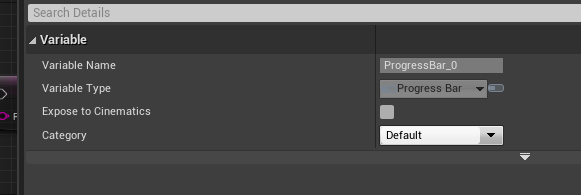
I can't, it's greyed out for some reason
odd ember
olive sedge
<@!267035925702246400> https://i.imgur.com/KWsR2uc.png
you do it in the widget editor
olive sedge
@odd ember right, thanks!
atomic prairie
Yea u're in ur bp haha
it is normal that when my character dies, I've as many Log messages as that?
I know why these log error are there, but is it problematic or is it normal?
olive sedge
I have a widget in my HUD but it seems I can't do anything to it. I call events from my HUD, they don't fire, I call functions from my HUD, they don't execute.. Am I missing something?
 dark crow
Better get rid of the Errors no matter what, cause if in a future something goes wrong, the error may help you understand what.
odd ember
atomic prairie
it is normal that when my character dies, I've as many Log messages as that?
you shouldn't have error messages at all. the fact that they repeat means that something is causing them to retrigger constantly. it's likely this could crash a cooked build
 swift coral
so, i have these static meshes on my third person character you see on the right, and I want to hide and unhide them via a blueprint widget with the buttons on the right. How can I connect the event "On Clicked ("name of the button")" to SetVisibility in my thirdPersons BP, or can I just hide these static meshes inside my Widget BP?
solemn parcel
@atomic prairie @odd ember Isn't these errors related to a non validated target as you told me before ?
odd ember
solemn parcel
<@!267035925702246400> <@!224571781862653952> Isn't these errors related to a no...
it's not no validated
it's a non existing target
the validation just asks if it still exists or not
solemn parcel
Does SetTimerByFunction execute the next node once it finished the function AND the timer, or does it execute the next node only once it finished the function and before the timer starts ?
solemn parcel
@odd ember So wouldn't a IsValid get rid of these error when his character dies ?
solemn parcel
So adding the IsValid there just got rid of the error, but not of the problem. Could this be something to worry about for the future of the development ?
odd ember
of course
generally you should never use GetAllActorsOfClass or similar nodes
they are symptomatic of bad architecture
solemn parcel
why is this ? And what would you use instead ?
 exotic cradle
GetAllActorsOfClass if you have 10000 actors it runs through all of them so it can cause slow down
I only use that function for my hud widget as it is needed but try to not use it anywhere else since widgets are relatively low cost
solemn parcel
About the SetTimerByFunction, if I replace the begining of that code until the delay, and transform it as a SetTimerByFunction, would the following SET:IsAttackCooldown ACTIVE be run the same way ? Because right now it runs after the delay is executed.
@exotic cradle Makes total sense !
exotic cradle
solemn parcel
<@!241705563753283595> Makes total sense !
Yep!
odd ember
solemn parcel
why is this ? And what would you use instead ?
because you're making a class that is very expensive, unable to account for the validity of the actors that you want to get, and can be called from anywhere, making it difficult to pin for responsible classes. what you would use instead depends on the situation and what you're trying to do. but the general rules you should follow is that each class only has one responsibility, and that is for its own functionality. the only real exception you may have to deal with is a manager class, which manages instances it spawns
 orchid garden
hrm... i think i found a bug in 4.25... not sure.... with this function, as its replicating the player position but not the rotation:

 maiden wadi
@orchid garden It's likely trying to set the rotation, but if it's a player pawn, ControlRotation is likely overriding it.
odd ember
solemn parcel
About the SetTimerByFunction, if I replace the begining of that code until the d...
a timer executes after a delay. use set timer by event together with the CreateEvent node for more robustness
orchid garden
@maiden wadi its setting the postition of the player properly for location on server and clients, but for the rotation its only setting it for the server.
solemn parcel
@odd ember My brain blocks on this. So how if I want to have a delay after a function using a timer ? Is it usefull ?
maiden wadi
@orchid garden Is this using ReplicatedMovement flag? If so I don't think that replicates rotation by default, just location.
odd ember
solemn parcel
<@!224571781862653952> My brain blocks on this. So how if I want to have a delay...
you can replace the delay node and all functionality before/after with the timer.
orchid garden
maiden wadi
<@!458977415176257536> Is this using ReplicatedMovement flag? If so I don't thin...
@maiden wadi if i set the rotation via setActorRatation it sets the rotation on the clients, just the combined locationandrotation function isn't doing it.
which seems odd
atomic prairie
@odd ember @solemn parcel yea the errors come from the fact that I use the location player and the camera location for my widgets, so when the character dies, the BP no longer detect it :/
Its because of this that I've all these log messages
orchid garden
@maiden wadi this is the main functions on the object, and the sit on object just gets the location of the arrow on the object, then moves the player to its location and sets the players rotation to the same as the arrow
but with the set locationAndRotation, the clients aren't rotating, just moving to the location
far as the object makeup:
see any reason they shouldn't rotate?
atomic prairie
maybe disable the controller rotation yaw
 keen seal
Hi, any ideas why my save game isn't working?
https://blueprintue.com/blueprint/65a8mwq5/
BlueprintUE
maiden wadi
@orchid garden So wait, doing the top works, the bottom doesn't?
orchid garden
atomic prairie
maybe disable the controller rotation yaw
its just happening on client side Edwing, i.e. i can have 3 clients, 1 server, and it sets the roation on the server, but doesn't set it on the clients.
@maiden wadi yep the top works, bottom doesn't.
maiden wadi
@keen seal If your save game doesn't already exist, nothing will happen.
keen seal
I do have a savegame created
orchid garden
@maiden wadi thats why i was thinking maybe a bug in 4.25
keen seal
keen seal
I do have a savegame created
Thus the cast to SaveGameHS
maiden wadi
@orchid garden Looking at the C++ for those to see how they differ.
orchid garden
o
maiden wadi
@keen seal Put some prints in on the cast and branch, see if they fail.
orchid garden
i'd think the dual one would be like a macro function of the two separate. kinda like the difference between isvalid and ?isvalid
maiden wadi
You would think. We'll see if visual studio ever decides to have it's coffee.
orchid garden
lol ummm coffeeeeee
 rough wing
Does camera shakes effect the control rotation?
maiden wadi
@orchid garden Hmm. They both use the same component call. But one notable difference. On SetActorLocationAndRotation, can you set sweep to true and see if it works then?
It seems that SetActorRotation has Sweet enabled by default.
orchid garden
sweep they barely move
left is client, right is server
why do i always come up with the wierdest things lol.... guess i'll send this to epic then.
keen seal
maiden wadi
<@!257802317472989185> Put some prints in on the cast and branch, see if they fa...
Oops, put the saving logic after destroy actor.
I get this error though
exotic cradle
Set high score default value to 0
keen seal
It is set to 0
exotic cradle
Than something ain’t communicating
keen seal
It appears so
dawn gazelle
Your player value isn't set.
orchid garden
@maiden wadi hrm... okay just noticed something else, if i press the key to activate it a second time, then it rotates the player on the clients properly. o.O
keen seal
dawn gazelle
Your player value isn't set.
Yes! that was it.
I love your name btw
one heluva drug
orchid garden
@maiden wadi it seems to be related to the 'onactorbeginoverlap' if they are standing toward the center of the box object, they rotate properly, if they are away from the center of the box object, they don't rotate properly.
im using a collision box for the begin/end overlap, should i use something else?
basically, if they stand in the circled area and activate, it works fine client + server, if they are off to either side (x'ed positions) it fails to rotate on client, but is rotating server.
 wild moth
Hello 🙂 I'm just curious how is Controller menu navigation usually achieved?
orchid garden
controller like joystick or gamepad?
with gamepad i've seen it done two ways - one of the sticks mimics the mouse for menu navigation or they tap the stick left / right / up / down to cycle through the menu choices. bumpers usually to change through menu screnes and a button to activate whats selected.
wild moth
I meant a gamepad and I didn't really mean how the semantics of navigation are but more like how the button/UI elements focus is handled
 stable fjord
Hi Guys! How to check, that the point is in Navigable Radius? I mean about: I have a Nav Mesh Bounds Volume and I would like to generate a couple of points and check, which one is away from the Nav Mesh area
wild moth
because the default focus in UE isn't necessarily the best as you can't change the styling brush for them
stable fjord
stable fjord
Hi Guys! How to check, that the point is in Navigable Radius? I mean about: I ha...
orchid garden
eh? can't change the brush?
wild moth
You can't change the focus styling on buttons/other interactable elements and the problem is there aren't events for them to know when focus is gained/lost
wild moth
You don't get what I mean unfortunately
I'm talking about the focus styling and that buttons, etc don't have an event that triggers when focus is gained or lost, so I'm asking what some usual solutions are for gamepad navigation
orchid garden
buttons have events for when focus is gained, lost, hovered:
wild moth
hover isn't the same as focus
orchid garden
focused is on clicked
it sounds more like you want to add a state, and that would take c++ or just some trickery with ui widgets.
 unique hollow
can I in anyway change the display mode
orchid garden
but the 'state' is the same as 'on clicked'
wild moth
no it isn't
orchid garden
actually .... same as 'hovered' my bad.
wild moth
focus doesn't trigger hover
exotic cradle
https://gyazo.com/8f1b3f2397ffe9133d7b3b73fa28e2bc How do I get my mouse location relative to this socket so I can place an item on this socket? This function generates this when the item is spawned which is expected. https://gyazo.com/c40d2d3f9e679036a97600d2c0119261 So I need an Event ActorBeginOverlap on both my character BP and this MasterObjectBp(first screenshot)

I have a get hit result under cursor in my player character but I’m struggling with getting a socket name and location from this blueprint in order to accurately place the object on the socket
orchid garden
wild moth
focus doesn't trigger hover
@wild moth use this.
atomic prairie
in the widget, is it possible to disable my mouse when im using the gamepad and activate my mouse only when i use them? Bc if my mouse focus a button, its doesnt work with my gamepad. I use the set input mode UI Only
this is for my pausemenu
exotic cradle
You need a function that when gamepad input is detected to Show Mouse Cursor set to false. You could also have a boolean for when the pause menu is open to disable the mouse as well. I have a similar function for disabling my mouse scroll and mouse zoom when my inventory menu is open
atomic prairie
like OnKeyDown?
exotic cradle
How do you have your pause menu opened and closed?
olive sedge
how do you set a value in a map if you got the key? (blueprint)
atomic prairie
exotic cradle
Is the mouse cursor used for anything else?
atomic prairie
no only for the menu if u doesnt use controller
wild moth
@olive sedge with Add, if the key exists it will overwrite the value
olive sedge
thanks
wild moth
Gunsmith?
exotic cradle
Ahhh that’s it
exotic cradle
atomic prairie
I was initially thinking have Set Show Mouse Cursor to false.
atomic prairie
sometimes the cursor is on a button and it creates a problem with the gamepad, bc I cant move
my cursor focus the continue so i cant move with my gamepad to the other choice
orchid garden
@maiden wadi so if i add a delay in the event being fired, then the rotation works properly, but without the delay, it doesn't work properly, and its back to setting the rotation only if the player is semi centered in the overlap box:
dawn gazelle
atomic prairie
like OnKeyDown?
Mebbe this would help?
exotic cradle
atomic prairie
sometimes the cursor is on a button and it creates a problem with the gamepad, b...
So you may need a function for that pause menu to determine whether the player wants to use keyboard or controller so that way you can use both. I’d start though with at the beginning of the Pause Menu function you posted have set show mouse cursor to false and than later implement functionality so that pause menu function can differentiate between keyboard and game pad controls. I’d also add that if you need the cursor shown in game along with using game pad controls that if the pause menu is closed than have set show cursor to true once the pause menu is closed
orchid garden
@maiden wadi it still doesn't make any sense to me, being the character value is passed by the player firing the event, so the replicated rotation should be set on the activating client without a problem, but its not, rather the opposite, its setting it properly without the delay on all but the activating client.
dawn gazelle
dawn gazelle
Mebbe this would help?
and this
atomic prairie
my cursor is always here with the function :/
exotic cradle
Is that cursor based off mouse location or is the location made through a function of inputs received from the controller?
atomic prairie
mouse location i think
he is at the top left this time...
this is the yellow circle
exotic cradle
So that’s a custom cursor you make? The dot?
atomic prairie
yea
exotic cradle
Okay so that’s why show mouse cursor isn’t working to curb your issue
atomic prairie
Oh?
but i don't have set anything that is supposed to show the cursor so why is this visible
exotic cradle
Show me to BP for making that cursor symbol
atomic prairie
I don't have a BP, it's just an image in a widget which is added in the settings
I'm gonna disable this for see if that work
exotic cradle
Disable that widget when game pad is being used as the controller
atomic prairie
it doesntt change anything, the mouse cursor still appears
exotic cradle
Also set show mouse cursor to false as well lol
atomic prairie
there is something showing the cursor, what have I done XD
still here when i set false
atomic prairie
nothing call the cursor here
olive sedge
oh no. I made a map with unit costs but appearently I can't replicate them, not even in events?
dawn gazelle
Yeah they're not replicatable :/ What you could do tho is loop through your map and make an array for the keys and values and then replicate those and then reconstruct the map on the client.
I thought there was a way to replicate them within a struct as well, but last time I tried that didn't work.
olive sedge
Yes, that's what I'm doing now.. I send them separately
exotic cradle
So is using a ForEachLoop ideal for creating overlap volumes on an object based on socket location?
Im trying to use the overlap volumes to detect when the mouse is hovered over the volume and have the mouse also be able to tell which socket the overlap volume is associated with so I can connect to object
olive sedge
@orchid garden I think I will just use Foo_Keys and Foo_Values
atomic prairie
that works now... Set Input Mide UI Only is the problem
olive sedge
@orchid garden my editor crashes every time I try to use this map.. :/
orchid garden
@olive sedge im using a array populated with structs myself, so as long as I know which index the item is in i can pull all the info for that item.
i don't really replicate the array either, just the data that gets stored in the array, so im not sending more info client-server-client then i need to
o.O okay my editor just randomly crashed .... gave me this error:
Assertion failed: InMipCount <= (IsTexture() ? MAX_TEXTURE_MIP_COUNT : MaxNumMeshLODs)
all while just sitting there doing nothing.... gotta love some of these crashes that don't give you a clue to what was the cause of the issue.
 flint vector
how do i make a raycast from a first person character that outputs the position that it hits
olive sedge
@orchid garden this is really cumbersome..
I really need a map but it doesn't seem to work at all
I have costs for units and they change depending on what you buy.. So I had a map with UnitClass : Cost
dawn gazelle
I think the way around it is to have an array of structs ... Cranz beat me to it lol
maiden wadi
@olive sedge TMap is not replicated by default, because almost any implementation that would use it, can also be done with an array of structs and a couple of helper functions to add/remove/find stuff in the array, such as not adding two entries with the same 'index'.
olive sedge
@maiden wadi I see
odd ember
ohh hashing functions
maiden wadi
Structs are just collections of other data. Are you using C++ or pure blueprint?
odd ember
fun times
olive sedge
blueprint
orchid garden
like i do mICON, you make a array, each array item is a struct item. then you can send the updated item to the client-server with the new information and it places it back into the array
olive sedge
@orchid garden C++?
orchid garden
blueprint
olive sedge
how do you make a struct in blueprint?
maiden wadi
@olive sedge
orchid garden
🙂
maiden wadi
@olive sedge Do be hyper aware of one thing though. You will have a really bad day if you ever decide to port this behavior to C++ at any point. You will need to redefine your struct in C++ and update every single thing that uses it.
 calm cargo
Anyone know why I can't seem to execute this subsystem's HandleCollision function?
It's marked with UFUNCTION(BlueprintCallable)
orchid garden
even with your map - you wouldn't need to send the map, you'd just send the data for the map node to the client-server and then they would update that information on the map.
olive sedge
@maiden wadi ok, thanks for the heads up
 vernal fjord
What's the best way in your guys's opinion to learn Blueprints? A lot of the tutorials i'm watching feel a little confusing exactly what each thing does
orchid garden
im learning from trial n error, by example, and asking questions for suggestions 😄
olive sedge
@maiden wadi how do I find the correct struct? should I have a wrapper class for this?
maiden wadi
@vernal fjord I found, when I first started, that following a long tutorial guide was nice. I didn't really follow it much the first time, I just sort of did what he did step by step to sort of initiate myself to the editor. Then I went back through and rewatched the series, while following along in my own blueprints, pausing to sort of get an idea of what was happening. In the end, it's just experience and understanding, so it really depends on how you learn well.
@olive sedge
Should show up with the same name you give it.
olive sedge
no, I mean from what I understand now I should have an array with structs.. In my case a struct of UnitClassRef and an integer for cost
how do I find the correct struct on which to alter the cost?
maiden wadi
@olive sedge In a sense, an array of structs is like a datatable. Your rows are each struct you add to the array, and each column is whatever type you have in the struct. For example
orchid garden
you could setup one struct with the unitclassref values, then make a second struct that is a list of unitclassref structs so you can just grab the struct item for the unitclassref you want to update.
maiden wadi
This would be two rows, two columns. First column is an integer, second is a boolean.
Row1 Column2 is false, Row2 Column2 is true. Row1 Column1 is 0, etc. Picture your structs that way, kind of like an excel sheet.
olive sedge
@maiden wadi @orchid garden https://i.imgur.com/ViP7hc7.png bueno?
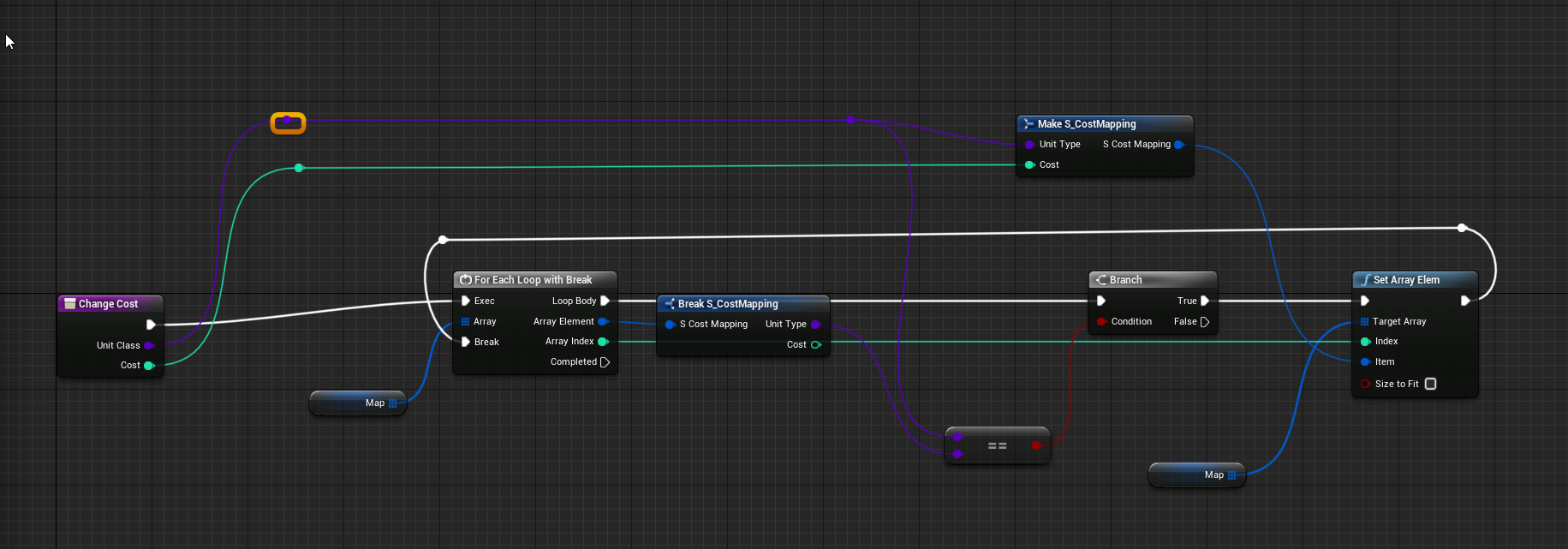 maiden wadi
Looks fine I think, don't bother breaking though, just put a return node. It'll close the function and the loop out.
olive sedge
right, good thinking
orchid garden
looks fine to me as well, @maiden wadi wouldn't that just make it return after the first item in processed? I use a break, so it stops processing the array, then the return node off completed.
ah nm he's doing a == compare on his 😉
olive sedge
https://i.imgur.com/Z4BBiEG.png
I think I can work with this
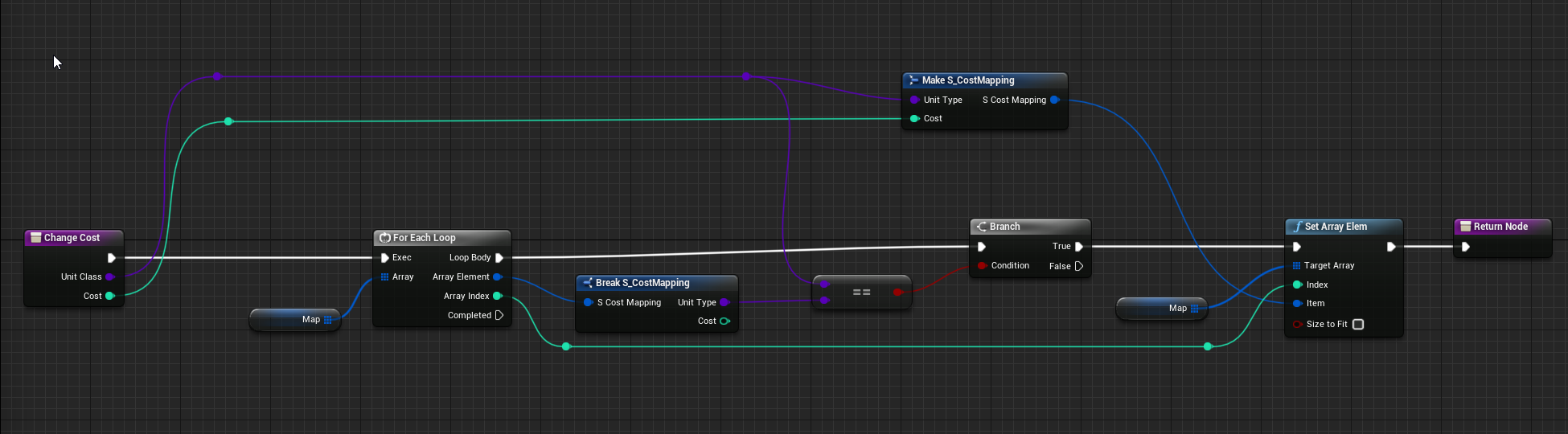 maiden wadi
It'll have the same logical effect, just a few less nodes for the machine to process from inside of the ForLoopWithBreak since the return node will stop it. Also good to get used to placing return nodes, since they line up better with coding logic. placing return; in even a function that doesn't return anything will stop it's execution.
orchid garden
i keep forgetting im doing multi things on my break loops...
maiden wadi
@olive sedge But yeah, it is cumbersome initially. Can be frustrating to start to work with. It's like this though because TMaps, are basically just a wrapped up struct that has it's own functions for adding/finding/removing from the map. They likely just never considered making it replicable for that reason. By the time you use a map, you'll probably need your own implementations that you require anyway. Writing your own functions to alter or check your data holders is very common in C++ at least. Admittedly slightly easier in C++ as well though since you can put a lot of that directly in the struct and not need other functions for it elsewhere.
orchid garden
hrm... i just ran into a intresting problem with furniture interactions going from how most people seem to do tham.... my furniture has a hit box, and if the actor is standing in it, stops over actors from using the item till they either sit, or get up, which is fine, if two hitboxes don't overlap each other.
if two hitboxes are overlapping, it blocks the other players from being able to use the other object as well, and i don't want that....
so i need a way to find out if the player is inside the hitbox when then activate the item without using begin / end overlaps, any suggestions?
olive sedge
@maiden wadi ok, thanks
I think I like this.
@maiden wadi can I increment an int in a broken struct
or do I have to break, alter, remake?
orchid garden
as long as your accessing a ref and not a copy you can mICON
maiden wadi
Depends on whether you get the struct by reference or not.
For example...
Ignoring that the bottom bool isn't true, top and bottom do the same thing.
 odd veldt
Why do I get this value at a spawned Actor: (should be 180)
maiden wadi
@odd veldt Check out floating point precision in programming.
@odd veldt In short all programming is done in 1 or 0, not a lot of room for decimals there. So programming more or less fakes the use of decimal places with a lot of 1 or 0, but it can only be so precise.
dawn gazelle
And the larger the number you're working with, the less precise it can be 😄
orchid garden
floats are far from precise
maiden wadi
It's just a common thing. If you need precise numbers, work with integers. If you're curious about the reasoning of why it does that, like I said, just check out floating point precision error.
orchid garden
you can even take a int 180 -> to float and get 179.99999789
maiden wadi
A lot of networked rotations are actually done in integers, funny enough
Rotators axis get broken down into bytes, or shorts. So either 256 or 65535 values.
Realistically I can't imagine you'd need more than 65535 points on an axis in a lot of cases. Pretty accurate.
orchid garden
hrm... thought maybe i could use a generic volume but seems there are no generic volumes.... blueprint woes lol...
so im guessing there is no function to tell if a actor is inside a collision box?
odd veldt
maiden wadi
It's just a common thing. If you need precise numbers, work with integers. If yo...
I cant make a rotator from a integer
orchid garden
int to float
maiden wadi
Can I ask why it matters if it's 180.0000000 or 179.9999999?
odd veldt
even if I let 0 0 0 in the spawn node
maiden wadi
It's just the way that things work. But realistically, why does it matter if it's 180.0000000 or 179.9999999?
odd veldt
its not a big problem, but i causes a warning
maiden wadi
What warning are you getting? That's a little odd.
orchid garden
would this work? or would it just return the first component of 'box' type and not the specific one thats refreneced?
dawn gazelle
Should be the specific one
maiden wadi
That would find the index in the GetOverlappingComponent array of OutOverlappingComponents, that your specific Box is at.
odd veldt
Wanted to make a screenshot, now it does not occur xD
I'm spawning instanced levels with terrain, and if the rotation is not exact I get a "overlapping terrain warning"
orchid garden
dawn gazelle
Should be the specific one
yep works like a charm 😄 nice, solves one problem with furniture, now on to the next! lol 😉
 faint pasture
orchid garden
you can even take a int 180 -> to float and get 179.99999789
faint pasture
orchid garden
you can even take a int 180 -> to float and get 179.99999789
6 inch error over the diameter of the earth isn't precise enough for you?
odd veldt
as long this warning is no problem
olive sedge
Is it possible to create actors that are not in the scene? purely virtual?
like.. classes basically.. but in blueprint?
orchid garden
faint pasture
6 inch error over the diameter of the earth isn't precise enough for you?
inaccurate math like that drives me nuts, can't help it. imagine if your bank used floating points like that 😉
faint pasture
olive sedge
Is it possible to create actors that are not in the scene? purely virtual?
Virtual means something completely different in programming but anyway, AFAIK all actors are in the scene. Why do you need it not to be?
faint pasture
orchid garden
inaccurate math like that drives me nuts, can't help it. imagine if your bank us...
Banks don't use floats. Use floats when you need to represent something continuously at vast scalea
olive sedge
@faint pasture I have a utility class that holds information but isn't needed in the scene.. Functionality around my structs if you will
orchid garden
faint pasture
Banks don't use floats. Use floats when you need to represent something continuo...
um .. okaaay...
faint pasture
olive sedge
<@!127902729677963264> I have a utility class that holds information but isn't n...
You could make it a component on some sort of actor like game state or whatever. Or just put it in the scene, you're not going to lose anything by being there
orchid garden
i want your bank. so every time i deposit 0.01 currency i get 1 currency.
(that was a joke btw)
faint pasture
olive sedge
<@!127902729677963264> I have a utility class that holds information but isn't n...
Or make it a subsystem if you need to get it from multiple places, but you need to C++ for that
olive sedge
@faint pasture well, that's why I was asking for it in BP
faint pasture
Then add a component to something that already exists like game mode or game state, or just make it an actor
 storm dove
hi guys can i get a static mesh from the class?
 polar matrix
Does anyone have an example blueprint to determine the on disk file paths to an asset and all its dependencies. I have a blueprint put together that gets all the immediate dependencies and then hacks together on disk paths, but I am looking for
- a way to recursively determine all the dependencies of selected asset(s)
- a clean way to determine the on disk paths of each uasset file.
polar matrix
polar matrix
Does anyone have an example blueprint to determine the on disk file paths to an ...
I wrote a python script that can do this but I'm looking for the Blueprint way
maiden wadi
@storm dove To do that, it needs to be a member variable of the class. Then you could get class defaults to get the mesh.
maiden wadi
Construction script also works good for that since it's altering itself. Would let you see it correctly in the editor as well if that's ever an issue.
storm dove
thanks bro
 open crypt
Is it possible to pass in a variable to a timeline?
 gritty elm
so i attach my weapon to my character hand, but when i try to change that weapon location, it doesn't works
add offset, set actor location never works on attached actor, how to solve this
barren relic
I have my emitter spawning now but when the variable reaches the value, the emitter does not destroy itself. any suggestions?
 stoic palm
One message removed from a suspended account.
 wooden holly
Hey, does someone know if I somehow can get the yaw rotation of the camera of a third person character in a blueprint widget?
orchid garden
@pearl wave get the rotation from the camera boom not the camera
wooden holly
okay
orchid garden
its the boom (spring arm) that rotates for the third person camera rather then the camera itself.
yaw would be the Z access
wooden holly
And how do I get my boom in my blueprint widget?
 keen goblet
@barren relic That Branch won't fire True unless ChargingCount becomes >=5 within half a second of the emitter spawning. Are you trying to wait until ChargingCount hits that value and then destroy the emitter?
orchid garden
@wooden holly you can drag it into the bp from the list of components on the left
either from up there on the previous image, or from your 'components' in the variable list.
oh derp you said blueprint widget my bad
wooden holly
yeah
orchid garden
you can cast to your character, then get the boom from it to get the rotation
faint pasture
wooden holly
orchid garden
odd it tossed the error though, even if i don't have the pins connected it doesn't do that one to me, but yeah you need to have the pins connected. before the one where your trying to get the Yaw rotation.
wooden holly
so I mean it works, but it's still the yaw rotation from the world, not the camera 😦
 rotund basalt
right click -> convert to pure btw
orchid garden
its the rotation of the camera in the world
wooden holly
rotund basalt
right click -> convert to pure btw
which one do you exactly mean?
orchid garden
try this one if you want to get it in relation to your players facing direction:
barren relic
@keen goblet yes i want it to destroy when it reaches 5
rotund basalt
the cast node
wooden holly
hmm I don't know why but it still doesn't work 😦
orchid garden
what are you trying to do @wooden holly ?
faint pasture
wooden holly
hmm I don't know why but it still doesn't work 😦
That doesn't exactly help, show us what you have set up right now.
wooden holly
orchid garden
what are you trying to do <@!381817894578814986> ?
I have a minimap, that should turn in the right direction, when I'm turning the camera
keen goblet
@barren relic Ok. Several ways to do that. A quick but "bad" way to do it would be to just connect the False pin on that Branch to the delay, so it creates an infinite check loop until the value is 5
checking every half a second
barren relic
oh i can see how that would be sub optimal
orchid garden
wooden holly
I have a minimap, that should turn in the right direction, when I'm turning the ...
red text usually means somethings broken:
orchid garden
what is that that has the red text on it?
wooden holly
It's part of the minimap
orchid garden
i mean on the image, show me the node that has the red text
dawn gazelle
orchid garden
i mean on the image, show me the node that has the red text
I think he added that to indicate that it was connected to Event Tick
orchid garden
ah you added the red text lol confused me lol
dawn gazelle
David, are you getting any error messages in your message log?
orchid garden
well to get the rotation for the map itself:
then...
that should rotate the map properly
wooden holly
okay
stray island
Datura i did the duplicates code like ur suggestion , and also duplicated the cubes to another 2 rows, however the performance decreased to 1 fps even tho the cubes arent that many
I duplicated the variables to control the other rows too , whats ur suggestion for performance? I checked smth called hierarchy
@dawn gazelle
 zealous moth
@stray island do a stats check
instead of just fps
it can help pinpoint the problem
whether it is cpu or gpu related
 alpine terrace
Not sure if this is the right place:
- If my actor runs into enemies or attack them they get pushed away
- I noticed that his happens when I hit the "round" bottom of the capsule + the height is bigger than the radius (because this did not happen to an enemy who was shaped like a perfect ball)
- So I recorded a video and set the capsule height to a ridiculous height in order to show you this effect
https://drive.google.com/file/d/1GQXOpLWVIvOp-irs178mOwPgIS1ziw1L/view?usp=sharing

Google Drive
orchid garden
interesting... maybe tell the capsule only to register on overlap? it looks like its being effected by physics.
I know physic objects will react that way but never seen players react that way. I'm curious now lol..
stray island
zealous moth
<@!768035735470080000> do a stats check
I replaced add static mesh with add instance and frame rate jumped to 60+ didnt know about instance
rough wing
Just realized this big ass tip
it started to bother me, can i idsable it?
Hmm it goes away when you add a node :d
 split barn
Does anyone know how to change the gravity direction (Right, left, up, down) for the fps controller? I've searched the internet but can't find any tutorials
rough wing
Default gravity only goes up or down
split barn
oof
odd ember
you'll have to implement something custom if you want your own gravity
what you're looking for sounds like per normal gravity
 unborn maple
trying to make a main menu and the hud display is on top of the main menu display is there a way i can change this do i need to create a second hud
the play stage button and live button is on top of the main menu which it shouldnt sine i made it a completely different level
dawn gazelle
stray island
I duplicated the variables to control the other rows too , whats ur suggestion f...
I'm going to go out on a limb here, but I imagine that you probably looped something you shouldn't have. There's no way that so few static meshes would cause your FPS to tank like that.
stray island
have few duplicates of ur code in the level and it would result the same
But its weird yeah My gtx 1080 or cpu shouldn’t react like that
dawn gazelle
Several copies of the actor + other stuff in the scene, no problem. When you say duplicated, did you add it in the code itself?
I mean like, did you copy this bit of code and just attach it to the "Set Relative Transform" node at the end several times?
split barn
odd ember
you'll have to implement something custom if you want your own gravity
Do you know anything like that? Like an asset maybe?
unborn maple
i fix my issue by just taking it off of begin play and adding it to it own game state switch to add the viewport when game has started
stray island
dawn gazelle
Several copies of the actor + other stuff in the scene, no problem. When you sa...
For the multiple rows , yes i duplicated the exact code three times and all its variables to achieve three customizable rows
As shown in my pic
dawn gazelle
But did you just plug it in after the existing code?
stray island
Yes
dawn gazelle
So it's looping each time over each time over each time.
stray island
:0
dawn gazelle
x the number of times you put the loop in
stray island
I asked about arrays didnt find answers
I didnt know how to add more rows
So i just duplicated the codes
odd ember
split barn
Do you know anything like that? Like an asset maybe?
it's math and physics, not an asset. maybe you can find one on the marketplace. otherwise write your own custom code
unborn maple
and then to fix it i use a interface to caast to the hud to just run a game state switch and it got rid of it completely 😄 im learning
dawn gazelle
stray island
So i just duplicated the codes
Well if you wanted it to keep going, you'd have to attach any additional loops on to the "completed" branch coming off of the for loop, but the math done here was created with the intention that it would only go around once in a circle as that was what your original request was. Making a spiral is similar, but I don't think you can just loop again using the exact same code as the distance and # of meshes needs to be different, and the starting position of the new loop won't be consistent to the end of the first. You'd probably be better off creating an entirely different function that creates a spiral based on the # of meshes you want, which is a bit more complex than I'm able to help with.
stray island
How about adding 3 actors inside one actor
And controlling each var
To result in 3 arrows Is that a thing?
3 Rows*
split barn
Does anyone know how to simulate physics on a FPS controller without it moving on its own
I locked rotation and he just shot Around
exotic cradle
I currently have 3 children BPs for this MasterBP. https://gyazo.com/59f81ed1f33b8e63a323c308607827f3. I was indecisive on whether I should have the Socket information like location and whether the socket is occupied or not within the MasterBP or if it would be more efficient to have the functions inside the children BP
 unique harness
you probably don't need to store location since you can always just get that from the socket
if this master is always going to have children that deal with these sockets then yes that makes sense
exotic cradle
I need location so I can compare it to my mouse cursor location in order to know which socket I am closest to and intend to place the spawned item on.
I tried using overlap volumes attached to the sockets locations but didnt have much luck.
unique harness
so call socket->GetSocketLocation(), no need to store it
then do vector math to see distance
also if you're comparing to mouse location, make sure you're getting the world location of the socket and not local
 dawn gazelle
stray island
How about adding 3 actors inside one actor
dawn gazelle
stray island
How about adding 3 actors inside one actor
It's not about actors within actors. It's about doing the math to figure out how to draw what you want on screen.
The first trip around works but only because we have a known # of meshes multiplied by 360, so we have a known angle, and we do some math with that. Adding an additional spiral around that which starts at the same position is a bit trickier. Again, this is more complex than I can help with.
exotic cradle
unique harness
also if you're comparing to mouse location, make sure you're getting the world l...
I believe it is the location of the socket on the mesh so local.
unique harness
but your mouse location is based one world coordinates is it not?
 unique harness
Here it's just getting the hit actor, where are you comparing the location?
 white lynx
Does anyone know if there's a window / functionality inside the editor to display all the blueprints with warnings/errors in the entire project?
unborn maple
debug mode
unique harness
@white lynx doesn't compiling do that in the log?
white lynx
compiling the blueprint?
exotic cradle
unique harness
Here it's just getting the hit actor, where are you comparing the location?
One second lemme retype it
unique harness
or maybe it's building the project
white lynx
sorry I'm usually always in c++; haven't used blueprints in quite a long time
stray island
if i don’t want spiral shape just circles inside each other’s with each having its own number of meshes , duplicating the code out of “completed for loop” is the work around? @dawn gazelle
unique harness
yea same, haha I'm trying to remember
white lynx
Ideally, I'm looking for a window where I press a button / or smth at the editor level and a list with all the blueprints with warnings/errors show up
unique harness
I think if you build in editor, it will sort of do that but not necessarily in a well displayed manner
white lynx
not in a "clickable" way huh
 tidal venture
What is the best practice for handling UMG button events? I want to trigger something in a gameplay system. Would I rather trigger this via gamemode or playercontrolelr and how do I access them from the UMG event graph?
unique harness
There is a GetGameMode node which you can cast to your custom gamemode
same with player controller
unique harness
depends on what the event is doing
is it doing something game related or player related
tidal venture
It changes the state of a game object which also triggers an acotr change
well, both?
it changes something for the player in the game
unique harness
it ends up being your decision and there isn't necessarily a right or wrong answer
just stick it where it makes the most sense
typically that falls in either game instance, game mode, hud, player controller, player character
tidal venture
thanks!
 uneven gulch
Was good people and happ[y new years
Quick questions
How would you allow 4 players to enter a vehicle and shoot from all 4 seats like GTA and also get out of vehicle same mesh
I'm thinking trigger box on all 4 doors
Maybe 4 hidden actors in the vehicle actor and probably possessing them im thinking
Thanks for your time and energy.
unique harness
@uneven gulch yes that sounds accurate, pawns instead of actors though
stray island
@dawn gazelle oh wow plugging things in completed and it works great even big numbers thank u
but now that i have two versions of the code , one has add instance( hierarchical )and one add static mesh , which one would be better for performance?
uneven gulch
@unique harness a appreciate it thats how it feeling is how it is setup correct that pawn just needs it to be possessed 🙂
unique harness
stray island
<@218956378654507008> oh wow plugging things in completed and it works great eve...
you likely want add instanced static mesh (ISM) or hierarchical instanced static mesh (HISM). I would research the differences and choose the best for your situation
unique harness
uneven gulch
<@!209383767322656768> a appreciate it thats how it feeling is how it is setup ...
yea that's the main difference between actor and pawn
uneven gulch
@unique harness Thanks
exotic cradle
unique harness
yea same, haha I'm trying to remember
So yeah. Im kinda getting somewhere. This is as close as I have gotten. Obviously an offset is needed or atleast setting a default attachment socket for the objects. https://gyazo.com/57c60032e61e5c8ee5e289bed21135e7 Character BP.https://gyazo.com/ba793c27cda4d1dc7d4d84486bb398b3. MasterObjectBP https://gyazo.com/9d0dbe8d6f56bb8e24fb0f72beb7333c



 unique harness
What is your end goal?
exotic cradle
Attach two of those objects together with the click of the left mouse button.