#blueprint
402296 messages · Page 600 of 403
 odd ember
 proven river
what if I want to be able to stand on the table?
odd ember
so you might want to look into your navmesh settings and cull areas smaller than x
are you an AI or do you move by mouse click?
proven river
yeah you click on a point and you teleport to it
odd ember
ah
proven river
if it projects to navmesh
odd ember
no
 sonic cipher
I made it work perfectl thanks boss
odd ember
you dont need navmesh for that
proven river
ok it's weird the tutorial I was looking at was using one
odd ember
ah I see
yeah so if that's why you're wanting to project to navmesh then yes
correct
I had no idea that VR used navmesh for this but I suppose it does make sense
proven river
I didn't really either, I'm not entirely sure why
wait
I get it now, it's to make sure you don't teleport into walls
I had an entirely different system for that but I might as well have a navmesh if I'm going to be adding AI
odd ember
walls not so much but imagine you have spaces that are open that you dont want players to teleport to
you're in a forest and you don't want them to teleport over a hill etc.
proven river
yeah but wouldn't that apply to walls also? cause at the moment I can teleport into the surfaces of walls
which isn't really ideal
odd ember
sounds like your project to navpoint isn't working properly then
either that or your character capsule is too fat
odd ember
oh
 sand gazelle
Wait, you're developing for VR?
sand gazelle
Yo, same. Is it cool I add you? I'm ganna ask you some things later on
proven river
sure thing! just a warning I am developping in cpp, I just figured my navmesh question was better here, but they're pretty similar from what I can tell
sand gazelle
Haha ohh okay got it. Know anyone else developing on VR?
odd ember
you got a lot more space to operate in in cpp
 north bay
Hi guys, anyone know how to get a reference of a game state of another player instead of my own?
sand gazelle
@odd ember would it be worth or waste to learn both cpp and blueprint?
proven river
it's still all the same stuff, just I type funny letters instead of using boxes
odd ember
sand gazelle
<@224571781862653952> would it be worth or waste to learn both cpp and blueprint...
what's your programming experience
proven river
north bay
Hi guys, anyone know how to get a reference of a game state of another player in...
I'm no expert but I'm pretty sure you can search by an actor name if that would help
sand gazelle
@odd ember very little C++
odd ember
sand gazelle
<@224571781862653952> very little C++
ok but no understanding of architecture, hierarchies or principles?
sand gazelle
I know enough to make keyboard movement, and make a door that moves to the next level. (2D only)
odd ember
stick with blueprint
generally blueprint is the better choice because of the fast iteration time
proven river
plus when you do cpp you need to recompile like all the time it gets a little tedious
odd ember
but cpp has more depth and can be a preference later on
sand gazelle
@odd ember got it. I'm following unreal engine's learning path for VR developement and I understand very little about the code they just made me make. That normal?
odd ember
yea hot reload is sadly garbo
odd ember
sand gazelle
<@224571781862653952> got it. I'm following unreal engine's learning path for VR...
I mean if your code experience is literally "hey do this thing we tell you to do" then yes, it is normal
proven river
I tried that path and that's kind of why I stopped using it, they also just said "yeah use the default movement stuff" even though I had no idea what it means
odd ember
that's just the first basic hurdle though
sand gazelle
😂😭
odd ember
not to demotivate you or anything
sand gazelle
Well in my case, I bought my pc For Vr developement
odd ember
just saying you'd get a lot more understanding from making a 3d project than from a VR project
I can't imagine you'll be shipping these games if both of you are doing this for the first time
odd ember
a LD class... for VR? for 2D? 3D?
sand gazelle
I'm at this point and don't understand anything
sand gazelle
odd ember
a LD class... for VR? for 2D? 3D?
Oh level design for 3D Not VR
odd ember
not sure who'd be teaching those
proven river
hey I'll explain what I can if you need help understanding
odd ember
nobody knows how to do much VR LD yet, and even those that do certainly wouldn't be teachers lol
sand gazelle
Oh no no bot VR level design
I meant I had a college class called Unreal Engine Level Design
@proven river and omg plzzzz
odd ember
I see
proven river
impressive you have a college course for that, I'm just reading forum posts and hoping
 dawn gazelle
north bay
Hi guys, anyone know how to get a reference of a game state of another player in...
dawn gazelle
north bay
Hi guys, anyone know how to get a reference of a game state of another player in...
Only one game state exists, and in multiplayer it exists on the server and replicated to clients.
sand gazelle
@proven river surprisingly in Kansas
proven river
 I'm also in Kansas I just didn't look for game development schools because I'm a normie
sand gazelle
Daaangg
JCCC is where I was taught. But yes that darn code, you can explain in a DM if you can so while I'm working i can read when I can
proven river
JCCC is fantastic, especially for the price, I'm currently going to KU but I took some classes at JCCC to save money
sand gazelle
That's smart
north bay
@dawn gazelle What I'm trying to do is to get the coin amount information from the other player from the PlayerState (That should be possible right? 😛 ), Now I'm only able to get my own information from the PlayerState but not from another player.
dawn gazelle
How are you referencing your score that is correct?
north bay
I made a bind on the text,
This is the Coin Blueprint btw
and in the player controller this event is called
 quiet token
@maiden wadi r u there?
north bay
Pherhaps I need to pass it in a way to the gamemode first?
quiet token
Mhh, someone else can help me maybe? Now i know the Problem better, but we still didnt found a solution and this is the last step before i can move on to the map design: When my player jumps forward and in air presses "left", he should add force to "forward + left". This must be easy, but i'm too noobish and stupid i guess
need this for strafe jump
and ofc he can do this to the right aswell. i can add the force, but its never relative to the players current direction
this is how the movement works right now
 lime fulcrum
Hi!
Is there a way to round numbers to have less decimal points (float)
 maiden wadi
@quiet token Here. If I understood correctly, you want to jump, and add movement input to the left of where the player is moving towards regardless or camera direction, or do you want that left movement to be in regards to camera facing.
lime fulcrum
instead of getting 0.002345 or 1.00452, to get like 0 and 1
lime fulcrum
lol
odd ember
floor?
lime fulcrum
but I want it to be 0.02 precision, and not 0.023489507390549826
or whatever
or should I floor but then multiply by 10 or 100
🤔
dawn gazelle
I made this nifty function yesterday that might help.https://blueprintue.com/blueprint/xz_0sp44/
BlueprintUE
lime fulcrum
😮
dawn gazelle
Probably XD
lime fulcrum
what does it do? 😮
odd ember
also tbh you could have gone for ultimate insanity and made it one long nested select string
dawn gazelle
Take an input, and it'll round it to the nearest decimal or value of your choosing. So input of 99, nearest 10, will round to 100. Input of 99.35, nearest .25 will round down to 99.25
lime fulcrum
Wow
 blissful lava
lime fulcrum
but I want it to be 0.02 precision, and not 0.023489507390549826
blissful lava
lime fulcrum
but I want it to be 0.02 precision, and not 0.023489507390549826
Why can't you just multiply by 100, truncate, then divide by 100?
lime fulcrum
I was about to do so
 unique falcon
just want to give a shout out to @atomic salmon for helping me solve a bunch of quite hard but cool issues with some stuff he posted way back in november 👏🏻 👏🏻 👏🏻 👏🏻
 dull tree
I need help with that
is there any faster way to do it?
u made MainGhost and then child of them like here
lime fulcrum
What are you trying to do exactly?
dull tree
but when i am useing get actor fo class and then check Mainghost it only counts one
i have this
and only one child (ghost) have this boolean on true
i dont know why
i can send more ss if this will make this more clear
lime fulcrum
explain what are you really trying to do? Communicate with many blueprints at the same time?
dull tree
i thinks so
 orchid garden
dawn gazelle
I made this nifty function yesterday that might help.https://blueprintue.com/blu...
orchid garden
dawn gazelle
I made this nifty function yesterday that might help.https://blueprintue.com/blu...
knowing the inaccuracy with floats did you try that to see if it works for getting the nearest floating point value? (0.35 etc)
dull tree
i think u made bad choice
i did 4 blueprint chillds for 4 Ghosts (to change colors :P)
dawn gazelle
orchid garden
knowing the inaccuracy with floats did you try that to see if it works for getti...
It'll only work so well as the engine will let it.
lime fulcrum
You should use an interface and do a "Get all actors of class (Just the parent class) and send the message in a loop of such array
maiden wadi
@dawn gazelle @odd ember @lime fulcrum
lime fulcrum
😮 oh
dawn gazelle
XD
dull tree
lime fulcrum
You should use an interface and do a "Get all actors of class (Just the parent c...
can u help more 😛
im bigginer
dawn gazelle
does that work with negative values too Authaer?
dull tree
or any links to how to do it
lime fulcrum
dull tree
can u help more 😛
Do you know how to use interfaces?
dull tree
i know to blue print but dont clearly know how they work
 worthy frost
i recommend checking out the Blueprint Communications tutorial
before going any further
odd ember
maiden wadi
<@!218956378654507008> <@!224571781862653952> <@!152511924234354688>
a swiss army knife
lime fulcrum
worthy frost
i recommend checking out the Blueprint Communications tutorial
Exactly
dull tree
ok 😄
maiden wadi
Actually I did realize an issue, it doesn't work perfectly with negatives, I'm fixing that really quick.
 twilit heath
also wouldn't hurt checking a tutorial on inheritance @dull tree
lime fulcrum
Oh
dull tree
twilit heath
also wouldn't hurt checking a tutorial on inheritance <@!259800346321354753>
ok 🙂
worthy frost
also btw, you can use just one BP for all ghost colours
and have a enum that describes the colour
i would only create children if they have vastly different logic
odd ember
for a second I thought the concept of ghost colors was universal
worthy frost
well your material would have a vector param you override
for the color
you create it dynamic, and adjust that param based on the color you want the ghost
 atomic salmon
unique falcon
just want to give a shout out to <@!399916238098137098> for helping me solve a b...
atomic salmon
unique falcon
just want to give a shout out to <@!399916238098137098> for helping me solve a b...
Thanks, glad it helped! 😄
dull tree
good to know
lime fulcrum
Anyone have a formula to calculate the external speed of a "wheel" based on angular velocity?
calculate the most external extreme
atomic salmon
V = omega * R
atomic salmon
Not something like, it’s exactly that
lime fulcrum
LOL
atomic salmon
Omega is the angular velocity
lime fulcrum
oh, right 😄
maiden wadi
@dawn gazelle @lime fulcrum Best I could do with the negative value fix.
lime fulcrum
Thanks again 😄
maiden wadi
Insane though, how hard it is to work with math in blueprint compared to C++. :/
dawn gazelle
That's definitely neater than mine. Well done 😄
atomic salmon
You can use a math formula node
maiden wadi
Could get rid of the boolean too.
atomic salmon
Makes it much more fun
maiden wadi
And that is also true, I keep forgetting those things exist.
 coarse marten
i feel like this might be a C++ only thing but is there anyway to prep a level up? Kinda like level streaming, and might actually be level streaming but i'll explain real quick
Hypothetical fighting game with a menu loop that has..
a Title Screen,
a Stage select, and a character select, you pick your characters and you jump into the game with the stage you picked
Is there anyway i can tell UE4 for example to load the stage while the players are selecting their characters if it's already been determined where they're going to go?
maiden wadi
That would have to use level streaming. Any other map loading will destroy the current level, which is also where the players would be choosing their characters.
coarse marten
that leads to my second question then
how would i change the gamemode with level streaming?
because the main reason why i havent really tried to test it with level streaming is because... wouldnt the game mode have to be the same? Like if i had a menu game mode that was handling that the character select and i told it stream in, i wouldnt know how to tell to change game mode. If that makes sense.
I mean i could just load level and let its do its thing in the world override but, the thought only popped up in my head when I was modding SFV
i was doing a uni level design piece and thought it would be cool to mod into SFV, its a bit finnicky on certain things so i would get a game crash, but the game would crash as soon as it started loading the level, which was as soon as you selected it in the stage select
so it got me wondering "huh wonder if you could set something up like that with level streaming or something else"
odd ember
technically every level should be equipped to be handled by its own game mode
you'd have to handle the switching of game modes in the game instance, most likely
coarse marten
Wait you can SWITCH IN THE GAME INSTANCE?

there's too much stuff in this engine my lord
maiden wadi
@coarse marten It's possibly worth noting that level streaming is likely overkill for a fighting game. Normal map loading should be more than sufficient and very fast.
coarse marten
all the main fighters level stream in their maps in pieces from what i've messed with
Soulcalibur VI, Tekken 7 and Street Fighter V all stream in their levels from different map files, i just noticed that SFV did it in the character select 
odd ember
SF has to do it since it uses live character models for its roster screen
coarse marten
Ah yeah i meant for the maps in general, especially for the Namco games
but tbf it looks like they're chunked for organisation reasons?
e.g
odd ember
it's pretty standard practice to use one map per role/discipline so you can work on it without impeding others
coarse marten
Oh yeah that's true!
coarse marten
VI seems to have like.. Map data aswell in another file, which is.. not in the screenshot i took lmao
but that seems to handle proprietary stuff they made back in the PS3 days they're still using now along with over things. It's all really cool stuff i enjoy looking at 😄
coarse marten
I appreciate all the help here though! Got some ideas im going to play around with now 😄
 trim matrix
Oh whoops my bad 😆
 elfin girder
Someone help me with Rotator math? I've made a teleporter, but I want the player to keep their control rotation on the Z axis relative to the teleporter after moving locations. Here's an illustration I made:
 coarse forge
so.................................... is there a way to have a material dynamic instance in a blueprint? And..... If i wanted to make a weather system.. I can add the cloud volumes, directional light, sky atmosphere etc to one bp?
odd ember
coarse forge
so.................................... is there a way to have a material dynamic...
you'd be better off with a subsystem than a blueprint I reckon. or a material attribute collection
or whatever they're called
but yes you can have a dynamic material instance in BP
coarse forge
hmm
Can you drop a BP that has those actors in it?
or.. do you have to place them and then manipulate them via the bp
or subsystem?
im familier with the subsystems
odd ember
you... have to place them, or give the subsystem room to place them
coarse forge
just nothing that would group all these things into one
coarse forge
lol
k
it would be tooo easy
to be like.. here are your 4 actors.. and.. here is a bp that changes all these things to make storms and day/night
hahah
odd ember
material parameter collection I reckon they're called
perhaps that is of some use
at least for the material part
for the remainder, lights etc.
you can always create an actor that has a skylight etc. inside of it
but you'll still have to select each component individually
coarse forge
I guess.. i could try the level bp
odd ember
normally I'd say yes... but what did you have in mind to do there?
coarse forge
let me give you a screen shot
one second
dont worry i made it in paint
so this is my title screen im working on
odd ember
... so you want all of this
coarse forge
and the clouds move, etc and the water moves.. etc
coarse forge
but i'd like to have the sun rotate and potentially change the clouds like lighten them and show a starmap
for the night cycle
well............
ill use the same stuff for the real game level
title screen is key man!
😉
dont' worry.. i thumbed out the piano for the bg music for it today too
😐
odd ember
it's like you'll be setting people up for disappointment
coarse forge
so I mean.. the idea is.. a weather system.. that I could drop into any level
hahahah.
odd ember
best title screen, but no game mechanics
one of the features I'm planning for is a storm system
coarse forge
odd ember
not so much a weather system
coarse forge
i mean.. there are game mechanics
im at the part where I'm starting to tie things together
odd ember
but I'm planning to use (yet another) subsystem
odd ember
nope
odd ember
but they are exposed to bp
coarse forge
sure
hmm.. but then.. i guess you'd use delegates to send changes to the stuff
or........!!!! is all that in the world
odd ember
anyway I think you'll have to figure out what the parameters of the weather system you want is
coarse forge
the light, etc
coarse forge
yeah I have that
odd ember
is it a die roll?
coarse forge
make clouds thick.. add rain.. add wind.. make the water crest more
its already sorta there
odd ember
oh
coarse forge
but.. i think it should also sorta control my day/night cycle
since I need to adjust clouds etc during those times too
odd ember
I mean try looking for a tutorial
coarse forge
i did
odd ember
you seem to want a lot more from yours than I need from mine
coarse forge
lots of 2014 stuff that wasn't it
🙂
well i guess the day/night stuff can be sep from the weather system
ill start with the day night
thats pretty easy
i think
tick.... rotate directional light
odd ember
statistically you'd be wrong
odd ember
but yeah I think rotating your direction light might be it
coarse forge
for day night yeah
odd ember
now you'll have to figure out the conversion rate between how long a day or night is in game compared to real life
coarse forge
okay.. let me spin a bp up and see if it can access the directional light from there
odd ember
you can do it in level BP
coarse forge
i feel like Authaer is going to make my day.. hes typing a lot
maiden wadi
If you want a self contained system, why not just do it all in the same class that you can drop into level?
odd ember
I mean sure if the components are there go for it
I just don't think everything is exposed
coarse forge
my q is.. can you put directional light.. height fog.. sky atomosphere skylight and volume clouds in one class
I think.. they are all actors...
maiden wadi
Skysphere is just a mesh and a material, Sun is a directional light.
odd ember
is directional available in BP as a component? I forget
maiden wadi
coarse forge
magic leap is what i was hoping for
odd ember
I still wonder if anyone's using that
maiden wadi
I don't even know what magic leap is.
odd ember
or why it is enabled by default
it's a company
that managed to lay off quite a bit of staff pre corona as well
yet made it into the default package of unreal
some sort of ar device
or vr
anyway directional light and meshes, you can handle materials for clouds etc. dynamically
coarse forge
yeah i have the mat already
odd ember
you could also attempt to implement the logic for how you want different weather to appear
coarse forge
sure
odd ember
you can just make it random
coarse forge
yup
odd ember
but I imagine you'd want each weather type to have a duration
coarse forge
well after its working ofcourse
coarse forge
right now i want to focus on day/night
so I'll start there
well packaging those 5 things under lighting
since that will exist on every level
the water settings wont
odd ember
well the water isn't part of the weather
unless you want to count cases like tsunamis, but those would have to be separate meshes anyway
maiden wadi
Hmm. I need to do a day/night system as well. I'm also going to need to tie it into my foliage replication system, which I need to work on a bit more.
odd ember
oof that sounds complex
maiden wadi
Funny enough, the foliage replication was very easy. I subclassed the foliage HISM component and used that for painting. Easy level design. Then made a second class as a manager that is the replicated one. That manager gets all of the subclassed foliage components, and I simply add to a replicated array, that is an array of a struct which is the component's mesh type, a compressed location and compressed yaw for rotation. It replicates that, and each client just removes that mesh instance at that location until that array entry is removed. And I get to keep the HISM draw call performance with harvestable replicated foliage.
coarse forge
nice
odd ember
not sure where level design factors into that but yeah
probably not that difficult to tie into a day night cycle
unless you count weather in that too
maiden wadi
You can use the foliage painter to simply paint new foliage into the map. So the level designers job doesn't change at all except to simply select a different thing from a dropgdown menu.
coarse forge
things ill have to deal with later
odd ember
ah like that
coarse forge
most likely when I add wind...
maiden wadi
FoliageInstanceStaticMeshComponent is the default one. Just adding it to the list of meshes, and changing that mesh's component to the CInteractableFoliageComponent allows the foliage to be interacted with.
odd ember
I don't think I'll do day/night simply because the increased workload that I have to consider for e.g. lighting a level twice
the storm system will be fun though as its seeding will be based on the actions of actors and the player in the level
coarse forge
@odd ember are you on 4.26?
odd ember
no
odd ember
not switching until it's stable
maiden wadi
I want to use 4.26, but that interface bug kills me. :/
odd ember
I mean it's not about the directional light rotation
coarse forge
yeah
odd ember
it's that during night time you have to consider different lighting
and ideally you'd want your gameworld to respond to the fact that it is night
odd ember
so essentially you're creating 2 or 3 or 4 levels per time of day, depending on your granularity
coarse forge
and try a soft wide light for stars or moon
odd ember
that's only one your directional light
coarse forge
ill let you know how it turns out
odd ember
what about manmade lights etc.?
coarse forge
i mean.. turn em on
odd ember
that's a big point to consider
coarse forge
im in like 3000-5000bc mesopotamia
odd ember
fair
coarse forge
not super woried about nightlights
odd ember
so for you it's probably a bit easier
coarse forge
one does hope
odd ember
maiden wadi
I want to use 4.26, but that interface bug kills me. :/
that kind of stuff is exactly what I'm talking about
I usually wait for .1 or .2 hotfixes to come in before switching
maiden wadi
I feel sorry for people who have a lot of engine changes, that upgrade. That's brutal.
coarse forge
eh.. i was on 4.24 making water.. then ran into a problem trying to merge splines and planes
so i started upgrading then
to use the new water system
yeah.. i am going to try as much as possible to not do engine changes
odd ember
yeah I don't do engine changes. if I would I'd separate them out in a module that is my own
 night wolf
Hey so I have a simple ai that follows my character, and it is given authority by the default navmesh bounds volume, and it works fine when I play it in its own level in the editor, but when I start by opening a menu level, and then the level that actually has the ai (from a button on the main menu) the ai no longer chases the character, I’m wondering why? I think I’m in 4.24 btw (sry for long message)
odd ember
are you spawning the AI or is it in level?
coarse forge
double check the navmesh bounds volume
4.24 gave me random fits where I had to move it up 1 then back down 1 sometimes
there.. is a button to make it show green
so you know its active
odd ember
I managed to skip 4.24 entirely
coarse forge
O.O
night wolf
It’s just in the level
maiden wadi
P in the editor will show you the navmesh.
odd ember
but had my share of issues in an old project on 4.23 that instantly got resolved jumping to 4.25
night wolf
Alright
maiden wadi
I think 4.24 was my first version. I started right about the time it was released.
coarse forge
i started in March of last year
night wolf
Last time I checked the green thing popped up in the right places when I pressed p
coarse forge
not sure if 4.25 was out yet
double check the center of the actor.. make sure it isn't in like the ground some when spawned
my pigs had that issue too
night wolf
I was wondering if maybe anyone thought making an entire ai logic and blackboard or something like that
Or if it’s another issue
maiden wadi
Check the character reference from the AI first, make sure it's still getting the reference fine.
night wolf
Alright thanks
odd ember
@night wolf you can also use the SHOW navigation command in console
maiden wadi
@night wolf I find that most things that break when you move from PIE to loading into one level and then another, is often race conditions. How are you telling the AI to follow the character?
night wolf
Yes
Oh wait whoops
Read it wrong
It’s just “on see (pawnsensing) move to and then it is attached to my character (third personcharacter)
Not sure if there is more (I’m not at my pc right now ) but I’ve been over it a couple of times and I think that’s it
maiden wadi
Hmm. Might not be that then. 🤷♂️
odd ember
I'm thinking you're right with the race condition
and it might be that it's somehow not coupled to the AI controller correctly
 dusk basin
I have a multiplayer question when a player joins my multiplayer menu I want a player to spawn on player login and despawn on logout only issue is the event on player login is counting me the host as a player therefor spawning a player when I don’t want it to be spawned is there anyway to exclude the main host of the server from triggering this event
trim matrix
I want to cast to third person character, but I used up the thingy before, how do I make more room?
dawn gazelle
just drag another wire off of it?
trim matrix
off what? the set speed? because that'll just add to the connection
it won't make a new one
damn- anyone here?
dawn gazelle
you've already casted to third person character in your screenshot. You can drag more wires from the reference on that cast node. "Thingy before" is not very descriptive, and "make more room" doesn't make a lot of sense in this context.
 rugged wigeon
@dusk basin Switch has authority sorry ignore that. Do a check on the player controller. The listen server will be player 0.
 edgy halo
Hey how can I store the value I take as input in the umg and transfer it to the next variable?
rugged wigeon
in the event graph of the UMG widget, create a variable, and set it to the current value of the umg input
 atomic prairie
hey, I've created a widget which is linked to my interaction object to display the button or key to use, but this one follows my character, is it possible to make him follow the camera rather than the character?
here is my BP, but I can't find a similar one to GetActorLocation for the camera
Ohhhhh find!!
quiet token
Hey! I have a vector variable with an offset wich is always at the same place relative to the character. When i jump i want to add force into that direction. The force part is working, but its not relative to the players position. maybe u can help?
all happening in fps character bp
 tight schooner
Get actor forward vector?
quiet token
ah i only have forward vector
ure right
dude i'm so dumb
good to know, but its still not workin, doenst make me feel better hahaha xD
tight schooner
Well, I'm not sure what your BP script is trying to do
quiet token
i'm tryin stuff
cuz no one can help me with strafejump here
so i want to add a force to that relative point infront of my char
tight schooner
Are you trying to make the "left offset" relative to the player?
tight schooner
Rotate vector node... Rotate the left offset with the actor rotation
Or you can get actor right vector
tight schooner
(and use Negate Vector to turn the right vector into left vector)
 neon sorrel
Is there any other good way to destroy a actor without getting a pending kill error? Im trying to use a randomizer script to destroy the actor if it is a certain number, and that works but I get pending kill errors after for some reason and it glitches the actors. (Im currently using just the destroy actor node)
tight schooner
@neon sorrel set lifespan to 0.01 seconds can be a quick and dirty solution, but it depends. Pending kill means some script is still trying to manipulate a "dead" actor
neon sorrel
Its for a item my player picks up, so im thinking maybe I just have to add isvalid nodes to the pickup code. 🤔
quiet token
@tight schooner like this? Its kind of workin, but i dont know why and if there are problems later, this was what u ment?
tight schooner
@quiet token if you're trying to get the left and right vectors of an actor, you can use the node Get Actor Right Vector (if I recall correctly). If not, you can Get Actor Rotation and feed the rotation into the node, Get Right Vector
@quiet token in your screenshot I was thinking of Get Actor Rotation
instead of converting forward vector into a rotation
quiet token
ok u helped alot, i try out a little, need to learn this shit so i dont have to ask everyday ^^
tight schooner
@neon sorrel yeah isvalid might work
 vocal urchin
Is it possible to line trace to the water mesh actor? I'm having some issues doing so, but I can clearly see it's a mesh.
neon sorrel
I fixed it, thank you guys for the help though. Had to do a bit of a workaround but made it work
 graceful hamlet
Is there a good guide on detecting gamepad events (like plugged/unplugged) via blueprint?
maiden wadi
@modest prairie If you mean for stopping the character from moving into things, then no. Other things can interact with those collision shapes, but they will not stop the character. The only singular component that matters for character movement is the RootComponent, in character's case that's the Capsule.
Pretty much ever movement component does that because they move by sweeping the root component of their actor. To get any other results, you'd need to build your own movement component.
 little dirge
Hi folks, back with another basic question/problem!
I created a blueprint that inherits from Object, and another data-only blueprint that inherits from that.
Then in a UMG blueprint, I'm trying to create a variable that would contain the data-only blueprint. My assumption is that it would act like an instance of the parent with those properties set. However, if I set the Variable Type to "MyType" nothing shows up in the asset browser, same thing for the data-only type. If I set the Variable Type to "Object", I can drop either in.
Am I misunderstanding how to do something like this? Do I need to do this in the graph with something like "Construct from Class" instead?
little dirge
Found "PrimaryAssetType" and tried subclassing that instead, since it feels like that's what I'm going for, but it didn't seem to do the trick either..
Edit: Ah, that was correct! I just had to create a Misc->Data Asset instead of subclassing from the primary asset blueprint. 😄
 high frost
I want to implement a pick up system for actors in such a way that a player can only pick up a character when they see (meaning with respect to camera) it and the actor is within some range like 1-2 meters. Also players must observe information about item before they interact with them, i.e. an item name should pop up above it when it is reachable
What is the best way to do it? So far I have only 2 ideas:
- In the player character add a long collision box on a springarm on eyelevel so that it moves with camera and to handle begin overlap events with interactable actors. This approach would also require me to handle blocking obstacles so that the player couldn't interact with an item throgh a wall and I'm not even sure if that is possible
- Somehow use LineTraceForObjects or a similar function to actually trace all items. But that would require me to execute trace functions in the tick event or via timer so I'm not sure if that's a good idea neither
Also I've seen implementations where interactable items just had their own collision spheres spanning pretty wide so that player could interact with them when he is within a radius of the sphere, but I don't really like this approach as it would require to make big collision spheres even for very small interactable items like coins etc
 hollow dust
When I use “Get Actor of Class” > into Impure Function that affects it, I can only manipulate the components of one actor through the blueprint. How would I manipulate the components of all the actors of that particular blueprint?
I tried Get All Actors of Class. It returns an array, but I cannot call the specific functions I’m trying to call because it’s an array
dawn gazelle
You would need to loop through said array and call the necessary functions.
 modern hawk
Guys I have a problem : I have buttons for android in umg and it should do stuff like jump etc , but whenever I try to click on the button it doesn't work I tried to print string but nothing , how to fix it ?
 desert flame
My character's camera lag just stopped working when i changed the "Max Distance Speed" from default then back to default.
edgy halo
Hey how do I create the default automatic level? I created a new level but it is completely dark and sky light doesnt change anything
 violet wagon
Is there any way I can make smaller adjustments when I move my mouse?
My camera seems to move several pixels at a time, instead of 1 or 2. Every time I try to aim at a far away enemy its most noticeable what I'm talking about. (My mouse DPI is 800 and I can make much smaller camera movements in other games) https://youtu.be/-J6VuNz3XJ8

 neat stream
Any idea on how to put a water body custom from the new water system at a specific height ? It appears that when packaged the plane/water body will be at 0
 fickle remnant
what would be the cleanest way to pass a structure to another class in a blueprint? In c++ you could use a pointer thus saving memory
fickle remnant
violet wagon
Is there any way I can make smaller adjustments when I move my mouse?
My camera ...
Maybe have a different sensitivity for ADS? Usually games give you the option to assign both
violet wagon
Hey @fickle remnant you gave me an idea that fixed my problem! Instead of having my axis value for mouse inputs a 1/-1 I put it at .1/.-1 and it picks up very small mouse movements now! Thank you!
 gentle flare
Is there a way to make it so when you select a camera component in the blueprint editor viewport you get the little popup in the bottom right corner that shows you what you can see?
 tall pine
how can i increase footstep sounds when running
https://i.imgur.com/1J7bf3A.png
doesnt work what im trying to do here
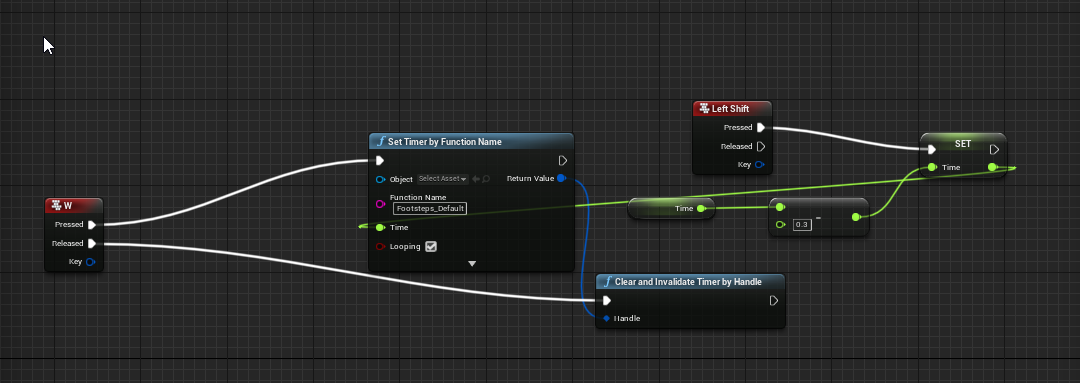
 hollow drift
How to check if a Blueprint code has finished loading? e.g. an array has been filled and so on?
I have a huge loop with two arrays getting filled. Those take so much time that until my next code runs, it sometimes not finishes loading despite my next blueprint is directly connected to "completed"
 olive sedge
Hi! Can I spawn an actor on both the client and the server and then correct the client actor based on the server status?
I'm trying to fire a homing missile but only replicating won't work, it stutters like mad. So I was figuring I could shoot it on both server and client and have it update according to the trajectory on the server
trim matrix
tall pine
how can i increase footstep sounds when running
https://i.imgur.com/1J7bf3A.png...
I would use an “is input key down” with a branch
trim matrix
how do i tell ue4 to place a mesh procedurally
like placing maze assets to create a maze
tall pine
trim matrix
I would use an “is input key down” with a branch
i figured it out myself afterwards and managed to do that, only thing left now is fixing the stopping of the sound when i hold two buttons, and release one which leads to the sound not playing despite walking
im quite stuck with that one
trim matrix
tall pine
i figured it out myself afterwards and managed to do that, only thing left now i...
I could have a fix... add a branch with “input key down (shift)” and if it’s false remove audio but if it’s true add another branch with “input key down (W)” and if it’s false disable audio
Something like that?
tall pine
i dont think shift is on focus here, more like when I hold W and A for example, then i release one and it quits the zimer
should i do a branch to vheck if w is held down
trim matrix
Oh I thought it was run/walk
tall pine
nah running and walk transition works
trim matrix
Ok so while holding two buttons if u release one all the audio stop?
tall pine
yeah, it breaks the timer by function name if one button is released
i think it would need tons of variables and branchws to set up
spaghetti code check ifs
hollow dust
@tight schooner @dawn gazelle thank you very much ❤️
 blazing vale
Hey all, I'm trying to find out how could I make this happen:
for my VR_Pawn BP I want to attach a plane on the ground with Foliage (grass) but I'm having hard time find a solution to attach foliage inside a BP
I want to make something like a flying carpet as the user moves on this patch of grass in space. any ideas ?!
odd ember
gotta admit I have no idea what you're looking for
tight schooner
@hollow drift My gut reaction is "that shouldn't be happening"... I've never seen Completed fire before Loop Body. But if that's really happening I suppose the only thing you can do is use a Delay node or Set Timer By Event to literally delay the execution of the rest until the next frame. But it still strikes me as odd and you should try some general bug fixing to see if what you think is happening is really happening.
odd ember
tall pine
how can i increase footstep sounds when running
https://i.imgur.com/1J7bf3A.png...
if you do this off of anim notifies this will be handled automatically
blazing vale
@odd ember let's put it this way - I want to attach a patch of grass (foliage) to my blueprint as a component. (the blueprint will be moveable)
 wild moth
Hello everyone,
I just upgraded a MP C++/BP project from 4.25 to 4.26 and if I try to open 2 instances in Offline (now Play In Standalone) I get a crash with the main stack:
Assertion failed: !GIsPlayInEditorWorld
Any ideas?
odd ember
use a mesh or a billboard? problem solved?
odd ember
wild moth
Hello everyone,
I just upgraded a MP C++/BP project from 4.25 to 4.26 and if I t...
do you have a postprocessing volume with GI enabled or some such?
tall pine
odd ember
if you do this off of anim notifies this will be handled automatically
you mean these notif keys used in TP characters?
odd ember
tall pine
you mean these notif keys used in TP characters?
in the animBP you can get events for when an animation reaches certain points
wild moth
No but isn't that G Is PlayInEditorWorld?
odd ember
e.g. when each foot hits the ground
tall pine
odd ember
in the animBP you can get events for when an animation reaches certain points
yeah i know that feature my player doesnt have a model neither an animbp
odd ember
wild moth
No but isn't that G Is PlayInEditorWorld?
no idea. could be either
odd ember
tall pine
yeah i know that feature my player doesnt have a model neither an animbp
I see
tall pine
its FP
odd ember
best thing you can do is have something that affects the time scale, like a multiplier
so normal speed is x*1.0 and e.g. sprint is x*2.0
you can probably make this a function of your movement speed
and a sine node
tall pine
yeah i also thought of that
odd ember
the sine node especially is helpful as it will maintain intervals
trim matrix
how do i do procedural levels? o.o
 solemn parcel
Hi, for some reason that Begin Overlap Event seem to trigger once when that 'EnnemiTest' BP is being spawned on map, nowhere near Ue4ASP_Character. I don't understand why
here is the spawning bp
 unique hollow
would it be possible for me to switch view modes in blueprints
olive sedge
I have an NPC character that I want to be hovering at a certain height. I have default movement flying and that's working well. How can I now set the height at which to hover?
edgy halo
How do I create a reference to an actor in BPs?
 viral torrent
@edgy halo Create a variable and fill it using GetAllActorsOfClass for example
 rare hemlock
I'm learning about anim linked layers, and I noticed that you can send other data types, not just an animation pose. Can this be used to send calculated values like speed and direction from AnimBP_1 to AnimBP_2, and, if so, how do I set those values in AnimBP_2?
hollow drift
@tight schooner I have a grid by 13 x 13 fields. Each field type gets generated with a boolean. Those fields have collision boxes. The pawns gets generated after the field has been generated. Those pawns interact with the collision boxes. They read from collision boxes on which field they are standing on. The information is generated in the loop and filled into an array. But this is "already kinda a common issue" since other people have experienced the same. If collision box spawns at the same time as the pawn. the event for the collision box does not fire in time to register the pawn inside of it.
Generally to avoid it i wanted to use something better then a delay for 0.0001 seconds. since this game gonna be a mobile game too, i want to avoid such issues with a smart code. Also what i am looking for additionally is a script to make a level loading which also checks if everything is loaded. i did it over level streaming
so loading and aknowledging is a big topic right now. any ideas or suggestions are welcome 🙂
 cold raft
unique hollow
would it be possible for me to switch view modes in blueprints
cold raft
unique hollow
would it be possible for me to switch view modes in blueprints
No reason why you shouldn't be able to do that - the camera on your character can be moved and rotated so you could move it around as you like (though it might be tricky to get it right with blueprints - maybe have separate cameras setup manually and switch between those) ?
hollow drift
I gonna try the set time by event. But generally loading is huge topic. cant find good tutorials since all people are cheating with a loading screen and a delay. what if the device is slower and the delay is not long enought?
unique hollow
cold raft
No reason why you shouldn't be able to do that - the camera on your character ca...
I'm talkin bout these
cold raft
Ah, not sure then - that's developer mode so doubt if they would work in end user games anyway
unique hollow
unless you ship your game with developer mode like Mordhau does
and an alternative profiler mode build in Betas like I do
cold raft
hollow drift
so loading and aknowledging is a big topic right now. any ideas or suggestions a...
Is Level Loaded
hollow drift
i saw this already
love the documentation of unreal
what it does, no one knows. what it says it should do i guess?
think we tried already out
replaced it with
rugged wigeon
Without having done this before, I would assume you need to pass the Return value output of that function into is Level Loaded
cold raft
hollow drift
i saw this already
could you make the fields generate the pawns themselves, and then start the level after the pawns are finished? I mean take control of the entire spawn process and do it all in a series of steps where at the very end you enable collisions for the fields
hollow drift
how to not do a event tick but check still if it updated
rugged wigeon
Throw it on a timer or a timeline. Probably a timer makes more sense.
hollow drift
thats what i want to avoid in the first place
a proper level loading as you see in every game
hollow drift
i also thought to make a check object at the end of the spawn queue and ask if it exists
but this is haphazard
there must be a better way
level loaded e.g.
@cold raft good idea
rugged wigeon
timer != delay. Timers and timelines can be used like temporary ticks.
rugged wigeon
Timer wait a bit, check condition, if loaded, start the game, else restart the timer.
hollow drift
also even tick = bad
it goes on every frame
what if your framerate is lower
ill use
or anything better if someone knows
rugged wigeon
Your points only apply if you're trying to guess which frame or time the level will be loaded by. You don't need to. You can just check at regular intervals
Yeah, that probably works presuming your event is set up correctly and cancels the timer.
hollow drift
this already works 🙂 just general question if there is a better way
 steady minnow
hi there. I am learning how to build shaders and was wondering: what is the logic behind Camera Position - Absolute World Position ?
Isn't the Camera Position already based on absolute world coordinates
rugged wigeon
Unreal Engine Forums
Hello community,
I have been jumpping into shader maths and have been doing a bunch of vector maths to achive a variety of different shader effects.
I have
steady minnow
its a MF to get a Gradient mask from the camera position (used for displacement/tesselation)
ahh so absolute world position is a similar to a "Pixel Depth" but for ALL pixels on screen ?
- for every pixel on screen using this material
solemn parcel
Why does this overlap On Beginplay ?
Here the triggerbox
Nvm it was Overlapping with himself
odd ember
steady minnow
you're in the wrong channel technically, #graphics is where you want to go
blueprints are not the same as materials
even if the editor looks similar
orchid garden
odd ember
you're in the wrong channel technically, <#221799195806400512> is where you want...
actually he's in the right channel, hes trying to pass a variable with the proper information from a blueprint to a material. Showing what he's doing with the material so that perhaps someone can help him get the information formatted in the blueprint to pass it to the material.
and he showed his bp prior to the material shot.
 trim fox
Hey everyone. I'm trying to improve my checkpoints with an Animation that plays only on the last activated checkpoint and deactivates the animation of the last one. My question is how can i get the Spawn Transform to send information of the lats checkpoint to a variable which sets it to active or inactive?
 verbal magnet
how can I get mouse position relative to center of the viewport?
desert flame
My character's camera lag just stopped working when i changed the "Max Distance Speed" from default then back to default.
orchid garden
desert flame
My character's camera lag just stopped working when i changed the "Max Distance ...
i believe default is 10 but it may reset to 0 when clicking the arrow.
odd ember
verbal magnet
how can I get mouse position relative to center of the viewport?
since the position is coming from top left, try and multiply the vector by .5 or divide by 2
 plain flare
Idk, is there right place. But, my text is showing like that. It is wrapping because auto-wrap is active. But it is so much, and auto-wrap value is 0. Why is that and how to solve ?
orchid garden
here's the defaults for camera lag:
odd ember
plain flare
Idk, is there right place. But, my text is showing like that. It is wrapping bec...
make your text box bigger
 worn nebula
Does anyone know why my mouse doesn't disappear straight away? https://gyazo.com/dd4de03facebd2136b4c5f9391491fb3

I click once and it removes the widget, but doesn't go back into playing the game
plain flare
@odd ember how can i ?
verbal magnet
odd ember
since the position is coming from top left, try and multiply the vector by .5 or...
thanks, I used a get viewpor size and divided by 2
orchid garden
plain flare
Idk, is there right place. But, my text is showing like that. It is wrapping bec...
im assuming the text block is inside a holder, so if you anchor the text block to all 4 corners it should wrap in the full container (be sure to set the values for position/scale to 0 after anchoring to all 4 corners)
odd ember
plain flare
<@!224571781862653952> how can i ?
it's your widget that you placed. surely you know how to resize a widget?
odd ember
worn nebula
I click once and it removes the widget, but doesn't go back into playing the gam...
player controller doesn't work while the game is paused. I think you have to allow tick while paused in the player controller to make that work, but I can't remember if that was enough
plain flare
@orchid garden yes it is inside somethings
 zinc spoke
Hi everyone. Can someone recommend a good tutorial for Pawn Movement Techniques with Blueprint?
worn nebula
How can I allow tick while paused?
odd ember
plain flare
I mean, there is no scale text <@!224571781862653952>
it's probably your text justification settings then
 tidal venture
I created a TArray of UObject instances for one of my blueprintable classes. Now I have the problem that I seem unable to assign anything to it in the editor.
TArray<UQuestTaskCondition*> Condition <-- this is the member
The editor allows to add members to the array but i cant assign anything. How would I spawn a UObject instance in the editor?
orchid garden
plain flare
<@!458977415176257536> yes it is inside somethings
and you want it to fill the full container space?
 simple sky
In BP functions do local variables already reset to their default on entry?
worthy frost
yes
orchid garden
plain flare
No, Im trying to fix auto-wrap
not really, its autowrapping properly
orchid garden
plain flare
1 minute
with how you have it the text widgets width is being scaled to the first word, and only expanding to the next word thats larger.
plain flare
and I want to get text like that
But also, auto-wrap important
because if my text so long, i need it
orchid garden
yes i get that, now listen, how much of the container do you want your text to be able to fill if its extremely long?
orchid garden
the container that the text block is in
plain flare
full off can be fill
orchid garden
okay then you need to anchor your text block to all 4 corners
when you click on anchors its the bottom right achor
then set the offsets all to 0.0
then in your container, go to padding and add left, right, top and bottom padding for the space you want between the edge of the container widget and the text block
orchid garden
orchid garden
on the text block
plain flare
on text too
orchid garden
oooo ooo
its because its in a border
okay simpler then
set horizonal alignment to the last one for the text block.
plain flare
for text right ?
plain flare
Yeah yeah, it worked, thank you. You are rock !
orchid garden
np 🙂
you might need to adjust the padding in the border for really long strings of text.
tidal venture
Is there any way to create an instance of a BP class that is not an Actor in the editor?
I know I can place actors in the level, instantiating them, but what if it is not an Actor?
 latent arch
hey all quick nooby question really. How can i make a function that can target multiple objects of the same type? is this possible outside C++?
as in i want to connect more than one object of the same type to the "target" object pin
of my function
sonic cipher
https://gyazo.com/79c07d33881344f0e02d21e078ac6873 can someone explain why it doesnt print please ? ^^
 latent arch
like with this one, how can i make one thats able to have more than one target? 🙂
or is the only way to accept an array thats made before the function?
trim matrix
Hi is there a way to get a object nummber from a instanced object when traced
dawn gazelle
latent arch
or is the only way to accept an array thats made before the function?
Doesn't look like there's any way that I can see you can make a BP function work like this. You could do it with an array and a make node before it if you really wanted to and then loop inside the function.
dawn gazelle
sonic cipher
https://gyazo.com/79c07d33881344f0e02d21e078ac6873 can someone explain why it do...
What blueprint are you placing that Left Mouse button in?
dawn gazelle
tidal venture
I know I can place actors in the level, instantiating them, but what if it is no...
This may be what you need? Construct object from class.
 little cosmos
Hey! if I have an actor in my level and i want to be able to click it with gamepad.. do i have to line trace?
latent arch
@dawn gazelle yeah thats what i thought, thanks man 🙂
 fair magnet
Hey there...
Does anyone know how I would achieve smth like instanced timers ?
I wanna apply Temporary Buffs and Debuffs which can stack upon each other...
For example you start out with 100 Health then receive a debuff which reduces it by 30
you have 70hp for as long as the debuffs goes... but If you then receive a buff which add 50hp you will have 120 until the debuff disappers and then it will be 150hp
 ocean gate
Hi! I'm trying to set up Face Live Link in UE 4.26 and have connected my iPhone 12 Pro to the AR Sample project and it works just fine. However, when I try to add rotation it doesn't work. The reason why seems to be because the "Evaluate Live Link Frame" node's output from the phone doesn't seem to respond to any properties with the names specified in the documentation for face live link (headYaw, headRoll and headPitch). Is the documentation just out of date or have I missed something important?
tldr: evaluate live link frame node does not output any value for pitch/yaw/roll. Why?

This comes straight from the documentation: https://docs.unrealengine.com/en-US/AnimatingObjects/SkeletalMeshAnimation/FacialRecordingiPhone/index.html
Use the Live Link Face app, ARKit, and Live Link to capture facial animations and apply them to characters in Unreal Engine.
Nevermind I hadn't enabled "head rotation" in the app settings on the phone
 gusty shuttle
Quick, off the top of your head, what is that node in a sound cue that can change pitch and tone randomly. Is it Random?
 fallen tartan
gusty shuttle
Quick, off the top of your head, what is that node in a sound cue that can chang...
fallen tartan
gusty shuttle
Quick, off the top of your head, what is that node in a sound cue that can chang...
its modulator
fallen tartan
random select a random sound from the inputs
gusty shuttle
indeed, I would need a library of sounds, then feed it into a random. Modulator is just what I need, spanks!
little cosmos
I am experiencing the weirdest thing
Can't toggle visibility for static mesh of Lobby Actors array
But the one above is just the same with a difference actor.
Cannot access its static mesh . What's going on?
dawn gazelle
Do get Static Mesh first
dawn gazelle
when dragging off the loop, begin typing "Get Static mesh".
dawn gazelle
Ok, then the thing is, you need a reference to what component it is you're trying to toggle visibility of.
little cosmos
static mesh component of Lobby Actors
but im doing it just the same above and it works!
dawn gazelle
What class is the "Lobby actors"?
little cosmos
Actor
dawn gazelle
You won't have an appropriate reference then.
As not all actors have static mesh component.
You can cast the array element to the appropriate class.
dawn gazelle
Open up your "BP Lobby Entrace..." whatever that BP is, and take a screenshot of its components.
Example:
In my example above, I'm using an actor of class "BP_ALS_Minion". I can pull off for its "Static Mesh" component because the class has this particular component (as you can see in my screenshot above)
dawn gazelle
Your Lobby Actors variable.... If it's set to class "Actor" it won't work as "Actor" doesn't necessarily have the static mesh.
dawn gazelle
Hover your mouse over the array box on both. it'll tell you the type of variable.
 unborn maple
trying to check if the start round button is push and if the round begin timer has reach 0 to enable tick to listen for an input or should i use timer by event? as i need to enable in put in the blueprint for the key to work. so i dont want the key to be active when the round hasnt started
solemn parcel
So i've got auto spawning actors in a map, in 4 random different locations. Which logic can I use to make them spawn anywhere in these 4 locations, but NEVER in the camera vision ?
unborn maple
tick is still running when i hit play and doesnt stop like the tutorial i watch
gusty shuttle
Question: Do I 100% need to manually place a Level Sequence into a level, or does Create Level Sequence Player create that in the persistant?
unborn maple
never mind i found out why it kept going i didnt set the tick to false at the beginning of round
dawn gazelle
solemn parcel
So i've got auto spawning actors in a map, in 4 random different locations. Whic...
I think this should do the trick https://blueprintue.com/blueprint/o5ksg2r0/
sand gazelle
Any idea why you must use game instance to spawn a pawn rather than just creating a SpawnPawn event inside the game instance? A tutorial has me do both
dawn gazelle
You don't need to use game instance to spawn anything.
solemn parcel
@dawn gazelle Thanks looking into it 😉
sand gazelle
@dawn gazelle How would I spawn a Pawn that is not in my level already?
I have this as the base
little cosmos
What this means?
been gettings these lately when going back and forth my levels. not happening in packaged build
dawn gazelle
sand gazelle
<@!218956378654507008> How would I spawn a Pawn that is not in my level already...
This can be used all over the place. It doesn't have to be done inside of game instance.
sand gazelle
Ahhh
I wonder why tutorial made me use it in game instance
it has me use that block in this one instead of the base that I just showed you
Like why put that last block in the base when I already have this. its all under game instance
dawn gazelle
Are you asking why does he put this in?
sand gazelle
yes
dawn gazelle
That's a call to this red event.
dawn gazelle
little cosmos
What this means?
Do you have a level named that in your game somewhere?
dawn gazelle
Events can be called whenever you need them to do something and are not fired by default. I'm not sure of the intentions of the tutorial as to why they are explicitly getting you to use specific areas to spawn your objects.
sand gazelle
ooh okay
well this one is on the unreal engine learning website and its the VR development course
the intention was to spawn the pawn but detect if you are using the headset or a controller
sand gazelle
dawn gazelle
That's a call to this red event.
So you must call an event to work it seems. I thought you called events by creating cutom event lol
Im learning 🙂
dawn gazelle
Well Game Mode is usually the place to handle spawning in players as you can also get a reference to when they are entering the game, so it makes sense that it would be there. You keep saying Game Instance but that's another type of object itself which is effectively above the Game Mode - it can store variables and do things that can travel between levels - for example, playing background music that isn't interrupted when the level changes, or in your case, the storing of the VR settings.
dawn gazelle
Game Mode can be the same between levels, but everything stored is lost when you move between them.
sand gazelle
thanks man!
unique hollow
I got a health system in place, I want to add healing to my game but I don't want it to ever go over 100
dawn gazelle
Clamp
unique hollow
the current way I have it is that it takes the heal value + current health then sets the health as such
oh
yep
that was easy
dawn gazelle
🙂
 sage urchin
Anyone made keyboard focusing a WebBrowser widget work?
olive sedge
What's the preferred way to share logic between animation blueprints?
... if they have different skeletons
gusty shuttle
I have a question about level sequencers.
Do I have to place the actual sequence asset in the level OR can I just use CreateLevelSequence
 open acorn
I'd really love to see a list of examples of things that go in game mode, player controller, and character.
For example:
Game Mode's list of example would start with "top score" and "game time remaining"
Player Controller: player's input actions like key presses
Character: Hit points... and now I'm not so sure because all of my inputs are in the character and not the controller...
Where's the giant list of where these things should go?
odd ember
open acorn
I'd really love to see a list of examples of things that go in game mode, player...
controller is input and camera
game mode is your ruleset for the game
player character is whatever attributes your character has
open acorn
where would you put respawning in in a multiplayer game?
odd ember
gusty shuttle
I have a question about level sequencers.
you're in the wrong chat, try #cinematics
dawn gazelle
open acorn
I'd really love to see a list of examples of things that go in game mode, player...
It's hard to define what needs to go where as where things need to go is dependent on your design, and what you want to store where. Rules of thumb:
Game Instance: Anything that needs to persist throughout the game between levels. Items here are specific to the instance of the game running and cannot be accessed by other clients.
Game Mode: Rules and Scoring that should not be replicated to clients. Items here are not replicated to clients and cannot be accessed by clients.
Game State: Any values that are not specific to any individual but may need to be accessed by clients. Values stored here can be replicated.
Player State: Values relating specifically to players that can be accessed across clients. This can be used to store things like a character choice, or what build the player is using. Each player get their own player state, and values stored here can be replicated to other clients.
Character: Movement controls (as each Character could potentially have their own movement settings). Characters can store their own values, but if they are destroyed (such as after they are despawned due to death) then those values are lost. Values stored here can be replicated.
Player Controller: Can be used for Menu control, though some movement could be done here as well. UI can also be stored here. Controllers are present only on the owning client and on the server, but not other clients, so you cannot reference other client's controllers from a client, only on the server.
dawn gazelle
open acorn
where would you put respawning in in a multiplayer game?
Probably game mode.
odd ember
input should be handled on the player controller technically, whether movement is handled per character is irrelevant to input however
game mode has specific functionality to handle respawning (as long as you're not deriving from GameModeBase)
that is especially useful for multiplayer
open acorn
so game mode is not replicated? but respawning needs to be replicated, right?
Yea I'm trying to make multiplayer respawning atm
odd ember
game mode also has functionality that prevents race conditions and shows that the loading process definitely dictates controller to have control over input as opposed to character
open acorn
maybe talking in specifics would make it more clear... like in Rocket League the score board and time are replicated but I would have thought that would be in gamemode
odd ember
at least that is what epic implies by them
dawn gazelle
Spawning something on the server typically spawns on clients as well unless you're specifically spawning it only on server.
I think
open acorn
i can't think of anything that would be only spawned in on the server and not replicated to the clients.
but lets not get distracted
odd ember
dawn gazelle
Spawning something on the server typically spawns on clients as well unless you'...
I suppose that is why spawning should only happen on authority
open acorn
for example in rocket league -
the scoreboard and time "would be in" game state?
dawn gazelle
open acorn
i can't think of anything that would be only spawned in on the server and not re...
You want the score board and time in game mode, certainly, but you can then make a copy of it in the game state. The idea here is that you want your scoring and logic somewhere where the players cannot access. If you had it in the game state, players could access it and mess up things on their client.
open acorn
ok so game mode is replicated but it is protected by default because it is only run on the server?
odd ember
generally there's only a few classes that persist data across level transitions in both SP and MP, so you have to consider where you want to put them
odd ember
I reckon #multiplayer would be a better place to ask really
dawn gazelle
It exists only on the server.
Anything gameplay related that players should not have access to should be stored in the game mode.
open acorn
we can continue the discussion over there if you want
dawn gazelle
So a "score" or "time" in the game should not be touched by players.
If you want the players to see the score and time, you can do that by setting a similar value in the game state, but do not use the values stored in game state as a means to determine when the match is over.
So they do not have direct access to the variables that are controlling the game.
open acorn
game mode is only run on the server so clients can't change it even if they tried
dawn gazelle
Correct
open acorn
lets go over to multiplayer
 empty laurel
Anyone have a good reference doc or tutorial for triggering events from sequencer? I tried this in my last game jam and was trying to change levels at the end of the sequence and it would not trigger consistently.
 fading raptor
Does anyone know how to change character Z rotation based on character velocity?
I want my character to slightly tilt when he is jumping
Kind of like minecraft foxes
odd ember
when you say z rotation do you mean pitch or roll
but also, generally changing the rotation of the character you're controlling is not a great thing
it's better to do this in animation so it just looks that way since anything you do with the character otherwise affects movement and could have side effects and bugs to resolve for little gain
fading raptor
I meant the pitch, but you're right about just making it an animation, however i dont think it would work if I added multiple jumps
odd ember
animation blending exists
fading raptor
true
odd ember
but anyway the point is that you don't want to make it based on the physical constraints
it's just something that is cosmetic
 exotic cradle
So Im trying to spawn one specific object in the middle of a collision box I call EditorArea. Now that part works well the problem is the item is spawned in according to my print string just not the mesh associated with it. I currently have a masterbp and a childbp as shown. What am I doing wrong? https://gyazo.com/0006129c9fe2624858ec03da49b3d76c https://gyazo.com/76d96f296f0abc20da0804ef5d8b98c2 https://gyazo.com/78c885cb6aced2b109096de79bd421d3


I have a feeling I didnt setup my childbps correctly
dawn gazelle
Relative transform would be the boxes' own position relative to its parent object.
exotic cradle
Yes. If I use any other location or transform it doesnt spawn the object in the middle of the scene. I tested it using another blueprint I have with a mesh associated with it and that got me the results I wanted
Im just trying to get the correct mesh I want spawned upon the level loading with the stats that I have given them from my data table.
 dusk dust
Is there any way to access a materials output in blueprints?
tight schooner
Materials output? Maybe render it to a texture and sample the texture with a blueprint node?
I have some vague recollection of a node that samples a provided texture, getting the pixel color value at some coordinate ...
 rain horizon
I've got this set up to automatically do a second jump once the first jump apex is reached, while the jump input is held down. Now, once the character lands, i want it to loop as long as the jump input is still being held. I've tried numerous options and i can't figure it out. Any suggestions?
maiden wadi
@rain horizon You're going to need to tie that in with OnLanded
In short, make your jump a function that both InputActionJump, and OnLanded can call.
Then in OnLanded, check if the keys for Jump are being pressed currently, if they are, run that jump function again.
@rain horizon Also, don't bind multiple times like that.
odd ember
@maiden wadi perhaps you've investigated this. I see wires crossing over from execs, and while it is certainly bad practice, is it actually going to have the variable saved off of the event node?
in the above screenshot
maiden wadi
@odd ember You mean from Key to IsInputKeyDown?
odd ember
yes
exotic cradle
dawn gazelle
Relative transform would be the boxes' own position relative to its parent objec...
So why would my children BPs not be able to display the static mesh associated with them? I ask because I just ran a print string for every outrow variable inside my children BPs and they all match whats in the data table for the item but the mesh is the only thing missing for some reason.
odd ember
cool
I mean don't get me wrong, I'd never do this myself or ask people to do it, it's just an interesting technicality
 sand shore
it's also a bad practice in the general case
odd ember
natch
maiden wadi
Yeah, Events seem to save their arguments in local variables or something that nearly anything in the graph can use. Each firing of the event updates it.
sand shore
yup
odd ember
so in that case runtime that would easily break though
sand shore
It can break though, with a certain optimization
odd ember
since you could press jump while double jumping
sand shore
it's a very niche example where the broken state is aligned with a desired state
but if you were to enable a particular build option, this would break in a bad way
odd ember
that's what I was thinking
maiden wadi
It's worth noting that a lot of BlueprintCallable stuff does the same thing. For example, you can cast on one execution line, then run another execution line and get that same casted pointer to use.
 odd ember
maiden wadi
It's worth noting that a lot of BlueprintCallable stuff does the same thing. For...
odd ember
maiden wadi
It's worth noting that a lot of BlueprintCallable stuff does the same thing. For...
I was aware of this, but the case for callables is much simpler since it requires execution before hand
it does not trigger execution in the way that an event does
exotic cradle
https://gyazo.com/9fef6b5f52a75a248664266273c0dbf1 So after setting print string for just about every variable and checking if the "mesh" was valid through a branch which sets ObjectTrue or ObjectFalse after validation I get that the object is valid but it still remains invisible in my scene. Inside each child BP https://gyazo.com/5bb9f672fa566986ce2bb63d55ab31f3

 sand shore
@odd ember @maiden wadi Entry points and function calls both handle right-side-variables the same way
they should only be treated as valid only in the same callstack, but they technically work because the engine doesn't overwrite the params
rain horizon
sorry guys, just running through the responses. i'm pretty new to all this so i'm not 100% clear on everything that was mentioned. @maiden wadi what are you referring to when you say don't bind multiple times?
unique falcon
don't worry, it's okay to be new 🙂
maiden wadi
@rain horizon
Reset the notify per jump, but don't bind each time. Only need to bind an event once.
rain horizon
ah i see what you mean
maiden wadi
Hmm, odd. Onlanded calls too soon to jump again.
rain horizon
is that why that didn't work? haha
exotic cradle
Would it be possible that because of a box collision my item is said to have spawned with a mesh but due to the collision box the mesh is never rendered on the screen?
rain horizon
i started with a delay but i scrapped it because if i let go of the input and pressed it again before landing sometimes there was delay before jumping again
i guess it wasn't in this form
but not ideal like you said
so i'm understanding correctly, the jump key pressed function is more efficient than grabbing the key from the inputaction event like i had it?
dawn gazelle
The thing is you could theoretically run into a condition where you don't have the key value from the jump input action set.
sand shore
this seems like trying to detect that jump is being held on any particular frame
the function could be called from anywhere, and if any jump key is pressed it would return true
rain horizon
hmm
i guess i don't understand that. if the key value isn't set wouldn't it be impossible to initiate the event?
dawn gazelle
That's why I said theoretically.... One such theoretical example - you jump, before reaching the apex you change your jump keybind, your function no longer works. Not likely to happen, but it can happen.
In the end, it's still not a good idea to cross pins across execution paths for just such a reason - it can introduce bugs and unintended behaviour.
 knotty dirge
Question: Is there a way to visualize (and possibly use) curves in Unreal Engine? Not the kind of where you put your points, but through mathematical formulas, linear, quadratic, logit, ect
dawn gazelle
If you want to make up the math execution, of course.
knotty dirge
how? yeah I would provide a formula and I'm looking for a way to visualize it
dawn gazelle
One example? You can create an actor that leaves a trail based on where it moves over time. You would then have to feed in what position you want that actor to be in based on the time. Ex: Have your X as value. Y axis as time.
Then just move your actor to each point and you'd have a visual example of that curve.
Probably not the best way of doing it, but it is a way XD
rain horizon
thanks for the help/tutorial y'all
maiden wadi
@dawn gazelle @rain horizon You also run into issues where you may have more than one key for an event and you may want to simply know if ANY jump key is pressed. the one from the event only detects the exact key pressed that initiates it.
exotic cradle
Is there anyway to assign an overlap collision box to a mesh through bp?
rain horizon
maiden wadi
<@!218956378654507008> <@!344624696039309344> You also run into issues where you...
that makes sense and is good to know
thanks
now if we just knew why OnLanded called too early to work by itself i'd be totally content with this aspect haha
this whole thing started because i wanted to use one of the triggers on my gamepad as the jump key, but obviously they aren't meant to be hit repeatedly
maiden wadi
@rain horizon Use Event OnMovementModeChanged instead Seems to call later. I think it has something to do with the jump count not resetting yet.
@rain horizon This seems to work well.
rain horizon
yup, thats what i got now, works perfectly! thank you!
i did include a check to see if the jump key was pressed after the DoubleJump event as well, so it doesn't just do a double jump automagically
dawn gazelle
🤔 is it ok to bind to an event dispatcher on a keypress and unbind on release?
orchid garden
i just did a little boolean check for double jump, set it on first jump if not falling, and do normal jump, then if first jump active launch the character for the second jump, unset the double jump check. seemed the simplest way to do it.
sonic cipher
https://gyazo.com/b73f6ce20a675f17bed0c5716036705e why the anchor by default is under the screen ?
 orchid garden
well technically its not, its anchoring the top left corner of your widget to the anchor point.
just subtract the height of the widget for the Y offset, i.e. if your widget is 50 tall, put in -50.
 native plover
Anyone can help me with IK? I followed this tutorial and im having this issue. https://www.youtube.com/watch?v=0-mkUKtYJbE&ab_channel=UE4TutsForYou https://i.gyazo.com/03cad8b0c920ebaa789e26738e96f26c.mp4

https://www.patreon.com/UE4tuts
For making Your Game/Projects or In Game Ready Functionalities!!!
Contact: ue4tuts4you@gmail.com
In this video we'll setup our Climbing Hands IK while moving and also when character is in idle state.
Don't forget to subscribe my YouTube channel for more Regular Stuff!
Like my Facebook page:https://www.facebook.com...
 umbral shard
Is it better to have one AI Controller/Behavior tree for all enemies or should I have a Ai Controller/Behavior trees for every unique enemy type?
sonic cipher
orchid garden
just subtract the height of the widget for the Y offset, i.e. if your widget is ...
thanks you 🙂
orchid garden
native plover
Anyone can help me with IK? I followed this tutorial and im having this issue. h...
looks like its working right, its just the camera placement on the head is showing the arm when it moves over to the left, guessing your right arm does the same thing. probably the best way to counter that would be to tilt the head when the hand is moving. Note though, when you use a actual character model with that, its going to behave a little differently then the manniquin does.
 warm ermine
Anyone know how I'd enable duel wielding? I followed this tutorial. https://youtu.be/0GlC4z7LIWU?t=955

In this video we script all the functionality for equipping our items to our player character, as well as how to remove items.
If you have any questions or comments please let us know. If you like the video and want to see more, go ahead and subscribe. Or consider supporting us on patreon https://www.patreon.com/titanicgames for more great tutor...
True branches off to the execution mainhand 2s execution . I can physically dual-wield wield this way. The issue is my inventory and equipment. I cant transfer main hand 1 slot to main hand 2.
Probably has something to do with update equipment . Cant figure it out though 😅
quiet token
Hey! I would like to linetrace not just to my forward vector, i want it to have a offset to the left for example. Its kind of working, but when i turn around at some point its tracin on the opposite. Just imagine that i want the trace not to go to my crosshair, but for example -100 on the y. Any ideas what i'm doin wrong? Do i have to make somethin ABS?
 trail rampart
Use Right Vector with negative value (so it is left) and combine it with forward
 supple dome
you get 5 meters on your front by Forward * 500, to get 100 to your left you use Right * -100
then just add
quiet token
Like this?? isnt workin xD but i'm pretty sure thats not what u ment
trail rampart
you didn't plug the last vector
quiet token
ahhh nice thanks
Sry again ^^ I tought now i where able to drag my player to that point we're just made. But when i do this he's just pullin me to 2 points in the world
not relative to my position, but its the same value...
This is one of the moments u regret beein bad in math xD
dawn gazelle
I don't think you want to add in the world location * 100000 into the Add Force node.
quiet token
I want my player to get "pulled" to that point wich is next to him
the lower part works fine for the railtrace, but when i add force he's not doin it relative to me
dawn gazelle
When your character is standing still 0 force is being applied. If you applied force to his forward vector, he would move forward.
quiet token
its kind of that he's pullin me just to north and southpol
dawn gazelle
If you're wanting to get pulled to the line trace position, then you need to get the value from the line trace on its output.
quiet token
but istn the lower part, wich if feed into the "End" of the raycast the ending point i want to have?
i mean, this is the endpoint of the vector, this is the place i want to get drawn to
with the other output its still the same
dawn gazelle
You have Event Tick. This is one execution path. In your example, your event tick is connected to a line trace that starts from the camera position and is ending to wherever that math is point to. That's all that you're doing with that Event tick.
Then you have your E key input. You're saying forcefully move the character based on the math that you're calculating. It has nothing to do with the line trace.
quiet token
i know
i used the raicast to visualize the point
so i can see it
now i want to get drawn to that vector endpoint, wich i fed into the force
but the force isnt with me xD
now i tried to just put an collider at this place, without all the math
but he's still not draggin me to that location
maybe i have some issue with the force
dawn gazelle
Again, the point being, you're applying force to your character that contains the world location data. That doesn't make sense.
sonic cipher
can someone help please ? mmy HitActor doesn't delete https://gyazo.com/e4fdfa73bd82d692ed0fc8e1ea247e82


