#blueprint
402296 messages · Page 598 of 403
 dusk basin
that event i posted lies in my player controller
and this needs a specific player controller for the target basically the one that has taken damage
 dawn gazelle
I think that On Death call should only happen on authority, otherwise you'll probably get errors from other clients.
dusk basin
true
yeah about that you cant do that macro in a component
only reason im doing this inside the component is because i wanna execute this when the attack animation that is played is done
dawn gazelle
Think you can do an Is Server check?
The macro itself calls this
Somewhere in here, there's a solution XD
 orchid garden
anyone know the hotkey to add a reroute node?
dawn gazelle
Double clicking on a path or I usually enter . on the context menu.
 crystal oasis
 dusk basin
@dawn gazelle now my issue is this check for the players health does not go to true even though the players health is below 0
orchid garden
are you setting the health value on server side or client side?
dusk basin
server as event any damage takes over
orchid garden
if its set on client side and not updated on the server side, the has athority will return false because its checking the damage on the server not client.
dusk basin
ill check to see if its being set on the client
but from my understanding it takes damage from server
orchid garden
simple solution is off your false - do a printstring of the 'current health' to check it.
dusk basin
ok so im playing as a listen server and it seems to be checking the player of the server aka host not the client
 maiden wadi
@orchid garden Stepped away for a bit. the Master Container is a class that your other classes inherit from, or?
 coarse forge
how do you get the gamemode hud class from the player?
maiden wadi
@coarse forge Gonna need a reword on that one. GameMode and HUD are two different classes, and what do you mean by Player? Player Controller, or Pawn?
coarse forge
Well I think on my player blueprint, I thought I could get to the Hud class that the Gamemode is using from there
my Hud class is a BP only and I was trying to access it in my Player class bp so I could call that toggle function
but the object is null even on begin play
maiden wadi
Oh, yes, you can. What is your player class though?
maiden wadi
You should be able to call GetPlayerController at index 0, GetHUD Cast to your Hud class.
coarse forge
k and if i wanted to do that in cpp I'd have to add a hud cpp class and reparent my bp right
maiden wadi
Correct, because CPP can't access blueprint classes. That annoying one way street.
coarse forge
k
orchid garden
maiden wadi
<@!458977415176257536> Stepped away for a bit. the Master Container is a class t...
yeah they inherent from, but may contain more static meshes that need modified for visual effects.
i.e. the cooker has flames that come on, a door that opens, while the cabnet has two doors that open, and no lighting.
coarse forge
ill keep the delegate for now then and tie into the bp
if it gives me fits.. ill refactor
maiden wadi
@coarse forge I find if you have a huge blueprint class, that doesn't necessarily need a performance update, but needs to be used fro CPP, it's very often easier to just make some BlueprintImeplementableEvents that your CPP stuff can call on a CPP parent class, and then reparent the blueprint to that CPP parent class.
coarse forge
yeah, I've had to do that once or twice already
its like.. 1/4 bp prototype.. okay thats getting messy.. refactor into cpp
maiden wadi
@orchid garden That's probably a good way then. Just remember to do as much logic as you can before subclassing, so you don't have to repeat stuff that often. But that's pretty much the best case way to do that stuff.
orchid garden
maiden wadi
<@!458977415176257536> That's probably a good way then. Just remember to do as m...
yeah trying to minimize redundant code.
 lime fulcrum
Hi!
coarse forge
is Call in Editor what i need to check to call an event from another blueprint?
or.. did I mess up and I should have made it a function LOL
maiden wadi
@coarse forge Have to cast to the right HUD class. Your MainHUD_BP.
coarse forge
well.. something simple like that makes your day LOL
thx man
now.. to TEST >:|
so it seems.. in general because I've run into this more than once.. casting to the right class seems to be how BP's know what to talk to more than not?
maiden wadi
It's the same as C++ stuff. You get your reference and Cast<ClassYouNeedToUse>(TheRefYouWantToCast)
 heady spear
are python lists more similar to arrays or maps?
coarse forge
arrays
@maiden wadi I guess you are right.. ha maybe the coder in me struggles to get BP's in my head LOL
maiden wadi
In this case, in your character, in C++ it would have been...
MyHUDPointer->CallFunctionInHUD();
ha yeah.. hindsight.. i guess make everything a cpp then bp from there just for safety
maiden wadi
Amended my CPP call for a bit of clarity. But yeah, ends up pretty much being the exact same thing. Funny enough that was how I ended up learning C++ in the first place. Just directly translating blueprint stuff to it. Pointers vs Reference took me a couple of weeks to sink in but... 🤷♂️
coarse forge
yeah.. im all java, js etc.. so the c side of the fence is all new
 main yacht
Does someone know a way to fix a corrupted CDO without recreating the whole Blueprint?
i do have something inhertied from Character, atfer changing its base class the Character Movement Component is now "Null" within the CDO and i cant find any way to reset its value to the default.
coarse forge
as with drag and drop programming LOL
maiden wadi
Truth be told though, in CPP from the player's character, I'd probably get it's controller, cast that to APlayerController, then get the hud from that and cast it, instead of using the Kismet Library.
coarse forge
there is always this button
maiden wadi
@heady spear Python Lists look like UE4 TArrays.
@main yacht What do you mean by CDO? That's usually a C++ term for the basic object that the engine uses to copy when it spawns new versions of something. I get the sense you mean something else.
coarse forge
Well there is my very un interesting hud...
🙂
Now.. to figure out how to get the mouse there and stop the player from moving around LOL
 proven river
hey so I'm using the Blueprint_PredictProjectilePath_ByObjectType function and the hit result seems to be below the floor, does anyone know why that would be?
 keen seal
Hi, how'd I make only my weapon bob, instead of the camera?
I get motion sick using a camera shake.
maiden wadi
@proven river I've never had much luck with those functions. They seem a little erratic sometimes.
coarse forge
@keen seal I don't remember the tutorial, but adjust the motion on the arms
proven river
well is there a better alternative?
keen seal
coarse forge
<@!257802317472989185> I don't remember the tutorial, but adjust the motion on t...
The character has no arms, just a floating gun
maiden wadi
@proven river By default? Unsure. What is your use case for the path?
proven river
drawing an arc for vr teleportation
keen seal
Oh, maybe I can make an invisible object and animate it in blender
coarse forge
or.. just adjust the motion on the gun
maiden wadi
I'd recommend just doing your own function with some vector math and traces.
keen seal
Well how then lol
proven river
maiden wadi
I'd recommend just doing your own function with some vector math and traces.
oh my I have literally no idea how to do that
maiden wadi
What kind of arc is it? Like a bullet, or? The implementation could end up being fairly simple.
proven river
maiden wadi
What kind of arc is it? Like a bullet, or? The implementation could end up being...
it's for determining the location of a teleport for vr, something like this
main yacht
@maiden wadi yea cpp is partially involved, i did overwrite the character movement component class before ( using ObjectInitializer.SetDefaultSubobjectClass )
i am no longer using the overriden class, but now the whole character movement component is null, trying to "reset" it ObjectInitializer.SetDefaultSubobjectClass doenst do anythign and using CreateDefaultSubobject<UCharacterMovementComponent>(CharacterMovementComponentName); results in an error
as i understand it so far UE seems to have saved a null reference with the CDO
 tranquil gorge
Hey guys would anyone know how to possibly get my camera to interpolate back to center behind (third person after moving forward for sometime
proven river
@maiden wadi turns out the function works right I just didn't account for my origin having a Z offset, my bad!
maiden wadi
Oo, that'll do it. There's another function similar to that one I've tried using a couple of times, but I'm just not a fan of them. But if they work, use it! To be fair, that one looks like it actually gives you points to use. The other one just had an end location without any way to trace and check stuff.
@main yacht I'm unsure on that one. I tend to just make all of my classes from the ground up rather than overriding. The people in C++ maybe be of better help in that regard and follow what went wrong. Most of the people in blueprint rarely touch C++.
main yacht
ok will try my luck there then
 royal rain
ok someone did answer me a while ago but i didnt respond
how do i make a tunnel or tube using spline in unreal
or is this for level design
 peak plaza
Unreal youtube has tutorials on spline usage
maiden wadi
There are dozens of tutorials on spline meshes. Some even do actual tunnels. But the concept is mostly the same. Put a spline component in an actor, poll data off of it in the construction script and add spline mesh components based on the spline. Drag around the spline in the editor to add points and see it update in realtime.
peak plaza
That'll be up to you to design. Math shouldn't be that hard.
They teach banking etc, as they use it for a race path.
royal rain
i mean how would i get a hollow tube
peak plaza
That's up to you how.
maiden wadi
Hollow mesh.
peak plaza
I could give like 5 ways offhand.
Just good placement of solid blocks would be enough.
royal rain
i mean that would be nice i wouldnt know
peak plaza
Hollow mesh is the easiest way, not sure if it's doable with static brush but probably. If not blender would be easy.
Or just spawn cubes etc spaced right.
You'd have to design modular for tubes, meaning a central connection location
orchid garden
hrm... is there a simple way to control how fast a player can turn via the mouse for a constant turn speed? i.e. doesn't matter if they move the mouse slow to right of left, or fast, it will only rotate x degrees per second?
royal rain
i also keep crashing whenever i try to build btw
 bronze breach
This sound is always played at full volume, regardless the player character distance to the npc which emits the sound.
Is it supposed to work like that? The function name suggests otherwise.
maiden wadi
@orchid garden You could always clamp the input. Mouse Axis can go above 1. So if you lock it to 0 to 1;
orchid garden
bronze breach
This sound is always played at full volume, regardless the player character dist...
royal rain
why does it crash when i build.
maiden wadi
Crash log?
peak plaza
Then undo some stuff
orchid garden
@maiden wadi yeah but if they swing the mouse fast it sends more inputs per second then if they swing it slow
maiden wadi
What kind of processor do you have? Because it sounds like it's still working.
proven river
I'm trying to use EObjectTypeQuery in some code, how can I set stuff to be a specific element of this in the editor?
royal rain
a very new one this is a gaming pc
proven river
so just have a UPROPERTY that's an EObjectTypeQuery?
bronze breach
UPROPERTY(EditAnywhere, BlueprintReadWrite)
EObjectTypeQuery YourVariable;
proven river
how would I do that for like a world geometry? would I need to make it a bp somehow?
cause that sounds a little awful
bronze breach
No idea what are you trying to do
proven river
ok well I'm using the Blueprint_PredictProjectilePath_ByObjectType function, but I only want certain meshes to register
there's a parameter for that where you put an array of EObjectTypeQuerys, and I figured I'd use a custom one, but I need to assign the things I want it to collide with to that custom property
maiden wadi
@royal rain New doesn't really help much in that regard. Regardless, unless it actually crashes with a crash log, usually you just wait. One good way to see, is to open up the task manager. Check the memory UE4 is using, it'll often keep increasing if it's not actually crashed. The Engine likely just has no processing to give to update your view or input while it's processing something.
proven river
bronze breach
No idea what are you trying to do
if that wasn't clear enough I can elaborate more
maiden wadi
@proven river Most things have those settings in their collision profiles. You can alter these usually from the editor after placing static meshes or whatever.
proven river
ok well the thing is some objects (like walls) I want to collide with, but not draw the arc to, since teleporting onto a wall isn't super good of an idea
is there a way I can give world components some kind of "tag" so I can set specific ones to be "teleportable"
orchid garden
@maiden wadi it feels sloppy:
maiden wadi
@proven river You need a collision profile that the trace will go through, but the pawn's collision won't.
@orchid garden
Er, forgot to Not the In Range
proven river
it looks like you can use tags
orchid garden
ah much cleaner ty @maiden wadi 🙂
bronze breach
orchid garden
Thank you, it's pretty dumb but I realized how it works.
proven river
the problem isn't that I want it to go through walls, I just want the player to not teleport onto walls, and I want a way to differentiate between surfaces I can teleport onto and ones I shouldn't
royal rain
i think it might be what you said, bc it didnt say not responding, do i just wait a long time then
@maiden wadi
maiden wadi
@proven river Ah. Hmm. Yeah, you could manually do it with tags and create a check. You'd need to remember that in your level design though and make absolutely certain you set those correctly. Alternatively, you could write some checks. If you're not comfortable with vector math or traces, I'd recommend the former though.
@royal rain I guess so. 🤷♂️ This is for building?
orchid garden
maiden wadi
nice that gave me the control i needed for this object and resolved a problem i had with another @maiden wadi ... omg i was pulling my hair on the other for the longest time and decided just to try this little routine in it and bam, fixed 😄
maiden wadi
@royal rain Make certain you open this window as well. It should be giving you an idea of what's going on during the build.
royal rain
what window is it?
maiden wadi
It's in the screenshot.
proven river
how come when an object has this in the editor, when I get the actor from a collision with it it says there's no actor
 warm parcel
I just wrote a little puzzle generator. It works great except for that each piece is made up of 5 meshes (1 center piece and 4 sides) so obviously even a 500-piece puzzle doesnt run very well. Does anyone know a better way to handle this?
Or a way I could group each piece/multiple pieces together into a single draw call, even though they're different meshes?
 willow phoenix
does the "wind" in UE4 only affect cloth items??
maiden wadi
I do believe you can also use wind inside of shader functions to affect materials in different ways. For example, affecting ripples on a lake, or making trees sway differently. Fairly certain I've seen that parameter in shaders before.
I think it may also be present in Niagara, but can't say for certain.
willow phoenix
ye that is what happens with the foliage packages, but having wind pushing a piece of paper is not possible?
 cobalt bluff
Guys how can I get all layers in a level?
 dull tree
how to print string actor tag?
maiden wadi
@dull tree Get actor's tags, for loop over them and print them.
maiden wadi
If you need more help on it, feel free to ask.
maiden wadi
None is just a default for that node. You have to put PacMan there if you want to get that actor.
maiden wadi
@dull tree Try this instead.
maiden wadi
Not a clue. I use my own custom AI perception component. I'm not used to using AIPerception or PawnSensing
 still abyss
I noticed that GameJamToolkit calls interface methods instead of casting to subclasses. That's a good design pattern! However, is it worth doing that for ActorComponents? Because our ActorComponent subclasses are likely going to be unique anyway, since that's where business logic should live, right?
dull tree
peak plaza
I'd put a print off true and false both and see if it triggers.
still tag from break is None so its false
idk why its not tag of actor
maiden wadi
Dunno. It might be a setting somewhere. That's a specific tag, where as actor tags is an array of names. 🤷♂️
dull tree
ok, thanks for help
 dark drum
Hi everyone, I'm currently having an issue where if my player is moving, the onbeginOverlap and onEndOverlap event fire even though the player is still overlapping the initial object and not left it. Anyone got any idea's what might be causing it?
dull tree
does structures still break projects?
dark drum
dull tree
does structures still break projects?
I've been happily using structures and not had any problems..
dull tree
DevAddict said that i cant normally save whole project if i modify structure
it brokes project
so just asking :p
maiden wadi
Odd thing to say. I can't say I've ever broken a project over structs.
 tight schooner
I've heard of struct-inside-struct issues offhand... never tried it myself
maiden wadi
@dark drum Depends. Are you checking on the overlap that it's the character, and is the character the one actually triggering it, or is something else entering it and triggering the event?
 pine trellis
can someone help? How can I use an array so I can have different key presses for different controllers?
dark drum
maiden wadi
<@!430016173694779402> Depends. Are you checking on the overlap that it's the ch...
The overlap events are in the character BP (using the capsule component). If the character moves it seems to retrigger the begin and end overlaps.
maiden wadi
What is the other object?
still abyss
pine trellis
can someone help? How can I use an array so I can have different key presses for...
Use the Project Settings > Input menu so that you can assign keys to InputActions
pine trellis
@still abyss is this how you say to use it?
dark drum
maiden wadi
What is the other object?
It's an instance staticmesh.
maiden wadi
Odd. I wonder if it's something to do with the way CMC moves the capsule. If the ISM never stops overlapping the capsule, it shouldn't call either of them again until it leaves.
dark drum
maiden wadi
Odd. I wonder if it's something to do with the way CMC moves the capsule. If the...
It is very odd, if the player doesn't move they don't fire. (as you would expect) but when I start to move it calls the end overlap and retriggers the begin overlap. :/
 random cairn
Greetings,
im running into this problem
[SM5] Shader attempted to bind the Primitive uniform buffer even though Vertex Factory FLocalVertexFactory computes a PrimitiveId per-instance. This will break auto-instancing. Shaders should use GetPrimitiveData(Parameters.PrimitiveId).Member instead of Primitive.Member.
can someone help me with replacing Primitive.Member. to GetPrimitiveData(Parameters.PrimitiveId).Member
 proven moss
i am trying to make my pawn to jump but i ran a problem of infinite jumping i have tried using do once and then reset the do once when i hit the floor but i dont know how to do it can someone help me? im new to unreal engine and blueprints
maiden wadi
@random cairn This is all I could find with that error that seemed useful. If this post doesn't help, I'd recommend #graphics. They'll be better able to help with shader code than here. https://forums.unrealengine.com/development-discussion/rendering/1606958-4-22-mesh-drawing-pipline-breaks-imposter-materials
Unreal Engine Forums
Hello,
I've been using the imposter baker from Ryan Brucks and it used to work in the versions of unreal priory to 4.22.
I saw that the mesh drawing pipeline has
random cairn
maiden wadi
<@!405165646402420738> This is all I could find with that error that seemed usef...
thanks, it wasnt usful with me :c
maiden wadi
@proven moss Is this for learning? Generally I'd advise using the character class for typical humanoid movement. But if you're set on not using it, then I'd at least copy it's use on that. The CharacterMovementComponent does this by basically using the root component's EventHit and checking if it's a floor via the hit's normal direction.
orchid garden
anyone know of a flight system that works like this one here? i tried duplicating what he covered in the video but he's left some stuff out to actually make it work right.
https://www.youtube.com/watch?v=gUjrsFXsA5w&t=3305s

wired video where I try to figure out myself how everything worked after not having looked at it for several weeks.
I hope this works for you guys. But if you have any questions, let me know.
proven moss
maiden wadi
<@!507789285634605057> Is this for learning? Generally I'd advise using the char...
yes its for learning its a blueprint course im doing but im trying to add stuff of my own to the game
orchid garden
i basically want to make the actors flight work like a bird, this was the closest thing that i could find to bird flight for player controlled pawns.
maiden wadi
@proven moss Right click your root component that is a static mesh, and find this event.
proven moss
maiden wadi
<@!507789285634605057> Right click your root component that is a static mesh, an...
i have done it but i cant reference the floor
 gritty elm
you can assign a tag to floor mesh, and from hit result you can check if your static mesh has tag or not
maiden wadi
@proven moss Try something like this. You don't need to reference the floor.
This should more or less reset the jump when you land against something that is nearly a floor. The higher you put the > node, the more flat the floor needs to be.
It'll keep it from resetting when you jump into walls and the like. This is more or less what the Character class does.
proven moss
maiden wadi
<@!507789285634605057> Try something like this. You don't need to reference the ...
i have done it and now it jump once but the jump wont reset when i hit the floor so i cant jump another time
gritty elm
try this
use even hit instead of on component hit, and let know if it works
just right click, and search for event hit
maiden wadi
It won't change anything. Event Hit just calls the root component's Hit event.
But either way, put prints on the hit event, and make sure it's actually running.
gritty elm
i tested with mesh hit, it doesn't works, when i tested with on capsule component event hit, it works
proven moss
maiden wadi
But either way, put prints on the hit event, and make sure it's actually running...
it doesnt work
maiden wadi
Your root component mesh is simulating physics, right?
proven moss
maiden wadi
Your root component mesh is simulating physics, right?
yes it does
maiden wadi
Do what G33k just pointed out. Hit events on simulated objects isn't enabled by default because it's expensive.
proven moss
gritty elm
you can check option for generate hit event
it was checked already
it was on i probably turned it on at the start
gritty elm
can you share screenshot of your pawn blueprint
proven moss
all of it?
gritty elm
also does your floor collision is set to block?, and is it check for hit event?
maiden wadi
Where you're printing, and specifically this part of your Mesh's details.
proven moss
gritty elm
also does your floor collision is set to block?, and is it check for hit event?
i dont know how can i check it?
maiden wadi
The floor is fine, he said he can't jump again. So the character had to land somewhere.
proven moss
gritty elm
select you floor, in details panel you can see all details
i dont have a collision tab in my floor
gritty elm
is it actor? can you share screenshot
proven moss
gritty elm
is it actor? can you share screenshot
the floor is a box brush i scaled
gritty elm
remove the box brush and use a basic plane or cube and try again
or don't remove box brush, just drag a cube above box brush
proven moss
gritty elm
remove the box brush and use a basic plane or cube and try again
ill try
gritty elm
and scale it like floor
proven moss
still nothing
gritty elm
what is the reason you are using pawn instead of character class
proven moss
is it possible to add a trigger that will check if im hitting the floor
proven moss
gritty elm
what is the reason you are using pawn instead of character class
that what the person that does the course said
maiden wadi
Can you show how you're printing in the Hit Event?
 amber marsh
anyone know how I can set the sale of a decal to match perfectly the dimensions of an area of effect?
maiden wadi
WinKey+Shift+S makes it easy to screencap on Windows 10.
proven moss
maiden wadi
Can you show how you're printing in the Hit Event?
is that what you're talking about? the z is 10 since my floor z is 10 as well
amber marsh
You know like the MMO style AOE ground markers you dont want to stand inside of? It seems changing decal size is not possible
proven moss
proven moss
is that what you're talking about? the z is 10 since my floor z is 10 as well
sorry wrong screenshot
proven moss
i tried it to it didnt worked as well so i thought its the floor height that matter
maiden wadi
Do this first. Jump, see if Hello ever prints.
If Hello prints, you're getting hit events fine.
Then we can stop chasing whether or not the floor works.
proven moss
it does print hello
maiden wadi
Now try this and jump on a flat surface.
proven moss
it doesnt print hello
 dusky thicket
Quick sanity check -- the 0-rated solution at the bottom of https://answers.unrealengine.com/questions/364079/is-it-possible-to-set-visibility-of-a-single-insta.html is completely wrong, right? They seem to be making multiple instance static mesh components, and giving them each one instance, which means they won't be batched, correct?
maiden wadi
@proven moss What about this, what does this print?
If it's a flat surface, it should print 0, 0 , 1
dusky thicket
It will print nothing because there's no execution connected to it.
Oh
Wait
Thought you were talking about the right one. Didn't see the left lol
maiden wadi
You're not printing the Normal.
proven moss
maiden wadi
That also isn't the normal.
maiden wadi
You just need to use the correct pin, like the screenshot I linked.
You have to use the Hit Normal from the EventHit
Then it won't matter where your floor is.
proven moss
still it doesnt work
maiden wadi
@dusky thicket That's correct, he's making six ISM components with one instance.
@proven moss Can you show me your Event Hit at the moment?
proven moss
amber marsh
I cannot for the life of me figure out how to modify the extents of a decal so it matchs an area of effect.
maiden wadi
@amber marsh Easiest way is probably just to set the original decal size to something like 100,100 and then if you need the decal to occupy 1300 units, you would scale the component by (1300/100) Or 13.
maiden wadi
@proven moss You're still using ==. It needs to be >.
proven moss
maiden wadi
<@!507789285634605057> You're still using ==. It needs to be >.
ohh now its working thank you
maiden wadi
The closer to 1 that the > node has, the more flat the floor needs to be to reset jump. You might need to play with it if you have ramps or whatever.
proven moss
ok it doesnt look like the ramp interrupt it works fine
 true valve
I wonder if you can play diff animations. For example the owning player sees the FP animation and the clients see the TP animations.
 solid rock
for the TopDownCharacter, anyone have any suggestions for swapping between 2 cameras. Basically I want to bring the camera in tighter when in Hallways. Image is the current setup I have got to before getting stumped.
Sorry an artist here trying to make a quick demo so not used to camera swap.
 sand shore
@solid rock you need to also deactivate the camera that isn't supposed to be active
 proud hull
@solid rock You are setting the Spring Arm active and not the camera though. Is it necessary to even have a 2nd spring arm and camera? If you need the camera closer, you can adjust the length of the spring arm for Camera1 without swapping to a different camera.
solid rock
I tried that orig but was working so tried this method, then flipped the desk and posted here 😉, I don't spend much time in UE4 these days so trying to get back into it.
solid rock
the deactivate seemed to be what I was missing, I also removed the second spring arm. Honestly its good to learn. Thanks for the help
orchid garden
solid rock
the deactivate seemed to be what I was missing, I also removed the second spring...
rather then using 2 cameras you could just change the spring arm length
solid rock
that would be more ideal as I would imagine its smoother. However when i wasn't sure how to adjust the spring arm, is it a transform?
here is the current working method atm, just pops in/out.
proud hull
Drag off of that spring arm reference and type in "length". Should find it there.
Ah, you changed them to camera references already, hehe
 upper jolt
Really confused, I’m trying to set a reference, but the classes don’t match up. One is called ”MyGameMode” and the other ”HOTRELOADEDMyGameMode”. I’ve looked it up and HOTRELOADED being there doesn’t make any sense to me at all.
proud hull
2nd camera works as well, if you have no problems there, just stick with that.
solid rock
I like this for whitebox testing, but if I were to do the spring arm length method it would be cleaner and smoother.
 worthy frost
@upper jolt do not compile c++ code with the editor open
close the editor, compile and reload the editor
upper jolt
Ah, alright, is that what happened?
sand shore
yes
sand shore
it actually is a BP error
sand shore
hot reload (and also Live++) don't work well with BP
sand shore
The one thing you should NOT do is save this asset
worthy frost
yes
upper jolt
Or the BP editor...?
upper jolt
every time?
proud hull
Do it when you run into unexpected issues at the very least. Good ol' tech support "did you reboot?"
sand shore
HR too, but Live is better
upper jolt
sand shore
The one thing you should NOT do is save this asset
I believe it has been saved multiple times, whatcha mean?
sand shore
@upper jolt Since you hot reloaded a header change?
Maybe nothing breaks, hope you have #source-control
upper jolt
I don’t get what reloaded means though. It’s like a fast and dumb compile ish?
People seem to be pissed at it.
orchid garden
solid rock
that would be more ideal as I would imagine its smoother. However when i wasn't ...
sorry @solid rock i was busy fighting with something in a blueprint, to change the spring arm you get a reference to the springarm then drag a pin off and type 'set target arm length', after the set variable pops up, just enter the value you want the spring arms length to be in 'target arm length':
upper jolt
Rebooting and recompiling seems to have fixed it, thanks.
sand shore
the technical explanation is ... involved.@upper jolt
solid rock
orchid garden
sorry <@!372421238355918869> i was busy fighting with something in a blueprint, ...
yp I found it, thanks dude!! it worked the same as other. Any reco for smoothing between or just a timeline anim?
sand shore
Basically imagine lifting the body of a car off the suspension and replacing only the springs. Much better if the car pulls over, yeah? @upper jolt
orchid garden
solid rock
yp I found it, thanks dude!! it worked the same as other. Any reco for smoothing...
timeline might be the best bet for a smooth transition, i've only used it for mouse wheel to zoom in/out, and that just depends on how far i move it with each mouse wheel click to how smooth it looks.
proud hull
solid rock
yp I found it, thanks dude!! it worked the same as other. Any reco for smoothing...
You can also use FInterpTo (or FInterpToConstant): https://docs.unrealengine.com/en-US/BlueprintAPI/Math/Interpolation/FInterpTo/index.html
FInterp To
sand shore
Erm. You don't have to really be a mechanic because the parallel is at a real high levels of abstraction
upper jolt
Ah, so maybe I’m too stupid to understand then yeah? :D
orchid garden
proud hull
You can also use FInterpTo (or FInterpToConstant): https://docs.unrealengine.com...
yeah but he'd have to wait for one interp to to finish before the next takes place, with the timeline he can interrupt it having one on play, one on reverse.
upper jolt
Actually, it doesn’t seem to have fixed it. Unreal doesn’t let me save the blueprint...
Seems to work after a reboot...
proud hull
No need to wait for interp to finish, you just change the target as you wish.
orchid garden
Can someone explain this one to me..... the circled Var doesn't exist in the blueprint, nor in any function of the blueprint, I can not remove it, move it, or anything, if i click on it or try to select it to remove it, the editor crashes out.
solid rock
orchid garden
yeah but he'd have to wait for one interp to to finish before the next takes pla...
tried this, and its smooth as buttah
thanks for the helps folks, and quickly!!
proud hull
orchid garden
Can someone explain this one to me..... the circled Var doesn't exist in the blu...
If you duplicate the blueprint, does it also exist in the new blueprint?
orchid garden
nope, it got crosslinked with another blueprint unrelated somehow... deleted the var from that one and i was able to remove it.
don't ask me how it crosslinked with a unrelated blueprint, no clue.
sand shore
do you duplicate BP to make new classes? Do you use children BP classes?
pine trellis
does anyone k now how to remove this box from unreal ?
orchid garden
sand shore
do you duplicate BP to make new classes? Do you use children BP classes?
if your asking me about the var problem, they are unrelated blueprints, meaning they one isn't the child of the other and they weren't duplicated from eachother, nor sharing any common component.
pine trellis
I cant press anything in the keyboard to use unreal
sand shore
slate thinks you're performing a drag and dock
just reorganize your tabs and windows a bit
 sweet swan
I have a server function that sets a replicated variable but when I try to access it from the client it doesn't exist. Isn't that the definition of setting a variable to replicated that it gets sent to clients when it's changed?
orchid garden
.... ug.... unreal is driving me nuts today.... just tried creating a new variable.... and it won't let me rename it....
sweet swan
orchid garden
.... ug.... unreal is driving me nuts today.... just tried creating a new variab...
What kind of blueprint are you using? widget by chance?
orchid garden
actor
its only the one type of variable it won't let me rename... i can create other variables for other components but for some reason it won't let me create a variable for that component in THAT blueprint.
sweet swan
orchid garden
actor
It looks like you're making a variable for a component attached to the actor, does that component have children?
orchid garden
Its just THAT blueprint thats doing this and won't let me create a variable in THAT blueprint for THAT component.
the sucky part is, its a master blueprint, so if I remake it, i'll have to remake all the child blueprints for it.
sweet swan
send a SS of your components tab for that BP
sweet swan
Im trying to, if you send me a screenshot of your components it might help me understand
orchid garden
it has nothing to do with the components in that blueprint.
its not a reference its a object refrence holder.
I can setup a variable exactly the same in a different blueprint with the same components, with NO issues, in this bp i try to do the same thing, and I can't. its just THIS blueprint.
its VERY frustrating.
i can even change what componet the varable should be and same thing:
but if i set it as a standard varable like a Vector - it lets me rename it.
it makes ZERO sense.
and..... now its doing the same thing in EVERY blueprint... great.... i hate ue....
sweet swan
I can't replicate the behavior, you think it has something to do with it being a local variable?
orchid garden
nope it doesn't .
1 month of work totally screwed due to a UE4 bug/glitch/Screwup.
sweet swan
why not change the name while you have it set to a vector and change the type back>
or even make a new variable and delete that one
orchid garden
cause it doesn't Rresolve the problem.
sweet swan
So whats the process? You click + Variable and change the type and you can't change the name?
orchid garden
Exactly. Any Component Object Refrence.
 trim matrix
how do I reference my slider from my level blueprint?
I have this but I cant get a reference to the object
maiden wadi
@sweet swan How are you setting the variable?
@trim matrix What is your slider, a Widget?
 umbral shard
Why does a character with no collision on its capsule component still fall despite having block allcolliders on it's static (or skeletal) mesh?
trim matrix
maiden wadi
<@456226577798135808> What is your slider, a Widget?
its in a UI widget
maiden wadi
@trim matrix Where is that UI widget created and added to screen from?
maiden wadi
@umbral shard Because the CMC(CharacterMovementComponent), like most movement components, uses the root object to move the actor. So by removing collision on the capsule, the CMC assumes it isn't landing on the ground and will just go right through it. It doesn't care about the mesh when it moves.
umbral shard
Ah ha, that makes sense
maiden wadi
@trim matrix Since this wasn't spawned on the level, usually you don't access it from the level. You'll have trouble trying to connect other classes to the level blueprint. It's designed to be independent of other classes on purpose.
coarse forge
Okay, kid is back in bed.. and IM back!!
sweet swan
@maiden wadi This function runs on the server. I'm setting the "Killer" here as the player controller who instigated it.
coarse forge
6 hours later
 gentle flare
Hey everyone, I'm trying to do a cool helicopter tute off youtube, bit stuck with turning off collision on the third person character when they in vehicle...
That last on on right is setting capsule collision to "NoCollision"
maiden wadi
@sweet swan That isn't going to work. PlayerControllers do not exist on other clients. That will only be valid on the client where that player controller is the client's controller, and the server.
gentle flare
But in game, spring arm still getting stuck in player:
Is there some new thing to know about to make this work?
I can select the Third Person Character at runtime and check his collision properties:
So it's set, but my super sophisticated vehicles spring arm is still getting stuck on him
 supple dome
maybe its colliding with the skel instead of capsule?
supple dome
skel mesh probably blocks camera/visibility channel, which is what the camera normally checks against
gentle flare
ahk, so if I do the NoCollision thing on the skelmesh too?
sweet swan
maiden wadi
<@!434005121509228547> That isn't going to work. PlayerControllers do not exist ...
Thanks again, that makes sense :]
maiden wadi
@gentle flare I imagine that you could just tell the spring arm to stop checking collision. I doubt you need the spring arm to do it's own collision check while in a helicopter.
gentle flare
true dat
actually yah, it'll bounce around all sorts if I put my ships in with all their colliders
maiden wadi
@gentle flare Alternatively though, instead of changing collision channels, it's often easier to just use the enum to set collision off. Then you don't have to replace the collision profile later, simply toggle it.
 quiet token
Hey everyone! I have a question and hope u maybe can help me a little here. I'm in first person and want to make something similar to a bunnyhop, if the player goes after the landing for another jump within 0.1 seconds he will get a little velocity boost from that jump. I almost have it, but i used the forward vector, givin me the issue that he always jumps forward no matter if he moves forward or not (cuz he's takin the players forward vector as reference, as mentioned). I want the player to get that velocity boost in the current direction he's pushin right now. Any ideas?
maiden wadi
@quiet token So not the forward velocity of the character, but the direction that the player is moving the controls towards?
maiden wadi
And this is first person, so the direction is always Forward, Backward, Left and Right, based on WASD keys?
maiden wadi
@quiet token Well, your best bet would be to create a function that gets you your vectors based on the keys pressed. If you were making this for a game ready system, I would go more indepth on this, but for simplicity, I can make a quick example. But for quick note, using W should use the Forward vector, correct?
quiet token
have u ever played counterstrike?
its pretty like that
exept i didnt figure out to strafejump yet
but its just wasd to walk forward, backward, left, right
mouse to look around
but i still want the player to be able to use the bunny hop on top right or top left if he goes forward and right etc.
right how, as i mentioned he's always jumpin where the player looks at
its my first project tough, i pretty noobish ^^
This is the normal movement build, in case thats important
@maiden wadi I should start to link ppl when i reply ^^
maiden wadi
Hmm. It's a bit messy, but this would do. Basically it checks which buttons are pressed, and gets you a normalized vector based on them.
So if you make that function, you'd replace the bottom one with the top.
quiet token
Ok wow thanks, i'll try it out imo. Function to private and pure?
maiden wadi
It might not need to be private, but pure yes.
quiet token
Thank u alot ❤️
maiden wadi
@quiet token Actually. I just had a realization. Hold up on that.
quiet token
kk
i cant even connect the get controller with the cast to player controller
i might use the wront one
maiden wadi
@quiet token Test this. It's much simpler and I'm fairly certain it'll work just the same.
Replace MoveForward and MoveRight with your two events here, you can get their axis as a float without the event like I did there.
maiden wadi
For you it should be something like "Get Forward_Backward"
It should have the same name as your two axis events for movement.
maiden wadi
Hah, I've been writing C++ all day. Blueprint is easy.
quiet token
mhh
what do u mean with replace them?
my normal movement axies also trigger somethin
this "calculate movement speed" makes a little slope from default to max speed so its not so aprupt
ah mom
it works perfect i think
i test it one min
yooooo
@maiden wadi works perfect! BIIIIG Thanks, this would have taken me ages ^^
Even if i kinda know what i want, i dont even know wich nodes exist yet ^^ doin this for 4 days
super nice guy
tomorrow i have the hardest part infront, cuz i cant find any information yet, strafejumpin like in cs ^^
maiden wadi
You'll pick up on it. Just remember to keep an open mind. There are a lot of default functions in the editor for you to use, but don't be afraid to experiment with your own math. I've only been doing this for barely over a year, and I've seen people claim to have been working with unreal for many years that are still following basic tutorials and not actually understanding or retaining knowledge because they just copy stuff without understanding how it works.
quiet token
Yeah thats true, i try to always understand what i'm copyin so far, but i really need to get a hang of all these nodes
Dude can't thank u enough, need a little sleep now, have a nice day!!!
gentle flare
Aight, wee problem:
Got this here blueprint moving this here "ship" down to ground:
How do I stop it going through the ground?
Do I have to manually check for collision every tick?
maiden wadi
Check the actor's root component. It needs to block the landscape.
gentle flare
this one?
maiden wadi
Yep. You might want to replace that with something that can have collisions if you want to use sweeping movement.
gentle flare
That box at the bottom is a collider, but it has to be the root?
maiden wadi
Yep. The root component is what gets checked in that case. Take my word for it. Sweeping collision is expensive enough as optimized as it is. You don't want it to include all components on an actor.
gentle flare
Is there a good way to do it without a collider being the root?
I was sorta hoping to keep the pivot point of the whole thing up in the air to make it easier to animate
ah... is this one of those I should ray cast from each corner things like they do with boats?
gentle flare
Ahk, had to change OverlapAllDynamic to BlockAll
 versed stirrup
Is there a way to launch all characters that have a tag?
dull tree
i need to restart level but i have variebles that i want to still have (Number of lifes)
 snow halo
I have 100 or copies of a static mesh (it's a stage light) and I need to rotate them and change material params at runtime. I know i can do this with ISMs and have it working already but do you think it's pointless to run ISM when I'm updating the transform of many of these lights at any given time?
Just not sure what the performance gain is since i'm constantly marking the thing dirty anyways versus a bunch of spawned static mesh comps
dull tree
u are making somthing like concert stage?
i used timer
to call evet
event*
but i dont if im trusted source 😛
orchid garden
I have a object refrence in a var, how to destroy that object refrence?
not the object, just the reference in the var.
doing a set with nothing attached doesn't work on object refrences.
 edgy halo
How do I scale the default floor without stretching the texture?
orchid garden
make the texture tilable.
orchid garden
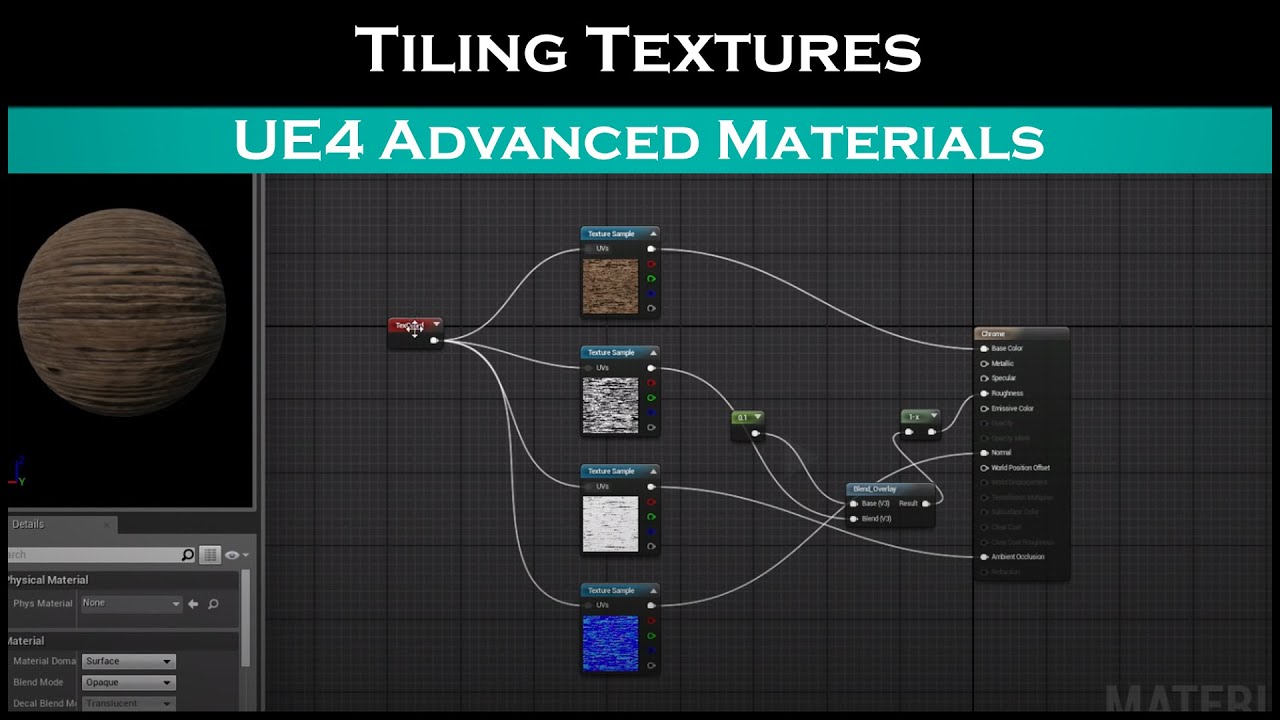
Patreon: https://www.patreon.com/StevesTutorials Quick video showing how to tile any texture.
edgy halo
Thanks
 weak kindle
@edgy halo Use geometry
dull tree
i need to restart level but i have variebles that i want to still have (Number of lifes)
weak kindle

How do I use the Save Game Object in Unreal Engine 4?
Source Files: https://github.com/MWadstein/wtf-hdi-files
 stray island
How do i get the material variable ex:mybasecolor inside a blueprint actor
stray island
I hate how youtube tutorials just dublicate materials with different colors as if memory isnt a thing
I want to get the color vector and change it on the go
 marble tusk
Probably like this https://docs.unrealengine.com/en-US/RenderingAndGraphics/Materials/ParameterCollections/index.html
Assets that store an arbitrary set of scalar and vector parameters which can be referenced in any Material.
dull tree
weak kindle
https://www.youtube.com/watch?v=_4usRrTiqak&t=330s&ab_channel=MathewWadstein
This will work for games like pacman
like fast dieing and respawning?
 tall pine
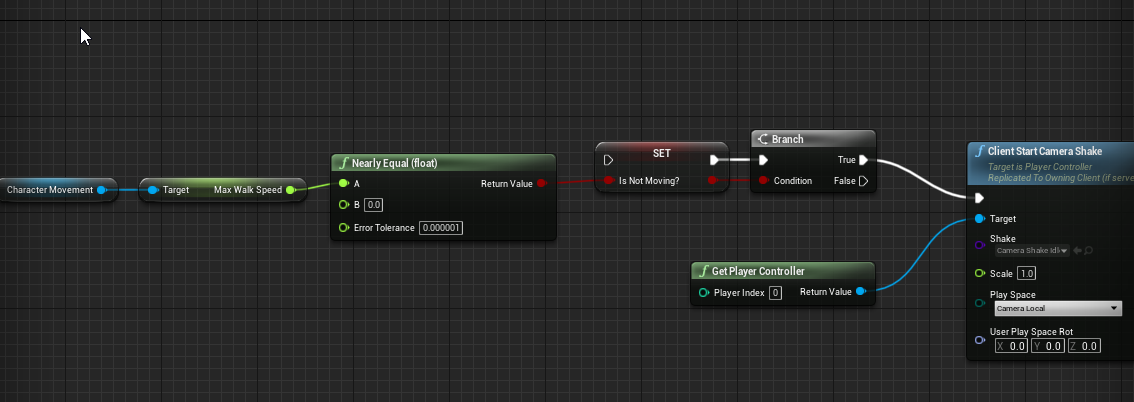
how can i check if player is not moving, having a speed of 0 (idle) ?
to play a certain camera shake bp for standing
stray island
marble tusk
Probably like this https://docs.unrealengine.com/en-US/RenderingAndGraphics/Mate...
Thanks I actually did it , i found on google , its create dynamic material then set vector ..etc
stray island
tall pine
to play a certain camera shake bp for standing
I think get max walk speed = 0 ?
tall pine
stray island
I think get max walk speed = 0 ?
do i need to execute the boolean cause it wont play https://i.imgur.com/1ltlxpG.png
 tall pine
stray island
Yes of course
tall pine
stray island
Yes of course
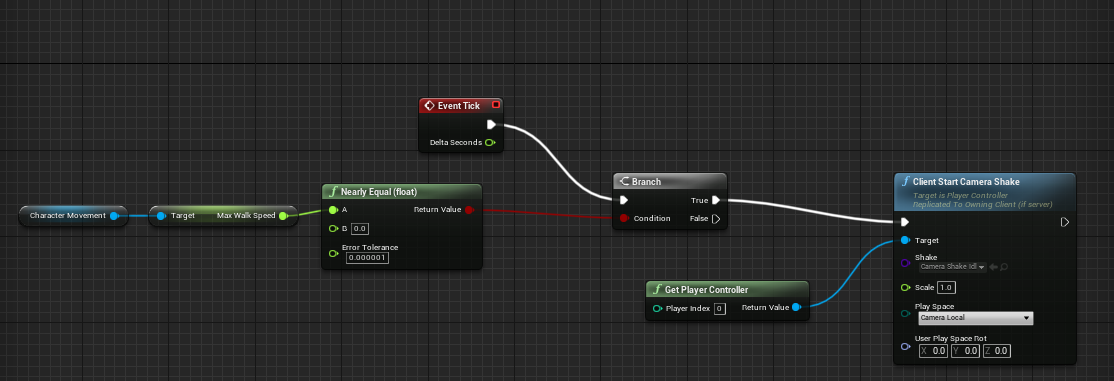
i ticked it yet it still wont play https://i.imgur.com/ftdptYc.png
 stray island
I will open pc
heady spear
hey guys how can i do this with BPs?
tall pine
stray island
Sorry its
ah yes velocity it works now
tall pine
is there any alternative to event tick
cause i dont want to use that and my beginplay is already used up, i can't fork the cameraidle function somewhere
heady spear
u can create a timer
or u set a custom event that is called everytime the event tick is called
heady spear
this will tick ever 0.5sec if its what u need
trim matrix
heady spear
this will tick ever 0.5sec if its what u need
I think that if it works like a delay it will destroy ur game
Oh it’s not an event tick
Sorry
Event tick with delay is... huh
heady spear
painfull xD
tall pine
well my beginplay is already taken by another script so i cant really use that
heady spear
cant u just add the timer node?
tall pine
i added the timer node https://i.imgur.com/2iwiudG.png
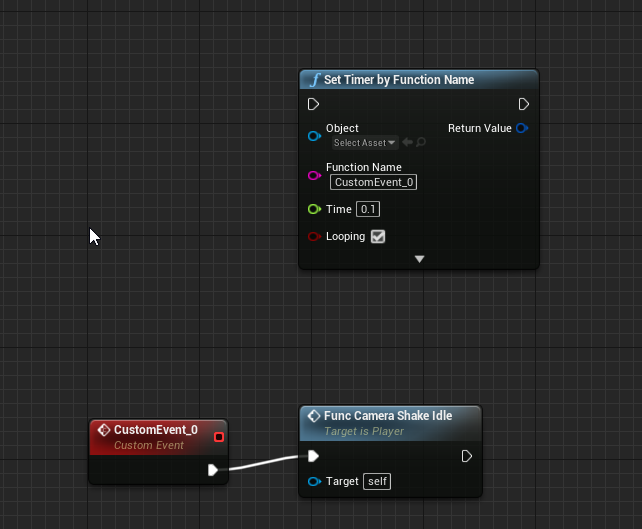
but it seems i have nothing for it to plug into
from the start
my beginplay is here and i cant plug it to multiple execs https://i.imgur.com/lv4GDUn.png
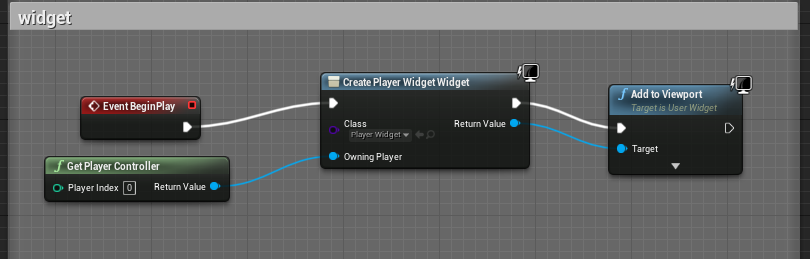
 midnight blade
tall pine
my beginplay is here and i cant plug it to multiple execs https://i.imgur.com/lv...
midnight blade
tall pine
my beginplay is here and i cant plug it to multiple execs https://i.imgur.com/lv...
You can just plug in your timer after the Add to Viewport? :p
tall pine
midnight blade
You can just plug in your timer after the Add to Viewport? :p
yeah that would work i just thought about making it more organized and seperated everywhere
midnight blade
You can use a Sequence if you want to organize it better.
tall pine
how can i use that?
midnight blade
it's a node, right click and search for Sequence
There's a shortcut way to make them too I believe. (maybe it was holding S and pressing somewhere?)
Is your game singleplayer?
tall pine
yeah
midnight blade
kk. If you were doing multiplayer you would have to be a bit more careful with your BeginPlay setup. But if it's singleplayer then this is fine.
I personally prefer SetTimerByEvent instead of SetTimerByFunctionName though.
Basically because the FunctionName one is more error-prone, you can end up misstyping the name, or changing the name of the function later.
Not as big of a problem if you are working solo
tall pine
oki thx
heady spear
ehy guys do u know any way to debug infinite loops?
midnight blade
Don't have a specific trick to debug infinite loops... If it's in blueprints the execution will stop after some high number of calls if it all happens in one frame.
If it's not in one frame and it just keeps calling forever but doesn't stop, then you'd have to look at the execution flow and possibly the values that makes it do it infinitely.
Basically: Read the code/blueprint, see the execution and inspect values to logically figure out what is happening 😅
(Maybe someone else has a clever trick that helps specifically with infinite loops, but I can't think of any other than just normal debugging of the issue)
 lucid fulcrum
so... question regarding shadows for third person mesh for a first person character? How would one go about this while having the third person mesh set to "owner no see"? or is this more of a cpp thing? nvm, I didn't notice bCastHiddenShadows was a thing
 viscid shard
Hi all, really new to UE4 played around for a bit in blueprints but having some problems with my camera. using the default ThirdPerson project i made it in a top down view. and it works fine if it inherits the Yaw or if i just remove inherit yaw . but im trying to make it so if you hold right mouse you can change the rotation and itll lock to that point but when you release it messes up the character axis. im stupid any good tutorials ? i dont see multiple help rooms so hope im not intruding on Kings questions please answer King before me if you can ><
 tight cobalt
Much appreciated. Will do more research, i found the node calles predict path, i wonder is it possible tonuse it to do this.
viscid shard
its just a mess lol been trying so many different things. just want to understand how controllers work because it changes the character axis when you rotate boom.
dawn gazelle
It doesn't matter whether you use a struct or just have variables within your weapon BP. What is nice about having a struct though, is if you're needing to read all of those variables as you can get a reference to the struct instead of having to reference individual variables.
 lusty escarp
Hey, Im trying to create a character select that checks to see if the character is already being used, if it isn't then spawn the character using it. But if all the characters are being used, the player cannot spawn. I'm using an array of available characters to use and checking if they have been selected. My trouble is trying to set the character to selected after it has been chosen by the player. Any helpers?
orchid garden
so there is really no way to return a Variable thats a object reference (actor, world object, etc) to NULL after its been set?? and they feel this is practical programming??
dawn gazelle
Erm, can't you set it to just blank?
orchid garden
it doesn't reset the variable to null and thus is still a valid reference object if you blank it.
lusty escarp
@orchid garden Surely this resets the variable to NULL
orchid garden
thats not a object refrence thats a widget reference
dawn gazelle
I get not valid after releasing my Num6 key
orchid garden
Is valid all the time because the object reference is not NULL.
lusty escarp
How are you setting the variable?
orchid garden
looks at image
 odd ember
lmao
odd ember
you need something to set it to
orchid garden
Thats my point CranzEnstebogen - you can't set a OBJECT reference to NULL.
dawn gazelle
lusty escarp
Hey, Im trying to create a character select that checks to see if the character ...
These two nodes should help determine if the character is possessed by a player, if that would help.
odd ember
well I mean, setting it to nothing sets it to null
orchid garden
here, take a get a reference to your master character, set that reference to a variable, then try to clear that object reference and set it to Null just using a blank set, it doesn't work.
Even if you have a second variable, that has never been set, and you set it to the object refrence you just set your character reference to, it still not Null.
thus isvalid is 'true' every time
dawn gazelle
I think you may be missing something else Geeky - like, maybe something is re-setting that variable on you.
odd ember
yeah I was gonna say
dawn gazelle
This is multiplayer game too?
orchid garden
nothing is setting it. it gets set at the beinging, and then cleared at the end of the routine.
Even made a seprate function to 'clear' it at the end of the routine thinking that it was being reset, and pressing a secondary key to clear it, guess what....
odd ember
where are you setting it?
lusty escarp
@odd ember I did ask that, but he told me to look at the image...
odd ember
I think that came across as a different question then
orchid garden
odd ember
is it functioning as you want it to?
I was under the impression that you had a problem
orchid garden
yes its just never setting the variable to NULL
odd ember
so it is breaking down
odd ember
yeah except it can never unset the variable
orchid garden
EXACTLY
orchid garden
....
 shy path
Hey, i got a quick question: im following a guide that asks me to "Create a new blueprint that inherits from SphereTrigger" how do i do that?
maiden wadi
@orchid garden What does the reference need to be nulled for?
orchid garden
even THIS will not set it to NULL:
dawn gazelle
Starting to think this is something to do with authority.
shy path
oh thanks 🙂
orchid garden
i mean seariously how hard is this to figure out??? its not even a multiplayer call.
odd ember
if you put any node after the node where you set it to nothing
maiden wadi
How are you checking it inside of the inventory?
odd ember
and put a breakpoint on it
orchid garden
ITS NOT.
odd ember
you can see if it gets set to null or not
odd ember
well if you're unwilling to try we can't help you
dawn gazelle
Perhaps a restart of the engine is in order? 😛
proud hull
Leaving a set node blank does set it null. Both strings print.
heady spear
this part of the code keeps giving me unlimted loop, is it because if the branch goes to false i dont remove the item from the array?
midnight blade
heady spear
this part of the code keeps giving me unlimted loop, is it because if the branch...
the while continues until all elements in Unexplored Set are removed. So yes, it's because you get a situation where it doesn't get emptied.
dawn gazelle
So you have a While Loop that is checking that the length of Unexplored Set is > 0.
You then have a For Each loop that is iterating through Unexplored Set, and checking each item if it's less then "temp distance" and setting the 3 variables you have there.
When this For Each loop completes, you're removing the index of the last found "FIndex"
Effectively, you could have items in your array still if they are not < temp distance, thus giving you an infinite loop on your "While Loop" as your length is still > 0.
heady spear
i see, i was trying to follow a pseudocode for a dijkstra pathfinding algorithm, but its not easy to translate code into PBs is it possible that a following part of the code can solve this problem?
midnight blade
Instead of doing the "while" loop, connect this to the Event Tick.
so that it runs the For Each Loop once a frame
heady spear
im inside a AI task so i cant use event tick, is there something smilar for ais?
midnight blade
There's a "Receive Tick" and "Receive Tick AI" you can use. (I don't know exactly the difference btween the two xD)
(UE4 AI is not where i've spent a lot of time though)
midnight blade
^to the rescue
heady spear
can something like this work?
midnight blade
Guessing the left-offscreen is the Execute of the AI task?
heady spear
no there are some other things
midnight blade
Could work. You technically just have to press play to see if it does :p
But depending on your Behavior Tree, and how long this Task remains active, it might not be doing exactly what you want.
If your task gets executed very frequently (which I believe requires you to enter and exit the Task Node for it to be re-triggered). Then you might not require the Tick event, and you just do the loop once every time the task is triggered.
Hard to tell without more insight. So I'll leave you to be the judge of that :p
heady spear
so, i just want to find the result position once, i dont need the task to be repeated but if press play, it stack somewhere, is it possible to debug it step by step? so i can understand what it does. sorry im used to develop software for micrcontrollers, and they work a bit different
midnight blade
(You don't really need your gate value though. As nothing will happen on tick if your Unexplored Set is empty. )
You can set a breakpoint and debug it step by step.
willow phoenix
is there a way to use something like a "delay" in a function?
midnight blade
If you just want it to find the result position once, then it sounds like you don't really need the Tick. But just the "Event Receive Execute AI" event should be enough. But you then need a setup in your Behavior Tree to re-run the task if no valid position was found.
heady spear
well the algorithm must repeat a lot of times until i find the position...
willow phoenix
for example having a light flicker on a timer, but with a random delay-gate thingy?
midnight blade
willow phoenix
is there a way to use something like a "delay" in a function?
functions do not support delays in them, only supported in Event Graphs.
You can create delays by calling another function on a timer, or even a Custom Event inside of an EventGraph that then does the Delay for you.
willow phoenix
hmm, but why not in the function? is that some code-codex or just "because"?
midnight blade
heady spear
well the algorithm must repeat a lot of times until i find the position...
Yes but for the algorithm to have a different result, time needs to pass for the conditions to change.
It checks for distance, over a set of unexplored set of data. If you just loop there forever and don't allow for time to pass -> distance cannot change, and nothing will be added to the unexplored set.
midnight blade
willow phoenix
hmm, but why not in the function? is that some code-codex or just "because"?
Functions are more closely related to their C++/programming counter-parts than what Events in EventGraphs are. But basically they follow the rule that they need to return/finish within the same frame as when they were called 🙂
Therefore no delays.
willow phoenix
aaaaaaah! thanks a lot that makes sense 🙂
odd ember
the reason you can't put a delay into a function is because it would stall the function
midnight blade
willow phoenix
aaaaaaah! thanks a lot that makes sense 🙂
Functions support return values as well, which Events do not. One of the reasons for this is exactly what we've spoken about now.
A function that returns something basically has to guarantee that it will return the value to the executing code, otherwise you have no idea how much else you would end up delaying. As the calling code would have to wait for the return value to be able to continue.
odd ember
the other reason is that delays dispatch a delegate when finished, which could lead to inconsistencies inside a function
e.g. you could not predict the time a function would finish
or whether one function would finish before another, irrespective of delay values
heady spear
midnight blade
Yes but for the algorithm to have a different result, time needs to pass for the...
is there any way to skip macros loops? like everytime i get into a for loop it goes inside the macro...
midnight blade
use jump over instead of jump in/into
step over* maybe in bp
always a bit finicky with the for macros though
orchid garden
ty @maiden wadi its working now.
maiden wadi
When in doubt, bring out the flamethrower. 🤷♂️
orchid garden
i swear, 4.25.4 is more prone to problems the the previous 4.25.x version...
 thorny cape
why doesnt my cube (player move)? I made sure to enable physics
odd ember
heady spear
is there any way to skip macros loops? like everytime i get into a for loop it g...
what are you trying to do in the first place?
maiden wadi
@thorny cape Is the Player_Cube Simulating physics?
maiden wadi
How high is torque amount?
maiden wadi
And if you print Axis, when pressing a key, it prints -1 or 1 instead of 0?
thorny cape
it prints -100000 or 100000 because I multiplied the input of -1 or 1 with the torque set
thorny cape
Ill look into it some more
maiden wadi
@thorny cape Enable AccelChange. I went through the calls. If I understand right, using AccelChange will also wake it up from Physic's dormant state.
 grave cliff
hi guys i followed a tutorial on youtube on getting a mixamo character into ue4 and now im trying to add a jumping animation which the tutorial didnt cover. im following another tutorial now for the jumping but the blueprints are different to what i have in the animation bp file. ive set up everything in the character state section picture included.
but in the event graph everything he has is different to what i have
my question is
what are my next steps to get my jump anim working properly, here is my event graph
dawn gazelle
#animation is probably where you want to be.
grave cliff
ah ok thank you
orchid garden
@grave cliff your graph looks pretty simular to the third person graph
grave cliff
its just what i followed from a youtube tutorial
orchid garden
did you set up the event graph for checking to see if the player is jumping?
grave cliff
ah no i didnt i guess the video im following mustve had that in a previous tutorial.
orchid garden
i should ask do you use the movement component on your character?
grave cliff
ill try to do that now
im using the mannequin character just changing the assets
so what ever is in the mannequin bp
thorny cape
maiden wadi
<@!335087719375962114> Enable AccelChange. I went through the calls. If I unders...
that's weird I tried that yesterday and it didnt work
but it works now
thanks!
orchid garden
then you should be able to check for the 'jumping' like in the manniquin like so:
grave cliff
ok thank you @orchid garden
heady spear
odd ember
what are you trying to do in the first place?
i need to debug my code , cuz it keeps giving me infinite loops
orchid garden
from idle to jump check to see if player is in air, take a look at the manniquins animation bp, it'll help you make sure you have your 'transition rules' setup properly in the graph itself (idle -> jumpstart -> jump loop -> jumpend)
grave cliff
perfect thank you!
maiden wadi
@heady spear I think he was trying to ask what the code was trying to do in the first place, so as to better understand what you're attempting with your blueprints. It's not very clear what you're doing with your AI at a glance.
heady spear
maiden wadi
<@!235066815678644224> I think he was trying to ask what the code was trying to ...
oh i probably said a lot beofre, im trying to implement the dijkstra pathfinding algorithm, im translating a pseudocode to BPs and ofc adapting it to my game, but it is not going very well XD
 steep wasp
Hello there, what kind of component would people recommend using to create an object that can be thrown or kicked like a baseball or soccer ball. It must be able to curve left and right in its trajectory. I have a working prototype by adding an impulse to an actor sphere but I'm unable to make it curve left and right, is this possible using an impulse? should I be creating a projectile? or is there something better I can use?
maiden wadi
@heady spear I'd imagine that you would somehow just need to create a function that intakes all of the points, the point the aI is at, and it's target point. The points should have your weights and points they're connected to. And inside of that function you can make sub functions to call that can step through your path logic. To be quite honest though, unless your game is very simple, that can end up being quite a few loops. Blueprint really isn't designed for that kind of brutal calculation. If you know any C++ at all, even some blueprint library functions are going to be of dramatic help here.
@steep wasp Single or Multiplayer in the end?
steep wasp
Single player
maiden wadi
Then either an actor with a root that simulates physics, or an actor with a projectile movement component will do. How you curve it is up to your controls and implementations, but in short, you just need to find a way to affect it's velocity over time.
proud hull
@steep wasp impulse is great for initially kicking/throwing. Then use add force to make it curve left/right: https://docs.unrealengine.com/en-US/BlueprintAPI/Pawn/Components/CharacterMovement/AddForce/index.html
Add Force
steep wasp
maiden wadi
Then either an actor with a root that simulates physics, or an actor with a proj...
Thanks
steep wasp
proud hull
<@!156829461017395200> impulse is great for initially kicking/throwing. Then use...
Thanks This looks promising I will give it a try
proud hull
steep wasp
Thanks This looks promising I will give it a try
I linked the wrong version, but essentially the same thing:
The description for the node says it all:
steep wasp
proud hull
I linked the wrong version, but essentially the same thing:
Can I just chain the add force on after the add impulse?
proud hull
You would have some boolean set true after the impulse, then on event tick you would check if boolean is true to run add force. You will then need to decide when to set this boolean false to stop adding the force (when it hits something maybe).
You could also constantly add force without having the boolean set, just make the force added 0,0,0 if you don't want it to curve. You could then even make the force added based off the objects rotation or something.
steep wasp
proud hull
You would have some boolean set true after the impulse, then on event tick you w...
Thanks, I think I can make some progress now. just need to understand how to gradually add the force.
odd ember
heady spear
i need to debug my code , cuz it keeps giving me infinite loops
no I mean what are you trying to do that is causing you issues
heady spear
maiden wadi
<@!235066815678644224> I'd imagine that you would somehow just need to create a ...
i honestly used C++ in the past, and i "know" many other languages, so i probably can relearn it pretty fast, do u think the development on C++ is better than the one in BPs?
 wooden mural
Hi, I want to predict if an attack will hit in my animations. I get the transform of the hand of a later frame (the frame an enemy should be hit) and use this to add a hit box component at that transform that checks for collision. But somehow the transform I get isn't correct (I think it's not relative to the mesh but neither in world space). Are there any ideas for alternatives or solutions? Thanks in advance 😄
proud hull
steep wasp
Thanks, I think I can make some progress now. just need to understand how to gra...
Something more like this:
steep wasp
proud hull
Something more like this:
ah yes, beautiful! I was thinking along those lines.
proud hull
You can do the on tick part inside the sphere's blueprint.
And the boolean can be stored there too. So the kick event will set the sphere's boolean true.
orchid garden
event tick doesn't feel like the proper thing to use to manage the add force for the ball, it'll keep going even after the ball stops.
maiden wadi
@heady spear I think you should use both, personally. C++ is great for heavy lifting, like running through potentially thousands of combinations of pathways.
heady spear
can they both "live" togheter?
steep wasp
proud hull
You can do the on tick part inside the sphere's blueprint.
Ok, then i can set can curve to false once the ball hits a collision. I would also like the force to gradually increase the force value over time then decrease, is there an action for that?
heady spear
like can i create parts in c++ and others in BPs?
orchid garden
i think a custom timer with a lifespan would be better honestly, in the timer you can check to see if the curve length is ended then destroy itself.
heady spear
or is better to create everything in c++? my project is not much ahead, so i can recreate it in c++ i think
odd ember
heady spear
like can i create parts in c++ and others in BPs?
yes, cpp's main output is for blueprints
maiden wadi
Sure. That's the generally preferred method anyhow. Create base classes out of C++ that do your heavier computations, and then let the blueprint side do the more design like aspects.
odd ember
you can even create nodes themselves
they're just static functions
well, functions in general
but if you want universally available nodes, those are static
also why they always take a class parameter
maiden wadi
It's also worth noting that Unreal's C++ style is very easy to learn, specially if you already know blueprints. I started picking it up around October I think. If you have previous coding experience, I can't imagine it'd be that hard for you to learn.
odd ember
yeah it's easy to tread water without needing to dive deep
but of course if you're into it there's entire modules at the deep end that could be made better
I saw a guy creating a boid graph editor which was very interesting
well, if you're into boids anyway
heady spear
im an electronic engineer, so my coding experience is more related to firmwares, i used many languages in the past and i think i can use this occasion to realearn c++ better
 robust jacinth
Tutorials tells me I can't set teams without using C++, is this still the case?
My google-fu seems to leave me empty with answers on how to do it inside Unreal Editor or using Blueprints.
proud hull
steep wasp
Ok, then i can set can curve to false once the ball hits a collision. I would al...
Gradual increase can be added with something like this. Adjust the Interp values as you see fit:
Keep in mind there are many ways to accomplish this.
 somber bear
hey guys ive run into a weird issue when adding a parameter to a struct, its now made every child blueprint referencing that struct unable to save
even once i go in and change the values and save
once re-opening engine its all going back to defaults? any ideas on what is causing it?
steep wasp
proud hull
Gradual increase can be added with something like this. Adjust the Interp values...
Thanks that's brilliant, I will try it out and see how it plays!
proud hull
odd ember
using event tick for stuff like this is defintely making my eyelids twitch
I only do it because it is easy for people to understand. There are many other ways to accomplish this. In this specific case, event tick is not bad to use since it is to add force which should be done every tick. There is a boolean to prevent it from running when it is not needed.
steep wasp
odd ember
using event tick for stuff like this is defintely making my eyelids twitch
What are the dangers of using an event tick?
odd ember
generally you're just looking at performance hogging
event tick should not have been as easily exposed as they made it in BP
it is being abused heavily
the best thing you can do for stuff like this is a timer or a timeline
proud hull
When used improperly, it is bad, but that goes for anything.
 hallow sun
Hi everyone
Is there a way of getting the ACTUAL vertex positions from a procedural mesh?
I have a proc mesh, using the node 'GetSectionFromProceduralMesh' I get the vertices array and draw a debug point at that location + the actor's world location.
When the actor rotation is 0,0,0 everything works fine, but when rotated the points are drawn at the same location 😦
odd ember
well branching on tick is technically improperly
coarse forge
Are you trying to do an eventual increase to a max on something?
proud hull
Not really....
steep wasp
Interesting, I will use the event tick first then try a timer implementation after.
proud hull
You do understand that if you disable event tick, the engine needs to check that as a boolean to skip the event tick of any blueprint?
odd ember
branching isn't free, so you're consuming performance for doing something that could otherwise have been done without the performance loss
 little cosmos
Hi! I created a visible reference to WindDirectionalSource actor and I can't select it in my BP instance
odd ember
checking a bool in cpp is much cheaper than checking a bool in bp
little cosmos
coarse forge
@proud hull if you disable in cpp isn't the check done once on creation
little cosmos
It gopes back to none
coarse forge
well.. since I'm here... what is the node to enable my mouse when my hud is on?
proud hull
coarse forge
<@!291620720243376129> if you disable in cpp isn't the check done once on creati...
This is the blueprint channel, we must assume they wish to use blueprints here, hehe.
odd ember
as in, the cursor being visible?
coarse forge
yes
odd ember
show cursor or some such
coarse forge
proud hull
This is the blueprint channel, we must assume they wish to use blueprints here, ...
I know, just saying, that the docs say to disable tick on anything you don't need tick for.
coarse forge
odd ember
show cursor or some such
Yes
coarse forge
not mouse capture mode?
proud hull
coarse forge
I know, just saying, that the docs say to disable tick on anything you don't nee...
I don't disagree with that, but to explain that to every single person who needs to use event tick for something simple will drive everyone crazy.
coarse forge
sorry.. more details.. so I toggle my main menu.. but when it shows.. i can still move my guy around and don't get a cursor to use the hud with
odd ember
set input mode
coarse forge
proud hull
I don't disagree with that, but to explain that to every single person who needs...
Ha agreed. Its a balance
maiden wadi
Realistically, tick is the best place for this. Timelines are constrained to set time limits, and timers can be annoying to use with physics math. Better case is to treat it like physics often does and use SetActorTickEnabled to enable and disable tick when the actor is or isn't moving.
coarse forge
^ this
odd ember
proud hull
I don't disagree with that, but to explain that to every single person who needs...
I always advocate not using event tick. having a timeline is far better practice and is easy to teach. failing that, a timer isn't difficult to make people understand
coarse forge
I use tick with a gradual increase to a max, then reset for make stuff sorta glow
so.. I don't see set input mode.. thats in the PC not the Hud right?
odd ember
maiden wadi
Realistically, tick is the best place for this. Timelines are constrained to set...
I assume the physics action will not go on forever
coarse forge
only input modes I see are for head mounted display
odd ember
set input mode game and UI?
coarse forge
nm I found it
okay this doesn't feel right
i know.. its not right, but the direction doesn't feel correct
maiden wadi
You can leave the widget blank
coarse forge
does this function set it for all time or just on toggle?
i.e. do I need this in begin play instead?
odd ember
you'd want it somewhere initially yeah
coarse forge
okay that node is funky.. i lost my look ability unless I hold down the mouse button LOL
maiden wadi
@coarse forge What are you trying to do?
odd ember
yeah if you just want the mouse cursor to show... that's Show Mouse Cursor
coarse forge
I need the player to stop moving and have the mouse cursor usable here
odd ember
set input mode UI only?
coarse forge
but only when the menu's or other huds are available
odd ember
because that's where you would want to turn them off again after
you're getting player controller from first player my dude
that node is exposed everywhere



 maiden wadi
I normally make a library call out of that which happens on my widget's Construct and Destruct events.
coarse forge
by library you mean BP function?
maiden wadi
coarse forge
ah i see
maiden wadi
I used to do them out of a function library, but I started doing them in my C++ player controller, because it also disables input from the pawn the controller is possessing.
coarse forge
well.. that works a little diff in this case
since the event when called toggles the two
odd ember
maiden wadi
I used to do them out of a function library, but I started doing them in my C++ ...
not a bad call I might have to consider that
not that it affects me greatly since I've set up the logic already
coarse forge
interesting.. so when the hud is up.. the input key 'm' doesn't work anymore
I guess I need an x or something to go back?
odd ember
are you pausing the game?
coarse forge
no
odd ember
I reckon set game mode and UI is the one you need to use then, perhaps while pausing the game or some such
maiden wadi
SetInputForUI will disable input from all actors
odd ember
unless your input key is literally the input key "m" and not a project defined input key
coarse forge
maiden wadi
SetInputForUI will disable input from all actors
that feels like the case
in which case.. i probably can get rid of everything in the true part of the branch and put a 'close menu' button somewhere that kills it and re enables input
orchid garden
maiden wadi
SetInputForUI will disable input from all actors
where's this?
coarse forge
player controller -> set input mode ui only
maiden wadi
coarse forge
if i change that to game and ui will it keep my inputs?
maiden wadi
It should, yeah.
orchid garden
ah set input mode got ya
coarse forge
k let me try that
maiden wadi
Oh, yeah, didn't realize I mistyped that, that's my own function's name for it in the controller. Haha.
coarse forge
okay.. that worked.. but the set input mode game and ui on the remove menu branch made my mouse require the button to hold to go back to normal mode
okay
fixed it
set it to game only on the exit
thanks
orchid garden
just one question Authaer, what if you want input keys for quick actions in the widget?
coarse forge
game and ui
maiden wadi
The Widgets have their own OnKeyDown functions.
coarse forge
oh yeah.. thats right
maiden wadi
orchid garden
so you'd have to do a direct key assignment then?
proud hull
orchid garden
just one question Authaer, what if you want input keys for quick actions in the ...
Listen for Input Action to use your input action key bindings: https://www.youtube.com/watch?v=4FwaHM6YSF8

What is the Listen for Input Action Node in Unreal Engine 4
Source Files: https://github.com/MWadstein/wtf-hdi-files
orchid garden
for instance... you setup the inventory screen so the Use item key is E, but it would be fixed to that so the player wouldn't be able to reassign to like U ?
maiden wadi
More or less. I tend to do mine by getting Input keys from the project. My player controller has some functions that can get all keys that a project keybinding uses. So, OnKeyDown, I could say if Key that was pressed == ProjectInputKeyMapName, do this.
So I could still reassign that in the project settings and through action mappings I suppose.
orchid garden
can you assign the same key to two different input key mappings? i didn't think you could?
maiden wadi
orchid garden
🙂 i thought they were restricted 😉 teaches me for thinkin' on that one heh
maiden wadi
They're literally just INI file settings. All of that is written to an INI file that the engine can read from.
odd ember
maiden wadi
More or less. I tend to do mine by getting Input keys from the project. My playe...
this is a part I've automated in cpp as I didn't want to mess around with inputkey names. I do a predicate in cpp to find the correct input key
orchid garden
i'll need to do a check to make sure they don't assign the same key to the same function then, i.e. move forward and move left being W
odd ember
O(<NumberOfInputs*NumberOfKeys>)
maiden wadi
Have to love that fine line of.. When to let the user have total software control, and when to brutally babysit them.
orchid garden
lol yeah
coarse forge
hahaha
Worked out for Lucas Arts Loom
Looks like your normal point and click adventure.. till you realize the whole keyboard does stuff.. . but there isn't a manual
 solemn parcel
Stamina Current is based on 100, and goes to 0. I want the interpolation to reach is maximum value at 25, not 0. How can I do this ?
Right now by doing this there is no interp, the color change once the value hits 25 or less.
maiden wadi
Not sure that's the function you're looking for. You need to alpha blend between them based on the stamina. Stamina current can be anything between 100 to 0, right?
solemn parcel
yep
maiden wadi
What color are you trying to get at which stamina values? I do the same thing with health bars. Green to yellow, to orange to red based on percentage of health left.
Often easier to do it with a predefined curve, but you can do it with some simple math too.
solemn parcel
To start just simple orange with 25 to 100 and red 25 to 0
I'm a bit lost on how to use the alpha blend tbh
@maiden wadi You mean using 'InputAlphaBoolBlend' ?
coarse forge
is there a way to search bp's for a node
i seemed to have lost where my click handler for new game actually does work
and loads a level 😦
I must have been up to late
 zealous moth
ctrl + f
coarse forge
i mean.. globablly
I remember adding the if this, then load level
but can't find it
😦
ohh found it
orchid garden
coarse forge
thanks
window-> find in bps
forgot the widgets have a graph button in the top right
orchid garden
that little magnifying glass binoculars does the same
orchid garden
er binoculars i mean lol
maiden wadi
@solemn parcel I believe this will work for what you're trying to do.
Or wait a sec
That. Always forgetting the normalization.
proud hull
I just made one too, hehe:
0 through 15 = red. 15 through 25 will lerp from red to yellow. Greater than 25 will be yellow.
maiden wadi
For more fine tuned control, you should look into making some predefined curves though. You'll be able to better filter out bad colors or control the drop offs how you like.
orchid garden
never thought about changing the stat colors vs. level....
maiden wadi
solemn parcel
@maiden wadi @proud hull Damn much more infos than I expected. Thanks guys 😉
orchid garden
maiden wadi
im guessing the first one would be current stam the divide by being max stam ?
or do i have that backwards?
maiden wadi
Yep. Normalizes it to a multiplier between 0-1.
proud hull
You can even make the curve itself go from 0 to 100 and skip the division, not recommended though unless you never plan to change the max stamina from 100.
solemn parcel
I'm enjoying that moment asking, do you sometimes have random ue4.26 crashes ?
oh and btw, worked perfectly !
maiden wadi
Avoiding 4.26 at the moment.
orchid garden
i don't use 4.26 but i have random 4.25.4 crashes for no apparent reason. can be sitting here just reading something and ... bloop... crashed. o.O
coarse forge
4.26 working fine here
maiden wadi
Can't see C++ interfaces in blueprint, in 4.26.
orchid garden
i did try to port my project to 4.26, and after getting it loaded in 4.26 it was eating 2x more memory then 4.25
that right there made me go ... "uhhh nope."
 wooden holly
Hi, I wanted to ask if anybody can help me: I would like to make a minimap. Everything works, but the problem is: The character is visible on the minimap. Is it possible to make the char invisible on the minimap?
maiden wadi
I'll eventually move to 4.26 without a doubt. The new level design tools are going to be amazing. And quite frankly, I love some of the new blueprint tools, like referencing levels via soft objects, and being able to manually key in buttons instead of searching through the list for them. But not being able to see TSubclassOf<UInterface> of C++ UInterfaces kills some of my logic.
wooden holly
wooden holly
Hi, I wanted to ask if anybody can help me: I would like to make a minimap. Ever...
It's a ScreenCaptureComponent2D
maiden wadi
@wooden holly I'm unfamiliar with using those myself, but something like this might work, if you reference that character and put it in the InActor
wooden holly
okay I'll try
orchid garden
wooden holly
Hi, I wanted to ask if anybody can help me: I would like to make a minimap. Ever...
you can set ignore actors for scene capture cameras as well
coarse forge
is it bad to have widgets of widgets?
maiden wadi
@coarse forge How do you mean?
wooden holly
orchid garden
you can set ignore actors for scene capture cameras as well
wait in the details?