#blueprint
402296 messages · Page 588 of 403
 river ember
I am getting a wall of LogNavigationDirtyArea: Warning: Skipping dirty area creation because if empty bounds - any idea what this means?
 woven wing
Blueprint is very mucky about doing some things.
The function "ClosestToTarget" just does what it says on the tin.
This is not the fastest it could be, as it does test the distance twice.
Caching the distances and storing them would avoid some extra math.
 opaque valley
Really dumb question. How does this look in code? I don't understand how the output of a set function is then used as the input to another function. Is this just the same as storing the last known value of that variable and using it as the input?
woven wing
opaque valley
Really dumb question. How does this look in code? I don't understand how the out...
That 'Interp Offsets' there isn't a function. That's a Macro.
opaque valley
Ok, but a macro is not similar to a function? It's doing work with an input from the output of a set action and then somehow returning something that will then be the input of the set.
woven wing
You're calling this every frame?
opaque valley
On the anim tick
woven wing
OK, so what's happening is, the macro result from the previous frame is getting left in the buffer and is then getting picked up with the evaluation thread gets to the Set function.
Or, no - the opposite.
opaque valley
Ok, so then my assumption is correct. Old value basically.
opaque valley
I don't use BP, I am interpreting some to change it to C++
So I needed to understand what it's doing to convert
 quiet kettle
Thx 😄
 cold raft
I must be missing something simple here - how can I get a reference to the skeletal mesh equipt in the players main hand (I want to attach a cable component to the end of a fishing line)
The function below attaches to hand, and the print sockets underneath correctly find the sockets on the fishing rod (labelled tip and tipSocket)
woven wing
cold raft
I must be missing something simple here - how can I get a reference to the skele...
You can find a mesh attached to a particular socket like this:
But you should just store a value in a variable when you assign it.
 rough wing
@woven wing I'm making some kind of logic error, could you take a look if I send you the blueprint?
woven wing
rough wing
<@!159375492930076672> I'm making some kind of logic error, could you take a loo...
Sure, paste it into the pastebin and I'll take a look.
rough wing
BlueprintUE
woven wing
Uhh.
Well this is much more complicated then you suggested.
What's with the sphere tracing?
rough wing
The problem is probably in the loop body
That gets the world objects
And I want to get the closest 2 objects
the multi sphere trace is what finds the objects
cold raft
Thanks @woven wing - I may be asking the wrong question then, I can see the mesh names and socket names, but cant attach them to the cable component. I cant work out how to attach the cable component to a skeletal mesh that hasnt been spawned as an actor
woven wing
rough wing
the multi sphere trace is what finds the objects
Hmm
woven wing
cold raft
Thanks <@!159375492930076672> - I may be asking the wrong question then, I can s...
That I'm afraid I don't know much about. I've never worked with cables.
cold raft
Cheers anyway!
rough wing
Ah I think I found it
woven wing
rough wing
Ah I think I found it
Cool. I was going to say, it looks like it should work fine.
So I would have had to go in and step through with the debugger.
Which, if you don't know how to use it, is worth learning.
rough wing
Are you talking about breakpoints?
woven wing
Yup
rough wing
Ah alright, thank you!
 hollow cape
@cold raft worth checking out the VICO cable plugin. It's not cheap, but I've been able to do some pretty crazy stuff with it
cold raft
Cheers @hollow cape , I will have a look
 stuck hedge
Anyone done a control remapping system before? I built one, which works flawless in editor. Controls are saved, remapped, etc. but in the shipping build it doesn't work. Remap a key and restart and it can't seem to read it anymore.
basically when a key is remapped, it removes the old map, applies the new map, then updates a struct in the game instance which holds the default key and the new mapped key. When the menu is built it reads that struct array, extracts the keys and creates cards on the UMG for players to see and remap. Works perfect in editor.
just click the button, press your key to reset.
if I do that and restart the editor the new key bindings are listed there. In a built game the entries just disappear.
in the shipping build after reconfiguring up and down and restarting I get this
 slate cipher
anyone know whats going on here ? https://streamable.com/q42n9b

 olive sedge
@slate cipher your camera maybe stuck in an actor or something? Try moving it just to make sure it's not
 tough raptor
Hellooo people gm
I want to make a sword trail from its collision through the mesh, what do I need to do in order to get hit resoults every tick, instead of only on overlap begin and end only?
olive sedge
also: anyone else having trouble loading the marketplace?
@tough raptor you can set a boolean to true on overlap begin and to false on end
and check for that in tick
tough raptor
But then the hits should somehow be asked from a lientrace or something??
Because the event is not going to yield anything
olive sedge
@tough raptor I'm really having trouble parsing your questions.. Be more precise or it will be hard to help you
tough raptor
So what event or method should I use to get hit or sweep resoults from my sword with the other mesh every tick it is overlapping?
olive sedge
Disclaimer: I'm pretty new to this so take it with a grain of salt but yes, I think I would try a line trace first
either from sword hilt to tip or from the entry point of the mesh through the character with the rotation it has
not sure if you'd even need a trace though. You just want to have a visual indicator that the sword ran from x to y?
tough raptor
Yes, I want to use those points to build a wound, but I thought the linetrace solution was too much, shouldnt somehow overlapping be also able to give information every frame??
slate cipher
olive sedge
<@!436288577316454420> your camera maybe stuck in an actor or something? Try mov...
I’m modding a game and I don’t even have access to the player camera so I don’t think that is it rip thank you for the suggestion though
 trim matrix
Previously in this menu was create new c ++ class, but now it is not. (ue4.26
in blueprint project
 somber quail
hey i cant save my map build data
The following assets failed to save correctly:
/Game/Maps/Map_BuiltData
 odd ember
maps generation is depending on context. the parameters become what you want to do with the maps and what the objectives of the game are
 maiden wadi
@trim matrix Use the one on the File menu at the top left. They removed that in 4.26 for some reason. But then there's quite a few list issues with 4.26 from what I've seen. Might have just been a mistake, might have been intentional. 🤷♂️
 solemn parcel
Hey, I got two questions for this BP :
1/ I've tried decreasing overtime the effect of Add Force with the red circled stuff. But it doesn't work. Why ?
2/ My branch is connected to a condition linked to a On Hit Event. Does the Tick Event is calculated all the time or only when the value of the Branch is true ?
cold raft
@solemn parcel - for /1 - are you getting the updated magnus force before setting it (not sure it your BP is doing that)
solemn parcel
@cold raft The Magnus Effect is Set as a variable before applying the force
cold raft
/2 - event tick runs all the time, but your code only runs if condition is true
solemn parcel
2/ If the code condition is false, the it makes the tick event less expensive ?
Branch condition*
cold raft
I would hope so! I have code like that too (happy to be corrected)
solemn parcel
1/didn't get what you meant I think =p
 dawn gazelle
Delta seconds is typically only 0.01 on every tick, unless you have the tick rate higher.
So it's not subtracting much.
solemn parcel
I already tried upgrading the multiplicated float value to insane numbers, but the Force Added just gets crazy strong, and does not actually reduce it to zero
dawn gazelle
What does your magnus effect output on print string?
oh wait a second, you're trying to decrease a force by adding more force...
solemn parcel
@dawn gazelle A print string replacing the add force ? Seem to show the correct vectors each tick
dawn gazelle
Does it show a steady decrease?
solemn parcel
Seems like it actually switch onto negatives/positives/negatives/postivies quite a lot
I'll try clamping it
I didnt clamped still but using the print string on the original Set Magnus Effect seems not to change nothing about the vectors switching negative/positive. But this effect works as desired
Now Im interested to know why you said that im 'trying to decrease a force by adding more force' ? Could be something i missed
trim matrix
maiden wadi
<@456226577798135808> Use the one on the File menu at the top left. They removed...
oh i found it. thank you so much
maiden wadi
@solemn parcel Are you after the effect of like a curved baseball throw?
 weak kindle
mic input is so hard to undeastand it can someone explain how to works l want only get the sound volume from player but l cant get it 😦
solemn parcel
@maiden wadi Yeah. I got the effect working with that script. But i'm trying to get the effect decreasing over time first.
In a perfect world I'd like to make the effect 'stop' under a certain treshold of the ball slower rotation velocity*
 tight schooner
If it's a transient effect then you can try a timeline... It's like a tick event that lasts for a predefined amount of time, and it also samples a custom curve... so it can e.g. output a float that goes from 1 to 0 over time
Otherwise you have to record the start time (Get Time Seconds node) into a variable and have some math that scales a thing based on how much time has passed
You can also control tick on/off with the node, Set Actor Tick Enable
so you can have your tick event check if some condition is reached and if so, stop ticking
I'm not super clear on what you're trying to do, but hopefully one of those loose ideas helps
You can also change your tick interval to a fixed time (e.g. every 0.2 seconds) or create a looping timer event (Set Timer By Event node) if you don't want to deal with the Delta Seconds complexity.
@solemn parcel
 gray quarry
Can anyone help me with this? The character is spawning but it's not possessing. Have tried every combination possible. Thanks!
 gritty elm
is this NPC or your main character?
gray quarry
My main character, it's for multiplayer
gritty elm
first try to replace new pc variable with get player controller
also you may need to spawn default player controller
and last thing to do make sure change this option in your main character settings : @gray quarry
gray quarry
Thanks! Will try
 muted dawn
is this ok to have?
actual body is the body everyone can see
im asking if this will cause performance issues
solemn parcel
@tight schooner Yeah this actually helps a lot. I'll try the timeline first, seems to fit. But even if I use the control tick On/Off, is there a way to decrease the amout of Add Force over a set (short) time after the Off tick ? If it's clear
maiden wadi
@solemn parcel Having some pretty good results with this.
 heady rain
hey guys, does anyone know if it is possible to use actor foliage in procedural foliage volume ?
i'm hitting resimulate but it doesnt place anything. i tested with regular static foliage and in that case it works. but i want to procuderally generate actor foliage, basically each tree has blueprint code.
i am able to use the actor foliage i made with foliage mode but i am wondering if there is a way to use this actor foliage in procuderal generation volume
solemn parcel
@maiden wadi You using the Branch to stop the 'effect' if it doesn't meet the velocity condition or the angular velocity condition ?
maiden wadi
More or less. If it's not spinning fast enough or moving fast enough. You could optimize it for gameplay by setting tick off if the object stops moving, and turn it on again if the object is hit, which would cause it to start moving again.
solemn parcel
this should do the trick
this would stop the 'effect' which is what i'm searching for. Is there a way to make the 'effect' decreasing to zero after the condition isn't met by using a timeline ?
@maiden wadi Thanks tho, it works like a charm right now 🙂
 shadow saddle
can do you do transparent background for image .jpg/png in ue4 ?
or have to do outside ue4
 maiden wadi
@shadow saddle That's a #graphics question for material/texture people. But as far as I know, usually you'd use a mask. #blueprint is for logical programming using.. blueprints.
shadow saddle
ok
 sly sand
how I can make bp that " If health run to zero this widget appear"
I have no idea to link it
dawn gazelle
How are you normally detecting damage?
dawn gazelle
How are you getting your player's health down to 0 in the first place?
What event is firing that gets it to 0.
sly sand
this event
 open crypt
Can anyone explain to me why when picking a row structure for a new data table, all my structures appear twice? (and when I hover over one to see the path, these appear to be identical)
woven wing
open crypt
Can anyone explain to me why when picking a row structure for a new data table, ...
My guess is that you've copied and pasted them somehow.
'Cause You have one item that isn't duplicated.
IC_FScenario_2
So it's not a UI error.
open crypt
yeah i just saw that
when in doubt, assume operator error
but here's where I'm confused
my content browser, that structure appears twice but there's only one
woven wing
sly sand
this event
So, as you're handling your health system yourself, you probably want to put in a check for 'Hey, did my health drop to zero? If so - I'm dead.'
And if you do detect that you're dead, it's probably a good idea to emit an "I've died!" event.
From an Event Dispatcher.
Because usually a bunch of stuff happens when you die.
So it's handy to have one thing to hook your particles, game mode changes, and animations onto.
open crypt
@glad cloak Can you advise if there's anyway to reliably modify the structure a data table is based on so those data tables can be refreshed/updated? I've seen posts involving shutting down the error and saving the structure but not the data table but I'm looking for a more documented process
woven wing
open crypt
<@!107794086563446784> Can you advise if there's anyway to reliably modify the s...
I don't think there is one. I suggested that you export it to Json.
sly sand
@woven wing thanks but, can i get an example of blueprint , please?
woven wing
sly sand
<@!159375492930076672> thanks but, can i get an example of blueprint , please?
Nope.
open crypt
Yeah, If I had more than 20 entries I would
woven wing
Google is useful.
open crypt
Watch the livestreams
@sly sand as someone who has made this mistake so many times, you want to watch those livestreams, particularly the ones about blueprint communications they will save you sooooo much time and frustration
moreover, they make it so much easier to get help because you ask people more qualified questions, and they are much more willing to help when you showed them that you've taken logical steps to solving a problem but could use just a nudge - nudging someone in the right direction takes little effort - most people don't want to have to do heavy lifting to explain something to you
open crypt
woven wing
I don't think there is one. I suggested that you export it to Json.
but I know exporting to json is going to have issues for me, just things I've learned that they take more time than you think they should or something unexpected complicates the process - but I'm adding the notes to my data table for if we get an excessive number of entries, we will use that for exporting/reimporting
dawn gazelle
sly sand
I'm just try unreal for 2 days
You'll want to use the "apply damage" node where you're doing your health drain thing on the screenshot you sent me.
sly sand
open crypt
<@!573339056885465118> as someone who has made this mistake so many times, you w...
thanksful very muchh I'll try like you say 👀 👌
sly sand
dawn gazelle
You'll want to use the "apply damage" node where you're doing your health drain ...
OK i'll sent to your dm
 fervent swallow
hello! I've discovered that when a trigger box contains inside some interactuable stuff, that interactiables thing breaks. Lets say I have abox that can be moved by the player. if I have a triggerbox that just happens to be there (it doesnt have to be anything related with the box) it happens that the player just cant muve the box at all. It happens in more place, but we've been trying to avoid it so far, but now we need that trigger box there. Does anyone know how to solve this issue?
open crypt
fervent swallow
hello! I've discovered that when a trigger box contains inside some interactuabl...
When you say "contains" what do you mean? is the interactable cube attached to that triggerbox in any way?
fervent swallow
no. I actually menat that the collide somehow
open crypt
What could be happening, depending on how you setup your interactions/input, is that the triggerbox is taking the input event"
well then you need to check your collision channels
if that interactable cubes will never have anything to do with the triggerbox, you can set them to a different collision channel
fervent swallow
are you talking about this?
open crypt
yep
but if you aren't familiar, for the love of God, watch a video on it. TWICE
it's one of those things that can be simple but if you don't understand how it works, really, really frustrating, because you will not get an error or explanation, it simply won't work
fervent swallow
I am familiar with other kinds of collision tables
maiden wadi
@fervent swallow How does your intractable stuff work? Line traces, or?
open crypt
and later you can get into trouble because you forgot about a collision channel and now it's screwing something else than you didn't turn it off for
fervent swallow
maiden wadi
<@!271755468219613185> How does your intractable stuff work? Line traces, or?
some of them are other trigger boxes, and some of them are something else, I dont know haha I haven't done the other ones
maiden wadi
So to recap quickly. You have an "Interactable" inside of a trigger box. And this doesn't work in this case. But if you moved the trigger box, the interactable would work?
fervent swallow
yes
maiden wadi
We need to see how you're doing the interactions then. Likely a logical issue.
fervent swallow
I feel like it is an issue like the one Blakestr described right?
but is there a way to add more object types than the ones that already exist?
open crypt
go with what Authaer suggested
dawn gazelle
fervent swallow
but is there a way to add more object types than the ones that already exist?
In Project Settings
maiden wadi
Not likely. That's usually for blocking line traces or something. You're using overlaps. If your trigger was blocking a line trace for interaction, that's where you'd look and disable the channel that's blocking the line trace. So unless your interaction logic is running on a line trace on the "Light" collision channel, it's most likely a logical issue.
open crypt
The logic is probably the issue, unless you are doing a linetrace and taking certain collision, but you would have already known that
exactly
fervent swallow
oh I see
fervent swallow
dawn gazelle
In Project Settings
thanks! that is good to know
open crypt
Example if your logic takes the user's mouse when they hover over the trigger box, then they won't be able to hover over the interactable cube
trim matrix
hey may i ask for some help here? i know its a multiplayer issue but people in there are talking to each other and all so i figured id try here
fervent swallow
but then why does the probelm only happen when stuff collides with the trigger boxes? @open crypt @maiden wadi
open crypt
because the collision is triggering your overlap - if you have a problem with the logic implemented with your overlap
basically collision is your trigger - but if the event that GETS triggered is flawed....
maiden wadi
@trim matrix What's the question? Usually just ask, people will usually answer when they can.
trim matrix
well i posted the question on the UE forum, ill link it so its all there without having toexplain it again
open crypt
@woven wing Super confusing - rather than mess around with trying to refresh an existing table - I made a brand new structure, - then I made a new data table based on that structure - but this Image variable (which is the one thing I wanted to add) won't show up in the data table as something I can edit)
it's set to editable too
woven wing
open crypt
<@!159375492930076672> Super confusing - rather than mess around with trying to ...
What class is the image?
open crypt
yeah I'm figuring that out - must not be the correct one
just tried a simple structure of a few images and made a data table - same issue
woven wing
Right, I think if you used 'Image' - that's actually a widget.
open crypt
wow, I thought this whole issue was the nature of data tables but apparently it has to do with an obscure fact about data tables not liking certain image classes?
woven wing
If you want a texture, it's something else.
dawn gazelle
Texture2D is probably what you want?
woven wing
Yeah.
 willow phoenix
is there a way that allows me to assign an "additional" material to any mesh so i can use for example an outline-material on this mesh? i don't know if that has a specific name i could look up
open crypt
those tricky bastards - thanks guys
maiden wadi
@trim matrix First off, that is not replication. What you're doing is using RPCs. Replication is setting a replicated value on the server and letting the replication system update clients for the new value. This is an important distinction even if sort of small. The reason for this is that replication state persists. If a client DCs and reconnects, everything that was RPCed before won't happen again, where as anything that is replicated from server will be reupdated for that client after they rejoin. Also, you're running stuff on Beginplay in the level blueprint but not specifically stating to only run on server, then multicasting that. So your server will run it and multicast it and then your clients will run it for themselves as well as the multicast.
dawn gazelle
trim matrix
well i posted the question on the UE forum, ill link it so its all there without...
Part of your problem is you're running multicasts for everything.
trim matrix
dawn gazelle
Part of your problem is you're running multicasts for everything.
yeah in the post i said i couldnt figure it out so i just did it for everyone randomly with multicast and said fuck it lol
maiden wadi
What you should actually be doing, is likely spawning replicated knife actors just on the server. Then they'll simply update themselves on the clients as well at least for initial location. If you need to move them, make a replicated vector, or set ReplicateMovement to true.
trim matrix
maiden wadi
<@456226577798135808> First off, that is not replication. What you're doing is u...
see i tried that exact thing and it didnt work
dawn gazelle
trim matrix
yeah in the post i said i couldnt figure it out so i just did it for everyone ra...
You can't do this either. You have to set the variable on the execution path it is on, and then reference the variable on the other.
trim matrix
dawn gazelle
You can't do this either. You have to set the variable on the execution path it...
what? thats just to stop the timer from generating more numbers than it needs.
dawn gazelle
but you can't hook it up like this.
trim matrix
huh? why not? its been working for everything else so far
dawn gazelle
Dear god. NO. Keep pins on the same execution path. Never cross them between other execution paths.
maiden wadi
Promote the blue pin to a variable, and use that variable to clear the timer. Hooking it up like you are sometimes works, but you're at the mercy of whether the blueprint system wants to hold that reference or not.
Works != GoodPractice.
trim matrix
but I tried on begin play, running on server to get the random numbers and make an array of those random numbers and have that variable be replicated, then multicast spawning items but it doesnt spawn anything for the clients because their version of the array is blank i guess.
trim matrix
dawn gazelle
Dear god. NO. Keep pins on the same execution path. Never cross them between ...
ive no idea what this means
maiden wadi
Why though? Just spawn replicated knife actors on the server alone and be done with it. They'll automatically replicate themselves to the clients.
trim matrix
maiden wadi
Promote the blue pin to a variable, and use that variable to clear the timer. Ho...
so promote the timer to a variable that i hook to the clear and invalidate instead?
maiden wadi
Right.
trim matrix
maiden wadi
Why though? Just spawn replicated knife actors on the server alone and be done w...
no, i spawned items on the server world and didnt see them in clients worlds
dawn gazelle
trim matrix
ive no idea what this means
trim matrix
dawn gazelle
got yah
maiden wadi
Did you make sure to set the actor to replicate? Actors aren't replicated by default.
trim matrix
um
 orchid garden
so i have a question, I need to rotate a camera right or left during a UI drag event depending on which way the player drags their mouse, is there a simple way to do this?
dawn gazelle
trim matrix
got yah
maiden wadi

Creating a networked multiplayer game isn't easy, but Unreal Engine's gameplay framework is designed to set you up for success. On this episode of Inside Unreal, Technical Writer Michael Prinke will cover fundamentals such as the server-client model, various features of replicated Actors, and best-practices for efficient networked games.
Announ...
trim matrix
maiden wadi
Did you make sure to set the actor to replicate? Actors aren't replicated by def...
but so if i replicated the actor, then if i spawn on server itd just be there?
orchid garden
print string on tick - uncheck 'save to log' and set display time to 0
trim matrix
i gottah test real fast brb
dawn gazelle
orchid garden
print string on tick - uncheck 'save to log' and set display time to 0
I was just giving an example of what not to do XD
orchid garden
tick works good for debug display of vars on screen as long as you don't save it to log and set the display time to zero, then it will constantly only show in the one spot, if you have multiple lines it'll look like you have a mini UI for debugging up.
trim matrix
@maiden wadi Dude.... i cant believe you just solved both of my problems with one box tick of replicating the actors
this has been fucking with me for 4 days and its all because I DIDNT REPLICATE THE FUCKING ACTOR!?
maiden wadi
Multiplayer is pretty simple in the long run, but learning it can be a little tricky.
orchid garden
multiplayer replication can make your head spin sometimes
trim matrix
it fixed my other issue too because it only spawned one version of the item, so it only responds to the player overlapping it jesus christ dude
im so glad i decided to look up a discord for this. thank you so much
now i can finally move forward with making this game.
orchid garden
so my little question, I need to rotate a camera right or left during a UI drag event depending on which way the player drags their mouse, is there a simple way to do this?
anyone know?
its the right / left of the mouse thats hanging me up
trim matrix
sorry @orchid garden but just to ask real fast. so if i have items everyone can grab and all, i need to replicate it to have it spawn in everyones world right?
@orchid garden wouldnt u get mouse x/y input and rotate the camera from it?
maiden wadi
@orchid garden How is the camera normally moved? Just a floating camera, or like a camera on a spring arm sort of setup?
trim matrix
i dont really think i have any input, i couldnt even replicate an actor lol ill leave this to you guys. XD thanks again, have a great day
orchid garden
maiden wadi
<@!458977415176257536> How is the camera normally moved? Just a floating camera,...
its a camera attached to a spring arm, and isn't controlled by anything at the moment.
maiden wadi
What kind of UI drag event? Just click and drag anywhere on screen, or something more specific?
orchid garden
for world spawned item pickups and replication i'd have the server create the item, then do a multicast event passing that item and its spawn location to have it populate in the world for everyone, but i haven't messed with replication much,
orchid garden
maiden wadi
What kind of UI drag event? Just click and drag anywhere on screen, or something...
its a drag event over a single widget
maiden wadi
Could probably hook into the widget's on mouse down/up function overrides, and set the input mode from there. Possibly either use it's tick or the actor's input actions to add controller yaw/pitch based on the mouse delta.
orchid garden
basically what im attempting to do is rotate the spring arm the render cam is attached to so that the player can look at their character from the side, front and back via a mouse drag in the red area.
i can do it with buttons just fine but i thought mouse drag would be better.
dawn gazelle
Could you possibly detach the camera from the character and then just spin the character instead?
orchid garden
dawn gazelle
Could you possibly detach the camera from the character and then just spin the c...
either way would work, but i'd still need to get the left/right of the mouse while dragging
orchid garden
@maiden wadi im trying to steer away from ticks as much as possible
 gritty aspen
I want to do a ui button for android control i did for jump and move right button
But when i try to do the same blueprint if left button he gave me error
This is the blueprint of the right button
Hello?
 astral epoch
What's the error message?
Also, can't say I'm too experienced with mobile apps but... is this normally how you handle buttons?
gritty aspen
When i copy the (event tick) blueprint he tell me a custom blueprint
And don't work
So i come here if there is another blueprint for this
astral epoch
Okay, I see the problem.
You can't just "copy" an event like that.
Because those are "entry points" (for lack of better term)
The "Event Tick" is a special one that is called once per frame, its built into the engine so you only have one of them for each blueprint.
Does that make sense?
gritty aspen
Well i understand what you said but is there another blueprint to let the character move left
dawn gazelle
orchid garden
<@143471961723371520> im trying to steer away from ticks as much as possible
You'll need to overwrite two functions in your widget
You'll need to create a child blueprint of the drag and drop operation class and input it into the "Create Drag Drop Operation" node. The event to capture mouse position is below.
gritty aspen
Ok
dawn gazelle
gritty aspen
But it work for mobile
dawn gazelle
That function in the event there outputs your mouse X,Y vector. You can use that to then control your camera however you like....
open crypt
Is there a way to disable the doubleclicking of a node starting up Visual Studio?
open crypt
lol I don't do CPP and it's not a CPP project
dawn gazelle
open crypt
lol I don't do CPP and it's not a CPP project
This should do the trick. Set this to false.
open crypt
Thank you, you beautiful beautiful person
orchid garden
dawn gazelle
You'll need to overwrite two functions in your widget
yeah i know i need to override the drag n' drop, thats not the problem, its "was the mouse moved left, or was the mouse moved right?"
 pine trellis
I have this effect I want to use, but I only want a certain players to see it, does anyone know how?
if i put it on the character mesh material everyone sees it like that
dawn gazelle
orchid garden
yeah i know i need to override the drag n' drop, thats not the problem, its "was...
oh, store the last value it was on the camera, and if the current X value > then the last stored, move right, if < then last stored, move left. You can use the difference between them to rotate it by a certain amount (like 1 pixel = 0.5 degrees or something small)
orchid garden
dawn gazelle
oh, store the last value it was on the camera, and if the current X value > then...
mk i'll give that a go 🙂
maiden wadi
The Player Controller has a GetInputMouseDelta, but it only works if you're using InputModeGameAndUI, or GameOnly, and if you're using GameAndUI, the mouse button needs to be down, or else it'll return 0.0, 0.0
But yeah, that's not really that useful if you're avoiding tick.
orchid garden
isn't on drag its own tick?
dawn gazelle
On Drag Detected only fired once in my testing.
That's why I did the Drag and Drop operation.
And that event only fires if the mouse is moved.
orchid garden
what about on drag over?
dawn gazelle
Drag over is detecting if a drag and drop event is being dragged over the widget.
maiden wadi
On Mouse Move is probably the only event that might work like a tick.
dawn gazelle
Gawd I'm blind. I didn't even see mouse move.
orchid garden
mk... so i could do it with mouse move and set a var with mouse down / up so it knows if they are attempting to drag in that widget... course i'd have to make a widget for it and add that to the equipment panel.
@dawn gazelle @maiden wadi ty both 🙂
dawn gazelle
Yeah this works ok, but it is like tick
 latent arch
hey all, is anyone versed in the vehicle movement components? im having some troubles! 🙂
i initially had a real eadache importing from blender, but now that "seems" to be ok
im showing the bones and they appear in the correct place
but when i simulate / play the vehicle behaves as if all the wheels are in the centre of the vehicle despite naming the correct bones for them
orchid garden
it looks like its your bone setup thats the issue
open crypt
I've got a PredictProjectile Path that takes in an array of ActorsToIgnore - how can I make it ignore the components of those actors?
orchid garden
when the wheels are being attached to the bone, they aren't attached to the tip, they are attached to the starting point.
so you'd need root>wheelarm->wheelattach bone setup and attach the wheels to the wheelattach bone.
it looks like you just have root->boneforwheel
make sense @latent arch ?
latent arch
oh i see yeah that sorta makes sense, how can i swap ends? 😄
not sur ehow to change it
maiden wadi
I think he means to add an extra bone on the end.
orchid garden
yep
maiden wadi
Do sockets work with wheels like that? Could use those if you don't want to reimport.
orchid garden
or you might be able to do it by adding a socket to the existing bone
maiden wadi
⬆️ This arrow is better
orchid garden
heh just thought about that too @maiden wadi
maiden wadi
That's one of my grey areas. Haven't messed with vehicles much.
latent arch
hmm ok ill try adding a socket to the ends
orchid garden
then attach the wheel to the socket and use that for the rotation of the wheel.
latent arch
its odd because they are all separate bones at the wheel locations not sure why they are attatching the the centre the wrong way round lol
yeah ill try it now thanks 🙂
orchid garden
all the bones start at the center, rather then the end point, thats why the wheels are ending up in a pile in the center
open crypt
how can I get components of these actors to be ignored
orchid garden
if the actor is in the ignore list it should be ignoring anything attached to that actor shouldn't it?
latent arch
hmm just tried the sockets and same problem
orchid garden
is the socket a child of the bone?
latent arch
this is the bone setup that im using, its a copy of a turorial / working project asset so im stumped
orchid garden
the bone thats extending out to where the wheel should be
latent arch
yes
orchid garden
and when your adding the wheel your setting the socket as its parent?
latent arch
yep
orchid garden
im lost at that point then, logically it should be ending up where its positioned.
latent arch
yeah my thoughts exactly!
 grizzled garden
help
https://streamable.com/74prqi
why does it hit only one at time?
i used the array and it should hit all of them
but it does hit one at time only, pls help me
 latent arch
it all looks to be correct but its not working lol
orchid garden
only thing i could say is check the socket location in game see if its being moved to the center.
its either the socket or the bone getting set to the 0/0/0 position of the root.
latent arch
no its not cause i got the socket location and drew a debug capsule round it
its definately at the wheel 😦
orchid garden
:/
latent arch
so either the wheels arent attaching to the sockets or the bones are the wrong way round
just doenst make sense!
orchid garden
or the wheels position is being set to the center of the root.
your bone structure looks right from the image
latent arch
yeah i just cant see why it would use the root bone rather than the ones named though?
trim matrix
hello im back i have another problem that maybe someone could help me with
latent arch
@odd ember that sorta makes sense but id have no idea why cause i literally copied the names
trim matrix
when i click on an item in my game it highlights it and sets the variable in character as the highlighted actor, now when i hit the interact key it throws a message to the item to destroy it, but only the server can do it, if i try and do it with the clients it wont destroy or anything.
i have the actor to replicate so would i still need to send it to server then to everyone else to do it as a client?
or could i not just destroy it on client and since it replicates, itd be gone anyway
dawn gazelle
Just run on server and it should destroy on all clients if it is set to replicate.
trim matrix
ok so im doing it through interfaces
so if player hits interact key it sends a message to item to destroy. where would i need to place the is server check?
trim matrix
so inside the item?
rough wing
And destroy the actor from there I guess
And if it doesn't replicate to clients
Try running a multicast within that server event
odd ember
latent arch
<@!224571781862653952> that sorta makes sense but id have no idea why cause i li...
I can't answer that for you
trim matrix
well what im saying is the actor doesnt even destroy on the clients side at all either
dawn gazelle
Was the actor spawned on the server in the first place?
trim matrix
yes server spawned the item in from level bp
orchid garden
player pickup ->server check if valid -> initiating client pickup item -> server destroy item?
trim matrix
and actor is just replicated
rough wing
Can you send a screenshot of what you already have
trim matrix
@orchid garden is that in player interface?
ok one sec
i have a system where when i click an item it highlights it and sets a veriable in player that the actor is now the highlighted actor
then in item on interact the item checks to see if the player that sent the message is one of the players in range, and if so, is the highlighted item this item? yes? then destroy
rough wing
Okay I think you're trying to delete the item one by one on every client right?
trim matrix
so if i do it on the server, it destroys it on all clients
if i try to interact with client, it doesnt even destroy on their own world. nothing happens for anyone
rough wing
Sorry I read it wrong
So you only want one person to delete the item
And on every other client the item should still be there?
rough wing
Okay can you create 2 custom events
trim matrix
it works for server, it dissapears from everyones world when server picks it up
but if client tries, nothing happens for anyone
dawn gazelle
Your interact should be calling a call to server which fires the interaction message
like this
(to the left side is my "interact" button which is off screen)
rough wing
Create a custom event>Set it to run on server>attach the destroy event to that event
And call that event from the message
Like in daturas screenshot
orchid garden
@trim matrix very basic makeup of what i was meaning:
trim matrix
and i place that in the item bp?
orchid garden
course you'd write your bits for the coding inbetween the event calls
rough wing
Wherever you place it it will run that part of the code on the server
 fair magnet
hi there... uhm.. I'm back again ! and now my problem is... my animation is glitching around :o might be caused by the calculate direction node
dawn gazelle
One of the things you have to keep in mind when programming multiplayer is to never trust clients. They can press a button, but the server should verify everything that should be happening on its end.
fair magnet
fair magnet
solemn parcel
Hi, just changed my FirstPersonCharacter Blueprint by another one, and for some reason I have now two crosshairs. Any clues ?
 errant cradle
guys, how can i get user hardware info in bp
such processor, graphic card ?
trim matrix
I tried what i think you meant and no dice
dawn gazelle
remove the branch, the InputAction Interaction node should be plugging directly into the Server Interact function call.
The server should be the one figuring out what the "highlighted interactable" is as well.
 rancid ocean
Anyone know how to convert an (unix) Epoch to Date in Blueprints?
dawn gazelle
or, you'll have to pass it into the event
orchid garden
make sure the trace for the object they are interacting with is done on serverside as well so that you get the correct object reference
dawn gazelle
rancid ocean
Anyone know how to convert an (unix) Epoch to Date in Blueprints?
There's a free plugin that has a blueprint node that helps with that.
rancid ocean
Great I saw an old one but figure it would be in engine now.. do you know what is called?
dawn gazelle
rancid ocean
Great I saw an old one but figure it would be in engine now.. do you know what i...
It's LE Extended Standard Library, but there's a specific way to do actually do it in the BP... trying to find where I had done it in my project.
trim matrix
thank yall for yalls help again
dawn gazelle
rancid ocean
Great I saw an old one but figure it would be in engine now.. do you know what i...
dawn gazelle
trim matrix
thank yall for yalls help again
Seriously, get rid of the branch there. That's going to &$%*@ things up.
trim matrix
dawn gazelle
Seriously, get rid of the branch there. That's going to &$%*@ things up.
ok
orchid garden
@trim matrix remove the branch and the call to interact its attached to and just have it go strait to server interact. Even if its a single player game it will still function normally this way. Doing client only calls for pickups on a server will mess things up.
trim matrix
I fixed it, thank you
fair magnet
fair magnet
hi there... uhm.. I'm back again ! and now my problem is... my animation is glit...
Does anyone know what's wrong ?
errant cradle
how can i retrieve pc specs?
rancid ocean
@dawn gazelle Thanks I will see if i can get it to go.
orchid garden
so on my little rotation thing for the widget, when using mouse move, if a button is pressed it doesn't fire off the mouse move event, it works great if a button isn't pressed, so its gotta be firing off a ondrag for it.
so it doesn't look like its possible without a tick
solemn parcel
How can I force the FirstPersonCharacter to keep running even after release of the input, until release of axis walking inputs ?
dawn gazelle
orchid garden
so on my little rotation thing for the widget, when using mouse move, if a butto...
Did you overwrite the preview mouse button down function too?
orchid garden
dawn gazelle
Did you overwrite the preview mouse button down function too?
no didn't do that i'll try now
open crypt
Just to understand performance - what's the difference between casting to an object versus comparing the actor hit to an object class?
 covert delta
I'm trying to get an actor to slowly rotate over time towards another actor. I'm using RInterp to do this. When the interp speed is set to 0 (so it snaps, according to the tooltip) or if I just don't interp at all, the actor immediately looks in the right direction. When I interp with some small positive speed however, he seems to rotate towards the wrong direction. Am I missing something here in this setup?
dawn gazelle
solemn parcel
How can I force the FirstPersonCharacter to keep running even after release of t...
Toggle the boolean on another key
Like so
fair magnet
@dawn gazelle you have smth wrong there :o shouldn't it use the set scale value if it's on ? :D not when it's off ?
orchid garden
still only fires once and doesn't track mouse movement while dragging
dawn gazelle
orchid garden
still only fires once and doesn't track mouse movement while dragging
Dang. That seemed like a good solution :/
(the whole using mouse move function)
orchid garden
yeah you'd think there would be a override for that but guess not.
solemn parcel
@dawn gazelle You propose me to bind the autorun to another key ? that's not exactly what i was searching for :p I really want the input to run and autorun to be the same, just want to running to stop when any axis input are released
Or i got it wrong
 gusty cypress
Is there a way/term for an automated way to change a variables name? I'm making a patformer with different levels but they all have different stages, when creating the TP to next stage mechanic I have the destination as the next spawn variable, instead of resetting that each time can I change the variable it uses, exp. all my spawns are called "spawn#" so could I have a way to delete last the last value (number) then add one to that number and replace it?
is essence the bottom right shows my new spawn variable, can I simply have a way to change its variable name as it exists within the levels as (spawn1, spawn2, etc.)
woven wing
gusty cypress
Is there a way/term for an automated way to change a variables name? I'm making ...
You probably don't want to change the variable name.
gusty cypress
rather what it references
my current alternative would be right before this is called SET a new one
woven wing
Is your spawn location a specific type? Like a blueprint?
Like - is it an object that indicates where the character should spawn?
gusty cypress
within the level blueprint when the trigger for next stage is hit 2nd pic is what happens and it calls the first pic which is my gamemode bp
just trying to streamline it
woven wing
Sure - that's fine. But what is it?
gusty cypress
im sorry?
woven wing
Spawn2, what type of object is it?
Is it a static mesh?
An Empty?
A box trigger?
What is it?
gusty cypress
empty actor, sole purpose of providing a location and rotation so I dont have to manually enter all those values
woven wing
OK.
So my recommendation would be to make a class called "PlayerSpawner".
Which is just an empty actor blueprint.
gusty cypress
Ohhhhh
woven wing
Then you can do this:
Get All Actors of Class will give you all Actors of type Player Spawner.
Then if there's one of them, you can use that one as your target.
Now you don't even need to worry about what you name it.
As long as there's a PlayerSpawner - you can use that as your spawn location.
gusty cypress
thank you I will do that!
woven wing
(Unreal has a built in version of this idea with the PlayerStart objects)
Guide to using Player Starts.
dawn gazelle
solemn parcel
<@!218956378654507008> You propose me to bind the autorun to another key ? that'...
I'm not sure I fully understand what you're asking. When you're holding down any axis, you are running. If you let go of the axis, you stop running. Perhaps this? You can let go of the forward key, but if you're pressing left or right, then he'll keep moving forward until you aren't holding any keys down.
orchid garden
what if.... you want to use the actor as a base location then randomly spawn them x distance from the spawn actor but not end up under the ground?
maiden wadi
@orchid garden That's fairly easy if you have a level ground and you know the gorund's Z level. Otherwise line traces may be necessary.
 winged badge
is there a way to test an internet connection through blueprints?
i know when using windows normally, using a ping google console command is the usual choice
tough raptor
I made this question this morning, but I want to try again as I didnt got a satisfying answer.
I want to make a sword trail. At the moment I make this by connecting dots from a line trace, but eventually I want to switch the system so that it functions with the location the overlapping of the sword and the object yields.
I have been looking into it and I cannot find a way to get a sweep/hit information every frame from the overlap.
Is it even possible to make this, or should I just forget about overlapping every frame?
Thanks alot in advancee 😊😊
solemn parcel
@dawn gazelle I think it's close to what you say. If I hold down an axis, i'll walk, if I hold down 'Shift' while walking, i'll run, while running, if I release 'Shift' I will still be running until I release axis key (the walking keys)
orchid garden
mine works like -> forward walk, ctrl, toggle jog (only jogs forward when pushing key), hold shift -> run, release shift walk or jog depending on ctrl
solemn parcel
@orchid garden Yeah 3 types of 'speed'
I'll keep it simple and keep 2, but with the run on autorun
orchid garden
autorun is usually just a toggle feature for most games done like @dawn gazelle 's example
three speed thing wasn't too hard to setup, its all set by the server then passed to clients:
solemn parcel
Autorun 'was' more of a toggle feature until last years, where most fps/tps these days move toward faster movement, leading to more freedom on the running input, leading to a running more like what i'm searching for I think
orchid garden
so pushing forward you want to start out walking then slowly move toward a run.. can't help with that never tried 😦
solemn parcel
@orchid garden Still want the InputAction Run to be pressed to activate the running speed, and keeping that speed, even after the InputAction Run is released, as long as there is still an AxisInput pressed.
@orchid garden No problem 😉 I'm learning anyways !
orchid garden
i'd imagine it has something to do with velocity
but i could be very wrong, i've only done some basic animation stuff sofar
maiden wadi
I'd imagine that the most user friendly way to manage that would be for a separate W key as an Actionmap along with the W and S axis map. On W action map release, toggle the max speed back to walk. On Shift press or W press, check if the other is down, if both are down, toggle the max walk speed to sprinting speed. Don't change max walk speed back to walking speed on shift up.
Then you're not checking it every tick on an axis mapping.
solemn parcel
@maiden wadi I'll try this ! Thanks
maiden wadi
Double checking my logic train of thought.
@solemn parcel This more or less. Depending on your movement style, you may need to check other keys like ASD as well unless you only want sprint to work on W
Whoops. Messed up the input thing.. that should probably be a function with a switch...
orchid garden
mine just sets a couple booleans for the toggle keys then tells the server to get the speed, and tell the clientst o update the movement:
so its handled seprately from the movement axis
maiden wadi
This is fair. For multiplayer, that changes a little. Server needs to be notified.
orchid garden
(warnings are because its in a test project with no keys setup)
server is notified when they press the toggle key -> server update movement
maiden wadi
But yeah. Multiplayer or no, it's mostly just a logic check
orchid garden
i've tested it, and it works for standalone, client to client and dedicated.
 unique wyvern
do tick events in behaviour tree tasks automatically stop when the task completes finish execute ai?
orchid garden
the hardest thing i tried doing was a double jump thats replicated to all 3, that was a pain.
maiden wadi
@orchid garden Launch Character should work for the second jump I think.
orchid garden
@maiden wadi i ended up using Launch Velocity for the second jump
orchid garden
maiden wadi
<@!458977415176257536> Launch Character should work for the second jump I think.
i should probably convert it to use your double tap method to determine if its a double jump 😉 be much cleaner then what i have right now.
gusty cypress
general question: is it okay to store every temporary value in the gamemode bp, exp variable = current level
maiden wadi
I love that double tap macro. I don't use it nearly enough. 😦
@gusty cypress Not exactly certain what you're asking?
maiden wadi
What are they for? And what is temporary?
dawn gazelle
how temporary? 😛
gusty cypress
while the game is running, exp. the name a level, this would be reset each level but it would be a waste to have a "levelname" on each level bp instead of one that is persistent throughout the game being open
dawn gazelle
Would you need to reference level name elsewhere in the game?
gusty cypress
no but it would be 1 variable in the gamemode bp being set each time a new level is loaded versus having a different level name vriable of each level bp
dawn gazelle
I'm not sure how many levels you intend on having, but it would be more wasteful for the computer to have to store the values of all the levels if they're not going to be referenced anywhere else.
I would say if you had a level select thing where the name would be displayed, then you could store the data in a table and you can reference it whenever you want, but if it's only ever going to be shown in the one level, then you may as well store it in the level.
maiden wadi
If it's just a name that's changed every level, then GameMode would work if it's single player. GameState if it's multiplayer. GameInstance could possibly work too for single player. The issue with putting it in the level blueprint is that it'd need to be placed separately in every level blueprint, and it also makes it hard to reference from like UI or anything unless that UI is spawned from the level blueprint. Just really depends on your use case.
gusty cypress
true I forgot the pain of UI referencing and levelBP
tight schooner
Game Mode etc. are just useful built-in manager classes. You can use them for whatever, really...
GameInstance is different in that it persists across level loads
gusty cypress
is gamemode not persistent across all levels?
maiden wadi
Nearly everything except for GameInstance is destroyed, and recreated each level load.
gusty cypress
so before when you said the gamemode bp would be storing useless values isnt that not true once levels switch?
gusty cypress
the level name is 1 string, I also have strings, vectors, ints
maiden wadi
In the end, it just depends. The thing is, the best case for everything is different depending on a lot of factors. Like Seanny said, they're just premade managers. You can choose to use them how you want. There's a common way that people often do, and there's a definite way to use them if you're working in multiplayer, but single player is very relaxed in that regard. Make it work, do it in a way that you yourself will understand it if you need to look at it again. If you learn something new or want to optimize it later, reiterate on it.
gusty cypress
thanks, as a single player project I have found little issues
orchid garden
why not just a world actor to store the temp variables in then just transfer the variables you need to carry to the next level into gamemode or the player controller?
gusty cypress
I thought the gamemode wouldnt transfer into the next level
orchid garden
idk just reading what you guys were talking about
rough wing
How can I block all input coming from a blueprints parent?
covert delta
what does input mean in this context?
covert delta
so you mean, ignore the events of the parent that react to a given input event?
olive sedge
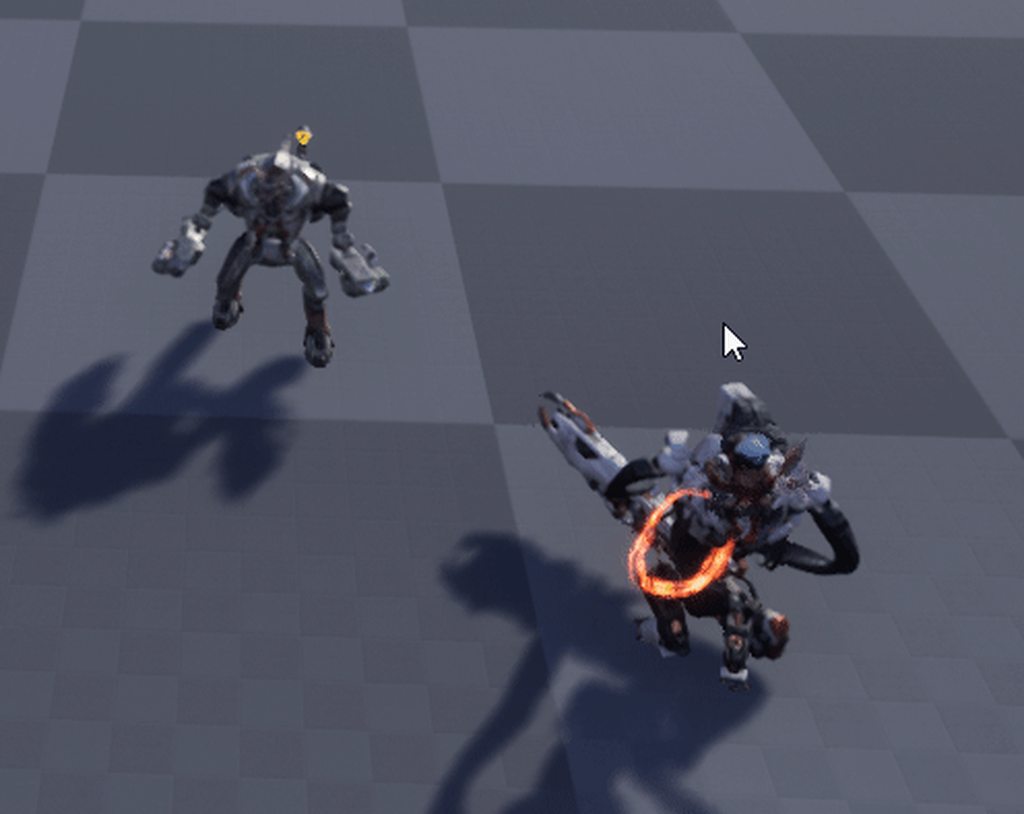
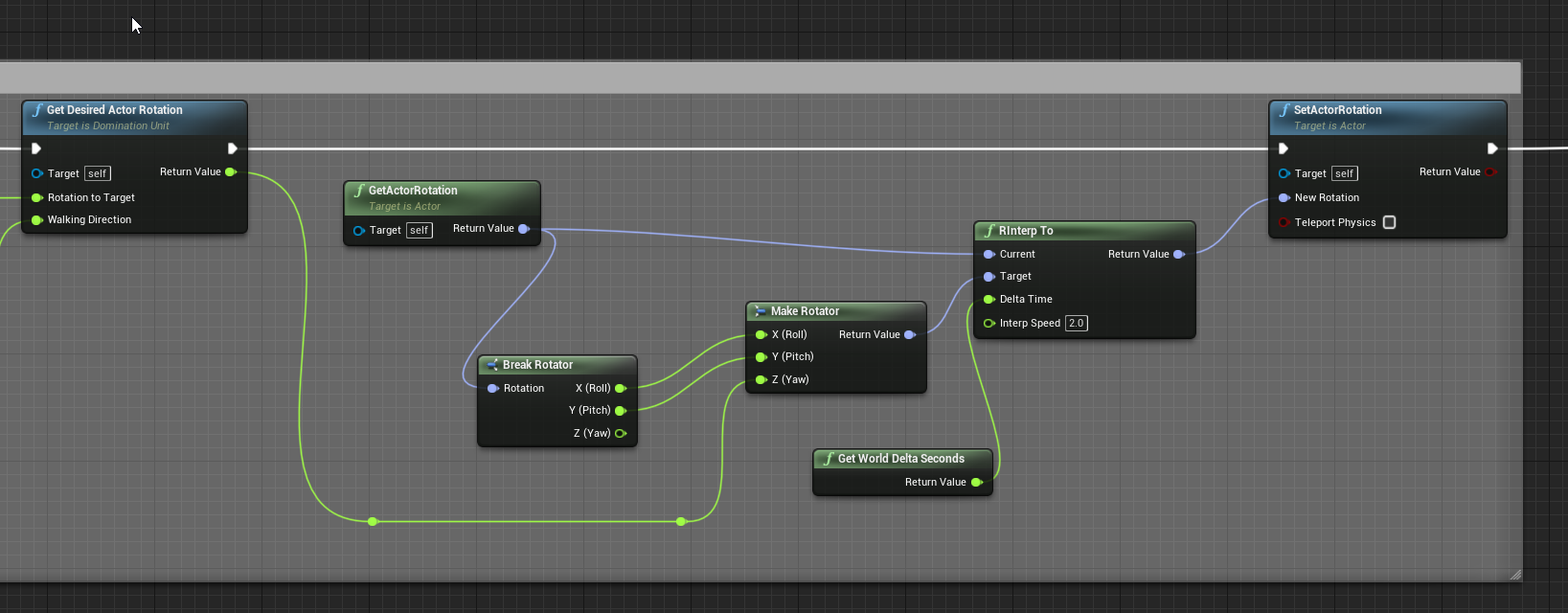
An FInterp of a rotation from 179 to -179 is really long, is there a function that goes the short way via the 180 cutoff?
rough wing
Yes
covert delta
You can override them in the child class and just don't make them do anything
rough wing
Is there no short way of blocking complete input?
covert delta
I think you can call disable input? But that's not blocking the PARENT, that's blocking the player controller
olive sedge
Can anyone tell me how to avoid this?
https://i.imgur.com/28ThMkP.gif
This is my bp for it:
https://i.imgur.com/l93RwcZ.png
 orchid garden
how is the little guy on his back attached?
olive sedge
I could theoretically read the aim rotation and then do the rotation the other way but I don't know how
orchid garden
thats what your talking about avoiding yeah? him pulling away from the actor?
covert delta
no. he's saying he doesn't want the actor to turn 359 degrees clockwise instead of 1 degree counterclockwise
orchid garden
ah my bad
olive sedge
hm, good question actually.. I'm not sure what causes this. I just think he rotates from 0 to 180 and should rotate so he's facing the enemy
hm! I think this only happens when the interp isn't done yet
so the interp is actually faster the way he does it
but doesn't make sense
so any way to give the RInterp a direction?
orchid garden
lol sry to laugh @latent arch but that video was just too funny reminds me of my trials and errors lol ... it looks like they are rotating on the wrong axis
i donno about the turret though might be the same thing
 tough halo
I have made a simple bullet penetration mechanic. I want to put a penetration resistance variable in material so if I hit wood it can go through, but steel will stop the bullet. Can I do that?
tough halo
basically I have a hit event, if I hit an actor I can cast to a base actor and put it in there, but if I hit the ground, or just some mesh that isent an actor
how can I put some data in there that I can get in a general way?
latent arch
This is the video i meant to send
the physics of it seem ok now, but the wheeled vehicle component and the wheel locations are just WTF?! 😮
tight schooner
@tough halo I think it's possible to assign physical materials to collidable objects and have a Hit event return that material. Maybe you can do something with that.
tough halo
thanks seanny
Event hit has a "Other comp" thats a Primitive Component Object Reference
the way I want to do this is to cast that to some baseclass/interface type thing that then can have stuff like penetration resistance or maybe a "skip penetration check" bool
maybe thats the wrong way to go about it tho
 stiff chasm
guys i compiled my code but it keeps giving me an error
what do i fix?
same with this
trim matrix
How would you use a vector to set the angle of an object? So it would set the -z axis to point to that vector?
What I am doing is getting the velocity of an object and I want to orient it so the object points in the direction it is moving
tough halo
that looks like its just gonna work as is @stiff chasm 😄
trim matrix
stiff chasm
do i do the same with this too?
I dont see anything wrong with that code... You're sure that you are getting a compiler error? 
tough halo
@trim matrix I'm no expert but you can probably use a setActorRotation node and just drag your vector into the rotation input
it should be converted from a vector to a rotation
trim matrix
That causes the object to spin around a lot and it looks odd :p
tough halo
where do you get the vector that represents the rotation?
trim matrix
I am using a getPhysicsLinearVelocity node to get the velocity of the object, and converting it to a normalized vector and putting that into the setWorldRotation node (Some parts of the actor need to stay still like the collision, so I am using relative rotation to prevent the collision from rotating)
:p
(This is the result)
tough halo
I dont really understand whats wrong with that
when they are falling they are rotated downwards?
trim matrix
No the rotator fails to get their direction and orient the rotation properly, and it flips rotations constantly.. (The arrows are supposed to be pointing straight in the direction of movement but when they are falling down on the right, the arrows rotate around very quickly, and randomly... they are not pointing in the direction of movement)
tough halo
can you change it to drop just one instead of alot?
then print the vector you are using to set the rotation
probably the velocity vector keeps spinning, which leads to the rotation spinning
what are the arrows?
trim matrix
The arrows are pointing straight down in the blueprint for me to see if the object is being rotated properly... If this were to work right they should be pointing where the objects are moving
tough halo
so it's just an arrow component
trim matrix
Yeah
And now for some reason deleting it and replacing it with the same nodes seems to have fixed it?
Im so confused why cutting and pasting fixed it but thanks for the help on the rot from X :)
tough halo
hey, if it works it works
orchid garden
latent arch
This is the video i meant to send
your wheels still aren't working right, if you look at your video at 0:24 all the rotators for the wheels are in the center of the tank
I've got a odd bug I can't seem to figure out...
If the player equips a bag, the inventory slots for it show as zero UNTIL they equip a backpack, then the slots for the bag show properly.... I've been trying to trace the problem but i just can't seem to find it...
latent arch
@orchid garden yeah i totally agree, tho i have no idea why that is considering ive suposedly attached them to the bones 😦
th eonly thing that seems to "work" is aplying offsets but that feels very dirty
need to figure out wht the bone locations arent working
but i have my suspisions its a scaling issue from importing the mesh :/
orchid garden
latent arch
but i have my suspisions its a scaling issue from importing the mesh :/
i donno if this will help but ....
https://youtu.be/Oh7pDL8RFaI

Developer Relations Technical Artist Alan Noon walks us through the creation of a fully functional tank! Learn about setting up a drivable vehicle with working treads, ground collision, a firing cannon, and more!
latent arch
hey man, thanks for that. unfortuantely not as its a different method hehe 🙂
thats a good tut though
orchid garden
ah you've already looked at it then
latent arch
yeah that is for making a vehicle from static meshes
im trying to do it the "pro" way and do it from a single skeletal mesh with animations lol
trim matrix
how do we turn a pawn to where we clicked with the mouse?
im new to unreal and only did the lightbulb tutorial with triggers to turn the light on/off
orchid garden
.< doh found the problem it was in my pickup master... had a switch reversed... so wierd though how it was bugging out... seems to be working properly no matter how the bags/pack are equipped now ( 1 at a time, 2 different at a time, etc)
trim matrix
@orchid garden
Actually...
Its rotation actually doesnt work
It is now smooth in calculating and using the rotation but isnt pointing in the direction it is supposed to... 🤔
 past girder
hi, i am using a random integer in range node, but i want to make it have a bigger chance of hitting on of another, how would i go about doing this?
trim matrix
Here's with time dilation going slower so it might be easier to see the direction of movement for the droplet. (This needs the ability to move in all 6 directions on a vector and point in the right direction, It wont work for me to just restrict it to one single rotation axis)
orchid garden
trim matrix
<@!458977415176257536>
i was going to point you to a project that epic had in the market for free, but it seems they removed it 😦 it did exactly what you wanted.
however....
In Epic launcher, if you click Unreal Engine, then the Learn tab, and scroll down to the very bottom there is a project there called 'turn based strategy' that may show you how to do that.
tough halo
so after the bounce it should flip around so the arrow is pointing in the direction it's traveling?
essentially the arrow should always point in the travel direction?
maybe there is some sort of conflict with the physics stuff so it doesnt wanna rotate
 faint pasture
@past girder just do a random float 0-1 and map it however you like
 sturdy herald
Hello!
Someone can help me with this package error?
The only supported platform is Windows, all the others are unchecked.
 deep imp
Oh my god the ability to copy and paste functions from one blueprint to another is AWESOME! God I love UE
And variables too. W00t
sturdy herald
deep imp
And variables too. W00t
omg, this is a new information for me. Thank you :))
trim matrix
HECK YEAH NEVERMIND I TOTALLY FIGURED IT OUT
@tough halo Yeah I had some parenting issues with the physics so ended up using a spring arm which doesnt inherit any of the rotation of the sphere collision... It looks like it worked perfectly :)
trim matrix
Haha yes indeed 😄
gusty cypress
dumb question, do comments affect size of game
 mortal nacelle
Does anyone have tips for doing data-driven instantiation of objects, in multiplayer?
e.g. I just want to have a BaseItem class and pass in an ItemID parameter, which does the rest through DataTable lookups (finding the correct mesh, etc)
it seems to work ok if I use a replicated variable w/ "expose on spawn" and then do my configuration in BeginPlay
winged badge
For some reason these nodes are available out of box for any ue4 dev
has anyone gotten them to work on windows?
trim matrix
quick replication question
i set my player up for on begin play it creates a widget hud and adds to viewport, as you may know when the clients join they also make one and add a second and third hud to the servers hud. so clients have one but server has 3. how can i make a hud widget just for clients and not make another one on top of servers
 ebon knot
Not sure where to ask this but i was makeing something with a tutorial blueprint in ue4 and i see that it’s stuck on the screen in the middle i want to have an option to have the user be able to move it around is this possible?
dawn gazelle
ebon knot
Not sure where to ask this but i was makeing something with a tutorial blueprint...

This movie is only to facilitate the transition to the next movie. How to make the tooltip widget display only in the screen and not after it.
ebon knot
yesyes thx
 dusk basin
Im having a issue where my default pawn class is not spawning in my custom gamemode it only seems to be working when i place a thirdpersoncharacter in the world any ideas?
tight schooner
@gusty cypress dunno but I assume comments are removed from the "compiled" BP
dawn gazelle
dusk basin
Im having a issue where my default pawn class is not spawning in my custom gamem...
Did you override any functions in your game mode?
 eternal rock
Can someone please help me? Im trying to set up box triggers to start playing dialoge when a player overlaps it, but for some reason, only the first one works. The other 2 wont work unless i take off "destroy actor" from all 3 in the level blueprint. Why would it destroy my other trigger boxes?
trim matrix
 it’s not like I ever use the level BP so it’s not like I know any technicality’s as to how it works. But seems to me that the Destroy Actor function might be destroying the level BP.
Which would make sense if the level BP was technically just like any other actor in the scene.
Anyways it seems like your not fully understanding how to plug things up properly.
To fix this, you will need to take the Other Actor output from the On Actor Begin Overlap event. Then plug the Other Actor into the corresponding destroy actor node.
Like this. @eternal rock
This is because the Destroy Actor node requires a Target. The Target represents which actor the node will destroy.
If the Target is left blank (nothing is plugged into it) it will default to destroying Self. Destroying self means destroying the current blueprint.
eternal rock
@sterile blooma Thank you. I am very new t o blueprinting. I just started school for it. I am trying this now
trim matrix
Np. Btw there is also one important thing that your also missing there.
eternal rock
What? Because its still not working lol
 stray island
eternal rock
What? Because its still not working lol
stray island
eternal rock
What? Because its still not working lol
What blueprint school
trim matrix
Event on begin overlap represents when the sphere overlaps with ANYTHING at all in your game.
The ground, the player, a rock.
Literally anything sets that off. And when the game starts and initial overlaps are calculated.
It could even set of then.
Which ofc is an issue because I’m assuming you only want the dialogue to play when the player walks into the sphere.
eternal rock
yes
trim matrix
So an easy way to make it do that. Is to simply check to make sure the thing we overlapped with was a player
Before the dialogue play code gets ran
stray island
It lets u decide the over lapping Actor though
eternal rock
@stray island Academy Of Art University
trim matrix
You can change the collision settings to overlap pawn or something but I am going to suggest the way to handle this using purely BP code.
stray island
i meant u can trigger event based on specific overlapping actor not everything
Its (other actor)
trim matrix
Yea
Todo this I’m gonna introduce you to something called a cast @eternal rock
Try just right clicking anywhere in your BP window and type Cast to (Your Player Actors name)
So maybe it would be Cast to MyCharecter
Or Cast to ThirdPersonCharecter
Whatever the name of the player actor is.
stray island
eternal rock
<@232229017002967040>a Thank you. I am very new t o blueprinting. I just started...
So u study unreal engine?
eternal rock
@trim matrix Thank you kindly. I will mess around with this. tomorrow morning. too tired lol
Thanks again! Appreciate it
trim matrix
Oh lol ok then have a good sleep 
eternal rock
@stray island well the class im in now (Scripting 1) is teaching a little bit about blueprinting and we also learned about c# in Unity
eternal rock
Im more into level design but i have to learn a little coding first
yeah
they have different areas you can choose
stray island
Do they teach level design
stray island
Online course or id need to attend
eternal rock
next semester i take Action Adventure & RPG Level Design
online!
and the classes are awesome
im learning alot
So i picked Game Design/Level Design as my focus so you still have to learn some scripting because knowledge you need to learn in the field
ok guys im so tired
good night!
look them up though
i highly suggest it

A career in game development is no child’s play. Equip yourself with the technical skills that will let you professionally enjoy your creative pursuits.
stray island
Alright , thanks for the information goodnight!
eternal rock
night!
 plain flare
Hey I'm trying to make, If enemy see me, and after 3 seconds, if enemy still see me, i want to print "see". How can i do this ?
In this code, if enemy see me, 1 time see also ok, after 3 seconds, write see
But i dont want to do this
I want to do: Enemy saw me, ok, but if enemy still see me in 3 seconds, then print "see".
How can i do ?
shadow saddle
can i ask UI related question here
plain flare
If UI's code part, yes
If design part, no
Please help me, I stucked on creating that code
There we have "On Pawn See". Is there "On Don't See Pawn" or something ?
 tidal willow
Cast Failed -> set to false?
also the cast would have to be done again after the delay I reckon
plain flare
Hey, enemy is overlapping with wall and other stuffs, and printing "overlapped". But i dont want to do it. I want, If enemy collide with player character, than print "overlapped". Not with walls
How can i do ?
Like that ?
 gaunt monolith
maiden wadi
gaunt monolith
maiden wadi
I find the default sensing components a bit lacking. They're okay for very simple uses, but I tend to just make my own specialized component for AI in projects.
 earnest tangle
@maiden wadi out of curiosity, what features do you find it's lacking?
 mental tendon
hey guys, how's it going?
Just wondering if there is a way to use static events (similar to C#) in BP something like "static event dispatchers". I subscribe to the static event and I can get notified if any of the instances call it.
earnest tangle
afaik no, you'd need to put a dispatcher on some object that will be the "centralized" source for it
maiden wadi
@earnest tangle PawnSensing first off, as the name implies is only for Pawns. Which means if you need your AI to see something other than pawns, it won't work. Maybe you want to update your AI when there's a health kit nearby? If your health kit isn't a Pawn, it can't sense that and they need some other way to check that. Why not just include all of that in the same sensing component? Also as far as I'm aware, PawnSensing has no memory. It's all just triggers. So it's up to you to decide how you want to use it. It's a glorified sphere component with OnBeginOverlap function. It's okay for like simple shooters where the AI just runs after the first thing it sees, but for anything more, it's pretty "Eh".
earnest tangle
Ah
Yeah I don't think I've actually used PawnSensing... I've been able to make my NPC's sense actors just fine I think by just registering them with the sight sense
maiden wadi
ImmutableLambda made me reconsider my stance on Behavior trees, so I started using them again. But before that I had my AI all set up as basically a state machine in it's own class and my component was holding all of the 'memory' variables like the best target, current target to shoot at, close by interactables, etc. I'll probably do this project's sensing component to work with a blackboard instead.
 covert stirrup
Is it normal to get huge amounts of lag when dragging a parameter in a material instance?
not talking something insane here, a simple setup with 1 slider changing, manual typing in the number is fine, if I slide it around ill get lag for a few seconds
maiden wadi
When you drag, it changes the shader every tick in the engine. Possibly effects the things in scene as well. A lot of updating to do.
covert stirrup
I don't remember this being the case a few versions ago
maiden wadi
There may be a setting somewhere for that. Let me look.
trim matrix
@BerkeRam#9339 use AIPerception as it has a pawn perception updated node you can use that will fre when the AI loses sight of the player.
Pawnsensing is very lackluster and is no longer being updated, eventually it will be unsupported AIPerception is superior when it comes to more complicated sensing so its better to start learning that. Pawnsensing is still very good for simple sensing purposes though.
tight schooner
@covert stirrup are we talking about... blueprint? If it's an exposed parameter in a BP, it may be re-running a heavy construction script if your BP has one
covert stirrup
its a material parameter
tight schooner
you just straight up have the material instance editor open and you're changing a scalar value?
it shouldn't be heavy at all
covert stirrup
yea, it's super simple too
stray island
tight schooner
it shouldn't be heavy at all
Can i have a texture sample in the instance
covert stirrup
not all texture samples are the same though, so it depends what you are doing but if it's standard texturing youll be fine
stray island
What about the its values of landscape cords
tight schooner
future material graph questions should be asked in #graphics ... lots of experts in that area there
stray island
Sorry
maiden wadi
I do get a tiny slowdown with like two hundred things using the MaterialInstance and changing the slider with them in screen, but I have to change the slider for like five seconds and then stop and it's like it's "catching up".
covert stirrup
^ yea I noticed that when testing it now
if I limit the slide values to something small, then drag up and down repeatidly I can recreate it no matter what
it's like a delayed lag, not necessarily the action your doing at that moment
maiden wadi
🤷♂️ I'm a blueprint user who's used to creating construction script stuff. I don't drag change values for fear of mechanical meltdown. 🤣
covert stirrup
haha
I have put up with it for a long time and don't remember it being in every UE verison
maiden wadi
Then again, that's stuff like.. Lets drag change the seed value that's spawning ten thousand foliage ism instances.
 alpine terrace
Did anyone run into the issue that a character pushes other characters away?
I googled so much but I did not find any solution
maiden wadi
If I have that problem, it's usually due to something on the character that can affect the pawn collision channel. That's why even the default Character mesh doesn't block on the Pawn channel.
Only the capsule usually should block that channel.
maiden wadi
If you want to test, make sure that everything except for your Capsule on the character's collision is set to QueryOnly or No Collision.
trim matrix
Sequence? @gritty aspen
What do you mean?
Connect it to a custom event?
You could make your own event tick
That question is super awkward
alpine terrace
@maiden wadi for me only no collision and physics only works
it was the sword causing these effects
Not sure why queryonly does not work
gritty aspen
how to create my own event tick
alpine terrace
I think as @trim matrix mentioned the sequence should work fine for you
it is a movable character
another player or npc (monster)
trim matrix
If im not mistaking, setting something as movable means that it can be pushed around
alpine terrace
well i took my character for example placed it on the map
and run into it with the same character
where can I change it to static?
@gritty aspen I don't think you can make your own event tick, you only can take the default one
trim matrix
Maybe in the details somewhere. It should say static movable and dynamic I think?
Im in bed so I cant really look for it for you
alpine terrace
okay I ask my friend Google haha
trim matrix
gritty aspen
how to create my own event tick
What I meant by your own event tick is a custom event that is called by event tick
gritty aspen
ok how i can d o it
trim matrix
alpine terrace
okay I ask my friend Google haha
https://docs.unrealengine.com/en-US/Basics/Actors/Mobility/index.html
It will show you here. I hope this is the solution to your problem.
Setting that controls whether an Actor will be allowed to move or change in some way during gameplay.
trim matrix
gritty aspen
ok how i can d o it
Create a custom event and name it whatever you want. Then in the event tick node just call the custom event you made..
gritty aspen
ok
alpine terrace
@maiden wadi and @trim matrix thanks you two! ❤️
trim matrix
alpine terrace
<@!143471961723371520> and <@456226577798135808> thanks you two! ❤️
Did it work?
 surreal peak
:D probably has half the games logic on one tick event and now wants to put another half onto it
trim matrix
LMAO
alpine terrace
@trim matrix I will try it later for now I take a break because changing the collision on my katana already fixed it but I will try your suggestion later too
trim matrix
Oh if its fixed then thats great. But I was just saying I dont think its necessary to set things to movable unless you directly want them to be able to be forcefully moved by other objects in the world
On that note. Have a good night man
alpine terrace
Yeah but on the character blueprint there is no option
The option should be under transform
trim matrix
Oh I hadn't noticed that before. Sorry about that haha. Hope the katana thing works out
alpine terrace
yeah but the link you posted says actor mobility
and it looks good but I cannot find it lol
trim matrix
surreal peak
:D probably has half the games logic on one tick event and now wants to put anot...
I am still laughing at this comment. 😂 😂 😭
gritty aspen
guys is there someone know how to do ui joystick for movement left right
trim matrix
Im sure youtube knows
maiden wadi
Uh. You should probably check out the default third person template? It does gamepad movements.
surreal peak
gritty aspen
i search for 1month
You did not search for 1 month.
You probably didn't search much at all.
Cause that was a 3 second search and I found a tutorial.
And that even with your used words.
And there is a lot more if I adjust the search terms a bit...
orchid garden
mortal nacelle
Does anyone have tips for doing data-driven instantiation of objects, in multipl...
@mortal nacelle what part of the item bit are you needing help on?
orchid garden
2d control setup would be pretty much the same wouldn't it?
surreal peak
Yeah it makes barely any diff
sturdy herald
Hello. someone can help me with this package problem?
https://media.discordapp.net/attachments/221798862938046464/789659505985060894/unknown.png
 maiden wadi
@sturdy herald Are you trying to package for IOS?
If not, someone mentioned that disabling IOS from their engine fixed that when they were packaging for Windows.
sturdy herald
maiden wadi
If not, someone mentioned that disabling IOS from their engine fixed that when t...
Nope, i want it only for Windows, if i already selected only windows in Supported Platform, this is where i should disable IOS?
maiden wadi
Hmm. I dunno. Not sure why it's bothering with IOS stuff if you're just trying to package for Windows. I don't even have IOS stuff installed for my Engine. But this dude says he just unchecked it in this screen.
@sturdy herald File->PackageProject->SupportedPlatforms
sturdy herald
@maiden wadi Yepyep, this is what i did last night. Actually this was the only thing what i read on google about this, but for me not helped :/ So i joined this server, hoped that someone else have another solution c:
maiden wadi
You could try ditching IOS from the engine. Not sure if that's one of the ones installed by default, but in the EpicGames launcher, click on the down arrow next to the yellow Launch button, and select options, then just uncheck IOS here.
May or may not work. 🤷♂️
That's all I could find on that. Past that, harass people in #packaging, They'll probably know better.
sturdy herald
I try this, and sorry for writing here, i not even noticed the packaging chat C:
Thank you:)
maiden wadi
All good. No one's talking here, so not much of a bother.
tough halo
this is how I'm checking if I'm hitting the landscape in my bullet blueprint so I can skip doing stuff like check if the bullet will penetrate
there has to be a better way to do this
does anyone have any tips as to how this sort of thing should be done
I feel like since my landscape is an actor apparently, I should have subclass or interface where I can put some stuff
maiden wadi
Better might be to have an interface set up for the penetration system. Make a simple check on hit actor/component that returns false by default, true on things it can penetrate. Then you can do this logic on anything from an actor to a component.
maiden wadi
You'd only have to do the interface in base classes, anything inheriting it can return the same values, or be toggled otherwise.
tough halo
I was suprised that was an actor to be honest, I was expecting something like a primitive component or mesh or something
 vapid hatch
is there any way to duplicate an actor in blueprints? (I have a text template, and want to copy it as many times as i need, but change the text) [PLEASE ping me with answers]
maiden wadi
@tough halo Even a static mesh dropped into the level is an actor. Everything that exists has to be a part of some actor. Actor is like the base capsule that holds things, and their components are what you see, but components can't exist outside of an actor.
tough halo
@maiden wadi thanks for the info. I'm still lacking some basic understanding of how stuff works together
so the landscape I made using the landscape tool has Type landscape
my immediate idea was to subclass it, but I cant find a landscape if I try to make a new blueprint class
maiden wadi
Nah, that's why I was saying interface. It'll return false on anything you don't implement it in. So you'd only have to implement it on your classes you want it to return true in. For example. If you don't implement it in the landscape actor it'll return false. But if you have an actor base type named WallActor, then you could set it to true in the base class of that. But then if most walls ahve penetration, but one of your walls is specifically a steel brick with no penetration, you could override the initial implementation to return false.
gritty elm
what is the best way to create less gravity object?
tough halo
I can make an interface (and probably will once I figure out how things play together), but the landscape actor doesnt implement that interface, and I will have to subclass it so I can add the interface right?
maiden wadi
Nah, cause if you run an interface function on something that doesn't implement it, it'll return the default value.
tough halo
oh yeah, I get what you mean
everything is actors.. thats actually incredibly helpful
I just leveled up my ue skills
its like you're just handing out free xp Authaer
thank you so much
gritty elm
@maiden wadi here is video reference:https://drive.google.com/file/d/1Rhdyzp9WCn56WRneWEl07eAtBwrUMq3W/view?usp=sharing


i need this type of physics in unreal, what method should i use
1: physics constraints
2: radial force
3: add force or torque
maiden wadi
That isn't less gravity, that's something with force being added to it per frame.
gritty elm
or even hover component etc
maiden wadi
Well, to make something 'hover', I'd imagine that you would more or less add force more and more the lower it gets from the hover level, and stop adding force when it's above it. Should give it a bit of an up and down hover effect.
orchid garden
gritty elm
i need this type of physics in unreal, what method should i use
that just uses the same thing as a jetpack would (the car)
gritty elm
how to implement jet pack @orchid garden
there is also thruster component
so,
1: physics constraints
2: radial force
3: add force or torque
4: hover component
5: thruster component
orchid garden
there are alot of tutorials on jetpacks, remember running into them when i was attempting to setup a flying routine (which i ditched as it wouldn't work like i wanted).
gritty elm
can please provide tutorial would appreciated
orchid garden
gritty elm
can please provide tutorial would appreciated
https://www.youtube.com/channel/UCdoWGpMQK_L29bWXoDeIItw/search?query=jetpack
here's one from titanic games, its a basic jet pack but it'll give you the idea of how you can make it work. (3 videos)

YouTube
We are a small Indie Game Studio developing games and creating tutorials on the multiple facets of game development. We hope you find our projects and tutorials helpful and fun!
tough halo
say I want a penetration factor/density factor/whatever, something that will tell my penetration logic how resistant whatever I hit is to penetration. If I have a general mesh thats just "wall", which I then can put into the level and scale it to be one side of a house, or scale it down so it's just a little fence or whatever. If I make a blueprint class from the mesh, then implement an interface that has a "getPenetrationResistance" function in it and use that in my bulletblueprint. Then I can assign a "brick" material to my wall, or a "wood" material, and have the interface return a constant from whatever material is set on the "wall" object
is that a good way to go about things or is your immediate reaction "wtf is this guy doing"
😛
maiden wadi
It's more likely that you're going to get a better use out of giving the actor an ID or Enum. Then the actor can set itself up with materials in the contstruction script AND return the correct density in the interface based on that one enum.
Then all you have to do is drop it in level and change the exposed enum or whatever and it'll just work. Good for design.
Also works good if you're making a building system. Cause it'll set it up correctly at runtime as well.
tough halo
wow
I didnt know I could do that
again thats just incredibly helpful
I know this is like basic stuff, but omg it helps so much to get a little bit of guidance
 plucky gale
Could anyone help me with moving an image to the mouse cursor? I just started out working with Unreal and have never worked with UI
trim matrix
Hey guys, I am attempting to diff a uasset with an earlier revision of itself. When I try to diff, I receive this popup. How can I use the built in UE4 diffing tools here?
tough halo
Bullet Hit Me is an event I can implement, while Get Penetration Resistance is a function
I dont see any difference in how I set it up in the inteface
except that one of them has a return value
and thats why they are different
nevermind
trim matrix
That's the difference
past girder
I am using random integer in range to play multiple animations but is there a way to make it have higer or lower chance of hitting on of the numbers?
dawn gazelle
past girder
I am using random integer in range to play multiple animations but is there a wa...
Your can use bool with weight to do something like this.
As it is right now, it'll be true 50% of the time, put the weight higher, it'll be true more often.
mortal nacelle
orchid garden
<@!193910181388746753> what part of the item bit are you needing help on?
I'm having difficulties with how to best handle the client replication bits. as far as I can tell, I haven't found a way to coordinate the replication of the actor (SpawnActorFromClass w/ replicated actor) and the variables on the actor (such as ItemID, which will configure the item).
It gets even trickier to write initialization logic if there are multiple variables you need upfront, b/c the order of replication doesn't seem to be guaranteed, right?
for example, i have an ItemID and Count. I need to craft an item text with those such as "10 Gold". If I have separate ItemName and Count variables, then my init logic needs to account for either possible order of arrival.
it could be n^2 number of possibilities to consider
shadow saddle
im trying to pick 3 random element from enum without repeat, is there anyway i can do it ?
mortal nacelle
@shadow saddle you mean never picking the same element twice in a row?
just keep a variable of the last selection and re-roll if you get the same
dawn gazelle
Better yet, keep an array of possibilities and use it as a basis for how big the random number roll should be and remove any values that are chosen.
No re-rolling necessary.
 pulsar moss
Is there conditional breakpoint in blueprint? I seem to recall seeing it but can't find it now
tough halo
is there a builtin macro that can take 2 or more variables and return the first one that is valid?
maiden wadi
@tough halo I don't believe so. You could make something like that, but what are you trying to do?
tough halo
I found Select object, it does basically what I want
in a written language I can go variable_A ?? variable_B
covert delta
you probably shouldn't end up in a situation that requires that. But I guess I would make a function that does a foreach loop over a list of whatevers and returns the first element that is valid.
maiden wadi
@tough halo Could work. It doesn't really promise that anything you feed into it would be valid.
tough halo
the specific case I'm using it in now is for my bullet hit. I have a niagara system that emits a hitcloud. I also cast the hit actor to an interface that can have more information of what to do with the hit. I cant put a variable in an interface (which is a little weird btw, but whatever), it's only functions. So I have a function that returns a niagara system, but if it's not implemented on whatever I hit I wanna fallback to the default hitcloud
so basically, get the hitcloud from the interface, or use the default hitcloud if we dont get anything from the interface
 fair musk
Anyone in here good at material blueprints? I am trying to make a decal shading model that does opacity-modulated blending + adds emissive that ignores opacity. I.e. output = input surface x (1-alpha) + base color x alpha + emissive. But it seems that emissive is also getting multiplied by alpha no matter what I try, how do I get around that?
odd ember
fair musk
Anyone in here good at material blueprints? I am trying to make a decal shading ...
#graphics materials are not blueprints
odd ember
that will never work
tough halo
it works fine
I'm not happy cause I have to cast it back to a niagara system again
I feel I'm going about this the wrong way
the best thing would probably be to define my default in the interface instead of handling it in the bullet blueprint
odd ember
tough halo
it works fine
it doesn't do anything. in the case of A not being valid, the select node STILL evaluates both
so you'll get a null pointer regardless
tough halo
I dont understand
the select will return A if "Select A" is true
if A is null I get B
maiden wadi
It's not exactly a ternary statement. Blueprint still checks all pins.
tough halo
"checks all pins" means what?
tough halo
does that matter tho?
tough halo
are we talking performance penalty or crashes?