#blueprint
402296 messages · Page 587 of 403
 tight schooner
 lapis path
The cast works fine. Get playerpaw fails. The right character is get and stored. When printing its name, the print says nothing (referenced to None) after first unload/load of a new level
(printing on tick from gamemode)
And I have only 1 gamemode BP used the whole time
EDIT : the print string displays only the reference for a few frames, before the first level load.
Note that I used this system for a VR game that I converted (buuuh) into non-VR. I thought it'd work the same way...
The final issue is I can't get the character BP from sublevel BPs, nor possess the character.
After some digging, it appears my character BP disappears after loading a sublevel. Any idea ?
 olive sedge
AIController->MoveToLocation rotates the character towards the target location. Can I disable that?
And AIController->SetFocus doesn't seem to do anything
lapis path
lapis path
After some digging, it appears my character BP disappears after loading a sublev...
🤦♂️ The character bp is killed by killZ value and gravity... Thanks a lot @tight schooner !
lapis path
olive sedge
AIController->MoveToLocation rotates the character towards the target location. ...
you should store the last rotation value and force it ? Or constrain your AI with a look at rotation ?
olive sedge
thing is: I do a move order on my pawn but it overwrites the rotation I have manually set for it
Now I discovered AIController->SetFocus but it doesn't seem to do anything. Maybe it's overwritten by MoveToLocation too
lapis path
What about over-overwriting the rotation just after the move order ? Kinda messy however.
 maiden wadi
@olive sedge I don't remember all of the settings off hand. If I recall correctly in my RTS ai testing, I just disabled UseControllerRotationYaw, and then ran parallel tasks for move and rotate towards target if they needed to face something.
Also don't forget to allow strafing in the move call.
olive sedge
ok
I can't seem to disable the character facing the direction it's walking. Not even when I disable UseController
maybe if I could set focal point to none 🤔
maiden wadi
That's odd. Do you have any sort of code doing that? Or are you using OrientTowardsVelocity, or something like that?
 trim matrix
hi im new to blueprints can anyone help me with it?
 gritty elm
Hi @trim matrix you can start with unreal engine official blueprint tutorials playlist for beginners : https://www.youtube.com/watch?v=EFXMW_UEDco&ab_channel=UnrealEngine

This video gives us an overview of the Introduction to Blueprints video series as well as jumps into a high-level overview of the concepts behind Unreal Engine 4’s Blueprint Visual Scripting system.
so you need to watch each video one by one completely in order to understand the blueprints
trim matrix
oh ok ill get started now thx
olive sedge
@maiden wadi it works with the fresh unit so yea.. Gotta find out where I went wrong, thanks
maiden wadi
I don't know of anything that can affect that besides the OrientRotationTowardsVelocity.. Or whatever that setting is called. Or the UseControllerYaw/Pitch
 atomic salmon
@trim matrix you may also want to check: https://learn.unrealengine.com it has much newer content
maiden wadi
That or some form of update on tick or timelines. 🤷♂️
olive sedge
@maiden wadi I'll just create it from scratch
 solemn parcel
Hi, I got this as a level blueprint to spawn an actor on input. I want the last spawned actor by that script to be destroyed before having the new one appearing, on a single input pressed.
'But I'm having a error text saying 'acces none trying to read property'
whenever I use the input.
why ?
atomic salmon
@solemn parcel it may be that the input is called again while the actor is being destroyed. Right click on your Bouncy Ball get and choose Validated Get. After you have called Destroy Actor and before the Delay, set Bouncy Ball to null.
To set it do null just do a Set on it with nothing connected to the input pin.
 mild fossil
Hello @everyone! I am trying to individually change the material of multiple static meshes when clicked on. I made a level blueprint where I referenced all of the meshes individually and used an on clicked event. But it's too long and I also need to bind this to UMG which I can't do in a level blueprint. Could I just put all of the static meshes under one actor blueprint ? Could you please help? Any suggestion would be greatly appreciated. Thanks!
 grave relic
Anyone that could help me? Im trying to set this value in the even graph, but cant manage to get a reference
solemn parcel
@atomic salmon Don't know if it is exactly what you meant but did the trick. Thanks
gritty elm
i need help, when i click on this actor, i can see a gizmo attach to it, but i don't see any gizmo actor or gizmo component attach to actor, i mean how to add gizmo to any actor?
atomic salmon
@solemn parcel yep that is it. In addition I was suggesting to set Bouncy Ball to null before spawning the new actor but in this setup it is not needed
gritty elm
in other words, how to attach gizmo actor to any actor, so i can scale it properly
 fleet nimbus
Hi again! Pardon me, I would have a question.. I have the ref to an actor, and everything seems right, but when I try to use the Set Actor Location node, with Teleport enabled and an entirely different coordonates from where he is... he doesn't move, I don't have any errors in the console either
 orchid garden
If i create a bag actor instead of using a component, how would I store it without it being in the world? as it would only need to be in the world if the player drops the object (at which point it would have a decay timer added to it)
also on the component, if i setup a constrct to set its size, in the structure its still just a object reference, the question was how do i create a component to stick it in the reference for the structure, that's the part im stuck on there.
 steep linden
I did it boys, i finally made the branch that is true AND false
 worldly karma
Hello all - I have a scaling factor that I would like to apply (multiply) to only one axis of a component. How do I do this ? Here's what I have :
(in other words I need some way to have access to all the 3 transform pins and affect only one of them, as opposed to affecting the whole transform)
orchid garden
right click and split pins or build the vector then attach it.
 cold raft
In terms of fishing, what would be the best way in 4.26 to implement a fishing line from the tip of an attached mesh to an object? (am currently using debug draw line)
orchid garden
@worldly karma if you do split the pin, keep in mind you still need to pass a value to all 3 pins.
worldly karma
@orchid garden oh, thank you so much ! Had no idea about the right click to split pins, that's perfect
would you mind clarifying how to do your other solution (building the vector) ? I suppose it's possible to manually create one, just don't know how
(this worked perfectly)
@cold raft : wondering the same thing as I have a bowstring to setup. Curious to hear suggestions on this.
orchid garden
@worldly karma
worldly karma
Excellent thanks, I like the clarity of this
orchid garden
make vector comes in handy if say you calculate everything for the vector in another function or ahead in your chain, so your only passing along 1 variable (single vector) instead of 3 (3 floats) to get your end result on the scale.
worldly karma
yeah I like the look of this, it's more, hmmm, explicit somehow
here's the result FWIW
orchid garden
ah a helmet light flare 🙂
worldly karma
as all helmets should be 😄 Kojima/MGS style
orchid garden
eye candy is always nice in games.
worldly karma
indeed 🙂 thanks again for the speedy/straightforward help, really appreciated.
orchid garden
meh was a simple thing 🙂
worldly karma
well that 's the thing with BPs - I knew exactly what I needed, just didn't know under what name/UX paradigm Epic decided to hide it
orchid garden
my problems abit more complex... and im trying to keep my project strictly blueprint.
worldly karma
Good luck ! I wish one day, Epic would stop spreading around the whole "with BPs you don't need coding, therefore it's easy for everyone" lie. That's just a fallacy (but hey, I understand it from a marketing standpoint). That said, back to work now 😄
orchid garden
it is easier visually, but its still coding.
worldly karma
the only way I manage to make them readable personally, is to make them go from left to right
as opposed to speading them around in both directions
hence, closer to the readability of lines of code
orchid garden
@trim matrix you mean like ? lol
worldly karma
I believe there are some ways to make this read better, by forcing oneself to declare a variable each time there is a temptation to make strings cross
(if that makes sense)
that's the only way I manage to make them not make me feel dizzy when reading them
orchid garden
i do my best to make them less spaghetti like once i get them working like i want:
worldly karma
looks like you'll be the right person to ask my questions about datatables later 😄
orchid garden
those are just a couple functions lol.
been alot of hair pulling during this project.
cold raft
@orchid garden - what is the project you are working on. Looks like an inventory system
orchid garden
my latest issue i can't seem to find a resolution for though... I have equippable bags, so the player can stick items in the bags... but they need to be able to unequip the bag, stick in it their inventory and it keep the items in it, or be able to drop the bag to the ground and be able to keep the items in it.
All the items use the same struct for storage, and i though perhaps a component in the stuct to store the inventory items sense you can't nest the same stuct inside itself (endless loop), and the component uses the stuct in a array.
but... i can't figure out how to add the component to the stuct.
@cold raft yeah currently working on the inventory for it 🙂
add the component to the stuct inside the blueprint that is, so that i can actually store stuff in it. its in the struct, just can't use it for anything...
@cold raft this is the full inventory panel:
cold raft
@orchid garden - are you keeping storage componants separate from items? once you drop a bag, that storage_component gets destroyed and a 'bag_item' is spawned. Then, when you equip a bag or spawn a chest - that bag 'item' is destroyed and a storage component is spawned.
Nice interface!
orchid garden
on dropping a bag it would spawn a actor and add the inventory list to the bags component then destroy the stored object.
I'm probably not explaining it properly to what the problem is... when i create the bag object in the inventory, it has a reference for a component but thats it, no component in the reference, so trying to store anything in it just gives me a invalid object error.
this is whats used to create the bag in the inventory:
its the sturcture thats pretty much useds for all stored objects in the players inventory
i tried using a world object as the storage (container) but that opened up a whole new world of problems.
container was a component originally.
the original stucture was more like:
https://cdn.discordapp.com/attachments/221798862938046464/788917081755746304/unknown.png

but the component is the issue there.
(image is from a earlier post)
trim matrix
Anyone knows how can I change the mouse sensitivity at runtime? I do not ask for Player Controller's pitch/yaw input scale because it's rotation only and I want to change the mouse cursor sens.
orchid garden
@trim matrix you mean like....
https://youtu.be/9iwiL4kUF9U

Welcome Unreal Developers
In this video we're going to learn how use a slider widget of the UMG UI to change our mouse sensitivity inside the game we're creating in the unreal engine 4.
Unreal Engine – www.unrealengine.com
Blender Foundation – www.blender.org
GIMP - www.gimp.org
trim matrix
@orchid garden dafuq, looks promising. Will check this out, thanks!
Nah, unfortunately that's exactly what I did already. He is changing the players pitch/yaw input scale so his camera turn is faster/slower. What I am trying to do is to set the mouse pointer sens. Let's say you have an RTS game where you want to move your mouse cursor faster/slower in 2D.
I can do it by changing my global mouse settings in Windows but I am trying to find a way to do it inside UE4 game.
orchid garden
so... your wanting to change the windows mouse senstivity via unreal engine? don't think i've actually seen anyone do that, might be something you'd have to do in c++ rather then blueprints.
@maiden wadi might be someone to ask about that one, he's pretty knowledgable
trim matrix
@torpid oasis well... changing mouse sensitivity in-game for RTS games is pretty common I guess?
Thanks anyway. 🙂
orchid garden
@trim matrix 3 Prong Gaming did a whole RTS series, maybe there is something in it covering that if its common in RTS games? just a thought...
https://www.youtube.com/channel/UCkIkWiM9gbAPe8MSrAahuqw

YouTube
New to my channel, Unreal Engine 4! Learn tips, tricks, techniques on how to create your own video game!
Go check out a friend of the channel, Matthijs de Rijk, a 3D Artist who has helped with some models for my tutorial series and allowing me to share them with you to download: www.mrtherich.com
https://www.facebook.com/MrTheRichArt
If there...
trim matrix
Will check it right now, thanks once again. 🙂
orchid garden
sry i can't be more help
atomic salmon
@trim matrix a lot of the cursors you see in game are not windows cursors, but custom one you can fully control, including sensitivity by establishing a relationship between the windows cursor speed (input) and the custom cursor (widget).
orchid garden
software or hardware cursors?
atomic salmon
Unreal Engine Forums
This is the place to show, share, and link to your stuff!
that is software, hardware cursor was added later
 vivid fog
@orchid garden I may not be understanding 100%, but I believe the component inside the struct may not be working because it's not directly attached to an actor
orchid garden
@vivid fog yeah thats the problem, you need a actual component to reference, but setting up that component and being able to destroy that component on the fly is the issue i'm having.
vivid fog
and the component you want to create/destroy is the bag itself, or its contents?
orchid garden
the bag itself is the struct, the component is stored in the struct that holds the contents contained in the bag.
vivid fog
Would it be possible to create another struct for the contents of the bag?
rather than relying on a component
orchid garden
i thought about that as well... but then i'd need to convert the items from one struct to another then store them into the bag struct, and also when displaying them i'd need to convert them back to the other struct then display.
the inventory, cooking, forging & crafting system all use the same struct for items.
having the items the same struct simplifies moving them between containers
vivid fog
Yeah, working with multiple structs is pretty tough in my experience. It might be worth creating some functions to handle that conversion process or streamlining it somehow. The only reason I'm suggesting that is because I can't think of a way to involve components like this
I've had multiple "identical" structs before where I had to do a lot of pin splits and functions to get the data to move from one place to another (also for an inventory system but especially for a quest system I made)
orchid garden
may need to rethink my whole bag idea.... or inventory storage.
vivid fog
Good luck, and make sure you've got backups/version control. Working with structs in UE is crashy as hell, and one time I even managed to make my project un-openable 😬 better safe than sorry!
orchid garden
heh yeah i know, using a seprate project to work on the inventory till i get it working properly like i want.
i think my problem is im stuck in a paradox lol.... (nesting x stuct in x struct)
vivid fog
Nested structs can be a headache (especially if, god help you, you're nesting struct arrays lol). Unfortunately I haven't found a way around doing that in a lot of cases. Maybe someone else here has.
orchid garden
i guess i could just make it so that if they have items in the bag they can't unequip it they can only drop it, and if a full bag is dropped they can only take items out of it not pick the bag up until its empty.
 woven wing
One thing to think about GeekyGek, is that unless your items in your game have modifiable statistics (like, say, weapon durability) - you often don't need to store a full struct for them. Just store the ID number.
orchid garden
yeah they have durability and some have spoil timers
woven wing
And then, if you need to get a property for that item, you can look it up in your DataTable or DataAsset for that item.
Even then, if you have durability and spoil timers, that's... pretty much all you need to store.
ItemStruct:
- item_id
- durability
- spoil timer
And they can all be the same struct.
orchid garden
even then im only storing the info in the struct i need to save, i.e. name (renamed item), condition (used for both spoil timer or durability) and data table row
woven wing
That's good.
orchid garden
container was just a attempt at making bags that could be filled and moved to inventory.
im even using a shared component for containers, and shared functions for moving stuff between, dropping, spliting, etc the items contained in.
that way i don't have mulitple objects with the same functions, just a singular component i can use to change a function.
saves on size, and simplifies finding bugs.
mild fossil
Hello @everyone! I am trying to individually change the material of multiple static meshes when clicked on. I made a level blueprint where I referenced all of the meshes individually and used an on clicked event. But it's too long and I also need to bind this to UMG which I can't do in a level blueprint. Could I just put all of the static meshes under one actor blueprint ? Could you please help? Any suggestion would be greatly appreciated. Thanks!
 mortal wharf
How do i add blend time to the activate and deactivate nodes? like you can on the set view target with blend node https://gyazo.com/ca97eac2e67cefcf07cd24528b6ced20
woven wing
mortal wharf
How do i add blend time to the activate and deactivate nodes? like you can on th...
You can't really blend the 'active' state. It's a boolean. It's either on or off.
mortal wharf
How should i do it then?
woven wing
Do what?
 ocean radish
look liek trying to swap between 2 cameras, one for normal and one for ADS
mortal wharf
https://i.gyazo.com/thumb/1200/ca97eac2e67cefcf07cd24528b6ced20-png.jpg what i am trying to do here is an aim down sight system and it works exactly like it should i just want it to be more realistic and add blend time
 ocean radish
could either just move the camera to position using a lerp, or just use the blend node
that will swap the active camera anyway
ocean radish
If you wanna have a set position for the 2nd position could just make a component and move it to that location that way is easier to finetune
woven wing
Or you could use a Transform property. Those give you gizmo's to move around.
ocean radish
then use a timeline or timer to lerp it into position and use ADS speed to change how quick between different weapons/stats
if you really want to use 2 cameras, just remove the activate and deactivate, and put the blend node there, target current camera, view target new camera, then blend time to how quick you want it to move between
@mortal wharf
 little cosmos
@woven wing Think you can help me with yesterday's URL button thingy?
Can't make it work
mortal wharf
@ocean radish Thanks mate, i'll go with the blend node since i am using only 2 cameras
woven wing
And I'm convinced that your approach has to be weird in some way to require what you're trying to do.
woven wing
mild fossil
Hello @everyone! I am trying to individually change the material of multiple sta...
Consider making your clickable objects into Actor blueprints, so they can do something like this:
little cosmos
but each needs to have a unique number that stays. not re-generated every time
woven wing
little cosmos
u talking to me?
woven wing
No, I was talking to machmouchih.
little cosmos
right
ocean radish
what you trying to do sparks?
woven wing
I'm not sure. Sparks is really cagey about their actual intentions.
woven wing
You won't explain what you're doing. You've explained a problem with your solution for what you're doing.
But not what you're doing.
ocean radish
simplest things can somtimes be the hardest in bp 😄
little cosmos
I have a BP I can click to launch a URL. every apartment has one of these and refers to a unique website of that specific apartment
woven wing
OK.
little cosmos
dafuq is a guid?
woven wing
A GUID is a universally unique ID number that can be generated on demand.
little cosmos
I need this to be a number
woven wing
Why?
little cosmos
the url ends with =<int>
woven wing
Change that?
little cosmos
orchid garden
if your apartments are going to be number based for the url, why not just store the number in the clickable object then pass that to the routine?
little cosmos
explain?
woven wing
They are, they just don't want to have to set them manually.
orchid garden
ah
little cosmos
there will be a ton of aprtments
so I wanna duplicate the BP instances around and have that INT increment respectively
that's all
woven wing
Wait, you want to be able to duplicate them? Not create new ones?
little cosmos
I got it working (see construction script image above) but the numbers get messed up for some reason when re-opening the map
woven wing
Like, you have one assigned to '5', and you want to duplicate it, and for the original to still be '5', and the new one to be something else?
woven wing
That's not actually simple.
little cosmos
Start with 1, duplicate to have 2, duplicate again to have 3
1 stays 1 throughout , etc
All I want is not having to manually punch in numbers hundreds of times
orchid garden
i was just thinking if each clickable object had a variable for the apartment number, you could do something like:
woven wing
They have that.
ocean radish
ok so store them into an array and set there numbers based on the index? instead of iterating through all actors?
little cosmos
That's what I have
woven wing
But you also want the numbers to be consistent. You want apartment 5 in your map to always be apartment five no matter how many new objects you make or how you make them.
little cosmos
yes
woven wing
See, if you were making new ones, and not duplicating them, this would be easier.
little cosmos
why?
woven wing
Because when you duplicate an object - it copies the values of the properties of that object.
So if you set 'apartment number' to 5, and then duplicate it - you get another 'apartment number = 5'.
little cosmos
but if done properly in the construction script?
woven wing
The construction script gets run every time you build the object.
That includes every time you move the object.
And every time you reload the object.
Or stream it.
little cosmos
this pretty much does the tricks except the numbers change sometimes unpredictably so it's not so reliable
when I duplicate the BP it does increment
woven wing
Right, they change whenever you move the object, reload the object, or stream the object.
ocean radish
it will increment but be very unreliable and if you delete one it will mess all the other numbers up
woven wing
You could do some kind of global operation that assigned each apartment number.
little cosmos
So what's the right way to do it?
little cosmos
woven wing
You could do some kind of global operation that assigned each apartment number.
if the numbers are all unique and stay there, I don't mind
woven wing
They won't stay there though.
orchid garden
hrm... so if im getting this right..... he's building a array of the objects in the scene then wants each door to open a specific url every time from that array?
woven wing
They will change when you run the global operation.
If you want to be able to keep adding or removing objects and to keep old objects assigned - then you have a problem.
little cosmos
but obviously every url corresponds to a specific apartment so they have to stay there
woven wing
Yeah, that's why this isn't a good solution.
little cosmos
Maybe there's a way to just duplicate them all around and in the end press a button to assign them random uniqe numbers?
woven wing
You should change your website to take a guid, and use a guid.
orchid garden
if thats the case.... (a array of objects ) couldn't you just sort the array by the object name, then use the index of that to get the proper url?
woven wing
little cosmos
Maybe there's a way to just duplicate them all around and in the end press a but...
This is doable.
If you just want to assign the numbers once, and they're static, and you don't add or remove objects.
That's totally doable.
little cosmos
ok how?
woven wing
Make an editor function like Datura told you before.
Get All Objects Of Type, assign each object to it's index in the array.
little cosmos
Datura's way doesn't work. it only assigns to the specific BP instance I run it on
woven wing
If you go back to that conversation, they realized this, and provided a fixed version.
orchid garden
seems like a aweful lot of complication for a simple thing
little cosmos
this?
little cosmos
So what to do?
woven wing
You need to get the array element and set the property on that.
Right now, you're just setting the one object's property.
little cosmos
sorry I don't understand
maiden wadi
@trim matrix Did you ever figure out that sensitivity thing?
woven wing
Yes.
little cosmos
not working
woven wing
What's it doing instead of working?
little cosmos
so hard to explain
hmmm
So first I disabled the construction script I had right?
woven wing
Yeah, you would need to do that.
little cosmos
now when i click the function button it needs to number them all from 1 onwards right?
ill just show u screenshot
woven wing
Yeah, that's what it's doing.
woven wing
Don't forget to save the level.
trim matrix
maiden wadi
<@456226577798135808> Did you ever figure out that sensitivity thing?
I did not, I was told it's always changed on the operating system level
ocean radish
Would it not just be simpler to make a editor function that spawns a new apartment and sets the int when you click it?
little cosmos
I mean they only change order if I assign number again
 weak kindle
how can l create a microfone input and change intensity with how strong is volume
little cosmos
I mean it's highly destructive if we ever change stuff
woven wing
Of course.
little cosmos
but it's the last resort solution atm
is there really not a simple solution to this?
woven wing
No.
The correct way of doing this is to alter the website so that it uses a GUID.
And make a GUID when you spawn a new object.
orchid garden
if all the clickable objects have a unique name, can't you just shove them into a array and sort them by object name?
little cosmos
I have no idea about that GUID stuff
woven wing
Yeah you could do that.
But duplication would fuck with the names I think.
Mmmmm
No it should be fine.
orchid garden
if you had two objects with the same name, their order would throw off the order of all the others after.
woven wing
Yeah, that would probably get you closest.
Or you could sort by position, if the apartments aren't going to be moved.
little cosmos
they won't be moved
but I need a more practical guide to your concepts, being the noob that I am in BP
maiden wadi
@trim matrix Well. Normally you would.. Let me try something really quick though.
trim matrix
@maiden wadi thank you!
orchid garden
well there's a simple solution - get the position of the clickable object, and construct the number of the url from the objects position.
woven wing
Butts. It's been a while since I sorted something in Blueprints, and I remember now that it's a huge mess.
ocean radish
I think the best way is to stop duplicating and just make a button(editor function) that spawns a new apartment and sets the int then. its only ever getting set when you first make it then, not trying to set them all at once, or any of that stuff
little cosmos
How can it know where to spawn ?
or do u mean spawns at the same location and ill have to move it
ocean radish
well you dont have to, you could store the last one and move it based on that if your only ever going up
woven wing
Ah, now I remember. Sorting in Blueprints is pretty much impossible without the LE Extended Library.
little cosmos
jesus
I might just stick to the latest solution then. this is starting to be all too messy
ocean radish
so when you duplicate a apartment, what are you doing with it? just stacking them?
little cosmos
what do you mean?
ocean radish
in terms of in the world, your duplicating an apartment what are you doing with them once duplicated?
little cosmos
did you see my screenshot?
little cosmos
little cosmos
there will be a ton of aprtments
..
just placing each actor on its respective apartment balcony
orchid garden
i just don't get why your going through all this effort, are the apartments being dynamically spawned in?
little cosmos
so the guy can click at specific apartment to be directed to its corresponding web page.
mortal wharf
ocean radish
if you really want to use 2 cameras, just remove the activate and deactivate, an...
But i can't connect the ads camera to the new view target and the normal camera to the target
it is in the first person character
little cosmos
orchid garden
i just don't get why your going through all this effort, are the apartments bein...
no, why ya'll have such hard time with this lol
woven wing
Changing the website to use either a GUID or a string (so you could use the object's name) is definitely the best option.
Like - far and away the easiest.
On an order of magnitude.
little cosmos
jack Idk what a GUID is or how to generate it. On the backend side we'll need to assign each apartment webpage with its corrsesponding number from the one in unreal so it works. numbers seem like the easiest way to go
woven wing
They aren't, as you can see.
But yeah, I'd recommend using their name.
If you don't know what a GUID is, use a string.
And in Unreal, you can guarantee that names will be unique and persistent.
orchid garden
little cosmos
no, why ya'll have such hard time with this lol
because of how your doing it? i mean the only real reason to do it that way is if the objects are being dynamically spawned in, I just can't see why you don't add the number for the apartment to the clickable object as a var and when its clicked pull the number from that object to jump to the proper url.
woven wing
Even if you duplicate them.
They literally are doing that Geeky, they just don't want to have to manually assign them.
little cosmos
yeah. literally that
imagine going through each manually and assign its number. there are hundreds
woven wing
Change your website to have the last part of the URL be a string.
little cosmos
ok?
woven wing
Then use "Get Object Name" to get the name of the object.
Use that as your final part of the URL.
ocean radish
everytime you duplicate your actor its will be actor1, actor2,actor3, how they will be named, there you go got your unique ids for the website
woven wing
Not in a way that you'd find easy.
little cosmos
I see
orchid garden
why not?
little cosmos
that's a possibility worth trying tho
little cosmos
orchid garden
why not?
ikr
woven wing
Well, it's because you're not very good at blueprints.
little cosmos
there has to be a way to extract those numbers and there is our solution
woven wing
There is a way, but it won't be easy for you.
And the best option is to just use the name.
ocean radish
little cosmos
@ocean radish does that output a number?
ocean radish
it returns just the number in string form, then should just be the number left and convert it to int, its rough as if you change the actors name it wont work anymore so bear that in mind
orchid garden
couldn't you just ....
i know there is a way to grab a string from the end terminating at a specific character but i can't remember it....
woven wing
(they have '_' s in the name)
ocean radish
plnety of other ways of doing it, just the one i gave although the least robust is the easiest to follow
orchid garden
i mean there is a specific function for it
 gusty shuttle
Quick one: my yaw is not yawing haha. It's a character class. Worked fine on a Pawn class, then I switched to Character class and it no yaws no mo
Any tips
orchid garden
i ran across a problem before with trying to get a float value to only show the last 2 digits, and it was a single function to make it happen.
ocean radish
using ramas or LE plugins?
gusty shuttle
Who, me? @ocean radish
ocean radish
no sorry @orchid garden
orchid garden
no not using any plugins
maiden wadi
@trim matrix This is about as close as I can get at the moment, but quite honestly, it feels terrible. It doesn't really work well under 0.5 sensitivity so you would need to keep them from lowering the sensitivity too much. Larger sensitivities seem to work fine. The movement itself is great, but it has a serious problem of that it clamps the mouse to the game viewport. Obviously not a problem in fullscreen, but a lot of people like to game in WindowedBorderless these days. May still not be an issue there. The real big problem is that it 'sticks' to the border. So you'd need to figure out some extra math to glide it along the border points without sticking to it.
It's quite possible to make it work with some drawbacks. Possibly just needs some iterating on. But if you're fine with those drawbacks, you can certainly make it work in engine.
orchid garden
ah the one i was thinking of was loat specific.... but....
this should just get you the last characters from the object name from the first underscore:
trim matrix
@maiden wadi yea, so that's basically what I had in mind - keep track of last mouse position, find delta between frames and multiply by our "sens" to override mouse position at each tick. Thanks anyway. I thought maybe there is an easy way to do such thing. 🙂
maiden wadi
Hah. Yeah, unfortunately RTS is a bit of an undefined area in UE4. Very easy to create a lot of the tools, but that's the cost of an FPS first engine.
orchid garden
little cosmos
Not planning to change the actor name tho
oops forgot @little cosmos
yep works like a charm, just tested it 🙂
gusty shuttle
My Yaw on my character is not operating. The axis is giving proper values, just the character is not yawing. I tried SETing the orientation to rot, also added yaw input, which worked but too fast. Any tips?
That feeds from the tick*
little cosmos
@orchid garden Thanks mate!
orchid garden
i like reusable simple functions (like doing that search) that way if i have something else i need to use the same thing on, i don't have to stick it in a second time, can just use the function from a function library 🙂
 surreal peak
I tried that a couple of weeks ago
I think you only get these random values that you then have to scale to make sense out of them
Would love to get the same values that windows gets on the mic. But haven't had the time to look further into that
weak kindle
l cant undearstand it alone if anybody have time to explain it l will apreciate it
orchid garden
@gusty shuttle have you looked at this video by Unreal? https://www.youtube.com/watch?v=XHHAjRVBc9Y
(00:05) - Intro and Project Settings
(02:04) - Main Inputs
(03:24) - Character Blueprint final controls
(06:30) - Add Controller Pitch & Yaw
(08:46) - Testing
(10:00) - Providing touch commands
(12:29) - Mobile Preview
 hollow drift
and also how to see current value of my programming when pressing x. This does not work?
 tired saddle
hollow drift
how to rortate preview image?
tired saddle
hollow drift
how to rortate preview image?
I don't have the editor at hand at the moment, but I think there is something in the contex menu that show up when you right-click the thumbnail.
woven wing
hollow drift
how to rortate preview image?
 hollow drift
tyy 🙂
maiden wadi
@hollow drift If that prints nothing, then either that class does not have input enabled from a player controller, you're not pressing the right button, or the right button is not assigned to the DebugButtonX input settings in the project Input settings.
 placid steppe
why cant i possess a pawn after servertravel?
hollow drift
he got lost in the void of www
weak kindle
can l change my texture media into a specific image?
olive sedge
when I apply a SetActorRotation on the Z value (Yaw), my character always goes to 0 first and then to my intended value
is this normal?
should I maybe only rotate the mesh?
 bold moat
What do you mean by "my character always goes to 0 first"? Like if you set its position to 0,0,0 ?
olive sedge
no, as if I set the rotation to 0 first
bold moat
could you screen your blueprint?
olive sedge

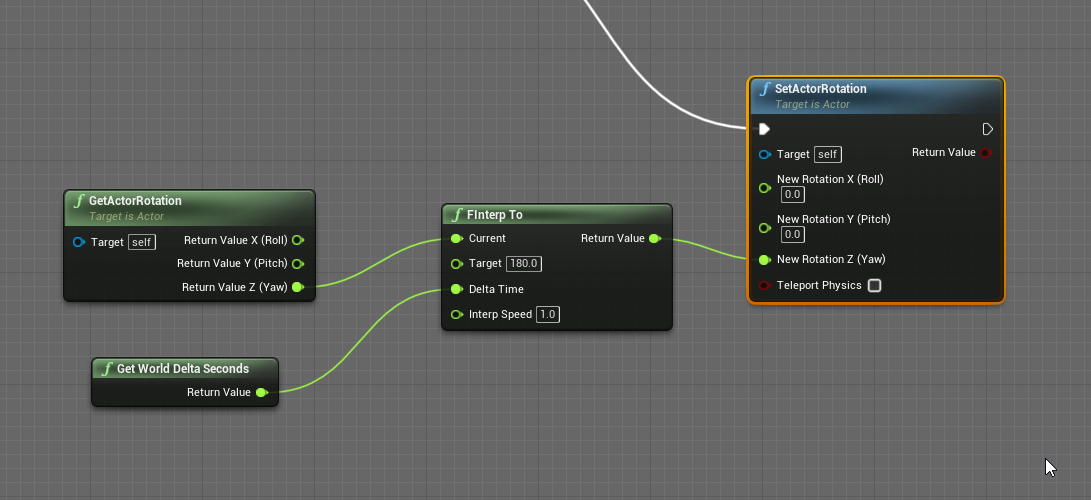

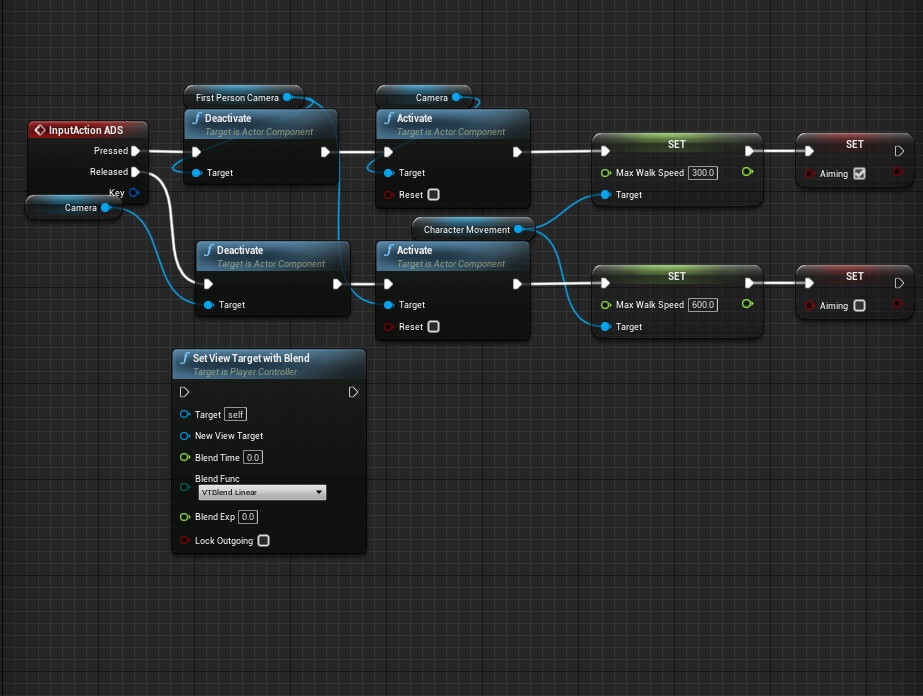

if I dont interp, the character just spazzes uncontrollably
I do this on tick btw
and btw, you can see it in the video: it's only on move order
bold moat
@olive sedge I think you should do something like that:
the Rinterp is far better to interpolate rotation
olive sedge
@bold moat same result
olive sedge
and how do you get your lines to be so strict
bold moat
(It's a plugin I made called Electronic Nodes)
bold moat

Unreal Engine
Improve the wire style of Blueprints and materials editors.
olive sedge
To my actual problem: do you know why my character turns to 0 when I call MoveToLocation?
bold moat
I'm not familiar with that, why not a SetActorLocation ?
bold moat
I feel like the "MoveToLocation" does a bunch more that just touching the location... But I admit, I never used such node 😕
olive sedge
I'm looking in the code right now to see if I can find what's up
//TODO: This is still an awful way to do this and we should scrap this task or do it right.
doesn't start well
 tough raptor
Hello group, I am trying to make a plugging (never done one) that yields a blueprint that can be used in any other blueprints. This asks for a series of imputs and automatically adds objects (meshes and variables) to the hosting blueprint, in addition it should modify pre existing objects (from the host bp) .
The main goal of it is to be able to use it anywhere, and make it plugg and play.
My question is, what is the best way to tackele this? at the moment I have been trying with an actor-bp, that is spawned inside the hosting one, but it has been a hell to then modify objects on the hosting one.
Should I use any other type of BP for this? should I tackele it in a completely different way?
Thanks very much in advance 😊
 elfin inlet
what's a good HH:MM:SS implementation?
i tried Get Game Time in Seconds running on tick and parsing the output to HH:MM:SS but thats very unstable
like incrementing minute 10+ times when seconds hit 60
even with DoOnce
 faint pasture
@coarse forge What exactly are you trying to do?
 coarse forge
hi
so.. in my log tick.. i have a flag to see if its being held or not
that triggers the emissive control or not
this bp has my hold and drop logic
where.. Actor Being Held is Actor, but not explicitly the log actor
elfin inlet
coarse forge
where.. Actor Being Held is Actor, but not explicitly the log actor
cast the actor to log actor
plug the as log actor into set
faint pasture
@elfin inlet that gets too tightly coupled
@coarse forge can only logs get picked up or can other items?
coarse forge
Maybe, I just need to see from the logs point of view if its the one being held
like call get player->actorbeing held or something
then check
faint pasture
The log doesn't need to know about the player
maiden wadi
Right now you're trying to do
AActorPtr.BeingHeld = false;```void AGopherWoodLog::Tick(float DeltaTime)
{
Super::Tick(DeltaTime);
if(!bBeingHeld)
{
//Emissive Str
float currentValue = previousValue + (stepValue * DeltaTime);
MaterialInstanceDynamic->SetScalarParameterValue("Emissive Str", currentValue);
previousValue = currentValue;
}
else
{
MaterialInstanceDynamic->SetScalarParameterValue("Emissive Str", MinGlow);
}
}
When you pick up the log, set a bool or enum and reset it when you drop
maiden wadi
You have to cast the actor pointer to the gopher log.
coarse forge
sure, thats sorta what im trying to do
coarse forge
my player has Actor, since it could be anything they pick up
thanks for all the help btw
faint pasture
If it makes sense to have a base class that is pickupable, add the state and events there
Otherwise, use an interface
So your reference would be of type Pickupable, not a specific subclass.
OR
You call some functions ok an interface that the items implement. I'd do the latter.
coarse forge
sure, right now I'm setting and checking tags
    Tags.Add("CanInteract");
Tags.Add("CanPickUp");```In my game I have an interface Interactable, and call StartInteract and StopInteract.
A door would open, an item would get picked up, a button would press, and a character would be talked to, all with the same call
coarse forge
that makes sense
worldly karma
Hello all - in a struct, what is the correct input type for Animation BPs ? I've tried Anim Instance but that doesn't seem to do it (and the color doesn't match, as these are white rather than orange) :
faint pasture
@coarse forge to start with you can have a base item class with those tags and custom events Pickup, Drop, StartInteract, StopInteract, and just treat all items as BaseItem
 dawn gazelle
worldly karma
Hello all - in a struct, what is the correct input type for Animation BPs ? I've...
dawn gazelle
worldly karma
Hello all - in a struct, what is the correct input type for Animation BPs ? I've...
AnimInstance class?
worldly karma
that does seem to be it - mind explaining the logic behind this ?
dawn gazelle
Don't think you'd normally reference the AnimInstance reference. Based on what it appears you're doing, you'd want the class so that you can create an actor with the appropriate meshes, materials and animbp.
worldly karma
I suppose I am just not clear on what an AnimInstance actually is then ...
maiden wadi
@white lynx GetSubstring should work for you if you just want to trim off the left side.
Ah. Forgot about the chop calls.
orchid garden
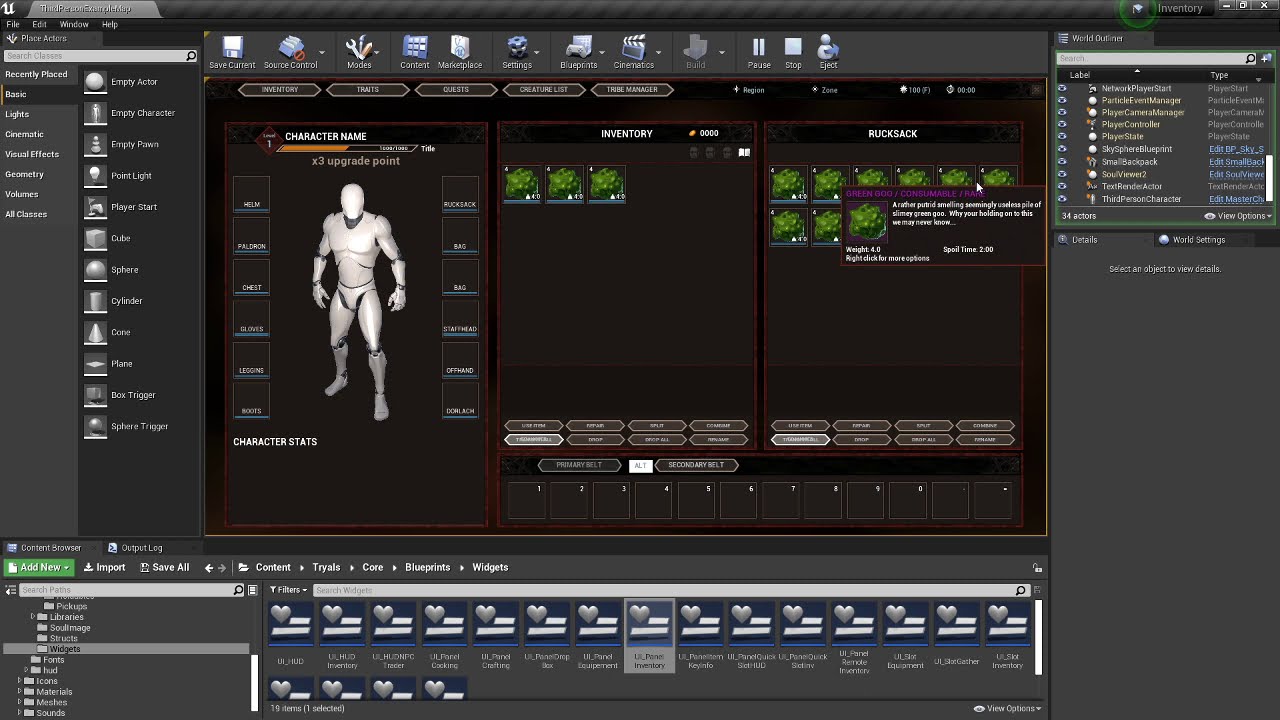
just wanna say thanks to those who gave suggestions on how to tackle my backpack issue still some work to do but its working so far:
https://youtu.be/amYJG2nDvuo
 dawn gazelle
Looks great Geeky
woven wing
tough raptor
Hello group, I am trying to make a plugging (never done one) that yields a bluep...
It sounds like you could do this with a component.
What is your actual use case for this?
tough raptor
I want to make a wound system that is plugg and palay, so it can be inputted in any other actor BP like enemies or stuff.
In it, a secondary mesh is created to display the wounds instead of relying on material changes for the original
woven wing
OK yeah.
tough raptor
I will look into components, thanks you 🥰
tough raptor
Aaaaah amazing m8, didn't know of them
faint pasture
Can a component implement an interface on behalf of the actor?
woven wing
They can implement an interface, but there's no automatic signal passing.
So you can't call like:
actor->InterfaceFunction
And get one of it's components to automatically grab that.
faint pasture
Booo
woven wing
You can use tags to do that, kind of.
So you could call actor->GetComponentByTag('woundSystem')->InterfaceFunction
faint pasture
Hm ya that's pretty slick. Are the tag systems combined now or is there still tags and Gameplaytags? Haven't messed with tags in a while
 prime ruin
so i started testing my game in multiplayer. but the 2 players couldn't see each other
so i switched them to client mode which made my screen space widgets go away
solemn parcel
Hi, i'm trying to make a different effect based on 2 projectiles after an Event Hit. Is there any alternatives to Branch that could offer multiple inputs related to their similar outputs ?
prime ruin
like different impact particles?
solemn parcel
Here is different effects : one with Add Impulse, the other with Add Force
I'd like : If Hit Event, check if it is hit by Projectile1 or Projectile2, if it's P1 then Impulse, if P2 then Force
I'm still new, and I just can't find an alternative to Branch for this
 harsh fox
is there any blueprint node for me to identify left and right pawn movement?
orchid garden
faint pasture
Can a component implement an interface on behalf of the actor?
once you get a reference to the owner of the component, you can implement anything to that character via the component :
@harsh fox you mean like this ?
dawn gazelle
solemn parcel
Here is different effects : one with Add Impulse, the other with Add Force
You could use a switch, but I recommend you don't do it like I did in the example below - instead create an enum of bullet types and set each of your bullets up with a variable of the enum type that you can then feed into this switch.
orchid garden
solemn parcel
@dawn gazelle Thanks for the info, i'll do this !
faint pasture
orchid garden
once you get a reference to the owner of the component, you can implement anythi...
That kinda defeats the purpose of blindly firing and forgetting interface calls but just getting components which implement the interface works fine.
dawn gazelle
solemn parcel
<@!218956378654507008> Thanks for the info, i'll do this !
Then it looks all nice like this:
solemn parcel
@dawn gazelle I'm working on it 😉 Thanks !
orchid garden
faint pasture
That kinda defeats the purpose of blindly firing and forgetting interface calls ...
thats just to implement it directly to the character, i have interface calls that are fire and forget, but some still need to know what to fire them to.
orchid garden
solemn parcel
<@!218956378654507008> Thanks for the info, i'll do this !
switch on string works good for testing though, but enums give you a consistant across your blueprints to work with:
orchid garden
dawn gazelle
Then it looks all nice like this:
i like the ammo type idea, mind if i use that? lol
dawn gazelle
You mean the types of ammo? Go for it 😛
orchid garden
dawn gazelle
You mean the types of ammo? Go for it 😛
heh yeah didn't think of that when building my data table but that would be something to add in for damage multipliers 🙂
 gusty cypress
great way to start the day
prime ruin
hopefully those are repeat errors and not individual ones 😬
orchid garden
ouch 38k errors even for a repeat thats high, some tick or timer
solemn parcel
@dawn gazelle @orchid garden Apologize for all the questions, but how can I make the Switch recognize which one of the 2 projectiles hit the actor ? I mean, at the Selection node ?
from a hit event
Nvm I think I found what I needed
hollow drift
i am currently stuck with my bp. I could narrow it down that my collision box is not getting the values from the colliding object
basicly when i move the ship over it should read values from its bp waterdroplet below
but it seems not to read it. any idea why?
dawn gazelle
hollow drift
Don't bother with the GetClass and the == and the 2 branches - you have casts there that have "Cast Failed" which you can pipe into the next cast which ends up functionally similar. Like so:
hollow drift
good tipp^^
 mental tendon
Hey guys, how's it going? I been reading about how cool unit test are, in Unity and C#. Is there something similar in BP?
dawn gazelle
hollow drift
Why not try doing a print after the casts as well, just to see if a collision is actually happening?
woven wing
mental tendon
Hey guys, how's it going? I been reading about how cool unit test are, in Unity ...
Sadly no, there is no testing library for Blueprints.
hollow drift
trying different things... idk why its not checking
mental tendon
😦
solemn parcel
How to get an actor recognize by which actor it is hit ?
woven wing
solemn parcel
How to get an actor recognize by which actor it is hit ?
What do you mean by 'recognize'?
 last walrus
how do I check if there are any collisions with actor? I know there are oncomponentbegin(end)overlap but it will not work if collision already exists
solemn parcel
@woven wing Get a ball to detect by which kind of projectile hits it, to bemore precise
woven wing
last walrus
how do I check if there are any collisions with actor? I know there are oncompon...
Using your collision volume, call "ComponentOverlapActors"
hollow drift
@solemn parcel with collision box and:
last walrus
solemn parcel
<@!159375492930076672> Get a ball to detect by which kind of projectile hits it,...
"on component hit" > other actor
last walrus
woven wing
Using your collision volume, call "ComponentOverlapActors"
sounds good
thanks
woven wing
solemn parcel
<@!159375492930076672> Get a ball to detect by which kind of projectile hits it,...
You can do this in two ways. The first is to put your logic in the projectile class. So in your collision function, you would cast to the parent class of all projectiles, and then call a "DoHit" function on the projectile.
As long as your projectiles all derive from the same class, they can handle their own logic that way.
If you want to do the OnHit logic inside the Character being hit, you can do it using an Enum.
Create an Enum that contains the types of projectiles.
Create a variable on your Projectile classes called "ImpactType" or similar that is of that Enum's type.
Then cast to "Projectile" and read the property.
Either way, your projectiles should probably be in a hierarchy.
last walrus
woven wing
If you want to do the OnHit logic inside the Character being hit, you can do it ...
isn't my way to do so is easier?
woven wing
I'm assuming they're already doing that, and they want to know which projectile type 'other actor' is.
Because 'other actor' comes in as a generic Actor reference.
last walrus
then it can be "on component hit" > break hit
woven wing
Not really.
If you want to know the type, you either have to cast to the type, or I guess you could get the classname and split logic based on that?
I'm assuming they want to have different types of projectiles do different things. Fire projectiles do Damage Over Time, or ice projectiles slow you down etc.
last walrus
or you can just override function )
woven wing
Ah, you mean to do that inside the projectile?
Yeah, that was the first option. Put the logic in the projectile.
last walrus
no
I mean override "actor hit" function to take projectile type
woven wing
I think the collision events aren't easily overridden.
hollow drift
@dawn gazelle tried to make it on cast succes but no reslut
last walrus
woven wing
I think the collision events aren't easily overridden.
yeah you must know some c++ stuff for that
hollow drift
cast failed would be too messy, since i am moving a ship from a non valid tile to a valid tile:
woven wing
Either of the ways I mentioned are much easier and can be done in blueprints.
last walrus
🤔
dawn gazelle
So you're not getting a "Hello" printed?
last walrus
sounds reasonable
hollow drift
no
ship is not fully in place, but green is set to true so ship is allowed to go there
dawn gazelle
That probably means you don't have the collision settings correct.
hollow drift
issue is, it is depended on ships individual coordinates (intvector, set it up myself)
i have the same setup for the pawn (yellow) but checked everything
dont see anything missing
the only difference is, that i start outside of any valid tiles for pawn
pawn can go to "J"
dawn gazelle
Move the print string to before the cast - see if you get anything when moving between them.
hollow drift
once i moved it does not seem
hmm
does the tile has no collision itself?...
sec
no, its set correctly
uses too the same mesh...
woven wing
You sure about that?
hollow drift
yes
woven wing
'Cause "Block All" means it functions like a wall.
And it seems like you're trying to Overlap.
hollow drift
both bp use same mesh
same colsettings
but apparently on the waterspawn it recognises it (red) but water(white) it does not
also just tried with overlapAllDynamic, same issue
woven wing
Are your tiles Dynamic?
woven wing
If your problem is 'My overlap events are not happening'. The problem is probably in how you've set up your collision.
I'd try making a dummy object with a collision volume on it and ram it into your ship - just to confirm that your ship is able to recognize collision overlaps.
hollow drift
it works for a similliar setup for the pawn
i checked the settings 2-3 times now if i missed something
cant find anything
woven wing
Right, but did you make a dummy object that has a collision and ram it into your ship?
Try that.
solemn parcel
@woven wing @last walrus I'm gonna be honest, i got a little lost here. 1/ Create a BP Enum with the different projectiles. 2/ Create variable for each projectile that is named after the onnes specified in the Enum. 3/ Cast to projectile and read the property ?
What you call hierarchie is using some kind of switch/branch ?
I'm really new
woven wing
solemn parcel
<@!159375492930076672> <@!247300200849342465> I'm gonna be honest, i got a littl...
Ah, no trouble.
A hierarchy, in this case, refers to a hierarchy of blueprints. You can make a 'child blueprint' of another blueprint.
The child blueprint will have all the variables and functions of it's parent, and you can 'override' a function to change how it works, and add new properties as well.
We refer to collections of classes that have this kind of parent/child relationship as a hierarchy.
hollow drift
woven wing
So if you had a BP called, for example, 'Projectile_BP' and it had two child blueprints like 'Bullet_BP' and 'Fireball_BP'. That collection of three BP's would be a hierarchy.
hollow drift
@woven wing the dummy collision has read all objects it has hit including the ship. The ship has send a "hello" back as it has been hit with the dummy
solemn parcel
@woven wing Now I remember this. I got the point about the parent/child hierarchie
Totally forgot that it was possible with BP
woven wing
solemn parcel
<@!159375492930076672> Now I remember this. I got the point about the parent/chi...
It's pretty handy, just don't go too wild with it. Deep hierarchies can get troublesome, but in this case - pretty useful.
woven wing
hollow drift
<@!159375492930076672> the dummy collision has read all objects it has hit inclu...
Nice! So that means the problem is probably in the tiles.
Yeah.
hollow drift
ty a lot^^ this narrows down the ice
woven wing
: )
hollow drift
issue not ice^^
ice has been planed, but not implemented yet (bad programmer humor)
dawn gazelle
Do you have a collider set up on your tiles?
dawn gazelle
yea
orchid garden
solemn parcel
<@!159375492930076672> <@!247300200849342465> I'm gonna be honest, i got a littl...
sometimes visuals help, all my pickups are children of my pickup master, and the pickupmaster contains all the variables and functions needed for the various pickups, in the child classes i just need to set the variables so it knows what the child is:
hollow drift
no
dawn gazelle
Fairly certain they need them.
hollow drift
i see
interestingly it worked on the red tile without a colbox too^^
confusing
but now working
ty a lot^^
solemn parcel
@orchid garden If I may, what do you mean by 'setting the variables so it knows what the child is'
orchid garden
solemn parcel
<@!458977415176257536> If I may, what do you mean by 'setting the variables so i...
when i open one of the child objects i get this for mine, i can change the static mesh, and the variables show up under 'Default' so i can set the variables just for that item
dawn gazelle
solemn parcel
<@!458977415176257536> If I may, what do you mean by 'setting the variables so i...
On the left is a Parent Class called "Bullet". It has a Variable named "BulletType". On the right is a child blueprint called "IncenBullet" it too has "BulletType" variable, but only on the right side can you set it.
orchid garden
(i just noticed i had 2 vars that needed set to private that shouldn't of been showing in the child lol)
orchid garden
🙂
solemn parcel
okkkayyy
now I start understanding this
overhaul
@orchid garden @dawn gazelle So Know that i've created the variable in the projectile class, and chaged that variable to different numbers for each child. How can I make the actor hit by one of these projectile detect which one of these projectiles it was ?
woven wing
solemn parcel
<@!458977415176257536> <@!218956378654507008> So Know that i've created the vari...
I'd really recommend against using a number.
Enums are real good at this.
solemn parcel
that detection will be used to activate a switch/branch
woven wing
In your collision event, you get something called Other Actor, cast that to your Projectile class, and get the variable from that.
dawn gazelle
(Also why you should use an enum, makes it look pretty and easy to understand, rather than just a number)
Could also do it this way, but it's not as clean and you're getting the reference to the specific bullet object class (which could contain additional information) rather than the parent class reference (which wouldn't have specific information of the bullet), however, you can cast forward from the parent to the child as well.
woven wing
That's also a lot more expensive.
For most games, probably not a problem.
But checking an enum is an order of magnitude less expensive than doing a Cast.
solemn parcel
Som
so*
I was trying your ways
until I tried this one
and still not working
I only have the 'Impulse shot' text
There is probably something I don't get, and I apologize for taking that much of your time guys
The component Hit event is on the sphere collision
dawn gazelle
If the _2 projectile is a child of the first one, it'll only ever fire the first one.
solemn parcel
@dawn gazelle It is a child
orchid garden
so this is a curious question... i have a event to setup to play a sound on all clients at the triggering players location then execute the action (eat, drink, equip) but.... the action is happening before the sound plays, so even though it triggered the event first, the function continues without the event having to finish? probably a dumb question but....
dawn gazelle
So put the one without the _2 last in the list.
solemn parcel
@dawn gazelle ffs. You telling me that it is just a matter of order here ?
It worked
dawn gazelle
In your case, yes.
solemn parcel
damn
dawn gazelle
Since the child inherits from class FirstPersonProjectile, the "cast" would see it as valid.
woven wing
That's why you, in cases like this, usually have what we call a 'base class' which isn't used in the game.
So you would have a base class of 'Projectile' which nothing actually shoots.
And then 'Bullet' and 'ShotgunShell' and 'Banana' would all be child of 'Projectile'.
dawn gazelle
Banana rounds OP.
solemn parcel
oh so better not use a parent when it has multiple childs ?
woven wing
It's more that a hierarchy creates an 'Is A' kind of relationship.
So your 'FirstPersonProjectile_2' class IS A 'FirstPersonProjectile'.
So when you cast to 'FirstPersonProjectile' it succeeds.
This is a good thing.
dawn gazelle
💯
orchid garden
the cast method seems more painful then enum
dawn gazelle
I agree.
woven wing
And that's more painful then having the projectile classes handle the damage internally. Remember, they get the OnHit event as well.
orchid garden
yeah but if the enum is set in the porjectile classes....
you could just cast to the parent class, and grab the enum of the projectile... then do the math
solemn parcel
All I have to say is a big thank you for your time guys
Need to join the one waiting for me in the bed, it's time
orchid garden
sometimes just sitting and reading whats going on here can be a learning experience 🙂
solemn parcel
@orchid garden Really learning 😉
 rough wing
Ay need some ideas
I set my capsule half height in order to crouch
But it happens so fast that the player stays in the air for some time
How can I calculate how much the player should move downwards to compensate that?
faint pasture
@rough wing I think the character movement component has some sort of crouching support already built into it
rough wing
Yeah but I've got a system of my own and I need to make it all custom to add some other stuff
faint pasture
Then just use a timeline to drive the size so it doesn't shrink instantly
rough wing
I'm gonna try to make the player go half the height difference but not sure if thatll work
rough wing
faint pasture
Then just use a timeline to drive the size so it doesn't shrink instantly
Thats an option too
faint pasture
Or you can instantly shrink and also move it by half the shrink size if you need it to be really snappy
rough wing
Damn I actually solved it
height difference * 0.5 * world delta seconds
Multiplied world delta seconds because my timer runs on that
hollow drift
how to add additional values to an already generated map?
(sorry, forgot to connect, after complete it goes to exec to the second loop)
when i read the value, it only reaches my 51 elements, then 52 index should be my second set of tiles
uh.. getting tired. Here i store my array whereby it does not store stuff where it should
i have a "Loop" in front of my spawn actors whereby i calculate which tile gets generated where. all those outputs i want to catch and put all into an array for later use
dawn gazelle
So you have two separate maps that you want to join?
hollow drift
yes
well not two array
there will be the same problem for maps
but for the moment i just want to connect the array together
i know append... but dumb quetion
can you twice add something in an array
does it magically just ad the new entries behind or overwrites it
dawn gazelle
In an array, sure, you can have multiple copies of the same object in the array.
In a map, the key must be unique.
hollow drift
ah
ye the keys are unique
basicly i generated a new intVector grid on top of my map
so every intVector is unique
hollow drift
i think i did a mistake again -_-
it actually stores it, but of course its on pos 6
 odd ember
I hate it when things get stored on pos 6
hollow drift
sorry to bother, i thought i had found the mistake
odd ember

odd ember
so what are you trying to do
hollow drift
but discussing the code to that would be super complicated^^
you can drag and drop the ship from one tile to the other
i set the tile to "can be accessed" -> 1
odd ember
okay but what do you want to do
like what is your intention
explain it gameplay terms
not in code
odd ember
so just move the ship back and forth?
odd ember
what do you mean tilespawn?
hollow drift
i set here the color of possible tiles to be move to
at the same code i set it to be accessed
here i check if it is allowed to acces
think perhaps here is the bug
first i thought it does not store the desired tile
but thats rubbish since it gets colored in
and it uses the same map
odd ember
have you tried debugging?
hollow drift
(the map was created in customgamestatebase from an array)
hmm
waait
if i set the cast in front of the branch...
nop
everything flies up to space
dawn gazelle
Is WaterTileSpawn a child of WaterTile?
dawn gazelle
If the WaterTile cast fails, which it would if the tile is a WaterTileSpawn, then it does nothing.
hollow drift
it does fail sometimes
dawn gazelle
odd ember
have you tried debugging it?
hollow drift
as long my mouse is not over the tile. A gate is activated and condition checks when it is allowed to pass
but yes, nothing happens with watertilespawn
so must be something around cast
trying to debug
odd ember
use breakpoints
hollow drift
watertilespawn cannot be casted i think
do hit under mouse cursor, then as it has been suggested earlier directly to cast
woven wing
Wouldn't it make more sense to make your Tiles have a single function "CanBeAccessed" and have all the logic to check if they can be accessed in there?
hollow drift
woven wing
Then you wouldn't have to mess with all this casting and specific properties on tiles.
hollow drift
woven wing
Wouldn't it make more sense to make your Tiles have a single function "CanBeAcce...
thats what i am already doing
i change the tiles on click on the player with some boolean math that they should be accessible (boolean
woven wing
Then why are you casting to WaterTileSpawn, and checking a property called "WaterTileSpawnCanBeAccessed"?
That seems a really complicated way of calling a single function.
hollow drift
because each single tiles has this property
hollow drift
so each single tile can be called individually if it should be accessible or not
i have a limitted movement range
dawn gazelle
He said earlier his base class was gridgenerator
hollow drift
each time a player gets clicked it calcualtes which valiable tiles is nearby
dawn gazelle
and both those tile types are children of it.
hollow drift
its super complicated Oo
woven wing
It shouldn't be.
hollow drift
code is all over place
^^
tell me better XD would love to ease up stuff
would y mind to join the support voice
ill show you around
thats about the size of pawn and ship movement
dawn gazelle
This is part of the reason you're failing. If your cast fails on the first go, which it can if the tile is WaterTileSpawn, it doesn't proceed any further. Even if the next step says "False" and then casts it to the other, it would never reach this far. You need to connect them using the red line I've drawn.
woven wing
What's the difference between a 'WaterTile' and 'WaterTileSpawn'?
woven wing
And I'm assuming grid movement, how are you getting grid movement length?
woven wing
(I haven't made a grid game in unreal, so I don't know if they have dijkstra algorithm built in)
hollow drift
thats my famous algorith of doom
and i have it 3 times
just here
this is just to calculate where to move the ship to
i have one for pawn for two different movement types
woven wing
But uhh...
hollow drift
and for the grid
odd ember
lawd
woven wing
Oh dear.
odd ember
I think I once saw a jackson pollock painting like that
hollow drift
woven wing
What if you have islands, or other non traversable grid tiles?
hollow drift
hollow drift
it does
leme try
sec
yep
@dawn gazelle my most welcome brain superir human beeing solved it XD
it was the cast... i need to think that it ofc failed so i need to take the other route...
jack
woven wing
Are you using... A*? What algorithm are you actually using?
hollow drift
come voice ill explain you how to do grid
woven wing
Because not to put too fine a point on it, your code is scary.
odd ember
until you have to refactor 😂
hollow drift
if someone knows it better, please help...
oh no
i have to write a map generator some day, a proper one
but at the moment i have given all tiles a intvector
and i calcualte int vectors to generate the map
dawn gazelle
You probably could've defined the size of the tile (like 25x25 or whatever) and when traversing the grid, all you need to input is the specific tile reference (like 2,5), then multiply the reference numbers by the tile size and move the ship to the new position (X50, Y125)?
I might be simplifying what you're trying to do too much.
hollow drift
ye perhaps, i thought of this method too
woven wing
But that doesn't account for like... imagine you had a movement speed of 7, so you can move 7 tiles.
You're next to an island that is 4 tiles wide, but 40 tiles long.
You click on the empty water on the other side of the island.
It should take you like, 8 turns to get there, but without a pathfinding algorithm... you might just be able to sail across the rocks?
hollow drift
but it has one advantage
woven wing
You need to use a path finding algorithm.
I was assuming, based on your images, that you were making a monopoly style boardgame.
hollow drift
lets say i start at x0 y0 and want to go to x1 y1. with my code i can go straight to it and dont have to make a complicated vetor math i think...
or path algorithm
idk, havent worked with it yet Oo
woven wing
Only if you have no obstacles.
odd ember
WELP
woven wing
If ships can move through each other and there are no islands, then you can do it simply.
hollow drift
below is a random tile ( and guess what, its also super complicated made XD)
which spawns in and depending of it you can get eaten, find gold and stuff
woven wing
But if the ships need to be moved around, or there are multi-tile islands... you need a pathfinding algorithm.
hollow drift
also you can go in a 7 like i chess
my script solved this problem
every tile which is of type X can be set to "can be accessed"
so moving to this tile is only allowed when its flagged as can be accessed
the whole range of movement is precalculated
odd ember
I mean you have a pathfinding algorithm technically, but done by brute force
so your running time is something like n^2
odd ember
actually it might be worse than n^2
hollow drift
XD
odd ember
n^2 is the best case scenario
hollow drift
what is n´2 ?
odd ember
how fast your algorithm is
dawn gazelle
(Number of tiles to the power of 2 execution time.)
woven wing
Is each island traversable? I can't tell if this is actually a problem. Like - is this like civilization, where there are landmasses, or is it more like a boardgame, where a tile might be an 'island' tile.
But there's no concept of ships being blocked or unable to move?
odd ember
I mean if it's turn based you will probably not feel it
woven wing
So you could have two adjacent impassable tiles that your ship needs to move around?
Because I will be really surprised if your movement code for that works properly.
Super shocked.
odd ember
brute force success is still a success
odd ember
it's not a cheap success but if it works it works
woven wing
Sorry, I am cooking rn, so I can't stream.
odd ember
I don't think anyone is interested in watching the stream no offense
you have to sell your gameplay
hollow drift
what do you mean by sell gameplay
odd ember
you have to show that your gameplay somehow is interesting before people become interested in your game
from what I've seen I'd not want to spend time watching a stream about it
at the bare minimum you need to explain, in concise terms, what your pitch for the game is
asking people to join a stream is a bit of a faux pas
hollow drift
ah i understand. I was just curious why you were talking about how unncececarely complicated i did my stuff
odd ember
well we talked about if it mattered
hollow drift
and wanted to know why. i was just like need to solve that think. dont know how but thats what i did
odd ember
but tbh I'd say this is good enough as a practice run
hollow drift
Well i still can try^^
odd ember
and if you want to make a real game out of it start from scratch
odd ember
there's plenty of resources out there on how to make optimal pathfinding algorithms
most importantly, in a game, especially a game like yours, planning is more important than execution
there is a thing called technical debt
which is basically how difficult your code is to maintain, and how long it would take to rewrite core parts of it to expand functionality
you may find that rewriting your current code could cost more time than writing new code from scratch, for instance
hollow drift
i see
odd ember
this is why many companies spend huge bucks on system architects to come in and plan/design a system from the ground up
hollow drift
I am trying to find a good paththinding.
odd ember
A* is the gold standard for pathfinding
hollow drift
i see. But also viable for 1 tile movement?
odd ember
pathfinding algorithms don't care about the length of your path
they just do a process
so most likely they'll do the same process for 1 tile as for 150 tiles
just less iterations
hollow drift
i see. i assume i need to redo the tilegeneration whereby i dictate how big a tile is
from thereon it calculates the path according to tilesize where i want to go
odd ember
yeah I don't know what you've done so far but defining tile size is basically the most important element
hollow drift
if looped throught all avaiable water tiles, took with boolean the ones i needed accordint to the player position
think the a is deffenetly more efficient
@odd ember ty, i am already looking up a algorythm. Thats exactly what i wanted to know^^
just a last question if y can drop me a bone. What is the best approach for a map generator?
Or i just build it myself getting an image as sourcematerial whereby it calculate map according to color value of map
woven wing
hollow drift
i see. But also viable for 1 tile movement?
Wait - your ships can only move one tile at a time?
hollow drift
yes
woven wing
In that case, pathfinding is irrelevant.
hollow drift
opinions diverse^^
woven wing
If you are only moving one tile at a time, then pathfinding is not important.
 quiet kettle
I was wondering. When using the "Create Dynamic Material Instance" node to modify the material's parameters at runtime, does it actually create a new one? Or does it use the original material instance in that slot but just makes it dynamic? The node has always confused me because wouldn't there then be a useless material instance floating around in memory that isn't dynamic? It sounds inefficient but I don't exactly know how it works.
rough wing
Has anyone got the closest 2 actors before?
(In an efficient way which doesn't use multiple loops)
 dark crow
One loop should be enough for that
There's a node that gets the distance for you
Get Distance To
dark crow
In that case you need 2 variables to store them or an array
If you wanna store them
Or just do multiple checks with 2 returns of closest 2
If the found actor is further away than the 1st, check after if it's further away than the 2nd, if it is, Set
rough wing
I just thought about another solution
2 variables
and each time a new "closest" is set
I simply push the first closest to the other variable
 random grove
Im making a game where my friends face flys at you and you have to shoot it but I cant figure out how to change the spawn locations of it if someone knows how to or can help me that would be great this is my first time doing this and Im really enjoying it
tight schooner
@quiet kettle it creates a new, unique instanced material. I can't say what ramifications that may have on memory though. It does have ramifications on draw calls — each unique material in the scene is another non-batch-able draw call, afaik
Once you've created a dynamic material instance, you can (optionally) save the output object reference to a variable and apply that to whatever meshes and etc. you want.
so it basically creates a material instance at runtime that doesn't itself have a disk location... I suspect if you don't save any references to it anywhere, or otherwise apply that material to anything, you can manually run Garbage Collection and it'll clear it from memory.
I never tested this but I suspect that's what would happen