#blueprint
402296 messages · Page 586 of 403
 hollow cape
 grizzled garden
help me guys
it spawn flames emiiter
that souppsed to dmg the robot
but the flames does not dmg
i dont know how to add collision to the flames so then i can use the on hit or on begun overlap compent then apply the code for dmg
so to get my flames to dmg
i have to find a custom way which so far i cant find. the method that can solve my issue is not perfect
i mean to let the flames dmg the robots
i have to create a cone, that scale to the scale of the flames. and when this cone hit the robots they will be damaged. the cone will be invisible, only the flames on top of it will be visible.
but you wonder why it is not perfect soultion?
i mean the first issue i had is that the fire is moving in 1 line. not real flames.
not realistic
when i made it realistic the flames are looking very well
but if i use the cone trick
the dmg will not follow the realistic flames, it will dmg only the robots that hit the cone
which does not move as the flames move ( or rotate )
its either i have to let the cone move as the flames move ( or rotate ) which is a very hard task i would say, or by somehow create collision to the flames which i tried and failed.
after i create a collision i will simple use the on hit or on overlap begun function ( nodes ) and do the same code as i used in the projecttly code.
idk which nodes to use here 😟 any help?
hollow cape
Authaer may have a better way, but you need to calculate the forward vector of the second trace based on the muzzle of the rifle, and the impact point of the first trace, then trace out past that
 maiden wadi
Nah, that's pretty much exactly how I'd do it.
grizzled garden
help
hollow cape
One way to do it off the top of my head, use get look at rotation between muzzle and impact point of first trace, get forward vector from x axis (that's a node) from the resulting rotation, then use that as your forward vector as you normally would for a linetrace
maiden wadi
hollow cape
I always forget about get unit vector
maiden wadi
I rely on that function far too much.
 trim matrix
Hello guys, I want to make items for my chest when I open it to see slots but the questions is how i can do these slots, I tried to look for tutorial in google but I couldn't find, can anyone send me?
hollow cape
I would use Authaers method of get unit direction (vector) over mine @swift pewter , as it's simpler
yep
you are returning false on the first trace, thus nothing else happens
so you may want to think of how to handle those false cases
trim matrix
trim matrix
Hello guys, I want to make items for my chest when I open it to see slots but th...
anyone?
hollow cape
there are absolutely tutorials up that involve inventory systems, and specifically chests/lootable systems. I don't have any specific things for you
maiden wadi
@trim matrix Like.. With an inventory screen, or having physical objects in the chest?
hollow cape
@swift pewter not sure I understand the question
trim matrix
maiden wadi
<@456226577798135808> Like.. With an inventory screen, or having physical object...
screen
maiden wadi
Just make the first trace as long as you want the trails to be. If it hits nothing. Use the trace end for the second shot which will spawn the trails to there.
trim matrix
when you open chest to see slots with items
hollow cape
I wouldn't do what you're suggesting @swift pewter , either what Authaer said, or just handle the false branches to spawn your emitter using the start/end data of the first (or second) traces
@maiden wadi , are you talking about stepping the traces forward?
maiden wadi
Nah, you still do the second trace even if the first one hits nothing. The second trace either uses the HitLocation, or TraceEnd depending on the blocking hit. Then you spawn the VFX, and then after that you can do any logic for damage and such based on whether it hit anything. So that the VFX always work regardless.
hollow cape
that would require having a set max distance for that "projectile" yeah?
maiden wadi
@trim matrix First before you start doing anything like that. I'd strongly recommend having a watch of Wes Bunn's DragDrop livestream. It's a pretty core thing to have for that sort of system. After that you can branch off into adding the logic for a chest system. https://youtu.be/wyC5vl64V9k

Sr Training Content Creator Wes Bunn shows you how to add drag and drop elements to your UI using UMG. This stream is a must see if your game uses an inventory system and you want a fancy interface for managing it!
trim matrix
Okay
maiden wadi
@swift pewter That's because it's hitting nothing on the first trace and using the trace's end point. The rifle then traces, but it's lower, so it hits a slightly lower spot.
Normally you would do it so that your camera isn't quite so offset to the weapon, so that this isn't as drastic.
Like, with animations, the character holding their hands up and aiming the rifle right now with that same pose, the rifle would be a lot closer to the center of the screen.
Yeah, pretty much.
@swift pewter Also, on a side note. You may want to add the player to the ActorsToIgnore list, or do some extra math to start the first trace past the character itself from the camera's center if you also want to avoid shooting things between the camera and character.
It likely would, yeah.
Is your camera always a set distance from the player, or does it vary?
 gray quarry
Hey! I have a problem with the camera, when it hits the walls and hides my character mesh, the meshes that are attached to the character mesh remain visible. Any dtips on how to fix it? Thanks
 untold rose
I'm trying to use Macro libraries as a way to split what should be a single blueprint into multiple files to avoid version control issues.
I created a macro library that is a child of my "main" blueprint that i will use them into. That way, it gives me access to everything from that blueprint, which is exactly what i want.
But now i can't seem to call those macros from the main blueprint. I tried to search it and it does not show up.
Is it a restriction that i cant use the macros from inside the same blueprint that the macro is a child of?
Or am i doing something wrong?
 odd ember
you're definitely doing something wrong
it sounds like you're using macros in a way they're not intended
untold rose
BP_Player: the main blueprint
Macro library > TestMacro : a macro i created
if i go inside BP_Player, rightclick, and search TestMacro, there are no results (even switching off contextual results)
odd ember
generally you wanna keep macro use pretty low as they have some unfortunate priority bugs that can lead them to be ignored by the compiler, ending up with your logic not working
you should look into inheritance and derived functions instead
untold rose
hmm.
ok
problem is i cant just have a child blueprint that adds code, because i would have to make an awful chain of blueprints all chained to the previous one since there are supposed to be multiple of them
and that would be way worse than the simplest solution of everything in the same place
odd ember
you dont want everything in the same place
you want each class to have responsibility for its own area
and that "awful chain" as you call it is called inheritance
untold rose
yes but i want to have the main blueprint to just define the components and implement the other "sub-blueprints".
those sub blueprints each cover limited things, such as an ability, movement, hp handling...
if i create blueprints that are children of the main one, they alone have the main blueprint and their own logic, but not the logic of all the other child blueprints.
Unless the movement blueprint was a child of the main blueprint, the ability blueprint is a child of the movement blueprint, the hp blueprint is a child of the ability blueprint... and whatever the last feature is becomes the blueprint i actually use. It's backwards.
at the end, the result is supposed to be the same as if i had a single blueprint with all the code thrown into it. I'm just trying to split it so i dont have a stroke
odd ember
untold rose
yes but i want to have the main blueprint to just define the components and impl...
that's why you create an "awful chain"
but if you're using components you can drop all of the components in the main blueprint
components go beyond hierarchy
and for elements like health, abilities, movement you can definitely implement those as components
but if you have functionality that needs to propagate then you should be using inheritance, which it sounded like you needed when you first spoke about macros
but components are a fine alternative
basically just don't use macros like you had planned and you'll be fine
untold rose
Ok. Got it to work. i couldnt really find how to make components.
The only thing missing is that these components can't access things that are part of the main blueprint, so i can just use them to make functions that chew data, and then use that data in the main blueprint directly
odd ember
a component is just another class
when you create a blueprint, you can choose actor component as its parent class
that'll make your blueprint a component
as for calling stuff in your main blueprint
you can pass a reference to your main blueprint either when spawning the component or as an exposed variable that you can set by default on the component
stuff like GetOwner will also work but you'll have do casting in that case
 fleet nimbus
Hi! Excuse-me to bother, I'd have.. a little question if you don't mind
I have a game where you can, well, steal objects, I just do a simple raycasting, try to see if it's a good object, and if it's the case, save him in an object array and destroy it
Problem is, in the game you (technically) can throw away objects from your inventory, I thought that you had to respawn it from the array's with a little impulsion but... well, I can't figure out how to spawn an object from the info I have in this array.. any idea? Thanks in advance!
maiden wadi
Can someone running 4.26 confirm that they have more than just this in this node's Interface argument's dropdown list?
 cold raft
@fleet nimbus - can you use the same method to spawn the object from the array as you do when you start the game?
fleet nimbus
Oh, I think I see what you mean... umh, well, that's make hella sense, thanks you very much! Pretty sorry to have asked such a stupid question then ^^'
cold raft
@fleet nimbus - there are no silly questions, I just spent 4 hours trying to move a fish to the player when they caught it :/
 tawdry wyvern
I'm using colliders for hit detection from my players attacks. The first couple of attacks the box collider worked just fine but now I find myself in need of a cylindrical collider. Since the simple collision shapes are only box, sphere, capsule should I just be making a cylinder mesh and turning off rendering?
odd ember
tawdry wyvern
I'm using colliders for hit detection from my players attacks. The first couple ...
why not use a capsule?
tawdry wyvern
odd ember
why not use a capsule?
it's an attack where the character swings their weapon around in a circle so I don't really want it to be able to impact anything above or below them just out on all sides. Also the height of the attack area is very small in proportion to the radius so a capsule just doesn't really work well for it
 dawn gazelle
maiden wadi
Can someone running 4.26 confirm that they have more than just this in this node...
dawn gazelle
maiden wadi
Can someone running 4.26 confirm that they have more than just this in this node...
That's what shows up in mine.
maiden wadi
Fuuuck. I don't want to bug report. I just want to fix.
maiden wadi
Unfortunately, I'm trying to see a C++ UInterface.
None of the engine default interfaces are showing up either though.
odd ember
maiden wadi
Unfortunately, I'm trying to see a C++ UInterface.
macro'd correctly? perhaps ask in #cpp
maiden wadi
The interface is fine. I'm using it. I just can't check if something has it since every C++ interface is missing in the blueprint's UInterface class dropdown lists.
Left is 4.25.4, right is 4.26
Datura also confirmed they see the same thing.
maiden wadi
Lolol I suppose I'm writing my own for now. There seem to be a lot of issues with Interfaces in 4.26. There's a few serious bugs with them. I guess I'll submit that and make my own function to get around it for now.
 covert kestrel
Can anyone help me understand why the LevelLoaded isn't printing here. I have an empty persistent level, I have a loaded level called TREES, that loads on BeginPlay via my level blueprint. I got this custom event to print on a streaming level, (outside of this project) generated by a pawn entering a trigger volume. I can see having tried that, what the GetStreamingLevel actually is, and why it worked in those circumstances. Here, what I want to call is the LoadedLevel. Ultimately, the trees in this project will be shared between two separate levels, one level being a walkaround requiring collision, the other level is an overhead view, and the collision need removing as it interferes with my springarm camera. Cheers.
 elfin inlet
covert kestrel
Can anyone help me understand why the LevelLoaded isn't printing here. I have a...
elfin inlet
covert kestrel
Can anyone help me understand why the LevelLoaded isn't printing here. I have a...
check it with the debugger
covert kestrel
it's just not flowing to the target from the BindEventToOnLevelLoaded
maiden wadi
Why would it ever call OnLevelLoaded if the level is already loaded?
To be fair, I don't know when those events fire personally, I haven't used level streaming, but my assumption would be that that binding will never get called since you're only binding it if the level is already loaded.
 woven wing
It does kinda look like you're saying "Hey! Are you loaded? You are? Great! When you're loaded do this stuff."
 little cosmos
Is there a way to make every duplicate of the BP increment an integer automatically?
woven wing
Like "There are five enemies, they add to a 'number of enemies' value in your GameMode"?
covert kestrel
woven wing
It does kinda look like you're saying "Hey! Are you loaded? You are? Great! When...
this was my starting point.
woven wing
covert kestrel
this was my starting point.
Did that work?
dawn gazelle
covert kestrel
Can anyone help me understand why the LevelLoaded isn't printing here. I have a...
That looks better. In your first example, it looks like you'd never bind the event.
 edgy halo
how can i choose which actor should be the player controllable character?
dawn gazelle
Default Pawn in Game Mode
edgy halo
dawn gazelle
Default Pawn in Game Mode
I'm extremely new to unreal engine, so would it be possible to tell me where exactly that is?
dawn gazelle
covert kestrel
woven wing
Did that work?
yes that did work, in a separate project, but as I mentioned, it worked, because my pawn triggered a level streaming volume. I'm still learning this very early. Thats why I tried to add the IsLevelLoaded, because in this case (TREES) is loaded in at BeginPlay. So that GetStreamingLevel doesn't work. so the Custom Event doesn;t happen.
so How can I trigger an event after a particular level is loaded
dawn gazelle
You could bind it in your game instance.
edgy halo
dawn gazelle
Wait so what exactly goes in the field GameMode override?
woven wing
edgy halo
Wait so what exactly goes in the field GameMode override?
Your GameMode object.
dawn gazelle
If the options are greyed out, you'll have to create a new blueprint inheriting from Game Mode.
woven wing
Which is a class that you usually define to do things like keep track of score, winning conditions, is the player dead, etc.
edgy halo
dawn gazelle
If the options are greyed out, you'll have to create a new blueprint inheriting ...
Ummm, extremely new so how can I do that?
UNderstood nvm
woven wing
I'd recommend looking up a beginner tutorial for getting things like your GameMode setup.
little cosmos
Is there a way to make every duplicate of the BP increment an integer automatically?
woven wing
little cosmos
Is there a way to make every duplicate of the BP increment an integer automatica...
Like "There are five enemies, they add to a 'number of enemies' value in your GameMode"?
covert kestrel
dawn gazelle
You could bind it in your game instance.
This is in the blueprint instance for each tree, that is what you mean?
little cosmos
Like, I have a BP of an actor that launches URL. the url ends with something like blabla=<int>
dawn gazelle
covert kestrel
This is in the blueprint instance for each tree, that is what you mean?
little cosmos
from 1 to 300
I want each instance to automatically put that int appended to the URL
incremented
instead of doing manually
dawn gazelle
GameInstance can be thought of as the overarching "game" itself. Things that should persist regardless of what you're doing anywhere else in the game can be stored in it.
little cosmos
@woven wing
covert kestrel
just reading about it now. Evrything I'm doing at this stage opens up another can of worms for me.
little cosmos
woven wing
little cosmos
instead of doing manually
Do you want the integer to be dependent on the spawn order?
little cosmos
I want "int" to increment with every duplicate instance
woven wing
Like "This thing spawned first so it's assigned 1, and then the second is assigned '2'"
Or do you want the second one you click on to be assigned '2', even if it was spawned like... 45th.
Or do you want it dependent on the order it was created in the editor?
little cosmos
I dont quite understand your question
little cosmos
woven wing
Or do you want it dependent on the order it was created in the editor?
this
dawn gazelle
Whatever is spawning the instances of the blueprint would need to tell it the int to use.
This could also potentially do
just set the class to whatever your class is 😛
woven wing
little cosmos
this
Hmm, I don't know how to do that off the top of my head Sparks. You might be able to use Datura's script in your constructor, but wow - that's an odd problem you're working off.
little cosmos
Is this happening in the constructor?
woven wing
You'd want to check if your int had already been set.
So like, make the default value -1.
little cosmos
woven wing
Hmm, I don't know how to do that off the top of my head Sparks. You might be abl...
heh. yeah each apartment has its unique url
woven wing
But why does that url have to be an integer that is dependent on the order you created them in?
That's what's weird.
Having a unique value is pretty easy.
The confusing part is the 'construction order' thing.
little cosmos
Because I don't want to manually set those numbers
woven wing
Because, like, if you do it Datura's way, you could end up with multiple apartments with the same Integer, if you ever delete an apartment.
OK, but Sparks - unless you're manually using those numbers for something, it doesn't really matter what those numbers are in the editor, what matters is the number when the game is running right?
woven wing
So, you could, in BeginPlay, have each of your Apartment's ask the GameMode or the GameInstance "Hey! Can you give me the next number?"
And then the GameMode can just incriment it's 'NumberOfApartments' and give the Apartment the new number.
That way they will always have a unique number.
little cosmos
how will it know the order?
woven wing
It will not know the order that the apartments were created, by you, in the editor.
It won't.
But it will assign each apartment a unique number, based on when they're spawned during level loading.
So they will all have a unique number.
woven wing
OK, so when I asked this:
OK, but Sparks - unless you're manually using those numbers for something, it doesn't really matter what those numbers are in the editor, what matters is the number when the game is running right?
And you said:
Yeah
ultimately yes
What was happening?
little cosmos
That was a different question
as in, I don't mind those numbers generated on begin play rather than on costruction in editor.
Thats what I understood
Anyway, Specific BP instances need specific numbers cuz they correspond to specific apartment URL
Isn't there a way to automate the increment of a value in editor per instance as you duplicate it?
woven wing
Not without potential problems.
Using Datura's method, you would get an incremented value, but if you ever deleted any apartment objects, you'd end up with duplicates.
So you have one apartment, it gets assigned 1.
You have two apartments, the second is assigned 2.
So on and so forth, until you get to five.
Then you delete apartment 2.
So now you have:
1,3,4,5
You create a new apartment, and it's assigned... 5, again. Because now there are five apartments.
You now have:
1, 3, 4, 5, 5.
dawn gazelle
I got you fam... What you want to do...
woven wing
I strongly suspect that there is an easier and better way of doing this.
dawn gazelle
Make a function on your object you want to have the number set on, and set it so you can "call in editor"
This set the class in the "get all actors of class" to the class of your object.
What this will do is create a button in the editor.
When you click this button, it'll assign the number to each of the objects.
little cosmos
dawn gazelle
This could also potentially do
This works like a charm tbh
woven wing
Fruit
😆
woven wing
little cosmos
This works like a charm tbh
This is still vulnerable to duplicates and deletion problems.
It's just less automatic.
What are you using these for Sparks, because really - there has to be a better way.
dawn gazelle
Shouldn't be. If you manually craft what you're looking to do, then click the generate numbers, it'll assign them and it will stick.
woven wing
Sure, but that's doing it manually, which was what Sparks was trying to avoid.
I've been assuming there's a ton of these.
Having to click each one when you have 100k of them would be really tedious.
dawn gazelle
He doesn't have to
Clicking the button once does the number for all instances of the object.
little cosmos
This works great
dawn gazelle
No, don't increment it
unless, well, nevermind
you're just looking to start from 1 instead of 0
XD
woven wing
There really has to be a better way of doing this.
I mean, I'm glad it works, but it seems really odd.
dawn gazelle
I wouldn't recommend doing it in the construction script. Every time you move the object it's going to do that get actors of class call which is not very performant.
little cosmos
will save me quite some time punching in those numbers
little cosmos
dawn gazelle
I wouldn't recommend doing it in the construction script. Every time you move t...
I don't care I'll only ever move those in editor
dawn gazelle
Not only that, but it's not going to update prior instances in case you delete them or anything. Your numbering will become messed up.
Your best to use the button I've described - build how you want everything, then click the button which assigns the number to them all once you're done.
woven wing
The generator button is much better than in the construction script.
But really - this is almost certainly an suboptimal way of doing whatever you're doing.
(Even if I don't understand how the generator function works without a for loop)
dawn gazelle
Each instance of the object is getting a copy of all actors of a specific class and putting them in an array, then looking for themself in the array and grabbing the index of themselves in that array. No loop required.
little cosmos
Thank you two
I have another question if you're already here. How would you go about storing which building you've entered so when you load the building interior level the HDR outside is the correct one
woven wing
dawn gazelle
Each instance of the object is getting a copy of all actors of a specific class ...
But why is it being called on all instances? Shouldn't it be just called on the one instance? I feel like I'm missing something.
little cosmos
Kinda map the building to the correct texture
let's assume i've pre-captured all necessary cubemaps for the task
dawn gazelle
woven wing
But why is it being called on all instances? Shouldn't it be just called on the ...
You're right XD
It doesn't work right
It needs a loop
woven wing
Aha!
I was wondering if I was going crazy.
Also, it wouldn't end up creating them specifically in assembly order, right?
It would assign them in whatever order the Get All Actors function returned them in.
Which has no guarantee to be assembly order.
dawn gazelle
woven wing
Which means, if Sparks actually needs them in assembly order (they almost certainly don't) then that wouldn't work.
dawn gazelle
I believe it's in order based on how they appear in the editor listing
Hmm interesting, even that isn't working.
 keen seal
Hi, how do I spawn multiple projectiles from multiple sockets at once?
woven wing
keen seal
Hi, how do I spawn multiple projectiles from multiple sockets at once?
Uhh... call the spawn function multiple times?
woven wing
dawn gazelle
(forgot to hit compile...)
Hah! Well, glad it did eventually work.
I'd still, if I needed to do this (which, again, you probably don't), I'd do it on spawn.
Because if you have multiple levels, or any kind of streaming, this gets broken real fast.
little cosmos
How would you go about storing which building you've entered so when you load the building interior level the HDR outside is the correct one. map the building to the correct texture.
let's assume i've pre-captured all necessary cubemaps for the task
woven wing
Isn't the whole point of your weird indexing thing to know which entrance is connected to which apartment?
little cosmos
No that one is just for the URL
im asking a whole different question now 🙂
Got 2 levels: Exterior (with all the buildings) and Lobby interior. You can enter the lobby from the outside by clicking an actor that loads Lobby level
But from inside the Lobby lvl if u look outside there's an image of the exterior
But that image needs to change depending on what building you've entered right?
So yeah
woven wing
If I were building something similar to what I've been able to gather from your descriptions. I'd have the buildings be blueprints, in that blueprint they'd have a reference to their cube-map. They'd also have all their entrances. The entrances would not be separate actors, which is, it appears, how you've set things up.
So the building BP would pass it's cube-map to the Lobby when you clicked on one of it's entrances.
 royal rain
ok so i tried all day yesterday to do this so hopefully i can get some help here, im trying to use the ball roller pre fab and get the camera to turn with the ball, but its been very difficult and ive looked through all of the first page of google to not find a solution
odd ember
remove the text?
 fallen glade
what do you mean?
Can only set variable, I'm workin in a clean Blueprint, not a macro or function
odd ember
fallen glade
local variables only exist inside of functions?
what else would they be local to?
fallen glade
what no they don't .... I'm confused
maybe they do
I'm just looking for this
but to create one
odd ember
that exists only in macros
you can tick a box for function parameters
it has very limited use inside of blueprints
royal rain
ive scoured the internet for a while trying to make a good camera for my ball game, can anyone help
 open crypt
What's the proper way to make changes to the structure behind a data table? I have the struct it was built from, but I'm not sure the best way to modify the structure (particularly nested ones) so that the changes will populate through to the data table - and I'd really prefer not to make a new data table, but maybe I'll have t
odd ember
fallen glade
I'm just looking for this
actually this node does exist
but it's not going to make it a "local" variable. do you even understand what it does?
fallen glade
yes it stores a variable
odd ember
open crypt
What's the proper way to make changes to the structure behind a data table? I h...
there is no good way, not in blueprint
nested structs in particular are going to give you a headache and might crash your project
open crypt
odd ember
there is no good way, not in blueprint
So basically I have to recreate them and make a new data table
I use it sparingly for that reason
woven wing
open crypt
What's the proper way to make changes to the structure behind a data table? I h...
You could try exporting your data table to json and reimporting it.
It might work?
open crypt
woven wing
You could try exporting your data table to json and reimporting it.
Good idea
odd ember
fallen glade
yes it stores a variable
it doesn't store a variable. it stores a reference to a specific variable
in what special case do you need it?
open crypt
I only use it for setting up game mode conditions - it's a single pull of data, never anything for calculations or anything
woven wing
odd ember
it doesn't store a variable. it stores a reference to a specific variable
Doesn't it set a value to the referenced variable?
(I have not used this much)
open crypt
Neither have I
fallen glade
I'm not crazy. UE4.24 let you use local variables wherever
the option is not there in 4.25?
open crypt
@odd ember I mainly use nested structures under the premise that I can NEVER CHANGE THEM ONCE THEY ARE SET UP lol
odd ember
woven wing
Doesn't it set a value to the referenced variable?
set by ref is when you need a specific reference to return. e.g. when you're having a timer handle and you want the specific timer handle that handles the current timer
fallen glade
royal rain
is there anything i can do to fix the camera lock on the ball roller pre fab
odd ember
fallen glade
looks like a custom node
fallen glade
local variable is not a custom node
odd ember
open crypt
<@!224571781862653952> I mainly use nested structures under the premise that I c...
I'd write them out in CPP and use them in BP if I were you
royal rain
i just want it to move and have it not spaz out when i bump into stuff
odd ember
fallen glade
local variable is not a custom node
well it doesn't make sense to have it. what is it local to?
royal rain
even if i just have the camera move when i hold right mouse button and move the mouse
open crypt
odd ember
I'd write them out in CPP and use them in BP if I were you
If I were you, I would too, but I hardly mess with CPP, essentially a beginner - the best I can do is read it sometimes and figure out what's happening but never much past that
woven wing
royal rain
is there anything i can do to fix the camera lock on the ball roller pre fab
I haven't made a ball game, so I can't really offer any advice. Sorry.
fallen glade
to itself @odd ember prevents clutter where you need a localized variable
royal rain
its the ball pre fab
woven wing
Sure, but I've never touched it.
royal rain
the camera just needs to be fixed
odd ember
fallen glade
to itself <@!224571781862653952> prevents clutter where you need a localized var...
you know you can make your logic inside of a function if you want to prevent clutter? that way you have your local variables available and don't have to do hacky solutions. I guarantee you that is a custom function, probably from some plugin
local variables don't exist in event graph scope because then they wouldn't be local anymore
they'd just be a variable
royal rain
i mean its not really having to do with the ball game i just dont know how to make a camera move with either the ball or even the mouse
im thinking of the ball just being like a car camera
just without the car
but the camera only looks in one direction
odd ember
 past girder
Sorry
royal rain
i dont know how to make a good camera but if someone did does it really matter what template you use, its still the same theory
fallen glade
odd ember
you know you can make your logic inside of a function if you want to prevent clu...
holy shit I think you're right what the hell I've been using this forever I need to ween myself off I guess
dawn gazelle
fallen glade
That local variable node is part of the Low Entry Extended Standard Library plugin.
https://www.unrealengine.com/marketplace/en-US/product/low-entry-extended-standard-library

Unreal Engine
This plugin provides you with blueprints that add general functionality and improvements.
fallen glade
dawn gazelle
That local variable node is part of the Low Entry Extended Standard Library plug...
What the serious hell I've been using that forever I guess... Mind blown
imma keep using it 🤫
 timber cosmos
Hi does anyone know what do I need to do in order to properly constrain my character in certain plane relative to other actor? In other words how do I get the correct plane constraint normal with two actor locations?
woven wing
timber cosmos
Hi does anyone know what do I need to do in order to properly constrain my chara...
You can't really construct a normal with only two positions. You need, at least, three.
What exactly do you want as behavior here?
timber cosmos
Uh no idea how to describe this. Short answer is movement system from older tales of games like tales of symphonia. Imagine 2d fighting game in 3d I guess?
You choose an enemy as a target and your character moves in straight line towards or away from the opponent
timber cosmos
woven wing
What exactly do you want as behavior here?

Tales of Symphonia | PC Gameplay | 1080p HD | Max Settings
Buy Cheap Games Here - https://difmark.com/r/xvgsb8ys33
If you enjoy my videos please rate, comment and subscribe!
Resolution: 1920x1080
Graphics: Max
FPS: 60
THE EPIC BATTLE FOR SURVIVAL
In a dying world, legend has it that a Chosen One will one day rise from amongst the people and...
woven wing
timber cosmos
You choose an enemy as a target and your character moves in straight line toward...
OK, so do you know how cross vectors work?
timber cosmos
woven wing
OK, so do you know how cross vectors work?
uh no.. '-'
woven wing
OK, I think you can avoid this just by using Aim.
timber cosmos
Aim..? xd
woven wing
Or in this case, Find Lookat Rotation.
Try something like this:
We get our location, we get our opponents location, then we remove the Z offset (because we might be jumping) and then we get the rotation necessary for us to look at our opponent.
timber cosmos
Doesnt that just rotate the actor? Im looking for some way to lock the movement into two dimensions
woven wing
Just modify your movement code to only let you move forward and backward.
timber cosmos
right
woven wing
If you're always facing your opponent, that will do what you want.
timber cosmos
Makes sense thanks!
woven wing
👍
odd ember
there are also axis constraints in the character movement component
might be better suited for this
trim matrix
How can I use Data Asset in Blueprint?
woven wing
odd ember
there are also axis constraints in the character movement component
Could be.
woven wing
trim matrix
How can I use Data Asset in Blueprint?
Make your data asset, assign it to a variable.
You can read the values from the variable like any other object.
trim matrix
I want to pull data asset from content browser
I wrote data asset base class with C++
 willow phoenix
i got a blueprint (spawn_way) that basicly is just an arrow, that saves its location on construction.
this blueprint marks the exit for each "sublevel" (those spawn fine when i just spawn them in line, but i want them to spawn at the location where my spawn_way is so i can offset these levels
timber cosmos
odd ember
there are also axis constraints in the character movement component
Yeah I tried using them but didnt figure out how to get it to work with more complex stuff than only X or only Y :l
woven wing
trim matrix
I want to pull data asset from content browser
Look up the Asset Manager, that should do what you want.
 orchid garden
is there a simple way to make a item look like its been tossed from a character (blue line) rather then just drop infront of them (red line - how it currently works) ?
my drop currently uses this to put the item into the world that they dropped:
but i'd like to make it so it looks like they tossed it out (like blue line in previous picture) instead of it just falling infront of them, suggestions?
woven wing
orchid garden
my drop currently uses this to put the item into the world that they dropped:
You could get your forward vector, multiply it by a float value for how far forward you want to toss it, and then add that to your Spawn Transform Location.
But this is fragile. You could drop items through walls, or off of ledges.
A more robust solution would use a raycast to try to put the object at an offset, but put it closer if there's no space.
orchid garden
even with adding to the spawn transform its just positioning it infront of the actor at that location then falling strait down.
woven wing
You need to offset the location. I have no idea what you were adding to the spawn location.
orchid garden
this is the vector for the spawn transform, tried it with 200 but that just spawned it 200 units infront of the player.
woven wing
Isn't that what you want?
Your diagram suggests you want it to spawn in front of the player.
orchid garden
i want it to spawn 50 units infront of the player, then move forward like it was tossed along the blueline.
not just spawn 200 units infront of the player then fall strait to the floor
woven wing
Are these physics objects?
orchid garden
yep
woven wing
Then just spawn them in front of the player and add an impulse.
orchid garden
like so?
woven wing
In unreal that's "Add Force"
Uhh, or yeah, add impulse. I can't remember what the difference between force and impulse is.
I think Impulse is a one-off.
So yeah, set the vector on the impulse to your forward vector * something.
The something depends on the weight of the object.
Because you're basically just shoving it, and how far it moves depends on how heavy the object is.
woven wing
No, it should be your whole forward vector.
Which lengthens the vector and increases the strength of the impulse.
orchid garden
whole forward vector its still going strait down but with some force applied so they don't just stack they actually move around quiet abit (except the first one)
woven wing
You need to multiply the forward vector, because on it's own, it's going to be a very slight impulse.
Try like 5000 to start with.
And dial up or down based on results.
orchid garden
ty 🙂 its working better now, just need to add a little randomness to its range as some will still stack when tossing oddly.
this seems to of done the trick 🙂 ty @woven wing
odd ember
timber cosmos
Yeah I tried using them but didnt figure out how to get it to work with more com...
I thought you just needed a plane?
orchid garden
plane? oh derp nm lol
timber cosmos
odd ember
I thought you just needed a plane?
I mean I needed but I had trouble getting the right direction for the plane. But I actually got it to work now so no worries!
orchid garden
i have one more problem with dropped items that i can't seem to figure out, I don't want to disable collision with them as i want the item to still be able to move it hit or ran into, but sometimes when the player runs into them, they are shot really high into the air ( the player not the object ) any idea whats causing that?
woven wing
Physics solutions are notoriously buggy.
You probably want to set the player to ignore the collision on the objects.
orchid garden
yeah but i need to player to be able to affect the object by colliding with it :/
just as a random example, if they run into a beach ball i need the ball to still move, but not launch the player into the sky lol.
woven wing
There is a way to allow an object to effect another object, but not be affected by it.
Check the collision settings.
You may need a specific collision layer for 'trash'.
 hearty gazelle
Hey guys, can the navmesh account for floating objects, like objects that are not on the floor.
orchid garden
it shouldn't effect objects like that
 steady orbit
Any smart way to stop my camera view from looking off the edge of my map. It’s top down without rotation.
hearty gazelle
@orchid garden is there a way for my floating ai to go around floating objects?
orchid garden
i've only done basic ai stuff so far myself @hearty gazelle so i probably wouldn't be much help there.
 olive sedge
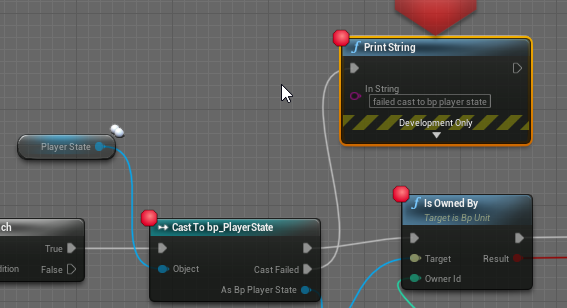
In my game, I set as player state class bp_PlayerState. In the controller I do this: https://i.imgur.com/8Np7yS2.png .. the cast fails. any idea why?
 woven wing
olive sedge
In my game, I set as player state class bp_PlayerState. In the controller I do t...
woven wing
olive sedge
In my game, I set as player state class bp_PlayerState. In the controller I do t...
My guess would be Player State is invalid.
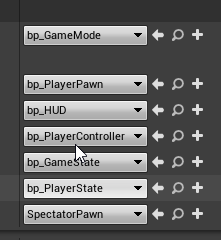
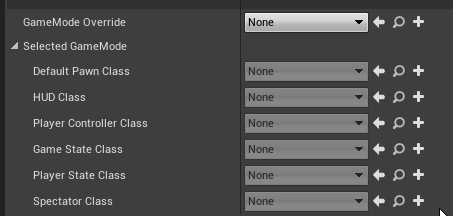 orchid garden
same, only had casts fail on invalids
olive sedge
hm.. one sec
yes, PlayerState is None
but why?!
it is valid earlier on
ah, replication probably
maiden wadi
@olive sedge What event is this on?
 proven jewel
Hey just a quick question. Why do I get different Values from Get Camera View -> Location and Get Player Camera Manager -> Get Camera Location even thou I use the same camera. The difference is only there when I move the camera.
olive sedge
@maiden wadi my replication graph is done and seems to work well but PlayerState probably doesn't get replicated
woven wing
@proven jewel - My guess is an update order difference. One of those values is updated before the BP virtual machine, the other after.
maiden wadi
Ah, I haven't messed with replication graph stuff yet.
woven wing
So for one of them you're getting the previous frame's value.
But that's only a guess.
olive sedge
@maiden wadi yes, that was it
proven jewel
@woven wing Thanks for the answer. I had the same idea but i wasn't able to open the functions in cpp.
past girder
hi, i am trying to make a cutscene where the player moves to a spesific location and starts doing an animation how can i make the player move to a spesific location? (For Squeezing thru a gap, not far away from players orginal place)
woven wing
past girder
hi, i am trying to make a cutscene where the player moves to a spesific location...
If you have a Cut (as in a discontinuous camera movement) at the start of your cinematic, you can just teleport them.
This is the easiest and cheapest way.
 tight venture
I have a Character (parent class) blueprint but AActor::TakeDamage doesn't show up in the list of overrideable functions... why is that?
maiden wadi
@tight venture Are you using 4.26?
grizzled garden
4.25
maiden wadi
Hmm. Let me look in a minute. Need to restart.
grizzled garden
Sure
proven jewel
@woven wing I found a fix. I was using a different tick group because off a different issue. When using different tick groups on different actors, updated values dont seam to align.
so thanks
grizzled garden
then what do i do now?
i have a complex issue that i can solve by doing that only
So the question is
i have a particle system ( i will include the image )
And this p-system is flames.
im using this flames as a flamethorwer weapon.
i want when the flames hit the robot ( which is my enemy ) it get damaged. all the damage code is ready.
my issue that i cant get the on begin overlap to work on the flames. they dont overlap. i tried the onhit component too and not work.
my flames never toouch the robot. i dont know what to do.
if there is a soutlion beside using a cone i would like to hear it.
if there is no soutlion, im working on the cone soultion right now.
and i got an issue in it too. not an issue but a small thing that not willing to set the way i want.
the cone never follow the flames. when i change the flames scale the cone will change the scale but will bypass the lenght of the flames which ruin the range of the turret.
i will send picture to the cone
maiden wadi
@grizzled garden Are you by chance looking for AnyDamage?
grizzled garden
i dont like the cone soultion, i prefer the flames to directly dmg the enemy
woven wing
There's an OnTakeAnyDamage event.
grizzled garden
my damaging code is working fine, i just want to overlap the flames
lemme check that
there is none
woven wing
Particles themselves generally do not create events.
maiden wadi
You definitely should not rely on particles for gameplay results. On a side note, you'll want to start learning Niagara. Cascade is probably getting removed soon.
grizzled garden
that has an issue as well
woven wing
¯_(ツ)_/¯
grizzled garden
i tried to change the cone poviot point but not sucessd as well
any ideas on how to solve that?
why its so hard to just let my flames dmg
😞
maiden wadi
Welcome to game software design.
grizzled garden
😟
maiden wadi
And nothing is really as it seems.
grizzled garden
true
but to not progress even 5% in flames dmg is something disappoting
i did nothing expect adding the flames
all tricks i try either fail
or not work
woven wing
So you would need to provide a lot more information about what the cone is, where it's attached, what it's attached too, and how you're using it in order for anyone to assist you.
maiden wadi
Is this like a flamethrower thing?
grizzled garden
exactly
maiden wadi
Why not just do it with some simple vector math?
I mean you can even use the particle emitter component as the source.
grizzled garden
can i?
woven wing
Really - a cone is probably the easiest?
woven wing
Isn't it?
woven wing
Just turn the collision on and off whenever the flame thrower is on.
grizzled garden
to the flames
tight venture
my bad, was it OnTakeAnyDamage, not TakeDamage, I was thiking of? Still, it is strange that it wouldn't show up in the overrideable function list. It is virtual in AActor
grizzled garden
yea cali, it is not there
grizzled garden
both are not there in the override list
tight venture
why not? it's virtual, not final...
maiden wadi
Actually you should not add collision events to the flames. That is very bad practice for gameplay design. You generally should only use particle collisions for graphic effects, like particles bouncing off of stuff, not relying on it for you damaging.
woven wing
tight venture
why not? it's virtual, not final...
Because where it's originally defined, in the Actor.h file, it's not a UFUNCTION.
tight venture
ahhh
woven wing
You'd have to define it as UFUNCTION(BlueprintImplementableEvent) to override it in Blueprints.
maiden wadi
What is wrong with your cone thing you have there? Why can't you just lower it into the flame and use it to retrieve anything currently overlapping it to apply damage?
just set it to something like OverlapAllDynamic, make sure it's HiddenInGame=True. And then when you're wanting to fire, just get the actors overlapping the cone and apply damage.
grizzled garden
ik
let me send video
slow internet

@maiden wadi @woven wing
check it
when i upgrade the turret
the flames will change their scale as well
and lenght
the cone wont follow it correctly
woven wing
Well...
dawn gazelle
Have your cone's scale update with the upgrade level?
woven wing
I mean, OK, to start with - you're using a custom static mesh.
So you could just re-export the static mesh with the pivot at the point of the cone.
Then would be way easier to work with.
Your pivot being in the middle of the cone is giving you your problem.
But also - you probably don't even need a cone, you could just use a box collider.
grizzled garden
ok
i know the middle of cone is the issue
that why i asked
how to centerd it to the end right of the cone
but i failed
here is a video
showing how i did it
tight venture
change it to a box first and see if there is still an issue
grizzled garden
tight venture
probably will be cuz the pivot for a box will still be centered, but...
tight venture
indovar you are blender-fluent?
tight venture
well that kind of changes the angles at which you can approach this
grizzled garden
ok
tight venture
I was assuming whatever solution you used couldn't touch blender
woven wing
(if you want to use a box collider who's length you can change, you can do it like this)
grizzled garden
ok
tight venture
i gtg. good luck indovar
maiden wadi
I'm lazy. I'd just multisphere trace for a flamethrower. 🤷♂️ It'd be close enough.
grizzled garden
that sound complex to me
maiden wadi
Two minutes.
woven wing
You need to know what that is, and how to use it.
grizzled garden
ok
woven wing
A lot of complicated stuff can be done in two minutes, if you know how to use it.
woven wing
That will work - but it's not as visible or as simple as a collider.
A collider is really basic.
grizzled garden
that complex and too much work
but thanks for offering it, i will learn from it
❤️
maiden wadi
To each their own. I find collisions annoying to work with. But then I suppose in this situation it's fairly easy. Just GetOverlapping actors, and do the same thing with the for loop.
grizzled garden
ok
maiden wadi
I really hope they fix this interface stuff in 4.26. I really want to work with the water stuff, and I like some of the new features, but this interface stuff is really annoying.
 silent imp
why does this work
silent imp
but not this
woven wing
@grizzled garden - This is not optimized, and there are better ways to do it, but it is about as simple as you can get.
maiden wadi
@silent imp Uh.. If you spawn the gun and have a reference to it already, why are you using GetActorOfClass?
Although if I had to guess, I'd say that you need to delete the Get nodes and replace them after plugging in the purple pin. Cause it'll change the output from Gun class to Actor.
And it's likely that the Get nodes are stull Gun class.
silent imp
oh wait you're right i don't need that
what i'm trying to do is create a new blueprint class
and then invoke an event in that class
problem is there will be multiple classes i can spawn and so i cant just cast to gun since it wont work for the others
maiden wadi
Right. But don't forget to consider that GetActorsOfClass, will iterate over every single actor in your level. It's not so bad in testing, but get a level with thousands and thousands of actors, and that node is going to cripple your game.
silent imp
noted
woven wing
silent imp
problem is there will be multiple classes i can spawn and so i cant just cast to...
This is what Interfaces are for.
silent imp
interfaces?
woven wing
You could use a hierarchy, so you create a 'Gun' class, and then 'Shotgun' as a child.
maiden wadi
What you should do is use inheritance, or an interface. Make a basic class that has an event that your left click can call, and then make multiple things that inherit from that class. Like.. BaseGun, and from that you'd have like Pistol, and AssaultRifle. Base Gun has a simple event called Fire, and the other two can override this, but your left click only ever needs to cast to BaseGun.
woven wing
Or you could create a 'Gun' interface, and have your gun objects implement 'Gun'.
maiden wadi
I feel dirty. Writing multiple singular functions. One for each interface I have.. to check if an actor is of that interface. WHY DID EPIC HAVE TO BREAK THIS?
woven wing
I heard they mucked around with Interfaces, but not in what way.
 gusty shuttle
Hey, quick one, is it cool if I name a macro "MAC_Rot45" not sure if I can put numbers in a name
maiden wadi
Wait are there interface things in the patch notes?
woven wing
gusty shuttle
Hey, quick one, is it cool if I name a macro "MAC_Rot45" not sure if I can put n...
Yes.
gusty shuttle
@woven wing Thanks man, sall needed to know!
woven wing
maiden wadi
Wait are there interface things in the patch notes?
Dunno. I just really want them to include Event Dispatchers in interfaces.
It would make them about ten times more useful.
past girder
Please help
woven wing
trim matrix
Teleport Physics deactivates physics on the object being moved.
If it's off, the object counts as having moved that distance.
Which, if you have lots of dangly bits on the model, will make them go crazy if you teleported the character a significant distance.
As it will think it just moved VERY FAST for one frame.
You see this in a surprising amount of video games, when cinematics start, the characters clothes go all poofy for the first few frames.
trim matrix
So should it be on for my character or off?
past girder
Everything worked then i clicked save all to restart my computer, i closed unreal and clicked save all, when i opened the project again there is alot of errors like Animation to Play could not be found, In use ping no longer exists on node.
woven wing
No idea. Are you teleporting your character? If so, yes. If not, no.
Do you have physics objects attached to your character? If so, it matters, if not, it doesn't.
trim matrix
@woven wing Alright thank you
past girder
woven wing
past girder
Looks like some stuff didn't save, or got corrupted.
Check the things it's telling you are missing.
maiden wadi
On a side note, it's often better to let animation blueprints retrieve the information they need rather than updating them manually.
woven wing
past girder
that can`t be found
Neat. Does it exist?
past girder
I did before atleast
woven wing
Check.
woven wing
Sounds like it might be time to revert there.
maiden wadi
Are you doing any form of C++ in that project?
past girder
And how to i revert?
woven wing
Oh dear.
maiden wadi
There are often a couple of copies saved in the project folder if you're lucky.
woven wing
It sounds like you might be getting a 'This is why you should use version control' moment.
Because you should.
Use version control.
past girder
ye
 tough halo
past girder
tough halo
past girder
Ok, so i found the ThirdPerson_AnimBP in my backup folder, but wont let me import it back
tough halo
is making a loop like this okay or is it weird?
trim matrix
How can I still listen to action events after pausing the game
woven wing
@tough halo - It's OK, but I probably wouldn't do it that way.
tough halo
how would you repeat an action wih a delay?
maiden wadi
@tough halo SetTimerByEvent.
tough halo
if you wanna share another way to implement something like that I would be interested
woven wing
If I'm being honest, I think your way is better than the way that popped into my head.
woven wing
My way would have been to store a 'last fired' timestamp, and to check if we had moved past that + the time between shots.
tough halo
the screenshot doesnt even fit the clearing of timer when releasing the button
and hook it to the event tick?
past girder
I just got the ThirdPerson_AnimBP back but i need to change skeleton but can`t retarget
woven wing
Yeah, and turning tick on and off using the firing events.
tough halo
can I turn a tick off?
my immediate understanding is that I would hook a branch to the tick
which then would have to be evaluated every tick, firing or not
woven wing
"Set Actor Tick Enabled" can turn an actors ticking on and off.
tough halo
if I do that do I turn anything else off?
I assume alot of stuff happens at tick
it just turns off the actual tick event firing in the blueprint
woven wing
I actually don't know.
I think it's just the Actor's tick, and their components continue ticking if they have their own tick.
Because there's also SetComponentTickEnabled.
But maybe not?
I'd have to experiment.
woven wing
Your way should work fine.
tough halo
yeah, it feels a little weird to loop the execution noodle back
woven wing
The one advantage my method has over yours is that mine can fire twice in one frame.
So if you have very high rates of fire, mine will support that.
Because you can divide the delta between the current time by the rate, and get the number of times you should fire this frame.
tough halo
wouldnt the bullets be on top of eachother then?
woven wing
Probably - if you're spawning actual projectiles.
But that doesn't matter for hitscan.
tough halo
true
past girder
Jack?
 thin ferry
I wasn't sure if this goes here or in VR... so what is happening is the drone is moving to the player and pointing to the ground... and wont turn towards the player directly , almost as if there is an offset or something. When I teleport in VR it follows and targets with an offset again.
Any suggestions?
woven wing
past girder
Jack?
Not sure how to help you Shadow. Sounds like a bunch of stuff broke.
It's hard to figure out what to do when a bunch of stuff is literally broken.
past girder
I am looking in my animation folder in the directories there is the animBP
But it doesnt show in engine
 finite osprey
Hello, i have a noob question and sorry if its too noob. but im trying to make actor gun_base LineTrace from player eyes whenever they fire, im using Cast To. Its working in SinglePlayer but in multi only the 0 index player make TraceLine or second if index is 1. Is there any easy fix for that?
woven wing
finite osprey
Hello, i have a noob question and sorry if its too noob. but im trying to make a...
Uhh... change 'Get Player Pawn' to a reference to a specific player instance?
I don't know where this Trace Object function is happening, but I'm guessing inside the Player Character?
Or inside the gun?
Either way - just use the reference directly.
Don't use Get Player Pawn.
finite osprey
Its inside the gun and thats the problem if the code is in PlayerCharacter every player TraceLines without issues
woven wing
Is the gun attached to the character?
Because if it's attached to the character, you can use 'Get Owner' to get your parent.
And then cast that to FirstPersonCharacter.
finite osprey
Okay ill try to change it a bit thank you for help 🙂
 random hill
@finite osprey if for some reason that doesn't work, you can add the variable for player inside the gun
and set it up while creating the gun
royal rain
can i get some help with fixing the camera with the ball roller game so it can turn with the player
i just want a better camera for it
idk know how to make a better camera
 faint pasture
@royal rain How do you want the camera to behave?
royal rain
i need the camera to follow the ball around either by just moving the mouse, weather by holding right mouse button first or by just automatically, or whenever the ball moves left and right, like a car game would
ive had bad experiences though when it comes to having the the game let rotation determine where the camera is facing
becuase every little bump will then shake where the camera is
when you go into a wall
so mouse might be better
faint pasture
@royal rain Start with setting up your spring arm like this
and have mouse input add yaw and pitch input to the control rotation
royal rain
ok one sec
i need to open up unreal again sorry
honestly a lot of the next few things after this faken camera thing might be pretty easy, i still dont know how to do it, but its more design stuff than it is super complex programming skills
where is the lag settings
trim matrix
Hallo :)
I am in the middle of trying to create fixed cameras, but the movement is kind of funky. I tried to look it up, but with no luck.
I want to have the movement being based on the active fixed camera and not the character. I know it's most likely a very basic question, but I am very new.
royal rain
i too am looking for camera fixes
and new
ish
not really kinda
i cant find that lag option @faint pasture
trim matrix
Ah, atleast im not alone in the struggle haha. I do 3d visualisations for retail for a living and wanted to branch out a bit.
royal rain
ah
faint pasture
@royal rain its in the spring arm, not the camera
royal rain
o
sorry i did the assume and didnt read i am sorry
ok
i did it
what do i do next
olive sedge
Am I misunderstanding IsValid? I'm getting runtime errors when I use it on an uninitialized value
dawn gazelle
What type of object are you passing it?
 worldly edge
Anyone know if changing the value in a blueprint affects every other instance of that object with that blueprint
royal rain
@faint pasture
worldly edge
Say my character damages a character with a variable on it would all other copies of that character get damaged too
Or would it just be that instance
faint pasture
@royal rain Where is your mouse input going?
olive sedge
@dawn gazelle
faint pasture
@worldly edge just the instance
worldly edge
Ok cool
I was starting to get scared because you can cast to classes too it makes sense now
Class would be how you'd edit all instances right?
dawn gazelle
olive sedge
an actor
Are you doing something with the reference to the actor after the "Is not valid"?
olive sedge
no
I have a branch of IsValid true on it
it's the first thing I do in the function
royal rain
it wasnt moving when i did it but it did have a stable camera
i dont really know what im doing @faint pasture
dawn gazelle
IsValid is just supposed to make sure that the reference exists. For troubleshooting sake, why not try something simple first?
 rough jay
yep
maiden wadi
For some reason, using the function itself is bugged. It doesn't work correctly. Use the macro for it.
Or at least it was a while ago. I used to get errors using just the IsValid function.
dawn gazelle
The macro calls the function itself.
rough jay
do u remember what the error was auth
maiden wadi
Yeah, scratch that, not happening anymore, just checked. I can't remember what engine version that was, but I was getting accessed none errors with nothing but an input key, and a branch with IsValid function.
royal rain
what do i do with the y and x or pitch and yaw
 undone merlin
so im completely new to unreal and blueprint but i need to know how to make my actor change color
faint pasture
@royal rain add pitch and yaw input for m the mouse axis
That'll change the ControlRotation which is what's driving the spring arm
 rugged kernel
How can I use "GetSplineLength" with a SplineMesh in blueprints?
 rough eagle
HEllo, I have a beginner question :
how can i set a static mesh from my Blue print object, as a Variable ?
faint pasture
@rough eagle What are you trying to do? The mesh is already a variable within the mesh component.
You can make a variable of type static mesh and use it in the construction script or an OnRep for example but I'm failing to see what you're trying to do.
rough eagle
I have a mother class "figther", which use the weapon on her scripts. then i want to use a child class, with a different weapon visual
royal rain
@faint pasture i dont know what the nodes are to do that
rough eagle
Sorry adrian i was trying to @faint pasture
 thorn fiber
Doing this Is Valid Check on Tick still produces a pending kill error on tick for a few seconds (i suppose until it is garbage collected). IDK what else to do? Shouldn't an Is Valid solve this? I suppose race condition is happening where Destroy gets called on or around where the AddWorld Rotation for Cube1 and Sphere would execute. Functionally its all ok but I get this annoying errors.
steady orbit
Anybody understand how Unreal can handle 2d world wrapping?
dawn gazelle
thorn fiber
Doing this Is Valid Check on Tick still produces a pending kill error on tick f...
Couldn't those rotations be getting done on the actors themselves?
faint pasture
@royal rain look at the rolling ball template
worldly edge
ive been trying to spawn a particle system on a actor and its not working
dawn gazelle
worldly edge
ive been trying to spawn a particle system on a actor and its not working
orchid garden
could someone explain to me how i can use a structure as a variable that has a component item in it to store a list of items? I've been trying to figure it out for a few hours on my own and i've come up dead end, i know it can be done just don't know how to go about it:
the part that im stuck on is the component item, i don't know how to get that setup so that I can actually use it as a storage device inside the variable.
worldly edge
wow im dumb problem solved i was adding the particle system to the player when they die
dawn gazelle
orchid garden
could someone explain to me how i can use a structure as a variable that has a c...
Why are you looking to store the component? Usually the components would be attached to the specific actor and you would call it for any changes.
ie. Your inventory component would contain an array of "inventory items" which could be structs, but you shouldn't need to store the component itself within it.
 timber cloak
@dawn gazelle hey, thanks for the help yesterday!
Sorry for forgetting my manners.
Including those who helped me yesterday as well!!
thorn fiber
@dawn gazelle What do you mean? That is happening directly on the actors
 small oracle
I’ve been making an iOS blueprint game, and it’s been launching on my phone just fine until today. It’s saying it needs a remote server to compile, which is weird since I haven’t touched any code or added plugins. Any ideas?
Or does anyone know if I can rent a Mac somehow to remote compile?
nvm, turns out you can't change the icons for iOS
dawn gazelle
thorn fiber
<@!218956378654507008> What do you mean? That is happening directly on the acto...
So I have an actor that has a "Cube" mesh attached to it. I am rotating it similar to you with the AddWorldRotation (Scene Component version) on the Actor's event tick. Destroying just the component doesn't give me any errors. Destroying the entire actor doesn't give me any errors. Tested both on offline and both server modes.
I have the IsValid check on there too.
woven wing
small oracle
Or does anyone know if I can rent a Mac somehow to remote compile?
These services do exist, but I'm glad you don't need one right now.
thorn fiber
@dawn gazelle Well thanks for that info, I'll add I'm on 4.26 and developing on switch but not sure if that is the edge case difference here
But sounds like you are doing exactly what I am
orchid garden
dawn gazelle
Why are you looking to store the component? Usually the components would be att...
what im attempting to do is make a bag the player can equip, and fill with items. They can then take that bag, filled, and move it back into their inventory, or drop it on the ground. The items use a struct in the inventory to store whats in them, but, thats where the problem arises, being able to keep the items in the pack when its moved into ones inventory and keeping the stucture the same for the items in the bag. if that makes sense....
thorn fiber
@dawn gazelle It was an oversight on my end. I just got back to it after doing some chores today and realized that the error is coming from other nodes that don't have the IsValid check.
dawn gazelle
thorn fiber
<@!218956378654507008> Well thanks for that info, I'll add I'm on 4.26 and devel...
Oh great! 😄
dawn gazelle
orchid garden
what im attempting to do is make a bag the player can equip, and fill with items...
Ok, I think you're on the right track then. You should have an initialize function in your component to set its size, this should happen on begin play.
I'm starting to think you should probably have a "bag" actor created that contains the component, and you could store that actor within your inventory structure.
Then when interacting with the inventory item, you can check and see if the bag actor is set, and reference its inventory component to get its inventory.
silent imp
how do i make an interface message? i just end up with this
silent imp
weird, I don't
woven wing
Which version are you on?
dawn gazelle
I find that if I'm dragging off of an object pin (doesn't really matter what) then typing in the name of the interface I'll see the Message one.
dawn gazelle
woven wing
It doesn't really matter though, a Message is really just syntactic sugar over a Cast and a call.
Cast to your Interface, call the function on it if the Cast is successful.
woven wing
👍
 chilly jetty
Hi all, I was working on a waved based spawning enemies system and it reached a point where sometimes the game will crash and produce an infinite loop
it said it was coming from this part of the BP
the stack mentioned this
Script call stack:
Function /Game/UserMade/Gamemodes/GameplayGamemode.GameplayGamemode_C:SpawnActivation
Function /Game/UserMade/Gamemodes/GameplayGamemode.GameplayGamemode_C:ExecuteUbergraph_GameplayGamemode
Function /Game/UserMade/Gamemodes/GameplayGamemode.GameplayGamemode_C:ChooseEnemy
woven wing
Your chosen enemy is probably a null pointer.
Ah, because you can pick beyond the end of the list.
You're generating a random integer of the length of the list of enemies.
So if you have 5 enemies, you're generating a random number between 1 and 5.
But the Keys list has indices between 0 and 4.
So you can end up choosing an item from the list beyond the end.
And you'll never pick the first one.
chilly jetty
I see
woven wing
Just subtract 1 from the random integer result and you should be good.
woven wing
👍
Ah, I'd recommend using RandomIntegerInRange and do 0 to Length-1.
Rather than just subtracting one.
Because it looks like RandomInteger can return 0.
chilly jetty
hmmm
I tried both ways
play tested it
and there's still an infinite loop going on
this was all i added or changed
 upper linden
website to paste and exchange blueprints https://blueprintue.com/
BlueprintUE
BlueprintUE.com is a tool for sharing, rendering and rating blueprints for Unreal Engine 4. UE4 is a game engine which use visual scripting called blueprint.
chilly jetty
BlueprintUE
dawn gazelle
Do you perhaps have many enemies in your list that are set at 0 in the Enemy List map?
chilly jetty
I really only have 2 at the moment
dawn gazelle
Are you subtracting from the map anywhere outside of this function?
chilly jetty
chilly jetty
dawn gazelle
Are you subtracting from the map anywhere outside of this function?
no i dont believe so
dawn gazelle
Your remaining number of enemies is > the number of enemies in your map.
It's causing the infinite loop on your branch as it always returns false, as your function was called (likely with a check of remaining number of enemies > 0) but you have no enemies remaining to spawn from your list.
dawn gazelle
You don't need to loop through your values here
You can get the length from the array for the total number.
err
nvm
Gosh I hate how maps work sometimes, but I do love them XD
woven wing
They are great.
But the way blueprint makes you work with them is awkward at best.
Makes me really wish there was as easy a way as python's
enemies[key]
chilly jetty
dawn gazelle
You don't need to loop through your values here
so should I get rid of that part and just set the remainder to the length of the array?
dawn gazelle
No ignore me on that.
You're getting the values from the map and adding them up which is correct.
 shadow saddle
im still confused about behavior tree selector
it says "They stop executing when one of their children succeeds. "
it my selector has left and right , if left success it wont execute right?
chilly jetty
dawn gazelle
You're getting the values from the map and adding them up which is correct.
alright then how would I go about stopping the loop?
woven wing
shadow saddle
it my selector has left and right , if left success it wont execute right?
Yep
shadow saddle
woven wing
Yep
if so then it goes back to its parent node ?
woven wing
Do you know For-loops?
shadow saddle
yea
woven wing
A Selector is like a for loop.
It goes, basically, like this:
for child in children:
    if child.executes_successfully():
         return SUCCESS
return FAILURE
How often is the Choose Enemy being called? It could be a race condition kinda thing where an enemy is dying just as another one is spawning leaving you with 0 left in the pool.
shadow saddle
woven wing
It goes, basically, like this:
```
for child in children:
if child.executes...
make sense now
woven wing
So it breaks out of the loop when a child succeeds.
shadow saddle
so as for sequence
woven wing
They're also a for loop.
shadow saddle
it wont stop until the children fail?
woven wing
But they look like this:
for child in children:
    if not child.executes_successfully():
         return FAILURE
return SUCCESS```👍
am i right about sequence there
woven wing
Yeah, if a child fails, it returns failure and stops processing other children.
If all children succeed, it returns success.
shadow saddle
lets say my sequence consist of 3 nodes , find random loc , go to that loc, wait 5 sec
this sequence is under the selector node
so when the 3 nodes execute succesfully one time
sequence sucess
then goes back to selector
woven wing
Yep.
shadow saddle
selector also sucess
chilly jetty
dawn gazelle
How often is the Choose Enemy being called? It could be a race condition kinda ...
 atomic prairie
Hello! How to detect if the player using a keyboard, an xbox controller or a playstation controller? For display "press (E) to open" "press (X) to open" "press (square) to open"
chilly jetty
this is the main Spawning BP that uses those previous fuctions
5 seconds
its called every 5 seconds
dawn gazelle
chilly jetty
its called every 5 seconds
Ok, so unlikely to be a race kinda thing... What I'm thinking right now, is perhaps do a check that if the value of an enemy <= 1 in the map, remove it from the map instead of re-adding it's subtracted value to the map. This way when firing the random operation on the next execution, you can only get a valid one.
So do the check for "Enemy number - 1" <=0 -> If True Remove Enemy from Map, If False, Add the value back to the map
shadow saddle
@woven wing i know when to use sequence but what exactly u need selector for
any example
woven wing
Sure, let's say you were trying to pick from among viable strategies.
- heal myself
- fight enemy
- wander randomly
dawn gazelle
chilly jetty
its called every 5 seconds
Then as a secondary precaution, you can put a check in at the front of the execution, checking the value for the length of the map -1 >= 0, just to make sure you have something to spawn in the map still, and if false, perhaps add return node with a "Found" boolean that you can check outside your function before trying to execute your spawn function.
woven wing
You go into Heal Myself, but you fail because you're not hurt.
You move onto Fight Enemy, but you fail because you don't have a target to fight.
So you go to Wander Randomly, which always succeeds.
If you were hurt, you'd heal yourself.
If there was someone to fight, you'd fight them.
dawn gazelle
chilly jetty
its called every 5 seconds
This will allow you to remove the loop and branch you have for the find >0 you have
shadow saddle
i see
woven wing
The name is a bit of a give-away about how you should use it. It's about 'selecting' something to do from several options.
 slate wasp
is there a way in BP to get settings from DefaultGame.ini? specifically, I'm looking for ProjectVersion
dawn gazelle
slate wasp
is there a way in BP to get settings from `DefaultGame.ini`? specifically, I'm l...
This node is available in the Low Entry Extended Standard Library (free Plugin on marketplace)
slate wasp
so there isn't - thanks!
shadow saddle
@woven wing so if u have 3 nodes for this selector , heal atk and roam , if the first two failed and only roam success , the selector is sucess , then it goes back to root, and from root it start over again
woven wing
Yup
shadow saddle
ohhhhhhhh
i get it now
everything make sense when i understand the point "execute from root to bottom, then bottom return back to root and repeat the execution again"
thank you so much
woven wing
shadow saddle
thank you so much
You're welcome! Best of luck with your AI.
shadow saddle
👍
 steep pumice
anyone available? I need a more experienced set of eyes to help figure out a behavior tree
 violet mauve
can anybody help me setup a sobel process outline for 4 directions not just 2? i cant find a tutorial that works with the custom stencil or maybe i just dont know what im doing
 dusky cargo
So um, I created a character controller but it's a pawn instead of the actual character class, the thing is that when I try to replicate it, the clients don't actually spawn as a player, like they're just kinda there with no controls or anything, is there something i'm missing? The blueprint is set to Replicates by default but apparently I have something else to do because it's not working... It's basically my first time with replication so i'm a total noob, could someone with more experience maybe help? 😅
dawn gazelle
dusky cargo
So um, I created a character controller but it's a pawn instead of the actual ch...
The Character class inherits from the Pawn class, but there's a few extra things with the Character, for one the Character Movement Component. You may want to reparent your Pawn as a Character.
dusky cargo
The reason why I made a pawn is because I have a custom directionnal gravity, and its not really working (as I have it set up right now) with the Character movement and all, so is it possible/ not too hard to do with just the pawn or should I figure out how to make everything work with the Character?
dawn gazelle
Couldn't tell you specifically, but you definitely lose some functionality. I'm not sure you can properly replicate character movement without the character movement component.
That is, if you're making a multiplayer game
dusky cargo
Allright thanks! I'll see what I can do with that
faint pasture
@dusky cargo do you intend to use kinematics or physics to move the pawn around?
olive sedge
Could someone break down rotators for me? What is a rotator anyway? Appearently you can make a rotation from a vector? Doesn't a rotation always need something to relate to?
I'm trying to calculate a direction for my character to move to and aim to when he's got a focused target
 humble imp
hello all
I can not input the text with language Korean ("안녕하세요") in editable text in UE4
how to config to input text Korean type?
fleet nimbus
Hi! Excuse-me, I have a question.. is it possible to save a copy of an object in an array instead of a reference to this object? The problem is that If I destroy the object after put it into the array, I don't have any information about it anymore
 summer zephyr
 worn nebula
Does anyone know why my game is able to be paused using Set Game Paused and show cursor on one level, but not another?
 upper adder
worn nebula
Does anyone know why my game is able to be paused using Set Game Paused and show...
upper adder
worn nebula
Does anyone know why my game is able to be paused using Set Game Paused and show...
there is an option in the gamemode "allow pause" or something, maybe thats the problem
and different level can have a different gamemode
so maybe its checked in one but not the other
worn nebula
Ah okay, I'll take a look, thanks!
olive sedge
can I set default values for macro parameters?
worn nebula
Hm it seems both levels are using the same gamemode and pausable is ticked...
 tight schooner
@fleet nimbus I think you have to copy/save the information manually. Either that or keep the object alive and instead create some BP script that functionally deactivates it rather than outright destroy it.
@olive sedge yeah I'm pretty sure you can
olive sedge
@tight schooner I can't find where
maiden wadi
@olive sedge You should be able to. Click on the macro in the Function/Properties list, there should be a little down arrow somewhere near the property you want to change.
fleet nimbus
Umh.. how could I desactivate an object?
tight schooner
Set visibility to off on the render-able components
disable actor tick (Set Actor Tick Enabled node)
disable collision on any colliders
stop timelines and timers, etc.
@olive sedge re: rotators... I'm pretty sure you can find some general documentation on rotators
fleet nimbus
Well, okay, I'll try that, thank you!
tight schooner
the three floats represent roll, pitch and yaw in degrees (out of 360)
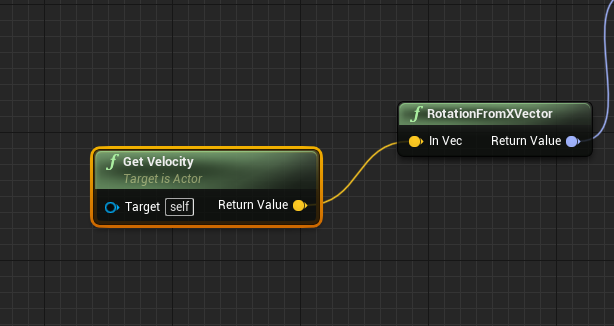 tight schooner
oic, you have a vector and you want to turn that into a rotator...
this might be stupid but I use the node, get look at rotation, lol
maiden wadi
Velocity is just an arrow, pointing in a direction. So you can turn that into a Yaw/Pitch rotator. Roll will be 0.
olive sedge
well, what I'm trying to do is have a character aim at a target and if the yaw gets to be too much, rotate the character and walk sideways or even backwards
tight schooner
or no, you can use the node Get Forward Vector
out of any rotator
you can get Up, Right, and Forward vectors out of any rotator
olive sedge
I've got the yaw calculation down
maiden wadi
Rotator's Z is -180 to 180. -180 and 180 face the same direction IE behind, or to the negative X axis.
Pitch is -90 to 90. Straight up, straight down, 0 Is equator level.
olive sedge
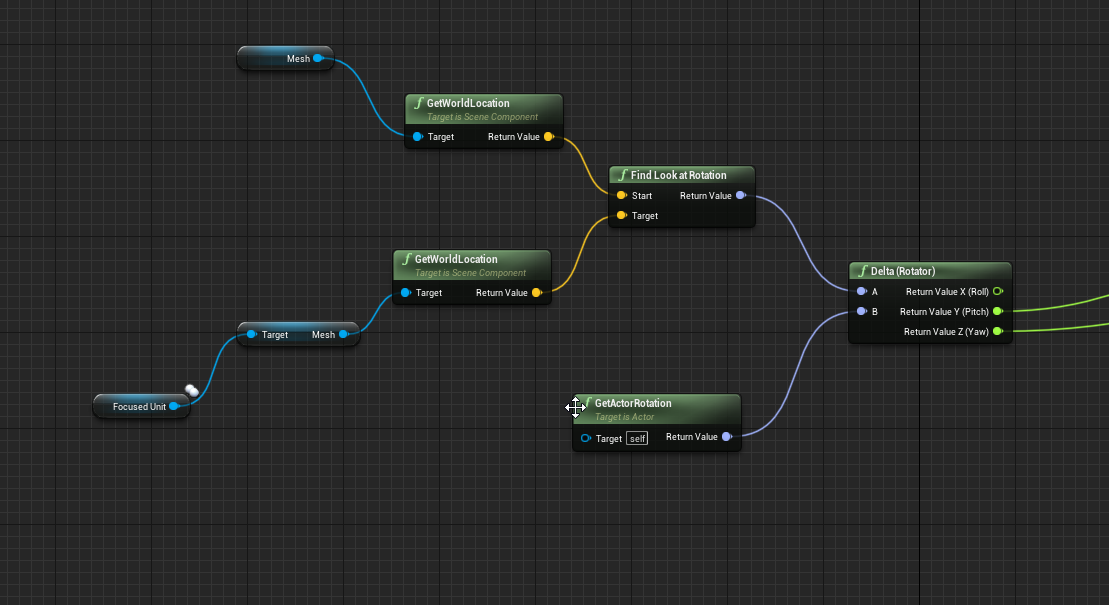


 lapis path
Hi ! Level streaming issue here (probably) : My Gamemode references at beginplay the characterBP set in persistent level. When a sublevel is loaded, the reference is lot and I can't get the characterBP. Any idea why ? (also yes, it's a character BP, NOT a pawn one. I just named it this way for some reason)
maiden wadi
Knowing that, it allows you to turn any directional vector like velocity into a rotator.
olive sedge
@maiden wadi hmm, ok
tight schooner
I'm clearly too confused to answer #blueprint questions... I should hit the hay
olive sedge
@tight schooner All good, thanks for answering!
tight schooner
@lapis path I have no experience with level streaming, but you can at least do some general debugging. Is GetPlayerCharacter returning the expected actor? Is the cast failing? What if you used GetPlayerPawn?