#blueprint
402296 messages · Page 585 of 403
 odd ember
 timber cloak
already
odd ember
otherwise you're not testing it properly
odd ember
I don't see the printout anywhere
odd ember
a restart won't fix broken logic
 odd ember
I guess it may be a replication error then
timber cloak
bug then?
timber cloak
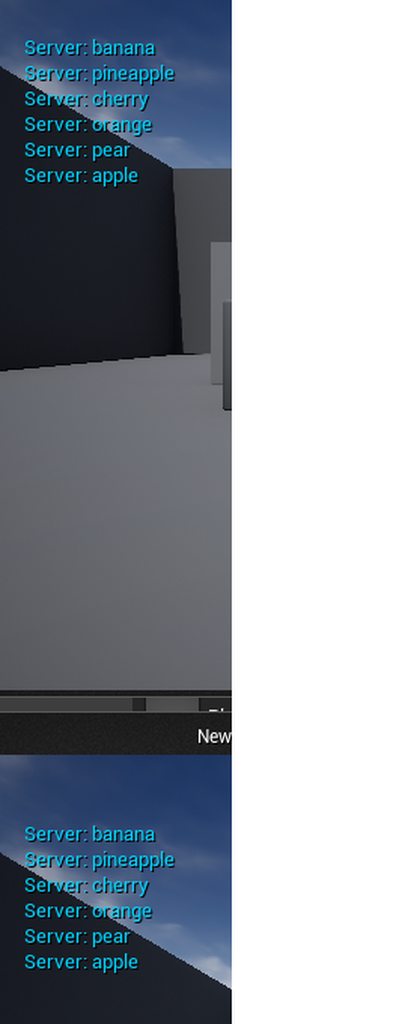
but in server isn't getting it either
even it fails, the server should be able to get it
odd ember
server has them as per your screenshot
timber cloak
well, just assume it's single player. GameMode to first's screen = no replication needed
wait
odd ember
but also if you're using multiplayer you should use player state and not player controller to store info
have you read the multiplayer compendium?
 maiden wadi
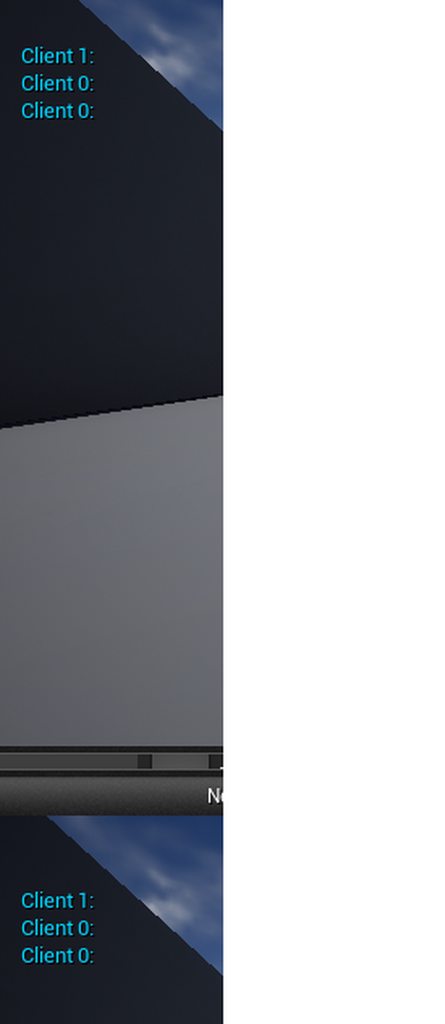
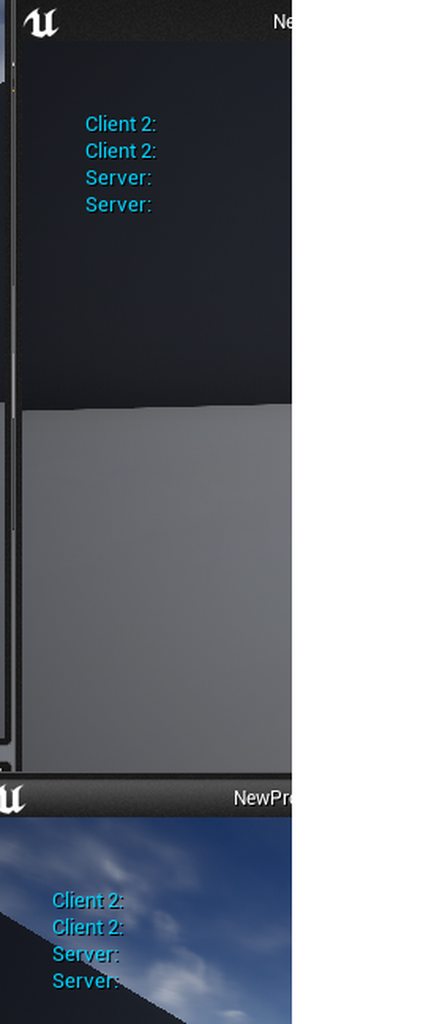
The string needs replicated. The server won't automatically send it just because it's expose on spawn. So that string only gets set on the machine that it's created on, IE Server.
 dawn gazelle
What's probably happening, is that there are characters being spawned, but they are not being possessed.
maiden wadi
Also advise not replicating string. Replicate an integer and make a string array and select out of the array via the replicated integer.
timber cloak
gamemode is will still prints it to SinglePlayer, but Singleplayer not working as well
the server = singleplayer
odd ember
maiden wadi
Also advise not replicating string. Replicate an integer and make a string array...
so, back to enum 😂
timber cloak
it is possesed by default
odd ember
setting its owner is not the same as possessing it afaik
maiden wadi
Possession and owner have no bearing on that string. You just need the string to be replicated, and set correctly, and for it to only be spawned on the server.
timber cloak
yup i made the game "Offline" now, nothing prints out
wait let me read all the messages
timber cloak
maiden wadi
The string needs replicated. The server won't automatically send it just because...
the String variable in ThirdPersonCharacter, replicated already. I even tried RepNotify, nothing.
odd ember
is the server array set to replicate though
timber cloak
odd ember
is the server array set to replicate though
yup i tried that earlier, same result
btw i read Array cannot be replicated unless it is on struct
so no point replicating an Array
maiden wadi
Where are these being spawned?
timber cloak
GameMode
fruit box(the string array is in gamemode), fruit22 (string variable in thirdpersoncharacter)
simplest thing with simplest logic but the engine isn't printing it out
unless i failed somewhere
dawn gazelle
Possession does matter in this case, as he's spawning characters and his PageUp is probably on the character themselves. Any automatically spawned characters from the PIE wouldn't have the values set, meaning when hitting page up, he would get blank prints.
If he possesses one of the spawned characters, it'll probably show up.
maiden wadi
The only thing that would matter, is whether or not pageup would work.
timber cloak
dawn gazelle
Possession does matter in this case, as he's spawning characters and his PageUp ...
But apparently that works for enum though. Possessed usually means the Character is controllable.
maiden wadi
Go into your character's Beginplay, and print the string.
timber cloak
What requires the "Possess" node is when your World Setting's Default Pawn is "None" in value
maiden wadi
It should print the same string for the server and client version of each pawn. If you get a bunch of client prints that are empty, your string isn't replicated.
dawn gazelle
See, he's spawning additional characters.
timber cloak
there's no extra characters in the level
dawn gazelle
You are spawning characters, and your world's default pawn is set to what?
timber cloak
set to ThirdPersonCharacter
maiden wadi
Ah. I see what Datura is saying now.
You're likely possessing the wrong character who hasn't had it's string set yet.
dawn gazelle
So, when you are launching the game, the game will automatically create pawns of ThirdPersonCharacter for the number of clients you selected.
Then you are also telling the game to spawn more characters.
timber cloak
maiden wadi
Go into your character's Beginplay, and print the string.
already, the input is actually on the Character's BP. Input to Print String
timber cloak
dawn gazelle
So, when you are launching the game, the game will automatically create pawns of...
okay wait let me try with Possess
dawn gazelle
If you set your default pawn to none, use this node and you can spawn the characters with the values, and use the new controller pin on this node to posses the player.
 orchid thicket
how come i thought it was hard to learn how to use unreal
orchid thicket
and after watching like within 3 days like 12 videos
around 5 min
i already know the basic shit on how to make a game
 twilit heath
@dawn gazelle HandleStartingNewPlayer is better, it works after Login and after SeamlessTravel
odd ember
orchid thicket
i already know the basic shit on how to make a game
so you're saying you know basic game vocabulary, and you're now able to go and reproduce the game equivalent of the works of shakespeare?
twilit heath
PostLogin is specific to connecting for the first time
orchid thicket
not really Xd
timber cloak
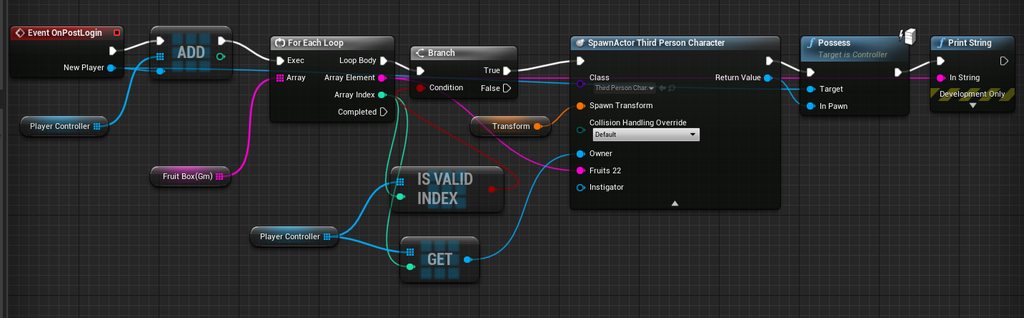 dawn gazelle
Ok, good to know, thanks 😄
timber cloak
never worked even with Possess, one character disconnects as a result
even Offline mode still never get the fruits
by right the logic is correct, right? anyone can clarify?
 royal rain
hey so with the ball rolling starter kit thing i wanted to know if there is a good way to try and have more control over the ball, also the ball has some infuriating physics a lot where even on flat surfaces it bounces up
i tried to give more of a higher negative number when i am able to turn more left and right
which kinda worked and its almost there but still could get annoying espically when the phyics breaks and the ball goes 10 feet in the air for no reason
and is there a reason why building my game crashes? should i get a new update maybe
dawn gazelle
timber cloak
by right the logic is correct, right? anyone can clarify?
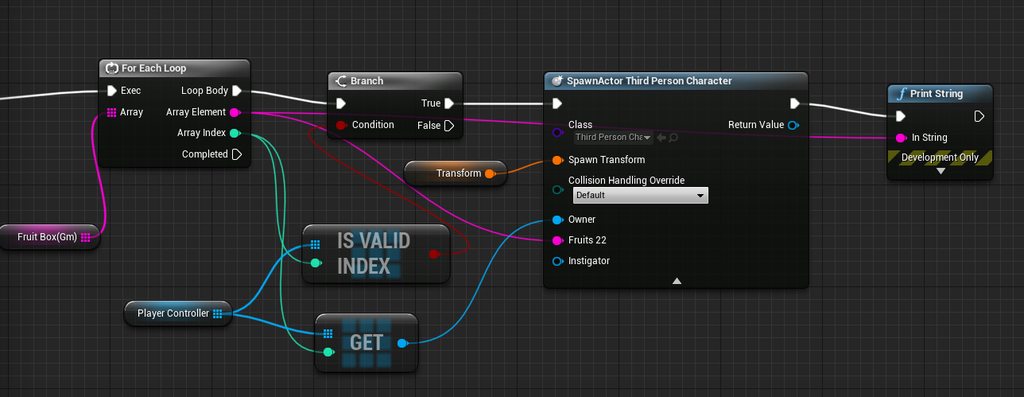
Sadly no. What you're doing is adding your newly connected controller to an array, then looping through your fruits array, **checking if your player controller array has a valid index at the index of your iteration of the fruit array, getting the value of the player controller at that index, and spawning a character with that controller as the owner, and possessing it with the newly connected controller. ** Since you're still iterating through an array, you're basically doing the bolded section over and over again for each fruit.
 random hill
Any advice on that question?
dawn gazelle
and since each character that joins calls this, they each do the same thing.
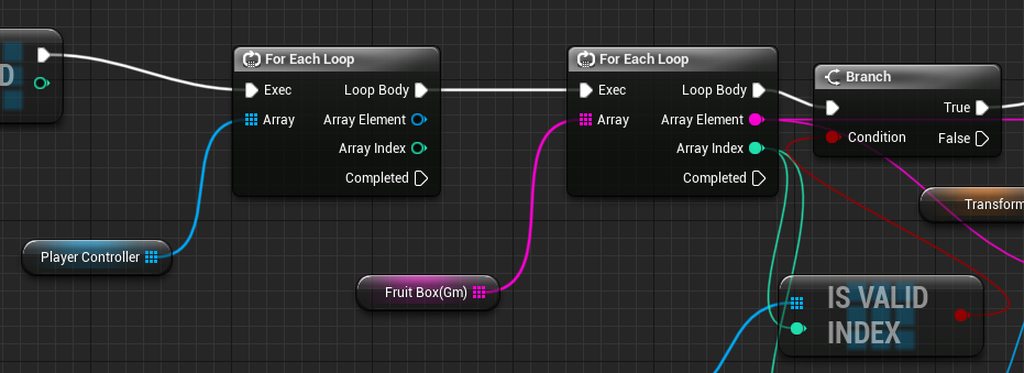 timber cloak
ok
maiden wadi
@random hill You can either create a whole new tree, or better is to create subtrees. You can run new behavior trees from other behavior trees, and this lets you easily branch out major logic into new areas and keep your code in a contained way so as to be easily modified for different types without having one huge gigantic branching tree.
timber cloak
let me read that paragraph
timber cloak
dawn gazelle
Sadly no. What you're doing is adding your newly connected controller to an arr...
but as an end result, it will definitely as least give a fruit to the players, right?
Also, i did put a print string right after the "spawn", so i can see the loop results. It didn't iterating or do infinite loop
random hill
@maiden wadi yeah, the issue I have is... a simple enemy has what. Follow, attack and wait. But a more complex will have also use special ability 1 and 2, heal etc. So one way would be to make a node" do action" for the single tree, and that would be dealt with in the enemy BP. It would have to prioritize etc.
But I don't think that's the best option
dawn gazelle
This would give each player that spawns into the world a fruit, so long as you have your default pawn set to "none"
timber cloak
let me try that
random hill
@maiden wadi so you think that I should make one general tree with most of the behavior like following, maybe running away etc, and where the "attack" is, I would do a subtree for each enemy? So a peasant will only attack and that's it, but a mage will choose a proper spell and cast it?
royal rain
im sorry if my stuff is really simple, idk where else to ask and i might not be that good at this
maiden wadi
Possibly. I mean it really depends on your project and your design preference. If you're going to have a lot of different AI styles and they're not all going to be simple, I'd vote for different trees. Just don't end up with this.
maiden wadi
To be fair, you can possibly get away with branching the logic in the same task too. Just execution and preference mostly.
odd ember
random hill
<@!143471961723371520> so you think that I should make one general tree with mos...
best approach is to do nested state machines each with simplified animation state switches
it's the cheapest, too
timber cloak
maiden wadi
To be fair, you can possibly get away with branching the logic in the same task ...
you are right
maiden wadi
That was to likKrit about the AI thing.
random hill
@maiden wadi I don't think that would happen. I want what I described, a few enemies with mostly same behavior - except, more advanced enemies have some more abilities. Maybe except for bosses.
I will just have to figure out how to use subtrees.
 naive dagger
Hello everyone! Please tell me how I can implement the following bundle. The camera moves behind the character only along the X axis, and does not go beyond the walls
dawn gazelle
timber cloak
um, no results still
It's working on my end just fine.
- Check and make sure your default pawn type is set to None on your game mode.
- The "Fruit" variable needs to be set to replicated on your Character.
- Your character's print string should only need to look like this:
maiden wadi
@naive dagger Are you considering like a traditional side scroller camera, but without height, or?
naive dagger
@maiden wadi
Yes, I need a camera that will follow the character only along one axis, while the character moves along two axes
timber cloak
dawn gazelle
It's working on my end just fine.
1) Check and make sure your default pawn type ...
i re-test and it worked. I was sure i get blank results earlier even with "None" on Default Pawn.
timber cloak
dawn gazelle
It's working on my end just fine.
1) Check and make sure your default pawn type ...
to think you solved my answer after i failed to do after few days. Thanks a lot
i still can't get it what's wrong with the earlier version.
dawn gazelle
To be frank... It's a jumbled mess, that no one can understand what is happening.
maiden wadi
@naive dagger Setting it on tick is usually the easiest or most game secure method. You could put the camera on a spring arm, detach that from the character on beginplay and have the character's tick set the spring arm to the correct point on line along the X axis. This would move it along the X axis and also give you wall collision which I think you wanted based on the yellow square thing.
timber cloak
possible, i feel like a failure when i can't figure that simple logic, even after few days.
now gotta go back to practice next level on using this knowledge
thanks again
naive dagger
@maiden wadi If it doesn't bother you, could you show by example? I understood you, but visually, I still don't understand how to implement it
maiden wadi
Do you need to contain the camera within walls? Like will there be walls behind the camera that you need to keep it within?
naive dagger
@maiden wadi no, there are no walls, my cameras will switch depending on the position of the player in the world
maiden wadi
What distance do you want it to remain away from the player then?
naive dagger
@maiden wadi Y 968, Z 229
maiden wadi
I think I'm overthinking this. You can probably just set the camera's world location to it's own location for Z and Y and then the player's X location.
@naive dagger What class are you moving the camera in? Is this level blueprint, or the character class?
naive dagger
Level blueprint
maiden wadi
Try this then. Semi certain it'll work.
dawn gazelle
Looks good to me.
 marble nova
trying to follow a tutorial and i'm not really told how to get these nodes / what they are to set the values, any help for a newbie?
dawn gazelle
They are values stored in the BP Sun Position Actor.
Get your BP Sun Position Actor node, drag off of it and type set Hours and it should come up.
marble nova
ah ok, thanks!
 silent imp
Is it possible to communicate between a blueprint-created pawn class and an already existing pawn class?
naive dagger
@maiden wadi Sorry, it doesn't work (now I'll try to explain more clearly what I need
@maiden wadi
 weak kindle
l have create a iphone widget and l try when l preess a button a video will start l have did it so video works well but audio doesnt work how can l fix it
naive dagger
@maiden wadi oh sorry, I'm stupid, mixed up the axes, everything works Thanks!
 trim matrix
How can I check if a widget blueprint already is constructed?
weak kindle
why dont play the sound
trim matrix
@weak kindle Place some print nodes and see if it gets printed
weak kindle
@trim matrix it gets print
dawn gazelle
weak kindle
<@456226577798135808> it gets print
Can you do an IsValid check on the "Uh" Audio component? before SetSound?
odd ember
dawn gazelle
Can you do an IsValid check on the "Uh" Audio component? before SetSound?
use the IsValid boolean with a branch, the macro has buggy cases where it doesn't work, just FYI
dawn gazelle
weak kindle
but l always do notbaid
Can you clarify, is it not valid?
weak kindle
it is notvalid
dawn gazelle
Is that audio component on the widget itself?
weak kindle
yes
l want when my player press the button from wifget play the sound
basic l want play it with my video
dawn gazelle
Can't do that. Widgets aren't similar to actors and can't have audio components attached to them.
weak kindle
how can l have a mefia player and when player pressthe button play the video with audio
that is what l ahve try
3 hours now
dawn gazelle
Is this audio something the player should hear as if it is in the world, or can it just play back like it follows the player?
weak kindle
follow the player
dawn gazelle
You can just do play sound 2D
weak kindle
can stop that sound whenever l like?
 robust cliff
is it always best to use interfaces vs casting?
odd ember
it is rarely better to use interfaces
in fact interfaces aren't really useful until you have multiple hierarchies
weak kindle
odd ember
use spawn sound cue if you want to stop it
it works ty
can l sstop and media
?
dawn gazelle
The spawn creates a reference for you that you can do things with.
weak kindle
realy l thank u guys so much
sound works perfectly now
can l stop and video?
l guees l can if l change variables on mediaplayer
ty
 limber oyster
Where can I use nodes from Animation Blueprint Library? For example, this node does not appear in any blueprint editor for me to create https://docs.unrealengine.com/en-US/BlueprintAPI/AnimationBlueprintLibrary/Pose/GetBonePosesforFrame/index.html
Get Bone Poses for Frame
looks like its only accessible in editor utility blueprint
dawn gazelle
AnimationThumbnailSkeletalMeshActor has that node available.
weak kindle
@dawn gazelle can l create my own animation with unreal engine?
 open crypt
is there a blueprint equivalent of "bNetStartup" for seeing if an actor was loading from the map versus BP?
 vivid merlin
I am attempting to create a line trace between two actors (Source and Target) with the line trace function in the Source actor BP. When I try to get to location of the Target by creating a function that :Cast To Target, Get Actor (Target) Location, Return Vector (Location) Node.
It doesnt work, and line traces somewhere else
Is there a way that works for line tracing between two non-player movable objects?
royal rain
so is anyone free rn, ive been wanting to fix a few things with a small game ive been working on, I want to use the ball rolling starter for unreal enigne as a base but there is a few problems with it
i want to use the ball roller to make a sort of racing game, but the controls are too loose still, i know theres the touge and the left and right turning but idk if theres anything else i can cahnge
 keen seal
Hi, how do I spawn multiple projectiles from multiple sockets at once?
trim matrix
Good time of day. Need tutorial with turn base game based on hexagons. Especially need movement system. Thanks in advance.
 knotty quail
Hello
What's the best way to handle switching between different animation states like holding a gun/vs not holding a gun
This is my animgraph now
all un-armed root motion animations
maiden wadi
@knotty quail I don't know the best way, but I have separate statemachines based on what kind of weapon the character is holding and I switch on those.
 past girder
hi, i got a problem working on a climbing system but when i made a forward trace its backwards instead
royal rain
so ive kinda gotten controlls with the ball im comfortable with i might tinker with more but i want the ball camera to move and turn somehow so i can see where im going, ive looked up some solutions but they arent working
 tight schooner
@trim matrix dunno what you're up to, but I'll just say a cast is essentially a check — it's asking whether the provided object reference (e.g. a reference to an actor in your game world) is of a certain class. If it is, the Cast node transforms the provided object reference into a class specific one.
It can't create a reference out of thin air, cuz it wouldn't refer to anything
You gotta give it something to check
If you're doing a collision or overlap check, maybe Other Actor is what you're trying to cast to? Dunno.
Well, if the variable exists on the parent class, you can cast to the parent and use the parent class as an "interface" to the children
As opposed to casting to every child BP specifically. I'm just speaking generically here
past girder
Can you help me to?
tight schooner
You have to show your BP script
tight schooner
oic. Uhh... A forward vector just goes from 0 to 1, but your trace wants world space coordinates
So you have to add your actor location to the forward vector
The usual setup is... (forward vector × something) + actor location
= endpoint
past girder
how?
odd ember
he told you how
silent imp
how do i communicate between a blueprint and a blueprint created with Spawn Actor of Class?
(I have a custom event in the actor i'm "cloning" that i'm trying to fire)
 winter garnet
Hey guys. Having a hard time to call this Node:
Get Anim Notify Event Trigger Time
I don't think it's being exposed to Blueprints somehow?
Ideas?
Even when I create a structure for the given input, Unreal isn't suggesting me given function:
 woven wing
knotty quail
What's the best way to handle switching between different animation states like ...
woven wing
knotty quail
What's the best way to handle switching between different animation states like ...
You probably want to have a locomotion state machine, and then an upper body state machine, which contains animations for specific weapons. You can then use a Layered Blend Per Bone to overwrite the upper body of the character with the Weapon graph.
This lets you do things like jump and shoot at the same time.
knotty quail
@maiden wadi @woven wing Thanks guys
woven wing
@winter garnet - You're almost certainly not using that right. The function returns the trigger time of a specific notify event.
knotty quail
This is currently how i am attempting it. Adding in different blend trees for each state. I will see how this goes and then if it goes poorly. try what you said
woven wing
@winter garnet - So you'd need to get a notify event you were interested in, and then use the function to get the trigger time.
knotty quail
I don't know if anyone knows much about root motion here, but I'm having an issue where my start and stop animations jitter and loop endlessly
 mortal nacelle
Am I correct that a blueprint event cannot be called while a previous call is in a wait delay from a Delay node?
I am having my GameMode listen for character death events and clean up their bodies after a delay. But I notice if two actors die near the same time, only one gets cleaned up
woven wing
@mortal nacelle - I wouldn't use Delay for that, or have the GameMode do it. Consider having the character delete itself after they die, and, if necessary, inform the GameMode.
mortal nacelle
yeah, im realizing that may be better
but im wondering if this is the root cause of the issue im seeing, just so I can understand blueprints better
is it the case that an event currently waiting on a delay node would not be able to get executed again if called?
woven wing
Hmm, no I think Delay should handle being called multiple times in succession.
This surprises me, as I would have expected it to fail.
But I tested with this, and it did print:
If Delay were constantly being reset, we would expect this arrangement to never print.
But it does.
winter garnet
woven wing
<@!120921141622603781> - So you'd need to _get_ a notify event you were interest...
Hey! How do I get this notify event?
woven wing
Ah! I know what the problem is.
You're probably passing your Character To Be Deleted to the event right?
winter garnet
woven wing
Also, these wires are dope! How did you get them? 😮
woven wing
As an argument?
@winter garnet - Here:

Unreal Engine
Improve the wire style of Blueprints and materials editors.
I recommend them. They make blueprints a lot easier to read.
knotty quail
yea i think im gonna need to mask out the upper body somehow so i can apply animations just to that
because the way im trying to do it is just fucking everything up
woven wing
@knotty quail - Layered Blend Per Bone
winter garnet
Awesome, Jack. Any ideas whether this plug-in works with BlueprintAssistant?
woven wing
I don't. Not sure what Blueprint Assistant is.
mortal nacelle
@woven wing yeah, I have one parameter for the actor to delete in the event delegate declaration
woven wing
So that's what's going out of scope.
mortal nacelle
DECLARE_DYNAMIC_MULTICAST_DELEGATE_OneParam(FOnDeathDelegate, AMOBACharacterBase*, DeadCharacter);
woven wing
The arguments you get through your Event are guaranteed only for the frame in which the event is called.
mortal nacelle
oh hmm, I see
so if this is called twice in the span of 0.1 second, then when it hits DestroyActor its going to be both pointing to the same actor (second one to die)?
woven wing
Yeah.
mortal nacelle
thanks, that makes sense
i guess I could store a list with the actor + timestamp on the frame I get it, and after the delay look through the list for any actors over the delay length to clean them up
but honestly its probably better to just do it in the character
like you said
I still want to control the execution of cleanup at a higher level, since player characters may be revived but NPCs never are. but I can create a custom Cleanup() event on the character to run the delay, and just call it from a higher level how I want.
woven wing
mortal nacelle
I still want to control the execution of cleanup at a higher level, since player...
Or you could have Players and NPCs just have different functionality when they die.
tight schooner
@mortal nacelle try "Set Lifespan" node for delayed destroy, FYI
woven wing
I tend to go crazy for components, so I'd have the main class have an OnDied event, and then have components on them that react to the event.
So an enemy would have a CleanUpOnDying component.
mortal nacelle
@tight schooner nice. is this non blocking??
woven wing
And Players would have CanBeRevivedOnDeath component.
tight schooner
@mortal nacelle I think the actor class has this countdown-to-death functionality built in...
tight schooner
I think the timer can be cleared if you set lifespan to 0
tight schooner
in any case the timer runs inside the target actor rather than the BP externally "managing" it
mortal nacelle
yeah, so its non blocking for the blueprint execution. that is really what im looking for
👍
@tight schooner that worked like a charm to fix my bug!
tight schooner
my current project has music-synchronized gameplay so I sometimes have scenarios similar to yours
and there are times when I collect things into an array
and then process that array at some delayed time
so yeah that's another approach to the problem depending on how you want it to work
 woven kelp
woven wing
winter garnet
Hey! How do I get this notify event?
woven kelp
woven wing
winter garnet
Hey! How do I get this notify event?
So the animation blueprint library functions only exist as part of Blueprint Utilities.
You can get the animation notifies from a sequence, and then call GetAnimNotifyEventTrigger on them to get their trigger times.
It's very likely that what you're trying to do should be done by other means.
 jovial elm
is there a way to generate a dynamic collision box?
 tough halo
Hello.. I am trying to make an automatic rifle in ue4. I am using set timer by event and then letting it fire a bullet every "firerate" seconds
for now I have fire rate at 1 second for debugging
the timer waits one second before triggering the shooting event
royal rain
can someone help me with getting a camera to follow around an object better
tight schooner
@jovial elm yeah, you can add a collision component with BP
royal rain
its the ball object from the pre fab
tough halo
does the Inital start delay not do what I think it does?
jovial elm
@tight schooner can you make it generate continuously and expand in size based on player input?
or would you need to do cpp for that
tough halo
so a timer always waits for the given time before firing the event? so the correct way to set this up is to spawn the bullet, then start the timer to let it fire the next bullet?
sorry if these are basic questions, but I'm confused since it seems to me that the inital start delay would control when the event is first triggered
odd ember
jovial elm
<@!183028535563255808> can you make it generate continuously and expand in size ...
you can. box extents and scale work as normal
you can base that on player input if you want
tough halo
the timer will fire the event at the time interval that I have set to fire rate in my bp. My question is when is the first time the timer fires the event. Should it do it immediatly given that the inital delay is 0, or does it always wait for time?
jovial elm
odd ember
you can. box extents and scale work as normal
awesome ty ill look into it then
odd ember
if there's no delay then how will it wait?
tough halo
the "Set timer by Event" node has 2 inputs. One that is Time, one is inital start delay. Time is 1 second, inital start delay is 0
odd ember
consider there's a reason they added an initial start delay parameter
tough halo
I'm expecting it to fire immediatly, and then wait 1 second before subsequent firings
royal rain
ive tried a bunch of ways to get the camera to work on the ball roller from the internet but they weren't that good, does anyone have any suggestions
tough halo
but it doesnt behave that way.. when I create the timer it waits for one second before triggering the event
I simplified my blueprint abit
odd ember
you can create it and immediately pause it then
then use your fire button to unpause/pause
tough halo
"Set timer" is printed when I press the fire button, one second later "Actually shooting" is printed
tough halo
4.26
to be clear, what I want is that it will fire immediatly for the first shot
so primary action pressed fires 1 bullet, then waits 1 second before the next bullet is fired
primary action pressed is right mousebutton. I had a "Clear and invalidate timer" node connected to button released
odd ember
did you see that I mentioned pause and unpause you could try?
tough halo
can my problem be that the timer still exists in memory so when I set it again it already exists and then waits
yeah, pausing it wont really help me tho.. I'm trying to understand why it doesnt behave the way I expect it to behave
tough halo
the issue is that it waits, when I want it to not wait
if I pause it should just wait longer
I dont see how that will solve anything
odd ember
have you tried it?
tough halo
thank you for trying to help tho, it's much appreciated. Maybe I misunderstand what you mean, but I dont see how pausing will help anything
odd ember
I think you're making the mistake of not trying new stuff when your current setup is broken
tough halo
if I pause it at time 0, and then unpause it it will still wait "Time" before firing again right?
odd ember
try it and find out
 autumn plover
Anyone know how to get specific player controller from pawn, or from server if impossible on pawn? Trying to get a pawn on death. I find it hard to get a specific player controller when no input is pressed.
dawn gazelle
autumn plover
Anyone know how to get specific player controller from pawn, or from server if i...
autumn plover
whoa... hope this works...
dawn gazelle
That needs to be done on server, player controllers are not shared between clients.
autumn plover
By server do you mean that in pawn bp make custom server event?
dawn gazelle
yep
autumn plover
ok let me try this thanks
odd ember
Unreal Engine Forums
Is there a way to make timers start immediately without the delay from the Time parameter? In my opinion that shouldn't even be used as a delay, that's what the Initial Start Delay is for, at least that's what I thought.
autumn plover
how would I construct this pawn varible by the way?
dawn gazelle
You should get a reference to whatever pawn it is that you're trying to get the controller of. So if you're running something from the Pawn's BP, you can just use a reference to self.
tough halo
@odd ember Thank you, that explains it
also, the inital start delay is weird as fuck 😄
timber cloak
need people to correct my stupid brain please
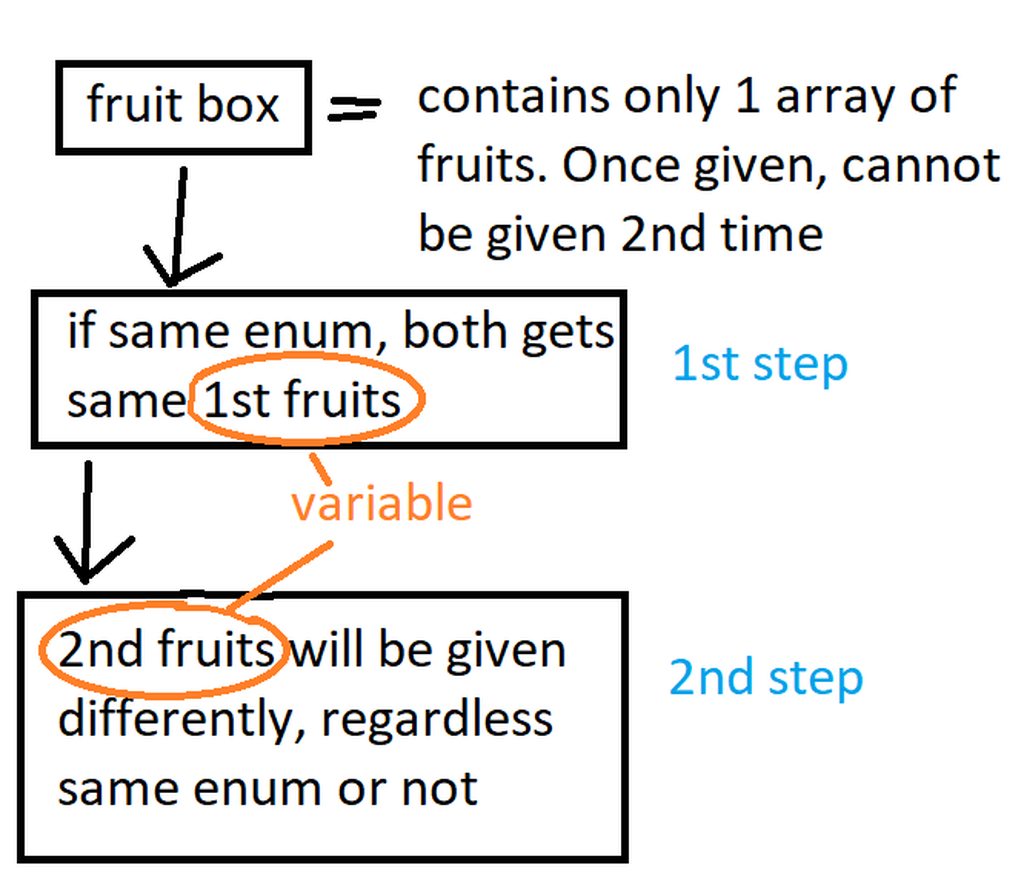
what i am trying to do ^, doesn't matter which step comes 1st
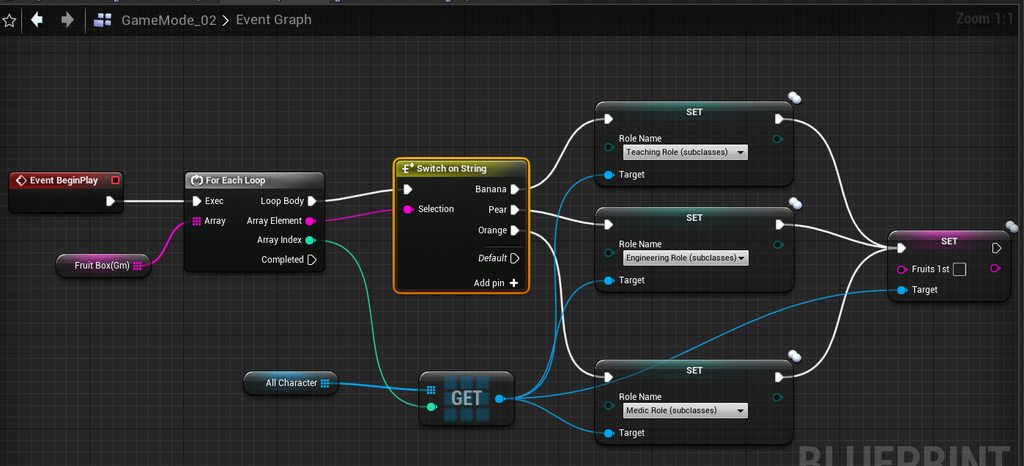
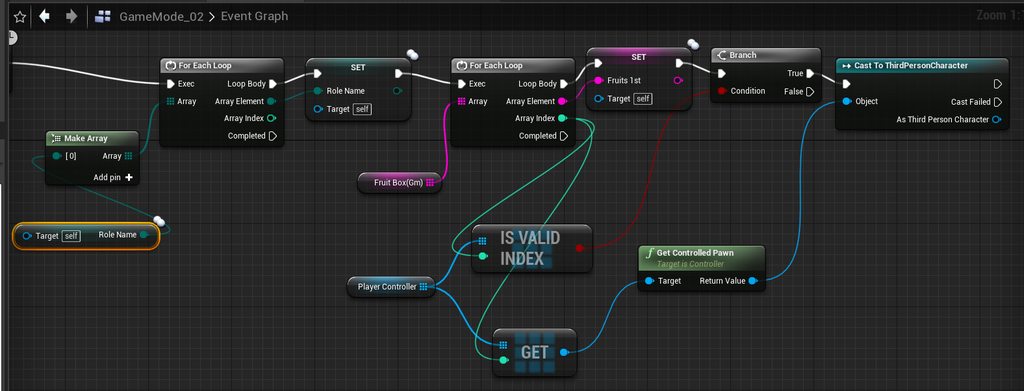
which one of the last 2 screen shots are correct or both are wrong?
ignore 2nd step, since that is easily be done. Only 1st step is what i am trying to do now
odd ember
I'll be the first to admit I have no clue what you're trying to do
odd ember
I can't imagine you trying to actually explain this game to a player down the line
timber cloak
no, this is not a game
it's a practice
i am trying to to give Strings to Enum value
the Enum value is Exposed on Spawn, and assigned to each player already
now, how to get* each Enum to get strings
woven wing
You probably want a map.
timber cloak
Map is not replicated
woven wing
Wait what?
timber cloak
struct can do this? but then again struct isn't really for random, right?
woven wing
What?
timber cloak
it is not replicated...
woven wing
In your explanation, you never mention replication or randomness.
timber cloak
map cannot be replicated*
tough halo
how many fruits in your box?
woven wing
What?
timber cloak
tough halo
how many fruits in your box?
10 fruits
tough halo
how many players do you have?
timber cloak
woven wing
In your explanation, you never mention replication or randomness.
i mentioned "already assigned to each player already"
tough halo
hahah
timber cloak
tough halo
how many players do you have?
10 fruits 5 players, easier for 2nd fruits to be given later on
tough halo
you only have one loop, when you get to the 6th fruit you are getting a player from your player array anymore
timber cloak
should i ask this to multiplayer channel?
tough halo
unless they are in there more than once
timber cloak
2nd fruits can be done with simple loop logic
odd ember
I think nobody really understands what you're trying to do
tough halo
I think it will be difficult to get help since your question is so confusing
timber cloak
i explained, which part confused?
odd ember
except dig yourself deeper into this rabbit hole of epic proportions
timber cloak
I said Enum is Exposed on Spawn, and is already assigned to all players
woven wing
So on spawn, a character is assigned a Class. You then want to assign them items, randomly, based on their class?
From a list?
timber cloak
Now, example "painter" enum in 2 players, they 2 (painter enum) get same 1st fruits
and as i said, ignore 2nd step/2nd fruits
fruit box is a String Array
odd ember
I think you're missing the logical thread here. like what does a painter have to do with fruit etc.
timber cloak
and already has 10 fruit variable in fruit box array
nothing... enum is just a name...
like i said this is NOT a GAME. This is to practice
woven wing
I'm also confused as to why "Role Name" is an enum.
timber cloak
Don't assume it is a game or else you get confused
woven wing
Because one thing enums aren't is Names.
odd ember
well it's all the same if we can't understand what you're trying to do
timber cloak
Role name = Painter, Dentist, Salesman, Chef etc (this is Enum)
odd ember
game or no game
woven wing
It is much easier to understand what someone is trying to do if we can get the metaphor.
timber cloak
fruit box (array of strings, containing Apple, Banana, Papaya, Mango etc)
1st fruit (string variable in thirdpersoncharacter class BP, is empty)
2nd fruit/2nd step = ignore
woven wing
What?
tough halo
he has a variable named 1st fruit in the player class
woven wing
OK, you have two lists:
- fruit names
- players
You want to assign a fruit to a player, right?
So if the first element of Fruit Names is "Apple" you want Player_1 to get "Apple"?
timber cloak
yes, all fruits data stored in the "fruit box" array
the "1st fruit" is string variable, empty and it is in "thirdpersoncharacter BP class"
"role name" is an enum (painter, chef, dentist etc)
is it still confusing?
woven wing
Yes.
odd ember
yes
woven wing
Very!
timber cloak
i will delete the paint editting
woven wing
Yeah - walk through this with us. You have your list of fruit names, and you have your list of players.
What do you want to happen to the players?
Do you want the players to get something from the list?
woven wing
I thought that too at first, but apparently not?
timber cloak
tough halo
every painter should get an apple and every chef should get a banana
no, they get random fruits from the fruit box array
woven wing
So... does the fruit make you a chef?
Like if you get given an apple, now you're a chef?
timber cloak
no, it does not make you anything
odd ember
if you get a mango do you become a dentist?
woven wing
OK, so how does the class matter then?
timber cloak
nope, fruit is just given, that's all
woven wing
Then why... did you mention the classes?
odd ember
so the roles mean nothing in relation to the fruit
woven wing
Why are the classes in your code?
timber cloak
roles* is also randomly assigned, that's all. No power no skill etc.
woven wing
So anyone, regardless of class, can be assigned any fruit?
timber cloak
woven wing
So anyone, regardless of class, can be assigned any fruit?
yes
woven wing
OK.
timber cloak
odd ember
so the roles mean nothing in relation to the fruit
yes
woven wing
So why did you mention the classes?
Are the classes relevant at all?
(what is happening?)
timber cloak
not relevant
woven wing
Aaaa
timber cloak
don't think of it as a game where people gain power/ability because they get a job/role
think of it as if you are doing homework
odd ember
well no apparently they don't even gain fruit
timber cloak
problem solving and learning
woven wing
So, to summarize:
- you have a list of fruit
- you have a list of actors
You want to assign one fruit to each actor?
Right?
timber cloak
to each "enum", rather than actor
timber cloak
same enum will get same fruits
odd ember
so all chefs DO get bananas
woven wing
Hehehehahahaha
timber cloak
yes, if a chef get BANANA, all chef gets banna. If chef gets Apple, all chef gets Apple
enum = a group of people etc.
woven wing
Whatever the outcome of this conversation, the skill you need to work on is not blueprints. It's communication.
timber cloak
i am so bad at programming and communication sigh
odd ember
just work on communication first
if you can't get your ideas across
then nobody can help you
it is by far the most important skill in game dev
in fact there's a role in game dev solely dedicated to it
timber cloak
can tell, i suck at explaining to people daily
woven wing
OK, so let's try this again:
- we have a list of fruit
- we have an enum of types of classes
- we have actors who have already been assigned a class
We want to go through the fruit, and assign each fruit to a class.
Then we want to go through the actors, and, if their class matches, we want to give them a fruit of that type.
Is this correct?
timber cloak
woven wing
OK, so let's try this again:
- we have a list of fruit
- we have an enum of typ...
correctt
odd ember
and it should spit out a replicated value
woven wing
So if we assign 'Apple' to 'Chef' we want to go through all our actors and say "Are you a chef? If so, have an apple."
Right?
timber cloak
woven wing
So if we assign 'Apple' to 'Chef' we want to go through all our actors and say "...
yes, but fruits are given randomly.
timber cloak
odd ember
because you just need to check it on the server
put in server it is replicated itsel?
odd ember
classes
woven wing
Because this is a two step process.
timber cloak
woven wing
Are they given to _actors_ randomly, or are they given to _classes_ randomly?
given to classes randomly.
odd ember
I'm starting to see the light
odd ember
for better or worse
but @woven wing's map suggestion was correct
it just needs to be implemented correctly
your game mode in this case will be your manager
timber cloak
there is no relation with role and fruit. Nothing is fixed. All randoms
odd ember
there is a relation
timber cloak
basically you keep randoming nonstop
odd ember
the relation is that all roles of the same type get the same fruit
that is still a relation
we spent 15 mins trying to figure that out
 stable lintel
can someone help me with the attach actor to actor node
dawn gazelle
stable lintel
it's killing me
timber cloak
yea i will try Datura's way
woven wing
stable lintel
can someone help me with the attach actor to actor node
Sure, what's your trouble?
stable lintel
alright may be a newbie problem
i have no idea whatsoever how to use it
but i want to attach a gun to the hand socket
stable lintel
yes
tough halo
stable lintel
OH god
i was using the component on the gun instead of the character
such a dumb mistake
tough halo
@timber cloak did you understand Daturas example?
timber cloak
tough halo
<@!192102567021379586> did you understand Daturas example?
yes, i understood he shuffle it to make it random. The enum element then is added into the map, the map gets fruit arrays. Straight forward though
the only thing is, i never know how to pass Map's info into ThirdPersonCharacter
odd ember
you dont
dawn gazelle
You shouldn't need to.
You can pass the key (your job enum) and the value (the fruit) into the ThirdPersonCharacter when you're spawning them.
odd ember
any time you want a player to get fruit, they will give the gamemode their role, and the gamemode will tell them what fruit they can have
or that, assuming they spawn with the fruit
at this point I'm not sure
timber cloak
but how do you check which is the fruit they get from the map data?
i have 2 string variables in my ThirdPersonCHaracter, called "1st fruit", and "2nd fruit". Both are string variable
dawn gazelle
You assign them a job first. However you do that is up to you, whether randomly or by their choice, however you want it to do it.
timber cloak
i assigned already
odd ember
cool
tough halo
loop your players, get the role, use it to get the fruit value from the map, and assign to the player
timber cloak
I assigned Enum already. Have 2 string variables made inside ThirdPersonCharacter class
odd ember
so now you can use GetGameMode and cast it
timber cloak
tough halo
loop your players, get the role, use it to get the fruit value from the map, and...
no, role is made and assigned*.
odd ember
then use the map inside of your game mode with your role and the Find function of the map
timber cloak
odd ember
so now you can use `GetGameMode` and cast it
ok done that long ago
tough halo
yeah, but you use it to get the correct fruit from the map that was made with daturas example
odd ember
so again, for the map, you put in role and out comes fruit
monkeys are celebrating across the globe
timber cloak
i am trying to digest. Wait, so the string variable in my ThirdPersonCharacter BP is not needed to store the fruit value from the fruit array (in GameMode)?
tough halo
You can save it there to have easy access, or you can keep the map and get the fruit whenever you need it from the map
timber cloak
if i would like to save it for easy access, how though?
woven wing
The one limitation is that you can only assign one fruit per role to the map.
So if you had say, 100 fruits and 5 roles, you would end up with a map of 5 roles to 5 fruits.
timber cloak
woven wing
The one limitation is that you can only assign one fruit per role to the map.
S...
correct
woven wing
Or... I suppose a maximum of 5 roles to 5 fruits.
You could roll really weird and somehow end up with say 1 role assigned fruits 100 times.
But that is Unlikely.
(it is, however, common enough that the utility of this scenario, already precariously bizarre to start with, becomes dubious in the extreme)
timber cloak
even 100 players with Chef enum, they only get 1 same fruit.
timber cloak
yup, that's what i am trying to learn about. Problem solving
tough halo
with daturas example each job gets a unique fruit, given that there is enough fruit, and no fruit is repeated in the fruit array
woven wing
Ah, that's true.
My bad.
But if the fruit array is longer than the jobs array, than some fruit will be 'lost'.
By being assigned over.
And if the jobs array is longer than the fruits array, then some jobs will get no fruit.
odd ember
you could have the array give out more fruit if more roles are in play
by comparing the arrays
tough halo
@timber cloak you want to loop through your players, then pass their role into the job-fruit map which will spit out the fruit for the given role, then convert it to string and set it in "1st fuit" in your player
odd ember
I think the big question is now
timber cloak
tough halo
<@!192102567021379586> you want to loop through your players, then pass their ro...
ok i am trying.
odd ember
what is "2nd fruit"
woven wing
what is "2nd fruit"
Says Cranz, uncorking the next can of worms.
tough halo
lets get the first one before we start with the second
odd ember
jumping into the rabbit hole no parachute
timber cloak
2nd fruit is the different fruit, regardless of enums, everyone gets it differently. Basically the generic for loop logic.
odd ember
you can handle that by having another map for the 2nd fruit then
timber cloak
so after the 1st fruit from the map, i remove index on the fruit array used for the map
tough halo
I came here to get help with my specific problem, but I'm glad I came, this is hilarious
odd ember
oh absolutely
timber cloak
wait i am doing the 1st one first
tough halo
basically it maps a job to a fruit
thats why it's called a map
it's a list that has painter=mango,chef=banana,hitman=orange
and so on
timber cloak
tough halo
basically it maps a job to a fruit
uh i see now. It is clearer. Thanks for the details. I never used map
tough halo
I have another question guys.. how are things working behind the scenes in a blueprint
if I press my secondary action I make a timer
odd ember
as we've just found out
tough halo
so if I press it twice I should get 2 timers right
odd ember
the timer is used even on the initial run
tough halo
or will there only be one timer since it's the same event
lets assume it's 2
now I have the timer return value hooked into clear and invalidate
odd ember
test it
tough halo
thats connected to another event
odd ember
you may have found a way to produce a dangling pointer
tough halo
I did test it, only one timer seems to be produced
but the question still stands
how does the blueprint stuff handle this
it's 2 separate events
I feel like I shouldnt be allowed to make a connection between
them
odd ember
you shouldn't
woven wing
Timers are weird.
odd ember
but the variable persists
for as long as the timer persists
I'd save it as a variable
and use calls on that variable
tough halo
yeah, thats why I have this question.. I made a variable in my "real" code
odd ember
it is saved by ref so you're technically just saving a pointer
tough halo
but if I start another timer, I overwrite the variable
woven wing
Yeah, the return values of a function are, like arguments, only valid immediately after they've been called.
tough halo
that code works tho
woven wing
If you want to keep them around, you have to store them yourself.
tough halo
even if it only makes one timer
odd ember
well like I said you may have found a way to produce a dangling pointer
try with the variable
tough halo
what are the blueprints anyway? do they get translated to cpp?
odd ember
they are wrappers for cpp yes
woven wing
No, they run in a virtual machine.
odd ember
well
tough halo
interesting
odd ember
they are technically very foiled in cpp, the VM is probably just removing their shell
otherwise stuff like nativization wouldn't exist
tough halo
so I assume it will be slower than if I made the same stuff in cpp?
odd ember
about 10x slower yes
woven wing
Yeah, but there aren't actually that many places where that speed increase is really gonna matter that much.
Your architecture is a lot more important than your language.
You can write really slow, really crap c++.
odd ember
where's that allar video

How to determine whether or not you should be using Blueprints or C++.
woven wing
Yep
tough halo
haha
odd ember
Allar used to be a mod in here, not sure he's still one
 still sigil
So does anyone know how to go about making a smooth music transition system? Like the level loads, and it starts playing an intro track, which starts up the level's music, then after that intro track ends, it smoothly goes into the "Main Loop" portion of the level music.
One would assume that all you would need to do to get this to work is to set a timer or a delay or something to the exact length of the intro track, so that when the delay ends, it then immediately starts playing the main loop. But I've done this, and it's extremely inconsistent. The main loop either plays a little bit after the intro track has ended, so there's like half a second of dead air, OR it'll play too early, and overlap with the intro track a bit before it truly finishes. SOMETIMES it'll play at the right time, but it's pretty rare.
I've tried a few different methods of going about this, but they all seem to give the same results. There doesn't seem to be any tutorials on the subject either on how to do this properly, so I'm kinda in the dark here.
tight schooner
@still sigil Timesynth. It's a little janky but it does work. I think 4.26 also added some similar stuff ("Quartz"?) but I haven't looked into it
Timing music-sync'ed audio with BP events sucks... I know cuz I've done it
If you have to do it with BP events, then you need to design your audio with fadeouts
so that the new clip can overlap the outgoing one a little
and prevent dead air
still sigil
It does! And it's weird, cause you'd think it wouldn't be. If you have access to all the numbers you need right there, you would assume that's all you'd need to time it right. But apparently not. 😛
tight schooner
BP only runs on each game frame
so it can't time things in between frames
That's the fundamental issue that Timesynth seeks to solve
If you have further questions about audio specifically, the #audio channel is good cuz Epic developers are there
Timesynth and Quartz are things that Dannthr worked on, iirc
still sigil
I'll have a looksie! Gotta update first though. The project I'm trying to get this to work on is running on an older version of UE4, so timesynth ain't even on there. Woops. 😛
 rough blade
I am working on a project that requires a player to be locked to a craft. To do this every tic i set their location and rotation to that of the craft. To move around the craft I have offsets that change according to input. I figured out movement but am stuck on looking around. In essence when the player wants to change their yaw (look left/right), the engine by default uses their world yaw when I need it to change with their yaw in relation to the craft. I currently store their desired yaw as a float but am unsure of how to convert this into a yaw relative to their craft. Help?
 bitter schooner
Any idea why newly created soft object references in 4.26 are not setable in the details panel anymore?
timber cloak
i am really really too stupid to figure out how to set the 1st fruit variable.
even after looking at documentations
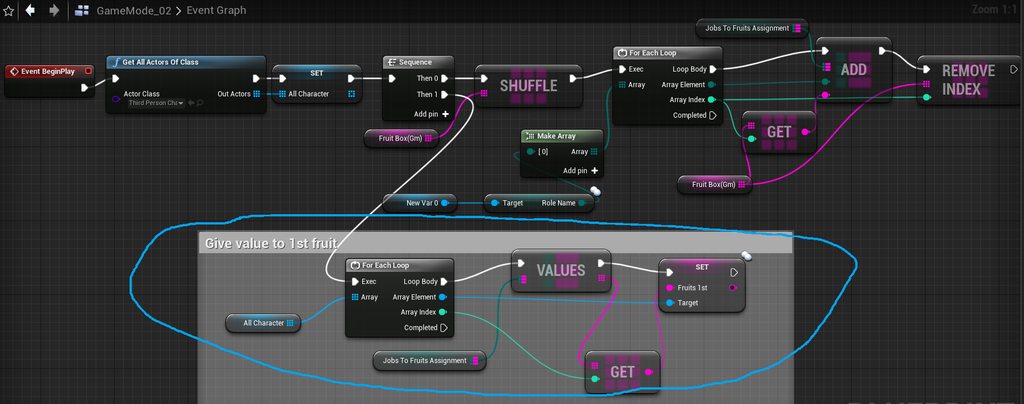
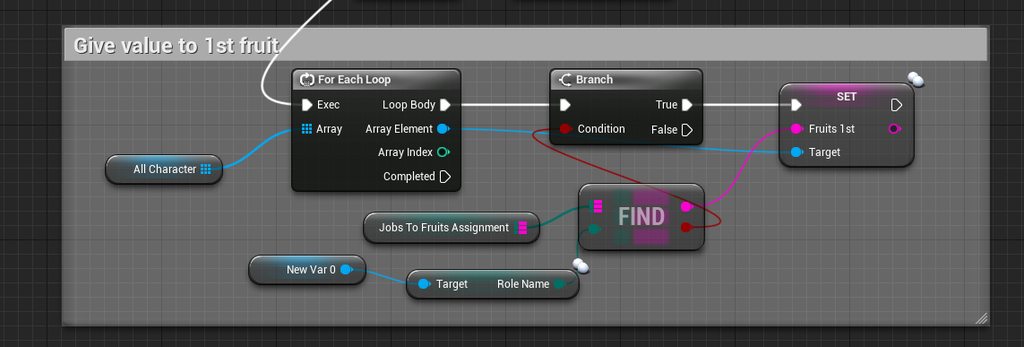
are both versions wrong? please correct me
dawn gazelle
The game mode begin play only fires once on the server, and it runs before you have everyone in the game. How you have it set up now it cannot find any players in the game, so no players would be assigned anything.
timber cloak
dawn gazelle
The game mode begin play only fires once on the server, and it runs before you h...
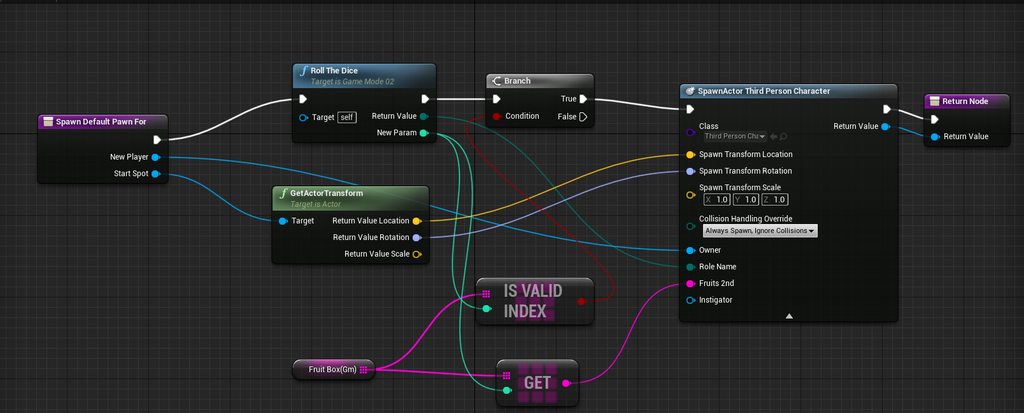
i set it up in override function
so it will spawn straight away
dawn gazelle
You're still not hearing what I'm saying.
This here will not get anything
So when you're running this
it's empty, so nothing happens in this loop
dawn gazelle
If you do, do not loop through the list of all characters each time someone logs in.
timber cloak
dawn gazelle
If you do, do not loop through the list of all characters each time someone logs...
um, so what do you suggest if not loop through the list of all characters?
sorry, i am too stupid to figure out
dawn gazelle
Ask yourself this - why do you need to iterate through all possible players when a new player is joining the game?
timber cloak
the other guy was suggesting to loop, which was why i tried that method
to give them the "1st fruit" string variable?
dawn gazelle
If player 1 joins the game, and he gets assigned the variable, does he need to get it assigned again when player 2 joins?
timber cloak
Nope. I see now
dawn gazelle
You should loop through an array of players if you need to do something to all of them, which you really shouldn't need to do when a player is joining a game normally.
You're only interested in setting up the new player that is joining with values.
timber cloak
but then this is just get the String from the map and Set it into the "1st fruit" string variable only, right?
i see
dawn gazelle
On the OnPostLogin event is when you should be assigning that player their job, their first fruit, and even their second fruit.
timber cloak
the loop is not assigning the Map value 2nd time, correct?
dawn gazelle
You shouldn't be looping at all really.
timber cloak
but instead, it is getting the value of the Map, right?
uh okay
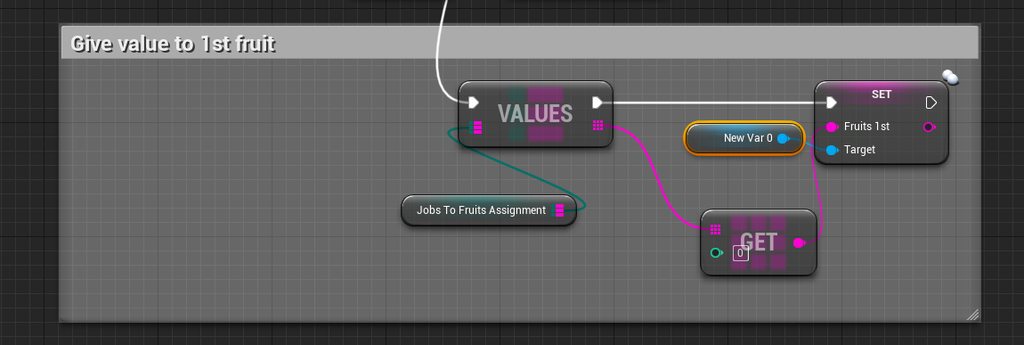
correct? please correct me on anything wrong
wait, the index, how would one do in this case?
it's 0 index
i mean the "get" node
dawn gazelle
Since your fruit that you want to give the player is based on their job, how are jobs assigned? Are they distributed randomly? Are you just assigning them out in order from an array somewhere?
timber cloak
the jobs are distributed randomly as shown earlier
wait
The "Roll the Dice" function
dawn gazelle
When is this function called and what does it contain?
timber cloak
hold on
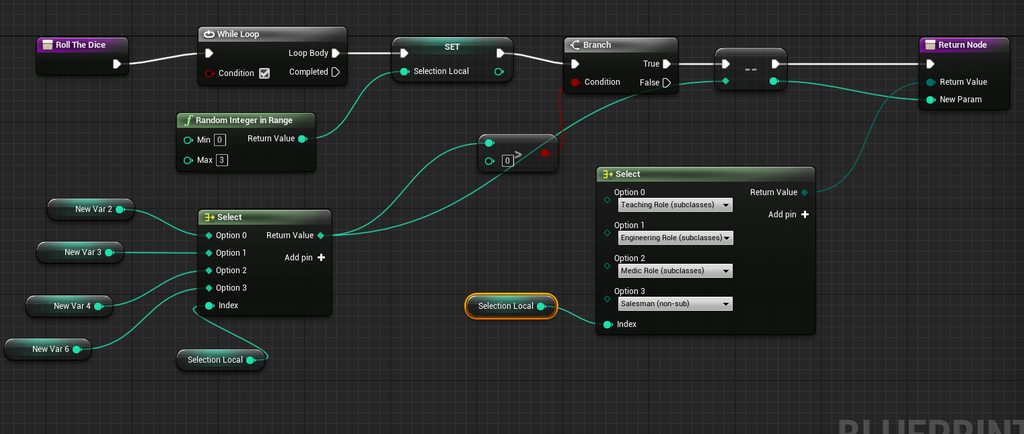
this is function
i print out the widget from the ThirdPersonCharacter for these enums in there
have enum done as well as the "2nd fruits" string.
only left the 1st fruit
was it wrong somewhere to set the "1st fruit" string in the screenshot? Please correct me
dawn gazelle
Where are you calling the "Spawn Default Pawn For" function?
timber cloak
at "Override" in function list
on your <<< left side
it's there in default
click "Override" the list will show you
dawn gazelle
ok, do you have your default pawn set to "None"?
timber cloak
yup i tried that earlier, same result
getting the string from "Values" node, is correct, right?
or is it wrong?
 dark crow
Is that a never ending While Loop?
timber cloak
i re-read from your message few hours ago, that's what i did
it ends
otherwise it will print out "infinite loop"
i am really really too stupid to figure anything out T_T
dark crow
I would never leave the loop condition always to true no matter what
It's probably not saying it's an infinite loop cause in theory that would be one way to use it if you want to run something during all game
Even if there's timers for that
dawn gazelle
Disconnect everything from the Begin Play on your game mode. Connect only the Shuffle for your fruit array.
Update your Spawn Default Pawn For to look like this.
dark crow
Can't you like plug the Branch condition in the Loop instead?
I feel like it's looping and just giving you False in the Branch After
timber cloak
dawn gazelle
done, no proper results
timber cloak
dark crow
Can't you like plug the Branch condition in the Loop instead?
which? The While Loop node to be removed?
then the decrement/increment node won't be moving
let me try
yup, you can't remove the While Loop, or else the Enum won't be working correctly.
 pine trellis
I need to send someone my project but its 32 GB large, is there a way to just send the basics? I need to just basically send 1 map and everything that map uses
dark crow
Completed would be the same as False in the Branch
And the loop would stop
But Completed instead runs once only, if you keep it always looping, the Branch False would always run cause the Loop never ends
While (Condition == True)
It loops
dawn gazelle
timber cloak
hold on
Not even sure what this is for..
timber cloak
yup, i just removed as per your instruction, cannot too. I even moved the While Loop in front as well, same result. fail to work
timber cloak
dawn gazelle
Not even sure what this is for..
these are integers to set the amount of "enum"
timber cloak
like I want 3 chef, so i make it 3 chef
timber cloak
yup, it minus the amount back to 0
that's why you see the > and a zero
once it zero, the loop ends
dawn gazelle
No, it subtracts the value from the select - it's not going to store the value back in the variable (like New Var 2 or New Var 4, etc.)
timber cloak
that's why it is not infinite
correct, if i put 3 chef, it substracts all the chef to 0
hence it is working correctly as i wanted
dawn gazelle
so what happens when only 2 players join the game?
timber cloak
it gives all 3 chefs to 2 players
i tested all situations, it worked correctly
so how do i get the 1st fruit from the map, please?
i guess somewhere went wrong T_T?
dark crow
Wait
That loop is in a Function right?
Yeah
Are you sure it's not running only once for some reason?
Just one loop
dawn gazelle
timber cloak
it gives all 3 chefs to 2 players
It's only ever running once
Since he has the return node there.
dawn gazelle
And it's always going to be > 0
dark crow
The return ends it
dawn gazelle
But, "he tested it, and it's working correctly".
Sorry, but I'm getting slightly annoyed.
dark crow
You would want a Macro for a Loop to work correctly
timber cloak
yup, i am not even sure of other results anymore. If i put the number lower like 3 chef and 2 painter. Then it's 6 players total, the 6th player gets nothing
unless the Branch's false comes with ++ increment node, 6th player can get the 2nd result
dark crow
Remember that functions with return flow once
Transfer your code to a Macro and use this
 timber cloak
this is basically i Override the default function that exists inside the engine
dark crow
Or you get infinite loop indeed
timber cloak
so make a macro and put that in that overriden function?
dark crow
Just transfer the entire code of that Function into a Macro that does the same thing
Basically just a copy and paste but it's stored in a Macro instead of Function
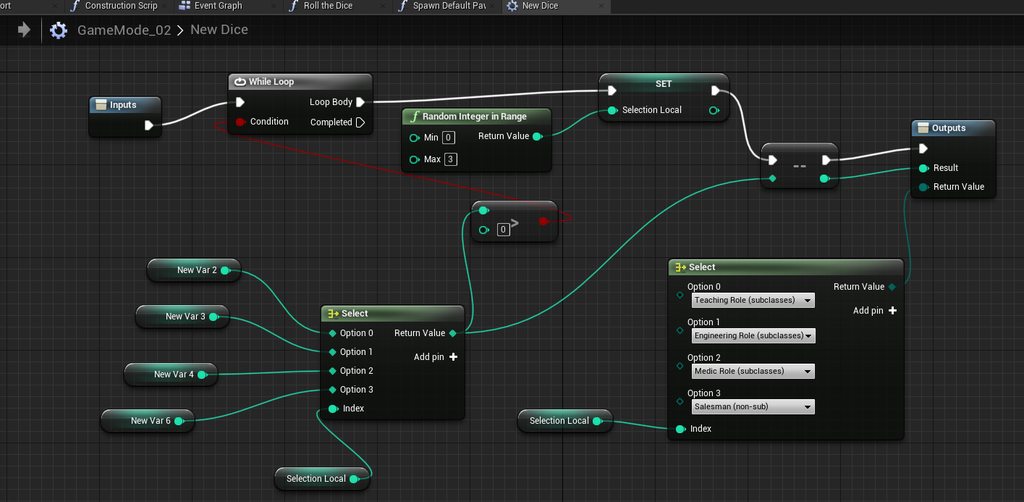
 dawn gazelle
dark crow
dawn gazelle
dark crow
Should be clear, just remember that Macros can't have Local Variables like Functions
dawn gazelle
timber cloak
dark crow
no character loads up after using macro. Even it is "None" or "thirdpersoncharacter" in worldsetting
dawn gazelle
Yes, but not the way you've done it. If you follow the last screenshots I've done it works. Just make sure your assigned job and fruit variables are set to replicated on the character.
 icy saddle
Is there an equivalent of UWorld::ServerTravel in BP?
timber cloak
let me check and deleting the 2nd fruits for now
royal rain
i know my questions are very boring to answer but i have gone through an entire page of google search results to not get any help on my situation, i just want the camera to rotate with the ball, all the stuff ive googled is otu of date
dark crow
icy saddle
Is there an equivalent of UWorld::ServerTravel in BP?
Execute Console Command
ServerTravel Level
dark crow
royal rain
i know my questions are very boring to answer but i have gone through an entire...
You mean the camera to follow the Ball rotation 1:1?
dawn gazelle
timber cloak
let me check and deleting the 2nd fruits for now
my roll the dice will randomly select a job, and then keep track of the jobs taken as well and reroll if there's more than what is required.
royal rain
idk i you know how the ball game pre fab has a locked camera, i want it so the camera can turn left and right when the ball turns left and right
and yeah not have it go ham when it bumbs into something
which i got once
dark crow
just Attach the camera to the ball?
royal rain
there is one
dark crow
And have it on Relative Rotation?
royal rain
its locked in the spring arm or something
timber cloak
i got results too but the thing is, only the first enum's will be able to print out result, the rest other enum will not print fruits (only blank)
uh let me see your screenshots first
royal rain
look it might seem really simple but ive been on and off of this all day I don't know where to start
dark crow
So lemme get it right a sec, you have ball, ball rotates, the camera follows the ball but doesn't rotate with it, you want the camera to rotate with it?
royal rain
yes, i got it to kinda work once really terriblely where it would shutter at any impact and it was at a bad angle
so like the ball is like a car
it would move in its direction
but its a ball
dawn gazelle
@timber cloak Sorry, one correction for the roll the dice function, it should be last index here, not length
dark crow
I mean, it can be done multiple ways, the most primitive one being attaching the Spring Arm to the ball, Rotation of Springarm to Relative then use the Inherit options in Camera Settings to X Y Z limiations
But depending on how your ball rotates the result can vary
royal rain
that might not work
becuase the balls rotation can be
special
maybe more like whenever the ball is sensed to turn left or right it moves the camera
there are many ways i saw it done on google but a lot were out of date
or i couldnt find what nodes
or it had things happen that werent good
timber cloak
wait, i am too slow
how do you make the job count variable? i was sure i could make it
dark crow
Well, in theory Direction is the Velocity
dawn gazelle
timber cloak
how do you make the job count variable? i was sure i could make it
Make it a map of jobs to integers in the game mode.
timber cloak
dawn gazelle
Make it a map of jobs to integers in the game mode.
something new, right?
dawn gazelle
A new variable, yes
royal rain
so idk what to do
dark crow
Well
There's a very stupid way for it to work based on the Velocity Axis
If you're working with a Pawn you can test it in this way
Very ugly, but will rotate towards the Velocity o the Z Axis aka Left and Right
timber cloak
dawn gazelle
A new variable, yes
could i see it, please? As of now i am only assuming another for loop job integer to job enum and lastly, add* to map?
dark crow
Not sure what system you're going it, but for a top down view this works even if it would need some polish
Like a smoothing of it, or it snaps
dawn gazelle
timber cloak
could i see it, please? As of now i am only assuming another for loop job integ...
You can just have it set with default values.
timber cloak
i am trying to figure out why infinite loop is happening
timber cloak
dawn gazelle
You can just have it set with default values.
also, this part i only can click the "+" once only
royal rain
sorry just looked at it
why is it ugly
also the set world rotation doesnt work with floats idk how to get it to accpect a float
timber cloak
dawn gazelle
You can just have it set with default values.
how are you able to make 3 Map elements with the "+" icon?
dark crow
Right click on the Rotator and Break it
timber cloak
"Cannot add new to the map while a key with default value exist"
royal rain
i didnt know that was a thing
 rapid token
What is the best/easiest ways to make destruction physics?
dark crow
If you drag a rotator and search break from the pin it will break it
Same as Split but may be more pleasant to the eye
Instead if they receive inputs it's Make
Break Rotator / Make Rotator
For example
royal rain
im sorry that isnt going to work, kinda makes the controlls unplayable
i did it but like if i bumb into anything it breaks the game
royal rain
i have it set up right out of the box from the ball game pre fab
thats what i said, though i forget if i said it now
its been a long day
dark crow
Same here, kinda braindead and never actually tested the ball game pre fab myself
Lemme think of something
royal rain
ah
i did kinda get the ball game to control more smoothly though the controls where almost there and i was able to make it so it turns at a nice drift
might need to head to bed though its a busy day tommarrow
i hope it wont take as long tommarow to get some help
dark crow
Will try to help more tomorrow in case, need to get to bed myself too, destroyed my sleep schedule :'D
timber cloak
@dawn gazelle got it working, but do you happen to have your server's only screen not printing anything? The rest of screen worked, only server's screen prints blank
dawn gazelle
timber cloak
<@!218956378654507008> got it working, but do you happen to have your server's o...
Seems like SpawnDefaultPawn doesn't call on listen server.
timber cloak
dawn gazelle
Seems like SpawnDefaultPawn doesn't call on listen server.
but earlier the one with original failed function manage to call server
but that function only worked for single enum, the rest enum is printing blanks
i think might as well not to use SpawnDefaultPawn?
also, been figuring out, how to set an amount for Enum using your function? The job count isn't really accurate in number when set in it
timber cloak
dawn gazelle
Seems like SpawnDefaultPawn doesn't call on listen server.
um, the enum and 2nd fruit is being called on listen server.
 hollow drift
Hi folks, i have a math challenge:
I have to use addrelativerotation since the object has been turned with a script in its right place
problem is, that using add with an animation will add every gametick the current value from the timeline to the rotation. So if i set from 0 to 1 a increas to 1 value, it will add each game tick something like:
my value on 2 seconds is 0,1
is there some way to calculate such animation. some math concepts or so i could read about? Best practice? Anything then just trial and error for ethernity
 earnest tangle
maybe you can save the current rotation before starting the timeline, and then use saved rotation + value from timeline with set rotation instead of add rotation
hollow drift
hmm i see
good idea
programmer problems be like: here is a easier solution instead of fixing something. Love it^^
earnest tangle
lol yeah that's how it often goes
 steady orbit
Trying to great a click and drag movement system on X and Y for my top down game.
I'm using a basic pawn class and i have wasd working perfectly. Just cant get this to work?
hollow drift
@steady orbit it will be about that large at the end lol
and here are example scripts:
https://answers.unrealengine.com/questions/955645/i-want-to-create-a-game-similar-to-sea-battle-2-ho.html
Paper 2D is a sprite-based system for creating 2D and 2D/3D hybrid games entirely within Unreal Engine 4.
the answer.unrealengine should give you already a good idea how to start
if ended up understanding and reworking the whole code from scratch
steady orbit
Nah, i dont want to drag and drop items, i want to simply pan around my map by clicking and dragging anywhere.
steady orbit
Yeahhhh
steady orbit
Im making a top down like Europa Universalis
hollow drift
why not use same principal but instead of picking up you just move camera?
steady orbit
I dont even know at this point
hollow drift
like just a character
hollow drift
i can give a second thought shure
just be aware, i still have not done stuff with camera in my project
i wonder how to call it too, or just drop ...
lets try
 hollow cape
a way to debug that would be to turn off the draw debug on the second trace, then add a debug of some kind off the false of the first branch, since that's where the failure is happening
you can do a draw debug line, sphere, whatever off the false, using the data that was used to create the first linetrace, so you can visualize exactly how it's failing
@swift pewter
how do you know. The only thing that would cause you not to see the trace, and not have it "fire" would be the false branch after the first trace
put a print string at minimum off that and see if you get the false firing
so the actual input isn't firing?
again, the only way the second trace wouldn't fire is for the branch to be false. So that means it IS firing, but the start/end vectors might be not what you're expecting or something along those lines
Let me be clear so we're not talking in circles. There are 2 possible outcomes of the MulticastFire Event. The first trace will always fire. Then either is True, and the second trace fires, or it's false and nothing happens
What I'm understanding from you is that you're saying sometimes the first trace fires but the second trace does not
the ONLY way that can happen, is if the first trace returns false
So what you're trying to debug is why the first trace is returning false when you don't think it should be
so my recommendation is to draw a debug line with a different color (green, blue, purple, something else) off the false branch, using the start/end of the first trace
so that IF it's false, you get to see what the trace actually was
right now, you can't see your first trace, so you have no way to visualize what it's doing
which means that it was true, and fired the second trace
you haven't shown what's happening off the second trace, so I can't comment on that. But my guess is the second trace is then failing, and theres nothing off the false branch
also I have no idea what the orientation/position of the "sphere" is that you're using at the start point of the second trace
right, so that second trace is failing and you have nothing to debug that off the false
take what I said about a debug line, and apply it here, off the second branch's false, draw a debug line using the start/end of the second trace so you can see what's happening when it's returning false.
I noticed your rifle model is also flopping around in the breeze, as there is no animation to hold it up. This may be the issue
eh I take that back, just watched it again
maiden wadi
@swift pewter It's because of your second trace. It has to go past the wall, not up to the wall.
maiden wadi
The first trace should get you a point in space from your camera. The second trace should be from the weapon PAST that point.
hollow cape
you are using the trace end of the first trace as the end point of the second trace