#blueprint
402296 messages · Page 584 of 403
 hollow cape
yeah it should work, that's the way you would do it. When you refactor, think about getting rid of the Get All Actors Of Class
 pine trellis
yes it works now I had reset the bp on the level, one last question is this method expensive?
 odd ember
when you refactor
that's some positivist thinking right there
pine trellis
I read online saying that get all actors off class is expensive and should only be used in begin play
odd ember
it should never be used
hollow cape
If at all. I have 0 shipping code that uses it
odd ember
the fact that it is expensive doesn't really matter
 rough jay
what should you use instead
odd ember
it's the fact that it creates hacky scenarios that trip you up further along the way
hollow cape
The blueprint communication vid pinned here explains other ways to handle this type of thing
pine trellis
well alot of stuff on the market places uses it
hollow cape
Doesn't mean it's right
odd ember
lmao
hollow cape
you should strive to get rid of it in general
hollow cape
Every time I've tried to implement a system off the MP, I end up scrapping it. Never works out
pine trellis
well how else can someone learn, I learned from looking at code off the marketplace
odd ember
that's bad
pine trellis
some people even helped me and showed me stuff so its not that bad
odd ember
it is bad
hollow cape
@deft hawk have you verified there aren't additional debug spheres maybe inside the pillar? You have no conditions as to when the endoverlap should be called (as in, end overlap with specific actors), so there could be more
odd ember
it's the blind leading the blind
hollow cape
It does at minimum give you an idea of HOW systems can be assembled. Might not be correct, but it is a way to learn. Not the greatest, but it is a way.
odd ember
pine trellis
well how else can someone learn, I learned from looking at code off the marketpl...
and you could for instance look at the blueprint communication tutorial that is pinned in this very channel and that I asked you to take a look at yesterday
that's how people learn
hollow cape
100% on that. There are some fantastic resources here
pine trellis
where is it pinned
odd ember
in this channel
pine trellis
oh I see it
 deft hawk
@hollow cape There are no extra spheres inside the wall (used wireframe view to confirm)
odd ember
@deft hawk have you debugged it?
deft hawk
Sorry don't understand what you're asking
odd ember
okay let's try like this
get a print string node
and put it where it says Other Comp
 chrome orchid
hey how would i make a type of player grabbing system like the game gang beasts im not sure what component to use to connect the 2 players
deft hawk
@odd ember Yea it's printing the name of the component it's ending overlap with
deft hawk
Yes
But it's returning a different end location every time
It's intended to draw the green sphere at the location where it ended overlap
ie. the other side of the wall
hollow cape
is this using projectile movement component? traces?
deft hawk
Projectile Movement
hollow cape
what's your velocity set to
deft hawk
3000
Pretty sure it's just the simulation being inaccurate because of speed, but then how can it detect the begin overlap location perfectly every time.
hollow cape
you could trace backwards on end overlap theoretically to find the exact other side of the object.
would be hard to account for gravity however
deft hawk
I tried that already but it was returning the same inconsistent results. Green circle was getting drawn inside the wall
at various locations
hollow cape
is this object a standard cube that's just scaled?
hollow cape
just to verify do alt+c and make sure it's not an issue with the collision
hollow cape
eh I've never had issues with scaled meshes.... I think it's a substepping issue with projectile movement
deft hawk
Yea, un-scaling it had no effect. I wonder if it's just the delay from the end overlap event to the DrawDebugSphere
odd ember
I've seen scaling issues before so if nothing else using box extents is playing it safe
hollow cape
no kidding? there ya go
deft hawk
What is a box extent?
hollow cape
That doesn't help here though, as he's just using the end overlap event
deft hawk
I also thought it was a sub-stepping issue, but I maxed out all the values and it didn't change anything
odd ember
did you tick the box for ccd?
deft hawk
I don't think so, where is that?
 muted dawn
hey are there any good tutorials for physics based shooting. the bullets are tracers?
odd ember
sounds like a question for google
muted dawn
oof
alright
i will try at 8am
im trying to replicate something like insurgency's weapon system
almost minimal hud
 rapid token
How could I make it so if a player stands in a collision, it will repeatedly execute an int + int node then when the player stands out of the collision, it stops. This is all I have right now..
Im guessing I need to use While Loops, I just dont know how to use em..
 pseudo heron
The while loop doesn't seem too hard
From what I can see and from what I know from lua,
The loop body is what you want to loop and the condition is basically yes or no if you want it looped, and completed im assuming is used after the loop is done, though I've never used it so, I'll go head and try.
pseudo heron
Not quite sure.
Usually in lua you'd simply turn off/ change the bool to false and it stops, Assuming this isn't the same it works different, to which I have to test.
pseudo heron
That would make the most sense, it runs solely on if the bool is true
rapid token
Or am I not understanding the meaning of Infinite loop
pseudo heron
if its false it'll instantly turn off
rapid token
pseudo heron
if its false it'll instantly turn off
Yep, I made it so if you enter the collision, the loop will start then when you leave, the loop will end
pseudo heron
in lua it'd be (note: its a coding language)
while true do
print("Test")
end
Of course this would crash you, to which if you wanted to do something until it was off you'd probably instead result to repeat
repeat
print("test")
until boolorwhatever == false
Yep, I learned a bit of lua years ago
pseudo heron
Whats the details of y our bool?
muted dawn
doesn't cryengine use lua?
rapid token
The default is False
pseudo heron
Probably, most games use lua as its easy to code with, pretty sure GTA used it for mods and Saints row used it to make the game
rapid token
When I go into the Collison, the Play Viewport crashes and I get the error that its an infinite loop
 tight schooner
@rapid token a "while" loop doesn't occur over time. You're asking the machine to loop infinitely in one frame until the condition changes (which is never unless something in the loop itself changes the condition)
if you want to repeatedly check something over time, use a looping timer (Set Timer By Event node) or tick
pseudo heron
^
rapid token
Im confused..
tight schooner
the loop never changes the condition, therefore the frame hangs
pseudo heron
or whatever that means
rapid token
But when the player leaves the collision, the condition changes?
pseudo heron
It doesn't register that until they actually leave
Try adding a delay
anywhere in the loop
should work
tight schooner
delays don't work in loops
pseudo heron
wack
tight schooner
if you want a loop that occurs over time, you need a looping timer
I don't know what you're trying to achieve, but... maybe you just want a branch node?
condition --> branch --> your two prints
pseudo heron
They want something to happen while its in the box
once you leave it stops happening
for example, while in a box apples spawn, while out of it nothing happens
muted dawn
btw how can i add weight do certain guns and attachments suck as scope
google gives me wack
tight schooner
@rapid token I scrolled and read what you're trying to do. You need to use a node called "Set timer by event". You attach the red wire on that node to a new custom event. You also set the event to loop.
pseudo heron
That I cant answer because me myself am new to unreal engine, ish
rapid token
WhY DoES WhiLE LoOPs NeeD tO BE sO DiFFicUlT
pseudo heron
good question
tight schooner
This will cause an event to repeat over time (your int + int, or w/e)
muted dawn
set timer by event is the way to go
rapid token
They could have made it more simple tho
pseudo heron
That makes sense
tight schooner
On collision end, you can Clear Timer by Function Name, or however you want to clear the timer (there are a few ways to do it).
rapid token
Let me try what you said
pseudo heron
on the topic of repeats, Is there a way to make something repeat until something else is a certain value, pretty vague but for example,
Repeatedly subtracting player max walkspeed until it reaches 190 or something
tight schooner
@pseudo heron If you want it to happen all at once, like keep doing math until output = X then you can do a while loop, or a "loop with break". If you want it to happen over time, you need to make some event or function, and use a looping Set Timer node to put it on a periodic repeat
pseudo heron
Mmm I can try that
rapid token
How is the BP supposed to look? Because I cant get it to work 😂
odd ember
rapid token
use a timer, not a loop
rapid token
How should the Blueprint look?
odd ember
like the image you posted
except you start a timer
instead of a loop
and get rid of the boolean
tight schooner
odd ember
yeah that ^
odd ember
the time is 0
rapid token
Um alright.
rapid token
Oh, alright.
odd ember
timers are framerate independent though
rapid token
Ah
 orchid osprey
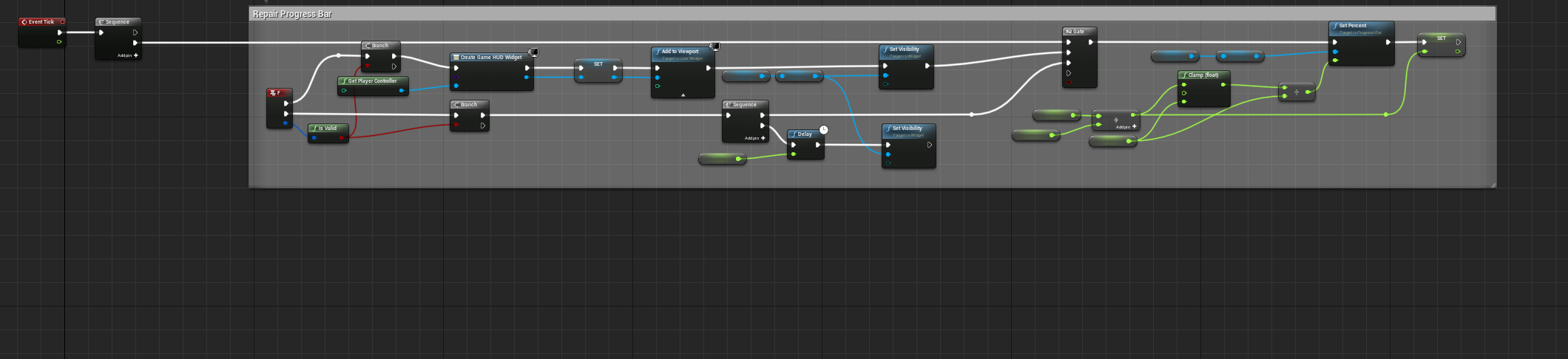
I m quite new to BP and i m trying to make a progress bar where you hold F and it feels the progress bar but its not working always right
What i m doing wrong and can i make it without tick ?
https://i.imgur.com/UC1DTO8.png
 pseudo heron
How about
Hm
Probably should just
Put the tick/loop/whatever into the actual part when you press F
and change from tick to loop so you have more control
Tick from what I remember doesn't give a shit about what you want and will keep going on
and i gtg great
cao
orchid osprey
What do you mean by in the actual part ?
orchid osprey
cao thx anyway 🙂
odd ember
pseudo heron
and change from tick to loop so you have more control
loops are near instant and don't offer the same time stepping as something like a timer or event tick does
orchid osprey
idk what he meant so i m still stuck 😦
odd ember
you shouldn't use event tick like that. use a timer that increments a value over time
orchid osprey
found out my problem its the delay
odd ember
e.g. when you press F you start the timer, when you release F the timer stops/resets
orchid osprey
yes everything works but when i add delay to my widget visibility it is not working right
odd ember
then... don't?
orchid osprey
i want to not vanish instantly when you release F key
i want to be able to see the progres for 1-2 sec
odd ember
well like I said use a timer and you'll have more control
or don't and live without the delay
up to you
orchid osprey
will this the same setup work with timer
odd ember
you will have to change your setup slightly to accommodate for the timer
it replaces the tick functionality
orchid osprey
so i just need to change the tick nothing else ?
odd ember
.... no
orchid osprey
lol
odd ember
I said it replaces the function of the tick
orchid osprey
ok i will search bit more on google 🙂
odd ember
yes pls
rapid token
@odd ember Hey, for some reason the loop is continuing after I leave the collision. Im pretty sure it was working before, I dont know why it isnt now
odd ember
rapid token
<@!224571781862653952> Hey, for some reason the loop is continuing after I leave...
you have to turn it off manually
rapid token
What?
odd ember
there is a handle at the other end of the node
odd ember
no
rapid token
Lol
 dawn gazelle
You have the timer set to looping. It will always fire one activated. Promote the return value on the timer to a variable, and then on the "EndOverlap" event clear and invalidate the timer.
odd ember
there you go
rapid token
Thank you.
dawn gazelle
I know in my example there it shows ActorEndOverlap, but you should have ComponentEndOverlap or something 😛
rapid token
It works, thank you! 🙂
 trim matrix
I feel like this is easy but I can't figure it out
Anyone know how to reset jump animation in the air?
rapid token
I have not messed with animations yet so im not sure, sorry.
trim matrix
Nah there should be a blueprint code for this
odd ember
well you're wrong
odd ember
#animation is where you should ask your question
trim matrix
There are multiple places I can ask this question
 timber cloak
he is right, since animation is better place for that question
because not everyone in BP knows what's animation about
odd ember
trim matrix
There are multiple places I can ask this question
you ask once, in one channel as per #old-rules
trim matrix
odd ember
you ask once, in one channel as per <#435394527965085706>
And I only asked once, in this channel.
odd ember
and I am telling you that #animation is the correct channel
so perhaps instead of arguing
trim matrix
And I am telling you There's multiple places I can ask it.
odd ember
you could delete your question here and ask there instead
instead of insisting on getting blood from a stone
timber cloak
lol, reminds me of an item called BloodStone in Dota.
trim matrix
odd ember
instead of insisting on getting blood from a stone
If you can't answer the question don't respond to it. It's that simple
odd ember
I did answer the question
trim matrix
blocked
odd ember
there isn't a way to do this in BP
timber cloak
what's quickest way to identify which character gets a String type Variable? not Print String, please.
odd ember
timber cloak
what's quickest way to identify which character gets a String type Variable? not...
how do you mean?
timber cloak
odd ember
how do you mean?
yup, like how, please
odd ember
no I mean I didn't get your question
timber cloak
uh sorry
here's the thing, i already set up an enum for all characters (like previously we talked about), now i want to give "String" type of variable to each enum variable.
so, i want to see the results of what is being made
dawn gazelle
Perhaps something like this, but with your specific enum is what you're trying to accomplish?
timber cloak
I will be more specific, sorry.
dawn gazelle
so you can set a variable based on what enum was selected?
timber cloak
i am storing an array of strings. Example, my Enum is called "job", and my string is called "1st fruits" and "2nd fruits". What I am trying to do is, each enum gets the same "1st fruits", and then the same each gets different "2nd fruits".
The reason it is being an array of String is because, once any of the fruits being delivered, no one can get it second time.
odd ember
I still have no idea what you're trying to do honestly
timber cloak
it is kind of "guessing" which fruits you have.
odd ember
like you want to use an enum just once it sounds like
timber cloak
enum already settled.
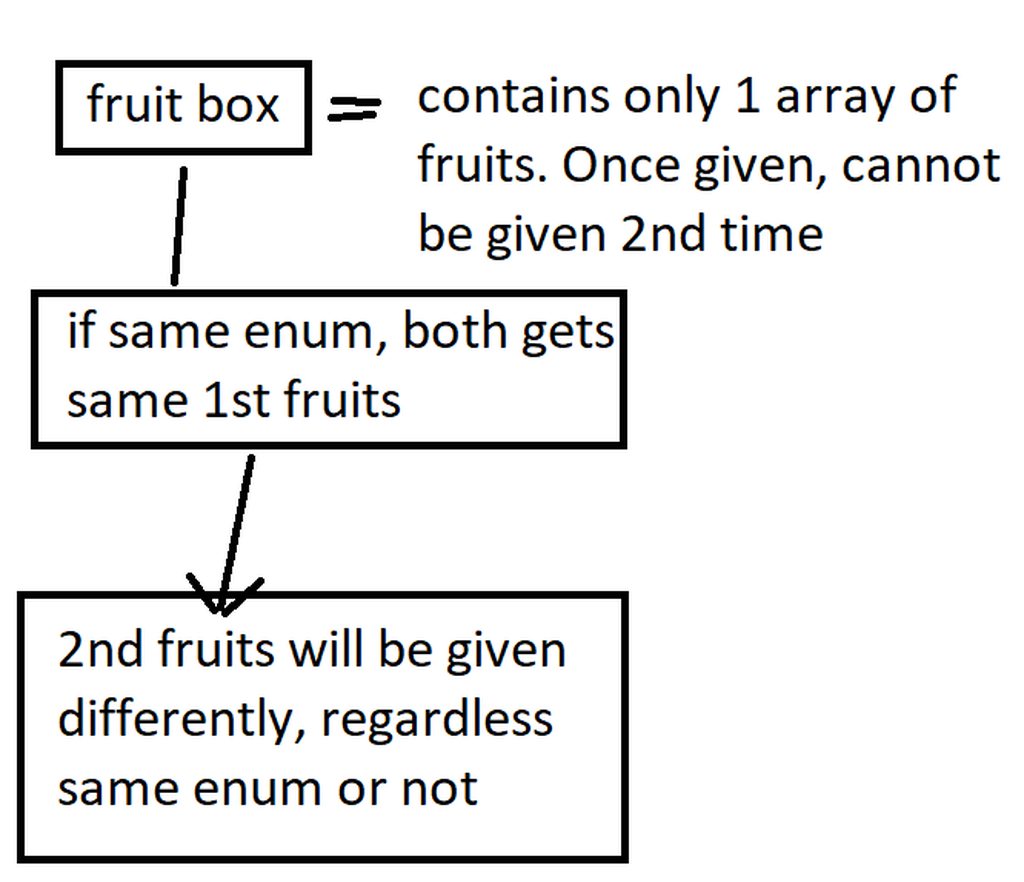
is it confusing?
the 2nd fruit is easy, once you use "remove index" after 1st fruit
timber cloak
odd ember
like you want to use an enum just once it sounds like
well, i am thinking of array due to removing the 1st fruit.
so, how do i check which player gets which string type variable?
not Print string
dawn gazelle
So you're already assigning an array of strings to the player, correct?
or just a single string of a specific fruit?
timber cloak
yes, correct
um wait, this is actually run on game mode, since game mode decides who to give.
player has 0 choice
gamemode will randomly loop through to give them.
so the string stays with GameMode only, unless i am mistaken.
dawn gazelle
You are the one in control of where variables are being stored. If all you've done is created an enum with a list of jobs, and a couple of arrays with strings in them, you're still a ways away from assigning a player any fruit.
timber cloak
Enum variable for player's job is assigned. And yes, fruit array is made too
dawn gazelle
Ok, where are you assigning that job? Which blueprint are you storing the variable for the player?
timber cloak
just need a way to see whether my "assigned fruits" BP code are given properly. Need a way to debug/see the result.
i assigned the job in ThirdPersonCharacter class, exposed on spawn.
dawn gazelle
ok cool
timber cloak
so how to debug/see the fruit String results? Just would like to know whether i am doing it correctly or wrongly.
dawn gazelle
Ok... I think I get what you're saying... You want to see what is in the player's inventory.
Why doesn't print string work for you tho?
You want a widget or something displayed on screen?
timber cloak
the way i did was, before that "for each loop", i have another "for each loop" on enum array.
print string can't see directly on what/which players has which fruit.
"for each loop" on enum job -> wire to "for each loop" on string fruit. I think i am doing it wrongly maybe.
which is why need to see/debug.
timber cloak
dawn gazelle
You want a widget or something displayed on screen?
yeah anything will do.
dawn gazelle
This is a multiplayer game I take it?
timber cloak
dawn gazelle
This is a multiplayer game I take it?
yup, nothing serious. Only to learn the ropes of blueprint and understand something new
no need to be accurately replicated, just simply multicast will do
dawn gazelle
On the ThirdPersonCharacter blueprint, you can do something like this, assuming again you've stored the fruit in an array on the ThirdPersonCharacter blueprint. Each client you can press page up on and then it'll display their own specific array of fruits.
This should be sufficient for checking whether or not your players are getting the appropriate fruit.
 idle gust
Regarding the gameplay ability system, I'm trying to figure out how to execute code on the simulated proxy. But no matter what I try, I can only get code to execute on the auto proxy and the server. I'm currently working in the event graph of a UGameplayAbility
Can anyone give me a suggestion on how I can get a sim proxy to execute code on an auto proxy gameplay ability activation?
 snow halo
hmm weird brain fart
is there any way to do a validated get in bp on an array to get a ref to an element?
if that index is out of the array size i don't wanna mess with it obvs
hollow cape
is valid index
snow halo
but that just returns a bool and the get would still run since it's "pure"
so i'd get some kind of null error out of size
i'm trying to avoid even trying to get if the index doesn't exist in the array
snow halo
im ok with a branch!
i just wanna make sure GET doesn't try and get at all if the index doesn't exist in the array
in this hypothetical example, the get i assume would still return a null error
even though i'm not doing anything with the element because of the branch
hollow cape
that wouldn't return null
snow halo
am i wrong?
snow halo
hmm ok i thought because the get doesn't have an exec input it would run regardless of the branch
ya i just plug 100000000 into the get
and see what happens?
hehe
hollow cape
make sure whatever number you hardcode into the get to test, you put the same number into the is valid index
snow halo
precis
yup
ya no errors so i guess i'll move on, but always trying to be careful of null errors clogging things up
hollow cape
yep
tight schooner
@snow halo kind of an academic point but you can also do a length check. If array length isn't greater than whatever... etc
but I haven't had problems with Is Valid Index
snow halo
ah nice one!
sweet ya. I actually just opted to switch to a map so i can avoid the issue all-together since Find has a check built in
think it's a win win as long as maps are ok with having thousands of pairs : /
int - struct
tight schooner
I've yet to play with those...
I suppose my game doesn't have an inventory system or anything
snow halo
think if you know you don't need to iterate something sequentially (might as well use an array then) they're a great option
v useful for picking things out without concern of re-ordering etc
 mortal nacelle
Regarding blueprint replicated array of a struct. Is it possible to have a race condition between the OnRep callback and the data being fully replicated?
I have an array of inventory item structs. When I get the OnRep callback and then read a certain field, I’m always getting the default value instead of the item’s correct value
I’m looking at the field in the editor during runtime, it’s showing the value is replicating correctly. So I wonder if this is a race condition?
What’s strange is that only one specific field is having the issue (item size). The item icon is replicating correctly every time.
muted dawn
Hi, I need help adding a delay to my stamina regeneration from when i release my button does anyone know how to do this?
adding a delay doesnt work it makes it continue draining stamina after the for the value i have
 stuck hedge
I have never seen this before... Take this scenario: Map A has 3 copies of Actor B on it. On startup, you get all actors of class B and it returns the 3 actors. On Map C, you also place 3 copies of Actor B on it, and on startup you get all actors of Class B and it returns nothing.
anyone ever seen anything like that at all?
if a map is large, could it not load all the placed actors before the game mode fires off its begin play?
 broken roost
Hello, does anybody know why this doesnt work? So basically i've got macros which returns me an object but it doesnt work properly, but if i just past the code that in it and run it - everything works fine. what do i do wrong?
 maiden wadi
@stuck hedge It's possible, but I was under the impression that anything in a map, IE placed in editor, was all loaded before game mode's beginplay. I could very well be mistaken though.
stuck hedge
maiden wadi
<@!282730861047185418> It's possible, but I was under the impression that anythi...
I just found out that someone had 2 maps with the same name. So I think the editor was confused on what map to load
maiden wadi
Splat
On a side note. If you are on 4.26, you can load maps by soft object now!
@broken roost So basically if you have the interface call in a macro, it doesn't run correctly? Have you checked validity inside of the macro and out?
For both the GameState and the returned pointer from the interface.
broken roost
I ran through debug and it seems to get everything it needs
Now i see. the thing is that i do multiplayer project and i forgot to replicate the object))
 latent arch
Hey all Gd Mornin 🙂
i have some more vector math / world transforms to do 😄
anyone got some idea how i can translate a hit location to its position on the hit objects bounding box? 🙂
so like it makes a point on the plane of the bounding box it hit
essentially what this is showing, but im having errors translating ehehe
trying something like this at the moment for the first point, it "works" but if the object is rotated the impact point is not where the trace hits
Good
Bad
lol 🙂
muted dawn
can someone plz explain to me how to delay my stamina from recharging after i let go of shift
this
 worthy tendon
muted dawn
can someone plz explain to me how to delay my stamina from recharging after i le...
worthy tendon
muted dawn
can someone plz explain to me how to delay my stamina from recharging after i le...
you can set initial delay for the "Set Timer by Event" node. just open the advanced section of that node.
 cunning sigil
Any way to get my actor current Y axis and add value to it with blueprints?
so for example i wanna get the current Y and push it another 5m up
maiden wadi
@cunning sigil Like, their location, or?
 worn nebula
What's a good way to tell if the player is standing still?
maiden wadi
@worn nebula Usually velocity.
worn nebula
So like use a Get Velocity and if it all = 0, return true?
worthy tendon
worn nebula
What's a good way to tell if the player is standing still?
if the velocity is near zero. you might want to check if player is sitting or standing as well
maiden wadi
If ( GetVelocity->GetVectorLength < 0.5 ) Character is probably standing still
worn nebula
Nice one, thank you guys
maiden wadi
@cunning sigil Up or sideways? You said Y earlier. That's left and right in traditional Unreal. Z would be up and down.
cunning sigil
oh sorry yes i mean up
maiden wadi
Either way, Basically SetActorLocation to (GetActorLocation+DistanceToMove)
@cunning sigil Can't send images right now with the world wide Google issue apparently.. but yeah. Try what I posted above. Should just be GetActorLocation, drag off that and Vector+Vector. Do +500 to Z on that node, and plug that into a SetActorLocation.
 grizzled pivot
latent arch
trying something like this at the moment for the first point, it "works" but if ...
grizzled pivot
latent arch
trying something like this at the moment for the first point, it "works" but if ...
just use an linetrace https://docs.unrealengine.com/en-US/InteractiveExperiences/Tracing/Overview/index.html
Overview of the Unreal Engine 4 tracing system.
 primal smelt
I updated Unreal for the first time in ages and noticed that I no longer get a live read-out on the event graph of a blueprint during runtime. Was this a removed feature or something I just need to re-enable? I don't want to have to add a break-point and slowly frame skip to what I want to see, there are some things I can tell are amiss at a glance.
Basically talking about seeing the routes light-up, anyone know how to enable this?
latent arch
Can anyone see by looking if these vectors are world space or local space? i want them to be local to the object that's tracing towards the hit object
 short coral
Hello , i'm trying to create a spline wall except i want it to be editable while in game and not in the editor , can anyone here give me any ideas ? I'm kinda stumped
latent arch
i ask because as you can see it is placing more trace points on the players side than the tracers side. Id like is so theres more trace points on the side of the tracer
primal smelt
short coral
Hello , i'm trying to create a spline wall except i want it to be editable while...
When you say editable in-game, what is your intention?
short coral
@primal smelt Its a building system of sort , i want the player to have a wall that he can drag and extend instead of placing one mesh after the other to make a long wall if that makes any sense to you
primal smelt
For having it editable in-game only you'd need to build the spline in the construction script. I recommend building a vector array and then using a for loop (it might need to be a for each loop, I forget) to add the spline point for each index. You won't see the spline generated until run-time.
latent arch
i got it sorted 😄
primal smelt
I'm not sure how you would get the player to manipulate them in-game, maybe have a mesh generated at each spline point that the player could interact with via line/box trace. When the player interacts with it you could use "Find input key closest to world location" to determine which spline point they wish to manipulate. You could then set the spline point at player character's location (if they are physically moving up to it, "grabbing" it and moving away for example) or at location of the player's mouse cursor.
short coral
Yeah for me its the player handling is that's a bit ambiguous i already have the first part down and i thought of it too its just i'm not sure how to go about grabbing it kind of so that the player uses it
 prisma pumice
What is the world context object? I want to know about role of this, and how I can get it in blueprint, but... When I'm searching about it, no one seems want to tell about this. What I have to is just link to this node from some actor reference in the world?
 zinc portal
I want a system to play audio but (calling this via an interface) not be available for another audio call until the line is done.
I made a boolean (CAWS_Available) and when command is called this value is 1st checked, if true it is then set false, sound played, delays, set the boolean to true.
In my head it should work fine but I still get repetitive overlapping sound clips.
my blueprint can be seen here. (The variable is now under the player controller as I was trouble shooting it)
https://blueprintue.com/blueprint/g0gyqjke/
BlueprintUE
same but just image
odd ember
if this is for something like dialogue
you should use a state on the dialogue engine to check against
zinc portal
sort of, it is a warning alert from flight computer.
but I get same exact issue with a warning sound so, I don't feel that this is dialogue (or even audio) related per se.
odd ember
messing with bools like you have is a surefire way to get tripped up
well dialogue in the sense of you don't want one line to overlap another line
but up to you
it's your problem not mine
zinc portal
ah ok. I have no clue what dialogue engine is - so was hoping avoiding new can of worms right now 😛
odd ember
you want a system that is airtight first
and then let dialogue play through that system
the system itself should know when it is playing a dialogue
it should not be triggered by the dialogue line itself
zinc portal
I appreciate the help. I guess I need to bite the bullet and look into dialogue stuff.
odd ember
then later you could also potentially fix it it up to queue up dialogue lines
like I said it's not so much dialogue
as it is creating a dialogue engine
zinc portal
ok, cool. Thanks. learning is fun.
 harsh coral
Hey guys.
I have an issue, I need to render a static mehs turntable, the mesh is inside a blueprint.
Now, when I add the bluebrint to a squencer it looks alright in the viewport, but as soon as I try to export it as an image sequence, it becomes invisible after 22 frames...
Is there a setting somewhere inside the blueprint I need to check, so it runs for the lengthe of the whole sequence?
 spice ibex
Is it possible to send backspace or delete key input using this node?
zinc portal
zinc portal
I want a system to play audio but (calling this via an interface) not be availab...
Still calling for help for why this wouldn’t work. I appreciate CranzEstebogen comments but for now would just need a simple solution.
odd ember
is the delay long enough to cover your sound?
 gusty shuttle
Quick one, what's the best way to get my widget interaction from my class actor (motion controller) from a ForEachLoopWithBreak?
Seems like the object ref is not allowing me to, why is this?
nvm, I had to refresh the node
 shrewd condor
Have the call in editor functions/events been deprecated in UE 4.26 ?
 blazing atlas
Thanks for this by the way! Good work around and now my pause screens have lovely animations again 👍
 grizzled rain
blazing atlas
Thanks for this by the way! Good work around and now my pause screens have lovel...
grizzled rain
blazing atlas
Thanks for this by the way! Good work around and now my pause screens have lovel...
My pleasure.
prisma pumice
prisma pumice
What is the world context object? I want to know about role of this, and how I c...
Yes. It's ok if linking with any pawn, actor, or anything in the level. To be precise, inthe world. "world context object" means, anything that could get world through object->GetWorld().
prisma pumice
shrewd condor
Have the call in editor functions/events been deprecated in UE 4.26 ?
Maybe not. my project in my work is switched from 4.25. But it works right.
 narrow bear
shrewd condor
Have the call in editor functions/events been deprecated in UE 4.26 ?
narrow bear
shrewd condor
Have the call in editor functions/events been deprecated in UE 4.26 ?
I had to re-enable the editor scripting utilities plugin, maybe that's screwing with ya?
zinc portal
odd ember
is the delay long enough to cover your sound?
plenty long.
gusty shuttle
When using a Widget component, when the actor gets destroyed, does it auto RemoveFromParent?
Or every time an actor with the widget component is spawned, does it AddToViewport
Or does it just layer ontop every time it's spawned?
rough jay
i think destroy actor destroys the whole actor
 past girder
hi, i am trying to import a animation but get this error failed to import /.... .failed to create asset
 cold moss
So I had a question about umg is it possible to program an admin command to change a umg widget for a specific player other than your self
dawn gazelle
Sure. You would need to get a reference to the specific player controller you're wanting to change.
cold moss
How would one go about doing that
dawn gazelle
You'd have to store a reference to all player controllers and have some way of referencing that specific one. Like their player name or something like that. You can create a map of the names to the player controllers, this would then be able to do a find on the map for the specific player, which would then return their player controller.
cold moss
I'm assuming this would require a switch on authority to get the server version of that player controller?
dawn gazelle
You're going to need to do an RPC as clients do not have reference to other player controllers, only their own. I imagine you're going to be doing something through the UMG to trigger the event on the first client to change the UMG on the second. So the first client would have their UMG run an event on their player controller which triggers the RPC to the server, which can then look up the reference to all player controllers (probably best to store in game mode or game state), which can then trigger an event on the receiving client's player controller, which can update their UMG.
 tidal willow
Is there a fixed update where I can run something 20 times instead of the frame rate
dawn gazelle
@white lynx This is a third party plugin you're looking for support for. You may want to try contacting the plugin developer as from what I can see in the source of the plugin, it doesn't support having more than one extension shown at once.
ah, very good. Only saw the pipes in the source, nothing about semicolons.
@tidal willow Would a timer suffice?
tidal willow
I was just thinking that updating stuff like the door position shouldn't happen thousands of times in a frame to the clients, only 20
for updating the doors
thats what I meant lol, I meant thousands of time a second*
depending on the FPS
but
whatever lol
No
it should be lerped to the new position to be smooth
instead of sending hundreds of packets
The door position is changed by your mouse
 lusty shard
less is more
tidal willow
you move the mouse right -> the door opens a little bit
move it left and it closes a little bit
yank it across the desk and the door swings open
:)
lusty shard
how do i put a value into the Parent Socket?
it wont let me type a value as I expected
or select one with a dropper
doesnt seem to be a way..
trying to attach this static mesh rock to the spine
dawn gazelle
@tidal willow So you could potentially use a timer like I showed above, and the event from the timer can call your RPC. When they stop trying to manipulate the door, you need to invalidate the timer.
tidal willow
Okay thanks! I'll try to make it work
The door is a little bit complicated so i'll have to figure it out lol
 faint pasture
@tidal willow use a timeline dude lol
Also why is door update code in the character?
tidal willow
I'm not exerperienced with timelines at all so I don't know how that would help
it's in the character because it's multiplayer
the door doesn't open it self
the player opens the door
faint pasture
Is a door the only thing a player ever interacts with?
tidal willow
With that button, yes, i'm working on an item pickup system too
but I decided I should change this so it only updates 20 tps on the server
if you can't tell I'm a beginner 😆
faint pasture
K you'll want to get this right before you get a giant mess on your hands.
Start with making a door bp that can update itself (with a timeline) and in the character either cast the line trace hit actor to door to activate it (poor practice) or make an Interaction interface and implement it on the door.
tidal willow
That's what I tried at first
It wouldn't work with multiplayer cause I couldn't send server events because clients don't control the door, the door (server) does but the players clients control their clients (and not the door)
faint pasture
For multiplayer you'll need to use a run on server event between the line trace and the interaction with the door.
faint pasture
tidal willow
That's what I tried at first
It wouldn't work with multiplayer cause I couldn't ...
You send the server event within the character to trigger the door. So it'd be like input, line trace, server event, door interaction.
tidal willow
so this stuff should be in the door?
 swift dome
I have a media player variable in a blueprint, i have a button in a separate blueprint, how to stop the media player on the button click
For the start how to access the media player element in the graph where i have the button
odd ember
there's a pinned post
in this channel
for blueprint communication
I recommend going through that video
swift dome
ok thanks
i could make a media player variable and set a default value as the player i wanted
Now i am trying to figure out how to stop a running instance of media player on a button press
narrow bear
Empty input array?
 forest sable
The bottoms prints fine but the top doesn't print even once
narrow bear
Put a print before the loop, that prints the length of the array
forest sable
I did it prints fine too
narrow bear
I'm sure it prints, but do a print of the length of the array
Ref -> Length
If it doesn't print anything in the loop body, it just means there's nothing there to loop over, empty array
forest sable
ok one second
It is printing 0 at all conditions
meaning it prints 0 when it's not supposed to
narrow bear
So the problem lies before you call that function. Whatever is calling that function, is passing an empty array
forest sable
it's worth mentioning that another For each loop Passes the Execution through to this for Each Loop
zinc portal
odd ember
is the delay long enough to cover your sound?
The boolean thing didn’t work. I don’t know why.
But setting the sound concurrency did. Short test here. The alert is too easily triggered (and it says now collision twice on the clip, on purpose).

Hologram and audio warning of nearing collision.
Got the audio concurrency sorted a second ago.
#patrolmars
 fading oak
Hey guys, do you know what happened with Saved/Backup directory in Unreal 4.26? It's not anymore keeping copies of saved files?
swift dome
i have function in a blueprint and i have another widget blueprint with a button, What is the easiest way to call the function in the blueprint via the button in the other widget blueprint?
 boreal helm
hi guys is there a way to make an event tick start working when you press a button?
what im trying to do is make runner and i use the event tick so you dont have to push a button to move forwards, and now i make menu screen for it
but when i play it starts moving and i was wondering how ot make it only activate when i press a button
 devout pine
If you are bored with tutorials: "how to blueprint" I made one "how not to" https://youtu.be/iYVkonpzMbI

If you need more help join me on discord: https://discord.gg/DgUTZwm
Support me on Patreon to get nice assets and tools: https://www.patreon.com/bartkamski
Check my UE4 marketplace assets: https://unrealengine.com/marketplace/en-US/profile/Bartosz+Kamol+Kaminski
tidal willow
hahah! Glad I already know how to program
 stray island
tidal willow
hahah! Glad I already know how to program
stray island
tidal willow
hahah! Glad I already know how to program
Dont make me jealous
stray island
No, blueprint is fine by me , still jealous tho
Because I’m an artist in first place
stray island
C++?
stray island
What language u used
tidal willow
it was with godot the first game
But i know c++ c#, java, some python as well
But I'm best with c#
stray island
Oh , python and c++ are ones i wish i know
stray island
No its like i have a dream car but i know i wont drive it
So i stick with my working car
stray island
I meant blueprint is doing the job decently well
tidal willow
you don't truely wish you knew them then
tight schooner
@boreal helm there's a node called Set Actor Tick Enable
you can disable the tick on an actor class by default in the Class Settings
and then enable it explicitly with that node
stray island
How long of experience u have ? Learning them
tidal willow
about a year to be honest
i still learn stuff like all the time
I mean unreal engine has been a hella ride for the past two days
stray island
Oh, i did mess with them long ago with unity as I remember but blueprints made me leave programming
tidal willow
Don't get yourself wrong, blueprints is still programming
Writing instructions for the game to run
tight schooner
@swift dome There are a lot of ways and it's specific to the "architecture" of your project. If there are only one of those BPs spawned in the world, your widget can use "Get an actor of class" e.g.
stray island
i know they are called visual programming but its engine specific so i dont consider them programming
stray island
tight schooner
<@!758043371548835970> There are a lot of ways and it's specific to the "archite...
sorry for the chat while your helping people hehe
tight schooner
I think BP is a visual scripting language
I'm not a programmer so I don't have a fine sense of what separates programming from scripting
tidal willow
I eat Taiwanese food, but since it's not like every food in the world, I don't consider it eating @stray island
:p
tight schooner
@stray island no problem 🙂
tidal willow
@tight schooner scripting language and programming language do the same thing
They're just instructions
They're the same thing
stray island
Ya maybe bp is considered scripting not programming
I meant id consider it programming if it was pure and can work out of your engine too
dawn gazelle
Think of it this way: A script to an actor, is a means of knowing what to do. An author had to write the script in order to tell the Actors what to do. Anyone who writes something that tells someone what to do is effectively "programming" them to do certain things. 😛
swift dome
tight schooner
<@!758043371548835970> There are a lot of ways and it's specific to the "archite...
Thanks, ill try searching about getting the actor of a class
i am a complete noob in unreal
stray island
dawn gazelle
Think of it this way: A script to an actor, is a means of knowing what to do. ...
But i can call ios (shorcuts app) programming , or android macro apps programming that way
tight schooner
"program" is a word that exists outside of computer science (e.g. https://en.wikipedia.org/wiki/Program_music) so...
dawn gazelle
Sure you could. Just like entering =SUM(5+4) is programming in Excel.
stray island
I don’t disagree with the meaning , I understand the meaning but , in real world i think a programmer is who knows programming languages
tidal willow
truth
stray island
A programmer can make robots that will ruin our future i dont think u can do it with blueprints
dawn gazelle
You absolutely could
odd ember
I don't think you realize how boundless programming is
dawn gazelle
UE4 can make calls outside of the engine with blueprints. I can make something in UE4 that communicates with a RaspberryPI that can control servos and motors.
odd ember
there's nothing stopping you from making a self replicating actor in BP
stray island
dawn gazelle
UE4 can make calls outside of the engine with blueprints. I can make something ...
Really , i didnt know that
dawn gazelle
Also, I can program in Perl, PHP, C++, C#, Javascript... But I don't know the languages in their entirety. Does that make me any less a programmer? I'm able to do things with these languages that a lot of people wouldn't even begin to comprehend as they don't know anything about programming.
stray island
Yeah i feel proud of my self rn , tesla should hire me
dawn gazelle
Blueprints makes programming hella easy - I find it way more intuitive, and works way better with my brain then trying to scan lines of code.
trim matrix
My mans speaking straight facts over here
stray island
dawn gazelle
Blueprints makes programming hella easy - I find it way more intuitive, and work...
Okay but it will always be limited compared to real programming tho
tidal willow
Honestly as a programmer, blueprints are hard af to read for me, but i'm slowly getting used to it
The reason I use it cause I love how intergrated into the engine it is
odd ember
dawn gazelle
Also, I can program in Perl, PHP, C++, C#, Javascript... But I don't know the la...
the true mark of a programmer is the engineering mindset
tidal willow
I'm not used to seeing stuff like this
stray island
tidal willow
I'm not used to seeing stuff like this
Blender shader Nodes or rhinos modeling uses such interface im kinda used to that look
odd ember
(as in, even if you don't know how write it in a specific language, you know what needs to happen in order to execute)
 hollow drift
I have a double click function whereby when i double click i want to finish a animation immediately and set it to the end. problem is i cannot use the output finished as it counts my amount of rotations. So if user double clicks he will get 1 more additional rotation which i dont want. Can I somehow send two exe, one to set new time and one down the line to my normal program? Also i have to use play from start
found a workaround. just killed off animation with multiply by 0 and a well placed set
dawn gazelle
@stray island That is true, but that could also be said for other programming languages - if you aren't provided with certain functionality from the language itself, you typically have to program it in to the language at a lower level to get it. Some languages are more robust or feature rich out of the gate than others. Blueprint can be fairly well expanded through UE4's C++, though I know there are limitations on what Blueprints can ultimately support (like no double precision floats currently). Ultimately, scripting and programming is usually based upon whether something needs to be compiled or not in order to be executed, and in Blueprint's case, it's not required to be compiled, so technically speaking, it is scripting, but don't think that it makes you any less of a programmer as you're still learning and using concepts that text-based programmers need to use as well, you're just not typing out lines of code and can't interact with some of the lower level functions of the engine.
stray island
dawn gazelle
<@!768035735470080000> That is true, but that could also be said for other progr...
Well , thanks for comparisons , it gave me more confidence as a blueprinter , blueprints has high potential, but its potential is dependent on the engines potential, the more powerful unreal engine gets , the better blueprints are
The luckier part of being a language programmer is that u can improve beyond the unreal engine level
trim matrix
Is there a good way to skew an object in UE4?
trim matrix
I meant in blueprint :p
odd ember
then no
trim matrix
Alright thanks. I can just make different meshes haha
odd ember
at least not until epic exposes tools for meshes
dawn gazelle
stray island
Well , thanks for comparisons , it gave me more confidence as a blueprinter , bl...
I wouldn't say that - again, you are learning and using concepts that text-based languages use as well. So even with Blueprints you can improve beyond the unreal engine. Once you've learned a concept in blueprint, you can probably figure out how to, or at least how to look up, doing something similar in a different language.
pine trellis
can someone help? if I have more then 1 door here that needs to be activated what do I need to add to the for each loop?
right now it opens all the doors at once
 drowsy osprey
does anyone know why cameras in pawn blueprints don't allow for you to sequence their location? Also why is there no look-at function in the BP cameras? :/
trim matrix
Is it possible to change the speed of a line trace?
odd ember
pine trellis
can someone help? if I have more then 1 door here that needs to be activated wha...
you can't use this node
you will have to find your doors specifically
again, the blueprint communication video
odd ember
drowsy osprey
does anyone know why cameras in pawn blueprints don't allow for you to sequence ...
there's a find look at rotation math node you can use
hollow drift
how can i see what the values are from a generated map?
hollow drift
ty
 lean compass
Im trying to get the player speed using a get velocity and a vector length and then print it but its not working
i dont know why this isnt working
dawn gazelle
Are you sure your Get Speed function is being called?
hollow drift
@dawn gazelle thank you, forgot to plug this in, faceclap
lean compass
dawn gazelle
Are you sure your Get Speed function is being called?
wut
OOOH I HAVE TO CALL IT
my bad
thx
dawn gazelle
😄
lean compass
when should i call the function?
dawn gazelle
When do you want to see the speed?
lean compass
ok wait i think i got it i think i know where to call it
 unkempt granite
Is your get speed function just returning the vector length of their velocity? If so, you could just make it a pure function and plug that straight into the string, and you won't need to call it.
lean compass
ok
whats a pure function
i mean i use these ones
oh yeah and when the player is standing still i want to recharge a battery
dawn gazelle
When you have a function selected, you'll have an option to make it pure. These functions can be run without hooking up into the execution path.
dawn gazelle
Then it can appear like this
lean compass
thank you ima see if this is gonna work
unkempt granite
So if you just need to get the speed value, it's probably more efficient to use a pure function
lean compass
unreal engine hates me and its not appearing
lean compass
oh ok
dawn gazelle
Doing this as well, you don't really need to set a variable anywhere in your function.
Just plug in the value to the return node.
lean compass
this is starting to make more sense now im pretty sure i did it
ayo yall wont believe this it didnt work
odd ember
because it's not hooked up?
odd ember
well if where you hooked it up never gets called...
lean compass
OOOHH
i stg i take a 3 month break from unreal and ive gone fuckin dumb lol
ok now it works thank you guys so much
hey how do i use this clamp node its not working
basically everytime you stay still its going to add more battery level but its causing a infinite loop
swift dome
When I close the media player, the video closes however; the last frame of the video still remains on the plane, how to clear it?
lean compass
also this is the code to refill the battery
maybe i should add a delay
it did not fix it
i tried adding this and the hooking the ce to the event tick and it fixed nothing'
dawn gazelle
I would set up a timer that ticks every second that checks whether the player is moving or not, and if so, add the battery life.
Generally I avoid while loops like that, unless you know they are only going to exec a few times. Don't quote me on this, but I think they need to have something within the loop that would change the boolean to false as well to prevent infinite errors.
 trail flame
Hello. How can I use 6 images as a skybox? must I first use an external program to generate an equirectangular projection from my cubemap first?
is there any easy way of just getting my 6 image cubemap to work? :(
hollow cape
I mean, not really? Everything requires a certain format to function. This is the format that is required to function
trail flame
- equirectangular projections have distortion around the poles, which I'd like to avoid
- cubemapping is an extremely well established way of creating a sky texture
- it's like 6 calls in OpenGL to use a skybox lol (granted that doesn't take lighting into account, so I can understand why a skysphere is different, but still - there's no reason to just not support classic skyboxes at all)
wound up just using this https://360toolkit.co/convert-cubemap-to-spherical-equirectangular
thanks for the help tho
sorry if I came across as rude - I've just been trying to figure this out for like an hour and a half and I was becoming increasingly more and more frustrated lol
nothing personal
 sand glade
So my player has a capsule. The collision type for this capsule is 'PlayerBlock'. I have it set to ignore everything except WorldStatic. I then have an Actor that has only a box collision. This box's collision type is WorldStatic. It ignores everything but blocks on 'PlayerBlock'.
But the player is still able to walk through it. The interesting part is if I set the blocking actor to overlap for 'PlayerBlock' instead, it generates overlap event. Then changing it back to block nothing happens. I'm kind of baffled as to why this isn't working.
 dark crow
You mean the Static Mesh of the base UE4 Sky?
 vast lion
Maybe
dark crow
vast lion
Maybe
Engine / EngineSky / SM_SkySphere
It's Engine content so if you can't see, check it in the View Options in the Content Browser
 abstract summit
how to make sure not to modify a timeline already in use
cause sometin i create timeline and that mody another timeline in another blueprint : [
tight schooner
@abstract summit not sure what you mean, but you can look into "curve assets" if you want a fixed thing that exists outside of a BP class
dark crow
In theory Materials work on anything, but expect weird results if used outside what they're intended to be used for
 opal marsh
I am new to blueprint and am trying to test if a socket is rotated too far behind the player mesh. I got it to work for forwards but cant seem to get the reverse to work. Heres the working portion but changing the value isnt working, or other ideas I had. Anyone have any thoughts?
 scenic scroll
how can i make the force be relative to the object instead of to the world?
the object is supposedly inheriting the rotation of another object but instead of moving along the axis it should it's just moving along the world's axis
 molten gate
@scenic scroll are you familiar with what it means to get the actors Up / Forward / Right vectors?
scenic scroll
i'm sorry i'm not, could you explain / link a vid?
molten gate
https://www.youtube.com/watch?v=M3wvhvrXrDI Matthew Wadstein to the rescue as always

What are the Get Forward Vector Nodes in Unreal Engine 4
Source Files: https://github.com/MWadstein/wtf-hdi-files
I'd recommend watching this one and his "get right vector" and "get up vector" ones all the way through since you're going to use those nodes a lot when programming
scenic scroll
thanks a lot! i actually figured it out right now when i looked it up in UE4, its all working good now! :D
now my star destroyer engines emanate spheres in the right direction
 neon sorrel
Is there any way to detect right / left click in a widget?
Not sure if this should go in #umg or not
dawn gazelle
neon sorrel
Is there any way to detect right / left click in a widget?
On a button or just anywhere on a widget?
neon sorrel
If I can in a button. I was trying to detect left click but for some odd reason when I spawn my widget it wont detect it even if the user is clicking it. 🤔
dawn gazelle
Just to make sure, when you created your button, you created the "On Clicked" event for it within the widget, yes?
neon sorrel
Yeah of course, that was the first thing I did lol
Ive done it before with other buttons, just for some reason it doesnt trigger with this for some reason
Could be theres something on top of it?
dawn gazelle
Yes, or the button could be disabled.
Like, text on top of it should be set to "non-hit testable"
Same with images and what have you.
neon sorrel
Hmm, alright ill take a look at that and see if changing order maybe fixes it
dawn gazelle
You can override the On mouse button down function for a widget that can then detect specific mouse events. This example can let you right-click on a widget even without a button. Just make sure all paths out of it have the return node set with handled.
neon sorrel
I tried playing around with that yeah, I just wasnt sure what the inputs and such there were for
I think I get it now
mortal nacelle
any recommendations how to find the actor who triggered a callback if you are listening for it on many actors in the same place?
i subscribe to the OnDeath callback for every enemy NPC i spawn. I suppose I can make the callback a OneParam with reference to self, but is there a more standard way?
 solar sonnet
Anybody know if it's possible to get the trigger vibration on an XBox controller working? The normal rumble works fine but I can't figure out how to get the motors in the triggers going 😦
rapid token
Hey Ponty!
Does anyone know how to make it so in a Text in a Widget only some of the Text is binded? Such as the text says "You have 0 kills" but only the 0 is binded?
dawn gazelle
rapid token
Does anyone know how to make it so in a Text in a Widget only some of the Text i...
rapid token
@solar sonnet Btw your videos inspired me to start learning UE4 again as the last few times I tried, I gave up quickly. But when you started your game, "Punch a Bunch", you were just a beginner and I seen how fast you learned and how well you were doing as a beginner which really inspired me so thank you.
 gray ermine
Hey, I'm a bit new to Unreal coming from Unity. I wonder if someone can share how the onclick events work? I have a blueprint reacting to this with a top actor and some actors under it. They are all grouped. Is there an easy way to get all objects to react to mouse click without merging the meshes? So they all share one hit box?
rapid token
I may be completely wrong as I am just a beginner but you can try using a Box Trigger and put the OnClick Events on that then put the Box Trigger around the objects. (I hope I answered the question correctly and did not misread your issue)
gray ermine
ok thanks I'll try it
gray ermine
?
rapid token
They are for Overlap events
rapid token
You can try increasing the collision box in one of the objects or create a new actor with just a collision box and set the OnClick Events in there then put the actor/collision box around your objects.
rapid token
@dawn gazelle Thanks, it works perfect!
 gentle urchin
Anyone experienced with setting Custom Data Value on ISM's? It keeps returning false, for no obvious reason
rapid token
I wish I can help but I have no idea
gentle urchin
found it 🙂
rapid token
Awesome!
trim matrix
Hey, if i want current timestamp in miliseconds (Date and time) i though it was the UTC Now. but it only gives current time in miliseconds and not as a timestamp
Any other nodes i could use or do i need to calculate it my self?
tight schooner
There's a node called "Now" and some others I can't recall...
Get Real Time or something
trim matrix
the now is like UTC Now node, the miliseconds and seconds only provides data from the seconds in current minut, while im after something more like unix timestamp
odd ember
mortal nacelle
any recommendations how to find the actor who triggered a callback if you are li...
the most forward way is to have the function itself call out the name of the actor. delegates by nature cannot find callbacks easily
dawn gazelle
@trim matrix You can do it with the free low entry extended standard library plugin (free)
https://www.unrealengine.com/marketplace/en-US/product/low-entry-extended-standard-library

Unreal Engine
This plugin provides you with blueprints that add general functionality and improvements.
The trouble is, it generates it as a double, which is not natively available within Blueprints, so it's not intuitive as to how to do any math with it, but you can convert to strings and convert back to a timestamp.
trim matrix
i just noticed that my steamcore plugin has one called get server real time that works. but thanks. better go and look into that plugin too
dawn gazelle
trim matrix
I'm having an issue with a drivable vehicle.
When I activate it the Is Driving state stays True when I Activate again, which should close the Gate, so I can't quit the vehicle.
I'm not sure how the Tick acts here.
trim matrix
Once it Enters it looks like nothing before the Gate is considered.
dawn gazelle
I don't think Tick should be used like this. This is within your vehicle BP I take it?
and the "Box" variable you have there is a box collider attached to the vehicle?
trim matrix
Yep.
dawn gazelle
You should be able to use this event.
trim matrix
I'm already using an overlap node.
That does the work.
I think I got it working well with a Do Once one time.
dawn gazelle
trim matrix
I'm already using an overlap node.
The fact is, you're still using Tick to do some crazy logic which you probably shouldn't be doing as the checks you've put in place will fire for the vehicle on every single tick and you're also doing a cast, which isn't the greatest idea to do on tick either. You even have an "Is activating" check in there on the player character, so I'm guessing what you're trying to do is you have a vehicle that you want your player to "activate" so that you can drive it, yes?
 covert kestrel
Any way for making the camera component of a spring arm cam do overlap collisions? I have a camera on a long spring arm (rotating around a building). I want the neighbouring buildings to disappear/reappear on overlap. This is set up on one building as a test, and it works with a different test pawn so that not working is ruled out. Also, if set to block all, the camera collides but will not overlap, as expected. There is no GetGenerateOverlapEvents for the camera. I have tried Root-SpringArm-StaticMesh(as collider)-Camera, but I still can't get it to work. Collision for the springArm itself is activated.
hollow cape
Can you just add a collision sphere to the camera?
covert kestrel
Lets try it.
 vivid aurora
what does this even mean
covert kestrel
hollow cape
Can you just add a collision sphere to the camera?
Cheers.
vivid aurora
it's 6am and i'm too tired for unreal to pull its bull where it decides that everything i want is bad and me just put up with it why would john unreal do this to us
dawn gazelle
Or right click on it and select refresh nodes
hollow cape
forgot you can do that on events...
hollow cape
select the component, and set it in the details panel
covert kestrel
tried that, but the original updates too
hollow cape
what do you mean the original updates too?
ISMs can only be 1 mesh
Oh I just realised you aren't talking about ISMs are you
you need a public variable (exposed on spawn as well if you want to set the mesh var in a Spawn Actor From Class), and then you need logic (probably in the construction script) to set the static mesh components mesh to the var
zinc portal
covert kestrel
make a construction script that changes it.
You could make an array of meshes to choose from and make an integer variable instance editable, then use the integer as the index of the array
Harvey said it better
hollow cape
As a general rule of thumb, I would do an isvalid on the mesh var get, and have a default mesh for the false branch, so there is always SOMETHING until you change it
odd ember
hollow cape
As a general rule of thumb, I would do an isvalid on the mesh var `get`, and hav...
validated gets also exist
hollow cape
yep, but that involves extra explaining
covert kestrel
Although you are right, and I SHOULD do the construction script, your experience far outweighs mine and it will take me hours to figure it out having to search the books and youtube etc. It's only 6 or 7 buildings so I'll just make multiple blueprints and get on with it I reckon. Time is against me and I spend enough hours going round in circles.
hollow cape
do these buildings have some kind of custom functionality, or are they just static meshes
covert kestrel
just massing. Dont do anything, just disappear and reappear when camera passes through them.
let me quickly see if I can do an array
vivid aurora
sorry to bother again but i have a new problem
and for reference, this is the function for setting the damage number
(in the hud itself)
...and i have to compress the video showing the bug
alright see you in five minutes
i should really lower my obs settings
zinc portal
covert kestrel
let me quickly see if I can do an array
I'll make you a video in a few
vivid aurora
ok this is the problem
excuse the music playing in the background as i work
several problems actually
not even bothering with the screen full of error since i get em all the time
as you can see:
- player 2 does not launch properly
- no one apparently launches on their client
- the damage does change, but the meter only goes up with the self-damage button
maiden wadi
Looks a lot like replication or RPC issues.
vivid aurora
also, the floating gold pans are just there cause i didn't attach weapons yet
and yea
how do i fix those issues?
maiden wadi
Hard to say. Which one do you want to start with? Cause those are different problems.
hollow cape
Also.... the screen full of errors shouldn't be ignored. When you see errors, trace them down and fix them.
vivid aurora
how about no one launching properly
maiden wadi
What triggers the launch?
vivid aurora
hollow cape
Also.... the screen full of errors shouldn't be ignored. When you see errors, tr...
yeah i know i know but it's too much to do with these glaring issues
vivid aurora
maiden wadi
What triggers the launch?
this function in the pawn
 stiff hound
Hello, does someone knows how to increase NetworkPlayerStart limits over 10 000 units ?
My character can't move over it
vivid aurora
and in the weapon bp
hollow cape
holy mother of spaghetti
maiden wadi
Launch should be ran on server, not owning client.
hollow cape
There's a TON of good stuff pinned to #multiplayer
I would suggest going through...all of it
maiden wadi
eXi's compendium really helped me. Read it three times.
vivid aurora
maiden wadi
Launch should be ran on server, not owning client.
OHHH you mean the LAUNCH as in LAUNCHING MECHANIC
ok ok sorry
ill go and fix that right away
maiden wadi
Yeah. Launch on server should also make it happen on client.
hollow cape
maiden wadi
eXi's compendium really helped me. Read it three times.
1000000000%
vivid aurora
maiden wadi
Yeah. Launch on server should also make it happen on client.
if i set it to server it just does nothing now
maiden wadi
Also the RPC doc is a pretty good resource. Helps you understand really well how machines can communicate with the two RPC lists.
Where is it being called from?
vivid aurora
the pawn
maiden wadi
What event triggers the launch initially?
vivid aurora
what do you mean?
maiden wadi
Is it an input key, something that happens from damage, or?
 shut magnet
hey guys anyone here have made resizable ui like in most mmos?
how do you make it so it can be resizable
please ping me btw
vivid aurora
maiden wadi
Is it an input key, something that happens from damage, or?
i put this in the weapon actor
maiden wadi
What calls this event then?
shut magnet
ok kharveyh
maiden wadi
Okay. First off replicating to owning client is pointless here. Input is always done on the client. So you're already on the client. From an input event, the only networking you can ever do is a Server RPC to get to the server version of this actor, and that's assuming that your client owns that actor. Clients only own their controller and possessed pawn by default.
vivid aurora
where have i replicated to owning client?
oh.
so what do i do to make ANY input happen at all?
maiden wadi
From a client, the only thing you can do is Server RPC.
Is your gun actor replicated?
 spring hare
Does anyone know how to stop TAB from cycling through widgets?
vivid aurora
oh im blind oopsy daisy
now it's replicated but the little guy still won't move no matter how much i hit him with this solid gold frying pan
also i discovered that the damage doesnt actually go up when i hit him
maiden wadi
Since it wasn't before, I'm assuming that you were spawning weapons client side as well. You should only spawn and attach the weapons on the server, where you can also set their owner variable to either that player's pawn or their controller. Then that weapon can send server RPCs.
Here, I have a simple multiplayer project set up at the moment so I can make a quick demo.
vivid aurora
oh ok
zinc portal
@covert kestrel here
https://youtu.be/yEUlrvJ_rSg
accidentally had the right side cropping the window so you miss some non essential stuff. You can always ask for a refund 🙂
 zinc portal
do you kn
@covert kestrel, do you know how to change a variable to an array?
beacuse that bit is cropped...
covert kestrel
zinc portal
<@!778931529644245014> here
https://youtu.be/yEUlrvJ_rSg
accidentally had the r...
Awesome thanks. I'll watch this shortly, just playing with the visibility timeline, it's a bit harsh the on and off for my liking, needs smoothing and also, maybe even not full visibility.
maiden wadi
@vivid aurora In the player's pawn, do this. This will allow you to shoot things and damage it on the client.
zinc portal
click there and change to rubix cube (3x3 grid)
maiden wadi
@vivid aurora I'm out for a bit. Try this out and see if it works for you. Can help in a couple of hours if you're still having trouble with it.
covert kestrel
zinc portal
do you kn
no, well yes I think I do, but I couldn't find it on the drop down to change it. I add a variable, then go to details to set it to whichever class or reference etc
 untold rose
Hi, I roughly know how child blueprint classes work, but I was looking for a way to split my player blueprint into multiple separate blueprints, both for organization and to help avoiding version control "stepping over eachother" situations.
How can I make it so I have a player blueprint, that itself has almost no code besides including the code that is written inside other blueprints?
For example, movement, a scanner ability, attacks/weapons... would be written as much as possible in each their own blueprints, and then all combined back into the player blueprint.
So if I'm tweaking the movement code, and my friend wants to finish the scanner, he can do that instead of having to wait for me to be done and push my changes.
Is this even the best approach with Blueprints? Maybe there is something else that fits these needs better
 violet wagon
@untold rose you could use a blueprint interface or the "gameplay abilities" plugin. Both will let you make functions in other blueprints that you could use in your character, but not edit in your character. Im sure theres other ways but i cant think of them off the top of my head.
untold rose
Blueprint interface.. I'll look at that
vivid aurora
didnt work for me
had to tweak some things to work with my system tho so it may just be my fault
violet wagon
@untold rose im sorry not a BP interface, i meant function library/macro library. BP interfaces are still very useful if youre new to the engine.
untold rose
Ok thanks
 tepid pilot
vivid aurora
tepid pilot
vivid aurora
who are you talking to
 royal rain
hey so idk if this is really simple but i thought i wanted to try and take the marble game to a new level, i want to make a marble racing game, where you control a ball, but i have a few questions/design choices i want to make with it
covert kestrel
zinc portal
do you kn
got it, watching it now, sticking to set visibility boolean. I am wondering, can the box collision be changed/resized to suit? I guess not.
royal rain
first most obvious question is do i make it so i can drift with the ball, or if i should get the controls just right so i the player feels like they have control over a ball well enough to not have to drift
zinc portal
if the collision was made for the static mesh it would change automatically in the mesh swapping system
royal rain
and is it easy to get a ball to move with motion the way i want it to
like for a racing game
vivid aurora
now only the server gets the weapon, so it doesn't work anywhere on dedicated servers
royal rain
i guess you have the rolling template so i can just modify that
vivid aurora
also, characters launch, but don't go anywhere
hollow cape
Again, I'll reiterate that you would be better served going and reading at minimum the Networking Compendium pinned to #multiplayer
vivid aurora
sorry
hollow cape
No need to be sorry. The reason I'm saying that is people can help you solve one little problem at a time, but it will take forever and you won't learn how it works....so you won't know how to debug at all
royal rain
i feel like the ball starter is almost there but it needs some more control maybe i dont need a drift but let me see if i can just give my self more control on the ball, though i dont know how
latent arch
hey guys so i have a question about camera movement, i have a nice springarm setup and some delay. The camera inherits all the arms movements for a nice "imersive feel". But id now like to level the camera on the end of the spring arm. So i want the arm to inherit the actors movements but the camera to stabilise on the spring arm. im getting confused with relative rotations ehehe
mostly i jsut want the camera to stay horizontal unless there is a mouse input
 upper adder
Is there any way to get/set a "sound time" type variable? I would like to see at what playtime a sound component is and adjust the time.
dawn gazelle
royal rain
first most obvious question is do i make it so i can drift with the ball, or if ...
You're asking a design oriented question which we can't really help you with. You would have to try it out yourself and figure out if the ball drifting is the feel you want for your game, and then have others possibly test it to see how they like how it feels, and then go from there.
odd ember
upper adder
Is there any way to get/set a "sound time" type variable? I would like to see at...
you can get time from any sound
upper adder
odd ember
you can get time from any sound
how?
odd ember
upper adder
how?
... by pulling out the context string and typing in time? there should at least be get duration and get current time
upper adder
can't find anything like current time :/
there is a duration but that doesn't really help me
 final hound
I want to possess another character, but only if its visible to my pawn. Should this logic be in my gamemode, charController or on the Char?
dawn gazelle
upper adder
can't find anything like current time :/
This might work for you
Just need to reset the timer whenever you play something new.
Or pause it if you pause the playback of the sound.
dawn gazelle
final hound
I want to possess another character, but only if its visible to my pawn. Should ...
Probably on the controller, but should also work on char.
upper adder
dawn gazelle
This might work for you
Yeah that would be the backup solution, but is there really no cleaner way?
I mean i'd always have to kill the sound
and then respawn it at the time i want
odd ember
upper adder
can't find anything like current time :/
sorry it's actually through an OnPlaybackPercentage event node
odd ember
dawn gazelle
This might work for you
also it is strongly encouraged to use create timer by event and use the CreateEvent node instead of using the timer by name variant
upper adder
thanks
dawn gazelle
Yeah that's a much better solution 😄
 marble nova
Hey, im starting out and im trying to make a day night cycle so i set this up from a tutorial... from what i understand every 'tick' it should be rotating my sun light by adding a value to the Y rotation... this seems to be working, i wanted to change something for night time so i tried getting the rotation... however when i actually look at my lights rotation it keeps going back and forth between negative and positive vales, and then switching the z or x axis... any help with whats going on here?
Y rotation should read more like 0, 124, 0 & counting up.. instead of -179,56,-179 and counting down
 little cosmos
Hi! I'm looking for a way to save the position in the level where I enter a building (switch level) so I can come back to the same location again when I switch back out of the building. How can I do that?
dawn gazelle
little cosmos
Hi! I'm looking for a way to save the position in the level where I enter a buil...
Single player or multiplayer game?
little cosmos
Single
dawn gazelle
You can store the location in game instance. I'd possibly recommend creating a map of strings to vectors with the level name set in the string and the vector the location of the player. Whenever a level loads up that requires to know the old position, have it look in the game instance to see if it can find the value in the map, if it does, load it, and then clear it from the map.
little cosmos
I'll look into that. Thanks for the direction!
trim matrix
Oh yeah, sorry.
 shadow saddle
if i want to do something like diablo game where u press left click and ur chara move towards where u click
can u achive this using Get Hit Result under Cursor
and break the result
maiden wadi
You can. You should check out the TopDown template.
timber cloak
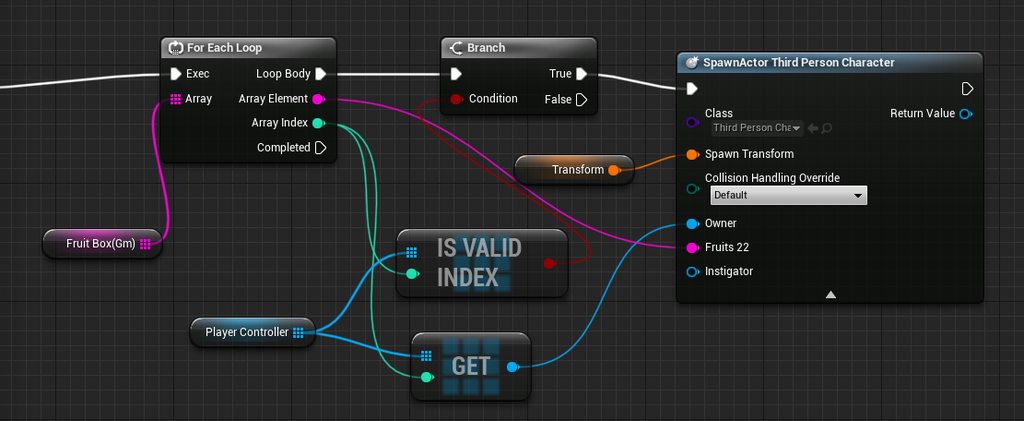
by right, this should be giving my player's the fruits from array of fruits, right?
just to clarify
odd ember
it's going to give your new character a fruit string
timber cloak
but apparently it does not
odd ember
whatever that may be
timber cloak
This is in GameMode
odd ember
your string array may be empty
odd ember
have you debugged?
timber cloak
hold on
 weak kindle
L have create a widget Iphone and when my character click a icon it will run a media but media doesnt output sound cause its image how can add the sound??
timber cloak
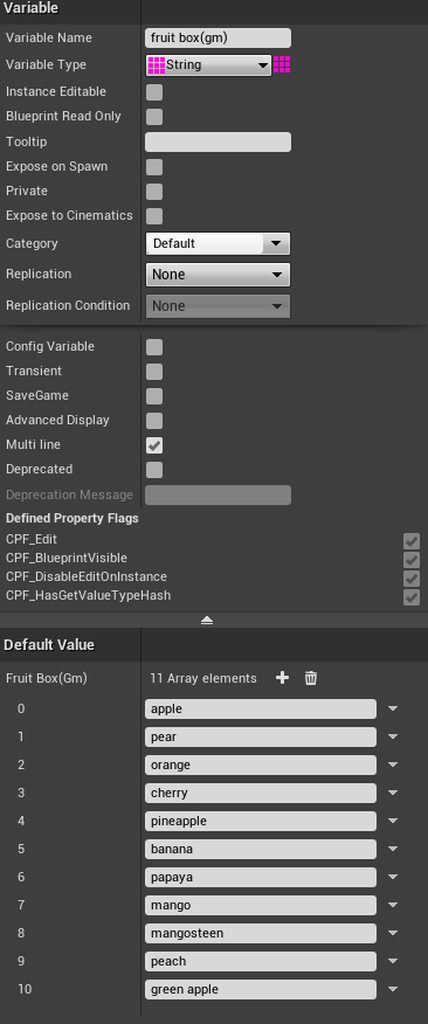 odd ember
you should debug
timber cloak
yes breakpoint
odd ember
to see if your values actually stick
odd ember
yeah printstring every string
timber cloak
it shows
but then my player isn't getting any
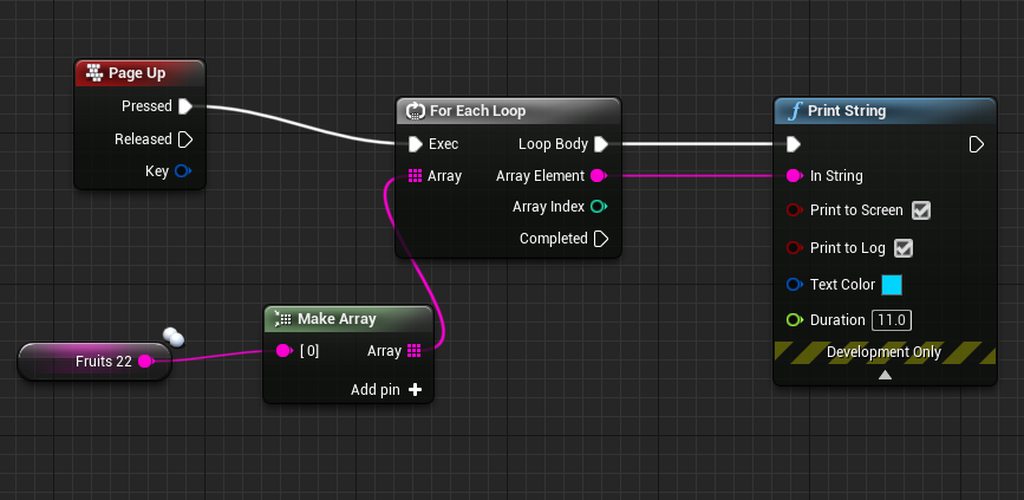

this method, worked on Enum
however, the string's looping practice isn't working
let me restart the whole engine project
odd ember
no
you're not testing it properly
you should test the array you constructed
not some random new array
timber cloak
well, if player gets a fruit, it will be printed out with that Page Up input
which worked for Enum practice
if client 1 gets "painter" as enum, it prints "painter only
similarly if client 2 gets "dentist" enum, printed dentist only
there's no random new array
it's fruit variable in thirdpersoncharacter class
there's only 1 array