#blueprint
402296 messages · Page 491 of 403
 hard charm
 jaunty dome
any clue why collision events don't happen when the character walks on plane ?
 wooden mural
Everytime I try to migrate assets, the Engine crashes. This happens regardless of the project the assets are in. Any ideas?
 upbeat bloom
 flint nymph
@swift pewter that's probably the best place to put it, especially for multiplayer
 plain flare
which object should i connect with AIController, i tried a lot of things and always failing
 gloomy linden
Ai controller
plain flare
thanks
 feral ice
anyone know why it just stops mid air? Asked this question before but noone seemed to have any solution, so ill try again XD
 sudden zephyr
Maybe because you asked the wrong question? 😛
feral ice
hahaha xd
sudden zephyr
What exactly does constitute a "stops in mid air" because apparently your definition differs from mine. xD
sudden zephyr
I saw, but again as i can tell, it jumps and it comes down. What exactly you mean by "stops in mid air".
Because for me, "stops in mid air" means, it jumps but then wont come down while its supposed to. 🤔
sudden zephyr
Ah, so the issue is you're only getting a half arc.
feral ice
maybe, dont really know what arc means xd
sudden zephyr
This is an arc, and your character only flies half of it, then stops and falls flat downwards.
https://img.favpng.com/3/9/14/semicircle-line-arc-png-favpng-KRhYcbHeMfJeHHtf9ANjsiNAW.jpg
 sudden zephyr
Sadly, no. 😅
But at least you know exactly what you actually need to solve.
Tho, a way to test that Launch Character isn't buggering up, perhaps try using Add Force node just to see what happens?
If the behavior is the same, then something is overriding it somewhere.
feral ice
if i use add force everything works perfect
but i need to simulate physics which i dont want xd
sudden zephyr
Just for funzies, try tick the Z override on the first node and XY override on second node, see what happens.
sudden zephyr
You say it's on an AI?
sudden zephyr
Perhaps it's countering it and thats why he stops.
Can you like temporarily disable the AI and launch it? See if that has any effect.
feral ice
and when the ai is not moving it works good
sudden zephyr
Because the AI tries to overcome it. It has a set where the AI thinks it needs to be and when you make it fly, it's countering it. You need to perhaps disable it's movement while flying from such an attack.
sudden zephyr
What ever rolls your boat. xD
Just disable it by any means while mid-air from this attack and then re-enable as soon as it hits the ground, perhaps with a small delay.
feral ice
mhm
i tried set movement mode
to something
like swimming and flying
but that didn't work : /
sudden zephyr
It still has movement control mid air while flying or swiming ofc
like when you jump forward and start pushing back, which slows you down.
feral ice
disable movement literally stops the ai in air
sudden zephyr
Hm... Didn't fiddle with that yet. 🤔
feral ice
sudden zephyr
Try the movement speed 0 then?
There's gotta be a better way tho, perhaps later some guys that know could show up and answer. Sorry 😅
sudden zephyr
Sweat! What solved it?
sudden zephyr
Cool.
sudden zephyr
Yeah, Launch Character is Movement Component specific so that's why disabling it stops it mid air.
sudden zephyr
It's actually telling the m. component to "fly".
sudden zephyr
Nah, must be my logical thinking and i modded lots of games for many years. xD
So i know "game/gameplay theory" i guess?
feral ice
mhm i see
well you might not now the words for the code but you can identify the problem
sudden zephyr
😅
sudden zephyr
Np. Glad.
 brittle fiber
greetings users.. i am to make a complex blueprint actor using anim sequencer plug in.. i have managed to record a sequence of 3 SM and 4 Text being animated ( appearing and disapearing - scale and loc transforms) .. it reccorded in one whole anim length 20 sec.. im looking for a command that within an actor blueprint allow me to play parts of this animation or any other way of playing this animation.. it must be controlled by a key stroke.. i also need to play them after delay, which will require similar node, can any user advise, thanks in advance..
 trim matrix
what's the blueprint ?
guys i built a procedural mesh can i get the UVs of it during runtime
or the faces whichever
flint nymph
you should handle all that in your game mode
 atomic prairie
I'm using the SkyshpereBP and i'm happy with that bc i can set my stars brightness, but it's possible to set stars under the horizon?
 hollow flame
how to get negative index? right now i can only spawn from to right, but i want to spawn to the left side
?
 earnest tangle
Have you tried putting a negative number into first index?
Or just deducting say 180 from the index number to make it negative for the first half
although I don't really understand why you even have a for loop when you only run the logic after it on the final 360th index...
 sick sapphire
hollow flame
sick sapphire
hollow flame
why set focal point not works when i put values manual?
if i plug get actorl location it gives same location, but it works, why putting values manually not works
?
 solid moss
I would recommend debugging.
Has anyone experienced a issue where the projectile when aimed at a certain angle. The projectile will shoot in a completely opposite direction? This is so odd and I have disabled collision.
 stone cove
How do you make a wheeled vehicle reverse? Setting throttle input to -1 just makes the car go forward with throttle showing 1 in the vehicle debug
 worldly gyro
https://cdn.discordapp.com/attachments/293047579288272897/727922935314251876/unknown.png
https://cdn.discordapp.com/attachments/293047579288272897/727923148208472175/unknown.png


Hello when i collision with rock i don't dead
why
sudden zephyr
@sick sapphire I'm kinda certain you'll have to delve into C++ territory. 😦 Tho, i saw a game in development on YT "Welcome to the Future" and i think i saw a comment somewhere stating that everything is BP based, no C++ code. If it's not a lie, dude's a UE4 God. xD
sick sapphire
@sudden zephyr i reposted it in #ue4-general because i thought it was washed away here
theres a description there, i was not sure if it could be done by maths
sudden zephyr
Perhaps check it out and send a comment. Maybe you'll get an answer if his player flight was actually possible without C++ and if he's not actually moving and rotating the world instead of the player.
sick sapphire
could be a good idea, but Im thinking maybe he's using the same system as a plane pawn tutorial I have done
that one was not suitable as it directly moves the actor which conflicts with some of my systems
sudden zephyr
So the issue is relative camera to character, did you by any chance try this? https://answers.unrealengine.com/questions/795316/view.html
The movement component is kinky when changing the pawn orientation but I don't think controller should have such restrictions. 🤔
Essentially if you figure out how to keep the camera yaw (looking right when you move mouse right) while rolling the controller, you're golden. I think, don't quote me on that. 😂
 surreal peak
trim matrix
surreal peak
trim matrix
I have a simple clicking game. I have variables holding data like targets spawned missclicks and hits etc etc. But they are spread out across many actors. Is there a better way to store this data so i'm not casting to lots of things?
because at the end of the game i want to display all this data in a widget
 soft locust
@trim matrix i was in a similar Situation once. I was worried all the time my casts were to much, but in reality my game was simple (as well) and all the casting wasnt really an issue. If u want some things really easy u could take some of the Blueprints u can cast to in every Situation like GameState or GameMode and store stuff there. Missclicks sound like they could sit in a GameMode or Controller.
solid moss
Has anyone experienced a issue where the projectile when aimed at a certain angle. The projectile will shoot in a completely opposite direction? This is so odd and I have disabled collision.
trim matrix
Yah I don't know why i'm all over the place I think i'll do it in the game mode thats where i programmed my targets and stuff
i was storing clicked data in variables across actors that i clicked which is really bad
soft locust
Maybe someone has a different approach, but i think it will make things easier for you
trim matrix
well i know the gamemode is like server data i think so it's not a bad idea
surreal peak
GameState is probably the best place to hold that data.
GameMode is more for rules.
trim matrix
hmm
surreal peak
Then again, in a Singleplayer game, you don't have to care that much
PlayerState works there too
trim matrix
Well i do want to do things proper learning experience
so gamestate i'll have to read a little documentation never touched that bp
surreal peak
It's adviced to learn about all game framework related classes
Before jumping into making an actual game
trim matrix
well it's a simple game i made 🙂 in like a day
my teacher isn't the best really unprofessional
learning stuff on my own basically
soft locust
Can anyone point me in the right direction. I have some big objects and a lot of NPC i want to distribute evenly around these big objects. I did something with my Ai and it kind of worked, but its so complicated. I wonder if there is a better way. Basically i dont want the npc to group around the pivot point of the object, they should all touch the object.
soft locust
yeah i wanted something simpler, because i have a lot of agents going on. I remember EQS slowing quit a bit
trim matrix
Yah, then I guess you need to do math or there's some other solution. Not sure.
soft locust
Most of the time there is very simple way and i am overthinking things
trim matrix
knowledge of the functions certainly helps
surreal peak
EQS is actually relatively lightweight, as they limit the processing time per frame
Not sure you should call it every frame, but you can use it for the initial points or so
soft locust
Mhhh when i get the points at start with EQS, i just need to find a way to check if a point is free or reachable
 zealous moth
is the game state derived or dependent on the game mode? based on exi's doc, it seems to communicate differently than the game mode which is specific to a server or user; is it stored as a continuous variable or only when the game mode exists?
trim matrix
ic so i can get variables from my gamestate in my gamemode
uhoh
forgot to hook up my gamestate false alarm
 sterile sun
Hey everyone! I've got a quick, and I think a pretty simple question, but I just can't figure it out. I've got an UI widget to display current game state (whether players looted the objective or not). The thing is, I can't find where did I put the code to call for change of the current UI text. Everything I have is this.
My question is: does this run every frame by default (how would it know abouth the change otherwise...), or am I being stupid and I just dont remember my own project implementation?
It's a Text binding
trim matrix
@sterile sun yes it runs on every frame and yes it's "expensive"
I would either change it to be event driven or something I haven't tried myself, but should work, is to wrap it in an invalidation box
sterile sun
I see. I am only just learning UE4 and I am following a Udemy course. Thanks for explanation, it was driving me crazy!
 woeful dawn
Can anyone let me know how to create this spotlight effect 🙂
surreal peak
@zealous moth GameMode defines what GameState class to use. Despite that they are two different Objects, which have their own purpose
GameMode is ServerOnly. GameState exists on everyone.
 sullen oak
@woeful dawn use a spotlight
 pulsar nimbus
I have a general question why do I only have build data for.only one of my levels?
I have 4 in total
 still plume
hello guys. i have a question
i need to stop the rotation of the third person manequin
 gritty elm
@still plume you need to detech manequin from parent and attach with some other point that is not attached to first person arms
 cedar ruin
Your hierarchy is kinda a mess.
I personally would recommend ordering like this
Capsule >3RD person mesh
>Boom>Camera>Mesh>Arms
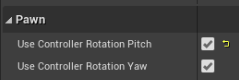
Aswel as you have these checked https://i.imgur.com/CsCXpU2.png
I would recommend against using Pitch on your pawn, and instead use that on the Camera Boom.
 trim matrix
inside a function setting this accuracy variable only works if set by reference?
im getting 0 in my widget when i add a value to it if i use the set node
any other way i can pass by reference without using this ++ function
trim matrix
did you understand my question correctly?
i know you're trying to help but i dont think that works
gritty elm
what is your issue actual
trim matrix
i'm inside a function
gritty elm
i suggest you alternative solution
trim matrix
and setting that variable with set node doesn't actually set it in my gamestate
notice that increment node (++) has a diamond
its because its a reference
to memory location
gritty elm
yes it should work inside func
where you are calling this function? are you sure your function is calling? did you added breakpoint?
trim matrix
yah it works
i can output incremented values
with that ++ node
but its 0 if i use set node
gritty elm
did you try my method above?
trim matrix
because i think it converts it to a local variable because its not a public variable in the blueprint
i can do it in a different spot
i suppose
still plume
many thx man 😄 @cedar ruin
cedar ruin
ok now, I have an issue
 low venture
Hello, how can I scale an actor around a point? (not in the editor, with blueprints)
cedar ruin
I have a pawn with set actor location. It works, but asoon as I posses it. It no longer will move
still plume
c++ or bp^
low venture
Me? Can be both.
 coral apex
I need some help, the issue I am having is that when the floors spawn they are overlapping and not being spaced out, I added a delay option, but that's not exactly helping. I'm still a beginner.
 still plume
@low venture set actor scale. When you collide the actor with the point it scale ( it's a suggestion, im a begginer :D)
@cedar ruin bp or c++? 🙂
low venture
But it scales always around the pivot point.
It's math and I don't get why this doesn't work. It works, if the actor has rotation (0,0,0). But when not there is something strange going on.
trim matrix
@gritty elm yah i was totally wrong set node is by reference was overthinking it my math was just off.
still plume
sorry i can't help
cedar ruin
bp
zealous moth
@zealous moth GameMode defines what GameState class to use. Despite that they are two different Objects, which have their own purpose
@surreal peak I understood that part, that's why i was a bit interested in the gameState. My question was more akin to "if I disconnect from a session, will the game state disappear as well?" Or is it constant such as the game instance class? I would think it goes away if i load another map that has no defined game state and replaces it with a null value but i have no idea how to even confirm this
still plume
@cedar ruin the pawn have a movement component? I had a problem with a posses in a my prototipo. Try to unposses and after posses the correct pawn.
cedar ruin
It has no movement component.
And there is exactly only one pawn in the scene.
The goal, is for your screen to just be latched onto a camera, that is coded to move itself for its own reasons.
But when possessed, yeah. It will no longer move at the will of its code.
 blazing urchin
Hi guys. New to UE, coming from Unity (spent three last years in C#). I would have some questions about building gameplay in UE. Would anyone have a few mins to have a chat with me?
low venture
It drives me crazy that there is no such basic function in UE like scaling or rotating an actor around a point.
 sour raft
@low venture my workaround is to create two helper objects (one nested in the other), set the top one to the pivot point, set the child to the current location. Scale/rotate the parent, and see where the child ends up
 opaque blade
@low venture you can move the pivot / gizmo with alt+middle mouse drag to a new location so you can set the pivot is that what you are looking for?
same for right click i think there is a "set pivot here"
low venture
@sour raft Thanks but I want to do it by math because I need the function universal for every possible scene component/actor. @opaque blade No, not in the editor. By math, blueprints or C++.
sour raft
yeah math is ideal, idk about doing it that way, although you only need ONE object to do this, and you could put it into a global place and just have a custom function for rotate/scale around pivot
eg. its not like every component needs +2 extra objects, you only need one that keeps getting moved/transformed to get the outcome
opaque blade
Transform the RotatingActor by the inverse of the Points Transform (probably another actors transform) - makes the RotatingActor "local" to the rotation point
Rotate
Transform back into space by applying the points Transform
sour raft

reddit
0 votes and 1 comment so far on Reddit
can anyone help me with this? been stuck on it a few days
im using "find look at rotation" to find an angle from knee->foot, but i want to preserve the roll so i can set a mesh to it
the look at rotation will always make 'up' point up, so it spins around etc and doesnt care about the roll
low venture
@odd eagle I don't get it.
 odd eagle
@low venture You're compensating the location after scaling, right?
low venture
Yes and it works flawlessly if the rotation of the actor is (0,0,0).
odd eagle
the problem is of course that when you rotate an object to a rotation that is different than 0, 0, 0, the direction in which you are moving will be different than the direction of the target point you're trying to match
I haven't quite worked out how your bp works but you need to make sure the direction you are moving it is right
and if you're using world space the direction will be the same regardless of rotation
low venture
Yes. I tried to rotate it by the actors (world) rotation and then add it to the location, but it didn't work.
odd eagle
You don't need to try to compensate in your own math if you use this
AddActorLocalOffset
also you're probably gonna need to convert the pivot point to local space to get the math right
zealous moth
in the construction script you can create a point in space to rotate about and a radius. Then, in the event graph, either on tick or on a timer you can specify the circular function based on that center. A circular function is X^2 + Y^2 = r^2 and if you bracket your x or y and add or subtract from it, you move the center of the circle.
it astounds me that folks do not rely on either trigonometry or vectors when using a physics engine...
heck a funnier way to do it is to remove gravity, make it into a projectile and curve it enough to simulate the circular motion
 warm scarab
Anyway another thing - anyone know how to vary thickness of this outline?
@paper aurora To adjust the thickness, go into the custom post processing material that you created (mine is called PP_Outliner_M). In the lower section of the material graph, you'll see a SceneTexture:PostProcessInput that feeds into a multiplier, and a material expression constant that gets multiplied. That constant is what determines the outline thickness. Adjust it. Here is a picture of the section of the graph in my material, and the relevant constant is in the bottom left:
 paper aurora
Yeah I got that before, but thanks!
warm scarab
You bet.
low venture
Thanks @odd eagle but I think I'll give up on this for today. There seems to be more than one mistake in my formula. Should be so simple...
odd eagle
working with world space I think you would have to do some trigonometry to get the right vector @low venture
sour raft
Can anyone help on a similar issue, mentioned it above, I want an object to point to a location, but preserve the roll angle. Im using FindLookAtRotation but that just spins yaw instead of pitching all the way around
how would you programatically figure out the direction your foot is pointing, based on ONLY knowing the thigh, knee, and foot locations?
eg. if your calf is at 90 degrees to the thigh, you foot is pointing the same direction as your thigh. if it's straight, its 90 degrees 'up' etc. finding it impossible to figure out how to work it out
low venture
I still have the feeling that scale is handled somewhat else in UE than rotation and location. In the picture above the cube is rotated 90 degrees around the x-axis. It's local scale is (1,1,2). I have printed the WorldTransform of the actor. It should be (1,2,1) in world space, should'nt it? Or am I thinking wrong?
odd eagle
Uh
I don't think the concept of "local scale" is used a lot in the first place
does that even exist?
you're thinking wrong
scale is always local
@low venture
low venture
Why shouldn't it exist? :p An object could have a scale in it's local coordinate system or in another system (e.g. world system). As I said, in the world it could be (1,2,1) and local (1,1,2). But good to know that this is not the case. Then "WorldTransform" is a bit misleading.
sour raft
i dont think scale is always local is it? if you have a child in the blueprint and the parent is scaled down, the child is scaled down, but it read 1,1,1, but if you set world scale to 1,1,1, it pops back to full size
"relative scale 3d" exists
odd eagle
idk I haven't really dealt with that
low venture
@sour raft But if the actor/root component has no parent then relative transform == world transform.
sour raft
yeah
Is there a way I can get the angle in degrees, between two lines? I dont want pitch/yaw/roll, just the angle difference if it took the direct route (as if it was 2d)
 ripe rose
i think you want unit direction vector
sour raft
i need to know the rotation offset between two lines, so i can rotate something else by the same amount
ripe rose
hm
sour raft
if it was 2d it'd be easier, one rotation minus the other
the problem is when its 3d i think quats come into it? perhaps
if it was aligned to a plane, it'd just be the difference in pitch or whatever
eg. two points on a sphere, whats the angle degree difference between them if youre at the center of the sphere and make a direct path
think ive got it, dot product then ACOS it
not the slightest clue how or why this will work but /\o/\
 opaque forum
how do i convert this?
trim matrix
What exactly is the role of the gamemode base? Is it in charge of creting and choosing levels and managing actors?
low venture
acos of the dot product divided by the product of the length of the vectors @sour raft. Only if the length of both vectors is 1, it's the dot product alone.
 sour raft
ah ok
low venture
Good idea. Will add it to my math function library, too.
trim matrix
In my GameMode and If i try setting a variable from game state to a value getting this error
also i tried without getting object reference doesn't work ethier
the number will got to 4 then just stop
 unique falcon
Evening all. Does anyone know why, when moving an via SetWorldLocationAndRotation with 'sweep' enabled, the 'Location' from the Sweep Hit Result output won't be the same as the location we actually put the moved object at?
As far as I know, this is the location that the swept object will not collide with anything at so should probably be where it ended up...
zealous moth
@trim matrix when are you doing this function? on begin play?
 echo adder
Anyone know why something translated to screenspace (and then drawn on the hud via 2D Line Draw) would show up fine while playing but distorted via HiResScreenshot?
zealous moth
hm, it seems that the game mode doesn't know or see the game state. Try, in your game state bp, on beginplay, get your game mode, case to it and set its GameState var to itself
flint nymph
@trim matrix have you referenced the game state
flint nymph
you can get the game state
trim matrix
like if i just say get totaltargets variable it shows up
without a ref
but if i use that one and set it seems to stay 0
with a ref it goes to 4 then breaks or somethign
this is with
sour raft
@low venture so that thing above is getting the angle difference, but its always positive, is there a way I can tweak it to get some kind of direction?
unique falcon
@sour raft in order to get a direction you'd need to have a way to specify which way is positive and which way is negative
sour raft
yeah i think i sorta solved it by dot producting some random shit
well.. what i figured to be 'forward'
unique falcon
okay cool, if you need more help chuck out a bit more context (you might have already done this, i didn't scroll up very far)
I've been doing that sort of thing a fair bit recently so I might know a way that does what you need
sour raft

this is sorta the context of it
im trying to figure out rotating the foot, so that it points in the 'natural' direction eg. forward of the calf
but with my IK setup im only getting locations etc so the rotations im having to figure out
i think ive got it now though, at least for pitch.. ill also have to do rolling for if the calf is angled left/right
unique falcon
you might be able to use cross products to give yourself a consistent alternative vector to use
then you have a vector from which you can understand the direction of your dot product
sour raft
well the issue is stemming from using "GetLookAtRotation" calf->foot, to set the rotation of the calf bone, which ignores roll so the foot model child just spins about
unique falcon
that won't work if your joint can bend both ways though because it'll flip when it goes beyond 0 degrees
sour raft
i think the way i have it now is working, and to get the tilt of the foot i can probably do the same but multiply it by the right vector
dot product with the right vector i mean
unique falcon
sounds like you've got it, good luck 🙂
sour raft
i suck with rotation math stuff, cant get my head around a lot of it
unique falcon
same
sour raft
im revisiting this old project; https://www.youtube.com/watch?v=rh10I5B4dp4 but trying to take full control over the bones with a separate system

Lightweight procedural movement in UE4.
Music by Dream Machine from Fugue: https://icons8.com/music/author/dream-machine-1
with that, i relied a lot on "blending" back into the anims default pose
like if the foot is lifted, i stopped overriding foot rotation and just left it to the base pose
but making IK calculations just in blueprint is a bit of a challenge. in the animBP it just does it fine, everything rotates as expected etc. but the blueprint IK function just gives you location outputs, doesnt give you any info on the necessary/outcome rotations
unique falcon
You don't get any rotators out of it?
sour raft
the blueprint funtion just gives you the end location and joint location
and you just tell is the bone locations
eg. rotation doesnt come into it
its just finding where the joint is, and where the end bone would reach to
unique falcon
I guess that's because it's IK, right?
though, you still want rotation for most o fit
most of it*
weird
sour raft
yeah, but i think behind the scenes, the animBP 'twoboneIK' function must deal with rotations too
unique falcon
I'm very unfamiliar with IK stuff, I'm fiddling with spaceships at the moment
sour raft
so that leg bones arent just rolling wherever
yeah ive no idea about IK stuff under the hood, i just rely on the magic function in animBPs usually
solid moss
Is anyone here good with projectiles?
Having a odd issue where it will randomly fly in a direction not aimed at.
 late shuttle
My Character has a Max Speed of 3000 in the CharacterMovement component. When I spawn bullets as I'm moving fast, they do not spawn with that speed in mind, so everything looks super wacky. Does anyone know how to fix this? I'm guessing I would have to work some math on a vector velocity to boil it down to a float?
sour raft
you can just add your current velocity to the projectile velocity, if thats what youre wanting
unique falcon
@late shuttle yep, get your character's velocity and add it to the projectile velocity
sour raft
keep in mind it can get pretty weird doing it that way
if you shoot backwards at the projectile speed, itll hang in the air at 0 velocity
unique falcon

Grant, Tory and Kari rig up a cannon to fire a ball backwards at 60 mph, off the back of a pickup truck driving forwards at 60 mph.
sour raft
aiming is a lot more difficult too, having to account for your speed
yeah this ^ lol
most games dont do it, quake / arena games etc will just give projectiles their set velocity, rather than inherited. it can make it very hard to aim if youre moving fast
another option would be to change the angle, but then clamp the vector to the max projectile speed
unique falcon
you can still do it if you want that realism but it'll probably feel very weird unless your character moves much slower than the projectiles
some games do it to make strafing whilst firing more challenging
sour raft
Like what you see? Join us on discord at https://midair.gg/discord and follow our progress as we move toward release!
Edited by Swordfish & Schreq
♫Music By♫
●DigitalTek & Chloë Johnson - Floating (Instrumental Mix) [Bass Rebels Release]
●Song - https://youtu.be/2yBvK9t8Dw0
i think this game had inherited projectile velocity
but if i recall, they added it as an option so you could choose, i dont think a lot of people like it
late shuttle
The problem is I have two modes. A Mech "Walk" mode and a Mech "Fly" mode... so the difference in movement speed is large enough that I do need a solution.
I am 100% fine with firing a projectile backwards and having it go 0
unique falcon
it should be simple to implement, give it a try and see how it feels
sour raft
keep in mind, if you want some kind of realism, if its a 'rocket' type of projectile they wouldnt keep going at the new inherited speed
eg. if its powered, it'd probably go down to the intended speed
late shuttle
That's the problem. The Projectile doesn't have a Velocity on Construct. It has an "Initial Speed" and a "Max Speed"
sour raft
theres projectile velocity, from the projectile component
which overrules the 'speed' i think
unique falcon
alternatively it's the direction * initial speed (i assume)
sour raft
you might need to get a reference to the projectile movement component
atomic prairie
@brittle fiber thanks 🙂
late shuttle
Thanks. I'll try 🙂
solid moss
Any idea why a projectile would fire in a different direction than where your aiming?
sour raft
what are you doing after that part
solid moss
woops
sour raft
my eyes
sour raft
solid moss
BlueprintUE
sour raft
you sure the trace isnt hitting the gun barrel or anything
sour raft
print the hit actor,
solid moss
i removed all collision at one point
sour raft
drawdebugsphere where the hit point is
you might find some weird stuff going on, projectile hitting the barrel, player capsule, etc
when i do projectiles (usually MP games though) i always spawn them down the line of sight, and hide or lerp it with some clientside effects
you can run into weird stuff
shoot something very close, and the angle of the projectile might just go straight up
solid moss
it goes straight up sometimes its like at certain angles
i tried moving the camera and socket WAY out
and it still does it
lol
its so odd
its only at certain angles.
sour raft
just add a DrawDebugSphere, plug location in to the sphere location, set radius down to 30 or whatever
see if its ever drawing one in a weird place, or if its always at the crosshair hit point
99% sure thats going to be the issue
sour raft
the other 1% is if the projectile itself is hitting something or bouncing off itself or something odd
 worthy frost
don't use print string
print debug spheres
and debug lines
those will really help more than text
sour raft
you have the hit trace being drawn too, if that is ever all green, something has gone wrong
worthy frost
ok
solid moss
sour raft
other than that i cant see anything wrong in this context
worthy frost
also you are better to trace from camera forward towards crosshair, then get the adjustment, fire from barrel of gun, with the adjustment
sour raft
thats what hes doing
worthy frost
i don't see the adjustment in them snippets
worthy frost
all i see is FindLookAtRotation
sour raft
rather than just using the camera rotation directly
yeah, is that not what youre suggesting ?
worthy frost
not really
sour raft
hes tracing from the cam forward to where his crosshair 'hits', then angling the projectile so it points barrel->crosshair hit
solid moss
i get what UKaos is saying but if its not working like this..
thats not going to help
lol
sour raft
im not sure im following what hes suggesting, it appears to be what youre doing
 solid moss
trim matrix
solid moss
trim matrix
So i basically made a workaround for my gamemode/gamestate problem and just made an event dispatcher(bind) in a blueprint that already had the Reference to my gamemode to update my variable for my gamestate lel.
worthy frost
cause mine is hitscan, but i don't use FindLookAtRotation cause it causes weird issues
sour raft
ah, yeah if youre shooting the sky or whatever, or your trace settings arent going to hit anything
sour raft
just do a Select vector, if blocking hit, use 'location', otherwise use endpoint of the trace
worthy frost
if non hit
unique falcon
@trim matrix that's an elaborate solution for sure, probably want to look at that again with fresh eyes at some point 😉
sour raft
non hits wont have a location @worthy frost
worthy frost
trace end is what i meant
 solid moss
i dont think i ever use impact point
sour raft
im not sure i see a difference here from what hes doing
one trace goes down the line of sight of the camera, hits the target, then the projectile just goes from the barrel to that point (look at rotation)
solid moss
so I need to drag out from blocking hit
sour raft
yeah
select Vector
switch between trace end or location, location if there was a hit
worthy frost
i mean maybe FindLookAtRotation does what i do but in a node 😄
sour raft
yeah, that just gives a rotation from point A looking to point B
so barrel looking at crosshair-final-hit-point
worthy frost
but yeah, if no blocking hit, you need to use trace end
else you will end up going to some weird location (possibly 0,0,0 or something)
``` that is basically what this line does@sour raft what can I use as a case for that? like branch or sequence? a if statement?
sour raft
Select
just type select vector
plug blockinghit into PickA
then A = location, B = traceend
 sour raft
^this
unique falcon
it's just an elegant way to pick the right vector without doing any if/branch nodes 🙂
atomic prairie
hey! I use this in my widget blueprint, i want a start menu, (press any key for start) but i need to remove this widget when the other widget is added to the viewport and i want disable the mouse click
Is it possible to do this in the blueprint widget or i need to go through the BP level?
unique falcon
as far as my understanding goes, you should probably handle this outside of each widget blueprint and keep just the widget's own functionality inside that widget blueprint itself
flint nymph
@atomic prairie I don't think that's something you want to do on tick lol
but yeah what you're asking is very doable in the widget
atomic prairie
humm
flint nymph
you can use your setup there but you'll want a DoOnce node after the branch
solid moss
@sour raft thank you. this fixed the issue
atomic prairie
It would probably be easier to go through the level bp? bc in the widget bp Even Tick is the only one that I found ''interesting'' to use
unique falcon
Doing it in the level would be the better of the two options you suggested, the level BP can use input events as events rather than doing it on tick (though I've never done an 'any' input event before).
unique falcon
Any issues?
atomic prairie
It works perfectly! but now I just want the''Any Key'' not take account to the mouse clicks
unique falcon
No idea on that one, glad the rest works though 🙂
 thin heart
How to add particle effect in layer landscape
 manic viper
Any idea idea why this isn't stopping my enemy from moving ?
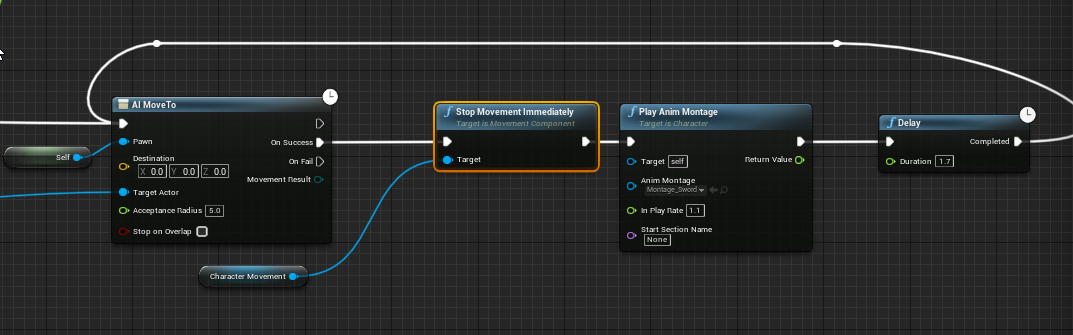
am i just not understanding the BP flow correctly ?
he gets to me and starts swinging while still trying to move
oh that's a good observation
it's coming from a see pawn*
ill bet you that's doing it
but then he'll never do it again right ?
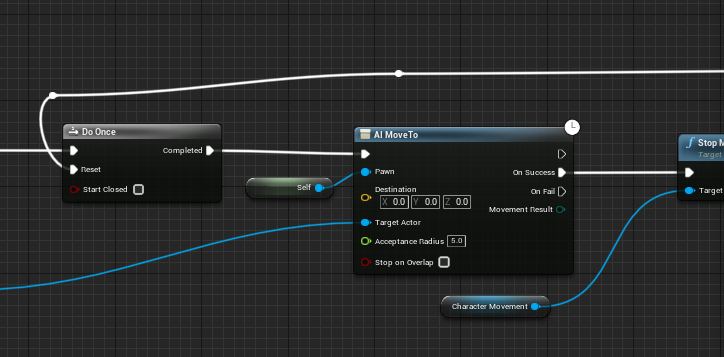
so more like this ?
what if i used an "is attacking" bool instead ?
hmmm
it "works" as it is
the only issue is the amount of time it takes to get back to moving after the swing
solid moss
is there any quick way of making a projectile explode when hitting landscape?
solid moss
Yeah I mean what do I trigger off of though
manic viper
woof. I dont know anything about animation slots yet
HAHA
but that's not a terrible idea.
Very cool, thank you!
solid moss
roger that.
zealous moth
no clue what happened but when i open a map in play mode my animations and controls are frozen. I can toggle my widgets no problem and they even do what they are supposed to do: they spawn stuff and they work as intended but beyond that, i cannot control my pawn and it is frozen in place animation wise
any clues?
found it, invalid game state with game mode
whew
thin heart
Hi add particle effect in landscape layers
 tight cobalt
Hi. Any idea why my HUD is not being displayed? I remember disabling it long time ago, and now when i hooked it again, it just doesn't display.
Even compared the blueprint to newly created fps template,, cant find anything that can cause the issues.
Not sure could this be the issue, descriptio of the hud event it says something about delay nodes.
Could it be that the issue is if i am using delay nodes in the level blueprint or smthing.?
Damn..Nvm..I didnt change it in the world setting 😉
manic viper
Any thoughts on why Im getting this error
Blueprint Runtime Error: "Accessed None trying to read property K2Node_Event_DamageCauser". Blueprint: BP_TestEnemy Function: Execute Ubergraph BP Test Enemy Graph: EventGraph Node: SetActorRotation
its doing the intended behavior, but i get the error every time I stop playback
trim matrix
add an IsValid branch att the start for DamageCauser perhaps? @manic viper
manic viper
I think i tried that and it didn't work 😦
when i did that, the behavior stops. so it's .. apparently not valid lol
I just don't know how to approach that
surreal peak
@zealous moth The term is "Persist" and no, GameState does not persist. When disconnecting, only the GameInstance persists.
@manic viper You are calling ApplyDamage somewhere.
You must pass a valid DamageCauser at that point.
manic viper
Im not 100% sure how to do that. The damage is being caused on the player BP
 rough wing
When i spawn these useless blueprint actors, the performance drops from 120 constant to 40's.
I even disabled the tick and it still has issues.
Does spawning in this much blueprint cause performance loss?
sudden zephyr
I'd say there's roughly 400 actors. Hm... 🤔
 hazy igloo
@rough wing Try to use "Instanced Meshes"

How to render millions of polygons with Hierarchical Instanced Static Mesh in Unreal Engine 4.
Get project files: https://techartaid.com/products/
Optimize draw calls, reduce CPU overhead, avoid common mistakes in Construction Blueprint and have fun creating a massive asteroi...
He has made some slides with useful informations in his video
 tight schooner
@rough wing I would look into profiling to narrow down the issue. Even typing in Stat Unit in the console would help determine if it's a game thread, draw thread or GPU issue.
I wouldn't think spawning a few hundred BP actors on their own would cause a persistent performance drop it they're not executing any BP script. So maybe it's something else like occlusion culling or who knows.
trim matrix
Trying to make a chatbox.. Any way I can bring it up by pressing enter, instead of using my mouse?
Can I make it through my blueprint, or does it have to be in my blueprint in my character?
 grim lantern
Is there a way to get the name of a button that was clicked in UMG?
manic viper
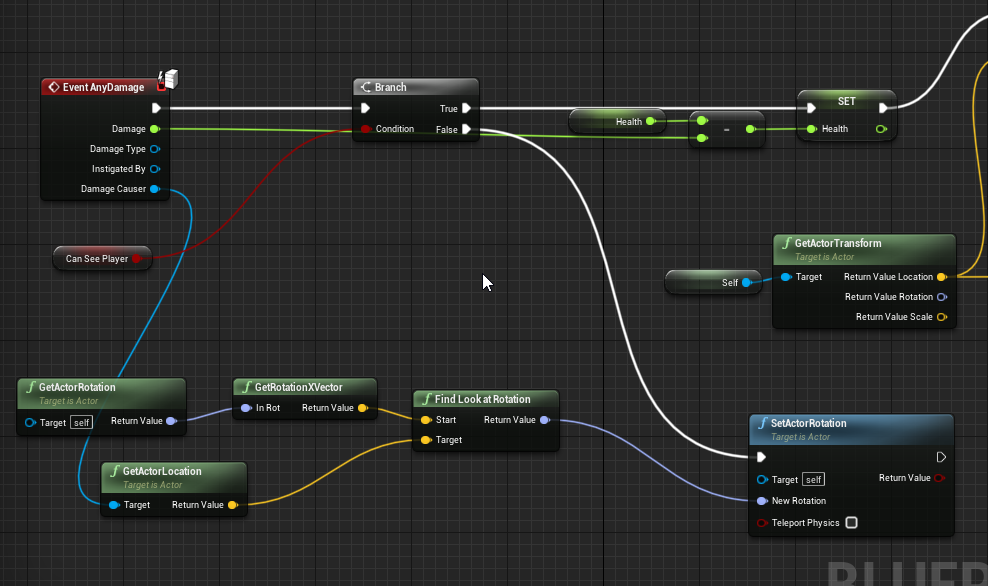
I am trying to get my enemy toturn and look at whoever hits him
i had never assigned a "damage causer" like cedric had said. so I had to go into the apply damage function and assign the person doing the damage and then it worked
 onyx prairie
anybody know how id be able to connect an animated reference into a save file? it isnt compatible.
or perhaps how id be able to connect these variables to the save game instance?
trim matrix
maybe as a soft object reference?
onyx prairie
the connection wont work that way either
i guess i need to find a way to read off the float value of these
something from here that can connect to the save file execute
maybe i need to do another set or something
i think i figured it out
i had to delete the mesh and reload it with the changes
might need to create something to reload the sliders though
once it loads back up
 pine palm
Quick question regarding Gamemodes... I'm going to keep this short and simple but how do they work. I have a basic understanding with them (Like Game State, Player State, etc) but like within the Gamemode BP how can I begin the match? And change the map?
On the website it said this, but I don't see these functions anywhere... Any help would be so good :)
 fleet nimbus
Hi ! Uh...
I tried to make a character (not controlled by the player) move from one point to another while looking at a target, I've tried to update every tick with Find Look At Location, the LookAt function, ect.. I can't get it to work... any idea, or should I say, hint on how I can implement it ?.. Thanks !
 halcyon zephyr
https://gyazo.com/32e74a83ee9e3b368545d2cf71fe8fe6 Can someone help me? for some reason my blueprint only works if i sell the 3 logs my tree spawns in a specific order which is very weird...

it's like it doesn't see all the logs but just one at a time so i have to sell a specific log it sees so i can sell the other log
surreal peak
Well, you are getting some random actor of class Log with that function.
If there is more than one in your scene, then you have no control over which one it finds.
Might be the first one that is spawned.
halcyon zephyr
Any way of fixing it? I tried get all actors but that gives me an array
surreal peak
Advice: Don't use these GetActors/GetAllActorsOfClass functions.
Idk what you are making there
halcyon zephyr
What would you suggest?
surreal peak
Why do you need to get them at all?
halcyon zephyr
So it's basically like this: you break the tree the tree spawns 3 logs which you grab one by one and sell
but
surreal peak
You say you sell them, why are they not referenced in whatever logic takes care of that?
Grabbing it should just save the reference
And then you use that ref to sell
@bitter star What makes you think it 's not the right way?
halcyon zephyr
i was gonna do that but say you hit the log with ur car and it ends up on the sellling place the game will break
halcyon zephyr
hahah aight thx for your help
surreal peak
@bitter star Well you only set it when you press T
That's one single call
For real time, you'd need to set this on tick
 bitter star
Is there a way to have the tick interact with multiple nodes?
fleet nimbus
I think you can use a sequence then ?
onyx prairie
this one. i dont know what to type to bring it up. cant find it for my other options
i cant get it to pop up exactly like this and i cant remember what to type
opaque blade
you only need to type "get body fat morph float"
and it should show up
you may need to drag out from an pin of that type that has this property
otherwise if you are in the blueprint you can drag in the variable from the Variables panel
onyx prairie
oh okay. found it. context sensitivity is annoying in this screen. keep having to switch it on and off.... forgot how i did this a few hours before.
opaque blade
It is a learning progress
Context sensitivity is really useful i rarely disable it now, but I also started using the palette for blueprints which is a nice alternative
onyx prairie
yeah. i seem to have got the thing i am working on partially working as is.
now im just looking for solutions and such to build ontop of it now
fleet nimbus
Also another question : how can I destroy a static mesh after a set period of time ?
sour raft
Is there a way to dynamically set collision profiles? Doesn't seem to work just setting a profile name. Do they need to be added in the project settings or is there a way around that?
jaunty dome
is "UCrowdFollowingComponent" available in blueprints?
earnest tangle
Haven't played it but from the looks of it that's just a solid physics object?
onyx prairie
https://blueprintue.com/blueprint/kl_wpq_6/ would anyone mind helping me out with getting this blueprint setup correctly? it's for a character creation screen that I am working on currently trying to get the save/load feature running correctly. if you notice anything weird, or have suggestions, let me know so I can learn.
it's been really hard with distance learning and i dont really have anybody to review things like this.
BlueprintUE
currently the problem is that i cant get the floats to load in after i save and load it.
 warm flax
how do i check an enum in blueprint? ive made an enum and and an instance of it, and i need to check what its value is in blueprint. in c++ i would simply make an if(EnumInstance == EEnum::SomeValue) what would be the equivalent of this in blueprint script?
fleet nimbus
You can do a Equal (Enum), it's proposed as an output from enumerator get nodes, if you want ^^
warm flax
that was exactly what i was looking for, thanks!
fleet nimbus
Np :)
 worn zodiac
Can someone here please help me with Animation Budget Allocator . Like how do you use it?
 steady elk
hi
i did a navmesh tutorial and it worked, problem is: I don't understand it
here is my node setup on the navmesh object
I don't understand how it knows to follow the player rather than any other pawn. (tried to make two navmesh characters see each other but they didn't react, they only react to player)
sudden zephyr
I'd say because it "as the node kinda clearly hints" AI to move to node is telling the AI logic to move to any instance of type ThirdPersonCharacter actor.
So, since i assume 2 AI placed in world use a different character, but you spawn in the game as ThirdPersonCharacter, it will naturally move to you.
steady elk
i tried to have it move on the "cast failed" event, same result (assumed the cast would fail since the other isnt a character)
sudden zephyr
But did you check if it fails, because i doubt in this instance it will fail as i assume you spawn every time in the game as well. So it will always work, it always gets "you".
steady elk
same result as in one doesnt follow the other (they would stop following the player though)
i dont quite understand where the player reference is coming from in that script.
I thought it senses every pawn and tries to convert it to thirdperson, if successful, it follows
changing to casting failed event , i thought the cast would fail for the other navmesh and follow it, that wasnt the case
sudden zephyr
Nope, it senses any actor but if it find one that is of type ThirdPersonCharacter, it will take action.
It does not convert anything.
steady elk
then whats the point of the cast failed event?
sudden zephyr
Logically, if the pawn that got returned from On See Pawn does not correspond to a thirdPersonCharacter, it would fail, as in, what ever object it is, it is not of type ThirdPersonCharacter.
Thats why its there.
steady elk
tried this, still doesn't follow
steady elk
I'm trying to control what it follows, for now another ai
Im trying to understand how it works, seems like a magical node to me xD
plain flare
i have a question about AI too
Is there a function like " if you are near to goal ( target )"? I mean i want to attack when AI near to my character but how can i do that with "simple move to actor " ?
sudden zephyr
Didn't delve into any of this but did you check this?
plain flare
no
sudden zephyr
I mean did you check if it's set, if so, try uncheck of course. xD
plain flare
they are all of true
sudden zephyr
Note for future, it applies to anything, check what options it has and if something makes sense, many times, you'll find answers right there. So, logically, it says, only see player pawns. So AI pawn will never be seen. xD
Btw, the picture is for @steady elk to avoid confusion. xDDD
plain flare
but i dont have a problem with that. It is coming to me but when coming, it is always attacking animation, so i want to set my is ready for attack boolean with when AI come my near
sudden zephyr
And Berke: well, you already have the pawns and players location, check the distance and when in reach (define something like 1 or 1.5 meters), start the attack? Shouldn't be that hard i think.
steady elk
ahh thanks
it worked 😄
how does it know that im a player? is there like a special class on the character i move?
plain flare
yeah i thought that , but i was ask is there a function like if you near ? if you succesfully came ? just one function. Anyway, thanks
sudden zephyr
Well perhaps, not sure. But until you find if there is, you can always come up with your own implementation.
Like this maybe xD
And you can always collapse it into a function or macro
plain flare
yes, thanks again
I think i was looking something like distance command
I couldnt know there is a command like this
sudden zephyr
@ movsac, i guess it's internally checking/evaluating if a pawn it senses is possessed. That's how it knows if it's a player. You could possess the Ai Character, for all it cares, its up to you to instruct it what to do with the info.
sudden zephyr
np
Hm, so something just struck me, i saw a comment not long ago with this Timer implementation:
https://discordapp.com/channels/187217643009212416/221798862938046464/727617442951725107
While i implemented it like this:
Did i actually implemented it wrong?
I'm essentially calling this event from begin play and it's meant to run throughout the play session, as a substitute for the Tick Event. As it's not something that needs a per-frame precision, i through i'd just use a timer instead.
Should i actually do this?
I mean, does it matter?
flint nymph
lol I’ve never seen it done that first way but I guess if it works it’s fine
sudden zephyr
Cuz now that i'm thinking about it, i'm setting the timer over and over again " in theory". xD
And i kinda don't like making useless calls.
flint nymph
yeah you’re setting the timer and its update time each timer tick
shouldn’t really impact much though I guess
sudden zephyr
Hmm... I wonder. 🤔
opaque forum
{
    wearable->DestroyComponent();
    wearable = NULL;
}
``` is it ok to destroy component such way? plain owl
Does anyone know how I can get Actor Has Tag to work from Break Hit Result? I put the tag on the actor in the game viewport but it's reading 'none' as result
sudden zephyr
¯_(ツ)_/¯
earnest tangle
@plain owl if you use it on the "hit actor" that should work
plain owl
Yeah it should, but it's not :/
sudden zephyr
Also, i'd double-check i didn't tag a component rather then the actor.
sudden zephyr
Probably something stupid that is being overlooked... xD
earnest tangle
Component tags are different than actor tags yeah, so you need to make sure you've tagged the right thing
checking on hit actor should definitely work, I use it myself, so verify you have the tag in the right place
plain owl
Where is the right place for that then? 😄
sudden zephyr
If it's not component specific, i'd stick to actor tag. Also, try print out the actor you get from which you try to get the tag...
earnest tangle
sudden zephyr
No need to loop for components and tags if it's something actor specific. Imo
plain owl
I can't seem to get the actor display name to print either
sudden zephyr
I'd do this just to make sure.
plain owl
Do you think it has to do with the actor itself? Since I'm testing it on a brush?
sudden zephyr
nvm, beat me to it. So you don't get the actor in the first place, so it's not the tag that's the issue. 🙂
¯_(ツ)_/¯
Too advanced for me. xD Still learning.
sick sapphire
I am trying to use this system so that even when the camera is not upright (roll =/= 0) Mouse X and Y will still correspond with the same directions on screen (up/down)
however this seems to break in weird ways? I am using the rotator from axis and angle. this is just the Mouse Y input
 astral fiber
Can I reconstruct a child actor component in blueprint?
Or can I somehow access the template section of a child actor component via blueprint?
steady elk
how can I make my ai roam when player is outside the navmesh volume?
this is what i currently have
it roams perfectly and when it senses a player it follows. However, when player goes outside the navmesh volume, it doesn't go back to roaming and i have no idea how to make it
solid moss
anyone have an example of a big map overview? sectorized? a1 a2 a3 etc.
 obtuse glacier
Hi, does anyone know how can I (via-blueprint) procedurally bind an action to an event, like a simple print would work already.
I was already able to create the input mapping thru blueprint
But I can't seem to find a way to reference this procedurally generated action for the InputAction event
earnest tangle
What is the action you are talking about? A custom event dispatcher?
obtuse glacier
Like when you create a new action in input settings @earnest tangle
Thru project settings
However, I'm doing this procedurally
So, my blueprint creates this action and assigns key 1 to it
Now I don't know how to bind a simple print to this new procedural action because I can't reference it
The idea is to make a key pressed event
low venture
Hello, how to convert this formula into quaternion operations to avoid gimbal lock?
I tried this, but it is not the same:
 proud hull
@obtuse glacier What are you trying to do with these procedurally generated input action mappings?
Are your players going to be creating the functionality behind these new action mappings?
Or are you just trying to allow your players to create custom key bindings?
 radiant latch
Greetings! Does anyone know how data storage works inside Blueprint Data Assets? I'm using them to store really large arrays (in the thousands) and no matter how much info I throw in there, they always seem to have the same size when I check them in the explorer (1.44 Kb)
obtuse glacier
@obtuse glacier What are you trying to do with these procedurally generated input action mappings?
@proud hull
The idea is to procedurally create and bind actions for non existing ones in Project Settings Inputs, the method itself doesn't matter that much, could be a simple print as other developer will overwrite this when plugin is packed
Another question I had was, how do I assign multiple blueprints to the same character? For instance, let's say you want BP_1 to only handle ground attacks and BP_2 to handle in air attacks?
Where do I assign BP_1 and BP_2 to coexist in same character?
proud hull
@obtuse glacier So you want blueprints to inherit from other blueprints? Would air attacking characters also have ground attacks? If so, just make air attacks BP a child of the ground attacks and then the character is a child of the air attacks.
As for the input actions. I am not seeing a way to do that in blueprints, but you could use placeholders for it.
Like make a bunch of input mappings with generic names and use them.
They don't need keys set for them, just the name needs to be there so that you can create the event for it.
obtuse glacier
gotcha, okay so inheritance is the only way to add different behaviours to the same character... thanks for the tips @proud hull I'm coming from other engine where I could attach multiple scripts that's why I thought it would work the same
proud hull
There are other ways too, it isn't the only way.
I'm not sure how to do it, but you can make custom components that get attached to the character similar to the character movement.
 kindred marten
hi does anyone here knows how to fully replicate a ragdoll? not just the location but also the pose as well
obtuse glacier
hmmm custom component? interesting... I'm gonna try to find something about it
proud hull
@kindred marten run on server and multicast I think, messing with it now. Similar to this: https://cdn.discordapp.com/attachments/225448446956404738/728261813707210812/unknown.png

That is for invisibility to other players, but same would apply I think.
kindred marten
so far im able to replicate the ragdoll. but not the posture
as you can see the server and client are in different posture
my goal is client will follow server's ragdoll fully.
 blissful gull
is there a way to bind a delegate to players joining/leaving? im trying to make a multiplayer player list widget
odd eagle
I have a blue print called BP_Door, that contains logic for all doors. How do I name blueprints that contain the same logic but have a model?
 lament shard
i have a little problem, i need to turn on EventTick after EventBeginPlay, with a little delay.
how can i do that?
lament shard
5 sec ill try smthg
nah, my last idea didnt work
PSYCHO thx but i just cant understand HOW, i mean...
yes delay node, enable tick... but i cant put it together with nice result
sudden zephyr
Lol...
sudden zephyr
I think you should watch a few introduction to ue4 blueprints videos. 😉
lament shard
okay it works, now i have 2 errors instead of 153
progress
The problem is: character 2 spawn from controller
printString write that "Char 2 failed" too
i thought it was a only one problem, but...
and i know that there is no need in Cast, but it fixed errors with char1
sudden zephyr
I'm not really clear what yore trying to do here.
But anyway, the error means that Char 2 is empty. Did you make sure both Char 1 and Char 2 are spawned before calling the casts?
lament shard
there are two characters, and this BP control camera to follow the middle of a vector between them
thats why i wanted to use delay, but it fixed only 151 error, and left 2
sudden zephyr
Why don't try a do once on the tick with an is valid condition before you call the casts?
lament shard
i changed delay value, but... 2 errors still here
hmmm, ill try it tomorrow, midnight
lament shard
thx)
plain flare
Hey, i want to change this location like if this value > 204 set this 204 . And after that i want to conenct this with new location. How can i make ?
 thorny cedar
i have point A and Point B i need the Vector between these 2 and add 50
plain flare
thanks :)
but there is so much vector which one should i use ? which vector have location output ?
onyx prairie
anybody know how i can get somebody to check my code? dont really have anybody to give me honest help thesedays because of distance learning. is there a service for it? do i have to pay for it? what should i do
sudden zephyr
Berke, half the question doesn't make sense, maybe explain what you want to do? 😅
@ kano
plain flare
@sudden zephyr ok so, i have a pawn, and it is teleporting near my character's location. And sometimes it is teleporting to underground. So, i just want to change z location when teleporting, how can i make ?
@sudden zephyr ok so, i have a pawn, and it is teleporting near my character's location. And sometimes it is teleporting to underground. So, i just want to change z location when teleporting, how can i make ?
the code is this
thorny cedar
@sudden zephyr i try to get a wheel that is grabble and spins
thorny cedar
i tried it with physics and an actor
plain flare
And i want to plug getrandomreachable...'s random location to set actor location's new location with setting z
thorny cedar
so my reference object for the wheel is behind my grabbing point
sudden zephyr
@ Kano
Actually, i probably didn't get the question right, If you want the middle between 2 vectors and then move from that middle 50 units, then i think this maybe?
@ Berke
This will make it so it gets the random X and Y but stay on 0. That's how you usually do.
But the elevation might be off so you might need some extra code do get a proper Z (height)
thorny cedar
thank you
plain flare
Thank you, thank you !
thorny cedar
i dont think that this the best solution to my problem :/
sudden zephyr
Like, perhaps a line trace from lets say 200 units down and just take the return height as the Z
thorny cedar
i allready posted my problem in #virtual-reality
grabbing a wheel creates a constraint between the interactor and the wheel, but when i move it to the left it spins right?
sudden zephyr
Berke, an ugly implementation but should get results or push you in the right direction. :)
Actually, add like +10 to the Z just in case, always try and spawn something a bit above the ground. 🙂 Unless the gravity is so high, 10+ units would kill it. xDDDDDD
 hot fjord
can someone explain, how i can set the third person character reference to the character that I clicked on ?
 left bay
Heya folk; having a problem with a select throwing 'Accessed None trying to read property x' because one value isn't valid. This is fair, but it's coded in a way that the select won't choose the 'none' value because the wildcard is based off of the value being set... Is there a way to correct this rather easily? I believe that currently, a Select will try reading all values before it determines which one it needs.
this is currently the code, where the bool is 'have I hit Kuutio?'
I know I could do this via a branch, but isn't this the entire situation Selects are trying to avoid?
@hot fjord if you insert a print string after the branch True, does it print (IE, does it ==Third Character Class)?
left bay
and you're trying to set 'Target' as that actor?
 mossy gale
Good evening everyone just dropping in for simple question
hot fjord
yxz (i think ?)
mossy gale
trying to get that axis without it reading x and y but rather x and y together
left bay
@hot fjord you could just drag from Hit Actor to Target; right now you're setting Target to null (there's no input)
sudden zephyr
Since when are vectors simple? 😝😝😝
left bay
yeah Reggie you're going to need to use vector math
mossy gale
Ok cool gonna look into vector math now, thanks
left bay
well actually, if you're using that direction for something specific like a line trace @mossy gale you could just use Get Vector Forward for instance but
if you're just asking how to return its specific direction in the x,y,z I think you could Get Rotation and then break result
sudden zephyr
Actually it's not really clear from pic what you want to get
mossy gale
@left bay I'm just trying to get the distance between two actors so i can trigger something off of actor moving along that axis
sudden zephyr
The angle between x and y or x and z or...?
left bay
There's a node for that. 🙂
mossy gale
but only along the axis between x and y
sudden zephyr
Still not clear?
Why between those axis?
Only when it's at a specific angle or...?
mossy gale
Think of Soul Calibur if you played it, p1 vs p2 fight game in 3d
sudden zephyr
Nope but go on
mossy gale
p1 n p2 move back and forward on x axis camera stays on x axis
hot fjord
@mossy gale Arent you just looking for a simple ActorTransform ?
sudden zephyr
Ok so what do you want to happen with what?
Usually it's easier when we know exactly what it is you're trying to do.
 outer lance
Wah, I've been troubled by spline component, a lot the 2 last days. I am making something like the Carrier in Starcraft, with small ships that are on a bigger ship, and the splines are meant to be the path to target and back, and be updated as the main ship moves and the targets of course if destroyed, no target but still the "path home".
mossy gale
but if they move up on y axis camera goes side ways on y axis but if they move between the two x axis and y axis i need to read that x+y only and trigger a different camera angle between y axis and x axis
outer lance
I think I have problems with local vs world coordinates, and rotation. So I split the splines out to a separate blueprint at 0,0,0 with the world coordinates for path, and the desired rotation for each point..
outer lance
yah I wonder what "addpoints does, if it assumes the points are local or world coordinates with the new approach it doesn't make a difference so
But the rotation, might have to do with tangents in the splinepoints
left bay
Admittedly I'm not familiar with splines, but can they be updated during run-time?
outer lance
currently I have tangent 0,0,0 on all points, and there are 4 points, first is linear, second and third is curve, last is linear
left bay
unfortunately saying tangent and curves is above my head. 😦
outer lance
I still get weird rotation of the small ships on the carrier while the carrier moves around, it should be if it was how I wanted it, the docking rotation position, which I get from hidden static meshes at the docking position each frame, so why do they rotate? the start of the spline might have been adjusted towards the destination if any.. maybe..
mossy gale
thanks for advice gonna read up on all suggests and run test.
outer lance
I guess the strategy for me right now is just trial and error .. 🙂
still plume
hello guys. How can make a simple ironsight aim for multiplayer? i can't use a socket because i need the pitch on the arms and weapon and block it for the third person character.
Any one cal help?
outer lance
I got the positions right at least, but there's also the spline length, now that the splines are forced world coordinates it should have worked with splinelength * travelinterval (scaled to 0-1) to access position, still of some reason the ships move to target in too short time, and stay there for a longer time (should return instantly), and I wonder, is the splinelength local? in that, scaled by actorscale? but then now with the separate actor scaled 1,1,1 and all world coordinates it should have worked.. the duration of the spline is 1.0 and the travel time period is 3-4 seconds, hence I do a splinelength times interval.. hmm..
Anyways, two problems, I'll figure it out. Rotation and time of travel..
(making an RTS)
 mild pine
Hmm, when I'm attacking an enemy and killing it, I can't attack and damage (or even trace against) a duplicate of that enemy. Is there something I need to reset? Im doing a Do Once node so I dont deal more damage than once when I hit a linetrace, and then I reset the DoOnce node when the attack is triggered again
 outer lance
@trim matrix I don't know for sure, but print string says "editor only" so I assume the nodes will get removed from a standalone build
Without knowing, I would assume they pass on to next node, not break the chain
Otherwise I am fcked lol
mild pine
Hmmm, @trim matrix https://gyazo.com/34c3ee5bd54695ccc71f6133a873282d - I added a breakpoint. It seems that after the first enemy is killed, the trace doesnt actually hit anything. It returns a hit, but it returns false


Hehe yeah sorry, tried to show you the overview of where the Do Once got triggered from 🙂
The Attacking Event is being called from the animation montage the player runs upon input
(Node's from the Melee System Plugin on the Marketplace - it's a C## asset)
Yeah same, waiting for the author to reply back to me. Was hoping there was just something wrong I was doing with my actual code
sudden zephyr
Wait, how you know the hit returns false?
You added a print string not seen i pictures?
mild pine
When debugging I see that the code stops there - let me add a string just for good measure
sudden zephyr
Oh, so you see exec go up till the branch after melee trace thing.
mild pine
Yeah
Sec, showing a gif in a sec
As you see, the traces dont register any hits - whereas when I hit the first enemy, it works as expected
Might just be an issue with the plugin though... who knows
mild pine
Knowing me - probably. 😛
sudden zephyr
Wait, it always works on one pawn but not on another or only then you hit once
Lemme see the vid again. 😅
Because if it works on one but not the other, perhaps the channel got goofed somehow? Like, it's not tracing on the same channel. Also i noticed changes between first pictures and the last picture where the channels changed from WorldDynamic to Pawn. Dunno. xD
mild pine
If I hit the same pawn without hitting another actor it does. If I hit the first pawn once, then hit another pawn, then I cant finish off the first one, and I didnt even damage the one I had hit.
Yeah - Im changing between the channels right now actually to see if thats an issue
Yeah, changing the collision channel didn't do any wonders
sudden zephyr
Super odd. Maybe it is the node. Who knows... -.- Trying to stay away from marketplace stuff as much as possible. At least any that are code related. xD
I can work with weapons i.e. only models and such, but i like to make my own implementations even for weapons with logic in them. xD
mild pine
Yeah - was hoping to skip some steps when it comes to replicating them, but yeah... think I'll try another plugin if I don't get help from the author any soon, already been a couple days. I've made a similar tracing system earlier, but it wasn't as optimised as this one.
sudden zephyr
Not sure what you mean by optimized. What does it do so specially?
I'm probably wrong but seems to me you could just as well replace Melee Trace with a line trace and get same result and probably better and more reliable as it's part of the engine, in hopes that a marketplace node can never be better implemented then Epic can, it can either be on same level or worse. xD
Not trying to undermine the MP and coders tho!
Oh, btw, got a cool idea for you perhaps. You could add this:
sudden zephyr
The idea being, this should give back the distance of the sword blade or rather how much of the sword blade hit the target.
Meaning, the closer it is to the handle, the more of the blade got into the target so more damage should be applied then if only the tip hit the target. ^^
sudden zephyr
Man, i so wish i was in the gaming industry, but i'm in the wrong country. 😭
sudden zephyr
So uhm, probably a stupid question, but i created a player controller and changed world settings to use it but now my third person character won't move. What am i missing? 😅
sudden zephyr
Ahahaha, found the issue, i by default uncheck Start with Tick Event Enabled whenever i create something new, and only tick it when needed. I did not know Player Controller BP needed it on by default to pass controls to pawn. Hihi, silly me.
 rotund juniper
Hi, anyone knows what to do when the blueprint no longer matches the c++ class?
I had a GetItem function that returns a reference to an Item class in a widget BP class. I added a BP pure inline function to get a property from the class Item because I was missing one. Now the WBP graph says the Get Item node is of type "HOTRELOAD Item 3" and it doesn't show any of the properties of the class
I tried compiling the code again, reloading the WBP...nothing works
worldly gyro
hello a make a ball that player must avoid
that ball go from Point A to Point B
When the user take it i want to destroy the ball and reset it to this position
how to instantiate the gameobject
sudden zephyr
Should probably ask in #cpp
@ pytchoun, why would you destroy it if you want to spawn it right after on a new position, rather move it there directly instead of destroying it?
sudden zephyr
set actor position with teleport checked
worldly gyro
And how i still can move it from pont A to point B ?
My Level animation will be broken
no ?
teleport checked ?
worldly gyro
my level animation still playing
so even i move my actor to a new location
the animatino still running and the keyframe will automatic move the actor
i need to reset the animation to start
sudden zephyr
¯_(ツ)_/¯
sudden zephyr
I guess you should find the proper question first. 😅
From "level animation" alone we can't know what that could possibly entail. We don't know your implementations.
sudden zephyr
Then perhaps #animation ? i guess
late shuttle
I'm guessing we're looking at a ue4 cinematic animation?
worldly gyro
but it should be on my blueprint condition to reset the animation
sudden zephyr
To advanced for me. 😅
mild pine
@sudden zephyr Oh wicked, what does that piece of code actually do? 😮
sudden zephyr
I'd guess it's then set to play from somwhere, you could try and find references for it and see how they start. xD
mild pine
Oh, and it's supposed to make multiple traces like they do in melee sword fighting games like Chivalry and Mordhau
sudden zephyr
Dunno, didn't try.
Is the node running off on a tick/timer?
If so, then yeah, you get a continuous line trace.
mild pine
Yeah, it's running of a timer event
Sec, I'll show you my own implementation - it's not perfect, and requires a lot more sockets & traces to be able to trace well. And for some reason it begins the first trace at world coordinate XYZ 0,0,0 - on the very first trace, but not after. A strange issue I havent found the solution to.
flint nymph
I'm working on a weapon trace system right now lol
flint nymph
there could be a few reasons it's starting at 0,0,0 depending on your implementation
sudden zephyr
Dbh, i'd just add 2 sockets to sword, start and end socket on the blade and get the locations for the traces. xD
Precise and easy
rotund juniper
Quick question. I have a Text Box in a Widget and I'm trying to display an int32 on it (quantity).
ToText gives me a Text type result but the variable says "Text is not compatible with Text Object Reference"...what the heck? 😛
how should I convert it to?
flint nymph
not as precise as you'd think psycho 😜




 flint nymph
no trace direction, too frame dependent are the main issues
mild pine
There you go, had to neaty it up a little bit as I implemented it very roughly and fast while trying to see if it worked better than the plugin lol
flint nymph
if you have a fast swing there'll be gaps
sudden zephyr
Well, i'd put it in the anim BP ofc to avoid lags
Just return the hit to the pawn for further actions.
mild pine
But the code is essentially the same, plugin trace or no plugin trace. The first trace begins at 0,0,0 - not sure how to set it correctly prior to the trace hmm
It's the Start Trace of the first Linetrace that starts at 0,0,0 - and ends at the proper End lcoation
Do you spot what I'm doing wrong?
@flint nymph Cool, Mordhau-style tracing or? 🙂
manic viper
Joe, whats a better trace option than that ?
sudden zephyr
Not sure, but i think you're overcomplicating it there. I'd suggest to make something more simple and just make it work consistently and you can jump from there.
flint nymph
@manic viper capturing current and previous locations/rotations and doing shape traces is what I'm doing
flint nymph
lol it's pretty simple
manic viper
Could you give me the eli5 how that actually works ?
is it every tick you check where it was and then where it is now ?
flint nymph
yeah you trigger it whenever you're attacking and store the data every tick
sudden zephyr
What are you doing with that data?
flint nymph
doing the traces
sudden zephyr
Yes, but what are you doing with it? With so many traces and all, making precise body hit calculations?
mild pine
Hmm, got any tips to how I can improve the code I've got? Trying to achieve the same as you, @flint nymph
Aye, precise body hits that dont skip frames
flint nymph
yeah pretty much
mild pine
I.e if one player is lagging
sudden zephyr
Doing some prediction logic for MP latencies?
flint nymph
heh not in my case no, don't wanna fiddle with multiplayer logic more than I already have to
example set at low fps to demonstrate what mine does tho
@mild pine yeah you're setting your location variables after you do the traces
which is why it's starting at 0,0,0
sequences execute in order
so for the first melee trace, Socket Collision 1 is not set
same with the other trace
mild pine
Oh, so I should swap the sequence?
flint nymph
yeah probably, but I'm not familiar with that plugin so I don't know all of what it's doing
mild pine
Yeah, its not the plugin, thats my own implementation, just forgot to swap out the melee trace node with the default linetrace node 🙂
sudden zephyr
Well this is my pending implementation for knives when i finally get around to it. 😅
I aim at approximations and simplicity. Ofc, this is one giant ugly function, should be broken into smaller functions or macros. Just for demo and easy screen shot sharing so it looks a tad bit ugly.
A mix of damage multipliers based on the closest socket from the hit and based on how much the knife blade was entering the body.
And since it's running on AnimBP, it's synced with the animation
flint nymph
yeah nice that's a good idea
ye the graph in my implementation is fukn big just because I'm accounting for a lot of features
sudden zephyr
Yeah, my will probably also grow overtime but gotta start from somewhere. xD