#blueprint
402296 messages · Page 490 of 403
 plain owl
 plain flare
im sending image
This is object that i want to collect
second is capsule component
 trim matrix
If i break a struct to get the variable (array). Can i fill the array or does break only give me the copy?
If i only get the copy, how do i fill the array in a struct?
I have tested it, breaking it and fill the array wont fill the structs array
plain flare
third is mesh
trim matrix
any idea how to do that without making it again, removing the old one and add the new one?
plain flare
fourth is skeletal mesh @plain owl
@plain owl and to collide with this object, what should my character's colliders ?
 sudden zephyr
I think i even tried something similar to your approach but without any results, the weapon either goes crazy and spins or points arbitrary someplace. Probably due to my setup.
Thanks for trying tho! So i guess it's not just me, this is hard in general. xD
 tough ore
Hi! I need help, Im doing a dying and respawning system. How can i destroy actor and still do the nodes after it?
I have this now, but How can i destroy the actor before spawning a new one
 gritty elm
@sly finch are you using set actor rotation? do not use this, use set control rotation instead : https://www.youtube.com/watch?v=vszgkMwahDA

What are the Get and Set Control Rotation Nodes in Unreal Engine 4
Source Files: https://github.com/MWadstein/UnrealEngineProjects/tree/WTF-Examples
Note: You will need to be logged into your Epic approved GitHub account to access these examples files. https://github.com/Epic...
tough ore
Like, why does the nodes after the destroy does not work
plain owl
Because the actor is destroyed and thus doesn't exist
trim matrix
Does anyone know, how i can store an array as value to a key? Dictionary only stores 1:1 data but i want 1:n
tough ore
@plain owl Yeah i figured that out but how could i do it like the would work?
 hollow cape
move the destroy to the end?
tough ore
But i would like to destroy it first and add a delay between destroying and spawning a new one
sudden zephyr
Hide actor, do stuff, delay, spawn and destroy?
hollow cape
then handle the spawning/possessing in the PC
tough ore
@sudden zephyr How can i stop all movement on the one im about to destroy?
Like mouse and wasd movement
hollow cape
disable input
sudden zephyr
👆
tough ore
Oh, thanks!
The dead guy can still move?
I'm new to unreal, so I'm pretty bad at it 😅
sudden zephyr
I think you need to supply the controller index as well
sudden zephyr
🤔 No idea then. New as well 😅
tough ore
😦
 manic viper
is there a way to get a reference to a NotifyState blueprint inside of an anim blueprint ?
I'm trying to clear an array that I create inside the notify state
sudden zephyr
Tho as Harvey mentioned, it would be better to implement the logic on player controller. That's what I'd do.
 sly finch
@gritty elm It's working
Thanks!
 astral tendon
Is there a way to open the full blueprint editor by default?
tough ore
@sudden zephyr I changed the disable input to disable movement and it worked, but i can still look around. Can I lock the mouse movement somehow?
 tight venture
@astral tendon not that I know of. But it's not that big of a deal just to hit the Open Full Blueprint button when you open a blueprint, is it? That type of blueprint only opens by default in certain scenarios, anyway (I think where the only editable parts of the blueprint are member variables/parameters), such as for material instances.
Question:
Each level I have contains a floor map comprised of different BP_Floor objects. (The one in the picture has 3: one hardwood and two carpet sections.)
In order to control my camera the way I want to, I need to be able to treat all the sections of the floor as one object (in order to call GetBounds on it, or whatever it's called). So, I thought of a few different options:
-
Simply make a new blueprint class for each level, the components being a number of BP_Floor objects.
-
Make a BP_FloorPlan class which contains a BP_Floor[], and include functions AddFloor(BP_Floor), GetBounds(), etc, and construct my levels at runtime from a set of data, maybe json data or something...
-
Something else?
Thanks.
 fathom portal
Hey friends, I have a system where the world is randomly generated, and each chunk determines things that happen within said chunk. I understand streams, but am unsure how to make it so the chunk generates the same way each time, no matter what order the chunks end up getting loaded in.
So if someone goes to chunk 24, 37, it should generate the same if that was first chunk that got loaded or the 150th
tight venture
@fathom portal maybe make the chunk generation algorithm deterministic based on a seed, so that GenerateChunk(24, 37) will always produce the same (random-esque) chunk
fathom portal
It's currently based on a seed, but the problem is it comes from a stream
So the order that the chunks get generated determines what happens in said chunk
I'm unsure how to make it any other way
tight venture
I know nothing about UE streams. I don't even know what they are. Sry
fathom portal
Basically it's a method of generating random objects, but it's a sequence
tight venture
Oh. okay, I just looked it up hehe
fathom portal
If I use the seed "4256" to generate 5 integers, it will always generate the same 5 integers in sequence
tight venture
A la Half-Life 1, the way they had the entire game be one big level
(That was a huge breakthrough in gaming, back when it first came out)
@fathom portal you need to clarify. "... so the chunk generates the same way each time, no...". What do you mean "the same way"?
fathom portal
If I regenerate the world 5 times using the same seed, every time I go to chunk 5,14 the chunk should be exactly the same
tight venture
The world is randomly generated, so you say... so why would it matter if it's the same every time
fathom portal
But currently, if I go south first, then north, the north will generate entirely different way
Because I want the world to be seed based. Two players using the same seed should get the same world
tight venture
You mean, if you visit a part of the map that's offstream, then go back to where you started, the map will now be different?
fathom portal
No, if I generate a new world, and head south, then head north, chunk 5,14 will be different than if I went north then south instead
Because it's based on which chunks generated in which order
manic viper
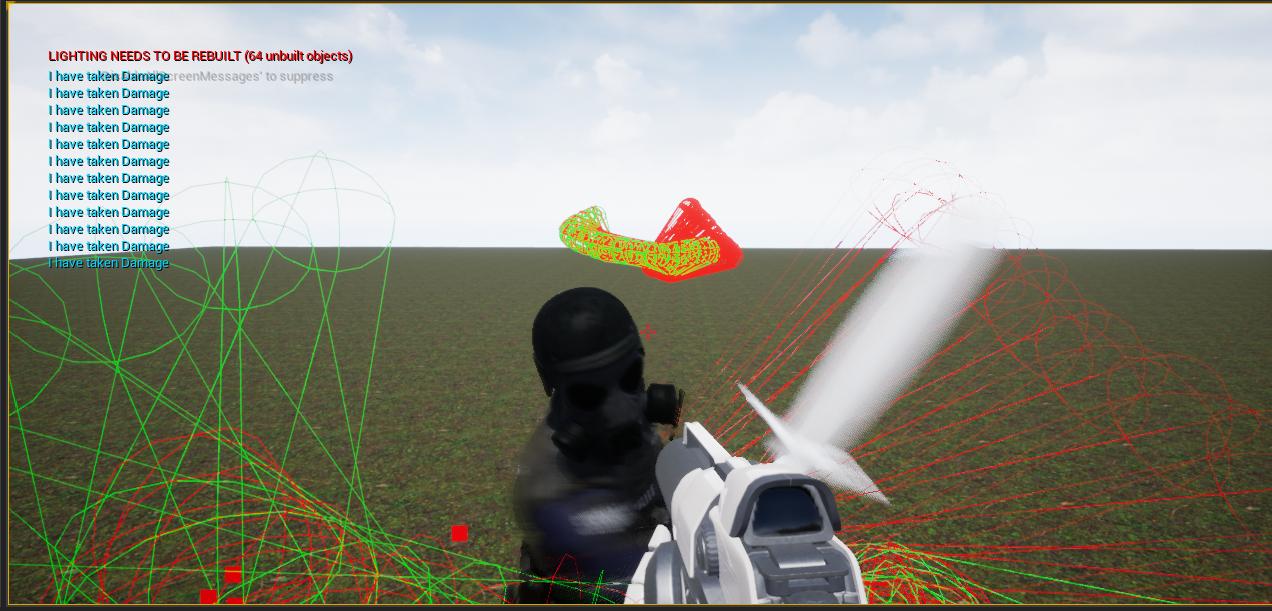
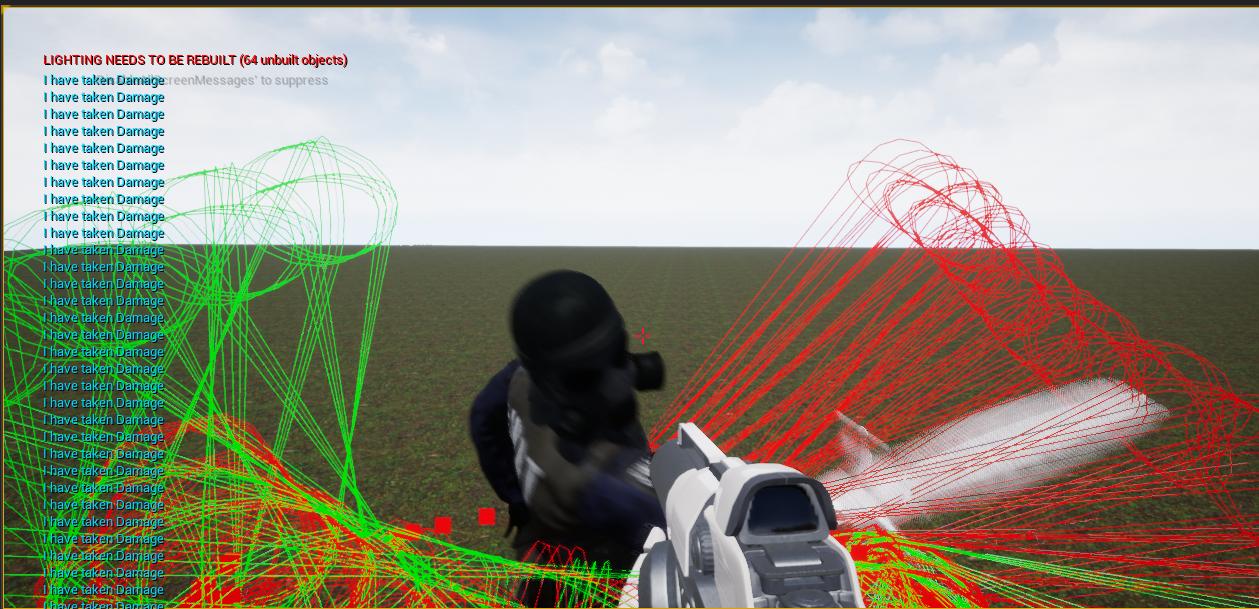
i have been struggling with this sphere trace script for 2 days now and I can't seem to get it to behave the way I need it to.
If anyone can see any glaring issues that I might be missing I'd be incredibly appreciative.
(I have it setup to try and prevent the sphere trace from applying damage multiple times during the swing)
 tight venture
@fathom portal Sry, I can only answer in general computer science type language. I don't think I know enough specifically about level streaming to answer the way you want.
 fathom portal
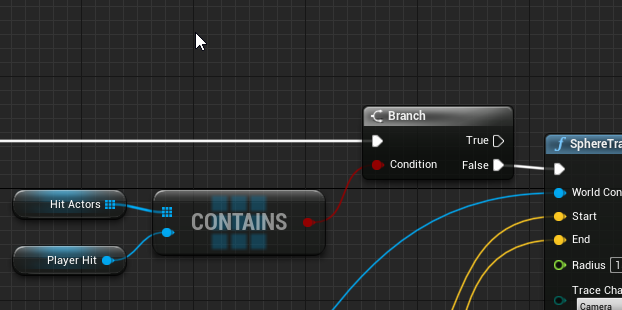
@manic viper seems as straightforward as limiting the "hit actor" to a single time during each swing
So you're already recording the hit actors, simply make sure the hit actors array doesn't already contain the actor
manic viper
that's in there
 rough wing
I have a UI that should stay on the enemy
manic viper
 fathom portal
It's before the sphere trace though
rough wing
I do it this way
fathom portal
You need to validate it from the "out hit hit actor"
rough wing
But like in the photo, it goes all the way to the corner
 gloomy linden
at the start of the attack animation, when you start the sphere trace, start to record the hit actors, with each hit, check if the actor that gets hit is already in the array (if not, add it), at the end of the animation, clear the array
manic viper
So the entire /contain, set and clear, after the sphere trace ?
gloomy linden
choose where you want to apply damage somewhere in that sequence
fathom portal
@manic viper you need to move your contains/branch to after the trace
manic viper
Thank you i'll give that a shot
fathom portal
Or simply connect the "hit actors" array to the "actors to ignore" list on the left side of the sphere trace by channel
 flint nymph
@manic viper I can help you later tonight if you’re still running into problems
manic viper
Haha I appreciate ALL help. I've been struggling with this one for a couple days
fathom portal
Is "hit actors" a local variable? Is this inside a function?
manic viper
yes its inside of a notifystate
gloomy linden
@manic viper Start Attack Animation -> Sphere trace on hit: Add actor to array -> apply damage. In the Sphere Trace there is ignore actors, connect that array to it. When the Attack animation finishes -> Clear array
manic viper
i was trying that earlier and I couldn't get a reference to my arrays outside of the notify state that I set it in
manic viper
 untold pine
I'm working on a piece of a blueprint about a movement system & want a multiplayer help with it, is it here or the multiplayer section?
gloomy linden
get player pawn -> cast to pawn -> get hitactors array
fathom portal
manic viper
its not on the player, it's on the enemy
fathom portal
You'll get better help for multiplayer there, @untold pine
untold pine
alright! ty
manic viper
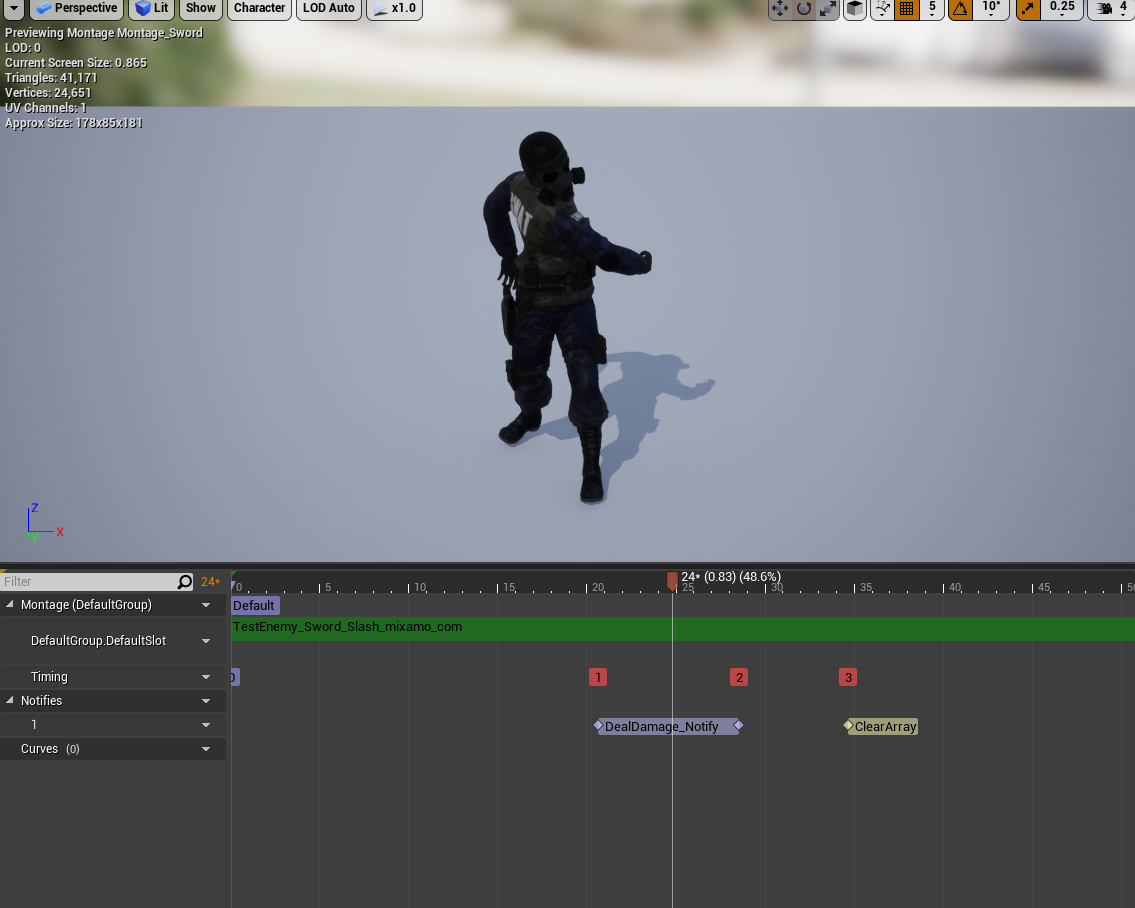 flint nymph
from the mesh output at the start of the node you can get anim instance->try get pawn owner
manic viper
^ that's what I did in the notify state
gloomy linden
use try get pawn owner instead of get player pawn
flint nymph
you can create a notify event that you have at the end of your swing and do the same reference in your anim bp with try get pawn owner etc on that notify event to clear the array
manic viper
that's what i was trying to do
 jaunty dome
^hey there
manic viper
i get the pawn owner and there's no drag off for array
gloomy linden
need to cast to the enemy bp
flint nymph
try get pawn owner, cast to enemy bp, get array
jaunty dome
why doesn't the Component Hit event return the physical material of the hit object while it returns the object's name ?
manic viper
ok I'll go down that route, thank you joe and Remco very much for being patient with me haha
jaunty dome
any clue why hit physical material is null ?
manic viper
haha at this point. he hits once and does damage once, but then never again .. am I not clearing this array correctly ?
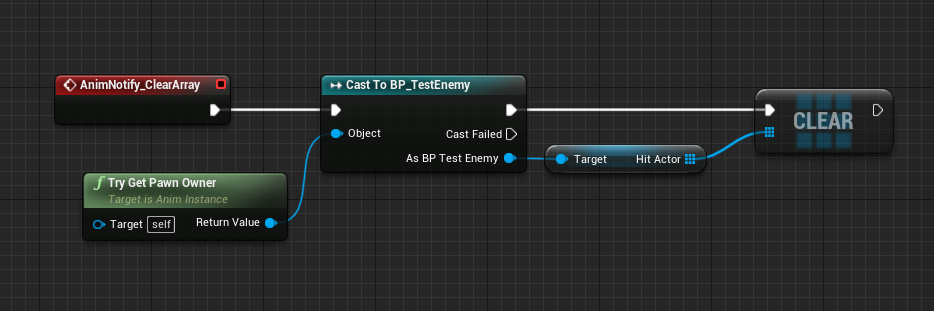
oh i'm sure not
flint nymph
check to make sure the notify is calling
flint nymph
lmao
manic viper
I can't access the correct array from the notify state
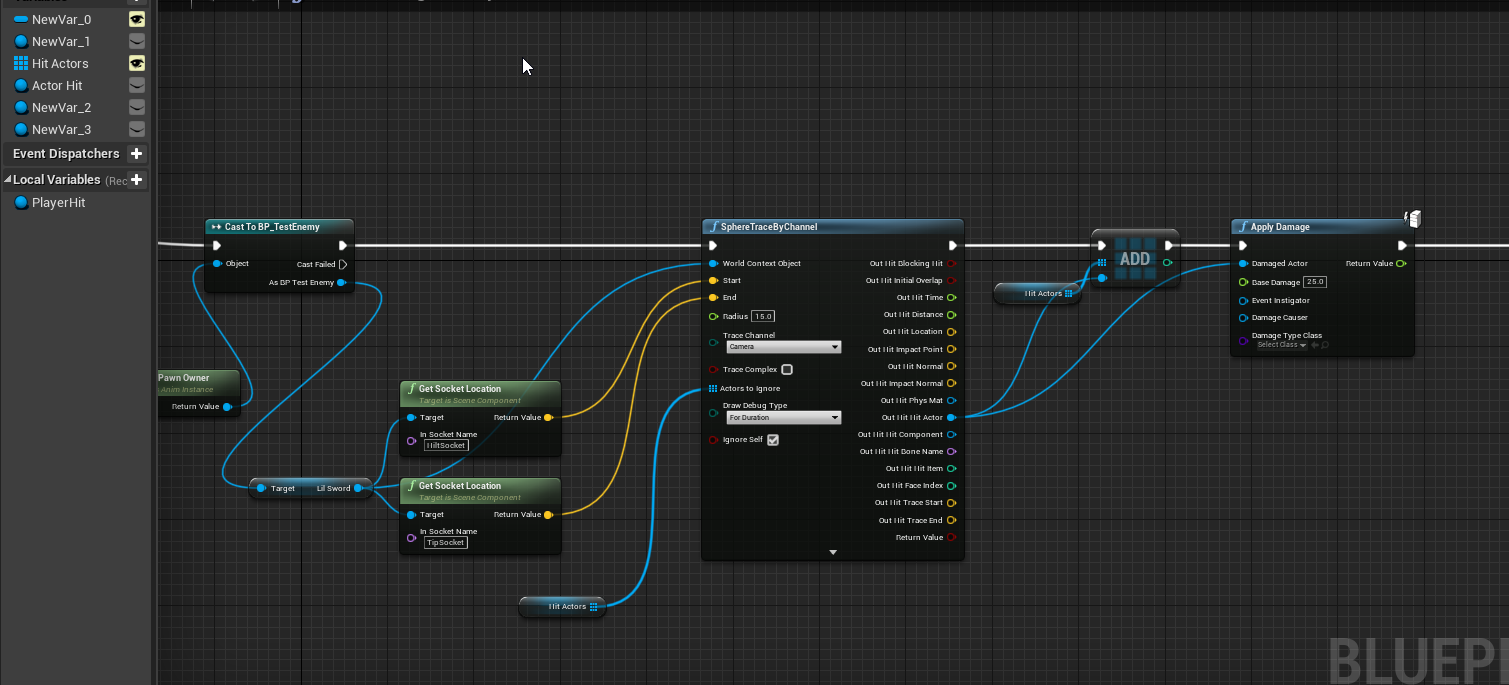
that's the notify state bp
I can't access "Hit Actors" from the clear event
flint nymph
use the HitActor array from your enemy bp
you have the cast right there just pull it out
manic viper
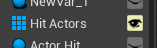
so i can pull out "Hit Actor" but not "Hit Actors" (which is the array from my anim notify)
singular vs plural
flint nymph
yeah just ignore the array you made in your anim notify state
might as well not exist
replace all its references with the Hit Actor array from the cast to your enemy bp
manic viper
well shit..
where did the Hit Actor variable come from ? Did i make that earlier ? HAHA
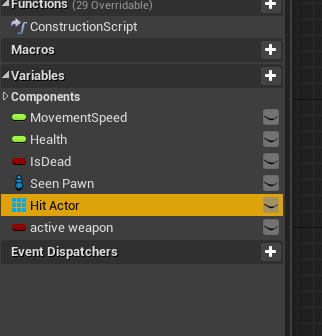
I sure did
I think this is a leftover from when I tried to do the whole array system in the enemy blueprint HAHA
wow,. So Going forward... initialize arrays in the Character bps
 minor whale
How can I play a video from a URL in that widget?
tough ore
How can i freeze players mouse look, or like disable mouse look?
flint nymph
you need to reference your player controller
flint nymph
that should probably work yeah
tough ore
But it isnt 😦
Tried to look it up but didnt find anything
Can it be on the character controller?
 zealous moth
@tough ore where is that disable input node at?
tough ore
On the FPScontroller
zealous moth
your player controller? then remove the "get player controller"
for your get target, try "self" - "get controlled pawn" - disable input
tough ore
So i dont have anything on the target and the player controller is what?
Im new to unreal xd
 lusty escarp
Hi Guys, Struggling with some overlapping events. I'm trying to get all the overlapping actors within a Sphere Collision and adding them to an array. For debugging purposes I am Ticking how many are inside of the sphere collision. But for some strange reason it doesn't get the correct number
Sphere Collision
Container Collision
 scenic marsh
where do you add them to the array
scenic marsh
so it's adding some but not all of them?
lusty escarp
Theres 3 Containers within the Sphere Collision, but only 2 of them are being recognised
lusty escarp
Thought you would say that, So I added a Destroy Actor for all the Containers, and still only 2 get removed
scenic marsh
can i see how you destroy them
 proud hull
In add energy container, can your print string from is not valid to see if any of them are ending there?
lusty escarp
I just added it to the ForEachLoop
Okay, so I did what @proud hull , and It prints out three times 0,1,2
scenic marsh
on the tick do forloop and instead of length print the name of each actor
proud hull
Does "Energy Container" component already exist in "BP Energy Container"?
You can directly reference your energy container component then instead of using "Get Component by Class"
"Get Component by Class" is failing in your setup, and you are then getting null returned which is not valid and it fails that check.
If you removed the is valid check, you would probably get an error for accessing None
For example, these nodes both return the same thing, but one is a direct reference to the component, while the other still has to find it and has a chance to fail.
lusty escarp
Okay, I understand you. But I fear that I described my problem incorrectly. I have a Actor that is placed within the level that has a Sphere Collision. There is another separate Actor that is placed within this Collision Area. On BeginPlay I need to check if there are any Overlapping Actors within the Sphere Collision, If so, Add them to the Array of actors.
There is currently only 1 Actor within the Sphere Collision
The Print string spits out 1
If i duplicate the Actor
The print string still spits out 1
 elfin hazel
What if you don't duplicate it, but drag a new one in?
lusty escarp
@elfin hazel Same issue
scenic marsh
try destroying every actor from the array
instead of getting overlapping actors again
elfin hazel
Hm. Interesting. Seems like it could be an editor issue.
What if you try having your sphere collision off by default and a short time after begin play, you enable it. Would that work for a cooked version?
The Get Overlapping Actors doesn't recalculate or re-check what it could be overlapping, it just returns an array that it already knows its overlapping. Objects gets added to the array, when the overlap happens.
lusty escarp
@scenic marsh So, I looped through the Overlapping Actors, and destroy the actors and it still only destroys 1
scenic marsh
if you print out the names of whats in the array then you know exactly whats in it
lusty escarp
So Printing the Display names of the actors gives me two different actors, which is good
scenic marsh
can you plug in the array element straight into the array instead of doing get component by class again
oh
hm
proud hull
Why not use "Get Overlapping Components"? since you are directly trying to get the energy container that is overlapping, right?
When I use that in my test, I get the correct array length for the actors in a sphere collision.
Using actor is returning 0
lusty escarp
@proud hull No can do, The Component I want to get is within the BP_EnergyContainer
proud hull
But you then cast to Energy Container component and only use it when it succeeds.
Ummm.... but it does return that...
elfin hazel
You'd have to Get Owner.
proud hull
In the blueprints, the actor BP_EnergyContainer is only used to access the component EnergyContainer, which I am guessing is the component that is overlapping....
Therefore, you can get it directly instead of going through the actor first.
lusty escarp
No, The BP_EnergyContainer is the object overlapping, The Component just houses all the EnergyInformation for the Container
proud hull
What is testing for the overlap in your BP_EnergyContainer?
lusty escarp
A Box Collision with this Preset
proud hull
Then do what @elfin hazel said. But also what I said. Get the components overlapping, get owner, then get your energy container.
lusty escarp
Like this?
proud hull
You don't need to get component by class, directly reference it.
"get energy container"
lusty escarp
Doesn't allow me to get it from GetOwner
proud hull
cast it first
Then get
Your get overlapping actors should have worked as well. I got mine working now, not sure what caused it to print 0 before.
lusty escarp
Im confused now, It is printing the Display names twice now for some reason
Think I might scrap this design, and not have the option to have Containers within the Sphere Collision on startup
Thanks for all your help guys, Much appreciated
trim matrix
is there a way to line trace from my gun to cursor in top down?
proud hull
@trim matrix
trim matrix
well yeah thats what i have been trying to do lmao
 white crypt
try searching my previous posts in this channel, there was a discussion not too long ago
there should be a link with all the nodes
trim matrix
actually i think i got it since before i wanted it so it goes in the direction of the cursor and keeps going that way
but now that i think about it it would be better if it just goes to where the crosshair is
white crypt
you mean the player moves to mouse location or a projectile?
trim matrix
wait no i just realised it shoots to the sky because that's where the cursor is
aaaa
white crypt
heres my example https://blueprintue.com/blueprint/t94rimlr/
BlueprintUE
lusty escarp
@proud hull Just in case you wanted to know, I was able to fix the Error by adding a Delay Node before Get Overlapping Actors, seems Unreal doesn't runs begin play before everything is initialized, Seems like a timing issue
proud hull
Hah, that makes sense now. I was doing more tests and sometimes it went back to returning 0, and most other times it returned the correct amount.
lusty escarp
Yeah, slightly odd, but progressing now, Thanks for your help
trim matrix
@white crypt thanks so much i have been doing this all day
white crypt
np, let me know if it works correctly for you
trim matrix
it does
white crypt
k awesome then :>
 atomic prairie
I've a simple question, my skysphere is blue and purple, so my character has blue and purple shadow and reflectins, is it possible to change this while keeping my skysphere colors?
 slow hill
@atomic prairie you can use a custom HDR texture for the skylight i believe
atomic prairie
It's a little too much purple everywhere 😆
slow hill
Select Skylight > Source Type = Custom Cubemap
atomic prairie
Oh okay!
 woeful dawn
Hi dont know if anyone can help me but, I saw in a game the other day that it was using the name of my hardrive to set the my characters name. Does anyone know how to acheive this in ue4.
never mind i found avideo 🙂
actually its the wrong thing
anyone got any ideas XD
I figured it out. if anyone is interested you u use the "Get Platform User Name".
atomic prairie
@slow hill thx!!
atomic prairie
OBS
 flat raft
sweet! Thanks!
 fluid cape
Obs is good, but you will likely need an external graphics card unless your computer comes with a strong one.
woeful dawn
Hi, does anyone know how I can recreate this kick physics thing at 0:36 https://www.youtube.com/watch?v=ndU4euPl1Oo

VCMS: Vigilante Combat and Movement System Gameplay Tech Demo (Super Hot & John Wick Type Game)
About VCMS: Vigilante Combat and Movement System:
Developed for a 4th year Honours project, the Vigilante Combat and Movement System is designed and developed with the goal of usin...
 static charm
Just enable collison on the skeletal mesh so that it interacts with objects that have physics enabled too.
There are other ways too.
 dapper kiln
Is it possible to play an animation montage in the direction you are looking? For example, If I'm looking straight up and then press the reload key, how can I make him reload while still looking up, instead of resetting back to looking straight ahead and reloading? I wasn't sure if I could do this in blueprint somehow or if I had to do something in the animBP.
In my case, how can I play an animation montage the direction my aim offset is looking?
 grim crescent
can an interface implement another interface?
 twilit heath
no, and it shouldn't
better to split into several interfaces, then to make one large one
 exotic cradle
https://gyazo.com/e6162ece3fdc8094703210ded4de0d4d Idk what i did but these appeared
 stoic raft
is there a way to instance or inherit from a data table? i need the row name to be the same but modify the rest of the row and id rather not just duplicate it cuz if i need to add a new row id have to go through each one and add the row instead of just once in a base
flint nymph
been getting a strange error in 4.25, just curious if anyone else has gotten it
sometimes when making an array variable and compiling the engine will crash
exotic cradle
Copy and Past
Ooops one second lol
You can right click on the asset or folder and hit migrate and move it to another project
 true marsh
Trying to nativize my blueprints and I'm getting a "must inherit UObject or a UObject-derived class" error. Anyone know how to resolve that? Its happening on my character blueprint.
 rotund basalt
typo lol
 bitter star
thanks @exotic cradle
rough wing
@woeful dawn I went crazy when you jsut blasted that table on the guys head lmao awsome
 sick sapphire
how do I make it so that even when Roll in Control Rotation is not 0 (Upright), the Pitch and Yaw still correspond to the same directions on screen?
maybe I can use some vector math on the pitch and roll inputs to calculate how much of input it has to give to AddController Pitch/Yaw Input each so that the camera movement corresponds to it?
sudden zephyr
Perhaps a better question, why are you rotating the controller roll?
sick sapphire
@sudden zephyr in one of the 'modes' for my character it can fly like a plane
so there is a roll to it, so players can use pitch + roll to turn like a plane
sudden zephyr
As in, perhaps rolling the camera itself might be a better solution?
Ahhh...
Well, perhaps take a look at the flying space ship project from epic and use that?
Epic didn't add much flexibility with their base components for such things tbh. -.-
Hell, i even have issues with simple third person prone stance.
They really want to keep it on the Z. xD
But my guess is, the first issue you would be getting among others is gimbal lock, i think there was a video on YT about that that might actually push you in the right direction?
sick sapphire
what's gimbal lock? i am reading the forum right now
sudden zephyr

#ue4 #beginner #blueprint #rotation #flight
Quick and easy fix to overcome gimbal lock for any game requiring the full 6 degrees of freedom!
Everything in this tutorial can be accomplished with no knowledge of c++. The code used to create the custom functions can be found bel...
Check this out, it surely gonna come in handy. 🙂
If you do end up following up on the tut, my suggestion, don't use V,C for roll, use the damn Q,E like 99% of normal games. xDDDD Just my personal note. 😛
sudden zephyr
My other suggestion tho would also be a timer with delay perhaps that would realign the player with gravity or a button for that, like X to realign if its not in space flight.
And perhaps you would like to keep the gimbal lock on some occasions, dunno. Gonna have to test it out.
sick sapphire
yeah i would also like to have it realign but only after a certain condition
also this gimbal lock thing is there a way to do it just using blueprints? the guy inside uses C++
sudden zephyr
Not sure. 😦
Feel your pain on this regard, if nothing, i keep away from C++ as much as i can because it's easier to move BP's between projects then C++ is. At least for me.
Since i'm just a beginner, i move things a lot, like make a feature in some of the projects, while making the logic, lots of crap gets added/removed, then i clean up the feature i want and move it to a clean project.
And C++ classes don't like that at all. xD
sick sapphire
alright thanks anyway ill try to figure it out
sudden zephyr
Np, wished i could help more, sorry. 😅
sick sapphire
@sudden zephyr alright thx still
i might try to go further with the thing where i try to calculate the axis vals of different axis from roll value
sudden zephyr
Not sure how you already implemented flying but i'd try to make the control rotations local to the pawn for start, don't apply anything on the controller. 🤔
sick sapphire
how do i do that
cause ive pretty much just been using the default 'add controller yaw pitch roll input"
@sudden zephyr
sudden zephyr
You don't need to mention me on every comment. We're having an active convo. xDDDD
Jesus...
sick sapphire
alright haha
so uh how do i make the control rotations local to the pawn because im not really sure what that means
sudden zephyr
Not sure how you implemented the flying in the first place, but there are Inverse Transform [Location/Rotation] for World to Local and Transform [Location/Rotation] Local to World space, if i'm not mistaken.
sick sapphire
my flying is basically just normal input but I set the CharacterMovement to flying mode
uh also my mouse input + roll is also just add controller x input
sudden zephyr
Maybe reroute the input for when flying? Make a bool or something and use the normal input when walking and a different one when flying to implement different behaviors.
sick sapphire
yeah i already have a bool for (IsFlying) i just use it for another thing
the problem is just what kinda different behavior i want to implement
sudden zephyr
Well, as i said, start simple and small. First, bypass the usual input when flying. Keep them separate as they are separate features, then start by making the character simply move properly in the directions your camera is facing. Something like Get Control Rotation > Get Forward Vector It's rather similar to the base input setup, but with verticality, meaning you'll be using the Z as well and not projecting on a plane. Make it so that Space and 'a crouch button' moves the character up/down, with `Get Up Vector. Thet's for directions, after the vectors, you can use the same nodes the epic movement uses i think.
Because right now, you're asking a very broad question of how to make everything rather then something specific, if you know what i mean. 🙂
sick sapphire
Ah alright then
Actually I already done that
Connected get forward vector to add movement input
 sonic kraken
Hello guys, i have a question,
How can i get the first Cast? I couldn't find it in the functions, i just can find the second one(with the execution input pin), but i want to get the first one(without pin).
Thanks!
sudden zephyr
You right click on the execute cast and make it pure cast
sick sapphire
Right click convert purecast
sudden zephyr
👆
sudden zephyr
Btw, don't know if this would work, you could try something like that i guess?
Make the same branch on normal walking input only for when not flying ofc.
And you'll have to make a move up input action axis in project settings > input for the jump and crouch key to move it up or down.
Sorry, messed up, use the appropriate vectors! xDDD
Get Forward Vector, Get Right Vector and Get Up Vector respectively.
untold pine
Hey
So if I want to get the player movement speed I get Character Movement > Velocity > Vector Length = Speed
what about if I want to set that speed?
in Add Movement Input it's 0 - 1
I want to but I don't want to add movement
it might work with changing max speed, but don't really like that idea
any suggestions?
sudden zephyr
What is the idea here tho? What are you trying to do in the first place?
sick sapphire
Phsycho wait why do I need a thing to move up or down I'm trying to implement roll with changing pitch and yaw ctrls not do a helicopter
Also ping me I'm on mobile rn
sudden zephyr
If you want simple walking, you could perhaps just divide the scale if you don't want to change max speed. Tho not wanting to touch that is like saying, "i could add a variable, but i'd rather use the lines everywhere instead."
@ S.Robot
Oh, well i assumed it's superman kind of flight, freedom in all directions and it's usually good to start from somewhere, so simple movement in all directions while in-air and go from there. Dunno. xD
Did you check out some unreal flyting character tutorials on YT? Might help.
sick sapphire
Yeah but a lot of them don't really work the way I want to
Most of them don't have the roll thing I want and the last one uses physics which is not very good for controlling my character
Imma try the calculation thing first
 chilly linden
I have these boxes that spawn some items on destroy, however, I cant figure out how to spread them out more evenly when they spawn, any ideas?
untold pine
@sudden zephyr So I'm making my player move on LMB click
it do a "Simple Move to Location" & that location in "Get hit result Under Cursor by Channel"
but also if the cursor is too close then the speed would be slow & if the cursor is >= 200uu far from the player it's full speed!
& I've already set the rotation to be in the moving direction unless the character stops then it's where the cursor at!
chilly linden
this is the mess i have created
sudden zephyr
Sure, ofc. Good luck. My idea was, you first need absolute control and a working prototype in the first place. To move the character around freely, so you can see at any point what corresponds to what, including up and down, it will come in handy for sure while debugging. Then start playing around with camera roll, and relative orientation. Dunno, something like that. But again, not sure, as Epic really restricted many things on the fact that Roll will always be Z up. -.-
untold pine
@chilly linden boxes as in collision? & you want them like spawn organized?
sick sapphire
Pshycho actually can you teach me later what the inverse transform nodes mean
I feel those could be useful
chilly linden
@untold pine so i have a crate, and when they crate is destroyed 3 items(bp_pickup) is spawned, but i would like them to just spawn a bit spread out because currently they are spawning in a line and are spawning close together
sudden zephyr
I'm a beginner two tho. 😅 But as stated before, they convert world to local/local to world space.
sudden zephyr
Tho, i'm having trouble implementing those conversions myself, but i have a hunch it's due to orientation miss-matching. Like, the editor forward is X but for some god forsaken reason, the mannequin is Y forward so you can figure out the issues that brings. -.-
sick sapphire
Alright it's fine then I'll search documentation
untold pine
@chilly linden would this work?
https://www.youtube.com/watch?v=ffVHeAdQdlo
ofc you want the z to be 0 in case you want them on the floor
unless you like have them to have a gravity & maybe add to them some force or impulse I don't know which is going to work!

What is the Random Point in Bounding Box Node in Unreal Engine 4
Source Files: https://github.com/MWadstein/wtf-hdi-files
chilly linden
@untold pine that looks promising i will try and let you know
untold pine
@chilly linden or maybe you need as simple as this
I made it in a rush xD but I like how I made the crate in blueprint
you think it can work?
& good luck!
chilly linden
@untold pine so they are spawning but it seems like its still not that random
sudden zephyr
That has issues of it's own tho, what about terrain elevation, intersecting characters and objects etc?
I'd make a boudning box around the crate (you know it's a valid location that doesn't intersect things and elevation is correct, unless you fudge up the crate itself lol) and then radial force to scatter in random directions perhaps?
chilly linden
the radial force is not for the items dropped
its for the destructible mesh pieces
untold pine
Hmmm, true I didn't think of that @sudden zephyr
sudden zephyr
I know, but i'd apply it on them too, a smaller amount ofc. xD
Like a poof effect.
untold pine
yeah if you can add a bit of force it would be cool
sudden zephyr
I think i saw that in Don't Starve.
Safest bet, and you avoid calcs and other checks for intersections.
I'd even apply a slight up-ward force too, to make an arc. Depends on game tho if it fits the theme.
chilly linden
they dont have physics
sudden zephyr
🤔
Why not enable while they scatter and then disable once they stop moving, or disable as soon as they hit the ground?
untold pine
^ nice idea
sudden zephyr
You can even make a combo if you add the arc thing, count the bounce and disable physics if they bounce n times (like 3) or if they stop moving while on ground.
chilly linden
I am trying to just get something similar to this https://gyazo.com/f38a7f53e9e64badb32b9c814cd71cd3
sudden zephyr
Oh, so they spawn in air and fly towards player? That should be even easier, no? Samwid's solution would work perfectly, just spawn them around in a radius, and add some min/max height as well and there you go. 😅
untold pine
& each spawn with timeline & lerp move towards the player character, this will act like a magnet I think!
chilly linden
spawn them around in a radius as in a random point in bounding box?
or the second thing you sent
untold pine
both can work, & the 2nd one as you don't really need the gravity or spawn under terrain
you can make the min Z is by getting it from a Z point at the player's feet if you want
sudden zephyr
Maybe this? What you think, Sam?
untold pine
it seems ok
sudden zephyr
Or you can temp spawn a bounding box, i dunno if the bounding box handles unique random location spawning, if so, i'd use that instead and just input the location for the box, spawn all items and remove the bounding box.
So many ways to do it. xD
untold pine
I think the bounding box is only a calc of a point, not actually spawning a box
sudden zephyr
Yeah, spawn a collision box of the size and location the random stuff needs to occur and point the random spawn to the collision box.
untold pine
Yeah! so many ways, once I've spend like a month trying to make something work
& after I did, in 30min I figured out another way which would take me 10mins to make! 😂
untold pine
yup
 hollow flame
when i enable set simulate physics the object it won't move if i try to change its' location like set actor location not work.
untold pine
never happened to me, I'm trying to think of a reason why it do that
sudden zephyr
How do people cope with the character orientation and mesh orientation for the mannequin?
Apparently, i can't get the simplest relative locations to work.
untold pine
no idea, I don't really know what are you talking about 😂
sudden zephyr
Well, the third person character orientation is X forward, as is the editors default, but the mesh (the mannequin) is Y forward.
So i always have to counter that fact.
sudden zephyr
I tried, nothing works as to make sense to me. xD
untold pine
if you get
"Get player Controller > Get Controlled Pawn > Get Actor Forward Vector"
this will give you what?
sudden zephyr
The X forward ofc.
As i said the actor itself (character pawn) is properly on the X forward orientation but the mesh is not.
untold pine
hmm like if you want to set the rotation of the mesh you are going to deal with Y?
untold pine
idk why it's like this in the first place
but didn't really effect me
ok what exactly you want to do?
sudden zephyr
The unreal editors by default is X forward, no clue why the pawn that comes with third person starter has it on Y forward. I'm gonna get a stroke from my OCD impulses in my brain. xDDDDD
chilly linden
@untold pine @sudden zephyr I sorted it out thanks to your image @sudden zephyr now I will do the magnet
untold pine
xD I feel you @sudden zephyr
@chilly linden you're welcome, happy to help with how little I know! 😂
update us with the result of the magnet!
chilly linden
would it be done in the construction script?
sudden zephyr
You could call an event from there but i guess you either need a timeline or a timer to make the magnet work in the event graph.
Well, it should be simple enough, yet i'm just not getting it right. The mannequin has a socket on which i spawn and attach an empty scene.
I'm simply trying to rotate that scene towards the cameras line trace hit location in relative space but i can't get the hang of it at all. My world to relative conversions seem to bugger up. For instance, if you would take forward axis of player pawn and drew a line, it would be forward as expect, the scene that i'm trying to rotate points left as it's oriented by the mannequin mesh (y forward).
Green is the empty scene (pivot i'm trying to rotate in relative space)
The magenta shows it's forward. xD Mind-f***
Behind the head you see the cam line trace. xD
Not sure how to translate that into relative space properly, apprently.
untold pine
So you simply want the "Scene" to always face the camera?
sudden zephyr
That's the first step, yes. But i'd really want it in relative space. 😅
untold pine
yes I understand that
& so even if the character is facing whatever, the scene will always face the camera?
sudden zephyr
Cuz i'll need relative space later, and if i can't get even this right, i won't manage anything else either i think.
Yeah, ofc, i'll rotate the character as well later, but for debugging, i'm just wanting to make sure that the rifle follows properly in the first place. That is, the pivot scene.
chilly linden
i have done the magnet but its moving instantly and i cant see why
untold pine
did you make lerp @chilly linden
?
instant instant? or like slow then fast & then really fast?
@sudden zephyr wait, I didn't really notice the weapon xD
so you want it to Aim?
cause I thought you want the scene to face the camera like if in this case you looking forward & the weapon pointing at the camera not forward
sudden zephyr
You're lerping from actor location to actor location? That aint gonna work. xD
You need to lerp from item location to actor location
*interp (you get what i mean)
untold pine
hmmm, idk about that, didn't make anything like this to know if it would work or not, but I thought it would be more like this
this could work? idk
sudden zephyr
His should work, too if he edited appropriately.
It should be done fine with vectors in world space. Tho, i'd add an offset to the Z so it doesn't move to actors feet. xD
untold pine
@bitter star isn't this the default blueprint?
chilly linden
@untold pine It still seems to be instant
sudden zephyr
Show us the new BP
chilly linden
sudden zephyr
Btw Sam, don't mine rifle, it's attached to the scene so ofc, it rotates with it but that's not important currently.
That is the code that doesn't behave as i expect.
bitter star
@sudden zephyr Only the yaw was on and after ticking pitch and roll nothing changes
untold pine
@bitter star click on the root on the left & you'll find it on the right in class defaults, if it's appearing to you click on the middle top the Class Defaults button
sudden zephyr
Try detick them? xDDDDDD
untold pine
@chilly linden add a delay & make it a slower?
untold pine
hmmm
sudden zephyr
I didn't use Timelines yet, does the New Time on 0 override the actual timeline's time or does 0 mean, use set timeline time?
chilly linden
not sure but i tried that and still nothing
bitter star
Try detick them? xDDDDDD
@sudden zephyr I did and now the camera acts the way its supposed to but now the character gets out of the frame and always faces the same way :/
untold pine
nah doesn't need to worry about 0 leave it be, it will effect nothing
chilly linden
no i did no points
sudden zephyr
Hence why i asked. 😛
chilly linden
hmm, i originall thought i could just use a vector track
sudden zephyr
0 lerp/interp = instant.
chilly linden
and leave it default
chilly linden
sorry guys xD
sudden zephyr
Np.
untold pine
open the timeline
Shift + Left mouse button
it will make a point on the graph
select that point
& set Time = 0 & Value = 0
then place another point
& set Time = 3 (as in 3seconds) & Value = 1
this means it will make 0 to 1 in 3 seconds
sudden zephyr
First click the F+ button to add a float timeline if it's empty.
sudden zephyr
Was my picture. xD
untold pine
no the one he sent it
sudden zephyr
Didn't see. o.O
chilly linden
still instant lol
chilly linden
chilly linden
sudden zephyr
This should work. 🤔
untold pine
exactly
sudden zephyr
Some gremlins seem to hide somewhere...
untold pine
I mean, that's what a developer is all about, figure out wth is going on!
ok I have an idea
sudden zephyr
Man, i gotta print and hang it on the wall one day.
untold pine
tru dat!
sudden zephyr
So, what am i doing wrong here?
https://discordapp.com/channels/187217643009212416/221798862938046464/727458483770753095
untold pine
@chilly linden
Debug mode:! xD
make a sequence
1 Do once > 10 seconds Draw debug sphere on the spawn location
2 Do once > 10 seconds Draw debug sphere on the player location
3 on update from timeline after lerp the Draw debug sphere on show you the movement of the item
try to change colors & like 3-4 segements in each sphere is enough, make them small like 25 radius for also 10seconds
this maaaaaaybe show you something?
I've never used the inverse transform node before, so idk
I'm trying to think of it, but not getting anywhere
I need it in front of me to try to make it work
 cold kestrel
im trying to make a blueprint setup that will grab all the materials from an array of meshes, create a material instance dynamic for each, replace the original material with the MID and then store the MIDs in an array for later use
but the MIDs are just using the world grid material as if theres an error, but im not getting any feedback about what the error is
EDIT: Figured it out. I was doing that logic in the construction script and it was overriding the source value in a recursive way that was just creating a series of self references, parentless MIDs
chilly linden
@untold pine what spheres are you talking about
sudden zephyr
To draw a debug spheres to visualize things.
chilly linden
i figured it out
 hoary orchid
Is there a way to change character movement direction in Side Scroller:
Like first it was moving in X Direction, but once it overlaps the certain volume rotate everything, movement direction and camera manager
sudden zephyr
You didn't enable them, did you? That was meant for the other way of spawning them. xD
chilly linden
basically, I had an on overlap with the actor rather than the collision box which meant every time i entered the sphere i just picked the item up, I changed the overlap actor event to overlap event with the collision box and no problem
sudden zephyr
Glad you figured it out. 🙂
chilly linden
yay new problem
untold pine
^ the story of my life
chilly linden
if i put one pickup into the world it works fine, when i spawn 3 pickups after destroying the box, they just fly the fuck away
im so lost
untold pine
yes, but the problem is when you place 3 crates? or 3 items? or when the crate getting destroyied?
destroyed*
chilly linden
when the crate is destroyed, 3 pickups are spawned
but i enter the collision sphere to make the magnet work
but then they fly away
one sec i will show
untold pine
for that make "Is Valid?" before it, cause is it searching for a actor location for a destroyed object? if that's the case then "Is Valid?" should do
oh wait
so what's happening for that error it might be this
the items are spawned & you asked them to get the crate location? & then the crate is already got destroyed? it might be the case
chilly linden
sudden zephyr
Hm, does it matter where the cast is? Looked like it flew where the last known position when the barrel got destroyed.
As in, it only took the actor location once.
chilly linden
but they are individual bps
sudden zephyr
No, i mean the cast before or after the timeline.
Try moving the cast within the timeline exec path.
untold pine
or they fly away I think because they aren't getting the player location & it resulted to fly towards 0,0,0
chilly linden
it works fine when i place them in the world
 visual shell
So since UE4.25, I can't seem to find how to create the Haptic Feedback Effect asset. Does anyone know this?
chilly linden
when i place the item
untold pine
^ no idea!
chilly linden
the pickup itself
sudden zephyr
To make less confusion, a crate is a storage, a item is an item, and a pickup is an action performed. Ok? xD
untold pine
xD
chilly linden
pickup(item)
sudden zephyr
🤪
untold pine
ok, so do you want to go & collect them?
or do you want as soon as the crate gotten destroyed they go to you?
chilly linden
when the crate is destroyed, 3 items are spawned, since they have a large collision sphere, they should move to me like a magnet
like this
untold pine
so there is no chance you'll miss any right?
chilly linden
pretty much that should never happen
however,
there is a delay
so the magnet should only work after 1 second
untold pine
np!
chilly linden
see it works fine when i place them in the world
untold pine
ok, how about in the item itself make get all actor of class & select the character then for each of that array (which is only 1 character if it's single player) take the result then cast it to the player
this way you 100% that the actor location that goes to is the player character!
sudden zephyr
I'm confused a bit, it seems to me as it should work as is as well. o.O
untold pine
maybe lower the delay a bit like make it 0.5sec? it could be nicer! idk
sudden zephyr
It waits for an overlap, and only passes through the cast if successful, why does it trigger a null error?
untold pine
from the for each?
chilly linden
fixed it
untold pine
cool! by what?
untold pine
I see, cool, so it was getting a vector other than the player location
chilly linden
yeah something was going wrong with the player location
not sure
and lots of errors
in the log
xD
sudden zephyr
It was getting null ref from the cast and you get a 0,0,0 vector due to that.
chilly linden
that makes sense
untold pine
about the errors, make sure you use Is Valid! it helps a lot with errors!
sudden zephyr
What i don't understand is it shouldn't get a null in first place as it doesn't pass it. Weird.
untold pine
if you want something's location place is valid for that thing! cause the error is asking where is X's location & X isn't even there! or can't find a reference to it!
like this is from my current project
so as you see to make sure I get all the info from the player controller without any errors I do is valid!
 surreal peak
You should more or less be aware of this though
You should always know if something is supposed to be valid or not
Now you have a silently failing bug in your game if it's not valid
 earnest tangle
Tbh I'm not quite sure when that would fail 🤔
If you're processing input it's probably in a pawn or controller, and in both cases the player controller should be valid..
if it's not something's fucky
surreal peak
Not the point. In general guarding everything with IsValid isn't the best approach
earnest tangle
yeah I know I was just commenting the usage of it in general in that example he posted
untold pine
Yeah I can see that, maybe I'll place a debug print till I finish the project!
surreal peak
The example he posted should probably use GetController instead to refer that specific one, unless it's singleplayer
sudden zephyr
Sorry, 😅 kept showing the wrong paragraph.
untold pine
@chilly linden is it a singleplayer?
sudden zephyr
Nope.
untold pine
xD
sudden zephyr
I can't get my character to aim even. Let alone delve into AI yet
untold pine
You'll figure it out!
sudden zephyr
I'm interested tho, since i don't get it, why did his original way fail?
untold pine
can't figure out why
sudden zephyr
He passed a overlap ref, the ref tried to cast to character and then timeline happens.
untold pine
so it should be the character & it's all should be ok
sudden zephyr
Here's a rough representation
untold pine
how about this, maybe he has another character on that level? so it goes to it?
like he didn't take the location from "other actor" he took it from the cast? or this wouldn't work like this? it has to be this cast location cast it got a refence from other actor!
idk xD
sudden zephyr
Huh...
Sure, that would explain why it flew some place. But not the error. 🤔
So the error was about calling a null ref in the get actor location, but the cast was successful, so the ref can't be null when calling get actor location. It buggs me for some reason.
untold pine
idk, he manage to make it work
I have my own problems to worry about & focus my 2 brain cells into it!
xD
earnest tangle
those things are probably things that get spawned at runtime
sudden zephyr
That's some basic stuff, check out some videos on essentials. But here's where you can find it.
plain flare
ok thanks i solved :)
chilly linden
just wondering if anyone knows how to make a particle fade, this channel seems to have a lot of smart minds
earnest tangle
@bitter star you can't get runtime objects to show when the game isn't running
they literally don't exist
if you're editing it you should be able to see it in the blueprint editor
you can also manually place the character into the world
If you want to possess the character you place into the world there is a setting on it called auto possess player or something along those lines
trim matrix
Willing to pay a few bucks to someone who might be able to solve my problem..
I am trying to make a chat but, but I am stuck with a error that wont let me type in my chat..
Following this tutorial https://www.youtube.com/watch?v=L0JLSoiC7jE&list=PLnHeglBaPYu_aUsm78py_O_OENKhdCGZS&index=66
Here is my code to ChatComp https://paste.ofcode.org/CwKgGTAfG3yJjUzbB7rwNH
Sorry for the wall of spam

In this video we add the players name to his chat message so other clients know who the message came from. We also alter our length functions to determine whether or not the types message is to long with the players name included.
proud hull
@trim matrix can I see your "getChatComp" function?
Looks to be something in there causing it.
trim matrix
It in my ChatChar.cpp
#include "Characters/ChatChar.h"
#include "Components/ChatComp.h"

// Sets default values
AChatChar::AChatChar()
{
     // Set this character to call Tick() every frame.  You can turn this off to improve performance if you don't need it.
    PrimaryActorTick.bCanEverTick = false;


    ChatComp = CreateDefaultSubobject<UChatComp>("ChatComp");
}

// Called when the game starts or when spawned
void AChatChar::BeginPlay()
{
    Super::BeginPlay();

}

UChatComp* AChatChar::GetChatComp()
{
    return ChatComp;
}
When you cast to ChatChar, can you add a print string on the cast failed? See if it is occurring at that point.
Also can print out what "get player character" is returning too.
trim matrix
Tells me an error
Or it says hello haha, but that is the default I guess
How can I go about printing out the info on " Get player character" ?
proud hull
Add print before your cast and just drag output of get character to it. It will auto-convert to string for you.
Seems like your project doesn't know to use ChatChar as your default player character.
 tranquil gorge
hey i tried doing some digging to no avail and seems like i couldnt get an answer. any advice on having my character stop snapping back to neutral along with the control stick and just just stay facing the last direction that he was moving.
trim matrix
Thanks Slashin8r, I figured out how to change the default pawn 🙂
plain flare
Hi, how can i close shadows for a mesh for a character ?
 thorn moth
@trim matrix Switch string?
plain flare
is there a way to close shadow ?
thorn moth
I dont know what close shadow means
thorn moth
remove the shadow right
plain flare
from where ?
plain flare
im searching
thorn moth
plain flare
it is close @thorn moth
thorn moth
stop playing the game?
plain flare
i amnt playing
ok
i closed
thanks
but is there a way to close from character's settings because character spawning from player start so when it spawned, shadows become open
and when i close cast shadows, gun's shadows still open
thorn moth
you need to make the same in the gun
plain flare
but they are together
 verbal canopy
they're different mesh components in the same blueprint, I assume
you can still change properties on each mesh, inside the blueprint
plain flare
ok, but i have still 1 problem. Im starting to game with "player start" and when i spawned shadows getting active
verbal canopy
because you're not changing the default value
you're changing a specific instance
open up your blueprint and set the shadows in there
 pliant flame
hey, i'm wondering if anyone's had an issue where trying to spawn a projectile from an actor's location causes the projectile to first spawn at 0,0 for its first frame and then snap to it's correct position? i'm using the spawn actor blueprint node passing the player's location in. video of the issue here: https://media.giphy.com/media/Tex4qHcLzjeLDyp2xz/source.mp4


 pliant flame
pliant flame
pliant flame
i think it's actually just the particle system that's snapping into place
 tame pecan
Anyone knows why cable component don't respond to line trace that it gets hit by? Just goes straight through, I've enabled collision on the cable component.
pliant flame
i got my issue resolved, just needed to add some warmup time to the particle system
 sonic hare
do any of you guys have a good tutorial to use if you are making a sandbox game?
like gmod
white crypt
you wont find a tutorial on how to make a complete game from start to finish...
 astral fiber
The child actor changes its look dependent on that boolean (false = red color, true = green color). If I now change this variable in the construction script of the parent actor, the child does not get reconstructed.
Am I doing something wrong?
Can I tell the child actor to reconstruct?
white crypt
your child construct should look like this https://prnt.sc/t99b95
 astral fiber
How do I get that node?
white crypt
 astral fiber
This is the child Actor
This is the parent
it still does not update its look
AM I doing something wrong @white crypt
white crypt
um you can do that set material part in the parent
child should inherit everything
and add a print string to see what is being printed
oh but if you added child component then it migh be a bit different, i thought you created a child class from the parent
another guess would be that child component cant inherit stuff on construct, try putting it on begin play
astral fiber
When I use BeginPlay, than it would look wrong in the editor right?
Added demo prints, first the child Construct gets called, than the Parent
The whole "Set Material thing" is just a prototype, in reality there is much more going on, its just a simple test.
I just put the whole Construct logic of the parent into "EventBeginPlay" but this does also not work
I am struggling since many days with this, I also created a BP node via CPP which updates an actor. If I use it in the parent it works, but if I give the node the child it does not get updated
Any other Ideas @white crypt
white crypt
cant you call an event inside the child component?
that would set everything up
and do you get any errors for casting to the child?


@astral fiber works fine
astral fiber
@white crypt Yes this works, the problem is I am working arround the Construct script, and not with it.
white crypt
this might work in construct as well
but it only updates when you compile the parent bp or change some variables
its seems that the event is not being called when you start the game, so you might want to consider setting up everything in a different way
astral fiber
This is in every Actor which gets used as a child actor somewhere else.
The construction script calls an event"Reconstruct" which builds up the actor.
This "Reconstruct" Event can be called outside the actor (in the parent actor which holds the child actor ocmponent) as well.
BUT:
This does not reset the build child actor in the first place.
- The child actor gets built
- The parent actor gets built
(Inside the parent construct, the child gets modified and the Reconstruct event gets called) - The childs Construct gets called again.
So the childs construction script gets fired two times.
So the "Reconstruct" Event has to undo everything which gets executed in the first "Reconstruction" iteration. Otherwise if you spawn a simple mesh there, it would exist two times.
@white crypt So if you have a very complex actor which gets used as child actor, it gets very messy. So I thought I might do something wrong here.
 compact quest
Having a bit of an issue that is confusing me. I have a trigger box that, when active will move the camera to a predetermined location and track the main character until the overlap ends (a sort of cinematic camera ordeal). However the playable character has the capability of transforming and possessing another pawn actor. I would also like to have the camera track this additional pawn but it does not seem to want to work.
Despite the fact that the player controller is possessing the new actor, the set view target with blend will only focus on the player character rather than the possessed pawn.
I feel like I'm missing a disconnect in the system here
compact quest
Ignore my previous question. I missed a step and figured out my issue. My apologies
 mystic olive
Had a question trying to make a tracelined interactable where for example lets say you have a lock on a door you would look at it Hold A to grab it and than using the left joy stick move it either left or right to lock or unlock it?
How would I need to go about telling my playerBP to stop play the grab animaton and than interact with the item or just interact with it in realtime.
astral fiber
@odd eagle you are trying to access an object which is not initialized or simply not present at the time you want to read a property of it. Try the "Is Valid" Node before you access the property and put some demo Prints there
 strange stream
My rotation towards the mouse works fine, untill I get close to the character.. it seems to spaz out like crazy, anyone know why?

I get that there's something with the Pitch going in minus, but I can't really clamp it above 0 either
astral fiber
Is there an initial overlap?
strange stream
what do you mean?
astral fiber
make a print after the hit result with a branch, "Initial Overlap"
check if thats false all the time
strange stream
I just realised the problem
My ''shooting'' point is the arrow, so when i put the arrow ''into the gun'' it basicly fixed it
plain flare
hi, when i press 2 in a level , UE4 freezing/crashing. But from the another level , when i press 2 it is working. So in the level which is not working, why can this happen? I checked level blueprint and not about there. I checked gamemode and they are same , so not about that too. How can this happen, where should i check ?
strange stream
But I still need the point of shooting to be at the barrel, so I'm not sure on how to handle that
strange stream
The collisions on the cube maybe?
 feral ice
ok
can try that
wasn't the collision
: /
what was your solution @trim matrix
ok
ill try that
: D
hollow flame
@odd eagle you need to check "isValid" before doing anything
 odd eagle
well it is not valid
I don't really know how to fix this
The pawn should have a subobject that inherits from UCharacterMovementComponent
So I don't understand why it's not not working
the pawn is valid
plain flare
hey i am in demo map and when i press 2 it is changing map, passing to the another map. But i want to remove this input , where can be this input ? not from level blueprint , where should i look ?
hollow flame
@plain flare search for all blueprints using keyword " press " or "2" something like that
plain flare
is there a command like "search from all blueprints"
i looked package's all folders but there is no blueprint
strange stream
Why does the Timer tick delay before starting?
 latent anvil
Hi there everyone. I have a question regarding a camera system. I'm interesting in replicating something close to the older Zelda games, where rooms/map tiles were laid out in a grid, and when you left one tile the view would switch to the next.
In my concept I won't be using rooms/tiles - it'll be an open world - but the top-down camera will following the player in large increments once they leave the camera's FoV in any available direction. Will it work? Maybe, idk, but I'd like to try. My question is simply, is there a name for a camera system like that which I can start researching? I keep googling things like "Zelda-esque room camera", "corridor camera" and "switch camera when exiting room", but I haven't found anything helpful yet to get started with. Any pointers would be appreciated! Thanks in advance
sudden zephyr
@strange stream Managed to figure it out? In case you didn't, the timer starts with the delay by default, and you can simply call the fire event between the button press and set timer node.
Brightside, it's to broad a question yet not that mainstream so i doubt there's any tutorial aimed at such thing. You'd have to start from somewhere and as you go ask more specific things. First thing tho, you need to establish some things. How you want to handle this, is it meant to be dynamic or grid based. As in, depends on how the map is designed. What i mean is, you could make the camera set it's bounds on first character spawn, then when ever the character moves outside those bounds, it would move in the direction the character went from the bound. Tho that can show some issues where there could be weird camera location based on map. The other solution would be to map out the map itself into a grid system with locations, this is a more fixed thing so technically you could audit the locations and add offsets for parts of maps.
Here's a scenario:
You have a map with a beach and sea, dynamic camera could run into the issue that the camera could move at the edge where the camera points mostly in see while character is on the edge of the beach and the cameras bounds. If you get what i mean. If you made a grid system, you could automate this and still go into a specific "tile" or grid location and set manually the location and bounds so the camera would position on the middle where water and beach meet.
latent anvil
@sudden zephyr Thank you for the reply! Your first example is closer to what I was initially thinking. I like the idea of moving the camera once the player leaves it's FoV (is there a way to do this other than "Was Recently Rendered"? Like trace from the camera's FoV?), calculating the world location of the player vs the level camera, then using level BP to move the camera in my desired increment. Unless I'm overlooking something obvious, this seems like a good way to to always center the camera's increment so that it's overlapping the player?
The issue I see with using pre-calculated bounds (and again, I'm a relative newbie at this so I could be mistaken) is that I'd need to do all of the legwork figuring coordinates out beforehand, vs the above scenario where I could effectively just add whatever level geometry I wanted and have the camera flexible to keep up? Idk if that makes any sense
sudden zephyr
Just to help with visualizing, it could be anything, a house, some other obstacles or geometry that you'd want specific cam locations. If you get your theory, issues and possible solutions, then i'd suggest starting to develop the cam system. As if you just start blindly, it will bite you in the ass later to fix stuff, rearrange or change the concept. 🙂
You'll be doing legwork regardless. I think. Sadly, i'm also a newbie to unreal so i can only help with the theory. But now you have a good starting point to search for/ask for help. Moving the camera is easy, determining the movement is the prob. Now, if you want FoV based, now you can search for projecting FoV bound or ask if someone knows how to get a bound from FoV.
latent anvil
I see what you mean. That's a really good point I hadn't thought through entirely. Even in my concept level I have one-way cliffs (kind of like in Pokemon), and it would be really frustrating to accidentally jump over one without realizing it because it was just barely out of view.
It sounds like I need some effective way of visualizing a grid, and then maybe build around that for the time being. I can then set a camera up so that it plays nicely. Regardless of it locking to coordinates or not, I will need to design the level around it. Thank you for the feedback, it's going to save me a lot of time! I'm going to look up projecting cam FoV, just to see what I have to work with. Thanks again!
sudden zephyr
Np, glad i was at least of some help. 🙂
Well, in theory, you perhaps don't need to build the map around it. Rather, what you could do is make a system that can self determine such situations.
What i'd do is, before moving the camera, i'd safe the last bound the character was in, get the next bound location, shoot a line trace in each direction getting any obstacles and modify the bound based on that. Hard to explain. 😅
Just to finish my theory. 😅
 foggy sundial
Am I not already setting it to moveable in the graph above?
latent anvil
Just to finish my theory. 😅
@sudden zephyr I think I see what you are saying. That's a little more complex than what I think I can wrap my head around right now, but I am going to make a note to revisit that when I get the basics of the camera working. I imagine I'll have to work around situations like that sooner than later, so, thank you, lol. 😄
sudden zephyr
Np, GL. xD
trim matrix
my camera is not rendering my circles
when i eject and fly around and view from different angles i see them
sudden zephyr
I finally managed to make the weapon pivot rotate to line trace target in relative space.
Now, anyone know how would i get the angle between the line trace target and an offset point?
That is, would i get an angle from a vector or rotator?
sudden zephyr
I think i figured it out. o.O Tho, i'm waiting for any bugs to arise. Been like a few days trying to figure this thing out. 😭
 scenic tide
Hello guys. Do you know any tutorial about multiplayer checkpoint system and respawn and multiplayer death system by touch to an object?
 chrome orchid
my character spawns in as a spectator how do i fix it
 weary ledge
Is there an easy way to reset action mapping keys back to their defaults? I've created a user widget with a few InputKeySelectors to allow custom binding of inputs, but I would like to include a reset button?
i.e the user changes the action mapping 'jump' from the space key to shift but then wants to reset it. How can I get the original value defined in the project settings?
proud hull
Can't you just make your own default map and have it load from that when they hit reset?
sudden zephyr
Just a check up, to calculate rate of fire (rounds per minute) and translate it into a delay for a timer, i do RateOfFire/6000? 😅
proud hull
60/RateOfFire
@weary ledge I would do something like this and manually set the default keys.
Save it in your game mode for easy access.
weary ledge
Yeah I had thought of that. Only issue with that is its duplicating the data
proud hull
Does it matter if it is duplicating it if you cannot access the other data? Data is only usable if accessible.
weary ledge
It matters for the devs haha. 2 places to update any axis/action mappings instead of 1.
Not the biggest deal-breaker, but another thing to remember.
proud hull
Just ignore the initial project mappings and use only your default and custom mappings.
If you save them yourself, instead of relying on what the engine half-ass supplied for you, then you can have much more control. For instance, you could save profiles of key mappings and allow players to change between them. Players can reinstall game and load their previous profile, etc.
weary ledge
yeah perhaps. Wouldn't be hard to save them in a save game.
seems kinda silly though. The input binding system works so well otherwise
proud hull
Many things are setup that way. I'm sure there might be a way to access those, maybe through C++ or some node I cannot find.
You would still want to make input actions and such, just do it all through blueprints instead of project settings.
Like when game first loads, you would do a check to see which inputs already have a key, and if there is anything missing, you load it from defaults.
exotic cradle
Yes

Game Development Stack Exchange
The collision of the character with the environment only works correctly (in the eyes) when I use the original skeletal mesh.
I tested it in the most varied sizes and it worked perfectly.
It turn...
@bitter star
 hard pawn
Hi guys, anyone of you can tell me where you learned bp's? I'm trying to help my friend :D
 rugged epoch
I learned through some online course
not sure if I can share the link, I could share to u on private
hard pawn
Yeah, come pv
 hoary wagon
Hey all, maybe someone here can help me out with this. I'm trying to do something very simple with Steam online sessions and ue4, that is just updating player names in a lobby. I successfully have people joining lobbies but only in the backend part. However, I'm getting a very weird issue. In the game mode class I've defined (and I know is active through some debugging) the Event OnPostLogin is not calling at all when another player joins the session. Am I doing something wrong?
hard pawn
Go to #multiplayer
 neon maple
anyone know how to prevent AI from launching way up into the air when they spawn near each other?
happens sometimes lol not sure how to prevent that
exotic cradle
I have two BPs. One is named "Base_Character" and the other is a child of that named "AnimMan_Character".The main character is human and all of characters are AI controlled animals. Should I still go for using a child of the Base_Character to create them or create a completely different character bp for them for bp efficiency sake?
anyone know how to prevent AI from launching way up into the air when they spawn near each other?
@neon maple Video? Maybe apply a random/predetermined location offset and delay timer so that they dont spawn in the exact same location and dont spawn all at once.
Hey all, maybe someone here can help me out with this. I'm trying to do something very simple with Steam online sessions and ue4, that is just updating player names in a lobby. I successfully have people joining lobbies but only in the backend part. However, I'm getting a very weird issue. In the game mode class I've defined (and I know is active through some debugging) the Event OnPostLogin is not calling at all when another player joins the session. Am I doing something wrong?
@hoary wagon Is this similar? https://answers.unrealengine.com/questions/251940/post-login-event-not-firing-on-active-clients-afte.html
Hi guys, anyone of you can tell me where you learned bp's? I'm trying to help my friend :D
@hard pawn The way I have learned BPs is through youtube and google tbh, thought about doing some of those online courses but tbh most of those things can be found online for free
hoary wagon
so i have a question
is onpostlogin only running on clients
or does it run on the server as well
and how would the server know if a player joins
exotic cradle
Its called whenever the player first logs in
hoary wagon
yes but is it called on the client only, the server, or both
 late shuttle
I know the FPS would be balls terrible, but is there any way to fade between two cameras? *not fade black/white
exotic cradle
yes but is it called on the client only, the server, or both
@hoary wagon https://www.reddit.com/r/unrealengine/comments/5hue77/server_playercontroller_postlogin_event/
reddit
3 votes and 2 comments so far on Reddit
hoary wagon
so when a client joins a server, the server does not call onpostlogin
only the client calls onpostlogin
exotic cradle
Yeah sorry was busy
 stuck hedge
On the open level node there is a list of "options" there. Is there a function on the newly opened level/game mode that takes in that options string so that you could parse information from it?
exotic cradle
OnPostLogin is called by the server when a player connects because than once that happens and OnPostLogin is called it is than safe to start replication
hoary wagon
That's what I thought, and what I built my graph around
however, joining a session successfully, a joining client does not trigger the onpostlogin delegate on the server
exotic cradle
hoary wagon
that's the issue that I'm having
exotic cradle
whoops lol
hoary wagon
Okay, but I don't understand why even successfully joining it does not trigger the delegate
I'm very close to nuking my project and starting over with a blank slate, because something is seriously wrong if a key delegate isn't firing when the proper conditions are met
exotic cradle
Hmm
Oh, I figured it might have your answer dang
Is the dog your main character?
https://answers.unrealengine.com/questions/139279/view.html Found something https://answers.unrealengine.com/questions/43564/request-change-rootcomponent-in-custom-character.html
https://answers.unrealengine.com/questions/166686/set-character-collision-to-mesh.html
https://answers.unrealengine.com/questions/58229/changing-collision-on-a-character-bp-class.html
rough wing
Hi, I'm making a grid system and I want to store what type of tile there is in the coordinates
I have a vector 2d and I want to pair each coordinate with an enum
How can I do that?
 thorny marsh
@rough wing Use a Map
Or wrap the Enum and Coordinate in a Struct
And place the struct in an Array.
 rich lava
hi im working with enemy ai and im trying to cast to "focus" which is a blueprint class that tells the enemy what to focus on. but the question isnt about ai. i am just trying to figure out what the blueprint class inherits from so i can cast to it and change the bool true but i dont know what it inherits from
exotic cradle
I have a wardrobe for clothes, a gun safe for weapons and ammo, a gear locker for backpacks and other in-game items. The player interacts with each and it allows them to customize that particular aspect of their character. The question is. For all of the items should I store them in 1 enum or make a seperate enum for each category? Would one be more efficient than the other?
 paper aurora
If i'm doing material blueprints, is this the right channel?
exotic cradle
Blueprinting yes
paper aurora
ok
So I'm using a tutorial
for outlining objects using a second mesh with a meterial with normals "flipped" (it uses 2d materials and masking)
And because the meshes I'm using don't have vertex smoothing (low-poly), this happens.
I'm using World Position offset with the vertex normal and it causes these seams or "face splitting" - does anyone know how I can fix this without reimporting every mesh with vertex smoothing enabled?
 warm scarab
@paper aurora Are you determined to do the highlighting in this fashion? There's another way that uses post processing and won't have the issue you describe. Michal Orzelek has a nice tutorial. http://www.michalorzelek.com/blog/tutorial-creating-outline-effect-around-objects/
paper aurora
I don't think I can use post-processing in my project
bbut ill try it thanks
@warm scarab Yeah, if it needs a post-process volume I can't use it, because there's no predetermined map
paper aurora
oh nvm it can be unbound
paper aurora
Anyway another thing - anyone know how to vary thickness of this outline?
sudden zephyr
I'm using that article for my outline, the thing i'm wondering/wished it covered as well is how to add a fade on the outline. That would both fix the thickness and look so much nicer.
Btw, this is a digested version of the outline using Pawel's material technique:
https://www.youtube.com/watch?v=9fxnv2ccklg&t=776s

Use custom render depth to draw outlines.
Pawel's excellent article: http://www.michalorzelek.com/blog/tutorial-creating-outline-effect-around-objects/
Sample project to migrate materials from: http://www.michalorzelek.com/blog/?smd_process_download=1&download_id=297
Twitt...
paper aurora
Yeah I saw that video 😛
A fade would be cool
but honestly for me the static outline is better
anyway I figured out how to change the thickness, so if anyone needs help: Multiply the InvSize of both input nodes in the material by some scalar before it feeds into the next node.
sudden zephyr
How does one use enum for socket names?
This does not seem to work. Wished i could set the Enum of some type.
twilit heath
make a TMap<ESocketName, FName>, fill it and then use it to find name from enum
sudden zephyr
Pointers how to do that? I have an enum with bone and socket names, should i make a struct with a Map variable and add to the array the socket enum as key and name as value?
trim matrix
my excuses, is there any way to use the Physics Asset for character collision physics instead of CapsuleComponent?
sudden zephyr
sudden zephyr
In short, nope, not instead. The furthest you can go is make some convoluted hierarchy of child assets parented to Capsule and all that jazz.
Sadly 😦
trim matrix
though i'm willing to apply custom collision for human characters, it'd be good to have accurate object (interaction) animations and physics
oh really?
sad
sudden zephyr
You can check root motion and enable physics bodies on the character mesh tho.
There's plenty tuts on YT, even by Epic's live training or something i think on that matter.
trim matrix
sounds good
sudden zephyr
That's what it's for so use that.
trim matrix
also, is it possible to use AES encryption in a BP-only project?
sudden zephyr
No idea about that.
trim matrix
i've tried, but i get a... sort of weird error when i try to package with encryption
 candid whale
hey guys... quick question... how can I send my .apk file off to a player? (without play store)
candid whale
thanks! :)
never used either of those options before though.. Could you elaborate a bit on each?
trim matrix
i mean,
idk much about mobile projects but you could compress the folder the package is in
and so when the client unpacks the .zip, they should be able to get all the files in the build
trim matrix
yeah it isn't
i meant rightclicking on the folder
wait what?
Win64 and you're saying .apk?
candid whale
also running a windows build haha. Didn't need to ask anyone for that 😉
candid whale
nope, .zip doesn't seem to work 😦
sudden zephyr
What does "doesn't seem to work" entail? xD
Didn't export, didn't unpack, couldn't install, didn't start... See the conundrum? xD
Just a note, keep in mind that some android versions have/need some settings enabled for unsigned/local .apk files to be able to install, if i remember correctly. Google for more info. 🙂
On another note, i have a new problem, i have a socket on the mannequin's spine_02 and i have a socket on the rifle. Essentially the socket on the mannequin is just for location, the socket on the rifle is rotated, how do i align the rifle mesh so that the rifle socket would align with the mannequin socket? Any ideas?
bitter star
where do you change/set the speed of the player's movement?
bitter star
Thanks!
 dense ledge
Is there a way to preview a computed value in the details panel? If i have two float variables, for example, called A and B, can I preview the result of A*B+A**B in the details panel? I tried creating a float variable called ResultPreview and setting its value in the construction script but it doesn't update the value in the details panel it seems like.
sudden zephyr
Probably is, but what's wrong with just printing the value or breakpoint?
dense ledge
I want to see the result of the formula when I edit A and B. If the result is the total damage dealt for a weapon and A and B are weapon properties, I want to see the resulting total damage when I edit A or B in the details panel
earnest tangle
There should be a way to create a custom editor widget or whatever it's called for your actor type, so it could show information like that
I'm not sure if this can be done in blueprints however
trim matrix
How do I disable the wasd camera movement on the default player controller in the game world.
Because even if there's no actor in the world I can still move camera around.
 split musk
Hi, Im observing a very weird behaviour here. I have create a base GameplayEffect class for my effects and I derived child classes for different effect variants. However, when I change the parameters in Child class, the Parent class's values got affected. What is happening here?
 lunar holly
How do I import the FirstPersonBP assets to my existing 3rdPerson Project?
 thin rapids
How do I import the FirstPersonBP assets to my existing 3rdPerson Project?
@lunar holly 'Add New' -> 'Add feature or content pack'
and select firstPersonBP
lunar holly
@thin rapids Thanks. That was easy.
thin rapids
np
 wooden mural
When I press the jump button (space bar) while sprinting the character keeps on sprinting. When I move the jump action to tab he will start jumping. This happens regardless of changing the input consumption settings.
Is it simply not possible to have simultanious actions with space bar and another button that is being pressed?
Because it doesn't work with lettered buttons (e.g. x), too
thin rapids
If I want to show the damage value above a players head when they take damage, should I use repNotify for my health variable or will replicated do?
@swift pewter repNotify
plain flare
Hey how can i change my BlackBoard
 haughty spade
I'm looking for a way to get the highest point within a radius - including landscape and meshes placed within radius. Any suggestions on how to do that? I'm thinking about maybe sphere tracing from a high altitude and get the point that way. Anyone have a better suggestion?
@plain flare select your ROOT in the behavior tree.
Should be on the right then
plain flare
@haughty spade i did it thanks
 hard charm
guys how is a drop outside a widget panel
I want to drop objects if I drag it out of my panel
now i have my sytem drang and drop but i want drop my object of my invetory
trim matrix
How can I take the default camera movement away from the player controller? Like in an empty project in the editor, the player controller can still move around the viewport?
 soft locust
@trim matrix im not sure its the best method. But u could use a Gate-Node and close the gate for the movement events when u are dead or variable changes
flint nymph
@trim matrix is it defaulting to a spectator pawn?
trim matrix
Yes
My knowledge on unreal is limited so I'm assuming the player controller is whatever is viewing the world.
Like the viewport
flint nymph
if you go to your maps and modes in your project settings you can set the default pawn to none or a pawn you’ve made that has no movement input
soft locust
@hard charm not sure what u meant. But if u want to drop ur drag. You go into the Widget on that u want to drop and u override the Function onDrop
flint nymph
yeah so it’s spawning a defaultpawn that your controller is automatically possessing and the default pawn has movement etc
flint nymph
yeah just your controller
trim matrix
but if I set it to none, would I jus tnot be able to see anything..
flint nymph
your controller has a camera
trim matrix
Oh I see
Yes so I think I get it
So by default it spawns me at 0,0,0
How would I change that
I'm assumin
it could be done in the level editor
like get player controller then set position
flint nymph
I'd recommend you make your own pawn class and by default it has no movement, probably easier to manage
trim matrix
Ah I see
thanks
Also this is more of a model based question but.
I want to make actors in my level respond to mouse clicks but I want to have a manager in the level that spawns these actors.
Should I put my mouse event listeners in each actor that is spawned.
Or place it in the manager spawning the actor
then check which actor was clicked.
THe way I would normally do it is use the manager spawning the actor also have the event listener and check which actor was clicked.
But Unreal's model might be different have a different preference.
If it's purely preference I'll just keep the mouse listener in the manager if thats possible.
flint nymph
you should be able to do it either way
trim matrix
Oh actually! What I could do is when the actor is clicked, to send the event to the manager.
So the actor should hold an instance
of the manager
Yes I'll try it that way
👍
hard charm
I already have it done 🙂