#blueprint
402296 messages · Page 489 of 403
 flint nymph
and hook that up after the begin play node
your event beginplay node is overwriting the beginplay in your parent class
I'm guessing anyway
 exotic cradle
Yeah same lol
 minor whale
How can I copy a url that is in a source code that I have saved in a variable?
Ex:
<meta name = "medium" content = "video" />
<meta property = "og: type" content = "video" />
<meta property = "og: video"
content = "https://scontent-mad1-1.cdninstagram.com/v/t50.2886-16/101627558_3754796667924339_4954048511997557945_n.mp4?_nc_ht=s2_e4E4A07A2Q07A2Q07A2Q07A05A05A
<meta property = "og: video: secure_url
Can I tell from where to copy and save in a variable?
(i using google translate)
 verbal magnet
hello everyone! I have a keypad in UMG, and I want to add a key to an editable text component when I click a button, how can I achieve this?
can anyone help me with this one?
verbal magnet
just a moment
 proud hull
@minor whale You can try out this regex in blueprints plugin: https://www.unrealengine.com/marketplace/en-US/product/regex-in-blueprints

Regular expressions available for blueprints
verbal magnet
basically its a bunch of buttons and an editable text
havent put any node of code in it
yet
minor whale
@minor whale You can try out this regex in blueprints plugin: https://www.unrealengine.com/marketplace/en-US/product/regex-in-blueprints
@proud hull thanks
Regular expressions available for blueprints
flint nymph
okay so when you click a button, you want the corresponding number to appear in the text box
verbal magnet
yes
flint nymph
simple enough to do
verbal magnet
actually when I press a button, I want to add a number, not to just set the text as that number
flint nymph
yeah like a passcode
verbal magnet
yep
flint nymph
so a lot of how you do this depends on how your text is setup
flint nymph
for the best control over placement/appearance you'd probably want each entry as its own textbox I imagine
verbal magnet
hmmm okay, so making in this example 4 different text boxes
 sand shore
That'll evaluate the substring more than once. It'll try to find http 3 times
verbal magnet
set a number when I press and go to the next texbox
proud hull
@sand shore Yeah, it needs to. You can store it as a variable, but it still needs that position multiple times to find the length of the url.
proud hull
And then reference it 2 more times. The logic is correct, do with variables to make it more efficient.
proud hull
The regex in blueprints will just recreate exactly what I showed. Essentially regex is a series of substring tests as well.
sand shore
....
Cool?
Look, if you wanna run things 100x when you don't need them to run 100x, go for it.
I mean, if we want to get into the logic I'd prefer to see more information about the URL
we can do a single pass and get protocol, subdomain, resource ID length
You can write that as regex too
flint nymph
@verbal magnet like this right
flint nymph
flint nymph
np
basically all you have to add to that is each button and its corresponding number
and for each text box make sure its Text is set to the corresponding variable of course
proud hull
@sand shore The efficiency is bursting at the seams! 😝
 ionic isle
Does anyone know how to make 2 keys return one true? ex. W is pressed but not shift, returns false. W and shift is pressed, returns true
proud hull
@ionic isle
ionic isle
god
verbal magnet
@flint nymph thanks again it works perfectly!
flint nymph
awesome!
exotic cradle
That’s good!
@flint nymph I’m probably going to have to go more in-depth to get my character to move forward with a weapon huh
So it doesn’t throw errors
 trim matrix
Hello! Im new in ue4 and Im trying to print a Hello World message in the console. It works but I would like to change the color, so I set it in the node but it will always be white, doesnt matter which color I choose. What am I missing?
flint nymph
I'm pretty sure the text color there only affects print to screen
trim matrix
Oh.. And there is any way to see only my messages? Or something to see it clearly?
It gets mixed with the engine logs
trim matrix
I will try that then, thanks
 oblique ruin
Anyone know how to change the color of text based on a gradient scale?
Can I use a dynamic material to change it?
 wet siren
@oblique ruin what kind of text? UI or actor
oblique ruin
UI
@wet siren
I'm working on a smash-esque fighting game, and I'm trying to find a way for the Damage percentage to change it's colour based on the amount of damage.
flint nymph
you could potentially use a Lerp node
otherwise you'll want to use a custom material
oblique ruin
I'm currently looking at using a material now
But I'm not too familiar with the material editor
flint nymph
@oblique ruin had a minute to do this
this is without using a material but you'll definitely want to use one for a final product to have it look flashier
oblique ruin
@flint nymph nice can I see your node graph? I think what's confusing me most is calling the material from the widget
flint nymph
@oblique ruin oh by the way to access the material in the widget you need to use a Get Dynamic Font Material node
 orchid zinc
If I call a bind event node on a timer for an object ref that might be destroyed and re-set, will it automatically re-bind to the new ref'd object?
flint nymph
orchid zinc
Docs say "Each event can be bound only once, even if the Bind Event node is executed multiple times." so I assume it's saying an event can be bound only once to a given object, right?
 mortal aspen
so, i have this code where i set a variable in the animBP based on another variable in the blueprint for the character. However at runtime the latter has a value of 348 while the one in the animBP is 0. Why?
trim matrix
 Hi everyone, i have save game object and save & load functions in game instance. I am trying to get value of structure from save game object in game instance but it gives error. I change values of save game object then save it at game map blueprint's beginplay function first then try to read it. What should i do?
oblique ruin
@flint nymph Hey so when I try and connect the Get Dynamic Font Material's return value into the Get Vector Parameter value, it isn't letting me.
nvm
I had the wrong one
flint nymph
k 👍
this is all you should really need in your widget regarding the font material
you're sending the damage amount to the material, and the material controls how that affects the color etc.
oblique ruin
And you placed this in event on construct in the event graph? ]
flint nymph
you'd want this called whenever you're updating your damage %
so that it can re-feed the damage into the material
oblique ruin
I see...
Right now I have my Damage Widget's text color bound to a function. I guess I should unbind that then
flint nymph
yeah and make sure you have your font material set (which would override text color anyway I think)
oblique ruin
This is what I have setup in my event graph for my damage widget am I missing anything?
Also i'm not sure what I should be passing for the text block : /
flint nymph
what's your font material look like
oblique ruin
uuhhhhh....
 feral ice
anyone know how to fix this? When the ai is walking it doesn't get nearly as much launched as if it was still
minor whale
@minor whale can also do this:
@proud hull It does not work
proud hull
I based it on the sample you provided. Worked with that sample when I copied it into the string variable.
flint nymph
change the material domain to User Interface
and in your widget, set your text's material to your DamageFontMaterial
oblique ruin
how do I change the domain?
 loud cipher
when importing a rigged gun from blender to unreal engine i get an error ''imported bone transform is different from original''
Any way i can fix this
flint nymph
@oblique ruin in the left details panel, there's the Material settings, and in there is the Material Domain
minor whale
I based it on the sample you provided. Worked with that sample when I copied it into the string variable.
@proud hull There are many more lines of code (415).
proud hull
So you just need to be a bit more specific in the identifiers.
DM me the full sample and I can help you figure out which keyphrases to use.
minor whale
thanks
flint nymph
https://cdn.discordapp.com/attachments/221798862938046464/726876046959443988/unknown.png this should still basically apply
 oblique ruin
Essentially then I'm turning the material into a gradient right?
flint nymph
yeah you're mapping different value ranges to lerps of the colors
so for instance, for the dark red, it stays at 0 until you reach 75 damage, and then it blends in until you're at 200 damage, at which point its alpha has a value of 1
oblique ruin
How did you add the Damage Param to the Material nodes?
oblique ruin
Right I see
flint nymph
to the set scalar parameter value in your widget
oblique ruin
RIiiighht..
I'm not seeing the optiuon to create a parameter on the left side panel though
oblique ruin
I just figured that out as you were saying it
flint nymph
right click it and convert to parameter
exotic cradle
Really not enjoying this LS pack lol
idk if itd recommend
Probably be easier just to use all the montages and animations and build this system from the ground up.
 atomic prairie
Heeey, I want to know if its possible to make a Branch in a BP Actor by calling a Condition of the ThirdPersonCharacter?
flint nymph
you want a branch in another actor that gets a boolean from the ThirdPersonCharacter?
yeah definitely possible
proud hull
@atomic prairie would this ThirdPersonCharacter also happen to be the current player character?
atomic prairie
Yea I want to add here the condition which is defined in my third person bp
@proud hull yea only one character
proud hull
getPlayerCharacter>CastToThirdPersonCharacter>get your boolean
flint nymph
yeah you could also drag out the Other Actor pin from that overlap event and cast to ThirdPersonCharacter
proud hull
Oh wow, didn't even see it was an overlap event, haha
Yes, do what @flint nymph says instead. you already have the reference there.
atomic prairie
bc when i paste my condition it doesnt make a conneciton
flint nymph
mhm you can’t just paste booleans across blueprints, they aren’t connected that way at all
oblique ruin
So it hasn't been working for me so far
atomic prairie
haha sorry I'm starting to learn unreal bp
flint nymph
@atomic prairie np definitely watch some tutorials on casting and blueprint communication
@oblique ruin do you have the proper parameter name set up in your widget graph?
last time you showed it the parameter name was set to Color
 manic viper
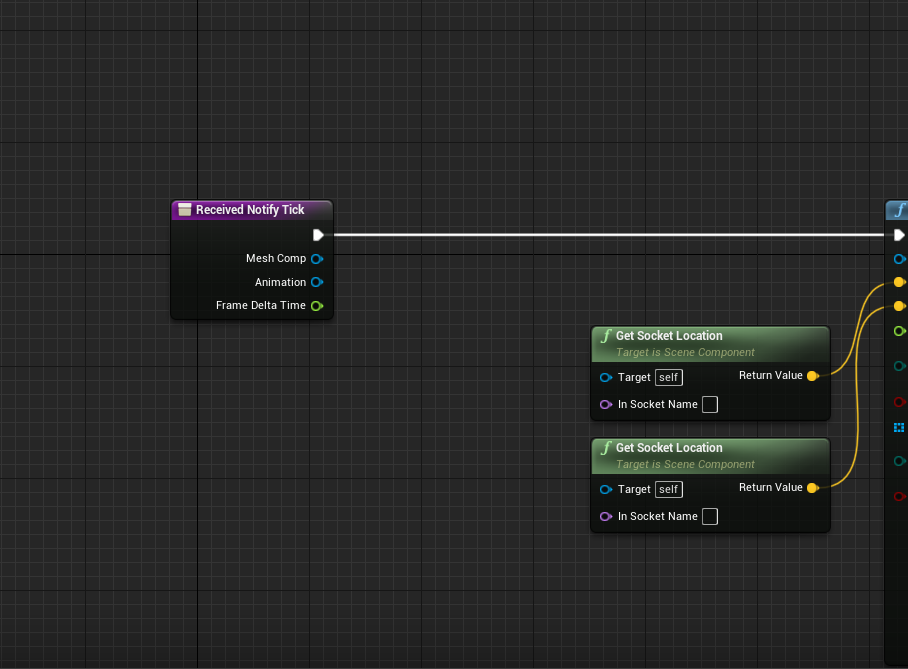
hmm in that regard. I'm trying to get the socket location of a static mesh to trace it but I am not having any luck calling it in the anim notify state
 oblique ruin
manic viper
oblique ruin
manic viper
how can i set the 'target' to be a static mesh ?
oblique ruin
Switched the names around
trim matrix
I'm trying to get an FHitResult to give me the bone name of the object which was hit. Which is of type pawn with a static mesh and capsule component. How do I setup the collision properly for this? My hits do register on type pawn but it doesn't seem to recognise the individual parts of the mesh
I'm using the Thirdpersonexample model.
For the fhitresult.
I'm checking the FHitResult like so
                    if(shot.Actor->IsA(APawn::StaticClass())){
{```But that's all I can do, it's like the individual components of the mesh don't exist
I'm assuming this is because collision isn't set up properly.
This is the capsule component
And this is the mesh
flint nymph
if it’s hitting the mesh the hit result should provide bone names
proud hull
trim matrix
It's in C++ @proud hull
atomic prairie
Omg, i know why.. My boolean is not in the third person bp but in the level bp
proud hull
I know, but if it is blueprint as well, it exists in c++
trim matrix
I'm assuming it is hitting the mesh @flint nymph because if it registers as type Pawn
It must be hitting the mesh right?
But when I check BoneName
It doesn't give me anything..
flint nymph
I’m guessing the UI collision preset isn’t type pawn
 inner ginkgo
The actor is pawn. The component can be any of the components with collision set. Although with that setup, it is likely the mesh. You can always setup some debug to find out which component is being registered as a hit.
flint nymph
so the capsule shouldn’t be interfering
flint nymph
it could
inner ginkgo
Collisions don't register in that way. The APawn check is a class check against the AActor.
flint nymph
depends on the capsule’s settings
inner ginkgo
Which in this case will always be Pawn, because the owning actor is a Pawn.
trim matrix
I see.
inner ginkgo
What you want to check is the hit component, not the hit actor.
trim matrix
Ahhhh..
inner ginkgo
Your actor with multiple collision components might get multiple hits from a single interaction.
inner ginkgo
That's what you need to find out.
inner ginkgo
Do your class comparison against the component type that you want to actually code against.
proud hull
When working correctly, it would return the mesh, yes
trim matrix
Is there an enum to check if its mesh or capsule?
Because it shows the capsule and mesh
are both of type character
Wait no
I might be wrong there
inner ginkgo
They are diff component types. I don't know the C++ name equiv, but a CapsuleComponent will have a diff class than a SkeletalMeshComponent.
None of the component types will be Character for this.
trim matrix
Okay so it looks like
capsule component
is UCapsuleComponent
And the mesh is
USkeletalMesh
So I guess I would do a check of the hit.Component
if its UCapsuleComponent class
Or USkeletalMesh class
inner ginkgo
Double check the skel mesh comp. There is a SkeletalMesh and a SkeletalMeshComponent.
You want the component.
trim matrix
Not sure if this is the correct way to do it
but this is how I'm checking it
And it compiles
                    }else if(shot.GetComponent()->IsA(UCapsuleComponent::StaticClass())){

}```so I'm assuming this is fine to check
 mortal coral
I'm seeing some weirdness with DetachFromActor where regardless of my keep Rules, the child actor sometimes moves around a ton after its detached. It doesn't always happen, and it seems to be more likely if the parent moves around a lot while they're attached (although that's no guarantee)
inner ginkgo
Again, I think the SkeletalMesh is not the correct one. You want the component version.
trim matrix
Yes if its of type skeletalmesh
then inside
I cancheck if its component
right?
Because skeletalmeshcomponent
should inherit
skeletalmesh
inner ginkgo
No
inner ginkgo
SkeletalMeshComponent contains a SkelMesh ref. It isn't of type SkelMesh that I know of.
inner ginkgo
Presumably.
trim matrix
Alright I"ll test all three
oblique ruin
@flint nymph
trim matrix
see which one is generating the hit
inner ginkgo
@mortal coral Movement components might be moving your actors away from each other once detached.
oblique ruin
Not sure if I should be using event tick or not
mortal coral
@inner ginkgo that's a promising theory; both the actors in question are Pawns with movement components. Is there some additional step I need to take to get the movementcomponents to be aware of what's going on?
inner ginkgo
@mortal coral Physics simulation, too.
You need to set their collisions such that they ignore/overlap each other, instead of block.
trim matrix
Okay @inner ginkgo so it is the UCapsuleComponent generating the hit.
Should I just get rid of the capsule component?
inner ginkgo
Are you using an overlap event? Because I thought that was set to UI?
inner ginkgo
Are you generating hits through pawn movement?'
trim matrix
Through a raycast
    FVector endtrace = location+(spawnrotation.Vector() * weapondistance);

    FCollisionQueryParams traceparameters(SCENE_QUERY_STAT(TraceShot),true,GetInstigator());

    FHitResult hit(ForceInit);
    World->LineTraceSingleByChannel(hit,location,endtrace,ECC_Visibility,traceparameters);

    return hit;
}```Ah, ok. UI still has collision set for the visibility channel.
trim matrix
Yes
Do you have any suggestions?
Should I change that from ECC_Visibility to something else?
mortal coral
I can't disable their interactions entirely; the two Pawns in question are a character and a ship the character runs around on. Ship definitely has to block the character
flint nymph
@oblique ruin tick is pretty unnecessary for it, you can update it whenever you update the damage %
inner ginkgo
You can use multitrace, which will get you everything that the trace hits. Or yes, change to a diff channel that the mesh is on.
trim matrix
Alright let me check which is for mesh
could anyone help me figure out how this isnt working, its a simple AI, thats supposed to go to the player, although its not, it was working before and now its not (im a beginner so sorry if this is obvious and im just stupid lol)
So here are the visible channels, I go for ECC_Pawn?
NOTE!!Some of these values are used to index into FCollisionResponseContainers and must be kept in sync.
inner ginkgo
@mortal coral Go into the mesh setting for each and set collisions to use complex as simple. See if that fixes your issue. If they aren't actually overlapping, they probably pushing away on their simple collisions.
mortal coral
I'll try it, but I don't think that's it. They aren't overlapping when I lock them together in the first place, and when I unlock them they're sometimes very far apart from each other
inner ginkgo
@trim matrix Pawn would probably work, but you might need to change your line trace function to an object trace.
trim matrix
I see okay
Ill try pawn
And see if I can do something with it.
Here's my mesh collision.
oblique ruin
@flint nymph Hmm... Could it be that my Material isn't a dynamic font material?
Where would that be controlled???
inner ginkgo
@trim matrix You need a navmesh for MoveTo nodes to work. Have you verified that the navmesh exists and is correct?
trim matrix
yeah, i have AI Roaming, that works fine and well
inner ginkgo
Throw some debug outputs after the cast. Make sure that is succeeding and you are even getting that code called.
flint nymph
@oblique ruin no the material just needs to be set as a User Interface
you have assigned the material correct?
oblique ruin
ye
trim matrix
@inner ginkgo that worked, now my hit result is of type USkeletalMeshComponent.
Would I now be able to check the bone name?
oblique ruin
However, no matter the damage it stays the default color (white)
mortal coral
Okay, I've confirmed that the CharacterMovement component is the problem. If I disable it pre Detach, I don't get the warp. However, I can't actually just disable it
flint nymph
hm if your text block has that as the material assigned, getting the dynamic font material from that text block should work correctly
inner ginkgo
@trim matrix Presumably, if the hit result is going to give you bone names, I would think it would work on the skel mesh.
trim matrix
So now my hits register when I check this
else if(shot.GetComponent()->IsA(USkeletalMeshComponent::StaticClass())){
So the component I'm .retrieving is a uskeletalmesh
So I'm assumding
I should be able to check bone name now..
inner ginkgo
I would think so.
trim matrix
does fstring.Compare return 0 upon equality?
inner ginkgo
Sorry, I do not know.
inner ginkgo
There is a #cpp channel below this one.
They are more familiar with those specifics.
oblique ruin
@flint nymph What kind of parameter should I beusing in the Material?
trim matrix
Returns
0 if equal, negative if less than, positive if greater than
Yes it does
OUt of curiosity, does a raycast generate a drop similar to a bullet? Because my hits generate even when I aim slightly higher than the head
inner ginkgo
They are straight on. No curve.
trim matrix
That's strange
Because when I hit straihgt on
it doesnt generate
I have to aim slightly higher..
flint nymph
@oblique ruin the material looked fine I think
inner ginkgo
BP version has a debug draw. If you can turn that on with CPP, then you can see exactly where it is aiming.
trim matrix
Okay. I'l see if it's possible to turn on
inner ginkgo
@mortal coral Sorry, missed your reply. Did changing the default collision use have any impact?
mortal coral
It did not. But this is definitely coming from CharacterMovement
inner ginkgo
Yeah, but the char movement shouldn't be moving the char further than it normally would pre-attach. So it is odd if that is what is happening.
mortal coral
Yeah, I agree. Also just directionally, I'm not seeing an outcome that jives with the collision explanation. The most common place for the character to end up is well in front of the ship's current path
inner ginkgo
It has some logic to how it deconflicts the positions. If you turn on collision visibility, the collisions between the two pawns should line up after they are pushed away.
oblique ruin
@flint nymph Can I see your graph for calling the function? I suspect it just may not be getting called when I want it to
mortal coral
I'm not sure how to test this. Disabling their collisions isn't an option
flint nymph
@oblique ruin yeah I can in a minute
mortal coral
Alright no found a workaround to test that. Locked vertical, and disabled collision. it's unrelated to that
inner ginkgo
Show the detach code. And a sample of how it is pushing the models away.
mortal coral
inner ginkgo
I don't think it should matter, but what if you detach before possessing?
mortal coral
I can give that a shot
 rough plinth
how can i let my audio continue in different screens?
like when i press an option button for example the audio continues in the options menu
trim matrix
@inner ginkgo for some weird reason i aim directly at the face and the bone should be head, but it only triggers if I aim slightly higher. So I'm really not sure why this is happening.
flint nymph
@oblique ruin do this as a test and see if it turns the text orange/yellow
mortal coral
That did not help. One additional detail that may prove helpful is that it seems the character is always getting extra movement in the direction the ship is moving. It's as if it acquires some velocity or translation from the ship as it moves but can't move because it's locked, and then all that movement manifests the frame they get unlocked
inner ginkgo
After you detach, use Stop Movement Immediately.
@trim matrix I'm not an expert on bones, but I think that sounds correct. If you look at the skeleton in the mesh viewer, I don't believe the bones line up exactly with the parts as you would expect.
flint nymph
@trim matrix check the mesh's physics asset
mortal coral
Stop Movement didn't do it
trim matrix
@inner ginkgo so should I do my own math and lower the by an offset?
Okay Joe I'll check the physics asset
mortal coral
Not sure if this will help but here's a 20 second vid of the issue
inner ginkgo
@trim matrix Personally, I'd print out the bones that you are getting and then adjust my code to match those expectations.
But I'm lazy about getting assets to align the way I want.
trim matrix
Oooh good idea eckish
Only thing is!
I wish I knew how to debug print
In C++
Oh wait
I think I know
inner ginkgo
@mortal coral I don't see your pawn after you take over the ship. What does the attach code look like? Are you making it invisible?
mortal coral
the pawn is minimally visible. it's the white and yellow ball i threw on there just to be able to see it at all
it's for sure visible when the engine is possessed though
inner ginkgo
Ok, I think I see it now. I expecting to see a mannequin, but I guess you just have the gun/arm mesh.
verbal magnet
hello everyone! I call again for your help guys, I want to create a 5x6 grid based inventory system using UMG, for the moment I just have a grid panel containing some buttons... but im lost at how I should do the behaviour, is there a way to use 2d arrays?
inner ginkgo
@mortal coral Do you have any possessed event code on the player pawn?
@verbal magnet I'm afraid there are no 2d arrays with UE4 (but you can make the same effect with a 1d array and a little math on the index). But an inventory system is a bit complex for a discord discussion from scratch. I would recommend a tutorial video. I believe there are a few that use grid based inventories.
mortal coral
Do you mean like an OnPossessed event? Nothing like that, no.
mortal coral
Velocity, yeah. Was hoping to see it at non-zero while the engine was possessed, that might have been a smoking gun
verbal magnet
I would like to achieve something like deus ex or system shock inventory system, searched for some tutorials but to no avail, thanks tho, Ill go try some experiments until it works
inner ginkgo
You can try setting the velocity to 0 on detach. But that should have the same impact as stop movement.
mortal coral
Yeah, I tried that. No effect.
I also tried grabbing the player's world transform before possessing them and then manually setting that. also no good
inner ginkgo
I've never attached a pawn to a pawn. Normally when attaching a physics actor, I have to disable physics and then reenable it to avoid wonkyness. You could try disabling the movement component before attach and the reenable it afterwards. See if that changes the behavior.
 sour raft
This may be more of a math question, but how can I find the point where a line intersects a sphere? Want to do it without any traces, so I'm trying to find 'how far do we need to go down this line, until we're within X distance of a location'. Assuming that the line DOES pass through the sphere
trim matrix
@inner ginkgo your technique worked, I was able to print the name of the bone that was being hit and it was spine_02. The only issue is that spine is way too long and covers more area than I want 😂
Maybe..I just need to make my own 3D model.
With a better head and neck..
inner ginkgo
@trim matrix Glad you at least got closer. I'm afraid I haven't done much for that kind of hit logic. I mostly use impact point for doing decals and stuff, but not bone specific code.
trim matrix
Thank you for all the help though!
oblique ruin
K so I think it has to be something in the Material
trim matrix
Much appreciated
inner ginkgo
@sour raft Any reason you want to avoid the trace? The math involved is pretty much going to replicate that.
oblique ruin
BEecause when I try and adjust the slider for the default value of the Parameter it just doesn't do anything
sour raft
Well the sphere doesnt exist for a start, its more hypothetical, and i might be doing it a few times a frame and wanted to avoid the mess of moving a sphere around to trace against
mortal coral
@inner ginkgo that did it! It's still not entirely clear what exactly the issue was but I'll take the win and not ask too many questions 🙂
thanks a ton for your help sharpshooting that
inner ginkgo
Excellent! Glad it worked.
flint nymph
@sour raft this should probably work? (untested)
well
nvm
this will just check if there is an intersection
but it could be a start
sour raft
hmm yeah
wel, i can assume there will be an intersection, because the line end is inside the sphere
flint nymph
anywhere in the sphere or in the center
sour raft
The end point is somewhere in the sphere but not the center of it
flint nymph
k
sour raft
So if the trace was reversed it would be 'the point where it escapes the sphere radius'
manic viper
Hey all, i asked earlier but i think it got buried.
I'm trying to do a sphere trace inside a notify state, but i need to get a socket from a static mesh.. how do I reference that static mesh inside the notify state ?
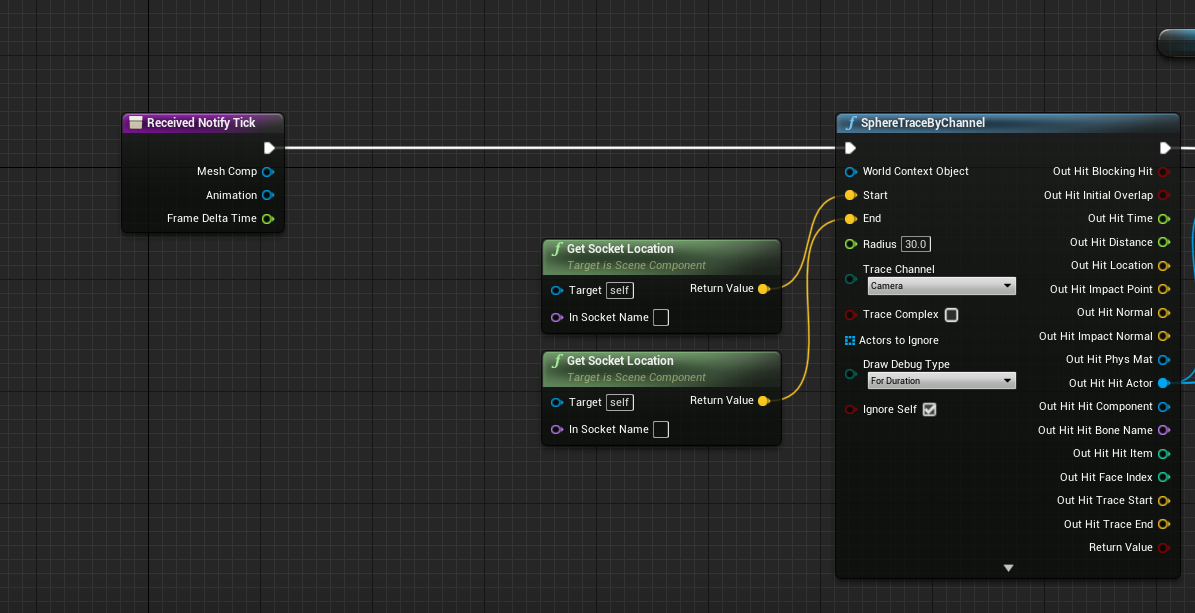
i feel like it's probably super simple and I"m just smooth braining it
inner ginkgo
@sour raft You are going to need to a line/sphere intersection test and take the closest intersection. I would again push you towards using the built in functions for that. You can create a new trace channel to put your sphere on and set that channel to ignore all others. That way it isn't interfering with anything else you have going on.
sour raft
So I'd basically just put an invisible sphere there and trace against it?
inner ginkgo
Correct
flint nymph
yeah probably your best bet
sour raft
Hmm aight, I thought it might be a bit more intensive than just a pure math solution that's all
inner ginkgo
If this were CPP, it would be debatable.
But in BP, I wouldn't want all that math in nodes.
sour raft
Is there a sensible way to create the sphere though? I mean I could have it within the blueprint at all times and just move it but.. Seems wrong
inner ginkgo
It should be fine in the BP at all times. You can even turn collision off when not checking against it.
 pulsar nimbus
Any ideas why this score always returns 0?
inner ginkgo
And to be clear, I'm talking about a sphere collision. Don't use a sphere mesh.
sour raft
Yeah
pulsar nimbus
It's on even actor begin overlap and fires when I touch a crystal
The crystal gets deleted but I always have 1 point xd
flint nymph
@manic viper to get a reference to your character mesh in your anim bp you'll want to try get pawn owner, cast to your pawn class, and get the mesh from there
manic viper
its not a character mesh
flint nymph
same thing
manic viper
its a static mesh sword
so if i get the reference in the anim BP to the sword.. i can use it in the notify state ?
sour raft
@pulsar nimbus shouldn't you be updating the score in a blueprint that hasn't just been destroyed?
manic viper
im sorry, I don't think i'm understanding
inner ginkgo
@pulsar nimbus Need to see more of the logic, but my first thought is that you are destroying self before setting score.
oblique ruin
@flint nymph is there a way to call the material in the widget and have the widget handle the color caluclations?
pulsar nimbus
Need a jacket good point
But when I tried to reference it from an other blue print I got this error
Let me get it again :p
flint nymph
you could do that @oblique ruin but it seems kind of backwards to do
oblique ruin
I'm just not having much like and I suspect that it's because the damage widget isn't being called directly.
flint nymph
did the test work with on construct?
oblique ruin
nope
flint nymph
then there's a problem in your setup
sour raft
Get the actor that overlaps, cast it to your player, increase that players score, then destroy the touched object @pulsar nimbus
oblique ruin
I've been scouring for a problem for a while
pulsar nimbus
@sour raft I think that's what I done before but I am getting errors
Let me do a quick ss
oblique ruin
I found the problem 
flint nymph
lol ok what was it
 oblique ruin
The Damage int isn't updating properly
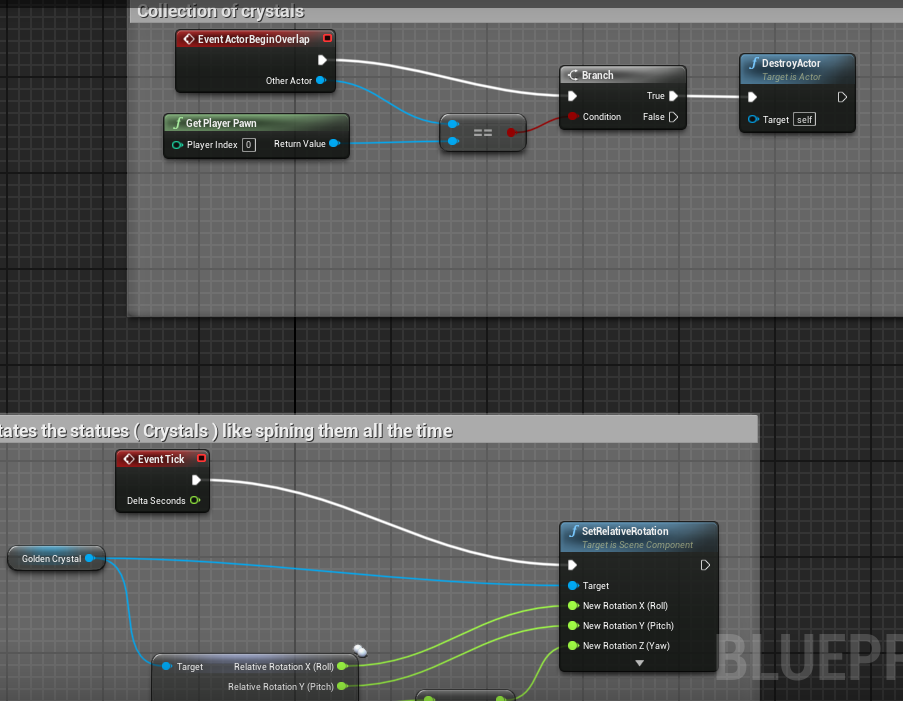 oblique ruin
Hmmm... Though I think the Event Construct isn't working either cause it isn't updating
flint nymph
@manic viper set the weapon as a variable in your character that way you can access it
@oblique ruin sorry to ask this again but you did apply the material in the designer right?
if you applied the material, and have it on construct to modify a parameter, and the material has that parameter name, it should modify it 🤔
 normal harbor
Quick question is it possible to use Event Hit on spline components?
flint nymph
uhhhhh I haven't tested it but I've heard that you can't
don't take my word for it though
inner ginkgo
@pulsar nimbus You will want to combine the logic on those 2 overlap events. I believe only one will get fired.
pulsar nimbus
probably?
normal harbor
@flint nymph Alrighty then thats why it doesn't works. Thanks man
pulsar nimbus
@inner ginkgo thanks mate cheers
inner ginkgo
Working now?
pulsar nimbus
yes
inner ginkgo
Awesome
pulsar nimbus
idk the first time i tried it i was getting that the reference dosend belong to my playerv3 and i was like wtf
because i was folowing a tutorial and it seem stange to me
pulsar nimbus
at least now it counts it 😛 it works leave it be xd
inner ginkgo
I think both technically fire. But the priority would go to the actor version. And since that destroys the actor, it should take it out of future event handlers.
 plain owl
Is making a Blueprint Interface for dealing damage a good idea? So I can use the same system for any character.
flint nymph
unreal has a built in damage interface but you can use your own sure
plain owl
I'm using Unreal's damage system now but I was thinking so I can setup everything regarding tracing and playing sounds and stuff in one place
flint nymph
oh interfaces don't hold actual functionality
plain owl
Ah okay, so I should just stick to handling that stuff in either the weapon blueprint or in player/enemy blueprint?
plain owl
What do you mean?
flint nymph
you can house shared functionalities in an actor component that you can just add to whatever actor you want to have those functionalities
but it depends on how you're doing things
plain owl
Do I just need to cast to it then?
inner ginkgo
There's a damage type system that goes along with the built in system. You can put things like sound and visual information in those damage types to help generalize the code a bit, too.
plain owl
Alright, maybe I could check the Unreal documentation for this and see what it looks like?
flint nymph
mhm definitely skim through the docs
inner ginkgo
Depending on what you are going for, another system to look into is physical materials.
plain owl
Because I'm trying to make things neater after getting the basic functionality
manic viper
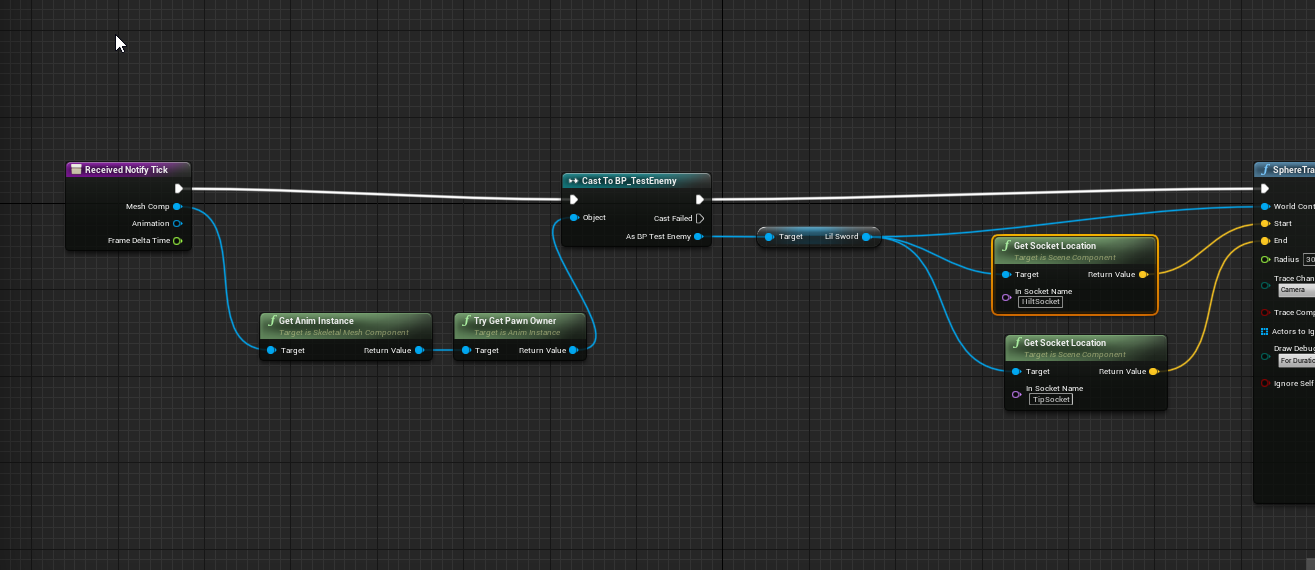
@flint nymph thanks man! I think i am getting it now. Is there a way to see the attached weapon in the Montage preview ?
 plain owl
For instance I store my attack anim montages in an array and also setup the order in which they should play in an integer array. So I can just play all animations through one simple Montage Play in the weapon blueprint
I'd like to do the same with dealing damage, making it one little place where all variables come from the character and weapon
@manic viper You can add preview assets on your skeleton like so
manic viper
you are a damned hero, thank you
oh shoot. scaling is a problem HAHA the sword scale was MASSIVE when Imported it
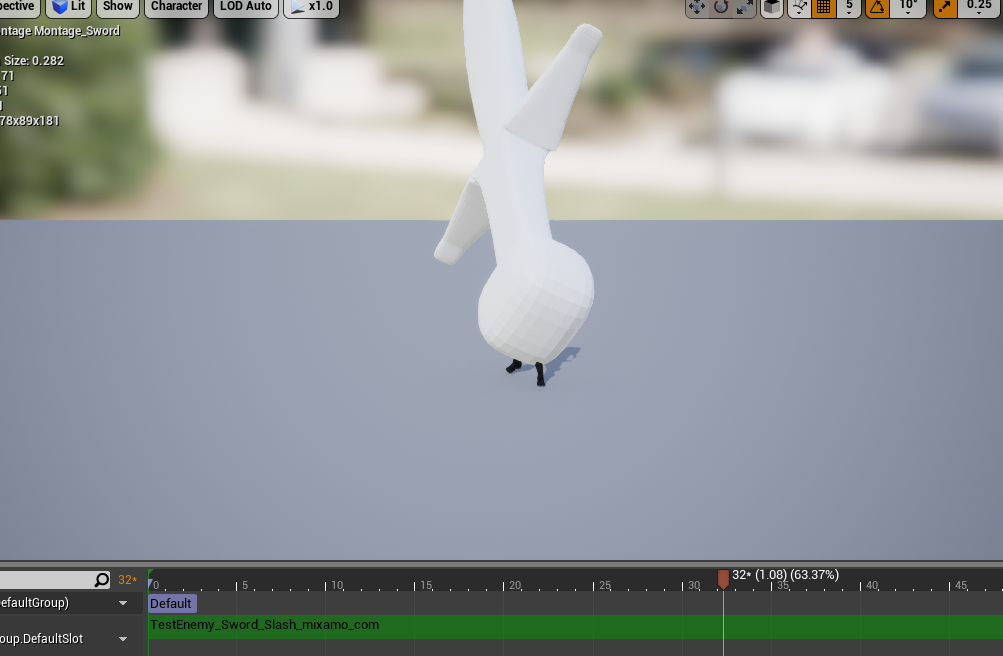
oof.....
HAHHA
manic viper
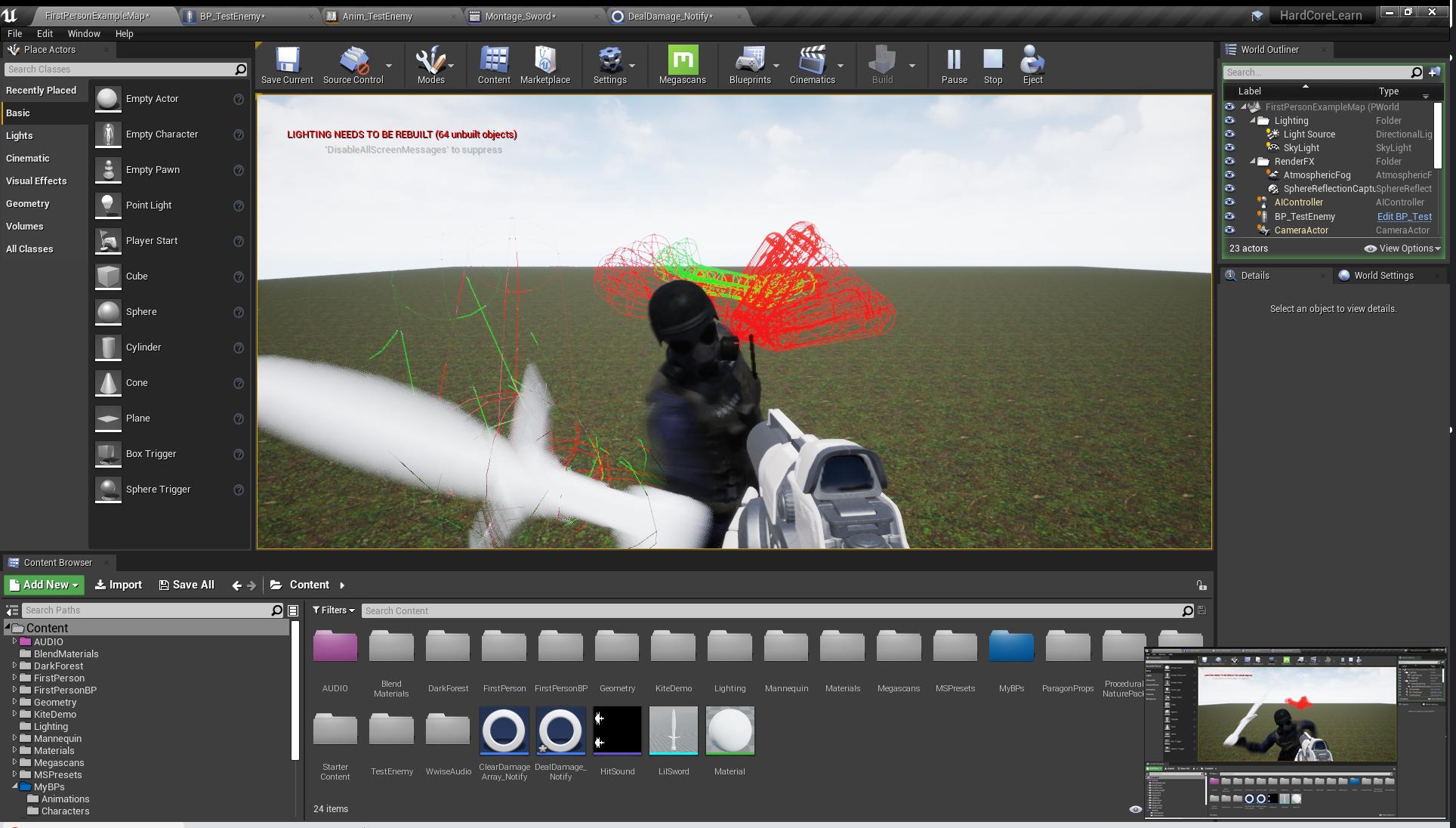
can't scale the asset preview huh ? hahaha
manic viper
its fine in play
but i want to be able to see the sphere trace in the montage, but thats not working haha only in play
 verbal magnet
is it possible to get rows and columns of a grid panel in UMG?
manic viper
this is the most difficult part of unreal for me. deep down i KNOW i'm doing this the completely wrong way and teaching myself bad habits but there isn't enough good documentation to know that lol
like looking at the greystone character example.. i think his sword is a skeletal mesh.. should all my weapons be skeletal meshes ?
flint nymph
really depends
plain owl
It's so you can put sockets on the weapon, right?
Makes it neater than having all sockets for different weapons on the player character
manic viper
haha and that's my issue "really depends"
I have no idea what it depends on 😛
I mean. I'm in deep now trying hard to grasp unreal, but the difference between the resources available for unreal vs unity is astounding.
plain owl
I can see two reasons why a weapon would be a skeletal mesh.
- The weapon has animations
- The weapon needs sockets
manic viper
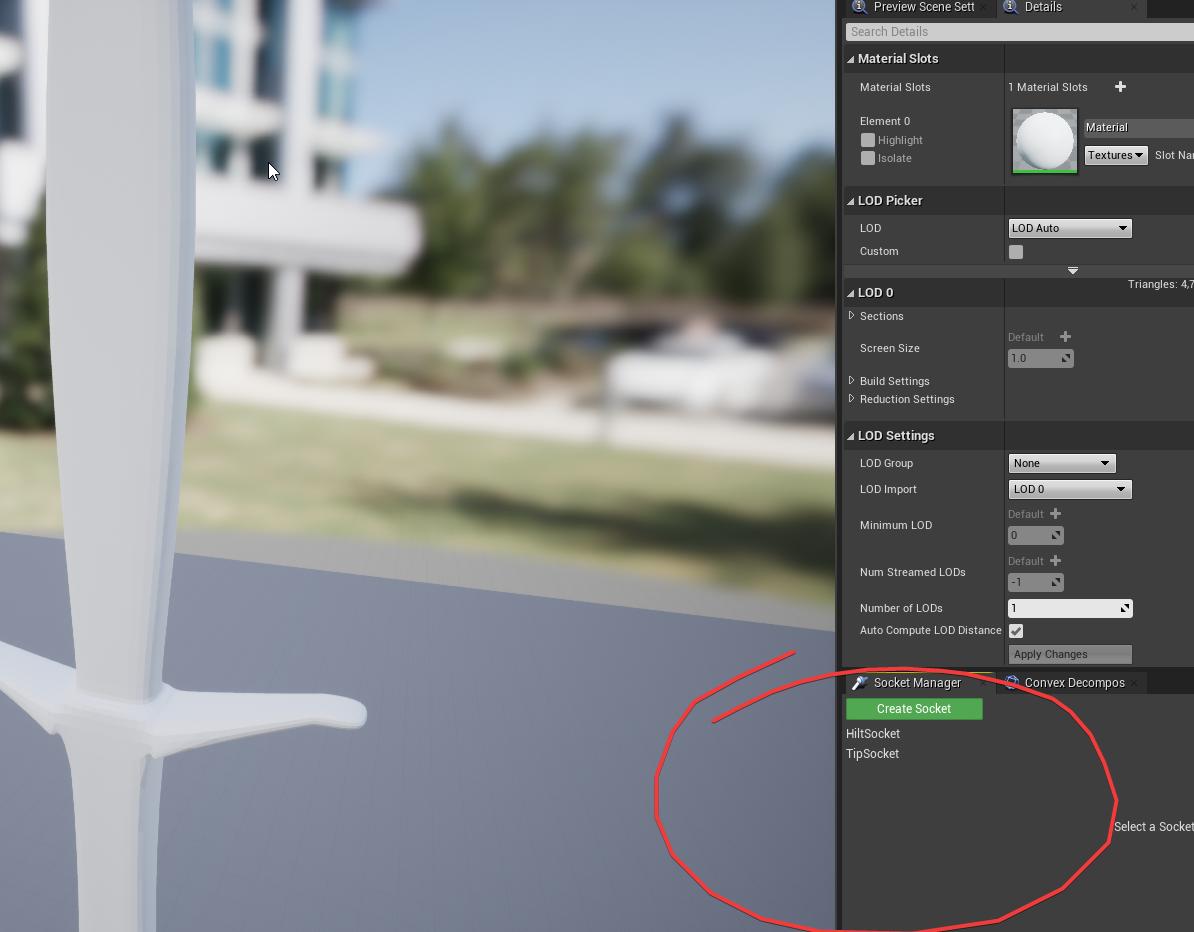
So i put sockets on my static mesh weapon lol
oblique ruin
Alright so so far I've managed to get it to work but only on event tick
There's no On Value change event is there?
plain owl
You can put sockets on a static mesh?
manic viper
HAHAH Apparently!
plain owl
Yup
manic viper
 plain owl
TIL
manic viper
I wish I could find a blueprint programmer that wants to be a voice actor, so we could exchange some coaching services haha
plain owl
Awesome! Now I can have the same name on the sockets for my different weapons
I just assumed you couldn't...
manic viper
im trying to use an anim notify state for the hit detection with a sphere trace but the video i saw someone do it on they had their weapon as a skeletal mesh. and it showed up in the montage preview
and you could see the sphere trace in the montage
plain owl
Although, how would I go about getting the weapon's mesh's sockets into my Trail AnimNotify?
manic viper
literally where I'm at lol
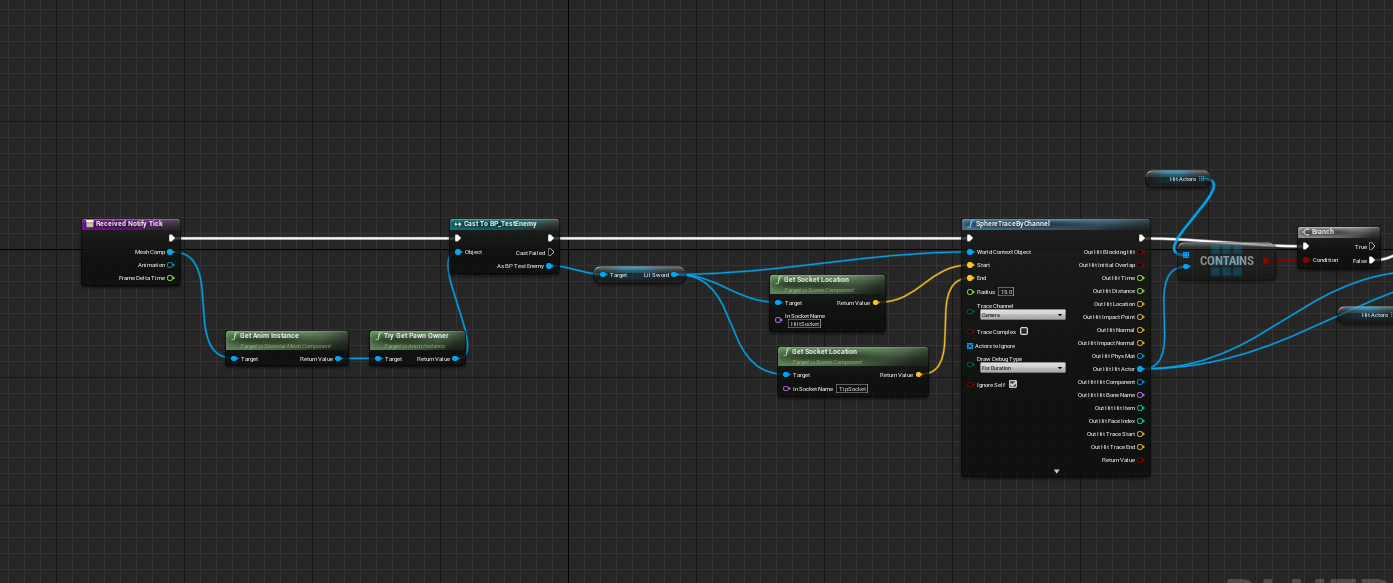
this is as far as I've gotten
I JUST WANNA SWING A DAMNED SWORD! LOL
 plain owl
@manic viper I think what we need to do is make a custom niagara system for the trail, and our own costum notifies
manic viper
the trail is just a hitbox
its not a "trail" its just a sphere trace
im trying to do hit detection on the sword lol
plain owl
Oh, well in my case it's for a particle effect
manic viper
yeah 😦
plain owl
You want the sockets from the mesh in the trace, right?
manic viper
yeah I have those
i just can't see it in the montage
like I could with the tutorial that I did using the Greystone assets
but his weapon was a skeletal mesh and the process was different
plain owl
Oh, well do you have to see it in the montage?
manic viper
so that I can adjust the radius / size /position of the trace without having to press play and be attacked every time I want to make an adjustment
I was able to get it work when I set the trace as a "punch" and used the enemys wrist > hand sockets
but now that I'm using a seperate static mesh for the sockets, It doesn't show up in the montage anymore
oblique ruin

manic viper
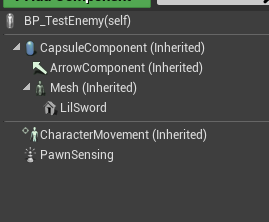
cause this is the enemy and the lilsword is his weapon.
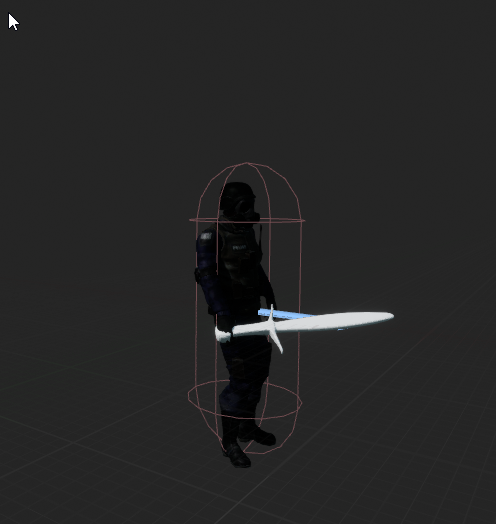
looks fine in viewport, but in montage it's gone.
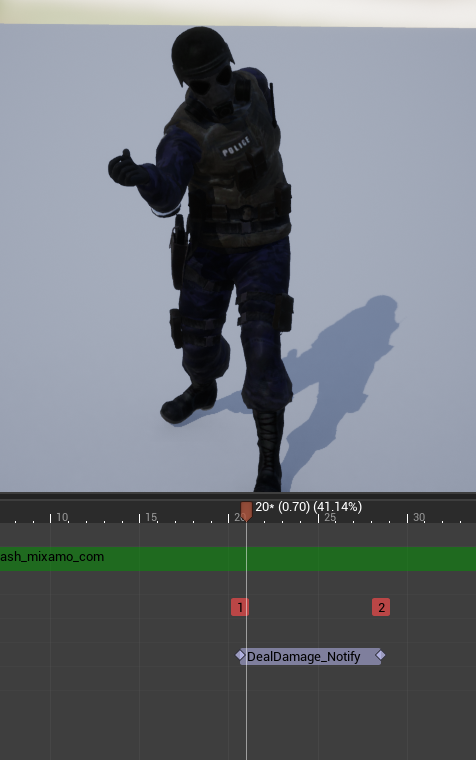


even when I attach the preview asset it doesn't work
im about to start the whole project over and start from scratch haha
cause this is turning into a mess
pulsar nimbus
fixxed it had to remake it for some reason
flint nymph
this is how I set up melee weapon hit traces btw
regardless of frame rate (down to a point) it will successfully register hits
this is what will happen with your methods in non-frame ideal situations
trim matrix
How can I set my pawns rotation input relative to camera look at rotation?
flint nymph
the default ThirdPersonCharacter blueprint has that functionality
if I'm understanding you correctly
 bleak vector
hmmmm the engine crashes whenever I change a default bitmask variable 🤔
plain owl
I'm so pleased @manic viper Now I have my weapon sockets on the weapons themselves, as well as the particle effect 😄
manic viper
In my struggle I have helped someone with my lack of knowledge!
plain owl
Yeah haha, which means I can set the weapon trail directly on the weapon and I don't have to add trail to animations
oblique ruin
@flint nymph What was the name of the event that can be called on value change again?
 sick sapphire
I want to make a system to detect whether my character's camera's yaw is too different from the direction my character is facing. I want to acheive that using relative rotation
This is the Rinterp im using for the character rotation
flint nymph
@oblique ruin oh I checked and what I was thinking of is only available for editable text, not text blocks
but it shouldn't matter anyway tbh
whenever a character gets damaged, it should be calling a damage update function in the widget
and that will update the damage % and the color etc
sick sapphire
wait what who replied to me just now
oblique ruin
And you have that under event construct?
flint nymph
@sick sapphire
someone else had replied but I don't think they read the question correctly
sick sapphire
whats a delta do
difference of rotator?
flint nymph
yeah
@oblique ruin it would be a custom event you call from the character when it gets damaged
sick sapphire
@flint nymph so if i want it to be limited to 20 degress left and right i just make a branch with that connected to 20 deg? thx
ive been tryna make this node using complex math and logic for no reason
sick sapphire
ah i see
ive been stuck on this for like 3 days trying to make the node cause idk it existed
thanks mate
oblique ruin
How do I call the custom event from within the widget?
trim matrix
@flint nymph yes it does, but it is optimized for 3rd person i guess. I am working on a top down game so I only can set my rotation via "set control rotation"
oblique ruin
Also where do I make this custom event?? Do I make it in the character or the widget?
 crimson charm
how do i make escape change widgetS?
flint nymph
Make a custom event in the widget
you can cast to your widget from wherever you made it from to call the event when your character takes damage
 echo adder
If I am trying to draw a selection box around an actor and past the rectangle to the player HUD, is there a better way to get the 4 points of the actor's box rather than just finding the furthest corners of the actor bounds like this?
flint nymph
add a float (or int) input on the event so you can feed in your damage from the character to the widget
echo adder
Because the bounds are locked to the world axis, the selection box "changes shape" as the camera rotates and looks very silly
 arctic finch
anyone familiar with replicating could help me with a issue with a ladder. DM if if possible. Thanks.
flint nymph
@crimson charm you'll want to make a new action input using the escape key (here mine is named Esc) and do this
the widget will then listen for when that action input is pressed, and when it is fire the custom event
crimson charm
thank you @flint nymph
atomic prairie
When I'm on the platform (moving up and down) the plateform stop, someone've an idea?
 stuck hedge
is there a clamp on the "play sound" volume multiplier in blueprints?
because while there is a difference between 1 and 100 there is no difference between 100 and 100000
 near yarrow
Make a float and then clamp it then plug the clamped value into volume
near yarrow
Not inside that node
stuck hedge
Then why is there no difference with a volume multiplier of 100 or 100000?
near yarrow
Cuz 100 is the max
stuck hedge
So then it is clamped..
near yarrow
In that regard yes
I just had the same problem with pitch
It gets clamped at 2.0 as far as I can tell
But I clamp it at 1.55
I didnt need to go above 2.0 or in your case 100
You may need to make your sound louder and then reimport
stuck hedge
I'm dealing with the audio capture component. For some reason it forces audio loopback when you use it, so the only way to not hear your own voice is to drop it's volume multiplier, but that also effects the volume of the mic you record
stuck hedge
You need to set the multiplier to 0.01 to get it to record but also not really play your voice back.
so when you play it back at 100, it's basically 1 to 1, which gives you no room for audio control
near yarrow
Huh
What about the microphones input level
Like hardware wise. Can you change that in windows
near yarrow
Are you doing multiplayer voice chat
atomic prairie
My platform didn't move when my character was on it, so I put the collision preset in ''Vehicle'', now it's work and my platform goes from A point to B point, but when my character is on it, its slowed down, any ideas of what could cause this? It must be sillly...
stuck hedge
I was testing out using audio capture for voice chat and possibly other things.
but the forced loop back is a weird decision on this.
stuck hedge
So am I. As soon as you activate the capture component, it immediately pipes your mic through to your audio out. I have no idea why they think that's a good default move.
near yarrow
I will have to play around with that
stuck hedge
You can "output to bus only" which kills it, but that also kills the record. I'm not sure how to get the recording through a bus with it. I've been messing around with this for about 2 hours and searches of course only give you the "Oh I got it working!" with only half an explanation and key information missing
stuck hedge
BlueprintUE
even at 0.01 if you speak into your mic with a raised voice you get loopback
near yarrow
So you dont want to hear yourself?
near yarrow
Okay make the object getting played non relevant to owner
Or do is locally controlled and do nothing if true
stuck hedge
...that's not the problem.
near yarrow
I'm not sure what you mean in that case. Is the audio jacked or something? Like high pitched feed back ringing?
I thought you just wanted it where only other people hear it
stuck hedge
As soon as you activate the audio capture component, whatever you say is immediately played back through your own speakers.
stuck hedge
Activating the audio capture component makes your mic hot, and the sound plays (slightly delayed, like 0.01 seconds behind) from your speakers at full volume.
near yarrow
Is this happening without the play node?
stuck hedge
Yes.
near yarrow
Okay I see
stuck hedge
it's a function of the audio capture component.
but there seems to be no inherent way to stop it from mirroring the mic to the speakers.
near yarrow
I'm bought to go on a 15 minute break and then I will take a look at that capture component
stuck hedge
except for dropping it's volume, but that volume affects both the playback and the record volume.
near yarrow
When you select the capture component what are the options on the left hand of the blueprint editor
I'll see it here in about 10 minutes
I'll see if I can reproduce it and I'll get back to you in about 20
What happens if you make the capture component non relevant?
I bet it wont cap
Keep fooling with it. Imma take a look. I would have had your same problem in about 2 weeks
@trim matrix I cant zoom in far enough to read your nodes
near yarrow
Your making a vector from axis values?
trim matrix
To check how much user is dragging the joystick
trim matrix
Maybe, but confused about one thing there, if I "add" rotation, I should use Right and Forward inputs, since its top down and uses only left joystick I cant use it
near yarrow
Have you tried that rotation follows velocity?
trim matrix
No, where can I find it?
Btw, if you have any ideas, I found these informations on Google:
1.Making a World-Relative input vector and calculating its Z-Rotation from the x vector(looks like you did this for the rotation)
-
Get the Z-Rotation from the camera.
-
You subtract the camera Z-Rotation from the input Z-Rotation.
-
You now have the camera-relative input rotation.
But I dont know how can I apply these things into my blueprint
 surreal peak
In the first screen shot if you game itself, what are the world axis?
surreal peak
Axis
Not location
You can see them in the bottom left corner
You are moving in world directions
Cause you push in the same rotation every time you press D
It's not relative to your camera
surreal peak
The third person template does this already
Just have a look at that
You basically need to use the Right and Forward Vector of whatever you want to be relative to
Instead of the axis inputs
You can always use the axis inputs to scale the input
Actually
Your turn code is for the camera or?
Wher is the code that makes you actively walk?
Because that could just use the ControlRotation and then Right and Forward vector of it.
surreal peak
That's hard coded world directions
Use GetControlRotation->GetForwardVector as well as GetControlRotation->GetRightVector for those too and see if that helps
surreal peak
cheers
near yarrow
@stuck hedge I just did something similar I see what your talking about
Hey at crossmr you could set the volume to o.1 on client side only maybe
I dont know how that would really work
I dont have enough time to dig into it
stuck hedge
the playback volume has nothing to do with client/host
near yarrow
I ran out of time before I could dig in the submix asset and look at it
Does it not create that capture on the other instances?
I can see how this would be annoying
Does anybody know what I need to do to add character get velocity to the set local velocity for a projectile movement
I can take vector length of character velocity and add it on the local velocity of the projectiles x axis
But I want to take the actors world velocity and convert it to the projectiles local velocity so I can add my characters velocity to the projectile for all axis
Hooking the world velocity straight to the projectile set velocity does not work
 jaunty dome
Create a "Base" Character class that has the damage death all basic functions you need, then all your characters need to have this class as parent, finally you simply cast to BP_CharacterBase and any character that is child to this class will receive damage death or any other event you have
Any resources about world serialization .
?
 chilly linden
how do i spawn an actor after destroying another actor
jaunty dome
delay->spawn actor at location
chilly linden
i cant seem to find that
but i am using spawn actor
ive got it spawning but I am trying to add randomness
but it keeps spawning in a line
surreal peak
You should ask about the problem, not how you apply some weird solution you think is good :D @chilly linden
 spare vessel
Didn't really know where to post this but having an issue with my game icon there is no black background in my .ico file but when i Import it it looks like this
 ebon notch
Hey there fairly new and I was just wondering I have two menu levels both have different umgs (one is the main menu and the other is the movelist) how would I go about having persistent music between the two level loads?
 lunar holly
I can't SET my color, because it wants a byte, but the "Random Float in Range" is a float. How do I make the SET node inputs a float?
 wild moth
Movelist? @ebon notch I just want to understand because you shouldn't need to change levels between UMGs if they are related to the same "mode" let's say
ebon notch
Didn't really think of them as the same mode kinda wanted them to be separate if that makes sense? But would it just be better/simpler to be on the menu and just removing/adding widgets there?
wild moth
I want to know what Movelist is so I can answer that question
For example, if it was MainMenu and then the gameplay levels then yes, they should be different levels
But if it is all in the out of game phase "MainMenu" then it is better to structure it within the same level
ebon notch
Ah yeah its basically the latter, part of the out of game phase
wild moth
It is better to just have it structured in the same level then
You can figure a way to do it, either 2 entirely different widgets with references and you control which is visible when, or you can have a larger widget containing both and either manage visibility manually or using a WidgetSwitcher (like invisible tabs)
ebon notch
Ahhh okay I see interesting thank you for that. I'll experiment with both of those options
wild moth
Good luck 😄 happy to help
trim matrix
@lunar holly if it doesn't autoconvert, try converting it to an integer inbetween... but if it's a byte, the color range is probably 0-255 and not 0-1
lunar holly
@trim matrix Yes, I figured that out. Thanks anyways!
What is the difference between "Replicated" and "RepNotify"?
 thin rapids
@lunar holly repNotify will make a notify event each time the variable is changed, but will still replicate normally
lunar holly
@thin rapids When is it good to use Replicated? Because RepNotify seems better, with just sending over the network, if something has changed.
thin rapids
when you don't need to run an event each time a variable is changed you should use Replicated but if you do then use RepNotify.
lunar holly
@thin rapids okey thanks. I first thought Replicated sent the variable value over the network as often as it could.
thin rapids
np
I first thought Replicated sent the variable value over the network as often as it could.
@lunar holly it does send the value when it changes.
lunar holly
@thin rapids So Replicated sends the variable value as often as it can? But you said:
when you don't need to run an event each time a variable is changed you should use Replicated but if you do then use RepNotify.
@thin rapids
thin rapids
i edited the message, my mistake there, sorry
the value updates over the network whenever it is changed, but RepNotify will run an event whenever that value is changed and Replicated will not.
lunar holly
@thin rapids So I can in the RepNotify event, cancel and enable the sending of the variable value, over the network?
thin rapids
no, you can make something happen whenever a variable changes
for example, you have a health value that has a RepNotify event, in that event you can make it so it spawns blood decals whenever you lose that health, for example
you can't do that in Replicated because it doesn't generate an event when that value changes
just an example though
@lunar holly you can also read this https://www.unrealengine.com/en-US/blog/crash-course-in-blueprints-replication that explains it better than i did

Unreal Engine
Blueprint classes can replicate the same way as native C++ classes can. This is a crash course on getting started, though is not a full tutorial on networking gameplay code
lunar holly
@thin rapids okey thanks!
thin rapids
np
wild moth
There is also Cedric's Network Compendium 🙂 lots of information there
lunar holly
@wild moth thanks, will check that out
 astral fiber
Is it possible to expose all public variables from a child actor component to the editor, so I can moify its attributes? I only get the Actors variables, but not those from the child actor component
flint nymph
@astral fiber I haven’t messed with child actors much but I know with components you can select them from the details panel after clicking the actor
and their exposed variables will be visible there
jaunty dome
Input Gestures Flick, is it possible to detect swiping up and down with this ?
trim matrix
Hello! Im trying to get used to Unreal and its blueprints, but there is one thing that I dont understand. I can add an actor blueprint, or an actor component. I can add several actor components blueprint to have different behaviours, so when would I use the actor instead of the other one? Also what would be the difference between using actor, pawn, or character? I didnt find much info about it
 granite scaffold
Heyo, vectors breaking my brain. I have a 2d blendspace for animation, where the centre (so 0,0 in a vector2) is idle, and i have run on the y axis and strafe on x. I use the character's velocity to determine the length of the vector, which obviously works great if the character is pointed along the world X axis. I've been struggling to get it to work regardless of the players orientation; I guess I want to rotate the velocity vector based on the forward direction of the character, but so far that hasn't seemed to work. Any ideas?
 atomic light
So I have this character where I can switch between third person, FPS and top down all in one gamemode and almost everything works fine, thing is, I want to disable the inputactions for thirdperson/FPS movement (WASD) when in top down controls and actually have them do other things in the future; would putting a branch on each one suffice or can anyone think of a more elegant/performant solution
astral fiber
Is there a reason that a Category (for a variable or component) can have a miximum of 12 characters? Can this be changed?
flint nymph
@trim matrix you would use an actor for any unique entity you want in the game world, and actor components add functionality to actors
the different classes pawn, character, etc. have their own functionalities that blueprints you make from those classes inherit
trim matrix
Okay, thanks!
flint nymph
@granite scaffold I think you might be looking for the unrotate vector node
hook up the character velocity and world rotation
 amber grotto
Hello everyone, ways to increase the UE4 FPS
 tough cipher
reduce the quality
amber grotto
how to optimize the game ?
granite scaffold
@flint nymph thanks heaps, I'd actually realised that the controller was taking over rotation, hence why none of my stuff was working! but unrotate was the last piece of the puzzle to get it working as intended (just rotate made movement on the y axis flipped)
astral fiber
Is there a way to let an actor or component get reconstructed again?
flint nymph
@amber grotto there are lots of UE4 optimization tips you can find online
astral fiber
I found this: https://docs.unrealengine.com/en-US/API/Runtime/Engine/GameFramework/AActor/RerunConstructionScripts/index.html
But it seems this does not exist as a blueprint node
Rerun construction scripts, destroying all autogenerated components; will attempt to preserve the root component location.
amber grotto
@flint nymph I'm looking, do I want to optimize a level? Which is the best option ?
flint nymph
it's such a broad topic you're just gonna have to do the digging
but a couple tips for profiling, you can press ctrl+shift+, while in PIE to bring up the gpu profiler
also console commands like stat game and stat unit can help narrow things down performance-wise
amber grotto
@flint nymph ok friend thank you 👍🏻
sick sapphire
this is a thing ive rigged to control the character yaw. however, even when the character roll =/= 0 the pitch and yaw controls still only move the camera in the direction it would move if roll=0
how do I make it so that pitch and yaw controls follow the roll?
 dry glen
i was following Ryan Laley’s inventory system tutorial and finished it, but was wondering how i could go about dropping/discarding items for this system
exotic cradle
@sick sapphire You would probably need to make a function to have pitch and yaw change with roll
sick sapphire
@exotic cradle yes but idk how to have pitch and yaw change with the roll
i dont know if there are nodes that can do that
exotic cradle
Do you have variables for all 3?
exotic cradle
Okay so your going to need to make 3 floats and name them based off your variables you need
sick sapphire
so event tick -> set 3 variables = control yaw pitch roll?
sick sapphire
alright
astral fiber
It seems like you can rerun the construction script for an actor, can I somehow call this via blueprint?
exotic cradle
I barely use construction scripts
sick sapphire
@astral fiber maybe you can just use begin play
exotic cradle
@sick sapphire So what’s the premise of the game?
sick sapphire
so basically q and e are input axis for roll
i have sth like a fighter plane
mouse x y is yaw pitch
exotic cradle
Did you try going into your character movement component and making sure the “Controller yaw” or something like that is checked
One second I’m not at my pc so I’m trying to go off the top of my head
“Use controller rotation yaw”
That is one everytime I seem to setup my character I check to make sure the camera is where it needs to be
sick sapphire
alright
uh controller yaw is not checked but I have a Rinterp
go off the true node
exotic cradle
Check “use controller rotation yaw” and try it out
sick sapphire
nope doesnt work either
exotic cradle
So why not just connect the get control rotation right to the RInterp?
sick sapphire
oh wait sry that was leftover from previous work
exotic cradle
Unreal Engine Forums
Build powerful visual scripts without code.
May contain your answer it looked like it had a decent control scheme setup
sick sapphire
@exotic cradle ah ok cool ill see if I can intergrate it into the stuff I already have in my blueprints
 sudden zephyr
Could i ask for help, i posted in ue forums a few days ago about aligning a weapon to a target and i'm stuck. I really can't get my head around the vectors and rotations.
May someone take a look?
https://forums.unrealengine.com/development-discussion/blueprint-visual-scripting/1776343-third-person-rifle-to-view-alignment
Unreal Engine Forums
I'm trying to align rifle to camera view direction and have some issues i can't figure out.
I added a socket to spine03 bone and placed it by the shoulder where the rifle butt-stock should touch the pawn on the TPS pawn's skeleton.
Then in the TPS pawn construction script, i ...
The last post should clarify perhaps. 😅
exotic cradle
Shoot line trace from camera, get location of that hit than use that to represent the final location of the line trace from the weapon
sudden zephyr
Well, i did that ofc. That's not the issue. 😅
exotic cradle
Oh I figured with Ik that would align it lol
sudden zephyr
Can't do that for a lot of reasons ofc
sudden zephyr
I'm not using any market stuff besides a few weapons for dev purposes.
exotic cradle
Oh oh oh
Well atleast with my bow.It has to do an animation to align the bow with my ADS and draw the bow
sudden zephyr
Maybe to give you the rundown of how it's meant to behave?
The idea should be simple, except i suk at the vector and rotation math. :(
Not relying on animations as it's not really required for this.
exotic cradle
Yeah
sudden zephyr
The idea being, i connect an empty scene as pivot for a rifle on the shoulder, and the weapon to the empty scene "pivot scene"
IK is handling the proper weapon holding via sockets ofc.
In the weapon BP, it has 2 scenes, 1 containing a collision capsule and one with the rifle itself.
exotic cradle
Id have to be on my PC to help more though :/
sudden zephyr
Now, when the camera shoots the line trace, the "pivot scene" should align so that the muzzle of the rifle is pointing at the impact point of the camera line trace.
And that's the issue. The muzzle and the pivot are at a slight offset and i can't account for that.
Btw, the reason why i also have 2 scenes in weapon BP is to check if the rifle intersects with geometry and lower the gun. For that i use the collision capsule and lower the scene with the rifle. And the second reason why the scenes are separated is so i can aim the weapon at target but apply random movements (recoil) to the weapon BP rifle scene dynamically via lerp. So no animations required and works on any rifle. All you do is input the recoil strength. 😆
 hollow cape
@sudden zephyr are you just trying to make weapon firing logic? I'm joining this late so I haven't read the chain
sudden zephyr
No, i'm trying to align the damn thing. xD
exotic cradle
@hollow cape His weapon doesn’t point where it should
sudden zephyr
This being the issue
I know, if i'd align the scene with the muzzle, all i'd need is Find Look at Rotation and works on M4A1 since the buttstock and muzzle are inline. But AK47 for instance has the buttstock offset from the muzzle and thus the barrel/muzzle would not align with target, it would always point slightly above.
hollow cape
So many ways to tackle that lol
sudden zephyr
The most performant one? xD
exotic cradle
I’m saying and tbh I can’t even get my weapon to fire hut I think that has to do with my bps for my system
sudden zephyr
Or at this point, any way possible. 😦
hollow cape
are you using traces or projectiles (projectile movement component)
sudden zephyr
are you using traces or projectiles (projectile movement component)
@hollow cape Asking Sandman, correct?
hollow cape
You
exotic cradle
I mean I know the answer too lol
sudden zephyr
Oh... Uhm... I'm using a simple line trace from camera to get the target location where the weapon should aim.
Firing weapon or projectiles are not the issue. xD
hollow cape
If you're using traces, the simple way to do this is NOT to have the trace originate from the muzzle. You trace from camera forward, then you do a trace from muzzle to camera forward hit location to see if something is blocking the "projectile", if there's nothing blocking, you "fire"
sudden zephyr
The thing is, i don't want to fake align the shot from the muzzle to target. I don't want the Fallout 3 effect. xDDDD
I want the Metal Gear effect.
I think we got sidetracked... It's not about firing at all. xD Firing and ballistics are not important yet.
hollow cape
No, we aren't really off track. The simple way to handle the offset has to do with how you fire
sudden zephyr
I don't get. xD
hollow cape
if you want proper aligned sights and all your shots originating from the muzzle, then that's a whole different thing
sudden zephyr
Yup, i want the cartridges to originate from the muzzle's forward vector and the rifle aligned to the camera trace impact/end location.
But i struggle with aligning the rifle in the first place, that is, if the rifle's muzzle is not inline with the buttstock which is the pivot for rotations. Btw, its third person.
 rich carbon
What could cause a 3rd pers character to twitch to the left and right while moving backwards? Everything seems fine on the blendspace, orient rotation to movement is off, use controller desired rotation is off
sudden zephyr
Wild guess, depends how you are moving it backwards but probably some twitching from the float values between positive and negative values in decimal points.
rich carbon
It does constantly twitch between -179.etc and 179.etc
sudden zephyr
So that's why. 🙂
hollow cape
how is your blendspace set up
sudden zephyr
I guess don't use rotation to move into direction but rather local vectors instead? (If what i said makes any sense)
rich carbon
But then I have a very similar, almost identical blendspace in another project and it twitches between -180 and 180 without these rotation issues
sudden zephyr
Because the -180 and 180 are a difference of 0, the -179 and 179 are a difference of 2 which is ofc notable.
Oh, since where here, anyone else have issues with the third P char having a 1 second delay movement when holding left Alt and pressing backwards?
rich carbon
Alright, I just manually shut it up in animbp and made it 180 if nearly equal those, I'll take that, although I'm sure that's not really the proper solution
sudden zephyr
Not sure what you're doing but perhaps a conversion to radians and back might help. I think i saw a post about such things. But depends on the implementation.
exotic cradle
For movement, I have mine set from -180,180
sudden zephyr
Not that i'm aware, but i am new to UE4 so...
I tried googling but nothing shows up in that regard.
Ahhh.... i think i see now.
exotic cradle
Yeah, most of the time you gotta google something similar and change things
sudden zephyr
I had Alt as a freelook so it partially suppressed the editor function but with a delay i guess?
exotic cradle
I gave up on getting a weapon equipped to my character for now and ended up almost completing my entire menu system
sudden zephyr
I removed the Alt from input and when i press Alt+S brings up a cursor to click items while playing. xDDD
exotic cradle
Uhhh idk if that’s supposed to happen
sudden zephyr
Did not know that.
exotic cradle
I disconnected one node yesterday and my knees detached from my femur and shin when I would sprint 😂
Didn’t think a node related to spawning a weapon into the game detached knees
sudden zephyr
Hm, we can't choose left or right alt in there? -.- Not sure what to re-bind it to.
BTW Thanks Arctic!
rich carbon
I rebound mine to ctrl shift alt s, something I'm not likely to actually press during gameplay, as my left alt is used for camera panning lol
sudden zephyr
Hm.. wondering how to manage camera panning as well. I have Alt setup as a freelook while aiming, like in Arma. Really nice thing to move in a fixed manner with weapon aimed and ready while looking around.
rich carbon
Regarding the jittery backwards walking problem, aside from manually setting it to 180 on those jitters, what got rid of the problem completely is setting interpolation time to 0 (in the blendspace)
If anyone has a similar problem
flint nymph
@sudden zephyr here's a way you can do it lol, kind of cheating it but it works
red sphere is the pivot point
 warped quail
Uhm, is it not possible to assign object references like this? Is there a way to make it possible to hand it an object ref?
flint nymph
not possible
surreal peak
What's the type of that?
flint nymph
you can do an object class reference, but not an object reference itself
the variable will always be greyed out as none, as it's something that needs to be assigned at runtime to a world object reference
or in the editor if you have it made public btw
surreal peak
I think they are trying to drag the whole staticmeshcomp onto it
Try to check what mesh is assigned to the component and then use that directly
warped quail
You mean to assign it manually in the constructor?
flint nymph
ah ok I see what you're trying to do
warped quail
I need the component itself, for attaching particles to it
flint nymph
yeah you'll probably need to do this @warped quail
warped quail
@flint nymph Yeah, ended up doing that. Thanks 👍
Though I wish that was a feature (drag-dropping it in)
exotic cradle
@trim matrix Have to add to app store and see if ads work :/
This question has been asked alot lately
Atleast thats what I have been seeing everytime it is asked so idk if you are able to test if ads work before it is on the store
trim matrix
@exotic cradle My bad. thanks for your attention i saw some posts about it. Some of them say "you can test it as apk" some of them say " you can not" so i will test it thanks again ❤️
sudden zephyr
@flint nymph , what ever works at this point, and it almost works. Tho it does go a bit off when looking down. 🤔
Unless i implemented it wrong ofc which probably is the case.
flint nymph
hm it my tests it was accurate when looking down
where is your offset located
you want it directly above your pivot in relative space
not forward at all
sudden zephyr
Yeah, the pivot is just an empty scene added to 3rdP char socket and the weapon actor is attached to that empty scene + relative offset for the stock, and the muzzle is essentially the offset. I just converted the muzzle socket (which is world location) into local space by pivot scene > inverse transform > muzzle socket X 0 Z. Not sure if that's what messing it up.
flint nymph
that should work but maybe do a print of the relative vector to verify it's correct
sudden zephyr
Just in case, the setup.
exotic cradle
@sick sapphire Hows the bp coming along?
sudden zephyr
I'm shooting a line trace from the muzzle straight forward as well and that's how i see it's off.
exotic cradle
Hm
sudden zephyr
Oh, also i don't think it's because i'm looking down, it's because the distance, If i go near a wall, the closer i get, the more off it is, otherwise it seems spot on.
flint nymph
ahhh yeah I see I can replicate that on my end
trim matrix
If i break a struct to get the variable (array). Can i fill the array or does break only give me the copy?
If i only get the copy, how do i fill the array in a struct?
sudden zephyr
Ah, cool. So i didn't f up. xD
plain owl
@sudden zephyr What are you trying to do?
I have a project where my aim is similar to the Metal Gear series
sudden zephyr
❤️
Well, that, i'm trying to align the weapon to anything that the camera line trace hits or the end location. I think that's how MGS does it too.
And i think they have a similar setup, i rotate a scene where the weapon is attached on to face the trace while using the actual actor for recoil and other things.
The only problem being the muzzle offset from the actual pivot point. If i'd align the pivot with the muzzle, no issues ofc but as i already commented, sorry for some that i'm repeating myself, not all guns can have the pivot be straight with the muzzle. 😦
plain owl
I'm looking at my blueprint trying to remember how I did it...
sudden zephyr
You even have the 2 crosshairs done. Amazing.
Tho, if i'd suggest, make it different then the actual one that you aim. :)
I'll make something similar to MGS4's crosshair system.
plain owl
Yeah here I just set a lower opacity on it
This project has been dead for a while
Anyway, so what I'm doing is I trace from camera to center of screen
sudden zephyr
So do i ofc.
plain owl
I also get a trace to where the weapon is actually pointing
sudden zephyr
I only have a weapon muzzle trace so i can see the alignment.
Will be used for actor hits later on ofc but for now it only serves as a reference to see the actual weapon to view alignment.
plain owl
This is my aim location
Because I wanted him to aim from his eye
But I start it on the line from his eye but a distance out
as you see * float
42
I move the weapon to that trace start
and this is how I rotate the weapon
 plain flare
Hi, i added static mesh and i made overlap all but i cant collision with it. What should i do from my character collision settings ?
 sly finch
Hello
I have made a function for my first person character to make a quick 180° turn by pressing a key
It works great but i want the camera to face forward every time i press the key to turn 180°
Basically i just want the Y rotation to return to 0 in every turn
How can i achieve this?
plain owl
@plain flare It needs to block pawn in that case
Or if you need overlap events tick that box
plain flare
from which part ? capsule component ,from static mesh ?
sudden zephyr
Is that world or local rotation btw?
plain owl
both need to be able to generate overlap and both need to overlap each other's Object Type
plain flare
ok thanks im trying now
sudden zephyr
Ok, gimme a moment to connect this all. 🙂
plain flare
they are open , what should i do my collision preset ?
mesh and capsule are pawn
no capsule have pawn
mesh have character mesh
sudden zephyr
Ok, thank you!
plain owl
@plain flare Both of those use Object Type Pawn by default
What do you want to overlap?
plain flare
with a static mesh
plain owl
Do you want to collide with it or overlap it?
plain owl
to collide it needs to block Pawn