#blueprint
402296 messages · Page 488 of 403
 white crypt

 pine palm
Ohhhhh
pine palm
Nearly there
I don't know why out of all places it wanted todo that
wait nvm give me a second
i think ik why
Waitttt how to I get the location of a mesh again?
(ik i'm dumb)
nvm
Yess!!!!!!
I DID IT :D
Thank you so much @white crypt and @elfin hazel. You two are life savers 😊
 full fog
Good morning folks!
I have a question regarding the camera spring arm.
I have a little setup on my third person character camera where I can look at a point where the mouse cursor is clicked. The camera stays behind the character. That works fine.
Now, I paired the Target Offset from the camera's spring arm to this impact location. This works fine as well.
My issue here is that once the offset happens, the camera itself gets dragged and offset as well. I would love to keep the actual camera position in the world because I want to move and rotate (orbit) around the point on my own with mouse axis X for orbit and mouse axis Y for moving closer or more far away from the new camera target position.
[06:21]
TL:DR = Can I keep the camera location while offsetting the spring arm location as center for orbit?

Testvideo to show the camera system of Second Life
As reference how it all should look like in the end (the camera system, not environment or anything else)
 elfin hazel
Can't really tell where the issue is, is it when zooming to the palm tree?
full fog
The video is just a reference how the camera in Second Life works
And yes in UE4, my issue is when I am clicking to a point in space like..the palm for example, I want to "hook" my camera to this point
To a) move to the palm - point with mouse Y (forward) or back
and b) rotate around
when another extra key is pressed, the zoom/move changes to up down rotation later on
So far the following stuff works:
look at point (palm for example)
set new rotation pivot point from the spring arm to this position (target offset)
Issue: the set new rotation pivot is actually both offsetting the pivot and the camera itself because the cam is still on the spring arm attached.
Ideas: deactivating any spring arm relationship during this time and adding own move operations to it
Another idea would be to figure out the new theoretical camera boom arm length (impact point vector - camera position vector?)
 sly finch
Hello
I want to add a function to my first person character that let's the player rotate the camera 180° when the player press a specific button
I want to know what is the node for rotating a camera
full fog
@sly finch the camera with the player together, or more some "look behind you"
full fog

maybe something like this? I googled "ue4 first person rotate player 180"
maybe take a look at these
sly finch
ok
full fog
This is the current part of the SL Camera system I am working on: https://i.imgur.com/c3o8bP4.jpg
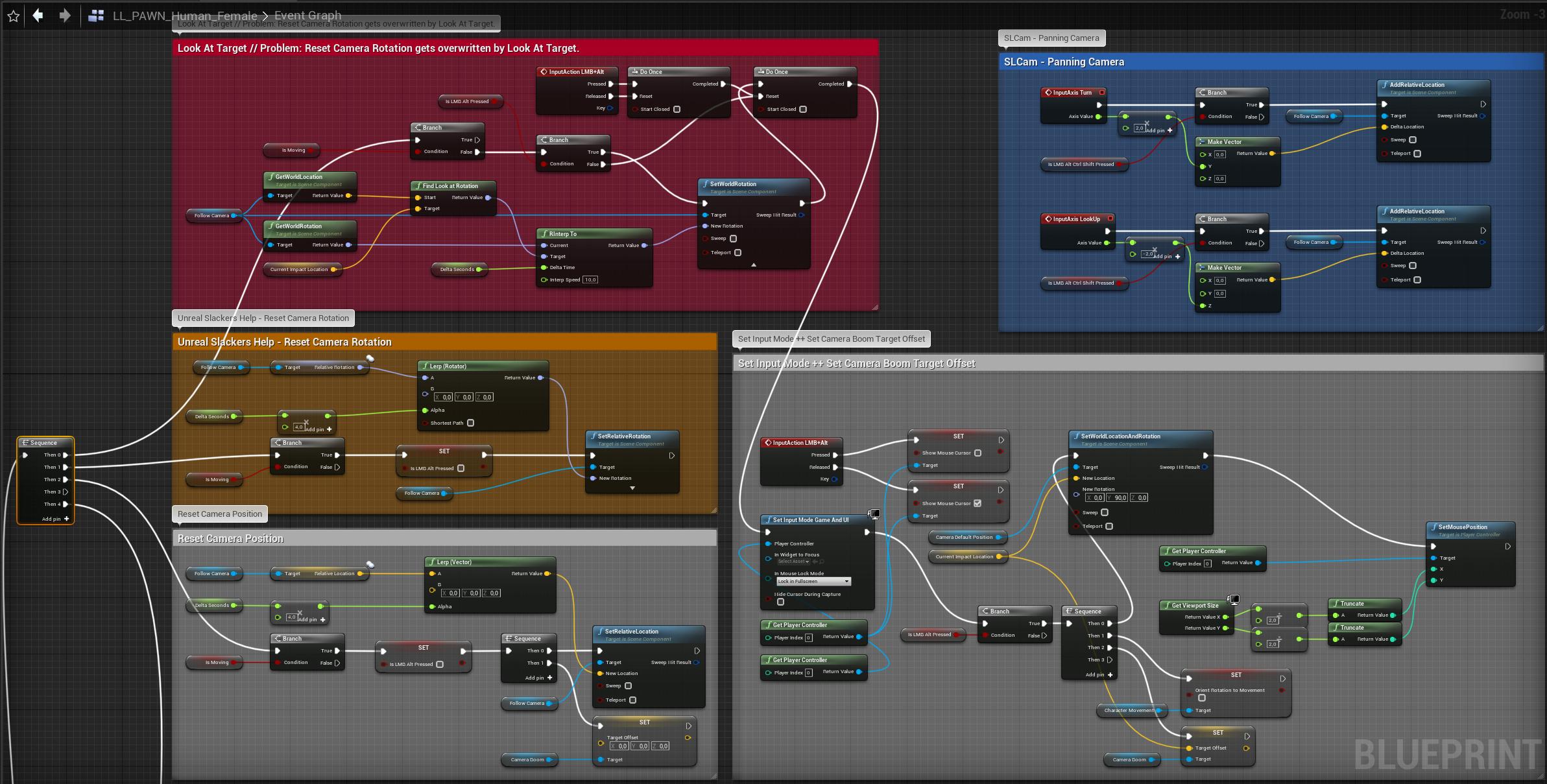
Probably a little messy here and there, but it sort of works - except that it's having the camera boom issues
 eternal thistle
sly finch
eternal thistle
sly finch
@full fog well i have to try it to find out. Thanks
elfin hazel
@full fog I've been trying to implement the system myself, and it's really difficult. I tried having one boom for following the character and then another boom for looking at the location, and switching between those but It's not really working, because of using pawn control rotation. I'm starting to think that the camera shouldn't be attached to anything, and it constantly lerps to the desired location and rotation.
full fog
I was thinking about adding a second camera and switching but I am in fear that I would loose the smooth transition stuff or that the switch will be visible.
At the moment, I am looking for a way to deactivate the spring-arm's boom function temporary
white crypt
i think i would detach spring arm and lerp to a new location
full fog
I tried. I can just detach it on the construction panel
white crypt
or spawn an invisible actor at a new location and attach to it
elfin hazel
Which function? The camera is a scene component that is attached to the boom end, so you can detach it.
white crypt
strange that you cant detach at run-time
full fog
(that point in life where Artists want to be nice to coders)
At least I was not able to find a way
white crypt
drag from spring arm and - detach
full fog
the detach node is telling me "no, fugg off" in the event graph
in construction script, its fine
white crypt
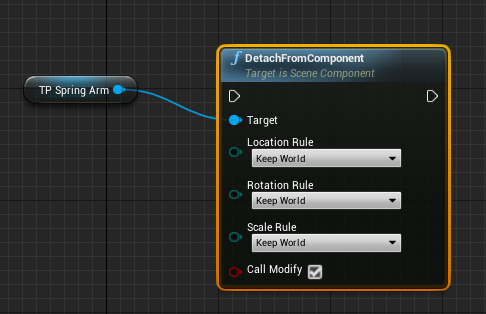 full fog
mhm
white crypt
i dont believe you that it doesnt work when starting the game 😄
full fog
ok lemme check that..
white crypt
i havent tried doing what you are, but in general I would be really surprised if it didnt work
elfin hazel
You can detach the camera too.
white crypt
detaching a camera should work as well, but in your case you need spring
white crypt
you need to smoothly move it overtime
you can use a timeline with a combition of a lerp or a vinterp
full fog
ney, i need full control there!
the camera need to stay where it was on click
and then I make the impact point the new rotation pivot for the camera
elfin hazel
That's the hard part
full fog
So literally what the spring cam did for camera and character
white crypt
easy trick would be spawning an actor at the place where mouse was clicked and attach to it
full fog
already in
white crypt
cant tell you which approach would be a "correct" one, just a suggestion
full fog
yep, i need to build the node system now to use that arrow or scene component as new rotation point
will take some time but wow, thanks! That detaching thing hopefully works out now
white crypt
i mean to do that you would probably need only couple of nodes
after you detach you get arrow reference and use attach
full fog
I need to figure out "where" in my node jungle xD
For me this is like playing against some Chess-Master AI
 trim matrix
hi ! 😄
can i have help again ? 😄
ow i first need to show what i need help with xD
So I've got a Player Pawn (a spacecraft) with 2 child actors attached (from the same weapon BP, attached to two different sockets, one left one right). The weapon BP spawns a projectile on key input. On my pawn, only ONE of the child actors actually spawns a projectile though instead of both. Anybody know why?
ingame i do f on this and then i want the farm to do +1 then i want a little farm to add on the ground next to the house
actually i want a npc to talk with to upgrade everything but i am #Bad xD
trim matrix
never mind my question, I had consume input enabled 🙄
 flint nymph
probably better suited for #animation
 plain flare
oh ok
elfin hazel
@full fog man that cam system is one of the more complicated things I've attempted to do.
 zealous moth
in a struct, is there a way to add a map? like a level
elfin hazel
@zealous moth You can add level streaming objects.
zealous moth
cool lemme try
fyi, i want to access the struct later based on an enum and get all the map properties including loading the map
@elfin hazel hm doesnt allow me to select a map
elfin hazel
I don't think a map can be added, rather you would add a Name property.
What I meant with level streaming objects was that you could load a level instance, or get a streaming level and (perhaps) store it in the struct. Haven't tried it though.
zealous moth
ah i see, i had a hunch it would be by name only... well thanks anyways
 verbal magnet
is there a way to make UMG text to scroll without Making it an animation?
full fog
@elfin hazel I start getting to it. Most things work and once this is done, I will see if this can be some free asset for everybody who needs some cam system like this
For me, in Second Life, this was and is the quickest way to navigate from object to object. Yes it needs some Finger acrobatic with Alt, Ctrl and Shift options but after like 5 minutes, you dont want to miss it
And very good for product presentation as well
So...
New question:
Is there a way to update Mouse inputs on clicked rather than pressed?
elfin hazel
Click means press and release, within a timeframe. So you can timestamp when press happens and query the timeframe when released.
full fog
I currently try to solve an issue:
When I look with my third person camera to some direction, and then move my character, it resets the view. Works perfect.
Now, I need the same for the Right Mouse Button. I disabled the RMB during left and alt actions because the RMB is still bound to yaw and pitch inputs and within doing weird things. I need to find a way to reset something with pressing the button. Atm its just working on "released"
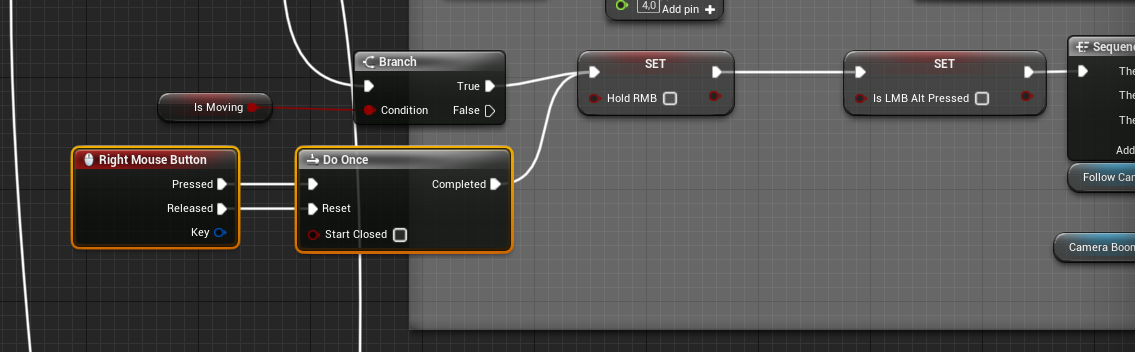
regular view: https://i.imgur.com/7jNbxW7.png
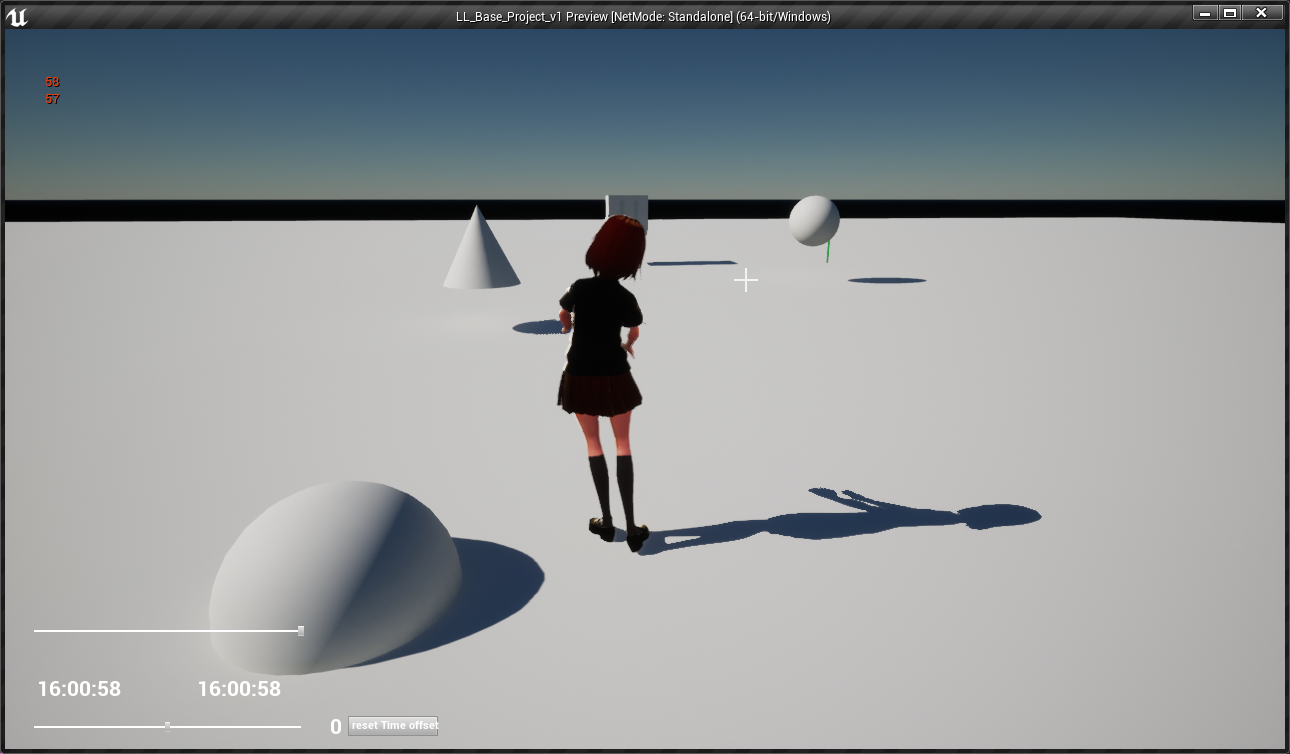 trim matrix
@zealous moth what I used was a Soft Object Ptr to a World and then converted that to a string when I wanted to load it
that was I got a dropdown and can't do any typos
full fog
new view with alt and lmb: https://i.imgur.com/MKWQ1v4.png
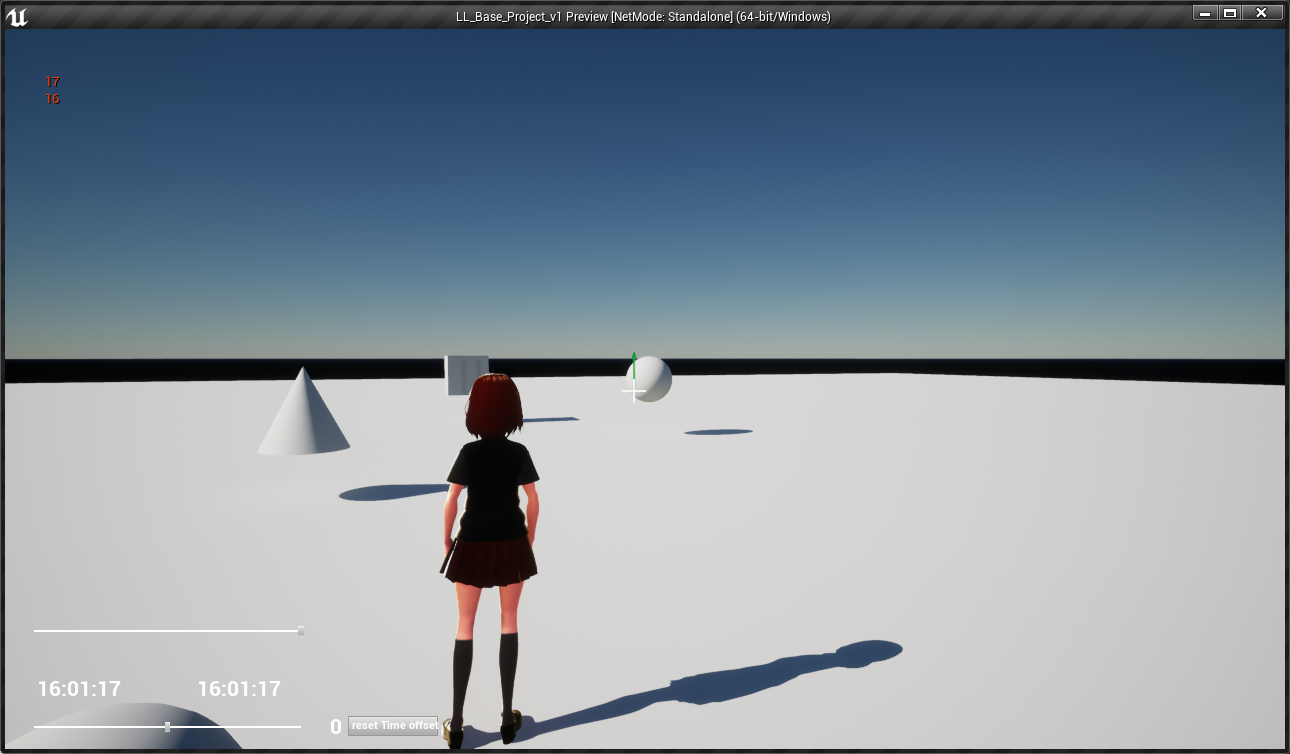
wrong view when using rmb: https://i.imgur.com/KARPR8x.png
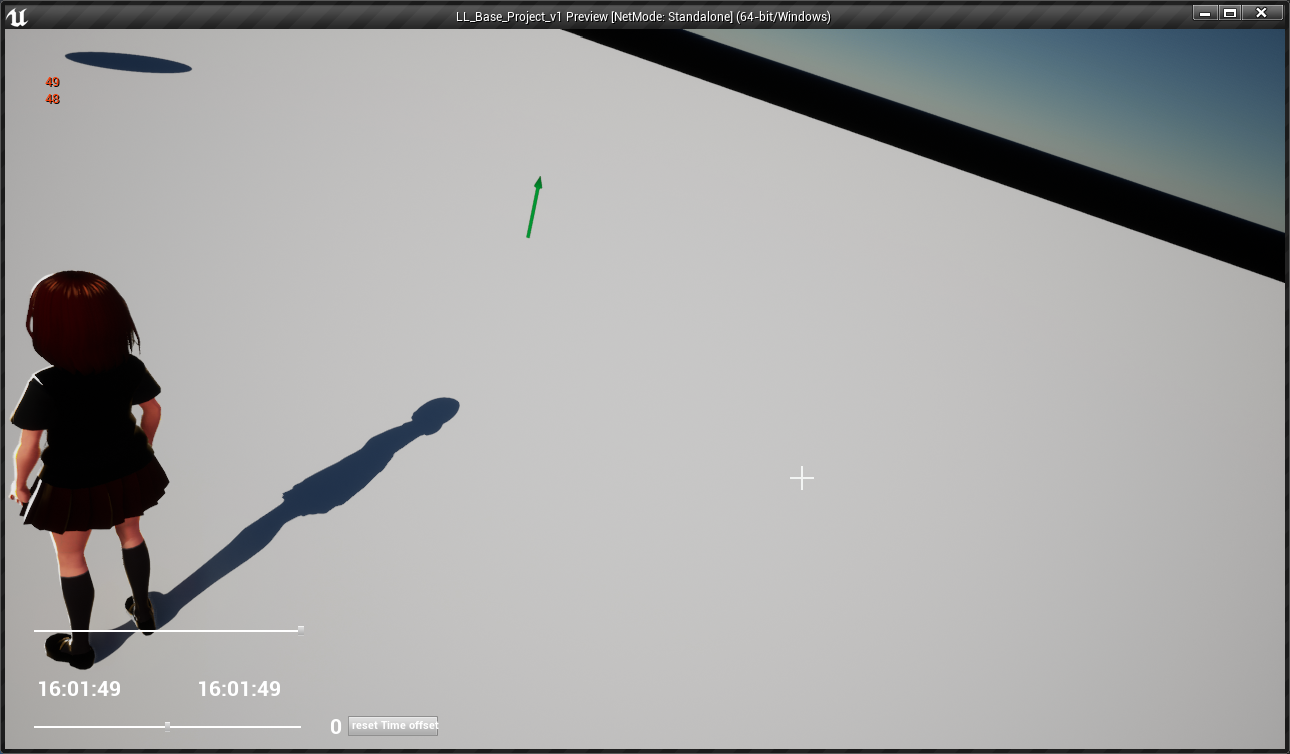
oh my..so hard to explain
verbal magnet
is it possible to control the transform of a UMG element?
 timber seal
hey uh is there a thing for checking for when a variable switches from true to false?
verbal magnet
so.. you have a bool, right?
timber seal
ye
verbal magnet
use a branch
timber seal
alright
verbal magnet
sorry, was thinking of something else
use a branch node and pin the bool to the condition
timber seal
so like this?
verbal magnet
yep
that should check if its true or false
but the branch must be conected to an event or something
i suppose you just started Blueprints
timber seal
how do i get it to check if it changes from true to false though, rather than for when its false, and yes i have just started blueprints yesterday, i have experience with unity though
turns out its not much help, some things that are extremely easy/hard to do in unity are extremely hard/easy in unreal
that doesnt make much sense when i read it back
verbal magnet
hmmm... so you want to check if its changing...
 static shuttle
Hey does anyone know how i can have a 3d widget that my first person character can click on and type in text form their keyboard.... I've managed to create the widget and the widget actor bp and ive added the widget interaction to the first person character and im simulating the press left mouse button.. then i try to type in letters using my keyboard but its not working..
verbal magnet
@timber seal I realy dont know....
tried something similar a few days ago and worked... if i find that piece of code ill send a ss to you
timber seal
alright thanks
one more question, do you know any good resources for connecting static meshes to bones, im trying to make my character hold a gun and have it be attached to his hand so it would rotate and move along with it?
verbal magnet
nope.. havent played with animation stuff yet
timber seal
alright
verbal magnet
what is changing your bool?
timber seal
when the character jumps, becomes true
verbal magnet
maybe you can connect that to a do once node or something
timber seal
that would work
i think
umm im trying to add this node into my blueprint but when i search for Target nothing comes up.
verbal magnet
well, the target(the object you are trying to get) should contain a capsule component inside it
verbal magnet
ah, that was the problem then
timber seal
still nothing
flint nymph
@timber seal you want to add a slot to your skeleton
timber seal
mhm
timber seal
ok good i was about to search up what a lot is
flint nymph
you can right click and add a socket
timber seal
mhm
flint nymph
you can then reference this socket when attaching an actor to your skeletal mesh
timber seal
could i do that with an already existing socket?
flint nymph
timber seal
thanks
flint nymph
depending on how you have your weapon set up you may need to adjust the socket's rotation/position
which can be done in the skeleton asset where you made the socket
timber seal
alright
 unique falcon
i've been staring at this collision issue for ages now
has anyone struggled to get two objects to collide and then found it was something really small and obvious that they'd looked over? if so, what was that thing?
flint nymph
what exactly is your problem
unique falcon
i have a blueprint based off the pawn class that moves using SetWorldLocationAndRotation with Sweep enabled
I have a wall that's in the WorldStatic channel and set to block Pawns
my blueprint is using the pawn collision channel and blocks WorldStatic
they never collide
i created a brand new blueprint that just moves forwards, put it in front of my wall and mirrored the collision settings - my new blueprint collides just as expected
so something is definitely wrong with my original blueprint but i have no idea what it is that i could be missing
flint nymph
yeah i just tested and collision is working fine for me
there must be something up in your collision settings somewhere
unique falcon
i am so so so confused by this issue
flint nymph
can you provide pics of your settings side by side, and also what is your actual collision object for the pawn
unique falcon
this is the blueprint that should work
timber seal
is there a way to make a variable global?
unique falcon
this is the new object i made to test if it works as expected - this object works
and this is the object they should both be colliding with
flint nymph
@timber seal you could store the variable in your game state
and have actors reference it there
 earnest tangle
Sure it's just adjusting an array at a specific interval not a very complex task
 dapper oyster
You can get the computers date as a float value, you could use that
 junior zenith
Are There Any blueprint Developers Here Looking For Work (Royalty)
flint nymph
junior zenith
ahhh yes
 glass crag
Anybody can help me, I've got a problem with the use of the Physics animation, after it started the enemy did't return to it's normal animation without Physics
I do this in the begin play
 fathom portal
Hey friends, got something I want other peoples' opinions on. I have an endless world, and I want to randomly spawn in buildings that are well, well spread out.
My plan was to check all the players every few seconds, check all the chunks around all players, see if those are new chunks that haven't been checked yet, and determine if a building needs to go in that chunk. Is there a better way of doing this?
I planned to make the "chunks" pretty large, so as to cause as little lag as possible, but if there's a better way I'd love to know about it
 haughty axle
hi all, i need bit help, i build Moped with physics constrains (torque and engine works fine) but i need help to add some sort of balance to it, so it doesn't flip on the side.
fathom portal
@haughty axle pictures? Right off the bat it sounds like lowering the center of gravity is what you want
haughty axle
@fathom portal it's very simple rig, body and two wheels who are constrain together, all the moving forward works, but it instantly flips over.
fathom portal
Look for a "Center of Mass Offset":
An overview of how Center of Mass works with Vehicles.
The lower it is the less it should flip over.
Wait, it's a moped, with only two wheels, right?
haughty axle
@mfg thx man, i am stupid and i didnt expanded physics options and didnt seen it 😄
fathom portal
No worries, all good. I've never done anything with vehicles, but I've always wanted to make like an airship of sorts
 rough plinth
Hey so uhm im new to Unreal Engine and i am wondering, how can i set images as level, because i want to make a silly quiz as first game
like that i have this as my interface, something like that
 hollow cape
you'll want to make a widget
fathom portal
^
rough plinth
a widget
rough plinth
how do i do that
trim matrix
why can i still step on the water?
fathom portal
@trim matrix "Step up" doesn't prevent it from being a solid object, it prevents you from using it like a step/stair/etc.
You want to modify the collision channels for it, to prevent it from being solid
fathom portal
Remove "step" from your search, then add "collision"
hollow cape
@rough plinth Look up UMG / UE4 Widgets, there's TONS of tuts out there
trim matrix
haughty axle
@MFG i made it work, but need to figure out how not to flip over when doing a turn 😄
 smoky imp
Hello
I have some questions for coders.
I want to know how simple or complex a specific task is.
 inner ginkgo
@trim matrix Change Collision Presets from Default to NoCollision.
 ocean mango
If I'm looking to make a Widget Blueprint that I'll be including in other Widget Blueprints (in this case, displaying the local player's username plus a background, some animation etc.) is there a way for me to specify its default size?
 tardy harness
Hey! I'm developing a simple puzzle. On one hand, I have a statue that moves aside when its trigger gets overlapped by the character and E is pressed. On the other hand, I have an event called On Used that removes an item from the player's inventory when a widget button is clicked.
So, how can I change the E input event of the statue for the On Used event of the item? In other words, how can I "use the medallion on the statue so it gets out of the way?". Any help would be much appeciated!
ocean mango
If I'm looking to make a Widget Blueprint that I'll be including in other Widget Blueprints (in this case, displaying the local player's username plus a background, some animation etc.) is there a way for me to specify its default size?
I found the Size Box widget which appears to do the thing I want 🙂
 thin owl
good afternoon. I am currently creating a collectables chest blueprint that casts to a widget. This whole thing works just fine, but I dont quite understand how converting a get widgets of class then casting works.
- In order to get this to work with child BluePrints, I converted my Widget Class type to a variable. This makes sense to me.
- What I dont quite understand is how do i get the red section to become 1 variable that I can change in the child.
 proud hull
@thin owl ConceptArt variable isn't what you want to use? Also, you don't need to cast in there like the notice in your compiler results says.
You can set the return value of the widget created as a new variable.
flint nymph
@tardy harness with how you currently have it set up, you’ll want to check the inventory for the item in the statue bp when E is pressed, and if it contains it call that Event on Used function for the item
I don’t know how your player/inventory is set up so I can’t help further
 exotic cradle
Could you set the input to the array as an editable integer?
trim matrix
Hi everyone, i want to add admob ads and there is "show banner" but i can not do anything if it fails or loads, How can i catch actions like that in blueprints? There is no free plugin as i see
exotic cradle
thin owl
@proud hull @exotic cradle Thank you both! i can def look into this
proud hull
I think MrSandman was responding to @tardy harness about the integer as input.
exotic cradle
No he could still use an integer lol
tardy harness
@flint nymph @exotic cradle Thanks for responding. I'll check and get back ;D
exotic cradle
I have been trying to figure out which section of this blueprint to put stamina or if I should just have it as a function
trim matrix
@exotic cradle there is just "show banner or interstitial ad" node. There is no node connection about ad loads or fails. If ad does not show how can i catch that
 mossy gale
Good evening everyone, sorry if i'm jumping in mid someone else's convo.
exotic cradle
@trim matrixCan you send a screenshot of the blueprint?
 gloomy linden
Well.. you dont know and have to assume it works after deployment
proud hull
"is interstitial ad available" node?
exotic cradle
Maybe instead of on event begin play have the add show if a few conditions are met that way if those conditions for the add to play arent met youll know and it can be indicated
gloomy linden
To make it more fun, its forbidden to display ads during testing
Ads may only be displayed to actual "clients"
trim matrix
@proud hull well i did not see that node thanks dude but how can i catch while its loading. @gloomy linden yep you have to upload your app to store damn testing is hard in unreal lol
exotic cradle
The following member variables in blueprint 'Blueprint /Game/LocomotionSystem/AdvancedLocomotionSystemV/Content/AdvancedLocomotionV4/Blueprints/AnimModifiers/Create_Curves.Create_Curves' have invalid type. Would you like to remove them?
Curve Params
Curves to Create
gloomy linden
The testing is not hard, the google part is hard
exotic cradle
^^^^
trim matrix
@exotic cradle i did it in baginplay for example
exotic cradle
ah
proud hull
@trim matrix run the test on a loop with a timeout. If it fails to find that it loaded after set amount of time, then try next ad or something.
trim matrix
@proud hull if it loads, it gives exceptions in a loop?
gloomy linden
Once you understand the mobile limitations (and restrictions), its quite easy, but the google services and admob are just made difficult for no sense (try to contact google, which is even more hell)
proud hull
@trim matrix Honestly, I am not sure. I am going off the node description to figure out the logic that can be used with it.
trim matrix
@gloomy linden oh, i did not use admob this is my first time. I did some test in unity engine but ITS UGLY so i came back to unreal.
proud hull
The node says it returns true or false if the ad has loaded and is ready. So that means it can be tested in a loop until it comes up true or a certain time passes.
trim matrix
@proud hull probably i have to follow this road. Request -> Load -> is loaded?
proud hull
You would need to determine a suitable timeout rate and logic behind breaking the loop when that time hits.
Yeah, that's what you would want to do.
I'm not sure if the loading is async or not though, so you may need to test in a loop to give it a set amount of time to load.
Or just run the test after set amount of time actually, screw the loop, what am I thinking.
Oh, nevermind, you do want the loop, so the test can finish early when possible,
exotic cradle
Mask on, mask off
proud hull
Haha
exotic cradle
Sucks to suck. Tho because I just wanted to try a new locomotion system for my game and it crashes UE4 when I try and delete it
tardy harness
@flint nymph I can setup it like you suggest using E key event, but I'm triying to change the E event for the On use event, wich is called on the item bp. Maybe I just keep it like this and rework some things. Thanks!
trim matrix
@proud hull & @exotic cradle & @gloomy linden Thanks for your attentions and answers guys i really LOVE YOU
proud hull
@trim matrix there was another node for even testing if the request itself was successful.
gloomy linden
np, your welcome
proud hull
So you could go Request -> requested? -> Load -> loaded?
trim matrix
@proud hull i checked "is requested" node when i saw your last comment yep that road can work probably ❤️
is there any settings that i have to do to show ads? as i know some edits in engine.ini but is there other setting?
rough plinth
so i have this simple layout
how can i make the text click able, like in this case you have to click on the How do i skip this question in order to go to the next question
mossy gale
Anyone know of a better way than this (see picture) to clamp movement between actors? Problem I'm having is that the actor can still move beyond the clamped distance very slowly between being stopped instead of not being able to move further away at all
 brittle fiber
https://preview.redd.it/73ka13chha751.png?width=1920&format=png&auto=webp&s=ef13112dc579d16abb1e68d9c2151a3facbb8c69 its all part of a plan
 mossy gale
^w/e that is it looks cool
mossy gale
I always figured that the birth of CyberSpace would look cool. Glad you didn't disappoint
I would say illusion because if it wasn't you wouldn't normally ask
mossy gale
👍
Still interested in finding a way to stop movement beyond a clamped distance that doesn't allow the actor to move further away at all
stop movement immediately doesn't work because actor can crawl pass clamped distance
brittle fiber
sry, i passed my limit after that skysphere x
i know that mofos will will bleed through any bounds.. clumping will only stop the mass.. human organism took us this far
proud hull
@mossy gale you might want to move your distance check to where you are setting your character's movement. Then simply tell it to not move if distance check fails.
Can also check if its rotation would decrease the distance to allow that movement while they are already at the max distance threshold.
mossy gale
Great idea to move it to where the character movement is. Trying that now, along with check fail not allowing movement.
proud hull
@rough plinth you can put that text on a button with an invisible background.
rough plinth
how do i make an invisible background
cus i tried that
but i don't see an option to make the background invisible
proud hull
rough plinth
yeah but it looks like this now, so it has a silver / grey color right?
proud hull
Not sure how you got that. Mine looks good. I only set that alpha.
rough plinth
when i put a button in, it automatically gets that color
proud hull
Is that the default button background?
Yeah, you set the alpha of the button background color like I showed in the screenshot.
Set it to 0 and it will be invisible.
rough plinth
i have that
proud hull
You selected the text it seems
proud hull
Bottom most option, set to 0
proud hull
Np
 upbeat smelt
I am trying to attach an actor to spring arm. When its attached, the object goes through wall even if its collision is set to "block all" .
proud hull
@upbeat smelt can you show a screenshot of your spring arm details?
rough plinth
ok so i made a main menu + a first question but when i do play > new editor window i get this message
upbeat smelt
@proud hull
proud hull
Is the spring arm supposed to be used on that camera? If so, you need to make the camera a child of the spring arm.
 foggy fable
Hello Guyz , i tried to generate project files, this Error Appeared , is any1 familiar with this issue ?
Running C:/UnrealEngine-release/UE_4.25.1/Engine/Binaries/DotNET/UnrealBuildTool.exe -projectfiles -project="C:/Users/Trodith/Documents/Unreal Projects/HC425C/HC425C.uproject" -game -engine -progress -log="C:\Users\Trodith\Documents\Unreal Projects\HC425C/Saved/Logs/UnrealVersionSelector-2020.06.27-00.13.16.log"
ERROR: Unhandled exception: Tools.DotNETCommon.JsonParseException: Missing or invalid 'Enabled' field (in C:\Users\Trodith\Documents\Unreal Projects\HC425C\HC425C.uproject)
at UnrealBuildTool.ProjectDescriptor.FromFile(FileReference FileName) in C:\UnrealEngine-release\UE_4.25.1\Engine\Source\Programs\UnrealBuildTool\System\ProjectDescriptor.cs:line 223
at UnrealBuildTool.ProjectFileGenerator.ConfigureProjectFileGeneration(String[] Arguments, Boolean& IncludeAllPlatforms) in C:\UnrealEngine-release\UE_4.25.1\Engine\Source\Programs\UnrealBuildTool\ProjectFiles\ProjectFileGenerator.cs:line 1246
at UnrealBuildTool.ProjectFileGenerator.GenerateProjectFiles(PlatformProjectGeneratorCollection PlatformProjectGenerators, String[] Arguments) in C:\UnrealEngine-release\UE_4.25.1\Engine\Source\Programs\UnrealBuildTool\ProjectFiles\ProjectFileGenerator.cs:line 640
at UnrealBuildTool.GenerateProjectFilesMode.Execute(CommandLineArguments Arguments) in C:\UnrealEngine-release\UE_4.25.1\Engine\Source\Programs\UnrealBuildTool\Modes\GenerateProjectFilesMode.cs:line 198
at UnrealBuildTool.UnrealBuildTool.Main(String[] ArgumentsArray) in C:\UnrealEngine-release\UE_4.25.1\Engine\Source\Programs\UnrealBuildTool\UnrealBuildTool.cs:line 550
proud hull
Ah, try changing the probe channel to visibility.
I was confused to see it as the child of the camera, so I thought you might have had it reversed, hehe.
upbeat smelt
@proud hull its still happening
What is trying to was use physics handle for this stuff but couldnt find a way to make the attached object not rotate.
not rotate when attached.
 wind atlas
hello, is it possible to copy a function from my bp into a bp function library?
i don't want to re-do all the input nodes one by one and local variables
or copy a function to another ue project
proud hull
@upbeat smelt If you enable physics, you can lock rotation under Constraints.
proud hull
I'm not seeing a way to specifically set the lock rotation, but it is possible to make a custom constraint mode and then set that through BP.
 pure yew
is there a way to change a component on an actor in game?
proud hull
A way to "trick" it would be to have an invisible object on that spring arm with the rotation already locked and then swap meshes with whatever should be "attached" to the spring arm and set visibility.
upbeat smelt
what I want is that the object will always face the player and not maintain its initial rotation values. is this possible by using constraints? @proud hull
proud hull
Oh, that won't really be possible through that.
Honestly, your best bet would be to utilize the spring arm default options, which include camera collision.
The problem you were having is not knowing the exact size of your object.
Get the size of your object and set the "probe size" accordingly.
rough plinth
https://gyazo.com/5a4a162e37f164173889c58b6bfa2537 so i have this rn and it is supposed to open my level but..
 pure yew
@exotic cradle were you asking me?
proud hull
@rough plinth can you show a screenshot of your click event for that button?
upbeat smelt
@proud hull ok ill try that
proud hull
@upbeat smelt it won't be perfect, since the probe is a sphere.
There must be a better way, but I am not sure of what that is.
upbeat smelt
@proud hull what does "size" mean?
exotic cradle
Slashin8r seems knowledgeable. Where in this mess should I put stamina. I cant decide
proud hull
Lots of categories there, hehe
exotic cradle
Im saying...
rough plinth
but it should be working
proud hull
Maybe a new category for stats? One more couldn't hurt.
exotic cradle
Really enjoyed the ALS V4 so I figured Id use it as a base line for what I need.
rough plinth
since i just define the correct level
proud hull
@rough plinth that looks right.
Compile everything you see, save all, maybe open/close project and retry.
upbeat smelt
@proud hull by size do you mean sphere's radius?
rough plinth
didn't work @proud hull
you want to see more code / events?
maybe the problem lies there
proud hull
But like I said, the probe is spherical, so other shapes will have weird collisions.
Someone else here must know a better way to do it.
upbeat smelt
@proud hull no i meant for the object that needs to be attached. I am thinking of adding a sphere collider to the object to find its radius for probe size.
proud hull
That will get you corner to corner, break the vectors to do some more math if needed.
Get Component Bounds is even better.
exotic cradle
So I have 2bools: "IsMoving" and "HasMovementInput" and 2 floats: "MovementInputAmount" and "Speed" to determine Stamina drain. So it would it probably be better off just to make it a function within the Base_CharacterBP huh?
 tranquil gorge
hey so would anyone be able to explain why my character wont turn in the direction i navigate my control stick when i move
i believe ive set it up but im not sure
 bitter star
Hi, How do I change the angle of the camera in the ThirdPersonCharacter BP? The boom distance and location work but not the rotation and none of the follow camera transform work? Any idea?
flint nymph
@tranquil gorge you have orient rotation to movement checked right
exotic cradle
@tranquil gorge Did you make sure on the charactermonent component that Yaw is off controller movement
Orientation**
flint nymph
@bitter star in the camera spring arm there are settings in the details panel for offsetting the location
tranquil gorge
hmmm shall i take a picture of my blue print to show you what i do have @exotic cradle @flint nymph
 fallow kiln
Hello all....I have a question...I have an event in my Pawn BP that activates an AI BT. If I have the BP's in the game scene, the event kicks off and the AI does it's job. If I spawn the BP's in, the no matter what I do, the event never kicks off. Can someone point me in the right direction on this?
flint nymph
@fallow kiln you are spawning the pawn but not the AI controller
by default it’s set only to auto possess on placement and not on spawn
exotic cradle
@tranquil gorge Sure
tranquil gorge
also thanks to the both of you for replying
flint nymph
for AI controllers
fallow kiln
@flint nymph How would I go about spawning the AI controller? I was under the impression that the AI controller would be attached to the Pawn?
flint nymph
I believe there is a setting in the pawn, but if you can’t find it you can assign the AI controller after spawning the pawn
with the spawn default controller node
exotic cradle
On event possess -> Run Behavior Tree
Than have that BT Asset assigned to your AI BT
That’s the only event I have inside of my AI Controller
full fog
Good evening guys. Since I got stuck multiple times on creating a new camera system and having issues on actually getting all things explained here, I decided to open up a thread on the forums. Maybe some people might be interested on this one. https://forums.unrealengine.com/development-discussion/blueprint-visual-scripting/1781397-recreation-of-the-second-life-camera-system
Unreal Engine Forums
Hello,
in the past weeks, I was trying to recreate a camera system which is part of the old 3D Chat application called Second Life.
The reason for recreation is the idea to have it inside of a game project I am working on at the moment and having a very stable system for nav...
fallow kiln
@flint nymph and @exotic cradle Thank you for the information. I will take a look.
exotic cradle
No problem!
tranquil gorge
@exotic cradle did you manage to see the screens i posted above.
flint nymph
that is setting the rotation to your controller rotation, which you don’t even need a tick event for (there is a checkbox for it), and not to your input direction
fallow kiln
@flint nymph I found what you were talking about and changed to placed in the world or spawned, and that worked. Thank you!
tranquil gorge
hmm. where would i find the checkbox for rotating you speak of. @flint nymph
flint nymph
check your movement component settings and your pawn settings in the details panel, both have some rotation-related checkboxes you should look into
 hardy crown
Hey guys ! 👋
I'm currently trying to do a rail grinding system in UE4 and.. first of all, I need to get an overlap/hit event when my character hits a spline component with spline mesh renderers. For the life of me I can't get a simple overlap event to fire... anyone ever dealt with spline mesh components and collision could help me out here ? Here's what's happening.
https://gyazo.com/e20e5ecf0a7fe8912a4b87fa42a9263b Just a "landed" print but no overlap or hit print
 plain owl
I have my enemy health bars in world space because I want their size to be relative to my camera's distance to them. But in world space they are affected by lighting and also cast shadows. Anyone have an idea how I can get the relative size in screen space?
inner ginkgo
@hardy crown Generally speaking, you only get one or the other with hit/overlap. Unless you have a different object with overlap settings, you will only get the hit event.
hardy crown
Yeah, I was testing the two just to make sure, but i'm getting neither.
inner ginkgo
Oops, I misread that. I thought landed was the Hit print. Where are you getting Landed from?
hardy crown
In my character blueprint, whenever the character changes movement mode to walking.
This is a new blueprint actor with a spline component and spline mesh renderers... but I cant any overlap or hit events
inner ginkgo
Well, you don't have hit events turned on, so you won't get any of those.
 twilit blade
Hello everyone, i need some help, i want to display an array of text in a widget in form of a list.... Can someone help me?
hardy crown
@inner ginkgo what do you mean, where are you seeing that? o.o
inner ginkgo
In your first screenshot. The top checkbox in the collision settings is regarding hit events.
hardy crown
This is only for physics simulations, no? I have it on now and still no hit detection
inner ginkgo
No, that's for events. Essentially, your collision presets tells the engine how to handle your collisions in the physics and query sims. The 2 event check boxes tell the engine if you care to know about the results through the hit/overlap events.
What are the collision settings for the object you want to get events with?
hardy crown
These are the collision settings for the spline mesh renderer and the player character
inner ginkgo
Looks fine for getting events. I would put your debug prints on the player capsule, though. You have several splines going on and I can't be sure which event you are wiring up (likely the spline shown in the top left of rails components section).
exotic cradle
@plain owl did you try turning shadows off for the bar?
hardy crown
@inner ginkgo
So... that works? o.o Why cant I have my Rail BP shoot that event instead ?
upbeat smelt
@proud hull nah dude its still clipping into the walls
plain owl
@exotic cradle yeah but it still reacts to lighting, I think I'll just live with it not changing size in screen space
inner ginkgo
@hardy crown You probably didn't actually hook it up. When you add the component, those new objects are runtime and can't be done directly in the editor like you do the ones in the component window. To get the collision events on those runtime components, pull off the instance and choose "bind event to X" and pick the correct hit collision. Then create a custom event for the reaction.
hardy crown
@inner ginkgo That sounds about right, tho I never did that, care to show an example on how to get a ref to that runtime component and binding it ?
inner ginkgo
The return value from your add component node is the instance.
flint nymph
@twilit blade sorry just got to my pc, this should combine all of your text array into a list
inner ginkgo
@hardy crown So something like this.
plain owl
@hardy crown Too much hassle for now, I'll just leave it in screen. Thanks anyway ❤️
hardy crown
@inner ginkgo Mmmm I can't seem to create a custom event since i'm adding those spline renderers in the construction script... ?
inner ginkgo
Instead of add custom event, use Create Event. Sec
Like this
When I'm in the event graph, I use custom event. When I'm in a function, I use create event.
hardy crown
Omg @inner ginkgo
It works.
Thank you sooooooo much I've been hitting my head against the wall for the whole day
plain owl
🙌
hardy crown
Where is the tip jar
upbeat smelt
hey, I am trying to attach an object to spring arm but after its attached, the object starts clipping through the wall? Why is this happening? Can anybody help?
flint nymph
is the wall blocking the camera channel
you may need to adjust the object's position in the spring arm as well
inner ginkgo
I don't know too much about spring arms, but I'm not sure they consider the attached objects collision. I think they just react to the visibility channel.
flint nymph
yeah spring arms have their own separate collision probe
you can set its radius
by default they check against the camera channel but you can change it
upbeat smelt
yes the wall is blocking the camera channel. i am setting the radius of probe using get component bounds
zealous moth
in the material editor, does anyone recall how to assign a parameter to a parameter collection to be edited in an actor bp?
inner ginkgo
Use the CollectionParameter node. Then select your collection.
zealous moth
i did but it doesn't seem to want to link
inner ginkgo
Sorry, can you clarify the issue more?
zealous moth
so i created a parameter collection, i made an instance of my material and i assigned that instance with the bodycolor param to my pawn. when i change the value on construction however, it doesn't show.
inner ginkgo
The param collection is disconnected from material instance params. They are two different ways to configure materials.
You can use both, but you'd do that with different options. Not the same option.
inner ginkgo
Depends on what you are trying to accomplish. You use material instance params, if you want to configure individual objects with different settings. You use param collections if you want to be able to change all materials at the same time.
The param collection won't work unless you've used it in your material.
 pine trellis
is there any way I can mangle my LUT file to make it look more like heat vision and not these lines?
 slender hawk
can you add a BP Component to a BP Component?
 wet siren
@slender hawk yes, in the sense that you can add a second component to an actor and have that component be a child to the first
the first component in your actor is always the root component and all other components are children to that
 true marsh
Is there a way to get the viewport camera in blueprints
fathom portal
I know this is a simple fix but I'm super tired and struggling with it: Something is killing/despawning my player when I get far enough away from my spawn point, what could it be?
My kill Z on the world settings is astronomically low, so I know that's not it, but if I fly too far in any direction or fly too high it kills/despawns my player
I got it. If anyone was wondering, I had to disable world bounds in my world settings. Thanks @shadow shoal
slender hawk
@wet siren
I'm a UE4 noob btw.
Are you referring to scene components?
In the actor I can't attach a standard BP component to anything else, they appear in the section below (non-scene components) and don't allow parenting?
Unfortunately if I have to add loads of components individually when I want to use that system on something it would be a pain, and introduce the risk of mistakes too. I just want to add one thing when I need the system. i.e., previously I made a simple health component - all I have to do is add it to an actor and then it has health, takes damage and can die.
As mentioned I'm a noob, so maybe this is a bad idea for reasons I don't yet know but...
Currently (I've only just started making it this way) I have attached all the components I want to an actor that serves as the core for the system, then I can attach that core (so just one component) to what ever I want to use that system on.
wet siren
@true marsh try get player controller and get view target
@slender hawk what you might look into is actor blueprint inheritance :)
you can have one Actor (let's say BP_GameCharacter) which has health and stamina components (for example), then you can create children class to that like BP_NPCCharacter and BP_EnemyCharacter and then both of those will have those components by inheritance, and if you change or add those components then they will update in child Actors as well
 still trellis
been messing around with unity lately to take advantage of some code architecture tutorials, and one thing i noticed is really prominent use of "GetComponent<Interface>" which just gets a component that inherits from an interface. I saw that there is a Get Components by Interface node in BP, is this the same functionality? is this something expensive I shouldn't be calling frequently (my use case is combat events, so getting a component from a hit enemy that has the IDamageable interface, for example, rather than routing everything through the base actor)? is this a typical way of making things more modular and composition-focused, or does it not work how I think it does
true marsh
@wet siren No luck but I forgot to mention this was for construction script in the editor, not during game play (tool development) It might be working, testing a bit more
 shut hinge
I registered the pawns, now i need to know how to create a join party and party leave widget. (not multiplayer game but rpg party group) I'm using Layley's Level Component System, but it only shows its stats on just one party member at a time when I need it to show on all of the party members.
I know a little about data tables, my dialog system is running on one. Row name refers to the number of rows that's inside the data table usually the info from the rows stored in the data table is passed through a struct.
elfin hazel
@vast lion Since it's a variable data table, it'll have a variable struct. In Blueprint the only way to use a variable data table, is to know which single structure type they all will use.
 trim fox
can someonehelp me ? I created a blend space with new animations if the weapon is equipped made a new state in my AnimGraph and added a new boolean but if i equip the weapon nothing changes what could be the problem?
 vast lion
@elfin hazel I know which struct they will use
Just not sure where to set that for the "Get Row by Name" node?
shut hinge
what are you trying to do with the data table, I don't know if its similar to how its done with the dialog.
elfin hazel
@vast lion Drag off the Out Row pin, type break and select your struct type.
 sly kite
Does anybody know which blueprint is under control by user when Pawn destroyed? I mean, instead of Pawn by PlayerController. I want to tune that object's camera...
bitter star
How can I rotate the cubemap for my skybox so I can place it how I want in my scene?
slender hawk
@wet siren
I am using a little bit of inheritance at the moment - but you got me thinking about it again and I if I do a couple things slightly differently I might be able to take the inheritance a step further. Not 100% sure it'll work the way I'm thinking, but I'll try it out. :)
Cheers! 😄
 woeful dawn
Hello, I was wonderin if anyone knows a way in which you can make it so, depending on where u hit the enemy. Thats where the destructible component starts
verbal magnet
I really need some help, Im working with 3d widgets and the entire widget gets stuck when I press any button
followed tons of tutorials, did everything 100% correct, the widget still doesnt work
elfin hazel
In what way does the widget get stuck?
verbal magnet
hmmm... how to explaun
so I have a widget interaction set up to my character, and a 3d widget of a numpad
On Hover buttons works
but Ive set up a press pointer key to left mosue button when I click, and the buttons just stop working, the entire widget basically stops
should I send some images?
elfin hazel
Sure, I'll make a setup myself and maybe I can base it on what you have.
verbal magnet
so this is my setup on the player bp
and this is on my num pad
here is how it looks before clicking the button
and after, it just stops and no button can be pressed, it doesnt even sends the print
the buttons are not focusable
and this is the hierarchy if it helps in some way
elfin hazel
I haven't worked a lot with world widgets but could you make the following setup when clicking;
Because that's working for me and if that doesn't work for you, then we know there's some other issue.
verbal magnet
wut... oh ive forgot the wire... lol... but no, it does the same
elfin hazel
Are you sure? You have two press pointer key in the picture, I have one press and one release.
verbal magnet
very sure
even if it was only the first one connected, it should have at least started the onclick event
elfin hazel
No, a click is a press and release. Try binding the On Pressed event of the button to a print.
verbal magnet
okay... so it works, it sends the print, but the buttons still get stuck after
elfin hazel
Can you post an updated picture of the Left Mouse Button event?
verbal magnet
okay
to the left is the player bp, to the right is the numpad
after the click, all the other buttons are blocked
elfin hazel
The Left Mouse Button event, you tell the component to press lmb, but you have to release it too on the released event.
Othervice, what happens now is that the component is constantly just pressing lmb.
verbal magnet
hmmm
then how should the code look then, I still get the numpad stuck even if I only use release
elfin hazel
There should be a Press Pointer Key connected to the pressed pin and a Release Pointer Key connected to the Released pin.
verbal magnet
okay... now I fell like a total idiot😂 works now, sorry to bother you for such a simple thing
elfin hazel
At least it was a simple issue, would have been difficult to track down what it could be, if that hadn't worked.
verbal magnet
thanks again, hope next time Il have a smarter question
plain owl
How come my AI don't look in the direction they're running? I've tried both Orient Rotation to Movement and Use Controller Desired Rotation but same result. If I enable Use Controller Rotation Yaw they turn too snappy around corners.
If I set direction to 0 he runs towards where he is looking as well.
elfin hazel
So the lower body is always pointing in desired direction, and the upper body is the problem?
elfin hazel
So the resulting direction [of the mesh] is the result of a blend between the movement direction and the target location?
plain owl
Sometimes he rotates to the left
Even without a blendspace but just a running animation he doesn't look at where he's heading
only when he reaches the ground
elfin hazel
hmm hm Not sure what it could be. Is this character based on the default third person, or top down characters?
plain owl
Third person
As you can see the whole capsule is rotating
Now he's looking the other way
I think I found the culprit
If I don't attach any weapon at BeginPlay he runs straight
elfin hazel
huh, interesting.
plain owl
But they shouldn't have any collision whatsoever
Actually, it might be the combat locomotion only being affected
 magic garden
Has anyone seen these slightly grey letters before? this node doesn't work and I spent about 8 hours debugging to find it, the white letters node work fine and all the details are identical..
got any idea the color means? was it just a glitch?
plain owl
@elfin hazel Okay it was my own player rotation setup... Found the issue as per usual. Thanks a lot tho
I needed that rotation setup for when they were attacking. But instead I use a simple parallel with a look at player function during a timeline. So now everything works 🙂
elfin hazel
Nice!
 gritty elm
can anyone explain me why third person walk animation is inplace, and why mixamo animation behaving like this?
is that inplace animation, what is difference between inplace animation vs root motion anim? how to check if animation is inplace or other?
flint nymph
in the settings of the animation there is a check box for Force Root Lock
this will remove the root bone movement
but also animation questions are better off in #animation
glass crag
Anybody can help me, I've got a problem with the use of the Physics animation, after it started the enemy did't return to it's normal animation without Physics
flint nymph
what does the track in your timeline look like
also that timeline will only play through once, any future time its called will output only the final result on the timeline
 paper sky
hello i just want to make a staticmesh thirdperson that turns whereever i turn my mouse to
any suggestions
pure yew
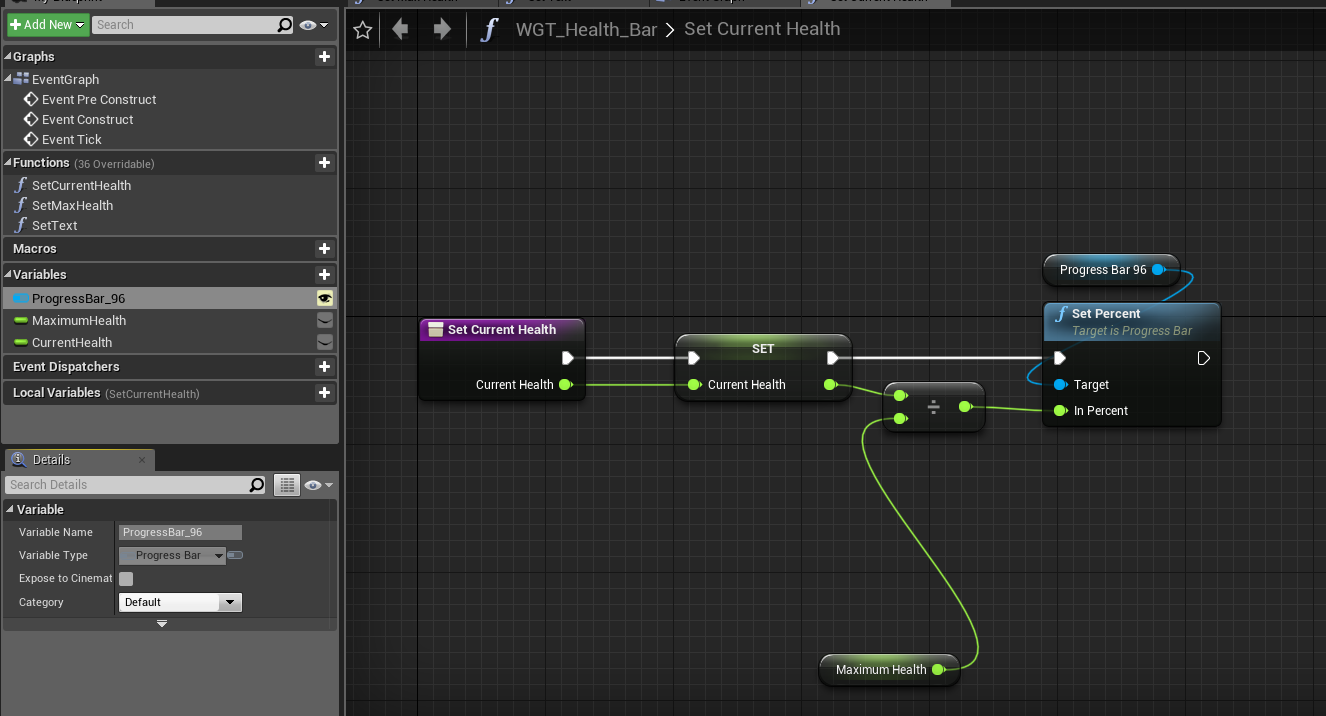
am I forgetting to do something with my progress bar? I'm getting the error "accessed None trying to read property Progressbar"
am i supposed to initialize the progress bar somewhere in the widget?
elfin hazel
Did you create a progress bar variable, or did you expose your progress bar widget as a varible?
 elfin hazel
and it's in the same widget class? Or are you using widget hierarchy?
pure yew
in the same class
for whatever reason it has an issue with this
https://i.imgur.com/Mh0n7PG.png
 elfin hazel
yeah, should work. Try adding another progress bar to your widget and see if it complains about that one too
 latent arch
Realistically how often can one tick this node without tanking performance?
pure yew
i deleted the previous one and redid it :/
elfin hazel
I'm not seeing any user error at least.
pure yew
i replaced it, same issue
https://i.imgur.com/OzGisKl.png
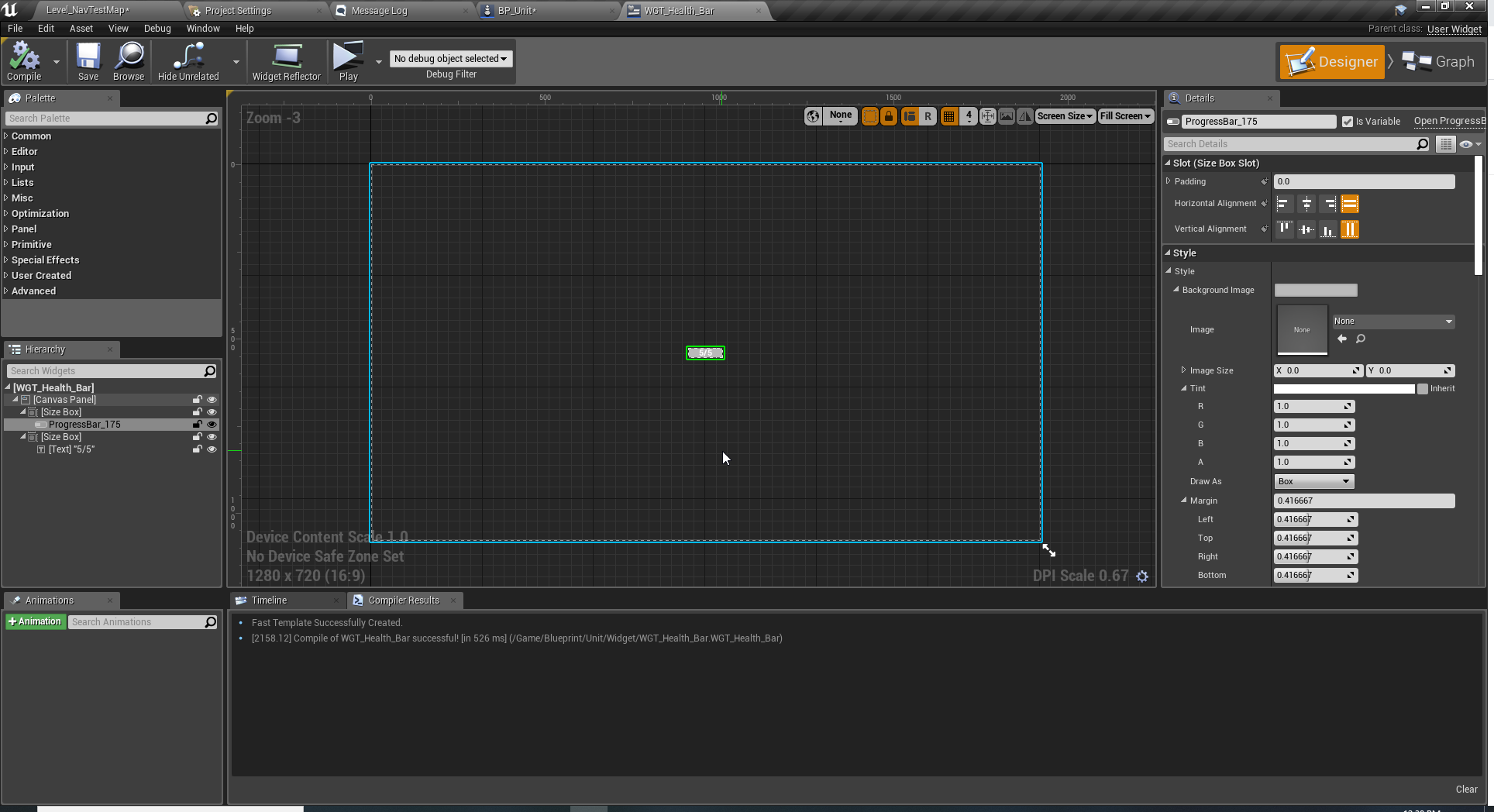
its really weird b/c it was working, i broke some other entirely unrelated widget
then this broke
idk im restarting unreal, hoping its some weird cache issue or something
elfin hazel
It could be some strange issue where some other class hasn't been compiled correctly.
pure yew
:/ restarted, didnt fix
 jaunty dome
When it comes to animation notifications, can I get the event in the character blueprint rather than the animation blueprint ?
elfin hazel
You can create a binding in the animbp that the characterbp listens for
jaunty dome
say i'm playing the animation directly using Play Animation node, there is no way to get notified ?
or at least trigger an event when the animation ends
I haven't set the animation sequence in the animBP at all
i'm directly playing it
elfin hazel
I'm not sure.
if can't get a binding option to the anim notify from the animation reference, then I don't think so
flint nymph
you can with montages
jaunty dome
montages ?
pure yew
animation montages
Animation Montages are a flexible tool that enables you to combine and selectively play animations that are contained in a single asset.
@elfin hazel am still troubleshooting my healthbar widget
https://i.imgur.com/BChJ9JD.png
this is how i have it set up attached to the unit.
for some reason, its never running that print statement, even tho it should run it once I think?
b/c by default the health bar reference is empty
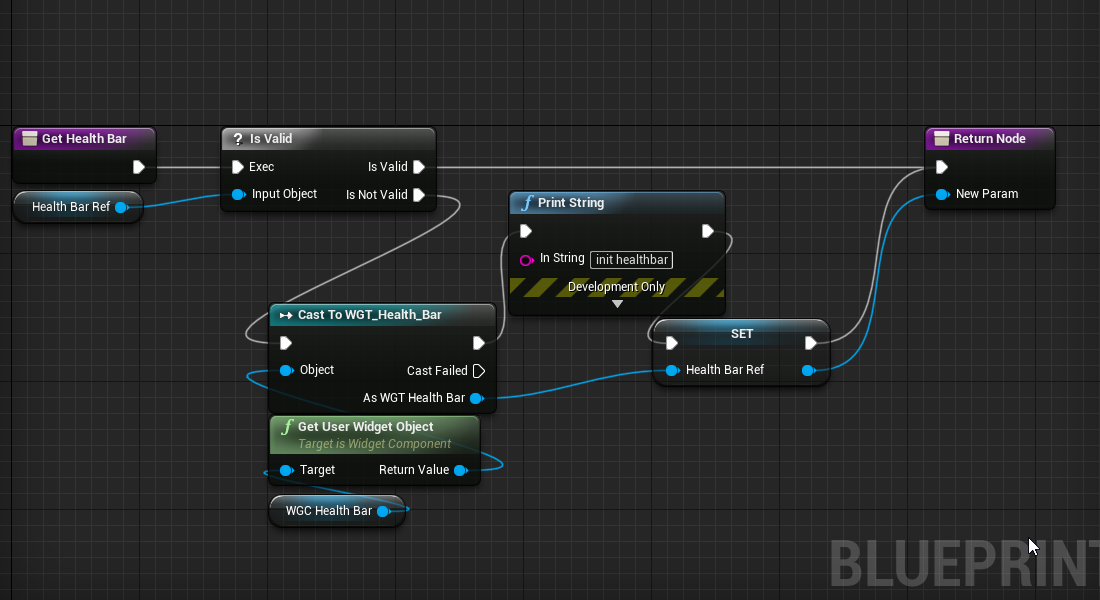 elfin hazel
Is the cast failing?
 tawny tinsel
how do i rigify
into ue4
i cant import animation
it imports like 90 animation files
even tho i have one rigg that has animations
pls send help
flint nymph
@tawny tinsel try asking in #animation
my guess though would be something with exporting NLA strips and actions
tawny tinsel
yea i disabled the strips it changed nothing
and disabling all actions just cancels animation importing
 odd plume
Why would this Anim starter pack be doing A "T Pose"?
pure yew
@elfin hazel its never going to the cast at all :/
which implies there is a healthbar there
ig its the wrong one some how??
odd plume
This is weird... What do these question marks mean? Does it not have the files?
 thin rapids
This is weird... What do these question marks mean? Does it not have the files?
@odd plume try saving the assets and see if it still shows a question mark
odd plume
They still have them after saving
 lethal jungle
So I'm using get forward vector and launch character to launch my character to the way I'm facing, but I'd say every 1/10 times shooting the person, they go up instead of staying flat on the ground, why is that. I can provide pictures if needed
thin rapids
So I'm using get forward vector and launch character to launch my character to the way I'm facing, but I'd say every 1/10 times shooting the person, they go up instead of staying flat on the ground, why is that. I can provide pictures if needed
@lethal jungle can you send screenshots of your bp?
lethal jungle
The get right vector is there because my camera isnt exactly straight forward and the character veers to the left a bit
 cinder stratus
Not sure where to post it but could anyone explain me why, when exporting my collisions from blender, they are not detected?
I export the mesh and a decimated version of it
thin rapids
The get right vector is there because my camera isnt exactly straight forward and the character veers to the left a bit
@lethal jungle and does it happen without the get right vector part?
cinder stratus
But when exporting to the unreal engine, not only it is not recognized, but the characters is able to walk though the mesh with collisions: block all set
thin rapids
@lethal jungle then try unchecking 'zoverride'
lethal jungle
then try unchecking 'zoverride'
@thin rapids Still does it
i still dont understand why sometimes it goes just forward and other times it goes up
 manic viper
Struggling with this Trace Sphere melee check.
I've tried multiple ways here with an Array to store hit actors and then clearing the array, but I am just not quite understanding it well enough I suppose. Could someone look at this script and see if they can figure out where I'm going wrong ?
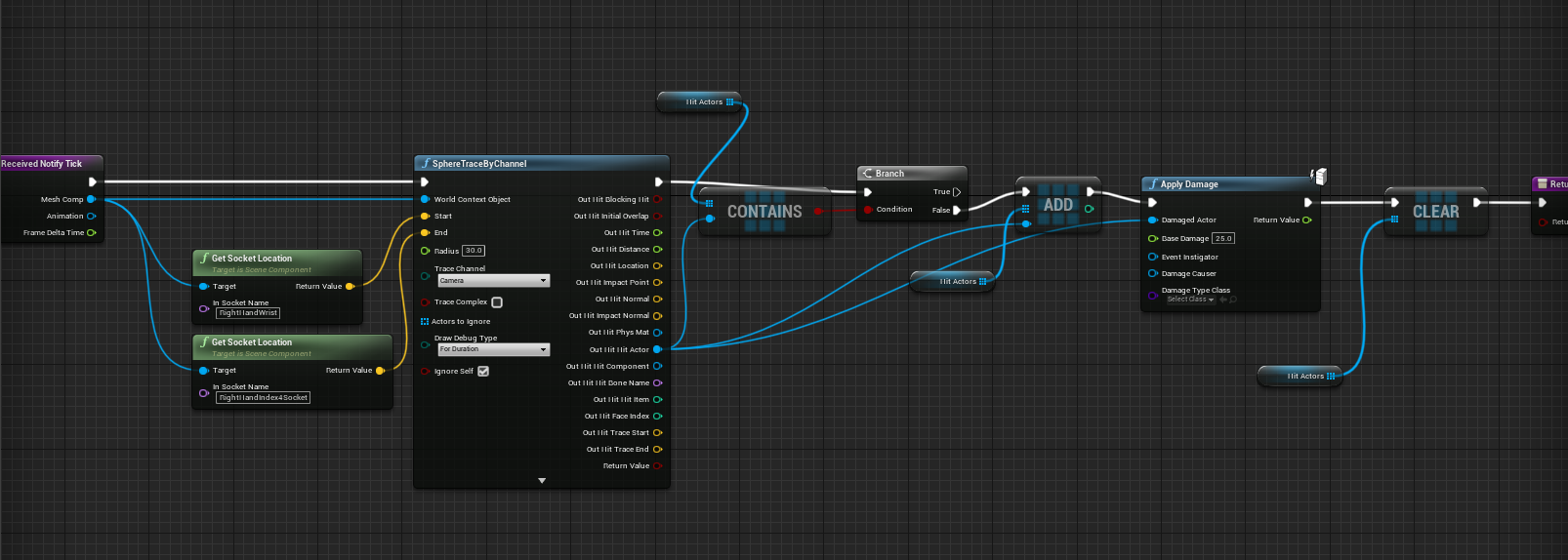


The goal is to stop the sphere trace from dealing damage on every tick
flint nymph
@cinder stratus most likely you need to set up the collisions for the meshes
gritty elm
ok, so i turn on root motion, his face is move to left, but the rest body is straight? why? i imported from mixamo
flint nymph
@manic viper the problem is you are clearing the array every tick
gritty elm
why he is not rotating like this?
flint nymph
@manic viper you are getting the hit actor, checking if it's in an array, if not adding it to the array, applying damage, but then you are immediately clearing the array
gritty elm
@flint nymph any idea?
flint nymph
you need to clear the array at the end of the attack
gritty elm
@thin rapids ?
flint nymph
I don't really know what you're trying to do or your setup so I can't help much @gritty elm
 finite forge
I’ve recently heard that it is possible to link up 2 arrays, so at the same index number an object and a value are linked up. This should make it easier to work with tools you create, since you don’t need to have 2 separate variables, but 1 variable where you can determine 2 values. I don’t actually know the name of these nodes. Does somebody know how to create what I described?
This is how it looked like when the variables are exposed in the details panel of the actor
So one object with one value next to it
Sorry, @gritty elm I don't know anything about animations I fear
cinder stratus
@flint nymph what do you mean? I have
flint nymph
you are clearing it at the end of the tick
manic viper
@flint nymph so should I set up a new notify state to clear the array at the end of the animation ?
flint nymph
yes
manic viper
that makes sense... lol
im still new so I dont know how many notify states are smart to use .. or if I should do things a different way
flint nymph
@cinder stratus have you set the collisions up in engine though? meshes don't automatically have collision in Unreal
@manic viper you'll probably want to make an IsAttacking? boolean that you set at the beginning of an attack swing to true and to false at the end through notifies, and also be sure to set the boolean to false OnInterrupted (I'm assuming you're using montages)
and only when IsAttacking? is true will you do your trace etc, and clear the array when it is false
thin rapids
@simple dragon if you're just rotating the camera you can just use 'add controller yaw input' (i think thats the name)
 sonic crescent
Hi. Cast problem again. When this bullet (ECC_) overlap the Pawn CollisionBox attached, i'd like my green Floor to run his customEvent "PULSE". What can i connect to this Cast? that still confuse me a lot. What i have done here, failed. (always failed blahblah)
flint nymph
@simple dragon yeah like Danielll said there are better ways to do what you want, but to explain the problem with your current setup, whenever you stop inputting that axis value goes to 0
and it combines 0 yaw with your current rotation until it’s back to 0 again
(I’m guessing lol)
 visual granite
Anyone has an idea how to create boat kind of movement?
 simple dragon
mouse input X -> mouse input X + 10 -> meke rot... emm
sonic crescent
i pay a beer
lethal jungle
@thin rapids can you think of anything else that could be the problem
thin rapids
not really :/
thin rapids
unlikely, but you could give it a try
lethal jungle
I also have a problem where if I'm already shooting and then shoot my character, the launch character node doesn't work, but if I start shooting on the character it launches correctly
sonic crescent
Hi. Cast problem again. When this bullet (ECC_) overlap the Pawn CollisionBox attached, i'd like my green Floor to run his customEvent "PULSE". What can i connect to this Cast? that still confuse me a lot. What i have done here, failed. (always failed blahblah)
@sonic crescent is this when we need to use "event dispatchers"?
 rocky aspen
Is the "Isvalid" node supposed to be broken in Anim BPs ? I'm using one to avoid errors , but it itself is throwing an error when the input is invalid
 cloud vessel
g
inner ginkgo
Input
Input Settings works best with powers of two. So you need to get it 128 times or 256 times.
earnest tangle
For a moment I was impressed once again by beginners putting a ridiculous amount of effort setting something up because they had never heard of loops
but ah okay it's a joke
lol
thin rapids
for a moment i thought it was for real
but ah okay it's a joke
@earnest tangle
gritty elm
@simple dragon you may need to set control rotation instead of set world roation : https://www.youtube.com/watch?v=vszgkMwahDA

What are the Get and Set Control Rotation Nodes in Unreal Engine 4
Source Files: https://github.com/MWadstein/UnrealEngineProjects/tree/WTF-Examples
Note: You will need to be logged into your Epic approved GitHub account to access these examples files. https://github.com/Epic...
tranquil gorge
hey i actually have a question about controller rotation myself. now, i have my character moving around and what not and him rotating with the joystick isnt a problem for me at the moment but the issue now that really isnt an issue just an obstacle is how to get the him to stop snapping back to neutral along with the control stick and just just stay facing the last direction that was pressed like a normal 3rd person game.
cloud vessel
why do you say it's broken?
rocky aspen
I'm using an IsValid, node to make sure I'm not calling the function when the input is invalid to avoid getting errors
but the IsValid function itself is now giving me an error instead of telling me that something isn't valid
cloud vessel
what error, is it an issue with the input object? there's no error on your screenshot
earnest tangle
that's pretty strange 🤔
cloud vessel
that's weird, try removing and adding it again
yea I mean that's the whole point of IsValid
rocky aspen
Yeah, that's what I was thinking haha
Kind of frustrating when your exception catcher is throwing you exceptions
earnest tangle
What's the type of the LeftController variable?
rocky aspen
actor reference, I'm using the default VR motioncontroller pawn
made a workaround, using a simple Bool that gets set when the motioncontrollers exist like they should
flint nymph
@rocky aspen I’ve had that happen to me before, not in an anime bp, and know other devs that’ve had the same thing happen lol
the error went away on its own 
cloud vessel
@.DYJ try removing nodes and reading them, Refresh All Nodes too, Idk
sonic crescent
Hi, For this kind of logic. Do i need to do that by casting, with a Event dispacher or with an BP Interface? Can you point me in the right direction please? i would like the floor to Pulse when a Bullet overlap the Pawn Overlap collision...
earnest tangle
What you're doing there seems fine? Does it not work?
sonic crescent
yes it is not working, the cast failed everytime
earnest tangle
you probably need to do the logic in the floor BP instead
because the bullet would overlap with the floor, and not with your motion controller pawn
sonic crescent
Yes it work if the logic is in the Floor. But i need the overlap to be attached to the the Pawn...
earnest tangle
Why? If the floor needs to pulse when a bullet overlaps it, I'm not entirely sure how that requires the pawn?
sonic crescent
Well. That is what is going when an flat brain guy try to do a game
I was trying to fake light with shader, and i tought it may be better to draw the shader only in front of the pawn
so i decide to put an overlap in front of the pawn
and hope to draw the shader on the floor, only, when bullet overlap near the pawn
to not draw the shader everywhere a bullet overlap the floor
but it's seem to be harder to do that and maybe slower than let it by default without a lot of unnecessary cast
earnest tangle
you could do it based on checking distance to the player pawn in the floor bp or something like this
but yeah you might not really need it, it's not that expensive to run some effects unless you run a lot of them
sonic crescent
Thank you for your time
 trail crypt
hey everyone, im in desperate need of help with blueprints, im trying to make a project with a friend and both of us couldnt figure out the proper way to manage what we wanted without having game breaking bugs, is there anyone who can help with our small game ?
bitter star
How to toggle the visibility of a component when the media played in mediaplayer is over? I already have the toggle node on actorbeginoverlap and I want that toggle to be activated again when the media is done playing. @flint nymph maybe?
magic garden
is there some kind of integrity test for blueprint nodes, a debug mode that will check if there are any broken nodes, like this one with the grey text? I can check and uncheck it and connect it up but it does not work. I made a new one and it has white text and works fine. I spent about 8 hours trying to find this.. so I'd really like to know. thanks!
flint nymph
@bitter star I’d help but I have zero experience with the media player
bitter star
haha thanks. what about rotating a skybox? When I rotate the sphere, the cubemap stays the same
flint nymph
you need to pan the cubemap in a material
bitter star
and attach the rotate to the world position offset?
I mean a constant3 to the world position offset?
trail crypt
@here Is there anyone who can give me help with the blueprints on a basic level ? Im really stressed 😦
proud hull
@trail crypt what do you need help with?
trail crypt
im preparing a small game, and im really not familiar with blueprints, can we talk on general channel if you are available ? I need help with spawning an object on that same blueprint object's destruction, i have a cube and i want it to spawn 2 more when it is destroyed but it also should put itself in another object's array
@proud hull
proud hull
Do you have screenshots of where you destroy and spawn and try to insert into the array of the other blueprint? Also what kind of BP is storing this array? Another actor, Player Controller, Game Instance, etc.?
trail crypt
i can show the entire project on screenshare, it will be faster if i can explain as i show because the blueprint actors are a mess in the project, there are statues, they escape from the player and they have an objective which is to bring down cubes, cubes are in their array and when a cube hits -500 in Z it destroys itself, updates the remaining cube count. and the player's goal is to collect the statues and prevent them from bringing down the cubes
@proud hull
proud hull
You can DM me if you like.
bitter star
@proud hull any idea on how to toggle visibility at the end of a media being played in the media player?
 mild pine
Hey guys. I'm gonna implement a near-realistic farming system in my RPG and I'm trying to think up a good solution for it:
-
Should I have the player place down a soil acre mesh (just an extruded piece of dirt that stretches on one axis), and then place the plants ontop of that? I think this would be the most performant solution.
-
Use Render Targets to paint the landscape layer with farm soil & then place down the meshes on that? This would make the acre lack the heightened parts for the farms itself, but could maybe be combined with the option above, although I bet that wouldn't be too performant in a multiplayer environment, or if a lot of RT's are spawned? Maybe one RT would cover one large area each and store that information so I wouldnt have to spawn one for each actor?
What do you think is the best approach to this?
magic garden
Should I report it as a bug? I don't think I can replicate it though..
 cunning sentinel
Hello guys.
How do i check angle of a mesh with physics enabled ingame?
I have a barrel with flamethat i want to go out when the barrel falls. Inside its BP i write two variables that check the X and Y angle. Then i compare those angles and if they are >50 or <-50 the destroy actor of flame effectt triggers.
Funny thing is that if i turn the barrel inside the editor before the game starts, i press play it works as intended and the actor is destroyed. But when i bump into the barrel and flip it ingame nothing happens
flint nymph
is it only doing the check on begin play?
cunning sentinel
yes
flint nymph
then that’s why
cunning sentinel
should i put it in the construct?
flint nymph
no
when you do the check on begin play it is only doing the check when the game starts (or when the actor spawns) which is why it works when you rotate the barrel in the editor but not when you turn it over at runtime
cunning sentinel
wow now that you said it i do feel kinda stupid that i didnt think of this
flint nymph
lol it’s fine
flint nymph
probably not necessary to have it happen on tick
you could have the barrels in a “dormant” state and only check their rotation after they’ve been bumped into
and you wouldn’t need to check every frame either, maybe every second
cunning sentinel
if every second it could happen that the barrel falls inbetween those checks and wont trigger. Gotta experiment now that i know the problem should be easy. Thanks for the help
flint nymph
the timing just depends on how instantaneous you want to guarantee it to be, it should trigger regardless
cunning sentinel
i think good way will be to put in on tick but start the checks only on overlap
i'll that also with a second
flint nymph
you could have an on hit event that sets a bool to true that is in a branch on tick or have the on hit event initiate a looping timer
well if you want to use tick, instead of a bool you could have it enable tick, and by default have the actor’s tick disabled
you could also have a retriggerable delay after the on hit event that disables tick again
so it stops checking if undisturbed for long enough
cunning sentinel
yeah the tick i thnk will be the best solution, only to limit it so it wont run always
inner ginkgo
It really depends on how many of those barrels you have going. If you only plan to have a handful of them, then you don't need to over-engineer it.
flint nymph
yeah for the most part it shouldn’t matter lol
cunning sentinel
yeah but i will probably have other things in that level which also may require tick
flint nymph
just listing best practices
trail crypt
ugh is there anyone who can help me with this error ?
inner ginkgo
It means you didn't set Statue to a value in those actor instances.
trail crypt
but it was working about 10 minutes ago :/ im really annoyed...
inner ginkgo
Actually, you have some odd flow there. If goal is not found, then the Statue var won't be set and it'll be null when you reach the line that is causing the issue.
Or the actors array was empty and the same result. Or the actors had empty statue values. Quite a bit of options for what went wrong. If you are familiar with breakpoints, I would toss one at the start and step through this whole thing.
trail crypt
it should add itself to the array..
inner ginkgo
Otherwise start adding print strings to find out what is and isn't being run correctly.
trail crypt
i've been up for over a day now, if you are available can you help me on screenshare ? im really not able to use my brain anymore
inner ginkgo
Give me a screenshot of the left half so I can see how that all connects together.
trail crypt
i received help from someone else on this server about 30 minutes ago and i got lost in all these, im a noob to blueprints
inner ginkgo
No worries.
So, yeah. The same set of problems applies. There's either no BP_Statues, which means Statue wouldn't be set. There's no BP_Statues with the correct goal, so the Statue var won't be set. Or the one that is set has no Statue and is setting an empty one.
I'd start with the last one
Right before the set Statue, put a print string there. Just have it say "Setting Statue" or something.
trail crypt
before the statues spawn by this code, there are statues on the level itself and they can do their objectives without errors
the statue is an object reference and it should exist
i dont get it
it was working about 10 minutes ago
inner ginkgo
I can't help unless we narrow 1 of the those 3 causes. So I need you to humor me with the debug strings.
trail crypt
can we look at it on screensharing instead ? there are more blueprints connected with these and im scared that i will make a mistake somewhere :/
inner ginkgo
Give me a min to setup my mic.
trail crypt
okay, thank you alot
bitter star
hi guys, I m starting to notice "Clipping" in my level. By this I mean meshes changing shape as the camera gets closer to them or materials that change as i get closer. Is it an LOD pb or a light pb?
trim matrix
sounds like a LOD issue
you can verify it if you set "r.ForceLOD 0" in the console to see if the issue goes away @bitter star
 sick sapphire
how do I make a system where on the yaw of the camera movement
there will be a range around the direction actor is facing where the head can be turned freely,
and outside of that range the head will be harder to turn (axis value *0.5) and will also move the range to the direction it is facing
Like the prone systems in many COD games
earnest tangle
you could apply a multiplier to sensitivity based on which way the camera is facing
 tight schooner
the game in some way will have to remember what the proned orientation is
whether that's stored in a value or remembered by some component that the camera is attached to
sick sapphire
yeah its just how the ue4 engine displays direction thats making a lot of bugs
-180 and 180 are next to each other so lots of bugs in that direction
bitter star
@trim matrix Thanks! Noob question: where is the console?
inner ginkgo
While the game is running, press the `/~ key.
 surreal peak
Under "Project Settings -> Input", you can setup your own console key if you scroll down
bitter star
thanks guys
@trim matrix the mesh problem went away but not the light on texture one.
exotic cradle
Is someone familiar with the AdvancedLocomotionSystem V4 blueprints? I had a couple of questions to ask.
 chilly linden
anyone know how to apply a radial force to a destructible mesh?
I just want the chunks to shoot out a bit more
 rich lava
hi i am working with a bow and arrow and recently changed my arrow model and some the rotation wasn't the same and i tried changing it in blender but it was soo messed up, i ended up adding a scene root instead of the arrow being the root but now when it hits a wall where it is supposed to stop and be attach to it doesn't work can anyone help
here is the code for attaching to the wall
 scenic mesa
Can anyone help me with a blueprint i have?
I'm trying to make my character rotate to face my mouse cursor.
I've done a bit of googling and based my blueprint of a video that i found, but my character is not rotating at all.
Im using the top down template, with a camera attached to a springarm on the character
flint nymph
@scenic mesa
one way to do it
what you're doing should also work with some edits
for the line end you need to multiply the direction by a value (say like 5000) and add it to the world location
(untested but should work)
 barren jolt
Hey folks, has anyone come across an issue where static mesh components won't update movement?
I've got a problem where I have a rotation movement component and a static child mesh on the object randomly stops updating rotation
trim matrix
I want to make my character get inputs by camera rotation, not the base rotation itself, how can i do it?
When I press W it moves to "-->" this way, I want to make him move to where camera is rotated
flint nymph
what is your movement input setup
trim matrix
Orient Rotation enabled
Spring Arm's Inherit Yaw is enabled
Use Controller Rotation Yaw is disabled
trim matrix
heeeey !
were can i ask stuff about my foliage cull distance?
this little sight have more then 1000 trees xD, the cull distance is on 1 and thats why i can see a littttle bit trees at the distance how can i make it like 0.1 or how how how ? 😄 lol its a big forest in the future but i want the cull thingy to be right xD\
got it ! 😄
had to push up my numbers xD
 minor whale
How can I make a GET request to a website?
trim matrix
How can I make a GET request to a website?
@minor whale Sockets if you understand networking or use a socket plugin/blue print to make the request
minor whale
@minor whale Sockets if you understand networking or use a socket plugin/blue print to make the request
@trim matrix but i want to save the answer in a variable
trim matrix
GET requests send the data as strings if its REST, you can store the result in a string variable. If you use a socket plugin I'm sure they have functionality for it.
minor whale
GET requests send the data as strings if its REST, you can store the result in a string variable. If you use a socket plugin I'm sure they have functionality for it.
@trim matrix could you tell me some plugin
trim matrix

TCP Socket Plugin - Client Only
scenic mesa
Can anyone give me a lil more help with making my char rotate to face my mouse/cursor?
I've edited Joe's answer above*, changing SetActorRotation to SetControlRotation to get my character moving. However, now whenever i move my cursor to the left/right, my character stops rotating non-stop, and if i move it downwards, it starts spinning like a top.
I'm just looking to have it rotate and stop once it's facing the direction of my cursor, and not have it spin rotate nonstop.
I tried printing the return value of MakeRotator, and it seems like the figures increase the further my cursor is from the character, and the character just keeps rotating using the yaw value?
flint nymph
oh it’s not working because you didn’t follow my graph properly
you want to be setting the rotation of the pawn not the controller
scenic mesa
But the character doesnt rotate at all when i use SetActorRotation?
flint nymph
also you don’t want both input events feeding into the rotation function
might as well put it on tick
minor whale
https://www.unrealengine.com/marketplace/en-US/product/tcp-socket-plugin
@trim matrix thanks🙏🙏
TCP Socket Plugin - Client Only
scenic mesa
Isn't setting the rotation of the pawn via SetControlRotation? It's under Pawn in the context menu
trim matrix
Can someone help me with setting my text in widget from an actor blueprint? I'm able to get the widget reference in the actor but I can't figure out how to set the text inside the widget. It seems the widget takes a text object not a string?
flint nymph
set control rotation is rotating the pawn’s controller which is why your camera starts spinning everywhere
if your pawn isn’t rotating when you set actor rotation it may be using the controller’s desired rotation, which is a setting you can uncheck
you can convert strings to text @trim matrix
you’ve set a binding variable for the text in your widget correct?
trim matrix
@flint nymph I did this but my text doesn't appear to change.
This inside my actor blueprint.
I'm incrementing score, then garbbing the widget, casting it to the type I need.
Grabbing the text object,
Then trying to set the text through there.
I didn't set up any bindings but I figured this should do the trick.
My widget has a textbox called scorewidgettext.
So I tried to set the text from the scorewidgettext variable.
My actor has a widget component, and I set the class of the widget component to my score display widget.
Actrually I might have spotted an error.
Let me check it real quick
Yes I'm dumb I forgot to actually call IncrementScore from my c++ code
I had called it earlier but commented it out.
Its actually working
flint nymph
lol oops
trim matrix
There is one thin I noticed though. The original 0 when the actor spawned on the world is still there, even though a number gets overwritten on it.
So the new score changes but the original 0
Still seems to be there.
No nevermind.
That's gone too.
It's all working correctly.
I'm just slow.
Thanks though.
flint nymph
np glad you got it working
scenic mesa
hmm, i've changed it back to SetActorRotation, and uncheck the use controller desired rotation, but it's still rotating nonstop when i move my mouse 😂
I'll try working on it somemore, thanks for the help @flint nymph
flint nymph
how is your character camera set up
trim matrix
Anyone up to help me with my first project? i tried to do AI roaming, but everytime the AI see's im somewhere it cant get to, it does what it would do if it got to me (end the game)
flint nymph
in the spring arm, is use pawn control rotation under camera settings checked or unchecked
scenic mesa
Its unchecked
flint nymph
check it
gritty elm
@chilly linden there is radialforce component, you can add them into your blueprint actor : https://www.youtube.com/watch?v=aTyT2XUouf4

In this video we take a look at a makeshift rocket launcher and the fun we can have with physics in UE4.
flint nymph
@trim matrix did you figure out the sizing problem?
trim matrix
I did indeed
It was the widget size
For the actor
I should have made it a little higher
I had it set to 20 going to 40 seemed to fix it!
Thanks!
scenic mesa
After checking it, it goes behind the pawn and is locked in place, i can't move it up for a top down view
gritty elm
@minor whale you need VaRest plugin, it is free and easy to setup with blueprints: https://www.unrealengine.com/marketplace/en-US/product/varest-plugin

Plugin that makes REST communications much easier.
flint nymph
ok cool
gritty elm
@minor whale https://www.youtube.com/watch?v=AdEliltFRII

Download links :
Notepad++
https://notepad-plus-plus.org/
Video links :
PHP and SQL
https://www.youtube.com/watch?v=z_5834yFeEg
Unity PHP and SQL
https://www.youtube.com/watch?v=z-gcWzUlfyg
flint nymph
there is also a size to content checkbox, dunno if that would help
minor whale
@minor whale you need VaRest plugin, it is free and easy to setup with blueprints: https://www.unrealengine.com/marketplace/en-US/product/varest-plugin
@gritty elm I've tried it but I don't know how to use it
Plugin that makes REST communications much easier.
gritty elm
@minor whale did you watch this video: https://www.youtube.com/watch?v=AdEliltFRII
Download links :
Notepad++
https://notepad-plus-plus.org/
Video links :
PHP and SQL
https://www.youtube.com/watch?v=z_5834yFeEg
Unity PHP and SQL
https://www.youtube.com/watch?v=z-gcWzUlfyg
@minor whale here is another tutorial: https://www.youtube.com/watch?v=yzPKg93T7q4

Discord Server : https://discord.gg/ZY26P6r
Support this channel on Patreon! https://www.patreon.com/TotallyUnreal
flint nymph
@scenic mesa you can adjust the camera location in the pawn
you could also uncheck inherit yaw instead
basically what is happening is you are trying to rotate your actor by mouse location, but your camera/player controller is inheriting the actor's rotation, which causes it to rotate accordingly and then move your mouse cursor's world location, creating an infinite feedback loop
minor whale
@minor whale here is another tutorial: https://www.youtube.com/watch?v=yzPKg93T7q4
@gritty elm thanks🙏
Discord Server : https://discord.gg/ZY26P6r
Support this channel on Patreon! https://www.patreon.com/TotallyUnreal
scenic mesa
That... makes alot of sense
Let me give things a try
Thanks Joe
Unchecking inherit yaw did the trick
Thanks @flint nymph You're a lifesaver
flint nymph
nice 👍
trim matrix
@flint nymph oddly enough that initial zero is still there...
Should I destroy the object form the game world
then respawn it with a new value?
flint nymph
the 0 is in the textbox you are editing correct? very strange
trim matrix
Yes
So I tctually think I know why this is happening
It happened before too with my actors
For some reason
When I spawn an object in BeginPlay
It will just stay there
But if I do it somewhere else..
It works properly
I'm wondering if its just a bug in the unreal engine
In C++
flint nymph
hm no clue tbh
exotic cradle
I’m having a similar issue
I spawn a weapon and it locks my characters location and gives me 50+ error messages yet I get no compiling errors in any of my bps
exotic cradle
Yeah which is wierd
flint nymph
from the weapon you've spawned?
exotic cradle
Yeah
flint nymph
is the weapon actually there on play?
exotic cradle
It spawns in front of me. I can move my character in place but the weapon basically locks my characters location but allows animations
exotic cradle
It’s not even touching my player lol
flint nymph
can you show me your graph where you're spawning the weapon actor etc.
exotic cradle
Yeah one second
scenic mesa
btw @flint nymph if you don't mind, could you explain why you suggested my initial blueprint to multiply the world direction by 5000, then add it to the world location for the line end value? I just tested it and it worked if i multiplied it by 5000 but didint it i multiplied by 1
trim matrix
Yes @flint nymph I solved it by simply not spawning the actor in beginplay. Which is kind of weird tbh
flint nymph
yeah that is weird mischa, never had that happen to me lol
@scenic mesa the direction vector has no length
so if you're using it as your end point, its location is basically at 0,0,0
exotic cradle
So I have an overlay that shows my character with my weapon and all the movements needed for it blended into animations but I can’t seem to get that same result building this weapon system separate from overlay debug I have
flint nymph
multiplying the direction vector by 5000 moves a point 5000 units in the direction, and adding that to the start location effectively offsets a point from the starting location 5000 units in the given direction, forming a line
scenic mesa
so the 5000 is just giving it a magnitude?
flint nymph
yeah an offset basically
scenic mesa
ahhh ok
flint nymph
if you have a direction vector of 0,0,-1, multiplying that by 5000 gives you 0,0,-5000
which is an offset you can add to another location
to get -5000 units below that location etc
scenic mesa
Therefore, i'm essentially taking one point at (0,0,0) as the line start, then offsetting if by 5000 to get (0,0,5000) and using the 2 points to calculate the direction vector then
exotic cradle
@flint nymph
The HeldObjectRoot is the socket that the weapon perfectly attaches to in my overlay menu but not outside of that.
Probably cant read the last one.
flint nymph
@scenic mesa well if you're doing it this way https://cdn.discordapp.com/attachments/221798862938046464/726773776293036142/unknown.png , what you're doing is getting the mouse location in world space at the location of the camera, and that acts as your starting point, you're then multiplying the direction of the camera by 5000 to get an offset, then adding that offset to the world location, and this gives you your starting and ending points


(the World Direction in the ConvertMouseLocationToWorldSpace node is effectively your camera/controller direction)
verbal magnet
hello everyone! I have a keypad in UMG, and I want to add a key to an editable text component when I click a button, how can I achieve this?
flint nymph
@exotic cradle you have no socket name in your AttachActorToComponent
flint nymph
so when you don't spawn this weapon
movement is working correctly?
I've never used the Advanced Locomotion System, but no clue why just spawning an actor would cause it to not be able to access a curve lol
exotic cradle
Yeah im saying. I removed 1 pin from 1 node that was an overlay for debug and than my characters kneecaps would disconnect from this femur while he ran
But no movement is not working even without the object being spawned
So to be able to move and rotate I have to completely delete that section of BP for spawning the object.