#blueprint
402296 messages · Page 470 of 403
 maiden wadi
@dapper nest As a fair note, be careful with using BSP brushes too much. They're a great designing tool, but they generally shouldn't be used for anything more than planning out a level quickly. You'll almost always replace them with static meshes at some point in development.
 chrome dust
How can I change the value of a blackboard enum state?
from the AI controller perception
maiden wadi
@chrome dust If you're working in the AIController, it has a blackboard variable. You can use that to call SetValueAsEnum on the blackboard reference.
chrome dust
@maiden wadi ok thanks I have that set do I need to specify the name for it as well?
maiden wadi
If this was your blackboard with the enum key.
You can do this in the AIController to set it with the bottom pin.
chrome dust
Thanks man it works now
 quick lark
How do I copy a blueprint to paste in here? https://blueprintue.com/
 mellow stump
select all the nodes and Ctrl - C
quick lark
thank you!
mellow stump
👍
maiden wadi
@trim matrix What do you mean by main menu -> start play? As in you load this map from an OpenLevel node from a main menu map?
 verbal canopy
Do you get a different behaviour if you play in stand-alone, rather than PIE?
maiden wadi
Odd. Not sure. I just set the same thing up and it seems to work fine with a new PIE.
Did it work differently loading the map in Standalone?
mellow stump
Set Input Game Only node isnt connected in the picture, needs to be connected right after the Possess node
You might be setting Input Mode UI only somewhere?
Its persistant across maps
Input Mode
You have the correct node above, its just not connected to anything
You can put that Input Node right after the Possess node and hook it up
maiden wadi
 maiden wadi
Couldn't get Picasso to do a nice brushstroke for me.
You have something very weird going on if simply possessing the character doesn't allow for control.
Can you add some prints to the character's input and make sure it's working after the.. half possession?
mellow stump
Yes, you need a player controller. In world settings, Gamemode, you can set the player controller class. It can be different each Map as well
A different game mode for each Map Is how i do it, each has its own settings for everything.
 frank karma
i made grapple hook who work just fine but i wanted to make the gun follow the hook point do uknow how
mellow stump
ok
frank karma
that what i tried it doesnt it just bug
 simple lantern
Hola compadres, I'd like a widget to blink when I interact with the BP that it is a component of, but discovered that I can not call Input Actions within the widget event graph. A forum post mentioned creating a custom event within the widget graph and then calling it from the parent BP, but I can't figure out how to do that either. Do I need to create an interface for that?
e.g. "press E to open door", and upon pressing E the widget blinks
frank karma
het @simple lantern i can send u a video i find about this
simple lantern
@frank karma cool that would be great
frank karma
but its in french
simple lantern
that's no problem I could probably figure it out visually
frank karma

🎮 Wishlist mon jeu : https://bit.ly/2WHMwxK
🎓Mes formations http://bit.ly/34yTSF6
💰Code créateur THIASSY 🔔Activez les notifs ⬇️ DEPLIEZ ⬇️
🐦 TWITTER : https://twitter.com/MathieuGamedev
🔴 TWlTCH : http://bit.ly/2XaDx60
🙏 MERCI DE VOTRE SOUTIEN !
- Tipee : https://fr.tipeee...
here u go
simple lantern
thanks i'll take a look
frank karma
by the way can u help me with my problem
simple lantern
well, it's an interesting vid but unfortunately doesn't cover UMG logic
frank karma
i tried to make a grapplinggun who follow the hookpoint when grappling
simple lantern
that's beyond my understanding, sorry 😦
you want the gun to keep looking at the position that the shot landed?
maiden wadi
@simple lantern Do you have a WidgetComponent attached to an actor, and you want the UserWidget that's inside of the WidgetComponent to do something when you interact with the actor that the WidgetComponent is a part of?
frank karma
yeah
simple lantern
@maiden wadi That's pretty much it, yeah
@frank karma I think it might be a problem with the socket not allowing free rotation of the gun
simple lantern
@maiden wadi The Widget BP is assigned to the WidgetComponent through it's 'Widget Class' setting
maiden wadi
@simple lantern Okay. Go into the UserWidget blueprint and create a Custom Event. Just put a print on it or something to test. Then go into your actor that has the Component. You can call it by doing this.
frank karma
maiden wadi
Widget is the Widget Component.
simple lantern
@maiden wadi Thanks i'll try that
I think this marks like the 4th time you've made the assist
@frank karma how is hookpoint getting set?
simple lantern
@frank karma what happens when you run the game and test it
maiden wadi
@trim matrix Are you still having trouble with the possession issue?
frank karma
the gun rotate to the right
when i tried to grapple
heres my code i use for the rotation
maiden wadi
First put like a five second delay on the begin play. See if waiting will be sure that you have a player controller since you were seeing none earlier. Then if that doesn't work, put prints in the character's inputs if it seems to possess but can't move, make sure the character is accepting inputs.
frank karma
simple lantern
it looks like your gun has the wrong forward vector. Does that side of the gun rotate to face the collision point as you move around?
frank karma
no its just rotate
mellow stump
@trim matrix In my level blueprint, im destroying the character i spawn in as with a Destroy Actor node and then spawning in a different one and possessing, may help?
simple lantern
@maiden wadi Sorry to pile on but I have another q - is there a flow control node that is like a branch that will automatically go the B route after having gone the A route once?
frank karma
flipflop
simple lantern
something like this without having to set and get the variable
frank karma
@simple lantern try flip flop
simple lantern
not flip flop, a node that automatically differs to the B after the A is completed, so that a single execution would trigger both
flip flop alternates with each pin after each consecutive execution
frank karma
ooh sorry i have no idea but am gonna look for it
simple lantern
also, sorry I can't figure out your grapple hook issue without looking at the file :\
frank karma
i can send u the file
simple lantern
sure hit me with it
maiden wadi
@trim matrix Cleaner way to do it is to not use the level blueprint. Use a PlayerStart and change your default pawn in the GameMode.
frank karma
i found it switch on int
try it @simple lantern
HEY @simple lantern when u say the file u mean the entire project
simple lantern
no there's an easier way
i think theres a website where you can post blueprints, lemme find it
frank karma
i know it but i dont know how to use it
simple lantern
https://blueprintue.com/ copy all of the nodes in your event graph (literally just select and use the copy shortcut)
BlueprintUE
BlueprintUE.com is a tool for sharing, rendering and rating blueprints for Unreal Engine 4. UE4 is a game engine which use visual scripting called blueprint.
then paste it into the grey field on that site
give it a title or whatever then send the link
maiden wadi
I can second that sentiment. Level blueprints should be used for level specific stuff. Way too many tutorials and college courses seem to use it very badly.
simple lantern
hmm don't think Switch on Int is it
frank karma
Hey @simple lantern why when i copy it it just close thé explorer
simple lantern
you're highlighting the all the nodes and copying?
simple lantern
after clicking "Create your pastebin" just copy the link
simple lantern
@frank karma Sorry man I can't help you
is hook_point_c a child of the gun within the character components? that might have something to do with it
i'd probably just start disconnecting things until I narrowed down the problem
or wait for someone smarter than me to come around
shouldn't be hard lol
frank karma
I will try but thx anyway
 blazing ridge
hey peoples, short question. the "delete game in slot" node is not deleting my ".sav" files inside the savegame directory
however i would really like to have those files deleted, any advice on that? am i missing a permission or is that intended behaviour?=
 tight schooner
@blazing ridge sorry for the non-answer answer, but I'll just chime in and say that node works for me. Not sure why it doesn't for you.
blazing ridge
@tight schooner but does it delete the ".sav" file in the folder? or only delete info in the savegame itself?
tight schooner
yeah, it definitely is deleting the file. Just tested
 grave apex
how long do you guys usually spend on code at one time (assuming this isnt your job)?
tight schooner
I'm just a hobbyist at this point working on a "dream game". If I'm inspired (and I have the time) then all day, but normally in 2-5 hour chunks not including breaks.
Question: I'm doing an object pooling thing for projectiles; I'm making a system where I reuse actors rather than spawn/despawn them by the dozens. Is there a simple way to reset an actor to its default state? I'm writing rather elaborate deinit/reinit events that manually reset very many variables, stop several timelines and timers, deactivate components and etc. etc.
just want to know if I'm doing this in an unnecessarily difficult way
blazing ridge
thats really strange, i'm getting true as result as well, so it should be deleting the file.
@tight schooner did you enable any special permission, or something like started ue4 as admin?
tight schooner
nah, it's just a normal install of 4.25
I looked at my BP and there's nothing special going on in it
simple lantern
quick q - why does this crash my game? shouldn't it run while I am holding E, and when I let go stop? instead it just insta crashes and says i've created an infinite loop
also, if this node setup isn't supposed to work, what are my alternatives?
tight schooner
"while loop" doesn't occur over time per se.
by design it's just executing that print node to infinity, hanging the game
if you want to check something once per frame or once per X seconds, you have to use tick, or a looping event via "Set Timer By" node
simple lantern
hmm in that case, what is a node that will take the execution string and fire off constantly until a condition is met? basically what i'm trying to do with the key press
sorry didn't mean to interrupt whatever convo was happening, thanks for the help
yeah, basically I want to set a widget but don't want to do it off of tick, so instead i'm trying to use another custom event to 'trigger' when the set widget should happen
tight schooner
you can also make InputAction events (project settings --> input) and that'll give you these useful nodes with "pressed" and "released" exec pins
there are probably some other ways to do it, but that's what I know offhand
simple lantern
thanks i'll look into it
 shut egret
Is there anything like this but for UE4/Blueprints? https://youtu.be/MYWEmI9QvuQ?t=700

PlayMaker by Hutong Games is a popular long running Unity addon enabling you to program visually using finite state machines. It's also currently available ultra cheap in a humble bundle, so if you're interested, now is the time. In this video we go hands-on with PlayMaker.
...
The video skips to the time where the feature is shown.
In Unity you can download a browser for their version of Blueprints to browse "Blueprints" the community has made and then download them.
I would love to be able to search up "physics" in a browser for community made Blueprints.
tight schooner
There's this I guess. I haven't tried marketplace BPs personally but: https://www.unrealengine.com/marketplace/en-US/content-cat/assets/blueprints
I think the marketplace can also be browsed in the epic launcher
but I don't know of an in-editor auto-download-and-install thing
I grabbed some Quixel freebie assets once and the Epic Launcher installed it into my project
shut egret
That's too bad, this looks so great to just scroll through hundreds of labeled blueprints and just pick a bunch and instantly load them up to try them out.
I downloaded every single free marketplace asset and now I wish the Vault had a way to organize and rate different items in your vault.
tight schooner
I never browsed the BP marketplace before. There's some interesting stuff in there, lol https://youtu.be/4Jtyb2D03W8
 short pawn
Lol thanks for the laugh @tight schooner
shut egret
I'm checking it out too, is there a wishlist function? I would assume it would be a hassle to use the shopping cart as a wishlist, especially if it times out and resets after some time. Does anyone know if the cart resets?
tight schooner
if you don't get an answer here, try #ue4-general
re: marketplace
oh hey there's a #fab channel
shut egret
Answer: No wishlist function, no way to organize vault.
blazing ridge
more details on my question
the array element is invalid, i dont know why. the length is clearly 1 so it should be there
what should i check to find out why its invalid?
tight schooner
does the array contain destroyed actors/components?
blazing ridge
no it contains references to a widget blueprint
or maybe youre right. what im trying to achieve is to save my still active WidgetBP's inside an array and then in my savegame.
when the game then closes and gets relaunched i want to fill my grid again with those notifications(widget BP's)
i guess what youre saying is that they get lost/destroyed on the way from one game instance to the other
tight schooner
I don't have a fine sense of under what conditions widgets are marked for "destruction", but "destroyed" objects can sometimes hang around in an array because UE doesn't actually remove them from memory until it runs Garbage Collection
blazing ridge
the only possibility i see where it can get invalid or destroyed is between the games
 dapper cradle
Hi, Can anyone tell me how to call a function from the event graph of a widget please ?
I have several windows of documentation/ youtube videos at the moment as my current task has required several work arounds...
But i cant seem
to suss it
tight schooner
call a function... from where to where? Are you trying to make something happen when you press a widget button?
chrome dust
Say I wanted to have an EQS run from a blackboard key location vector so that the AI generates cover away from the threat how could I set that up in the EQS?
blazing ridge
so according to some help in the source control channel it shouldnt be github thats preventing my .sav files from getting deleted.
now im a bit at a stop since i dont know for what else to look.
chrome dust
@dapper cradle You need to do a "get all actors of class" (for the main class to run the function from) get a copy off that and promote it to a variable as a reference on the event construct node inside your widget
then you can get that reference drag off and run the function when you need to
blazing ridge
just tested this, independently from my project to exlcude different issue sources
it still didnt work
dapper cradle
Thank you @chrome dust i will try that, and @tight schooner it is a 3 or 4 part process which makes me dizzy to try and even explain, essentially Widget Calls to a Function within a SM component BP,
which then has to call a function within its own BP because timeline nodes can't go into functions.. then I have to let my widget event graph know when the timelines have finished so it can destroy the actor...
all of this just to make something look like it dematerializes from the screen before it is destroyed by the widget XD
 lilac lance
@dapper cradle i have not read the full thing, but i will just mention you may want to look at event dispatchers if the comunications are beeing a nightmare and you dont want to move things arround
tight schooner
in a nutshell the widget needs a reference to whatever actor it's calling the function on and there are a bunch ways to do it. Get All Actors is one way.
dapper cradle
I managed to get a call function from a spawn actor node but not from an all actors of class node, (which isn't helfull) XD
Just airing my thoughts as i try to figure it out...
dapper cradle
Sorry to bother you @tight schooner but how will I get the call function from this ? I have tried promoting to variable and pulling from that but nothing...
@chrome dust Sorry, but what do you mean when you say to get a copy off that ?
I have tried a few ways and i am reading up on it currently, but struggling...
I am assuiming you don't mean to do this ?
copy and drag/ promote ...
nevermind, might have cracked it...
tight schooner
The node literally returns all actors that exist in the game world filtered by whatever class you selected. Usually what people do is get index 0 from the output array. The shortcut to doing that is the node Get An Actor of Class
blazing ridge
just tested this, independently from my project to exlcude different issue sources
it still didnt work
bumping
 hot fjord
Hello, I just stumbled upon the timeline feature by typing random words and I want to know, if anyone here could tell me, if I used it properly, because it seems to have solved my issue. A short voice chat would be nice to, since it's easier to explain that way.
To maybe make it easier, Spirit can be seen as something like HP, Mana, Stamina. Usually for regeneration, just a branch con with current value < or = max value does the basic thing needed.
What I want though, is for the regeneration to only kick in after the value has hit 0. The regenration works in ticks giving me 1% of the max value on each tick.
My problem before was that once the value hit 0, the regeneration started since branch con: value < or = 0 got fulfilled, but then stopped at 1% since the branch con then wasn't true anymore.
Since I put the timeline in, it seems to work
I only started UE yesterday, so I dont know if the solution I randomly found is a proper one
dapper cradle
Figured it out and got it working, I haven't had to utilize blueprint communication to this extent since I started learning so this is a big win.
thank you for the help @tight schooner @lilac lance @chrome dust I am greatful for your time and knowledge.
blazing ridge
just tested this, independently from my project to exlcude different issue sources
it still didnt work
buimping again since i cant continue to work with this issue
 near yarrow
any body know why widgets dont update text?
just did the same blueprint flawlessly a few months ago in 4.22. 4.25 made the same blueprint to update speed to the hud in a text block
just doesnt work
played some 2d sounds to see if cast failed our not
some very strange things going on
i have to fire my get velocity function from tick or construct to hear anything
i have the text bound to a text box and its just blank
 patent ermine
I have a scene that is imported through Datasmith. All meshes are tagged accordingly. I also have a blueprint that derives off of Actor with a StaticMesh component. When I try to switch mesh on all tagged meshes, only the actor blueprint that i spawn gets change. All the others that were imported with Datasmith dont. Any idea as to what i'm doing wrong?
near yarrow
call in editor is my problem???
wow
neverming
its because i created a new binding
for whatever reason the old binding does not work even tho it is the exact same
 ancient topaz
Gentlemen, I really need your help.
How do you make that a character always strikes the enemy at the same distance? This is very important for me because I want to play two animations in sync. The hit animation and the fall animation. I was able to make sure that the hit is always at the same point by turning the character and the enemy. But I can't make the distance between them to be the same.
I've been struggling with this problem for weeks. Help me.
 twilit heath
adjust the animations with IK
 sonic crescent
Hi Bp gurus, is that the best way to achieve a do it every 10 times?
 undone timber
hey guys do you know how to make a list in UMG that points towards an array of classes instead of an array of objects?
 bleak perch
hey i need some help i want to let the player skip the cinematic using space bar
 ashen edge
Hey Guys, I have 2 weeks of experience in blueprint so far and am working on a directional dodge system Ive coded up this solution but it activates a random montage each time. I know the solution is a mess so any and all critique plus help is welcome. Thanks. Any better way of approaching such a problem rather than a mess of bools.
 mild pine
Hmm thanks, didn't mean to wake you @Tsauken.
So still struggling with this, for some reason it's not casting to the slice parent. In order to debug I'm casting to the Slice BP (which is the parent of my weapons and only contains the slicing logic) from the Procedural Slice mesh BP's. I'm setting the material variable there, but the cast is failing. Normally I don't struggle with casting, but right now I'm pretty confused haha.
The procedural slice mesh BP:
https://gyazo.com/04f967dcb55f37625f6b8e62dbff9012
The slice parent BP:
https://gyazo.com/848b4170684a7e7027b06e4baf8533f5


 vast fog
do anyone have a documentation or tutorial on how to make a blueprints system for easy adding new weapons to a game. like if i have a stone axe and made a iron axe i want it to share most of the things form the stone axe attributes but maybe with a new ability or so and suggestion on how to best achieve that? 😄
ashen edge
@vast fog creating a Axe class with all the variables, then creating a subclass iron axe with the added ability. You could subclass off this axe class as much as you like.
It will also save you a lot of time utilising OOP
you could also have a sword class and a bow class and they could all be subclassed from a weapon class with general properties like damage and such
vast fog
yes that would be my idea with a weapons class and a tools class and then a sub class of that and another sub class. and so on but how would i achieve that with blueprints like do you have a documentation on how subclasses works and so on?
and what does OOP stand for. kinda new to this and trying stuff out 😄
ashen edge
Object oriented programming, its a way of creating a hierarchy of code with reusability and things like that in mind. Best way to learn OOP is think of an Animal class and that would have a mammal subclass and the mammal subclass would have a dog subclass and the dog subclass would have a Labrador subclass and each time you go into these subclasses you'd get more specific and less general with the properties.

Polymorphism is a key component to object-oriented programming (OOP). OOP is a popular design choice in software development. Because OOP is frequently used, it is vital that you are familiar with the concept of polymorphism. My goal in this post is to provide an overview of...
I know its cpp but the concepts are the same
to make a childclass just right click and press create child class
and it will inherit everything that isnt private
vast fog
ahh i used that before in 3D modeling kind of just called something else but same principal 😄
ashen edge
I only have like 2 weeks experience with ue4 so apologies if anything I say is wrong
vast fog
so that way i can break the blueprint down to the general damage and things then make a sub class with another blueprint going into futhe details and keep going like that 🙂
think i have the general idea just new to using it with blueprint used to program in C# but wanted to give blueprints a go and learn cpp if needed 😄
 thorny cedar
i have a float value, that is a position on a slider. is there a way simply change it to a rotation slider?
where i can alter the float position to a degree?
max position 100 = 360°
min position 0 = 0°
segment position 50 = 180°
 zenith kernel
People, how can I draw a curved line in ue4?
thorny cedar
use splines
thorny cedar
i dont know any other
 dawn glacier
maybe try to multiply by 3.6
dawn glacier
when you want the slider to give rotation value, get the slider value and multiply it by 3.6
thorny cedar
@dawn glacier yeah i tired to rebuild the whole library nbefore i though wait you can simply convert the float to a degree 🙂
dawn glacier
this is very simple
maiden wadi
@sonic crescent Not sure I understand your question. Are you asking for something that does something AFTER it's run ten times, or something that does something ten times in a row?
thorny cedar
can someone explain me whats going on here?
at the moment it sets the location of a slider i wanna convert it to the rotation of the slider
undone timber
just to make sure, structs of structs are a bad idea right?
thorny cedar
i just try to make it work somehow
i just gave up and use simple button press instead
 fallen glade
how do you interpolate integers?
@undone timber no why?
even a vector is a struct of floats
thorny cedar
why cant i subtract two rotators?
bleak perch
hey i need some help i want to let the player skip the cinematic using space bar
maiden wadi
@undone timber You can make structs, of structs that have structs, then put that in an array of structs. It's just data and how you use it depends on your design. If you have a struct that has a lot of values and you want to condense some of them to make your blueprint look a little better, there's no reason not to put some of that data in a struct that's in your first struct. It can make things look a little neater.
@fallen glade What integers are you wanting to interpolate? Or what are you trying to do?
 errant sage
Hello people. How can I call the construction script of a blueprint from another blueprint? My first blueprint doesn't update in the editor as it should when the 2nd one changes.
 white crypt
i dont think you can get info from other blueprints on construct
 willow lichen
Why cant I remove an item from an array?
Returns false.
The item gets added successfully. (Its a child of that actor)
However, it doesn't get removed
frank karma
Is anybody know how to make a gun who follow the location where u shoot After shooting
quick lark
Is it possible for a parent to hook into a child actor's custom function?
I want to tap into Damageable's OnDeath custom function
 glacial eagle
quick lark
glacial eagle
quick lark
thanks 😄
I'm looking to reuse health logic across multiple actors. Is this possible with a child actor or actor component?
- Child actor: not sure how to propagate custom events (
OnKill) or components (Particle Systems, new static mesh on death) up the hierarchy - Actor Component: looks like they cant create custom events
maiden wadi
@quick lark What do you mean by actor components can't create custom events?
quick lark
I right click in the event graph and dont see an item to create an event 🙂
Nevermind, I see it. Had a smooth brain moment
maiden wadi
@quick lark I mean, if you wanted, you could create a custom event that's an initialization for the component. Add the component to the actors you want. Then in the component's custom initialization event, pass in the owning actor as an actor type by calling it in the actor's beginplay and passing in self. Then you could bind the actor's OnTakeAnyDamage event to a second custom event and handle the damage in the component.
 grizzled carbon
 cerulean pivot
I'm trying to get the ship rotation like in star fox and this code seems to do it, except it keeps on rotating when i reach the border limit I set for the ship, how come is this?
maiden wadi
@cerulean pivot Not really sure what kind of rotating you're after. Only one I've played was the original many thousands of years ago. But there's nothing in your code that's telling your rotation to stop? Literally that would just rotate forever. What do you mean by border limit exactly?
cerulean pivot
@maiden wadi I basically need the ship to do something like this https://youtu.be/JVbr7osMYTo?t=119
 still sigil
Oh that's slightly terrifying. 😛
fallen glade
@maiden wadi sorry to bother, I've fixed the issue
 tribal axle
I have an enemy that roams, and when he spots you he chases you, but he just snaps to where he's gonna go. Orientation to Rotation isn't working, he still just snaps
 solid osprey
In UE4.24.3
I have setup a game mode to spawn a pawn at the player start
Unfortunately the pawn does not spawn when it starts
It works fine if the blueprint is a character type
Anyone else is facing this issue, and how can I fix it?
 azure mason
is there a way to cleanly view and expand the contents of an array whilst in debug view
this is not useful lol
 spark robin
Can I/How would I check if a given location is within the inside a specific mesh?
(In blueprints)
(Please ping on reply ❤️ )
hot fjord
Bump
Hello, I just stumbled upon the timeline feature by typing random words and I want to know, if anyone here could tell me, if I used it properly, because it seems to have solved my issue. A short voice chat would be nice to, since it's easier to explain that way.
To maybe make it easier, Spirit can be seen as something like HP, Mana, Stamina. Usually for regeneration, just a branch con with current value < or = max value does the basic thing needed.
What I want though, is for the regeneration to only kick in after the value has hit 0. The regenration works in ticks giving me 1% of the max value on each tick.
My problem before was that once the value hit 0, the regeneration started since branch con: value < or = 0 got fulfilled, but then stopped at 1% since the branch con then wasn't true anymore.
Since I put the timeline in, it seems to work
I only started UE yesterday, so I dont know if the solution I randomly found is a proper one
 true valve
How do you change this? "URO: Running animation less than frame-rate. It comes with an inbuilt option of whether you want to interpolate between frames or not."
 tight cobalt
Is it possible to play the sound using animation notifier in level blueprint?
sonic crescent
Hi BPgurus, Sorry to ask to help again. Is that the best way to do a thing every 10 times? I'm looking for the most light way for cpu.
sonic crescent
new beast for me. I will check that thank you!
 tight venture
it returns the remainder of two integers divided
so x % 10 will be 0 when x is a multiple of 10
(% is the modulo symbol)
tight venture
Just type in %
it'll come up
@sonic crescent do note that 0 % 10 is also 0 (in case you don't want it to trigger when x = 0)
Question:
I have a BP which will have several spawned into the level. They each have a lifespan, and near the end of that lifespan, I would like them to flicker/fade out of view and then be destroyed, with the option of being reset at any point up until their destruction. So, e.g. each one lasts 30 seconds, during the last 5 seconds, flicker/fade out... if interacted with during the fade-out sequence, refresh to 30 seconds.
I was planning on using a timeline with a curve with constant interpolation from 1 back to 0, and plugging that value (converted to bool) into SetVisible on the actor.
Is this the right way to do this?
Thanks.
 tardy harness
Hey! I'm trying to teleport the player to another location (determined by the Spawn Here element) when he is inside a box trigger and the action key (E in my case) is pressed. Can someone please point out to me what I'm doing wrong here? I'm out of ideas 😫 Thanks is advance!
ashen edge
https://discordapp.com/channels/187217643009212416/221798862938046464/715191862176120903 hey guys so I've tried a few different ways to get the characters movement direction velocity and call animation based on that. I'm trying to have it so that if a user strafes right and pressed space bar itll activate the right dodge anim montage? Has anyone any clue on how to do this. Its first person Btw?
My current solution all find the center of the map and will give me a different result based on my location so activates basically random dodges. Thanks
The branches arent the actual problem although I would like to fix them. Its that I cant find the characters movement direction if im moving forward backward right or left.
mild pine
My actor is failing its cast consistently per tick... what am I missing here? https://gyazo.com/6da9b80cf85d8068d165d323ec9ec99b

Trying to cast to my weapon BP in order to set the Material Instance variable of the procedural slice mesh that I cut.
tight venture
@tardy harness You can't just do SetActorLocation on (self) on Overlap?
or actually there is a Teleport node which is the same thing but with the Teleport box permanently checked
mild pine
Nvm, wasnt getting player character. Duh haha
tight venture
and, @tardy harness, you'll want to check the actor overlapping the box to make sure it's your player. Right now, when anything overlaps it and triggers it, you are teleporting your character
frank karma
Is anybody know how to fix thé
Height problem with find look at rotation
 noble swift
Is there a way to have an event on gameinstance be forwarded to the current level?
Or i suppose, trigger an event in a level from the gameinstance/mode?
from reading some docs, it appears that I need to create an event delegate on the mode, then in the level, get the mode, cast to my mode type, grab the delegate, and then attach level events to the delegate?
 edgy orbit
Hey all, so I've got a question: we've got a system in our project that shows wounds on a character, and we'd like to have a visual representation of bandages applied where the character is injured, I thought about creating a mesh that would be applied to those areas with a set bandage material, what are your thoughts?
tardy harness
@tight venture oh, I see! I'm gonna try that. Thank you so much!
mild pine
Hey guys. The mounting animation I'm using is set at the horse's location, meaning if I run the animation and the player is not on the horse's exact location (inside it in this case), then the player mounts the air next to the saddle. I tried vinterping the location so I can set the player's location to the saddle prior to mounting, but it looks very derpy. Any takes on how to work around this? I guess root motion would be best here, but that's not included in the pack. Sorry for the spam. 🙂

Here's the animation: https://gyazo.com/4fbc4d8d760ac7a3457a139f56f394a8
https://gyazo.com/570d66813c3e4d355cc2fadcce051539 Here's how it looks if I'm simply running the animation from the mounting location without using the vinterp and setting the actor directly to the horse's location.
 quick lark
I wish the VFX/graphics channels had as many helpful folks as in here 😢
tight venture
For those of you who may be curious, this is how I implemented my flicker-before-getting-destroyed functionality:
The flicker event curve
The timer controlling its lifespan
controlled by this
And this is where I call ResetLifeSpan(), when I reach the target before it dies
And here is ResetLifeSpan(), where I make the call to the custom event StopFadeOut
Worked great 🙂
fallen glade
@mild pine Looks like your standard steam early access game ...
 graceful lagoon
Its very good
 sour breach
Hey im new to UE4 and I would like to know how to detect when the player and a triggerbox or something are overlapping each other and then change a variable depending on that. Does anyone know if that is possible or how to accomplish it?
tight venture
@sour breach yes, that's easily acheived
An overview of how Collision and Collision Responses operate in Unreal Engine 4.
Go to the section called "Overlap and Generate Overlap Events"
sour breach
Thanks, do you know if the boxoverlapcomponents node needs to be looped in order to detect if the actor is still in the box
tight venture
Overlaps, afaik, only work on begin overlap and end overlap. You'd have to use something else for doing stuff while it's in the box
A simple approach would be to just do that stuff between the overlap calls (of begin and end)
sour breach
If i use both of those it should work, one to set the variable as in the box and one to set it as not in the box
so does the boxoverlapcomponenets node gets called every time the actor enters?
tight venture
No, just once. At initial overlap
sour breach
how do i loop it?
tight venture
the beginoverlap and endoverlap nodes, i mean
so, you want to do something continuously while they're overlapping?
sour breach
i want it to set a variable every time they enter it
sour breach
and then when they exit it set the variable to false
tight venture
so just attach a SET variable node to both the begin overlap and end overlap nodes. set it accordingly
sour breach
but the i need a looping clock event to repeat that action
tight venture
i don't understand. repeat what action, the setting of the variable?
How about this? Just describe what you're trying to do (big picture)
sour breach
When a player is in an area, i want it to set a boolean to true and that is when the player is able to jump, but when they are outside of the area, they cannot jump
sour breach
Ohhhh, i was trying to do it with a different node, one that would have to be called multiple times.
would i hook up the trigger box or something up to other actor?
tight venture
You probably won't be using that specific node. It'll just look similar to that
Cuz I don't have any overlapping set up on the actor I threw that up on
Did you read the page I posted? It's all explained there
sour breach
Kind of except for i used a different node, so it wouldnt work, thanks for your help
tight venture
np
mild pine
@fallen glade Not sure if that is meant as an insult or not haha
tight schooner
@mild pine maybe a question to ask #animation
Though I will say that even on the version wherever the player happens to be standing without any correction for offset, the transition between animation states looks super janky
quick lark
What would be the high level approach to get a screen-space object (see the triangle by the 10 line) to be visible only through a certain object/material?
 lusty shard
@trail crane
This video might be outdated now. Enabling the Editor Scripting Utilities plugin in UE4 4.25 does not give us access to everything listed in the video.
https://youtu.be/C9UAuH72z6M?t=190

What is the Editor Utility Widget added in version 4.22 in Unreal Engine 4
Source Files: https://github.com/MWadstein/UnrealEngineProjects/tree/WTF-Examples
Note: You will need to be logged into your Epic approved GitHub account to access these examples files. https://github....
Trying to make a utility widget that lists all blueprints in the project as soon as the widget is constructed.
 trail crane
what does it not give you?
lusty shard
this is where the video starts
trail crane
and what seems to be missing? I have those in .25
trail crane
new .25 project, third person template, no issues here
even with the plugin disabled I still have atleast 10 categories
trail crane
shouldnt be, like I said in .25 its all turned on by default. Are you in an editor utility widget when you are looking at the palette?
lusty shard
yes
ooooh
I was not.
found the entire llist. I thought by having this plugin enabled, I just needed to show the palette in the other widget blueprints.
so basically, any widget I want to be part of the utility widget, also needs to be a utility widget?
trail crane
well any of that code needs to be called from a utility widget pretty much. The palette is just context sensitive and not going to show you what doesnt generally work in that blueprint
it might need an editor utility widget for the context object it can be called from is why
lusty shard
Any idea if its possible to have a drop down list auto-fill with project blueprint files on construct... or if thats a list I'd have to make manually?
trail crane
well you can filter by class and use blueprint, just got to get the list of objects from the content browser
lusty shard
Im trying to make a command card editor. remaking starcraft 2s command card system. Want to open this utility, and select a unit/actor from the list.
so if you selected a unit from sc2, trying to make a tool that allows you to change its command card information.
Id like to have a drop down that populates with blueprints in my project.
trail crane
You might be able to yeah, Data Assets is what I would normally think would be a good use for this type of stuff since you can use the Asset Manager to manage them but i dont know if that can be exposed to a utility widget
you should be able to list assets which gives you the assets in the directory then you can load the assets, get the data from the asset and populate your drop down list and go from there perhaps
lusty shard
alright Ill check out Data Assets and the Asset Manager. Worst case, I will just have to make the list one unit at a time. Might be in over my head with widgets.
trail crane
well data assets are worse but they are intended to do what you want
 carmine thorn
What would be the high level approach to get a screen-space object (see the triangle by the
10line) to be visible only through a certain object/material?
@quick lark
I would do this with a bit of math based on the relative position of your display or aircraft depending on your desired frame of reference and desired accuracy. I am assuming you want it to track and point to a real object.
tight schooner
- watches Mathew Wadstein video on data assets *
Oh snap I can totally use this for my current project...
carmine thorn
@trail crane Total fanboy moment. Love your videos, they are some of the only Unreal Tutorials i recommend my students. Great stuff!
tight schooner
Ultimately there would be a blueprint manipulating a material or a widget or a postprocessing material, but for which approach I'd ask #graphics cuz there are rendering implications for each. (Or maybe there's some totally other approach I don't know about.)
mild pine
@tight schooner Well, the issue is more blueprint based than animation based I think. The issue with the offset is because of the BP logic, not the animation (well, it's set on the pivot point of the horse, which is an issue, but I was guessing that could be solved through BP logic hehe). I was using time dilation to showcase the issue in detail.
carmine thorn
@tight schooner Are you replying to me or @mild pine?
tight schooner
Re: @quick lark 's question about making an in-world HUD
(I'm facing a somewhat similar issue so I'll ask over in graphics...)
 pine trellis
can someone help, I am trying to get my cloak system to replicate in multiplayer
I made these infor replicated
and I added this in the renotify function
carmine thorn
Ah. Well while you are partially correct in that we are talking about a graphics element and it can be done multiple ways such as a purely material driven solution such a solution can be prohibitively difficult to implement effectively, something like tracking an object in screen space on something like a HUD or a world space widget mostly requires a bit of math and logic which would fall into the #blueprint category in my mind. I'd be happy to help of you need it though.
cerulean pivot
Anyone happens to know why when I try to have two set relative rotation to be applied to the ship only one of them applies? Eg, in this case the ship will only rotate when I move the ship on the Y axis, while the X axis won't rotate at all.
 kindred pond
Hi all, Is there a place where i can find WHAT EACH COLOR REPRESENTS. Like why the "F" (Functions) are GREEN or BLUE. I am assuming has something to do with type?
but is there a place with cheatsheet.
tight schooner
Lol I never considered it. Blue = executed, and green = pure?
carmine thorn
@kindred pond Trying to see if there is a cheat sheet. The colors are relatively arbitrary but only a few variable types have them. Like Booleans are red, Floats are light green, Integers are dark green. Vectors are Yellow etc.
@kindred pond Found it.
https://docs.unrealengine.com/en-US/Engine/Blueprints/UserGuide/Variables/index.html
Properties that hold a value or reference an Object or Actor in the world.
kindred pond
Thank you, visual programming is new to me so i am trying to create some logic with what i see
WOW that is gold, making a poster out of it!
tight schooner
Macros can have any color so anything goes there
kindred pond
Thank you @carmine thorn
carmine thorn
@kindred pond Anytime
tight schooner
Also for functions you can give them a shorthand name so that they appear as weird capsules. A lot of the math nodes (add float, etc) have that styling, with a name in the center and a bunch of unlabeled pins.
carmine thorn
@tight schooner That's called a "pure" function which is assumed to simply handle simple calculations that do not require a specific activation. "pure" functions are run every time the output is accessed by a normal executed function
tight schooner
You can also give executed functions the bubble styling too
I forget the name of the parameter but it's there in the function settings
carmine thorn
yeah. it's "pure"
tight schooner
No, it's a name field, not the "pure" checkbox
I don't have UE4 open so I don't recall what it's called
But it's around there
If you enter a shorthand name into that field, it gets the bubble styling whether it's a pure function or not
carmine thorn
Interesting
@tight schooner Found it. Compact node title. Hadn't tried that one. My bad
kindred pond
Interesting
cerulean pivot
Anyone happens to know why when I try to have two set relative rotation to be applied to the ship only one of them applies? Eg, in this case the ship will only rotate when I move the ship on the Y axis, while the X axis won't rotate at all.
Fixed. :)
kindred pond
a whole new world. I have to say writing horizontally compare to vertically is a whole thing 😄
carmine thorn
@cerulean pivot If you want to add anything more complex to those rotations it is important to remember that rotations are all about the order of operations. So if you want to add a rotation to a preexisting rotation it is almost always Rotation Change + Preset rotation. + being Combine rotators
cerulean pivot
I just had to change the target to cube, as the yaw was controlled by the scene and pitch was from the cube.
cerulean pivot
Altho, I'm kind of having this little strutter with the model.
This is the blueprint of the rotation
https://imgur.com/DXxxvdV
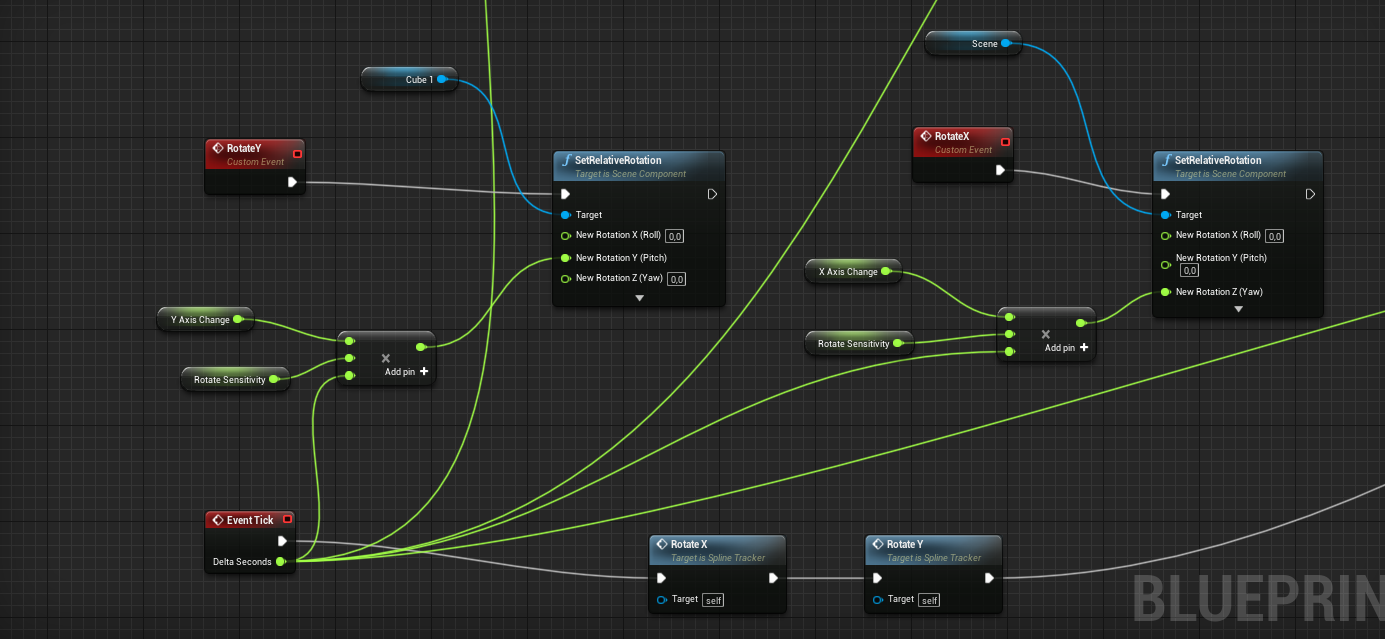
https://imgur.com/yuoGzfz
and this is for the input (the last panel is connected to the delta seconds of the event ticks and then multiplied by 2.4)
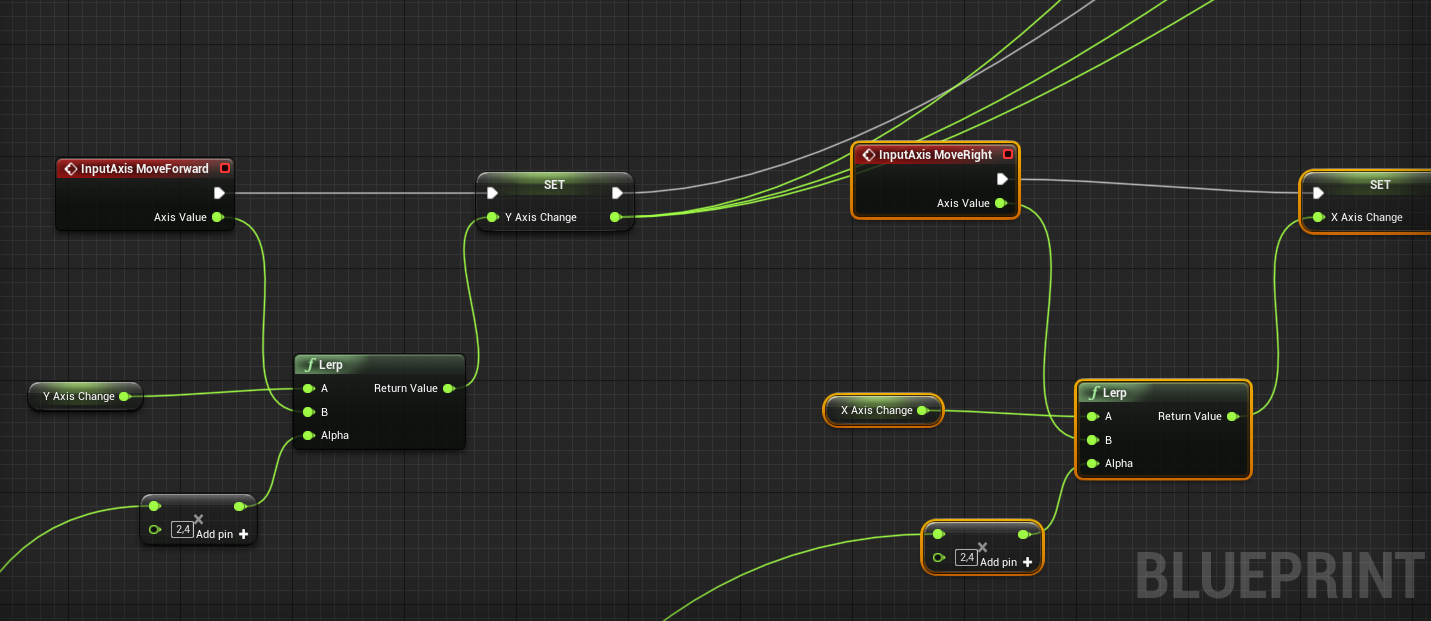 tight schooner
There's a Get Delta Seconds node btw
cerulean pivot
yeah, should start using it because it's hella messy. :P
tight schooner
It could be that you're using delta seconds twice in the calculation. I also wonder if there's a nonlinear compounding effect of using lerp on tick. One way to check is to try locking the framerate to 30 and 60 and see if things feel different (search frame rate in project settings or use a console command)
The more automatic approach to smoothing action is to use a springarm component
cerulean pivot
and use the lag function?
tight schooner
Yeah, laggy rotation I guess
I also wonder if it's an order of operations thing, like if the tick data pin for delta-seconds only updates when tick is executed, and if an event runs before tick, it gets the previous frame's delta. Just another stab in the dark.
In my own project, I've made my own 2.5D physics movement thingy that runs on tick and whenever I see jitters, I suspect a delta seconds issue
carmine thorn
@cerulean pivot Honestly it looks like it would be best to simply use the Finterp node for this
Or rather RInterp
 vital prism
@cerulean pivot unless you know project will never drop below framarate cap, (it prob will on a potato) - you should check over use of deltatime, and also use of lerps
tight schooner
There is also a get input axis node. So rather than doing stuff on the input axis event, put it on tick so that you know what order the operations are happening
carmine thorn
@cerulean pivot RInterp allows for those silky smooth rotations as it takes lag into account
 quiet valley
https://gyazo.com/570d66813c3e4d355cc2fadcce051539 Here's how it looks if I'm simply running the animation from the mounting location without using the vinterp and setting the actor directly to the horse's location.
@mild pine dunno if someone already helped you, but what I would do, is starting animation based in the horse location, so it doesnt look displaced..
right @austere crescent ? HAHA
mild pine
@quiet valley Thanks, yeah I've already done that, I unwired that in order to showcase how the animation plays without it in place. I did get a somewhat decent result by grabbing the mountable position and vinterping that with the target being the centre of the horse. So it works okay-ish. Do you think I should do it in another way than vinterping?
quiet valley
@mild pine tbh, no idea what vinterping is.. i just defend myself in blueprints
carmine thorn
@mild pine I'm wondering if it's a rotational issue. is the mountable position offset from the horse actor's location at all?
And are you accounting for the rotation of the horse?
mild pine
@carmine thorn Before mounting I'm rotating the player to face the mounting location (saddle). The mountable position is offsetted next to the horse, as a location for the player to auto moveto as he begins mounting, and when the player is in the desirable mounting location he initiates the animation
Yes, its aligning with the horse. Im not on my PC, about to go sleep, but I can show you tomorrow
carmine thorn
Sure. It just looks like the offset is applied from the horse's position but not adjusted to match the horse's rotation
 zealous moth
@mild pine it looks to me like its actually a collision issue and the root stays on its own before the parenting event
tribal axle
how come whenever I try to create a vr project it freezes on initializing?
zealous moth
try creating a blank project and importing the vr template
otherwise, check your windows logs
 buoyant night
anyone know if it's possible to use another key other than "space" and "enter" to trigger a button when it has focus?
or is it possible to trigger a press via code?
buoyant night
define "gate it" please
zealous moth
there is a gate node
its sort of a conditional input
check the top down template, it uses gate so that its tick only works if clicks are enabled
buoyant night
hmm
carmine thorn
@buoyant night Are you talking about needing to click into the PIE window to enable input?
 trim matrix
Does anyone here know how to add animations to Advanced Locomotion 4? If anyone can lend a hand I'd be willing to pay for your time. It's been nearly 11 hours of try and fail
carmine thorn
@trim matrix Have you tried asking in the Advanced Locomotion Discord server? I think they have one and are fairly active on it
There is a link to it on their store page
trim matrix
@carmine thorn didn't know that existed, I'll try it out. Thank you
carmine thorn
No problem
zealous moth
@trim matrix if you are not proficient in UE4, I would steer clear of ALM
ASL*
ALS*
darn it
buoyant night
@carmine thorn no, I mean while in game you can use the Enter or Space keys to simulate a Click on a UMG Button widget. I'd like to use a different button
trim matrix
@zealous moth based on what I'm seeing. I couldn't agree more, but I think I am a pretty fast learner. I've already added a target system and my own character to ALS. I also fixed all the buggy animations when holding the guns. I usually only need one explanation, and one example. To understand what I need to do
carmine thorn
@trim matrix As long as you don't run into a wall, just keep going. XD accidental advice for life.
zealous moth
Yeah, well ALS is its own logic and you'll have to build on it; I tried working with it for several months and each project has its own thing that needs to be changed to accomodate it
it's just easier to make it yourself
carmine thorn
That I do agree with. ALS is over-engineered and over-complicated for what it's trying to do
trim matrix
but it looks so cool, haha. Maybe I am in over my head here but I feel like it's offering me a lot of experience as I try to figure out what it's doing.
I have already failed the simple task of adding an animation but I also learned a lot from it too
carmine thorn
Failures aren't inherently a bad thing
Just keep going if it's working out for you
 unreal wing
Does anyone know if in blueprints, i can add a premature reload, like if i still have some bullets in a magazine, it will play a basic reload, but when the magazine is completely empty, it plays a different reload?
 static charm
yes
unreal wing
how would i do it?
static charm
do you have your current blueprint reload logic setup?
zealous moth
@static charm hey! haven't seen you in awhile, how you been! 😄
static charm
all you would do is check how many bullets, and use a Branch node
carmine thorn
@unreal wing Just check the number of bullets you have left in a magazine and if that number is >0 do your premature reload, otherwise do a full reload
static charm
if bullets = 0 then true Branch does full reload
zealous moth
yup yup ^^ channel felt much emptier without you
zealous moth
yep, those were the days! I've been getting into Maya modelling and animation lately. How about you?
static charm
i haven't done much dev work since, until recently
zealous moth
vacations are good
static charm
yeah, mostly just ran out of conceptual/brain power.
 fiery ridge

anyone know how to cast a trace line in front of the character?
my problem is, its only facing one side
static charm
multiply get forward vector by a float or integer to get the line trace length you want and then add it to the actor location and plug that into the end.
actor location will be the start
fiery ridge
i tried that but the lien trace ends up stretching to the middle of the map
its 2D btw
so i just need the X
the forward vector is -1 for left and 1 for right i think
so its constantly on the right
static charm
then just get actor location and add some number to the X vector
for the end
pretty much as u have it
it all depends on the 2d levels orientation
fiery ridge
doesnt work when turning left, because the trace line stays on the right side (since its not negative)
zealous moth
is this 2d or 2.5d?
fiery ridge
paper 2d
zealous moth
hm, it doesn't have a forward vector?
carmine thorn
Don't forget to add the Forward vector onto the Actor location
fiery ridge
yes, the forward vector is -1 for left and 1 for right
carmine thorn
Otherwise you are tracing from actor location to the target offset from world origin
static charm
it really depends on the logic on ur actors movement
carmine thorn
It's a common mistake
zealous moth
the forward vector is a node that gets the relative position of your actor
fiery ridge
yes thats exactly whats happening @carmine thorn
zealous moth
so when you turn, it turns with you
carmine thorn
Actor Location + ((Forward vector * Distance) + Actor Location)
static charm
yes if it was normal 3d movement logic. the actor probably doesn't rotate. only animation changes
fiery ridge
ok gimmie a sec
static charm
and the movement probably just adds negative vales to go left
instead of turning the actor
thats what the default 2d paper template does
zealous moth
hm. i see... then I guess, hard code in the input to change the offset
static charm
agreed, use whatever tells it to change animation/flipbook to also set the vector value.
carmine thorn
You could always use the velocity vector as an alternative and just save it.
static charm
agreed
zealous moth
oh, i know, on input, if >0, set bool "facing right" to true and work with it
fiery ridge
yea i didnt want to resort to booleans xd
 lean thistle
Hey guys does anyone know a good way to render a straight line between two known locations? preferably movable. no matter where two actors are (and even if theyre moving) i'd like to have a line between them at all times
the line being able to stretch too, always just connecting them
static charm
does it need to be in the final game or just for development?
zealous moth
and render.... you want a mesh or material to show?
static charm
yeah depends what style line you want to render.
zealous moth
mesh = spline // material = cable
lean thistle
Just a solid color, so a material preferably
carmine thorn
@lean thistle There are lots of functions for drawing lines in the HUD class and Widget classes. They have some quirks that need to be adjusted for and work differently depending on which one you use though
zealous moth
then cable comes to mind
carmine thorn
I have experience with them
carmine thorn
Yeah
zealous moth
i also like thick cables 😉
zealous moth
you gotta play around with the properties
otherwise it will be floppy
but it can be rigid if you change its properties
lean thistle
Okay, time to read all these properties
Loving this component, thank you guys. Any tips on how to get rid of this strange rigid section where it starts?
starts at the green arrow
Oh i got it sorry
 shy flower
When "switching characters", do I need to worry about unpossessing the current one first before possessing the new character, or can I just head straight to possessing the new pawn?
maiden wadi
You shouldn't need to unpossess just to switch. Usually that might be used for something like character death. Unpossess to make the player wait for their next character to spawn.
 tender glen
Hey if i set only owner no see as true , it seems that the character stops to animate and causes stuff that are attached to the character stop moving with the invisible character. Is there anyway to set owner no see and still allow character to continue to animate?
 young vessel
Hi all,
Sorry, I seem to be bumping my head against simple stuff again in UE. I'm guessing it's just matter of still learning the UE way of doing things.
I'm trying to drive a float over time on an character animation blueprint. The trigger point is a function on the character blueprint that gets called by an external source. The function is actually an interface because I've got lots of these actions across different actor classes.
Apparently I can't use a timeline because it's not a valid node in the graph.
I can't use a delay node for the same reason, it won't even copy and paste into the graph.
I tired using an actor sequence, but there seems to be a bug there as the actor sequence timeline won't even load the animation blueprint instance. I can the the character mesh up, but that's as far as it goes.
I REALLY don't want to use a level sequence, because that's heavy handed for driving a single float and not not good design. The logic should be constrained to the character BP.
Am I missing something simple. Is there an easy way to drive an animation float that I just don't know about?
tender glen
You can do it in the character bp and notify the anim instance when the timer is done
trim matrix
Can someone tell me, If two characters have the same skeleton, why can't they use the same animation blueprint?
young vessel
Do you mean this....
tender glen
Yeah thats one way to do it
young vessel
Does that only fire once?
tender glen
if you untick looping , yes it fire once
young vessel
So I set up a looping timer on a really short cycle to call a function and drive the float. Then I set up a notify on the animation itself to call back to the character BP and clear the time when done?
 gentle inlet
Hey guys, how would you go about doing something like this?
I'm using a static mesh for the beach / island which I'd like to cut when I transition from topdown to side-view. I accomplished it using stencil and masking. The shader complexity is really high though as I do multiple passes to create the different dirt layers. I am sure there are better ways to create this effect, especially having in mind it would probably be beneficial using a terrain instead of a static mesh
 still trellis
what is the best way to keep a "history" of a variable's value? I tried a map of float (timestamp) to the value so that I had a timestamp for every time the value changed, but that quickly grew out of scale and I had no good way to restrict how long to keep the history for.
another alternative i was looking at was making a struct that contains the timestamp and value, and having the history just be an array of those structs, and then every so often check how many structs are in the array and remove any who contain a timestamp older than a certain amount
i'm trying to make server rewinding work essentially by tracking hitbox transforms over time and then having a function in the hitboxes that can just rewind them to any given time by checking their history and interpolating between history values if needed
want to do a similar thing with crit status as well, tracking when a hitbox is a viable crit spot and when it is not, so that i can rewind to see if the hitbox was a crit spot at a time when a player actually shot
 bleak vector
Are there any alternatives to data tables and data assets if I want to make something like a struct object?
bleak vector
I was led to believe it's a bad idea to create new data assets at run time 🤔
mild pine
@carmine thorn I'll doublecheck that, thanks :)
@zealous moth Okay, I'll try disabling collision on both rider & horse to see if that helps, thanks :)
 agile yarrow
It should work like this:
- player approaches usable object
- player presses interaction key
- interaction widget is spawned (I only want it to spawn when he is interacting to reduce amount of actors in scene)
- if he clicks or stops interacting, interaction widget is destroyed
@boreal quest
Hi man! Or anyone else :)
Did you get this to work or does anyone have experience with showing a 3d widget only on a keypress/input action? thanks!!
 deep elbow
@gentle inlet that's a fun effect! Is the shader complexity causing slow-downs or are you trying to fix somethign that doesn't need to be fixed?
gentle inlet
@deep elbow thanks for your response. The shader complexity it at 80% of the max and it does cause slowdowns. I'm still at 120 fps but before it was more like 300. It does work as intended but I thought there is an easier solution to that. What is causing most of the overhead is the fact that I have multiple calls for the different layers of dirt, like different masks for every layer.
deep elbow
perhaps you could paste your shader into blueprint.ue and we can take a look
also do you know exactly where the cost is comign from, have you tried ProfileGPU cmd? might be able to get better info
gentle inlet
can do later, but just wondered what is the proper way to implement this effect
tight schooner
@still trellis I do something similar where I trim an array that's recording pawn locations based on the array length every couple seconds. Can't definitively say it's the best possible way to tackle this problem, but if it works, and it's performant, then can't complain. Though entries into my running history are made on a regular interval, where your history's frequency is variable, so it might have to be trimmed on some other criteria (like timestamp like you suggest).
It wouldn't be that hard to do a loop-with-break where the thing stops trimming when some timestamp threshold (current time - X seconds) is reached.
UE4 has its own event recorder called VisLog but it's probably debug use only.
 toxic vector
https://www.youtube.com/watch?v=S9KforwzAAU - everyone wanting to learn BP should watch this video

In this series of three video I share what I believe are the three most important concepts for beginners to master in Blueprints. I really believe if you understand these concepts that you will have a great foundation for learning the engine and will also be able to make the b...
zealous moth
@mild pine did it work?
mild pine
Havent been in my project yet, but will check soon 🙂
I'll let you know, thanks for checking in 🙂 @zealous moth
zealous moth
(y)
 fallow fox
Hello guys! I'm trying to read in app purchase prices for 3 products but I don't know why it's returning the first price for each product!
I'm doing something wrong?
 placid steppe
how do you count apex destruction fractures
carmine thorn
@zealous moth Probably because it would need to query a database and wait for a reply
 elfin hazel
@fallow fox Isn't it the Get(0) index that results in it getting the first price for the product?
carmine thorn
@
@fallow fox Isn't it the Get(0) index that results in it getting the first price for the product?
@elfin hazel I think you are spot on in your observation. There is no loop for the array, hence only the first one.
 sand tartan
Has anyone got experience using the Global Anim Rate Scale on skeletal meshes?
I've run into a weird bug where I changed it to > 1.0, then the next time I checked, it's showing 1.0 again, but the anims are clearly still playing at the increased rate..
 prime merlin
Hello is there any1 that can help me with some modular characters? im trying to change my equipment in game but i cant seem to get it to work, any help is welcome! 🙂
carmine thorn
@sand tartan likely that is a global multiplier for animation on a selected skeletal mesh. If ALL your animations are fast, setting this to a lower rate should reduce the rate of all other animations. You can also set the play rate of each individual animation manually. But this global one will only affect the individual animations if it is something other than 1
fallow fox
@elfin hazel I get the 'first' price of one product. The second node it's for the second product
I think it's a bug, because also I can't restore purchases. It always returns Invalid
In 4.25 Make In App Purchase V2 it's working only
 gloomy linden
it looks like you're accesing the same array 3 times
try to get the length of that array
carmine thorn
Or do a for each loop
sand tartan
@carmine thorn Thanks, I get that, the strange issue is that it shows "1.0" even though I'd just set it to something higher, and then closed/reopened the blueprint - and the higher rate is definitely still happening
willow lichen
What is the proper way to create a "manager" class. In C# for example, I can create a static class. In unity, I would create a singleton.
What's the proper way to create something like that in blueprints. I don't care about ensuring it's unique in the scene. It's enough if I can just reference it and call methods on it.
But I would like to avoid searching for it every time, and I would like to avoid searching for it once in every blueprint and save it to a local var.
I can write C++ if necessary, I use BPs for fast prototyping and to take a break from programming
I'm thinking about using GameMode for it, and attach a component to it. However, some "mangers" and stuff also need to exist on the client, and putting them into game state feels wrong (It has logic and stuff)
lean thistle
Blueprint function library possibly
I believe that's your answer, but I'm not experienced with them
Yes actually that's exactly it
Anyone know how I'd make a grid material where the grid squares can be a certain size and not scale, but simply add more of them?
willow lichen
Thanks. Not quite. I don't want to create re-usable code. I want it to hold variables and stuff. Like an actor
For example, a "spawn manager". I can call "spawn new" and it spawns something, attaches and ID, registers it as spawned and holds a ref to it
Maybe the game-state would be a position for this.
Anyone knows the overhead for "Get GameState"? It's not like a hidden "get by class" thing that checks every actor or?
 warped bear
nah its not super expensive
yeah having a game state component would work
if you can go into c++, making a world subsystem would also be rlly useful
@willow lichen for clarification on how expensive it is, the world has a direct reference to the game state, so it doesn't have to look for it
willow lichen
@willow lichen for clarification on how expensive it is, the world has a direct reference to the game state, so it doesn't have to look for it
Thanks
if you can go into c++, making a world subsystem would also be rlly useful
Was that for my question? Can you explain that further please
warped bear
yeah, ue4 has smth called UWorldSubsystem that is just a class that lives and dies when the world begins and ends
u can derive from it and essentially have a manger with little overhead
but idt u can derive from it in bp
u have to make it in c++
so its even cheaper than having a game state component and easier to et
willow lichen
Yeah I can expose a blueprint for that to reference my new subclass thing
warped bear
it doesnt mention UWorldSubsystems but they do exist lol
willow lichen
Can that be replicated?
warped bear
unsure i havent trieed
i guess if u want smth replicated tho, game state comp is a good bet since game state reps out to everyone
willow lichen
Yes. I should stop thinking about game-state only be about the state of the game with variables and stuff
It won't hurt If i attach something to it that has to do with the current game/map and is used there and everyone needs it and needs to view it
Thanks
 peak mantle
Anybody knows why i cant use the "Enter" key in UMG?
https://gyazo.com/8b4478ca8759df7169ff44ce12b5d151
Whenever i click Enter, the text field loses focus, same as using Escape button, but using other buttons like Shift, alt. works
 willow lichen
I don't know much about that inside UMG, but maybe the ENTER key is a pre-defined key to submit / move to next input field, and once you lose focus the UI doesn't receive any keyevents anymore
Can you try to press enter first, and make another "on key down" with shift or so to see if it still receives input after loosing focus?
peak mantle
what you mean try to press enter first?
willow lichen
Make another node that listens on shift key and a print string
Then press enter
It loses focus
Now press shift
If it doesn't show the shift, it might be that the enter key doesn't even get that far that the UI picks it up, because it has no focus
And if it prints it, it might be that the "focus code" "consumes" the input (Idk how the UE Ui handles that)
I hope someone else here is able to have the correct answer for that
 void fjord
i'm trying to optimize my online kart game
i have 34 item boxes that had an event tick connected to make it rotate
should i use a timeline instead of ticks
or is there any other method?
in my game there's 34 item boxes that use event ticks, 6 triggers that use them too and the players have 1 in the pawnbp and 1 in a component so 2 per ticks player
 rigid thistle
Hey Guys, do you know how I could setup a specific movement component? I want to add slimes into my game, that can only move around by jumping. Is there a way so i can set it up, that I can just say go from point a to point B and the slime jumps there?
 candid whale
HALP!
me need gucci code
trying to get the center position of a widget within a canvas panel. The selected code is what is currently working when it's within the root, but once it goes into a canvaspanel I believe I need to retrieve the data differently.
I tried to loop through all the parents up above and see what the result has, but I end up not taking the anchors and everything into account. Anyone knows how to do this properly?
 alpine halo
Anybody knows why i cant use the "Enter" key in UMG?
https://gyazo.com/8b4478ca8759df7169ff44ce12b5d151
Whenever i click Enter, the text field loses focus, same as using Escape button, but using other buttons like Shift, alt. works
@peak mantle there's a node called 'on fucus lost' set back to self
hot fjord
Is it generally better to work with or without Enum ?
peak mantle
@alpine halo seems like im not losing focus from the widget, im only losing focus from the textbox field
maiden wadi
@hot fjord What would make you consider working without them?
hot fjord
me being new to UE
and not knowing if I should or shouldnt use them
what I understand, is that it's like a folder I can put stuff in
maiden wadi
Mmm. No. Enums are more like.. descriptors?
hot fjord
So they dont do anything ?
maiden wadi
An Enum is basically just a uint8. uint8 is a byte, which is to say a whole number value between 0-255. The enum allows you to name each of those values individually for better code readability.
hot fjord
I thought I could put stuff in there and then cast to it to access whatever was inside
maiden wadi
Have you used the line trace node yet?
maiden wadi
I was just going to point at it's setting for the channels. It uses an Enum to decide which collision channel to run on. So instead of saying "Channel 1, Channel 2." where you would have to go look at what number each channel is to remember, you can choose Visibility, or Camera.
hot fjord
hmmmm
I think I vaguely understand
would you be willing to help me with a little issue I have atm ?
maiden wadi
I use one in my UI to do flow control on my sorts. It's just called InventorySortType, and in it I have four types so far. Alphabetical, ReverseAlphabetical, Count, and ReverseCount. I switch on Enum to decide which function to use for sorting the array.
hot fjord
oh so basically, what you can do is set either of those and the game will apply the correspondng function ?
by using the respective digits from 0-3 in your BP
peak mantle
@alpine halo thanks i figured it out
alpine halo
I misread the treasure map but still lead you to the treasure @peak mantle
maiden wadi
What issue are you having?
hot fjord
I have an HP system that works unusually
once it hits 0, the regen starts
my issue was/is that the regeneration ticks start if branch con HP <= 0
but the first regentick increases the hp to 1%
which in result makes my branch con untrue and stops the regen
as far as I just read I can bypass this with a DoN
so I can set N to a 100
maiden wadi
What is the condition to stop the regen?
hot fjord
but I just thought of the next issue ...
its the simple hp >= Max hp
set hp to max hp
maiden wadi
To be honest, I'd personally probably do this with a timer and make it event driven based on the damage function.
maiden wadi
Timer != Timeline
hot fjord
so I'd have to set a timer for the time I want it for a max regen
 cyan surge
Is there a reason that you cant call a function in the game instance from the level blueprint?
alpine halo
@hot fjord @maiden wadi if I've understood right then how about making 3 floats. 'currentHP', 'TargetHP', MaxHP'. OnBeginPlay currentHP and TargetHP == MaxHP. On damage received set can change health to true(first make that bool). On tick if branch is true then finterupt to. Start with currentHP and TargetHP is now the (MaxHP - Damage) and the delta is tick. And false that bool when current = Target
maiden wadi
@hot fjord You'd make something like this and call StartRegen where you're handling your damage if Damage <= 0
maiden wadi
It just starts a looping timer that'll run until the branch returns false and then it'll clear the timer to make it stop.
hot fjord
what exactly is the timer handle ?
ill read up on what clamp does
I havent used that one yet besides that it's very easy to understand
ill get some air and check it, because ive been sitting at this for a long time and my brain doesnt work well atm
probs 5 mins
alpine halo
@hot fjord You'd make something like this and call StartRegen where you're handling your damage if Damage <= 0
@maiden wadi dis graph will regen the HP to full on event Regen called
Let's say we've to regen a certain amount
Or decrease vise versa
Like we've full hp of 100.we got shot of 50. Luckily we've medicine that regen to +20. So the TargetHP should be 70
Will work both with tick or timer
 balmy warren
What is this node called? How do i add it in my blueprint? I believe it is a conversion from vector to a string/text.
maiden wadi
@hot fjord Easiest way to explain timer handle is to consider it the remote control for the SetTimerByEvent node. Allows you to stop the timer, or get the current elapsed time of the current loop, etc. Clamp node just locks values. In that case, it's setting health by adding the regen amount, but clamping it so that the health will never be set above max health. Also you'd probably want a check after the health set to see if it's at max and clear the timer there as well instead of making it loop again.
@balmy warren Vector to String. You should be able to just drag from a vector pin to a string pin. It'll add it automatically.
hot fjord
alright !
Thanks to the both of you !!
balmy warren
@maiden wadi Ah! I see.. thank you
alpine halo
How can i stream sublevel under persistence. And how do i load the stream level when my player interact. Can anyone help?
Does that also work with actor and it's attached actor
balmy warren
New to UE/bluerprints... also looking for how to add these in... 'client origin' looks to be a set or declaring a variable; and the bottom node?
maiden wadi
@balmy warren The "ClientOrigin" is a Get node for a reference variable.
The node under that is making sure that the reference is valid. As in that the variable has been populated with a valid value.
balmy warren
So "Is Valid"? which type?
maiden wadi
Sorry?
balmy warren
I just am not familiar with now to create the nodes
likewise with how to create Client Origin Get node
maiden wadi
Drag off of the blue Get and type IsValid.
@balmy warren Do you understand class inheritance?
Such as what an Actor is to a Pawn is to a Character?
patent ermine
I have a number of static switch parameters within the master material. When creating a dynamic instance, is it possible to toggle these?
carmine thorn
@sand tartan ahh ok, I misunderstood you in that case. Not sure what is going on in that case. Have you checked the set play rate of the individual animations?
 solemn dust
Is it possible to somehow capture the original character when calling a Play Montage function?
If I call this function with character A, then B, and then interrupt the montage on A, it will write out the B's name.
My guess is, PlayMontage creates a temp variable for character, but when is called second time, it overwrites the variable with B, instead of creating a new one.
How could I work around this problem?
 visual fern
Hello guys, just a quick question about dealing damage, handling health, etc
What would be the best way to implement that, so far I " deal damage " to the ennemies by casting their properties and var to my main character, and actually do the math there.
So my question is, is this the good way ( short term and long term ) for handling these, or spreading this kind of thing between the enemy themselves and the character is better ?
Or another way that I just thought really recently, is handling all of these maths in c++ and actually calling that on both BP, enemies and main character at the same time
Thanks !
white crypt
@visual fern for applying damage theres a node called "apply damage"
and for receiving damage use "event on any damage" (or similar naming)
and you can do the math on the receiving end
so if you want that enemy to take damage just make sure you have that on damage event in there
these two https://prnt.sc/splr0z
 visual fern
I know about these nodes, but will they still be efficient when I'll have different monsters with differents stats
My character aswell, with the leveling up, adding stats because of added up equipments, etc .... ?
I'm just trying to think mid/long term right now, because I'm afraid my BP will look like spaghettis later because the logic could't have been handled better
white crypt
yes of course, if you have armor lets say then on event on anydamage you add that logic to take into consideration that armor exists
you would have to do the same before apply damage, if you have different weapons etc
normally you would make a simple macro that could be edited over time and that could hold all of your needed features
using these nodes is the intended method anyways, you can build upon them however you like
visual fern
Yea maybe, trying to go overboard right now might be a little bit excessive
I'll stick to theses nodes for now
Thank you ! ( The macro is a good idea actually )
lean thistle
Yes you could have a variable that holds the total amount that the armor will reduce the damage. Lets say your armor currently equipped would reduce damage by half, you can set your armor variable as a float to 0.5 and multiply it by the incoming damage before subtracting their health
white crypt
no worries, your macro could have 1 input (damage coming) and 1 output which returns the actual damage done or how much health should be set
lean thistle
in this macro of course^
visual fern
Yea, actually all the logic might be handled in a single ( or a few at most ) maccros
white crypt
yeah probably, and also plan ahead how you will get the refence for "damaged actor"
its better to keep that reference as a default class
then you wont have to check which enemy is it
mainly use enemy parent to apply damage to all the children that are being used
try not to do a lot of "cast to"
visual fern
Yea I already did that actually, saw few talks about that, and how relation parent/child should be used more often, especially in this case
white crypt
if you decide that your projectitle needs to damage a destructible mesh, then you will have to add more conditions before applying damage
visual fern
try not to do a lot of "cast to"
@white crypt Geez, the talk I saw said exactly the same thing
Since then, I'm always " scared " the moment I have to rely on cast to, because I'm always thinking, if I have to use cast to, it means there is another way of doing that
white crypt
its fine if you are casting to the parent, meaning if it fails it wont apply damage (to other actors that is)
which saves some performance there n there
but if you want all actors to receive damage than you can just use the result of a "hit actor"
visual fern
Right now, I still need to plan that
Was trying to build the logic for contact between MainCharacter/enemies only, but I still don't know if I want to damage walls, or anything else, besides living creatures
white crypt
it wont be a problem to add it later on, just make sure you have the foundation to work on
people tend to overcomplicate things, if you are still learning try not to think much about performance. you will learn better practices with time
some things might be a bit overwhelming to learn at this stage
ofc if someone provides a good working example and you try to learn it why it was made this way, then it wouldnt hurt to use it as a reference in the future 😄
visual fern
I actually always overcomplicate things, so yea I think I need to slow down and just go with the flow 😅
Whatever it happens, it will still be practice and learning anyway
So might as well just try make things works, and after worry about everything else
Thanks again !
white crypt
no worries 🙂
quick lark
Is it possible to apply a material to a widget? this doesnt seem to be working
maiden wadi
@quick lark Usually you do that to the UserWidget through an Image instead of the WidgetComponent.
maiden wadi
Yep.
quick lark
I don't see where to apply a material there 😄
maiden wadi
Add an Image to it.
quick lark
I've added an image, and I see where it asks me to add a texture
omg
I put a material there?
IT WORKS
@maiden wadi , keeper of #blueprint !
maiden wadi
Haha. Also there are limits to the types of materials that the ui can use.
quick lark
I saw that it needs to be a user interface widget. It allowed me to convert it, but I haven't figured out how to create a user interface material
don't see a "user interface" material
maiden wadi
It's not a special material type. It's still a regular material, but the settings need to be correct. I don't know much more than that they need to be set as unlit.
Or at least used to. Other lighting types may work, not really sure on that.
quick lark
thanks 😄
gloomy linden
When you click on the output node in the material, you will get several options in the details pane (by default on the left under the preview viewport)
There you can set where the material is being used
Or when you apply it somewhere and it has the wrong config, it will ask if you want to adjust it and ue4 does it for you then
(Im lazy and my normal workflow is the latter one)
 heady jay
Hey I have a problem where when I put a character outside the atmosphere and far away from the level/world origin, things start getting really weird, such as shadows mess up, and when keyframing object to go in a straight line, it zig zags about.
The farther it gets from the origin, the worse it gets. Any idea how to fix this?
fallow fox
Hello guys. I have another question about in app purchases. After updated to 4.25 from 4.24 IAP stopped working and I found that make in app purchase v2 it’s working but only on consumables. Because if it’s not consumable I can buy as much I want. Also restoring purchase it’s not working neither on v2. Do you have any suggestions how can I solve this?
 neon perch
@heady jay If you're going out REALLY far away from the origin you'll run into precision issues
heady jay
@neon perch Is there any possible way to fix this or work around it
neon perch
I'm not super experienced witth it but as I understand it the way around it is to move the origin instead of the player, use world composition
heady jay
Got it, this helps thanks!
 red cosmos
any idea on how to create a file import dialog with editor utility widget?
trim matrix
where in UT is the blueprint that defines the player height?
hot fjord
can someone explain to me what the functional difference between the following 2 things is ?
- setting up a custom event
- setting up a function with the exact same content
static charm
Unreal Engine Forums
Build powerful visual scripts without code.
hot fjord
so basically, the best thing is to make it a function that I then use in a custom event
that way Im able to benefit from both
static charm
if you need all the capability sure. otherwise just do what you need. you dont want to create more nodes than you need
hot fjord
my knowledge is still limited, so Ill go with the most complete thing in case I need it
as my knowledge increases I can probs start reducing things
ty
 slate wasp
no clue what channel this belongs in: is there a way to search the input actions by name and/or assigned key?
static charm
in the left side screen
slate wasp
I've amassed quite a few bindings by now and sometimes just need to find a particular binding quick
static charm
there should be a search bar above the event and functions
static charm
open a blueprint
slate wasp
opened a blueprint
static charm
unless you mean something some other reason of searching
slate wasp
I'm trying to find input actions by name and/or by key
static charm
i thought u meant finding the action event in the blueprints
slate wasp
as seen on the screenshot, those are some of my input actions
no, in the config screen
slate wasp
doesn't work
static charm
yeah sorry i only know about inside blueprints
slate wasp
the box at the top is for project settings, won't return results in input bindings
quick lark
Hi folks, I'm really wracking my brain over this. What would be the high level approach to implement moving icons on a flat surface the "Unreal way"? Would they be a collection of widgets that I manage over blueprints? Would I be feeding game state to a shader?
Here is an example: https://youtu.be/J7JCI3_L0JE?t=619
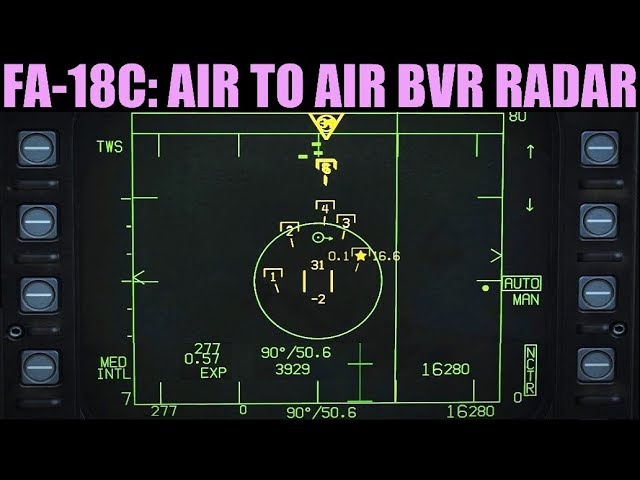
0:00 Overview
1:52 Modes
4:25 Mission Description
5:31 Setup
5:57 Setting Bullseye Waypoint
8:10 Controls
8:39 Symbology & Controls
19:27 RWS
22:30 RWS+LTWS
26:10 TWS
30:47 RAID/EXPAND
Mission: https://drive.google.com/open?id=1Er9_8CvlOX3LGlG4pKn0DdFKd8DfOwKr
FA-18C ACM: http...
static charm
depends exactly what you're making, some things like that are material based.
you can find radar example materials for free
also mini map materials would be good example
 novel jungle
Decal actors might be useful too
zealous moth
@quick lark depends on what you want to achieve. The easiest I can think of is to have a separate camera elsewhere with the correct post process and use the world space to 2D mapping and generating actors or icons using custom depth.
So look up:
- project camera onto material
- post process highlights
- custom depth
slate wasp
that would be very slow, a second camera
unless you're intent on doing this in the actual GUI you should probably be using simple quads w/ very simple unlit materials on them
each quad corresponding to a unit on the map[
if your background needs to be contextual e.g. you want to indicate elevation or some such then you'll need to pass such data to a class/bp that renders it minimap-like
 flat raft
I have the same setup as the 3rd person bp template, but in my setup, the camera/boom, alwats seems to want to go to the top or bottom of the character. I am moving my mouse horizontally
quick lark
So you're suggesting I have quads for each radar rectangle that I render a hair above the surface?
slate wasp
given that this would all have to happen on tick BP would not be my primary choice for implementing this
exactly - if you don't have a dynamic background in your minimap to deal w/ (no elevation to indicate etc) then it's relatively straightforward
you can attach an actor bp to your player camera, a couple inches in front of it that will serve as your minimap container
inside it you can spawn an ISM
quick lark
ISM?
zealous moth
@flat raft do you have a controller plugged in? unplug it
disable your inputs one at a time and see if there is an issue still
slate wasp
the fastest way to render non-lodded simple geometry
quick lark
aye
flat raft
its just mouse setup. no controller plugged in
slate wasp
the reason I'm suggesting not to use umg is b/c its performance can be detrimental
even w/ just static things
quick lark
: D
its easier for me to reason moving flat objects on a 2D plane with static meshes too
I just can't visualize the API for otherwise
never worked with 2D apis within a game context, I always have to manage a Z (besides screen space things)
slate wasp
you can lock the Z of the ISM and bam, it behaves like 2D yet it ain't
quick lark
aww yay
thanks so much @slate wasp 😄
Ohhh one more question if I may
the scanning vertical line
I suppose that'd be the same way -- a thin and tall rectangle mesh?
quick lark
oh? I am not familiar with that concept
quick lark
what would be bent in that scenario?
slate wasp
the thing the scan lines are on - the screen
anyway, do the unbent version first then figure out if you want to be bending anything :)
quick lark
ahh gotchya 😄
thank you so much
so I could use a bent mesh for rendering a hud icon on a curved glass surface
is that correct?
slate wasp
yeah think of an old tv screen
quick lark
nice
slate wasp
Do you still have an old analog CRT television lying around? With the advent of digital signals, analog TV´s are going to the dumpster or the recycling center. But you can still put them to good u…
slightly bent or bulging
slate wasp
np
 foggy sundial
how long can the program freeze before a player notices?
zealous moth
uh........0.03s?
 fossil yew
how can i run the event tick from my Parent class ?
 sand shore
how long can the program freeze before a player notices?
@foggy sundial Better question is.... how little can you do per-frame before a player notices
 foggy sundial
Well I'm looking for an optimization target for how long a chunk takes to load
novel jungle
The better question is ... how little can you do in the entire game before the player notices https://tenor.com/view/roll-safe-gif-7716607
foggy sundial
Currently at 1 second which is terribly obvious
But it's a good improvement over the original 5 seconds
sand shore
Oh, a chunk, eh?
novel jungle
But real talk around .05 seconds?
zealous moth
you can always disguise it
sand shore
Here's what I'd do.
sand shore
Allow chunks to exist in a partially loaded state (but they don't do any interactions)
zealous moth
oh and make sure to scream real loud
sand shore
When a player is close enough, spend a percent of your frametime loading in the chunk
until it is!
If they move super fast you may have to slow them down or something...
foggy sundial
That would use up a ton of ram
zealous moth
yeah with like a quick time event
sand shore

zealous moth
😄
foggy sundial
Currently each chunk is 16 cubed
foggy sundial
Each block takes up however much space an unreal 4 int does
sand shore
it was an idea
Okay, well, you could async load the chunk
level streaming masks that
you don't have to micromanage the chunk
Beyond those two things....
foggy sundial
Yeah there are a few options I've been considering
sand shore
if you take longer than 16 ms there is a player who will notice a hitch
The question then becomes, exactly how much of a disturbance can you tolerate?
Is the player in heated combat or not? Might the player have a bad consequence due to a frame hitch?
foggy sundial
Currently around 75% of the vertices are unnecessary so that's the easiest
It just takes a complicated function to reassign the triangles but it's still the easiest option relatively speaking
sand shore
I'd say a 1s hitch is never justifiable though, that's absurd.
 hoary gazelle
Hey this the correct place to ask BP questions right?
sand shore
@hoary gazelle yup
foggy sundial
Converting at the very least the geometry generating function to cpp might improve things
fossil yew
How can i get this little orange node back ?
sand shore
Okay so you can totally pool vert data I suppose if you want.
 acoustic lava
Hello
sand shore
That doesn't preclude you from loading in your chunk over time @foggy sundial, which I think is what you probably want to do
acoustic lava
Does anyone know how to draw a material over a material, basically see through a solid mat and see the actor drawn over 🙂
sand shore
@fossil yew Right click on the left-side node, Add call to parent function
fossil yew
what does that mean ?
sand shore
Right click. On the red node. Which is on the left side.
Otherwise summon the context menu.
fossil yew
mhm
sand shore
Select the option "Add Call to Parent Function"
foggy sundial
If the player is going in a single direction I believe about 5-10 chunks per second need to be loaded. Async would probably work for the chunks the furthest away from the player though
fossil yew
@sand shore found it thx
sand shore
oh man what is happening with your game
hoary gazelle
Oh nice, well i wanted to recreate the pokemon battle system but im not sure how to start.
I have the random encounter system pretty much done but actually starting a battle is kind of difficult since I want them to be different enemies and have them capturable, meaning I would have to transfer their data to an ally actor, which is something im also stumped on.
sand shore
@foggy sundial I think Async might surprise you
foggy sundial
And even further away chunks can be in the spooky existing but not having any geometry state
sand shore
I think with such a wide radius you'd want to have quite a far away "load" distance.
Seems like you'd want a few states.... unloaded, loading, loaded, and visible... you might try to go directly from unloaded to visible async or sync, for instance.
foggy sundial
So how does implementing async work?
sand shore
Well you'd have some kind of path or ID file and then you can use either the asset manager or the object library to async load it
That'd be if you use UObjects...
Quite a lot of overhead for each chunk though...
You'd otherwise want to do this C++, spin off a thread or something.
Streamable manager is another good place to look if you go that route
foggy sundial
Well there are two ways to "load" chunks
sand shore
@hoary gazelle Seems like you want to have a "CreatureData" struct that can be copied.
foggy sundial
One is generate from the terrain generator and the other is to do that and also apply any stored player edits to that chunk
sand shore
Well one of them would be loaded from disk