#blueprint
402296 messages · Page 469 of 403
 maiden wadi
 subtle blaze
Yep, which is why I asked.
Because it is called a bullet and 400 units per frame is more than enough
maiden wadi
That makes no sense though. It cannot call OnHit if it didn't collide. You're 100% that it's an OnHit and not OnOverlap?
 quick lark
was previously at ~8k but brought it to 400 for debugging
subtle blaze
(Which at those speeds it may be better to avoid launching a physical projectile and instead do a trace)
quick lark
@maiden wadi
subtle blaze
Though if you want bullet drop things get more complicated.
quick lark
Which I think would be equivalent to
maiden wadi
And the collision preset for the projectile collision mesh is BlockAllDynamic?
quick lark
Yep, also tried BlockAll
subtle blaze
And I vaguely recall it had something to do with on component hit running every time there was an overlap and not just on impacts
(Don't quote me on that)
:L finish typing so I can get up and go swap my load of laundry
😛
quick lark
😄
subtle blaze
aight brb
maiden wadi
Wait. I just looked at your screens from earlier again. The CollisionMesh is the default root of the object still, correct?
quick lark
Yep, I can do with or without it as root
It collides with other static meshes when the defaultsceneroot component is in there
but if its not in there, then it passes through other static meshes (but never hits landscape in either situation)
Can further simplify the situation to this
hits other static meshes, passes through landscape
Here are collision settings for the static mesh:
its assigned a mesh
update: collides with landscape when I tick "simulate physics"
however the projectile speed needs to be changed heeeaaavilllyyyy
maiden wadi
When it comes to projectiles, one surefire way that I've found to create them is to have a simple collision component as the default root and then put in a visual mesh as the collision component's child. I've never had a good time with projectiles without having a collision component as the root.
quick lark
Sweet, thats how I've been trying to go about it. I instantiate a static mesh component as the root:
do you recall if you had to tick "simulate physics"?
(on the root static mesh component)
quick lark
This brings to light how much less my understanding of the projectile movement component is than I previously had assumed
Its been calculating a parabola even with it unticked
I suppose its separate from the physics
maiden wadi
No I mean a literal SphereComponent.
quick lark
got it, I'll replace the staticmeshcomponent with a Sphere Component
maiden wadi
subtle blaze
so when you set a objects velocity manually it will continue unless acted upon by an outside force. You probably have gravity enabled on it, thus a parabola
enabling physics enables collisions
(Among other things)
another term that is sometimes used is "kinematic"
when an object is "kinematic" it isn't being moved through the physics engine.
So another thing to keep in mind related to that, you probably want to use impulse rather than manually setting the velocity.
quick lark
@maiden wadi do you have physics enabled on the sphere?
thanks @subtle blaze for the knowledge bomb
subtle blaze
(It might be add force instead of impulse)
subtle blaze
That said, for bullets I would highly recommend using a collision trace rather than an actual object.
Unless it travels very slowly.
subtle blaze
Yes but with a shape
quick lark
sweet
subtle blaze
it really depends on whether you want there to be travel time for the bullets
subtle blaze
Missiles are a whole different beast, I would avoid keeping them too connected to bullets
(Technically bullets could be an unguided missile that doesn't get additional force)
Though at that point it might be better to just separate them entirely.
Another thing to keep in mind is that bullets/projectiles that have travel time are a pita to network properly
So you need to carefully pick your methodology based upon what you want
(PITA as in you can expect to spend the majority of your time trying to get them to network and play well over varying latencies)
quick lark
damn this channel rocks
maiden wadi
@quick lark I don't know how much this will help you, but when implementing a projectile in blueprint(I haven't gotten around to trying this in C++ yet). All I do is create a new class that derives from Actor, replace the SceneRoot with a CollisionSphere, then add a Static Mesh as that component's child for visuals. Static Mesh component is set to No Collision, Sphere is set to Block All or Block All Dynamic. Add a Projectile Movement component. Set the Initial Speed as the projectile's desired start speed. Then on spawn I just rotate the projectile so that it's local X faces the needed direction. Add an Actor On Hit event that processes what happens when the bullet collides with something.
quick lark
really appreciate all the help
@maiden wadi thank you! Do you have simulate physics ticked on the sphere?
 atomic trellis
you're welcome
quick lark
Really appreciate that super simple breakdown
biggest thanks of all to @atomic trellis , dont know where I'd be in life without you
subtle blaze
Oh yeah, projectile movement is a built in class. lol.
quick lark
hehe
maiden wadi
I don't. Simulating physics should break the projectile movement I'd think?
quick lark
thanks!
subtle blaze
I should look into that, I wonder if it would have had the features I needed in the past. :L
quick lark
it did for me
I'm moving my C++ implementation with instantiation of meshes over to BP and trying your method @maiden wadi
quick lark
I really love using BP for events and references to components
subtle blaze
while being easier to make quick changes
quick lark
and it has given me a quick introduction to the engine's APIs
maiden wadi
To be fair, even with a static mesh this should work. But I use Actor On Hit instead of the component's OnHit. Which always uses the RootObject.
quick lark
🙂
subtle blaze
(The big exception being editor tools and some very low level stuff)
maiden wadi
In fact, that's a pretty good rule. If you ever have a complex actor and you don't know why GetActorSomething isn't working well, it's usually because of something with the Root Component.
subtle blaze
And performance is functionally the same right now.
quick lark
omg @maiden wadi ...that works
 kindred pond
Hi UE4, I am new to visual programming. Question: is there a way to manipulate or add anchors to the spaghetti?
quick lark
parent
subtle blaze
double click
quick lark
derived
subtle blaze
on the line
maiden wadi
Can't go wrong with that method. Works every time for projectiles.
 hidden zodiac
so, i printing a random integer in a for loop, why i'm getting so many repeated values?
quick lark
:DDDDDD
subtle blaze
@hidden zodiac Code?
quick lark
@maiden wadi is this the event you are referring to?
maiden wadi
Looks right.
quick lark
😂
hidden zodiac
@subtle blaze , this "GenerateFlora" is called in a for loop, 9 times
are those bluprint functions executed in parallel?
subtle blaze
Show me where it is called @hidden zodiac
quick lark
works perfectly now @maiden wadi @subtle blaze
thanks sooo much
subtle blaze
Sweet, glad you got it working.
hidden zodiac
@subtle blaze it's called in a function, after you press a button
subtle blaze
Gotcha
So I can think of two things
One, sometimes pure functions can cache their output.
Two, the random integer function is using the same seed due to being ran within a single frame
Would probably be better to not use that function as a pure function.
See if that does it.
@hidden zodiac
hidden zodiac
both aren't checked as pure
maiden wadi
Generally speaking, random isn't so random. It's okay when not used on a loop that runs immediately. But in a loop it can sometimes return the same value because of the way computers usually generate 'random' numbers. If you need it to be more random it should be seeded somehow.
subtle blaze
So the generate flora has execution lines going to it now?
hidden zodiac
yeah
subtle blaze
Instead of random integer use random integer from stream and feed in something from the transform as the stream
hidden zodiac
nice one
subtle blaze
(Do note that something needs to change every time)
hidden zodiac
but it wouldn't be as good for me either, i created a low poly flora generator, i'm making a level for debugging, every time i press a button i want every position to have different results
subtle blaze
?
hidden zodiac
gonna record a video to show what i'm doing
subtle blaze
I don't see why what I'm talking about wouldn't do that
The only thing it might do is make things deterministic
hidden zodiac
i think seeding with ms would do it
subtle blaze
probs don't need to seed with ms if you have index
(unless you want different randoms from run to run)
subtle blaze
And no, seeding with ms may not do it
becuase I think that is what random integer does by default
hidden zodiac
well shouldn't it works because i press the button at different times? if you see the video, that pink tree number repeated 3 times at different times, well i should test with ms as seed and tell you guys
subtle blaze
I only see twice and in different locations.
And I'm not following, isn't the issue that the numbers repeat after one button press?
subtle blaze
After one press right?
hidden zodiac
theres the first generation at the begining of the video, 8s and 16s
the lone branch repeated a lot
maiden wadi
Well, seeding with the loop index and now's millisecond value shouldn't return too many doubles at that range of numbers.
subtle blaze
Huh, so your issue is that random integer is repeating the same numbers consistently over several seconds
subtle blaze
You may have to seed it with the index, the ms and something from the transform to make that more random
Interesting
Wonder if it would behave the same in a standalone run
I could easily see that being an editor bug
maiden wadi
I'm not sure how the CPP rand() gets it's float between 0-1, but this is the line that determines the random number from the RandomInteger node.
A is the MaxValue input.
hidden zodiac
in game, i generate a flora and save every specimen to a .json, inside that i have the characteristics pattern like color and seed, to generate the seed i just use Characteristics.PatternSeed = FMath::Rand();
gonna try those random stream shenanigans first tho
subtle blaze
also try running in standalone mode
hidden zodiac
gonna try
 prisma bluff
So im trying to load a game save, the string prints out "None" when i run this code and im not sure why
this is the save in the Save Game BP
and when i had it hooked up to these nodes it would fail to cast to the save game bp
subtle blaze
where are you saving?
prisma bluff
right here in a pause menu
subtle blaze
where are you setting save slot name and index?
(Unless those have the default values of "Main" and 1 respectively)
prisma bluff
I just set it to Main and user index to 1 just to test something earlier
I set them back just now, but either way my cast to BP_SaveGame always fails
hidden zodiac
@subtle blaze same result as standalone, maybe it's some blueprint optimization that doesn't went well with random function, I'm gonna sleep now, @subtle blaze, @maiden wadi thank you guys for the help, if i get something on the subject i will inform you
subtle blaze
Good to know, and good luck.
Not sure with save stuff myself. My guess would be that it isn't saving right. IIRC there is some shenanigans with PIE and saving.
hidden zodiac
@prisma bluff when you are saving, the user index is 1? what's on your project/Saved/SaveGames folder?
prisma bluff
theres nothing in the folder, the user index is 0 at default and its gonna be 0 when saved, the 1 was just something I was experimenting with earlier trying to find any little solution
subtle blaze
Pretty sure it isn't saving at all then which would explain your issue.
Try a standalone run and see if that puts something there.
hidden zodiac
you can print the boolean variable after the savegame node as well
prisma bluff
hmm im not sure why it wouldnt be saving, I was following the ue4 documentation on the saving system, I ran standalone and didnt save anything either
one sec and ill print that node
hidden zodiac
the first person character could be cast failing
hidden zodiac
did it failed to save? printing that boolean?
prisma bluff
doesnt print any boolean at all
I know it makes it to that part of the code though because I put a print string right after the set playerlocation and it prints
hidden zodiac
save everything, close and open the engine again
prisma bluff
also just noticed that when I put a print string to see what the object is for the SaveGameRefrence is this is what it shows, Im not sure if it means anything
im re opening rn
I re opened and nothing changed
hidden zodiac
really cant hep you then, the only possibility to not show that boolean is if the cast failed
prisma bluff
thats really weird, I did a print string on cast failed and nothing came out, im at a loss
hidden zodiac
well you can chose the bp while running and see the debug flow
and visually see the code being executed after your click
prisma bluff
it flows through everything just fine
hidden zodiac
and no printed boolean afterwards?
hidden zodiac
yeah, really weird, as the last solution, you could delete the binaries / intermediate folders, recompile the project, not saying it gonna work, but if you are desperate
subtle blaze
I vaguely recall an issue where saves don't get saved correctly when running with an editor, that could be doing it if for some reason a blank save game returns "None" for some reason.
subtle blaze
No clue, lol.
prisma bluff
when running as admin it says false on the screen for the bool
subtle blaze
Like I said, silly thought.
prisma bluff
its in documents/unreal projects
subtle blaze
Bet you someone has their project in their documents folder
hidden zodiac
ohhhhh
subtle blaze
lol
subtle blaze
might fix it
hidden zodiac
never use those users folders in windows
subtle blaze
well make it not need to be run as admin
though tbh you probs should run the exe as admin anyways
hidden zodiac
sometimes windows lock files in users folders if they are being recreated a lot
subtle blaze
(I mean, we all should, not that we do...)
hidden zodiac
and the only way to temporary solve, it's to reset the pc
got some trouble with people running eclipse with tomcat and maven on users folders in the past..
prisma bluff
ahh alright so I moved it now ill see if it saves
subtle blaze
make sure you also try without admin to see if that does it
prisma bluff
it outputs false to the screen
hidden zodiac
no admin?
subtle blaze
So is that good or not? I lost track.
prisma bluff
no admin, false is bad, it means it did not save correctly
hidden zodiac
maybe now it's the structure of your savegame class
subtle blaze
But it didn't say anything before?
(Just making sure that there has indeed been progress)
prisma bluff
it didnt say anything before because of the admin perms, now it says false which is better and means at least its able to try and save, but false is not successfully saved, it should be true. Now here is a pic of the save game class
subtle blaze
:p
prisma bluff
lets see if it loads it now lmao
prisma bluff
YAY IT WORKS, thank you guys so much for the help I really appreciate it. 😄
subtle blaze
Cool.
 weary spire
what the hell?
trying to make a dodge system like in Unreal Tournament
but my axis are off when i rotate the mouse
it seems to stick to the hardcoded x/y axis and does not take player rotation into account
maiden wadi
@weary spire Are the 1000 vectors supposed to be in local space?
weary spire
noob here *
it basically should push you 1000uu in the direction you are pressing
from where you are standing
so local space yes
subtle blaze
give us an example of what dodge vector might be
(Or better yet print it)
wait nvm, yellow comment on vectors is weird af
weary spire
i'm pretty bad with BP's really,, lack of coding understanding
subtle blaze
why are you rotating the vector by the pitch?
weary spire
am i?
subtle blaze
yes
weary spire
woops
put it on yaw
lemme see now lol
nope, i'm an isiot
idiot
the smallest thing fucks you over sometimes
maiden wadi
Are you trying to dodge using one key while one of your directional keys are down?
weary spire
had to be plugged into yaw indeed
thx SirSpence , good spotting
nah, i'm trying to create Unreal Tournaments dodging behaviour
double tap wasd to jump in the direction you tapped
maiden wadi
@weary spire If you wanted to simplify that behavior.
Er, my bad, forgot the multiplication parts.
maiden wadi
weary spire
that's insane mate
maiden wadi
Basically all this is doing is asking if that input action has fired twice within 0.3 seconds. If so, launch the character based on the key press
Additionally, for better functionality you would probably want to create a bool that checks if your character has jumped or landed so that you don't launch while in the air.
weary spire
yep was just scoping that out too
but thats heaps clearer than what i'm working with atm
are you familiar with the game Unreal Tournament?
everyone should be to a certain extent
subtle blaze
I'm only familiar as far as UDK had a version built in.
maiden wadi
subtle blaze
Outside of that, nope, never played it.
maiden wadi
This would probably solve that last issue pretty easy.
Same as Spence, never really played it, but I'm generally familiar with it.
weary spire
next on my list is a slopedodge,, basically you approach a >45degree slope and double tap dodge,, it will propel you over the slope giving you some airtime too,, (in laments terms: use the slope as a jumpramp)
any hints on how i could achieve such an effect?
subtle blaze
A nice example of some spaghetti code getting cleaned up
old one is on the bottom
top is the new stuff that does the same stuff
subtle blaze
Well it isn't just cleaner it also works better and is way more performant. (I assume, I haven't quite finished)
And it is mostly so messy because I have a plugin that auto organizes stuff but it is funky with nodes that go nowhere
I'm just trying to fiddle my way around map immutability
maiden wadi
I personally find that there's often a better way to write things after I've made something work. Just don't get stuck in that hole of optimizing your optimizations.
subtle blaze
Yeah, this is the third time I've redone this code. (Second time I restarted this project.)
But it is important to optimize cause this code can easily run 1k times a second.
And it is code that initializes a bunch of data so that other code doesn't need to search through arrays for a specific entry.
Basically, it is a pita trying to use hierarchical instanced static meshes and have them related to data.
But important if you want more than 10k static meshes...
prisma bluff
does anyone know how to set the characters rotation? I saved it and used a quat to just limit it to the y that gets changed and I saved it with the save game, which node should I use to set the rotation of the character though when the game is loaded?
 shy flower
Another quickie: say I have two Pawns, Pawn A and Pawn B.
- Initially, Player Controller possesses Pawn A.
- If I possess Pawn B, does Pawn A get assigned an AIController? Do I have control over what AIController class gets assigned to it?
maiden wadi
@prisma bluff SetActorRotation?
prisma bluff
@maiden wadi that didnt work for me
it set the position
but didnt set the rotation
 lilac lance
@prisma bluff get controler, get control rotation
Each thing has its own rotation, the controller is kind of in synk with the pawn
Get controll rotation, set controll rotation
maiden wadi
@shy flower Did some testing. I don't think that the pawn is given an AI controller when it is unpossessed by the player controller. Controller remains invalid on the pawn when asked what it is after it's unpossessed.
prisma bluff
@lilac lance the only issue now is, its not saving the exact location that the player is looking, ill be looking one direction when i save and when i open the save it will be facing differently
lilac lance
@prisma bluff get controller,, from there, get control rotation,, set a rotation var to the rotation from get controler rotation,, save that var,,,,, when you load, you set the controler rotation to the var you just saved
You have a var like, CurrentPawnRotation
That var stores the controller rotation
You have to get or set controller rotation depending on if you are loading or saving
lilac lance
@prisma bluff when you save, you get cont rot, and set the var,,,, when you load save, you get the var, and set cont rot
prisma bluff
@lilac lance yea thats what I did in the pics above
I set the player rotation variable to the cont rot, and then I loaded the player rotation variable and set control rot to the player location variable
but for some reason the rotation isnt exactly correct its like its offset or something
its like to the right more then when i saved it like the player is looking a little more to the right
okay so its something to do with me changing it to a quat
prisma bluff
Okay so my question is then, How do i only pull the y axis? I dont wanna save up and down just left and right
 mild pine
@zenith scarab Hey, so the slicing works perfectly now (except for the simulation toggle upon hit), but when I have multiple variations of procedural slice meshes, do you know how I ensure the Cap material is set for each different mesh? For instance watermelon red, cabbage green - gotta call the material object ref somehow 😖
 white crypt
make them into child blueprints and promote the cut material into a variable
then set it on each child
 teal dove
Hey everyone! I have a sidescroller where the character can only move in X & Z direction.
Now the char has a cursor in front, and I want to rotate it (only in Y) towards the invisible mouse location ... but I can't get it to work. :(
Maybe someone can help me out?
I didn't know such a node exists 😄
 tight schooner
I lost confidence in my approach there but maybe it'll give you ideas
white crypt
find look rotation should be enough
if the cursor is attached to char mesh for example
teal dove
Yes it's attached to it via a spring arm
teal dove
Yeah I "only" need to rotate the springarm so that the cursor always points where the mouse is
This is what I couldn't get to work 😦
white crypt
your invisible mouse cursor is a static location or an actor?
teal dove
No it's where the mouse is pointing at right now..
I have tried to use the "convert mouse location to world space" node but to no avail
 teal dove
Then I would have to make an invisible, vertical "wall" to get the hit results under cursor by channel
I guess that could work
white crypt
depends on your game, if you have a landscape or a solid ground
visibility channel should be enough
or if you have he location of your mouse in owrld space then you dont need to use this
thats just my quick example
teal dove
I think this makes it more clear, the background is basically empty
I will try with the mouse to world space node, thank you 🙂
white crypt
i think your main focus should be using the find look at rotation and you should be able to figure out the rest
 short coral
Hello , can someone help me clear things up with event dispatchers? I have a case where i would like to turn off multiple lights for example , so instead of saving the references of all of these objects , i can use an event dispatcher to turn them off or on all at once , correct? But in order to call the event that triggers the event dispatcher i would still need a reference to where the listener is , so basically i would still store a reference regardless , right? Or am i misunderstanding things?
 sick solar
@short coral I would use an interface for that,
You can get all actors with a certain interface, then loop through those actors and run a function.
short coral
Is it possible to avoid the whole loop situation?
maiden wadi
@teal dove For a side scroller, since you're always dealing with the same plane of movement, what I would do is project the cursor to screen and use a LinePlaneIntersection to determine where the cursor is at compared to the character, then use the LookAtRotation to determine the direction to rotate the spring arm.
short coral
For loops can be performance heavy
sick solar
^
short coral
I'm honestly just trying to save performance wherever i can you know?
white crypt
that wont save you anything
its good that you are thinking about it but not every logic needs to be super optimized
dont overcomplicate things
teal dove
@maiden wadi Thank you for the suggestion! I will try that now.
maiden wadi
@teal dove Let me know if you need any help with that.
sick solar
And since you're using Blueprint, you might end up converting everything to C++ down the line.
short coral
You mean nativizing them?
sick solar
No, I use Blueprints to prototype then I manually convert the logic to C++ for important blueprints
short coral
I see , guess picking up C++ is a must then
teal dove
@maiden wadi would you project the cursor to screen by using the "convert mouse location to world space" node?
white crypt
no one told you cpp is a must
maiden wadi
There's nothing wrong with an event dispatcher for turning off lights. But the lights would need a reference to the object that's turning them off at least long enough to bind that event call to a function.
white crypt
there are plenty of games without a single cpp line
lilac lance
@prisma bluff right click output to break the rotator into 3 floats.
You want to save Z.
Let the other 2 be 0.
sick solar
That's just my workflow, you can don't need to use C++ at all
white crypt
if you had a huge array like we talked about, then yeah sure you might want to move that to cpp
sick solar
Unless your game is data driven, then C++ is avoidable
short coral
I'm trying to optimize my project so far and i'm looking for alternatives to what i have that i could benefit from
sick solar
Make your project fun first
white crypt
your main optimization will be done with visual stuff
sick solar
You can polish it towards the end of development
white crypt
culling, LODS, texture res etc..
you rarely have an impact that originates from your game logic(if done correctly), most performance issues come from visual side of the game
short coral
Do any of you both know much about a day and night cycle? I have city lights checking whether its night time or day time to turn off or turn on lights , this all being hooked up to an event tick unfortunately
So i thought maybe i can devise a way of using dispatchers or an interface
But i'm kind of stuck
white crypt
nope, tick is your problem
unfortunately you cant do much about it atm. maybe 4.26 will have better optimization
maybe a timer that runs every other second
short coral
Yeah , i'm trying so hard to avoid it but i can't seem to find a way to setup a day and night cycle that would run without tick
white crypt
i've worked on an open world project before and the biggest performance factor was the day n night cycle
personally i would never implement that in my game again
white crypt
wait for 4.26. they have redone some of the stuff related to cycles
sick solar
You can set a custom tick interval, so depending on your in-game clock you may be able to get away with checking every 5, even 10 seconds
white crypt
even having 1 second you will see shadows snapping, which not might be ideal
but up to you if its fine or not
tight schooner
If you build some randomness into how often the lights check, you could get that realistic chaotic turning-on behavior
short coral
Yeah , its gonna look weird and not real at all
white crypt
movable directional light is not very performance friendly
it will always have a huge impact
but 4.26 might be a bit different
will see
short coral
Alright then , thank you so much all of you for your help, i'll leave it to 4.26 and see
white crypt

This hands-on presentation by Epic's Sjoerd De Jong explores the Sky Atmosphere system in Unreal Engine. Starting off with the basics, viewers learn how to render a beautiful and fully dynamic sky within seconds. From there, the session showcases how to create alien, dusty, or...
i think it was this one
take a look @short coral
maiden wadi
@teal dove Something like this should work I think. Note that PlaneNormal is 0,0,0 right now. You need to change either X or Y to 1 or -1 based on where your camera is compared to your actor in the world.
sick solar
That's in 4.25 as a Early Access feature
I would wait till 4.26 for shipping as it includes more functions like volumetric clouds
white crypt
oh, still dont have 4.25. thought it will come out together with volumetric stuff
tight schooner
Re: blueprint optimization... You should look into how to profile your game, whether at a glance with Stat commands, or the full blown Unreal Insights utility. It'll demystify engine/BP performance
sick solar
@white crypt It's weird, because in the video you sent the presenter shows how in 4.26 they'll have these cool cloud functions. But then showcases a workaround to make clouds appear in the 4.25 version of this feature. Not sure where Epic is going with this
Still it looks cool
white crypt
yeah thats why i thought this stuff will only exist in 4.26 . seen that video on release so might have forgotten some of the stuff
short coral
Hey guys , would delays end up stalling the game thread ?
maiden wadi
Like delay nodes, or?..
short coral
Yeah
maiden wadi
Not likely. They're just a timer node that when executed for the first time will start a counter. At the end of that counter, the execution finishes on the other side.
As a personal note though, never use delay nodes unless you're just testing a theory. There is almost always a better way to handle things than a delay node.
white crypt
can only think of a timer. what other methods could be used? just curious
short coral
I'm profiling at the moment and i'm running my project on standalone mode , i have a big cpu stall-wait for event
Do you guys know what i should be looking at?
maiden wadi
Really depends on the use case. Timers are good. Making it entirely event related is also a possibility by checking the last time it was ran.
@short coral When is it happening? What are you doing when it stalls? Or is it just consistently happening every so often?
teal dove
@maiden wadi This worked so much that it "follows" my mouse cursor, however the actor aim cursor is always on the opposite side of where my mouse cursor is.
Any idea how to fix that? Multiplying the rotator by -1 didn't help. 😦
short coral
@maiden wadi I can't really say , it happens every now and then when profiling but when i run the game in the editor the hitches are a lot less , this i'm assuming because i'm profiling as well , i'm trying to figure it out but i'm not sure why it stalls
maiden wadi
@teal dove Ah, right, you're using the spring arm. Either move your 'cursor' thing to the other side of the character based on the spring arm. That or you're going to need to vector math your point the other side of the character or math the rotator to the other side.
teal dove
Oh gosh I'm so stupid, moving it to the other side fixed it. 😄
Thank you so much for your help, you are a life saver! 🙂
And I just learned a bunch new useful stuff ha
maiden wadi
@teal dove I love that method. I used the same style vector math for turning an RPG character to face the cursor. Best part is that the plane follows the character that way so the Z level never mattered in the top down perspective.
white crypt
im using the same math for a top down character rotation
just the animations dont line up perfectly 😄
and its a bit inconsistent when you are trying to rotate near pivot
teal dove
Yeah it's a really smart way to do it! Before for my top down I used the world location under cursor for the rotation, but this seems much better
This is one of these secret helpful nodes you don't know they exist in UE 😛
By the way, do you know what the W in the "make plane" node stands for?
sick solar
If I know the path of an actor can I reference it? For example, I have this: "/Game/StarterContent/Maps/UEDPIE_0_Minimal_Default.Minimal_Default:PersistentLevel.Test_2" - can I get a reference to that actor using this string value?
short coral
@sick solar i doubt you can actually
Grabbing a reference would mean it's an actor inside the world i believe
Hey guys , under tick time , TG_PrePhysics? Does this refer to physics calculation?
 tame pecan
Hi!
I have an issue where my inventory character won't update its rotation, but it updates in the world. See video, you can clearly see the render target is being updated since I dance behind it, and its rotating (see behind the inventory to the right).
I'm so mindfucked atm
 meager spade
No idea but 10/10 dance
tame pecan
@meager spade Tack 🤗
Found it, it's caused by client/server writing to the same texture file, which both are getting from. It's just a editor issue
sick solar
@tame pecan Can you implement this dance? https://www.youtube.com/watch?v=6CtsIM76v-s

the quarantine really fucked me up huh.. help!
 scenic slate
Hello, I am new to blueprints. ue4 and developing all together. I am trying to set up a lobby for a project. I'm currently setting up a game instance using the advanced session plugin but whenever I try to add the advanced friends interface I get an error saying cannot order parameters LocalPlayerNum in function OnSessionInvite Received followed by a few more errors saying that "none" was declared in a parent with a different signature. It seems like I need to match the signatures but I dont know what that means or where to find it. Can anyone point me in the right direction?
sick solar
Someone on here sent it to me, and I don't think I laughed as much since.
tame pecan
It's already on the roadmap
sick solar
Good to hear 😂
short coral
Hey @sick solar do you know if i disable tick if it will disable the tick calculating physics as well?
sick solar
What he said 🙂
short coral
I knew it , how i would i disable it?
tame pecan
class defaults and in the top there is "Enable tick"
short coral
But i have that not ticked so that means it won't calculate physics right?
tame pecan
It will
weary spire
well here i am again
this is a balance system,, it tilts the player left/right when walking on something narrow (a log/beam whatever)
This functionality works.. however
I'm looking for the golden tip that can knock a player off
sort of like toy hawk when you where grinding a rail.. too much to left/right and you fall off
sick solar
Why is a rotator and a Vector3 different variable types when they can be expressed the same way?
 sand shore
So that the type system can give you relevant functions more easily
sick solar
Okay, thanks @sand shore
sand shore
And so that you can use the type system to enforce that data which has been built with particular assumptions are not confused with data built with different assumptions
 short plaza
Hi,
could someone indicate a good tutorial or material about material function? I need to change an emissive part of the material when my character hits the enemy.
I'm a beginner, and I'm studying this character from Paragon, with this applied material.
 opaque blade
What are Dynamic Material Instances in Unreal Engine 4?
Source Files: https://github.com/MWadstein/wtf-hdi-files
maiden wadi
@short plaza I don't have any tutorials per say, but usually you would change a scalar parameter in the material instance on hit, and that parameter would be plugged into emissive somehow.
short plaza
when I click on the material function related to the emissive, it goes to this
some people in the group have tried to help me, but I still couldn't.
 sharp temple
@short plaza the reason why it's not showing the actual texture on the sphere is because you have output set to preview maybe
not sure if you even need to set the output to preview because that's the output you will always see what the output shows anyways
short plaza
when i change the emissive values, works, but i need to control in game.
sharp temple
so when the projectile or what ever it is hits the character you want to change the emissive value
short plaza
if i just change, works fine, but i need change on hit something
@sharp temple exactly
sharp temple
ok so you use this node "set scalar parameter value on materials"
in the character assign the material of that fire material and begin play set it to 0 then when the bullet hits the mesh just use that node type in the exact name of the node you want to change the value of
what the node does is when you put the material onto your character that node will get it from what ever the target is plugged into and you type the name of the node to change value and that will do it when ever you tell it to
by the way if you want the default character material to be on the character just assign it to the slot but when the fire material is needed just use the "set material" node and assign the fire material
short plaza
@sharp temple I will try it, thanks👊
sharp temple
np
 ancient stag
What do I need to calculate in order to create a circular line trace? Also, I know there's a sphere trace, but the height is a problem.
maiden wadi
@ancient stag Circular as check around a point in two vector directions?
Or like, create a circle of line traces around a point, but not hit what's inside of that circle.
ancient stag
Yes, creating a circle of line traces around a point (mesh origin) and check what they hit outside. 🙂
Around 20 line traces. Maybe radial would have been a better term.
maiden wadi
@ancient stag Just wanted to be sure. Which of those two were you after? Ignoring that those are meshes.
ancient stag
The second one.
Sorry, I wrote hit outside. It‘s important what the traces hit inside
maiden wadi
Probably just do multiple line or Sphere traces and change them based on an angle that's based on how covered you want the area to be.
What was the height problem?
ancient stag
My mesh should detect static meshes near it. If I‘d use a sphere trace the ground would also be picked up.
So far my line trace goes forward 1000 units and is inside a loop that covers 20 line traces. I don‘t know how can change their angle through each loop...
meager spade
Do you mean like Angle = 360/20 * i?
ancient stag
What‘s i?
ancient stag
Yes, like that
meager spade
Then you would just plug a division of 360/20 to a multiply node where you plug in the index of the loop and the result would be the rotation. I myself hate line tracing and I'm not very good at vector maths so I'm afraid I can't help you any further
maiden wadi
@ancient stag You could add more traces to that, or widen the spheres radius to cover better area, but that loop is pretty much what you're after I think.
ancient stag
Thank you @meager spade, @maiden wadi
I appreciate the help. I think I need to delve deeper into vector math.
 vale prairie
is there a way to comment limit visibility based on how "zoomed in" i am? or do i just need to split things into their own functions?
maiden wadi
@vale prairie Not really sure what you're asking. Comment limit visibility?
vale prairie
ill make a quick example
i want the "party party part" bubble only show up when im "zoomed in" enough
otherwise it overlaps
maiden wadi
Ah. I don't know how to show it when you're zoomed in enough, but you can disable it when zoomed out.
vale prairie
how
 earnest mural
im trying to move an actor forward based on camera rotation
i'm using this right now, but the actor's speed changes based on what the camera's Y axis. how do i make the speed stay the same?
 willow mica
Hi all
I am trying to swap between 10 weapons with an enum and changing a child actor based on the enum, but I get stuck between the enum 1 and 2. I have a post on the EU forum but if someone can help here then that will be great, here is the link to the post. https://answers.unrealengine.com/questions/962058/view.html
 devout pine
@earnest mural You can't just use the camera forward. What happens if you look down?
The camera forward will be pointing to the player's feet
maiden wadi
@earnest mural Just GetWorldRotation, use the Z value from that into a ForwardVector node. Should work the way you're intending.
Use that instead of your GetForwardVector on the component.
devout pine
@maiden wadi is that better than just zeroing out the Z component of the forward vector?
 tropic radish
Does anybody know why I can't use a "SpawnActor" node inside an AnimNotifyState Blueprint ?
While I'm able to use it in an AnimNotify Blueprint..
maiden wadi
@devout pine Is this what you're talking about?
devout pine
Yea
 icy schooner
I cant get Pressed E to work, really new to Ue4. Im looking at the blueprint testing thing to and nothing is coming out of pressed E
devout pine
@icy schooner another class/blueprint may be consuming the input
icy schooner
lemme check
I dont think anything is using the pressed e thing
should i change the key to see if thats the problem>?
no its not working, does Key Input have to be on the thirdperson character by any chance?
maiden wadi
@devout pine The problem with zeroing is that it won't leave the full facing vector on that plane. Since it's a directional vector you need to rotate it instead of just changing one value. To show you how this ends up looking visually, this is a debug arrow being drawn with both. The blue line is zeroing the Z value. Red is creating a new forward vector from the Z rotation.
The zeroing returns a facing vector of 0.643,0,0 creating it from the rotation returns 1,0,0 The second is the desired since the actor is facing straight towards the world X vector.
In the case of moving an actor, if you multiplied the zeroing facing vector, you'd move 35% slower than with the correct facing vector.
Well, 35% based on camera angle.
@icy schooner Where are you trying to get your E button to work? What blueprint type? Regular actor class, Player Controller, or player character?
maiden wadi
You likely need to enable input from the player controller. Also make sure that E is not used in the player controller OR the player character. If it is, you'll need to disable consume input in both of them on the E press event.
maiden wadi
Usually people enable input on overlap of a sphere collision or something around the door. That way it can't be opened while the character is away from the door.
 void idol
Question around mouse inputs. In my PlayerController I have Set Input Game And UI with "Do Not Lock" and "Hide Cursor During Capture: false" also explicitly set "Show Mouse Cursor: true".
But when I'm holding the LMB down the cursor goes away and a "Get Hit Result Under Cursor by Channel" node just keeps returning the same value.
What could be stopping me from seeing and being able to move the cursor while holding LMB?
 dapper cradle
Anyone know what these error messages mean ?
white crypt
dapper cradle
everything appears to work fine but I always get error messages...
white crypt
i mean it would only be respectful for you to do some research first instead of coming here with every small problem
sand shore
Accessed None is pretty much a solved problem and should have any number of results
white crypt
now what i see is. "hey i dont want to spend my time solving this issue, so i will waste yours"
dapper cradle
Of course it would, more so if I was expecting an answer, I have spent the whole day researching blueprints, pulling my hair out over minor problems, all in an effort to learn how to use it.
this seems like a friendly enough forum to cast my thoughts out to, though I have been developing only a couple of months I have noticed people generally don't answer if they are busy.
Hence just putting it out there incase anyone can easily describe the issue, without me searching for HOURS because I am a simplton and that's how long it often takes me.
@white crypt
icy schooner
@maiden wadi done that, I made a Bp called BP_DOOR and in that i put a door frame, a door as a child of the door frame and a Box collider as a child of the door frame, the in the scripts set upa simple thing thaat check if you went into the collider which the sets isINBOXCOLLIder bool to true and false if you walk out, And i already set up the animation and stuff and I know it works cause i put the custom event for open door on the collision and it oppens but when pressing a button it doesnt work even when i got that part linked up ;/
white crypt
if you put that error in google you would find your answer within minutes
thats the most common error you can see within unreal
sand shore
Eh, often this masks the real question which is "how do I get a valid reference to what I want to use"
and that's also answered pretty well by the Blueprint Communication stream in the pins of this channel
white crypt
i can say accessed none means your variable/reference is empty (NULL). when using it make sure its valid
sand shore
Blueprint Communication should be a must watch
white crypt
but i doubt that will help you
dapper cradle
thanks guys I appriciatethe knowledge.
white crypt
i mean you need to learn how to solve problems, what will happen once you encounter something that we cant help with?
you will just probably drop all the problematic code
its normal to spend days on fixing some problems
all im asking that people wouldnt treat this server as their personal assistant
dapper cradle
Oh I promise I am constantly researching. and I just spent 2 days trying to get a widget to spawn through the use of another widget, pretty much morning until night.
white crypt
well its good if you do, just your question is so common i was a bit amazed that you couldnt find anything on the net
thats why i asked if you did some research, if you did. ok we can move on and help you
just lately seen a lot of people here not respecting other peoples time
and what @sand shore was talking about you need to watch this video https://www.youtube.com/watch?v=EM_HYqQdToE . that should help you understand how communication works

Announce Post: https://forums.unrealengine.com/showthread.php?101051
This Training Stream takes a look at Blueprint Communication. We find that Unreal Developers of all levels can sometimes struggle through the concepts behind moving data between objects. So in this video we'...
i think trying to learn how it works is better than getting a straight answer and not understanding what and why it needs to be like this
i could have said before each variable you are getting errors, put a is valid node and that will fix your issue
but thats just a lazy answer and will not help you build your own experience
dapper cradle
I know exactly what your saying, I would never expect somone to reply but I greatly respect and appriciate it when they do, literally down to the chemical responses in my brain I am genuinely thankful.
I just see it that we are a room of like minded people so I don't mean any disrespect but will make more of an effort to think again before asking questions from now on.
 tawny tinsel
im just trying to import a simple fbx why does it fail
and the other one has weird looping issue even tho the fbx looks just fine
white crypt
@dapper cradle im not discouraging you from asking for help here, you are more than welcome. but lately started seeing a lot of people who think that the world spins around them. i might have come of a bit aggressive with this topic so im sorry for that
can get frustrating sometimes 😄
tawny tinsel
please tag me if you know how to help
icy schooner
Hey!, I have tried turning on Input, tried changing the input to different things, but still the input isn't getting registered
dapper cradle
I honestly totally understand, no offence taken 🙂 and thank you
white crypt
@icy schooner in order for your input to work you need to enable input for the door you are interacting with
icy schooner
I have
white crypt
show your code
icy schooner
ok hold up
white crypt
just want to see which approach you are taking, is it overlap, line trace or smth else
its enough to show the part with enable input
icy schooner
my blueprint might be messy just so i can u script
this might be a bad way to make it
im not sure
white crypt
yeah its pretty bad, tthat should have given you some errors
you dont want to enable input on begin play
that should be only done when your character is overlapping
white crypt
after the branch on overlap
and for player controller type get player controller and use that as an input
then your E will work
and on end overlap you want to disable input
so when your character is far away he couldnt close/open doors
icy schooner
yup i did the disable input hting
 icy schooner
no like just did it
white crypt
oh okey
icy schooner
its fine
icy schooner
gimme sec
white crypt
if you are not sure if your code is working at all, put a print string
icy schooner
What do you mean player controller type?
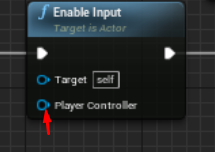 white crypt
you are telling which controller should have the input enabled
icy schooner
same for disable?
white crypt
yup
icy schooner
i messed up my script a little bit but other than that yeah the door opens now
thank you so much!
white crypt
you're welcome 🙂
icy schooner
alright i got everything working
 zealous moth
anyone have a suggestion for add a projectile motion to an actor? I got the component but i need it delayed until a specific input is set.
icy schooner
probably could be alot better but works ;/
white crypt
you could probably get rid of some branches and bools, but other than that it looks fine. dont stress about it
@zealous moth not exactly sure what you mean, but couldnt you activate/deactivate the comp when needed?
zealous moth
yup, activate/deactivate worked 🙂
white crypt
ahh. was a bit late 😄
icy schooner
@white crypt thanks alot again
 drifting fractal
Hello, is it possible to retrieve the player controller ID from UI's OnKeyDown function by breaking the InKeyEvent and use the Get User Index, because i keep getting 0 despite i have a second controller pressing the button which it should shows 1 but instead i got 0 which is the first controller id
white crypt
@drifting fractal when adding a widget you need to specify the controller
you sure you added it on the index 1?
white crypt
dont thank me yet, see if it works. i've never tried getting controller ID like in your example 😄
but theoretically it should work
drifting fractal
hmm because im doing a local coop game, so all the UI is basically shared in one screen and only by first player controller
i need to figure out other way to retrieve the other player input and know their index i guess
white crypt
maybe you could add a variable for each controller(inside the widget) and expose that parameter when adding the widget. that way you would have a reference to a specific controller
drifting fractal
ill take a look on that, thanks.
mild pine
How can I ensure that my sliced procedural meshes don't apply physics until after they've been sliced? I've tried setting the hit component/actor to simulate physics, but no results.
 latent junco
Hey, I'm trying to produce this kind of movement in my Controller, using WASD input (button press flips the dice once in the direction of the press), but I'm having major issues with calculating the rotation correctly.
Here's my dice setup. I translate the root, but rotate the StaticMesh component so that the Actor always keeps the same rotation.
and here's my code that fires on tick when IsMoving is active
I'm unclear on how to lerp rotators correctly over time, and also, my math seems to be doing some wonky stuff on the rotators, namely once I get into >360degree rotations on the cube
white crypt
wouldnt it be much easier to use inroot animation for that cube? so you would only need to rotate in which direction the animation will be played
just thinking out loud
latent junco
Would there be a difference though?
white crypt
you could get rid of all the calculations
and would only need to play the animation
root animation will move that cube byitself
latent junco
aaah, I misunderstood, you're saying animation with rootTransform baked in
white crypt
yeah, it might have some limitations but thats the approach i would take. seems to be much simpler
latent junco
could get tricky down the line as I want to have cubes be able to stack on top of each other, and the stacks to topple over as well
white crypt
oh yeah, then going that route wouldnt be perfect. since its hard to tell whats wrong in your example i thought will suggest another approach
latent junco
Aye, appreciate it anyhow, didn't even think of root motion yet, but yeah, seems to create as many problems as it solves 😄
Ah, I found something that seems to cover this, weeee 😄 https://cybereality.com/tutorial-how-to-make-a-cube-roll-on-a-grid-in-unreal-engine-4/
quick lark
Hi folks, what is the high level approach for an actor to create an invisible component and move it around in world space such that the component's position is not slaved to the actor's position?
 cinder shale
Hello
is anyone aroud who can maybe help me out with my blueprint( I'm just learning and i am following this tutorial https://www.youtube.com/watch?v=HXVeu2-vmaw) however i think this is outdated beacuse unreal is forceing me to only do it one way and not that way showed in the video. here is some screen shots of what im trying to do ( im trying to make inside lights for a helicopter and i want all the light to come on at once.
screenshots from my work: https://gyazo.com/769b4b177c49110247f23fbb51e35a05

 white crypt
just formulate your problem into couple of sentences and share some pictures that are related to your problem
 pale veldt
is this a channel for questions?
 topaz iron
I'm trying to get a character to spawn from an other character, but having issues geting the spawn npcs location to register
white crypt
are you getting accessed none errors?
pale veldt
(I am new to blueprints) I am setting the actor rotation to the camera view, how can I seperate the X and Y axis so that it doesnt rotate my char when I go up and down with my mouse?
white crypt
yup, your zeppline probably is invalid
meaning the reference is empty
you need to set it before using it
topaz iron
white crypt
yeah you only added that variable, but its empty
it holds no informaton
you need to set it somewhere in your event graph
white crypt
easiest way to get that reference is using get all actors of class, its not ideal but you can test it to make sure your logic works
topaz iron
I set it as a character?
white crypt
that wont help you, your reference will still be empty
 frank karma
Can u help me with m'y project
topaz iron
I will try around! Still new so it might take some time, cheers!
white crypt
yeah it will take some time to learn all the basics, i could give give you some ideas how to get that reference but i think you will struggle without any visual examples
@topaz iron watch this https://www.youtube.com/watch?v=EM_HYqQdToE
Announce Post: https://forums.unrealengine.com/showthread.php?101051
This Training Stream takes a look at Blueprint Communication. We find that Unreal Developers of all levels can sometimes struggle through the concepts behind moving data between objects. So in this video we'...
white crypt
np
@cinder shale does your inputaction use work?
add a print string to see if it gets printed
frank karma
Tsauken Can u help me
white crypt
just write your issue and give some pictures if possible
asking people if they can help wont get you far
frank karma

sorry for the shitty tutorial, if you would like to see the entire system, or follow a text tutorial, click one of these links:
Text tut - https://www.reddit.com/r/unrealengine/comments/emb5pb/grappling_hook_text_tutorial/
reddit post - https://www.reddit.com/r/unrealengine/...
I tried this it work fine but how to make the gun follow the hook Point like in thé video
white crypt
you can use find look at rotation
as a start point you use gun location and as target you use the impact point
frank karma
I tried it doesn't work
white crypt
show me how you tried it
white crypt
do you run that on tick?
white crypt
can you show all the code before that?
and send a screen cap
not from your phone 😄
 frank karma
white crypt
frank karma
white crypt
where do you set this one?
frank karma
Target
frank karma
Target
 trim matrix
i have a question i want to make walkable planets and im looking for the best way to make the planets & working with terrain paint if possible how would i do that the best way ?
frank karma
white crypt
can you zoom out and show all of the code? you need to get discord on your pc
frank karma
pale veldt
How can I only take the Z axis in the set actorrot?
trim matrix
is there maybe a way to make the terrain round ?
white crypt
@pale veldt right click on the rotator and click split
@frank karma its a bit hard to tell just from these pictures. this part you have shown https://cdn.discordapp.com/attachments/221798862938046464/714936057556107294/JPEG_20200526_212033.jpg

is fine
your problem is the target, try adding print string and see what it prints
your target should be the end point of your hook
pale veldt
@white crypt but than its a float
pale veldt
thx it worked
frank karma
Yeah i know for thé target i choisse the hookshot Vector witch is thé location in break hit result
white crypt
shouldnt it be impact point?
frank karma
I will try
white crypt
i mean the way you are setting the end point of your "rope" should be the same for rotating your gun
try using some print strings, that should be your best friend
see if the code reaches the end, check what hookpoint prints. if it makes any sense or not
frank karma
I tried thé impact point it doesn't work
And for what u Saïd sorry i didn't understand a thing
But thx anyway and sorry for wasting Ur time
white crypt
😦
its probably a very easy fix, but would need to see your whole code
and not taken with your phone
frank karma
M'y pc suck i will download discord and Come back i think
white crypt
BlueprintUE
BlueprintUE.com is a tool for sharing, rendering and rating blueprints for Unreal Engine 4. UE4 is a game engine which use visual scripting called blueprint.
you can use this as well, for sharing code
frank karma
Just give me an hour and i will send thé blueprint pls wait i beg u
white crypt
i will be sleeping by then, but someone else might be able to help you
frank karma
Ok good night and sorry
white crypt
no need to apologize, im pretty sure your problem is a pretty simple one. if no one helps you later on you can send me your project and i will fix it in couple of minutes (tomorrow that is)
frank karma
Men thx am apologin because i am wasting Ur time for some dump thing
 alpine crane
Hey so im pretty new to unreal and im trying to figure out how i would go about making a chain knife sort of thing
so you can throw an object and it comes back to basically
sand shore
That's a pretty specific, complex mechanic. I'd say you want to try using a homing projectile with a cable component linking it to your pawns root. When you spawn it in, have it wait a few seconds before homing with the target set to your pawn
Very very high level suggestion, I have no specific examples, tuts, or prior success using that method.
zealous moth
is there a way to detect overlap hits with static mesh objects of any kind?
 hushed topaz
Hey, I'm making a tree that you can cut down in game in a BP. When I add the Static Mesh component for the tree itself, should I use the StaticMesh Component or InstancedStaticMesh Component? What's the difference?
@zealous moth Yes, set your collision in the mesh to overlap instead of block, and click 'generate overlap events'
That will let you branch off a 'on overlap' event to fire off stuff
 sonic crescent
Hi! i'm still beating my head to understand unreal ^^ very fun. But again, i have a problem. I Trace onto a Floor with no problem. But if the Floor have been spawn, then the trace pass through. Any idea?
 cerulean pivot
Hello, I'm trying to rotate the ship based on the x/y input from the analog stick and online I found something that would fit what I'm looking for
x_axis = lerp(x_axis, raw_x, 2.4 * delta)
y_axis = lerp(y_axis, raw_y, 2.4 * delta)
So, basically I need the lerp of the #_Axis plus the the input from the analog stick and delta time.
Anyone knows how to translate this into unreal's nodes? :P
 acoustic lava
bruh
so ez to convert it
go try first lol
send a screen of your bp with that
Y_Axis is float ofc( just make it and then on tick update it) then use it to modify
@cerulean pivot Im doing it for you
@cerulean pivot Um, why do you use lerp, and its a set value
 hot fjord
Hello, Im running into an issue. Basically, I hve a system somewhat like a healthbar, which regenerates. But unlike most healthbars in games, mine is only supposed to start regenerating, once it hits 0 as a value. So, I cant just put a condition like if HP < Max HP.
The problem I have, that the regeneration ticks stop occuring after the first tick, which makes the Value be superior to 0.
trim matrix
Hi, which channel is for help?
hot fjord
I tihnk here depending on what you need help on
trim matrix
importing a model lmao
 lusty escarp
@hot fjord Try a 'Compare' Node. can use the = AND < to check if the current HP is equal or less than 0
 void cobalt
does anyone know how to merge 3 static meshes into one?
lusty escarp
@void cobalt is the Static mesh here the muzzle flash?
acoustic lava
Damn nice muzzle flash 😦
I want it too, btw I think you gotta go to blender
and make it
lusty escarp
If you are wanting the Muzzle flash to appear when the guns fires, this probably isn't the best way to do it. Spawning an Emitter on the MuzzleTransform would be better
But if your way is the way to want to go, then one way i know how to create static meshes by combining, is you place the static meshes in the world, place them as desired, and the highlight them all and click merge actors ( or something similar, Can't remember the correct name)
lusty escarp
Not that I know of
void cobalt
yikes
how would i do it with an emitter then?
this is currently what i have
i used a tutorial for it
lusty escarp
Whats inside the 'Play Muzzle Flash'?
void cobalt
nothing yet
lusty escarp
ah okay
void cobalt
i dont know wether to use macro or a function
bcuz one tutorial said to use a macro, but another one to use function
lusty escarp
I personally find it coders choice what they use. I personally would use a Function
Inside that function do this
Wait, are you using a static mesh or skeletal mesh for the weapon?
void cobalt
weapon is skeletal mesh
lusty escarp
good,
void cobalt
its the default for fps gamemode
btw i am still very new and learning coding and unreal engine
by coding i also mean blueprint
void cobalt
ok
lusty escarp
this socket needs to be placed on the Weapons Muzzle location
void cobalt
ye
void cobalt
in the function you mean?
lusty escarp
and in the 'Socket Name' type the Muzzle Name
yeah inside that function you created
lusty escarp
then you can use the 'SpawnEmitterAtLocation' node to spawn an emiiter at the Muzzle's Location
So, it should roughly look like this
void cobalt
i dont have sounds yet, so do i just attach spawn emitter to the start function?
lusty escarp
yep
void cobalt
ok
short plaza
@sharp temple Works man! thank you!
void cobalt
where do i get get control rotation from?
lusty escarp
The 'ControlRotation' comes from the PlayerCharacter
'GetPlayerCharacter' - 'GetControlRotation'
lusty escarp
okay, from there, drag off and type cast to [YOUR CHARACTER NAME HERE]
void cobalt
i got the cast
 dapper nest
is there a way to check if a bullet is overlapping geometry?
lusty escarp
@hot fjord , does the Branch fire True?
hot fjord
Hmmm...
I think I can technically remove the compare, but I still have the issue of it stopping once the value changes to 1
Basically I can get the regen to work form 0 to 1
but since it's 1
it's not 0 anymore, so it stops
and I want it to max out first
lusty escarp
the Min Spirit is 0, and the Max is 1?
lusty escarp
@void cobalt Right click on that cast, and convert to pure
hot fjord
if Spirit = 0
void cobalt
ok
lusty escarp
@void cobalt drag off that and get the control rotation
hot fjord
which makes it stop at one and doesnt proceed to 2000
lusty escarp
@void cobalt The Control Rotation is the Direction in which the player is facing, meaning the Muzzle flash will also follow that direction
void cobalt
ah i see
lusty escarp
and yes, but there are many tutorials online, i don't have much expertise this particles
void cobalt
ok
lusty escarp
I'll link you one @void cobalt https://www.youtube.com/watch?v=7OeyICXSdVE
Support me on - https://www.patreon.com/Ashif
Support me on - paypal.me/9953280644
. In this tutorial you will learn how to create Muzzle Flash in unreal engine. you will learn every step for this effect texture, materials, mesh and emitters. For any concern comment below the ...
Goes through the whole process
void cobalt
thanks 🙂
dapper nest
is there a way to check if a bullet(actor) is overlapping geometry?
lusty escarp
Also, @hot fjord , Wanna make sure I'm getting this right. You CurrentSpirit Float decreases and can only be regened if it is a 0?
@dapper nest Use a Sphere Collision on the Bullet and Use the OnComponnentOverlap Event Build in to check the the collision has overlapped with anything
lusty escarp
Do you want it to fully regen before decreasing, or can it be decreased at any value
hot fjord
i want it to fully regen for starters
void cobalt
@lusty escarp is there a benefit to using an emitter rather than the way i was gonna do it originally? like is it more performance friendly or what?
lusty escarp
@hot fjord https://blueprintue.com/blueprint/5tfn6tdv/
BlueprintUE
This is my Stamina Regen Blueprint
More than welcome to modify/use it
@void cobalt I presume you were going to set the Static mesh to visible and then a millisecond later to invisible?
void cobalt
yeah
 tribal axle
how can I make the gameplay screen black with blueprint?
lusty escarp
I mean there is no 'right' way to do things, but it's best to try and keep as streamlined and as easy as possible to change
tight schooner
@tribal axle use a postprocessing component maybe.
lusty escarp
@hot fjord Default Variables: Stamina = 100, Sprint Speed = 800, Walk Speed = 500, StaminaDecay = 10, StaminaRegen = 5, Min Stamina to be able to Run Again = 20
tribal axle
Post Processing component?
tight schooner
I don't have UE open but it has a name like that. It's a component you can add to a blueprint
You can control it with BP to alter screenspace stuff like exposure levels and whatnot
tight schooner
I use it in my project to do fades on beginplay and red color tints on damage and stuff
 still sigil
You could also cheat it, and just use a widget that's just a black box, and change it's transparency when needed. 😛
tight schooner
That would work too
still sigil
Gonna repost this, now that it's quieted down a bit. I was wondering if I could get some help on Player Hearing sensing. There's surprisingly very little info on it. I'm trying to create it to where when my enemy character hears a sound from a "Make Noise" node, they run over to that sound's location to investigate. This works perfectly fine for the player character, but not for any other pawns. Yes, I know. "Player Sensing." Only works for the player character, I know. But I unchecked the "Only Sense Players" box, so that it can detect other pawns, and the weirdest thing is, when another pawn makes a noise, the enemy DOES react to it, however the enemy won't run over to the sound's location. He only does so if the player is the one making the sound.

 toxic vector
Hey all, I'm wondering if anyone can point me to any good resources on building animBP's for beginners? At the moment I can really only find stuff that tells you what to do rather than really explaining what things are
cinder shale
Maybe this is not the place for this however i will say it as i could use a teammate or mentor.
Hello and good day my name is Alex new to unreal engine 4. I'm currently looking for someone who would be interested in struggling with me to learn and make a a basic 3d Multiplayer FPS game. (inspired by arma and tarkov) then will be released on steam for free.
currently I'm messing around with learning blueprints. as I'm attempting to make a fully functional helicopter with realistic moment and light and sound ( just like the kids toys) anyways. if your interested in making some friends and maybe want to help me out or teach me or struggle learning give me a pm and add me here on discord.
note that we can also use this to edit one project:https://docs.unrealengine.com/en-US/Engine/Editor/MultiUser/index.html
Get multiple users on different computers into a shared Unreal Editor session, collaborating live to build content together.
toxic vector
@cinder shale hey mate, I'm mentor hehe but wondering, are you new to game dev or just UE4?
Sorry I meant to say I'm NO mentor 😂
cinder shale
new to unreal engine 4 in a way ( used it in 2015) but as of recently i really got a passion for it learning
im new to game dev to 😦 sadly @toxic vector
toxic vector
That's great! I've been level designing on and off for 20 years now, as an amateur but only just started to wanting to work with game mechanics etc.
cinder shale
Yeah programming is so critical
toxic vector
I'm asking because your scope seems too large for a beginner, not to seem discouraging.. Perhaps a simpler projects and work your way up to that kind of game first?
cinder shale
but that's why i love unreal it has blueprints as im not the best at old fashion coding
toxic vector
Neither am I! I've justed started learning blueprints myself to very slowly make my own 3rd person game.. Not aiming to sell, but just because I have an idea and I'd like to see it on screen hehe
cinder shale
i agree with you and i know its the way i should to baby steps however at the same time i feel like picking one part of what you want in your game and thne working on that. at this point that would be a CH53 Super station helicopter
toxic vector
Yes, I see. That's what I'm aiming to do myself, work on things slowly one at a timd
*time
But my scope is much less than yours, but it may grow over time as I get more knowledge and experience
cinder shale
do you want to help Blood or nah ?
toxic vector
I would love to help but I don't have the experience you need
And I have a family of 3 with a new born so time is a limiting factor, just barely enough for my own work 😂
But hey, if you want some to walk the walk with, share stuff, encourage etc I'm all for that
cinder shale
cool ill add you ass a friend and keep that in mind ty
 lean furnace
Hi, I'm not sure if this is the right place for this but i was wondering how can i play this for 14 frames each time the player presses a button. I made this blueprint for the couch but am unsure where to go from here
An example of what i am trying to, if you had a revolver animation how would you cycle the cylinder one position each time it is fired
mild pine
@white crypt Hmm, how can I set the sliced mesh's variable though? The variable is being referred within my weapon BP, so I'd need to call to each specific weapon class in that case?
 white crypt
make a parent blueprint for slicing objects, then create a child out of it
then under default settings you will see the "slice material"
and change that
in general try to look how child blueprints work. im trying to sleep so hopefully somebody else can help if you are still strugling
 snow halo
Hey All, wondering if anyone could help offer any last minute help on getting a skeletal mesh head to track an actor (in this video it's the camera actor). In a probably hacked way it is working as long as the character deer blueprint's rotation is 0, 0 ,0. The important axis being Z, but if i rotate the blueprint in the level, that rotation is not being taken into account
that's where i create the rotator inside the deer char bp, then i o course feed that into an anim bp transform head bone
but how do i account for the direction the char bp is facing?
tight schooner
@snow halo maybe convert the look-at target vector to local space by unrotating it. I forget exactly what the node is called but if you dig around you should find it. You'd probably have to localize the vector too first by subtracting the deer's location from the target's location. Then unrotate. Then I think you'll have the target actor's location in the deer's localspace. Then you find look-at from 0,0,0 to target.
 zenith pond
Anyone ever run into hitting f to focus on a blueprint zooms you out extremely far into to pure blackness?
still sigil
@snow halo That actually sounds like almost the exact same problem I've been having with my NPC, except mine's related to a HUD element. But it's the same issue. It looks at the player fine if rotated at a certain angle, but then the second I rotate the BP, the look at rotation doesn't carry over, and it breaks.
mild pine
Hmm thanks, didn't mean to wake you Tsauken. So still struggling with this, for some reason it's not casting to the slice parent (parent of my different weapon types, containing only the slice setup). I'm casting to the Slicer BP in the procedural mesh in order to get the reference to the material variable (calling this on tick just to debug), but the cast fails:
https://gyazo.com/04f967dcb55f37625f6b8e62dbff9012
The slice parent BP:
https://gyazo.com/848b4170684a7e7027b06e4baf8533f5
Think its becoming too late for me to continue, gotta sleep on this one haha, confusing myself


 tight schooner
Or maybe you can do what you're already doing but combine rotators at the end — the deer's rotation with the lookat's rotator. Or maybe it's the other way around. One of those might work. @snow halo
The node is lit. called combine rotators, iirc
hidden zodiac
so, i printing a random integer in a for loop, why i'm getting so many repeated values?
@hidden zodiac
@subtle blaze & @maiden wadi, solved the last night trouble i had with the random integer, i created a random stream variable seeded by current time ms outside the for loops, it appears that the random class instance is created separately for every BP function call, its random seed was probably not generated by system time ms, the code execution time was defining almost the same seeds probably because it was running in similar time frames after the object creation, so most of times it would generate the same integers. Solved by putting the random stream object in a variable so it runs truly over the same random stream.
zealous moth
@zenith pond yes, it means that your actor has a large or infinite component; select a specific component in it and press f
weary spire
dumb question, what i the correct way to have the crosshair centerd
i added one in a widget BP centered it
then i made a HUD BP, with a different crosshair texture
and used this logic to center it
yet, i'm getting this in PIE
zealous moth
@weary spire you gotta account for your crosshair's size
weary spire
is 16x16 .. i added those params in the screen wxh
snow halo
@tight schooner @still sigil thank u so much for the suggestions. I'll look into all of them! A bit frantic right now testing out ideas
hidden zodiac
Hello, I'm creating a camera that it turn around objects with spring arm when holding the mouse left, strangely the mouse left event works just once, the release event works every time, anyone gone trough this? If i hold my right button and left after the event registers, but its not what it's intended.
 olive ingot
Hi, I'm trying to make my own soundboard in UE4.
All I need is to make my keybinds work when the program is minimized. Does anyone know how?
Thank you for looking into this 🙂
hidden zodiac
@olive ingot, I don't think you can do that with blueprints, you should look forward to do it in cpp, when the focus is lost the UGameViewportClient::LostFocus() is called, at that time APlayerController::FlushPressedKeys() are called and the inputs are erased, you will need to modify the engine for that.
olive ingot
ah I see. Thank you very much!
 fickle rain
I want rewarded ad on continue button.and i want this continue button only for one time after death.can any buddy help me.
maiden wadi
@dapper nest likely because the sphere collision component never overlaps anything.
dapper nest
how do i make it overlap stuff
ok wait i got it to overlap stuff, but it only triggers when it overlaps an actor
it doesn't trigger when it overlaps geometry, it just goes right through
maiden wadi
Like BSP geometry?
maiden wadi
Yeah, BSP stuff. I'm not sure where their collision settings are.
 still lily
is there anyway to pause an ai's pathing using blueprints? (and i do mean "pause" not "stop")
maiden wadi
I doubt there's anything built in for pausing an AI's pathing. Most likely you would need to save their destination at the time of "pause" and call a move to that location once the pause is over.
dapper nest
so how do i make the bullet destroy when it hits geometry, it can't be impossible right?
still lily
okies thanks ^^