#blueprint
402296 messages · Page 468 of 403
 deft ingot
I just loaded up the Editor after not touching it at all since yesterday.
How do I just "redo" that?
Nvm, it doesn't matter. After not being able to do things without step by step instructions, I finally, with help, get things working, even alter them to my liking, and then UE4 just s**ts on me. Whatever.
 earnest mural
quick question: how do i get a certain widget?
 hallow night
Save the reference or use get all widgets of class and get the first widget from the array
 swift falcon
Anyone know how to setup steam achievements?
Im having a hard time setting up a kill counter for 5k deaths of a certain type of enemy
 zenith scarab
@swift falcon there are videos on YouTube about it
zenith scarab

In this video I show you how to setup the Steamworks SDK for UE4 and then create Steam Achievements.
Links:
Main Code: http://pastebin.com/TzFvwyXh
Achievements Code: http://pastebin.com/Mzj5k02u
Steamworks Website: https://partner.steamgames.com/?goto=%2Fhome
Music:
Tobu ...
You don't need the setup part
After half of it he goes about creating archievments
swift falcon
See i get all of that
its just the actual achievements creation part that confuses me
zenith scarab
Okay and what's the problem then?
swift falcon
whenever its a 0-1 float it works thats fine but whenever i need to count kill destroy X objects it never seems to work
zenith scarab
You can use a save game object to save your stuff like how much kills you have and add one to the value and resave after killing, then after incrementing compare the value to 5k if its equal do the archivement part thing
zenith scarab
I just said you can do it that way
swift falcon
Well whenever 1 get 1 kill it completes the achievement...
zenith scarab
How do you call the archivement?
zenith scarab
What does it return in the print string?
swift falcon
zenith scarab
And it shows the right archivement getting unlocked even though the values returned are different?
swift falcon
yeah...
watch i'll record a gyazo gif
You'll see i reset the achievements
since it says i had it already
via the console command built in UE4
swift falcon
testing
zenith scarab
So we know that when successful how the values are
swift falcon
zenith scarab
Why does it print so often?
zenith scarab
I'm not sure if you have to add the value to the default engine. Uni as well as the archivement
*. Ini
zenith scarab
Unreal Engine Forums
Hello :)
After spending noticable amount of time implementing Steam achievements in my own game made in Unreal Engine 4, I realized that the subject is not
There is an example on what you would need
He/she mentions that using the set progress node will unlock it if it has a value of >0
So you need to set a leader board value and compare that to your 5k if its > then do the archivement part
@swift falcon
swift falcon
o...
zenith scarab
Hope that helps
swift falcon
i think i get it...
 alpine halo
@lilac lance yea right now I've created a macro for that
 stoic silo
Can any one tell me is it possible to BP code is implement what in vr is in TPS or FPS .
 trim matrix
should i keep dialogue in my level BP?
 lean thistle
Does anyone know how to stop the floaty movement of the flying mode? When I stop adding movement input I want my velocity to hit zero instantly
 young vessel
Is it entirely possible, that a component CAN'T listen for input events???
 surreal peak
In BPs, that sounds possible yeah
That said. Even in cpp they dont directly listen for input events. But actors have to actively bind events to on the inputcomponent and there they can specify object and function. The would allow specifying a component instance
 devout pine
Sorry if this is a n00b question, but I don't know how to get access to my skeletal mesh's physics asset's constraints, via blueprints.
I'm just trying to change a specific constraint's property at runtime
I can get this far, but not sure what to do next
zenith scarab
@devout pine what exactly are you trying to do?
devout pine
Trying to delete a physics constraint between a warrior and his sword at a specific moment during runtime
zenith scarab
Uuhm okay, but why?
devout pine
well i'd like it to be attached to his ragdoll to do blended physics animation
but to come loose when he's killed
zenith scarab
Well having the mesh and the sword in 2 pieces is what you need
You can attach the sword to the right location and detach it and set simulate physics on when killed
zenith scarab
Yes and attach the sword to that socket
devout pine
makes sense
zenith scarab
What you can also do when your mesh is sword and character combined is "simulate physics after bone" or something similar is it called
devout pine
hmmm
devout pine
right
so this asset I bought has the sword as part of the skeleton
I guess I need to figure out how to get rid of it
devout pine
yea
but the first thing I have to do is remove the sword from this guy's default skeleton, right?
zenith scarab
No that way is without removing it
Enter the sword1 as bone there
And set simulate true
You can try it by calling that node when you press 1
For example
devout pine
hmmmm
well it would still be attached to the hand though
if they both are simulating physics a little bit, right?
zenith scarab
It would be simulated, so normally it wouldn't be dragged around when the character moves
As I said try it out
And see if it is working four you
devout pine
ok so you're saying to just tell the sword to simulate physics and nothing else?
zenith scarab
I said try that node on the sword bone and see if that's what you are looking for, not less, not more
 gusty surge
is there any way to do something like this but more efficient way ?
It's just like counting to 100 and set it back to 0 and count it again
devout pine
@zenith scarab I think that would work fine to simulate the sword bone by itself, but I want the other bones to be simulating physics too, which is what I'm already doing.
@gusty surge Maybe a timeline?
zenith scarab
You can use a timeline with a value going from 0 to 100 and back set the timeline to be looped @gusty surge
*looped
@devout pine ah okay so you are simulating the whole body and the sword stays in the hand?
Another way is to hide the sword bone and spawn a sword mesh in that can simulate physics
devout pine
yes @zenith scarab that's correct
gusty surge
@devout pine It's movement event so it's has to be always running
zenith scarab
At the correct location with the correct rotation
devout pine
hmmm that makes sense....but now I have to figure out how to hide a bone
devout pine
ha that's a good one thanks!!
zenith scarab
You can do it in the corresponding character blueprint and using a cast set the value in the anim blueprint or vice versa set a value in the players BP and using try get pawn owner cast to it in the anim BP at the update event and set the own value to the characters value
devout pine
So I can hide the sword bone when I want the guy to drop the sword, but the collider is still there. The sword is invisible, but the ragdoll still acts as though he's holding the sword.
I don't want to delete the sword collider completely from the physics asset though, since I still want it when I blend physics with animation while the knight is still alive.
 maiden wadi
@lean thistle If you're talking about the FloatingPawnMovement component, turn up Deceleration and possibly Turning Boost. It needs an extremely high value to make it stop near instantly.
 compact owl
how should I make a blueprint spawn a random static mesh?
that works? but I would need to randomise the input... not sure what node to do
maiden wadi
@compact owl Select one based on random Integer.
maiden wadi
compact owl
oh haha select node
its so simple now youve told me
thanks
how did you get the select node to have the assets?
maiden wadi
the easiest way is to drag backwards off of the New Mesh pin from the SetStaticMesh node. But you can also do it with a default Select node by right clicking on the grey pin and selecting "Change Pin Type".
You can also change the bool pin with the right click method as well.
compact owl
amazing, thank you
 quaint palm
Hi there! I'm having trouble on seeing the variables the children BPs inherited from it's parent. Is there a specific place I should check so I can see them or maybe I missed a step on making them actually inheritit?
maiden wadi
@quaint palm Double check that you're showing them first. Make sure you have the Show Inherited Variables Checkbox here checked.
trim matrix
How do avoid error message in log when Get Component By Class can't find skeletal mesh? Even though i use the Is valid node it still gives me an error
nevermind i fixed it
 radiant spire
Hey there, I am making a simple inventory system, I have created a structure where I am keeping the object classes, names and inventory icons, the problem is that I can't assign an image file to the icon array elements (they simply do not appear in selection menu). Can anyone help me with assigning images to the icons array ?
 jovial bobcat
is there a node for like is all three boolean is all true
or is there are node that is like is vector smaller in length than another one
 lilac lance
@radiant spire send some more info.
I did a similar things with profiles.
There was a widget that had an image and all asociated info to the profile.
Then from another widget you can add the one you just created.
You can add widgets to widgets.
They appear on the components menu.
Then when i created the vertical container wich will be filled with a for loop depending on how many profiles they are, and do all the operations necessary like change the brush for the image, or get the name.
This is just one way of doing it.
 solar needle
What the purposes of casting ?
 shy flower
Newbie here with a quick question:
I have a PlayerCharacter blueprint class which has an InputAxisMoveForward node in its Event Graph which controls movement..
When I add another InputAxisMoveForward node in the PlayerCharacterController class's Event Graph, my PlayerCharacter Pawn no longer moves.. why is this so?
surreal peak
@shy flower Actors (or rather their input components) that can and want to receive Input are saved in a list. If any Actor in that list implements the input, there are two things that can happen:
It consumes the input, no longer allowing any following Actor in line to receive the event.
OR
Not consuming the input, allowing the next Actor in line to receive the event, which then also can consume or not.
You can toggle that behavior on the input node itself. If you click on the one in your controller and you turn off the consume input option, it should allow both to execute.
Epic's documentation on input handling has an image with what gets the event in what order. Actors that you cann EnableInput on for example are the first ones to get a chance to handle and consume the event.
I recommend googling for that docs page (:
shy flower
Great help! Appreciate the insightful response
 proven fossil
@solar needle The point of casting is that you might want to access a subclass specific function or property. For example, Character is a subclass of Actor. You can pass around instances of Character as Actor. However, if you want to access a specific function or property stored in Character, then you need to cast the Actor into a Character first.
trim matrix
how do i make the actors face the direction it is moving
when i activate RVO, it seems to face forward while moving sideways
maiden wadi
@trim matrix Are you allowing strafing? If not, you could always make it rotate towards velocity.
trim matrix
strafing?
i dont see that in the character movement
is there a setting to make it rotate toward velocity?
maiden wadi
I think the strafing setting is inside of the AIController class.
It's usually off by default, so I doubt you have it enabled.
trim matrix
ya its off
the actors are moving sideways from rvo
orient rotation to movement doesnt work
maiden wadi
I'm having a memory issue. Is RVO the one that shoves the other actor to the side, or was that the other crowd avoidance thing I can't remember the name of?
trim matrix
its the crowd avoidance
theres one that shoves other actor to the side?
soo if an actor moves towards other actor, it will avoid and try to move around it
so it moves sideways... but it doesnt face the sideways direction
 maiden wadi
Not a clue. Haven't done a lot of AI work.
trim matrix
mmm it says detour doesnt work with rvo
"funny since Mieskzo said that DetourCrowd Controller and RVO is incompatible... https://answers.unrealengine.com/questions/205127/view.html"
literally in the comments section
 dim kiln
hey guys :)
I get errors with my break hit, any idea how if it returns none not to go to the switch?
trim matrix
aight
i figured it out, just disabled all the rotational logic in movement and wrote one
heres the logic
maiden wadi
@dim kiln First off, you should generally always have two checks when you're tracing. First branch and as if the hit even hit anything at all, and second is to make sure that whatever you're using is valid.
It'll save you a lot of headache checking those before trying to do anything.
 sudden creek
Just need some quick help, how can i make the text update every frame? right now it only sets the text of the variable but i want it to continusly update
dim kiln
@dim kiln First off, you should generally always have two checks when you're tracing. First branch and as if the hit even hit anything at all, and second is to make sure that whatever you're using is valid.
@maiden wadi thank you so much, this is exactly the answer I was looking for ❤️
 heavy lion
If you were to create a chain of logic that handles player respawning, based on various prerequisites. Would you build that logic in the player controller, or would the game mode class be a more logical place for it?
 rocky aspen
Is there a way to set custom gravity for stuff from BP? I can turn gravity on or off, but I want moon like gravity
heavy lion
@rocky aspen Set Gravity Scale
 ionic widget
Hello, How make BP with music. But I need music didnt restart if character die
rocky aspen
Attach a audio output to the actor , should dissapear when you kill the actor
heavy lion
@rocky aspen gravity scale affects the character movement
rocky aspen
Oh, this isn't an actor, just a base actor. Trying to replicate Half life Alyx's grabbing mechanic
maiden wadi
@sudden creek That looks right, except that you don't have the execution line hooked up. The "ReturnNode" is never running, so it's never returning anything.
sudden creek
I figured it out it was experimenting with something that's why i never hooked it up but it works now thanks.
ionic widget
@rocky aspen can you send me a screen of what BP will look like? I am stupid 🙂
heavy lion
This isnt an actor its a base actor? So then its an actor! haha
rocky aspen
That's a cube that plays music, and stops when I shoot it @ionic widget
well, dies when I shoot it
ionic widget
but I need keep play music and when character die music stop play and restart
 hollow remnant
Can someone help me with this? For some reason when I vault my character speeds up or something like this, I cant seem to fix this
trim matrix
Does anyone know how to convert UTC's swipe movement to isometric?
I really don't want to add 45 to the world. Just the swipe movement.
 charred flint
Hi guys I know I am in the wrong channel for this but I know that the blueprint channel is really helpfull so im going to try it ^^
My friend his son receives the following message:
gpu crashed or d3d device removed use -3d3ddebug to enable the d3d debug device check log for gpu state information
In this case he is trying to run fortnite but when I google it for them I receive messages this is unreal engine related. Does anyone ever had this?
trim matrix
Is there a way to grab the face normal of a hit object (or maybe traced object, anything would work) using blueprints?
rocky aspen
Face normal is an output from a line trace hit
actually you get the same hit struct from a physics hit too, so you can get it from there
@trim matrix
trim matrix
Oh, thanks! I dont know how I missed that :p
Would I be able to get some help with my swipe movement error please? 😦
rocky aspen
it's not entirely obvious you can break the hit result apart if you don't know what to look for

 rocky aspen
Looks like a simple trig thing no? You are getting up and down values that you don't actually want
you want to move the camera the hypotenuse of the screen movement , not the straight up and down value
trim matrix
How would you do that? 😥
In Bp I mean
45 right, but how would I convert what I get from the delta location and into the add offset node?
rocky aspen
You are getting the X and Y values, but want them projected onto your 45 degree angled world, so either do the trig in the 2d space, or project the vector onto another vector that's at your 45 degree angle
trim matrix
In the 2D space?
 full crypt
Can someone help? this is basic sprint thing, but with an error since im using a lerp type thing.
The longer you hold down shift, the longer it takes for the timeline to go backwards. the timeline goes 0 to 0.5 seconds and its value is 300 to 600.
rocky aspen
That sounds more like a feature than a bug? If your timeline is at the end and you release shift it'll just slowly return to zero
full crypt
no.
if i hold shift for 30 seconds, it will take 30 seconds for it to START the lerp down to 300.
rocky aspen
Oh
rocky aspen
your lenght is 5 seconds
rocky aspen
The curve ends at 0.5s, but if you look above the curve you have the field for total lenght
which is 5
full crypt
how do you reduce the length?
rocky aspen
 eager copper
anyone have links to good tuts on building system
full crypt
i figured it
rocky aspen
Set that to 0.5 and you should be fine
eager copper
preferably written
rocky aspen
Haha, no worries
trim matrix
DYJ, what did you mean to convert the x and y to 2D?
trim matrix
But if it’s touch coordinates?
rocky aspen
Same thing
trim matrix
 rocky aspen
All you have to do is to do the trig to get what you want, Sin(45) or whatever
trim matrix
Do I just multiply it? How would I convert. I’m honestly having a tough time finding a solution online
rocky aspen
Red is what you have, the touch input, and Blue is what you want
simple highschool problem right there
trim matrix
Ok... I get that.. but in BP, how would i implement it?
rocky aspen
Just do the maths between your input and outputs
trim matrix
Am i missing something? I feel like i'm not explaining or asking the question right. I understand to do the math between them, but how would i implement the nodes?
I tried this, but maybe i'm not getting it.
trim matrix
I wouldn't be able to use the UTC component would i?
rocky aspen
Ask the author
 white ferry
I'm trying to bind the boss enemy health to text, but it keeps showing up at 0. The health is clearly 10000 as it's showing on the top left.
This is how I'm doing it
I did the same thing for another enemy and it worked, anyone know how to fix this?
Darius is the boss btw
 neon jay
Hello! I'm making a conveyor belt for my game, how would I go about making it so that when the player goes on the conveyor at any point it moves the player to the centre of the conveyor along the forward vector so they will always fit through the holes. Thanks!
white ferry
@short coral I'm using an object reference. The Darius blueprint is a duplication of the third person character blueprint (with some changes), so I think it's set up correctly
 rough wing
@white ferry As far as I know the text doesn't update in runtime
white ferry
What do you mean?
 short coral
Debug it , set up a print statement and at least see if it is grabbing the correct value for his health
rough wing
Just print the text
neon jay
@rough wing I need the player to move along the middle of the conveyor belt, so when you walk onto the belt it snaps the player in the middle, if that makes sense
rough wing
See if its printing correct
@neon jay ohh, I guess when you enter the conveyor belt you can interpolate player position towards the center
There is a function called get closest point on line (or something like that)
You can use it
white ferry
It's printing 0 when I print from the Get Text function, but when I print it from the Darius blueprint, it's printing the correct value (10,000)
The problem is only with the binding
rough wing
I think I know the problem
You have a reference to the Darius class
But you didn't select the Darius in the game
white ferry
I used an object reference tho
neon jay
@rough wing Thank you I'll try! I did it another way using vectors and it was really simple but I stupidly deleted the code and can't remember how I did it now.
rough wing
Lol
white ferry
Also, what do you mean I didn't select him in the game?
rough wing
The reference in the function is for the Darius blueprint, but it doesn't directly reference the Darius in the scene. I don't know, but the problem is definitely with the reference
Can you show where you are setting the reference?
rough wing
Are you calling this widget from the Darius blueprint?
white ferry
If by calling the widget, you mean this, then I'm calling it from the level blueprint
neon jay
@white ferry There's a node called set text, you get a reference to your widget and get the text block you want to edit, then use set text
trim matrix
i am looking for someone who is experianced in blueprints who can help me merge and make something for a fps project im making is there someone who can help me out ?
i can pay for it depending on the price being asked
neon jay
@trim matrix What do you need? or DM me
white ferry
@neon jay You mean like this? The text box is called "HealthNumber", but I'm not seeing it here
trim matrix
@neon jay sended you a dm
rough wing
@trim matrix DM me I'll see what I can do
 white crypt
@white ferry have you promoted that text into a variable?
theres a check box near the name box
inside designer window

 tight venture
How do you force the view to recenter on all present nodes in a blueprint? Like if I accidentally zoomed way out then panned over a mile, then zoomed back in, how do I get the view back onto where all my stuff is?
white crypt
maybe one of those? https://prnt.sc/smybhc @tight venture

in your editor pref and shortcuts
white crypt
np, on that occasion will add my own bind as well 😄
 sonic crescent
Hi, sorry to pop like that with a question. What is the best way to fade my landscape at horizon? I have a poping moutain that i want to fade. Fog not really help. So I'm using PixelDepth Opacity but that fade too near.
tight venture
Cool, that's exactly what I was looking for, thx @white crypt
white crypt
@sonic crescent i think you would need to use world comp https://www.youtube.com/watch?v=4Jqe1MKj1qA
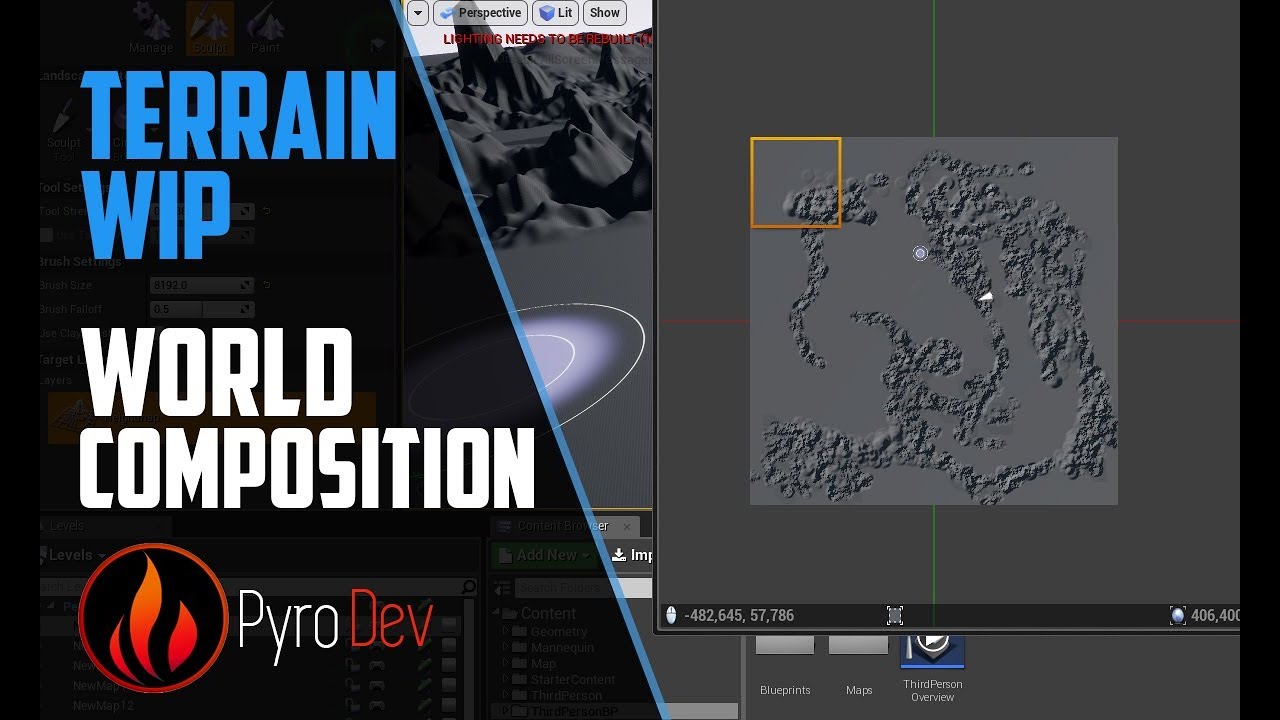
Hello everyone,
Today I show you a bit more about world composition and about its advantage in LOD settings
Do you have any Questions, wishes or anything else?
Just put it under the video I will answer your questions ...
unless your mountain is a static mesh then i guess you could add cull distance volume on top of it
white ferry
What am I supposed to put for "Select Asset"? I can't seem to connect Darius' health to set the text
@white crypt
white crypt
you are setting the variable in your example, you dont need to do that
first from hud type get health number
then drag from health and type set text
 quick lark
I'm having trouble getting a homing projectile movement component to succesfully hit a non-moving target. It seems to overshoot or undershoot. Any tips regarding this?
white crypt
is your projectile velocity set to 0.0.0 ?
it probably overshoots because it keeps adding to one of the axis
quick lark
Oh, I can't set an initial velocity?
aka setvelocityinlocalspace and then turn on homing a few seconds later?
white crypt
i think you can set the initial but it needs to be set back to 0. i havent played much with the homing aspect of the projectile mov
just remember having a similar problem and setting the velocity to 0 fixed the issue
quick lark
did you do that through the projectile movement component's "Set Velocity in Local Space" function?
white crypt
nope, in the details tab section
because by default it sets X to 1, so had to change that to a 0
white crypt
yeah, as I said it keeps adding to the X axis
should solve your problem, or atleast I hope so 😄
quick lark
didn't solve my issue, but I appreciate your help!
white ferry
@white crypt u mean like this? Cause it's giving me an error
Also, it doesn't seem to be setting the text
white crypt
@quick lark ahh thats a shame, maybe try looking at this tut https://www.youtube.com/watch?v=AM3TXKI-4co

What is the Projectile Movement Actor Component in Unreal Engine 4
Source Files: https://github.com/MWadstein/wtf-hdi-files
quick lark
thanks!
white crypt
no worries, that should cover most of the stuff you need
@white ferry it says accessed none
meaning your hud variable is NULL (empty)
where do you set that variable?
white ferry
Here I just set it to 0, but in the Darius blueprint I set it to his health value, 10000
white crypt
no, your bossHUD reference is empty
meaning you cant do anything with it before you set that variable
how are you adding bossHUD to your screen?
white ferry
Like this, in the level blueprint
white crypt
just because you are doing this in the level bp it will complicate your work
try to avoid using levelbps when possible
now you cant cast to the level to get the widget reference, so you will need another place to add that widget
its possible to keep it like this ofc but thats just a very bad practice
do you have a controller bp?
or just copy that create widget part to your dariusbp
white ferry
By controller do you mean this?
white crypt
thats a character but you can do it inside it as well
trim matrix
are there enums in blueprint?
trim matrix
do i need to define enums in C++
trim matrix
how do i define it
white crypt
 white crypt
if you dont need to define at runtime then you can do it inside bp
 haughty fossil
Is there any way to populate a tile view with an empty version of your entry widget automatically? Like let's say I have an inventory and I want it to just fill the extent of its size with empty borders?
white crypt
just click +new variable, click on it and set your desired type
 elfin hazel
You create an enum by right click content brower - blueprints - enum.
haughty fossil
Like this, and then when you add a new item it consumes one of those frames.
white crypt
@haughty fossil you will have to do the math yourself probbaly, just check how many collumns there are and fill the rest with empty slots
elfin hazel
@haughty fossil By having your inventory slots be objects.
white crypt
no red, robin told you what to do
once you make your own enum you can use it inside bp
haughty fossil
I see. I mean I know I can do that, I was just hoping there would be an easier way.
trim matrix
thanks
white crypt
dont think so, its a pretty simple math logic as well
elfin hazel
Sure, but the listview requires an object reference to generate an entry widget for.
haughty fossil
I mean it's not that hard, it's just super messy in blueprints.
white ferry
I just put it in the character blueprint, but how exactly do I set the variable?
haughty fossil
Maybe I should just make the empty frames a background behind the tile view. Might be hard to line it up properly with the entries though.
white crypt
@white ferry inside event graph type set bosshud
or drag it from the variable tab and set
and use the return value of create widget to set it
 elfin hazel
@haughty fossil Interesting idea. But how would you support drag & drop, or inserting objects in any spot? If you want to support that. Anyway, I recently used a tileview to display an inventory myself and it's really not that bad.
haughty fossil
I would just have the tile view be on top of the background. So whenever you click on anything inside it or drag anything inside it it will activate the tile view code instead of the background which is just overlayed in the back.
elfin hazel
Sure, but if you have 3 items that the tile view displays, they will always only occupy the first 3 slots.
haughty fossil
The most annoying aspect of doing it manually is the fact that my window is resizable and the amount of spaces in the inventory isn't static so it has to be updated dynamically on every addition or removal of an item.
elfin hazel
Ah yeah, if it's dynamic then tileview might not be the best.
haughty fossil
I think it'll work. I'll test this idea. I just need to get it to align properly and it should work.
white ferry
@white crypt Thanks a lot! That solves my problem
trim matrix
anybody familiar with Paint Context Variable
sorry i meant parameter... under a macros tab
using 4.24... where is my Pass-By-Reference option??
hollow remnant
Can someone help me with this? For some reason when I vault my character speeds up or something like this, I cant seem to fix this
 dapper cradle
Hi,
I have like 5 decals which I want to spawn into the scene when a button from a widget is pressed...
I made an actor class in order to do this but I am unsure on how to reference the decals in the bp ?
I was hoping i will be able to use the same bp to despawn them again when another button is pressed..
can anyone please remind me how I can get a reference for them in my actor class BP ? (having them highlighted and searching doesnt seem to get a reference...
and dragging them in from the world outliner also doesnt work XD
 worthy frost
Download the content examples project and look at the Blueprint Communication tutorials
 tidal venture
I made a Blueprintable UDataAsset and I would like to now restrict the available functions in the blueprint heavily. Whitelist would be preferred. How can I accomplish this or anything similar? If not being able to restrict functions, can I restrict usable data types somehow?
heavy lion
@dapper cradle Spawn an actor with a decal in it. Then despawn the same actor.
tidal venture
Is there really no way to restrict available functions/data types or at least events in an event graph of a custom asset? The list is massive and it seems error-prone to allow everything everywhere.
 rare gale
Help with Save/Load system?
I've attached a video explaining what's going on and showing blueprints in detail. Any help would be greatly appreciated even if it's just a way to debug. I'm at a loss. Please DM if you can help or need more info. Thanks.

I'm having trouble with the UE4 save load system for my inventory and could use some help. If you know what I'm doing wrong or at least can help debug it that would be great.
One thing I forgot to mention in the video. I have debug command I put into BP to print out the ID of...
tight venture
Is there a way to toggle a comment block in blueprints, i.e. put /* this */ around it?
Looks like this option is the closest it gets to what I am looking for. (I changed the key bindings for mine, by default they are unset)
Looks like this when you do it
tight venture
Question:
I have the following BP class inheritance structure set up:
    Foo
  /      \
Bar Baz
I am having any child of Foo contain a mesh component that is simulating physics, but Foo itself does not have one.
How should I retrieve the mesh component at runtime when all I have access to is a Foo?
I was thinking either:
- Put a blank mesh in Foo and attach the actual physics body to it in whatever child class inherits from it
or - Create an interface function that returns the physics body and have the children of Foo implement it.
or
Is there a better way?
Thanks.
zenith scarab
@rare gale where do you set the save game in variable btw?
i couldnt see that in the video
rare gale
In the GameInstance, when the save file is created or loaded if it exists already.
I think I've got this fixed, BTW. Seems using Insert for arrays causes issues if there's gaps so I'm filling empty slots with an empty version of the struct
that at least has me past the current hurdle
zenith scarab
okay fine, also set array element worked fine for me often
rare gale
yeah, my only reason for insert is that I need the items to be placed in the correct spot so Insert allows that
zenith scarab
why? you could add info in the data for which position it should have, or why is the array position so importasnt?
*important
really like the look of the game btw
rare gale
need to make sure equipped gear goes in the proper slot otherwise it puts a helm in the glove slot and wouldn't know how to handle that
thanks, Synty makes great assets to play with for hobby projects 🙂
zenith scarab
you can add a inetger for the category or an entry of an enumartion and also in the equipment slots, so when adding you can compare if the categorys are matching
*an integer
rare gale
ah, yeah... that could work actually. I think I may already have an int in there that I'm not even using for ID
I may have to go back and refactor that later but this seems to work for now
thanks for taking a look
zenith scarab
when loading cycle through all items and pickout the ones that have attached set to true, then for each of that items, cycle through the equipment slots with a for each loop with break and only when the integers ior categorys of the itrem and slot are macthing add it there and break the for each loop with breajk
 mild pine
Hey guys. How do I ensure that the procedural slice mesh is cut in the angle of my sword? I'm currently slicing with the use of a collision cube attached to the length of my sword's blade: https://gyazo.com/2ac4291af99c9797523058bfdb506e6f - guess I need to setup something with the Plane Normal?
zenith scarab
https://www.youtube.com/watch?v=oIdKxYYQBdw here is a great tutorial that could help you

Project Files : https://www.patreon.com/posts/30934762
Hello Everyone in this tutorial I will show you how to do procedural mesh slicing in Unreal engine 4. Using the first person blueprint. You can also rotate which way the mesh gets cut using the scroll wheel of your mouse
...
 umbral shard
How would I go about making a point light gradually change color from blue to red?
 tight schooner
@umbral shard Timeline with an interpolate linear color node
obligatory Mathew Wadstein video https://youtu.be/v7bdcvGlgIg
umbral shard
Thanks a lot!
 rustic salmon
Hello ppl, I have two projects which I have merged, one project is a shooter the other is a drivable vehicle both are 3rd person, and both have their own Game_Modes. Separately to use the drivable vehicle (enter/exit/drive/etc etc vehicle) the 3rd person walks up to it and is told to ' Press E to use Vehicle'. My question is: on the player pressing 'E' is there a way to switch Game_Modes? on press 'E' switches over to the Drivable Vehicle Game_Mode, then on pressing 'E' again switches back over to the default Game_mode. Something like EventBeginPlay>plays default Game_Mode>press 'E'>switch Game_Mode>press 'E' again>leave vehicle>switch Game_Mode back to default.
Does this make sense?
devout pine
@rustic salmon that is a good question, and I don't know the answer
I guess I'm curious as to what exactly is included in the "game mode"
young vessel
Thinking out loud....I believe GameModes can be overridden by Maps?? You could try having a shell map for either mode and switching between them? I've not done any work with having multiple maps loaded so this is pure guess work.
rustic salmon
maybe on Press 'E' I destroy my character, spawn the character that usually drives the vehicle, would that automatically switch over Game_Modes?
young vessel
I don't think so
rustic salmon
My question is similar to this guy
If I switch Game_Modes that would take care of my HUD issues I thought (dont Know)
 noble horizon
Hey everyone, I am experiencing an issue wherein my game behaves differently depending on whether I start the game from the level editor or an actor's blueprint. The issue is laid out here: https://forums.unrealengine.com/development-discussion/blueprint-visual-scripting/1766311-the-game-is-different-depending-on-where-i-chose-to-initiate-play I would appreciate some help
Unreal Engine Forums
My game behaves differently depending on whether I choose to play the game from the level, or from an actor blueprint. Here is a demonstration of the problem: https://youtu.be/DdqNJD2fmrk
You will see that, when the game is played from the level editor, the enemy (guy in whit...
 dapper nest
hey how come this doesn't work when i add this delay, but it does without the delay?
 zealous moth
@dapper nest if used in a sequence, delays are skipped
dapper nest
so how am i meant to use it?
zealous moth
it is organizational to a point but otherwise, run it as a separate linear event
dapper nest
i dont think i can, im using the on event destroyed
zealous moth
ah.. maybe it cannot hold delays
replace your sequence by a single delay and a print string
chances are it will never appear
dapper nest
it plays the sound but nothing past the delay, removing the delay makes everything work fine
 sand shore
After destroyed is called, the object is marked as pending kill - it may or may not survive through the delay, but I'm pretty sure delegates skip callbacks on objects which have been marked pending kill.
 rich lava
how come when i set the global time dilation to try add slomo the screen become shaky and not smooth slomo
 night crescent
I'm looking to get a Vector that's some distance away from an origin point in some direction, is there a builting BP node for that or is this actually solvable with basic vector math?
 static charm
multiply a vector by some number to create the vectored distance, and then add it to the origin location.
if you want random
type in random vector and see a few types of nodes
otherwise i don't understand which vector you want
night crescent
Yeah I have a direction, trying to get a vector in that direction some distance away from a given vector
static charm
mate, vector is a direction
i would describe what your tring to do in your game world
static charm
well re-word what you're trying to do using normal names in your game
"i have this actor/character and i want to spawn a enemy over here, facing behind the character, etc "
night crescent
I have a position and I'm trying to get a new position that's a given distance from it in a given direction
static charm
yes
i described earlier how to do it
multiply the direction/vector by the distance.
and then add that to the position
night crescent
Gotcha thanks
static charm
that first node is the vector * float
rough wing
@night crescent Also if you need special directions between x, y and z, you can use these functions:
-Find Look At Rotation (Finds direction between two points)
-Normalize (Converts a vector into a direction that you can use in the example Gallonmate gave)
-There are also some nodes that convert rotations to direction vectors.
By direction vector, I mean normalized vector
lilac lance
@night crescent quick tip
Trnsform includes all 3 things,, location, rotation and scale.
Location is the key word to search when wanting to move something.
Also you will find relative and world.
World meaning in relation to the center of the world, and relative meaning making the thing itself be the center for whatever units you want to change it.
night crescent
Yeah I was a bit confused at first as I was trying to apply the Rotation part of the Transform but I think I got it working as I wanted
Really just need to learn vector math I think
rough wing
You can get a direction from the rotation as well of course
dapper cradle
Hi,
I have a line trace that was made for me by somone else but I need to bump up the distance at which it will still select things.
Can anyone please advise me how I might do this ?
rich lava
how come when i set the global time dilation to try add slomo the screen become shaky and not smooth slomo
maiden wadi
@dapper cradle Usually to lengthen a line trace, you'll add to the multiplication of the forward vector.
@rich lava Depends on how you're using the time dilation elsewhere. What is shaky specifically?
rich lava
@maiden wadi when i move look around the camera its shaky almost also how would i make it so u can look around at a normal speed?
maiden wadi
Typically you would mitigate the actor with the camera from being affected by time dilation. But even with time dilation, it shouldn't be shaky, just a lot slower.
rich lava
like in this guys video https://www.youtube.com/watch?v=mJpt6Up8dXA it looks so smooth but mine is so much different
 mortal pilot
is there a way to bind input in blueprint outside of a pawn?
 deep elbow
controller
maiden wadi
Get a reference to the player controller and call EnableInput on the actor.
trim matrix
is there a way to set "Use RVO avoidance
and make it false
during runtime?
or rather, how do i make the AI ignore other AI that are stopped so that it can push them aside using physics
maiden wadi
Probably. Where is the option at in the first place?
trim matrix
character movement
i dont see the "set RVO avoidance"
or set bUseRVOAvoidance
i want the other actors to ignore stopped actors and stop trying to avoid it, and iinstead push them
maiden wadi
dapper cradle
thank you @maiden wadi
maiden wadi
You said you wanted to set Use RVO Avoidance to false at runtime?
maiden wadi
Do you have it so your AIs affect navigation, or are you using the crowd AI controller? RVO shouldn't really 'avoid' other AI. It still tries to run into them from what I've seen.
maiden wadi
Are your AI literally turning and walking around the other AI?
dapper cradle
@maiden wadi I should have doubled the length because I went from 10000 to 20000 but the distance of activation didnt change.
trim matrix
i think i need to give them a mass of 0
or something
so that the ai can push them aside easily
dapper cradle
maiden wadi
@dapper cradle What's wrong with it?
dapper cradle
I changed the 1 for a 2, would that be enough to make a difference ?
trim matrix
is there a way for ai to push other ai, i set the mass to but nothing
maiden wadi
@dapper cradle That should double your range.
dapper cradle
Because the distance at which I can activate my widget didnt change XD
maiden wadi
@dapper cradle Oh! No, I think you're looking to lengthen your uh.. Widget thing. Widget.. Interaction Component?
dapper cradle
maybe my widget interaaction!
ok cool
I put a widget interaction component into the widget actor bp but Im not sure if it should be parented to the widget or not.
maiden wadi
@trim matrix I'd need to do a lot more searching, but I'm not finding much. One thought might be to create an on hit event for the pawn capsule which applies some force, or changes velocity of the other actor based on the hit normal. Would need some tuning and testing to sort of match being 'pushed'.
@dapper cradle The Interaction tool should be on your pawn. In VR probably attached to one of the hands. It acts very similar to a line trace, except that it's designed to work for world space widget components like a mouse.
trim matrix
like, i'd think that if the AI is trying to path through another actor, it would apply force to that object
maiden wadi
It's possible that you might be able to also apply physics to the capsule component as well. Not sure how that might go or if it'll interfere with the movements. Could work and be a little easier to set up.
trim matrix
is there a way to make objects not affect the nav mesh
thats prolly why, u cant "move to location" on pawns that simulate physics
 viscid saddle
Hey guys im trying to make a select case based of which button is clicked but im having trouble which one to use, any ideas?
dapper cradle
not likely this right @maiden wadi ?
 weary spire
g'day everyone
trim matrix
ya.. nvm, i think i just have to code the "move out of the way" part manually
the physics is just wayy too crazy
 summer cape
Hi all. Trying to add a material instance slot to a spline blueprint. Managed to get a material slot, but it doesn't accept instances. Thought changing the variable to material instance would help but no luck. Any ideas?
weary spire
i'm trying to re-create the dodge mechanic from Unreal Tournament in my game..
i've been messing around with add force / impulse but none of thise have the desired effect.
The problem is slanted walls stop the dodge. normally a player would be able to dodge right up against these and use them as a ramp to gain height/distance
tried all sorts of slope angles.. but thats not where the problem lies
dapper cradle
sorted! thank you @maiden wadi I found it in the motion controller
deep elbow
is there a limit on an array size
 grave apex
yo, can somebody see if this works for them?
specifically setting a new time via the Finished output
deep elbow
you can directly call set new time from a ref to the timeline, might be better
grave apex
really?
deep elbow
and you can choose to set it based on whatever direction the timeline is going, I presume you nly want it to happen at the "end" of the timeline or is it a both-ways thing#
grave apex
more of an end thing
deep elbow
you can drag a pin off the direction node and search for the enum, then grab a ref to the timeline from your list of variables (timelines are in Components) and drag off that and Set New Time
might be less prone to weirdness
grave apex
deep elbow
grave apex
how do you get the timeline into this node?
deep elbow
fromt he list of variables, its in components
or right click and search for the name of your timeline
grave apex
ooh
rich lava
@maiden wadi did u end up knowing how to fix it the player is actually fine but the environment becomes blurred almost
grave apex
@deep elbow thank yas
deep elbow
np!
mild pine
@zenith scarab Thanks for the link, was actually following that tutorial haha 🙂 The issue here though is that he is using a mesh that he is rotating by an input, which controls the axis of the slice. In my case I'm using an animation that should rotate the mesh. Hmm..
zenith scarab
Well but you are still using a box for the slice position aren't you?
You can try using the up vector of the slice box you said you have as normal vector
@mild pine
mild pine
Yeah I'll give that a go! 🙂
Is it possible to incorporate this system with line traces?
zenith scarab
I ask first of all, why do you need line traces?
mild pine
@zenith scarab Im using Line Traces to detect hits (called from various points on the sword) against players, but I guess since i'll be using this for non-player meshes I wont need to overcomplicate it 🤔
 oblique rapids
Is Simulating Physics returns false for everything that's not a PhysicsActor?
Am I seeing this right? Switching the same channels on for a custom object type which is clearly having some physics action happening returns false. Sad.
Which locks out things like Add Impulse on that custom object type because those functions check for Is Simulating Physics
Like this.
And the debris bits are behaving correctly in the world.
maiden wadi
@oblique rapids I don't think collision channels have anything to do with it. The Simulate Physics setting is for certain actor components. Usually like static mesh components. Collision channels just tell what that object can collide with.
oblique rapids
So what gives that if I literally just change the collision channel on the actor it works? 🙂
i.e. I change the collision to
Run the same
And it works. With Debris false.
maiden wadi
What is Launch Volume's collision settings?
oblique rapids
Ohoh, I sense imminent moment of doh
Well. Let's just pretend this conversation never happened. 🙂
Switched on overlap, thanks. 🤦♂️
maiden wadi
Haha, it happens.
 spark steppe
is there some way to bind actor location to some bone of its skeleton instead of that stupid capsule?
 supple dome
\🤔 no
maiden wadi
@spark steppe Are you talking about the GetActorLocation?
spark steppe
actually about anything involving its location
but guess my real issue is something else
maiden wadi
Well, ActorLocation is basically the world location of the root component of an actor. If you needed to do something based off of a bone in a skeletal mesh component, you would need to write your own functionality for it.
 wind atlas
Hello, does anyone know if theres a way to track down in which blueprints action / axis mappings are being used?
night crescent
If I have two transforms, how can I find the closest point they would come to intersecting should they depict an infinite line given their Location and Rotation?
 thorny cedar
how can i change the gamemode when i load and unload levels?
wind atlas
@thorny cedar I think: gamemode override in world settings
thorny cedar
ok i tried that
@wind atlas i have override the gamemode in my persistant level, but when i load a streaming level the pawn doesnt change
wind atlas
sorry im really new to this as well, I'm not sure i know what a streaming level is
its something loaded dynamically in the current level?
like a sub level?
thorny cedar
exactly
wind atlas
if so then maybe the persistent level takes priority
thorny cedar
thats what seems to be the case
wind atlas
maybe you need to find a way to change game mode in the persistent level
i have no idea sorry 😦
oh oh
what if in your persistent level, gamemode override is set to None?
and the game mode you want for persistent level is set as the default game mode in your project settings
wind atlas
wut
thorny cedar
since my gamemode is none
thorny cedar
ok what i wanna get
is that i have hub to select some levels and when the level is selected it switches to this level and changes the motion pawn class
*a
white crypt
does it open a level or you load a single level in world comp?
thorny cedar
i will try it with open level seems easier, but havn't tested it
white crypt
if you are using a persistent level then you will only be able to have 1 gamemode
if you are opening levels then each level can have its own GM
for each level you can set which game mode to use under world settings tab
thorny cedar
@white crypt at the moment open level fits perfectly. every level is scripted guided experience, so the player needs to start at the same spot every time and with streaming i would need to teleport him to the same location everytime
maybe with larger levels streaming is better, because the game doesnt freeze during loading?
white crypt
while streaming a new level you could add a short loading screen to hide the freeze
in general its up to you which approach you want to make
both are valid
just that streaming levels might need some extra work
 white field
can you change gamemode or playercontroller at any time?
white crypt
gamemode no, but you can posses another playercontroller
by any time I meant at-runtime
white field
yes, ok thank you very much
mild pine
@zenith scarab https://gyazo.com/bfae7c4ddf6d4fcee41c91b7b8bba466 Still getting a non-accurate result, did I do something wrong here?

https://gyazo.com/7d10d80d545a55c94424f45e3f00e245 The "slicer"
 zenith scarab
Is the box following the blade accurately?
zenith scarab
Seems like the up vector is upwards when hitting it, maybe try using get right vector for example
Instead of the up vector
@mild pine
mild pine
Yup that did the trick! Thanks a bunch! @zenith scarab 🙂
zenith scarab
Sure
Remember to check if it's also working for attacks going from left to right
Could be that it's now only working for attack from top to down
What you can do to prevent that is have anim notifys in your attacks setting the axis to either up vector or right vector depending on the attack direction
That way it would slice correctly in the right directions
@mild pine
mild pine
Oh that sounds like a good idea, although it's working perfectly from all angles now as far as I can tell, I'll have to slice up some more pumpkins to check hehe. By the way, the procedural mesh is set up to Simulate Physics, meaning I can't for example impale the mesh with a stick or something to prop it up from the ground for slicing, except for using a table etc... is there an easy method to pull this off? I tried setting the Simulation to disabled and then simulate the mesh once I hit it, but that didn't work
@zenith scarab
zenith scarab
Normally that way would work, so not simulating until it got hit
But I have to go to work now for nightshift, maybe someone else can help if you still struggle with it tomorrow I can help you
mild pine
Hmm yeah, I was using the Procedural SLice Mesh as the target for physics simulation, using the Hit Actor will probably solve it. Thanks for the help and assistance so far! Good luck at work 😉 - edit: still haven't solved this haha. ^^
Hmm, so another issue arose when implementing various slice meshes. The Cap references a Material Interface Object, but how can I set this to the hit actor's material? I.e the insides of a watermelon should be red, while a cabbage should be green.

 fresh flint
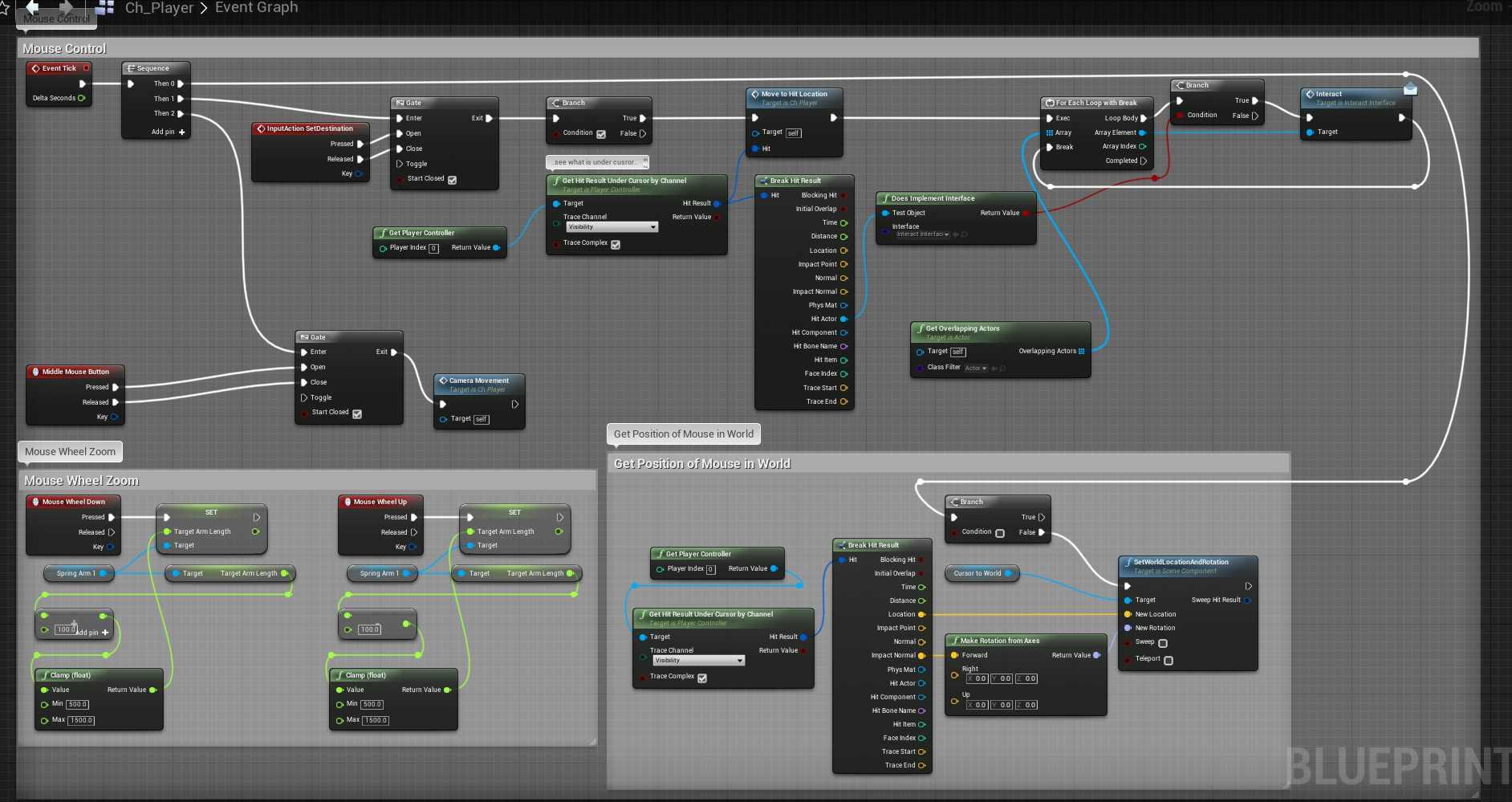
hi guys, wonder if anyone can assist with this - also apologies if i'm posting in the wrong subchannel!
i'm working on a top down game mode rpg project, hoping to replicate elements from certain MMO's, in particular the game 'Runescape'
in particular, i'm trying to get it so that on mouse click, my character moves to the hit location, but also if there was an interactable actor underneath that hit, that it walks to it AND begins interacting with it, whether that is pick up an item, open a door, speak to an npc, etc.
here's what i have so far:
https://drive.google.com/uc?id=1gKegB2IBdgfFbunTFJrI7hSbwWUKqrs4
i can get my character to walk to the actor that i want to interact with, but i have to click the same actor a 2nd time after i am close enough, presumabely overlapping, which i hope it is overlapping as then it sohuld be in 'interact rang'. only after i click the 2nd time does it follow through and calls the interact event.
i want to be able to do this all on the first click. any suggestions? i think it's not remembering the click was made after moving to the location, thus requiring the 2nd click when you are already at the actor location?
any help would be appreciated!
 maiden wadi
@fresh flint It requires a second click before you're only ever telling it to check overlapping actors behind the gate that you're opening on mouse button down. So for example, if you click and hold the button, it should go and still initiate interaction. But if you just click, it'll call the moveto and ask if the clicked actor implements the interface and if the character is currently overlapping it and then it'll stop the moment you release the button.
You might want to move part of that functionality elsewhere. Maybe create a function on tick that checks if there is an actor that has been clicked on. Start by setting an actor reference on click by getting it from under mouse cursor trace. If actor under mouse at the time of click implements the interface then Set it. Then on tick either check if your actor is overlapping that clicked actor or if they're close enough to interact. Distance checks are better for performance since they're simple vector math but no stress for testing. Once your tick has called the interaction, set the actor variable back to null.
trim matrix
can anyone help me with a media player problem
 earnest tangle
I'm trying to deproject screen to world when the player pawn spawns to position a sprite component on the screen - However it seems it always deprojects incorrectly on Begin Play, Possessed or OnBecomeViewTarget.
Is there some event that would work for this? Or some other method? It works if I put a Delay node in there, but I'd hate to do that because it feels like a massive kludge
(it appears to deproject it into some other location, as if the camera position is not correctly initialized when those three events I tested get triggered, similarly since the delay fixes it I'm guessing it gives it enough time that the camera is moved)
 glass hill
fresh flint
glass hill
fresh flint
Hi @maiden wadi , thanks for the reply!
so for getting the actor reference, would i use the "get hit result under cursor by channel" node, hooked up 'hit result' to 'break hit result', then from the 'hit actor' pin, hook up to the 'Does Implement Interface' node - where do i go from here?
do I create a new variable, say 'HitActor', in order to set it/register that the hit has been made? though i'm struggling to figure that part out as then the only outgoing pin is a red boolean 'return value; pin for the "Does Implement Interface" node
sorry if i sound a little confusing, i'm much better at understanding and explaining things like this via voice lol. appreciate the help though!
white field
are possess and unpossess nodes meant to be called anywhere? or just from the GameMode or something?
dapper cradle
anyone know how I could toggle a widgets visibility ?
I am trying to do this from the BP of another widget.
earnest tangle
@white field if you need to trigger some controller to possess or unpossess a pawn then you can trigger those
white field
yeah I think that's what I mean, it needs to be from a PlayerController and not a GameMode or other random place?
earnest tangle
you can trigger it from anywhere, you just pass the controller as a parameter
you could certainly trigger it from your player controller BP if you want, for example if you had some kind of character switching buttons
dapper cradle
Guys, I am trying to toggle a widget's visibility using another widget,
I have tried a few ways, any ideas ?
the highlighted nodes are my widget references.
 meager spade
@dapper cradle Either use an event dispatcher in the widget that has the "toggle" and bind to that event dispatcher in the toggled widget or get a reference to the toggled widget and change visibility inside the toggler widget
dapper cradle
@meager spade thank you for the reply, I am not totally sure I follow, I still have a lot to learn regarding BP
@meager spade I have tried to do what you said but I am struggling to get a reference for the widget I want to toggle on and off
meager spade
@dapper cradle Where are you actually creating the widgets?
dapper cradle
I am creating them in my project ? I am not sure what you mean
I have a few widgets in my blueprints folder...
 brazen elm
does anyone know how i can simultaneously send a trigger across multiple actors so they all execute their own function on command?
dapper cradle
two of them are attached to actors and places in the world, I would like one to toggle the otheres visibility.
if that makes sense @meager spade ?
placed""
meager spade
@dapper cradle So they are widget components?
Otherwise you need to create an instance of them
dapper cradle
@meager spade this is how they look... I know they are actors but not sure if they are components..
I am trying to use "1" in the picture to toggle the visibility of "2"
 still sigil
What blueprint are you using to trigger the widget to appear on the screen? That's what he means by "creating the widget."
meager spade
I myself haven't really worked with stuff being preplaced in the world as my project doesn't require anything to be pre placed
But I think anything that's placed manually in the world should be accessible in some way for all other actors, not sure though
It doesn't help either that I'm pretty bad at explaining things in text and can't open the editor atm ^^
dapper cradle
this is the BP I am trying to toggle the widget from
I wish such a seemingly simpl task wasnt so difficult...
deep elbow
personally i did somethign similar in a recent project, i set up all input events in a main menu controller, and then used event dispatchers to send actual events to listeing blueprints
the logic of what happened where for which button press was done in the controller and used a bunch of enums so different things happened depending on sub-enus and such
still sigil
@dapper cradle What causes the widget to appear on screen? The event that causes your widget to appear in the actual game itself. What triggers that?
dapper cradle
at the moment the widget is just sat there in the world at all times @still sigil the goal is for it to start invisibly and toggle on/off with another widget...
In actuality, its supposed to be a menu screen which is opened up when pressing a button on a pedastal.
still sigil
So it's just an actor basically, where you press a button to cause a widget to appear and disappear?
dapper cradle
@deep elbow you sound incredibly inteligent, my limited capacity and knowledge doesnt help the matter, I have been learning this over the past couple of months, along with blender, I just wish this seemingly simple task would actualy be simple...
I mean, most objects in UE can be easily hidden using a toggle visibility node, I dont understand why it cant be the same for a widget XD
still sigil
@dapper cradle It's just a simple visible/hidden thing you wanna do, right? No fancy animations to go with it?
still sigil
Okay, so I'm gonna use my pause menu setup as an example if that's alright.
meager spade
@dapper cradle It will be simple once you get the hang of it, it's just a matter of time put into it. I would personally recommend watching and following a tutorial so you get some reference points on how some things can be done
dapper cradle
I promise I do watch a lot of tutorials, I dont just come running every time I need something, its just this is a pretty broad problem...
sounds good btw @still sigil I am totally open to all ideas
still sigil
https://gyazo.com/03a2486164e5364db4b37bf29f6ef134
Ideally you only want you widgets to be loaded in when they're needed. Not at all times. Cause having too many widgets loaded in at once can cause some slow down issues. Go to whatever triggers the widget to appear, and add this. Tell it to create the widget you want to appear, then promote it to a variable. (Drag out the blue wire, and select, "Promote to Variable.") This way, you'll have access to all of your widgets settings within that variable, so that you don't have to keep creating it, or casting to it. After that, add it to the viewport.
 meager spade
@dapper cradle I didn't mean it like that, I just meant that it's all about getting the hang of it
dapper cradle
understood @meager spade thank you for taking the time to help a noob
I see @still sigil I was trying to hide it because I wanted the player to be able to return to the last page of the widget they were on when ever they open the menu back up.
because this app is going to require things to be selected from certain menus very often.
meager spade
Are you using a widget switcher to determine pages? If so I'm pretty sure it keeps the same page
dapper cradle
ok so its set out like this, the metal object in the middle holds a widget with a single button.
That button when pressed makes a static mesh that I have created to look like a computer monitor.
The text above the petal object (pedastal) in the middle should be invisible until the button is pressed which spawns the monitor.
still sigil
https://gyazo.com/b66413e83c0fdb54e21b2c34eb913b89
@dapper cradle Internet died. Sorry about that. :P
To get rid of the widget, you take the Widget variable you created when you loaded the widget in, and you Remove From Parent to get rid of it.
 dapper cradle
I have been trying the way you posted but because its for a vr app it doesn't get added into the view port, but instead is in the world.
thank you for your help though...
I have resorted to brute forcing it with destroy actor...
still sigil
https://gyazo.com/6d676de13cf73847e2cd3a48ba3d0e5e
For toggling between the two, adding the widget to the screen, and removing it, it looks something like this.
 dapper cradle
So now I know how to destroy it but for some reason the spawn actor isnt worknig XD
still sigil
Ahhhh.
VR's not something I've dabbled into at all really, so I didn't know that it worked differently.
Well now that that's done, I'm gonna repost my earlier question now, cause I really wanna get some progress done on this thing. 😛
Hey guys. I've had this pole climbing mechanic for a little while now, and I finally figured out how to make it to the player can rotate around the pole by moving left or right. It doesn't look all that great yet, but I finally got the movement of it to work, and that's still a plus for me. The last thing I need to do to round off this mechanic, is I need a way to get the player to rotate at a specific radius, so that it looks like he's rotating around the pole itself.

https://gyazo.com/a0216fe876f75a8c12f04b12c385e5b6
This is the BP for it currently. It's pretty simplistic as you can see. Any advice on this would be much appreciated.
 white crypt
probably it could be solved with some extra math because you are rotating based on your pivot. simple but stupid trick you could try is rotating the pole while character is attached 😄
trim matrix
is there an event that runs on hit, before physics?
or.. just onTick before physics
similar to how FixedUpdate in unity is called before physics logic
still sigil
That would would probably work if the Pole was a BP, but it's not. It's a collision object that's being detected with a Trace. As soon as the player collides with something that it detects is a Pole, the game will move them towards the general area of that location.
white crypt
doesnt have to be a bp, you can get the reference from your line trace, hit component
trim matrix
i guess ue4 doesnt have that kind of checks?
still sigil
https://gyazo.com/7dfebeff73a34498ad07158537bc8200
https://gyazo.com/c3a3104f3e85868ca21cdce4e70a4351
Here's the BP for the trace.

 white crypt
even though that would not be a perfect solution, i guess you need to add another scene component which could act as a pivot you want
still sigil
Yeah, I really just need a way to alter the player's pivot point, and that should do the trick.
white crypt
yeah, maybe add scene component before attach and use it as a parent while attached
still sigil
I'm not really familiar with how to do that, so uhh... XD
white crypt
hmm, havent done that myself so im only theorizing
thats a common issue when you are doing a door system. if you want to rotate around a specific axis then you need to have your pivot in the right place
were the hinge would be
but adding a new scene component which could act as a new pivot should work too. i know its easier said than done but that shouldnt be too difficult
if by any chance you cant figure out or no one else gives you some ideas then feel free to ping me and i will prepare a small demo
still sigil
I've used Scene Components literally never, so I'm completely in the dark on how I'd even use it in this instance. 😛
white crypt
scene component is in every actor by default. its nothing to be afraid of 😄
still sigil
https://gyazo.com/7c0faa437dd456e098313e5d6e5104a1
Oh. I guess like that. 😛
 white crypt
anyways try to come up with something yourself first, if you cant make it work then ping me
in your case i would use attach to component node as well
instead of updating the location on a tick
still sigil
I've tried a couple different methods already, like adding other components, and using those as the pivot, but that didn't really do anything. I've also tried altering his location with vector movement, but that just sorta made him float off into space. 😛
white crypt
@still sigil https://prnt.sc/snnffp

did it just for you :>
just remove the capsule component from set world rotation, i forgot
still sigil
It seems like it errors out alot for some reason, which is a big nono.
But that's okay, cause I think I found another solution.
white crypt
sure
still sigil
https://gyazo.com/9f921adda75c54cc7bd039abf0935ac5
Rotators let you edit the pivots. 😛


 white crypt
ahh yes rotating movement component, didnt know you could set pivot with it easilly
still sigil
Yup. I feel so dumb now. XD
white crypt
well anyways my solution took me less than 5 minutes to come up with 😄
but rotcomp has a lot of built in stuff already i guess
still sigil
Just gotta fiddle with the numbers a bit, so that the rotation looks right.
https://streamable.com/clyj14
@white crypt 😄
 tidal venture
I want a node/function type to only be executable by another node/function type in the graph, how can I do this?
Do i need to write my own UEdGraphSchema_K2 for this purpose?
 acoustic lava
How I solved the aiming of the gun so it can shoot from gun but toward spread on screen
@tidal venture Im not sure what you mean
The wobble on the widget hud is from my simple spread, its working just needs to adjusted so it doesnt reduce so fast
My BP is also very modular and can spawn shotgun and burst shots
earnest tangle
Oof this deproject screen to world is such a massive pain :| I knew using Delay is no good...
earnest tangle
Trying to position a sprite component so it appears at a certain spot on the screen... it works with deproject screen to world, but you can't run that off begin play without a delay
earnest tangle
But the amount of delay seems to vary slightly depending on what else you're doing which is great ™️
earnest tangle
which is why I didn't want to use delay in the first place...
acoustic lava
I make it .2 like defualt
earnest tangle
but as far as I can tell there is no reliable event that I can use for this
acoustic lava
Make a custom Macro
Call it "Instantiate"
Run off beginplay and do all that good stuff after the .2 delay
earnest tangle
yeah I appreciate you trying to help but I'm trying to find a solution that doesn't involve adding random chance of it breaking more :)
acoustic lava
Ok ok
Ill try think about it
Hmm
You could wait for input then execute
once
Nah, bad Idea
earnest tangle
Oh you get a bunch of fun results if you try to run it from inputs lol
well, at least if you run it from mouse inputs
earnest tangle
the sprite just ends up floating into the direction you move the mouse lol
acoustic lava
Sounds fun, sorry I couldnt help tho
acoustic lava
Yeah, I would do that
tbh
Its the same when it comes to Projectiles
you cant give it an impulse at begin play or it ovverides it
you gotta delay
tidal venture
I want to create two nodes/functions for blueprints. Now I want to have a restriction in my event graph that only allows to connect NodeA's execute output pin to NodeB input execute pin. No other nodes should be allowed to connect into NodeB. How can I accomplish this restriction?
acoustic lava
Have you tried using Macros?
Im not sure what you mean, please send an image
@tidal venture
Making a burst shogun from my modular weapon
oof
Wrong one
That is my old weapon system
Here
My old weapon system is further developed but had some basic flaws since it was my first one, that's why I am making a new one
tidal venture
where do i ask questions about coding for blueprints?
seems like no one here talks about or answers questions about code?
still sigil
No, you're in the right place. Just alot of people is all. 😛
trim matrix
Is anyone available rn?
earnest tangle
Has anyone used the camera shake stuff with "client play camera shake" ? I'm having some really bizarre issues with it... It works when I trigger it from movement input, but when I try to trigger it from fire input it just does nothing whatsoever
ugh nevermind I restarted the editor and now it works 🤦
I've been having so many bizarre problems and crashes with 4.25 it's not even funny
trim matrix
Does anyone here use the 2D conversation plugin
sonic crescent
Hi! What is the clean way to do 1/10 chance to do something? Do i have to create a variable, add+ to it, and excute when it is 10 ? or there is a magic "Sometimes" Node?
tight schooner
uhh, where's this node? lol https://docs.unrealengine.com/en-US/BlueprintAPI/EditorScripting/ActorEditing/SetActorLabel/index.html
Set Actor Label
It just ain't there
@sonic crescent try https://docs.unrealengine.com/en-US/BlueprintAPI/Math/Random/RandomBoolwithWeight/index.html
Random Bool with Weight
it's a "pure function" so it'll roll a new boolean for each node that accesses it, so you might want to save it to a variable if you need to re-use the roll. (Or make your own impure "executed function" version of it.)
but for a simple branch it'll work as-is
@tidal venture you ask here, unless you're talking about #cpp functions exposed to BP
whether anyone is around / knows the answer to your particular question is mostly luck
sonic crescent
Thank you!
hallow night
How do i give the weapon its own FOV ? because when i increase the FOV the weapon looks weird?
dapper nest
how would i add a timer and when the timer ends it sets a boolean to true?
white ferry
I'm trying to detect when my player character is hitting another character, but when I hit it and walk away, the IsHitting value is still set to true. How do I fix it so that when the player walks away I can set IsHitting to false?
I tried OnComponentEndOverlap but that does nothing
 wide nimbus
you should put your head together with @dapper nest and use a timer to set that boolean to false after a reasonable amount of time
@dapper nest try Set timer by event or Set timer by function name depending on if you want to alter your bool in a custom event or a function
dapper nest
how do i check if the timer has ended?
white ferry
I tried that, but what I'm trying to do is when the player is hitting the enemy, and the enemy uses its attack, the player takes damage. When I use a timer, the player doesn't take damage.
wide nimbus
I wouldn't recommend using a bool to determine if a player should be taking damage or not (unless it's like a status effect)
white ferry
Then how would I go about doing it?
I also tried checking collission with the enemy's weapons, but if I collide with the weapons even if the enemy is not attacking I take damage
wide nimbus
where are you calling the function that deals damage?
or managing player health or whatnot
wide nimbus
what's the delay for? animation?
white ferry
Yeah
wide nimbus
so, I'd make an anim event track for something like a damage window
and if the capsule collides while the gate is open, call the function that deals damage
white ferry
How do I make an anim event track?
wide nimbus
you wanna jump into voice real quick? I'll give you a quick rundown in the support channel 🙂
white ferry
sure
 tribal axle
I have an enemy that chases, you and when he touches you, I want the player to rotate towards him, I have the hit code in, and the location teleport, but when I use the rotation factor in teleport, nothing happens. i need help
 hidden zodiac
Hello, i creating a camera that i control when holding the mouse left, strangely the press event works just once, the release event works every time, anyone gone trough this? If i hold my right button and left after the event registers, but its not what it's intended.
 vast lion
So if a BP references just a class it loads like that entire class into memory??
The size map is showing it like loading all the textures and shit needed for this other class that I just have a variable too
tight schooner
@vast lion here's the answer from Epic themselves: https://youtu.be/hcxetY8g_fs?t=1897
 stoic narwhal
Do local variables not work inside timer functions?
tight schooner
yyyyyeah, the function/event can't have any inputs (or outputs?) for it to work with Set Timer By
stoic narwhal
Sorry, I mean the timer functions
vast lion
@tight schooner But I'm referencing the classes not the BPs themselves....
Guess there isn't a difference in terms of how the system loads them?
stoic narwhal
I'm doing a pretty complex timer function here, splitting strings to create an array based on the input strings (its a I/O loading system I'm working on) and I noticed its not working properly since i moved it from a loop to a function (since BP doesnt like big loops)
tight schooner
@vast lion I'm not super sure what distinction you're making. AFAIK if you're casting to or otherwise using a reference to a class on the BP graph, it loads that class to memory.
Whatever the reference type happens to be; that gets loaded
if it's some slim parent class like Object/Actor or some custom parent that has no hard references to assets then it's fine, but if you reference a child that has lots of assets and mesh components and whatnot, it loads all that stuff.
vast lion
Gotcha. I assumed there was a difference between an actor and an actor class.
One is blue in PB the other is purple
"Actor reference" vs "Actor class reference"
But the class reference is still loading all the stuff into memory?
tight schooner
oh ok, I've never used a class reference so I kinda forgot that was a thing
IDK the ins and outs of it
@stoic narwhal What do you mean by "timer function"? Not the "Set Time By" stuff?
stoic narwhal
Ah yeah I figured it out, no local variables allowed in timer functions
this guy right here
sonic crescent
@sonic crescent try https://docs.unrealengine.com/en-US/BlueprintAPI/Math/Random/RandomBoolwithWeight/index.html
@tight schooner This seems to be random. It have % chance to run the boolean. Any way to have a constant rate? I want to run every same 10 times.
Random Bool with Weight
tight schooner
@stoic narwhal I had to know if it was true...
is this what you meant? Local variables in a function on a timer?
stoic narwhal
If you change the local variable, it'll reset every time the function happens
tight schooner
yeah, that's how it's supposed to work actually
its memory is erased so to speak at the end of the task
this is true for all local variables in functions apart from whether it's on a timer or not
@sonic crescent oh, I thought that's what you were asking for.
if you want something to happen literally once every 10 times then maybe you want a "Do N" node.
sonic crescent
thank you i will check that!
 atomic trellis
Hey guys, I'm looking for help with trying to materialize a mesh for an endless runner with @gloomy hare
anyone have a few minutes to look at a stream and help out?
 subtle blaze
So quick check, I understand that map values are immutable. What kind of immutable? True immutable or reference immutable? (Or some other kind)
I have a map that uses a static mesh as the key with a hism as a value, will I run into problems when trying to add an instance to the hism?
(I may have an answer for this shortly myself, just hoping I can save some time by getting an answer here.)
(Or not, just crashed to desktop.)
(And now my project is stuck in a crash loop...)
Well shit. I have no idea why it is stuck in a crash loop.
Huh, fixed it by moving an uasset into and out of my content folder.
quick lark
Hi all, I have a static mesh component as the root of a BP, however it is not colliding with the landscape (but is firing an OnComponentHit event!). What should I look at to debug this?
those are the settings for it
quick lark
here are settings for landscape
staticmesh is also going through other staticmeshes XD
subtle blaze
set the collision preset on the component as default or block all, see if that fixes it.
quick lark
trying it out now. btw, here is the BP hierarchy
launchblast/impactblast are particles
default has them still going through other static meshes and landscape
subtle blaze
One other possibility, what is the velocity they are traveling at?
quick lark
tried 400 and 8000 XD
okay, so if I remove the collisionmesh then it collides with other static meshes but not landscapes
subtle blaze
(Because per frame, it is possible that it is phasing through objects.)
Well, one, you are probs in the wrong channel. Two, it looks to me like that would be per second.
quick lark
Seems to collide with other static meshes when DefaultSceneRoot is present
subtle blaze
Part of the problem is that off the top of my head I can't give you an answer. Without looking thoroughly for something wrong, it would take awhile to find it I think. Especially since it seems you are having erratic behavior.
(And this is the blueprints channel)
quick lark
Earlier you mentioned channels -- where do I check for that?
quick lark
I hoped that the portion of blueprints being involved here would make it not taboo to bring this topic up
quick lark
Thanks for the help and time @subtle blaze. I don't feel that my ability to answer this due to being new is going to make good use of your time
I'll google channels to see what they are
subtle blaze
Well, technically that is the correct term, collision channels, but it sounds like you are dealing with a slightly different issue and when I said channel I was talking only about discord channels.
subtle blaze
I mean, it does. Just a coincidence.
Which setting the collision preset was setting which channels it collides with.
(Dynamic and static being two channels)
quick lark
I am guessing something like a landscape would be static, but a pawn would be dynamic?
subtle blaze
Generally.
But it is more complicated
you can set an object to be dynamic and collide with only dynamic objects
or be dynamic and collide with both static and dynamic
(As an example)
quick lark
very helpful, thank you
maiden wadi
@quick lark Out of curiosity, what do you mean when you say that the hit event is running? If the mesh passes through another it shouldn't generally be calling hit events?
subtle blaze
^Which is why I was thinking that the physics couldn't keep up.
quick lark
The root CollisionMesh's OnComponentHit is firing when it passes through a static mesh or a landscape
subtle blaze
But it could be an overlap event