#blueprint
402296 messages · Page 467 of 403
 heavy lion
 fossil crypt
I have a normal door bp which doesnt require a key should this be seperate to the bp that does?
heavy lion
Its up to you
I would just make one door BP. Do a branch to see if it requires keys or not.
fossil crypt
okay
Will this allow me to have several doors requiring seperate or a different amount of keys?
fossil crypt
Okay ill try
i already have that overlap keyed to something which is from my last door opening tutorial lol
Its to detect whether you are near it or not
This is my door bp
heavy lion
Not sure why you need to check if you are near the door
Thats what the collision is for
on begin overlap
Something like that
fossil crypt
if i delete the detect door part i cant interact with my doors anymore fuc
heavy lion
Because you havent told it what actor it should respond to
@fossil crypt This is a better solution than the first one I posted
fossil crypt
alright im just recreating it now
So this is what ive made
i couldnt do the keys required thing
heavy lion
@fossil crypt Instead of using == node, use => Then if you have more keys it will still open.
Then where you have entered 0, right click, and promote to variable, type keys required, and click the eye so that its editable when placed in the level
@lucid granite You need to set UI mode
fossil crypt
ill try that
thank you so much for the help man this is for university work and its due in soon so your saving my skin
heavy lion
haha, no worries.
fossil crypt
trying it now
 lucid granite
I think I am doing something wrong
still no mouse unless I hold down on a button and drag off of it
fossil crypt
i can only do <= not =>
fossil crypt
oh it was right its just its displayed as >= so it confused me 😛
Now i just have 1 last issue where im referencing a character
heavy lion
ahh sorry, my bad
fossil crypt
im guessing i have to reference the script but not sure how
as yours is called player bp
heavy lion
so just drag off of other actor, and start typing the name of your character class and select cast to
lucid granite
that is what I was missing
I didn't have the "ShowMouseCursor" set in the map blueprint
 tight schooner
You can make "keys required" into a public variable
and then it becomes a parameter in the level editor
that you can set on each door
 torpid sparrow
Howdy. Got an event dispatcher from the Game Instance passing out a Data Table reference. In this case, the Game Instance is picking which list of skies to use, then telling the Sky Handler BP, "hey, use this list to do your thing." The Sky Handler then picks stuff from the list that's passed in. They all share the same struct, but the Sky Handler doesn't know that, so it's unable to give me an Out Row to work with. How do I specify which struct I'm using?
wow, it just lets you plug the Out Row right into the "Break Struct". Nevermind! XD
 prisma pebble
I'm trying to rename a function input parameter, but it won't let me change it to what I want. I can input literally anything else though. What's going on?
 sand shore
does it tell you anything whatsoever about why not? Also what are you trying to use as the name?
 rotund ruin
guys, simple question, how to update a text world 3d widget in the editor/constructiin script? only works after playing
 alpine halo
how can I detect that the player is on a certain height for air takedown. currently my player detects the enemy from any height if its in range. Is there any good approach that it detect when the player is at certain height than the target. (without line trace)
currently my player highlights target every time he detects.
any good idea than line trace?
 knotty quail
Trying to attach an object to the player socket from a function on the object
I can't figure out how to use the parent socket to get my character though
Everything ive tried (skeletal mesh) isn't compatible
This is the current test
 jovial bobcat
Can you put every Behaaviour tree on a single blackboard?
alpine halo
Trying to attach an object to the player socket from a function on the object
@knotty quail in parent the mesh . and in target the item you want to attach. the socket must be the child of parent
knotty quail
It is, I believe
As of right now it's spawning in another skeletal mesh (which i dont want it to do) and putting the candle in that socket
alpine halo
you're calling this event in your main character blueprint right?
knotty quail
im still new to all this stuff, calling is using an event graph right?
i know how to cast, let me try that
well, when I cast to my character I can't attach it to the parent node
alpine halo
I've created something like that. i've a weapon gun lying on the ground and when i get closer and interact it attach to player's back
noooo not like that
come on PM
 rich lava
how would u make unrestricted movement where the player can continue to gain speed?
 simple lantern
is there a way to establish a gradient of inputs that I could select from with an alpha? kind of like a lerp with as many inputs as I want?
tight schooner
@knotty quail The node probably wants a component but you're feeding it an actor. That's my guess.
simple lantern
specifically in a material, i'm trying to lerp between 10 colors with a parameter but can't figure it out
tight schooner
@simple lantern I think a curve would work. https://www.youtube.com/watch?v=QrgjRjpu9k0
unless you're doing something nonlinear
@knotty quail Gotta debug it. Use breakpoints and print nodes to figure out how your execution flow is flowing. If you don't know what breakpoints are, look them up.
simple lantern
thanks, but is there anyway to get data from a curve in the material editor?
tight schooner
oh, in a material graph? That's more of a #graphics question and IDK the answer offhand.
simple lantern
cool i'll take a look at that. and I wasn't sure what channel to post it in, so I appreciate the heads up!
 deep elbow
you would feed in the color thru a vector param from a blueprint
simple lantern
oh yeah that makes sense too
tight schooner
you could do it that way, but it's "cheaper" to do it purely in a shader if possible
cheaper on the CPU anyway
deep elbow
alternatively if you want to select from a palette, say you made a texture lookup then you could just scale and offset the uvs and feed ina scalar param to switch between parts of the texture, depends on what ur doing tbh fam
i mean.. depends what he's doing
simple lantern
it's a pretty simple color temperature modifier, so a parameter adjusting the hue of a texture warm or cold
blackbody color temp isn't just red to blue, it has shades of orange and yellow in there, so I wanted to sample a gradient
deep elbow
then a curve and feed int he colour, or create a texture lookup and feed in a scalar
simple lantern
ya that's all good advice, i'll start there
deep elbow
or a collection parameter that drives a texture lookup
if you want to never touch the shader from blueprints
tight schooner
yeah, those are helpful if you're adjusting materials en masse https://docs.unrealengine.com/en-US/Engine/Rendering/Materials/ParameterCollections/index.html
deep elbow
you could also do a chain of lerps, can look at lerp 3-way function and expand that but honestly texture lookup would probably be cheapest
simple lantern
hmm so a parameter collection is like instancing a parameter throughout a bunch of different materials?
deep elbow
its a container of params that many things can access, and many things can set
tight schooner
it's a shared parameter in a shader
simple lantern
love it
tight schooner
so instead of having several ticking blueprints each adjusting their own instances, you just have one blueprint adjusting one global parameter
alpine halo
how can I detect that the player is on a certain height for air takedown. currently my player detects the enemy from any height if its in range. Is there any good approach that it detect when the player is at certain height than the target. (without line trace)
any ideas??
deep elbow
so you would have wherever you set your global temperature, lots of stuff could look at that and do stuff based on the temp - like start adding frost if temp gets low etc
@alpine halo why not a linetrace
alpine halo
am already doing it for beams
simple lantern
@deep elbow @tight schooner thanks yall
hope I know enough at some point where I can start contributing back lol
deep elbow
personal growth is the bomb!
simple lantern
haha amen to that
tight schooner
@alpine halo there's all the "OverlapActors" nodes, e.g. BoxOverlapActors
alpine halo
@tight schooner i'm currently doing sphere trace for object and filter is 'pawn'
i want the 'TargetDetectionRange' variable to varies based on height
 sudden lynx
I'm doing spline-based movement. I'm telling the charactermovement pawn to move (using addmovementinput node) toward the nearest point on the spline that is just ahead of the player's current position on the spline (press right arrow to advance, left arrow to retreat along the spline).
The trouble with doing it this way is that the player correctly handles collisions with the environment and slides along obstacles slightly, and also the spline point finding isn't super accurate so that also causes drift.
However, I don't want to ignore the charactermovement collisions and physics, or only use the Distance along the spline to calculate the player's position, or the player pawn will clip through the walls, especially when jumping.
So I think maybe the best thing to do is, based on the rotation of the spline at the point the character is at, I would like to lock the pawn to be parallel to the direction that point on the spline is facing, without locking the pawn's ability to move forward and backward parallel to that spline point.
This spline weaves back and forth around obstacles and up flights of spiral stairs. I'm having a hard time figuring out the vector math required to allow free movement along the spline while locking the player from moving side to side, relative to the current spline point they're closest to. If I can do that, it solves all the problems.
 hallow night
@alpine halo if its a first person game i would line trace to where the player is clicking, if it hits a pawn it will get the location of that then you can compare the Z of the pawn with the Z of the player, if the player Z is more then ( Z Player - Z pawn ) and check if its in range of the height that you want. If it is then the player can do the air takedown
deep elbow
@sudden lynx I did soemthing like this a whiel back, ended up get rotation of the nearest spline point and setting the control rotation from that, it was 2.5d so we hard set left/right based on input key
sudden lynx
How do you solve the problem of the character sliding against obstacles and drifting off the spline path?
deep elbow
opening project, i think it didn't come up because we were using simplified collision and making sure the level geo didn't interfere - like it's a level design problem
sudden lynx
In my project, the character needs to be able to go off the spline when they jump, so they're free in the Z axis, but they need to be constrained to the spline for X and Y, but not by setting character location, as that defeats the character movement collisions that I need
And makes it so the character cannot move at all laterally
I was hard setting character location based on progress along spline using left and right keys, but that defeats the collisions
deep elbow
yeah thats what we did too, let me copy this
not the hard setting, cause same problems
BlueprintUE
this is what i ended up with, it's been like half a year so i forget most of what was going on but i went through a load of different stuff to get to this point and it was pretty robust - this is just running on tick when you're supposed to be on the spline
for attachign to the spline i just had a trace downwards to check for a spline and start runnign that function
this was custom:
BlueprintUE
oh wait, that asn;t used in the function
i think that was for soemthign else, but meh, maybe it helps
full disclosure: that might all be terrible
sudden lynx
Thanks @deep elbow for trying. I just need something where, whatever the nearest spline point is, will pull the player in sideways to center them along the spline, but not interfere with their Character movement that is parallel to the spline rotation.
If I set location, it breaks the character movement.
deep elbow
yeha i coulda sworn i had that, might be in the wrong character, cause we had the same desire
sudden lynx
So I'm trying to find the right vector math to figure out what "sideways from the spline point's direction" is.
deep elbow
get forward vector of spline point, get up, you can creat ethe right vector, then you have left and right from that
sudden lynx
yeah.
deep elbow
but that's what we were doign there, we used the X plane for movement, so we left the players X and Z movement alone and then just used Y to set the 'depth' that was derived fromt he spline, like it works, but would probably be great to let the spline points do more, i read this and it might be of use:
https://borjaportugal.com/2018/01/13/finding-nearest-point-to-spline/

Introduction The algorithm I describe in this post is something I came up with for Fast Food, the game I am working on during my Senior year at DigiPen Bilbao. The main mechanic of the game is fast…
it was just overkill for what we were trying to achieve, may be of use to you?
sudden lynx
Thank you.
Hey I think I found a simple way to fix this!
SplineRotationMatch is set by the FindRotationAtDistanceAlongSpline node, and the yellow line coming from left below, is set by the FindLocationAtDistanceAlongSpline node.
deep elbow
mmmm great solution
sudden lynx
Thank you for your help
deep elbow
hehe alrighty
sudden lynx
Sorry to leave
deep elbow
sleep is healthy¬!
 zenith kindle
how do i create a default object of a class in BP ?
i want to call a function on this like you would GetDefaultObject<AActorClassHere>()->SomeFunction()
 latent junco
Hey, how do I properly offset a rotation? For example, I have a cube, I press D and I want it to rotate by +90X, then A to rotate by -90X, W to rotate +90Y, S to rotate -90Y, you get the idea. But I can't seem to find the correct nodes to do the math correctly, after a few rotations, the rotation gets messy...
 flint surge
messy how?
rotations in general can be a bit funky with stuff like gimbal lock unless one works with quaternions
latent junco
yeah, I think that's exactly my problem, but I don't know where to start googling 😄
flint surge
maybe something like "euler angles vs quaternions"?
deep elbow
gimbal lock is the worst, i did this recently with an inspection of a carried object, it isn't a simple problem to solve
because X and Y and Z are all relative to where you are in the world and your starting rotation
latent junco
I figured, but it can't be that uncommon of a problem, so I thought there might be some good resources
Right, basically I just want world rotations
deep elbow
and those will change depending on the direction you are facing
the left/right is easy enough, just use Yaw to rotate something and start with the current rotation of the object
latent junco
right, it gets tricky when I combine two of the axis
heavy lion
Ok. I have a simple AI character with an empty AIController. The character BP contains a simple capsule with begin overlap, apply damage.
And then in the player character I have "Event AnyDamage"
I need to found out how to get which character hit the player character. So I can use the result in another function.
In simple terms I want to do, "If killed by JEFF, do A, if not, do B"
deep elbow
@latent junco https://www.unrealengine.com/marketplace/en-US/product/object-inspection cheap enough, a good function in there for handling the problem, will save you a few days of hair pulling

Simple Object Inspection System.
@heavy lion Apply Damage has inputs for instigar and damage causer
latent junco
Cheers, I'll check it out!
heavy lion
@deep elbow I know, i'm just not sure how to use em. Can't find any examples.
Damage instigator says it wants a controller reference. So I drag off of it, check is equal too, set value to true. Does nothing.
deep elbow
have you tried just printing the output of that?
deep elbow
eh, try getting the class and then checking if the class is equal
heavy lion
Ofcourse. Thankyou. I will do more testing. I was tired when I was working on it.
deep elbow
direct refs liek that always end up being fucked
alpine halo
@heavy lion How about making a text variable in AI controller and make it instance editable + exposed on spawn. In player character on begin overlap with capsule get that text if it == JEFF then A else B. (Stupid Solution but might work)
flint surge
Is that a reference to the controller blueprint?
Maybe it wants a reference to an instance of it in the level, or something?
simple lantern
Still getting a hang of what costs what in the blueprints - what would be more efficient, setting a float on a component multiple times through multiple Set nodes, or using one Set node and an if/then conditional framework thingy around that one node
deep elbow
show pics of what you are trying to do
simple lantern
trying to get the light (and the emissive on the material) to fade in when triggered, then fade out when the timer is done
In the timeline are two different curves, because I wanted the timing to be a little different for each direction (or else I would use the Reverse Pin)
because there are two different float outputs, I need to set the components twice, OR set up a variable and create a conditional
deep elbow
yeah i mean, i don't see an issue with what you have there, it's fine to set intensity like that
personally i use float lerps, and the timelines generaly go from 0 to 1, then you can do whatever you want with that
oh wait sec i see what you are doing
eh i mean you could still use reverse just have the curve go backwards, and use the timeline direction to choose which float to use, and set a single intensity variable?
 elfin hazel
if the question is about performance, I think that the only way to know which would be more compute-effective is to actually stress test each method.
simple lantern
yeah i'm up against my OCD on this one, I know I should just let the same curve reverse, but in my head when a light turns off the curve profile looks more sharp initially then a slow fade out...
deep elbow
no i mean, have two curves, but switch which oen you use by dragging off the timeline direction pin get the enum
simple lantern
oh wow I didn't even realize there was a direction pin -_-
deep elbow
 sterile thorn
Hello everyone, I just got done reading the rules so I think I’m good on this. I’m following this tutorial and he has us setup a graph to read the value stored in the Coins variable to display on the UI. This initial setup he had in his video didn’t work, so I read an old comment for a fix, but I’m just not understanding.
Initial Setup that would only display 0 on the HUD:
Comment with the fix:
Can anyone translate that for me? I’m new to blueprints and more familiar with C++. I created a new text node, but after that I get lost in it. Is he saying there should be two Coin nodes now up top? Sorry for the long message, but I don’t want to hit a wall and I’m not sure how long it’ll take to get an answer from him 😊
Sorry here's the comment
That was supposed to come out a lot more organized 😩
simple lantern
personally i use float lerps, and the timelines generaly go from 0 to 1, then you can do whatever you want with that
@deep elbow you mind explaining how you use lerps in this setup?
 zinc thistle
How can I have an array of blueprints that are different types but all implement the same interface
tried using the interface as a variable type but nope
deep elbow
normally the timelien will look liek this
then plug the alpha in here and do whatever
simple lantern
oh i see
deep elbow
or drive a curve through it or whatever, just ends up simpler in a lot of cases
simple lantern
so you're just using a timeline to drive a lerp for whatever
deep elbow
@sterile thorn i'm trying to understand the problem, sec
yeah exactly cause you can go hog wild with play rates and so on
simple lantern
ok cool thanks
sterile thorn
Sorry I guess that's really called a Widget Blueprint
Ok, thanks Rick! I'll have to experiment with that timeline way of doing it too
deep elbow
@sterile thorn he just wants you to get
if i read his text correctly
i missed connecting the exec pin
doesn't make much sense cause it should work his first way unless there's some other fuckery going on
sterile thorn
Yeah I was confused because it seemed like it should work just fine. I'll try the way you posted and look in to the timeline way. Thanks I really appreciate it!
alpine halo
@deep elbow in after going to is not valid node if the character cast is passed then you've to set that to the Esc to char ref otherwise it'll get null value
deep elbow
oh yeah i fuckign u p my image ignore that cast failed exec, i just spammed pins lmao
that second image is all kinds of fucked up
haha wow i might do more harm than good
alpine halo
lol
deep elbow
the is valid needs to route to the top text set, and the cast success needs to go into the bottom set text, where the failed currently routes to
simple lantern
I cannot for the life of me get weighted tangents to work in the curve editor
deep elbow
@sterile thorn
simple lantern
"Only supported on some curve types"? What other curve type is there to choose from besides cubic and linear?
deep elbow
doesn't work where you want it to basically
simple lantern
?
alpine halo
@simple lantern in miscellaneous you'll find permanent curves. If you gonna use that very often. make one from that. the curves are basically float curve, vector curve, color curve etc
you can change the slope and the curve alpha any type you want
rich lava
how do i get my projectile to go towards the cross hair
alpine halo
@rich lava get the forward vector of your camera
simple lantern
hmm i can't seem to find it in miscellaneous?
alpine halo
if you're doin a line trace
normally the timelien will look liek this
for this type of curve
make a float curve with min and max value
for making point ref shift + left click
then in the point make auto
sterile thorn
Thank you @deep elbow, worked perfect!
deep elbow
great news!
 restive tundra
Could someone help me in working out how to get the angle between an actor and the player camera in a way where if the camera is staring directly at the enemy regardless of either the actor or camera rotations it they Y value returns as 0.
I've done a few different methods and it's not providing the results I would like
alpine halo
?
restive tundra
this is essentially the effect I am going for, but it only works the way I want it to if the player is facing the direction that they are
I'm using a line trace between the actor and the camera, then finding the look at rotation of the start and end point of said line trace
sterile thorn
@deep elbow So if I'm reading it right, it was just just firing as not valid and incrementing by 0? Think it all makes sense now.
alpine halo
@sterile thorn the is valid node is for checking if the variable is null or not if it's null then not valid and if doesn't than valid. pawn index 0 means currently possesed pawn by player controller
simple lantern
just gonna jump in here with a quick Q - is it a good habit to add components at runtime in BP, rather than adding them as part of the BP itself? I have a bunch of lights with emitters that toggle on and off, but i'm not sure If I should add them to the BP and have their visibility get triggered, or be dynamically created and destroyed..
 meager spade
@zinc thistle It might be possible to create a c++ TArray<TScriptInterface<IMyInterface>> MyInterfaceArray and then if it's possible you can cast the Self node to that specific interface. This would also require the interface to be done in c++
If you want to do it in pure BP I have no idea
zinc thistle
I settled on having an array of actor references and then casting it after it spawns to the interface, i hope it works.
meager spade
Yeah, from my experience interfaces are pretty tricky to work with in unreal if they are exposed to BP's. Understandable but frustrating
simple lantern
just gonna jump in here with a quick Q - is it a good habit to add components at runtime in BP, rather than adding them as part of the BP itself? I have a bunch of lights with emitters that toggle on and off, but i'm not sure If I should add them to the BP and have their visibility get triggered, or be dynamically created and destroyed..
@simple lantern bumpin this
alpine halo
@simple lantern i would say everyone have their different approach
 maiden wadi
@simple lantern If you're doing it often, I'd say reuse them. Whether you add them at runtime or add them to the actor class directly. But I suppose that it depends on how many there are. Reuse is always generally preferred in practice.
meager spade
A wild shot in the dark but since lights are the classic example of something that has on and off functions I would say add them and turn them on and off instead of destroying them
simple lantern
okay thanks for the help
meager spade
I personally don't like destroying components until I am "done" with them. I also prefer not adding during runtime if possible since It enables me to easily change default values
tight schooner
@simple lantern destroying stuff has performance implications with the "garbage collection" system... Not huge implications though unless you're doing it a whole lot. Spawning is also considered a heavy operation. As Authaer says, you should reuse when it makes sense. Emitters respond to Activate/Deactivate nodes too.
simple lantern
all good to know
especially Activate/Deactivate nodes, would those be used as an alternative to visibility?
tight schooner
For looping emitters, deactivate stops the creation of particles, which allows an effect to die out in a more natural way than instantly making the whole thing invisible
simple lantern
is it useful at all for other components, like audio/lights/materials etc?
tight schooner
I actually don't know. Sorry.
simple lantern
all good, appreciate the info
tight schooner
All I know is if you deactivate a TimeSynth component and set quantization, you'll crash the editor/game :p
simple lantern
lol
 trim matrix
anyone know if i can generate a text from a uasset file rather than a binary representation?
simple lantern
weird, I placed multiple copies of my Light BP into my scene but only the first one actually works..
it's referencing a BP interface, could that have something to do with it?
alpine halo
How can I spawn enemies to a certain place when i accept the quest
the enemy AI should also have patrol path
 patent ermine
I'm trying to get the size of a mesh at runtime by using the "GetBounds" node. However, its reporting a number that is off. The bounds debug shows that it is tight on the mesh (it's a box basically), and measuring within the editor seems to give correct numbers. However, GetBounds reports higher values. Any ideas as to what i'm doing wrong?
When measuring in editor, Y results in 56cm which is 22inch...yet Y debug output is showing 27, i would assume this is returning inches? What is 27, that GetBounds returns?
Ah I see. Looks like get bounds returns in CM as well, however only half of the actual size of the mesh. Hence multiplying it by 2 results in correct values, when comparing it to measuring it in the editor.
maiden wadi
@patent ermine The Box Extent is used to find the two most outer points of an object by using it's Origin value, and then both adding and subtracting the Box Extend from that world space value. It allows you to mathematically draw a box around the actor with some extra equations that you can use a myriad of different ways.
trim matrix
How do i get the scene components parent primitive component?
or get parent scene component to primitive component?
How to fix?
hallow night
Why are you adding force to the root
trim matrix
@hallow night can you please check the physics chat? I tried to explain what i want to do there
 tight venture
Can anyone tell me why I'm not getting overlap events fired when these two collide?:
I am sure about it. I set up a breakpoint at the EventBeginOverlap and it never fires
I am also sure they are indeed colliding.
tight venture
Not one of those two, no. But another mesh that is alongside one of them in its BP is
The Yarn is simulating physics. The Influence is the first screenshot I posted
The SK_Kitty is the second screenshot
hallow night
One of the objects wouldn't trigger collision with physics objects
 cyan valley
Hey I try to make the Basic first personne projectile collapse with an actor and not with my character plz help 🙂
alpine halo
Collapse Or collide?
cyan valley
Don't know, just want that when the projectile touch the actor it kill it, i already have the blue print for the score but i don't know how to make them Collied (i think it's collide)
And sry for bad english
alpine halo
If you're making a single player than do projectile or line trace whatever you find handy.
If it's multiplayer then go with projectile for better gameplay
alpine halo
@cyan valley line trace would work fine
 buoyant night
would anyone happen to be able to tell me what "World Context Object" is when using Async Save Game or Async Load Game?
 still sigil
So I'm currently working on making some NPCs, and I seem to be running into a strange issue with one of the HUD elements of this mechanic. I'm using a Flipbook to animate a little speech bubble icon that appears over a character's head, to indicate when a player can interact with the NPC to talk to them. It always faces wherever the NPC is facing though, so I added an Event Tick to make it to where the "Press A to Talk" Speech Bubble icon always faces the camera. And this does work! .....But only if the NPC is rotated a certain way? Any ideas on what could be going on here?

 late gorge
is there a way to search for all instances of a skeleton animation notify
across all animations for a specific skeleton (or anim bp)?
 high knot
im currently trying to make a game with world generation like avorion, any advice on how to appoach world gen like that?
still sigil
@alpine halo What vector node is that in between the Rotation from Xvector node, and the two Get Location nodes?
It looks like a Vector - Vector node, but it doesn't look like that on my end.
still sigil
Right, but what's the node connecting those two together?
alpine halo
Minus
still sigil
Weird. Mine isn't all boxy looking like that.
alpine halo
This is in controlled character tick
still sigil
But anyways, that didn't fix it. It's still the same problem, except now it also likes to roll on it's side when it rotates.
still sigil
XD Nah, it's no more broken as it already was. Simply restraining it's rotation to the Z axis like I had it should fix it.
Still though, not sure what's up with this bug. :/
alpine halo
There's something called widget screen space. It's not what you are looking for. But will work without animation
 plush briar
So when I have the editor running the game, but have it paused when I change my blueprint actor to simulate physics it reloads the Actor Components about 4 times. For primitive objects like a plane this behavior does not occur. Is there a simple way to prevent this behavior?
 solar needle
@vocal urchin I'm trying to learn how to use the get actors in selection rectangle.
I have my blueprint https://blueprintue.com/blueprint/m7gva1c-/ inside a pawn.
when you ran your xy did you run it from inside a custom hud blueprint?
BlueprintUE
Also I'm getting this error... but that's probably because I'm calling from another object
PIE: Warning: HUD_0 Canvas Draw functions may only be called during the handling of the DrawHUD event
solar needle
oops sorry, i shouldnt have included that node in the blueprint snapshot
 vocal urchin
And then yes, it is in a custom HUD
solar needle
ok custom hud, did you use an interface or something to access that function?
think the proper process is
- create hud
- set up game mode to use that hud
- edit the hud blueprint to use the function
vocal urchin
I built everything inside the hud
solar needle
I've been using the add widget to viewport flow
vocal urchin
Yeah, don't use a widget for this
solar needle
this is so weird xD
vocal urchin
idk if it's the easiest way to do it, or even the right way, but building everything in the HUD worked much better for me.
solar needle
think it's a problem stemming from too many ways to do things, so I've gone down the wrong path
vocal urchin
Mine is also an insane rats-nest of checks and array operations to do a highlighting of selectable units. So I might not be the best person to ask. That said, it does work, and I have not experienced any bugs with it, so...who knows 😄
solar needle
I asked mathewW, and he said something like huds aren't as necessary anymore.. but maybe that's because he knows more about the system than I do. I'm just a noob trying things at the moment
vocal urchin
I did some research about the current opinion on HUDs, and some people say that (that they're not necessary) and also that they're just fine to use for organizing your blueprints. Mostly, it seems like 90% of Unreal - there are 10 different ways to do everything, and multiple solutions are "right".
solar needle
thanks for the feedback on how you did it, I'm trying to do a homeworld clone... so the units are getting really small and I kinda need this selection rectangle stuff xD
vocal urchin
No problem. The selection rectangle is full of it's own jank.
But there isn't really a better way at the moment.
solar needle
i also considered doing a radius check, but it's more difficult to adjust the radius in a easy way
vocal urchin
Radius from where? The cursor?
solar needle
yeah raycast from camera to unit, get location, then check all units location against that location with distance check
like regular select but with distance
vocal urchin
Hmm, I'd avoid that because depth will not be obvious to the player.
Could *cause mis-selections
solar needle
yeah, rectangle is a surprisingly clean way to do it.
tight venture
@hallow night I don't think it has anything to do with simulating physics, in my case. I disabled physics for the Yarn and it's still not triggering overlaps
vocal urchin
I feel your pain, though. Building my selection system was one of the hardest parts of the project so far.
Even more so when you get into Ctrl-selection and deselection.
And, I made it harder on top of that, too, and built a squad-select system.
solar needle
do you do any self-organization stuff? where units self organize into squads?
vocal urchin
Yep
solar needle
neat :D
vocal urchin
Well, yes, they can
It's player commanded, but when that happens, they're grouped differently and thus selected differently
solar needle
yeah I'm also looking down the road a bit, and self-organization + target selection seems difficult
vocal urchin
It is. It's a real pita
It's the thing that finally forced me to fix my sh*t when it came to arrays.
Also, odd question, but how did you find me? I haven't posted this anywhere aside from a select few places 🤔
And here, of course.
When I was troubleshooting
solar needle
i used the discord search for a similar issue before trying to ask mine
vocal urchin
ah, gotcha!
solar needle
yeah there's chat history here, and many questions are asked many times
vocal urchin
yep, makes sense
solar needle
here's what I have right now 😅
solar needle
the menu is offscreen because I'm recording an ultrawide with obs, but ive got the build que sorta working and also a little move widget that I'm projecting to an infinite plane with scroll wheel for z offsets
yeah yeah! :)
vocal urchin
neat.
solar needle
lol just the basics :S
vocal urchin
It's gonna be very interesting watching you tackle formation movement.
And I assume you'll be doing that instead of ship mobs 😄
solar needle
I was looking as boid stuff last night, but I don't know where to start with that ':)
yeah maybe create some preset formation objects and attach ships to those positions on the formation
vocal urchin
Nah, don't use objects. Use math
solar needle
math is helpful :P
vocal urchin
You just need a point in space. Using an actor to get that point isn't all that efficient
solar needle
I have some general understanding of cross products, so I might be able to use that to find grid points on a plane perpendicular to the moment vector
and maybe units find the closest point to that plane and snap to it
vocal urchin
Unless your movement is bound to the grid, I'd go even simpler...just build a vector array of points and use that as your formation.
solar needle
like the start and end points of the movement are laid out like a formation but they behave like boids while transitioning?
vocal urchin
Yeah, but that also involves speed calculation too.
But yes, that's one way to do it.
tight venture
@hallow night Would this have something to do with it?
oh crap, it didn't get captured in the screenshot
Basically, it was the tooltip that came up when I hovered over the Sweep checkbox, which says:
"... Only the root component is swept and checked for blocking collision, child components move without sweeping. ..."
Since SK_Kitty is a child component of BP_Kitty's root component, maybe it's not sweeping when I use SetActorLocation, and that's why it's not triggering any overlaps?
For anyone else who may be listening, I am having a heck of a time figuring this out:
Oh shit
This guy says:
"The second thing is that overlap events are not generated for skeletal mesh components, so if you are trying to overlap with a skeletal mesh, you'll never receive the event."
Unreal Engine Forums
For gameplay programmers writing C++ code.
So it would appear that I need to add a collider to my kitty cuz the SK won't handle it on its own
tight venture
tight venture
That's the collider I just added
 zealous moth
yup
tight venture
That SK_Kitty needs to trigger overlap events with this:
zealous moth
my collider:
tight venture
The Influence
zealous moth
when you overlap how do you transmit data?
tight venture
When the kitty steps into the Yarn's Influence sphere, the kitty adds that BP_Yarn to an internal array of BP_Influencers (the parent class of BP_Yarn)
I do that in BP_Influencer's EventGraph
I made BP_Influencer cuz I am planning on having more than just one type of lure, other than just Yarnballs
high knot
hi, is it possible to create a level in game and save it . if yes how?
high knot
thanks
tight venture
@zealous moth got it working 🙂
zealous moth
yeah, we're doing the same thing
 cobalt slate
I feel like I'm going crazy. I set up some hair physics using the cloth tool for my character. the only real important adjustment I had to make is on the "Cloth Blend Weight" setting from 1.0 to about 0.3. it works perfectly now, but I can only seem to access that option in the details panel if the model is placed in my map. That doesn't seem right. where do I permanently change the cloth blend weight for that skeletal mesh? I'm not seeing it anywhere in the clothing tab of my skeletal mesh, or in the asset details...
 open linden
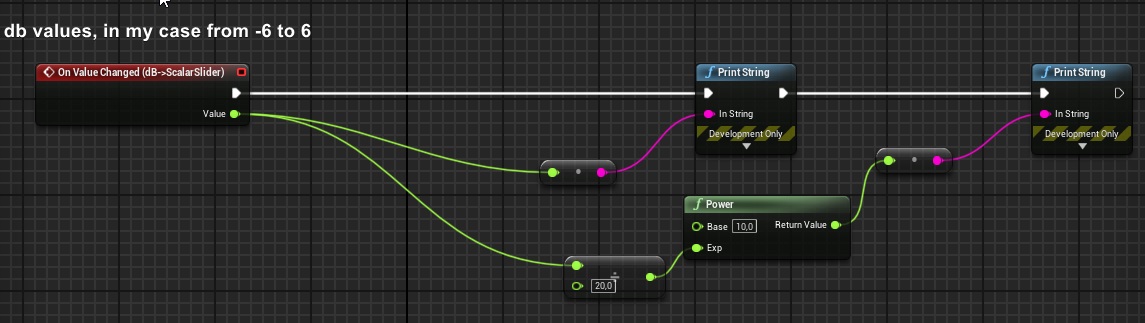
hello guys & math geniusses... i hope youre doing well! i would really appreciate any help on this:
i have figured out how i can translate decibel into scalar, important for audio.
https://i.imgur.com/JuMtQt0.jpg
what i have not figured out is how to do the opposite. 😦 take in a scalar value and translate that to dB, could anyone help me out?
 high knot
@zealous moth any advice where to get started , i not familiar with saving in ue
hallow night
I would start of with making a structure with transformation and blueprint class. Then a blueprint that can be placed by the player during runtime. When the blueprint is placed it will save the structure of the blueprint inside an array of structures inside a savegame a blueprint. When you start the level make it go through the array and place an actor of the class which is specified inside the structure then set the transformation of that structure to the placed actor.
high knot
ok thanks
 zenith scarab
@open linden what do you need that for btw?
open linden
@open linden what do you need that for btw?
@zenith scarab for one - i want to understand it better.
i want specific linear stuff like distance to translate into log behaviour to for example drive filters, distortions etc. some of that stuff just sounds way better when it behaves logarythmically.
i could also use curves but i kinda want to do it "raw", math style.
if i understand this correctly, i'll need a reference point which is something to play with imo.
http://www.mogami.com/e/cad/db.html
just nerding around tbh. 😄 curves work fine but i wanted to do it this way too
 wet hound
I am spawning the enemy through the spawn bp in game mode. Once spawned i call the roaming function, but the enemy dont move if i drag and drop it works. How can i solve it
zenith scarab
In the Au controller is something possess ai
It has to be set to spawned and in level or something like that don't remember the exact name
@wet hound
wet hound
But i am not using the controller
 marble compass
any one has any suggestions why start recording output and stop recording output is not working for me?
hallow night
marble compass
its executing the node but its recording nothing
hallow night
@wet hound
Set it to Placed in world or Spawned.
It doesn't matter if you are using a controller or not. If you're using Ai MoveTo or anything related to that it will set an ai controller regardless
tight venture
Noob question: I am aware of 3 ways of moving actors around in the game world (programmatically):
- SetActorLocation (usually alongside VInterpTo)
- MoveComponentTo
- Applying forces to an actor which is simulating physics.
Are there any other ways I am missing/don't know about?
Besides gravity
high knot
I'm still struggling on world saving (it my weakest area), i am trying to get a save system like the game avorion has . ideally each galaxy generated have it own folder with world setting, each explored sector generated etc in it(the image is of a avorion save). any advice or is it not possible?
 shadow bronze
hey, is anyone that is on willing to pop into a vc and help me and a friend understand a few things about capsules for player characters in unreal?
zealous moth
@high knot did you settle how you will save the map files?
I was away
did not catch the convo
@tight venture projectile motion
pew pew
tight venture
i've decided to use the AI system for my kitty's movement. watching a 2 hour long video atm :/
zealous moth
if you have a dedicated actor, that is the wisest
if like me you got a tiny wasp flying at you
you can program it
😛
high knot
i just posted again going into more depth on what im trying to do but no luck yet
zealous moth
are you making like an AoE or RCT game?
tight venture
well, @zealous moth, you know what i'm doing. a bunch of kitties roam around, you drop lures to get them to the litterbox. that sound like a good fit to use AI for?
for the kitty's movement
zealous moth
wow that is 100% AI
tight venture
hehe cool so i am on the right track :)
zealous moth
yeah, you need to use behaviour trees, blackboards and your own AI controller
do not check Unreal's tutorial on it
it's a massive wastew of time
use ryan laley's tutorial on it
@tight venture
tight venture
oh ok. yeah these guys are lolligagging. changing the color of the nav mesh...
high knot
@zealous moth it a space mining game with each sector procedural generated when you jump into it , you can jump back and forth
zealous moth
@tight venture actually it gets worse; they get into arguments like an old married couple
zealous moth
@high knot what you can do is save the procedural stuff as transform data and actor data. Save that into a word file or whatever medium (even a save file). And when you open the level, just spawn all those actors
NP, when i started with AI, this made me so mad
wasted 40 mins on crap
high knot
ok thanks
rich lava
how do i get the projectile to travel towards the crosshair
zealous moth
@rich lava sounds like an aim offset
rich lava
sorry i am not familiar is there a video that i can watch on it or something?
simple lantern
Hi helpful Discord people, i've created and dropped multiple light BP's into my scene, but only the first one I place actually works. I feel like it may have to do with a BP interface i'm using to control when the lights turn on. Is there a common reason why this might happen?
here's the light BP
sudden lynx
@simple lantern also please show the graph where you use the EventNightLightOn
simple lantern
and how the interface function is set up
sudden lynx
Looks like it should work. How many different blueprints implement this interface?
simple lantern
just the one
well, the BP that sets the function (my day/night cycle) and the one that uses it (the light BP). so two
weird, if I create a new copy of the Light BP in my content browser and drop that in the scene it becomes the only one that turns on now
some sort of priority issue?
open linden
hey fellas,
audio BPs need to be tweaked in runtime but after the session the values go back to their values BEFORE the session. this is especially interesting for synths, the granular synth has a TON of parameters and most of them deserve some tweaking.
is there a way , maybe via the construction script, to SAVE the current state of variables so that the BP keeps em?
heavy lion
Ok. I am trying to get all actors of class, find the nearest one of type, that has a bool set to true.
Using a for each loop. However, the plan is to not always find one, and when that happens I need to skip over setting an actor as the variable.
I thought I could check if the variable is valid. But that doesnt seem to work. Throws up an error Accessed None trying to read property NearestRespawnPoint
"
If it finds none, I need it to skip over that and go onto the failed branch
Like so
heavy lion
So I need to do a for each loop, to check for the closest actor that is of a certain type AND has this bool set to true.
 surreal peak
I thought I could check if the variable is valid. But that doesnt seem to work. Throws up an error Accessed None trying to read property NearestRespawnPoint
"
Any info where exactly that comes from?
Cause it should tell you
knotty quail
how can i randomize timelines every so slighty so two blueprints with the same timeline in a scene are not in synch
heavy lion
@knotty quail You could use a random int within rangem plug it in to start time
@surreal peak The error appears in the player teleport. But that part isnt supposed to run if the previous function doesnt find an actor with this bool set to true
heavy lion
Try either
surreal peak
You can change the playrate
Set it to 1.1 or so
Timelines are actually components
Even if they show up as a nice big node
So you can find a variable to them in your variables tab
@heavy lion Are you calling that spawn stuff in more than one place?
You are finding a new spawnpoint when you "Failed", does that try to spawn?
Somewhere you must be allowing it to pass with a nullptr
heavy lion
When failed, I want it to check for another type of spawn point
knotty quail
I don't believe that randomizes it for each instance of that BP though
heavy lion
@surreal peak
Basically, I dont what it to do the first out, if it doesnt find any actors with the bool set to true.
So I tried this
surreal peak
Yeah that makes sense to me
 chrome dust
Anybody know how to prevent AI from shooting each other when moving in front of each others weapons?
surreal peak
Try to find where it fails though @heavy lion
Print a bit more, set some breakpoints. Somewhere it is passing
@chrome dust Put a check in place before they fire?
chrome dust
yea I am trying to put a line trace as a check to see if that works right now
heavy lion
I can't figure this out at all
I am instead doing a check first, is actor withing range, true or false. It shouldnt ever fire this other branch. But it is still throwing up errors as if it is
Its just this one For Loop. I need to go through the list of actors in the world, and only return ones with the bool set to true. Then find the nearest one.
zealous moth
@chrome dust collision channels allows for friendly fire to be disabled
heavy lion
Isnt it easier to create an array and use that to determine what not to trace?
simple lantern
Hola amigos, whats the best way to have a particle increase in size based on camera distance? With an exposed vector particle parameter in a BP or with LOD's somehow?
nvm I think i'm going to have LOD's swap out for larger masks
 valid knoll
Guys, hi to every one
whats is this thing?
and i can user for gamepad navigation?
open linden
hey fellas,
audio BPs need to be tweaked in runtime but after the session the values go back to their values BEFORE the session. this is especially interesting for synths, the granular synth has a TON of parameters and most of them deserve some tweaking.
is there a way to SAVE the current state of variables so that the BP keeps em?
 narrow kelp
Hmmm, when I get a scene component's Relative Rotation it returns the actors world rotation, but when I get the component's Relative Transform and read its rotation, its correct
sup with that
Different values
@open linden I guess you could use setter functions whenever you set audio values, and save them in BP at the same time you send them to your audio stuff
tight venture
I need a priority queue to use in one of my blueprints. Is there any built-in functionality for this in UE?
open linden
@open linden I guess you could use setter functions whenever you set audio values, and save them in BP at the same time you send them to your audio stuff
hey @narrow kelp! thank you for your reply!
my BP is actually using functions to set all the parameters on tick. 😄
but what is a "setter" function?
do you mean that if i trigger it, it gets all the values & sets them and if i stop the session the values will remain?
 earnest tangle
Is there some way to create a "Map" type which has an array as its value? It seems there's no way to do that? (Unless I make a struct as the value, and make the struct contain an array of whatever I wanted originally)
zealous moth
@earnest tangle are you trying to make a 2d array?
because you should not try to make a 2d array in UE4
based on what you asked, sounds like a struct to me
earnest tangle
No, I have an enum of states and I want to map each state to an array of values
zealous moth
yeah easiest would be a struct with each state defined and a matching array; that or you can predefine your arrays and then use a switch function
earnest tangle
Yeah that'd work, there are some cases where a certain state might not have anything associated with it though, so figured a Map would do the trick
I was just curious if there was a way to do it, but I guess I'll just make the map contain structs which then contain the array... it's a bit of an extra hoop but it's fine :)
maiden wadi
@narrow kelp That's odd. That shouldn't be different. At least not more than floating point precision error's worth of difference.
earnest tangle
...seriously
maiden wadi
Maps keys cannot contain the same information. Otherwise they would be useless.
earnest tangle
Yeah but that's just pretty bad UI
 inner ginkgo
It is still a pretty annoying UI thing. At least complain on compile, not on adding.
earnest tangle
yeah, or it could just default to using the next available value especially if it's an enum
understandable if the key was a string or something where you can't necessarily predict a "next" value
rich lava
how do i set an actors rotation to face a vector in the world
inner ginkgo
There's a Find Look At Rotation node that might be useful there.
trim matrix
Hello! Im looking to create a script that will prompt the user to select an image from their computer. This image gets saved to a texture, which then gets applied to a gun camo. My only issue is how to open the file explorer and save the file they select to a variable. Am I looking into the impossible here?
inner ginkgo
It isn't impossible, but you won't be able to do it with out of the box blueprints. You'll need to rely on a market place solution or write one yourself in C++.
trim matrix
Haha yeah c++ is out of my league
That sucks
There is a file explorer plugin but idk if that's what I'm looking for
inner ginkgo
If 100% of your images are saved in game and tracked that way, you can kind of fudge it by saving the location and name of the files in a save game. But you won't be able to generically find a random image file.
trim matrix
That was my OG solution, kind of like a Minecraft texture pack was my idea, but that was too complex for my liking
I could try the download image from link node
But even then you'd need to use an image hoster of you wanted to upload your own
maiden wadi
@trim matrix If you want to get images from file. I believe that Rama's Victory plugin extends this functionality to Blueprints. But default blueprints do not offer this I don't believe.
trim matrix
Ramas victory plugin... I'll take a look, thanks! Getting images from a file is pretty much exactly what I need. Just opens file explorer, user selects a jpg or PNG, and gets saved to a variable
maiden wadi
I'm not sure if/how it works, but a few people mention that ability from the plugin, and it's widely praised, so I'd give it a look.
trim matrix
I'll take any help I can get!
 young vessel
Hi there,
Sometimes small things UE blueprints trip me up. I have an array of type struct that I am itterating over with a for each loop. The struct is split on the for each node so I can get access to the elements.
One of the elements is of type int and during the loop I want to update it's value. I can read it easy enough, but how does one update a basic data type in a loop?
Sorry if this is a silly question
inner ginkgo
You can't directly from a foreach, because the result of a foreach is a copy of the struct. What you can get do is use the index var from the foreach to go back to the original array and do a get (ref) from that. Plug that into a Set Members in <YourStruct> node.
trim matrix
Sadly I can't help ya, but there ain't no such thing as a silly question
young vessel
Urrk. That's ugly, but I get it. Thanks for the....pointer..... 😉
inner ginkgo
Hah.
Structs in general can be a bit fiddly in blueprints. They work and are great, but not quite the way I'm used to dealing with them in other languages.
maiden wadi
I typically break and make and then reset the element of the array. Works well for me the way I use structs usually.
young vessel
Also looks good
jovial bobcat
umm
what is normalizing
Im trying to make a bow
and the arrow go toward the crosshair
using a line trace
maiden wadi
@jovial bobcat To normalize a Vector is to turn it into a direction instead of a point in space.
In typical use there are three general vector types. Point in space, Directional, and normalized directional. Point in space, is easy, it's the location. Directional is used usually in movement stuff. You usually add a directional vector to a world point vector to get the new location. Normalized Directional vectors are pointers, pointing in the direction of the location you normalized them from.
 simple berry
hello! i need some help. how can i go about making a turret that only detects players if they are infront of it and can track within a range of the front of it? kinda like the turrets in portal
simple lantern
@simple berry this might be a good place to start https://www.youtube.com/watch?v=Aeydq_vOJ4E

What is the Cone Check Decorator Node in the Behavior Tree in Unreal Engine 4
Source Files: https://github.com/MWadstein/wtf-hdi-files
simple berry
thank you kind sir
simple lantern
you got it. sry can't help much more than that
maiden wadi
Really depends on how in depth you want the turret's actions to be. You might not even need to go to AI route. I'd personally make an actor component that checks the area around the owner semi often. If it finds anything in that sphere, do some simple math to check if it's in front of the turret. If yes, call an event or function on the owner. In the owner, use the passed detected actor to do your stuff.
jovial bobcat
how would i find out the direction of a line trace with a normalize node
inner ginkgo
What's the context of that question?
inner ginkgo
What is the ultimate goal?
jovial bobcat
oh
getting my arrow to go to my cross hair
im doing a line trace from my camera forward
and get the direction of that line trace
inner ginkgo
A line trace has a start and end. end - start is the direction of it. But I'm not sure that's what you need?
jovial bobcat
auctually
thats a bad
wording
the dot in the camera
i want that direction
from my bow to to my aiming direction
so my arrow
will go to my crosshair
inner ginkgo
Gotcha. Assuming the line trace hits something, you'd use the location of the collision.
jovial bobcat
yeah
inner ginkgo
If it doesn't hit anything, then the answer is ambigious.
jovial bobcat
oh
but the line trace
will be infinite length
it dosnt really matter
but i asked a guy and he said it wont work
like this
i use the normalize
thing
inner ginkgo
That should work. Again, if there's a hit.
If there's no hit, it'll be 0 by default.
maiden wadi
I usually just check if it hit anything, if no hit, use the End location of the trace, if hit hit, use location.
jovial bobcat
but i tested it it dosnt work
inner ginkgo
Sorry, brain fart. You need a bit more to it.
inner ginkgo
The location is good on hit. But you need to subtract out the location of your bow. Then normalize that.
maiden wadi
Pretty sure what you're actually after is the Unit Direction from the Arrow spawn location to the end of the line trace?
Or hit location rather, not the end.
wet hound
My enemy is not responding to the ray tracing overlap. I set the trace response visibility to overlap in capsule and mesh component but it didn't response
How can i solve it?
maiden wadi
@wet hound If I'm not mistaken, traces need to be blocked on their channel.
simple lantern
can someone help me out? The editor gets super cluttered with blueprint component icons and I feel like a dummy for not knowing how to hide them
I know I can hide all sprites in the editor but I'd like to turn them off individually
maiden wadi
@simple lantern Like hide one actor type's component icons?
If you're talking about the white little circle things that show up like this...
Click on class defaults at the top of the second picture and change the Editor Billboard Scale shown in the bottom right.
trim matrix
How to spin this custom sun in 360 degrees
i have been trying to do this stupid thing 2 hours now
ping/tag me if you can help me
and thats material
sky
 cobalt mason
are there any good youtube tutorial series on blueprint?
rich lava
@inner ginkgo "The location is good on hit. But you need to subtract out the location of your bow. Then normalize that." can u dumb this down for me?
simple lantern
@maiden wadi Thanks that's what I was looking for
inner ginkgo
@rich lava If you subtract two vectors, the new vector is in the direction of the first vector. Normalizing a vector turns it into a unit vector or a vector with a length of 1. If you look at his previous diagram, he wanted to get the direction from his bow towards the impact point. So I suggested (impact point location - bow location).normalize() to get a vector that would be what he is looking for.
rich lava
tyty
alpine halo
How to spin this custom sun in 360 degrees
@trim matrix are ya trying day/night cycle
coz you need to rotate skysphereBP as well directional light according
trim matrix
I don't know what it's called but how do you add a button or something as an example to a widget via actor blueprint?
tight schooner
@cobalt mason I can't give personal recommendations but I know that Epic has its own learning resources. https://www.unrealengine.com/en-US/onlinelearning-courses
For learning about specific BP nodes and systems, Mathew Wadstein has a bunch of mini tutorials on YT
 hazy igloo
Hm. My UE4.25 crashes often this weekend:
*Assertion failed: Status < (sizeof(RtlpNumberOf(AftermathReason))) [File:D:/Build/++UE4+Licensee/Sync/Engine/Source/Runtime/Windows/D3D11RHI/Private/D3D11RHI.cpp] [Line: 667]
 quartz star
Hi, I want to change the mass of my pawn "ball"
to make it heavier and that it doesn't fly off at the slightest obstacle. Do you know how to do that?
 icy pilot
A static mesh has a category where you can set the weight
quartz star
is where ?
icy pilot
It's under Physics
quartz star
@icy pilot yep but the mass doesn't change anything..
icy pilot
That should be the normal way to change the mass.
Any chance that you use the mass of another parent or so ?
quartz star
is not a static mesh.. it's a "pawn".
icy pilot
Or how do you move your pawn ?
Do you use any force for the movement ?
icy pilot
On which component from your pawn did you changed the mass ?
quartz star
is on the ball
icy pilot
Hmm, then i sadly got no idea
icy pilot
Does it work now ?
 fallow fox
Hello guys! Have anyone tested IAP on the latest UE 4.25? My blueprints are the same. Just updated the game only to UE 4.25 and now it's not working anymore.
I get this error when debugging on Android Studio
'Warning: Script Msg: UInAppPurchaseRestoreCallbackProxy::Trigger - In-App Purchases are not supported by Online Subsystem'
Do I have to change anything to bp?
 naive patrol
hey guys there is possible to fire a function when a variable is changed? (without replication)
elfin hazel
@naive patrol By not setting the actual variable, but calling a setter function you know when it is changed.
 prime copper
I'd try using flow control or whatever ue calls an neq statement
Call that every program scan and gate your function that way
trim matrix
how can i use a colison box that detects if its underground or hits a slope
and in the air
trim matrix
I'm trying to use world location to screen but it's not very accurate to be precise
 sage wharf
Hi Guys, I need some help figuring out a problem
I am working on a wall run mechanic
The wall run is going well
It's in TPP
When I am running, I want my character to be perpendicular to the wall
How do I do that? Any ideas?
 brazen elm
hi guys, I have a getter function in my anim_bp under its begin play event, that gets a reference from a pawn. The variable it gets from the pawn(its owner) is set in the pawns own begin play. The issue i seem to have is that the my anim_bp begin play runs before my pawn begin play, sort of a race condition problem. So it fetches it, gets a 0.0f and then moves on. I know its some sort of order of race condition because ive put UE_logs everywhere?
Q: How do i force the game to run the pawn beginplay before its anim_bp begin play?
 brave nexus
Maybe add a delay?
brazen elm
a timer delay? is there some sort of function like 'if xxx is constructed or ran?'
brazen elm
its a light getter, so i could run it in tick, however it feels messy and inefficient
the variable in on the pawn affects the play speed of the animation. This variable changes depending on an enum in its cpp. So anim_bp is grabbing the default play speed, before its changed. Its defo a race condition thing. A boolean you think would work?
wouldnt that just block the begin play from running at all?
you know how you can affect the order of the tick executions? like pre/post physics, is there a similar thing for begin play?
elfin hazel
Looks like those are structs. Right click content browser - blueprints -structure. A structure holds other variable types.
elfin hazel
Though in this case, you wouldn't create your own struct, but use the struct that the post processing volume's Setting is.
Which is of type "post process settings structure".
You can see that by dragging off your post process volume reference and type "settings".
 meager finch
yes I saw that!
i just didnt know it needed a reference like in this
i cant seem to find this one either? @elfin hazel
elfin hazel
That's an array of type Settings Structure that the post process volume uses.
meager finch
ok im not sure how to bring it out exactly
ah nvm
sorry if its annoying answering someone this new ^^'
elfin hazel
Easy enough to answer and I think everyone's been there.
zealous moth
there is unreal school?
alpine halo
How can I get in that school
 umbral shard
I once saw a UE4 youtube tutorial that was uploaded by some high school that had a game development program.
alpine halo
How can I implement key hold events? Is there any special function
trim matrix
Aaaaand im already back. This one is probably more simple. I used the download image node and it outputs a texture. Is there any way to use blueprint to convert that to a material to use on a mesh?
to give you an idea, basically a custom camo idea. you input link to your image to use as a gun camo.
 devout condor
any one know how to solve this?
trim matrix
doesnt that happen when it will never cast or doesnt need to be cast?
devout condor
I'm useing a child actor componet, and I'm trying to get it to find its own parent, but it seems to be imposible?
trim matrix
maybe try get pawn owner? thats what i do when my casts get fucked
trim matrix
Teddy u a solution for my problem lol?
goddamn ive been stuck on this one idea for like a week and just problem after problem arises
alpine halo
I'm not sure but can you try this. Get dynamic material instance and change the material texture sample to the download image
Never tried though, just a thought
fallow fox
Can somebody help me with the problem above about IAP in 4.25? After updated to 4.25 IAP is not working anymore! Does anyone tested IAP in 4.25? It's working?
trim matrix
teddy that doesnt seem to work
alpine halo
Apologies I can't figure out
trim matrix
its all good
just in case this helps, it outputs specifically a: texture 2ddynamic object reference
any way to turn that into a mat
alpine halo
Can you make a material and make instance of it and change the texture in blueprint?
trim matrix
thats a thought
lemme try that
wait how do i do that?
lmao
i made a mat instance now what?
sorry im kinda new lol
alpine halo
Can you change the parameter
trim matrix
of what?
alpine halo
Sorry just thinking bit off. Can you change the 'Texture Sample' of material in instance
devout condor
ok, I think I've found my paroblem, idk but useing some debug methods its seems that the vehicle's control rotation, is not replicated?!!?
isn't control rotation always replicated?
 hexed jungle
I have a camera attached to a moving object via a socket but when the player switches to the camera the mouse movement/ability to look around obviously doesn't work. How do i make this work?
 lilac lance
@alpine halo you asked for keyhold right?
This is a real fun one i enjoyed figuring out.
But in terms of the pc, you can know if a key has just been pressed or released, but you cant know if it is beeing pressed at that moment.
You have to eliminate all other possible scenarios to get to the only option beeing its beeing pressed.
Mathew wadstein in youtube has a great video that showed it.
You need the nodes:
WasJustPressed
WasJustReleased
Gate
Branch
@alpine halo
I did a hold for fill progress bar to interact a long time ago.
But is a very enjoiable one to understand.
 dapper cradle
Hi, Cany anyone point me in the right direction...
I have been using place holder widgets for my project so far but they are horriffic...
I need to learn how to change the look/shape of the buttons and how to change the material of the border my buttons are sat on
(Im hoping to go for a holographic monitor appearance).
I am having a hard time finding information on this so any information would be amazing!
lilac lance
@dapper cradle buttons from the widget editor ?
dapper cradle
@lilac lance Here is the place holder widget...
lilac lance
Each state of the button has a brush associated to it
dapper cradle
I want to make the buttons and monutor look holographic and the text emissive...
lilac lance
Change the brush to your image, tweak params, and you are done
What do you mean by that?
dapper cradle
sounds fantastic, where do I find these brushes in order to change them ?
sorry about the typo, I mean, the end result I am hoping for is a futuristic, holographic monitor style sort of thing XD
lilac lance
Monitor look holographic?
Is that the button is a monitor?
The pink area is like whitenoise and the buttons are just the text ?
dapper cradle
so the pink area will have a material which makes it look like glass...
and the buttons will also have a material.. then some emissive material for the text.
or yeah that would also work (just screen and text instead of buttons)
lilac lance
@dapper cradle go to the widget you have just shown.
Select a button, in param you will see the states,, pressed, released.... expand them and you will find the brush
dapper cradle
ok, So I will need to choose an image for each state ? i.e neutral, hovered, pressed ?
lilac lance
@dapper cradle just set the brushes state opacity down to make them invisible.
dapper cradle
ah! that will be great!
lilac lance
@dapper cradle you can do whatever you want.
I said turn down opacity to conserve the button event
dapper cradle
you happen to know how to change the material for the pink border too ?
@lilac lance thank you for the knowledge!
lilac lance
For ui, materials need to be of type user interface.
Just create a material, inside it, in parameters you will se the domain,, chose user interface to be able to apply it to images.
Chose an image as your background, set it to full screen in the anchors, and set all alignments to 0.
You can apply the material to that image, or a video if you prefer.
dapper cradle
thank you!
just incase, I will tell you that this is for VR so the widget will be something the player interacts with in the world, instead of being only visible when the start button is pressed.
if that is making any sense ?
does all of the above still apply ? I mean, its technicaly an environmental object and not UI but I am guessing that widgets are all UI in unreal ?
lilac lance
That will be diffrent yes
What is to make sure it covers your full screen.
But what that means also is that it will cover the whole widget area wherever it gets applied i gess
dapper cradle
ok I will experiemnt with this then! thank you again!
dapper cradle
@lilac lance is this the setting I should be using for button Opacity ? I tested it, it made the button AND the text invisible, going into the text and uping the opacity for it there did bring the text back thoug...
is it possible to give the text a material ? just asking because i would really like the text to be emissive..
lilac lance
@dapper cradle no, in the brush states set the opacity there
Individualy for each one of the states
It may be called alpha
Worry about the text later,, maybe there is some parameter for just that
dapper cradle
@lilac lance forgive my lack of brain cells, but i cant seem to fine the brush settings XD
lilac lance
Send full screenshoot
dapper cradle
lilac lance
Appearence section
 short plaza
HI, any chance to change the material weapon in hit attack?
dapper cradle
Ahh where it says color and opacity right ?
short plaza
i'm testing pagaron character in fight, and i need to change the material weapon on hit...
like a emissive, o glow material
lilac lance
@dapper cradle open style aswell
dapper cradle
lilac lance
@short plaza create the dynamic material when the object is instanced, and select wich one, and promote that to a var by right clicking output.
When you hit, you change that var.
short plaza
i wiil test it!
dapper cradle
this seemed to work, only made the button invisible, text remains..
short plaza
I'm using exemplary characters and your weapon is attached
short plaza
i'm sending maya to dettach
lilac lance
Now you see where the brush image is.
There is one for every state
dapper cradle
thank you @lilac lance I guess now I just have to change the A in all states and then test it.
lilac lance
That is so that maybe you want the picture of a cat to be a button, when hovered, let it be a dog, and when you press it something else.
You can make buttons be things
short plaza
thanks @lilac lance i will try now
dapper cradle
brilliant! in that case i will try to make it so the text color changes when hovered and at all times the buttons are invisible..
 lean thistle
Hi everyone, by default, moving the mouse while playing in the editor does not move the pawn's camera view. Then when you hold left or right mouse down, you can control the pawn's rotation. How can I make it so only right mouse causes the pawn to move camera rotation, not left mouse?
Basically I want to disable input mode being set to game and stay as UI only when I hold left mouse
Got it
 keen atlas
I remember reading somewhere that there was a way to unset a boolean after it's been used in AnimBlueprints, anyone would know where that would be?
 sudden creek
So everything of what i want works except lookup function, whenever i pull my mouse to the side i rotate and that's fine but if i pull mouse backwards or up it wont rotate the camera on the Y axis what did i do wrong?
dapper cradle
Anyone able to help ?
I would very much like this to be translucent, just so you can vaguely see through it...
opacity dials dont seem to be effecting it 😦
this is what the material looks like in settings
 unborn beacon
Origin shifting breaks at 1,000,000 and will no longer shift origin. Anyone know how to solve this?
dapper cradle
ok @tight schooner thank you
 quick lark
How would one drag an actor into another actor's blueprint heirarchy? Suppose parent actor is Person and child actor is weapon
the child actor, AFAIK, can't be a static mesh because the weapon has moving parts of its own
or the child actor has a series of complicated initialize events referencing its own heirarchy
zenith scarab
You can spawn an actor inside the actor blueprint and then attach it to the parent where you need it
quick lark
okay, so I can't create it in the heirarchy but only in the event graph?
sudden creek
Can anyone help me why i can'tuse pitch? i can't look up or down somehow..
zenith scarab
It's either not allowed in the character defaults or in the spring arm component
Search for pitch there
@quick lark yes, you can't add an actor to an actor
You can add a scene component for example where the child actor should be in the parent and attach it to the mesh for example and then you only have to attach the child blueprint to that scene component. You can also directly attach it to the mesh to a specific bone or socket. When creating a socket in a mesh(Doesnt matter of static or skeletal) you can position the socket and then attach anything to that socket
sudden creek
@zenith scarab I don't understand i did exactly the same as the firstpersionexample and yet it won't work?
zenith scarab
Look at the defaults of the first person character and compare them to your player ones
 mortal wharf
This is not the first time i ask but i keep on getting no replies back So i have made a widget with a button and then i made that widget an actor with a widget interaction addon and when i press it i want it to change the visibility of a pointlight i tried this but it didn't work and there is two pointlights a button for each. When i press it in game nothing happens. Look at these screenshots. Can anyone please explain to me what i am doing wrong?
sudden creek
@zenith scarab Been sitting here for hour now and still cannot figure out what's wrong i have compared them for so long and i can't see the diffrence between them 😦
zenith scarab
@sudden creek show me the defaults of your player
And then the camera settings
@mortal wharf are they on by default?
mortal wharf
@zenith scarab Yes they are.
zenith scarab
Okay, what you can do for debugging is in the for each loop use a print string and connect the array element to the string input(will add a conversion node that gets the name)
If there is nothing printed out it means the array isn't populated
sudden creek
this waht you ment? (new to ue4) unsure what you ment with defaults they are a charatcher
hallow night
You don’t even have a spring arm
zenith scarab
Okay so if you want to rotate the character according to the yaw input check the use pawn control rotation, besides of that there is in the very top mid something called edit defaults
mortal wharf
Here are some errors i get when exiting the game. @zenith scarab
zenith scarab
@mortal wharf that means the parent variable doesn't get set
That's why it won't do anything
sudden creek
Yaw and every other controls are fine just not pitch and what is a spring arm? i jsut want a plain charatcher with just the camera and a collision box and they work but pitch does not, sorry i'm confused?
zenith scarab
Instead of using the interface thing there you can also get the widget refernec in the BP at begin play, then cast to the widget and set the parent variable
mortal wharf
Do i need to connect the purple/pink part of the print string to anything? @zenith scarab
zenith scarab
Drag off of the array element and connect it to the pink string input
But that won't put out anything since the parent variable isn't setted so it can't access the actor
@sudden creek as I said go to the top mid there is edit defaults
Show me the defaults
mortal wharf
So could you please explain step for step what i need to do? @zenith scarab
sudden creek
this? classs default? @zenith scarab
zenith scarab
Under pawn is as I mentioned at the very beginning something called use controller rotation pitch and that is unchecked that's why it doesn't get the pitch input.
That's why I said go into the character defaults and search for pitch ;)
Check it and try again
sudden creek
oh that makes sense, will look for that thanks!
zenith scarab
It's in the mid of the picture on the right
Under pawn category the very first checkbox
sudden creek
Yup thankyou working fine now!
zenith scarab
@mortal wharf I would show you but I'm on duty over the night and not at home so I don't have my pc here
I will try to explain
So at event begin play instead of using the interface get a reference to the widget
mortal wharf
How do i reference the widget i am very new to ue4.
zenith scarab
Since you assigned a widget class there you can get that off of the reference and use it for casting to the widget
Ctrl drag it in the event graph
mortal wharf
What do you mean? @zenith scarab
 ripe drift
Good evening all, any suggestions on a starting point/tutorial/template for implementing a "ready to start" option for players in lobby please..
mortal wharf
Should i just drag the widget component into the event graph?
zenith scarab
In the list of components there is widget drag it into the event graph by clicking on it and holding the mouse button
Then select get
mortal wharf
Yeah but i already have one of those in my screenshot.
zenith scarab
Okay then use that one
Drag off of it
Search for widget class
Or something like zhazv
*that
mortal wharf
set widget? @zenith scarab
zenith scarab
@ripe drift I assume multiplayer?
What I did was having a variable inside the player that's replicated and gets checked when ready by a button or what ever.
Every time someone presses that button it sets the variable on the server. Also on the server event you get all actors of the player class and using a for each loop with break you cycle through the ready bool, using a branch to check it its true or not. If it's true set a variable (called all ready(for example) to true) if it's false set the bool to false and connect it to the break. After the complete of the for each loop with break branch if the all ready bool is true if it is it means every player is ready. If it's false it means minimum one isn't ready
@mortal wharf no
@mortal wharf you first of all get the widget class, then you cast to that class
 compact owl
I've got a super simple (my first) blueprint that turns transform into scale, it works in play mode but how could I make it work in editor too?
tight venture
How can I use this:
https://docs.unrealengine.com/en-US/API/Plugins/GeometricObjects/Util/FIndexPriorityQueue/index.html
inside a blueprint or struct?
This is a min-heap priority queue class that does not use an object for each queue node.
compact owl
end goal is to place pictures on a wall and have it randomly pick from a list of pictures
zenith scarab
What do you mean? @compact owl
compact owl
zenith scarab
Uuuhm
compact owl
when I hit play the object changes scale based on the location
but I would like to see it in editor mode too
zenith scarab
@tight venture in c++ by adding the header file referenced there
ripe drift
@zenith scarab Thanks!!! appreciated!
zenith scarab
@compact owl use the construction script for both
tight venture
Adding it to where
zenith scarab
It will work in editor and in the game
And remove this stuff from tick
Since you only want to set the size once or does the thing move?
zenith scarab
@tight venture the thing you want to use Is something not exposed to blueprint it's c++ code, so you would need to create a c++ class and include the header file there so you can use it in c++
mortal wharf
Still can't find what you are talking about... @zenith scarab
tight venture
that's fine, I'm fine with using C++, just haven't done so in my project yet. Thx, I'll check out some youtube vids on how this is done
zenith scarab
@mortal wharf as I said I don't quite remember the name of it
mortal wharf
GetClass? @zenith scarab
mortal wharf
Cast to lightbutton or Cast to lightbutton class? @zenith scarab
zenith scarab
Light button
mortal wharf
But it doesn't connect.
zenith scarab
Hmmh get class isn't it I think
Do you have team viewer? So I could search myself real quick?
mortal wharf
Could you explain what that is? @zenith scarab
zenith scarab
TeamViewer?
mortal wharf
yes
sudden creek
Remote control, teamviewer.com
devout condor
so I can't replicate the camerra, I can't replicate the control rotation...
what kind of rotater can I use to replicate where a player is looking?
quick lark
Does a child actor's beginplay run before the parent actor's next tick? I am getting some null pointers in the child actor that are set in the child actor's beginplay
even doing a null pointer check on the child actor results in a crash
zenith scarab
@devout condor you can create a rotator variable that's replicated and once in a while update it using a server event to the camera rotation for example.
If you are fine with the actor rotation when the player uses pawn control rotation you can just use that, it will be replicated
 swift mauve
Anyone run into an issue where SpawnActor spawns an actor (a child blueprint but derived from a parent C++ class), but the actor is completely invisible/doesn't render until you edit (literally anything) in the details panel?
 heavy quail
I'm trying to get my project to accept steam friend invites but I'm not sure what is meant by this next section. How does one bind their game instance?
To get the ability to join a session invite when it has been accepted through the online subsystem (IE: Steam freind game invite) you will need to derive your GameInstance from AdvancedFriendsGameInstance so that it will bind the Delegate, you can also use the added event in the graph. This game instance also enables accessing the "PlayerTalkingStateChanged Delegate". *01/14/16* Also added an OnSessionInviteReceived Delegate that triggers if you have been invited to a game, you can accept in game by joining the session it gives you *Not yet implemented by Epic, do not use this event yet!!*.
Using Advanced Steam Sessions
Nevermind, there was a link a few more lines down on how to do so. Reading comprehension sigh
trim matrix
Hey, do you guys know where can i find text presentation (or specification) of blueprint?
devout condor
@devout condor you can create a rotator variable that's replicated and once in a while update it using a server event to the camera rotation for example.
If you are fine with the actor rotation when the player uses pawn control rotation you can just use that, it will be replicated
@zenith scarab thanks I'll try that once I get the project open again
 deft ingot
You guys ever get something working on a project, come back to it the next day after not having touched it since then and it's just broken?
Ok, so my Character won't spawn at the Player Start, even with it selected as the option when you click Play.
mortal wharf
You guys ever get something working on a project, come back to it the next day after not having touched it since then and it's just broken?
Yes i have but i have just redone it instead of trying to fix it.
deft ingot
When I drop a Character in the level, I can control it, yet the Teleporter I got working yesterday I can't use, but the "Press "E" To Interact" Widget that's part of the Teleporter will come up.
When I try to use the Player Start, the View just snaps to the Map Origin, the bars I have on the bottom for health and mana are empty and I have no character.
Btw, the Map Origin is in the ground apparently.
I mean, it'
I mean it's not just the thing I got working yesterday, it's the whole damn level essentially.