#blueprint
402296 messages · Page 464 of 403
 jolly tundra
 agile thunder
When dynamically streaming in a level (through load level instance by name) is there a way to soft reference assets within the streamed in level? Soft referencing seems to rely on a static path.
 tight schooner
@jolly tundra FYI "Distance (Vector)" is a node that does it in one step
@lapis ermine Not sure what you mean by "super stabilized" because I've never played the game. For capture/demo purposes, using a gamepad thumbstick will give you more visual stability than a mouse. For in-game stabilization purposes, a SpringArm component is an automatic solution.
 tight venture
I have a class BP_Bar which inherits a sphere component Gaz from its parent class BP_Foo. After making changes to BP_Foo::Gaz, I accidentally made subsequent changes to the inherited version BP_Bar::Gaz, so now the Gaz component's properties (i.e. the Details panel) differ depending on which BP class I am editing.
Is there any way to undo any changes I've done to the inherited version on BP_Bar::Gaz? Kinda like revert-to-parent-version?
Is there any way to lock the properties of a component so that any classes which inherit from it cannot change an inherited component in their own BP?
Thanks
I put that question here because I would never have done this in real code... only by using the GUI of the blueprints system was I able to dig myself into this hole...
 split crescent
Anybody have any suggestions how I can move to an actor and then start attacking them once I'm in melee range?
Right now I'm using an AIController on my player and checking the distance after OnMoveCompleted but it seems a bit weird.
tight venture
@split crescent I am noob, but I am doing something similar in my game by adding a sphere component at the origin (the melee range), make it invisible, and set up an overlap collision on it
then you can put your behavior in OnComponentBeginOverlap
tight schooner
@tight venture Find the yellow arrow to revert a parameter to default
tight venture
@tight schooner I think that only reverts that parameter to its default value. What I want is to revert it to its parent's value for that parameter (i.e. undo any changes I've done in the child version).
tight schooner
It resets to the parent for me
my inheritance hierarchy isn't that deep though so IDK how it behaves if you have a deep one
tight venture
hmmm, okay now I think you're right
I was testing it out by changing values in the parent's version. Those changes seem to propogate to the child's version and changes what the yellow arrow does.
 crude iron
@split crescent are you using behavior trees?
 gentle tusk
Hey guys, is there a way to set max walk speed right when you start walking, cause i changed it in characterMovement and it slowsly gets to max walks speed
 glacial oar
@gentle tusk change acceleration value
Does anybody know how to stop an IA from possessing the player spawned by player start ? It's so annoying all the code in the ai controller is being executed even though player 0 controls the pawn
 signal orbit
would someone mind explaining to me what exactly is going on in this code? i'm brand new to the engine and the tutorial i'm watching did a pretty terrible job of explaining why certain nodes were chosen or why things are happening.
the point of this code is to be able to rotate a floor with the mouse while also disabling the yaw
glacial oar
Every frame it gets the mouse position and rotates the object on x, y axis depending on their value
signal orbit
yes! that i do understand. i'm trying to think of what exactly i'm not understanding 😅
glacial oar
Well try to formulate it and maybe we can help
signal orbit
yes
to give context, this is the way he did it before, but now he's doing it the new way so yaw could be disabled
question is, what is the new code doing that this one isn't doing?
how is the yaw being disabled with the new code?
glacial oar
I mean as you can see there is no additional delta applied to the Z axis so it won't rotate along that axis
signal orbit
yes. however, there wasn't anything plugged into the Z in the old code but there was still yaw
but with the newer code, there isn't any yaw at all
i'm not sure how the new code is disabling it
what it's doing differently
i really despise tutorials that just tell you to hack shit together without telling you what those things mean or why they work
 white crypt
thats like 95% of all tutorials 😄

YouTube
This channel is dedicated to exploring Unreal Engine 4 and the Blueprint programming language that it uses. You can think of it as a companion to the API doc...
looks this guy up
best teacher ever imho
signal orbit
yep, unfortunately. i moved my confusion over to #ue4-general as i found a better way to explain my confusion
white crypt
he doesnt go much into making a whole system, just good at explaining what specific nodes do
 summer apex
kk
 tired quarry
im here
summer apex
Im basically a programmer, but im not gonna do c++ haha
so im wondering, how would I make a base class? like, if you had a base foundation for a weapon, and you just extend off of that for making new weapons
tired quarry
i wouldnt either lol
ohh yes I know this one
so basically its like you said
I would make it an actor class
summer apex
So just make the base and then ctrl D it to copy it?
tired quarry
So from what I understand you would make lets say you make 3 different guns
this all depends if you have your models and textures etc setup for all your different types of weapons of course
signal orbit
@tired quarry are these three things combining to form the Roll?
- Return Value X (Roll) from GetActorRotation
- Return Value from Get Mouse X
- The top + float
if so, what exactly is being combined from all these things?
tired quarry
you make your first weapon and think about the features that should / might be shared between all weapons such ass fire rate / reload speed
you can make this public variables that can be accessed on the fly
so when you duplicate your actors
you can quickly use the same variables change them then apply your special effects for that weapon and change the appeareance etc.
white crypt
no, you dont duplicate them
you make a child class of the parent one
that way all the changes made in parent bp will transfer to all the children
tired quarry
but I wouldnt want all the weapons the same speed etc.
white crypt
you can open each child and edit the default variables
white crypt
there should be a tutorial regarding that, it would take some time to cover all the details via chat
tired quarry
hmm maybe i havent covered that yet
so far eeverything has been individual blue prints
game modes , anim blends etc.
white crypt
but the main gist of it is that you make a parent bp, add the firing logic there and if you want to make a new weapon you just click on this https://prnt.sc/siq8bh
 tired quarry
pawns etc.
white crypt
inside child you can change the weapon mesh, damage and all the other stuff
depends on how your parent is set up
tired quarry
and you can still call the same stuff and dont have to cast right?
white crypt
you can make a child out of a pawn too
tired quarry
I believe that is my next lesson making AI based off the pawn
white crypt
i have a prent character class that has an empty mesh with all the logic inside
tired quarry
oh so thats more advanced
white crypt
i made child actor out of that parent and make all the changes inside that child
so it oculd have a different mesh, speed etc
tired quarry
so if its a basic char people just make the UE4 character its parent ?
ah ok makes sense
white crypt
if you dont have bunch of different character classes in game
you dont really need to make childs
signal orbit
i think i might be understanding it
at first the actor Roll rotation is 0
however, i have now moved my mouse a value of 5
the two values combine, and now the new Roll for the floor is 5
does that sound right? @tired quarry
white crypt
@tired quarry heres another example of weapon parent bp https://prnt.sc/siqa7v

everything is kinda empty in the default tabs
 tired quarry
heres my weapon configs and I apply it to new weapons
@signal orbit it sounds right yea
but then you want to keep that same location so you set it
only difference is I set a limit on how far the mouse can tilt the floor
and all you really need is -1 or 1 for mouse values
white crypt
why would you use levelbp for this?
tired quarry
It was an intro tutorial
white crypt
in 99% cases your level bp should be empty
tired quarry
just 1 level to learn about BPs
white crypt
oh tutorial, makes sense
dont follow these tutorials
you are just learning very bad practices
tired quarry
oh no after that nothing else was in level BPs
learned about macros, collapsing , etc.
so far nothing has been in level BPs
white crypt
good, for example borderlands 3 only had 1 console command in a test level, which made the player immune to damage
tired quarry
woops
i went from the maze tutorial thing to this
taught me about Blueprint maitenance and stuff
collapsing functions and impure / const functions
are still a bit tough
signal orbit
what is it that's not allowing this code to work? when i click play i'm only barely able to rotate the floor.
white crypt
mouse x has a value from -1 to 1
 deep elbow
there's nothing wrong with using level bp, just about learning what to actually put in there, scripting actual level flow is desired, but doing core gameplay tasks is not. the aversion to level blueprint is like telling people not to use tick, it's coming from a good place but gets warped into a terrifying ogre
white crypt
so you only rotate that much
deep elbow
sorry for intruding ^^
signal orbit
how can that value be adjusted? @white crypt
white crypt
nah its fine, but in most cases new people are following tutorials and they are being thought bad practices
sure levelbp can have its own use, but not in this particular case
@signal orbit by multiplying the value
or get the floor rotation and add mouse x
tired quarry
like i did ^
white crypt
hes using set actor location, if he was using add to location or how its called i dont remember
then mouse x alone should work
signal orbit
i think where i'm having trouble is understanding how adding the GetActorRotation and the + floats makes it work perfectly
i can't form any analogies that help me comprehend it
deep elbow
I would suggest getting some print nodes, setting different colours, setting the time to 0, and then hooking them up to the different floats and visualise the numbers
signal orbit
are there any places here where i could set some up?
deep elbow
at the end of your flow, after setting rot
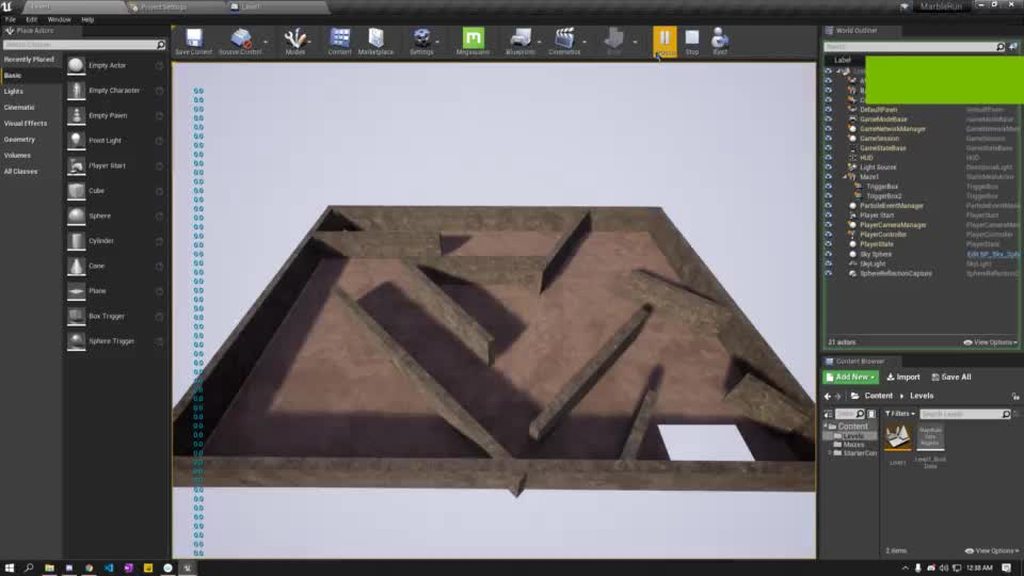 deep elbow
if you set a print duration to 0 when using tick you don;t get the spam, nicer to read
ignore corsshair over text
signal orbit
im just unsure of where to place the print and what to connect to it
oh man, i think this is enough for today
tired quarry
here no ?
tight schooner
Should disable "print to log" though cuz it spams the output log
signal orbit
that's what i assumed but nothing pops up @tired quarry
tired quarry
set ur execs
deep elbow
doesn't matter right where you hook them up to, you probably want to see the mouse input value, and the actual actor rotation
tired quarry
make sure they exectue
white crypt
that will turn into an infinite loop?
tired quarry
well take off the second one
white crypt
i dont think that the editor will allow this
 maiden wadi
Quick thing to learn is that any node with a white triangle needs to be connected to the execution flow for it to work.
tired quarry
lol u know what i mean
white crypt
i do, but he doesnt 😄
white crypt
200IQ
deep elbow
haha
white crypt
ready for steam early access
signal orbit
yup, got it. what i've noticed is that once i stop rotating, the numbers increase the more i rotate.
so at least that's something i guess
i still don't have a clue as to how this is working haha
deep elbow
1 + 1 = 2
2 + 1 = 3
3 + 1 = 4
signal orbit
yes, what i mean is the nodes. i don't understand why they're put together or what they mean.
tired quarry
are you following a tutorial?
signal orbit
yes, and it's an awful one
maiden wadi
@signal orbit You're getting the actor's current world rotation, adding the amount that your mouse moved in the last frametime to that value, and then setting a new world rotation based on that.
 sand shore
Right - I think the confusion was about why it doesn't introduce any yaw?
I'm on the boat that you're setting yaw to zero each frame
tired quarry
because ur not spinningthe table
or floor
ur moving the table like a sea saw and tilting it
like this
maiden wadi
I assumed it was trying to move it like one of those old boards with the marble you have to guide around.
tired quarry
yes
deep elbow
^^
sand shore
... okay?
tired quarry
why would you include yaw?
sand shore
*sigh*
tired quarry
did i miss something sorry :/
deep elbow
dramatic
tired quarry
welp we answered it now lol
white crypt
you scared him away
 maiden wadi
It's not exactly eliminating yaw so much as setting it to the same value it already was at, zero.
tired quarry
yeah so if yaw was at 32 itll stay 32
but since its 0 it stays 0
one real question I have is when do you run into blueprint road block and you need C++?
maiden wadi
Well, if you go into the editor and rotate it to 32, and then run that code, it'll snap to 0 rotation on yaw, since that's what you're telling it to be at.
white crypt
 tired quarry
oh yeah because your setting it to 0 at the end
white crypt
yh
tired quarry
true i concurr
signal orbit
You're getting the actor's current world rotation, adding the amount that your mouse moved in the last frametime to that value, and then setting a new world rotation based on that.
@maiden wadi yup, that cleared it up.
this is the perspective i told @tired quarry. is it correct?
GetActorRotation: at first the actor Roll is 0
Get Mouse X: however, i have now moved my mouse a value of 5
Float: the two values combine (addition) in the float, and now the new Roll for the floor is 5
tired quarry
isnt it you moved it +1 +1 +1+ 1 then -1 -1 -1 -1 ?
or are there really float values to the pos of the mouse
yeah so my max is 40 in my clamp so the most I can move my mouse is to 40 without tilting the board too much
yes what you said sounds right?
because if the floor was already tilted like 30 degrees up and you move your mouse it will add ontop of that
because you got the actors current rotation
signal orbit
😅
deep elbow
@signal orbit can you articulate which parts give you trouble
maiden wadi
@tired quarry The CPP question is a hard one to answer just because it really depends. I'd personally argue that you can make most any game in blueprint. Blueprint can nearly do anything that CPP can do when it comes to typical game implementation. If you're making a pretty standard game, you can make it entirely in blueprint. If you want better performance because you're trying to make a serious city builder with a LOT going on, you're going to need to write faster code than blueprint can probably handle. If you're just trying to make a typical RPG or FPS, you can probably go blueprint the whole way, but it'll still run better if you code it. So.. back to the 'it really depends'.
tired quarry
ah I see I thought some functions or actions etc run better / faster if you code it ?
maiden wadi
@signal orbit What you just said is correct. Get Mouse X is the amount of space your mouse has moved vertically on your screen since your last frame was drawn. For a mouse this can be above one.
deep elbow
yeah but are you making a 60 player AAA shooter or are you making a single player indie game, like there's a point where doing everything in code is not going to do anythign for you in terms of performance
tired quarry
oh I see gotcha
why get a 40 gallon coffee maker if you only have a few cups a day ?
white crypt
if your logic is done correctly you will rarely see any differences making everything in bp
most of the performance issues come from visual aspect of the game (lights, texture sizes, shadows, LODs etc)
tired quarry
interperlations are intense also
tired quarry
animation interperlations and smoothing things out visual are nuts
white crypt
there are plenty of games on steam that were made just by using bps
even multiplayer ones
tired quarry
alright i gotta finish this im procrastinating
maiden wadi
I think a lot of the blueprint stigma comes from UE4's first few patches. They weren't always so robust. These days there's not a whole lot that you can't do when it comes to gameplay system implementation in BP
signal orbit
@maiden wadi if that's the case then i do understand now. the other thing i'm confused by now is the elimination of yaw. both the top and bottom code do the exact same thing.
however, the top code has yaw, while the bottom code has no yaw
tired quarry
what he means is that he didnt start with gettings the actors current rotation
at the top
which shows yaw also
signal orbit
when i use the top code, yaw will be created over time
when i pitch and roll
the more i do it
tired quarry
the wobble effect yes
signal orbit
yes
white crypt
one is add and the other is set
deep elbow
that is floating point precision issues
white crypt
its should be self explanatory
tired quarry
yep so getting its current status and setting it you what you have stops the wobble like the bottom
deep elbow
so hard-setting yaw to 0 every frame will cover your bases from drift over time
tired quarry
that was a question during the tutorial why do you think its wobbling
deep elbow
imagien someone got up from the couch and left the game running for 6 hours, and you've been adding a tiny fraction every frame for that time, it's gonna look funky
white crypt
cant you just lock yaw rot?
signal orbit
got it. i understand how the bottom code has no yaw, but what's making the top code have yaw?
white crypt
 deep elbow
yeah that too i suppose, does the same thing right
signal orbit
i get how on the bottom code i am firmly setting my yaw to zero, but why isn't my yaw zero with the top code when i literally have a 0 there?
deep elbow
you are adding 0, but floating point precision is a real thing, we literally just went over that 🙂
white crypt
yeah, just lock the axis like in my picture and maybe that will solve your issue
 buoyant night
hey guys, is it possible to pass an object reference through a server custom event?
white crypt
ofc
buoyant night
hmm
signal orbit
that is floating point precision issues
so that means that the 0 isn't really zero? that's interesting. what's floating point precision in a nutshell? @deep elbow
maiden wadi
To be fair, I'm not certain that is an issue with FPPE? The amount that thing would rotate should be so incredibly small that he shouldn't see it for a very long time.
 jovial bobcat
Help plz
??
how do i filter an array
like i have 2 npc and i want to filter a array to it only comes out with the two npc
signal orbit
@maiden wadi i assume that means it's just an issue the engine has with rounding then, which is why "setting" the yaw is required?
jovial bobcat
maiden wadi
For each loop, IfArrayElem != ActorYouWant or OtherActorYouWant, remove Element?
maiden wadi
Yes.
white crypt
https://prnt.sc/siqxx6 this?
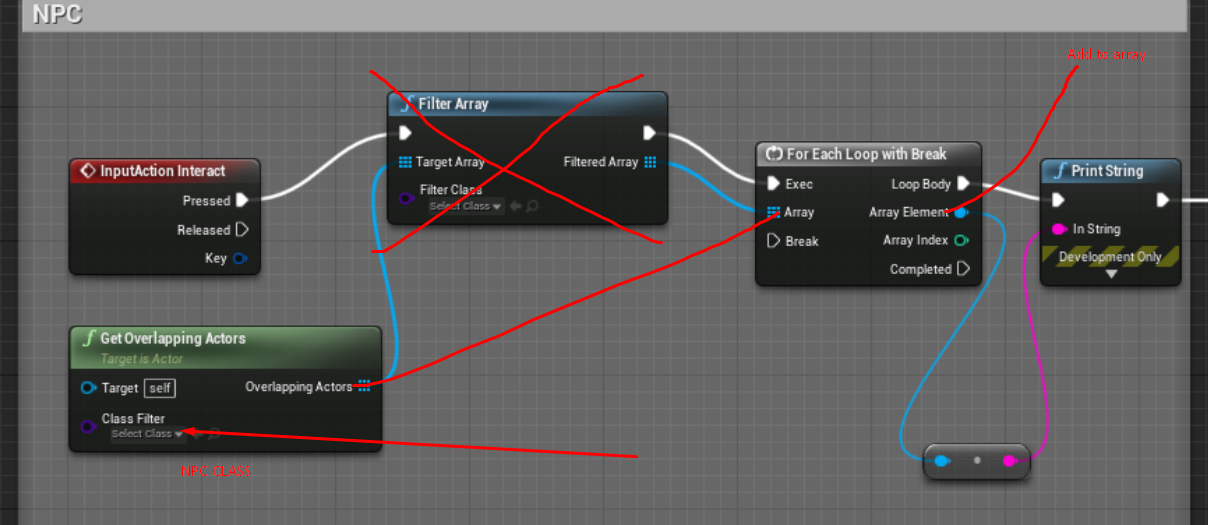 jovial bobcat
and then only filter out a certain class
white crypt
you can already get npc class from "get overlapping actors"
jovial bobcat
yeah
white crypt
and it ill only return npcs that are overlapping
white crypt
so you can even promote the "overlapping actors" to an array

click this and select your npc class
jovial bobcat
how do you do that
 jovial bobcat
yeah
white crypt
that way all childs will have the same class
and they will inherit logic from the parent bp
white crypt
np, come back if you have any other questions
jovial bobcat
wait but wouldnt there be a main npc
white crypt
and once you make childs, dont use parent bp in level. its more or less just a placeholder for your childs
jovial bobcat
oh ok
white crypt
when you want to make a new npc, make a child from the parent
jovial bobcat
could it cause any limiations though
white crypt
nope, thats the intended method
tired quarry
thanks guys its been a active / helpful night
 rich lava
does anyone know the best way to add speed lines
tired quarry
speed lines ?
maiden wadi
@signal orbit The thing is that this is a somewhat complex question. What you're witnessing isn't a FPPE(Floating point precision error). This is a vector math issue. When you rotate an object, think of it like driving three poles through it and then spinning them. You can see the effect yourself in the editor with the rotate tool. Set an object's world rotation to 0,0,0 and then rotate it's X by some amount, then it's Y. Z hasn't changed yet, rotate the X again and Z will change.
But to answer the floating point question, computers store decimal numbers a particular way and sometimes 0.2 gets rounded to 0.19999999999, that sort of thing. But that's not your culprit with the addworldrotation node
deep elbow
Yeah you're right, sorry to confuse by throwing in floating points, my bad
maiden wadi
Nah, it was a good guess. It would actually rotate after hours of sitting there rotating. A very miniscule amount though.
signal orbit
what would be the culprit with the addworldrotation node then?
i appreciate you all’s help by the way
rich lava
@tired quarry speed lines like in the anime or whatever
tight schooner
@rich lava would be a better question for #visual-fx unless there's some specific blueprint help you need
oh you already asked there
deep elbow
hat image just looks like particle effects because they get culled by geometry
just make a particle effect of streaks, spawn it from the player
or do a camera lens effect and a spherical mesh/unwrap and scroll some texture along it
tired quarry
sounds about right
white crypt
paragon had an interesting approach for that, they would place a plane in front of a camera and do all the effects inside a material
just not sure i would go the same route
deep elbow
yeah, paragon minions pack has pretty much everythign you need tbh, grab it and dig into it
white crypt
wait, theres a minion pack? i must have been blind 😄
tired quarry
like first person mode or you see it in 3rd person mode ?

"Speed Lines" effect from the upcoming update of Chameleon Post Process for #UE4 #gamedev #indiedev
https://sumfx.net/products/chameleon-post-process/
white crypt
i only saw characters
deep elbow
camera lens effect is great but the gif you linked in visualfx just looks like particles spawned around the player and blasted towards the camera
tired quarry

Warp drive / light speed VFX and a giant planet. Made in Unreal Engine 4.
maiden wadi
@signal orbit It is a matter of the way rotations work. You're literally rotating an object in three different directions. You move two of those directions enough and eventually the third direction has no choice but to rotate as well to make the object move to the correct rotation.
signal orbit
@maiden wadi got it. i'm satisfied with a "that's just the way it works get over it" answer in this instance lol. you've been a lot of help mate, i appreciate it.
maiden wadi
Vector math is fun. But it'll boggle the mind sometimes.
 onyx compass
So this is my first discord question ever....let me know if my etiquette is off........I have been trying to figure out how to get unreal engine.......to pull in a texture based on an asset name or file path......Ive been at this for hours. Where am I going wrong.
this is a blutility btw
deep elbow
man you and me both, asset paths seem to shit the bed for me
white crypt
doesnt rama have a bettter plugin for that?
onyx compass
yeah......I am still pretty new to this..........so I figured I must be missing something simple
I came across that rama name in a forum post before.......let me do a search on the topiic
white crypt
he has a victory plugin with bunch of stuff, maybe using it would be a bit easier. personally i try to avoid plugins as much as possible
but his plugin was useful before unreal added a decent system for input mappping
onyx compass
It would be nice to be able to avoid a plugin.........This here is for my own sake........but I do work in an environment where unreal is becoming a big thing. I might not have the flexibility of adding plugins at work.
deep elbow
do you have the option of writing your own plugin?
white crypt
with enough experience you can implement the plugin to the project itself
deep elbow
wait dumb, should just figure it out in blueprints
rich lava
is there a node for "until variable > something" then do this
onyx compass
well......I am more an artist than a coder........So it could take awhile for me to write something.
deep elbow
@rich lava While loop
onyx compass
this is more of a .......on right click.......add this material and plugin in these textures.....based on this name structure thing
white crypt
anyways it should be possible to achieve what you are doing without plugins, just i've never done anything with getting stuff from disk
onyx compass
it is all based on textures which are already imported into the content browser
deep elbow
have you tried hard references, like point to a location on disk?
maiden wadi
@onyx compass Not sure why you're having trouble, but I did just try exactly what you had there. Except without the strings and such. You might just have the wrong path?
onyx compass
really
white crypt
can it be that "material instace" variable doesnt have enough time to be set before executing sequence 1?
onyx compass
These are all the paths I have been trying
maiden wadi
Have you tried to use the literal path first to make sure it's working before all of the string stuff?
onyx compass
okay I will try and build something based on what you posted and see what happens
pretty much the same result......my cast failed is the node which is being fired
thanks for your thoughts though
rich lava
I keep on getting infinite loop error when using while loop
maiden wadi
@rich lava What is your condition?
rich lava
it is the angle of the ground u r standing on
and it is set every tick does that have something to do with it
maiden wadi
I think you're looking for a branch, not a while loop there.
While loop will literally run as much as possible until it's condition is met. You're calling that timeline millions of times per second.
rich lava
oh but i want the time line to stop when my condition it no longer met
maiden wadi
You're running this on tick?
rich lava
and the function is only called once no checked every second
its a sliding fuction
and i wanted u to slide infinitely when u r on a ramp
 round torrent
you're not changing AngleOfGround inside the loop so it's going to run forever
rich lava
ah
how would i make it only play once as well as authaer said it is player millions of times a second
maiden wadi
Branch node.
While Loop is exactly the same as a For Loop, it just takes a bool as a condition instead of two integers for counting. Both run until their conditions are met.
onyx compass
Got it!!! I used your make literal node to help me debug it......I had to uncheck the include on disk option. And add my texture name back in after a period to match the reference file path.
Thanks for the tips
maiden wadi
Have no idea what that node is for or the bool. Just went poking around out of curiosity.
 viscid saddle
Im trying to get actors to spawn however when i debug the blueprint the spawner is set to current value = none, I have referenced it in the blueprints it self however it still is coming up none
maiden wadi
Where are you setting the reference?
viscid saddle
Under the variables, its set as MySpawner_BP
white crypt
so you are only setting the variable type
but it holds no value = NULL
to put it simply, its an empty reference
viscid saddle
Weird, was following the unreal documentation on how to set it >.>
white crypt
how many spawners you have?
viscid saddle
Only 1
round torrent
it must reference an actual object in the game, you're just setting the type of object it should expect
white crypt
if you want it to just work then, get all actors of class - get and use that as target
viscid saddle
It is an actual object in the game
round torrent
the class isn't
white crypt
you still need to set that variable
or use get all actors and it will return an existing object
ideally you would set that refference yourself, but for now you can just use get all actors

and it will work, as i said its not ideal but until you learn how to use reference properly this should do the trick
viscid saddle
As i said, I am reading the unreal documentation.. But yes that will work
maiden wadi
@viscid saddle Your variable in the variables panel is a generic business card. You know that it's a business card for a construction company, but you don't know which one. No one's filled in that part. You have to do that by getting a real reference. Done with Line Trace, Overlaps, Hit Events, SphereOverlapActors, GetAllActorsOfClass, saved when created, or Direct Blueprint Communication in the level editor via exposed variables.
white crypt
watch this. https://www.youtube.com/watch?v=EM_HYqQdToE

Announce Post: https://forums.unrealengine.com/showthread.php?101051
This Training Stream takes a look at Blueprint Communication. We find that Unreal Developers of all levels can sometimes struggle through the concepts behind moving data between objects. So in this video we'...
maiden wadi
I just realized what the yellow vs blue functions were in the interface functions. Someone was asking about that not too long ago.
maiden wadi
Nah, one is an event, the other is a function. Blue returns a value, yellow is just an event and cannot return a value.
 trim matrix
Hi. I have a grab system where the player grabs any physical object that has <=50 kg. The problem is that the object ocuppies 75% of the screen. How can i put the object transparent but the player still sees the cube and sees whats in front of him?
The grabbing code is in the Main charater.
signal orbit
one last question (hopefully) i have about this code. here's what i believe i understand at the moment.
the event tick is firing every frame. it is setting a rotation every frame (rotation on frame 1 could be the same or different on frame 2, depends on if i moved my mouse or not)
focusing on the Roll, it has to do math to figure out what the next Roll will be. my question is, what is the math problem it has to solve? is it GetActorRotation (Roll) + Get Mouse X?
maiden wadi
@signal orbit That is correct
@trim matrix As far as I know, the only way to make an object transparent is to change it's material alpha. If you have a lot of things that can be grabbed, I'd recommend a parent class if you don't already have one. Use it to call a function on the item when it's grabbed to set a material parameter in the static mesh's material, which you would need to set up in your materials on objects. There may be other ways to handle it too, such as material functions based on camera distance or something. Not really that good with graphics stuff yet but as far as blueprint programming goes, I think you're stuck with setting the material parameter.
trim matrix
Ok, i will try that. Thank you
signal orbit
bloody hell mate thank you. i'm not a mathematician whatsoever so your help has been invaluable. thanks again @maiden wadi
trim matrix
I forgot the word that i wanted, its translucent. 
round torrent
@signal orbit you're still on this? lol. Anyway, I don't think this is a very good tutorial if it teaches you to split rotation structs and manipulate the float values axis by axis like that. You should never do that, since what you see here is not how the rotation inside Unreal actually works. It's just presented to our simple human brains in 3 dimensions because it knows we wouldn't understand rotation in 4 dimensions
white crypt
map loads first so your character/controller doesnt exist yet
you can add a short delay after begin play
maiden wadi
There are cases where you only need to use one rotator quite often. Rotating a character just on Yaw, or manipulating only pitch with look. Or like the marble board thing, only wanting it to move in two rotator directions. But even with that, be very skeptical of youtube tutorials.
white crypt
well editor only informs you when you quit
but this happens on the very start
if you add a short delay it will get rid of that error
maiden wadi
Or do it in the player controller.
white crypt
true 😄
round torrent
if you add <duct tape> it will <sometimes> get rid of that error
maiden wadi
Try to avoid using the level blueprint for.. almost everything.
white crypt
well he wanted to know the reason behind that
i explained that controller doesnt exist yet
ofc you wouldnt do that logic in levelbp
but thats the most of tutorials people follow
and learning bad practices
maiden wadi
Haha. I'm backwards there. Literally just started learning CPP a few days ago. Mostly just using it to write small functions I'm calling from blueprints.
 sterile apex
I used to look at blueprints just like you
maiden wadi
It's incredibly intuitive once you get used to it.
sterile apex
I live programming but use blueprints instead of cpp because blueprints are easier so i can make better less bugy games
And spend lesstime on debugging
sterile apex
Normally i had to read lines of codes now just blocks
 peak plaza
And c++ versus bp is only massively different in editor afaik.
maiden wadi
Nativization dramatically helps blueprint run speeds.
peak plaza
Yeah it definitely does, they had a nice video about the differences. In editor it's absolutely a monster.
I'm pro c++, but not for those reasons lol.
Hmmmm
I suspect either race condition or multi error
peak plaza
It could be the level exists before the player controller
try adding a 2 second delay and see
white crypt
if you lock your logic to levelbp then when you decide to make a new level you would have to do everything again
peak plaza
It worked meaning no error.
round torrent
doesn't that feel like a really ugly "solution"?
peak plaza
It's because player controller doesn't exist yet
So basically the delay gives it time
You would be better instantiating it to an event
Not loading the controller until you're through the steps before effectively.
Just as a quick, if you do c++ then you already probably have a basis in race conditions.
maiden wadi
It's just practice. Level blueprint should be reserved for very level specific things. Problem is that almost everything you can do for the level can also be done in a class. Doors that open, interactable objects, etc. The rare exception is a one off thing you only use in one single level.
tight schooner
I never use level BPs either. I think the proper use is if your level has some logic that's actually very unique to that level, and ideally very simple. If you find yourself copy-pasting script between level BPs then you're using it wrong. That's a paraphrasing of the advice I've absorbed about level BPs.
peak plaza
I believe Unreal has a base guide about where to put what logic.
For a level for loading the menu that might make sence.
sense
And that's an approach I've seen before.
Though I'm personally bugged by the lack of multiplayer :p, all my courses lately there.
white crypt
i've used levelbp to play main menu sound. nothing else
maiden wadi
It's not that different from common OOP practices. Do stuff where it doesn't need to be repeated and try to contain classes to themselves.
peak plaza
Really depends on what you need, but if you're setting players into that map specifically for starting menu, which I'd rather guess is the case on context, having the menu be a level to save any background issues should be fine. Don't know exact standards but... would be singular occasion
Regardless though I believe that should have answered the question, just a race condition, the none is your player controller, an is valid should give it. When tested though it usually works after it becomes valid, not sure if yours would.
jovial bobcat
does anyone know how to get the degree of a slope depending on my walking direction
 pine maple
i deleted thirdperson character and maked new firstperson character and smthng like this happened plz help
jovial bobcat
also can somebody explain to me what a normal is
maiden wadi
@jovial bobcat A normal is a direction vector. The normal of a surface is the direction that polygon is facing.
trim matrix
also can somebody explain to me what a normal is
@jovial bobcat And a normal map is something like a texture that can be applied to objects, giving the normal vectors new directions, changing the way lighting is applied to a surface
maiden wadi
For example. If you line trace and hit a wall that is directly in front of your character and you are directly in front of it, the normal vector would be facing right back at your character
jovial bobcat
ok
so is there anyways
i can do a system where it determines the slop of the wall
based on my looking direction
i was think about a system
where it draws a line to the slope
and based on the length of the line
it gets the angle
maiden wadi
Do you want to know the vector based on the center of your screen, or shortly in front of your character?
maiden wadi
The picture you just posted is in front of your character.
maiden wadi
So you want to know what the slope would be, say.. two foot in front of your character?
jovial bobcat
yeah
like if im facing upward
it would give me a positve angle
and if imfacing downward it owuld give me a negetive angle
like it would give me two different valuce
even though im on the same slope
i have somehting like this
but it only shows a number
and i have to idea how i could get a angle
and i have a object for the line that is traced
downward
deep elbow
what is your end goal
 fathom spindle
Hi everyone, does anyone have any recommendations of tutorials that cover delayed flow/intermediate to advanced flow control techniques using things like Gate and DoOnce? i've been flailing about for the past few days trying to set up some timed conditional events, have found a way around my issue now but would be great to see some practical examples of say, setting up a status effect system with post-process effects and so on. any thoughts?
jovial bobcat
i think im overthinking it
also it probebly wont even work
if the hill is rocky
like in a real map
so im kinda stuck here
i mean or at the very lease
t
to stop sliding uphill
deep elbow
you could get actor world location in Z, check it against the last frame and do whatever if it's great or less
jovial bobcat
that was the system my friend had and it break when i try to implemtn it
deep elbow
then for every frame add or remove velocity, would probably slow you down smoothly and not cause issues if going over small bumps
jovial bobcat
how would i do that
tight schooner
@fathom spindle I don't have tutorials offhand but if you ask the channel specific questions or ask for guidance on approaching a well-defined task, you'll probably get an answer.
fathom spindle
thanks @tight schooner yeah bit vague i know
tight schooner
@fathom spindle if you haven't looked into these nodes yet, I'd read up on timelines and set-timer-by
fathom spindle
ok thanks i'll do that
 fallen glade
real stupid question, how do you remove duplicates from arrays ?
do I have to do it manually or is there a node?
tight schooner
Don't add them in the first place  (AddUnique node). Dunno offhand how to find preexisting dupes in an array; sry
fallen glade
haha, thanks @tight schooner i guess
 proven fossil
If you don't need them to replicate, use TSet instead.
fallen glade
Tset?
proven fossil
Creating and editing Set containers, an advanced container type, in Blueprints, including an overview of this container's properties.
tight schooner
Looping through an array with AddUnique within a function might be a way to "remove" dupes...
fallen glade
mmm I guess it'a about time I understend sets, never used them before
proven fossil
A TSet is similar to TArray but it enforces unique entries.
There are some limitations of TSets though, so it may not fit your usage case.
fallen glade
Thank you guys, I'll try to be more carefull in the future but for now @tight schooner option is all I need, it's just an array of maximum like 10/15 entries
proven fossil
Otherwise what renzu suggests works well.
proven fossil
Depends on the size and what you're doing, but it is generally O(n)
tight schooner
Not really. BP performance is mostly about the no. of nodes executed in any given frame, and loops tend to execute a lot of nodes.
But also BPs aren't as slow as people tend to think so it's not gonna cause a frametime spike on its own unless your array is huge
fallen glade
Alright, that's what I wanted to hear 🙂 I'm not doing anything at large scales so all my arrays are mostly sub 100, doing simple stuff
How about removing items not matching an array? I have this abomination going on ****
haha
maiden wadi
It takes massive amounts of things to hurt framerates in standalone games.
proven fossil
You can always nativize Blueprints. It isn't as good as writing good C++; but it will be faster.
fallen glade
Not if you're special haha, I was crushing the framerate of one releasing title with just 1 particle effect @maiden wadi
programmers got angry at me
😢
proven fossil
Many projects I've been on have seen a lot of abuse with Blueprints.
People making UMG widgets take up 5ms
or people using GetAllActors every Tick()
It happens.
tight schooner
@fallen glade as someone who is continually finding new ways to tank the framerate with particles, I can relate
(just an hour ago I discovered a snowfall-like particle field was killing the draw thread because I accidentally had shadow casting enabled)
Thank god for Unreal Insights
fallen glade
my worst offender was on this map. I might have accidentally pressed a couple more 0 than I was allowed haha
at least with in-engine engines it's all capped, programmers knows artists too well
deep elbow
whats the game
deep elbow
no looks fun
 sage token
friends, I have a CSV file with time and angles for the animation of some bones. Currently I'm applying the animation from the Actor bluenprint by reading the CSV. It feels hacky, tho. Can anyone point me in a direction to do it in a proper way? Maybe with an animation sequence that reads from the CSV maybe?
I need to use the CSV file as it comes from a telemetry reading and I'd like to be able to update the animation in read time in the released version. So I need to keep reading the animation info from a CSV file.
so, maybe a dumb question, but would it be possible to do that with an animation sequence? Should I continue to pursue that investigation?
fallen glade
it's for the best really
deep elbow
hey weird Q, in the "Place" Mode in your general level editor - can I get my blueprints to show up in there, eg material functions can be exposed to the library, i wanna do same thign with certain blueprints
deep elbow
in class settings i can enter stuff into bluepritn display name and blueprint category but does that actually work, seems like stuff only appears if it's been placed or opened recently :S
tight schooner
@jolly tundra https://docs.unrealengine.com/en-US/BlueprintAPI/Math/Intersection/LinePlaneIntersection_Origin_Nor-/index.html
Line Plane Intersection (Origin & Normal)
This may get you half way there, then look up some math formula for a specular angle I guess
Or if you don't care about where the bounce occurs and you just want the direction vectors, then specular reflection is all you need to look up
I'm not a math whiz so idk how to do it offhand
split crescent
@crude iron yeah I'm using behaviour trees for my AI enemies and my player has an AIController so it can use the AIMoveTo function
 opal pewter
Hello, i'm new to unreal, i have an actor blueprint "LevelBack" where i created this event dispatcher and i'm confused what should be the object in casting.
 modest gulch
quickie: cast to Xxx will fail correctly (go to Cast Failed output) also when object is pending kill or outright null, correct?
 rigid heart
Hey, is there any way to check if an actor has input enabled? (either in blueprint or C++)
Or maybe get an array of all actors with input enabled?
 worthy frost
yes @modest gulch
modest gulch
kaos thanks 🙂
fallen glade
does anyone know of an easy way to find these little guys ?
I spend forever looking for them by just pressing a letter
 untold fossil
I'm trying to make a function that finds which number another number is closest to. In the function here are 8 numbers (0 - 2.5 - 5 - 7.5 - 9.9 - 12.3 - 14.8 and 17.2). Say i input 5.5 into the function, the function needs to return 5 because that is the number which is closest to the input number. How would I make something like this?
fallen glade
you loop the array of numbers and keep the shorter result
untold fossil
So I check the input number against all numbers in the array? And then I only update a local variable when there is a shorter number found? And then finally output that resulting number?
fallen glade
Loop - 5.5-0=5.5 keep. next one 5.5-2.5=3 overrite etc
untold fossil
Ok sounds good, yeah
fallen glade
that's what I'm doing
untold fossil
thanks!
fallen glade
might not be the best way though
untold fossil
Well at this point if it works I'm happy haha
fallen glade
another connoisseur I see
 willow lichen
If they array is sorted first. You just check
You iterate it and check if your number is not bigger for the first time
after that get this var at current index, and get the last one [idx-1]
then you compare a number in a range
like: 3.12| -------4.5--------------|7
 still sigil
So I'm currently working on getting some NPCs up and running! It's been going pretty smoothly so far, surprisingly. 😛 I've got the HUD appearing, the dialogue text displaying, even got some voice acting going. My next goal is to set up something to get the NPC to play a specific animation during certain lines. Ideally, I'd wanna be able to do this in the behavior tree, (Which is where the NPC data's being stored.) where I can easily select what animation I want the NPC to do. I feel like I'm SUPER close to getting this working, but I've hit a snag. I'm trying to use a Character Object variable, so I can select what specific NPC I'm wanting to play these animations. But it doesn't seem to let me select one in any way. Does anyone have any ideas on how to get NPCs to animate for specific lines?

 ionic harbor
Hey, I have a question about sub maps. How do you determine what code is executing when you have a persistent map and a sublevel?
For example:
-I have a persistent map with a game mode, controller, and pawn. it's doing generic stuff. as part of that, I place a level instance of a sublevel I have
in said sublevel, the "event beginplay" in the level blueprint works fine. However, any code in the level blueprint's event tick doesn't run at all.
Does anyone know where they put the code that needs to run each frame in a sublevel? keep in mind the persistent map already has a decided game mode, controller, pawn, etc
buoyant night
anyone have an obvious answer to why custom event calls to run on server are not getting called?
 pliant frigate
Can you add a Text Render component to an actor at runtime using blueprints?
 hollow cape
yes
pliant frigate
@hollow cape assuming your answer is to me, what is the correct keyword to find that way? I'm not finding it but thought it was possible.
pliant frigate
and there it is. Gee, i feel dumb now, lol. I was assuming "Add Component" followed by selecting the right thing from a drop down.
Thanks!
 cunning drum
Hi, I have day / night cycle blueprint which is set to animate time of day & play sounds on the sunrise and sunset events. All is working and replicating as intended for both server and clients Except the Sounds. They work for the server but I am not able to work out how to get them to play for clients. any help on how to make sure the sounds replicate across to my clients correctly would be awesome been trying for days now. using 4.22
 pulsar moss
do I need to unbind these events, if MoveOrder actor is going to be destroyed?
@cunning drum what happens if you remove the do once?
sand shore
@cunning drum You need to move the sounds and stuff into an On Replicated function
you'll have to change a little about how you do things in that graph
there is a lot more info on this in #multiplayer
maiden wadi
@buoyant night This is a question for #multiplayer but I'll answer it here anyhow. Not sure if you found the answer to your question, but I'm assuming you're trying to use a server RPC. A client can only do one of these if it's from within an actor that that client owns. By default this is usually either the player controller or their player character. If the client tries to RPC from someone else's character class, or from an actor in the world that the server has not been set to know that actor belongs to that client via owner settings, the RPC will fail. If you're more curious about the way RPCs are intended to work, check out the RPC documentation. There's a table about halfway down that lists how RPCs work based on where they're ran from. https://docs.unrealengine.com/en-US/Gameplay/Networking/Actors/RPCs/index.html
Designating function replication across the network
buoyant night
Thank for the reply @maiden wadi. I read the docs and realized this is what was happening. I needed to ensure all my vars and methods are called from the server to replicate.
 echo scaffold
Is adding scene components with Actor Components, possible? I can't find where to do this. I have an Actor base class and want to be able to add an Actor Component to it, which dynamically adds a bunch of static meshes and such to it
But it seems like "Add Whatever" node isn't available to Actor Components, even if casting to the owner
 prime merlin
Hello idk where to put this but im working on a training dummy, where i can test my character's damage, but the health bar on the training dummy only work when i set it to 0.1, but if my character is dealing around 10 damage then the dummy will just die instant so how can i fix that? so i can deal around 10 damage or more and the dummy have around 100 health? 🙂
 frigid anvil
The progress bar goes from 1(100%) to 0(0%). So what you could do is just divide your health variable by a 100 if your max health is 100 and it should work fine @prime merlin
pulsar moss
Can I do a mouse move event without Tick?
prime merlin
@frigid anvil so if i set the Health of the dummy to 1 (100%) and i want my character to deal 10 damage so the dummy get to 90% health after 1 attack i should make my charater to 0.1 damage in my ''Apply damage'' node? or what? im not sure i understand?
pulsar moss
is there a built-in mouse move event? my googling is turning up nothing
frigid anvil
Yes @prime merlin
maiden wadi
@echo scaffold Someone who understands the backend code would understand better, but I don't believe you can add a component to an actor from an actor component because of the same reason you can't add it from a macro library. The AddComponent nodes were somehow designed to be ran specifically on actors, from within actors.
prime merlin
@frigid anvil but then i can only have 10 different damage type? from 0.0 to 1
maiden wadi
@pulsar moss Type "Mouse X Event" Or Y. Pretty sure that's what you're looking for.
frigid anvil
It would be the same. If you want to make it easier you can keep your max health at 100 and then when connecting the health variable to your progress bar divide it by your max health(100)
 frozen spear
Ahh you're making basic health bar
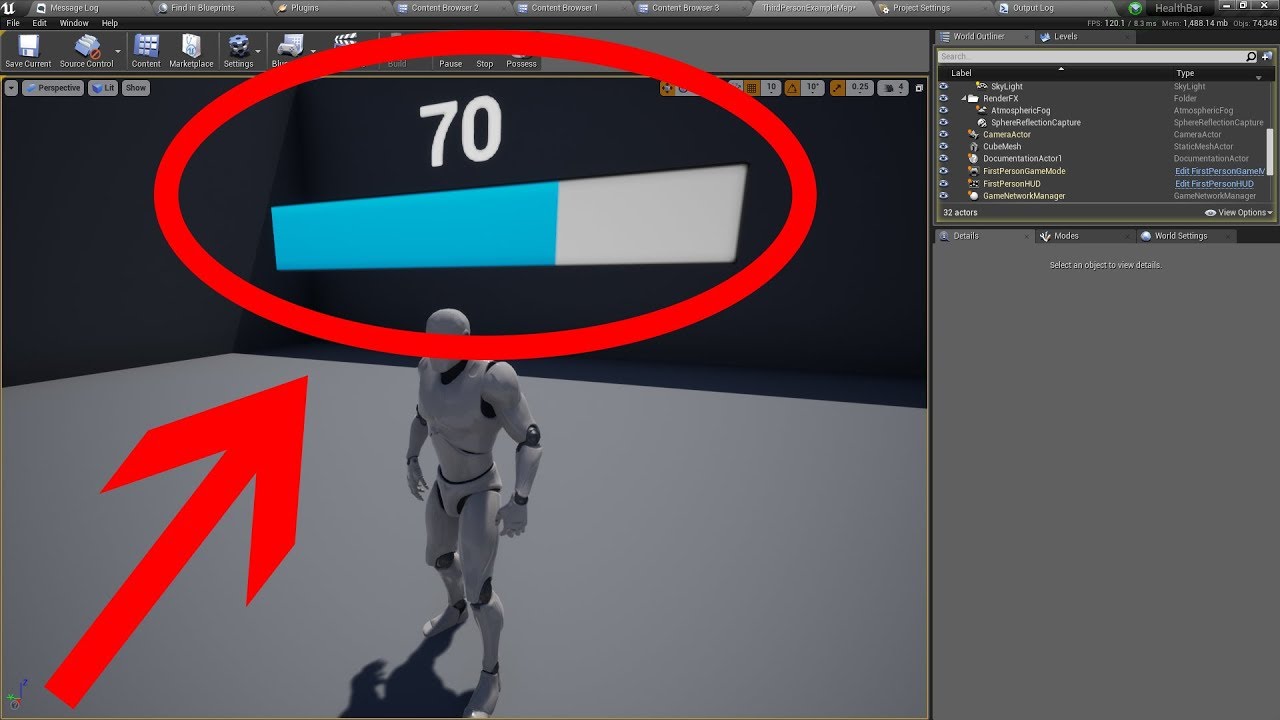
Check out my Patreon: http://bit.ly/TechnoNerd_Patreon
DON'T CLICK THIS: bit.ly/2vBhU2s
PLEASE LIKE AND SUBSCRIBE
And feel free to request Tutorials.
prime merlin
if i set the health of the dummy to 2 and my damage to 0.1 i need to attack 11 time to make the progress bar move just once but the 11 and more attack move the progress bar move every time i hit
frozen spear
11 attacks with that example would move it to half...unless you set something up wrong
echo scaffold
@maiden wadi I see thanks for the confirmation that it's not possible, my workaround for now is to spawn a proxy actor that just has a base class of Actor, to do all the spawning functionality, since it seems I can do that fine even with casting to the other actor
Just a bit of an indirect way of doing it but it should have the exact same end result
maiden wadi
@prime merlin You need two variables. MaxHealth and CurrentHealth. You never change max health. It stays constant. When you spawn your actor, it's CurrentHealth should equal it's MaxHealth. Then when you make it take damage, you say (CurrentHealth - Damage) = CurrentHealth. This will lower your current health. So if damage is 10, and CurrentHealth is currently 100, that would change CurrentHealth to 90. Then you take those two variables and say CurrentHealth/MaxHealth. This will return 0.9. You use that return to set the progress bar.
trim matrix
I did research to find out why my flip flop isn't working and it says to store it in a macro but I am confused what that means to do from here
If anyone has any advice I would appreciate it
prime merlin
i got it now i only forgot the divide in my health widget blueprint ty guys! 🙂
maiden wadi
@trim matrix What are you expecting to happen when you press your inventory action button and what is actually happening? All we see is a branch with a bool and a flip flip with a bunch of print nodes. Start with which of those prints is showing when you press the button?
trim matrix
When I hit the button after picking up the backpack it should open inventory widget it says inventory opened but inventory does not open
I think I see the issue actually how do I get it to continue after setting inventory spawned
maiden wadi
So after picking up the backpack, it is actually printing InventoryOpened?
What is after the print node? Where are you telling it to add the widget to viewport?
trim matrix
The next picture i sent is spawning it in
maiden wadi
That's not a widget. That's the inventory actor.
trim matrix
Well then I am not sure I'm pretty sure that is what's adding to my viewport I'm generating it thru a function and adding it there I can't find anything else but I know the issue is that the first time I hit I after getting the pack it's gotta spawn the actor but I want it to continue after it does I can't seem to get that right
maiden wadi
@trim matrix I'm confused. Aren't you picking up the pack? Shouldn't it already be spawned? Isn't that where you're setting the Bool, when you pick up the backpack actor? I think you're supposed to be using CreateWidget after the flipflop to create the actual widget that needs to be displayed, since you should already have the backpack actor.
trim matrix
I shall continue trouble shooting I maybe completely messed up but I got the first part I wanted working lol now it won't close and reopen
 vivid sigil
Is anyone here familiar with Dark and Lights terrible coding that knows how to add structures to the game? Any help would be appreciated!
pine maple
i made animation and
my hand goes through the camera and causes ugly mistake plz help
i cant take pic its so fast
 timid creek
Hi. I used this blueprint tutorial to get an animated texture but can't make multiple ones. https://www.youtube.com/watch?v=7OEbO353_GM Any ideas how to fix?

In this Unreal Engine 4 (UE4.16) tutorial I show how to use the MediaPlayer component to render a MediaTexture onto a static mesh and play an mp4 video file.
To do this you have to add the mp4 to a folder called Movies in your content of the UE4 project, then add a file media...
this doesn't seem to fix it
timid creek
figured it out. I also had to change the media source under Open source which I didn't do
trim matrix
gnot sure if this is right place
but when i do test build of my project to run standalone, i get this error in the log.
Am I using the clothing gravity override node right? Because it just disables the gravity for the cape instead of changing it
 whole prairie
I'm new here so apologies if this isn't the place for this!
I am working on an FPS project and am looking for some guidance with setting up a standard objective system + the best way to store and reference that data.
I'm working out of the Game Mode as a place to store all of the necessary data and have an interface called from an overlap volume to start new objectives. The interface is updating a struct in the Game Mode where I am storing text/an enum/and a 'is completed?' boolean. The UMG is updated based on this data as well. Should I be storing/incrementing this objective data differently? KVP/Map? Is it bad to use a volume with an interface for 1 objective but later want to start a new objective based on something else? (on all enemies dead/player interacted with actor)
I also don't know what the best approach is for keeping the chain of events clean and easily adjustable. It feels messy to have different conditions send an event back to the game mode to update the data. Is this where I would use an Event Dispatcher?
The functionality I am going for:
-Player reaches a new area/enters a volume/perfoms some action = trigger new 'current objective'
-UMG is updated with appropriate text/marked enemy actor(s) or location to reach
-Player completes the objective by dealing with the enemies/interacts on actor(s)/reaches location
-UMG is updated (Objective Complete!) objective data in game mode is updated and a new 'current objective' is triggered
- New actors/location marked in the world...rinse and repeat.
Any direction is greatly appreciated. Looking forward to chatting it up in here more 🙂
 mild pine
Hmm, anyone got some clue of what could be causing this? When I mount my horse, the equipment attaching to the rider mesh is offplaced, and also if I equip an item while mounted it applies the item as if the actor was standing upright on the horse (socketbased placement).
Maybe some Master Pose issue here?
 pallid grotto
I'm trying to let my character control their velocity while they are in freefall. you know in minecraft when you can sorta move while you are falling? i want to do that how do you do that?
because I don't like the way when I jump i can't move at all, i just have a sit and be patient and wait for the jumping velocity to be over until i am grounded
 oblique frigate
so, i have parent blueprint. i have child blueprint from it. but even if i cast to my child class, it still calls parent function and not modified function from child blueprint
is that normal?
i guess if it does that
 opal thicket
Hey do you guys think I can ask you something super basic?
If every time I press the E key, I also increase the index of an array, how do I start the array at 0 and go on to 1 instead of going to 1 when I press E first to interact?
SymeOn, I have found sometimes rotations and transforms can get messed up when youre offsetting objects with children sometimes
 worthy pendant
Is there a more efficient way of removing large numbers of actors than destroy actor and a for each loop? I'm getting large frame drops when it happens
 hallow night
Hey so I'm trying to make a new system just so i don't get rusty but... I don't know new systems any suggestions? I made fron scratch:
Inventory system.
Combat System
Dialogue System.
Quest System.
And thats all i remember.
 zealous moth
@hallow night try a multi part damage, health and shields system
hallow night
I made a health and shield systems. A multi part damage system? Do you mean leg/hand/head?
zealous moth
no, i mean like elemental damage, resistances, weaknesses and why not status chance
hallow night
Ok I'll start sketching out the system! Thanks for the suggestion
zealous moth
np, i made one myself and it was a lot of fun
 crisp lagoon
Does anyone know why my player blueprint might have started spawning outside the level?
When I click play it spawns here the same place as when I drag it from the editor
zealous moth
outside you mean below?
crisp lagoon
its far to the side and below
normally it would pick one of the red spheres that are spawn points
zealous moth
red sphere?
crisp lagoon
but when inspecting the bp the viewport is zoomed really far out
zealous moth
check you "adjust position" setting
crisp lagoon
the red spheres are spawnpoint classes I made for multiplayer
zealous moth
are they supposed to be so big?
crisp lagoon
they're like excusion zones so it picks one randomly as long as it doesn't have any players in it
where is this adjust position setting?
 quick lark
"Go to definition" in the blueprint editor takes me to the file, however the file is empty (kismetsystemlibrary.cpp 👀). VSCode also signals that it has been modified by displaying the "you can save this" icon. Does anyone know what is up?
Looks like it is pointing to D:\build\++ue4\sync\engine[...] and I did not install the engine there
trim matrix
Is anyone familiar with an actual fix for the on click event only firing when double click?
tight venture
Anyone know what possible causes there are to make the Simulate Physics checkbox to become permanently ticked like this and greyed out? I need to disable it.
(This is on a skeletal mesh component of a blueprint)
@trim matrix I wasn't aware that was an issue. Is that a known bug or is this just something you're trying to figure out
trim matrix
@tight venture Its on unreal answers but what they say solved it did not lol
tight venture
link it please
zealous moth
@trim matrix what game are you making? top down? ai?
@tight venture if it is inherited, it will stay gray
trim matrix
@zealous moth just an inventory system that I need to click on
@tight venture I'm trying to find the link on my phone lol I was using computer
zealous moth
is the input mode changed?
are you using a capture event?
if so, that is why you will need a double click
there are 2 fixes for it
tight venture
@zealous moth Okay, that's a piece of the puzzle... The problem began when I changed a BP from inherit-from-
Actor to inherit-from Pawn
but after changing it back, the problem still persists
trim matrix
@zealous moth How do I change input mode and what should I set capture event too?
zealous moth
unparenting bugs with me, i usually delete it and remake the actor from scratch
tight venture
There is no Physics Asset associated with that BP
grrrrrr wrong answer!!!
haha jk. thx, will do
zealous moth
@tight venture hm try to compile and restart editor
@trim matrix begin play - set input mode to game and UI only - set input to UI only
you have to make that double swap to avoid the primary capture input but to enable in UI mode single click
tight venture
The editor just crashed so I'm in luck, auto-restart
trim matrix
I'm confused ? That's literally how my blueprint should look?
zealous moth
yeah, and it's not obvious why
trim matrix
Still had to double click and I couldn't move my camera obviously
zealous moth
the UE4 editor has a "required click input capture" when you start the game; however, this bugs with UI inputs for click events. I found the fix to be in double setting the input as i mentioned (works with non-click based games) or CPP.
If what I said did not work, you have to modify the controller i believe
trim matrix
So I'm setting it to game and UI and then when I open the inventory I'm setting it to UI only idk why that doesn't work it's the same thing lol
zealous moth
it's because when you launch the game, there is a mandatory mouse capture event
you have to click in the game once
trim matrix
Ahhhh ohk how do I do the controller instead ?
zealous moth
when you use "game input only" you don't skip it; you delay it until you need to use the cursor as a cursor
i forgot. I found it on a website using the keywords i mentioned.
trim matrix
Yeah I've seen it typed in cpp but idk how to access
zealous moth
hah beats me; i did it once and never again
i put it up for sale on itch.io
ask the cpp channel
trim matrix
Well darn alright lol
trim matrix
anyone know how I can pause and unpause a video that is in my game world?
when I hit P it plays it from the start. Ideally I'd like to hit P again to pause it and then again to resume it
buoyant night
not sure where to ask this. When I rename a folder i get a bunch of missing folder warnings and errors. how do i clear the caching system?
just delete the saved folder?
buoyant night
no, i renamed in the content browser. It fails to clear the cache so when i build my game for windows there are missing links because it's referencing the old folder path.
whatever that cache is anways..
example: UATHelper: Packaging (Windows (64-bit)): LogInit: Display: CookResults: Warning: Unable to find package for cooking /Game/SideScrollerBP/Maps/SideScrollerExampleMap
 lucid granite
Do any of you know how to load a game mode when starting a new map?
I have that but I need it to then start a game-mode after opening the level
zealous moth
yeah the cache is not public, you will have to go to your ue4 data and clear it manually
it will redo all your shaders
buoyant night
rough
which directory is that?
clearing the saved folder did not appear to do much for htis one issue
zealous moth
i have no clue, i chose mine and moved it from the default
it's not a project specific folder
buoyant night
oh i get ya
zealous moth
it's a UE4 cache folder that is used for all cache purposes
frozen spear
what form of timer is not effected by global time dilation?
zealous moth
@buoyant night here i made a thread https://forums.unrealengine.com/unreal-engine/feedback-for-epic/1763411-clearing-optimizing-cache-option
Unreal Engine Forums
In several projects, sometimes the cache stores in bad data or gets corrupt and either destroys the project or takes up unnecessary space.
To deal with it, we can clear all of the cache by deleting our cache folder. However, this clears ALL the cache, meaning assets and so on....
it's a suggestion, show support and they can add it
@frozen spear iirc all timers are Affected by time dilation. You will need to do counter-dilation in the actor
frozen spear
thats what i was afraid of :/ im trying to do a timed bullettime ability that ends after a few secs...just seems a bit more complicated than it should be due to all timers being effected
buoyant night
cool
zealous moth
Affected*; you can always tag your actors and exclude them or apply the inverse time dilation on a foreach loop
frozen spear
ah, i have it tied to the weapon itself...so to allow its timers to function in normal time i have to also make sure the weapon has its time set to the custom time....didnt think of that...thank you!
that was exactly my problem
 stuck hedge
What happens if you have a bind event in a parent class, and call "run parent function" on a child. before doing other stuff? For example: Parent Box on begin play has some code that checks if another actor is in the scene and registered with the game mode. Due to race conditions, if the Actor B isn't registered with the game mode, it binds to an event on the game mode to wait for it to be set. Child Box runs Parent Box's begin play, but also has its own begin play that runs after that. Will the execution of Parent Box's begin play pause and wait for that bind to be called, or no? Does the "bind" technically remove that stuff from the begin play execution?
Should the child box instead of pulling off begin play have a custom event (Say Setupcontinue) that is called from the parent begin play instead?
 fiery escarp
Hey folks. I'm using a SceneCaptureComponent2D to get the color on screen under my first person crosshair, but the color I'm getting from Read Render Target Pixel is a darker value than what is actually on screen. Is there a way to debug render targets? Like if I want to visualize where it is on the screen to make sure it's capturing the right area?
 untold sapphire
wait is the actor forward vector the X axis?
maiden wadi
@untold sapphire In local space, yes. GetActorForwardVector should always return the root component's local space X facing vector transformed to world space, I think.
untold sapphire
damn ok just something to make a note of
good thing i havent started on anything art wise haha
just gotta re orient some actors.
maiden wadi
I tend to remember vector facing directions alphabetically. XYZ, Forward, Right, Up, or FRU.
untold sapphire
yeah im used to Y forward no biggy thanks!
jovial bobcat
can anyone tell me when to use blueprint and when to use C++
and is C++ better
or is blueprint just as good
tight schooner
@jovial bobcat Blueprint is good for general game logic and prototyping, not so good for math-heavy tasks on large datasets, though it can still do it for prototyping purposes. C++ is "better" in that it can do more stuff, even modify the engine itself, but it's also more complex.
tight schooner
The intended workflow is blueprint gets used by "designers" for scripting game logic, while tech integration & math-heavy functions are done in C++ but "exposed" as Blueprint nodes
jovial bobcat
what do you mean by math heavy
tight schooner
but it's possible (and common?) to do an all-BP game if what you're doing is not complex (e.g. isn't an MMO, etc.)
jovial bobcat
oh
tight schooner
math in BP is kind of cumbersome and involves a lot of nodes, and each node has a performance cost, so if you're looping through arrays and calling hundreds of thousands of BP nodes across the game each frame, it could affect performance
for solo gamedevs, using BP and/or C++ is largely a preference thing
jovial bobcat
but there shouldnt be any limitation to using blueprint right?
tight schooner
for major studios, AFAIK, they use the Blueprint-C++ hybrid workflow. Here's a video with Gearbox talking about the BP level design tools in Borderlands https://www.youtube.com/watch?v=R0-ynCTdCow
There are very few limits I've found, but it depends on what you need the game to do
if it involves a lot of custom tech or multiplayer, it'll involve more C++
(caveat: I'm not a C++ programmer so this is second-hand knowledge)
jovial bobcat
ok thank you
and i have one more question
im trying to do like a mantling system for my game
other than using luanch charater
is there a way to just climb
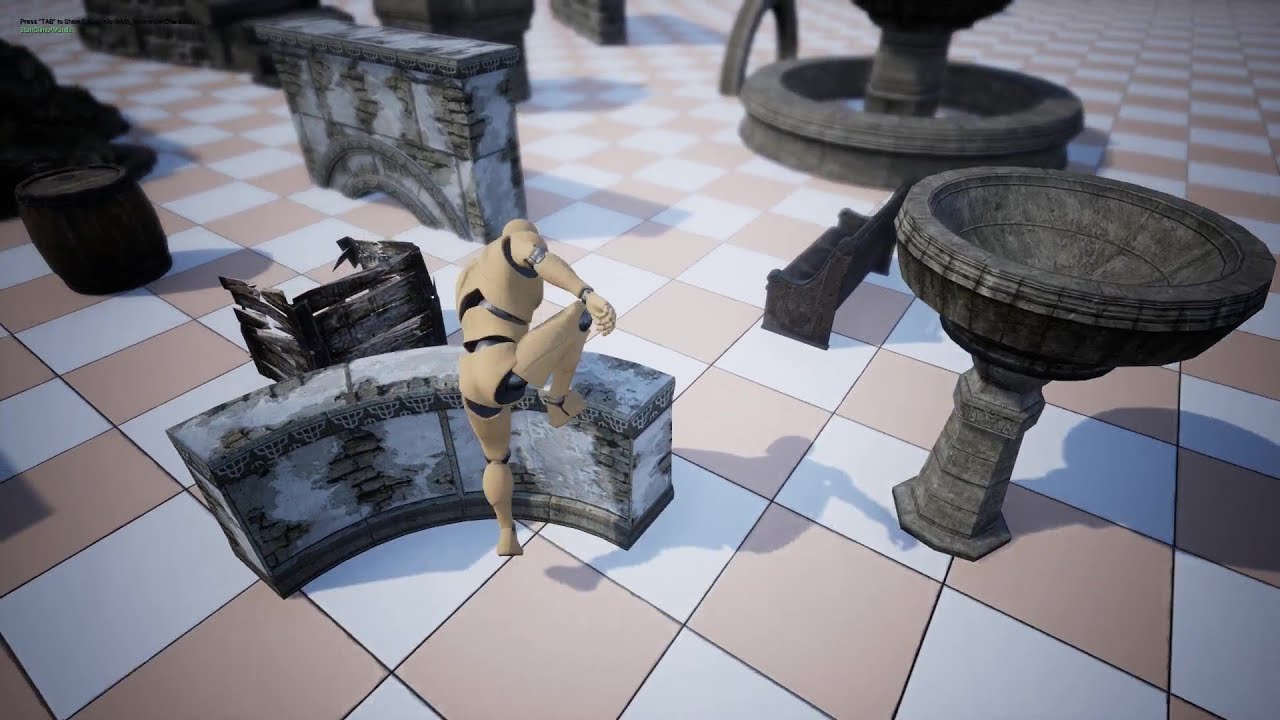
Just a quick preview of a Climb/Mantling feature that will be included in the next version of the Locomotion System. The climbing animations seen here are just placeholders, so don't worry. They'll look better.
Its fully dynamic (so no need for any custom "Vault Objects" or a...
like this
jovial bobcat
i search many tutorials
and cant seem to find on that does that
they are seem basic and not very robust
well thank you
very much
white crypt
@jovial bobcat you want to make a climbing system?
jovial bobcat
yeah
white crypt

An advanced bipedal locomotion and layering system focusing on high quality character animation with responsive movement. Built to be flexible, extendable, and to provide a solid starting point for new projects. Currently Singleplayer only. (100% BP)
take a look at this
should help you
jovial bobcat
i looked at
it
and
i just dont understand
i guess i
should learn some basic first about naimation
maiden wadi
I found animation stuff pretty easy to get into after creating a simple state machine for moving, and an aim offset. Both of those things helped quite a bit.
white crypt
if you think that its too difficult to learn something from a template, then probably you need to put more time into understanding the basics
white crypt
so i would suggest avoiding the climbing system for now because its not that easy to implement even for experienced users
jovial bobcat
ok
white crypt
but keep that ALS in mind for future, because its a pretty good template to build upon
cunning drum
Hi, I have day / night cycle blueprint which is set to animate time of day & play sounds on the sunrise and sunset events. All is working and replicating as intended for both server and clients Except the Sounds. They work for the server but I am not able to work out how to get them to play for clients. any help on how to make sure the sounds replicate across to my clients correctly would be awesome been trying for days now. using 4.22(edited)
I have the Blueprint itself set to replicate. And the Day night cycle is working for both server and client. Just no Sounds for Clients for the sunrise and sunset event sounds I have set. I have tried adding 2 custom events for each, one set as multicast other set as run on server. I have followed tutorials which all do the same thing by adding a custom event set to multicast. But I just will not replicate the sounds from my Sky BP to the Clients. Why is sound replication so hard in UE4 it's ridiculous. Any one with some solid advice or a image guide of some way I could try to make the sounds replicate correctly, I'd be most appreciative.
The whole blueprint is working exactly how I want but only for server so far, seems to be replicating except the sounds. I can't understand why they added a checkbox feature to select Replicate, Net load on client etc, when it doesn't replicate everything inside the BP. What's the point when ya need to go through and replicate almost everything in the blueprint anyway. Surely they could have made sound replication easier. Anyways I'm out of ideas. any help from someone who is very knowledgeable in replication of sounds would great, cheers.
white crypt
just by saying who is very knowledgeable you are basically pushing most of the help away
but its pretty easy with sound. custom event - server event - multicast event - play sound
cunning drum
so your saying most people on here not very knowledgeable, lol ?
white crypt
this is not #multiplayer channel
cunning drum
tried that several time get nothing.
white crypt
even this works fine for me https://prnt.sc/sjeqzl
 cunning drum
I do basically exact same thing but just with sound and not working.
white crypt
never had an issue replicating sound to all the clients
cunning drum
white crypt

how is that a multicast?
why are you using has authority?
thats the most common mistake beginners make, they use has authority everywhere
cunning drum
i only just unchecked that but when it was set as multicast nothing. also not having the check as authority does nothing.
maiden wadi
To be fair, people tell everyone to use it everywhere. But yeah, that being a Server event, HasAuthority is not necessary.
white crypt
if it does nothing then dont use it
cunning drum
tried thios way and nothing
maiden wadi
@cunning drum Instead of sound, have you tried something as simple as a print to see if the clients print on those multicasts?
cunning drum
white crypt
show how you are calling the server events
cunning drum
will test that get back.
white crypt
this part looks fine, so your issue is probably before that logic
probably another has authority on a client
cunning drum
the initial code is above with the event dispatchers etc, and the sounds set up to play on the events and fade in/out working nicely.. it is perfect for the server just no sound at all for clients.. doing my head in haha
white crypt
so show who is calling these events
because from what you are telling they are only being executed on the server
as @maiden wadi add print strings at the end
it will probably print just for the server
maiden wadi
I still say just put print nodes on it to start with. Make sure it's printing. Debug the easy thing first with solid tools like prints. No clients printing means no multicast call(Which makes nearly no sense if it's working on the server with the same call). Prints showing for clients means you need to reconsider how you're playing sound.
white crypt
or make an empty actor add move only the sound logic
and im pretty sure it will work
just to simplify your logic
cunning drum
can show example of that ?
white crypt

place it in a level
and see if it works
worked fine on my end
if you ever struggle, first try to make that system as simple as possible
and move on from there
cunning drum
finally got it.. @white crypt turns out was another Authority back in the code. removed that and it's now working and also seeing the print strings.. Damn that node has cause me like 3 days misery. Thanks for the help guys. most appreciated..
white crypt

:>
who is very knowledgeable in replication im not very knowledgeable in networking but still can figure out some stuff from time to time
try not to use these kind of terms because you will make people insecure of their knowledge and basically push away a potential help in the future
i dont mean this in any mean way, just an observation
cunning drum
I would assume those that know they are a god at replication and multiplayer would step forward haha. all good guys. The majority of the Code was done by the Author of the Ultra Dynamic Sky pack. I had to add the stuff from after the Call sunrise and Sunset event dispatchers. So I wasn't sure if that last switch to authority node was needed where it was placed as he placed it. Turns out the system still works fine and now sounds are working as intended. 🙂
cunning drum
no never heard of it
white crypt
cunning drum
will look into it thanks.
cunning drum
Is it all for BP's as I'm not C++ skilled at all
white crypt
both
cunning drum
ah OK, cool
white crypt
read it couple of times, this will save you months in the future
you will need to deepen your knowledge how the communication works between server and the clients
cunning drum
Will look into it thanks.
white crypt
np, good luck
cunning drum
I knew in theory what i had should of been working the first time I set up the multicast & server custom events but it was that damn Authority node haha. now I know about that little cheeky bugga. lol
white crypt
yup, try not to use it at all until you understand what it actually does
i have a co-op game and maybe used has authority only in couple of places
well you can double click it on the "has authority" and see what it actually does
 true marsh
Anyone know why "Keep Simulation Changes" would be greyed out?
cunning drum
heres what i had most times, I just tried those authority node set up's as i just seen another guide using them but don't know why as they don't work in my case... This was what i had but that Authority node was the killer.. 🙂
white crypt
yeah as I said you will barely need them. its safer not to use them (in most cases that is 😄 )
maiden wadi
Generally I'd advise just learning where your events fire from and directing them to the correct place via that method. I'm sure I'll find a place, but SwitchHasAuthority doesn't help in so many cases. In fact, IsLocallyControlled is a lot more useful in my opinion. Such as only bothering to call server RPCs from ONLY the locally controlled version of a pawn.
white crypt
yeah or is server can be used too
maiden wadi
@trim matrix Not a clue. That's not blueprint programming, it's a materials question for #graphics
white crypt
yuck, materials
maiden wadi
What's connected to it? I might be able to find it.
@trim matrix What else is connected to it and is this a normal Material file?
@trim matrix Oh. I'm pretty sure what that is, is the output result of a Material Function. It's the default node in a Material Function.
deep elbow
good morning blueprint buddies
jovial bobcat
umm
is there a way to get the target
i want to set a UI to visible
but i dont want to use a cast
white crypt
you dont need to cast
just promote that widget to a variable
when you are adding it to the viewport and use that variable as a target
white crypt
after the create user widget
theres a return value, right click on it and promote to a variable
and use that new variable in your "set visibility"
hallow night
Did you use “Create Widget” and “Add to viewport”?
jovial bobcat
yeah
i have a UI
and in my player blueprint
im trying to get the UI so i can set its visibility
hallow night
Where you create that widget, Save the return value to use it later.
hallow night
There is no way that you’re not trolling right now i there?
hallow night
Wait
jovial bobcat
hallow night
like this
jovial bobcat
oh
im sorry
i got it
I didnt know you mean
where i construct it
you cant access a variable
in a player bp
when the variable is in level bp right
so i have to construct the widget in player bp
ummm
tight schooner
I haven't reviewed the whole conversation above, but that means you haven't set anything in that variable. It's empty.
it has to be set with something before it can be getted gotten
In your screenshot, "Create wall run stamina widget" has an output pin
that's what they call an object reference
you can set that into a variable
and then your variable is a reference to that object, which you can use to manipulate it
tight schooner
yeah