#blueprint
402296 messages · Page 465 of 403
 jovial bobcat
 white crypt
thats exactly what i told you to do 😄
jovial bobcat
Sorry
I didnt know you meant this
i created a variable
but i deleted the set
cause i thought it was useless
white crypt
if you ever get "Accessed none" it means you are not setting that variable
its the most common error
and the easiest one to fix
jovial bobcat
ok
thank you
and also the bar dosnt update correctly
like it only update when my value goes to zero
like its either all yellow or nothing
white crypt
that picture doesnt tell me anything
white crypt
that doesnt help as well
white crypt
i dont see the code
white crypt
that doesnt help either
since you binded it to wall run stamina
you need to show how you are updating it
white crypt
so the progress bar goes from 0 to 1
by default
and you are taking half of it away
i assume you are using tick
so in two frames it goes to 0
white crypt
yeah but progress bar can only be from 0 to 1
white crypt
you can divide it by 100 inside your widget if you want
white crypt
it does
jovial bobcat
so can imake the thing constant
white crypt
if you have 100fps then this code will run 100 times per second
 jovial bobcat
ok
white crypt
avoid tick as much as you can
white crypt
how much research have you done about timer by event?
white crypt

What are the Set Timer by Function and Event Name Nodes in Unreal Engine 4
Source Files: https://github.com/MWadstein/wtf-hdi-files
if you watched this you would know how to use it
jovial bobcat
ok thank you
 grave apex
whats the math expression that basically does this?
(that's a poorly drawn infinity symbol)
but basically, a node that will only return the positive values of the float (not ABS value since I dont want the negative information)
 deep elbow
why dont you plug the 'value' into max
grave apex
oh
deep elbow
no idea if that's a hack but it would do the same thing i guess
deep elbow
don't say it's smart until you try it and it doesn;t break lmao
deep elbow
nice!
 rich lava
what is the best way to do anti spam on a key press
deep elbow
branch or gate with a delay i guess
jovial bobcat
is there a way to keep the variable enable for a few more second whith out holding up the whole line
 wintry wigeon
How can I listen, check for Escape input action key press, when the game is in input mode ui only?
 tight schooner
@grave apex "Max" node with a 0 in one of the slots also works. It's a node that'll always select the larger number.
@jovial bobcat Not sure if I get what you're asking, but... Make an event or function that disables/resets whatever you're talking about, and use a Set Timer By node to, well, set a timer on it.
deep elbow
Anyone got some experience with component activation, trying to get an event to fire OnComponentActivated but nothign seems to fire
 wise raven

KARL LEWIS
One of the things I’ve always loved about video games when compared to other creative mediums like film, music, and writing is how they can pull their audience directly into an experience and give them the ability to influence it in some way. Well, maybe not entirely “directly...
Who has tried doing this?
 willow lichen
Why does my spawned object look like that?
Centered
Not centered anymore
(This is in the hands system)
 thorny relic
Does the object have physics?
The mesh isn't the scene root, so if you give it physics, it will drop in local space without moving the actor itself
willow lichen
I already figured that out.
So, can I safely ignore the scene root then? and just work with the mesh?
thorny relic
Just replace the scene root with the mesh, yes
willow lichen
oh that works
awesome thanks
The thing is, if i replace the scene root with my mesh, it doesnt work in the inherited objects
Can I force it to update somehow?
willow lichen
Thanks.
 fossil crater
Guys, the node "Add Child" always adds widgets to the end of the Vertical Box. Is there an way to add it to the top, or insert it between any other children widget of the container?
white crypt
you can use a grid panel
and set your desired row/column
other than that, you could make an array of added widgets, re-arrange them how you want and re-add them again
fossil crater
That is an good solution. Thanks a lot.
white crypt
np, let us know if you have any further problems doing that
willow lichen
How do I keep the scale correct after attaching it?
It worked when attaching the mesh only
(It scales to 1/1/1)
But the mesh is 0.1
And now it spawns objects twice lol
deep elbow
@fossil crater I recently did that, I create a widget called text box that will be a vertical box child, then dothis:
@fossil crater then clear the vertical box of all children, then do this:
insert at 0 just bumps everything downwards, and i resize the array cause i want alimit on amount of text that gets added to the vertical box
willow lichen
It completely broke 😦
white crypt
@deep elbow yup, or another option could be using the set array element
just for organizing your array
@willow lichen try changing your scale rule on attach
 pseudo hearth
Guys, i have some troubles. Someone know how to make camera like that. Prefered control is android. Ping me if you now answer.
white crypt
👍
thorny relic
For inheritance, you change the model on the static mesh component on the children rather then adding more meshes
deep elbow
@white crypt yup, for me this was the way I needed it, not for everryone but principle is there! 🙂
thorny relic
Inheritance can be a bit fiddly
willow lichen
@willow lichen try changing your scale rule on attach
@white crypt Nope didnt work
white crypt
@pseudo hearth you mean zooming in and out?
pseudo hearth
@pseudo hearth you mean zooming in and out?
@white crypt Yeah, and moving left, right...
I will be very grateful for your help
white crypt
hmm i dont have experience with androids but your main concept should be changing the cameras location. Z would be up and down in this example
for testing you can make a widget which would have several buttons for controlling camera
if you press the button you would get your camera location, break that vector and add to the Z axis
@willow lichen you can also try setting the scale yourself. after you attach get the same target and set scale
pseudo hearth
how to control the camera
willow lichen
Like, getting scale of target and setting scale afterwards.
More like a workaround but if it works
Thanks Yeah
white crypt
yup
@pseudo hearth i could only answer that with using keyboard
not a phone
sorry
willow lichen
I see the problem. But it worked before i changed the mesh to the actor root
white crypt
yeah it was inheriting your parent scale probably
pseudo hearth
ok, what answer for keyboard
willow lichen
But i overwrite it in the child
white crypt
@pseudo hearth what class your controllable actor is? character/pawn/camera/pc etc
willow lichen
And i reference the child as the parent. Which should work and did before. But it's scale is set to 1
pseudo hearth
camera
white crypt
so first I would recommend adding a player controller
so we could add some basics controls inside
let me make a fast sketch on my project
@pseudo hearth ok so first create a new player controller
after that https://prnt.sc/sjm4tv
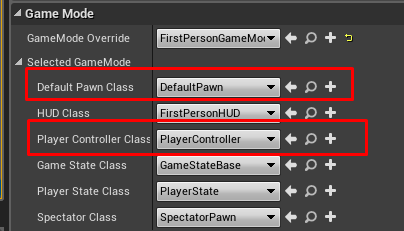
set default pawn class to default pawn and player controller class to your newly created player controller
actually you dont even need to make a new player controller
default pawn already inherits inputs for movement with WASD
if I rotate player start like this https://prnt.sc/sjm6yz then my W will zoom in. S will zoom out. a-left d-right
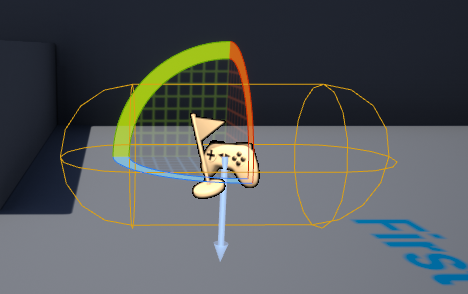
but if you want to make custom inputs and custom camera speed then you would need to create your own pawn class and set it up all the logic there
 woeful dawn
hey, dont know if anyone can help but, does any one know a way to change from a strafe movement system to a rotation movement system during gameplay. I'm trying to recreate the sprint/run system from the res 2 remake/res 3 remake When not pressing sprint, the character is in a strafe movement system and when sprint is held down the character goes into a rotation movement. If anyone can help that would be amazing 🙂
white crypt
@pseudo hearth thats a very cheap trick to make something like you wanted and it works right out of the box. for more custom stuff as I mentioned you would need to make your own pawn. I know my explanation is not the best and in this particular case it would only work a keyboard
deep elbow
Hello, is it possible to attach a spawned actor to another actor, or component, and maintain a static rotation once attached
think of a top down camera not rotating with a capsule component, not exactly the use-case but a decent example
white crypt
@deep elbow under your springarm settings try these
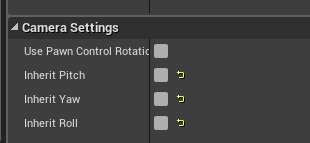
i mean thats only for the top down example, not exactly sure with your case
by attaching there are rotation rules, you can try playing with them as well
deep elbow
yeah @white crypt it's not quite an actual gameplay topdown camera, it's a 2dSceneCapture and it's not part of the pawn.
white crypt
maybe by setting it to relative is what you need
deep elbow
I tired the rotation rules but simply by attaching the component it just ignores any pre-defined rules
sec
 deep elbow
hm nah, the attaching overrides it all, i'm just trying hard to avoid manually setting a rotation constantly, seems like such a waste
white crypt
absolute rotation might do the trick
deep elbow
legend, you're a boss
white crypt
other than that not really sure, you can try adding additional scene component so it would act like a container. you would attach your child to that scene instead of the previous parent
oh ok. cool 😄
white crypt
cool, never used it myself but knowing web dev i was expecting it to do that
deep elbow
didn't even cross my mind, i've used absolute rotation like once in 5 years
white crypt
yeah you tend to forget stuff after continuously learning something new
fossil crater
@deep elbow Thanks for the help. I am already using the grid to solve that, but I might need your solution in the future too.
deep elbow
hmmm i wonder if it's possible to have only a certain actor see specific objects, owner no see is great, but only for owner, only owner see and owner no see combined is just setting visible to false, can you use a stencilmask to just not draw somethign but keep the stuff behidn it drawn, impossible cause deferred i guess, hm hm
 hoary pivot
Hello, I have a problem with the camera. After death, the camera moves to the right, I will add that a month ago I started working with an unreal engine. I would like the camera to stay in the same position at the time of death. I'm doing a 2D game. Please help😎
deep elbow
you destroy pawn on death? the camera probably resets to some default position
hoary pivot
Yes, here I have a sample death
deep elbow

In this part we will handle the death of the player as well as respawning! Leave anything you'd like to see in the comments below so I can work them in as I go!
UE4 Download: https://www.unrealengine.com/en-US/what-is-unreal-engine-4
Assets used: https://www.gameart2d.com/fre...
this may be useful, you probably don't want to destroy the actor, or if you do you'd need to do a bunch of other stuff, this would be good for where you are
also try Snipping Tool, comes with windows, you can take screenshots of your screen without a camera!
hoary pivot
Ok thanks :)
 sonic crescent
Need Cast explaination...: I have MyFloor actor with 4 cube on it. I have a tank. I want my tank to cast to MyFloor to get the 4 locations variable. I want to get that in a Event BeginPlay. Anybody can tell me what thing to connect to my input Cast wildcard?
deep elbow
cast is for when you have a reference of an object, and you want to know if it actually is that object, and then do stuff specific to that object. so you need to get a reference to what could possibly be the floor. you can do that any way you want, line trace downwards fromt he tank and get the hit actor and plug that in, or use a collision box and get overlapping actors, or from whatever is making contact with the floor, but casting isn't like throwing a fishing line and grabbing something, the wildcard is the actual object you are casting to
and if you want some info from begin play then do a get all actors of class and set that to be your floor, or set the floor itself to store a reference to itself somewhere that your tank can access
 hallow night
@sonic crescent SphereOverlapActors with BP_Floor Actor as filter > get (a copy) > You don't need to cast because you'll get the floor under the tank of you set the location and sphere radius correctly
sonic crescent
thank you i will check that
@hallow night what's the object type to connect to SphereOverlapActors?
hallow night
(make array) and add everything
deep elbow
anyone know a method to hide certain components from a cameras view, i want to prevent certain particles (not all) from being rendered by a regular camera
 zealous moth
@deep elbow runtime or editor?
deep elbow
run time
zealous moth
@sonic crescent check out this video:https://www.youtube.com/watch?v=6IOgkWv1lEY

What is Blueprint to Blueprint Communication, or how do I call functions or get variables from other Blueprints, in Unreal Engine 4?
Source Files: https://github.com/MWadstein/wtf-hdi-files
deep elbow
i'm trying to capture particles in a scene capture, through the ShowOnlyComponentList feature, but i don't want hose particles visible to the player camera
zealous moth
you can play with the visibility; doesn't mean that it will stop existing, just not render
deep elbow
and i need the particles moving with other actors, so i can't seemingly attach a aprticle to an actor without making that actor the owner, so i cant use the Only owner See flag
i want it to exist, i just need it to not render in the player camera
zealous moth
oh is this multiplayer?
deep elbow
no, if only it were that simple lmao
zealous moth
hah
darn
opening up my editor, sec
the only thing i can think of is playing with the LOD
deep elbow
yeah, i dont think it'll work
zealous moth
ah wait
the other way is to make a material property work specifically with the camera controller
for instance, you can lerp the alpha based on a param and the param is set to 1 but your player sets it to 0 when needed
in the end, it is there but transparent
close enough? :/
deep elbow
hm, i think i need it to be visible even when the player is lookign at it, just hidden to the players camera, i need to constantly capture in a scene capture tbh
 blazing ridge
anybody ever tried to save a texture inside a savegame? i think it doesnt work right away
im saving some in my savegame file, but on reopening and loading it the textures are gone
 bitter ingot
trying to kill off some spawned hexagons that arent in the sphere but the detection node doesnt work any ideas?
 tight venture
When you click on the error, post a screenshot of what it shows you
white crypt
try to show some of your code
tight venture
Show the EventActorBeginOverlap event
where it says the error is
If you just click on it in the error message it should take you straight to it. There should be a red ERROR flag below the part in question
Also, side note: just use an increment operator on Level. cleaner.
get rid of that branch to check if the class is Monster. Just casting to Monster is enough. It will fail if the object is not a Monster.
I still don't see anything that would cause an infinite loop.
tight venture
No, just the cast is fine. Just get rid of that branch and the GetClass and == check. The code will end up doing the exact same thing
 trim matrix
@tight venture i got the problem. If i do not use do-once, it is casting many times while in collison
tight venture
In your error message, click on the call stack Show thing on the right and post that message
Oh okay
trim matrix
i used do-once and it does not give error now
tight venture
right on
trim matrix
@tight venture thanks for your attention and information that gave you dude
tight venture
np. I am a noob to UE and BP, too, but not to programming 🙂
trim matrix
same 🙂
 stable plume
Hi guys 'n gals - Does anyone know if you can 'stack' widget switchers i.e. one inside another?
white crypt
sure, dont see why not
stable plume
thanks @white crypt - here goes......
white crypt
good luck on your journey my little one
stable plume
👍
tight venture
Is there a more efficient way of doing this?
(Bounding a value between 0.1 and 0.9 in this case)
 marble folio
clamp?
tight venture
much cleaner
no, I had the min and max values correct. double check it, you'll see
tight venture
thx @marble folio
 gray hare
Does anyone know how to detect overlaps with brushes? Our artists are grayboxing a level with brushes and they clearly have collision settings as the player collides with them but I can't figure out what those settings are.
white crypt
i dont think you can, as far as I remember
but you can convert all the brushes into static meshes
should be an option inside the details panel by clicking one of the drop down arrows @gray hare
gray hare
I didn't see that as an option.
white crypt
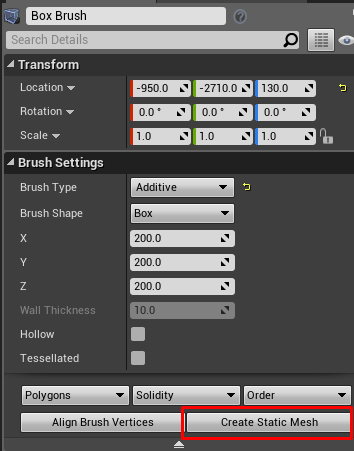 gray hare
It looks like the brush component has a BrushBodySetup that needs to not be null. But I'm not sure how to set that.
Oh, hmm.
white crypt
you can combine them into 1 mesh if you want
gray hare
Yeah. It would be nice to not force that upon artists while they're gray boxing.
white crypt
if you are using source control, one of your other members can do that transition
gray hare
?
white crypt
i mean if you dont want to bother your artists converting brushes into static meshes
but are you using source control in general?
gray hare
of course
white crypt
kk 😄
gray hare
I mostly meant if they want to use brushes, I shouldn't force them to use meshes.
 little trench
hey anyone know how to play unreal composure ingame?
how to start composure by blueprint
gray hare
brushes must have a collision type, I just don't know what it is
tight venture
So, I'm watching Youtube tutorials, and I see a lot of this:
Don't you have to subtract 1 from the length before you plug it into the max for the range?
bitter ingot
@white crypt yes
tight venture
okay, just making sure I'm not the one that was insane here
Another question
How do you move an actor with physics enabled? It looks from here:
Unreal Engine Forums
Build powerful visual scripts without code.
That the only two options are to turn physics off, move it, then turn it back on...
or
Apply force and/or torque to the object to move and/or rotate it, respectively
You can't just SetActorLocation?
what gives?
zealous moth
you could teleport it
tight venture
What's the difference between that and SetActorLocation with the Teleport box checked?
@zealous moth
zealous moth
not sure :/
 azure mason
Out of curiosity, why is it not possible to have multiple blueprints on an actor root?
Seems pretty crazy to me, considering pretty much all other ECSs I can think of support this
like what's the point of an ECS when you can't actually create new components to put on an entity 😂
tight venture
@azure mason you mean have a BP contain another BP actor as a component?
azure mason
I mean like you have an actor with two reusable blueprints, like an InteractiveObject BP and some other BP
hallow night
Its called "Interface"
azure mason
or like a pawn that has a WeaponController, HUDController, HealthComponent, CharacterInteraction, etc
white crypt
you can make actor component if thats what you need
azure mason
an actor component can be placed, but not added as an actual component to the root actor from what I can tell
Maybe I'm missing something here? Like an option that enables what I'm looking for?
pls don't make me return to Unity 😳
tight venture
Aaron I don't quite understand what you mean. Screenshot of BP?
hallow night
Add @trim matrix add sockets to the weapon mesh and get the sockets location then spawn a bullet for each socket
white crypt
just because you cant find an option doesnt mean it cant be made, im not exactly sure what you are trying to accomplish
can you give an example?
azure mason
Okay sure, like what if I have the FirstPersonCharacter and a reusable CharacterInteraction script that enables the character to fire raycasts at objects with a component that executes logic when "interacted" with. Rather than manually creating that interaction logic on the character-side for every character that should be able to do this, in Unity I would make a CharacterInteraction component script and add it to whatever entities should be able to interact with stuff.
azure mason
yea I looked into that, seems kinda like what I want sort of
white crypt
you can make a parent bp that holds some of the logic or all of it, but each child can overwrite every function and have its own unique values
azure mason
but ideally the CharacterInteraction component wouldn't have to like, search for a parent entity to execute logic from, like to get camera data/etc
white crypt
you can always cast to parent class
wont need to look for a specific child class
if you are concerned about performance then that shouldnt worry you
hallow night
Unless you're using a for loop with cast
 trim matrix
🤔
 inland lark
hi guys
white crypt
well there might be a need for that 😄
white crypt
just saying that it might be possible
inland lark
why does a socket not move with an animation montage?
zealous moth
@azure mason and that is why Unity is just plain bad. It has no transferable skills whatsoever
thank god i jumped shipped way before their ECS garbage
tight venture
@inland lark afaik, sockets are attached to bones. should move with the bone (or relative to it, wherever you put the socket)
azure mason
tbh Unreal's the first engine I've encountered that doesn't do it this way
zealous moth
Unreal works the same way as Unity did back in 2018, before it hit the fan
stable plume
If I have it right!
azure mason
brohe
trim matrix
And I am trying to explain that to him right now in a call
azure mason
if Unreal worked the same as Unity I wouldn't be having this issue 8D
hallow night
Its easier for a non programmer, differently not for a programmer that is used to coding 😂
zealous moth
I made a game in unreal in less than a month which took me 4 months in unity because I had to program and QA everything from scratch. A huge waste of time.
azure mason
yea Unreal's def easier for prototyping
trim matrix
We made a remake of a AAA game in 2 years using UE4 :))
azure mason
way faster to get up and running
tight venture
How TF are you supposed to move actors that have physics enabled?
white crypt
@stable plume https://prnt.sc/sjuw1f like this?
 tight venture
I even tried disabling "simulate physics" when I want to move it, but still doesn't work
zealous moth
it's not better for prototyping, it's better to make games with. Unity makes money selling you assets and wasting your time. Unreal gives you everything out of the box so you can just make the game to sell
tight venture
The spawn location works, but as I hold the touch input (mouse simulated) down, it doesn't teleport like it does when I disable physics in the BP before playing
zealous moth
@tight venture i don't think you can sequence timed events/timers
tight venture
If I disable simulate physics in the BP_Yarn BP, then play, it works fine
hallow night
I think its because when you disable physics it deattach from the parent so you need to reattach it again?
white crypt
@tight venture you want to carry an object like in half life? or smth else
zealous moth
my take is that you are sequencing too many things out of sync
white crypt
oh you are doing this with touch
zealous moth
add a print string along the lines and you'll see it is not doing it in order
tight venture
That's the BP_Yarn in blue. The translucent sphere is its "influence" (no physics enabled but does fire overlap events). The blue thing in the middle is the actual ball of yarn (this is the component in question)
The influence disappears when touch input is released (set visibility = false)
It didn't capture it in the screenshot, but my mouse cursor was right over the yarnball that time, it was updating the location of the yarn as I dragged my mouse (because I had physics disabled)
If I go into the BP_Yarn and enable simulate physics, it spawns in the right place but never moves as I drag my mouse
... enable simulate physics on the yarnball, that is.
tight venture
zealous moth
Sequence does things in order and if it cannot proceed, it skips to the next sequence item; your bp has 2 sequences with things moving between items. I recommend redoing your sequences and avoid having different items with timers and they are NOT processed in parallel
tight venture
The timer only runs while the touch input is held down
It gets cleared and invalidated on release
white crypt
@stable plume well when you said if you can stack, i thought putting switchers on top of each other. if you can give maybe more info or a better example i could maybe try to help more. but its better to do that in #umg
tight venture
It works if I disable simulate physics. Just fine. You sure @zealous moth that my sequences aren't set up right?
zealous moth
that's why i said put some print string nodes
i am pretty sure you are not disabling physics
add some print string nodes or watch values and see how it progresses
tight venture
Okay. So check if physics is getting disabled?
zealous moth
the way I am reading your BP you have redundancy and some stuff may get skipped
sure
you can put it on tick and see if your input changes it
 plush ridge
when I use 'set style' in the widget, even though the style I'm setting in BP is identical to the one in the designer, the buttons change like above .. anyone know why?
this only happens when 'set style' is used. Above is before, below is after
zealous moth
@plush ridge looks like it is boxed, for image
plush ridge
I tried 'box' and 'image' both, no difference in result
tight venture
Printed FALSE when I clicked. Printed TRUE when I released.
plush ridge
no, there are variations for each but they're all the same type of button
they just become squished inward like above
something about how the same button before and after is rendered is different
zealous moth
@tight venture not what I had in mind
get the actor's "is physics enabled" and return that value into a string
tight venture
oh okay
zealous moth
i can print any message I want all day 😛
hallow night
I have a question, is casting, saving the reference at begin play better than casting when i want it?
What do u mean by center of camera
zealous moth
@hallow night if you're loooping, yeah
tight venture
@zealous moth It's not simulating physics until the very end, after I release the mouse/touch input
trim matrix
@hallow night i have a model there are 3 weapons at different locations on model. When i click the button, i want to spawn bullet from one of them for shooting. I added socket to my gun's hole and try to spawn but it spawns at different locations (not in front of weapon) (at left & right side on camera / think like doom 1 shooter game)
tight venture
This guy has the exact same problem I do
Unreal Engine Forums
For gameplay programmers writing C++ code.
hallow night
Its working fine for me, are you sure you're not doing something wrong?
zealous moth
who was that intended for?
hallow night
@tight venture try setting the component location and rotation?
trim matrix
this is the model's socket that i want to spawn bullet on
hallow night
Try disablling the collision for the bullet? Maybe its hitting something so it spawns somewhere else
trim matrix
i tried it but spawning location is like -10 for Z
not spawning in socket
like socket.location.z -= 10
hallow night
🤐
hallow night
Good thing you are not programming or you would have deleted the entire project 😁👌
 royal olive
Hey, I'm currently toying around with a prototype and I want to create small areas that apply a slowed down time effect on all objects within the area. So far I've tried to use custom time dilation, however, this can only be applied to actors and ontop of that, it doesn't seem to apply to any other actors than my firstperson character.
So I either have to find out why it doesn't apply the dilation to other actors or I have to find a way with c++ (unless anyone of you has another idea) - however, so far I could find even less documentation about time dilation in c++ than blueprints
trim matrix
@hallow night actually i have 5 years experience and working as software developer (using rust,c#,js) but this... good thing is i am not working on c++ game project right now lol
tight venture
@hallow night I have tried SetActorLocation and Teleport, both. Neither worked as long as one of the components of the BP had Simulate Physics checked before playing
hallow night
Screenshot of bp?
 mild pine
Hey. I got an issue with my horse mounting. When I'm mounting my horse, I basically want to hide the player mesh and unhide the mounted mesh, which is a part of the horse: https://gyazo.com/99fdbfde40b814a930ffe06ef4010682
Then, I want to attach my footplayer's armor to the horse. Everything works fine, except a couple of things:
- When I want to unmount the horse, the horse rider's base mesh gets hidden (in this case the character is modular and the base mesh is the head, and the body mesh is a child of that).
- The dismount animation doesn't play, mostly because of the above issue. I'm just fiddling with a lot of different stuff atm, not really sure what I'm doing anymore. Would love some tips or guidance here as it's been an issue I've come back and forth to a lot of times in the past. It's a customisation to an assetpack from the MP, but the creator's taking weeks to respond.
The upper section is when the horse is mounted, and the bottom part is when the rider unmounts. This works, but then comes the section where I begin adding the different body parts back in: https://gyazo.com/5ba6d81179bca4c9d61b00685dc820bc
Here I'm hiding/un the mesh (which is the head) along with all of the character's different armor pieces. The issue lies in the top section of the graph where the rider is mounted, but the mesh is unhiding as going into unmounted. Not really sure how to explain this better. :/

 tight venture
mind if i DM you, @hallow night ? This channel is getting pretty hectic
hallow night
I'm talking about setting the component "yawn" or the ball that has physics
Not the actor
hallow night
Yes or both for that matter
tight venture
Right now I am teleporting the BP
I'll try just the ball
I can't seem to set the ball's location (it's a static mesh). Am I not seeing the correct node to use? All I can find is SetActorLocation for the root component
The Yarn component is a sphere. This is the component that has Simulate Physics enabled (or should anyway), and that I am having trouble moving
This is what happens when I check Simulate Physics on the Yarn, then hit play.
I clicked where the yarnball is, then dragged over to the right. You can see the Influence moved, but not the Yarn
hallow night
Grab the ball and drag and use "Set world location" or something like that
tight venture
That worked!
But it feels odd to use that AND have to use Set Actor Location. Cuz it did work, but it only moved the yarnball of course. Why doesn't Set Actor Location move the Influence AND the yarnball together?
hallow night
Idk i think its because physics deataches the ball from the root
tight venture
hmmm... maybe if I made Influence a child of the yarnball or vice-versa it would work
Nope. I can make Yarn a child of Influence (which didn't work), but I can't make Influence a child of Yarn cuz it's inherited
 chrome dust
Can anybody help me with getting a shooting montage to line up with the aim offset direction?
nvm
@sharp aurora has a image for montages and aim offsets
mild pine
Updated my question above with another picture, would love if anyone could take a look 🙂 ^
tight venture
This worked. Thx @hallow night for helping me with it. Been at it all morning
And thx @zealous moth too
hallow night
Np glad it worked
 maiden wadi
@tight venture Sorry. I missed a lot of this conversation. What's the problem you're having?
tight venture
No problem anymore 😎
I had a BP with two static meshes: one of them had "Simulate Physics" enabled, and SetActorLocation wasn't allowing me to update the location of the one with physics enabled
maiden wadi
If you're wanting your objects to move with SetActorLocation after you've simulated physics on them, you need to reattach them.
tight venture
Reattach?
I've never come across the concept of attaching or disattaching anything yet
Though I am UE noob
maiden wadi
Components are detached from their parents when you simulate physics on them. To make them move with the actor again, they need to be reattached.
tight venture
This sounds promising...
hallow night
Figured as much
tight venture
Would I do that in the BP construction script?
maiden wadi
This is a good example for you for this. V just simulate's physics on the first press. Staticmesh drops cause it's now simulating physics. This keeps it from moving with the actor from the Tick event's movement. Second press stops simulating and reattaches the object to the actor and lets the movement on tick affect the static mesh again.
tight venture
So, Simulate Physics and being attached are mutually exclusive?
maiden wadi
Unsure. I don't know the code behind the nodes. Just had some experience with how they act.
Let me see what that does in VS.
 summer apex
Is there any way I can do a delay in a function?
maiden wadi
@summer apex Latent nodes of any kind cannot be used in functions.
zealous moth
@tight venture what was the issue?
 flat cypress
Hi, i'm a couple days into ue4 and i'm stuck trying to get this to work. is there anyway to loop an event?
tight venture
I'm not exactly sure yet, but I posted a pic of what at least works for now a few pages up
hallow night
What are you trying to do
summer apex
@hallow night im really new to this, what is a macro exactly?
Like, I created one, but how do they work?
tight venture
Macro is just a code expansion
hallow night
@summer apex you can double click a for loop to get inside the macro of the for loop to check it out
maiden wadi
@tight venture This is the comment above the SetSimulatePhysics node.
So, I suppose attachment and simulating physics are exclusive, yes.
 tight venture
OMG it worked
zealous moth
functions cannot into timers
tight venture
No SetWorldLocation necessary
summer apex
It's a macro
tight venture
@maiden wadi Do I need to unattach it again after enabling physics or does that automatically happen anyway?
maiden wadi
@tight venture Should happen automatically I think.
hallow night

#ue4 #beginner #blueprint #foreachloop #delay
Byte Sized Tutorials! How to create a custom "For Each Loop" with built in delay!
tight venture
wooo! thx @maiden wadi! This is the answer I've been searching for all morning
hallow night
@summer apex
tight venture
@maiden wadi You should answer this guy's post
Unreal Engine Forums
For gameplay programmers writing C++ code.
If you don't, I will (but I'd rather not take the credit for answering it if you want to)
Or I'll at least drop your name 🙂
summer apex
its a 2014 post lmao
why would you answer it
I'm pretty sure there are rules against necroposting
maiden wadi
@tight venture He seems to have a bit of a different problem though. His physic enabled asset is the root. Set Actor Location should still work on his skeletal mesh even though it's physics enabled, because setactorlocation sets the world location of the root component, which is his skeletal mesh.
 tight venture
Oh.
tight venture
lol really old
summer apex
Haha yeah
hallow night
He probably finished the project or just stopped
tight venture
oh pffft nvm totally different conversation, sry
summer apex
He probably died of old age
tight venture
errrr nvm don't mind me. yay, just so excited I got it working
summer apex
Haha, good!
tight venture
Why not answer it, though? It would have helped me. There is also this one
Unreal Engine Forums
So I am basically trying to change the transform and the velocity of a rolling ball. The ball is supposed to teleport away as soon as it touches a specific
Very similar. Google for "ue4 set actor location with physics enabled" or something like that... you'll see. not much help out there that leads you to the right answer
maiden wadi
@summer apex To answer your earlier question about the macro, it doesn't work because you're not delaying the loop. You're putting a delay after the loop and calling it 60 times in an instant.
 fervent flume
Is there any way I can "refresh" my BP so it correctly grabs inherited stuff from my base CPP class? Sometimes it seems the BP freezes or bugs out and duplicated inherited stuff
maiden wadi
@fervent flume It shouldn't. If it does, closing and reopening it should fix it.
hallow night
What's the best way to optimize a simple ai character that follows the player around (100 on screen)
tight venture
The fact that enabling physics causes the component you enabled it on to become detached from its root is the answer I needed. The answer that Google query should lead you to, but doesn't.
 zenith pond
I have to run a dozen or so nodes 3 times for 3 different sets of data/variables, is there a way to loop or something with those nodes but swap out the variables?
maiden wadi
@zenith pond Not exactly sure I follow. What are you doing at the moment that you're wanting to condense?
hallow night
You can make a macro with the variables exposed and run the macro 3 times with different variables connected
Or just a function with a for loop and variables exposed
 void jewel
How do I correctly store a material instance inside an array then use that to assign it to a decal? Right now the decal just turns up as green/missing, with this:
hallow night
U sure that u are getting something valid from that array?
void jewel
no it seems i'm not, hence the question :--)
that screen is all there is to it though
the array is of type material dynamic instance
hallow night
Print the display name of the material u are getting
void jewel
It's empty which is the problem. My question is how do I properly store it in the array?
hallow night
Use the add node
maiden wadi
Usually something like that for materials is done with a MakeArray or setting the array's values as defaults.
void jewel
so Create Dynamic Material Instance, then Add that to the array?
 rugged carbon
Could anyone fill me in why this only get executed if I set the variable directly, and is completely ignored if i call the custom event?
void jewel
and then perhaps I can set it
hallow night
Then you can set the decal material after making and adding the instance to the array
maiden wadi
@rugged carbon Where do you normally have it placed?
rugged carbon
I mean that is the setup, a custom event that sets the variable. If it is plugged as above it fires, if I plug it to the custom event it does not. The print text is fired in both cases
maiden wadi
It doesn't fire right now. You have no execution line going to it.
rugged carbon
This does not work, that is the problem
It never gets executed despite the text printing to screen
I cannot for the life of me figure out why
hallow night
Make it a function and try that
maiden wadi
@rugged carbon The last picture. If you leave it like that, and put a print after the event UpdateRemainingTime, and print A, does it print the correct value that's passed from Shoptime?
sonic crescent
hmm. me again. Sorry to disturb. I'd like to get locations of the 5 vertex of my mesh. I'm definitely doing something wrong. Can help?
rugged carbon
The print string does not print anything
maiden wadi
@sonic crescent Your For Each loop has no array. It'll never run. I think you were looking for a ForLoop, not the ForEachLoop.
sonic crescent
@maiden wadi Thank you for your time. In fact, this is the ID array i can't get. A loop from 0 to 4 returns wrong values.
maiden wadi
@sonic crescent Let me try something quick. Not used to working with Vertex data yet outside of Niagara.
sonic crescent
@maiden wadi thnks. All my values are <0,0,0> ...
 mortal wharf
Can somebody help me out a bit here i am making an actor with a widget component and when i press it i want it to toggle the visibility of a light i got some help but it didn't work here are two screenshots.
Just ask if you want more screenshots. If anyone can tell me what is wrong that would be good.
maiden wadi
@sonic crescent Just so I understand correctly, you're trying to get the vertices locations in world space?
Cause if that's what you're trying to do, I'm not sure that it's possible strictly in blueprints. There are libraries that add that functionality through CPP, and I know Niagara allows it, but I'm not finding anything that'll allow this with default blueprint coding.
sonic crescent
Yes. (It may be Relative space too)
in relative? I'm not using Niagara. Isn't a particle engine?
maiden wadi
I tried, still can't get vertex positions. It's probably the reason Rama made a node for it in his extra blueprint nodes plugin.
mortal wharf
Is it me you are talking to or someone else? @round torrent
 round torrent
yeah you
mortal wharf
Do you know how to do that? @round torrent
round torrent
it's just a checkbox in the mesh
mortal wharf
Mesh of what? @round torrent
tight schooner
@mortal wharf Looking at your graph, the question I have is: what is inside of the "Set Visibility" array?
sonic crescent
i think that's me
round torrent
you almost have the same name
mortal wharf
Do you mean the var? @tight schooner
tight schooner
yeah, the array variable you're feeding to the loop
mortal wharf
Ok wait a sec...
sonic crescent
so, no i do not know where is that CPU allowing. But Authaer seems to have test that with no luck
tight schooner
@mortal wharf I'm not seeing issues with the rest of your graph; it should work. Have you confirmed that the loop is actually executing? (Have you tried breakpoints and/or print nodes?)
mortal wharf
Here you go. @tight schooner
sonic crescent
i can't believe how hard is to have a proper path from a mesh into Unreal. Spline are unprecise in the editor. Export Spline aren't possible without tables, and long workflow... and accessing vertex is not allowed. Damned. I'm stuck.
let's see this Rama plugin. Can you share a link please?
tight schooner
@mortal wharf Is that an actor class? Anyway, first I'd determine if the loop is executing
sonic crescent
@maiden wadi Wasn't possible to get relative position too?
maiden wadi
I haven't used it myself, but the link is https://forums.unrealengine.com/development-discussion/blueprint-visual-scripting/4014-39-rama-s-extra-blueprint-nodes-for-you-as-a-plugin-no-c-required
Unreal Engine Forums
Dear Community,
MIT Software License for The Victory Plugin ~ License (https://forums.unrealengine.com/development-discussion/blueprint-visual-scripting/4014-39-rama-s-extra-blueprint-nodes-for-you-as-a-plugin-no-c-required?p=1718286#post1718286)
I've decided to create my ow...
mortal wharf
Yes it is an actor class at least i think it is. @tight schooner
maiden wadi
I couldn't get either from it. I assume that this was an intentional decision not to include this kind of stuff in blueprint originally because it's heavy on processing and artists don't always consider that sort of thing.
tight schooner
@mortal wharf if you're getting root component, what if you checked "propagate to children"
in your set visibility node I mean
mortal wharf
Didn't work either. @tight schooner
tight schooner
ok, you gotta to some normal BP debugging with breakpoints and/or print nodes
figure out if every node is actually executing, and the data going in & out is what you think it is
If "Lights Right" is a straight up actor class, you can set visibility on it directly rather than getting the root component
mortal wharf
Yeah but i tried connecting it but it always said root component.
tight schooner
I don't have UE4 open rn, but maybe there are separate set-visibility nodes for components and actors. Some things in BP are like that.
mortal wharf
One thing is that lights right is only one light and not the two lights because i want like two buttons that disable one specific light.
2 Buttons 2 Lights
Do you mean that i might get other set visibility node if you drag from array element? @tight schooner
tight schooner
yeah. It's just a guess though.
mortal wharf
The only different ones i get is defaultsceneroot and pointlight.
tight schooner
I mean you can drag out Array Element and type Set Visibility and maybe get a node that plugs into it directly
a version of set visibility that says underneath: "Target is actor" or w/e
hallow night
Anyone knows how to optimize ai?
mortal wharf
Defaultsceneroot and pointlight only gives scene component. @tight schooner
maiden wadi
@hallow night What kind of AI? What base class are you running them on and what are they doing?
hallow night
Sorry for sending this video again today.
maiden wadi
Character class?
hallow night
This ai is running the character base class. And they are just chasing the player. When they die the get deleted
maiden wadi
I'd start with their mesh and maaaybe movementcomponent tick rates. You can lower them a bit and still get a good look, but a lot of extra performance.
hallow night
Right now i can only spawn about 50 of them on my phone with 144 frames but adding more will drop the frames pretty fast. Also the rpg literally drops the fps by half
The mesh is about 500 verts if i remember correctly
Its using a cast and a for loop i should probably change that. Lol.
maiden wadi
@hallow night Try this for starts. It'll make them look weird, but test it for the performance and see how much effect those two things have.
hallow night
The mesh animation bp is using the new 4.24 animation thing i forget what its called but it gives better performance
mortal wharf
But what do you mean about a node that plugs directly into the set visibility node? @tight schooner
tight schooner
Just delete everything after the For Each Loop. Drag the "array element" pin out and get a context menu. Type "set visibility".
Do you get a Set Visibility node that takes the array element directly?
mortal wharf
If i drag straight out of array element yes. @tight schooner
The only different ones i get is defaultsceneroot and pointlight.
tight schooner
Idk what that means. If you Set Visibility directly on each array element with nothing in between, and still nothing happens, then you have no choice but to do some old fashioned BP debugging
mortal wharf
What do you mean? @tight schooner
What i meant before was that when i dragged off array element i only got Set visibility defaultsceneroot and Set visibility pointlight. @tight schooner
Btw i also get Set visibility just those three. @tight schooner
hallow night
I spawned 200 zombies now and i have 60 frames (i have a button on my controller to spawn 50 zombies for debugging)
@maiden wadi
tight schooner
oh, I guess you can only set visibility on components
I thought you could do it at the actor level
maiden wadi
@hallow night What was the framerate before with 200?
tight schooner
Actor Hidden in Game is the only actor-level thing
@mortal wharf If you want to hide the whole actor, then use the Set Actor Hidden in Game node. If you're hiding a specific component, then Set Visibility works.
That said, you haven't yet established whether your loop is executing in the first place
mortal wharf
I have three actors Leftlight Rightlight and Button
tight schooner
so we're not sure where the problem lies
mortal wharf
The lights are just pointlights.
 untold sapphire
Hey guys question about player controller
Would you recommend switching a player controller for something like this
in the game you walk around and pick up things
but then you see a table and you can play a mini game on the table
player controller swap i figure?
or just enable disable certain controls on the controller
hallow night
I think you can do either
mortal wharf
Because whenever I close the game In the editor I get an error about my toggle lights custom event. @tight schooner
tight schooner
what does the error say?
mortal wharf
Is it ok if we chat again tomorrow as I need to go to sleep. @tight schooner i will send you the error message right after i wake up tomorrow.
Is that okay?
maiden wadi
@untold sapphire Personally, I'd recommend making it so that your walking around and picking stuff up is done in the character. This is character specific functionality. The controller should be used for non pawn specific stuff. One classic example of this might be tabbing to show a score screen while your pawn is dead and destroyed. But all of the running around, shooting and such is done in the Pawn. So in your case, the walking around and picking things up should be in the character. For your table top game, you might create a second pawn that is spawned at a specific place on the table. When the character interacts with the table, call unpossess, stop movement on the pawn(Keep a reference to it for when you leave the table though), Possess the table pawn and do some camera work if you want. Doing it in this manner allows you to keep stuff like menu access and non-gameplay specific keys available while both in the pawn and at the table without having to copy that functionality into two different player controllers.
trim matrix
Hey guys question about a scoring system that I am trying to add in my Game, followed a Tutorial on Youtube by The Phantom Game Designs
I don't know if I how to proceed for different objects having different points, should i move to a trigger system or keep the system that I have currently picture down below
 warped bear
@trim matrix is the scoring per player or per object. if it's per-player you should think about using the score variable on the PlayerState
trim matrix
@warped bear Its per object
warped bear
yeah i would just have a variable on each object for their current number of points, then the UI should probably have a reference to that object so it can reflect the points on the object without having to set that var in the UI everytime the points change
warped bear
i mean if your player is collecting score than you're probably gonna wanna use the score on the player state as well
unsure what more to say without proper context of ur game
trim matrix
It is a bumper cart style game on an obstacle course, with points to customize character and enemies.
@warped bear I was thinking of a trigger system for unlocking parts to a level, and sorry i am like two days into using Unreal 4, appreciate the help
warped bear
sure thing. im unsure how a trigger system plays into the points stuff though!
trim matrix
I was watching offical Unreal tutorials and they showed off opening a door with triggers, i was thinking of triggers for opening sections of levels
 lapis harness
Hey guys. Im trying to run JS code in the web browser widget to activate micro and webcam. It works on chrome but doesn't in the widget. Any idea how I can achieve this?
warped bear
@trim matrix well i dont see why u cant do that!
lapis harness
                window.AudioContext = window.AudioContext || window.webkitAudioContext;
                var audioContext = new AudioContext();

                // Create an AudioNode from the stream
                var mediaStreamSource = audioContext.createMediaStreamSource(stream);

                // Connect it to destination to hear yourself
                // or any other node for processing!
                mediaStreamSource.connect(audioContext.destination);
                var video = document.querySelector('video');
                var videoTracks = stream.getVideoTracks();
                window.stream = stream; // make variable available to browser console
                video.srcObject = stream;
            }

            function onfail(error) {
                console.log("permission not granted or system don't have media devices."+error.name);
            }

            navigator.getUserMedia({audio:true,video:true}, gotStream,onfail);```
Here´s the code i am using@warped bear thanks for the help, currently starting on the UI, can i DM you if I have any questions?
warped bear
@trim matrix sure go ahead
tight venture
How do I use GetClassDefaults for inherited variables?
BP_Foo has variable foo; BP_Bar extends from BP_Foo. So, BP_Bar also has foo. But when I use GetClassDefaults for BP_Bar, nothing shows up. I have to use GetClassDefaults on BP_Foo and then foo shows up.
But I can't use it on BP_Foo, I have to use it on its child class, BP_Bar.
warped bear
@tight venture did u check the details panel to make sure all the pins are being shown
tight venture
all the pins?
tight venture
lemme check
What screen would that be on? I don't understand when you say "node"... there is no node in this context
warped bear
the GetClassDefaults node
tight venture
oh... sec
That looks like what I need! Thx @warped bear !
But now... oh jeez I messed up
tight venture
How do I get the "My Blueprint" section back? I closed it on accident
GameLore? Is that what that says? Um, depends on your question
Check the channels on the left, choose whichever one matches best
trim matrix
okey ill try to find the one matching best
hallow night
@tight venture there is a "window" option at the top
tight venture
hallow night
Looks like mac is different
tight venture
lol this is dumb
hallow night
tight venture
GameLore I can't @ you your name is too bonkers
wtf...
There it is!
I had to click in that tab first, then go to the Window menu... :/
thx @hallow night
thx again @warped bear that solved my problem with the GetClassDefaults. My "My Blueprint" tab vanished right as I was testing it out and then I got derailed so I just now finally got to test it.
warped bear
no problem 🙂
 dire lichen
hey folks
I have a little question: is there any way to actually assign a variable in the construction?
I'm trying to add elements to an array in the construction, it prints the correct value in the editor, but on play it loses the data
It's also not showing the elements of the array in the editor window
tight venture
I don't understand what you mean @dire lichen. Is this a member variable of a BP class?
I guess I mean... "the construction" of what?
dire lichen
sorry hehe
construction script of a BP class
here is a sample
first of all, this should sum the array lenght for each time the constructions is called, 10, 20, 30
but it always ends with 10 elements
tight venture
It looks like "Ints" is a local variable
that's probably why you're losing the values
tight venture
Or... I guess I really can't tell from just looking at it, whether it's a local variable or not
dire lichen
it also loses the data on Play, when printing this lenght it shows 0
tight venture
Okay, then show where you say it's losing the data
dire lichen
it's like it didn't serialize after the construction runs
this will always print 0
tight venture
Do you have a LevelGenerator in the scene?
dire lichen
yes
tight venture
If not, the construction script will never be called
dire lichen
hmmmm ok
so, let me explain a little more
this example was a simplified version of the problem, I probably am looking in the wrong way
what I need to achieve is pre computing some data of the class
in this case I need to look at every child actor and store all the values of some internal variables
I need to acess this data from the class default values
in short, I want to run code in the editor and serialize the data gathered in the process
(english errors everywhere hehehe)
tight venture
I wonder if you're trying to work around the same thing I just dealt with
When you say "child actor" what do you mean
brb 15 min. I suck anyway, some of these other guys will probably be able to help you easier.
 acoustic mirage
im pretty sure the construction script ending with 10 elements all the time is correct btw, its not ever gunna reach 20, 30
unless i've miss understood ure first post.
dire lichen
as I never clean up the array, it should keep adding elements to it
the issue is exacly that, something in cleaning the memory and whiping the array
acoustic mirage
construct is called when the actor is created, its only called once, so the array always starts at 0 no?
dire lichen
no, this is the case for construction methods in C++
BP Construction Scripts runs every time there is a change in the BP
when it's compiled too
it you move or change anything inside a BP the Construction Scripts triggers
in this case, printing the "10"
hey, I need to go, but thank you for helping :)
I'll be back tomorrow <o/
 sand shore
@dire lichen Construction Script runs on a default actor, I believe. The script may fire a few times, and the object may share the same name, but it will be in it's default state.
It's really only helps if you drag an actor into the level and then save that level
trim matrix
i have a quation i want to use 2d render componenet but the 2d render component should be only visible for the player who uses it for example a sniper scope or a camera
How would i make that ?
 atomic prairie
Hey, I use the FirstPersonCharacter, my movement are defined for the QWERTY keyboard, but I would like those who have an AZERTY keyboard to always be able to move ez, where can I modify the keys? I would like to make a button to switch between QWERTY and AZERTY or I'm thinking of putting W and Z together, as well as A and Q.
tight venture
@trim matrix So, the scope on the rifle isn't visible to an observer? Even though the person using the rifle is looking down the scope? Is that what you mean?
@atomic prairie I think you'd need to do that in the project settings under the keyboard input section
and what in the world is an AZERTY keyboard
 tropic mortar
I'm trying to get a reference for "CreateServerBox" but when i go into the graph it does not show up in the Variables
thorny relic
@tropic mortar Did your expose it as a variable in the top-right of the design view?
tropic mortar
i did not do that thx it working now
 twilit blade
hello guyz i have a (i think) simple newb problem, can anyone help me ? (i'll stream you my screen in discord)
maiden wadi
@twilit blade Not really up for the screenshare, but what is your problem?
twilit blade
Hello, How do i check a boolean value from the level blueprint in another blueprint?
or : how to modify a variable of all actors of a class
found by myself 🙂
sand shore
you don't need that first cast node
you can just use the input on Get All Actors of Class
rich lava
can anyone help me i spawn in an actor and it has hidden in game as false but when i click the button to spawn it, it doesnt show up and when i unposses and click on it in the scene it has hidden in game off so i check and un check it and it is now visible
 noble imp
Hi! Do you guys know if it is possible to access UserName folders from BPs? It doesn't seem to work...
(it works with other folders but I'd like to save/load my images from the Documents folder)
blazing ridge
hey guys, need to ask my question from yesterday again, my savegame file somehow doesnt save textures, any help on that?
 gloomy linden
Afaik you cant
 simple lantern
Feeling braindead over this atm - I have a 24 hr clock going off an event tick, and when it hits a certain time i'd like it to fire off an event that will set an interface function and go from there (make a light visible). I just can't figure out how to branch off of the event tick into another event that should only only trigger for a single frame. Can anyone help? Sorry if I didn't explain it well
deep elbow
get the number that feeds into your clock, == whatever number brnach and firee
 devout condor
so I have a Pawn Turret as a child actor to a Pawn Vehicle, any Idea what I'm doing wrong?
I'm not able to get the parent actor properly in the anim BP
deep elbow
can try get owner
round torrent
yeah that's not the right node
devout condor
the turret should be owned by the vehicle (I'm not actualy sure how I can check that cause its a Chiald Actor Componet)
and as you see the first few nodes gets the turret owner (I think?)
@round torrent what node should I use?
round torrent
I don't know how your setup is but try GetAttachParent
oh sorry I didn't realize this was an anim bp
devout condor
is here something else I can do?
round torrent
your setup is a little strange, I don't understand how you want to have a pawn inside a pawn
simple lantern
@deep elbow so something like this?
round torrent
that is not great code
simple lantern
@round torrent great, i'm slowly learning but idk what proper code looks like yet, what are your suggestions?
devout condor
your setup is a little strange, I don't understand how you want to have a pawn inside a pawn
@round torrent yeah, it is odd, but I'm trying to make a vehicle that 2 players can use, and this is the only way that seems to be posible
@simple lantern that looks like it should work, is something wrong with it?
round torrent
@simple lantern You should get all those actors before the tick, for a start
yeah it definitely should work
if they have the interface
simple lantern
so get all actors on begin play?
devout condor
maybe you need a Boolean variable for the [Light Turn On] Interface?
what dose the other end look like?
deep elbow
check that it actually fires with a breakpoint tbh
have you printed out the value of the clock time so you know that actually increases, hqave you added a breakpoint on the get all actors and checked whats actually in that array, etc
devout condor
the actor that uses the inerface, what dose the event graph look like?
simple lantern
thanks for the replies, that screen shot was an example BP so i'm copying it over to the actual BP one sec
devout condor
lol
trim matrix
So, the scope on the rifle isn't visible to an observer? Even though the person using the rifle is looking down the scope? Is that what you mean?
@tight venture
Not really if i have 2 players using the sniper the scope will only show what player 1 sees not what they should see
simple lantern
that's the BP with the clock
this is on the receiving BP
it's not quite set up correctly yet but it's communicating
round torrent
@devout condor so you definitely chose the right node (sorry for adding to the confusion) and I can definitely use it to get the parent actor with a setup like yours
rich lava
can anyone help me i spawn in an actor and it says the piviot point is where it is supposed to be but i spawns at the bottom of the map but then when i tick and untick hidden it game it teleports to the corret spot
devout condor
@round torrent how did you do that?
simple lantern
@deep elbow clock works, interface works, everythings good there - I'm just trying learn how to break off of the event tick and fire off a separate event. There's much more code to the right of the Clock, so I can't exactly leave the Break node in between the clock and everyghing else since it would sever the execution, no?
devout condor
@simple lantern you should add a boolean so you can turn it on or off
round torrent
@devout condor exactly like you did, why doesn't it work for you?
 thorny cedar
is there a node to quit all audio files that are playing?
round torrent
it only fails in multiplayer?
thorny cedar
for example picking sth up and then quit it when the player picks up another object?
devout condor
@round torrent yeah, works fine for self
its odd cause it works for self, but according to the print statment, the server should be able to see the client's anim update, but it dosn't
simple lantern
Still need some help with this, I need the clock to control multiple custom events (different things based on timers throughout the day), so I think using branches doesn't fit what I need. Plus, the event tick code for my day/night cycle BP (which contains the clock) is fairly long, and i'm not sure where in there I should drop these clock-timed events?
devout condor
@simple lantern maybe you should make the interface have the time variable and do the time checks at each actor that need to know what time it is
simple lantern
@devout condor Wouldn't that require each actor to run off of event tick?
or I guess it could be a longer interval than tick
I was going to try to avoid each actor checking the time constantly during runtime, and instead the main clock could just fire off events triggering things to happen
blazing ridge
so i found this "Exporet to dsik" node and tried around wiht it. but somehow the result in the event will always be false, no image getting saved
i dont know why, i tried to plug in just a filename, but also a path. also tried to just give it a texture in the node instead of giving it my generated one
any ideas on that?
maiden wadi
You definitely should not do that. You want to minimize the interface calls. It's turning a light on and off at night, yeah? Just check if it's night and if the light call has been made. If yes, do nothing. If it's day and light call has been made, turn the off.
devout condor
@simple lantern yeah, my bad
deep elbow
i would honestly do it in the game instance or game mode, and just have whatever stuff you want to listen bind events to dispatchers
maiden wadi
simple lantern
You want to minimize the interface calls.
@maiden wadi weird everything I read says that interfaces are the more efficient, low-overhead approach. god this is starting to hurt my head
@maiden wadi thanks for that example
blazing ridge
does this node work for anyone at all?
https://docs.unrealengine.com/en-US/BlueprintAPI/Texture/ExporttoDisk/index.html
Export to Disk
 feral kiln
hey everyone, so I'm trying to make my camera movement (third person) smooth. for now when my camera hits an object in the world (like a cube static mesh with camera collision blocked under the collision tab) the camera snaps towards the cube and when i move camera again, it will snap back to its place (what ever value of my Target Arm Length for my spring arm component is). but I don't want it to snap back to its origin arm length, I want it to blend to that point so it gives me a prettier look. so is there any solution for that ?
simple lantern
@maiden wadi I 'm a little confused, in your example the first sequence is running through a series of nodes that would tie it up indefinitely, no? if so how would it go to the sequence pin in the sequence (the rest of the tick stuff)
maiden wadi
@simple lantern It doesn't matter how efficient they are. Calling interface, casting and calling a function, using an event dispatcher, it'll all be a lot more expensive than a couple of branch checks every tick.
simple lantern
maybe I don't understand how sequence flow nodes work
maiden wadi
It just executes both, one right after the other. The first doesn't have to finish before the second is called.
simple lantern
right, just looked at the documentation. that helps a ton thanks
blazing ridge
does this node work for anyone at all?
https://docs.unrealengine.com/en-US/BlueprintAPI/Texture/ExporttoDisk/index.html
cant get it to work, would be awesome if someone copuld give it a go so i can see if its only me
Export to Disk
willow lichen
Hi.
What do i use for some kind of database? In unity it would be a serializable object (SO).
Something, that i create as a content, that exists uniquely in content, that i can reference in my other bps and all point to the same content
Pls ping me if you answer
simple lantern
@maiden wadi In your example, are you setting the 'Lights On' variable so that the execution will return False after turning call the interface?
like a lightswitch?
white crypt
@willow lichen not familiar with unity but maybe you are talking about a data table?
white crypt

What is a Data Table in Unreal Engine 4
Source Files: https://github.com/MWadstein/UnrealEngineProjects/tree/WTF-Examples
Note: You will need to be logged into your Epic approved GitHub account to access these examples files.
willow lichen
Can it Store for example a struct called "loot" containing a drop weight and a class to spawn
white crypt
look at this video and decide if thats what you need
willow lichen
Yeah i think that was what i was remembering thanks
Ks
white crypt
it cant store anything at runtime
but you can populate yourself before starting the game
willow lichen
Woaaaahhh
white crypt
subscribe to that guy as well 😄
white crypt
cool, let us know if you encounter any issues along the way
blazing ridge
cant get it to work, would be awesome if someone copuld give it a go so i can see if its only me
bumping
simple lantern
lol I got the whole thing set up and UE just... crashes
trim matrix
when I do this, will it call the pure function twice or will it cache the underlined output variable?
stable plume
Can you not 'GetMaterialInstance' from a mesh at runtime to store in a variable?
white crypt
since you are only using the output once it will call it one time
if you had more than 1 output going out, then it would call it that many times @trim matrix
trim matrix
but I have the boolean and the the widget output
so will it call it twice?
or will this call it twice
since it uses the same output 2 times
white crypt
2-3 is correct, will be called 2 times
but not sure about the 1
if it will be a 3rd call or not
havent used more than 1 output for a pure function
so to be honest i dont know
trim matrix
So if I cache the stuff as local variables it should only be called once?
If it wasnt pure, would it only be called once?
white crypt
oh wait it will call 3 times probably
trim matrix
I mean I cant imagine that it would be called more often than once
white crypt
pure is called everytime you need something from it
trim matrix
should probably just print something out to test it
white crypt
to test it you would need to put that string inside your function
but since its pure you cant
trim matrix
yeah
white crypt
and it wont appear on your whole logic that it prints more than once
for example if you had a pure function with a random integer inside and you used output once than more
it would return different results
on each call
trim matrix
yeah I think I noticed that before
white crypt
to avoid randomness you should promote that output into a variable
and use that
then your code will use the same 1 output
probably its better to use a macro in this case
to avoid repetitiveness and different outputs
blazing ridge
does this node work for anyone at all?
https://docs.unrealengine.com/en-US/BlueprintAPI/Texture/ExporttoDisk/index.html
bumping again
Export to Disk
round torrent
but since its pure you cant
@white crypt of course you can
trim matrix
So I just printed it and this makes 2 calls
white crypt
yeah my bad, you can add a print string.
trim matrix
How does blueprinting world on unreal engine, is it like it’s own form of programming?
white crypt
was thinking that it will only print once and it wont make any diff
trim matrix
However, this has only 1 call
white crypt
yeah, as I said pure will be called everytime you use its output
white crypt
2 outputs
trim matrix
well thanks for the help I will consider this before I make functions pure from now on
white crypt
you can make a macro and make a local variable inside if you want, or just use impure function
 graceful forum
Is this a correct way of using unbind event node? Does it unbinds the event created on construct (upper execution line) or does it creates another event with given function and doesn't actually unbinds the event I bound on the construct?
 gloomy stag
Would anyone be able to help me make the ai i have do damage to the player?
blazing ridge
does this node work for anyone at all?
https://docs.unrealengine.com/en-US/BlueprintAPI/Texture/ExporttoDisk/index.html
bumping again, any help greatly appreciated
Export to Disk
tight venture
@trim matrix okay, so i am getting the picture here that you were just using the scope on the rifle as an analogy. what you're actually building is totally different. what exactly are you building? cuz the rifle/scope analogy doesn't really seem to fit. (2 players using a sniper rifle but both of them, when using the scope, see what player 1 sees?! lol... analogy just disintegrated)
like, player 1 is pointing his rifle at a giraffe, player 2 is pointing his rifle at an elephant. when player 2 looks down his scope he'll see a giraffe. i got that right?
tight venture
i'm not at my desk for another couple hours, so i'll have to get back to you later. but anyone else thing they can help him out here?
 frozen spear
I have a unique issue involving world dilation that i wonder if anyone else ever experienced it...it seems to expose a bug in the engine...i have a function that flipflops a bullettime bool...and i set the world dilation accordingly in the actors tick function...the bug is exposed when i quickly hit the key...at some point world dilation breaks...it will correctly set the dilation to .1 however it has literally no effect at that point...i googled it and found only one other person a year ago discussing something that sounds like this bug in version 4.14...where time dilation gets set but has no effect... Anyone encountered cases similar where setting it eventually breaks?
The issue exist even when converted into a timer or a timeline...simply mashing the button repeatedly eventually breaks it....
deep elbow
hey before I commit to something, I'd just ask one more time, does anyone know a way to set a camera to not render a certain set of assets, not a class, but an array of actors of a class. i;m trying to capture these actors in a 2d scene capture, but have them be ignored by the players camera
tight venture
@deep elbow SetVisibility node
 late gorge
is there a way to get last tick's velocity of a component or am i stuck having to track it each tick?
warped bear
@late gorge u gotta track it. it truly is tragic that on hit, u cant just get the prev velocity
tight venture
@trim matrix Lemme ask you a question. If there is a player 3, when he looks down his scope, does he see a giraffe, too? Do all players see a giraffe?
 short pawn
I keep getting this error and crash of my packaged project if Ive changed the resolution size in my menu and then click on a button connected to a "launch url" node.
I've tried reinstalling the graphics card drivers and verifying unreal.
I keep googling it with no answers other than it might be directx
tight venture
Is there any way to format text in a blueprint comment? e.g. superscript the "2" instead of writing r^2?
I Googled for it, found nothing
short pawn
@gloomy stag there's a bunch of tutorials on youtube
@tight venture i never tried but if you write it in a text doc program that superscript it and pastes it in the comment does it work?
tight venture
Eh... if I can't do it right inside UE then it's not worth it for me
but good idea, that would probably work
maiden wadi
Alt codes work.
hallow night
Is that really what you're worried about? 😂
tight venture
hehehe no. was just upsetting the anal-retentive area of my brain
Okay, serious question:
Where would I want to put utility functions that I wish to use project-wide? Do I need to create a library? How do I even do that in UE?
maiden wadi
@tight venture Library. And for functions, just make a new library in your content browser.
tight venture
that's what I thought. thx
tight venture
oh cool. there it is hehe
Just a question of your personal opinion:
Content >
Library ?
or
Content >
Blueprints >
Library ?
maiden wadi
I use them a lot. I like wrapping my custom actors get calls in new projects. That way instead of calling GetPlayerController, CastToMyCharacter, I can just get and cast in one node where I'm working. Makes it a little tidier.
tight venture
My project is starting to get a little disorganized
hehe okay that was a dumb question nvm
maiden wadi
I don't think it matters where you place it. I tend to keep mine in the blueprints section of my files alongside more generalized classes.
tight venture
🙂
 scarlet bobcat
good evening
maiden wadi
Heyo.
tight venture
yeah, that's nice
@maiden wadi There is no way of doing template stuff in blueprints, huh?
maiden wadi
How do you mean by template?
tight venture
I can't make a Util function in BPs like... RandomElementFromArray() because that would require a C++ template
(cuz BP doesn't know what-type-of-array to use as input)
scarlet bobcat
Im trying to work out a solution to a problem I have with two cameras. Im doing a picture in picture thing and want to make an mesh invisible to one cam but not the other any pointers on how I could do it?
maiden wadi
You can easily do that. Are you meaning for a specific array type, or unspecified array type?
tight venture
unspecified array type as input. So I can pass an array of ints OR and array of floats in to the function and it would work the same
I'm just tired of having this boilerplate in my BPS:
trim matrix
@tight venture all players see giraffe
tight venture
hey GameLore
that is an L, right
or is it GameCore hehe
anyway
Um... so, I am not the most versed in BPs, so I can't tell you exactly how to solve the problem, but I am an experienced programmer
trim matrix
Gamecore xd but np
tight venture
And although most people do say it is an anti-pattern, the Singleton pattern sounds like what you want
@trim matrix I don't know exactly how that is implemented in BPs, and it may not even be the best solution, but that's the first thing that came to my mind
trim matrix
Okey and how do i do that
tight venture
Before I divulge, lemme ask, was the rifle/scope thing an analogy or are you actually making a game with a rifle and scope?
maiden wadi
@tight venture Had to double check some stuff, but here. You actually need a macro for this since it's not a specified type. Same thing as the Function Library, except you need a Blueprint Macro Library, for type Actors.
tight venture
@maiden wadi what I want is (excuse my C++, been a few years since I've actually written any):
namespace Util {
RetType RandomArrayElement<typename RetType>(std::Array<RetType> array) { ... returns a RetType ... }
}
Okay, so it has to be a macro?
maiden wadi
Yep, and if you don't care about the return index(Threw that in for the hell of it), you can also make it as.
tight venture
Okay, thanks! I'll check out how to make a... macro library?
hehe cool, yeah
Blueprints that declare and define macros for reuse in other Blueprints.
trim matrix
@tight venture yes im making a fps game
tight venture
okay, @trim matrix , then you have a BP class Rifle, I imagine?
trim matrix
Yes
tight venture
Okay, so... um @maiden wadi maybe you can help me out with this... do you know GameCore's problem here?
Basically, the Singleton pattern would be this: In the Rifle constructor, make a Scope object and perform a check to see if it has been made already (it should only be made ONCE for any and all Rifles constructed), and if it hasn't, make it (that would be "Player 1's scope"), and if it has, reuse it.
There may be a more elegant solution, but I am pretty sure that would work. Then, when Player 2 looks down "his scope", he'd actually just be looking down the same scope that all the Rifles have, that single one constructed for all of them
trim matrix
Ill try that
tight venture
As far as the BP components go, you'd have to duplicate the mesh or something, but have the functionality come from that Singleton scope
And, just to clarify, Scope would be its own BP class

In software engineering, the singleton pattern is a software design pattern that restricts the instantiation of a class to one "single" instance. This is useful when exactly one object is needed to coordinate actions across the system. The term comes from the mathematical conc...