#blueprint
402296 messages · Page 450 of 403
 late cave
 sharp juniper
Cool bud. Good luck
late cave
thanks!
 high sapphire
I can't quite figure out where I've made the mistake in my Event Graph, but I know I made a mistake somewhere
Knowing me it's prolly something simple that I accidentally skipped over
Yep, very in character for me. I missed something simple
 maiden wadi
@late cave Honestly, I'd break a lot of that functionality up. You should have spawning actors that can be passed conditions that choose whether to spawn at times. Score should be kept in places like gamestates or playerstates for easy lookup for any other player. If it's single player, keep score in the controller and screw states all together. That's just a really complex question to answer without knowing exact specifics of what you're trying to do with your world.
late cave
@maiden wadi sure, what (ticking) class passes the spawning conditions to the actors?
maiden wadi
None, they'd keep their own conditions. But that's just a static spawner to keep an area of enemies full. You can pull from other classes to get scores and such if you wanted to progress the enemies based on that.
late cave
ok, wait... I feel like I'm missing something obvious... if an actor isn't spawned, how can it check for conditions on whether it should be spawned or not?
maiden wadi
The actor would be spawned. It'd just be an invisible manager actor that manages a given area.
late cave
ahaaa... manager actor... what I'd call... "game loop" 😄
sharp juniper
Checking every tick isn't necessary, you can do this entirely event-driven
maiden wadi
I don't really know what a game loop is, but I assumed that you meant something that was over encompassing of everything.
sharp juniper
Spawn on start, when actors are destroyed, state is being updated, when state is updated, use callbacks to perform logic based on updates, if update == enemies all dead, start a timer/whatever to spawn more based on conditions
None of that needs to be a per-frame constant busy loop
Pretty sure the disconnect here is just not thinking in event-driven and distributed terms
late cave
sure, I can think in terms of events instead of loop... but I still need to stuff all that into classes, and it just felt weird that there wasn't a "template class" for that, sort of like gamemode, gameinstance... like actormanager if you will
I need fire up Epic's ActionRPG example again
@maiden wadi @sharp juniper thanks for sticking with me, btw! 😄
sharp juniper
https://www.reddit.com/r/unrealengine/comments/bqoqp2/unitylike_manager_classes_in_unreal/ this might be useful for you
reddit
4 votes and 11 comments so far on Reddit
Discussion of options for global manager class implementations
 lost gust
When i run my game its supposed to go to the camera for the already existing character model but instead it pops another one into existence thats the exact same and when i leave it gives me this error
Blueprint Runtime Error: "Accessed None trying to read property CallFunc_Create_ReturnValue". Blueprint: ThirdPersonExampleMap Function: Execute Ubergraph Third Person Example Map Graph: EventGraph Node: Add to Viewport
I migrated my level earlier for a final build but came back and played this old one and now its not working?
maiden wadi
@trim matrix You're going to need to be a little more specific. If you can't delete it, it's inherited most likely.
What is the variable, and what class type?
 dusky spruce
Does anyone recommend Blueprint Assistant? I have Electronic Nodes already, not sure if I should switch.
maiden wadi
Given that that variable is Unreal Documented, I'm going to assume that it's inherited from something.
Actor class by the looks of it.
@trim matrix https://docs.unrealengine.com/en-US/API/Runtime/Engine/GameFramework/AActor/bGenerateOverlap-/index.html
If true, this actor will generate overlap Begin/End events when spawned as part of level streaming.
lost gust
I migrated my level from a previous project to a new one and it was based on the third person example, but when I migrated that level and all of its references. It doesnt work now, all the default code that should of been ported over is missing references that should come by default
maiden wadi
Not sure, never migrated files. Only thing I have to recommend is FixRedirectors or Validate.
 covert agate
Hey guys, I made a sprinting blueprint with animations, but when I let go of W but keep holding Shift, she keeps running in place? How do I prevent this? Thanks! Please @ me if you respond. :)
The Input Action is Shift
dusky spruce
@covert agate This may help: https://docs.unrealengine.com/en-US/Engine/Animation/RootMotion/index.html
A look at how root-based animation is handled within Unreal Engine 4
covert agate
Thanks
Oh, I don't think that's my problem, but it helps with another problem I have so thanks anyway! :)
dusky spruce
Maybe this one, then. https://www.youtube.com/watch?v=YVC-DL9Ibf0

In this stream, Wes Bunn takes a look at the quickest way to get a humanoid character up and playable from a Skeletal Mesh and a series of animations. We’ll talk about different workflow tips for the various types of animation assets (Anim Blueprints, Blend Spaces, and State M...
It covers a lot of stuff, including animation blending.
covert agate
thank you :)
dusky spruce
I just learned all this stuff in Unity. Now I'm trying to do it in Unreal, too.
covert agate
ah
dusky spruce
Looking at a 3rdPersonController pawn script might help, too.
covert agate
ty
 frail wyvern
Hello all, quick question:
Is it not possible to see spawn level instances in the editor? I set up a quick piece of code and have the in editor call function active, and though I can see it in run time, theres nothing in the level list or in the level editor.
 old badger
Can be a stupid question. Is possible to set on widget condition buttons? If Player have more than one character then display arrows to change between?
 static goblet
I have a mesh blueprint ive built with a selection of assets. Is there a way to add a check box to the blueprints details panel that allows me to toggle certain objects visibility?
 twilit heath
 covert stirrup
I am setting up my custom object channel to interact with buttons and I have made my custom "Activator_Interact" object channel
But when I set an object to be "Activator_Interact" it doesn't trigger. As soon as I set it to World_Static, it does. What am I missing?
The top cylinder is set to World_Static, the one below is set to World_Dynamic, but doesn't trigger
 rough wing

Hello devs! I showed how to make a pixel screen, it's very simple and fast.
Pixel Image Link: https://imgur.com/a/wawlw9a
I'm still here! I'm posting every 2 days now and I'm focusing on making short but informative videos. I don't like long tutorial...
 fickle kayak
Hey guys - real quick help - I have an array with player score - How can I compare all values to see who has the greatest score?
Thans
 trim matrix
programming
fickle kayak
Do I need to run a for loop
comparing each value in the array
I am new to blueprinting so I dont know what functions to implement
 white crypt
@fickle kayak https://prnt.sc/s4bsv4
 fickle kayak
Thank you so much :)...How would I get the player ID from this
Cause I binded the text block to say congratulations Player
white crypt
its for multiplayer?
white crypt
um i would get each players controller and get the score from there. then you will have a refference for each controller
 brazen plank
Any thoughts on how to make a pawn (I think that's the right word) reflect my movements as though I was looking into a mirror? I made a post on the forums,
https://forums.unrealengine.com/development-discussion/blueprint-visual-scripting/1747403-help-needed-with-pawn-mirroring-player-character
but either it was too complex, the post got buried, or both. I've nearly got it, I just can't get my reflection character to face the opposite direction I am.
Unreal Engine Forums
I'm a beginner, so I appreciate your patience. I'm trying to create a game where the movements of the player character are mimicked by a pawn, so it will give the illusion that there's a mirror between the player and the pawn. The environment will be duplicated on both sides...
white crypt
@fickle kayak you can try smth like this then https://prnt.sc/s4bvng
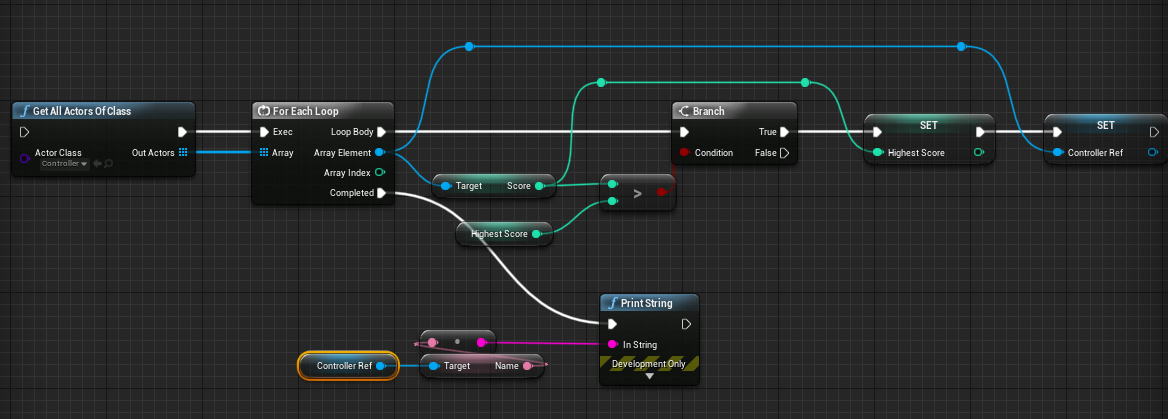
depends on how your controller is set up. just a quick example
white crypt
no worries, i know its just a simple example and there other ways to accomplish that. but if you know some basics you should be able to use it in your way
 late shuttle
When I use the BP Function "REMOVE INDEX" from an array, does it also resize the array? Or is it the exact same length still??
white crypt
it does resize
late shuttle
Thanks 🙂
white crypt
you can easily get the length and do a print string for after and before. but yeah it shortens the length
brazen plank
How would you set the direction something is facing based on the way the player is facing?
trim matrix
because it stops my execution chain
How might I make a simple blueprint that arrays a static mesh along an axis? Possibly with some control over offsetting the array?
any resources helpful
niagara system can do that really easily
you could use a grid too
just make user parameters so you can alter in details
but i'm guessing your building something
or trying to make a blueprint that builds stuff
 uneven shadow
hello, trying to get this node that is shown up in the pic
all I get is these nodes in the pic below this text
brazen plank
Stupid question, but have you tried turning off and on context sensitive to see if it comes up then?
That check box on the top right?
frail wyvern
Sorry, dont mean to repeat: but curious if anyone has worked with the idea of dynamically spawning level instances in the editor?
trim matrix
how do i make a timer?
trying to make a delay of 2 seconds as a condition for my branch
nvm might of found out how
trim matrix
love when stuff works
 true valve
I added an event tick in my persistent level blueprint. It doesn't execute.
fickle kayak
so i created my main menu and everythig works...When I use my controller to toggle through each button it never shows which is in focus - I have to guess...Waht can I do?
 stuck hedge
I'm getting this error when opening my project: LogClass: Warning: In asset 'None', there is an enum property of type 'EDepthOfFieldMethod' with an invalid value of '(' I have no C++ enums in this project, so it should be a blueprint enum, however, when I search the content folder, i can't find an enum with this name. There is no other information in the log. How can I go about finding where this is? it may be an error from an asset pack or plugin, but without any other data, I'm not sure where to look at all for this.
white crypt
@fickle kayak but the selection works fine right? its only the issue with adding some visual stuff?
white crypt
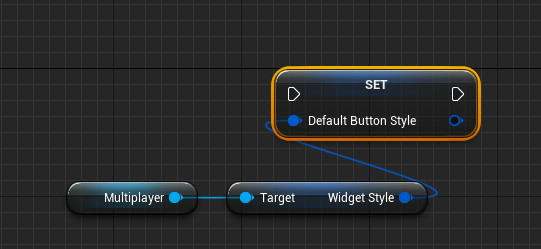
you will need to change the buttons style
so get quitbtn, drag from it and type set style
fickle kayak
I have them done...The styles work with mouse just fine
white crypt
so you want it to work with keyboard?
white crypt
so on begin construct inside your widget get any button and type get style
after that promote that style into a variable
when you are done show me a picture how it looks
fickle kayak
yikes my bad
 hybrid forum
im very much new to ue4 and can't get my in game gun to go up and down with the camera. here is a video.
does anyone know how to fix this?
 faint pasture
parent the arms/gun to the spring arm instead of the capsule
or to the camera if there's no spring arm
hybrid forum
...my gun is set as my main mesh and therefore cannot be parented
i should probably fix that
hybrid forum
thx haha
faint pasture
This thing.
hybrid forum
tip is where projectile spawns, weapon starter is what created the projectile
faint pasture
K you'll want a blendspace or aim offset in that case.
hybrid forum
for which part
faint pasture
There's a million ways to do it, but you either need your pitch to drive the mesh's pitch, or have it drive a blenspace or aim offset that moves the hands/gun.
hybrid forum
which is the easiest
faint pasture
Look at how the 1st person starter does it.
hybrid forum
ok. i will check it out
looks like they have the gun parented to the camera, good to know
 velvet viper
Is there a simple way I can just convert all the logic I have with a beam emitter to a cable component?
velvet viper
So like how I dynamically determine the beam emitter's length, start-end point in engine, can I convert that all easily without too much hassle to a cable component
white crypt
you can probably use the end location for the cable, but the start should be attached to smth as far as i remember
@velvet viper https://prnt.sc/s4eexe since you already have start and end from the beam you can use same vectors here

i've only done a grappling hook long time ago but in theory that should work too
 vocal urchin
I'm trying to build a move queueing system for an RTS game (i.e., "hold shift and set up waypoints), and I'm running into an issue where I'm adding values to an input array while the For Loop is executing. I know this isn't the right way to do it, but how do you have a unit move while "listening" for the next waypoint?
Current setup, which feels janky
The move queue build is the same function, just adding the result of the move calc into an array
white crypt
i think you overcomplicated this a bit
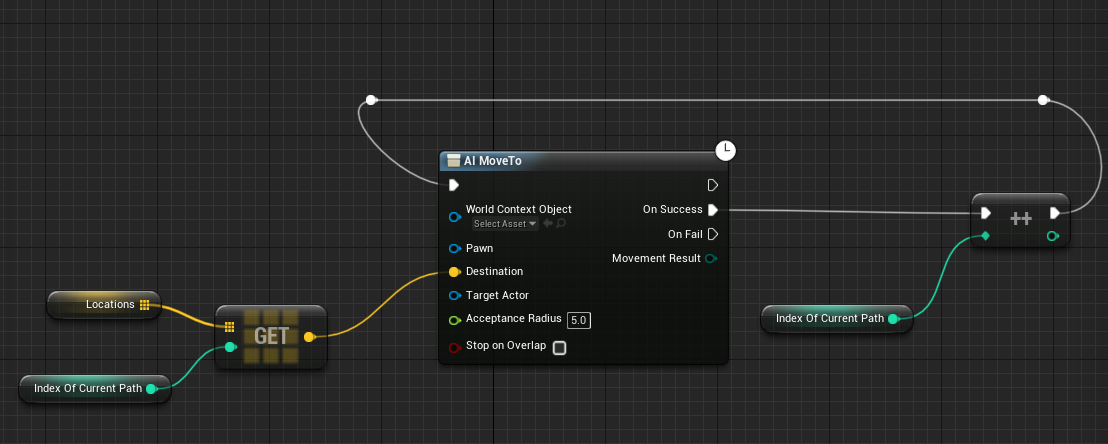
this will work fine too
just make sure you have correct waypoints in the array
white crypt
start it when you set your first waypoint
vocal urchin
so as soon as the first value is added to the array it begins?
white crypt
depends on how exactly you want it to work, i was thinking of what most RTS have, like in starcraft
 hard tundra
yeah, you basically want to have it trigger any time the array size changes
white crypt
units start moving after the first waypoint is set
you can test it by manually adding location to the array
and just run it on begin play
you will see that your AI will go through all the points and from there you can improve the logic the way you want
your example was overcomplicated, this will do the trick too
vocal urchin
Alright, I'll give it a try.
white crypt
i could make all the logic but that might take some time and im going to bed pretty soon. but thats the main gist of it
will still be online for a while so let me know how it went
vocal urchin
It didn't. they don't move at all now lol
velvet viper
@white crypt I used that node and it's not working particularly well
white crypt
@vocal urchin show your current code
velvet viper
With the beam emitter I can set the attach point directly to a socket on my mesh, but when I use the cable component node I'm unable to do so
vocal urchin
Is that all I need?
white crypt
@velvet viper try ticking the manual attachment box
vocal urchin
Well, it's not a pawn. It's technically a character
white crypt
does it have an AI controller?
vocal urchin
Yes
velvet viper
Tried that as well and it doesn't work
white crypt
is it inside ai bp?
vocal urchin
No, it's just within the character BP
white crypt
@velvet viper hmm sorry to hear that, i can try and make a short demo when i wake up if you cant figure it out by then
im sure its not that hard just needs some testing and debugging
velvet viper
Ye I feel like it shouldn't be that difficult to migrate over
white crypt
do you have a refference of AI inside character? @vocal urchin
hard tundra
you might want to consider adding a controller to an RTS character
technically its something that has an AI that you are influencing
vocal urchin
I've been using that, and it's been working fine so far
velvet viper
And most of it isn't lined up properly with the actualy end points and what not
vocal urchin
But that was for my other movement methods
 zenith scarab
Since you want to move the character you have the function in, you can just use the self reference as pawn
And you need a function to actually call the ai move to
white crypt
umm im pretty sure the method i have shown works but since i dont know how everything is set up its a bit hard to help further (thats for dave)
zenith scarab
Since for now it isn't connected to anything
vocal urchin
This what I have now, but they're still stationary
vocal urchin
No, the unit I'm moving
zenith scarab
You have added a nav mesh bounding box in the level right?
vocal urchin
Right, I don't understand how this circular event thing is supposed to do anything at all @white crypt
velvet viper
But cable component is just not working at all
vocal urchin
No event starts it.
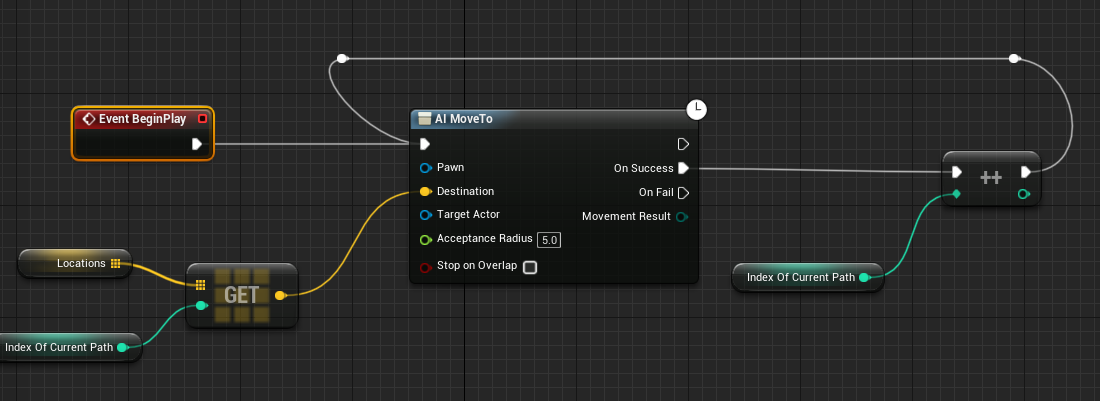
 zenith scarab
Oh and before performing the task check if the path index exceeds the last index of the array
white crypt
set reasonable coordinates and it will work
yeah it needs a lot more conditions thats just the foundation
zenith scarab
If it exceeds the last index set the integer back to 0 or don't execute the move to again
white crypt
its up to him how he wants to set up the rest
vocal urchin
What's reasonable coordinates? They are...wherever they are in the world.
Eh, I guess on the character itself, I could set the first index on event begin play
white crypt
if you want them to move like in all RTs it needs more work
i've just given you the core of your system
zenith scarab
@white crypt yes it is but he needs to have a check before executing it so it doesn't fail because there is no array element there
vocal urchin
I feel like it needs something like this
But that doesn't work because now they won't move again 😛
white crypt
nope, it always starts with 0
so it goes to true
and does nothing
oh its length
shit im too tired sorry
zenith scarab
Before the branch where you check the length you need to call the function to get all your way points
vocal urchin
Also is this thing constantly checking to see if there is an index in the array? If so, I feel like that doesn't scale well with a lot of units...
white crypt
no, it only repeats when waypoint is reached
hard tundra
its probably because its failing on the first attempt
zenith scarab
And for now when there is nothing in the array at the beginning it won't do anything because it won't check again
hard tundra
you need to trigger it specifically when you add a new waypoint to the array
vocal urchin
Nah, I mean in the bigger picture of my system
zenith scarab
Yes what's with that
white crypt
maybe, this alone wont work. you need more stuff ofc like other people pointed that out too
but you probably wont get a full example for that system, to make it good it just takes time that no one wants to invest to
vocal urchin
Ok, much better, they do actually move the next location
But, they want to run back to world origin
So I'm guessing I need a check to stop the event
white crypt
you need to check if the last point was reached
vocal urchin
Yeah
white crypt
which is length
vocal urchin
yep, I think I can come up with that
white crypt
cool
zenith scarab
Yes as I mentioned before you need to check if the current way point is bigger then the last index of the way points array
If no do your move stuff
vocal urchin
like so
white crypt
but you will have to spend some time adding more waypoints when the units are already moving, for now it kinda should work normally only the first time you set the waypoints without updating them while units move
zenith scarab
Use > length - 1
vocal urchin
oh, whoops, yeah
white crypt
both examples will work
velvet viper
@white crypt Does the cable component update it's starting point dynamically?
white crypt
i think it moves together where it was attached
there are grapling tutorials online, i can find one i followed long time ago if that would help you
velvet viper
If it's the medel one I've used it for the cable component logic
I don't get why it's being so annoying, I had no issues using the beam emitter at all
zenith scarab
If it's attached to something it will move with it, if it ties to a location it won't update itself
white crypt
https://www.youtube.com/watch?v=pd-sO4lqdV4 i think it was this one
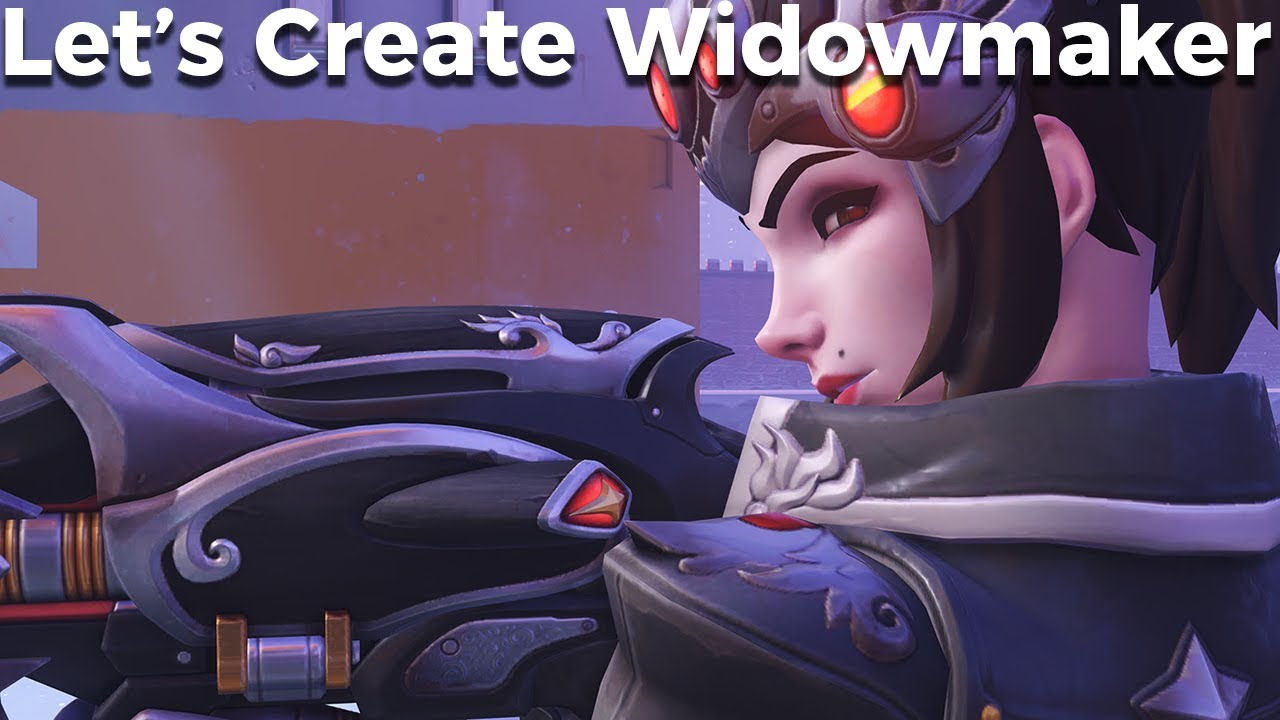
Hey everyone! Welcome to Let's Create! In this Let's Create we'll be looking at Widowmaker from Overwatch and her grapple hook ability.
We'll be recreating Widowmakers grapple hook using blueprints.
I hope you enjoy the video!
If you're new to Let's Create make sure to wat...
it doesnt have a decent swing, but the general logic should be a good example on how the attachment part should be set up
vocal urchin
@white crypt @zenith scarab Thanks guys, working like a charm, now.
zenith scarab
@white crypt @vocal urchin btw when using length you have to use - 1 every time when checking if an array index exceeds the last item because the length is always 1 bigger then the array index, since index starts at 0 and length at 1. So you need to use either index >= length or index > length - 1
white crypt
np, your initial attempt might have needed some work but this method should be much easier to build upon
yeah, luis is absolutely right
vocal urchin
@zenith scarab Makes sense. Still learning arrays. Having to do this here will help me remember that
white crypt
im a bit burned out so hard to think straight
zenith scarab
When you want to check to the last item it's safer to use last index an then you can use the > without a problem
@white crypt no problem, all fine
white crypt
if you are in doubt use a print string
use them when you have doubts in your code. best way for fast debugging
if you think your code doesnt work add a print string at the end to see if it reaches the end. if it does then you start narrowing down who might have caused the issue
also one other tip, if i were you i would use "default pawn" class instead of character
character is meant to be possesed by players controller and it hold a bit more logic than you need. default pawn class is perfect for AI as far as I know
vocal urchin
I have plans to build a custom pawn specifically for my infantry, because of everything I've read about performance problems with characters at large scale.
 vocal urchin
Right now I'm just trying to build the core functionality
white crypt
it has the movement compoenent as well, for example pawn class doesnt
 old bobcat
can anyone help me figure out why my main menu map event beginplay is not doing anything at all? i cant even get it to do a simple print
hard tundra
where are you loading it / kicking it off from?
do a print event off of begin play to see if it happens at all
oh you are doing a begin play
old bobcat
i actually checked the logs and there is an error happening
LogGameState: Error: Mixing AGameState with AGameModeBase is not compatible. Change AGameModeBase subclass (MainMenuGameMode_C) to derive from AGameMode, or make both derive from Base
velvet viper
@white crypt Do you know how I can attach the start of the cable component to my player's hand?
I can't seem to find an easy way to achieve it compared to the beam emitter
velvet viper
I've tried that tutorial, numerous others plus that node you popped in before and this just isn't working at all
white crypt
in the tutorial he wasnt using that node
white crypt
but the end is correct?
velvet viper
Literally all I want to do is convert that logic with the beam emitter
to the cable component so I can apply physics to the rope to make it look more like a genuine web
white crypt
and it looks like this
make sure cable is parented to mesh
and then set the parent socket like in my example
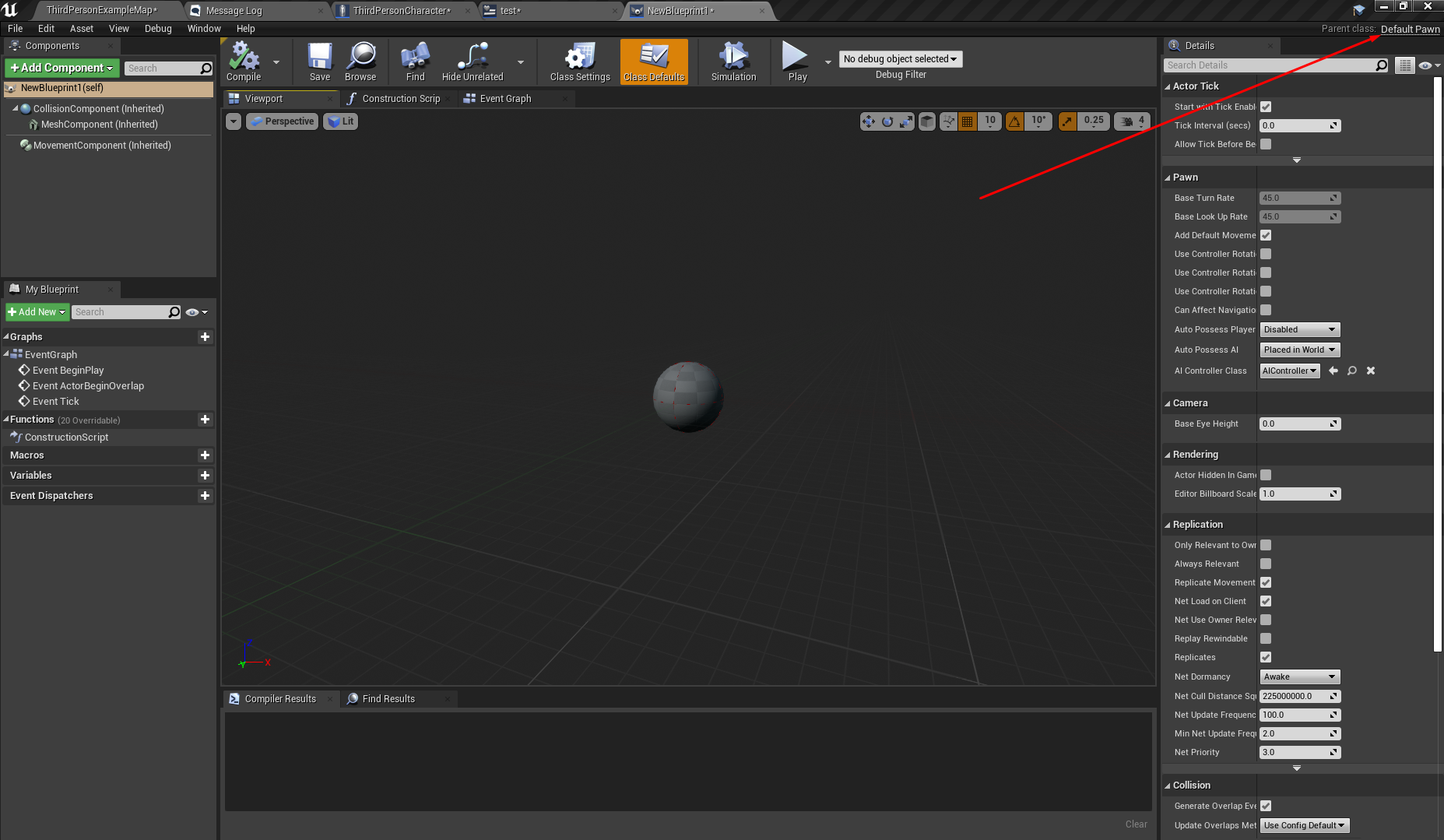
dont use "add cable component"
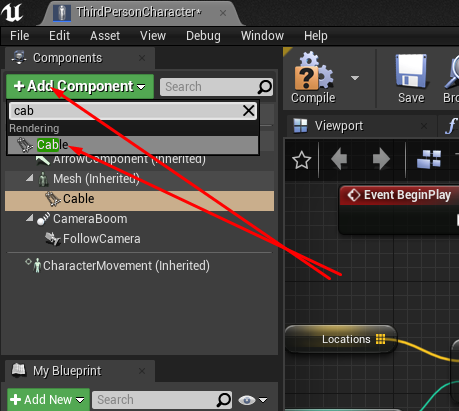
add it through here
because you will constantly be using it theres no need to spawn/delete it. you just need to change visibility when in use

 velvet viper
They're the exact same, parented under the mesh and to the right hand bone
Just wont work
velvet viper
I've tried with both the bone and the socket
white crypt
while cable is selected
vocal urchin
Hit a bit of a snag here...For some reason, I'm no longer able to get units to move through the queue after implementing the checks I need.
velvet viper
white crypt
dafuk
velvet viper
Yep
white crypt
are you running anything on construction?
velvet viper
Nope
Only thing I can think of is that it might have to do with the skel or something
but I haven't had any issues with it at all
velvet viper
Nope, that's a brand new cable component
literally just popped it on then
Don't even have any logic going on with the cable component because I got rid of it
white crypt
save everything and restart your editor
maybe its unreal playing some tricks
and try setting an idle animation, maybe your animbp is causing some weird sh*t
velvet viper
That is my idle lmao
white crypt
can you use unreal default anim?
velvet viper
I mean, if I use that it probably will work fine
But then pre much all of my animations are useless
white crypt
probably?
im trying to think of a solution and you already know who causes the problem...
velvet viper
This issue is pre much guaranteed to be with the skeleton or something
That's the only thing I can think of
that will be causing this
white crypt
hmm i have never encountered that issue my self
sorry cant help you in this case
someone needs to take a look at your skeli
check with unreal skeleton and see if you can find any obvious differences...
white crypt
heh weird, it can even be zero. you can also enable stiffness
oh but with 0 it looks a bit rough
velvet viper
I find it really weird that
The beam emitter attaches like absolutely fine
to my hand bone
white crypt
well cable is not a particle
velvet viper
but with the cable component, I have to attach it to a metacarpal bone
to get it to lookfine
white crypt
since i never worked with maya or blender i cant explain why this is happening
velvet viper
Just a bit weird that the beam emitter attaches no problem to it at the intented location but the cable attaches like up on the elbow
white crypt
something to do with bones obviously
velvet viper
Mm this cable stuff is just really annoying
 void rock
Is it possible to call a blueprint function library function from a bp that derives from Uboject?
velvet viper
@white crypt Purely for visuals
It's staying on the hand now, but wont attach to my tether point
white crypt
hmm then maybe you dont need a cable. you could use a static mesh (cylynder) but then it would require to make your own logic setting up the end point
velvet viper
 white crypt
like properly scalling it so it would reach the end or make the whole rope out of static mesh segments
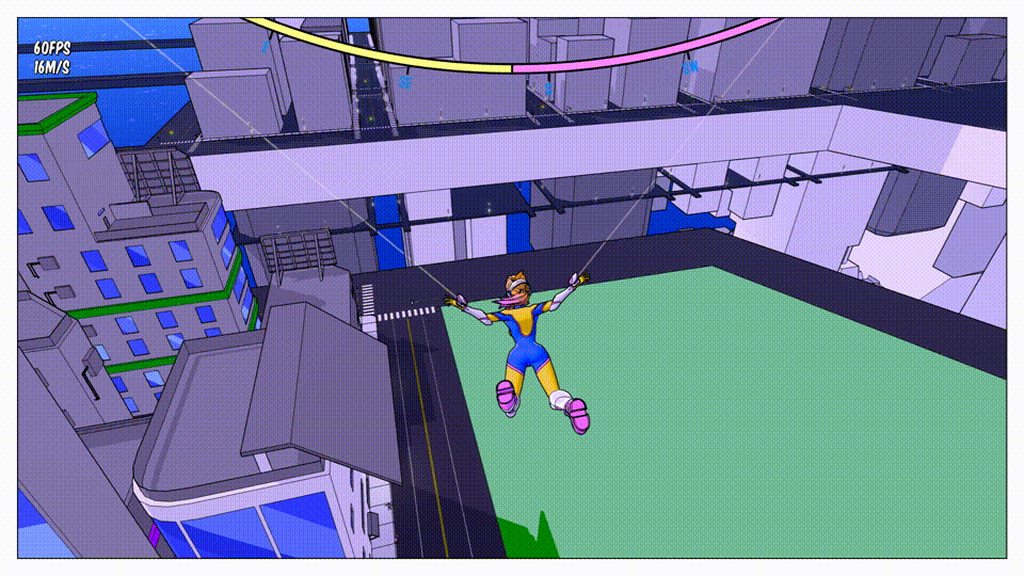
ahhh
velvet viper
Trying to set up that ropey physics like in the clip
white crypt
then yeah you will need a cable
velvet viper
Otherwise I'd just stay with the emitter
white crypt
maybe someone could help you in #animation since its mesh/anim related
since its a blueprint channel not everyone works with models, including me
velvet viper
But the issue isn't with the mesh or animation? I'm literally just trying to get the cable component attached to my tether point location
white crypt
but if it works fine with unreal mannequin then i asssume the problem lies within the model itself
velvet viper
I've gotten past that issue
It's literally just
attaching the end point of it to my tether point
it's not working as u can see from the image
 velvet viper
the end point just wont line up with the tether point
which is where the beam emitter gets its end point from
i.e the side of the building
white crypt
need to google what tether is ;d
velvet viper
oh it's literally just the end of the rope
white crypt
ahh to attach
white crypt
okay, i was planning going to bed but let me take a smoke and i will try to do it on my end first
white crypt
do you have a vector variable for that?
velvet viper
yep
white crypt
k. brb
velvet viper
alright
zenith scarab
@velvet viper https://youtu.be/3SFu3uoFQIM

This is a showcase of the project from my Youtube series 'Let's Make', in which I set about creating a Spider Man style traversal system.
The project is more of a coding exercise than a finished product and as such is not particularly polished and does have some bugs. That sa...
Take a look at this video
vocal urchin
I have no idea how this can be wrong...but now both my movement queueing and normal movement is borked after putting the checks in that I need.
velvet viper
Has no relevance what so ever, he achieved the swinging with the beam emitter just like me
vocal urchin
Normal movement has them going back to world origin
zenith scarab
You can download the project there, He also has videos braking down his systems
velvet viper
Like I said, he is using the beam emitter for webbing just like me - I'm trying to use a cable component to get physics on my tethers
Don't need anything from it
zenith scarab
@vocal urchin all the time or only when he had reached the last waypoint, since you still use > length
white crypt
show the part where you are setting the end point
vocal urchin
@zenith scarab when they reach the last waypoint.
Which doesn't make any sense, because I'm stopping movement and clearing the array
velvet viper
I'm gonna try something new hold up
zenith scarab
As I mentioned multiple times before you are referencing to a point that doesn't exist in the array because of the compare to the length of the array
That's why I said use last index
That way you get the last item not the count of all items since an arrays starts at the index of 0 and not 1
zenith scarab
👍
white crypt
@velvet viper so the issue is that the end point is not being attached and it rotates together with your character
one solution would be to spawn an invisible actor at the end and attach it to that
not even an invisible, just an empty actor
you think you will be able to do that or need some help?
velvet viper

Hi guys! I've created a Patreon, so now you can support me here:
https://www.patreon.com/MedelDesign
If you support me you will have access to an exclusive video every month and a way to contact me to ask what you need.
Every detail counts! Also if you can't give much!
In ...
I'm looking at this
Since it's essentially using similar logic
attaching to an end point with the cable component
and using the hand as a starting point
zenith scarab
Show how you have setted up the set end point
velvet viper
@white crypt It's hard to follow along with the video because the guy intercuts everything and makes tweaks without letting the viewer know
white crypt
in the video you can see that he has an actor refference in the world which he attaches to
thats what i suggested, spawning an actor at the end point and attaching the cable to it
velvet viper
Ye, he is using the little hook widget at the end
So, if on tick
I spawn an invisible small cube
at the tether point
and use that reference
white crypt
dont use tick
velvet viper
What would I use then?
velvet viper
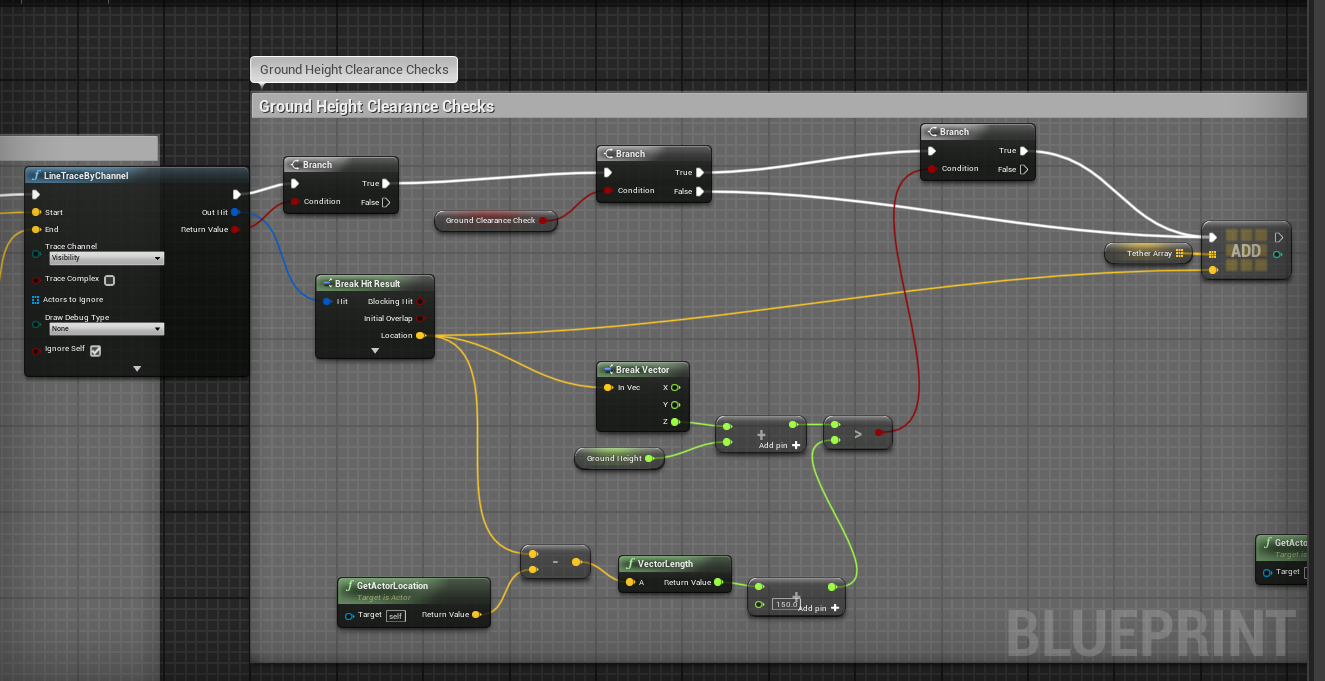

On swing input, it linetraces out within a certain range
Think it's like 20 traces out or something
zenith scarab
And where do you set the actual end point of the cable component?
Since you only set a variable there
zenith scarab
Ah okay
velvet viper
I was just setting the cable component's end point to the value of the vector var 'tether point'
zenith scarab
Ok
 velvet viper
Would the empty actor be in a separate blueprint?
zenith scarab
You don't Even have to create one in the content browser you can just select actor in the class select of the spawn actor from class
velvet viper
I don't want any marker, just want it set up like in the clip I showed before
zenith scarab
Yeah like a attach particle or something or a web mesh
velvet viper
I don't get why this needs to be so complicated
white crypt
yeah then like in my example just instead of test2 use actor
velvet viper
with different actor blueprints
 velvet viper
how do i do that
white crypt
...
zenith scarab
Instead of selecting a class you created just select the actor class
white crypt
luis will you help him finish it?
white crypt
i want to sleep 😄
zenith scarab
Haha do that xD
white crypt
oki. take care then
zenith scarab
Good night then
white crypt
before i go
it doesnt work with default actor class
only works with a newly created one
velvet viper
so i do have to create a new blueprint actor?
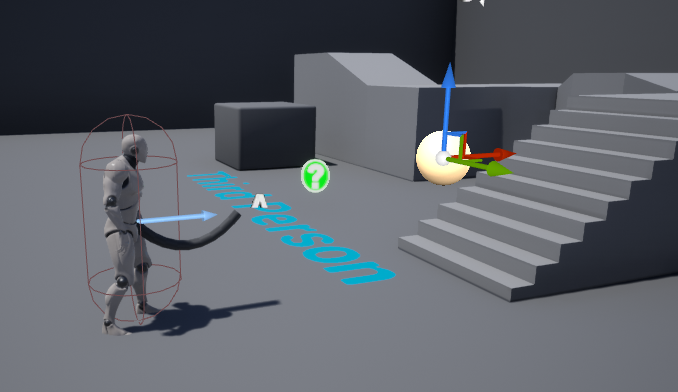 zenith scarab
Okay that's weird
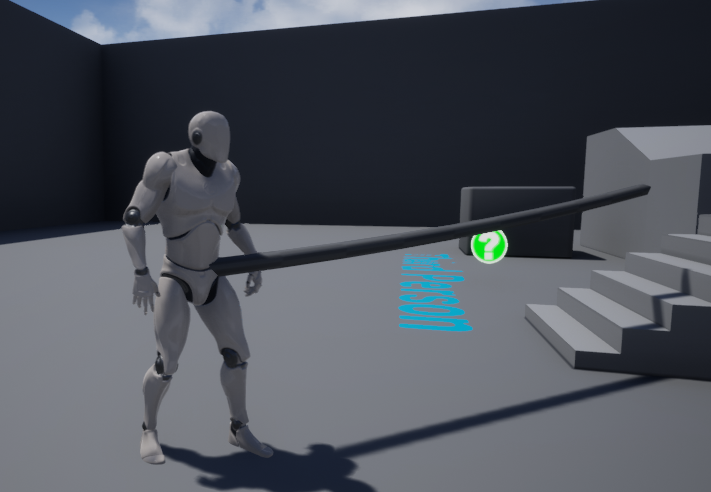 white crypt
the end point?
velvet viper
what part of the character mesh
nah not the end point
is it still connected to the player's hand?
zenith scarab
No it's just spawned at the actor location
zenith scarab
Since the actor location height is in the mid of the capsule component
velvet viper
so not to the player's hand
white crypt
i havent specifed the location
velvet viper
ahh ok
white crypt
wait i will do players hand
velvet viper
ye i just want to see that it will work 100%
and with this secondary actor blueprint
for the end point
since my player can swing from point to point
 white crypt
no, it will stay in the place were you spawned it
velvet viper
but the tether point updates every time the player tethers and untethers
so will the cable not update as well?
white crypt
once you theter again it will spawn a new one
velvet viper
and when I untether
velvet viper
ahh ok
velvet viper
Now I'm thinking about this
could you potentially
have the cable component
stay attached to the previous end point
zenith scarab
BTW, performance wise you can create one attach point actor at begin play or when firstly using the function, storing the actor into a reference and then when setting the new attach point location again just set the actor location to the new location using a reference to that actor
velvet viper
but not attached to the player's hand
white crypt
you can detach yeah
but you will need then to spawn a new cable
so you will have to go back to "add cable component" node
velvet viper
Sort of like this effect
You see when the player like zips forward
how the rope is still attached to the building but not the player
to give a stronger sense of immersion
velvet viper
Ahh cool cool
In the other actor bp as well
do I have to put a cube in there or anything
white crypt
anyways sorry im very tiered. if you cant make it work try re-reading everything I said again or ask luis for help. im sure he hasnt done this as well but once you understand the engine well you can think of anything
if by any chance you are still struggling you can DM me tomorrow and i will help more
gl Luis 😄
velvet viper
Ah alright thanks man
if its not too much
can you send a pic of the actor bp?
unless ur already off
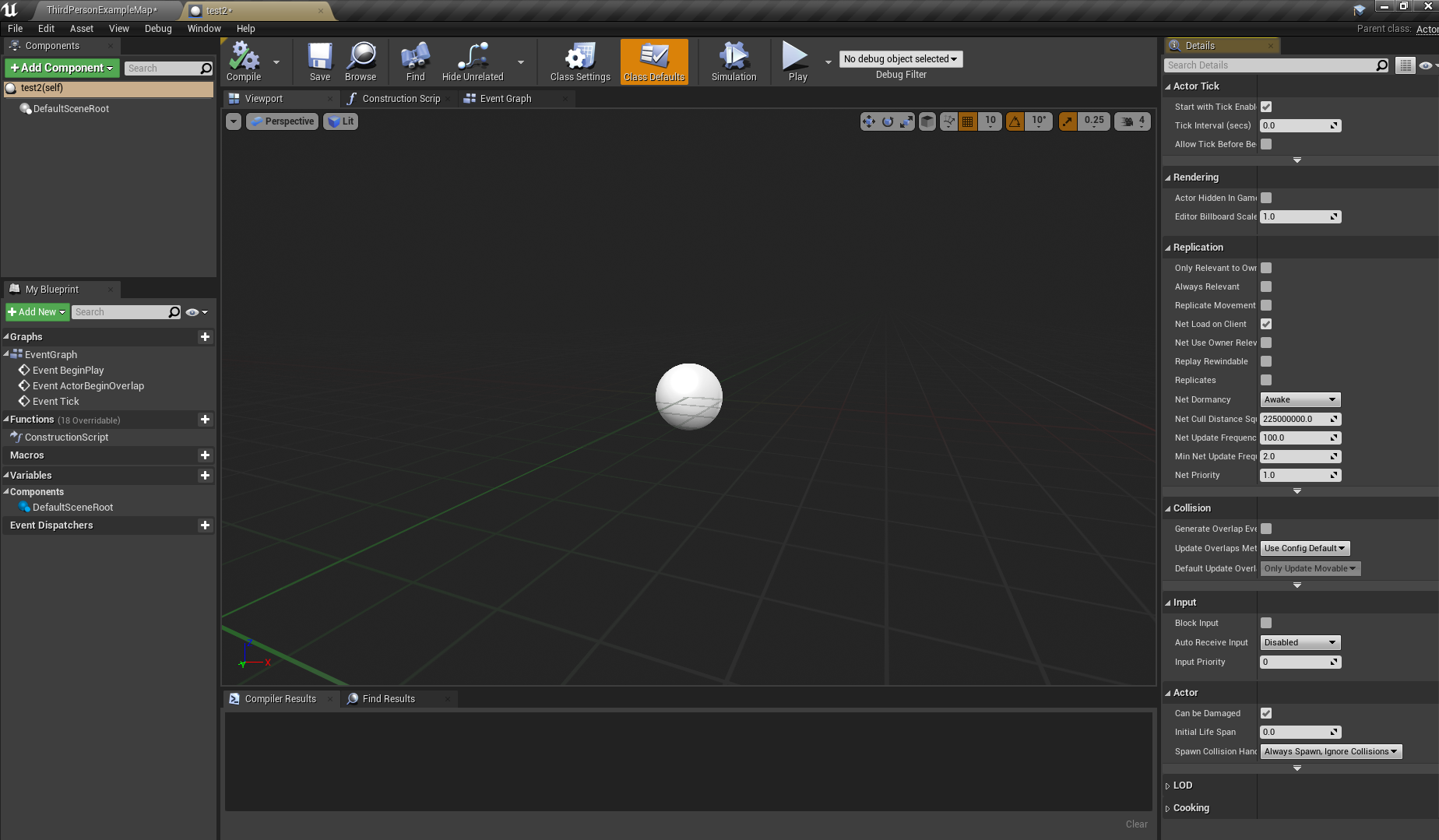
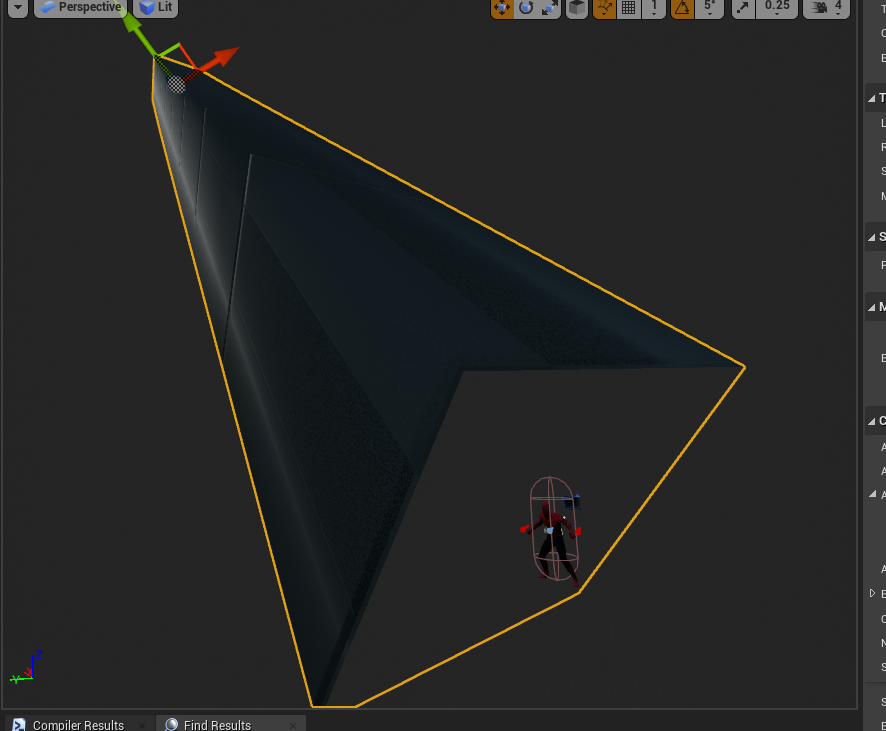

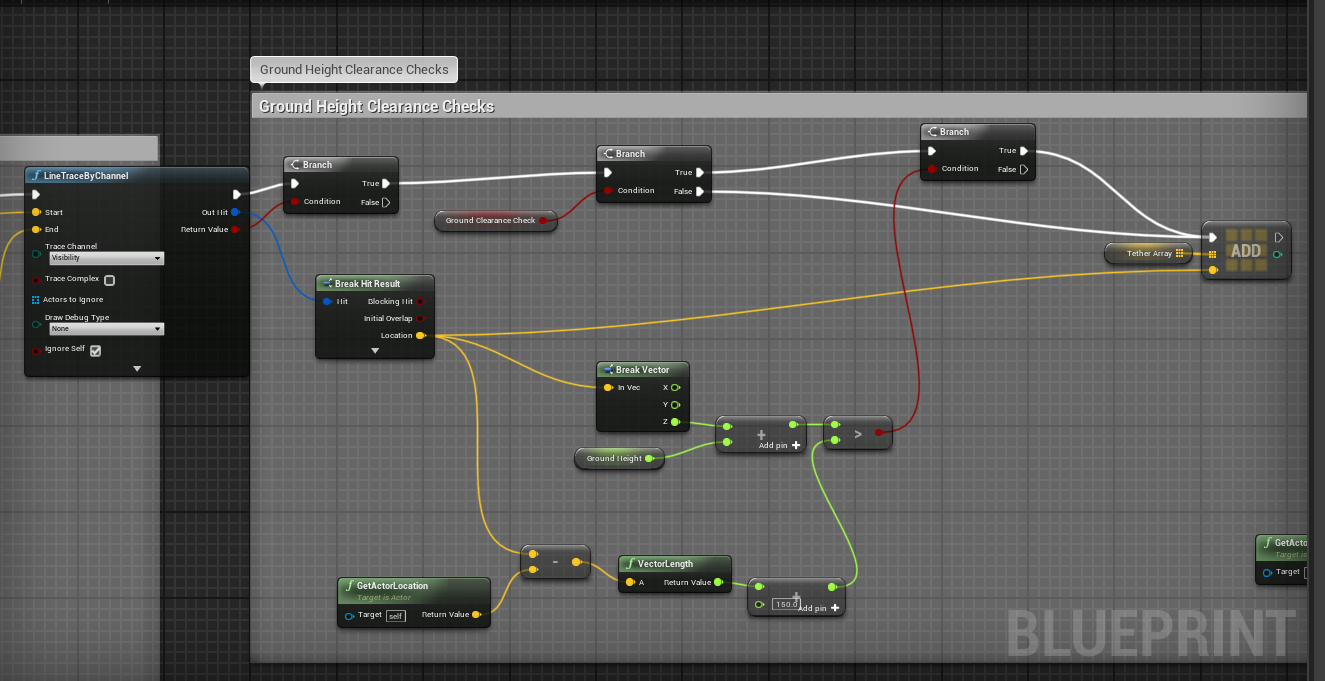
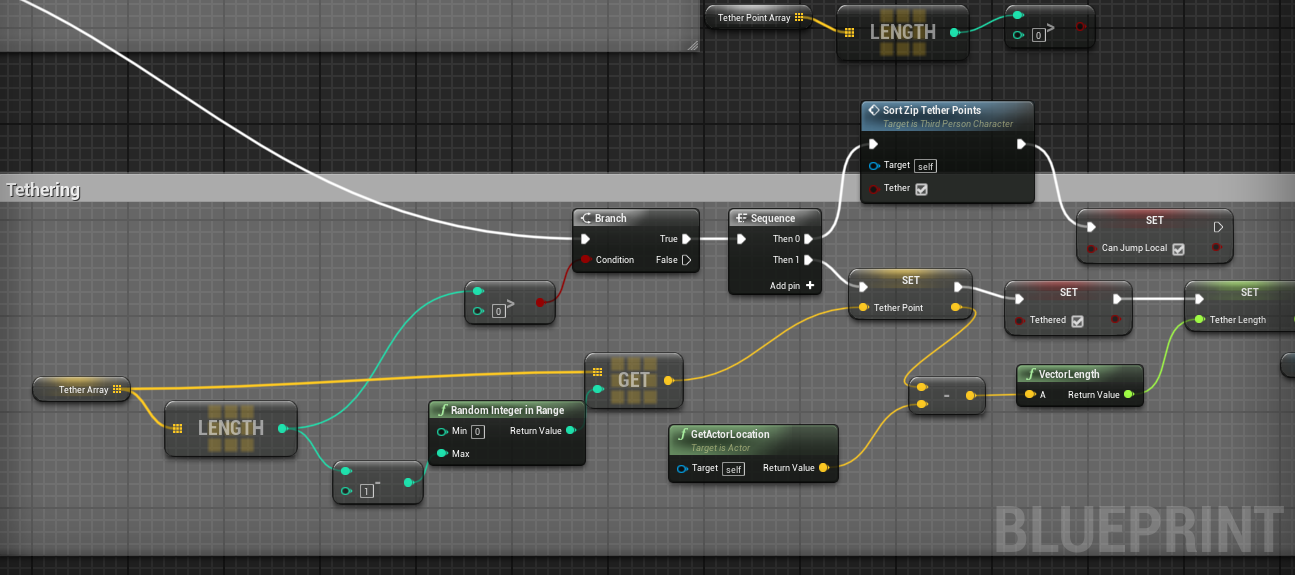 velvet viper
oh ok lol
zenith scarab
To make this whole thing a bit simpler in the attach point actor just add the cable component in there so it is already attached there.
then when setting the end point in the character spawn that class and using the return value of the spawn actor from class you can set the end point of the cable to your players mesh and there the hand bone name
Then promote the return to a variable.
When releasing the web in the player get the variable, check if It is valid, so it means the reference is set
If it is valid use the variable to access the point
If so use the variable to call a function you need to add in the actor (the function needs to detach the end point and then after a specific delay you can set destroy the actor) then set the actor variable reference to null
velvet viper
Think I've got it now
Looks considerably better
than what it was before
I think, once I add in a webbing mat to it
and tweak it a bit
It should look good
@zenith scarab @white crypt Thanks so much guys, really helped me out a bunch, can't explain how much I appreciate lol
zenith scarab
👍
 sharp temple
anyone know how to increase the accuracy of a homing missile my one misses like 90% of the time not sure why it has to be a very sharp turn to make it hit but the ones that should hit just flies right past it
zenith scarab
How have you setted the whole thing up? Is it based of projectile movement?
zenith scarab
Where do you set the homing missile stuff
zenith scarab
Why is rotation follows velocity set in the first Pic you send and now not anymore?
sharp temple
i'm looking on google see if peoples settings are the same
HomingAccelerationMagnitude if i increase it goes a lot faster more accurate but it's to fast
 hybrid hound
my actors are somtimes spawning in the ground, ive overwritten the "Choose Player Start" in the gamemode to this but for some reason actors still sometimes dont spawn there
sharp temple
@hybrid hound if it spawns you in the map in the centre or what ever it could be it's ignoring the spawn point i had issues when my projectiles would spawn under map centre
hybrid hound
any way to fix that?
sharp temple
well with me it was ignoring the get socket location so maybe try changing what it spawns on?
zenith scarab
When spawning an actor there is a flag called collision... There you can select ignore all, spawn actor
sharp temple
not sure it was a very long time ago i had the issue
zenith scarab
@sharp temple play around with the acceleration and also the interpolation timen
Maybe use a lower acceleration
sharp temple
i want the same speed it's set i just want a more accurate speed the lower you set it the slower it rotates
thanks man i will mess around with it
maiden wadi
@sharp temple Seen this thread issue a lot recently and it's embarrassing how many people resort to tick or timers to solve this. All you need to do is set a max speed, and a high homing acceleration magnitude. The projectile will still correct and turn itself quickly, but it'll never move faster than your max speed.
sharp temple
does setting the velocity for the speed count as what you said too?
or does it have to be the max speed
maiden wadi
The homing magnitude will just add to velocity. You need to cap that with max speed.
sharp temple
ok will try now
initial and max speed doesn't do anything maybe because i don't have defaultsceneroot?
velocity only gets the rocket moving
maiden wadi
You do though? That Skeletal mesh named missile is your root.
sharp temple
the root is gone isn't it? because i replaced it with the missile
maiden wadi
The root is just the base of the hierarchy. What you got rid of was just a SceneComponent.
sharp temple
oh ok
maiden wadi
Here.
There's a screenshot of all the settings I changed in a quick test to remind myself how that worked.
sharp temple
you got velocity with max speed?
maiden wadi
sharp temple
isn't it 1 or the other
maiden wadi
That's the rest of the test
And no. Velocity is just the starting speed. You can do the same thing with initial speed if Velocity is normalized. Max speed will just slow the missile down
sharp temple
oh velocity is just a boost for the start?
maiden wadi
For example, I have 1500 velocity there. But the moment I fire the missile, it'll slow itself down to 1000.
maiden wadi
Anytime. Had that frustration myself a couple weeks ago.
sharp temple
lol i just ignored it for a few months now it just got a pain watching it miss all the time lol
maiden wadi
It's pretty annoying reading about it. A lot of people resort to checking distance to the target on tick, and if it's close enough, they cheat interp the missile there. Looks funny when the missile just suddenly takes a sharp 90 degree turn. The most I'd do on that is set max speed based on distance and let it slow and speed itself up based on distance and maybe a dot product facing.
sharp temple
or let it choose it's own path like them smart ones that instead of going into a wall it goes over and you see them games that have them big ass missile trucks them missiles go really high and very far
basically what people use anyways the choose it's own path but there is other ways...
covert stirrup
Good morning everyone!
I have a problem with my collision_Box not detecting my custom object trace. When I set it to the defaults, say "world Static" or "world Dynamic" it will trigger BeginOverlap, but my custom will not. Is this intentional or am I missing something?
 hazy pollen
hey question related to testing in blueprints is it ok to add functional tests in normal level, and each time you want to test you create duplicate of a level to (FTEST_). and run it? And if this is case will test be automatically excluded from release builds?
covert stirrup
you can tell it what maps to exclude in builds
so you can have a master testing level that doesn't come with the final game
hazy pollen
I dont wanna exclude maps but test objects in level
covert stirrup
you were talking about duplicating a level and then running it, so you want to do that in the released build?
hazy pollen
No that part is only for testing and running means running through Session Front-End
covert stirrup
don't know then, thought I answered it by telling you your duplicate levels can be ignored, so if it's not that then no clue
maiden wadi
@covert stirrup By trace, do you mean like line traces and mouse clicks?
covert stirrup
hey @maiden wadi I managed to figure out what was wrong, it was a misunderstanding on my part, I had my default response set to block, so it would never technically be overlapping -- whoops!
maiden wadi
Block should also allow overlap if you're allowing query and physics collision I think?
covert stirrup
hmm let me retest!
@maiden wadi sweet, thanks for making me recheck, think I now have it so I don't need custom collision boxes / spheres
previously got it working but things were falling through other objects because it was an overlap set, fixed 😄
maiden wadi
Collisions can be a little tough when first messing with them. Just remember that if your overlap isn't working make sure you're Querying on collision, and if block isn't working, make sure you've got physics enabled in collision. When in doubt, turn them both on. Then make sure the other object is blocking the right channel. Also a lot of traces won't detect objects set to overlap if I recall correctly. Most things like mouse clicks, line traces, stuff like that only works with a block, but other things like SphereOverlapsActor work with overlap.
 ancient heath
I hit save all more times than it makes sense
anyway, if I'm reading this correctly, the game tries to go to "World" level
even though this is my blueprint setup
just tried playing via "Standalone game"
yeah it moves to World level for some reason
it keeps trying to move to whatever I have set as default game map
maiden wadi
That's supposed to happen when your level open fails.
ancient heath
it fails miserably though
 somber linden
Is the name correct?
maiden wadi
Check name, Validate, FixupRedirectors.
ancient heath
I just moved all my levels to one folder.
switched default map to L_Catacombs_04 just to test it
somber linden
Do a fix up redirect
ancient heath
I switched it in project settings and it tries to go there
let me try that
on Levels folder?
ancient heath
still the same
somber linden
That is weird
ancient heath
did it on everything as well. Nothing changed
yeah it is
I really don't want to recreate the whole project. I have it on perforce server and 5 poeple working on it
somber linden
Do you have that thing in gamemode on, i cant remember the name, but it is seamless travel or something
ancient heath
uhh, no. Didn't know there is such a thing
somber linden
I dont know, but i had some issue when that was on in pie
covert stirrup
@maiden wadi thanks man your super helpful! It is so far working 100% things are no longer freaking out, and should be scalable now for the rest of the project (obviously will break again at somepoint though haha)
ancient heath
I don't understand why it "kinda" works when I play the game in "standalone game" mode. It still moves to default map...
somber linden
Because if it cant find the level it tries to load default map i believe
ancient heath
I created a new level and it works with that one
somber linden
Someone said so earlier
ancient heath
seems like it. But why ._.
maiden wadi
Oh.
I think I realized why.
I can't believe I didn't think of that when you said you moved them.
Go into the levels and rebuild them.
 marble folio
Oh does that help? I had issues after renaming my persistent level recently and did not think of that..will try 😄
maiden wadi
It's usually either that, or there's something in the level that isn't compiled right.
ancient heath
nah, the issue remains
maiden wadi
This is singleplayer?
ancient heath
yeah
maiden wadi
Can you make a new copy of the level, go in and delete everything in the world outliner, build, then try to load the new one? Instead of kicking you back to the main screen it should just stay black.
ancient heath
I duplicated the 03 level, named it "the_copy", edited Open level node to go there instead
deleted everything it had before building it
and it still failed
feels like there's bunch of mixed up paths/references/idk under the hood and I have no idea how to deal with that
I might end up recreating the levels
maiden wadi
Hmm. Does it work with a newly created level?
maiden wadi
Fix up Redirectors on the entire project or building the map again should fix this. I got nothing.
 pure tulip
Hey, does anyone know how I could potentially open my AnimBP without compiling? I've gotten myself into a bit of a situation where if I compile my blueprint it'll crash my engine, but if I open it to fix the issue, it compiles.
ancient heath
I did both and sadly it didn't help
unless I did the redirectors fix the wrong way
I just selected everything in Content folder
and did that
maiden wadi
@pure tulip You might be able to get an older version of the blueprint. Let me double check where those are at.
And no, you did that fine. Unless you can also right click on the Content folder and do it there, but I don't see how that would change anything.
maiden wadi
@pure tulip Do you know how to get to your source files for the project?
ancient heath
for now I'll just remake the levels I suppose
pure tulip
Source files? Like the content but not inside the engine?
maiden wadi
@ancient heath Copypasting the content from the world outliner might work to speed that up.
@pure tulip Right.
pure tulip
Yeah
maiden wadi
Go to the main folder for your project, then the Saved folder, then Backup.
See if you can find an older version of your animbp class name in there.
pure tulip
Ah, I think I have. TY. I thought I dun did messed up
somber linden
Could try removing underscores?
ancient heath
didn't know I can copypaste stuff between levels. Thanks 👍
somber linden
Im just taking a wild test
ancient heath
^ you mean on my levels?
maiden wadi
Yeah, on the names.
maiden wadi
Interesting question in that regard...
somber linden
Aha!
maiden wadi
I wonder if it was the renaming or the underscores?
somber linden
Im a genius
maiden wadi
What about renaming it back to with underscores though?
Just wondering if it's the renaming process, or literally an issue with underscores in naming.
ancient heath
hm, I renamed L_Catacombs_06
to cata_6
and it still worked
I don't know anymore
maiden wadi
So, tldr, if you move your levels, rename them at least once and maybe back.
ancient heath
renaming them back to original names screwed it up
somber linden
The fuck
maiden wadi
I still feel like that has to be a redirector issue then. I don't know enough about the way UE4 handles those to say though.
ancient heath
yeah so do I
maiden wadi
But hey, at least renaming it works. Good thing to keep in mind.
ancient heath
yep
just to really make sure I renamed target level to M_test_21 and it worked
so it has to do with the original names and some paths/redirectors/something
I didn't know ue4 has such a mess beneath the surface when you move stuff in content browser
 ocean radish
Yea defo a redirector somewhere still pointing to the wrong place, did you try reopen the editor?
might be a problem with how it handles it in memory not getting changed properly
 fleet sandal
You just need to restart the editor. If that doesn’t work, nuke /intermediate and let it regenerate. The folder contains temporary file, which is why you can’t rename something that once existed. For it still exist.
 warm flax
how come when i make a BP of my character c++ class i get a ton of extra stuff i dont want, i only want the components ive made in the c++ class, is this some setting? its breaking everything and i cant delete the stuff its added
of all these components ive made 3 in the c++, why is there so much extra shit i cant remove
 dusk prairie
guys know anyway to open uexp & uasset file and export text from them?
zenith scarab
@warm flax that's because of the character parent class
warm flax
ah ok, so id have to make it a pawn?
zenith scarab
You have to reparent your c++ class, I would use the defaultpawn as new base class instead of the pawn class, since the default pawn also has a movement component
You can either create a new c++ class based on default pawn
Or you can try to reparent it manually in visual studio by changing the includes and parent call functions
warm flax
i cant just change the : public ACharacter to : public APawn?
zenith scarab
As I said I would use ADefaultPawn and instead of ACharacter and include DefaultPawn.h instead of character.h
You can try to
zenith scarab
?
ancient heath
is there a way to literally freeze all pawn movement in game? I'm trying to implement combat system similar to this:
https://youtu.be/l3YTaLg0mTc?t=329
ancient heath
I still need to rotate camera and control bunch of different things
zenith scarab
@ancient heath but to answer your question correctly, actually there is a way look at this link https://youtu.be/nTDcDcV1bPw

Basic way to slow time using blueprints in UE4!
Twitter: https://twitter.com/Play_Ruff
Patreon: https://www.patreon.com/deanashford
ancient heath
oh I saw this somewhere but forgot to get back to it and actually watch it
thank you
ancient heath
well okay honestly this IS what I asked for. It would freeze an enemy that's jumping in mid-air. But I won't be able to play an animation on his mesh without having him fall down
zenith scarab
You can set the velocity to 0 and also the gravity scale to 0 that way he stays mid air @ancient heath
And in place
But enables you to let you do all you want
maiden wadi
@solar needle To fully answer your question, you can turn blueprint into C++ by nativizing it, but that's for performance things and is not necessary to do. If you're working with blueprint, you never need to touch a line of C++ code. Although I would strongly recommend learning good programming practices in general, they still strongly apply to blueprint just like any other coding/scripting language.
ancient heath
@zenith scarab great, thanks 👍
covert stirrup
question, are collision channels generally buggy? I feel like I am getting different results with the same selections
 dry tundra
Is there a way to debug with Standalone Game Mode? Server Travel apparently only works in Standalone Mode which makes it really hard to fix bugs without breakpoints working..
 gloomy linden
Standalone Game Mode?
There are several build options, i.e. for distribution and for debugging
maiden wadi
@covert stirrup Can't say I've ever had a problem with physics channels. They've been incredibly reliable for me.
dry tundra
@gloomy linden I am opening the editor through start a Debug Instance in Visual Studio trying to debug Blueprints when using Standalone Game Mode. Visual Studio Breakpoints would probably still work but the Blueprints Breakpoints dont.. (All Debugging, not only Breakpoints)
 unborn lantern
Hi, I created a new UObject as a Blueprint, and I want to use it to spawn actors, I tried to add the "Spawn Actor from Class" node, but its not available in this graph. Any idea why?
 supple dome
Can i override the world context object of a node? i dont want it to be self
because it doesnt override GetWorld() @unborn lantern
but you can only override it from C++
unborn lantern
so the only solution is to ask another class (exmaple my player controller) to do the spawn? or to have this UObject be a AActor instead?
supple dome
both solutions work, the third solution would be overriding GetWorld() in c++ to return the outer object
unborn lantern
pity, I wanted to encapsulate all in my class
@supple dome get outer object is availble in this graph
but still I cannot use spawn actor from that
supple dome
it will only appear if you override GetWorld from c++
maiden wadi
@trim matrix I'm confused. If the second actor didn't spawn, they can't communicate. The second one shouldn't exist.
unborn lantern
ok thanks a lot @supple dome for the explanation
supple dome
im having the same problem right now actually, i want to feed another object as a world context to a function, yet it forces it to be self
unborn lantern
@sage echo for simplicity I decided to have my player controller spawn that, so I create a function in it, called by my UObject BP
its not very elegant, but ok
maiden wadi
@trim matrix And you need which one to talk to which?
Where are they in relation? If they're close, you can use sphereoverlapactors and filter by the first one's class. You can line trace, You can store the reference for the first one somewhere else and set a variable in the second one on spawn so it already has that reference. Line traces. Uhhh what else... Collision or overlap if either are moving.
In general, I suppose if you're just testing you can use GetAllActorsOfClass, but bear in mind that's not a good implementation if you're going to be having a lot of actors in scene.
 unique hollow
How could you do it so that whenever you pause, all sounds are paused aswell"?
 jolly pumice
Hey guys! I have idea, that should be awesome, but there's really no info in google. Is it possible to have text inside of material? Like spawning item with it name for example.
unique hollow
@jolly pumice wdym
 late gorge
can you disable an actor being a navmesh obstacle @ runtime?
specifically, im asking if this can somehow be modified
jolly pumice
@unique hollow i thinked of dynamic price changes in potions, depending of many factors. I wanted to make it visible on item, what's exact vaule.
It's round bottle in many cases, widgets can't do 😄
unique hollow
hmm no idea then
 patent ermine
I'm using the LoadLevelInstance node, how can i make sure that a level is loaded and visible before continuing execution of the blueprint?
jolly pumice
@patent ermine not 100% sure, but loop checking, if success best option
I don't know if is there an option, to wait for level fully load, it's hardware dependant
patent ermine
@jolly pumice Yes thank you for your suggestion. That is exactly the issue. I can add a delay of lets say 10 seconds, and it works fine. But thats a hard coded delay, for some it may take 15 seconds, and at that point everything is broken. I'm sure there is a way to determine if its loaded or not.
jolly pumice
@patent ermine delay is not really solving solution, more like workaround 😉
Maybe you should make new level start, that can mask parts not loaded yet
patent ermine
@jolly pumice yes you are correct it's a workaround. The problem is that i need access to some actor in that level as soon as it's loaded, but i just dont know when its loaded, hence the delay 🙂
jolly pumice
hmm, maybe make on beginplay for that actor, something that "flag" him
 solar needle
Do creating variable are nessesary when entering value ?
jolly pumice
@solar needle no for maths
solar needle
?
jolly pumice
Where do you need this value?
solar needle
For entering in vector data. Or other stuff that need it
jolly pumice
If you have vector, you can add manualy, int, float, another vector, wichout creating new one 😉
solar needle
So creating variable arent nessesary ?
jolly pumice
no, you can just hardcode by typing values
solar needle
Do variable can be changed ? If do. Which priority it will be use ?
Like you make 2 fungtion but it will effect value of variable
 barren rain
So I've been wanting to get IK's to work in my Climbing System, It's been a little bit of a fight, but got my hang and shimmy down. So now I'm doing the IK part, but all I get is that my character ends with his Hand in his own ass. I've tried going over it a couple of times. But i Think I'm going blind by now.
I would love to get some fresh eyes on this and maybe get a solution for the problem.
jolly pumice
@solar needle You can change variables, unless stated as read-only. When you call function it will change values, they will work in order you called them. First begin play, then tick every frame.
 ancient topaz
Hello everyone! I need advice. Can you tell me, why a my companion character don't teleport to my character in all place? One time he is telepot to me, one times not. But i make check for teleporting to me and check to show me all is ok. Here is my code/
solar needle
@ancient topaz teleport to where ?
jolly pumice
@ancient topaz is string visible?
solar needle
Get world instead of get player ?
ancient topaz
@solar needle Any where. where my character walking. But it is a open map, clear. No building
ancient topaz
Dog all time walking whit me. but some times he going to something doing. And i need my dog call. A press "I" and my Dog telepor to me
Dog is AI player
Like a Horse in Witcher
solar needle
Your dog character is not player is it ?
ancient topaz
no
solar needle
Its not get player character.
ancient topaz
AI controling
ancient topaz
Yes
solar needle
Cast
unique hollow
Is there any node for Ray-Tracing so I could potentially add it to a options menu as a turn on/ turn off option
ancient topaz
@solar needle What i need write in Object?
solar needle
@jolly pumice but his dog is other bp character
jolly pumice
If you have reference for it, there's no problem
solar needle
@ancient topaz well try to set character loc.
jolly pumice
Just like that, with ref instead of get actor, if you have it
solar needle
@jolly pumice what the difference between using cast ?
Not talking about teleport btw
jolly pumice
in simple form, when you need something class specific, it needs to be casted, some nodes return just name of object technically, that's why there's casting
@ancient topaz take off teleport, lerps, cast
just get doggo, drag from its pin to setactorlocation
solar needle
@ancient topaz just use antares312 image
@jolly pumice what is the purpose of return node ?
jolly pumice
@solar needle to make return conditions, most usefull in interfaces. When you for example make function, to return value of item, you can make it output pin, so there's no need of saving it as a variable, you can just use it directly
jolly pumice
Glad to help 😉
@ancient topaz a little advice, do you really need all those bools? 😉
ancient topaz
@jolly pumice And one question. When i used AnimNotifyBP can i making Cast?
in AnimNotyfy State
Because here is 3 function? Begin, End and Tick
jolly pumice
Well, you can almost always cast, better question, if you need to?
Just make hardlinked ref, if used once, much simpler to do
ancient topaz
Ok, i want to make somtihng like this. I make a animation. And i make BPnotify. When this notify working - In NotifyBP making linetrace code and cast to charater. I want to make a simple way to making Eventtick whiteout cheking.
 upper adder
Just made a simple player character but the pitch mouse Input doesnt work...?
Nvm didnt check use pawn rotation
 hardy merlin
I have a primitive component. How can I get the point that is the bottom center?
Is there a function for it? I can get the minimum point by doing Component->Bounds->GetBox()->GetMin() but I'm wondering if there's a way to more easily get the center of the bottom face.
 sand shore
You could get the bottom center of bounds but that's not always going to be the bottom face
hardy merlin
What would be the formula for that?
sand shore
but you do need both the min and max extent
Z value is Min.Z
X/Y are the midpoint of max.x min.x
hardy merlin
Ah I see, I can compose the vector that way instead of doing math.
I wonder if there's a way to do it with projection so it obey's the actor's rotation/space.
hardy merlin
Here's what I have so far. ```if (UPrimitiveComponent* ShapeComponent = MyVisualizer->FindComponentByClass<UShapeComponent>())
{
FBoxSphereBounds LocalBounds = ShapeComponent->Bounds;
FVector Extents = LocalBounds.BoxExtent();
// Align the extents to be vertical and negative.
    Extents.X = 0;
    Extents.Y = 0;
    Extents.Z = Extents.z * -1;

        // Offset by visualizer Z extents.
    VisualizerTransform.SetLocation(VisualizerTransform.GetLocation() + Extents);
}```
 simple tiger
Can anyone tell me whether its possible to use JsonObjectConverter in Blueprints?
 tiny brook
Hello! I'm trying to bind my widget slider length to the number of frames in an animation, and have the slider display the frame of the animation as it plays. I have a widget that has some other controls already set up (play/pause/ fast forward etc). Can anyone give me a hand? Thanks!
maiden wadi
Possibly. If I read right, you're trying to control an animation via a slider. Haven't done it, but it sounds simple, I think.
tiny brook
I can already control the animation via a slider.
What I'd like to do is have the slider adjust the number of values available for scrubbing to the number of frames, and display the frame number it is currently playing
For example, I've got two animations. One has 100 frames or so, the other has like 10. The slider works for both, but the anim with 100 frames plays the whole length of the slider, while the one with 10 frames only plays for the first bit of the slider. I'd like both animations to play along the whole length of the slider. I'd assume that means dynamically altering the slider's values base don anim length. I'm just not sure how to go about doing that.
maiden wadi
Sounds like you need to get the length of the animation and set the... whatever it's called. The max slider value thing. Haven't touched UMG in a few days.
Lemme look.
Actually, where is your one for 100 set? Is that at 100 or 1? 1 is the default if you never changed it.
tiny brook
These are the current values of the slider
It is bound to a Get_Animation_Timeline_Value function
 untold pine
Any clue about how to use a shape other than a box to use it instead of "BoxMask-3D" in material function?
tiny brook
I think this'll work if I can get the animation length as a float value somehow from the character BP
maiden wadi
@untold pine Not a clue. Haven't touched material stuff much. People in #graphics might be able to help with that though, bit more of a 'materialistic' channel.😂
untold pine
yeah maybe so, didn't think about it as in more graphics
yeah 3d modeling & material is not my thing either 😆
maiden wadi
@tiny brook What is that function setting in the third person character?
tiny brook
Which function?
maiden wadi
SetNewAnimationSequence
I don't see it in Character, I assumed it was a custom function.
tiny brook
OH its setting a specific animation asset, not anything from the character
 thin spear
Hello everyone! I have a question.
I have some billboards of object and I also have prerendered object edgel lines which I want to draw on top of these billboards so objects stay visible when occluded. I've tried rendering to customdepth and using the result in a postprocessing step, but then I loose the opacity information the lines in the texture had which results in just very bulky ugly hard lines. Does anyone know a way to render this material in a way to preserve my opacity values and always render it on top? See the image as a reference for what I'm trying to achieve.
maiden wadi
@tiny brook Hmm. You could set the Animsequence as a Variable. This would let you get the length from the animation and also set it from that click.
tiny brook
Hmm ok, I'll try that
maiden wadi
@thin spear That is very likely either a #graphics question if it just pertains to a material, or maybe #visual-fx if it involves magical shaders.
thin spear
@maiden wadi ah thanks. Since I was using material blueprints to create this I figured this channel would be appropriate
tiny brook
Ok, so I think I have an idea. Here is part of the BP that controls all the UI keypress events. Here, it uses an Anim Sequence tied to my first animation to determine everything. Maybe that's why its not working in the widget?
Here it sets the play length for this whole BP, so maybe something with this needs to change?
maiden wadi
@thin spear Blueprints is more game programming. The Scripting side of C++, Material editors and such are similar, but very different.
 hazy igloo
I found an interesting plugin for blueprint: https://www.unrealengine.com/marketplace/en-US/product/auto-size-comments
Very nice to save comment colors automatically (I use colors to give me a hint for code with performance/todo/debug/testing priority).

This plugin makes comment boxes auto resize to fit the nodes inside
Code without a comment is bad code 😉
maiden wadi
It's good practice in large projects so you can reminds yourself what you've done. Even better in multi person projects.
hazy igloo
Yes. But I use colors for nested loops (bad code), math, ... I use a lot of colors... 😄
ancient heath
uh, probably one of newbie questions. My character can enter a room by using doors or by using a teleport. I want him to be invisible at the very start of a level if he uses a teleport. I don't have him placed in the level though so I can't get a reference in level blueprint. What's the best approach here..?
(by room I mean a separate Level)
covert stirrup
Orange = fix something xD
hazy igloo
Green: Perfect code!
Purple: Math. Perfomance issue possible. Results can be wrong 😉
Do you recommend other plugins for blueprint programming?
maiden wadi
If your results are wrong, you should rewrite it. O.o
 ripe moth
I have an array of widgets whom contain the information i need to fill out my struct here. What would be a good way to access that.
maiden wadi
@ancient heath Could start invisible, and make the character visible when you need?
hazy igloo
Math can be complex. The results can be correct but the scope to great and so on
ancient heath
uh guess so? I have custom event set in character's blueprint for the "teleport in" effect where he should become visible again
but that pretty much produces the same problem
how do I call that event
maiden wadi
When do you want the character to be visible after the teleport?
ancient heath
like 2s after he enters the level
maiden wadi
Then just make a timer on beginplay.
ancient heath
what if he enters the room the normal way
does character blueprint hold any data after he moves to the next level?
or can I make him keep it
maiden wadi
What's the difference in gameplay between teleport vs the door? If the other side of the door is a new level?
ancient heath
teleport is basically a trigger box volume that starts an effect on him and makes him visible. After a delay I call Open Level node and he appears on teleport pad on another level. I intend to make him invisible at start and become visible after effect ends
well the door is a box trigger as well
I just want him to appear in different place of the next level
visible right away
ripe moth
Ok so, i'm pretty sure this is like one of the worst ways i can do this.
maiden wadi
@ancient heath Gotcha. Uhh. That's honestly a hard question. I mean the simplest way is to make savegame objects and just savegame before the level transition. Or maybe not the simplest so much as the more traditional. Another way is Gameinstance, you can keep a bool there. On player character begin play read the gameinstance bool or Savegame bool. Either way it's the same. If false, set location to door and visible, if true set location to teleporter thing and hidden. The third way is only a possibility but maybe. You might be able to pass parameters to your OpenLevel, use the parameters in the level beginplay to set the location of the PlayerStart and maybe make a field there that overlaps the player on spawn to set him invisible on the teleporter pad once, then stops working.
There's quite a few ways to handle that. Most of it just comes down to your workflow and how you want to handle it based on your game scope.
ancient heath
I'll look into all of that. Thank you
covert stirrup
Do I have to do an event dispatcher this way, or is there a better method?
ripe moth
How do event dispatchers even work? I've watched the HTF video a few times but they are still not what i think they are.
covert stirrup
I will use what I have as an example
(ignore the error, this is an older version thats easier to read)
so in my button, I have "Is Active", when yes send a message to all objects linked to button, which then adds to a counter.
When button is active, once it will send a final message to the button to be a fail safe to assure the object knows that button is off 100%
ripe moth
I'm under the assumption that event dispatchers work as a way for your blueprints to communicate with eachother.
covert stirrup
yea, so rather than casting a reference every tick, you can cast when a button knows its meant to be doing a thing
covert stirrup
so my "equipment" in this case my battery is told hey you are bound to this button function and when its active "call button function" and cast to the button and check its active to do the internal function
ok so in this example the event dispatcher is the button, so it goes into the button
you CALL the dispatcher in the button, but you BIND the dispatcher in the equipment
so my button is what allows something to turn on inside my machine