#blueprint
402296 messages · Page 449 of 403
 spark steppe
 trim matrix
All of it but mainly the tree growth and the chopping function
spark steppe
they're probably just animations that are played when a certain event fires
and the first tree gets probably replaced by a new one once it got chopped
trim matrix
oh ok thanks
 zealous sundial
 strange stream
I have no idea how to edti a ''Create Event'' or if I even need it.
Bought a template yesterday, no sure how it all works together yet
spark steppe
you wont get far just slapping templates together 😄
 ripe moth
So anyone got a clue on why that last bit that's not connected creates an infinite loop when it is connected?
strange stream
Not at all what I did, I bought something which fits with the rest of my project, and now I'm testing it out to see how it all works 🙂
spark steppe
@ripe moth how is the whole code called?
you aren't by chance adding to the array that you iterate over?
spark steppe
thats not enough context to get a clue about whats going on
 maiden wadi
@ripe moth Is this programming in the parent still?
maiden wadi
Unless those widgets are creating the same looped widgets, it shouldn't throw a loop error.
ripe moth
Weird thing though is that the stack trace goes to pre construct
but i couldn't get rid of it without cutting that link
maiden wadi
What are those three widgets doing on construct?
ripe moth
Nothing, they are blanks
maiden wadi
And those are children of UserWidget now?
ripe moth
Yup
It throws me an error in pre construct but even with a pre construct not hooked into anything i still get the error there.
maiden wadi
I've never had to use them, but people say call stacks are finicky and semi random.
ripe moth
hmm
It works now
But i need it to be a child of the widget switcher or else it won't work.
maiden wadi
Where is this function called from?
spark steppe
and widget switcher is the widget which attachs all the widgets to itself?
it may invoke a construct call when a child is added?!
maiden wadi
Possible, depends on where they're calling it from.
ripe moth
It's called in construct
maiden wadi
What happens if you just add one at a time? Move your create thing to the Completed and get a copy from the array and input them manually. Test 0, 1 and 2.
 zenith kernel
I have problems with shadows on the mesh due to the fact that I did not count the normals? I can calculate the normals for triangles, but it says here that the normals should be for each vertex, how to do this? Also how to set the color for a triangle? It says that color is also for every vertex.
trim matrix
how can i make a actor spawn another actor on top of itself
 mild pine
On your event, Spawn actor from class and get actor location. Plus that with vector X number to decide how far the location should be above the actor
trim matrix
thanks
mild pine
You're welcome
 abstract pike
Hi, I was wondering how to "clear" an inputKeySelector widget. I saw that when I right-click on an inputKeySelector widget it shows "empty" in the widget just like it has been cleared but there is no event triggered. The onKeySelected is not triggered, neither is the OnIsSelectingKeyChanged
trim matrix
is there any node block that give out a boolean on or off depending if a input number is bigger than another number
maiden wadi
@trim matrix You're looking for a Branch. It's the if statement of Blueprint.
Oh
Misread. You need to drag off of the number type and type >
 rough blade
Hello again everyone. I am currently building out a stock game that involves a menu of buyable stocks. Below is a screen shot of how each listing updates itself regularly. The stock listing's price is bound to the Widget-Value (tried a set text and a custom bind function) but it doesnt seem to update let alone pull the amount once. In the update section you can see that the Stocks value is seen correctly pulled (watched value - 349.847..) but this value never seems to make it to the entry widget itself. What am I doing wrong? P.S. - I had this problem with a similar menu item but was able to get it working by plugging it into a tic update. When I attempt that fix here I get a bunch of errors stating there is no value found.
spark steppe
is the widget in a listview/tileview?
rough blade
listview
rough blade
any work arounds?
spark steppe
yea, give me a second, i have to look it up again
ok, so the listview holds something like a copy of your real widget
one way to update them would be doing the update within the widget which has the listview in it, then you can just use your listview variable and iterate over get list items
rough blade
Thank you!
spark steppe
some example
where UI_settings_keyboardShortcuts in my case is the widget class which is used for the listview (tileview is kinda the same)
rough blade
This is super helpful, thank you again
spark steppe
if you just want to update the prices when the screen gets opened constructed theres another way
in your UserListEntry widget class override the method on list item object set
that will pass the reference of the listview element to your real widget
then you can just copy over values
rough blade
Wow, thank you for the tip!
 shell timber
I would like to add a map editor in my game (like the map editor of trackmania) but I can't find anything online about it...
Any clue?
Should I put an actor into my level and modify the actor, save it, load it etc? Should I create a new level? If so how can I achieve this? I'm struggling 😖
trim matrix
map editor as in landscapes or props ?
shell timber
Only props
trim matrix
well you can create a pawn with top down camera or smth
then give it functionalities to build stuff
I mean rest is self-explainetory
shell timber
Yeah, but how can I save this? I mean, I would like to load a map, play it then load another map. I can do this if my maps are Level
I would like to let the player create his own map, but I can't find a way to dynamically create a Level and save it
trim matrix
you dont need to create a level
you can save the objects in the level
then spawn it back when loaded
shell timber
So if I got everything, I have to create a saveGame Object that can contain my props inside the level and save it?
trim matrix
yeah or as you place it
shell timber
Thank you ♥
trim matrix
youre welcome
spark steppe
can i not cast a object to its parent class?
trim matrix
you can
spark steppe
thanks
trim matrix
but I think you cant cast to a child
spark steppe
so im doing some other weird stuff 😄 (indeed... found the issue)
 short pawn
Hey can anyone help me with getting ragdoll physics to show up in a packaged game? It shows up in the editor but doesn't in the packae
Using 4.22
?
 magic cosmos
Yo what did u guys use to learn blue prints?>
 sleek obsidian
@magic cosmos I'm going through Ryan Laley's videos on YouTube. Just started with UE4 the other day
sleek obsidian
Pretty good so far. But there are lots like him on YouTube.
 rain crag
Reposting this from yesterday:
Hi all, I'm running into some weird behaviour when updating a mesh's rotation on tick after mirroring it and would appreciate any suggestion you may have (for context I'm making a VR interface that exists on one of the player's hands, I'm running into trouble when swapping which hand is which)
I've attached two videos showing the expected behaviour and what happens after swapping the hands as well as a screenshot of the nodes I'm using to update the rotation of rings over the player's hand on tick.
When swapping hands I'm simply inverting the y-axis of a scene component that acts as the parent for all of the hand's elements.
sleek obsidian
Just search "learn UE4 tutorial" on youtube, and you'll get dozens of options to choose from. Use dual monitors, have tutorial on one monitor, your UE4 on the other.
 atomic salmon
My tips for those learning blueprints for the first time
@magic cosmos @sleek obsidian
magic cosmos
igh
marco ur a pro at unreal?
Bro what videos did u watch to learn or what did u practice on.
atomic salmon
@magic cosmos it very much depends on whether you already have or not any programming experience
if you are familiar with concepts like variables, get and set, branch (if), for loops etc.
magic cosmos
i am
i already know c++ but people told me to go to blueprints first
to master unreal cpp
atomic salmon
In this case just watch tutorials of people creating projects with Blueprints and you will pick it up quickly
magic cosmos
alr what vids did u watch tho?
atomic salmon
A common misconception is that you program Unreal either with Blueprints or with C++. The reality is you need to know both.
magic cosmos
yea i know
atomic salmon
Especially if you work in a team.
sleek obsidian
What's an example of something I'll need C++ to do that I couldn't do with Blueprints?
magic cosmos
damn i never knew switching from unity to unreal would be so hard
atomic salmon
@sleek obsidian One example is physics substepping
magic cosmos
bruh imma use c++ for most things and blueprints for like visual efffects and stuff
sleek obsidian
Huh, I'll have to cross that bridge if/when I come to it.
Just making a basic roguelike. Going to see if I can get across the finish line with just BPs
magic cosmos
alr so vr basically i shoudl just watch people making things and ill catch on quicker
alr tiem to binge watch people doing things with bp
Bone im on thatyoutube guys channel
what playlist should i start?
sleek obsidian
look at his "snacksize" video on blueprints
then check out the "Making Your First Game" series. he does it all in Blueprints
bonus is that he's from the UK, so it sounds like you're learning UE4 from James Acaster
magic cosmos
idek who james is but alr
atomic salmon
Pick a project you are interested in an follow it
Another way to learn is to take the templates and understand how they work
Make same changes
magic cosmos
templates?
atomic salmon
The project templates
atomic salmon
From the Launcher
atomic salmon
blueprints are for quick prototyping and for anything visual/artistic/creative
C++ is for foundational classes, performance, plugins
This said, you can do a lot with Blueprints only
Plus Blueprint nativization turns them into C++ code in a very efficient way
trim matrix
if ur casting to an actor, what do you use for the "object" pin?
magic cosmos
vr
atomic salmon
@trim matrix you mean the input to the cast? that would be the reference to the object you intend to cast
magic cosmos
u think https://www.youtube.com/watch?v=L4xNap62ZxQ following this wil lhelp me?
Hey everyone! Welcome to my first entry into Let's Create. Let's create is a video series where we look at a game mechanic and develop it. In this episode we look at creating Genji in blueprints using Unreal Engine 4.
I hope you enjoyed the video! I'll see you in the next one...
atomic salmon
@magic cosmos don't know, would have to watch it to know. But Matthew does pretty good stuff, yes
magic cosmos
alr
so usually if i would want to add a dash right or lets say backflip ig
i would have to go into the firstperson character controller blueprint?
 covert stirrup
can someone help me out on how the hell to set an event tick activation counter?
I feel like I am there, I have gotten similar to work before but I just can't seem to get it to do it
atomic salmon
@magic cosmos configure the inputs inside project settings, back to blueprint (event graph) add the input events, on the execution of the input events add movement inputs to the character movement component or launch the character + add torque for a backflip
@covert stirrup that DoOnce with no execution input looks suspicious. It won't execute.
What are you trying to achieve?
covert stirrup
sorry I should explain, I know it is not attached, I just am trying to find a way to make my previous system work but it's not 100% the same
In a nutshell, I want a flipflop that is based on an event tick, but it only triggers a +1 integer for each seperate activation
This is my Event Tick Button, it basically lets me know how many times it's been pressed and send one final ping to what ever is using it to make sure its counted
Whilst this system does work, it's not perfect for my use case, so I am trying to develop this into a function that when the button is on, it's always firing this, so because it's always firing I only want it to +1 every time a state changes
atomic salmon
@covert stirrup I would simply keep track of the previous state, compare it with the current state and, if they are different, fire the +1, then do previous state = current state. And repeat.
covert stirrup
not quite sure how I would write that out in BP
I have a somewhat compare going on but it's not like the INT node for example
atomic salmon
@covert stirrup you need a previous state variable (a bool) which you can compare with the current state and a branch that, when they are different, output the +1 and assigns current state to previous state
basically it is a shift detector
it outputs +1 any time there is a shift of the state from false to true or from true to false
 undone saffron
How would i make a spectator mode ?
trim matrix
hello I want to make a login system I have paid site so I can do it, but I don't know how to do it
how can i make a blueprint with a collison box that randomlly spawns actors over time in said box
Nevrmind
 ancient topaz
Hello everybody! Please, help me! how did i change the visibility value from false to true?
If I want to change this value from another blueprint?
 static goblet
i cant seem to find the node get lookup or get lookright, how do i find those?
ancient topaz
 plucky aurora
@ancient topaz Uncheck the checkbox to change the nodes boolean value
that would be the ez method
or if you want to expose this to other bp
create a public variable
a bool
that goes in there
ancient topaz
can you show me a picture second bp with cast?
plucky aurora
not right now sorry, working on some modells
but what exactly are you trying to achieve
maybe describing the function lets someone else pitch in better
 stable plume
@ancient topaz Check this video: https://www.youtube.com/watch?v=EM_HYqQdToE

Announce Post: https://forums.unrealengine.com/showthread.php?101051
This Training Stream takes a look at Blueprint Communication. We find that Unreal Developers of all levels can sometimes struggle through the concepts behind moving data between objects. So in this video we'...
static goblet
i cant seem to find the node get lookup or get lookright, how do i find those?
trim matrix
Is there a way to turn all of these blueprints into one when the game is running and split it off the ground at a cartain point
the stump is a seprate object
plucky aurora
@static goblet i havent ever heard of those nodes and also i cant find them anywhere referenced
ancient topaz
@plucky aurora I want to character 1 to change particle visibility after character 2's linetrace hits them.
trim matrix
guys I got this package for the login system but when I put it in my content folder I get these errors: what to do?
 marble folio
you updated varest?
They switched to a subsystem...so all these nodes need to be pretty much recreated
well not all of them
plucky aurora
@ancient topaz i looked a bit closer at your function and i was just wondering, why your branch is coming before you do your line trace check
trim matrix
what? @marble folio
plucky aurora
shouldnt the line trace actually be the one that gives you a bool to follow through with the rest of your function?
marble folio
What are the functions from?:D
trim matrix
they are from here: https://www.youtube.com/watch?v=o7CrEtTIRwY

Help support me by helping me build a better computer to bring you more videos and content! Any donations are greatly appreciated! Click my link to my GoFundMe page to make a donation! Thank you for your support!
https://www.gofundme.com/southeaststudios
Watch my series tha...
ancient topaz
@plucky aurora like this?
plucky aurora
bro!
i got it xD
lol
i think the issue is that you are not doing this in an event graph
 tight schooner
@static goblet are you referring to Get Up Vector and Get Right Vector from an actor or rotation?
tight schooner
Oh, they're input axis events
Did you copy-paste (or otherwise migrate) that graph from another project?
static goblet
yes
tight schooner
That project probably had some input axes defined in Project Settings —> Input
 true vortex
Hi so I am having issue with bullet spread for the projectiles in my game where if you look up, the spread gets messed up and only goes in a straight line? Any thoughts on how to fix something like this

here is the code for it too
 tawny tinsel
for some reason branch node fucks up the visibity nodes
and i ran print string it is set to 1
but it shows me all the widget actors
 green eagle
Trying to give a pawn Bp the ability to "jump" essentially.
So far I haven't found a smooth or clever way to trick a Navmovement or some class to use Jump in a pawn.
I could use "impulse" on key hit, but having a hard time finding a way to make it stop you while in air.
Not keen on line trace nodes but I figure using it to: find the absence of a collidable object beneath it, if not(cant jump) AND if there is one what the difference/distance between it and the PAWN is(if that is less than 0 jump allowed)
Any and all help is appreciated
tight schooner
@ancient topaz you should read/watch some stuff on blueprint communication — the many ways one BP can call functions & events on another BP.
It's a bread-and-butter concept in blueprint scripting
tight schooner
Well here are the three flavors roughly
- Casting
- Blueprint interface
- Event dispatcher
tight schooner
And also having BPs get each other's "object references" (think of it as contact info) is critical to doing any of those; there's a hundred ways to do that and it's all situational. For example, if it's a player pawn then there's a node called Get Player Pawn.
I won't give you a casting tutorial on the spot but that's a broad overview. You should Google some stuff from there.
undone saffron
How would i make a spectator mode?
static goblet
@tight schooner Your tip about the inputs fixed the issue.. THANK YOU!
 past wedge
Does anyone know why my cars are doing this?
This is a personal learning project I'm making for myself btw. It does have characters from a game in it, but I'm using their assets to help me learn how UE4 works.
But as you can see here, I'm having an issue getting vehicle physics to work... can anyone help me out?

I know it might have to do with the physics asset, and I've tried to make my own custom collision, but it still seems to be spazzing out
tight schooner
@ancient topaz Cast just verifies that the object is of a certain class. Once it successfully does that, you can access that object's functions and variables. You can get and set anything from that class, such as that "Fire" component.
@past wedge try #legacy-physics (also lol @ that video)
past wedge
The car on the right is using the UE4 vehicle project blueprints, and the one on the left is using this ProjectBP_Vehicles
ancient topaz
@tight schooner Thank you, i know this. Can you tell me, how can i call Visible = true in partical component?
past wedge
oh, couldn't find the physics channel, thanks
tight schooner
pull the pin, "As BP NPC Mage" (same as your last screenshot)
Get Fire (maybe)
Set Visibility (maybe), lol. Scripting from imagination here.
though Activate and Deactivate tends to be more elegant for particle systems. Instead of making things poof disappear, it'll stop the emitter and let it die out.
ancient topaz
@tight schooner thank you, but i not understand
tight schooner
On the cast node, pull the "As BP NPC Mage" wire out. Type "fire" and see if you can get access to the fire component
green eagle
@past wedge im dry on the topic but I recall things around wheel movement and stuff that made things buggy like that back in the day. Hopefully that gives some ideas to dig into, physics components on movement/nav/etc force. and teleporting physics states heres a screen shot of where you might find that on some nodes
past wedge
Oh, I forgot to mention that the wheels also go really fast for some reason
like hyper-speed
I'm also using UE4's vehicle template blueprints
but lemme check if it has that node
if the other one does I mean
green eagle
how complicated are you making the physics in it?
Do the wheels have their own "add torque in radians" node and pull the vehicle or is the blueprint using any movement components.
Might not have that exact node but there are a few nodes that use that bool on them to help prevent crazy things when collision happens.
past wedge
The physics don't have to be super complicated, I just want it to drive haha
but it won't even drive, just flips out and turns over
I followed Unreal engine's own tutorial on it, but I still couldn't get it to drive eventually i was able to, but then it was just tipping over every time i tried to move forward, sometimes while it was still
ancient topaz
is anybody know how make cast to character from animNotify BP? What write in object node?
this is not a player character
rough blade
@spark steppe Sorry to drag you back in but I must have miss understood you. Below is my setup following your first example but I am still met with the same outcome. This update is done inside of the widget which holds the list itself. The Widget text that needs to be changed is bound to Widget-Value. Thank you for any help in advance.
spark steppe
you are only updating the first entry
put the last node (call to update entries) on the completed output of the foreach loop @rough blade
ancient topaz
Please help me! How make a cast here? this is not a player character. What i do write here?
ancient topaz
trim matrix
its not enough
ancient topaz
pawn class
trim matrix
no what is this code located
ancient topaz
ancient topaz
here is animnotifyBP
trim matrix
where do you call the montage
 unique falcon
chaps, i have an instance of a blueprint that has suddenly started being destroyed - how do i go about finding out what the reason for the destruction is?
trim matrix
@unique falcon check lifespan maybe ?
unique falcon
i've just been fiddling around blindly and found that it only occurs in certain areas of my map
jesus christ Kill Z somehow got set to 1000
trim matrix
yeah
I thought about that
but wasnt sure
it worked on non players
1000 is default one
unique falcon
what's weird is that i've been playing with this earlier in the day constantly, never opened the world settings in this project until after it started occurring
ghosts probably
static goblet
i have a car blueprint using a skeletal mesh. i can rotate the tires in the skeletal mesh screen but it dosnt reflect in the model thats in the scene
how can i do that?
unique falcon
the tutorial for creating the car thing is pretty good at detailing the stuff you might be missing, are you already following it or do you need a link to it?
static goblet
ive followed the tutorial to make the car, its driveable and works great, but i want to get a still render with the wheels turned
 leaden citrus
does anyone have any experience with a BP that refuses to update ONLY in levels made BEFORE the BP was revised? Like it's holding on to old values like this?https://answers.unrealengine.com/questions/219124/476-bp-instance-not-updating.html
static goblet
@unique falcon unless its a different tutorial ur talking about
unique falcon
sounds like the same one
you could always pause or eject mid-way through playing if you need a shot of it in-action?
rough blade
@spark steppe ok I think that worked, the readout is now showing 0 so I might have an error elsewhere. Thank you!
static goblet
@unique falcon is there a way to do it without playing the scene?
unique falcon
I suspect you can just pre-set some rotation values on BeginPlay
just to add an initial offset
 upper otter
Does the GameInstance Exist on the Client before they Connect to a Dedicated server?
 thorny marsh
You can think of the GameInstance as the actual process that runs the game.
It exists as soon as you open the Game and is destroyed when the Game is closed.
This is true for all network contexts. (Client/Server)
The GameInstance does not replicate and should not contain any RPCs/Replicated variables.
 slender idol
Is there any way to create a FileMediaSource asset at runtime?
 high sapphire
I asked about this over in #umg as well, but so far I haven't been able to find an answer.
I created a menu that starts as the title menu and can be toggled to a settings menu. The buttons on the settings menu are not working. I can click them, but their OnClick events don't run (with the exception of my Return to title button).
 covert agate
hey! i need event tick for 2 things. is that not going to be possible? thanks.
 cold sinew
Maybe Sequence node could work @covert agate
covert agate
Sorry, I'm a noobie. How would that play out?
cold sinew
i think its switching between the execution
try it maybe work but try to stay away from event tick
covert agate
ok thanks :)
 rose hazel
Any suggestions for creating a minigun that fires when the barrels are rotated at specific angles? The barrel cluster will spin at 250 rpm and I need the gun to fire every time a barrel is at the 12 o clock position
 zealous moth
has anyone ever been able to make a scrolling UI that looks like its rotating?
 amber grotto
unreal engine 4 can you make it recognize the ps3 controller does anybody know
covert stirrup
@zealous moth could be a cylinder with a masked material with hit collision attached to the buttons
feels like one of the easier solutions anyway
rose hazel
Exactly what I was thinking
covert stirrup
the masked overdraw is a bit wasteful so I would probably make it small rectangles to make the rendering cheaper, but thats efficiency talk! xD
zealous moth
hm that sounds like the easiest but not the UMG way of doing it...
covert stirrup
you didnt ask how to do it in umg 😉
zealous moth
the other way would be to simulate it
ahhh!!
it's only for my HUD, not to be interacted with
covert stirrup
I am having the dreaded rotation problem. How do I fix it so that the rotation of the object is also taken into account?
makes my arrow face the wrong way and doesn't get calculated in the find direction 😦
zealous moth
i think i got it: scaling it vertically and transform away to simulate it moving and shrinking
show your hierarchy?
covert stirrup
zealous moth
no no, the hierarchy, what is the parent of what
typically in these cases the hierarchy is wrong and something needs to move
covert stirrup
well I add an arrow component to my BP_Master, which is only updated when something has the ability to track, the arrow tracking works fine until you rotate the object that holds the arrow
So if I leave my solar panel alone, in 0,0,0 rotation it will always face the correct way
if I rotate my object, it won't take into account and will be offset by the amount I rotated, but still tracking
 fickle kayak
So I game where this cross rotates - problem is when i drive my car into it and stop it...The cross continues to spin ignoring the car...Is their a way to have the car get kocked back when it touches the cross
slender idol
is there anyway to get the asset tools node to return an actual object reference and not an interface?
My packaged game keeps crashing whenever I use the above node.
covert stirrup
I have gotten my asset to track on the horizontal, but once I start tilting it doesn't like the change and loses tracking, anyone know what I am missing?
short pawn
Hey can anyone help me with getting ragdoll physics to show up in a packaged game? It shows up in the editor but doesn't in the package. I'm using 4.22
 white crypt
@slender idol try using this and see if that helps https://prnt.sc/s3mzt0
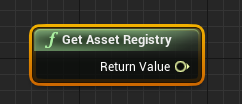
tbh i dont know if it will, but worth giving a shot i guess
slender idol
@white crypt and what should I use it for? I'm trying to dynamically create an asset at runtime.
white crypt
well i just wanted to show that there are other nodes that do exactly the same. i havent done anything similar to what you are trying to do... though maybe it would stop the crash
slender idol
Right but I'm using the Get Asset Tools in a specific context, I need an Asset Tools reference in order to run the other nodes as well, I don't think I can simply use another node returning a totally difference data type
 late shuttle
Why is my Fibonacci sequence code not working? Anyone see anything wrong with it?
white crypt
well the return value was exactly the same for me in both cases, but you probably know more than me in this case since i never played with these nodes before. sorry that i couldnt be much of a help 😄
white crypt
yeah but printing the value was the same
slender idol
lol
white crypt
🤷♂️
covert agate
Hey guys, I've been trying at this all day but I can't get it right. How would I be able to walk into a wall and be able to climb up it, then get off? thanks. I'm in Third Person
white crypt
@covert agate https://www.unrealengine.com/marketplace/en-US/product/advanced-locomotion-system-v1 try looking at this system

An advanced bipedal locomotion and layering system focusing on high quality character animation with responsive movement. Built to be flexible, extendable, and to provide a solid starting point for new projects. Currently Singleplayer only. (100% BP)
it has climbing and much more, should be helpfull. and its FREE
high sapphire
Hey, I'm still struggling with my UMG menu (I did bring it up on #umg but so far I haven't gotten any responses so I figured maybe I could ask here)
I followed this guide (https://docs.unrealengine.com/en-US/Engine/UMG/HowTo/CreateMainMenu/index.html) to get the initial setup, then once that was working I decided to try and add more options and expand the settings submenu. The layout didn't want to behave itself, so I rebuilt it, and now the only button that works is Return. (I'll attach a screenshot of my settings menu in a second)
In the very first version the resolution buttons worked, now they don't. The fullscreen toggle used to be a checkbox but it never worked, and those buttons don't either. I haven't set up the sliders yet since I'm not entirely sure how to
white crypt
something is blocking your mouse input. do you have a background image by any chance? or a blur. something that takes the whole screen
high sapphire
Except my mouse input isn't being blocked, because I am able to click on the buttons and drag the sliders. It's just that the buttons' OnClick events aren't triggering anymore (with the exception of Return - that one's OnClick event triggers just fine)
white crypt
have you tried adding a print string at the end of each "on clicked" ? just to make sure if the input is registering
fickle kayak
Hey guys - How can I add a 5 second delay before my game starts. Once hit play I want users to wait 5 seconds and then gameplay commences 🙂
high sapphire
Interesting, the strings do print
But the command on those buttons' OnClicked events haven't changed
This is the setup for the Resolution buttons
And the Fullscreen buttons
high sapphire
When I click on the button the string appears, and when I hover over the button the color changes
If that's what you're meaning by "the effect of being hovered-clicked"
 high sapphire
Oh heck, you're right
white crypt
http://www.kosmokleaner.de/ownsoft/UE4CVarBrowser.html heres a link for the console commands
high sapphire
What about the fullscreen toggle, though? Did I set that up incorrectly as well?
white crypt
first you need to decide which method you want to use, console or user settings. you can set resolution in this way too https://prnt.sc/s3na6j
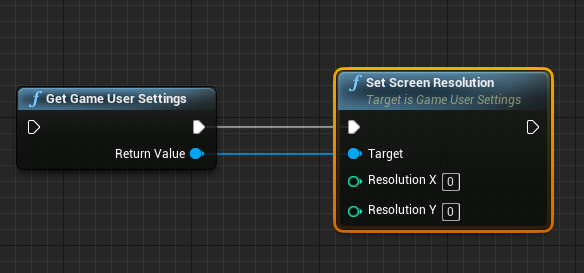
but yeah the window mode should work
high sapphire
Weird, because the fullscreen toggle doesn't work
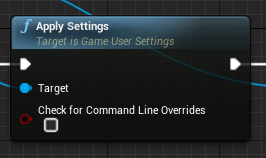 high sapphire
Yay, it's working now
Thanks!
white crypt
np, glad to help
high sapphire
Now I just have to try and figure out how to get the volume settings working..
white crypt
you will need to store (save) their values. so first learn how to save a game to a slot
high sapphire
Because this is a uni assignment, I have to do that through C++ (the only reason I'm being allowed to use UMG was that Slate was... not cooperating, and my professor said he'd rather see a functional game than non functional)
Would that make that harder than by doing saving purely through Blueprints?
white crypt
depends on how good you are with cpp. blueprints are just faster in general because they are meant for prototyping
for an experienced user it would take minutes to set it up in bps
high sapphire
I had to teach myself C++ since my uni doesn't offer classes. I found a guide that shows how to do it both in Blueprints and in C++, but I'm not 100% sure how I'd go about setting up the C++ class and the menu Blueprints so that the menu can access the C++ stuff I write
white crypt
hmm, first you can try making everything in blueprints and then moving them to cpp. there is documentation for each node with a cpp example
but it all depends how good you are with the language in general. or you can even make your own custom nodes in cpp and use them in blueprints. for example you could make 1 node that saves/loads everything and use them after clicked or smth. maybe your teacher would be fine with it
high sapphire
I mean, my professor has said he'd rather I do what I can in C++ classes (since according to him it's a programming class). The only reason I got an exception for using UMG was that Slate refused to cooperate and the deadline's coming up soon.
If I follow the C++ part of this guide (https://docs.unrealengine.com/en-US/Gameplay/SaveGame/index.html), would there be a way for me to reference things from that class in the menus' event graphs?
white crypt
sorry but i dont know enough to give you an accurate answer. maybe people in #cpp could help.
high sapphire
Hm. Well, in any case, thank you for helping me with the menu
 dusky thicket
How do we get a dedicated server to perform ServerTravel in Blueprints?
green eagle
is there an easy trick to see how computationally taxing a segment of blueprint scripting is?
dusky thicket
Blueprints come up on the profiler, although they're probably very very drowned out.
@green eagle Here's an example of putting 100,000 print string commands into a BeginPlay event:
That's available in Session Frontend.
Also, I have no idea what the number of calls is wrong, and a decimal number???
Looks like it's 1/8th the number of calls that I actually made... hmm.
0 to 100000 would be 100001, which is 8x12500.125 (if that's what the .1 means).
 tired patrol
is there any way to have more than one setting in these?
white crypt
ofc, make a struct with the variables you want
 lethal rain
Does anybody know what Unreals External Forces variable does behind the scenes? They always use it for animdynamics and rigidbody and it has my interest. Trying to get my rigid bodies to calm down after moving my character.
 lavish radish
short pawn
lavish radish
short pawn
Hey can anyone help me with getting ragdoll physics to show up in a packaged game? It shows up in the editor but doesn't in the package. I'm using 4.22
green eagle
@dusky thicket thanks
dusky thicket
But yeah... how do you signal (in blueprints) on a dedicated server to load a new map and transfer players to the new level (ie: ServerTravel)?
white crypt
@dusky thicket i can give you a listen server example if you want
dusky thicket
Does it involve PlayerController index 0?
white crypt
yeah its a console command
havent worked with dserver yet but thought it was pretty similar just without the client
dusky thicket
Yeah I'm not sure what will happen in that case.
white crypt
you could try and see how it goes, unless you already know how to do that for listen
dusky thicket
Particularly if you don't have a PlayerController connected (although the way this game is designed the load level command will only trigger when there's exactly two players loaded... it's a lobby -> game system).
Yeah the problem is it's a 2-player VR game, and my buddy isn't very available. Trying to "nail as much on the first try" as possible.
Although I might be able to drop it down to 1-player + dedicated server for a test.
white crypt
you surely can test that without him
dusky thicket
It's... rough.
dusky thicket
It's rough. VR-only. I only have one headset (unless there's something I'm unaware of).
(I'm on the project very late in the game.)
white crypt
https://prnt.sc/s3ogu4 it doesnt work if you set to 2 here?

anyways for servel travel you need to make sure that its enabled in the GM
dusky thicket
That doesn't work in VR as far as I can tell.
I just tried it. The controllers move but the VR headset doesn't attach
white crypt
i mean if you are trying to move 2 players to a new map it shouldnt matter how vr works. at first atleast
dusky thicket
It does.
white crypt
if you can connect to the server without vr then it shouldnt. unless you have vr issues which you want to fix and not the server travel
dusky thicket
I cannot connect to the server without VR.
white crypt
then you need to add some logic that it would allow
white crypt
but you still need to learn ins and outs even if its not your project. i would suggest tracking down the part that doesnt allow to join
dusky thicket
There's a bit of hand waving going on at the moment btw.
white crypt
and make an exception in editor to allow it
probably it checks somewhere if you have a vr if not. you will need to find t hat part...
white crypt
its strange, seen games that can support both vr and none vr modes
dusky thicket
Yeah it's possible. This one does not.
white crypt
thought you would only need to add conttrols for non vr
well anyways sorry i couldnt be of much help. i only spent a lot of time on listen servers 😦
dusky thicket
Don't worry about it.
white crypt
unreal networking in general is quite frustrating...
dusky thicket
Networking in general is rough. We can go on a rant of what is worse, but that would just devolve.
But yeah there's... quirks. lol.
I mean I'm probably just going to make a C++ node and expose it to blueprints.
 faint pasture
What's the approach to dealing with a lot of fast projectiles in terms of spawning? I'm working on a system that just has projectiles as data, but I'm wondering what to do for the visualization/particles. Would I still need 1 actor per projectile for the bullet trails?
trim matrix
@faint pasture You could look into using niagara. One system that you'd feed your data into.
 pseudo tusk
any idea how i can fix character launch causing a negative velocity in the z-axis(despite not having any launch velocity in the z-axis) that is causing the character to believe that it is falling? it is messing with my slots on my montages
example of a velocity being triggered from this node
 sand shore
Disable gravity?
pseudo tusk
dunno i had the same idea but that feels a little hacky since it shouldnt be doing that to begin with
sand shore
Well, so you normally have gravity applied, right?
pseudo tusk
yup
sand shore
If you're not on the ground, you will accelerate towards -Z.
pseudo tusk
this is happening when grounded
sand shore
Yeah Iunno. Check the ZOverride.
pseudo tusk
dunno whats causing it, because i have root motion disabled as well
yeah i did that too
sand shore
It could just as easily be collision
pseudo tusk
its only happening on this animation
sand shore
you get some depenetration because of your velocity, which puts you above the ground and you fall a bit. But then -24 is absurd for a single frame.
I would not expect that setup to be inserting -24 in your Z component at all
zenith kernel
Guys, can anyone explain how to use it ?
sand shore
That's pretty technical and largely more related to art...
but that'd be the vertex color for the vertices, in order?
zenith kernel
I believe the triangle should be colored?
sand shore
¯_(ツ)_/¯
zenith kernel
if I specify the vertices in the correct order
sand shore
It depends on the shader
If your shader does nothing with the vertex color data, then, no.
but don't go in there asking how to use the node, you should ask them about how vertex colors work
pseudo tusk
vertex coloring is generally used for shading specific areas of a material/texture with a color
i wouldnt use it for general coloring really
pseudo tusk
if you've ever played super mario sunshine, everything below the water level is vertex colored for example
zenith kernel
Okay, a little understood, thanks
 west pilot
How do I keep the original velocity of the player after they teleport?
 west pilot
Thanks! I'll try it. The marketplace asset I'm messing with is using launch character, is there something better to try porting in?
white crypt
what do you mean by porting in?
west pilot
Originally it was using it to launch the character a huge velocity and then stop instantly with a delay right before that node
white crypt
you want dash velocity to remain after teleporting?
white crypt
umm yeah i think the example i gave you should work. you might need to add some delays and set char rotation if its facing the wrong way
so before you teleport your character get the velocity and promote it to a variable
west pilot
oh and then just call the variable and set it?
white crypt
hi new to unreal
 obtuse thunder
how would i make widget become visible when at a certain timeframe of a game time
white crypt
you set the visibility of said widget
obtuse thunder
like between every second and it should flash for .2 seconds
white crypt
either by using a timer or a timeline
if you could describe it a bit more in detail i might make you a fast example
pseudo tusk
delay for 1 second -> set visiblity = true
after that, delay for .2 seconds -> set visiblity false
white crypt
or yeah do what he said. will work too
for some reason i thought that you want to use a tick so first thing that came to my mind was a timer 😄
probably need to get some sleep
obtuse thunder
Ok so I'm making a circle widget that flashes white (or any color) just like the border in Patapon https://youtu.be/hZ5JoK-0-wE?t=36

Keep the rhythm by just listen and count the 4/4 beat along the mission.
You can actually enter Fever Mode right away from 3rd measure if you hit the beat perfectly. (6th measure in this clip)
Tried to get "Veteran Opponent" trophy with no damage.
Haven't played PSP version, I...
west pilot
@white crypt Thanks for the help!!
white crypt
no worries, it works fine or it still has some issues? @west pilot
west pilot
Gotta try it really fast, stepped away from pc for a sec
obtuse thunder
I think another problem is that I also don't know how to find the nodes(?) that I want, I mainly make nodes by right-clicking the blueprint editor
white crypt
i would have said to look at light flicking tutorials, but that might be too difficult for you to implement that for a widget if you are a beginner
pseudo tusk
you can use the docs to find nodes or just build up memory overtime :)
usually they have a name that makes sense
so if you think you want a delay, you can search delay
and it can tell you info on it
white crypt
since you are a total beginner i would suggest looking at some tutorials and following them. you might not find the exact one you need but all of us started by watching tuts and copying them without understanding much
just by doing this you will get to see a bunch of different nodes and how they work.
pseudo tusk
tfw your blueprints are still messy even after doing node redirections
white crypt
straight to jail
pseudo tusk
my personal fav
 late gorge
is there a node that gets the nearest point between an actor and a capsule collider?
pseudo tusk
you mean the point in between?
late gorge
no
pseudo tusk
what do you mean nearest point
late gorge
the blue line
green line is GetDistanceTo actor/actor node
since it's measuring between the actor locations
maiden wadi
@obtuse thunder Judging by the way that looks, you might just need a widget that has a fade out animation and a simple function that takes the input of a color. On function play, Apply color, set widget visibility to true, play fade out animation on widget.
late gorge
yeah, is that the only approach? i have interact info visibility set to the outer sphere collision, so it's a lot more precise
so i get an annoying overlap where i either let interaction happen without
the text
or i let the interact text happen outside actual interact range
white crypt
its not the only solution but its the easiest one probably
late gorge
with the capsule radius subtracted the difference gets smaller, but still there
white crypt
you are doing an item overlap which displays info or smth similar?
late gorge
npcs and items, yes
that part works fine, i just need an adjustment in my filter function that finds the nearest one
and this is an edge case
where u just barely come into range
of a single actor
white crypt
would help a bit if you shared your function, cause its getting a bit confusing for me 😄
late gorge
there's nothing confusing about it lol, a simple for loop, but have to set the initial threshold correctly
maiden wadi
@late gorge Are you looking for the vector, or still distance with the capsule?
late gorge
there's 2 colliders at work here, one that creates the overlapping list (that is getting filtered) and a smaller one that determines if you're in range to actually interact (the bigger one is for visibility)
white crypt
im too sleep deprived. my head doesnt work anymore. if you cant figure out by the time i wake up. will try to help a bit more. will stop typing here and will get some sleep. gl
late gorge
no, just distance between the actor (location) and the nearest point on the capsule collider
maiden wadi
Why don't you just subtract the capsule radius from the distance?
late gorge
this is the current implementation, works near perfectly :P like 5-10 units of an edge case
@maiden wadi i am, i was wondering if there's a better way :D
west pilot
@white crypt I think I need some more BP tutorials 😅 can't get what your screenshot shows, but also not sure how to give the teleport a set distance in the players current direction when they activate it
thanks again tho
maiden wadi
Not without line tracing for pinpoint accuracy, I don't think.
west pilot
pls get some rest too
late gorge
yeah i tried line tracing, the game ends up feeling worse if u do tracing
the camera system is complex and it just ends up being a pain to keep up with that
pseudo tusk
trying to blend two different slots here, upper body and whole body, what occurs however is the bottom half of the body is always inactive, except when using the whole body slot, and the upper half of the body is inactive when using the whole body slot this does not however occur when blending locomotion with it instead of the whole body slot
late gorge
so i went for 2 collider approach, one that updates a visible actor list, and another that filters it by range
the visible actor collider is on a timer, filter is on click
obtuse thunder
so uhhh
I think i understand a bit more just from tutorials and experimentation
whats the range for alpha/opacity for linear color structures? I think of it as 0 to 1 as a float
but it wouldnt loop fade when i made this bp
bpm is a local variable set to 120
so itll be 0.5s, and i use mod for game time so that it'll loop from 0 to 0.5
and then I also take the converted time (0.5 to do division)
(0 to 0.5)(0.5) so it'll be going from 0 to 1
every half second
but i want it to flash from fully opaque than fade to 0 which is why i did (1 - (0 to 1))
oh wait that node isnt connected woops
ok it still didnt work after i connected the node
marble folio
I do not think that modulo there does what you think it will do
did you check the output value of that?
since you do seconds % 0.5 ... which is always going to be <1 so it will always multiply by 0
@obtuse thunder
Also it is early and I can no longer read code.. 😄
i.e. that is the wrong segmet of code 😄
marble folio
put a breakpoint there
obtuse thunder
ohh
marble folio
on the return node
needs to be an executed node
but I think it is 0 constantly 😄
you can also just put print string there 😄
 gloomy linden
printString all the debugging way
marble folio
@obtuse thunder check this node out https://docs.unrealengine.com/en-US/BlueprintAPI/Math/Float/NormalizetoRange/index.html
Normalize to Range
gloomy linden
Why not use a timeline and adjust the playrate to increase/decrease the BPM?
marble folio
or that 😄
marble folio
yeah look up how to do timeline...
This document contains an overview of how to create Timeline nodes in Blueprints.
it does everything you ever wanted and more
obtuse thunder
thanks
trim matrix
Hello guys I have problem with my system for hungry and thirsty, I did it and it works but it doesn't show how many thirsty and hungry has the player
so as you see here in the widget there are numbers
but these numbers are not showed when the game starts 😦
how I can fix it?
marble folio
where do you set the text to them?
marble folio
yeah that
 night river
Hey guys, can anyone help me out here? I am doing a layered blend of two animations to override the upper body animation. However the weapon, which is socketed to the hand, is moving as if it's still playing the original animation
"UpperBodyOverride" is just arms at the side, the original animation is swinging the arms as the character runs. The gun I would expect to be at the character's side as well after blending the animations
trim matrix
someone that can help me?
I think this is not the correct channel @night river , it is for #animation
marble folio
Well it is hard to tell what is going on there, it is possible that the widget is cropped on the right so the numbers are just not visible but hard to tell without seeing ... more 😄
marble folio
Well you do not see your stat numbers
marble folio
what are the progress bars wrapped in? what container?
 mortal pilot
is there a blueprint node that waits until a boolean is true until it continues?
gloomy linden
No, such thing would block threads
mortal pilot
well not if it works like a latent action
gloomy linden
You could make a custom event that checks the boolean and call that event when you need it to check
marble folio
or create a setter for the boolean and hook the check there
 narrow nexus
i need help with switching between cameras can someone dm and i will screenshare
marble folio
That is not the usual workflow 🙂 what is your issue?
narrow nexus
sorry then, my issue is:
i need to switch from fps cam to ads cam but the ads cam is attached to the skeletal mesh of the optic
and when i switch to ads it does this
i need to somehow change the position of the cam but i cant
marble folio
why would you not be able to move the camera from the attach point?
narrow nexus
i dunno, i move the camera from the optic and try like that but it doesnt work maybe my code is broken?
narrow nexus
its already like this but the view or maybe the optics placemnt is wrong
normally the optic is here but
what if i move the ads cam spwn to the smg instead of teh character
trim matrix
anyone know how to use procedural meshes but only enable physics for half of the mesh
marble folio
@narrow nexus your camera is inside the head... look at the representation of the camera in the viewport... what looks like a lense is the place where you are looking from
hm also I now understand what you are spawning, you want it to be behind...
you would need to spawn it and attach it to the location you want it to be in currently you are spawning it at relative 0 0 0 to the player
which would be somewhere in the middle of the player
narrow nexus
how can i see what the camera sees
rn it looks like this
but when i switch to it this happens
the camera is not moving with the optic
i cant get the right view i dont know how to
trim matrix
does anyone know how to make a actor that can be chopped in half
and how to make actors clamp to other actors
covert stirrup
@trim matrix https://www.youtube.com/watch?v=oIdKxYYQBdw
Looks like a good working system. This is for static meshes, probably need something different for skeletal meshes

Project Files : https://www.patreon.com/posts/30934762
Hello Everyone in this tutorial I will show you how to do procedural mesh slicing in Unreal engine 4. Using the first person blueprint. You can also rotate which way the mesh gets cut using the scroll wheel of your mouse
...
covert stirrup
there are several ways you can attach things -- there are more options than this, it depends on what you are trying to attach ect
trim matrix
Does anyone know anything about attaching aactors to each other
gloomy linden
You can do that by Attach To
narrow nexus
can someone help me with my widget blueprint
im trying to show the crosshair when i aim down sights but how
gloomy linden
What is "aim down sights"
maiden wadi
@narrow nexus You're going to need to be a lot more specific about what you're doing for anyone to help. Presuming that the widget is the crosshair, you just.. show it when you're using your ADS. Like, on left click, do your ADS stuff and then add the widget to viewport, or set it's visibility, or however you're hiding it when not looking down sights.
 undone timber
in blueprint, anyone knows how exactly to override an inherited component with a child of said component?
gloomy linden
Make a function in the parent that sets the component, then in the child override the funtion
narrow nexus
@maiden wadi can i dm you whem in available
undone timber
hmmm that wont work with instances of the actor preplaced in the map however... would it?
covert stirrup
I have a BP_Master structure that is referenced to many different objects, you can set defaults in the master but change the variable in the child
this propegates to the individual actors too
^ as in they are all classed as seperate with their own variable
undone timber
oh yes that i know, that is what i haveb een doing but i keep getting an issue with some variables propagating and updating every actor each time i update something
and ruining it coz some go into default when i need them not not
to*
covert stirrup
hmm, maybe showing the structure would be good then, whats your BPs look like for a specific function
undone timber
sure
Stars,Planets and Moon all inherit from BP_Celestial, however the parameters in the component (Subcelestial Spawner) are VERY different for each one
but if i update in any way BP_celestial, it resets the default values of any object i have placed on the map for that specific component
so my idea was for planet to override the celestial spawner with a child, so that i can keep the parameters better separated
a child of subcelestial spawner
covert stirrup
hard to tell without seeing a specific function you'd wanna propegate or not but this is the method that works for me
so I have a master BP with a load of functions necessary for the objects, I never actually place this in my level, I create children which are then used in the level IE solar panel
undone timber
is not a function that i want to propagate, subcelestial spawner spawns planets for stars, from an array of classes, and spawns moons for planets (using the same array but with different values)
covert stirrup
by function I mean a result you want to replicate
undone timber
oh
covert stirrup
so my function is the internal/external events
the default BP never does anything with them and thus is never in the level
but children of that use it all the time
maybe if you are using the master in the level it's messing with the defaults?
undone timber
i am not, basically the problem is, that whenever i update BP_Celestial or change something very small in sub_celestial spawner blueprint, this value resets back to default, for objects that i placed in the map
covert stirrup
I think I see what you mean
so with my BP_Master, by default I have one of my tracking arrows set to visible by default
I can press disable quickly for each object but its annoying, so in construct script I just did this for objects that don't use it
so the A_track_arrow_visbility is in my BP_Master, set to yes by default, but I change it to no on things I generally don't want it for
zealous moth
in the unreal widgets, is there a simple option for a sliding picture? I am trying to make a reticle move based on select:
undone timber
sigh... yeah i guess i could make hte OwnerActor be theo ne that controls the default value of the component by setting it ... just that on begin play is already full of stuff... maybe i can use contruction...
covert stirrup
Construction script for me has been super useful
its basically where I tell my thing what it is
think of it this way, the more that is done in construct script, the less it has to do in event graph
the translation is probably not 1:1 but I have a feeling it would help
undone timber
i understand that, just to make sure, construct ONLY runs for objects as they are saved or spawned right? does it run after the spawner sets their variables or before?
covert stirrup
Unsure :3
from what I have done in the past with a couple compiled projects, the settings in construct script hold up to the final project
never noticed anything losing what I set, basically
undone timber
so it must run after the object spawn variables are set
covert stirrup
I am pretty sure that the construct script propegates to the actors spawned individually in the game world, so if I have a bool with 3 out of 5 being off, it will remember that just fine
undone timber
floats are 32bit signed in unreal right? is there any way to change them to float64?
 wet swift
how do I add a component to an actor at runtime in bp?
covert stirrup
what kind of component are you trying to add?
After a delay it will add a static mesh to location once
wet swift
a custom component
@covert stirrup it is a component that will add it to the minimap
also i am trying to do it from a function if possibl
covert stirrup
so you want to add a blueprint to another blueprint?
covert stirrup
component is ambiguous, could mean many things, so give me an example of what it is you want exactly?
wet swift
I have a function called "Add minimap target " it has a actor input
I want to take the actor refrance and add a "Trackinminimap" component too it
I can do this manualy but i need it do be done at runtine
@covert stirrup
covert stirrup
If your F_Addminimaptarget is in the actors blueprint, a reference to self would be enough, then you just need to setup what the trigger is for the event
If your function is not in the blueprint for the actor, you can cast to it using the pin from the function to the class / object
wet swift
alright thanks for the help I found a workaround in the minimap interface i was using
thanks anyway though
covert stirrup
no worries!
trim matrix
is there any way to tell if two actors are touching and destroy themselfs if they stop touching
gloomy linden
Begin overlap and end overlap
trim matrix
thanks
 ionic harbor
i'm trying to build a level select flow for a mobile AR game. I have 5 developers, working on 5 levels, and we're staying in the same project. I'm trying to give a menu that they can use to select a map to load, and start AR session. The issue is that starting AR seems to happen on the pawn, and not the level blueprint. is that normal?
the resulting issue is that despite a menu level set as default and a UI widget overlayed with buttons to open other maps, the pawn is doing a bunch of stuff on its eventplay
(default AR pawn)
my only idea was to set the default pawn as another one that is innocuous, then attempt to possess the pawn on level load, but that didn't work out
 tidal jacinth
Hot to set max draw distance to a spawned actor?
 rancid ridge
I want to use the possess and unpossess event but possess is automatically triggered at the beginning. Is this normal and if yes why? The pawn (wheeledvehicle) is not possessed at the beginning.
maiden wadi
If you don't want automatic possession, turn it off in gamemode by making the defaultpawnclass None.
ionic harbor
Authaer, how would I possess a pawn class later so its event play starts? In this AR handheldARBP the pawn effectively runs the entire level
because the scene is empty except for a directional light
rancid ridge
I just searched for "possess" in the pawn details and there was an "auto possess AI" option. Disabling it solves the problem for me
ionic harbor
my ideal flow is a main menu map with just an overlay and buttons that open levels. then when levels open, the pawn class changes to the AR pawn (which then creates its own menus and a bunch of other stuff)
maiden wadi
Hard to say. I mean if you're spawning without it, you might have to spawn it manually and then possess it when you want.
ionic harbor
the AR thing is messing with me because with nothing in the scene, I get confused about when code needs to run. (and that's why there's weirdness with the pawn holding all the game logic)
maiden wadi
I'm not familiar with AR. What do you mean when you say that starting AR seems to happen on the pawn and not the level?
ionic harbor
I thought that the starting AR blueprint (basically starts the camera) would happen in the level blueprint, but it is usually happening in a UI widget on a button
however, the pawn is the one drawing the UI widget
I'm not familiar with AR either (I'm not familiar with any of this, I'm contracted to get up to speed on UE4 from nothing in about a month)
tight schooner
@tidal jacinth except for lights, I think that's controlled controlled outside of blueprint. Try asking #graphics
well, I suppose there's a Set Max Draw Distance node for components. (I obviously don't have a personal understanding of the draw-distance system.)
ionic harbor
Here's a different question not under AR development. What is generally drawing UI elements, especially a main menu? Is it a player controller, pawn, level blueprint?
white crypt
i would go with controller, because sometimes pawns get re-possed and that would remove all the widgets they had
but you usually stick with only 1 controller
maiden wadi
@ionic harbor Are you asking where you should be drawing and keeping UI, or specifically what draws the UI in screenspace?
ionic harbor
I think the former. I can generally use the blueprints to add to viewport and create widget, but where it goes eludes me
The weird situation here is there's 5 devs (all of us terrible) who want to work in the same project, and have relatively separate variables. Most likely a unique pawn, controller, map, UI widgets, assets, for each one
maiden wadi
I'm definitely not qualified to answer that question. If I was guessing, I'd say it has something to do with the FViewport or FSceneViewport classes since you literally call AddToViewport.
Also, that sounds like hell.
ionic harbor
It kinda is right now. this isn't a game, it's a digital experience of some kind
white crypt
i thought he asked in which place widgets should be added to viewport
or im mistaken
ionic harbor
I will also take an answer for that hahahaha
I have enough problems just making widgets disappear after i click the "play" button. most of the time remove from parent doesn't remove anything
white crypt
if so go with pc, it can be kept in pawn ofc but its much safer just keeping it in the controller
ionic harbor
ok
white crypt
instead of removing from parent you can promote the widget to a variable and use that to remove
ionic harbor
ahhhh gotcha. this is the basic flow suggested in documentation, but that almost never seems to work for me
white crypt
hmm, as far as i remember opening a new level removes all the old stuff
undone timber
so i have this blueprint for a random spawner
ionic harbor
It doesn't seem to remove the actual UI widget that this blueprint is part of though -_-
big ol splash screen just chillin there
undone timber
and this is the log it throws
anyone knows why the fuck is the compare node not working properly?
white crypt
@ionic harbor what happens if you switch places remove and open level
ionic harbor
lemme try that now
I would think removing from parent would cut off any further execution but I'll let ya know
white crypt
technically it should, but the widget is not removed from memory immediately. only during garbage collection
anyways if your previous example doesnt work i have a feeling that you are adding that widget again in the new level
ionic harbor
in this case it removed itself before even drawing lol
yeah I can see it adding somehow
white crypt
and i wouldnt load level inside a widget. do it somewhere else
and before opening a new level to be super sure you can use remove all widgets and then open the level
ionic harbor
the only time that I manually create the main menu widget is in the level blueprint of my main menu level, because I wanted the menu siloed off from all the logic of the level
white crypt
try to avoid using level blueprints if possible. add that menu inside your controller which is getting possesed while in main menu
and when you want to open a new level you can get player controller - cast to (your controller name) and do the logic there. meaning - remove all widget - open level
ionic harbor
hmm good idea, I'll try that. thanks
white crypt
np. feel free to ask if you have any issues doing that
undone timber
so anyone knows whats wrong with mine?
tight schooner
@undone timber Every time a particular node accesses a pure function such as Random Integer in Range, it re-runs the function. Basically it's generating a new random integer for each node it's connected to.
You should first store the random number into a variable so that it can be re-used by various nodes.
undone timber
oh shit...
you are right calling it for te append is going to generate numbers too
thus not reflecting what is going on
ionic harbor
Yeah I'm definitely opening up a UI widget somewhere multiple times hahaha, putting things in the controller simplified things but I'm in an endless loop of drawing menus
white crypt
so make sure you are not adding them again :D. you can also promote that widget to a variable and do an is valid at the beginning, if not valid add widget if valid do nothing
thats just a workaround, your logic in general shouldnt add it the second time
ionic harbor
yeah it's weird, I can't find more than one place I'm adding but it seems to be doing it quite a bit
white crypt
are you using the same controller for main menu and your other level?
undone timber
thanks renzu, ill go to sleep i have been going on at this for too long today , i am obviously being retarded and missing evident stuff
ionic harbor
yes tsau
white crypt
if so make 2 separate ones and set which one to use in each level game mode
ionic harbor
ahh
white crypt
yeah thats your problem
make main menu controller and in-game controller
your in-game controller should not have that widget
ionic harbor
how do I tie in game mode to that?
in AR I have a default bp_ARGameMode, Bp_ARPawn, and a controller for it
I'm thinking I need to make a BP_MainMenuGameMode, with a default controller of BP_MenuController
but how would I switch game mode afterwards
white crypt
you can set a new game mode inside the level
once sec will open a project
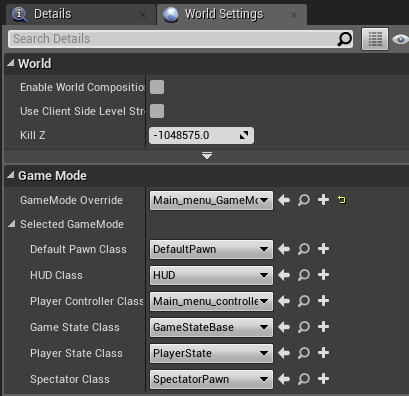
thats my main menu

and thats in game
ionic harbor
oh I see, under world settings for each map
white crypt
ofc you will need to set your pawn, in my case i dont need it
ionic harbor
yeah
white crypt
you can leave your pawn empty in main meu
ionic harbor
tyvm this is very enlightening
I'm in a hellhole right now going from web design to "make an AR app"
ionic harbor
no time to get the fundamentals of actual UE, which is a lot easier when you have actual actors on a field
I was game dev a long time ago but I was very intern-y and didn't get any big picture knowledge on how games work
 untold pine
Why some material become chrome/mirror like when placed on terrain?
ionic harbor
perfect, @white crypt that fixed it. thanks so much
white crypt
anytime, glad to help
ionic harbor
so much of this process is finding samples and stapling my terrible code to thme, and the process of creating a separate set of game mode/controller/pawn to keep things separate is gonna be huge
strange stream
Why does this only proc to one enemy at a time? I need to it to damage all..
white crypt
because it will damage the last one that overlapped
you need to make an array of actors that are overlapping
strange stream
And then for each loop?
white crypt
yeah, on end overlap you can remove it from the array
white crypt
yup
white crypt
you can also do a check if the other actor is inside the array already, otherwise it will be dealt damage more than once
white crypt
what kind of problem?
white crypt
you might want to delete the bind and make a new one. sometimes it bugs out
trim matrix
yeah fixed
white crypt
:>
trim matrix
now I will add them again carefully
maiden wadi
Right click and refresh nodes can fix that stuff often too.
white crypt
yeah with unreal you might want to do this kind of stuff from time to time. even restarting the editor can help too if anything else doesnt
 late cave
anyone know why my game mode class won't tick?
the project setting for default tick is off, but even if I add a set tick enabled node to beginplay, it won't tick
oh wait... wtf
wtffffff
where did this come from? my project is 100% blueprint
where the heck does Epic want you to put the game loop in a blueprint project?
not instance, because it doesn't tick, and apparently not gamemode either, because that can only tick in c++
strange stream
So I have this now and this works, but when I move and other characters begin overlapping the damage doesn't apply.
When I'm standing still it works as intended
 sharp juniper
@late cave What does it mean for a gamemode to tick? What do you intend to occur constantly in a gamemode blueprint? It's primarily used for managing things like logins and players joining and spawning, notifications on map changes, stuff like that. Are you perhaps wanting gamestate instead?
trim matrix
How to Open android File Manager?
tight schooner
@late cave game mode BPs tick. I mean, my custom game mode does in my BP-only project.
@strange stream maybe has something to do with the timer being reset on every overlap. You can put it under a Do Once node, or save the timer handle to a variable and do stuff with that.
maiden wadi
Even still, it's not that great of an idea to be using tick in things like game mode. Being the ruleset of the game, it should largely be event driven.
sharp juniper
^
 jade zinc
so anyone knows distance fields or distance field shadows can be updated at runtime?
tight schooner
From what I understand, it's baked as part of the mesh as a 3D texture. Maybe #graphics would know whether you can generate them at runtime but I kind of doubt it...
strange stream
@tight schooner have no idea how to do this
tight schooner
Between Add and Set Timer by Event, put a Do Once node
-or- right click on the data output pin of Set Timer by Event and "save to new variable". Then you can use that timer handle to check if the timer is running or otherwise manipulate it.
late cave
@maiden wadi @sharp juniper so what class that I still apparently haven't managed to find does Epic want me to put the game loop in?
tight schooner
@strange stream it's looping so from what I can see in the screenshot, it'll run forever. The do-once node just prevents the time being reset
sharp juniper
@late cave I'm confused by what you mean by "game loop". The game loop isn't a thing you put into a blueprint, per se. It's always running. Your blueprints are hooking into it. If you want a particular blueprint to do something every frame, hook into tick events. If you want to respond to input, hook input events. You don't need to setup some overarching loop that ticks every frame and then descends into actors to process them, the engine does all that for you.
late cave
@sharp juniper ok, well, since epic provides gamemode, pawn, playercontroller, gamestate, playerstate, gamesession... I thought one of them was suitable for, like controlling the game... but no, it's all deathmatches and fortnites, it seems 😛
sharp juniper
How about we talk about what you're trying to do exactly
sharp juniper
Which does what?
sharp juniper
Yes. UE has one.
Controls meaning?
You want a character to respond to input and move?
You want to join players over the network?
You want to load a new level?
You want to draw UI?
Be more specific
late cave
like spawns events, checks what events have happened, checks if new events is allowed to happen, prepares the next event, etc. etc.
(ugh, not unreal events... but things happening in the game)
I'm just surprised that Epic hasn't provided a template class for that, like it has with everything that involves a deathmatch apparently
like, restarting a game/level and respawning players, that i have zero interest in
yet, apparently still get classes and crap for
sharp juniper
So be specific. What exactly do you want to do.
late cave
everything except what you listed above 😛
because what you listed above has an epic provided class
sharp juniper
Cool. Well if you can't be specific, then we can't help you help yourself. There's no "generic overall game loop overrider" class, because the engine does that for you. If you want to do a variety of very common things -- that are not deathmatch FPS specific -- then we can talk about how to use the existing classes to do them easily. If you need some specific non-standard behavior, we can talk about how to define and build it, and hookup event-driven behavior to it.
late cave
I guess I come from the very old school "how to make a game in C" style of making, where every how-to included a "main game loop" function
but I'm really old
sharp juniper
The engine class hierarchy is designed to let you do anything you want to do. Actors have presence in the world. Pawns are controllable actors. Characters are player controllable pawns. Game modes define rules on how pawns and characters interact. Game states keep track of their current state. Spectating uses the concept of pawn control in that pawns are possessable.
I'm also old, and also familiar with build your own loop approaches, and making games in raw OpenGL, and have used a variety of engines
But until we talk about a specific task, what you're asking is basically how do I un-engine the engine
For example, if you want to check if an object is within a radius, you can use the physics system to cast a sphere and get back collision data, or cast rays, and totally operate on that level
But that will not exist inside of a monolithic 'check all my collisions' loop class.
It will be a behavior triggered on an event (or every frame) attached to an actor doing the check
high sapphire
Hmm. I'm trying to make it so the return button of this menu lets the player go back to moving around. But even with these nodes, the player is only able to rotate the camera, not move around the level.
late cave
@sharp juniper what about spawning random enemies? check how many enemies you killed? give a reward if you've killed enough... etc
(sounds close enough to deathmatch that there should be classes for it) 😛
I just feel like something's missing
sharp juniper
Sure. The spawning of enemies and similar logic is usually tied to a map, so that functionality likely will live in your level blueprint
Keeping track of enemies killed is a game state
late cave
wait, wait, wait... people have said to never use level blueprints
causes all kinds of trouble apparently, but still: what if I want to have similar rules for all levels?
I can't subclass a level?
sharp juniper
Honestly half your responses here are variations of "I don't know the engine" and the other half are just vitriol. If you don't want to use this engine, don't. If you want to learn how this engine is used, cool. But I'm not going to keep trying to help you deal with whatever bitterness UE caused you or whatever. I don't have the time or care :P
late cave
a better metaphor would perhaps be a DM in a role playing game... there's no default class for him? something that any other class can ask about, just like the game instance and player controller?
sharp juniper
https://docs.unrealengine.com/en-US/Gameplay/Framework/index.html start here. In particular https://docs.unrealengine.com/en-US/Gameplay/Framework/GameFlow/index.html will probably be useful
late cave