#blueprint
402296 messages · Page 437 of 403
 exotic warren
 frigid salmon
I could use the player controller as well since it's not multiplayer but I don't really like the sound of that
 odd ember
there may be some hidden advantages to data assets, but in all honesty I would be surprised if you couldn't mitigate those through good design anyway
frigid salmon
and what about the idea that Inventory / EquipmentManager / StatsManager etc should be components on the controller - that sounds good, right?
odd ember
separation between character and controller
frigid salmon
singleplayer but still
odd ember
you want what is applicable to character to be on character
and what is applicable to player to be on controller
frigid salmon
that's true
frigid salmon
yes, consider it a practice project
exotic warren
ok
So do you need to use multiple items at one time
or just use one at a time
Personally, I would put it as a component on the Player Pawn if I were you
frigid salmon
so things like stats / maybe equipment should go on the character and inventory on the controller ? (considering the inventory doesn't change if the character does but his stats surely do)
exotic warren
I would just put all of it in the character
frigid salmon
@exotic warren multiple at the same time
odd ember
inventory is a special case
exotic warren
and then you can just directly communicate with the Inventory component
odd ember
I'd put it on the player, since the player HAS that inventory
but the owner of each item in the inventory is the controller
if you catch my drift
odd ember
then if you're looking for something like a stash from diablo, where multiple characters can access it, you could put it on controller
although those could be done either way
frigid salmon
I understand both your arguments - probably not looking for a stash like diablo but in either way where do you think the code would be less / look cleaner?
odd ember
cleanest is when each actor is responsible for its own functionality
frigid salmon
true
exotic warren
I'd say just build it as a modular component
with interfaces
so it doesn't matter what you put it on
and it doesn't rely on anything existing
it just works
Which is what I did with mine
frigid salmon
ok guess I'll just put them for now on the character and maybe move it later if required (tho I highly doubt it) and use some sort of a itemManager on the gamemode/state with a big note saying it should be in it's own subsystem if it was a cpp project
@exotic warren yep, that's the plan
odd ember
yea it'll be fine
again game mode shouldn't contain data though
game mode is for rules
odd ember
data goes, if anywhere, on the game instance
game and player states are transient unfortunately
exotic warren
I mean really it shouldn't be an actor
odd ember
so not great for data
exotic warren
It should be a component
frigid salmon
maybe game state then?
exotic warren
Why do you need an "item manager"
odd ember
game state is transient
exotic warren
why not just put everything in the InventoryComponent
frigid salmon
I have to agree with @odd ember , a subsystem sounds best
odd ember
game state and player state get wiped on level change
frigid salmon
tho I don't really mind it being transient since I don't mind recreating the DTO at each level change - it doesn't contain data, just works as a static class pretty much
odd ember
game instance persists from the beginning of the game session, and is the last class to be deconstructed
frigid salmon
can't have a spawn actor on the game instance tho
exotic warren
Items that don't exist yet?
frigid salmon
@exotic warren to instantiate items
odd ember
no but you don't want the data managing class to necessarily be the spawning class
so that's moot
that's where the subsystem would come in
frigid salmon
I completely agree a subsystem sounds best - just asking without one, which would be the second best place 🤣
odd ember
the closest thing you can get to a subsystem in BP is to spawn each level with an actor that performs the duties of the subsystem. it's a bit hacky but you could make it work
exotic warren
If you absolutely must have one I would just make it an actor
And spawn it on BeginPlay from the GameMode
Make it derive from AInfo
odd ember
you'll want it to pull the data from the game instance regardless
frigid salmon
hmm that's a good idea :-?
exotic warren
Why would you pull it from the game instance?
odd ember
which other class is persistent
frigid salmon
ok I think I'll go that way
exotic warren
UObject
exotic warren
Keep a reference to it in GameInstance
so it doesn't get GC'd
Na
Compartmentalisation
Makes it much nicer to have the manager class as it's own thing
instead of repurposing GameInstance for it
Imo anyway
Nothing wrong with using the GI for that
But if you're tryina be clean
Make it it's own UObject
odd ember
anyway UObject by default has some issues in BP that can't be fixed currently, so I don't recommend using UObject derived classes
for instance function libraries can't be used
frigid salmon
ok, thanks for the design talk - will try to implement this and see where it goes ^_^
exotic warren
Ah I never use Function Libraries anyway tbh
 spark steppe
is there some way to set the mouse position?
i want to add rotation around the character, but as soon as the cursor hits the window border it stops
so i would like to reset the position everytime i update
nvm, found a way
frigid salmon
btw
is there a way I can set all the variables on a BP at the same time? something alike break struct?
odd ember
@frigid salmon set struct members
frigid salmon
but they aren't struct members, just variables on a BP
frigid salmon
blueprints remind you the beauty of cpp while cpp reminds you the beauty of bps 🤣
 latent junco
Is there a quick and easy way to find all actors of a class that are owned by controller X?
or do I have to loop through them?
 lone patrol
Hey guys can i get some help? im trying to follow a tutorial and for some reason my add force dosent work, i tried with a simple vector too and it didnt work
odd ember
you're gonna need a bigger force
lone patrol
tried this connected to the add force and it still dosen´t work
odd ember
have you tried without the boolean?
you should see immediate results with a force that high
like sending someone to space, but in like 0.1 seconds
 smoky egret
hey guys, new to BP and smashing our skulls into something atm. We're trying to make a blueprint that can be placed in the map which when interacted with (or alternatively on collision) plays a level sequence of fossil excavation (not that the art is relevant!). We're trying to make the sequence in looping sections, advanced to the next section with a key press. We've been using an actor to create a levelsequenceplayer and playing it, however we can't seem to replicate many tutorials as they utilize the level sequence bp (which I've been led to believe is not ideal).
odd ember
who are we? or is it the royal we?
smoky egret
haha, a friend and I who are working on a project whilst locked down with corona
I said we as he figured most stuff thus far and I didn't want to claim credit!
odd ember
a sphere collision that allows for interaction on entered is probably the easiest
lone patrol
ok so something weird is going on
it does work but sometimes the force is super weak for some reason and sometimes its super strong
smoky egret
a sphere collision that allows for interaction on entered is probably the easiest
@odd ember We have the trigger working for now, it's the looping sections and advancing to the next that has us stumped
odd ember
not sure why you are looping?
smoky egret
because we want sections to loop, I'm uncertain what else there is to understand? First shot is someone brushing down raptor skeleton etc, though not all will work the same
odd ember
I'm not sure what looping has to do with interaction
 versed sun
Like chopping a tree? Each hit chips out a piece and the final hit the tree falls down ?
odd ember
oh you mean the act of the level sequence?
smoky egret
yes
smoky egret
oh okay, I presumed as it needs BP interaction it'd be here
odd ember
BP interaction for triggering it yes
that's what I described
but what is actually contained within the level sequence
is on the sequence itself, not in BP
odd ember
yeah the fact that you're feeding it from BP
up until that point, it is BP
once the sequence activates, that's when it turns into... well, probably, #cinematics
smoky egret
okay, thanks 🙂
lone patrol
it does work but sometimes the force is super weak for some reason and sometimes its super strong
@lone patrol does anyone have any idea about why this is?
odd ember
@lone patrol try with vector up instead vector forward
lone patrol
oh no im talking about the first screenshot
its constant if i use the blueprints on the second screenshot
odd ember
probably your branch not working
 lean thistle
Hi, I'm trying to create a widget component and then cast to its type so i can trigger its events, but the cast always fails. Any ideas? Thank you
odd ember
@lean thistle you're probably not adding the right type of widget
lean thistle
Its definitely the right one :/
odd ember
have you used breakpoints to check?
 unique falcon
hey you lovely lot, does anyone know a quick elegant way to figure out how much of a vector is in a specific direction?
lean thistle
I'll mess around for a while more to get more details
@unique falcon Im a little confused, vectors by definition have only one direction
unique falcon
ah sorry, let me explain a little more - i'm trying to add a damping effect that allows me to prevent lateral sliding of a vehicle
so my current plan is to try and figure out how much of the vehicle's current motion is towards the left or right of the vehicle
 oak elm
That would be the x coordinate of the velocity vector
Unless Unreal uses a different coordinate system (I'm relatively new to it)
unique falcon
I guess i need to make sure my vector is in local coordinates then right?
oak elm
Unless I'm not thinking straight, velocity is inherently going to be in local coordinates
If you are moving at a velocity of (10,10,0) then your velocity vector isn't going to factor in your world position or anything
it would just be 10,10,0
lean thistle
so youre saying your vehicle slides to the left/right due to gravity? Thats what you want to stop?
unique falcon
inertia really, there isn't any friction because it's hovering
but i want to create a sort of stabiliser that i can tweak to make the slidiing feel right
so in @oak elm's example, I guess I need to figure out how much of 10,10,0 is along my GetRightVector and then add a force that opposes that
lean thistle
I was just thinking about adding an opposing force yes
You could do GetRightVector, multiply that by -1, and add it as a force to the actor
theoretically that should mean you cant move left/right at all, so to dampen you could change the -1 to whatever you want
versed sun
pulling this out my butt, i would try getting right vector, normalize, and i think Y would be a multiplier ( + or -) to add small force every .1 sec. each force would be smaller and smaller until its 0
unique falcon
yeah, that's working pretty nice so far
the only problem i have now is that the damping force needs to scale with how much i'm sliding
hence the need to figure out how much of my velocity is top the vehicle's left/right
my gut says there's a simple mathematical way to figure this out quite easily
lean thistle
Get Velocity-->Get Right Vector /GetVelocity
Would give the fraction that is lateral movement
oak elm
Yeah I was def mistaken, velocity is in world space, so you need the magnitude of the projection of the velocity vector on your right vector
Which I don't remember any linear algebra lol, but I'll assume that Peter B's formula does just taht
lean thistle
Lol i might get into unreal to confirm
smoky egret
I'm almost certainly being really dense, but I can't find this node and it's in every tutorial for what I need... any ideas what I may be doing wrong?
For reference I'm using a levelsequence blueprint
unique falcon
Dot product mates
Sorry BPRookie, just wanted to confirm with everyone that I think we got the answer - dot product (see Freya Holmér's magic visualisation) https://twitter.com/freyaholmer/status/1200807790580768768


dot product - visualized ⚪
the dot of two normalized vectors, as shown here, can say how similar they are
a • b = 1, same direction
a • b = 0, perpendicular
a • b = -1, opposite directions
you might also be able to see why it's sometimes called scalar projection~ https://t...
Retweets
703
Likes
2828
 Twitter
lean thistle
Twitter
lean thistle
@smoky egret I wish i could help but thats uncharted territory for me
smoky egret
any ideas what I may be doing wrong?
No worries @unique falcon . I've noticed what I was looking for was removed in 4.22... I'd greatly appreciate a pointer in the direction of what replaced it
lean thistle
And im doing dot product tests right now lol
Rookie I'd search for "time" and go through and read the options for nodes
smoky egret
Okay thanks, will take a look
lean thistle
Yeah dot is the way to go
 maiden wadi
Dot Product takes two normalized vectors and tells you if they're facing the same direction, yes.
unique falcon
This is working fucking great now
oak elm
nice!
unique falcon
thanks a ton guys 🙂
lean thistle
no problem im glad
smoky egret
Apologies for the spam, but I'm really struggling at this point and would appreciate some eyes on this. I can't seem to get an input working within my BP. I converted a levelsequenceactor to BP and have stripped everything bar the input test out for now, but it still isn't working. The action input is set in the project settings. Could anyone please explain what is wrong like I'm 5.
maiden wadi
@smoky egret Was this what you were looking for earlier?
maiden wadi
It's just a different way to reference it. It should still work from a sequence player.
As for your other question, you're plugging the player controller in wrong. That top slot where you plugged it in needs to be self. The Target is where you want Input Enabled.
odd ember
tbh it should work regardless though, given that controller is the last actor to receive input
maiden wadi
It won't work because he wants to enable input inside of that actor and he's not telling that node what player controller to let that actor receive input from.
odd ember
I was thinking that input was enabled by default, but perhaps I was wrong
I at least remember that from earlier versions
unique falcon
I had that issue too but @maiden wadi's answer seemed to be far more informed than I would have been able to add 😄
from my experience it seems like level blueprints and, in your level, whichever actor is possessed by playercontroller 0 also justworks™
is that correct?
maiden wadi
Not sure about level blueprints, but for the possessed Pawn, yes. The only stipulation on that is if you have the same event being consumed by the controller, in which case it would only fire on the controller and never the pawn.
unique falcon
thanks for the clarification, that's really useful to know and i've stumbled by without knowing it for a long-ass time
odd ember
in the docs there's a flowchart of input commands showing their hierarchy
smoky egret
@maiden wadi Is there any chance you could point me in the right direction for how to get the levelsequenceactor? I'm just getting null options in this sequenceplayer
maiden wadi
Which sequence player are you using?
smoky egret
I converted a levelsequence to a BP
lean thistle
Replication is giving me hell, I have health displayed over my characters by giving them a widget component, but I don't know how to let other players see the change in this health
smoky egret
@maiden wadi okay I managed to get it sort of working with a spiderweb 😅
 pallid grotto
im trying to select UObject blueprints that inherit from a c++ class but nothing is showing up.
I created a folder with two of these blueprint classes that inherit from the c++ class
odd ember
@lean thistle have you tried #multiplayer
@pallid grotto looks like you're trying to get instances of a class through the content browser
odd ember
instances don't exist at editor time
you'll have to spawn them first
or construct in case of UObject
pallid grotto
is this right?
pallid grotto
ok thanks
smoky egret
@maiden wadi so following on from your help I was able to get to this point, but the 'jump to' or 'scrub to' stuff seems to break however I put it in
All I really need is a way to specify the different frame ranges to loop and the input to advance between
odd ember
you can put a delay node in between and restart or you can fire them off a timer
not sure how this works with it "breaking"
I'm not familiar with the internals of level sequencer
smoky egret
@odd ember thanks for the ideas but I think perhaps I need to show what the final output would "look like"... effectively the BP needs to let the seq run, then loop a defined section, and finally advance and complete the sequence on a keypress
With all the help thus far I'm much closer to this, and have the fixed looping working, as well as detecting a key
odd ember
well right now you're looping the entire sequence indefinitely I would reckon
unless play range would indefinitely and not just for one play
smoky egret
So currently I'm looping 30 frames of the sequence
smoky egret
yes, ideally I want to keep it in one sequence if possible
odd ember
you can do a DoN node on button press
then a select on the counter from DoN
select node
then in each you can specify the frames you want every time you press a button
smoky egret
so would that go inline or... I'm really unsure how to implement that
odd ember
button press > DoN > your current sequence logic
from your set range node, drag out each of your nodes and get a select node
hook in the counter output pin into the index of the select
 hexed saffron
I have here an float array. It should do 0 + 22. This is 0 + 22 = 44
When I create a float only it does the job 0 + 22 = 22.
Is there something more to do when using an array?
odd ember
you'll need to show your logic
smoky egret
@odd ember I've hooked this up but it doesn't seem to work. I feel like perhaps I've explained myself poorly as Do N seems to be capping the number of times exec can run through
odd ember
ah my bad
in that case just make an int variable
and increment it every time you press the button
that way it should work
(and use that as your index)
@hexed saffron how do you read the result of your array?
smoky egret
@odd ember thanks for the help, will take a look at that in the morning
odd ember
@hexed saffron I don't know what you mean by hit result
and is it per frame? is it just once?
hexed saffron
It´s OnComponentHit DoN 5 times.
But that doesn´t matter I used Press Key O and it´s the same weird result.
odd ember
have you tried breakpoints?
currently your new var 0 isn't hooked up so it won't be set to whatever
you could try hooking it up
and it will probably show 44
hexed saffron
If I connect the NewVar0 to the float + and the set there where the test float is. It works fine and it is 22
The array do 0 + 22 = 44 + 22 = 66 from this point it counts up normal.
I don´t understand why the array do that at the beginning.
 dry pewter
Hello everyone, i'm having trouble using sockets, on the image to the left there's the socket as seen in the "persona" screen, on the center image there's a sword attached as preview, on the image to the right there's the sword when spawned and attached by a blueprint, very far away from it's intended locations, what could be wrong?
hexed saffron
Looks like the pivot point of the sword is wrong.
dry pewter
This is the blueprint used to spawn and attach a sword
hexed saffron
Okay but where is the swords pivot point?
Could be you have to set the pivot point in your 3D software.
dry pewter
pivot as seen in UE4
hexed saffron
Hm? let me think a moment.
dry pewter
Aye
hexed saffron
And if you try under AttachToActor. Location and Rotation Rule "Snap To Target" ?
dry pewter
let me try that
Looks like the character is being attached to the sword and not the other way around. My cammera spring arm crashed into a wall and the character is floating at the possition the sword was spawn, also the movement is messed up
I think the "attach to" node gotta be in the sword actor blueprint and not in the character... will try that now
dry pewter
Put the attach node in the word's blueprint, happened the same (sword is being attached floating away from the character)
Attch to component made this, the movement is all messed up tho
Also wrong possition
Removing the capsule component from the sword actor solved the possition, the movement is still weird
 crimson zealot
@maiden field You thinking about the Do Once?
 maiden field
maybe
 atomic prairie
Sorry I'm a beginner^^ personally I use the node Destroy on my triggerbox after the event play, not the best i think
maiden field
@maiden field You thinking about the Do Once?
@crimson zealot doesent work. explain it is pretty hard
SOLVED
atomic prairie
I would like the player pick up a rope that follows it when it moves, an idea of which word used to find a tutorial? Would it be like footsteps?
odd ember
how would the rope work?
atomic prairie
I'm looking, it would be starts from a precise point and on the other, it follows the player
odd ember
yeah but is it short enough that it's something the player can carry in their hand
or is it long and has an end point that just stays somewhere in the level?
 devout geyser
Hey guys. I made a simple AI that need to move non stop to random places but he stops after 4-5 moves any suggestion?
 worthy frost
just use a behaviour tree
devout geyser
its staying stuck on wait
devout geyser
so what do i need to do to fix?
i have in the AI controller in the event graph 2 radiuses "Radius" and "Acceptance radius" what exactly are the differences? thanks for helpers 🙂
atomic prairie
I would like a cable like that
The player press a key in a triggerbox and the cable simply appears and follows the player when he moves
odd ember
what happens if there is no more cable?
maiden field
how can i cast custom event on level blueprint?
atomic prairie
@odd ember what do you mean? if the player run too far?
odd ember
yeah
 noble bramble
Morning all - I was wondering whether anyone has experience with trails, specifically those attached to weapon sockets (vs skeleton sockets). I've got trails working within our Anim Montage, using Anim Notify State, but this is using sockets attached to the skeleton of the character. I'd like to use sockets attached to the individual weapons - eg sword or spear. For the life of me, I cant see how to make an Anim Notify State trigger from an Animation Sequence (on the weapon) vs an Anim Montage.
atomic prairie
I will put a triggerbox in the limits to remove the cable
odd ember
ok
I think there is a cable component that you can use, either as a free plugin or as part of UE4
maiden field
odd ember
you should be able to get the end point of that cable and attach it to the player's hand bone
maiden field
how can i cast this level event?
odd ember
@noble bramble probably more of an #animation question
@maiden field what do you mean cast? like multicast?
atomic prairie
Ok thx i'm looking for this plugin! What would be the right word to look for information on this cable process?
 fickle kayak
Hi all,
Could I get some help - I have added 4 target points and every 5 seconds a pickup items spawns. I only want the next item to spawn once the current one is picked...What can I add to check? Thanks
odd ember
@atomic prairie I think just Cable Component for ue 4
seems to be default in engine
try just cable without component, when adding a new component
maiden field
@maiden field what do you mean cast? like multicast?
@odd ember from my player state to level
from there
odd ember
@maiden field hmm ask in #multiplayer maybe?
@fickle kayak you could initiate the delay/cooldown and spawn only when the power up is picked up
that would be the proper way to do it
lean thistle
@fickle kayak make a boolean variable called canContinue (or something else) and have it false by default. after you spawn the item and before the delay, do a branch and only go back to the delay if canContinue is true
you will need to set this variable to true from the BP Pickups when the item is picked up, that depends on how you coded that part
fickle kayak
so when my character walks over he picks up the item using this
lean thistle
for those four nodes on the bottom you can just right click and do get player character
odd ember
actually no
that will just get the first player
assuming this is multiplayer that won't work
lean thistle
Here's a better way to respawn it actually
after you call that DestroyActor, put the delay after there and after the delay just call your spawn function
fickle kayak
oooo
odd ember
you can't put a delay after destroy actor
you're destroying the actor
the delay has nowhere to go
lean thistle
Oh i misread it i thought the destroy had a target
odd ember
so first things first
fickle kayak
I can set the bool val to true after its destroyed and make the pickup spawn after
odd ember
from where the player picks up the thing, use a cast to pawn node instead of the branch
you can't do anything after it's destroyed
after it's destroyed it's gone
you can't check on it
fickle kayak
makes sense
fickle kayak
Thanks guys
odd ember
we can do something nice but you need a new blueprint
you will be placing this blueprint in the level as a spawner
so each spawner just spawns 1 powerup
at the location where it is
basically
lean thistle
odd ember
almost
fickle kayak
Would I put something like this in the pick up BP
lean thistle
Wherever you had that first spawn node, youll need to cast to it
The bottom part is in the pickupBP
I dont know where you had the top part
odd ember
@lean thistle just clarifying that won't work
because you need a separate actor to spawn it from
lean thistle
why
odd ember
and that actor will need to know about its spawned powerup
lean thistle
pretty sure that would work
lean thistle
that is not the final code
its the idea
this is how people share blueprint solutions
no need to be an ass
lean thistle
I followed up and explained where what goes and that he'd have to cast. Thats all that needs to be done for it to work
lean thistle
Iceman message me if you have any questions
fickle kayak
yikes - dint mean to start a fight...I have a rough idea. lemme tinker and will message if I need more
Thanks for the help both 🙂
lean thistle
No prob
odd ember
without an owner you won't be able to register when the powerup has been picked up and when to start the cooldown etc.
and for that you need an event dispatcher
lean thistle
😆
odd ember
and that needs to be bound dynamically
so that every new pickup also gets that binding
lean thistle
You can do it with 3 blueprints, Itemspawnmanager will just be dropped in the world, it doesnt need any code it is empty. I'll post the code for the other two
Then you drop in the ItemSpawnpoint actor wherever you want the item to possibly spawn and that's it
odd ember
get all actors of class is going to be hella inconsistent
you can't guarantee you get the right one every time
or really any of the times
lean thistle
That's highly incorrect don't confuse him
odd ember
you're the one confusing him
lean thistle
Yes, because scripting an entire example for him with straight lines and comments is more confusing than your unnecessarily big words with your "bound dynamically"
Just let him learn it's not as complicated as you're making it
odd ember
funniest thing is literally there is a node to pass owner in the spawn node that would circumvent the get all actors
well excuse me if that's what it's called
maybe learn the terminology instead of acting like they're "big words"
it's not hard, the documentation is all there
christ
lean thistle
Rule one of the server is respect, when there's a new member with valid questions you should use the code that he or she used in their project and explain to them how to make their method work, not flaunting your knowledge by dropping terms you've picked up without an explanation. Teaching takes respect, and when you show them how their ideas can work it's better than telling them that their thought process was wrong when in actuality it's far from wrong. I enjoy teaching and learning here so I'm not continuing this immaturity past this. Anyone in here is always welcome to ask for help
odd ember
literally it's the terminology
binding an event dispatcher is a part of the engine
it's not a big word, it's what it's called
the fact that it's something you bind dynamically just means you're doing it at runtime
Allows a Blueprint Class to report on its state to the Level Blueprint.
Adding and removing events from an Event Dispatcher's events list.
 haughty axle
hi guys, i have stupid noob question my simple pick up (attach to component) gives broken animations, but it picks up the item and puts on socket. but animations super fast and buggy. I do everything in Item's BP. don't get it what i miss.
odd ember
so is the issue that like you have a hand that you want to pick up the item before putting it into the backpack?
haughty axle
nagh it's just simple inputaction to attach to component, it attaches but my movement goes all freaky
dry pewter
How can i make a pawn to spawn looking towards the player?
 zealous moth
get the lookat direction between it and a target (the camera) and set the pawn rotation
zealous moth
np
dry pewter
@atomic prairie loving the scenery man
atomic prairie
🙂
 frigid anvil
quick question. should different saves all share the same slot name?
 golden kite
how can I move a image in widget using graph?
 velvet viper
yo, can someone help me out with recreating this effect? i've got all the wall running logic pre much down pat but I've got no clue how to implement the momentum based speed which gradually decreases, any help would be greatly appreciated!

A quick comparison of the original Wall Sprint vs. the Wall Sprint Upgrade (available in the Spidey-Shop after collecting all the Skyscraper Tokens).
Created with MAGIX Video deluxe 17 Plus
 undone timber
so i setup an orbitting camera on my game for my actors, but for whatever reason when i zoom out or in a little bit, the camera is trying to roll even tho it has 0 nodes that affect roll at all
and its parent even has absolute rotation
velvet viper
@undone timber screenshot the camera settings
undone timber
velvet viper
*spring arm ones
undone timber
the camera works fine but if i zoom in or out it randomly stars twitching and trying to roll
velvet viper
where's the zoom in and out logic
undone timber
is a top down platformer, where you can rotate the camera for eye candy
velvet viper
in the move component to, the y relative rotation is set to -90
velvet viper
i can't even tell what that's supposed to be
undone timber
a ship being seem from the top down
and a space station
basically tahts the default camera position but you rotate, orbit from that position
hence the -90 on the camera
 vocal urchin
Is there a way to check and see if an actor is in an array?
I'm assuming it's this?
undone timber
i think he means... to know if an actor is on any array ...
vocal urchin
Eh, yes. Sorry, I am still learning the terminology of arrays
Basically this?
I am checking in the actor itself to see if it "is on" an array in the player controller
devout geyser
hey guys
just wanted to ask a small question, when a player presses E i want the emitter spawn on the ground and not exactly on the player height here is the image any tips on what should i do? https://prnt.sc/rqlyus
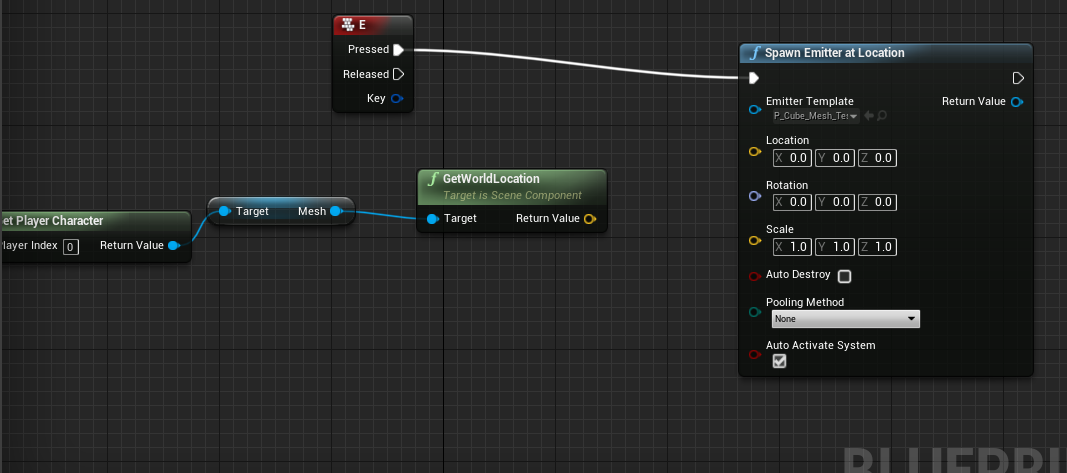
when ever i hook up the return value to the location it spawns the emitter in the middle of the body and not on the ground
undone timber
so any idea why my camera might be trying to roll?
vocal urchin
@devout geyser You could subtract from the Z the distance necessary to make it appear as if it's on the ground.
vocal urchin
np 🙂
 short ruin
is anyone here experienced with vaREST blueprint plugin?
undone timber
i was able to fix my issue, it was related to using set position along with rotation, changed the camera zoom to a offset method which solved it all
 safe geyser
Where would I go about adding LaunchCharacter to have my player push an enemy away if walked into?
 hallow night
in the enemy blueprint > event hit > get player character == hit actor > true > get player character connected to get actor forward vector Multiple that by 1000 > connect to launch character
 short oriole
Hey, just wanted to know how I can create custom Blueprint nodes with c++. All I found was on the wiki which is offline
 astral fiber
How can I produce a vector which is not a number?
Do you guys have any Idea how to make an invalid Vector?
The problem is that I need a placeholder Vector, as there is no NULL in Bluieprint I thought I maybe could use an invalid one, any ideas?
 neat star
Utility to check if there are any non-finite values (NaN or Inf) in this vector.
so apparently divide by zero or something
 trim matrix
@short oriole not sure what level of customized you mean but in general use the BlueprintCallable specifier and if you want something to be accessible globally, use static or make a Blueprint Function Library
 tawny tinsel
neat star
tawny tinsel
neat star
I would very much doubt you'd have a particularly enjoyable experience, but there is really only one way to find out
 fallen karma
Hi I've tried googling and looking up the UE documentation but I just can't seem to grasp to content of this. I want my players projectile to ignore the box collision you can see in the picture and only register a hit if it hits the middle box. How would i go about doing this?
Right now I'm checking if what i hit uses the enemy interface to see if i can damage it
neat star
make the outer box ignore the projectile, have some collision for middle box
trim matrix
Hi guys, I am using this vector variable with a 3D gizmo to set a material fading out . But this vector seems so get some scaling when I scale my actor. I need to have the exact WS location of my gizmo whatever the scale of my actor, and I cant seem to find a solution... also the gizmo itself gets scaled with the actor and ends up looking huge and stretching in really ugly ways. Pls help
this is how I am passing the position
it gets some sort of double scaling when I scale the actor and the gizmo's actual position is multiplied by the actor scale :/
maiden wadi
@fallen karma For what you're trying to do, you need to set the Block Collision channels in your objects. Your Outer box needs to ignore whatever type of object your bullet is and the inner object needs to block it.
fallen karma
@maiden wadi thanks il check it out!
 glad kayak
how do you do UE_LOG in blueprints?
trim matrix
oh hi, mark
 covert crane
glad kayak
covert crane
glad kayak
thanks I didn't realize there was a print to log toggle
smoky egret
Okay so after a long morning (now afternoon) of mucking around, I've got my sequence working... but only if I use the Event ActorBeginOverlap. If I plug in a box collider it doesn't allow any other interaction... any ideas?
this doesn't work
but this does
no change but the start input... but this is beyond my 5 yo IQ
 vast quest
Im having trouble getting speed into wall collisions to work.
As you can see it works on the ground, but not consistently on walls.
Are there any videos, tutorials or help i can get on the subject?
Event hit doesn't seem to register walls and it's based on the capsule component i think.
It works when hitting the wall from an angle since momentum isn't stopped.
However from the front all momentum is gone.
So i think i need something that picks up velocity before it goes through hit detection..?
latent junco
Does a While loop go to Completed immediately once its condition is met or does it run through the rest of the loop as well and only check the condition once it starts a new loop?
vast quest
Goes to completed once array is done.
You can test how it works with a print string.
maiden wadi
That's not a loop for arrays. A while loop will run until it's bool condition is false.
maiden wadi
For example. If you create an integer variable, and increment it in the loop body, and put a IntVar<10 in it's condition, and tell it to print IntVar at the completed, it'll print 10.
vast quest
@latent junco
 limber sinew
Hey quick question. I’m trying to store the #of interactions the player has with each NPC. Currently I have an int on the NPC that gets added to each time there is an interaction. On the player side I’m storing the names of the NPCs interacted with in an array. I can easily store that int in an array as well, but I don’t know the logic of how to associate that int with the text of the name. Any ideas? Or if I should be going about this in a totally different way haha?
latent junco
@vast quest @maiden wadi thanks, getting some infinite while loops and trying to debug...
vast quest
😉
@limber sinew I know the logic for it, but i don't know the implementation for it in UE4.
What you want is something like a table (2D array), visualised just think of it as an excel document with 2 columns and <NPC name> rows.
 torpid linden
@limber sinew you can use a "map" to store values by a key, so you have a map keyed on the NPC name and with the value being the int
Creating and editing Map containers, an advanced container type, in Blueprints, including an overview of this container's properties.
vast quest
Ahh mapping is even better.
torpid linden
or, as you get advanced, make the value be a struct to store multiple bits of info about the players interactions
limber sinew
Ahhh forgot about maps. I was debating a strut too but wasn’t sure. That’s a good idea
Can you store a strut in an array?
torpid linden
yes
limber sinew
Hawe yes. Thanks a ton!
maiden wadi
Some people complain about issues with arrays of structs, but I can't say I've ever personally had an issue with them.
smoky egret
I don't suppose anyone had any idea why this works and the unlinked one doesn't? (more in my above imagedump)
 feral kiln
hey guys, so i wanted to know how i can get current real time inside unreal with blueprint, i know there is a "now" node that gives you current time of the device but the problem with that is you can change time on your device. imagine your game needs 100 minutes to regenerate health of the character but anyone can close the game change device time , come back to the game and boom, you have full health...
torpid linden
there's no such thing as "real" time
feral kiln
so you say that is impossible ?
torpid linden
you need to define your terms
ultimately, you can't stop someone from doing whatever they want with the hardware that they control
so you need to decide how hard you want to tilt against that windmill and how much time and energy you're willing to invest
feral kiln
hmmm, but if i don't fix that this is going to be huge bug
torpid linden
is it?
you can exactly that in animal crossing and it's outselling doom and nobody really cares
 leaden glacier
I have a MediaTexture i need to read the rgba data from, is it at all possible to get the texture's rbga data somehow? In either blueprint or cpp
torpid linden
except in getting in catfights on twitter
if its a competitive game, and the issue is the integrity of the competition, you need to move stuff like that off the players device and onto a centralized server
for single player games, how hard do you want to try to stop someone from cheating at their own thing?
vast quest
@smoky egret Enable generate hits when selecting Collision Bounds and check Collision Presets for Overlaps
 coral ridge
😕 I'm on the right logic track? I guess i'm in a tunnel-view
Edit: okay, better say: This is my approach. Is there a better way? My atm. working status is: Make Parents/Childs and build in a struct
smoky egret
@vast quest okay with that change it plays the sequence, which it already could, but the inputaction still doesn't work
 sage shoal
is possible to put psycokinesis ability by bps?
maiden wadi
@sage shoal I assume you mean making it so that a character in the game can move around objects or throw stuff around?
leaden glacier
Its very possible but hard to explain
sage shoal
its like, the character will be able to hold objects that has physics enabled in a radius
maiden wadi
It's entirely possible, I'd say. A lot of it is just disabling physics and enabling it at the right time, and applying force to objects.
sage shoal
i see
maiden wadi
I mean you could do it without disabling physics at times too, but you're looking at a lot of extra math to hold something still vs just disabling it temporarily for something like pulling an object in front of the player character to ready it to be thrown. Then you'd enable physics and apply force in the direction you're after.
maiden wadi
Like I said, doable, just requires a lot of extra math. But I'd say It's doable in blueprints easily.
smoky egret
@maiden wadi I know I spammed you with questions already, but any idea what I'm doing wrong in the above box collision (15:32) that's preventing input (vs the actorbeginoverlap of the BP which works)
maiden wadi
Start with picking something up. Single object. On pick up button held, start a tick or timer or something that updates often, apply force on it to move it towards the character and keep it in the air, You want the point to be a point probably a few feet in front of the character. Once within a certain distance of the point in front of the character, add a different force to bring the object's velocity to 0
 dapper cradle
Hi guys!
I have a BP which spawns a skel mesh in to play its animation.
Here is the BP I use to do that.....
https://gyazo.com/a95f80e922f341bd51a516360da3c810
What I want to know is if it is possible to use a flip flop node so that when the button is pressed again, the animation will be removed from the scene ?
Or is there a more practical way to remove it that i havent thought of ?

Gyazo
sage shoal
thanks ate the whole thing lol
maiden wadi
@smoky egret Hard to say initially, the only reason that the top one wouldn't work is if that specific component wasn't overlapped.
smoky egret
@maiden wadi thanks for the reply - figured a hacky fix out
I think it was just constantly tripping as it remained overlapped during the seq
 maiden wadi
@dapper cradle I think you're looking to DestroyActor on the other side of the flipflop.
 maiden wadi
Yep, just plug the Return Value of the spawn actor into the Destroy Actor.
latent junco
Hey, this is giving me an infinite loop and I don't understand why. Shouldn't it run through to the end, then detect that the condition for the first While Loop is no longer met and exit the loop, printing 'Hello' and 'There' along the way? ?
The bool starts as true
ah, nvm, made a mistake!
pulled in some wrong variables
torpid linden
gate or sequence nodes might be better choices for that kind of logic
maiden wadi
You're never incrementing Int2. Second loop will never stop because it's always below 3.
latent junco
Yes, rushed out my first question without double checking, this is working now
maiden wadi
You're still setting In1 off of Int2, that'll cause you problems.
dapper cradle

If this is my reset level BP
What node would i need to exit/quit level ?
exiting play mode would do for now
found something that worked!
A node called "Quit game"
astral fiber
I am iterating over a Map, is it possible to get a single element of a Map at i? Like an array, where you have the "Get" node.
astral fiber
what you mean with that?
astral fiber
Ah, maybe with the Keys node
versed sun
Keys get your first Array, Values get your secont Array
astral fiber
Is a map allways ordered?
versed sun
do you want to get the value at index i ?
maiden wadi
Maps are always ordered in the order that you place them in if I recall correctly.
astral fiber
I want to ForEach over the whole map.
But for maps there is no ForEach, so I have to do it different.
I did not know about the KEYS node. But with that its extremely simple.
Thanks for your help
 amber glen
What would be the easiest way to get the camera component attached to an actor, if any?
I don't want to loop through all children components, since this check will be done a lot, is there any workaround?
versed sun
Assign it its own variable in the construct script
@astral fiber did you find what you needed ?
astral fiber
@versed sun Yes, thanks for all your help!
amber glen
I want it to be dynamic, any actor can go through that function
pallid grotto
How do I add a BlueprintImplementable function to a class and have classes that inherit from that class have their own implementations of that function in blueprint?
torpid linden
not all actors have camera components, so if you want it to be generic over actors you'll have to search for it
but you can make an interface or a type that you filter on
astral fiber
@pallid grotto where exactly do you need help?
- Have you already created the interface?
- Have you created the class which implements the interface?
- Have you extended the (Blueprint/Actor/Class) from the Class?
If you now want that one of those Classes override the function, I would rather make a second baseclass with another implementation of the interface function
torpid linden
blueprint map documentation doesn't say anything about ordering, but TMap is unordered so I wouldn't assume the blueprint one is either
astral fiber
@torpid linden Thats what I thought as well, in many programming languages a map is unordered
pallid grotto
@violet cargo I got the answer in the cpp chat
torpid linden
there's some notable exceptions but yeah unless the docs explicitly state an ordering I would not rely on the ordering in any associative data structure
dapper cradle
https://gyazo.com/a1d390c07ed6eefa9c763bdf76b292a4
I did this the other day, BUT for the life of me i have forgotted how I brought the scond animation in for the graph.... I need to get idle pose in to complete this


the previous pic is what i have, the second one is wherre i am stuck
astral fiber
Have you tried dragging out the pose and then use the context search?
dapper cradle
I havent done that before, what should i do ?
astral fiber
Your problem is, that you dont know how to get the Idle Node into the blueprint?
dapper cradle
yes
i have the animations all in the level
but i need to get that animation into this graph
the node anyhow
I coppied and pasted, I got the node in but apparently it uses a different skeleton so it has an error
maiden wadi
@dapper cradle You can drag animations from the content browser into the graph.
There's also a thing on the right side, Asset Browser, you can open that and drag from there too.
dapper cradle
I think my issue is that the idle pose anim has a different skeleton
ill have to look around and swap them out
Hmm I remember changing the skeleton before but no i cant figurte out how i did it, it is greyed out in most places i can access it
limber sinew
would it be dumb to store all of your player data in a single stuct? Like health, level, stats, etc
and then modify that struct in the player bp every time you wish to update a value?
vast quest
Should be fine.
Only problem with structs in BP is that if you delete a value you have to update a lot of sections.
So consider what values you store inside and how important they are, no brainer values like HP, level should be fine.
limber sinew
oh good call
maiden wadi
I don't necessarily know that I would personally use a struct for that. For saving? Definitely, but for use at runtime? I don't want to have to unpack my health variable, just to alter it and repack it every time. Just sounds like a hassle for design.
vast quest
So im trying to find a statement wether or not the player crashes into the wall, but i can't really get the angles down.
torpid linden
gameplay ability system is what I'd use for all that stuff now
maiden wadi
@vast quest Will something like this work for you? Just plug an inrange -30 to 30 or something into that. It'll tell you if the player is facing the wall that the player collided with.
vast quest
Well sorta, you can get the hits from over those angles
So if i speed alongside the wall it goes through -_-
torpid linden
when you say go through do you mean you actually clip through the wall?
or that the hit event doesn't fire?
vast quest
It's more of the same problem really.
Player takes damage when speeding sideways along the wall as seen here.
Instead of direction impact damage when speeding straight into wall.
torpid linden
sorry I want to be clear. The issue is that the player DOES take damage when moving along the wall and you don't want them to? And if they hit the wall straight on, do they take damage or no?
vast quest
Speed sideways along wall = Shouldn't take damage, currently does, unwanted.
Speed straight into wall = Should take doesnt, currently doesn't, wanted.
torpid linden
so without looking too hard at your blueprint, that sounds a lot like you just have your check inverted
 still ridge
hey, I am kind of confused. Working in 4.25 and I can't create a "delay"-node in the level BP. Is it a bug or has epic changed that?
vast quest
You can't use delay nodes inside functions, only inside event graph.
Afaik restrictions where you use it.
still ridge
it sthe event graph in the level bp, like i said
it makes sense that it doesn't work in a function, but it's not in a function just in the event graph of the level BP
nvmd, restart fixed it...🤨
vast quest
Seems like i can make delay in level.
maiden wadi
He's using the 4.25 preview though. Hard to say what is/isn't broken since it's in beta. I can't find any mention of it being removed or changed in any way, that or latent nodes.
@still ridge Just curious, can you create a delay node in the graph if you right click and remove context sensitive?
still ridge
cant reproduce it after the restart of the engine... it works like expected now 😕
maiden wadi
Guess UE4 should follow A+ first rule. Restart it. XD
vast quest
I had a problem yesterday, it was solved by restart. Restart works.
 mild pine
Hey guys. I need some help; I'm struggling with casting to my bow actor: https://gyazo.com/157c8c7baa724754d2f0a165e2fea885

It's equipped, but it's returning Failed cast.
I'm trying to cast different types of Objects to it, but the parent of the Bow actor is a child of Actor
 pure plank
Hey guys, I'm trying to cast to a Blueprint animation but I'm not sure what wildcard to use, any help would be greatly appreciated.
maiden wadi
@mild pine What you need, is a reference to the bow as an actor before you can cast it to your BPBowTwoHandedReal
Casting is just taking a reference variable and telling the variable what to act as. You can't make one object another. For example. You have two objects, They're both actors. One is Apple, one is Orange. They have a Color variable inside of them. If you line trace and hit apple and tell that actor to cast to orange, it'll fail. It isn't an orange.
If you hit apple and cast to apple though, it'll succeed, then you can tell it to print it's color, and it'll print red. Casting allowed you to turn Apple's actor reference into an Apple reference so that it could access the variable inside of it.
pure plank
Thank you. I understand what casting is, Im having difficulty casting the My animation blueprint to set a bool. i would do it the other way but its not working correctly so i need the actor to cast to the animationBP , i just cant figure oout what object to use to make it find the selected one.
 unborn turret
how can i do a select on a text field? So if text field == x then image == x
or do i have to manually set it for each case
maiden wadi
@pure plank I could be entirely mistaken, but this might be what you're looking for?
pure plank
Awesome, Ill give it a shot, thank you. Im doing it in VR so need to figure out how to get the hand mesh from the parent to the interactable first. Ill let you know if it works.
safe geyser
@hallow night Thanks!
 lone tiger
Hello guys, I did not know where to put this problem but if someone knows how to repair it I would appreciate it. Im having overlapping problems with the widgets.
 molten badger
Good evening comunity ! :)
I would need just a little push to the right answer.
I want to create skilltree in an child actor and than call it from the parent. In the widget i set some variable and directed it towards the child actor and than i tried to call the function from the parend i got this error
Blueprint Runtime Error: "Accessed None trying to read property ChildActor". Blueprint: Thirdpersonchar Function: Execute Ubergraph Thirdpersonchar Graph: EventGraph Node: Open ST
I assume i am not getting the variables from the widget. Which node would i need to set variables for 2 actors, without making new varibles for both. Thank you in Advanced !
@lone tiger ex. sry, not sure about your problem. the overlap right side ? not sure how you made it in the first place xD but..move the positions ??^^ Sorry im learning this :3
 loud cipher
how can i set a bp that makes me posses a camera when a key is pressed?
i have cameras set up around a car
versed sun
Set View Target with Blend
loud cipher
where can i do that?
versed sun
on key press, just need to plug the camera into New View Target
and need player controller
loud cipher
Thank you
versed sun
np
molten badger
root component does not work for me 😦
 cursive drum
Hey guys... I'm working on integrating ALS with CI and curious if anyone has tried this before? The Character Interaction has many warnings right out of the box that I would love to fix before moving on. I mostly do art so I'm trying to figure out why i get so many array warnings and how to go about fixing them. Here are some screen shots and video of some of the warnings and errors I get. Thanks in advance. https://www.youtube.com/watch?v=ZP3160GrKcE&feature=youtu.be
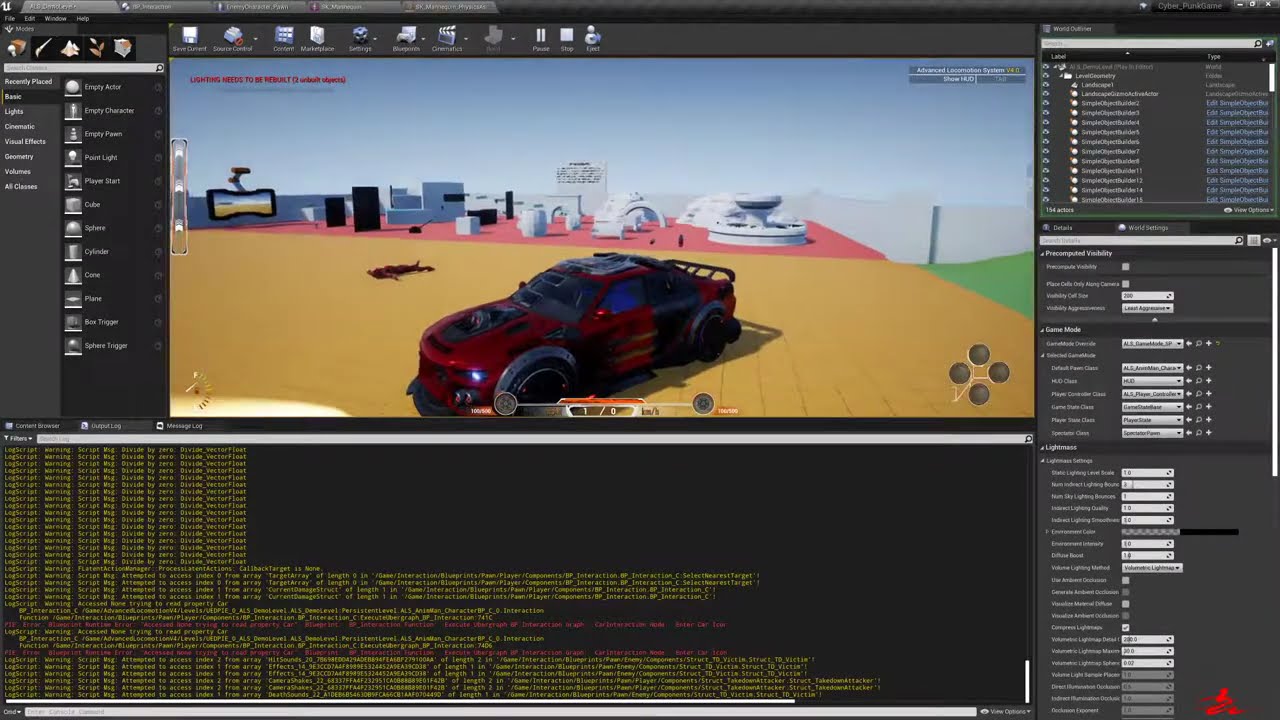
I'm in the need of some help figuring out how to get rid of some of these bugs ans warnings. a lot of the array bugs you get are right out of the box of Character Interaction I would like to fix these before i move on to adding more stuff or just give up and use a different sy...
dry pewter
Hello everyone, i might be stuck in something obiouys here but, i hace a static mesh asset on my pawn, it's a sword, and i need to enable physics/collision on it so i can create overlap events, therefore damaging enemmies when te animation attack takes palce.
However it says that i need to enable simpole collision on the static mesh asset, i can't seem to find the thing,
I thought it was something here but it's still not letting me enable pysics
lone tiger
@molten badger I have a pop up notification over every other widget but some part of other widget are showing like if the were over the pop up but there not. You can see it with the coin.
 jolly trail
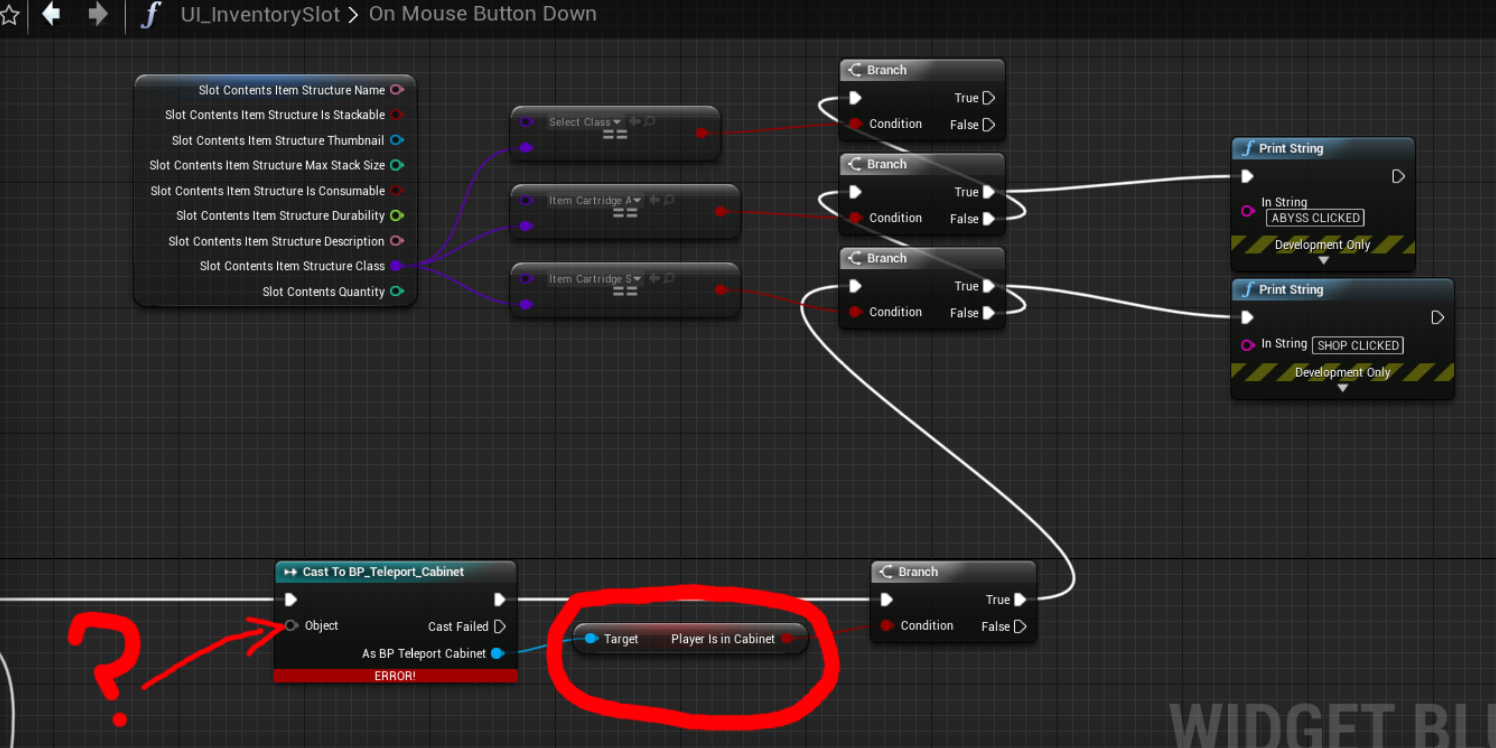

I'm struggling a little and can't find anything on this, I would like to get a boolean from another blueprint
probably a question 20 people ask here everyday
I'm struggling to explain why aswel lol, I'll keep searching but if anyone sees that i'm making an obvious mistake or something please do tell me 😄
dry pewter
@jolly trail Actually i can help you with tht, as the rookie i am
The best way to manage that is making the variables you want to acces form another blueprint, have a "mirror" on a global variable
Such global variable should be stored on the gamemode blueprint, or the gameinstance blueprint, that is being used in the project
Then the "cast to node" you are using would not be "teleport_cabinet" but "gamemode"
And the node you attach to your "?" would be "get gameinstance" or "get gamemode" accordingly
Let me show you
jolly trail
Alrighty, that would be awesome 😄
Well I kinda got it to work but I doubt this is very.. clean?
dry pewter
Here i have a variable called "Enemy Index" to count the ammount of enemy pawns spawn on the map, i add +1 to it after some math (off screen) and then make the "mirror" variable called "EIndex" stored in the "ThirdPersonGameMode" Variable have the same value
dry pewter
Then i acces the "EIndex" from the HUD/Widget bllueprint
jolly trail
That's smart
dry pewter
I had a really hard time figuring out how to make a variable global or read it from another blueprint, this is the best solution for me
Hope it works for you
Well I kinda got it to work but I doubt this is very.. clean?
@jolly trail This would work but will get messy when you have more than 1 "telepeort cabinet" on your map, you'll need a "do while" loop and some kind of flag on the specific cabinet you want to take the boolean value from
jolly trail
Seems like it's not possible with a boolean 😦
dry pewter
sorry not a do whie but a "for each"
jolly trail
I'll only have one actually so maybe I could get away with it?
I mean.. it kinda works hahah
dry pewter
It must work of you only have 1, the variable value will not be persistent through map loads
within one map and another
Also it should work for boolean
jolly trail
I'm gonna look into it a bit more with the stuff you sent me a bit earlier, It's probably just me derping around
Thank you so much by the way!
You're right, it should be possible with a boolean aswel
dry pewter
Don't worry, hope it helps
Create a boolean variable on the"gamemode" blueprint, turn on the eye icon so it's accesible from other blueprints
When map loads, it sets the variable to true (from the map blueprint to the gamemode blueprint)
 hollow knoll
im sorry iv been having an issue regarding navmesh. i have rocks i want player to destroy. that works fine and the actor gets removed. the navmesh will not update after the removal of said item/items. any help would be greatly helpful. x
torpid linden
what kind of object are you using for your rocks?
hollow knoll
in what way?
torpid linden
like a destructible mesh?
dry pewter
Then when the player presses "C" if the variable is set to true it will print a message
hollow knoll
wanted to use destructablle but na just static
dry pewter
runtime @jolly trail
torpid linden
I have basically the same thing, except I'm using destructible meshes and the navmesh correctly generates under them, so they act as dynamic obstacles until they break and then you can move through them
jolly trail
How did you get the target thingy on the boolean?
torpid linden
let me finish loading this and I'll check what flags I have on them
hollow knoll
i did think about the navmesh update whatever in the project settings but iv got a top down so some reason makes the ai mess up
torpid linden
if you use dynamic navmesh it can generate itself when you destroy them regardless
hollow knoll
how u mean dynamic nav?
torpid linden
you can configure your navmesh to build and update at runtime, so you can change geometry
or to deal with very large worlds where it's not practical to build the navmesh all at once
I accidentally once turned the dynamic part off with a navmesh volume covering something like 60 thousand square kilometers and my computer was very unhappy
hollow knoll
i know in project settings under navigation you can set it to dynamic. although as mentioned this messes up my character/npc.
 solemn dagger
hello, if i have a bpParent that has multiple ChildActorComponents how could i use setlocation with sweep option on the bpparent using the collisions of the childs ??
torpid linden
if you use dynamic navmesh you have to set up actors that build the navmesh in an area around them
hollow knoll
what using a nav modifier or something simular
torpid linden
anyway, try turning off "Can ever affect navigation" on your rocks
that should get the navmesh generation to ignore it, but leave their collision intact
be aware this means the nav system will generate paths through them and then fallback on bumping its way around
or you can try the dynamic route, the thing you want is a navmesh invoker
hollow knoll
think il just stick with affect nav for now. ty though iv literally been sat on google all day trying to force regen of the nav
crimson zealot
Hey!
I got a small problem, and i am not sure how to word it to find it on google, hope one of you can help me
I am still a noob, so it might be really easy
I have a spawn point where I am spawning an actor and I want to be sure that it has moved all the way out of spawn position before beeing able to spawn a new one to avoid collision. Anyone got a good solution?
 flint surge
You can use overlap events
So you have a static mesh component like a box, which you use as a trigger volume
torpid linden
when you spawn an actor there are options you can pass about what the behavior should be if the place you want to spawn them is blocked
flint surge
and hook into On Component End Overlap
It all depends on details of how you want to architect things
Does anyone know if it's possible to spawn widgets from an editor utility blueprint and attach them to the viewport?
flint surge
Based on my preliminary findings it doesn't appear to be possible to attach new widgets to the editor viewport from a utility widget, without doing a lot of work in c++
 lusty shard
Anyone know how to set the mouse position to the center of the screen?
I have googled this and tried everything.
flint surge
not sure, but player controller seems to have a function called SetMousePosition
never used it myself but it's worth a shot
lusty shard
The results I have gotten so far is that the mouse is either set to top left of the popout window (where click some reason stops my ability to drag) and the other is the mouse is set to top left of all three monitors.
yea Im using that. and the results are above lol
flint surge
What are you trying to do?
lusty shard
on begin play, set the mouse to center of screen
not forever
just at begin play. because I have edge screen panning and right now, as soon as you start the test, the camera starts panning
exploring rts controls.
lusty shard
yep after getting viewport size
Ive even tried setting the SetMousePosition values to exact pixels.
no matter what I try the result is 0, 0 for either the popout viewport or 0, 0 of my left most monitor.
flint surge
in your project settings, what do you have this set to?
lusty shard
ive also tried all the options in the playerBP and the HUD
flint surge
Also, what if you add this guy in front?
lusty shard
flint surge
I can't really test this myself because I'm accessing my Editor via both a virtual machine and RDP right now
so I have no idea where my cursor is on the remote machine
lusty shard
whats RDP?
flint surge
remote desktop protocol
lusty shard
fancy. let me try your screenshot
thats what I was using but will try to mirror your setup
dry pewter
Question, i need the cammera that follows the "Third Person Pawn" to turn towards certaina ctor location when i press a button.
If in "cammera boom" i place the pawn mesh then the "Third Person Pawn" indeed rotates towards that actor location
But i haven't been able to move only the cammera
flint surge
Welp, I dunno then -- never had to mess with the cursor
did you try that "Set Input Mode" node?
no idea if it'll do anything though
@dry pewter I don't understand the question. What's moving instead?
dry pewter
@flint surge this setup makes my player pawn to turn towards another actor. i need it to not rotate the pawn but only the cammera following the player
flint surge
In the other screenshot you had a different node, did that not work?
Although I think it should probably be "set rotation" rather than "add rotation"
set actor rotation will rotate the root component, you need one of those functions that targets a specific subcomponent rather than the whole actor
dry pewter
In the other screenshot you had a different node, did that not work?
@flint surge no it didnt
set actor rotation will rotate the root component, you need one of those functions that targets a specific subcomponent rather than the whole actor
@flint surge Exactly what im strugling with
flint surge
So try a node that targets a specific component instead
I think this one might work:
hallow night
Stamina or cool down or both. what do you guys think is better for a combat system for an rpg/adventure game?
zealous moth
God, not stamina, stupidest mechanic ever
flint surge
might be better to ask that in e.g. the #ue4-general channel or one of the others
this is #blueprint
"Do you sell hand sanitizer?"
"Uhh, sir, this is a Wendy's"
zealous moth
I'll have a Purell and some 70% EtOH
dry pewter
I think this one might work:
@flint surge didn't work 😦
dry pewter
no rotation at all
flint surge
Well there shouldn't be anything wrong with that node, as far as I know, and it's what you'd want to use for rotating a specific component
When I did a similar thing I was using SetRelativeTransform but it's more or less the same thing
To debug you can try setting breakpoints and seeing what's being fed to where, and making sure the values make sense
dry pewter
I think it could be that the cammera is attached to a spring arm and it's not a "free" cammera
zealous moth
based on what you wrote @dry pewter , what you should look into is camera offset; it is a transform so you can set rotation and location. And then simply add to the camera.
maiden wadi
Wait, what? All you need to do is uncheck the Inherits on the rotation vectors, then you can rotate the camera freely and it'll still follow the spring arm's location.
@dry pewter Uncheck these on your CameraBoom/SpringArm thing. You'll be able to rotate the camera where ever you want after that.
dry pewter
let me try that
maiden field
how can i separate each element of a string? like from : |credits|level|x|Y|z|a|b|c|....
flint surge
in a blueprint? I think there's a string split node
maiden field
mh
maiden wadi
Split, or ParseIntoArray, yeah.
flint surge
I guess you need the parse into array one unless you want to recurse over the right output until it doesn't split anymore
dry pewter
@maiden wadi it kind of solved it but not entirely, it's a step forward tho
flint surge
if your input looks like this A|B|C|D;1|2|3|4;foo|bar|baz, yeah
maiden wadi
@dry pewter What are you trying to do? Sorry I missed earlier.
dry pewter
My pawn has a spring arm and a cammera, it's a regular third person pawn child. I need the cammera to "lock on target" enemmy
flint surge
Should work if you have "cull empty strings" enabled, yeah
dry pewter
If i put the nodes on an "event tick" node it should work
maiden field
Should work if you have "cull empty strings" enabled, yeah
@flint surge how exactly i have to connect them
flint surge
Kind of depends on what you intend to do with the data
flint surge
I think for that you need a local temporary variable
You don't want to "set the structure" on every iteration of that loop, since your loop is going credits -> lvl -> XP
you'll want to, for instance, make a temporary local variable of type Player_data, before that for loop
maiden field
flint surge
and then in each iteration, set the correct field, e.g. based on the loop index
or with a string comparison -- depending on whether you expect the structure of that data to change over time
so basically... -> set local_tmp_player_data to a new empty struct -> for each substr in credits|lvl|xp parsed into array -> a sequence node or something to choose the right field to set based on loop index -> setter for the corresponding field
then from the loop's "complete" pin, you'll want to set the actual output struct to equal that temporary you just populated
maiden field
imagin that im not english and this is
hieroglyph language for me
flint surge
I can try and throw together a quick mockup
maiden field
yes plis :c
flint surge
It's a bit of a mess but you get the general idea
I'm not sure how to properly do a switch-case type deal with blueprints
there's probably a cleaner way of setting that up
and I forgot to add the struct into the return node there... oops
maiden field
i dont need a return node
flint surge
Right, this is with the assumption that this is all wrapped inside a function
now ofc here I'm setting elements of an Int Vector struct
because I didn't feel like making a copy of your player_data struct
but it should illustrate the point
flint surge
should work just fine like this
you just don't need that one string -> int conversion node
If this is still confusing, you may want to look up some tutorials on the basics of flow control and such
because if you copy this 1:1, it may not work if I made a mistake
I didn't test that mess, I just threw it together to illustrate what I meant
flint surge
that's not quite right in general
you still need to set the fields in the struct instead of what I assume are temporary local string variables
and add that player's struct to your array
Another option is to not loop over the array at all
and just set the members sequentially
maiden field
flint surge
so when you get your array of strings that look like this split_string = { "5000", "52", "3534" } or whatever, you can go tmp_struct.credits = split_string[0] and then tmp_struct.lvl = split_string[1] and so on -- except with blueprints
then you don't need to go "wait which iteration of the loop are we in?" in a for-each loop
tbh I think that might be cleaner
Like this, much cleaner:
either should work, I think
flint surge
but the point is you're making instances of your struct per each player and setting the string fields based on the elements of the array you split from your input
only works inside functions
if you're inside Event Graph, just use Variables
although I'm not sure if you need it in this model
might be possible to just do "Make Player_Data" instead of setting a local variable, and pass that reference around
the local variable is mostly just for being able to refer to it from anywhere in the graph without having these damn noodles everywhere
maiden field
flint surge
I'm not sure, define "not working"?
Maybe you could add a print or something branching from "hit result" or something to check if anything is actually caught by the raycast
maiden field
i mean. player_data is inside login gi
flint surge
there's only one "player_data" in there?
Why are you looping over a string containing multiple players then?
 rough wing
@flint surge The object is not following my finger. When i add a print it works fine. The problem is the object not moving
flint surge
I'm assuming "data_in" is something like <player_1_credits>|<player_1_level>|<player_1_exp>;<player_2_credits>|<player_2_level>|<player_2_exp>;<player_3_credits>|<player_3_level>|<player_3_exp> and so on
otherwise, what's the ; delimiter for?
maiden field
i try to explain what is happening
flint surge
you've got two nested for-loops there
@rough wing If you print XYZ the values change?
flint surge
to be clear, this is VR?
I'm actually not sure what that finger cast does
"under" makes it seem like it's projecting from screen space to world space and doing a raycast
rough wing
Mobile touch
flint surge
ah
maiden field
first at all. when the game start every second im performing a json request to my php page. then i get an echo from my database, the eco is
echo "|".$row['Credits'] . "|".$row['Level'] ."|0|;";
so the result is |0|0|0|
then . i should parse into array to delimit the end and it's ;.
then i parse into array to divide all the element 0 0 0.
flint surge
then just do string split on ";" and grab the left piece, or cut the string on the right by 1 character
although that's probably not what's causing your issues
in your screenshot, if you're following along with my second example, remove the for-each loop
just feed the array reference into the nodes that reference the various elements in that array
I mean, there's no second loop, so I repeated myself there
To be clear, what you're doing right now is splitting the string "<credits>|<lvl>|<0>;" into [ "<credits>|<lvl>|<0>" , "" ]
then, you first set the player data based on the first element
and then you set the player data based on the second, empty string
you just need to discard the ";" instead of splitting on it and looping over the results
maiden field
here we go. sorry if i was so bad xD i did it
flint surge
you want one of these basically:
take that ";" and throw it away, then split the actual data on |
(parse into array)
But yeah nvm all that if you fixed it already
maiden field
But yeah nvm all that if you fixed it already
@flint surge i guess
so , now is printing 0
0
0
flint surge
you don't need the for loop there, you'll be overwriting with an empty array probably
for the first parsed array you can just get the 0th element
or replace the first parse with a left chop
@rough wing As far as I know, if you do SetActorLocation with changing coordinates, your character should move unless it's parented to something or similar
not sure what the issue is
dry pewter
Question here, i have my player controlled pawn, and theres another pawn on the map, i need to find out a point in space (vector) like the end of a line that starts in the other pawn, going trhough the player controlled pawn, and ends up a few units ahead
Say i need to find out the coordinates of the blue X
being the brown ball one pawn and the yellow ball another pawn
lusty shard
Just an update. Found a work around for centering the camera:
https://www.reddit.com/r/unrealengine/?f=flair_name%3A"Blueprint"

reddit
safe geyser
@dry pewter Get Vector from location 1 vs location 2 and add to that vector in the same direction that vector is going? I'm really new so I might be way off 🙂