#blueprint
402296 messages · Page 436 of 403
 cold sinew
 strange stream
I'm spawning a sphere to detect enemies and then a particle system which attaches to them, but I want it to only attach to X amount of enemies, and the enemies should be the ones who are closest to the character.
How do I go about doing this? I guess I need an array to make sure it doesn't attach to a enemy twice?
 nocturne holly
after some experimenting, I figured it out all I had to do was compare the forward vectors of the actor and projectile when they collided
 maiden wadi
@strange stream Array Element in a For Each Loop is the element in the array that is at that array's current spot in the loop's current iteration.
strange stream
Hmm, so how would I go about doing what I described?
maiden wadi
Depends. Do you want to attach every actor that is within a range or always just the single closest one?
 odd ember
@nocturne holly if you're using hitscan you should use traces, not overlaps
nocturne holly
I'm not using hitscan stuff here, but I'll keep that in mind for the future
maiden wadi
@strange stream More or less you need to take the large array, the one with all of the nearby actors. Make a local copy of it, run it through a function to find the closest actor, return that actor and then remove it from the array and attach it. And you'd run that all on a loop five times, or for how many ever actors you want to attach at a time.
 burnt rivet
Ladies and Gents, Who would like to help solve a mystery that makes absolutely ZERO sense. TopDown/TwinStick I will be in the support chat and sharing my screen Kudos!
Well attempting to share my screen
maiden wadi
Everything makes sense. You just need a bigger shovel for digging.
 rough jacinth
Hello, i have a problem. I need a complex collision mesh to be able to simulate physics, is there a way to make that ? I'm making a sort of box that holds other objects, and should be moved using a PhysicHandle
Hello, i have a problem. I need a complex collision mesh to be able to simulate physics, is there a way to make that ? I'm making a sort of box that holds other objects, and should be moved using a PhysicHandle
Hello, i have a problem. I need a complex collision mesh to be able to simulate physics, is there a way to make that ? I'm making a sort of box that holds other objects, and should be moved using a PhysicHandle
Here is an example : https://youtu.be/uHbMYRzIQE4
 odd ember
@rough jacinth not in editor. you'll need to create complex collision in a 3D package
burnt rivet
what does your complex collision look like when viewing it in the mesh viewer
rough jacinth
It looks like the real mesh, but the complex collision is preventing physics simulation
So i will not be able to test the game in editor anymore @odd ember ?
odd ember
I don't know what you're asking?
burnt rivet
As Cranz said above you need to fix that in an external program
rough jacinth
I think i don't understand
rough jacinth
I made the model using bledner
maiden wadi
You can generate simple collision in the editor. But for Complex Collision it needs to be done in a 3d modelling app and imported with the model.
burnt rivet
or you can try setting use complex collsion as simple
rough jacinth
https://i.imgur.com/OrqxkPJ.jpg It looks good to me ?
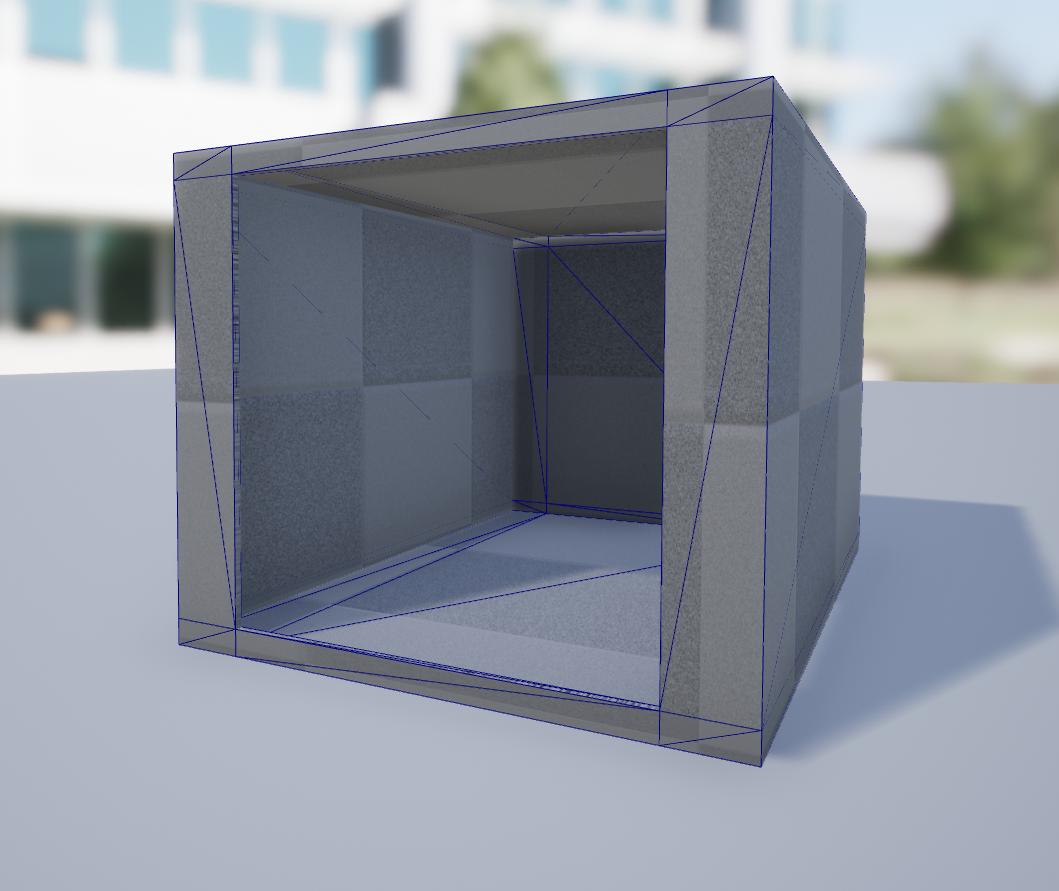 odd ember
none of us know what you want to do with it
rough jacinth
@burnt rivet When i do this i get this message https://i.imgur.com/hstG6bf.png
 burnt rivet
He wants to inert a cube into the hole in the front
rough jacinth
Yes and that works using use complex collision as simple
But then i get a message saying i can't using physics on this object anymore
burnt rivet
is the object set as moveable
rough jacinth
Yes
odd ember
you can always use a physics asset to override
and try that
or you might ask in #legacy-physics
burnt rivet
I was just about to suggest that
odd ember
a channel made for questions like these
rough jacinth
I see, i'm going to see what a physics asset is and then asks in physics if i can't get it working
Thanks to both of you
burnt rivet
No problem, now to find a solution to my own problem lol
odd ember
what is your problem
burnt rivet
I will attempt to describe but i may have to show you. First my control system for a twinstick works flawlessly. Now the problem, only when I rotate the character toward my AI while moving does the aim jump left or right of the Target as if a magnet was repelling it. Think of it as my character absolutely refuses to shoot the target. However this does not occur when standing still or when im not rotating toward the target. I even built in aim assist and that did not fix it.
Also I completely removed an tick functions to eliminate performance interuptions.
maiden wadi
Need to see your rotate towards target and aiming logic.
odd ember
yeah I'd need to see some logic
burnt rivet
simple put look at hit result under cursor -> lerp
odd ember
have you debugged using breakpoints?
burnt rivet
yes in several different ways
odd ember
so what did the hit result say?
burnt rivet
hit result of cursor, jump in rotation,
odd ember
but you checked you actually got a result
burnt rivet
indeed
maiden wadi
You really should just screenshot what you have. It'd be easier to read through it. Otherwise we're throwing random stuff out.
burnt rivet
I even set the target to ignore traces from the mouse
i set custom collision methods to ignore everything except the ground, same result
 night grotto
I created a blueprint (BP_Object) that extends Object. I've created other child blueprints (i.e. BP_ObjectDerived1, BP_ObjectChild2)
My expectation was if I created a variable of type BP_Object on an ActorComponent, that I could then configure that component with one of the derived classes. However when I browse I don't see BP_ObjectDerived1 etc. in the drop down list.
What am I doing wrong, or what is the error in my understanding?
odd ember
@night grotto you'll need an instance of that object
burnt rivet
Ill give you a screen shot
odd ember
what you're trying to add is a class
night grotto
@odd ember Ok silly question, how do I convert a blueprint class, to an instance of that class?
or is my mental model wrogn
burnt rivet
odd ember
an instance of a class is that schematic being used dynamically at runtime
night grotto
ok so I have to create the instance dynamically, that makes sense
burnt rivet
im listening
burnt rivet
haha yah i know I was in a hurry
burnt rivet
same result even using tick and not a time
odd ember
if you try and break blueprints you will break them
the same thing happens if you try and break code
there's no gain in trying to circumvent the system
I don't even think anything else is wrong
I think it's just that
you're spawning 100s of timers
but only the last one has the handle
burnt rivet
its fire and forget, then reset
odd ember
yeah but you're only resetting the very last timer
not the 100s of timers before it
the way you set it up
burnt rivet
timer only executes once
odd ember
nope
since it calls itself, you execute a new timer every 0.01 seconds
that's a little more than 1 timer per frame
that's a LOT of timers
burnt rivet
oh damn i was looking at it differently i see exactly what your talking about lol
odd ember
usually this would have been curbed by infinite loop detection, but since you used timers the code can't track it
it's not only bad because it's an infinite loop, but running the game long enough would eventually cause a memory leak
odd ember
the handle has no reference this way
you can't mix execution threads with pins like this
that's another violation
burnt rivet
lol dammit
This advice is all find and dandy but it doesnt resovle the issue
Much appreciated fixes
odd ember
try visibility channel instead of camera channel
burnt rivet
already tried
odd ember
then debug it
with breakpoints
see what you get from the hit result
actually just to be sure, save the hit result as a variable
as the first thing you do
oh I forgot
another violation, you're using the controller from another event
that is likely why
burnt rivet
you need to see the actual issue, the controller is fed directly from the player controller
even if i replace it with a reference the result is the same
odd ember
burnt rivet
I have attempted to resolve this 100 different ways, works on a gamepad, works without something to shoot at
odd ember
use get hit result on mouse aim, not on tick
because you're getting hit result more than every frame
if you get it every 0.01 seconds
burnt rivet
odd ember
yeah that has nothing to do with what I showed you
 trim matrix
Hey so I'm using a player camera manager and I'm trying to add an ads for my gun. I can successfully use set view target with blend to use the camera on the gun, but what exactly do I use if put in for the new target when I want to go back to my player camera manager. I've tried to plug in my camera manager that I made, but It doesnt do anything.
odd ember
the event node supplying the controller pin has nothing to do with the node using the controller pin. they don't share execution
so, a violation
PLUS
you're getting hit results more than once every frame
it's almost guaranteed that your hit result will be null
you need to get hit result directly on mouse aim, not on tick
burnt rivet
odd ember
yes
burnt rivet
same result
odd ember
did you read what I wrote?
burnt rivet
ill set that up real quick
odd ember
and use visibility trace
not camera
everything visible blocks visibility traces, not everything blocks camera traces
burnt rivet
I noticed something you wrote, I am not getting targets with the mouse, i am only using the mouse as a look at rotation find targets is irrellevant
odd ember
yeah but you're using it to get actors that you want to rotate to
what if there are no actors under the cursor?
burnt rivet
only as an aim assist
odd ember
okay where is the code that does the rotational movement then, if that is not it?
burnt rivet
was never intended to be added
maiden wadi
So your ship only rotates when there's an enemy?
odd ember
yeah I don't even understand what you're trying to do now
was the aim assist then not what you needed help with?
odd ember
nope
burnt rivet
the controls work as intended exept when I try to look in the direction of a target while moving
odd ember
and you think this is because of the aim assist?
burnt rivet
no, the aim assist was used to lock the rotation onto the target if the cursor was over it.
odd ember
I see, so the aim assist was the branching part of it
burnt rivet
yes
odd ember
you should still have a branch and only execute rotation on hit
burnt rivet
if the object under the cursor had an enemy tag then use that rotation
burnt rivet
rotation is set to look at result of the cursor, no matter where the cursor is the character will look at it while the aim button is down.
odd ember
if your cursor doesn't hit anything, impact point returns a vector 0
it'll pull you to the center of your map
 rugged carbon
Is it possible to have input on a pawn prioritized above the player controller? Apparently "input priority" does nothing in this case
burnt rivet
whether i hit the floor in front or behind the target the result is the rotation jumps to the left or right of the target
odd ember
@rugged carbon probably not, but what is your case that you would need this behavior?
rugged carbon
Trying to let the player sawp between top down and third person perspective. In top down I use click to move, in tp click attacks. Causes conflict
maiden wadi
@burnt rivet Just curious, have you tried printing the look at rotation results to see if it's drastically changing while this glitchy rotating is happening? If that remains steady but you're still rotating heavily, it's probably the Rinterp node outputting odd values.
odd ember
@burnt rivet yeah but that is you thinking that you will always have a result. in reality that is not always the case. and you were complaining about being pulled around. this could easily be one of those reaosns
and what you're doing is mouse rotation
gamepad doesn't use this function
burnt rivet
thats what i said, its isolated to the mouse
odd ember
yep
so put a branch on like I suggested
and see if you still get an error
like I don't know why you're arguing
 amber marsh
So what is the most ideal way to do a player teleport that works in multiplayer? I am getting a weird rubberband issue on clients
burnt rivet
no errors
odd ember
not errors, but like if the effect still happens
burnt rivet
still occurs
 zealous moth
@amber marsh try teleport, set world transform or just spawn the player elsewhere
maiden wadi
How about them rotation prints?
amber marsh
teleport? Is that a node? hmm
rugged carbon
@odd ember I was thinking of using branch node, I just felt like it was a "duct tape" solution and not the proper way to do it.
odd ember
@burnt rivet then I'd suggest printing your location values for where you are getting pulled, like suggest by that other guy
@rugged carbon ?????????
or rotation values, sorry
but either way, understanding what your values are, are key to fixing this issue
if you're getting pulled the wrong way, then that means the game registered something that it wants to pull you towards
zealous moth
@rugged carbon yeah good luck with that, you will need to fix several things before you can make that work. I released a top down template with click to move to fix a UE4 bug
odd ember
if it's not origo, it's something else
rugged carbon
@zealous moth How do you mean? Everything is working smoothly in my project, both moving the character top down, and in third person. I just wanted a better way to switch
maiden wadi
@burnt rivet Is the Z from the look at rotation on the true of that branch wildly changing back and forth when you print it?
odd ember
@rugged carbon just to clarify, if you're worried about duct tape solutions, go study software architecture. a branch for a single value change in one class isn't something that will cause massive repercussions down the line
worst case, you delete it
burnt rivet
Let me restate some info, If i am standing still aiming works as intended no avoidance when aiming at the target. When im moving there is no jumping or distortion of the aiming when no target is present. If the target is present aiming is only affected when trying to hit the target.
odd ember
best case, you turn it into a camera system
zealous moth
the problem is that he is changing his inputs
the UE4 engine has a capture event on play that messes up the top down click to move if not set up correctly in the controller
so even if he manages with a branch, his controls will be wonky at best
rugged carbon
I'm not using the top down template, nor the third person one. I use my own
burnt rivet
@zealous moth are you speaking about my controls or someone elses?
odd ember
I mean if it's working for him then there's no issue?
zealous moth
@burnt rivet talking about expansix
burnt rivet
gotcha
odd ember
he's right to consider whether or not it's a duct tape solution or not
zealous moth
i am way too far down from your initial question to know
rugged carbon
It's just me getting stuck in my head trying to find the best way to do something since I've burned myself on subpar solutions previously
odd ember
it's okay to do that but don't tire yourself out if you don't actually know how to implement better solutions
plus it's always easier to get feedback on a solution than getting a solution in the first place
in the case of a single branch, it's a very low risk solution
rugged carbon
It's my exam so there a little extra pressure. And yeah, you're right
odd ember
pretty ballsy to pick a system requiring two different cameras for an exam
rugged carbon
Well, yeah and I'm doing multiplayer too... so I might have overshot a little, but haven't met any major problems so far
rugged carbon
I'm roughly 2/3 through the groundwork
odd ember
ah cool, so you only got 8/3rds to go 😉
rugged carbon
It did break once, but that was my fault for a careless delete. And, yes 8/3rds sound about right 😄
 spark robin
How do you make a transform from floats once again?
zealous moth
make vector
spark robin
Thanks 🙂
maiden wadi
You can only make a transform from a vector or rotation.
zealous moth
you can also right click the pin and split them
spark robin
Also how do you like just move an actor from world location A to location B (without pathfinding) over a set amount of time?
zealous moth
using pathfinding 😄
spark robin
With what node then?
maiden wadi
I think you're looking for linear interpolation. There's a lot of quick tutorials on it.
burnt rivet

took about 50 seconds of video while moving, different cursor location, rotation not aiming at the target etc.
odd ember
@burnt rivet it's firing at origo
in your branch from before, drag out the boolean pin from the branch, use an AND node
then pick a pin from that, write vector != and pick that node
put your impact point into that, and GetVectorZero in the other
spark robin
@maiden wadi Is this what you meant?
odd ember
can almost guarantee that yes
spark robin
Doesn't seem very performance friendly 🤔
Is there really no node that just lets you move an object in a straight line from one location to another?
spark robin
AI climbing once it hits a wall
It will happen quite frequently, and there will be quite a lot of AI
odd ember
if you're really worried about performance, use cpp instead of blueprint
spark robin
(Its a block game, so I dont need a climbing animation)
Generally Im not, but this solution worries me a bit
odd ember
but generally AI is among the biggest performance hogs in a game
maiden wadi
No node is going to do that any less performance heavy. If you want to move an object from location a to location b and do it smoothly, you have to do it a little at a time every frame.
spark robin
Okay
odd ember
all released games will have some limit on how many AI can be alive at any given time
spark robin
So stuff like AIMoveTo also update location pretty much for each frame as well then?
odd ember
yeah
spark robin
Huh well okay, then I guess I have no reason to be so concerned then, thanks
How would I like move an actor X distance in the direction the rotation is pointing towards?
odd ember
(StartLocation - EndLocation).normalized * distance
spark robin
Like, how would I get the location of A distance in a certain direction (The rotation output of the node in my screenshot) from location B
odd ember
what I gave you would be exactly that
except faster because you don't have to convert to rotation and back to direction
 flat valve
Howdy! Is there an "elegant" way to do a conditional switch node, where I say "if X == 1, then add 3 to X, if x == 2, then add 6 to x, etc, etc
I guess, I just use "switch on INT" and call it a day.
odd ember
@spark robin yea that's a slower version though
@flat valve could also try a select node perhaps?
maiden wadi
@flat valve What is your use case?
spark robin
I dont get what you mean tho, how would I get the end location if not like that?
odd ember
you asked for direction
what you get there is direction
you have a start and a target
that's the same as a start and an end position
under the hood it's doing the same in the find look, it just converts it to rotation too
maiden wadi
@spark robin It's the same as what you're doing, just without the rotation conversions, keeping the math in vectors.
 hallow night
how to i make a line like this from 1 point to another so i can spawn instance meshes?
flat valve
I have a list, 0-35. That list, is made of up 9 "groups" so 36 divided by 9, therefor each group consist of 4 items. When I want to say "go to family 4, I will reference item 12 on the list" . Basically I'll just do a switch and add. So.. if 4, add 8", etc, etc
spark robin
Oh now I get it @odd ember how would I get the distance tho?
flat valve
It's hard to explain, and I could do it with a long branching mess, "switch on int" should work. So if INT item is 4, I will just execute off item 4, and add 8,
maiden wadi
Multiply after the normalize.
flat valve
You guys do some cool stuff!
spark robin
Oh, so you just mean the distance I want to move the character, not like between the 2 locations?
hallow night
why don't you make a structure variable that have index and family index
odd ember
@spark robin the distance between the two vectors is the length of that vector. if your normalize it, it becomes a direction. you can then multiply that by an amount x to move x distance in that direction
spark robin
Huh okay
maiden wadi
@flat valve You should check out the select node like Cranz said too instead of rerouting execution. You can set your multipliers on it.
spark robin
@odd ember I cant say I really get it, so I have to ask, would this work then?
flat valve
@maiden wadi Okay, I will. I saw that and then got distracted typing up my little story! Thanks!
odd ember
yes
odd ember
@spark robin you used plus, you should use minus
spark robin
oh, yes that makes more sense
 hollow reef
Does anyone know if theres a handy material node that'll help me get my material to react to other meshes? So if a cube comes in contact with the material a cube outline will form in it.
burnt rivet
@odd ember I took the idea you mentioned and it gave me a new idea. Instead of just firing forward vector i now fire the projectile at the location of the cursor, this eliminated the issue
flat valve
@maiden wadi @odd ember - Thanks, select node is perfect, works great!
rugged carbon
Are delegate bindings automatically removed along with an actor, or should I make sure to unbind before destroying something?
zealous moth
how can something, that subscribed to something, do anything about it if it gets destroyed?
rugged carbon
I'm more wondering if a binding will keep it from being destroyed
zealous moth
well.. try it and let us know 😛
rugged carbon
Ok, will do 😄
zealous moth
my guess is no since the 2 methods do not see each other
but since one depends on existing (subscribing) if you don't exist, your subscription is null
 thin marsh
Hello, I have an issue for my 2D top down project, I am modeling a car with the FloatingPawnComponent
in the first part of the video, I press forward and left/right (it's working nice), in the 2nd part I release the forward key then when I left/right my car don't follow the orientation of the car, like on ice :/
Can someone tell me how to simulate the physic of my car when I release Forward?
rugged carbon
@zealous moth Actors are still destroyed. Still learning the ins and out of delegates, so excuse the noob-ish question 😄
maiden wadi
Can't be entirely sure, but I think you also need some vector math to update your movement while rotating. To 'slow' the car a little and simulate it turning. You might be able to use it's velocity with the axis value somehow to set it's movement towards it's left or right.
thin marsh
I tried to use AddInputVector, the only problem is that the car accelerate instead of decelerate
strange stream
I'm spawning a sphere to detect enemies and then a particle system which attaches to them, but I want it to only attach to X amount of enemies, and the enemies should be the ones who are closest to the character.
How do I go about doing this? I guess I need an array to make sure it doesn't attach to a enemy twice?
maiden wadi
You still don't have much choice other than creating a function that finds the closest five out of the array.
strange stream
Yea but I'm not sure on how to approach that
Working with arrays confuses the hell out of me
maiden wadi
Haha, better get used to it. You'll be using them a lot in programming. I can help with that though.
I have a function in a library that'll help you start.
strange stream
Like, this doesn't even work and I have no idea why
maiden wadi
Are there any AI masters in the sphere when the level is loaded? If so, you may have a collision detection issue.
strange stream
This sphere spawns when I press a button
AI might be in the sphere at that time yes
maiden wadi
Instead of spawning a brand new actor for that, there's a sort of trace node you can use instead. SphereOverlapsActors.
strange stream
Okay got the loop to output the names
maiden wadi
I strongly recommend putting together that function I posted to get the closest actor from an array. It'll save you some hassle.
strange stream
Now, how do I make sure only ai_masters get included in the array?
Yeah I will thanks, just need to construct the array properly
This is the closest I get
maiden wadi
Try this instead of overlaps. Overlaps is going to be a lot of upkeep for the array.
strange stream
Class filter is where I should put the ai_master?
maiden wadi
Yep.
 maiden field
maiden wadi
maiden field
maiden wadi
You may or may not need to change the object type, I'm not sure what collision type your AI is.
maiden wadi
Put a print before it, what is it printing?
trim matrix
Is there a way for me to rotate my player to face the center of my view port?
maiden field
i check. im running that on gamemode. with dedicated server
strange stream
This actually worked
maiden field
oh. maybe i got it
cause the server reconize the map as Entry and not as Lobby or whatever
strange stream
Not sure how For Each Loop works in a tick tho..
 exotic warren
Yo bois, Does this node remove an item from the input list in project defaults or just reset the keybind to the default. The tooltip is whack
https://docs.unrealengine.com/en-US/BlueprintAPI/Settings/RemoveActionMapping/index.html
Remove Action Mapping
maiden wadi
@strange stream Kay. You'll want that function I linked earlier. You'll want to make a second function with two local actor arrays, one of those takes your overlapped actors, then you'll want to loop the function I linked five times, when it returns an actor, you'll remove that actor from the already filled local array and put it into the second local array. At the end of that loop, you'll have a local array with five actors which you can return to do whatever you want with.
strange stream
@maiden wadi
Yeah, but I need it to update when a enemy leaves the sphere or a new one enters..
maiden wadi
Aren't you executing this on a 0.2 second timer?
strange stream
Yea, but I've heard a for each loop is not smart to have in a timer
maiden wadi
Depends on your use case. Many people abuse it for stupid means. You need to check an array often.
strange stream
The ability idea is:
Basicly the player enters a state where it fires a beam at maximum 5 enemies, but if they leave the sphere it needs to change to another target.
Also if I use it before any enemies are within range it needs to update as soon as an enemy enters.
If that makes sense
 dapper cradle
Has anyone here ever made a QTE (Quick time event) In game ?
I am envisioning something coming at the player and when it gets close to the player it slows down, giving the player a couple of visual prompts that they have to do reactively in a set time,.
there would be an animation for success and failure.
getting abit more advanced, I would even like to do 2 QTE in a row, once the first is done a second begins immediately in quick succession...
would that be more of a cinematics question ?
maiden wadi
@strange stream Sounds like a perfectly acceptable way to use a timer. Specially at 0.2 seconds, that's not bad at all. That's not even close to tick. You're looking at 5 calls a second, tick is usually 60-120 a second.
 dry pewter
Hello everyone.
I'm comming back to UE after a long break and i forgot how to reference pawn's variable (That are not player controlled) so i can show it's value in the HUD
Like displaying enemmy unit's Health bar and sort
I know the documentation shows how to get the player controlled pawn variables but not the others
maiden wadi
@dapper cradle It's pretty program based. Of course you'll need to play animations, but you also need to figure a way to do the character positioning. The rest of it is just using a widget to display the correct button to press. On press, send key to an event and if key == correct key, do something, false, do something else. And some time dilation.
@dry pewter You can get them a number of ways. A mouse click, a line trace, Overlap, collision hit events.
dry pewter
Just by the pawn existing on the map? they're all child of a single pawn class
dapper cradle
Thank you @maiden wadi ! something i hope to tackle in the coming days.
maiden wadi
@dry pewter Can you explain your use case a little better? Are you using a specialized widget for each enemy? Are you using a single on screen widget that switches based on a mouse click, or closeness to screen center? To help, I need to know more of what you're trying to do and how you can easily get your enemy reference.
@dapper cradle I haven't done a lot of it, but look into the sequencer. I think you might be able to make great use of that for something like that. Unsure.
dry pewter
Alright @maiden wadi Fisrt of all thankyou for your attention
I have a party of 4 characters the player will cycle from one to another with given keys for each one
Also in the map there are 1-8 enemmy characters
I need the HUD to show the name, health and other stats from each character (player party on the bottom, enemmy on top of the screen) such stats are stored in Variables on each character, all of them are child classes to the same pawn
maiden wadi
So, something like Divinity?
trim matrix
in 2018 there is a variable called Track. What is it called now?
dry pewter
I guess so, never played it but google says yes
Also i remember a workaround to this by sending the variables to a gameinstance to make the variables "golbal"?
maiden wadi
@dry pewter There's a lot of different ways to handle it. In Divinity battles are localized, so you'd draw a large sphere and use the ones in the local area. You could add them all to an array at level start too if you levels are small. Is your game turn based or real time?
dry pewter
@maiden wadi Real time, the map is large but the characters are not allways present, the player contorls the #1 in the party and when it comes to certain locations in the map the enemmies and the rest of the party Spawn in place
maiden wadi
In that case, you might be able to just do this stuff on enemy spawn. You could probably keep the variable in the controller, or make yourself a manager actor for it. Either way, you can make an array somewhere with the class type, and on the enemy begin play, get player controller, cast to your custom controller, and add self to enemy array.
 narrow kelp
Does anyone know if ue4 has any input smoothing options for mouse / gamepad
i can't find any
i can make my own, but i want to see if there is something built in first
dry pewter
@narrow kelp Not sure if it's what you are looking for bu in Edit>Project Settings there are some settings for input and controllers
dry pewter
@maiden wadi Then using the gameinstance to store the array is viable?
maiden wadi
Mouse acceleration is on by default.
@dry pewter Sure, it's doable. I might recommend game mode though unless you're never switching maps. Otherwise you're going to be needing to clear that array every time you switch maps.
dry pewter
I thought GameInstance was persistents beetween level loads
But yeah i might use Gamemode too
 mild pine
Hey guys; I'm struggling with connecting some dots here. I've followed an archery tutorial and customized it to fit my needs. However, I'm struggling to cast to my Actor and reference one of it's static meshes. If anybody wants to help out, DM me and I can send images, so I don't flood this chat with screengrabs 🙂
odd ember
@dry pewter game instance persists above all else. game mode you can switch out dynamically, but is otherwise persistent
dry pewter
Thanks for the clarification
dry pewter
Allright it looks like i'm going the right way, managed to get one specific actor of class based on a variable, and show it's info in the widget
Thanks @maiden wadi @mild pine
 formal blade
I feel like this should be really simple, but is there a way to stop variables from being accessed outside of the class?
I have a lot of stuff that only the class itself needs to access, and it's creating clutter when another blueprint tries to access it
odd ember
privatize them
as in, make them private
not as in, make the government sell them to the highest bidder
formal blade
I don't know why I thought that would hide it from the blueprint itself
since the tooltip set derived blueprints I thought it just mean 'don't inherit this if you're a sub-class', but looks like that also has the functionality I want, thanks!
odd ember
if you want it available to all derived classes (but no one else), protected is what you're looking for
 low lotus
Why doesnt my text widget show up in graph editor as a variable?
Do i have to enable something to show it?
 inner ginkgo
On the designer tab, there's a "Is Variable" checkbox. You need to tick it for most things that you want to show up in the graph.
low lotus
TY
formal blade
is it possible to have overlap events in screen space?
basically I need to check if an object is within a certain radius to the center of the screen, and run logic on entering that radius as well as exiting it
inner ginkgo
Is there a max distance in mind for this? A rather simple solution is to attach a capsule to the camera, give it the proper rotation to extend away from the camera, then give it the radius and height you want for the interaction limits.
formal blade
no max distance in mind
odd ember
@formal blade there is very limited screen space collision. I recommend setting up your own math, especially if you're looking for more complexity
formal blade
capsule attached to the camera seems like a better option
that way I can hook into the overlap events and make my blueprints significantly cleaner
odd ember
not sure what you're talking about
formal blade
since I'm meant to be intersecting with stuff in the world, it makes more sense to have a really long capsule attached to the front of my camera so that when the items I'm looking at overlap with that it triggers the right events
inner ginkgo
Keep in mind that a perspective view is going to reduce the accuracy at further distances.
odd ember
but what do you want to do?
generally I wouldn't recommend doing anything like that
your results will be very inconsistent
if you're just looking for the center of the screen you can project screen coordinates to world
formal blade
run logic upon begin overlap and end overlap when the object gets within a certain radius of the screen
that's what I was doing before but I can't hook into a begin or end overlap event there, which is what I need
odd ember
there isn't really any shortcut here
overlaps tick every physics tick anyway so you're not saving performance, you're just setting yourself up for some very inconsistent behavior
especially if you consider that stuff like FOV or resolution can change
formal blade
I'm more worried about readable code than better performance atm
I'll try it, if it sucks I'll go back to my previous method
odd ember
I'm just saying you're setting yourself up in a position where you are going to paint yourself into a corner
formal blade
only one way to find out
zealous moth
anyone know what this means?
odd ember
looks like it's in animation mode
it wants you switch animation mode in order to use the animation asset
 vocal urchin
Is there a way to get the primitive component out of an "Actors in Selection Rectangle" node? I'm wanting to put an object outline around everything the user clicks and drags over.
I can do it just fine by mousing over it, but as I think about it, this is a little more complicated
odd ember
are you setting up your cable component manually @rough wing ?
 rough wing
Yes
odd ember
I mean with math?
because it seems like a question best aimed elsewhere than here. perhaps #graphics ?
or perhaps #legacy-physics
dry pewter
When adding a widget to screen, can i make it have an offset along X or Y axis?
formal blade
how would I make a collision preset that ensures colliders will only generate overlap events with another collider of that same object type?
odd ember
set both to overlap to each other's type
formal blade
I can't turn off the overlaps for the other object types though
odd ember
you can make a new custom collision type or channel
formal blade
an object channel you mean?
odd ember
yea
formal blade
oh I'm dumb, it has to be either ignore, overlap, or block, you can't just untick something lol
with the 'CollisionEnabled' parameter, if that's set to No Collision will that still generate overlap events?
formal blade
gotcha
 rose spire
Is there a way to call a post processing volume that's in a scene in blue prints ?
odd ember
sure in the level blueprint
rose spire
how do I call it
formal blade
@inner ginkgo thanks for the suggestion, works great.
@odd ember thanks for the help with collision, also works great
odd ember
select it > open level blueprint > add reference to post process volume
alternatively,
select it > open level blueprint > add post process volume event
rose spire
Thank u !
I have it right now where a UI pops up depending on how mad the player is (madness). I want to change it to this ppv. Like when they're more mad, I want the motion blur to go up. I've never worked with ppv before. Is this possible ?
 stuck hedge
If you want to have two different game modes for a map is the only way to do that by having two copies of the map? There is no way to load a level and say "load with gamemode A"?
 atomic prairie
Hey! Is there a node for resetting conditions?
odd ember
@rose spire cameras have postprocess settings, you can use those instead since it's a property of the player and not of the world
@stuck hedge there probably is... in cpp
@atomic prairie that's too ambiguous, what are you trying to reset?
atomic prairie
I have a lot of conditions which activate gradually, after my condition R14 I want to reset to start again with my condition R11
odd ember
if you want to reset your logic you'll have to turn off all your variables and start again
atomic prairie
THANKS!!!
trim matrix
hey is anybody able to use GAS in combination with ALS?
 quick imp
Hey can anyone help me? I packaged my game and everytime i open it... it just blackscreens... idk if this a package thing or blueprint thing?
 empty fiber
Can anyone explain this behaviour?
The cube is the DefaultPawn class. A regular pawn can be jumped on fine, but for some reason the DefaultPawn bounces my character controller off of it?
dry pewter
@empty fiber Maybe somecapsule component for the box is colliding your character?
Question, do "get all actors of class" works only with already spawned actors? can't i get an actor that has not been spawned (a child class in my content broser) from it?
inner ginkgo
Get all actors of class will only work on spawned actors. What are you trying to do with your child class?
dry pewter
I've made a widget, and i have some variables in my gamemode blueprint,such variables are "thirdpersonpawn" as every chracter im gonna use is a child of "thirdpersonpawn", the variables are P1, P2, P3 and P4, if P1 is anything other than "nullcharPawn" (a child whose only purpose is to be a flag) then a copy of the widget is placed into the screen
i was trying to target a "nullcharpawn" but non has been spawn, so i used another methood to stop aditional widgets from appearing
inner ginkgo
Why not just set P1 to null?
dry pewter
I'm using this setup to assign the P1, P2, P3 and P4 according to the value of a variable called "ID"
IDK how could i set the variable to NULL
inner ginkgo
NULL, Empty and Valid are kind of interchangeable here. You just call set and don't give it a value, then it's null.
dry pewter
oh, didnt know that
inner ginkgo
However, that code you show is kind of wonky. At the point you assign P1, Array Element shouldn't be defined. Unless it is giving you the last element?
dry pewter
Yeah i iddn't think it'd work as i need it but i tested it iwth 3 different pawns, ID 1, ID 2 and ID3 and it worked... might be torublesome in the future
vocal urchin
Kinda got lost earlier, but does anyone know how to get primitive components out of an array of actors?
inner ginkgo
@dry pewter If I'm reading the code and intention correctly, I think what you would want to do is set P1 to nothing prior to calling Get all Actors. Then run your loop and set P1 after the True of your branch with the Array Element and break. And then remove the set after the completed.
Then for your widget logic, where that is, you check if P1 is valid with an Is Valid node.
dry pewter
Thanks for taking the time to do such thing! Will try those and report back
inner ginkgo
@vocal urchin Actors have a Get Components by Class. I'm not sure on your use-case, so at a high level, you'd probably loop through that list with a for each loop. And then call Get Components By Class, setting the class to PrimitiveComponent. You'll then need to do something with those results (which might be an empty array if that actor didn't have any primitive components).
vocal urchin
It's a selection box RTS-style.
Basically, as you drag over units, I want them to highlight.
inner ginkgo
If your method of highlighting them involves a component, then that should work.
vocal urchin
Like this?
Cause I'm still not able to get the array element to connect to the set render custom depth node
inner ginkgo
Try dragging out from the loop and creating a new one. I just tested it and it worked for me. The node you have there might be busted.
vocal urchin
It's actually Get Component By Class, Apparently
But good call. I'll see if this works.
inner ginkgo
Both should have worked. But if you only have 1 primitive, then that's the way to go.
You'll want to add some null checks, too.
vocal urchin
I'm actually not sure what I'll need in the end. I'm prototyping this with just cubes on the ground lol
Aaaand, it did not work.
inner ginkgo
Do you have primitive components on your actors? That's the suspect part for me.
vocal urchin
Well, they're just static mesh actors
And regardless, is there any other way to set a custom render depth aside from that note, which has a primitive component target?
inner ginkgo
The mesh should be a primitive. But there might be others, which is where the plural form would come in handy.
Personally, I think this is a good problem to involve interfaces and messaging with.
Create a highlight interface. Add it to any of your unit actors, then they can implement their highlight method how they see fit. And in the code you showed above, you just call the highlight interface on all of the actors you found. It'll just work for the ones that have it implemented.
vocal urchin
My other thought was that I could use a box line trace to do the same thing, but I absolutely could not figure out how to draw a box trace accurately, so that became a dead end.
Annoyingly, I'm able to draw two line traces in the exact positions I need - one at the click start, and then one at the click release for the drag, but I couldn't do the box.
dry pewter
@dry pewter If I'm reading the code and intention correctly, I think what you would want to do is set P1 to nothing prior to calling Get all Actors. Then run your loop and set P1 after the True of your branch with the Array Element and break. And then remove the set after the completed.
@inner ginkgo
Like this @inner ginkgo ? i don't quite understood what to put on the break
inner ginkgo
I was suggesting to keep the break on the 'true' like you had it. Although, it might not actually be necessary if only 1 object will match the ID.
Otherwise, that's pretty much what I suggested. Does it work?
dry pewter
At least for that part, it works perfectly, and i think it will no longer be a future problem, also yes only 1 object is supposed to match
inner ginkgo
Excellent. Glad to hear it.
dry pewter
Thanks a lot
I was googling something else but maybe you can help me with a yes/no, Can i make a blendspace with an animation that does not loop?
inner ginkgo
Sorry, I'm good with programming. Terrible with graphics and related disciplines.
dry pewter
It's ok, you've helped me a lot already
stuck hedge
@odd ember Turns out you just need some arguments when you load the level. MyMap?Game=/Game/GameMode/BP_FFA.BP_FFA_C this in your "open level" string will do it.
 dapper kiln
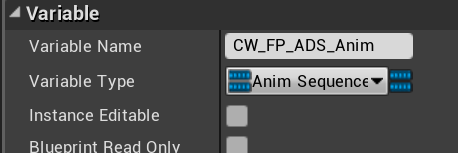
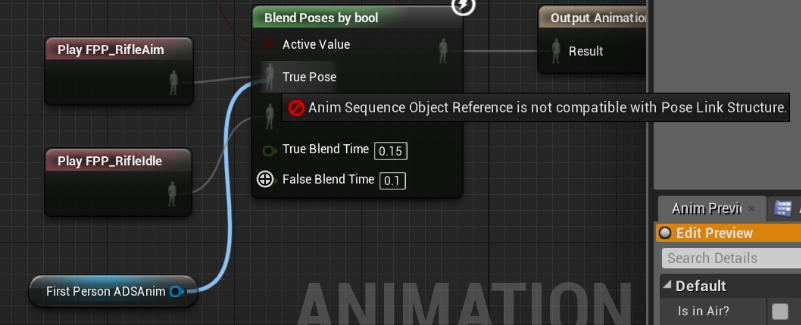
I set an animation sequence variable and want to get that animation inside my animation blueprint and play it, but you can't plug in that variable to anim bp nodes. Am I going about this the wrong way? The animation is an aiming animation and will change based on what Weapon I have equipped. https://i.gyazo.com/b06d66d46144560be425e0311df989d0.png
https://i.gyazo.com/4c5bd8c22360b1d8a7917188b3cdf36c.png


The variable is set inside a data table for each weapon. I'm just trying to make the AnimBP play it now. Ideas?
formal blade
how do I pass in a delegate as an input to an event?
for example, pass in an event that will execute at some point in the called event
inner ginkgo
@formal blade I don't believe that you can do it with events, but you can with functions. But only in limited cases. You create a bind to event node for an existing event, then instead of creating an event for it, drag the event pin to your function input node. It should give you the option to add it as a parameter pin.
formal blade
yeah, I had to get around it by binding the event to a dispatcher on the thing I was calling the event for
 elfin current
Came across a problem, hoping one of you can help sort it out. This code works for the ALS mannequin character. However, as you can see, for our characters after swapping the skeletal mesh the animBP works briefly and then freezes.
https://cdn.discordapp.com/attachments/671140338521341952/694391941865144413/unknown.png
https://cdn.discordapp.com/attachments/671140338521341952/694394328897814598/CharacterSwapTest.gif


Tried setting the new master pose component but that didn't work
inner ginkgo
Is the animation set to loop in the anim BP?
trim matrix
how do i divide 2 world rotations?
 sharp juniper
What is your goal for the operation?
trim matrix
i have a rotating niagara system in 1 direction (clockwise) and when i move around with my character when its attached it rotates with the character
i'm trying to negate that rotation so my character rotation does not effect it
sharp juniper
If you're operating in quaternions, you want the inverse. If you're operating in pitch/yaw/roll, just negate the axis/axes.
trim matrix
k
sharp juniper
You could also calculate the rotation for the niagara system using a worldspace reference, and set its rotation to that value instead of adding rotation to it, then it would orient independently of your character, attached or not
trim matrix
that sounds better
elfin current
@inner ginkgo yes, it is set to loop. It works perfectly for the first mesh with the gauntlets as you can see before the mesh swap
atomic prairie
Question, I'm a beginner in ue4 blueprint, I want to do a ''verification node'' and I want to hide my component only if there is a False. So i made this:
i tried to link the False with a DestroyComponent, but but when the condition becomes True again, my component does not reappear, logic.. So i tried the Set Visibility and it's perfect! But i've a lot of error ''Blueprint Runtime Error: ''Accessed None trying to read property CallFunc_SpawnEmitterAtLocation_ReturnValue10''
Do you've any idea why? or an alternative to the SetVisibility? I work on my Level BP, my target is a Spawn Emitter at Location.
atomic prairie
I think the problem come from my Event Tick?
vocal urchin
Continuing to evolve my outlining system - got it working much better now from a conceptual level and moved the outlining to the target blueprint class itself (yay). The problem now is that I am having a hard time getting them to stop outlining. I tried setting the variable and then removing that index, but that's not working. What's the trick here?
hallow night
why are you making an array of 1 index?
you're just changing the actor in index 0 everytime
vocal urchin
Because elsewhere, it can be used to select a group.
but thank you for pointing that out. I need to just add it to the array
hallow night
so this is what you wanted?
hallow night
if it isn't valid ( your branch ) then the cast would fail anyway
vocal urchin
Hmm. Well all I need to do is to see if the object that the trace is currently is the same one as before.
hallow night
use the ==
vocal urchin
But where?
hallow night
it will always be the last element of the array if that what you want?
vocal urchin
No, in the HUD I use the "Get Actors in Selection Rectangle" to do the same thing.
So potentially there could be a set of actors in the array.
hallow night
you can save the last actor hit in a variable and check if its == to the selected actors if it is you can cast
with the for each loop
hallow night
i mean if the last hit actor is inside that array it should work
vocal urchin
Hmm, not sure where I'd put that, to be honest.
Cause it's only one trace event
it's not like there's a second trace to check and see if it's the same actor
vocal urchin
But...what does that do? Sorry if it seems like you're having to spoon feed me here, but I've never had to do this before.
hallow night
it checks the whole array
if there is 20 elements in an array it will fire the for loop 20 times giving you the element 1 then 2,3,4,5,6...
didn't you study java in school? its the same thing
vocal urchin
I understand what the for loop does, I've already been using them. What I don't understand is how adding another one is going to allow me to check the same actor in the same line trace...against itself?
To see if it's the same?
And if it's not? Then what?
It's...always going to be the same. It's the same line trace.
hallow night
in the branch you're checking if there is a hit or not, right? if there is no hit what do you want to happen?
vocal urchin
To set "Unit Can Outline" to false.
vocal urchin
I guess it's the last actor added to the array, yeah
hallow night
from selectable actor array drag and type get a copy
in the index drag from selectable actor array and type array length
this will give you the last actor in the array
vocal urchin
Ok, I can do that, but I still don't know what to check it against.
hallow night
you don't need to check
just get the last element of the array and set "Unit Can Outline" to false
vocal urchin
Off the "False" branch?
vocal urchin
Like this?
hallow night
yeah is it working?
vocal urchin
No
vocal urchin
The problem is that after I've moused over, they still stay highlighted
Yeah, it's not being set to false
hallow night
substract 1 from the length ?
or just save the actor that you casted to in the True branch
because its saving everything you hit
vocal urchin
Will anything even come out of going off the false branch? I feel like it doesn't make sense in the first place, the more I look at it
idk, gonna call it a night on this one. thanks for your help anyways.
 signal cosmos
Is there a better way of getting a data table index than that?
 hollow cape
?
@vocal urchin You're going to get a nullref error on false. You need to use last index not length if you want the last index of the array. Length = Last Index + 1, which will be out of range
odd ember
@odd ember Turns out you just need some arguments when you load the level.
MyMap?Game=/Game/GameMode/BP_FFA.BP_FFA_Cthis in your "open level" string will do it.
@stuck hedge seems hacky at best. I'd have it done through code
stuck hedge
@odd ember UE4 doesn't support changing the game mode at runtime, the only thing you can do is tell it to open the level with the indicated game mode. You can't open a level and then pick a game mode after it's open as far as I've read.
odd ember
sure but putting it in a string is just not something I would do
I'd do an asset reference at the least
stuck hedge
Cool, good for you
odd ember
it's just setting yourself up for having issues down the line. what happens if the game mode isn't present or is misspelled?
stuck hedge
Then you have larger issues in your game.
and it doesn't matter how you reference it, in the end, it still needs to come out the same way and be fed into the open level node the same way.
odd ember
that's only if you use the open level node
but having a wrapper for it is the least I'd do
just to catch anything
 verbal bolt
How to create a BP function in C++ that accepts multiple variadic arguments list?
 minor cliff
so, been trying to make something for a few weeks now and i just cant seem to figure it out, but what im trying to do is make a camera movement similar to that of Zelda wind waker, where the player is moving left or right the camera will rotate on its axis
odd ember
@minor cliff do you have an example?
minor cliff
well Zelda wind waker was the only game i can think of that does this
but basically, the character will use the camera as a pivot point to run around and the camera will just look at the character
odd ember
if you can post a video reference I can probably help you out
minor cliff
https://youtu.be/b0PvJ4AWvWQ?t=32 so this video is pretty much what im looking for but this is in unity

We start the tutorial series by comparing a demo of the final tutorial code and our inspiration, the 3D Mario and Legend of Zelda series - two popular titles that defined the standard for third person camera control when they were introduced on the Nintendo 64.
Code can be fo...
odd ember
right okay, so if you create your own version of the player camera manager, you'll get a camera that is unbound from the player character
in the camera manager class there is a function you can override called BlueprintUpdateCamera or some such
that function gets called every frame and allows your camera to do stuff as you want while being untethered by the player
you can then combine this with the normal third person camera by setting the location of one camera to the location of the other
when you set the bool return value in that function to true, it'll use the untethered camera, otherwise it'll use the tethered camera
that's the basic setup
you get a few parameters in the function you can use that'll help you out
minor cliff
ok il try it out
zealous moth
Nintendo Cameras are as old and perfected as super mario 64, you will have to do lots of work to replicate it. That tutorial has some good points you can apply in unreal since both engines use litereally the same logic
dapper cradle
Can I ask a question about making a menu system (with widgets) in this channel or is another better ? I looked in the guide and cant really tell
odd ember
it's really not difficult to replicate
the way UE4 is structured makes it way easier to focus on design than on the code behind it
here or #umg is fine
dapper cradle
I feel like it is porbably a simple problem..
I Have looked up a tutorial for making a menu system and it has the use of a menu switcher.
problem is when i drag my widgets into it, they are all visable regardless of which is selected.
odd ember
oof
I'd say that's definitely more of a #umg layout issue. I have no idea about how that works
dapper cradle
thank you, i think i can feel a solution coming to mind actualy
dapper cradle
😛
 fallen karma
Hello!
Working on a topdown shooter and i want a enemy that follows the player around and shoots at the player, but if the player gets to close it backsoff, anyone got any tips? Im thinking that i need to compare the player position with the enemy position and check if it is too close. But I realy dont know how to go about this. I've tried googling it but havent realy found a solution i can understand! Anyone can help me out a bit? 🙂
odd ember
many ways to do it, simplest is that the enemy follows player by default and stops only when hitting the closest range it wants to be in. a really simple way of doing it is by having a sphere volume with a radius of the distance that checks for player overlaps, and when the player overlaps, it performs the backing off functionality
fallen karma
Yeah i tried that using pawnsense and it seems to override the overlap if it can still see the enemy 😦
dapper cradle
How can I make a widget spawn at a certain place in the level for every time the level is opened ?
Just place it when im in eddit mode im guessing ?
dapper cradle
I have given it an actor, so it is placeable
odd ember
it won't work like that though
consider that a widget needs a screen space to spawn in
you place it in the world
which screen space does it spawn in?
 odd ember
are you using something like a render target?
dapper cradle
I just attached it to an actor widget, then dragged it into the scene
odd ember
ah I see, like a component
placing it in the world will work, not sure how interaction works with them
interaction usually works with owners
in this case they don't have (player) owners
dapper cradle
Ive given my vr hands a widgetinteraction component so it seems like it now needs some BP loving
odd ember
oh it's VR
I don't know if there's special stuff going on with VR, might be best to ask in #virtual-reality
I was wondering why you didn't have a UI
but it makes sense
dapper cradle
Oh Ive learned in my journey so far, Theres not really any difference
odd ember
there is when it comes to screen space effects
maiden wadi
It's not really a VR question. It's just making the WidgetInteraction component work with the Widget Component. I had a lot of fun making world space pop up widgets a few weeks ago with those.
odd ember
I don't know that widget interaction component exists outside of VR
maiden wadi
Well, if it doesn't, I am hacking something. Was using it with a mouse. I can't even open a VR template because it'll crash my editor. No VR equipment. XD
odd ember
I see in the doc there is documentation for using it outside, but I've never seen this before if I am honestly I'd say it was created for VR use really
otherwise in most cases you can handle all of that outside of VR through screen space projections
like with 3D menus
that is impossible in VR though
yes it is:
maiden wadi
Dunno. It works amazingly well attaching it to an FPS pawn with it's orientation matching the camera. Didn't even feel hacky, it just worked.
odd ember
I mean the point is they wouldn't have made this if there was a different way to access it
 supple steeple
Hey sorry if i'm interrupting, I've got a question where i cant find the answer to, how would I access the Camera rotation and the capsule of the playercharacter's rotation in a playercontroller? 😅
zealous moth
get controlled pawn
odd ember
get control rotation && get controlled pawn -> get actor rotation
zealous moth
cast to it
 dusk dust
How can I make a procedural cube with an adjustable resolution? I want to normalize it to make a cube sphere
supple steeple
im sorry big noob here, how exactly?
odd ember
@supple steeple those are functions in the player controller
supple steeple
yeah ive got those but how do you refer to the camera of the player and the capsulecomponent?
😅
night grotto
Question about blueprint function libraries:
I have a blueprint BPObject that is a child of Object. It doesn't seem to be able to access functions in my library. Other blueprints can. This makes me sad as I like having a light-weight parent.
What determines whether or not a Blueprint can access blueprint function library functions?
supple steeple
okay let me rephrase cuz i really dont get any of this, im sorry, but im trying to get this part exactly, so not sure if i asked the right thing...
odd ember
@night grotto objects don't like blueprint function libraries. you'd have to derive your own class in cpp from object and allow it to access BP function libraries
@supple steeple maybe try the functions I gave you
night grotto
oh great I can do that Cranz, thanks!
odd ember
@night grotto I recommend you look at what game instance does to allow function libraries, perhaps it is as simple as being as UCLASS() or some such. not entirely sure what the mechanic for it is
night grotto
thx
supple steeple
It's kind of working now, still doing crazy weird things that ill have to look into, thanks @odd ember sorry again 😅
dapper cradle
What Is the easiest way to make a Widget menu switch between sub menus (But preesing the options button, change to options widget etc..)
Im watching Tut's on this and its rather confusing, I already have all my menus made

This month's voted for video by my Patrons and YouTube Members was how to create a menu with sub-menus and navigation of said menus. Meanwhile i take this opportunity to also show how to fix common issues people face with widgets and especially their inputs and focus.
Support...
I have been following and trying to addapt this Tut but its not going well.
maiden wadi
@dapper cradle WidgetSwitcher is probably the easiest way I know of. Just need to change one value and bam, new menu. Assuming your menus are of generally the same size or can occupy the same space. Full menu switching is easily doable too, just means more work associating buttons with which panels to hide or show.
dapper cradle
Thank you @maiden wadi that is used in the tut I just watched, the problem is i cant figure out how to program it so i can click individual buttons, leading to their respective menus.
odd ember
each button should have a set of events, one of which is called something along the lines of "OnClick"
dapper cradle
as an example
I migh select "Skill support from the menu" that leads to choose equipment, of 5 pieces I choose "Floor" ( I was hoping this next menu would be a panel menu filled with all the skills for the floor)
the skills will be chosed from their which will spawn in their characters/animations.
Yes, they do, ON click will work great for me if i can use it to close the current menu and open the next.
maiden wadi
In your Widget designer, your menus should be the direct children of the switcher. On button click, set widget switcher's ActiveWindowIndex.
Er, ActiveWidgetIndex even.
dapper cradle
should i be able to highlight/select individual buttons from the widget switcher ?
because i cant, so i cant bring up a on clicked event
odd ember
you probably need event dispatchers
that are set up from the widget switcher
so that when a child's specific button is clicked, that information is passed to the widget switcher
but I don't know
just sounds that way
maiden wadi
Yeah, wasn't sure how to explain that one. I just know how to do it, not the terminology.
odd ember
honestly if you're doing stuff in the world just spawn each menu in an individual space next to each other
you don't really need to switch since you've got plenty of real estate
dapper cradle
Well the area that i need the menus to occupy is very small
odd ember
is that a restriction you set yourself?
dapper cradle
Ill show you a screen shot
I have modeled my work place, there is a small areas that us coaches stand when we are watching the floor, I really want the menu in that space
with the blue outline
the animations for floor moves will play here on the red floor
odd ember
usually you build your space last since then you know how much size you need for everything
in this case I'd suggest trying the event dispatchers if you don't have the real estate
dapper cradle
sorry, i know it sounds awquard, but i modelled it as true to real life as possible
odd ember
yeah no such thing in games
the camera you have in game doesn't correspond to real life, so the metrics won't either
dapper cradle
well, when i turn on VR preview it feels acurate to actually being at my work place
kind of surreal
odd ember
for interactive elements in you case it would make sense, but for the general space it could be anything you wanted it to, within reason
anyway just saying you could give yourself some leeway so you wouldn't end up bottlenecking yourself
you have options either way
 opaque blade
Can you enable complex collision for a single static mesh component 🤔 ? Or does it have to be asset-wide ?
 spark steppe
how would i abstract something like camera stuff from the player character?
i've tried to make an actor which spawns a spring arm + camera, but wasnt able to use the spawned camera
(and attached that actor to my player)
exotic warren
Bois, Why are these array indexes jumbled each time
Like I wanna get the index at 0 and set that to scale 1 everytime
and then index 1 set to scale -1
but it's getting the wrong keys per axis because the indexing isn't consistent? :/
opaque blade
@spark steppe you could use Set View Target (player controller function) to set the camera to your custom spawned camera, or look into CameraManager from the player controller.
basically the cameramanager spawns the camera on possession iirc
spark steppe
i've tried that, but theres no way to pass the spawned camera to set view target
huh, but how does the top down example has cameras in it? i thought they are used actually
it shows fine in the viewport/editor, but as soon as i start the game i'm stuck on the shoulders of the player
opaque blade
what is the second sreenshot below it looks nothing like your character above it
spark steppe
thats only the "camera actor"
opaque blade
your character has 2 capsules around it, the spring arm traces so it doesn't clip into walls
yeah don't give it a capsule
spark steppe
but that was my intention
to have the camera in my camera actor, which i can then put on different characters
opaque blade
your characters capsule is blocking the camera
if that is what you intended then it works as expected
@spark steppe this works fine for me
spark steppe
oh, so the spawned camera has a collision, too?
opaque blade
you use the spring arm and it has a capsule probably you inherit from Character which is unnecessary
use a blank actor
spark steppe
whats the parent of your class?
opaque blade
Spring arm traces collision from pivot to attached objects by default and adjusting the length so it "automatically" prevents clipping into walls or other objects
whats the parent of your class?
@spark steppe AActor
spark steppe
yea that gives me another result, looks like something i can play more with
thank you
opaque blade
but it's getting the wrong keys per axis because the indexing isn't consistent? :/
@exotic warren Get once and store in a variable
exotic warren
What do you mean?
zealous moth
how are you building your array? on the fly or static?
exotic warren
On the fly, It litterally just getting these values
spark steppe
ohhh, set view target just moves the camera to whats passed as new view target
so it doesnt really use the camera that i've constructed in my actor
exotic warren
But like you would think it would make the arrays like this
But it doesn't it just gets them in a random order
spark steppe
wait it uses the camera.. it just ignores the spring arm
trim matrix




Why the weapon's plane is jittering when I just turn ?
Is there a way to fix that ?
I hate these small annoying details, it prevent me to continue my projects...
spark steppe
ah i figured out, the actor itself collides, neither the camera or the spring
but i cant disable collision for it
 solemn dagger
hello, is there any way to make a mesh that will work like a mask ? for example if i have a terrain and want to place a pool how to make the terrain mesh hollow ?
spark steppe
can i disable the collision for Actor A with Actor B?
or is it self colliding if actor b is child of actor a?
 keen goblet
@solemn dagger You could make a simple vertex-painting system where your material turns the vertex colors into spatial offsets, meaning the vertices you paint would sink down. There's a tutorial where that's implemented w/ snow that sinks where a character steps on it, but I can't find that :/
solemn dagger
alright sounds interesting i will google it
 frigid salmon
hey - do you know of anyway of having a "static" BP class? or do you know if the factory pattern to spawn various items works well in BP?
I tried doing the following but new object from class doesn't seem to work if said object is an actor
And I wouldn't make the factory an "actor" but if I make it an object I can't seem to access "spawn actor" inside it
^ the ss above is in the gamemode btw
keen goblet
@frigid salmon Unsure how ConstructBPFromClass works. Will SpawnActorFromClass do what you want?
 versed sun
shouldnt in construction script
frigid salmon
@keen goblet I don't have access to it
shouldnt in construction script
@versed sun oh, I seem to have access to it in the event graph, did not know that
versed sun
yah , spawning actors in construction script is bad, because it updates every time something changes
frigid salmon
ok, got it
what about the idea of a factory pattern in BPs, any experience with it?
frigid salmon
kinda
odd ember
that's vague
 glacial oar
Hello, I'm new to UE and have a problem with control rotation, it works with main player but not with IA pawn, anybody got an idea ?
frigid salmon
@odd ember trying to send you a diagram in DM if you'd gladly accept ^_^
odd ember
@glacial oar control rotation means the rotation that the player controller uses
versed sun
i think AI always are rotated 1,0,0
odd ember
so your AI won't have that control
@frigid salmon ah man can you post it here?
I don't do DMs if I can avoid it
frigid salmon
fair enough
odd ember
it's for your benefit
frigid salmon
glacial oar
So basically this will only work with main player?
frigid salmon
the lines before the view / business layer represent communication - nothing UML
glacial oar
frigid salmon
I was thinking that would be a decent architecture for a items / inventory system
odd ember
@frigid salmon you don't really need a factory separately for that
frigid salmon
then what approach would you take?
odd ember
even the inventory would have to be a component class, not an actor
frigid salmon
yep, the inv is a component
odd ember
seeing as you're stuck with UE4s EC(but not S) use entity component relations
spawning is relatively secondary
storing is primary
you also can't write to data tables
only read them
frigid salmon
yep - I know
exotic warren
can to Data Assets tho 🙂
odd ember
other than that it looks fine
frigid salmon
might change that DT in the future tho
odd ember
inventory slot is also not a subclass, it's an array most likely
ideally you would want a heap
but take what you can get
technically TArray does have heap functionality
but it's not BP exposed
frigid salmon
a heap would help with sorting, what else tho?
odd ember
retrieval
odd ember
if you're boggled down with performance I'd recommend doing it in cpp
exotic warren
@maiden field trim
frigid salmon
ok but would you still suggest on having some class / component to extract info from the DT / DB?
maiden field
@maiden field trim
@exotic warren what it does exactly?
exotic warren
@maiden field exactly what you said
frigid salmon
I don't really care a lot about performance, the other person I'm working with does a bit and he is stuck with BP - just trying my best in those constraints 🤣 - but yeah will use an array
odd ember
you also don't really want separate widgets like that, but rather store icon data in the DT then use retrieval for the widget as well
exotic warren
@frigid salmon what's the scale of your game?
frigid salmon
I was having doubs about that slot thing
odd ember
your equipment icons are just arrays of textures
frigid salmon
he did make part of it, got it working - including the widgets. I'm trying to refactor as little as possible
odd ember
a single widget will do as a container for the slot, then a slot widget that can be populated with icons
all managed by the container widget
maiden field
@maiden field trim
@exotic warren the problem is the output of the string is:
<html>
<body>
and here the result. < that can be a lot of things:
i just want to remove
<html>
<body>
and also that space
exotic warren
@maiden field use replace them
frigid salmon
yep, that's what I would do - he split it into 2 since 1 in the actual inventory and the other one is the view where you have the character behind, the slots are manually put etc.
frigid salmon
I'm not trying to remake that part, just trying to get all the logic in one place and separate it as well as possible
exotic warren
@frigid salmon how big is your scale, and why do you need to use a database for items
 velvet viper
yo, can someone help me out with implementing an addforce to my player while he wall runs? I want to mimic something seen in SM2 where the player can wall run, but the force is exponentially determined by the player's velocity - I'm not struggling with the actual wall running logic, just the add force logic I would need to achieve a similar effect

A quick comparison of the original Wall Sprint vs. the Wall Sprint Upgrade (available in the Spidey-Shop after collecting all the Skyscraper Tokens).
Created with MAGIX Video deluxe 17 Plus
maiden field
i try
frigid salmon
@frigid salmon what's the scale of your game?
@exotic warren I'd say too small for this but using it as a learning oportunity as well so meh - expecting @ 50 items
odd ember
projects become extremely scalable with them
exotic warren
@frigid salmon then don't use Data Table
frigid salmon
it's a combination of learning + helping someone make a game
frigid salmon
I was thinking about using some sort of DTO so I can separate the database with the rest of the game
exotic warren
It's based on the general item structure
frigid salmon
so then I can just switch between DT / data asset / mongo whenever I feel like it
exotic warren
So each item can just be a new data asset
I would say don't bother with Data Tables for this
odd ember
you can import DT assets from .csv
exotic warren
Data Assets much more powerful
frigid salmon
I'd say both of them have pros and cons
exotic warren
and from jason
exotic warren
Data Asset can also import from JSON / CSV
if you want to
And no it's not
You can base Data Asset on a blueprint class
so it can include code
Data Table is just raw tables
frigid salmon
well I wouldn't want my code sitting with my data together
I'm trying to separate them
odd ember
it's just a different way of doing it
exotic warren
Yes
frigid salmon
yep
exotic warren
So what you should do
odd ember
you're going to use the data to fill out the same blueprints anyway
exotic warren
Or atleast what I do is have have components based on UObject
and then I create them on the actor
or you can just use actor component
whatever works for you
maiden field
😎
exotic warren
and then you set in the Data Asset which component you use
So all the code for your item is self contained
for example here
odd ember
not sure why the code wouldn't be self contained otherwise
exotic warren
This is where I define my Weapons script
odd ember
it's just a different way of writing it
exotic warren
Yeah i'm not saying you have to use this way, I'm just telling you as it might be helpful
I've built these kind of systems lots of times and this is the best i've discovered
as it's super mallable, You can make the item do whatever you want
and it's not restricted in place to predefined code
odd ember
I reckon if we factored performance into it data assets would come out more expensive. they seem to be made in the case you have a few items that are well polished, as opposed to an item system
exotic warren
and doesn't need to load anything it doesn't need
odd ember
likewise importing data assets mean you'll have to save data assets
you don't have that with data tables
just saying
frigid salmon
ok, I will check Data Assets out aswell but other than that, how does that architecture look? Would you still have some sort of a DTO between the data / items or just make the items construction retrieve their data from the DB directly. if going for the first approach, would some sort of a "static" DTO instance on the game mode be a good idea?
exotic warren
They are slightly more expensive but they are way better at doing this kind of thing imo
frigid salmon
as it's super mallable, You can make the item do whatever you want
@exotic warren I'll check it out and play with it - but trying to take it one step at a time. The game I'm working on has only pretty much melee weapons with nothing special
odd ember
I wouldn't run anything like this on the game mode
frigid salmon
then where would you put it?
odd ember
use it as a subsystem
frigid salmon
a subsystem of the playercontroller?
exotic warren
I just have an actor "ItemBase"
Or "WeaponBase"
That constructs the component from the data
and sets all the variables on begin play
odd ember
subsystem is a separate paradigm you can invoke @frigid salmon
frigid salmon
that's what I'm trying to avoid - but it might not be a bad idea to do so
exotic warren
and then you just spawn that actor in and tell it the component on spawn
odd ember
it mimics some of the functionality from the missing S of UE4's EC
exotic warren
Why are you trying to avoid it
You only need to do it once
You make an item base that just constructs your custom code
and then for things like weapons that work a bit differently
you make a child base of item
frigid salmon
I have that
exotic warren
None of the code goes in those base classes
it goes in the components that get constructed
odd ember
generally the base of any item shouldn't be responsible for handling code for that item
frigid salmon
I'm just trying to not make them access the database to setup themselves
odd ember
a manager should
then we get back to an itemManager, which is pretty much a factory at that point
exotic warren
@odd ember why?
frigid salmon
good SOLID principles
odd ember
because it would imply you need to know what the data points to before you read the data
frigid salmon
you want the item to be the item - that's it's own responsability
it shouldn't care about where the data for "making" it comes from
exotic warren
It doesn't?
frigid salmon
if I change the datatable and link it to a SQL database later, I shouldn't have to change anything in my items
exotic warren
It's litterally a plugin data asset
Oh you want SQL
You mean you need to store the instanced actor states into SQL?
So like say for example an item like a weapon
you save ammo ect into SQL?
frigid salmon
@odd ember You mentioned something about subsystems, I'm not entirely sure what those are in unreal and if I can make one using BP only (as I mentioned earlier I'm a bit stuck to BP only)
odd ember
oh you can't make them in BP
frigid salmon
@exotic warren maybe, or maybe in a mongoDB or maybe in a csv
odd ember
but you can expose their functionality to BP
frigid salmon
I can't go in cpp sadly
odd ember
DT is still the "cleaner" solution
frigid salmon
maybe I should use the gameInstance to keep the manager/factory?
exotic warren
Hmmmm