#〉bugs-reports
2 messages · Page 126 of 1
 arctic turret
 burnt totem
Is there a known issue with Music Quiz? My bot will do 2 or 3 songs and then stop
 buoyant moon
burnt totem
Is there a known issue with Music Quiz? My bot will do 2 or 3 songs and then sto...
buoyant moon
burnt totem
Is there a known issue with Music Quiz? My bot will do 2 or 3 songs and then sto...
Having same issue. Sometimes it doesn't even play after the 10s countdown
 unique rover
burnt totem
Is there a known issue with Music Quiz? My bot will do 2 or 3 songs and then sto...
unique rover
burnt totem
Is there a known issue with Music Quiz? My bot will do 2 or 3 songs and then sto...
Same
 wet yew
im trying to add custom bot to my server and its showing me its getting in but i cant modify him and nothing
its shows me in the dashboard like i didnt do nothing
 dire yarrowBOT

Configuring Custom Bots
Trying to change your MEE6's name, avatar, or even status description? Let's see how:
First, make sure:
‣ You have at least a monthly premium with additional custom bot or yearly/lifetime plans which comes with it already (new subscriptions)
‣ Ensure you can invite new bots by going to your Browser Settings and looking for "Window Popup Blocker" and disabling it
1. Visit your Discord Developer Portal
1.1 Open https://discord.com/developers/applications/ in your browser
1.2 Click on New Application (Top right)
1.3 Next, click on Bot tab on the left menu
1.4 Now, on the Authorization Flow, enable the Privileged Gateway Intents options
1.5 Finally, copy the token, located below the username
2. Linking to MEE6
2.1 Open https://mee6.xyz/dashboard
2.2 Click on Custom Bot tab, on the left menu
2.3 Next, simply click on MEE6 face, and paste the token at the correct place
2.4 Now, a popup window should appear, where you just need to authorize the custom bot
3. I got it!!!
3.1 Now that you have got the custom bot, feel free to kick the original MEE6 from your server (you will need to add it back, in case something happens to your custom bot).
3.2 Make sure to bring the custom bot back to the top of Server Settings -> Roles so it can continue to fully operate like the original MEE6.
Check the in-detail gif below showing step-by-step

 quaint agate
wet yew
im trying to add custom bot to my server and its showing me its getting in but ...
quaint agate
wet yew
im trying to add custom bot to my server and its showing me its getting in but ...
Please see above.
 gloomy atlas
Banned channels in Economy Tab doesn't work! People still can use the commands in the banned channels added there. Can this be fixed?
quaint agate
gloomy atlas
Banned channels in Economy Tab doesn't work! People still can use the commands i...
Yes, pease add banned channels to the commands directly. The main one there is for games only.
buoyant moon
quaint agate
Please see above.
Any news on Music Quiz? Still doesn't play after the 10s countdown
 brave marsh
I have members stuck in "Streaming Now" perpetually on all the servers I have Mee6 premium on. Is this a known bug or is there a fix for this?
 sick reef
The bot say: "Cannot queue loading a track, queue is full."
What is the problem? The bot only accept 5 songs in the queue
 crystal sentinel
sick reef
The bot say: "Cannot queue loading a track, queue is full."
What is the problem...
crystal sentinel
sick reef
The bot say: "Cannot queue loading a track, queue is full."
What is the problem...
same problem on our server 🥺 sometimes the song queue becomes full even if there's only one song playing.
sick reef
crystal sentinel
same problem on our server 🥺 sometimes the song queue becomes full even if the...
yes!
 grand finch
Actually got a problem with the "quizz", he constantly crash and we have to stop the quizz and restart
dire yarrowBOT
 khaledmelki#6946 has been warned
Reason: Bad word usage
 dull sleet
Как паставить на дискорд сервер бота MEE6
 winged iris
Hi, I'm here to report a problem, in a server I'm almost at level 52, but I haven't been getting XP since the 27th of november.
dire yarrowBOT
If I appear to be denying your hard earned experience, or !rank and !levels aren't working properly...
- Make sure Levels is Enabled.
- Check that you do not have a banned role in the levels configuration, and that you aren't in a banned channel either.
- Make sure that I can see the channel you are talking in with "Read Messages" and send messages with "Send Messages".
 mint sail
Why is it not working for me my bot is online how can i turn it offline or what should i do to make it work im on the free plan btw
 pastel patio
burnt totem
Is there a known issue with Music Quiz? My bot will do 2 or 3 songs and then sto...
pastel patio
burnt totem
Is there a known issue with Music Quiz? My bot will do 2 or 3 songs and then sto...
We have the same issue, I've reported it yesterday 
 valid canopy
ahoy. joined to ask about a problem in a server. Having a problem with the server welcome embed message where it says "Invalid user" or the persons discord number id rather than their name when using discord on mobile. this problem however doesn't show on the desktop client. have screenshots if you need them.
 potent stirrup
reaction roles isnt working
gloomy atlas
<@&892137524783349781> All my timers are gone, but the messages can still be sent... For some reason whenever the bot posts something in that channel the timer adds that message again and again. Any workaround for this bug?
potent stirrup
I cant add reaction roles to my current reaction role, any help?
 agile zenith
<@&892137524783349781> I no longer have the! Play command for music !play 😣
 covert coyote
buoyant moon
potent stirrup
I cant add reaction roles to my current reaction role, any help?
covert coyote
buoyant moon
potent stirrup
I cant add reaction roles to my current reaction role, any help?
Solved
 surreal pebble
I want to put in a bug
 pliant crown
Is anyone having issues with the music?
I add songs but most of them just don't play
 tribal escarp
Same here, MEE6 refuses to join with !Join and do not play with !Play
 low cosmos
 true mango
why the music plugin not free?
dire yarrowBOT
 Critical#5016 has been warned
Reason: Duplicated text
Critical#5016 has been warned
Reason: Duplicated text
Critical#5016 has been warned
Reason: Duplicated text
Critical#5016 has been banned
Reason: Too many infractions
buoyant moon
this is from a year ago, i still havent gottan a explanation. So the "no invites" filter used to be premium back then too but SOEMTIMES in some servers i could enable it for somee reason (non premium servers)
 tribal wren
Hi
 summer loom
Can anyone help
 gilded yacht
^ Helped
 amber aspen
join pls
buoyant moon
<@&892137271430627330>
buoyant moon
amber aspen
join pls
What part of no self-promotion do you not understand?
there is one in #〉suggestions also mcghee 
and 2 in #〉volunteer-support
 wary dome
Ty
buoyant moon
buoyant moon
Any news on the music quiz? Still not working and haven't heard anything back from the team
dire yarrowBOT
 V1R4V#7322 has been warned
Reason: Bad word usage
gloomy atlas
Whenever I use a custom message on a item in Economy, the bot always sends double messages. My custom message and the default one (@member, you just used an item!). Why it keeps sending both messages if the custom message is enabled? I guess it's a bug
dire yarrowBOT
 WeatheredBlox#0095 has been warned
Reason: Bad word usage
dire yarrowBOT
 ofry66#6267 has been warned
Reason: Bad word usage
 REBEL-69#9857 has been warned
Reason: Bad word usage
 oblique cedar
summer loom
I paid for Mee6 pro, but not getting an xp boost
oblique cedar
summer loom
I paid for Mee6 pro, but not getting an xp boost
Hi how did you manage to pay for MEE6 Pro? I tried to buy from the website but the 'Continue to payment' button doesn't seem to work. I tried changing browser and also from my phone, but nothing worked.
quaint agate
oblique cedar
Hi how did you manage to pay for MEE6 Pro? I tried to buy from the website but t...
What about it “doesn’t work”
 long dawn
<@&892137271430627330> invite again ^
dire yarrowBOT
 Smetanik#5015 has been warned
Reason: invite
 simple harness
Hello,
I have a problem with my server, MEE6 does not put all the roles requested when people join the server
 livid solstice
i wanted to make payment but the pop up close in 0.5 sec
quaint agate
livid solstice
i wanted to make payment but the pop up close in 0.5 sec
Pro?
quaint agate
livid solstice
ya
Please log into the website.
livid solstice
quaint agate
Please log into the website.
ok thanks
livid solstice
quaint agate
Please log into the website.
i purchased it will automatic add into my discord right?
 uncut lily
simple harness
Hello,
I have a problem with my server, MEE6 does not put all the roles request...
uncut lily
simple harness
Hello,
I have a problem with my server, MEE6 does not put all the roles request...
Did you set the auto-role?
simple harness
uncut lily
Did you set the auto-role?
yes
uncut lily
simple harness
yes
What permissions MEE6 has?
simple harness
uncut lily
What permissions MEE6 has?
administrator
Before it works very well, it's recent that it bug
uncut lily
simple harness
administrator
Can you Move MEE6 Role Above in Server settings => Roles .
quaint agate
livid solstice
i purchased it will automatic add into my discord right?
Yep
livid solstice
quaint agate
Yep
thank you
simple harness
uncut lily
Can you Move MEE6 Role Above in Server settings => Roles .
Yes i can
dire yarrowBOT
 Efekee 2#7500 has been warned
Reason: Bad word usage
buoyant moon
Enjoy YouTube!
Click the button below to start!
 shut wolf
Hello MEE6 doesn’t show my servers on website what should i do?
 heady jay
Hello,
I have a problem with the reaction role, why MEE6 doesn't give people the role after they reacted the message
 spare willow
uncut lily
heady jay
Hello,
I have a problem with the reaction role, why MEE6 doesn't give people th...
spare willow
uncut lily
heady jay
Hello,
I have a problem with the reaction role, why MEE6 doesn't give people th...
Answered in (#〉chat )
uncut lily
shut wolf
Hello MEE6 doesn’t show my servers on website what should i do?
What permissions you have in the server?
dire yarrowBOT
 BudiManaa#8730 has been warned
Reason: Bad word usage
dire yarrowBOT
 daro#8868 has been warned
Reason: Bad word usage
 young drift
MEE6 cant do /mute please fix
When i do /mute its says something went wrong and its says like that when i put any command
Yes
dire yarrowBOT
List of required permissions
View Channels, Read Message History and Send Messages
Are always needed
Manage Messages
Needed for !clear, !slowmode commands, Delete command usage option in commands, Temporary Channels plugin and auto-moderator in general
Manage Roles
Needed for role rewards, !mute/!tempmute commands, Auto welcome role, Custom Commands role actions, Birthday role, Live Streaming role, Reaction Roles, and Role items in economy
I also need a role above the role I'm trying to give in hierarchy: Server Settings → Roles
Manage Channels
Needed for !mute/!tempmute and !slowmode commands and Statistics, Temporary Channels plugins
Kick Members and Ban Members
Respectively needed for !kick and !ban/!tempban commands
I also need a role above highest role of the member to kick or ban
Attach Files
Needed for !rank command to show the Rank card
Otherwise it will fallback to an embed response
Embed Links
Needed for the Embeds plugin, Streamer notification embeds and any other plugin or command that sends a rich embedded message
Otherwise it will fallback to a plain text response
Use External Emojis
Needed for correct displaying of MEE6 emojis in messages
Connect and Speak
Needed for Music , Music Quiz and Record plugins
Move members
Required to move members on Temporary Channels (Hubs)
Side note about Custom Bot™️
Following permissions require two-factor authentication requirement if server-wide two-factor authentication is enabled: Kick Members, Ban Members, Manage Channels, Manage Messages, Manage Roles, Manage Webhooks and Administrator.
Meaning enabling the said permissions won't have any effect if owner of the bot account doesn't have two-factor authentications enabled on their account.
 obsidian crescent
someone help
my mee6 is online how to i get it offline because my dashboard wont load and it says its not in my server after being added
 timber jacinth
My settings/role reactions keep not saving
 lean lion
One of the servers I manage does not appear on the page to manage the bot. 
dire yarrowBOT

MEE6 says I have no servers, but that's not true...
Well, that can be caused by:
‣ You don't own any servers
‣ You don't have Administrator permissions or a bot master role on any server you're on
‣ You're logged on with a wrong account (the most common problem)
Third one can be fixed by following these steps:
1. Logout from Discord in your browser (not installed client or mobile app)
1.1 Open https://discordapp.com/app in your browser
1.2 Click on \⚙ icon (User Settings)
1.3 Scroll down, click Log Out and confirm action
2. Logout from MEE6 website
2.1 Open https://mee6.xyz in the same browser
2.2 Click on avatar icon in upper right corner
2.3 Click Logout
3. Login using correct account
3.1 Open https://mee6.xyz and click Login button in upper right corner
3.2 In new window login to Discord. After that you will be redirected back to MEE6 website
3.3 That's all! Now you're using correct account and MEE6 website lists servers where you can modify his settings
P.S. If you're on mobile and some elements are not visible, enable Desktop site mode or switch screen to Landscape (vertical) mode.
 modern river
Is there a bug going on for twitter postings?
dire yarrowBOT
 KING CAT#7467 has been warned
Reason: Bad word usage
 StormYT#8925 has been warned
Reason: Bad word usage
 GamingTreasure#6620 has been warned
Reason: Bad word usage
 feral maple
:SLEEP6: Something went wrong in MEE6 land! Contact our support team for instructions if this keeps happening.
code: c9728e90e29a446d92c869f8c3ba95d8
 limber knoll
@feral maplewere you muting someone?
buoyant moon
solved by dj (#〉volunteer-support message)
buoyant moon
In the memberships page when I complete the 4 step tutorial and try to set up the memberships it takes me back to the same tutorial page
buoyant moon
The I've changed my mind button doesn't work on the premium page
When I try to transfer premium to another server
 magic sentinel
hey for some reason mee6 keeps leaving my server when I try to add it
what should i do
I'm getting this error when trying to add reaction roles - Failed to retrieve server data for the guild #614603085595279370
buoyant moon
mee6 isnt responding to !. only /. It can send msgs as the leveling system works.
and its in every server
buoyant moon
magic sentinel
I'm getting this error when trying to add reaction roles - Failed to retrieve se...
That means that you don't have access to the dashboard for that server, I believe.
magic sentinel
that's weird, as I am the owner of the server
buoyant moon
.
 calm mortar
hm
dire yarrowBOT
 Hixbozone#1539 has been warned
Reason: sus link
buoyant moon
Hey the dm welcome message is not working
 gloomy star
Hi! After I authorize a custom bot, the page resets and the bot shuts down. How can I solve this?
quaint agate
gloomy star
Hi! After I authorize a custom bot, the page resets and the bot shuts down. How ...
Hey there, please see below.
dire yarrowBOT

Custom Bot — Troubleshooting
Experiencing issues setting up the Custom Bot addon?
Don't worry, here is a list of common problems and their solutions that might help you out.
• Privileged Gateway Intents must be enabled:
If you have not enabled the Privileged Intents yet, MEE6 will not accept the bot token. Please enable them and attempt again, here is an article on how to do so:
https://mee6.xyz/tutorials/how-to-enable-intents-on-your-custom-bot
• Custom Bot and Two-Factor-Authentication:
If the Premium Custom Bot isn't moderating a server properly, it may have the Highest security setting. This means that the owner of the bot will need to have 2FA (Two-Factor-Authentication) enabled for their Discord account:
https://mee6.xyz/tutorials/custom-bot-and-2-factor-authentication
• OAuth2 Code Grant should be disabled:
Some users may enable the "Requires OAuth2 Code Grant" option in Discord's Developer Portal accidentally. This is unnecessary and might cause problems inviting your bot, disable it under the "Authorization Flow" section in the "Bot" tab here:
https://discord.com/developers/applications
 worldly rain
Like a good neighbor statefarm is there
 glacial nebula
Yo custom bot assigning higher level roles to random people
 formal eagle
I turned off custom bot and now it won't work when I try to turn it back on
limber knoll
@formal eaglerecheck the intents on the developer portal?
formal eagle
its working now
limber knoll
ok
 plain tusk
Lose
 quiet bluff
glacial nebula
Yo custom bot assigning higher level roles to random people
quiet bluff
glacial nebula
Yo custom bot assigning higher level roles to random people
I think is a good idea
 shell root
hello
 zealous brook
<@&892137524783349781> Whenever I try to open anything from the dashboard, my screen goes to white and doesn't change
 tidal gust
I'm a premium member, but for some reason I'm not in the membership group (and cannot create ticket), could you move me in ? <@&892137524783349781> Thank you.
buoyant moon
Hi everyone, does anyone else have issues with the infinite loop with the music feature of mee6 premium? The songs stop after an hour or two even on infinite loop and with a lot of songs still in the queue <@&892137524783349781>
 shrewd scaffold
buoyant moon
Hi everyone, does anyone else have issues with the infinite loop with the music ...
shrewd scaffold
buoyant moon
Hi everyone, does anyone else have issues with the infinite loop with the music ...
Channel hop^
Answering in #〉volunteer-support ^
shrewd scaffold
tidal gust
I'm a premium member, but for some reason I'm not in the membership group (and c...
Hey mate, for the premium role run the command /checkpremium
shrewd scaffold
zealous brook
<@&892137524783349781> Whenever I try to open anything from the dashboard, my sc...
Hi make sure you arent using any vpn/proxy, adblocker and your browser is up to date.
Also, try using google chrome if you are on safari or opera.
buoyant moon
shrewd scaffold
Hi make sure you arent using any vpn/proxy, adblocker and your browser is up to ...
why one needs to became vulnerable just to use this?
shrewd scaffold
buoyant moon
why one needs to became vulnerable just to use this?
Why do you think so?
buoyant moon
i have no ideia thats why i was asking
 frail crypt
How can i add mee6 to my server?
 worn panther
by invite
google mee6 discord
better yet
go to boot profile
go to mee6 bot profile u can add in there to your room
shell root
hello
buoyant moon
error: bef41ae5f3a44e43bd95b671a2f6481e
in guild: 751660866780266548
buoyant moon
buoyant moon
error: bef41ae5f3a44e43bd95b671a2f6481e
in guild: 751660866780266548
thats impossible fren, since yerstaday nobody show up on time
 sweet wren
buoyant moon
error: bef41ae5f3a44e43bd95b671a2f6481e
in guild: 751660866780266548
sweet wren
buoyant moon
error: bef41ae5f3a44e43bd95b671a2f6481e
in guild: 751660866780266548
this is just a rate limit, wait a while and it will go away
buoyant moon
sweet wren
this is just a rate limit, wait a while and it will go away
what type of functions are you responsible of
buoyant moon
Cannot checkout! Stripe is probably not synced on this tier.
 spare gust
We changed one of our level roles from Level 10 > Level 15, now users who are Level 10-14 still have the Level 15 role because Mee6 doesn't automatically update it? We have lots of inconsistency with users that have wrong level rewards because the bot just doesn't check for some reason?
buoyant moon
Hello everyone my level is stuck at level 0 it is not increasing since yesterday
 cobalt edge
Hi since yesterday I can't see my level on the bot
 sand turtle
my mee6 isn't announcing my streams anymore
it just stopped randomly yesterday
nvm it started working again lmao
buoyant moon
Oh Ok
 dreamy abyss
why does it take almost 10 minutes every time to announce a stream? Other bots catch it a lot earlier.
buoyant moon
MEE6 is in more than 16 million servers.
quaint agate
buoyant moon
MEE6 is in more than 16 million servers.
17*
buoyant moon
well, I'm just reading off their website
quaint agate
gotta make sure your up to date 
ah discords esitimte droped back down to 16.9 since i last looked rip
 shrewd gyro
Hey I bought Mee6 pro but it shows that I am not in any server but I have join couple of them. Please help.
 stray sluice
shrewd gyro
Hey I bought Mee6 pro but it shows that I am not in any server but I have join c...
stray sluice
shrewd gyro
Hey I bought Mee6 pro but it shows that I am not in any server but I have join c...
Do you have the administrator permission in them?
shrewd gyro
stray sluice
Do you have the administrator permission in them?
I bought it for 50% xp boost not a bot for a server.
it gives me this msg
Oops, looks like you don't have any servers. 😦
Are you sure you're connected to the right Discord account?
stray sluice
shrewd gyro
I bought it for 50% xp boost not a bot for a server.
Then you do not need to see the dashboards then
As it is for your account
Not a server
shrewd gyro
but when I write !rank in bot commands my custom banner doesn't show
i cant add pic
check #〉commands I wrote !rank and it doesn't show my custom banner
aght
np
I got, its working now!!!!
stray sluice
Something with visibility (Tab in the place you edit your rank card) but they got it!

 jovial pasture
I need help please 😦
I am trying to authorise the play music in discord and it’s saying it’s premium but I’ve managed to do it without premium in another server, there’s only certain commands that are premium but the bar to authorise is greyed out! Can someone tell me why this is please 🙂
buoyant moon
So, when you try to use a music slash command it's greyed out?
jovial pasture
When I’m in the dashboard it’s greyed out
buoyant moon
Can you show me a screenshot please? You'll have to send the screenshot in #〉volunteer-support though, as you can't send them here.
jovial pasture
Okii one sec
 peak crow
ok
 slow minnow
it can hear me
 tame blaze
Hello các con đỉ
 winter plover
Hi
peak crow
h
dire yarrowBOT
 HISOKA#3877 has been warned
Reason: Bad word usage
 グリ#5406 has been warned
Reason: Bad word usage
 mxrsifnr#4438 has been warned
Reason: Bad word usage
buoyant moon
:SLEEP6: Something went wrong in MEE6 land! Contact our support team for instructions if this keeps happening.
code: 03c1c649a0964cc48e496427bee05f2f
when i using /voice-limit user_limit: 0
 elder prawn
Hey, I'm trying to transfer my premium bot from a server I've left. When I transfer the option for Origin Server works, but the option for Destination Server doesn't show any of my other servers.
limber knoll
you need to be a bot master in the destination server @elder prawn
elder prawn
limber knoll
you need to be a bot master in the destination server <@!90651104936730624>
rip
ty
limber knoll
you're welcome
buoyant moon
winter plover
Hi
Hello
 livid laurel
Hey
 alpine pelican
Hi
 wooden dragon
Hey I have a little problem, I set the bot to German, but it only outputs the language 30-40% in German and mostly in English.
Sometimes something is written in German and next time in English
 turbid badge
Hey, I have set the emoji amount to 5 but it let me only 1 emoji before deleting, can you help me ?
buoyant moon
Hello I clicked on bot settings ( on webbsite ) audit logging and I set channel - 5m next i dont see any messages logs I checked audit is turn off I dont know why?
I try this 10times I add on audit login my channel logs and restart page
This was off idk
 forest yew
turbid badge
Hey, I have set the emoji amount to 5 but it let me only 1 emoji before deleting...
forest yew
turbid badge
Hey, I have set the emoji amount to 5 but it let me only 1 emoji before deleting...
 sterile walrus
MEE6 automod won't delete links and warn 😦
What do I do?
 smoky token
I'm experiencing the same problem as @sterile walrus .it was working previously but has suddenly stopped
buoyant moon
Mute command isn't working on my server
dire yarrowBOT
Having problems muting someone/they aren't muted? Check the following
Prerequisites:
- Moderator plugin is enabled
!mutecommand isn't disabled- Bot has role with Manage Roles and Manage Channels permissions
- Muted role is under MEE6 role
- You're trying to mute someone using
!mute @mention reason, otherwise it will not work
If user got Muted role but still can talk means there's issue with your channel permissions
Go to Channel Settings -> Permissions
- If that's public channel that can be accessed by anyone:
- Set

Send Messagesfor all roles except Muted - Set

Send Messagesfor Muted role
- If that's secret channel that requires *special* role to access it:
- Set
Send Messages
Read Messagesfor special role - Set
Send Messages Read Messagesfor Muted role - Set
Send Messages Read Messagesfor@everyonerole
buoyant moon
Nevermind it got solved
Another admin had changed the permissions of muted role
guys how do i rank up?
dire yarrowBOT
 buoyant moon
Hello, people are getting in dm this message, although I didn't enable it. can you help me please https://media.discordapp.net/attachments/926898623634112545/934858424355790958/IMG_4840.png?width=640&height=1138

I came here because it's a bug from what I see..
Everything is fine but this thing happens on its own... It should be a bug
buoyant moon
Is it a bug that the welcome system not working in my server? I saved the welcome system from website few times but it shuts off, i saved byt didnt work
<@&892137524783349781> Music bot not working again, even with someone in the VC 24/7 - please help me figure out this issue as we need a music radio 24/7 for our 50k+ member discord
buoyant moon
I have a huge problem with the fact that mee6 won't give out roles, I have mee6 properly above all of the listed roles and mee6 still won't do what is asked of mee6
I did all the proper steps to take care of this issue
nvm im dumb, it was under a different role as well as mee6 and needed both roles above. This should be an optional mention in the FAQ for this question
 agile burrow
Why dont I have my crown? 😄
buoyant moon
Done!
Looks like NR257 manages a premium guild. I assigned the role 
 bitter canopy
Is there any place that I can get a question answered? 
 dreamy sparrow
I have multiple servers that I am admin. We are creating a new server and mee6 will not show the server on my list to add it.
Tried logging in and out of discord.
Tried logging in and out of mee6 dash board.
Had another admin on the server add mee6. (And log out and in)
Had server owner try to add mee6. (And log out and in)
The server does not show up for anyone.
Please help. Thank you.
 stray summit
dreamy sparrow
I have multiple servers that I am admin. We are creating a new server and mee6 w...
stray summit
dreamy sparrow
I have multiple servers that I am admin. We are creating a new server and mee6 w...
When you buy mee6 premium its assigned to a discord ID which means it only works on that discord server you have it assigned
Therfore, you cannot use it in every discord server because its different discord server ID
Which means everyone will have access to all the premium features with mee6
It was assigned to your discord server ID which everyone in your discord server can enjoy the mee6 features
I know this because I bought mee6 lifetime and tried to add it to other discord servers to use the features and it would never work except in my discord server
Its not a bug. The owner, developer only want you to have access and to only be able to use the premium features in your discord server only
@dreamy sparrow ^
dreamy sparrow
stray summit
When you buy mee6 premium its assigned to a discord ID which means it only works...
I don't pay for premium
Just trying to add basic mee6 to a server I admin. But the server doesn't show up on my server list
stray summit
Try removing the bot from authorized connections within your discord account
Authorize it again to your discord account
Then try adding mee6 to the discord server
Sometimes that helps
dreamy sparrow
Did that
dire yarrowBOT
 Ph2LzA#3500 has been warned
Reason: Bad word usage
 rain yacht
He give me free premium what
buoyant moon
buoyant moon
Hello, people are getting in dm this message, although I didn't enable it. can ...
no one helped me with this..
 steel bluff
buoyant moon
no one helped me with this..
steel bluff
buoyant moon
no one helped me with this..
basically when somone levels up on a server they set it so it dms u that you leveled up
buoyant moon
steel bluff
basically when somone levels up on a server they set it so it dms u that you lev...
No, it's not a levelup message
that's our level up system
I can not send a picture..
but it's in a custom channel, not in dms
steel bluff
hmm, I am not sure I am sorry, I am sure someone who knows more than I do will be anble to help you
buoyant moon
thank you, but it's a bit urgent please, if you can inform someone
And also our dm welcome messages don't work.. I sent an email, made a ticket.. no answer..
stray sluice
buoyant moon
And also our dm welcome messages don't work.. I sent an email, made a ticket.. n...
You will receive a response soon!
They just work from oldest to newest
stray sluice
buoyant moon
thank you, but it's a bit urgent please, if you can inform someone
Does it only happen once?
As it may a feature that mee6 does, when they first level up on a server that gets sent
(In dms)
buoyant moon
stray sluice
Does it only happen once?
no the dm from the bot happened to multiple members. I haven't seen it in another server..
Can I remove that option please?
stray sluice
buoyant moon
no the dm from the bot happened to multiple members. I haven't seen it in anothe...
Well then they must be just now level up for the first time
stray sluice
buoyant moon
Can I remove that option please?
No
Make sure that it the mee6 custom bot doing that
Not another bot
buoyant moon
stray sluice
Make sure that it the mee6 custom bot doing that
Yes it’s mee6, but if I can’t remove the option why should I make sure it’s mee6, nothing changes..
But is that a new feature? I’ve been to a lot of servers and never saw, told me about it
stray sluice
No it is not a new feature
And you should make sure just to see if a random bot is not spamming them
Much changes knowing if it is the real bot or not
buoyant moon
stray sluice
And you should make sure just to see if a random bot is not spamming them
It’s our custom mee6
I checked of course
 cloud girder
I can't seem to get the "Twitch Follower Notifications" to work. I have asked around about the feature, and I have only found one person who also cannot get it to work. I have gone so far as to try and find ANYONE who actually got it to work, but I have not found anyone yet. Is this feature working?
The only information I have is:
- 2 people saying it does NOT work.
- 0 people saying it does work.
- I have verified the bot can post messages when the stream goes live. This suggests the permissions are correct.
 glad jewel
cloud girder
I can't seem to get the "Twitch Follower Notifications" to work. I have asked a...
glad jewel
cloud girder
I can't seem to get the "Twitch Follower Notifications" to work. I have asked a...
just checked my own server and have also not received any notifications of follows
limber knoll
@buoyant moon is the message similar to this?
Neat rank card right? You can even customize it: changing colors and background here ->
elder prawn
trying to transfer premium to another server, destination server not showing any of my others, any suggestions?
limber knoll
admin in the destination server?
elder prawn
I'm in the server and bot master in the server the bot is currently in
limber knoll
yeah the bot master in the current server does not matter since you can transfer from servers you're no longer in, it's the destination server that does
elder prawn
yes im owner of the new server
dire yarrowBOT

Transferring Premium Subscription
You currently have 2 ways of getting your premium transferred:
1 - Using the direct link
2 - Visiting the server with premium
- Visit https://mee6.xyz/dashboard/ -> open the server with premium -> click on premium tab
- Now, you just have to select
Transfer premium subscription to another server
PS. You must be admin/owner/bot master of the destination server in order to see it on the selector.
limber knoll
so neither methods work?
elder prawn
yes neither work
limber knoll
not using an alt?
elder prawn
nope only have one discord account
limber knoll
on the dashboard the correct account is showing?
limber knoll
how long ago was the last transfer?
elder prawn
i got it. i didnt know i had to have mee6 in my new server. so i added mee6 and now i can transfer. thanks for your help lol
limber knoll
cool
 wary lily
On Monetize > Membership.
I deleted a plan named "Premium", then I can't create one named Premium again because it says there is already one.
Which I already deleted, so I should be able to recreate one using the same name.
 tired meteor
hey, you would also need to delete it on stripe
but we know about this issue and we will see if we can do something about it
buoyant moon
limber knoll
<@456226577798135808> is the message similar to this?
Neat rank card right? You...
the message is:
GG on leveling up! You can type
/rankto see your rank card in (Server name). 😉
wary lily
tired meteor
hey, you would also need to delete it on stripe
I have an issue with Stripe (or MEE6 Stripe connection). I cannot connect to my bank account again because of the two-factor authentication. And i didn't saw any option to disable it. Or connect when i succeed the connection process on the MEE6 Stripe connection page. (i am blocked on the page saying "[...] two-factor authentication connection [...]".
tired meteor
wary lily
I have an issue with Stripe (or MEE6 Stripe connection). I cannot connect to my ...
strange, do you get a verification code on your phone? if not then there should be a button so that you would get another code to your phone
wary lily
tired meteor
strange, do you get a verification code on your phone? if not then there should ...
I do, then i log in Stripe on the generated page from the MEE6 Stripe Connection page.
while the page that allows the link with Stripe remains in the connection page.
 trim hazel
@dire yarrow help
shrewd scaffold
trim hazel
<@159985870458322944> help
We would like to help you out, but if you wont address your issue then we wont be able to help you out. Please tell us about your problem and not that you have one or need help.
 spark cedar
There is a glitch with economy - items. Even if you deselect "Can bu multiple", people are still able to buy it and their coins dissapearing from inventory
buoyant moon
mee6 doesn't respond often to !stop-recording
 astral moon
Is anyone else having an issue with Stats Channels? They were set up and I noticed not changing. I looked at the dashboard and they were gone. I re did them. Checked today and they are gone again.
trim hazel
shrewd scaffold
> We would like to help you out, but if you wont address your issue then we wont...
I’ve been timeout from Nelk general chat for (@) mentioning @dull fog the real one got my screen shots. All I did was @ him because we were chatting than boom I got time out for 24 hours
trim hazel
Hellloooo?
long dawn
Not a mee6 issue.
 timid raptor
The option to DM a user after deleting a message for automod is turned off, but continues to DM users when it deletes a link
stray sluice
timid raptor
The option to DM a user after deleting a message for automod is turned off, but ...
There is no option to disable that
 native pendant
 =😎
=😎
 copper cipher
Por que entro a un server y toy ban por la cara
Entro a x server y toy ban por el bot
timid raptor
stray sluice
There is no option to disable that
Yeah there is
stray sluice
timid raptor
Yeah there is
May I see?
timid raptor
"Send a message to the author on message deletion" <toggle>
I'm assuming this is not for that feature?
I can't post screenshots
stray sluice
timid raptor
I can't post screenshots
Send it in my dms
cloud girder
glad jewel
just checked my own server and have also not received any notifications of follo...
I'm wondering if it might have something to do with the actual Twitch Chat. Some streams will actually put text in the chat when a new follower happens. Maybe the bot is looking for that text? All the streams I am testing do not have any Twitch Chat text announcement when a new viewer follows the stream, but they all do have follower announcements display a message on the Twitch Video stream.
quaint agate
 rigid glade
what is this
rigid glade
what is this
Getting someone to check 
In the meantime you can try using the command again.
rigid glade
k
 burnt cave
hey! wanted to ask a question about a potential bug here. whenever i put a custom bot into my server, the tutorial says i can kick the original bot and it wont make a difference. but when i kick the original bot, the mee6 site resets and wants me to set up a new bot on my server. any clues to why this happens?
dire yarrowBOT
Custom Bot — Troubleshooting
Experiencing issues setting up the Custom Bot addon?
Don't worry, here is a list of common problems and their solutions that might help you out.
• Privileged Gateway Intents must be enabled:
If you have not enabled the Privileged Intents yet, MEE6 will not accept the bot token. Please enable them and attempt again, here is an article on how to do so:
https://mee6.xyz/tutorials/how-to-enable-intents-on-your-custom-bot
• Custom Bot and Two-Factor-Authentication:
If the Premium Custom Bot isn't moderating a server properly, it may have the Highest security setting. This means that the owner of the bot will need to have 2FA (Two-Factor-Authentication) enabled for their Discord account:
https://mee6.xyz/tutorials/custom-bot-and-2-factor-authentication
• OAuth2 Code Grant should be disabled:
Some users may enable the "Requires OAuth2 Code Grant" option in Discord's Developer Portal accidentally. This is unnecessary and might cause problems inviting your bot, disable it under the "Authorization Flow" section in the "Bot" tab here:
https://discord.com/developers/applications
 minor dew
good night I came to report a bug, which happened on a server where I was in the top 2 so no one messed with any command, and I'm back to level one (sorry my english is not good at all I'm from Brazilian my native language is not English)
And I searched a lot on the internet and it just appeared that there was a command for that, but no one on the server has the premium.
 wise current
Hey, I use the Music 24/7 option, with 130+ music in queue but after 2-3 song the bot stop playing music or just run over the the full time of music have ( Like if music is 2:30 min, bot will play after 7min later but its silent ) and i need to skip music manually or start playing again the playlist
buoyant moon
music randomly stopping is known, #〉status-updates
 magic flower
wise current
Hey, I use the Music 24/7 option, with 130+ music in queue but after 2-3 song th...
magic flower
wise current
Hey, I use the Music 24/7 option, with 130+ music in queue but after 2-3 song th...
i have the same issue, doesn't look like they're gonna fix it anytime soon
I think i'll go for a refund tho
 jagged yoke
be1bac69df3f4b698269d72f1317982c /roulette is not working
 wild crest
Whenever I do like /richest in a server it just shows nothing please fix it
 coral radish
I can't enable music plugin
quaint agate
coral radish
I can't enable music plugin
That is correct, music is now premium
 modern sand
dire yarrowBOT
modern sand
dire yarrowBOT
 anonymousoficcialchile#2984 has been warned
Reason: Bad word usage
 lusty sage
When deleting a timer, it shows Do you want to delete the tier ? I believe a typo has been made
 unkempt pagoda
Hi, my mee6 music is not looping, I have 2 music on tracks and wanted it to play 24/7, I enabled the loop button already not sure what is wrong, please anyone help?
dire yarrowBOT
 babymarcin#7351 has been warned
Reason: Bad word usage
 untold zinc
unkempt pagoda
Hi, my mee6 music is not looping, I have 2 music on tracks and wanted it to play...
untold zinc
unkempt pagoda
Hi, my mee6 music is not looping, I have 2 music on tracks and wanted it to play...
Having this same issue
shrewd scaffold
Editing an existing timer starts from scratch.
unkempt pagoda
untold zinc
Having this same issue
I'm trying to research for possible solutions, but seems like there's no video for it on YT 😦 hope they can fix it, badly need it since our launch date for our project is in a few days
 tidal snow
<@&892137524783349781> hello may i have some help please
tidal snow
yeah i wanted to install the bot on a serv but i have all the droits but it show me this
cant upload image but i said that none serv is detected
stray sluice
See this
dire yarrowBOT
MEE6 says I have no servers, but that's not true...
Well, that can be caused by:
‣ You don't own any servers
‣ You don't have Administrator permissions or a bot master role on any server you're on
‣ You're logged on with a wrong account (the most common problem)
Third one can be fixed by following these steps:
1. Logout from Discord in your browser (not installed client or mobile app)
1.1 Open https://discordapp.com/app in your browser
1.2 Click on \⚙ icon (User Settings)
1.3 Scroll down, click Log Out and confirm action
2. Logout from MEE6 website
2.1 Open https://mee6.xyz in the same browser
2.2 Click on avatar icon in upper right corner
2.3 Click Logout
3. Login using correct account
3.1 Open https://mee6.xyz and click Login button in upper right corner
3.2 In new window login to Discord. After that you will be redirected back to MEE6 website
3.3 That's all! Now you're using correct account and MEE6 website lists servers where you can modify his settings
P.S. If you're on mobile and some elements are not visible, enable Desktop site mode or switch screen to Landscape (vertical) mode.
stray sluice

tidal snow
thanks
dire yarrowBOT
 AifozGames🤗#9138 has been warned
Reason: Bad word usage
 strong canyon
Custom bot isn't working.... the bot joins to my server but is offline. Then it just goes back to default MEE6 on the dashboard, essentially disables custom bot immediately.
 stoic mist
strong canyon
Custom bot isn't working.... the bot joins to my server but is offline. Then it ...
stoic mist
strong canyon
Custom bot isn't working.... the bot joins to my server but is offline. Then it ...
Check that 
dire yarrowBOT
Custom Bot — Troubleshooting
Experiencing issues setting up the Custom Bot addon?
Don't worry, here is a list of common problems and their solutions that might help you out.
• Privileged Gateway Intents must be enabled:
If you have not enabled the Privileged Intents yet, MEE6 will not accept the bot token. Please enable them and attempt again, here is an article on how to do so:
https://mee6.xyz/tutorials/how-to-enable-intents-on-your-custom-bot
• Custom Bot and Two-Factor-Authentication:
If the Premium Custom Bot isn't moderating a server properly, it may have the Highest security setting. This means that the owner of the bot will need to have 2FA (Two-Factor-Authentication) enabled for their Discord account:
https://mee6.xyz/tutorials/custom-bot-and-2-factor-authentication
• OAuth2 Code Grant should be disabled:
Some users may enable the "Requires OAuth2 Code Grant" option in Discord's Developer Portal accidentally. This is unnecessary and might cause problems inviting your bot, disable it under the "Authorization Flow" section in the "Bot" tab here:
https://discord.com/developers/applications
 late stirrup
There is problem with message area in reaction role https://i.postimg.cc/BnWd6MYd/2022-01-25-19-16-09.png
as you see i have lot of rows (few months without problem) but when i want edit or add in text something now, i have access to only few rows and no other. there is no slider, no button for change message area size what was before. when i am on bottom row and on end of latest symbol and click delete, it should simple delete that others rows i not see, what are under, but nothing happend. it looks like no other rows / text.
please add back slider or that button on right bottom corner to change message area size. this is like fixed size and all text above this field simple not exist.
I tried it on chrome, firefox and microsoft edge, same problem, same no slider, no resize button. thank you <@&892137524783349781>

 fresh oasis
<@&892137524783349781> so I actually saw that one of the known issues is that the bot won’t give out the birthday command. It’s been happening since before Xmas for me. Any way to fix it? I haven’t changed any permissions.
 crystal forge
Songs are not playing properly facing this time from a long time.. whenever I play a song the next song in the queue doesn't play on its own.. then i type again !play and one song is skipped and the third is played .. please look into this bug
magic flower
MUSIC BOT IS BROKEN for 2months fix it!
quaint agate
magic flower
MUSIC BOT IS BROKEN for 2months fix it!
Music is premium now 
late stirrup
quaint agate
Music is premium now <:SAD6:793828260025860096>
Please check my problém
 hushed bough
I can't unban a person
buoyant moon
go to server settings > bans and find the person there and unban them
note it's called "revoke ban" instead of unban
hushed bough
thanks
magic flower
quaint agate
Music is premium now <:SAD6:793828260025860096>
I know dude, i have premium
still, i pay for it and it's not working
as it should
buoyant moon
Baghera 0x00 doesn't manage any premium guilds
magic flower
this is also not my main account
jagged yoke
i cant use custom commands and /roulette doesnt work.
 mellow socket
E
native pendant
 austere coyote
Uh yeah can someone help me it won’t let me select a server that I’m a mod at
 drifting zodiac
Reaction role verification system is taking two tries to verify, is this a common problem others are having?
buoyant moon
fresh oasis
<@&892137524783349781> so I actually saw that one of the known issues is that th...
It's not working for me too. How is it working for some?
I also gave it admin rights
the clear command deletes one more message than specified.
cloud girder
I continued testing with a Stream where Stream Elements was notifying in the Twitch chat text of a new follower. This did not activate a response from the bot. I am not clear what needs to be done to get the bot to notify when someone follows the stream. <@&892137524783349781> Is this button broken? No one has claimed that it is working as implied. Everyone that has responded to me has said that it is not working for them. Perhaps it is a placeholder button? I do notice that when I enable the button it doesn't change color to Green like the other activated buttons. Perhaps the button isn't actually activating when toggled?
[New! Receive a Discord notification when someone follows the channel]
late stirrup
late stirrup
There is problem with message area in reaction role https://i.postimg.cc/BnWd6MY...
can some moderator, support at least tell me he read this? as people spam here , i am not sure if someone will look on this
buoyant moon
.
minor dew
minor dew
good night I came to report a bug, which happened on a server where I was in the...
<@&892137524783349781>
 shadow path
bug report on the mee6 pro website, https://mee6.xyz/PRO unable to load page to purchase 1 year plan
 azure ember
i cant use the commands
 elfin wagon
Hello! I am a mod in a server and i have the manage server permission there, But the problem is i can't access the server using the website, Or even /dashboard, I don't know why.
quaint agate
elfin wagon
Hello! I am a mod in a server and i have the manage server permission there, But...
You need administrator permissions.
elfin wagon
quaint agate
You need administrator permissions.
Tysm!
quaint agate
What do you mean by “what are the perms”?
elfin wagon
Ah nvm i am the one who doesnt know about these things lol; Sorry for disturbing
The clear command isn't working, What do i do?
quaint agate
elfin wagon
The clear command isn't working, What do i do?
Please explain "not working",
quaint agate
elfin wagon
I type /Clear 50 as e.g, but nothing happens
Did you enable the moderator plugin?
elfin wagon
Yes i did
buoyant moon
how do I change twitter account on mee6 dashboard
dire yarrowBOT
 clash-sky#3286 has been warned
Reason: Posted an invite
buoyant moon
Hey because I can't do the lead role
dire yarrowBOT
 Moh3en, that command is disabled in this channel.
late stirrup
late stirrup
There is problem with message area in reaction role https://i.postimg.cc/BnWd6MY...
@quaint agate
i really need to check this, as its very imrpotant for me work on reaction role, but cant, please check it
quaint agate
late stirrup
<@!308272531570425856>
DM
 gritty sphinx
Need help, reaction role plugins didn't work
 gloomy spear
Hi
buoyant moon
gritty sphinx
Need help, reaction role plugins didn't work
MEE6 is a Discord role bot that allows users to self assign roles by using discord reactions. This discord role generator will automatically update permissions for users in discord.
buoyant moon
gloomy spear
Hi
Hello
gritty sphinx
@buoyant moonStill don't work :/
buoyant moon
gritty sphinx
<@456226577798135808>Still don't work :/
Understand go to #〉volunteer-support
Qnd ping support maybe someone I can help you
!rank
dire yarrowBOT
mra mra, that command is disabled in this channel.
dire yarrowBOT
 willow <3#5947 has been warned
Reason: Bad word usage
 oak oxide
dire yarrowBOT
oak oxide
dire yarrowBOT
MEE6 says I have no servers, but that's not true...
Well, that can be caused by:
‣ You don't own any servers
‣ You don't have Administrator permissions or a bot master role on any server you're on
‣ You're logged on with a wrong account (the most common problem)
Third one can be fixed by following these steps:
1. Logout from Discord in your browser (not installed client or mobile app)
1.1 Open https://discordapp.com/app in your browser
1.2 Click on \⚙ icon (User Settings)
1.3 Scroll down, click Log Out and confirm action
2. Logout from MEE6 website
2.1 Open https://mee6.xyz in the same browser
2.2 Click on avatar icon in upper right corner
2.3 Click Logout
3. Login using correct account
3.1 Open https://mee6.xyz and click Login button in upper right corner
3.2 In new window login to Discord. After that you will be redirected back to MEE6 website
3.3 That's all! Now you're using correct account and MEE6 website lists servers where you can modify his settings
P.S. If you're on mobile and some elements are not visible, enable Desktop site mode or switch screen to Landscape (vertical) mode.
dire yarrowBOT
 麦わら帽子#4733 has been warned
Reason: Bad word usage
dire yarrowBOT
 im_88_d#5404 has been warned
Reason: Posted an invite
 dull dew
 upper sable
hey my MEE6 is not supporting commands
any help with that?
i go to do a / command and it doesn't show up
 safe adder
my bot is also not showing or responding to commands
upper sable
Weird, right?
stray sluice
Welcome to Discord's home for real-time and historical data on system performance.
Over the next hour, some Discord servers may continue to see some issues interacting with bots using slash commands. As part of resolving the incident, we needed to reduce load on our databases and we turned down some parts of our slash command system.
 celest forum
my bot isn't using my commands too..
 pearl osprey
i cant type commands in my server commands such as /rank and /level and /giphy are not working with MEE6
stray sluice
pearl osprey
i cant type commands in my server commands such as /rank and /level and /giphy a...
See #〉status-updates
 lean jay
Dashboard Bug: For some reason when I go to select a reaction role emoji, my browser freezes (Opera GX)
 brazen agate
I cant type commands in my servers too
 lapis umbra
HI
 brazen isle
mee6 bans people and deletes channels and categories(it is mee6 premium)
quaint agate
brazen isle
mee6 bans people and deletes channels and categories(it is mee6 premium)
MEE6 would never do this by itself, what do you mean by "it is mee6 premium"?
brazen isle
quaint agate
MEE6 would never do this by itself, what do you mean by "it is mee6 premium"?
Mee6 custom bot
Now kicked to prevent further damage
quaint agate
brazen isle
Mee6 custom bot
Please reset its token, it is possible someone got ahold of the token and is hoisting their own malicious bot on it.
brazen isle
I don't know how to reset the token
brazen isle
quaint agate
Please reset its token, it is possible someone got ahold of the token and is hoi...
Is it even possible if the payer gets banned from the server?
brazen isle
quaint agate
Hm?
The payer made the payment on behalf of me, who had a payment error at the time. (Payment was made through bank transfer)
After that, the payer was banned from the server for violating the server rules.
quaint agate
Who set up the custom bot?
brazen isle
payer
 hushed meadow
Hey my MEE6 won't play music. Any idea?
quaint agate
brazen isle
payer
Yea, then likely he took the token and hooked it up to a nuke bot
brazen isle
holly..
brazen isle
quaint agate
Yea, then likely he took the token and hooked it up to a nuke bot
Is there any way the administrator can reset it?
We heard from him that his account was hacked.
late stirrup
late stirrup
There is problem with message area in reaction role https://i.postimg.cc/BnWd6MY...
Bump... Still no one from staff respond if at least read. Please check it if you have same problém, thanks. <@&892137524783349781>
drifting zodiac
drifting zodiac
Reaction role verification system is taking two tries to verify, is this a commo...
still having the same issues with the verification, can someone from <@&892137524783349781> pls help me out
dire yarrowBOT
ALANS THE STUPID#7662 has been warned
Reason: Bad word usage
 wild osprey
hi
buoyant moon
late stirrup
Bump... Still no one from staff respond if at least read. Please check it if you...
Robot Statistics bug!
 short thorn
Is it possible to change the prefix for mee6?
short thorn

late stirrup
short thorn
Is it possible to change the prefix for mee6?
why you ask this in bug reports??? thats reason why no one respond on my problem, when there is so spam like this
buoyant moon
People are allowed to ask questions anywhere. 
short thorn
late stirrup
why you ask this in bug reports??? thats reason why no one respond on my problem...

short thorn
buoyant moon
People are allowed to ask questions anywhere. <:MEESMILESWEAT6:40438025413250252...
^
late stirrup
buoyant moon
People are allowed to ask questions anywhere. <:MEESMILESWEAT6:40438025413250252...
this is bug report section and he asked dumb question what he can ask anywhere. i post here big problem bug
 wide rapids
#930085727449022494 Completely broke. REM!!!
wide rapids
late stirrup
this is bug report section and he asked dumb question what he can ask anywhere. ...
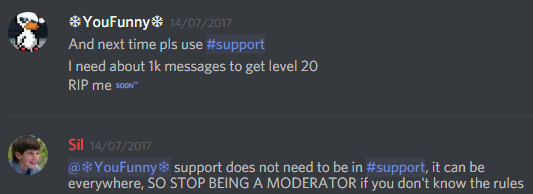
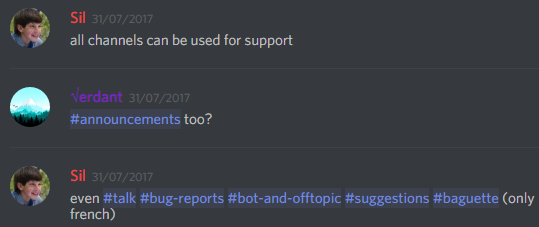
Asking Questions
Users are not restricted to ask in #〉volunteer-support
It’s preferred they ask in support channels but we don’t mind for this happening outside there
So don’t feel like minimoding and backseat moderating telling them what to do!
https://cdn-longterm.mee6.xyz/s/asking.png
https://cdn-longterm.mee6.xyz/s/asking2.png
 short thorn
late stirrup
this is bug report section and he asked dumb question what he can ask anywhere. ...
short thorn
late stirrup
this is bug report section and he asked dumb question what he can ask anywhere. ...
Arguing isn’t ganna get your question answered
 visual temple
late stirrup
There is problem with message area in reaction role https://i.postimg.cc/BnWd6MY...
visual temple
late stirrup
There is problem with message area in reaction role https://i.postimg.cc/BnWd6MY...
Hey!
Could you please send your server ID?
buoyant moon
late stirrup
why you ask this in bug reports??? thats reason why no one respond on my problem...
Robot Statistics bug How to solve❓
late stirrup
visual temple
Hey!
Could you please send your server ID?
i wrote you message
I want say thanks to @visual temple , very fast fix problem
 candid saffron
Kan turksh
@buoyant moon
 sweet bloom
For temporary channels i can't set the bitrate higher than 96 in the mee6 admin ui - but my server supports much higher bitrates 😦
buoyant moon
late stirrup
I want say thanks to <@!224188754946949130> , very fast fix problem
bot Statistics bug,Because the bot is no 20 minutes to update statistics❗
 naive pulsar
MEE6 goat of booot
 hardy void
Why is the "Music" plugin for the premium version, but when you install the bot, this plugin is installed automatically? I am Russian
 brisk shell
muzies udeliat new pvp
metin
muzies zaciet
a poradnie s costumes a wignels atd ostahnie do toho zaciet
 spare scarab
Hi, I just activated Mee6 Memberships and I have folks who are signing up but are not being auto-assigned the perk role I have mee6 set up to assign them after they pay me
can anyone help me with this @visual temple @wary dome
 uncut thorn
Cool
hushed meadow
hushed meadow
Hey my MEE6 won't play music. Any idea?
Bump ?
i don't see my answer
buoyant moon
hushed meadow
Bump ?
Do you have premium?
 lyric juniper
.
potent stirrup
Where is my premium role? i have mee6 premium.
buoyant moon
Hi I enabled Mee6 welcome messages, and for some reason, it thinks we have 140 members instead of 136. It’s really disheartening when I realise how many we actually have and I don’t know how to fix it I’ve tried disabling it and reenabbling it Idk what to do pls help
buoyant moon
<@&892137271430627330> nitro scam
 brazen cape
I'm having an issue with custom bot. I copy and paste the token as requested, but it just keeps telling me to input the token every time I try to change the Avatar or name. Any recommendations? Thanks guys.
dire yarrowBOT
Custom Bot — Troubleshooting
Experiencing issues setting up the Custom Bot addon?
Don't worry, here is a list of common problems and their solutions that might help you out.
• Privileged Gateway Intents must be enabled:
If you have not enabled the Privileged Intents yet, MEE6 will not accept the bot token. Please enable them and attempt again, here is an article on how to do so:
https://mee6.xyz/tutorials/how-to-enable-intents-on-your-custom-bot
• Custom Bot and Two-Factor-Authentication:
If the Premium Custom Bot isn't moderating a server properly, it may have the Highest security setting. This means that the owner of the bot will need to have 2FA (Two-Factor-Authentication) enabled for their Discord account:
https://mee6.xyz/tutorials/custom-bot-and-2-factor-authentication
• OAuth2 Code Grant should be disabled:
Some users may enable the "Requires OAuth2 Code Grant" option in Discord's Developer Portal accidentally. This is unnecessary and might cause problems inviting your bot, disable it under the "Authorization Flow" section in the "Bot" tab here:
https://discord.com/developers/applications
brazen cape
dire yarrow
Awesome thank you everything is working now.
buoyant moon
Anyone else having issue with Mee6 not updating Stats?
I've been told by a developer that it's a known issue in some servers
Any fix that we have to do on our end, or is the that they have to sort it out?
they have to sort it out
though make sure the bot can manage channels
It does, it was working before, but now I had to remove that channel and add it again. Hopefully they will fix it soon.
dire yarrowBOT
 Hambone#6321 has been warned
Reason: Bad word usage
 fast shell
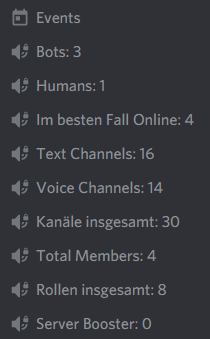
languages are mixed in <statistic channels>...
https://i.imgur.com/q8DNp6y.png
used language is german
 stray sluice
fast shell
languages are mixed in <statistic channels>...
https://i.imgur.com/q8DNp6y.png
u...
stray sluice
fast shell
languages are mixed in <statistic channels>...
https://i.imgur.com/q8DNp6y.png
u...
What exactly do you mean by mixed?
Do you mean that some aren’t translated?
fast shell
stray sluice
Do you mean that some aren’t translated?
Im besten Fall Online: 4 + Rollen insgesamt: 8 + Kanäle insgesamt: 30 are german rest is english
Yes exactly
stray sluice
Then that means the team hasn’t fully translated it
fast shell
fast shell
languages are mixed in <statistic channels>...
https://i.imgur.com/q8DNp6y.png
u...
language doesn't change/update on the channels when setting it to english via the dashboard.
 lofty shale
I'm having an issue with the website, everytime i try to click something so that i can moderate the server, the whole page just goes white
dire yarrowBOT
 Cwacky#5951 has been warned
Reason: Bad word usage
 Raven_Void#8668 has been warned
Reason: Bad word usage
 north marsh
<@&892137524783349781> The bot no longer deletes invites posted in my server by spam accounts.?
shrewd scaffold
north marsh
<@&892137524783349781> The bot no longer deletes invites posted in my server by ...
Hi that's a known issue and i believe the staff is working on it.
 limber cove
Hi the reaction role on my server is not working, I am using custom bots. Let me know if you guys have any issues about this
 tacit nymph
Economy Boosts timezone have bug
my MEE6 bot Timezone is settings Asia/taipei
but the Economy Boosts timezone is not follow my server's time zone(Asia/taipei) ,the Economy Boosts default timezone is UTC/GMT -8 (Los Angeles timezone)
 warped mesa
instagram plugin not working @visual temple
dire yarrowBOT
 Weyyess#7080 has been warned
Reason: Bad word usage
north marsh
shrewd scaffold
Hi that's a known issue and i believe the staff is working on it.
Thank you! Hopefully resolved soon!
 foggy lynx
My Mee6 Bot wont let Moderators type in Mee6 Commands (Not Custom Commands)
 fresh owl
My runes are not working please help MEE6
shrewd scaffold
@fresh owl you aren't in the right server. Please keep this channel regarding the bot support.
buoyant moon
Hola, alguien habla español ?
Quisiera saber cómo puedo eliminar chats por aquí por discord
 bronze socket
Hello, the give-xp command is not working
quaint agate
bronze socket
Hello, the give-xp command is not working
Please explain not working
bronze socket
quaint agate
Please explain not working
it is show thinking
quaint agate
Can you try the ! command version?
dire yarrowBOT
 Giorno#6996 has been warned
Reason: Bad word usage
Giorno#6996 has been warned
Reason: Bad word usage
 dense bobcat
@wintry dagger
buoyant moon
.
dire yarrowBOT
 playmaker#7968 has been warned
Reason: invite
 stiff field
buoyant moon
Quisiera saber cómo puedo eliminar chats por aquí por discord
stiff field
buoyant moon
Quisiera saber cómo puedo eliminar chats por aquí por discord
Hola, eliminar el chat ¿qué exactamente? ¿Te refieres a cómo eliminar los mensajes del chat usando el comando !clear?
long dawn
dense bobcat
<@!259456236406308894>
<@&892137271430627330> cold ping ^
 naive dust
 cosmic helm
Thank you
long dawn
Oh ok
dire yarrowBOT
 Stammeld#8077 has been warned
Reason: Bad word usage
stiff field
long dawn
<@&892137271430627330> cold ping ^
We already know earlier. They are no longer in this server. But thanks for the report anyway
buoyant moon
stiff field
Hola, eliminar el chat ¿qué exactamente? ¿Te refieres a cómo eliminar los mensaj...
Si pero eliminar mis mensajes y los de el, eliminar el chat completo
 civic island
My bot stopped updating youtube subscribers.
stiff field
Si es el administrador o el propietario de ese servidor, puede utilizar ese comando para eliminar mensajes en el chat. Por ejemplo:
!clear (cuántos mensajes desea eliminar), o, !clear (cuántos mensajes desea eliminar) (mencionar un miembro)
Tenga en cuenta que mee6 no los eliminará si los mensajes tienen 2 semanas de antigüedad 🙂
@buoyant moon ^
buoyant moon
None of the statistics channels are working this is happening with multiple people. In my server, it hasn't been updated in nearly 2 days. Please fix this ASAP I'm about to launch and need active statistics running.
 rancid badger
Hello all! Is it normal to have a long delay 30mins+ with the Instagram connector?
sometimes even 1hr delay...
buoyant moon
Eso luego puedo hacer del de el teléfono?
buoyant moon
rancid badger
Hello all! Is it normal to have a long delay 30mins+ with the Instagram connecto...
It's a known issue
#〉status-updates message
rancid badger
buoyant moon
It's a known issue
https://discord.com/channels/159962941502783488/6702086927291...
Thanks, any ETA on fix?
dire yarrowBOT
:stopwatch: No ETA :stopwatch:
• MEE6 Staff does not give any ETA (Estimated Time Of Arrival) for any features.
• We appreciate your patience
Note: Soon™ does not represent any time in the past present or future. We do not guarantee that Soon™ will be here before the end of time.
dire yarrowBOT
 Astolfo#3109 has been warned
Reason: Bad word usage
 vestal spire
so...nothing is working. No commands, nothing. The bot has been added and I can see it in the top right "online" list, but nothing works.
I have restarted discord, to no avail.
 wooden mountain
kick and re-invite, starting from https://mee6.xyz/dashboard
Install our Discord bot to set up leveling, moderation, music, Twitch, YouTube, and Reddit notifications for your Discord server.
(don't ping me for continiouations of this as i'm going offline now)
vestal spire
done, and still not working.
stiff field
buoyant moon
Eso luego puedo hacer del de el teléfono?
Lo siento, no vine a comprobar aquí de nuevo.
Usar su teléfono también estaría bien para hacer
buoyant moon
Por casualidad sabe cómo hacerlo por el teléfono ? Y disculpe las molestias
stiff field
Todo está bien, no me molesta.
Si el complemento moderador y el comando !clear están habilitados en el panel de control de mee6, ahora puede hacer !clear para eliminar mensajes. Recuerde cómo usar el comando.
!clear (cuántos mensajes desea eliminar), o !clear (cuántos mensajes desea eliminar) (mencionar un miembro)
 tight dust
bug report
in "give a role to new users" it won't work i have put mee6 above every role but it gives me the message that mee6 role is to low
(i can't send the pictures for some reason)
but anyway i hope this problem can get solved soon
dire yarrowBOT
 GreenEliphins#9793 has been warned
Reason: Posted an invite
buoyant moon
tight dust
bug report
in "give a role to new users" it won't work i have put mee6 above ev...
refresh the dashboard
 mystic portal
hola
buoyant moon
and make sure you saved after moving it's role up
mystic portal
alguien me puede atender
stray sluice
mystic portal
alguien me puede atender
Sí, ¿en qué necesitas ayuda?
buoyant moon
stiff field
Todo está bien, no me molesta.
Si el complemento moderador y el comando !clear ...
Mil gracias
mystic portal
stray sluice
Sí, ¿en qué necesitas ayuda?
Resulta que cuando ago el canal de verificacion
tengo rol de
Verificado y de Sin Verificar
Y Cuando alguien se verifica le da el rol de Verificado
Pero no le quita el rol de Sin Verificar
me podrias ayudar
stray sluice
Sí, muéstrame cómo configuras el rol de reacción en el tablero con una captura de pantalla
mystic portal
Podriamos hablar MD por el tema del tiempo?
stray sluice
en dms?
mystic portal
Direct Message
stray sluice
OK
mystic portal
Ya te hable me respondes por Direct Mensagge
 grave dove
on the MEE6 plugins i cant get eny plugins it only lets me stay at dashboard every time i try to go to enything it puts me in a white screen
 dusk cradle
The Statistics Total Members counter stopped updating a few days ago. If I re-enable it it will get the correct count but does not update after re-enabling.
Nothing has changed AFAIK with my setup/server.
dire yarrowBOT
MEE6 says I have no servers, but that's not true...
Well, that can be caused by:
‣ You don't own any servers
‣ You don't have Administrator permissions or a bot master role on any server you're on
‣ You're logged on with a wrong account (the most common problem)
Third one can be fixed by following these steps:
1. Logout from Discord in your browser (not installed client or mobile app)
1.1 Open https://discordapp.com/app in your browser
1.2 Click on \⚙ icon (User Settings)
1.3 Scroll down, click Log Out and confirm action
2. Logout from MEE6 website
2.1 Open https://mee6.xyz in the same browser
2.2 Click on avatar icon in upper right corner
2.3 Click Logout
3. Login using correct account
3.1 Open https://mee6.xyz and click Login button in upper right corner
3.2 In new window login to Discord. After that you will be redirected back to MEE6 website
3.3 That's all! Now you're using correct account and MEE6 website lists servers where you can modify his settings
P.S. If you're on mobile and some elements are not visible, enable Desktop site mode or switch screen to Landscape (vertical) mode.
shrewd scaffold
dire yarrow
@grave dove please see above.
buoyant moon
dusk cradle
The Statistics Total Members counter stopped updating a few days ago. If I re-en...
Yeah, the devs are aware of some statistics channels not updating.
dusk cradle
Ah got it thanks!
 woeful pike
"Send a message when a user joins the server" and the welcome card always deactivates itself. So these wont get sent to my discord. Also the Economy plugin does not seem to work right for me. If i activate it, i can use slash commands like /shop, but will get the message "Unknown SlashCommand" - any help?
buoyant moon
woeful pike
"Send a message when a user joins the server" and the welcome card always deacti...
Believe it means that the bot can't send messages in the welcome message channel
 faint thicket
Bot stopped refreshing Statistics channels, can you check that out?
also, for some reason, I have no role, should have premium 😉
buoyant moon
Done!
Looks like MButcho manages a premium guild. I assigned the role
quaint agate
faint thicket
Bot stopped refreshing Statistics channels, can you check that out?
Please go to the plugin -> click on the channle -> save and close
faint thicket
quaint agate
Please go to the plugin -> click on the channle -> save and close
working 🙂
thank you 👍
 clear walrus
reason doesn't work for ban when using slash commands
stray sluice
clear walrus
reason doesn't work for ban when using slash commands
What happens when trying to ban with slash commands?
clear walrus
 drowsy venture
<#159962941502783488> 🙂
drowsy venture
<#159962941502783488> 🙂
idk what ur saying
clear walrus
stray sluice
What happens when trying to ban with slash commands?
they still get banned, but it says no reason provided even though a reason was provided
drowsy venture
clear walrus
idk what ur saying
I mean the slash commands as my knowledge down check #〉status-updates
stray sluice
Can you show me command usage
stray sluice
drowsy venture
I mean the slash commands as my knowledge down check <#670208692729151510>
Not anymore
 crisp flint
my bot dont give autorole permissions, what i can do?
clear walrus
yes give me a sec
crisp flint
crisp flint
my bot dont give autorole permissions, what i can do?
have a command reload?
clear walrus
stray sluice
Can you show me command usage
i'm not able to send screenshots
may I DM them?
crisp flint
hello, i need help, my reaction role it's not working anymore
north marsh
<@&892137524783349781> Any information as to when the bot will be able to delete spam server invites again? It's been down again for days now.
long dawn
north marsh
<@&892137524783349781> Any information as to when the bot will be able to delete...
Hi there! The devs are still working on it! No ETA tho.
 deft flume
that's the most cursed channel of this server
 rotund cliff
Music quiz is not working on my server. It starts but the music doesn't play.
 lusty depot
rotund cliff
Music quiz is not working on my server. It starts but the music doesn't play.
lusty depot
rotund cliff
Music quiz is not working on my server. It starts but the music doesn't play.
On our server, it stopped after we passed a song. But when we tried to start another quiz, it said there was one already happening.
deft flume
oh
 spark yacht
i cannot delete a timed embed i made jsut loads on deleted button and nothing happens
 idle sphinx
On the website on my phone when I am on the home page of the site. When I open the menu by clicking on my avatar I cannot click on the link my servers. This selects the menu below the plugin.
A screenshot would help but I can't send one
dire yarrowBOT
DannyPlayz#6441 has been warned
Reason: Bad word usage
DannyPlayz#6441 has been warned
Reason: Bad word usage
buoyant moon
the responses to commands I’ve made dont show up in the chat, but they show up in my notifications :(
 mild epoch
So for some reason me and some others in a server have stopped gaining xp for no apparent reason, we talk in the same channels as others who still get xp so is there a way you can fix this?
dire yarrowBOT
If I appear to be denying your hard earned experience, or !rank and !levels aren't working properly...
- Make sure Levels is Enabled.
- Check that you do not have a banned role in the levels configuration, and that you aren't in a banned channel either.
- Make sure that I can see the channel you are talking in with "Read Messages" and send messages with "Send Messages".
dire yarrowBOT
 FrosT#7813 has been warned
Reason: Bad word usage
dire yarrowBOT
 Neissie#4692 has been warned
Reason: Bad word usage
 Zizow#2468 has been warned
Reason: Bad word usage
 𝓂𝑒𝓇𝒸𝓎#2704 has been warned
Reason: Bad word usage
 dire sand
on joining this channel i see:
"5 blocked messages - show messages"
any idea why that is
the MEE6 bot is doing that for me too
on my server
shrewd scaffold
dire sand
on joining this channel i see:
"5 blocked messages - show messages"
heya, its bcz you have blocked messages from MEE6
You need to right click MEE6 pfp -> click unblock
dire sand
on my server? or somewhere else?
shrewd scaffold
dire sand
on my server? or somewhere else?
you have only blocked response from MEE6 so even if you right click it from your server, it would be the same doing it from anywhere else
shrewd scaffold
no problem
 warm drift
It seems there’s some kind of bug I have premium and the discord invite link I have it delete message and warn member and it doesn’t do anything at all I reported this issue three days ago to support team and I have yet to hear back if they have fixed the issue
long dawn
warm drift
It seems there’s some kind of bug I have premium and the discord invite link I h...
Hey there! The devs are still working on fixing the invite links automod! No ETA tho.
warm drift
long dawn
Hey there! The devs are still working on fixing the invite links automod! No ETA...
Thank you I was just checking to see if there was a response can you send me a DM when it’s fixed because I do know that there’s a lot of comments that go in these channels
long dawn
warm drift
Thank you I was just checking to see if there was a response can you send me a D...
I will have the staff DM you. Or they will put in #〉status-updates that it’ll be fixed.
 dusk quartz
Hello, my mee6 gives the position (roles) when it wants, new users enter and sometimes they don't receive their new position (roles) , sometimes the mee6 gives the position (roles) , but it's when it wants and I always need to give the permission (roles) manually.
 lone linden
I still trying. Give a role to new users. Its not working i tried and it still comes up with an error message. If i have to restart my discord server t I'm going to be so furious... this is the 1st time I've seen this message so if anyone knows what to do when this message pops up. DM me or something. The role I'm trying to put is @Bronze but its not working. So is the other roles. Please someone help! Thank you.
shrewd scaffold
lone linden
I still trying. Give a role to new users. Its not working i tried and it still c...
Channel hop, answered in #〉volunteer-support
 timber raft
Why is mee6 always so slow
 abstract verge
Hello, I can't get the information from my server, it keeps loading and when I look at the request for the API it tells me this: {"error":{"message": "Guild not found"}, "status_code":404}
 ripe fractal
Hello, our server stats recently stopped working. I got twitter stats working again by going in to the statistics channel and hitting save, which worked for that particular channel. For Instagram, I deleted the counter and teased it but the channel still isn’t appearing in our discord. Any advice on how to resolve? Also, online, peak online and humans don’t seem to updating at all.
 mossy wolf
!rank
dire yarrowBOT
MiLu【みる】, that command is disabled in this channel.
 keen nest
Its using muy old acc and saying i dont have any servers and i cant get it on this acc
shrewd scaffold
keen nest
Its using muy old acc and saying i dont have any servers and i cant get it on th...
Try logging through an incognito window
dire yarrowBOT
MEE6 says I have no servers, but that's not true...
Well, that can be caused by:
‣ You don't own any servers
‣ You don't have Administrator permissions or a bot master role on any server you're on
‣ You're logged on with a wrong account (the most common problem)
Third one can be fixed by following these steps:
1. Logout from Discord in your browser (not installed client or mobile app)
1.1 Open https://discordapp.com/app in your browser
1.2 Click on \⚙ icon (User Settings)
1.3 Scroll down, click Log Out and confirm action
2. Logout from MEE6 website
2.1 Open https://mee6.xyz in the same browser
2.2 Click on avatar icon in upper right corner
2.3 Click Logout
3. Login using correct account
3.1 Open https://mee6.xyz and click Login button in upper right corner
3.2 In new window login to Discord. After that you will be redirected back to MEE6 website
3.3 That's all! Now you're using correct account and MEE6 website lists servers where you can modify his settings
P.S. If you're on mobile and some elements are not visible, enable Desktop site mode or switch screen to Landscape (vertical) mode.
shrewd scaffold
Method 3 to log in using right account ^
shrewd scaffold
keen nest
Wait its still using that acc?🧐
Heya, which account access are you looking for?
The old one or the current one?
 peak cedar
Volume resets to 100% almost every time please save our ears
keen nest
The one im on right now
 proud dragon
Either I can't add me6 to the presentation
woeful pike
I like to set up the economy plugin for my server, but for some reason some of the slash commands do not work. '/coins name' does sometimes work, while others like '/economy' or '/shop' do not at all?
buoyant moon
woeful pike
I like to set up the economy plugin for my server, but for some reason some of t...
try disabling and re-enabling the ones that don't work
woeful pike
buoyant moon
try disabling and re-enabling the ones that don't work
i did that. did not work
buoyant moon
try waiting a day or 2, then try again. There is a limit to the amount of slash commands that can be created daily
 crisp dew
Hi
 shell meteor
the statistics system is not updating
tired meteor
lofty shale
I'm having an issue with the website, everytime i try to click something so that...
Hi, do you still get a error when trying to log into the dashboard? if yes can you try clearing caches or try using incognito mode and see if that helps, if not try firefox or a another device.
buoyant moon
Is the stats channel fixed now?
 jolly folio
mee6 only respond to !rank but not !join
what can i do to allow it to respond to !join?
cuz i tried many times, removing mee6 and adding it
long dawn
Is the !join command enabled?
jolly folio
how to see
long dawn
In the Music Plugin
jolly folio
i think i have enabled everything thing
long dawn
May i see the screenshot?
dire yarrowBOT

MEE6 Links
[1] Dashboard: Click Here
Used for inviting MEE6 and changing your server configuration.
[2] MEE6 Pro: Click Here
Lets you purchase and read more information on what MEE6 Pro offers.
[3] MEE6 Premium: Click Here
Lets you upgrade to a premium experience of MEE6 and also shows you more information and what is included in premium.
[4] Helpdesk: Click Here
Provides a lot of Tutorials in how to setup MEE6.
[5] Variables: Click Here
Check all the variables you can use on custom commands
[6] XP Table: Click Here
Used to see the specific xp amounts for each level.
[7] XP Calculator: Click Here
Shows a Handy calculator to see how many more messages you need to send to reach a desired level.
long dawn
1st link
jolly folio
is music premium?
shrewd scaffold
jolly folio
is music premium?
Yep it is now.
jolly folio
ok thx got it
 merry mesa
I have a problem with Mee6
Not on my server
Because you have to give a reaction to the message mee6 to verify but when it gives a reaction it automatically deletes
Sorry for my English but I use a translator 😅
 honest bridge
Any update on the delay with the Instagram post, feed via bot?
 knotty cypress
Bug with music plugin. User can kick bot from channel 1 while on channel 2 by typing !leave
shrewd scaffold
honest bridge
Any update on the delay with the Instagram post, feed via bot?
Please refer to the announcement in #〉status-updates the team is already investigating it.
#〉status-updates message
dire yarrowBOT
 k a s <3#2942 has been warned
Reason: Bad word usage
 obsidian juniper
Hello, since 1 week the plugins Statistics Channels isn't updating anymore, is it a mee6 problem ? Or the problem is on my side ? 🙂
long dawn
obsidian juniper
Hello, since 1 week the plugins Statistics Channels isn't updating anymore, is i...
Hello, please try disabling and re-enabling the plugin.
obsidian juniper
@long dawn Omg it was simple as that... really ! Thanks you 🙂 Have a good day
long dawn
No problem and you too!
knotty cypress
knotty cypress
Bug with **music plugin**. User can kick bot from channel 1 while on channel 2 b...
Up
 sage schooner
Hi, I'm struggling with what seems to be a new bug with the music bot
After I do a search for music and add a track, it ends up adding two tracks, the song and what seems to be a random video/track
dire yarrowBOT
 Entity#9776 has been warned
Reason: Bad word usage
 loud merlin
Counters are still not working
buoyant moon
Bonjour ! J'ai un petit problème ! Si quelqu'un pourrait m'aider n'hésitez pas à m'en faire part ! Merci a vous !
 valid carbon
heyy! why does when i try to connect mee6 to a new server, it tells me that -> no servers found...
stray sluice
Hey, see the following 
dire yarrowBOT
MEE6 says I have no servers, but that's not true...
Well, that can be caused by:
‣ You don't own any servers
‣ You don't have Administrator permissions or a bot master role on any server you're on
‣ You're logged on with a wrong account (the most common problem)
Third one can be fixed by following these steps:
1. Logout from Discord in your browser (not installed client or mobile app)
1.1 Open https://discordapp.com/app in your browser
1.2 Click on \⚙ icon (User Settings)
1.3 Scroll down, click Log Out and confirm action
2. Logout from MEE6 website
2.1 Open https://mee6.xyz in the same browser
2.2 Click on avatar icon in upper right corner
2.3 Click Logout
3. Login using correct account
3.1 Open https://mee6.xyz and click Login button in upper right corner
3.2 In new window login to Discord. After that you will be redirected back to MEE6 website
3.3 That's all! Now you're using correct account and MEE6 website lists servers where you can modify his settings
P.S. If you're on mobile and some elements are not visible, enable Desktop site mode or switch screen to Landscape (vertical) mode.
valid carbon
thanks that actually helped!
stray sluice
Great, you're welcome! 
valid carbon
😉
buoyant moon
Hello guys, I already posted this in #〉volunteer-support but I got no answers. I have bought MEE6 premium and tried to add more than 2 reaction roles to one message but it does not work. Does anybody have a solution?
stray sluice
buoyant moon
Hello guys, I already posted this in <#176559797888352256> but I got no answers....
How does it not work exactly?
buoyant moon
stray sluice
How does it not work exactly?
Well every time I create a new text with more than 2 reactions and click save the MEE6 bot posts the Text for a split second and deletes it right afterwards.
stray sluice
Deletes the reaction role?
buoyant moon
stray sluice
Deletes the reaction role?
The text with the reactions.
stray sluice
So then yes?
buoyant moon
It doesn't delete the role itself
stray sluice
Here, may you show me what you mean?
buoyant moon
Sure.
Oh wait the menu point is called reaction role.
So yeah it deletes the reaction role right after creation.
buoyant moon
It already has administrator permission from the mee6 role
stray sluice
Are you sure it is the bot deleting the reaction role?
buoyant moon
I don't know what else it could be. It's the only bot and there are no other people on the discord yet.
And when I only do 2 reactions it works just fine.
stray sluice
Try disabling the plugin, refreshing the dashboard, and then re enabling it
stray sluice

 wide blade
I can’t clear forbidden words in the moderator section, tell me how to clear forbidden words, since I entered a lot of characters from this, now there’s nothing to write, I don’t even know how to reset the settings!
 daring idol
our servers slash commands keep sending error codes when using economy functions
any way to resolve this?
sample code:
code: 1e0ee9970b84458a89b6aa70ebb9ff08
seems to happen exclusively with gaming functions (ie !dice, !roulette, !rps), and channels that these functions output to are private.
 formal charm
Whenever I try opening up mee6 dashboard it just keeps on loading and never stops
buoyant moon
Hola
Quiero poner a mee6 en mi server pero cuando quiero agregarlo me dice que no estoy en ningun server
 modest kernel
Can't purge Former Members message with /clear
 thin bobcat
Hello
uncut lily
buoyant moon
Do i have to be the owner of the server?
Don’t need to be the owner, all you need is admin permissions for that server you want to invite MEE6 to.
buoyant moon
uncut lily
Don’t need to be the owner, all you need is admin permissions for that server yo...
Ok
I can't him it says can't find a server
Add
 terse turtle
I can't buy premium why i wanna it
long dawn
terse turtle
I can't buy premium why i wanna it
What’s you mean you can’t buy it?
long dawn
buoyant moon
I can't him it says can't find a server
Hello! Does your role have Administrator Permission enabled?
 gritty moon
error msg MEE6 role above other roles, but MEE6 is above all roles. Any idea on how to fix?
 iron badge
hello guys
i wanted to know why i cant check my servers on site, it writes
Oops, looks like you don't have servers 😦
Are you sure you're connected to the correct Discord account?
terse turtle
long dawn
What’s you mean you can’t buy it?
error bro
long dawn
Had you try clicking on the Premium tab?
 jaunty grove
Hello, I am trying to learn more about what this bot can do for me in my server. I paid for the year subscription but it really hasn't been "all that" help... I customized my bot and since adding this new bot to my server, I am no longer to bold or underline my "reaction roles" messages and I can't understand why. if anyone can help me, I'd really appreciate it.
 magic charm
Youtube is dealy
 ocean tulip
hello, im trying to modify my mee6 in my discord but everytime i click on anything on the website it brings me to a white page. can anyone help with this?
spark cedar
On website it doesnt let you update or upload tier icon in memberships
 tight lily
I deleted recordings on the dashboard and they all came back
 floral light
HUH
 velvet pendant
Im not too sure where to post this but there is a grammar error on
https://mee6.xyz/nft
is states : MEE6 provides more than 20 plugins to help doing that.
When i think they meant this: MEE6 provides more than 20 plugins to help do that.
wild osprey
hello
buoyant moon
wild osprey
hello
Hi
 honest geyser
Hi Everyone! I´ve a small problem with my Statistic Channels. I´ve a Role (Gamer_Valorant) and there are 5 Memers with that role. But the Roles Counter show me 9 Members. When i Check that Member Role in Discord, it says 5 Members too... Anyone with the same problem? <@&892137524783349781>
 left swan
Hey I have a problem with the update of the membership profile picture. When saving to exit it doesn't work, it's stay in the loading state for more then 20min. Already tryied chrome and edge, same result
buoyant moon
<@&892137524783349781> I paid for a premium account but my account is not registered. I receive Oops, I can't find any servers. 😦 Are you sure you're logged into the correct Discord account? So I did not benefit from the 50% boost promised for each server.
 gritty sparrow
<@&892137524783349781> Hello. Why can't i access MEE6 website? Isn't it mee6.xyz?
steel bluff
buoyant moon
<@&892137524783349781> I paid for a premium account but my account is not regist...
Premium does not include the 50% xp boost, Pro includes the 50% xp boost only if the server has it enabled
 digital bane
Hello, it seems like the custom bot feature for mee6 isnt working? I click to enable it and then put in my bot token and then it just disables itself again.
wooden mountain
digital bane
Hello, it seems like the custom bot feature for mee6 isnt working? I click to en...
on the discord dev portal, make sure both intents are enabled
A short tutorial on how to enable intents on your custom bot
 dapper skiff
24/7 mode isn't actually 24/7?
The bot always disconnects after a few hours, no matter if there's actually someone in the vc or not.
24/7 is turned on, and the queue is on loop.
 fossil siren
лл


 slow aspen
wooden mountain
https://mee6.xyz/tutorials/how-to-enable-intents-on-your-custom-bot
slow aspen
wooden mountain
https://mee6.xyz/tutorials/how-to-enable-intents-on-your-custom-bot
am running into the same issue as Wilted above, Intents are enabled already though
stray sluice
dapper skiff
24/7 mode isn't actually 24/7?
The bot always disconnects after a few hours, no ...
See the following
#〉status-updates message
stray sluice
slow aspen
am running into the same issue as Wilted above, Intents are enabled already thou...
What browser and device are you using?
(To get the custom bot in the server)
buoyant moon
Done!
Looks like Mushy manages a premium guild. I assigned the role
slow aspen
stray sluice
What browser and device are you using?
chrome on my macbook
stray sluice
slow aspen
chrome on my macbook
Do you have any ad blockers?
 wide heart
Hey, I would like to report a bug, on a server, we have activated the level function and you get a new role every 10 levels, the issue is, that we activated the function, that you get the old role for example from level 20 deleted if you get level 30, but the bot takes every role away from the user, we had this 3 times
please fix this
slow aspen
stray sluice
Do you have any ad blockers?
I do not, also tried it on Microsoft Edge just in case
it seems like it's getting auto-banned immediately after it joins LOL
one of our other bots filtered out one of the words in its custom name LOL we fixed it, thank you Danny!
 ionic tusk
I would like to report a bug
In the leader board it says I have only sent around 5K messages when I have really sent 22K messages
and someone else on the server, who has sent 24K messages, only 2K messages more, is like 16 levels above me
and 14.3K of their messages were counted
dapper skiff
If you have a reaction role or custom embed set up with the regular bot and then switch to a custom one you're not able to edit the messages/parameters. You have to completely remake the reaction role or embed for it to work again.
Maybe when it's posted by the old bot delete the old message and post a new one?
 glossy raft
The MEE6 Music Cmd is working But I Cant Hear Any MEE6 Sound
buoyant moon
 native spindle
I can't sign into the mee6 bot
native spindle
I can't sign into the mee6 bot
me too
 amber atlas
я один русский
buoyant moon
amber atlas
я один русский
Есть ли у вас отчеты об ошибках?
amber atlas
buoyant moon
Есть ли у вас отчеты об ошибках?
нерт
 stiff oxide
ok so there are dozens of us now who can't login to the dashboard
at least I am not going crazy now
buoyant moon
amber atlas
нерт
Используйте эту ссылку, чтобы добавить MEE6: https://mee6.xyz/dashboard
Install our Discord bot to set up leveling, moderation, music, Twitch, YouTube, and Reddit notifications for your Discord server.
 unborn tusk
stiff oxide
ok so there are dozens of us now who can't login to the dashboard
unborn tusk
stiff oxide
ok so there are dozens of us now who can't login to the dashboard
And I thought it was only on my end that way. Good to be not only having this problem. 😁
 lucid storm
Hi, is the XP module down?
We're having a lot of issue where users are not gaining XP despite participating in chats.
Whilte some users are gaining XP without any issues.
dire yarrowBOT
If I appear to be denying your hard earned experience, or !rank and !levels aren't working properly...
- Make sure Levels is Enabled.
- Check that you do not have a banned role in the levels configuration, and that you aren't in a banned channel either.
- Make sure that I can see the channel you are talking in with "Read Messages" and send messages with "Send Messages".
quaint agate
lucid storm
Whilte some users are gaining XP without any issues.
Please see above.
lucid storm
Levels is active (which is why many people are getting XP)
We have not set any banned role in the dashboard
The bot has full permissions (we are using premium so we have our own bot token via which Mee6 is working) - full admin role is given
 lyric hamlet
statistics channels are not updating automatically
 minor pewter
hi guys, can anyone help me about this message "integration requires code grant"... I want add to my channel a personalized bot from mee6. thank you at all
 buoyant dove
I have two new members joined but it seems like they are not registered in my server?? They don’t got the automatic role and also no welcome text. Is this a bug?
dire yarrowBOT
 ☬ 𝔖𝔞𝔫𝔱𝔞ℭ𝔩𝔞𝔲 ( ͡° ͜ʖ ͡°)#6486 has been warned
Reason: Bad word usage
stiff oxide
Dashboard login still down for me 😦
 tender pollen
Hey! When i try to change a role in reaction roles it wont let me. After pressing "Save" it just discards all changes. First, you have to remove a reaction role, then save, then open it again and only then add a new one. That's the only way it saves changes
 strong raptor
Hello,
I just had a weird experience trying to login on the Mee6 dashboard. Because for some reason I couldn't, specifically with this account. But then I realized and tried de-authorizing Mee6 on my Discord and now it works again.
Very weird, idk if this was only me, but just wanted to share this here. 
strong raptor
stiff oxide
ok so there are dozens of us now who can't login to the dashboard
Oh wait you had the same experience? maybe try what I wrote here above ^^
dapper skiff
tender pollen
Hey! When i try to change a role in reaction roles it wont let me. After pressin...
Have you changed to a custom bot since the last time you updated that reaction role message? Because that's what happened to me. I'm guessing the backend doesn't know what to do since the new custom bot isn't the once who posted the message and therefore can't edit it
stiff oxide
strong raptor
Oh wait you had the same experience? maybe try what I wrote here above ^^
what do you mean by deauthorize on discord?
dire yarrowBOT
 Herbyvor#8787 has been warned
Reason: Bad word usage
long dawn
Why ping
quaint agate
Thanks 
dapper skiff
long dawn
Why ping
n word
long dawn
Ah well user was already banned 🤷🏻♀️
quaint agate
Still needs deleted
dapper skiff
typign is hard
quaint agate
So that’s is for the ping
tender pollen
dapper skiff
Have you changed to a custom bot since the last time you updated that reaction r...
Yeah, i actually did. But anyway, it worked, just with additional steps. Thought thats something devs wanna know about
quaint agate
tender pollen
Yeah, i actually did. But anyway, it worked, just with additional steps. Thought...
Yea, it is definitely something that needs some more user communication.
 charred ginkgo
strong raptor
stiff oxide
what do you mean by deauthorize on discord?
charred ginkgo
strong raptor
stiff oxide
what do you mean by deauthorize on discord?
On your discord settings you have “authorized apps” you can go there and find Mee6 and deauthorize it and trying again logging in to dashboard
 keen kettle
I can't connect to my dashboard on the mee6 site. When I click on log in it makes me connect to discord but then it crashes. Why?
quaint agate
keen kettle
I can't connect to my dashboard on the mee6 site. When I click on log in it make...
Escalating the issue, thanks for the report
 ebon flower
strong raptor
Hello,
I just had a weird experience trying to login on the Mee6 dashboard. Bec...
ebon flower
strong raptor
Hello,
I just had a weird experience trying to login on the Mee6 dashboard. Bec...
The de-authorizing and re-authorizing worked like a charm, thanks!
 fickle crescent
I can't add a bot to my server / Unable to login (I tried Opera GX and Google Chrome)
quaint agate
fickle crescent
I can't add a bot to my server / Unable to login (I tried Opera GX and Google Ch...
Known bug devs are working on it
fickle crescent
quaint agate
Known bug <:SAD6:793828260025860096> devs are working on it
ok 
buoyant moon
@quaint agate is any bug affecting auto roles or spam filters ours seem to have gone funny past 24 hours
 raven idol
Hey Guys,
I released YouTube Videos with the "premieres" function and the connector didn't post this videos in my discord channel. If I release videos without this, it's fine. Can you help me please with that?
stiff oxide
Dashboard login works, I did nothing, Tis a bit slow but it loads again! yay!
 native smelt
The Economy Boost times are not reading properly. My Friday 5pm boost has already started. Can someone help?
 neat radish
 bright raft
Why will it stop playing the music while I have opened 24/7 mode?
 hollow bough
Idk if this is a bug or not but my friend has MEE6 in their server and it just will not work, it won't reply to commands at all or anything and I don't know what to do this has never happened to me in any other servers, idk if it's a bug or something with her server but I need help figuring it out
 lofty heart
hollow bough
Idk if this is a bug or not but my friend has MEE6 in their server and it just w...
lofty heart
hollow bough
Idk if this is a bug or not but my friend has MEE6 in their server and it just w...
most likely not a bug, just not correctly set up, see this 👇
dire yarrowBOT
List of required permissions
View Channels, Read Message History and Send Messages
Are always needed
Manage Messages
Needed for !clear, !slowmode commands, Delete command usage option in commands, Temporary Channels plugin and auto-moderator in general
Manage Roles
Needed for role rewards, !mute/!tempmute commands, Auto welcome role, Custom Commands role actions, Birthday role, Live Streaming role, Reaction Roles, and Role items in economy
I also need a role above the role I'm trying to give in hierarchy: Server Settings → Roles
Manage Channels
Needed for !mute/!tempmute and !slowmode commands and Statistics, Temporary Channels plugins
Kick Members and Ban Members
Respectively needed for !kick and !ban/!tempban commands
I also need a role above highest role of the member to kick or ban
Attach Files
Needed for !rank command to show the Rank card
Otherwise it will fallback to an embed response
Embed Links
Needed for the Embeds plugin, Streamer notification embeds and any other plugin or command that sends a rich embedded message
Otherwise it will fallback to a plain text response
Use External Emojis
Needed for correct displaying of MEE6 emojis in messages
Connect and Speak
Needed for Music , Music Quiz and Record plugins
Move members
Required to move members on Temporary Channels (Hubs)
Side note about Custom Bot™️
Following permissions require two-factor authentication requirement if server-wide two-factor authentication is enabled: Kick Members, Ban Members, Manage Channels, Manage Messages, Manage Roles, Manage Webhooks and Administrator.
Meaning enabling the said permissions won't have any effect if owner of the bot account doesn't have two-factor authentications enabled on their account.
bright raft
<@&892137524783349781> Why will it stop playing the music while I have opened 24/7 mode?
buoyant moon
bright raft
<@&892137524783349781> Why will it stop playing the music while I have opened 24...
not giving auto role
<@&892137524783349781> why is mee6 not giving auto role?
limber knoll
buoyant moon
<@&892137524783349781> why is mee6 not giving auto role?
either no auto role selected in the welcome plug-in, or mee6 doesn't have manage role or mee6 is below the users roles and the roles it's giving
buoyant moon
limber knoll
either no auto role selected in the welcome plug-in, or mee6 doesn't have manage...
ohkk got it, tysm
 summer gull
It should be marketed that the recording feature does not work well or that it is unreliable. It’s marketed as a premium feature that allows up to six hour recordings, but I’m only finding out now — after buying a lifetime premium membership — after the bot failed tonight, that this has been reported before here and even mods suggest not relying on it.
Had I known this was a faulty feature beforehand, I would not have relied on it tonight. It’s a shame, lesson learned, but it’s a bug within itself — and one that should not be marketed as a “feature” when it does not reliably work as such
 charred ginkgo
Hello. I can't upload a icon picture for membership plans. It keeps loading but does nothing.
visual temple
charred ginkgo
Hello. I can't upload a icon picture for membership plans. It keeps loading but ...
Hi! This is probably because someone is already subscribed to the tier. In that case you can't make any changes.
I'll check if we can make a message pop up for image changes too 
Fixing rn 🙂
dire yarrowBOT
 Kalaszka#3973 has been warned
Reason: Bad word usage
 KERIV#6969 has been warned
Reason: Bad word usage
 fair stirrup
Hi there, I'm trying to set the Mee6 role to be the highest but even after dragging it to the top it still shows the error
visual temple
charred ginkgo
Hello. I can't upload a icon picture for membership plans. It keeps loading but ...
Hi, even better; you can now change the icons 🙂
quaint agate
fair stirrup
Hi there, I'm trying to set the Mee6 role to be the highest but even after dragg...
Please refresh he dashboard.
fair stirrup
quaint agate
Please refresh he dashboard.
I refreshed but still couldn't 😦
 jolly aspen
Hey, I've only just turned on the reddit connector & added some to my channels.
Does it only post-share the images, not the videos?
All I seem to be getting is images, or "msg been deleted" (as I'm guessing it posts before reddit moderation). Which kind of clogs up the channel with trash. - Any suggestions welcomed tyia.
quaint agate
fair stirrup
I refreshed but still couldn't 😦
Can you screen shot the error you get?
fair stirrup
i couldnt attach the screnshot

 quaint agate
fair stirrup
quaint agate
fair stirrup
And are you using MEE6 or the custom bot?
fair stirrup
quaint agate
And are you using MEE6 or the custom bot?
Is there a difference?
quaint agate
fair stirrup
Is there a difference?
There is a difference in what you have to do, see what rem said above.
 fresh smelt
Hello I add this bot to my channel. Has all permission exapt administrator. When I type /rank command there is message:"XMARK6 You aren't ranked yet. Send some messages first, then try again." I type several messages but it isn't appear
shrewd scaffold
fresh smelt
Hello I add this bot to my channel. Has all permission exapt administrator. When...
Make sure that the everyone role has the perm to use external emojis.
dire yarrowBOT
 Davi10#6193 has been warned
Reason: Bad word usage
 leaden kestrel
Buttons aren't working on the !help commands list. 
dire yarrowBOT
 Vys#6877 has been warned
Reason: Bad word usage
 Kaixto <33#2116 has been warned
Reason: Bad word usage
dire yarrowBOT
 Nusrat#8117 has been warned
Reason: Bad word usage
 Zenzy༒#6400 has been warned
Reason: Bad word usage
 CEO Of Chicken Nuggies#2629 has been warned
Reason: Bad word usage
dire yarrowBOT
 Firman#2939 has been warned
Reason: Bad word usage
 wintry dagger
native spindle
I can't sign into the mee6 bot
wintry dagger
native spindle
I can't sign into the mee6 bot
Hi there, this issue should have been fixed, could you please try again? Thanks ❤️
 obsidian mason
Hello. This is not the first time I have encountered the problem of updating statistics. The numbers don't change, last time I solved it by resaving the counters. It doesn't help right now
dire yarrowBOT
 SAGE#7956 has been warned
Reason: Bad word usage
dire yarrowBOT
 xFulltimeNoobx#2125 has been warned
Reason: Bad word usage
long dawn
obsidian mason
Hello. This is not the first time I have encountered the problem of updating sta...
Hi there! Can you please try disabling and re-enabling the plugin?
obsidian mason
long dawn
Hi there! Can you please try disabling and re-enabling the plugin?
Wait a sec, i will try. Maybe thiss will help...
dire yarrowBOT
 Chyzara#2655 has been warned
Reason: Bad word usage
 Manjiro Sano (Mikey)#9088 has been warned
Reason: Bad word usage
 ember torrent
Everyone seems to have access to the mee6 bot on my server, how do I fix it?
wooden mountain
define "have access"
what do you mean exactly with that?
- can use a command
- can access the dashboard
ember torrent
wooden mountain
what do you mean exactly with that?
- can use a command
- can access the dashboa...
Access to it settings
obsidian mason
long dawn
Hi there! Can you please try disabling and re-enabling the plugin?
Thx a lot
wooden mountain
ember torrent
Access to it settings
that means that they have the ADMINISTRATOR permission or a role set as bot master role, remove that permission/that role and they won't have access anymore
go to the settings page to see what role gives admin/bot master access
ember torrent
wooden mountain
that means that they have the ADMINISTRATOR permission or a role set as bot mast...
OK thanks. Will do that ASAP
 knotty flicker
Hi. We seem to have an issue with the temporary channels in our discord server. When someone enter a hub channel, he is disconnected from the hub, but the temporary channel is not created. I tried to create a new hub (for troubleshooting purposes) on the dashboard, but I have an error message when I do so.
 knotty flicker
Ok I think I found what happened. Our server owner activated the A2F for moderators in our server settings earlier. It seems that this is the cause. I can't use moderation commands either, like clear. Is there a way to fix this with the mandatory A2F for moderator roles enabled ?
wooden mountain
the account that created the custom bot needs to have 2FA enabled as bots inherrit 2FA status of there creator
@knotty flicker ^^
knotty flicker
wooden mountain
<@!533375630625079302> ^^
Thanks for you response. The 2FA is active on his account, but I think it wasn't when he created it. Maybe we need to recreate it then ?
wooden mountain
knotty flicker
Thanks for you response. The 2FA is active on his account, but I think it wasn't...
no, should be fine then
knotty flicker
wooden mountain
no, should be fine then
Ok I thought he used his own account to invite the bot but he used an alternate account witch does not have 2FA. The issue is fully solved, thanks for your time 😉
wooden mountain
no problem 😄
leaden kestrel
Hey guys buttons aren't working still :/

On the shop and custom command lists it does
 wooden mountain
knowing how the devs work, that's probably limited to a couple servers while they are testing it
and buttons stop working after a set time, so they might just have expired
leaden kestrel
wooden mountain
and buttons stop working after a set time, so they might just have expired
no it's each list I have with buttons won't work, they used to always work. I try and move the page as soon as I use the command so I know it's not timing out.
wooden mountain
interesting, i will let the MEE6 team know
could you give your server ID? or MEE6 dashboard link
wooden mountain
thanks, forwarded to the team to have a look at it
tired meteor
looks like i can repo it, so hopefully it should be a ez fix for them
wooden mountain
same, wouldn't have reported it otherwise
 tropic tree

Tried everything from clearing items, to shutting off economy, logging out of browser… nothing will fix this bug
Stuck on page 1 of !shop no matter what I do
wooden mountain
we are aware and dev team has been informed
tropic tree
Thank you any fix for now?
wooden mountain
no
visual temple
leaden kestrel
Hey guys buttons aren't working still :/
Could you try again please?
wooden mountain
hey Rem, can BankkRoll also try again?
(and can the slowmode be changed to something less?)
tropic tree
You want me to try again?
visual temple
tropic tree
what is your server ID?
tropic tree
visual temple
what is your server ID?
922298138797170759
visual temple
could you try again?
tropic tree
Now when I try it doesn’t even show shop, idk if your doing somthing backend
visual temple
hmm
wooden mountain
did you restart the shard? Rem


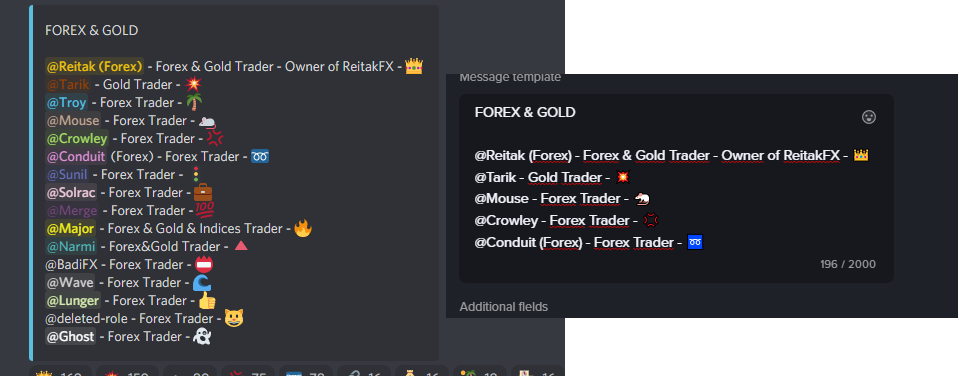


 tropic tree
Okay Thank you both for working on this
Shop comes up again now. But same problem
“This interaction failed”
Failed to revive server data for the guild . Kicked from mee6 page
visual temple
Our team is on it
tropic tree
No problem thank you
visual temple
ETA of fix is <1 hour 😄
tropic tree
Thank you
Is my@bot down for the time being? I see I Caint use any commands, it just said “failed to respond”
tropic tree
Thank you
leaden kestrel
visual temple
Could you try again please?
Still no
tropic tree
Also BUG REPORT
First setting up economy the items listed as static are not able to be saved if you switch to usable item no matter the setting you do.The [save] button is greater out You must create a whole new item usable
tropic tree
leaden kestrel
Still no
They are working on it now
Think we are both here for the same thing, economy correct?
Well the buttons for embedded messages itself
tropic tree
visual temple
ETA of fix is <1 hour 😄
.^
 frosty smelt
There is an issue with the counters, they are not auto refreshing the stats.