#〉bugs-reports
2 messages · Page 116 of 1
 full anchor
 faint dome
Strange situation it is
full anchor
Yeah , but it’s kinda normal for me and they’re level to be like that but I dont know why they’re level is full on speed running
faint dome
The most probable cause would be that they have a mee6 pro sub, which gives a 50% xp boost… but they don’t
I also looked for xp-banned roles and give-remove-xp commands but no luck on that
 umbral mesa
Hey guys, I can barely speak english so I'm sorry if I say something wrong or don't understand something that you say, but I need help with the birthday
faint dome
Hmm?
umbral mesa
code 361f27b9dd814689990c726d3736e9e9
faint dome
Yup that’s a known translation issue
If you really need that command you’ll need to use another language for mee6 (under the Settings tab)
umbral mesa
Yeah it says that it's in spanish, so the commands should be in spanish too? like !recuerda-cumpleaños or something like that?
sorry to bother you btw
faint dome
No I mean
You need to use mee6 in another language… like English, french, Chinese, whatever
Because the specific Spanish answer for that specific command is broken and leads to an error
umbral mesa
Oh thank you so much! I'll try that, thank you for your help ❤️
 eternal pewter
When the bot plays music it spikes the songs and its quiet annoying making it not enjoyable at all
In the past 6 mins it spiked around 52 times
And its been happening from day 1
 lime token
I've blacklisted all my channels but one, but users can still use all the commands in any blocked channel with the economy plugin? Wondering if this is a bug, or i'm doing something wrong?
 dire yarrowBOT
 ATee#4311 has been warned
Reason: Bad word usage
 honest tide
??????ß
 nova wren
Help say me but i have a group and this say me but say wath i no have
 stray sluice
The music is seizing out every now and then for the music plugin
 scenic ridge
Is there a twitch auto post bug and if so is it being looked into?
nova wren
Be spam send mi group?
stray sluice
scenic ridge
Is there a twitch auto post bug and if so is it being looked into?
They fixed it recently so it should be alerting users now
 dreamy drum
stray sluice
They fixed it recently so it should be alerting users now
dreamy drum
stray sluice
They fixed it recently so it should be alerting users now
I had a streamer go live around 9:30AM PST and it still wasn't alerting. Not sure how recent the fix was though...
stray sluice
try deleting and re making that channel for twitch and see if that works
dreamy drum
It just notified two hours later lol. Maybe just catching up from repairs. I'll see how it goes for our other streamers. Thank you!
 red forge
I noticed that too it posts when I'm live but adds "%7D!" at the end of the link which it causes an error
red forge
 wooden mountain
remove the }
wooden mountain
remove the }
appreciate it will try it out
dire yarrowBOT
 Robert S#2783 has been warned
Reason: Bad word usage
 boreal totemBOT
👌 User 630804334812200960 has been banned for spam links.
dire yarrowBOT
 ExoloticNinja005#0888 has been warned
Reason: Bad word usage
 cosmic crystal
mee6 doesn't delete bad words from moderator + rank users
dire yarrowBOT
Bad Words Problems
- Make sure Bad Words have been added.
- Regular users, who are not allowed to swear, must not have an Allowed Role.
- Channels that people shouldn't be able to swear in must not be in the Ignored Channel section
* MEE6 does not warn Owner, Admins, Bot Masters or users with a Moderator Role.
How to add Bad Words:
https://cdn.mee6.xyz/s/bad_words.gif

 twin tendon
@cosmic crystal ^
cosmic crystal
ty
full anchor
faint dome
The most probable cause would be that they have a mee6 pro sub, which gives a 50...
sorry for this late reply but , they don't have that , they checked too
dire yarrowBOT
 Iammethe24, that command is disabled in this channel.
 spare relic
whoops
 odd leaf
Hi! I'm from "MINECRAFT ESPAÑOL" Discord server...
I need to report that MEE6 doesn't process the bans in our server. We tried to ban with (!) prefix, and also with slash commands.
We've seen that this only affect to bans, because we can still warn, mute or kick.
 limber knoll
@odd leaf depends if mee6 is above the users highest roles
dire yarrowBOT
Role hierarchy is important for me to give out roles. Oh and also Manage Roles perm:
https://cdn.mee6.xyz/s/fix_hierarchy.gif
 limber knoll
discord is if a user has one role above a Moderator or bot they cannot ban or kick that user or give that user roles
odd leaf
limber knoll
<@656524657327079425> depends if mee6 is above the users highest roles
It always worked.
We use MEE6 since 2019
I mean. We've tried to ban in other servers, and it works.
But if we try in the big one, MEE6 just deletes the message and do nothing.
We had a raid very recently, could that be?
boreal totemBOT
👌 User 734561051294826618 has been banned for scam link spam.
boreal totemBOT
👌 User 626906492406071296 has been banned for scam link spam.
 drowsy garnet
odd leaf
We had a raid very recently, could that be?
drowsy garnet
odd leaf
We had a raid very recently, could that be?
Check if Mee6 role is administrator. If not, check if ban permission is on for Mee6 role
 buoyant moon
May I please have help dm if you could!
dire yarrowBOT
 $-Skyyyy-$#5762 has been warned
Reason: Bad word usage
boreal totemBOT
@carmine ether has been auto-banned. (strict bad words filter)
 exotic dagger
mee6 didnt say my streamer from twitch was live for 2 days in a row, is there a problem
 frail dragon
known bug
wooden mountain
frail dragon
known bug
And got fixed yesterday
frail dragon
wooden mountain
And got fixed yesterday
oh, okay ill keep it that way from now on
boreal totemBOT
@brave plover has been auto-banned. (strict bad words filter)
spare relic
/ is there instead of ! because you enabled slash commands on dashboard settings.
 cerulean finch
spare relic
/ is there instead of ! because you enabled slash commands on dashboard settings...
cerulean finch
spare relic
/ is there instead of ! because you enabled slash commands on dashboard settings...
had forgotten to disable the slash commands beta again and also forgot F5 refrech.
Sorry I delete my post immediately and thanks for the quick reply and help.
Thanks also to the support team
Greetings GasBock
 rigid flare
MEE6 is reporting more members in a role then Discord is. This is making the role counter feature report the wrong number.
rigid flare
Clyde are you an administrator? I'll send you screenshots.
@frail dragon
Back and forth!! Snip snap snip snap
 dire yarrowBOT
MEE6 says I have no servers, but that's not true...
Well, that can be caused by:
‣ You don't own any servers
‣ You don't have Administrator permissions or a bot master role on any server you're on
‣ You're logged on with a wrong account (the most common problem)
Third one can be fixed by following these steps:
1. Logout from Discord in your browser (not installed client or mobile app)
1.1 Open https://discordapp.com/app in your browser
1.2 Click on \⚙ icon (User Settings)
1.3 Scroll down, click Log Out and confirm action
2. Logout from MEE6 website
2.1 Open https://mee6.xyz in the same browser
2.2 Click on avatar icon in upper right corner
2.3 Click Logout
3. Login using correct account
3.1 Open https://mee6.xyz and click Login button in upper right corner
3.2 In new window login to Discord. After that you will be redirected back to MEE6 website
3.3 That's all! Now you're using correct account and MEE6 website lists servers where you can modify his settings
P.S. If you're on mobile and some elements are not visible, enable Desktop site mode or switch screen to Landscape (vertical) mode.
stray sluice
 @icy moss
 icy moss
And how do I get the bot to join my server?
dire yarrowBOT
 Fenix#7912 has been warned
Reason: Bad word usage
boreal totemBOT
@young coyote has been auto-banned. (strict bad words filter)
dire yarrowBOT
 PeezyX#6969 has been warned
Reason: Bad word usage
boreal totemBOT
@dark musk has been auto-banned. (strict bad words filter)
dire yarrowBOT
 CrazyBoss V31#7983 has been warned
Reason: Bad word usage
 ☬ᴠᴇɴᴏᴍ☬#7200 has been warned
Reason: Bad word usage
dire yarrowBOT
 christiann#2197 has been warned
Reason: Bad word usage
 spice dust
I have this error code: 4ddd2a47b9214ca4bca7987252d57bb8
 radiant carbon
spice dust
I have this error code: 4ddd2a47b9214ca4bca7987252d57bb8
radiant carbon
spice dust
I have this error code: 4ddd2a47b9214ca4bca7987252d57bb8
What comamd
 quaint agate
*helped
spice dust
radiant carbon
What comamd
./set-user-birthday and /remember-birthday
 rigid arch

 sharp plaza
i’ve tried to add mee6 several times to my server and every time it’s says i don’t have one? i haven’t had any trouble with putting other bots into the server today until now...
dire yarrowBOT
MEE6 says I have no servers, but that's not true...
Well, that can be caused by:
‣ You don't own any servers
‣ You don't have Administrator permissions or a bot master role on any server you're on
‣ You're logged on with a wrong account (the most common problem)
Third one can be fixed by following these steps:
1. Logout from Discord in your browser (not installed client or mobile app)
1.1 Open https://discordapp.com/app in your browser
1.2 Click on \⚙ icon (User Settings)
1.3 Scroll down, click Log Out and confirm action
2. Logout from MEE6 website
2.1 Open https://mee6.xyz in the same browser
2.2 Click on avatar icon in upper right corner
2.3 Click Logout
3. Login using correct account
3.1 Open https://mee6.xyz and click Login button in upper right corner
3.2 In new window login to Discord. After that you will be redirected back to MEE6 website
3.3 That's all! Now you're using correct account and MEE6 website lists servers where you can modify his settings
P.S. If you're on mobile and some elements are not visible, enable Desktop site mode or switch screen to Landscape (vertical) mode.
dire yarrowBOT
 Ishikawa#8122 has been warned
Reason: Bad word usage
boreal totemBOT
@fluid sphinx has been auto-banned. (strict bad words filter)
 upbeat spire
This keeps happening when I made a custom command (embed)

7e9dc3308ee24c758f3f2a83d47ef361`
frail dragon
channel hop
buoyant moon
does anyone like this server
radiant carbon
buoyant moon
does anyone like this server
Do you have a bug report
buoyant moon
no mate. what do u mean
radiant carbon
Do you have a bug report about the bot
 green forge
Music Bot 24/7 Mode Bug 
I have a problem with the 24/7 music bot.
24/7 Mode is On.
I put the Bot in a channel and I repeat the whole list.
But unfortunately the music bot interrupts every now and then and apparently it looks like it in the web player is trying to load the song that has just been played, which means that nothing is played anymore.
 snow acorn
i have a timer to post every Sunday every 24 hours and the timer posted last night at 2:46
buoyant moon
snow acorn
i have a timer to post every Sunday every 24 hours and the timer posted last ...
same. everytime at 2:00
snow acorn
buoyant moon
same. everytime at 2:00
yea but today is Friday
twin tendon
@buoyant moon @snow acorn the first timer is always at 0 UTC
also the channel needs to have at least 1 human message between each timer message (can be deleted)
Skrytinn in your case am pretty sure someone messaged the time the timer was sent... So you got the timer message which was supposed to be sent last Sunday
buoyant moon
But mine sends the Message too soon.. why?
 abstract moth
As soon as i selected a channel it removes it, Kindly help

This part is located inside moderation settings
<@&193123929701875712>
 shrewd scaffold
Redirect links on dashboard (Career and Contact) redirects to
mailto:hi@mee6bot.com
Not being an redirect link, it will show a white blank page.
 hot rapids
when i want to invite mee6 into my server it shows that i dont have any servers
dire yarrowBOT
MEE6 says I have no servers, but that's not true...
Well, that can be caused by:
‣ You don't own any servers
‣ You don't have Administrator permissions or a bot master role on any server you're on
‣ You're logged on with a wrong account (the most common problem)
Third one can be fixed by following these steps:
1. Logout from Discord in your browser (not installed client or mobile app)
1.1 Open https://discordapp.com/app in your browser
1.2 Click on \⚙ icon (User Settings)
1.3 Scroll down, click Log Out and confirm action
2. Logout from MEE6 website
2.1 Open https://mee6.xyz in the same browser
2.2 Click on avatar icon in upper right corner
2.3 Click Logout
3. Login using correct account
3.1 Open https://mee6.xyz and click Login button in upper right corner
3.2 In new window login to Discord. After that you will be redirected back to MEE6 website
3.3 That's all! Now you're using correct account and MEE6 website lists servers where you can modify his settings
P.S. If you're on mobile and some elements are not visible, enable Desktop site mode or switch screen to Landscape (vertical) mode.
shrewd scaffold
@hot rapids ^
hot rapids
oki doki
 lusty yoke
How to I send a message on my rules channel
hot rapids
@shrewd scaffold thank you so much im new on discord
 wise frigate
On iOS 14.6 the slash command „Anime” are crashing discord
shrewd scaffold
i see, but for Career shouldnt it redirect it to some other page?
normally bcz it would be confusing why it redirects to gmail
spare relic
buoyant moon
mee6 doesn't get added to my server when i press add to server
what do you mean exactly
did it throw an error message or something
dire yarrowBOT
 ★RİP SerKan★#7508 has been warned
Reason: Bad word usage
boreal totemBOT
@unique arch has been auto-banned. (strict bad words filter)
 signal lantern
Youtube sub counter channel has been renamed to some gibberish (I think)
 spare relic
signal lantern
Youtube sub counter channel has been renamed to some gibberish (I think)
spare relic
signal lantern
Youtube sub counter channel has been renamed to some gibberish (I think)
who changed it tho
can you check the audit log
 signal lantern
It has fixed itself. Is there anything we can do to prevent?
twin tendon
buoyant moon
But mine sends the Message too soon.. why?
Because timezone... As I said the first timer message is always at 0 UTC...
dire yarrowBOT
 Hamilton#4351 has been warned
Reason: Bad word usage
 fallen tree
There is a problem with the music plugin.
- The music playback speed of the Music plug-in intermittently increases, slows, and repeats.
- Intermittently skips and plays the next song.
ex) After playing No. 1, you need to play No. 2, but it goes on to No. 3.
 gilded rune
The search funktion doesnt work, in reactionroles

Doesnt matter what I type in, nothing happens
I use Google Chrome Version 92.0.4515.107 (Offizieller Build) (64-Bit)
stray sluice
what do you mean nothing happens
like does the reaction not select
does it not show properly in the reaction role?
quaint agate
its not searching
gilded rune
indeed
gilded rune
And this causes no malfunction to my existing reactionroles?
stray sluice
it might reset it but you can copy and paste what you have somewhere so you can enter it back in
stray sluice
can you remove that reaction role turn the plugin off and then refresh your dashboard
if that doesn't do it which browser are you using along with device
gilded rune
stray sluice
can you remove that reaction role turn the plugin off and then refresh your dash...
Didnt worked either
gilded rune
I use Google Chrome Version 92.0.4515.107 (Offizieller Build) (64-Bit) on my Computer
on Windows 10
stray sluice
can you try incognito mode and clearing cache and if need be try another browser
gilded rune
Ok I tried it on Firefox and it worked, the problem is only by Chrome
gilded rune
stray sluice
what is your server id?
591130037600780288
 frigid sparrow
Every now and then it says: MEESLEEP6 There was some mistake in the country of MEE8! Contact support members if this continues to occur.
code: 06cd8c49615f4c68aa6efbde17e99ec3
In spanish:MEESLEEP6 Hubo algún error en el país de MEE8! Contacta a miembros de soporte si esto continua ocurriendo.
código: 06cd8c49615f4c68aa6efbde17e99ec3
stray sluice
Which command?
stray sluice
where you trying to setup something and it sends that?
stray sluice
someone must have tried to use a command and that showed up
frigid sparrow
He once said it when no one was online
stray sluice
then maybe someone tried to set something up and mee6 didn't have the right perms or they set it up wrong
 ancient ridge
It vont let me login to mee6.
stray sluice
what device are you using?
 peak nimbus
ancient ridge
It vont let me login to mee6.
peak nimbus
ancient ridge
It vont let me login to mee6.
same
 meager flicker
bot perso verry slow

 long dawn
Oh so it’s delayed then
stray sluice
some it doesn't responsed to some it takes a while to
 scarlet token
 is anyone experiencing a situation where mee6 simply doesn't want to wake up in this moment
stray sluice
but be patient for the fix
peak nimbus
will do
stray sluice
it might be because mee6 is experiencing some issues so please be patient for the fix 
stray sluice
scarlet token
<:monakS:686823507052462080> is anyone experiencing a situation where mee6 simpl...
scarlet token
 sleepy baby6
scarlet token
Question then! If mee6 is meant to assign roles, and people are selecting emojis but not getting roles - itll eventually catch up, right?
stray sluice
well if mee6 has permission to manage roles then yes
scarlet token
awesome
peak nimbus
long dawn
Yeah bot is just delayed
it is delayed for 15 mins for me and it still hasn't responded, but it did add the music 🤔
scarlet token
oop
stray sluice
<@&732153669344165989>
 elder holly
mee6 not sharing yt videos ?
 paper grove
bot slow
 sleek light
paper grove
bot slow
boreal totemBOT
sleek light
paper grove
bot slow
boreal totemBOT
🔒 Server Locked
MEE6 is not responsive
The issue was identified and a fix is on the way.
 Evilime#4876
·
boreal totemBOT
Evilime#4876
·
boreal totemBOT
🔓 Server Unlocked
MEE6 is back to being fully responsive, thanks for your patience.
Evilime#4876
·
dire yarrowBOT
 Skillpanico#1993 has been warned
Reason: Bad word usage
dire yarrowBOT
 SavyT3W#2504 has been warned
Reason: Bad word usage
 drowsy barn
good evening i am having troubles whit my bot, when i use the command !levels it sends the link to the leaderboard but it won't work
 late urchin
I got muted idk if I did somthing or whatever but ye
I came on and I was muted idk why tho
radiant carbon
Not a bug
buoyant moon
:SLEEP6: Something went wrong in MEE6 land! Contact our support team for instructions if this keeps happening.
code: 008c7685b29e41669c48d1e59dc2bdd0
radiant carbon
buoyant moon
:SLEEP6: Something went wrong in MEE6 land! Contact our support team for instruc...
What comamd
buoyant moon
Clear
radiant carbon
Missing Manage messages and Read history permission
 haughty steppe
Hola buena tarde tengo el problema de que con los comandos de cumpleños me manda el erorr:
😴 Hubo algún error en el país de MEE6! Contacta a miembros de soporte si esto continua ocurriendo.
código: 047278f5487e4b1da27bf5d7b70cd08f
radiant carbon
haughty steppe
Hola buena tarde tengo el problema de que con los comandos de cumpleños me manda...
What comamd
haughty steppe
radiant carbon
What comamd
set-user-birthday
 cinder drift
SLEEP6 Something went wrong in MEE6 land! Contact our support team for instructions if this keeps happening.
code: 67c877a5fd2d42c2aa487cd353cc0a58
radiant carbon
cinder drift
SLEEP6 Something went wrong in MEE6 land! Contact our support team for instructi...
Don’t. Channel hop
But what comamd
cinder drift
Clear
radiant carbon
Missing Manage messages and Read history permission
cinder drift
radiant carbon
Missing Manage messages and Read history permission
Bot?
radiant carbon
The mee6 role
cinder drift
Ok
 brazen rover
hi, in my server the bot is throwing the next error Hubo algún error en el país de MEE6! Contacta a miembros de soporte si esto continua ocurriendo. código: e4c91b8fcb3a45bcb551b506d487179b, this error appears whit the next commands: !remember-birthday, !birthday. This error has been appearing for about 9 days, and that message that i show is the last.
spare relic
@brazen rover change language
brazen rover
of the error message?
There was some bug in the country of MEE6! Contact support members if this keeps happening. code: e4c91b8fcb3a45bcb551b506d487179b
spare relic
brazen rover
of the error message?
no I mean switch mee6 to english on settings
the command should be back to normal
I think they have this problem with turkish as well
or was it something else

brazen rover
ooh okey okey, i will try that
dire yarrowBOT
 Zowlac#8322 has been warned
Reason: Bad word usage
boreal totemBOT
@civic wharf has been auto-banned. (strict bad words filter)
 cunning parcel
hello, I installed the mee6 bot to use the birthday module and I use it in Spanish but it gives me an error, I tried it in different languages and it works perfect
can you check if the bot is properly configured for Spanish please
 cunning parcel
just to add, the error happens when we use the year in the spanish vercion
works well without the year only with the months and days
but apparently even though I get an error, the command works since I change the date
just check the error message that appears
 frail dragon
cunning parcel
hello, I installed the mee6 bot to use the birthday module and I use it in Spani...
frail dragon
cunning parcel
hello, I installed the mee6 bot to use the birthday module and I use it in Spani...
known bug, the only workaround is to change the language
its not just for spanish also
boreal totemBOT
👌 User 360615412708147201 has been banned for scam.
dire yarrowBOT
 h$li13#6666 has been warned
Reason: Bad word usage
boreal totemBOT
👌 User 731414453735915520 has been banned for scam link spam.
 flat dirge
heres bug: so the bug is all cmds use premium this bug makes bot unuseable pls fix imediately
 thick rose
Hello! Not sure if it's a bug, but we have Mee6 configured to "speak" French, and with the remember-birthday command it gives the date in English, some users reported it to us because they thought it was strange, here's a screenshot:
It should be "09 Décembre 2021" instead, and no "th" at the end of the age in French 😄
 wooden mountain
no no translation entered yet
thick rose
If you need help on translating some stuff to french I'd be ok to help :)
wooden mountain
with half the support team being french, i think we are good
faint dome
C’est pas le problème tkt, le problème c’est que les devs ont pas prévu de traduire les dates parce que selon les langues ça varie bcp trop
Et pour le th… je crois que c’est hardcodé, je vais vérifier
Yup je confirme
faint dome
Exact
wooden mountain
pls report bug
faint dome
Ok
dire yarrowBOT
 rickyven#9781 has been warned
Reason: Bad word usage
boreal totemBOT
@stone void has been auto-banned. (strict bad words filter)
buoyant moon
This is the second time im reporting this bug but when using the premium music features i turn on loop and 24/7 but it stops it does not work 24/7 and im trying to run a stage channel with mee6 but with this bug i cant do so
buoyant moon
 quaint agate
Try using a number other then 0
 glossy furnace
MEE6 social connections to YouTube and twitch don't work even after resetting the bot and logging out and logging back in. It won't send the notifications to my server.
stray sluice
Have you tried disconnecting the channels and re connecting them ?
glossy furnace
stray sluice
Have you tried disconnecting the channels and re connecting them ?
I have from the dashboard yeah
stray sluice
And still nothing ?
glossy furnace
Yeah it still doesn't work. I also tried logging out and back in
Of my social profiles
stray sluice
Cause the twitch one should fix by remove it and re adding it
glossy furnace
Gotcha I know the YouTube one at least didn't get fixed but I guess I haven't gone live on twitch since logging out and in. So I'll know if that works later today
But the YouTube one definitely is still wierd
glossy furnace
Ok gotcha thanks for the response
 maiden bronze
!rank
dire yarrowBOT
foxtrotDelta9402, that command is disabled in this channel.
radiant carbon
maiden bronze
!rank
maiden bronze
@radiant carbonok
 opal shard
JnieOhana#6751
radiant carbon
opal shard
JnieOhana#6751
Hi there do you have a bug report
opal shard
#JnieOhana#6751
radiant carbon
Don’t chat here if you don’t
opal shard
@opal shard#6751
radiant carbon
Really bro
radiant carbon
Not a bug
dire yarrowBOT
 snowD_366#1061 has been warned
Reason: Bad word usage
 proud bough
 quaint agate
change language to english
proud bough
Oh, sorry XD
 round nest
it’s spanish
 ember agate
Channel Statistics has been broken for weeks. It will not update until you manually go into the stat setting & hit save. <@&193123929701875712>
 sleek vigil
Hi. For the past week or so, MEE6 has stopped posting when new videos from a channel appear on youtube. It was working fine for months. I've tried deleting the current command and remaking, but no success. The specific channel is https://www.youtube.com/channel/UCC-UOdK8-mIjxBQm_ot1T-Q, if that helps
the bot appears to be online and connected
dire yarrowBOT
 hack 2#8719 has been warned
Reason: Bad word usage
buoyant moon
Okay, so basically for my server i use the bot to send a message and a welcome card for it, but then the "Member #number" part of the welcome card isn't accurate... for example in here, it shows Member #246, but this person was actually only member #244 and it kept missing adding two to the correct count... so just a report
 dire yarrowBOT
 Dr. Emmett Brown#7268 has been warned
Reason: Bad word usage
boreal totemBOT
@shut spire has been auto-banned. (strict bad words filter)
 honest wave
@terse stratus hey
radiant carbon
honest wave
<@!680952993419624467> hey
Let’s not cold ping users for that
dire yarrowBOT
 3a4em#3412 has been warned
Reason: Bad word usage
dire yarrowBOT
 Mercy#0160 has been warned
Reason: Bad word usage
dire yarrowBOT
 Nurko#6918 has been warned
Reason: Bad word usage
 clear forge
!rank
dire yarrowBOT
Lowkey, that command is disabled in this channel.
dire yarrowBOT
 Michael Gwynbleidd#9970 has been warned
Reason: Bad word usage
 keen grove
!rank
 fickle olive
Hello, i got this message from MEE6, but i didn't join any server.
 fickle olive
I have a very good password and 2FA is on
 elder notch
fickle olive
Hello, i got this message from MEE6, but i didn't join any server.
elder notch
fickle olive
Hello, i got this message from MEE6, but i didn't join any server.
have you ever joined a server with that name?
fickle olive
No
I wasnt on discord like 4 days
And then i was like i wanna see discord
And then i see that
elder notch
are there any other new servers that you didnt join yourself?
fickle olive
Look i dont have that servers
I just got message
Btw that 2 messages
c4 network and memosoisi gaming
elder notch
fickle olive
c4 network and memosoisi gaming
whats under settings > authorized apps
 elder notch
yea is that it
elder notch
is there any other authorized apps besides mee6 is what im asking
fickle olive
elder notch
is there any other authorized apps besides mee6 is what im asking
Here^^^
elder notch
what is verify.eryn.io
elder notch
since i cant read it, list all the apps that can join servers for you
frail dragon
Mee6 wont send dms through authorized apps
elder notch
Thats not what i was looking for
fickle olive
I dont have apps that who can join servers for me
elder notch
fickle olive
I dont have apps that who can join servers for me
I just checked and you have joined the momosisi gaming server
 fickle olive
Ohhh
elder notch
and i assume you may have joined the other one aswell
fickle olive
elder notch
and i assume you may have joined the other one aswell
No
fickle olive
elder notch
and i assume you may have joined the other one aswell
Can you check for C4 network?
fickle olive
Omg
I just
Sorry
My brother join that server
He play CS GO C4 retake
And i was logged into discord
And then he join in server
Then he left and log out from my account
He didnt say that to me
Sorry
elder notch
np
dire yarrowBOT
 𝑼𝒛𝒖𝒎𝒂𝒌𝒊 CXT#1600 has been warned
Reason: Bad word usage
boreal totemBOT
@rustic dome has been auto-banned. (strict bad words filter)
dire yarrowBOT
 aka shady#1002 has been warned
Reason: Bad word usage
boreal totemBOT
@tiny igloo has been auto-banned. (strict bad words filter)
 long dawn
quaint agate
chnagelog button does nothing
long dawn
quaint agate
chnagelog button does nothing
Same here. I guess they didn’t update it yet
quaint agate
it should pull up the past updates as well
 long dawn
Screenshot?
 frail dragon
 long dawn
Oh cool!
quaint agate
now its working fine ¯_(ツ)_/¯
frail dragon
It was working perfectly find since the beginning for me
long dawn
Still broken for me 
frail dragon
pain
 vast kite
i cant make my mee6 give a role when someone joins
stray sluice
does mee6 have permission to manage roles?
dire yarrowBOT
Role hierarchy is important for me to give out roles. Oh and also Manage Roles perm:
https://cdn.mee6.xyz/s/fix_hierarchy.gif
stray sluice
Give this a look then
vast kite
i allready did that
stray sluice
so mee6s role is above the role you are trying to give?
stray sluice
does mee6 have any extra roles ?
vast kite
wdym with extra
stray sluice
i mean does mee6 have any other roles then the MEE6 role?
stray sluice
and your 100 percent sure it has the manage roles permission?
stray sluice
No this 
 stray sluice
has it always been on or you just enabled it?
stray sluice
ok can you see if it works?
stray sluice
no i don't believe so
stray sluice
(Joined and helped them fix it)
vast kite
yeah
 tidal pivot
what do i do if i cant reach a page bc when i added the reaction roles it took me to a site i think it was the settings but when it loaded it was just white
nvm
 tacit flame
stray sluice
No this <:Down6:526084890010058752>
tacit flame
stray sluice
No this <:Down6:526084890010058752>
🪦 photo quality
dire yarrowBOT
 MarcMH23#1129 has been warned
Reason: Bad word usage
 brave tendon
Hello I’ve been having an issue with MEE6 welcome messages for a while now. The welcome message will come through normally and will begin with “Hey, @user.” 95% of the time on desktop the @user will be the user’s discord name or nickname or whatever. Sometimes though, it will show some sort of user id that is just a super long string of numbers. When viewing on mobile, however, every single username in the welcome messages are all replaced with these number id things. Not sure what’s going on or how to fix it, and I have photos if I didn’t describe it very well
twin tendon
brave tendon
Hello I’ve been having an issue with MEE6 welcome messages for a while now. The ...
brave tendon
So it sounds like this is something that can’t really be fixed, right? Because it’s nothing wrong with the bot, it’s just how discord works?
twin tendon
Yes, though if they message or you mention them it could show for you
brave tendon
gotcha, thanks for the help
 high cave
I keep having my owner role changed after I’ve even made the owner role bot master. I’m linked to my twitch on the channel and MEE6 and it assigns me as a Tier 3 subscriber.
quaint agate
are subed at t3 to your channel?
also i dont belive mee6 has a subscriber thing i think thats intergrated with discord
high cave
No I have 0 T3 subscribers. And yes I’m aware however it’s important to know to report a bug to understand the conditions the bug exists.
quaint agate
im just confused about how it is mee6 related thats all
dire yarrowBOT
 Erwan#4460 has been warned
Reason: Bad word usage
high cave
quaint agate
im just confused about how it is mee6 related thats all
Do you have coding experience?
 lime kelp
cosmic crystal
lime kelp
cosmic crystal
Someone posted images without mee6 removing them
dire yarrowBOT
 Phasheshis#6666 has been warned
Reason: Bad word usage
dire yarrowBOT
 BLØØDxÂsh#3120 has been warned
Reason: Bad word usage
radiant carbon
@lime kelp owner or administrator of the server
quaint agate
<@&732153669344165989>
 compact karma

 stiff barn
hi
 blazing knot
 frail dragon
known bug
blazing knot
And how do I fix it if it's a known bug
buoyant moon
The SUMMER15 coupon is not working!

 visual temple
there are no coupons that you can use at the moment
buoyant moon
What is that?
 buoyant moon
I don't think the Summer expired
frail dragon
thats the only explanation
otherwise wouldnt say that
it wouldve broke in a different way
visual temple
doesnt work for me either
frail dragon
maybe*
blazing knot
Ask if I have that error that I already mention how do I do to fix it
faint dome
Change the mee6 language in your server settings
There’s a bug with that specific translation
blazing knot
faint dome
There’s a bug with that specific translation
Thank you brother worked. I thank you.
limber knoll
@raw juniper dm me your dashboard link please
limber knoll
@buoyant moon stop being annoying and trolling the channels, otherwise I'll remove you from the server
buoyant moon
k
 left linden
Hello, I run a server and the MEE6 bot wouldn't update or give new roles to users anymore that level up. It was going smooth for the first 2 days and then it stopped updating roles etc. Is there anything that can be done about this? Thanks in advance.
quaint agate
<@&732153669344165989>
boreal totemBOT
👌 User 729340779213881415 has been banned for ads.
 grave pebble
The set-user-birthday command does not work with / command, only with !
/set-user-birthday [date] [user] does not work
!set-user-birthday [date] [user]. Does work
dire yarrowBOT
 JamyBamy#8881 has been warned
Reason: Bad word usage
boreal totemBOT
@abstract pelican has been auto-banned. (strict bad words filter)
 magic nova
quaint agate
<@&732153669344165989>
magic nova
quaint agate
<@&732153669344165989>
woofer?
visual temple
<@&732153669344165989> ads
 cursive furnace
Not sure if intended or bug but you can avoid any blocklist entry by putting a , directly after the word.
Sample:
Verybadword, - gets through
Verybadword - gets blocked
spare relic
cursive furnace
Not sure if intended or bug but you can avoid any blocklist entry by putting a ,...
yeah everyone knows that
the filter is super easy to bypass
cursive furnace
Yeah sadly it's being abused by spambots from hijacked accounts. So a filter is pretty much the only way to stop that.
quaint agate
it dosent use a regex system once it starts using that it will be harder to bypass

 frail dragon
buoyant moon
new bug
frail dragon
buoyant moon
new bug
You have to bet 1 or more coins
 thorny cypress
i executed the command twice, but got a cooldown message on both, when the cooldown expired, i tried to execute the command again, but got the message that i've reached the max quizzes (and i executed only "once success command") is this right?
 visual temple
<@&732153669344165989>
dire yarrowBOT
 samuel 12#2920 has been warned
Reason: Bad word usage
 copper ruin
xd
buoyant moon
 please this channel helps us out, kindly, stop
buoyant moon
frail dragon
You have to bet 1 or more coins
i know
 rare vault
My user is my old user.
radiant carbon
rare vault
My user is my old user.
This is a bug how
rare vault
radiant carbon
This is a bug how
In Koala Cafe it says my old user is discord.
radiant carbon
Not mee6 Related
wooden mountain
radiant carbon
Not mee6 Related
and?
that doesn't mean we are not going to try to help
dire yarrowBOT
 willbo_bilbo#4196 has been warned
Reason: Bad word usage
boreal totemBOT
@iron remnant has been auto-banned. (strict bad words filter)
spare relic

 brittle gulch
I keep getting error code 4615dc447b684184864f5eeaeb54f18f when using an item, guy in support said it was a bug
 thin radish
im having this error when adding b-days to server code: h104bbb152517480f88d82b8598135338
frail dragon
thin radish
im having this error when adding b-days to server code: h104bbb152517480f88d82b8...
known bug
thin radish
frail dragon
known bug
but, how do i fix it though?
frail dragon
You can change the language of the bot for a temporary fix
limber knoll
@brittle gulch no surprise, looks like the item in question is over 2k characters
limber knoll
were there many variables?
brittle gulch
what do you mean?
limber knoll
{user} is about 28 characters
brittle gulch
no i dont think
limber knoll
the other thing is the increase was for nitro, unsure about bots though
looking into it though
limber knoll
@brittle gulch colleague found the issue, the message is pain text not embeded so the limit of 2000 still stands
brittle gulch
ok
dire yarrowBOT
 bitch I'm back out my coma#3397 has been warned
Reason: Bad word usage
 shy lance
A
 sterile heron
moderation doesn't work in threads
 jade arrow
This is the german version for duplicated text.
The b needs to be changed to p, in german its called "Duplizierter Test"
 frail dragon
sterile heron
moderation doesn't work in threads
frail dragon
sterile heron
moderation doesn't work in threads
not a bug, mee6 is not supported in threads at all yet
buoyant moon
imagine being a bug in bug-reports ^ 
vast kite
just imagine
 clear dome
Bozo
 rare arrow
sometimes I put commands and I get the error: 72e7d8d0014f4f77a7c1acc9531fbdd4 :/
radiant carbon
Like what commands
rare arrow
the birthday ones for example
 fallen dragon
! recon
rare arrow
it does not work :c
radiant carbon
Do you got a bug report
radiant carbon
Then don’t chat here if you don’t
dire yarrowBOT
ราชาแมวควาย, that command is disabled in this channel.
fallen dragon
(/)
dire yarrowBOT
ราชาแมวควาย, that command is disabled in this channel.
dire yarrowBOT
ราชาแมวควาย, that command is disabled in this channel.
radiant carbon
dire yarrowBOT
 TNT man#7293 has been warned
Reason: Bad word usage
 trim badge
Outdated tutorial (twitch plugin requires premium even for just 1 streamer)
https://mee6.xyz/tutorials/how-to-automatically-let-everyone-in-discord-know-when-you-go-live-on-twitch#frequently-asked-questions


Manage your Discord server with leveling, moderation, Twitch, Youtube and Reddit notifications.
dire yarrowBOT
iskoSVK, that command is disabled in this channel.
iskoSVK, that command is disabled in this channel.
stray sluice
try #〉commands
buoyant moon
when i try to play music it aint work
buoyant moon
Leaderboard randomly stopped updating some maybe 2-3 weeks ago.
dire yarrowBOT
 NafoxRP_offi#5643 has been warned
Reason: Bad word usage
dire yarrowBOT
 Benix020_#3546 has been warned
Reason: Bad word usage
 violet sierra
"member left server" ping possibly not working due to threads
#〉volunteer-support message
Last interaction with a certain user was in a thread and I think this is why I couldn't find their server left ping
Seeing as bots aren't in the thread's member list automatically
Could just b a rare glitch since the bot and user should still b able to see each other in the general chat's member list 
dire yarrowBOT
 Liran#5152 has been warned
Reason: Too many spoiler tags
 wild nacelle

 merry pier
Uhm when i put ina role in the role giver and the emoji it dosent wont to work with me
Can i get Help?
Hellllllllllllllo
 marble quest
Please explain what you mean again, as I don't understand what your actually having issues with
 dire yarrowBOT
Role hierarchy is important for me to give out roles. Oh and also Manage Roles perm:
https://cdn.mee6.xyz/s/fix_hierarchy.gif
marble quest
You need to move mee6's role above the role you are giving out
merry pier
ok thanks
 karmic wolf
 marble quest
Use - not /
spare relic
you can just read what mee6 sent 
drowsy garnet
Is logging bugged? My bans and kicks aren't logged anymore while those options are on 😦
Changes to channels or roles are logged perfectly
dire yarrowBOT
 FrostFire TR#0257 has been warned
Reason: Bad word usage
dire yarrowBOT
 ƬӨM BΛƧƬIΣП BΛᄂƬΉΛZΛЯ BЦX ♚#6455 has been warned
Reason: Bad word usage
dire yarrowBOT
 campaa#5090 has been warned
Reason: Bad word usage
 agile cipher
Role Reactions isn't updating
dire yarrowBOT
 mxrakas#0101 has been warned
Reason: Bad word usage
mxrakas#0101 has been warned
Reason: Bad word usage
mxrakas#0101 has been warned
Reason: Bad word usage
mxrakas#0101 has been banned
Reason: Too many infractions
visual temple
!remember-birthday, !birthday and !birthday <user> is not working in spanish
dire yarrowBOT
 Biancageiger31#3723 has been warned
Reason: Bad word usage
boreal totemBOT
@frigid fossil has been auto-banned. (strict bad words filter)
dire yarrowBOT
samuel 12, that command is disabled in this channel.
 balmy totem
the music bot stop playing music in 24/7 mode.. What can i do ?
i see at the also in the Dashboard its not playing.... its stuck at 1 minute of the song.. when i skip the track it playes normaly
then after 1 hour or see its stuck again
visual temple
balmy totem
the music bot stop playing music in 24/7 mode.. What can i do ?
24/7 mode doesnt mean that itll play 24/7
it means mee6 will stay in the voice channel 24/7
balmy totem
visual temple
it means mee6 will stay in the voice channel 24/7
yeah but why it stop playing... right now a track is finsih and the next wont trigger
 balmy totem
ok and how long will it play? When i press replay it should play 24/7
balmy totem
what are stage channels? yeah for mee its ok when its not 24/7... but maybe 2 houres with no break is not possible?
 vague stump
Hello! I am not sure this is the best place to ask — but I have a reaction message that doesn't work anymore. If I try to modify it, then save and reload the page, I have also noticed that none of the settings get saved. Please see attached video. I am not sure what to do... (Thank you!)
 nova field
The temporary channel settings are not working 100%. When you save settings from the dashboard, the setting is reset in the server's hub channel. In addition, the temporary channels that are created do not adopt the permissions of the hub channel.
 ivory hawk
when is mee6 gonna realize missingno is a pokemon?
 fluid canopy
I have this problem for a while, its normal?
 fluid canopy
it has already worked, but sometimes it does not display
 drifting plover
My server is also currently experiencing that problem
wooden mountain
@drifting plover@fluid canopyfixed
fluid canopy
👍
dire yarrowBOT
 duckyonetwomini#3399 has been warned
Reason: Bad word usage
 hard rampart
@drifting plover
hard rampart
why ?
 covert sierra
u are nit hekping me ti stop being bored
 versed zenith
vague stump
Hello! I am not sure this is the best place to ask — but I have a reaction messa...
versed zenith
vague stump
Hello! I am not sure this is the best place to ask — but I have a reaction messa...
Also having this issue today
 plain torrent
Hi <@&193123929701875712>! I have a problem trying to add a birthday date but only when I write the birthday year in it. When I put only the day and the month it works fine
The same thing happens when I try to see some birthdays from the last month, It throws the same message
 buoyant moon
mee6 bot isnt working, its online and its role is ontop of everything and it still wont do no command.
radiant carbon
You saying commands Are not working
buoyant moon
!ban doesnt work !kick doesnt work custom commands doesnt work
dire yarrowBOT
Bot doesn't react on commands!!!
That usually happens because:
• Plugin is disabled -> Go to https://mee6.xyz/dashboard and enable the plugin with needed command!
• Permission is missing -> Ask your server's owner to go to https://mee6.xyz/dashboard -> Settings -> Bot master -> Add your role
• Command is disabled -> Go to https://mee6.xyz/dashboard, open plugin settings and enable the command!
• Do not reply to command option is enabled -> Go to https://mee6.xyz/dashboard, open plugin settings, click [Edit] button (or on the command itself if there's no button), scroll down and disable the option!
• You're using command in wrong way! -> Moderator commands like !mute !kick etc. need the user to be mentioned, and !ban, !unban, !infractions and !rank also accept users IDs. Example: !kick @user annoying
radiant carbon
^
 fallow lake

 steep prism
Hey MEE6 bot not sending birthday messages in my server despite of all perms enabled..
please fix it
i didnt find any solution
dire yarrowBOT
kris.gaming1#3054 has been banned for 4 weeks 3 days
Reason: come back when your more mature rather than insulting users
Banned until
·
 ⍨ 0𝔂𝓵 ☣#0690 has been warned
Reason: Bad word usage
dire yarrowBOT
 emily.-.#3791 has been warned
Reason: Bad word usage
dire yarrowBOT
 Its_Ibra04ツ#2992 has been warned
Reason: Bad word usage
dire yarrowBOT
 丆⽅㇓Ͼ⻓㇓⼏G#1000 has been warned
Reason: Duplicated text

 deft sand
deft sand
deft sand
these are 4 custom emojis
and i god warned because of dublication
duplication*
buoyant moon
Yo this channel is for bug reports usually 
deft sand
this is a bugg
deft sand
i send 4 emojis..not the same and the bot thought these are the same
deft sand
buoyant moon
Set it as spam
4 EMOJIS
buoyant moon
The same script
 quartz lily
Noticed a bug where if you set your new temporary channels to unlimited they don't get created. I tried it multiple times but it wouldn't make the channel. Once I bumped them down to be limited they were created and worked.
 frail dragon
deft sand
this is a bugg
frail dragon
deft sand
this is a bugg
Mee6 warns as duplicated text when you send 4+ emojis in one singular message by default
 grave totem
i would like to report a small bug but i thought that the slash commands wasn't working because i couldn't see any sort of profile picture for the bot, then i realised that for some reason there isn't a profile picture for the mee6 bot in the slash commands for some reason, I've been in multiple servers and it's the same thing, so i don't know if this is a bug or not but i would be greatly appreciated if this got fixed, thanks
 twin tendon
grave totem
i would like to report a small bug but i thought that the slash commands wasn't ...
twin tendon
grave totem
i would like to report a small bug but i thought that the slash commands wasn't ...
Custom bot?
grave totem
twin tendon
Custom bot?
I haven't got custom bot but it used to show up, the other day it was fine and now it's not
twin tendon
oops you are right... it dosnt show on pc (normal mee6)
dire yarrowBOT
 xXon_BlazeXx#9753 has been warned
Reason: Bad word usage
buoyant moon
Hey I was trying to warm someone on my server but the bot kept giving me an error
 elder notch
Lol your getting trolled
elder notch
buoyant moon
Hey I was trying to warm someone on my server but the bot kept giving me an erro...
<@&193123929701875712>
elder notch
Oh ok
 tropic bloom
Hola
alguien habla en español?
Hello, good evening, I speak in Spanish, but as I see that I can't even care, I can use a translator.
I came to talk to the developers of the mee6 bot since I have problems and not only with this bot or with others.
since the bot is sending me and joining servers that I don't even know.
and I don't like that at all. I have photos of the times that he sent me links from unknown sv and they join me without my consent, please help.
marble quest
tropic bloom
Hello, good evening, I speak in Spanish, but as I see that I can't even care, I ...
can you check through your authorized apps and look for any that happen to be called "mee6 verification"
 tropic bloom
ok, I look at it
tropic bloom
marble quest
can you check through your authorized apps and look for any that happen to be ca...
there i found what i do?
marble quest
unauthorize "mee6 verification" it's not the real mee6 nor associated with them, it's a scam
dire yarrowBOT
 🔥𝔼𝕝𝕕𝕪𝕕𝕠𝕦𝕃𝕠𝕧𝕖'𝕤ℕℝ𝕁🔥#2265 has been warned
Reason: Bad word usage
 waxen flower
hi
waxen flower
nope i was just exploring
radiant carbon
Then don’t chat here
waxen flower
then where should i ?
waxen flower
ok thanks
dire yarrowBOT
 SiZYx_#2338 has been warned
Reason: Bad word usage
 catcat#1000 has been warned
Reason: Bad word usage
 lofty jasper
it wont let me go in the welcome it brings me to a blank screen
faint dome
lofty jasper
faint dome
https://discord.com/channels/159962941502783488/159963812189962240/7149552078254...
didnt work
faint dome
Then I need you to do the last described step
lofty jasper
 lofty jasper
faint dome
Then I need you to do the last described step
lofty jasper
faint dome
Then I need you to do the last described step
its blank
faint dome
Did you even read my message?
lofty jasper
i did
faint dome
Then why didn’t you open the console as I asked?
lofty jasper
oops sorry m8
faint dome

lofty jasper
lol im dumb
lofty jasper
faint dome
Then why didn’t you open the console as I asked?
how do i open the console?
chrome
faint dome
Ctrl shift J
lofty jasper

 faint dome

lofty jasper
wanna hop on call?
faint dome
I can’t, I’m in a subway with horrible 3G
lofty jasper
oof ok
faint dome
Like literally 30m under the street
lofty jasper
shhesh
faint dome
Can you paste the URL here pls?
lofty jasper
well you said "not him" what is that supost to mean. and yeah
Manage your Discord server with leveling, moderation, Twitch, Youtube and Reddit notifications.
faint dome
lofty jasper
well you said "not him" what is that supost to mean. and yeah
The minified react error
Basically react just says « hey there’s an error but I’m too lazy to say which, pls use the dev tools to find it out »
Which surprisingly isn’t helpful
Well I can load the page fine so at least it’s not a mee6 issue
faint dome
Did you try another browser like Firefox? Or even another device like your smartphone?
That’s my last idea
lofty jasper
i have not
lofty jasper
faint dome
Did you try another browser like Firefox? Or even another device like your smart...
ok it works thanks m8
faint dome
Which one?
lofty jasper
smartphone
lofty jasper
thank you soo much
lofty jasper
faint dome
Ah nice
i added you on steam so we can play sometime
dire yarrowBOT
 -BRR|OBITO-#3433 has been warned
Reason: Bad word usage
 lusty yarrow
statistic channel count is incorrect , is that known issues ?

 limber saffron
Hey, the moderation for channels doesn't work properly, when you set a channel to be a commands only channel the bot deletes the commands as well and sends the moderation message each time
spare relic
limber saffron
Hey, the moderation for channels doesn't work properly, when you set a channel t...
only mee6 commands are supported
limber saffron
spare relic
only mee6 commands are supported
Those were mee6 commands
 prisma bone
Hi guys, I have what I believe to be a bug related to timezones maybe(?)
I'm trying to start a boost with the Economy plugin
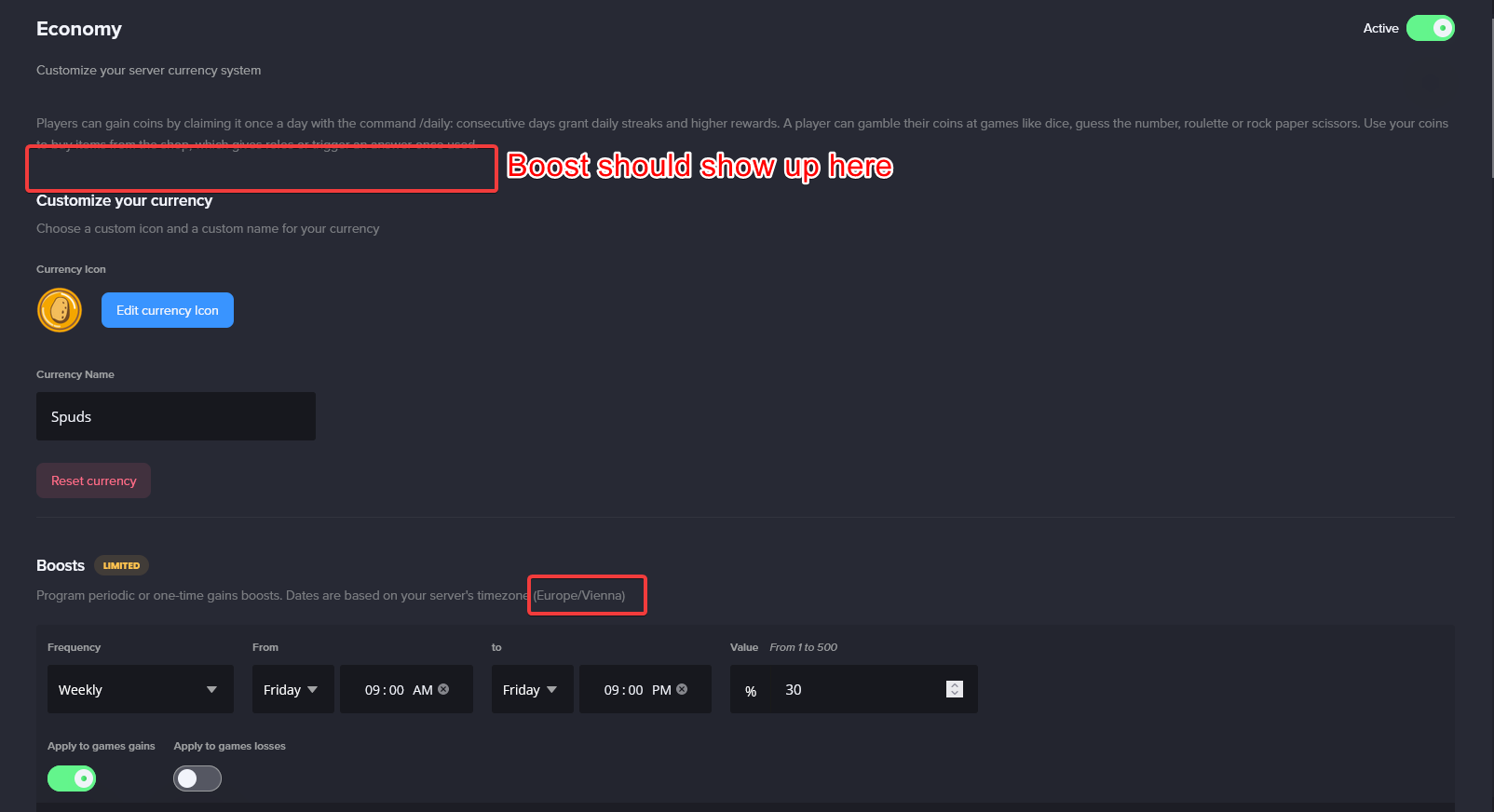
As you can see in the settings of the boost, it should be boosting, and it should show up in the upper box, but it doesn't
Strangely enough, if I set the boost to be exactly 1 day later (tomorrow), it seems to work on the dashboard

However, we're not seeing currency boosts at all, despite the second boost is showing as active rn
Oh and lastly I should add we also don't see the effects of the boost active when the proper time (as shown in the first screenshot) is set.
Both screenshots were also taken in between the local times set (9 AM, 9 PM)
Also just got this

code: b1100fcefb6d45a4a7cf7922e7dc1761
dire yarrowBOT
 Evergowst#5136 has been warned
Reason: Bad word usage
dire yarrowBOT
 1_AGP#5497 has been warned
Reason: Bad word usage
prisma bone
🤔 so no support then?
wooden mountain
prisma bone
`code: b1100fcefb6d45a4a7cf7922e7dc1761`
Discord gave us an "500 internal server error" response when we tried to send a message in your server
for the boost, refresh the dashboard
prisma bone
wooden mountain
for the boost, refresh the dashboard
Thank you for the reply. I did refresh the dashboard, but I'll try again now.
Also, anything I can do about the other issue? It seems on some economy games it doesn't always finish. 🤔
wooden mountain
🤔 SaltyNightHunter, the mystery machine is ready, you have 5 attempts to guess the number between 1 and 100... type your answer
that is what we send to discord when we got that error
so the game was going but an error on discord there side made it not send a message
prisma bone
I see
wooden mountain
and then the game stops after no response for a while (or a wrong response)
prisma bone
Yea, timeout makes sense
Ok and being on Firefox I was able to Ctrl + L Shift + R to fix the dashboard issue
Thanks for the help 🙂
 digital dust
dire yarrowBOT
» Andre «#4214 has been warned
digital dust
dire yarrowBOT
» Andre «#4214 has been warned
Reason: Bad word usage
 karmic ice
Experiencing an issue with the Music Plugin. The 24/7 Mode doesn't seem to work as it regularly stops playing despite having tracks still in the queue. The dashboard page will show a song is still playing, but the bot will just be in the voice channel doing nothing. Trying to stop and then start doesn't seem to work either when it happens. The bot gives back an error saying "no track to play", despite the dashboard showing a track playing. So far, the only fix I've found is to clear the queue and re-add the songs. Is this a regular issue with the music plugin?
wooden mountain
we just restarted music to fix lagg
and 24/7 is a bad name for that, it's not 24/7
it's only "do not leave voice channel when the queue has finished"
karmic ice
Ah. Thank you for clarifying.
So does that mean, the Loop option on the dashboard doesn't actually loop the playlist?
wooden mountain
it does
if there are at least 2 songs
it adds the finished song back at the end of the queue
karmic ice
Got it. Thank you for the info!
 real aspen
hast du das problem noch
buoyant moon
im friend with all no reports 
real aspen
warte bis das update in #〉status-updates fertig ist und probier es dann nochmal wenn es dann nicht geht lösche deine cookies
buoyant moon
im in my server on mee6 bot👍
radiant carbon
Do you guys have bug reports
 bitter zenith
sometimes
buoyant moon

um it isnt linked to the timestamp set
i had to find the numbers in order to match to the 1st and 2nd of each month
the 31st shows it is the 1st and some other number timestamps are broken

another example just so it isnt a one off thing
buoyant moon
Some how level up it not working
dire yarrowBOT
If I appear to be denying your hard earned experience, or !rank and !levels aren't working properly...
- Make sure Levels is Enabled.
- Check that you do not have a banned role in the levels configuration, and that you aren't in a banned channel either.
- Make sure that I can see the channel you are talking in with "Read Messages" and send messages with "Send Messages".
dire yarrowBOT
 trainy#8401 has been warned
Reason: Bad word usage
high cave
MEE6 constantly changes roles unnecessarily. Gave a new member the Owner role with admin rights out of no where.
spare relic
high cave
MEE6 constantly changes roles unnecessarily. Gave a new member the Owner role wi...
not a bug
check birthday and custom commands @high cave
dire yarrowBOT
 FenZer4 | Тимофей#0998 has been warned
Reason: Bad word usage
dire yarrowBOT
 Frans#9322 has been warned
Reason: Bad word usage
dire yarrowBOT
 Anto-YT#1067 has been warned
Reason: Bad word usage
dire yarrowBOT
 Lord Darth Vaper#1744 has been warned
Reason: Bad word usage
dire yarrowBOT
 🍁堕𝕭𝖑𝖔𝖔𝖉Dizer9999堕🍁™#9999 has been warned
Reason: Bad word usage
dire yarrowBOT
 Маслина#9834 has been warned
Reason: Bad word usage
 rough mantle
Have noticed on the live social counters the twitter keeps bugging out to random numbers any advis on how to fix it?
dire yarrowBOT
 Chara#6992 has been warned
Reason: Bad word usage
vast kite
why yall cussing?
 vale crescent
When saving a hub's settings for temporary channels I get a HTTP 400 error
 pliant sluice
hii, i have a problem using /dice, it keeps saying ":SLEEP6: Something went wrong in MEE6 land! Contact our support team for instructions if this keeps happening.
code: f6bfffb7687d4d2a8c69441a9d9fbc5e" on the server 869952106885435443
 pure obsidian
pliant sluice
hii, i have a problem using /dice, it keeps saying ":SLEEP6: Something went wron...
pure obsidian
pliant sluice
hii, i have a problem using /dice, it keeps saying ":SLEEP6: Something went wron...
I can see what the error is but I need some insight, can you invite me to your server in DMs and point me to the channel you tried this on?
dire yarrowBOT
 Тодор Живков#8978 has been warned
Reason: Bad word usage
pure obsidian
and this concerns this server and this very channel because?

 dire yarrowBOT
 asen2508#6253 has been warned
Reason: Bad word usage
 Kami-sama#0069 has been warned
Reason: Mass emoji
boreal totemBOT
👌 User 834720426331734056 has been softbanned for emoji spam.
 tawdry sparrow
The YouTube member role dose not in beluGANG
 grave coral
I am adding your birthday but it is not added to the list of upcoming birthdays
 dire yarrowBOT
 Kubus n0th1ng#2202 has been warned
Reason: Bad word usage
 buoyant moon

 robust perch

 fluid socket
I’m trying to make it auto give roles but when I did all the steps it will show a error still
stray sluice
What’s the error?
stray sluice
Oh it’s ok
fluid socket
Kk
vale crescent
vale crescent
When saving a hub's settings for temporary channels I get a HTTP 400 error
Any idea when this bug might become patched?
boreal totemBOT
@oak rune has been auto-banned. (strict bad words filter)
dire yarrowBOT
 Miu__Saboo#3150 has been warned
Reason: Bad word usage
dire yarrowBOT
 👑𝔹𝕌𝔹𝔸 𝕃𝕃-𝕒𝕣𝕞𝕪👑#5329 has been warned
Reason: Bad word usage
boreal totemBOT
@peak bobcat has been auto-banned. (strict bad words filter)
buoyant moon
For some reason every time I use a command, Mee6 replies with
:SLEEP6: Something went wrong in MEE6 land! Contact our support team for instructions if this keeps happening.
code: 8d51273088db4cdaa4d1bb24c245909b
 hard tartan
our server is having xp gain problem. Some are not gaining exp even chatting for hours and not spamming.
radiant carbon
buoyant moon
For some reason every time I use a command, Mee6 replies with
:SLEEP6: Somethi...
What command
dire yarrowBOT
If I appear to be denying your hard earned experience, or !rank and !levels aren't working properly...
- Make sure Levels is Enabled.
- Check that you do not have a banned role in the levels configuration, and that you aren't in a banned channel either.
- Make sure that I can see the channel you are talking in with "Read Messages" and send messages with "Send Messages".
radiant carbon
@hard tartan ^
hard tartan
thank you
buoyant moon
radiant carbon
What command
Almost all commands unfortunately. But the ones I really need to use are the ! Clear and my custom commands
limber knoll
@buoyant moon that error is no manage messages permission
dire yarrowBOT
 Хлебобулочный#1234 has been warned
Reason: Bad word usage
 karmic vine
The command to delete and warn whoever post links if it's a reply it doesn't work i thought you might like to know this hope im not taking your time with useless stuff
limber knoll
@karmic vine thanks and noted
karmic vine
👍
 ripe valve
theres bugs inside of my house thats a bug right there😂
dire yarrowBOT
Yoshikibabyko#6104 has been kicked
Reason: trolling
dire yarrowBOT
WaspSpit_Go, that command is disabled in this channel.
WaspSpit_Go, that command is disabled in this channel.
radiant carbon
dire yarrow
<:XMARK6:403540169992568833> **WaspSpit_Go**, that command is disabled in this c...
dire yarrowBOT
 ๖ۣۣۜWΔⱢɄη¡𝕊㉿Ꭿ ☢#1337 has been warned
Reason: Bad word usage
dire yarrowBOT
 Dark Hacker#3079 has been warned
Reason: Bad word usage
 dry hinge
Music 24/7 keeps stopping
 open thorn
<@&193123929701875712> I can't kick or ban the bot from my server why?
buoyant moon
open thorn
<@&193123929701875712> I can't kick or ban the bot from my server why?
are you the server owner?
open thorn
buoyant moon
are you the server owner?
Yes
buoyant moon
how are you trying to kick the bot? Are you using the discord kicking system?
buoyant moon
maybe try refreshing discord? or getting another admin who can try?
buoyant moon
sorry, but I don't understand what you mean by "inside only". Any chance you could please clarify?
open thorn
The bot is in the server only I said
frail dragon
technically it's more of a discord issue
it doesnt let you leave gc nor kick/ban users sometimes
Refreshing discord or restarting it would work
open thorn
frail dragon
it doesnt let you leave gc nor kick/ban users sometimes
I didn't mean to kick or ban some user's
I don't need the bot anymore
open thorn
So if I try to kick the bot out of my server it's not going out
The bot is still in the server
<@&193123929701875712> reply me
open thorn
What to do now ?
frail dragon
frail dragon
Refreshing discord or restarting it would work
.
frail dragon
Then report it to discord
Actually
Remove administrator from mee6's permission
and try ban/kicking mee6 through a bot
open thorn
Wait I'll see it
 terse fractal
The 'image only' channel function works great, it just doesn't detect replies. Could you guys maybe look at that if you aren't already?
marble quest
well this happened while i enabled a premium feature (which disabled because the server isn't premium), but the toggle is green but disabled


 dire yarrowBOT
 LOZEY123XDKD#7760 has been warned
Reason: Bad word usage
 pale laurel
So I was trying to play a song ||obviously using mee6|| but seems like the owner of the server restricted the bot to not to connect in the vc, however Mee6 still showed me this "Nowplaying" message and I confirmed it myself later in my server. I am not sure whether its a bug or not, but i felt like i should let u developers know 🙂
 shut relic
hard tartan
our server is having xp gain problem. Some are not gaining exp even chatting for...
shut relic
hard tartan
our server is having xp gain problem. Some are not gaining exp even chatting for...
same xp gain is really intermittent, did you get an answer to this?
is it to do with the recent update?
hard tartan
shut relic
same xp gain is really intermittent, did you get an answer to this?
they replied this to me
If I appear to be denying your hard earned experience, or !rank and !levels aren't working properly...
- Make sure Levels is Enabled.
- Check that you do not have a banned role in the levels configuration, and that you aren't in a banned channel either.
- Make sure that I can see the channel you are talking in with "Read Messages" and send messages with "Send Messages".
shut relic
ah it’s not that on ours as they are gaining just intermittently so i think it’s a bug
 mortal dust
Invalid Emote on /levels command
 marble quest
for slash commands, @ everyone needs permission to use external emojis
just like in webhooks
spare relic

 hard hare
For temporary channels, users can permit everyone to view the channel, and then give themselves permission to mention @ everyone.
dire yarrowBOT
 MSWS#9499 has been warned
Reason: Bad word usage
marble quest
hard hare
For temporary channels, users can permit everyone to view the channel, and then ...
if you set the hub to grant the manage permission to temp channel owners, then they can do that, but it should only be if they already have the mention everyone permission in one of their roles
but you don't need to have that option enabled
hard hare
it gives them the permission even if they didn’t originally have it
marble quest
it gives them the manage permissions permission if you set it to on the dashboard
hard hare
right, which lets them toggle their @ everyone permission
regardless of if they had the permission already
marble quest
again, only if they have the mention everyone permission as well. but thats a discord thing, not a mee6 thing
mee6 can't control what permissions they are allowed to toggle
hard hare
fair enough ¯_(ツ)_/¯
 versed axle
hi
radiant carbon
versed axle
hi
Do you have a bug report
 twin ingot
radiant carbon
Do you have a bug report
twin ingot
radiant carbon
Do you have a bug report
You are the support ?
radiant carbon
twin ingot
You are the support ?
Pls don’t chat here if you don’t
And don’t ping me im right here
dire yarrowBOT
 Yasos#1488 has been warned
Reason: Bad word usage
 timber jacinth
Is there an issue with the bot making all voice channels made with the temp voice channels public? I have a channel hub set to make channels for only the World of Warcraft role but when I make it everyone is able to see/join
spare relic
not a bug
timber jacinth
Oh is that intended?
dire yarrowBOT
 M0rtiZ#7636 has been warned
Reason: Bad word usage
dire yarrowBOT
 lllkxsha#7486 has been warned
Reason: Bad word usage
 pulsar jasper
I want to add mee6 to a discord server but it said I don't have any discord server even though I have one.
limber knoll
@pulsar jasper you have 0 servers
you need administrator permissions to manage mee6
dire yarrowBOT
 JackL3#6538 has been warned
Reason: Bad word usage
 simple beacon
The restricted channels feature is not working in my server, when a member replies to another member's messages the message will send and not be deleted by the bot, however if someone types a message without replying to someone else then It will be deleted
 vast kite
hello
i need help
i tried to make a ''react to get a role'' but it says
Oops, looks like I can't give roles. Solve this by giving me the MANAGE ROLES or ADMINISTRATOR permissions.
but its on
even both are on
buoyant moon
try reloading the dashboard
drowsy garnet
Sorry if it's already asked, I can't find it at the moment.
The use of {user} and {user.mention} is not working properly.
One time it mentions the user perfectly, other time it gives the <@xxxxxxxxx> value which is not clickable.
 limber knoll
your discord cache
drowsy garnet
And on my other server it works perfectly
limber knoll
yeah i get the same thing tbh it's discord client cache
drowsy garnet
limber knoll
your discord cache
hmmmmm
I see that on my mobile app I now have one more than on web... so let's give that a try, thanks
limber knoll
no worries
drowsy garnet
oh wow, that only made it worse 😂
limber knoll
try it on the browser and not in discord browser
still a bit troublesome but doable
drowsy garnet
Yes, I did it in the browser, and now one more name disappeared
limber knoll
ah
drowsy garnet
deleting my iPhone app now, see what that does.
EDIT: Nope, also not working 😦
limber knoll
try interacting with that user, i.e mentioning them in a private channel
drowsy garnet
I switched servers, and now one is back ... what sorcery is this? 😄
Tried tagging the two who still only has numbers, but it says Unknown User... there's no log about them leaving, though...
faint dome
I explained it in detail in a pinned message here btw, if you want to know how it works
dry hinge
Music 24/7 stops playing after a few songs
 bitter junco
not sure if this really counts as a bug - youtube live streams don't get picked up by mee6.
dire yarrowBOT
I'm not announcing YouTube video's or live streams in your server? Sorry 😦 but if they don't inform me then I can't announce it in your server.


@doubble you know how notifications don't get send out to subscribers and videos sometimes take days before they show in the subscription feed of your subscribers? That also effects us. If @youtube doesn't notify us then we can't forward it to your Discord server...
 Twitter
·
Twitter
·
 ivory blaze
bitter junco
not sure if this really counts as a bug - youtube live streams don't get picked ...
ivory blaze
bitter junco
not sure if this really counts as a bug - youtube live streams don't get picked ...
Live streams are not supported afaik
boreal totemBOT
@nocturne vigil has been auto-banned. (strict bad words filter)
boreal totemBOT
@azure peak has been auto-banned. (strict bad words filter)
vale crescent
When saving a hub's settings for temporary channels I get a HTTP 400 error