#helpdesk-selive
1 messages · Page 246 of 1
 vast wren
ok so the docks disappear?
 turbid arch
yes
a few do
and I have to do it again
and again
Stream done gonna close and show you another pictire
 static iron
i just keep getting page not found
 vast wren
try this
 turbid arch
Didn't help @vast wren
vast wren
 toxic fern
As long as you don't hit the option as mentioned you'll have everything.
toxic fern
Yes
vast wren
have you also uninstalled the obs?
turbid arch
Yes
Seems my things didn't stay
Now I'm having issues reinstalling them
like the win capture
win-capture-audio
nvm got it
 rugged quail
everything working now?
turbid arch
so far
turbid arch
Now my stream deck isn't working
won't see OBS
repairin git
It said it was missing something
can't reapir
rugged quail
what is it missing
turbid arch
remote control
tells me to reinstall it
How do I save my stream deck setup?!
I think I did I looked it up backed them up
rugged quail
That's more of something you need to reach Elagto for, I'm afraid
 short karma
so is anyone avaiable to help
rugged quail
certainly, what can I do for you?
short karma
so ive been having some trouble with my streamlabs and my obs studio
it keeps freezing and not responding
and im not sure what it is
i updated it and everything
rugged quail
the apps just freeze and stop responding?
short karma
yeah as i try to stream
i cant even stream cause it keeps not responding
like both of the streaming apps crash for me, if not freezes
toxic fern
You'd have to speak with them about that. Can't help with it.
short karma
arent these your programs or
 lavish rover
hi everyone, there is en estimate time of release to have 27.2 compatibility?
should I search an alternative for chat and timer bot control? I use only that features atm
lavish rover
Thanks for your reply, I actually use se.live just to see twitch chat, maybe there is another way to do that instead use se.live (waiting for 27.2 compatibility). Old version of OBS will be definitely unusable after february 28
I apologize for my english, hope is understandable
toxic fern
We are aware of the timeframe to 27.1.3 breakage.
You don't use any other features of SE.Live? Not custom.bot name?
lavish rover
no, just enforce the standard bot name, because seems that witout that, timer bots doesn't recognize the start of streaming
toxic fern
In that case you can actually use 27.2 without SE.Live
Grab the zip file and extract it.
Navigate to the bin folder and in there is obs64.exe
Run that.
It'll pickup your stuff from the other OBS install.
Were you using a streamkey or connected your account?
lavish rover
streamkey on obs and connected from streamelements web
I've just installed 27.2, any hints to an alternative plugin for twitch chat? (I know is not the correct place to ask)
toxic fern
No need for that.
lavish rover
maybe connecting obs with streamkey made streamelements unable to detect the start of streaming?
toxic fern
Instead of stream key click the connect account option.
lavish rover
nice ^^
toxic fern
And under the docks option choose chat.
lavish rover
really ? Thanks a lot you save my life. Of course we hope that there will be an updated of .live in a couple of weeks
toxic fern
I can't give a timeframe but it will happen.
lavish rover
thanks again, have a nice day!
rugged quail
did one of the new updates remove some docks? i cant find stream information, and the old activity feed. had to use thw twitch website to change title/category etc
toxic fern
Pinned messages
rugged quail
which message? im lost
toxic fern
Latest
rugged quail
run as admin, or uninstall and reinstall
 robust apex
@toxic fern hope you're doing well. I was wondering if you could help me regarding my live chat on obs.live?
 wheat prism
how do i downgrade from the update
i wasnt here in discord to see that the update messes with the current build of trying to stream so now i cannot start one, i uninstalled and reinstalled but am still on the current update
toxic fern
Follow my pinned instructions
robust apex
<@&382267076632379392> could anyone please help me regarding my live chat on obs.live? ^
rugged quail
it keeps aborting the uninstall on se.live
restarted pc, made sure nothing was running in task manager, still aborting uninstall
robust apex
rugged quail
restarted pc, made sure nothing was running in task manager, still aborting unin...
could be an antivirus? have you tried to disable windows defender?
 vagrant fern
any timeline on when SE is gonna update to 27.2 to be in line with the new OBS?
rugged quail
vagrant fern
any timeline on when SE is gonna update to 27.2 to be in line with the new OBS?
once we iron out all the bugs to make sure you have a good user experience 😛
But honestly, as soon as possible
after an uninstall and reinstall i still dont have those docks that im looking for. i found out how i can change stream info from se.live, but i still dont have the dock that shows me total channel views, follow, sub, clip count
alright well i made a custom dock that is my twitch stream manager and i guess thats good enough?
vagrant fern
rugged quail
But honestly, as soon as possible
cool! Because I saw on OBS' twitter that Feb 28th Twitch will end support for anything before 27.2
 ember remnant
Good morning. I posted yesterday looking for help. I ran the offered auto-update with SELive yesterday. My SElive is now unusable and unstable. I cannot stream more than 1-2 fps. Video drivers all updated, all good there. The day before that update my SE was running like a rocket. Now, I cannot even record a video. Is there any way to roll back that wonderful update to the previous working version? Thanks very much. Please be safe.
 twin bone
vagrant fern
cool! Because I saw on OBS' twitter that Feb 28th Twitch will end support for an...
twin bone
vagrant fern
cool! Because I saw on OBS' twitter that Feb 28th Twitch will end support for an...
no, the only thing that will stop being supported is service integration, as in, streaming by connecting your account within OBS, and having the chat/stream information docks automatically.
There won't be any actual loss of functionality for old OBS version after feb 28th, because you'll still be able to stream with a stream key, and have those docks as custom browser docks.
just a loss of practicality
 sturdy stratus
I'm getting an error in trying to uninstall SE.Live to fix the issue of the missing docks.
 toxic fern
Did you uninstall OBS beforehand?
sturdy stratus
I thought I did but it looks like I still had a window preventing it from closing, my bad!
 hazy rock
how do i upload a custom font to the overlay editor
 dapper iglooBOT
Google Fonts
More than 900 google fonts are supported at this time. You can preview them here: https://fonts.google.com/
Custom Fonts
Steps:
- Install the font on the streaming PC or choose a pre-installed windows font.
- In the overlay widget settings, select Text Settings
- Click on Enable Custom Font
- Type the name of the font as it appears in the windows font directory (This is usually
C:\Windows\Fonts)
Note: After installing fonts, the browser and OBS must be restarted for the font to appear.
 gloomy scroll
hi there, i updated my bank details on streamelements for SE pay, is there anyway to know when the process will be completed? It says i have to get done before March, thanks!
 fleet charm
I originally posted this on #tech-talk but I am second guessing myself and thinking this might have been a better place:
I am trying to convert away from streamlabs chatbot and over to stream elements. When I played sounds in streamlabs bot before, I was able to add a message to the sound command, which in my case, some of my sounds had funny/dad joke style one-liners to them such as when I played an applause sound my bot at the same times said "$tousername is giving you a hand. No, they still have their original 2, just giving you a round of applause." or when a NO! sound was played, the bot also said "OOOPSS! Undo... Undoooooo!".
Currently I am using the redemption store for my sounds with Stream Elements (they are all free / no charge, but it is the only way I have found to make them play) and the store redemption alert on the overlay to do the sound effect. However, I can't see how to make the chat message appear. I thought I could use the variations option, but that doesn't appear to be available on the store redemption widget. I also thought about making a specific alert to specific sounds and using the message line that is in there, but I can't find out to limit the alert to only 1 sound redemption.
Is there any way to make a specific "chat" message appear with specific sound effects being played? I don't mind if it appears on the stream overlay or chat, I just would like to keep as much continuity as I can between the two bots.
Thanks, in advance.
twin bone
fleet charm
I originally posted this on <#851543419057864795> but I am second guessing mysel...
I might be wrong, but afaik, there is no way to have one command both play sound and display text.
You can, however do a workaround by either having another bot do the text (like nightbot, for example), or have something else play the sound (like kruise control or triggerfyre, for example)
fleet charm
@twin bone Thank you, I will look into those, unless someone has a better option in the meantime, it looks by scratching the bare surface like it might be a good idea.
twin bone
(I'll just add that I heavily recommend kruise control, it might not be the most intuitive, but it's very powerful)
 crimson pythonBOT
OBS Studio 27.2 is now out for @everyone!
This release adds support for AJA Video devices, source blend modes (like Photoshop), AV1 encoding, updated CEF (Chrome 95), official Flatpak support, hotkey duplicate detection, and more!
Full release notes can be found here: https://github.com/obsproject/obs-studio/releases/27.2.0
Once again, we’re thankful to our dedicated community of developers, testers, and support volunteers who help make this project possible. If you’d like to support the project, you can support us both on Patreon and on Open Collective.
https://obsproject.com/contribute
For more details and some video highlights of the new features in the release, check out our Twitter thread here: https://twitter.com/OBSProject/status/1493351347491680260
 grim merlin
anyone know why i cant record my game. i selected the game to record and tried capturing the entire screen but its just black
 distant brook
ciao
ho aggiornato stream elements e non riesco più a trovare il pannello delle informazioni sulla live
qualcuno può aiutarmi?
dapper iglooBOT
@distant brook ⤵️
Welcome to the helpdesk! The regular helpdesk channels are in English but we do provide multi-language support in the following channels: #🇩🇪︱deutsch | #🇫🇷︱français | #🇪🇸︱español | #🇵🇹︱português | #🇳🇱︱nederlands | #🇮🇹︱italiano | #🇵🇱︱polski | #🇨🇳︱中文語言服務區-chinese | #🇯🇵︱日本語-japanese | #🇭🇺︱magyar | #🇰🇷︱한국어-korean | #🇹🇭︱ไทย-thai | #🇷🇺︱русский | #🇺🇦︱українська | #🇨🇿︱czech
 mighty kestrel
<@&382267076632379392> I am new to OBS and I have an echo and I can not figure it out can you please help me with this 1st situation also my game capture is not working and capturing my game this is the 2nd issue I can not fix and need help and I am supposed to be live tonight
 vestal mirage
For some reason my Chatstats page doesnt load?
https://stats.streamelements.com/c/alphacja
 dawn root
vestal mirage
For some reason my Chatstats page doesnt load?
https://stats.streamelements.com/...
dawn root
vestal mirage
For some reason my Chatstats page doesnt load?
https://stats.streamelements.com/...
This channel is for SE.Live help. #helpdesk-twitch is probably better. Also, you don't need to ask everywhere.
 ripe horizon
Does SE.Live entirely remove OBS's update button?
toxic fern
No.
ripe horizon
where is it then, cause it's not in help anymore
 eager crypt
So... today's update deleted the "Edit Stream Info" dock from the SE.OBS program?
...And now I have to log-in to Twitch in every individual dock that requires a connection to it... every time I open OBS??
—It's a big enough pain in the rear to change the "custom browser dock" for YT chat every stream as it is, so if this change is intentional, I'll never use this program again.
Someone tell me I'm a moron and that this is on me.
Someone please say 'sike.' :[
(And yes, I'm running as admin; I always have. And yes, I tried uninstalling/reinstalling [both the SE-specific one, and OBS proper].)
dapper iglooBOT
@eager crypt ⤵️
If you are not seeing the OBS Twitch integrations and have SE.Live installed, please follow these steps:
- Make sure you are on the latest and greatest version of SE.Live
- Exit OBS (make sure OBS is not running)
- Delete
%appdata%\obs-studio\plugin_config\obs-browser\obs_profile_cookies - Start SE.Live
- Settings > Stream > Disconnect > Connect
eager crypt
dapper igloo
<@304776277276229633> ⤵️
I will give it a go.
Tyvm for the quick reply.
 valid hornet
 sand peak
is selive for Streamlabs obs too?
sand peak
is selive for Streamlabs obs too?
Nope, they’re both trying to do similar things in somewhat different ways. You wouldn’t want to combine them.
 zinc ermine
dapper igloo
<@304776277276229633> ⤵️
zinc ermine
dapper igloo
<@304776277276229633> ⤵️
this worked for me! thanks
 tepid ridge
I don't know why media request is so BROKEN for me
 kindred fox
tepid ridge
I don't know why media request is so BROKEN for me
kindred fox
tepid ridge
I don't know why media request is so BROKEN for me
If it’s auto play it’s broken
tepid ridge
More often than not the video refuses to show on stream and commands just up and stop working
tepid ridge
kindred fox
If it’s auto play it’s broken
Howww do I turn that off then?
nevermindIfoundit
 visual mountain
how do I roll back obs to the previous update?
kindred fox
visual mountain
how do I roll back obs to the previous update?
Issues?
visual mountain
the new update is crashing my pc
visual mountain
yes
kindred fox
You’d need to uninstall se.live and obs studio and download se.live from the website
visual mountain
wont that still have the crashing version?
kindred fox
short karma
is this the place to complain about obs studio and streamlabs obs
No. Streamlabs is a different discord
 manic elm
do anyone know why it freeze once i click go live on obs
kindred fox
manic elm
do anyone know why it freeze once i click go live on obs
YouTube?
manic elm
kindred fox
YouTube?
 trail ginkgo
Hi since the new update yesterday my stream options where i can change title and game on obs has disappeared, i have tried to look at docks but all i see is scenes, sources, audio mixer, scene transitions, controls, stats and chat. i just really liked i could change my title and game on the obs without having to use the bot commands, any1 know why its not there anymore? i did try to logout and back in , but dident work.
dapper iglooBOT
@trail ginkgo ⤵️
If you are not seeing the OBS Twitch integrations and have SE.Live installed, please follow these steps:
- Make sure you are on the latest and greatest version of SE.Live
- Exit OBS (make sure OBS is not running)
- Delete
%appdata%\obs-studio\plugin_config\obs-browser\obs_profile_cookies - Start SE.Live
- Settings > Stream > Disconnect > Connect
trail ginkgo
thank you 🙂
 nocturne path
Hi. I have a couple of browser sources setup in OBS that display some data that is from a webpage that I log in to. When I updated to OBS 27.2 I received the prompt to update SE.Live but when I update it breaks the browser source. I interact the source and log back in and it works but if I close OBS and reopen it the browser source is back to the page where I need to log in again.. If I don't update SE.Live so the plugin is disabled it works perfectly fine.. So it's definitely something with the plugin causing this issue.. Any advise/assistance to get it working?
dapper iglooBOT
@nocturne path ⤵️
If you are not seeing the OBS Twitch integrations and have SE.Live installed, please follow these steps:
- Make sure you are on the latest and greatest version of SE.Live
- Exit OBS (make sure OBS is not running)
- Delete
%appdata%\obs-studio\plugin_config\obs-browser\obs_profile_cookies - Start SE.Live
- Settings > Stream > Disconnect > Connect
nocturne path
Nothing to do with twitch intergration
vast wren
nocturne path
Nothing to do with twitch intergration
These are instructions on how to clear the OBS cookies, it should solve it, if theres still an issue let us know 🙂
nocturne path
Yes I have already done that and it doesnt work
Like I said nothing to do with twitch
I have a browser source setup for a site called Xertonline.com
I log in and it displays some data that looks like this .. With Se.Live enabled it shows this next image


So if I log in I will get the first image but then when I close OBS and open it again I get the 2nd image
If I dont update SE.Live i get the first image every single time and it stays logged in
Just tried it all again those instructions and does not work
 tight rock
 glossy maple
this update has completely broken my SE.live. OBS without live loads everything completely proper, and as soon as live is installed, it signs me out of everything, deletes my docks, and altogether just ruins everything I had already set up. I've reconnected, and still get the same issue. I've uninstalled and redownloaded both, with nothing to show for it. I've gone through and reset everything up, only for it to be gone when I exit and open again. I've gone through a Twitch name change, but have gone through everything I needed to do to change my bot over and have SE connected to my new name. nothing has helped.
 west steeple
I came here yesterday and someone told se isn't compatible with this new obs update and there's no eta for a fix .
I'm facing disconnection anytime I start streaming..
I'm using slobs till they fix it .. I hate slobs

 frozen ermine
Hello I am not sure where to get help for this but Iam going to ask. I created a bot to add to my twitch and I added it to SE however I do not see the bot popping up on stream. I am not sure what I did wrong. please advise thank you!
twin bone
west steeple
I came here yesterday and someone told se isn't compatible with this new obs upd...
you can also downgrade to OBS version 27.1.3 which will work with the plugin.
Go there : https://github.com/obsproject/obs-studio/releases scroll to the bottom of the page, click on "assets" and download the .exe installer
twin bone
glossy maple
this update has completely broken my SE.live. OBS without live loads everything ...
the se.live plugin, as it stands is broken on OBS 27.2, till the plugin gets updated.
You have to either deinstall the plugin, or downgrade to 27.1.3 (the steps for which are in my message just above)
 coarse girder
It seems that maybe this is a problem multiple people are facing, but I don't think I've located the solution in this thread yet... I'm missing my dock for stream settings (i.e. live notification, stream title, stream category, tags, etc) Is there a ticker box I'm missing or something? sorry if you're getting this question a lot
dapper iglooBOT
If you are not seeing the OBS Twitch integrations and have SE.Live installed, please follow these steps:
- Make sure you are on the latest and greatest version of SE.Live
- Exit OBS (make sure OBS is not running)
- Delete
%appdata%\obs-studio\plugin_config\obs-browser\obs_profile_cookies - Start SE.Live
- Settings > Stream > Disconnect > Connect
coarse girder
this probably seems silly but where can I find that file? I have the default file saving settings but I'm not sure the directory to search
toxic fern
Open windows explorer and put it in there.
coarse girder
I copy/pasted it into my file search and got nothing :/ am I dumb?
toxic fern
 rugged quail
hello, im trying to use the space force overlay and im having an issue with the alert box, is this where i ask for help?
west steeple
twin bone
you can also downgrade to OBS version 27.1.3 which will work with the plugin.
Go...
you told me that yesterday, i guess twas you, but the thing is that i dont want to downgrade.. id lose all my configurations and i dont want ..
so better keep using the slob till they fix it..
i still able to use some se features de website thing..
I'll be waiting for an update that bring back all functionality to ob + se
And thanks again
twin bone
west steeple
you told me that yesterday, i guess twas you, but the thing is that i dont want ...
you won't loose anything if you make sure "user settings" isn't checked when you deinstall
west steeple
twin bone
you won't loose anything if you make sure "user settings" isn't checked when you...
settings, scenes and so on?"
west steeple
didnt know that 😂
thanks both
@twin bone and @toxic fern
 haughty trail
Does anyone know how to fix this or what is the cause? I am getting screen stutter, I game on one PC and stream from another HDMI sent through CaptureCard 4K60
 twin bone
west steeple
💯 working
twin bone
west steeple
💯 working
👍
dapper iglooBOT
@haughty trail ⤵️
SE.live is a plugin for OBS Studio for the best OBS support, please join their Official Discord @ https://discord.gg/obsproject
rugged quail
my alerts...
 fallow sinew
Anyone know how to change my bots name ? Tried what ever it suggested under the support link on their website but no dice cant get i to work or find a place to change it
dapper iglooBOT
@fallow sinew ⤵️
Currently renaming the bot fully works with SE.Live plug-in for OBS. You can follow this video guide to set it up in your activity feed dock: https://imgur.com/a/CY8P0oc
 arctic crypt
what do i need to put in the command to allow the bot to use my emotes if i've connected my channel through selive? is it just the emote name?
 ocean rivet
arctic crypt
what do i need to put in the command to allow the bot to use my emotes if i've c...
ocean rivet
arctic crypt
what do i need to put in the command to allow the bot to use my emotes if i've c...
the bot won't be able to use your emotes unless it's subscribed to your channel, you'd need to either gift a sub to the bot or use the custom bot name feature and use your own account or a bot account thats also subscribed to your channel
arctic crypt
ocean rivet
the bot won't be able to use your emotes unless it's subscribed to your channel,...
okay! i am using the custom bot name feature with my account, so if i put my emote names in that should work when i stream? i saw that it doesn't work if you're offline so i can't really test it
ocean rivet
arctic crypt
okay! i am using the custom bot name feature with my account, so if i put my emo...
yeah, you just need to use the same emote name - and the bot should also work while being offline, but you need to have se.live opened for the custom bot account to be used
kindred fox
as long as SE.Live is running the bot should respond with the emotes
arctic crypt
interesting okay it's just sending the emote name as text when i test it in obs offline
never mind! it's working, I guess se.live hadn't been running
 uncut bloom
Will there be an update to fix the issues of everytime i boot up the software i have to reconnect my twitch and as well as the chat bot not posting the messages when i do commands and timers. I have updated the software a few days ago.
 neat blade
Is anyone else having issues with the overlay editor? it just says " overlay does not exist" on any overlay it doesnt change if I try to create my own or use a premade one,
dapper iglooBOT
@neat blade ⤵️
Please provide your account ID found at the top of this page: https://streamelements.com/dashboard/account/channels This ID is public info and safe to share here.
neat blade
62030c572a7c487902933722
 lusty glen
Hello! Is this the right place to ask for help with SE.Pay?
dapper iglooBOT
@lusty glen ⤵️
Please contact us via email for support with SE.Pay. You can use our contact form here: https://streamelements.com/contact Thank you.
lusty glen
dapper igloo
<@175911939552182273> ⤵️
Thank you!
 restive swan
Hey guys! How can I control the Bot settings from Ground Control?
 lone grove
Hi, im a twitch streamer using the selive plugin for media share. Seems to be working, but just had a viewer come to my stream and songrequest command won't work?
I've done my tests and seems to be all good... not sure why that is?
 rapid sable
so i just started using se.live but i have a problem that i connected my youtube account but im not able to connect my twitch account or any other account so can you tell me how to connect another account?
vast wren
rapid sable
so i just started using se.live but i have a problem that i connected my youtube...
you mean you want to merge both accounts?
rapid sable
no i have added my youtube account to it but after that i wasnt able to find how to add mytwitch account to so that its connected to both my twitch and youtube account
pls tell me how literally today i switched to obs and se.live so if i cant finish fixing it today imma have to use streamlabs and there are many things in se.live that i wanna use and cant use on streamlabs
pls
vast wren
rapid sable
no i have added my youtube account to it but after that i wasnt able to find how...
its like I asked, you've added YT and twitch to SE and now you want to link your YT and twitch together ?
dapper iglooBOT
@rapid sable ⤵️
Did you get a "Channel already claimed" message?
More than likely your accounts need to be merged! - Please note:
- Merging accounts only allow faster ways to switch between accounts
- Merging accounts does not allow data sharing between accounts - different streaming platforms, different type of events
- Merging accounts allows duplicating/sharing overlays between the accounts
If you understand the limitations of merging and want to proceed, please find the JWT tokens (!jwt) from both accounts you want to merge and fill out the form here: https://streamelements.com/contact with each token correctly labelled
 idle lily
Can anyone be so kind and explain to me what a prankster it is after update 27.2.0?
Until the last update, these nonsense bothered me about once a month, but after the update, it annoys me every time I run the program! And I ask ... Why?
I tried to run the program as an administrator and without success.
I want to set the program once and only on the next start, not to copy the email address and password 10 times each start.
Thank you
(https://obsproject.com/forum/threads/constant-login-at-startup.153535/#post-561474)

 jolly willow
Hey. I was looking through SE.Live website and i've seen these themes there and they look way better than the default ones. Is there any way i could use them?

 indigo summit
Hi there,
Not sure if this is the correct spot to post this question but I am trying to Connect a Custom Bot account and when I click the button (see image), I use my Bot's login and it appears to accept the credentials. However, when I go back, there isn't the option to Send a Test Message and the Bot's name is not available in the dropdown. It's like the Bot account doesn't connect properly.
Any info on what I might be doing wrong would be great, cheers!
 dapper iglooBOT
@indigo summit ⤵️
- Right-click your OBS desktop shortcut (not the SE.Live shortcut) and navigate to Properties
- In the Target field, add the following to the very end:
--remote-debugging-port=40404(don't forget to add a space before the current path)
https://streamelements.is-serious.business/6ihr2EL.jpg - Open OBS (or restart if it was open)
- Open your web browser and type in:
localhost:40404(try127.0.0.1:40404if you see issues - https://streamelements.is-serious.business/3EGPQFJ.jpg) - Click on StreamElements - Activity feed - https://streamelements.is-serious.business/2kJYt2b.jpg
- Click on >> in top right above the code and select Console - https://imgur.com/a/Xh6zc6A
- Type the following into the console and hit enter:
store.customBot.removeCustomBotIntegration() - Try setting the custom bot name, make sure you follow https://strms.net/custombotname
- Remove the flag added in step 2 from your shortcut properties
indigo summit
Absolutely fantastic. That worked perfectly. Thank you!
 frail lion
jolly willow
Hey. I was looking through SE.Live website and i've seen these themes there and ...
frail lion
jolly willow
Hey. I was looking through SE.Live website and i've seen these themes there and ...
That is not strictly a "theme", but an updated version of the activity feed that is currently being developed.
jolly willow
frail lion
That is not strictly a "theme", but an updated version of the activity feed that...
I c... will that be released any time soon?
frail lion
We don't have an ETA to provide 🙂
jolly willow
I understand. Thank you so much for the info! Have a good day!
 wooden swift
Hiya Team - Another user here who's now having to log into every panel just to use OBS after the update. Is there a patch coming anytime soon?
 onyx grail
I have a question. I use Light Stream for my primary capture of my streams. I have a sponsorship with Hellofresh and I wanted to know, will the sponsorship go through and track my progress even if I don't use SE live and instead use Light Stream?
 mint torrent
this uptade is a freaking cancer
 sharp turret
onyx grail
I have a question. I use Light Stream for my primary capture of my streams. I ha...
sharp turret
onyx grail
I have a question. I use Light Stream for my primary capture of my streams. I ha...
@frail lion ^^^^
frail lion
onyx grail
I have a question. I use Light Stream for my primary capture of my streams. I ha...
As long as you use our overlays by browser source, it should work properly
 agile herald
hello, i just got the new version of the SE.Live plug-in after updating OBS, and now i do not have the Stream Information dock (for stream title, etc.)
dapper iglooBOT
@agile herald ⤵️
If you are not seeing the OBS Twitch integrations and have SE.Live installed, please follow these steps:
- Make sure you are on the latest and greatest version of SE.Live
- Exit OBS (make sure OBS is not running)
- Delete
%appdata%\obs-studio\plugin_config\obs-browser\obs_profile_cookies - Start SE.Live
- Settings > Stream > Disconnect > Connect
agile herald
well i tried that ^ and now OBS crashes when I click "Settings"
so not a fix. disconnecting and reconnecting dfoes not fix it
step 5 of the bot steps was all i needed to do
 spring marlin
Hey all!
I am curious if I can get a little help with a SE Widget? I am referring to the "Credits" one, I think I read though it all and I got the overlay , the browser source, but I am missing any subs, cheer, follow activity.
Can someone suggest a place to look first?
 daring relic
What is wrong over here? i dont have 136 tips...


Also this is completely wrong... I mean i wish it was this much


so somehow somewhere all my tips are duplicated a ton of time?
onyx grail
@frail lion I used all of the links for my Lightstream, still doesn't show progress.
 nova scaffold
onyx grail
<@608672239419785221> I used all of the links for my Lightstream, still doesn't ...
nova scaffold
onyx grail
<@608672239419785221> I used all of the links for my Lightstream, still doesn't ...
Hi.
The overlay will always track events for the campaign (those can be delayed for this campaign, but the overlay and campaign overview will show it).
And as long Lightstream can display our overlays, it will show them as expected.
The campaign is running via a referral link + the specific code, the software that is used to stream has no impact on it at all.
 fading sluice
Hi guys, I can't use SE Live as it gives me HUGE memory leak issues
I'm on a 2950X threadripper and cannot even stream on Fast
I removed SE Live and everything works just fine again, encoding on Medium at around 15% CPU usage
fading sluice
I looked at my log and saw things such as "18:10:52.783: signal_handler_connect: signal 'streamelements_update_settings' not found"
 umbral yew
not sure if asking in the right place but:
how can i make a custom command do two things --> display custom text and redeem a custom overlay
i can only seem to get one working or the other and not together
$(redeem <name>)
works fine as a command but not with a text
dawn root
umbral yew
not sure if asking in the right place but:
how can i make a custom command do tw...
I believe a command can only do one thing.
umbral yew
dawn root
I believe a command can only do one thing.
ive seen people have a single command show something in chat and display an overlay alert though
 chrome arrow
My chat and activity docks are now showing up with large font. I can't get the docks to a decent size that's readable (more than 2 or 3 lines)
Does anyone know what I've done wrong and how to reset/fix the size issue?
dawn root
chrome arrow
Does anyone know what I've done wrong and how to reset/fix the size issue?
If you click in the dock and hit CTRL + 0 zero, not O, does it reset the size?
chrome arrow
I'll try that. We're live right now. Any other tips to maximize readability of activity and chat? The streamer is a dj and I've got the obs console displayed on a large lcd TV in front of him.
dawn root
I don't know of any other way, what's the resolution on the TV?
chrome arrow
1920 x 1080
I'm mirroring the laptop to the lcd TV. I wonder if the difference in resolution is making things wacky.
dawn root
It can
chrome arrow
It's a gamer laptop with nvidia 2060
What should I set the TV and laptop to? Both 1920x1080?
chrome arrow
I'll Google that and figure it out. Probably in advanced setting
 topaz sable
After Updating OBS and SE Live to the most recent versions, I have to log into twitch every time I open the program. The OBS forums point to it being an SE Live issue. I see @idle lily is having the same issue, does anyone have a fix?
 tight cape
@dawn root Is there away to get the backup back or...
twin bone
topaz sable
After Updating OBS and SE Live to the most recent versions, I have to log into t...
downgrade to obs 27.1.3 or remove se.live
topaz sable
twin bone
downgrade to obs 27.1.3 or remove se.live
The obvious solution, yeah lol. I was just checking before I do that.
twin bone
or wait till SE releases a fixed version
daring relic
#helpdesk-selive message anyone know a fix?
valid hornet
topaz sable
The obvious solution, yeah lol. I was just checking before I do that.
My solution is just to never close the program. 😅
 vagrant saddle
Hello! whenever I make a media source it seems like the audio is muted for me, but is sent out to stream anyway. unless I use "monitor and output" I can't seem to hear it. Any ideas?
topaz sable
valid hornet
My solution is just to never close the program. 😅
Now THERE'S a solution. Lol
topaz sable
vagrant saddle
Hello! whenever I make a media source it seems like the audio is muted for me, b...
Monitor but don't output doesn't work?
vagrant saddle
nope  I can hear it but the stream can't
kindred fox
vagrant saddle
Hello! whenever I make a media source it seems like the audio is muted for me, b...
If you're referring to a local media file, that is the correct behavior in OBS
 last raptor
gt
 limber fractal
Hello could someone help me with my obs plz It keeps Crashing when i play Apex Legends but does not crash when i play Call of duty warzone or any other game
vagrant saddle
kindred fox
If you're referring to a local media file, that is the correct behavior in OBS
sorry? maybe I misunderstood what you said. but I used to be able to hear local media files using the default "monitor off" setting. i'll keep using "monitor and output" even though usually that would result in double audio for the stream. but not in this case. thanks anyway
kindred fox
vagrant saddle
sorry? maybe I misunderstood what you said. but I used to be able to hear local ...
More than likely your audio device settings are incorrect from what they previously were
 grim leaf
If you updated Windows recently, chances are it screwed with your audio settings. Even if they appear the same in the list, try changing the monitoring source to something else, changing it back, then relaunching OBS.
(I've had to do exactly that more than once.)
 broken idol
hello, where do I go to ask about overlays?
rugged quail
broken idol
hello, where do I go to ask about overlays?
sure, what's up?
broken idol
Just wondering if there's a way to make an overlay and give it to someone.
kindred fox
broken idol
Just wondering if there's a way to make an overlay and give it to someone.
If they grant you permissions from their dashboard settings you can create and edit overlays within their account
broken idol
Ok. Is that easy to do
rugged quail
fairly easy, yes
uncut bloom
I have an issues with se obs where i have to reconnect my twitch every single time i boot up obs and the timers and commands dont work with chatbot when i have obs running. PLEASE FIX! It started with the last update this week or so
uncut bloom
twin bone
downgrade to obs 27.1.3 or remove se.live
How do you downgrade it ?
I have 21.12.9.790
twin bone
uncut bloom
How do you downgrade it ?
go to https://github.com/obsproject/obs-studio/releases scroll to the bottom of the page, click on "assets" and download"OBS-Studio-27.1.3-Full-Installer-x64.exe".
uncut bloom
Thanks!
 vocal forge
Is the issue with having to reconnect twitch everytime I open selive going to be resolved or this a deliberate thing and I should stay on an earlier version?
twin bone
vocal forge
Is the issue with having to reconnect twitch everytime I open selive going to be...
it will be resolved as soon as se.live updates to be compatible with OBS 27.2. in the meantime, either remove the plugin or downgrade to OBS 27.1.3
daring relic
#helpdesk-selive message anyone know a fix?
twin bone
daring relic
Also this is completely wrong... I mean i wish it was this much
does it show that too in OBS itself, or is it just in the editor?
rugged quail
daring relic
https://discord.com/channels/141203863863558144/494513233416421386/9439250680047...
activity feed page - reset session
let me know if that helps
daring relic
twin bone
does it show that too in OBS itself, or is it just in the editor?
The overlay u mean? That also shows on obs
daring relic
rugged quail
let me know if that helps
Did not resolve it sadly
 spiral crest
any idea when you guys will be fixing the repeat login for any added docks to obs? every time I open obs i have to relog in.
 shy mountain
@spiral crest Are you referring to custom docks? If yes, what sort of page do you have loaded on them?
@daring relic Check now please
gloomy scroll
hi guys, i have 2 questions if u don't mind. One of them is, when i make a custom dock on OBS for SE activity, the screen is just white. Also, i've updated my bank details to recieve my donations about 2 weeks ago, however still saying i need to 'set up' my bank details. I need to update before March or it gets refunded, may i get help please? Many thanks
a picture for reference about the 1st question
 daring relic
shy mountain
<@!225564849860640769> Check now please
daring relic
shy mountain
<@!225564849860640769> Check now please
Still got the issue
 shy mountain
Have you imported any tips from somewhere else?
daring relic
shy mountain
Have you imported any tips from somewhere else?
Yes from streamlabs obs a while ago
shy mountain
Hmm, I've removed all imported tips, but it seels the "tips count" widget is just not wanting to update properly :/
everything else has been recalculated
daring relic
My apoligies i still had / tip counts' open in my browser. maybe it works now?
shy mountain
it doesn't matter if you did or not.
Oh hold on, found where you can change the number:
 daring relic
Thank u so much !
gloomy scroll
gloomy scroll
hi guys, i have 2 questions if u don't mind. One of them is, when i make a custo...
does anyone know how to fix these issues ty
 shut horizon
Recently updated SE.Live and it keeps overwriting my twitch login from OBS making me unable to use the stream info tab and other assets. Any reason or fix for this issue?
gloomy scroll
shut horizon
Recently updated SE.Live and it keeps overwriting my twitch login from OBS makin...
OBS told me SE.live isnt compatible with the latest OBS, thats what i was told in the OBS discord
im no expert tho just thought i'd let u know
dapper iglooBOT
@gloomy scroll ⤵️
If you are not seeing the OBS Twitch integrations and have SE.Live installed, please follow these steps:
- Make sure you are on the latest and greatest version of SE.Live
- Exit OBS (make sure OBS is not running)
- Delete
%appdata%\obs-studio\plugin_config\obs-browser\obs_profile_cookies - Start SE.Live
- Settings > Stream > Disconnect > Connect
kindred fox
@shut horizon same thing ^^^
shut horizon
Thank you for the help! 
 mint flume
Hi i have a problem. after the latest update, some docks for SE is gone or something, i don't have the dock for setting my stream name,tags, game and such and i don't have the status dock for viewers and session anymore i only have the chat dock and the activity feed one 😮
mint flume
dapper igloo
<@383395370228645891> ⤵️
This actually worked for me! THX!!!
 livid night
Idk if this is the right spot. I am trying to add a daily sub goal of 5 per day but its already saying I have 474 and I need that deleted but it doesnt show the text in the label to just delete it.
dapper iglooBOT
@livid night ⤵️
To reset goals:
- from the Overlay Editor > Session data on top right (monitor symbol) > Goals tab > reset progress of desired goal
- from the Dashboard > Activity feed on the left > Widget data on the right > Goals tab -> reset progress of desired goal
Note: Goal widgets (progress) only counts up and doesn't go down automatically, if you lose followers/subs.
 covert sorrel
Heya! Anyone who can help me figure out how to get the mediashare part on my tipping page? No idea how to enable it
livid night
dapper igloo
<@292499030616047616> ⤵️
Yup just saw that thanks
covert sorrel
covert sorrel
Heya! Anyone who can help me figure out how to get the mediashare part on my tip...
Anyone? It would be incredibly helpful <3
spiral crest
shy mountain
<@!141757876514324480> Are you referring to custom docks? If yes, what sort of p...
Twitch stream manager
 civic surge
Hi, I am having an issue with se.live. I'm able to open and see my chat dock but I'm unable to see the chat messages or send chat messages.
 versed blaze
my stream information dock keeps disappearing please help
i keep getting signed out
dapper iglooBOT
@versed blaze ⤵️
If you are not seeing the OBS Twitch integrations and have SE.Live installed, please follow these steps:
- Make sure you are on the latest and greatest version of SE.Live
- Exit OBS (make sure OBS is not running)
- Delete
%appdata%\obs-studio\plugin_config\obs-browser\obs_profile_cookies - Start SE.Live
- Settings > Stream > Disconnect > Connect
versed blaze
this one?

 lethal peak
dapper igloo
<@84764417752846336> ⤵️
lethal peak
dapper igloo
<@84764417752846336> ⤵️
neither of the web browser options in step 4 are working for me. they both show error loading page.
static iron
does anyone have a fix for having to log into twitch to chat in my own chat while im live any info would be appreciated
rapid sable
so i was about to start streaming i had set up everything and when i clicked to stream it told me to put the name and stuff for the youtube stream i was confused because i was gonna stream to multiple platforms simultaniosly using the restream that was connected to my se.live but regardless i entered the stream name and description i did everything and then it showed me this error
 kindred fox
rapid sable
so i was about to start streaming i had set up everything and when i clicked to ...
kindred fox
rapid sable
so i was about to start streaming i had set up everything and when i clicked to ...
Obs settings > stream > reconnect
kindred fox
You have restream selected in the drop down?
rapid sable
i change it to restream then i go to start stream and then it automatically resets it to youtube
yes i do have it on the drop down
dapper iglooBOT
@rapid sable ⤵️
If you are not seeing the OBS Twitch integrations and have SE.Live installed, please follow these steps:
- Make sure you are on the latest and greatest version of SE.Live
- Exit OBS (make sure OBS is not running)
- Delete
%appdata%\obs-studio\plugin_config\obs-browser\obs_profile_cookies - Start SE.Live
- Settings > Stream > Disconnect > Connect
kindred fox
Try this
kindred fox
rapid sable
wait so i should delete obs studio? and keep se.live?
Do the cookies thing and try it again. But close the obs.live docks
They’re the panels inside obs
rapid sable
so i need to reinstall se.live?
im sorry im not that well versed in obs i started setting it up 2 days ago
kindred fox
rapid sable
im sorry im not that well versed in obs i started setting it up 2 days ago
No. Just click the X for the panels for chat/YouTube
rapid sable
ok
kindred fox
Also you may need to log out of streamelements tools via the streamelements menu?
I’m not sure because I don’t use restream
rapid sable
but i already turned off se.live because the 2nd step was exit obs and obs wasnt running on se.live so should i re-turn on se.live?
because when i installed se.live i couldnt add it as an extention to obs studios so my computer added it as a seprate app
toxic fern
Unfortunately due to how Macs are unlike windows it includes its own version of OBS.
rapid sable
ok but how is that a bad thing?
WHA
i tried using regular obs instaid of se.live
and it worked
what is this witchcraft
rugged quail
hi, i have lost the media share dock any way i can get it back i have looked every where end the dock has disapeared
sharp turret
rugged quail
hi, i have lost the media share dock any way i can get it back i have looked eve...
StreamElements menu > SE.Live Docks > Media request
rugged quail
im on obs
toxic fern
That is from OBS.
rugged quail
i got to view, docks and its not there
never midn i got it tyvm ❤️
thanks so much for your help
 devout totem
Hi, I've had to reinstall SE live and OBS and I backed up all my scenes, settings etc to the cloud backup but now I can't restore them, anyone know why? thanks
 dapper talon
Hey :) i need help with my streamdeck and streamelements.
i installed this kappagen buttons, but when i press the kappagen button, or charge kappagen,
Nothing happens on streamelements.
kindred fox
dapper talon
Hey :) i need help with my streamdeck and streamelements.
i installed this kappa...
Did you add the Kappagen widget to your overlay?
dapper talon
@kindred fox Yea, i have
kindred fox
dapper talon
<@!128166843360739328> Yea, i have
Would you do me a favor and type !kappagen in chat and see if it triggers
dapper talon
@kindred fox yepp, it triggers
kindred fox
I know there was an issue with the streamdeck plug-in recently, let me verify what the steps were to resolve it
dapper talon
see, the plugin also has skip alerts, and that works perfectly
so it's just the kappagen and charge kappagen that won't work
kindred fox
dapper talon
so it's just the kappagen and charge kappagen that won't work
I will not be able to test until later, but as soon as I can test we will see what is going on.
dapper talon
@kindred fox Ah yes, that'd be great :D
 fervent kraken
Is there a way to downgrade OBS SE Live?? I have too many issues/bugs with this 27.2.0 version
toxic fern
@fervent kraken #helpdesk-selive message
fervent kraken
toxic fern
<@385634456855117836> https://discord.com/channels/141203863863558144/4945132334...
uhm then I will have to recreate all my scenes???
toxic fern
No
fervent kraken
Hmm lets see
Sigh it still makes me re-authenticate EVERY time I open SE OBS - grrrrr
 carmine flicker
I just joined for help with this same issue ^
I'm super frustrated having to log out and back in every time i open OBS. No fixes yet?
carmine flicker
is there a solution in the works?
 weak leaf
i think everyones struggling, sooner or later youll find a verison that works, i had to try a bunch
idek i was also looking as well
mine started crashing every time and freezed my pc
carmine flicker
mine froze my PC during stream yesterday as well
dapper iglooBOT
@carmine flicker ⤵️
If you are not seeing the OBS Twitch integrations and have SE.Live installed, please follow these steps:
- Make sure you are on the latest and greatest version of SE.Live
- Exit OBS (make sure OBS is not running)
- Delete
%appdata%\obs-studio\plugin_config\obs-browser\obs_profile_cookies - Start SE.Live
- Settings > Stream > Disconnect > Connect
 harsh rain
some here who can help me? german would be nice ^^
carmine flicker
dapper igloo
<@499408303361622027> ⤵️
am I going to have to continue to disconnect and reconnect every time even after doing this?
kindred fox
carmine flicker
am I going to have to continue to disconnect and reconnect every time even after...
I don’t believe so
 quiet star
Hi. New to SE. I am having trouble with my profiles. Am I able to have a Twitch profile/stream setup and a Youtube profile/stream setup? ...I currently have both set up and connected.
I know for sure the Youtube works. Even though I select the twitch profile, when I select Start Stream, the Youtube stream info popup opens.
Not sure what I'm doing incorrectly, or if this is even possible. Thank you
dapper iglooBOT
@quiet star ⤵️
StreamElements menu, on top of OBS > Logout > Login
 lone sparrow
No announcements, any word on SELive update to fix the new issues?
 dense atlas
is it true that SE plugin is not compatible with the new OBS version?
dawn root
@lone sparrow @dense atlas There are a number of users who have reported issues with SE.Live and the newest OBS version. A new version of SE.Live should be out Soon ™️ to support the new Twitch API and new OBS version. Unfortunately I don't know if there is an estimate for when, except before the end of the month (hopefully) because that's when the new API changes go into effect.
 vestal mortar
Hi, I need help with something, so i have my headset working correctly on everything right, and my camera i just plugged in ( logitech c920) and my audio is in a sense working and then stopping and then making a "popping" noise? but when i turn the camera off like deactivate is it works my audio works normally. Like when i activate camera obs detects my headphones and when i turn camera on obs stops detecting my headphones. Anyone know how to fix?
rugged quail
vestal mortar
Hi, I need help with something, so i have my headset working correctly on everyt...
this sounds like something you should reach out to OBS themselves on their discord
vestal mortar
Okay thanks
 north talon
cant get custom botname to work. is to only me?
rugged quail
what seems to be the issue?
north talon
i login with the bot info. but after that i cant press send test msg. and it wont change name in channel when "writing" still is streamelements name
dapper iglooBOT
If your commands recently stopped working and you're using SE.Live and a custom bot name do the following:
- In SE.Live, click on the hamburger menu (three stripes) at the top left of your activity feed
- Click on Stream Settings > Custom bot name
- In the Custom bot name field select Set custom bot name, not your already existing username (with capital letters). Note: If you already connected an account that way, the third entry will show as the account name (see image https://i.imgur.com/re4theQ.png).
- Scroll a bit down and click on the purple Connect Custom Bot Account button
- Log in as usual and Authorize the custom bot name
- Back in the Activity feed, click on the Send Test Message button and check if your custom bot name starts working again
north talon
i did that and it is not working
vast wren
Have you tried to part the bot and re-join?
north talon
yes
https://i.gyazo.com/296de127ff268954fe64f713cc0f9787.png i have "connect custom bot account" many times this week. but it wont work. that send test message is grayed out even when i try to login with bot again.
yes
vast wren
what do you get when you connect to the custom bot?
 old bay
I’m having the same issue. I click on ‘Connect Custom Bot’, log in, but after login the ‘send test message’ box is still greyed out, exactly as in @north talon’s pic.
dapper iglooBOT
- Right-click your OBS desktop shortcut (not the SE.Live shortcut) and navigate to Properties
- In the Target field, add the following to the very end:
--remote-debugging-port=40404(don't forget to add a space before the current path)
https://streamelements.is-serious.business/6ihr2EL.jpg - Open OBS (or restart if it was open)
- Open your web browser and type in:
localhost:40404(try127.0.0.1:40404if you see issues - https://streamelements.is-serious.business/3EGPQFJ.jpg) - Click on StreamElements - Activity feed - https://streamelements.is-serious.business/2kJYt2b.jpg
- Click on >> in top right above the code and select Console - https://imgur.com/a/Xh6zc6A
- Type the following into the console and hit enter:
store.customBot.removeCustomBotIntegration() - Try setting the custom bot name, make sure you follow https://strms.net/custombotname
- Remove the flag added in step 2 from your shortcut properties
old bay
Thanks, I’ll try this a bit later, can’t do it just now.
 violet ferry
Hello! I usually stream on Youtube but since the latest SE.Live update whenever I switch to twitch and click the go live button, the whole app just freezes
Any fixes?
this is kinda urgent since i need to stream today
dapper iglooBOT
@violet ferry ⤵️
If you are not seeing the OBS Twitch integrations and have SE.Live installed, please follow these steps:
- Make sure you are on the latest and greatest version of SE.Live
- Exit OBS (make sure OBS is not running)
- Delete
%appdata%\obs-studio\plugin_config\obs-browser\obs_profile_cookies - Start SE.Live
- Settings > Stream > Disconnect > Connect
 distant breach
niiice
 wispy glade
just started obs and my text is really big for some reason
 jolly marsh
bonjour jai besoin d'aide par rappot au SE.Pay
dapper iglooBOT
@jolly marsh ⤵️
Welcome to the helpdesk! The regular helpdesk channels are in English but we do provide multi-language support in the following channels: #🇩🇪︱deutsch | #🇫🇷︱français | #🇪🇸︱español | #🇵🇹︱português | #🇳🇱︱nederlands | #🇮🇹︱italiano | #🇵🇱︱polski | #🇨🇳︱中文語言服務區-chinese | #🇯🇵︱日本語-japanese | #🇭🇺︱magyar | #🇰🇷︱한국어-korean | #🇹🇭︱ไทย-thai | #🇷🇺︱русский | #🇺🇦︱українська | #🇨🇿︱czech
 haughty fable
can someone help me out with the hype cup? Mine works perfectly fine when streaming, but every time I close and then open OBS nothing is saved into the cup except for followers. Any idea as to why?
 brave radish
Hello, I am brand new to the community and also to streaming on-line. I am retired and 65, so I have plenty of time to devote to my online streaming. I love playing ATS (American Truck Simulator) and also FS 22 (Farming Simulator 22) so I decided to start a gaming page on Facebook (Cat's Gaming) and see if I could create some enjoyable down time for all the hard working people who are still battling Covid. I have been having some issues with SE-Live when I try to stream thru the gaming creator page, it just locks up OBS, if I go in and check my stream settings, my stream key has been replaced by a whole line full of garbage, and I have to re-enter the stream key and try it again, and it still does the same thing. If I go directly live to Facebook and not go thru the creator page, it works fine. Anyone ever have this problem?
ocean rivet
brave radish
Hello, I am brand new to the community and also to streaming on-line. I am retir...
unfortunately, this is a known issue for facebook streams
 static skiff
does anyone media request setting save button work? Mine isn't so I need to open web browser to change setting any tip or help? auto playing isn't perfect yet too =[
vast wren
static skiff
does anyone media request setting save button work? Mine isn't so I need to open...
have you used the dock?
static skiff
dock? are you talking how I see the media request window in obs? if then yeah
 ebon wing
This is the error I receive everytime I try to connect twitch to OBS within OBS. Before I downloaded SE.Live this worked, after it does not. Can anyone help
 dapper iglooBOT
@ebon wing ⤵️
StreamElements menu, on top of OBS > Logout > Login
ebon wing
That does not work
vast wren
ebon wing
That does not work
try using your streamkey
ebon wing
vast wren
try using your streamkey
I have used stream key, I have logged in and out as recommended, I have cleared caches, I have uninstalled and reinstalled OBS, Streamelements Live, and my browser, disabled all extensions
dapper iglooBOT
@ebon wing ⤵️
If you are not seeing the OBS Twitch integrations and have SE.Live installed, please follow these steps:
- Make sure you are on the latest and greatest version of SE.Live
- Exit OBS (make sure OBS is not running)
- Delete
%appdata%\obs-studio\plugin_config\obs-browser\obs_profile_cookies - Start SE.Live
- Settings > Stream > Disconnect > Connect
ebon wing
Did that as well, still didnt work
vast wren
ebon wing
Did that as well, still didnt work
and you're opened the OBS as admin?
ebon wing
vast wren
and you're opened the OBS as admin?
Yes, still did not work. I can stream to twitch fine, but I cannot connect my account in order to see twitch activity, chat, etc
vast wren
try logging out from twitch (Not twitch on OBS)
ebon wing
vast wren
try logging out from twitch (Not twitch on OBS)
I did that, it did not work. Every one of these options works except for twitch. This also does not work when I try to connect account from settings>stream>connect account
 vast wren
ebon wing
I did that, it did not work. Every one of these options works except for twitch....
vast wren
ebon wing
I did that, it did not work. Every one of these options works except for twitch....
and you tried to log in from the settings?
 ebon wing
vast wren
and you tried to log in from the settings?
ebon wing
vast wren
and you tried to log in from the settings?
Yes, that also does not work. I get the same error, failed to load module.
 vast wren
Have you restarted your PC?
and have you tried using a different twitch account? just to check if its the account's issue or twitch connection
ebon wing
vast wren
Have you restarted your PC?
I have restarted the PC many times.
ebon wing
vast wren
and have you tried using a different twitch account? just to check if its the ac...
I tried another account and it didnt work
ebon wing
vast wren
and have you tried using a different twitch account? just to check if its the ac...
here are my log files if this helps
vast wren
ebon wing
here are my log files if this helps
Let me check
 willow forum
can anyone help me please
I go to click on an overlay to use and it tells me it doesnt exist so i tried others and it did the same thing
 devout tulip
ups
ebon wing
No disrespect but there’s gotta be someone in here who can help me solve this issue. My OBS was fine until I installed SE.Live.
rugged quail
Hello I dont know id this goes here cause it is a problem with SE but online... I wanna create my own custom overlay but videos an d images WONT upload
 tame void
rugged quail
Hello I dont know id this goes here cause it is a problem with SE but online... ...
tame void
rugged quail
Hello I dont know id this goes here cause it is a problem with SE but online... ...
You can try again and it will work, it was a small issue that is already solved
 raw ledge
Hello helpdesk, I want to start stream myself on Twich, Facebook & YouTube and i just download the OBS and use the original settings and my voice is with background noises and like a robot. what should i do to fix that problem? Thanks a lot Roi.
dapper iglooBOT
@raw ledge ⤵️
SE.live is a plugin for OBS Studio for the best OBS support, please join their Official Discord @ https://discord.gg/obsproject
 spring maple
hi, i need help with the marathon stream timer that in available on SE -> streamingtools -> overlays gallery ->widgets.
i looked at the JS and found out that it ignores gifted subs altogether. how would i edit the JS and fields so that that i can enter an amount it adds when subs are gifted?
crimson pythonBOT
OBS Studio 27.2.1 is now released! This hotfix resolves the system freeze issue that some NVIDIA users experienced in 27.2.0, as well as further performance improvements for the browser source, along with several other minor fixes.
Patch notes & download: https://github.com/obsproject/obs-studio/releases/tag/27.2.1
rugged quail
I update my obs for last version and my stream info go away and i can't write on chat.... connect account over and over...
 high harbor
Same! EVERY time I restart OBS I have to reconnect my twitch to the stream info and a second time to the chat. It's driving me insane
rugged quail
high harbor
Same! EVERY time I restart OBS I have to reconnect my twitch to the stream info ...
Same... after update always i have connect my twitch account...
Where's staff?
high harbor
It started last week for me
ocean rivet
we have a beta release that fixed this issue, you can download it from the StreamElements menu
 west steeple
with today's obs update is is possible to run se w/o problem?!
last update made impossible to use se..
west steeple
high harbor
Same! EVERY time I restart OBS I have to reconnect my twitch to the stream info ...
alst obs version made se not work properly, someone told here that its an se thing.. we should stay using the 2.1.3 version instead
ocean rivet
west steeple
with today's obs update is is possible to run se w/o problem?!
last update made ...
you might need to reinstall the SE.Live beta release but everything seems to be working now
west steeple
till they fix it
west steeple
ocean rivet
you might need to reinstall the SE.Live beta release but everything seems to be...
i'll try later, im bout to start streaming
just saw the obg update, finished a streaming and was bout to start another .. iwhen the pop-up came up
west steeple
ocean rivet
you might need to reinstall the SE.Live beta release but everything seems to be...
thanks for pointing it up..
just to be sure, it works with the latest update they did release (today's one)
ocean rivet
west steeple
thanks for pointing it up..
just to be sure, it works with the latest update the...
yeah, I just updated to 27.2.1, I just had to reinstall SE.Live
west steeple
❤️
 red crest
In the OBS discord they are recommending uninstalling SE.Live because it breaks the most recent version of OBS, and instead using stream elements as a custom browser dock. I seem to be able to get all the same functionality from that.
Given that OBS is the primary software and has to interface with many other things, not just SE.Live, it seems more important to keep OBS up to date.
west steeple
is there anyone that could help me with a missing dock
i dont rmeember the name but its the one where i can change twitch stream info, game name and so.. its not there and i cant find it..
maybe im just dumb/blind to see
But i dont remember the name of the dock
Thanks in advance
ocean rivet
west steeple
is there anyone that could help me with a missing dock
i dont rmeember the name ...
view > docks > stream information
rugged quail
west steeple
is there anyone that could help me with a missing dock
i dont rmeember the name ...
@white spade @rugged quail ⤵️
ocean rivet
red crest
In the OBS discord they are recommending uninstalling SE.Live because it breaks ...
the SE.Live beta build should work with the latest obs update
rugged quail
west steeple
is there anyone that could help me with a missing dock
i dont rmeember the name ...
 west steeple
ocean rivet
view > docks > stream information
west steeple
ocean rivet
view > docks > stream information
not there, theres no option like that..
@rugged quail i'll try to see it comes back as a dock, just found it in the hamburger menu in activity feed
theres stream settings option.. but it used to be a dock as sk1ll pointed out..
 ocean rivet
west steeple
not there, theres no option like that..
<@456226577798135808> i'll try to see i...
ocean rivet
west steeple
not there, theres no option like that..
<@456226577798135808> i'll try to see i...
you are missing step 5 from the instructions above, need to reconnect your twitch account from settings > stream
rugged quail
My obs come back finally with twitch account on it
west steeple
and everything is fine ❤️ thanks a lot guys, sorry for being kinda dumb on it 😂
much appreciated help
 restive barn
hi
red crest
ocean rivet
the SE.Live beta build should work with the latest obs update
That's great to hear. When it's out of beta I will re-install SE.Live.
rugged quail
 summer lichen
pls help
summer lichen
pls help
 summer lichen
@rugged quail tyyyyyyyyyyyyyyyyyyyyyy 🙂
 high moth
I just updated my OBS. After the update, every time I try to setup my camera setting it freeze as soon as I open up the properties tab.
@full thunder
 outer urchin
Anyone help me with getting FB shares ? They don't show up on SE but show up in creator studio. Shares are checked just still don't get the noti

 bold wigeon
https://obsproject.com/logs/pyUjshSvQl-smSIh
i believe lastest macos beta broke streamelements plugin
 rapid sable
even tho im able to stream using obs studios i wanna stream. using se.live i think the problem is that when setting up se.live i connected my youtube account but i wanna use reastream so how do i undo that and re-setup my se.live?
bold wigeon
rapid sable
even tho im able to stream using obs studios i wanna stream. using se.live i thi...
preference->stream->services
rapid sable
do you mean settings? because i cant find prefrences
 warm oar
Is there a way to make it so gifted subs don't display? What I mean is.. I want it to show "soso has gifted 10 subs!", but I don't want it to be followed up by 10 sub alerts
 topaz cove
I've had to uninstall SE live but it won't let me. Uninstalled OBS then. Now trying again with SE Live and it just exits the uninstaller during the checking for locked files section. Any help?
rapid sable
nvm i fixed it now i can stream using se.live which should mean less lag
 rotund hound
wth did you guys do to obs. my integrations now are blocked. my rewards info is denied access. and i have been trying to fix it for 3 hrs live on discord.
my chat and stream descriptions panels dissapear every time i restart the program
 soft knot
rotund hound
wth did you guys do to obs. my integrations now are blocked. my rewards info is ...
soft knot
rotund hound
wth did you guys do to obs. my integrations now are blocked. my rewards info is ...
We're working on fixing this, but the beta version should already have a fix deployed. Can you please navigate to StreamElements -> SE.Live versions -> Beta, switch the the beta version and let us know if it's any better?
soft knot
rotund hound
its no good. wants me to login everytime
Beta version has the same issue?
soft knot
No need, we're familiar with the issue. How about the following:
dapper iglooBOT
@rotund hound ⤵️
If you are not seeing the OBS Twitch integrations and have SE.Live installed, please follow these steps:
- Make sure you are on the latest and greatest version of SE.Live
- Exit OBS (make sure OBS is not running)
- Delete
%appdata%\obs-studio\plugin_config\obs-browser\obs_profile_cookies - Start SE.Live
- Settings > Stream > Disconnect > Connect
rotund hound
my runaround is having to login to my chat. get the integrations show up, then login to my rewards panel via the custom docks, and then get the rewards panel to work. and leave obs on for the entirety before stream
I had already done that
I will do it again for your sanity tho
done it rewards integration is broken . access denied
vast wren
rotund hound
done it rewards integration is broken . access denied
can you provide a screenshot please?
 maiden valve
I cant update streamelements. Its stuck at: ExecShell. anyone can help?
@full thunder
nvm, it worked out
 rancid salmon
hello all. the custom bot name stopped working. and because i tought it might have to do with the upgrade to the newest OBS i tried using the beta branch for se.live , this stated it was a release to be made compatible with the latest obs release. sadly that didn't work either. So i removed obs all together and installed se.live with the obs-studio that is included in that installation package... surely THAT should work, right?
well, it doesn't. I can't get se.live to login to the bot account and stay logged in... after logging in correctly (no errors) the "send testmessage" is still greyed out and i can login to the bot again and again and again. All 4 preq's are "green"
Afbeelding
so, isn't it possible to set a custom bot name anymore?

 midnight spruce
leaving SE plugin uninstalled until this sign-in issue is fixed... this is why I should never run an update within 30 minutes of stream start time. Totally stressed out my morning.
 blissful glade
someone help me whenever i login through stream elements or close obs my stream info dock dissapears
 autumn terrace
blissful glade
someone help me whenever i login through stream elements or close obs my stream ...
autumn terrace
blissful glade
someone help me whenever i login through stream elements or close obs my stream ...
Same here
rancid salmon
i unstalled it last week after updating OBS. But i just installed se.live with the obs that is in the installation options (older version of OBS) on a fresh laptop just to be able to set the bot name, and that failed too.
so reverting back to vanilla OBS, runs more stable without se.live and has the same functionality apart from the bot. But i installed phantombot. Getting that up and running on our server was less work than maintaining se.live :-p
rancid salmon
blissful glade
someone help me whenever i login through stream elements or close obs my stream ...
relogin to twitch trough settings -> stream , but you'll need to do that every time you restart obs unless you uninstall se.live
if you don't use the bot [edit: with custom botname] , you don't need se.live at all
blissful glade
i was going to use the media request feauture
rancid salmon
phantombot does that too, sorry if you need that and want to do it trough the s.e. bot 😦 You could also use an overlay for it, import that into your scene with audio control and have the monitor on if you'd like to hear the media yourself too. That works for s.e. alerts too btw, just rightclick the audio control for your browsersource, and set it to "output & monitor"
i wonder why there is like 50 staff online but nobody is replying here. i mean... there's enough questions about logins and bots and se.live in general. where do we go for support ? is there a ticket system maybe?
for now "uninstalling se.live" is the best option i've heared and followed, confirming it solves the obs problems itself. side effect is that we can't use the bot/media at all
blissful glade
how can i uninstall it (just s.e live)?
rancid salmon
for windows,
close obs
hit the windows-key and type programs
in the list select "add or remove programs" . in the window , look for the search box and type streamelements . there will be something like streamelements live, select that and click the remove button.
reboot and then start obs, selive is gone
from then you can have obs without crashes and relogins, and always just update without danger that something will break again. For chat, stream statistics/viewercount, streamsetup (title/game/keywords) open the "docks" menu and select the ones you like to have in view
blissful glade
thank you!
rancid salmon
these are all options for docks you'll ever need, even stream events like follows and bits and all. it's in obs-studio vanilla, no plugins needed for this

good luck, enjoy streaming ! i'm off, as there's no help here anyways from devs/se
 safe plume
After update I no longer have **Stream Information **dock. Any ideas?
rancid salmon
read my message just above your question ;)_
safe plume
so just get rid of StreamElements...got it
 visual notch
yo where are the streamer information after update
 cosmic kindle
i have been having to disconnect an reconnect in setup to just get my streamer information to come back every time i open obs an i have done a uninstall n reinstall an it still not showing up streamer information
visual notch
nice update guys
safe plume
indeed. great when it works but updates are shit
rancid salmon
just go settings -> stream and login to twitch (not with the streamkey, use login)
 sour creek
Hello all! Is that a bug or a feature with failing twitch docks an se live?
rancid salmon
without se.live that login will work, and keep working
blissful glade
i deleted the s.e live i dont see the streamer info on the docks anymore
cosmic kindle
rancid salmon
just go settings -> stream and login to twitch (not with the streamkey, use logi...
i do that but if u close obs u have to do it all over again an again an again everytime
blissful glade
i used my streamer key to login
rancid salmon
blissful glade
i deleted the s.e live i dont see the streamer info on the docks anymore
just go settings -> stream and login to twitch (not with the streamkey, use login)
blissful glade
about that there is no option for that
rancid salmon
use obs studio, not slobs. and have the latest version.

click login (connect account)
proffit
 visual notch
rancid salmon
just go settings -> stream and login to twitch (not with the streamkey, use logi...
visual notch
rancid salmon
just go settings -> stream and login to twitch (not with the streamkey, use logi...
worked
cosmic kindle
yes but if u close obs an reopen it will be gone again
rancid salmon
then you didn't uninstall se.live
visual notch
well I guess in the next days the problem will be solved
so just go on with this methode
rancid salmon
this problem is a week in the running already, even the beta didn't fix it
blissful glade
 rancid salmon
uninstalling also fixed the random crashes btw
blissful glade
idk what is slobs i have obs
rancid salmon
you need obs studio, not plain old obs , so make sure to get obs studio
Version: 27.2.1
Udgivet: February 21st
blissful glade
this is the one i have
rancid salmon
it's an old version. probably the one that was packaged with se.live
blissful glade
im gonna try to reinstall i guess
rancid salmon
so weird, 50 staff in tha house and no replies whatsoever here, while they DO send ppl to discord for help. didn't expect that from streamelements. the service, overlays and all look very proffesional as a service, it's just that they don't have any support
west steeple
Hi, back with that twitch docks thing
whenever i close the obs and open it a time later i'll need to disconnect and connect the streaming again to have twitch docks working
dunno if it happens with others but at elast here, no matter what..
If i close/open they will be there.. it only happens if i close and wait some time to open it again
rancid salmon
just read above
cosmic kindle
it the system setup save that bugging magus its not saving the applying from ur login so everytime u log in an close an reopen streamer information bar is gone an need to log back in
west steeple
rancid salmon
just read above
i did, did you read mine?!
i said the same as the other guy, it has nothing to do with streamkey.. whenever you open the obs you need to do it again and again and again
west steeple
cosmic kindle
it the system setup save that bugging magus its not saving the applying from ur ...
he didnt get it yet..
rancid salmon
did you read about the uninstalling se.live ?
blissful glade
@rancid salmon ty very much after deleting i had to reinstall obs to have it working it was the s.e live i gained so much performance
and my docks working now thank you
rancid salmon
i should get a paycheck from stream elements, getting fellow streamers streamin' again lol
gl have fun streaming @blissful glade
west steeple
feeling good by helping people is a good payment already.. whenever i help people and they come with thanks.. it itself worth the help ❤️
rancid salmon
ya, if that wasn't the case i would've been out of the server here already 🙂
west steeple
anyway, i have done the reinstall already (last night) still having the same problem and thats why i came back here
rancid salmon
so you uninstalled se.live, reinstalled obs-studio (latest version) ?
but not reinstalled se.live, right
west steeple
rancid salmon
but not reinstalled se.live, right
se.live i didnt need to uninstall obs, just updated it to the latest version
and se asked to update it too later then i did uninstall se and install again (se)
blissful glade
its s.e live causing the issue
rancid salmon
just read above, it solves the login issue AND the random crashes
west steeple
well, i'll give it a try later today, again uninstalling se) cant now..
maybe they did some changes from last night .. thanks anyway
rancid salmon
the beta release doesn't work either so don't get your hopes up for a while
west steeple
rancid salmon
just read above, it solves the login issue AND the random crashes
the above thing just tells me to do what ive done already.. and nothing changed.. you didnt get it 🙂
but i'll try once again, later today
thanks anyway
rancid salmon
sure 🙂 glad to help. bye @west steeple
west steeple
i wont leave, i'll be longing here.. no bye needed
maybe someone that come with a real help appears 🙂
blissful glade
rancid salmon
relogin to twitch trough settings -> stream , but you'll need to do that every t...
read below this
rancid salmon
the solution is up here. uninstall se live, reboot, make sure to use latest obs studio. proffit.
blissful glade
@west steeple
west steeple
rancid salmon
the solution is up here. uninstall se live, reboot, make sure to use latest obs ...
did that and nothing changed.. profit?! 😂 😂
west steeple
blissful glade
<@!420903815709982720>
you guys dont get that i told many times, i did and still having the problem.. but aparently you guys think that theres only one way to fix things
rancid salmon
i'm done, blocked
 keen cipher
I just instaled SE.Live but I cant find the docs dat let me see what the title of the stream is ant how manny people are watching my stream
west steeple
i still having the problem.. anyway, i'll wait someone else to come with another solution
 potent kernel
SE.Live is 100% incompatible with OBS versions 27.2.0 and later.
This is due to the old version of Chromium Embedded Framework that it installs on top of the OBS installation.
The current version of SE.Live is responsible for the consistent logouts upon relaunch of OBS.
The only guaranteed fix is to uninstall SE.Live.
Edit: SE.Live has a beta update which some users say has helped with the issue. To update, go to StreamElements > SE.Live Versions > Beta and reboot OBS.
To cleanly remove SE.Live:
- Uninstall SE.Live
- Uninstall OBS Studio (make sure that "User Settings" is not selected)
- Install OBS Studio again.
- Install any necessary plugins, such as win-capture-audio or obs-websocket.
Your settings will be saved unless you have selected to delete them during removal.
rancid salmon
hey @keen cipher. read above. uninstall se.live
blissful glade
@west steeple ok
west steeple
Dunno why theres lots of staff members there when none are there to help 😒
rancid salmon
potent kernel
***SE.Live is 100% incompatible with OBS versions 27.2.0 and later.***
This is d...
this is a 100% correct solution. The reinstall for obs isn't always necessary but if one follows these steps with the reinstall for obs studio it's guaranteed to work always and every time so the best thing is to keep that reinstallation in there 🙂 nice summary m8.
after step 1 there is a reboot required , but the uninstallation program will request that anyhow
potent kernel
rancid salmon
this is a 100% correct solution. The reinstall for obs isn't always necessary bu...
I've been doing support for for awhile, and finally decided to head straight to the source of the issue instead of waiting for people to come to us.
west steeple
rancid salmon
this is a 100% correct solution. The reinstall for obs isn't always necessary bu...
for you,
stop being a parrot and repeating yourself to me
your solution "dont use se.live"
Iw ant to use..
So i'll wait for an official statement about it not the one you came with by try
didnt want to be rude but repeating yourself when is aid your solution doesnt work form me, wont change the fact it still not working for me
rancid salmon
great work , love obs studio and been using it for ages now 😄 this also solves the frequent crashes AND the high CPU load
if you want to use it, you'll need to keep logging in. And bot renaming won't work.
west steeple
rancid salmon
if you want to use it, you'll need to keep logging in. And bot renaming won't wo...
see, then theres no solution to fix it
rancid salmon
after removing se.live i noticed i don't need it, albeit the bot. so i installed phantombot that does exactly the same
that one is open souce
potent kernel
rancid salmon
after removing se.live i noticed i don't need it, albeit the bot. so i installed...
If I'm not mistaken, Ground Control allows you to rename the SE bot as well.
west steeple
as said, i'll wait an ifficial statement about how to proced and if is there any eta on the matter
rancid salmon
i tried that too, but groundcontroll is even more broken, won't load properly
twin bone
west steeple
see, then theres no solution to fix it
no. The plugin is broken. There is no solution to fix the plugin currently.
There is a solution to make OBS work, though, which is to remove the plugin
west steeple
twin bone
no. The plugin is broken. There is no solution to fix the plugin currently.
Ther...
its working for me, im just pissed about need to reloag everytime, that aside, everything is working
rancid salmon
twin bone
no. The plugin is broken. There is no solution to fix the plugin currently.
Ther...
and obs studio has all functionality that se.live had in the first place, so no need for it anymore. its obsolete now
potent kernel
For those fielding questions here, a link to my guide is here: #helpdesk-selive message
twin bone
west steeple
its working for me, im just pissed about need to reloag everytime, that aside, e...
so, apart from what's broken, everything's working?
west steeple
twin bone
so, apart from what's broken, everything's working?
the only broken thing here is the one that i need to relog.. weirdly it start to happen today.. last night everything was working (after the update)
when i did uninstall se and install again i noticed the problem.. but when twas only the update it was working..
its annoying having to relog, other things, working 100%
even the custom bot is working, when theres some people here saying it isnt
 shy mountain
west steeple
the only broken thing here is the one that i need to relog.. weirdly it start to...
shy mountain
west steeple
the only broken thing here is the one that i need to relog.. weirdly it start to...
I want to get some info on this. What version of OBS Studio(top left) and SE.Live (bottom right) are you on?
west steeple
shy mountain
I want to get some info on this. What version of OBS Studio(top left) and SE.Liv...


the only problem is having to relog , but the weird thing is, if i close obs now and reopen it, i wont need to relog (twitch)
only if i wait an hour or so
i did test it
nothing to complain, everythins aside that is working as it should
shy mountain
potent kernel
***SE.Live is 100% incompatible with OBS versions 27.2.0 and later.***
This is d...
I want to clarify something on the "SE has shown no intention of changing the bundled CEF version". We do actually intend to change it, but there is no ETA on when this change will happen.
Yes we are aware of the issues with the logout, but when advertising a full removal of the plugin, this doesn't help us gather as much information on the matter as we want.
For one example, we pushed a version on the Beta brach of SE.Live that is available to all, a potential fix for one of the previous issues we've seen reports of custom docks just now working.
It seems this fix might not be working for everyone as intended and keeping users logged out and we are investigating this.
I would like to ask to not push the uninstall steps, as this will hinder the Support team and the dev team in trying to gather as much information on the issue as possible, so that we can push out a proper fix.
shy mountain
west steeple
the only problem is having to relog , but the weird thing is, if i close obs now...
Just to clarify, login where? Into SE.Live, a custom dock or OBS Settings -> Stream?
west steeple
shy mountain
I want to clarify something on the "SE has shown no intention of changing the bu...
got the wsame, telling people to remove se live isnt a help, and thats why i kept waiting for real support.. "remove se fix it.. meh"
west steeple
shy mountain
Just to clarify, login where? Into SE.Live, a custom dock or OBS Settings -> Str...
obs setting > stream
shy mountain
Do you have any custom docks by chance?
west steeple
if i remove se.live i wont have this problem.. so its aparently related to se
west steeple
shy mountain
Do you have any custom docks by chance?
just using obs and se, no mod nor plugin added
shy mountain
Just to make sure, I meant this

 shy mountain
Ok, can you switch to the beta version as follows and see if the issue in OBS SEttings -> Stream persists?
 west steeple
shy mountain
Ok, can you switch to the beta version as follows and see if the issue in OBS SE...
west steeple
shy mountain
Ok, can you switch to the beta version as follows and see if the issue in OBS SE...
its installing, i'll test and see, as i said, the problem uses to occour after going off for a bit.. im gonna start streaming in a few and i will only be able to come with a feedback later today if not tomorrow morning..
i'll tag you, if you dont mind, when i have good testing and feedback..
is it fine for you?!
shy mountain
Toss me a DM. its 8PM for me so I might ignore the ping or not see it or something
west steeple
but for now, after going beta the twitch docks werent there
shy mountain
Thank you for helping out on the matter
west steeple
i'll need to obs > stream disconnect/connect again
west steeple
shy mountain
Thank you for helping out on the matter
glad to, and thanks to for being patient..
this is what a help is meant to be.
(instead stop using se)
potent kernel
shy mountain
I want to clarify something on the "SE has shown no intention of changing the bu...
Is there a specific reason that you use a custom CEF version? It seems nearly every feature of SE.Live can be accomplished with Custom Browser Docks and the inbuilt version of CEF that comes with OBS.
shy mountain
If you are referring to loading our activity feed in a custom dock, I can guarantee you that over time the dock will ask you to login with your twitch account again, which will eventually load the entire website, rather than the individual activity feed. That is not a sure way to keep logged into our stuff.
With that being said, I'm not at liberty to share the technicalities as to why we use a lowered CEF version, but I can def. tell you that we are looking into upgrading to the most latest CEF that OBS Studio is using with their latest version.
Just to clarify, previously we are on CEF 74(or 73?) which was 1 version bellow OBS Studio's CEF version, but 27.2.X introduced CEF 93(or 94? I can't remember the numbers on top of my head right now) and we want to upgrade to that CEF eventually but this will require more time then what we currently want to achieve by fixing this login issue with both the current full person and beta branch version.
Internal testing for 27.2.0 compatability initially didn't show any issues, but one thing that is important here:
Different PCs, different Setups - this throws a lot of different variables into making something compatible.
 hollow solar
I was wondering if i could contact an agent from the sponsorship im doing with HelloFresh, i just need a little bit more time to get everything set up correctly, but the button to contact an agent doesn't work
potent kernel
Then allow the OBS Community Discord to help you out there- the included docks with SE.Live have all worked for every user who uninstalled SE.Live in order to use the newer OBS versions. So far, we have a sample size of around 20 or 30, with Windows versions spanning from Windows 8.X to Windows 11. We have not seen a single problem, and the people who uninstalled SE.Live have actually reported improved performance.
dapper iglooBOT
@hollow solar ⤵️
If you need help with your campaign or sponsorship please use our form here: https://strms.net/sesp_help Thank you.
shy mountain
potent kernel
Then allow the OBS Community Discord to help you out there- the included docks w...
How is uninstalling the plugin going to help us find the issue? Please check how I managed to confirm the issues with DeCarvalho and he was more then happy to help confirm them with me, so that I can report them internally.
As much as I appreciate the open mind discussion I would like to ask to not cross post this conversation between here and the OBS Discord.
Last time something like this happened, in the end it didn't turn out good.
I'm not at liberty to share all internal information and communication, but I can def. tell you, as someone who has been providing support for Streamelements for 3 years that suggesting to people to remove the plugin does not help us in the long run or rather, leave it up to choice currently if people want to remove it.
Best thing that can happen is, if its confirmed that our plugin is causing any sort of problem, but the user still wants to use the plugin, to send them here to this Discord.
potent kernel
shy mountain
As much as I appreciate the open mind discussion I would like to ask to not cros...
I'd like to simply close things here:
I have nothing against SE, and as a matter of fact, I use you guys for all of my overlays/tipping! I simply believe that a plugin should not require large, sweeping modifications of core components in order to add easier access to features that are perfectly possible without the plugin being installed. The only features that SE.Live explicitly adds is the custom bot name- which is a completely arbitrary limitation- and cloud backups, which could also feasibly be done without needing to downgrade CEF. That's all.
shy mountain
Mind if I DM you? Its nothing bad or anything just want to see if we can continue some discussion on the matter, while leaving the helpdesk channel open for queries by other users.
rancid salmon
shy mountain
How is uninstalling the plugin going to help us find the issue? Please check how...
i don't think the other streamers here like me appreciate being forced to be alpha testers for your devs, we are trying to produce out content and do not have time to fiddle with unstable software. Do testing in an alpha or beta branch, or even better do it internal before pushing it to beta.
Right now, the best advice is to uninstall se.live and use standard obs studio functionality, that does get the job done.
shy mountain
rancid salmon
i don't think the other streamers here like me appreciate being forced to be alp...
If in the end that is your choice to use just OBS Studio, we are not stopping you.
If we have a potential fix that at first glanses fixed internally the issue we were hoping to fix, we prefer testing it in a specific way, which would be asking if users are willing to switch to the Beta branch and see if that fixes the issue.
If they are not willing, we can either suggest an old true and tested method of fixing some of the issues, while still investigating with limited information the other issues being reported, then we can do that.
Also just to point out, everyone is in a rush and wants to get the latest ahd most stable, bug free, everything fixed version, but as content creation requires time, so does fixing and making sure everything is stable with the fix and it doesn't break something is also important.
We don't want to push a fix that actually breaks everyone's overlays or starts deleting settings permanently now, do we?
The beta branch/version option and the stable version + current version are there for a reason, that prevents the pseudo scenarios described above.
We've had our fair share of "This update will fix the issue" and then a few hours later we get a huge wave of "The previous issue is fixed, but now we have this huge issue at hand", which why we have the option for the branches.
potent kernel
shy mountain
Mind if I DM you? Its nothing bad or anything just want to see if we can continu...
Of course, my DMs are open! I'm sorry if I came across as aggressive at all, and I wasn't trying to act as though I represented OBS in any way. I realize my wording definitely came across as so, and I apologize. I simply became quite unenthused with having to repeat the same troubleshooting steps with multiple people, all having the same issue. I've edited the first message to remove any misleading info- and added info on the beta release as well.
 scarlet laurel
in my obs the widget where i can type titel and what game i stream is gone how to get it back 🙂
 verbal zephyr
latest OBS is v27.2.1. my OBS is 27.0.1. am i ok to upgrade or do i need to wait for SE live to release an update? (when i "check for updates" under the streamelements drop down it says there isn't one)
 weary flume
Anybody else having the problem of your custom browser signing you out everytime you launch OBS?
weary flume
verbal zephyr
latest OBS is v27.2.1. my OBS is 27.0.1. am i ok to upgrade or do i need to wait...
the last one that isnt really buggy is 27.1.3
fervent kraken
So after this update I have lost my viewer count that I used to see at the bottom of my activity feed - any idea how I can get this back?
 raw remnant
fervent kraken
So after this update I have lost my viewer count that I used to see at the botto...
raw remnant
fervent kraken
So after this update I have lost my viewer count that I used to see at the botto...
Check the settings in your activity feed you may need to scroll down but there should be a check box to enable that feature
fervent kraken
raw remnant
Check the settings in your activity feed you may need to scroll down but there s...
Thanks - it switched off for some reason after update 🙂
sour creek
when will it fixed? My Twitch docks are not there after your update 😦
 radiant copper
Everytime I open stream elements it makes me log in when I try to chat in my own chat box im clicking the remember for 30 days and yet everytime time its opened and closed I have to keep signing in.
weary flume
radiant copper
Everytime I open stream elements it makes me log in when I try to chat in my ow...
same stuff was happening to me
 neat anchor
@radiant copper @weary flume @sour creek
Hey, try these steps and see if it fixes the issue:
- Make sure you are on the latest version of SE.Live
- Exit OBS (make sure OBS is not running)
- Delete %appdata%\obs-studio\plugin_config\obs-browser\obs_profile_cookies
- Start SE.Live
- Settings > Stream > Disconnect > Connect
weary flume
nah i just had to downloda an old version of obs for it to save my settings
scarlet laurel
need help 🙂 with se.live on my obs
radiant copper
@neat anchor ill try these out tomorrow and see what happeneds
 silver elk
Hi guys, I got a massive issue in OBS, which is triple docks! I can't for the life of me find a solution in google
 dapper iglooBOT
@silver elk ⤵️
StreamElements menu, on top of OBS > Logout > Login
 still idol
Hey not sure what is up but I updated the software and now my stream info panel is gone. Can't set going live message, title, or game and none of the settings in "view" seem to have this anymore.,
Any clue what's up
was using it yesterday no problem
Also my activity bar is gone
It's delaying my stream at the moment trying to figure all this out.
Not sure why docks would disappear from an update if they were default docks there
any @full thunder around?
dawn root
still idol
any <@!155149108183695360> around?
The bot is always here 🙂
still idol
Something that can help me
lol
Do I have to uninstall SE to get my original setup back or is there a setting I need to adjust after the update?
dawn root
I have a meeting in 3 minutes, if nobody helps by the time I'm done, I can take a look
still idol
Alright well I need to start streaming so I might have to try uninstalling for now.
Schedules and all that
shame
If anyone runs into the same issue as me you can resolve it by uninstalling SE.Live as well as OBS (make sure not to erase settings) then reinstalling just plain OBS.
took a few minutes but thankfully everything is fixed
dawn root
still idol
**If anyone runs into the same issue as me you can resolve it by uninstalling SE...
If you're using OBS 27.2, SE.Live is currently not compatible. You will need OBS 27.1.3 for it to work.
still idol
Will check back in a week maybe
dawn root
A new version should be out soon ™️ , hopefully by the end of the month.
still idol
alright thanks for the info I will check back then.
west steeple
@shy mountain hey, sorry to bother but i told id come back with a feedback..
the need for disconnect/connect (obs>stream) persists
Kinda curious if its about their end or se, actually..
w/o se it wont happen, you can close it, wait a time and come back to see that twitch integration still there
whenever se is installed you'll need to disconnect/reconnect after a new obs launch
A little remind.
If you close obs and open again right way, at least here in my tests, disconnect/connect isnt needed..
only if you close it and leave it like that for some minutes..
Sorry for my bad english, hope you did get it.
kindred fox
west steeple
<@!120611700993949696> hey, sorry to bother but i told id come back with a feedb...
Thanks for the additional info. It will be passed along to the devs and hopefully resolved soon.
 thin tundra
Hey After updating to the new version I have to log in to twitch for my Panels and chat every single time I open OBS. Is there a way to fix it so that it stays? Even clicking the remember this PC for 30 days does not save it.
 amber terrace
Whenever trying to change the volume to my widget in the overlays, I click save but it doesn't change it. And when I back out and go back in, it's back to max volume?
potent kernel
thin tundra
Hey After updating to the new version I have to log in to twitch for my Panels a...
kindred fox
amber terrace
Whenever trying to change the volume to my widget in the overlays, I click save ...
Which browser are you using?
amber terrace
kindred fox
Which browser are you using?
Microsoft Edge 😂
kindred fox
amber terrace
Microsoft Edge 😂
Use Google chrome
amber terrace
kindred fox
Use Google chrome
Still doing same thing
dapper iglooBOT
@amber terrace ⤵️
Please logout of StreamElements at https://streamelements.com/logout and then login again to your account (Twitch/YouTube/Facebook).
kindred fox
Try that and then try again
amber terrace
I always relog into it. It's never saved
dapper iglooBOT
Please provide your account ID found at the top of this page: https://streamelements.com/dashboard/account/channels This ID is public info and safe to share here.
kindred fox
Gimme that thingy
amber terrace
Do I just post in here?
kindred fox
Yup
amber terrace
5afb9cc7e3722a2f86639a53
kindred fox
Staff are gonna take a peek
amber terrace
Appreciate it!
 white salmon
Is this where I can ask about SE --> OBS issues?
kindred fox
white salmon
Is this where I can ask about SE --> OBS issues?
Yup
white salmon
(I'm sure you've gotten this question 1000x by now, sorry!)
Okay, so I JUST made the switch from SLOBS to OBS, imported everything (thanks for the ez move!), and now all of my alert gifs are cut in half right down the middle. I've tried reuploading a gif, it didn't work. It's affecting all alerts. I tried going to Settings > General > Source Alignment Snapping and checked "Snap sources to horizontal and vertical center", but it didn't work. What am I doing wrong?
 quick atlas
amber terrace
Whenever trying to change the volume to my widget in the overlays, I click save ...
quick atlas
amber terrace
Whenever trying to change the volume to my widget in the overlays, I click save ...
What's the name of the alert you are currently working with?
amber terrace
quick atlas
What's the name of the alert you are currently working with?
Widget by RonanRU
 west gorge
white salmon
(I'm sure you've gotten this question 1000x by now, sorry!)
Okay, so I JUST mad...
west gorge
white salmon
(I'm sure you've gotten this question 1000x by now, sorry!)
Okay, so I JUST mad...
You have to turn off custom css and itll fit proper
west gorge
white salmon
(I'm sure you've gotten this question 1000x by now, sorry!)
Okay, so I JUST mad...
Theres a toggle for it on streamelements , had the same issue and it fixed it. Had to do minor adjustments but it fixed it overall
white salmon
west gorge
You have to turn off custom css and itll fit proper
??

It wasn't on to begin with, should I turn it on...??
white salmon
west gorge
Theres a toggle for it on streamelements , had the same issue and it fixed it. H...
Turned it on and off again, no go
quick atlas
amber terrace
Widget by RonanRU
Looks like this is a custom widget, and has some custom code. Generally, that code will over-ride the sliders so it may need to be adjusted there
amber terrace
quick atlas
Looks like this is a custom widget, and has some custom code. Generally, that co...
Gotcha, thank you! I'll message the developer and try and get his help
west gorge
white salmon
Turned it on and off again, no go
Hmm. What dimensions are your alerts


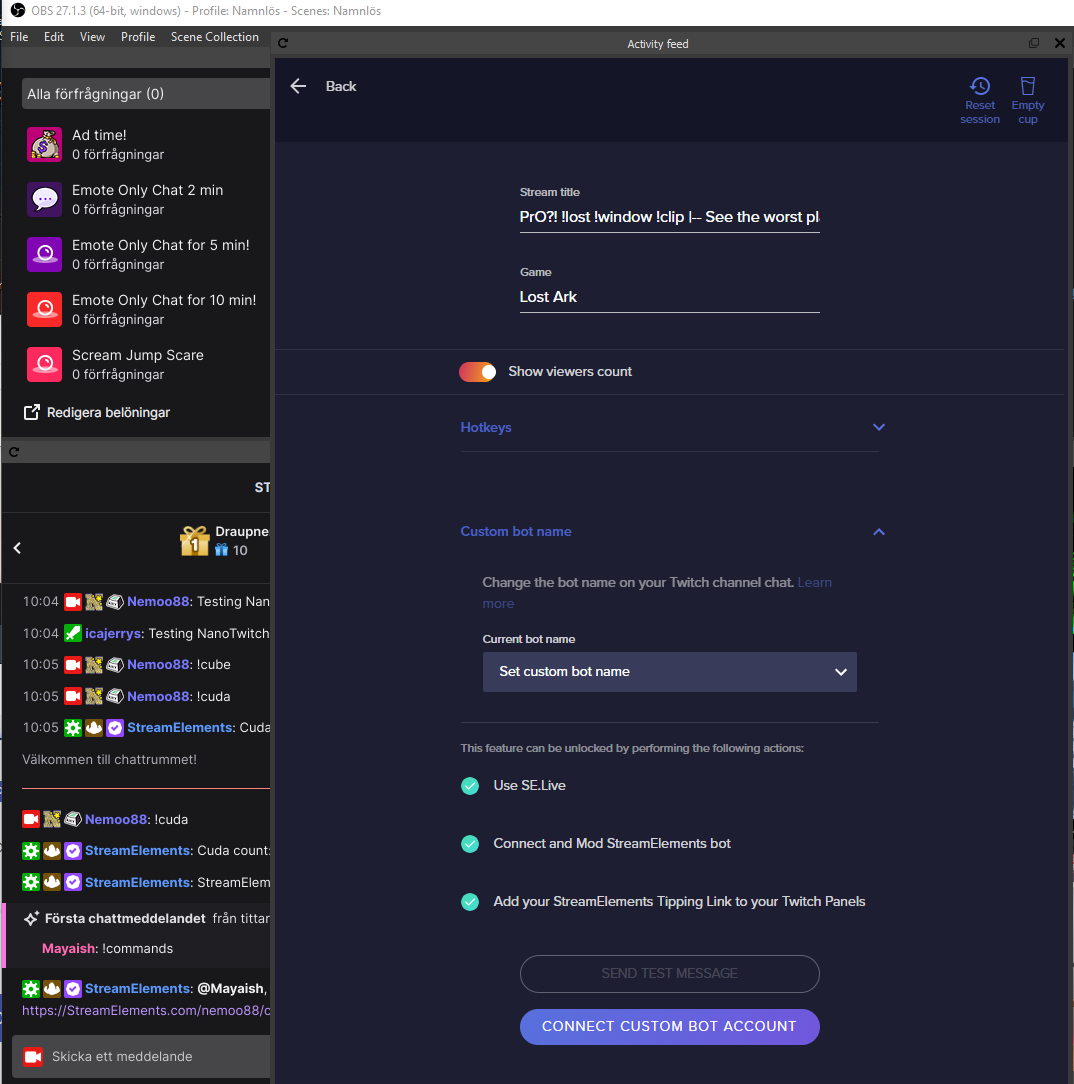
 timid chasm
When using Kappagen emoteslosions with bits, is there a way to make it so only a minimum amount of bits donated will trigger the explosion? Thanks!
 normal rose
I'm attempting to switch over my SE.Live to stream on twitch rather than youtube but it's sending me to my youtube dashboard like before
dapper iglooBOT
@normal rose ⤵️
StreamElements menu, on top of OBS > Logout > Login
 viscid yarrow
Updated streamelements obs and i cant find the dock where you can edit your title and game etc. pls help LOL
@dapper igloo
quick atlas
amber terrace
Gotcha, thank you! I'll message the developer and try and get his help
Are these subs being shared in chat?
 hallow turtle
Heyo so since the newest update ive encountered a change,
both my Stream info dock, and my stream stats dock have disappeared?
Meaning this doc, which i got from my creator dashboard i use to have in my docks, but i cant see a selection for it anywhere?
 kindred fox
hallow turtle
Heyo so since the newest update ive encountered a change,
both my Stream info d...
hallow turtle
kindred fox
<#270206314561404928>
kindred fox
hallow turtle
Heyo so since the newest update ive encountered a change,
both my Stream info d...
hallow turtle
kindred fox
<#270206314561404928>
ty sorry
viscid yarrow
kindred fox
<#270206314561404928>
ty ❤️
quick atlas
amber terrace
Gotcha, thank you! I'll message the developer and try and get his help
Also, please try logging out of SE completely and back in
amber terrace
quick atlas
Are these subs being shared in chat?
yeah, the alerts work fine and stuff, but I just can't turn the volume down
quick atlas
amber terrace
yeah, the alerts work fine and stuff, but I just can't turn the volume down
Sorry! I responded to the wrong person 😅
amber terrace
All good 😂
timid chasm
timid chasm
When using Kappagen emoteslosions with bits, is there a way to make it so only a...
anyone have an answer to this? 
vast wren
timid chasm
anyone have an answer to this? <a:peepoShyPumpkin:842184039301382184>
you can control the amount in the alert's settings
timid chasm
vast wren
you can control the amount in the alert's settings
i can't seem to get it to work, as we still want bit donations ranging from 1-500 to show a gif on the screen, but not the explosion.

 torn rapids
hallow turtle
Meaning this doc, which i got from my creator dashboard i use to have in my dock...
torn rapids
hallow turtle
Meaning this doc, which i got from my creator dashboard i use to have in my dock...
I've been using a workaround in the mean time of trying to spend channel points on myself. When I do it prompts me to re-log with twitch and then my SE docks show up again
 opaque spoke
In the overlay editor, i changed the socials and they wont update, any fix to this??
or am i doing something completely wrong??
vast wren
opaque spoke
In the overlay editor, i changed the socials and they wont update, any fix to th...
what do you mean changed the socials? also did you save?
opaque spoke
yes i saved, like the text where is says insta, twitter etc
i changed the text to say metaseudes instead of twitter etc, but it still just says twitter
 hallow turtle
torn rapids
I've been using a workaround in the mean time of trying to spend channel points ...
hallow turtle
torn rapids
I've been using a workaround in the mean time of trying to spend channel points ...
I did as the updates said and it worked fully
opaque spoke
vast wren
what do you mean changed the socials? also did you save?
to be honest I am probably doing something very wrong lol
i figured it out thank you
 snow gyro
is there any way for media request to auto-play? It used to work a long time ago but hasn't worked for months
it used to skip an unplayable backup playlist song, now it just hangs
west steeple
opaque spoke
i figured it out thank you
hi, just in case, whenever you find a solution to a problem yourself, its good to share what happened so others might get a hand ont it, imagine another one having the same problem 🙂
Even if its a dumb thing.. not in a bad manner.. i mean.. sometimes we miss a thing that was there all the time and reading another one solving a simialr problem might help 🙂
west steeple
snow gyro
is there any way for media request to auto-play? It used to work a long time ag...
Still looking for it, sometimes it does, sometimes it doesnt.
weird acting 😂 i thought twas meant to be like this 😂
snow gyro
yeah, it seems like most users are having issues with it but nobody in SE seems to care lol
 hollow scroll
Hello! So I finally switched from StreamLabs to StreamElements and am in the process of setting up SE.Live for OBS. I have connected my Twitch account for the activity feed but want to know if there is a way to add my YouTube account as well to either have both appear in the same activity feed or to be able to switch between the two as needed.
snow gyro
Also auto play seems to quit working even with media that will play
have to press play button almost every media request/backup play
 tepid heron
sooo I am just testing the waters here... Has anyone had issues with their OBS and SE LIVE after the nvidia driver update and OBS update?
My OBS has just been going to ZERO bitrate but not disconnecting with SE.Live installed but not with it not installed
I brought it up in OBS and just covering all my angles lol
timid chasm
vast wren
you can control the amount in the alert's settings
Do you happen to have any screenshots or an example of the configuration of this? I've looked through the alert setup for quite a while the other day and feel like I've exhausted all the options available to me. None seem to work with what we're trying to do. Again, we want bits 500 and over to show the explosion, but bits under 500 to show a gif alert, but not show the explosion. Hopefully that clarifies things a bit. Thanks!
opaque spoke
west steeple
hi, just in case, whenever you find a solution to a problem yourself, its good t...
Oh sure :) I was trying to change the name from the social media to my name in the wrong area. I had to click on the item, click settings, and change the text there.
radiant copper
@neat anchor thank you so much did all these steps and it fixed it thanks so much
 dawn trench
This is going to sound silly, but i genuinly dont know where i'm supposed to go to delete the %appdata%\obs-studio\plugin_config\obs-browser\obs_profile_cookies
ocean rivet
dawn trench
This is going to sound silly, but i genuinly dont know where i'm supposed to go ...
paste it here:
 dawn trench
@ocean rivet so i just delete the folder that comes up when i paste it?
ocean rivet
dawn trench
<@!131420870244564992> so i just delete the folder that comes up when i paste it...
err, ignore me, yes you delete that folder
dawn trench
Okay, it worked with the stream information dock, but all the other docks are still requiring me to login.
I know its been asked 1000 times, so if there's not another work around right now, I can wait for a fix 
ocean rivet
dawn trench
Okay, it worked with the stream information dock, but all the other docks are st...
yeah, all custom docks are requiring relogging after obs restarts - devs are already working on a fix that should be available in the coming days
dawn trench
ocean rivet
yeah, all custom docks are requiring relogging after obs restarts - devs are alr...
I was mainly looking to get my stream info back rn, really appreciate what yall are doing! Thank you for the help 🙂
 void minnow
was refured here from obs i did obs and se.live update now half my docks are missing was recomended to try beta got that set up but still not working any tips ?
dapper iglooBOT
@void minnow ⤵️
If you are not seeing the OBS Twitch integrations and have SE.Live installed, please follow these steps:
- Make sure you are on the latest and greatest version of SE.Live
- Exit OBS (make sure OBS is not running)
- Delete
%appdata%\obs-studio\plugin_config\obs-browser\obs_profile_cookies - Start SE.Live
- Settings > Stream > Disconnect > Connect
void minnow
disconect twitch and obs ?
weary flume
dawn trench
I was mainly looking to get my stream info back rn, really appreciate what yall ...
the logging in issue that happens every time you launch OBS, i think is caused by SE live not being compatible with the most recent OBS studio. If you downgrade OBS studio to 27.1.3 then your logging in issue should fix it self 🙂
dawn trench
weary flume
the logging in issue that happens every time you launch OBS, i think is caused b...
I'm not too worried about the other docks currently so what was suggested me to do to get the stream info dock back worked, but i appreciate the input, i'm also not wanting to go back to the previous when they're actively working on a fix for the new update 🙂
weary flume
dawn trench
I'm not too worried about the other docks currently so what was suggested me to ...
i feel that, i've seen a whole bunch of people ask so just letting others know as well
 lapis abyss
Hey! I just had a few questions about SE on how alerts work.
I use Restream and everything is pretty connected. Is there no way to connect alerts through SE and all the other stream sites so that if a follow alert came through, it would not be an awkward mess? If I have to use multiple alerts, that is fine, I was just curious.
ocean rivet
lapis abyss
Hey! I just had a few questions about SE on how alerts work.
I use Restream and...
we don't have multistreaming support, so you'd have to use multiple alertboxes for it
lapis abyss
ocean rivet
we don't have multistreaming support, so you'd have to use multiple alertboxes f...
Thank you!
lapis abyss
ocean rivet
we don't have multistreaming support, so you'd have to use multiple alertboxes f...
I am on the SE site and under my FB info. It is pulsing red and says that I am live. I checked the stream and it is not. I am sure it is just a glitch but is it anything I should worry about?
ocean rivet
lapis abyss
I am on the SE site and under my FB info. It is pulsing red and says that I am l...
sometimes it can take some time for our website to realize you're not live anymore
lapis abyss
ocean rivet
sometimes it can take some time for our website to realize you're not live anymo...
Around how long because I have not streamed since 1am. lol.
ocean rivet
lapis abyss
Around how long because I have not streamed since 1am. lol.
for facebook I'm not sure, maybe the API is being super slow today lol
lapis abyss
ocean rivet
for facebook I'm not sure, maybe the API is being super slow today lol
Gotcha. Thanks again! If it continues, I will report back and see what is going on.
ocean rivet
lapis abyss
Gotcha. Thanks again! If it continues, I will report back and see what is going ...
sure thing!
lone sparrow
weary flume
the logging in issue that happens every time you launch OBS, i think is caused b...
im starting to think SE isnt going to update it in time for the API fixes; easier to just uninstall SELive, use vanilla OBS Studio, and just make the docks yourself instead of relying on the plugin. Newest OBS offers better features that were wanted anyway.
ocean rivet
lone sparrow
im starting to think SE isnt going to update it in time for the API fixes; easie...
our devs are already testing a build that should fix all the bugs
lone sparrow
ocean rivet
our devs are already testing a build that should fix all the bugs
why no announcement besides just downgrade or just keep logging in and out? kinda makes us feel ignored
ocean rivet
lone sparrow
why no announcement besides just downgrade or just keep logging in and out? kind...
our community team will be posting on #270206314561404928
lone sparrow
ocean rivet
our community team will be posting on <#270206314561404928>
yea, which looks like Chris was the only one to post related to the OBS/SELive plugin. IDK arguing about location of announcement isnt gonna get anywhere. Usually they are on the ball though, OBS has update, usually same day SELive is updated.
ocean rivet
lone sparrow
yea, which looks like Chris was the only one to post related to the OBS/SELive p...
our devs need time to make sure SE.Live is fully compatible with each OBS update, not as simple as updating it the same day, as it first goes into internal testing and then as a beta release
especially with bigger OBS updates, such as this one
but I do understand the frustration, we are working on being more transparent about this process and we will work with our community team to make sure everything is properly communicated
 wheat monolith
I cannot get my alerts to show up on my stream.
 grim saffron
new update for SE Live removed the edit stream info dock???
 zealous river
Anyone know why all of a sudden since updates i have to sign into twitch in OBS and obs Chat every time I use it now to even chat in my own twitch in obs lol ??? Getting seriously annoying with some of these changes
zealous river
grim saffron
new update for SE Live removed the edit stream info dock???
I saw this too its still there on the top left hit the 3 bars in activity feed, and click on stream settings with the cog it opens it up and you can edit it there mostly...unfortunately though you cant add twitter or other things like before to log in as well...
lone sparrow
zealous river
Anyone know why all of a sudden since updates i have to sign into twitch in OBS ...
its old version of SELive fighting with New OBS; SELive uses old version of chromium, which overwrites OBS files, which causes the conflict.
I ended up just uninstalling SELive and adding the SE Activity Feed manually as a custom dock.
dapper iglooBOT
If you are not seeing the OBS Twitch integrations and have SE.Live installed, please follow these steps:
- Make sure you are on the latest and greatest version of SE.Live
- Exit OBS (make sure OBS is not running)
- Delete
%appdata%\obs-studio\plugin_config\obs-browser\obs_profile_cookies - Start SE.Live
- Settings > Stream > Disconnect > Connect
 frank reef
Hi there, would like to ask for help regarding this. Since I had to uninstall SELive to fix the logging issue into twitch due to the new OBS update, I'm trying to add the SE Activity Feed as a custom browser dock (https://obs.streamelements.com/activity-feed). But after connecting to twitch through it, I'm prompted with this error. I've tried pressing connect to Twitch, deleting cookies, but still prompted with the same error. Because of that, the activity feed won't load up at all. Would appreciate any help I can get on this.
 potent kernel
frank reef
Hi there, would like to ask for help regarding this. Since I had to uninstall SE...
potent kernel
frank reef
Hi there, would like to ask for help regarding this. Since I had to uninstall SE...
Use https://yoink.streamelements.com/activity-feed instead!
frank reef
Working now, tqvm! ❤️
shy mountain
west steeple
<@!120611700993949696> hey, sorry to bother but i told id come back with a feedb...
We pushed for a new Beta version of SE.Live, can you grab that and test if the issues persist after it? Please DM me next time with issue as I may miss it.
west steeple
shy mountain
We pushed for a new Beta version of SE.Live, can you grab that and test if the i...
Hey, imma try it and come with a feedback if anything goes wrong by dm'ing you .
Thanks for hearing.
scarlet laurel
after the update my stream edit info is gone away how to get it back :=)
toxic fern
Please do this https://streamelements.is-serious.business/AJBjuTn.jpg


Switch to the beta version
scarlet laurel
toxic fern
Please do this https://streamelements.is-serious.business/AJBjuTn.jpg
did not help 🙂
dapper iglooBOT
StreamElements menu, on top of OBS > Logout > Login
scarlet laurel
toxic fern
Please do this https://streamelements.is-serious.business/AJBjuTn.jpg
did not help
toxic fern
The logout didn't either?
scarlet laurel
nope
toxic fern
Go to OBS settings > stream > disconnect and reconnect your account.
scarlet laurel
toxic fern
Go to OBS settings > stream > disconnect and reconnect your account.
see that help Thank you so much 🎉
toxic fern
Mind doing this for me as well?
dapper iglooBOT
Please provide a log from your last stream. To do this, in OBS go to Help > Log Files > Upload Current Log File and paste the link to the log file here.
toxic fern
Just need some info from that.
scarlet laurel
toxic fern
Just need some info from that.
toxic fern
Thanks! All we need for now as long as it works.
wheat monolith
Can anyone tell me why my alert overlay does not work? I've had many people look at it and it is set up correctly, and the sound comes through, but the clip does not. And yes it is set as the top layer so it is not hidden behind other things.
 crisp nova
Hello! Ever since the last update, OBS automatically logs me out of my Twitch account every time I re-open OBS. I have to reconnect every single time. My chat appears, but as soon as I try to chat, it tells me I have to log in. My stream info (a dock I have always had) only appears after disconnecting and then reconnecting my account. I also do not see "Check for Updates" in the "Help" tab.
dapper iglooBOT
@crisp nova ⤵️
Please switch to the beta version https://streamelements.is-serious.business/2izUYRd.jpg

Then disconnect and reconnect your account in OBS Settings > Stream.
snow gyro
Asking again about SE Live Media request not auto playing, this issue has been going on for months and no response here, any chance we can get an update or some support?
amber terrace
I got raided and hosted, and the alerts happened at the same time, is there a way to make it so it does one then after that the next?
 slender zephyr

alright, what the hell happend?
ive just updated the SE and obs studio
then that happend
others scenes are working
but not this
 hallow nexus
hi ^^ should I uninstall OBS (my current one is 27.1.3) and OBS.Live before installing the new OBS update?
dapper iglooBOT
@hallow nexus ⤵️
Please switch to the beta version https://streamelements.is-serious.business/2izUYRd.jpg
Then disconnect and reconnect your account in OBS Settings > Stream.
 solid gale
Having issues myself says this when i try to stream NVEC codec wouldn't work and to hcek if my drivers are up to date they are
ocean rivet
solid gale
Having issues myself says this when i try to stream NVEC codec wouldn't work an...
are you on OBS 27.2 or 27.2.1?
solid gale
2.1
ocean rivet
solid gale
2.1
I think it's one of the known issues with the new update, try uninstalling SE.Live and see if the issue persists - if it does, you'd have to check with them
solid gale
I relogged into se live with my twitchaccount and my chat is working now let me check if i can stream
Nope same issue
but chat is linked which was giving me probs before so idk
toxic fern
Could you download this and then choose standalone mode? https://www.techpowerup.com/download/techpowerup-gpu-z/

TechPowerUp
GPU-Z is a lightweight utility designed to give you all information about your video card and GPU.
Click the 📷 after it loads then paste the link with free hosting option.
trail ginkgo
Hi, i had issues couple days ago with not being able to switch title and game on my obs because of update, and you told me to log out and disconnect account and reconnect, and it worked for couple days, then a recent update did the same again but this time, everytime i open obs i have to relog my account with obs for it to work, before it would save and just work everytime, can any1 help ?
solid gale
yeah no thanks to that another app
trail ginkgo
The Dock is called Stream Information
dapper iglooBOT
@trail ginkgo ⤵️
Please switch to the beta version https://streamelements.is-serious.business/2izUYRd.jpg
Then disconnect and reconnect your account in OBS Settings > Stream.
trail ginkgo
i just explained above i tried this
trail ginkgo
so i need to switch to beta now ? whats the difference ?
toxic fern
Fixes the login issue on restart.
trail ginkgo
weird i cant use normal version, but okay i will try the beta version, let you know how it turns out, thanks for help
solid gale
I tried the beta version too it didn't work i just uninstalled SE now and regular obs gives me the same error
Failed to open NVENC codec
check your video drives which are all up to date
trail ginkgo
toxic fern
Fixes the login issue on restart.
that fixed it, thanks again for help, good day.
toxic fern
Can't help you if you don't follow that bit I asked for Woodlands
solid gale
ok i donloaded that
ocean rivet
OBS needs to be downloaded from the OBS website - this will install the latest OBS version, after OBS is installed you can install SE.Live (make sure you uncheck installing OBS Studio during installation, since you just need SE.Live)
toxic fern
Run the app then click the 📷 in the top right. Choose upload with free hosting and copy/paste the first link here.
 barren perch
There is no update for SE OBS Live only OBS. Can someone advise as to what we do please?
ocean rivet
barren perch
There is no update for SE OBS Live only OBS. Can someone advise as to what we do...
I'm giving you the instructions, you can't update OBS from OBS itself, you need to run the installer for the new version
barren perch
What is the link for installer?
toxic fern
OBS (Open Broadcaster Software) is free and open source software for video recording and live streaming. Stream to Twitch, YouTube and many other providers or record your own videos with high quality H264 / AAC encoding.
solid gale
should i uninstall my obs before i upload?
toxic fern
No.
solid gale
ok now i see check for updates in the hlep section
What did yo want me to do with that techpower up thingy?
toxic fern
 solid gale
it is?
toxic fern
Is this a laptop by chance?
toxic fern
If you choose the dropdown in the bottom left is there another option?
solid gale
im checking for updates on their website saying something that this may be a fix for some stuff idk
no other options
thanks for your help id ownlaoded there update drivers saying my vid card is no longer supported thats great so this driver may fix it i'll let you know
saying that the nividia drivers arent compatable with this versio nof windows
idk not working oh well
guess ill just throw obs in the trash
The thing is it was working perfectly fine until i updated
toxic fern
You can try with the x264 encoder but that would go into territory I can't help with at all.
barren perch
Thank you sorted 🙂
snow gyro
Asking again about SE Live Media request not auto playing, this issue has been going on for months and no response here, any chance we can get an update or some support?
toxic fern
solid gale
im checking for updates on their website saying something that this may be a fix...
Unfortunately I've been told that the nvenc option is not available for that GPU as it is too old and doesn't meet the required version to use it.
solid gale
Yeah the laptop is getting old like i said nividia said that it doesnt even do driver updates anymore its an I& gamaing laptop but going on 7 years old now so oh well guess im shit out of luck
I7
more like 9 years old
have to use my desktop i guess
which i should use anyways much better all the way around gaming machine and hard lined so oh well
thanks anyways guess i'll just delete obs off of this rig
have a good one
as im looking there are two version of a graphics driver installed on my laptop not sure why
they are both the same im removing one
 wicked girder
For my OBS screen when I actually click into the program, I was able to put a tab to change my stream title and game directly on the screen, but now am unable to even find the option to do so.. Any way I can go about this?
 quaint moth
Hello everybody. after updating OBS and SE. Live, the widget where I could change the title of the live disappeared .. I really don't know where to go to get it 
it was supposed to be in the panel section, but it's gone
quaint moth
wicked girder
For my OBS screen when I actually click into the program, I was able to put a ta...
hi, I have the same issue
dapper iglooBOT
@wicked girder @quaint moth ⤵️
Please switch to the beta version https://streamelements.is-serious.business/2izUYRd.jpg
Then disconnect and reconnect your account in OBS Settings > Stream.
 boreal hamlet
SE causes all my browser docks to not stay logged in to Twitch every time i start OBS.
ocean rivet
boreal hamlet
SE causes all my browser docks to not stay logged in to Twitch every time i star...
this will fix it #helpdesk-selive message
boreal hamlet
aaaaaa
 potent sequoia
Hello.
How to let the requested media through tips start after the tip alert ends and not at the same time of the tip alert
 sturdy cradle
ocean rivet
this will fix it https://discord.com/channels/141203863863558144/494513233416421...
sturdy cradle
ocean rivet
this will fix it https://discord.com/channels/141203863863558144/494513233416421...
it doesn't, unfortunately. we just need a fixed and working update. ive done every single "workaround" posted in this channel, i still get logged out of all custom docks on exit. switching to the beta version is not a solution. i have spent more time on this update fiasco than i have streamed. at this point, i am just going to accept i have to login to everything on launch, until an actual update solution is released. hopefully soon, before the 28th
ocean rivet
sturdy cradle
it doesn't, unfortunately. we just need a fixed and working update. ive done eve...
not working for you on the beta version and obs 27.2.1? could you upload your logs file so that we can have our devs look into it? this beta release has fixed it for all of the users that had this issue so your feedback would be very appreciated
solid gale
A little disappointed that just the other day OBS was working fine now not so much, been streaming on this rig for over 4 plus years now I can't because of a lousy new version with many problems no wonder this product is free.
ocean rivet
solid gale
A little disappointed that just the other day OBS was working fine now not so mu...
your issue persists with regular OBS, not much we can do ourselves
 prisma sluice
sturdy cradle
it doesn't, unfortunately. we just need a fixed and working update. ive done eve...
prisma sluice
sturdy cradle
it doesn't, unfortunately. we just need a fixed and working update. ive done eve...
i log on one dock and just close and reopen the other ones and it works at least if they are all the same web like twitch for example
ocean rivet
prisma sluice
i log on one dock and just close and reopen the other ones and it works at least...
have you tried the SE.Live beta release? so that you don't have to. re-log after each OBS restart?
 normal sigil
i foud the way to get it all back
prisma sluice
ocean rivet
have you tried the SE.Live beta release? so that you don't have to. re-log after...
no i havent tried because i have bad experiences with general updates of stuff shit messing up
normal sigil

go to streamelements.com and select the download in your account


download this and let obs donwload
when he ask's to update obs live.se yust clik on( dont show this agean )and clik (not now) its in the same screen
this is how i fixt my complete obs with all my command's working and twitxh stats this is the way to get back on track !!;
 acoustic dirge
I accidentally skipped the OBS 27.2 update and now I am unable to update through OBS, any fixes?
normal sigil
yust do the same way i yust told ;)
he will download obs and than do the update then he will ask to update se.live thats the thing you need to skip ;)
ocean rivet
acoustic dirge
I accidentally skipped the OBS 27.2 update and now I am unable to update through...
download obs from their website (https://obsproject.com) and manually install it
OBS (Open Broadcaster Software) is free and open source software for video recording and live streaming. Stream to Twitch, YouTube and many other providers or record your own videos with high quality H264 / AAC encoding.
 mortal bone
since the last update of obs i can not keep my custom browser source panels logged in on twitch as it conflicts with streamelements. Any indication when this is going to be fixed?
ocean rivet
mortal bone
since the last update of obs i can not keep my custom browser source panels logg...
we have a beta release that fixes this
dapper iglooBOT
Please switch to the beta version https://streamelements.is-serious.business/2izUYRd.jpg
Then disconnect and reconnect your account in OBS Settings > Stream.
mortal bone
ocean rivet
we have a beta release that fixes this
fixed thanks
snow gyro
Asking again about SE Live Media request not auto playing, this issue has been going on for months and no response here, any chance we can get an update or some support?
 worn rapids
How do I work overlays
 rugged berry
Hello I had some questions about how to do giveaways on my stream if there is someone who can help me with this I would appreciate it so much , thank you
dapper iglooBOT
@worn rapids ⤵️
Check out this great SE Getting Started Guide: https://youtu.be/XgfswUlk9HU and our playlist with tutorial videos from setting up the basics to in-depth details on how to use our product: https://youtube.com/playlist?list=PLCDDKlFdScbEwdx5AntcQIS1InkFJwHtv
New to OBS? Here is a 4 step quick start guide https://obsproject.com/wiki/OBS-Studio-Quickstart
Want to learn even more? Here is an in-depth overview https://obsproject.com/wiki/OBS-Studio-Overview
worn rapids
Thx lol
west steeple
shy mountain
We pushed for a new Beta version of SE.Live, can you grab that and test if the i...
Hiho, coming with feedback form my end..
even with the beta i still facing the same problem
+
media request appears to be broken (after the latest one)
it will stop after every music making us need to play it manually
sorry i'll dm 😂 i forgot but i'll let it here too