#helpdesk-selive
1 messages · Page 240 of 1
 sour pelican
 quick atlas
sour pelican
Ah, sad story. Any chance Ground Control will have the custom bot name again? I'...
quick atlas
sour pelican
Ah, sad story. Any chance Ground Control will have the custom bot name again? I'...
It would work the same way, and OBS.Live is the replacement for GC so that won't be updated unfortunately
sour pelican
quick atlas
It would work the same way, and OBS.Live is the replacement for GC so that won't...
Thanks for the info!
 minor violet
Hey guys, i have a question, and issue.. I recently stopped streaming to 3 platforms because i became affiliate on twitch and now for some reason i cant see that chat on the obs live software. it keeps trying to connect to the youtube chat
 dapper iglooBOT
@minor violet ⤵️
StreamElements menu, on top of OBS > Logout > Login
 crystal forge
Any steps to help the media player auto play with or accept hot keys?
 keen spire
Why is it when Im trying to change the text font and color in the alert bot that the color change doesnt apply. I put it in in both primer and secondary and pulse but it reverts I can change the shadow but it will not keep a change in font color.
 vast wren
keen spire
Why is it when Im trying to change the text font and color in the alert bot that...
vast wren
keen spire
Why is it when Im trying to change the text font and color in the alert bot that...
Have you also checked your alert variations?
 lean sandal
hey, can you help me? From some days ago I'm missing this button. I'm in OBS with the pop-out link for the activity feed in a browser dock
 dapper iglooBOT
@lean sandal ⤵️
StreamElements menu, on top of OBS > Logout > Login
 empty nexus
Why would the URL to my overlay not load in OBS browser source?
 kindred fox
empty nexus
Why would the URL to my overlay not load in OBS browser source?
kindred fox
empty nexus
Why would the URL to my overlay not load in OBS browser source?
Make sure the browser source is 1920x1080 resolution
empty nexus
It is
kindred fox
empty nexus
It is
Try disabling hardware acceleration
dapper iglooBOT
OBS > Settings > Advanced > Scroll down > Enable or disable Browser Source Hardware Acceleration, depending on its current state > Restart OBS
https://i.imgur.com/ggMe9ZE.png
empty nexus
Okay, so I clicked this option that says "Resize output (Source size)" and now it's back
kindred fox
Uhh
empty nexus
Might have been lost off the canvas somewhere
kindred fox
¯_(ツ)_/¯
 opaque lantern
Ahoy 🙂 I can't seem to get Custom Bot Name to work, I'v got all 3 directions ticked, go through the authentication connection and then dun dun dun.. Thank you in advance for any ideas 🙂
dapper iglooBOT
@opaque lantern ⤵️
- Right-click your OBS desktop shortcut (not the OBS.Live shortcut) and navigate to Properties
- In the Target field, add the following to the very end:
--remote-debugging-port=40404(don't forget to add a space before the current path)
https://streamelements.is-serious.business/6ihr2EL.jpg - Open OBS (or restart if it was open)
- Open your web browser and type in:
localhost:40404(try127.0.0.1:40404if you see issues - https://streamelements.is-serious.business/3EGPQFJ.jpg) - Click on StreamElements - Activity feed - https://streamelements.is-serious.business/2kJYt2b.jpg
- Type the following into the console and hit enter:
store.customBot.removeCustomBotIntegration() - Try setting the custom bot name, make sure you follow https://strms.net/custombotname
- Remove the flag added in step 2 from your shortcut properties
 opal lynx
Hey 🙂 I've been having issues with obs crashing/becoming unresponsive while I'm streaming. This results in my stream going offline. It hasn't been super frequent, but it's enough to be bothersome. I have the log file from the last time this happened (it didn't generate a crash report) if that would be helpful for troubleshooting.
 hoary sequoia
hello goodnight, Iam trying to stream bioshock, and whenever i start the stream everything is fine until I o[pen the game, I was wondering how to fix it
lean sandal
dapper igloo
<@197378640768532481> ⤵️
I'm not asking about not having activity. I'm asked about that button. I'm in OBS Studio, not in OBS.Live
kindred fox
lean sandal
I'm not asking about not having activity. I'm asked about that button. I'm in OB...
If you’re in vanilla obs studio then you’re stuck with whatever the custom dock gives you
lean sandal
kindred fox
If you’re in vanilla obs studio then you’re stuck with whatever the custom dock ...
okay. And something changed in the activity feed pop-out? Some days ago I had that button
kindred fox
lean sandal
okay. And something changed in the activity feed pop-out? Some days ago I had th...
I can’t control that. That’s why the plug-in is available
lean sandal
kindred fox
I can’t control that. That’s why the plug-in is available
okay. Thank you anyway ^^
 hard marsh
..... i accidentally hit x on the chat button, and i have accidentally full screened it in a weird way where theres no X or minimize for the application itself..... send help?
esp on the chat thing i have scared myself bc i cant find how to get it back in options :(((
 zenith tide
Hellooooo, I need some help
I'm despreatly trying to import my Streamlabs-setting to OBS - but it doesn't work. WHAT DO I DO WRONG!?
hard marsh
Were you logged into your twitch on both? Not an expert as evidenced above but that seemed to make the transition of setting easy for me was I was logged into twitch on OBS and streamlabs
zenith tide
I am, yes
 soft knot
hard marsh
..... i accidentally hit x on the chat button, and i have accidentally full scre...
soft knot
hard marsh
..... i accidentally hit x on the chat button, and i have accidentally full scre...
What do you mean by "the chat button"? Can you provide a screenshot of what you see right now?
hard marsh
See! no chat, there was a chat opposite of where the activity and stream information were i accidentally hit the X on it ):

@soft knot
soft knot
hard marsh
See! no chat, there was a chat opposite of where the activity and stream informa...
StreamElements -> OBS.Live Docks -> Chat
 hard marsh
ty <3<3<3<3
 strong lance
anyone know how to fix double sound effect?
vast wren
strong lance
anyone know how to fix double sound effect?
is this when an alert pops up?
strong lance
yeah when someon purchase in my store , the sound effect playing like twice i mean like merge double
vast wren
strong lance
yeah when someon purchase in my store , the sound effect playing like twice i me...
let me check
vast wren
strong lance
yeah when someon purchase in my store , the sound effect playing like twice i me...
which overlay are you using?
 hollow solar
If you havent figured it out yet, running as administrator helped for me
Soooo.... I've managed to add a theme/overlay onto my stream but I dont know how to link it so that the frame would apply to my video and for it to be interactive when I get a new follower for example
soft knot
hollow solar
Soooo.... I've managed to add a theme/overlay onto my stream but I dont know how...
I'm not sure what you're asking here exactly. What do you mean by "frame"?
hollow solar
The bot response in the twitch helpdesk worked. It was only showing top donators and nothing else. I've managed to get it right
for some reason obs is broadcasting the pc's audio as well as the game, so it does it double. How can I stop this from happening?
Dont know if this is the right place to ask
soft knot
We might be able to offer some support for OBS, we all use it after all. 🙂
In this case, I would go into advanced audio properties and check which audio source is set to "monitor only" and which to "monitor and output". You probably want to set the desktop audio source to "monitor only".
strong lance
vast wren
which overlay are you using?

sorry for late reply i was streaming rn

Pinelyn
i cant send the picture
soft knot
strong lance
i cant send the picture
Let us know when you're not live, we can test some things then.
kindred fox
strong lance
anyone know how to fix double sound effect?
Make sure you check the box to shutdown when not visible in the browser source properties in all scenes
hollow solar
soft knot
We might be able to offer some support for OBS, we all use it after all. 🙂
In t...
Thank you 😄 Didnt quite work as intended, but it got some of it done 😄
 queen mirage
why is the mediarequest player double playing the youtube video sounds? there is only one source on the mixer I have no idea how to fix this, anyone out there?
 bronze sage
not sure where to ask this but, i recently discovered that any custom docks relating to streamelements doesn't work for me anymore, if i try other urls it does work so i presume it's not an obs issue?
it just shows a white blank screen on the custom dock when i hit apply after entering any streamelements urls
dapper iglooBOT
@bronze sage ⤵️
StreamElements menu, on top of OBS > Logout > Login
 frank sluice
Hi I'm trying to move my Labels over from strealabs ones to stream elements, but i'm having trouble replicating the moving text/font I have on the right side(which is text file read from a file on my pc). The left side text is the stream elements one.

I can neither seem to get it to fit the box or get the correct outline/font/size etc. as the right side one. thanks for any help.
if there's a way to get the stream elements labels as a text file I can put on my PC(similar to Streamlabs) that'd solve the issue for me if that's an option.
 copper oyster
Hi - I have an issue.
Every time I close and reopen OBS Studio, my Media sources are removed, and I just get this popup. I usually have 5 but I only readded one as a test. Is there anyway to fix this?

 toxic fern
That's something to ask on the OBS discord as that's an issue with their part.
dapper iglooBOT
Obs.live is a plugin for OBS Studio for the best OBS support, please join their Official Discord @ https://discord.gg/obsproject
copper oyster
I joined this discord from the OBS Studio toolbar
 rugged quail
Hi! My Activity Feed (for YouTube live by the way) doesn't seem to be working. The Chat dock is working fine but I couldn't see any subs in the feed but had viewers telling me they were subbing. No alerts were popping up either. I've tried logging out and back in on OBS and on the website but nothing seems to trigger it to start up. Just stays on "You have no stream activity."
 dark geyser
Hi friends. when i want to start stream so obs freeze, you don't know what to do?

 halcyon pecan
why is it so zoomed in? if i shrink it to fit then its small on twitch

 knotty ravine
Greetings! I have created an overlay using the web interface. How do I get that to show up in the OBS application so I can use it as a scene? Or am I misunderstanding how this works?
dapper iglooBOT
@knotty ravine ⤵️
To add your overlays to OBS, add a new browser source in your scene. Paste your overlay URL in the browser source properties, set the dimensions to 1920x1080 (unless you changed them on the website) and check Shutdown source when not visible. https://youtu.be/KDvLynUqXI4
knotty ravine
Thank you
 golden furnace
hey there im getting status code 400 request failed when im trying to update my title is there any way to fix this?
 finite pawn
How do you use obslive
 supple helm
Hey guys, need some help. looking at my stream from last night all my sounds are at a good level. my teamspeak however barely even comes through. i have my stream audio source set as my headset. would this be right or is there something i can do to help the teamspeak audio be louder
 teal garnet
Is there a known issue with loading overlays at the moment? Mine are not loading in OBS or the browser directly at all.
toxic fern
Can you load them incognito?
teal garnet
After many refreshes I can see it in the browser, still a no in OBS
Ah finally. Just seems very slow right now
keen spire
vast wren
Have you also checked your alert variations?
Yes they are not saving either the problem is that the colors are not saving period
supple helm
hey guys. since adding an overlay from streamelements im not getting desktop audio coming through. im streaming right now so a quick fix would really help
strong lance
got it already solve it
 ionic ice
I need help when i put my overlay into obs it gets cut off like this
 dapper iglooBOT
@ionic ice ⤵️
The default resolution for StreamElements overlays (theme and custom) is 1920x1080. Please add them in OBS at their full resolution and use CTRL+F to fit to screen if necessary. You can then downscale your stream in OBS settings > Video if you'd like https://i.imgur.com/6bWXxjR.png
supple helm
supple helm
hey guys. since adding an overlay from streamelements im not getting desktop aud...
help please i dont want to stop my stream
 uncut warren
supple helm
help please i dont want to stop my stream
uncut warren
supple helm
help please i dont want to stop my stream
Double check your audio sources, make sure they're pulling the right source. I had this happen to me recently as well
supple helm
yeah so it disabled for some reason so i enabled it again. now when im in my brb scene i mute the desktop audio. that then mutes it in all my other scenes which i dont want
 frail schooner
My OBSLive plugin was having issues loading the chat today. I tried refreshing the chat module, but it sat at "live streaming" screen just flickering and spazzing like crazy. Eventually just had to open the native OBS chat box to get going. Any ideas?
supple helm
supple helm
yeah so it disabled for some reason so i enabled it again. now when im in my brb...
sorry forgot to click reply
uncut warren
Unfortunately that one's over my head, I haven't worked out how to mute things in only one scene yet.
frail schooner
frail schooner
My OBSLive plugin was having issues loading the chat today. I tried refreshing t...
This was flickering/glitching, and the chat never started after going live.
 dapper iglooBOT
@frail schooner ⤵️
StreamElements menu, on top of OBS > Logout > Login
frail schooner
frail schooner
This was flickering/glitching, and the chat never started after going live.
I stream via YouTube btw
frail schooner
dapper igloo
<@273838376971403264> ⤵️
trying this, will report back tomorrow if the issue persists
supple helm
uncut warren
Unfortunately that one's over my head, I haven't worked out how to mute things i...
thanks for the help anyway. anyone know how to mute individual sources in different scenes?
 timid loom
Hi I've recently set up a twitch stream with Stream Elements using OBS, I have set up some custom notifications to pop up when someone new follows, but after watching a few videos and trying lots of different settings is just not quite working. Does anyone have a really good guide for this?
zenith tide
timid loom
Hi I've recently set up a twitch stream with Stream Elements using OBS, I have s...
Hi, do you mean like widgets?
timid loom
zenith tide
Hi, do you mean like widgets?
Sorry I should have said the alert box, I have set this up as it's own overlay and it now pops up with the image but no text and I'm really struggling as I have to test with real accounts (or at least I can't find another way to test)
zenith tide
I had this problem (and many more) today, but I think this might help;
My overlays -> [insertnameofoverlayhere] -> Edit -> Emulate
There you have how it will look in your OBS, if you've copied the link as a browser-url (whatever that's called)
Do this if you're not streaming, but when you click emulate, it will show
If it doesn't work, dm me
timid loom
zenith tide
I had this problem (and many more) today, but I think this might help;
My overla...
I am stupid sometimes! this is so easy now! Thank you so much
zenith tide
I felt the same, and no-one here answered me the things I wanted to know, so I thought I'd help someone else with the same problem!
 chrome shard
I'm new to OBSLive and i'm trying to add alerts from stream elements to OBSLive. Can you help me?
dapper iglooBOT
@chrome shard ⤵️
To add your overlays to OBS, add a new browser source in your scene. Paste your overlay URL in the browser source properties, set the dimensions to 1920x1080 (unless you changed them on the website) and check Shutdown source when not visible. https://youtu.be/KDvLynUqXI4
chrome shard
Is it possible to add stream elements chat to obslive
I have a video source question. I stream a game that I play on my phone. Is there a way to have my phone as the video source?
 celest valve
hey im having mic problems i cant talk while in-game to stream but out of game they can hear me
 topaz cloud
Hello, I'm having a lot of issues with streamelements. For whatever reason, I cant get the alerts I do on streamelements to show up obs
dapper iglooBOT
@topaz cloud ⤵️
OBS > Settings > Advanced > Scroll down > Enable or disable Browser Source Hardware Acceleration, depending on its current state > Restart OBS
https://i.imgur.com/ggMe9ZE.png
 nimble hearth
My custom bot name is no longer working. It's tied to my own name and I tried logging in through the custom bot name method, but still nothing
Or rather, I'm trying to get it to tie back to my name, not the default StreamElements name
 glossy frost
hey I'm looking for help I have a problem with the installation of streamelements
is there someone who can help me
topaz cloud
@dapper igloo thank you, I will try this after I feed my son.
dapper iglooBOT
@nimble hearth ⤵️
- Right-click your OBS desktop shortcut (not the OBS.Live shortcut) and navigate to Properties
- In the Target field, add the following to the very end:
--remote-debugging-port=40404(don't forget to add a space before the current path)
https://streamelements.is-serious.business/6ihr2EL.jpg - Open OBS (or restart if it was open)
- Open your web browser and type in:
localhost:40404(try127.0.0.1:40404if you see issues - https://streamelements.is-serious.business/3EGPQFJ.jpg) - Click on StreamElements - Activity feed - https://streamelements.is-serious.business/2kJYt2b.jpg
- Type the following into the console and hit enter:
store.customBot.removeCustomBotIntegration() - Try setting the custom bot name, make sure you follow https://strms.net/custombotname
- Remove the flag added in step 2 from your shortcut properties
nimble hearth
Thank you so much, I was so lost, haha
rugged quail
@dapper igloo it dont let me stream on twitch in the latese obs update because i switched to yt
glossy frost
@dapper igloo I can not install the software it gives me a bug
 shrewd beacon
hey yall sorry to bother you, but is there a way to have to different chat boxes of the same type? For example I have two chat boxes by Cocahh with two different settings. When I update one of them the other gets updated with those settings as well. I'm not sure if I'm doing something wrong or if there isnt a way to get two different settings.
 digital lark
Hello, so I have some emulated followers that I added to my overlay for testing (I'm just starting out and have no actual followers). When I start streaming, are these going to disappear? Because just recording video to test still shows the emulated names, and I don't want bogus named on my stream
quick atlas
shrewd beacon
hey yall sorry to bother you, but is there a way to have to different chat boxes...
What are you trying to have each one do?
quick atlas
digital lark
Hello, so I have some emulated followers that I added to my overlay for testing ...
Those will go away when the overlay refreshes for the actual stream
 somber radish
i bought a new tower and had to redownload streamelement OBS which is fine and ive got everything exported/imported from the old setup but i seem to not be able to find my stream manager dock, you know where you can update your stream title, game, and tags? uhhh how do i get that dock back? ive ben messing with this for an hour and cont find it and im late for things now. thanks in advance
shrewd beacon
quick atlas
What are you trying to have each one do?
just have one that fades away after a minute and one that stays put no matter the time
 upper pollen
Hullo nice helper people! So, I have the OBS.Live plugin that lets me adjust StreamElements scenes right from OBS, which is nice. Except now, for some reason, when I try to do that (by clicking Open Streamelements Overlay Editor in the Properties menu), the window pops up and then says "Uh-Oh... Invalid Authorization Token" And... I don't quite know how to fix that... ^^'
quick atlas
somber radish
i bought a new tower and had to redownload streamelement OBS which is fine and i...
You should be able to go to the Streamelements Menu > OBS.Live Docks > Activity Feed (if you aren't using OBS.Live: View > Docks > Stream Information).
quick atlas
shrewd beacon
just have one that fades away after a minute and one that stays put no matter th...
I'm not sure if you'd find that functionality with the chatboxes
dapper iglooBOT
@upper pollen ⤵️
StreamElements menu, on top of OBS > Logout > Login
upper pollen
Oh, thank you!
shrewd beacon
quick atlas
I'm not sure if you'd find that functionality with the chatboxes
aahh okie thank you!
 quartz cedar
 wheat charm
I feel like I've gotten the chat bot set up correctly, but it does not appear to be working. None of my commands work. Is there anything specific I need to do to add the bot to my channel or just mod it?
rugged quail
I need help getting SE overlays to appear on stream in OBS.live
topaz cloud
@dapper igloo this did not solve the problem.
dapper iglooBOT
@topaz cloud ⤵️
The default resolution for StreamElements overlays (theme and custom) is 1920x1080. Please add them in OBS at their full resolution and use CTRL+F to fit to screen if necessary. You can then downscale your stream in OBS settings > Video if you'd like https://i.imgur.com/6bWXxjR.png
 honest echo
same may help you too @lunar stag ⤴️
 broken idol
Hello, just a question about the Chatbot Custom Name. I've done all the things to set up the custom name before and it all was working perfectly. Around the time of the leak/hack of Twitch when the Stream Keys were reset it broke and I have not been able to get it back since. I have tried multiple attempts with multiple accounts. I've disconnected and reconnected my Profile with Streamelements and re-entered my Stream Key. Please Help. I really enjoy having the personalization of the custom name. Thanks.
vast wren
broken idol
Hello, just a question about the Chatbot Custom Name. I've done all the things t...
Have you tried loggin out using this link https://streamelements.com/logout ?

StreamElements
The Ultimate All in One Platform for Streamers
dapper iglooBOT
@broken idol ⤵️
If your commands recently stopped working and you're using OBS.Live and a custom bot name do the following:
- In OBS.Live, click on the hamburger menu (three stripes) at the top left of your activity feed
- Click on Stream Settings > Custom bot name
- In the Custom bot name field select Set custom bot name, not your already existing username (with capital letters). Note: If you already connected an account that way, the third entry will show as the account name (see image https://i.imgur.com/re4theQ.png).
- Scroll a bit down and click on the purple Connect Custom Bot Account button
- Log in as usual and Authorize the custom bot name
- Back in the Activity feed, click on the Send Test Message button and check if your custom bot name starts working again
 weary rain
Hi, I am having trouble connecting streamelements to my youtube channel. Everytime I try to allow access it says an error occurs? Help please :)!
broken idol
dapper igloo
<@362365023424610317> ⤵️
Yup done all that. multiple times. It still doesn't work. It goes through the process and I hit the Authorization button. But the 3rd entry never appears and I can't figure it out.
 prisma bear
hey guys i have a problem with the stream elements dash board it does show all my follower and subs
doesn't *
 cursive elm
hey, my host alerts are not showing on my alert widget and activity feed was wondering if there was a fix for it, i have tried setting the amount to activate it to 0 and i have tried logging out and back in and nothing, hoping someone here knows how to get it working.
 tall vector
HI ya'll trying to get the SE chat work with a youtube live, but all I get is monkey with the "Something went worng" any ideas?
broken idol
dapper igloo
<@362365023424610317> ⤵️
This is with my second account. But it does NOT show up in OBS in the third entry to choose as a Bot Name.


 gusty otter
Hey! I have a chat box setup on my overlay (twitch) but I can't get any messages to appear on the overlay!
broken idol
gusty otter
Hey! I have a chat box setup on my overlay (twitch) but I can't get any message...
Hey, this is 101 stuff, sorry if it's something you already know... You have to hit save any time you make changes for them to take affect in OBS. As well as refresh the browser source sometimes. It may also be a layer thing, the Chatbox may be underneath something else inside the overlay. Again, this is all lvl. 1 fixes. 🙂
gusty otter
broken idol
Hey, this is 101 stuff, sorry if it's something you already know... You have to ...
I know that, Overlay is saved, and refreshed / recopied and pasted. It is a default stream elements overlay
broken idol
huh, then eff me. sorry.
gusty otter
So im unsure why it wont appear lol. my name isnt on the list either. But no worries my man! I'm sure it will get sorted out
fIXED IT
 nova matrix
Hi, i hav a problem with the change bot name feature
I cant change to a any custom name
Even the streamer name ist working
Can anyone help me?
vast wren
nova matrix
Hi, i hav a problem with the change bot name feature
can you please elaborate?
nova matrix
broken idol
Hello, just a question about the Chatbot Custom Name. I've done all the things t...
I have exactly this problem
I have tried login out and login in but nothing happends
broken idol
vast wren
Have you tried loggin out using this link https://streamelements.com/logout ?
Ah, no I have not tried that link. I will give it a shot tomorrow, thx. But it doesn't sound promising. Lmk if there a more concrete answer eventually please.
zenith tide
Hi!
Is there a way to give your bot a custom name?
dapper iglooBOT
@zenith tide ⤵️
If your commands recently stopped working and you're using OBS.Live and a custom bot name do the following:
- In OBS.Live, click on the hamburger menu (three stripes) at the top left of your activity feed
- Click on Stream Settings > Custom bot name
- In the Custom bot name field select Set custom bot name, not your already existing username (with capital letters). Note: If you already connected an account that way, the third entry will show as the account name (see image https://i.imgur.com/re4theQ.png).
- Scroll a bit down and click on the purple Connect Custom Bot Account button
- Log in as usual and Authorize the custom bot name
- Back in the Activity feed, click on the Send Test Message button and check if your custom bot name starts working again
zenith tide
Thanks!
 grand river
im trying to do a cloud backup because im resetting my PC and i don't want to rebuild everything after... but it keeps telling me that there's a network problem... anyone got a fix for this..?
 summer oxide
There is a preview and program screen and I cant remove either of them
 wintry bramble
Need trying to add a 2nd camera however I use XSplit to remove background so my obs will not let me recognize the 2nd camera. Can someone anyone help me with this please.
rugged quail
so, what do I do if I wanna cross-stream with stream elements?
like, with external tools
 rapid cosmos
Hello, i was streaming today, everything was good, suddenly my bitrate starts acting, going from 6000 to 7000 then down to 2000-3000.My internet connection is very good.I am also getting dropped frames for no reason.
 molten shard
i'm switching from SLOBS to OBS and when uploading a custom .gif for my alerts, I can't seem to get it to work
just a plain empty box
 boreal hamlet
hey there. ever since installing OBS.LIVE, my obs has been extremely laggy. Whats up with that? 
(@me on replies)
especially browser docks, its kind of giving me a headache
 polar wedge
Heya, in the recent weeks (past 2-3 weeks), my Media Request backup playlist seems to have a lot of it returning an error of "This video is unavailable" without any further messages. I'm forced to skip the video, It also seems like the playlist has a very very high tendency of looping or playing songs already previously played (shuffle doesn't seem to "properly shuffle?"), I can listen to one song and it rotates back within an hour. My playlist consists of almost 500 songs at a 35h length. Doesn't really happen with requested media/songs, mostly only within my backup playlsit. Any insight/ideas?
 calm notch
Hello, i have been trying to connect my Custom Bot name with OBS.Live and it is not working at all. I tried everything at the "StreamElements article of creating a Custom Bot name with OBS.Live!" I fall into the catagory of the ( --remote-debugging-port=40404) and i cannot get it to work after multiple attempts. Only thing that i havent done is a complete uninstall. It even authorizes and says bot is connect but nothing shows and if it Send Test Message, StreamElements is just the name that shows. Is there an ideas//reasons/ways to get this fixed?
quick atlas
calm notch
Hello, i have been trying to connect my Custom Bot name with OBS.Live and it is ...
What happens when you get to the remote-debugging part of those steps?
 lone lodge
When I change later, there is a 1 sec delay on my overlay.
 storm girder
right i need some assistance
i am trying to import my chatbox widgets but the other widgets are working but chatbot wont
so im so lost
@ me when you reply please
quick atlas
storm girder
i am trying to import my chatbox widgets but the other widgets are working but c...
Where are you importing from, and what error if any are you seeing?
quick atlas
lone lodge
When I change later, there is a 1 sec delay on my overlay.
Could you elaborate on this for us?
storm girder
i am importing from a Winrar file its from nerd or die but the other widgets load for me but my friend did it on theres and it worked perfectly but for me chat wont load
quick atlas
polar wedge
Heya, in the recent weeks (past 2-3 weeks), my Media Request backup playlist see...
Do you know if those skipped videos have something in common, like comments being disabled?
storm girder
i have just swapped over from they who shall not be named
lone lodge
quick atlas
Could you elaborate on this for us?
Helping a friend. But he has a starting screen in streamlabs and another overlay in streamelements. When to switch from the start screen to the second overlay. Will there be a 1sec delay on the overlay that is in stream elements. Never seen it before
quick atlas
storm girder
i am importing from a Winrar file its from nerd or die but the other widgets loa...
Would you be able to record a video of it? Generally the set-up process is explained by the third party (NoD in this case) so we'd have to see if it's something we can fix
quick atlas
lone lodge
Helping a friend. But he has a starting screen in streamlabs and another overlay...
If they're using Streamlabs OBS, we wouldn't be able to troubleshoot that. Is that what they have?
quick atlas
storm girder
it might be easier?
Unfortunately, no
calm notch
I can never get there. It doesn't allow me to apply changes after try to add the info to the target location
storm girder
if it helps i am using obs studio
can i dm u a link to a unlisted stream so i can show u
quick atlas
calm notch
I can never get there. It doesn't allow me to apply changes after try to add the...
How did you enter it in the target field? It's easy to enter that part incorrectly, so that might be the issue
quick atlas
storm girder
can i dm u a link to a unlisted stream so i can show u
Are you streaming to YouTube?
storm girder
yes
quick atlas
So the chat functionality does require the stream be live and public. You should also make sure these settings are met:
storm girder
ok
dapper iglooBOT
To set up the bot for your YouTube stream, please follow these steps:
- Make sure your stream is public. The bot cannot join a private/unlisted stream.
- Your stream must be live for the bot to join the chat.
- Go to https://studio.youtube.com/, click on Settings > Community and add https://youtube.com/c/streamelements or https://www.youtube.com/channel/UCjerlCIbLPQwSnYlClkjDXg as a Moderator.
- When live, be sure to look at Live chat instead of Top chat, as Top chat will hide the bot messages.
storm girder
works
polar wedge
quick atlas
Do you know if those skipped videos have something in common, like comments bein...
No, it's been really random. I'll set aside a day to sift through my playlist while it's not on shuffle (so I can identify the song) and maybe see if I can note any patterns with the affected videos.
storm girder
chat is now stuck on screen and wont fade away
 worthy karma
For some reason, idk why, I cannot set my custum bot name.. Whem I authorize after loggin in, it keeps going back to this screen.
 calm notch
quick atlas
How did you enter it in the target field? It's easy to enter that part incorrect...
calm notch
quick atlas
How did you enter it in the target field? It's easy to enter that part incorrect...
"C:\Program Files\obs-studio\bin\64bit\obs64.exe --remote-debugging-port=40404"
I entered it: obs studios>properties>target:>then clicked apply and it says problem with shortcut
kindred fox
The second “ goes after .exe
storm girder
chat is meant to disappear after a while and it wont
 keen quail
hello
storm girder
quick atlas
So the chat functionality does require the stream be live and public. You should...
chat is now just stuck on screen and wont disappear after 15 seconds
???
keen quail
So I am switching from streamlabs obs to obs studio and so naturally i made the switch to stream elements. i got all of my overlays transferred over as well as all my alerts. I link my account added my stream key but everytime i hit start stream it just freezes. even if i run in admin mode
storm girder
storm girder
chat is now stuck on screen and wont fade away
does any staff know why this issue is happening?
calm notch
storm girder
does any staff know why this issue is happening?
I agree. It seems like it would be easier to resolve it on their end, to simplify it for the users. If that is possible.
quick atlas
storm girder
chat is now just stuck on screen and wont disappear after 15 seconds
I can take a look at the settings, can you share your account ID?
quick atlas
keen quail
So I am switching from streamlabs obs to obs studio and so naturally i made the ...
What platform are you streaming to?
 coarse moth
New to streaming have a 2 pc set up with the goxlr and on my streaming pc the only audio i get is all static and cant figure it out
 ember aurora
helo , how do i fix my activity feed its just blank
 storm girder
Sure give me a second
storm girder
quick atlas
I can take a look at the settings, can you share your account ID?
619abc829b3dbf8cd0694632
calm notch
kindred fox
The second “ goes after .exe
can you please type it out. I got it to apply, but now it isn't connecting to the localhost
dapper iglooBOT
@calm notch ⤵️
- Right-click your OBS desktop shortcut (not the OBS.Live shortcut) and navigate to Properties
- In the Target field, add the following to the very end:
--remote-debugging-port=40404(don't forget to add a space before the current path)
https://streamelements.is-serious.business/6ihr2EL.jpg - Open OBS (or restart if it was open)
- Open your web browser and type in:
localhost:40404(try127.0.0.1:40404if you see issues - https://streamelements.is-serious.business/3EGPQFJ.jpg) - Click on StreamElements - Activity feed - https://streamelements.is-serious.business/2kJYt2b.jpg
- Type the following into the console and hit enter:
store.customBot.removeCustomBotIntegration() - Try setting the custom bot name, make sure you follow https://strms.net/custombotname
- Remove the flag added in step 2 from your shortcut properties
kindred fox
Follow those steps exactly
 misty topaz
how would I change the custom name for the chat bot? It only gives me options using my stream name
keen spire
So I am still having a issue will saving the color into text for the Alert Box can someone help
 floral swallow
Hi! Do you know if there's an OBS api or something to get a screenshot from a scene display layer?
 ocean void
Hi, just trying out OBS Live for the first time, moving from SLOBS. It's going great so far however, I can't seem to get Snap Cam to show up as a webcam device. Anyone else experienced this? MacOS 11.6
storm girder
quick atlas
I can take a look at the settings, can you share your account ID?
Got an update for me?
 civic bay
https://gyazo.com/d2ceaba22b0c5de500af0588b335b1f7 how do i fix this? please message me in dms
ocean void
civic bay
https://gyazo.com/d2ceaba22b0c5de500af0588b335b1f7 how do i fix this? please mes...
It literally tells you to contact support?
calm notch
dapper igloo
<@769243088412475393> ⤵️
I tried both the localhost:40404 and (127.0.0.1:40404), neither of them bring me to the part of step 5 "Click on StreamElements -Activity feed". Both say, Hmmmm... can't reach this page.
quick atlas
storm girder
Got an update for me?
It seems like the "hide after x seconds" option is disabled, have you tried adjusting this?
 ocean rivet
calm notch
I tried both the localhost:40404 and (127.0.0.1:40404), neither of them bring me...
ocean rivet
calm notch
I tried both the localhost:40404 and (127.0.0.1:40404), neither of them bring me...
can you screenshot the obs.live shortcut properties window to see the target field?
calm notch
ocean rivet
can you screenshot the obs.live shortcut properties window to see the target fie...
 keen quail
Facebook Gaming
ocean rivet
calm notch
and did you restart obs before opening the website?
calm notch
ocean rivet
and did you restart obs before opening the website?
yes. closed it, then reopened it
ocean rivet
calm notch
yes. closed it, then reopened it
can you try with a different browser?
civic bay
ocean void
It literally tells you to contact support?
what do you think im doing? lmao
storm girder
quick atlas
It seems like the "hide after x seconds" option is disabled, have you tried adju...
I couldn't find it
quick atlas
storm girder
I couldn't find it
Go to the overlay with the widget, open it, on the left hand pane click on the settings for that widget
calm notch
ocean rivet
can you try with a different browser?
I'm attempting that at the moment and got it to work. please inform others, that they should logout of OBS completely, then log back in to refresh OBS completely. (i don't it to seem rude & just try to help, in case anyone has my luck or similar issue). Also, one they get to step 8) [Remove the flag added in step 2 from your shortcut properties], they should completely logout, then log back in to refresh it again.
The bot is finally working! Thank you for helping me resolve my issue.
storm girder
quick atlas
Go to the overlay with the widget, open it, on the left hand pane click on the s...
Hide after seconds?
 woven lake
Hello guys. I need help with my obslive, when im clicking settings theres a freeze 2-3sec. And the cpu usage goes 8-10%
 dry horizon
I apologize, I'm not sure if it's this channel or the Twitch one, but I need some help: I'm trying to set up a new overlay via the Stremelements website, and I'm trying to see if I can't make part of it a browser source, as I've seen it called, so I can have Rainwave on there without having to set up a separate element in OBS. Is this possible, or am I better off just doing it through OBS?
 warm oar
Hello, all of my alerts on stream are super quiet. I have them turned all the way up to 100% in the overlay editor on Streamelements, but on stream, they sound as if they're on maybe 20%. As far as I know, you can't adjust the audio levels of a browser source in OBS. Is there any way to fix this that someone knows of?
ember aurora
ember aurora
helo , how do i fix my activity feed its just blank
is there any staff can help with this 
 maiden mantle
two questions: how do i get my songs for the media player to autoplay? tab wont work. 2nd, my commands will randomly not work and i need to logout and login back into OBS SE to ge them to work
quick atlas
storm girder
Hide after seconds?
Yes, that would be the setting
quick atlas
maiden mantle
two questions: how do i get my songs for the media player to autoplay? tab wont ...
You should be able to enable autoplay within the media request settings
For the commands, are you using the custom name bot?
 unborn raptor
how do i add overlays to obslive???
dapper iglooBOT
To add your overlays to OBS, add a new browser source in your scene. Paste your overlay URL in the browser source properties, set the dimensions to 1920x1080 (unless you changed them on the website) and check Shutdown source when not visible. https://youtu.be/KDvLynUqXI4
 north ether
my audio stops when switching between windows any advice?
dapper iglooBOT
@ember aurora ⤵️
StreamElements menu, on top of OBS > Logout > Login
@warm oar ⤵️
If you are not hearing your alerts and/or Media Request, you are most likely using the Control Audio via OBS option in your browser source properties.
To make sure you hear the alerts and the stream also hears them, follow along the screenshot bellow.
https://cdn.discordapp.com/attachments/199460642975907840/685371800456134686/unknown.png
quick atlas
dry horizon
I apologize, I'm not sure if it's this channel or the Twitch one, but I need som...
Our overlays will have to be browser sources to be used in OBS
maiden mantle
quick atlas
You should be able to enable autoplay within the media request settings
ive done that and it wont play, ive refreshed as well
maiden mantle
quick atlas
For the commands, are you using the custom name bot?
yes
 pulsar gull
Hi everybody, perhaps someone can lead me to the right direction to solve an issue: using OBS Studio 27.1.3 (64 bit) and StreamElements, for Twitch. Bought a Stream Pack on Nerd or Die (Arcane), and tested my setup in two games, and all went good. But, now I want to create new Alerts, more in line with my streaming style and intention, and when I do it on streamelements.com / dashboard, I can create it, upload a previously edited short video, it goes very well (is a follower alert) but I keep listening the audio from the Arcane pack for alerts, in spite I created a new alert from zero, with a video with it´s own audio. Any idea where I can look to mute or delete that sound that is overlapping on top of the video?, thanks in advance.
lone lodge
quick atlas
If they're using Streamlabs OBS, we wouldn't be able to troubleshoot that. Is th...
he tried to put the startup screen in streamelements and it will be the same problem
 distant breach
pulsar gull
Hi everybody, perhaps someone can lead me to the right direction to solve an iss...
distant breach
pulsar gull
Hi everybody, perhaps someone can lead me to the right direction to solve an iss...
check if you still have the Arcane alert as a browser source in that scene still (and remove it if that is your intent). Also check your other scenes to see if it is in any of those and make sure the "shut down when not visible" is checked. (the alert sounds will play in the background even if inactive with that turned on)
pulsar gull
@distant breach ty so much, will check those directions, much appreciated
pulsar gull
@distant breach One of the scenes had an Arcane alert without the "shut down when not visible", checking the box, fixed it, ty a lot, have a great day!
distant breach
pulsar gull
<@!229122038294380545> One of the scenes had an Arcane alert without the "shut d...
no problem. have a good one yourself!
ember aurora
dapper igloo
<@391228499492470795> ⤵️
i relog it still doesn't work , is there any other options?
 bronze dock
Good afternoon, please tell me how the same widgets can be integrated into your broadcast? via streamlabs or via StreamElements?

 empty mist
Hey my twitch activity feed isnt loading in stream elements
rugged quail
is it possible to switch OBS.Live if i switch profile and scenecollection in OBS, i have two, one set for Twitch and another set for YouTube, to change to a different OBS.Live setting (Twitch or YouTube)?
dry horizon
quick atlas
Our overlays will have to be browser sources to be used in OBS
Ah I guess I hadn't gotten that far. Thanks for the reply.
... also I apologize, didn't mean to ping
 odd gust
so i stream on both twitch and trovo but i can only get the twitch activity feed dock to work in obs
having a trovo activity feed for when i stream there would be super helpful but i cant get it to show up in obs
 meager spire
so my activity feed shows a blank thing not the activity it self, what do i do to fix this? not sure if its here i need to ask or not
frail schooner
frail schooner
trying this, will report back tomorrow if the issue persists
Logged out/in, still not able to pull my YouTube chat up using the OBSLive plugin. Tried reloading the module as well, but no luck. I’ve had to use the native chat function in OBS instead.
Any other tips I can try to resolve this issue?
 sharp plover
Hey guys, I was told this Discord is usually very helpful?
Basically, just switched from SLOBS to OBS.Live because of the CPU usage and because they want money for everything.
Issue: I had a very small stream delay with SLOBS, maybe a few seconds, and now on OBS.Live it's much much higher. I remember this also having been one of the reasons why I switched to SLOBS back then. What can I change to lower the latency?
Low latency mode is already enabled on my Twitch. I stream with 7000 bitrate (is this too high? I have found lots of conflicting information)
 still beacon
This might be a better channel for my question:
Hey guys, I am already using stream elements for my overlays and such. great stuff, couldn't be happier.
But I have 1 issue... I'm currently combining streamlabs OBS with stream elements.
I would like to switch over to OBS.live and completely go the stream elements route.
However, I'm using an elgato streamdeck. and here it comes.... a mac computer xD (the new M1)
The only thing I can't figure out is how to get OBS.Live to work with my streamdeck on a mac M1.
Any advice would be much appreciated.
kindred fox
sharp plover
Hey guys, I was told this Discord is usually very helpful?
Basically, just switc...
What resolution are you trying to stream at?
sharp plover
kindred fox
What resolution are you trying to stream at?
1080p@30fps
kindred fox
sharp plover
1080p@30fps
Try 4500kbps
sharp plover
kindred fox
Try 4500kbps
does lower bitrate lead to lower latency?
kindred fox
sharp plover
does lower bitrate lead to lower latency?
Assuming you’re on cable internet, yes. If you’re on 1Gbps symmetrical fiber then it doesn’t matter
I can shove 7000kbps upload because I have over 500Mbps up, so 7 isn’t going to dent my network. Now my computer on the other hand, doesn’t like that.
sharp plover
kindred fox
I can shove 7000kbps upload because I have over 500Mbps up, so 7 isn’t going to ...
yeah okay upload speeds in Germany are atrocious
I'll try lowering that then
kindred fox
Yeah, my recommendation is always gonna be 720p60 at 3500kbps
Because it’s almost a universal speed and resolution that will work no matter the config or internet
sharp plover
I might try that as well at some point but I do really like my 1080p
thanks for the help
meager spire
meager spire
so my activity feed shows a blank thing not the activity it self, what do i do t...
still need help here
ember aurora
 clever timber
my twitch activity feed isnt showing anything
clever timber
my twitch activity feed isnt showing anything
how did u fix it? cus i have the same problem too
 ripe portal
hey, so whenever i open streamelements it tells me to update. but when i accept it it just closes down after asking for permissions. any help?
 dusty violet
Dont know if this is the right channel, but I bought a recipe machine, so when someone donates a recipe will be printed... I want to show that in stream as well, is it possible to get a second webcam in the screen when the alertbox is triggered, and make it invisable after the event is over?
So for example, someone subscribes, the cam turns on for a couple of seconds (like 10 or so), the recipe will be printed, cam turns off.
Sorry english isnt my main language 😦
 ocean thicket
Hihi, sorry my browser source isn't appearing on my OBS. I did the "Uncheck 'Enable Browser Hardware Acceleration' button"
but the browser source still isn't appearing ;3;
dapper iglooBOT
The default resolution for StreamElements overlays (theme and custom) is 1920x1080. Please add them in OBS at their full resolution and use CTRL+F to fit to screen if necessary. You can then downscale your stream in OBS settings > Video if you'd like https://i.imgur.com/6bWXxjR.png
 echo bear
is it possible to use streamlabs obs?
sharp plover
echo bear
is it possible to use streamlabs obs?
Streamlabs OBS is a different program to OBS Studio (OBSlive). It can be easier to use than OBSlive, but personally just last week I switched over from Streamlabs to OBSlive because Streamlabs was eating up way too much CPU usage.
echo bear
mmk
 tribal crow
Unsure if this is the correct helpdesk.
I have customized Overlays on OBS.Live that utilizes Stream Labels to show Latest Follower, Sub, etc. I'm having an issue with latest Donator though. There appears to be a disconnect between Stream Labels registering a received donation from my StreamElements page. I don't know if there's a way to get a text file for OBS to read this like Stream Labels or if I have to figure out a way to have Stream Labels recognize Streamelements donation domain.
Anyone have any ideas? I'm open to even use other methods of obtaining these "latest" also.
 eternal warren
not sure if im in the right channel but ever since i have put my alert boxes on obs studio.. i have yet to see it work. not sure what is going on really. i wish someone can help me coz its frustrating already to not know or missed ppl following and gifting me..
 hearty canopy
i'm not really sure if I should be asking here or in #helpdesk-twitch but I recently changed my overlays to animated overlays (Christmas themed 🎄 ) but I've noticed that whenever I have a game open the overlay animations become super laggy. I'm wondering if anyone can help me figure out why? My PC has a 3700x, 2070 Super and 32GB of RAM. So I wouldn't think it's a lack of hardware
meager spire
clever timber
my twitch activity feed isnt showing anything
how you fixed it, cuz i have the issue myself, and i am sure more have it too
storm girder
is there a way to have automatic member count update using elements?
like when someone becomes a member it updates the count right away?
or would i have to manually up the count?
 dense steppe
am i able to completely remove a test donation i did?
meager spire
now does the activity feed work, but not Twitch stats, dont know whats going on
rugged quail
So... I am making the switch to OBSlive, but my alerts are clipping strangely, they show up fine in SL Elements, but they're only showing about an inch of the left on OBS. Any suggestions? Reddit failed me.
dapper iglooBOT
@rugged quail ⤵️
The default resolution for StreamElements overlays (theme and custom) is 1920x1080. Please add them in OBS at their full resolution and use CTRL+F to fit to screen if necessary. You can then downscale your stream in OBS settings > Video if you'd like https://i.imgur.com/6bWXxjR.png
meager spire
now after my PC almost crashing the Stats and that stuff works like it should
ocean thicket
ocean thicket
Hihi, sorry my browser source isn't appearing on my OBS. I did the "Uncheck 'Ena...
Does anyone have answer? My browser source is MISSING from my scenes, like I cannot click on 'browser source' because there is no 'browser source' to click
Anyone?
Nothing on youtube helps, everyone who I've asked for help acts like I'm crazy

No "Browser Source"
quick atlas
ocean thicket
Does anyone have answer? My browser source is MISSING from my scenes, like I can...
Have you been able to ask around on the OBS discord by chance?
 quiet flicker
hey does anyone here know how to add the live subcounter from streamelements?
I have the the link in iit where tell you to put ur URL but it doesn't appear? Any solutions
rugged quail
does anyone know how to make the recent events panel so it moves to make it so words dont over lap
 dapper iglooBOT
To add your overlays to OBS, add a new browser source in your scene. Paste your overlay URL in the browser source properties, set the dimensions to 1920x1080 (unless you changed them on the website) and check Shutdown source when not visible. https://youtu.be/KDvLynUqXI4
quick atlas
rugged quail
does anyone know how to make the recent events panel so it moves to make it so w...
There's usually a dynamic font size in the labels , that might help if you're trying to have it fit a certain way
rugged quail
thank you!
 real urchin
How do I use the obs.live plug-in when I open OBS? It seems like I can only see obs.live when I actually open the obs.live software instead of OBS?
I'm on a Mac
 ornate herald
i am having issues with transitions only working on one scene. anyone know of or have this issue. and how do i fix it
empty nexus
I'm still really confused why OBS has such a problem with capturing windows.
I set game capture to the program I'm trying to capture and it does nothing
 last quiver
i have a question currently i am using obs studio while running my custom made animated overlays my problem is the overlays work perfectly on the website but dont play correctly as a browser source on my obs anyone know a fix 2 this other then running them from my computer to obs not via browser source ?
polar wedge
quick atlas
Do you know if those skipped videos have something in common, like comments bein...
Hihi, I've started to receive an error when someone tried to send the songs in via Media Request. The songs do have comments disabled and they all have "Provided to YouTube by [music label]", I'll include links (can't send links here so just the youtube watch id) to two examples I found that have this issue.
- Ayase / YOASOBI - もしも命が描けたら [youtube watch id iVBQSJ5XrLo]
- GIRLS' GENERATION - Gee [youtube watch id 5GkgV_17RIY]
However, this does not affect all "Provided to YouTube by [music label]" songs, and only some of them. For example, LiSA Official YouTube - Jet Rocket [youtube watch id Fnf2ruzIHdg] has no issues with being played.
I hope this information helps! I'm using this on Ground Control too, if it matters.

 placid fjord
Hiya! Long time SE user here.. been running into an issue with the media share widget lately where it refuse to display the video overlay. The video itself plays in OBS when donation comes in and i hear the audio, but as soon as i switch to "display video on stream" nothing happens and it goes silent. I've gone through the basic troubleshooting such as removing browser-source and adding it again, re-creating the widget in my dashboard aswell as reinstalling the obslive plugin. Any help would be appreciated 🙂
 robust mango
Hey guys, I remember a while ago there was an issue with one of OBS's updates, I think it was 17. I was told it is better to stay on the old version while streamElements do their thing to fix the issues. Haven't touched OBS since then, am I good to update it now? I can see the new version is 27.1
 lilac apex
Having an Issue with stream elements chat overlay it doesnt seem to show live chat at all
 snow gyro
Can anyone help, my media request backup playlist will not update, I have uninstalled and reinstalled OBS and obslive, it will not update! Can anyone help?

It has been stuck on this backup list, hitting save, shuffle, all settings will not save - I don't know what to do
minor violet
Hello hope everyone is having a great saturday I have a question.
I duplicated my gameplay overlay in obs live to use 2 different camera angles, but when i move the facecam to another area, it does it for the original gameplay overlay as well. How can i get this to not happen
kindred fox
minor violet
Hello hope everyone is having a great saturday I have a question.
I duplicated ...
Did you duplicate the browser source in obs, or the overlay in your dashboard?
You would need two separate overlays
minor violet
kindred fox
Did you duplicate the browser source in obs, or the overlay in your dashboard?
yeah i hit duplicate from the main dashboard. Is there anyway of copying from one to the other?
rugged quail
so i am still having some difficulties making it so the text in recent events will stretch so that words dont over lap
kindred fox
minor violet
yeah i hit duplicate from the main dashboard. Is there anyway of copying from o...
You can duplicate widgets from one overlay to the other. If that is what you are asking. I would set up the first one, save it as “overlay 1” and then duplicate it and rename the second to “overlay 2”. Once you reposition the widgets, save the second overlay and then add the second overlay as a browser source in your second scene
 eager folio
For those who got their OBS not responding after clicking the Start Streaming in the latest versions of StreamElements, my temporary solution is to downgrade the "obs-browser.dll" which is found in the "\Program Files\OBS-Studio\obs-plugins\64bit". I extracted the "obs-browser.dll" from the v21.6.1.740 installer which is an older one. I can go stream without waiting the Not Responding state of the OBS. The downside is that you will receive update popups every time you open OBS.
rugged quail
ok so i need a way to make this stretch to the words and also so that the words are completely transparent so that basically the background encases the text
 minor violet
kindred fox
You can duplicate widgets from one overlay to the other. If that is what you are...
minor violet
kindred fox
You can duplicate widgets from one overlay to the other. If that is what you are...
yeah i did that, so what happens is that when i move the webcam overlay to another position and save it, it also does it for the original gameplay over lay, what I am trying to do is reposition my webcam
the webcam repositions but the webcam overlay stays in the same place. meaning once i move it on the second gameplay overlay it also saves it in the first
kindred fox
minor violet
the webcam repositions but the webcam overlay stays in the same place. meaning o...
You’re using the same overlay in obs
minor violet
yeah , should I use a different theme overlay for my second gameplay?
kindred fox
minor violet
yeah , should I use a different theme overlay for my second gameplay?
You can duplicate the overlay in your StreamElements dashboard, but you still need to add the second overlay to obs
Each overlay is independent as a browser source.
minor violet
kindred fox
You can duplicate the overlay in your StreamElements dashboard, but you still ne...
Yeah that's what i did, i copied the original scene overlay, and when i edited the copy, it also edited the original scene. so confusing lol.. i can take a screenvideo shot of it
kindred fox
So it specifically said “copy” in the name, and then when you made your changes they saved to the original in your overlays gallery in your dashboard?
minor violet
i copied and changed name.. ill send a quick video of it
I had to upload it to youtube can i dm it to you
chat deleted my link
kindred fox
Can you convert it to a GIF or webm? That makes it small enough to upload usually
It also doesn’t have to be full resolution
minor violet
converting to webm now
kindred fox
minor violet
converting to webm now
Can you do me a flavor and delete both browser sources in question, and then re-add each one back?
minor violet
ok
minor violet
kindred fox
Can you do me a flavor and delete both browser sources in question, and then re-...
did that still the same.. when i go to copy the url individually on the stream elements dashboard. they both are using the same url
sorry for all the trouble
kindred fox
minor violet
did that still the same.. when i go to copy the url individually on the stream e...
Delete the copy and re-duplicate it. They shouldn’t be using the same url
toxic fern
Do you have any kind of program running that helps copy things to clipboard?
minor violet
nope
 visual jolt
It's probably come up before so just a link to that conversation would be enough, but I can't seem to set the custom bot name. I try to authorize the bot, but it never connects the name to Streamelements
dapper iglooBOT
@visual jolt ⤵️
If your commands recently stopped working and you're using OBS.Live and a custom bot name do the following:
- In OBS.Live, click on the hamburger menu (three stripes) at the top left of your activity feed
- Click on Stream Settings > Custom bot name
- In the Custom bot name field select Set custom bot name, not your already existing username (with capital letters). Note: If you already connected an account that way, the third entry will show as the account name (see image https://i.imgur.com/re4theQ.png).
- Scroll a bit down and click on the purple Connect Custom Bot Account button
- Log in as usual and Authorize the custom bot name
- Back in the Activity feed, click on the Send Test Message button and check if your custom bot name starts working again
visual jolt
It doesn't give me the option to Send Test Message and the dropdown doesn't make my bots name appear
dapper iglooBOT
- Right-click your OBS desktop shortcut (not the OBS.Live shortcut) and navigate to Properties
- In the Target field, add the following to the very end:
--remote-debugging-port=40404(don't forget to add a space before the current path)
https://streamelements.is-serious.business/6ihr2EL.jpg - Open OBS (or restart if it was open)
- Open your web browser and type in:
localhost:40404(try127.0.0.1:40404if you see issues - https://streamelements.is-serious.business/3EGPQFJ.jpg) - Click on StreamElements - Activity feed - https://streamelements.is-serious.business/2kJYt2b.jpg
- Type the following into the console and hit enter:
store.customBot.removeCustomBotIntegration() - Try setting the custom bot name, make sure you follow https://strms.net/custombotname
- Remove the flag added in step 2 from your shortcut properties
rugged quail
hi
visual jolt
dapper igloo
Now it pings the bot twice
Nevermind, somehow I managed to get it down to one ping by disconnecting it lmao
 next socket
hello i have a problem i cant put the overlays on my obs. the screen goes all black and doesn't come out anymore
 sharp turret
next socket
hello i have a problem i cant put the overlays on my obs. the screen goes all bl...
sharp turret
next socket
hello i have a problem i cant put the overlays on my obs. the screen goes all bl...
Hey! Try disabling hardware acceleration 🔽
dapper iglooBOT
OBS > Settings > Advanced > Scroll down > Enable or disable Browser Source Hardware Acceleration, depending on its current state > Restart OBS
https://i.imgur.com/ggMe9ZE.png
snow gyro
Can anyone help, my media request backup playlist will not update, I have uninstalled and reinstalled OBS and obslive, it will not update! Can anyone help?

Save button does not save backup playlist
minor violet
kindred fox
Delete the copy and re-duplicate it. They shouldn’t be using the same url
didn't work
next socket
dapper igloo
I have already disabled the acceleration and even so it only appears black screen when I put an overlay of streamelements
dapper iglooBOT
@minor violet ⤵️
Please provide your account ID found at the top of this page: https://streamelements.com/dashboard/account/channels This ID is public info and safe to share here.
 heady isle
!audiobug
minor violet
dapper igloo
<@775222225636556801> ⤵️
616721c6525b18debacc2187
 gilded oasis
anybody know of a streamdeck plugin that allows you to send messages in chat through obs.live?
kindred fox
minor violet
616721c6525b18debacc2187
Pinged staff
kindred fox
gilded oasis
anybody know of a streamdeck plugin that allows you to send messages in chat thr...
The default twitch one does it
gilded oasis
kindred fox
The default twitch one does it
shoot sorry i shouldve specified...one that works when restream is in play
it brings up this chat box and it would be nice to do it on this chatbox

 frank bough
dapper igloo
frank bough
dapper igloo
Hello! I've been trying to get my custombot name to work, however when I try these steps I get this error

 sharp egret
I'm trying to stream to twitch but it keeps popping up with the youtube stream window, when im logged into my twitch
dapper iglooBOT
@frank bough ⤵️
- Right-click your OBS desktop shortcut (not the OBS.Live shortcut) and navigate to Properties
- In the Target field, add the following to the very end:
--remote-debugging-port=40404(don't forget to add a space before the current path)
https://streamelements.is-serious.business/6ihr2EL.jpg - Open OBS (or restart if it was open)
- Open your web browser and type in:
localhost:40404(try127.0.0.1:40404if you see issues - https://streamelements.is-serious.business/3EGPQFJ.jpg) - Click on StreamElements - Activity feed - https://streamelements.is-serious.business/2kJYt2b.jpg
- Type the following into the console and hit enter:
store.customBot.removeCustomBotIntegration() - Try setting the custom bot name, make sure you follow https://strms.net/custombotname
- Remove the flag added in step 2 from your shortcut properties
@sharp egret ⤵️
StreamElements menu, on top of OBS > Logout > Login
sharp egret
its still happeniing
 spiral yew
frank bough
dapper igloo
<@116412645313085444> ⤵️
spiral yew
frank bough
dapper igloo
<@116412645313085444> ⤵️
Still doesn't work even though I've done all the things D:
Just kidding! I wasn't putting it in the "console", but now it works thankies very much ^^
still beacon
haven't gotten any reaction to this: #helpdesk-selive message
This might be a better channel for my question:
Hey guys, I am already using stream elements for my overlays and such. great stuff, couldn't be happier.
But I have 1 issue... I'm currently combining streamlabs OBS with stream elements.
I would like to switch over to OBS.live and completely go the stream elements route.
However, I'm using an elgato streamdeck. and here it comes.... a mac computer xD (the new M1)
The only thing I can't figure out is how to get OBS.Live to work with my streamdeck on a mac M1.
Any advice would be much appreciated.
any ideas? anyone?
 sterile pier
i neeed overlay help 😦
im using one of ur free themes but it wont scale properly in obs
dapper iglooBOT
@sterile pier ⤵️
The default resolution for StreamElements overlays (theme and custom) is 1920x1080. Please add them in OBS at their full resolution and use CTRL+F to fit to screen if necessary. You can then downscale your stream in OBS settings > Video if you'd like https://i.imgur.com/6bWXxjR.png
sterile pier
hmmmmmmmmm brb
rugged quail
My alerts aren’t working. Only my raid alert is working. Need help
im looking for someone who can help me with setting up "recent events
rugged quail
My commands like Lurk isn’t even working. Is stream elements having issues
 dark wind
yo my alerts dont update... its still that default shark dancing even though i already uploaded a new video/sound thats supposed to play
would appreciate all advice
quick atlas
dark wind
yo my alerts dont update... its still that default shark dancing even though i a...
Disable the custom css option in the editor
quick atlas
rugged quail
My commands like Lurk isn’t even working. Is stream elements having issues
We aren't seeing issues on our end, i would suggest either parting the bot and rejoining or try the following fix
dapper iglooBOT
If your commands recently stopped working and you're using OBS.Live and a custom bot name do the following:
- In OBS.Live, click on the hamburger menu (three stripes) at the top left of your activity feed
- Click on Stream Settings > Custom bot name
- In the Custom bot name field select Set custom bot name, not your already existing username (with capital letters). Note: If you already connected an account that way, the third entry will show as the account name (see image https://i.imgur.com/re4theQ.png).
- Scroll a bit down and click on the purple Connect Custom Bot Account button
- Log in as usual and Authorize the custom bot name
- Back in the Activity feed, click on the Send Test Message button and check if your custom bot name starts working again
dark wind
quick atlas
Disable the custom css option in the editor
i tried both css on and off both dont work
 digital halo
I hope this is the right place for this. I upgraded to Windows 11 last night, and it's wrecked havoc on my streams. My game feed is really dark, and bright acid green colors aren't showing correctly on my streams.
Is anyone here willing to take some time to help me get my streams looking good?
rugged quail
hey @quick atlas do you know if it's possible to get the event list but just as like a normal text? so its not doing events. i just like how it looks and want to have something like it for lets say a sub goal or something

or would that be a i need to learn css and stuff
I’ve had the issue before so that’s why I switched to Streamlabs but after the problems Streamlabs have I decided to switch back and they still won’t work
My overlays alerts link is in my OBS but they still won’t work
StreamElements is that I’m live on twitch when I’m not
Something has to be going on to have elements think I’m still live
I am not live and StreamElements thinks I’m live

Can my alerts be helped as well since only my raid alert is working
quick atlas
rugged quail
hey <@!801850149260886118> do you know if it's possible to get the event list bu...
I don't believe that would be possible easily, but you can try asking in the developers channel for possible options
quick atlas
rugged quail
My overlays alerts link is in my OBS but they still won’t work
We can try and work through these! For the overlay link, once you've added them to OBS are you not getting any alert activity? No sounds or images?
rugged quail
quick atlas
We can try and work through these! For the overlay link, once you've added them ...
The only one I’m getting is the raid alert with sound and image. My followers, Subs, hosts, cheers and donations aren’t showing or making sounds
quick atlas
rugged quail
The only one I’m getting is the raid alert with sound and image. My followers, S...
And are these emulations or live events? Or Both?
rugged quail
What do you mean by emulation?
quick atlas
You can emulate alerts to test them in OBS
dapper iglooBOT
You can test alerts via the Emulate bell on the lower left side of the Overlay Editor. Simply go to your Dashboard > My Overlays > pencil/edit button on the overlay. Make sure the Preview LIVE on stream option is on to see the alert in OBS/XSplit** https://streamable.com/vtulg9
rugged quail
Emulation
And the style is GIF’s
I’ve tested them but when I go live they don’t work
quick atlas
Just to clarify, the testing works, but not live events, right?
 hidden trellis
Can anyone here tell me if the SE plugin works with Streamlabs OBS? Or is it just for OBS Live?
 valid salmon
hello is there any1 here that can assist me?
dapper iglooBOT
@valid salmon ⤵️
Welcome to the helpdesk! Please let us know how we can assist you today and a support volunteer or staff member will assist you as soon as they are available. Thank you for your patience.
quick atlas
hidden trellis
Can anyone here tell me if the SE plugin works with Streamlabs OBS? Or is it jus...
Only OBS Studio
 jaunty ice
Having an issue where my chatbox isn't showing up. I've relogged into twitch on OBS and verified the browser source is correct.
hidden trellis
quick atlas
Only OBS Studio
Thanks
valid salmon
I don't know if I'm in the right room but i have a question about the Session Data Aggregates??
It says that my top donator is for 1100 USD but it's actually 110 USD.
Can't seem to edit it?
minor violet
@dapper igloo any tips on my issue
 solemn elk
I am having a very similar issue to @rugged quail . My sub alert works. Host/Raid sometimes work. Cheer/Tip only works in emulation, not in OBS. Follower alert doesn't work at all.
quick atlas
@rugged quail @solemn elk Can I have your accountIDs?
solemn elk
quick atlas
<@456226577798135808> <@!285915899481948161> Can I have your accountIDs?
Sure, just messaged you
rugged quail
quick atlas
<@456226577798135808> <@!285915899481948161> Can I have your accountIDs?
Sure
jaunty ice
Having an issue where my chatbox isn't showing up. I've relogged into twitch on OBS and verified the browser source is correct
quick atlas
@rugged quail @solemn elk I refreshed your accounts so that the live alerts should start coming in
quick atlas
jaunty ice
Having an issue where my chatbox isn't showing up. I've relogged into twitch on ...
Where are you trying to load chat? Overlay, or in a dock?
jaunty ice
overlay
quick atlas
Have you tried removing the overlay and re-adding it?
quick atlas
Share your account ID here and the name of the overlay and I can test that
jaunty ice
5f9b47d2a5f5ae5fc8664800
Just Chatting Chat Box
quick atlas
jaunty ice
5f9b47d2a5f5ae5fc8664800
Just Chatting Chat Box
Can you type something your chat to test?
jaunty ice
sent
quick atlas
I see it in the overlay editor and obs on my end, might need to clear the browser cache
dapper iglooBOT
Right click on the BrowserSource > Properties > Scroll down a bit > Refresh cache of current page
 quick atlas
Is the browser source above that layer?
quick atlas
Is that browser source at a small resolution? The overlay should be at 1920 x 1080, so it should be bigger than that box
The text should still appear in the right spot
jaunty ice
Gotcha. Issue resolved. Thank you.
rugged quail
quick atlas
<@456226577798135808> <@!285915899481948161> I refreshed your accounts so that t...
thx
 opal harness
What do if my stream elements alert box isn’t working in obs ?
rugged quail
@quick atlas is this supposed to happen when I open the link in the StreamElements overlay editor on my OBS live?
 quick atlas
opal harness
What do if my stream elements alert box isn’t working in obs ?
quick atlas
opal harness
What do if my stream elements alert box isn’t working in obs ?
What isn't working? Are you missing sounds or visuals with the alert?
opal harness
quick atlas
What isn't working? Are you missing sounds or visuals with the alert?
The visuals, I used some gifs for the alerts and when someone subbed to me on stream it didn’t pop up
quick atlas
rugged quail
<@801850149260886118> is this supposed to happen when I open the link in the Str...
I'd try logging out in back in OBS, but generally I'd edit the overlays through a browser like chrome instead of through OBS
quick atlas
opal harness
The visuals, I used some gifs for the alerts and when someone subbed to me on st...
Try the following
dapper iglooBOT
OBS > Settings > Advanced > Scroll down > Enable or disable Browser Source Hardware Acceleration, depending on its current state > Restart OBS
https://i.imgur.com/ggMe9ZE.png
rugged quail
quick atlas
I'd try logging out in back in OBS, but generally I'd edit the overlays through ...
ok
quick atlas
minor violet
yeah i hit duplicate from the main dashboard. Is there anyway of copying from o...
Just testing, I was able to duplicate overlays on your account. Was there a particular issue with the duplication?
 wind hare
hi i need help if anyone can please help me
my stream elements plugin for my obs seem to have stopped working
nvm i just had to logout and back in
 scarlet steeple
anyone know how to add a live sub count widget through streamelements
one. that will update on its own and be accurate
twitch only not youtube
slobs is different software no?
this is streamelements
soft knot
scarlet steeple
anyone know how to add a live sub count widget through streamelements
Here's how:
 placid fjord
Hiya! Been running into an issue with the media share widget lately where it refuses to display the overlay. The video itself plays in OBS when donation comes in and i hear the audio, but as soon as i switch to "display video on stream" nothing happens and it goes silent. I've gone through the basic troubleshooting such as removing browser-source and adding it again, re-creating the widget in my dashboard aswell as reinstalling the obslive plugin. Any help would be appreciated 🙂
 vivid raven
Hey there, I was wondering if someone can help me. I'm trying to add my Facebook and Twitch account to my Streamelements so i can duplicate my overlays to the different platforms and it keeps telling me account already claimed. I have to sign out of each account separately but it doesn't show up in the list to copy over to the other account. Would someone mind helping me with this? Thank you in advance!
dapper iglooBOT
@vivid raven ⤵️
Account Merging - Please note:
- Merging accounts only allow faster ways to switch between accounts
- Merging accounts does not allow data sharing between accounts - different streaming platforms, different type of events
- Merging accounts allows duplicating/sharing overlays between the accounts
If you understand the limitations of merging and want to proceed, please find the JWT tokens (!jwt) from both accounts you want to merge and fill out the form here: https://streamelements.com/contact with each token correctly labelled
@vivid raven ⤵️
You can find your JWT token on your account channels page (Show Secrets to reveal the token): https://streamelements.com/dashboard/account/channels
READ ME: This is a private security token. Do NOT share this token here or other public places, only with a StreamElements staff member in private.
 onyx sphinx
Any reason my OBS uses 40% of my GPU while idle? In the past it only used below 20%.
kindred fox
onyx sphinx
Any reason my OBS uses 40% of my GPU while idle? In the past it only used below ...
Enable advanced encoder settings and turn off psycho visual tuning
 raven gust
Good Pm 1 week ago I've got a problem in my OBS and Stream elements my Chatbox disappeared I uninstall the OBS and StreamElements for the 2nd time around and Still my Chatbox is not showing

WHen I tried to Click rhe Stream Elements in the upper part it says

I don't know what happened 😦
 kindred fox
raven gust
WHen I tried to Click rhe Stream Elements in the upper part it says
kindred fox
raven gust
WHen I tried to Click rhe Stream Elements in the upper part it says
You clicked StreamElements menu and that’s what it said…..?
raven gust
kindred fox
You clicked StreamElements menu and that’s what it said…..?
yes
I already deleted the 1st one and re install my OBS and Streamelements but still the same
kindred fox
Just clicking streamelements it checks for updates? That’s not quite how that menu works.
raven gust
yes
the stream elements menu should show the options like chat box and newfeed updates
but in my case it disappered even though I already reinstall it
kindred fox
Reinstall obs.live from here: https://streamelements.com/obslive
StreamElements
Download StreamElements OBS.Live to makes live streaming on Twitch/YouTube/Facebookeasy. Live Stream your broadcast from anywhere, save on CPU with StreamElements Open Broadcast Software (OBS) plugin.
 kindred fox
raven gust
thats the one That I re download
kindred fox
raven gust
thats the one That I re download
Run the uninstaller, leave user settings in place, and then restart pc
Then reinstall obs studio
Then reinstall obs.live
raven gust
hope it will be fix
kindred fox
raven gust
hope it will be fix
When you reinstall obs studio , click the repair option
That should put everything back where it’s supposed to be
 kindred fox
raven gust
kindred fox
raven gust
Do you have the menu options under the streamelements window?

 kindred fox
@raven gust gimme one second....
raven gust
 raven gust
I can still hear the alert voice that I made but I knew there something wrong my chat box and other alert tabs just disappeared and when I click the Stream Elements menu its only show few of it and says no update available which is not right
 tough thistle
Greetings I have installed streams elements and when I create an overlay the overlay does not import into OBS. There are a number of features that are missing
1- no source mirror
2-when widget comes over it is just a blank box
3-under scene transition I have no + or - to add a scene transition.
I have been all over and can’t figure out what I’m doing wrong. I will uninstall and reinstall today but what else am I missing? If I do a premade theme the overlay comes in but the widgets on it don’t work. I even tried the social media rotator widget and the one time it came over it was cut in half and it has never imported in ever again. Please help me I’m going nuts!
Ok I got the overlay and widget to work but I don’t have a source mirror option nor plus or minus under my scene transition
 jovial tartan
when i hit edit widgets and data within obs.live it pops up with a pure white screen
 manic spruce
hi, my obs live keeps saying it wants to update even tho i did it twice? what am i doing wrong
 toxic fern
You need to update OBS. You're using an extremely outdated version.
And as the thing mentions it requires v27.
manic spruce
toxic fern
You need to update OBS. You're using an extremely outdated version.
hm. Alright, I'll update my OBS
i thought it was the OBS.Live that needed to update, not OBS. i read it wrong lol
jovial tartan
jovial tartan
when i hit edit widgets and data within obs.live it pops up with a pure white sc...

 sweet glade
Hi guys! I’m trying to start my very first stream on Twitch, but when I click Start Streaming, a YouTube Dashboard pops up. The OBS isn't sync with YT. I alteady tried to restart the obs, the computer, disconnect and reconnect the twitch account.
 dapper iglooBOT
StreamElements menu, on top of OBS > Logout > Login
sweet glade
dapper igloo
It worked! Thanks!!
 cedar fog
For some reason today, my OBS.Live window has lost it's top menu bar to minimize or move the window. Has anyone else experienced this issue? It's really annoying to not be able to resize the window.
Edit: fixed, I must have hit F11 and put it into fullscreen.

 delicate scroll
rugged quail
delicate scroll
rugged quail
how do i setup botcommands?
 hollow scaffold
same thing happened to me 😦 i dont know how to fix it
 idle aurora
Hey guys I need some help. So, I imported my scenese from streamlabs to obslive and now the scenes are kind of messed up or something. There's like a little chat box on my intermission on the top left hand side
How do I get rid of it?
eternal warren
anyone here can help me make my alert boxes work? it never did work since i started to set them up on obs studio. i dont know if i'm doing something wrong. it works when i emualte it but as soon as i start my live stream.. it never works.. i really need help here and thank you in advance! 🙂
 bright locust
hey folks, i have an unstable bitrate. i checked my upload and download speeds and they are at 15 and 300 respectively. I stream at 1920x1080 and am currently at 1500 kbit with dropped frames of about 25%. I typically stream at 3000 kbit and this has never happened before. Any ideas?
kindred fox
For 1080 you should be at 4500 minimum
 deft sage
im having issues with being able to go live, i click the button and it says im live but when i go check on my twitch im not live,. someone help
rugged quail
Porque no me salen mis alertas de Host cuando mis viewers me dejan autohost si lo tengo configurado en minimo 1 y esta activa en el panel de obs y ademas no salen como notis de actividad. Because I do not get my Host alerts when my viewers leave me autohost if I have it set to minimum 1 and it is active in the obs panel and also they do not appear as activity notifications

 fast monolith
dapper igloo
fast monolith
dapper igloo
@scarlet remnant
frail schooner
Does OBSLive chat work for YouTube streaming? Never has worked for me. Have had to use the native OBS chat instead. I’d like to take advantage of the chat bot and so on to help moderate my live streams.
I’ve tried logging in and out, reloading the widget, closing the widget and reopening. Nothing seems to solve the issue. I get a flickering, glitching, chat window for some reason.
vast wren
frail schooner
Does OBSLive chat work for YouTube streaming? Never has worked for me. Have had ...
chat only works when your live
 mental kayak
hi
i need help figuring out why when i have the stream elements browser up, it shows i have no subscribers. it shows that i have followers but no subs - this is on the stream labels as well.
minor violet
quick atlas
Just testing, I was able to duplicate overlays on your account. Was there a part...
its not a problem duplicating, i can duplicate, its when i duplicate, when i edit something on the duplicate it also edits it on the original
 polar frost
i have a problem where only my host noti wont work, it doesnt even show in the streamelements activity feed either 😦
dapper iglooBOT
@polar frost ⤵️
Due to changes to Twitch API, we have filtered out hosts and will only show these ones on your activity feed:
- All hosts coming from an online channel with at least 1+ viewer
- Auto host events with at least 1 viewer - only from a channel that just went offline
Note: If you see X channel has hosted you with no viewers on the back, that is considered an offline host or a host with 0 viewers, we do not show these.
polar frost
so offline host wont show in the activity feed either?
toxic fern
No
 kindred igloo
I’m playing farming simulator 22 and want to stream it on obs but it’s not finding the game help
dapper iglooBOT
Obs.live is a plugin for OBS Studio for the best OBS support, please join their Official Discord @ https://discord.gg/obsproject
kindred igloo
Not helpful
toxic fern
That is an OBS issue. They'd be able to help better.
kindred igloo
They can’t
toxic fern
2 things.
You said you use streamlabs obs. That's not us or them.
If it is OBS you are using it would be a question for them.
kindred igloo
Ok##
placid fjord
(Third attempt before giving up on using it) Hiya! Been running into an issue with the media share widget lately where it refuses to display the overlay at all. The video itself plays in the OBS widget when donation comes in and i hear the audio, but as soon as i switch to "display video on stream" nothing happens and it goes silent. I've gone through the basic troubleshooting such as removing browser-source and adding it again, re-creating the widget in my dashboard aswell as reinstalling the obslive plugin. Any help would be appreciated
frail schooner
vast wren
chat only works when your live
Of course! But when I go live, the widget starts spazzing out. Some kind of strange glitching and twitching behavior. Nothing ever loads with the OBSLive widget, so I close it and opt for the OBS native chat.
As I have mentioned before, logging out and back in doesnt resolve. Closing and open the widget box doesn’t resolve. Refreshing the widget doesn’t resolve. I’ve never seen it work for me.
 merry sky
Hi all, don't know where to ask but how can I change my bank accout information to whitdraw my incoms? Just changed back and can't find that option on streamelements page 😄
dapper iglooBOT
@merry sky ⤵️
Please contact us via email for support with SE.Pay. You can use our contact form here: https://streamelements.com/contact Thank you.
merry sky
Oh ty so much ❤️
 toxic thorn
does anyone know where the token section under widgets is? in the overlay section
toxic fern
For...?
toxic thorn
need it to add a custom widget
 serene drift
Chat Stats how can you edit or merge people on it?
 gleaming field
dapper igloo
<@590336737855930388> ⤵️
gleaming field
dapper igloo
<@590336737855930388> ⤵️
Is this going to change as StreamLabs still shows these and it feels ridiculous that they can do it yet you can't
I was really glad to swap to you guys after StreamLabs was trash, but now these decisions are effecting how my viewers interact with stream with a lot less hosting taking place because of this
 fickle ridge
Does anyone know how to edit text that’s already there on a stream elements overlay
It won’t let me change the text for the overlay
I can’t figure it out
<@&382267076632379392>
 green mauve
Guys. I was in the middle of my stream when suddenly my stream stopped but I still have internet and now OBS don't connect anymore in the Twitch's server. And the following error appeared: "The connection timed out. Make sure you've configured a valid streaming service and no firewall is blocking the connection".
I already did the following things:
- Ping twitch.tv and it's fine;
- Restarted OBS studio;
- Updated OBS studio and OBS.Live;
- Restarted the modem;
- Checked if the program was allowed in the firewall;
- Changed the stream key and then disconnected and connected again in the OBS;
The problem still the same. Can't connect to my stream and I don't have ideas anymore.
green mauve
green mauve
Guys. I was in the middle of my stream when suddenly my stream stopped but I sti...
I changed the server manually and it finally worked. \o/
I hope it doesn't have a transmission delay because the server that is closest to my city is precisely the one that isn't working ¬¬
 radiant plume
fickle ridge
Does anyone know how to edit text that’s already there on a stream elements over...
radiant plume
fickle ridge
Does anyone know how to edit text that’s already there on a stream elements over...
do you still need help?
rugged quail
hello, i just need a little help with my chat bot... i've been trying to get my custom bot to work but i just cant seem to make that happen
i followed all the steps and connected the account but it just doesnt work, i could really use the help, thank you
kindred fox
minor violet
anyone can help with my issue
one minute
sharp turret
rugged quail
hello, i just need a little help with my chat bot... i've been trying to get my ...
Hey! Did you choose the 3rd option? https://i.imgur.com/re4theQ.png
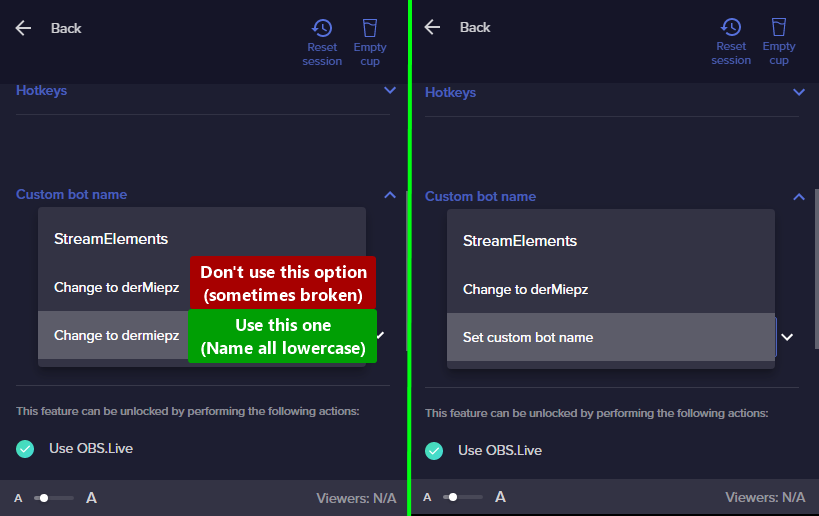
 pallid temple
hello, I been waiting for my payment of raid shadow legends sponsored ship and its been like 2 weeks and I still didn't get it
sharp turret
pallid temple
hello, I been waiting for my payment of raid shadow legends sponsored ship and i...
Hey, I would suggest submitting a ticket via the SE website. https://streamelements.com/contact
pallid temple
thank youuuuuuu I just send it
sharp turret
You're welcome, have a nice day!
pallid temple
you too
rugged quail
sharp turret
Hey! Did you choose the 3rd option? https://i.imgur.com/re4theQ.png
Yes, i used the third option after creating and signing in with the bot account
dapper iglooBOT
@rugged quail ⤵️
- Right-click your OBS desktop shortcut (not the OBS.Live shortcut) and navigate to Properties
- In the Target field, add the following to the very end:
--remote-debugging-port=40404(don't forget to add a space before the current path)
https://streamelements.is-serious.business/6ihr2EL.jpg - Open OBS (or restart if it was open)
- Open your web browser and type in:
localhost:40404(try127.0.0.1:40404if you see issues - https://streamelements.is-serious.business/3EGPQFJ.jpg) - Click on StreamElements - Activity feed - https://streamelements.is-serious.business/2kJYt2b.jpg
- Type the following into the console and hit enter:
store.customBot.removeCustomBotIntegration() - Try setting the custom bot name, make sure you follow https://strms.net/custombotname
- Remove the flag added in step 2 from your shortcut properties
sharp turret
Can you try these steps and see if that fixes it?
 hoary mason
hey, so i added custom alerts via streamelements on OBS but when i get e.g. a donation the sound and emote are both there but the text isnt there and it moves the emote somewhere random on my stream :/
rugged quail
Hello, I have a problem with connecting my own bot. I also did the troubleshooting on OBS studio
kindred fox
hoary mason
hey, so i added custom alerts via streamelements on OBS but when i get e.g. a do...
Make sure your overlay is added at 1920x1080 in obs
dapper iglooBOT
@rugged quail ⤵️
- Right-click your OBS desktop shortcut (not the OBS.Live shortcut) and navigate to Properties
- In the Target field, add the following to the very end:
--remote-debugging-port=40404(don't forget to add a space before the current path)
https://streamelements.is-serious.business/6ihr2EL.jpg - Open OBS (or restart if it was open)
- Open your web browser and type in:
localhost:40404(try127.0.0.1:40404if you see issues - https://streamelements.is-serious.business/3EGPQFJ.jpg) - Click on StreamElements - Activity feed - https://streamelements.is-serious.business/2kJYt2b.jpg
- Type the following into the console and hit enter:
store.customBot.removeCustomBotIntegration() - Try setting the custom bot name, make sure you follow https://strms.net/custombotname
- Remove the flag added in step 2 from your shortcut properties
rugged quail
kindred fox
Make sure your overlay is added at 1920x1080 in obs
I did too
kindred fox
rugged quail
I did too
That wasn’t directed at you. The bot message was.
rugged quail
dapper igloo
<@456226577798135808> ⤵️
that's exactly not possible with me
toxic fern
How so?
kindred fox
minor violet
anyone can help with my issue
So they double and triple checked your overlays. Make sure you add the first overlay, and then go back and copy the url for the second overlay and paste it as the second browser source
rugged quail
toxic fern
How so?
tried to fix it so I can add a bot but it didn't work
toxic fern
How do those steps above not work?
rugged quail
jes
rugged quail
toxic fern
How do those steps above not work?
The command for the console is not recognized
toxic fern
You're doing it in the wrong place or opened the window piece too far.
rugged quail
toxic fern
You're doing it in the wrong place or opened the window piece too far.
there is console there you should enter the befel
toxic fern
For some reason people sometimes have 2 consoles and do it in the wrong one.
rugged quail
toxic fern
For some reason people sometimes have 2 consoles and do it in the wrong one.
Only have 1
rugged quail
sharp turret
Can you try these steps and see if that fixes it?
I went through the steps, and logged in with my bot account again and it still didnt work.... it would work if i used my main account to log in but then it will just have my username instead🤷♂️
rugged quail
toxic fern
For some reason people sometimes have 2 consoles and do it in the wrong one.
I only have 1 console that comes as a message
Uncaught ReferenceError: store is not defined
at <anonymous>:1:1
 tacit vigil
my overlay isnt sized right and i dont know how to change it
sharp turret
tacit vigil
my overlay isnt sized right and i dont know how to change it
Hi there! Make sure you have your browser source set to 1920x1080
tacit vigil
how would i do that😅

 sharp turret
Did you set the browser source resolution to 1920x1080?
tacit vigil
im not certain how to do that
sharp turret
Right click the browser source and choose properties
 tacit vigil
like i did what you show in the pic but when i grab the link and put it in google chrome its zoomed in'
nvm its my obs being dumb\
for some reason my preveiw screen is mega zoomed in
sharp turret

tacit vigil
i can only see what im somewhat doing in studio mode :,)
fixed it lol tanks for the help
thanks*
sharp turret
You're welcome, have a nice day!
tacit vigil
you to!
minor violet
kindred fox
So they double and triple checked your overlays. Make sure you add the first ove...
Im not sure what im doing wrong then, can someone send me a clip on how they are doing it?
kindred fox
minor violet
Im not sure what im doing wrong then, can someone send me a clip on how they are...
Like this, but each Overlay should have a unique URL
dense steppe
my chrome isnt allowing me to view the tipping settings or the actual tip page, it works on other browsers but not this one for some reason? any ideas on why ?
 solemn onyx
need help on trying to stream on multiple platfroms
 ashen tree
HELP i set my server to trovo
but when i try to change it to twitch
it starts streaming on trovo
even when i deleted my trovo account
HELP
dapper iglooBOT
@ashen tree ⤵️
StreamElements menu, on top of OBS > Logout > Login
 raw terrace
obs freezes and crashes does not respond
 severe cargo
Hey everyone. Noob here. I got OBS and StreamElements going. I am using an overlay from SE. Only thing I cannot figure out is if/how the title of the game I am playing is supposed to update on the bottom of my overlay? "Currently Playing:___" scrolls by at the bottom, and I can see it says {title} in the layer settings for all the scenes. However, it does not update with new titles. Would love any help in identifying where the cables are getting crossed, as manually updating every scene would get old quick.
 toxic fern
@severe cargo If that's the now playing widget in the overlay editor I believe that's media request and not game.
severe cargo
Oh, music? Not the game I am in? Never thought of it that way before
 opal pecan
dapper igloo
<@456226577798135808> ⤵️
opal pecan
dapper igloo
<@456226577798135808> ⤵️
Streamelements was posting all my timers and stuff tonight and wouldn't run through my bot. I am trying to fix it but I don't have any OBS Live options anymore (no activity feed, tip, etc) and on step 5 here, I don't have Stream Elements - Activity Feed. Is there something else that I can try? This was working fine when I last streamed on Friday.
toxic fern
Do you have streamelements in the menu?
toxic fern
what about logout?
opal pecan
i can logout, do i need to try that and see if that fixes it?
toxic fern
Yup
opal pecan
i'll give that a shot and ask if it's still stuck, thank you! 🙂
that worked, thank you for the quick response! the option was there during stream but everything disappeared when I raided out and thought I could fix post-stream. appreciate it!
 fluid pagoda
Hey, I had to wipe a drive of data recently which had my obs stuff on it. I did save all the main files from it though (Pic) but something happened to the application in the wipe. When I reinstalled obs It reset all of my scenes and options I had saved, any chance I can use the data I have and port it to the new copy of Stream Elements?
 kindred fox
fluid pagoda
Hey, I had to wipe a drive of data recently which had my obs stuff on it. I did ...
kindred fox
fluid pagoda
Hey, I had to wipe a drive of data recently which had my obs stuff on it. I did ...
Profiles aren’t saved in program files
fluid pagoda
Any way I could have access to my old one in any way?
toxic fern
Unless you made a backup of it no.
fluid pagoda
: (
rugged quail
I just can't add my bot, just 1 console and tried the command
 rustic raptor
guys where can i find event rotator 😛 with icons ofc
like this one
it keeps showing the latest sub \ follower etc

@steel bridge ; v;
anyone ?
rugged quail
That comes when I enter this because of the bot adding sorry that is in German

 wraith juniper
anyone know why OBSLive is so high on CPU and how to fix it please
 gritty totem
Hi can I get some assistance thanks?
soft knot
wraith juniper
anyone know why OBSLive is so high on CPU and how to fix it please
Does this happen constantly or just with certain scenes? Maybe you have some scenes set up with too many sources.
soft knot
gritty totem
Hi can I get some assistance thanks?
Sure, how can we help?
gritty totem
soft knot
Sure, how can we help?
Hi Figment, I just downloaded obs live for my obs studio and I'm confused as it's not appearing as to how I saw it would in an online video
rugged quail
rugged quail
That comes when I enter this because of the bot adding sorry that is in German
I just can't connect my own bot as you can see in the picture
wraith juniper
soft knot
Does this happen constantly or just with certain scenes? Maybe you have some sce...
Happens all the time with very little in the scenes
some days obs also crashes aswell
soft knot
gritty totem
Hi Figment, I just downloaded obs live for my obs studio and I'm confused as it'...
Maybe it's an older video... Have you looked at our tutorials?
dapper iglooBOT
@gritty totem ⤵️
Check out this playlist https://youtube.com/playlist?list=PLCDDKlFdScbEwdx5AntcQIS1InkFJwHtv with tutorial videos from setting up the basics to in-depth details on how to use our product.
New to OBS? Here is a 4 step quick start guide https://obsproject.com/wiki/OBS-Studio-Quickstart
Want to learn even more? Here is an in-depth overview https://obsproject.com/wiki/OBS-Studio-Overview
gritty totem
I will have to look at this
soft knot
rugged quail
I just can't connect my own bot as you can see in the picture
It seems like you didn't input the right command. Are you following this procedure?
dapper iglooBOT
@rugged quail ⤵️
- Right-click your OBS desktop shortcut (not the OBS.Live shortcut) and navigate to Properties
- In the Target field, add the following to the very end:
--remote-debugging-port=40404(don't forget to add a space before the current path)
https://streamelements.is-serious.business/6ihr2EL.jpg - Open OBS (or restart if it was open)
- Open your web browser and type in:
localhost:40404(try127.0.0.1:40404if you see issues - https://streamelements.is-serious.business/3EGPQFJ.jpg) - Click on StreamElements - Activity feed - https://streamelements.is-serious.business/2kJYt2b.jpg
- Type the following into the console and hit enter:
store.customBot.removeCustomBotIntegration() - Try setting the custom bot name, make sure you follow https://strms.net/custombotname
- Remove the flag added in step 2 from your shortcut properties
soft knot
wraith juniper
Happens all the time with very little in the scenes
Can you try uninstalling OBS.Live and trying the same with OBS Studio only?
wraith juniper
this is a fresh install of OBSLive and its been like this in a long time and OBS Studio does the same
This is the pc spec of the pc I7-7700 CPU @ 4.20 GHz 32GB RAM GFORCE RTX 2060 SUPER 8GB
soft knot
wraith juniper
this is a fresh install of OBSLive and its been like this in a long time and OBS...
I'm not a hardware guy, so my next suggestion is to check your output resolution and framerate and your video encoders to see if any of them is unnecessarily high.
 crude bridge
Can someone help me? My stream keeps crashing randomly. I didn’t had that problem with streamlabs
kindred fox
wraith juniper
this is a fresh install of OBSLive and its been like this in a long time and OBS...
Did you check the box to shutdown source when not visible in the browser source properties window?
 shrewd sigil
hello im here to ask how do you add channels if you made them seperate as it wont let u add them

as i want to combine it all into 1
dapper iglooBOT
Account Merging - Please note:
- Merging accounts only allow faster ways to switch between accounts
- Merging accounts does not allow data sharing between accounts - different streaming platforms, different type of events
- Merging accounts allows duplicating/sharing overlays between the accounts
If you understand the limitations of merging and want to proceed, please find the JWT tokens (!jwt) from both accounts you want to merge and fill out the form here: https://streamelements.com/contact with each token correctly labelled
kindred fox
@shrewd sigil do this ^^
dapper iglooBOT
You can find your JWT token on your account channels page (Show Secrets to reveal the token): https://streamelements.com/dashboard/account/channels
READ ME: This is a private security token. Do NOT share this token here or other public places, only with a StreamElements staff member in private.
kindred fox
shrewd sigil
if so iv sent all 3 in that form
Should be good once staff get to it
frail schooner
Look at the chat window
shrewd sigil
@frail schooner log out of the streamelements on there
and log back in should fix it
i wouldnt do it now if your live though
frail schooner
shrewd sigil
<@!273838376971403264> log out of the streamelements on there
I’ve tried that once already and it didn’t solve the problem. Do I have to time it just right? Log out and in right before going live for instance?
shrewd sigil
i log out close obs
open and relog in
try that
iv only had the problem once that was start of last year
frail schooner
Ok will give that a go today
I’ve never had the OBSLive chat work for me unfortunately, but I’m fairly new to using the plugin and SE
shrewd sigil
if that dont work just reinstall the program and make sure is upto date
frail schooner
Yeah I def checked for updates as well
shrewd sigil
you stream on yt?
frail schooner
Yes
shrewd sigil
recommend multi streaming onto trovo bro
frail schooner
Never heard of it, what’s trovo?
shrewd sigil
grow up on trovo get 900 wh and you get partner and earn money
for hitting the hours
frail schooner
Nice
shrewd sigil
il talk in dms as this is a helpdesk thingy
 valid dagger
Hello, is there a possibility to just launch up Media Reqeust right away instead of clicking on it for it to start?
rugged quail
dapper igloo
<@456226577798135808> ⤵️
What is meant by 8
rugged quail
dapper igloo
<@456226577798135808> ⤵️
The problem is the 6th step comes an error message the console does not recognize store.customBot.removeCustomBotIntegration () see pictures
Jes is work 🙂
 rough shard
hello, could anyone tell me why i cant set my bots name as my name. having it named streamelements or giving it a custom bot name works, but when i set my name as the bots name the bot doesnt respond to commands anymore.
dapper iglooBOT
@rough shard ⤵️
If your commands recently stopped working and you're using OBS.Live and a custom bot name do the following:
- In OBS.Live, click on the hamburger menu (three stripes) at the top left of your activity feed
- Click on Stream Settings > Custom bot name
- In the Custom bot name field select Set custom bot name, not your already existing username (with capital letters). Note: If you already connected an account that way, the third entry will show as the account name (see image https://i.imgur.com/re4theQ.png).
- Scroll a bit down and click on the purple Connect Custom Bot Account button
- Log in as usual and Authorize the custom bot name
- Back in the Activity feed, click on the Send Test Message button and check if your custom bot name starts working again
rough shard
is there any way to make it work that i can have my username as bot name?
sharp turret
rough shard
is there any way to make it work that i can have my username as bot name?
Choose the 3rd option then login with desired account.
rough shard
can i do that with the account im streaming with aswell?
 rugged quail
Hey, probably a silly question but I was just wondering what this "amount" section is for? I figured if the {amount} argument was inside the message that would display the amount of money the user tipped.

Update: I just realised that it is probably the minimum tip amount required to trigger that message.
 pseudo tangle
Hey, I'm slightly new to streaming but has anyone had OBS log them out of their twitch account they were using and if so, any tips/advice on how to fix it?
 smoky burrow
Hello I have recently hit affiliate and have just set up my overlays… however I am having trouble with my stream labels… my recent subscribers are not showing on screen or at all!( it’s like I have no subs although I have )
smoky burrow
rugged quail
**Update:** I just realised that it is probably the minimum tip amount required ...
Correct 🙂
smoky burrow
rugged quail
Hey, probably a silly question but I was just wondering what this "amount" secti...
You can set different sounds etc for different amounts anything equal to or over the amount set will trigger that specific sound
dapper iglooBOT
@smoky burrow ⤵️
To reset goals:
- from the Overlay Editor > Session data on top right (monitor symbol) > Goals tab > reset progress of desired goal
- from the Dashboard > Activity feed on the left > Widget data on the right > Goals tab -> reset progress of desired goal
Note: Goal widgets (progress) only counts up and doesn't go down automatically, if you lose followers/subs.
 naive gull
Hey, good evening! So, i have a (probably) quick question. I just started using OBS.Live so i could have an activity feed and other StreamElements functions integrated to OBS, but either the zoom or the font size of the activity feed and chat make them look to big. Is there a way for me to reduce the zoom or the font size of these windows? Here's a print-screen:

 dusky terrace
How do I get it so people can hear the StreamElement alerts in OBS Studio? The only way I can do it is through my headset but then they hear everything
kindred fox
dusky terrace
How do I get it so people can hear the StreamElement alerts in OBS Studio? The o...
Aren’t they supposed to hear everything?
dusky terrace
kindred fox
Aren’t they supposed to hear everything?
Yeah but if for example, i'm wanting to talk to my friends in Discord whilst my stream countdown is... counting down, I want them to not hear that but hear alerts if they're played
kindred fox
dusky terrace
Yeah but if for example, i'm wanting to talk to my friends in Discord whilst my ...
Without a way to split audio signals, that isn’t possible
dusky terrace
kindred fox
Without a way to split audio signals, that isn’t possible
No problem, thank you!
kindred fox
dusky terrace
No problem, thank you!
It’s the reason I recommend the elgato wave mic. It lets you split audio easily. The other option is uhhh Voicemeeter banana
dusky terrace
kindred fox
It’s the reason I recommend the elgato wave mic. It lets you split audio easily....
Oh, I have the Elgato Wave 3 mic 😄
kindred fox
dusky terrace
Oh, I have the Elgato Wave 3 mic 😄
Then yes! You can do what you want to do. I don’t have one of those mics but I know it can be done
dusky terrace
kindred fox
Then yes! You can do what you want to do. I don’t have one of those mics but I k...
Hmm it's strange that OBS isn't picking up that i've put Discord as a Wave Link Voice Chat, i'll head over to the Elgato discord
 versed seal
Has anyone been able to figure out how to get the "Host" alerts to work? Even with changing the variation to 1 my host alerts still don't go off
 lean cliff
Hi. Sorry if this has been answered before. Am using OBS.Live with my username as my chatbot name. However now my chat commands aren't working? Anyway around this? (Mac user)
dapper iglooBOT
@lean cliff ⤵️
Go to the Dashboard > Right side > Part channel > Join channel (https://streamelements.com/dashboard) https://i.imgur.com/uYVb8OK.png
lean cliff
dapper igloo
<@686942053589975100> ⤵️
Already tried, doesn't work
dapper iglooBOT
@lean cliff ⤵️
If your commands recently stopped working and you're using OBS.Live and a custom bot name do the following:
- In OBS.Live, click on the hamburger menu (three stripes) at the top left of your activity feed
- Click on Stream Settings > Custom bot name
- In the Custom bot name field select Set custom bot name, not your already existing username (with capital letters). Note: If you already connected an account that way, the third entry will show as the account name (see image https://i.imgur.com/re4theQ.png).
- Scroll a bit down and click on the purple Connect Custom Bot Account button
- Log in as usual and Authorize the custom bot name
- Back in the Activity feed, click on the Send Test Message button and check if your custom bot name starts working again
lean cliff
dapper igloo
<@686942053589975100> ⤵️
Brilliant, thank you
 silk merlin
Hello! I've googled this to death but can't find a solution for this. I'm wanting to use streamelements to pop up a custom alert when someone uses channel points - and in the online editor - it's working showing up in the editor AND on my OBS layout so that works.
However, when I click the EMULATE->Item redemption on the streamelements playing field, nothing happens. Am I missing something?

The only way it works now is if I click the blue "EMULATE ALERT" box on the left.
rugged quail
My alerts still aren’t working even though my account was refreshed. Even my commands still aren’t working
silk merlin
ooo... ok - so this is a global issue it sounds like?
rugged quail
And OBS live isn’t doing anything just telling us to part with the bot and link back up with the bot
silk merlin
well it works on my OBS (regular) with the overlay URL just fine when I use the blue button to test, but not the other button and chat's don't trigger anything so it sounds global within Streamelements then
rugged quail
Same here
silk merlin
Thanks for confirming @rugged quail - that helps a lot in debugging lol
quick atlas
silk merlin
Hello! I've googled this to death but can't find a solution for this. I'm wantin...
Can you share your account ID and the name of the overlay you are testing on?
fickle ridge
I added the overlay but when I use it it’s just a black screen
silk merlin
quick atlas
Can you share your account ID and the name of the overlay you are testing on?
sent in dm
fickle ridge
<@&382267076632379392>
rugged quail
@quick atlas what you did didn’t help my overlays work. What’s the point using Stream elements when the overlays abs commands won’t work
quick atlas
rugged quail
<@801850149260886118> what you did didn’t help my overlays work. What’s the poin...
What issues are you still seeing? I remember there was an issue with alerts coming in, but I may not have been able to get to the commands that time around.
 open matrix
hello, assistance required regarding private issue,kindly please direct message
rugged quail
quick atlas
What issues are you still seeing? I remember there was an issue with alerts comi...
The alerts are still not working
rugged quail
open matrix
hello, assistance required regarding private issue,kindly please direct message
Not private issue. It’s OBS live issue
open matrix
rugged quail
Not private issue. It’s OBS live issue
there are data i'd rather not share with people out here in chat
quick atlas
rugged quail
The alerts are still not working
Let me take a look again. Can I have your account ID?
rugged quail
hello
can anybody help me? I can't log in with my youtube brand account
(I speak Spanish, I am using a translator)

 vital jay
no sé
rugged quail
open matrix
there are data i'd rather not share with people out here in chat
Than why are you in support when you don’t like sharing data?
rugged quail
quick atlas
Let me take a look again. Can I have your account ID?
Sure
open matrix
rugged quail
Than why are you in support when you don’t like sharing data?
i dont think i should input screens regarding my private data over here.
kindred fox
open matrix
there are data i'd rather not share with people out here in chat
You can provide a broad overview of the issue you’re having without compromising sensitive information.
Typing out a question would be the best place to start
open matrix
kindred fox
You can provide a broad overview of the issue you’re having without compromising...
the issue is, i didnt change a thing in my bank data information or bank account and SE requested bank statement
kindred fox
For SE.Pay?
open matrix
yup
the only thing that is different is my credit card expiry number and it's not a reason to block me from $$$ withdraw
dapper iglooBOT
@open matrix ⤵️
Please contact us via email for support with SE.Pay. You can use our contact form here: https://streamelements.com/contact Thank you.
open matrix
already did that, though thanks for assist @kindred fox
kindred fox
That’s the best method of contact for se.pay issues
If you already have a ticket make sure to watch for a reply
open matrix
will do, especially it's really strange. my address didnt change, i didnt change my last name, name on the bank account didnt change...only that expiry so it's kinda sus
also no changes regarding my Twitch Affiliate status
kindred fox
yeah I don't have to deal with SE.Pay so you unfortunately just have to wait for them to get to your ticket
open matrix
yea,gotta wait. hope they answer swiftly
rugged quail
Hey all, never had issues like this before but i was getting a random 1 secondish delay (video feed).. again, never had this issue before. i wanna say it got progressively worse throughout the stream. As a temp fix i put a 1000 ms delay on my mic to sync it up a bit but i wanna find the route to the problem. Looking at my OBS now even offline im getting the video feed delay even when not streaming.. ive used this webcam before and didnt have this issue. i have no clue what is causing it. If this is a known/solved issue please help and thank you for your time 😦
i do have a 3.0 USB extension cable since the default cable is a bit short. Razer Kiyo pro 1080p 60fps, didnt have this issue in my last stream
fickle ridge
I’m having an issue with obs live and the overlay the overlay I use for gameplay doesn’t work it just shows a black screen instead of the gameplay
quick atlas
rugged quail
i do have a 3.0 USB extension cable since the default cable is a bit short. Raze...
I would suggest reaching out in the #tech-talk channel, or in the OBS discord for the best suggestions
dapper iglooBOT
Obs.live is a plugin for OBS Studio for the best OBS support, please join their Official Discord @ https://discord.gg/obsproject
rugged quail
fickle ridge
I’m having an issue with obs live and the overlay the overlay I use for gameplay...
Try running OBS as an administrator ((in file location, not the shortcut))
 lethal imp
Unsure if this is an OBS problem or twitch problem, but my alertbox overlay doesn't show hosts and I don't get alerts for tips under (I think) $10 and they don't show up in my activity feed in the obs.live plugin. Any ideas?
 twin bone
lethal imp
Unsure if this is an OBS problem or twitch problem, but my alertbox overlay does...
twin bone
lethal imp
Unsure if this is an OBS problem or twitch problem, but my alertbox overlay does...
the tips alerts overlay has a "minimum amount" setting, you sure this isn't it?
lethal imp
My alert is set to 0 minimum, and my minimum actual tip amount is set to 1 USD
 raw badger
I am struggling to Get my alerst to pop up on stream! They were working yesterday but not today!
alerts*
vast wren
raw badger
I am struggling to Get my alerst to pop up on stream! They were working yesterda...
have you checked if the activity feed is getting updates?
raw badger
vast wren
have you checked if the activity feed is getting updates?
So i have Own3d installed as my overlay1. I stream from OBS. I am just trying to repeat the alerts to see how the new alerts look. Ive reinstalled Own3d and logged out and logged back into OBS. I havent had new alerts yet, just trying to get them to pop up so i can see what they look like.
 main canopy
Why is there still not an HDR decoder?
twin bone
Unless I'm missing something, that would be a feature of OBS Studio, not the obs.live plugin, so, unrelated to StreamElements.
As for OBS Studio, it is an open and collaborative project, so, if you think a feature is missing you are welcome to contribute
valid dagger
valid dagger
Hello, is there a possibility to just launch up Media Reqeust right away instead...
Hmm?
 lost fjord
@full thunder , can someone help me on my issue when logging in to streamelements webpage, it keeps going back to the home page same when logging in to my OBS
 lone moss
How to use streamelements?
dapper iglooBOT
@lone moss ⤵️
Check out this playlist https://youtube.com/playlist?list=PLCDDKlFdScbEwdx5AntcQIS1InkFJwHtv with tutorial videos from setting up the basics to in-depth details on how to use our product.
New to OBS? Here is a 4 step quick start guide https://obsproject.com/wiki/OBS-Studio-Quickstart
Want to learn even more? Here is an in-depth overview https://obsproject.com/wiki/OBS-Studio-Overview
@lost fjord ⤵️
Please logout of StreamElements at https://streamelements.com/logout and then login again to your account (Twitch/YouTube/Facebook).
lost fjord
dapper igloo
<@674792520399454228> ⤵️
this helps, thank you so much!
 solar crown
Hi! I’m trying to activate the replay functionality in OBS.Live. I’ve followed all the tutorials online (enabled replay buffer in the output tab, restarted OBS, etc.). At one point it even worked (showed up next to my “start streaming” button, allowed me to set hot keys for it, etc). But then the replay buffer option disappeared and I’ve never been able to get it back. Any advice?
valid dagger
Where's all the support?
dapper iglooBOT
@valid dagger ⤵️
Welcome to the helpdesk! Please let us know how we can assist you today and a support volunteer or staff member will assist you as soon as they are available. Thank you for your patience.
fickle ridge
rugged quail
Try running OBS as an administrator ((in file location, not the shortcut))
Ok
fickle ridge
rugged quail
Try running OBS as an administrator ((in file location, not the shortcut))
It’s still a black screen
See

 vale loom
Running OBS with Streamelements to Twitch but its asking me to stream it to Youtube?
dapper iglooBOT
StreamElements menu, on top of OBS > Logout > Login
vale loom
any admin here to help?
 fair lynx
Is there a way to get activity feed and chat to show all the stream platforms I stream on at the same time? Like twitch, youtube, and trovo. If nothing else I would love to have just the activity feed showing all of that.
open matrix
anybody knows how long it takes support to reply? sadly i need to hear from them ASAP since i gotta pay bills and i have to pay it before saturday so i need money stuck out there tomorrow at the latest. gotta cover for water and heating and in my place is already 14-20F / -6 up to -10C daily
 daring relic
is there a way to 'reorganize this' for example to have microphone on top?
 toxic fern
Rename it.
daring relic
i got them after each source basicly
like discord truely is my discord
but i want my microphone on top for example
toxic fern
They're alphabetically sorted.
daring relic
oooh alright that explains haha. thanks
open matrix
so? does anybody know?
toxic fern
open matrix
do you know how long it takes before support replies to my e-mail ?
toxic fern
I do not know as I'm not staff. That information is not available to me.
open matrix
alright,thanks
 buoyant python
Hello there, i've been trying out streaming on youtube but now i'd like to switch back to twitch but when i update OBS to use twitch and click start stream, StreamElements still points to youtube and errors out saying my key is bad. Any help would be amazing. THANKS!
 drowsy hawk
hey all! on the stream elements website, i can't find somewhere to find alerts that i'm able to download. i have custom christmas scenes, but when i use the search box and typing in "christmas", nothing comes up. why? and when i add the alerts into my obs.live, it's just a browser sourse with the stream elements link, right?
 coarse juniper
Unable to add overlay for obs
 elfin wasp
hey everyone, i have issues with my audio. so when im streaming, i have my mic/aux and the audio input capture on, but when i turn both of them on, it becomes echoey and not nice to listen to. They aren't in sync on my stream so it gets annoying. Please help!
 mellow agate
Hi everyone, please let me know if I'm asking in the wrong place. I've got overlays with videos for my event alerts, but the first time they run there's a delay while it loads it from the server. How can I have these videos pre load so there's no delay the first time someone triggers it? I'm not afraid to write a widget that does this if it comes to it, but if there's a less hacky way I'd like to try that
quick atlas
mellow agate
Hi everyone, please let me know if I'm asking in the wrong place. I've got overl...
There isn't a pre-load option, I would advise emulating them to load them before hand if you are seeing a loading delay
You could also try the following
dapper iglooBOT
OBS > Settings > Advanced > Scroll down > Enable or disable Browser Source Hardware Acceleration, depending on its current state > Restart OBS
https://i.imgur.com/ggMe9ZE.png
mellow agate
quick atlas
There isn't a pre-load option, I would advise emulating them to load them before...
Thanks, I'll write a widget that pre loads them, see if that helps
kindred fox
elfin wasp
hey everyone, i have issues with my audio. so when im streaming, i have my mic/a...
You’re capturing the same source. Remove one.
elfin wasp
kindred fox
You’re capturing the same source. Remove one.
okay thanks
 tribal sequoia
hi, i have problems with streamlabs alert widget, can anyone support me?
 agile parcel
tribal sequoia
hi, i have problems with streamlabs alert widget, can anyone support me?
agile parcel
tribal sequoia
hi, i have problems with streamlabs alert widget, can anyone support me?
this is stream element not streamlabs
 terse grove
I'm having a host alert issue, I have everything set up right (I think) but for some reason it doesn't matter who hosts me or for how many people it doesn't put the alert through to my stream, event list, or activity log unless I get raided, then and only then will I see that someone has hosted me in those places.
Also, I hope this is the right place for this problem lol
dapper iglooBOT
@terse grove ⤵️
Due to changes to Twitch API, we have filtered out hosts and will only show these ones on your activity feed:
- All hosts coming from an online channel with at least 1+ viewer
- Auto host events with at least 1 viewer - only from a channel that just went offline
Note: If you see X channel has hosted you with no viewers on the back, that is considered an offline host or a host with 0 viewers, we do not show these.
terse grove
Ahhh, okay so I won't be seeing hosts that don't meet the criteria. Thank you, I will have to start letting people know.
fickle ridge
The screen is black for the overlay In obs
 alpine current
hey can some staff assist me please?
agile parcel
alpine current
hey can some staff assist me please?
post it in here and someone will help when they can
alpine current
I use OBS and i have a specific overlay that has a animated effect and it seems all my animated overlays are super super laggy yet my streams are not. ive checked my cpu and i have never gotten above 2.5% so im confused as to why its lagging
dapper iglooBOT
@alpine current ⤵️
OBS > Settings > Advanced > Scroll down > Enable or disable Browser Source Hardware Acceleration, depending on its current state > Restart OBS
https://i.imgur.com/ggMe9ZE.png
alpine current
@dapper igloothankyou that was what was needed!
main canopy
twin bone
Unless I'm missing something, that would be a feature of OBS Studio, not the obs...
If i knew how to code, i would
fickle ridge
Can someone assist me
dapper iglooBOT
@fickle ridge ⤵️
Welcome to the helpdesk! Please let us know how we can assist you today and a support volunteer or staff member will assist you as soon as they are available. Thank you for your patience.
rustic raptor
@upper pike how do you change the bg color for the widget chat you made ?
 upper pike
rustic raptor
<@!115001575398703111> how do you change the bg color for the widget chat you m...
upper pike
rustic raptor
<@!115001575398703111> how do you change the bg color for the widget chat you m...
didnt make it, I just post them 😄 notice the posts say "so and so Widget
By @ someone"
that someone is the creator, in case of the latest Chat Widget I posted thats from @shy gazelle

 sharp turret
@final tangle stop stream > obs settings > stream > disconnect/reconnect account. and do this 🔽
dapper iglooBOT
StreamElements menu, on top of OBS > Logout > Login
 final tangle
🌹
 hot canyon
Hi, in my friends stream @trail sorrel on youtube, streamelements bot is not available in the chat (the commands are not working I mean the bot is not replying) Cloud bot
 trail sorrel
@dapper igloo
rugged quail
hot canyon
Hi, in my friends stream <@!592655273706127366> on youtube, streamelements bot i...
is the stream public?
hot canyon
rugged quail
is the stream public?
yes
rugged quail
I see, was the bot allowed permission into the channel?
hot canyon
rugged quail
I see, was the bot allowed permission into the channel?
yes
moderator
the problem started from 2 days ago
rugged quail
as your friend to part the bot and then add it back
hot canyon
rugged quail
as your friend to part the bot and then add it back
can we do it during the live stream is on?
rugged quail
you could, yes
hot canyon
rugged quail
you could, yes
alr! Thank you
hot canyon
rugged quail
you could, yes
It worked! Thank you a lot!
 shy gazelle
rustic raptor
<@!115001575398703111> how do you change the bg color for the widget chat you m...
shy gazelle
rustic raptor
<@!115001575398703111> how do you change the bg color for the widget chat you m...
Hi!! Theres some background options on Widget menus for chat and message backgrounds. Check on SE widget menu!
fickle ridge
The overlay does not work in obs.live
dapper iglooBOT
@fickle ridge ⤵️
OBS > Settings > Advanced > Scroll down > Enable or disable Browser Source Hardware Acceleration, depending on its current state > Restart OBS
https://i.imgur.com/ggMe9ZE.png
 small tiger
Ran into an interesting issue.
After installing obs-streamelements-setup-latest.exe
Firefox on an alternative windows login breaks. (Didn't test other apps). Firefox works fine on the profile where I installed obs-streamelements-setup-latest.exe on
Firefox opened and just display white screens, closing it and it runs in the background. Even deleting the user profile does not fix it.
No info on this error could be find, searching the web.
I confirmed it was obs-streamelements-setup-latest.exe breaking it as I backup and restored from a system image.
 cosmic tapir
Hello there , my issue is is in Media Requests I put stream Location to my country and now most of the songs get this error message , Is there a way to fully reset that setting?
 solar crown
Anybody know how to actually get a question answered from steamelements? Posting again below…
I’m trying to activate the replay functionality in OBS.Live. I’ve followed all the tutorials online (enabled replay buffer in the output tab, restarted OBS, etc.). At one point it even worked (showed up next to my “start streaming” button, allowed me to set hot keys for it, etc). But then the replay buffer option disappeared and I’ve never been able to get it back. Any advice?
dapper iglooBOT
@solar crown ⤵️
Obs.live is a plugin for OBS Studio for the best OBS support, please join their Official Discord @ https://discord.gg/obsproject
kindred fox
solar crown
Anybody know how to actually get a question answered from steamelements? Posting...

that box checked?
 loud nexus
Hello guys. Can u help me? My Media request window is clear..... how can i fix it? reload doesn't help.
 sharp turret
@loud nexus try this
dapper iglooBOT
StreamElements menu, on top of OBS > Logout > Login
loud nexus
sharp turret
<@318071839329091584> try this
Thanks man, it's rly help!
 mighty herald
Hello, I started up OBS today and the activity feed was logged out. It would only allow me to login with Twitch? I have always had my activity from FB but I now can't see where to enter that in SE on OBS? Thank you.
sharp turret
mighty herald
Hello, I started up OBS today and the activity feed was logged out. It would onl...
StreamElements menu > Logout > Login
mighty herald
sharp turret
StreamElements menu > Logout > Login
I figured it out. LOL. Thank you.
 warm edge
Hey so I have made an alert box but half of it is invisible how can I fix this
dapper iglooBOT
@warm edge ⤵️
To add your overlays to OBS, add a new browser source in your scene. Paste your overlay URL in the browser source properties, set the dimensions to 1920x1080 (unless you changed them on the website) and check Shutdown source when not visible. https://youtu.be/KDvLynUqXI4
still beacon
I'm trying to dedicate a button on my streamdeck to play a video clip. When I was using streamlabs this was no issue.. now I'm always getting this message. Hence I can't link my source to my elgato streamdeck.
Anybody can help please?
I already reinstalled the streamdeck software.. but that didn't help.
Thanks in advance.

 midnight tundra
Hey did you check if there was an update to the software
Also try to reinstall Steemdeck
kindred fox
still beacon
I'm trying to dedicate a button on my streamdeck to play a video clip. When I wa...
have you fully uninstalled the streamdeck app, removed any remnants in %appdata%, then reinstalled the streamdeck app + plugin?
still beacon
kindred fox
have you fully uninstalled the streamdeck app, removed any remnants in %appdata%...
No only the app. I’ll have a try
still beacon
kindred fox
have you fully uninstalled the streamdeck app, removed any remnants in %appdata%...
tyvm that solved it!
warm edge
Ok so I did a test stream but was dropping frames quickly as soon as I go onto a game any way I can fix this?
dapper iglooBOT
@warm edge ⤵️
Dropped Frames means that you have a bad connection between your device and the streaming platform and most likely something related to your ISP not handling the connection properly.
Speed tests usually cannot help solve this problem and its best to use this guide: https://obsproject.com/wiki/Dropped-Frames-and-General-Connection-Issues
If you stream to twitch, use the !twitchtest command and do a connection test to your regional servers.
 inner temple
Hello, I am having trouble setting up streamelements chat bot on my channel. I have setup the tipping panel, moderated the bot. But when I change the bot to use my name, commands stop working. OBS.live is able to send a test message as me, but when I type in, say !contest I get no reply. Switching the bot name back to StreamElements seems to fix the issue, but I was hoping to have it post as me
dapper iglooBOT
@inner temple ⤵️
If your commands recently stopped working and you're using OBS.Live and a custom bot name do the following:
- In OBS.Live, click on the hamburger menu (three stripes) at the top left of your activity feed
- Click on Stream Settings > Custom bot name
- In the Custom bot name field select Set custom bot name, not your already existing username (with capital letters). Note: If you already connected an account that way, the third entry will show as the account name (see image https://i.imgur.com/re4theQ.png).
- Scroll a bit down and click on the purple Connect Custom Bot Account button
- Log in as usual and Authorize the custom bot name
- Back in the Activity feed, click on the Send Test Message button and check if your custom bot name starts working again
sharp turret
Choose the 3rd option then login with desired account.
inner temple
That worked wonderfully @sharp turret ! Thank you
sharp turret
You're welcome  Happy streaming!
placid fjord
Been having an issue with the media share widget for some time now where it refuses to display the overlay at all. The incoming video itself plays in the OBS widget when donation goes through and i hear the audio, but as soon as i switch to "display video on stream" nothing happens and video goes silent. I've gone through the basic troubleshooting such as removing browser-source and adding it again, re-creating the widget in my dashboard aswell as reinstalling the obslive plugin. Any help would be appreciated
 sharp turret
 quasi jacinth
hi
quasi jacinth
hi
In the overlay editor go to "Position, size and style" and click center widget then save the overlay
 quasi jacinth
sharp turret
In the overlay editor go to "Position, size and style" and click center widget t...
quasi jacinth
sharp turret
In the overlay editor go to "Position, size and style" and click center widget t...
I already tried that loads of times
are there any other solutions
drowsy hawk
im using obs.live, and i can pull all other boxes, but the activity feed can i not pull to either of the sides (as i can with the chat box). why not?
really nobody able to help me? 😦
 silent ore
drowsy hawk
im using obs.live, and i can pull all other boxes, but the activity feed can i n...
silent ore
drowsy hawk
im using obs.live, and i can pull all other boxes, but the activity feed can i n...
well i dont work for stream elements but yes you should be able to move the activity feed where ever you want in the dashboard
drowsy hawk
silent ore
well i dont work for stream elements but yes you should be able to move the acti...
i am yeah. but i want the activity feed on the right side, chat on the left, so the scenes are in the middle of these 2. but it won't "snap" at all. they snal at all of the other places. just not there 😦
silent ore
yeah thats weird cause that is exactly how mine is set up
sometimes its picky about where you are hovering at. have to just keep moving it around till you find the sweet spot
drowsy hawk
i did that for like 20 minutes. but nope! 😦
silent ore
well thats all the advice i can give unfortunately. Sorry i tried.
drowsy hawk
and look at that big gab! 😦
 silent ore
oh you want it in the bottom?
Mine is like this:
chat on one side and activity feed on the other side, this is what i thought you meant
 drowsy hawk
¨the bottom is the ONLY way i can place it 😦
silent ore
hmmm very weird
drowsy hawk
im streaming to trovo as i got suspended for ALL the wrong reasons on twitch
or i can have it like this :/
 silent ore
sometimes for the edges you have to drag it off window for it to snap on the side.
silent ore
depends what it is i guess
 spiral lantern
Hi there! I'm trying to fix my alerts since they're not showing up when I'm streaming. I noticed that I get this message whenever I open the editor via the plugin. How do I go about fixing it?

 median knot
randomly lastnight during stream my obs now has transitions that i have to manulay start i just want to be able to click on a scene again and swap instead of clicking on the scene and then clicking transition
dapper iglooBOT
@spiral lantern ⤵️
StreamElements menu, on top of OBS > Logout > Login
mellow agate
mellow agate
Thanks, I'll write a widget that pre loads them, see if that helps
This worked great by the way, and being able to have a field where you choose videos means having the exactly correct URL
 vital marsh
Hey there. For some reason I have lost my chat and activity windows, they are completely blank. i have reset stream elements to no avail
I am on Facebook
 odd tide
Hi, could someone please help, my overlay is not displaying in OBS.live browser source. its just blank
dapper iglooBOT
@odd tide ⤵️
To add your overlays to OBS, add a new browser source in your scene. Paste your overlay URL in the browser source properties, set the dimensions to 1920x1080 (unless you changed them on the website) and check Shutdown source when not visible. https://youtu.be/KDvLynUqXI4
odd tide
dapper igloo
<@658717579640307722> ⤵️
this did not work, it is still blank.
if someone else could help me that would be greatly appreciated
 fresh mortar
Hi, im having issues with OBS suddenly not responding and it is happening multiple times a stream
dapper iglooBOT
@odd tide ⤵️
OBS > Settings > Advanced > Scroll down > Enable or disable Browser Source Hardware Acceleration, depending on its current state > Restart OBS
https://i.imgur.com/ggMe9ZE.png
 hushed isle
Hi, is there a way to manually edit the donation leaderboard at streamelements.com/tip so you can make it reflect other $$ donations?
gleaming field
Is there any plans for offline Hosts to return? Just searching hosts in this discord is showing that tons of people are having issues with this function being disabled compared to competitors. Can we get anything more than the stock reply for this as it clear the community wants this back or as an opt in/out feature.
 near goblet
Hi! Tried streaming on OBS today since I'm moving over from StreamLabs. Everything is set up but when i click start streaming, the application freezes and I have to restart. I signed out of StreamElements in my OBS and streaming worked fine, so is there an issue with StreamElements when going live?
warm oar
Hi, my Alerts are playing through my browser source (i have control audio via OBS on) and my desktop audio at the same time (whenever i have monitor and output on, so i can hear the alerts), which leads to double audio on the stream. Any idea how to get around this?
i feel like the obvious answer would be to do "monitor (mute output)", but i'm not live to be able to actually test it rn so was hoping to find someone who has run into the same issue before
sharp turret
warm oar
Hi, my Alerts are playing through my browser source (i have control audio via OB...
Make sure to ☑️ “Shutdown source when not visible” for all browser sources (all OBS scenes). If using studio mode, uncheck “Swap Preview/Output Scenes After Transitioning.” Also, keep in mind that sound can play from any overlay loaded in the browser (editor or launched). https://i.imgur.com/6bWXxjR.png https://i.imgur.com/yY0wcFl.png



 swift bolt
Can someone help me? I install streamelements and it doesn't install the obs, when I click on the icon to open it, it doesn't find it

 quasi thunder
hello, on my obs live app i dont see window for change title of live stream ecc ec any solution?
sharp turret
 topaz lance
what are the best obs live bots
topaz lance
what are the best obs live bots
StreamElements 
sharp turret
quasi thunder
hello, on my obs live app i dont see window for change title of live stream ecc ...
View menu > docks > stream information
median knot
anyone have a idea on how to fix my issue
 tiny meteor

Hello, good evening! I'm having some trouble with my alerts on OBS. As you can see on the picture it doesn't fully show my giff, and I have no clue how I can fix this (I'm using streamelements). Anyone got some ideas? Thanks in advance 😌✌️
sharp turret
tiny meteor
Hello, good evening! I'm having some trouble with my alerts on OBS. As you can s...
Make sure the browser source res is 1920x1080
dapper iglooBOT
The default resolution for StreamElements overlays (theme and custom) is 1920x1080. Please add them in OBS at their full resolution and use CTRL+F to fit to screen if necessary. You can then downscale your stream in OBS settings > Video if you'd like https://i.imgur.com/6bWXxjR.png
tiny meteor
sharp turret
Make sure the browser source res is 1920x1080
Sometimes it doesn't have to be difficult, thanks mate!! 🙈
dapper iglooBOT
@quasi jacinth ⤵️
Google Fonts
More than 900 google fonts are supported at this time. You can preview them here: https://fonts.google.com/
Custom Fonts
Steps:
- Install the font on the streaming PC or choose a pre-installed windows font.
- In the overlay widget settings, select Text Settings
- Click on Enable Custom Font
- Type the name of the font as it appears in the windows font directory (This is usually
C:\Windows\Fonts)
Note: After installing fonts, the browser and OBS must be restarted for the font to appear.