#helpdesk-selive
1 messages · Page 196 of 1
 rugged quail
 upbeat plover
Hi i'm new here and having some trouble using streamelements alerts. I searched for solutions or other people having same problem but did find no solution. I tried deleting all on obs and streamelements and start again from scratch but still having same problem : my alerts are totally at the left of the box and being cut (sorry for my english, i'm french :/)


 full thunderBOT
@upbeat plover The default resolution for StreamElements overlays (theme and custom) is 1920x1080. Please add them in OBS at their full resolution and use CTRL+F to fit to screen if necessary. You can then downscale your stream in OBS settings > Video if you'd like https://i.imgur.com/6bWXxjR.png
upbeat plover
Thank you, I feel so stupid .... I thought updating the values would be live, didn't think it had to be validated first. Really sorry, and thank you again
 shut bridge
TTS is way more quiet than the overlay alert sounds despite volume being turned up to 100%. Chat can hear overlay sounds just fine, but the TTS message gets quiet.
 quartz tulip
accidentally deleted my last post, I was wondering, do you guys know why my obs would be doing this? If I close then repon obs and I immediately press start stream it works. However, if I let everything load and press it, this shows up. Thanks.

 shadow root
Does anyone know why my Raid sound isnt playing on stream? :S ive checked on the Streamelements, and it says its there.... but it never seems to play
full thunderBOT
@quartz tulip StreamElements menu, on top of OBS > Logout > Login
 untold edge
quartz tulip
accidentally deleted my last post, I was wondering, do you guys know why my obs ...
untold edge
quartz tulip
accidentally deleted my last post, I was wondering, do you guys know why my obs ...
this is the exact problem i have, i did report it to them, and they said they'll work on it
is the live video settings button working for you?
 karmic grotto
untold edge
this is the exact problem i have, i did report it to them, and they said they'll...
karmic grotto
untold edge
this is the exact problem i have, i did report it to them, and they said they'll...
problem persist after relog in obslive?
untold edge
yeah
karmic grotto
tried re installation ?
untold edge
yea, everything, i contacted support through the website and provided recordings and logs
and did everything they told me to
so hopefully they can fix this, it was working perfectly fine with twitch, just not with youtube
 strange wasp
so i started streaming recently again and whenever i stream apex legends i have fps issues with the stream, not the game, i can run the game in the highest settings so my pc is capable. i stream low and high settings with the game on lowest mid and high settings and none of this is fixing the stream
quartz tulip
problem persist @full thunder I appreciate the reply though. Seems as if its a software issue.
untold edge
quartz tulip
accidentally deleted my last post, I was wondering, do you guys know why my obs ...
i also tried switching to the beta version, nothing fixed it
 humble plinth
I stream to both YouTube and twitch on different days is there an easier way to switch between linked accounts? right now I'm logging out and back in between every stream.
 wary dew
nope
humble plinth
oof, well that sucks. I thought since i can login to both through one SE account that there had to be a better way.
 twilit forge
guys, i need help, how do i remove the yellow lines on the window getting captured by window capture?
 pseudo basin
i am in need of help, i got this overlay and imported it from streamlabs to streamelements, but i cant figure out how to physically add them to my personal overlays section so i can edit them
 ocean rivet
twilit forge
guys, i need help, how do i remove the yellow lines on the window getting captur...
ocean rivet
twilit forge
guys, i need help, how do i remove the yellow lines on the window getting captur...
what yellow lines are you referring to?
ocean rivet
pseudo basin
i am in need of help, i got this overlay and imported it from streamlabs to stre...
if you go here https://streamelements.com/dashboard/overlays you should see all your imported overlays/alerts
twilit forge
 ocean rivet
pseudo basin
i want to import a new overlay is the thing
ocean rivet
pseudo basin
i want to import a new overlay is the thing
import from SL? the overlay will be there after you import it and you will be able to edit
pseudo basin
no i imported from sl to obs, but i want to edit it and upload from obs to streamelements
ocean rivet
twilit forge
oh thats only seen by you in the preview window, if you click outsite that window it will go away
ocean rivet
oh you're right, its different, my bad
ocean rivet
twilit forge
that is what i see while im in the game
try changing the capture method from the window capture properties
 frozen vapor
Yea this is a Windows thing, I think there's a fix planned in an upcoming version of OBS? In the meantime changing the capture method to BitBlt will get rid of that yellow border
twilit forge
with the capture method automatic and windows graphic capture its the same and with BitBlt i can see the window on obs
with bitblt its black on obslive preview
frozen vapor
twilit forge
with bitblt its black on obslive preview
Hmm, I think this is an issue with capturing browser-based apps, which I'm guessing the Krunker client is.. You could try disabling hardware acceleration in Krunker, though this might impact the performance of your game.
Display capture might be your best bet for streaming Krunker particularly
rugged quail
Hey guys, stupid question, i know.. but after i done editing the overlays from StreamElements how do i add them to obs?
 cinder gust
hey all, quick question, i am trying to set up an overlay with my alert box and whenever I test the overlay's alert box it plays it in the editor, how do I get my alerts to work?
full thunderBOT
@rugged quail To add your overlays to OBS, add a new browser source in your scene. Paste your overlay URL in the browser source properties, set the dimensions to 1920x1080 (unless you changed them on the website) and check Shutdown source when not visible. https://youtu.be/KDvLynUqXI4
 digital sigil
Hi! I wanted to know, if I wanted to share an alert that I created from scratch on Streamelements, how is the process for me to do so? Like, having a link so that other people can use it.
frozen vapor
digital sigil
Hi! I wanted to know, if I wanted to share an alert that I created from scratch ...
Hello, you can achieve this by having other channels add you as an editor on this page - https://streamelements.com/dashboard/account/channels. Once you're added as an editor, you can duplicate your overlays to the account. Currently, sharing overlays by a URL is exclusive to just a few businesses.

StreamElements
The Ultimate All in One Platform for Streamers
 tawny parcel
Hi! I wanted to know why i can't connect my Streamlabs OBS scenes to OBS LIVE. It always freeze at 6/24 images transfered (20%)... I tried everything and get no solution.
 unkempt spade
Hi everyone, so I created a new twitch channel but when I pull up the StreamElements Activity feed, it still shows the activity of my old channel. I cant get it to show my new one. Any advice?
full thunderBOT
@unkempt spade StreamElements menu, on top of OBS > Logout > Login
 wraith cosmos
i'm having trouble with alerts I hear the music but the picture/gif with the text is not showing up. I added it as a browser source
 gentle musk
Is it maybe an idea to add a bot or something that if a person donate that het will automatically get a donate rol that you can choose on a discord server from yout channel?
 unreal sonnet
how do you put your computer display with the overlay on stream
 verbal pelican
hey really hoping someone can help me out here - I set up my OBS.Live to connect with my YouTube channel, and now I want to stream to my Twitch channel, but every time I click Start Streaming, it acts like it's trying to connect to the YouTube channel still. If anyone has some help to provide, that would be awesome, thanks
thanks guys i fixed it!
ocean rivet
gentle musk
Is it maybe an idea to add a bot or something that if a person donate that het w...
I suggest you bring that idea to #dev-chat, they might be able to point you in the right direction
 boreal pollen
I have a question with StreamElements OBS, so basically I stream on 1 monitor and I want to be able to view my chat having OBS not opened like I am able to on streamlabs, is there a way to do this? If so could someone tell me how.
 azure mural
Hey guys, I'm having a hard time trying to configure my game audio to my stream from my ps4. I have the elgato chat link and the mic works just fine, but I cant get the game audio to come through
ocean rivet
boreal pollen
I have a question with StreamElements OBS, so basically I stream on 1 monitor an...
If you have one monitor and/or would like the chat overlay on screen, please look at the link below.
Please note this is not a plugin for OBS and not maintained by SE.
https://github.com/baffler/Transparent-Twitch-Chat-Overlay
boreal pollen
alright ty
 grave pilot
Is there a way to have my chat show in game using hotkeys
boreal pollen
^
karmic grotto
grave pilot
Is there a way to have my chat show in game using hotkeys
u mean for the stream or for you?
 grave bronze
Hello, I have a PS5 and my streamelements isn’t picking up any of the audio. I bought an Astro and hooked up all the necessary cords to my PS5, elgato, and PC. Still not receiving any sound.. I tried messing with the settings in obs and it’s still no sound
full thunderBOT
@grave bronze Obs.live is a plugin for OBS Studio for the best OBS support, please join their Official Discord @ discord.gg/obsproject
grave bronze
They help with stream labs obs?
 shy mountain
If you are using SLOBS, either contact Streamlabs or Elgato
full thunderBOT
@rugged quail To add your overlays to OBS, add a new browser source in your scene. Paste your overlay URL in the browser source properties, set the dimensions to 1920x1080 (unless you changed them on the website) and check Shutdown source when not visible. https://youtu.be/KDvLynUqXI4
wary dew
By dragging it down the overlay source in the sources list in OBS
 tender python
The overlay builder is like a cake
whatever you want to see first
you put it on top of the layers
 floral comet
Hi everybody i'm new to stream elements and ran into an issue. My alerts aren't working whenever someone real follows, when i emulate the alert it works all fine and shows up on stream. My stream elements activity feed won't give me any notivication and my stream elements dashboard doesn't show them either. On the twitch activity feed and dashboard however everything shows up fine can someone pls help
 drowsy lodge
Does anyone know how obslive integrates with restream?
 toxic fern
@drowsy lodge it doesn't.
 undone sluice
Just tried obslive last night because my friends were telling me it's better than streamlabs, I was also told that it uses less cpu power and is more efficient. But when I set it up with the exact output settings I use in streamlabs the stream was glitchy and unwatchable. Does anyone have any input?
 north mica
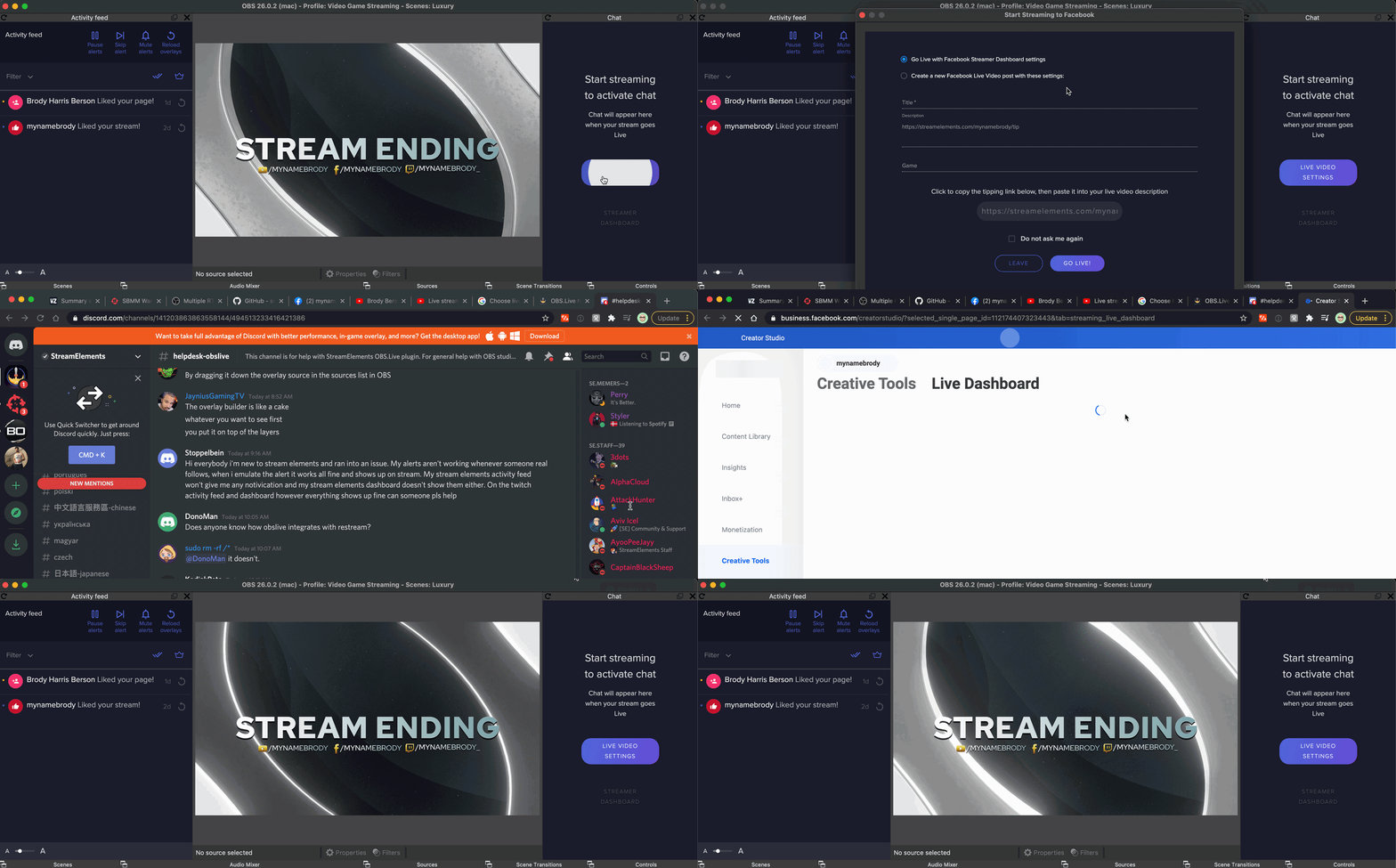
Hi there, I've been streaming on FB for a few streams but switching over to YouTube. I updated the OBS stream settings, but all of the StreamElements stuff in OBS Live is still on FB. See this GIF: https://cdn.zappy.app/b2042fc19960eae921c43f9720542c03.gif
Just curious how do I get the SE elements to update to YouTube vs being stuck on FB? I've tried reswitching back to FB then back to YT as well as quitting out of the app and restarting OBS Live
 astral rivet
Is it possible to switch scenes without showing OBS using a single monitor?
 nova scaffold
Yes, check the Hotkeys in OBS settings
karmic grotto
stream elements > logout > login again
on the top side of obslive in the menus (dropdown)
tawny parcel
Hi! I wanted to know why i can't connect my Streamlabs OBS scenes to OBS LIVE. It always freeze at 6/24 images transfered (20%)... I tried everything and get no solution.
 vast hound
hello I had a quick question if anyone knows how to so I'm trying to set up my activity feed but for some reason it wont work with youtube it will only show my old twitch account, does anyone know how to switch it to youtube and also how to get my chat into the interface?
full thunderBOT
@vast hound StreamElements menu, on top of OBS > Logout > Login
vast hound
thank you
astral rivet
thanks @nova scaffold
 cosmic pagoda
Guessing this might be a perennial issue, but... I streamed from an old computer and it wiped my custom bot name. Now trying to set that up on the old machine, but Ground Control won't launch (that is, it launches but never displays a window -- just appears in taskbar but won't open). Already uninstalled/reinstalled, already updated pillow via pip. Bueller?
 strange wyvern
alguien español que me pueda ayudar a configarlo todo?
full thunderBOT
@strange wyvern Welcome to the helpdesk! The regular helpdesk channels are in English but we do provide multi-language support in the following channels: #🇩🇪︱deutsch | #🇫🇷︱français | #🇪🇸︱español | #🇵🇹︱português | #🇳🇱︱nederlands | #🇮🇹︱italiano | #🇵🇱︱polski | #🇨🇳︱中文語言服務區-chinese | #🇯🇵︱日本語-japanese | #🇭🇺︱magyar | #🇰🇷︱한국어-korean | #🇹🇭︱ไทย-thai | #🇷🇺︱русский | #🇺🇦︱українська | #🇨🇿︱czech
cosmic pagoda
Hmmm ok, I found out how to reset the settings, and now I have 2-3 copies of the same bot in my chat.
ocean rivet
cosmic pagoda
Hmmm ok, I found out how to reset the settings, and now I have 2-3 copies of the...
make sure you are not running any extra instances in your task manager
cosmic pagoda
restarted obs.live; still getting double bot....
one's appearing as myself and one's appearing as the custom bot account.
full thunderBOT
StreamElements menu, on top of OBS > Logout > Login
cosmic pagoda
that just made my SE activity feed go away :/
nvm, got it back by closing the bot setup tab
ok, that removed one bot for as long as I was logged out. logging back in brought back the double bot
ocean rivet
cosmic pagoda
ok, that removed one bot for as long as I was logged out. logging back in brough...
did the bot work while you were logged out?
cosmic pagoda
yeah
ocean rivet
then something must be running in the background
cosmic pagoda
I've tried parting/rejoining the channel from the web side as well
ok, I'll reboot again and see if it's not the busted Ground Control doing shenanigans
ocean rivet
restart your pc and try again
cosmic pagoda
no luck. one bot in the channel until I opened OBS, then there were two
ocean rivet
cosmic pagoda
no luck. one bot in the channel until I opened OBS, then there were two
you don't have ground control opened right?
cosmic pagoda
nope
I hit "disconnect custom bot account" in OBS.live and now there's just one bot
who thinks it's me
ocean rivet
if you close OBS and the bot is still there then its not OBS.Live
cosmic pagoda
...then where would it be? If I close OBS and type commands into my channel, the bot presently still responds under my username
if I re-open OBS and type commands, the same thing happens but ALSO the bot responds however I tell it to respond in the OBS.live tab
i.e. whether that's as StreamElements, myself, or my custom bot account
ocean rivet
cosmic pagoda
if I re-open OBS and type commands, the same thing happens but ALSO the bot resp...
thats why I asked about ground control since you mentioned you also have it, if its also running in the background if might be that one responding
cosmic pagoda
I don't see anything remotely "Ground Control" looking in my task manager right now
cosmic pagoda
@mystic nest what's your result at www.speedtest.net
 cosmic pagoda
that's def not the problem then. what's your cpu/gpu specs?
 mystic nest
i7-4790 @ 3.6GHz
GTX 1050Ti
cosmic pagoda
what's the game and what's your output resolution/framerate?
mystic nest
literally most games bar Minecraft and Arma 3 suprisingly, 1920x1080 60fps
cosmic pagoda
it's probably your cpu. My laptop runs nearly the same specs and it can play medium-heavy games just fine, but add an add an additional 1080p60 stream on top of that and it'll choke
I bet if you reduce your output to 30fps you'll see a big improvement. or try streaming something lightweight like, idunno, Minit or Undertale
mystic nest
I dont really wanna change my game just to get a good stream lol
 compact swift
DualPC setup can be a good solution then.
mystic nest
whats that
compact swift
You can get a secondairy computer to capture your game-pc video and audio
that way you offload the stream to a second pc
cosmic pagoda
^^^
mystic nest
thats money doe
compact swift
yep. but its a fix
cosmic pagoda
if you don't wanna change your game then you can change your graphics level, or reduce the framerate of your stream
mystic nest
I reduced it to 48fps and thats seemed to work for Valorant
Will test other games in a moment
 rancid obsidian
hi how do i put animated in game bottom overlay on to replace an still image one
web m format
ocean rivet
rancid obsidian
hi how do i put animated in game bottom overlay on to replace an still image one
where do you want this?
 ruby otter
Howdy, how do I add an overlay on my Xbox stream? I’m on the OBSlive but I see nothing
 left coral
how can I add my Chat in OBS-Live?
full thunderBOT
@ruby otter To add your overlays to OBS, add a new browser source in your scene. Paste your overlay URL in the browser source properties, set the dimensions to 1920x1080 (unless you changed them on the website) and check Shutdown source when not visible. https://youtu.be/KDvLynUqXI4
@ruby otter Consoles do not have native support for overlays. You would need a capture card, PS4 remote play or Xbox companion app and a PC with OBS in order to have overlays over your console gameplay.
We have a blog post about how to set up console streaming with our essential tools: https://blog.streamelements.com/how-to-stream-on-console-7b620b1c46c3
ruby otter
Thank you!
ocean rivet
left coral
how can I add my Chat in OBS-Live?
you mean a chat widget to show your chat on stream?
left coral
yep
because i installed OBS-Live but there is no widget anywhere
can someone help me??
hello :)?
ocean rivet
left coral
because i installed OBS-Live but there is no widget anywhere
this widget is part of your overlays, if you go into the overlay editor you can add it
 cosmic pagoda
You're not stupid, this stuff is pretty arcane hehe
left coral
haha thanks man 🙂
cosmic pagoda
I still haven't been able to get this extra bot out of my channel. If I ask the bot to depart my channel from the web panel, both the normal bot and the extra bot leave. But both bots still come back if I tell it to join the channel again
I can't change the nick on the extra bot -- it's always posting as my username. The normal bot acts normally, except that it will not accept being called "StreamElements" even if I save that setting in OBS.live
ocean rivet
cosmic pagoda
I still haven't been able to get this extra bot out of my channel. If I ask the ...
I'm not sure what could be the issue here, you can try revoking perms for the extra bot account that you won't use
cosmic pagoda
I would love to except that it's "me" and I can't mute myself
ocean rivet
cosmic pagoda
I would love to except that it's "me" and I can't mute myself
I mean from twitch, let me get you a link
but as I said before, there's something logged as your account in the background, maybe a second instance of OBS.Live or ground control
you can also try this
rancid obsidian
when i put a animated screen on my obs it has a play sign and doesent play the screen once played once
cosmic pagoda
I uninstalled Ground Control
full thunderBOT
@cosmic pagoda "1) Right click on your OBS desktop shortcut and open the Properties
2) In the Target field, add the following to the very end: --remote-debugging-port=40404 (don't forget to add a space before the current path)
3) Open OBS (or restart if it was open)
4) Open your web browser and type in: localhost:40404
5) Click on StreamElements - Activity feed
6) Navigate to the Console tab
7) Type the following into the console and hit enter: store.customBot.removeCustomBotIntegration()
8) Try setting the custom bot name
9) Remove the additional flag in step 2 from your shortcut properties."
cosmic pagoda
^^ thx, will try
rugged quail
Does anyone else have the problem on macOS, that the media request share thingy video inside the stream is lagging behind the audio? i cant get it in sync...
on OBS.live ofc
rancid obsidian
does it have to be media source not browser
 obsidian shuttle
need overlay help please
full thunderBOT
@obsidian shuttle Welcome to the helpdesk! Please let us know how we can assist you today and a support volunteer or staff member will assist you as soon as they are available. Thank you for your patience.
obsidian shuttle
Cant get my overlays to show up correctly
full thunderBOT
@obsidian shuttle The default resolution for StreamElements overlays (theme and custom) is 1920x1080. Please add them in OBS at their full resolution and use CTRL+F to fit to screen if necessary. You can then downscale your stream in OBS settings > Video if you'd like https://i.imgur.com/6bWXxjR.png
 obsidian shuttle
I did that to get my alert box to work, but doing a donation goal, it resizes but the text doesn't. Do i need to just make the text ridiculously large?
Cancel that I figured it out
ocean rivet
obsidian shuttle
I did that to get my alert box to work, but doing a donation goal, it resizes bu...
you need to adjust the size in your overlay editor
obsidian shuttle
ocean rivet
you need to adjust the size in your overlay editor
yea i just caught that....im so dumb sometimes lol
thank you so much
cosmic pagoda
@full thunder That brought me back down to 1 bot, but only until I re-added the custom bot :/
Re-entering that console command removes only the custom bot. There's still a bot in the channel who's responding as the broadcaster (i.e. me)
 obtuse umbra
Hello, I'm currently having a problem with StreamElements OBS.Live, the program isn't able to get my activity feed and my alerts aren't working
Basically StreamElements isn't able to get information about my channel's events
It displays 0 followers when I have 74, and no stream activity whatsoever

 idle portal
Hi, i was told this might best place, can someone have listen to my audio. It's something that really bugs me, any advice would be great help.
obtuse umbra
I'll see
 quick atlas
obtuse umbra
It displays 0 followers when I have 74, and no stream activity whatsoever
quick atlas
obtuse umbra
It displays 0 followers when I have 74, and no stream activity whatsoever
Can you share your account ID with us?
quick atlas
obtuse umbra
Or is it safe to send it here?
It's safe to post here.
obtuse umbra
60280ced6eb126cb18f213d9
quick atlas
obtuse umbra
60280ced6eb126cb18f213d9
I have reported the issue, and we'll look into this for you.
obtuse umbra
Alright, much thanks for the support
 somber tinsel
once i download an overlay how do i add it to the scene.. i'm so new i'm so lost haha
help me
untold edge
you have to add the overlay link to a browser source in obs, and put the correct size in there (1920x1080 or whatever size your overlay is)
somber tinsel
that'll add the countdown timer and everything to it?
somber tinsel
thank you, I appreciate that
 viscid portal
Hello all :). I was wondering if it is possible for a chat command to prompt an emote on screen during the stream? Thanks!
gentle musk
is it possible that by the donation goal the fee from SEPay or some other service is getting of the count
 green garnet
under your overlay go to session data and reset it
 pine jungle
can someone help me out? When i go live on streamelements OBS that doesn´t start the stream on twitch. Btw the obs is connected to my twitch channel...
 honest echo
@pine jungle try this: StreamElements at the top of OBS > Log out
And then log back in
pine jungle
dont work... @honest echo
ocean rivet
@pine jungle make sure you're also connected on OBS: Settings > Stream
pine jungle
wait... i was streaming for yt this afternoon but i logged out and logged in with twitch is that normal to have blabla.youtube.blabla in the server ?
@ocean rivet
ocean rivet
pine jungle
wait... i was streaming for yt this afternoon but i logged out and logged in wit...
you have to relog in both the streamelements menu and in obs settings
pine jungle
in the web and in obs?
ocean rivet
pine jungle
in the web and in obs?
only OBS
pine jungle
still dont work...
ocean rivet
pine jungle
still dont work...
can you post a screenshot of your stream settings from obs?
ocean rivet
pine jungle
i think that this is the problem
select Twitch where it says Service Custom...
gentle musk
gentle musk
is it possible that by the donation goal the fee from SEPay or some other servic...
?
 toxic moth
Hi im having some issues with streaming using your service?
quick atlas
toxic moth
Hi im having some issues with streaming using your service?
What issues are you having?
 warped shuttle
Need help setting things up! I have tried all kinds of configurations and my stream always crashes. I'm getting "Encoding overloaded" and a laggy/crashing stream. Win 10, i7-9700K, 1080ti ftw3, streaming at 720p, 6000k bitrate, 940mbps down, 35mbps up. I have tried x264 as well as nvenc encoding. Both crash my game and the stream itself.
 ancient briar
Im having troubles with my recording. Whenever I have obs going and recording minecraft crashes and I dont know how to fix this
 woeful tusk
How do you put overlays in
full thunderBOT
@ancient briar Obs.live is a plugin for OBS Studio for the best OBS support, please join their Official Discord @ discord.gg/obsproject
@woeful tusk To add your overlays to OBS, add a new browser source in your scene. Paste your overlay URL in the browser source properties, set the dimensions to 1920x1080 (unless you changed them on the website) and check Shutdown source when not visible. https://youtu.be/KDvLynUqXI4
 crisp sail
how do I change my activity feed from being twitch to YouTube?
I've already signed in to YouTube
full thunderBOT
@crisp sail StreamElements menu, on top of OBS > Logout > Login
crisp sail
You're the best.
Thank you!
 simple field
I am new and having issues with share alerts populating on stream any help
 shell kelp
I need help setting up points @everyone
quick atlas
shell kelp
I need help setting up points @everyone
Loyalty points?
quick atlas
Is there anything in particular? This page may answer some questions: https://support.streamelements.com/hc/en-us/articles/115000370912-Loyalty-System
crisp sail
For some reason, no matter what settings I try, I keep dropping frames on YouTube Live through OBS.
Anyone have any idea why?
 severe canopy
for some reason no matter what settings i try my obs output drops to 0kbps every couple of seconds, i dont have this issues with SLOBS
crisp sail
same with YouTube @severe canopy
full thunderBOT
Obs.live is a plugin for OBS Studio for the best OBS support, please join their Official Discord @ discord.gg/obsproject
 humble vapor
I just upgraded my set up to dual monitor and game capture in obs live no longer work. How can I fix this?
full thunderBOT
@humble vapor Obs.live is a plugin for OBS Studio for the best OBS support, please join their Official Discord @ discord.gg/obsproject
humble vapor
I actually went there first. and they advised me to uninstall stream elements which I do not want to
So if you could please help me out with this
Id really appreciate that
karmic grotto
humble vapor
Id really appreciate that
export your profiles and scene collections and re install. @humble vapor
humble vapor
karmic grotto
export your profiles and scene collections and re install. <@!669005279337250837...
will try that one out. thank you
 brittle panther
im having the same problem only when i start up a game like eso it closes streamelements on my second monitor and puts it on my main monitor and it didnt do this before i uninstalled it
 trail lark
i have a problem with media requests
rugged quail
@brittle panther that sounds like more of a game settings issue regarding what is or isn't the main display, please look into that
@trail lark what seems to be the issue?
trail lark
rugged quail
<@!459375723975671818> what seems to be the issue?
well the window is completely blank
rugged quail
can you send a screenshot?
trail lark
 rugged quail
Please disable the tab and then open it again, let me know if it changes
trail lark
it didnt
rugged quail
Okay, on the top, go to sreamelements (on the top) -> logout -> login and try again
trail lark
yes thank you
rugged quail
Awesome
gentle musk
is it possible that by the donation goal the fee from SEPay or some other service is getting of the count
wary dew
Nope
 gloomy sedge
hello guys i have a problem with the game capture, i have it added and set to any fullscreen application but when i run csgo or even set the properties to a specific window it still has the same outcome. Literally nothing comes up, i do have a background image but i have the game capture above the background file i was wondering if someone could help me keep the background/border and use the inside box for my game capture ❤️

 molten haven
Does anyone have a guide for adding openvr capture? I can't seem to find the right folder like the directions say.
full thunderBOT
@gloomy sedge Valve has implemented a trusted mode which does not allow OBS to hook CS:GO using Game Capture. Read more in their announcement post here https://blog.counter-strike.net/index.php/2020/07/30736/.
Additionally, they have no plans on allowing OBS in trusted mode.
https://support.steampowered.com/kb_article.php?ref=8835-KLXV-0292#whitelist
You will need to run the game in either windowed or borderless fullscreen and use Window Capture instead.
Alternately, you can launch the game with -allow_third_party_software.
@molten haven Obs.live is a plugin for OBS Studio for the best OBS support, please join their Official Discord @ discord.gg/obsproject
 placid forge
hey guys, i use streamlabs which i think is pretty similar to obs (might even be the same i'm a newb) but how do i configure so that my viewers can't hear the discord i am in?
 grim needle
How can I enable KappaGen emojis for my live streams @rotund bough @steel bridge Ty
full thunderBOT
Not all staff are able to assist with support issues. Please refrain from pinging them or sending them DMs unless asked to.
grim needle
ah, srry.
 sharp turret
grim needle
How can I enable KappaGen emojis for my live streams <@!123914003343867904> <@!8...
sharp turret
grim needle
How can I enable KappaGen emojis for my live streams <@!123914003343867904> <@!8...
In the overlay editor add kappagen
 grim needle
Thank you!! ❤️
sharp turret
You're welcome! 
 dire pasture
Helloooo
sharp turret
Hi
 young yacht
Hey! I have an issue where the overlay does not shot my total subs. Is there a fix to that?
 nova scaffold
young yacht
Hey! I have an issue where the overlay does not shot my total subs. Is there a f...
nova scaffold
young yacht
Hey! I have an issue where the overlay does not shot my total subs. Is there a f...
Try to reset the session and check again in a minute or so.
Session can be resetted in the activity feed on the right
gloomy sedge
full thunder
<@!403370408344289280> Valve has implemented a trusted mode which does not allow...
thank you that was very informative ❤️
young yacht
nova scaffold
Try to reset the session and check again in a minute or so.
Thanks! 😄
 trail sonnet
Hello, recently today my custom bot has disconnected from my OBS live and no matter what I've done it won't let me change to my custom bot. I've tried it in the dashboard, and also in the program itself. Have looked up heaps of tutorials on youtube and can't seem to fix it. Any help would be appreciated!
 full thunderBOT
@trail sonnet "1) Right click on your OBS desktop shortcut and open the Properties
2) In the Target field, add the following to the very end: --remote-debugging-port=40404 (don't forget to add a space before the current path)
3) Open OBS (or restart if it was open)
4) Open your web browser and type in: localhost:40404
5) Click on StreamElements - Activity feed
6) Navigate to the Console tab
7) Type the following into the console and hit enter: store.customBot.removeCustomBotIntegration()
8) Try setting the custom bot name
9) Remove the additional flag in step 2 from your shortcut properties."
trail sonnet
Thanks Support, those instructions worked like a charm!
 narrow stump
I was about to message with the same issue! TY
shadow root
I have a capture card attached to my xbox. display and volume from the game is working on obs, however my mic is not detected over the capture card(the one connected to my controller on the xbox) Xbox however shows my mic is working, any idea?
full thunderBOT
@shadow root Obs.live is a plugin for OBS Studio for the best OBS support, please join their Official Discord @ discord.gg/obsproject
 visual elk
Hello! For some reason, my Chat dock and Stream Information dock are extremely blurry. I don't know why it started happening but it started yesterday. Any help?

second image may help as well.
 sharp turret
visual elk
Hello! For some reason, my Chat dock and Stream Information dock are extremely b...
sharp turret
visual elk
Hello! For some reason, my Chat dock and Stream Information dock are extremely b...
"Please follow these steps:
- Close OBS
- Open the NVIDIA Control Panel
- In the left menu select Manage 3D settings and then under the list of options (right panel) press Restore default settings
- Start OBS"
visual elk
sharp turret
"Please follow these steps:
1) Close OBS
2) Open the NVIDIA Control Panel
3) In...
Looks like this did the trick. Thanks so much!!!
sharp turret
You're welcome!
 jaunty root
i need the obs video
 onyx cipher
hoi there, excuse me but i need some help
im trying to delete one of these accounts i have my youtube linked to so i can move my youtube account over to my main one
the problem is i keep getting an error saying my username is invalid when i tried several ways to get it right
jaunty root
for what the new 1
wary dew
do NOT share your JWT token in public
onyx cipher
ok, my apologies, i just want to deactivate this account please.
full thunderBOT
@onyx cipher Account Merging - Please note:
- Merging accounts only allows faster ways to switch between accounts
- Merging accounts does not allow data sharing between accounts - different streaming platforms, different type of events
- Merging accounts allows duplicating/sharing overlays between the accounts
If you understand the limitations of merging and want to proceed, please find the JWT tokens (!jwt) from both accounts you want to merge and you will be directed to DM them to a staff member
@onyx cipher You can find your JWT token on your account channels page (Show Secrets to reveal the token): https://streamelements.com/dashboard/account/channels
READ ME: This is a private security token. Do NOT share this token here or other public places, only with a StreamElements staff member in private.
wary dew
DM them to @nova scaffold
jaunty root
wary dew
do NOT share your JWT token in public
do u have the set up video link
full thunderBOT
@jaunty root New to StreamElements?
Check out our YouTube channel https://www.youtube.com/c/streamelements/videos
with tutorial videos from setting up the basics, to in-depth details on how to use our product.
New to OBS? Here is a 4 step quick start guide
https://obsproject.com/wiki/OBS-Studio-Quickstart
Want to learn even more? Here is an in-depth overview
https://obsproject.com/wiki/OBS-Studio-Overview
jaunty root
ik i just asked for a video link but i accidently uninstalled obs studio and it wont reinstall
karmic grotto
jaunty root
ik i just asked for a video link but i accidently uninstalled obs studio and it ...
screenshot the issue / error u are facing
jaunty root
i install it and it doesnt install onto my desktop/pc it doesnt say anything
jaunty root
karmic grotto
screenshot the issue / error u are facing
do u know how to fix
karmic grotto
jaunty root
i install it and it doesnt install onto my desktop/pc it doesnt say anything
tried opening from the folder?
 chilly copper
Hello! I recently upgraded all of my internet service to the fastest I can have (400 Down, 20 up), and yet OBS Studio keeps disconnecting. Is there a fix for this?
full thunderBOT
@chilly copper Obs.live is a plugin for OBS Studio for the best OBS support, please join their Official Discord @ discord.gg/obsproject
 visual shard
Hello! Im having an issue with getting the instant replay widget to pop up on my stream, I think I followed the instructions to the T, but for some reason it still isnt popping up when I put the command in the chat? Anybody have this same issue?
chilly copper
full thunder
<@!344236524147048469> Obs.live is a plugin for OBS Studio for the best OBS supp...
Even though I'm using the StreamElements OBS?
 tropic perch
My scene transitions are like delayed can you come to my stream to tell me how to fix so I can show you? When I switch scenes it's like delayed on the transition.
full thunderBOT
@tropic perch Obs.live is a plugin for OBS Studio for the best OBS support, please join their Official Discord @ discord.gg/obsproject
 misty shadow
Hi! I'm having a really odd problem. My stream elements alert is only showing half of the alert in OBS. I can't figure out why. Has anyone else had this issue and if so please help lol
full thunderBOT
@misty shadow The default resolution for StreamElements overlays (theme and custom) is 1920x1080. Please add them in OBS at their full resolution and use CTRL+F to fit to screen if necessary. You can then downscale your stream in OBS settings > Video if you'd like https://i.imgur.com/6bWXxjR.png
misty shadow
ohhh I'll try that thank you
 cinder shoal
What does this mean? I'm still able to go live but obs.live isnt working with obs.
 full thunderBOT
@cinder shoal StreamElements menu, on top of OBS > Logout > Login
 keen hornet
how do I skip a TTS message playing through an alertbox in my StreamElements overlay?
keen hornet
ah
rugged quail
i keep getting a issue when my stream say encoding overloaded and turned all the setting down i also have it where it randomly disconnects from twitch and the whole software freezes
 silk kiln
im having an issue where the frames are rapidly readjusting and did not have this problem yesterday. causing frames to drop upwards of 45%
full thunderBOT
@rugged quail Obs.live is a plugin for OBS Studio for the best OBS support, please join their Official Discord @ discord.gg/obsproject
@silk kiln Use the Twitch Bandwidth Test to find the best Twitch server to stream to. Set Duration to Medium. You can uncheck any regions you're not near.
After the test completes, click the Share Result button to upload a screenshot, which can then be copied and pasted here.
Get Twitch Test from https://r1ch.net/projects/twitchtest.
ocean rivet
@silk kiln do a quick test and see if you have bandwidth issues
silk kiln
it seems i might

everything else is working perfectly on my end internet fast dont know whats going on
rugged quail
Not sure if this is the right thread for this problem, but I can't get my sound effects to work after they were working before.
full thunderBOT
@rugged quail Please provide your account ID found at the top of this page: https://streamelements.com/dashboard/account/channels This ID is public info and safe to share here.
ocean rivet
silk kiln
it seems i might
yeah, not much to do in these cases, might be worth calling your internet provider
rugged quail
Never mind, I figured out what I did wrong!
 scenic frost
So I downloaded obs live but im unsure how to get streamelements to download as well. It says I have it installed but when I click on it, it does nothing.
 rare bridge
how do i change my resolution to 2560x1080
full thunderBOT
@rare bridge The default resolution for StreamElements overlays (theme and custom) is 1920x1080. Please add them in OBS at their full resolution and use CTRL+F to fit to screen if necessary. You can then downscale your stream in OBS settings > Video if you'd like https://i.imgur.com/6bWXxjR.png
shy mountain
scenic frost
So I downloaded obs live but im unsure how to get streamelements to download as ...
Do you have the streamelements button on top of OBS?
 somber reef
Hey how are ya, I’m on a 1 monitor set up and I can’t figure out how to display my chat on my actaul screen while I play my game so I cannot see chat
That might’ve sounded confusing just want chat overlay on my game screen
rare bridge
i dont think you can
@somber reef the chat overlay goes through the obs software not the other way around
shy mountain
@scenic frost you have not installed OBS.Live properly then
scenic frost
@shy mountain can you explain how I should install it then?
shy mountain
Just use the installer again
somber reef
@shy mountain is my question possible?
full thunderBOT
@somber reef If you have one monitor and/or would like the chat overlay on the screen, please look at the link below.
Please note this is not a plugin for OBS and not maintained by SE.
https://github.com/baffler/Transparent-Twitch-Chat-Overlay
somber reef
@full thunder Fanks
 rugged cliff
I set up twitch sound alerts and day one they worked perfectly fine, the next 2 days the alerts would keep repeating after a redemption then i stopped hearing them altogether, also my wifes overlay alerts she cant hear herself, but live stream can hear them, anyone know how to fix either of these issues??
 odd maple
so recently i have started to try youtube instead of twitch for like an hour or so . i recieved 3 new subscribers from them but my alerts are not going off? is there something else i need to change?
 wary nexus
is anyone else having connection issues?
full thunderBOT
@rugged cliff If you are not hearing your alerts and/or Media Request, you are most likely using the Control Audio via OBS option in your browser source properties.
To make sure you hear the alerts and the stream also hears them, follow along the screenshot bellow.
https://cdn.discordapp.com/attachments/199460642975907840/685371800456134686/unknown.png
 wary nexus
ive tried updating, driver updates, internet resets and im dropping mad frames
shy mountain
@rugged cliff as for sound alerts and day one they worked perfectly fine, the next 2 days the alerts would keep repeating after a redemption then i stopped hearing them altogether - i need more information on this
@odd maple #helpdesk-youtube message
@wary nexus are you getting an error or OBS in general is not connecting?
wary nexus
it connects and then i dropped alot of frames and my stream quality goes to crap
full thunderBOT
Dropped Frames means that you have a bad connection between your device and the streaming platform and most likely something related to your ISP not handling the connection properly.
Speed tests usually cannot help solve this problem and its best to use this guide: https://obsproject.com/wiki/Dropped-Frames-and-General-Connection-Issues
If you stream to twitch, use the !twitchtest command and do a connection test to your regional servers.
wary nexus
ive tried everything i can think of
wary nexus
full thunder
Dropped Frames means that you have a bad connection between your device and the ...
do i type that in my stream chat?
rugged cliff
shy mountain
<@!769591355466317854> as for `sound alerts and day one they worked perfectly fi...
Its the sound alert extension for twitch, the one that people cheer bits to play them, 1st night after setup they worked fine, now i can't hear them go off, live stream and chat can, but they won't stop going off, they keep repeating over and over and i have no clue how to fix it
toxic fern
You'd have to speak to their dev. That's not something we can help with.
 naive totem
Im struggling help lol I am a decent player who’s never really thought about making his stream look good but I just recently decided that maybe I should have an overlay and I have OB us live but can’t seem to get it correctly
Or get the set up correctly so I have started fresh you can use some help
shy mountain
wary nexus
do i type that in my stream chat?
no, you type the twitchtest command here
full thunderBOT
@naive totem New to StreamElements?
Check out our YouTube channel https://www.youtube.com/c/streamelements/videos
with tutorial videos from setting up the basics, to in-depth details on how to use our product.
New to OBS? Here is a 4 step quick start guide
https://obsproject.com/wiki/OBS-Studio-Quickstart
Want to learn even more? Here is an in-depth overview
https://obsproject.com/wiki/OBS-Studio-Overview
naive totem
Ty but seems the intro vid was too fast lol thanks tho
 hollow geyser
Does streamelements allow for 2 responses from 1 command. As in 1 command to trigger a video on screen as well as activate the counter widget for how many times it has been done?
 ripe path
i need help i am on a macbook, not exactly best for streaming i know but I want to stream music and some of my programming, however when "importing SLOBS or Nightbot" and this is what happens

I can't scroll either any way to fix this?
shy mountain
hollow geyser
Does streamelements allow for 2 responses from 1 command. As in 1 command to tri...
no, only 1 response per command. But if you are referring to the custom widget in #widget-share it might actually work as long as the widget doesn't require the command to be created.
@ripe path Can you try and maximize the OBS window? Or is this the maximum size?
 shy mountain
Right. In this case I would suggest to try and use the importers from the website.
ripe path
okie dokie thank you
 storm bough
Hi there! I'm facing some issues... When the alerts are played on obs, they lost all the formating from streamelements and the text show up only white, without the stroke, shadow and collors added. I've tried to clean the cache, add again, and happens the same issue. Any thoughts?
karmic grotto
checked variations tab?
storm bough
karmic grotto
checked variations tab?
yep, everything is right! All the notifications lost the formatting... But only on OBS 😦
this is how is happening

this is how it's supposed to be
 storm bough
karmic grotto
did u refreshed obs browser source ?
storm bough
karmic grotto
did u refreshed obs browser source ?
everytime! Also, always saving the page on streamelements
storm bough
Even on the overlay in the streamelements, when editing, the formatting get lost sometimes... when I open that specific text settings, it works again... It's really odd
 wild ridge
hiya, where do i get the media request widget??
 split pelican
hello when i setup my alerts and its work good for 3 days then when some1 follow me the alerts not work!
 short echo
Hey I dont know if anyone can help me please? My OBS/Streamelements has changed from Facebook over to Twitch chat? How do I change it back ?
I only stream on Facebook Gaming page?
 rain imp
Hi there i am trying to figure out to add scenes from streamelements onto my obs.live application and can not figure out how to get it to work
full thunderBOT
@rain imp To add your overlays to OBS, add a new browser source in your scene. Paste your overlay URL in the browser source properties, set the dimensions to 1920x1080 (unless you changed them on the website) and check Shutdown source when not visible. https://youtu.be/KDvLynUqXI4
@short echo StreamElements menu, on top of OBS > Logout > Login
short echo
I have logged out but now it wont let me log in through Facebook, I have read maybe it is my firewall blocking OBS from connecting with Facebook
Sorted now I had to change my Facebook PW for some bizzare reason?
 rough swift
Hello i need some Help with my OBSLive Bot.. Everytime i change the name to my Streamname the bot stops working. I dont know what i can do.
Can someone Help me?
sharp turret
rough swift
Hello i need some Help with my OBSLive Bot.. Everytime i change the name to my S...
Did you choose the 3rd option?
full thunderBOT
If your commands recently stopped working and you're using OBS.Live and a custom bot name do the following:
- In OBS.Live, click on the hamburger menu (three stripes) at the top left of your activity feed
- Click on Stream Settings > Custom bot name
- In the Custom bot name field select Set custom bot name, not your already existing username (with capital letters). Note: If you already connected an account that way, the third entry will show as the account name (see image https://i.imgur.com/sO7fWOX.png).
- Scroll a bit down and click on the purple Connect Custom Bot Account button
- Log in as usual and Authorize the custom bot name
- Back in the Activity feed, click on the Send Test Message button and check if your custom bot name starts working again
 sharp turret
Set custom bot name
rough swift
no the second one
sharp turret
Use the 3rd option
rough swift
so i have to do a new account? or just log in with my normal account?
sharp turret
Login with your normal account
rough swift
aaaaawww thank you so much!!
sharp turret
You're welcome!
 signal aspen
Hi, is there Mac software for OBS.Live? Of is this a PC only service?
 long charm
Has anyone had an issue when adding a video source your OBs Crashes?
toxic fern
@signal aspen http://strms.net/obslive_mac
signal aspen
toxic fern
<@!526465307775336469> http://strms.net/obslive_mac
thanks!! I could not for the life of me find it on the site.
 vast pelican
Hi guys, i just got my afiiliate on Twitch, did everything and enable the Two factor stuff, but now when i open streamelements i get the error: "status_error: Invalid refresh token (HTTP 400)"
How do i fix it? Already tried to logout and login, but don't work
long charm
@vast pelican re-put ur stream key
 dusky wind
hey media request isn't working for me
Even in the website doesn't show the play button, and the widget in obs don't show anything
 undone field
how do steamelements make money?
wary dew
They get money from companies and investors
 real crypt
heyo heyo, i had to reconnect my account to obs live cuz i got affiliate, now i cant connect account at all
i load it up to sign in to the twitch and it just has a white box underneath log in - twitch
any help would be great and thank you
ocean rivet
real crypt
any help would be great and thank you
can you share a screenshot with us?

 ocean rivet
real crypt
ocean rivet
real crypt
see if you can login to twitch using an incognito window
real crypt
like on browser? or is there an incognito mode in obs?
 safe stone
Good afternoon people!
I have a problem with adding an overlay in OBS, OBS.Live and StreamLabs OBS.
When adding a browser source and inserting the link, OBS simply doesn't load, but if I put "google.com.br" for example, it loads, the problem is in the overlays.
Attached is a video of the problem I am suffering from.
I looked on the internet, and there are some recommendations for what to do in situations like this, but it didn't work out.
Could you help me, please?
 carmine knot
Hello everyone, my chat is don't working, what can i do?
 full thunderBOT
@carmine knot StreamElements menu, on top of OBS > Logout > Login
real crypt
how did incognito sign in fix this issue i am so confused thanks @ocean rivet somehow that sorted out the issue
ocean rivet
real crypt
how did incognito sign in fix this issue i am so confused thanks <@!131420870244...
may have been an issue with your cookies or something
real crypt
could be lol, thnx again
rugged quail
Hello everyone! I have an issue with obs.live. I seem to be experiencing very bad render lag on my streaming PC, I did a test stream with these settings and it worked fine.
these are the spec for my streaming PC
 safe stone
Good afternoon people!
I have a problem with adding an overlay in OBS, OBS.Live...
safe stone
safe stone
Good afternoon people!
I have a problem with adding an overlay in OBS, OBS.Live...
?
vast pelican
long charm
<@!158747143559970816> re-put ur stream key
ty, it worked ❤️
rugged quail
what i do wrong? Can someone help me please
honest echo
rugged quail
what i do wrong? Can someone help me please
sorry there is no audio on that clip, what is the issue?
honest echo
Have you check here: https://streamelements.com/dashboard/overlays
rugged quail
Can someone help me to do a widget . Where the last followers / donations will alternate
and this switch
Is there a video for that?
quick atlas
rugged quail
Is there a video for that?
This page may help with that: https://blog.streamelements.com/how-can-you-become-a-code-guru-87071f223e1b
There is also a widget share channel here that might have some stuff worth looking at.
rugged quail
Thanks
 shut fog
Hey, I need some help. I want to start a stream but it says that my Twitch account is not connected, but that's it. Already disconnected and reconnected, but that doesn't work either.
ocean rivet
shut fog
Hey, I need some help. I want to start a stream but it says that my Twitch accou...
go to obs settings > stream and reconnect your twitch account
shut fog
Thank you i try it
 dry cloud
Hello! Every time I start my stream, my alerts don’t appear. I’ll update my overlays and refresh multiple times. About 30-40 minutes in stream, they work again. I have my alertbox within my overlays. Is there a reliable way to test before stream that the alerts are working and/or am I doing something wrong that causes instability before my stream?
 barren pelican
hey i need help with an alert, im trying to get streamelemets to play a custom sound when someone sends a bit but it wont change the sound from the base one
full thunderBOT
@dry cloud You can test alerts via the Emulate bell on the lower left side of the Overlay Editor. Simply go to your Dashboard > My Overlays > pencil/edit button on the overlay. Make sure the Preview LIVE on stream option is on to see the alert in OBS/XSplit** https://streamable.com/vtulg9
 quick atlas
barren pelican
hey i need help with an alert, im trying to get streamelemets to play a custom s...
quick atlas
barren pelican
hey i need help with an alert, im trying to get streamelemets to play a custom s...
You may have to check you variation settings, as they may be overriding your settings.
barren pelican
how do i do that?
 midnight cobalt
it doesnt let me into my overlay editor
quick atlas
barren pelican
how do i do that?
Check the variation options in the settings
 quick atlas
midnight cobalt
it doesnt let me into my overlay editor
quick atlas
midnight cobalt
it doesnt let me into my overlay editor
Are you getting an error message?
barren pelican
ty
 dawn idol
would anyone be willing to assist me in fixing alert sounds on stream elements? even sounds that are already submitted and working on other actions do not work if i was to put the same sound on another alert...
quick atlas
dawn idol
would anyone be willing to assist me in fixing alert sounds on stream elements? ...
What do you mean by the same sound not working on other alerts? Is it possible that variation settings are causing different sounds to play?
dawn idol
i can take the sound i have for a follower alert that works right? then take it to another alert and try it there and i get the genaric ding every time
quick atlas
dawn idol
i can take the sound i have for a follower alert that works right? then take it ...
Yeah, check your variations. Sometimes they can override your settings and play the default instead of your sound.
dawn idol
quick atlas
What do you mean by the same sound not working on other alerts? Is it possible t...
you are a genious! i have been at this for so long now and finally i understand! when you said variations made me think. 💖
 surreal fox
hey guys, my alerts are currently not showing on my stream is there any way to fix it ? I am currently streaming to twitch but neither my activity feed nor my alerts seem to be "sync" . it is worth mentioning they do work on the preview from streamlabs
full thunderBOT
@surreal fox Please provide your account ID found at the top of this page: https://streamelements.com/dashboard/account/channels This ID is public info and safe to share here.
 winter marten
hi everyone can someone help me my !followage and !watchtime are not working they are just saying 0 everytime 😦
full thunderBOT
@winter marten The !watchtime command is directly tied to the Loyalty system. The Loyalty system must be enabled for viewers' watchtime to count up.
To enable Loyalty, please go to the Loyalty section of your account: https://streamelements.com/dashboard/loyalty
Watchtime counts up every 10 minutes alongside Loyalty points, and only while the stream is live. Reruns will not be counted.
Please note that watchtime is not tracked by Twitch and there is no way to retroactively apply past watchtime to viewers.
StreamElements
The Ultimate All in One Platform for Streamers
 wintry lagoon
Hey i just was wondering how to add overlays that i downloaded from stream elements. I already have it downloaded i just dont know where to put them now
full thunderBOT
@wintry lagoon To add your overlays to OBS, add a new browser source in your scene. Paste your overlay URL in the browser source properties, set the dimensions to 1920x1080 (unless you changed them on the website) and check Shutdown source when not visible. https://youtu.be/KDvLynUqXI4
 untold nacelle
hello is the obs live chat bugged?
it wont let me send a text
i can type it but it wont send
 coarse wyvern
Hey all looking for some help! I'm having a lot of dropped frames and audio issues from OBS - i get Audio buffering limit reached. I'm using a Sony a6400 camera which the logs are saying the problem is coming from. However i have audio in the camera settings disabled
https://obsproject.com/logs/v4PMMCL6c9RIHNvk
 uncut abyss
Hi so I have been using OBS Live for a while now and use it for Facebook Live to stream my videos only, I've had no problems with it, my activity feed and chat showed that I'm connected to Facebook but now just recently it has changed to Twitch for some reason. I use the twitch app for my streams on there, not OBS. I have used my Facebook stream key to connect but nothing shows up on my page after I go live. How can I fix this? I need help.
full thunderBOT
@uncut abyss StreamElements menu, on top of OBS > Logout > Login
uncut abyss
Wow I should have know, I feel silly, thank you!
full thunderBOT
@devout mason Not all staff are able to assist with support issues. Please refrain from pinging them or sending them DMs unless asked to.
shy mountain
Can you stop?
I would suggest to be patient and I will help you
But I am currently busy with something else.
and be patient
@devout mason Ok, now, as long as you don't randomly ping people and don't ping me on your every message, I will help you
full thunderBOT
@devout mason If you are not seeing the OBS Twitch integrations and have OBS.Live installed, please follow these steps:
- Make sure you are on the latest and greatest version of OBS.Live
- Exit OBS (make sure OBS is not running)
- Delete
%appdata%\obs-studio\plugin_config\obs-browser\obs_profile_cookies - Start OBS.Live
- Settings > Stream > Disconnect > Connect
shy mountain
No
shy mountain
coarse wyvern
Hey all looking for some help! I'm having a lot of dropped frames and audio issu...
https://obsproject.com/tools/analyzer?log_url=https%3A%2F%2Fobsproject.com%2Flogs%2Fv4PMMCL6c9RIHNvk
OBS (Open Broadcaster Software) is free and open source software for video recording and live streaming. Stream to Twitch, YouTube and many other providers or record your own videos with high quality H264 / AAC encoding.
full thunderBOT
@untold nacelle StreamElements menu, on top of OBS > Logout > Login
coarse wyvern
Thanks Keizar, I ran the logs analyzer but wasn’t sure how to correct the issue, as I have the audio turned off on my actual camera before entering the PC and I don’t see a way to remove it as an audio source on its own. And just leave a video source.
 coarse wyvern
I don’t think that was directed towards me?
shy mountain
No
Towards the person that is no longer here.
I just didn't clean up properly, sorry.
As for your issue, the audio buffer on how to fix it - usually the fix is listed in the analyzer.
coarse wyvern
Yeah it mentioned just restarting OBS. However this is a constant issue, it’s become unusable to stream as its dropping about 25% of my frames. My CPU/RAM/ and GPU are all looking good as far as loads are concerned, I’m not even recording footage at the same time as broadcasting. So there shouldn’t be a huge load on the system. It’s an i9 9900k with 32GB Ram and 3080 GPU. Should be no issues at all.
full thunderBOT
@coarse wyvern Obs.live is a plugin for OBS Studio for the best OBS support, please join their Official Discord @ discord.gg/obsproject
 obsidian cradle
is there a way to use a custom font in a widget?
full thunderBOT
Google Fonts
More than 900 google fonts are supported at this time. You can preview them here: https://fonts.google.com/
Custom Fonts
Steps:
- Install the font on the streaming PC or choose a pre-installed windows font.
- In the overlay widget settings, select Text Settings
- Click on Enable Custom Font
- Type the name of the font as it appears in the windows font directory (This is usually
C:\Windows\Fonts)
Note: After installing fonts, the browser and OBS must be restarted for the font to appear.
obsidian cradle
i looked at the font selection and nothing says Enable Custom Font

just says font
shy mountain
thats a custom widget
obsidian cradle
i have a certain font to use
shy mountain
there is a different way for custom widgets to use custom fonts
it might be best to ask #dev-chat
obsidian cradle
I'm not a developer
shy mountain
Then ask the creator of the widget to help you out.
obsidian cradle
i don't know who that is
shy mountain
What is the widget you have?
shy mountain
where did you get it from?
obsidian cradle
this discord
shy mountain
So from #widget-share ?
obsidian cradle
yea
obsidian cradle
shy mountain
ok so go into #dev-chat and ask @formal walrus if they can provide you with a line of code and where to add it for the custom font you have
 vale drift
Hey all, how do i go about adding variations for follow sounds and what not, I added all the different sounds and profiles but when I click on test it plays the default. Is this only because its test or did i miss something? Thank you 🙂
toxic fern
Test automatically does default unless specified for a different kind.
vale drift
ah ok, so If i've added the variations when im streaming they will take effect?
toxic fern
Assuming you've properly configured them yes.
 keen sable
Hi there. My game capture is showing a black screen. I've done just about everything that the internet tells me to and nothing has fixed it
 vast wren
HI @keen sable , have you tried launching the OBS as an Admin?
keen sable
I have it to launch as admin by default
rugged quail
If you use display capture, does it show the game?
 chilly dock
how can i add timer zone command with india time in streamelements
i cant find india anywhere
 errant pagoda
hi. i emulated a subscribe on stream elements and it appeared on my stream but now is not disappearing off of my stream
rugged quail
@chilly dock there's a timezone command which you can edit with basic math IIRC
@errant pagoda try refreshing the cache of the browser source on OBS
errant pagoda
how do i do that?
rugged quail
should be fixed now
errant pagoda
mine?
rugged quail
yes
errant pagoda
its still there
chilly dock
sorry, if you dont mind can you tell me command
rugged quail
On obs, right click on the alert browser source, go to properties, and then scroll down and reload cache
errant pagoda
it is still there. I should probably say that it is the overlay that shows recent subscribers. sorry!
rugged quail
is it stuck on OBS?
errant pagoda
it wont get off of the preview screen of my stream. i cant click on it or move it or anything
rugged quail
can you upload a screenshot?
 chilly dock
@rugged quail can u help me
rugged quail
@chilly dock there's a timezone bot command, which you can edit, I think.
 teal marlin
Hey @rugged quail
has the pleasure of chatting with you yesterday
xD
you are omnipresent I see
which makes sense for a bot
rugged quail
I am legion
@errant pagoda in the overlay you created, the labels are located on the top left, I think you pushed the source all the way to the right
teal marlin
oooo you dreamteam person
I just saw you need 20k followers OR subs on yT
but when I tried applying it said I cant 😦
so is it 20k AND 20k or OR?
xD
errant pagoda
the actual overlay is the thing in the bottom. the one in the top left was the one that was emulated from the stream elements thing. i cant interact with it at all
teal marlin
cause yeah dont have 20k on both
rugged quail
@errant pagoda you can simply delete the browser source that says 'recent subscribers' and try adding it again
errant pagoda
i have
chilly dock
rugged quail
<@!419537789596598284> there's a timezone bot command, which you can edit, I thi...
if i type ist its showing different time
rugged quail
errant pagoda
i have
Okay, can you add it again?
rugged quail
In that case, delete all the browser sources from your OBS and start over
errant pagoda
delete all of the same ones or just all browser sources?
rugged quail
all of them, build the scene again from scratch
you would have better management of it in that case
@chilly dock I checked it for you and our bot doesn't seem to have that option, I would recommend you try using a different tool
chilly dock
thanks, can we expect to add in your bot. cuz i hav all commands in your bot
errant pagoda
thank you so much @rugged quail
shy mountain
#helpdesk-twitch message @chilly dock
 craggy briar
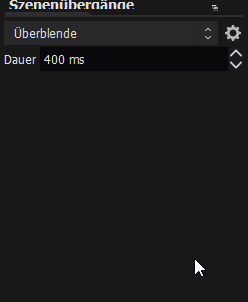
Hello, I cant add a Stinger transition, what can I do? https://i.imgur.com/HndA1Vn.png
 full thunderBOT
@craggy briar Obs.live is a plugin for OBS Studio for the best OBS support, please join their Official Discord @ discord.gg/obsproject
 harsh kite
can i get my streamlabs overlay and stuff to OBS live??
nova scaffold
harsh kite
can i get my streamlabs overlay and stuff to OBS live??
Hi. You can, but we do not support anything from Streamlabs, so we can't help with it.
Should work tho.
 timid merlin
ok how do I add those lttle thingies in obs, like I wanna add the thing where you can edit your streaminfo from the app but I'm not sure how to add it
 calm otter
activity feed not updating and I'm live right now, new follows don't show so i went to untick and return on but now nothing showing at all. I also closed it from the options at the top and reopening does nothing too. Can i log out out of streamelements on obs while streaming to try and fix that way. Don't want to end stream
 rigid canopy
Last time I tried obs live and it shut down my obs, so I had to delete obs live and studio
surreal fox
hey gusy ! I dont mean to spam , but can anyone help me ? my alerts are not showing up when someone follows me on twitch , even though they show when I emulate them. i was asked for my ID : 5ff64911dc4aef633f770c1d
 livid shore
anyone else had problems while changing the Cheer alert sound as none of the sounds i use are registering
 amber python
my streamelements obs isn't opening when I click to open it - whats happening?
nova scaffold
surreal fox
hey gusy ! I dont mean to spam , but can anyone help me ? my alerts are not show...
That should be fixed.
obtuse umbra
nova scaffold
That should be fixed.
Hello, I'm having the same issue since like a week ago, here's my ID 60280ced6eb126cb18f213d9
nova scaffold
obtuse umbra
Hello, I'm having the same issue since like a week ago, here's my ID 60280ced6eb...
And what happened a week ago?
The discord is getting thousands of messages per day - need the problem description
obtuse umbra
I switched to another service for my alerts, it sucked and I came back to SE, when I created my account again since I deleted my previous one, my channel information, like followers, wasn't being displayed at all
nova scaffold
surreal fox
hey gusy ! I dont mean to spam , but can anyone help me ? my alerts are not show...
Deployed a small fix, please test with a real follower alert.
obtuse umbra
obtuse umbra
Hello, I'm currently having a problem with StreamElements OBS.Live, the program ...
Here I was asking for help on this issue
nova scaffold
obtuse umbra
I switched to another service for my alerts, it sucked and I came back to SE, wh...
Please test with a real follower and see if it shows up
obtuse umbra
It doesn't
Or maybe it could be fixed now but I don't have any friends to test this with atm, could you help me with that please?
 oblique leaf

 modest swallow
Help needed. I use a Zoom L8 LiveTrak into StreamLabs OBS. I get sound in, and it shows up in the mixer. I believe I have the Input and output set right, but no sound out. I have a game PC and a broadcast PC, and I have an Elgato sound card and StreamDeck. Thanks, Debby, Special Family Connection.
 neon oak
Hi. When I first started using OBS Live I checked a box to save my description and title when starting a stream on FB. Is there anyway of resetting this setting so I can type/create and new description before each stream. Thank in advance.
 odd prism
Hi. In the overlay editor, is it possible to copy info for subscriber alerts / tip alerts / etc. over from the follower alert so I don't have to style them all individually?
 cedar lance
i cannot connect my stream to stram elements
i thought you could stream from console to stream elements all I keep getting every time I copied the key from twitch is an error
rugged quail
Hi, i just have some problems with the install of streamfx, i followed al the steps that i could find on youtube.. But when i click on filter id doesnt show the filters that come with the plugin.. So im wondering if anyone can help me?
full thunderBOT
@rugged quail Obs.live is a plugin for OBS Studio for the best OBS support, please join their Official Discord @ discord.gg/obsproject
@cedar lance Consoles do not have native support for overlays. You would need a capture card, PS4 remote play or Xbox companion app and a PC with OBS in order to have overlays over your console gameplay.
We have a blog post about how to set up console streaming with our essential tools: https://blog.streamelements.com/how-to-stream-on-console-7b620b1c46c3
 alpine ravine
Hello i was wondering if there was an easy way to creating an overlay for the mediarequest queue, that way it displays the current video and shows whats upcoming?
 carmine whale
Heey Guys!
I know you read that question a hundred times
but what means the color box between kb/s and fps/cpu usage?
it is changing a lot but I have no loosing frames
karmic grotto
means instability, of the whole stuff, to get more detail about it just open the stats viewport
can be found in the View menu dropdown @carmine whale
 digital mortar
i think my issue belongs here idk: I want to have the default bit-cheer sound effect blienn but when i set it on mine, it plays like a battle scene and idk what to do to fix it :i
honest echo
iirc If you are streaming/recording you won't be able to change those settings
 nova quarry
my mistake, it was NDI output
obtuse umbra
Could anyone please help me? I haven't been able to use Streamelements' alerts at all beacuse it's not displaying any followers, activity, or anything
It's like my channel didn't exist
I've wrote here about this problem multiple times and the issue is still not solved
honest echo
@obtuse umbra you account is already reported to our dev team, we appreciate your patience
 charred lava

how do i make the text come after the alert box as Animationed fully then text show up
 timber wind
Hello, I'm having problems with the Overlay editor, all my custom alerts work fine except for the sucriber and cheer ones!! I already tried changing the gifs, changing the sound, using videos, and nothing works, it just shows the default gif and sound effect 😦 You can watch the problem in this vieo
video*
You can see the cheer and suscriber alert are not wokirng properly
It's definitely not an internet issue, the rest of the websites I have open right now work just fine!
Please if anybody knows how to fix this send me a DM or something!
quick atlas
timber wind
Hello, I'm having problems with the Overlay editor, all my custom alerts work fi...
check out your variation settings at the bottom left, these can override your settings if left at default.
 left wraith
Hi. I am new to Streamelements and i was wondering about chat bot. Is it no longer available? I do not see it in the website, and when I go to the plugin within OBS Studio, although it says bot and tipping setup, only the tipping setup occurs when clicked.
 acoustic sigil
Hello, is it possible to add or change an image widget in the overlay from a donation? (es. with a js function). I'm working on a progress bar but i want to make the whole thing automatic.
ocean rivet
acoustic sigil
Hello, is it possible to add or change an image widget in the overlay from a don...
I suggest you ask this in #dev-chat, they might be able to point you in the right direction
acoustic sigil
ocean rivet
I suggest you ask this in <#259680142459142144>, they might be able to point you...
didn't see it! thanks
 raw vale
Hi wondering if it’s possible to re stream to Facebook and twitch via stream elements?
ocean rivet
raw vale
Hi wondering if it’s possible to re stream to Facebook and twitch via stream ele...
we don't support streaming to multiple platforms
timber wind
quick atlas
check out your variation settings at the bottom left, these can override your se...
Oh okay! I'll check that! Thanks
timber wind
quick atlas
check out your variation settings at the bottom left, these can override your se...
Thank you so much, that totally fixed the problem!!
quick atlas
timber wind
Thank you so much, that totally fixed the problem!!
Glad to hear!
 sacred marten
Hello, can someone help me with a problem that im facing, whenever i go live on youtube. OBS streamelements will not pick up youtube LIVE chat. Unless i go LIVE through OBS streamelements
shy mountain
how else are you going live?
sacred marten
was wondering is there is way to bypass this step. I want to go LIVE on youtube through youtube and not OBS streamelements
manage videos > live > go live
when i go that, obs streamelements does not pick livechat it says Link broken
shy mountain
So here is how live streaming on YT works -> when ever you go live more or less a new streamed video is created on your channel.
OBS is not able to pick that up properly as the current stream, so going live via OBS is best solution here
as OBS will make that live video stream for you
that being said, you can always try and logout and log back into OBS.Live
sacred marten
but doesn't that means i'll have to put in seo keywords in that live session again and again
shy mountain
Not sure what that is - as in i know what SEO keywords is, but not sure on the option it self
that being said, when you attempt to go live with obs.live
a prompt window should pop up
and help you set those up i believe
sacred marten
alright will give it a few more goes and try different methods, thankyou for the help ❤️
cedar lance
@full thunder So
- download Remote play for ps4
- login with secondary account
- connect secondary controller to Mac with Bluetooth
- then use display capture due to being IOS
- then i should be able to add image of the overlay on top of the display capture
 regal heron
does anyone know how to add elgato software on obs live?
shy mountain
Which exact software?
rugged quail
Streamdeck??
shy mountain
So the capture card software
open the capture card software
and then in OBS
add it as a window source
 reef scroll
Why I cant Stream my Game with an overlay on my Ps 4?
full thunderBOT
Consoles do not have native support for overlays. You would need a capture card, PS4 remote play or Xbox companion app and a PC with OBS in order to have overlays over your console gameplay.
We have a blog post about how to set up console streaming with our essential tools: https://blog.streamelements.com/how-to-stream-on-console-7b620b1c46c3
toxic fern
@reef scroll ^^^^^
 ocean rampart
how do i resize a overlay,?
full thunderBOT
@ocean rampart The default resolution for StreamElements overlays (theme and custom) is 1920x1080. Please add them in OBS at their full resolution and use CTRL+F to fit to screen if necessary. You can then downscale your stream in OBS settings > Video if you'd like https://i.imgur.com/6bWXxjR.png
 tacit cloud
trying to make a new overlay, i have a video at the bottom of the scrren but it wont allow me to put text over the top?
i have moved the layers around but the text still goes behind ?
any help would be great
nova scaffold
tacit cloud
trying to make a new overlay, i have a video at the bottom of the scrren but it ...
if the video is in the alertbox - change the layout
there are 3 layouts - text below, text to the side or text on top of the video
tacit cloud
no
ive added a video custom bar along the bottom
but the test i want to add goes behind everythime
nova scaffold
check the order in the layers tab. layers overlap eachother, make sure the text is above the video there.
nova scaffold
can you give me your account ID and overlay name, i check myself.
account ID is here:
https://streamelements.com/dashboard/account/channels
StreamElements
The Ultimate All in One Platform for Streamers
tacit cloud
i can screen share and show you
nova scaffold
no screen share, i got admin access. just need to find you, this is why i need the account ID.
nova scaffold

@tacit cloud see that the video is transparent? it is invisible. If i turn that on, it is correct and behind the text.
 tacit cloud
no. i can turn it on and make it visible and the text goes behind
on my screen the text is now not viasable
 nova scaffold
Just enabled it - text is above the video. DMing you the overlay link
tacit cloud
thanks you...how?
nova scaffold
Solved in DM's 🙂
 paper radish
Hi, yestarday my obs crashed when i was live. Can anyone help ?
full thunderBOT
@paper radish Please provide a log from your last stream. To do this, in OBS go to Help > Log Files > Upload Last Log File and paste the link to the log file here.
karmic grotto
need the log of the live that crashed, if it isn't the last u can crawl in the logs folder for it
paper radish
i believe its this one
rugged quail
Is there any kind of issues in regards to how layering appears in OBS? I have two layers of text (in StreamElements Browser) with identical settings which are layered perfectly on top of each other -- but in OBS they are separated by a few pixels.
 sharp steppe
hey how do i make myself custom transitions for obs.live
karmic grotto
paper radish
i believe its this one
disable Game DVR
Having the YUV Color range set to "Full" will cause playback issues in certain browsers and on various video platforms. Shadows, highlights and color will look off. In OBS, go to "Settings -> Advanced" and set "YUV Color Range" back to "Partial". @paper radish
there isn't any crash in that log btw
paper radish
ok thanks
karmic grotto
sharp steppe
hey how do i make myself custom transitions for obs.live
learn after effects
sharp steppe
ah good ik how to use ae so i think im good
karmic grotto
😉 gL
sharp steppe
thx
rugged quail
It does not let me go live it keeps coming up with there might be a problem connecting to servers or with my stream key
sharp turret
rugged quail
It does not let me go live it keeps coming up with there might be a problem conn...
Disconnect and reconnect account in OBS Settings > Stream
rugged quail
sharp turret
Disconnect and reconnect account in OBS Settings > Stream
it worked thx
sharp turret
You're welcome
 twin spade
Since a couple of days my custom bot name settings are not saved in my obs live plugin, I've tried different things like reinstalling the plugin. Reinstalling obs, but it just doesn't want to remembery login

After succesfull login it doesn't change
It works when I select my own name
full thunderBOT
@twin spade "1) Right click on your OBS desktop shortcut and open the Properties
2) In the Target field, add the following to the very end: --remote-debugging-port=40404 (don't forget to add a space before the current path)
3) Open OBS (or restart if it was open)
4) Open your web browser and type in: localhost:40404
5) Click on StreamElements - Activity feed
6) Navigate to the Console tab
7) Type the following into the console and hit enter: store.customBot.removeCustomBotIntegration()
8) Try setting the custom bot name
9) Remove the additional flag in step 2 from your shortcut properties."
 low horizon
Any idea how i get rid of the cookies info on my stream information tab?
full thunderBOT
@low horizon StreamElements menu, on top of OBS > Logout > Login
 jaunty delta
Hi. Installed OBS.live, now many, but not all, parts of my OBS are extremely tiny letters/buttons. How do I fix this? Can't seem to find a setting/preference

 solid sierra
jaunty delta
solid sierra
jaunty delta
I sometimes have this problem that I don't see the last actions and they always helped by just clicking on the arrow / confirmation mark
carmine whale
I have a Question to StreamElements. Is there a way to overwrite a change on Streamelements overlay editor for all overlays?
like changing the sound of a tip
and it is changed on every tip without going to every single overlaysite and change it seperate
jaunty delta
solid sierra
I sometimes have this problem that I don't see the last actions and they always ...
not sure I understand what mark you're talking about
 copper zodiac
Hi I have a problem with stream elements not updating alerts to the what i have changed them to. current I am trying to change the Cheer alert and the Sub alerts but they remain at the default settings.
nova scaffold
copper zodiac
Hi I have a problem with stream elements not updating alerts to the what i have ...
Have you checked the variation settings?
Alerts have variations based on amounts/months etc.
So you need to edit those aswell.
copper zodiac
@nova scaffold ok i see this now is there any way i can batch action change all of them or do i have to do each one individually
nova scaffold
copper zodiac
<@!149255081194160129> ok i see this now is there any way i can batch action cha...
Those are individual. If you want to save you some time, make new ones - they take over the main alert settings, so you can start from that instead of a blank variation
copper zodiac
@nova scaffold Sweet good idea also so you know I was tinkering while waiting and you can also just turn the variations off for each one and it works that way as well. thank you very much you helped alot.
nova scaffold
copper zodiac
<@!149255081194160129> Sweet good idea also so you know I was tinkering while wa...
Yep, you can turn them off for now 🙂
Enjoy building the overlays and streaming with our tools
copper zodiac
@nova scaffold I sure will I am loving this thanks again !
 worn rose
hello! i am having trouble with the custom bot name. Sometimes it will work when i set it to my channel name, and sometimes is doesnt. is there any way i can fix this?
full thunderBOT
@worn rose If your commands recently stopped working and you're using OBS.Live and a custom bot name do the following:
- In OBS.Live, click on the hamburger menu (three stripes) at the top left of your activity feed
- Click on Stream Settings > Custom bot name
- In the Custom bot name field select Set custom bot name, not your already existing username (with capital letters). Note: If you already connected an account that way, the third entry will show as the account name (see image https://i.imgur.com/sO7fWOX.png).
- Scroll a bit down and click on the purple Connect Custom Bot Account button
- Log in as usual and Authorize the custom bot name
- Back in the Activity feed, click on the Send Test Message button and check if your custom bot name starts working again
worn rose
I have commands set up with my emotes, will this allow them to be used without the custom bot being subbed, like it works with the bot using my name?
rugged quail
My sub goal widget is showing I have more subs than I actually do and I can't figure out how to get it to update to the actual number. It's been stuck like this for awhile now. Can someone help?
rugged quail
rugged quail
how do i hook my playstation up to my obs without an elgato
capture card
whats it look like
ugh
wary dew
@rugged quail you can either provide useful answers or just say nothing
rugged quail
I am doing, your just saying im wrong everytime.
Not all capture cards are elgato.
@wary dew is remote play easy to use
 finite wyvern
Guys Im trying to use gofundme for my charity stream today. I have the widget but dont know how it will activate. Like how to I connect it to the link to pop up when someone donates?
 solar summit
Hello when i try to open obs live it shows error 0xc000007b anyone who knows what i should do to repair it? 🙂 Thx
full thunderBOT
@solar summit Obs.live is a plugin for OBS Studio for the best OBS support, please join their Official Discord @ discord.gg/obsproject
 night cape
When i put the browser source on OBS the widget is stuck on the side of the box and is basically completely cut off and not visable. How do I change this
 brave sundial
Hi, i want to connect my streamdeck elgato with obs live,and the app says that there is no plugin, what should i supposed to do to fix it?
full thunderBOT
@night cape The default resolution for StreamElements overlays (theme and custom) is 1920x1080. Please add them in OBS at their full resolution and use CTRL+F to fit to screen if necessary. You can then downscale your stream in OBS settings > Video if you'd like https://i.imgur.com/6bWXxjR.png
@brave sundial Obs.live is a plugin for OBS Studio for the best OBS support, please join their Official Discord @ discord.gg/obsproject
finite wyvern
ANyone know anything about the GoFundMe Widget?
carmine whale
Is there a way to seperate the Music from media request that only my viewers hear it?
I already use a cable program to avoid copying discord or others sounds into the stream but I have no clue how to seperate the Sound request
 flat badge
full thunderBOT
flat badge
full thunderBOT
@flat badge New to StreamElements?
Check out our YouTube channel https://www.youtube.com/c/streamelements/videos
with tutorial videos from setting up the basics, to in-depth details on how to use our product.
New to OBS? Here is a 4 step quick start guide
https://obsproject.com/wiki/OBS-Studio-Quickstart
Want to learn even more? Here is an in-depth overview
https://obsproject.com/wiki/OBS-Studio-Overview
karmic grotto
carmine whale
Is there a way to seperate the Music from media request that only my viewers hea...
there isnt, u could just use show in stream button and disable hearing of that overlay. That would work
full thunderBOT
@carmine whale Make sure to ballot_box_with_check: “Shutdown source when not visible” for all browser sources (all OBS scenes). If using studio mode, uncheck “Swap Preview/Output Scenes After Transitioning.” Also, keep in mind that sound can play from any overlay loaded in the browser (editor or launched). https://i.imgur.com/6bWXxjR.png https://i.imgur.com/yY0wcFl.png


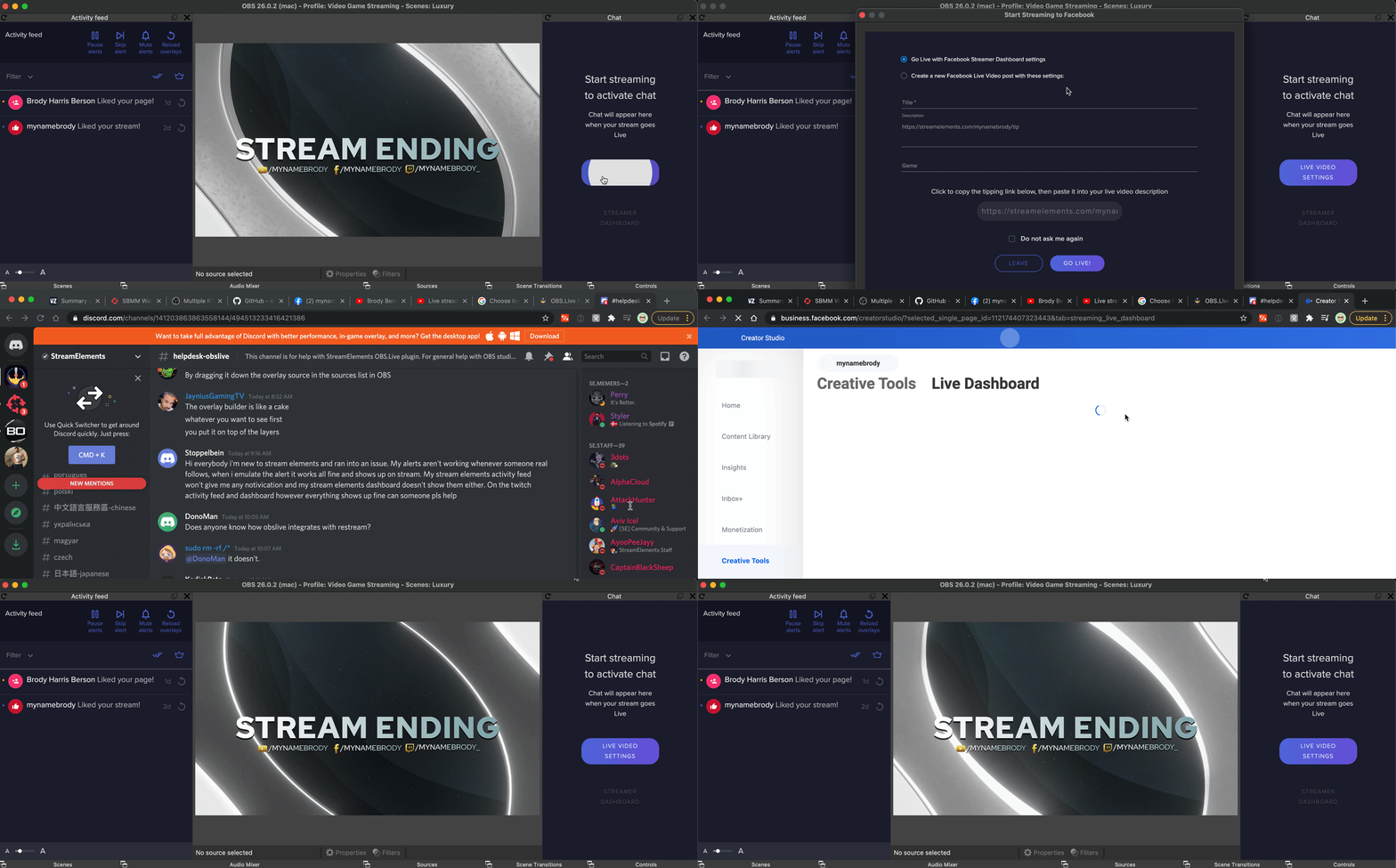


 carmine whale
Thank you! both!❤
 raven sierra
My stream obs live doesnt seem to be connected to Facebook and all i can see is reconnect to twitch. What do I do? Will it connect when i go live?
nevermind, i got it! ❤️
karmic grotto
carmine whale
How can I disable hearing of that overlay exactly?
control audio via obs in the source options then u mute it in the mixer
 west pendant
Hi im trying to create a new overlay with custom audio and its worked on all of them except for cheers. my custom audio wont work on cheers for some reason, any idea why?
honest echo
@west pendant check the variations
west pendant
thank you!
rigid canopy
Last time I tried obs live and it shut down my obs, so I had to delete obs live and studio. Can someone tell me what to do when I install it again?
 cunning fjord
why is my sons account streaming on obs.live when i signed into my account wont have me stream says my sons account is
full thunderBOT
@cunning fjord StreamElements menu, on top of OBS > Logout > Login
cunning fjord
i did that and signed into my acvcount says hes streaming not me
quick atlas
cunning fjord
i did that and signed into my acvcount says hes streaming not me
You may need to switch the OBS stream key
 woven mason
I'm having an issue with streamelements overlays in OBS Live. I saved a widget used for displaying your last uploaded yt video from the themes gallery, and put it into my OBS. Once in OBS it would no longer center. When editing and testing it in the editor, it looked just fine and was in frame. No matter sizing nor what tweaking I did in the editor and in OBS it would always be cut out of frame within OBS. I decided I could overlook this as it wasn't a needed widget. But later in testing, I realized the alert box I created in the editor had the same issue. It works fine in the editor, but once in obs only part of the alert would be in frame, at the very edge of the overlay box.
full thunderBOT
@woven mason The default resolution for StreamElements overlays (theme and custom) is 1920x1080. Please add them in OBS at their full resolution and use CTRL+F to fit to screen if necessary. You can then downscale your stream in OBS settings > Video if you'd like https://i.imgur.com/6bWXxjR.png
woven mason
Though yes, you can see the full alert now, it's quite tiny and off-centers my text and image of the alert.
 regal marlin
Hello all, I’m seeking help with my capture card. It’s a pos, cheap Amazon one, but worked amazing until I moved my pc, and now it will work for about 3 mins after powering off and back on. I have tried all USB ports to no avail.
shy mountain
I don't think we are able to help with an issue that is not related to us at all. You will have to contact the capture card's manufacturer for help if its not turning on.
regal marlin
shy mountain
I don't think we are able to help with an issue that is not related to us at all...
Thank you for your quick response. I will attempt to contact them.
 uncut gyro
When trying to Connect with Twitch in OBS.Live I keep getting stuck on the "Managing your stream just..." loading screen and nothing ever happens. Anybody know how to fix this?
 warped nimbus
Hey, does anyone know how i can edit the animation for switching sources?
shy mountain
@uncut gyro can you show a screenshot?
full thunderBOT
@warped nimbus Obs.live is a plugin for OBS Studio for the best OBS support, please join their Official Discord @ discord.gg/obsproject
warped nimbus
Thanks!
uncut gyro
@shy mountain
 shy mountain
Click on "Streamelements" on top -> logout -> try to login again
uncut gyro
I've tried that several times.
It lets me connect/login to my YouTube account, but not my Twitch.
shy mountain
```Add --remote-debugging-port=40404 to your OBS shortcut in the Target field
(Right click the desktop icon of OBS -> properties -> in the Target field at the end after the quotation marks add --remote-debugging-port=40404)
Open OBS
Open your browser
Type in `localhost:40404````
Once you get to the localhost part, show me a screenshot of what you see
uncut gyro
 shy mountain
Ugh, it would be faster if we do a team viewer session
uncut gyro
🤣 How do we do that?
shy mountain
If you don't have team viewer, install it and DM me the ID and PW
carmine whale
@karmic grotto unfortunatly the Audio Mixer Browser source has 0 impact and I dont know why
 raven pendant
Hi I am trying to add bots on OBS, but the bot doesn't join the chat. what am I doing wrong?
full thunderBOT
@raven pendant If your commands recently stopped working and you're using OBS.Live and a custom bot name do the following:
- In OBS.Live, click on the hamburger menu (three stripes) at the top left of your activity feed
- Click on Stream Settings > Custom bot name
- In the Custom bot name field select Set custom bot name, not your already existing username (with capital letters). Note: If you already connected an account that way, the third entry will show as the account name (see image https://i.imgur.com/sO7fWOX.png).
- Scroll a bit down and click on the purple Connect Custom Bot Account button
- Log in as usual and Authorize the custom bot name
- Back in the Activity feed, click on the Send Test Message button and check if your custom bot name starts working again
raven pendant
full thunder
<@!308914064925523969> If your commands recently stopped working and you're usin...
Thank you 🙂
 gilded plinth
My stream sound is has a 3sec Delay how do I fix this please?
nova scaffold
gilded plinth
My stream sound is has a 3sec Delay how do I fix this please?
Streams will always have some delays. Different platforms have additional settings (low latency mode in general) and your stream settings have an impact on it.
tender python
if it's only audio delay, that's something else.
nova scaffold
Getting lower than 2sec. is generally impossible without some special tech
Yeah if it is only sound, that's not on stream, that's local.
 scarlet quiver
Is there a widget URL for my alertbox to connect to for donations?
nova scaffold
scarlet quiver
Is there a widget URL for my alertbox to connect to for donations?
Widgets are parts of our overlays, so you need to create an overlay, add the widget (alertbox in that case) and then add the overlay to your OBS etc.
scarlet quiver
i have my own overlay and want to connect streamelement donations to my donation alerts
just looking for the URL for that
gilded plinth
Basically the issue I have is I shoot my gun and the stream will show me shoot but the sound is like 3/4 secs out from the action of me shooting
nova scaffold
scarlet quiver
just looking for the URL for that
You still need to get our overlays populated with your data and then install it.
nova scaffold
gilded plinth
Basically the issue I have is I shoot my gun and the stream will show me shoot b...
In that case make sure to disable timestamps on audio and video devices in OBS first and test it.
If that does not help, then you can adjust latency for specific sources to sync those up manually.
 unique lodge
Hello, my buddy is having an issue where OBS live will freeze
and crash during a stream. The stream itself would freeze, but OBS wont crash until he ends the stream
 west lily
I opened my obs after installing streamelements on my computer and my obs screen display is white
nova scaffold
unique lodge
Hello, my buddy is having an issue where OBS live will freeze
and crash during ...
This is not normal and not common. Was something changed right before it started? New update, new drivers etc?
unique lodge
No
nova scaffold
unique lodge
No
Can you check OBS crash logs and spot something specific there?
unique lodge
At least not to my knowledge. Im confirming with him, but this also happened with streamlabs
It mentioned memory leak I think?
nova scaffold
If that also happens with other software, then it is a bigger issue that needs investigating.
unique lodge
Saw that at the end of his log file data
west lily
I opened my obs after installing streamelements on my computer and my obs screen display is white
nova scaffold
Let him reset the memory XMP/DOCP profile in the BIOS for the sake of testing and try to run it.
unique lodge
Where should I have him look at? He said he already checked drivers
nova scaffold
unique lodge
Saw that at the end of his log file data
that will cost a few % performance, but running the memory at default speed should eliminate all instability there.
unique lodge
ok
west lily
can i have help with this?
 gilded plinth
nova scaffold
In that case make sure to disable timestamps on audio and video devices in OBS f...
gilded plinth
nova scaffold
In that case make sure to disable timestamps on audio and video devices in OBS f...
How do I go about disabling the timestamps?
nova scaffold
gilded plinth
How do I go about disabling the timestamps?
Check the device settings for each Video source and game capture and the Audio device settings in the mixer.
 zinc zodiac
Hey I just downloaded OBS live for my MacBook but I’m lost I never used this before, so how can make sure my welcome is at the actual size I can’t find it
 west lily
bruh- your all ignoring me
toxic fern
Then Ctrl+F with the source selected.
zinc zodiac
I’ve done that. But it’s still looking like half the screen
nova scaffold
west lily
can i have help*
We are not ignoring you, we are working here, it is weekend.
Restart your OBS with admin rights please.
nova scaffold
zinc zodiac
I’ve done that. But it’s still looking like half the screen
Adjust the source size to the canvas size manually if Ctrl+F did not work.
toxic fern
Actually... could you tell us what you have in video tab of settings?
west lily
nova scaffold
We are not ignoring you, we are working here, it is weekend.
Restart your OBS ...
i restarted my computer and nothing changed
zinc zodiac
toxic fern
Actually... could you tell us what you have in video tab of settings?
Where would I find that? I’ve tried the transform screen and preview scaling but nothing has worked
toxic fern
In OBS settings.
zinc zodiac
This is the current settings on at the moment
 zinc zodiac
toxic fern
Top needs to be 1920x1080
zinc zodiac
toxic fern
Top needs to be 1920x1080
Got that. Any other recommendations on that screen?
toxic fern
That's the only obvious issue.
west lily
bruh i got to record can u help me??? and even if its the weekend you got 26 staff on and 2 staff are helping other people
zinc zodiac
toxic fern
That's the only obvious issue.
My overlay is still looking liked it’s zoomed in though, is it normal to have it like that or do I need to set up the scene again?
toxic fern
Ctrl+F
west lily
and ur still helping people
toxic fern
And not all of the actual staff can help you.
That is not ssomething I can help with atm.
west lily
ok either way can u just help me?
toxic fern
Read my last message.
nova scaffold
west lily
I did.
You need to understand that we can only help you if you follow the steps.
Have you restarted OBS with admin rights?
nova scaffold
So what is the result?
zinc zodiac
toxic fern
Ctrl+F
I’ve done that, CTRL + F and it highlighted edit, I clicked on the source which is browser? I’m now on the beta version now as per advice
nova scaffold
This might be an issue with the browser source in OBS. There is no specific fix for it.
@west lily
give me some time to help other people too and i can come back to it soon
west lily
Like i said i got to record in 10 minutes
nova scaffold
west lily
Like i said i got to record in 10 minutes
And like i said, there are many people waiting and on weekends people actually want to have their well deserved weekend.
zinc zodiac
So my overlays are still zoomed in. Can some guide me on the properties on the overlay what the width and height would be?
full thunderBOT
@zinc zodiac The default resolution for StreamElements overlays (theme and custom) is 1920x1080. Please add them in OBS at their full resolution and use CTRL+F to fit to screen if necessary. You can then downscale your stream in OBS settings > Video if you'd like https://i.imgur.com/6bWXxjR.png
zinc zodiac
Thanks support bot! Your the best!
unique lodge
hmm so xmp if off, but the stream still froze.
 pulsar forge
Hello, i'm having trouble connecting my custom bot name, i did it before but now when i log into the custom bot account and doesnt show up as an option under the name changing portion. i tried this."Right click on your OBS desktop shortcut -> properties - in the "Target" field add this -> --remote-debugging-port=40404
(my target, but it didn't work) "C:\Program Files\obs-studio\bin\64bit\obs64.exe" --remote-debugging-port=40404" 2) Open OBS(or restart if it was open) 3) Open your browser and type in "localhost:40404" 4) Click on "StreamElements - Activity feed" 5) navigate to the Console tab 6) type in the console this: store.customBot.removeCustomBotIntegration() and hit enter 7) Try setting the custom bot name 8) remove the added addition of step 1" but when i get to step 6 it says "Uncaught ReferenceError: store is not defined
at <anonymous>:1:1"
(disregard "(my target, but it didn't work)")
 frigid valve
getting the black screen on league of legends in game. Settings are correct as I have been streaming this game
 left snow
getting the black screen on Rainbow SixSiege in game. Settings are correct as I have been streaming this game dont know why
full thunderBOT
@frigid valve Obs.live is a plugin for OBS Studio for the best OBS support, please join their Official Discord @ discord.gg/obsproject
sharp turret
@left snow 👆
frigid valve
thank you
pulsar forge
Hello, i'm having trouble connecting my custom bot name, i did it before but now when i log into the custom bot account and doesnt show up as an option under the name changing portion. i tried this."Right click on your OBS desktop shortcut -> properties - in the "Target" field add this -> --remote-debugging-port=40404
(my target, but it didn't work) "C:\Program Files\obs-studio\bin\64bit\obs64.exe" --remote-debugging-port=40404" 2) Open OBS(or restart if it was open) 3) Open your browser and type in "localhost:40404" 4) Click on "StreamElements - Activity feed" 5) navigate to the Console tab 6) type in the console this: store.customBot.removeCustomBotIntegration() and hit enter 7) Try setting the custom bot name 8) remove the added addition of step 1" but when i get to step 6 it says "Uncaught ReferenceError: store is not defined
at <anonymous>:1:1"
nova scaffold
pulsar forge
Hello, i'm having trouble connecting my custom bot name, i did it before but now...
Hi. If you deployed the fix, then you need to reconnect the custom bot name again to the account you wish to select (if that is different from your main account).
rugged cliff
I set up a separate profile for my wife on my PC, we both use OBS, and for some reason on her PC profile OBS won't launch right, the program starts, but it doesnt show up, its only showing on the taskbar and wont come up when i click it
pulsar forge
@nova scaffold the fix didnt work, did you read the last sentense?
nova scaffold
pulsar forge
<@!149255081194160129> the fix didnt work, did you read the last sentense?
This is our only fix we have for the custom bot function on OBS.Live.
You can try to remove the connection to StreamElements on Twitch on your 2nd account and set it up again
rigid canopy
Last time I tried obs live and it shut down my obs, so I had to delete obs live and studio. Can someone tell me what to do when I install it again?
ugh nevermind ill reinstall it and show you a screenshot of what happens
 peak flame
I cannot login my facebook account in OBS. Please help.
 drowsy lantern
Hello, How do I get Media Request to play my Epidemic Sound playlist while I stream on Twitch with OBS Live? Thanks!
frigid valve
Store redemptions not working. I logged out and in through obs already
quick atlas
frigid valve
Store redemptions not working. I logged out and in through obs already
Any kind of error/response when you try to redeem?
frigid valve
The text pops up but the gif and sounds don;t come up
quick atlas
frigid valve
The text pops up but the gif and sounds don;t come up
Did they work when you tested in the overlay editor?
frigid valve
yes when i am in the editor and do it, it works in the editor
ok got it working in editor i reapplied the url to both my overlays
quick atlas
frigid valve
ok got it working in editor i reapplied the url to both my overlays
Does it show in OBS as well?
 abstract holly
Hello,
I need help with my stream elements I'm having problem with the Docks in my OBS when I installed it I didn't get the Feed panel. any ideas how to fix it?
Thank you in advance
quick atlas
abstract holly
Hello,
I need help with my stream elements I'm having problem with the Docks in ...
You should be able to get that by going to the StreamElements menu, on top of OBS > Activity Feed
abstract holly
I don't have a StreamElements Tap on my OBS
quick atlas
What kind of feed are you trying to view? In order to use ours, you'd need OBS.Live installed. If it's through OBS, you can try going to View > Docks and seeing if it's there.
abstract holly
I do have StreamElements OBS.Live installed on my PC but when I run it I still don't have the Tap
when I checked the Docks I don't see the activity feed for streamElements
when I added it from custom it's working fine but I don't get the viewer count
quick atlas
I would try to re-install OBS.Live, as it should be at the top of OBS.
abstract holly
I'm doing that right now
it's all good right now
I believe that I had a newer version of OBS which isn't compatible with StreamElements yet
@quick atlas Thank you
quick atlas
abstract holly
<@!801850149260886118> Thank you
No problem!
 frail path
Hello again. I'm still having issues with intermittent alerts. I've tried troubleshooting in all the ways I know how. Switched from 64 bit obs to 32 bit. Adjusted the browser acceleration setting. Cleared the cache in OBS. If I test the alerts in SE, they work, but they only sometimes work in OBS. I tried just doing the SE test and having the source open in a browser, but it still doesn't work consistently. Am I having some kind of disconnect accessing the browser source? I don't know what else to do. I've been trying to figure this out for weeks.
 fast rose
When I run OBS Studio my stream elements commands stop working. I dont know how to fix this...
rugged quail
Do you have a custom bot name?
 quiet skiff
Hey folks. I'm trying to trigger a asset with my streamdeck to appear on my stream. I'm massively confused on how to do it, the object is currently sitting in a group called "green screen".
rugged quail
@quiet skiff Elgato is not exactly my forte, so I'm afraid I cannot be much help here, I'd recommend you reach out to Elgato for assistance.
quiet skiff
No worries.
rugged quail
Hi, a question, does anyone know how to set all the alert boxes and chat commands of streamelements well, and then put them on obs (for YouTube)?
full thunderBOT
New to StreamElements?
Check out our YouTube channel https://www.youtube.com/c/streamelements/videos
with tutorial videos from setting up the basics, to in-depth details on how to use our product.
New to OBS? Here is a 4 step quick start guide
https://obsproject.com/wiki/OBS-Studio-Quickstart
Want to learn even more? Here is an in-depth overview
https://obsproject.com/wiki/OBS-Studio-Overview
 inland kayak
hi there, im having a few issues with my alerts. when i try emulate they show up on SE and obs live, but then when i am live none of the alerts or sounds with them work. any idea what this may be? i know they used to work but unsure whats changed. also my obs activity feed isn't registering anything, it is blank. i had to bring the twitch activity feed over to see new followers etc any help with either of these would be appreciated. thanks
rugged quail
@inland kayak please provide your account ID
inland kayak
rugged quail
<@!742712146487410750> please provide your account ID
5fa8e57208bd54a1e4219386
rugged quail
The issue should be fixed now
 limber leaf
hey, so everytime i open up obs.live, it says i need to update so i do but its been going in circle for the past twenty minutes, i will click on finish and it will launch and start the download again, i dont know what to do, i just pressed cancel and now its all gone, ive even reinstalled obs its self.
inland kayak
ok thanks
rugged quail
@limber leaf reinstalling would be the best idea
limber leaf
ill try again
 deep phoenix
Hi can someone tell me what is the best choice of encoding material between GPU and CPU if I have a GTX 960 as GPU and I5 4460S as CPU ?
wary dew
cpu encoding
 wild osprey
limber leaf
hey, so everytime i open up obs.live, it says i need to update so i do but its b...
wild osprey
limber leaf
hey, so everytime i open up obs.live, it says i need to update so i do but its b...
Watch out mine did the same..then everything was gone
 tender terrace
how do i get overlays for obs?
full thunderBOT
@tender terrace To add your overlays to OBS, add a new browser source in your scene. Paste your overlay URL in the browser source properties, set the dimensions to 1920x1080 (unless you changed them on the website) and check Shutdown source when not visible. https://youtu.be/KDvLynUqXI4
rugged quail
So my OBS is stuck in a update loop.. It updates, Opens.. Tried to update and closes itself.. updates.. opens... and loop infinitely...
Why?
oh and none of the features from StreamElements OBS shows up.. like my overlay is gone.. the panel on the side that shows activity is gone.. i cant even use it in this state
that aint right
 rugged quail
i launched with the obs live icon and that opened
when i restart this opens but when i update it closes OBS then opens it back up and this shows up again and it cycles infinitely

 ember lotus
ops i posted in the wrong chat.
Does anyone know why elements/obs wont work after the update? It keeps saying to reinstall to fix it (done this twice)
 frail path
Hello again. I'm still having issues with intermittent alerts. I've tried troubl...
frail path
frail path
Hello again. I'm still having issues with intermittent alerts. I've tried troubl...
@rugged quail Hello. Do you think you would be able to help me with my issue?
 dreamy tendon
I need some help. Everytime I open OBS, stream elements keeps making me update the same update.
rugged quail
I have this same problem
rugged quail
^^ literally what i just said
 civic birch
my interface has been wiped, my media share and alertbox on my interface is just gone when i tried to update with no option to add it back, it has also gotten rid of my stream title and notification settings box
 long bobcat
@dreamy tendon @sinful stump @rugged quail did you guys update or are you choosing 'no' and it pops up again?
does it pop up again right away, or after a relaunch of OBS.Live?