#helpdesk-selive
1 messages · Page 132 of 1
 grizzled marsh
 wary dew
if you don't post the question, no one can help 😛
 wooden forge
oh sorry
 exotic moss
I did! Thanks @grizzled marsh :)
wooden forge
I just got SE and I was watching a video about it, I wanted to import everything from Streamlabs obs so I went through it and click on the scene group (Don't know what it is called) that had everything, but it chose my first one instead
and I would like to import the section I choose
that is my question!
@wary dew can you help?
@grizzled marsh can you help?
any staff here
wary dew
I'm looking for a support member that has more knowledge about this situation for you internally.
 lament crag
Hi! My stream deck won’t change scenes on obs. Any suggestions?
wary dew
you have to take in to consideration that most of us here are volunteers and the weekend started (it's 8.30pm here) so it can take a while to find the right person for your question
wooden forge
ok
 steel bladeBOT
@lament crag If you are having issues with Elgato hardware or software, we recommend reaching out to their support here: https://e.lga.to/help
wooden forge
sorry
 dire shuttle
Hello, I have custom alerts. I cannot get the name of the sub/follower/host etc. to come up on top of the alert even though I mark it that way when setting up the alert. So the alert just comes up blank with no follower information. Is there a fix for this or something I am not doing correctly?
 toxic fern
@wooden forge You still there?
wooden forge
yes
toxic fern
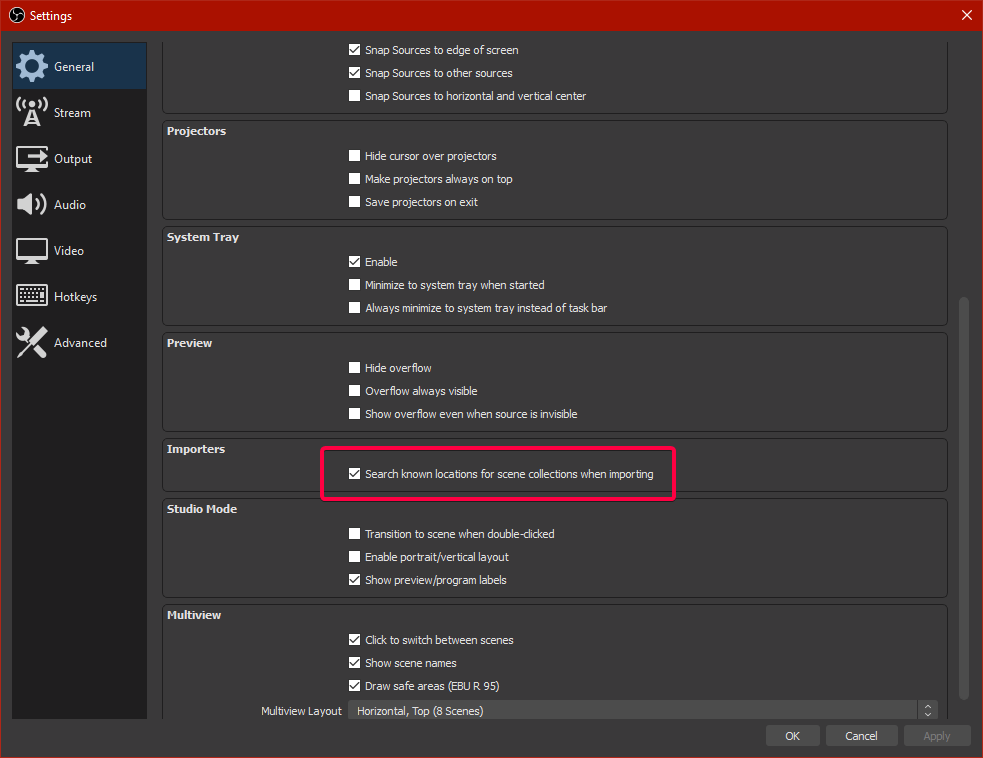
I've got a grab everything that should work best.
wooden forge
ok!
toxic fern


 wooden forge
so you can help?
 winged furnace
any updates on fixing the custom bot?
toxic fern
That's the easiest way to copy everything over as the OBS.Live importer is derpy sometimes.
 rigid steppe
Overlays not loading. White screen in activity feed and chat. Anyone know what the issue is?
lament crag
My stream are dropping mad frames and constantly In the yellow and red. Any fix?
 rugged quail
is there a way to zoom in my camera in obs?
grizzled marsh
You can create another scene in OBS with your webcam source super blown up and switch to that when live. That's one way that some accomplish that.
rugged quail
i dont want it to take up my screen id like the same size camera frame etc just zoomed in closer
 earnest scarab
Hello, I have a small issue on Media Request being used on Stream Elements. When I play Media Request music on Stream Elements without showing the video on the overlay; the music sounds great, but when I display what is playing on the overlay, it seems like the music previously playing didn't stop and started playin the same music again... but you can tell two sources are playing because one course is playing a little bit slower than the other. I can't seem to find the bug here as I have worked out all the sound settings that I know. Can anybody help me out?
 worthy tiger
Please guys, help me, my stream got all Green, and i don't use chromakey, i don't know how to procced
;-;
 uneven gate
Hello. Im having issues capturing sound. Video playback is fine. My mic reads in the audio mixer. Headphones pick up desktop sound if playing Spotify. But cannot get sound from the PlayStation through the capture card to the PC. Any advice on audio settings to get this fixed? Was working yesterday but there was a delay, and tried toggling some stuff to fix the delay but now no audio works at all.
 tardy snow
Hi, when i first got the stream elements i linked my mixer account. Soon after i attempted to link and stream to twitch but the message of the stream key is in correct keeps popping up pls HELP.
 acoustic spoke
hi group, is there a widget or update for acquiring ACTIVE viewer count on OBS menu during live(like putting an eye icon on top left side)?
if not, is there any alternate way to do it ?
rugged quail
can someone be so kind and tell me hwo to fix
 brazen cradle
hi
 simple pike
Hey everyone, so just got this little issue with OBS... Well. My issue is with the Media Request. Whenever I try to set up the media request to show on stream. After setting up all the right things in place, the media screen, the obs extension. For some reason whenever I start up the request screen, the sound from the media request keeps coming through and stacking on top of the one from the web link
 potent quartz
for some reason I cant login streamelements from my obs I dont see the tools and feed. I download it today.
potent quartz
im opening this
potent quartz
I had to do an update when I open it for the first time
fix it! I uninstall normal obs and it worked
 ionic totem
French
 honest echo
@ionic totem > #🇫🇷︱français 
wary dew
click on the channel he linked 😉
 upper ginkgo
So I have a question that is a bit more in depth. I'm a motion graphics artist by trade so I'm very used to problem solving things myself but I have yet to come across any documentation on stream elements video codec standards outside of just telling me the file format they will take. I already have all my animations converted to WebM files using Media Encoder plugin and tweaking the settings until I had proper playback in OBS Studio. I will include an screenshot of my codec video settings to make it easier to see vs listing it out.
The video overlays that I have so far start stuttering during playback of the overlay. I don't have this problem with OBS studio taking in the files directly so I'm wondering if anyone has figured out the exact settings needed to work properly with stream elements.
 steel mural
@upper ginkgo Sharing overlays is a security risk
upper ginkgo
undestood i was just trying to show how playback looks all choppy vs what my smooth animation looked like. will not repost link again
 dire crow
Is there a Moblile option for ground control or a way to control scenes on desktop OBS using a mobile device or pad?
steel mural
@upper ginkgo I asked internally about your issue.
@dire crow There are several apps like Deckboard, Touch Portal, UP Deck and many more which offer these kind of things.
dire crow
@steel mural ah, i'll take a look at those. Thank you!
dire crow
Ah, looking for a simple free option for now
no money, lol
i'll check out the others.
steel mural
There's a free version, but it has its drawbacks
steel mural
And UP Deck 
dire crow
haha, no such thing as free lunch, understandable, they put work into these.
steel mural
Last time I used Deckboard free, it showed you an ad every 30 minutes and you have a limited amount of buttons. Not sure if the ad thing is still the case
 primal mountain
hi guys, whats up? I tried to set a custom bot name in my stream, but it is not working, could someone help me?
upper ginkgo
thank you @steel mural
primal mountain
in streamelements groundcontrol just doesn't apper the bot settings
dire crow
Thank you
steel bladeBOT
@primal mountain Currently renaming the bot fully works with OBS.Live.
You can follow this video guide to set it up: https://discordapp.com/channels/141203863863558144/494513233416421386/561516184718278676
If you don't want to use OBS.Live and want to stick with Ground Control, please let us know your Twitch username.
primal mountain
my username is batesgarcia
steel mural
@primal mountain Done. Restart Ground Control
primal mountain
Thank you very much!
 wheat atlas
https://www.twitch.tv/simplyjojo/clip/HedonisticCrunchyEndiveFunRun
How can I make a webcam oscillate like in this clip. When I try to turn on oscillation as a filter for the source it applies it to every scene and Idk how to have it active on some scenes and on others

 mellow snow
Hey guys Im having an issue with one of the widget shares ( source on command) Iv used the scene one a while back. Anyways it looks like its connecting to the websocket but the command doesnt work. Buddy mine also confirmed his isnt working anymore.
Curious if could be an issue on SE side? not sure how the widget connects to the websocket
mellow snow
yep, I even screen shared with him just to make sure
using all the standards localhost 4444 ect
no PW
grizzled marsh
Is the widget in the base overlay as a separate entity?
mellow snow
seperate entity, then used brower source in the correct scene
grizzled marsh
Double checking something, one moment. I use it to great success.
mellow snow
yeah buddy had it worked then messaged me not to long ago saying his stopped working too.
honest echo
@mellow snow Let me check rq
mellow snow
ok
 tropic pendant
Heyo, I have just got a elgato stream deck and have set it up earlier today. I have ran into an issue with media request though... I can post my sources in there no problem and it works but the buttons for skipping and play/pausing the songs doesn't work. What am I missing?? 🙂
 odd kraken
new YT regulations. There is a volume control inside the video.
 pulsar merlin
but its so "spastic" any way to fix that?
like when you want to add some small ammount of volume it maxes it out
oh and another thing
my frend downloaded the stream elements obs live but the media request just wont load in
be cause there volume bar is there for me
odd kraken
Tell your friend to relog via StreamElements > log out.
mellow snow
SE tab at the top
pulsar merlin
thanks allot guys it works for him 🙂
mellow snow
Np anytime. Il send to my friend
 terse shore
Can someone help me setup a timer? I have added it to the layer, formatted the time "(hours):(minutes):(seconds)", and saved the change. The only thing that is showing is what I have in quotations. Do I have to go live for the counter to work?
simple pike
So, can anyone, please help with the media request issue?
I want to use it in my idle screen setup but it is just broken for me when I try to show on stream.
 misty bridge
Hey there, I'm currently experiencing an issue with the OBS Live client whilst having Rainbow Six Siege open, The curser is still there on the client side of the stream but on the PC end it isn't there, has anyone experienced this before or is this an issue?
It's fine with normal OBS or Streamlabs.
 obtuse horizon
Media request has a bug
honest echo
@terse shore could you share a ss?
@simple pike did you add the widget on that overlay?
@misty bridge when you add the capture source did you check the "Capture cursor" option ?
@obtuse horizon could you elaborate?
 cedar vigil
Hi, could anyone help me with importing my streamlabs scenes from streamlabs to obslive/streamelements ? It keeps failing... 😦
tropic pendant
Heyo, I have just got a elgato stream deck and have set it up earlier today. I have ran into an issue with media request though... I can post my sources for the different scenes in there no problem and it works but the buttons for skipping and play/pausing the songs doesn't work. What am I missing??
honest echo
@cedar vigil maybe it there one assets to big, delete it and try again
simple pike
@honest echo Yes
The widget is playing double, so when I play on stream, it plays back directly from the link, and from my the player, giving me an echo
steel bladeBOT
@simple pike Make sure to ☑️ “Shutdown source when not visible” for all browser sources (all OBS scenes). If using studio mode, uncheck “Swap Preview/Output scenes After Transitioning.” Also keep in mind that sound can play from any overlay loaded in the browser (editor or launched). https://i.imgur.com/6bWXxjR.png https://i.imgur.com/yY0wcFl.png

 terse shore
@honest echo Sorry for the Double Ping
honest echo
@terse shore you need to change the message from (minutes) to {minutes}, just replace the () with {}
terse shore
You are the literal best. I completely missed that! THANK YOU @honest echo
simple pike
That didn't help
 tender python
So I have a question that is a bit more in depth. I'm a motion graphics artist by trade so I'm very used to problem solving things myself but I have yet to come across any documentation on stream elements video codec standards outside of just telling me the file format they will take. I already have all my animations converted to WebM files using Media Encoder plugin and tweaking the settings until I had proper playback in OBS Studio. I will include an screenshot of my codec video settings to make it easier to see vs listing it out.
The video overlays that I have so far start stuttering during playback of the overlay. I don't have this problem with OBS studio taking in the files directly so I'm wondering if anyone has figured out the exact settings needed to work properly with stream elements.
@upper ginkgo 59.97 fps, is .. not really great. But that's my gut feeling.
for web (animations) i dont touch non integer.
however, local (media) player will always be better hardware accelerated
tried over all browsers, ff, chrome, ms edge chromium: all lag.
honest echo
@simple pike If the web editor is open it will play it from the web and from OBS, please close your web editor
simple pike
I only have OBS open, nothing else
Like I said, the Media Request player keeps playing while the browser plays too
"browser" Being the source
I even let obs handle the sound from the source and it is still playing from the Media request
honest echo
@simple pike could you please share a screenshot?
simple pike
I'll record a video, how bout that
honest echo
👍
simple pike
Nevermind, I fixed it
Just brb, testing all settings
Yeah, my settings didn't save for one overlay. My mistake
Apologies for any idiocy that has happened here @honest echo
tropic pendant
I have just got a elgato stream deck and have set it up earlier today. I have ran into an issue with media request though... I can post my sources for the different scenes and there is no problem and it works but the buttons for skipping and play/pausing the songs doesn't work. It comes up with a yellow warning sign. What am I missing??
honest echo
@simple pike no need to be sorry, i'm glad that you were able to solve it
@tropic pendant since i don't have a streamdeck i will need to ask around for this
tropic pendant
Okaaay, thank you for responding 🙂 @honest echo
 visual jay
How do you fix the issue of "THIS VIDEO IS NOT AVAILABLE IN YOUR COUNTRY"?
honest echo
@dire shuttle Go to text settings > advance and play with the margins
@visual jay try this:
1) Right click on your OBS desktop shortcut -> properties - in the "Target" field add this -> --remote-debugging-port=40404
2) Open OBS(or restart if it was open)
3) Open your browser and type in "localhost:40404"
4) Click StreamElements - Media request link
5) Point the (in browser) URL to https://youtube.com/
6) Use the OBS dock to search for a song and play it after ads
7) Restart OBS and preform media request via chat
8) Remove --remote-debugging-port=40404 from shortcut
I did, same thing
honest echo
@visual jay please DM me your account id and your country, also this is happening in every video? If no, please send me the link of a video that this happen
visual jay
I'm in US, will send you a DM
honest echo
😉
 neat phoenix
does anyone know how i can add my kinect to the obslive?
steel bladeBOT
@neat phoenix For the best OBS support, please join their Official Discord @ discord.gg/obsproject
 dapper crescent
Hi. I switched from mixer to twitch and I have logged into twitch in obs live but whenever i go to start the stream it has me log into mixer. No matter what i do i cant get it to go to twitch
steel bladeBOT
@dapper crescent Streamelements on top of OBS -> Logout -> login
honest echo
@tropic pendant Try relogin in Obs.live and then add the buttons to your SD
steel bladeBOT
@tropic pendant Streamelements on top of OBS -> Logout -> login
tropic pendant
That didn't work i'm afraid, streamelements obs now says in a red bar at the top 'NO ACTIVE WIDGETS WERE DETECTED FOR MEDIA REQUEST' I have a label for 'now playing' but that's it... @honest echo
honest echo
That message will show if you press the "Show on Stream" and you don't have the Media Share widget on the overlay
tropic pendant
I didn't press show on stream... @honest echo
honest echo
@tropic pendant Could you share a screenshot? if you press DISMISS you still can use the play and pause button on your sd?
tropic pendant
Okay I tried uninstalling and reinstalling my Streamdeck and going through the steps again, now I can't install the streamelements OBS part for the streamdeck and it's not showing that I already have it  I don't know what happened, I just uninstalled the software and reinstalled it... @honest echo
steel bladeBOT
- Open
%appdata%\Elgato\StreamDeck\Plugins - Delete the
com.streamelements.obslive.sdplugin folder
tropic pendant
OMG Thank you so much!!! I was so scared!! @honest echo
When pressed dismiss I could still control the media request in OBS
Not on streamdeck...
I just put the sources back in and they are working fine but the controls for the media request still aren't, they still come up the a yellow triangle with an exclamation mark in it...
honest echo
@tropic pendant Do you have the last version of obs.live?
tropic pendant
I believe i do, I just clicked check updates under the streamelements tab and it says 'no software update available'
tropic pendant
@honest echo I am heading to bed now, thank you for your help, i'll pop back in later on and see if we can work out what the issue is 🙂
 vital dew
does anybody know a good quality to stream rainbow six siege so it isnt choppy i stream 720p30fps
 vague shard
I'm struggling atm; I'm trying to update my OBS settings and it doesn't seem to be saving them
steel bladeBOT
@vague shard For the best OBS support, please join their Official Discord @ discord.gg/obsproject
vital dew
does anybody know a good quality to stream rainbow six siege so it isnt choppy i stream 720p30fps
 steel laurel
how do you change what platform you are steaming from using on OBS live? it's stuck on youtube but i want to switch it to facebook live.
steel bladeBOT
@steel laurel Streamelements on top of OBS -> Logout -> login
steel laurel
thanks
 torn jay
Is there a reason why Elgato stream deck isnt recognizing the "remote control plugin" with obs.live?
 teal shard
My Activity feed is just not updating, my activity feed in the dashboard of twitch has updated but not my feed in obslive
steel bladeBOT
@teal shard Streamelements on top of OBS -> Logout -> login
 late furnace
try that
 shy mountain
I resubbed your webhooks so events should start coming in again
late furnace
ok staff will get you Eddie
teal shard
ty tho @late furnace ❤️
shy mountain
Already done
teal shard
It still isnt updating to events that have happened? Have I broken it haha
teal shard
Ohhh ok ok ty ❤️
 cloud finch
is anyone elses stream elements acting weird right now
late furnace
what is acting weird?
cloud finch
for some reason my media request widget was not showing and was acting weird. But i just logged out and logged in and it seems to be fixed
late furnace
ah ook, least it is fixed lol
cloud finch
yea it was weird bc it was acting fine earlier, and then i logged in and changed some things in my overlays, and then it just freaked out
late furnace
maybe something misfired 🤔
cloud finch
idk. the widget itself would fire at all. the entire widget itself was blank
late furnace
but am glad it is fixed 
cloud finch
wouldnt*
late furnace
hmm weird
cloud finch
like my chat loaded fine but the media request widget just wouldnt fire and was completely blank
so if anyone else has this same problem come up, i would suggest relogging
late furnace
Thank you!
 cerulean tangle
hello
can someone help me
i was making my overlay and i was putting a text in it and i click save and the letter type is not the good one and i cant change it
shy mountain
@grim peak Do not post in multiple channels
 grim peak
@shy mountain my bad.
shy mountain
If you post in multiple channels this creates confusion on which platform you are!
cerulean tangle
keizar
shy mountain
@grim peak Explain your problem here in more details!
grim peak
Im trying to edit my text in my overlays, but cant seem to find a tool for it
cerulean tangle
and i was adding text
shy mountain
@cerulean tangle I did not ask you to explain in more details. I asked the other person.
Please notice the pings
cerulean tangle
oh he had the same problem as me
shy mountain
@grim peak Are you in the overlay editor?
shy mountain
grim peak
when i click "my overlays" . i only see preview and edit buttons
shy mountain
@grim peak Are you in the overlay editor?
grim peak
is this where i click edit on my overlays? then thats the overlay editor window?
cerulean tangle
in the editor it had the good letter type but in obs its not the same
shy mountain
What does "good letter type" mean?
font?
@grim peak Yes, you click on "edit" to enter the overlay editor, then click on the text widget -> settings tab on the left -> edit the text widget
steel bladeBOT
@cerulean tangle Google Fonts
More than 900 google fonts are supported at this time. You can preview them here: https://fonts.google.com/
Custom Fonts
Steps:
- Install the font on the streaming PC or choose a pre-installed windows font.
- In the overlay widget settings, select Text Settings
- Enable Custom Font
- Type the name of the font as it appears in the windows font directory (This is usually
C:\Windows\Fonts)
Note: After installing fonts, the browser and OBS must be restarted for the font to appear.
grim peak
text settings yeah?
grim peak
apparently the only windows i see on my left are layers,settings,position syze and style,text settings
shy mountain
grim peak
hey @shy mountain
steel bladeBOT
@grim peak If you would like help from the StreamElements support volunteers/staff please post your question in one of the helpdesk channels and someone will assist you as soon as they are available
#helpdesk-twitch | #helpdesk-youtube | #helpdesk-facebook | #helpdesk-mobile | #helpdesk-selive | #651453660810838026 | #helpdesk-merch
Thank you for being patient.
 subtle stream
hi, I use streamlabs obs for a streaming software and yesterday I received a donation on streamelements tipping page however it didn't show as an alert in my twitch nor in my streaming software
steel bladeBOT
@subtle stream We're not able to troubleshoot issues with using our overlays in StreamLabs OBS (SLOBS) as we don't have the tools to support their software. We recommend using OBS Studio or OBS Studio with our plugin OBS.Live.
 scarlet patrol
Good morning!
I am trying to get my animated alerts up and running through stream elements. Currently, I am on the SE website in the overlay editor. I added an alertbox widget from the menu. brought it over into OBS quite easily and lined it up where it needs to be.
The problem I am having is editing the text. I need to reposition the text "{Name} is now following", and I would like to change the font and size of that text as well. To do that I went and clicked on the cogwheel for "Follower" (shown in picture), followed by opening up "text settings", and trying to mess around with a few of the settings to get a change to occur to see if anything would result. I would click save every time after making a change, but it seems the change doesn't appear when I emulate the widget in the editor and as well on the live feed preview in OBS stream elements.
Any ideas? Is this the intended way to make changes to the text? Haha thanks for your help.
 livid sapphire
Hi, i have the problem that streamelements dont check that i receive ember.
scarlet patrol
seems a computer + browser restart fixed the issue nevermind ^
tropic pendant
Heyo, Im having an issue with the media request controls on my stream deck. I keep getting a yellow triangle with a Exclamation mark inside coming up when I press the button, i'm not sure what i'm missing... Does anyone else here use a stream deck and know how to fix this?? 🙂
The sources for my scenes work as intended but the media request doesn't...
 jade path
HELP ive shrank my main canvus and now have a 480 window and cant put it back
rugged quail
How do I get the little box to pop up where I can change the title and description?
 real current
@full thunder Hello, I just wanted to discover the streamelements merch on my dashboard but accidentally uploaded the wrong icon or basically just wanted to try how it looks. Then I wanted to delete it and went onto "reset store" or sth and now I can't open SE.Merch on my dashboard anymore. It gets stuck while loading at 30%. Pls help 🙂 my channels name is yoshiV_R6
 dreamy vault
Hi there, I am trying to import my alerts from streamlabs into streamelements but an error is occuring, can someone help?
 jagged river
not getting alerts during live on toutube using streamelement on obs
 bleak sandal
Hi, I tried removing frankerfaceZ add-ons on OBS, after refreshing, it stills continue to show the frankerface settings
could someone help me?
 copper geode
Hello, is there a way to put a live viewer count overlay on my stream with obs live?
 raven ginkgo
Sup! Whenever I opene my OBS the Media request doesn't show anything, it is just blank (can't play/stop/choose musics)
 covert sequoia
Is this the proper place to ask questions about a widget/theme ?
rugged quail
Hiya, I'm having trouble with the media request widget. It's not displaying anything. I've been having to run Media Request off the Streamelements website instead
 dusk fulcrum
Tried to launch OBSLive that i downloaded from streamElements website and im getting this error. My Graphics is a GTX 1070 and my drivers are completely up to date as of today.
 proper portal
@covert sequoia yes it is, whats your question?
covert sequoia
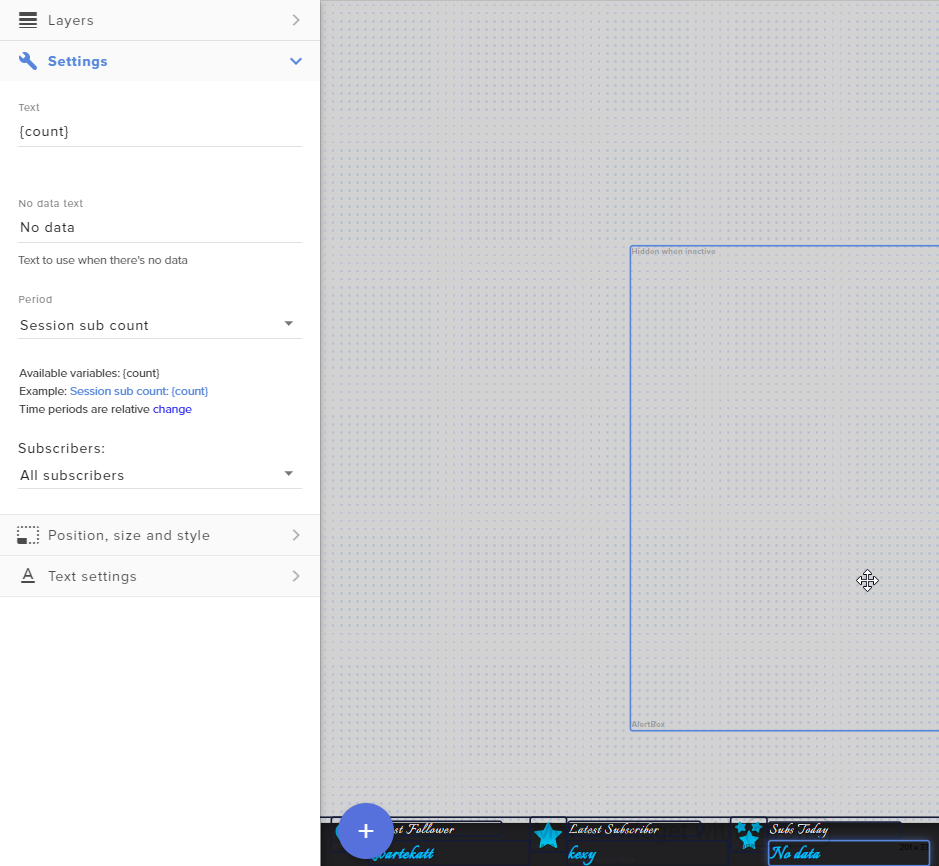
how do i get the sub count to be tracked?
the theme it came with used [count] but when i test it out it still says no data, recent subs updates but not the count
i could get rid of it i guess tho
 south flume
Hi, im having an issue setting up the alertbox images, the text doesnt show on top of my image, is there any reason why this would be?
dusk fulcrum
Can someone help me with this https://discordapp.com/channels/141203863863558144/494513233416421386/713839119058337872
Please
uneven gate
Any help with audio delay and pops from PS4 > Capture Card > Streamelements? How do I sync audio better and stop the popping?
honest echo
check advance option on your audio device
uneven gate
@honest echo theres no delay added tho
This video helped for anyone needing similar advice
 kindred fox
Popping would indicate a buffer issue or bad cable. The delay is due to the card processing the data then transferring it to your computer over usb. The only way to avoid the delay is to use a PCI card internally in a desktop.
 weak ginkgo
since i changed back to obs live i have this glitch where i can hear my song request double
can i get help?
 last nexus
Hey! Can someone advise me on how to turn media request on? I have it enabled on my browser login but when I open the panel in OBS its just blank and the refresh does nothing.
steel bladeBOT
@last nexus Streamelements on top of OBS -> Logout -> login
rugged quail
is there a way that i can use the chroma key from streamlabs obs into obs live? Cause i've been messing around with obs live color/chorma key and they apparently dont work as nice with my setup
in streamlabs obs it works like a charm and on obs live i cant get it working
honest echo
@rugged quail you already added the filter on your source?
kindred fox
Are you on a laptop @stark valley ?
 stark valley
no on pc
kindred fox
@weak ginkgo did you check the box to shutdown your browser source when inactive in every scene?
Which game are you trying to capture?
stark valley
Valorant
kindred fox
Are you using game capture > capture any full-screen application or did you specify valorant window?
stark valley
I tried both nothing happens
rugged quail
@honest echo i have it setup yes
im wondering if i could use the same "chorma key" from labs cause it works perfectly there
@honest echo
honest echo
@rugged quail you will need to play around with the similarity and the smoothness on the filter
 spark owl
OBS keeps crashing before i even get to start my stream. i know this isnt a stream elements issue but i figured yall may be able to help
rugged quail
@honest echo i tried changing the lighting, both filters
but nothing really .
i go to labs and the default option works ;-;
 white oriole
Good evening! I am trying to find this activate ChatBot function on the streaming panel when you log in. I Every document and video I see says to click activate. However, the videos and documentation are from the old layout versus the new layout. I didn't know if this was the right channelt o ask since it was on the dashboard vs the actual obslive app.
I did email for support but was directed to a document about running commands. I can't do that unless I activate the bot is the problem.
 glad elm
trying to put my alerts and kappagen onto obs.live through browser source but something is very wrong here... cant line up anything. doesnt look the same on stream elements as it does on obs. anyone can DM me?
honest echo
@rugged quail trying to play with the ChromaKey Settings
@white oriole which platform are you streaming?
@glad elm check the dimension by default the overlay are 1920*1080
 sonic yew
any reason my chatbox wont go back to darkmode????
honest echo
@sonic yew check pinned messages
sonic yew
❤️
 latent matrix
hi all. Im having issues installing obs.live addon into obs studio, the window just closes as soon as I install, is there a known fix for this?
Im running obs-streamelements-setup-latest.exe and it just closes like a second after..
white oriole
I’m streaming to facebook live gamers platform
glad elm
Thanks @honest echo ended up figuring it out with that detail. much love. thanks a ton
honest echo
@white oriole There is no chat bot for facebook streams
 humble mason
Hi guys! I'm having issues with Media Request. It keeps telling me to enter a valid Youtube URL ? edit : somehow added the URL, but now the media widget wont appear. edit 2 : by somemore witchcraft it worked ;/
 cobalt marten
I really like what SE offers but when i record it seems like the video quality isn't the same it stutters a lot not sure how to stop that from happening
steel bladeBOT
@cobalt marten For the best OBS support, please join their Official Discord @ discord.gg/obsproject
 maiden hawk
Hello all! I am just now switching everything over to Stream Elements however a few of my video files are too large to upload into Stream Elements. Can I upload them into OBS and still use Stream Elements for my alerts and other things? I just dont want to lose those files even if they are large
honest echo
@maiden hawk you use those files as a background? if so then yes you can add them on OBS directly
maiden hawk
Yes they are! Except I do have one border file that was too large.
Does that matter at all?
honest echo
yeah sure, anything behind or on top the overlay should be fine
maiden hawk
awesome thanks so much! @honest echo
 torpid needle
Whenever someone hosts or raids me It doesn't show in my activity feed and also doesn't trigger my alert. Send help please
steel bladeBOT
@torpid needle Due to changes to Twitch API, we have filtered out hosts and will only show these ones on your activity feed:
- All hosts coming from an online channel with at least 1+ viewer
- Auto host events with at least 1 viewer - only from a channel that just went offline
Note: If you see "X channel has hosted you" with no viewers on the back, that is considered an offline host or a host with 0 viewers, we do not show these.
Note for Mixer streamers: The above 2 filters currently apply for Mixer and we are aware its actually not how Mixer hosts work. We do plan on changing it, but no ETA on when.
torpid needle
The problem is I don't see hosts even on my activity feed and it goes the same for raids
 silver stream
Guys when i try to update my obs.live to 25.0.4 it ends up updating then when I open it again, it tries to update again. Currently stuck in an update loop.
Anyone had this problem?
honest echo
The last version of OBS is the 25.0.8, once it opens cancel the option that promp and check for updates:
 frail lantern
for some reason when i stream my subs and donated bits arent showing up in my obs activity feed but they do in mod view on twitch?
honest echo
@frail lantern Did you change your twitch username?
frail lantern
yeah i have unlinked a relinked it
steel bladeBOT
@frail lantern Streamelements on top of OBS -> Logout -> login
@frail lantern Please logout of StreamElements at https://streamelements.com/logout and then login again to your account (Twitch/Youtube/Facebook/Mixer)
@frail lantern Go to the dashboard -> right side -> part channel -> join channel (https://streamelements.com/dashboard)
 honest echo
And post here you old and new username so i can fix your chatstats
frail lantern
old username (x_sly), new username jackohpc
there is an underscore on both sides of sly
honest echo
done
frail lantern
ok thank you good sir have a nice day
honest echo
 hidden stone
None of my captures are working and i have uninstalled/reinstalled and everything, No display, game or windows. It keeps happening and I cant figure out how to fix it
 soft shuttle
hey it just keeps crashing idk what wrong and what to do
like non of my overlays are working
hidden stone
sucks cause I was in the middle of streaming :\
soft shuttle
im trying to start mine but it wont work lolz
hidden stone
yeah its giving me more issues than its helping my stream at this point :\
 topaz jewel
Where I connect the PCI-e cable for the gpu?
soft shuttle
read the instructions but im pretty sure its the big one
 errant charm
im running into the issue of none of my stream elements overlays are showing up when i add new browser source and copy and paste the url. i just get a black screen
 desert tulip
Hey guys having a nightmare when I open my Obs .media share doesn't pop up everything else does how do I fix this
 silent lotus
im not sure where to put this but i could use some help. im trying to stream rocket league and my stream lags soo much. it runs really good on most of the other games that i play but, for some reason its really choppy for this game. i have messed with the bit rate and fps i have it at 720 and still the same issue. i had it running well before but dont know what changed. please any help would be great. thanks.
 meager pumice
Hello, I searched for some stuff but couldn't find out if I can run stream elements in macos without installing the live plug-in. I'm not happy with slobs =(
toxic fern
@meager pumice Our desktop app/addon are windows only unfortunately and because a certain feature is missing from OBS for Mac our overlay with animated portions won't behave nicely.
kindred fox
@desert tulip Click StreamElements in the Menu >> Media Request
steel bladeBOT
@errant charm OBS -> settings -> advanced -> scroll down -> enable/disable hardware accel.
https://i.imgur.com/ggMe9ZE.png
 meager pumice
sad to read it. I will try tho @toxic fern
 lavish bobcat
Hi, im wondering, why cant i restore a backup from the cloud?
if anyone could help
bleak sandal
Hi, I tried removing frankerfaceZ add-ons on OBS, after refreshing, it stills continue to show the frankerface settings
could someone help me?
tender python
Where I connect the PCI-e cable for the gpu?
@topaz jewel vga 1 2 3 and 4
but if you wont even read a manual
...
im not sure where to put this but i could use some help. im trying to stream rocket league and my stream lags soo much. it runs really good on most of the other games that i play but, for some reason its really choppy for this game. i have messed with the bit rate and fps i have it at 720 and still the same issue. i had it running well before but dont know what changed. please any help would be great. thanks.
@silent lotus limit fps in RL; but with all honesty, without further details this is just guessing.
 vocal sequoia
everything is working but my media requests is not loading up its just a black screen
steel bladeBOT
@vocal sequoia Streamelements on top of OBS -> Logout -> login
vocal sequoia
cool thanks
 pliant kayak
in OBS Live, when i go to the StreamElements tab then to Bot and Tipping Setup i get stuck in the final setup window with nothing to press. i've set everything up. how can i get passed this?
odd kraken
Select Do It Later at the top right.
pliant kayak
i did. that closes and takes me back to the main screen, not Bot and Tipping Setup. when i try again it gives me the same issue
odd kraken
Do the bot and tipping setup via the web browser.
pliant kayak
i have. everything is complete
odd kraken
Then you are good to go.
pliant kayak
clearly obs live doesn't think so. the reason i want to get through that screen is because that's where the custom chat bot name is.
steel bladeBOT
@pliant kayak Streamelements on top of OBS -> Logout -> login
odd kraken
After a relog you should be able to see the burger menu in the activity feed where in the stream settings you should be able to set the bot name.
pliant kayak
got it, thanks
 sterile stag
Hey guys, I have a problem. Everytime when anything is requested via media request it tells me that "this video is not available in your country" do you know how to fix it?
odd kraken
- Right click on your OBS desktop shortcut -> properties - in the "Target" field add this -> --remote-debugging-port=40404
- Open OBS(or restart if it was open)
- Open your browser and type in "localhost:40404"
- Click StreamElements - Media request link
- Point the (in browser) URL to https://youtube.com/
- Use the OBS dock to search for a song and play it after ads
- Restart OBS and preform media request via chat
- Remove --remote-debugging-port=40404 from shortcut
 tardy temple
why cant i go live without it lagging
lavish bobcat
can some hhhelp with restoring backup from cloud?
 vale patrol
I watched a video about my Overlay Manager. I don't see it listed under Dashboard
sterile stag
@odd kraken When I try to do the first step it tells me that the name... specified in the target box is not valid
odd kraken
@sterile stag Check the path again.
It should look like this: "C:\Program Files\obs-studio\bin\64bit\obs64.exe" --remote-debugging-port=40404
 gaunt mulch
Why does media request not play the audio on stream?
 ember swift
Hello, I have an issue with Streamelements OBS. Whenever I click start streaming it directs me to stream on Mixer, I have my twitch logged into the obs settings and can't find anywhere that mixer could be connected.
 primal laurel
I had the same issue as @sterile stag and the solution @odd kraken provided worked, but now the "show on stream" function doesn't show the video on stream. The sources are active and the video does show in the widget but not in OBS
sterile stag
@primal laurel I have the same issue now
primal laurel
@sterile stag mine started working randomly! yours?
sterile stag
@primal laurel No not yet
rugged quail
How do I make the Media Request show on screen? I added the widget as a browser source but it doesn't show on my overlay editor as it does in the browser.
toxic fern
!relog @ember swift
steel bladeBOT
Streamelements on top of OBS -> Logout -> login
rugged quail
@tender python I did that, and added it, it shows on the actual website as working but doesn't show in my streamelements obs scene.
tender python

 echo pawn
I can't get my custom sounds or images to save on alerts. I have it set for all of my alerts, but it only works for new follows, otherwise uses the default
 shell oriole
All of my streamlab alerts have stopped working, they work through the launch on the website but do not work on OBS anymore.
kindred fox
You’ll have to talk to streamlabs about their alerts in obs...
 burnt wasp
Hi so can OBSlive record separate sources? like if I want to just record the gameplay and not the alerts and overlay's etc. How do I go about this?
 tulip hamlet
Not possible at this time. It's a feature OBS Studio plans on introducing in the future.
burnt wasp
@tulip hamlet is there any alter recommendations?
tropic pendant
Heyo, I am having an issue with my Elgato Streamdeck and Streamelements. Whenever I press the controls for media request and alerts it comes up with a Yellow triangle with an '!' in the middle. I have spoken with my friend who also uses SE OBS and stream deck and it works fine. On her stream deck app, it shows that she has a connection with her SE OBS but I don't have anything. I have Screenshots showing what I mean. Please can someone help 🙂
steel bladeBOT
@tropic pendant - Open %appdata%\Elgato\StreamDeck\Plugins
- Delete the
com.streamelements.obslive.sdplugin folder
tropic pendant
I'm afraid that didn't work....
Now the options for SE OBS controls in Streamdeck are greyed out..
and when I put them in when I press the button on the streamdeck I still get the Yellow Triangle
 whole herald
Hello, i am having a problem with my stream docks. most of my main stream docks have disappeared for example the dock where you can customize the title of the stream, which means i cant change my stream name.
steel bladeBOT
@whole herald If you are not seeing the OBS Twitch integrations and have OBS.Live installed, please follow these steps:
- Make sure you are on the latest and greatest version of OBS.Live
- exit OBS (make sure OBS is not running)
- delete %appdata%\obs-studio\plugin_config\obs-browser\obs_profile_cookies
- start OBS.Live
- Settings -> Stream -> disconnect -> connect
rugged quail
hello, i just downloaded obs.live and tried importing my alert box and overlays from streamlabs obs. it told me they all have been successfully imported, but i dont see them and dont know how to get to them. when i click "create overlay scenes" instead of "done" once the process is done, it just creates scenes without all the sources being seperate from each other. i want to import my scenes and sources just as they were from streamlabs obs, how can i do that?
steel bladeBOT
@rugged quail To add your overlays to OBS, add a new browser source in your scene. Paste your overlay URL in the browser source properties, set the dimensions to 1920x1080 (unless you changed them on the website), and ☑ “Shutdown source when not visible” https://youtu.be/KDvLynUqXI4
whole herald
Thankyou, it worked!
tropic pendant
It's still not working, may I post the screenshots here to show you what I meant?? 🙂
kindred fox
@tropic pendant reinstall the obs.Live streamdeck plug-in after deleting those files. Also make sure to quit the SD app before deleting
@rugged quail you would need to export out the scene from streamlabs obs. I’m not entirely sure if they support exporting scenes
The overlays will import
rugged quail
ah yeah, checked now, overlays do import but i cant do anything about the scenes and sources
ill have to remake them by hand, thank you anyways!
tropic pendant
I tried that, but it put that plugin back there when I reinstalled it... @kindred fox
 past crest
Hello! I am having an issue with my alert box. No alerts play in my alert box anymore. Even when I play a test alert, it does not show up in the alert box in OBS Live. Everything shows up in the activity feed stream dock and event list just fine, but alerts just will not play. The alert box I use is one that I imported from Streamlabs when I switched from Streamlabs to StreamElements.
tropic pendant
Should there be a SE OBSplugin in the Streamdeck plugins folder when I install it??
Okay, I did it 3 times and I must have been doing something wrong but it works now!!!!!
Thank you so much!!! @kindred fox
 onyx plover
I am having problems with my obs. I will put on an overlay but nothing with happen, it will say its there but it doesnt show anything. Any way to fix this ?
steel bladeBOT
@onyx plover To add your overlays to OBS, add a new browser source in your scene. Paste your overlay URL in the browser source properties, set the dimensions to 1920x1080 (unless you changed them on the website), and ☑ “Shutdown source when not visible” https://youtu.be/KDvLynUqXI4
onyx plover
I have done that, but nothing will load
steel bladeBOT
@onyx plover OBS -> settings -> advanced -> scroll down -> enable/disable hardware accel.
https://i.imgur.com/ggMe9ZE.png
kindred fox
Did you add your overlay at 1920x1080 and it’s the first thing in your source list?
onyx plover
yes
kindred fox
Screenshot your obs window please
steel bladeBOT
@onyx plover Please provide a proper screenshot with the issue visible. If not sure how to take a screenshot, you can check here: https://www.take-a-screenshot.org/
kindred fox
Make sure you copied and pasted the overlay url correctly
onyx plover
i copied it straight from the website
kindred fox
Refresh the browser source now that you’re connected
kindred fox
Do you have anything in your overlay other than an alert box?
onyx plover
no, its just a be right back screen
kindred fox
And you clicked save in the editor?
onyx plover
it was a template
kindred fox
So in the editor, you clicked the icon to copy the link and then pasted that in the browser source properties?
onyx plover
yeah
i never went into the editor, i just copied the template and pasted it into obs
kindred fox
So you clicked the elipsis on the “my overlays” section and clicked copy url?
 rare stag
Hey I am having some issues with my obs live that I havent had before
steel bladeBOT
@rare stag Welcome to the helpdesk! Please let us know how we can assist you today and a support volunteer or staff member will assist you as soon as they are available. Thank you for your patience.
rare stag
Yea for some reason obs is saying that I am dropping 63% of frames when I load it up before I even load up a game and my bitrate is capped at 6000 and it keeps saying unstable and it wont even get above 2000 and goes as low as 200
steel bladeBOT
@rare stag Please provide a log from your last stream. To do this, in OBS go to Help > Log Files > Upload Last Log File and paste the link to the log file here.
tulip hamlet
onyx plover
Im still having issues with my overlays
kindred fox
@onyx plover delete your browser source and re-add it to obs
onyx plover
i have
kindred fox
Unless you are using the wrong url or have terrible internet connection, it will work
kindred fox
Yes that looks right, no you don’t need to check that box
Deleted your screenshot for safety 😉
onyx plover
ok thanks
it still wont load, and i have great internet connection
should i relaunch my obs ?
steel bladeBOT
@onyx plover Please provide your account ID found at the top of this page: https://streamelements.com/dashboard/account/channels This ID is public info and safe to share here.
onyx plover
5ec948551bac93737faa0c00
i still dont know how to fix this. i have restarted my obs multiple times.
 grim oak
Hi! Im having a problem logging out of a wrong account on Ground control. Does anyone know how to do this? Sorry for being a noob lol I just switched from StreamLabs
tulip hamlet
@grim oak Remove the JWT token.
tulip hamlet
@onyx plover Delete the overlays and start over, copy them again.
 jovial fox
Where can I found the default alert sound of StreamElements?
 cursive igloo
I switched from StreamlabsOBS to OBS Live. I have tried to the point that I started all over again for the Stream DECK. I've re-logged everything, and no matter what I do, the "Scene" dont work. Everything else works fine on the deck no including chat messages twitch. thanks
I'm gonna try and reinstall again I'm gonna actually uninstall completely.
onyx plover
@tulip hamlet i have
cursive igloo
It's working what I did was completely uninstalled it rebooted! 😋
 wild narwhal
So I just started getting my stream set up with my Elgato HD60 S+ and StreamElements.OBS, I have managed to get everything working (ie, game sound, music, alerts) but cant seem to get audio from my headset when connected to my headset or pc. Any ideas on how to fix this?
 pastel kiln
My video capture is only showing in one scene, and won't show in both. This is a new issue, was working perfectly fine a few days ago and yesterday I noticed the video wouldn't show up in the Talking scene.... Today, (after I updated it) it started showing my video in the Talking scene, but stopped working in the In-Game scene. I've tried everything, and now I can't stream because it's not showing my webcam on the ingame scene
grim oak
Hey guys another issue with my bot. I followed a video tutorial but it may be out of date. Im trying to get the custom username for my bot but its not giving me the slider. Any ideas?
tulip hamlet
Slider?
 swift sparrow
Hello, I am having trouble getting my alerts to work, the audio goes through but it doesn't seem to be showing up on the stream
steel bladeBOT
@swift sparrow To add your overlays to OBS, add a new browser source in your scene. Paste your overlay URL in the browser source properties, set the dimensions to 1920x1080 (unless you changed them on the website), and ☑ “Shutdown source when not visible” https://youtu.be/KDvLynUqXI4
grim oak
Yea the lil button that enables a custom bot name. Where I link the accounts i think
swift sparrow
Thank you support ai guy, it is fixed
grim oak
OOO i found the setting in OBS.Live rather than Ground Control. Fixed!
swift sparrow
I need help for song requests, I just dunno how to do it lol
Dunno where to start at all
also if anybody can help my obs stutters a lot and i have no idea what else i can do to help fix it
 patent plover
Hello My OBS wont let me use game capture for CoD AW as it just black screens, it shows up with display capture but not Game capture
onyx plover
i have a problem where my overlays are not rendering in. how can i fix this ?
 bold wyvern
I added a sound effect store item, and the sound plays fine in OBS.Live but the image I set as the "Preview Asset" doesn't show when I type "!redeem bweh" in the chat? does it need to be a video? right now its just a static png
onyx plover
everytime i go to edit an overlay the page always says uh-oh something went wrong. why does it always do this and how can i fix it ?
 remote moat
Not totally sure if this is the right channel to ask, but my chat stats are no longer working since changing my Twitch name.
steel bladeBOT
@onyx plover Streamelements on top of OBS -> Logout -> login
onyx plover
ok
shy mountain
@remote moat we need your old and new name
@bold wyvern the store item needs to be set to "stream perk" in order to play the sound and show the image at the same time
@patent plover are you on a laptop?
@pastel kiln What is the thing you need help with?
onyx plover
i logged out and back in but it still isnt working
shy mountain
you can't open the overlay editor in obs.live?
onyx plover
i try to open it from the website in my overlays
because the overlays are not appearing in obs for me
steel bladeBOT
@onyx plover Please provide a proper screenshot with the issue visible. If not sure how to take a screenshot, you can check here: https://www.take-a-screenshot.org/
onyx plover
it says its there but not rendering
remote moat
Thank you! @shy mountain Its working again. Much appreciated!
shy mountain
@onyx plover I'm still waiting on seeing a screenshot from the overlay editor
pastel kiln
@shy mountain My video capture is only showing in one scene, and won't show in both. This is a new issue, was working perfectly fine a few days ago and yesterday I noticed the video wouldn't show up in the Talking scene.... Today, (after I updated it) it started showing my video in the Talking scene, but stopped working in the In-Game scene. I've tried everything, and now I can't stream because it's not showing my webcam on the ingame scene
shy mountain
video capture? do you mean webcam?
pastel kiln
Yes
But the webcam is work in the talking scene.
But not working in the in game scene
shy mountain
Ok so here is what you will do now.
Delete all video sources of the webcame
add it to 1 scene again
adjust settings and what not
pastel kiln
Already tried that
shy mountain
OR keep it in the talking scene only
 vestal mortar
i need help
 full thunderBOT
Hi @vestal mortar, Please ask your question(s) or describe the problem you're looking to solve so staff or a support volunteer can assist you as soon as they are available.
shy mountain
now since you have all the video sources deleted from the other scenes do this: Right click the video source -> copy -> go to the other scenes -> right click in the sources tab -> paste
vestal mortar
so when i set up an alert right i put it on obs and only part of the message pops up like name is now following but it doesn't show the entire message
steel bladeBOT
@vestal mortar The default resolution for StreamElements overlays (theme and custom) is 1920x1080. Please add them in OBS at their full resolution and use CTRL+F to fit to screen if necessary. You can then downscale your stream in OBS settings > Video if you'd like https://i.imgur.com/6bWXxjR.png
pastel kiln
@shy mountain finally, a solution. Thanks
 stoic brook
steel bladeBOT
stoic brook
steel bladeBOT
@stoic brook To add your overlays to OBS, add a new browser source in your scene. Paste your overlay URL in the browser source properties, set the dimensions to 1920x1080 (unless you changed them on the website), and ☑ “Shutdown source when not visible” https://youtu.be/KDvLynUqXI4
shy mountain
oops sorry about that
 river swift
in my obs the overlay is to big
steel bladeBOT
@river swift The default resolution for StreamElements overlays (theme and custom) is 1920x1080. Please add them in OBS at their full resolution and use CTRL+F to fit to screen if necessary. You can then downscale your stream in OBS settings > Video if you'd like https://i.imgur.com/6bWXxjR.png
 flat thistle
Hi! I accidentally made two differet SE accounts, one for FB Page and Twitch. How can I merge them?
shy mountain
I can link the accounts for you, but I will need the JWT token from both accounts.
Do note:
- Merging accounts only allows faster ways to switch between them
- Merging accounts does not allow data sharing between accounts - different streaming platforms, different type of events
- Merging accounts allows duplicating overlays between the accounts
You can find your JWT token on your account channels page ("Show Secrets" to reveal the token): https://streamelements.com/dashboard/account/channels

StreamElements
The Ultimate All in One Platform for Streamers
DM me the tokens
 serene creek
I just had the same problem and as I was working on my Facebook overlays, both accounts got wiped clean.. both my Facebook and Twitch accounts. Could I please get some help?
Your request (62707) has been updated. was my original ticket resolved by KaiZar in regards to merging the accounts. Now my overlays have been wiped clean.
shy mountain
I can see the facebook account was created today
Did you make a closure request at any point?
serene creek
I did. Before I sent you the email.
shy mountain
Right
so merging the accounts will cause both accounts to be deleted
and i see the closure requests actually
The developers have processed the closure requests after i merged the accounts it seems
serene creek
I know there's probably a couple. 😅
shy mountain
Unfortunately we cannot restore the overlays
yea - 4 requests
the 1st one was sent 2 minutes before the ticket was created
serene creek
So slate wiped clean. I guess if there's nothing you can do on your end. I'll just redo them. Thanks for you help by the way, KeiZar. You were most certainly helpful and informative.
One last thing, the merge still does not show, unless the developers are in the process of merging the FB account to the Twitch.
shy mountain
No they are not
try and use the "add twitch channel" button
DON'T login to your twitch
use the button first
serene creek
Too late. 
Is another merger going to have to be done?
The email I got was to my twitch account welcoming me to StreamElements, naturally I use the twitch as my main.
shy mountain
yes, DM me the tokens again
serene creek
Thanks again.
past crest
Hi! I'm having trouble with my alert box. Alerts do not play in my alert box anymore. Even when I play a test alert, it does not show up in the alert box in OBS Live. Everything shows up in the activity feed stream dock and event list, but alerts just will not play. The alert box I'm using is one that I imported from Streamlabs when I switched from Streamlabs to StreamElements.
steel bladeBOT
@past crest You can test Alerts via the Emulate bell on the lower left side of the Overlay Editor. Simply go to your Dashboard -> My Overlays -> Pencil/edit button on the overlay. Make sure the "Preview LIVE on stream" option is on to see the alert in OBS/Xsplit https://streamable.com/vtulg9


 past crest
Thank you. This is how I attempted to test my alerts. The "Preview LIVE on stream" option is on, but the alerts still do not show up in OBS Live.
steel bladeBOT
@past crest OBS -> settings -> advanced -> scroll down -> enable/disable hardware accel.
https://i.imgur.com/ggMe9ZE.png
past crest
Thank you again. Unfortunately, the alerts still do not show up in OBS Live with hardware acceleration enabled or disabled.
shy mountain
which overlay?
past crest
It's my Streamlabs Imported Alertbox overlay.
past crest
It's working fine again! Thank you so much! :) Out of curiosity, what was wrong with it? Is it something I could fix myself if it happens again?
shy mountain
Hopefully its not gonna happen again, but I believe we changed something for the overlays to be able to be loaded in Elgato and that might have affected some old overlays that haven't been updated in months
past crest
Ohhh, okay. Hopefully it won't happen again then, but that makes sense. Thanks again for your help. :)
steel bladeBOT
@rugged quail To add your overlays to OBS, add a new browser source in your scene. Paste your overlay URL in the browser source properties, set the dimensions to 1920x1080 (unless you changed them on the website), and ☑ “Shutdown source when not visible” https://youtu.be/KDvLynUqXI4
rugged quail
How do I put the chat on screen?
rugged quail
for the stream
I have an overlay whit chat but I don't lnow how do put the chat
Know*
to*
shy mountain
If you have the chat widget added to the overlay, then you are all set
 sweet scaffold
Hey guys, I have a minor issue. My streamelements overlays start lagging for like 5 seconds once i switch scenes. After that it resumes on the set frame rate and runs smoothly. I have a couple of animated webm videos as overlays. Do I just live with that or is there a fix?
steel bladeBOT
@sweet scaffold OBS -> settings -> advanced -> scroll down -> enable/disable hardware accel.
https://i.imgur.com/ggMe9ZE.png
sweet scaffold
That did not really work :/
 zealous saffron
Anyone available for some support?
 lilac ocean
@sweet scaffold ill ask around for you
steel bladeBOT
@zealous saffron Welcome to the helpdesk! Please let us know how we can assist you today and a support volunteer or staff member will assist you as soon as they are available. Thank you for your patience.
sweet scaffold
@lilac ocean much appreciated 🙏
zealous saffron
Great thanks! From time to time when I launch a stream the audio feed has a stuttering tick. I have to close OBS.Live and relaunch for the problem to go away.
Any idea what is the nature of this issue and how it might be resolved.
 tribal kestrel
hello can any one help? i accidently open someone facebook profile on the chat.. how to go back to chat?
and im streaming right now
any one?
steel bladeBOT
@tribal kestrel Streamelements on top of OBS -> Logout -> login
tribal kestrel
how about while streaming?
 modest maple
my obs isnt picking up colours properly, anyway to fix that
@topaz scarab add a audio input capture, in your sources
rugged quail
When using streamelements, should I upload all my overlays into the overlay editor and just use browser sources, or does it make no difference if I use sources locally, and just use SE for like stream labels/alerts, etc?
 topaz scarab
how do i decrease the delay on my stream
lilac ocean
please dont spam the same question and caps @topaz scarab thank you
topaz scarab
wheres the bot?
lilac ocean
what do you mean, where is the bot?
topaz scarab
i asked the question and it didnt respond
lilac ocean
it doesnt respond to questions
topaz scarab
?
lilac ocean
Support hero's and staff members use commands where the bots respond to
you cant ask it a question
topaz scarab
well can u help me
modest maple
@topaz scarab go into settings > advanced > scroll down to stream delay > then lower it
lilac ocean
Thanks Hypers
modest maple
no problem
topaz scarab
thanks hypers
rugged quail
why is it so different? Cant get one setting that works so well as it does on labs 😦 Can someone help me with it?
I'm using same lighting same settings same everything.
sorry about the faces
steel bladeBOT
@rugged quail For the best OBS support, please join their Official Discord @ discord.gg/obsproject
rugged quail
Hey, I have an issue with OBS.Live, in the Media Request Tab, it has the Option to turn off Video. I click it and the video still remains in the media Request tab and is unnecessarily eating up resources.
odd kraken
It only hides it on screen.
rugged quail
Is there Anyway to hide it on the Tab? It seems really redundant there anyway. Why do I need to see the video? It's just for playing Music. I can share my Screen pretty easily if I need to show people a video.
Also, I can't even set it's Quality, so I can't even make it use the least amount of resources.
The same goes for the Media Request page in the Website itself. The Video is kinda Useless, the Audio is the deal we want.
odd kraken
Make the dock smaller.
rugged quail
You could at least disable the video in Ankh Bot, it shouldn't be impossible.
odd kraken
You should be able to show on screen and hide it.
 paper ocean
hello I put the overlay in obs and it worked fine for a bit but seemed to just stop working
oh sorry continue
steel bladeBOT
@paper ocean To add your overlays to OBS, add a new browser source in your scene. Paste your overlay URL in the browser source properties, set the dimensions to 1920x1080 (unless you changed them on the website), and ☑ “Shutdown source when not visible” https://youtu.be/KDvLynUqXI4
rugged quail
But if you make it Smaller, you Can't View the dam Playlist. It does Disable the video, so that is the only current way I guess. But I can't edit the playlist, instead of spending 3-4 seconds to just alt-tab and click a button, you got spend at least 20-30, dohickying around with it to make it bigger, then edit the playlist/blacklist a video, then dohicky around to make it smaller again. That is soo many more steps and a lot more time wasted in the end, when the video should have an option to completely disappear and just stream audio. >_<
can i add my spotify to my obs live docks (i think thats what they are called) you know we have chat and stats and actiovity feed etc - id like to put a bwoser souce like that is this possible
odd kraken
@rugged quail The video disables when you hit show on stream and disable the video.
 plain sonnet
nothing supported by obs or SE,
however there is a plugin you can get called tuna from the obs plugin website @rugged quail
 stone valve
Hello guys i've a question,i wanna separate my overlays cuz atm if i hide 1 ot them both hide so how i can separate?
odd kraken
@stone valve In the layers tab there is a copy wisgets button.
rugged quail
thanks tadpole ill go look
Yeah it works for 2 seconds, then says you must have an Active Widget for the Audio. I'll see if it's only trying to Stream the Audio and Not Video as well.
odd kraken
@rugged quail Then add the widget to your overlay and the audio is playing through there then.
 deft herald
hi
is it possible to import scenes from obs studio to streamelements overlays????
odd kraken
@deft herald What provider are the scenes from?
stone valve
@odd kraken yeah there is(?)
deft herald
obs studio
odd kraken
yes. in the layers tab. @stone valve
deft herald
i just kinda want to cloud save em or something i got alot of layers and stuff , i want it to be a single browser source to save space etc
odd kraken
@deft herald If you have added them as sources to OBS, then you would need to upload the sources to StreamElemetns and create overlays for them.
deft herald
like one by one manually? or does it automatically sync or something if i use obs.live?
odd kraken
One by one afaik.
deft herald
how do i add a browser source in overlay editor?
i got a url idk what to do , in html section
deft herald
ohkay thnkx
 oblique pier
Hi my import loadingbar is stuck at 96%
 hallow scroll
is there a staff member that could help me real quick? i'm struggling to understand something
 proud root
how do I fix my streamelements auth token for editing in obs?
rugged quail
@odd kraken Say I have it Docked, because that would make it take up the least amount of Screen Realestate, how to make the video Disappear entirely?
Can't smoosh it anymore to the left, can't push it down because of conflicting elements.
Seriously, why does the Video have to Exist in this Senario? It's just for the music, no one watches the videos.
Also, why is the 'Now Playing' Label found under Other, not working? I have it open up in the Editor, playing music through Media Request Via OBS Live and the StreamElements website, both are not making it generate any text.
I won't use the Media Request under Engagement, because it doesn't have Scrolling Text.
wary dew
OBS.Live has the media request dock in it
topaz scarab
where?
wary dew
in the StreamElements menu in the top bar > Media Request

StreamElements Media request enables playing songs and videos in your stream. It's an upgrade of StreamElements Song request and Media share features.
Join our discord for live support: discord.gg/SE
Ground Control: https://strms.net/groundcontrolyt
Channel Management ...
wild narwhal
wondering if anyone has a fix for not being able to capture mic audio from Xbox through the elgato hd60s+. I have managed to get everything else working but can’t get my voice audio. I have changed the setting in my Xbox to both headset and speakers
topaz scarab
any link i use it says is invalid how do i fix that
steel bladeBOT
@wild narwhal If you are having issues with Elgato hardware or software, we recommend reaching out to their support here: https://e.lga.to/help
topaz scarab
when i try to play music using obs any link i use says invalid how do i fix that
 past quest
hey so this is gonna sound really stupid but im not sure how to get my overlays from the website into obs
steel bladeBOT
@past quest To add your overlays to OBS, add a new browser source in your scene. Paste your overlay URL in the browser source properties, set the dimensions to 1920x1080 (unless you changed them on the website), and ☑ “Shutdown source when not visible” https://youtu.be/KDvLynUqXI4
past quest
thankyou
rugged quail
Hi, some of my animated overlays are too large to upload to streamelements online, should I just use them locally and add browser sources for all the other stuff I need? (stream labels/alerts/etc etc)
 wise river
hi ,, the alert overlay its not shows in the editing page ,,, just when i test
topaz scarab
how do i get the steamlabs music to play on stream?
 quick thicket
why is my stream elements no longer streaming to youtube when i have my url and stream key inputted correctly
topaz scarab
i have the media request but i cant hear it on my stream how do i fix it
topaz scarab
why cant they hear it on stream
grizzled marsh
Assuming you're troubleshooting StreamElements is the media share widget added to your overlay AND "show on stream" enabled on the media request page of your dashboard.
topaz scarab
it hasnt done anything
grizzled marsh
You added the overlay and clicked show on stream? Do you see the songs in your queue?
How are you doing media request? Via donations or command?
topaz scarab
command
 wispy escarp
I’m using the Sony A5100 for stream and it looks awesome. I have phenomenal internet, powerful system and when I’m just chatting the cam is golden. When i jump out of planes, busses, ships, etc in battle royale, the cam is fine and crisp. CPU and gpu usage is still low on these intense parts. My problem is when I’m moving the mouse around and really playing. If I am looking around fast, the face can immediately gets blurry but the game is fine. If I stop, the cam goes back to being crisp. I tried putting the camera at 30fps. Which made it a little better. It’s only on the viewers end. My preview shows it fine (yes I turn preview off and run as admin). Any thoughts?
wise river
now its ok ,, i watched some video which explained everything .. thankx
 nimble viper
I feel something is going on with streamelements overlay urls? because i'm using my stream elements overlay url inside obs but having an issue with the visibility of it showing and then is not showing. When i first add the browser source it works, but if i add it to a group is doesn't show my overlay i have to delete the source and then re-add it and never move it.....weird....I like how when you click support inside the editor it brings you to this discord but when you need help there is no staff here
 shell panther
i cant here any of my alerts while using a Elgato capture card? anyone know why?
kindred fox
@wispy escarp if your cam is having issues rendering inside obs using a capture card, make sure you don’t have an issue with your capture card
@nimble viper have you tried disabling hardware acceleration for browser sources under OBS Settings > Advanced?
@shell panther what do you mean you can’t hear alerts when using a capture card? Alerts are handled inside obs when you add a browser source which are independent of your elgato card
nimble viper
yes that is disabled acceleration, also i just restared my obs and now i don't even see browser source as an option to add lol wtf
kindred fox
Also @nimble viper there are staff here however a lot of the support is done by volunteers who have lives outside of this discord
How do you not see browser sources as available
Might need to reinstall your obs
 brittle light
Hello, there are any way to fix volume meter in chat? Bot doesn't see volume changes i do in OBS.Live.
 primal gulch
@kindred fox how do i set in a Scene link in my obs?
kindred fox
@primal gulch what are you referring to?
@brittle light Is the bot a moderator in your channel and have you tried parting/joining the bot again from your SE dashboard?
@primal gulch also don't ping random people or post your question in multiple channels
primal gulch
like i found a overlay in steamelements i want to use! But it says i need to copy the link and set it in as a scene link
but how do i do that
brittle light
@kindred fox yes, bot is a moderator, i tried to leave/join now.
steel bladeBOT
@primal gulch To add your overlays to OBS, add a new browser source in your scene. Paste your overlay URL in the browser source properties, set the dimensions to 1920x1080 (unless you changed them on the website), and ☑ “Shutdown source when not visible” https://youtu.be/KDvLynUqXI4
 terse chasm
Hello, I'm having trouble importing my widget labels and alert box from stream labs into stream elements
 mossy tiger
I'm having trouble adding a Bot to my channel, have done everything I am supposed to and it's not taking...  ...
... 
@primal gulch , when you are on My Overlays Page... Click on the three white dots next to "Preview" and you'll see "Copy URL" 👍
 lean relic
Elgato streamdeck does not work with obs.live.... only cuz of that I have to keep using obs
tulip hamlet
We have many users who use Streamdeck with OBS.Live. In fact, there's an integration that lets you control StreamElements with your Streamdeck through OBS.Live.
lean relic
I know I have also downloaded the integration but I get an error whenever i try to switch szenes that something is missing
tulip hamlet
Please screenshot the error.
 tight crown
It doesn't let me put in my browser sources because when I do it says I have the incorrect access token
honest echo
@tight crown could you please provide a screenshot?
 dawn canyon
I lost the stream info deck and I can't find it back, is there a way to have it back without reinstalling?
 sturdy marlin
@dawn canyon
dawn canyon
It's not there
i fixed it, i had to reconnect my twitch for it to appear, thanks regardless 
sturdy marlin
o7
dawn canyon
o7
 wary mulch
is there a way to see how many viewers in stream ?
honest echo
@wary mulch twitch/mixer/youtube/facebook ?
wary mulch
twitch
tulip hamlet
Look in the menu in the top left of the activity feed.
 gentle verge
Good day, just wondering if theres a way to fix the bot? Some of the commands like !title and !game are not working for some reason even tho they are enabled
tulip hamlet
The bot must be set as a channel editor on Twitch in order to change the stream title or game.
gentle verge
How do you do that?
 compact warren
is there any way to move sources that are in a group separately in OBS?
whenever I group things and i move it in one scene it moves it in other
 cobalt raft
sorry if this is a dumb question i am new to this but does streaming off of obs.live with your game capture and having the capture card app open on another screen going to affect anything, was just wondering because it would be easy to play off the screen as its blown up rather than the tiny screen on obs.live again sorry if its a dumb question
steel bladeBOT
@compact warren For the best OBS support, please join their Official Discord @ discord.gg/obsproject
shy mountain
@cobalt raft ⤴️ as wll - the capture sources are not ours, its OBS Studio's - OBS.Live is a plugin that adds a few docks to OBS Studio
 marsh widget
Hey guys, I am having trouble with moving from slobs to obs.live, seems that my stinger transition will not stop playing through every scene, anyone got an idea of how to make the stinger locked to 1 scene transition?
steel bladeBOT
@marsh widget For the best OBS support, please join their Official Discord @ discord.gg/obsproject
 bitter needle
So i setup some sound alerts that users in chat can trigger using !command. The sounds used to work on my stream, but now whenever someone does one of my commands it doesn't play a sound. I followed the thread linked at the end of this message, by setting it up through the stream store and all my sounds are redeemable with 0 points. The sounds work whenever I go into my stream store and hit the play button on them, it's only in obs and on my stream that the sounds aren't heard. https://streamelements.helprace.com/i635-add-sound-triggered-by-viewers
If this is the wrong channel, please point me to the correct channel, I figured since it wasn't working through OBS this would be the place for it
steel bladeBOT
@bitter needle Right click on the BrowserSource > Properties > Scroll down a bit > Refresh Cache of current page
rugged quail
Good morning, I'm having troubles with animated overlays in OBS. I've importes some webm videos in my streamelements overlay and they work perfectly when I open the link in chrome, but when I load the overlay in OBS with a browser source the don't play. On the other hand the alerts that use the same webm files work perfectly
steel bladeBOT
@rugged quail OBS -> settings -> advanced -> scroll down -> enable/disable hardware accel.
https://i.imgur.com/ggMe9ZE.png
rugged quail
I can't see that option. I have OBS for Mac. Actually no OBS-live. I don't know if I'm in the wrong chat. Sorry
shy mountain
Well you are sort of in the right place, but thats the important bit of information for us - Mac.
bitter needle
Refreshed the source. Still not working
shy mountain
Old pal Mac usually has issues running some things from our overlays, due to how the browser source in the Mac version is different then the standard.
I would suggest to move to static images OR have the .webms loaded as media sources @rugged quail
rugged quail
Ok thanks. I was trying to save CPU processing power but ther's no solution XD Thanks a lot
steel bladeBOT
For the best OBS support, please join their Official Discord @ discord.gg/obsproject
shy mountain
if they have a solution for this, but i'm not sure
rugged quail
I'll give it a try! Thx
 pine hazel
Hey i am using the stream elements bot on stream labs without the stream labs bot on but my alerts (the text based ones) are not showing up
steel bladeBOT
@pine hazel We're not able to troubleshoot issues with using our overlays in StreamLabs OBS (SLOBS) as we don't have the tools to support their software. We recommend using OBS Studio or OBS Studio with our plugin OBS.Live.
pine hazel
No you don't seem to understand it works for my mate fine. but if you were to fix your Chroma key issues I'd completely switch i just want to know why it isn't showing up
shy mountain
Chroma key issues?
Sounds more like a thing from OBS Studio rather then our plugin for OBS Studio
rugged quail
I have a problem with my stream. When I’m in obs the screen is fine when watching the stream but once I click back onto the game my screen goes smaller
 marble jasper
trying to unlink mixer off of OBS LIVE seems like everytime i try switch it &start a stream it comes up with mixers dashboard and wont let me go live
steel bladeBOT
@marble jasper Streamelements on top of OBS -> Logout -> login
rugged quail
I see all of people using this: $(1|$(sender)) What does it do?
shy mountain
${sender} is the actual user of the command
${1} is the first word they mention after the command it self
example " !greetings kenobi" and the bot responds with only "kenobi" - if the word was not there it would respond with my name only
rugged quail
is there like a page with all of this kind of syntax?
shy mountain
StreamElements
The Ultimate All in One Platform for Streamers
rugged quail
Thanks so much @shy mountain !
 celest plover
Hey! I've a question. My followers and I get this message if someone wants to donate... Does someone know how to solve this?
steel bladeBOT
@celest plover Please contact us via email for support with SE.Pay. You can use our contact form here: https://streamelements.com/contact Thank you
 wicked reef
Hello, I require assistance in fixin OBS since I've been recording Video footage from a Digital 8 Camera and now only the Audio is being recorded, I've tried different methods seen online on how to fix this issue, Any help will be appreciated
 storm jolt
hello, my obs live kept conflicting. i want to stream to twitch, however it's always connected to youtube. was thinking to unlink my youtube account.. can anyone help me with that?
steel bladeBOT
@storm jolt Streamelements on top of OBS -> Logout -> login
@wicked reef For the best OBS support, please join their Official Discord @ discord.gg/obsproject
 warped river
I need some assistance with importing my alertbox from streamlabs -> streamelements
I have followed a video to the point of installing the chrome browser extension however there appears to be a loop of it asking me to keep installing it.
kindred fox
Sign into streamlabs in one tab, sign into SE in another, then try to use the import tool @warped river
 potent sequoia
Hello. I turned on text scrolling for tippers in the editor in SE site but after saving it it doesn't scroll in obs
 midnight nova
@everyone anyone think they could get in a discord call and help me with getting my audio set up on stream labs? ive been working on this for days and i still cant seem to get it right
odd kraken
@midnight nova Please do not ping everyone and best to contact StreamLabs, if you have questions regarding their software.
midnight nova
Aint this channel right here for help though?
 vague spoke
hello i have 2070super gpu an i5-9990K if im not mistaken 16 gb of ram and when i run streamlabs it causes mu cpu to overload. It is saying that 2-3 obs web pages are taking 20% all 3 together. What can i do?
9600K*
my obs settings are:
steel bladeBOT
@vague spoke Please provide a log from your last stream. To do this, in OBS go to Help > Log Files > Upload Last Log File and paste the link to the log file here.
vague spoke
steel bladeBOT
@vague spoke 1) Restart OBS
2) Start your stream/recording for about 30 seconds. Make sure you replicate any issues as best you can, which means having any games/apps open and captured, etc.
3) Stop your stream/recording.
4) Select Help > Log Files > Upload Current Log File. Copy the URL and paste the link here.
(Note: If you do not see an obsproject.com URL, you will need to update OBS Studio to version 22+)
vague spoke
vague spoke
thanks:)
wary dew
running OBS in admin mode is a big +
vague spoke
will that help with in game frames?
wary dew
ingame not sure, but in OBS, yes
vague spoke
alright then thanks:)
wary dew
Also, streaming at 720p60fps i see
might want to up that bitrate to 4500-5000 if your connection allows that
 wind cradle
hi everyone, my twitch stats dock vanished in obs live 25.0.8 can someone maybe help me get it back lol
steel bladeBOT
@wind cradle Streamelements on top of OBS -> Logout -> login
warped river
So I've been suggested a fix for the import tool and I am still unable to fix the recurring issue with importing my alertbox from streamlabs.
wary dew
should be in View > Docks > Stats
wind cradle
that's the stream stats that's showing at the bottom already. i seem to have lost the twitch stats @wary dew
maiden hawk
hey all! I am trying to record some gameplay footage for a youtube video. I was going to save the file as a MOV. but it gave me a message saying the footage wouldnt be unrecoverable. So..what is the best way to save the footage?
^ using premiere pro for editing if that helps
steel mural
.flv or .mkv if you need multiple audio tracks
maiden hawk
.flv wasn't supported
steel mural
You can remux the files to mp4 which should work fine
maiden hawk
I am just wondering, could I not upload it into Adobe as a MOV and then add multiple audio tracks?
steel mural
If OBS crashes, your PC crashes, your drive has a failure etc, your recording is gone
That's not the case with flv or mkv
maiden hawk
okay
steel mural
Record to FLV or MKV. If you record to MP4 and the recording is interrupted, the file will be corrupted and unrecoverable. If you require MP4 files for some other purpose like editing, remux them afterwards by selecting File > Remux Recordings in the main OBS window.
 hollow ginkgo
Hey everyone, I've noticed that my alerts aren't showing properly when I get any kind of alert on my streams, buy in the overlay editor it shows perfectly. Anyone know what's happening with this?
The background is the overlay editor and the closer alert is in OBS
steel bladeBOT
@hollow ginkgo To add your overlays to OBS, add a new browser source in your scene. Paste your overlay URL in the browser source properties, set the dimensions to 1920x1080 (unless you changed them on the website), and ☑ “Shutdown source when not visible” https://youtu.be/KDvLynUqXI4
toxic fern
@wind cradle Log in and out in stream tab of settings.
rugged quail
Hello; I just updated OBS and downloaded Stream Elements and Ground Control. I am having issues getting my alerts to work correctly, can anyone jump into a voice call to assist?
 hollow kettle
i downloaded the streamelements overlay on obslive but how do i go from the starting soon screan to gameplay?
steel bladeBOT
@hollow kettle New to Stream Elements?
Check out our YouTube channel https://www.youtube.com/c/streamelements/videos
with tutorial videos from setting up the basics, to in depth details on how to use our product.
New to OBS? Here is a 4 step quickstart guide
https://obsproject.com/wiki/OBS-Studio-Quickstart
Want to learn even more? Here is an in-depth overview
https://obsproject.com/wiki/OBS-Studio-Overview
mossy tiger
@rugged quail I can assist if you haven't had someone help 👍
rugged quail
Hey I just started using obs.live and I want to import all my stuff from streamlabs how do i do it?
 mossy vapor
A little help: I backupped the scene I used using obs.live -> "StreamElements" menu -> "Cloud backup", I then installed another SSD and installed Windows, but right now it won't let me restore the backup I did, what can I do?
Also I don't have the box where I can change the stream infos and I don't have the toggle for setting the chat in dark mode, can someone help me?
Ok, for the dark chat I entered the BetterTV settings and I found the dark mode (before the format I had this setting in the cog)
Here's what I have
I cannot click "restore"
mossy vapor
No one? 😦
tulip hamlet
This is a known issue I'm still looking into getting information for, but as far as I'm aware the system currently expects you to have both a profile and a scene collection to restore.
 fringe violet
Any time i try to use my chat in Obs.live it dosent work I cant message and cant see messages from viewers any help?
steel bladeBOT
@fringe violet Streamelements on top of OBS -> Logout -> login
mossy vapor
@tulip hamlet the backup I did was more or less like this one (the scene called "1" was "Senza titolo" as the profile), with the day I made the backup as the backup name, what could i have done more?
fringe violet
Fixed thank god
mossy vapor
Oh neat, so I'll redo the entire scenes, memo: never use the backup function again lol
@tulip hamlet what about the "stream info" box? I only have the chat and the activity feed
steel bladeBOT
@mossy vapor If you are not seeing the OBS Twitch integrations and have OBS.Live installed, please follow these steps:
- Make sure you are on the latest and greatest version of OBS.Live
- exit OBS (make sure OBS is not running)
- delete %appdata%\obs-studio\plugin_config\obs-browser\obs_profile_cookies
- start OBS.Live
- Settings -> Stream -> disconnect -> connect
mossy vapor
I see 2 of the 3 I had, should I delete the cookies anyway?
tulip hamlet
Follow all of the steps in order.
mossy vapor
Sure
I don't have a "obs_profile_cookies" file or folder, but I have a "cef.74.0.chrome.0.1946.74.0" folder, I deleted that, then I did the logout/login but nothing happens
tulip hamlet
You... really shouldn't delete things you're not told to.
mossy vapor
It has a file named "cookies" inside, so I backed it up, deleted, and Obs live recreated it 100% the same
 uncut zephyr
Howdy folks, hope you're all doing well! Been having a very hard time figuring out what I'm doing wrong, figured I'd come see if anyone could assist me: I've set up my StreamElements store with a few "Sounds" that people can redeem. I've ensured that I selected all the proper options in the configuration and yet, when I redeem that store item in my chat, I get a message that tells me I redeemed it but there is no sound. When I google this issue a few Reddit posts appear from a year or two ago that tells people to download the "Store Redemption Widget" in order to get sound, but there is no widget like that under the "Widgets" in the "Themes gallery". Am I missing something?
tulip hamlet
You're looking in the wrong place. You add the store redemption widget to an overlay, via the overlay editor.
Also, we're a cloud-based system. Nothing is downloaded.
uncut zephyr
Found it in the Overlay editor, thank you for your assistance! Yes, "download" was the incorrect verbiage, I should have said "add". I appreciate your prompt assistance, thank you again!
mossy vapor
However, @tulip hamlet here's my full obs-browser folder
 brave wave
I've been having issues with my plug-ins not loading into obs live I've put them into the appropriate folder and they still don't show up.
tulip hamlet
OBS.Live in itself is a plugin for OBS Studio.
 pliant smelt
Can someone please help me with stuttering issues.
steel bladeBOT
@pliant smelt Please provide a log from your last stream. To do this, in OBS go to Help > Log Files > Upload Last Log File and paste the link to the log file here.
mossy vapor
@pliant smelt if you're trying to stream at 60 fps, it helped me a lot setting the game's vsync ON
(vsync because I have a 60hz monitor, if not, if the game has a builtin limiter, set it to 60)
pliant smelt
Nope that isnt the issue I dont think. Its a kind of stutter I have never seen before.
uncut zephyr
Intriguing, I've got the Shop Redemption widget added to my overlay but I can't hear any of the noises when I redeem unless I have the browser source up; I can hear my follow/sub/alert/etc. alerts with the browser source closed but the Store Redemption doesn't like that, am I missing something again?
 brittle charm
Is there any chance I can get my chat stats back since I've changed my twitch username? I keep getting error code 404 when trying to look at them. New username is baeleeeene, previous username was baedillla
rugged quail
can i get a quick hand its an emergency
ive been using the media player in obs live for about a month and a half id like to say. and today its doubling up on itsself and if i close the ONE open media player i have open it still plays. Ground control isnt open or anything else
steel bladeBOT
@rugged quail Make sure to ☑️ “Shutdown source when not visible” for all browser sources (all OBS scenes). If using studio mode, uncheck “Swap Preview/Output scenes After Transitioning.” Also keep in mind that sound can play from any overlay loaded in the browser (editor or launched). https://i.imgur.com/6bWXxjR.png https://i.imgur.com/yY0wcFl.png
rugged quail
that isnt helpful
tulip hamlet
Multiple audio is always because you have it active in multiple places.
tulip hamlet
We do not provide one on one support.
rugged quail
theres only one itteration of the media player open. but im hearing 2 of the same song.
tulip hamlet
If you are using the Show on stream option, then you have media request widgets in multiple active overlays.
When using Show on stream, audio does not come from the dock. It comes from the widget.
rugged quail
lemme see if its showing on stream.
it says its in use somewhere else
and its not showing on streawm
and the dock is muted.
tulip hamlet
It's a glorified YouTube embed. It doesn't play twice unless you have it in two places.
rugged quail
but its still playing
i have actually closed the dock and its non existant
and its still playing
tulip hamlet
Then you still have it active somewhere else.
rugged quail
there might be 2 itterations. but i cant tell.
cuz i have 2 options for each dock
and its not letting me delete them
brittle charm
Is there any chance I can get my chat stats back since I've changed my twitch username? I keep getting error code 404 when trying to look at them. New username is baeleeeene, previous username was baedillla
@brittle charm Not sure if this was seen, but is there any way this can be fixed?
tulip hamlet
It already was.
brittle charm
I wasn't told anything so i wasn't sure, I apologize.
Is that immediate fix or will it take a few hours/a day or so? Just to verify
tulip hamlet
Immediate.
brittle charm
Hm it's still giving me the error 404 even after I refreshed. I'll try logging in and out.
rugged quail
how do i delete docks entirely in the streamelements tab? i have 2 media requests 2 chats and 2 activity feeds
brittle charm
Okay i see it now, thank you!
tulip hamlet
@rugged quail Screenshot please.
tulip hamlet
How in the hell?
rugged quail
SEE WASNT ME! IDK
tulip hamlet
Reinstall OBS.Live.
rugged quail
restarting the computer
brittle charm
Sorry one last question, will my chats stats reset since my name changed? Everything is showing at 0 so I just assumed everything reset.
tulip hamlet
It was watching a channel name that wasn't in use this whole time.
brittle charm
So yes, okay thank you
rugged quail
reinstalled. still two each
tulip hamlet
@brittle charm It's not that it was reset. It's that it wasn't given any chance to see the activity, because it was looking in the wrong place.
rugged quail
and its still bugged
tulip hamlet
Renaming does not reset.
brittle charm
Okay that makes sense. So maybe in about a day or so everything will show up again? I'm sorry, some of my chatters wanted to see their stats and I thought when I did the name change here a month ago the chat stats changed with it as well.
rugged quail
i switched to obs studio and back and its fixed i think