#helpdesk-selive
1 messages · Page 113 of 1
 devout kite
 kindred fox
@ember kelp did you select the elgato source in obs and push CTRL+F?
@devout kite yes
 ember kelp
Yeah
kindred fox
Did it fit?
kindred fox
@devout kite hover over the ... and select rename overlay. There should be an option in there to resize to 1440p
kindred fox
Yes
devout kite
Ahh, it's under rename. Thanks!
ember kelp
Everything looks fine on there but when I go live and look at it on twitch it’s off center
kindred fox
@ember kelp select the source in the list >> push control and F
ember kelp
Ok I did
Let see if that works
YES!!
Ok now I can go
Everything is good and thanks to you
 hazy jay
hello I want help with the resolution in note live resolution will not be so good help me?
 burnt horizon
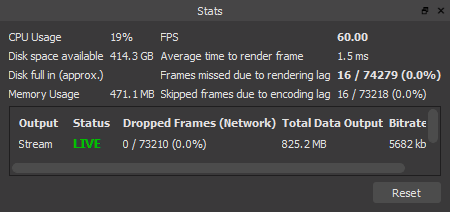
hey guys, im having a problem with obs live where my capture card (HD60 Pro) is skipping a few frames every so often but it says im dropping 0 frames
 sinful flint
@versed pagoda What do you mean by messed up?
 versed pagoda
numbers arent correct
sinful flint
Bear in mind that the sub goal counts up 1 when you gain 1, it isn't designed to count down when you lose one and it isn't designed to show your total subscriber count, there is a different widget called 'Total Subscribers' which does that, which if you add some extra text to it can be fashioned into a goal which shows your total amount followed by how many you want to achieve
versed pagoda
ya I want it to count down too
sinful flint
Then you'd be best using the 'Total Subscribers' widget, the goal widgets don't do that by design
burnt horizon
can anyone help with my capture card skipping frames?
 steel bladeBOT
@burnt horizon Please provide a log from your last stream. To do this, in OBS go to Help > Log Files > Upload Last Log File and paste the link to the log file here.
burnt horizon
there ^ :)) thank you
here's a current one too: https://obsproject.com/logs/RxHriSTnF0iA5xPx
 north birch
I just wanted to let you know that my crashing problems completely stopped after I uninstalled obslive, I'm not trying to harp on you guys, I'm actually kinda sad about it since I really like obslive, but I thought maybe that information might be useful, maybe not, I don't know. Hopefully I will be able to use obslive again in the future. Cheers.
kindred fox
burnt horizon
this doesnt help with my cap card skipping frames
kindred fox
What your log says is obs is not admin. What your screenshot said is your encoder settings are wrong
That would be the skipped frames
The card is working fine
 compact abyss
how to add ndi source to streamelements obs
 hollow lichen
Not working since uyesterdays problems.
 winged furnace
hiii im not sure whats going on but i keep getting hte popup for obs.live and its keep crashing my obs
 maiden scroll
I followed the instructions on how to move my overlays over but it says the webpage isn"t found
 hazy grail
im having an issue with not being able to download obslive on the internet? it just goes to a white page that says nothing, anyone else have this issue?
nothing streamelements related will pull up, only a white page
burnt horizon
@kindred fox I used the recommended encoding settings when it ran the test
 sacred tangle
Hello! Looking for support for console audio not being picked up through chat link
steel bladeBOT
@sacred tangle If you are having issues with Streamdeck or Elgato capture cards, its best to ask in their Discord here: https://discord.gg/elgato
 tender sail
How can i fix the BlackScreen GameCapture by OBS.LIVE ?
sacred tangle
not a problem with the card, its with the software
 wary dew
chat link is 'very special' 😛
sacred tangle
it is for sure
sacred tangle
well it worked perfectly up until last week
sacred tangle
and it works with elgatos software but not with ps4 or switch on obs
but weird enough xbox is fine
tender sail
@wary dew Everygame with "Gamecapture" Like League of Legeds, Desinty 2, COD
i dint want to play games in windowmod
wary dew
@sacred tangle i have a ps4 > obs setup myself and couldn't get it to work decently after hours and hours of trying different things and setups, now i just send all the audio through the HDMI and i bought a second mic for the party chat
sacred tangle
well i just need obs to pick up console audio while using a headset
wary dew
@tender sail i'm going to ask around for you as i know there were some issues with at least a couple of those games since OBS 25 came out
tender sail
@wary dew There are many people and youtube with this problem. But no video solved my problem. idk why no game is captured 😦
uninstall and install new doesnt work too
wary dew
pc or laptop?
wary dew
Destiny 2 doesn't allow game capture
they opted out of that option
so that has to be windowed or screencapture
tender sail
But if i want to capture with "Game capture" every exe is just black.
sacred tangle
@wary dew When you have a minute, could you walk me through your setup? I would love to not need to use a chat link
sacred tangle
lol doesnt seem like it, I use a tv monitor for my console play.
But if i use a headset, obs wont capture the audio.
wary dew
yeah exactly, i have a chatlink and everything but i couldn't get it to work properly
watched a ton of YT vids and everyone had issues and different option on how to solve it
that's why i threw in the link to the elgato discord earlier 😉
sacred tangle
thats so weird, it worked no problem for me. Then just all of a when 25.0 was released, no more audio from ps4 or switch
wary dew
maybe they know more in the OBS discord?
steel bladeBOT
@sacred tangle For the best OBS support, please join their Official Discord @ discord.gg/obsproject
wary dew
there ^
wary dew
no problem 😄
sacred tangle
So far no luck lol, chat link is just one of those annoying issues.
hazy grail
need some help with party/game chat audio and ingame audio
 heavy geode
i wanted to start streaming on twitch instead of youtube but whenever i press the start streaming button it says stream to youtube
so i don't know what to do
steel bladeBOT
@heavy geode Streamelements on top of OBS -> Logout -> login
 golden fjord
Is there any way to turn off bot redemption notifications when chat redeems a sound effect from the stream store? I wasn't sure which channel to post this in...
wary dew
it's not possible afaik
 kind moat
my friend just downloaded stream elements and made a display capture source. it shows a black screen. However, he made a game capture source and it works, showing his game. any suggestions?
 honest echo
@kind moat laptop?
kind moat
no sir, hes on his desktop
honest echo
nvidia?
honest echo
maybe his display and obs are not running on the same GPU
kind moat
ill have him check that, hes restarting his computer again!
honest echo
yeah check on the nvidia control panel that all, display + games + obs are running on the nvidia graphic card
kind moat
how does he ensure stream elements (OBS) runs off his gpu?
 fringe whale
hey my obs live is f'ed up... it lagges, crashes and so on... ive tried to reinstall, i tried to downgrade, nothing...
burnt horizon
Hey guys I have a log file here saying that my encoder settings arent the best and I was wondering if someone can help with my settings tyo make sure it doesnt skip frames every 10 seconds :)) https://obsproject.com/analyzer/?url=https%3A%2F%2Fobsproject.com%2Flogs%2Ffu4ECITxoLRDfIuw
Thank you very much :))
honest echo
@burnt horizon on that log its saying that everything is ok... except for you need to run OBS with admin rights
burnt horizon
mhm
well eariler said my encoder settings were wrong thats why im skipping frames
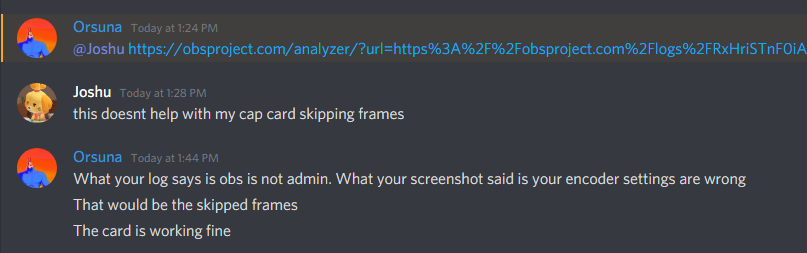
i sent this screenshot eariler
kind moat
@honest echo thanks for the help earlier! we got it sorted out
 autumn bronze
is there a way to turn down the song request songs volume ?
honest echo
@autumn bronze are you using, the MR dock on obs.live, ground control or MR via webpage?
autumn bronze
i simply using th webpage
ive yet to figure out how to plug it in and control on the obs live itself
honest echo
autumn bronze
my bad about posting on the other channel as well. Im only getting mute/unmute on the YT video itself. The choice to change the volume isnt an option for me for some reason
honest echo
@autumn bronze i got it working fine when i "show on stream" the video
but in order yo show the video on stream you'll need to add the MR widget on the overlay
autumn bronze
Oh ok. I got it turned down on stream. But now i need it turned down separately from my gameplay sound through my headset. Without having to turn down my game volume as well. I apologize for all the questions and things, im not very savvy when it comes to these things.
 rugged quail
Hi, guys. I've had a lot of problems recently trying to stream DOOM Eternal. It worked fine the first night and now it barely runs when OBS is open. Can anyone help me? Thanks
 fathom spade
Hey my OBS isnt picking up any audio from my desktop anymore nor my headset. It stopped after my computer restarted cant figure out why. Any help would be appreciated thank you guys
honest echo
@autumn bronze if you are on windows try the sound mixer
 high ferry
I hate OBS. Why does it legit just randomly not work? Seriously its stupid. I put on the minecraft window and it doesen't work at all. I did everything correctly. What the crud?
honest echo
@rugged quail your Doom isnt runing?
@fathom spade you hear the sounds outside obs?
@high ferry try game capture or play minecraft in windows mode
fathom spade
yes i can
rugged quail
@honest echo It does until OBS is opened. It seems to spike my GPU right when I open the game and it doesn't come back down
high ferry
welp ok I guess Ill just have a broken OBS :/
honest echo
@fathom spade in your settings > audio is the right devices set up?
@high ferry windows-mode is the "not fullscreen" one
fathom spade
i think i fixed it thank you it i guess went to a different source when it crashed
honest echo
@rugged quail maybe its the amount the work that obs is doing, how many sources do you have? in other scenes, overlays were added with the optiom "shutdown when not visible"?
@fathom spade glad that its fix!
rugged quail
@honest echo I do have 7 scenes, but I had the same amount before the problem began
autumn bronze
@honest echo I got it working. Thank you for your help!🙏🙏
honest echo
@rugged quail check if every browser source have the "shutdown when not visible" and have you try to open obs and and see how much gpu use?
honest echo
when you open obs alone, how much GPU/cpu is using?
rugged quail
25%
@honest echo Like I said, everything was fine with these settings before my driver update. I went back and it's still just destroying my GPU
honest echo
well maybe its something beyond my knowlegde maybe try with the guys at obs
steel bladeBOT
@rugged quail For the best OBS support, please join their Official Discord @ discord.gg/obsproject
 crisp marten
So there was a dock that would allow you to change the stream name and set everything up before you go live. I can't seem to find it.
honest echo
@crisp marten you can do it on the activity feed dock
crisp marten
Yeah, but there was a whole other dock for it, so I didn't have to loose the activity feed dock.
honest echo
@crisp marten ok go to the View Menu > Docks > Stream information
crisp marten
Where?
honest echo
im sorry, im assuming that you were a twitch streamer
crisp marten
I am. I don't have that dock.
honest echo
do you have the dock now?
crisp marten
Yeah, reinstalling OBS live got it.
honest echo
👍
 wanton fulcrum
I'm having issues with exporting my overlay to the OBS. I've done everything step by step but I just get this image for my overlay. What am I doing wrong?
 fickle agate
my OBS live keeps going to rtmp on obs instead of the FTL that I set
is there some setting obs live is putting in place
something is overriding the settings when i start the stream in OBS, it worked fine in regular obs but this version wont change the settings what is wrong with it
 fleet kelp
I'm trying to switch my streaming output from Mixer to Twitch in OBS but nothing I try is working. How can I do this?
steel bladeBOT
@fleet kelp Streamelements on top of OBS -> Logout -> login
fleet kelp
Thank you!
steel bladeBOT
@fickle agate If your Mixer stream has "Low Latency" greyed out in the player while using OBS.Live, do the following:
- Stop your stream
- Go to your stream settings in OBS and return them to your previous settings, where your service is listed as "Mixer.com - FTL"
- In "live video settings" for OBS.Live on the left-hand side (in the chat window) change the setting on top of the window to "Go Live with Mixer Broadcast Dashboard settings" and press "Go Live!" from there
 cosmic solstice
anyone know why my twitch stats, to update the title and game tab went missing on my streamelements obs?
wanton fulcrum
So I got it all figured out, however, for some reason my game feed isn't showing up on my stream. Anyone know why that would be?
I am currently streaming
heavy geode
Anyone know why on whatever streaming platform I use the stream constantly buffers and lags
 tender python
bad connection.
wanton fulcrum
My cam is working and I've got great internet.
No ideas on why game feed isn't showing up but cam and overlay is up?
wanton fulcrum
Is there anyone available in the helpdesk?
 burnt steeple
my chat and activities dont show up when i open obs
 fathom cobalt
StreamElements on top > Chat
or View > Docks > Chat
Same for activity feed
StreamElements on top > Activity feed
or View > Docks > feed
burnt steeple
on the website?
fathom cobalt
In the OBS
fathom cobalt

wanton fulcrum
My game feed doesnt show up. Just my overlay and camera feed. How do I fix this?
 delicate nest
Hi guys, I just went to setup a custom bot name and I've accidently linked my account twice so now I can't link another account to change the bot name to. I was wondering if there was any way to unlink an account so I can link a different one? Can't see any settings anywhere and google isn't helping. Thanks in advance!
 late furnace
where do you have it named at on obs.live or ground control?
delicate nest
obs.live, ground control doesn't even have a custom bot name option
late furnace
alright to unlink the account that you keep signing into is go to your default browser that the one that the obs.live pops up to use when you auth the account, sign out of that. Then restart the process over from obs.live then that that should have a blank sign in on the default browser
then after you set the custom name just sign out on the default browser then sign in with your main twitch account 🙂
 vital cliff
Can i get like donation goal and sub goal's?
i know with streamlabs you can but i cant figure it out here
late furnace
we have custom goals here in our #widget-share if you like to browse and see if any one of them interests you 🙂
late furnace
we do have a simple sub goal within our overlays via site https://streamelements.com/dashboard/overlays go to an existing overlay or create an overlay the go into the editor then widgets and add the sub goal
in the widget its under stream goals we have tip/cheer/follower/sub goal there
 tulip smelt
yo guys is there any way to get OBS>Live onto a macbook Pro?
rugged quail
Not at the moment, no
 hollow swallow
Hi all - what do I need to do to have a 'total followers' label on obs.live? Feel really stupid and can't fit it anywhere
*find it
late furnace
ah you want to see your twitch stats docc view
what you want to do is make sure you are sign into obs with your twitch account and not your stream key then from there at the top go to view then go to twitch stats and it will show you everything your follows watching and all the goodies 🙂 @hollow swallow
hollow swallow
Boom - thanks!
rugged quail
does anyone know why my media share is playing multiple tracks at the same time when i chose to show it on stream??
sacred tangle
anyone know the fix for the 2 second delay from the capture card to obs?
steel bladeBOT
@sacred tangle For the best OBS support, please join their Official Discord @ discord.gg/obsproject
@rugged quail Make sure to ☑ “Shutdown source when not visible” for all browser sources (all OBS scenes). If using studio mode, uncheck “Swap Preview/Output scenes After Transitioning.” Also keep in mind that sound can play from any overlay loaded in the browser (editor or launched). https://i.imgur.com/FegZJQS.png https://i.imgur.com/yY0wcFl.png

 rugged quail
hello i have installed the Obs live but i want to show my video on My stream but i need the Media share wiget but i cant find it in the list?
kindred fox
Twitch/YouTube/Facebook/mixer?
rugged quail
twitch
kindred fox
It’s there. When you click to add a widget, push CTRL+F and type media request
rugged quail
ok
rugged quail
I've been streaming everyday for the past god knows long, all of a sudden my game capture is not picking up destiny 2.. I just get a black screen, any ideas?
 plain sonnet
game capture doesnt work for destiny 2
plain sonnet
Bungie has opted to not allow OBS to hook Destiny 2 using Game Capture. See: https://www.bungie.net/en/Help/Article/46101
You will need to run the game in either windowed fullscreen or borderless windowed and use Window Capture instead.
rugged quail
well that sucks.. hahaha
rugged quail
when is OBS gonna be Available for Mac? this mont ? this year? when?
 thin hull
This may not be the right area but im getting a white screen on desktop opening stream elements. But itll load on my phone. Ive cleared cache on desktop but still problem persist
 pastel python
hey, i created two layers for my alertbox on streaminglements, one for names and amounts etc. and one layer for media (video & alert sound) to put the names in the graphic at the right point. i saved everything and inserted it as a browser resource in obs. but now i don't get any alertsound, only the viewers AND the graphic is not shown. neither in the stream nor in obs. Send help! 😦
fathom cobalt
@thin hull what browser are you using? If chrome, try incognito mode
steel bladeBOT
@pastel python OBS -> settings -> advanced -> scroll down -> enable/disable hardware accel.
https://i.imgur.com/ggMe9ZE.png

 modest parrot
Is there any option to play random songs in song request from standard playlist? Every time I turn OBS on, playlist doesnt save the song that I've finish.
thin hull
Ive tried all the above. And nothing works. @steel blade @fathom cobalt
steel bladeBOT
@modest parrot Check out the StreamElements ideas board: https://strms.net/ideas. You'll be able to add ideas, upvote ideas you agree with, and track their progress with email notifications. Adding and upvoting ideas also helps the staff know which ideas should be prioritized so please take some time to upvote.
rugged quail
anyone having trouble downloading alst update
obs keeps crashing and failing to download the update
steel bladeBOT
@rugged quail A crash log is required to investigate the cause of your issue. Please upload the last crash log.
- In OBS, click the Help menu
- Select Crash Reports, and then Upload Last Crash Report
- Copy the URL, and paste it to the chat here.
--
If you are not able to follow the above steps, open your file explorer and go here:%appdata%\obs-studio\crashesand provide the last listed file.
pastel python
@steel blade this doesnt work. i had disabled the hardware accel and now i enabled it and it still doesnt work
kindred fox
Leave it disabled
 quick sleet
hey i want to ask about modules in the streamelement...in my streamelement there is no bot...means under the bot thing like modules,chat command etc.. why?
rugged quail
anyone having problems with wwz and game capture no picture on 24.03
tried game in dx11 vulkan windows borderless nothing
 dreamy fox
hello i need some help with audio issues with the media player
pastel python
@kindred fox ye, but that doesnt fix the problem... 😦
kindred fox
@pastel python I think you’re over complicating your overlay
You should only need one overlay for your scene.
Make sure you’re adding it at 1920x1080 and that you have your default windows audio output in your scene
dreamy fox
ok im having audio issues with my media player
 fluid stirrup
Hi i have some trouble with the music request its bugging when im trying to show the video in the stream the sound that i get and the whole stream hears its like it is in a fishbowl
fluid stirrup
hmm
steel bladeBOT
@fluid stirrup Make sure to ☑ “Shutdown source when not visible” for all browser sources (all OBS scenes). If using studio mode, uncheck “Swap Preview/Output scenes After Transitioning.” Also keep in mind that sound can play from any overlay loaded in the browser (editor or launched). https://i.imgur.com/FegZJQS.png https://i.imgur.com/yY0wcFl.png
@dreamy fox For the best OBS support, please join their Official Discord @ discord.gg/obsproject
dreamy fox
ok ty
fluid stirrup
thanks for the quick respons problem solved
 gaunt fractal
Hey i was wondering if i could possibly get some help with my audio for some reason my mic audio is playing in my desktop audio on stream so when i talk it picks up my mic and then a second later it plays an echo of what i just said.. anyone know how to fix it
steel bladeBOT
@gaunt fractal For the best OBS support, please join their Official Discord @ discord.gg/obsproject
 fossil beacon
Hey so i have an issue to where after about 30min-1hour where the audio is several seconds behind my video. only way i can patch it is by restarting OBS every hour. any input?
steel bladeBOT
@fossil beacon For the best OBS support, please join their Official Discord @ discord.gg/obsproject
 tulip hamlet
@fossil beacon Audio desync issues are OBS issues, not OBS.Live issues. Please ask in OBS Community's Discord.
fossil beacon
but no one is there to help D:
tulip hamlet
They will be.
fossil beacon
theres one poor guy trying his best
fossil beacon
im aware D,:
 oak tundra
Can I get some help with OBSLive 25.0.1? I swapped over and my elgato is having audio problems it did not have in SLOBS.
steel bladeBOT
@oak tundra For the best OBS support, please join their Official Discord @ discord.gg/obsproject
tulip hamlet
OBS.Live's version is not 25.0.1. That's OBS Studio's version. OBS.Live is a plugin for OBS Studio, not its own software, and its version number is in the bottom right, not the top left.
And it doesn't affect audio behavior.
 frosty lake
I am trying to add an overlay to obs live and everything in the overlay shown up in the overlay edit tab but as soon a I but the link in the obs browser slide nothing shows up in the preview
steel bladeBOT
@frosty lake To add your overlays to OBS, add a new browser source in your scene. Paste your overlay URL in the browser source properties, set the dimensions to 1920x1080 (unless you changed them on the website), and ☑ “Shutdown source when not visible” https://youtu.be/KDvLynUqXI4
frosty lake
I do all of these things but it still will not show up
I am confused on what is going on because this has never happened before
 odd kraken
Please do not ping everyone. Thank you.
frosty lake
srry just need some help
steel bladeBOT
@frosty lake OBS -> settings -> advanced -> scroll down -> enable/disable hardware accel.
https://i.imgur.com/ggMe9ZE.png
frosty lake
thank you it works
 tranquil glen
hey, my obs wont screen grab HOTS unless im in display capture. ive tried specific window and any fullscreen
works for other games
steel bladeBOT
@tranquil glen For the best OBS support, please join their Official Discord @ discord.gg/obsproject
tranquil glen
its stream elements obs, does that make a difference?
odd kraken
OBS.Live is an plugin for OBS Studio.
tranquil glen
k, thank you. ill try there
 olive mantle
I accidentally closed the media request box in OBS, i've looked around but can't find where to reopen it, any ideas?
odd kraken
StreamElements > Media Request at the top in OBS.Live
 next venture
obslive keeps telling me missed frames do to renderlag and i dont know what to do
steel bladeBOT
@next venture Please provide a log from your last stream. To do this, in OBS go to Help > Log Files > Upload Last Log File and paste the link to the log file here.
 pliant smelt
is it possible to add just alerts to a stream instead of the whole overlay?
Or will I need to make a new overlay with just alerts
 shy mountain
new overlay and add the alerts widget
or you can duplicate the alert widget from hte premade if you wish to
to an empty overlay
pliant smelt
Okay.
So if I duplicate the alerts from my main overlay to a new overlay will all properties be the same
for eg fonts etc
pliant smelt
Lmao I'm aware of the meaning over duplicate I was just making sure, thank you.
How do I duplicate the alert box to a blank canvas
shy mountain
Click on the widget and next to "layers" on the left side, click on the 2 white papers with a red dot. Then choose the overlay you want it duplicated to.
 shadow maple
heyo good people, have an issue with my stream chat, i put in the widget for it to display over my game, but I can't seem to find it. it appears in the dashboard, but in obs.
pliant smelt
you are honestly the goat @shy mountain
shadow maple
all praise keizar
shy mountain
@shadow maple do not post in multiple channels!
Show a screenshot of what you are trying to do vs what you are seeing
shadow maple
so, you read it then?
shy mountain
as im not understanding the issue clearly
shadow maple
im messing with you, will do
shy mountain
I'm also providing support over live chat and tickets, so im trying to do multiple things.
shadow maple
ah, sorry, ddint mean to be a bother
shy mountain
You are not, but posting in multiple channels can cause confusion
steel bladeBOT
@shadow maple The default resolution for StreamElements overlays (theme and custom) is 1920x1080. Please add them in OBS at their full resolution and use CTRL+F to fit to screen if necessary. You can then downscale your stream in OBS settings > Video if you'd like https://i.imgur.com/6bWXxjR.png
 shadow maple
its on there, and my follows are on there, but not my stream chat
oh damn, there it is
 wooden zephyr
hi how to relink my facebook page to my OBS live
shadow maple
thanks man
steel bladeBOT
@wooden zephyr Streamelements on top of OBS -> Logout -> login
wooden zephyr
my facebook wont login to streamelements on obs
next venture
i was looking for obs help to find the last log but it just says obs studio and ive looked in all the files
shy mountain
@pliant smelt Start giveaways or enter giveaways?
 hardy parcel
I need help with adding overlays
steel bladeBOT
@hardy parcel To add your overlays to OBS, add a new browser source in your scene. Paste your overlay URL in the browser source properties, set the dimensions to 1920x1080 (unless you changed them on the website), and ☑ “Shutdown source when not visible” https://youtu.be/KDvLynUqXI4
 rare orchid
Why does my obs have only a black screen
shy mountain
Are you on a laptop?
rare orchid
Yeah
hardy parcel
Ok it works but i can’t edit my stuff in
steel bladeBOT
@rare orchid Due to the way laptops are designed, your system must be configured to run OBS on a specific GPU, depending on the type of capture you are trying to do.
For Game Capture and Window Capture (recommended), your system must be configured to run OBS on your laptop’s high performance GPU (default); for Display Capture, your system must be configured to run OBS on your laptop’s power saving GPU (iGPU).
If you are running Windows 10 1903 or newer, use this guide for instructions on how to configure your system: https://github.com/obsproject/obs-studio/wiki/Laptop-GPU-Selection-Windows-10
For instructions on configuring an older version of Windows (you should consider upgrading), use this guide: https://obsproject.com/wiki/Laptop-Troubleshooting
hardy parcel
Like on the top left corner it says new follower and then a random name below
shy mountain
What are you referring to?
rugged quail
You mean the Super Trigon Overlay?
rugged quail
I use that now and I love it
rare orchid
okay it worked thanks!
shy mountain
If you are talking about editing an overlay
you need to enter the overlay editor and edit what ever you want there
hardy parcel
I tried clicking on the things on the bottom cuz it said text but it won’t let me edit that
steel bladeBOT
@hardy parcel Please provide your account ID found at the top of this page: https://streamelements.com/dashboard/account/channels This ID is public info and safe to share here.
hardy parcel
But why
shy mountain
because
- you don't have your twitch account connected to your discord
- i can't find your account with just your discord name(i'm finding another account)
hardy parcel
Oh there was a switch I need to flip on my discord connections
It should show up now
I hope
 tardy galleon
i dont know if any help is on but can anyone help me with an issue?
steel bladeBOT
@tardy galleon If you would like help from the StreamElements support volunteers/staff please post your question in one of the helpdesk channels and someone will assist you as soon as they are available
#helpdesk-twitch | #helpdesk-youtube | #helpdesk-facebook | #helpdesk-mobile | #helpdesk-selive | #651453660810838026 | #helpdesk-merch
Thank you for being patient.
 sharp tusk
Hi. anyone knows why I cannot install OBS.Live plugin for StreamDeck? I click the button it seems like installing but nothing really happens after all.
steel bladeBOT
@sharp tusk - Open %appdata%\Elgato\StreamDeck\Plugins
- Delete the
com.streamelements.obslive.sdplugin folder
sharp tusk
worked
 stable rain
For some reason when i try to import everything from streamlabs to obs live it says it failed to import scene collections
odd kraken
Here are some things that can fail the import:
- SLOBS assets(copyrighted stuff)
- Media assets bigger then 10MB
- unknown widgets
 tender kettle
how do i import my overlay to obs live?
steel bladeBOT
In order to import scenes/overlays from SLOBS, you need to have OBS.Live installed.
After you install OBS.Live, click on "Streamelements" on top, then on "Import from other services" and then click on "StreamLabs - Import Now"
Each scene from SLOBS will be imported as a stand alone Overlay here: https://streamelements.com/dashboard/overlays
fathom cobalt
@tender kettle ^
steel bladeBOT
@frosty dock OBS -> settings -> advanced -> scroll down -> enable/disable hardware accel.
https://i.imgur.com/ggMe9ZE.png
 royal scroll
Hi ive had a problem with game capture recently and it just refuses to pick up r6s or Call of Duty Modern Warfare
 frosty dock
That doesn't work. It's only a few icons that are not showing up. I added them via custom CSS in a custom widget like this
.event-follower {
    background-image: url('https://i.imgur.com/yzY8Z9v.png');
}
and if you can offer any help just @ me please
steel bladeBOT
@royal scroll For the best OBS support, please join their Official Discord @ discord.gg/obsproject
tender python
didnt r6 and CoD have issues with V24 ?
or V25?
Can't remember exactly
as far as im aware R6 patched to support Vulkan for v25
Warfare works fine on V25
That doesn't work. It's only a few icons that are not showing up. I added them via custom CSS in a custom widget like this
.event-follower {
    background-image: url('https://i.imgur.com/yzY8Z9v.png');
}
@frosty dock you're fiddeling with custom CSS, because why?
you realize it's 100x easier to just make this a layout in an overlay and load that in..
 tender tendon
is this an issue that is known? Streamed 2 months tarkov with no problem. Today wanted to stream and the Battleye Anti cheat is blocking OBS Hook
tender python
there's an anti-cheat hook solution
wrong box, but look at the bottom checkmark, if it persists, that's curious, because it's clean here on v25
tender tendon
that hook is set
tender python
try turning it off
tender tendon
tried it turning off, still getting same error. i think its a game Problem. Tarkov is in beta
sorry for bad english, iam from germany
steel bladeBOT
For the best OBS support, please join their Official Discord @ discord.gg/obsproject
tender tendon
yeah there was no update. trieg everything. i will now try to install OBS Classic and look if it will hook
rugged quail
OBS Classic is no longer being worked on
Avoid using OBS Classic and use OBS Studio
tender tendon
yeah i mean the normal version of OBS 🙂
frosty dock
@tender python That's what im trying to to. I have made everyting using the editor, and it works fine. But when adding the browser source. It doesn't show up in OBS https://i.imgur.com/Vhh5B4i.png
The texts show up, but the icons don't load in
 rugged quail
Ahh, gotcha :)
tender tendon
Okay got it. installed OBS Classic and run it. OBS Live popped up to tell that they have an update. installed it and now its working fine. i checked for an update before and obs Live said, that it is the newest version.
thanks to everyone 🙂
tender python
maybe just a broken dll, @tender tendon 
frosty dock
@tender python I know it's the launcher url 🙂 You can try yourself if you want here

StreamElements
The Ultimate All in One Platform for Streamers
tender python
you can't load them in externally.
load them in as an image.
just, upload it
frosty dock
I see... But where do i upload it, when using it the way i do?
tender python
add image, top of the editor
frosty dock
But the thing is. The image is not the same every time. It's a event list that choose the image needed for the event
tender python
then host it somewhere else
frosty dock
It's not just a static image
tender python
you're getting a 403 because crossdomain isn't allowed.
frosty dock
That makes sense. But is there any way to refrence to a link like this example? mask-image: url('https://cdn.streamelements.com/static/custom-event-list/follower.svg')
They do this in the normal "Custom widget"
frosty dock
Fair 🙂 U tried your best
tender python
my guess is something code related - but im not sure.
frosty dock
I found a solution! Thank you anyways 🙂
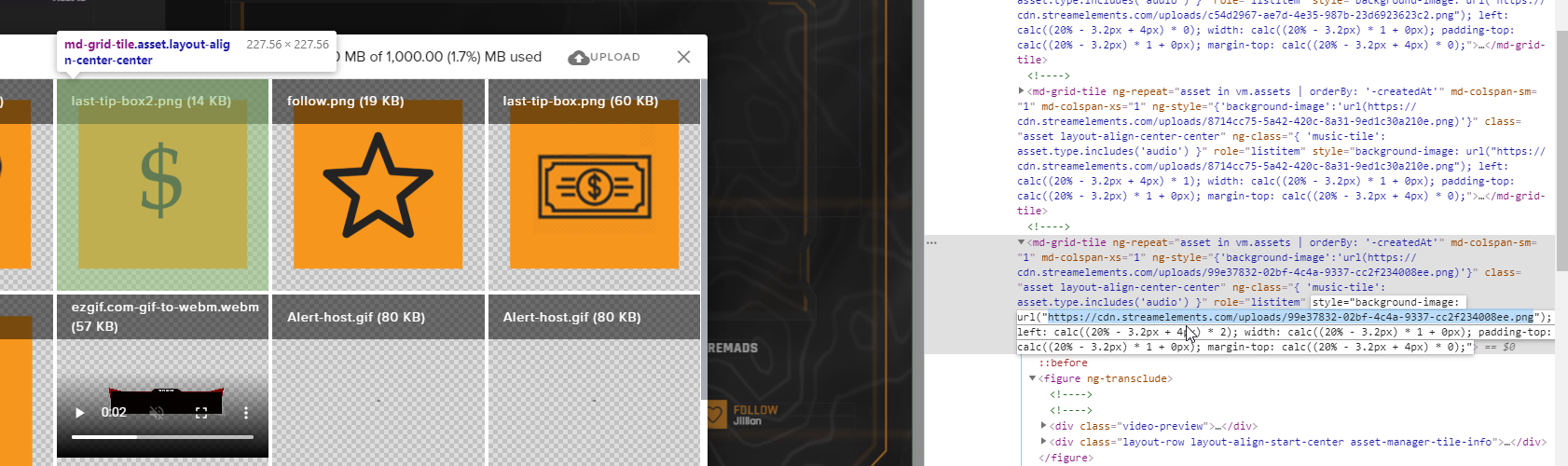
You can somehow do this https://i.imgur.com/mjUTXhg.png
 tender python
if it works, it works
frosty dock
I think it does. Thank you anyways 🙂
 ember raptor
Hey Team, when I go from my starting soon scene to my live scene my animated webcam overlay disappears. This happens when I'm not live also just switching between scenes. Any thoughts on how to fix this? Only way to get it back is to toggle the visibility but it only comes back as a static image
shadow maple
hi, my activity feed keeps showing "Network Error" and it tells me to connect with twitch, but it doesnt really do anything
reset my network, and it seems to work alrighty.
 modern shale
Say question, about a week and a half ago... my stream elements widgets stopped loading in OBS. They will load up sometimes, but rarely now. I didn't change anything on my end but I think some updates happened. Anyone else having this issue or can help?
 hard fjord
how do i stream wothout a black screen am a noob:)
 dim marlin
in streamelements, my activity feed says session expired, please log into twitch. But i stream on facebook. also my chat doesn't seem to update.
steel bladeBOT
@dim marlin Streamelements on top of OBS -> Logout -> login
 frozen python
so basically the obs game capture doesn't want to capture a certain game
steel bladeBOT
@frozen python For the best OBS support, please join their Official Discord @ discord.gg/obsproject
 thorny sparrow
Anyway OBS Live can show restream chat in the chat widget?
tulip hamlet
We do not have Restream support.
tulip hamlet
Pardon?
steel bladeBOT
@next venture There are no "best settings".
Please understand that every setup will be very different.
Any guides or videos that claim otherwise are misinforming. Your best option is to start with a base and adjust as necessary.
You can run the OBS auto-configuration tool. To use the auto-config, click on the Tools menu in OBS, select Auto-Configuration Wizard, and then just follow the on-screen directions.
You can use this tool to get baseline settings for your hardware and adjust as necessary from there.
Test, test, and test again. We are happy to offer suggestions for any issues you may be having afterwards, but not a list of settings.
Thank you
 strange sandal
Hello there! Have a really weird issue. I've been working on switching to Obs.live from Streamlabs OBS. I imported all of my scenes and everything looks fine. However whenever I record/stream no sound is there. I can see audio being recognized in the mixer and I can monitor the audio and hear them. I tried creating a brand new scene collection and simply readded the same devices there and then I get audio. Did the import do something? I checked and triple checked all the audio settings and all tracks are currently recording etc
steel bladeBOT
@strange sandal For the best OBS support, please join their Official Discord @ discord.gg/obsproject
tulip hamlet
There is no sorting option for overlays.
 jovial badger
I mean in obs
tulip hamlet
Uh. If it's just your scenes, you can click and drag them to order them.
jovial badger
hum ok
cuz i've around 60 scene for now and it's hard to find back a specific scene
so the answer is no , maybe later , thanks for your answer , have a nice day.
tender python
@jovial badger so, do better organizing.
Layers are stacked by visibility, A-Z would ruin this (for now)
🙂
and then at that point it becomes pretty straightforward.. 🙂
 modern temple
Hi all, I'm having some performance issues which I've posted on the obsproject.com forums, but judging by similar posts there, im not expecting a reply. would someone be able to help me figure out why i'm having terrible stream quality but excellent in-game quality? dont want to copy the entire post here because I tried to be as descriptive as possible, but here's the link: https://obsproject.com/forum/threads/streaming-half-life-alyx-on-windows-mixed-reality-headset-obs-monitor-is-all-good-viewers-say-stream-is-buffering-slow-laggy.117819/
 agile forge
Hey, where do I change StreamElements name in OBS.Live?
rugged quail
What platform do you stream to?
agile forge
Twitch
rugged quail
Due to a recent change from Twitch API, these features are affected by the change:
- Ground Control does not have Custom Bot Name
- Subscriber count will count the Channel and any other permanent sub you may have (+1 or +2 or +3 on top).
We are working on fixing both issues, but there is no ETA.
OBS.Live still has Custom Bot name working fine in it.
This may be incorrect
agile forge
That's the thing I can't find custom bot name setting in OBS.Live
rugged quail
Did you do the requirements?
agile forge
Yes
rugged quail
What OS do you use?
agile forge
Windows
rugged quail
Lets wait for a staff member to answer this
agile forge
Alright, thanks for your help though my guy
rugged quail
No problem
tulip hamlet
@agile forge Please see pinned message
agile forge
Got it, thank you @tulip hamlet
 fossil dirge
My webcam isnt working anyone know the fix to this?
kindred fox
@Hqnestly_#8098 activity feed panel >> hamburger menu >> stream settings
@fossil dirge make sure it isn’t in use by another application
steel bladeBOT
@fossil dirge You can test Alerts via the bell on the lower right corner of the Overlay Editor. Simply go to your Dashboard -> My Overlays -> Pencil/edit button on the overlay. Make sure the "Show Emulated events on stream" option is on to see the alert in OBS/Xsplit https://streamable.com/h6qgy
 shy mountain
@fossil dirge Can you elaborate on your question? We do have pre-defined themes and a default set of alerts in the alert wiget when you first add it
fossil dirge
i set it up thanks anyway
rugged quail
Is there a Patreon pledge alert?
wary dew
never seen it, and it's not in the default alertbox
maybe someone in #dev-chat can make a custom widget for it if it's possible
rugged quail
Oh that would be cool, do I need to post the question there?
wary dew
yes, and give as much information as possible in regards to how you would like it to work
 carmine field
So there was a page you can upload your logs to be analyzed, but I never saved it anyone got a link?
shy mountain
carmine field
Thank you!
 radiant plaza
Media request in my Obs live stop working🤔 Its just blue panel without anything. I try to refresh it, delete and add again, delete music from browser, delete and install again Obs live itself, nothing help. Mb some one had that issue and know what to do?
 ripe girder
anyone able to import ALERTS...and then know where they are after you download them?
steel bladeBOT
@radiant plaza Streamelements on top of OBS -> Logout -> login
shy mountain
@ripe girder If you mean import from SLOBS, then each scene from SLOBS is made into an overlay in "my Overlays" in the dashboard.
ripe girder
oh, so the actual ALERTS don't come over, just the overlays?
shy mountain
Did you use the OBS.Live importer?
ripe girder
yes
shy mountain
Then what ever is in the scene of the SLOBS being imported is placed in the overlay - be it total subs widget/label, alerts widget, image asset(as long as its not an SL asset)
settings are transferred and "translated" into our own settings
so the next step is to add the overlay to OBS
!add
steel bladeBOT
To add your overlays to OBS, add a new browser source in your scene. Paste your overlay URL in the browser source properties, set the dimensions to 1920x1080 (unless you changed them on the website), and ☑ “Shutdown source when not visible” https://youtu.be/KDvLynUqXI4
ripe girder
intreseting @shy mountain , when I rerun an alert, it does not show up...I'll look into it further
shy mountain
I don't understand what "rerun the alert" means
ripe girder
when a follower comes in, you can make the alert run again
within the activity feed
there's nothing that populates on the screen when you run the alert again
ripe girder
so, when you say overlay, do you mean scene?
shy mountain
ripe girder
ahhhhh, I don't use any of those TBH
i use like, one or two, certain things in there
I'm talking about the "follower alert", maybe widget?
shy mountain
let me guess - mixer?
ripe girder
no, this is the twitch setup
so within OBS, I have transferred my scenes over (and I thought the alerts). Everything seems to have come over great, except for the alerts. I can see the source, within the scene, and it's tied to slobs still. Wondering if it didn't come over 😉
whatever you did, got it to work lol
shy mountain
Well if you are trying to replay an event from our activity feed
it will 100% not trigger an alert on the Streamlabs alert box/widget/link
ripe girder
cool, so where do I go to put my custom alerts then?
shy mountain
Ok lets backup a bit. You are saying everything is good currently?
I don't see any imported overlays in your twitch account
ripe girder
ok, I went and downloaded OBS, imported my scenes and alerts
shy mountain
Imported how?
ripe girder
I do not think I downloaded any overlays, because I don't use those
in SE page it had some option to import
IMPORT TOOLS
StreamLabs
Import alertbox
Import tips
*Import using a Chrome extension
i can try it tomorrow @shy mountain I'm pretty tired and might not be making any sense 😉
thanks for all your help!
shy mountain
That might be a good idea 
I'll be here tmrw to help sort it out
and figure what exactly you are doing, but a fresh mind is always welcome
 gloomy thunder
Anyone else have the problem of Subs not appearing in chat?
Alerts
Also; not appearing on SE site....
shy mountain
Followers work, so it might not be a webhook issue
steel bladeBOT
@gloomy thunder Twitch prime (new and resub) and paid subscriptions (resub only) must be shared in chat manually by the person subscribing in order for the subscription information to be sent to StreamElements. For twitch prime, the user needs to have sharing enabled on https://www.twitch.tv/settings/prime. For paid subs, if the share box doesn't show up immediately it will when they refresh the page. https://i.imgur.com/VNJN0Uv.gif https://i.imgur.com/2297EA7.png

 gloomy thunder
I was SUPER confused why my RGB lights were flashing just then. 😂 @shy mountain
@steel blade
It doesn't show up in SE sub history at all.....
shy mountain
Does it show up anywhere else?
 stray mesa
Events list showing differently on my stream and on the website.
On stream it shows the example
But on the browser it is showing my actual recent events.
How do I fix it?
gloomy thunder
Nope; but a guy used my emote so, he must have subbed..... @shy mountain
shy mountain
@stray mesa
@gloomy thunder If his a recurring sub, then most likely he hasn't shared his resub
gloomy thunder
New sub
shy mountain
if his subbed but not showing even on the Twitch activity feed, then Im not sure what the issue is there
He might have subbed around the time twitch was in its death bed last night
gloomy thunder
Yeah, it's not in my events list either
shy mountain
Im talking about this one
gloomy thunder
Not there either.....
gloomy thunder
Nvm......
He unlocked it with channel points for 24hrs. 😂
That was driving me nuts! 😂
shy mountain

 hexed karma
hey, does anyone know how to make the set background image of the event list widget, not tile? just want the whole image to show up?
shy mountain
Click on the widget and on the left side there are options on what background to use
hexed karma
ah yes, so I want to use a custom background image, but when trying to use this image, no matter what size I make it, it tiles the image, never fills.
 hard karma
Chat hasnt worked on obs.live now for 2 weeks. Anyone else having problems? Had to have my twitch channel up for chat instead?
steel bladeBOT
@hard karma Streamelements on top of OBS -> Logout -> login
 civic oracle
is there a way to use instagram live stream with obs live?
shy mountain
We don't have instagram integration
civic oracle
ok thanks
 iron ice
It seems I am missing the stream setting tab and I cant seem to find out how to bring that back
wary dew
It's in the hamburger menu on the top left of the activity feed dock
or if you want it as a stand-alone dock: View > Docks > Stream info
iron ice
uhh wait am I in the wrong chat? this is for streamelements obs live right?
wary dew
yes
iron ice
hmm I think I am in the wrong chat. My problem is for when you go to start a stream and you have the UI tabs and I dont have the stream setting tab
 sour cave
Oh
iron ice
or I am just smallbrained
sour cave
I’m new to streaming
iron ice
with OBS its easy but I just have this one problem and its screwing with me
wary dew
click on streamelements menu > activity feed
iron ice
kool thank you sorry that I am a complete smallbrain
wary dew
no problem 😄
iron ice
haha back again because I cant figure this out by myself so when I add an overlay through browser, it doesn't show up even though this is the way I have done it in the past and I don't understand why its not working anymore. I placed the URL and then the width and the height to 1920x1080 and it doesn't seem to want to work.
The custom CSS thing is new to me I have never seen it before but maybe thats the problem?
wary dew
shouldn't be
steel bladeBOT
@iron ice OBS -> settings -> advanced -> scroll down -> enable/disable hardware accel.
https://i.imgur.com/ggMe9ZE.png
wary dew
try to disable that and see if it works
iron ice
yup you got it right cool thanks
this is why you are one of the better streaming programs. you provide such good help and service because you actually know what you are doing plus your program is quite easy to use compared to some others.
 gloomy python
when i click install on the plugin in elgato streamdeck software
the blue bar goes across but it doesn't install
obs is working fine and so is the streamdeck, but the plugin won't install
i've reinstalled both softwares
wary dew
i'll ask around, there have been some issues lately with the SD
gloomy python
ty
steel bladeBOT
@gloomy python - Open %appdata%\Elgato\StreamDeck\Plugins
- Delete the
com.streamelements.obslive.sdplugin folder
wary dew
then after that, reinstal
 solid pollen
Hello. I am having some issues with Media Request. I have everything working great as long as I run the music but I cannot figure out how to let the viewer do a song request. None of the commands are working.
kindred fox
Have you enabled the viewer queue on your dashboard?
ripe girder
I figured it out @shy mountain , turns out I needed to add the alert widget to an empty overlay. My current problem is getting the text to go over the GIF. Not working like it should, but I'm still googling how to gix it lol
 odd creek
it wont let me open the stream elements website anymore and im not sure what to do
odd kraken
What do you get when you approach the streamelements website? Do you have a screenshot by chance?
odd creek
i dont have a screenshot but when i type in the website its just stays as a white loading screen
odd kraken
Normally a white page is an indicator for something blocking the website on your site. Use chrome, clear cache and cookies, disable all extensions, try it in incognito mode.
odd creek
ok
ripe girder
does anyone know if you can have alert text on top of a GIF (for like followers, subs, etc.). I can get it to do it over an image, but NOT on a GIF.
my custom alert has a box that I use for the text "X has followed!" or whatever, but can't seem to do it in SE OBS, like it does in slobs.
odd creek
chrome worked thank you @odd kraken
 tame python


@everyone Can some one help?
ember raptor
Hey Team, when I go from my starting soon scene to my live scene my animated webcam overlay disappears. This happens when I'm not live also just switching between scenes. Any thoughts on how to fix this? Only way to get it back is to toggle the visibility but it only comes back as a static image
 ionic swan
help
ripe girder
well, there's no way to adjust custom alerts and the text that pops up. I'm wondering why you dno't have the option to "center" the text on alert if it's "Text Over Image", it appears to only put it on the top of the alert...which won't actually show up.
kindred fox
@ember raptor do you have both the shutdown when inactive and refresh source when shown boxes checked for your overlays?
 inland zephyr
Anyone have an issue with custom bot name? I did the "connect custom bot account" but it doesnt update. Just provides the same connect button and makes me do all the steps again.
 muted frigate
hey there, can't find the proper answer to: how to use the same webcam with different masls applied in different scenes?
 pure storm
hey guys! i tried to look up for a solution as well in search. I'm having this weird issue as i'm trying to recover a cloud backup the Restore Button cannot be clicked
steel bladeBOT
@muted frigate For the best OBS support, please join their Official Discord @ discord.gg/obsproject
 past flume
Can we do an automatic game capture
on obs live?
odd kraken
@past flume You should be able to set the game capture source to Capture any fullscreen application
past flume
@odd kraken Indeed but the problem being that I put my games in window without borders for switch on my second screen
steel bladeBOT
@past flume For the best OBS support, please join their Official Discord @ discord.gg/obsproject
odd kraken
@rugged quail have you added a source to your scene?
Have you added a game capture, display capture or screen capture source?
steel bladeBOT
@rugged quail New to Stream Elements?
Check out our YouTube channel https://www.youtube.com/c/streamelements/videos
with tutorial videos from setting up the basics, to in depth details on how to use our product.
New to OBS? Here is a 4 step quickstart guide
https://obsproject.com/wiki/OBS-Studio-Quickstart
Want to learn even more? Here is an in-depth overview
https://obsproject.com/wiki/OBS-Studio-Overview
pure storm
hey guys! i tried to look up for a solution as well in search. I'm having this weird issue as i'm trying to recover a cloud backup the Restore Button cannot be clicked
@pure storm i'm trying again, login and logout, no success so far
odd kraken
What shows you the double? What happened to you on OBS?
@inland zephyr
try this:
1) Right click on your OBS desktop shortcut -> properties - in the "Target" field add this -> --remote-debugging-port=40404
2) Open OBS(or restart if it was open)
3) Open your browser and type in "localhost:40404"
4) Click on "StreamElements - Activity feed"
5) navigate to the Console tab
6) type in the console this: store.customBot.removeCustomBotIntegration() and hit enter
7) Try setting the custom bot name
8) remove the added addition of step 1
I dont understand this part "navigate to the Console tab"
odd kraken
Show me a screenshot what you are seeing at the moment please.
select the arrows in the top right and choose console or make the right part bigger.
odd kraken
@pure storm Where is that screenshot from?Can you get me a screenshot fromStreamElements > Manage Cloud Backups` please.
 sour pawn
Hi everyone... I need some help with OBSlive
pure storm
download then it goes into that screen i posted earlier
steel bladeBOT
@sour pawn Welcome to the helpdesk! Please let us know how we can assist you today and a support volunteer or staff member will assist you as soon as they are available. Thank you for your patience.
odd kraken
@pure storm For me I only can restore backups when I also select a profile I want to have them stored to.
pure storm
i checked the box, unchecking or checking does not make any difference, the button restore does not become clickable
odd kraken
sour pawn
well since the last update, OBS no longer captures my games.. I had it set to capture any fullscreen option and it worked awesome til the update. So in trying to fix it I remove game capture, ran as administrator added game capture back... didn't work.. I even tried to capture specific game window doesn't work... I almost wanna uninstall and reinstall, but don't want to go thru the hassle of resetting up everything. Any suggestions on how to get OBS to capture my games again?
tulip hamlet
@pure storm Did you only upload a profile and not a scene collection with it?
pure storm
46mb, the profile had scene collections
steel bladeBOT
@sour pawn For the best OBS support, please join their Official Discord @ discord.gg/obsproject
tulip hamlet
@pure storm Please be patient. Thank you.
 worldly loom
how do i add streamelements donation alert to obslive
steel bladeBOT
@worldly loom To add your overlays to OBS, add a new browser source in your scene. Paste your overlay URL in the browser source properties, set the dimensions to 1920x1080 (unless you changed them on the website), and ☑ “Shutdown source when not visible” https://youtu.be/KDvLynUqXI4
worldly loom
i have the overlay just need the alert
tulip hamlet
Everything, alerts included, is added to an overlay as a widget.
worldly loom
Cant add it to existing one
tulip hamlet
Yes, you can. If your alertbox is in a different overlay, select it and use the duplicate button.
tulip hamlet
@pure storm Please provide your OBS.Live version as seen in the bottom right of the window.
pure storm
@tulip hamlet OBS.Live version 20.3.8.603
tulip hamlet
Do you know if this was the version you had when you first made the backup?
pure storm
yes, the backup was done this night (before formatting PC) OBS and SE were updated
 drifting lake
so in steamlabs obs my audio is significantly better than in obs live. trying to switch to stream elements but my audio is more muffly and quieter and the audio ducking doesnt seem to be working as well even though i am using the exact same settings....
mic audio
any idea/
?
ok then....
tulip hamlet
You are not the only person who needs help. Please be patient.
Or ask in OBS Project's Discord. OBS.Live doesn't change the audio behavior.
steel bladeBOT
@drifting lake For the best OBS support, please join their Official Discord @ discord.gg/obsproject
drifting lake
they told me obs live wasnt their concern..
tulip hamlet
Screenshot that please.
plain sonnet
that was from a user asking for help, not a helper
drifting lake
oh..
 leaden fog
I'm having issues updating anyone about to help please thank you 
leaden fog
already tried that
i see if i can confirm that file's existence
Give me a moment
Yep it checks out
tulip hamlet
Restart your computer and try again.
leaden fog
ok be back in a few minutes then well probably in an hour knowing my pc
and I'm finally back thank you for your patience Nethyr but that's fixed whatever the problem was thank you for your help ❤️
 warm relic
Streaming to Mixer. Internet is 300/300 fiber. Pc is ryzen 5 3600 16GB, RTX 2080. Game is 1080p, streaming to 720p60. If I try and up quality at all the stats jump on dropping frames. Have tried both nvenc new and h264, Any help on suggested settings
steel bladeBOT
@warm relic There are no "best settings".
Please understand that every setup will be very different.
Any guides or videos that claim otherwise are misinforming. Your best option is to start with a base and adjust as necessary.
You can run the OBS auto-configuration tool. To use the auto-config, click on the Tools menu in OBS, select Auto-Configuration Wizard, and then just follow the on-screen directions.
You can use this tool to get baseline settings for your hardware and adjust as necessary from there.
Test, test, and test again. We are happy to offer suggestions for any issues you may be having afterwards, but not a list of settings.
Thank you
warm relic
So here is the thing. Did the autoconfig, accepted its settings. Fire up stream, dropping 50-60% frmaes
tulip hamlet
Read the bot message again.
warm relic
I understand, but doesn't that say the autoconfig is basically useless, if you use it and are immediately dropping 60% of frames?
tulip hamlet
You can use this tool to get baseline settings for your hardware and adjust as necessary from there.
warm relic
If the dropped frames are network....does that mean lower the bitrate?
tulip hamlet
This guide contains every piece of dropped frames / disconnect / network related advice we can give. If you really truly honestly super duper actually 100% tried everything in…
solid pollen
When i use the song request command i get a message saying Nothing is playing at the moment
tulip hamlet
What command are you using, specifically? Type it here.
solid pollen
!song request
tulip hamlet
That is not the correct command.
!song checks the currently playing song.
!songrequest or !sr is used to request a song.
Spaces are never used in commands.
solid pollen
Ok. When ive tried those nothing happens at all.
tulip hamlet
Is the command enabled in your account?
You need to enable viewer requests in the Media request section of your account.
solid pollen
When i try and enable the !sr command i get a popup that says the !sr command only works when the song request module is enabled.
Then when i go to the modules tab there is nothing there about song requests.
tulip hamlet
Read my messages again.
solid pollen
I have done that.
tulip hamlet
The modules section is not the media request section.
tulip hamlet
solid pollen
Whats that mean?
tulip hamlet
It means exactly what it says.
I don't think it could possibly be any clearer than that.
solid pollen
What bot settings?
solid pollen
Ah. Thank you very much. I think that fixed it
 kindred tide
Hello I am looking for help with my StreamElements alerts. I have a total of 5 scenes, when I transition from a scene I have a slow fade. When I receive an alert... I can hear 5 echoes of the same sound. I understand to fix this I must "shut down source when not visible". However, when I use this method, while I am transitioning to a scene... the scene (or overlay itself) pops up in the middle of the fade, making the transition not very smooth. I found a way to work around this. I made 5 separate overlays for each of my 5 scenes: starting then starting alerts, brb then brb alerts, ending then ending alerts, etc... This solves the echo but adds 5 additional browser sources (total of 10 browser sources), therefore, putting more work on my pc.
I am trying to eliminate all unnecessary sources and wondering if there is a simple solution I am not realizing, thank you.
tulip hamlet
Why did you make five alertbox overlays when you only need one?
It's the same alertbox for all of your scenes.
kindred tide
Ive placed my alerts in different areas for each scene... am I doing too much?
tulip hamlet
Yes. You're thinking about it the wrong way.
For your alertbox, stop treating the overlay like a 1:1 for your canvas.
Put the alertbox in the top left, and make the browser source the same width and height as the alertbox widget.
Then you can position it however you want for each scene in OBS.
kindred tide
im sorry. im not following..
so i dont need seperate overlays for my alerts, i can keep the alerts in my 5 original overlays?
tulip hamlet
No.
Position it in the top left.
Add it to your browser source using the width and height of the alertbox, not of the overlay itself.
Then just position it wherever you want in OBS.
Not in the overlay editor.
kindred tide
i think im following, how does this solve the echo?
tulip hamlet
One browser source, used in all 5 scenes.
kindred tide
So I add it to scene 1, then when I add it to the next scene I add the existing browser source?
tulip hamlet
Yes.
kindred tide
Soo just because I see 10 browser source in my sources in total, it would actually be six?
tulip hamlet
You should only have six in use between all of your scenes.
kindred tide
This is what im seeing... I click on scene 1 then i see let say my starting overlay then right under i see the alert source I added.
then on the other 4 scenes the same but for brb, gameplay....
Ive tested the alerts and im not hearing the echos even without ticking the box for "shutdown source when not visible". Thank you @tulip hamlet
 proven terrace
hey there, thank you for your time. How can i update my overlay to allow TTS for subs and resubs but where it does not announce the action action. for example: it says TTS "blank has resubscribed at tier 1 for 8 months.... and then their message" instead of just saying the message that they wrote.
I saw an announce action box that was default unchecked, but it still has the issue regardless?
tulip hamlet
What kind of alert is announcing the action?
tulip hamlet
Your sub alerts do not appear to have TTS enabled.
proven terrace
i actually just was messing around with things, they should just now be enabled
i used it before, and it was announcing the action when it was unchecked
tulip hamlet
It does not appear to be doing so.
 dire cliff
how do i uninstall obslive but keep obs
tulip hamlet
Look in the StreamElements menu at the top.
rugged quail
How do you have the command set so everyone can Add Quote?
 tired hollow
how do i remove audio sources in obs.live
ah nevermind found the solution im blind as a bat
shy mountain
@rugged quail !quote add text
rugged quail
A viewer used this command but it didn't add it for her, never gave her the confirmation that it was added.
Is it normally a command available for all viewers?
shy mountain
the add/remove is mod only
tired hollow
never mind the uadio was not permenatly removed only hidden ;-;
shy mountain
Which audio?
tired hollow
audio sources
shy mountain
browser source audio
tired hollow
in the audio mixer
tired hollow
was trying to create a seperate audio source for teamspeak
i removed the sources in the sources section but it is still in the audio mixer and only becomes hidden if i disable it
shy mountain
teamspeak will go under the default audio source
which should be this
usually
If you want it on a separate audio track
then you need a mixer for example to have separate audio tracks and utilize the mic/auxiliray settings
!vac
steel bladeBOT
How to exclude audio sources for a stream or recording: https://obsproject.com/forum/resources/8/
Voicemeeter Banana guide: https://obsproject.com/forum/resources/397/
tired hollow
yes but it created a duplicate audio source that ties to my microphone for some reason and now i want to remove it permanently but have no way of doing so
shy mountain
Either fiddle with the audio settings i showed above or check the guides
tired hollow
tried to do what is in the guides and it just hides it from sources and disables input this could cause background issues such as a memory leak if too many of these were to be made
apparently i have 7 microphone sources because this has happened before
shy mountain
ok im not sure what you've done really and i guess the best place to ask is in the OBS discord here: discord.gg/obsproject
tired hollow
thank you it brought me here from the live support button on the bottom
shy mountain
yea thats for OBS.Live
which is a plugin for obs studio
and the audio stuff is mainly OBS Studio stuff to which me personally i don't like fiddling with :/
cuz stuff like your might happen
rugged quail
Need help with mixer chat
shy mountain
Can you elaborate?
rugged quail
i see no emotes and symbol from mixer in chat like hypezone pic etc
 lilac ocean
you are using a mixer overlay?
with a mixer chat widget
im gonna check it out for you in the meantime
rugged quail
overlay is from stream elements chat overlay not specially no i use as basic a imported overlay from streamlabs
lilac ocean
Hey @rugged quail I seem to be getting the same issue there with our chat widget, I'm going to report this to staff for you
rugged quail
thank u
 low magnet
Hello so I have an issue with the streamelments website Everytime I go to it it just shows a blank white page I refreshed and everything and nothing is happening
shy mountain
Try with chrome
 cerulean ember
currently
@shy mountain oh Thanks for the help.
 viral dust
So I've tried to install obs.live for mediashare and every time I add a new video in queue, I get an error that says that "This video is not available in your country". It happens on EVERY video that I've tried to add and it didn't happen a single time in a website dashboard
 olive loom
Good day, I use streamelements on obs.live, I recently got affiliated and just want to find out how do I get that my viewers can change the quality to their liking, somedays is works then some days its on source and cant cant it, any suggestions or advice on how to get that option to stay?
late furnace
@olive loom Transcoding is only guaranteed to partners and then affiliates get priority based on availability according to the FAQs, so sometimes your stream will have the quality option and sometimes it won't. It depends on if the transcoders are all already in-use. Also, I might be wrong but I think the transcoders are assigned to the servers so if it's not a big deal to connect to a different server region (i.e. perhaps a Canadian Twitch server instead of a US one) afaik you can stream at the FPS that you want but affiliates get to change the quality for viewers when its available. you may have it and you may not if you dont have that option, you will stay at the output you choose
lilac ocean
@rugged quail Staff and Devs are looking into your issue
rugged quail
thx a lot
olive loom
Than you @late furnace
shy mountain
@viral dust Is the same video working on the dashboard?
viral dust
Yes
late furnace
You're Welcome
shy mountain
This might be due to Youtube actually blocking the video from being played on OBS.Live.
There is nothing we can do about it.
viral dust
Ah, okay then. Thank you
steel bladeBOT
@viral dust OBS -> settings -> advanced -> scroll down -> enable/disable hardware accel.
https://i.imgur.com/ggMe9ZE.png
shy mountain
for the widget not showing
viral dust
Should it be disabled?
shy mountain
enable or disable
viral dust
Nah, still nothing. I think something is wrong on my side then :\
 sacred frigate
hello there, good day, i would like to ask help about media share not showing on obs live, it shows the video in the editor but not in the stream. it works like its showing but it is not.
viral dust
I don't hear or see anything in obs, it works only in a browser
Overlay is 720p, same as my obs stream
viral dust
Yes
I've even tried to open an overlay in a new tab in browser. And it works. But not in obs
viral dust
Nothing... Noticed one more thing, it doesn't even shows in editor if I open it directly in obs.live through this button
shy mountain
Idk its working completely fine for me 
have you tried restarting your PC?
White listing OBS in in your firewall and anti-virus?
viral dust
Yeah, tried everything already. Don't think it's firewall problem because every other web-source, including SE alerts works
Can it be some video codecs problem? 🤔
Don't even know what can we do with this 😄
shy mountain
reinstalled obs.live and obs studio?
kindred fox
@viral dust what is your monitor resolution?
kindred fox
Make sure your overlay is 1920x1080
In your obs settings, under video, your base canvas should be 1920x1080 and your scaled output should be 1280x720
That scales everything in obs down to your twitch resolution
Including the overlay
viral dust
That's pretty strange because every other stuff worked perfectly before
 neon hawk
Everytime I try to import my overlay Alertbox etc from StreamLabsOBS it fails. Is there any fix?
lilac ocean
@neon hawk
There are some things why it can get stuck:
- copyrighted SLOBS overlays dont import
- Files bigger than 30MB dont import
rare orchid
Whats up with the logo
 vital zenith
hi., may i ask something. after new update for obs. when i stream the division 2, obs only capture display and not capture game. Before latest update everything just fine. any solution?
fathom cobalt
@rare orchid nothing, please move to #general-chat
rare orchid
my bad
lilac ocean
@vital zenith yes thats a known issue with the newer version og OBS and some of the games changing their Game Capture abilities, I'll have to ask if there was a fix for this or if you should ask in the OBS discord
 dusk jewel
can i ask some connection issues on fb obs here
vital zenith
@lilac ocean thank you for reply me and for suggestion.
lilac ocean
@vital zenith ill ask around for you and otherwise I'll get you the link to the obs discord 👌
 cobalt stag
any idea why most of times my media request widget is not loading ? just stays on the background without anything showing
 safe estuary
Hi, I'm new to streamelements and OBS so I just wanted to know how to add overlays through links? Thanks in advance!
steel bladeBOT
@safe estuary To add your overlays to OBS, add a new browser source in your scene. Paste your overlay URL in the browser source properties, set the dimensions to 1920x1080 (unless you changed them on the website), and ☑ “Shutdown source when not visible” https://youtu.be/KDvLynUqXI4
safe estuary
Thank you!
lilac ocean
@cobalt stag for which streaming platform is this?
rugged quail
Hiya im not sure if this is the correct chat because i have a question about the streamelements function on browser? Im just really confused about how spam filters works and how i ban words. What does it mean be creating groups and how do i ban words?
safe estuary
How do you add chat and alerts in the stream?
cobalt stag
it's streaming on twitch @lilac ocean , but it's just a widget in obs itself for song requests. I can do it from the stream elements website but the widget in obs itselfs doesn't load / show anything anymore.
so this widget which is also in the streamelements website
damn, my activity feed was not showing, i enable it and says the session expired, logging in back in that widget solved also the media request... maybe if it's an option also set a warning of session expiry on that widget 😄
 lament crag
Please tell me the obs live chat is glitched and that’s why it isn’t showing in dark mode
odd kraken
 untold holly
Hello! I just reinstalled W10 and with it, OBS Live. For some reason after importing my scenes and profiles the OBS Live doesn't show the Twitch dock, where you can set up titles and such. Any idea how to get it back?
steel bladeBOT
@untold holly If you are not seeing the OBS Twitch integrations and have OBS.Live installed, please follow these steps:
- Make sure you are on the latest and greatest version of OBS.Live
- exit OBS (make sure OBS is not running)
- delete %appdata%\obs-studio\plugin_config\obs-browser\obs_profile_cookies
- start OBS.Live
- Settings -> Stream -> disconnect -> connect
untold holly
Thank you very much!
 tall ferry
i cant seam to figure out how to get the !discord to work-- work great with moobot- wich im trying to switch to you guys?????
kindred fox
Have you created the custom command yet?
 drifting agate
for some reason when I go to the streamelements website the page looks blank after it loads can you help me with this?
odd kraken
What browser are you using?
odd kraken
Try it in chrome please.
drifting agate
ok I will
yep it looks like that was it. By chance could you tell me why it doesn't work in explorer I'm just curious is all
odd kraken
Cause it lacks functionallity.
drifting agate
ok well thanks for your help it's appreciated
 marsh geode
Hey if i have some alerts and panels you know, how do i get 'em into obs live?
steel bladeBOT
@marsh geode To add your overlays to OBS, add a new browser source in your scene. Paste your overlay URL in the browser source properties, set the dimensions to 1920x1080 (unless you changed them on the website), and ☑ “Shutdown source when not visible” https://youtu.be/KDvLynUqXI4
 slender wyvern
anyone able to help me the division 2 is coming up with a black screen in game capture but with audio, ive enabled the correct graphics encoder for the game and obs, works fine in windows capture but lags like a mf
steel bladeBOT
@slender wyvern For the best OBS support, please join their Official Discord @ discord.gg/obsproject
 gentle mauve
Just wanted to say thank you for the great support. Took me one quick search on this discord to find the answer to my problems with installin OBS.Live Plugin for Streamdeck ❤️
 toxic sequoia
i am having trouble with obs live
 muted cliff
how do you fix the black screen issue for game capture? Tried literally everything online
steel bladeBOT
@muted cliff For the best OBS support, please join their Official Discord @ discord.gg/obsproject
toxic sequoia
my chat on screen kept saying connecting to caht so i logged out and now it seems to not let me log back into twitch
Seems to be working now but this is the second time the chat gave me problems
 thick bobcat
Ok I am looking for help on getting my game capture to be saved. I am running 3 monitor surround and everytime i load live I have to reset all my scenes so that they fit on the screen before streaming. Is there a guide for this?
marsh geode
if i have downloaded an overlay, is the chatbox there already or?
 slow kestrel
Hey. For some reason my activity feed won't update?
rugged quail
Log out and back in
ripe girder
hey folks, does anyone know why there would be a slight delay with a cam in OBS?
steel bladeBOT
@ripe girder For the best OBS support, please join their Official Discord @ discord.gg/obsproject
marsh geode
Hey Do anyone know if i have downloaded an overlay and the webacm overlay dosn't fit what do i do?
ember kelp
Can someone help please?
I’m setting up my screen sizing and there’s a black boarder around my scene so I think it’s not the right sizing.
 simple meadow
after the last obs update my chroma key no longer works with the green screen even a little. I have to crank similarity and smoothness so high that I become transparent to get it to even halfway remove my green screen. Any tips on resolving this?
 reef crescent
Using OBS 25 with OBS.Live plug-in, last night’s stream the chat window continued to say “cannot connect to chat” but chat was very visible on the Twitch website / desktop app with no such issues. Is there a bug in latest versions of OBS.Live hindering chat?
steel bladeBOT
@reef crescent Streamelements on top of OBS -> Logout -> login
 slim dock
can someone answer something real quick for me ? more of an obs question than directly SE, but i actually get responses here
 pearl spade
My OBS has just crapped on me twice during a stream for no reason.
steel bladeBOT
@pearl spade Please provide a log from your last stream. To do this, in OBS go to Help > Log Files > Upload Last Log File and paste the link to the log file here.
pearl spade
tulip hamlet
Well, aside for yelling at you for streaming on wi-fi, nothing notable there. Can you elaborate on the behavior?
ripe girder
hey folks, anyone know if it's possible to have multiple transitions for different scenes?
pearl spade
@tulip hamlet It just stops transmitting or stop streaming for no reason, my internet is fine. Then it says I am streaming but when I check my Twitch page I am not. The stop streaming button is still red and OBS says I am still streaming. I have to go to my Task Manager and end the task for it to exit the program.
tulip hamlet
Next time it happens, come here immediately with your log to make sure we get the right one.
But it could also very well just be Twitch itself having issues.
pearl spade
Okay @tulip hamlet. Perhaps I should reinstall it. Couldn't hurt
pearl spade
K so It could be Twitch then? @tulip hamlet
tulip hamlet
It's possible.
 woven hamlet
how do i connect my streamdeck to obs?
woven hamlet
thank you
 placid cliff
@rugged quail whats your upload
rugged quail
how do i change the quality of my stream
fathom cobalt
You mean resolution?
placid cliff
both
rugged quail
yes
rugged quail
i stream on twitch
placid cliff
Go to speedtest.net and let me know your upload speed
Theres alot that goes into stream quality
PC Specs, Upload and then the resolution you decide to stream at
But the other 2 define that resolution / quality
placid cliff
Its not great but do able, 720 is max id recommend for that upload, Do you know what CPU / GPU you have in your machine
and what you plan on streaming
rugged quail
i have started a gaming channel on twitch
and i have no clue what it is that is in my laptop
placid cliff
press the start button and type DXDiag
then let me know the "processor" then hit next page and tell me the GPU
rugged quail
the only start buttin i have is the power button


 rugged quail
wow i really am an idot lol
placid cliff
Its oka 🙂
 tranquil oyster
Hello. My stream chat in OBS Live used to have an option to go dark mode under non-mod settings, but now that option appears to have moved/disappeared. Has anyone experienced this or know of a resolution? Having the chat be the only light mode panel is a bit distracting.
 turbid arch
Is obs bluring where you put stream info for anyone since the update?
steel bladeBOT
@turbid arch Please follow these steps:
close OBS,
open the Nvidia Control Panel,
in the left menu select "manage 3D settings" and then under the list of options (right panel) press "restore default settings",
Start OBS again.
steel bladeBOT
@woven hamlet - Open %appdata%\Elgato\StreamDeck\Plugins
- Delete the
com.streamelements.obslive.sdplugin folder
rugged quail
So when I am live streaming, My audio is not working and playing for my viewers, How ever it does work for my Recordings I do with it, What do you think the problem could be?