#helpdesk-selive
1 messages · Page 100 of 1
 mossy epoch
 quasi snow
weird, it's like it doesn't have full permissions
mossy epoch
ok when rebooting windows poop it self. So I'm pretty sure windows is my issue. I will fix that and report back. thank you for your time
quasi snow
good luck 👍
 queen aspen
When using SE themes as overlays, I notice that in OBS the scenes take a few seconds to load, as opposed to local sources. Is there any way of making this faster, or does it just depend on server speed/ISP download speed?
 kindred fox
Depends on your ISP. You can also set your transition time longer to allow the assets to load
 steel bladeBOT
@queen aspen Check out this tutorial for OBS’ studio mode which allows you to preload scenes before transitioning. https://www.youtube.com/watch?v=W8iWsD2Lq3U
queen aspen
I may just have to do that, since there is definitely a loading issue with SE in OBS Live.
quasi snow
up to 3 seconds is normal
if you are having more than that then might be something else @queen aspen
 ashen crystal
i changed my twitch name yesterday and now streamelements isnt working in OBS
steel bladeBOT
@ashen crystal Streamelements on top of OBS -> Logout -> login
@ashen crystal If you changed your name on Twitch please follow these steps:
🔹 Visit https://streamelements.com/logout and then log in again with by connecting with Twitch.
🔹 On the right side of the dashboard page that opens, select "Join" under bot settings. If it says "Part" select that and then select "Join" to send the bot to the chat. Don't forget to mod the bot by typing /mod streamelements in your channel if you have not already.
🔹 Post your new name here so that we can update your channel's chatstats tracking (must be done by staff).
ashen crystal
darkrev343
 odd stump
Can you use NDI in OBS Live?
 rugged quail
Yup
odd stump
I have NDI installed on my gaming PC but can't see the option to add NDI in Live
 late furnace
@odd stump this link will guide on how to add and how to stream with 2 pc's https://www.obs.live/articles/2019/5/1/how-to-stream-with-two-pcs-using-obs-studio-and-the-ndi-plugin

OBS.Live | Open Broadcaster Software Streaming Knowledge Base
This new tutorial shows you how to use OBS Studio and the free NDI plug-in to stream with two PCs and how it can boost the quality of your broadcast.
odd stump
I know how to set it up in normal OBS Studio and Streamlabs OBS but there is no option using OBS Live for stream elements.
late furnace
i have it on my streamelements obs.live. what exactly are you missing?
the source or the NDI output settings?
odd stump
The Source
late furnace
do you have the main output checced?
odd stump
sorted. I had to uninstall the plugin and reinstall and now have the option
late furnace
ah nice, then you should be good to go
 onyx musk
My alerts for Hosts on twitch dont pop up on my stream, every other alert works fine just not the host alerts.....any help would be great
rugged quail
Due to changes to Twitch API, we have filtered out hosts and will only show these ones on your activity feed:
- All hosts coming from an online channel with at least 1+ viewer
- Auto host events with at least 1 viewer - only from a channel that just went offline
Note: If you see "X channel has hosted you" with no viewers on the back, that is considered an offline host or a host with 0 viewers, we do not show these.
rugged quail
I have maybe a dumb question? So SLOBS stopped capturing all desktop audio randomly! So I decided to download StreamElements OBS because it was recommended to me. But it looks like that's even not capturing my desktop audio :/ Idk what to do or how to fix this
steel bladeBOT
@rugged quail 1) Restart OBS
2) Start your stream/recording for about 30 seconds. Make sure you replicate any issues as best you can, which means having any games/apps open and captured, etc.
3) Stop your stream/recording.
4) Select Help > Log Files > Upload Current Log File. Copy the URL and paste the link here.
(Note: If you do not see an obsproject.com URL, you will need to update OBS Studio to version 22+)
rugged quail
 honest echo
@rugged quail Look at this link : https://obsproject.com/analyzer/?url=https%3A%2F%2Fobsproject.com%2Flogs%2F1xIcNFXpWjkXY_82 and make sure to make all the recommendation that are listed
 heavy relic
Has anyone had a problem with SE overlays not fitting? It is extremely zoomed in when i open the overlay in a new page or try to bring it into obs. I've tried changing the page size and that didn't work. Been messing with it for a few days and can't get it to fit correctly.
rugged quail
I think you just have to right click, click on transform and "fit to screen"
So I just fixed all of my settings on OBS, but the desktop audio still isn't working. https://obsproject.com/logs/JKiiCBVoIkE5hYxt Idk if anyone knows much about PC's? Maybe it's a setting in my PC that somehow changed itself?
honest echo
 steel mural
@rugged quail What's your default audio device in windows?
@heavy relic Your OBS canvas is square. Set your settings like I have and try again:
rugged quail
Uhm. Looks like my Corsair headset? I have so many things plugged in via usb & idk if that's my issue? I have a corsair headset, mousepad, mouse, headset, a logitech webcam and a yeti mic lol. And recently, even though my PC is like 4 months old, these products have been randomly shutting off and my PC has been freezing. Seems like this issue with my OBS started happening after that happened
steel mural
I'm pretty sure your default audio device is your Nvidia card. This probably happened while updating its drivers see: 15:01:50.860: WASAPI: Device 'MSI MAG241C (2- NVIDIA High Definition Audio)' initialized 15:01:50.893: WASAPI: Device 'Microphone (Yeti Stereo Microphone)' initialized
So you have to change your default audio device in windows to your headset, then restart OBS.
To find this menu, right click your speaker icon in the bottom right -> Open sound settings (or something like that)
rugged quail
It shows my output is set as my headphones and my input is my yeti mic. Even changing that, desktop audio isn't capturing on OBS.
steel mural
Send me a screenshot of OBS' audio settings please
rugged quail
steel mural
Okay and what are you trying to record?
rugged quail
I have Spotify up and when I had my clue game pulled up, it still wasn't showing anything in the desktop audio bar
Only bar moving is my yeti mic
steel mural
And you tried to restart OBS? Because your log above was showing your Nvidia card as the current audio source
rugged quail
https://obsproject.com/logs/8OhzUEHceeKYXSpl I just restarted again and did a new one
steel mural
Well... At least we got something :/ 15:46:28.579: [WASAPISource::TryInitialize]:[Headset Earphone (CORSAIR VOID PRO Wireless Gaming Headset)] Failed to get initialize audio client: 887C001E
At this point I'd try to restart your PC and open OBS as your first program. Then open your things like Spotify, games etc.
rugged quail
Okay. I think most of these auto load. Let me turn that feature off first lol
Okay. Still no desktop audio. Grrr. About to just toss the entire PC out the window lol! https://obsproject.com/logs/y1HO6tIctGjSxny0
steel mural
Okay my Windows is in German so I'm not sure how to explain but I'll try my best 
Go to the audio settings like before
Scroll down a bit until you see something like "Sound-Controlpanel"
Click on that > A new window should pop up
Go to recording
Right click your headset > Properties
Go to "Advanced", then check that you've got device exclusivity off.
Restart OBS and see if that fixed your problem
If not:
Do you have some kind of "virtual surround" enabled? This often comes with the headset's own software (in Corsair's case it should be called "iCue" and can mess up a lot of things.
If THAT doesn't help either:
Right click your speaker at the bottom right
Click on "Spatial Sound (Off)
Enable "Windows Sonic for headphones"
Disable it again.
Have OBS CLOSED while doing the steps for all three solutions.
rugged quail
That very last option worked! You are literally the BEST! I'm saving this for later! LOL!
steel mural
So it was literally the easiest out of the three solutions? God dammit  I'm glad it's working now tho!
 cloud sequoia
hi guys
my activity feed isnt working
it doesnt show any activity or viewer count, just blank. when i try to refresh it it just says "session expired"
steel mural
StreamElements is having some issues atm. Staff is aware and we are looking into the issue
 pastel yarrow
Hi all, is anyone aware of how to have Channel Reward redemptions pop up on StreamElements?
steel mural
You mean things redeemed via Twitch's own channel points?
pastel yarrow
Yes @steel mural 🙂
kindred fox
@cloud sequoia can you go ahead and inside OBS click streamelements > log out > log in please? Should work
 tulip hamlet
@cloud sequoia You seem to be live.
steel mural
@pastel yarrow That's not a thing atm, because of Twitch's API. They don't give us a good way to interact with the points.
 wicked solar
It's not possibile to update to latest version with menù and when open obs...
pastel yarrow
@steel mural this user seems to have figured it out (https://www.reddit.com/r/Twitch/comments/ew4djb/twitch_channel_points_explained_definition/fg0y4en/?context=3) " I also have channel points integrate with a number of games to run actions. Each channel point redemption has a unique ID."
reddit
245 votes and 46 comments so far on Reddit
steel mural
I mean there are ways of course and I never said there aren't. I said They don't give us a good way to interact with the points.
With good way I mean a way which suits the use of providing it for millions of people that may use it.
pastel yarrow
For sure, well, if anyone has any leads I can start with, please let me know 🙂
steel mural
@gloomy badger was working with them iirc
 gloomy badger
Atm you can get channel point events through pubsub - https://dev.twitch.tv/docs/pubsub
 tulip hamlet
Pubsub just doesn't work for a cloud-based solution as it's heavily rate limited.
pastel yarrow
anyone have a test script i can play with? thinking of trying to have it interact with IFTTT to control Phillips Hue lighting for one, or have OBS do automatic scene transitions
 limber juniper
@pastel yarrow this is a good resource for things like that: https://discord.gg/2Vetpk
pastel yarrow
thanks @limber juniper !
 pliant smelt
Can someone help me, I can only stream Apex when I dont have an overlay on
Like as soon as a I activeate an overlay I drop to 40fps on OBS and encoding overload
 raven marsh
can somebody help me with my obs live??
please
My game looks like 60fps when i open my obslive on my 2nd monitor
i dont know why
my pc is really good
tulip hamlet
@raven marsh Because your monitors have different refresh rates. It's a flaw with graphics drivers. Either move OBS to the same monitor as the game, get a new monitor, or you'll have to deal with it.
steel bladeBOT
@pliant smelt Please provide a log from your last stream. To do this, in OBS go to Help > Log Files > Upload Last Log File and paste the link to the log file here.
raven marsh
@tulip hamlet ohhhh okay, so how can i see my stream chat?
tulip hamlet
Popout window?
raven marsh
sorry im portuguese, can you explain it?
tulip hamlet
#🇵🇹︱português
raven marsh
és portugues?
tulip hamlet
Go ask in there.
raven marsh
theyre not responding. do you mean popup window?
tulip hamlet
raven marsh
is that on obs live?
tulip hamlet
Not solved so much as a workaround.
raven marsh
just tested it, thank you so much!!
 placid sequoia
hey, so im having issues where my overlays are not showing up in my scenes
the browser sources have worked fine up to like late last week
then they are just blank
please help
 spare flax
So, Im having an issue where my stream status update dock isnt in my obs.live view pages anymore
steel bladeBOT
@placid sequoia Please provide a log from your last stream. To do this, in OBS go to Help > Log Files > Upload Last Log File and paste the link to the log file here.
@spare flax If you are not seeing the OBS Twitch integrations and have OBS.Live installed, please follow these steps:
- Make sure you are on the latest and greatest version of OBS.Live
- exit OBS (make sure OBS is not running)
- delete %appdata%\obs-studio\plugin_config\obs-browser\obs_profile_cookies
- start OBS.Live
- Settings -> Stream -> disconnect -> connect
placid sequoia
raven marsh
@tulip hamlet about that problem, do you know some kind of workaround for my activity feed? so i can see my activity feed
spare flax
Thanks!
tulip hamlet
@placid sequoia Disable Browser Source Hardware Acceleration in Settings>Advanced.
raven marsh
about that problem, do you know some kind of workaround for my activity feed? so i can see my activity feed
tulip hamlet
placid sequoia
that fixed it thank you @tulip hamlet
raven marsh
is that on twitch aswell?
oh its in obs live, sorry about that
youre the best! thank you!!!
my friend donated and i didnt receive the donation, why is that?? it didnt show up on the stream
fortunely he was able to refund it
and got it back
tulip hamlet
First:
Wrong link.
Second, a viewer can't just "refund" a tip they send, they'd have to call their bank and issue a chargeback, or file a dispute on PayPal, both of which are much worse and grounds for a ban from future tipping.
raven marsh
yes i know the link is wrong, because i switched for streamlabs obs today. but i like obs live better, and im setting it up again, but i dont know how to fix that problem
do you want me to send the right link?
thats what i thought too, but he was able to get his money back, i dont know how
today, with streamlabs, the donation worked, but he was able to get it back too
@tulip hamlet can you help me?
steel bladeBOT
@raven marsh New to Stream Elements?
Check out our YouTube channel https://www.youtube.com/c/streamelements/videos
with tutorial videos from setting up the basics, to in depth details on how to use our product.
New to OBS? Here is a 4 step quickstart guide
https://obsproject.com/wiki/OBS-Studio-Quickstart
Want to learn even more? Here is an in-depth overview
https://obsproject.com/wiki/OBS-Studio-Overview
 violet musk
hey guys can anyone help me with lighting setup
tulip hamlet
Lighting? Like, room lighting? That's a bit out of our scope.
violet musk
yeah
or point me in the right direction
i have my room perfectly lit
for green screen
but now im trying to go away from green screen and light my face properly but leave the rest of the room dark for ambient lighting etc
 proven falcon
Hello could someone perhaps help me with getting custom chatbot option to show in ground control? I've set up everything necessary on my streamelements dashboard and still cant get the option unfortunately.
violet musk
or preferably have both
tulip hamlet
@proven falcon Not currently functioning in Ground Control. We recommend using OBS.Live.
violet musk
i have two soft box two neewer 528 and two vilrtox led panels
proven falcon
@tulip hamlet i have obs live, i can log in with bot directly thru the obs?
tulip hamlet
Menu in top left of activity feed.
proven falcon
thank u!!!!!
tulip hamlet
See tutorial video in pinned messages.
proven falcon
followed the steps and got it working, thank u for the extremely fast response and help! elements stays undefeated @tulip hamlet
raven marsh
@tulip hamlet i jus figured out that i didnt confirm my paypal email on the paypal app, do you think that was the cause of this problem?
mossy epoch
@shy mountain & @quasi snow Thank you both for your help early and yes windows was the problem and to reset. everything now works as it should.
 timid glade
Im getting a encoder error. Not having trouble starting stream but like today I was streaming for 4 hours then it said encoder error and quit out of my stream
also sometimes obs closes out by itself I guess it's a crash? but idk it's annoying cuz Im speedrunning and I had a PB today and a good time if that was messed up I wouldnt be able to put it up on the leaderbaords and that would suck a lot
steel bladeBOT
@timid glade Please provide a log from your last stream. To do this, in OBS go to Help > Log Files > Upload Last Log File and paste the link to the log file here.
timid glade
steel bladeBOT
@timid glade 1) Restart OBS
2) Start your stream/recording for about 30 seconds. Make sure you replicate any issues as best you can, which means having any games/apps open and captured, etc.
3) Stop your stream/recording.
4) Select Help > Log Files > Upload Current Log File. Copy the URL and paste the link here.
(Note: If you do not see an obsproject.com URL, you will need to update OBS Studio to version 22+)
timid glade
 atomic spade
Hey guys I need a little bit of help my obs.live crashes everytime I open it
 shy mountain
@timid glade You can see if you can provide me a previous log file so that I can take a look at that.
steel bladeBOT
@atomic spade A crash log is required to investigate the cause of your issue. Please upload the last crash log.
- In OBS, click the Help menu
- Select Crash Reports, and then Upload Last Crash Report
- Copy the URL, and paste it to the chat here.
atomic spade
shy mountain
Update your GPU drivers, if you have to uninstall them first, use DDU to clean any residual files from the uninstall and then install them fresh.
atomic spade
soo I have to unistall my current drivers
shy mountain
preferably with DDU
atomic spade
oo I needa learn how to do that I just downloaded it
shy mountain
atomic spade
youre th best !!
 last gull
Hi @shy mountain so I'm trying to set different image masks for the camera source in scenes so for example in my in-game live scene I have a circular image mask on the camera so that it fits into the cut out on my overlay. Now I have a new just chatting overlay and I want to use the same camera but without the image mask.
shy mountain
ooooooooooh
now i understand
its the filters basically
right?
let me test something
How many scenes do you have in total? @last gull
last gull
I have two that I use the camera on
shy mountain
Do you have any transition effects?
last gull
no, not at the moment
shy mountain
Ok, so I assume you have the webcam source copy and pasted into the just chatting scene
hence why it has the same effect.
What my suggestion would be, is to remove that webcam source and add it as a brand new
but make sure you have this option on
last gull
okay let me try quick
shy mountain
I think there should be another way, but I might not know it and the best place to ask about would be on the OBS discord here: https://discord.gg/obsproject
shy mountain

rugged quail
hello, ive been having problems with connecting another account through streamelements obs, it forces me to update my titles through mixer eventhough i am not centralising through mixer and i cannot disregard due to the fact it opens a custom nonesense server if i move past it. someone help please. i just wanna be able to use another service through obs stream elements
steel bladeBOT
@rugged quail Streamelements on top of OBS -> Logout -> login
rugged quail
im a dingus, thank you
 vivid willow
G'day, hope everyone's doing good.
I can't find an option to loop gifs that i put on my overlay background.
Tried searching for similar questions in here but found no solutions.
I know that's a possibility, but i have no idea how to do so. Should i just convert my gifs to webm?
shy mountain
The gif image it self needs to be saved with looping enabled
if its not, it won't loop regardless where and how you place
or use it
vivid willow
hmm, i didn't see that option in photoshop rendering
shy mountain
Click Browse to upload the GIF from your computer, or enter the URL next Open from URL and click Go. Click Animation from the menu at the top. Click Edit GIF Animation. Click the drop-down menu next to Looping and choose how many times you want the GIF to loop
vivid willow
thank you 
 obsidian seal
Hello sorry to bother you all The Twitch Stats dock disappeared in OBS and now I don’t know how to get it back signed out and signed it didn’t come back
steel bladeBOT
@obsidian seal If you are not seeing the OBS Twitch integrations and have OBS.Live installed, please follow these steps:
- Make sure you are on the latest and greatest version of OBS.Live
- exit OBS (make sure OBS is not running)
- delete %appdata%\obs-studio\plugin_config\obs-browser\obs_profile_cookies
- start OBS.Live
- Settings -> Stream -> disconnect -> connect
obsidian seal
this did not work
 dapper wolf
@obsidian seal Try going to View > Docks > Twitch Stats
obsidian seal
i did but Twitch Stats i can not see
shy mountain
@obsidian seal make sure you are connected here with your twitch account
then click on view > docks
obsidian seal
@shy mountain thank you thank you thank you I mean it you are a genius I have been trying to sort it out for two hours
shy mountain
Thats what the command implied as well
because that twitch stats dock is part of that integration
 trail ginkgo
hi support! i have now been waiting for long time for it to fix itself.. but i still cant connect a custom bot with my obs?? when will this fix? i even tried to make a new twitch bot account again to make sure it was not that.. and it still wont connect any , only my own name and streamelements 🙂 thanks alot good friday
 low ermine
Having a ALERT problem. It's partially cut off when I get the notification, I've tried to resize in editor but I still cant get it to fully show up in OBS. Any help would be great.
steel bladeBOT
@low ermine To add your overlays to OBS, add a new browser source in your scene. Paste your overlay URL in the browser source properties, set the dimensions to 1920x1080 (unless you changed them on the website), and ☑ “Shutdown source when not visible” https://youtu.be/KDvLynUqXI4
@trail ginkgo Custom bot name requirements
- StreamElements bot modded and in chat
- Active overlay with alerts
- StreamElements tipping page in the panels below the stream (!panels)
- OBS.Live or Ground Control open
- Create a twitch account for the name you want to use or run the bot under your own name
- Custom bot name doesn't work on Mac
trail ginkgo
no idea what u talking about sry
quasi snow
ty KeiZar
low ermine
I'll try it Mr.Bot, but I tried it before. We'll see.
quasi snow
make sure the browser source has that size so it doesn't cut the alertbox @low ermine
trail ginkgo
ye ofc KeiZar, thats how u connect the bot, problem is after i do all that my obs wont save the bot i just entered all info for.. it just does nothing
its realy weird
shy mountain
Then follow these instructions:
- Right click on your OBS desktop shortcut -> properties - in the "Target" field add this -> --remote-debugging-port=40404
- Open OBS(or restart if it was open)
- Open your browser and type in "localhost:40404"
- Click on "StreamElements - Activity feed"
- navigate to the Console tab
- type in the console this: store.customBot.removeCustomBotIntegration() and hit enter
- Try setting the custom bot name
trail ginkgo
"the name remote-debugging-port=40404 specified in the target box is not valid" make sure the path and file name is correct"
shy mountain
It should look like this: "C:\Program Files\obs-studio\bin\64bit\obs64.exe" --remote-debugging-port=40404
if you removed the entire file path
you are doing it wrong
shy mountain
trail ginkgo
browzer cant reach that website
trail ginkgo
"this site cant be reached" says chrome
 drifting silo
Hello. I installed obs live streamelements but the NDI doesn't show up in tools.. any ideas?
drifting silo
I tried with the 4.7 and also 4.5. Neither of those work
steel bladeBOT
@drifting silo For the best OBS support, please join their Official Discord @ discord.gg/obsproject
trail ginkgo
Keizar yes, but can we just go discord and i share my screen ?
shy mountain
You are not doing it right.
trail ginkgo
ok?
 tacit forge
rugged quail
tacit forge
rugged quail
every single time i start obslive
kindred fox
@rugged quail Can you screenshot your full OBS window?
rugged quail
kindred fox
Can you go into your OBS Settings >> Stream and make sure you're authenticated to Mixer?
kindred fox
okay, go ahead and click StreamElements >> Log Out >> Log in
rugged quail
okay i logged out and logged in again, restarted obs, error doesnt popup anymore
Thankyou !!
kindred fox
woot
 summer pecan
greetings! i recently had a weird issues with my alerts.
The fact is simple enough, I test the alerts on the overlay page of streamelements and they work fine.
However in stream, when some notifications need to pop out they lag, both audio and video or the whole video alert (some of them are 2 files separated and many are just videos with audio).
As example, I put some new alerts too yesterday and had one of them out in stream, and i share this clip with you to show what i mean
https://www.twitch.tv/dkshadow73/clip/PerfectManlyAmazonDendiFace
the first time the alert pops out is for the resub, the second time it appears is cus i replayed it from OBSlive.
i have never seen this and i dunno how to fix it, anyone could help me on this?

 sly lotus
my obs keep disconnting nand reconnect on strat uop its not the internet and connectws to facebook the only problem is with dlive
steel bladeBOT
@summer pecan OBS -> settings -> advanced -> scroll down -> enable/disable hardware accel.
https://i.imgur.com/ggMe9ZE.png
 sly lotus
for me ???
kindred fox
@sly lotus were you pinged in that message?
summer pecan
i had it enabled, should i disable it?
kindred fox
yes please. then test your alerts in OBS
@sly lotus when you say "my obs keep disconnting nand reconnect on strat uop" what do you mean?
summer pecan
tho the only time they lag is on stream @kindred fox , if i test most probably they wont. but ill try
sly lotus
i press start streaming and it comes up as a desktop notifacation saying obs is dis connected reconnects and a few secs later it says obs is re conneted and then a few secs later is says its disconnected
and never really connects
kindred fox
seems like it's either your DLive authentication or your internet isn't capable of streaming?
sly lotus
well so heres what happened
i live streamed for 14 hours one day and all of a sudden i couldnt any more i was getting 6000 frames droped in 1 minute or so and ever since then it works when it wants to
quasi snow
you can also try to another server, sometimes it's the server and not you
I've had that many times
quasi snow
could be, have no experience with that, when I get it on Twitch I just choose another server
sly lotus
well ill talk to them and see thank u
quasi snow
good luck!
quasi snow
didn't notice you were not streaming directly to Twitch, that was my bad, if it was you could change but not in that case
sly lotus
i cant stream to twitch my account is messed up and no time to fix it atm
thats why i wen over to dlive
and now haveing these issues
kindred fox
You'll need to reach out to DLive for support as we can't really troubleshoot issues with DLive. More than likely they will have you check some settings and everything will just work
sly lotus
ok thanku
 distant shard
My obs.live plugin causes browser source stuttering, normal obs without plugin is working well. Please help me to fix this issue
 odd mural
hi
steel bladeBOT
@distant shard OBS -> settings -> advanced -> scroll down -> enable/disable hardware accel.
https://i.imgur.com/ggMe9ZE.png
 near gull
 open cargo
How do I get alert sound effects to play, when my alerts play? I got the alerts working perfectly, but with no sound.
honest echo
@open cargo Have you upload the sound file?
open cargo
It came with the preset theme I chose, when I test an alert, it plays a sound, but not in my stream
honest echo
You can't hear it or your viewers can hear it?
open cargo
Neither me nor my viewers can hear it. I primarily want my viewers to hear it, but there is no audio track with the browser source
I'm just not sure how I can get the sound effect in my stream, when there is no audio track for it, I only have one for my capture card, and one for my microphone.
honest echo
on the properties of the browser source click on the "redirect audio to OBS"
open cargo
I think that is exactly what I was looking for!
I don't think that option was there before I upgraded to OBS Live
Yep, that's it, there's a sound on my stream now, thank you very much for your fast help!
honest echo
You're welcome, glad i help
kindred fox
@near gull what were you doing when you had the crash happen?
 quick current
Hey in SE how do I get the latest follower widget just to say the name of the follower instead of "Latest Follower: GucciGameTV" ?
I have my new follower outline box set in OBS, I just need the name of the follower
kindred fox
Click on the widget in the overlay editor......then delete the text that says "Latest Follower: "
quick current
Dope, thank you!
 pearl dome
how do i reset the bottom part i fucked it up
where the audo mixer scenes and sources are
 plain sonnet
view > docks > reset ui
quick current
ok so i added a short brb video in SE overlays, how do I slow down the animation speed for that? My editor made too fast animated time
 tribal citrus
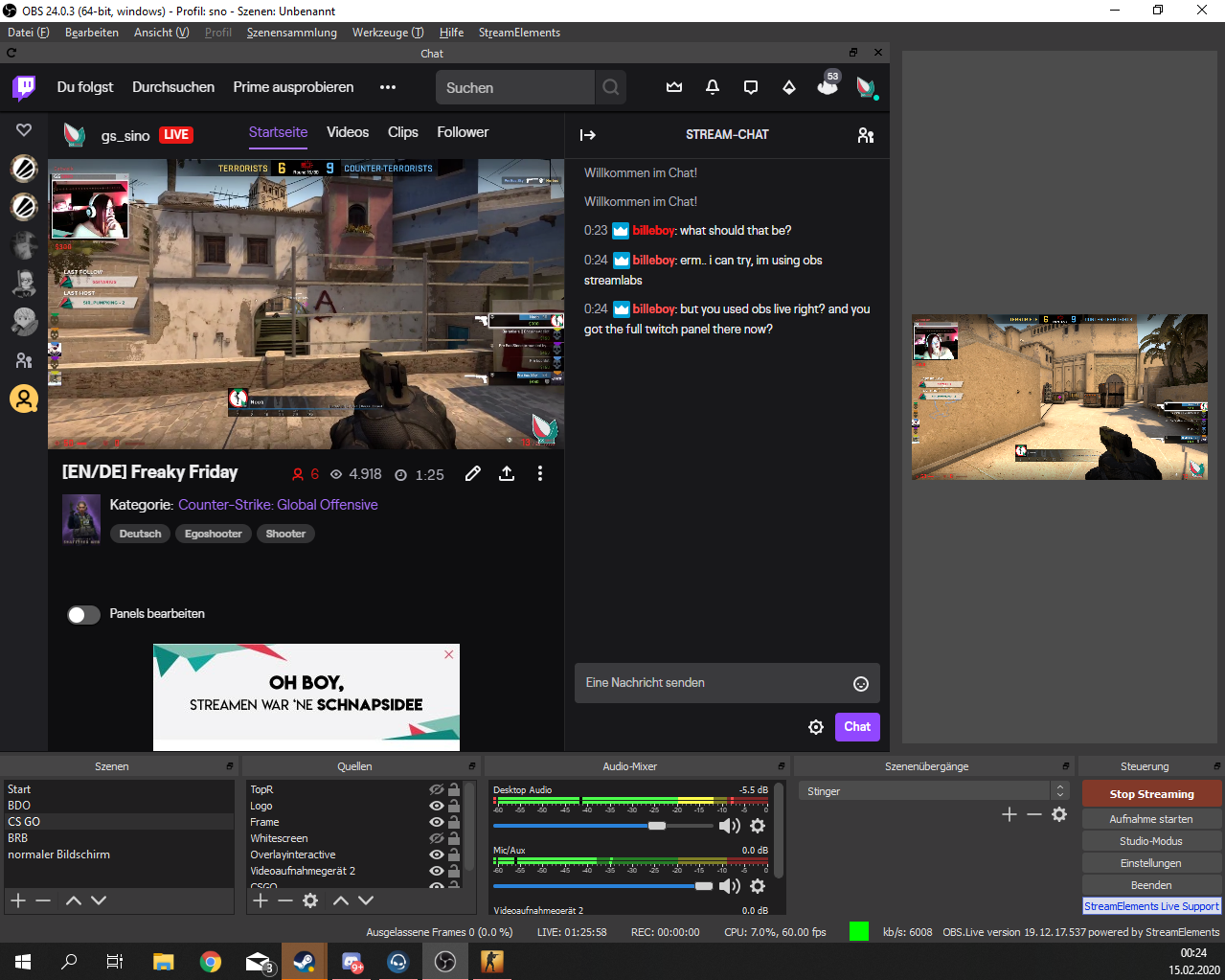
Hi there probably a known issue, but I cant find anything. I somehow ended up having the whole twitch website being displayed in my OBS live Chat Panel and I cant find a way to reset it
 steel bladeBOT
@tribal citrus Streamelements on top of OBS -> Logout -> login
 half sphinx
When I stream and game capture my game the game starts micro stuttering and lagging like fps drops feels like its not even 60fps sometimes in battles even if my fps is way above 60... But the actual stream looks buttery smooth. That happens in most of the games like CSGO, Fortnite and Overwatch and actually any game that I play on stream. Nothing that I have tried worked so far...
kindred fox
My suggestion would be to post a screenshot of your obs encoder settings
If you’re using nvenc, make sure psycho visual tuning is turned off
That one is the easy fix
half sphinx
With my old ISP I have streamed at 3500 bitrate... Still was having the same issue
half sphinx
Yes but I am streaming in Mixer at 1080p60 lanczos 10k bitrate
kindred fox
Why?
half sphinx
I like to have a good quality?
half sphinx
does mixer supports 900p?
kindred fox
Yep
 modest ember
Im not 100% sure if this is the right location but ive been getting
Faulting application name: BattleTech.exe, version:
Faulting module name: UnityPlayer.dll, version:
Exception code: 0xc0000005
kindred fox
It will
modest ember
when streaming battletech
kindred fox
That’s a battletech crash. You’ll have to ask them what’s up with their game. Have you googled to see if there’s a fix?
modest ember
that error relates to
this is Unity error which is usually associated either with memory
hardware (not necessary bad memory, maybe timing/ overclocking etc) or with screen altering/capturing software (osd, remote, streaming etc)
its only happening when streaming
half sphinx
@kindred fox I have tried previously to change my res multiple times to 720p60 and the difference between 1080 and 720p is the same
kindred fox
Again
Bitrate
You can set your bitrate to 10000 but if your GPU shits itself because it can’t render fast enough for that bitrate you’re gonna get a shit stream
half sphinx
I have flawlessly butter smooth stream. U can check my vods if u want
kindred fox
Yet you say there’s stuttering
half sphinx
The problem is ingame when I stream
kindred fox
Yes
Because your GPU is being stressed for OBS and can’t handle the game
So lower the bitrate
Lower the resolution to 900p
It will be fine
I’ve done this enough times to know how this works
@modest ember are you capturing via window capture or game capture?
modest ember
ill check
kindred fox
You might try window if you’re using game, otherwise you might be stuck using display capture
half sphinx
My GPU isnt going above 60% when I stream as it shows on task manager. I have an GTX 1060 6GB and a R7 1700X, 16 RAM 3000mhz.
kindred fox
Yeah you’re killing your GPu
I have a 1080 and it can’t do 10000 bitrate 1080p
And an 1800X with 32Gb ram
I have a faster computer and can’t do it
modest ember
looks like window
kindred fox
I’d rather lower my resolution for my stream and have excellent quality, than have settings that break my gameplay
@modest ember try game capture and see if it still crashes
modest ember
k
kindred fox
You can ask the obs discord as well, but with your hardware your settings are incorrect
modest ember
battletech just ended content
kindred fox
That 1060 maxes out
modest ember
so its not easy to get more support
kindred fox
Ah, then that’s about all the help I can be it’s it crashing. Display capture is a last-resort that shouldn’t crash it
modest ember
cool
ill try it
its not happening every contract
its like every other contract
when the game is loading the contract its lags a lot and has to run a lot of code
the intense resource jump is what i think is causing it
half sphinx
I dont get it... When I have been streaming to YouTube or Twitch before with even lower bitrate because I was having shitty internet upload speed and there was the same issue... Even on lower res like 720p... There was not a single difference... I have tried soo many things... I have been changing the settings, reinstalling gpu drivers, disabling preview... All monitors to same refresh rate... Nothing helps... I even have pictures that I have been taking with benchmark when I dont stream and when I am streaming.
without stream
with stream on
Recently I have been capping my frames to 71 and that helps juuust a little bit... But still I notice that microstuttering like not feeling 60fps and have just a strange feeling in general with the smoothness only when I start my stream and game capture my game.
half sphinx
I have an Ryzen proccessor so No, I dont have second GPU
 peak nova
Hello everyone! I’m having issues getting my overlay to show up through the browser source. Can anyone help?
steel bladeBOT
@peak nova To add your overlays to OBS, add a new browser source in your scene. Paste your overlay URL in the browser source properties, set the dimensions to 1920x1080 (unless you changed them on the website), and ☑ “Shutdown source when not visible” https://youtu.be/KDvLynUqXI4
peak nova
That didn’t work
steel bladeBOT
@peak nova OBS -> settings -> advanced -> scroll down -> enable/disable hardware accel.
https://i.imgur.com/ggMe9ZE.png
kindred fox
Try that next ^^ disable acceleration if it is enabled
peak nova
Thank you! Appreciate it!
kindred fox
You are most welcome
 astral wraith
Guys... question... again... So, On SE page, when im creating the widgets etc... Cant I have different links, to create diferent sources on OBS live? Like, one for alerts, other source for latest donos etc etc? I dont want to have enerything on the same source... i want to move them freely on obs..
astral wraith
DUDE, put the phone down FailFish
 umbral moth
I have an echo when trying to use my media request on my obs.live, why is it double playing?
kindred fox
@umbral moth make sure you check the box for your browser sources to shut down when inactive
umbral moth
ok
kindred fox
@astral wraith the idea is that you build an overlay for each scene, adjusting elements as needed. This reduces overall resources used when the scene is active as each browser source is essentially a chrome tab, and you know the chrome tab memes.....
So by putting everything into a single overlay you’re reducing the resources your computer uses while streaming
You can have a shit ton of overlays for each possible scene you want, so that isn’t a restriction and they can all be laid out differently
astral wraith
I have like... 5 scenes and 15 sources or so on them
astral wraith
I like it like that, I want to move things on obs.
no, web cam, alerts, chat, images, etc
some are browser yes
kindred fox
As long as you have the ram to do it, it’s not wrong
astral wraith
I just added my browser source for the SE (Ive been moving stuff from other platforms for SE)
32gb 3200 mhz
kindred fox
I’d recommend looking at creating a scene for each variation layout you want and building it as an overlay
astral wraith
And im ok with the browser source for the alerts, but, now, for exemple I want the "latest x " etc on another source
kindred fox
I have 32Gb as well so I’m not scared of browser sources, but reduced resource use is reduced resource use 😉
I get it. It’s a personal preference
Do you have a stream deck?
astral wraith
I do...
kindred fox
Maybe look at the enable/disable source in a multi-action?
astral wraith
dont u rather talk instead of typing dude? ur giving me weird "he might have an accident " vibe....
astral wraith
like... cant i create various diferent browser sourches on the SE editor thing?
kindred fox
But I get what you’re doing, and I think it’s respectable, as it is your stream and there’s no wrong way (unless you have seriously fucked encoder settings)
Each overlay would be a separate browser source
kindred fox
So you could add them to a scene and activate/deactivate them as needed with your streamdeck
So you can have all your stuff, load/unload on command, and it still doesn’t eat away resources. Best of both worlds
I never thought about using my streamdeck to do that until this convo
It’s pretty ingenious honestly
astral wraith
aint got a clue what u on about just now... I think we are talking about different things at this point
kindred fox
Kind of but not really
You want independent browser sources you can adjust on a whim
I was talking through what you’re wanting by building overlays in the editor for each scenario you’d need to adjust the layout, and simply activating the overlays for whatever you need them for instead of having to adjust things in obs
Instead of adding 15 browser sources for each element and organizing them as you need to for a specific game or whatever, it’s just activating and deactivating an overlay source
astral wraith
Right, I get what you mean now.
Thats a complete new way of working... would have to change all my shortcuyts on the deck, etc etc
so, we cant have diferent sources, thats it?
one just with my "latest sub" latest follower" etc right?
because for exemple, look at this... when im capturing on my "tv" on the stream i sometimes capture a game, video, steam, spotify and I cant ad them behind the TV if i dont have the source in front...
kindred fox
One sec
You can have different sources
Yeah, like that, but imagine one overlay for display capture or game capture or chatting
And it’s just the active overlay
One sec and I’ll see if I can grab mine
(Yeah, from my phone)
astral wraith
how do I do it then? Have one for alerts, how do I create a complete new one for other things?
kindred fox
So I have it set up by “scene”
But your way also works
So instead of having to “relocate” a webcam border right, you duplicate it to a new blank overlay and position it for display capture or game capture or “chatting”
astral wraith
i must be retarded
kindred fox
Then name the overlay what you would normally label as a scene
astral wraith
im sorry dude
I started by sayin sources and ended up talking about scenes
LOL MY FKIVNGDNFBDFNS
astral wraith
I want diferent sources
kindred fox
Right
astral wraith
one browser source for Alerts (done) and now, one for followers, etc etc
sorry bout it, its almost 5 am been at this for wours..
hours
kindred fox
So instead of having all your sources active as browser sources, you’d activate one browser source for follow sub count or tv or game capture based on how you wanted it laid out in the scene
Don’t sweat it, I have been there
The important ones are display/game/window
You’d build an overlay based on the game you’re playing so it’s the active source during that particular game
And the only active source
astral wraith
but i do not want to have all my "shit" on one source
kindred fox
You don’t have to
You have the ram to make multiple overlays for whatever layout you want
And just enable/disable them as needed
Does that make any sense? I know we are talking about accomplishing the same thing, but not the same thing
If you hit me up tomorrow in about.... 14 hours I can talk you through it
Go to sleep
😉
astral wraith
na man, that is now what im looking for
kindred fox
Lol
astral wraith
so the answer is, i cant create a diferent source link for a diferent thing on SE editor
*not
kindred fox
Instead of having one overlay for each “widget” you’re building an overlay for each layout you want so all the widgets are laid out in the browser source, and what you stream is just one browser source instead of 15
Then just turning each one on/off depending on what you’re doing
It’s a small resource savings, but worth looking into
Each overlay is a new source link
So essentially you’re already doing it
astral wraith
Yes, but by doing that, i wont be able to do other things.
kindred fox
Like what?
astral wraith
Its ok, all I wanted to know was the "can I have diferent source links"
no worries dude
kindred fox
Yes indeed
kindred fox
Each overlay is a source link
So when you make a new overlay it becomes a new source link
astral wraith
and wheres the link to ad to my sources on obs
kindred fox
When you enter the overlay editor, there is a link there
Or you can click launch and it should give you the option to open in a tab or copy the link
astral wraith
oh my...
yes i have it
but its ONE link for all the crap that i put in it
as i said i have it
i have my Alerts set up
they work
its fine
my question is... OTHER link, for OTHER source
that was the only question since the start xD
And yes, it cant be done, its fine, ill find a way
astral wraith
And I made it. Found a way around.
Thanks for your time @kindred fox
astral wraith
Yea, next time let people know that if they create a new overlay the link will be defferent 🙂
different *
 hazy verge
So I have a question about discord sound in my obs studio. I use corsair Hs70 wireless headset for my discord gaming and while streaming on obs recently, the discord no longer goes through the stream. I attempted to change the desktop audio settings in obs to fix this issue but it will not work. If I change my discord output from the headset to say my monitor, obs works. Anyone have any idea how to fix this?
 sullen sand
Question: I jokingly banned a few friends from the song request bot and am having trouble figuring out ho to unban them. Can anyone point me in the right direction?
shy mountain
@sullen sand dm me your username and theirs.
steel bladeBOT
@hazy verge For the best OBS support, please join their Official Discord @ discord.gg/obsproject
hazy verge
thanks I will check with them
 maiden horizon
is there a way to import scenes from OBS to SEOBS.live?
 mild widget
hey all, my streamelementsobs since the latest nvidia update causes my docks to become pixelated and blurry, any suggestions on what i can do to stop this or do i need to resort to rolling back my driver
steel bladeBOT
@mild widget Please follow these steps:
close OBS,
open the Nvidia Control Panel,
in the left menu select "manage 3D settings" and then under the list of options (right panel) press "restore default settings",
Start OBS again.
shy mountain
Fat fingering my keyboard 
shy mountain
@maiden horizon obs.live is a plugin for obs so you dont need to import them again
maiden horizon
sorry, I meant to put streamlabsOBS
StreamLabs to obs.live
I do the import, says its done, but i cant not find
steel bladeBOT
@maiden horizon To add your overlays to OBS, add a new browser source in your scene. Paste your overlay URL in the browser source properties, set the dimensions to 1920x1080 (unless you changed them on the website), and ☑ “Shutdown source when not visible” https://youtu.be/KDvLynUqXI4
shy mountain
Eqch imported scene from slobs is now an overlay in the dashboard
maiden horizon
ok
shy mountain
Which you add like the above instructions to obs
maiden horizon
ty
 lavish junco
Is there any way to get obs to multicast natively like SLOBS does ?
kindred fox
You mean NDI?
 toxic fern
@lavish junco You'd need to restream to do that and it actually would not work nicely with OBS.Live from what I understand.
 lament crag
Hello! If I want to play and stream Xbox through elgato and off my PC, but I want to be on the Xbox app on my computer so the party chat goes through that, how do I make that happen?
shy mountain
You might have to ask Elgato how to capture the party chat voice
lament crag
It’s not going to be captured by the elgato. I want obs to pick up the audio from the Xbox app
On my computer
Would it be a setting in the desktop audio function?
lament crag
I’m not sure. Should the audio output be on something specific?
shy mountain
In all honesty, I don't know the elgato software to be able to help you on that.
shy mountain
so its best to ask either in the elgato discord OR obs discord.
discord.gg/obsproject
discord.gg/elgato
lament crag
NickMercs streams PlayStation through a PC and talks to his teammates in discord.
How does his chat hear his discord teammates talking
shy mountain
OBS is capturing the sound from Discord
lament crag
Okay
shy mountain
As long as the default output from Discord is set to the same device as the default output from OBS
it should capture it
shy mountain
usually in OBS it should be set to "default device"
lament crag
Okay
shy mountain
unless you use Voicemeter and some other audio device changers
lament crag
So if I make the obs my “headset” and the Xbox app audio output the same “headset” it should capture it?
shy mountain
yes
lament crag
You’re the best. Thanks!
 barren quarry
Hey guys I had to reinstall windows, so having to download everything again. For some reason after installing OBS.Live I keep getting these little errors pop up: "Code execution cannot proceed because VCRUNTIME140.dll/MSVCP140.dll/ was not found" ...How can I fix this?
shy mountain

Microsoft Download Center
This update is the latest in a cumulative series of feature additions and bug fixes for Microsoft Visual C++ 2015 Redistributable.
shy mountain
barren quarry
There wasn't anything else installing
 rustic storm
hey there 🙂 using obs-live, newest version, but my SE-Bot does not show my name. it just shows StreamElements. Please help me.
late furnace
@rustic storm for future reference, please do not post one question in multiple channels. Please and thank you!
lament crag
How come when I stream my Xbox gameplay through the elgato it does not pick up in game game chat? obs doesn’t
raven marsh
my obs live is full screen and i cant minimize it, what do i do?
is doesnt show de options to minimize or close
kindred fox
F11
raven marsh
thankssssss
kindred fox
👍
 lament vessel
Hi anyone who can help. There is a rather embarrassing problem where audio from a video redemption automatically plays after every image and sound redemption the video is Webm as directed but still suffers the same issue. I use OBS for streaming.
lament vessel
Hi @kindred fox yeah, I have set up 5 picture/audio redemptions and one video redemption. The video is an edited version of Sheldon in the ball pool shouting Bazinga. If I redeem any of the picture items they play for 10 seconds which is as setup in my SE overlay, then you hear Sheldon saying Bazinga which should not happen (especially if I am being raided and using the hype or raid redemption)
kindred fox
So they are store redemptions and an alert?
lament vessel
I'm not sure what you mean but in SE store I've set the checkbox on page 2 to alert
Is that what you are referring to @kindred fox ?
kindred fox
Maybe, I need to get to my pc
Does it happen if you emulate a raid alert in the overlay editor?
lament vessel
I've just checked and no it only seems to be with redemptions
kindred fox
Ok. If you emulate a redemption do you experience the same issue?
lament vessel
Just checked now, it is fine there too, no issue
kindred fox
Okay. I have reported the issue and QA is looking into it. I don't have an ETA on when they'll get back with info
lament vessel
Thanks, if I have any success with tracking it down I'll at you to let you know and share with the community so they can mitigate it. Thanks for your time @kindred fox
kindred fox
You might check to see if you have any custom commands for redeeming items that are triggering on a keyword
Usually if you set a command keyword, it will trigger without typing a full command and could cause similar things to happen. It’s a place to look, not necessarily the cause in this case
lament vessel
I'll check that now cheers. I'll make the keywords more unique. It looks like if I refresh browser source cache in OBS the issue goes away for the first iteration but as soon as the video gets redeemed once it will happen from there
kindred fox
I would bet that’s a bug with the widget. QA has it and is going to look into it.
lament vessel
Cheers, I'm genuinely intrigued. Going to make a second video alert redemption and see if the issue either goes away or of it chooses a particular one from the two.
 bronze garden
what is happening when I press go live there is no audio on my stream but there is audio on my recordings
can someone help?
 nimble fiber
guys I am trying to make a stream, but when I'm going to make the game recording (it's suposed to appear the Sea of Thieves game) it apears just a black screen. I tryed to uninstall all the other recording apps, and runned the OBS Live as an admin. But nothing works
 zealous saffron
Anyone out there to help with some stream settings?
 open rose
Yo @zealous saffron, ask and everyone able to answer will do it
zealous saffron
Just wondering about some of the advanced settings in OBS and working with Elgato camlink4k and getting the best quality possible.
open rose
Sry i dunno elgato stuff
 abstract pagoda
Someone up?
 hardy robin
kindred fox
hardy robin
kindred fox
@hardy robin delete the JWT Token
 agile obsidian
So the only way to have a custom name with the bot is with the obslive plugin? The plugin caused issues on my OBS install so I had to completely remove.
kindred fox
As of right now yes
agile obsidian
rip, then I guess I can't use the se bot. If it didn't break my OBS I'd use it.
 copper crater
so currently my alerts from my overlays don't pop up in my obs.live but they do pop up in the overlay editor. Although, the overlays do play the audio in obs.live it just doesn't show it. Could anyone possibly help me out?
steel bladeBOT
@copper crater OBS -> settings -> advanced -> scroll down -> enable/disable hardware accel.
https://i.imgur.com/ggMe9ZE.png
 wise harness
When I put on a song to play on streamelements to my stream it said that there was no widget attched, what does that mean
kindred fox
Overlay editor >> widgets >> add Media Request widget
lavish junco
Sorry to bother, I imported an alert box from SLOBS but the CSS is off on it, is there any way to fix that? Like the text for the alert goes above the animation instead of on top of it
lavish junco
Omg I didn’t see one se
So yeah it was deleted as the first one but the text is above the video not on top
selected*
honest echo
if you know sometime abot css you can go one level further enabling "custom css"
lavish junco
like absolute position?
 ripe flax
@lavish junco just mess with the margins in advanced text settings.
if you're trying to get that text on top of the graphic, just increase the top margin
lavish junco
Okies ty
lavish junco
@ripe flax that worked perfectly ty
 slim wyvern
Hello, I managed to turn the Facebook broadcasting on accidently in OBS live. How do I turn it off again so it's only on Twitch?
abstract pagoda
Hello
Could someone help me? my game isnt smooth FPS are fine but game isnt smooth at all, 8700k + 1080Ti https://obsproject.com/logs/GXZP5OunnAqx6hIi
steel bladeBOT
@slim wyvern Streamelements on top of OBS -> Logout -> login
slim wyvern
lol, as easy as that eh? Thanks.
 odd kraken
rugged quail
odd kraken
rugged quail
i have to repeat my question from a couple of days ago: after installing Streamelements OBS.live, is there a commandline command to avoid to start the SE OBS.live-part, and only OBS Studio is started?
I know that you can disable OBS.Live and - for the current session - a switch to OBS-Studio is possible, but I prefer to have a desktop shortcut - same as there is a shortcut create for the Streamelements OBS, that I have the native OBS Studio, and both in the same installation to avoid having an extra part to maintain.
The installer only created the Streamelements link (with the SE icon), but regardless: every OBS link on my system starts OBS with SE OBS.live
kindred fox
Click start > type OBS Studio
rugged quail
Hi, I accidentally set up obs.live to be using my account as the custom bot name and I want to change it to another twitch user, but I cant figure out how to change which user its using
nvm, just figured it out, I just removed the custom bot and added again, derp
 burnt pumice
I have an overlay from somebody that has a single widget. Can I export that to an existing overlay or do I need to copy/paste it?
 clever flax
I have this problem a few days ago.
My media request does not load in the OBS application, but when I am on the streamelements page it works normally. Could you help me?
rugged quail
@kindred fox this link opens SE OBS.live, too. Thats why I ask for a commandline-parameter NOT to start the OBS.live-extention with OBS.
kindred fox
Lemme see as soon as I’m parked
kindred fox
Ok can verify. I will ask about it
 stone tartan
I am trying to customize my bot name, but that section isn't loading in my ground control app
steel bladeBOT
@stone tartan Due to a recent change from Twitch API, these features are affected by the change:
- Ground Control does not have Custom Bot Name
- Subscriber count will count the Channel and any other permanent sub you may have (+1 or +2 or +3 on top).
We are working on fixing both issues, but there is no ETA.
OBS.Live still has Custom Bot name working fine in it.
stone tartan
Thank you!
toxic fern
@rugged quail The only way I can think of that'll work with this is to download the zip version of OBS. Simply extract the files from the zip and it should grab the settings and sources from the other one yet maintain the vanilla behavior.
 toxic trout
Hey, it doesn't appear there's a general support. Someone I know is trying to do fade animation on a "recent follower text", but it doesn't animate at all, it just updates like normal, both on the SE overlay editor and in OBS as the browser source. Tried googling but there's nothing about this.
rugged quail
@toxic fern I'm aware if I use the portable OBS-Version it will of course run within its own eco-system, but that would also mean to maintain 2 OBS-Versions, and THAT is what I want to avoid. I had the hope that there is an commandline-parameter for that, similar to other addons like Websockets. Maybe this feature should be included in one of the future versions of SE OBS.live
 jagged girder
Hey, it doesn't appear there's a general support. Someone I know is trying to do fade animation on a "recent follower text", but it doesn't animate at all, it just updates like normal, both on the SE overlay editor and in OBS as the browser source. Tried googling but there's nothing about this.
toxic fern
@rugged quail unfortunately that's not how OBS.live can behave. You either have it or don't. No on/off switch.
 hoary siren
hi. how to i see viewers in obslive
 wary dew
in the activity feed window, click on the hamburger menu in the top left corner, there is a 'show viewercount' toggle there
 vapid yacht
 solar fulcrum
hey guys high cpu usage issue on obs
70-80%
while running on hevc nvdia encoder and im using obs live
steel bladeBOT
@solar fulcrum Please provide a log from your last stream. To do this, in OBS go to Help > Log Files > Upload Last Log File and paste the link to the log file here.
solar fulcrum
here im not even straming right now
here the log file link(https://obsproject.com/logs/YPV-CPwCvFYbwAPK)
wary dew
maybe you want to make use of the ''shutdown source when not visible'' option
and always run OBS in admin mode
solar fulcrum
thanks man its works cpu usage come down from 50-8%
 elfin blaze
Hey guys, is there a way to force a "refresh" for ALL active browser sources?
elfin blaze
@wary dew I mean during a stream.. :/
I have some issues with a couple browser sources just randomly dying mid stream sometimes...
wary dew
yeah there isn't a refresh all button, only per source unfortunately
elfin blaze
I wonder how come nobody has through of that yet.. 😄
elfin blaze
I am aware.. But with all the additions it brings to OBS, that could easily be one of them don't you think? 😄
wary dew
no idea on how 'easy' that would be to implement
steel bladeBOT
@elfin blaze Check out the StreamElements ideas board: https://strms.net/ideas. You'll be able to add ideas, upvote ideas you agree with, and track their progress with email notifications. Adding and upvoting ideas also helps the staff know which ideas should be prioritized so please take some time to upvote.
wary dew
you can always put it on the board 😉
elfin blaze
Done. 🙂
 sacred forge
My Cloud Backup reports a network error. No backup. Please advise.
 fathom cobalt
@sacred forge Youve got a network error, good guess is that you lost connection sometime in the backup.
@sacred forge try again 🤔
sacred forge
@fathom cobalt I will. Lets see what happens. Tx.
fathom cobalt
let me know here ;)
 slim mango
Hey guys, my OBS.Live don't play overlay sounds, it's all normal on editor
animations are working too, it's just sound
steel bladeBOT
@slim mango OBS -> settings -> advanced -> scroll down -> enable/disable hardware accel.
https://i.imgur.com/ggMe9ZE.png
fathom cobalt
Try this ^
 empty sentinel
hey so my media request widget whenever i want to show video on stream my audio is doubling and i dont know how to fix it, i dont have 2 media requests in the overlay, any ideas?
honest echo
@empty sentinel maybe is output and monitor enable?
empty sentinel
sorry?
honest echo
when its play the music, you see 2 channels caching the audio (om the audio mixer of obs, the green/yellow bars next to the sources)??
honest echo
you ear it double or it sound doble on your recording/stream?
empty sentinel
i hear double
honest echo
ok, maybe its something of the monitoring side, click on the cog icon next on the audio mixer
go to advacnce settings and check if the audio desktop is set to "monitoring disabled"
trail ginkgo
Hi i have problem with not being able to get my own custom name, i did everything it tells me to do but yet streamelements doesnt save that account i asign the custom bot to. thanks
empty sentinel
@honest echo its not doing anything
honest echo
by any chance the editor web overlay its open on youe browser?
empty sentinel
nope
honest echo
you click on "show on stream" and start double the audio, right?
honest echo
make a quick record and check if double the audio or if is just the music
 surreal needle
Hi, I was trying to import from Streamlabs but it kept failing and I tried it a few times and the only thing it imported was the tips but it's now duplicated them, is there a way to delete them?
empty sentinel
its just the music when its shown on stream
honest echo
@surreal needle if toy want to import you overlays you have to install obs.live plugin
honest echo

StreamElements
The Ultimate All in One Platform for Streamers
any source for more than 30mb?
@empty sentinel weird.. try click on show on stream but disable then"video on"
empty sentinel
okay ill see
surreal needle
I've reset almost everything but it's still there.
honest echo
on the data tab
surreal needle
 lime berry
how do I add the Media Request thing to OBS
tulip hamlet
@lime berry Can you be more specific?
lime berry
when I stream, I want to show on stream what plays when someone requests a song - wouldn't there need to be a "Source"?
tulip hamlet
@lime berry https://www.youtube.com/watch?v=17eUkoZ6eIs

StreamElements Media request enables playing songs and videos in your stream. It's an upgrade of StreamElements Song request and Media share features.
Join our discord for live support: discord.gg/SE
Ground Control: https://strms.net/groundcontrolyt
Channel Management ...
 surreal arch
how do i add intro and outro screens with obs/streamelements?
tulip hamlet
Separate scenes.
surreal arch
Okay...where are they found in streamelements?
tulip hamlet
If you're talking about premade things, you can go through the themes in the Themes gallery.
surreal arch
Alright. And do they have links or something i would put into the new scenes?? I'm a complete noob at this stuff
steel bladeBOT
@surreal arch New to Stream Elements?
Check out our YouTube channel https://www.youtube.com/c/streamelements/videos
with tutorial videos from setting up the basics, to in depth details on how to use our product.
New to OBS? Here is a 4 step quickstart guide
https://obsproject.com/wiki/OBS-Studio-Quickstart
Want to learn even more? Here is an in-depth overview
https://obsproject.com/wiki/OBS-Studio-Overview
lime berry
I see, thank you for showing me the video
 pearl blade
How do I change my stream title before going live in SE? It doesnt give me any option
honest echo
@pearl blade you can set it on twitch dashboard, and on the dashboard of SE
honest echo
"Quick setting" right on the dashboard
pearl blade
so you have to goto the webpage to change the stream title now? I used to change it on SE itself
lime berry
View > Docks > Stream Information?
tulip hamlet
@pearl blade What streaming site are you streaming to?
pearl blade
obs live to mixer
tulip hamlet
Note that this option will prevent you from using FTL properly.
pearl blade
Okay so if I'm using FTL I can't change stream title before going live then ? @tulip hamlet
tulip hamlet
At least not in OBS.Live, correct.
The site will let you and Mixer itself will let you, of course.
pearl blade
Yes, but not until live and if you change games or want a new title sent with the noti to followers, it sucks lol
is there any reason for that difference between ftl and rtmp? or will that be an option in the future?
tulip hamlet
Because the option to set information in OBS.Live overrides the info in Settings>Stream in a weird way, I don't know the specifics.
pearl blade
no problem, thanks for the help man! have a good day
 ancient surge
Having an issue. Unplugged mybstuff, and moved my PC now OBS will pick up some of my cams some of the time, kne now always crashes which is an almost $600 camera. None of the mics work. I uninstalled, reinstalled, tested 18 different mics and inputs everything. Everything else works fine except OBS will not pick up audio unless you have every thing off except a cheap web cam then it will pick up audio from tbe desktop but nothing else. it was all working perfectly fine last week
steel bladeBOT
@ancient surge For the best OBS support, please join their Official Discord @ discord.gg/obsproject
ancient surge
Okay i thought this was for OBS Live help considering the channel is helpdesk-obslive
tulip hamlet
OBS.Live is a plugin for OBS Studio, not its own software, and doesn't change how audio works in OBS Studio.
ancient surge
@tulip hamlet ive got no clue my desktop its bit picking up any audio and now my gaming laptop as soon as a load OBS and try to adjust anything it locks up my brand new gaming laptop
tulip hamlet
The fine folks with OBS Project will be better equipped to troubleshoot why OBS Studio isn't playing nice with your hardware.
ancient surge
Ty
 hot summit
Hi im trying to import scenes from my streamlabs but it keeps failing mid way through any help is greatly appreciated.
tulip hamlet
@hot summit Scene import will fail if the assets are too large or if you're attempting to import Streamlabs-owned assets.
hot summit
ah ok ill double check this and try again thank you
 wraith sparrow
My friend is trying to download StreamElements Ground Control & StreamElements OBS and she keeps getting this error
hot summit
so I've successfully imported the scene but its still not actually imported?
tulip hamlet
Imports are not added immediately into OBS. They're sent to your account on the site as overlays.
steel bladeBOT
@hot summit To add your overlays to OBS, add a new browser source in your scene. Paste your overlay URL in the browser source properties, set the dimensions to 1920x1080 (unless you changed them on the website), and ☑ “Shutdown source when not visible” https://youtu.be/KDvLynUqXI4
hot summit
ah ok thank you very much sorry for the silly questions
 slender furnace
Hi I've noticed that my chat is blurry and hard to read all the sudden. https://imgur.com/gallery/GR5uaCG
Any help will be greatly appreciated!
 tulip hamlet
Have you checked for updates to graphics drivers and/or Windows?
slender furnace
Yes, everything is up to date
Seems like the Activity Feed is also doing the same thing
 tired falcon
how do I update to the latest version of obslive
tulip hamlet
@tired falcon What version is listed in the bottom right?
tired falcon
19.12.17.537
tulip hamlet
That is the latest version.
tired falcon
ok it just keeps crashing every time I go live out of nowhere today
tulip hamlet
Can you provide a crash log?
tulip hamlet
This is the regular log, not the crash log.
Please look in %AppData%\obs-studio\crashes
tired falcon
tulip hamlet
@slender furnace Please be patient, this is an irregular issue and emailing while I'm looking into it will only slow things down.
slender furnace
@tulip hamlet Very sorry, just kinda frustrated at the situations
tulip hamlet
Please check Settings>Advanced and ensure Browser Source Hardware Acceleration is disabled.
slender furnace
@tulip hamlet That fixed it! Thank you very much and sorry if I came off as a douche bag.
tired falcon
@tulip hamlet were you ablr to look at the crash report I posted?
steel bladeBOT
@tired falcon For the best OBS support, please join their Official Discord @ discord.gg/obsproject
 frigid kraken
Good evening, my stream continues to lag even though I’ve upgraded my PC to above the required specs and my internet as well 300mbs download and 2-5 upload (should be 30 upload but internet company is fixing this.) not sure what to do
I just want to stream from my PS4 at a basic 720
steel bladeBOT
@frigid kraken Please provide a log from your last stream. To do this, in OBS go to Help > Log Files > Upload Last Log File and paste the link to the log file here.
trail ginkgo
Hi Streamelements i need some help, i have tried many times now, i cant get custom name for my streamelements bot, i done everything right, but when i login on the bot account and save it the streamelements obs doesnt save that account. hope u can help thanks!
 lilac ocean
Ground control is still not available, to get it via obs.live follow the next steps
steel bladeBOT
@trail ginkgo Custom bot name requirements
- StreamElements bot modded and in chat
- Active overlay with alerts
- StreamElements tipping page in the panels below the stream (!panels)
- OBS.Live or Ground Control open
- Create a twitch account for the name you want to use or run the bot under your own name
- Custom bot name doesn't work on Mac
trail ginkgo
done all that
lilac ocean
can you show me the window in obs.live where it would state the progress?
trail ginkgo
its green at all 3 steps or requirements, but yes i can screenshare with u on discord if u dont mind.
lilac ocean
Also, I saw that a staff member had given the next steps for you to follow
"1) Right click on your OBS desktop shortcut -> properties - in the "Target" field add this -> --remote-debugging-port=40404
2) Open OBS(or restart if it was open)
3) Open your browser and type in "localhost:40404"
4) Click on "StreamElements - Activity feed"
5) navigate to the Console tab
6) type in the console this: store.customBot.removeCustomBotIntegration() and hit enter
7) Try setting the custom bot name"
trail ginkgo
ya keizar told me about this but i dont undestand the instructions
lilac ocean
I could ask if he can help you with teamviewer, if that comes out for you?
otherwise just tag him whenever you would be available to use teamviewer
trail ginkgo
he asked this last time, but i wanted him to explain to me with text so i can undestand it. :S
lilac ocean
i dont think you can explain it more than its explained in the above steps
trail ginkgo
- Open your browser and type in "localhost:40404" this i dont undestand
shy mountain
The steps above are made by me
trail ginkgo
hi keizar!
shy mountain
its clear as day what it needs to be done
trail ginkgo
can u help me please
i teamviewer with u
i just wanted to undestand it 100% myself
shy mountain
just DM me your teamviewer id and password
trail ginkgo
alright thank u
shy mountain
@trail ginkgo Let me know if the account logs in or not
trail ginkgo
thank u so much KeiZar it works now, atleast obs save the account now 😄
shy mountain
#🇳🇱︱nederlands
 jovial ridge
after windows update i have this ugly glitch in obs.live, do i need to reinstall and lose all my current settings, or can i do something about it??
steel bladeBOT
@jovial ridge Please follow these steps:
close OBS,
open the Nvidia Control Panel,
in the left menu select "manage 3D settings" and then under the list of options (right panel) press "restore default settings",
Start OBS again.
jovial ridge
cant do that becouse i optimized my gpu for gaming, and it was not a problem before
shy mountain
I can assure you that those instructions will help you resolve the issue you are getting with stuff getting fuzzy
jovial ridge
but why it started today? i run those settings for almost the year and it was okay untill this morning
jovial ridge
i started one by one change and low latency mode and image sharpening in nvidia cpanel was causing the problem so i put them back to off
ty
 drifting grove
Hello
rugged quail
Hello!
steel bladeBOT
@drifting grove New to Stream Elements?
Check out our YouTube channel https://www.youtube.com/c/streamelements/videos
with tutorial videos from setting up the basics, to in depth details on how to use our product.
New to OBS? Here is a 4 step quickstart guide
https://obsproject.com/wiki/OBS-Studio-Quickstart
Want to learn even more? Here is an in-depth overview
https://obsproject.com/wiki/OBS-Studio-Overview
 stuck maple
Ground Control isn't showing the Custom Bot Name Option. Its worked before on a different PC. I have A Tip Page and have many Overlays already.
steel bladeBOT
@stuck maple Due to a recent change from Twitch API, these features are affected by the change:
- Ground Control does not have Custom Bot Name
- Subscriber count will count the Channel and any other permanent sub you may have (+1 or +2 or +3 on top).
We are working on fixing both issues, but there is no ETA.
OBS.Live still has Custom Bot name working fine in it.
 lavish falcon
hi how to add overlays to stream elements
 dapper sapphire
hi
im iranian boy in last speak
i can open site in chrome
but obs cant open streamelements.com site
obs-browser[1]: error loading main frame url 'https://obs.streamelements.com/welcome': ERR_TIMED_OUT (-7)
obs-browser[1]: error loading main frame url 'https://obs.streamelements.com/welcome': ERR_ABORTED (-3)
obs-browser[1]: completed loading main frame url 'https://obs.streamelements.com/welcome' (HTTP status code: -3)
obs-browser[1]: completed loading main frame url 'chrome-error://chromewebdata/' (HTTP status code: 0)
firewall is turned off
kaspersky si turned off
and change the browser source hardware acceleration
honest echo
@dapper sapphire maybe its a DNS problem, you know how to change it?
steel bladeBOT
@lavish falcon To add your overlays to OBS, add a new browser source in your scene. Paste your overlay URL in the browser source properties, set the dimensions to 1920x1080 (unless you changed them on the website), and ☑ “Shutdown source when not visible” https://youtu.be/KDvLynUqXI4
dapper sapphire
no
lavish falcon
we cant see how many people watching ?? in OBS
fathom cobalt
@lavish falcon Activity feed >> hamburger menu I believe there is a toggle
lavish falcon
i can see their any thing
honest echo
@dapper sapphire https://www.youtube.com/watch?v=YXWQDj7yFo0
jovial ridge
ok so I have one more big problem after updating windows. My microphone is not picking up any sound if I literally dont yell, same settings same filters same boost level of microphone but when I speak normaly it doesnt pick up any sonud.
honest echo
@jovial ridge just on OBS on in windows in general?
jovial ridge
i think just in obs nobody was complaining in game
dapper sapphire
ok set dns to what?
kindred fox
1.1.1.1 or 8.8.8.8. First is CloudFlare, second is Google
honest echo
@jovial ridge remove filters, and then add one by one and make a little recording to see whats need to be change
dapper sapphire
not working
jovial ridge
i removed filters, even whitout filters with microphone on max its hard to hear, with game in backgroun it would be imposible
honest echo
@dapper sapphire what country are you located, and what is you internet provider?
@jovial ridge check the properties of the mic of windows
dapper sapphire
Iran
i check it web site open in google chrome but obs cant open web sits
do you want my complit log file?
 azure heart
Hello everyone!
IDK if this question should go here or somwhere else but I drop it here and let's see.
Today I got an Stream Deck, nice device by the way, but if I launch obs through the streamdeck the thing goes nutz...
I mean if i just start obs clicking the link on the desktop or so everithing goes right, it opens by default to my main 4k screen and i can move it to my second 1080 screen with no problem.
When I launch it with the sream deck the fonts apear gigantic and some panels goes quite over the size where is usefull.
this is normal
this is launched by stream deck
lime berry
I think the Media Request tour is broken
I put in the URL of the music video I was watching atm but it says to enter a valid URL
kindred fox
In your Media Request settings, do you have this box checked?
lime berry
no
kindred fox
Which platform are you streaming to?
lime berry
Twitch
kindred fox
so if you type !sr in your chat and paste the URL does it work?
lime berry
yes
dapper sapphire
no body help me?
lime berry
yes it shows up in StreamElements
kindred fox
@dapper sapphire You have already been answered. You have an issue with your ISP somewhere, and you need to resolve that before it will work.
dapper sapphire
its a mistake with a clear data of browser then the site open easy without vpn
i clear data of browser then the site open easy without vpn
steel bladeBOT
@dapper sapphire If you are not seeing the OBS Twitch integrations and have OBS.Live installed, please follow these steps:
- Make sure you are on the latest and greatest version of OBS.Live
- exit OBS (make sure OBS is not running)
- delete %appdata%\obs-studio\plugin_config\obs-browser\obs_profile_cookies
- start OBS.Live
- Settings -> Stream -> disconnect -> connect
kindred fox
Try that and see if it loads
 flat halo
Can anybody help me?
steel bladeBOT
@flat halo If you would like help from the StreamElements support volunteers/staff please post your question in one of the helpdesk channels and someone will assist you as soon as they are available
#helpdesk-twitch | #helpdesk-youtube | #helpdesk-facebook | #helpdesk-mobile | #helpdesk-selive | #651453660810838026 | #helpdesk-merch
Thank you for being patient.
lime berry
so yeah
I think the media request tour is bugged
kindred fox
I asked if someone could double-check it for you
dapper sapphire
still not working
😡
comon guys i need help
about 4 hour in discord for solve my problem
lilac ocean
Have you followed the bot steps for clearing your browser cache?
dapper sapphire
yes i cleared browser cache
reinstall obs and streamelements
but not working
 gilded heath
Is it possible to import an overlay that was already imported? I mean, Ive imported a twitch overlay to my Facebook, but now I want the Facebook one to be imported to my twitch
kindred fox
@gilded heath in the list of overlays I believe you can click Duplicate Overlay which will present a list of places you can duplicate it to
 rough pawn
Hi, I'm having trouble in my obs, the window capture option isn't working. It doesn't show anything regardless of what window I try to show.
kindred fox
@rough pawn are you running OBS as an administrator by right-clicking the desktop shortcut and selecting Run as Administrator?
dapper sapphire
streamelements good software but have bullshit support😡
fathom cobalt
?
rugged quail
?
lilac ocean
@dapper sapphire I literally just asked you if you followed the bot steps and I had not been seeing that you just reacted, please be respectful
rugged quail
I love the Support from StreamElements. I dont care if they dont know the issue as long as they tried
lilac ocean
Support here is on a voluntary base and sometimes it's extra busy or at a time like this, people are eating
rugged quail
Love you guys so much ❤️
lilac ocean
I have asked around for you, but like said, please stay respectful, this attitude is not going to solve your problem
dapper sapphire
ok bot say clear profile cookies i do this 3 time and its not working just a white screen i cant connect to twitch with login account just with stream key
rugged quail
Have you tried reinstalling??
plain sonnet
as you have already tested and proven in the twitch helpdesk (picture below), its down to your ISP/connection.
you will need to have your vpn on to use obs with the SE plugin,
either use your vpn or try streaming without the stream elements plugin and only use obs.
if you have to use vpn to access the SE website then there is nothing anyone here can do as this is on your side
dapper sapphire
plain sonnet
awesome, so what about my second answer?
dapper sapphire
its my mistake with clear data of cchrome it can open SE site without vpn
but after fix google chrome
still obs show a white screen
plain sonnet
thats ok, are you able to use normal obs, without the streamelements plugin?
plain sonnet
i see that you were trying to uninstall and then install BOTH, but can you only install obs, not the plugin
dapper sapphire
yes
obs work correctly
i test it
send log file to obs supporter they say its plugin bug
plain sonnet
awesome, do you need the plugin for anything like song requests while streaming?
to be more clear, do you use song requests for viewers?
plain sonnet
before you uninstall the plugin (if you havent already)
could you go to the streamelements menu at the top of obs and select report an issue option,
just up in there that you have constant white screen, and add your discord name.
this will send it to the devs so they can investigate the issue.
after you have done that you can remove the plugin
as for the overlays, you can add them as a browser source in obs,
the url can be gotten from the SE website.
for the chat and news panels,
when you connect your twitch account in settings > stream you will automatically be given these
plain sonnet
normally this is down to an option in obs settings that you will need to turn off, however if you are not using the se plugin then you should not need to turn it off.
the best way to know for sure is if you completly uninstall obs and obs.live (the SE plugin)
then restart your pc and do a clean install of obs from their website here https://obsproject.com/
try adding your overlay then, if its still not showing we can turn off this setting
 mortal bone
hey, I am trying to let my text scroll in a loop but it does not seem to work. I added a text widget and ticked on scroll but it does not seem to scroll as it should. It leaves a huge gap between the beginning and the end and I would like to let it start again a few characters after it ends like you would do it in for example obs it self?
any ideas how i can manage that
kindred fox
Check the widget settings for time between loops
I think it’s there somewhere
I’m on my phone atm so can’t check where it is
mortal bone
@kindred fox the only setting it shows is the scrolling speed i do not see any loop settings sadly
kindred fox
Mine seems to scroll correctly
mortal bone
yes it is scrolling but it needs to start again after it ends and that is not happening
the longer the text the longer it takes before it starts again
I had a script on my older overlay but i forgot to copy it 😦 someone made it for me here a couple of years back
kindred fox
Can you paste the text you're trying to scroll in here?