#helpdesk-twitch
1 messages · Page 864 of 1
 silk walrus
I understand this.
I have been live for 21m 30s
The bot has been enabled since.
I have 2 accounts watching the stream.
Both say 0 seconds of watch time.
The loyalty thing has been checked and i pressed save, twice actually.
 wary halo
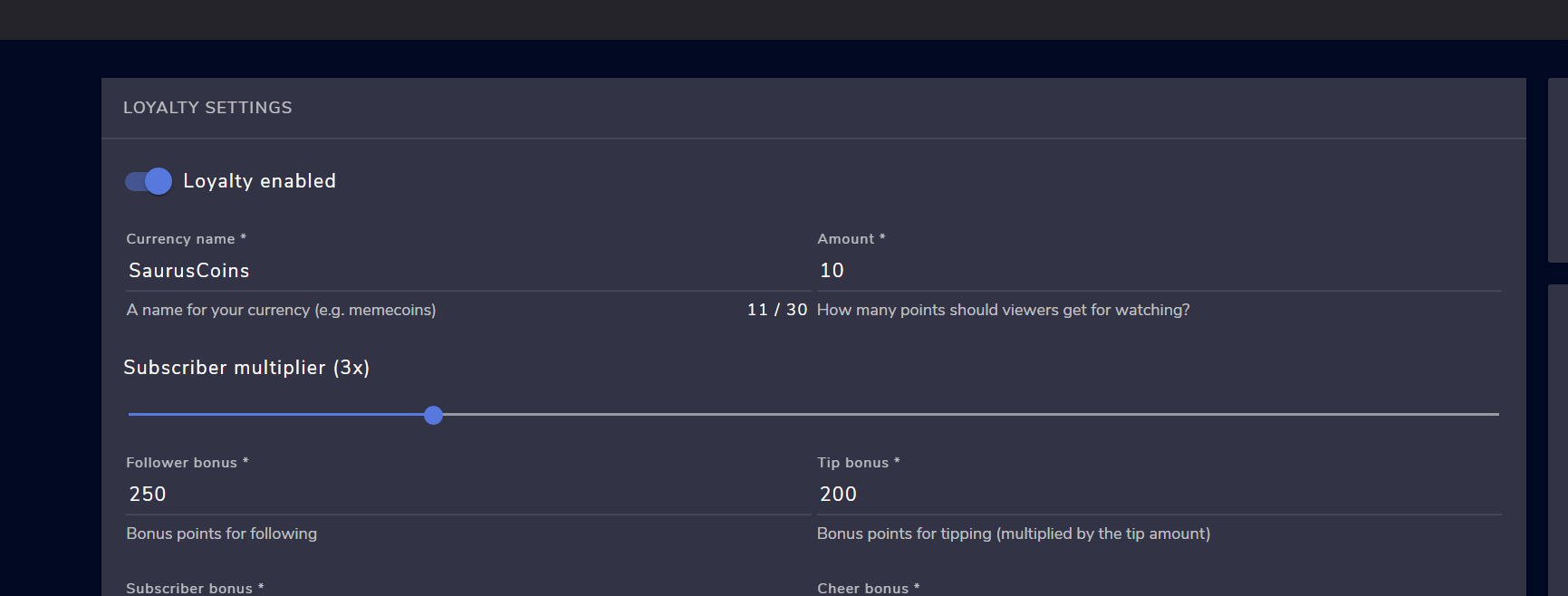
when you enable the loyalty system it needs to be higher than 0 yes
silk walrus
Sure
wary halo
 silk walrus
Everything has a custom variable, above 100
Mhmm, yeah.
That has all been changed.
The only thing that is still 0 is the cost to use the !watchtime / !viewtime command.
Look, don't worry about it.
 prisma relic
go to your leaderboard: https://streamelements.com/dashboard/leaderboard/watchtime ... .anyone there with more than 10 minutes?
 zenith widget
 silk walrus
I'm probably just going to get rid of streamelements or strictly use another part of it.
prisma relic
😉
 zenith widget
Can I explain now how time works? 🙂
zenith widget
 silk walrus
Obviously the S.E bot can't keep up with a stream and has a 10 minute delay.
zenith widget
If you waited 2 more minutes
zenith widget
But not the loyalty system
 foggy bramble
peace guys 🙂
zenith widget
which is what teh command tells you to do - turn on the loyalty system
silk walrus
I added the bot and then the loyalty system about 30 seconds afterwards.
zenith widget
so since you came in at :07 and at :14 there was still no watch time accumulated
prisma relic
did you have a question @foggy bramble ?
zenith widget
and now there is
silk walrus
Okay, you simply don't understand.
zenith widget
then you've turned on the loyalty system at :07
foggy bramble
no i have a coffee
silk walrus
I waited a bit before entering this discussion.
wary halo
@foggy bramble If you want to just chat you can go to #general-chat
this channel is for support
zenith widget
Its clear its working as intended and there is watchtime now
foggy bramble
i want to follow conversation , it interesting for me is well as i new in here, no stupid jokes any more
zenith widget
did you follow the steps i provided?
including adding the redemption widget to an overlay?
 steep yew
yes
prisma relic
^ "redemption widget" ... not the normal alertbox.
steep yew
i know
it shows text that i redeemed an item but no sound
and not any gif i added to the store
 viscid pebbleBOT
@steep yew Please provide your account ID found at the top of this page: https://streamelements.com/dashboard/account/channels This ID is public info and safe to share here.
steep yew
603ba33fed12b5b6d15908e4
@viscid pebble 603ba33fed12b5b6d15908e4
do i need to do anything else ?
zenith widget
I just redeemed the tuturu one and it played sound via the redemption widget as it should.
do you have the tab muted?
or the overlay added to OBS?
steep yew
@zenith widget no the tab is not muted
and its added to obs but let me try
@zenith widget thank you it works now oddly enough ! maybe its just my tab that doesnt make sound
 sullen ruin
When I use this overlay with the chat box their name seems to come up but not the actual chat itself as you can see, any fix?

 ionic kelp
That a Nerd or Die overlay by chance?
sullen ruin
No it’s stream elements one
ionic kelp

sullen ruin
It’s the “connection static super theme”
 smoky cosmos
hi so i have an important question
 pearl hedge
Hi, so I streamed today and added a KappaGen, but I noticed it isn't working. No emotes would appear on screen, from chat, but I was okay with this -- Although the emote-splosion worked last time. Now it's not showing up at all. I even cannot pick what emotes to use in the explosion. It's just blank. any clue what happened?
smoky cosmos
so i am a moderated for one of my friends and he forgets do his transitions and we were talking having me control his transitions if he forgets how would i possibly do that if he is using stream elements
ionic kelp
Transitions?
pearl hedge
Like scene transitions; his/her friend is forgetting to switch from a talking scene with only his webcam and chat maybe... But we can't see the game. So he needs to switch back to the in-game scene where we see his screen and maybe his facecam
I'm not sure if you can do that tbh, you'll need to have OBS open from his computer to switch scenes. Moderators can't do it, I don't think.
smoky cosmos
pearl hedge
Like scene transitions; his/her friend is forgetting to switch from a talking sc...
yeah so i get what your talking about but he wants to do like a command that will do it for him and we read that there is a script that he needs to download but we have no clue what it is
pearl hedge
Ooh, is it from StreamElements?
smoky cosmos
yeah
prisma relic
search in #widget-share for OBS 😉 i think it's in there
pearl hedge
Ah I see, someone should be able to give a link then
Boom there we go Lol
Okay now someone help me with mine : (
Hi, so I streamed today and added a KappaGen, but I noticed it isn't working. No emotes would appear on screen, from chat, but I was okay with this -- Although the emote-splosion worked last time. Now it's not showing up at all. I even cannot pick what emotes to use in the explosion. It's just blank. any clue what happened? **
smoky cosmos
pearl hedge
Hi, so I streamed today and added a KappaGen, but I noticed it isn't working. No...
i have never tried kappagen but i will most def try and figure it out just to get some things going for you
prisma relic
OBS Control: try this one? #widget-share message
pearl hedge
Thanks!
prisma relic
.... kappaGen .... i'll take a look; that's one i've never set up
pearl hedge
I wanted to use it, and it worked when I set it up, but now, it won't do any emotes and I can't pick what ones I want in it. Even making a new scene with the widget isn't working Lol
thanks guys, I was really excited for this one, but there wasn't any
 pearl hedge

 pearl hedge
I've used the entire screen, as well^
prisma relic
pearl hedge
🤔 ... hmmm... you are logged into a Twitch account right? hahah
should be:
 pearl hedge
I am, but! you might be on to something
I did change my name, maybe I have to resign in
viscid pebbleBOT
@pearl hedge If you changed your name on Twitch, please follow these steps:
- Visit https://streamelements.com/logout and then log in again by connecting with Twitch.
- On the right side of the dashboard page that opens, select Join under bot settings. If it says Part select that and then select Join to send the bot to the chat. Don't forget to mod the bot by typing /mod streamelements in your channel if you have not already.
- Post your old and your new name here so that we can update your channel's chatstats tracking (must be done by staff).
pearl hedge
It wasn't that
I did fix it, and StreamElements bot was in my chat Lol
Oh so my old name was: Akai_Jigoku
Now it's: AkaiJigoku
I just took the underscore out
smoky cosmos
yeah maybe it is your login
pearl hedge
I did re-log in already so I don't think it's that. Because the rest are still working fine. It's just the Emotes one
prisma relic
 supple lodge
but I can't manually add viewers
supple lodge
but I can't manually add viewers
are you trying to add it into the 'session data' ?
^ it might be the name change thing.
you should have a menu of emotes like i posted; with at least the globals
prisma relic
I've passed it along for someone to look into. You might be right that the name change crossed the wrong wires.
 willow coral
is there anyway for something like this to work? command fetches an endpoint on my api that scrapes the creators youtube videos and would be nice for it to return the message to update the command !recent

 odd knoll
hi guys need some help
the chat function in obs live doesnt conncect to stream
any1 know how to fix

top right
prisma relic
pearl hedge
I'll hang around for a bit, before I head to sleep
log out and try again. i think it was updated 😉
viscid pebbleBOT
@odd knoll StreamElements menu, on top of OBS > Logout > Login
pearl hedge
prisma relic
log out and try again. i think it was updated 😉
Okay I’ll try it!
 solar glacier
Hey guys, I am new here.
Anyone knows if it is possible to have a sub count as a stream overlay where you can substract a specific number (e.g.: you got 10 subs already but want it to show 0 on the overlay for a challenge)
pearl hedge
@prisma relic I still don't see any emotes
It has not work : (
But I also have one more question; If I use an alert from streamlabs, will it work with StreamElements, or no?
willow coral
ionic kelp
<@341391228748693504> not doable.
all good, thanks for the response 🙂
pearl hedge
Cuz I wanted an alert that sounded different from a follow, so I was just curious
zenith widget
solar glacier
Hey guys, I am new here.
Anyone knows if it is possible to have a sub count as a...
check #widget-share if there is a custom widget that can get you this interaction
solar glacier
zenith widget
check <#457957557470887947> if there is a custom widget that can get you this in...
thx
zenith widget
pearl hedge
But I also have one more question; If I use an alert from streamlabs, will it wo...
testing alerts from SL will not trigger our alert widget - 2 different systems
prisma relic
pearl hedge
But I also have one more question; If I use an alert from streamlabs, will it wo...
negative. they are different (competing companies)
prisma relic
willow coral
is there anyway for something like this to work? command fetches an endpoint on ...
you would want to use your API to update the command ... and return the updated message.
pearl hedge
Ah okay, it's weird because I had two subs in a row, and one had a normal sound, then the second had one of my alert sounds, but for a follow, not a sub. So I was confused
Is there a way to change an alert sound in streamelements?
 slim shore
how do u use the overlay you got from stream elements on obs. i already have it in obs as a browser scene and it still wont show in my obs
viscid pebbleBOT
The default resolution for StreamElements overlays (theme and custom) is 1920x1080. Please add them in OBS at their full resolution and use CTRL+F to fit to screen if necessary. You can then downscale your stream in OBS settings > Video if you'd like https://i.imgur.com/6bWXxjR.png
 pearl hedge
I found it! Now I just need to figure out my KappaGen problem
slim shore
i did that and it still not showing up on my obs im just stuck and i cant figure it out
willow coral
prisma relic
you would want to use your API to update the command ... and return the updated ...
don't want to unnecessarily scrape youtube each time. the main use of it is for a search command. so once scraped, the video data is stored locally on the api. wait i just realised i've found a solution to the problem by answering u here  thanks again
prisma relic
pearl hedge
I found it! Now I just need to figure out my KappaGen problem
can you create just a new blank overlay; add it the widget and see if the emotes show? Also are you using chrome? (not sure from your screen shot) ... might be something blocking it; check the browser console for red text
pearl hedge
prisma relic
can you create just a new blank overlay; add it the widget and see if the emotes...
I am using Opera GX
prisma relic
willow coral
don't want to unnecessarily scrape youtube each time. the main use of it is for ...
🙂 it's your API ... you handle the calls
prisma relic
do you have Chrome by chance? or try in Edge
pearl hedge
I will try in Chrome
jk I will in Edge Lol
Still nothing
It worked in Opera last time
So no clue
 prisma relic
pull up the emote panel and see if more red happens
 ruby nest
Anyone here stream with an Ultrawide monitor? Could really do with some help setting up OBS.....
pearl hedge
prisma relic
pull up the emote panel and see if more red happens
No, no extra red
slim shore
my alerts are not showing in obs still even after i changed the resolution to 1920 to 1080 plz help idk what im doing wrong
prisma relic
ruby nest
Anyone here stream with an Ultrawide monitor? Could really do with some help set...
#helpdesk-selive or the OBS Discord would be best for this question 🙂
prisma relic
slim shore
my alerts are not showing in obs still even after i changed the resolution to 19...
are the overlays working or just not the alerts?
slim shore
overlays and alerts arent showing up i have display capture working and my webcam its just the browser links arent working
@prisma relic
prisma relic
pearl hedge
No, no extra red
looking into it to see if someone has an idea... i've not seen this one before 🤣
prisma relic
slim shore
overlays and alerts arent showing up i have display capture working and my webca...
you added the overlays as a browser source, correct? with the 1920x1080 resolution?
slim shore
lmao okay i restarted my obs and now i see overlays but i dont see alerts still
prisma relic
are your alerts on a layer higher than the background in OBS?
pearl hedge
prisma relic
looking into it to see if someone has an idea... i've not seen this one before �...
It's okay, take your time; thanks for the help
prisma relic
do they work on the website when you emulate?
slim shore
the alerts work on the website they just dont show up on obs when i emulate
prisma relic
you imported the alerts with the same settings that you did with the background right? and you have that layer on top?
 upbeat bough
Hi there I was wondering how I get my stream on Twitch though your app
slim shore
prisma relic
you imported the alerts with the same settings that you did with the background ...
idk why but i figured it out lmao everything is working now we are all good in da hood
prisma relic
 🙂
🙂
prisma relic
upbeat bough
Hi there I was wondering how I get my stream on Twitch though your app
are you using mobile app or OBS.Live (windows/mac) ?
slim shore
@prisma relic just one more thing how do i get twitch chat up on my overlay if i just wanna have a talking stream
zenith widget
@pearl hedge You don't have any sub emotes or even non-default bttv/ffz emotes
so kappagen doesn't have much to show there besides just using the normal defaut emotes

 pearl hedge
Yeah I was okay with default emotes
I thought it triggers off alerts though, that was my issue
zenith widget
yes it does as well
pearl hedge
So I need my own emotes for it to work?
prisma relic
slim shore
<@!229122038294380545> just one more thing how do i get twitch chat up on my ove...
there is a built in 'chat' widget on the overlay editor. There are also several other options in #widget-share such as #widget-share message
upbeat bough
obs live windows
viscid pebbleBOT
@upbeat bough New to StreamElements?
Check out our YouTube channel https://www.youtube.com/c/streamelements/videos
with tutorial videos from setting up the basics, to in-depth details on how to use our product.
New to OBS? Here is a 4 step quick start guide
https://obsproject.com/wiki/OBS-Studio-Quickstart
Want to learn even more? Here is an in-depth overview
https://obsproject.com/wiki/OBS-Studio-Overview
prisma relic
^ that should walk you through the overlay setup and getting stream key to go live
supple lodge
prisma relic
are you trying to add it into the 'session data' ?
Yes, I'm trying to
but when I type literally anything and press enter it's empty and nothing is updated

 prisma relic
hmm... i've never tried that before. i'm not sure if you can.
pearl hedge
It's getting a little late, I might come back tomorrow Lol
zenith widget
I've reported your accountfor the missing emotes
pearl hedge
Okay, sounds good
zenith widget
but since its saturday i can't guarantee its going to be fixed today
pearl hedge
That's okay, it's not too big of a deal to not have it right away, it's just a cool widget Lol
@zenith widget thanks for the help, I'll come back around Monday or Tuesday to see if it fixed
Appreciate the work you guys are doing, have a good day/night
supple lodge
prisma relic
hmm... i've never tried that before. i'm not sure if you can.
I think it's very obvious by how UI works so I guess it's a bug
Can I somehow report this?
zenith widget
Are you trying to add names to the chat widget ignore list?
supple lodge
No
zenith widget
what are you trying to do then?


 zenith widget
you can't add namas to the labels
you can edit other stuff there, but not actual names
supple lodge
Isn't it a bug?
zenith widget
nope
wary halo
Why are you trying to add names there? because if the follows don't show up then that IS something that is fixable 😉
supple lodge
I have a bit of followers that aren't recorded by the event
because I started to use elements just week before
wary halo
although missed events can't be shown but new ones will work properly after the fix
zenith widget
Right, the follower events are working
if you are referring to older followers
since before you started using us
that info cannot be fetched retroactively
supple lodge

Twitch tools by @CommanderRoot
View the follower list of any Twitch channel
for example
but I see it's lowercase
zenith widget
If you've gained followers
BEFORE
you signed up with us
we cannot retroactively
get those names
and show them to you
zenith widget
not possible
 lament blade
Hey does anyone know how to find my merch url link so i can add onto my twitch?
zenith widget
Go to the SE.Merch page and on the top right click on "go to store"
lament blade
Thankyou :)
zenith widget
pearl hedge
That's okay, it's not too big of a deal to not have it right away, it's just a c...
Can you try and logout from our dashboard, then login again. Afterwards go to your chat and type in "!emotes update". Once the chat bot responds, give it 5-10 minutes then open the overlay editor and see if the emotes menu is working
 trim lintel
if i watch a whole film on a stream, would i have any thing happen to my channel (like a dmca thingy)
supple lodge
Can I somehow copy my own written layer to other overlay?
or do I need to make it from scratch by copying code
 last canopy
How does this work? The output response for !hours is $(urlfetch) - but that doesn't seem to be a proper StreamElements variable. ${urlfetch} is, with the curly brackets, but not the one listed above. And, if one were to create this command where would you place the URL that it's supposed to be fetching? I'm really intrigued to learn how this works. Is there another command that's hidden from public view somewhere? I would love to get an answer on this because it's killing me.
 zenith widget
trim lintel
if i watch a whole film on a stream, would i have any thing happen to my channel...
zenith widget
trim lintel
if i watch a whole film on a stream, would i have any thing happen to my channel...
We cannot advise on anything here. Its up to you to moderate and figure out if the content you are going to show is heavily copyrighted and potentially subject to DMCA claim.
trim lintel
zenith widget
We cannot advise on anything here. Its up to you to moderate and figure out if t...
what would a dmca thingy do to my channel?
zenith widget
supple lodge
Can I somehow copy my own written layer to other overlay?
Click widget -> left side -> next to layers -> 2 white papers -> this copies the widget to another overlay
Maybe, ban you from using Twitch
trim lintel
ohhhhh
zenith widget
Do a bit more research
trim lintel
thats not pog
supple lodge
Nahh, you need to get three warnings bruh
for every copyright strike they gonna send you one
also if it's only music it's just gonna get muted and no warning is going to come
trim lintel
would the cat in the hat (2003) get me a dmca?
supple lodge
this is up to producer of the movie
zenith widget
This is not a topic for this channel!
supple lodge
I'm sorry
zenith widget
Either move to DMs or in #general-chat !
As I said, we cannot advise on anything when it comes to content on stream
zenith widget
last canopy
How does this work? The output response for !hours is $(urlfetch) - but that doe...
${urlfetch.https://google.com}
thats how you use the variable if that is the question here, as its a bit confusing what exactly you are looking for
last canopy
Ah... okay, I will give that a try, thanks @zenith widget I guess it shows a bit differently when you look at the list of commands when you don't have auth to modify them.
zenith widget
Yes its intentional for links to now show up in the public commands page
when it comes to using that variable
last canopy
Perfect, thank you
lament blade
why do you send money back when my account is verified for about 5 days, it's not my fault
pearl hedge
zenith widget
Can you try and logout from our dashboard, then login again. Afterwards go to yo...
Still nothing Lol
 noble bear
Hello 🙂 I need help please.
If I set up my donations to go via StreamElements, it will only show in the chat without any alerts on the stream? Is there a way I can arrange for the alert box for donations to appear? Please and thank you! ❤️
viscid pebbleBOT
@lament blade Not all staff are able to assist with support issues. Please refrain from pinging them or sending them DMs unless asked to.
zenith widget
@noble bear If you are going to use us as a tipping service provider, you need to use our alert widget as well in order to show those on screen.
lament blade
you are not responding my email for 3 days
zenith widget
What email? I don't see any email, besides one from February
noble bear
zenith widget
<@!715542559178358784> If you are going to use us as a tipping service provider,...
icic. Alright. Thank you KeiZar! I appreciate your response. I will check it out and see 🙂 Thanks a bunch!
 halcyon kindle
My stream bot is not coming I need help
 ruby chasm
Hi I need help. I recently put two factor autheticator for my twitch account and i got logged out in streamelements obs how can I relog in?
halcyon kindle
Idk try like resetting it then go to stream elements and see if it will log you in
viscid pebbleBOT
@halcyon kindle Go to the Dashboard > Right side > Part channel > Join channel(https://streamelements.com/dashboard)

@ruby chasm StreamElements menu, on top of OBS > Logout > Login
 echo pecan
Hi guys! I have alert for subbing, but in case a user has a loong nickname, it just cant fit in. Is there any way to do like "secondary" text size in case of long username?
halcyon kindle
Idk
zenith widget
@echo pecan text will try and go on a 2nd line if its not fitting in the widget. That being said you can increase the size of the widget, but there is a limit overall for long a twitch username can be anyway
echo pecan
okay, thanks!
lament blade
status_erro: Invalid refresh token (HTTP 400) , need help! ❤️
 distant aspen
Chatbot isnt working for me
 ebon forum
distant aspen
Chatbot isnt working for me
ebon forum
distant aspen
Chatbot isnt working for me
Would need more information. Was the channel renamed recently? Or are you using custom bot name?
distant aspen
bot name should be default, and i just change my stream title
ebon forum
distant aspen
bot name should be default, and i just change my stream title
Can you check if the custom bot name is active (OBS.Live or ground control)?
This is the usual cause of the bot being unresponsive
distant aspen
bot name's default
ebon forum
distant aspen
bot name's default
can you give me your account ID from that page: https://streamelements.com/dashboard/account/channels ?
I check that for you

StreamElements
The Ultimate All in One Platform for Streamers
ebon forum
distant aspen
bot name's default
Not the invite link. I need the account ID. and please check that nobody used that link - you just invited someone to work on your stuff.
distant aspen
605b0c10c78c3cce208f0f4c
ebon forum
distant aspen
605b0c10c78c3cce208f0f4c
custom bot name is enabled. please turn that off.
ebon forum
distant aspen
But isnt the name ''StreamElements''?
this is the default name, StreamElements.
You have set that to a custom name and it is not working. so please turn that off.
distant aspen
Done
ebon forum
distant aspen
Done
works, but the bot is not modded - so links are blocked.
 slate cradle
My alerts show up on OBS Studio, but only half of them, any idea what to do?
distant aspen
ty
viscid pebbleBOT
@slate cradle The default resolution for StreamElements overlays (theme and custom) is 1920x1080. Please add them in OBS at their full resolution and use CTRL+F to fit to screen if necessary. You can then downscale your stream in OBS settings > Video if you'd like https://i.imgur.com/6bWXxjR.png
slate cradle
Thanks, works now
 short totem
Hi, is there a youth protection for younger Streamers? My nephew has no option to enter se.pay.
ebon forum
short totem
Hi, is there a youth protection for younger Streamers? My nephew has no option t...
SE.Pay is based on country and minimum followers/subs etc. (100 followers for Twitch).
But to use SE.Pay the user has to be 18 and have a bank account - or he needs to set that up with details from his parents with permission of course.
ebon forum
short totem
Details from his parents with permission are not the problem.
Just in case the requirements for SE.Pay are met, but the setup is not visible - we can enable that, just need an account ID.
short totem
THX, he has only 61 Followers actually. so we found the problem, i think the rest will work like normal.
Ok, last question is 4 me:
Is it possible to count and show the lifetimesubs? All subs i ever got showing as a number in my overlay?
ebon forum
short totem
Ok, last question is 4 me:
Is it possible to count and show the lifetimesubs? Al...
No, not really. Lifetime subs are still reported as normal subs. So if you have 2-3 bots with lifetime subs, they still count as normal subs.
short totem
oh sry, lifetimesub is the wrong word.
When i got 10 subs in month 1 and i got 15 subs in month 2, i want to show that 25 subs as a number. This number should show all subs i ever got.
ebon forum
short totem
oh sry, lifetimesub is the wrong word.
When i got 10 subs in month 1 and i got 1...
Ah, in that case you can use the goal widget - that counts all the subscribers.
Total would also be an option. Most people decide to show the current amount of subs and/or a goal.
short totem
Yeah but when i use a goal, i only was able to show the actually active subs.
ebon forum
short totem
Yeah but when i use a goal, i only was able to show the actually active subs.
Nope, goal can be set to what ever number you have now and goal only counts up.
short totem
ahhh ok
ebon forum
The goal widget is not linked to the actual subscriber count and does not count lost subscribers etc.
short totem
happy counting 😄
lament blade
hello sorry but you know how to change the bot language in chat
lament blade
Ok
 lament blade
and after live the bot writes in that language?
viscid pebbleBOT
Go to the Dashboard > Right side > Part channel > Join channel(https://streamelements.com/dashboard)
 storm delta
Hello, can I make part of the overlay transparent ?
 scarlet tiger
Overlay is transparent unless you have some widget there, afaik 🤔
 gentle hedge
can someone help me, new followers are not appearing in my activity feed, my id 605f96aa42d4931f58414f1b
ebon forum
gentle hedge
can someone help me, new followers are not appearing in my activity feed, my id ...
Confirmed that there is a minor bug. That will be fixed by our developers in a few business days.
gentle hedge
ebon forum
Confirmed that there is a minor bug. That will be fixed by our developers in a f...
Okay, thanks
 high field
its only shows raids and hosts

 compact fiber
Does anyone know why my stream information window would have vanished since the last time I streamed and now I cant seem to get it back?
noble bear
Hello! I am arranging to use SE's overlays for my upcoming stream. My Sub Count current shows 'Subscriber count : No data'. Anyone can guide me on how to sync this or why my SE is not registering my Subscriber count? Everything else (Tip, sub, cheer, follows) are working fine and are the latest 🙂
Thank you!
 mighty trail
"Your account is locked. Please contact LiveMomentum." Who the heck is Live Momentum??
 sharp vortex
ebon forum
mighty trail
"Your account is locked. Please contact LiveMomentum." Who the heck is Live M...
sharp vortex
ebon forum
mighty trail
"Your account is locked. Please contact LiveMomentum." Who the heck is Live M...
LiveMomentum is our official company name. What account are you talking about, Tipalti?
ebon forum
mighty trail
"Your account is locked. Please contact LiveMomentum." Who the heck is Live M...
Ah wait nevermind, i just replied to you in our ticket system. Have a nice weekend 🙂
 brisk cloak
Hey! So in my outout tab in obs, i have it so stream bitrate is set to 5300 and the video quality is 1080p60. I use this all the time with no issues but now when i start my stream, the bitrate is going to 1000 and the little box next to it is going red/orange. Can anyone help? Could it be a router update or somethiong of the likes?
ebon forum
brisk cloak
Hey! So in my outout tab in obs, i have it so stream bitrate is set to 5300 and ...
That looks like a connection issue. Try to switch the Twitch server first.
brisk cloak
ok ill try that
still not better at all. my bitrate is going to like 2000-3000.
ill see if their is a update for my router or something
ebon forum
If you have that issue with all servers, talk to your ISP.
Looks like an issue with your internet connection
brisk cloak
yea i did a speed test and its 1mb upload
so im gonna figure that out
cuz its usually 15
high field
high field
its only shows raids and hosts
I need help my activity feed on streamelemants obs only shows raid and hosts, without followers.
 bitter quail
Hello. I'm using the Event list to push Latest raider to the overlay. Atm the secondary text says "Raided - amount" in the top right. Is there a way to edit the Secondary text further? I want to be able to erase or change the text "Raided" and place the amount elsewhere like next to the Name.
 pliant turret
Hey guys i need some help. my problem is im hearing double sound but not from my mic from the obs media request tool when i click show on stream i start hearing double
viscid pebbleBOT
@pliant turret Make sure to ballot_box_with_check: “Shutdown source when not visible” for all browser sources (all OBS scenes). If using studio mode, uncheck “Swap Preview/Output Scenes After Transitioning.” Also, keep in mind that sound can play from any overlay loaded in the browser (editor or launched). https://i.imgur.com/6bWXxjR.png https://i.imgur.com/yY0wcFl.png

 twin sentinel
@bitter quail What widget are you using at the moment to show the raids?
viscid pebbleBOT
@high field Please provide your account ID found at the top of this page: https://streamelements.com/dashboard/account/channels This ID is public info and safe to share here.
 pliant turret
@viscid pebble Thank you! it worked
viscid pebbleBOT
@warm panther StreamElements menu, on top of OBS > Logout > Login
pliant turret
@twin sentinel thank you lol i see it was you with the information
i appreciate it
 warm panther
it worked!! thank you!!
high field
viscid pebble
<@!391614370624438275> Please provide your account ID found at the top of this p...
Its wiix_99
twin sentinel
The id please.
high field
5ff64c5a6c80f5219a4d1258
twin sentinel
Asked internally to reset your connection. New followers should show up again after that.
high field
disconnect and connect again or there is an option for resetting ?
twin sentinel
You would not need to do anything. We reset the connection on our side.
high field
ok thanks
ionic kelp
@gilded flicker 
 gilded flicker
ionic kelp
<@!315341312608174081> <a:Wave:767967406575976459>
gilded flicker
ionic kelp
<@!315341312608174081> <a:Wave:767967406575976459>

ionic kelp
Lets try this first
viscid pebbleBOT
If your commands recently stopped working and you're using OBS.Live and a custom bot name do the following:
- In OBS.Live, click on the hamburger menu (three stripes) at the top left of your activity feed
- Click on Stream Settings > Custom bot name
- In the Custom bot name field select Set custom bot name, not your already existing username (with capital letters). Note: If you already connected an account that way, the third entry will show as the account name (see image https://i.imgur.com/sO7fWOX.png).
- Scroll a bit down and click on the purple Connect Custom Bot Account button
- Log in as usual and Authorize the custom bot name
- Back in the Activity feed, click on the Send Test Message button and check if your custom bot name starts working again
 gilded flicker
Lemme open it up and give it a try 🙂
gilded flicker
ionic kelp
Lets try this first
Should I remove and re-add it?
ionic kelp
Correct.
gilded flicker
Okay!
noble bear
Hello! 😊 Can somebody help me please. I am using SE's overlay for the first time . My Sub Count current shows 'Subscriber count : No data'. Can anyone guide me on how to sync this or why my SE is not registering my Subscriber count? Everything else (Tip, sub, cheer, follows) are working fine and are the latest. Much appreciated! 🙂
Thank you!
gilded flicker
ionic kelp
Correct.
All set!
ionic kelp
Have you had any new subs in the activity feed that should trigger this?
Try shouting me out Fae.
gilded flicker
Looks like it did the SO right versus using my last played game and link lol.
noble bear
The shout out works. but my question is not regarding shout outs 🤔
ionic kelp
Not you. They have their own issue.
noble bear
Oh! im sorry. I thought Fae was talking to me. haha! My bad
I followed and did the shoutout to u as well. 🤣 sry, blur.
ionic kelp
As far as yours try this then log back in after 10 minutes
viscid pebbleBOT
Please logout of StreamElements at https://streamelements.com/logout and then login again to your account (Twitch/YouTube/Facebook).
ionic kelp
And I mean 10 literal minutes.
noble bear
okay 😄 thank you @ionic kelp will try it.
gilded flicker
@ionic kelp Thank you so much for your help!
ionic kelp

 bitter relic
Hey, just getting into streamelements and my chatstats page gives a 404. Twitch channel is pixelninja16. Did I miss a step?
 static depot
can you make custom size stickers for se merch?
wary halo
no
static depot
to upload merch the size has to be 2000x2000 but on the faq for stickers its lower than that
 shy oasis
Hi guys! I'm trying to send commands in the twitch chat but the bot doesn't answer me after using a command, for example:! Points. - Someone could tell me where I'm going wrong. I already put streamelements as a moderator, using / Mod Streamelements, are there any other steps I should do? Thank you for your feedback!
wary halo
seems good to me
static depot
would you need to rescale the design to 2000x2000
wary halo
if it's too small, yes
static depot
 wary halo
you can try it, but I think it will fail
we also have #helpdesk-merch for those questions in the future
static depot
oops
wary halo
no problem
 small ermine
Hi guys, are you ok?
I need to share a overlay whit a friend, but i don't know how to do this. Is it possible? You know how can i make this?
It is a custom code, and I want make this share from the most easely way!
Thanks!
twin sentinel
Is it your own custom code?
small ermine
twin sentinel
Is it your own custom code?
yep, i made this custom code
twin sentinel
Then send them the code and let them create a custom widget, or you can ask for editor access to their account and share the overlay.
 dark grail
i have installed obs but i am getting a system error for VCRUNTIME140_1.dll any advice ?
 fringe flint
Hello there. StreamElements bot wont enter my channel after different manipulation. Last few days it's not working for me but befor it was pretty good go. Any idias how to fix it?
viscid pebbleBOT
@fringe flint If you changed your name on Twitch, please follow these steps:
- Visit https://streamelements.com/logout and then log in again by connecting with Twitch.
- On the right side of the dashboard page that opens, select Join under bot settings. If it says Part select that and then select Join to send the bot to the chat. Don't forget to mod the bot by typing /mod streamelements in your channel if you have not already.
- Post your old and your new name here so that we can update your channel's chatstats tracking (must be done by staff).
 peak forge
Hey Stream Elements fam, I received a stream elements notice in stream of of a donation for 50£ and there has been no sign of it on the site or in my paypal. Seems like it was 2 weeks ago already
 lethal escarp
I need some help with my activity feed and my alerts for some reason stream elements isnt seeming to notice or pick up any of my new follows
viscid pebbleBOT
@peak forge If a viewer tipped through PayPal but no information appears in your StreamElements account, this generally means PayPal has held the tip for verification.
Until PayPal clears the tip and sends back a confirmation to your StreamElements account, no information will appear there and no alert will play, as that confirmation is the only way for us to be aware of a successful transaction.
There is a posibility that the tip may have been sent as an eCheque/eCheck - these tips can take from 7 up to 21+ days to show up on our side. Tippers can usually cancel these.
If you believe there may be an issue with the transaction, you'll need to contact PayPal support as StreamElements is only a passthrough service and never actually gets involved with the transaction or touches the money
@lethal escarp Please provide your account ID found at the top of this page: https://streamelements.com/dashboard/account/channels This ID is public info and safe to share here.
lethal escarp
5fcf8216192de72effd9592c
peak forge
thank you!
wary halo
lethal escarp
5fcf8216192de72effd9592c
It needs some dev attention, might be 2-3 days before fixed
lethal escarp
oh
wary halo
But it's reported
wary halo

fringe flint
@viscid pebble glob_glob_plop - my old nickname
Glob_Glob_Plop - my new nickname.
I did remove and add again streamelements as my modder.
I did logout and login again via twich.
But still bot not comming. Waiting for your turn guys.
viscid pebbleBOT
@fringe flint If your commands recently stopped working and you're using OBS.Live and a custom bot name do the following:
- In OBS.Live, click on the hamburger menu (three stripes) at the top left of your activity feed
- Click on Stream Settings > Custom bot name
- In the Custom bot name field select Set custom bot name, not your already existing username (with capital letters). Note: If you already connected an account that way, the third entry will show as the account name (see image https://i.imgur.com/sO7fWOX.png).
- Scroll a bit down and click on the purple Connect Custom Bot Account button
- Log in as usual and Authorize the custom bot name
- Back in the Activity feed, click on the Send Test Message button and check if your custom bot name starts working again
fringe flint
@viscid pebble Now it's working. Love you guys. You are the best. Most sexie support i've ever met befor. Have a nice day!
 eager gulch
Hey! I have a small question about SE media share
Very often, when I turn on requests on the stream, the music of my viewers simply skips. it can immediately get out of the queue 2-3 tracks and play the next one. Do you know what could be the problem?
I looked through the settings many times, there are literally no restrictions on my part, only the number of tracks in the queue (maximum 20). maybe u have any suggestions please
 orchid drift
@viscid pebble Im not able to stream to twitch. When i press Start Streaming, It says youtube? Any way to fix this?
viscid pebbleBOT
@orchid drift StreamElements menu, on top of OBS > Logout > Login
orchid drift
@viscid pebble Thank you.
lament blade
hey leute guckt ihr gerne fifa 21 streams von der Weekend League ?
 blazing pebble
Is there anyone that can possibly answer my question? I want to know how to add my last clip from twitch to an instant replay scene i created.
pearl hedge
@zenith widget I'd like to confirm, I have my emotes back. Thank you!
 dusky tapir
anyone know how to make your own commands or look at the default ones
lament blade
Guys how to change my username on twitch?
viscid pebbleBOT
If you changed your name on Twitch, please follow these steps:
- Visit https://streamelements.com/logout and then log in again by connecting with Twitch.
- On the right side of the dashboard page that opens, select Join under bot settings. If it says Part select that and then select Join to send the bot to the chat. Don't forget to mod the bot by typing /mod streamelements in your channel if you have not already.
- Post your old and your new name here so that we can update your channel's chatstats tracking (must be done by staff).
 restive frigate
hellow, how can i rest the raffle commands i made a mistake and dont know what to the other commands where
 copper moat
Hey, my streamelements chatbot just stopped working while doing a stream. I dont know what it is. I stream on twitch can someone help me?
viscid pebbleBOT
@copper moat If your commands recently stopped working and you're using OBS.Live and a custom bot name do the following:
- In OBS.Live, click on the hamburger menu (three stripes) at the top left of your activity feed
- Click on Stream Settings > Custom bot name
- In the Custom bot name field select Set custom bot name, not your already existing username (with capital letters). Note: If you already connected an account that way, the third entry will show as the account name (see image https://i.imgur.com/sO7fWOX.png).
- Scroll a bit down and click on the purple Connect Custom Bot Account button
- Log in as usual and Authorize the custom bot name
- Back in the Activity feed, click on the Send Test Message button and check if your custom bot name starts working again
 weak marten
Hey!
So I seem to have a problem, I'm setting up a scare system in which many cheers can be used like 45/70 etc, but there's random sounds with them, so several with 70 etc and they all have a certain percentage to be picked. But does it sometime pick the non-scare sounds, like the one you pick as the "random" cheer?
Cause that seems to be the case for me.
copper moat
viscid pebble
<@!304255644720955393> If your commands recently stopped working and you're usin...
i use streamlabs obs btw
viscid pebbleBOT
@copper moat Go to the Dashboard > Right side > Part channel > Join channel(https://streamelements.com/dashboard)
@copper moat We're not able to troubleshoot issues with using our overlays in StreamLabs OBS (SLOBS) as we don't have the tools to support their software. We recommend using OBS Studio or OBS Studio with our plugin OBS.Live.
 lost jay
Is there a way to reset the name of the custom bot in OBS.Live? I made an error in the name, but the only option is that wrong name, your own channel or StreamElements.
wary halo
lost jay
Is there a way to reset the name of the custom bot in OBS.Live? I made an error ...
you need to change the token from the wrong name then
 pulsar musk
Hi, someone can help me about the Raid Shadow Legend Campaign please ?
 dire creek
When I try to view my Chat Stats page all I receive is a 404 error. Is there a way to fix this? Account ID=6009f1d941e0cfd2935f8b45
viscid pebbleBOT
@pulsar musk Please contact us via email for support with your campaign or sponsorship. You can use our contact form here: https://streamelements.com/contact Thank you.
lost jay
@wary halo how do I do this?
 warm saffron
can someone help me with my alert box its not showing up when someone is following me
viscid pebbleBOT
@warm saffron Please provide your account ID found at the top of this page: https://streamelements.com/dashboard/account/channels This ID is public info and safe to share here.
lost jay
How do I reset a token of an erroneous custom bot name in OBS.Live so I can select a new custom bot?
 distant pumice
does the streamlabs import extension not work?
nvm didnt know u had to have both open
 finite ice
I neeed help asap, I deleted my alerts now I'm trying to add them so I copy the overlay url and paste it on obs as I should and when I emulate it does not show up on my stream I don't understand why
 crimson coyote
hello my alerts are not working in obs although the emulated alerts work fine its the actual events happening from twitch are not pushing thru the overlay
finite ice
crimson coyote
hello my alerts are not working in obs although the emulated alerts work fine it...
sooo I am confused
so it's not me it's just broken
noice
crimson coyote
its been going on for a bit for me ive just decided to now check for help
viscid pebbleBOT
@crimson coyote Please provide your account ID found at the top of this page: https://streamelements.com/dashboard/account/channels This ID is public info and safe to share here.
crimson coyote
5ffa18f587f4728118deecb2
viscid pebbleBOT
@finite ice The default resolution for StreamElements overlays (theme and custom) is 1920x1080. Please add them in OBS at their full resolution and use CTRL+F to fit to screen if necessary. You can then downscale your stream in OBS settings > Video if you'd like https://i.imgur.com/6bWXxjR.png
distant pumice
i imported my alertbox but its a square how do i make it 1920x1080?
viscid pebbleBOT
@distant pumice We've released our new Overlay Editor revamp. You can check out the changes and how to work with it here: https://youtu.be/X5VzXjqAsjk
Check out our blog post as well: https://blog.streamelements.com/streamelements-overlay-editor-just-got-even-better-c22cb5b4853e
 paper river
question i did update now im getting encoding overload? any things change?
finite ice
viscid pebble
<@!280047693126959106> The default resolution for StreamElements overlays (theme...
Yes I know, that's not my issue I have been doing that.
viscid pebbleBOT
@finite ice OBS > Settings > Advanced > Scroll down > Enable or disable Browser Source Hardware Acceleration, depending on its current state > Restart OBS
https://i.imgur.com/ggMe9ZE.png
distant pumice
does anyone here actually help or is it just a bot?
wary halo
the bot cannot respond out of itself 😉
 clever brook
Hello. I recently changed my twitch name but when I go to OBS it does not connect to twitch chat or the bot works even after logging out and back in in SE.
viscid pebbleBOT
@clever brook If you changed your name on Twitch, please follow these steps:
- Visit https://streamelements.com/logout and then log in again by connecting with Twitch.
- On the right side of the dashboard page that opens, select Join under bot settings. If it says Part select that and then select Join to send the bot to the chat. Don't forget to mod the bot by typing /mod streamelements in your channel if you have not already.
- Post your old and your new name here so that we can update your channel's chatstats tracking (must be done by staff).
weak marten
Hey!
So I seem to have a problem, I'm setting up a scare system in which many cheers can be used like 45/70 etc, but there's random sounds with them, so several with 70 etc and they all have a certain percentage to be picked. But does it sometime pick the non-scare sounds, like the one you pick as the "random" cheer?
Cause that seems to be the case for me.
distant pumice
the first alert is streamlabs, the second is an import to streamelements. the streamelements image is insanely small. is there any possible way to fix this?
 clever brook
viscid pebble
<@!535311539453034496> If you changed your name on Twitch, please follow these s...
clever brook
viscid pebble
<@!535311539453034496> If you changed your name on Twitch, please follow these s...
My old twitch name is Rafazona98 and new name is Rafaception.
finite ice
viscid pebble
<@!280047693126959106> OBS > **Settings** > **Advanced** > Scroll down > Enable ...
I did all that you asked for an it still not working
i tried it all again as well
distant pumice

 foggy heart
distant pumice
the first alert is streamlabs, the second is an import to streamelements. the st...
foggy heart
distant pumice
the first alert is streamlabs, the second is an import to streamelements. the st...
You should be able to alter the alert in the overlay editor settings
 coarse yarrow
Ok we did a trailer for twitch and now we can't see it . Can someone please help ?
distant pumice
foggy heart
You should be able to alter the alert in the overlay editor settings
what would i have to alter in the settings to make the image bigger? it's small for every alert i imported. but the text is the same size somehow
foggy heart
distant pumice
what would i have to alter in the settings to make the image bigger? it's small ...
When you test them, are they small in OBS or in the overlay editor in chrome?
distant pumice
it's small in both
foggy heart
In obs, what is the resolution of the streamelements overlay browser source?
distant pumice
it's set to 1920x1080, the same as i have for my streamlabs overlay
storm delta
Hey, why I suddenly stopped receiving mails with stats from SE ?
viscid pebbleBOT
@distant pumice Please provide your account ID found at the top of this page: https://streamelements.com/dashboard/account/channels This ID is public info and safe to share here.
foggy heart
storm delta
Hey, why I suddenly stopped receiving mails with stats from SE ?
How long has it been since you've received one?
distant pumice
5b68b9e5f1d2aa7826602d7e
storm delta
foggy heart
How long has it been since you've received one?
15.10.2020
I tough you stopped doing that, but on my second account I got an email and I wanted to know 🙂
foggy heart
storm delta
I tough you stopped doing that, but on my second account I got an email and I wa...
I can check and see if the team can get those going again, can I get your AccountID?
foggy heart
distant pumice
5b68b9e5f1d2aa7826602d7e
Can you share a screenshot of the settings the SE overlay has in OBS, or what it looks like when you emulate in chrome? On our end, the emulation seems large.
gilded flicker
Hi there! I was getting help earlier as my shoutout isn't working and this is what happened when we tried it again today:
 foggy heart
distant pumice
5b68b9e5f1d2aa7826602d7e
foggy heart
distant pumice
5b68b9e5f1d2aa7826602d7e
Saw the screenshot, but it had the overlay URL so i moved it. Can you try deleting that and remaking it? Not entirely sure why it's be showing that small
finite ice
So i did a test stream an it works the emulate botton just doesn't work for obs for some reason
 lusty wedge
Hi i have a box alert and when a name is too long it goes over the box how can u fix that?
distant pumice
deleted it and added it again and it's still showing a small image
the image is small for every alert that got imported
viscid pebbleBOT
@finite ice You can test alerts via the Emulate bell on the lower left side of the Overlay Editor. Simply go to your Dashboard > My Overlays > pencil/edit button on the overlay. Make sure the Preview LIVE on stream option is on to see the alert in OBS/XSplit** https://streamable.com/vtulg9

 wraith bloom
Hi my chat stats link keeps giving me error 404 wondering if there is a fix for it?
foggy heart
wraith bloom
Hi my chat stats link keeps giving me error 404 wondering if there is a fix for ...
Have you changed your twitch name recently?
foggy heart
distant pumice
deleted it and added it again and it's still showing a small image
Still looking into this for you!
wraith bloom
I haven't changed it
viscid pebbleBOT
@wraith bloom Please provide your account ID found at the top of this page: https://streamelements.com/dashboard/account/channels This ID is public info and safe to share here.
wraith bloom
6016107ce748a09170bcf76c
foggy heart
wraith bloom
6016107ce748a09170bcf76c
Should be all set
distant pumice
okiee thanks, would really like to use streamelements and this is the only thing holding me back :(
 brave bloom
Hello! How can I export a custom widget to share with someone so they can use it/modify it in their StreamElements dashboard?
viscid pebbleBOT
@hoary sundial Read and follow our server rules:
- We do not tolerate toxicity! Treat the community team, staff and all members with respect.
- No advertisement or channel promotion, anywhere on the server.
- No NSFW/NSFL
- No unsolicited DMs or friend requests to server members
Make sure to read the #welcome in any server you join.
brave bloom
I guess the correct term would be a custom overlay, not a widget
foggy heart
brave bloom
I guess the correct term would be a custom overlay, not a widget
There isn't a way to export/share overlays
 main iris
how do I exit off of edit mode in streamelements
brave bloom
Found the solution to my question. Thanks!
 modest geyser
Can someone help me, whenever I try to !setgame , it gives me the error "something went wrong while trying to update the game."
foggy heart
modest geyser
Can someone help me, whenever I try to !setgame , it gives me the error "somethi...
Do you have it enabled in the chat commands?
modest geyser
Yes
foggy heart
Is SE modded in your chat?
modest geyser
Yes
foggy heart
What game title are you trying to enter? If it doesn't match the twitch category, it will give you that error
modest geyser
Minecraft
foggy heart
Can you share a screenshot of you trying this in chat? I tested it on mine and just typing minecraft seemed to work fine
modest geyser
I'm sorry it's on german but it's the same thing I told you.
 foggy heart
Does it work with other games?
modest geyser
No
foggy heart
Try parting the bot from the channel and joining again
 valid ferry
Hey guys. I am moving my streaming from FB Gaming to twitch. I think I completed everything that is needed to stream to twitch but every time I start streaming it pulls up my fb gaming info instead of my twitch info. Help please?!
viscid pebbleBOT
@valid ferry StreamElements menu, on top of OBS > Logout > Login
valid ferry
viscid pebble
<@!486293082237829120> **StreamElements** menu, on top of OBS **> Logout > Login...
I'm using obs.live on mac and I seem to find the logout
Nevermind.....found it ahah
 glad sinew
everytime i start a stream it pops up saying no account found, but im already logged in, and sometimes it resets the account back to default yt instead of my twitch account
paper river
Why all of sudden I'm getting encoding overload?
viscid pebbleBOT
@paper river Obs.live is a plugin for OBS Studio for the best OBS support, please join their Official Discord @ discord.gg/obsproject
viscid pebbleBOT
@glad sinew StreamElements menu, on top of OBS > Logout > Login
 full fable
Hey all! I am looking for a way to get the text "welcome username" to be diagonal to fit this alert - anyone know what to add to the css for this?

 hallow grotto
hey guys is there any way i can move my over lay from labs to elements??
viscid pebbleBOT
@hallow grotto In order to import scenes/overlays from SLOBS, you need to have OBS.Live installed.
After you install OBS.Live, click on StreamElements on top, then on Import from other services and then click on StreamLabs - Import Now
Each scene from SLOBS will be imported as a stand alone Overlay here: https://streamelements.com/dashboard/overlays
hallow grotto
ahh righto thanks bot! lol
so ive done that now and it wont let me click on import overlay
 thorn phoenix
my commands not working in chat, how can i fix?
 cinder olive
full fable
Hey all! I am looking for a way to get the text "welcome username" to be diagona...
cinder olive
full fable
Hey all! I am looking for a way to get the text "welcome username" to be diagona...
Probably best to ask this over in #dev-chat
viscid pebbleBOT
@thorn phoenix Go to the Dashboard > Right side > Part channel > Join channel(https://streamelements.com/dashboard)
thorn phoenix
ty
 frozen charm
hi, is there anyway you can make it so the follower goal is accurate?
viscid pebbleBOT
@frozen charm To reset goals:
- from the Overlay Editor > Session data on top right (monitor symbol) > Goals tab > reset progress of desired goal
- from the Dashboard > Activity feed on the left > Widget data on the right > Goals tab -> reset progress of desired goal
Note: Goal widgets (progress) only counts up and doesn't go down automatically, if you lose followers/subs.
frozen charm
viscid pebble
<@!771512673249525762> To reset goals:
- from the Overlay Editor > **Session dat...
ty:))
full fable
thank you @cinder olive 🙂
viscid pebbleBOT
@lament blade New to StreamElements?
Check out our YouTube channel https://www.youtube.com/c/streamelements/videos
with tutorial videos from setting up the basics, to in-depth details on how to use our product.
New to OBS? Here is a 4 step quick start guide
https://obsproject.com/wiki/OBS-Studio-Quickstart
Want to learn even more? Here is an in-depth overview
https://obsproject.com/wiki/OBS-Studio-Overview
 visual parcel
I want to terminate my streamelents account so I can get a new donation link and stuff but I cant untill I delete the account so please tell me
cinder olive
I would highly suggest not pinging random staff.
cinder olive
Then maybe ask a question and wait more then 20 seconds before pinging random staff?
cinder olive
That... kind of proves my point.
https://streamelements.com/dashboard/account/security Go here and click 'close my account'.
StreamElements
The Ultimate All in One Platform for Streamers
visual parcel
I did but it wont let me put my name?
cinder olive
Have you changed your username or email?
cinder olive
Then put your old information.
visual parcel
I tried both
ionic kelp
Lowercase?
foggy heart
visual parcel
yep
Send an email to support@streamelements.com if the site is not working with this info:
Username:
Email:
Account ID:
JWT Token:
Reason for closure:
Error when using the closure form:
visual parcel
foggy heart
Send an email to support@streamelements.com if the site is not working with this...
done
 amber spear
Hey guys. i have a question
can a mod add command with trigger words in streamelements
ionic kelp
Fairly certain those have to be done on the website.
amber spear
I am modding someone and would like to add !f command says RIP but would like the command to be triggered when chat send F
viscid pebbleBOT
"Follow these steps to grant managers/moderators access to your dashboard:
- Click on your channel name at the top of the dashboard
- Create a new invite at one of three access levels (Bot Supervisor, Editor, Full Control)
- Send this invite to a mod/manager to give them access to your dashboard. The link is one-time-use and expires after 72 hours if not accepted
Video tutorial: https://youtu.be/zl_h-ttZDF0"
 ionic kelp
Have them add you as a bot supervisor.
ionic kelp
1 sec
 ionic kelp
 sly tulip
I'm trying to acomplish this
at a timed interval, send a message that says something like
Thanks to user_name__here for being the most recent subscriber
Using StreamElements alone, are there variables or any way to do something like this, not sure
full fable
When doing a variation, is there any way to get the advanced text animation settings? Like if I want my text to only last x amount of time?
lament blade
sly tulip
I'm trying to acomplish this
at a timed interval, send a message that says some...
Not as a timed response, no
lament blade
full fable
When doing a variation, is there any way to get the advanced text animation sett...
There should be the option to mess around with the text disappearance timing, yes
full fable
darn, with regular alerts you can have both css and the text disappearance settings, but it looks like with variations that isn't possible
thanks @lament blade
sly tulip
On a StreamElements overlay, can you show something like recent new subs? Which would be different than recent re-subs.
lament blade
sly tulip
On a StreamElements overlay, can you show something like recent new subs? Which ...
you can use our recent sub label which would work perfectly for you
sly tulip
Just to clarify it would just show the latest resub, just one of them correct? Just making sure that's all
lament blade
correct
sly tulip
I was hoping someway to do something like
most recent 5 new subs
most recent 5 re-subs
most recent 5 sub gifters
most recent 5 prime subs
Don't think that's easily do-able with SE currently but I'll figure something out, maybe
bitter quail
I would like to have a label for Latest raider. There doesn't seem to be one, or am I blind?
 twin junco
My chat stats page isn't working, I know it's because I've changed username recently but I can't seem to find a fix. Is there anything I can do? Thanks in advance 🙂
 formal helm
Probably a small, silly question, but I have a clip command set up through the streamlabs chat bot (because that allows for adding a thumbnail when it posts to Discord), and I want to add a secondary clip command to Streamelements where when it sees someone went !clip it responds with "Thanks, {user} for clipping! Here's 250 currency!" I can (obviously) set the simple clip command up, that's just overlap, but how do I make it then award currency? 🤔
Follow-up question: Is there a way to tell it send x as message #1 and y as message #2?
Third question, I guess: how do I nest customapi? Eg, you run a command and it pulls from 3 random customapis?
 primal patrol
Does anyone know any Command or any way to put how many bits a person has donated in the channel?
lament blade
primal patrol
Does anyone know any Command or any way to put how many bits a person has donate...
If they're in yoie top ten, they would show on your leaderboads
lament blade
formal helm
Probably a small, silly question, but I have a clip command set up through the s...
Having bots reply to bots is impossible I'm afraid
lament blade
twin junco
My chat stats page isn't working, I know it's because I've changed username rece...
Please provide me with your new and old names
 prime robin
i also have the same problem with my chat stats page if you could help that would be great. My old username was alissyaxo and my new username is riekawulf
primal patrol
lament blade
If they're in yoie top ten, they would show on your leaderboads
So there is no command or way to know its bits with the bot?
lament blade
sorry, no
lament blade
prime robin
i also have the same problem with my chat stats page if you could help that woul...
try it now
prime robin
lament blade
try it now
ah it works now thank you!
 hard monolith
my leaderboard panel for bits/gifts has always been like this, i tried uninstalling and reinstalling and still doesnt work. can someone help me set this up?
 hard monolith
i'm- so dumb
 jolly cobalt
can someone tell me how to remote control someone stream i have access on the website but how do i choose which stream to use in the desktop app as its only using my stream not the published one
 unreal wind
Hey there! I would like to change the StreamElements bot username using Ground Control, I read that I need to leave behind the username somewhere here. Is this the right channel? 🙂
lament blade
unreal wind
Hey there! I would like to change the StreamElements bot username using Ground C...
I'll need the twitch username, please
lament blade
jolly cobalt
can someone tell me how to remote control someone stream i have access on the we...
you cannot remote control the stream, however you can manipulate the overlays
unreal wind
lament blade
I'll need the twitch username, please
I stream from birdcageradio and would like to use username BirdcageChatBot (the account has already been made)
lament blade
You should have the option to do that now
jolly cobalt
@lament blade how do i manipulate the overlays on the website?
lament blade
jolly cobalt
<@456226577798135808> how do i manipulate the overlays on the website?
you can go to the "my overlays" section of the user you are managing and edit/change things on their overlay, after you do that, hit save, it should update on their stream
jolly cobalt
i cant seemto find an upload over either since most of his was made on fivver
lament blade
to upload new content you'll need to use the media library, you do that by adding a static image or video and then uploading an asset there
unreal wind
lament blade
You should have the option to do that now
Thank you! is it only possible to use the current username of the broadcasting twitch channel for this?
lament blade
You'll need to use any username that's not your own
ionic kelp
Could you try with your actual channel name instead?
 true lance
Good morning all, is there any reason why my !watchtime doesn't work, a few viewers have tried the command now but it just comes up with 0 for them?
viscid pebbleBOT
The !watchtime command is directly tied to the Loyalty system. The Loyalty system must be enabled for viewers' watchtime to count up.
To enable Loyalty, please go to the Loyalty section of your account: https://streamelements.com/dashboard/loyalty
Watchtime counts up every 10 minutes alongside Loyalty points, and only while the stream is live. Reruns will not be counted.
Please note that watchtime is not tracked by Twitch and there is no way to retroactively apply past watchtime to viewers.
StreamElements
The Ultimate All in One Platform for Streamers
scarlet tiger
TLDR - you need have loyalty enabled
true lance
I'll go check this now, many thanks for such fast response 👍🏻👍🏻
scarlet tiger
🙂
 wide schooner
The bug with followage giving wrong time.. is there a work around?
 rustic narwhal
is there a helpdesk for sponsorships aswell? or where could i ask so?
viscid pebbleBOT
@rustic narwhal Please contact us via email for support with your campaign or sponsorship. You can use our contact form here: https://streamelements.com/contact Thank you.
 lost kite
Help! I have access to some twitch channels.... However, now I can no longer change the channel... It's like I own one of the channels. Re-login or remove the rights from the channelowner didn't help either.... Does anyone know how I can solve this problem? I'm completely desperate right now! D:
 jolly zodiac
Hello! Where can i find SE chat bot documentation?
scarlet tiger
What you exactly need?
jolly zodiac
Separate commands for adding command and removing command. As far as im aware default !command does both.
lost kite
lost kite
Help! I have access to some twitch channels.... However, now I can no longer cha...
So I'm basically stuck in a channel where I have editor privileges....
My channel is MisterGamingTV... And not LPB_Live

And not LPB_live got access to the channel "SaveDiscord"... It was my account
The channel I'm stuck in belongs to @old panther....
It's very strange D:
lament blade
Anyone available to help with simple questions?
ebon forum
lament blade
Anyone available to help with simple questions?
Just post your question and we help you out
lament blade
Oh okay, we’ll just wondering how to actually get my overlay in my twitch stream.
I know, i’m a noob

viscid pebbleBOT
@lament blade To add your overlays to OBS, add a new browser source in your scene. Paste your overlay URL in the browser source properties, set the dimensions to 1920x1080 (unless you changed them on the website) and check Shutdown source when not visible. https://youtu.be/KDvLynUqXI4
ebon forum
lost kite
So I'm basically stuck in a channel where I have editor privileges....
see that little X in the green bar? This is how you stop editing that channel
lost kite
I know
ebon forum
You can also switch channels on the top
 hushed mural
Whats the command to show twitch rules again?
lost kite
I know that! I can't get out of the view though! It's as if I own the channel...
 ebon forum
lost kite
I know that! I can't get out of the view though! It's as if I own the channel...
ebon forum
lost kite
I know that! I can't get out of the view though! It's as if I own the channel...
what happens when you switch the channels on top?
ebon forum
lost kite
Nothing
ok let me log in and check
 ebon forum
If you see weird stuff next time on the site - try logging out, logging back in
and deleting cache and cookies aswell
fixes 90% of the issues
lost kite
ebon forum
If you see weird stuff next time on the site - try logging out, logging back in
That's what I tried at first
lost kite
ebon forum
and deleting cache and cookies aswell
Okay! 🙈
wide schooner
The bug with followage giving wrong time.. is there a work around or fix?
ebon forum
wide schooner
The bug with followage giving wrong time.. is there a work around or fix?
Nope, that data is straight from Twitch. We have no access to that
wide schooner
oh sorry i thought it was you guys. its on my streemelements default commands. sorry im still learning.
ebon forum
wide schooner
oh sorry i thought it was you guys. its on my streemelements default commands. s...
It is our command, but the data that it shows is from Twitch 🙂 Just like subs and cheers
wide schooner
ahh okay thanks for the info.
twin junco
lament blade
Please provide me with your new and old names
Old username was : Oni_Oce
New username is : Kaizin_lol
ebon forum
twin junco
Old username was : Oni_Oce
New username is : Kaizin_lol
Should be fixed now
 frosty urchin
hi, so I wanted to take a look at this sponsorship that was offerred as there was not much detail ont he splash page for it, so i clicked ot see more and now I'm apprently signed up for it. Having seen more details once I've been able to see it, I'm not interested though. How can I cancel this thing?
viscid pebbleBOT
@frosty urchin Please contact us via email for support with your campaign or sponsorship. You can use our contact form here: https://streamelements.com/contact Thank you.
frosty urchin
thanks, sent
 sturdy ferry
i have a question i changed my twitch username and i went live but no commands worked like gamble and the chat notifications didnt work anymore what do i have to do to fix this?
viscid pebbleBOT
@sturdy ferry If you changed your name on Twitch, please follow these steps:
- Visit https://streamelements.com/logout and then log in again by connecting with Twitch.
- On the right side of the dashboard page that opens, select Join under bot settings. If it says Part select that and then select Join to send the bot to the chat. Don't forget to mod the bot by typing /mod streamelements in your channel if you have not already.
- Post your old and your new name here so that we can update your channel's chatstats tracking (must be done by staff).
 sacred narwhal
hi this timer not giving the users that host me any fix ? thx Thanks to all the users currently hosting: $(customapi.https://api.crunchprank.net/twitch/hosts/${channel}?implode).
ionic kelp
@sacred narwhal You copied that and it derped but try with your channel name instead of the variable.
sacred narwhal
ionic kelp
<@533371519397789746> You copied that and it derped but try with your channel na...
like this ? Thanks to all the users currently hosting: $(customapi.https://api.crunchprank.net/twitch/hosts/${mreflorix}?implode).
ionic kelp
Just the name. No symbols
 subtle frost
sorry to bother any of u but I got a problem
every time I try to stream on twitch I get this

I've connected my twitch account to obs.live
I've reinstalled obs but nothing worked so far
viscid pebbleBOT
@subtle frost StreamElements menu, on top of OBS > Logout > Login
subtle frost
I'm stupid
sacred narwhal
ionic kelp
Just the name. No symbols
 ionic kelp
/hosts/name?implode
sacred narwhal
ionic kelp
/hosts/name?implode
 ionic kelp
Yes
sacred narwhal
ionic kelp
Yes
thx
 lilac shuttle
my bot from stream elements stopped working.. dont know why?
viscid pebbleBOT
@lilac shuttle If your commands recently stopped working and you're using OBS.Live and a custom bot name do the following:
- In OBS.Live, click on the hamburger menu (three stripes) at the top left of your activity feed
- Click on Stream Settings > Custom bot name
- In the Custom bot name field select Set custom bot name, not your already existing username (with capital letters). Note: If you already connected an account that way, the third entry will show as the account name (see image https://i.imgur.com/sO7fWOX.png).
- Scroll a bit down and click on the purple Connect Custom Bot Account button
- Log in as usual and Authorize the custom bot name
- Back in the Activity feed, click on the Send Test Message button and check if your custom bot name starts working again
amber spear
I noticed that my bot name will change to streamelements if my OBS isnt opened. how can I fix my bot name so that it will not switch whether OBS is running or not ?
ebon forum
amber spear
I noticed that my bot name will change to streamelements if my OBS isnt opened. ...
Impossible. OBS.Live works as a proxy pretty much that establishes the connection to your custom bot on the 2nd account.
amber spear
Ah!!! makes sense thank you i thought i was crazy trying to find the enable button
ebon forum
So to have a custom bot name, OBS.live has to be online 🙂
amber spear
thanks 🙂
ebon forum
Little side note - you can run a 2nd copy of OBS.Live 24/7 on a separate machine if that's a thing 🙂
 ebon forum
You can run OBS.Live with the custom bot name enabled everywhere
As a second copy
so that 2nd OBS.Live will not stream or do anything else, it will just keep the bot connection up
amber spear
Can ypu please provide a stepby stepon how to do that? I understand what you said "concept"but i cant find that option. Sorry
 lethal tide
Is it possible to configure a command, for example, !ad for the BOT to execute a 30-second AD and at the same time send a message in the chat alerting that an AD will pass / is passing?
 elder holly
Hi there😊 i have the ChatStats 404 Problem 🙈 my new account name is der_LeoNerd and the old one was leosalltag. I hope you can help me😊
 narrow carbon
hi, I was planning on making the switch from slobs to streamelements and I know that loyalty points can be transferred over, but what about loyalty hours watched?
<@&382267076632379392>
 somber cosmos
Hey everyone, any troubleshooting tips for when none of the Streamelements commands are working?
Checked Stream-elements is in the channel; is modded; and hasn't been banned
ebon forum
elder holly
Hi there😊 i have the ChatStats 404 Problem 🙈 my new account name is der_LeoNer...
should be fixed now
ebon forum
somber cosmos
Hey everyone, any troubleshooting tips for when none of the Streamelements comma...
custom bot name enabled? if yes, please disable it
somber cosmos
Okay, I'll check that!
 rich wharf
This didnt seem to work, this counter now says 908 followers while twitch now says 906 followers. And im not sure how im gonna manually correct this counter
ebon forum
rich wharf
This didnt seem to work, this counter now says 908 followers while twitch now sa...
Data on Twitch can be slightly inacurrate. We get that data from Twitch and it will auto-update..
rich wharf
ebon forum
Data on Twitch can be slightly inacurrate. We get that data from Twitch and it w...
Oki, so this one will be correct, it might just take some time to auto-update. That make sense, i will continue using this one. Thanks for fast reply 😄
elder holly
ebon forum
should be fixed now
Unfortunately, he still shows the 404 page. Thank you for taking care so quick
ebon forum
elder holly
Unfortunately, he still shows the 404 page. Thank you for taking care so quick
https://stats.streamelements.com/c/leosalltag
Please refresh the page.
StreamElements
Description Chat Stats tracks emote usage on Twitch in real time. See which emotes are the most popular on every Twitch channel
elder holly
ebon forum
https://stats.streamelements.com/c/leosalltag
Please refresh the page.
Ok i can see it but there is for leosalltag. How can i tranfer it to the new name?
ebon forum
elder holly
Ok i can see it but there is for leosalltag. How can i tranfer it to the new nam...
checking
ebon forum
elder holly
Ok i can see it but there is for leosalltag. How can i tranfer it to the new nam...
https://stats.streamelements.com/c/der_leonerd
Same, that one works.
StreamElements
Description Chat Stats tracks emote usage on Twitch in real time. See which emotes are the most popular on every Twitch channel
elder holly
ebon forum
https://stats.streamelements.com/c/der_leonerd
Same, that one works.
Now it works! Wow! What a Support!! Thank you very much!
 primal pendant
Hey guys. Recently purchased Stream Overlays, I have latest follower/subscriber etc at the bottom of my stream when in a certain scene, how do I make it that the latest follower/subscribers name shows there, please?
lament blade
how can i fix this? Im at my chat stats and this is all it says?

and therefore my streamelements extension leaderboard is not working.
 strange hedge
hello im on live but my commands are not working
 midnight herald
Hey guys, have strange problem, i was donated, but there is no info about this donation. What's going on because i dont know what to do?
gentle hedge
ebon forum
checking
I have the same problem and would like to transfer the old name duckfernandes to duckexza, if possible
 mint ivy
Hi! Is it not possible to replay gifted sub alerts? I can replay individual sub alerts even under the 5/10 gifted alert from my dashboard but can't replay the whole 5/10 gifted alert itself
ebon forum
gentle hedge
I have the same problem and would like to transfer the old name duckfernandes to...
StreamElements
Description Chat Stats tracks emote usage on Twitch in real time. See which emotes are the most popular on every Twitch channel
gentle hedge
ebon forum
https://stats.streamelements.com/c/duckexza
Fixed.
thanks 🥰
 topaz arch
Are animations for different layers on Streamelements overlays broken? I input a bouncein and bounceout animation in animation settings for 10 seconds each but nothing happens?
lament blade
lament blade
how can i fix this? Im at my chat stats and this is all it says?
I have this same issue
ebon forum
 stable patio
Is there ANY way on to adding a donation goal?
stable patio
Is there ANY way on to adding a donation goal?
Yes, add the tip goal to the overlay.
And set that to the amount you like
stable patio
ahh more editing lol
lament blade
Hey, i have got problem with SE pay, as it wanted me to send you some stuff, but i dont know where to send it.
 viscid pebbleBOT
@lament blade Please contact us via email for support with SE.Pay. You can use our contact form here: https://streamelements.com/contact Thank you.
full fable
Hey there - is there a way to have a variation for " So and so resubscribed at Tier 2 for 20 months" -- essentially two variations?
 wet salmon
Hello guys! What can i do to solve this problem. I tried to change the bitrate and to change server. It only works when i change to Asia.
 ebon forum
full fable
Hey there - is there a way to have a variation for " So and so resubscribed at T...
ebon forum
full fable
Hey there - is there a way to have a variation for " So and so resubscribed at T...
our variations usually support one or the other. you can set one for the tier and one for the month. tier should override the months
 finite mesa
Is twitch having some issues with external things interacting with it? I've been using stream elements for a while but I added a couple new chat commands last night. Non of the SE chat commands would work after adding the new commands and when someone used a sound alert that also bugged and never stopped playing.
strange hedge
Hello my stream commands are not working
ebon forum
strange hedge
Hello my stream commands are not working
Does the bot respond to anything? If not, try to disable the custom bot name (if enabled).
viscid pebbleBOT
@strange hedge Go to the Dashboard > Right side > Part channel > Join channel(https://streamelements.com/dashboard)
 feral imp
Is it required to set up a tip page to use stream elements?
ebon forum
feral imp
Is it required to set up a tip page to use stream elements?
Not in general, but a couple of functions require that - even outside of tipping.
feral imp
Ah ok thanks
 simple gazelle
Is there a reason my Chat activity within OBSlive isnt ypdating?
Alerts are also not going off.
lament blade
every time i start obs labs my computer freezes, do i just have a potato for a computer?
 finite mesa
Stream commands are not working here either, I have part channel and rejoined channel
ebon forum
lament blade
That looks like a broken installation or issues with the graphics output.
Reinstalling OBS would be the easiest thing to test
ebon forum
finite mesa
Stream commands are not working here either, I have part channel and rejoined ch...
Custom bot name active?
lament blade
Sounds good!
finite mesa
ebon forum
Custom bot name active?
What do you mean?
simple gazelle
My commands are working, but none of my alerts, but they work within the OBS preview when making overlays. I've never had this issue. Also, the chat overlay doesnt update for subs or raids, just follows.
Streamelements website also isn't updating my stats. I changed my name a few days ago.
ebon forum
finite mesa
What do you mean?
Exactly that - does your bot has a custom bot name active?
simple gazelle
Not sure if that matters.
finite mesa
ebon forum
Exactly that - does your bot has a custom bot name active?
... I dont see where you can change the bot name, or what setting you're asking about. I might have changed the name 6 months ago when this was first setup, but it has suddenly stopped working.
ebon forum
finite mesa
... I dont see where you can change the bot name, or what setting you're asking ...
what is your channel? give me the name please.
finite mesa
ebon forum
finite mesa
http://twitch.tv/shini_gaming
custom bot name is enabled.
it is in GroundControl or OBS.Live (activity feed settings).
Please disable it
finite mesa
Oh, it was on 'Change to Shini_Gaming'. After setting it back to 'StreamElements' it is now working again. Thank you
wet salmon
Hello guys! What can i do to solve this problem. I tried to change the bitrate and to change server. It only works when i change to Asia.
 ebon forum
wet salmon
Hello guys! What can i do to solve this problem. I tried to change the bitrate a...
ebon forum
wet salmon
Hello guys! What can i do to solve this problem. I tried to change the bitrate a...
Talk to your ISP why your connection to the specific servers fails.
 ashen sable
Hi, when i'm streaming, the bot sometimes completely randomly says "Response message", i have checked my timers and i don't think anything is wrong with them. What can i do to fix this?
ebon forum
ashen sable
Hi, when i'm streaming, the bot sometimes completely randomly says "Response mes...
This is an empty timer response. Check your timers and delete the empty timer response (default message).
 ebon forum
Check the responses for each one of them. One of the timers has an empty response @ashen sable
ashen sable
Tysm
feral imp
how do i set up bot commands?
feral imp
ok thanks
 shut jackal
I got follow botted, anyway to remove them from my leaderboards? Without resetting it all?
wary halo

Follow bots are an issue you say? Fear no more!
I've created a tool which lets you remove accounts from your follower list:
https://t.co/oIBikrpyXr
You can filter accounts by follow age and / or account age.
Retweets
960
Likes
2961

 Twitter
·
Twitter
·
check that
shut jackal
I already used that before
But they show up in my leaderboards

But I only have like 173 followers
wary halo
you would have to delete them all manually
lament blade
hello, i have problem with alerts of donation, do can somebody help me solve the problem
wary halo
and what is the problem?
shut jackal
how do i delete them? Can only reset their points
lament blade
the problem is that i dont take alert when i take donate
i were having problem with follow alerts too, but Keizar fixed it. if is possible to fix now and donation alerts
viscid pebbleBOT
@lament blade If a viewer tipped through PayPal but no information appears in your StreamElements account, this generally means PayPal has held the tip for verification.
Until PayPal clears the tip and sends back a confirmation to your StreamElements account, no information will appear there and no alert will play, as that confirmation is the only way for us to be aware of a successful transaction.
There is a posibility that the tip may have been sent as an eCheque/eCheck - these tips can take from 7 up to 21+ days to show up on our side. Tippers can usually cancel these.
If you believe there may be an issue with the transaction, you'll need to contact PayPal support as StreamElements is only a passthrough service and never actually gets involved with the transaction or touches the money
 left leaf
Working on !watchtime command and it is reporting back 0 seconds no matter who does it. Any ideas?
 viscid pebbleBOT
@left leaf The !watchtime command is directly tied to the Loyalty system. The Loyalty system must be enabled for viewers' watchtime to count up.
To enable Loyalty, please go to the Loyalty section of your account: https://streamelements.com/dashboard/loyalty
Watchtime counts up every 10 minutes alongside Loyalty points, and only while the stream is live. Reruns will not be counted.
Please note that watchtime is not tracked by Twitch and there is no way to retroactively apply past watchtime to viewers.
StreamElements
The Ultimate All in One Platform for Streamers
left leaf
Ah, thank you Mr Bot. Was not aware it only counted after that was turned on. Thanks ❤️
lament blade
so, if i have holded donations paypal will dont send info to streamelements for the tip
lament blade
the transactions are accepted as an order for an actual objet (shipment)
and they holding it for confirmation from "byuer"
wary halo
You need to explain to paypal that you are a content creator and that these are tips
lament blade
can you tell me how to do this 😄
wary halo
no idea
lament blade
okay 🙂
wary halo
I don't use paypal because it's dogshit
 queen lion
Hey i want to ask i have this problem when i am donating the transaction from paypal is accepted as the streamer is a seller. I am not sure but i think its from the request that streamelements is sending to the paypal and is specifying that the person that the donator is sending money to is a seller rather than a friend or family member
wary halo
That has nothing to do with StreamElements, we do not ask anything from paypal and only get an API ping from the transaction to play the alert
So you need to ask Paypal on how to change it
queen lion
but how are you making the request to paypal isn't it threw a post request and you can add params
wary halo
You need to contact their support probably
There should be links to that on their website
queen lion
@wary halo I think it could be because you are making the request with and the charge_models type is shipment but maybe it has to be tax


Not sure what is you cot but maybe try with making the request charge_models { type to tax} no shipment
 lavish marsh
I just made a notification and when i add it into streamlabs only the text is showing an not the graphic i made
 viscid pebbleBOT
We're not able to troubleshoot issues with using our overlays in StreamLabs OBS (SLOBS) as we don't have the tools to support their software. We recommend using OBS Studio or OBS Studio with our plugin OBS.Live.
lavish marsh
well it dont work in obs studio either
viscid pebbleBOT
@lavish marsh Please provide your account ID found at the top of this page: https://streamelements.com/dashboard/account/channels This ID is public info and safe to share here.
lavish marsh
6060af4e03faebad82021bd7
queen lion
@drowsy egret Can you see my comment above ?
lavish marsh
viscid pebbleBOT
@lavish marsh OBS > Settings > Advanced > Scroll down > Enable or disable Browser Source Hardware Acceleration, depending on its current state > Restart OBS
https://i.imgur.com/ggMe9ZE.png

 drowsy egret
lavish marsh
drowsy egret
lavish marsh
I don't see the animated assets, did you save your changes before emulating?
lavish marsh
 whole cairn
is it just me or is the twitch bot not working ????
viscid pebbleBOT
@whole cairn Go to the Dashboard > Right side > Part channel > Join channel(https://streamelements.com/dashboard)

 somber falcon
so uh what am i supposed to do, this is my se media request dock on obs
 lavish marsh
@drowsy egret i fixed it i was running a mp4 and when i swapped to a .gif it works
viscid pebbleBOT
@whole cairn If your commands recently stopped working and you're using OBS.Live and a custom bot name do the following:
- In OBS.Live, click on the hamburger menu (three stripes) at the top left of your activity feed
- Click on Stream Settings > Custom bot name
- In the Custom bot name field select Set custom bot name, not your already existing username (with capital letters). Note: If you already connected an account that way, the third entry will show as the account name (see image https://i.imgur.com/sO7fWOX.png).
- Scroll a bit down and click on the purple Connect Custom Bot Account button
- Log in as usual and Authorize the custom bot name
- Back in the Activity feed, click on the Send Test Message button and check if your custom bot name starts working again
weak marten
Hey!
So I seem to have a problem, I'm setting up a scare system in which many cheers can be used like 45/70 etc, but there's random sounds with them, so several with 70 etc and they all have a certain percentage to be picked. But does it sometime pick the non-scare sounds, like the one you pick as the "random" cheer?
Cause that seems to be the case for me.
 tight sigil
Yo im having a problem where my stream store alerts are not popping up in OBS when i redeem them
 bleak obsidian
how can i get overlays to obs
viscid pebbleBOT
To add your overlays to OBS, add a new browser source in your scene. Paste your overlay URL in the browser source properties, set the dimensions to 1920x1080 (unless you changed them on the website) and check Shutdown source when not visible. https://youtu.be/KDvLynUqXI4
 loud dust
how do i test my follow alerts, donations. etc.
 paper lark
how does one put a url into chat commands on stream elements?
every time i do it shows up on chat as ***
viscid pebbleBOT
@loud dust You can test alerts via the Emulate bell on the lower left side of the Overlay Editor. Simply go to your Dashboard > My Overlays > pencil/edit button on the overlay. Make sure the Preview LIVE on stream option is on to see the alert in OBS/XSplit** https://streamable.com/vtulg9
 wary halo
paper lark
how does one put a url into chat commands on stream elements?
every time i do it...
wary halo
paper lark
how does one put a url into chat commands on stream elements?
every time i do it...
Mod the bot
loud dust
viscid pebble
<@!279980860755935232> You can test alerts via the Emulate bell on the lower lef...
didn't ask
wary halo
loud dust
didn't ask
Yes you did
loud dust
wary halo
Yes you did
your a goddamn adult and you cant understand sarcasm thats kina sad
paper lark
wary halo
Mod the bot
im new to this im not sure what that means
wary halo
paper lark
im new to this im not sure what that means
That you need to make the StreamElements bot a moderator on your channel to be able to post links
viscid pebbleBOT
@loud dust Read and follow our server rules:
- We do not tolerate toxicity! Treat the community team, staff and all members with respect.
- No advertisement or channel promotion, anywhere on the server.
- No NSFW/NSFL
- No unsolicited DMs or friend requests to server members
Make sure to read the #welcome in any server you join.
loud dust
lol
paper lark
wary halo
That you need to make the StreamElements bot a moderator on your channel to be a...
I NEVER would have even thought to do that!! thank you so much!
viscid pebbleBOT
The !watchtime command is directly tied to the Loyalty system. The Loyalty system must be enabled for viewers' watchtime to count up.
To enable Loyalty, please go to the Loyalty section of your account: https://streamelements.com/dashboard/loyalty
Watchtime counts up every 10 minutes alongside Loyalty points, and only while the stream is live. Reruns will not be counted.
Please note that watchtime is not tracked by Twitch and there is no way to retroactively apply past watchtime to viewers.
StreamElements
The Ultimate All in One Platform for Streamers
narrow carbon
hi, I'm currently setting up kappagen but for some reason it only shows emotes on stream sometimes
I'm guessing there's some kind of cooldown but I can't find a setting for that
 fleet token
I am trying to get my chat to show on my stream but it will not show
 simple hare
Hey guys can anyone help?
I'm logging in inside OBS studio to the obs live feature, and it keep making me logging in and nothing happens
drowsy egret
narrow carbon
I'm guessing there's some kind of cooldown but I can't find a setting for that
check your command cooldowns
 brittle ravine
how do i get more views on twitch?
 warm sequoia
Why is BTS time zone not showing the correct time; Its still showing GMT time zone for the ${time.TIMEZONE} command?
 flat bolt
Hi, can someone please explain me the difference between "Chat emotes on - show all" and "Chat emotes - combo mode"?
(Kappagen)
 gusty comet
When I installed Streamelements a couple days ago it opened obs live, but how do I open obs live again after closing it?
simple hare
Why can I never change the TEXT inside the overlays edit
This is so annoying, what am I missing
simple hare
gusty comet
When I installed Streamelements a couple days ago it opened obs live, but how do...
On the bar on the top, you should have an option
Inside the OBS studio
gusty comet
Ok I see it now
flat bolt
Hi, can someone please explain me the difference between "Chat emotes on - show all" and "Chat emotes - combo mode"?
(Kappagen)
T_T
 dusty thorn
What's happening everyone I'm new here
 signal meadow
would anyone be available to help me with a glitch with SE Partnerships
 patent pollen
so im trying to use steam elements and create a follower goal. im able to set it but the number of followers i already have is incorrect on the screen anyway to correct this?
drowsy egret
signal meadow
would anyone be available to help me with a glitch with SE Partnerships
what's the glitch?
 ornate dove
My donation isn’t working when someone wants to donate it says error
 fickle osprey
i cant get chat to come up on right side of application
viscid pebbleBOT
@fickle osprey StreamElements menu, on top of OBS > Logout > Login
@ornate dove Please provide a proper screenshot with the issue visible. If not sure how to take a screenshot, you can check here: https://www.take-a-screenshot.org
 candid yoke
my bots not working in chat
ornate dove
 candid yoke
nevermind got it now
ornate dove
I’ve sent the screen shot how to I get donations
drowsy egret
ornate dove
I’ve sent the screen shot how to I get donations
tipper needs to get in touch with paypal
 olive oar


 violet briar
my shop wont open its stuck on the loading screen
drowsy egret
violet briar
my shop wont open its stuck on the loading screen
try with chrome
violet briar
i am
viscid pebbleBOT
@violet briar Please provide your account ID found at the top of this page: https://streamelements.com/dashboard/account/channels This ID is public info and safe to share here.
violet briar
60482dcad079e799980c7144
drowsy egret
@violet briar I've reported this to our devs, they will fix it soon
violet briar
thank u
lament blade
Idk how to use the overlay on streamelemt/ im streaming on playstation
viscid pebbleBOT
@lament blade Consoles do not have native support for overlays. You would need a capture card, PS4 remote play or Xbox companion app and a PC with OBS in order to have overlays over your console gameplay.
We have a blog post about how to set up console streaming with our essential tools: https://blog.streamelements.com/how-to-stream-on-console-7b620b1c46c3
 strong crescent
Hii
 finite atlas
hello! i was referred to this server because i'm having trouble with my custom bot. it's supposed to use my account but it hasn't been working after i tested it before so i've muted it for now, is there a way to fix it?
 thorny crane
Hi, can we exclude a user from using a command in chat? Aside from banning/timeout options. Thank you
ionic kelp
@thorny crane beyond that or setting it to a higher permission level not possible.
viscid pebbleBOT
@finite atlas If your commands recently stopped working and you're using OBS.Live and a custom bot name do the following:
- In OBS.Live, click on the hamburger menu (three stripes) at the top left of your activity feed
- Click on Stream Settings > Custom bot name
- In the Custom bot name field select Set custom bot name, not your already existing username (with capital letters). Note: If you already connected an account that way, the third entry will show as the account name (see image https://i.imgur.com/sO7fWOX.png).
- Scroll a bit down and click on the purple Connect Custom Bot Account button
- Log in as usual and Authorize the custom bot name
- Back in the Activity feed, click on the Send Test Message button and check if your custom bot name starts working again
 queen turtle
Hey, I have been having a problem with my S.E. Merch web-page. The website url ends with ryba_lolface, and it says "Support ryba_lolface" on the store page, however that is no longer my twitch username (i changed it a few months ago), and I am not sure how I can possobly change that
zenith widget
In order to get the link to change, we will need to reset the store for you. Meaning you will have to recreate the store. Is this fine? @queen turtle
 lofty nacelle
Hi i wanna stream on twitch but its auto streaming to youtube, what do i do?
 keen wigeon
Go into OBS settings -> stream, make sure it's set up to stream to Twitch.
 grizzled crater
trying to change the name of my stream elements bot, but no matter what I do it wont change. I already have a second twitch account with the name of the bot I would like to use
viscid pebbleBOT
@grizzled crater If your commands recently stopped working and you're using OBS.Live and a custom bot name do the following:
- In OBS.Live, click on the hamburger menu (three stripes) at the top left of your activity feed
- Click on Stream Settings > Custom bot name
- In the Custom bot name field select Set custom bot name, not your already existing username (with capital letters). Note: If you already connected an account that way, the third entry will show as the account name (see image https://i.imgur.com/sO7fWOX.png).
- Scroll a bit down and click on the purple Connect Custom Bot Account button
- Log in as usual and Authorize the custom bot name
- Back in the Activity feed, click on the Send Test Message button and check if your custom bot name starts working again
grizzled crater
viscid pebble
<@!177819518477926400> If your commands recently stopped working and you're usin...
I've done all of this literally 8 times. No other bot name shows up, besides the name of my actual channel and the option to "send test message" stays gray. Can't click on it. It seems to me that it's just not connecting to my bot twitch account. even though it takes me through all the steps of logging in and verifying.
viscid pebbleBOT
@grizzled crater "1) Right click on your OBS desktop shortcut and open the Properties
2) In the Target field, add the following to the very end: --remote-debugging-port=40404 (don't forget to add a space before the current path)
3) Open OBS (or restart if it was open)
4) Open your web browser and type in: localhost:40404
5) Click on StreamElements - Activity feed
6) Navigate to the Console tab
7) Type the following into the console and hit enter: store.customBot.removeCustomBotIntegration()
8) Try setting the custom bot name
9) Remove the additional flag in step 2 from your shortcut properties."
finite atlas
i couldn't find anything about this in the documentation: if i uncheck "offline interval" in the bot timers, will that disable the timers when i'm offline?
lament blade
Yes
grizzled crater
viscid pebble
<@!177819518477926400> "1) Right click on your OBS desktop shortcut and open th...
That worked! Thank you! (Yes I realize this is just a bot, but bots need love too.)
lament blade
viscid pebble
<@456226577798135808> Consoles do not have native support for overlays. You woul...
how do I get a capture card for my ps4?
zenith widget
 stark slate
Hi I want to play music in my stream but i dont want to hear it in my headphones is there a way to do it
viscid pebbleBOT
@stark slate How to separate Media Request (MR) audio in OBS:
(Please follow one of the steps for your set up)
MUTE MR FOR YOURSELF, STREAM CAN HEAR
- Make a new overlay in the editor, ONLY add the Media Request widget.
- Add a new browser source in OBS, add the URL and set the dimensions correctly.
- Tick the box for Control audio via OBS https://cdn.discordapp.com/attachments/364869138809618432/815892834841264138/unknown.png
- Go to Edit > Advanced Audio, set your MR overlay to Monitor Off. Note: This will play through the Desktop Audio, if you mute your desktop audio, it will mute the MR.

CONTROL AUDIO SEPARATELY FROM YOU AND STREAM
- For this you will need a VAC (use command
!vac). - Run your MR either in Chrome or in Ground Control (use command
!gc). Note: Do NOT click on SHOW ON STREAM. - Set Chrome or GC in the VAC as an audio input and output.
- Add the audio output from VAC as an audio input in OBS. Note: This will not be able to show the video in OBS.
It is currently not possible to separate audio for yourself and stream if you ALSO want to show the video in OBS.
The only way to do this would be to follow the last set of instructions above and then use Window Capture on GC or Chrome.
Thank you :SEheart:
 stark slate
@viscid pebble really dont understand
zenith widget
You don't want to hear the audio in your headphones correct?
then either follow the above steps
or something like this:
viscid pebbleBOT
If you are not hearing your alerts and/or Media Request, you are most likely using the Control Audio via OBS option in your browser source properties.
To make sure you hear the alerts and the stream also hears them, follow along the screenshot bellow.
https://cdn.discordapp.com/attachments/199460642975907840/685371800456134686/unknown.png

 zenith widget
but make sure you don't actually have it to "Monitor and Output", but only in "Output"
weak marten
Anyone know how % in alerts works?
Will it take some alert that isn't the ones that it should take from, like if I have 10 - for 70 bits, with a % on getting each of them.
Can it take the "normal" alert, if the % decides so? Even if it's not the same bit amount?
zenith widget
If a % chance is not met, the event will look for another variation that meets that % chance until everything fails and the base alert is played.
Example:
- you have 3 variations for at least Cheer100 bits
- each variation has 25%, 50%, 75% respectively.
- You can use the "Choose random variation if all matches same condition"
- If the system chooses the 25% variation due to 1 out 3 random, then it rolls for the 25% chance. If that fails, the event will
A) Fall down to a previous variation, for example's sake, if you have a variation for at least cheer50 and play that variation
B) If the "At least 50" variation fails in case it has % chance as well and you don't have any other variations for bellow 50, the event will trigger the default/main alert
zenith widget
let me check something
Ok checked, here is exactly what happens if both variations are at 50%
its a 50/50 but also if non get a chance to trigger it falls down to the default one
You don't even need the "Pick an alert randomly when more then one matches" in this case
due to the 50% on both variations
Ok I jsut tested if one of them was 75% if the 50% will trigger
yes it does
so the fall back is -> if 25% will not trigger it will look for the SAME variation conditions and trigger until it doesn't trigger and fall back to the default alert
i hope that makes sense 
stark slate
ok i really dont understand how to do this because Once i simply dragged a mp3 file to sources and then it played on stream but not my headphones but doesnt work anymore