#helpdesk-twitch
1 messages · Page 861 of 1
 amber junco
 zenith widget
I'm not familiar with the extension you are using. If the overlays are not showing up, either you've not added them properly to the extenion or hte extension does not support our overlays.
 jaunty cosmos
No on laptop and pc they show up which what I'm more concerned about, its just the alerts that don't play
 vague reef
Hey, is there somebody i can message about SE.Sponsorships stuff?
 ebon forum
vague reef
Hey, is there somebody i can message about SE.Sponsorships stuff?
ebon forum
vague reef
Hey, is there somebody i can message about SE.Sponsorships stuff?
You can ask here, if there is sensitive information - you can DM me
 errant spruce
Hey this is kind of dumb but what is the specific text that display follower info? I want a text chain that says "Follower Goal: Current Followers/50" but I don't know the text string associated with my follower count
 edgy stag
how do i get the stream elements bot setup?
 tall token
Hi does anyone know why in my follower goal is wrong amount ? And i cant see any followers in my dashboard?
 viscid pebbleBOT
@lament blade Check out the StreamElements ideas board: https://strms.net/ideas. You'll be able to add ideas, upvote ideas you agree with and track their progress with email notifications. Adding and upvoting ideas also helps the staff know which ideas should be prioritized so please take some time to upvote.
 bright copper
Does anyone know how many on Twitch streams you can get channel points on at the same time?
 nova gust
Hey! Is there a way to set a bounding box for text so it can't spill out of the pre-made alert box I have? Please @ me if you know how, thanks.
ebon forum
 latent hound
602d3bf104541262eabde08c
latent hound
602d3bf104541262eabde08c
Just a quick reminder for us - this is about StreamElements banning/timing out users, correctly?
ebon forum
latent hound
I don’t have that mod capability setup that I’m aware of
The bot can do it, but on your account all the filters are disabled currently - so our bot will not do anything to ban or time out people currently.
latent hound
But it did. It timed out 2 of my users two nights ago
I checked my mod settings on twitch and it says “stream elements” timed out the two users
ebon forum
Does it say why? We have multiple filters for that but ALL of them are currently disabled
You can see those here:
https://streamelements.com/dashboard/bot-spam-filters

StreamElements
The Ultimate All in One Platform for Streamers
latent hound
I looked under there. I saw I have them all disabled.
When I spoke with one of the users it timed out, they said it happened when they posted a link.
It deleted all their previous messages from the stream as well
 quick pawn
Hi in from Brazil
ebon forum
latent hound
I looked under there. I saw I have them all disabled.
When I spoke with one of...
Check your link protection settings on Twitch.
As you see the link protection (that would do this with our bot) is disabled, so that would not be it.
Unless somebody changed that.
latent hound
No one changed it. I’m just wondering why it says streamelements timed them out if it was a twitch setting
ebon forum
latent hound
No one changed it. I’m just wondering why it says streamelements timed them out ...
Not sure. Keep an eye on it. And in general link protection is a good thing
latent hound
I agree. I don’t want them timed out for it though. I just don’t want the message to send
 radiant plover
sometimes when people in chat do emotes, they fly over the screen in obs, but for somereason they come underneath my gamewindow, is this something from twitch or is it on the streamlabs overlays ?
streamelements i mean

 lament blade
Can someone tell me pls if it is possible with streamelements
viscid pebbleBOT
The !watchtime command is directly tied to the Loyalty system. The Loyalty system must be enabled for viewers' watchtime to count up.
To enable Loyalty, please go to the Loyalty section of your account: https://streamelements.com/dashboard/loyalty
Watchtime counts up every 10 minutes alongside Loyalty points, and only while the stream is live. Reruns will not be counted.
Please note that watchtime is not tracked by Twitch and there is no way to retroactively apply past watchtime to viewers.
StreamElements
The Ultimate All in One Platform for Streamers
radiant plover
 wary halo
it's the Kappagen widget on the overlays
wary halo
it's the Kappagen widget on the overlays
cool thank ytou so much
lament blade
why SE.PAY avaible for some countries and some no?
and its will be avaible on al lcountries?
i will recive donation by cheers until this work on my country
wary halo
Because that payment processer behind the system isn't available in all countries
lament blade
stripe?
wary halo
Adyen
lament blade
ok thank for informing me
wary halo

lament blade
are there problems witht he bots for anone/
?
cause im watching someone his stream and the bots dont work from streamelements
so does anyone know?
 charred quartz
lament blade
so does anyone know?
charred quartz
lament blade
so does anyone know?
bot is pretty fine, u can link the stream u are having trouble with in my dm. Is the streamer you?
charred quartz
probably bad configuration, he should contact us.
lament blade
ok

i have us bank
but im not on us
century bank
should i be i one of those countries or only bank account?
wary halo
you need to be in one of those countries yes
lament blade
- does cheers used by viewers on extension will be count on se leaderboard?
wary halo
You mean from a sound extension panel? I believe not
But I'm not 100% sure on that
Haven't used that extension in a while
ebon forum
lament blade
Hi. You need to be a US resident with a US bank account to use SE.Pay.
If you have a different country in your ID, you will not be able to use SE.Pay.
 knotty roost
hi guys
i have made an overlay
added it to obs
and when i try to emulate it
doesnt show up on obs
viscid pebbleBOT
@knotty roost The default resolution for StreamElements overlays (theme and custom) is 1920x1080. Please add them in OBS at their full resolution and use CTRL+F to fit to screen if necessary. You can then downscale your stream in OBS settings > Video if you'd like https://i.imgur.com/6bWXxjR.png

 gloomy tangle
Hi Guys, I'm testing my bot before i go live as i've added 2 custom commands, however the bot won't reply to me, i have checked that streamelements is a mod, the command is for everyone to use both online and offline, it was working the other day
 lone forum
I keep getting this error message, and I have logged out of twitch, and back in. I don;t want to reset my stream key if I don;t need to. Can someone please help.

 neon oasis
Hi, StreamElements bot is connected to my stream according to Dashboard, however does not respond to commands or post any alerts. I've tried parting / rejoining the bot multiple times but not working.
Seems to be a problem with custom bot name. I have reverted to StreamElements bot name and it works. Are custom bots down?
Added new custom chat bot account. Seems to work for now
lament blade
ebon forum
Hi. You need to be a US resident with a US bank account to use SE.Pay.
If you h...
thanks for answering me
- does cheers used by viewers on extension will be count on se leaderboard?
ebon forum
lament blade
+ does cheers used by viewers on extension will be count on se leaderboard?
Twitch Extension will show cheers in the leaderboard, yes.
lament blade
oh great, thank meat for informations
 small brook
I need help... someone speaks spanish?
viscid pebbleBOT
@small brook Welcome to the helpdesk! The regular helpdesk channels are in English but we do provide multi-language support in the following channels: #🇩🇪︱deutsch | #🇫🇷︱français | #🇪🇸︱español | #🇵🇹︱português | #🇳🇱︱nederlands | #🇮🇹︱italiano | #🇵🇱︱polski | #🇨🇳︱中文語言服務區-chinese | #🇯🇵︱日本語-japanese | #🇭🇺︱magyar | #🇰🇷︱한국어-korean | #🇹🇭︱ไทย-thai | #🇷🇺︱русский | #🇺🇦︱українська | #🇨🇿︱czech
 lean plank
When I try to open the in StreamElements overlay editor I receive this message, what can be wrong?
 viscid pebbleBOT
@lean plank StreamElements menu, on top of OBS > Logout > Login
 nimble dune
Try this
lament blade
video not availbale in your country in mediashare while i can watch it normally in youtube.. any help?
 quiet flower
I am not sure if this is an actual helpdesk question but can you be copyright claimed if you are listening to in game music during stream, example monstercat on rocket league?
lean plank
viscid pebble
<@!270626649278644226> **StreamElements** menu, on top of OBS **> Logout > Login...
Worked, THANKS ❤️
nimble dune

wary halo
quiet flower
I am not sure if this is an actual helpdesk question but can you be copyright cl...
Some games use copyrighted music in their games, then you can still get striked for it yes.
quiet flower
Thank you, I was just asking so I wouldn't end up in a bad boat later on I'll just mute the music. I appreciate it
lament blade
Media share will play sound to me but not the viewers?
viscid pebbleBOT
@lament blade If you are not hearing your alerts and/or Media Request, you are most likely using the Control Audio via OBS option in your browser source properties.
To make sure you hear the alerts and the stream also hears them, follow along the screenshot bellow.
https://cdn.discordapp.com/attachments/199460642975907840/685371800456134686/unknown.png

 twin sleet
Hola , alguien que hable español me ayuda a configurar el watchtime
 cold mason
hi there, I'm having an issue where I am not getting notifications on my stream when it comes to tips. i also do not have any tip history listed on my dashboard, though i have had 3 donations. all of my other alerts work fine.
nimble dune
twin sleet
Hola , alguien que hable español me ayuda a configurar el watchtime
#🇪🇸︱español
 cloud raven
I have 1k subs on yt but want SE.Pay for my twitch which has 50 followers atm, do i have to wait to get 100 followers on twitch or can i connect my yt account to show that im eligible? both my YT and Twitch are under the same email
wary halo
you have to wait
cloud raven
Thanks
 merry jasper
how do i use loyalty during stream as there is no icon to press
wary halo
use it for what exactly?
merry jasper
so on streams people use points which are loyalty points which you can make

how do you use it
 hard wind
so i need some help im trying to change this from Streamlabs to the Stream Elements of the same thing and i was hoping that someone could help
wary halo
people can gamble with it, or use it in the stream store for example. They are not the same as Twitch channel points, that is a different system
hard wind
Check out {target.name} over at {target.url} , they are playing {target.game}!
its a simple !so command
wary halo
merry jasper
how do viewers accses the stream store
did you make one already? if not: https://youtu.be/HYEQOIJc9Ds
hard wind
hey Ruben sorry to bother you but do you know how to make a !so command for StreamElements
wary halo
${1} is awesome and deserves a follow. Check them out at https://twitch.tv/${channel ${1}} where they were last seen playing ${game ${1}}
hard wind
what is the ${1} stand for?
merry jasper
wary halo
did you make one already? if not: <https://youtu.be/HYEQOIJc9Ds>
yes ive already created it but how do you use it
wary halo
!redeem itemname
merry jasper
oh ok
wary halo
hard wind
what is the ${1} stand for?
the user which the shoutout is for in this case
hard wind
okay thank sorry for inturupting
merry jasper
thank you @wary halo for your help
wary halo

 mighty rivet
Is anyone here good with setting up like microphone eq and compression?
I don't really know what I'm doing tbh
 fallow patio
Hey guys!! Does anyone know if I can ban some words in tts? When I emulate a donation with tts and a bannable word it still says it
lament blade
it is ok talking about doantion alerts on general?
wary halo
if you want support, keep it here, not in general-chat
lament blade
no no doantion alerts wil help people who paypal doesnt work in theires countries can start accepting donation
im talking about this
lament blade
yes you dont need to open paypal account or stipe or paysafe
lament blade
wary halo
this does not work with StreamElements
you can sync donationalerts.com to stream elements
and you see all donations from donationalerts.com in se
wary halo
I didn't see any form of integration on the website
 wary halo
must be new then
lament blade
idk but i liekd it

and this all payment method
and you dont need any account on them only donationalerts.com
and they will send your money to your bank or paypal
wary halo
well... if you want to use it, then use it
wary halo
where do you see that they have chargeback protection then?
lament blade
at least your paypal dosnt get damged or limited or pay 20$ chargeback
and also offre 8 populare payment method
if some one ask for chargeback he will deal with donationalerts not you
wary halo
And where do they say that? 😛
lament blade
 wary halo
that is their twitter
it's nowhere on their website
So you only have that tweet as proof when shit hits the fan
lament blade
idk but all what i know is the money go the thier paypal and you can request it to your paypal or bank acc
but the think i didnt understand is the are any way to witherdraw to bank?
they didnt ask for swift or iban
they ask for card number to witherdraw it
 jagged tulip
I tried to do my computer sharing and it was like 10000000 pictures inside eachother. How do I fix? Ping me. Also can I connect it to my phone?
 halcyon plaza
Hola buenas alguien me dice como puedo poner en español la pagina de streamelements?
viscid pebbleBOT
@halcyon plaza Welcome to the helpdesk! The regular helpdesk channels are in English but we do provide multi-language support in the following channels: #🇩🇪︱deutsch | #🇫🇷︱français | #🇪🇸︱español | #🇵🇹︱português | #🇳🇱︱nederlands | #🇮🇹︱italiano | #🇵🇱︱polski | #🇨🇳︱中文語言服務區-chinese | #🇯🇵︱日本語-japanese | #🇭🇺︱magyar | #🇰🇷︱한국어-korean | #🇹🇭︱ไทย-thai | #🇷🇺︱русский | #🇺🇦︱українська | #🇨🇿︱czech
lament blade
Is there any way to make a label repeat when scroll is enabled?
(because thats howscrolling works in obs)
so I want it to match
like immediatly after the text it repeats
so it never goes "offscreen"
i donate 5€ if someone knows the answer
wary halo
not possible, it already repeats as soon as it ends
you can try making the box smaller, but then it will start in the middle of the overlay and you probably don't want that either
lament blade
look at the bottom right corner he uses stream elements too
wary halo
Try asking the streamer which settings he has, because no matter what I try in the editor I can't get what he has, it always ends and then plays it again on my setup
lament blade
 okey but thanks for your effort
lament blade
men im cryin
 inner solstice
I'm trying to figure out what are the criteria to be offered the SE.Sponsorships. I have over 600 followers and 20 subs im not BIG, yet I know people with less than that, who have been offered it. A lil frustrated as I have used stream elements since it debuted.
 winter nebula
im new to streaming, how do i change the stream title? (yes its a dumb question)
wary halo
inner solstice
I'm trying to figure out what are the criteria to be offered the SE.Sponsorships...
I think your average viewers is too low
inner solstice
@wary halo is there a posted criteria really minimal information posted
wary halo
nope
inner solstice
Smh alright
 torn tapir
hi, I just installed streamelements, and when I open it up, it opens like 7 twitch homes pages and plays someone's twitch channel, anybody know how to stop that?
nvm, I fixed it, just had to reload chat for some reason that did it
 echo pecan
Hi guys, is there a way to add overlay that will trigged some sound effect when moderator for example types "!sound"? Or is the stream store the only way to do that? Thanks!
 fringe knot
i need help with streamelements
wary halo
see #🇳🇱︱nederlands 😉
 frail creek
@viscid pebble Hello, my SE leaderboard extension is not updating on my channel page. I did change account names a while back, previous name was DrogonAFK, current is OnePunchJade, accound ID is 5fe58dafa06118aedfae4308. Could you please assist?
 shut light
@viscid pebble
 neon wigeon
frail creek
<@!155149108183695360> Hello, my SE leaderboard extension is not updating on my ...
neon wigeon
frail creek
<@!155149108183695360> Hello, my SE leaderboard extension is not updating on my ...
Do you have the loyalty settings enabled?
viscid pebbleBOT
@lament blade Welcome to the helpdesk! Please let us know how we can assist you today and a support volunteer or staff member will assist you as soon as they are available. Thank you for your patience.
frail creek
@neon wigeon Thank you, I did not. I just enabled. Would that normally fix it?
neon wigeon
frail creek
<@!552718444970115083> Thank you, I did not. I just enabled. Would that normally...
Yes, it does. If you don't like loyalty commands you can disable them in the default commands, but you need to have the loyalty thing enabled
 cobalt lava
Hi I accidentally made an seperate account for my Facebook Stream and my Twitch stream. But I want them to be on one account. Im trying to delete one of them but it keeps telling me that I entered a invalid username, while im 100% my username is correct. How am I able to delete one of those accounts? So I can link my Facebook and Twitch to one account?
charred quartz
streamelements obsLive is a streaming software for the streamelements service that are made up to offer bots chat moderation and overlays for streamers. U can actually stream to any platform that the normal obs can support atm.
viscid pebbleBOT
@lament blade New to StreamElements?
Check out our YouTube channel https://www.youtube.com/c/streamelements/videos
with tutorial videos from setting up the basics, to in-depth details on how to use our product.
New to OBS? Here is a 4 step quick start guide
https://obsproject.com/wiki/OBS-Studio-Quickstart
Want to learn even more? Here is an in-depth overview
https://obsproject.com/wiki/OBS-Studio-Overview
@cobalt lava Account Merging - Please note:
- Merging accounts only allows faster ways to switch between accounts
- Merging accounts does not allow data sharing between accounts - different streaming platforms, different type of events
- Merging accounts allows duplicating/sharing overlays between the accounts
If you understand the limitations of merging and want to proceed, please find the JWT tokens (!jwt) from both accounts you want to merge and you will be directed to DM them to a staff member
 royal forum
anyone ever have any geforce driver update issues? my update is stuck on "preparing to install" any suggestions?
frail creek
@neon wigeon thank so much again! I just checked and the leaderboard is updating now!
charred quartz
@lament blade u can either logout or just download normal Obs and extract it and run as portablemode
get it in git
 naive hill
how do you format a time for the ${time.until <utc time>} command?
charred quartz
just watch the videos please @lament blade
viscid pebbleBOT
@lament blade New to StreamElements?
Check out our YouTube channel https://www.youtube.com/c/streamelements/videos
with tutorial videos from setting up the basics, to in-depth details on how to use our product.
New to OBS? Here is a 4 step quick start guide
https://obsproject.com/wiki/OBS-Studio-Quickstart
Want to learn even more? Here is an in-depth overview
https://obsproject.com/wiki/OBS-Studio-Overview
@lament blade We've released our new Overlay Editor revamp. You can check out the changes and how to work with it here: https://youtu.be/X5VzXjqAsjk
Check out our blog post as well: https://blog.streamelements.com/streamelements-overlay-editor-just-got-even-better-c22cb5b4853e
shut light
Basically I have the SE leaderboard extension and it works perfect except for the chat stats, it just says no data on both top chatter and top emotes, is there a reason for this if so could i have some assistance?
viscid pebbleBOT
@shut light Please provide your account ID found at the top of this page: https://streamelements.com/dashboard/account/channels This ID is public info and safe to share here.
shut light
Basically I have the SE leaderboard extension and it works perfect except for the chat stats, it just says no data on both top chatter and top emotes, is there a reason for this if so could i have some assistance?
my account id is: 5fedfeb08adeda9790d7aae4
 stable patio
alright sooo, I use SLOBS for my OBS but I use Streamelements for my Overlay and tips, but it will not show on SLOBS, is there a work around?
viscid pebbleBOT
@stable patio We're not able to troubleshoot issues with using our overlays in StreamLabs OBS (SLOBS) as we don't have the tools to support their software. We recommend using OBS Studio or OBS Studio with our plugin OBS.Live.
 amber spear
Hello again, I have a question. is there a "mass sub variation" feature in streamelements ? its a streamlab feature that i seen thats dope and i would love it if streamelements has it. for example, its when someone gifts 10 subs, there will be a unique sub gifter alert to appreciate that gifter. only one alert instead of the alert spamming the stream 10 times
please please please someone response. i tried to look for this on google but i cant find anything
charred quartz
stable patio
alright sooo, I use SLOBS for my OBS but I use Streamelements for my Overlay and...
try disabling hardware accel in slobs
charred quartz
amber spear
please please please someone response. i tried to look for this on google but i ...
there is a variation tab in streamelements alertbox
 vapid bough
can someone help with OBS black screen?
amber spear
charred quartz
there is a variation tab in streamelements alertbox
can you please guide me where i can find the option for mass sub variation ?
or how to make it happen
 alpine mauve
How do I set up donations on my panels? I don't know how to get the link.
 foggy heart
amber spear
can you please guide me where i can find the option for mass sub variation ?
foggy heart
amber spear
can you please guide me where i can find the option for mass sub variation ?

The variations should be at the bottom, like in this image.
foggy heart
alpine mauve
How do I set up donations on my panels? I don't know how to get the link.
You should be able to get that here: https://streamelements.com/dashboard/tipping-settings
 young cedar
how do you get the Bot to post emojis from a chat command
 late kestrel
my stream key wont even work im sad
 velvet shuttle
does anyone know how to turn off the "stream elements bot is running" on the stream?
 noble bear
Hello!! I don't see a general helpdesk so I'm posting here since I use it with Twitch 😊
I'm interested to use the streamelements overlay. Everything is good, except that I don't use streamelements for donations. Curious if there is an option to change the link for that so it syncs with my other donation site?
I doubt so cause SE would want us to use their site.. just am trying my luck 😬
noble bear
young cedar
how do you get the Bot to post emojis from a chat command
It works for twitch emotes and not ur personal ones (because then the bot has to be a subscriber). Just have the emote command there will do.
 mighty fern
Hi! Does stream elements have a default profanity filter that has a preset list of banned words?
noble bear
mighty fern
Hi! Does stream elements have a default profanity filter that has a preset list ...
Not that i am aware of. I googled a list of words to ban and added them in manually.
mighty fern
thank you
 twilit cove
Alert sounds are coming through but no images, using OBS Studio
 remote prairie
Question how do I put a custom command for example is I put !lurk ? How do I put the reaponse to show that that user is now lurking
 trim lintel
Try refreshing the browser source? Is it hidden?
young cedar
noble bear
---
It works for twitch emotes and not ur personal ones (because then the bot ha...
so if i want channel emotes to post it has to be a sub
trim lintel
Question how do I put a custom command for example is I put !lurk ? How do I put the reaponse to show that that user is now lurking
@remote prairie using what chat bot?
so if i want channel emotes to post it has to be a sub
@young cedar Correct
remote prairie
Yes @trim lintel
trim lintel
Yes @trim lintel
@remote prairie Is it nightbot? Streamelements? Stramlabs?
shut light
Basically I have the SE leaderboard extension and it works perfect except for the chat stats, it just says no data on both top chatter and top emotes, is there a reason for this if so could i have some assistance?
my account id is: 5fedfeb08adeda9790d7aae4
foggy heart
shut light
Basically I have the SE leaderboard extension and it works perfect except for th...
Did you change your name recently?
foggy heart
Okay, let me look into it, one moment
shut light
like its overall not working and it never has
young cedar
trim lintel
> so if i want channel emotes to post it has to be a sub
<@!694962677729984583> ...
cheers bud
foggy heart
shut light
like its overall not working and it never has
Should be good now
shut light
alright ty :)
oh @foggy heart would i have to like stream once before it takes affect
cuz of rn it still says no data
foggy heart
shut light
cuz of rn it still says no data
https://stats.streamelements.com/c/disordedmc - this page?
shut light
yes but like
on the streamelements extension
on the public leaderboard on my about section
it says no data
which i asume is because i havent had a stream since the issue was fixed ( by you earlier )
remote prairie
Stream elements @trim lintel
foggy heart
shut light
yes but like
you may have to reload or reset the extension for it to pick up the update.
shut light
oh alright but so people that have chatted before, are their messages like saved or will the chat message count be 0 aka start from the scratch?
foggy heart
shut light
oh alright but so people that have chatted before, are their messages like saved...
Since it wasn't working before, there won't be any previous data.

 upbeat lodge
Hello support I am dropping many frames! My bitrate went from an excellent 6k to unstable 2k over night.
I was wondering what might cause this?
I was streaming at 60fps now I'm down to 20
And it is happening on Twitch and YouTube, I have the same result
viscid pebbleBOT
@upbeat lodge Dropped Frames means that you have a bad connection between your device and the streaming platform and most likely something related to your ISP not handling the connection properly.
Speed tests usually cannot help solve this problem and its best to use this guide: https://obsproject.com/wiki/Dropped-Frames-and-General-Connection-Issues
If you stream to twitch, use the !twitchtest command and do a connection test to your regional servers.
upbeat lodge
it doesnt help me
tried everything they recommend
I re-setup obslive with downgraded settings and still cant even stream 30 fps
I lovered my bit rate from 6k to 2k and cant even reach 2k
Any humans know what could cause this overnight like this?
 rough glacier
Hi guys, I can't seem to find the option to hide a command into the public command list you get when you !commands
Thanks if you can help me!
 trail thistle
@upbeat lodge I'm having the same exact problem, I have no idea what's going on, I have a 22Mpbs upload speed, and my pc has a ryzen 9 3900xt and an asus strix 2070 gpu...and my frames are dropping like crazy
upbeat lodge
Yep, I have a nice rig too, and Twtich and YouTube both I have lost 60% of my frames over 20 minutes of broadcasting
 frail quiver
Are there any known issues with the SoundAlerts extension making it to where people are not hearing them in their monitor? Everything was working fine until about 2 days ago, I have tried tons of steps to find why but nothing is helping.
trail thistle
Have you been able to figure anything out? This is super frustrating, I've been looking stuff up for hours with no results
For me, as soon as I click start streaming, it's red bit rate is red/yellow and terrible
upbeat lodge
They claim it is an issue from the PC (yours) to the data centers that ingest the stream, so you have to work it out with your isp
I just read the article the bot sugested
viscid pebbleBOT
Use the Twitch Bandwidth Test to find the best Twitch server to stream to. Set Duration to Medium. You can uncheck any regions you're not near.
After the test completes, click the Share Result button to upload a screenshot, which can then be copied and pasted here.
Get Twitch Test from https://r1ch.net/projects/twitchtest.
upbeat lodge
I'll give this a try, it wants me to dl a MS c++ file first, I'll let you know if it sheds some light
 prisma relic
For the stream issues; you might get better help in the OBS channel #helpdesk-selive or in the OBS server altogether. The tool above can help and also https://inspector.twitch.tv/ gives some help and you can see the status in realtime (simulated live stream). OBS log could also help determine some issues (but nothing should have changed recently unless you updated software/hardware)
viscid pebbleBOT
Please provide a log from your last stream. To do this, in OBS go to Help > Log Files > Upload Last Log File and paste the link to the log file here.
prisma relic
^ you post that; switch over to #helpdesk-selive
prisma relic
trail thistle
Have you been able to figure anything out? This is super frustrating, I've been ...
see above for a couple things to try.
noble bear
Repost - not answered
Hi. I'm interested to use the streamelements overlay. Everything is good, except that I don't use streamelements for donations. Curious if there is an option to change the link for that so it syncs with my other donation site?
 ionic kelp
@noble bear not possible.
 jolly zephyr
ola, o meu painel nao mostra as atualizações como seguidores, doaçoes, host e raid. tudo esta zerado, como faço para ver?
 hollow stump
does anyone know how to do a shoutout ccommand on the bot?
noble bear
ionic kelp
<@715542559178358784> not possible.
Alrighty. Thanks for responding! :)
prisma relic
hollow stump
does anyone know how to do a shoutout ccommand on the bot?
try this one: #command-share message
viscid pebbleBOT
@marble rune Account Merging - Please note:
- Merging accounts only allows faster ways to switch between accounts
- Merging accounts does not allow data sharing between accounts - different streaming platforms, different type of events
- Merging accounts allows duplicating/sharing overlays between the accounts
If you understand the limitations of merging and want to proceed, please find the JWT tokens (!jwt) from both accounts you want to merge and you will be directed to DM them to a staff member
You can find your JWT token on your account channels page (Show Secrets to reveal the token): https://streamelements.com/dashboard/account/channels
READ ME: This is a private security token. Do NOT share this token here or other public places, only with a StreamElements staff member in private.
prisma relic
if you want to merge; post here when you have your JWT tokens. DO NOT POST TOKENS HERE!
 bleak shard
Hello,how I do overlays when people follow me and donate
 marble rune
Is there a specific person I can message so I can link my facebook and twitch streamelements profiles?
marble rune
viscid pebble
You can find your JWT token on your account channels page (Show Secrets to revea...
I have my JWT tokens, who do I contact?
prisma relic
marble rune
I have my JWT tokens, who do I contact?
let me check if someone is available; needs to be a staff member
marble rune
Okay thank you
prisma relic
I put in a ticket. I'll send you a ping here or they will when they get to it (it'll be from a RED name in this server)
 viral umbra
i need help to create timer and combo in streamelements can someone help me
prisma relic
@marble rune DM @lament blade 😉
prisma relic
viral umbra
i need help to create timer and combo in streamelements can someone help me
like a chat bot timer? https://streamelements.com/dashboard/bot-timers
viral umbra
prisma relic
like a chat bot timer? https://streamelements.com/dashboard/bot-timers
it's not that kind of timer. The subscribe timer is when the person subscribing appears a 10 minute timer
it is basically when the person of a subcribe has a time of 10 minutes and right next to have a combo of how many subscribe the person gave
prisma relic
so like a subscriber train bar?
amber spear
foggy heart
this is only for cheer, can i get for subs ? and what is the chance % ?? what does it mean ?
viral umbra
prisma relic
so like a subscriber train bar?

this timer and combo I'm saying, can you understand?
prisma relic
something like #widget-share message ?
there is also this one: #widget-share message
viral umbra
prisma relic
something like https://discord.com/channels/141203863863558144/45795755747088794...
that's him
lament blade
Hello so I had a user with a troll name follow me and I am trying to remove him from the latest follow. any idea how to fix this?
ionic kelp
Like that? 
lament blade
@ionic kelp thank you so much!
prisma relic
amber spear
this is only for cheer, can i get for subs ? and what is the chance % ?? what d...
are you trying to get the alert for the person that gifts subs?
amber spear
prisma relic
are you trying to get the alert for the person that gifts subs?
im trying to have a "mass sub variation" feature in streamelements. its a streamlab feature that i seen thats dope and i would love it if streamelements has it. for example, its when someone gifts 10 subs, there will be a unique sub gifter alert to appreciate that gifter. only one alert instead of the alert spamming the stream 10 times
amber spear
prisma relic
are you trying to get the alert for the person that gifts subs?
i just want one sub alert for the gifter instead of the alerts be spamming 10 times
viral umbra
prisma relic
something like https://discord.com/channels/141203863863558144/45795755747088794...
can you help me in just switching sides, time and combo?
 prisma relic
viral umbra
can you help me in just switching sides, time and combo?
prisma relic
viral umbra
can you help me in just switching sides, time and combo?
that is like a HTML/CSS question ... do you know HTML/CSS basics? .... it is possible to change the visuals but requires some knowledge to do
prisma relic
amber spear
i just want one sub alert for the gifter instead of the alerts be spamming 10 ti...
I 100% agree.... when someone gifts like 25 subs and the alerts are just non stop for 2 minutes. There is a setting for each, but I think they all get triggered together. let me check.
viral umbra
prisma relic
that is like a HTML/CSS question ... do you know HTML/CSS basics? .... it is pos...
I don't know anything about HTML / CSS, if it's not so difficult, I wanted to know if you can switch sides for me or if I don't understand you
 elder summit
prisma relic
viral umbra
I don't know anything about HTML / CSS, if it's not so difficult, I wanted to kn...
elder summit
prisma relic
viral umbra
I don't know anything about HTML / CSS, if it's not so difficult, I wanted to kn...
it's complicated to do. most people with timer like that buy them from a company or make them
@amber spear
 wet topaz
Hi does anyone know how to use numbers in commands for Streamelements commands?
lament blade
im trying to change these but I can't even find a way to edit them
 ionic kelp
 autumn reef
Hi, I'm getting an import error when importing from streamlabs to streamelements
Can anyone help?
 ionic kelp
Both dashboards open?
autumn reef
yes, both dashboards r open
wet topaz
If I wanted to write my own !add command what are all the arguments if I wanted to customize it
 quick matrix
I seem to be unable to use any command?
viscid pebbleBOT
Go to the Dashboard > Right side > Part channel > Join channel(https://streamelements.com/dashboard)
 quick matrix
The bot is enabled so it should be able to do so, but no commands are working, even though they are enabled
prisma relic
...is your channel in follower only mode? in sub only mode? is the bot in the user list? ... did you ban it?
quick matrix
It is set as a moderator, and it's in normal mode
prisma relic
what is the name of your twitch channel. not full link; just stream name
prisma relic
Are you using OBS Live for the bot name?
quick matrix
No, I am using a twitch account for it
Thank you for helping me
Don't know how to pronounce your name or I would have said it
amber spear
prisma relic
<@!198666861020315648>
oh my god!! thank you, i will text that tomorrow and see whats up !!! thanks ALOT
 rugged plinth
I was curious if anyone knew a way to make text for an alert that appears on screen then through a portal and out another portal and then off screen?
lament blade
That sounds like some custom animation which you will need to commission
You can also play around with our different text enter/exit animations to see if anything there suits you
rugged plinth
I could see that but is there anywhere I could learn that? I wanna learn it to expand my knowledge in that area
lament blade
Learn how to create custom animations?
rugged plinth
For the text yes
prisma relic
it's something you'd have to learn... and i'm not sure about the animations... i can give you how'd I'd attempt it in #dev-chat
rugged plinth
alright ill check that out i appreciate it
 late pagoda
is subscriber royalty multiplier working as should be?
 fathom zodiac
Hey! Is there a way to see a list of watchtimes in streamelements?
nimble dune
You're welcome!
fathom zodiac
Legit this is awesome, haha I love it
prisma relic
fathom zodiac
Legit this is awesome, haha I love it
🤣
fathom zodiac
haha @prisma relic
prisma relic
quick matrix
It keeps on sending the same message over and over and over
you got a bot timer going off? https://streamelements.com/dashboard/bot-timers ?
 halcyon eagle
does anybody know why the overlay dont work

it only shows the recent follower subscribers but nothing more
 flat bolt
Can someone help me? I am trying to configure my camera, but the zoom part is not working. Apparently it is not changing at all from 100 to 500, how can I fix that? 😦
viscid pebbleBOT
@halcyon eagle We're not able to troubleshoot issues with using our overlays in StreamLabs OBS (SLOBS) as we don't have the tools to support their software. We recommend using OBS Studio or OBS Studio with our plugin OBS.Live.
@flat bolt Obs.live is a plugin for OBS Studio for the best OBS support, please join their Official Discord @ discord.gg/obsproject
flat bolt
Thanks! 🙂
charred quartz
halcyon eagle
it looks like it isn't fitted in your screen, try control F with the browser source selected or right click it and try to find something related to fit to the screen etc. Altho we still recommend going to obsLive
 marsh dirge
Heyy, can i remove the video option on donations?
marsh dirge
wary halo
https://streamelements.com/dashboard/mediarequest/settings
ty ❤️
alpine mauve
foggy heart
You should be able to get that here: https://streamelements.com/dashboard/tippin...
Thank youu
lament blade
halcyon eagle
does anybody know why the overlay dont work
im trying to add a overlay do i need a pc for it or can i use my laptop and add a overlay to my ps4
 keen wigeon
If you want to use an overlay while playing on your ps4, you need a computer with a capture card. You set up OBS on the computer and stream from there.
lament blade
oh ok ty
viscid pebbleBOT
New to StreamElements?
Check out our YouTube channel https://www.youtube.com/c/streamelements/videos
with tutorial videos from setting up the basics, to in-depth details on how to use our product.
New to OBS? Here is a 4 step quick start guide
https://obsproject.com/wiki/OBS-Studio-Quickstart
Want to learn even more? Here is an in-depth overview
https://obsproject.com/wiki/OBS-Studio-Overview
 chrome harness
Was ist das für ein server
viscid pebbleBOT
Welcome to the helpdesk! The regular helpdesk channels are in English but we do provide multi-language support in the following channels: #🇩🇪︱deutsch | #🇫🇷︱français | #🇪🇸︱español | #🇵🇹︱português | #🇳🇱︱nederlands | #🇮🇹︱italiano | #🇵🇱︱polski | #🇨🇳︱中文語言服務區-chinese | #🇯🇵︱日本語-japanese | #🇭🇺︱magyar | #🇰🇷︱한국어-korean | #🇹🇭︱ไทย-thai | #🇷🇺︱русский | #🇺🇦︱українська | #🇨🇿︱czech
chrome harness
Was
wary halo
Support for StreamElements
 maiden ledge
Bots can still run commercials right? More importantly the command would simply be
.commercial 60
prisma relic
/
maiden ledge
right, thanks, always get confused which bot can use what xD
sorry
prisma relic
Twitch commands are / 🙂
 unborn lodge
where can you see who have dashboard access to your channel? and how do you remove people from the dashboard access ?
 worldly escarp
unborn lodge
where can you see who have dashboard access to your channel? and how do you remo...
worldly escarp
unborn lodge
where can you see who have dashboard access to your channel? and how do you remo...
are you referring to moderators?
unborn lodge
yes !
the bot supervisors etc
you can add them, but I cant seem to find out who have access, and also how to remove people !
lament blade
you can see them here: https://streamelements.com/dashboard/account/channels
StreamElements
The Ultimate All in One Platform for Streamers
and remove them by clicking the X button
unborn lodge
Thank you ❤️
 fossil dagger
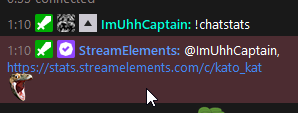
Hellooo streamelements team, I'm reaching out on the behalf of kato_kat's chat stat page, we're getting a 404 Page Not Found Error  https://stats.streamelements.com/c/kato_kat
StreamElements
Description Chat Stats tracks emote usage on Twitch in real time. See which emotes are the most popular on every Twitch channel
worldly escarp
fossil dagger
Hellooo streamelements team, I'm reaching out on the behalf of kato_kat's chat s...
was the account's name changed lately?
fossil dagger
Nope the account name has always been kato_kat
Ahh... the bots not even in the channel, sorry she's new to streaming 😅When the bot is added to channel does it start tracking stats even if its not modded?
fossil dagger
Yeah super new to all these bots and streaming platforms, but she's a pretty fast learner. She uses another platform's obs to stream though. The community wants the streamelements bot to track their Twitch Stats.
lament blade
I'll need her to provide her account ID with us
fossil dagger
Ok I'll ask her about it when she gets on, thx for the help so far!
lament blade
our pleasure
fossil dagger
Oh sorry, quick update, when I type !chatstats in chat SE does send a response, so I guess it's there but not showing up in the viewer list.. 🤔 https://i.imgur.com/v4MI6kB.png
 worldly escarp
have you managed to acquire her account id?
fossil dagger
That's still in the works, probably in a few hours. Probably asleep!
worldly escarp
np, just let us know
fossil dagger
ok tyty
worldly escarp
thats ok, have you changed name?
worldly escarp
np, can you provide your account id?
 wild tusk
uhh, yea i thihk so
worldly escarp
your account id please
viscid pebbleBOT
@wild tusk Please provide your account ID found at the top of this page: https://streamelements.com/dashboard/account/channels This ID is public info and safe to share here.
worldly escarp
dm is not necessary
 scarlet tiger
This ID is public info and safe to share here.
 unkempt cosmos
Hello, I have problem with StreamElements Leaderboards... cheers and subs shows correctly.. but when it comes to chat stats or channel points there's "no data" information... did i screw up something?
worldly escarp
wild tusk
cool beans
check it now
wild tusk
alright
worldly escarp
unkempt cosmos
Hello, I have problem with StreamElements Leaderboards... cheers and subs shows ...
are also getting 404 error?
wild tusk
tysm, i just wish it couldve kept trck of all the previous messages too
unkempt cosmos
Nope, i dont have 404 error, just "no data" while i switch from subs or cheers to chat stats or points
worldly escarp
unkempt cosmos
Nope, i dont have 404 error, just "no data" while i switch from subs or cheers t...
May I please have your account id?
unkempt cosmos
worldly escarp
May I please have your account id?
I am not sure, it is my account name? I am not sure where i can find it, if all u need is my name here it is - duudzioo
worldly escarp
StreamElements
The Ultimate All in One Platform for Streamers
unkempt cosmos
Oh right
603f22496a2b2fc61ac393b6
I am not sure if I forgot to mark something.. i found something at reddit, and ppl said that issue can cause from changing the name?
unkempt cosmos
np
I will ss my twitch and se
There's ss from my twitch panel


and there's from se
 worldly escarp
@unkempt cosmos since you're referring to the leaderboard, you'll need to activate your loyalty in the loyalty settings
unkempt cosmos
I am not sure... I went on loyalty ---> loyalty settings ---> loyalty enabled.. and still it's not working.. I guess I am so dumb 😭
worldly escarp
try accessing the chatstats now please
unkempt cosmos
There's no 404 error right now, some tables.. and the chat stats will count from now, or from the past aswell?
worldly escarp
its a fresh count, no past data
unkempt cosmos
Ok! Chat stats works, and what about my channel points? How does it work? While someone spent channel points, will show here? Or there will be everyone's the sum of the points they obtained?
worldly escarp
its a summary, you will need to set up your loyalty points first
unkempt cosmos
Can you help me with that?
worldly escarp
unkempt cosmos
Can you help me with that?
you can use this https://www.youtube.com/watch?v=mBDY4RdoZ4A

StreamElements Loyalty System helps grow your community and turn your viewers into fans. Viewers are awarded points for viewing your stream that can be redeemed in various ways.
StreamElements loyalty includes:
- Stream store
- Contest
- Giveaways
- Media Request
- Modules
Join our discord for live support: https://discord.gg/se
Watch...
unkempt cosmos
Thank you @worldly escarp ... u are really helpful ❤️ Thank you for your support! I wish u all everything best!
worldly escarp
unkempt cosmos
Thank you <@!689904735917965342> ... u are really helpful ❤️ Thank you for your ...
you're welcome
fallow patio
Hey! Do you guys know if it's possible to ban words in tts donations? I dont want someone to donate me with some bannable message 😦
worldly escarp
its in the tipping settings > tip moderation https://streamelements.com/dashboard/tipping-settings
StreamElements
The Ultimate All in One Platform for Streamers
 vital vault
Is there a way to trigger a chat command with a channel point redemption?
worldly escarp
are you referring to our loyalty points? if so you can use the bot modules and various chat commands you can set up
vital vault
I'm actually refering to the channelpoints that are setup by twitch itself. I am using Triggerfyre for example to play sounds on stream whenever that particular channel point reward has been redeemed. So I guess it would be possible to trigger a chat command too?
prisma relic
...not currently supported
vital vault
prisma relic
...not currently supported
ahhh okay, no worries, It would be a big gamechanger tho. Can I leave this as a suggestion anywhere?
 woven anvil
Hi, I am trying to add ways for my community to spend their loyalty points, but I can't seem to do it.
I have created an audio item in the stream store, set the cost, uploaded the small audio clip ect... but it doesnt work when I test is in my chat (FYI I am testing it in chat while offline). Can anyone help? It shows as active
viscid pebbleBOT
Check out the StreamElements ideas board: https://strms.net/ideas. You'll be able to add ideas, upvote ideas you agree with and track their progress with email notifications. Adding and upvoting ideas also helps the staff know which ideas should be prioritized so please take some time to upvote.
prisma relic
@vital vault ^ post an idea there for channel points ... you can search for an existing one or create your own.
 gaunt monolith
Hi could somebody help me with why i cannot see songrequest tab under streamelements i am trying to get my song queue to appear on my StreamlabsOBS so i can see what is queued on my main screen
 placid raptor
streamlabsobs? 
worldly escarp
woven anvil
Hi, I am trying to add ways for my community to spend their loyalty points, but ...
try adding a graphic asset to the preview and test it
 mossy barn
i need help
worldly escarp
how may we help?
mossy barn
i downloaded an overlay for obs. now i put my capture device in i cant have the overlay
worldly escarp
make sure the browser in the obs source is located above the capture device

 woven anvil
worldly escarp
try adding a graphic asset to the preview and test it
woven anvil
worldly escarp
try adding a graphic asset to the preview and test it
Hi Maya-ish. I have added that now too but still nothing
 balmy hearth
I'm having an issue with a custom alert overlay: the video I uploaded has sound but no image.
mossy barn
worldly escarp
make sure the browser in the obs source is located above the capture device
ahhh got it thank you. legend
 wise wind
Can anyone give me advise on how to start streaming
viscid pebbleBOT
@wise wind New to StreamElements?
Check out our YouTube channel https://www.youtube.com/c/streamelements/videos
with tutorial videos from setting up the basics, to in-depth details on how to use our product.
New to OBS? Here is a 4 step quick start guide
https://obsproject.com/wiki/OBS-Studio-Quickstart
Want to learn even more? Here is an in-depth overview
https://obsproject.com/wiki/OBS-Studio-Overview
balmy hearth
Hello, I need help.
viscid pebbleBOT
@balmy hearth Welcome to the helpdesk! Please let us know how we can assist you today and a support volunteer or staff member will assist you as soon as they are available. Thank you for your patience.
prisma relic
 rough junco
Have I typed this out right? The gifters name doesn't show up
rough junco
Have I typed this out right? The gifters name doesn't show up
try {sender}
balmy hearth
When I upload a video to my alertbox overlay at streamelements.com/overlay , in the video list it has no image. When I play it, it has sound and no image. When I press emulate, it has sound and no image.
prisma relic
are you uploading it as a video input or audio input? (...like .mp4 can be both audio or video)
balmy hearth
I am uploading it as video input.
prisma relic
dm me the file.
 thorny crane
Hello, I'm a mod and I'm trying to add a keyword to a command via chat using !command keyword add basecommand keyword1 keyword2 , is that possible? I found the command from a streamelements community board. Thank you.
viscid pebbleBOT
You can add, remove and make changes to custom commands in chat with !command/!cmd flags:
!command add (commandname) (commandresponse) - allows you **to add **a new custom command
!command remove (commandname) - allows you to delete a custom command
!command edit (commandname) (commandresponse) - allows you to edit an existing custom command
!command show (commandname) - allows you to see the raw response of a command before variables are used
!command options (commandname) -(flag) - allows you to change settings for an existing custom command
!command alias basecommand - Shows the alias commands for !basecommand
!command alias add basecommand aliascommand1 aliascommand2 - Adds alias commands !aliascommand1 and !aliascommand2 for command !basecommand
!command alias remove basecommand aliascommand1 - Removes alias command !aliascommand1 from command !basecommand
Valid flags for !cmd options include: -enable -disable -cd (number in seconds) -usercd (number in seconds) -cost (number) -level (number) -type (say, whisper or reply) -count (number)
Syntax example: !cmd options twitter -usercd 60 -type reply -level 250
thorny crane
thank you~ @ionic kelp @viscid pebble ^_^
 broken bronze
Hello @gaunt crowyone
We changed our Channelname yesterday and now we have the problem that we dont see our chat statistic. What should we do to fix it?
lament blade
bro thats exactly what i asked
name problemm
I have changed my channel name from techtunc to altgurbettv and since then my chatstats are not working. Can you please help me?
viscid pebbleBOT
@lament blade If you changed your name on Twitch, please follow these steps:
- Visit https://streamelements.com/logout and then log in again by connecting with Twitch.
- On the right side of the dashboard page that opens, select Join under bot settings. If it says Part select that and then select Join to send the bot to the chat. Don't forget to mod the bot by typing /mod streamelements in your channel if you have not already.
- Post your old and your new name here so that we can update your channel's chatstats tracking (must be done by staff).
@broken bronze If you changed your name on Twitch, please follow these steps:
- Visit https://streamelements.com/logout and then log in again by connecting with Twitch.
- On the right side of the dashboard page that opens, select Join under bot settings. If it says Part select that and then select Join to send the bot to the chat. Don't forget to mod the bot by typing /mod streamelements in your channel if you have not already.
- Post your old and your new name here so that we can update your channel's chatstats tracking (must be done by staff).
broken bronze
Step 1 - ok
Step 2 - ok
Step 3 - Old: SideF2F New: SideSamiTV
Thanks!
 twin sentinel
@broken bronze @lament blade Asked internally to fix your chat stats.
@lament blade That would be a question for #dev-chat
prisma relic
balmy hearth
When I upload a video to my alertbox overlay at streamelements.com/overlay , in ...
answer to this was the codec: 'HEVC' ... use a different one.
broken bronze
@twin sentinel What do u mean? Am I false here?
twin sentinel
No, just wait. I asked a staff internally to fix your chat stats page.
broken bronze
Oh ok, thank u Benno
 hushed prairie
Hello, my chat stats page says 404 - page not found. Any way to fix this? Channel name: enaj
twin sentinel
Did you change your name?
hushed prairie
long ago
twin sentinel
Does your old name have an active chat stasts page?
hushed prairie
no
twin sentinel
Have you changed your name before that another time already?
hushed prairie
no
 idle thorn
Hello,
The streamelements are not appearing in my chat, the twitch changed the name of the channel for some problems, and now it is not appearing anymore. Can someone help me? Sorry for the English I am Brazilian and I do not speak very well yet.
twin sentinel
What is your old name please? @hushed prairie
viscid pebbleBOT
@idle thorn If you changed your name on Twitch, please follow these steps:
- Visit https://streamelements.com/logout and then log in again by connecting with Twitch.
- On the right side of the dashboard page that opens, select Join under bot settings. If it says Part select that and then select Join to send the bot to the chat. Don't forget to mod the bot by typing /mod streamelements in your channel if you have not already.
- Post your old and your new name here so that we can update your channel's chatstats tracking (must be done by staff).
hushed prairie
pandajanek
but i wasnt using streamelements with old name
and i dont think i was streaming with it
twin sentinel
Asked internally to fix your chatstats @hushed prairie
hushed prairie
thank you
idle thorn
viscid pebble
<@!287379622633668608> If you changed your name on Twitch, please follow these s...
kikecosta is old name and todosgames is new name
mossy barn
i need help
viscid pebbleBOT
@mossy barn Welcome to the helpdesk! Please let us know how we can assist you today and a support volunteer or staff member will assist you as soon as they are available. Thank you for your patience.
mossy barn
on my cam overlay theres writing and i cant put my cam under it
twin sentinel
Do you have a screenshot of that please?
mossy barn
 balmy hearth
@prisma relic thanks for your help!
twin sentinel
Put the cam under the overlay.
mossy barn
i dont know how
twin sentinel
Switch positions of the layers in the sources tab in your OBS.
mossy barn
you absolute legend
it worked
is there a way i can check what size the cam overlay is
twin sentinel
The whole overlay is by default 1920x1080.
 lethal carbon
What is loyalty settings?
woven anvil
woven anvil
Hi, I am trying to add ways for my community to spend their loyalty points, but ...
Can anyone help?
mossy barn
my cam wont fit into my overlay
prisma relic
woven anvil
Hi, I am trying to add ways for my community to spend their loyalty points, but ...
!redeem (item)
woven anvil
prisma relic
`!redeem (item)`
Hi, yes I have it all set up, but it is not working

 gentle glen
Hello, my streamelements won't track anyway chat stats. For example someone will command !watchtime and it will always say 0 seconds for anyone. It does this for any stats like that
prisma relic
mossy barn
my cam wont fit into my overlay
in OBS? resize your camera input to fit the overlay
prisma relic
gentle glen
Hello, my streamelements won't track anyway chat stats. For example someone will...
enable loyalty: https://streamelements.com/dashboard/loyalty
mossy barn
How do i see what size my overlay is
gentle glen
Is that all for !watchtime and stats like that aswell?
viscid pebbleBOT
@gentle glen The !watchtime command is directly tied to the Loyalty system. The Loyalty system must be enabled for viewers' watchtime to count up.
To enable Loyalty, please go to the Loyalty section of your account: https://streamelements.com/dashboard/loyalty
Watchtime counts up every 10 minutes alongside Loyalty points, and only while the stream is live. Reruns will not be counted.
Please note that watchtime is not tracked by Twitch and there is no way to retroactively apply past watchtime to viewers.
StreamElements
The Ultimate All in One Platform for Streamers
prisma relic
3 dot menu -> properties @mossy barn
 mossy barn
prisma relic
3 dot menu -> properties <@!480054413201768450>
mossy barn
prisma relic
3 dot menu -> properties <@!480054413201768450>
it only shows the resolution
gentle glen
Another thing is when I go on Streamelements website and try to check out my chat stats, I always get "404 - Page not found". is there any way around this?
prisma relic
mossy barn
it only shows the resolution
correct. that is the size of the overlay
 hazy idol
Does anyone know why a host alert triggers when I'm raiding someone or when I'm being raided? Someone raided me yesterday, and the host alert triggered. Same when I raided someone else. They first got the host notification, then the raid notification
woven anvil
prisma relic
do you have the redemption widget on your overlay?
Oops, that solves the issue - thanks.
idle thorn
viscid pebble
<@!287379622633668608> If you changed your name on Twitch, please follow these s...
until when is it ready?
 main phoenix
ola
twin sentinel
@idle thorn They have been fixed.
viscid pebbleBOT
@main phoenix Welcome to the helpdesk! Please let us know how we can assist you today and a support volunteer or staff member will assist you as soon as they are available. Thank you for your patience.
idle thorn
twin sentinel
<@!287379622633668608> They have been fixed.
strange because it is still not showing up in the chat and the commands are not working
twin sentinel
What is not showing up in chat?
lament blade
hazy idol
Does anyone know why a host alert triggers when I'm raiding someone or when I'm ...
When you raid someone or vice Vera you automatically host them as well
idle thorn
twin sentinel
What is not showing up in chat?
the bot does not appear. Nor do the commands fail to execute
twin sentinel
Do you use a custom bot name?
idle thorn
No.
twin sentinel
Part the bot, log out of the dashboard, log back in and make the bot join again.
hazy idol
lament blade
When you raid someone or vice Vera you automatically host them as well
But is it random which alert between raid and host that triggers?
lament blade
hazy idol
But is it random which alert between raid and host that triggers?
I think so but both events are happening at same time so it could be a timing with the alerts which why both are not triggering
main phoenix
hello, im trying to put some alerts on my stream but i dont have stream labs OBS, im using my graphics card to stream, and i guess it don´t the bars to log my link that I got in StreamElements. Whtas can I do about that? i really want to stream with my graphic card(its AMD)
lament blade
main phoenix
hello, im trying to put some alerts on my stream but i dont have stream labs OBS...
What program are you using to stream?
lament blade
hazy idol
Yeah only the host alert triggered during the raid
You could probably get both to trigger if you adjusted the cool down between alerts
 halcyon falcon
Is there a command to see the current song playing in media request?
main phoenix
lament blade
What program are you using to stream?
its not a program, its my graphics card, there´s a function to strem in there... AMD Radeon app
lament blade
main phoenix
its not a program, its my graphics card, there´s a function to strem in there......
Does you Radeon app have the ability to add a browser source ?
main phoenix
lament blade
Does you Radeon app have the ability to add a browser source ?
no 😦
 mystic plinth
hi I have a problem with the start of the streams, when I press the start stream button it starts on obs but not on twitch and I tried to uninstall and reinstall the app but it did not resolve despite all the twitch data are there and are inserted correctly.
 lucid zenith
Hi all! Possibly dumb question: I created an overlay in 1440p and added an image to it. When I change the width and height, it crops the image. Is there a way to scale it to the dimension I give it in SE or I need the image to be already of that dimensions?
 agile river
I can't get my alert box to function.. Wether I take a premade one or create one from scratch, this is all I see when I emulate a notification in streamelements. Any ideas?

 heady flax
Hello I have a problem about my livestream. When I start streaming on OBS, it shows that I'm live on twitch too. However the live stream is not loading. Every setting is correct. My key is correct. I reinstalled the program but still no joy.
charred quartz
main phoenix
no 😦
u can only use SE features with obsLive or browser source enabled software.
charred quartz
mystic plinth
hi I have a problem with the start of the streams, when I press the start stream...
despite u said u did a reinstall have u tried relogging SE and reattaching your oauth in stream tab in settings?
viscid pebbleBOT
@mystic plinth StreamElements menu, on top of OBS > Logout > Login
charred quartz
agile river
I can't get my alert box to function.. Wether I take a premade one or create one...
alertbox is hidden. just click the eye in the layers it should unhide it.
agile river
It's not hidden tho @charred quartz
charred quartz
heady flax
Hello I have a problem about my livestream. When I start streaming on OBS, it sh...
do the same i said to the @mystic plinth above
charred quartz
agile river
It's not hidden tho <@!207573201000202241>
screenshot of the layers in that overlay, please.
agile river
 charred quartz
screenshot of the whole overlay editor, u can send in my dm if u want to keep private @agile river
mystic plinth
charred quartz
despite u said u did a reinstall have u tried relogging SE and reattaching your ...
Yes
agile river
@charred quartz
 charred quartz
oh i got it, u did a simulate right? after simulating it does keep that ghostie thing in there
agile river
Yeah, but it doesn't simulate anything, it's a vague ghost thing but no sound/image/overlay.
charred quartz
just to represent that is located in there, it will not appear in the obs, u can check this yourself. Is it not working as intended somehow?
hm, is the live preview box ticked?
agile river
no
charred quartz
tick it and try to simulate
agile river
I don't use OBS tho
charred quartz
if it doesn't work in the software u stream on we are unable to help u there, but at least in the editor we are going to troubleshoot it, the simulation is working in the editor?
agile river
But it doesn't work in the editor of streamelements either
charred quartz
yep, ok, try ticking the box and simulating inside the editor
agile river
I installed this, but there's no graphic or anything to be seen when I simulate it.
 charred quartz
it still doesn't pop any of the alerts?
 cinder olive
agile river
No
cinder olive
agile river
No
Mind DMing me the overlay link then emulating it?
agile river
Sure!
cinder olive
@agile river I believe you dont see anything, sometimes the editor just doesnt cooperate for abit.
 mystic leaf
is there a way to set up a special alert when someone tips a certain amount? I thought there was....i was able to set up a tip alert, but i wanted a special one for 6.66 and 4.20 lol
cinder olive
Good way to test is to open the link you sent and re-emulate, or add it to OBS and test and see if you can see it there.
agile river
Ah I'll keep that in mind
cinder olive
mystic leaf
is there a way to set up a special alert when someone tips a certain amount? I t...
Just add a variation for the tip amounts you want under the Tip alert
mystic leaf
ahhhh thank you!!!
cinder olive
 agile river
Thanks Mitch and Mateus!
cinder olive
agile river
Ah I'll keep that in mind
Also you should <almost> always use Chrome when dealing with pretty much anything related to twitch, SE included.
Pretty much every service for twitch is built around Chromium
agile river
Yeah I'll move to chrome then 🙂 thanks
mystic leaf
oh, how do i make it only alert for a certain amount? when I "emulated" like 10 bucks the same alert shows up lol
sorry, i'm a noob at this
lament blade
Does anyone know for my bot to share a string of emotes do I need to gift a sub to my bot account or to stream elements? I gift to my bot account but it’s not working.
 safe dirge
Hello everyone! I have a problem with OBS. When I have the application on the second screen, I have stuttering in CSGO. When the application is minimized, CSGO runs smoothly. What is the problem?
 jade remnant
mystic leaf
oh, how do i make it only alert for a certain amount? when I "emulated" like 10 ...
jade remnant
mystic leaf
oh, how do i make it only alert for a certain amount? when I "emulated" like 10 ...
you will need to add a variation to the alert in the overlay editor

 quick sage
I've had this issue for so long now and i dont know how to fix it.

its black screen all the time and wont change
safe dirge
safe dirge
Hello everyone! I have a problem with OBS. When I have the application on the se...
In addition I will give more info:
RTX 2070, AMD RYZER 5 3600
mystic leaf
i added the variation, i added exact amount 4.20
i'm just not sure how to turn off the exact alert when another amount is tipped?
jade remnant
lament blade
Does anyone know for my bot to share a string of emotes do I need to gift a sub ...
if you have renamed the SE bot to another name/account then you will need to gift a sub to that account.
if you use the standard SE bot then gift a sub to the SE bot
mystic leaf
ohhhh wait or do i add that special animaiotn and music in the variation? and keep the original m y generic animation for the original tip alert?
jade remnant
the main tab is your general settings,
the variation will be for either a specific range or amount
lament blade
jade remnant
if you have renamed the SE bot to another name/account then you will need to gif...
Darn ok I did rename it and gifted to the rename account but it’s not working. Thank you for answering!
mystic leaf
thank you @jade remnant !!
safe dirge
safe dirge
In addition I will give more info:
RTX 2070, AMD RYZER 5 3600
could anyone help? :C
quick sage
quick sage
I've had this issue for so long now and i dont know how to fix it.
can someone help me with this issue?
jade remnant
lament blade
Darn ok I did rename it and gifted to the rename account but it’s not working. T...
does the renamed bot respond to commands, and does it have the emotes on the account (if you log in on another browser)?
lament blade
quick sage
can someone help me with this issue?
Are you on a Mac or PC?
quick sage
lament blade
Are you on a Mac or PC?
PC
viscid pebbleBOT
@quick sage Please provide a log from your last stream. To do this, in OBS go to Help > Log Files > Upload Last Log File and paste the link to the log file here.
lament blade
quick sage
PC
Darn ok I know of a fix for Mac but I don’t think it’s relevant on PC.
why is my stream lagging......... my wired connection runs perfect - everything else on my PC runs perfect - but I am streaming with 500kb/s upload wtf
can someone help
viscid pebbleBOT
@lament blade Please provide a log from your last stream. To do this, in OBS go to Help > Log Files > Upload Last Log File and paste the link to the log file here.
lament blade
lament blade
jade remnant
does the renamed bot respond to commands, and does it have the emotes on the acc...
Oh I figure it out. It’s because those emotes are bit emotes not sub emotes 🤦🏼♀️
cinder olive
lament blade
https://obsproject.com/logs/IM6Zm8x5NYt_XZRT
Run your OBS as admin, do a quick test stream using OBS's test stream feature, and resend your log.
jade remnant
lament blade
Oh I figure it out. It’s because those emotes are bit emotes not sub emotes 🤦🏼...
😁 no worries
lament blade
it takes years to stop the stream.. but I am on it
 rain valley
is twitch broken or something else is happening?
cinder olive
rain valley
is twitch broken or something else is happening?
Working fine for me
rain valley
my connection is perfect but when i start the stream bitrate drops to 700s :/
viscid pebbleBOT
@rain valley Please provide a log from your last stream. To do this, in OBS go to Help > Log Files > Upload Last Log File and paste the link to the log file here.
rain valley
i think something wrong with the servers
lament blade
yeah, same problem here... had 7 viewers before lost them all now 😦
For some reason bot isnt counting watchtime whats the fix?
viscid pebbleBOT
@lament blade The !watchtime command is directly tied to the Loyalty system. The Loyalty system must be enabled for viewers' watchtime to count up.
To enable Loyalty, please go to the Loyalty section of your account: https://streamelements.com/dashboard/loyalty
Watchtime counts up every 10 minutes alongside Loyalty points, and only while the stream is live. Reruns will not be counted.
Please note that watchtime is not tracked by Twitch and there is no way to retroactively apply past watchtime to viewers.
StreamElements
The Ultimate All in One Platform for Streamers
lament blade
couldnt find out how to teststream
cinder olive
quick sage
idk how that will help me with the screen recorder
Your Windows is out of date & youre not running OBS as admin. + this log does not have any output session
quick sage
cinder olive
Your Windows is out of date & youre not running OBS as admin. + this log does no...
i have no available updates, I am running OBS as admin and how can i fix the output session thingy?
cinder olive
quick sage
i have no available updates, I am running OBS as admin and how can i fix the out...
Off your last log you are not running OBS as admin, and your windows update has already reached its EOL (4 months old)
The output session.. requires you to stream/record to replicate any issues you may have.
cinder olive
lament blade
couldnt find out how to teststream
https://inspector.twitch.tv/#// Login here and it iwll give you a temp stream key to use.
 opaque birch
Making a custom alert and im adding text effects but the text is staying stationary any advice?
 sage shadow
Is there a way to combine commands? Basically I want a random.pick response, but would like more text than just the 500 character limit in SE?
opaque birch
The New follower has a wiggle effect or something on it and its not doing anything
 shut crane
what is the desired resolution to set my overlay at for it to fit in the obs studio frame
cinder olive
shut crane
what is the desired resolution to set my overlay at for it to fit in the obs stu...
Depends on your output resolution, but 99% of the time 1920x1080
lament blade
cinder olive
https://inspector.twitch.tv/#// Login here and it iwll give you a temp stream ke...
cinder olive
lament blade
https://obsproject.com/logs/UHRZ7HD2goIHOmxE
https://fast.com/Run one of these and then send a screenshot
fossil dagger
Hellooo SE staff, I was here last night asking for help on a chat stat error for the channel: kato_kat , a 404 Page Not Found error pops up. I was asked to provide the account ID: 60394df7ee3e4c7f1a8c8aed . Also the Twitch Channel has never underwent a username change.
cinder olive
fossil dagger
Hellooo SE staff, I was here last night asking for help on a chat stat error for...
I poked the staff for you, should be done soon
 native lark
Hi y'all!! I seem to be running into some issues while trying to set up the Awesome Shout Out widget and I'm hoping someone can help me. I've watched the creator's tutorial (and several others too) and have tweaked it to my liking but after saving when I go to add a new browser source in obs and test it out it is all back to default settings like I didn't change anything. I've tried scrapping and starting an entirely new one with the same result and I have no clue what I'm doing wrong! TIA
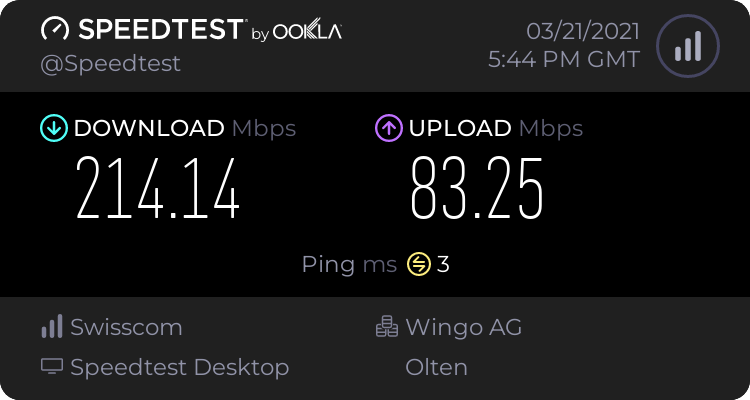 fossil dagger
Ty ty 😄
lament blade
thx for your help btw
cinder olive
native lark
Hi y'all!! I seem to be running into some issues while trying to set up the Awes...
Are you adding the right link to your OBS? And are you saving the overlay?
native lark
cinder olive
Are you adding the right link to your OBS? And are you saving the overlay?
Yeah, I've saved it and then copied the link from the little icon next to save on the top right. Sometimes the audio I added will come through but none of the other changes I've made will.
cinder olive
native lark
Yeah, I've saved it and then copied the link from the little icon next to save o...
When you put the same link into your browser can you view it there?
cinder olive
lament blade
https://www.speedtest.net/result/11131859987.png
Your bandwidth speeds should be high enought os upport streaming with what youre streaming, only thing I could think of is youre streaming to a bad server, or your bandwidth dipped
lament blade
cinder olive
Your bandwidth speeds *should* be high enought os upport streaming with what you...
Any idea how to fix that? 😄
cinder olive
lament blade
Any idea how to fix that? 😄
Nothing you can do
lament blade
damn it.. ok
cinder olive
Wait it out/call your provider and make a complaint
native lark
yeah if I preview it in a browser I can see it but not in OBS
cinder olive
native lark
yeah if I preview it in a browser I can see it but not in OBS
Mind Dming me the link?
cinder olive
fossil dagger
Hellooo SE staff, I was here last night asking for help on a chat stat error for...
Its been bonked and fixed
fossil dagger
Thank you!!
 cinder olive
No problem Capn'!
native lark
cinder olive
Mind ***Dming*** me the link?
I sent it to you 🙂
 swift widget
hey i been having some problems...i set up loyalty points and all that but when i go in chat it does not work when i say !points !gamble !raffle nothing works
cinder olive
swift widget
hey i been having some problems...i set up loyalty points and all that but when ...
Did you enable those commands/modules?
viscid pebbleBOT
@native lark To add your overlays to OBS, add a new browser source in your scene. Paste your overlay URL in the browser source properties, set the dimensions to 1920x1080 (unless you changed them on the website) and check Shutdown source when not visible. https://youtu.be/KDvLynUqXI4
swift widget
yes
cinder olive
Make sure to follow ^ rules when youre adding a overlay to OBS
swift widget
wdym
 swift widget
ya im so confused on what im doing
like every time i enable !join and all that it just resets and acts like i put nothing there
or enabled it
swift widget
what bot tho
cinder olive
the.. streamelements bot?
 swift widget
how do i add it then cuz obv i did not add it
cinder olive
Go to https://streamelements.com/dashboard and click the "join channel" button underneath Bot Settings
StreamElements
The Ultimate All in One Platform for Streamers

 obsidian grove
hi i need help with microphone sensitivity. He hears me great at teamspeak and everywhere else, but OBS doesn't record me at all. I have full cleanliness everywhere, even in windows settings.
cinder olive
obsidian grove
hi i need help with microphone sensitivity. He hears me great at teamspeak and e...
so OBS isnt picking up your mic?
Do you have it selected under your audio settings?
keep conversations here if you can @native lark
viscid pebbleBOT
@native lark OBS > Settings > Advanced > Scroll down > Enable or disable Browser Source Hardware Acceleration, depending on its current state > Restart OBS
https://i.imgur.com/ggMe9ZE.png

 night dew
Hi there, I am new on Twitch and I don't know how to activate donations via paysafe and credit cards cuz now I only with PayPal receive donations. Any help? ❤️
placid raptor
we support either pay pal or se.pay
viscid pebbleBOT
SE.PAY is available for streamers who are at least 18 years old, with bank account under their name in one of the following countries and have at least 101 follower (Twitch) / 101 subscribers (YouTube):
Austria, Belgium, Czech Republic, Denmark, Finland, France, Germany, Ireland , Italy, Netherlands, Poland, Portugal, Slovakia, Spain, Sweden, Switzerland, United Kingdom, United States.
If you meet these criteria and don’t see SE.Pay, let us know.
For information on SE.Pay payment methods, their fees and settlement times see https://streamelements.com/dashboard/tipping/fees
placid raptor
@short umbra if you have paypal donos will go to your paypal. from there you can withdraw to your bank account
i didn't find any differences in usage by upgrading my paypal to business, and it doesn't show anything other than my username as far as I know
and honestly the best ppl to advise on how to use paypal would be paypal
mmm I'm sorry I'm not 100% sure what you mean here
if you don't have SE.Pay enabled on your account the only option available is pay pal, and whether personal is preferred or business, that's up to you and discussions about specifics should be taken up with pay pal
if you do have SE.Pay your tippers can simply choose to dono with their credit card from the same tipping page you already have and I believe their transaction will show your SE username or tipping link
 stray heart
Hi guys can anyone help please, my exclamation mark commands are still not working in twitch live chat any ideas
viscid pebbleBOT
@stray heart Go to the Dashboard > Right side > Part channel > Join channel(https://streamelements.com/dashboard)
stray heart
I have done this and it's still not working
i have parted and re joined and still no joy
placid raptor
paypal is paypal and se.pay is se.pay - there's no connection between the two [except that if both enabled in your tipping settings, they show as options there]
if you don't want them to see your paypal details use a business paypal account, if you want to use your personal account then they'll be able to see what your account name or email is
if you use se.pay donos will be processed by the payments mediator we work with and will require your information to be verified by them, and afterward will be sent directly to your bank
https://streamelements.elevio.help/en/articles/51-se-pay-faq
cinder olive
stray heart
I have done this and it's still not working
Whats the issue?
 placid raptor
 stray heart
@cinder olive so if people want to see their watchtime etc it just comes up as 0
cinder olive
Did you enable loyalty points?
stray heart
@cinder olive no not sure what that is
I am still new so sorry for the noob talk haha
cinder olive
StreamElements
The Ultimate All in One Platform for Streamers
You need to have this enabled for watchtime to exist
native lark
viscid pebble
<@!270124463192932354> OBS > **Settings** > **Advanced** > Scroll down > Enable ...
my bad! I just disabled it (it was already enabled) and restarted. The edited version is popping up now where I want it but the default version is also still popping up and staying at the top of the screen
cinder olive
Thats probably because you have the old version still added to your OBS
stray heart
cinder olive
You need to have this enabled for watchtime to exist
it was disabled so thanks for that
native lark
cinder olive
Thats probably because you have the old version still added to your OBS
Thank you so much!
 main dock
hey all, so im getting a 3000 error on my twitch stream and its only mine, i can watch other streams, just not mine. i'm using the OperaGX browser. i've done the cookie and cache clear, and it still isnt working.
i can watch it on other browsers and mobile just not opera, any ideas?
cinder olive
3000 error means something on your end is blocking something on twitchs end
More then likely an adblocker of some sort (which is weird because its on your own channel? im assuming)
main dock
yes its only my channel....
ugh this is frustrating. lol
idk where to go from here tho. i even went as far as to uninstall adobe flash cause they say its not supported anymore.
cinder olive
Not use OperaGX would be my immediate first guess
 errant sage
Hey, guys
I need help with my StreamElements sponsorship
I'm afraid that the money won't come to me because i'm brazilian, but I invested a lot to make this sponsorship work well... it's been 12 days now without any sort of notification or email about it
Can I get some help?
Thank you so much
ionic kelp
@errant sage Payout is 30 days after completion. You'll get an email for the payment portal if you haven't already done that.
lament blade
Hey guys! Is there any mod that can help me with this problem? Stream elements' commands are not working anymore since I've changed my twitch nickname....what can i do to make them work ?
viscid pebbleBOT
@lament blade Go to the Dashboard > Right side > Part channel > Join channel(https://streamelements.com/dashboard)
cinder olive
Also what is your old and your new usernames?
lament blade
mangalex_ old, MangaTwitch_ new
 cinder crest
Hi, im having some problems regarding the website. when i click "my dashboard" i get redirected to the main site again...
viscid pebbleBOT
@cinder crest Please logout of StreamElements at https://streamelements.com/logout and then login again to your account (Twitch/YouTube/Facebook).
cinder crest
Already tried, also tried clearing cache from chrome and tried in edge and firefox
ionic kelp
are you trying to access another user's stuff?
cinder crest
it works fine when i get to my dashboard, but when i select one of the streamers i manage i get redirected
yep, sudo
ionic kelp
they have to as well
 minor mirage
Hey there. I'm new to streaming and I just got the leaderboard extension added to my panels. The Cheers, Subs, and Locations are all working, but my Chat Stats aren't showing any data. When I go through the dashboard I get a 404 error. I haven't changed my name or anything like that. Please help me? lol
viscid pebbleBOT
@minor mirage Please provide your account ID found at the top of this page: https://streamelements.com/dashboard/account/channels This ID is public info and safe to share here.
minor mirage
viscid pebble
<@!220688978003623936> Please provide your account ID found at the top of this p...
6055fc8418f3405d56644828
 drowsy egret
@minor mirage fixed, your stats will begin tracking now
minor mirage
drowsy egret
<@!220688978003623936> fixed, your stats will begin tracking now
Oh, thank you so much guys. Appreciated ❤️
 cunning sun
Has there been a resolution on why Streamelements is only recognizing my new followers and none of the other things?
lean plank
Is there a way to show an image on stream when a sound, from the stream store is redeemed?
 low agate
Hey im trying to import custom nightbot commands into streamelements but it doesn't appear to be uploading. Any suggestions? Thanks!
flat bolt
Hi, what is the command to refresh the emotes from kappagen?
wasn't it !emotes, something like that? D:
found it 🙂
lament blade
how do you get sponsored streams and whats the req or is there any?
wary halo
sponsor are usually looking at your average viewership
below 10 is usually 0 sponsorships
wary halo
no idea
 pure drift
Someone tried to tip me through strem elements. It showed can't accept payment.
 plush meadow
My bot is all set up to use my account in my channel so that it has access to my emotes and such. It was all working great, but then it just stopped. It no longer uses timers, or responds to commands even though the commands show as active. I've tried using the part channel function and then having it re join, but it's still not working. It never says anything in my channel. I can't figure out why.
viscid pebbleBOT
@plush meadow If your commands recently stopped working and you're using OBS.Live and a custom bot name do the following:
- In OBS.Live, click on the hamburger menu (three stripes) at the top left of your activity feed
- Click on Stream Settings > Custom bot name
- In the Custom bot name field select Set custom bot name, not your already existing username (with capital letters). Note: If you already connected an account that way, the third entry will show as the account name (see image https://i.imgur.com/sO7fWOX.png).
- Scroll a bit down and click on the purple Connect Custom Bot Account button
- Log in as usual and Authorize the custom bot name
- Back in the Activity feed, click on the Send Test Message button and check if your custom bot name starts working again
 plush meadow
I did that

the test message sent a debug command that it did respond to with the follsing
streamelements ID: 2/11, build 769f6a50f10d23596c1b51fc91965d9a537c0b7a has been running for 7 days 8 hours. Custom Bot Name enabled: true; Muted: false; Ratelimited: false; Modded: false
That was the response from "streamelements" not from the bot appearing as me
drowsy egret
plush meadow
the test message sent a debug command that it did respond to with the follsing
that was me triggering the debug command
drowsy egret
try going back to the streamelements bot
plush meadow
I don't see that as an option anywhere
I can use it disguised as me or ad an account. Those are the only options I see in that drop down
drowsy egret
then try this:
viscid pebbleBOT
"1) Right click on your OBS desktop shortcut and open the Properties
2) In the Target field, add the following to the very end: --remote-debugging-port=40404 (don't forget to add a space before the current path)
3) Open OBS (or restart if it was open)
4) Open your web browser and type in: localhost:40404
5) Click on StreamElements - Activity feed
6) Navigate to the Console tab
7) Type the following into the console and hit enter: store.customBot.removeCustomBotIntegration()
8) Try setting the custom bot name
9) Remove the additional flag in step 2 from your shortcut properties."
lament blade
What’s the best way not to lag while streaming if u don’t have the best pc any tips? If not all good
drowsy egret
@lament blade using nvenc encoder, low res and low fps
lament blade
Okay where do you find nvenc coder I don’t know if I have it
Oi have nividia nevenc
plush meadow
drowsy egret
then try this:
Thanks I'll try that and let you know how it goes
lament blade
@drowsy egret when u say low res you mean rescale out put or normal base output
drowsy egret
lament blade
<@131420870244564992> when u say low res you mean rescale out put or normal ba...
either should work but its better to rescale output
lament blade
Okay thx for the advice 👍
plush meadow
drowsy egret
then try this:
So I tried this. I can now set to streamelements and it works, but it still doesn't work when using my account
drowsy egret
plush meadow
So I tried this. I can now set to streamelements and it works, but it still does...
try removing the bot account completely and re-adding it, you can remove the connection from your bot twitch account settings, under connections
 keen cloud
Hey guys! how do I get standard twitch bits alerts on my stream?
plush meadow
drowsy egret
try removing the bot account completely and re-adding it, you can remove the con...
That fixed it. Thanks!
 true island
Hey, my watchtime is broken even though I have loyalty enabled
 merry island
Hi folks. How’s everyone doing? I cannot seem to get the animation algorithms to work in stream elements. This is part of the overlay section. Simply trying to do an awesome shout out.
 sly tulip
Trying to figure out how (maybe with REGEX, not sure) to get this command to trigger when the words [mythical] and [legendary] are both in the message, not just one of them.

The words aren't one after the other, so that's what makes it more difficult

 fair mauve
Is there any sort of filtering available either on the overlay/alert side or the activity feed side? (that is, a filter on the activity side to prevent it from going through to the overlay as a notification event)
As a way to reduce abuse, having a threshold for whether or not a follower event is shown based on account age would be huge, but I'm having trouble finding anything. If that doesn't exist, is there any sort of uservoice/public trello/other way to put in feature requests?
 slow hatch
Hi! i have a question about my streamelements redemptions?
 void flicker
Hi there I need advice. I have the media request on obs live. But whenever I try and find a YouTube vid it says invalid url. Any ideas. Thanks
lament blade
do yall have CSGO overlays on the website
guess not 🙂
Is there like any help on like how to get viewers
I have 1 viewer and that’s me
No one joins my stream have no clue what to do bc feels like my channel dead
 rough flax
Hey there, I started to make friends with other streamers and support them. We became a good group of friends and would often visit each other if we weren't live ourselves or busy IRL. Don't be afraid to reach out and be kind (: I got to know some amazing streamers and without prompting they would give me shoutouts. Just be you and you won't need to ask for anything in return (:
 wanton spruce
When I'm creating a command on twitch via chat for my streamer, is there a flag I can add to make it hidden from the command list?
nova gust
Hey, does anyone know of a daily goal donation widget?
 floral wind
someone please help me my streamelements start giving me a error when trying to open it after i installed my new gpu and im lost
 lost torrent
nova gust
Hey, does anyone know of a daily goal donation widget?
lost torrent
nova gust
Hey, does anyone know of a daily goal donation widget?
I need too 
 toxic creek
damn im not able to edit the text in the overlays can anyone help?
 soft flax
How do I make the Countdowns begin?
 still hearth
Hello! I have some problems with my OBS using Web Browser Overlays with Stream Elements
Where can I get some help about it?
charred quartz
@still hearth whats happening?
 verbal mural
Hello... can anyone help me about Sponsorships ?
viscid pebbleBOT
@verbal mural Welcome to the helpdesk! Please let us know how we can assist you today and a support volunteer or staff member will assist you as soon as they are available. Thank you for your patience.
 viral nacelle
Hello, i have full control for 2 different streamers. But I can only access one of them through my SE dashboard. I've cleared cache and cookies and tried multiple Browsers. I only still have access to one of my streamers. Any advice?
viscid pebbleBOT
@viral nacelle Please logout of StreamElements at https://streamelements.com/logout and then login again to your account (Twitch/YouTube/Facebook).
zenith widget
tell them todo the same
viral nacelle
as in my streamer that i'm having the issue for?
zenith widget
yes
 rotund fable
Can someone help me with the SE.Pay
viscid pebbleBOT
@rotund fable Please contact us via email for support with SE.Pay. You can use our contact form here: https://streamelements.com/contact Thank you.
 simple hill
if i set up a clip command is there a way you can make it to have custom clip name so it isnt just the title name on every clip ?
keen wigeon
What do you mean by clip command?
simple hill
you can make clip commands and it will make a 30 sec clip
keen wigeon
Can you please specify where and how you set this command?
simple hill
@keen wigeon https://www.youtube.com/watch?v=xt5u3FjgHcs

Make a Clip Command With StreamElements. StreamElements Twitch Clip Command lets your viewers make a clip on your Twitch channel by using a command. This will automatically clip the last 30 seconds of your stream.
Get your API link here: https://thefyrewire.com/auth/-/twitch/clips/create
Every week Trui will make a new video that will help you...
lament blade
Hello i have a question i am making my own merch on streamelements but how can i make a image bigger or smaller on my item?
keen wigeon
simple hill
<@!409020761571983361> **https://www.youtube.com/watch?v=xt5u3FjgHcs**
I see now, thanks for the clarification. You're using an API by Fyrewire. The parameters and output of the command are up to them, and questions about them should be directed at them. They are in the #dev-chat channel right here, so you can try pinging them there.
 abstract flower
i've only recently downloaded obs live, and i need some help with a specific subject. i don't have 2 monitors and i would like to avoid having to read chat with my phone, is there any way to be able to see your chat while in game?
viscid pebbleBOT
If you have one monitor and/or would like the chat overlay on the screen, please look at the link below.
Please note this is not a plugin for OBS and not maintained by SE.
https://github.com/baffler/Transparent-Twitch-Chat-Overlay
 alpine dirge
hello I am having trouble setting up media request in streamlabs obs. can someone help me?
viscid pebbleBOT
We're not able to troubleshoot issues with using our overlays in StreamLabs OBS (SLOBS) as we don't have the tools to support their software. We recommend using OBS Studio or OBS Studio with our plugin OBS.Live.
lament blade
Hello, why when someone hosting me, don’t appear the notification on mu channel chat? I’ve setted all the alert but host notification doesn’t work
viscid pebbleBOT
"Due to changes to Twitch API, we have filtered out hosts and will only show these ones on your activity feed:
- All hosts coming from an online channel with at least 1+ viewer
- Auto host events with at least 1 viewer - only from a channel that just went offline
Note: If you see X channel has hosted you with no viewers on the back, that is considered an offline host or a host with 0 viewers, we do not show these."
lament blade
Ok, I can see the notification on my chat only if someone hosting me with at least 2 viewers, it’s correct?
ionic kelp
As long as any of those requirements are met it'll trigger.
 worldly palm
hello, is there any way for alerts to play the TTS at the beginning of the animation and not the end? if not could this be a requested feature?
viscid pebbleBOT
@worldly palm Check out the StreamElements ideas board: https://strms.net/ideas. You'll be able to add ideas, upvote ideas you agree with and track their progress with email notifications. Adding and upvoting ideas also helps the staff know which ideas should be prioritized so please take some time to upvote.
keen wigeon
No current way to do that unfortunately.
worldly palm
keen wigeon
No current way to do that unfortunately.
shame, would love to have this as an option for more creativity
true island
Hey, my watchtime is broken even though I have loyalty enabled, any ideas what could be happening?
viscid pebbleBOT
@true island The !watchtime command is directly tied to the Loyalty system. The Loyalty system must be enabled for viewers' watchtime to count up.
To enable Loyalty, please go to the Loyalty section of your account: https://streamelements.com/dashboard/loyalty
Watchtime counts up every 10 minutes alongside Loyalty points, and only while the stream is live. Reruns will not be counted.
Please note that watchtime is not tracked by Twitch and there is no way to retroactively apply past watchtime to viewers.
StreamElements
The Ultimate All in One Platform for Streamers
wary halo
Is the number of points per 10 minutes set to more than 0? Because if it's at 0 it won't count up of course
 distant kiln
My cheer alerts aren't updating even though I've uploaded and selected the video/alert sound
 fresh garden
Hey there, since yesterday Streamelements doesnt play my custom alerts such as my bit alert and sound .Instead it just plays the default ones ..I reuploaded the sounds and even reseted everything without anything changing .. last time I had a problem one of your friendly helpers could solve my problem of not showing alerts at all by refreshing the 'Webhooks' I guess .. could it be that this would fix that problem too? AccountID 5ff6c34b46e2153d78303a9e
fresh garden
distant kiln
My cheer alerts aren't updating even though I've uploaded and selected the video...
so same here let me know when u found the soulution ..ive even reseted the lable now everythings empty and it doesnt work either 😦
zenith widget
distant kiln
My cheer alerts aren't updating even though I've uploaded and selected the video...
check the variations of the cheer alerts
zenith widget
fresh garden
Hey there, since yesterday Streamelements doesnt play my custom alerts such as m...
same as above, check the variations of the alerts
fresh garden
zenith widget
same as above, check the variations of the alerts
sorry to be stupid what exactly do you mean with variations ? thing is these alerts worked until yesterday ..then Ive uploaded a new one for the cheers and now everythings default


 fresh garden
alright thx how do I say that my custom soundalert should be used for any bitamount or do I have to change it for each setting?
zenith widget
You need to change all the variations
fresh garden
okay or I just turn of the other ones ? then its just one setting 4 all isnt it?
thx mate helped me a lot
probably no way to get back my labels when I did reset the session completly?
all empty looks sad^^
zenith widget
Unfortunately, no
viscid pebbleBOT
@lament blade Read and follow our server rules:
- We do not tolerate toxicity! Treat the community team, staff and all members with respect.
- No advertisement or channel promotion, anywhere on the server.
- No NSFW/NSFL
- No unsolicited DMs or friend requests to server members
Make sure to read the #welcome in any server you join.
ionic kelp
@lament blade No advertising. 2nd warning.
 rustic crane
moin moin ich habe ein problem mit einem command !watchtime zeigt immer bei jeden der es macht immer nur 0 sec an wo liegt da der fehler?
viscid pebbleBOT
@rustic crane Welcome to the helpdesk! The regular helpdesk channels are in English but we do provide multi-language support in the following channels: #🇩🇪︱deutsch | #🇫🇷︱français | #🇪🇸︱español | #🇵🇹︱português | #🇳🇱︱nederlands | #🇮🇹︱italiano | #🇵🇱︱polski | #🇨🇳︱中文語言服務區-chinese | #🇯🇵︱日本語-japanese | #🇭🇺︱magyar | #🇰🇷︱한국어-korean | #🇹🇭︱ไทย-thai | #🇷🇺︱русский | #🇺🇦︱українська | #🇨🇿︱czech
zenith widget
There is a variation called "Community Gift" for the mass gifted subs
 buoyant lantern
hi i have a question i customized a overlay online via the website .... how do i take that overlay to obs on my desktop ??
??
zenith widget
@buoyant lantern To add your overlays to OBS, add a new browser source in your scene. Paste your overlay URL in the browser source properties, set the dimensions to 1920x1080 (unless you changed them on the website) and check Shutdown source when not visible. https://youtu.be/KDvLynUqXI4
viscid pebbleBOT
@buoyant lantern To add your overlays to OBS, add a new browser source in your scene. Paste your overlay URL in the browser source properties, set the dimensions to 1920x1080 (unless you changed them on the website) and check Shutdown source when not visible. https://youtu.be/KDvLynUqXI4
 acoustic fractal
Hey! How do I word wrap text like this in my alerts overlay?

I think it's called word wrap in english.. But now I'm unsure! I just wanna make a new line so the text fits in the box 😄
lament blade
So when I get donations through my paypal tips page, the money is saying that I have to accept the payment, but when I try to, it takes me to this page and when I try and link my bank account it doesnt work. Has anyone else had the same issue in the past?
 ebon forum
lament blade
So when I get donations through my paypal tips page, the money is saying that I ...
ebon forum
lament blade
So when I get donations through my paypal tips page, the money is saying that I ...
You need to talk to Paypal support about it.
We do not touch the transactions at all, we only get the information from Paypal that it was successful.
lament blade
ok
 restive garnet
hello, I hope you can help me with this, I'm having this issue and my leaderboard chat is not updating, thanks for reading !
 ebon forum
restive garnet
hello, I hope you can help me with this, I'm having this issue and my leaderboar...
ebon forum
restive garnet
hello, I hope you can help me with this, I'm having this issue and my leaderboar...
Chatstats. Have you changed your twitch name recently?
If not, we would need your current channel name.
restive garnet
the first time I changed some capital letters
it was lauchazombi and now is LauchaZombi
ebon forum
restive garnet
the first time I changed some capital letters
Please provide your old and new channel name so we can fix that.
restive garnet
old: lauchazombi
new: LauchaZombi
ebon forum
restive garnet
old: lauchazombi
new: LauchaZombi
Should be fixed in a minute
restive garnet
thanks a lot 😄
ebon forum
Works now


 ebon forum
You too!
restive garnet
sorry, one last question, the chat stats starts from 0 since today am I right?, because the stats are empty
 red cargo
 acoustic fractal
My post got kind lost, so I'll try again:
Is it possible to word wrap text like this in my alerts overlay?
I think it's called word wrap in english.. But now I'm unsure! I just wanna make a new line so the text fits in the box 😄

 dapper edge
Moin wie kann ich meinen Account löschen ?
 sharp isle
How Does a Hype Train work and how do i know if I'm eligible
 clever leaf
How do I find out who my account manager is? 
 pure nacelle
It would be amazing if SE collaborate with Overlay Expert or Stripe ♥️
 supple comet
Hello, help I need to transfer my points to the new nickname.
The points are from the live of Gilson Santos from Loud. The command! Rename is instivo in the chat I can't transfer my points.
placid raptor
type !rename Oldusername in the relevant chats
@pure nacelle no plans for that atm as far as I know
@clever leaf are you a dreamteam member or something?
viscid pebbleBOT
@clever leaf Please provide your account ID found at the top of this page: https://streamelements.com/dashboard/account/channels This ID is public info and safe to share here.
placid raptor
@sharp isle that's a question for twitch, hype train is not related to us
@dapper edge #🇩🇪︱deutsch ?
supple comet
My ID 5ed8528f71af9750c98ae033
clever leaf
@placid raptor not that I know of, I'm just partaking in a sponsorship thing
placid raptor
play with the secondary text settings @acoustic fractal you should be able to achieve that with changing some settings around
that wasn't for you @supple comet - you go into the chats you want to and type !rename OldUsername
clever leaf
59479bb78ae68d39bff4ee42
placid raptor
@red cargo are you using Chrome? you need to manually add usernames you want ignored from loyalty, I don't understand the issue
@restive garnet if you changed nicknames on twitch chatstat won't be updated until you are renamed in our system
supple comet
@placid raptor hii, the comand !rename inactive on chat of live
supple comet
 placid raptor
either they turn the command on, or assign you with your old loyalty data
@clever leaf I see, what is the question? what do you need assistance with?
supple comet
@placid raptor thank u for suport
clever leaf
@placid raptor nothing yet. It was just made available to me that maybe there was one. So i wanted to know them. No bother though ❤
placid raptor
yeah so it should probably be re-worded :P you can ask us here anything you want about sponsorship campaigns
placid raptor
no worries
nova gust
Hey, does anyone know of a session tip goal widget?
Preferably with auto-updating goals.
Please @ me if you know of one.
 hollow flame
I created a new overlay and when I try to duplicate something from another overlay it does not show the new overlay. I even waited 2 days but it still does not appear. How can I solve this?
ebon forum
hollow flame
I created a new overlay and when I try to duplicate something from another overl...
Hi. We would like to replicate that issue. Can you provide us your account ID and what overlays you copy from and what widget?
acoustic fractal
placid raptor
play with the secondary text settings <@!553562489523011611> you should be able ...
Aight thanks, I'll do that 🙂
hollow flame
@ebon forum Sure, can I post it here or is it confidential?
ebon forum
hollow flame
<@!149255081194160129> Sure, can I post it here or is it confidential?
you can post it here
hollow flame
Account ID: 5ed8b4bc3542843e6adf3228
Newly created Overlay Name: WAITING FOR LOBBY INTERMISSION SCENE
Other Overlay Name: In-Game Overlay Scene
When I try to click on "New PC Bit Goal" --> Duplicate --> Other Overlays - Then the new overlay does not show up.
I literally checked again right now and it just showed up. I expected this to happen as soon as I contact support it shows up 
Well thanks for the support anyways!
 languid siren
Will the stream elements music thing work on my phone
[12:30 PM]
So my stream has music
pure nacelle
@ebon forum It would be amazing if SE collaborate with Overlay Expert or Stripe ♥️
ebon forum
pure nacelle
<@149255081194160129> It would be amazing if SE collaborate with Overlay Expert ...
Well if you get them to reach out to us, we might get something done 🙂
pure nacelle
ebon forum
Well if you get them to reach out to us, we might get something done 🙂
I said to them they said SE should reach to us
ebon forum
pure nacelle
I said to them they said SE should reach to us
We are pretty busy, not sure if someone from developers etc. would be able to allocate developer time to that - an honest answer. We usually work together with services that approach us.