
#helpdesk-twitch
1 messages · Page 804 of 1
 viscid pebbleBOT
 frosty falcon
 dry hare
What do you mean?
 ocean flume
let me explain it to you, my english is not so well so i'll try my best
 stone hawk
When will I get paid for my merch sales I contacted support and still nothing
dry hare
ocean flume
let me explain it to you, my english is not so well so i'll try my best
Take your time. We do have support channels for a variety of languages as well if one of them would be easier
ocean flume
i can see who donated me in activity feed, but it doesnt show up on my stream, cuz i dont put on a overlay in OBS which contains streamElements link in it
ocean flume
dry hare
Take your time. We do have support channels for a variety of languages as well i...
do you guys have Turkish language room?
ocean flume
nvm i can talk like this its okey
dry hare
So you need an overlay to see the alerts?
dry hare
Okie dokie
dry hare
I’m gonna send you to YouTube for some getting started videos and we can work from there if you have further questions okay?
viscid pebbleBOT
@ocean flume New to StreamElements?
Check out our YouTube channel https://www.youtube.com/c/streamelements/videos
with tutorial videos from setting up the basics, to in-depth details on how to use our product.
New to OBS? Here is a 4 step quick start guide
https://obsproject.com/wiki/OBS-Studio-Quickstart
Want to learn even more? Here is an in-depth overview
https://obsproject.com/wiki/OBS-Studio-Overview
dry hare
There’s the basics
ocean flume
dry hare
I’m gonna send you to YouTube for some getting started videos and we can work fr...
okey ty so much
dry hare
That should get you started. Come ask if you have other questions. We will be here to help!
ocean flume
❤️
 sharp lark
how do i part my twitch from stream elements?
or disconnect a twitch account from stream elements
 storm delta
Hey is there a way to create rolling label ?
dry hare
Like text scrolling
storm delta
Yea
dry hare
sharp lark
or disconnect a twitch account from stream elements
Log into your streamelements dashboard > click profile picture > settings > close account I think
dry hare
storm delta
Hey is there a way to create rolling label ?
I believe you can add a text label and there might be a checkbox for scrolling.
In the label widget settings
viscid pebbleBOT
@sharp lark There is no easy way to unlink 2 owner-type accounts from each other. The only way is to make a closure request from here: https://streamelements.com/dashboard/account/security
WARNING: In submitting a closure request, all linked channels within the account will be deleted and you will lose all associated data. This includes overlays, custom commands, timers and past data (tips, subs, etc). You can still reconnect with the deleted account, but you are essentially starting fresh.
sharp lark
What does 'close my account' do?
dry hare
Removes your twitch account from streamelements
viscid pebbleBOT
@sharp lark Go to the Dashboard > Right side > Part channel > Join channel(https://streamelements.com/dashboard)
dry hare
Click part
 halcyon haven
Hey, I just did the new update and now I dont have audio coming from my elgato hd60 s
 pallid shard
i did a test stream but my entire stream is muted
viscid pebbleBOT
@halcyon haven If you are having issues with Elgato hardware or software, we recommend reaching out to their support here: https://e.lga.to/help
@pallid shard Obs.live is a plugin for OBS Studio for the best OBS support, please join their Official Discord @ discord.gg/obsproject
halcyon haven
but it just happened with the new update
 onyx quartz
how do i add a panel on my about page to show my merch store on streamelements
 neat tulip
does anyone know how i can make the lowest stream delay through obs
 signal horizon
Hi I'm heaving trouble about my mic not being broadcasted onto my stream. The bar goes up and down, but I can't hear myself
viscid pebbleBOT
@signal horizon Obs.live is a plugin for OBS Studio for the best OBS support, please join their Official Discord @ discord.gg/obsproject
 wicked walrus
Hello there! I'm trying to add a cheer goal onto one of my Streamelements overlays. For some reason the goal is not showing up on my overlay even after saving. Any insights?
 viscid hawk
How do I add overlays to my stream? Can someone help me?
 strong kernel
@viscid hawk To add your overlays to OBS, add a new browser source in your scene. Paste your overlay URL in the browser source properties, set the dimensions to 1920x1080 (unless you changed them on the website) and check Shutdown source when not visible. https://youtu.be/KDvLynUqXI4
storm delta
Can I scale down / make an alert smaller ?
 knotty flax
Can someone help me with connecting my overlays from streamelements website to streamlabelements obs?
strong kernel
Look two messages above yours.
 crimson bough
Dear admins poke pls my stats, they disappeared (id - 5f6ba12e7316346b8dd629d1)
 round orbit
Small question, when I add a chat box to my stream can I see the chat box in OBS on offline mode?
Or do I need to go live to see the chat?
strong kernel
It's listening to your chat whether you're live or not.
round orbit
So what I did is I added the HUD by using OBS.Live and then added the chat from the site, I went to browser pasted the link there and I see the chat working on the site but not in the OBS
idk why
crimson bough
Thanks, you're awesome 
round orbit
Nvm I fixed it
 silent orbit
Everytime I try to make or edit an overlay or try to put pre-made pages into my obs it's just blank. "Uh oh, something went wrong" I signed up three days ago and put some time into troubleshooting and setting this up and it's useless to me. I was deciding between going with you guys based on a recommendation from a friend and going with streamlabs ... hmmm. I'd had to start from scratch. can you help me resolve this soon ... this is the second message I've posted about this, the first was in helpdesk-obslive, since I'm not sure which it belongs in. Thanks ahead of time.
 supple forum
is it possible to increase the font size in obs.live streamchat window?
 spare gulch
hi streamelements bosses! somehow my mods cant add commands to my streamelements bot~ idk why TT
 need halps plez
 little vault
Hi all, i enabled duel module for streamelements bot, and i customized the messages/commands ( translated to spanish ). The problem now is i can't translate the initial message when user begins a duel ( which points to use !accept or !cancel ), is posible to customize that message ?? The issue is because i tranlated te command to !aceptar or !cancelar but i can't customise this .
strong kernel
No, that message cannot be customized.
 upper ruin
My wifes SE.bot is not posting in the chat of her stream when her commands are struck.Whether custom command or hard programmed, they just won't work. I have parted and reconnected, muted and unmuted, Logged her out entirely from the OBS, the website and the whole nine yards. I am out of ideas. Any insight or explanation would be greatly appreciated.
 calm nova
Hi all! 🙂 When I watch other streams, I'll see a kind of moderated chat overlay. A pop up box that displays a single chat message, selected by the streamer. How are they doing that? When I search for an answer I keep getting directed to overlays that show all of the chat, but not where the streamer displays only the messages they want (one at a time).
little vault
thanks @strong kernel
 trail condor
Is Media Request borked? the obs.live media request box is telling me every video is not available in my country o.O
 fast sandal
is there a way to get a session timer for a viewer? like, how long they have been watching for THAT stream?
 oblique tide
My stream and what SE was showing me were very different. Like my stream was extremely delayed compared to what I was being shown, is this an issue easily fixed?
trail condor
trail condor
Is Media Request borked? the obs.live media request box is telling me every vide...
problem solved, had to router reset because of a potential DNS conflict 
 raven fulcrum
I have a question
viscid pebbleBOT
@raven fulcrum Welcome to the helpdesk! Please let us know how we can assist you today and a support volunteer or staff member will assist you as soon as they are available. Thank you for your patience.
raven fulcrum
about the stream elements store
storm delta
is it possible to increase the font size in obs.live streamchat window ?
 finite anchor
Hello, my tip alerts are not working on my stream. I missed 2 separate tips while streaming just now.
viscid pebbleBOT
@finite anchor StreamElements menu, on top of OBS > Logout > Login
finite anchor
@viscid pebble still no luck
viscid pebbleBOT
@finite anchor Go to the Dashboard > Right side > Part channel > Join channel(https://streamelements.com/dashboard)
finite anchor
@viscid pebble works, thanks!
 wide zenith
My merch store has been stuck and will not open upo
viscid pebbleBOT
@wide zenith Please provide a proper screenshot with the issue visible. If not sure how to take a screenshot, you can check here: https://www.take-a-screenshot.org
 red gust
how do I make the bot leave my chanel
viscid pebbleBOT
@red gust Go to the Dashboard > Right side > Part channel > Join channel(https://streamelements.com/dashboard)
viscid pebbleBOT
@wide zenith Please provide your account ID found at the top of this page: https://streamelements.com/dashboard/account/channels This ID is public info and safe to share here.
wide zenith
5fd5a81e70ab8662cf62dfbe @viscid pebble
 bright quest
anyone having issues with bots not updating stream when you go live?
wide zenith
I havnt had any issues with that
 karmic agate
im trying to change the font on my subscriber alerts but nothing changes when i change the settings.. why is that
strong kernel
karmic agate
im trying to change the font on my subscriber alerts but nothing changes when i ...
Edit the variations, not just the main alert.
karmic agate
is it the same thing with the cheer as well? cause the cheer wouldnt change either @strong kernel
strong kernel
Yes.
karmic agate
thank you
 boreal shale
any chance they`ll be 3xls in market for some of the bigger people in the world
 weak pecan
hi, someone have any command for request the last post in instagram ?
viscid pebbleBOT
@boreal shale If you want to have a specific item(s) added to the SE.Merch, feel free to fill out this form: https://forms.gle/RXcVr4fDci9dzej38
karmic agate
how can i add a custom font to SE?
viscid pebbleBOT
@karmic agate Google Fonts
More than 900 google fonts are supported at this time. You can preview them here: https://fonts.google.com/
Custom Fonts
Steps:
- Install the font on the streaming PC or choose a pre-installed windows font.
- In the overlay widget settings, select Text Settings
- Click on Enable Custom Font
- Type the name of the font as it appears in the windows font directory (This is usually
C:\Windows\Fonts)
Note: After installing fonts, the browser and OBS must be restarted for the font to appear.
 wanton shale
Is there a way to Disable !nuke?
 ionic kelp
No.
It's unfortunately "invisible" command that may get caught by users who have reason for a similarly named command.
 lapis gust
how do i get the overlay to pop up on stream
viscid pebbleBOT
@lapis gust To add your overlays to OBS, add a new browser source in your scene. Paste your overlay URL in the browser source properties, set the dimensions to 1920x1080 (unless you changed them on the website) and check Shutdown source when not visible. https://youtu.be/KDvLynUqXI4
 ornate geyser
Is there any way to make the slideshow behave more like the OBS slide show and seamlessly fade between images rather than kinda "fade out then in" with a gap in between?
 stuck bronze
How do i setup the gamble command
 cloud wind
So A viewer of mine used SE Pay to donate to me, and after finally waiting for the 7 days, I clicked on withdraw but the money still hasnt arrived in my bank account (this was done 2 days ago) and Im just wondering how long would it take before it arrives?
karmic agate
how do i get rid of this huge text? dont want it to show up on the alert variations
cloud wind
I do meet the criterias, Im saying I withdrew money, but it didnt go to my bank account yet, and Im not sure if it was meant to be instant, and I should be worried, or if it takes a while before it transfers, and everything is going normally
dry hare
@karmic agate click on the alert box and edit the text size for the variation
karmic agate
ive tried playing around with the settings and that huge font wont disappear lol @dry hare
viscid pebbleBOT
@cloud wind Please contact us via email for support with SE.Pay. You can use our contact form here: https://streamelements.com/contact Thank you.
cloud wind
not a problem
 zenith widget
@cloud wind withdraw requests from se.pay can take from 3 up to 5 business days to be processed
due to how bank transfers work
cloud wind
@zenith widget thank you
karmic agate
none of my variations are changing... i change the font size and colour nothing happens. change the sizing and positioning, nothing happens. removed that secondary font from the alert it stays on screen.... i literally just went through all variations for my cheer alerts whats going on with the sub alerts
 woven mason
Can I use stream elements when streaming my xbox one x via twitch with golightstream?
ionic kelp
Technically yes but it's a little hard to support as most of us mainly use OBS.
zenith widget
Can you elaborate a bit more?
 gloomy sable
zenith widget
Can you elaborate a bit more?
gloomy sable
zenith widget
Can you elaborate a bit more?
what?
 lament blade
hi while i am streaming i have my chat filters turned on . I have the hyperlinks option turned on and it says that links not posted by me will automatically be deleted. during the stream I am still getting this: Wanna̭ ͛bͬecome famous̰? Buỷ fỏllowers, p͋rimes̽ and̵ view̻ers ͭon *** (bigfollows .com)! and bigfollows.com. Since this has a link in it and it is not by me: Do you know why i am still getting this in my chat? i want to get this to be deleted when someone posts it in my chat. PLEASE.
viscid pebbleBOT
@gloomy sable New to StreamElements?
Check out our YouTube channel https://www.youtube.com/c/streamelements/videos
with tutorial videos from setting up the basics, to in-depth details on how to use our product.
New to OBS? Here is a 4 step quick start guide
https://obsproject.com/wiki/OBS-Studio-Quickstart
Want to learn even more? Here is an in-depth overview
https://obsproject.com/wiki/OBS-Studio-Overview
zenith widget
Go here: https://dashboard.twitch.tv/settings/moderation/blocked-terms and add bigfollows as a blocked term
@lament blade ⤴️
gloomy sable
how I CAN OPEN A STREAMING LIVE ON TWICH
lament blade
i did that and it still gets posted in chat
 oblique steeple
Disable the link protection in your twitch dashboard. It replaces the link with stars, so our bot doesn't see the actual link and can't remove the message
lament blade
@oblique steeple do you mean turn off hyperlinks?
oblique steeple
This has to be off
lament blade
@oblique steeple ok i turned it off. Now what do I do?
oblique steeple
-> https://streamelements.com/dashboard/bot-spam-filters
Enable this
lament blade
@oblique steeple ok i have it on and i put bigfollows.com as one phrase and the rest as one phrase i want blocked. Will that block the entire link or should i just put the entire thing as one phrase?
oblique steeple
You don't have to enter anything. By enabling the link protection, it will automatically block any link from your chat. And if a viewer wants to send a link, you simply use !permit @Username in chat. After that, the user has 60 seconds to post their link.
 real yarrow
So I have a weird problem that I hope someone can help with. So when I select to have my media player on my stream all my layers start playing the music all at the same time...
How do I prevent them creating this trippy echo
viscid pebbleBOT
@real yarrow To add your overlays to OBS, add a new browser source in your scene. Paste your overlay URL in the browser source properties, set the dimensions to 1920x1080 (unless you changed them on the website) and check Shutdown source when not visible. https://youtu.be/KDvLynUqXI4
 placid raptor

make sure it's enabled [as in **Shutdown source when not visible **checked] for all non active scenes
real yarrow
OH THANK YOU!
 cedar trout
Hey guys i need some help and didnt know where to go I'm doing my first sponsored stream on saturday but the video im trying to watch for the widgets isnt working is there a link i can get to watch it ?
 cold eagle
@ionic kelp Good morning, I was wondering if you had been able to have a look at that information I had provided to you to see if the issue with Tiltify could be fixed? Thanks in advance.
ionic kelp
I had asked staff to do it but appears it got missed possibly. 1 sec.
placid raptor
@cedar trout What do you mean 'video you're trying to watch for the widgets'?
 topaz stream
Random question I know, but how do you guys set the value of points.....like how much you earn and for what?
ionic kelp
That all comes down to preferences. There is no easy answer for that.
 still anchor
Hello! This is probably a noob question but it has come to my attention that my sound alerts (the extension + follower/sub/raid, etc) don't work on stream. I can hear them fine but the sound doesn't come through on stream. How can I fix this?
cedar trout
there is a video on how to add a widget for the sponsored stream im doing and its not working @placid raptor
 misty kettle
anyone know how to use streamelements with ps4 without capture card and share play (i have just started streaming)
 half nymph
@still anchor do you have the device that plays back the sounds, also as a recording device in obs?
placid raptor
what isn't working 😅 @cedar trout
what is the issue that you're seeing?
still anchor
i'm sorry, i'm not sure what you mean @half nymph
cedar trout
the video its not allowing me to click on it @placid raptor sorry im still half asleep lol
half nymph
@still anchor https://i.imgur.com/22WK1VC.png
my discord and spotify runs through desktop audio 2
the rest through desktop audio
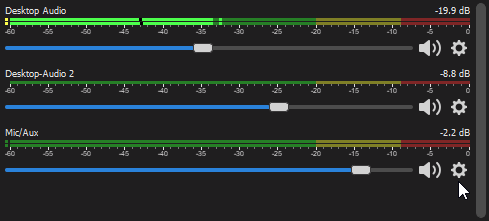
like, did you do any routing?
or are you just using it out of the box...
because if so, ANYthing YOU hear, is also on stream
thats why i dont think you have NOT done any routing
placid raptor
@cedar trout lets work on it when you're awake then? 😅
We need to understand the issue, where are you trying to click on 'the video'? is there an error you see?
could you provide a screen recording or describe your steps and end goal please?
zenith widget
@cold eagle which overlay holds the tiltify widgetse?
still anchor
@half nymph at the moment, the only audio things i have on my in game scene is an audio input capture for the mic, and the video capture device. so suppose i'm just using it out of the box?
half nymph
you need a desktop audio device then
game capture devices dont catch audio as you hear it
cedar trout
this is the video im trying to click on it wont load up for me when im clicking on it
still anchor
enabling desktop audio automatically puts it on all scenes, correct? @half nymph
zenith widget
@cold eagle nvm saw the issue
half nymph
pretty much yes, but what is the audio device? @still anchor
zenith widget
@cold eagle is the campaign you want to choose public yet?
placid raptor
let me see this, one sec @cedar trout
viscid pebbleBOT
@cedar trout Please provide your account ID found at the top of this page: https://streamelements.com/dashboard/account/channels This ID is public info and safe to share here.
cedar trout
5daf768e2c660423c7a03d04
still anchor
@half nymph uhm at the moment, the only options i have for desktop audio is "default" and "speaker". i'm so sorry i'm not sure what you meant
placid raptor
and what are you clicking to get to where you see what you sent in the screenshot? @cedar trout
it seems you're pretty much ready to go, just add the overlay to OBS
cedar trout
oh so do i just add the widget to my Overlay and that it ?
placid raptor
when you click this you'll copy the overlay to your clipboard @cedar trout
cold eagle
@zenith widget Yes mate, we have raised money for it already so it's live
cedar trout
ohhh so all i need to do is go into my obs with the URL and drop it in there and i should be good to go right @placid raptor sorry this is my first time doing this and just want to make sure im doing it right
viscid pebbleBOT
@cedar trout The default resolution for StreamElements overlays (theme and custom) is 1920x1080. Please add them in OBS at their full resolution and use CTRL+F to fit to screen if necessary. You can then downscale your stream in OBS settings > Video if you'd like https://i.imgur.com/6bWXxjR.png
 placid raptor
create a new browser source @cedar trout with the link you copied
cedar trout
thank you so much @placid raptor your an angel ❤️
placid raptor
 you too
  👍
👍
zenith widget
cold eagle
<@!120611700993949696> Yes mate, we have raised money for it already so it's liv...
i disconnected your tiltify account so please go here: https://streamelements.com/dashboard/account/integrations and connect it again. Also let me know which overlay your widgets are in
cold eagle
@zenith widget Connected it again - and here is the overlay I'm using the widget (still unable to select a campaign from it) Thanks
zenith widget
Can you unpublish the campaigns please?
 static root
Good day everyone, I have added store for redeems on stream nut I dont know how to get them to play on my stream please help
zenith widget
You need to add a redemption widget to the overlay in order to hear the alerts/sounds from the store redemptions
 weak marten
Quick question, can I setup a command so the bot adds someone to regulars?
Like !aregular and the bot does the !level command?
lament blade
My Bot didnt Write the Commands
zenith widget
@weak marten unfortunately, the bot doesn't respond to its own commands.
@lament blade can you elaborate a bit more?
lament blade
So i do a explain im doing !Duo then it must came Marco x Lukas but it doesnt relpy the question
viscid pebbleBOT
@lament blade Go to the Dashboard > Right side > Part channel > Join channel(https://streamelements.com/dashboard)
lament blade
Thanks allot
cold eagle
@zenith widget Campaigns unpublished now
 thorny walrus
Hi
 whole swan
When I hit replay on my alerts it doesn't show up on my active window. Also when some people follow it doesn't show up. Something wrong with the Alertbox?
It seems my issue is Stream Elements Alertbox doesn't work 100% of the time.
 spark juniper
how do you change the title of youre stream in OBS.live
viscid pebbleBOT
@whole swan Right click on the BrowserSource > Properties > Scroll down a bit > Refresh cache of current page
zenith widget
@spark juniper in the activity feed -> burger menu button on the top left -> stream settings
spark juniper
thanks
whole swan
I did that
@viscid pebble I've already done that still having problems. WOuld refresh browser source when scene becomes active work
viscid pebbleBOT
@whole swan OBS > Settings > Advanced > Scroll down > Enable or disable Browser Source Hardware Acceleration, depending on its current state > Restart OBS (This does not apply for OBS on Mac)
https://i.imgur.com/ggMe9ZE.png

@lament blade 10 minutes of watch time is given to those in chat when the loyalty points are handed out (every 10 minutes). Therefore, loyalty must be enabled to watch time to work properly.
There is no direct link between watch time and all-time points.
It can’t be calculated from the number of all-time points a user has because subs may earn points at a faster rate and !bonus all command increases all-time points for users in the chat at that time.
Giving points to a single user do not affect all-time, only when giving to all in chat.
lament blade
Ok thx
lament blade
I've been streaming for about a month, however, in the points ranking, there is none
ionic kelp
@lament blade That's someone else's leaderboard. Not yours.
lament blade
Yes but I have full access
 dawn ginkgo
are you the streamer or someone else?
lament blade
Its my friend's channel
dawn ginkgo
is loyalty enabled?
lament blade
Yes
ionic kelp
You need to hit stop and look at yours.
That indicates loyalty isn't enabled for theirs.
lament blade
@ionic kelp ok but I want to resolve this problem in my friend's channel
ionic kelp
Expand the tabs on the left and then loyalty. Enable it. Once they go live it'll start counting 10 minutes onward.
dawn ginkgo
hey, im looking to create a fun ban command. what i have in mind is a command that checks for 3 variables and prints the corresponding message. if its streamers name (or any specific nickname), "you cant do that". if its himself, "you cant ban yourself". if its any other nick, "user banned"
i looked around forums but there was nothing like that
ionic kelp
That requires an "if" variable/method which is not available.
ionic kelp
I'm not seeing any previous broadcasts so unless they've been live since it was enabled then that's normal as you don't earn it offline.
lament blade
Streamelements is on for a long time now
I have 25k channel points but 0 on streamelements
ionic kelp
Those are 2 different things.
Twitch channel points are separate from SE loyalty.
And as I said unless they have been live since that was enabled then you will have 0 points.
dawn ginkgo
as a first step, you could go into the channel and try addpoints and see if the leaderboard updates
lament blade
Yes i give my ten points and I see my name in the leaderboard @dawn ginkgo
dawn ginkgo
when did your friend stream last time?
lament blade
Yesterday
ionic kelp
When did you enable SE loyalty?
lament blade
For 2 or 3 hours
lament blade
ionic kelp
When did you enable SE loyalty?
Since one month
ionic kelp
If they were live yesterday for that long then you should have some points. As they don't have broadcasts set to save I can't do anything without them going live again.
lament blade
Ah
dawn ginkgo
since i cant help, i ll get back to my issue. on a different bot, i had this command that worked wonders $(eval a=["nickname".toLowerCase()];b=["$(touser)".toLowerCase()];"$(user)".toLowerCase()=="$(touser)".toLowerCase()?not yourself:a.some(item=>b.includes(item))?nickname cant be banned, $(user)!!!:$(touser) is banned!). is it not possible to get something like that in SE?
ionic kelp
No.
dawn ginkgo
uh unfortunate
ionic kelp
You'd have to use some 3rd party link to do that but that's not something we can do.
ionic kelp
Gonna be about another 10 minutes for me to see if it works.
lament blade
Ok
ionic kelp
Until they're online for at least 10+ minutes can't help with stuff.
lament blade
Sorry
thank you very much for your help and for the time you have given me
When he goes live I tell you
Thx
But my watchtime is 0 seconds
ionic kelp
They have to be live for at least 10 minutes. It will go up after that but until then it doesn't change.
lament blade
Yes but im in live everyday its impossible
ionic kelp
You do not have loyalty enabled.
lament blade
Yes
lament blade
But i want to fix him channel
 analog badger
How do I get a sound notification to as when my chats going on , a simple “bing” would be nice just to be able to try a keep up during the extreme focus times of gameplay lol
ionic kelp
@analog badger You're in luck. I'd have to find which one it is but there's something in #widget-share for that.
And found #widget-share message
analog badger
THANK YOU !
 hidden vine
Hello I have been having an issue where my mods where abusing the raffle command so i tried to put it on a timer however when the timer runs in stream the raffle doesnt start please help
here is how i set the command up
ionic kelp
You can't do that. It can only be done by a person.
hidden vine
oh okay thanks
 gloomy jay
Oow
 dire granite
How can i become the link from my bot
 fresh star
?
ionic kelp
@fresh star 100 is actually the correct number and it's a known "bug".
fresh star
ah, ok. Thanks!
 muted loom
I changed my email on twitch, but the change isn't reflected on streamelements.com
viscid pebbleBOT
Please logout of StreamElements at https://streamelements.com/logout and then login again to your account (Twitch/YouTube/Facebook).
 fervent sedge
Is there an issue going on with OBS live SE? I did an update on Monday and since then it has not been working?
Chat, activity feed and preview window are all solid white. logged out and now can't log back in, uninstalled and reinstalled and same issue.....
today looks to be another day l can't stream :/
 true anvil
idk you my dashboard says I got so many followers in October, and so many in total because I only have 567 on my twitch, its kind of weird tbh
idk if my stream elements dashboard is broken or sum, does anybody know anything about this?
topaz stream
misty kettle
anyone know how to use streamelements with ps4 without capture card and share pl...
https://streamelements.com/streamelements/commands
Link to your twitch account, start figuring out which commands you want to enable.
I am on PS4 and do SE on my mobile phone.
No overlays or alerts but at least I have chat commands!

StreamElements
The Ultimate All in One Platform for Streamers
 nimble dune
 regal dew
how do i get my money that im owned from ur company?
regal dew
how do i get my money that im owned from ur company?
Is that for SE.Pay?
regal dew
nimble dune
Is that for SE.Pay?
i dont know i just trying to get my money that im owend and if its ok can we chat in dms i need to ask you something please
nimble dune
Sorry no, I'm not a support heroes
regal dew
i know that but i want to ask some thing off the recored if thats makes sences
its personel
viscid pebbleBOT
@topaz stream Consoles do not have native support for overlays. You would need a capture card, PS4 remote play or Xbox companion app and a PC with OBS in order to have overlays over your console gameplay.
We have a blog post about how to set up console streaming with our essential tools: https://blog.streamelements.com/how-to-stream-on-console-7b620b1c46c3
regal dew
^ that is wong btw
topaz stream
viscid pebble
<@!419297384951054337> Consoles do not have native support for overlays. You wou...
Yes I know....that's what I was explaining.
regal dew
if ur on twitch u can have overlays u dont need all that extra stuff
ionic kelp
Incorrect. There is no way to add our overlays/alerts without something additional whether it be an actual desktop using those items or using lightstream.
As far as that revenue: Unless you got a tip from someone that's merely referring to your twitch subs/cheers.
That we have 0 control over.
ionic kelp
That does not contain our alertboxes though.
regal dew
yeah i know but u can still have overlays and aleerts
so that bot needs to be reworeded
ionic kelp
No it doesn't. It's talking about OUR overlays which is the only thing that users want and which are not available natively.
 foggy bone
guys how do i reset the goal of subs like it says i have 63 subs even tho i have like 8 how do i reset it so its like 6 out of lets say 25
viscid pebbleBOT
To reset goals:
- from the Overlay Editor > Session data on top right (monitor symbol) > Goals tab > reset progress of desired goal
- from the Dashboard > Activity feed on the left > Widget data on the right > Goals tab -> reset progress of desired goal
Note: Goal widgets (progress) only counts up and doesn't go down automatically, if you lose followers/subs.
foggy bone
do yall know what i can do?
regal dew
its says Consoles do not have native support for overlays. You would need a capture card, PS4 remote play or Xbox companion app and a PC with OBS in order to have overlays over your console gameplay. nothing about ur so called overlay @ionic kelp
fervent sedge
@ionic kelp would you mind having a quick look at my post a couple up please? 🙂
ionic kelp
fervent sedge
sorry, my bad
regal dew
re word that bot
ionic kelp
No.
ionic kelp
There is no reason they would be here for overlays besides our own.
foggy bone
no one helped there
regal dew
no
ionic kelp
Unfortunately I don't use it so it's beyond what I can help with.
@regal dew You're welcome to sit it out and wait a bit. We do not have support for overlays and consoles without the use of additional items as mentioned. There is nothing wrong with the bot response and there is zero reasons why someone would come to our server asking for help with overlays if they weren't referring to ours.
 storm cloak
Can I somehow do through stream elements SMS donates?
ionic kelp
To my knowledge no.
storm cloak
And does anyone have any advice through what site i should do it?
ionic kelp
No clue as that's not something we can help with.
crimson bough
Dear admins, poke pls my stats. (again disappeared) ID - 5f6ba12e7316346b8dd629d1
 iron fox
how do i access the songs my viewers are requesting? I would like to play them
 remote quarry
Did anyone had problem with wide chat badges? They look so bad since last obs updated and I haven't changed anything
crimson bough
@ionic kelp right
ionic kelp
crimson bough
 olive lodge
Hello!!. I think I got streamelements bugged and it won't let me change the sound of my notifications.
Even if I upload an mp3 audio, it is not compatible and the default sounds do not load.
Any ideas? Thank you!
remote quarry
How do I fix these badges? They're ultra wide and lose quality sooooo bad compared to my browser chat. I tried uninstalling OBS, didn't worked. It looks soo bad I can't stand looking at my chat anymore @ionic kelp
ionic kelp
Can't help with that unfortunately.
remote quarry
it is since last 2 updates
before I updated my obs everything was fine, now it is pain for me to look at chat and see 16x16 badges being scaled to 24x24 or whatever the res is now
 severe flare
Okay so i used to stream on FB but theyve given me the run around on level up, so im just gonna go to twitch instead. BUT when i try to start streaming OBSlive still tries to go to FB
viscid pebbleBOT
@severe flare StreamElements menu, on top of OBS > Logout > Login
severe flare
thank you im an idiot
 tiny hill
How can I give a person the permissions to make commands for me in the dashboard?
viscid pebbleBOT
@tiny hill Chat/Bot Levels
100 - Viewer
250 - Subscriber (Twitch subscribers automatically placed at this level)
300 - Regular
400 - VIP (Twitch VIP automatically placed at this level)
500 - Moderator (Twitch chat moderators automatically placed at this level)
1000 - Super Moderator__
1500 - Broadcaster
Dashboard Manager Levels
Bot Supervisor
Editor
Full Access
Owner
https://i.imgur.com/s61Liry.png

@tiny hill "Follow these steps to grant managers/moderators access to your dashboard:
- Click on your channel name at the top of the dashboard
- Create a new invite at one of three access levels (Bot Supervisor, Editor, Full Control)
- Send this invite to a mod/manager to give them access to your dashboard. The link is one-time-use and expires after 72 hours if not accepted
Video tutorial: https://youtu.be/zl_h-ttZDF0"
nimble dune
There you have 😁
tiny hill
Thank you :)
 scenic flume
Hey cool kids! Anyone out there able to help me figure out how to change my bot name
on a mac. (sorry my keyboard is quite finnicky)
ionic kelp
@scenic flume Not possible unfortunately.
scenic flume
Ah jeez. I'm struggling with a
bunch of a stuff on the website editor.
Are there any other free bot systems that allow a changed bot name that I can try out until OBS.live comes out for mac?
ionic kelp
Only one I can personally recommend is phantombot but you'd have to contact them for support.
 slender prism
need some help with the !givepoints command. What format do I use? I tried !givepoints user 100, and !givepoints 100 user. None seem to work
 snow jackal
как удалить бота ?
viscid pebbleBOT
@snow jackal Welcome to the helpdesk! The regular helpdesk channels are in English but we do provide multi-language support in the following channels: #🇩🇪︱deutsch | #🇫🇷︱français | #🇪🇸︱español | #🇵🇹︱português | #🇳🇱︱nederlands | #🇮🇹︱italiano | #🇵🇱︱polski | #🇨🇳︱中文語言服務區-chinese | #🇯🇵︱日本語-japanese | #🇭🇺︱magyar | #🇰🇷︱한국어-korean | #🇹🇭︱ไทย-thai | #🇷🇺︱русский | #🇺🇦︱українська | #🇨🇿︱czech
 rain stratus
Hi! I'm trying to figure how reduce the amount running message for a raffle is repeated. It's Is that possible?
 twin sentinel
Not possible.
rain stratus
meh thanks anyway
 slim swan
Hey I’m trying to upload an .mp3 file for my alert sounds and it’s giving me the “not supported format” error, anyone know how to fix that?
 vocal obsidian
Is obs.live a software made by streamlabs/obs or its owned by StreamElements?
slim swan
Streamelements
lament blade
how do i turn on !gamble for twitch
viscid pebbleBOT
@open creek Read and follow our server rules:
- We do not tolerate toxicity! Treat the community team, staff and all members with respect.
- No advertisement or channel promotion, anywhere on the server.
- No NSFW/NSFL
- No unsolicited DMs or friend requests to server members
Make sure to read the #welcome in any server you join.
lament blade
how do i turn on !gamble for twitch
 swift aspen
 languid solar
lf help with loyalty and giveaway
is there a way to reward subscriber with points?
 delicate escarp
Anyone have any ideas on what to do if the bot just suddenly stops working on the twitch stream?
viscid pebbleBOT
@delicate escarp StreamElements menu, on top of OBS > Logout > Login
delicate escarp
okay I will try that
strong kernel
languid solar
i dont have subs and cheers options
You're not an affiliate capable of having subs and cheers yet.
 stable valve
anyone know why my bot timers are not posting in my chat?
languid solar
strong kernel
You're not an affiliate capable of having subs and cheers yet.
Thought it was default. Thanks then
strong kernel
stable valve
anyone know why my bot timers are not posting in my chat?
What did you set the Chat lines setting to?
stable valve
I have them for 10 min 20 min and 30 min or 40 lines 50 and 50
strong kernel
stable valve
I have them for 10 min 20 min and 30 min or 40 lines 50 and 50
Do you have 40 or 50 chat messages in the span of 5 minutes?
 primal root
hello
strong kernel
primal root
hello
 lime plaza
i can't import mp3 files it says this
strong kernel
stable valve
I have them for 10 min 20 min and 30 min or 40 lines 50 and 50
Chat lines are not an "or" scenario. Read the description under the setting.
stable valve
strong kernel
Chat lines are not an "or" scenario. Read the description under the setting.
got it thank you
delicate escarp
how did you do that?
lime plaza
lime plaza
i can't import mp3 files it says this
i need help
languid solar
@strong kernel Why theres options for subs and cheers on Streamlabs and not SE?
strong kernel
languid solar
<@!107215138561478656> Why theres options for subs and cheers on Streamlabs and ...
Because you are not an affiliate yet.
Become an affiliate. Be capable of receiving them. Then they appear.
lime plaza
why am i getting ignored
 worldly wharf
Hey all. My Bot when offline, trying to do a give away. I parted the channel via the Dashboard and then re-joined still doesn't work. Any suggestions?
strong kernel
@worldly wharf Don't forget you have #dreamteam for support.
lime plaza
hey ive got a problem, if i try to upload a sound for my alertbox, it won't work it says: Supported formats are: .png, .gif, .jpeg, .jpg, .mp3, .acc, .wav, .ogg and .webm
how do i fix that
 wary depot
hi the bot stopped responding
its counting givewaay entries but not replying to any commands
viscid pebbleBOT
@wary depot If your commands recently stopped working and you're using OBS.Live and a custom bot name do the following:
- In OBS.Live, click on the hamburger menu (three stripes) at the top left of your activity feed
- Click on Stream Settings > Custom bot name
- In the Custom bot name field select Set custom bot name, not your already existing username (with capital letters). Note: If you already connected an account that way, the third entry will show as the account name (see image https://i.imgur.com/sO7fWOX.png).
- Scroll a bit down and click on the purple Connect Custom Bot Account button
- Log in as usual and Authorize the custom bot name
- Back in the Activity feed, click on the Send Test Message button and check if your custom bot name starts working again
 strong kernel
lime plaza
hey ive got a problem, if i try to upload a sound for my alertbox, it won't work...
strong kernel
lime plaza
hey ive got a problem, if i try to upload a sound for my alertbox, it won't work...
There is no issue with the upload function. Make sure you are using Chrome, and double check the files you are using.
lime plaza
oh i am using Opera GX maybe that's why i'll try thank you!
well yea it worked on Chrome thank you Nethyr
 lean zealot
Oi
delicate escarp
what to do if the stream elements bot even though it is setup wont show up in the chat
viscid pebbleBOT
@delicate escarp Please provide your account ID found at the top of this page: https://streamelements.com/dashboard/account/channels This ID is public info and safe to share here.
@analog badger If your commands recently stopped working and you're using OBS.Live and a custom bot name do the following:
- In OBS.Live, click on the hamburger menu (three stripes) at the top left of your activity feed
- Click on Stream Settings > Custom bot name
- In the Custom bot name field select Set custom bot name, not your already existing username (with capital letters). Note: If you already connected an account that way, the third entry will show as the account name (see image https://i.imgur.com/sO7fWOX.png).
- Scroll a bit down and click on the purple Connect Custom Bot Account button
- Log in as usual and Authorize the custom bot name
- Back in the Activity feed, click on the Send Test Message button and check if your custom bot name starts working again
strong kernel
Do you not see the lengthy step by step provided for him immediately above your last two messages?
 topaz lagoon
If I have a question or two on commands, may I ask here? Like how to get streamelements to post the emote instead of the emote text?
strong kernel
topaz lagoon
If I have a question or two on commands, may I ask here? Like how to get streame...
The bot must be subscribed to your channel to use your emotes, just like any other account.
delicate escarp
no see that trying to get it to work
topaz lagoon
thank you! @strong kernel
How do I get a command to have spaces at the end like "test "
 valid ibex
my bot wont work on twitch
viscid pebbleBOT
@valid ibex StreamElements menu, on top of OBS > Logout > Login
 potent pulsar
Is there a way to change the prefix of streamelements commands? I added command aliases and saved but they are not working in chat... is this feature currently not working?
strong kernel
potent pulsar
Is there a way to change the prefix of streamelements commands? I added command ...
Please provide an example of what you're describing.
potent pulsar
Under chat commands there is the command !points I open the command and add a command alias of #points, after saving and attempting to run the command #points does not trigger the bot.
strong kernel
An alias of #points would make the trigger !#points
potent pulsar
interesting, okay so there is no way to change the ! prefix of any commands?
strong kernel
No. You could use a keyword but any instance of #points anywhere in a message would trigger the command.
potent pulsar
Thanks for the information, I will just rename the command so there are no conflicts. thanks again!
 grave igloo
I'm having an issue with the overlays on slobs
viscid pebbleBOT
@grave igloo We're not able to troubleshoot issues with using our overlays in StreamLabs OBS (SLOBS) as we don't have the tools to support their software. We recommend using OBS Studio or OBS Studio with our plugin OBS.Live.
 late orbit
Does StreamElements have options to run a poll in the stream?
 tranquil warren
how do i activate bit donations via stream elements...cant figure it out
strong kernel
tranquil warren
how do i activate bit donations via stream elements...cant figure it out
You don't "activate" them through us. That's a Twitch thing, for affiliates and partners.
 austere stream
How do I enable alerts for twitch streams and add it to OBS
viscid pebbleBOT
@austere stream New to StreamElements?
Check out our YouTube channel https://www.youtube.com/c/streamelements/videos
with tutorial videos from setting up the basics, to in-depth details on how to use our product.
New to OBS? Here is a 4 step quick start guide
https://obsproject.com/wiki/OBS-Studio-Quickstart
Want to learn even more? Here is an in-depth overview
https://obsproject.com/wiki/OBS-Studio-Overview
austere stream
thank you!
 restive holly
Hi
austere stream
Does anyone know the font that vanilla streamlabs twitch alerts use?
 cursive sequoia
Hello. I have a problem with the alerts. They are not shown in the stream nor in the activity feed. Anyone knows how can i solve this?
 candid wren
hey so i am new to streaming but i wanted to get a loyalty currency going. I activated the loyalty through my dashboard on streamelements and i activated the bot but it still seems to not be working. What do i do?
dry hare
austere stream
Does anyone know the font that vanilla streamlabs twitch alerts use?
You’d have to ask streamlabs
austere stream
fair lol
yeah im brand new, i have no idea how to make the alerts just basic text without an image or video
fast sandal
is there a way to get a session timer for a viewer? like, how long they have been watching for THAT stream?
 half shell
How do I make the alerts pop up on my phone ? I’m new to twitch and wanted to set my page up but I’m having problems.
viscid pebbleBOT
@austere stream New to StreamElements?
Check out our YouTube channel https://www.youtube.com/c/streamelements/videos
with tutorial videos from setting up the basics, to in-depth details on how to use our product.
New to OBS? Here is a 4 step quick start guide
https://obsproject.com/wiki/OBS-Studio-Quickstart
Want to learn even more? Here is an in-depth overview
https://obsproject.com/wiki/OBS-Studio-Overview
 drifting mica
Does anyone know what is the ideal resolution for the preview image of the streamelements store?
 echo sable
Good evening. Trying to get text to animate in and out on a widget and I've run into a very strange issue.
You can see it working on my laptop with different styles being selected and it shows the animation (left) yet on my main streaming PC (right) it swaps with no animation. It's the same widget & same webpage just on two different computers.
Can anyone help?
 abstract hemlock
@echo sable try to disable hardware acceleration on your "broken - main PC"
echo sable
Tried that. No change.
abstract hemlock
same behavior once you add it on OBS?
echo sable
Yes
 zinc echo
can someone help me i messed up and i wanna restart how do i ?
abstract hemlock
@echo sable that's weird since, as you can see, the web editor is working fine with that widget
echo sable
Yeah it's why I'm confused. I've never had an issue like this before and I've tried many things to try and resolve it.
echo sable
I've tried in Chrome with hardware acceleration both off and on. Tried in Firefox and Edge, reinstalled my GFX drivers, made sure Chrome and windows were updated.
viscid pebbleBOT
@zinc echo Please provide a proper screenshot with the issue visible. If not sure how to take a screenshot, you can check here: https://www.take-a-screenshot.org
 wicked drift
I have the credit roll widget and it doesn't show the latest updates anymore
i had three new followers but it didn't show it.
 silk yew
I am have some problems with overlays and need help. no overlays are showing and I can create or add any new ones
can't*
cursive sequoia
Hello. I have a problem with the alerts. They are not shown in the stream nor in the activity feed. Anyone knows how can i solve this?
 lavish dew
idk if this is the right place to ask, but does anyone know how to get the "game overlay" from streamlabs to work?
its supposed to show up in my game but it only shows up when I alt tab from the game
strong kernel
You'd have to ask Streamlabs.
silk yew
How do you get the streamelements overlays to work?
viscid pebbleBOT
@silk yew To add your overlays to OBS, add a new browser source in your scene. Paste your overlay URL in the browser source properties, set the dimensions to 1920x1080 (unless you changed them on the website) and check Shutdown source when not visible. https://youtu.be/KDvLynUqXI4
 vale cypress
Hey guys! I'm quite new to streaming and twitch in general and I'd have a question, which is how can I remove Streamelements from my stream? I already logged off and removed StreamElements from my moderator lists, but it's still posting :(
I've read that there is a "part channel" button, but for the love of god, I can't find it. Could anybody help? 😦
viscid pebbleBOT
@vale cypress Go to the Dashboard > Right side > Part channel > Join channel(https://streamelements.com/dashboard)
silk yew
So it didn't work and I can't go to preview any overlays and everytime I try to edit them it a webpage pops up with Uh... oh something went wrong
viscid pebbleBOT
@silk yew Please provide a proper screenshot with the issue visible. If not sure how to take a screenshot, you can check here: https://www.take-a-screenshot.org
vale cypress
Thank you Mr. Bot sir!
silk yew
viscid pebbleBOT
@silk yew Please logout of StreamElements at https://streamelements.com/logout and then login again to your account (Twitch/YouTube/Facebook).
silk yew
Still not working for me
strong kernel
silk yew
So it didn't work and I can't go to preview any overlays and everytime I try to ...
Your issue has been reported to the devs. There is unfortunately no immediate fix.
silk yew
okay thanks
 rain terrace
Just curious if this Stream elements invite for the payout thing is a real thing?
abstract hemlock
If you receive an email from payments@streamelements.com, Yes
 elder mist
need help with my sony a6000
everytime I use my color changing LED's I get a weird wavy distortion in the light
rain terrace
Ah perfect, thank you @abstract hemlock
And whats the purpose of the payout system?
strong kernel
To get paid for merch or campaigns.
rain terrace
Ah, so it doesn't go to your paypal. Thank you!
abstract hemlock
@rain terrace you can choose the payment method 😅
rain terrace
Yeah I just filled it all out! Thank you haha
elder mist
Does anyone know anything about cameras
ionic kelp
 calm salmon
my chat bot isnt in my stream ive tried clicking part channel and rejoin and its still not there
viscid pebbleBOT
@calm salmon StreamElements menu, on top of OBS > Logout > Login
 shrewd dust
Hello, can somebody help me with merging Twitch and YouTube, accidentally login from different platform.
 rare jay
can someone help me? I used to stream on twitch with streamelements, then I left for awhile, came back and stream elements bot isn't working in my chat
viscid pebbleBOT
@rare jay StreamElements menu, on top of OBS > Logout > Login
@shrewd dust Account Merging - Please note:
- Merging accounts only allows faster ways to switch between accounts
- Merging accounts does not allow data sharing between accounts - different streaming platforms, different type of events
- Merging accounts allows duplicating/sharing overlays between the accounts
If you understand the limitations of merging and want to proceed, please find the JWT tokens (!jwt) from both accounts you want to merge and you will be directed to DM them to a staff member
rare jay
stream elemenents works with my obs but not in my chat
none of my commands work
and when someone follows it doesn't say anything in chat
i have it modded. I even unmodded and remodded it. I even parted channels and readded it
viscid pebbleBOT
If your commands recently stopped working and you're using OBS.Live and a custom bot name do the following:
- In OBS.Live, click on the hamburger menu (three stripes) at the top left of your activity feed
- Click on Stream Settings > Custom bot name
- In the Custom bot name field select Set custom bot name, not your already existing username (with capital letters). Note: If you already connected an account that way, the third entry will show as the account name (see image https://i.imgur.com/sO7fWOX.png).
- Scroll a bit down and click on the purple Connect Custom Bot Account button
- Log in as usual and Authorize the custom bot name
- Back in the Activity feed, click on the Send Test Message button and check if your custom bot name starts working again
rare jay
THANK YOU!
 obtuse portal
Hi guys can someone help me setup a rename command so my old followers can get there watchtime back
abstract hemlock
@obtuse portal the rename command is on the default tab, but iirc this won't affect the watchtime just the loyalty points https://streamelements.com/dashboard/bot-commands/default-commands
lament blade
I'm having this issue with the alert widget where its playing a old sound that i delete at the same time as the new sound. I even tried deleting all sounds but its still playing. Also there's no volume bar for it.
obtuse portal
Renzito is there a way to transfer over watchtime?
strong kernel
If !rename doesn't do it, no, there's no way.
 crystal karma
how do i get follower notifications to show up during stream
viscid pebbleBOT
@crystal karma New to StreamElements?
Check out our YouTube channel https://www.youtube.com/c/streamelements/videos
with tutorial videos from setting up the basics, to in-depth details on how to use our product.
New to OBS? Here is a 4 step quick start guide
https://obsproject.com/wiki/OBS-Studio-Quickstart
Want to learn even more? Here is an in-depth overview
https://obsproject.com/wiki/OBS-Studio-Overview
obtuse portal
and its just ! rename @(old name) then @(new name)
 compact echo
Anyone i can ask a quick question about stream store ?
viscid pebbleBOT
@compact echo Welcome to the helpdesk! Please let us know how we can assist you today and a support volunteer or staff member will assist you as soon as they are available. Thank you for your patience.
compact echo
As a supermoderator can i not make new store items for the streamer when they are Live?
strong kernel
compact echo
As a supermoderator can i not make new store items for the streamer when they ar...
Being a supermoderator has nothing to do with the stream store. That's only a bot command level role. You need to be a manager with access to their dashboard to do it. And no, it doesn't matter if they're live or not.
 surreal thorn
Okay guys, anybody available to ask a question to about StreamLabs?
 prisma relic
To like transfer stuff over?
 versed cape
I wanna change my donations to my bank card, but I only have the option for paypal, how do I switch it?
viscid pebbleBOT
@versed cape SE.PAY is available for streamers who are at least 18 years old, with bank account under their name in one of the following countries and have at least 101 follower (Twitch) / 101 subscribers (YouTube):
Austria, Belgium, Czech Republic, Denmark, Finland, France, Germany, Ireland , Italy, Netherlands, Poland, Portugal, Slovakia, Spain, Sweden, Switzerland, United Kingdom, United States.
If you meet these criteria and don’t see SE.Pay, let us know.
For information on SE.Pay payment methods, their fees and settlement times see https://streamelements.com/dashboard/tipping/fees
dry hare
surreal thorn
Okay guys, anybody available to ask a question to about StreamLabs?
If it’s regarding importing from streamlabs sure. If it’s support you’ll need to go to their discord
 queen lark
How to customize bot name with Ground Control?
placid raptor
we need to enable that for you
viscid pebbleBOT
@queen lark Please provide your account ID found at the top of this page: https://streamelements.com/dashboard/account/channels This ID is public info and safe to share here.
queen lark
viscid pebble
<@!547223126946349077> Please provide your account ID found at the top of this p...
5ed8ce5e4ce7ad8f95371d78
 craggy ivy
Hey guys! I can’t get my chat box to do anything other then display a black box. It’s always blank and I can’t figure it out to save my life. 😕 I have twitch connected to stream elements, have an overlay with a chat box and it displays fine (using OBS) but no messages ever appear when testing 😕 am I missing something here?
placid raptor
you should be good to go @queen lark
queen lark
placid raptor
you should be good to go <@!547223126946349077>
Got it! Thanks much!
prisma relic
this one @craggy ivy ?
craggy ivy
It doesn’t. Just tried. I can start a new test stream. Just tinkered for about 20 mins and couldn’t get a message to display
viscid pebbleBOT
@lament blade Read and follow our server rules:
- We do not tolerate toxicity! Treat the community team, staff and all members with respect.
- No advertisement or channel promotion, anywhere on the server.
- No NSFW/NSFL
- No unsolicited DMs or friend requests to server members
Make sure to read the #welcome in any server you join.
prisma relic
you don't need to be live for it to work @craggy ivy ... it should be working when you are offline 🤔
 graceful hare
hey guys! wondering when and where you get a notification if merch was purchased from SE? I ordered a hoodie for someone today who won it on my stream and i didn't get anything sent to me to let me know there was a purchase. While i know, i purchased it, would there be any email or merch report coming my way after a sale? Thank you!
ionic kelp
@graceful hare 24 hours after purchase it'll appear in purchase history via the SE.Merch tab.
craggy ivy
prisma relic
you don't need to be live for it to work <@!396796153485721601> ... it should be...
Oh, good to know. I assumed I had to be live. My account seems a bit wonky. I’ve lost saved overlays twice now when I logout and log back in. It just happened now. Had two overlays and DEF saved and they are gone after logging out and back in.
graceful hare
ionic kelp
<@710231630005928044> 24 hours after purchase it'll appear in purchase history v...
thank you!
craggy ivy
Ahhhh
I have YouTube and twitch connected
Seem to be crossing the account up
Maybe that’s it
craggy ivy
prisma relic
depends the account you are logged into
Got that cleared up! The mixed accounts. I just copied the overlays over to the other channel and then to be careful I copied the URLs from the new overlays and added them to OBS again but my chat is still blank
prisma relic
keep it open in on the website and test that way
craggy ivy
I am
That’s the actual chat ^
Lol, now it’s working
Just got my first message
🤪
Thanks!!!
prisma relic
haha. ya np @craggy ivy ... but i should suggest to look into #widget-share message if you are just starting up with your on screen chat.
little more customization with that one 🙂
i also like the minimal one #widget-share message 🤷
 pearl void
So ive been having a problem for the past few weeks where stream elements isn't recognizing any new followers i get. So the followers and the follower alerts dont show up and they aren't in my event list
it's only followers
everything else works fine
 terse bronze
I want to put several lines in the chat using a streamelements command. Which character have I to use? Please send MD to copy/paste it. Or an example here! Thanks
zenith widget
@pearl void should be good now. I've resubbed your webhooks.
@terse bronze the twitch chat doesn't support new lines
pearl void
you are a blessing. thank you so much !!
 topaz umbra
Hey support is there anyway for me to Link my FB gaming Page with my Twitch page so i can use session statistics for both profiles?
late orbit
Is there any way to run a poll in chat using Stream Elements?
viscid pebbleBOT
@topaz umbra Account Merging - Please note:
- Merging accounts only allows faster ways to switch between accounts
- Merging accounts does not allow data sharing between accounts - different streaming platforms, different type of events
- Merging accounts allows duplicating/sharing overlays between the accounts
If you understand the limitations of merging and want to proceed, please find the JWT tokens (!jwt) from both accounts you want to merge and you will be directed to DM them to a staff member
placid raptor
not that I know of @late orbit
most creators I've seen use strawpoll or twitch native polls
viscid pebbleBOT
You can find your JWT token on your account channels page (Show Secrets to reveal the token): https://streamelements.com/dashboard/account/channels
READ ME: This is a private security token. Do NOT share this token here or other public places, only with a StreamElements staff member in private.
late orbit
placid raptor
not that I know of <@!323133224245264384>
most creators I've seen use strawpoll...
Is straw poll a widget, add on?
I can use cloud bot but was wanting to move everything to stream elements
placid raptor
it's a website for polls @late orbit
we don't have a native solution for polls but honestly I don't see how it should affect your decision :D
late orbit
I'll continue to use cloud bot for it. Much easier to have it run through chat. Not an issue but would have been easier to manage everything on one dashboard
placid raptor
twitch polls are also kinda easy to use, and are in chat
topaz umbra
so do i just wait for a SE staff member to DM me?
lament blade
when i stream im so laggy who can help me
viscid pebbleBOT
@lament blade Please provide a log from your last stream. To do this, in OBS go to Help > Log Files > Upload Last Log File and paste the link to the log file here.
 sweet canyon
Am i able to chat to someone about how to add items to the stream store?
zenith widget
Steps to make a command trigger sound on stream:
- Go to Stream Store page here: https://streamelements.com/dashboard/store/items
- Add an item that has these settings on it:
- Stream Perk
- Loyalty settings to your desire
- (Next step) Add contents (image and/or sound you want to play)
- "Redeeming this item shows an alert
- Redemable via chat
- Skip Requirements
- Get the item name/command from the 2nd creation page
- Go to commands page here: https://streamelements.com/dashboard/bot/commands/custom
- Add command with desired name and have response for command as:
${redeem item_name_here} - Go to your overlays and edit the overlay you use.
- Click on "widgets" and add "Store redemptions" widget. Click save and you should be golden.
- Test your own command in chat and have OBS or editor open to hear sound
 quartz halo
Trying to add my YT account, but since I already logged in once under it separately, it will not allow me to claim it. I did not know I could just link it later. If I delete the account I made for the YouTube streamelemnts, can I just claim the email now for twitch or can I just merge them somehow.
viscid pebbleBOT
@quartz halo Account Merging - Please note:
- Merging accounts only allows faster ways to switch between accounts
- Merging accounts does not allow data sharing between accounts - different streaming platforms, different type of events
- Merging accounts allows duplicating/sharing overlays between the accounts
If you understand the limitations of merging and want to proceed, please find the JWT tokens (!jwt) from both accounts you want to merge and you will be directed to DM them to a staff member
 tulip cedar
I closed my twitch contol panel and don't know how to bring it back up
quartz halo
@viscid pebble Thank you, I will find these.
 opaque anchor
i closed my chat box and cant get it back can someone help please
zenith widget
If using OBS.Live -> Streamelements on top -> chat @opaque anchor
opaque anchor
ok thanks
zenith widget
@tulip cedar In OBS? If yes -> View on top -> docks
opaque anchor
so i go to docks then what am i looking for sorry i am noob lol]
opaque anchor
if i uninstal and reinstall will it bring the chat box back ?
zenith widget
viscid pebbleBOT
@opaque anchor To add your overlays to OBS, add a new browser source in your scene. Paste your overlay URL in the browser source properties, set the dimensions to 1920x1080 (unless you changed them on the website) and check Shutdown source when not visible. https://youtu.be/KDvLynUqXI4
opaque anchor
thank you
cold eagle
Hi @zenith widget I had a quick look through the messages this morning just in case I missed any more information regarding my issue you were looking in to, as per your last suggestion I unpublished the campaigns - Not sure what to do now, so waiting further instructions - Thank you in advance.
zenith widget
Sorry, yesterday when you told me you unpublished them, i was not available and forgot to reply and then my shift ended
Can you publish them now?
opaque anchor
hello me again how do i test my alerts?
viscid pebbleBOT
@opaque anchor You can test alerts via the Emulate bell on the lower left side of the Overlay Editor. Simply go to your Dashboard > My Overlays > pencil/edit button on the overlay. Make sure the Preview LIVE on stream option is on to see the alert in OBS/XSplit** https://streamable.com/vtulg9
 zenith widget
Can you publish them now?
zenith widget
zenith widget
Can you publish them now?
@cold eagle
opaque anchor
thank you
cold eagle
Hi @zenith widget So when I go in to publish them, I don't see anything ( I was able to unpublish them yesterday ok ) I'm part of a 'Team' for this, I'm assuming that should not make any difference ? Please see attached screenshots
zenith widget
uumm
maybe they are over?
not sure, consult with the team you are part of
if the campaigns are not listed anymore
cold eagle
But when I go in to the Teams section it is still there
zenith widget
I don't have any special access to tiltify
to even remotely look at your account
so i can't really help on this matter if the campaigns are not listed on your acocunt
opaque anchor
thank you again for all your help to day 🙂
cold eagle
@zenith widget So they seem to be published now -
zenith widget
Can you make your own campaign and not part of a team? The campaign being a part of the a team might be preventing it from being shown.
cold eagle
Ok I will make a new campaign and see if that pulls in and will test and let you know. Thanks
cold eagle
@zenith widget So I created an Individual Test campaign and it is showing up in StreamElements, so it appears that 'Team' events don't work - Is this something I would need to raise with Tiltify to see about implementing in future?
zenith widget
Not sure, might be something we would need to explore on our side.
cold eagle
@zenith widget Ok, that would be great to get this working, as I'm sure there are other people who would be using the 'Team' campaign and not just the individual, is that something you can request or suggest to look into? Thanks in advance.
zenith widget
I will look into this with the devs when I manage to get their attention away for 5 minutes to determine if its something we lack or if its intentional.
cold eagle
Cheers
shrewd dust
Hello, can somebody help me with merging Twitch and YouTube, accidentally login from different platform. Can somebody help with that?
viscid pebbleBOT
@shrewd dust Account Merging - Please note:
- Merging accounts only allows faster ways to switch between accounts
- Merging accounts does not allow data sharing between accounts - different streaming platforms, different type of events
- Merging accounts allows duplicating/sharing overlays between the accounts
If you understand the limitations of merging and want to proceed, please find the JWT tokens (!jwt) from both accounts you want to merge and you will be directed to DM them to a staff member
shrewd dust
It's not about merging se accounts, it's about link between twitch and youtube, I can't claim my twitch account only give full control to my YouTube account
ionic kelp
And that's how you do it.
shrewd dust
@ionic kelp where I can find jwt numbers?
viscid pebbleBOT
You can find your JWT token on your account channels page (Show Secrets to reveal the token): https://streamelements.com/dashboard/account/channels
READ ME: This is a private security token. Do NOT share this token here or other public places, only with a StreamElements staff member in private.
candid wren
candid wren
hey so i am new to streaming but i wanted to get a loyalty currency going. I act...
can i get an answer?
zenith widget
@candid wren you still need to be live to give out points to people
@cold eagle So devs told me that it might be something to do with privacy of the team it self. We might not be getting anything from the API of Tiltity because the team might be private/hidden or something (even though you can see it)
so something needs to be looked at in the settings of the team
candid wren
zenith widget
<@!286309227520327681> you still need to be live to give out points to people
yes i know, i streamed for 3 hours yesterday, 30 min of it i tried to fix it but it just doesnt work. Same with all the cmomands dont work, i did add the bot to the chat.
shrewd dust
ok, i'm ready to send JWT keys to SE staff member, who should I DM?
cold eagle
Thanks I'll pass on to the Lighstream guys then... Thanks @zenith widget
lament blade
Hi! I've set up a slideshow of images but I want to put text of my latest follower, sub and such to follow with the slides. Anyone know how to do this in Streamelements?
 fierce abyss
any 1 ?
viscid pebbleBOT
@fierce abyss New to StreamElements?
Check out our YouTube channel https://www.youtube.com/c/streamelements/videos
with tutorial videos from setting up the basics, to in-depth details on how to use our product.
New to OBS? Here is a 4 step quick start guide
https://obsproject.com/wiki/OBS-Studio-Quickstart
Want to learn even more? Here is an in-depth overview
https://obsproject.com/wiki/OBS-Studio-Overview
shrewd dust
shrewd dust
ok, i'm ready to send JWT keys to SE staff member, who should I DM?
should I choose member who is online?
viscid pebbleBOT
@lament blade Read and follow our server rules:
- We do not tolerate toxicity! Treat the community team, staff and all members with respect.
- No advertisement or channel promotion, anywhere on the server.
- No NSFW/NSFL
- No unsolicited DMs or friend requests to server members
Make sure to read the #welcome in any server you join.
 scenic kayak
Hello could someone help me please. I got custom follower emotes and sounds and i set them up right in the over lay on stream elements. But when someone triggers an alert in my stream they are the default alerts.
THe alerts show fine in stream elemeents test but on stream they are default.
Also my custom cheer emote wont change even when i try to test in on stream elements it stays default.
 ocean gate
Hiya, I've only just realised that my chat stats are broken, probably from when I changed my username from DestabiliseHarlow to DestabiliseUK. Is there something I need to do to fix them?
placid raptor
done @ocean gate
ocean gate
placid raptor
done <@!271640094660624395>
Oh, brilliant! Thank you!
 oblique ridge
Im having an issue setting up my alerts for my stream
When i emulate an alert, my OBS itself only shows half of the alert
like the left side of the alert
viscid pebbleBOT
@oblique ridge To add your overlays to OBS, add a new browser source in your scene. Paste your overlay URL in the browser source properties, set the dimensions to 1920x1080 (unless you changed them on the website) and check Shutdown source when not visible. https://youtu.be/KDvLynUqXI4
oblique ridge
thank you
 shadow kayak
is there a widget for showing a list of top donators, cheerers, gifters, etc? I would also like to have it rotate thru a couple different lists in a slideshow but thats just extra. I cant find a widget that does this. maybe im missing it
 severe sequoia
Hey! I'm a Software Developer and right now I'm working on my first custom widget, I'm wondering if it is possible to add text to speech (TTS) on a custom widget, and if it is, how? I already searched but I only find information related to cheers/subs/tips, which is not something that I want. I just want to be able to TTS a message that a user send in chat followed by a command.
Per example:
user: !tts Hey this message will be TTS
and after receiving this message a bot would TTS "Hey this message will be TTS"
Any kind of help or even documentation would be appreciated!
 fervent pewter
Looking for some help, setting up my SE twitch chat bot and its not responding to any commands in my chat. Any help is appreciated
crimson bough
Dear admins, poke pls my stats. (again disappeared) ID - 5f6ba12e7316346b8dd629d1
 wooden ferry
so i am trying to set up command !watchtime, so bot shows time how much time somebody watched me, i added it to chat as mod, enabled loyalty and when i do command !watchtime bot says "you have watched for 0 seconds" when i did more than that, please any help, feel free to dm me if somebody has solution
wooden ferry
fervent pewter
Looking for some help, setting up my SE twitch chat bot and its not responding t...
if you are offline, your bot won't work as i know and for SE bot to work you need to mod it to your chat
wooden ferry
wooden ferry
so i am trying to set up command !watchtime, so bot shows time how much time som...
and when i looked into command it said this " ${user} has spent ${user.time_online|'0 seconds'} watching ${channel}" any tips how can i fix that so it doesnt say 0 seconds, but real time
viscid pebbleBOT
@wooden ferry 10 minutes of watch time is given to those in chat when the loyalty points are handed out (every 10 minutes). Therefore, loyalty must be enabled to watch time to work properly.
There is no direct link between watch time and all-time points.
It can’t be calculated from the number of all-time points a user has because subs may earn points at a faster rate and !bonus all command increases all-time points for users in the chat at that time.
Giving points to a single user do not affect all-time, only when giving to all in chat.
wooden ferry
@viscid pebble thank you
 peak briar
Why is my "top tip" label not working? All the other like "most recent tipper" works like normal in the set up on the website?
fervent pewter
wooden ferry
if you are offline, your bot won't work as i know and for SE bot to work you nee...
so if im not live the bot wont work? interesting. thanks
viscid pebbleBOT
@fervent pewter If your commands recently stopped working and you're using OBS.Live and a custom bot name do the following:
- In OBS.Live, click on the hamburger menu (three stripes) at the top left of your activity feed
- Click on Stream Settings > Custom bot name
- In the Custom bot name field select Set custom bot name, not your already existing username (with capital letters). Note: If you already connected an account that way, the third entry will show as the account name (see image https://i.imgur.com/sO7fWOX.png).
- Scroll a bit down and click on the purple Connect Custom Bot Account button
- Log in as usual and Authorize the custom bot name
- Back in the Activity feed, click on the Send Test Message button and check if your custom bot name starts working again
fervent pewter
Thank you kind bot and support staff
 steel pond
Does anyone know how to get the gifters name when someone gifts a sub on Twitch ? I have a alert but it doesn't show the name of the person that gifted the sub. I used the argument {gifter} but that doesn't work
ionic kelp
Options should be mentioned by the spot to put it.
 scarlet scroll
i need halp with mt obs Settings i be have problem with streaming
versed cape
Is there SE Pay for Canada? Since there's so many other countries I find it odd if there isn't.
ionic kelp
@versed cape Unfortunately it's not atm and when I last asked it's a little complicated trying to have it setup there.
lament blade
Why is my viewer list like this?
I only have 1 viewer but all these are in my chat
dry hare
Because lurkers
lament blade
What is lurkers?
dry hare
People who are watching you while they do something else.
Active viewers are only counted if the stream is their active browser window
lament blade
How am i supposed to know who is active viewers?
lament blade
So that is kind of a bad system right?
dry hare
So be entertaining and they will engage with you
lament blade
Ok, thx
dry hare
If you don’t give them a reason to chat, they won’t
lament blade
I am new to streaming got any advice?
dry hare
Sometimes they’ll comment on your reaction to the game your playing, pick a topic to talk about to yourself so they have a reason to chime in
 brisk meteor
Hey guys, I am trying to setup a Tiltify donation box. I can see campaigns I have made and campaigns from a test team I created, but I cannot select the Campaign from a Team I joined. Does anyone know how to setup the donation box to work with a campaign from a team I am a member of (not owner)
ionic kelp
@brisk meteor Teams don't work. Only individual ones.
Gimme a sec to look for something though.
 idle solar
Hello I hope everyone is well today. Just a quick question. For !so command, how can i set it up so it will remove the @ symbol automatically for the link?
 rapid dove
Hey, can anyone tell me how to set timers too drop Social media links in the chat please?
 lofty mango
hi can i get some assistance with a issue regarding PayPal?
 crimson venture
How do I change my card for SE Pay?
viscid pebbleBOT
@crimson venture Please contact us via email for support with SE.Pay. You can use our contact form here: https://streamelements.com/contact Thank you.
idle solar
Just a quick question. For !so command, how can i set it up so it will remove the @ symbol automatically from the link?
fierce abyss
hi any1 can help me i did a follower goal list and it dosnt shoe me the correct followers that i got
 keen pelican
hey how i set this back to 49 ?
ionic kelp
@keen pelican english bitte. 
fierce abyss
any 1 can help me pls?
lament blade
Hello! could anyone help me set up overlays for my stream?
viscid pebbleBOT
New to StreamElements?
Check out our YouTube channel https://www.youtube.com/c/streamelements/videos
with tutorial videos from setting up the basics, to in-depth details on how to use our product.
New to OBS? Here is a 4 step quick start guide
https://obsproject.com/wiki/OBS-Studio-Quickstart
Want to learn even more? Here is an in-depth overview
https://obsproject.com/wiki/OBS-Studio-Overview
keen pelican
ionic kelp
<@!353556379174436875> english bitte. <:aha:350653489044652052>
i asked in english LUL i cant change the text from other persons on twitch chat
ionic kelp
Unfortunately my german is bleh so I'll need to know what it is at least.
keen pelican
ohh its a counter if u wqrite the command it counts +1
fierce abyss
this chat is so active buy people not helping
keen pelican
i treid with editcounter.. but what is the counter name ?
i tried this, but it wasnt right
idle solar
idle solar
Just a quick question. For !so command, how can i set it up so it will remove th...
Just a quick question. For !so command, how can i set it up so it will remove the @ symbol automatically from the link?
 amber stream
https://gyazo.com/b8e8810ff9e28cdd3ee2151a697e2b85 can anyone help me with SE.Pay question, my bank details havent changed and i just withdrew a tip earlier in the week, now Im getting this error. thanks
 fierce abyss
this chat has no helpers :*(
idle solar
Yea i have been waiting over an hour for an answer to an easy question
fierce abyss
well same here
idle solar
Lol
 boreal idol
I am guessing no one has helped you guys
idle solar
Not yet
fierce abyss
nope
boreal idol
I just needed help with the se pay thing
fierce abyss
well we all in the same boat we all need something that can be solve in few min but no 1 helps
idle solar
@boreal idol Well you might need to contact then via email for support with SE.Pay. You can use our contact form here: https://streamelements.com/contact
StreamElements
StreamElements is the leading platform for live streamers on Twitch and Youtube. StreamElements includes Overlay management, ChatBot, Tipping, Alerts & Loyalty
Thats probably your best bet
For se.pay
boreal idol
Alright thank you
idle solar
I saw someone ask an hr ago and that populated.
fierce abyss
rabbit do you know how to put a counter for players that watching you?
idle solar
Like a viewer count
fierce abyss
yes
dry hare
To be 100% honest, you should never check your viewer count
fierce abyss
i just delete it its not working well with streamelements
dry hare
Also at the bottom of the activity feed panel is a viewer count
fierce abyss
no 1 really watching me some ppl go in and out
idle solar
Oh ok, yea thats the only widget i use for them, its not 100 perxent accurate but it helps
dry hare
If you watch your viewer count all you will do is get discouraged
It’s a pointless statistic anyways because engagement of viewers > number of viewers
fierce abyss
ok can you help with another thing?
dry hare
Depends on the other thing
fierce abyss
i put a follower goal and i got 11 followers but on the widget its say i got 20
idle solar
Just a quick question. For !so command, how can i set it up so it will remove the @ symbol automatically for the link?
viscid pebbleBOT
@fierce abyss To reset goals:
- from the Overlay Editor > Session data on top right (monitor symbol) > Goals tab > reset progress of desired goal
- from the Dashboard > Activity feed on the left > Widget data on the right > Goals tab -> reset progress of desired goal
Note: Goal widgets (progress) only counts up and doesn't go down automatically, if you lose followers/subs.
idle solar
Ok
fierce abyss
Note: Goal widgets (progress) only counts up and doesn't go down automatically, if you lose followers/subs.
??? really ?
thats wierd
 heady cipher
how to merge chat stats after name change?
lament blade
hey does anyone know how to set up stream overlay? i know how to put in into obs but it doesnt show up for me
dry hare
@fierce abyss if you want total, there's a total widget
dry hare
idle solar
Ok
This is what I use for shoutout command Make sure to check out ${1}, they are an awesome person! They were last seen playing ${game ${1}} Give them a follow at https://twitch.tv/${user}
viscid pebbleBOT
@lament blade To add your overlays to OBS, add a new browser source in your scene. Paste your overlay URL in the browser source properties, set the dimensions to 1920x1080 (unless you changed them on the website) and check Shutdown source when not visible. https://youtu.be/KDvLynUqXI4
idle solar
@dry hare and that will work without the @?. I usually type @ to populate the name but sometimes forget to erase it.
viscid pebbleBOT
@heady cipher If you changed your name on Twitch, please follow these steps:
- Visit https://streamelements.com/logout and then log in again by connecting with Twitch.
- On the right side of the dashboard page that opens, select Join under bot settings. If it says Part select that and then select Join to send the bot to the chat. Don't forget to mod the bot by typing /mod streamelements in your channel if you have not already.
- Post your old and your new name here so that we can update your channel's chatstats tracking (must be done by staff).
dry hare
idle solar
<@128166843360739328> and that will work without the @?. I usually type @ to po...
it will populate the first with the @ and the second will be their channel
idle solar
I have seen in some channels they type the @ and in the link it leaves it out.
dry hare
that command will leave it out
idle solar
Perfect, now how can i fix !so command, is it a default command?
idle solar
Oh good
heady cipher
viscid pebble
<@!559010255401517077> If you changed your name on Twitch, please follow these s...
old username: erykaaaaaahhh
new username: erykaahh
dry hare
you will need to make a custom command
idle solar
Oh ok, thank you for your time @dry hare
dry hare
heady cipher
old username: erykaaaaaahhh
new username: erykaahh
should be good now
heady cipher
dry hare
should be good now
thank u sm 🥺
 uncut dagger
I am using a widget that asks for a typed icon...as in "heart" . There is also "money-bill-wave". Is there a list of these icons somewhere?
keen pelican
hey how i can set this back to 49 ? Its a counter that counts every time ur using the !szene command +1
fierce abyss
any one know how to fade out music in obs?
 little copper
so I cant connect my streamerlabs to twitch becouse the streamer key isint showing where its supossed to be, can someone please help me and explain the problem?
 violet citrus
Hello how can I add a playlist in OBS Streamlabs?
idle solar
@dry hare it still populates the @ on my end
idle solar
dry hare
screenshot your command in your dashboard
idle solar
Ok 1 sec.
Is a !so a default command that cannot change? And i need to make a whole new one?
dry hare
not a default command
dry hare
when you create the custom command, you should be good
That doesn't appear to be the same command
idle solar
Ok so make a whole different one ok. But do you know how to change or where to go to change !so command?
dry hare
my shoutout command is !shoutout and I have an alias of so so that I can trigger it with !so
idle solar
Oh gotcha
echo sable
Good evening. I posted yesterday regarding an issue with text animations in a widget not working on my main streaming PC but working on my laptop.
Renziito tried to help by suggesting that I turn off hardware acceleration and test it in OBS but I am having the same issue. Does anyone have any idea on how I could fix it?
idle solar
@dry hare i got it settled now, thank-you 😊
 prisma ocean
What OBS software is going to run best and least CPU with streamlabs overlays? brand new to this so excuse my lack of knowledge
 feral shale
Kind of a silly question, how do i get !watchtime to work?
It's currently showing as 0 for all viewers
fierce abyss
any one know how to fade out music in obs?
half shell
Can someone help me set my twitch up ? I looked up videos on how to but I’m still now getting my follow alerts and I’m not sure what I’m doing wrong .
viscid pebbleBOT
@half shell New to StreamElements?
Check out our YouTube channel https://www.youtube.com/c/streamelements/videos
with tutorial videos from setting up the basics, to in-depth details on how to use our product.
New to OBS? Here is a 4 step quick start guide
https://obsproject.com/wiki/OBS-Studio-Quickstart
Want to learn even more? Here is an in-depth overview
https://obsproject.com/wiki/OBS-Studio-Overview
 viscid pilot
Was looking to use the Chat Stats feature but it looks like due to a name change it was unavailable to me.
People noted that if I joined this discord I can provide my old and new name and it should be resolved.
 obtuse oracle
I have a friend that is trying to use stream elements for a giveaway, but the giveaway commands are not working in her chat. SHe has stream elements moderated
and is live
viscid pebbleBOT
@viscid pilot If you changed your name on Twitch, please follow these steps:
- Visit https://streamelements.com/logout and then log in again by connecting with Twitch.
- On the right side of the dashboard page that opens, select Join under bot settings. If it says Part select that and then select Join to send the bot to the chat. Don't forget to mod the bot by typing /mod streamelements in your channel if you have not already.
- Post your old and your new name here so that we can update your channel's chatstats tracking (must be done by staff).
 peak dove
Yo
viscid pilot
also a friend of mine updated their's also old name: ITZMasayoshi new name: Masayoshi
prisma ocean
Does obs.live not take the place of OBSproject one?
you posted links to their websites
dry hare
viscid pilot
old name: Tatankalanka
they're digging into yours
viscid pilot
Thank you!
dry hare
prisma ocean
Does obs.live not take the place of OBSproject one?
OBS.Live is a plug-in that adds StreamElements panels to replace the default twitch integrated panels
dry hare
OBS Studio is the streaming software, OBS.Live plug-in provides StreamElements functionality within OBS Studio
prisma ocean
thank you
dry hare
np
 noble remnant
dry hare
viscid pilot
also a friend of mine updated their's also old name: ITZMasayoshi new name: Masa...
noble remnant
dry hare
viscid pilot
also a friend of mine updated their's also old name: ITZMasayoshi new name: Masa...
have your friend log out/into the streamelements website
viscid pilot
Okay Thank you!
 rugged ledge
Hello, I'm trying to get my alerts to work, its a premade theme and the alerts are only showing half way ....
 void sable
are all of the chat stats currently down? can't lookup a single channel on there: https://stats.streamelements.com/
viscid pebbleBOT
@rugged ledge The default resolution for StreamElements overlays (theme and custom) is 1920x1080. Please add them in OBS at their full resolution and use CTRL+F to fit to screen if necessary. You can then downscale your stream in OBS settings > Video if you'd like https://i.imgur.com/6bWXxjR.png
nimble dune
rugged ledge
Hello, I'm trying to get my alerts to work, its a premade theme and the alerts a...
Set dimensions to 1920x1080
rugged ledge
nimble dune
Set dimensions to 1920x1080
for the alerts? because thats the only thing that is messed up
it worked, thanks haha
 lament blade
Why my medai share does not work ? Says no active widget was found but ive set it
viscid pebbleBOT
@lament blade Right click on the BrowserSource > Properties > Scroll down a bit > Refresh cache of current page
 swift swan
Anyway to move OBS to another drive?!
strong kernel
Better to ask them.
viscid pebbleBOT
@swift swan Obs.live is a plugin for OBS Studio for the best OBS support, please join their Official Discord @ discord.gg/obsproject
 bleak gale
Hey everyone! Is there a command string i can enter to have a custom 8ball? I have been trying to find a way to make another one that isn't the module one, as i have customized the module one, can anyone shoot me the command string? TY! ❤️
strong kernel
bleak gale
Hey everyone! Is there a command string i can enter to have a custom 8ball? I ha...
There's no way to make a custom command just through our system that mimics the 8-ball module to the extent that it works, no. You'd be limited by the character limit of the response.
But a community member made an API that can work off of a pastebin if you're feeling adventurous. https://thefyrewire.com/docs/api/twitch/pastebin/
bleak gale
Ah thank you @strong kernel
I am a lil overwhelmed trying to figure it out but I'll see if I can't make a custom thing :3
 earnest bronze
Hi i have edited a overlay on strteamelements overlay but it wont count followers ot top that i recive, is ther anny tips that can help me fix it 🙂
 warm mason
How csn i add a donation paddel
viscid pebbleBOT
@earnest bronze Please provide a proper screenshot with the issue visible. If not sure how to take a screenshot, you can check here: https://www.take-a-screenshot.org
bleak gale
Hey @strong kernel One last question, I got it to work, but how do I make the User's name highlight in White ?
strong kernel
Pardon?
bleak gale
My command line for my 8ball is 🎱 @$(user), listen man, $(customapi.https://api.thefyrewire.com/twitch/pastebin/wmxyskqh?comments=true)
But I want the command to highlight the Twitch user's name in white, like how the 8ball module does
strong kernel
I don't understand what you mean by "highlight it in white."
bleak gale
how would I go about enabling that? 😄
 lean shell
Hi there,
Can I change the PayPal account in tip settings, regardless of where the credit is stored on streamelements or will the credit be lost due to the change?
strong kernel
warm mason
How csn i add a donation paddel
strong kernel
lean shell
Hi there,
Can I change the PayPal account in tip settings, regardless of where ...
Credit is not stored when it comes to PayPal tips. It goes straight to the set up PayPal account. We're not involved in PayPal transactions; we just get a confirmation, nothing else.
bleak gale
For !rigged (module 8ball) it has a highlighted white part for the user's name (a tag). Mine, just has a plain red. How fix?
strong kernel
Put a space between ${user} and the comma.
bleak gale
I LOVE YOU ❤️
lean shell
strong kernel
Credit is not stored when it comes to PayPal tips. It goes straight to the set u...
Thank you for getting my question wrong.
Here the question is asked differently again.
I have credit on Streamelements and could withdraw it to PayPal, but I would like to change the PayPal account on Streamelements to another PayPal account.
Since I have credit on stream elements, I just wanted to know whether the change would make it disappear !?
bleak gale
It worked! Also, you remove the @lament bladembol completely when you put a space after the @ line too 😄
I think because this works so well, I might just disable the original module, as it is stuck with the line "The 8 ball says"
and redo it! Thank you so much brotha!
 plush parrot
hi im going a giveaway and theyre having issues entering
is there anything i can do?
strong kernel
lean shell
Thank you for getting my question wrong.
Here the question is asked differently...
SE.Pay is not the same thing as PayPal. They're entirely different systems. Changing your PayPal email has absolutely no effect on SE.Pay because SE.Pay does not go to PayPal.
tulip cedar
my chatbot isn't reacting
viscid pebbleBOT
@tulip cedar Please provide your account ID found at the top of this page: https://streamelements.com/dashboard/account/channels This ID is public info and safe to share here.
strong kernel
Turn off followers only chat.
tulip cedar
TY!!
 wild junco
!addpoints not working? Says user not found?
strong kernel
Don't use an @ sign.
tulip cedar
now I'm getting a parsing error at position 312: mismatched quotation mark
wild junco
Amazing thank you @strong kernel
lament blade
Eu resgatei o código na twich na live do nobru e não ganhei nada
earnest bronze
viscid pebble
<@!345937141496545281> Please provide a proper screenshot with the issue visible...
crimson bough
Dear admins, poke pls my stats. (again disappeared) ID - 5f6ba12e7316346b8dd629d1
lament blade
Can anyone say me why im First have More than lower?
viscid pebbleBOT
@lament blade Welcome to the helpdesk! The regular helpdesk channels are in English but we do provide multi-language support in the following channels: #🇩🇪︱deutsch | #🇫🇷︱français | #🇪🇸︱español | #🇵🇹︱português | #🇳🇱︱nederlands | #🇮🇹︱italiano | #🇵🇱︱polski | #🇨🇳︱中文語言服務區-chinese | #🇯🇵︱日本語-japanese | #🇭🇺︱magyar | #🇰🇷︱한국어-korean | #🇹🇭︱ไทย-thai | #🇷🇺︱русский | #🇺🇦︱українська | #🇨🇿︱czech
strong kernel
tulip cedar
the random pick bot option is only picking one option
One apostrophe is all it takes to break it.
 jagged sky
 grand chasm
hi! so i just wanted to ask if its ok to use any of streamelements logos / icons and if you have like a pack with a bundle of them. asking cause i want to make customized panels and animated overlay panels for SEpay/donations and streamelements overall
viscid pebbleBOT
@jagged sky New to StreamElements?
Check out our YouTube channel https://www.youtube.com/c/streamelements/videos
with tutorial videos from setting up the basics, to in-depth details on how to use our product.
New to OBS? Here is a 4 step quick start guide
https://obsproject.com/wiki/OBS-Studio-Quickstart
Want to learn even more? Here is an in-depth overview
https://obsproject.com/wiki/OBS-Studio-Overview
lament blade
Hello! I was streaming a cupule mins ago. And when i switch seans only my display capture, and i have a ton of browers sorces on that sean and there all goan can anyone help?
viscid pebbleBOT
@lament blade Obs.live is a plugin for OBS Studio for the best OBS support, please join their Official Discord @ discord.gg/obsproject
@brave crest Read and follow our server rules:
- We do not tolerate toxicity! Treat the community team, staff and all members with respect.
- No advertisement or channel promotion, anywhere on the server.
- No NSFW/NSFL
- No unsolicited DMs or friend requests to server members
Make sure to read the #welcome in any server you join.
 wicked iron
Anytime I use custom bot name, the bot stops working.
viscid pebbleBOT
@wicked iron If your commands recently stopped working and you're using OBS.Live and a custom bot name do the following:
- In OBS.Live, click on the hamburger menu (three stripes) at the top left of your activity feed
- Click on Stream Settings > Custom bot name
- In the Custom bot name field select Set custom bot name, not your already existing username (with capital letters). Note: If you already connected an account that way, the third entry will show as the account name (see image https://i.imgur.com/sO7fWOX.png).
- Scroll a bit down and click on the purple Connect Custom Bot Account button
- Log in as usual and Authorize the custom bot name
- Back in the Activity feed, click on the Send Test Message button and check if your custom bot name starts working again
wicked iron
i'm not using OBS.Live
i've tried with and without and bot stops responding after enabling custom name
 neat totem
Stream Elements not working after twitch name change
viscid pebbleBOT
@neat totem If you changed your name on Twitch, please follow these steps:
- Visit https://streamelements.com/logout and then log in again by connecting with Twitch.
- On the right side of the dashboard page that opens, select Join under bot settings. If it says Part select that and then select Join to send the bot to the chat. Don't forget to mod the bot by typing /mod streamelements in your channel if you have not already.
- Post your old and your new name here so that we can update your channel's chatstats tracking (must be done by staff).
neat totem
old: escslabtech new: edineidev
 tired dragon
I'm trying to access a channel that I'm an editor on streamelements but when I click to go it sends me back to the main page and after that my dashboard and activity feed doesn't load anymore
strong kernel
tired dragon
I'm trying to access a channel that I'm an editor on streamelements but when I c...
That person will need to log out and back in before you can access their dashboard.
tired dragon
strong kernel
That person will need to log out and back in before you can access their dashboa...
The owner of the channel? It started to happen a few days ago
strong kernel
Yes, the owner of the channel.
tired dragon
strong kernel
Yes, the owner of the channel.
I will try that, thanks
 balmy island
is there anyway to make a #showemote command? chat types #showemote <emote prefix> and it shows up on stream?
 median olive
Hey there. Been having issues with overlays today in OBS. Been doing this all year with no probs, but now the overlays wont load in OBS. Can I please request some help?
viscid pebbleBOT
OBS > Settings > Advanced > Scroll down > Enable or disable Browser Source Hardware Acceleration, depending on its current state > Restart OBS (This does not apply for OBS on Mac)
https://i.imgur.com/ggMe9ZE.png
median olive
It WAS enabled. I just tried DISABLING but am receiving the same results
I restarted OBS but am receiving he same results
strong kernel
@median olive Do not show your overlay link, ever.
median olive
OK, i'll make a new one. Really not a big deal. Just looking to sort out the tech difficulties here...
viscid pebbleBOT
@median olive Please provide your account ID found at the top of this page: https://streamelements.com/dashboard/account/channels This ID is public info and safe to share here.
strong kernel
@median olive That was not your account ID. Please follow the bot instructions.
 burnt rover
Is there a way to show total Sub Points in a streamelements widget? I wanted to make a progress bar for my next emote slot but it doesn't take into account T2 and T3 sub points if you use total subscribers.
strong kernel
@burnt rover Twitch no longer provides sub points via their API.
burnt rover
Ah, thanks for the help!
median olive
5e8fe6247f6561c95a2f6fab
burnt rover
Is there a way to say, add an arbitrary number to an 'amount' variable. So if it's a sub counter I can add 5 to it for each T3 sub, and that would effectively be the sub points counter if I only got T1 subs from then on?
strong kernel
@median olive I can confirm your overlay is working as expected. Have you updated OBS Studio and OBS.Live to the latest versions?
median olive
@strong kernel yes I updated earlier today. Since then I have uninstalled and reinstalled 3 times
The start scene and end scene are the most unstable within that scene set
 tribal valley
hey having troubles setting up a giveaway
viscid pebbleBOT
@tribal valley Welcome to the helpdesk! Please let us know how we can assist you today and a support volunteer or staff member will assist you as soon as they are available. Thank you for your patience.
 autumn vector
are twitch alerts down? they are not showing up on my activity feed or showing me the notification ❤️ ❤️
tribal valley
not sure, but im trying to set it up on streamelemtns and cant figure out the command to enter
strong kernel
Giveaways are set up on the site, not via commands.
median olive
@strong kernel I tried duplicating the overlays but am running into the same issue
none of the duplicates are currently working
strong kernel
@median olive Beyond suggesting disabling browser source hardware acceleration and confirming your overlays are indeed working, there's little else we can do as this is a local issue specific to your setup. Could be a firewall issue, blocking the pages.
median olive
OK thanks
balmy island
i was ghosted by support
😦
strong kernel
balmy island
is there anyway to make a #showemote command? chat types #showemote <emote prefi...
No, but the kappagen widget will just show an emote as it's used.
 lapis sedge
My alert overlay isnt working
median olive
@strong kernel for future refrence, you were correct. It was my routers firewall settings. My GF just got a new one and it was restricting. Thanks again.
lapis sedge
I set the overlay URL as a browser source in OBS but alerts dont pop up
viscid pebbleBOT
You can test alerts via the Emulate bell on the lower left side of the Overlay Editor. Simply go to your Dashboard > My Overlays > pencil/edit button on the overlay. Make sure the Preview LIVE on stream option is on to see the alert in OBS/XSplit** https://streamable.com/vtulg9


 ionic kelp
If you do that does it show/have sound?
lapis sedge
I hear the sound, but the animation doesn't show up
viscid pebbleBOT
@lapis sedge The default resolution for StreamElements overlays (theme and custom) is 1920x1080. Please add them in OBS at their full resolution and use CTRL+F to fit to screen if necessary. You can then downscale your stream in OBS settings > Video if you'd like https://i.imgur.com/6bWXxjR.png
ionic kelp
Do that first.
 steep ravine
Hello! I hope this is the right area to ask a question. I was wondering is there a way for us to use the default sound that streamelements has for its notifications (i.e. using the standard "default.ogg" for the sound as opposed to a custom sound)? I didn't wanna risk the chance of of those DMCA strikes by using a snippet from a song or something
lapis sedge
That worked, thanks!
steep ravine
I was kinda looking it over via within the overlay settings, and all I see are the custom ones I added - sorry if this is a noob question/request to ask, lol.
viscid pebbleBOT
@steep ravine Please ask your question in one helpdesk channel only. A support volunteer or StreamElements staff member will assist you as soon as they are available. Asking in multiple places will only result in confusion, not faster answers. Thank you for your patience.
steep ravine
sorry about that
strong kernel
The defaults aren't kept in the library. If you want them back, you'll need to make a new alertbox, and they'll be there.
steep ravine
Ok, that's what I was kinda thinking. Thank you, I appreciate the help! 🙂
 slender anvil
hey my alerts are 5 minutes delayed for follows
lament blade
hey I normally have a thing that can pop-out above my scences and I can change my streams title, and all that though it and it's gone how can I get that back in obs?
prisma relic
try this:
prisma relic
Do you have the "StreamElements" option at the end of the list?
lament blade
Yeah
prisma relic
hmmm... what version OBS are you running? ... looks like i need to update so maybe it moved?
prisma relic
alright; yup that is the newest one i just updated too and i still have that option. you are missing the other Stream Elements options too like Stats & Activity? are you signed into like a youTube account?
lament blade
I guess not how would I sign into my channel though stream elements
oh one minute lemme see something I think I know where
think I got it so thanks if not I'll just try tomorrow
 crisp storm
streamelements is not connecting to chat for me. It just shows it loading and says "connecting to chat" and won't show any messages. any idea how I get it to connect? please and thank you:)
viscid pebbleBOT
@crisp storm Please provide a proper screenshot with the issue visible. If not sure how to take a screenshot, you can check here: https://www.take-a-screenshot.org
strong kernel
@pallid gale Never show your overlay URL.
 pallid gale
Good night everyone. I keep having black screen when I put Browser Source option. I made an overlay with alertbox in streamelements and i cant put it on in my obs. Neither the background and the alertbox are showing up. The sounds of the notifications (following, subscribing) are perfectly fine, but the image does not show. I already made several attempts to fix it, like the hardware stuff, deactivating the nvidia automatic reproduction, intel graphic settings, w7 compatibility, open as an administrator. I uninstalled, I deleted cache/user files, I also formated my pc. Can anyone help me? Im already 5 days without streaming because of this.. i went to OBS support and as the browser source shows up with the normal url from the obs, they sent me here..
@strong kernel mb
viscid pebbleBOT
@pallid gale OBS > Settings > Advanced > Scroll down > Enable or disable Browser Source Hardware Acceleration, depending on its current state > Restart OBS (This does not apply for OBS on Mac)
https://i.imgur.com/ggMe9ZE.png