#helpdesk-twitch
1 messages · Page 798 of 1
 devout lark
yeah, ok So ill have " !redeem GLP " but how do i then get that to trigger the alert which has the sound attached to it
 indigo geyser
 prisma relic
I can't help you with you Vizo issue
prisma relic
I can't help you with you Vizo issue
oh well, thanks anyway
prisma relic
do you have a ${redeem glp} command
hahah sorry; it's been a while for me. can you screen shot.... basically this
the bottom part
devout lark
gottcha fingers crossed
prisma relic
or that... and then what you want in chat
@final sleet yes; if you mean "Twitch Points"
that is on Twitch side; we don't support that.
devout lark
Let me show you what I have so far
prisma relic
that looks good
devout lark
devout lark
Tried this on both "sound effects" and "stream perks"
prisma relic
there is a difference between those. ... but neither of us know what it is.
devout lark
my results all without sound. last result was on stream perks
devout lark
prisma relic
yup that should work
so if you go back to the main "store" https://streamelements.com/dashboard/store/items
if you click the "play" do you hear the sound
devout lark
yes
 lament blade
hi there so i made a command to link to my stats page but the website is just showing as *** on the command please can i get some help thanks in advance
prisma relic
gotta mod the bot 🤣
 viscid pebbleBOT
If links in chat are appearing as ***** either mod the bot or disable block hyperlinks in your twitch channel settings: https://dashboard.twitch.tv/settings/moderation
lament blade
thanks whatever staff wrote that lol
 final sleet
 twin sentinel
Not possible without interaction of the person.
 winged kraken
Hello there, I have a few questions reagrding the Banned Words Spam Filter?
devout lark
My redeem command is on as well really not sure what else could be the issue here ...
viscid pebbleBOT
@winged kraken Welcome to the helpdesk! Please let us know how we can assist you today and a support volunteer or staff member will assist you as soon as they are available. Thank you for your patience.
devout lark
Still not getting sound tho.. :/
prisma relic
err 2 ... "two" not to
devout lark
yeah
winged kraken
Do I have to manually add each word separately to the Banned Words filter? or is there a list of standard words/ terms etc that we could use/import by default?
prisma relic
in general; Twitch does the main filtering
but if it get's through the Twitch filter; SE will serve as a backup
devout lark
OMG @prisma relic We DID IT!!!! I just forgot to save the store redemptions alerts...
winged kraken
And I have to add each word/ term manually?
prisma relic
you got it @devout lark !?! Nice
devout lark
Thank you so much
prisma relic
it was that second tab that was tripping me up
good work! and thank you. I learned along.
 meager pollen
Is it possible to make a command that would trigger both a response as text in chat + a sound effect?🔉
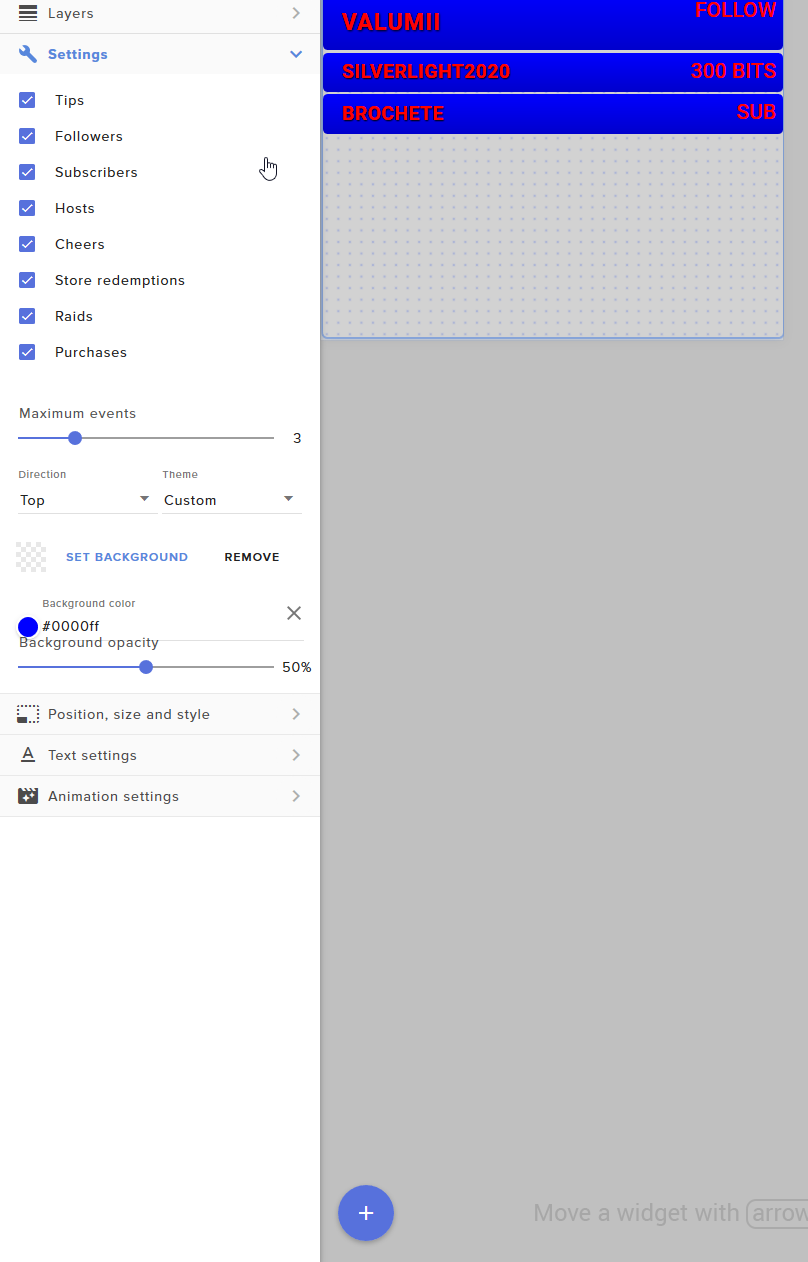
I want to have a !slap command where people can "slap" each other in chat and the bot would respond saying who slapped who and at the same time a "slap sound" can be heard (I've been able to do this earlier with Streamlabs). I do have a slap sound effect set up, but not sure how to make both the text and sound trigger at the same time. If I do it as shown in the image, only the sound will be heard and the text wont be shown.
I do not know how coding works, so maybe I am missing something here.. 
prisma relic
depends on the word/term .... @winged kraken ....
devout lark
If theres a reveiw page to get you brought up the ranks ill give you all the stars lol
 spare stream
Can i start to Stream with Stream Elemnts? 🙂
 fierce raven
Hi i am raising money for just giving, how do i get there donation tracker url onto my live screen
winged kraken
Is there maybe a way to add multiple terms to the filter at once?
prisma relic
🤣 @meager pollen .... @devout lark and I just set that up
winged kraken
@lament blade I believe you would need streaming software to start streaming, StreamElements is a tool to be used alongside it.
spare stream
@winged kraken Okay, thank you!
devout lark
@meager pollen dont know if you can read the previous msgs but i think i asked ever question there is lol
winged kraken
@fierce raven You can add a Donation Widget to your livestream if you wish.
prisma relic
that's were it get's complex @winged kraken ...it's ... like the difference between an i, I, l, L |
regEx basically
winged kraken
Fiddlesticks!
meager pollen
@devout lark OK, I will take a look! Cheers!
fierce raven
Hi Rab, yes i have all the urls from just giving, not sure how to add into obs software though to show up on stream?
winged kraken
You using OBS or StreamLabs OBS?
fierce raven
streamelements obs
prisma relic
i can't help with StreamLabs OBS... or any OBS for that matter 🤣
winged kraken
And it should add it automatically.
 ionic kelp
That's Streamlabs OBS. You'd get help on their server.
devout lark
@prisma relic @meager pollen Just to give you guys a heads up to have that sound play I do have to have stream elements open in the background I cant hear the sound if I close out of SE
fierce raven
thanks Rab will try that
winged kraken
So we can't help people with pointers on here when even if we have the knowledge on how to assist them?
meager pollen
@devout lark For me the sounds work if I have my streaming software (I use OBS) open or if I am in a preview window for the Streamelements overlay.
prisma relic
^ the "source" or widget has to be active
@winged kraken ; we can't have streamLABS help here. because we don't support it.
it can be discussed in #general-chat ... maybe, but here is strictly Twitch SE support
sorry if that came out wrong; there is some chat missing @winged kraken .... yes of course please help others out
 hidden forge
Guys I changed my username from "theeager" to "eager" and since then my chatstats page aint working properly:
https://stats.streamelements.com/c/eager

StreamElements
Description Chat Stats tracks emote usage on Twitch in real time. See which emotes are the most popular on every Twitch channel
is there a way to fix this?

 shrewd ore
Hi, I seem to have an issue with stream elements, where its not showing alerts for new follows, it shows subs/cheers/raids fine though... Do i need to reset the bot ? I'm using OBS, and I tried reloading overlays/widgets but it still didnt work for me
 pseudo lance
Hello, can i use Custom URLs (Browser Source) in my overlay ? The ability to display elements or media from a given URL.
 wary halo
not possible
viscid pebbleBOT
@shrewd ore Go to the Dashboard > Right side > Part channel > Join channel(https://streamelements.com/dashboard)
 shrewd ore
Alright, will try that out, thank you ❤️
 cosmic raptor
Hi, im a moderator from a twitch channel, that uses Stream Elements with custom chat module. Until yesterday everything was going well, all commands working. Today the stream elements bot just dont respond any command. The bot stil tagged as moderator, the panel, in stream slements website, is up and commands are turned on. What i can look to find what issue is going on? sonehow is there a current problem with S.E. or twitch, right now?
viscid pebbleBOT
@cosmic raptor If your commands recently stopped working and you're using OBS.Live and a custom bot name do the following:
- In OBS.Live, click on the hamburger menu (three stripes) at the top left of your activity feed
- Click on Stream Settings > Custom bot name
- In the Custom bot name field select Set custom bot name, not your already existing username (with capital letters). Note: If you already connected an account that way, the third entry will show as the account name (see image https://i.imgur.com/sO7fWOX.png).
- Scroll a bit down and click on the purple Connect Custom Bot Account button
- Log in as usual and Authorize the custom bot name
- Back in the Activity feed, click on the Send Test Message button and check if your custom bot name starts working again
 cosmic raptor
i asked the streamer about the OBS configuration, he said that bot still Authorized, but is dont working since today.
wary halo
You need to do all the steps, not just look for the authorization
cosmic raptor
i understood, ill ask him again to check everything
wary halo
If nothing works, then try this:
viscid pebbleBOT
@cosmic raptor Go to the Dashboard > Right side > Part channel > Join channel(https://streamelements.com/dashboard)
cosmic raptor
this screen can be only seen by the streamer, right?
i just sent all your instructions to him
wary halo
cosmic raptor
this screen can be only seen by the streamer, right?
Yes, unless you have moderator access to their StreamElements account
cosmic raptor
thank you so much! he just made the change in the custom name of the bot
and the bot is working
problem solved, thank you so much for all assistance!
 worn hound
Anyone know how to add a Game capture on the game live overlay?
viscid pebbleBOT
@worn hound New to StreamElements?
Check out our YouTube channel https://www.youtube.com/c/streamelements/videos
with tutorial videos from setting up the basics, to in-depth details on how to use our product.
New to OBS? Here is a 4 step quick start guide
https://obsproject.com/wiki/OBS-Studio-Quickstart
Want to learn even more? Here is an in-depth overview
https://obsproject.com/wiki/OBS-Studio-Overview
meager pollen
@cosmic raptor Wow, what a great mod you are! Doing this for them! 😄
cosmic raptor
@meager pollen , is my duty help the streamer keep the channel working with all features, looking for tools or asking for help 🙂 its nothing big, the stream must keep moving on 🥳
wary halo
Exactly, that is what mods do
The problem with my mods is that I know more than them because I do support here 
worn hound
how to add a Game capture on the game live overlay?
meager pollen
I've always felt the bot etc. is mainly the streamer's responsibility to have everything working, but mods help to moderate the chat, giving time outs etc. while being live, so maybe not so much behind the scenes. But that's great if mods take the initiative 😄
viscid pebbleBOT
@worn hound Obs.live is a plugin for OBS Studio for the best OBS support, please join their Official Discord @ discord.gg/obsproject
worn hound
no no I mean like i have a overlay from Stream elements how do i make it so it shows the game behind it?
wary halo
You make a game capture source and put it below the overlay in the sources list
worn hound
Like that?
wary halo
yes
wary halo
But it looks like you made it super small
looking at the red box
try clicking cntrl + F
wary halo
BRB should be another scene of course, not a new source on the gaming scene 😉
worn hound
I know
wary halo
wary halo
My theme is special but you can go to Settings > General > Theme
 acoustic schooner
Hello, I want to create custom alerts for mc and if I change my layout option to this the text disapears. Anyone an idea how i can fix that?
viscid pebbleBOT
Text not showing up over your alerts? Go to the Advanced Text Settings and set the top margin to 50, you can work your way to the right position from there.
wary halo
worn hound
How did i make the sources tho ?
by clicking on the + button
 elder abyss
I have issue with the chat bot. Yesterday it stopped joining my twitch chat and when I go to dashboard and tell leave/join it says that its successful but its not working at all. Any ideas?
worn hound
For me its easier i just hide the other ones and show the one i want
I find that easier for me
viscid pebbleBOT
@elder abyss If your commands recently stopped working and you're using OBS.Live and a custom bot name do the following:
- In OBS.Live, click on the hamburger menu (three stripes) at the top left of your activity feed
- Click on Stream Settings > Custom bot name
- In the Custom bot name field select Set custom bot name, not your already existing username (with capital letters). Note: If you already connected an account that way, the third entry will show as the account name (see image https://i.imgur.com/sO7fWOX.png).
- Scroll a bit down and click on the purple Connect Custom Bot Account button
- Log in as usual and Authorize the custom bot name
- Back in the Activity feed, click on the Send Test Message button and check if your custom bot name starts working again
 tropic raptor
Hi, not sure where to ask but my !chatstat command sends me to a 404 page not found, how do i fix this?
viscid pebbleBOT
@tropic raptor If you changed your name on Twitch, please follow these steps:
- Visit https://streamelements.com/logout and then log in again by connecting with Twitch.
- On the right side of the dashboard page that opens, select Join under bot settings. If it says Part select that and then select Join to send the bot to the chat. Don't forget to mod the bot by typing /mod streamelements in your channel if you have not already.
- Post your old and your new name here so that we can update your channel's chatstats tracking (must be done by staff).
worn hound
How can i make a Youtube playlist onto Stream elements music?
 peak pine
can someone help me with the prefered settings in the output setting to have my stream run smoothly for my viewers lately I've been having issues with my streaming being delayed by over a minute and having no audio once I changed my theme but I've always used the same output settings and its not working anymore.
this is what I'm usuing currently
viscid pebbleBOT
@peak pine There are no "best settings".
Please understand that every setup will be very different.
Any guides or videos that claim otherwise are misinforming. Your best option is to start with a base and adjust as necessary.
You can run the OBS auto-configuration tool. To use the auto-config, click on the Tools menu in OBS, select Auto-Configuration Wizard, and then just follow the on-screen directions.
You can use this tool to get baseline settings for your hardware and adjust as necessary from there.
Test, test, and test again. We are happy to offer suggestions for any issues you may be having afterward, but not a list of settings.
Thank you
peak pine
very helpful bot very helpful 
 late panther
Heyo. Can't get Streamelements to connect to Tiltify
 cyan moon
ANyone got any ideas how to set up jumpscares 🙂
ionic kelp
@late panther Connect it here yet? https://streamelements.com/dashboard/account/integrations
late panther
When I go to my overlay and press "connect" it is stalling
ionic kelp
No. Do it from my link then try again.
late panther
thanks
 charred gulch
Hi, How can I disable the message send out by the bot on starting a giveaway? Or at least edit the text. Cant find it
twin sentinel
Not possible.
 small nacelle
Can I delay the text from the subscriber alert?
 sick nest
I cant stream CS:GO because game capture doesnt work.
charred gulch
Hi Benno? the text is displaying: do !ticket but I do not want to use !tickets but a random command. You cannot edit this?
twin sentinel
@charred gulch Edit the default command. But you cannot edit the message.
viscid pebbleBOT
@sick nest Valve has implemented a trusted mode which does not allow OBS to hook CS:GO using Game Capture. Read more in their announcement post here https://blog.counter-strike.net/index.php/2020/07/30736/.
Additionally, they have no plans on allowing OBS in trusted mode.
https://support.steampowered.com/kb_article.php?ref=8835-KLXV-0292#whitelist
You will need to run the game in either windowed or borderless fullscreen and use Window Capture instead.
Alternately, you can launch the game with -allow_third_party_software.
 restive aspen
Hi my twitch chat stats don't show up on the streamelements chat stats page?
sick nest
viscid pebble
<@!437521443035545601> Valve has implemented a trusted mode which does not allow...
-allow_third_party_software seems to be working. Thanks so much
 ebon fulcrum
what are the width height settings for the overlays again?
ionic kelp
1080
ebon fulcrum
thank you
 little garden
Does anyone know why when they give me a host the alert does not appear?
viscid pebbleBOT
@little garden "Due to changes to Twitch API, we have filtered out hosts and will only show these ones on your activity feed:
- All hosts coming from an online channel with at least 1+ viewer
- Auto host events with at least 1 viewer - only from a channel that just went offline
Note: If you see X channel has hosted you with no viewers on the back, that is considered an offline host or a host with 0 viewers, we do not show these."
 honest arrow
I'm trying to setup the Tip button from stream Elements, and I don't want to use the PayPal option. How do I set it up so I can use Credit Card?
viscid pebbleBOT
@honest arrow SE.PAY is available for streamers who are at least 18 years old, with bank account under their name in one of the following countries and have at least 101 follower (Twitch) / 101 subscribers (YouTube):
Austria, Belgium, Czech Republic, Denmark, Finland, France, Germany, Ireland , Italy, Netherlands, Poland, Portugal, Slovakia, Spain, Sweden, Switzerland, United Kingdom, United States.
If you meet these criteria and don’t see SE.Pay, let us know.
For information on SE.Pay payment methods, their fees and settlement times see https://streamelements.com/dashboard/tipping/fees
honest arrow
Got it! Thank you!
 ivory void
Is there a trick to getting Scrolling text to work with OBS? The preview in StreamElements works - but it's static in OBS. I have deleted and recreated with the same luck
viscid pebbleBOT
@ivory void OBS > Settings > Advanced > Scroll down > Enable or disable Browser Source Hardware Acceleration, depending on its current state > Restart OBS (This does not apply for OBS on Mac)
https://i.imgur.com/ggMe9ZE.png
 ivory void
Hmm, thank you that did the trick. I assume I would want this enabled for two PC setup?
Seems like everytime I add a new scrolling text I have to toggle that setting again, kind of annoying
wary halo
Just for using OBS.Live, when using OBS Studio you have to do the opposite 😛
ivory void
What do you mean? I'm usuing Studio
wary halo
Ah well, for Studio it needs to be enabled, for .Live it should be disabled
ivory void
ok, I guess I jusut have to toggle it off then back on when i add new overlay
There's not a way to make the text static unless it's too big for the box in which it will scroll is there?
lament blade
I NEED HELP! My ground control wont open... but shows open in task manager?
ionic kelp
@lament blade #helpdesk-twitch message
 leaden ether
how can I fix the Error in the donation page? Error Seller Restriction to be more specific
no idea what it means or how to fix it
lament blade
I’ll try that but mine don’t open in the bottom task bar ether...
lament blade
ionic kelp
<@456226577798135808> https://discord.com/channels/141203863863558144/1994606429...
that did nothing...
 cursive sonnet
Redeeming an item in my stream store is not working via chat
And I cannpt figure out why
nevermind I got it
lament blade
anyone has a ryzen 5 3600 6 cells and artx 2060 super?
 fading rampart
Hello everyone, I'm a total noob here. I just started streaming three days ago. I primarily stream Elder Scrolls Online and occasionally Fortnite. I started with the twitch studios app which works well for me so far but Idk how to spice it up with overlays or anything. So I downloaded streamlabs last night and tried it out but I couldn't get the overly to work correctly, and when I was trying to fix the layers I corrupted the files of the overlay. Where can I find clean overlays that are free that will work with either one of these programs?
 manic dirge
can anyone hop in a call so i can screen share my screen and can someone walk me through the basics I'm completely new to this and would be grateful of some support
viscid pebbleBOT
New to StreamElements?
Check out our YouTube channel https://www.youtube.com/c/streamelements/videos
with tutorial videos from setting up the basics, to in-depth details on how to use our product.
New to OBS? Here is a 4 step quick start guide
https://obsproject.com/wiki/OBS-Studio-Quickstart
Want to learn even more? Here is an in-depth overview
https://obsproject.com/wiki/OBS-Studio-Overview
@fading rampart We're not able to troubleshoot issues with using our overlays in StreamLabs OBS (SLOBS) as we don't have the tools to support their software. We recommend using OBS Studio or OBS Studio with our plugin OBS.Live.
@fading rampart Read and follow our server rules:
- We do not tolerate toxicity! Treat the community team, staff and all members with respect.
- No advertisement or channel promotion, anywhere on the server.
- No NSFW/NSFL
- No unsolicited DMs or friend requests to server members
Make sure to read the #welcome in any server you join.
 queen marten
hi, how does one add custom alert to twitch?
viscid pebbleBOT
@queen marten We've released our new Overlay Editor revamp. You can check out the changes and how to work with it here: https://youtu.be/X5VzXjqAsjk
Check out our blog post as well: https://blog.streamelements.com/streamelements-overlay-editor-just-got-even-better-c22cb5b4853e
 native mortar
how do I put a timer on a command? so that it automatically appears every 30 minutes?
native mortar
tysm
 hallow ore
Hi guys
Good afternoon!
I would like to ask a question, is there any way to make the streamelements bot use my emotes?
I wanted to set up a raid command that would spawn an emoji in the chat, I tried to do that but the bot sends the text instead of the emoji!
native mortar
unfortunately the only way for doing that is gifting a sub to the account :c
wary halo
Or let the bot use your name 😉
viscid pebbleBOT
@hallow ore Currently renaming the bot fully works with OBS.Live.
You can follow this video guide to set it up: https://discordapp.com/channels/141203863863558144/494513233416421386/561516184718278676
If you don't want to use OBS.Live and want to stick with Ground Control, please let us know your Twitch username.
native mortar
Whatever I press on the site it redirects me back to the home page?
viscid pebbleBOT
@native mortar Please logout of StreamElements at https://streamelements.com/logout and then login again to your account (Twitch/YouTube/Facebook).
native mortar
okay thank you
restive aspen
Hello, I tried looking up my name on streamelements chat stats, but it doesn't show up. What should I do about it @ me if you know
 bronze stirrup
I've noticed a small "issue" with my gifted subs alerts. Whenever someone gifts a sub, both the "new sub" alert and the gifted sub alert play at the same time... is there a way to have a delay on the "new sub" alert or something?
 limpid wraith
why I'm geeting this error in a donation?
 weak delta
bronze stirrup
I've noticed a small "issue" with my gifted subs alerts. Whenever someone gifts ...
weak delta
bronze stirrup
I've noticed a small "issue" with my gifted subs alerts. Whenever someone gifts ...
Show me the parameters for your gifted sub variation, and you don't have two alert boxes, right?
 inner knot
Hey there @viscid pebble or anyone @here help me to a "yea" or "nay" question? I'm planning a charity stream and will have some giveaways during the stream and planned a raffle using the giveaway widget. To encourage donations, I want to award more tickets when users donate to the charity. Is there a manual chat command that I, or one of my mods can use to manually award an additional amount of raffles before drawing?
 dim lake
Would someone be able to call me and teach me how to set up a good stream with alerts, would be much appriciated
bronze stirrup
weak delta
Show me the parameters for your gifted sub variation, and you don't have two ale...
Well... I do have 2 different ones in 1 overlay. My regular alerts are in 1 layer and the gifted sub one is a full screen one in another layer. The regular one doesn't have a gifted sub variation though. But could that still cause issues?
dim lake
Would someone be able to call me and teach me how to set up a good stream with alerts, would be much appriciated
Just Dm Me
weak delta
Well the two alert boxes are causing the issue @bronze stirrup - you can use multiple no problem, I have 6 but you need to make sure the DEFAULT one is deleted in places you don't want it to play.
Anything passed your first alert box, you're going to want to only use variations.
It's playing twice because you have it set up twice so you need to eliminate all redundancies.
dim lake
i need help setting up a stream with an overlay , facecam border and alerts someone down to help me ?
viscid pebbleBOT
@dim lake We've released our new Overlay Editor revamp. You can check out the changes and how to work with it here: https://youtu.be/X5VzXjqAsjk
Check out our blog post as well: https://blog.streamelements.com/streamelements-overlay-editor-just-got-even-better-c22cb5b4853e
weak delta
What is your end game goal with multiple alert boxes @bronze stirrup For example, I have an alertbox for only followers because I want a completely different size/set up there so what I did was I deleted all traces of a follower alert in the 5 other alert boxes so it would only play in the alert box I want it to.
If the default sub alert is playing in alert box B then you need to delete all of those settings from that alertbox, or disable the subscriber alerts.
If you want them to both play, ???, with an offset then as far as I know, that isn't possible but our friend @wary halo here can correct me if I am wrong.
wary halo

No I don't know of such an option unfortunately
The only way is the way @weak delta described above afaik
bronze stirrup
weak delta
What is your end game goal with multiple alert boxes <@!439499632108896276> For ...
Right I got you. So here's the setup. The MAIN ALERTS layer basically has all my regular alerts. They are the big rectangular box you see in the center. Then the layer "alertbox full screen" has my gifted sub alert (among others) because I want that to be full screen. I put everything in 1 overlay, since I figured having only 1 browser source would be more ideal, but I'm guessing that's what causing the issues 😦
weak delta
What you just described to me is possible.
So this is what you're going to do.
You're going to delete all the settings in the DEFAULT subscriber alert alert box
Then in that alert box, you're going to create a VARIATION instead
You're going to configure this variation with the following parameters:
Now that variation is your "default" alert.
All of this would be blank.
Then you poke and prod it across both alert boxes until it behaves exactly how you want.
Depending on how many variations you're rocking, it might take a second but it'll be possible.
bronze stirrup
Ok... just so I know what I'm doing; basically I'm turning off my "regular" alerts for subs, and creating a variation that triggers when someone subs for 1 month? And because doing this, gifted subs won't trigger a "regular" new subscriber alert
weak delta
subs for at least 1 month and yes.
bronze stirrup
Cool beans. Thanks, I'm gonna play around with that for a bit and see if that works
 half rose
its been a week today and SE pay still says its verifying my bank details anyone else ever have the same issue ?
wary halo
That is normal, it can take up to 7 WORKdays
half rose
ah thank you i appreciate it
bronze stirrup
@weak delta Alright just did what you said and using the emulate option, it totally works. Thanks again 
 lament violet
hi, is it possible to have streamElement bot to notify when I'm live in twitch/youtube?
lament violet
i meant twitch, thanks!
wary halo
It does it automatically in Twitch
 ionic pebble
So i have changed my name on twitch and rejoined my streamelements bot to my channel but my commands still arnt working. Anyone had this before?
wary halo
works fine 😛
ionic pebble
Yeah i can see that now.. it wasnt working when i did it yesterday
My custom commands arnt working tho
Does this mean i have to redo all my custom commands?
weak delta
bronze stirrup
<@!256682165050408960> Alright just did what you said and using the emulate opti...
No problemo!
ionic pebble
I do but thats a nightbot command lol i need to get that set up too
wary halo
So, no problems with our bot then 😉
 winged sleet
hello guys, sameboddy can help me?
viscid pebbleBOT
@winged sleet Welcome to the helpdesk! Please let us know how we can assist you today and a support volunteer or staff member will assist you as soon as they are available. Thank you for your patience.
winged sleet
I'm a supermod in a streamer's store and I can't edit anything, could you help me?
wary halo
Item store or merch store?
winged sleet
item store
wary halo
I'll ask around since that is not my area of expertise
winged sleet
ok, thx
 abstract hemlock
@winged sleet streamer's name?
winged sleet
LUSKAPLAYER_
abstract hemlock
@winged sleet i don't see your username as a manager on that account, where exactly are you trying to edit the items?
winged sleet
my twitch name is rukizinho1213 (the same as discord). im trying toedit in his store
abstract hemlock
You need to be invite as a dashboard manager by the streamer
viscid pebbleBOT
"Follow these steps to grant managers/moderators access to your dashboard:
- Click on your channel name at the top of the dashboard
- Create a new invite at one of three access levels (Bot Supervisor, Editor, Full Control)
- Send this invite to a mod/manager to give them access to your dashboard. The link is one-time-use and expires after 72 hours if not accepted
Video tutorial: https://youtu.be/zl_h-ttZDF0"
Chat/Bot Levels
100 - Viewer
250 - Subscriber (Twitch subscribers automatically placed at this level)
300 - Regular
400 - VIP (Twitch VIP automatically placed at this level)
500 - Moderator (Twitch chat moderators automatically placed at this level)
1000 - Super Moderator__
1500 - Broadcaster
Dashboard Manager Levels
Bot Supervisor
Editor
Full Access
Owner
https://i.imgur.com/s61Liry.png
 winged sleet
ok, thx
 north flower
why arent i getting game audio
viscid pebbleBOT
@north flower Obs.live is a plugin for OBS Studio for the best OBS support, please join their Official Discord @ discord.gg/obsproject
 blazing walrus
is the stream elements bot having issdues?
trying to test some commands offline but it's not working
(not live)
 worthy coral
Hey, is it possible to somehow link my patreon to alert box? I found some tutorials on streamlabs obs, but none for live obs 😦
viscid pebbleBOT
@blazing walrus If your commands recently stopped working and you're using OBS.Live and a custom bot name do the following:
- In OBS.Live, click on the hamburger menu (three stripes) at the top left of your activity feed
- Click on Stream Settings > Custom bot name
- In the Custom bot name field select Set custom bot name, not your already existing username (with capital letters). Note: If you already connected an account that way, the third entry will show as the account name (see image https://i.imgur.com/sO7fWOX.png).
- Scroll a bit down and click on the purple Connect Custom Bot Account button
- Log in as usual and Authorize the custom bot name
- Back in the Activity feed, click on the Send Test Message button and check if your custom bot name starts working again
blazing walrus
it worked!
lament blade
is there a way to change event list from english to dutch?
 trail zodiac
Hi! When i try to donate via credit card and SE PAY i get a messege "Paymen failed: An error ocurred processng the payment" Is it because i put different name to my SE Pay account? Can i change it then?
 drowsy sun
lament blade
is there a way to change event list from english to dutch?
drowsy sun
lament blade
is there a way to change event list from english to dutch?
i dont think there is a way for it. i always change it manuel.
i think site down for 30 minutes
lament blade
how can you change it manuel it then?
drowsy sun
there is no support 🙂
 urban oracle
epic
drowsy sun
lament blade
how can you change it manuel it then?
go to layer settings, you will see it
urban oracle
anybody know why my obs keeps saying my streamkey us invalid
i suppose im in the wrong place for this
lament blade
i dont see on layer settings
wary halo
@humble iron maybe if you talk normal
 humble iron
im just trying to find out why they dont have test button for donation ...
drowsy sun
click on a layer and go to down. you will see
wary halo
humble iron
im just trying to find out why they dont have test button for donation ...
you mean this one:
viscid pebbleBOT
@humble iron You can test alerts via the Emulate bell on the lower left side of the Overlay Editor. Simply go to your Dashboard > My Overlays > pencil/edit button on the overlay. Make sure the Preview LIVE on stream option is on to see the alert in OBS/XSplit** https://streamable.com/vtulg9
 wary halo
drowsy sun
there is no support 🙂
wary halo
drowsy sun
there is no support 🙂
?
 grizzled glacier
Hi there, i was after some support for live streaming on Twitch.
drowsy sun
lament blade
wait lil pls
viscid pebbleBOT
@urban oracle StreamElements menu, on top of OBS > Logout > Login
@grizzled glacier Welcome to the helpdesk! Please let us know how we can assist you today and a support volunteer or staff member will assist you as soon as they are available. Thank you for your patience.
grizzled glacier
When i stream on Twitch, I have tried 1080p both 60 and fps which seems to be fine when there is no much going on on the game, but as soon as there is more then one thing on the screen it seems to become slightly pixelated.
drowsy sun
@lament blade
urban oracle
k thanks
grizzled glacier
I have tried on 720p and it is the same issue.
drowsy sun
when alertbox selected go to settings
urban oracle
ill try that
drowsy sun
lament blade
i don't see that gear icon that the problem
drowsy sun
is not it your channel?
wary halo
grizzled glacier
I have tried on 720p and it is the same issue.
what is your bitrate set to?
grizzled glacier
6000
lament blade
 grizzled glacier
I have tried 3000 4500 and 6000
viscid pebbleBOT
@trail zodiac Please contact us via email for support with SE.Pay. You can use our contact form here: https://streamelements.com/contact Thank you.
lament blade
there is none gear icon
viscid pebbleBOT
@grizzled glacier Please provide a log from your last stream. To do this, in OBS go to Help > Log Files > Upload Last Log File and paste the link to the log file here.
@lament blade Our Dashboard and Overlay Editor are Chromium Optimized. We strongly recommend using Chrome. Opera GX and the new Microsoft Edge Chromium might work closest to Chrome as its also Chromium built. Firefox also works, but some things might look a bit different or not work. We do not recommend using Internet Explorer with our Dashboard as it does not support functions.
If the website doesn’t work on chrome, be sure none of your plugins is blocking our website or clear your cookies. You can try if the website works in an incognito tab.
drowsy sun
lament blade
there is none gear icon
is it your channal or you are just manager?
urban oracle
the notification is still happening
i could try getting an error code of some sort if it has it
lament blade
let me try to switch to chrome i am using firefox
grizzled glacier
urban oracle
just says failed to connect
humble iron
@wary halo i cant find it 
viscid pebbleBOT
@grizzled glacier 1) Restart OBS
2) Start your stream/recording for about 30 seconds. Make sure you replicate any issues as best you can, which means having any games/apps open and captured, etc.
3) Stop your stream/recording.
4) Select Help > Log Files > Upload Current Log File. Copy the URL and paste the link here.
Note: If you do not see an obsproject.com URL, you will need to update OBS Studio to version 22+.
@humble iron We've released our new Overlay Editor revamp. You can check out the changes and how to work with it here: https://youtu.be/X5VzXjqAsjk
Check out our blog post as well: https://blog.streamelements.com/streamelements-overlay-editor-just-got-even-better-c22cb5b4853e
wary halo
I'm asking around because I don't think you can set it to Nederlands 😉
lament blade
rip
grizzled glacier
wary halo
grizzled glacier
https://obsproject.com/logs/o0ny4MMnV7RXX-U4
log is empty, did you stream according to the bot message?
wary halo
And you got the current log?
wary halo
lament blade
rip
yup, not possible
grizzled glacier
lament blade
alright thanks anyways i stick to english
trail zodiac
viscid pebble
<@!645694371085287454> Please contact us via email for support with SE.Pay. You ...
I emailed you, when should i get a message back?
wary halo
grizzled glacier
Old Log: https://obsproject.com/logs/GvHQ7KbYdRnOr9fB New Log: https://obsprojec...
yeah but they are both empty 😛
wary halo
trail zodiac
I emailed you, when should i get a message back?
Soon, depends on how busy it is
grizzled glacier
I'll stream for longer then a minute this time
wary halo
You might want to ask in the OBS server:
viscid pebbleBOT
@grizzled glacier Obs.live is a plugin for OBS Studio for the best OBS support, please join their Official Discord @ discord.gg/obsproject
trail zodiac
wary halo
Soon, depends on how busy it is
thank you so much!!
wary halo
yes
https://obsproject.com/tools/analyzer?log_url=https%3A%2F%2Fobsproject.com%2Flogs%2Fxj9Dc1xwqVUz8q_o
OBS (Open Broadcaster Software) is free and open source software for video recording and live streaming. Stream to Twitch, YouTube and many other providers or record your own videos with high quality H264 / AAC encoding.
check that link for more information
grizzled glacier
Will do
drowsy sun
guys is there a way to stretch a source and ignore its original aspect ratio? i mean for video files. something like using shift button on obs?
 stuck wharf
Ive been asked to be a bot supervisor for a twitch channel but this popped up when i clicked the invite link
 atomic canopy
my display is showing a blackscreen so i cant even stream how can i fix this?
 pseudo ginkgo
Hi, my gameble bot is set up, everything is active but my chat can't use it? !Bet does nothing, !duel does nothing, and so forth.. non of the commands work. Tried everything 🙂
gamble**
humble iron
the problem with streamelements that setting for setting up donation window or any notification window is so difficult
like its so much easier on streamlabs
pseudo ginkgo
I have everything set up, just the bot doesn't activate in my twitch channel. It's a mod and everything.
viscid pebbleBOT
@pseudo ginkgo If your commands recently stopped working and you're using OBS.Live and a custom bot name do the following:
- In OBS.Live, click on the hamburger menu (three stripes) at the top left of your activity feed
- Click on Stream Settings > Custom bot name
- In the Custom bot name field select Set custom bot name, not your already existing username (with capital letters). Note: If you already connected an account that way, the third entry will show as the account name (see image https://i.imgur.com/sO7fWOX.png).
- Scroll a bit down and click on the purple Connect Custom Bot Account button
- Log in as usual and Authorize the custom bot name
- Back in the Activity feed, click on the Send Test Message button and check if your custom bot name starts working again
humble iron
can anyone help me with setting up a donation and followers window to popup on my stream
weak delta
@humble iron Click the blue button on the bottom left of your overlay and add an alertbox.
While on the StreamElements website.
humble iron
so i need to copy the link and create a new browser window in obs?
weak delta
Yes, you also need to do that.
humble iron
thanks
pseudo ginkgo
Thanks @weak delta AMAZING 🙂
 gusty crane
Hello I'm starting my stream on streamelements obs but it's not showing I'm live in twitch?
The system is saying I've been like for 8 minutes and Twitch isn't pulling up anything.
 dry hare
Make sure you’re streaming to twitch in obs settings > stream @gusty crane
gusty crane
dry hare
Make sure you’re streaming to twitch in obs settings > stream <@7787385419825152...
Just checked and yes it gas the service listed as Twitch
Has*
 pliant owl
Could anyone answer why my font isn’t changing even though I have changed and saved it?
viscid pebbleBOT
@pliant owl Google Fonts
More than 900 google fonts are supported at this time. You can preview them here: https://fonts.google.com/
Custom Fonts
Steps:
- Install the font on the streaming PC or choose a pre-installed windows font.
- In the overlay widget settings, select Text Settings
- Click on Enable Custom Font
- Type the name of the font as it appears in the windows font directory (This is usually
C:\Windows\Fonts)
Note: After installing fonts, the browser and OBS must be restarted for the font to appear.
dry hare
@gusty crane restart obs?
stuck wharf
This came up when I clicked on a bot supervisor invite link any ideas?
dry hare
stuck wharf
This came up when I clicked on a bot supervisor invite link any ideas?
I believe you and the streamer need to log out and log back into the website and try again.
stuck wharf
Okay will try that and get back to you, thank you
stuck wharf
dry hare
I believe you and the streamer need to log out and log back into the website and...
It works now, thank you
 hidden olive
can i take overlays from stream elements and put them in stream labs
viscid pebbleBOT
@hidden olive We're not able to troubleshoot issues with using our overlays in StreamLabs OBS (SLOBS) as we don't have the tools to support their software. We recommend using OBS Studio or OBS Studio with our plugin OBS.Live.
hidden olive
how do i get my overlay from steam elements to obs
 hollow loom
Hi, I'm trying to edit my overlays, but it not loading completly, it's stop with a circle on center, i think it's a windows error because i have formated completly yesterday, but i don't know what can i do to fix it... can someone help me?? (sry for my english)
 naive depot
We have one user (ren_pls) in a stream (nowintechnicolor) who can't redeem sounds in the store, the bot responds that they have 0 points. They do have enough points and they're able to gamble with them and use them in slots. I've reset their points on the leaderboard and manually added points to them, but they still can't redeem store items.
 grizzled gull
How do I make commands
 grand rose
Hey .. how do I get the bot to recognize my emotes ? I’m trying to substitute them with the default emotes in the module responses ?
 feral fulcrum
The StreamElements website is buggy for me, the commands I enable don't work and I don't know what to do. help me please!!!!!!!!!!!!!!!!!!!!!!!!!!!! If you know how to solve call me
viscid pebbleBOT
@feral fulcrum Our Dashboard and Overlay Editor are Chromium Optimized. We strongly recommend using Chrome. Opera GX and the new Microsoft Edge Chromium might work closest to Chrome as its also Chromium built. Firefox also works, but some things might look a bit different or not work. We do not recommend using Internet Explorer with our Dashboard as it does not support functions.
If the website doesn’t work on chrome, be sure none of your plugins is blocking our website or clear your cookies. You can try if the website works in an incognito tab.
feral fulcrum
But I think the problem is not in the site itself. is in the connection between twitch and steamelements, don't you think?
 dim nexus
quick question whats the input for bit donation scrolling text
abstract hemlock
wdym? @dim nexus
 ocean roost
My sound isn’t working on my stream thru obs
abstract hemlock
@ocean roost any sound?
 ornate geyser
Is the countdown clock widget based on system time?
ocean roost
The ps4 sound works sometimes I have my capture card set up and all
viscid pebbleBOT
@ocean roost Obs.live is a plugin for OBS Studio for the best OBS support, please join their Official Discord @ discord.gg/obsproject
abstract hemlock
@ornate geyser yes
 quiet olive
How to add a question bot on my twitch channel?
And after answering you get points
Like a trivia bot
dim nexus
@abstract hemlock how do you change the scrolling text variable
abstract hemlock
@dim nexus we don't haev a scrolling text variable, but you can change the text scrolling setting here: (all the way down on Text settings)
dim nexus
ok thanks
 flat river
Is their somone that can help me?
 placid raptor
#🇪🇸︱español @harsh sand
but if you prefer english the questions is still for #helpdesk-twitch
oh snap
post it again
i thought i'm looking at general

still too early 
 harsh sand
I have a problem, I put the alerts and when they keep appearing everything fine, but when someone subscribes / hosts / raides or does something the alert does not appear
What I can do?
i am using translator lol
 buoyant sigil
hi does anybody know why my Kappagen only shows my one single custom emoji instead of all emojis for emotesplosions? I have them all selected
placid raptor
it's ok whatever you prefer @harsh sand
so for subs I would say we should check variations settings, 'chance %'
regarding raids and hosts, variations could also be the reason, but due to reasons that they did not communicate with anyone,
Twitch decided not to show raids with less than 5 and sometimes even up to 10 viewers anymore.
These will therefore not trigger an alert anymore until Twitch decides to undo this recent change.
There is nothing we can do about that and hope that Twitch will revert these changes soon.
did you save after that change? and do you have the widget in your currently active overlay? @buoyant sigil
harsh sand
I put the alerts and when they follow me the alert appear fine, but when someone subscribes / hosts / raid or does something else the alert does not appear
What I can do?
It just appear in Follow
placid raptor
you didn't read everything I just posted @harsh sand ? 😅
harsh sand
placid raptor
you didn't read everything I just posted <@!533840478492295190> ? 😅
could you help me in 1 thing more
buoyant sigil
nevermind, it seems to be working now. thanks z3Groove
placid raptor
no worries I literally didn't do anything
did you do something to get it to work? @buoyant sigil
@harsh sand sure just ask
@next abyss not sure what you mean by that?
 next abyss
ok so like in chat when you do !raffle lets say for example i put 10k its would put 6k and not 10k
harsh sand
in recent activity only the follows appear, host and raids and subs doesnt appear neither so I think that could be the reason why alerts of hosts, raids dont appear
Could be it?
placid raptor
@harsh sand in your activity feed?
viscid pebbleBOT
@harsh sand Please provide your account ID found at the top of this page: https://streamelements.com/dashboard/account/channels This ID is public info and safe to share here.
buoyant sigil
no I wonder if it was just bugged last time I saw that happen. no biggy
harsh sand
in streamlabs appear everything like hosts and raids but idk why dont they appear in activity feed
do you know why @placid raptor ?
placid raptor
I'll request again 😅
viscid pebbleBOT
@harsh sand Please provide your account ID found at the top of this page: https://streamelements.com/dashboard/account/channels This ID is public info and safe to share here.
placid raptor
yes
harsh sand
5fc453b8282d657012ac43de
placid raptor
@next abyss I don't think we have control of it, it seems like for raffle it will go as high as 6k and for sraffle as high as 3k
I can ask around during tomorrow if you ping me here but being a very simple system I believe the raffle bot limits to those 2 amounts
harsh sand
@placid raptor In Activity Feed should appear hosts raids and follows? or just follows?
placid raptor
@harsh sand have patience, thanks
next abyss
ok thank you
 onyx hazel
I streamed earlier today with absolutely no problems but after I started my second stream, stream elements live or OBS keeps crashing to 0kbps for seemingly no reason. I've checked my internet, that's fine. I've done every troubleshooting method I could possibly find including a restart and nothing is fixed. I don't understand why since the settings I've been using so far have been the same since I've started. Can anyone help?
I have an Alienware 15 r3 laptop
placid raptor
aaaah 3rd person I know with this issue
me being the first. have you checked your recent logs? @onyx hazel
onyx hazel
how do i do that?
placid raptor
provide the most recent log from after replicating the issue
mmm if you just closed OBS after that happened it should be Help > upload recent log
if you have a certain time it happened, go to help and there you should be able to view the log folder
find the one from when the issue happened
onyx hazel
viscid pebbleBOT
Please provide a log from your last stream. To do this, in OBS go to Help > Log Files > Upload Last Log File and paste the link to the log file here.
onyx hazel
this is the most recent
viscid pebbleBOT
- Restart OBS
- Start your stream/recording for about 30 seconds. Make sure you replicate any issues as best you can, which means having any games/apps open and captured, etc.
- Stop your stream/recording.
- Select Help > Log Files > Upload Current Log File. Copy the URL and paste the link here.
Note: If you do not see an obsproject.com URL, you will need to update OBS Studio to version 22+.
dry hare
^^^^ this
onyx hazel
okay just a sec
dry hare
That’s the best way
placid raptor
@harsh sand you don't see subs cuz you're not affiliate yet
and we can see that you had some host events incoming, and host\raids depends on the channel hosting\raiding you and how many viewers they come with
 pale otter
My alerts still work once then require a cache page refresh.
onyx hazel
viscid pebbleBOT
Please provide a log from your last stream. To do this, in OBS go to Help > Log Files > Upload Last Log File and paste the link to the log file here.
pale otter
I have disabled hardware acceleration as suggested to me last time.
dry hare
Link is important @onyx hazel
Not the log itself
@pale otter what version of obs are you running? Top left of window
pale otter
26.0.2 64 bit
onyx hazel
ah well i was asked for the log, idk how to get a link
placid raptor
I don't see the same issue I had with the KBPS plummeting to 0 @onyx hazel
are you streaming on wifi?
dry hare
When you upload the log it gives you a link
Follow the bot instructions and you should get a link
onyx hazel
yes im using wifi but its never been an issue
placid raptor
it is an issue
onyx hazel
placid raptor
it's not as stable as LAN
that would be setting number one for you to tackle
guaranteed
pale otter
Could the problem be that I have some overlay elements in the same layout as the alert?
dry hare
@pale otter you should have one overlay with everything in it
@onyx hazel run obs as admin, disable game bar
Do the things there and let’s see
onyx hazel
@dry hare ive done both and then reverted back to my previous settings when that didnt fix it
okay i will!
placid raptor
so last question @onyx hazel
when it goes down to 0kb\s do you see that the colored connection indicator is still green?
pale otter
Yea, I have my lastest supporters and alerts in one overlay, that is all. What about the hidden when inactive?
onyx hazel
no its red
pale otter
After 1 alert, I have to right click the browser source and refresh page cache then manually replay the alerts it missed.
placid raptor
i'm guessing it's wifi then. go with orsu's instructions
if you're able to easily make the change - go for LAN connection @onyx hazel
dry hare
Is it Intel wireless or killer wireless?
If it’s killer then only install the driver and not the bs software
Their software is garbage
onyx hazel
id love to but my set up is in my room and the router is in my living room connected to my ps4
placid raptor
in my previous place I ran a 25m ethernet cable 
still was better than streaming on wifi
dry hare
I have amplifi aliens
placid raptor
LAN all the way baby
onyx hazel
dry hare
onyx hazel
hell no not linsys lol netgear
onyx hazel
i think i have an amplifier laying around
dry hare
Not gonna lie, my amplifi aliens are lit af
I’m 30+ feet wireless from the router and get 200/200
 dry hare
With an Xbox on same access point
placid raptor
sounds lit
dry hare
One sec
placid raptor
 I believe! but still firs time I heard wifi gives that throughput
at least a home wifi setup
lament blade
encoder error keeps popping up every time i try and stream from obs
 dry hare
@placid raptor that’s my wireless backhaul with Ethernet to my pc and Xbox one x and Xbox series x
Not to mention all the wireless devices connected to that AP
placid raptor
aight bruv you proved me wrong
in my country that ain't possible to achieve
placid raptor
 !
!
dry hare
I need a third for when I switch rooms
viscid pebbleBOT
@lament blade Please provide a proper screenshot with the issue visible. If not sure how to take a screenshot, you can check here: https://www.take-a-screenshot.org
onyx hazel
so is there any other troubleshooting methods i can try?
onyx hazel
okay hold up
dry hare
Lemme peek at them settings
I have a friend who streams from one of them there alienwares with no issues
onyx hazel
how do i find said settings lol
onyx hazel
 acoustic karma
hellooo, is this an alright place to ask about streamelements obs
placid raptor
#helpdesk-selive @acoustic karma
acoustic karma
oh thank you!
dry hare
@onyx hazel change from simple to advanced at the top
Then disable psycho visual tuning
What resolution are you streaming at?
onyx hazel
1920x1080
placid raptor
I can also vouch for 1664x936 at 3800 bitrate
dry hare
Also you may try qsv as it’s supposed to be good for the laptops/Intel machines
onyx hazel
wth thats what it said on simple lol
onyx hazel
lol okay thank you
quiet olive
How do I make the bot do trivia in my twitch stream?
dry hare
You’d need a trivia bot
quiet olive
Any suggestions on which ones are good?
dry hare
My guess is killer wireless
onyx hazel
is it that background process?
dry hare
No driver
Click start and type “killer”
If an app shows up follow the steps to download only the driver and uninstall the software
That’s my best guess at this point
onyx hazel
okay :p
placid raptor
not sure if it's updated @quiet olive
#widget-share message
quiet olive
Awesome ill try it out thank you
placid raptor
no worries
onyx hazel
still no luck :p
thanks for the help but if it continues i'll have to get a different streaming service because i dont know how to fix this
dry hare
It’s probably not obs, it’s probably your home network
Run an Ethernet cable and try it to see what happens
onyx hazel
i'll probably give that a try when i get off work tomorrow
i didnt have any problems with it before the second stream so i honestly dont think its my internet
dry hare
Gotta remember that your network throughput is affected by every other device on your network
Even a gig connection won’t be a full gig unless you’re running 10Gbps gear on a 10Gbps connection with a 10Gbps router/switch etc
Every other device affects your connection
 gentle garden
Am I able to share an overlay I created on stream elements with my friend?
prisma relic
Ya. But you will need to send the the code for each tab have them copy paste it into it.
or; be an editor on their channel and I think you can copy it over that way
gentle garden
ah alright thanks
 north mauve
Hello, I just noticed today that when I alt+tab from OBS.live to another window like discord, the stream is stopped. Is this normal? Any way to fix it? By just not alt+tabbing can I avoid this from happening?...thanks in advance👍
 shell dust
i need help i only get two viewers and i want to get affiliate but i need viewers
dry hare
@shell dust watch Harris heller on YouTube
shell dust
what do you want me to watch on his page
placid raptor
profit 
dry hare
^
prisma relic
@north mauve that is not normal.
dry hare
We can’t make people view your channel, only you can do that. And not by advertising you need followers in random discords
 inland bone
how can i sand notification to my followers when i go live?
prisma relic
That is controlled on the Twitch side and the followers need to enable the 'Live" notification
inland bone
ok thanks
north mauve
prisma relic
<@!625395608231870465> that is not normal.
@prisma relic hmm, not sure what is going on then 😕
lament blade
i need help, so how do i fix the watchtime to count seconds, right now its counting every 10 minutes but i wanted it to be 1 second everytime
wary halo
not possible
prisma relic
Are you using Windows @north mauve ?
lament blade
so it only goes by 10 minutes?
wary halo
yes
lament blade
ok thx
 shut kayak
Hey im trying to set up alerts in OBS and everytime i go to test the alert it doesnt show up in the preview but i can hear the alert noise, i was wondering if anyone knew how to fix it?
viscid pebbleBOT
@shut kayak The default resolution for StreamElements overlays (theme and custom) is 1920x1080. Please add them in OBS at their full resolution and use CTRL+F to fit to screen if necessary. You can then downscale your stream in OBS settings > Video if you'd like https://i.imgur.com/6bWXxjR.png

 wispy merlin
Hi i am having issues with the !gamble command i cant find the command to adjust the win percentage in my modules for it ! is it the same as !slots command to add just ?
shut kayak
I know and ive been doing that and it still doesnt work mr se support bot
viscid pebbleBOT
OBS > Settings > Advanced > Scroll down > Enable or disable Browser Source Hardware Acceleration, depending on its current state > Restart OBS (This does not apply for OBS on Mac)
https://i.imgur.com/ggMe9ZE.png
shut kayak
thank you mr se support bot that worked!
wary halo
wispy merlin
Hi i am having issues with the !gamble command i cant find the command to adjust...
It's the roulette module
 dreamy lion
Hey! How do I activate the chat bot? It's greyed out for me
placid raptor
WDYM greyed out @dreamy lion ?
can you screenshot please?
 placid raptor
Looks like it's already done
do you have a 'DO IT LATER' button below this window?
 modern storm
how to I unadd stream elements
dreamy lion
Mozilla
 burnt anchor
hey i changed my name on twitch but now streamelements bot dosnt work
viscid pebbleBOT
@burnt anchor Please logout of StreamElements at https://streamelements.com/logout and then login again to your account (Twitch/YouTube/Facebook).
burnt anchor
i tried that yesterday and it did not work i will try again
 umbral matrix
my streamelements bot won't work
burnt anchor
it still dosnt work
viscid pebbleBOT
@burnt anchor If you changed your name on Twitch, please follow these steps:
- Visit https://streamelements.com/logout and then log in again by connecting with Twitch.
- On the right side of the dashboard page that opens, select Join under bot settings. If it says Part select that and then select Join to send the bot to the chat. Don't forget to mod the bot by typing /mod streamelements in your channel if you have not already.
- Post your old and your new name here so that we can update your channel's chatstats tracking (must be done by staff).
 cursive glacier
after inserting their card, people can't donate me why?
burnt anchor
my name i hade before was Fassanfc and the new one is fassan_
umbral matrix
my bot wasn't working either but i had to part it and add it and now it works
burnt anchor
okey i will try that 🙂
 vapid mantle
Hey dumb question time, I just installed a nerdordie overlay pack and on the just chatting screen the webcam box has a green chroma background behind it. Any idea what I'm meant to be doing with that?
prisma relic
are you in the NoD discord by chance and ask them
 grave quail
Hi i have a question
Is it possible to create a command which set the points from a user for example 100 points down?
I want to create a command which shows the user randomly words or objects. For these object the user should gain points or lose them. I tried it with ${user.points} and failed
 pseudo violet
grave quail
pseudo violet
grave quail
I have no idea. My viewers gets points by viewing
Or by giveaways where i spend some points to evervyone
Oh. That was a question too
Oops
 analog trail
hello I'm new, I'm sorry for my English but I'm Italian ... yesterday by mistake I banned stream element during the live, then I gave the permissions again but the bot no longer writes commands in the chat and no longer sends me the follower notifications of new ones
viscid pebbleBOT
@analog trail Go to the Dashboard > Right side > Part channel > Join channel(https://streamelements.com/dashboard)
prisma relic
you can make the command "cost" points @grave quail
I am not understanding your question @pseudo violet
@vapid mantle did you get it resolved?
trail zodiac
Can i change my SE Pay account information?
viscid pebbleBOT
@trail zodiac Please contact us via email for support with SE.Pay. You can use our contact form here: https://streamelements.com/contact Thank you.
 cold eagle
Ok gang, i currently use se and take my overlay url back to Lightstream and use twitch, im considering revoking my twutch affiliate status so I can restream to multiple platforms. Question, the overlay I currently use in SE when logged in as twitch, can I copy that overlay to the SE YouTube login and take that overlay url back to Lighstream, so essentially I would have 2 overlays in lightstream, one for Twitch and one for Youtube... Thanks in advance
prisma relic
So; first off,,, do you have 1 account on S.E. for Twitch + Youtube ?
grave quail
@prisma relic i know but i dont meant that
prisma relic
I don't believe there is a custom command variable to add or remove points; but I could be wrong. I don't work the command system
cold eagle
@prisma relic at the minute i believe i only have one account for it on Twitch (im away from my laptop atm) but i think its just the one twitch account atm)
prisma relic
Alright; that is why i ask. becuase i want to make sure you are logged into the Twitch account and then ADD the youtube.
some people make a new account and that is bad
cold eagle
@prisma relic So what do I do if I don't have a SE YT account then? Thanks
cold eagle
Ahh cool, so can I export my current Twitch overlays alerts on to the Youtube one or do you have to start from fresh again? Thanks
prisma relic
you can kinda move then between accounts with the copy overlays
placid raptor

is this on the website? within OBS.Live? @spiral jetty
for the future more information is needed when you present an issue
a screenshot of.... white, is very little indication of an issue
only the AF is showing this?
viscid pebbleBOT
@spiral jetty StreamElements menu, on top of OBS > Logout > Login
 spiral jetty
placid raptor
is this on the website? within OBS.Live? <@!62503136316624896>
spiral jetty
placid raptor
is this on the website? within OBS.Live? <@!62503136316624896>
within OBS Live
 indigo shale
On the website how do we delete old channels that are connected? I still have my old Mixer account on there as well as my old YouTube channel
 uncut marlin
Hello there, got a question on why my !points command is not working. My viewers can't see their current points unless they go to !leaderboards. It has been working before but few days ago it just stopped. Any ideas how to fix it? All other commands is working
 dry iris
None of my chat commands on streamelements/twitch chat have been working. List of tested commands that will not work: !accountage,!commands,!followage,!leaderboard,!uptime,!watchtime,!schedule,!discord. Any advice or help would be very appreciated.
placid raptor
users logged in when they run the command? does it work for you @uncut marlin ? if not, what's the output?
uncut marlin
Yes they are logged in. It does not work for anyone
placid raptor
those are all custom commands @dry iris
are you using the custom bot feature?
 steady hornet
hello so i am using the gallary on streamelemnets and when i change tyhing form like /twitch do /macdogg09 it dose not change on the preview
placid raptor
what changed then @uncut marlin ? what was done before it stopped working?
@steady hornet sorry, I didn't understand the question
uncut marlin
Nothing was changed, just ended the stream normally, and the day after it was not working
viscid pebbleBOT
@uncut marlin If your commands recently stopped working and you're using OBS.Live and a custom bot name do the following:
- In OBS.Live, click on the hamburger menu (three stripes) at the top left of your activity feed
- Click on Stream Settings > Custom bot name
- In the Custom bot name field select Set custom bot name, not your already existing username (with capital letters). Note: If you already connected an account that way, the third entry will show as the account name (see image https://i.imgur.com/sO7fWOX.png).
- Scroll a bit down and click on the purple Connect Custom Bot Account button
- Log in as usual and Authorize the custom bot name
- Back in the Activity feed, click on the Send Test Message button and check if your custom bot name starts working again
dry iris
i dont want this to sound like im arguing bewcuase im not, but all of the commands i listed besides the last 2 show as default, and i do not have a chat bot, i am new to stream elements and i havent figured out how to add the chat bot
steady hornet
So i am using a theme from https://streamelements.com/dashboard/themes i saved it so do you know they say like /Twitch and /twitter and that i changed them to /macdogg but when i save it it dose not change on obs on on previer @placid raptor
StreamElements
The Ultimate All in One Platform for Streamers
uncut marlin
Not using the OBS live
steady hornet
no it is obs.live
viscid pebbleBOT
@dry iris New to StreamElements?
Check out our YouTube channel https://www.youtube.com/c/streamelements/videos
with tutorial videos from setting up the basics, to in-depth details on how to use our product.
New to OBS? Here is a 4 step quick start guide
https://obsproject.com/wiki/OBS-Studio-Quickstart
Want to learn even more? Here is an in-depth overview
https://obsproject.com/wiki/OBS-Studio-Overview
placid raptor
then part and join the bot, mod it and made sure it isn't muted @uncut marlin
dry iris
thank you 🙂 ill check it out and see if i can figure it out
uncut marlin
Yes i did that z3groove
steady hornet
steady hornet
So i am using a theme from https://streamelements.com/dashboard/themes i saved ...
you have any idea? @placid raptor
hello?
ionic kelp
Pinned messages
steady hornet
wat
ionic kelp
📍 in top right of discord.
steady hornet
yea ik that but what one
dry iris
i fixed the issue thank you guys 🙂
ionic kelp
The one by Keizar with a video.
ionic kelp
Yes
 covert wing
Yo what’s up
steady hornet
Thanks for the help 🙂
viscid pebbleBOT
If links in chat are appearing as ***** either mod the bot or disable block hyperlinks in your twitch channel settings: https://dashboard.twitch.tv/settings/moderation
 bleak berry
Hallo
i need a pretty big help, basically my stream elements bots are set up correctly but don't work in chat. two days ago they went a wonder mo they don't work anymore also has moderator rights. can anyone help me?
I have already done this step I just removed the moderation then I left the channel, I updated the page then I clicked on add and put the moderator back, I updated again I tried to write in the chat even if the Lines were at 0 but the timer. However the console ie! Donation works perfectly. What is wrong is the timer
vapid mantle
I did thanks @prisma relic
 terse shell
Hi! I sent through a request for account deletion, is there a possible ETA on when these are handled please? I need my old account removed due to prior harassment and want to start fresh with my new social medias 🙏🏼
ionic kelp
@terse shell Did you do it through this?
terse shell
@ionic kelp I tried and kept getting invalid username error and so I sent a support email with my token and id etc 🙏🏼
ionic kelp
@terse shell DM @lament blade the same info and he'll look into it.
terse shell
@ionic kelp thank you so much!
 sullen hamlet
 flat kayak
obs REFUSES to capture 5M gta i havent changed my settings at all and used it 2 days ago
viscid pebbleBOT
@flat kayak Obs.live is a plugin for OBS Studio for the best OBS support, please join their Official Discord @ discord.gg/obsproject
 quiet elk
Hello there. Weird problem here.
- enabled url chat filter
- every caught URL is removed twice by streamelements
- I wasn't able to find anyone else having the same issue
- can someone help resolving this issue? it is not dealbreaker but kinda annyoing
 hot garden
How to remove a bot from a twitch chat?
wary halo
our bot or another bot?
 copper hinge
I am trying to set up the payment info and it keeps saying that the form is failing to submit. I have verified my info numerous times and it is all correct. Can I get some sort of assistance?
viscid pebbleBOT
Please contact us via email for support with SE.Pay. You can use our contact form here: https://streamelements.com/contact Thank you.
 gaunt inlet
streamelements doesn't count followers . as you can see i have a few followers and i can see them from twitch dashboard but they dont show up in streamelements so my follow Overlay not working
spiral jetty
spiral jetty
Why is this happening
Any solution to this? It is happening in OBS Live.
 slim knoll
admin here ?
steady hornet
how do you change bots name
viscid pebbleBOT
@steady hornet Currently renaming the bot fully works with OBS.Live.
You can follow this video guide to set it up: https://discordapp.com/channels/141203863863558144/494513233416421386/561516184718278676
If you don't want to use OBS.Live and want to stick with Ground Control, please let us know your Twitch username.
lament blade
How can you set points in streamelements

viscid pebbleBOT
@spiral jetty If you are not seeing the OBS Twitch integrations and have OBS.Live installed, please follow these steps:
- Make sure you are on the latest and greatest version of OBS.Live
- Exit OBS (make sure OBS is not running)
- Delete
%appdata%\obs-studio\plugin_config\obs-browser\obs_profile_cookies - Start OBS.Live
- Settings > Stream > Disconnect > Connect
 noble cosmos
Good afternoon, wanted to know why Elemente's points are not working?
Pass the 10 min and no one gets any points
spiral jetty
viscid pebble
<@!62503136316624896> If you are not seeing the OBS Twitch integrations and have...
Looks like I can only do this after the stream. 
dry hare
@spiral jetty if you need your activity feed you should be able to view it by clicking view > docks > activity feed
north mauve
prisma relic
Are you using Windows <@!625395608231870465> ?
Yes
spiral jetty
dry hare
<@62503136316624896> if you need your activity feed you should be able to view i...
It's broken.
dry hare
Is that one white too?
spiral jetty
dry hare
Is that one white too?
The entire thing is white and the custom bot doesn't work.
dry hare
Yeah you’ll have to do the obs cookies thing
indigo geyser
guys, streamelements me cleared by itself
 primal wigeon
Is it possible to pull the stream title into text on the SE overlay?
 crisp jackal
Is anybody still having issues with audio in the store redemption widget? If so, please @ me with a VOD so I can take look
spiral jetty
dry hare
Yeah you’ll have to do the obs cookies thing
What cookies thing?
Do I need to reset stream?
I'm currently streaming.
 glass quiver
Can someone help me?
indigo shale
I'm having trouble with alert text colours saving in the streamelements dashboard editor. sometimes it saves but most times it doesn't
I have to fiddle around with random buttons and keep pressing save in hopes that it finally does
ivory void
Anyone else's bot missing pretty much every other follow/sub event starting yesterday? I've toggled bot off/on but still is missing about half the chat notifications
lament blade
hi everyone who will help me to use StreamElements i want to stream on twitch.
 random aurora
Hello, i have a qestikn
Hiw can i swtch from what im streaming to one of the overlays?
i just switched over and have ni clue what im doing
lament blade
me to @random aurora
 candid bobcat
This has probably been asked a million times I get the generalized stuff, but I can't find how to get these to show my actual information -
ionic kelp
@candid bobcat Pinned message with video by Keizar.
candid bobcat
ionic kelp
<@216397950711103499> Pinned message with video by Keizar.
thanks!
viscid pebbleBOT
@random aurora New to StreamElements?
Check out our YouTube channel https://www.youtube.com/c/streamelements/videos
with tutorial videos from setting up the basics, to in-depth details on how to use our product.
New to OBS? Here is a 4 step quick start guide
https://obsproject.com/wiki/OBS-Studio-Quickstart
Want to learn even more? Here is an in-depth overview
https://obsproject.com/wiki/OBS-Studio-Overview
 split coyote
gaunt inlet
streamelements doesn't count followers . as you can see i have a few followers ...
split coyote
gaunt inlet
streamelements doesn't count followers . as you can see i have a few followers ...
I'm having the same issue - streamelements doesn't show new followers
 errant agate
Streamelements is not responding to any commands in chat.. It isn't banned, it is a mod, the commands are on.. not sure what could be causing it.
viscid pebbleBOT
@errant agate If your commands recently stopped working and you're using OBS.Live and a custom bot name do the following:
- In OBS.Live, click on the hamburger menu (three stripes) at the top left of your activity feed
- Click on Stream Settings > Custom bot name
- In the Custom bot name field select Set custom bot name, not your already existing username (with capital letters). Note: If you already connected an account that way, the third entry will show as the account name (see image https://i.imgur.com/sO7fWOX.png).
- Scroll a bit down and click on the purple Connect Custom Bot Account button
- Log in as usual and Authorize the custom bot name
- Back in the Activity feed, click on the Send Test Message button and check if your custom bot name starts working again
 vapid moon
How do I edit a streamelement overlay?
viscid pebbleBOT
@vapid moon We've released our new Overlay Editor revamp. You can check out the changes and how to work with it here: https://youtu.be/X5VzXjqAsjk
Check out our blog post as well: https://blog.streamelements.com/streamelements-overlay-editor-just-got-even-better-c22cb5b4853e
gaunt inlet
split coyote
I'm having the same issue - streamelements doesn't show new followers
i tried "RESET SESSION" & "Reset My Personal Access Token" and it didnt work . so you dont do that it resets everything... let me know if u find a solution . ty
viscid pebbleBOT
@gaunt inlet Please provide your account ID found at the top of this page: https://streamelements.com/dashboard/account/channels This ID is public info and safe to share here.
@split coyote Please provide your account ID found at the top of this page: https://streamelements.com/dashboard/account/channels This ID is public info and safe to share here.
gaunt inlet
viscid pebble
<@!210513800099659777> Please provide your account ID found at the top of this p...
5b729e5c7951d0c4fc9fcc84
split coyote
viscid pebble
<@!284092064616939520> Please provide your account ID found at the top of this p...
5e990e8fffd9627d432cadb5
split coyote
Thank you
vapid moon
How Do I change the name of a widget on an overlay?
wary halo
You click on the layer in the left bar, then click on settings
 wild dawn
Hey guys is there a way to make a command set a custom variable to what follows command <@&382267076632379392> ?
 urban grotto
I just added a picture to my tipping page which doesn't look right. How do I remove it please?
Or could I possible be sent the original so I can just reupload that? Possibly easiest way
 open quest
hello i changed my name on twitch and streamelements doesnt work.
old name = isoztrk
new name = zamky
viscid pebbleBOT
@open quest If you changed your name on Twitch, please follow these steps:
- Visit https://streamelements.com/logout and then log in again by connecting with Twitch.
- On the right side of the dashboard page that opens, select Join under bot settings. If it says Part select that and then select Join to send the bot to the chat. Don't forget to mod the bot by typing /mod streamelements in your channel if you have not already.
- Post your old and your new name here so that we can update your channel's chatstats tracking (must be done by staff).
wary halo
I'll pass on the names, you can do the other steps
 analog willow
hey does anyone have the let it snow widget?
wild dawn
Is there a command like count/getcount but for text and not just numbers?
 south oracle
I put sound bit rewards for points in my stream store, how come I don't hear it in my stream?
errant agate
OBS.Live was closed in OBS how do you re open
urban grotto
Is there anyway to default images we have changed on the tipping page?
 wary cove
how do i add background music?
 chilly willow
It's saying I can't stream bc of YouTube token issuse
 fiery harbor
hi, if I'm just a viewer and changed my account name on twitch (two times preceisly) and I want to keep my statistics on other streams(like watchtime, followage etc) then will it help if I post here my old names and a current one?
wary halo
wary cove
is someone gonna halp me
after one minute of not getting help? calm down man
wary halo
fiery harbor
hi, if I'm just a viewer and changed my account name on twitch (two times precei...
yes
 short stratus
Im struggling with streaming
wary cove
yes but i probably gotta stream in like 4 minutes e
wary halo
wary cove
yes but i probably gotta stream in like 4 minutes e
then just open spotify?
wary cove
yes but i dont use spotify
fiery harbor
old name: zielony_jelony
even older name: MelancholicMan
current name: Jelony_
wary halo
then something else @wary cove
wary cove
i also want to know what is not copyrighted
wary halo
fiery harbor
old name: ```zielony_jelony```
even older name: ```MelancholicMan```
current nam...
i'll pas it on
fiery harbor
@wary halo thank you
primal wigeon
wait, so streamelements uses username, not user id?
actually, ignore that. that's a stupid question. that'd be an unnecessary amount of API requests to get the user IDs, now that I think about it.
 broken sleet
I'm not sure if this or the merch channel is the right place to ask this, but whenever I visit any streamer's streamelements store page, it loads and then immediately brings me back to my dashboard. Like just about any page I go to brings me back to the dashboard and idk how to fix it
I've confirmed with the streamers that their store page is online
viscid pebbleBOT
@broken sleet Please logout of StreamElements at https://streamelements.com/logout and then login again to your account (Twitch/YouTube/Facebook).
broken sleet
...I'm not sure why I didn't try that and I'm ashamed at myself for not trying it lmao
thanks 
 nimble dune
I have only 1 monitor, and i want to see my chat and i know there is this: https://github.com/baffler/Transparent-Twitch-Chat-Overlay anyone know how to install it?
primal wigeon
scroll down a little on that page past the Overwatch image. there's a brief installation and usage section
 devout sinew
im trying to set up media share and it just says NO ACTIVE WIDGETS WERE DETECTED FOR MEDIA REQUEST
primal wigeon
that means none of your overlays have a media request widget, so you will be unable to "Show on stream", however using your browser, OBS.Live's Media Request panel, or Ground Control, you will still be able to listen to the music in the request queue
devout sinew
so do i need a new overlay
primal wigeon
if you want to be able to show the request on the overlay itself (and therefore make it visible on-stream), you can create a new overlay with it, or add it to a current overlay you may have. but it is not needed to listen to the media request
devout sinew
ok thanks
primal wigeon
an example without widget
and with widget + show on stream
so it isnt needed, but you can have it show on stream if you want.
if you dont care to have the video visible on stream, you can just dismiss the notice. it doesn't harm anything.
 candid coral
is there an over for OBS that will allow you to switch scenes while you are in-game?
 sullen minnow
Does StreamElements have a First Message variable, similarly to LastMessage ${user.lastmessage} ?
 scarlet tiger
No
viscid pebbleBOT
@sullen minnow Check out the StreamElements ideas board: https://strms.net/ideas. You'll be able to add ideas, upvote ideas you agree with and track their progress with email notifications. Adding and upvoting ideas also helps the staff know which ideas should be prioritized so please take some time to upvote.
sullen minnow
Tis a shame 🙂
 arctic kraken
Hey I know I came by about the payouts before buts its been over 14 days since we requested a drop.
I know there was a shift in the system but is it still causing issues?
fading rampart
I'm on my 5th day of streaming Elder Scrolls Online, I'm at 37 followers and 143 views. Am I doing alright? Anything I can do better? Also, what makes a viewer officially a viewer? I see 30 names of people sometimes when I check who's in chat, but there will only be like 11 viewers.
urban grotto
urban grotto
Is there anyway to default images we have changed on the tipping page?
?
 exotic shoal
Hello there. My bot just stopped appearing in the chat but i didnt change anything. How can I reconect the bot or just how to test is it works?
 rancid granite
I changed my twitch username, and now my activity feed isnt working in OBS.Live
viscid pebbleBOT
@rancid granite If you changed your name on Twitch, please follow these steps:
- Visit https://streamelements.com/logout and then log in again by connecting with Twitch.
- On the right side of the dashboard page that opens, select Join under bot settings. If it says Part select that and then select Join to send the bot to the chat. Don't forget to mod the bot by typing /mod streamelements in your channel if you have not already.
- Post your old and your new name here so that we can update your channel's chatstats tracking (must be done by staff).
@exotic shoal Go to the Dashboard > Right side > Part channel > Join channel(https://streamelements.com/dashboard)
primal wigeon
might need to logout and log back into OBS.Live. logout button is at the bottom of the StreamElements top menu
rancid granite
ive done that as well
 grizzled shard
How do I make my browser sorce not in the backround of my stream?
primal wigeon
order of the sources in the list controls what is "on top" of the other.
the up and down arrows at the bottom shift the ordering. higher in the list = more on top
primal wigeon
you should be able to leave that blank for StreamElements overlays.
grizzled shard
it already says body { background: none; margin: 0px auto; overflow: hidden; }
and at the end it says hidden
do i change that to like unhidden?
primal wigeon
that's specifically referring to "overflow", which is when something is larger than the viewing area.
overflow:hidden on webpages will "hide" the scrollbar and make it so you can't scroll down. but that should not cause any issues with your StreamElements overlays
you can clear out the Custom CSS box for SE overlays, however.
grizzled shard
if i delete everything in the custom css will my follow alert show on stream?
grizzled shard
when someone follows i can hear my alert but i can see it on stream
primal wigeon
your streamelements overlay(s) should be at the top of the list, and should have an open eye icon on the right.
grizzled shard
sam,e
viscid pebbleBOT
@grizzled shard The default resolution for StreamElements overlays (theme and custom) is 1920x1080. Please add them in OBS at their full resolution and use CTRL+F to fit to screen if necessary. You can then downscale your stream in OBS settings > Video if you'd like https://i.imgur.com/6bWXxjR.png
primal wigeon
and then the bot exploded
 thorn pebble
so i have a custom overlay that I had made, but i dont see how to upload it
grizzled shard
What do i type in the CSS?
wary halo
grizzled shard
What do i type in the CSS?
nothing
If you don't understand it, leave it alone 😛
primal wigeon
you can safely leave it the default that OBS sets, or empty. it will not hurt either way.
grizzled shard
then will it pop up on stream when somone follows?
wary halo
No idea, you can test it
viscid pebbleBOT
@grizzled shard You can test alerts via the Emulate bell on the lower left side of the Overlay Editor. Simply go to your Dashboard > My Overlays > pencil/edit button on the overlay. Make sure the Preview LIVE on stream option is on to see the alert in OBS/XSplit** https://streamable.com/vtulg9


 humble iron
@wary halo thx
 dry edge
So I have a giveaway going, I changed the command to !raffle to enter. But when someone uses max it says they don't ahve enough points when they clearly do
primal wigeon
i love how the video literally goes through the menus, then at the end checks the preview live button, rather than doing that first...
dry edge
and can enter with manually entering the number
wary halo
primal wigeon
i love how the video literally goes through the menus, then at the end checks th...
It's on by default though 😉
wary halo
dry edge
So I have a giveaway going, I changed the command to !raffle to enter. But when ...
the raffle command is already used for.... raffles 😛
So that might be an issue
dry edge
I changed that too 🙂
they can do like !raffle 1 and it works fine but if they do !raffle max it says they don't have enough points
thorn pebble
so im trying to upload this, but i dont see how, is there something im missing?
 lean cosmos
Hi new here and to streaming. i cant seem to get rid of the black box that is my screen, can anyone help?
viscid pebbleBOT
@lean cosmos New to StreamElements?
Check out our YouTube channel https://www.youtube.com/c/streamelements/videos
with tutorial videos from setting up the basics, to in-depth details on how to use our product.
New to OBS? Here is a 4 step quick start guide
https://obsproject.com/wiki/OBS-Studio-Quickstart
Want to learn even more? Here is an in-depth overview
https://obsproject.com/wiki/OBS-Studio-Overview
wary halo
thorn pebble
so im trying to upload this, but i dont see how, is there something im missing?
Is it animated or not?
wary halo
thorn pebble
no
then use the big + button and select the image widget, then you can add it there
wary halo
thorn pebble
it doesnt take up the whole thing? do i need to have it seperated?
what is the resolution of your image?
thorn pebble
let me check
rancid granite
viscid pebble
<@!701234049305411614> If you changed your name on Twitch, please follow these s...
I've done all of this, and posted my names old and new, and still do not have a working or updated activity feed. i show no new subs no bits no anything for december in streamelements, but i have had 4 new subs yesterday and a bunch of bits. tried all the log ins and outs. bot is working.
wary halo
thorn pebble
let me check
already checked it, it's not 1920x1080
wary halo
Yeah but your image is even smaller
thorn pebble
so get it resized?
primal wigeon
@rancid granite when did you change your twitch name?
thorn pebble
oki
wary halo
yes, resize would be the best thing to do
thorn pebble
as my monitor does 3440x1440
rancid granite
@primal wigeon yesterday morning
primal wigeon
so you got the 4 new subs after changing your name, and after doing all the updates/relogs?
rancid granite
may have gotten the subs before i relogged
following that train of thought, maybe things will start working again now that i did it, but not update what it missed
primal wigeon
yeah. it will likely handle it fine going forward
rancid granite
excellent, thank you. ill report back if it doesnt
primal wigeon
but getting it to view old things... might need the name update on StreamElements side, which has to be done manually by staff
i see you posted the old/new names about half an hour ago. not sure if a staff member updated that yet, though.
rancid granite
makes sense! Thank you friend!
 ember gate
Anyone able to help out with a bot connection problem? I was playing around with the Stream Deck, and all of a sudden my custom bot won't send commands anymore. regular SE account works, but custom bot account (or my own) won't work through OBS.Live. Any help would be appreciated!
viscid pebbleBOT
@ember gate If your commands recently stopped working and you're using OBS.Live and a custom bot name do the following:
- In OBS.Live, click on the hamburger menu (three stripes) at the top left of your activity feed
- Click on Stream Settings > Custom bot name
- In the Custom bot name field select Set custom bot name, not your already existing username (with capital letters). Note: If you already connected an account that way, the third entry will show as the account name (see image https://i.imgur.com/sO7fWOX.png).
- Scroll a bit down and click on the purple Connect Custom Bot Account button
- Log in as usual and Authorize the custom bot name
- Back in the Activity feed, click on the Send Test Message button and check if your custom bot name starts working again
ember gate
Yeah, I tried that. Commands still not sending on bot account. I removed it then logged back in.
eh, I kept tweaking and figured out that it won't work if it's also connected to the twitch extension in Stream Deck
viscid pebbleBOT
@candid glade Welcome to the helpdesk! Please let us know how we can assist you today and a support volunteer or staff member will assist you as soon as they are available. Thank you for your patience.
 solar ferry
For the kappagen widget, I noticed emotesplosion only allows for your twitch emotes or global emotes. Any possible way I can use a file on my computer instead?
 strong kernel
Not unless you make them your BTTV emotes.
solar ferry
Got it, will try that, thanks
 candid glade
I'm a twitch streamer I stream games from my ps4
I have an extension that gives alerts but the alerts don't pop up
wary halo
We can't help with that
candid glade
O np