#helpdesk-twitch
1 messages · Page 783 of 1
 abstract hemlock
 warm hemlock
okay thank you 💜 
 fading spade
I'm having an issue with my overlay where I can place images and individual videos (webm files) and they display/play normally. But if I take the same videos use them for an Asset Rotator, the asset rotator does not show. I've done some trouble shooting and I'm at a loss. I've tried placing an image on top of the rotator to see if it was just an issue with saving, but the image displays on the overlay, but the rotator does not.
abstract hemlock
There is a known bug with the asset rotator atm, our dev team is looking into it
fading spade
Thank god. I thought I was doing something wrong.
 lament blade
renz 
abstract hemlock
 lament blade

warm hemlock
anyone have any idea why my chat bot messages all of a sudden just stopped showing up a day or two ago and still dont work? everything looks set up correctly in the backend
song requests work, but other than that NO commands work at all
@abstract hemlock hey uh btw @languid hemlock wanted some help
lament blade
@warm hemlock Hey, have you tried rejoining the bot yet?
 unkempt totem
hey i have the extralife overlay and it doenst seem to be updating to my page. everything is correct.
abstract hemlock
@unkempt totem there is a known bug with the extra life integration our dev team is looking into it
lament blade
@warm hemlock How do I rejoin the bot? I'm having the same problem
unkempt totem
@abstract hemlock hopefully it gets worked out soon, since its tomorrow
lament blade
@lament blade what's your Twitch name?
abstract hemlock
@lament blade his custom bot name needed to refresh "Logout/login" and fixed 🙂
lament blade
^ this 
warm hemlock


lament blade
@lament blade same as here
 viscid pebbleBOT
@lament blade StreamElements menu, on top of OBS > Logout > Login
warm hemlock
oh lol@lament blade that wasnt me that needed help it was germ
lament blade
Thanks!
 white gust
How do i get chat box to fill my screen on my new monitor please
 feral bone
Having an issue where my alertbox isn't updating after I set the image and upload the sounds I want, and then only on the TIP one does it remain after the duration but greyed out
 abstract hemlock
unfortunately, no
 frank prawn
aight, back to torture it is~
thx for the response ^^
feral bone
if i could screen share with someone in a call and maybe explain it a little easier that'd be awesome i know it's friday and all but i just got my panels and am redoing my entire overlay and have just run into this issue
abstract hemlock
We don't provide 1:1 or voice support, please be as descriptive as possible when describing what you're looking to do even attach a screenshot 🙂
feral bone
Ok sorry will do
This is the ghost image that remains on my alert box if that makes anymore sense
 untold badger
Is there a way I could use my StreamDeck to toggle the visibility of a StreamElements layer within an StreamElements overlay?
feral bone
And this is the other issue, where i have uploaded an image and sound and neither are displayed when i test the widget
Ah i figured it out sorry about that, but the ghost image still remains
lament blade
is this the right place to ask about my stream elements bot?
 twin sentinel
@feral bone That "ghost image" is just for your orientation and not visible on stream.
 torpid geyser
do we have a download
feral bone
Ah okay, never seen that before
twin sentinel
@feral bone Also check the variation for the alerts settings.
viscid pebbleBOT
@lament blade Welcome to the helpdesk! Please let us know how we can assist you today and a support volunteer or staff member will assist you as soon as they are available. Thank you for your patience.
feral bone
maybe i just overlooked it before? either way thank you bc i was confused, and that's what the other issue was the tip variations were all default so thats why my sound and image werent showing when i did a random test
twin sentinel
@torpid geyser Check the pinned messages for the default sounds.
 sturdy creek
Hey, my watchtime command has stopped counting watchtime for viewers for the past 4 days or so, I looked through the dashboard and I couldn't find anything.
viscid pebbleBOT
@sturdy creek 10 minutes of watch time is given to those in chat when the loyalty points are handed out (every 10 minutes). Therefore, loyalty must be enabled to watch time to work properly.
There is no direct link between watch time and all-time points.
It can’t be calculated from the number of all-time points a user has because subs may earn points at a faster rate and !bonus all command increases all-time points for users in the chat at that time.
Giving points to a single user do not affect all-time, only when giving to all in chat.
sturdy creek
Oh, thanks for the help
untold badger
Is there a way I could use my StreamDeck to toggle the visibility of a StreamElements layer within an StreamElements overlay?
 high stag
Hi my obs live chat doesnt work and when i try clickingthesettings icon it says error loading data any idea why? this has been like this for months like when i try to send messages via obs it doesnt send. and when i receive messages it comes up on my stream but not on my live chat area so when it disappears from my stream i cant find the message unless i open another browser for twitch
also how do i remove the streamelements bot. I cnat find the option on the website
viscid pebbleBOT
@high stag Go to the Dashboard > Right side > Part channel > Join channel(https://streamelements.com/dashboard)

@high stag StreamElements menu, on top of OBS > Logout > Login
twin sentinel
Click do it later.
viscid pebbleBOT
@high stag StreamElements menu, on top of OBS > Logout > Login
high stag
Thank you very much
 lilac temple
Hi,
i recently added the StreamElements Leaderboards Widget to my twitch Bio but everytime i try to "Configure" it it displays this screen any nothing else?
Any ideas?
 golden vault
Hey guys, yesterday i tried another !songrequest round with my community and some weird things did happen. First their follower bonus doesnt apply properly and did stuck on the base number. Second problem was with !songrequest command cost which was everytime double. Does anybody know how to fix it? Thank you 🙂
 dreamy dock
--How can I set up twitch chat on one the docks ? I used to have it on an older version but don't see it in the menus--
Nvm found it in stream elements menu bar now
white gust
I just got one question how do i change it back to normal please
twin sentinel
Can you elaborate what you are referring to with normal?
white gust
Yes when i press display capture for sources and press on it, it is showing display capture properties and filters. Is there a way to get rid of properties and filters
viscid pebbleBOT
@white gust Obs.live is a plugin for OBS Studio for the best OBS support, please join their Official Discord @ discord.gg/obsproject
 tame whale
how do i get rid of my account
viscid pebbleBOT
There is no easy way to unlink 2 owner-type accounts from each other. The only way is to make a closure request from here: https://streamelements.com/dashboard/account/security
WARNING: In submitting a closure request, all linked channels within the account will be deleted and you will lose all associated data. This includes overlays, custom commands, timers and past data (tips, subs, etc). You can still reconnect with the deleted account, but you are essentially starting fresh.
 glass pewter
Hey MODs I have a question!
I am trying to create a count command which I have done and I have learned how to add a singular number and even set to a stagnant number of 0 (a reset) I am wondering is there a way to edit a counter and input an amount in chat that will change that counter to the entered amount from chat?
essentially have a varying amount that is dictated by the input from chat.
twin sentinel
Try ${count COUNTERNAME '$(1:)'}
twin sentinel
Try !editkill 12
glass pewter
That worked!!!!!! OMG you are the best!!!!
I can delete all my screenshots or leave them idk if you care?
twin sentinel
All good, let them here for future reference.
glass pewter
Awesome! So helpful!
 hollow horizon
So i want to do a giveaway soon for my twitch anniversary. If i do it for merch can i put a different address in when ordering from the streamelements website, with the discounts. or do i have to buy directly from my store?
 jolly nacelle
Has the Extra-Life tracker API been corrected as of yet ?
 weary moon
Heyguys, followers have stopped showing up in my event list
and I havent messed with my settings
they havent been coming up in alerts or on event list on regular obs for a while
like a week
viscid pebbleBOT
@weary moon Please provide your account ID found at the top of this page: https://streamelements.com/dashboard/account/channels This ID is public info and safe to share here.
weary moon
5ea2847d6b3a93f315ea9a8d
abstract hemlock
@weary moon i just resub your webhook, everything should be fine for now forward
abstract hemlock
nop
 gentle venture
hELLO Lovelies! I have a quick question.
I'm trying to setup my Extra Life for kids goals and as I donate to test them... None of the donations are showing in the goals and the alerts arent going off in OBS.
abstract hemlock
There is a known issue with the extra-life integration at the moment, our dev team is working on it but there is no ETA
gentle venture
Oh no 😦
jolly nacelle
my alerts are currently working in obs just the tracker is down for me
 granite yoke
please message me personally but my twitch channel is twitch.tv/Balorize and i've been donated money and its showing on streamelements nothing? it's not going into paypal etc.
viscid pebbleBOT
@granite yoke if a viewer tipped through PayPal but no information appears in your StreamElements account, this generally means PayPal has held the tip for verification. Until PayPal clears the tip and sends back a confirmation to your StreamElements account, no information will appear there and no alert will play, as that confirmation is the only way for us to be aware of a successful transaction. If you believe there may be an issue with the transaction, you'll need to contact PayPal support as StreamElements is only a passthrough service and never actually gets involved with the transaction or touches the money
granite yoke
if they donated using credit card does same things apply?
abstract hemlock
i don't see any tip made via SE.Pay to you
 timber onyx
Hey guys! I have a stream issue that I need assistance with. Can anyone help me?
viscid pebbleBOT
@timber onyx Welcome to the helpdesk! Please let us know how we can assist you today and a support volunteer or staff member will assist you as soon as they are available. Thank you for your patience.
timber onyx
Thanks. When I click start streaming a blank window pops up that says "start streaming to mixer" at the very top. I exit that window and im back where I started. I cant find a way around this so I can stream.
Idk why this is even a thing since mixer has been dead since the summer. I was having issues with streamlabs which brought me back to try obs and stream elements.
viscid pebbleBOT
@timber onyx StreamElements menu, on top of OBS > Logout > Login
 river mortar
My background music dupplicates whenever I show it on stream, and it also doesn't sound in the desktop audio.
viscid pebbleBOT
@river mortar Obs.live is a plugin for OBS Studio for the best OBS support, please join their Official Discord @ discord.gg/obsproject
timber onyx
Idk how that fixed it but it did lol. But it removed my stream alerts window.
 sharp hamlet
Hello
river mortar
Ok I managed to fix the desktop problem, but not the duplicating music when I click "show on stream". Is there any chance you can help with that?
viscid pebbleBOT
@river mortar Make sure to ballot_box_with_check: “Shutdown source when not visible” for all browser sources (all OBS scenes). If using studio mode, uncheck “Swap Preview/Output Scenes After Transitioning.” Also, keep in mind that sound can play from any overlay loaded in the browser (editor or launched). https://i.imgur.com/6bWXxjR.png https://i.imgur.com/yY0wcFl.png

 river mortar
That didn't help. It's not a video problem, but an audio problem.
twin sentinel
Read what the bot said above again and follow the instructions closely. Somwhere you have two instances of the widget active at the same time which results in doubling the audio.
 severe jungle
I want link of stream elements to do mordeter in my channel
 dusk dune
So today I tried opening streamelements on my browser and it just has ended up crashing it and my obs whenever i'm trying to switch to a scene with an overlay from SE... I don't know if there's anything I can do for that. 
 stable crypt
how do i disable the set tittle and set game command?
abstract hemlock
 shut falcon
I have troubles with the software, I connect 2 video capture to my computer, but obs just detect one of them, I belive is because they have the same name, there is any solution for this problem?
viscid pebbleBOT
@shut falcon Obs.live is a plugin for OBS Studio for the best OBS support, please join their Official Discord @ discord.gg/obsproject
 glossy whale
How do I put music in my stream on phone?????????
 golden leaf
Anyone know how I can get Streamelements to stop saying "Response message" all the time for no reason?
 crimson flame
When I try to have background music it does not or when I'm watching YouTube my viewer's can not hear this how do I fix this
 proud otter
Does the SE_API.store have any mechanism built in for managing/preventing race conditions?
viscid pebbleBOT
@crimson flame If you are not hearing your alerts and/or Media Request, you are most likely using the Control Audio via OBS option in your browser source properties.
To make sure you hear the alerts and the stream also hears them, follow along the screenshot bellow.
https://cdn.discordapp.com/attachments/199460642975907840/685371800456134686/unknown.png

 zenith widget
@golden leaf One of your timers is bugged and is responding with that message.
@glossy whale Depending on how you are streaming via your phone.
@placid crag !points checks how much loyalty points you(or your viewers) have.
golden leaf
Thanks Keizar I found it. The problem was a timer got a 2nd response, but the search function doesn't search the 2nd responses. I had to click each timer individually to find it
proud otter
Oh I'm sorry, I thought I clicked on that channel xD @zenith widget
 formal monolith
Can anyone help me with this? I got 800 download and 20 upload right now, but am dropping 40% of my frames. Any idea what it could be?
viscid pebbleBOT
@formal monolith Dropped Frames means that you have a bad connection between your device and the streaming platform and most likely something related to your ISP not handling the connection properly.
Speed tests usually cannot help solve this problem and its best to use this guide: https://obsproject.com/wiki/Dropped-Frames-and-General-Connection-Issues
If you stream to twitch, use the !twitchtest command and do a connection test to your regional servers.
formal monolith
Where do I do that twitch test at?
viscid pebbleBOT
@formal monolith Use the Twitch Bandwidth Test to find the best Twitch server to stream to. Set Duration to Medium. You can uncheck any regions you're not near.
After the test completes, click the Share Result button to upload a screenshot, which can then be copied and pasted here.
Get Twitch Test from https://r1ch.net/projects/twitchtest.
formal monolith
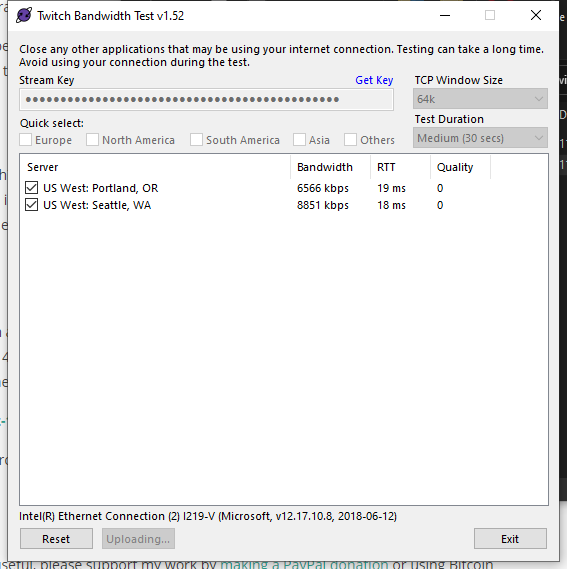 formal monolith
What does that mean? Sorry if that is a dumb question
zenith widget
anything bellow 100 quality means you can't connect to that server in a stable manner
viscid pebbleBOT
Dropped Frames means that you have a bad connection between your device and the streaming platform and most likely something related to your ISP not handling the connection properly.
Speed tests usually cannot help solve this problem and its best to use this guide: https://obsproject.com/wiki/Dropped-Frames-and-General-Connection-Issues
If you stream to twitch, use the !twitchtest command and do a connection test to your regional servers.
formal monolith
So basically whatever is going on is on Comcast?
zenith widget
I'm from EU and even I have heard how shit Comcast is
so sorry to confirm, but 99.9999999% that yes
formal monolith
Lol ya its is bad. I just usually do not have this issue
 ebon fulcrum
is there a leaderboard overlay on streamelements? I truly do not want to intergrate labs in my stuff at all lol but I am having trouble finding the elements equivalent
zenith widget
leaderboard for what exactly?
 tender vapor
i can not get my alert box text to center in the box. can anyone help me
zenith widget
@ebon fulcrum Yes, they are called "Top X list" widgets
ebon fulcrum
@zenith widget thank you
zenith widget
@tender vapor center where?
tender vapor
the text is literally in the right bottom corner when the alert pops up and not in the center to where my viewers can read it
zenith widget
Can you show a screenshot?
 high oak
viscid pebbleBOT
high oak
viscid pebbleBOT
@high oak The default resolution for StreamElements overlays (theme and custom) is 1920x1080. Please add them in OBS at their full resolution and use CTRL+F to fit to screen if necessary. You can then downscale your stream in OBS settings > Video if you'd like https://i.imgur.com/6bWXxjR.png
high oak
On My phone account its easier this way
ebon fulcrum
@zenith widget I didn't find "Top X List" but I did find this which seems to be the same thing. Just wanted to give ya a heads up 🙂 ty for the help
zenith widget
If you go to "my overlays" -> edit on an overlay -> (+) button -> type "top" in the search bar on top of the mini menu -> navigate to what is highlited you will see "Top Cheers List" for example.
ebon fulcrum
AH okay
high oak
Ok that helped what se support said but now the text is so small lol
zenith widget
Thats up to you to edit the text size and test out how it looks in the end.
high oak
Thank you so much!!
zenith widget
This is Streamelements discord and support channel.
We can't help you with Streamlabs stuff
lilac temple
wrong screen shot sorry dude
 split sandal
hi can someone pls help me my Streamelements in not working in twitch i have rest the cache for my overlays in obs and have used the leave/join button on the website but it is still not working
zenith widget
Can you elaborate? What excatly is not working?
split sandal
the whole thing no bot commands or alets
viscid pebbleBOT
@split sandal Please provide your account ID found at the top of this page: https://streamelements.com/dashboard/account/channels This ID is public info and safe to share here.
split sandal
5f06e81e5424b15bb771b019
viscid pebbleBOT
@split sandal If your commands recently stopped working and you're using OBS.Live and a custom bot name do the following:
- In OBS.Live, click on the hamburger menu (three stripes) at the top left of your activity feed
- Click on Stream Settings > Custom bot name
- In the Custom bot name field select Set custom bot name, not your already existing username (with capital letters). Note: If you already connected an account that way, the third entry will show as the account name (see image https://i.imgur.com/sO7fWOX.png).
- Scroll a bit down and click on the purple Connect Custom Bot Account button
- Log in as usual and Authorize the custom bot name
- Back in the Activity feed, click on the Send Test Message button and check if your custom bot name starts working again
 split sandal
i am not using obs live but i am using a custom bot name
zenith widget
And how exactly?
 tropic silo
no idea if this the appriate channel but how are some people like harris hella about create a link to share custome widgets with people ?
 warped radish
Hey guys, im looking to make a donation goal but i was bit and tips both adding up the goal. Subs getting connected to the goal would be nice too. Any ideas?
split sandal
sorry cant rember how or what i did to set it up
ok just looked at the pics better i think i did the above
zenith widget
Then you are using OBS.Live
split sandal
ok
zenith widget
@warped radish We don't have a combined goal widget for all 3. Look in #widget-share for something like that
@tropic silo We generate the links for him. That being said, this option is not available for everyone.
The workaround is, you will have to be invited to the person who wants your overlay as an editor and then duplicate hte overlay to their account
viscid pebbleBOT
"Follow these steps to grant managers/moderators access to your dashboard:
- Click on your channel name at the top of the dashboard
- Create a new invite at one of three access levels (Bot Supervisor, Editor, Full Control)
- Send this invite to a mod/manager to give them access to your dashboard. The link is one-time-use and expires after 72 hours if not accepted
Video tutorial: https://youtu.be/zl_h-ttZDF0"
split sandal
@zenith widget i have removed the custom bot name bot commands are now working thanks for the help
tropic silo
@zenith widget yeah , damn that going not very scaling for somthing i had planed :/
but makes sense
 prisma relic
Submit it to Widget share for everyone 🙂
warped radish
@zenith widget can you guide me to the closest thing to get something close to work?
prisma relic
You shouldn't combine tips + bits @warped radish
zenith widget
prisma relic
.... for TOS reasons.
zenith widget
There are goal widget that show all 3, but what pjonp says, bits and tips should not be combined in 1 goal - its against Twitch's TOS
 slow quail
How do I get Game Capture to Capture games... Won't Capture any games
viscid pebbleBOT
@slow quail Obs.live is a plugin for OBS Studio for the best OBS support, please join their Official Discord @ discord.gg/obsproject
tropic silo
@prisma relic i might look into that but my main concern is that they be technically created by someone else due being commissioned work
 muted python
is there anyone who can halep me with adding my Paypal to twitch?
viscid pebbleBOT
@muted python New to StreamElements?
Check out our YouTube channel https://www.youtube.com/c/streamelements/videos
with tutorial videos from setting up the basics, to in-depth details on how to use our product.
New to OBS? Here is a 4 step quick start guide
https://obsproject.com/wiki/OBS-Studio-Quickstart
Want to learn even more? Here is an in-depth overview
https://obsproject.com/wiki/OBS-Studio-Overview
prisma relic
if it is copyrighted (not for share) work; then the best is go the editor route. If you have to you can send them the HTML/CSS/JS code
if they want 'support' then you'll want editor permission
prisma relic
correct @warped radish ... bits can not have a monetary value
so you can not say 100 bits = $1 USD
 wispy zodiac
Hi! I Just did a two hour stream and received gifted subs, resubs, and bits donated but did not receive a stream elements email after report, what should I do to receive one?
zenith widget
If you just ended the stream - wait
wispy zodiac
It’s been 3-4 hours should I just wait til tomorrow then?
zenith widget
I see that you are not streaming on a regular basis, so our stream report cannot be generated
wispy zodiac
Aw ok thanks for the help I see now.
 vale saffron
hey, i subbed on one stream 2 days before my sub gift ended and i didnt get points, any1 knows why?
my sub gifted i continued sub and when it actually renewed i didnt get points
zenith widget
Which points? The twitch channel points or loyalty points?
vale saffron
loyalty points
zenith widget
Afaik, continueing a gifted sub will not grant you points, until you actually resub(share the resub) towards the channel.
 celest iron
@SE.Support Hello! My chatstats are bugged. I've noticed a trend of your support team asking if we (the people coming to you for help) have changed names.
My previous name was: JlBuh (JLBUH)
My new name is: JBuhRL
Hopefully this is sufficient information for y'all. If not I'm here!
Thank you in advance for your time!
vale saffron
but i did resub and when gift sub ended it renewed and didnt get points.
gentle venture
Hey all!
Is the Extra Life for Kids fixed with StreamELlemenets ?
zenith widget
Extra Life widgets are still having some issues and we are looking into it
No ETA on a fix
@celest iron done
gentle venture
Thank you. Is there an alternative that we could use?
celest iron
Thank you so much. Sorry about that. I appreciate the help.
zenith widget
@gentle venture afaik, you can still use their default goal tracker/bar, but other than that, just keep trying to add the ID
gentle venture
I think their website is down 😫 No again! 😦
vale saffron
@zenith widget so u dont get points if u sub after a gift sub?
zenith widget
If the continueing of a sub is triggered, no
hollow horizon
So i want to do a giveaway soon for my twitch anniversary. If i do it for merch can i put a different address in when ordering from the streamelements website, with the discounts. or do i have to buy directly from my store?
zenith widget
you can put any address you want, as long as its paid in the end
hollow horizon
even in the main console where we get it at a discount price?
 wary halo
You only get a discount if you order 5 items or more though
hollow horizon
well i mean.. "At cost" price
zenith widget
The address is placed at the actual checkout of the order
hollow horizon
so basically on the main store.. not in the dashboard? .. so i would lower the cost all the way since i'm paying for it and then go to the actual store and place order and put their address in?
zenith widget
You can lower the price of all items to the most minimum you can via the slider or you can still use the bundle code method via the engagement, choose the items then click on the next button(or w/e the button is as I've never used it my self) and its going to take to the checkout process
where you place your payment details and address for shipping
either way works
hollow horizon
ok gotcha .. thanks
 pliant vapor
Hello. Is this the place where i can ask about OBS problem?
zenith widget
OBS.Live -> #helpdesk-selive
pliant vapor
ty
zenith widget
If general OBS studio stuff -> discord.gg/obsproject
 hollow trench
Hello, so I saw that there is a stream marathon timer widget already supplied by StreamElements. The problem with the timer that I am seeing is that I am not able to stop the timer and it instead resets the time to what I set my minimum time at originally. Is there a different stream marathon timer widget that allows me to stop the timer instead of resetting the timer? Or is there code that I can add to the stream timer that would allow me to stop the timer.
zenith widget
There is no pause/stop function in the default marathon widget and the custom one
but i bet it can be added, but you will have to ask in hte #dev-chat
 dense wasp
How do I actually close my StreamElements account? It says "Invalid username". I've tried multiple different names I usually use but none works. What username is it really asking for?
 ashen sparrow
how can you check how many tickets you purchased during a giveaway?
zenith widget
@ashen sparrow in the giveaway page it self you should be able to check how many
@dense wasp DM me the following info:
Please provide me with these details and I will ask the devs to delete your account:
Username:
Email:
Account ID:
JWT Token:
Reason for closure:
Error when using the closure form:
 thin dragon
Hi, I would like StreamElements to post from my account instead of the bot account, how do I set this up?
viscid pebbleBOT
@thin dragon Currently renaming the bot fully works with OBS.Live.
You can follow this video guide to set it up: https://discordapp.com/channels/141203863863558144/494513233416421386/561516184718278676
If you don't want to use OBS.Live and want to stick with Ground Control, please let us know your Twitch username.
thin dragon
@viscid pebble I am at this time not actively using either but I do have Ground Control installed.
zenith widget
I've activated the custom bot name for you in ground ocntrol
dense wasp
@zenith widget Got it to work. Ty anyway. Maybe you could answer why my tip page just loads? 🙂 https://gyazo.com/5edbdbc6fb967885ce6e746267b0895a
 zenith widget
Something is stuck with the tipping page
I'll poke the devs, but no guarantee this will be fixed today
 onyx ledge
How can I get the apex spitfire overlay webcam to work
 placid crag
How would my viewers get more loyalty points because everyone has 0
prisma relic
do you have points enabled?
placid crag
Yeah I have channel points on
I am talking about the loyalty points from the !points command
 olive island
not sure which one is correct but how do I do a refund on SE pay
zenith widget
@placid crag activate the loyalty system from our dashboard
viscid pebbleBOT
@olive island Please contact us via email for support with SE.Pay. You can use our contact form here: https://streamelements.com/contact Thank you.
 calm swallow
hello: slight_smile: i have now switched from streamlabs to stream elements. it slobs the streaming worked well and the viewers received a buffer-free result. Unfortunately this is not the case with streamelements. what can be the reason? does anyone know?
placid crag
@zenith widget okay I’ll look into that thanks
viscid pebbleBOT
@calm swallow Please provide a log from your last stream. To do this, in OBS go to Help > Log Files > Upload Last Log File and paste the link to the log file here.
 vale forge
how do I make streamelements bot enter my chat?
im testing commands and its not working
olive island
thank you
viscid pebbleBOT
@vale forge Go to the Dashboard > Right side > Part channel > Join channel(https://streamelements.com/dashboard)
vale forge
thanks
calm swallow
placid crag
I don’t think it’s there @zenith widget
zenith widget
@calm swallow https://obsproject.com/tools/analyzer?log_url=https%3A%2F%2Fobsproject.com%2Flogs%2F0xU9HYIlDqOaVBXu
OBS (Open Broadcaster Software) is free and open source software for video recording and live streaming. Stream to Twitch, YouTube and many other providers or record your own videos with high quality H264 / AAC encoding.
placid crag
Oh I found it nvm
vale forge
How do I test follower alert and stuff?
golden vault
Hello there, in mention of loyalty points i have hot problem with speding them via !songrequest command. Everything it seems to be setup correctly, but if my followers spend points, they are doubled. Any tips how to fix it?
viscid pebbleBOT
@vale forge You can test alerts via the Emulate bell on the lower left side of the Overlay Editor. Simply go to your Dashboard > My Overlays > pencil/edit button on the overlay. Make sure the Preview LIVE on stream option is on to see the alert in OBS/XSplit** https://streamable.com/vtulg9

 wet wigeon
Hello how do I use these on ps4, Im streaming on twitch
viscid pebbleBOT
@wet wigeon Consoles do not have native support for overlays. You would need a capture card, PS4 remote play or Xbox companion app and a PC with OBS in order to have overlays over your console gameplay.
We have a blog post about how to set up console streaming with our essential tools: https://blog.streamelements.com/how-to-stream-on-console-7b620b1c46c3
wet wigeon
Thank you very much
zenith widget
@golden vault make sure the command it self doesn't have loyalty cost on it
placid crag
Is there alerts for when someone buys something with channel points
zenith widget
We don't have integration with the twitch channel points
only for redemptions from the stream store, which is our thing
golden vault
Thank you @zenith widget i will try that. I got one more problem during that stream. Followers report problem with followers bonus. For example if the base number ia 5 poinst for 10 minutes and bonus is also 5, they recieved just 5 without bonus.
zenith widget
When someone follows, they get just once a 5 point increase
and passively get 5 points per 10 minutes
they are not suppose to get any more then what is set
golden vault
Perfect @zenith widget thank you a lot with quick responses 👍
 lost ridge
lament blade
lost ridge
lament blade
yo
i need help with something
my !rename Is not working anymore
does any1 know how to fix it
viscid pebbleBOT
Currently renaming the bot fully works with OBS.Live.
You can follow this video guide to set it up: https://discordapp.com/channels/141203863863558144/494513233416421386/561516184718278676
If you don't want to use OBS.Live and want to stick with Ground Control, please let us know your Twitch username.
lament blade
Hello, I already have a custom prediction command set up for my chat, is there any variables/custom commands I can create to gather the results from the custom !predict command, which I could then call !predictions ???
 exotic nexus
Anyone know why Extralife alerts arent working?
 tight harness
It is being investigated by our development team, we're seeing an external issue causing the problem and we're reaching out to those responsible to fix it
 wanton orchid
Is it possible to create your own overlay on your site?
placid crag
Yes
exotic nexus
@tight harness Thank you! just making sure it wasnt something i had done!
 merry nebula
Anyone know what's going on? I had stream yesterday and got some new followers, but the SE does not show me them in the recent events, both here and in the OBS. Also the alerts for new followers was not working.
For example StreamLabs see the followes, but does not see the sub from 14h xd
viscid pebbleBOT
@merry nebula Please provide your account ID found at the top of this page: https://streamelements.com/dashboard/account/channels This ID is public info and safe to share here.
merry nebula
5b002bd1e7388d33f3deed68
twin sentinel
Asking internally to reset the connection to twitch.
 elder wolf
hi, how can i enable the dashboard on obslive when i can change my game title
not finding
i had it, now is gone
viscid pebbleBOT
@elder wolf If you are not seeing the OBS Twitch integrations and have OBS.Live installed, please follow these steps:
- Make sure you are on the latest and greatest version of OBS.Live
- Exit OBS (make sure OBS is not running)
- Delete
%appdata%\obs-studio\plugin_config\obs-browser\obs_profile_cookies - Start OBS.Live
- Settings > Stream > Disconnect > Connect
merry nebula
I did logout and connect again with twitch account, nothing changed
 dull mirage
Help my
twin sentinel
@merry nebula I asked internally to reset the connection, nothing you can do. Please be patient. Thank you.
viscid pebbleBOT
@dull mirage Welcome to the helpdesk! Please let us know how we can assist you today and a support volunteer or staff member will assist you as soon as they are available. Thank you for your patience.
merry nebula
Oh okey, thankt you!
dull mirage
Can you my please send url
twin sentinel
Also @merry nebula after that fix, you will not see the missed events. If we missed em, we cannot show them. Only new events will show up coming in after that fix.
@dull mirage What url please?
merry nebula
Noted, thanks
elder wolf
done, it worked ! thanks ❤️
dull mirage
can you give me the url of StreamElements
twin sentinel
dull mirage
Die url ist ungültig
twin sentinel
@merry nebula New follow events should show up from now on again. If they do not, please let us know again.
@dull mirage #🇩🇪︱deutsch
dull mirage
Ja
twin sentinel
🖱️ => #🇩🇪︱deutsch
dull mirage
#🇩🇪︱deutsch ich brauche die url
twin sentinel
click on #🇩🇪︱deutsch and ask in that channel please. thank you.
lament blade
During my stream this morning I had someone subscribe with a Twitch Prime Sub but my alerts didn't pop and Stream Elements did not recognize this as a sub. Is there something that I need to setup?
twin sentinel
They would need to share their prime sub.
lament blade
@twin sentinel so it's a setting on their end and nothing to do with StreamEelements?
viscid pebbleBOT
Prime Gaming (new and resub) and paid subscriptions (resub only) must be shared in chat manually by the person subscribing in order for the subscription information to be sent to StreamElements. For Prime Gaming, the user needs to have sharing enabled on https://www.twitch.tv/settings/prime. For paid subs, if the share box doesn't show up immediately it will when they refresh the page. https://i.imgur.com/VNJN0Uv.gif https://i.imgur.com/2297EA7.png

 twin sentinel
yes. take a look at what the bot just posted.
lament blade
Cool! Thanks @twin sentinel
 weary flower
Hello everyone!
Lately I've been having problems with my bot not working at all. I've tried the usual "part"/"join" trouble shooting but it just doesn't work. It's starting to drive me crazy.
Currently the bot is in my chat and has mod privileges but still no command works
I don't know how to keep on trying to trouble shoot this, and if the bot works or not feels totally random at this point.
twin sentinel
Have you changed your name and do you use a custom bot name?
 twin sentinel
Make sure there is no custom bot name set via OBS.Live or GroundControl.
weary flower
Hmm i use OBS studio tho, and what's ground control?
lament blade
Is there anywhere more direct I can get the answer I'm looking for?
viscid pebbleBOT
@lament blade Welcome to the helpdesk! Please let us know how we can assist you today and a support volunteer or staff member will assist you as soon as they are available. Thank you for your patience.
lament blade
Already submitted my question above ^^^
twin sentinel
@weary flower Try to part the bot, log out of the dashboard, log back in and make it join again.
weary flower
Did you do something? Cuz I've been doing that a couple times already.
But I'll try it again
twin sentinel
@lament blade All variables can be found in the commands section on your dashboard.
lament blade
@twin sentinel yes I know that, but I don't know what variables I can use to interact with another custom command
twin sentinel
I do not quite understand what you are trying to achieve...
 mossy perch
How to add the number of people in the live broadcast؟
twin sentinel
In the activity feed in OBS.Live there is a settings in the burger menu > settings to toggle the viewer count off and on. @mossy perch
weary flower
@twin sentinel seems like the bot is working, but IDK I've been doing the same thing already earlier today and it didn't work.
 crisp heron
Hello! I asked this yesterday about my recent broadcasts not having desktop audio (livestream had, clips have it, a short recorded obs clip i did has it and there's no copyright claims). I messaged twitch and they answered me their automated message with the copyright appeal instructions and I replied explaining again it wasnt a copyright issue. They just replied me with two "begginer broadcasting guides" so I dont think they understand or are trying to help. Anywhere else you think I can ask for help?
lament blade
@twin sentinel is it possible to have custom commands interact with other custom commands??
twin sentinel
Not to my knowledge @lament blade
lament blade
@twin sentinel ok, thank you
viscid pebbleBOT
@crisp heron Obs.live is a plugin for OBS Studio for the best OBS support, please join their Official Discord @ discord.gg/obsproject
 pallid saffron
Hi, I cannot find loyalty settings in my streamelements page
wary halo

StreamElements
The Ultimate All in One Platform for Streamers
pallid saffron
WHen I manually tried to go to the loyalty page through URL, it says An error occurred.
Could not fetch loyalty settings
 untold crest
Are you sure you are logged in with Twitch account?
pallid saffron
no, I am logged in with YT
untold crest
YT has no loyalty
Due to their api not consistent and reliable when it comes to chat
pallid saffron
Well, sorry for wasting your time then 😁
untold crest
We're cool!
 heavy lion
how do I add media request to obs any help?
viscid pebbleBOT
@heavy lion To add your overlays to OBS, add a new browser source in your scene. Paste your overlay URL in the browser source properties, set the dimensions to 1920x1080 (unless you changed them on the website) and check Shutdown source when not visible. https://youtu.be/KDvLynUqXI4
 gentle badge
Had this since 10am this morning, trying to change logo, any ideas?
twin sentinel
 dim nexus
is the extra life donation tracker not working
twin sentinel
Known issue. Devs are aware.
heavy lion
cant seem to add my media request to my obs still
viscid pebbleBOT
@heavy lion New to StreamElements?
Check out our YouTube channel https://www.youtube.com/c/streamelements/videos
with tutorial videos from setting up the basics, to in-depth details on how to use our product.
New to OBS? Here is a 4 step quick start guide
https://obsproject.com/wiki/OBS-Studio-Quickstart
Want to learn even more? Here is an in-depth overview
https://obsproject.com/wiki/OBS-Studio-Overview
 languid falcon
twin sentinel
languid falcon
twin sentinel
This is StreamElements. Best to contact StreamLabs on this.
But at StreamElements there is no way to show the tipping leaderboard in the extension. The leaderboard is on the tipping page
wanton orchid
I need help. There is no sound coming from my game and webcam today. It was working fine yesterday but today it is not working
viscid pebbleBOT
@wanton orchid Obs.live is a plugin for OBS Studio for the best OBS support, please join their Official Discord @ discord.gg/obsproject
wanton orchid
does streamelement stop the sound when use?
I am in that server and they are not helping me with the problem
they talking over me and will not answer my question
twin sentinel
If you are having issues with your game sound, best to contact their support.
wanton orchid
I heard sound from the game, it is not showing sound in OBS
twin sentinel
I am sorry, but if you are having issues with your game sound on OBS, I cannot assist you as I do know very little about sound in OBS. Maybe another support has any ideas, but best would be to contact the OBS support.
 fathom charm
when i click stream it tries to stream to youtube but i have only my twitch connected
viscid pebbleBOT
@fathom charm StreamElements menu, on top of OBS > Logout > Login
lament blade
I changed my username on Twitch and none of my alerts or bot works.
viscid pebbleBOT
@lament blade If you changed your name on Twitch, please follow these steps:
- Visit https://streamelements.com/logout and then log in again by connecting with Twitch.
- On the right side of the dashboard page that opens, select Join under bot settings. If it says Part select that and then select Join to send the bot to the chat. Don't forget to mod the bot by typing /mod streamelements in your channel if you have not already.
- Post your old and your new name here so that we can update your channel's chatstats tracking (must be done by staff).
lament blade
Old username: skamrBTW New username: skamr
twin sentinel
Your chat stats have been fixed.
 balmy saddle
how do i get my scenes from the website to the program?
viscid pebbleBOT
To add your overlays to OBS, add a new browser source in your scene. Paste your overlay URL in the browser source properties, set the dimensions to 1920x1080 (unless you changed them on the website) and check Shutdown source when not visible. https://youtu.be/KDvLynUqXI4
lament blade
Hello! I need some help with the Credit Roll widget by @empty fjord
I change the font size of the usernames, but it won't show the change!
twin sentinel
Best to ask in #dev-chat and also post some screenshots or code examples there for further investigation.
 ionic kelp
What browser are you using?
ionic kelp
Could you mod the bot please?
 zealous oracle
Hello people, I changed my twitch username some days ago, and now I can not do the Chat of the Streamelements works on my OBS. If I press the Config button the follow message is presented: "Error loading data." and a ghost image is show. I am having to use the OBS Studio docked chat. I already checked all the configs for a wrong username, etc.. but its all configured already.
Have some Someone any idea of how can I fix it ??
viscid pebbleBOT
@zealous oracle StreamElements menu, on top of OBS > Logout > Login
zealous oracle
I think that I already do that, but I will try again
File -> Config-> Transmition
here ??
twin sentinel
Do you use OBS.Live?
twin sentinel
Have you followed the bots instructions?
zealous oracle
humm, I find another Logout now, in the StreamElements tabpage I will chek it
lament blade
@twin sentinel thanks so much
 plain sand
okay so it looks like it DOES save but just doesn't show it when i switch between the Followers/tips/hosts etc tabs, only when i refresh
zealous oracle
It works fine now, I was connecting on wrong place.. thank you for All
plain sand
so maybe it's saved, but if i switch the tabs and change something else, it saves the old data that's still in the browser with the new data
 weak delta
@plain sand Just refresh, as long as you see "saving. saved." it saved, when you refresh it'll show your changes. It's just one of those little happy accidents/hiccups but it is saving your new data.
viscid pebbleBOT
@lament blade Welcome to the helpdesk! Please let us know how we can assist you today and a support volunteer or staff member will assist you as soon as they are available. Thank you for your patience.
 uneven hazel
okay so im streaming at the moment and I changed my name on twitch and for some reason the bot itsn't working?
why is this?
viscid pebbleBOT
@uneven hazel If you changed your name on Twitch, please follow these steps:
- Visit https://streamelements.com/logout and then log in again by connecting with Twitch.
- On the right side of the dashboard page that opens, select Join under bot settings. If it says Part select that and then select Join to send the bot to the chat. Don't forget to mod the bot by typing /mod streamelements in your channel if you have not already.
- Post your old and your new name here so that we can update your channel's chatstats tracking (must be done by staff).
 drowsy trout
someone can help why my stream is lagging? when i play its normal and everything but my stream is laggy af
viscid pebbleBOT
@drowsy trout Obs.live is a plugin for OBS Studio for the best OBS support, please join their Official Discord @ discord.gg/obsproject
 woven goblet
is there a way for me to import my overlay elements from the website down to OBS and Edit them there
twin sentinel
You can add the overlays as a browser source to your OBS.
twin sentinel
You can create a browser source for every item and add all these to your OBS, if that is what you are looking for.
Otherwise, please elaborate on what you are trying to do.
You cannot import the overlays as image/video elements to your OBS.
viscid pebbleBOT
@bitter glen Welcome to the helpdesk! Please let us know how we can assist you today and a support volunteer or staff member will assist you as soon as they are available. Thank you for your patience.
 bitter glen
its my first time using obs for game streaming but for some reason when i go live i get a black screen
twin sentinel
Have you added sources to your active scene in OBS?
 teal linden
how do i get overlays and bots on obs
viscid pebbleBOT
@teal linden New to StreamElements?
Check out our YouTube channel https://www.youtube.com/c/streamelements/videos
with tutorial videos from setting up the basics, to in-depth details on how to use our product.
New to OBS? Here is a 4 step quick start guide
https://obsproject.com/wiki/OBS-Studio-Quickstart
Want to learn even more? Here is an in-depth overview
https://obsproject.com/wiki/OBS-Studio-Overview
bitter glen
yes i have
twin sentinel
Do you see the items in your preview windows in OBS?
bitter glen
honestly how would i even check that
twin sentinel
What sources have you added to your active scene? Do you see them in your preview, like the overlay, the game/screen?
bitter glen
i adeed game capture
i added a game capture and a scene when i start streaming its just a black screen
twin sentinel
What is inside the start streaming scene? And how you wrote it I assume you are also seeing that starting stream scene as a blackscreen in your OBS, please correct me if I got that wrong.
twin sentinel
What source is added inside your start streaming scene?
bitter glen
under my sources box i have "game capture
viscid pebbleBOT
@bitter glen Obs.live is a plugin for OBS Studio for the best OBS support, please join their Official Discord @ discord.gg/obsproject
 leaden hound
how do i get the media request working?
i made the overlay and enable the actual module, but it doesnt appear on my stream and i cant hear the music
placid crag
what does !level command do?
leaden hound
i also added the overlay as a browser source in obs but it still doesnt play the sound
viscid pebbleBOT
Chat/Bot Levels
100 - Viewer
250 - Subscriber (Twitch subscribers automatically placed at this level)
300 - Regular
400 - VIP (Twitch VIP automatically placed at this level)
500 - Moderator (Twitch chat moderators automatically placed at this level)
1000 - Super Moderator__
1500 - Broadcaster
Dashboard Manager Levels
Bot Supervisor
Editor
Full Access
Owner
https://i.imgur.com/s61Liry.png
 ionic kelp
@placid crag It's for the first part.
placid crag
don't look useful to me
ionic kelp
It's mainly for a permission thing with us.
placid crag
so for the !points command i just actvated it should all the people that been following me have 200 points cause i set it to 200 points or does everyone start at 0
ionic kelp
After activated it starts at 0 and increases every 10 minutes you're live.
placid crag
oh okay thanks
 cloud vessel
how can i put a title in my streaming with obs live?
leaden hound
Can I close the stream elements website and still have the song requests still playing on stream?
like how do i do all this
am so confused because the songs do not play through the browser source
twin sentinel
@cloud vessel Via the hamburger menu in your OBS.Live > Stream Settings
@leaden hound Have you added the media request widget to your overlay? Have you hit the show on steram button?
leaden hound
yes
twin sentinel
Then the video should be visible in the browser sources widget.
leaden hound
i want to be able to close the stream elements site with the audio still playing
but the audio does not play through the browser source
ionic kelp
Then you either need ground control or OBS.Live open. Beyond that not possible.
leaden hound
what are those?
ionic kelp
Our desktop app or our addon for OBS.
leaden hound
can you give me a link?
lament blade
Guys i need some serious help
i got an email from "streamelements stats"
the email is mailer@streamelements.com
is this safe
 ornate dagger
I am having crazy buffering and streams going out despite having fantastic internet
ionic kelp
Yes. That's just for your stream summary.
lament blade
ok, i got a little worried
viscid pebbleBOT
@ornate dagger Obs.live is a plugin for OBS Studio for the best OBS support, please join their Official Discord @ discord.gg/obsproject
lament blade
cause google emailed me about how it has access to my youtube account and the email looked off to me
wary halo
You gave that access 😛
But it's nothing to worry about, it's just your stats from the stream
lament blade
ok, phew.
untold badger
Any idea why my Bits-unlocked channel emotes don't appear in Kappagen?
twin sentinel
Could be that we cannot catch them through the API.
untold badger
Gotcha. Seems to be a consistent issue, Discord doesn't seem to pick them up, either.
leaden hound
On the stream elements site, how do i change the overall size of the overlay
cuz i downloaded this theme and i cannot resize it
viscid pebbleBOT
@leaden hound To add your overlays to OBS, add a new browser source in your scene. Paste your overlay URL in the browser source properties, set the dimensions to 1920x1080 (unless you changed them on the website) and check Shutdown source when not visible. https://youtu.be/KDvLynUqXI4
twin sentinel
You can change the size of an overlay via the three dots at the overlay > properties.
leaden hound
thanks
 dusty smelt
Hello everyone! I have the following problem that the watchtime has not been updated for a few days. What can I do?
viscid pebbleBOT
@dusty smelt 10 minutes of watch time is given to those in chat when the loyalty points are handed out (every 10 minutes). Therefore, loyalty must be enabled to watch time to work properly.
There is no direct link between watch time and all-time points.
It can’t be calculated from the number of all-time points a user has because subs may earn points at a faster rate and !bonus all command increases all-time points for users in the chat at that time.
Giving points to a single user do not affect all-time, only when giving to all in chat.
leaden hound
You can change the size of an overlay via the three dots at the overlay > properties.
@twin sentinel i did that and its still the same
 split hollow
i have a black screen on my obs and i cant get it to go away...
twin sentinel
What is still the same? The overlay should have another resolution on the website after that. @leaden hound
@split hollow What source have you added to your scene?
leaden hound
the resolution is still the default resolution it was
i set it to 1366 x 768 but its acting like its still 1440
untold badger
When I hear alerts, sometimes it sounds stuttery and weird before playing the alert sound. That's for really anything. Any idea why that happens?
split hollow
video capture device. im using a hd60 s
viscid pebbleBOT
@split hollow Obs.live is a plugin for OBS Studio for the best OBS support, please join their Official Discord @ discord.gg/obsproject
dusty smelt
thank you @viscid pebble
twin sentinel
@leaden hound You need to rearrange the assets manually in the editor after changing the size.
 tiny elm
hello, please may i get some help?
viscid pebbleBOT
@tiny elm Welcome to the helpdesk! Please let us know how we can assist you today and a support volunteer or staff member will assist you as soon as they are available. Thank you for your patience.
tiny elm
Hi! i don't know how to add overlays to my obs.
 livid vale
Hi, I am having an issue with AlertBox overlays. Specifically the "Cheer" event and "Secondary Text". No matter what I change on the "Cheer" event, it doesn't change when I preview it. Only happens with "Cheer". Also no matter what I change for the secondary text for any of the alerts, I don't see any change as well.. am I doing something wrong?
viscid pebbleBOT
@tiny elm To add your overlays to OBS, add a new browser source in your scene. Paste your overlay URL in the browser source properties, set the dimensions to 1920x1080 (unless you changed them on the website) and check Shutdown source when not visible. https://youtu.be/KDvLynUqXI4
twin sentinel
@livid vale Check the variations.
tiny elm
Thank you so muck.
livid vale
@twin sentinel the cheer variations?
twin sentinel
yes.
livid vale
@twin sentinel THANK YOU!!
Do you happen to know what the secondary text does? I assumed that would change the non dynamic text? but I don't see anything change, for instance when I change the color it is still white..
twin sentinel
The secondary text is the cheer message if it is enabled.
 modest adder
When users request a song using media request, it always plays the same video. Any suggestions why this would happen?
twin sentinel
Make sure you have the twitch link protection disabled in your twitch security settings.
livid vale
@twin sentinel got it, thank you. So is there any way to change the color of the text in between the message that appears?
So like I have {amount} | {name}, trying to change the text color of the "|"..
modest adder
@twin sentinel got it thanks
livid vale
@twin sentinel Haha, wow sorry. Not sure how I missed that lol. Thanks 🙂
You all are soo helpful
 stark flume
I may be overlooking it but does stream elements have your newest follower be updated automatically on stream?
livid vale
@stark flume I added a Latest Follower text Label for this
stark flume
@livid vale oh i was asking in general, im brand new to this. I just uninstalled streamlabs
im trying to learn how to do that myself
twin sentinel
@stark flume Add the latest follower widget to your overlay in the overlay editor via the blue +.
 rustic ledge
I'm sorry if this has been asked, but i am trying to get the command !discord to link my disk invite, but everytime instead of the link its just ***. Am I doing something wrong?
twin sentinel
Disable the twitch link protection.
 signal jackal
Hi, I'm having a problem at the moment... I'm trying to use a gif as a follow alerts, but the gif just does it ones... then It just bugs and never apeared again
Not only that, if I used the option "Text over image" it doesn't show the text anywhere
 median cipher
viscid pebbleBOT
median cipher
viscid pebbleBOT
@median cipher Obs.live is a plugin for OBS Studio for the best OBS support, please join their Official Discord @ discord.gg/obsproject
rustic ledge
Is there a way to make a command perform and display a random number?
 carmine palm
how do i export this into my obs? https://gyazo.com/215cecd6ae5ae0a62eeda55f266d8182
 viscid pebbleBOT
@carmine palm To add your overlays to OBS, add a new browser source in your scene. Paste your overlay URL in the browser source properties, set the dimensions to 1920x1080 (unless you changed them on the website) and check Shutdown source when not visible. https://youtu.be/KDvLynUqXI4
twin sentinel
@rustic ledge There is a random number variable for the commands.
rustic ledge
How do i do it? very new to this. sorry.
viscid pebbleBOT
@rustic ledge New to StreamElements?
Check out our YouTube channel https://www.youtube.com/c/streamelements/videos
with tutorial videos from setting up the basics, to in-depth details on how to use our product.
New to OBS? Here is a 4 step quick start guide
https://obsproject.com/wiki/OBS-Studio-Quickstart
Want to learn even more? Here is an in-depth overview
https://obsproject.com/wiki/OBS-Studio-Overview
twin sentinel
Create a custom command with this variable: ${random.1-100} to Displays a random number generated from 1 to 100
rustic ledge
Thank you
viscid pebbleBOT
@wind cloud Read and follow our server rules:
- We do not tolerate toxicity! Treat the community team, staff and all members with respect.
- No advertisement or channel promotion, anywhere on the server.
- No NSFW/NSFL
- No unsolicited DMs or friend requests to server members
Make sure to read the #rules in any server you join.
 proud rune
hi!, i have one question, why i dont have the source window in the obs?
twin sentinel
View > Docks
proud rune
i cant find it
twin sentinel
At the top in OBS View > Docks > Sources
 coral notch
Hello there, could someonte help me with a StreamElements setting, please? I can't find the subscriber multiplier points on my loyalty system.
viscid pebbleBOT
@coral notch Please logout of StreamElements at https://streamelements.com/logout and then login again to your account (Twitch/YouTube/Facebook).
coral notch
Ok, I just did it, but the subscriber multiplier option doens't show up. I see here the follower multi, the donate multi and host multi, but any sign of the subs one.
coral notch
The 3 bonus that I said, but no subs multiplier
twin sentinel
What is your twitch name please?
coral notch
Heugy
twin sentinel
You aren't affiliated with twitch, so that option is not available.
coral notch
Oh, I see it. I didn't know it was an affiliated setting hahaha thank you
viscid pebbleBOT
@lament blade Go to the Dashboard > Right side > Part channel > Join channel(https://streamelements.com/dashboard)
twin sentinel
The bot is answering for me in your chat.
lament blade
thx
formal monolith
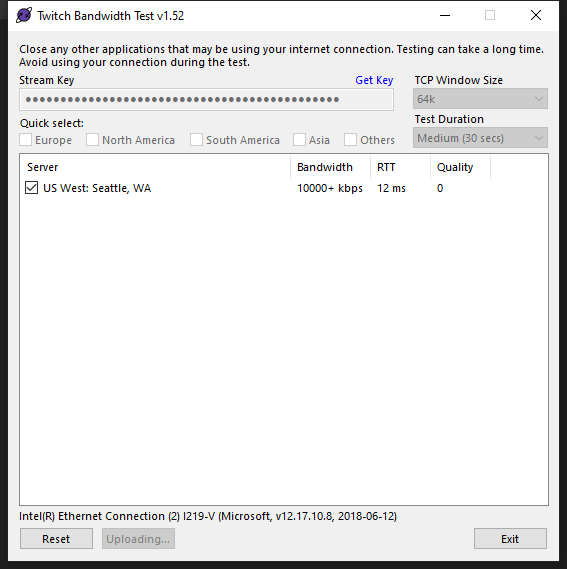
So is that 0 super common? I have never had this experience
It was like this yesterday and I could not stream without dropping a ton of frames and I believe Keizer said it was because of the quality being 0. I just don't know how that can be fixed. I called comcast and they have no idea whats wrong
viscid pebbleBOT
Dropped Frames means that you have a bad connection between your device and the streaming platform and most likely something related to your ISP not handling the connection properly.
Speed tests usually cannot help solve this problem and its best to use this guide: https://obsproject.com/wiki/Dropped-Frames-and-General-Connection-Issues
If you stream to twitch, use the !twitchtest command and do a connection test to your regional servers.
lament blade
quick question: I am setting up a chat command but i want it to trigger my TWITCH emote. I typed out my message and the emote but but it's not showing up.
^
^^^^
twin sentinel
Gift the bot a sub or use your channel name as bot name.
lament blade
how do i do the 2nd option. is there a video ?
viscid pebbleBOT
@lament blade Currently renaming the bot fully works with OBS.Live.
You can follow this video guide to set it up: https://discordapp.com/channels/141203863863558144/494513233416421386/561516184718278676
If you don't want to use OBS.Live and want to stick with Ground Control, please let us know your Twitch username.
 woeful ginkgo
Did anyone else's Extra Life trackers stop working yesterday evening? I used the Extra Life overlay and it stopped updating. I toggled it on and off, and tried updating the team ID and when I did that it reset to $0. It won't update at all anymore.
wary halo
The team is aware of issues with the Extra Life trackers, the devs are working on it but no ETA on when the fix is rolled out
 gray pilot
Hello, how can I save the messages of the modules?
since when changing the message is deleted
woeful ginkgo
Thank you @wary halo !
 peak cove
@wary halo can you help me?
how can I change maximum message length of cheer?
someone?
formal monolith
Whenever anyone has a chance, please let me know if there is anything else I can do
 dusk osprey
How i can rename the streamelements?
viscid pebbleBOT
@dusk osprey Currently renaming the bot fully works with OBS.Live.
You can follow this video guide to set it up: https://discordapp.com/channels/141203863863558144/494513233416421386/561516184718278676
If you don't want to use OBS.Live and want to stick with Ground Control, please let us know your Twitch username.
 stuck mirage
Hello. How can i disable streamelements email notfications after every stream?
abstract hemlock
@stuck mirage you can unsubscribe for the stream report on the email itself (at the very end)
stuck mirage
Thanks mate!
dusk osprey
Br
 winged hinge
How in the hell do I resize the actual overlay in streamelements? I just did the import from Streamlabs, and the default import size appears to be 800x600 and I CANNOT find a way to resize it
and if I want to redo it i have to rebuild all the alerts from scratch completely defeating the entire purpose of the export/import process
and the only time I see the option to size the overlay is when yo uare creating it
abstract hemlock
winged hinge
where is this for an existing overlay?
thank you. although that is set to 1080p and when I add the browser source at 1080P it spawns things in the not-right place. and it looks like a 4:3 box so maybe I'm missing something here
OK I changed res and changed back to 1080p and NOW it's doing what it should. baffling and frustrating but thank you very much @abstract hemlock
it would probably make a lot of sense for it to default to 1080p
 midnight granite
I can't get any of my Extra Lift alerts to work. It doesn't look like my extra life ID is picking up or sending information.
abstract hemlock
There is a known bug with the extra-life integration at the moment
 frosty nest
How do you add a command when someone follows
placid crag
you can add alerts and stuff idk about commands?
 rare cairn
Is there a reason why alerts aren't working?
I am doing a 12 hour charity stream and the alerts are not popping up for extra-life
 wispy otter
Is there any way to take an overlay from a different site (like Plexchat.tv) and incorporate it into my current Streamelements overlay?
rare cairn
n/m fixed it
 pseudo barn


 viscid pebbleBOT
@pseudo barn StreamElements menu, on top of OBS > Logout > Login
 drifting agate
when i hit the stream button and it goes straight to youtube instead of twitch
 mortal dove
Got a question any1 free
drifting agate
get in line
viscid pebbleBOT
@drifting agate StreamElements menu, on top of OBS > Logout > Login
@mortal dove Welcome to the helpdesk! Please let us know how we can assist you today and a support volunteer or staff member will assist you as soon as they are available. Thank you for your patience.
mortal dove
On our streams some of our viewers experience lag everyday and for the other viewers theres never an issue. They also say they dont get the lag in other streams. Streaming in 720p btw.
winged hinge
Is kappagen completely busted? No matter what it doesn't seem to work correctly and reflects different behavior as a browser source vs in the overlay editor
wispy otter
Any thoughts there guys? Anyone know how to make a custom widget that's an iframe of another overlay?
mortal dove
?
wispy otter
If that ? was for me, I'm referring to trying to get an overlay from another service (pixelchat.tv) into my Streamelements overlay by means of a custom widget iframe
mortal dove
On our streams some of our viewers experience lag everyday and for the other viewers theres never an issue. They also say they dont get the lag in other streams. Streaming in 720p btw.
abstract hemlock
We won't recommend on doing that @wispy otter some CORS issues could appear.. if you already have a URL better add that directly on your OBS as a browser source
viscid pebbleBOT
@winged hinge Right click on the BrowserSource > Properties > Scroll down a bit > Refresh cache of current page
wispy otter
@abstract hemlock No can do. The entire point of this is to reduce the number of browser sources taking up my PC's resources by using a single overlay.
winged hinge
@winged hinge Right click on the BrowserSource > Properties > Scroll down a bit > Refresh cache of current page
@viscid pebble I tried that. I know you wouldn't assume that, but I did, repeatedly. It's only this specific widget, all the others refresh normally
abstract hemlock
@mortal dove i read something about quality issues from twitch side, also something about if the viewer has an adblocker something like that... i'm not 100% sure where did i read that ..
mortal dove
There on there phone though
Ill maybe try reduce bitrate i dont understand how some lag some dont
Only in my stream
 eternal basalt
My chat commands are not working. Please, help!
viscid pebbleBOT
@eternal basalt Go to the Dashboard > Right side > Part channel > Join channel(https://streamelements.com/dashboard)
 uncut ivy
I need help streamelements bot is not working even though I have already removed it and added it again
eternal basalt
Ok, thanks. I followed the directions but it's still not working. Bot is in chat. Do I need to reset my stream?
viscid pebbleBOT
@eternal basalt StreamElements menu, on top of OBS > Logout > Login
abstract hemlock
Try this ⤴️
 tranquil apex
@lament blade #🇵🇹︱português
lament blade
Thankio
tranquil apex
Hey everyone. I'm trying to make a command to be like a prank to viewers, so if the person types in the command, it'll get a timeout and also play an audio on stream. Does anyone know how to trigger that?
abstract hemlock
Can you remove the follower only so i can test some commands on your chat? @eternal basalt
 willow orchid
Do y'all know where I could find the animated twitch icons?
(Bits, Donations, Gifted Subs, etc)
abstract hemlock
@eternal basalt @ me once you do it 
 candid vortex
Hi can anyone help- my alerts are not coming through on my OBS
winged hinge
OK, I'm getting a handle on streamelements a bit but there is still some jank. I have definitely refreshed and saved, and it clears chat on the stream output, but it doesn't change fonts. Why are the fonts different on screen (top) vs in the dashboard editor?
viscid pebbleBOT
@winged hinge Right click on the BrowserSource > Properties > Scroll down a bit > Refresh cache of current page
winged hinge
ohhhhh that works. i figured it refreshed whenever I saved
 urban knot
so ive been seeing a problem which when i try to stream using my nvidia encoder, even when its updated it keeps saying ''Starting the output failed please check log for details, Note: if you are using NVENC encoder make sure its up to date" but nvidia is up to date, and when i switch it over to x264 the stream works but comes out chopy so thats why i wanna use my nvidia but never works
viscid pebbleBOT
@urban knot Obs.live is a plugin for OBS Studio for the best OBS support, please join their Official Discord @ discord.gg/obsproject
 peak storm
Hello. Just reporting an issue with the countdown (or time.until) variable. If you set a date, once the time has passed, instead of saying something like '1 minute 30 seconds ago' it just changes to a couple hundred years. Please fix if you can. Thanks 🙂
abstract hemlock
@peak storm can you provide an example? or the response that you are using please
 night jacinth
hi there, good evenning. I´m here because i have a cuestion about the stats of my linked account with SE. the thing is that i haven´t recibed my last stream stats 😦 i always have one when i finish stream so i want to know if there´s a problem with my account or that whas a problem with the service, because i recibed the streamstats of twich, but your mail´s missing. i hope we cant find an answer soon. thanks! 😄
abstract hemlock
@night jacinth how long since the last time that you receive your stream report?
night jacinth
i made stream a month ago and everything was fine, just happened to me at my last stream
peak storm
@abstract hemlock Sure. So ${time.until 2020-11-07T20:00:00Z} results in '292 years 3 months 8 days 23 hours'. 🤔
 signal chasm
Is there a way I can have the media request sound come through a browser instead of OBS Live? I keep trying to unmute it in a browser but it won't let me and it only works when playing through OBS.
abstract hemlock
@night jacinth that's probably it, since the system doesn't have anything to compare with it won't send the stat, next time you should receive it 🙂
@signal chasm you can create an overlay with a media request widget on it and open it on your browser, then click on "show on stream"
signal chasm
The audio still plays through OBS
 stuck depot
how do i make it so when i alt tab out of the game it doesnt show anything else but the game in obs
signal chasm
I can have either have the audio play through the browser and OBS or only OBS
stuck depot
😢 when the help people dont respond back
abstract hemlock
@stuck depot you need to have a little more patience, i'm troubleshooting 1 questions above
And your question doesn't look as a StreamElements issues
viscid pebbleBOT
@stuck depot Obs.live is a plugin for OBS Studio for the best OBS support, please join their Official Discord @ discord.gg/obsproject
 charred blaze
I changed my twitch account name, but streamelementsBOT still references my old account name and doesn't comment on the new account name. Is there a way to get the BOT to recognize it properly or to deactivate the BOT once?
abstract hemlock
@peak storm i was able to reproce the same behavior i'll ask internally to our dev team
peak storm
@abstract hemlock ok thanks. 🙂
abstract hemlock
@signal chasm have you tried to use this page: https://streamelements.com/dashboard/mediarequest/general and click the "use here" button?
viscid pebbleBOT
@charred blaze If you changed your name on Twitch, please follow these steps:
- Visit https://streamelements.com/logout and then log in again by connecting with Twitch.
- On the right side of the dashboard page that opens, select Join under bot settings. If it says Part select that and then select Join to send the bot to the chat. Don't forget to mod the bot by typing /mod streamelements in your channel if you have not already.
- Post your old and your new name here so that we can update your channel's chatstats tracking (must be done by staff).
signal chasm
@abstract hemlock Yes. Use here doesn't change anything and if I try to unmute the video on the page it remutes unless I unmute it on OBS. I'd also love to know how to fullscreen the video when on this page but that's a separate thing
I can show it on my stream if that'd help
abstract hemlock
i'll take a look @signal chasm
 pliant otter
Is there a way to produce an audible sound when chat messages are received? I'm usually facing away from my screen so I'll never know unless there's a noise
abstract hemlock
@pliant otter check this widget: #widget-share message
lament blade
Is there a way to increase or decrease the volume of media share youtube videos? My one seems to be stuck on the lowest volume and no matter which way I move it, it goes back to the default
abstract hemlock
@lament blade you're using obs.live or the browser?
lament blade
browser
wait you can do media share using obs live?
I use stream elements obs
I just set up the media share overlay on my obs, and check and play media share videos on the streamelements website
abstract hemlock
yes, you can click on the StreamElements on the top of OBS and click on the "Media Request" dock
lament blade
I dont see it.
viscid pebbleBOT
@lament blade StreamElements menu, on top of OBS > Logout > Login
lament blade
Oh I see. For some reason i was using the default obs program even though I had streamelements installed. I reinstalled and it works
Oh I seeeee. Thanks!
 cunning patrol
my kb/s is less than 500 right now never happened befpre very confused
 winter jacinth
I'm trying to update an extra life alert and goal bar but it's not updating even though people are donating and the proper ID's have been added
Any recommendations?
ionic kelp
@winter jacinth known issue
night jacinth
@night jacinth that's probably it, since the system doesn't have anything to compare with it won't send the stat, next time you should receive it 🙂
@abstract hemlock I see, well thanks so much 😄
ionic kelp
@winter jacinth Correct. It's an issue with someone outside of our control.
winged hinge
I'm using LX's excellent Ultimate Text Widget, however I can't find proper syntax for last sub gifter. I've tried {subscriber-alltime-gifter.name} but can't seem to get a handle on it. JS isn't really my bag so I'm a bit lost in the code 😦
winter jacinth
thank you @ionic kelp !
 twilit cove
bits arent showing up dropping in my hype cup, or any other item like subs etc
high oak
Would there be a reason I cant start streaming it keeps telling me my stream key is wrong and its not
 native summit
Hey guys, how is it going? I've been using OBS StreamElements for some time but today my stream has been going offline all the time. Game and everything else still online. Can anyone help me plz?
abstract hemlock
@high oak reconnect your account on OBS (Settings > Stream)
viscid pebbleBOT
@native summit Obs.live is a plugin for OBS Studio for the best OBS support, please join their Official Discord @ discord.gg/obsproject
high oak
@abstract hemlock ive done that
viscid pebbleBOT
@high oak StreamElements menu, on top of OBS > Logout > Login
 open arrow
I just want to ask about something, is there's an option to donate by my credit card not only credit card?
high oak
That still didnt work
viscid pebbleBOT
@high oak Obs.live is a plugin for OBS Studio for the best OBS support, please join their Official Discord @ discord.gg/obsproject
 abstract zodiac
anyone know why chatstats is 404ing on a channel? like even when i go to stats then type in his name, it still 404's.
its worked before, but im not really sure why it suddenly isnt how
viscid pebbleBOT
@abstract zodiac Please provide your account ID found at the top of this page: https://streamelements.com/dashboard/account/channels This ID is public info and safe to share here.
abstract zodiac
5b37225cefe87154f9077398
abstract hemlock
@abstract zodiac it should be fixed
abstract zodiac
its for a channel i moderate @abstract hemlock (TacticalTickler) he is live atm and asked if i could help some how
abstract hemlock
I already fixed it 🙂
abstract zodiac
oh damn thanks so much!
twilit cove
bits arent showing up dropping in my hype cup, or any other item like subs etc
high oak
Stream work on streamelements but when I clip stream on the xbox all im getting is a black screen on twitch. What do I do?
I click*
viscid pebbleBOT
@high oak Consoles do not have native support for overlays. You would need a capture card, PS4 remote play or Xbox companion app and a PC with OBS in order to have overlays over your console gameplay.
We have a blog post about how to set up console streaming with our essential tools: https://blog.streamelements.com/how-to-stream-on-console-7b620b1c46c3
high oak
So I can't stream from streamelements and twitch on my ps4 or xbox at the same time?
 opaque coyote
how do i get the streamelements bot to leave my channel on twitch?
viscid pebbleBOT
@opaque coyote Go to the Dashboard > Right side > Part channel > Join channel(https://streamelements.com/dashboard)
 native ridge
i cant go live
high oak
So I must have a capture card in order to stream on streamelements from my PS4 to twitch? New to this so I have no idea
abstract hemlock
@high oak in order to use the overlays, Yes like the bot said
native ridge
how do i have the best connection possible?
 low nymph
can someone give me a dumb down on how to use bots? 😦
viscid pebbleBOT
@native ridge There are no ""best settings"".
Please understand that every setup will be very different.
Any guides or videos that claim otherwise are misinforming. Your best option is to start with a base and adjust as necessary.
You can run the OBS auto-configuration tool. To use the auto-config, click on the Tools menu in OBS, select Auto-Configuration Wizard and then just follow the on-screen directions.
You can use this tool to get baseline settings for your hardware and adjust as necessary from there.
Test, test, and test again. We are happy to offer suggestions for any issues you may be having afterwards, but not a list of settings.
Thank you :SEheart:
@low nymph New to StreamElements?
Check out our YouTube channel https://www.youtube.com/c/streamelements/videos
with tutorial videos from setting up the basics, to in-depth details on how to use our product.
New to OBS? Here is a 4 step quick start guide
https://obsproject.com/wiki/OBS-Studio-Quickstart
Want to learn even more? Here is an in-depth overview
https://obsproject.com/wiki/OBS-Studio-Overview
native ridge
do i have to have a capture card to stream from ps4 to pc?
 cerulean fiber
is there a version of streamelements that has an interface like slobs? like the same folder stuff etc
abstract hemlock
StreamElements is cloud-based so every widget is on your overlay
 scarlet shore
Hi guys, i didn't know where to go, but i'm a twitch streamer currently doing a raid shadow legends sponsored stream, and all my viewers that have said they used my link and completed the tutorial on mobile have not been counted towards the goal. its been fine for people on pc, but the mobile isnt working at all
abstract hemlock
@scarlet shore New players on mobile may not show on your stream if they haven’t logged in to an account from their mobile. Check the FAQ 🙂
 upbeat sonnet
is it possible to use a wireless headset with Elgato on the PS4?
 dull night
I purchased an alert package from visuals by impulse, how do i import it into streamelements obs?
 dry hare
@dull night did the download come with any instructions?
dull night
@dry hare no it came with a webm file and an internet shortcut that doesnt work
dry hare
If it’s an alert, you should be able to upload it
You might reach out to their support to make sure how it works
 supple cloak
Hi all, we uploaded an emote to BTTV on Monday of this week and can use it in the stream I moderate for (and other streams), but chatstats isnt tracking it yet? Is that on BTTV's side that it needs manual approval or what prompts it to actually track a given emote?
lament blade
Idk if this belongs in this channel or not, but I tried changing the name of my bot and it won't work/change after I changed it. as in it won't work until I close my OBS and when I do it's back to the "streamelements" name
lament blade
NVM it fixed itself IDK how but it did
lament blade
Howcome media request isn't working? I've putted it as a overlay on the website and when I try to load it via the program it says that the overlay is not set-up. Any 1 can help?
It says no active widget.
But the widget is clearly there.
i need some help im trying to close my account because i need to restart stream elements cause i didnt link my yt and twitch but it saying username unvalied
untold badger
I'm wondering if there's a really simple StreamElements widget that just displays the most recent Twitch, BetterTV, or FFZ emote typed in chat.
viscid pebbleBOT
@lament blade Account Merging - Please note:
- Merging accounts only allows faster ways to switch between accounts
- Merging accounts does not allow data sharing between accounts - different streaming platforms, different type of events
- Merging accounts allows duplicating/sharing overlays between the accounts
If you understand the limitations of merging and want to proceed, please find the JWT tokens (!jwt) from both accounts you want to merge and you will be directed to DM them to a staff member
untold badger
Something like this: https://www.instafluff.tv/EmoteDisplay/?channel=davidvkimball
I'm sure I could just use ComfyJS and grab the HTML / CSS / JS from this webpage to make a custom widget but I am a simpleton lol.
prisma relic
maybe something like #widget-share message ? if you set it to 1 and remove the hide?
viscid pebbleBOT
You can find your JWT token on your account channels page (Show Secrets to reveal the token): https://streamelements.com/dashboard/account/channels
READ ME: This is a private security token. Do NOT share this token here or other public places, only with a StreamElements staff member in private.
untold badger
Thanks for giving it a look, but I tried setting it to 1 but it didn't work for me haha
I searched "emote" in the #widget-share and I didn't find anything that was like what I linked.
prisma relic
@lament blade best staff to send it to would be @placid raptor i believe
 placid raptor

lament blade
ok thanks
placid raptor
@lament blade merging or closure?
lament blade
merging
placid raptor
slide into my DMs 
 tired tinsel
how do i disbale streamelements bot?
viscid pebbleBOT
@tired tinsel Go to the Dashboard > Right side > Part channel > Join channel(https://streamelements.com/dashboard)
untold badger
@prisma relic thanks for your help. I think I'll ask someone in another Discord server if they can help me. This is all of the sourcecode from this page: https://www.instafluff.tv/EmoteDisplay/?channel=davidvkimball So hopefully I can figure it out haha. Isn't really complex I don't think.
Relies on ComfyJS and uses the ?channel=davidvkimball suffix but that's all I know. I'm guessing the $(channel) variable gets replaced.
prisma relic
i don't see anything from that link.
untold badger
Expected! You will in a bit
It displays the latest emote used in my chat
if you replace my name with yours or someone else's, you'll see the emotes in that person's chat
Right now it works perfectly fine as a web source in OBS but I was trying to convert it into a StreamElements widget
I just don't know how haha
 frosty flame
Hi there! Since I changed my name on Twitch my StreamElements commands won't work in chat anymore! Does anyone know how to fix this? Thanks!
viscid pebbleBOT
@frosty flame Please logout of StreamElements at https://streamelements.com/logout and then login again to your account (Twitch/YouTube/Facebook).
frosty flame
Thanks StreamElements bot 😋 !
lament blade
I still need help xD
viscid pebbleBOT
@lament blade StreamElements menu, on top of OBS > Logout > Login
frosty flame
Long story short, i logged back in and it didnt work, my commands still don't work.
viscid pebbleBOT
@frosty flame Go to the Dashboard > Right side > Part channel > Join channel(https://streamelements.com/dashboard)
frosty flame
When im in Dashboard, i can't see the right side thing.
twin sentinel
Click on Do it later.
lament blade
For some reason now it says enter a valid video url.. weird
twin sentinel
Make sure you are entering a correct YT url and not a playlist url.
lament blade
Yes, it's not a playlist url which is weird.
twin sentinel
Do you have a screenshot of that error please?
lament blade
Now it works and it says again the widget things xD
twin sentinel
Delete the browser source with the widget in it. Go ot the website, delete the widget out of the overlay, save it leave and reopen it and add it again to the overlay and add the overlay again to your OBS. Then try again.
lament blade
Alright 🙂
frosty flame
I still need help as well 😇
twin sentinel
Post a screenshot of your dashboard please.
twin sentinel
Click on Do it later.
lament blade
Isn't working still.
frosty flame
Oh oops
lament blade
RIP
frosty flame
Aaaaaah, u alread said that, i thought you meant it for @lament blade , thanks @twin sentinel
Yes it works again!
 proud crane
Yurr
twin sentinel
@lament blade When you hit show on stream on the website, do you see it in your OBS then?
proud crane
How come when I stream from my xbox to obs on my laptop I can't hear my friends in fortnite lobby
twin sentinel
Most likely a setting in your capture card.
proud crane
Its driving me nuts
viscid pebbleBOT
@proud crane Obs.live is a plugin for OBS Studio for the best OBS support, please join their Official Discord @ discord.gg/obsproject
proud crane
None of my friends play with me because of it and I'm not getting any views on twitch because of it
lament blade
Hey Guys, new here, I'm having a couple of issues, 1 my camera keeps freezing on stream randomly, and 2 I've up all of my notifications and chat etc which shows up on my stream but not on my gaming screen so chat isn't showing in games
viscid pebbleBOT
@lament blade If you have one monitor and/or would like the chat overlay on the screen, please look at the link below.
Please note this is not a plugin for OBS and not maintained by SE.
https://github.com/baffler/Transparent-Twitch-Chat-Overlay
 wispy heath
me bot dont want to work in my chat
twin sentinel
Have you renamed lately? Do you use a custom bot name or your own channel name?
wispy heath
yeah i renamed my channel and since than i dont want to work anymore
 wheat terrace
Bot link
viscid pebbleBOT
@wispy heath If you changed your name on Twitch, please follow these steps:
- Visit https://streamelements.com/logout and then log in again by connecting with Twitch.
- On the right side of the dashboard page that opens, select Join under bot settings. If it says Part select that and then select Join to send the bot to the chat. Don't forget to mod the bot by typing /mod streamelements in your channel if you have not already.
- Post your old and your new name here so that we can update your channel's chatstats tracking (must be done by staff).
@wheat terrace Welcome to the helpdesk! Please let us know how we can assist you today and a support volunteer or staff member will assist you as soon as they are available. Thank you for your patience.
wispy heath
thanks it works now
 wise bay
ciao, non riesco a impostare lo shoud nei comandi qual'è il problema? questa è la stringa "We ragazzi e ragazze è passato/a ${1}! stava portando ${game ${1}} andate a seguilo/a mi raccomando! htt ps://twitch.tv/${1}" (senza lo spazio in http) il bot è già impostato su moderatore e non so quale sia il problema :/
wise bay
ok i translate one moment sry
hi, i can't set the shoud in the commands what is the problem? this is the string "We boys and girls has passed $ {1}! he was carrying $ {game $ {1}} go and follow him / a please! http ps: //twitch.tv/$ {1}" (without the space in http) the bot is already set to moderator and I don't know what the problem is: /
untold crest
I think that link above should help you with proper syntax as you can see that for URL it should be https://twitch.tv/${channel ${1}} so it is valid for calls with or without @ like !shoutout shroud and !shoutout @shroud
viscid pebbleBOT
@wise bay Please provide your account ID found at the top of this page: https://streamelements.com/dashboard/account/channels This ID is public info and safe to share here.
untold crest
So I can join your channel and check it
wise bay
5eae9ee90b68277ab638a4f6
untold crest
And what happens if you type !so nate_ita in channel?
I see this command is set to mods only
untold crest
OK. Go to https://streamelements.com/dashboard and in right panel click "Join channel"
untold crest

wise bay
sry for this wated time Dx
untold crest
No time is wasted when solution is found.
wise bay
rly ty bro ❤️
ionic kelp
@wise bay BTW #🇮🇹︱italiano
 paper ruin
hey guys so i have alert sounds on fb that i dont have on my pc anymore i want to add it to fb media files, is that possible
ionic kelp
1 sec.
lament blade
Hi can you help me with a command? I want SE to play a sound from my store and put text response in chat. I'm using ${redeem soundexample} but how do I tell it to put the text I want in chat in the same command?
twin sentinel
Not possible.
lament blade
ok thanks Benno
 crystal laurel
Hi, I have custom alert videos and want text to appear over the video but when I preview the text doesn't show up. Any help would be awesome! 🙂
viscid pebbleBOT
@crystal laurel Text not showing up over your alerts? Go to the Advanced Text Settings and set the top margin to 50, you can work your way to the right position from there.
crystal laurel
well, that was quick, good bot 😛
warped radish
Is there anyone I can dm to ask a bit of a private question?
viscid pebbleBOT
If you would like help from the StreamElements support volunteers/staff, please post your question in one of the helpdesk channels and someone will assist you as soon as they are available #helpdesk-twitch | #helpdesk-youtube | #helpdesk-facebook | #helpdesk-mobile | #helpdesk-selive | #helpdesk-merch
Helpdesk channels are only for requesting support! Thank you for being patient.
warped radish
Its a question about streaming and stream elements, its just an email
Not something off topic~
 rustic totem
Do you currently have a way to incorporate overlay for Xbox streaming on Twitch?
ionic kelp
Not without a computer. Otherwise you'd need to use lightstream.
And that isn't free.
rustic totem
I have a computer but haven't been able to properly mesh the overlay from pc to xbox and have my stream broadcast
Is there a specific article you can send me to?
viscid pebbleBOT
Consoles do not have native support for overlays. You would need a capture card, PS4 remote play or Xbox companion app and a PC with OBS in order to have overlays over your console gameplay.
We have a blog post about how to set up console streaming with our essential tools: https://blog.streamelements.com/how-to-stream-on-console-7b620b1c46c3
wary halo
You need to have both StreamElements and streamlabs open when you are importing
And you can't import items that belong to streamlabs, like any of their prime overlays
ah well there is also a German channel here > #🇩🇪︱deutsch
It's fine 😄 but might be easier to talk
 austere kestrel
hi bro i need help
in my stream the people can´t use the commands
and they were abilited
 slender prism
Question. How long does the Emote Bingo Module run after turning it on? I tried to leave it on overnight while I was off stream. When I came back to start streaming it was off. Does it stop when you stop streaming?
wary halo
@austere kestrel is the bot a moderator?
untold crest
@slender prism Modules are on until you or your bot editors switch it off
 drifting jewel
heya just wanna ask. do you have any idea why i keep getting echos on my stream for alerts? i have multiple alert pop ups set up for 1 alert. but i have only set 1 of the pop up alerts with voice alerts.
untold crest
If you are not using OBS.Live plugin, please set other overlays containing alertboxes to "Shutdown source when not visible".
drifting jewel
yes I am using OBS for stream. And I did select shutdown source for all of the alerts
untold crest
The other reason could be, because you have audio monitoring enabled and you are using same device to monitor alerts and listen to "desktop audio"
In that case you should have "monitor only"
drifting jewel
for some odd reason. there are different tts voices coming out for 1 alert
untold crest
Do you hear them twice or is it only on viewers side?
If there are two different tts voices this is most likely multiple alertboxes
drifting jewel
both me and the viewers hear 2x but only when it is an actual trigger. if i trigger the alert from my streamelements, i dont get double
slender prism
@untold crest so why would the module be off when I return. There is no one who would turn the module off. I turned the module on yesterday, came back today and it was off.
untold crest
@drifting jewel maybe you have different alertbox there too, from other "Stream additions" provider
drifting jewel
oh no i deleted all the others as well once i swapped over to SE
untold crest
Try to replay an event from SE activity feed. If you hear alert once, it is other alertbox from other provider there too.
drifting jewel
i see ok. i will try it once again
 turbid sleet
hi, need some help with my account please, I wish to unlink twitch from my SE account so that I can link it to another account.
viscid pebbleBOT
@turbid sleet Account Merging - Please note:
- Merging accounts only allows faster ways to switch between accounts
- Merging accounts does not allow data sharing between accounts - different streaming platforms, different type of events
- Merging accounts allows duplicating/sharing overlays between the accounts
If you understand the limitations of merging and want to proceed, please find the JWT tokens (!jwt) from both accounts you want to merge and you will be directed to DM them to a staff member
turbid sleet
Yup
viscid pebbleBOT
You can find your JWT token on your account channels page (Show Secrets to reveal the token): https://streamelements.com/dashboard/account/channels
READ ME: This is a private security token. Do NOT share this token here or other public places, only with a StreamElements staff member in private.
lament blade
hi guys , need a little help please , instead of removing display capture i removed my top overlay instead , that shows bits subs , etc and not sure how to get it back
 boreal kelp
Hey guys
I want a command that viewers can add to a counter of when I whiff my aim, how would I go about this?
 raven jackal
is there a way to do donation alerts like:
from 0-5 dollar use alert 1, 2 or 3
5-25 use alert 4,5,6
from 25 on use alert 7,8,9
i know i can do
atleast 0 do 1,2,3
atleast 5 do 4,5,6
atleast 25 do 7,8,9 but that would make it possible to have 1 for a 25 $ donation correct?
lament blade
as it had all my alerts etc on there too , its still on SE but not on my stream
boreal kelp
@raven jackal in your overlay, go to alerts settings and go to variations
lament blade
but i accidentally removed it instead of display capture and dunno how to get it back
its still here ni stream elements my top overlay , but not in my obs i accidnetally removed it
 hollow magnet
Hi. I'm new to streaming (and this server) so how do I stream only my device screen? I wanna go live on gameplay
lament blade
see what i mean ? so im looking for an SE champion to help me get it back if possible
viscid pebbleBOT
@lament blade To add your overlays to OBS, add a new browser source in your scene. Paste your overlay URL in the browser source properties, set the dimensions to 1920x1080 (unless you changed them on the website) and check Shutdown source when not visible. https://youtu.be/KDvLynUqXI4
lament blade
I have changed my name recently on twitch but my commands dont work any more any tips how to fix this ?
viscid pebbleBOT
@lament blade If you changed your name on Twitch, please follow these steps:
- Visit https://streamelements.com/logout and then log in again by connecting with Twitch.
- On the right side of the dashboard page that opens, select Join under bot settings. If it says Part select that and then select Join to send the bot to the chat. Don't forget to mod the bot by typing /mod streamelements in your channel if you have not already.
- Post your old and your new name here so that we can update your channel's chatstats tracking (must be done by staff).
@hollow magnet New to StreamElements?
Check out our YouTube channel https://www.youtube.com/c/streamelements/videos
with tutorial videos from setting up the basics, to in-depth details on how to use our product.
New to OBS? Here is a 4 step quick start guide
https://obsproject.com/wiki/OBS-Studio-Quickstart
Want to learn even more? Here is an in-depth overview
https://obsproject.com/wiki/OBS-Studio-Overview
lament blade
how do i find the overlay url ? thankyou
wary halo
how do i find the overlay url ? thankyou
@lament blade
lament blade
ahhhh , sorry lol
god bless ya !
thank you guys ! you are the best


slight problem though
its only showing a portion of it
viscid pebbleBOT
@lament blade The default resolution for StreamElements overlays (theme and custom) is 1920x1080. Please add them in OBS at their full resolution and use CTRL+F to fit to screen if necessary. You can then downscale your stream in OBS settings > Video if you'd like https://i.imgur.com/6bWXxjR.png
wary halo
no problem 😄
viscid pebbleBOT
@lament blade Read and follow our server rules:
- We do not tolerate toxicity! Treat the community team, staff and all members with respect.
- No advertisement or channel promotion, anywhere on the server.
- No NSFW/NSFL
- No unsolicited DMs or friend requests to server members
Make sure to read the #rules in any server you join.
 charred gulch
Hi, I am moving from SL (I know, no swearing in church 😬 ) to SE. When I create an Alertbox and want to allow dono text for example. How do I make sure the text is shown in a particular width and so automatic a new rule for the text begins? kinda hard to explain xD hope someone understands. thanks
 heavy sundial
Hi there, how do I import my uh "LabStream" Alerts to over to this platform.
 nimble dune
@heavy sundial https://streamelements.com/dashboard/account/import
supple cloak
Hi all, we uploaded an emote to BTTV on Monday of this week and can use it in the stream I moderate for (and other streams), but chatstats isnt tracking it yet? Is that on BTTV's side that it needs manual approval or what prompts it to actually track a given emote?
heavy sundial
@nimble dune thanks
 raw river
i want to set a donation goal for 25€ but it always shows my alltime donations how can i reset it so that the goal can be accomplished?
viscid pebbleBOT
@raw river To reset goals:
- from the Overlay Editor > Session data on top right (monitor symbol) > Goals tab > reset progress of desired goal
- from the Dashboard > Activity feed on the left > Widget data on the right > Goals tab -> reset progress of desired goal
Note: Goal widgets (progress) only counts up and doesn't go down automatically, if you lose followers/subs.
raw river
thx dear bot
 rotund flower
@viscid pebble something is going on im streaming right now and last stream i was on 100 followers ive gained 7 today but still on my twitch it only says 100 still when it should be 107 it could be poeple unfollowing but im not sure can you help?
rotund flower
yeah maybe ill see next stream if it keeps on not going up ill contact twitch and ask what's happneing
 inner sigil
if i change my twitch name do i lose all my overlays?
twin sentinel
No.
viscid pebbleBOT
@inner sigil If you changed your name on Twitch, please follow these steps:
- Visit https://streamelements.com/logout and then log in again by connecting with Twitch.
- On the right side of the dashboard page that opens, select Join under bot settings. If it says Part select that and then select Join to send the bot to the chat. Don't forget to mod the bot by typing /mod streamelements in your channel if you have not already.
- Post your old and your new name here so that we can update your channel's chatstats tracking (must be done by staff).
inner sigil
thank you! getting ready to rebrand and start anew
turbid sleet
hi, need some help with my account please, I wish to unlink twitch from my SE account so that I can link it to another account.
@turbid sleet any help with this please?
viscid pebbleBOT
@turbid sleet There is no easy way to unlink 2 owner-type accounts from each other. The only way is to make a closure request from here: https://streamelements.com/dashboard/account/security
WARNING: In submitting a closure request, all linked channels within the account will be deleted and you will lose all associated data. This includes overlays, custom commands, timers and past data (tips, subs, etc). You can still reconnect with the deleted account, but you are essentially starting fresh.
 gusty silo
hi i need help with setting up my account for stream elements I'm am trying to get my old stuff that i had for stream labs is there any way i can get that stuff onto Stream elements
 supple crater
Hi I'm new on PC and trying to fix my audio on OBS, I'm streaming but it doesn't come audio out. I actually use a el gato HD60S+ to take my gameplay from my ps4 into my PC, thanks for the help
gusty silo
I am sorry but i am looking for something that can link my stream labs stuff like transition audios and everything like that but thank you for that
viscid pebbleBOT
@supple crater Obs.live is a plugin for OBS Studio for the best OBS support, please join their Official Discord @ discord.gg/obsproject
gusty silo
I am sorry but i am looking for something that can link my stream labs stuff like transition audios and everything like that but thank you for that
wary halo
I am sorry but i am looking for something that can link my stream labs stuff like transition audios and everything like that but thank you for that
@gusty silo there is an import button in OBS too
 magic star
Hello , how to change devise on stream element i have dollars i want to change it in euros please ? thanks
supple crater
thanks @viscid pebble
 nimble owl
hello
where can I white list bad words
to get rid of text to speech
?
people are dropping the n bomb!
 jagged drift
Hello, I've got a strange problem. When I start StreamElements in OBSlive, The Stream Elements bot stops working.
untold crest
@nimble owl https://streamelements.com/dashboard/tipping-settings in Tipping Settings => Tip moderation
viscid pebbleBOT
@jagged drift If your commands recently stopped working and you're using OBS.Live and a custom bot name do the following:
- In OBS.Live, click on the hamburger menu (three stripes) at the top left of your activity feed
- Click on Stream Settings > Custom bot name
- In the Custom bot name field select Set custom bot name, not your already existing username (with capital letters). Note: If you already connected an account that way, the third entry will show as the account name (see image https://i.imgur.com/sO7fWOX.png).
- Scroll a bit down and click on the purple Connect Custom Bot Account button
- Log in as usual and Authorize the custom bot name
- Back in the Activity feed, click on the Send Test Message button and check if your custom bot name starts working again
nimble owl
but its not a tip its a redeemeble item
tranquil apex
Can anyone help me? I'm trying to make a command that trigger 2 things at the same time
nimble owl
is it the same way aswell?
untold crest
untold crest
@nimble owl every TTS handled by StreamElements is there. If you have something else for TTS, like custom widget, you will need to push that event through filters programatically
nimble owl
thank youuu ❤️
untold crest
@tranquil apex Unfortunately bot can have only one action per command.
jagged drift
@viscid pebble Thanks a lot!